WO2022137523A1 - ゲーム方法、コンピュータ可読媒体、および情報処理装置 - Google Patents
ゲーム方法、コンピュータ可読媒体、および情報処理装置 Download PDFInfo
- Publication number
- WO2022137523A1 WO2022137523A1 PCT/JP2020/048802 JP2020048802W WO2022137523A1 WO 2022137523 A1 WO2022137523 A1 WO 2022137523A1 JP 2020048802 W JP2020048802 W JP 2020048802W WO 2022137523 A1 WO2022137523 A1 WO 2022137523A1
- Authority
- WO
- WIPO (PCT)
- Prior art keywords
- user
- game
- distribution
- information
- image
- Prior art date
- Legal status (The legal status is an assumption and is not a legal conclusion. Google has not performed a legal analysis and makes no representation as to the accuracy of the status listed.)
- Ceased
Links
Images













Classifications
-
- H—ELECTRICITY
- H04—ELECTRIC COMMUNICATION TECHNIQUE
- H04N—PICTORIAL COMMUNICATION, e.g. TELEVISION
- H04N21/00—Selective content distribution, e.g. interactive television or video on demand [VOD]
Definitions
- This disclosure relates to game methods, computer-readable media, and information processing devices.
- Patent Document 1 describes an information processing system that distributes data for displaying contents such as live moving images and game screens on a viewing terminal to the viewing terminal.
- a display screen composed of a content display area in which the content distributed from the content server is displayed and a background area other than the content display area is displayed on the viewing terminal.
- the background area an image including an avatar that displays decorations, money, and messages in a balloon format is displayed superimposed on the background image.
- the background image is set in advance by the performer, provider, or the like of the content. As a result, the performer, the provider, or the like of the content can select a background image that matches the atmosphere of each content.
- the present disclosure has been devised in view of such circumstances, and an object thereof is to provide a game method, a computer-readable medium, and an information processing device that can improve the taste.
- the present disclosure is a game method executed by the processor in a computer including a processor, a memory, an input unit, and a display unit, and the input operation from the user to the input unit is performed.
- the first step is based on the second step of outputting the above to the server and the first information for specifying the operation of the specific character in the first virtual space generated in the server based on the virtual space information.
- the third step of performing the second game part of displaying the image in which the specific character operates in the virtual space, and the first step of granting the right medium to the user as the billing process is performed according to the input operation from the user.
- the video in which the specific character operates in the second virtual space is displayed.
- the third step includes a fifth step of performing a third game part to be displayed, the third step enables the second game part to be started by consuming the right medium, and the first information includes the user.
- the information is distributed to a user who has placed an object in the first virtual space among a plurality of users, and can also be distributed to a user who has a specific relationship with the user.
- the 2 information is information that can be distributed to any of the plurality of users, and the method further advances the second game part again after the completion of the first progress of the second game part.
- the second game part of the second game part which displays an image in which the specific character operates based on the first information delivered again from the server for the sixth step and the requested step.
- a game method is provided, including a seventh step of performing a progression.
- (C) is the figure which shows the structure of the private distribution schedule management table stored in the memory of a game play terminal.
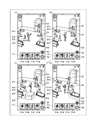
- A is a diagram showing an example of an image displayed on the touch screen of the user terminal
- B is a diagram showing another example of the image displayed on the touch screen of the user terminal
- C is a diagram showing another example.
- D is the figure which shows the other example of the image displayed on the touch screen of a user terminal.
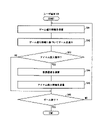
- It is a flowchart which shows a part of the flow of processing executed in a user terminal.
- An example of the data structure of the user behavior history information according to a certain embodiment is shown.
- An example of the data structure of the game information according to a certain embodiment is shown.
- the system according to the present disclosure is a system for providing a game to a plurality of users.
- the system will be described with reference to the drawings. It should be noted that the present disclosure is not limited to these examples, and is indicated by the scope of claims, and it is intended that the present disclosure includes all changes in the meaning and scope equivalent to the scope of claims. To. In the following description, the same elements are designated by the same reference numerals in the description of the drawings, and duplicate description is not repeated.
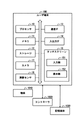
- FIG. 1 is a diagram showing an outline of the system 1 according to the present embodiment.
- the system 1 includes a plurality of user terminals 100 (computers), a server 200, a game play terminal 300 (external device, a second external device), and a distribution terminal 400 (external, first external device).
- FIG. 1 describes user terminals 100A to 100C, in other words, three user terminals 100 as an example of a plurality of user terminals 100, but the number of user terminals 100 is not limited to the illustrated example. .. Further, in the present embodiment, when it is not necessary to distinguish the user terminals 100A to C, it is described as "user terminal 100".
- the user terminal 100, the game play terminal 300, and the distribution terminal 400 are connected to the server 200 via the network 2.
- the network 2 is composed of various mobile communication systems constructed by the Internet and a radio base station (not shown). Examples of this mobile communication system include so-called 3G and 4G mobile communication systems, LTE (Long Term Evolution), and wireless networks (for example, Wi-Fi (registered trademark)) that can be connected to the Internet by a predetermined access point. Will be.
- the game As an example of the game provided by the system 1 (hereinafter referred to as the game), a game mainly played by the user of the game play terminal 300 will be described.
- the user of the game play terminal 300 is referred to as a "player".
- the player advances the game by operating the characters appearing in the game.
- the user of the user terminal 100 plays a role of supporting the progress of the game by the player. Details of this game will be described later.
- the game provided by the system 1 may be a game in which a plurality of users participate, and is not limited to this example.
- Gameplay terminal 300 The game play terminal 300 advances the game in response to an input operation by the player. Further, the game play terminal 300 sequentially distributes information generated by the player's game play (hereinafter, game progress information) to the server 200 in real time.
- game progress information information generated by the player's game play
- the server 200 transmits the game progress information (second data) received in real time from the game play terminal 300 to the user terminal 100. Further, the server 200 mediates the transmission / reception of various information between the user terminal 100, the game play terminal 300, and the distribution terminal 400.
- the distribution terminal 400 generates operation instruction data (first data) in response to an input operation by the user of the distribution terminal 400, and distributes the operation instruction data to the user terminal 100 via the server 200.
- the operation instruction data is data for playing a moving image on the user terminal 100, and specifically, is data for operating a character appearing in the moving image.
- the game play terminal 300 and the distribution terminal 400 are separate devices.
- the game play terminal 300 and the distribution terminal 400 may be an integrated device.
- the user of the distribution terminal 400 is a player of this game.
- the moving image played on the user terminal 100 based on the operation instruction data is a moving image in which the character operated by the player in the game operates. "Movement" is to move at least a part of the character's body, including utterances. Therefore, the motion instruction data according to the present embodiment includes, for example, voice data for causing the character to speak and motion data for moving the character's body.
- the operation instruction data is transmitted to the user terminal 100 after the end of this game.
- the details of the operation instruction data and the moving image played based on the operation instruction data will be described later.
- the user terminal 100 receives game progress information in real time, and uses the information to generate and display a game screen. In other words, the user terminal 100 reproduces the game screen of the game being played by the player by real-time rendering. As a result, the user of the user terminal 100 can visually recognize the same game screen as the game screen that the player is visually recognizing while playing the game at substantially the same timing as the player.
- the user terminal 100 generates information for supporting the progress of the game by the player in response to the input operation by the user, and transmits the information to the game play terminal 300 via the server 200. Details of the information will be described later.
- the user terminal 100 receives the operation instruction data from the distribution terminal 400, and generates and reproduces a moving image (video) using the operation instruction data. In other words, the user terminal 100 renders and reproduces the operation instruction data.
- FIG. 2 is a diagram showing a hardware configuration of the user terminal 100.
- FIG. 3 is a diagram showing a hardware configuration of the server 200.
- FIG. 4 is a diagram showing a hardware configuration of the game play terminal 300.
- FIG. 5 is a diagram showing a hardware configuration of the distribution terminal 400.
- the user terminal 100 is not limited to the smartphone.
- the user terminal 100 may be realized as a feature phone, a tablet computer, a laptop computer (so-called notebook computer), a desktop computer, or the like.
- the user terminal 100 may be a game device suitable for game play.
- the user terminal 100 measures the processor 10, the memory 11, the storage 12, the communication interface (IF) 13, the input / output IF 14, the touch screen 15 (display unit), the camera 17, and the like.
- a distance sensor 18 is provided. These configurations included in the user terminal 100 are electrically connected to each other by a communication bus.
- the user terminal 100 may be provided with an input / output IF 14 to which a display (display unit) configured separately from the user terminal 100 main body can be connected in place of or in addition to the touch screen 15.
- the user terminal 100 may be configured to be communicable with one or more controllers 1020.
- the controller 1020 establishes communication with the user terminal 100 according to a communication standard such as Bluetooth (registered trademark).
- the controller 1020 may have one or more buttons or the like, and transmits an output value based on a user's input operation to the buttons or the like to the user terminal 100.
- the controller 1020 may have various sensors such as an acceleration sensor and an angular velocity sensor, and transmits the output values of the various sensors to the user terminal 100.
- the controller 1020 may have the camera 17 and the distance measuring sensor 18.
- the user terminal 100 causes a user who uses the controller 1020 to input user identification information such as the user's name or login ID via the controller 1020, for example, at the start of a game.
- the user terminal 100 can associate the controller 1020 with the user, and identifies which user the output value belongs to based on the source of the received output value (controller 1020). be able to.
- each user terminal 100 When the user terminal 100 communicates with a plurality of controllers 1020, each user grips each controller 1020 so that the user terminal 100 does not communicate with other devices such as the server 200 via the network 2. Multiplayer can be realized with.
- each user terminal 100 communicates with each other according to a wireless standard such as a wireless LAN (Local Area Network) standard (communication connection is made without going through the server 200), thereby realizing local multiplayer with a plurality of user terminals 100. You can also do it.
- a wireless standard such as a wireless LAN (Local Area Network) standard (communication connection is made without going through the server 200), thereby realizing local multiplayer with a plurality of user terminals 100. You can also do it.
- the user terminal 100 When the above-mentioned multiplayer is realized locally by one user terminal 100, the user terminal 100 may further include at least a part of various functions described later described in the server 200. Further, when the above-mentioned multiplayer is realized locally by a plurality of user terminals 100, the
- the user terminal 100 may communicate with the server 200.
- information indicating a play result such as a result or a win or loss in a certain game may be associated with user identification information and transmitted to the server 200.
- the controller 1020 may be configured to be detachable from the user terminal 100.
- a coupling portion with the controller 1020 may be provided on at least one surface of the housing of the user terminal 100.
- the user terminal 100 may accept the attachment of a storage medium 1030 such as an external memory card via the input / output IF14. As a result, the user terminal 100 can read the program and data recorded on the storage medium 1030.
- the program recorded on the storage medium 1030 is, for example, a game program.
- the user terminal 100 may store the game program acquired by communicating with an external device such as the server 200 in the memory 11 of the user terminal 100, or may store the game program acquired by reading from the storage medium 1030 in the memory 11. You may memorize it in.
- the user terminal 100 includes a communication IF 13, an input / output IF 14, a touch screen 15, a camera 17, and a distance measuring sensor 18 as an example of a mechanism for inputting information to the user terminal 100.
- a communication IF 13 an input / output IF 14
- a touch screen 15 a camera 17, and a distance measuring sensor 18
- an input mechanism can be regarded as an operation part configured to accept a user's input operation.
- the operation unit when the operation unit is configured by at least one of the camera 17 and the distance measuring sensor 18, the operation unit detects an object 1010 in the vicinity of the user terminal 100 and performs an input operation from the detection result of the object. Identify.
- a user's hand as an object 1010, a marker having a predetermined shape, or the like is detected, and an input operation is specified based on the color, shape, movement, or type of the object 1010 obtained as a detection result.
- the user terminal 100 inputs a gesture (a series of movements of the user's hand) detected based on the captured image. Specify and accept as.
- the captured image may be a still image or a moving image.
- the user terminal 100 identifies and accepts the user's operation performed on the input unit 151 of the touch screen 15 as the user's input operation.
- the operation unit is configured by the communication IF 13
- the user terminal 100 identifies and accepts a signal (for example, an output value) transmitted from the controller 1020 as an input operation of the user.
- a signal output from an input device (not shown) different from the controller 1020 connected to the input / output IF14 is specified as an input operation of the user and received.
- the server 200 may be a general-purpose computer such as a workstation or a personal computer.
- the server 200 includes a processor 20, a memory 21, a storage 22, a communication IF 23, and an input / output IF 24. These configurations of the server 200 are electrically connected to each other by a communication bus.
- Gameplay terminal 300 may be a general-purpose computer such as a personal computer.
- the game play terminal 300 includes a processor 30, a memory 31, a storage 32, a communication IF 33, and an input / output IF 34. These configurations of the gameplay terminal 300 are electrically connected to each other by a communication bus.
- the game play terminal 300 is included in the HMD (Head Mounted Display) set 1000 as an example. That is, it can be expressed that the HMD set 1000 is included in the system 1, and the player can also express that the game is played using the HMD set 1000.
- the device for the player to play the game is not limited to the HMD set 1000.
- the device may be any device that allows the player to experience the game virtually.
- the device may be realized as a smartphone, a feature phone, a tablet computer, a laptop computer (so-called laptop computer), a desktop computer, or the like.
- the device may be a game device suitable for game play.
- the HMD set 1000 includes a game play terminal 300, an HMD 500, an HMD sensor 510, a motion sensor 520, a display 530, and a controller 540.
- the HMD 500 includes a monitor 51, a gaze sensor 52, a first camera 53, a second camera 54, a microphone 55, and a speaker 56.
- the controller 540 may include a motion sensor 520.
- the HMD 500 is mounted on the player's head and may provide the player with a virtual space during operation. More specifically, the HMD 500 displays an image for the right eye and an image for the left eye on the monitor 51, respectively. When each eye of the player visually recognizes the respective image, the player can recognize the image as a three-dimensional image based on the parallax of both eyes.
- the HMD 500 may include either a so-called head-mounted display provided with a monitor and a head-mounted device to which a terminal having a monitor such as a smartphone can be attached.
- the monitor 51 is realized as, for example, a non-transparent display device.
- the monitor 51 is arranged on the main body of the HMD 500 so as to be located in front of both eyes of the player. Therefore, the player can immerse himself in the virtual space when he / she visually recognizes the three-dimensional image displayed on the monitor 51.
- the virtual space includes, for example, a background, a player-operable object, and a player-selectable menu image.
- the monitor 51 can be realized as a liquid crystal monitor or an organic EL (Electro Luminescence) monitor included in a so-called smartphone or other information display terminal.
- the monitor 51 can be realized as a transmissive display device.
- the HMD 500 may be an open type such as a glasses type, not a closed type that covers the player's eyes as shown in FIG.
- the transmissive monitor 51 may be temporarily configured as a non-transparent display device by adjusting its transmittance.
- the monitor 51 may include a configuration that simultaneously displays a part of the image constituting the virtual space and the real space.
- the monitor 51 may display an image of the real space taken by the camera mounted on the HMD 500, or may make the real space visible by setting a part of the transmittance to be high.
- the monitor 51 may include a sub monitor for displaying an image for the right eye and a sub monitor for displaying an image for the left eye.
- the monitor 51 may be configured to display the image for the right eye and the image for the left eye as a unit.
- the monitor 51 includes a high-speed shutter. The high-speed shutter operates so that the image for the right eye and the image for the left eye can be alternately displayed so that the image is recognized by only one of the eyes.
- the HMD 500 includes a plurality of light sources (not shown). Each light source is realized by, for example, an LED (Light Emitting Diode) that emits infrared rays.
- the HMD sensor 510 has a position tracking function for detecting the movement of the HMD 500. More specifically, the HMD sensor 510 reads a plurality of infrared rays emitted by the HMD 500 and detects the position and inclination of the HMD 500 in the real space.
- the HMD sensor 510 may be realized by a camera.
- the HMD sensor 510 can detect the position and tilt of the HMD 500 by executing the image analysis process using the image information of the HMD 500 output from the camera.
- the HMD 500 may include a sensor (not shown) as a position detector in place of the HMD sensor 510 or in addition to the HMD sensor 510.
- the HMD 500 can use the sensor to detect the position and tilt of the HMD 500 itself.
- the sensor is an angular velocity sensor, a geomagnetic sensor, or an acceleration sensor
- the HMD 500 may use any of these sensors instead of the HMD sensor 510 to detect its position and tilt.
- the angular velocity sensor detects the angular velocity around the three axes of the HMD 500 in real space over time.
- the HMD 500 calculates the temporal change of the angle around the three axes of the HMD 500 based on each angular velocity, and further calculates the inclination of the HMD 500 based on the temporal change of the angle.
- the gaze sensor 52 detects the direction in which the line of sight of the player's right eye and left eye is directed. That is, the gaze sensor 52 detects the line of sight of the player. Detection of the direction of the line of sight is realized, for example, by a known eye tracking function.
- the gaze sensor 52 is realized by a sensor having the eye tracking function.
- the gaze sensor 52 preferably includes a sensor for the right eye and a sensor for the left eye.
- the gaze sensor 52 may be, for example, a sensor that detects the angle of rotation of each eyeball by irradiating the player's right eye and left eye with infrared light and receiving the reflected light from the cornea and the iris with respect to the irradiation light.
- the gaze sensor 52 can detect the line of sight of the player based on each detected rotation angle.
- the first camera 53 photographs the lower part of the player's face. More specifically, the first camera 53 photographs the nose, mouth, and the like of the player.
- the second camera 54 photographs the eyes and eyebrows of the player.
- the housing on the player side of the HMD 500 is defined as the inside of the HMD 500, and the housing on the opposite side of the player of the HMD 500 is defined as the outside of the HMD 500.
- the first camera 53 may be located outside the HMD 500 and the second camera 54 may be located inside the HMD 500.
- the images generated by the first camera 53 and the second camera 54 are input to the game play terminal 300.
- the first camera 53 and the second camera 54 may be realized as one camera, and the player's face may be photographed by this one camera.
- the microphone 55 converts the player's utterance into an audio signal (electrical signal) and outputs it to the game play terminal 300.
- the speaker 56 converts the voice signal into voice and outputs it to the player.
- the HMD 500 may include earphones instead of the speaker 56.
- the controller 540 is connected to the game play terminal 300 by wire or wirelessly.
- the controller 540 receives an input of a command from the player to the game play terminal 300.
- the controller 540 is configured to be grippable by the player.
- the controller 540 is configured to be wearable on a player's body or a portion of clothing.
- the controller 540 may be configured to output at least one of vibration, sound, and light based on the signal transmitted from the gameplay terminal 300.
- the controller 540 receives from the player an operation for controlling the position and movement of an object arranged in the virtual space.
- the controller 540 includes a plurality of light sources. Each light source is realized, for example, by an LED that emits infrared rays.
- the HMD sensor 510 has a position tracking function. In this case, the HMD sensor 510 reads a plurality of infrared rays emitted by the controller 540 and detects the position and tilt of the controller 540 in the real space.
- the HMD sensor 510 may be implemented by a camera. In this case, the HMD sensor 510 can detect the position and tilt of the controller 540 by executing the image analysis process using the image information of the controller 540 output from the camera.
- the motion sensor 520 is attached to the player's hand at a certain stage and detects the movement of the player's hand. For example, the motion sensor 520 detects the rotation speed, the number of rotations, and the like of the hand. The detected signal is sent to the game play terminal 300.
- the motion sensor 520 is provided in the controller 540, for example.
- the motion sensor 520 is provided, for example, in a controller 540 configured to be grippable by the player.
- the controller 540 is attached to something that does not easily fly by being attached to the player's hand, such as a glove type.
- a sensor not attached to the player may detect the movement of the player's hand.
- the signal of the camera that shoots the player may be input to the game play terminal 300 as a signal indicating the operation of the player.
- the motion sensor 520 and the game play terminal 300 are wirelessly connected to each other.
- the communication mode is not particularly limited, and for example, Bluetooth or other known communication method is used.
- the display 530 displays an image similar to the image displayed on the monitor 51. As a result, users other than the player wearing the HMD 500 can view the same image as the player.
- the image displayed on the display 530 does not have to be a three-dimensional image, and may be an image for the right eye or an image for the left eye. Examples of the display 530 include a liquid crystal display and an organic EL monitor.
- the game play terminal 300 operates a character to be operated by the player based on various information acquired from each part of the HMD 500, the controller 540, and the motion sensor 520, and advances the game.
- the "movement" here includes moving each part of the body, changing posture, changing facial expressions, moving, uttering, touching and moving objects placed in virtual space, and characters. This includes using weapons, tools, etc. to grasp. That is, in this game, when the player moves each part of the body, the character also moves each part of the body in the same manner as the player. Further, in this game, the character speaks the content spoken by the player. In other words, in this game, the character is an avatar object that behaves as a player's alter ego. As an example, at least part of the character's actions may be performed by input to the controller 540 by the player.
- the motion sensor 520 is attached to, for example, both hands of the player, both feet of the player, the waist of the player, and the head of the player.
- the motion sensors 520 attached to both hands of the player may be provided in the controller 540.
- the motion sensor 520 attached to the head of the player may be provided in the HMD 500.
- the motion sensor 520 may also be attached to the user's elbows and knees. By increasing the number of motion sensors 520 attached to the player, the movement of the player can be more accurately reflected in the character.
- the player may wear a suit to which one or more motion sensors 520 are attached instead of attaching the motion sensor 520 to each part of the body. That is, the method of motion capture is not limited to the example using the motion sensor 520.
- the distribution terminal 400 may be a mobile terminal such as a smartphone, a PDA (Personal Digital Assistant), or a tablet computer. Further, the distribution terminal 400 may be a so-called stationary terminal such as a desktop personal computer.
- the distribution terminal 400 includes a processor 40, a memory 41, a storage 42, a communication IF 43, an input / output IF 44, and a touch screen 45.
- the distribution terminal 400 may include an input / output IF 44 to which a display (display unit) configured separately from the distribution terminal 400 main body can be connected in place of or in addition to the touch screen 45.
- Controller 1021 may have one or more physical input mechanisms such as buttons, levers, sticks, and wheels.
- the controller 1021 transmits an output value based on an input operation input to the input mechanism by the operator of the distribution terminal 400 (player in the present embodiment) to the distribution terminal 400.
- the controller 1021 may have various sensors such as an acceleration sensor and an angular velocity sensor, and may transmit the output values of the various sensors to the distribution terminal 400. The above output value is accepted by the distribution terminal 400 via the communication IF43.
- the distribution terminal 400 may include a camera and a distance measuring sensor (both not shown).
- the controller 1021 may have a camera and a distance measuring sensor.
- the distribution terminal 400 includes a communication IF43, an input / output IF44, and a touch screen 45 as an example of a mechanism for inputting information to the distribution terminal 400.
- a communication IF43 an input / output IF44
- a touch screen 45 an example of a mechanism for inputting information to the distribution terminal 400.
- Each of the above-mentioned parts as an input mechanism can be regarded as an operation part configured to accept a user's input operation.
- the distribution terminal 400 identifies and accepts the user's operation performed on the input unit 451 of the touch screen 45 as the user's input operation.
- the distribution terminal 400 identifies and accepts a signal (for example, an output value) transmitted from the controller 1021 as an input operation of the user.
- the distribution terminal 400 identifies and accepts a signal output from an input device (not shown) connected to the input / output IF44 as a user's input operation.
- the processors 10, 20, 30, and 40 control the overall operation of the user terminal 100, the server 200, the game play terminal 300, and the distribution terminal 400, respectively.
- Processors 10, 20, 30, and 40 include a CPU (Central Processing Unit), an MPU (Micro Processing Unit), and a GPU (Graphics Processing Unit).
- Processors 10, 20, 30, and 40 read programs from storages 12, 22, 32, and 42, which will be described later, respectively. Then, the processors 10, 20, 30, and 40 expand the read programs into the memories 11, 21, 31, and 41, which will be described later, respectively.
- Processors 10, 20, and 30 execute the expanded program.
- the memories 11, 21, 31, and 41 are the main storage devices.
- the memories 11, 21, 31 and 41 are composed of storage devices such as a ROM (ReadOnlyMemory) and a RAM (RandomAccessMemory).
- the memory 11 provides a work area to the processor 10 by temporarily storing a program and various data read from the storage 12 described later by the processor 10.
- the memory 11 also temporarily stores various data generated while the processor 10 is operating according to the program.
- the memory 21 provides a work area to the processor 20 by temporarily storing various programs and data read from the storage 22 described later by the processor 20.
- the memory 21 also temporarily stores various data generated while the processor 20 is operating according to the program.
- the memory 31 provides a work area to the processor 30 by temporarily storing various programs and data read from the storage 32 described later by the processor 30.
- the memory 31 also temporarily stores various data generated while the processor 30 is operating according to the program.
- the memory 41 provides a work area to the processor 40 by temporarily storing the program and various data read from the storage 42 described later by the processor 40.
- the memory 41 also temporarily stores various data generated while the processor 40 is operating according to the program.
- the program executed by the processors 10 and 30 may be the game program of this game.
- the program executed by the processor 40 may be a distribution program for realizing distribution of operation instruction data.
- the processor 10 may further execute a viewing program for realizing the reproduction of the moving image.
- the program executed by the processor 20 may be at least one of the above-mentioned game program, distribution program, and viewing program.
- the processor 20 executes at least one of a game program, a distribution program, and a viewing program in response to a request from at least one of a user terminal 100, a game play terminal 300, and a distribution terminal 400.
- the distribution program and the viewing program may be executed in parallel.
- the game program may be a program that realizes the game by the cooperation of the user terminal 100, the server 200, and the game play terminal 300.
- the distribution program may be a program that realizes distribution of operation instruction data by cooperation between the server 200 and the distribution terminal 400.
- the viewing program may be a program that realizes the reproduction of the moving image by the cooperation between the user terminal 100 and the server 200.
- Storages 12, 22, 32, 42 are auxiliary storage devices.
- the storages 12, 22, 32, and 42 are composed of a storage device such as a flash memory or an HDD (Hard Disk Drive).
- various data related to the game are stored in the storages 12 and 32.
- Various data related to the distribution of the operation instruction data are stored in the storage 42.
- various data related to the reproduction of the moving image are stored in the storage 12.
- the storage 22 may store at least a part of various data related to the game, the distribution of the operation instruction data, and the reproduction of the moving image.
- the communication IFs 13, 23, 33, and 43 control the transmission and reception of various data in the user terminal 100, the server 200, the game play terminal 300, and the distribution terminal 400, respectively.
- the communication IFs 13, 23, 33, and 43 are, for example, communication using a wireless LAN (Local Area Network), Internet communication via a wired LAN, a wireless LAN, or a mobile phone network, communication using a short-range wireless communication, or the like. Control.
- a wireless LAN Local Area Network
- the input / output IFs 14, 24, 34, and 44 are interfaces for the user terminal 100, the server 200, the game play terminal 300, and the distribution terminal 400 to receive data input and to output data, respectively.
- the input / output IFs 14, 24, 34, and 44 may input / output data via USB (Universal Serial Bus) or the like.
- Input / output IFs 14, 24, 34, 44 may include physical buttons, cameras, microphones, speakers, mice, keyboards, displays, sticks, levers and the like. Further, the input / output IFs 14, 24, 34, 44 may include a connection unit for transmitting / receiving data to / from a peripheral device.
- the touch screen 15 is an electronic component that combines an input unit 151 and a display unit 152 (display).
- the touch screen 45 is an electronic component that combines an input unit 451 and a display unit 452.
- the input units 151 and 451 are, for example, touch-sensitive devices, and are configured by, for example, a touch pad.
- the display units 152 and 452 are configured by, for example, a liquid crystal display, an organic EL (Electro-Luminescence) display, or the like.
- the input units 151 and 451 detect the position where the user's operation (mainly a physical contact operation such as a touch operation, a slide operation, a swipe operation, and a tap operation) is input to the input surface, and information indicating the position. It has a function to transmit as an input signal.
- the input units 151 and 451 may include touch sensing units (not shown).
- the touch sensing unit may adopt any method such as a capacitance method or a resistance film method.
- the user terminal 100 and the distribution terminal 400 may be provided with one or more sensors for specifying the holding posture of the user terminal 100 and the distribution terminal 400, respectively.
- This sensor may be, for example, an acceleration sensor, an angular velocity sensor, or the like.
- the processors 10 and 40 each specify the holding postures of the user terminal 100 and the distribution terminal 400 from the output of the sensor, and perform processing according to the holding posture. It will also be possible.
- the processors 10 and 40 may be vertical screen displays for displaying vertically long images on the display units 152 and 452 when the user terminal 100 and the distribution terminal 400 are held vertically, respectively.
- a horizontally long image may be displayed on the display unit as a horizontal screen display.
- the processors 10 and 40 may be able to switch between the vertical screen display and the horizontal screen display according to the holding postures of the user terminal 100 and the distribution terminal 400, respectively.
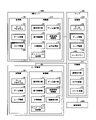
- FIG. 6 is a block diagram showing a functional configuration of a user terminal 100, a server 200, and an HMD set 1000 included in the system 1.
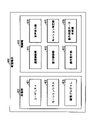
- FIG. 7 is a block diagram showing a functional configuration of the distribution terminal 400 shown in FIG.
- the user terminal 100 has a function as an input device that accepts a user's input operation and a function as an output device that outputs a game image or sound.
- the user terminal 100 functions as a control unit 110 and a storage unit 120 in cooperation with a processor 10, a memory 11, a storage 12, a communication IF 13, an input / output IF 14, a touch screen 15, and the like.
- the server 200 has a function of mediating the transmission / reception of various information between the user terminal 100, the HMD set 1000, and the distribution terminal 400.
- the server 200 functions as a control unit 210 and a storage unit 220 by the cooperation of the processor 20, the memory 21, the storage 22, the communication IF23, the input / output IF24, and the like.
- the HMD set 1000 (game play terminal 300) has a function as an input device for receiving input operations of a player, a function as an output device for outputting game images and sounds, and a user of game progress information via a server 200. It has a function of transmitting to the terminal 100 in real time.
- the HMD set 1000 is a control unit 310 by the cooperation of the processor 30, the memory 31, the storage 32, the communication IF 33, the input / output IF 34, and the HMD 500, the HMD sensor 510, the motion sensor 520, the controller 540, and the like of the game play terminal 300. And functions as a storage unit 320.
- the distribution terminal 400 has a function of generating operation instruction data and transmitting the operation instruction data to the user terminal 100 via the server 200.
- the distribution terminal 400 functions as a control unit 410 and a storage unit 420 in cooperation with a processor 40, a memory 41, a storage 42, a communication IF 43, an input / output IF 44, a touch screen 45, and the like.
- the storage unit 120 stores the game program 131 (program), the game information 132, and the user information 133.
- the storage unit 220 stores the game program 231, the game information 232, the user information 233, and the user list 234.
- the storage unit 320 stores the game program 331, the game information 332, and the user information 333.
- the storage unit 420 stores the user list 421, the motion list 422, and the distribution program 423 (program, second program).
- the game programs 131, 231 and 331 are game programs executed by the user terminal 100, the server 200, and the HMD set 1000, respectively. This game is realized by the cooperative operation of each device based on the game programs 131, 231 and 331.
- the game programs 131 and 331 may be stored in the storage unit 220 and downloaded to the user terminal 100 and the HMD set 1000, respectively.
- the user terminal 100 renders the data received from the distribution terminal 400 based on the game program 131, and reproduces the moving image.
- the game program 131 is also a program for playing a moving image using the moving image instruction data distributed from the distribution terminal 400.
- the program for playing the moving image may be different from the game program 131.
- the storage unit 120 stores a program for playing the moving image separately from the game program 131.
- the game information 132, 232, and 332 are data referred to when the user terminal 100, the server 200, and the HMD set 1000 execute the game program, respectively.
- the user information 133, 233, and 333 are data relating to the user account of the user terminal 100.
- the game information 232 is the game information 132 of each user terminal 100 and the game information 332 of the HMD set 1000.
- the user information 233 is the user information of the player included in the user information 133 of each user terminal 100 and the user information 333.
- the user information 333 is the user information 133 of each user terminal 100 and the user information of the player.
- the user list 234 and the user list 421 are a list of users who have participated in the game.
- the user list 234 and the user list 421 may include a list of users who participated in the most recent gameplay by the player, as well as a list of users who participated in each gameplay before the gameplay.
- the motion list 422 is a list of a plurality of motion data created in advance.
- the motion list 422 is, for example, a list in which motion data is associated with each of the information (for example, a motion name) that identifies each motion.
- the distribution program 423 is a program for realizing distribution of operation instruction data for playing a moving image on the user terminal 100 to the user terminal 100.
- the control unit 210 comprehensively controls the server 200 by executing the game program 231 stored in the storage unit 220. For example, the control unit 210 mediates the transmission / reception of various information between the user terminal 100, the HMD set 1000, and the distribution terminal 400.
- the control unit 210 functions as a communication mediation unit 211, a log generation unit 212, and a list generation unit 213 according to the description of the game program 231.
- the control unit 210 can also function as another functional block (not shown) for mediating the transmission / reception of various information related to game play and distribution of operation instruction data, and for supporting the progress of the game.
- the communication mediation unit 211 mediates the transmission and reception of various information between the user terminal 100, the HMD set 1000, and the distribution terminal 400. For example, the communication mediation unit 211 transmits the game progress information received from the HMD set 1000 to the user terminal 100.
- the game progress information includes data indicating the movement of the character operated by the player, the parameters of the character, information on items and weapons possessed by the character, enemy characters, and the like.
- the server 200 transmits the game progress information to the user terminals 100 of all the users participating in the game. In other words, the server 200 transmits common game progress information to the user terminals 100 of all users participating in the game. As a result, the game progresses in the same manner as the HMD set 1000 on each of the user terminals 100 of all the users participating in the game.
- the communication mediation unit 211 transmits the information received from any one of the user terminals 100 to support the progress of the game by the player to the other user terminals 100 and the HMD set 1000.
- the information may be item information indicating an item provided to the player (character), which is an item for the player to advance the game advantageously.
- the item information includes information (user name, user ID, etc.) indicating the user who provided the item.
- the communication mediation unit 211 may mediate the distribution of the operation instruction data from the distribution terminal 400 to the user terminal 100.
- the log generation unit 212 generates a game progress log based on the game progress information received from the HMD set 1000.
- the list generation unit 213 generates the user list 234 after the end of the game play. Although the details will be described later, each user in the user list 234 is associated with a tag indicating the content of the support provided by the user to the player.
- the list generation unit 213 generates a tag based on the game progress log generated by the log generation unit 212, and associates it with the corresponding user.
- the list generation unit 213 may associate the content of the support provided by each user to the player, which is input by the game operator or the like using a terminal device such as a personal computer, with the corresponding user as a tag. ..
- the user terminal 100 transmits information indicating the user to the server 200 based on the user's operation. For example, the user terminal 100 transmits the user ID entered by the user to the server 200. That is, the server 200 holds information indicating each user for all the users participating in the game.
- the list generation unit 213 may generate the user list 234 using the information.
- the control unit 310 comprehensively controls the HMD set 1000 by executing the game program 331 stored in the storage unit 320. For example, the control unit 310 advances the game according to the game program 331 and the operation of the player. Further, the control unit 310 communicates with the server 200 to send and receive information as needed while the game is in progress. The control unit 310 may send and receive information directly to and from the user terminal 100 without going through the server 200.
- the control unit 310 has an operation reception unit 311, a display control unit 312, a UI control unit 313, an animation generation unit 314, a game progress unit 315, a virtual space control unit 316, and a reaction processing unit 317 according to the description of the game program 331. Functions as.
- the control unit 310 can also function as another functional block (not shown) for controlling characters appearing in the game, depending on the nature of the game to be executed.
- the operation reception unit 311 detects and accepts the input operation of the player.
- the operation reception unit 311 receives signals input from the HMD 500, the motion sensor 520, the controller 540, etc., determines what kind of input operation has been performed, and outputs the result to each element of the control unit 310.
- the UI control unit 313 controls a user interface (hereinafter, UI) image to be displayed on the monitor 51, the display 530, and the like.
- UI image is a tool for the player to make an input necessary for the progress of the game to the HMD set 1000, or a tool for obtaining information output during the progress of the game from the HMD set 1000.
- UI images are, but are not limited to, icons, buttons, lists, menu screens, and the like.
- the animation generation unit 314 generates an animation showing the motion of various objects based on the control mode of various objects.
- the animation generation unit 314 may generate an animation or the like that expresses how an object (for example, a player's avatar object) moves, moves its mouth, or changes its facial expression as if it were there. ..
- the game progress unit 315 progresses the game based on the game program 331, the input operation by the player, the operation of the avatar object in response to the input operation, and the like. For example, the game progress unit 315 performs a predetermined game process when the avatar object performs a predetermined operation. Further, for example, the game progress unit 315 may receive information representing a user's operation on the user terminal 100 and perform game processing based on the user's operation. Further, the game progress unit 315 generates game progress information according to the progress of the game and transmits it to the server 200. The game progress information is transmitted to the user terminal 100 via the server 200. As a result, the progress of the game in the HMD set 1000 is shared in the user terminal 100. In other words, the progress of the game in the HMD set 1000 and the progress of the game in the user terminal 100 are synchronized.
- the virtual space control unit 316 performs various controls related to the virtual space provided to the player according to the progress of the game. As an example, the virtual space control unit 316 creates various objects and arranges them in the virtual space. Further, the virtual space control unit 316 arranges the virtual camera in the virtual space. Further, the virtual space control unit 316 operates various objects arranged in the virtual space according to the progress of the game. Further, the virtual space control unit 316 controls the position and inclination of the virtual camera arranged in the virtual space according to the progress of the game.
- the display control unit 312 outputs a game screen reflecting the processing results executed by each of the above-mentioned elements to the monitor 51 and the display 530.
- the display control unit 312 may display an image based on the field of view from the virtual camera arranged in the virtual space on the monitor 51 and the display 530 as a game screen. Further, the display control unit 312 may include the animation generated by the animation generation unit 314 in the game screen. Further, the display control unit 312 may superimpose and draw the above-mentioned UI image controlled by the UI control unit 313 on the game screen.
- the reaction processing unit 317 receives feedback on the reaction of the user of the user terminal 100 to the game play of the player, and outputs this to the player.
- the user terminal 100 can create a comment (message) addressed to the avatar object based on the input operation of the user.
- the reaction processing unit 317 receives the comment data of the comment and outputs it.
- the reaction processing unit 317 may display the text data corresponding to the user's comment on the monitor 51 and the display 530, or may output the voice data corresponding to the user's comment from a speaker (not shown). In the former case, the reaction processing unit 317 may superimpose and draw an image corresponding to the text data (that is, an image including the content of the comment) on the game screen.
- the control unit 110 comprehensively controls the user terminal 100 by executing the game program 131 stored in the storage unit 120. For example, the control unit 110 advances the game according to the game program 131 and the user's operation. Further, the control unit 110 communicates with the server 200 to send and receive information as needed while the game is in progress. The control unit 110 may send and receive information directly to and from the HMD set 1000 without going through the server 200.
- the control unit 110 has an operation reception unit 111, a display control unit 112, a UI control unit 113, an animation generation unit 114, a game progress unit 115, a virtual space control unit 116, and a moving image playback unit 117 according to the description of the game program 131. Functions as.
- the control unit 110 can also function as other functional blocks (not shown) for the progress of the game, depending on the nature of the game being played.
- the operation reception unit 111 detects and accepts a user's input operation to the input unit 151.
- the operation reception unit 111 determines what input operation has been performed from the action exerted by the user on the console via the touch screen 15 and other input / output IF 14, and outputs the result to each element of the control unit 110. do.
- the operation receiving unit 111 receives an input operation for the input unit 151, detects the coordinates of the input position of the input operation, and specifies the type of the input operation.
- the operation receiving unit 111 specifies, for example, a touch operation, a slide operation, a swipe operation, a tap operation, and the like as types of input operations. Further, the operation receiving unit 111 detects that the contact input is canceled from the touch screen 15 when the continuously detected input is interrupted.
- the UI control unit 113 controls a UI image to be displayed on the display unit 152 in order to construct a UI according to at least one of a user's input operation and received game progress information.
- the UI image is a tool for the user to make an input necessary for the progress of the game to the user terminal 100, or a tool for obtaining information output during the progress of the game from the user terminal 100.
- UI images are, but are not limited to, icons, buttons, lists, menu screens, and the like.
- the animation generation unit 114 generates an animation showing the motion of various objects based on the control mode of various objects.
- the game progress unit 115 advances the game based on the game program 131, the received game progress information, the input operation by the user, and the like.
- the game progress unit 115 transmits information about the game process to the HMD set 1000 via the server 200.
- the predetermined game processing is shared in the HMD set 1000.
- the predetermined game process is, for example, a process of providing an item to the avatar object, and in this example, the information related to the game process is the item information described above.
- the virtual space control unit 116 performs various controls related to the virtual space provided to the user according to the progress of the game.
- the virtual space control unit 116 creates various objects and arranges them in the virtual space.
- the virtual space control unit 116 arranges the virtual camera in the virtual space.
- the virtual space control unit 116 operates various objects arranged in the virtual space according to the progress of the game, specifically, the received game progress information.
- the virtual space control unit 316 controls the position and inclination of the virtual camera arranged in the virtual space according to the progress of the game, specifically, the received game progress information.
- the display control unit 112 outputs to the display unit 152 a game screen in which the processing results executed by each of the above elements are reflected.
- the display control unit 112 may display an image based on the field of view from the virtual camera arranged in the virtual space provided to the user on the display unit 152 as a game screen. Further, the display control unit 112 may include the animation generated by the animation generation unit 114 in the game screen. Further, the display control unit 112 may superimpose and draw the above-mentioned UI image controlled by the UI control unit 113 on the game screen.
- the game screen displayed on the display unit 152 is the same game screen as the game screen displayed on the other user terminal 100 and the HMD set 1000.
- the video playback unit 117 analyzes (renders) the operation instruction data received from the distribution terminal 400 and reproduces the video.
- the control unit 410 comprehensively controls the distribution terminal 400 by executing a program (not shown) stored in the storage unit 420. For example, the control unit 410 generates operation instruction data and distributes it to the user terminal 100 according to the operation of the program and the user (player in this embodiment) of the distribution terminal 400. Further, the control unit 410 communicates with the server 200 as necessary to send and receive information. The control unit 410 may send and receive information directly to and from the user terminal 100 without going through the server 200.
- the control unit 410 functions as a communication control unit 411, a display control unit 412, an operation reception unit 413, a voice reception unit 414, a motion identification unit 415, and an operation instruction data generation unit 416 according to the description of the program.
- the control unit 410 can also function as other functional blocks (not shown) for the generation and distribution of operation instruction data.
- the communication control unit 411 controls transmission / reception of information to / from the server 200 or the user terminal 100 via the server 200.
- the communication control unit 411 receives the user list 421 from the server 200 as an example. Further, the communication control unit 411 transmits the operation instruction data to the user terminal 100 as an example.
- the display control unit 412 outputs various screens reflecting the processing results executed by each element to the display unit 452. As an example, the display control unit 412 displays a screen including the received user list 234. Further, as an example, the display control unit 412 displays a screen including a motion list 422 for allowing the player to select motion data for operating the avatar object included in the motion instruction data to be distributed.
- the operation reception unit 413 detects and accepts the input operation of the player with respect to the input unit 151.
- the operation reception unit 111 determines what kind of input operation has been performed from the action exerted by the player on the console via the touch screen 45 and other input / output IF44s, and outputs the result to each element of the control unit 410. do.
- the operation receiving unit 413 receives an input operation for the input unit 451, detects the coordinates of the input position of the input operation, and specifies the type of the input operation.
- the operation reception unit 413 specifies, for example, a touch operation, a slide operation, a swipe operation, a tap operation, and the like as types of input operations. Further, the operation reception unit 413 detects that the contact input is canceled from the touch screen 45 when the continuously detected input is interrupted.
- the voice reception unit 414 receives the voice generated around the distribution terminal 400 and generates the voice data of the voice.
- the voice receiving unit 414 receives the voice spoken by the player and generates voice data of the voice.
- the motion specifying unit 415 specifies the motion data selected by the player from the motion list 422 according to the input operation of the player.
- the operation instruction data generation unit 416 generates operation instruction data.
- the motion instruction data generation unit 416 generates motion instruction data including the generated voice data and the specified motion data.
- the functions of the HMD set 1000, the server 200, and the user terminal 100 shown in FIG. 6 and the functions of the distribution terminal 400 shown in FIG. 7 are merely examples.
- Each device of the HMD set 1000, the server 200, the user terminal 100, and the distribution terminal 400 may have at least a part of the functions of the other devices.
- another device other than the HMD set 1000, the server 200, the user terminal 100, and the distribution terminal 400 may be a component of the system 1, and the other device may be made to execute a part of the processing in the system 1.
- the computer that executes the game program in the present embodiment may be any of the HMD set 1000, the server 200, the user terminal 100, the distribution terminal 400, and other devices, or a plurality of these. It may be realized by the combination of the devices of.
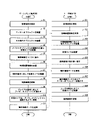
- FIG. 8 is a flowchart showing an example of a flow of control processing of the virtual space provided to the player and the virtual space provided to the user of the user terminal 100.
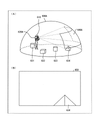
- FIG. 9 is a diagram showing a virtual space 600A provided to the player and a field of view image visually recognized by the player according to a certain embodiment.
- FIG. 10 is a diagram showing a virtual space 600B provided to a user of a user terminal 100 and a field of view image visually recognized by the user according to a certain embodiment.
- virtual space 600 when it is not necessary to distinguish between the virtual spaces 600A and 600B, it is described as "virtual space 600".
- step S1 the processor 30 defines the virtual space 600A shown in FIG. 9 as the virtual space control unit 316.
- the processor 30 defines a virtual space 600A by using virtual space data (not shown).
- the virtual space data may be stored in the game play terminal 300, may be generated by the processor 30 based on the game program 331, or may be acquired by the processor 30 from an external device such as the server 200. May be good.
- the virtual space 600 has an all-sky spherical structure that covers the entire 360-degree direction of the point defined as the center.
- the celestial sphere in the upper half of the virtual space 600 is illustrated so as not to complicate the explanation.
- step S2 the processor 30 arranges the avatar object 610 (character) in the virtual space 600A as the virtual space control unit 316.
- the avatar object 610 is an avatar object associated with the player and operates according to the input operation of the player.
- step S3 the processor 30 arranges other objects in the virtual space 600A as the virtual space control unit 316.
- the processor 30 arranges the objects 631 to 634.
- Other objects imitate, for example, character objects (so-called non-player characters, NPCs) that operate according to the game program 331, operation objects such as virtual hands, animals, plants, artificial objects, and natural objects that are arranged as the game progresses.
- Can include objects and the like.
- step S4 the processor 30 arranges the virtual camera 620A in the virtual space 600A as the virtual space control unit 316. As an example, the processor 30 arranges the virtual camera 620A at the position of the head of the avatar object 610.
- step S5 the processor 30 displays the field of view image 650 on the monitor 51 and the display 530.
- the processor 30 defines a field of view 640A, which is the field of view from the virtual camera 620A in the virtual space 600A, depending on the initial position and tilt of the virtual camera 620A.
- the processor 30 defines the field of view image 650 corresponding to the field of view area 640A.
- the processor 30 outputs the field of view image 650 to the monitor 51 and the display 530 to display the field of view image 650 on the HMD 500 and the display 530.
- a part of the object 634 is included in the field of view region 640A, so that the field of view image 650 is one of the objects 634 as shown in FIG. 9B. Including the part.
- step S6 the processor 30 transmits the initial arrangement information to the user terminal 100 via the server 200.
- the initial placement information is information indicating the initial placement position of various objects in the virtual space 600A.
- the initial placement information includes the avatar object 610 and the information of the initial placement positions of the objects 631 to 634.
- the initial placement information can also be expressed as one of the game progress information.
- step S7 the processor 30 controls the virtual camera 620A according to the movement of the HMD 500 as the virtual space control unit 316. Specifically, the processor 30 controls the orientation and tilt of the virtual camera 620A according to the movement of the HMD 500, that is, the posture of the player's head. As will be described later, when the player moves the head (changes the posture of the head), the processor 30 moves the head of the avatar object 610 in accordance with this movement. The processor 30 controls the direction and tilt of the virtual camera 620A so that the direction of the line of sight of the avatar object 610 and the direction of the line of sight of the virtual camera 620A match, for example. In step S8, the processor 30 updates the field of view image 650 in response to changes in the orientation and tilt of the virtual camera 620A.
- step S9 the processor 30 moves the avatar object 610 as the virtual space control unit 316 according to the movement of the player.
- the processor 30 moves the avatar object 610 in the virtual space 600A in response to the player moving in the real space.
- the processor 30 moves the head of the avatar object 610 in the virtual space 600A in response to the player moving the head in the real space.
- step S10 the processor 30 moves the virtual camera 620A as the virtual space control unit 316 so as to follow the avatar object 610. That is, the virtual camera 620A is always at the position of the head of the avatar object 610 even if the avatar object 610 moves.
- the processor 30 updates the field of view image 650 according to the movement of the virtual camera 620A. That is, the processor 30 updates the view area 640A according to the posture of the player's head and the position of the virtual camera 620A in the virtual space 600A. As a result, the view image 650 is updated.
- step S11 the processor 30 transmits the operation instruction data of the avatar object 610 to the user terminal 100 via the server 200.
- the operation instruction data here is motion data that captures the player's motion during the virtual experience (for example, during game play), voice data of the voice spoken by the player, and operation data indicating the content of the input operation to the controller 540. Includes at least one.
- the operation instruction data is transmitted to the user terminal 100 as, for example, game progress information.
- steps S7 to S11 are continuously and repeatedly executed while the player is playing the game.
- step S21 the processor 10 of the user terminal 100 of the user 3 defines the virtual space 600B shown in FIG. 10 as the virtual space control unit 116.
- the processor 10 defines a virtual space 600B by using virtual space data (not shown).
- the virtual space data may be stored in the user terminal 100, may be generated by the processor 10 based on the game program 131, or may be acquired by the processor 10 from an external device such as the server 200. good.
- step S22 the processor 10 receives the initial placement information.
- step S23 the processor 10 arranges various objects in the virtual space 600B as the virtual space control unit 116 according to the initial arrangement information.
- the various objects are the avatar object 610 and the objects 631 to 634.
- step S24 the processor 10 arranges the virtual camera 620B in the virtual space 600B as the virtual space control unit 116. As an example, the processor 10 arranges the virtual camera 620B at the position shown in FIG. 10 (A).
- step S25 the processor 10 displays the field of view image 660 on the display unit 152.
- the processor 10 defines a field of view 640B, which is the field of view from the virtual camera 620B in the virtual space 600B, according to the initial position and tilt of the virtual camera 620B. Then, the processor 10 defines the field of view image 660 corresponding to the field of view area 640B.
- the processor 10 outputs the field of view image 660 to the display unit 152 so that the field of view image 660 is displayed on the display unit 152.
- the field of view image 660 is the avatar object 610 as shown in FIG. 10B. And the object 631.
- step S26 the processor 10 receives the operation instruction data.
- step S27 the processor 10 moves the avatar object 610 in the virtual space 600B as the virtual space control unit 116 according to the operation instruction data. In other words, the processor 10 reproduces the video in which the avatar object 610 is operating by real-time rendering.
- step S28 the processor 10 controls the virtual camera 620B as the virtual space control unit 116 according to the operation of the user accepted as the operation reception unit 111.
- step S29 the processor 10 updates the view image 660 in response to changes in the position of the virtual camera 620B in the virtual space 600B, the orientation and tilt of the virtual camera 620B.
- the processor 10 may automatically control the virtual camera 620B according to the movement of the avatar object 610, for example, the movement of the avatar object 610 or the change of the orientation.
- the processor 10 may automatically move the virtual camera 620B so as to always shoot the avatar object 610 from the front, or change the orientation and tilt.
- the processor 10 may automatically move the virtual camera 620B so as to always shoot the avatar object 610 from the rear, or change the orientation and tilt according to the movement of the avatar object 610. good.
- the avatar object 610 operates according to the movement of the player.
- the operation instruction data indicating this operation is transmitted to the user terminal 100.
- the avatar object 610 operates according to the received operation instruction data.
- the avatar object 610 performs the same operation in the virtual space 600A and the virtual space 600B.
- the user 3 can visually recognize the operation of the avatar object 610 according to the operation of the player by using the user terminal 100.
- FIG. 11 is a diagram showing another example of the field view image displayed on the user terminal 100. Specifically, it is a figure which shows an example of the game screen of the game (this game) executed by the system 1 played by a player.
- an avatar object 610 that operates weapons such as guns and knives and a plurality of enemy objects 671 that are NPCs appear in the virtual space 600, and the avatar object 610 battles against the enemy object 671. It is a game to let you.
- Various game parameters such as the physical strength of the avatar object 610, the number of magazines that can be used, the number of remaining bullets of the gun, and the remaining number of the enemy object 671 are updated as the game progresses.
- a plurality of stages are prepared in this game, and the player can clear the stage by satisfying the predetermined achievement conditions associated with each stage.
- the predetermined achievement conditions are, for example, defeating all the enemy objects 671 that appear, defeating the boss object among the appearing enemy objects 671, acquiring a predetermined item, reaching a predetermined position, and the like. It may include the condition to be used.
- the achievement conditions are defined in the game program 131.
- the player clears the stage when the achievement condition is satisfied according to the content of the game, in other words, the avatar object 610 wins the enemy object 671 (avatar object 610 and enemy object 671). The victory or defeat between) is decided.
- the game executed by the system 1 is a racing game or the like, the ranking of the avatar object 610 is determined when the condition of reaching the goal is satisfied.
- the game progress information is live-distributed to the plurality of user terminals 100 at predetermined time intervals.
- a field-of-view image of the field of view region defined by the virtual camera 620B corresponding to the user terminal 100 is displayed.
- parameter images showing the physical strength of the avatar object 610, the number of magazines that can be used, the number of remaining bullets of the gun, the remaining number of the enemy object 671 and the like are displayed superimposed. ..
- This view image can also be expressed as a game screen.
- the game progress information includes motion data that captures the player's motion, voice data of the voice spoken by the player, and operation data indicating the content of the input operation to the controller 540.
- These data are, that is, information for specifying the position, posture, orientation, etc. of the avatar object 610, information for specifying the position, posture, orientation, etc. of the enemy object 671, and other objects (for example, obstacle objects 672, 673).
- This is information that identifies the position of the object.
- the processor 10 identifies the position, posture, orientation, and the like of each object by analyzing (rendering) the game progress information.
- the game information 132 includes data of various objects such as an avatar object 610, an enemy object 671, an obstacle object 672, and 673.
- the processor 10 uses the data and the analysis result of the game progress information to update the position, posture, orientation, and the like of each object.
- the game progresses, and each object in the virtual space 600B moves in the same manner as each object in the virtual space 600A.
- each object including the avatar object 610 operates based on the game progress information regardless of whether or not the user operates the user terminal 100.
- UI images 701 and 702 are displayed superimposed on the field of view image.
- the UI image 701 is a UI image that accepts an operation for displaying the UI image 711 for displaying the item input operation for supporting the avatar object 610 from the user 3 on the touch screen 15.
- the UI image 702 accepts an operation for displaying a UI image (described later) on the touch screen 15 for inputting a comment for the avatar object 610 (in other words, the player 4) and receiving an operation for transmitting from the user 3. It is a UI image.
- the operation accepted by the UI images 701 and 702 may be, for example, an operation of tapping the UI images 701 and 702.
- the UI image 711 is displayed superimposed on the view image.
- the UI image 711 is, for example, a UI image 711A on which a magazine icon is drawn, a UI image 711B on which an emergency box icon is drawn, a UI image 711C on which a triangular cone icon is drawn, and a UI on which a barricade icon is drawn. Includes image 711D.
- the item input operation corresponds to, for example, an operation of tapping any UI image.
- Obstacle objects 672 and 673 may be one that more obstructs the movement of enemy object 671 than the other.
- the processor 10 transmits the item input information indicating that the item input operation has been performed to the server 200.
- the item input information includes at least information for specifying the type of the item specified by the item input operation.
- the item input information may include other information about the item, such as information indicating the position where the item is placed.
- the item input information is transmitted to the other user terminal 100 and the HMD set 1000 via the server 200.
- FIG. 12 is a diagram showing another example of the field view image displayed on the user terminal 100. Specifically, it is a figure which shows an example of the game screen of this game, and is the figure for demonstrating the communication between a player and a user terminal 100 during a game play.
- the user terminal 100 causes the avatar object 610 to execute the utterance 691.
- the user terminal 100 causes the avatar object 610 to execute the utterance 691 according to the voice data included in the game progress information.
- the content of the utterance 691 is "There is no bullet! Spoken by the player 4. That is, the content of the utterance 691 is to inform each user that the magazine is 0 and the ammunition loaded in the gun is 1, so that the means for attacking the enemy object 671 is likely to be lost.
- a balloon is used to visually indicate the utterance of the avatar object 610, but in reality, the voice is output from the speaker of the user terminal 100.
- the balloon shown in FIG. 12A (that is, the balloon including the text of the audio content) may be displayed in the view image. This also applies to the utterance 692 described later.
- the user terminal 100 Upon receiving the tap operation for the UI image 702, the user terminal 100 superimposes and displays the UI images 705 and 706 (message UI) on the field of view image as shown in FIG. 12 (B).
- the UI image 705 is a UI image that displays a comment for the avatar object 610 (in other words, the player).
- the UI image 706 is a UI image that accepts a comment transmission operation from the user 3 in order to transmit the input comment.
- the user terminal 100 when the user terminal 100 receives a tap operation on the UI image 705, the user terminal 100 displays a UI image imitating a keyboard (not shown, hereinafter simply referred to as "keyboard") on the touch screen 15.
- the user terminal 100 causes the UI image 705 to display text corresponding to the user's input operation on the keyboard.
- the text "Magazine is sent" is displayed on the UI image 705.
- the user terminal 100 When the user terminal 100 receives a tap operation on the UI image 706 as an example after inputting text, the user terminal 100 transmits comment information including information indicating the input content (text content) and information indicating the user to the server 200. do. The comment information is transmitted to the other user terminal 100 and the HMD set 1000 via the server 200.
- the UI image 703A is a UI image showing the user name of the user who sent the comment
- the UI image 704A is a UI image showing the content of the comment sent by the user.
- the user whose user name is "BBBBBB” uses his / her own user terminal 100 to transmit comment information having the content of "dangerous!, That is, the UI image 703A and the UI image 704A.
- the UI image 703A and the UI image 704A are displayed on the touch screen 15 of all the user terminals 100 participating in this game and the monitor 51 of the HMD 500.
- the UI images 703A and 704A may be one UI image. That is, one UI image may include a user name and the content of a comment.
- the UI image 703B includes the user name "AAAAAA”, and the UI image 704B contains the comment "Magazine send! Entered in the example of FIG. 12B.
- the user "AAAAA” further inputs a tap operation to the UI image 701, displays the UI image 711 on the touch screen 15, and inputs a tap operation to the UI image 711A. It is a later view image 611. That is, as a result of the item input information indicating the magazine being transmitted from the user terminal 100 of the user "AAAAA" to the other user terminal 100 and the HMD set 1000, the user terminal 100 and the HMD set 1000 have the effect object 674 (described later). Is arranged in the virtual space 600. As an example, the user terminal 100 and the HMD set 1000 execute the effect related to the effect object 674 and execute the process of invoking the effect of the item object after the elapsed time indicated by the item input information has elapsed.
- the number of magazines is increased from 0 to 1 by executing the process of activating the effect of the item object.
- the player speaks "Thank you!” To the user "AAAAAA”, and the voice data of the utterance is transmitted to each user terminal 100.
- each user terminal 100 outputs the voice "Thank you!” As the utterance 692 of the avatar object 610.
- communication between the user and the avatar object 610 is realized by outputting the utterance voice of the avatar object 610 based on the utterance of the player and inputting a comment by each user.
- FIG. 13 is a flowchart showing an example of the flow of the game progress process executed by the game play terminal 300.
- step S31 the processor 30 advances the game as the game progress unit 315 based on the game program 331 and the movement of the player.
- step S32 the processor 30 generates game progress information and distributes it to the user terminal 100. Specifically, the processor 30 transmits the generated game progress information to each user terminal 100 via the server 200.
- the processor 30 When the processor 30 receives the item input information in step S33 (YES in S33), the processor 30 arranges the item object in the virtual space 600A based on the item input information in step S34. As an example, the processor 30 arranges the effect object 674 in the virtual space 600A before arranging the item object (see FIG. 11C).
- the effect object 674 may be, for example, an object imitating a present box.
- the processor 30 may execute the effect regarding the effect object 674 after the elapsed time indicated by the item input information has elapsed.
- the effect may be, for example, an animation in which the lid of the present box is opened. After executing the animation, the processor 30 executes a process of invoking the effect of the item object. For example, in the example of FIG. 11D, the obstacle object 673 is arranged.
- the processor 30 may arrange an item object corresponding to the tapped UI image in the virtual space 600A. For example, when a tap operation is performed on the UI image 711A, the processor 30 arranges a magazine object indicating a magazine in the virtual space 600A after executing the animation. Further, when the tap operation is performed on the UI image 711B, the processor 30 arranges the first aid kit object indicating the first aid kit in the virtual space 600A after executing the animation.
- the processor 30 may execute a process of invoking the effect of the magazine object or the first aid kit object when the avatar object 610 moves to the position of the magazine object or the first aid kit object, for example.
- the processor 30 continues and repeats the processes of steps S31 to S34 until the game is completed.
- the game ends for example, when the player inputs a predetermined input operation for ending the game (YES in step S35), the process shown in FIG. 13 ends.
- FIG. 14 is a flowchart showing an example of the flow of the game progress process executed by the user terminal 100.
- step S41 the processor 10 receives the game progress information.
- step S42 the processor 10 advances the game as the game progress unit 115 based on the game progress information.
- step S43 when the processor 10 accepts the item input operation by the user 3 (YES in step S43), in step S44, the processor 10 consumes the virtual currency and arranges the effect object 674 in the virtual space 600B.
- the virtual currency is purchased (charged for the game) by the user 3 performing a predetermined operation on the processor 10 before or during the participation in the game. It may be present, or it may be given to the user 3 when a predetermined condition is satisfied.
- the predetermined conditions may be those that require participation in this game, such as clearing a quest in this game, or those that do not require participation in this game, such as answering a questionnaire.
- the amount of virtual currency (the amount of possession of virtual currency) is stored in the user terminal 100 as game information 132 as an example.
- step S45 the processor 10 transmits the item input information to the server 200.
- the item input information is transmitted to the game play terminal 300 via the server 200.
- the processor 10 arranges the item object in the virtual space 600A after a predetermined time elapses after the arrangement of the effect object 674.
- the obstacle object 673 is arranged. That is, when the user 3 inputs a tap operation to the UI image 711C, a predetermined amount of virtual currency is consumed and the obstacle object 673 is arranged.
- the processor 10 continues and repeats the processes of steps S41 to S45 until the game is completed.
- the game is finished, for example, when the player performs a predetermined input operation for ending the game, or when the user 3 performs a predetermined input operation for leaving the game halfway (YES in step S46). ), The process shown in FIG. 14 is completed.
- FIG. 15 is a flowchart showing an example of the flow of the game progress process executed by the server 200.
- step S51 the processor 20 receives the game progress information from the game play terminal 300.
- step S52 the processor 20 updates the game progress log (hereinafter, play log) as the log generation unit 212.
- the play log is generated by the processor 20 when the initial arrangement information is received from the game play terminal 300.
- step S53 the processor 20 transmits the received game progress information to each user terminal 100.
- step S54 When the item input information is received from any user terminal 100 in step S54 (YES in step S54), the processor 20 updates the play log as the log generation unit 212 in step S55. In step S56, the processor 20 transmits the received item input information to the game play terminal 300.
- the processor 20 continues and repeats the processes of steps S51 to S56 until the game is completed.
- the processor 20 is used as a list generation unit 213 from the play log. Generate a list of users who participated in the game (user list 234).
- the processor 20 stores the generated user list 234 in the server 200.
- FIG. 16 is a diagram showing a specific example of the user list 234.
- information for example, a user name
- the "tag” column stores information (tags) generated based on the support provided by each user to the player.
- tags among the tags stored in the "tag” column, those without the key brackets are the information automatically generated by the processor 20, and those with the key brackets are those stored by the game operator. Information entered manually.
- the user "AAAAAA” is associated with information such as a magazine, 10F, a boss, and "winning the boss by presenting the magazine”. This indicates that, for example, in the boss battle on the stage of 10F, the user "AAAAA” inserts a magazine, and the avatar object 610 wins the boss with the ammunition of the inserted magazine.
- the user "BBBBBB” is associated with information such as a first aid kit, 3rd floor, Zako, and "recovery on the verge of game over”. For example, in a battle with a Zako enemy on the 3rd floor, the user “BBBB” “BBBBBB” throws in the first aid kit, and as a result, it shows that the physical strength of the avatar object 610 has recovered just before it becomes 0 (the game is over).
- the user "CCCCC” is associated with information such as barricade, 5th floor, Zako, and "stopping two zombies with barricade”. This means that, for example, in a battle with a Zako enemy on the 5th floor, the user "CCCCC” throws in a barricade (obstacle object 672 in FIG. 11), and as a result, succeeds in stopping the two Zako enemies. Shows.
- one support provided is associated with the user name of each user 3, but the user name of the user 3 who has performed the support a plurality of times has a tag for each of the plurality of support times. Can be associated.
- each tag is distinguished. As a result, after the game is over, the player who refers to the user list 421 using the distribution terminal 400 can accurately grasp the content of each support.
- FIG. 17 is a flowchart showing an example of the flow of the distribution process executed by the distribution terminal 400.
- FIG. 18 is a diagram showing a specific example of a screen displayed on the distribution terminal 400.
- FIG. 19 is a diagram showing another specific example of the screen displayed on the distribution terminal.
- step S61 the processor 40 receives the first operation for displaying the list of users who have the right to receive live distribution (user list 234) as the operation reception unit 413.
- the conditions for receiving live distribution may be set by the game master as appropriate, but at least the conditions are that the application of this game is installed and that the game is online at the time of live distribution.
- the user who is entitled to livestream is the user who participated in the game in real time. In addition, you may add that you are a paid user for the livestreaming.
- the consideration for receiving the live distribution may be paid by a ticket.
- the specific user terminal 100 reserved in advance to receive live distribution at the live distribution time may be a user terminal having the right to receive live distribution.
- the download screen 721 is a screen displayed immediately after inputting the start operation of the application for executing the distribution process shown in FIG. 17 into the distribution terminal 400.
- the download screen 721 includes UI images 722 and 723 as an example.
- the UI image 722 accepts an operation for downloading the user list 234, that is, the first operation.
- the first operation may be, for example, an operation of tapping the UI image 722.
- the UI image 723 accepts an operation for terminating the application.
- the operation may be, for example, an operation of tapping the UI image 723.
- the processor 40 Upon receiving the tap operation for the UI image 722, in step S62, the processor 40 acquires (receives) the user list 234 from the server 200 as the communication control unit 411. In step S63, the processor 40 causes the display unit 452 to display the user list 234 as the display control unit 412. Specifically, the processor 40 causes the display unit 452 to display the user list screen generated based on the user list 234.
- the user list screen may be the user list screen 731 shown in FIG. 18B.
- the user list screen 731 is composed of a record image corresponding to each record in the user list 234.
- record images 732A to 732C are described as record images, but the number of record images is not limited to three. In the example of FIG.
- the player may perform, for example, scroll the screen (eg,).
- Scroll the screen eg, By inputting a drag operation or a flick operation) to the touch screen 45, another record image can be displayed on the display unit 452.
- the record images 732A to 732C include user names 733A to 733C, tag information 734A to 734C, and icons 735A to 735C, respectively.
- the user names 733A to 733C, the tag information 734A to 734C, and the icons 735A to 735C "record image 732", "user name 733", and "user name 733”, respectively. It is described as “tag information 734" and "icon 735".
- the user name 733 is information indicating each user who participated in the game, which is stored in the "user" column in the user list 234.
- the tag information 734 is information indicating a tag associated with each of the information indicating each user who participated in the game in the user list 234.
- the record image 732A includes "AAAAAA” as the user name 733A. Therefore, the record image 732A includes "magazine, 10F, boss,” win the boss by presenting the magazine “" associated with "AAAAAA” in the user list 234 as the tag information 734A.
- the icon 735 is, for example, an image preset by the user.
- the processor 40 may store the received user list in the distribution terminal 400 (user list 421 in FIG. 7).
- the download screen 721 may include a UI image (not shown) for displaying the user list 421 on the display unit 452.
- the processor 40 does not download the user list 234, reads the user list 421, generates a user list screen from the user list 421, and displays the user list screen on the display unit 452. ..
- step S64 the processor 40 receives a second operation for selecting any of the users included in the user list screen 731 as the operation receiving unit 413.
- the second operation may be an operation of tapping any one of the record images 732 on the user list screen 731.
- the player inputs a tap operation to the record image 732A. That is, the player has selected the user "AAAAAA" as the user who distributes the operation instruction data.
- the processor 40 Upon receiving the tap operation for the record image 732, in step S65, the processor 40 causes the display unit 452 to display the motion list 422 as the display control unit 412. Specifically, the processor 40 causes the display unit 452 to display the motion list screen generated based on the motion list 422.
- the motion list screen may be the motion list screen 741 shown in FIG.
- the motion list screen 741 is composed of a record image corresponding to each record in the motion list 422.
- record images 742A to 742C are described as record images, but the number of record images is not limited to three. In the example of FIG.
- the player inputs another record, for example, an operation of scrolling the screen (for example, a drag operation or a flick operation) to the touch screen 45.
- the image can be displayed on the display unit 452.
- the record images 742A to 742C include motion names 743A to 743C, motion images 744A to 744C, and UI images 745A to 745C, respectively.
- the motion names 743A to 743C, the motion images 744A to 744C, and the UI images 745A to 745C "record image 7432" and "motion name 743", respectively. It is described as “motion image 744" and "UI image 745".
- the motion name 743 is information for identifying the motion stored in the motion list 422.
- the motion image 744 is an image generated from the motion data associated with each motion name in the motion list 422.
- the processor 40 includes an image of the avatar object 610 that takes the first posture in each motion data as a motion image 744 in the record image 742.
- the motion image 744 may be a UI image that accepts a predetermined operation (for example, a tap operation on the motion image 744) by the player.
- the processor 40 may play a motion moving image in which the avatar object 610 operates based on the motion data.
- the processor 40 may automatically redisplay the motion list screen 741 when the motion moving image is finished.
- the record image 742 may include, for example, a UI image including the text "motion reproduction" instead of the motion image 744.
- step S66 the processor 40 receives the third operation of selecting a motion as the operation receiving unit 413.
- the third operation may be a tap operation on the UI image 745. That is, the UI image 745 accepts an operation of selecting motion data corresponding to each record image 742.
- the processor 40 specifies the motion data selected by the player as the motion specifying unit 415.
- step S67 the processor 40 receives the voice input of the player as the display control unit 412 and the voice reception unit 414 while the avatar object 610 plays a motion video that operates based on the selected motion data.
- FIG. 20 is a diagram showing a specific example of voice input by the player 4.
- the player 4 is inputting the utterance voice 820A while playing the motion moving image 810A.
- the utterance voice 820A is a utterance voice addressed to the user 3 (hereinafter, user 3A) whose user name is "AAAAAA”. That is, in the example of FIG. 20, the player 4 selects the user 3A (first user) in step S64 and creates the operation instruction data addressed to the user 3A. It is assumed that the user terminal 100 used by the user 3A is the user terminal 100A.
- the utterance voice 820A is a utterance voice addressed to the user 3A
- the utterance voice is based on the content of the support provided by the user 3A to the avatar object 610 (in other words, the player 4).
- the user 3A inserts a magazine in the boss battle on the stage of 10F, and the avatar object 610 wins the boss with the ammunition of the inserted magazine.
- the utterance voice 820A says, "Thank you for giving me the magazine in the boss battle! The timing was perfect! Thanks to Mr. AAAAA, I was able to clear it!
- the uttered voice includes the content of the support provided by the user 3 in the game and the gratitude to the user 3.
- the player 4 creates the utterance content addressed to the user 3 before starting the voice input, that is, before inputting the third operation to the distribution terminal 400.
- the utterance content addressed to the user 3 may be automatically generated by the processor 40. Further, the processor 40 may superimpose and display the tag associated with the user 3 selected by the second operation on the motion moving image 810A.
- the processor 40 converts the received voice into voice data.
- the processor 40 generates the operation instruction data including the voice data and the motion data of the selected motion as the operation instruction data generation unit 416.
- step S69 the processor 40 distributes the generated operation instruction data to the user terminal 100 (first computer) of the selected user 3 (user 3A in the example of FIG. 20) as the communication control unit 411.
- FIG. 21 is a diagram showing still another specific example of the screen displayed on the distribution terminal 400.
- the processor 40 causes the display unit 452 to display the distribution screen as the display control unit 412.
- the distribution screen may be the distribution screen 751 shown in FIG. 21 (A).
- the distribution screen 751 includes a UI image 752 and a motion image 753A. Further, as shown in FIG. 21A, the distribution screen 751 may include information indicating a user to whom the operation instruction data is distributed.
- the UI image 752 accepts an operation for delivering the operation instruction data to the selected user 3.
- the operation may be, for example, a tap operation on the UI image 752.
- the motion image 753A is a UI image that accepts an operation for playing a moving image based on the generated motion instruction data, that is, a moving image based on the motion instruction data generated for the user 3A.
- the operation may be, for example, a tap operation on the motion image 753A.
- the UI image that accepts the operation for playing the generated moving image is not limited to the motion image 753A. For example, it may be a UI image including the text "video playback".
- the processor 40 may automatically redisplay the distribution screen 751 when the moving image is finished.
- the distribution screen 751 further includes a UI image that accepts an operation for returning to the acceptance of voice input.
- the operation may be, for example, a tap operation on the UI image.
- the player 4 can perform voice input again when the voice input fails, for example, when the content to be spoken is mistaken.
- the UI image may be a UI image that accepts an operation for returning to the selection of motion data.
- the processor 40 Upon receiving the tap operation for the UI image 752, the processor 40 transmits the operation instruction data to the server 200 together with the information indicating the user 3A.
- the server 200 identifies the user terminal 100 to which the operation instruction data is transmitted based on the information indicating the user 3A, and transmits the operation instruction data to the specified user terminal 100 (that is, the user terminal 100A).
- the processor 40 may display the distribution completion screen 761 shown in FIG. 21B on the display unit 452 as an example.
- the delivery completion screen 761 includes UI images 762 and 763 as an example. Further, the distribution completion screen 761 may include a text indicating that the transmission of the operation instruction data is completed, as shown in FIG. 21 (B).
- the UI image 762 accepts an operation for starting the creation of operation instruction data addressed to another user 3.
- the operation may be, for example, an operation of tapping the UI image 762.
- the processor 40 receives the tap operation, the processor 40 causes the display unit 452 to display the user list screen again. That is, when the tap operation is accepted, the distribution process returns to step S63. At this time, the processor 40 may generate a user list screen based on the user list 421 stored in the distribution terminal 400 and display it on the display unit 452.
- the UI image 763 accepts an operation for terminating the application.
- the operation may be, for example, an operation of tapping the UI image 763.
- the distribution process ends.
- the distribution terminal 400 uses the operation instruction data of the moving image addressed to the user 3A (user 3 whose user name is "AAAAAA"). , Sent only to the user terminal 100A.
- FIG. 22 is a diagram showing another specific example of voice input by the player 4.
- the player 4 is inputting the utterance voice 820B while playing the motion moving image 810B.
- the utterance voice 820B is a utterance voice addressed to the user 3 (hereinafter, user 3B) whose user name is "BBBBBB". That is, in the example of FIG. 22, the player 4 inputs the tap operation to the record image 732B corresponding to the user 3B in step S64, and creates the operation instruction data addressed to the user 3B. It is assumed that the user terminal 100 used by the user 3B is the user terminal 100B.
- the utterance voice 820B is a utterance voice addressed to the user 3B, the utterance voice is based on the content of the support provided by the user 3B to the avatar object 610 (in other words, the player 4). Specifically, in the battle with the Zako enemy on the 3rd floor, the user "BBBBBB” throws in the first aid kit, and as a result, the physical strength of the avatar object 610 becomes 0 (the game is over). I am recovering my physical strength. For this reason, the utterance voice 820B has the content of "Thanks to the first aid kit given by Mr. BBBBB, the game did not end on the 3rd floor. Thank you very much!
- FIG. 23 is a diagram showing still another specific example of the screen displayed on the distribution terminal 400.
- the distribution screen 751 shown in FIG. 23A includes a UI image 752 and a motion image 753B.
- the motion image 753B accepts the tap operation, the motion image 753B reproduces a moving image based on the motion instruction data generated for the user 3B.
- the processor 40 Upon receiving the tap operation for the UI image 752, the processor 40 transmits the operation instruction data to the server 200 together with the information indicating the user 3B.
- the server 200 identifies the user terminal 100 to which the operation instruction data is transmitted based on the information indicating the user 3B, and transmits the operation instruction data to the specified user terminal 100 (that is, the user terminal 100B).
- the distribution terminal 400 uses the operation instruction data of the moving image addressed to the user 3B (user 3 whose user name is “BBBBBB”). , Sent only to the user terminal 100B.
- the content of the voice based on the voice data included in the operation instruction data is based on the content of the support provided to the player 4 in the participation of the user 3 in the latest game. Since the content of the support is different for each user 3, the content of the voice is different for each user 3. That is, after the end of the game, operation instruction data including voices having different contents is transmitted to at least a part of the user terminals 100 of the user 3 who participated in the game.
- the motion of the avatar object 610 in the example of FIG. 22 is different from the motion of the example of FIG. 20. That is, the player 4 selects motion data different from that at the time of generating the operation instruction data addressed to the user 3A in the operation instruction data generation addressed to the user 3B. Specifically, in step S66, the player 4 inputs a tap operation to the UI image 745B for selecting the motion data corresponding to the record image 742B. In this way, the player 4 can make the motion data included in the operation instruction data different for each user 3.
- the operation instruction data unique to each user terminal 100 is transmitted to each of the user terminals 100 of the selected user 3.
- FIG. 24 is a diagram showing an outline of transmission of game progress information from the game play terminal 300 to the user terminal 100. While the operation instruction data for playing a moving image in the user terminal 100 is unique for each user terminal 100, as shown in FIG. 24, the user terminals 100 of all the users 3 participating in the game during the game execution.
- the game progress information transmitted to is common among the user terminals 100. That is, the operation instruction data included in the game progress information is also common among the user terminals 100. As described above, it can be said that the operation instruction data for playing the moving image and the operation instruction data for advancing the game are different data from the viewpoint of the difference between the user terminals 100 and the destination.
- FIG. 25 is a flowchart showing an example of the flow of the moving image reproduction process executed by the user terminal 100.
- step S71 the processor 10 receives the operation instruction data as the moving image reproduction unit 117.
- step S72 the processor 10 notifies the user 3 of the reception of the operation instruction data as the moving image reproduction unit 117.
- the processor 10 displays a notification image on the display unit 152, reproduces a notification voice from a speaker (not shown), lights a lighting unit (not shown) composed of an LED (light-emitting diode), or the like.
- the user 3 is notified of the reception of the operation instruction data by at least one of the blinking.
- step S73 the processor 10 receives the first reproduction operation for reproducing the moving image as the operation reception unit 111.
- the first reproduction operation may be an operation of tapping the notification image.
- step S74 the processor 10 renders the operation instruction data as the moving image reproduction unit 117 and reproduces the moving image.
- the processor 10 may start an application for playing this game and play a video, or may start an application for playing a video different from the application and play a video. good.
- the video will be referred to as a “thank you video”.
- FIG. 26 is a diagram showing a specific example of playing a thank-you video. Specifically, it is a figure which shows an example of the reproduction of the thank-you moving image in the user terminal 100 of the user 3A.
- the avatar object 610 is uttering the voice 920A while executing a certain motion.
- the processor 10 outputs the audio 920A from the speaker (not shown) while playing the thank-you video 910A including the avatar object 610 that executes a certain motion.
- the motion in the thank-you video 910A is based on the motion data selected by the player 4 in the generation of the motion instruction data addressed to the user 3A, and the voice 920A is the utterance voice input by the player 4 in the generation of the motion instruction data. It is based on the voice data generated from the 820A. That is, the voice 920A is a voice including the content of the support provided by the user 3A in the game and the gratitude for the support. In this way, the user 3A can watch the thank-you video in which the avatar object 610 utters the content of the support provided by himself / herself in the game and the gratitude for the support by inputting the first playback operation.
- the motion in the thank-you video 910A may be based on the motion of the player 4 acquired as motion data in the generation of the motion instruction data addressed to the user 3A.
- the movement of the player 4 is directly reflected in the movement of the avatar object 610 displayed on the display unit 152.
- the game progress unit 115 of the user terminal 100 transmits the voice and movement of the player 4 in real time at the installation location of the game play terminal 300 almost at the same time as the player 4 makes a voice or moves. It is reflected in the remarks and movements of the avatar object 610 in.
- the moving image reproduction unit 117 and the game progress unit 115 can continue rendering and reproduction of the real-time moving image while continuously receiving the operation instruction data from the distribution terminal 400. By seeing the avatar object that performs such an operation, the user can feel the reality of the avatar object as if it exists in the real world and can immerse himself in the game world.
- the user terminal 100 may display at least one UI image on the touch screen 15 after the reproduction of the thank-you video 910A is completed.
- the UI image may be, for example, a UI image that accepts an operation for playing the thank-you video 910A again, a UI image that accepts an operation for transitioning to another screen, or an application. It may be a UI image that accepts an operation for terminating.
- the user terminal 100 may display at least one UI image on the touch screen 15 during the reproduction of the thank-you video 910A.
- the UI image may be, for example, a plurality of UI images that accept operations such as temporarily stopping, ending, or changing the scene to be played back, for example, the thank-you moving image 910A being played back.
- these UI images displayed during the playback of the thank-you video 910A and after the playback of the thank-you video 910A is completed do not include the UI image for making a response to the avatar object 610. That is, the thank-you video 910A according to the present embodiment is not provided with a means for responding to the avatar object 610.
- FIG. 27 is a diagram showing another specific example of playing the thank-you video. Specifically, it is a figure which shows the example of the reproduction of the thank-you moving image in the user terminal 100 of the user 3B.
- the avatar object 610 is uttering the voice 920B while executing a certain motion.
- the processor 10 outputs the audio 920B from the speaker (not shown) while playing the thank-you video 910B including the avatar object 610 that executes a certain motion.
- the motion in the thank-you video 910B is based on the motion data selected by the player 4 in the generation of the motion instruction data addressed to the user 3B, and the voice 920B is the utterance voice input by the player 4 in the generation of the motion instruction data. It is based on the voice data generated from the 820B. Therefore, in the example of FIG. 27, the motion performed by the avatar object 610 is different from the motion of the example of FIG. 26. Further, the voice 920B is a voice including the content of the support provided by the user 3B in the game and the gratitude for the support. Therefore, in the example of FIG. 27, the content of the voice 920B is different from the content of the voice 920A in the example of FIG. 26.
- the thank-you video received by at least a part of the user terminals 100 of the users 3 who participated in the game after the end of the game is a video in which the utterance content of the avatar object 610 is different for each user 3.
- the processor 10 may display the UI image 930 including the content for encouraging participation in the next game by superimposing it on the moving image 910.
- the UI image 930 may be distributed together with the operation instruction data, or may be stored in the user terminal 100 as the game information 132.
- the user can freely and interactively interact with the character that operates in real time based on the operation instruction data transmitted from the external device. More specifically, the moving image reproduction unit 117 receives the operation instruction data including the voice data and the motion data generated according to the content of the input operation of the player 4 from the game play terminal 300. Then, the moving image reproduction unit 117 causes the character to speak based on the voice data included in the received operation instruction data, and moves the character based on the above-mentioned motion data. Thereby, the reaction of the character to the above-mentioned input operation of the player 4 can be presented to the user.
- the user terminal 100 receives the operation instruction data from the game play terminal 300 and operates the character based on the operation instruction data. Since the character can be operated based on the operation instruction data received from the game play terminal 300, the operation of the character is unconventional and its expression is greatly expanded. Therefore, the user can feel the reality as if the character is in the real world through the relationship with the character during the game play. As a result, it has the effect of increasing the immersive feeling of the game and improving the interest of the game.
- the user can enjoy various user-participation-type events (for example, bingo game, quiz game, etc.) using the dialogue with the avatar object 610.
- a game parameter value that can specify the progress of the game, whether or not a specific condition (for example, a condition that the user becomes a bingo in a bingo game and a condition that is satisfied when the user answers correctly in a quiz game) is satisfied for the event. Judgment is based on.
- a privilege such as a thrown item or a game point
- the game described with reference to FIGS. 11 and 12 is a live distribution game in which a game screen, which is viewing content, is displayed on the touch screen 15 based on game progress information that is live-distributed in real time via the server 200. be.
- the live distribution schedule is managed by the game play terminal 300.
- the live distribution schedule management table TBL11 shown in FIG. 29A is stored in the memory 31 of the game play terminal 300, and the live distribution schedule management table TBL11 causes a live distribution time zone (that is, live distribution start). Time and live stream end time) are managed.
- the live distribution game is executed during the live distribution time zone.
- the first live distribution starts at 12:00 and ends at 13:00.
- the second live stream starts at 21:00 and ends at 22:00.
- the type of the avatar object 610 arranged in the virtual space 600 may be different between the first live distribution and the second live distribution.
- the live distribution game is composed of, for example, a game part in which the avatar object 610 plays against the enemy object 671, an introduction part before the game part is started, and an end part after the game part is finished.
- the game part When the game part is started, the user supports the avatar object 610 by throwing a magazine object or a first aid kit object into the virtual space 600A in a battle between the avatar object 610 and the enemy object 671.
- a specific condition is satisfied in the match, an item or coin corresponding to the specific condition is given to the user.
- the introduction part for example, the avatar object 610 explains to the viewer the game part to be started after that, requests support, and the like.
- the avatar object 610 evaluates the end game part and thank the user for supporting the viewer.
- the specific condition is, for example, a condition that is satisfied when the user inputs a predetermined number or more of magazine objects and the avatar object 610 defeats all the enemy objects 671, or the user has a predetermined number or more of first aid kit objects. This is a condition that is satisfied when the avatar object 610 reaches a predetermined position.
- the items given to the user include normal items that imitate letters of appreciation and trophies, and private viewing items (described later).
- the amount of coins given to the user is specified, for example, based on the degree of support of the user in the match (the number and types of items inserted by the user). In addition to giving coins to the user when the specific condition is satisfied, coins may be given to the user by a billing process.
- the system 1 provides a location information game.
- a map image displaying a plurality of portal objects PTL is displayed on the touch screen 15 (see FIG. 30A).
- the map image is scrolled by accepting a scroll operation (flick operation or swipe operation). Further, the map image is scrolled so that the current position of the user terminal 100 is displayed in the center according to the movement of the user terminal 100.
- a game for example, a shooting game
- a specific condition for example, a condition satisfied when the number of repelled enemy objects reaches a predetermined number
- an item or a coin is given to the user.
- the items include local items, private viewing items, coins, etc. that are unique to the area where the portal object PTL is located. If the portal object PTL is located in Tokyo, the local item is, for example, an item that imitates the Tokyo Sky Tree, and if the portal object PTL is located in Osaka, it is an item that imitates Tsutenkaku, for example. .. Further, the amount of coins given to the user increases, for example, as the difficulty level of the game increases.
- a plurality of icons including the LV distribution icon ICN1, the my room icon ICN2, and the PV reservation icon ICN3 are superimposed and displayed in the lower part of the map image.
- the LV distribution icon ICN1 when the LV distribution icon ICN1 is tapped, it shifts to the live distribution part, which is a game part for playing a live distribution game, and when the My Room icon ICN2 is tapped, it shifts to the room part (described later).
- the PV reservation icon ICN3 When the PV reservation icon ICN3 is tapped, it shifts to the distribution reservation part (described later).
- the system 1 provides a private distribution game.
- the private distribution game is a game in which the avatar object 610 operates or the like in a room (a space in a user's room (building)) created according to a user's operation.
- the game image is displayed only on the user terminal 100 of the user.
- the room can be created in the room part.
- Reservation for private delivery can be executed in the delivery reservation part. Private delivery can be performed in the private delivery part.
- the user's room is managed by the user-side room management table TBL2 (see FIG. 28B) stored in the memory 11.
- the user ID of the user the size of the room, the type of the object arranged in the room, and the arrangement coordinates of the object in the room are the room information. It is registered in the user side room management table TBL2.
- the room of user A has a size of X1 ⁇ Y1 ⁇ Z1.
- X corresponds to the horizontal axis
- Y corresponds to the vertical axis
- Z corresponds to the height axis.
- the coordinates (x11, y11, z11), (x12, y12, z12), (x13, y13, z13), (x14, y14, z14), (x15, y15, z15), (x16, y16, z16) are These are the coordinates in the room.
- An object imitating a door (hereinafter referred to as "door") is arranged at coordinates (x11, y11, z11), and an object imitating a television (hereinafter referred to as “television”) is arranged at coordinates (x12, y12, z13). Is placed. Further, an object imitating a sideboard (hereinafter referred to as “sideboard”) is arranged at the coordinates (x13, y13, z13), and an object imitating a low chest (hereinafter referred to as “”) is arranged at the coordinates (x14, y14, z14). “Low chest”) is placed.
- round table an object imitating a round table
- y15, z15 an object imitating a sofa
- round table is arranged at the coordinates (x16, y16, z16). "Sofa" is placed.
- the user's room is defined based on the user's room management table TBL2, and the virtual camera 620B is arranged vertically downward on the ceiling of the room in the initial state.
- the room image 760 shown in FIG. 30B is displayed on the touch screen 15.
- the upward direction in FIG. 30B is referred to as north
- the left direction is referred to as west
- the downward direction is referred to as south
- the right direction is referred to as east.
- the door DR is mounted east of the north wall of the room and the TV TV is mounted approximately in the center of the north wall of the room.
- sideboards are placed along the eastern wall of the room and low chests are placed along the southern wall of the room.
- a round table is placed in the center of the room, and a sofa is placed on the south side of the round table.
- the position and orientation of the virtual camera 620B are changed.
- the room image 760 is updated with an image corresponding to the position and orientation of the changed virtual camera 620B.
- the lower part of the touch screen 15 displays a UI image 770 on which a plurality of icons of objects that can be placed in the room (for example, objects such as a dining table, an auxiliary round chair, a foliage plant, a bookcase, and a dresser) are drawn. Will be done. Further, when the item (local item, normal item, etc.) given in the live distribution game or the location information game is registered in the item / coin management table TBL1, the UI image 770 corresponds to the object of the item. An icon is also displayed.
- an object different from the object of the item given in the live distribution game or the location information game is charged.
- the icon representing the paid object the amount of coins consumed when placing it in the room is displayed. For example, a character of 80 coins is displayed in the vicinity of an icon representing a dining table, and a character of 20 coins is displayed in the vicinity of an icon representing a foliage plant.
- the object placement operation includes a tap operation on any icon on the UI image 770 or a long press operation on an object placed in the room, a swipe operation on the object in the room, and a tap operation on the position determination icon. ..
- the object corresponding to the icon is blinked and displayed at a predetermined position in the room. If the object is a paid object, a confirmation screen (not shown) for confirming whether or not coins can be consumed is displayed, and the object is in the room according to the confirmation operation on the confirmation screen. Flashes at the specified position in the box. In this state, the object can be moved by swiping the object. The positioning icon is displayed near the blinking object.
- the tap operation for the position determination icon is performed, the position of the object is determined to the position where the object is currently arranged, and the display mode of the object changes from the blinking display to the continuous display.
- the object when a long press operation is performed on an object in the room, the object blinks in the room. In this state, the object can be moved by swiping the object.
- the position of the object is determined to the position where the object is currently arranged, and the display mode of the object changes from the blinking display to the continuous display.
- the type and placement coordinates of the object are newly registered in the user side room management table TBL2. If the object is a paid object, the coins registered in the item / coin management table TBL1 will be consumed in an amount corresponding to the value of the object. On the other hand, when the position of the object in the room is changed by the object placement operation including the long press operation, the placement coordinates of the object registered in the user side room management table TBL2 are updated.
- the room information on the user-side room management table TBL2 is transmitted to the game play terminal 300.
- the game play terminal 300 updates the distributor side room management table TBL12 (see FIG. 29B) stored in the memory 31 based on the room information.
- the room information of each of the plurality of users who can watch the private distribution game is shared between the user terminal 100 and the game play terminal 300 of the user.
- the distributor-side room management table TBL12 is arranged with the user IDs of each of the plurality of users who can watch the private distribution game, the size of the user's room, and the room.
- the type and placement coordinates of the existing object are registered as room information for each of the plurality of users.
- the room size of the user A, the type of the object, and the arrangement coordinates match those of the user-side room management table TBL2.
- a room having a size of X2 ⁇ Y2 ⁇ Z2 is registered.
- a door is arranged at the coordinates (x21, y21, z21), and a television is arranged at the coordinates (x22, y22, z22).
- an object imitating a foliage plant hereinafter referred to as "foliage plant” is arranged at the coordinates (x23, y23, z23), and an object imitating a bed (hereinafter, "" "Bed" is placed.
- a room with a size of X3 x Y3 x Z3 is registered.
- a door is arranged at the coordinates (x31, y31, z31), and a television is arranged at the coordinates (x32, y32, z32).
- an object imitating a piano hereinafter referred to as "piano"
- a chair hereinafter referred to as "chair”
- FIG. 29B shows some of the users who can watch the private distribution game.
- the distribution reservation screen shown in FIG. 30C is displayed on the touch screen 15.
- the distribution reservation icon ICN4 is displayed at the upper part of the distribution reservation screen.
- the reservation icon ICN4 is tapped while the private viewing item is registered in the item / coin management table TBL1
- the item information of the private viewing item is transmitted to the game play terminal 300.
- the quantity of private viewing items registered in the item / coin management table TBL1 is reduced according to the transmission of the item information.
- the item information includes a user ID of the own user and item type information indicating that the item is a private viewing item.
- the game play terminal 300 registers the user ID included in the item information in the private distribution schedule management table TBL13 (see FIG. 29C) stored in the memory 31. Further, the game play terminal 300 determines a private distribution time zone (that is, a private distribution start time and a private distribution end time) so as not to overlap with the live distribution time zone managed by the live distribution schedule management table TBL11.
- the private delivery time zone is associated with the user ID and registered in the private delivery schedule management table TBL13.
- the private delivery to the user C is executed in the time zone from 16:10 to 16:10, and the private delivery to the user A is executed in the time zone from 16:15 to 16:25.
- Private delivery to user B is executed in the time zone from 16:30 to 16:40.
- the game play terminal 300 notifies the user terminal 100 of the user who is the target of the private distribution of the private distribution time zone at the stage when the private distribution time zone is determined.
- the user terminal 100 that has received the notification displays the private delivery time zone in the middle of the delivery reservation screen (see FIG. 30C). According to FIG. 30C, the start time of the private distribution indicates 16:15, and the end time of the private distribution indicates 16:25.
- the LV distribution icon ICN1 and the My Room icon ICN2 are displayed at the bottom of the distribution reservation screen. Similar to the above, when the LV distribution icon ICN1 is tapped, it shifts to the live distribution part, and when the my room icon ICN2 is tapped, it shifts to the room part.
- the processing in the private delivery part is executed in the private delivery time zone. That is, when the private distribution start time registered in the private distribution schedule management table TBL13 arrives, the game play terminal 300 notifies the user terminal 100 of the user to be distributed of the start of private distribution. Further, the game play terminal 300 defines the room of the user as the virtual space 600A based on the room management table TBL12 on the distributor side, and arranges a plurality of objects including the door DR and the TV TV in the room. In addition, an avatar object 610 is placed in the room. The game play terminal 300 generates game progress information including motion instruction data for making it possible to specify the arrangement / motion of these objects, and distributes the game progress information to the user terminal 100 of the user.
- the user terminal 100 turns on the voice chat function with the player by receiving the private distribution start notification. As a result, transmission of voice data corresponding to the voice emitted by the user to the server 200 is permitted. Further, the user terminal 100 specifies a room size registered in the user-side room management table TBL2, and defines a room having the room size as a virtual space 600B. In the room, an object including the avatar object 610 is arranged or an object already arranged is operated based on the game progress information distributed from the game play terminal 300. On the touch screen 15, the field of view image 660 of the field of view area 640B according to the position and orientation of the current virtual camera 620B is displayed.
- the user can invite the avatar object 610 to the room unique to the user and enjoy various games (for example, shiritori, quiz, etc.) using the one-to-one dialogue with the avatar object 610. ..
- the game play terminal 300 ends the distribution of the game progress information, and notifies the user terminal 100 of the user of the end of the private distribution.
- the user terminal 100 turns off the voice chat function, and then shifts to the room part.
- voice chat voice data corresponding to the user's voice is transmitted from the user terminal 100 to the game play terminal 300, and voice data corresponding to the player's voice is transmitted from the game play terminal 300 to the user terminal 100.
- the voice data corresponding to the voice of the player is distributed to the user terminal 100 as a part of the game progress information. At this time, the voice data representing the content of the dialogue by the voice chat is not delivered to the other user terminal 100.
- the avatar object 610 appears in the room created by arranging the user's favorite objects, so that dialogue based on the user's favorite topics is promoted. Further, in the private distribution part, distribution to users other than the user who created the room is restricted, and voice chat between the user who created the room and the player is allowed. As a result, the user who created the room can proceed with the dialogue with the player by voice chat without the other users knowing what kind of topic was raised in the private distribution part. Furthermore, it is also possible to place an object of the item given in the live distribution game or the location information game in the room. As a result, the user can deepen the dialogue with the player by talking about the local item.
- FIGS. 31 to 33 are flowcharts showing an example of the basic game progress of the game and the private distribution game. Of these, the flowchart shown in FIG. 31 is executed by the user terminal 100, and the flowcharts shown in FIGS. 32 and 33 are executed by the user terminal 100 and the game play terminal 300.
- step S81 it is determined whether or not the current part is a “room part”.
- the current part is identified based on the part setting information.
- the part setting information is stored in the memory 11, is updated according to the input operation to the various icons shown in FIG. 30 (A), and is the information for specifying the "room part” according to the input operation to the My Room ICN2. Will be updated to. If it is determined to be the "room part", the process proceeds to step S82.
- step S82 the user's room is defined based on the user-side room management table TBL2, and a plurality of objects including the door DR and the TV TV are arranged in the room.
- step S82 the room image 760 according to the position and orientation of the virtual camera 620B and the UI image 770 on which a plurality of icons of objects that can be arranged in the room are drawn are displayed on the touch screen 15 (FIG. 30 (FIG. 30). B) See).
- step S83 it is determined whether or not the object placement operation has been performed by the user based on the input operation on the touch screen 15.
- the object placement operation is a tap operation on any icon on the UI image 770, a long press operation on an object placed in the room, a swipe operation on an object in the room, and a tap on the position-fixing icon. Including operations.
- the object corresponding to the icon is blinked and displayed at a predetermined position in the room. Also, when a long press operation is performed on an object in the room, the object is blinked and displayed in the room. If a swipe operation is performed on the object in this state, the object moves in the room. After that, when the tap operation on the position determination icon is performed, the position of the object is determined, and the display mode of the object changes from the blinking display to the continuous display. When the tap operation for the position determination icon is performed, it is determined that the object placement operation is completed, and the process proceeds to step S84.
- step S84 When an object is newly placed by an object placement operation including a tap operation on the icon on the UI image 770, in step S84, the type and placement coordinates of the object are newly registered in the user side room management table TBL2. If the object is a paid object, the coins registered in the item / coin management table TBL1 will be consumed in an amount corresponding to the value of the object.
- step S84 when the position of the object in the room is changed by the object placement operation including the long press operation, in step S84, the placement coordinates of the object registered in the user side room management table TBL2 are updated. Further, in step S84, the room information registered in the user-side room management table TBL2 is transmitted to the game play terminal 300. When the process of step S84 is completed, the process returns to step S82.
- the game play terminal 300 updates the distributor side room management table TBL12 based on the room information. As a result, the room information of each of the plurality of users who can view the game is shared between the user terminal 100 and the game play terminal 300 of the user.
- step S83 When it is not determined that the object placement operation has been performed in step S83, specifically, both the tap operation on the icon on the UI image 770 and the long press operation on the object placed in the room are performed. If not, the process proceeds to step S85, and it is determined whether or not the tap operation to the door DR has been performed based on the input operation to the touch screen 15. When it is determined that the tap operation has been performed, the process proceeds to step S86, and the part setting information stored in the memory 11 is updated to the "location information game part". When the update is completed, the process proceeds to step S97.
- step S85 If it is not determined in step S85 that the tap operation on the door DR has been performed, the process proceeds to step S87, and it is determined based on the input operation on the touch screen 15 whether or not the tap operation on the TV TV has been performed. When it is determined that the tap operation has been performed, the process proceeds to step S88, and the part setting information stored in the memory 11 is updated to the "live distribution part". When the update is completed, the process proceeds to step S97. If it is not determined in step S87 that the tap operation on the TV TV has been performed, the process proceeds to step S97 without executing the process of step S88.
- step S81 If it is not determined in step S81 that the current part is a "room part”, the process proceeds to step S89, and whether or not the current part is a "location information game part" is stored in the memory 11. Judgment is made based on the part setting information. When it is determined to be the "location information game part”, the process proceeds to step S90, and the game process according to the user's operation is executed.
- a map image displaying a plurality of portal objects PTL is displayed on the touch screen 15 (see FIG. 30 (A)).
- the game associated with the portal object PTL is executed.
- a specific condition is satisfied in the game, a local item, a private viewing item, a coin, etc. peculiar to the area where the portal object PTL is placed are given to the user, and the item / coin management table TBL1 (see FIG. 28 (A)) is given. ) Is registered.
- step S91 it is determined whether or not the tap operation to the my room icon ICN2 has been performed based on the input operation to the touch screen 15.
- step S92 the part setting information stored in the memory 11 is updated to the "room part".
- step S97 the process proceeds to step S97.
- step S93 it is determined whether or not the tap operation to the LV distribution icon ICN1 has been performed based on the input operation on the touch screen 15.
- step S94 the part setting information stored in the memory 11 is updated to the "live distribution part".
- step S97 the process proceeds to step S97.
- step S95 it is determined whether or not the tap operation to the PV reservation icon ICN3 has been performed based on the input operation on the touch screen 15.
- step S96 the part setting information stored in the memory 11 is updated to the "delivery reservation part".
- step S97 the process proceeds to step S97 without executing the process of step S96.
- step S89 If it is not determined in step S89 that the current part is the "location information game part”, the process proceeds to step S98, and whether or not the current part is the "live distribution part" is stored in the memory 11. Judgment is made based on the existing part setting information.
- the live viewing process is executed in step S99, and then the process proceeds to step S97.
- step S100 On the other hand, if it is not determined to be the "live distribution part”, other processing is executed in step S100, and then the process proceeds to step S97.
- the process corresponding to the delivery reservation part is executed in step S100.
- step S97 the private viewing process is executed.
- the private viewing process is executed, and as a result, when the private distribution start notification described later is received, the private distribution is preferentially viewed. be able to.
- the process of step S97 is completed, the process returns.
- step S99 The live viewing process in step S99 is executed according to the subroutine shown on the left side of FIG. 32.
- the game play terminal 300 executes the process shown on the right side of FIG. 32.
- step S121 the game play terminal 300 determines whether or not the live distribution start time has arrived based on the live distribution schedule management table TBL11. When it is determined that the live distribution start time has arrived, the process proceeds to step S122, and all users who can watch the live distribution game are set as distribution targets.
- step S123 the live distribution space is defined as the virtual space 600A, and the virtual object including the avatar object 610 is arranged in the live distribution space.
- step S124 game progress information including operation instruction data for making it possible to specify the arrangement / operation of the virtual object is generated, and the game progress information is distributed to the distribution target user terminal 100 set in step S122. do.
- step S125 it is determined whether or not the live distribution end time has arrived based on the live distribution schedule management table TBL11. If it is not determined that the live distribution end time has arrived, the process returns to step S124, and if it is determined that the live distribution end time has arrived, the process returns.
- step S101 the user terminal 100 defines the live distribution space as the virtual space 600B, and arranges the virtual camera 620B at a predetermined position in the live distribution space.
- step S102 it is determined whether or not live distribution is in progress based on the distribution status of the operation instruction data from the game play terminal 300.
- the game progress information is distributed from the game play terminal 300 every predetermined time (for example, 1/60 second). Therefore, in step S102, when the game progress information can be received within 0.5 seconds, for example, it is determined that live distribution is in progress, but when the game progress information cannot be received within 0.5 seconds, the game progress information cannot be received. It is not determined that live distribution is in progress.
- step S103 a virtual object including the avatar object 610 is placed in the live distribution space, or a virtual object that has already been placed is operated based on the game progress information. Further, in step S103, a field of view area 640B corresponding to the position and orientation of the current virtual camera 620B is defined, and a field of view image 660 corresponding to the field of view area 640B (for example, FIGS. 11 and 12) is described. The video of the game) is displayed on the touch screen 15. Further, in step S103, the My Room icon ICN2 is superimposed and displayed on the lower stage of the view image 660.
- step S104 it is determined based on the game progress information whether or not the game part has been started in the live distribution. If it is determined that the game part has started, the process proceeds to step S105.
- step S105 a specific condition (for example, a condition satisfied by the user inputting a predetermined number or more of magazine objects and the avatar object 610 defeating all the enemy objects 671) in the game part, or a condition in which the user has a predetermined number or more of emergency It is determined whether or not the condition) that is satisfied when the box object is thrown in and the avatar object 610 reaches a predetermined position is satisfied based on the game parameter value that can specify the progress of the game.
- step S106 the process proceeds to step S106, and the item or icon corresponding to the specific condition is registered in the icon / coin management table TBL1. Items registered here include regular items that imitate letters of appreciation and trophies, and private viewing items. Further, the amount of coins given to the user is specified, for example, based on the degree of support of the user in the match.
- step S106 the process returns to step S102.
- step S107 an object for making it possible to identify that the live distribution is inactive is arranged in the live distribution space, and a field image 660 corresponding to the field of view area 640B according to the position and orientation of the virtual camera 620B is displayed. Displayed on the touch screen 15. Further, in step S107, the My Room icon ICN2 is superimposed and displayed on the view image 660.
- step S108 it is determined whether or not the tap operation for the my room icon ICN2 has been performed based on the input operation for the touch screen 15. If it is not determined that the tap operation has been performed, the process returns to step S102. On the other hand, when it is determined that the tap operation has been performed, the process proceeds to step S109, and the part setting information stored in the memory 11 is updated to the "room part". When the update is completed, it returns.
- step S97 The private viewing process in step S97 is executed according to the subroutine shown on the left side of FIG. 33. At this time, the game play terminal 300 executes the process shown on the right side of FIG. 33.
- step S126 it is determined whether or not the private distribution start time for any user has arrived based on the private distribution schedule management table TBL13.
- step S127 the user ID associated with the private distribution start time is specified on the private distribution schedule management table TBL13, and the user corresponding to the user ID is set as the distribution target.
- step S128, the user terminal 100 of the user to be distributed is notified of the start of private distribution.
- the user terminal 100 determines whether or not the private distribution start notification has been received based on the output from the communication IF 13. If it is not determined that the private distribution start notification has been received, a return is made, and if it is determined that the private distribution start notification has been received, the voice chat function with the player is turned on in step S112. In step S113, the room size registered in the user-side room management table TBL2 is specified, and the room having the room size is defined as the virtual space 600B.
- step S129 the game play terminal 300 defines the room of the user to be distributed as the virtual space 600A based on the room management table TBL12 on the distributor side, and sets a plurality of objects including the door DR and the TV TV in the room. Deploy. Further, in step S129, the avatar object 610 is placed in the room. In step S130, game progress information including operation instruction data for making it possible to specify the arrangement / operation of a virtual object in the room is generated, and the game progress information is distributed to the user terminal 100 of the user to be distributed.
- step S131 it is determined whether or not the private distribution end time has arrived based on the private distribution schedule management table TBL13. If it is not determined that the private delivery end time has arrived, the process returns to step S130. As a result, the game progress information is distributed to the user terminal 100 of the user to be distributed every predetermined time (for example, 1/60 second).
- step S114 the user terminal 100 arranges a virtual object including the avatar object 610 in the room or operates a virtual object already arranged based on the game progress information distributed from the game play terminal 300. .. Further, in step S114, a field of view area 640B corresponding to the position and orientation of the current virtual camera 620B is defined, and the field of view image 660 corresponding to the field of view area 640B is displayed on the touch screen 15.
- step S131 When it is determined in step S131 that the private distribution end time has arrived, the game play terminal 300 proceeds to step S132 and notifies the user terminal 100 of the user to be distributed of the end of private distribution. When the notification is completed, it will return.
- step S115 the user terminal 100 determines whether or not the private distribution end notification has been received from the game play terminal 300 based on the output from the communication IF 13. If it is not determined that the private delivery end notification has been received, the process returns to step S114. On the other hand, when it is determined that the private distribution end notification has been received, the voice chat function is turned off in step S116. In step S117, the part setting information stored in the memory 11 is updated to the "live distribution part", and when the update is completed, the process returns.
- a room image representing a user-specific room is displayed on the touch screen 15 based on the user-side room management table TBL2.
- the room information on the user-side room management table TBL2 is updated, and the updated room information is transmitted to the game play terminal 300.
- the user's room is defined as the virtual space 600B.
- the virtual object including the avatar object 610 performs an operation or the like based on the game progress information distributed from the game play terminal 300.
- the image in the room is displayed on the touch screen 15.
- the avatar object 610 appears in the room created by the user. For this reason, it is possible to promote dialogue based on the user's favorite topic and enhance the taste of the game.
- game progress information for specifying the operation of the avatar object 610 in the live distribution space is distributed.
- the game progress information is distributed to the user who created the room among the plurality of users, and in the live distribution part, the game progress information is distributed to each of the plurality of users. Game progress information is delivered. Further, each game progress information includes the voice data of the player emitted in correspondence with the avatar object 610. However, the output of the voice data emitted by the user to the server 200 is permitted in the private distribution part, but is restricted in the live distribution part.
- a private viewing item is given to the user when a specific condition is satisfied in the location information game or the live distribution game.
- the private distribution part can be started by consuming the private viewing item. This can motivate the user to advance the game and meet specific conditions.
- the location information game part is transferred based on the door DR arranged in the room, that is, the tap operation to the object reminiscent of going out of the building.
- the room part and the location-based game part are seamlessly connected, and the taste of the game is improved.
- the object arranged in the room includes the object of the local item given to the user by advancing the game in the location information game part.
- the user can deepen the dialogue with the player by talking about the local item.
- the user can execute the game with the avatar object 610 in the private distribution part. This can improve the taste of the private distribution part.
- the game progress information is distributed to a plurality of users in the live distribution mode, while in the private distribution part, only to the user who generated the room in which the avatar object 610 is arranged. It will be delivered.
- voice chat between the user and the player who watch the video of the game is restricted in the live distribution mode, while it is allowed in the private distribution part.
- the game progress information may be distributed to a plurality of users even in the private distribution part, and the voice chat may be regulated in both the live distribution part and the private distribution part. That is, during private distribution, the voice output from the user may be restricted and the user's intention may be conveyed to the player by text input. In this case, other users may also be able to watch the game video by private distribution.
- the distribution target in the private distribution part is the user who created the room in which the avatar object 610 is arranged.
- the game progress information for making it possible to display the image of the room in which the avatar object 610 is arranged may be distributed to other users designated by the user.
- the other user may be, for example, a user who has permitted viewing by the user who created the room, a user who has a friendship with the user who created the room, and the like.
- the private distribution is executed at a time zone different from the time zone of the live distribution.
- the private distribution may be executed at a time zone that overlaps with the time zone of the live distribution.
- the private distribution may be executed in the last time zone of the live distribution time zone.
- the player may say "I'm going to everyone's room today” and shift to private distribution.
- a display such as "going out” may be displayed to other users.
- a peep item may be given to the user so that the user can see the room of the user to be privately distributed by consuming the peep item (voice from the user is cut).
- the object registered in the user side room management table TBL2 and the avatar object 610 are arranged in the room.
- an object operated by the user in the private distribution part for example, an object imitating an animal such as a puppy
- an object operated by another user described in the above modification (2) may be invited to the room.
- the room size is fixed.
- the room size may be expanded or reduced according to the user's operation. Further, at least when expanding, the coins associated with the user may be consumed.
- the private viewing item is given to the user when a specific condition is satisfied in the live distribution game or the location information game.
- the private viewing item may be given to the user by a billing process.
- a shooting game is assumed as a game executed in response to a tap operation on a portal object.
- the game is not limited to the shooting game, and may be a game such as a puzzle game, a card game, or a mahjong game.
- the objects other than the objects of the items given in the live distribution game or the location information game are all charged.
- some of the objects for example, ornaments such as foliage plants
- the PV reservation icon ICN3 is superimposed on the map image shown in FIG. 30A regardless of whether or not the private viewing item is registered in the item / coin management table TBL1. Will be done. However, when the private viewing item is not registered in the item / coin management table TBL1, the PV reservation icon ICN3 is displayed depending on whether or not the private viewing item is registered, such as not displaying the PV reservation icon ICN3. You may try to make it different.
- the establishment of the achievement condition by the avatar object 610 is supported according to the item input operation by the user.
- the avatar object 610 may exert an inhibitory action that hinders the establishment of the achievement condition (which is disadvantageous to the player).
- an emergency box is provided to the enemy object 671 to recover the physical strength of the enemy object 671, or an ax or a hoe that can be used by the enemy object 671 is thrown into the virtual space 600A.
- the attack power of the enemy object 671 may be increased to hinder the progress of the game by the avatar object 610.
- a live distribution game a game in which the user supports the avatar object 610 in a battle between the avatar object 610 and the enemy object 671 is assumed.
- a puzzle game for example, a player and a challenger
- a game object operated by each of a player and a user is made to appear in each of the virtual spaces 600A and 600B and a battle is performed using the game object.
- players take turns operating objects that imitate pachinko and compete for how many objects that imitate the fruits that were blown by the pachinko can be placed on the objects that imitate the tray placed in front of them.
- the avatar object 610 appears in the room created by the user, and the dialogue between the user and the player is performed by voice chat.
- the room A special object commemorating the visit (or proof that it was targeted for private delivery) is given to the user after the private delivery is completed (that is, registered in the item / coin management table TBL1), and the special object is given.
- the icon corresponding to the object may be made displayable on the UI image 770. This allows the user to place the special object in the room, thus motivating the user to repeatedly use private delivery.
- the icon corresponding to the object of the local item or the normal item given in the live distribution game or the location information game is also included. Is displayed. In addition to this, the icon corresponding to the object of the private viewing item may also be displayed on the UI image 770.
- the number of times a certain user is targeted for private distribution is not notified to other users.
- the number of times a person has been targeted for private distribution may be managed as user information, and the number of times a user has been targeted for private distribution may be notified to another user. Further, the ratio of accepting reservations for private distribution may be increased for users who have a large number of such times.
- a private viewing item can be given to the user when a specific condition is satisfied in the live distribution game or the location information game, but the ratio of the private viewing item being given is another item. It may be set lower than (normal items and local items) (private viewing items become so-called rare items).
- the room information on the user-side room management table TBL2 is transmitted to the game play terminal 300.
- the transmission timing of the room information may be the timing of reserving the private distribution or the timing of starting the private distribution.
- the game play terminal 300 determines the private delivery time zone.
- the game play terminal 300 presents a plurality of candidate time zones to the user terminal 100, and determines a time zone selected by the user from the plurality of candidate time zones as the private delivery time zone. May be good.
- the user terminal 100 of the user to be distributed is notified of the start of private distribution.
- the start of private distribution may be notified (for example, pop-up notification) before a predetermined time (for example, 30 minutes before) the private distribution start time.
- a predetermined time for example, 30 minutes before
- the private distribution icon is separately displayed on the screens shown in FIGS. 30 (A) to 30 (C) and the private distribution icon is tapped before the private distribution start time, the private distribution icon is displayed separately. , You may make it possible to play a special game before private distribution until the private distribution start time.
- the private distribution ends at the end time of the private distribution.
- the private delivery can be extended by consuming the extension item. You may.
- step S102 shown in FIG. 32 when it is not determined in step S102 shown in FIG. 32 that live distribution is in progress, the touch screen 15 notifies that live distribution is suspended. However, if it is before the live distribution start time, the special game before the live distribution may be executed before the live distribution start time.
- the room of the user to be distributed is defined as the virtual space 600A in the game play terminal 300, and a plurality of objects including the door DR and the TV TV are concerned. Placed in the room.
- the regulation of the room and the arrangement of the plurality of objects may be executed before a predetermined time of the private distribution start time. This allows the player to preview the room and extract areas that are likely to be talked about with the user.
- the distribution function from the room created by the user may be applied even in the normal live distribution (live distribution in the live distribution part).
- an arbitrary user may be selected from the users (viewers) who watch the live distribution, and the avatar played by the performer may be visited in the room created by the selected user for live distribution.
- the user may be selected according to the game results and points earned during live distribution.
- the timing for selecting a user may be at the start of live distribution, during live distribution, or at the end of live distribution.
- the live distribution is performed from the room created by the user after this.
- the live distribution from the room created by the user may be made available to other users, or may be made available to only some users (for example, the user with the highest game performance or earned points). ), Only the user who created the room as in the above embodiment may be used.
- the decorative object related to the avatar played by the performer can be acquired or purchased for a fee, and this decorative object can be obtained. It may be possible to place it in a room created by the user. By placing a decorative object in the created room, the user can get a favorable impression from the avatar (the performer who plays the avatar) when the avatar visits.
- the user requests and receives the progress of the completed live distribution part.
- the live distribution part can be advanced again based on the operation instruction data.
- the user can look back at the live stream again, and even if he / she misses it, he / she can watch the live stream again.
- the scene after the end of the live distribution time is assumed.
- the character here is assumed to be a character (avatar object) that is not the target of direct operation by the user.
- the private distribution part and the live distribution part distributed to each of a plurality of users may be collectively referred to as a live distribution part.
- the user terminal 100 is configured to execute the following steps in order to improve the interest of the game based on the game program 131.
- the user terminal 100 (computer) has a step of requesting the progress of a completed live distribution part via an operation unit such as an input unit 151, and has been completed from the server 200 or the distribution terminal 400.
- the step of receiving the recorded operation instruction data related to the live distribution part and the step of advancing the completed live distribution part by operating the character based on the recorded operation instruction data are executed.
- the recorded motion instruction data includes motion data and voice data input by the player 4 associated with the character.
- the player includes not only a model and a voice actor but also a worker who performs some operation on the game play terminal 300 (character control device), but does not include a user.
- the recorded operation instruction data is often stored in the storage unit 220 of the server 200 or the storage unit 420 of the distribution terminal 400, and is distributed to the user terminal 110 again in response to a request from the user terminal 100. Is good.
- the progress of the completed live distribution part based on the recorded operation instruction data is different depending on the result of whether or not the user has progressed the live distribution part in real time. Specifically, if it is determined that the user has a track record of advancing the live distribution part in real time, the same live distribution part (including the private distribution part) as the one in which the user has advanced the live distribution part in real time is included. ) Should be advanced again (return delivery). In return delivery, it is better to perform a selective progression of the live delivery part.
- the live distribution part having a progress mode different from that progressed in real time (missed distribution).
- the private distribution part the user who received the distribution has already watched the content, so that the distribution is not overlooked. Therefore, on a terminal in which the private distribution part progresses in real time, the overlooked distribution is not performed.
- the real-time live distribution part can proceed. Nevertheless, this includes cases where this was not actually done. For missed deliveries, it's a good idea to perform a limited progression of the live stream part.
- the game progress unit 115 further determines the user in the live distribution part. Receives and analyzes action history information.
- the user action history information is a data set of user actions recorded by an input operation during the progress of the live distribution part, in addition to the contents of the recorded action instruction data.
- the user action history information is often associated with the recorded action instruction data, and is preferably stored in the storage unit 220 of the server 200, the memory 31 of the game play terminal 300, or the memory 41 of the distribution terminal 400.
- the user behavior history information may be stored in the storage unit 120 of the user terminal 100.
- FIG. 34 is a diagram showing an example of a data structure of user behavior history information.
- the user action history information includes, for example, items such as action time, action type, and action details in which the user has acted in the live distribution part, and is associated with a user ID that identifies the user.
- the item “behavior time” is the time information in which the user performed an action in the live distribution part
- the item “behavior type” is a type indicating the user's action
- the item “behavior details” is the specific action of the user. Content.
- the user action history information may include actions such as an object placement operation and a position change operation in the room by the user.
- actions may include time selection for later playback of a particular progression of the livestream part.
- such actions may include the acquisition of rewards, points, etc. during the live distribution part.
- the user turns on / off the voice chat function, the user's voice input by voice chat, and the game progress operation on the user's turn when the user is a challenger (in one example, pachinko by the challenger). Operation) may be included.
- the user action history information is preferably associated with each other between the data structure of the action instruction data and the data structure of the game information described later in FIG. 35. It should be understood by those skilled in the art that these data structures are merely examples and are not limited thereto.
- FIG. 35 is a diagram showing an example of the data structure of the game information 132 processed by the system 1 according to the present embodiment.
- the items provided in the game information 132 are appropriately determined according to the genre, nature, content, etc. of the game, and the exemplary items do not limit the scope of the present disclosure.
- the game information 132 is configured to include each item of "play history”, “item”, “delivery history”, and "game object". Each of these items is appropriately referred to when the game progress unit 115 advances the game.
- the user's play history is stored in the item "play history”.
- the play history is information indicating whether or not the user's play is completed for each scenario stored in the storage unit 120.
- the play history includes a list of scenarios downloaded for the first time in play. In each list, statuses such as "played”, “unplayed”, “playable”, and “unplayable” are associated with each scenario.
- the item "item” stores a list of items owned by the user as a game medium.
- the item is, for example, a clothing item worn by a character.
- the user can make the character wear the clothing items obtained by playing the scenario and customize the appearance of the character.
- the item "Distribution history” stores a list of videos that have been live-distributed in the past, so-called back numbers, in the live distribution part.
- the video that was live-streamed in the past is, for example, a video in which the avatar object 610 is fighting an enemy object in the live-streaming part that is live-streamed to a plurality of players, and in the private distribution part, the room generated by the user. It is a moving image in which the avatar object 610 appears and operates, and a moving image of the avatar object 610 interacting with the user.
- the video that is PUSH-distributed in real time can be viewed only at that time.
- the moving images for past distribution are recorded on the server 200 or the distribution terminal 400, and can be PULL-distributed in response to a request from the user terminal 100.
- the back number may be made available for download by the user for a fee.
- the item "game object” stores data of various objects such as an avatar object 610, an enemy object 671, an obstacle object 672, and 673.
- the "game object” stores data of various objects (objects imitating doors, objects imitating televisions, etc.) that can be arranged in the room and are associated with the room part.
- FIG. 36 is a flowchart showing an example of a basic game progress of a game executed based on the game program according to the present embodiment.
- the processing flow is applied to the scene after the end of the real-time live distribution part (including the private distribution part) and the end of the live distribution time.
- step S301 the input unit 151 of the user terminal 100 newly requests the progress of the completed live distribution part.
- step S302 in response to the request in step S301, the user terminal 100 receives the recorded operation instruction data related to the completed live distribution part from the server 200 or the distribution terminal 400.
- the recorded action instruction data includes motion data and voice data input by the operator associated with the character.
- An example of the recorded action instruction data is voice chat data for the user who generated the room input by the operator in the private distribution part.
- the user terminal 100 may receive various progress record data acquired and recorded along with the movement of the character during the progress of the real-time live distribution part.
- the progress record data may include viewer behavior data in which the user who participated in the real-time live distribution part behaves in accordance with the movement of the character.
- the viewer behavior data is data including a record of the behavior during the live of all the users (that is, the viewers who participated in the live) who have advanced the real-time live distribution part in real time.
- the viewer behavior data should include messaging content such as text messages and icons sent by the viewer to the character in real time during the live performance.
- messaging content such as text messages and icons sent by the viewer to the character in real time during the live performance.
- the recorded operation instruction data and progress record data may be received by the user terminal 100 as separate data, and each may be analyzed (rendered).
- the server 200 or the game play terminal 300 the previously recorded operation instruction data and the viewer behavior data may be combined, and the combined data set may be received by the user terminal 100 at one time.
- the combined data set it is possible to reduce the load of subsequent data analysis (rendering) by the user terminal 100.
- the progress record data is combined with the recorded action instruction data (that is, the recorded action order data includes the progress record data).
- the game progress unit 115 determines whether or not the user has a track record of progressing the live distribution part (including the private distribution part) in real time. The determination may be performed, for example, based on whether there is a record in which the action instruction data has been sent to the user terminal 100. Alternatively, even if the live distribution part is executed based on whether the status of the live distribution part is "played" by referring to the item "play history" shown in FIG. 35, the item "distribution history" is also referred to. It may be executed based on whether or not there is a record of live distribution from the character in the past. In addition to this, when the operation instruction data already recorded is stored in the storage unit 120 of the user terminal 100, it may be determined that the live distribution part has already been advanced in real time. In addition, the determination may be performed by combining them, or by any other method.
- step S303 If it is determined in step S303 that the user has a track record of advancing the live distribution part in real time (YES), the progress of the completed live distribution part is "return distribution". On the other hand, when it is determined in step S303 that the user has no record of advancing the live distribution part in real time (NO), the progress of the completed live distribution part is "missed distribution”. If the live distribution part is a private distribution part, the process does not proceed to step 306, and the overlooked distribution part is not executed. Further, as described above, the user experience is different between "return delivery” and "missed delivery”.
- step S303 If it is determined in step S303 that the user has a track record of advancing the live distribution part in real time, the processing flow proceeds from YES in step S303 to step S304.
- step S304 the game progress unit 115 acquires and analyzes the user action history information of the live distribution part shown in FIG. 34.
- the user action history information may be acquired from the server 200 or the distribution terminal 400, or may be used directly when it is already stored in the storage unit 120 of the user terminal 100.
- step S305 the game progress unit 115 re-progresses the completed live distribution part (including the private distribution part) (that is, the above-mentioned “return distribution”).
- the recorded operation instruction data and the user action history information analyzed in step S304 are used to re-progress the live distribution part.
- the user terminal displaying the play video of the private distribution game in real time receives the recorded data regarding the operation of the avatar object that appeared in the game in the real-time distribution from the external device after the real-time distribution. Then, the user terminal obtains recorded data regarding the operation of the avatar object and recorded data regarding the user's behavior of the user terminal in real-time private distribution (for example, data included in the above-mentioned user behavior history information). Use to generate and play gameplay video.
- the throwing item for supporting the avatar object 610 input in the real-time live distribution part may be reflected in the operation mode of the character (avatar object 610). For example, if the user has acquired a tossed item as a clothing item (here, a "necklace"), the character is actuated based on that item (ie, wearing a necklace). As a result, the live distribution part may be re-progressed. That is, the re-progress of the real-time live distribution part reflects the user action history information and the reward information, is similar to the live distribution part that has progressed in real time, and is unique to the user.
- the live distribution part will be re-progressed.
- the user specifies a specific action time, and the live distribution part is selectively advanced from there. Can be made to. For example, if the user inputs a comment 2 minutes and 45 seconds after the start of the live distribution part, the user can advance the live distribution part again by specifying the timing after 2 minutes and 45 seconds. ..
- action time corresponding to the consumption of valuable data by the user's input operation and the record of actions such as change of items such as character's clothing. It is better to make it feasible based on.
- the live distribution part is selectively progressed by using the data of the action time. Can be made to. For example, if the user has selected a period of 2 minutes 45 seconds to 5 minutes 10 seconds from the start of the live distribution part, the user can re-progress the live distribution part over that period.
- step S303 determines whether the user has no record of advancing the live distribution part in real time. If it is determined in step S303 that the user has no record of advancing the live distribution part in real time, the processing flow proceeds from NO in step S303 to step S306.
- the process does not proceed to step 306, that is, the missed distribution is not executed and the process returns to step S301.
- step S306 the game progress unit 115 executes a limited progress (that is, the above-mentioned "missed distribution") of the completed live distribution part (excluding the private distribution part).
- the reason why the missed delivery is restricted is that the user has the right to receive the live stream, but it can be considered that he has waived this right, so not all of the live stream is necessarily limited. Based on the idea that it is not necessary to reproduce and present it to the user.
- the progress of the live distribution part (not including the private distribution part) is executed using the recorded operation instruction data.
- the livestreaming part that progressed in real time would image-synthesize the item so that the character would wear it and operate. .. That is, in the real-time live distribution part, the movement mode of the character was associated with the throwing item.
- the clothing item is not associated with the movement mode of the character. That is, the image composition process is not performed so that the character wears the item and operates.
- the progress of the completed livestreaming part is limited in that it does not reflect the information of the thrown item and is not unique to the user.
- the thrown money item input in the real-time live distribution part can be reflected in the movement mode of the character.
- the overlooked distribution the thrown money item input in the real-time live distribution part is not reflected in the movement mode of the character.
- the retrospective distribution viewing real-time live distribution in the past
- a user interface including a button and a screen for executing the consumption of valuable data was displayed on the display unit 152.
- the UI images 711A to 711D in FIG. 11 were displayed on the display unit 152.
- the live distribution part and the like include (but is not limited to) a user-participatory event as described in the first embodiment, and the user is provided with an interactive experience with the avatar object.
- user-participation-type events include questionnaires provided by characters, quizzes given by avatar objects, and battle games against avatar objects (for example, junken games and bingo games). Then, as in the case of live distribution in real time, the participation result of such a user participation type event is fed back to the user in the overlooked distribution.
- the user terminal displays a message such as "The answer is different from the one during the live" by comparing with the answer of the user who is participating in the live. It may be displayed and output to.
- the user may be restricted from acquiring predetermined game points for the above feedback.
- predetermined game points may be associated with the user and added to the points owned by the user.
- game points may not be associated with the user.
- the points owned by the user for example, in the case of a game in which a plurality of users who are game players are ranked based on the points, when the user advances the completed live distribution part, this is the case. It will not affect the ranking.
- the user terminal 100 may request the progress of the completed second part (live distribution part) again. That is, it is preferable that the return delivery or the missed delivery can be repeatedly executed a plurality of times. In this case, the processing flow returns to step S301.
- the user terminal 100 even after the live distribution part has progressed in real time, the user can proceed with the live distribution part again in various modes. As a result, the user feels more attached to the character through the experience of interacting with the character in a rich sense of reality, so that another part that operates the character can be played with even more interest. .. As a result, it has the effect of increasing the immersive feeling of the game and improving the interest of the game.
- ⁇ Modification 1> whether the progress of the completed live distribution part is a return distribution or a missed distribution is determined based on whether or not the user has a track record of advancing the live distribution part in real time.
- the user may be configured to select the return delivery or the overlooked delivery. Alternatively, regardless of the presence or absence of the above-mentioned achievements, only the overlooked distribution may be provided to the user.
- ⁇ Modification 2> In the second embodiment, after the end of the return distribution (step S305 in FIG. 36) or the overlooked distribution (step S306 in FIG. 36), the progress of the completed second part (live distribution part) may be requested again. And said. That is, the return delivery or the missed delivery could be repeatedly executed a plurality of times. In the second modification, it is preferable that the second and subsequent return delivery or missed delivery correspond to the record of the previous return delivery or missed delivery.
- the first distribution history data is stored in the storage unit 220 of the server 200 or the storage unit 320 of the distribution terminal 400. After that, when the recorded operation instruction data related to the completed live distribution part is requested again from the user terminal 100, the first distribution history data is sent from the server 200 or the distribution terminal 400 together with the recorded operation instruction data. It will be delivered. In the user terminal 100, the received first delivery history data is referred to, and if the first return delivery or the missed delivery is performed halfway, the user terminal 100 will perform the second return delivery or the second return delivery from the continuation. Resume the progress of overlooked delivery. As a result, the user can efficiently perform return delivery or missed delivery.
- the return delivery should be executed from the second time onward, and if the first delivery is a missed delivery, the missed delivery should be executed from the second time onward. Further, when the recorded operation instruction data already exists in the user terminal 100, the user terminal 100 may not receive the recorded operation instruction data again. As a result, the amount of data received by the user terminal 100 can be saved.
- ⁇ Modification 3> In the second embodiment, whether the progress of the completed live distribution part is a return distribution or a missed distribution is determined according to the actual result of the user advancing the live distribution part in real time (). Step S303 in FIG. 36).
- the third modification when it is determined that the user has progressed the live distribution part halfway in real time, it is preferable to restart the progress of the completed live distribution part from the continuation.
- the record of how far the user has advanced the live distribution part in real time can be determined from the user behavior history information described above in FIG. 34. That is, the user behavior history information records how long the user has progressed with respect to a specific live distribution part.
- the resumption of the completed live distribution part should be a missed distribution, which is a limited progress. As a result, the user can efficiently execute the overlooked delivery.
- FIG. 37 shows an example of a screen displayed on the display unit 152 of the user terminal 100 based on the game program according to the present embodiment, and an example of a transition between these screens.
- screens include a home screen 800A, a live selection screen 800B for live distribution, and a missed selection screen 800C for missed distribution.
- the transition from the home screen 800A to the live selection screen 800B is possible.
- the live selection screen 800B can be transitioned to the home screen 800A and the overlooked selection screen 800C.
- the actual distribution screen (not shown) is transitioned from the live selection screen 800B and the overlooked selection screen 800C.
- the home screen 800A displays various menus for advancing the live distribution part on the display unit 152 of the user terminal 100.
- the game progress unit 115 receives an input operation for starting the game, the game progress unit 115 first displays the home screen 800A.
- the home screen 800A includes a "live" icon 802 for transitioning to the live selection screen 800B.
- the game progress unit 115 Upon receiving an input operation for the "live" icon 802 on the home screen 800A, the game progress unit 115 causes the display unit 152 to display the live selection screen 800B.
- the live selection screen 800B presents live information that can be distributed to the user.
- a list of one or more live notification information for notifying the user of the live distribution time and the like in advance is displayed.
- the live announcement information includes at least the live delivery date and time.
- the live announcement information may include free / paid live information, an advertisement image including an image of a character appearing in the live, and the like.
- the live selection screen 800B may display the notification information regarding the live distribution to be distributed in the near future on the live selection screen on the pop-up screen 806.
- the server 200 searches for one or more user terminals 100 having the right to receive the live distribution.
- the right to receive livestreaming is conditioned on the fact that the consideration for receiving livestreaming has been paid (for example, holding a ticket).
- the corresponding live notification information will be displayed on the user terminal 100 having the right to receive the live distribution.
- the user terminal 100 accepts a live playback operation, for example, a selection operation for a live at the live distribution time on the live selection screen 800B (more specifically, a touch operation for a live image). Accordingly, the game progress unit 115 shifts the display unit 152 to the actual distribution screen (not shown). As a result, the user terminal 100 can advance the live distribution part and advance the live viewing process in real time.
- the moving image reproduction unit 117 operates the character in the live distribution part based on the received operation instruction data.
- the moving image reproduction unit 117 generates a moving image reproduction screen (for example, thank-you moving image 910A of FIG. 26) including a character that operates based on the operation instruction data in the live distribution part, and displays it on the display unit 152.
- the live selection screen 800B has a "return (x)" icon 808 for transitioning to the screen displayed immediately before and a "missing delivery” icon 810 for transitioning to the missed selection screen 800C on the display unit 152. It may be displayed.
- the game progress unit 115 shifts the screen 800B to the home screen 800A in response to an input operation for the “return (x)” icon 808 on the live selection screen 800B.
- the game progress unit 115 shifts to the missed selection screen 800C on the screen 800B for the input operation for the missed distribution icon 810 on the live selection screen 800B.
- the overlook selection screen 800C displays the delivered information related to one or more live delivered in the past, in particular, the delivered information that the user has not actually advanced the live delivery part in real time.
- the input unit 151 of the user terminal 100 receives an input operation for the live distribution information displayed on the overlooked selection screen 800C, for example, the image 830 including the character appearing in the live, the game progress unit 115 after the live distribution part ends. , You can proceed with the livestreaming part that has already been completed.
- the delivered information about the live is further delivered with the playback time 812 of each delivered live, the period until the end of delivery (days, etc.) 814, and how many days before the present. It may include information 816 indicating whether or not it has been done, a past delivery date and time, and the like.
- the overlooked selection screen 800C includes a "back ( ⁇ )" icon 818 for transitioning to the live selection screen 800B. In response to the input operation for the "return ( ⁇ )" icon 818, the game progress unit 115 transitions to the live selection screen 800B.
- the overlooked selection screen 800C is not limited to this, but it is preferable that the transition is made only from the live selection screen 800B and not directly from the home screen 800A.
- the missed distribution is performed for the user who missed the live distribution, and is only a function accompanying the live distribution function.
- one of the purposes of this game is to enhance the fun of the game by allowing the user to watch the live distribution in real time, support the character in real time, and deepen the interaction with the character. Therefore, in order to guide the user to watch the live distribution in real time rather than the overlooked distribution in which real-time interaction with the character (player) is not possible, here, the overlooked selection screen 800C cannot be directly transitioned from the home screen 800A. It is better to do so.
- the delivered information that the user has not made the live delivery part in real time is displayed.
- the delivered information about all the live delivered in the past may be displayed in a list for each live.
- it is preferable that either the return delivery or the missed delivery is executed depending on whether or not the user has progressed the live delivery part in real time. Specifically, when it is determined that the user has a track record of advancing the live distribution part in real time, the above-mentioned return distribution is performed. On the other hand, if it is determined that the user has no record of advancing the live distribution part in real time, the distribution will be overlooked. As described above with respect to FIG. 36, the look-back delivery and the missed delivery can provide different user experiences.
- (Appendix 1) is a game method executed by the processor in a computer (user terminal 100) including a processor, a memory, an input unit, and a display unit, and the user with respect to the input unit.
- a second game part that displays an image in which the specific character operates in the first virtual space based on the first information (game progress information) for specifying the operation of the specific character (avatar object 610) in the game.
- the third step (S97) for performing (private distribution part), the fourth step for granting the right medium (private viewing item) to the user as the billing process is performed according to the input operation from the user, and the above.
- the image in which the specific character operates in the second virtual space is displayed.
- the third step includes the fifth step (S99) of performing the third game part (live distribution part) to be displayed, and the third step starts the second game part (private distribution part) by consuming the right medium.
- the first information can be distributed to a user who has placed an object in the first virtual space among a plurality of users including the user, and has a specific relationship with the user.
- the second information is information that can be distributed to any of the plurality of users, and the method further comprises the second game part. After the end of the first progress of the second game part, the sixth step requesting the progress of the second game part again, and the first information delivered again from the server for the requested step, said.
- a game method including a seventh step of performing a re-progress of the second game part, which displays an image in which a specific character operates.
- the record of the action includes time information
- the re-progress of the second game part is the user's progress via the input unit during the first progress of the second game part. According to the specification of the time information by the input operation.
- the action includes selection of a specific progress portion by an input operation of the user via the input unit during the first progress of the second game part. In the second progress of the second game part, the progress of only the selected specific progress portion is executed.
- Appendix 5 A computer-readable medium in which a computer-executable instruction is stored, and when the computer-executable instruction is executed, the computer-readable medium causes the processor to execute any of the methods (Appendix 1) to (Appendix 4). ..
- Appendix 6 An information processing apparatus, wherein the information processing apparatus includes a memory for storing a program including each step described in (Appendix 1), and a processor that controls the operation of the information processing apparatus by executing the program. , An information processing device.
- control blocks (particularly the control units 110, 210, 310, 410) of the user terminal 100, the server 200, the game play terminal 300 (HMD set 1000), and the distribution terminal 400 are logic formed in an integrated circuit (IC chip) or the like. It may be realized by a circuit (hardware) or by software.
- the user terminal 100, the server 200, the game play terminal 300 (HMD set 1000), and the distribution terminal 400 include a computer that executes a program command that is software that realizes each function.
- the computer includes, for example, one or more processors and a computer-readable recording medium that stores the program. Then, in the computer, the processor reads the program from the recording medium and executes the program, thereby achieving the object of the present disclosure.
- a CPU Central Processing Unit
- the recording medium in addition to a “non-temporary tangible medium” such as a ROM (Read Only Memory), a tape, a disk, a card, a semiconductor memory, a programmable logic circuit, or the like can be used.
- a RAM RandomAccessMemory
- the program may be supplied to the computer via any transmission medium (communication network, broadcast wave, etc.) capable of transmitting the program. It should be noted that one aspect of the present invention can also be realized in the form of a data signal embedded in a carrier wave, in which the above program is embodied by electronic transmission.
Landscapes
- Engineering & Computer Science (AREA)
- Multimedia (AREA)
- Signal Processing (AREA)
- User Interface Of Digital Computer (AREA)
Priority Applications (2)
| Application Number | Priority Date | Filing Date | Title |
|---|---|---|---|
| JP2022570963A JPWO2022137523A1 (https=) | 2020-12-25 | 2020-12-25 | |
| PCT/JP2020/048802 WO2022137523A1 (ja) | 2020-12-25 | 2020-12-25 | ゲーム方法、コンピュータ可読媒体、および情報処理装置 |
Applications Claiming Priority (1)
| Application Number | Priority Date | Filing Date | Title |
|---|---|---|---|
| PCT/JP2020/048802 WO2022137523A1 (ja) | 2020-12-25 | 2020-12-25 | ゲーム方法、コンピュータ可読媒体、および情報処理装置 |
Publications (1)
| Publication Number | Publication Date |
|---|---|
| WO2022137523A1 true WO2022137523A1 (ja) | 2022-06-30 |
Family
ID=82157799
Family Applications (1)
| Application Number | Title | Priority Date | Filing Date |
|---|---|---|---|
| PCT/JP2020/048802 Ceased WO2022137523A1 (ja) | 2020-12-25 | 2020-12-25 | ゲーム方法、コンピュータ可読媒体、および情報処理装置 |
Country Status (2)
| Country | Link |
|---|---|
| JP (1) | JPWO2022137523A1 (https=) |
| WO (1) | WO2022137523A1 (https=) |
Cited By (1)
| Publication number | Priority date | Publication date | Assignee | Title |
|---|---|---|---|---|
| JP7673148B1 (ja) | 2023-10-18 | 2025-05-08 | カバー株式会社 | プログラム、方法、およびシステム |
Citations (2)
| Publication number | Priority date | Publication date | Assignee | Title |
|---|---|---|---|---|
| JP2019150577A (ja) * | 2018-02-28 | 2019-09-12 | エヌエイチエヌ コーポレーション | ゲームプレイ画像リプレイ方法及び装置 |
| JP2020163043A (ja) * | 2019-03-29 | 2020-10-08 | 株式会社コロプラ | ゲームプログラム、ゲーム方法、および情報端末装置 |
-
2020
- 2020-12-25 WO PCT/JP2020/048802 patent/WO2022137523A1/ja not_active Ceased
- 2020-12-25 JP JP2022570963A patent/JPWO2022137523A1/ja active Pending
Patent Citations (2)
| Publication number | Priority date | Publication date | Assignee | Title |
|---|---|---|---|---|
| JP2019150577A (ja) * | 2018-02-28 | 2019-09-12 | エヌエイチエヌ コーポレーション | ゲームプレイ画像リプレイ方法及び装置 |
| JP2020163043A (ja) * | 2019-03-29 | 2020-10-08 | 株式会社コロプラ | ゲームプログラム、ゲーム方法、および情報端末装置 |
Cited By (2)
| Publication number | Priority date | Publication date | Assignee | Title |
|---|---|---|---|---|
| JP7673148B1 (ja) | 2023-10-18 | 2025-05-08 | カバー株式会社 | プログラム、方法、およびシステム |
| JP2025076530A (ja) * | 2023-10-18 | 2025-05-16 | カバー株式会社 | プログラム、方法、およびシステム |
Also Published As
| Publication number | Publication date |
|---|---|
| JPWO2022137523A1 (https=) | 2022-06-30 |
Similar Documents
| Publication | Publication Date | Title |
|---|---|---|
| WO2022202126A1 (ja) | プログラム、方法、および情報処理装置 | |
| JP6832381B2 (ja) | ゲームプログラム、ゲーム方法、および情報端末装置 | |
| JP6776393B2 (ja) | 視聴プログラム、視聴方法、および情報端末装置 | |
| JP6722320B1 (ja) | ゲームプログラム、ゲーム方法、および情報端末装置 | |
| JP6818092B2 (ja) | ゲームプログラム、ゲーム方法、および情報端末装置 | |
| JP7286588B2 (ja) | ゲームプログラム | |
| JP7437480B2 (ja) | プログラム、方法、およびコンピュータ | |
| JP2021053179A (ja) | プログラム、方法、および視聴端末 | |
| JP6754859B1 (ja) | プログラム、方法、およびコンピュータ | |
| JP2021010181A (ja) | 視聴プログラム、視聴方法、および情報端末装置 | |
| JP2021053365A (ja) | プログラム、方法、および視聴端末 | |
| WO2022113329A1 (ja) | 方法、コンピュータ可読媒体、コンピュータシステム、および情報処理装置 | |
| JP6818106B1 (ja) | プログラム、方法、および視聴端末 | |
| JP6813618B2 (ja) | 視聴プログラム、視聴方法、視聴端末、配信プログラム、配信方法、および情報端末装置 | |
| JP2022000218A (ja) | プログラム、方法、情報処理装置、およびシステム | |
| JP6796158B2 (ja) | ゲームプログラム、ゲーム方法、および情報端末装置 | |
| JP7132374B2 (ja) | ゲームプログラム、ゲーム方法、および情報端末装置 | |
| WO2022137523A1 (ja) | ゲーム方法、コンピュータ可読媒体、および情報処理装置 | |
| JP2020163042A (ja) | 配信プログラム、配信方法、および情報端末装置 | |
| JP6770603B2 (ja) | ゲームプログラム、ゲーム方法、および情報端末装置 | |
| WO2022137519A1 (ja) | 視聴方法、コンピュータ可読媒体、コンピュータシステム、および情報処理装置 | |
| WO2022137522A1 (ja) | ゲーム方法、コンピュータシステム、コンピュータ可読媒体、および情報端末装置 | |
| JP2021010756A (ja) | プログラム、方法、および情報端末装置 | |
| JP2021006274A (ja) | プログラム、ゲーム方法、コンピュータ、および情報端末装置 | |
| JP7087148B2 (ja) | ゲームプログラム、ゲーム方法、および情報端末装置 |
Legal Events
| Date | Code | Title | Description |
|---|---|---|---|
| 121 | Ep: the epo has been informed by wipo that ep was designated in this application |
Ref document number: 20967009 Country of ref document: EP Kind code of ref document: A1 |
|
| ENP | Entry into the national phase |
Ref document number: 2022570963 Country of ref document: JP Kind code of ref document: A |
|
| NENP | Non-entry into the national phase |
Ref country code: DE |
|
| 122 | Ep: pct application non-entry in european phase |
Ref document number: 20967009 Country of ref document: EP Kind code of ref document: A1 |