WO2021261050A1 - 表示装置、管理システム、制御方法、およびプログラム - Google Patents
表示装置、管理システム、制御方法、およびプログラム Download PDFInfo
- Publication number
- WO2021261050A1 WO2021261050A1 PCT/JP2021/014769 JP2021014769W WO2021261050A1 WO 2021261050 A1 WO2021261050 A1 WO 2021261050A1 JP 2021014769 W JP2021014769 W JP 2021014769W WO 2021261050 A1 WO2021261050 A1 WO 2021261050A1
- Authority
- WO
- WIPO (PCT)
- Prior art keywords
- sample
- image
- user
- display device
- test
- Prior art date
- Legal status (The legal status is an assumption and is not a legal conclusion. Google has not performed a legal analysis and makes no representation as to the accuracy of the status listed.)
- Ceased
Links
Images


Classifications
-
- G—PHYSICS
- G06—COMPUTING OR CALCULATING; COUNTING
- G06F—ELECTRIC DIGITAL DATA PROCESSING
- G06F3/00—Input arrangements for transferring data to be processed into a form capable of being handled by the computer; Output arrangements for transferring data from processing unit to output unit, e.g. interface arrangements
- G06F3/14—Digital output to display device ; Cooperation and interconnection of the display device with other functional units
-
- G—PHYSICS
- G01—MEASURING; TESTING
- G01N—INVESTIGATING OR ANALYSING MATERIALS BY DETERMINING THEIR CHEMICAL OR PHYSICAL PROPERTIES
- G01N35/00—Automatic analysis not limited to methods or materials provided for in any single one of groups G01N1/00 - G01N33/00; Handling materials therefor
-
- G—PHYSICS
- G01—MEASURING; TESTING
- G01N—INVESTIGATING OR ANALYSING MATERIALS BY DETERMINING THEIR CHEMICAL OR PHYSICAL PROPERTIES
- G01N35/00—Automatic analysis not limited to methods or materials provided for in any single one of groups G01N1/00 - G01N33/00; Handling materials therefor
- G01N35/02—Automatic analysis not limited to methods or materials provided for in any single one of groups G01N1/00 - G01N33/00; Handling materials therefor using a plurality of sample containers moved by a conveyor system past one or more treatment or analysis stations
-
- G—PHYSICS
- G06—COMPUTING OR CALCULATING; COUNTING
- G06F—ELECTRIC DIGITAL DATA PROCESSING
- G06F3/00—Input arrangements for transferring data to be processed into a form capable of being handled by the computer; Output arrangements for transferring data from processing unit to output unit, e.g. interface arrangements
- G06F3/01—Input arrangements or combined input and output arrangements for interaction between user and computer
- G06F3/048—Interaction techniques based on graphical user interfaces [GUI]
- G06F3/0484—Interaction techniques based on graphical user interfaces [GUI] for the control of specific functions or operations, e.g. selecting or manipulating an object, an image or a displayed text element, setting a parameter value or selecting a range
-
- G—PHYSICS
- G06—COMPUTING OR CALCULATING; COUNTING
- G06F—ELECTRIC DIGITAL DATA PROCESSING
- G06F3/00—Input arrangements for transferring data to be processed into a form capable of being handled by the computer; Output arrangements for transferring data from processing unit to output unit, e.g. interface arrangements
- G06F3/01—Input arrangements or combined input and output arrangements for interaction between user and computer
- G06F3/048—Interaction techniques based on graphical user interfaces [GUI]
- G06F3/0484—Interaction techniques based on graphical user interfaces [GUI] for the control of specific functions or operations, e.g. selecting or manipulating an object, an image or a displayed text element, setting a parameter value or selecting a range
- G06F3/04842—Selection of displayed objects or displayed text elements
Definitions
- the present invention relates to a display device, a management system, a control method, and a program.
- test apparatus of International Publication No. 2013/002291 (Patent Document 1) outputs light to a tablet as an example of a sample, and inspects the components of the tablet based on the reflected light from the tablet. ..
- Patent Document 1 outputs light to a tablet as an example of a sample, and inspects the components of the tablet based on the reflected light from the tablet. ..
- the user may test the sample by visually observing the color of the reaction product after reacting the reagent with the sample without using a test device.
- the user Since there are various test items for the test on the sample, the user needs to manage the test items. Therefore, the user needs to set the test items of the test to be performed for each of the plurality of samples in the management device. In addition, the user may confirm the set test item after setting the test item.
- a configuration is conceivable in which the management device displays an image corresponding to the sample and the test items set for the sample are displayed together with the image.
- the management device displays an image corresponding to the sample and the test items set for the sample are displayed together with the image.
- the number of samples and the number of test items set in the samples are large, the number of test items displayed will be large. Therefore, there may be a problem that it is difficult for the user to confirm the test items set in the sample.
- the present invention has been made to solve the above-mentioned problems, and an object thereof is to provide a technique for facilitating a user to confirm the setting contents of a sample test item.
- the display device is used in a management system that manages test items for each of a plurality of samples.
- the display device includes a display unit and a control unit that controls the display unit.
- the control unit displays an image corresponding to each of the plurality of samples on the display unit in an manner corresponding to the setting contents of the test items of the sample.
- an image corresponding to each of a plurality of samples is displayed in an manner corresponding to the setting contents of the test items of the sample, so that the user can easily confirm the setting contents of the test items of the sample.
- Technology can be provided.
- FIG. 1 It is a figure which shows the configuration example of a management system. It is a figure which shows an example of the hardware composition of a display device. This is an example of a screen displayed by a display device. This is an example of a screen displayed by a display device. This is an example of a screen displayed by a display device. This is an example of a screen displayed by a display device. It is a functional block diagram of a display device and the like. An example of the test item stored in the storage unit is shown. It is a figure which shows an example of a color DB. This is an example of a flowchart of a display device. It is an example of a screen displayed by the display device of another embodiment.
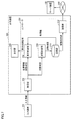
- FIG. 1 is a diagram showing a configuration example of a management system 1000 according to the present embodiment.
- the management system 1000 includes a server device 100 and one or more display devices 200-1 ,. .. .. , 200-N and network 300.
- N is an integer of 1 or more.
- the management system 1000 may include one or more test devices 500-1 ,. .. .. , 500-M may be included.
- M is an integer of 1 or more.
- display device 200 one or more display devices are collectively referred to as "display device 200".
- test device 500 one or more test devices are collectively referred to as "test device 500".
- the user tests the sample.
- the sample is, for example, a pharmaceutical product, more specifically a "tablet".
- the user tests each of the plurality of samples with a plurality of test items.
- the user may use a test device to test the sample. Further, the user may perform the test of the sample by reacting the sample with a reagent or the like and visually observing the color of the reaction product without using a test apparatus.
- the user causes the management system 1000 to manage the test items.
- the management system 1000 manages test items set for each of a plurality of samples used in a test device represented by an analyzer for each sample. The user can use the management system 1000 to plan future tests on the sample.
- the server device 100 and the display device 200 are connected to the network 300 and are configured to be able to communicate with each other. Further, if necessary, the test device 500 may be configured to be able to communicate with the server device 100 and the display device 200.
- the server device 100 manages (stores) information such as test items transmitted from one or more display devices 200.
- the information processing device (not particularly shown) receives at least a part of information such as test items managed by the server device 100 based on the user's operation.
- the information processing device displays the received information. As a result, the user can grasp the test items of the test to be performed by himself / herself.
- the test device 500 may be any device as long as it can perform a test on a sample.
- the test apparatus 500 includes, for example, a liquid chromatograph apparatus, a gas chromatograph apparatus, a liquid chromatograph mass analyzer, a gas chromatograph mass analyzer, a scanning electron microscope, a transmission electron microscope, an energy dispersive fluorescent X-ray analyzer, and a wavelength dispersive type. Includes a fluorescent X-ray analyzer, a Fourier transform infrared spectrophotometer, and the like.
- the test apparatus 500 further includes a photodiode array detector, a liquid chromatography tandem mass spectrometer, a gas chromatography tandem mass spectrometer, a liquid chromatograph mass spectrometer, a near-infrared spectroscope, a tensile tester, a compression tester, and the like. May include.
- the display device 200 is a device that displays various images.
- the display device 200 is, for example, any one of a PC (personal computer), a smartphone, a tablet, and the like.
- the input device 350 (see FIG. 2) is connected to the display device 200.
- the input device 350 includes a mouse, a keyboard, and the like.
- the display device 200 is a smartphone or a tablet, the display device 200 has a touch panel in which the display unit and the input device 350 are integrated. The user can use the input device 350 to select an image to be displayed by the display device 200.
- the display device 200 receives from the user settings such as test items for future tests on the sample.
- the display device 200 displays test items and the like of the test set by the user.
- One or more display devices 200 transmit information such as test items set by the user to the server device 100 via the network 300.
- FIG. 2 is a diagram showing an example of the hardware configuration of the display device 200.
- the display device 200 includes a controller 250 and a display unit 206.
- the controller 250 corresponds to the "control unit" of the present disclosure.
- the controller 250 has a CPU (Central Processing Unit) 360, a storage unit for storing programs and data, and a communication I / F (Interface) 368 as main components.
- the components are interconnected by a data bus.
- the storage unit includes a ROM (Read Only Memory) 362, a RAM (Random Access Memory) 364, and an HDD (Hard Disk Drive) 366.
- the ROM 362 stores a program executed by the CPU 360.
- the RAM 364 can temporarily store the data generated by executing the program in the CPU 360 and the data input via the communication I / F 368.
- the RAM 364 can function as a temporary data memory used as a work area.
- the HDD 366 is a non-volatile storage device. Further, instead of the HDD 366, a semiconductor storage device such as a flash memory may be adopted.
- the program stored in ROM 362 may be stored in a recording medium and distributed as a program product.
- the program may be provided by an information provider as a program product that can be downloaded via the so-called Internet or the like.
- the display device 200 reads a program provided by a recording medium, the Internet, or the like.
- the display device 200 stores the read program in a predetermined storage area (for example, ROM 362).
- the CPU 360 executes the above-mentioned display process by executing the stored program.
- the recording medium is not limited to DVD-ROM (Digital Versatile Disk Read Only Memory), CD-ROM (Compact Disc Read Only Memory), FD (Flexible Disk), and hard disk, but also magnetic tape, cassette tape, and optical disc (MO (Magnetic Optical).
- the recording medium is a non-temporary medium in which a computer can read a program or the like.
- FIG. 3 is an example of a screen displayed by the display device 200.
- the screen of FIG. 3 is a screen displayed in a state where test items are not set for the sample.
- the display device 200 displays a screen in a matrix format.
- the "matrix screen” is also referred to as a "matrix screen”.
- the matrix screen is composed of a plurality of cells Ca.
- the horizontal direction as seen from the user is the X-axis direction
- the vertical direction as seen from the user is the Y-axis direction.
- the X-axis direction corresponds to the "first direction" of the present disclosure
- the Y-axis direction corresponds to the "second direction” of the present disclosure.
- the object to be tested (for example, a pharmaceutical product) is regarded as a different sample by different storage conditions and storage periods. That is, each of the plurality of samples has a storage condition for the sample and a storage period for the sample.
- the sample is distinguished from the storage condition of 1 and the storage period of 1.
- the sample is stored for the storage period under the storage conditions of the sample from the time when the test item is set for the sample, and then the test with the test item is performed.
- one or more storage conditions of the sample are shown in the X-axis direction.
- One or more storage periods of the sample are shown along the Y-axis. In the retention period of FIG. 3, "d" indicates “day”, “m” indicates “month”, and "y" indicates "year”.
- six storage conditions are shown as one or more storage conditions.
- the six storage conditions are "temperature is 10 ° C and humidity is 30%", “temperature is 20 ° C and humidity is 30%”, “temperature is 30 ° C and humidity is 30%”, and “temperature is 40 ° C”. And the humidity is 30%, “the temperature is 50 ° C and the humidity is 30%”, and “the temperature is 10 ° C and the humidity is 50%”.
- the storage conditions may be other conditions.
- seven storage periods are shown as one or more storage periods.
- the seven retention periods are "1 day”, “January”, “March”, “June”, “September", “1 year”, and "15 May”.
- the storage period may be another period.
- the display device 200 displays an image corresponding to one sample.
- the image corresponding to 1 sample is 1 cell Ca.
- Each of the 42 samples corresponds to 42 cells Ca.
- the cell shown as "Ca” is a cell corresponding to "a sample stored for one day under the storage conditions of a temperature of 10 ° C. and a humidity of 30%". Therefore, the sample corresponding to this cell is stored for one day under the storage conditions of a temperature of 10 ° C. and a humidity of 30% from the time when the test item is set for the sample, and then the test with the test item is performed. Is done.
- the display device 200 can accept the user's selection of the cell.
- the user can select a cell using an input device 350 (see FIG. 2) such as a mouse.
- the user can set the test items of the sample corresponding to the selected cell.
- FIG. 4 is an example of a setting screen displayed on the display device 200 when the display device 200 accepts a selection from the user for the cell.
- the user inputs a sample test item on the setting screen.
- FIG. 4 is an example in which a cell corresponding to a sample having a storage condition of “temperature of 10 ° C. and humidity of 30%” and a storage period of “1 day” is selected by the user.
- the display device 200 may display the image of FIG. 4 as a pop-up image while displaying the matrix screen. Further, the display device 200 may switch the image of FIG. 4 from the matrix screen to display the image of FIG. 4.
- the characters “retention condition, retention period” are displayed on the left side of the upper row.
- the characters “10 ° C., 30%, 1d” are displayed on the right side of the upper row as "preservation conditions, storage period”.
- the word “test item” is displayed on the left side of the lower row.
- the characters of the set test item are displayed on the right side of the lower row.
- the characters of the test item are not displayed on the right side of the lower row and are blank.
- the user can set the test item. For example, when a blank area is selected by the user, multiple test item candidates are displayed in a pull-down format (not shown). The user selects a plurality of displayed test items, and the display device 200 sets the selected test items.
- FIG. 5 is a diagram showing an example of a screen when a test item is set by the user with respect to the screen of FIG.
- test A, test B, test C, test D, and test E are set as test items is shown.
- the test items are classified according to, for example, whether or not the test apparatus 500 is used, the type of the test apparatus 500 used, the type of the reagent used, and the like.
- Test A is, for example, a test using a liquid chromatograph device using reagent X.
- Test B is, for example, a test in which the reagent Y is reacted with a sample and the color of the reaction product is visually recognized without using a test device.
- the display device 200 may set the test items collectively for the sample corresponding to each of the plurality of cells when the user selects a plurality of cells and sets the test items.
- a display device that displays all cells in the same color regardless of the setting contents of the test items of the sample can be considered.
- the display device 200 of the present embodiment displays the cells corresponding to each of the plurality of samples in colors corresponding to the setting contents of the test items of the samples. Therefore, it is easy for the user to confirm the setting contents of the test items of the sample.
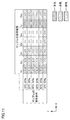
- FIG. 6 is a diagram showing an example of a matrix screen when test items are set for a sample.
- the dotted cell C1 is actually displayed in blue.
- the cell C2 with the hatching of the diagonal line rising to the right is actually displayed in red.
- the cell C3 with the hatching of the downward slash is actually displayed in green.
- the unpatterned cell C4 is actually displayed in white.
- the color shown in FIG. 6 is just an example, and may be another color.
- the cells corresponding to the samples having test items different from the test items set in the sample corresponding to the cell C1, the sample corresponding to the cell C2, and the sample corresponding to the cell C3 are blue and red. , And colors other than green.
- the display device 200 displays cells corresponding to each of two or more samples having the same test item settings in the same color. Therefore, the user can recognize whether or not the setting contents of the test items are the same for two or more samples by visually recognizing the color of the cell.
- the fact that the setting contents of the test items are the same means that when the number of test items set for each of the two or more samples is one, one test item for each of the two or more samples is the same. including. Further, the fact that the setting contents of the test items are the same means that when the number of test items set for each of the two or more samples is plural, the combination of the plurality of test items for each of the two or more samples is sufficient. Including being the same.
- the display device 200 displays a plurality of cells C1 corresponding to each of a plurality of samples in which the same test item is set in blue. Further, the display device 200 displays a plurality of cells C2 corresponding to each of the plurality of samples in which the same test item is set in red. This test item is different from the test item set for the sample corresponding to cell C1. Further, the display device 200 displays a plurality of cells C3 corresponding to each of the plurality of samples in which the same test item is set in green. This test item is different from the test item set for the sample corresponding to cell C1 and the test item set for the sample corresponding to cell C2. Further, the display device 200 displays a plurality of cells C4 corresponding to each of the plurality of samples for which test items are not set in white.
- the display device 200 displays cells corresponding to each of two or more samples having different test item settings in different colors. Therefore, the user can recognize whether or not the setting contents of the test items are different for two or more samples by visually recognizing the color of the cell.
- the difference in the setting contents of the test items includes that when the number of test items set for each of the two or more samples is one, one test item for each of the two or more samples is different. .. Further, the difference in the setting contents of the test items means that when the number of test items set for each of the two or more samples is plural, the combination of the plurality of test items for each of the two or more samples is different. include.
- test items set for the sample corresponding to the cell C1 displayed in blue the test items set for the sample corresponding to the cell C2 displayed in red
- test items set in green the test items set in green.
- the test items set for the sample corresponding to the displayed cell C3 are different from each other.
- the display device 200 displays the cell corresponding to the sample in which the test item is set and the cell corresponding to the sample in which the test item is not set in different colors. Therefore, the user can recognize whether or not the test item is set for the sample by visually recognizing the color of the cell.
- the display device 200 displays the cell corresponding to the sample in which the test item is set in color (red, blue, green in the example of FIG. 6). On the other hand, the display device 200 displays the cells corresponding to the samples for which the test items are not set in white.
- the display device 200 displays cells corresponding to each of the plurality of samples in an manner corresponding to the setting contents of the test items of the samples. Therefore, the user does not need to select the cell corresponding to the sample for the setting content of the test item. Therefore, the display device 200 can facilitate the confirmation of the setting contents of the test items of the sample by the user. Further, the user does not need to execute the "operation of displaying on the display unit 206 in an manner corresponding to the setting contents of the test items of the sample". Therefore, the burden on the user can be reduced. Further, as shown in FIG. 6, the display device 200 displays an image in a color corresponding to the setting content of the test item. Therefore, the user can visually recognize the setting contents of the test item based on the color of the cell.
- the display device 200 does not display the test item when the cell is not selected by the user. Therefore, the display device 200 can prevent a large amount of information from being displayed when the cell is not selected by the user.
- the display device 200 displays the test items set in the sample corresponding to the selected cell. Therefore, since the test items set for the sample corresponding to the cell selected by the user are displayed on the display unit 206, the user is set for the sample corresponding to the cell selected by the user himself / herself. Can recognize the test items that are being used.
- the display device 200 is shown in FIG. Display the image shown.
- the display device 200 may display the image of FIG. 5 as a pop-up image while displaying the matrix screen. Further, the display device 200 may switch from the matrix screen to display the image of FIG. 5.
- the color of the cell of the present embodiment whether or not the test item is set for the sample corresponding to the cell, and the sample in which the same test item as the sample corresponding to the cell is set. Information indicating whether or not it exists. As in the present embodiment, the color of the cell may not indicate the type of the test item set in the sample corresponding to the cell.
- the predetermined end operation is, for example, an operation to the end button (not shown).
- the end button is displayed by the display device 200.
- FIG. 7 is a functional block diagram of the display device 200 and the like.
- the display device 200 includes a display unit 206 and a controller 250.
- the controller 250 includes a receiving unit 202, a display control unit 204, a storage control unit 208, a storage unit 210, and a transmission unit 212.
- the input information is input from the input device 350 to the controller 250.
- the input information includes the coordinate information of the cell selected by the user, the test item set by the user, and the like.
- the receiving unit 202 receives the input information.
- the receiving unit 202 transmits the test items included in the input information to the storage control unit 208.
- the storage control unit 208 stores the test item in the storage unit 210 for each sample.
- the storage control unit 208 stores the sample and the test item in the storage unit 210 in association with each other.
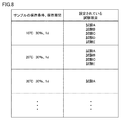
- FIG. 8 shows an example of test items stored in the storage unit 210.
- test items are set for each sample (that is, for each sample storage condition and sample storage period).
- test A, test B, test C, test D, and test are performed on a sample having a storage condition of "temperature of 10 ° C. and humidity of 30%" and a storage period of "1 day”.
- E is set.
- test A, test B, test C, and test E are set for a sample whose storage condition is "temperature is 20 ° C. and humidity is 30%" and the storage period is "1 day”.
- the transmission unit 212 transmits all the set test items to the server device 100 via the network 300.
- the server device 100 manages (stores) test items transmitted from one or more display devices 200.
- the receiving unit 202 transmits the test item and the coordinate information to the display control unit 204.
- the display control unit 204 identifies the cell selected by the user based on the coordinate information.
- the display control unit 204 causes the display unit 206 to display the specified cell in a color corresponding to the test item from the reception unit 202.
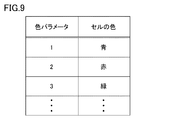
- the display control unit 204 determines the cell color based on the color DB (Data Base).
- FIG. 9 is a diagram showing an example of a color DB used for determining the color of a cell.
- the color DB is stored in the storage unit 210.
- cell colors are associated with each color parameter. FIG. 9 will be described later with reference to FIG. 10.
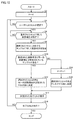
- FIG. 10 is an example of a flowchart of the controller 250 of the display device 200.
- the controller 250 starts the process of FIG. 10 when the start operation of setting the test item for the sample is executed by the user.
- step S2 the controller 250 initializes the color parameter P (see FIG. 9).
- the initial value of the color parameter P is assumed to be "0".
- the color parameter P is a parameter for determining the color of the cell.
- step S4 the controller 250 determines whether or not the user has accepted the selection of the cell. The controller 250 repeats the process of step S4 until the user's selection is accepted (NO in step S4). If the controller 250 determines in step S4 that the cell has been selected by the user (YES in step S4), the process proceeds to step S6.
- step S6 the controller 250 determines whether or not the user has accepted the test item settings for the sample corresponding to the selected cell (see FIG. 5). In step S6, the controller 250 repeats the process of step S6 until the test item is set by the user (NO in step S6). If the controller 250 determines in step S6 that the test item has been set by the user (YES in step S6), the process proceeds to step S8.
- step S8 the storage control unit 208 of the controller 250 sets test items for the sample corresponding to the selected cell.
- the memory control unit 208 stores the test item for the sample.
- step S10 the controller 250 determines whether or not there is a sample in which the same test item as the set test item is set, based on the set test item in FIG. If the same test item is already set in step S10 (YES in step S10), the process proceeds to step S12.
- step S12 the controller 250 determines the color of the cell selected by the user in step S4 to be the same color as the cell corresponding to the sample in which the same test item is set.
- step S17 the display control unit 204 of the controller 250 displays the cell in the color determined in step S12.
- step S18 the controller 250 determines whether or not the termination operation has been executed. If the controller 250 determines in step S18 that the termination operation has not been executed (NO in step S18), the process returns to step S4. On the other hand, in step S18, when the controller 250 determines that the end operation has been executed (YES in step S18), the display device 200 has all the set test items and all the set test items. After transmitting the information for identifying the sample of FIG. 10 to the server device 100, the process of FIG. 10 ends.
- step S10 determines in step S10 that there is no sample in which the same test item as the set test item is set (NO in step S10)
- step S14 the controller 250 increments the color parameter P by 1.
- step S16 the display control unit 204 determines the color corresponding to the color parameter P with reference to the color DB of FIG.
- step S17 the display control unit 204 displays the cell selected by the user in step S4 in the determined color.
- the controller 250 determines the color of the cell selected by the user according to the setting contents of the test items of the sample corresponding to the cell. Therefore, if the same test item is set for two or more samples, the display device 200 can display the cells corresponding to each of the two or more samples in the same color, and different test items can be displayed for the two or more samples. If set, the cells corresponding to each of the two or more samples can be displayed in different colors.
- the display device 200 has described a configuration in which cells are displayed in colors corresponding to the test contents of the test items. However, the display device 200 may display additional information in the cell. For example, the display device 200 may be associated with each cell and display sample information about the sample corresponding to the cell.
- FIG. 11 is an example of a screen displayed by the display unit 206 of the present embodiment.
- sample information is displayed in the cell.
- the sample information is information including the total number of samples corresponding to the cell in which the sample information is displayed and the number of samples to be tested.
- the number of samples to be tested and the total number of existing samples are displayed in the form of fractions.
- the numerator of this fraction indicates the number of samples that will be tested and the total number of samples that have a denominator.
- the value obtained by subtracting the numerator from the denominator indicates the number of spare samples.
- the spare sample is used preliminarily, for example, if the test performed on the sample fails.
- the controller 250 displays the cell associated with the sample information on the display unit 206 in a color corresponding to the setting content of the test item, regardless of the displayed sample information. As shown in FIG. 11, regardless of the number of samples to be tested and the total number of samples, the cells corresponding to the samples are displayed on the display unit 206 in a color corresponding to the setting contents of the test items of the samples.
- the user can recognize the sample information regarding the sample corresponding to the cell (in the example of FIG. 11, the number of samples to be tested and the total number of samples).
- the user can also recognize the setting contents of the test items of the sample corresponding to the cell.
- sample information may be other information.
- the sample information may not include information indicating the total number of existing samples, but may be information indicating only the number of samples to be tested. Further, the sample information may be, for example, the name of the sample.
- sample information may be displayed in another manner as long as it is not displayed in the cell but is displayed in association with the cell.
- the display device 200 may display, for example, connecting a cell and sample information corresponding to the cell with a line.
- the controller 250 has described a configuration in which cells corresponding to each of a plurality of samples are displayed on the display unit 206 in a color corresponding to the setting content of the test item of the sample.
- the mode according to the setting content of the test item of the sample may be another mode.
- Other aspects may be, for example, one of a symbolic display mode and a pattern display mode.
- the display unit 206 may display the symbol “A” in the cell instead of displaying the cell in blue.
- the display unit 206 may display the symbol "B" in the cell instead of displaying the cell in red.
- the display unit 206 may display the symbol "C” in the cell instead of displaying the cell in green.
- the display unit 206 may display the symbol "D" in the cell instead of displaying the cell in white.
- the image corresponding to the sample may be another image.
- the other image may be, for example, an icon image indicating the type of the sample.
- the controller 250 is based on whether or not there is a sample in which the same test item as the set test item is set.
- the configuration that determines the color was explained.
- the storage unit 210 holds a table in which the combination of test items and the color have a one-to-one correspondence, and the display control unit 204 displays the cell in the color corresponding to the set test item. You may. With such a configuration, the user can recognize the combination of test items set from the color of the cell.
- the display device 200 has described a configuration in which the test item is not displayed when the cell is not selected by the user.
- the display device 200 may display the test items in the cell in a state where the cell is not selected by the user.
- the predetermined number is "3"
- the display device 200 displays the set test items in the cell corresponding to the sample in which the number of set test items is 3 or less.
- the display device 200 does not display the set test item in the cell corresponding to the sample in which the number of set test items is 4 or more, and the cell is selected by the user. Display the set test items. According to such a configuration, it is possible to reduce the amount of information displayed on the matrix screen in a state where the cell is not selected by the user.
- the display device is a display device used in a management system that manages test items for each of a plurality of samples, and includes a display unit and a control unit that controls the display unit.
- the control unit displays an image corresponding to each of the plurality of samples on the display unit in an manner corresponding to the setting contents of the test items of the sample.
- the image is displayed on the display unit in a color corresponding to the setting content of the test item, so that the user visually recognizes the setting content of the test item based on the color of the image. can.
- control unit displays images corresponding to each of two or more samples having the same test item settings in the same manner. Display on.
- the image is displayed on the display unit in a color corresponding to the setting content of the test item, so that the user visually recognizes the setting content of the test item based on the color of the image. can.
- control unit displays images corresponding to each of two or more samples having different test item settings in different embodiments. Display on the display.
- the user can visually recognize the display mode of the image, and the user can recognize whether or not different test items are set for two or more samples.
- control unit corresponds to an image corresponding to a sample in which a test item is set and a sample in which a test item is not set.
- the image to be used is displayed on the display unit in a different manner.
- the user can recognize whether or not the test item is set for the sample by visually recognizing the display mode of the image.
- the control unit is set for the sample corresponding to the image when the user selects the image.
- the test items that are being used are displayed on the display.
- the user since the test items set for the sample corresponding to the image selected by the user are displayed on the display unit, the user can display the test item on the image specified by the user himself / herself. Can recognize the test items set for the corresponding sample.
- the control unit displays and displays sample information about the sample corresponding to the image on the display unit in association with the image. Regardless of the sample information provided, the image associated with the sample information is displayed on the display unit in a manner corresponding to the setting content of the test item.
- the user can recognize the sample information regarding the sample corresponding to the image.
- the setting contents of the test items corresponding to the image can be recognized.
- the control unit is selected by the user for the image, and test items are set for the sample corresponding to the image. If it is set, it is determined whether or not there is a sample with the same test item as the set test item, and it is determined that there is a sample with the same test item as the set test item. If so, the image selected by the user is displayed in the same manner as the image corresponding to the sample in which the same test item is set, and there is a sample in which the same test item as the set test item is set. If it is determined not to do so, the display mode of the image selected by the user is determined to be different from the display mode of the displayed image, and the image selected by the user is determined. Display in mode.
- the display device According to the display device according to the item 8, if the same test item is set for two or more samples, the image corresponding to each of the two or more samples can be displayed in the same manner, and the two or more samples can be displayed. If different test items are set for, the images corresponding to each of the two or more samples can be displayed in different modes.
- control unit displays an image corresponding to each of the plurality of samples in a matrix format as the plurality of cells.
- the user can recognize the image corresponding to each of the plurality of samples in the matrix format.
- each of the plurality of samples has a storage condition for the sample and a storage period for the sample, and the storage condition is set in the first direction of the matrix format. Is shown, and the retention period is shown in the second direction orthogonal to the first direction in the matrix format.
- the user can be made to recognize the storage condition of the sample and the storage period of the sample in a matrix format.
- the management system includes the display device according to any one of items 1 to 10 and a server device that stores test items set by the user for the display device.
- the control method is a control method for controlling a display device used in a management system for managing test items for each of a plurality of samples, and for an image corresponding to each of the plurality of samples.
- the step of accepting the selection by the user, the step of accepting the setting of the test item by the user for the sample corresponding to the image selected by the user, and the mode of the image selected by the user are the test items of the sample corresponding to the image. It includes a step of determining according to the setting contents and a step of displaying an image in the determined mode.
- the program includes a step of accepting a user's selection of an image corresponding to each of a plurality of samples to a display device used in a management system for managing test items for each of the plurality of samples.
Landscapes
- Engineering & Computer Science (AREA)
- Theoretical Computer Science (AREA)
- General Engineering & Computer Science (AREA)
- Physics & Mathematics (AREA)
- General Physics & Mathematics (AREA)
- Human Computer Interaction (AREA)
- Chemical & Material Sciences (AREA)
- Life Sciences & Earth Sciences (AREA)
- Health & Medical Sciences (AREA)
- Analytical Chemistry (AREA)
- Biochemistry (AREA)
- General Health & Medical Sciences (AREA)
- Immunology (AREA)
- Pathology (AREA)
- Automatic Analysis And Handling Materials Therefor (AREA)
- User Interface Of Digital Computer (AREA)
Priority Applications (3)
| Application Number | Priority Date | Filing Date | Title |
|---|---|---|---|
| CN202180045070.7A CN115702412A (zh) | 2020-06-25 | 2021-04-07 | 显示装置、管理系统、控制方法以及程序 |
| US18/011,005 US12524185B2 (en) | 2020-06-25 | 2021-04-07 | Test item management system display device, management system, control method, and storage medium |
| JP2022532326A JP7521580B2 (ja) | 2020-06-25 | 2021-04-07 | 試験項目管理システム表示装置、管理システム、制御方法、およびプログラム |
Applications Claiming Priority (2)
| Application Number | Priority Date | Filing Date | Title |
|---|---|---|---|
| JP2020-109409 | 2020-06-25 | ||
| JP2020109409 | 2020-06-25 |
Publications (1)
| Publication Number | Publication Date |
|---|---|
| WO2021261050A1 true WO2021261050A1 (ja) | 2021-12-30 |
Family
ID=79282343
Family Applications (1)
| Application Number | Title | Priority Date | Filing Date |
|---|---|---|---|
| PCT/JP2021/014769 Ceased WO2021261050A1 (ja) | 2020-06-25 | 2021-04-07 | 表示装置、管理システム、制御方法、およびプログラム |
Country Status (4)
| Country | Link |
|---|---|
| US (1) | US12524185B2 (https=) |
| JP (1) | JP7521580B2 (https=) |
| CN (1) | CN115702412A (https=) |
| WO (1) | WO2021261050A1 (https=) |
Citations (3)
| Publication number | Priority date | Publication date | Assignee | Title |
|---|---|---|---|---|
| JP2000076303A (ja) * | 1998-08-28 | 2000-03-14 | Canon Inc | 情報処理装置、情報処理方法および記憶媒体 |
| JP2001325296A (ja) * | 2000-05-17 | 2001-11-22 | Sharp Corp | グループ識別表示機能を有する一覧表示方法 |
| JP2010151707A (ja) * | 2008-12-26 | 2010-07-08 | Hitachi High-Technologies Corp | 自動分析装置、その支援システム |
Family Cites Families (10)
| Publication number | Priority date | Publication date | Assignee | Title |
|---|---|---|---|---|
| US5008081A (en) * | 1988-10-11 | 1991-04-16 | Kd Group | Method and apparatus for automatic melt indexing |
| US20020082870A1 (en) * | 2000-11-20 | 2002-06-27 | Mark Penny | System and method for processing patient medical information |
| US8151214B2 (en) * | 2003-12-29 | 2012-04-03 | International Business Machines Corporation | System and method for color coding list items |
| JP5476240B2 (ja) * | 2010-07-12 | 2014-04-23 | シスメックス株式会社 | 検査情報システム、及びコンピュータプログラム |
| EP2728341A4 (en) | 2011-06-28 | 2015-04-22 | Otsuka Pharma Co Ltd | MEDICAMENT TESTING DEVICE AND MEDICAMENT TESTING PROCEDURE |
| EP2725361B1 (en) * | 2012-10-24 | 2016-11-16 | F.Hoffmann-La Roche Ag | System and method for storing and retrieving of vessel holders |
| JP6307446B2 (ja) * | 2013-01-30 | 2018-04-04 | 株式会社日立ハイテクノロジーズ | 遠心分離システム、検体前処理システム、制御方法 |
| EP2907575A1 (de) * | 2014-02-14 | 2015-08-19 | Eppendorf Ag | Laborgerät mit Benutzereingabefunktion und Verfahren zur Benutzereingabe bei einem Laborgerät |
| US20200230607A1 (en) * | 2017-02-20 | 2020-07-23 | Hitachi, Ltd. | Temperature control device and nucleic acid amplification apparatus |
| US20240069047A1 (en) * | 2020-12-29 | 2024-02-29 | Beckman Coulter, Inc. | Automated sample analyzer |
-
2021
- 2021-04-07 JP JP2022532326A patent/JP7521580B2/ja active Active
- 2021-04-07 CN CN202180045070.7A patent/CN115702412A/zh active Pending
- 2021-04-07 WO PCT/JP2021/014769 patent/WO2021261050A1/ja not_active Ceased
- 2021-04-07 US US18/011,005 patent/US12524185B2/en active Active
Patent Citations (3)
| Publication number | Priority date | Publication date | Assignee | Title |
|---|---|---|---|---|
| JP2000076303A (ja) * | 1998-08-28 | 2000-03-14 | Canon Inc | 情報処理装置、情報処理方法および記憶媒体 |
| JP2001325296A (ja) * | 2000-05-17 | 2001-11-22 | Sharp Corp | グループ識別表示機能を有する一覧表示方法 |
| JP2010151707A (ja) * | 2008-12-26 | 2010-07-08 | Hitachi High-Technologies Corp | 自動分析装置、その支援システム |
Non-Patent Citations (1)
| Title |
|---|
| "Tathion® 2% for Ophthalmic", PHARMACEUTICAL INTERVIEW FORM, pages 13 * |
Also Published As
| Publication number | Publication date |
|---|---|
| JPWO2021261050A1 (https=) | 2021-12-30 |
| CN115702412A (zh) | 2023-02-14 |
| US12524185B2 (en) | 2026-01-13 |
| JP7521580B2 (ja) | 2024-07-24 |
| US20240264785A1 (en) | 2024-08-08 |
Similar Documents
| Publication | Publication Date | Title |
|---|---|---|
| JP4563050B2 (ja) | 自動診断方法、自動診断装置及び自動診断のためのグラフィカルユーザインタフェース | |
| US10546736B2 (en) | Interactive analysis of mass spectrometry data including peak selection and dynamic labeling | |
| CN102124347B (zh) | 自动分析装置 | |
| EP3140761B1 (en) | Intelligent service assistant - instrument side software client | |
| JP5191482B2 (ja) | サンプルテスト結果およびそれぞれの結果コンテキスト情報を管理するシステムおよび方法 | |
| WO2012078796A1 (en) | Virtual cellular staining | |
| US20030078747A1 (en) | Electronic test system with test results view filter | |
| CN103210369A (zh) | 用于分析测量的智能多功能宏语言 | |
| US20260080985A1 (en) | Qualification of sequencing instruments and reagents for use in molecular diagnostic methods | |
| JP2011174844A (ja) | 臨床検査情報管理装置、臨床検査情報管理システム、及びコンピュータプログラム | |
| JP2003202363A (ja) | 電子試験装置、及び、電子試験の結果を表示する方法 | |
| US12524185B2 (en) | Test item management system display device, management system, control method, and storage medium | |
| JP4787698B2 (ja) | 画像表示方法 | |
| Albert et al. | Importance of integrating a volume verification method for liquid handlers: applications in learning performance behavior | |
| US20080270942A1 (en) | Method and Apparatus for Displaying Test Data | |
| US6978219B2 (en) | Measurement data collection apparatus | |
| US20030173990A1 (en) | Wafer map display apparatus and method for semiconductor test system | |
| JP2009174977A (ja) | 電子部品の検査装置および検査プログラム | |
| EP1312931A2 (en) | Electronic test system | |
| JP2011027558A (ja) | 装置試験システム | |
| CN116203856B (zh) | 一种基于参数配置的通用测试方法、装置及存储介质 | |
| US20250067709A1 (en) | Setting method and setting device | |
| KR102894547B1 (ko) | 검사실간 비교를 통한 정도관리 방법 | |
| US20260004897A1 (en) | System and method for designing quality control (qc) ranges for multiple clinical diagnostic instruments testing the same analyte | |
| JP2010212973A (ja) | 測定装置及び移動体通信機器試験装置 |
Legal Events
| Date | Code | Title | Description |
|---|---|---|---|
| 121 | Ep: the epo has been informed by wipo that ep was designated in this application |
Ref document number: 21828566 Country of ref document: EP Kind code of ref document: A1 |
|
| ENP | Entry into the national phase |
Ref document number: 2022532326 Country of ref document: JP Kind code of ref document: A |
|
| NENP | Non-entry into the national phase |
Ref country code: DE |
|
| 122 | Ep: pct application non-entry in european phase |
Ref document number: 21828566 Country of ref document: EP Kind code of ref document: A1 |