WO2021224994A1 - 画像選択装置、画像選択方法、及びプログラム - Google Patents
画像選択装置、画像選択方法、及びプログラム Download PDFInfo
- Publication number
- WO2021224994A1 WO2021224994A1 PCT/JP2020/018692 JP2020018692W WO2021224994A1 WO 2021224994 A1 WO2021224994 A1 WO 2021224994A1 JP 2020018692 W JP2020018692 W JP 2020018692W WO 2021224994 A1 WO2021224994 A1 WO 2021224994A1
- Authority
- WO
- WIPO (PCT)
- Prior art keywords
- image
- exclusion
- search
- selection
- posture
- Prior art date
- Legal status (The legal status is an assumption and is not a legal conclusion. Google has not performed a legal analysis and makes no representation as to the accuracy of the status listed.)
- Ceased
Links
Images

















Classifications
-
- G—PHYSICS
- G06—COMPUTING OR CALCULATING; COUNTING
- G06F—ELECTRIC DIGITAL DATA PROCESSING
- G06F16/00—Information retrieval; Database structures therefor; File system structures therefor
- G06F16/50—Information retrieval; Database structures therefor; File system structures therefor of still image data
- G06F16/58—Retrieval characterised by using metadata, e.g. metadata not derived from the content or metadata generated manually
- G06F16/583—Retrieval characterised by using metadata, e.g. metadata not derived from the content or metadata generated manually using metadata automatically derived from the content
-
- G—PHYSICS
- G06—COMPUTING OR CALCULATING; COUNTING
- G06T—IMAGE DATA PROCESSING OR GENERATION, IN GENERAL
- G06T7/00—Image analysis
- G06T7/70—Determining position or orientation of objects or cameras
-
- G—PHYSICS
- G06—COMPUTING OR CALCULATING; COUNTING
- G06F—ELECTRIC DIGITAL DATA PROCESSING
- G06F16/00—Information retrieval; Database structures therefor; File system structures therefor
- G06F16/50—Information retrieval; Database structures therefor; File system structures therefor of still image data
- G06F16/53—Querying
- G06F16/532—Query formulation, e.g. graphical querying
-
- G—PHYSICS
- G06—COMPUTING OR CALCULATING; COUNTING
- G06F—ELECTRIC DIGITAL DATA PROCESSING
- G06F16/00—Information retrieval; Database structures therefor; File system structures therefor
- G06F16/50—Information retrieval; Database structures therefor; File system structures therefor of still image data
- G06F16/58—Retrieval characterised by using metadata, e.g. metadata not derived from the content or metadata generated manually
- G06F16/583—Retrieval characterised by using metadata, e.g. metadata not derived from the content or metadata generated manually using metadata automatically derived from the content
- G06F16/5854—Retrieval characterised by using metadata, e.g. metadata not derived from the content or metadata generated manually using metadata automatically derived from the content using shape and object relationship
-
- G—PHYSICS
- G06—COMPUTING OR CALCULATING; COUNTING
- G06V—IMAGE OR VIDEO RECOGNITION OR UNDERSTANDING
- G06V10/00—Arrangements for image or video recognition or understanding
- G06V10/70—Arrangements for image or video recognition or understanding using pattern recognition or machine learning
- G06V10/74—Image or video pattern matching; Proximity measures in feature spaces
- G06V10/761—Proximity, similarity or dissimilarity measures
-
- G—PHYSICS
- G06—COMPUTING OR CALCULATING; COUNTING
- G06V—IMAGE OR VIDEO RECOGNITION OR UNDERSTANDING
- G06V40/00—Recognition of biometric, human-related or animal-related patterns in image or video data
- G06V40/10—Human or animal bodies, e.g. vehicle occupants or pedestrians; Body parts, e.g. hands
- G06V40/103—Static body considered as a whole, e.g. static pedestrian or occupant recognition
-
- G—PHYSICS
- G06—COMPUTING OR CALCULATING; COUNTING
- G06T—IMAGE DATA PROCESSING OR GENERATION, IN GENERAL
- G06T2207/00—Indexing scheme for image analysis or image enhancement
- G06T2207/20—Special algorithmic details
- G06T2207/20036—Morphological image processing
- G06T2207/20044—Skeletonization; Medial axis transform
-
- G—PHYSICS
- G06—COMPUTING OR CALCULATING; COUNTING
- G06T—IMAGE DATA PROCESSING OR GENERATION, IN GENERAL
- G06T2207/00—Indexing scheme for image analysis or image enhancement
- G06T2207/30—Subject of image; Context of image processing
- G06T2207/30196—Human being; Person
-
- G—PHYSICS
- G06—COMPUTING OR CALCULATING; COUNTING
- G06V—IMAGE OR VIDEO RECOGNITION OR UNDERSTANDING
- G06V10/00—Arrangements for image or video recognition or understanding
- G06V10/40—Extraction of image or video features
- G06V10/42—Global feature extraction by analysis of the whole pattern, e.g. using frequency domain transformations or autocorrelation
- G06V10/422—Global feature extraction by analysis of the whole pattern, e.g. using frequency domain transformations or autocorrelation for representing the structure of the pattern or shape of an object therefor
- G06V10/426—Graphical representations
-
- G—PHYSICS
- G06—COMPUTING OR CALCULATING; COUNTING
- G06V—IMAGE OR VIDEO RECOGNITION OR UNDERSTANDING
- G06V10/00—Arrangements for image or video recognition or understanding
- G06V10/94—Hardware or software architectures specially adapted for image or video understanding
- G06V10/945—User interactive design; Environments; Toolboxes
-
- G—PHYSICS
- G06—COMPUTING OR CALCULATING; COUNTING
- G06V—IMAGE OR VIDEO RECOGNITION OR UNDERSTANDING
- G06V20/00—Scenes; Scene-specific elements
- G06V20/60—Type of objects
- G06V20/64—Three-dimensional [3D] objects
Definitions
- the present invention relates to an image selection device, an image selection method, and a program.
- Patent Documents 1 and 2 are known.
- Patent Document 1 discloses a technique for searching the posture of a similar person based on key joints such as the head and limbs of the person included in the depth image.
- Patent Document 2 discloses a technique for searching for a similar image by using posture information such as inclination added to the image, although it is not related to the posture of the person.
- Non-Patent Document 1 is known as a technique related to human skeleton estimation.
- Patent Document 3 describes that by inputting posture information as search information, an image including a posture similar to the posture information is searched. Further, in Patent Document 4, a partial similarity representing a partial difference between the posture of a person in a reference image and the posture of a person in a reference image is calculated, and a plurality of partial similarities are used. It is described that an image is selected from the reference image of.
- Patent Document 5 describes that an image satisfying a predetermined condition among a plurality of images is deleted from the storage means. Examples of certain conditions are blurred face, underexposed face, closed eyes, face facing up too much, bear under eyes, no makeup, face Is facing sideways, and so on. Further, Patent Document 5 describes that an image captured by this person can be set as a deletion candidate by inputting an image of a subject to be deleted. Further, Patent Document 5 also describes that the deletion candidate is displayed on the display means, and then the image of the deletion candidate is deleted from the storage means according to the input from the user.
- the present inventor considered using an image containing a person as a search query when selecting an image containing a specific posture.
- the present inventor has noticed that, at a certain frequency, images containing postures other than the desired posture are included in the selection result. Therefore, it is necessary to efficiently select the image to be deleted from the selected images.
- An object of the present invention is to efficiently select an image including a posture to be deleted from an image selected on the condition that the image includes a specific posture.
- a search information acquisition means for acquiring a plurality of search posture information indicating the posture of a person included in the target image, which is information generated for each of a plurality of target images.
- Exclusion query that is a query for images that should be excluded from the search results
- Exclusion information acquisition means that acquires exclusion posture information that indicates the posture of the person included in the image, and
- an exclusion score calculation means for calculating an exclusion score indicating the degree of similarity to the exclusion posture information
- An exclusion image selection means for selecting an exclusion image, which is an image to be excluded from the search results, from the plurality of target images using the exclusion score.
- the computer A plurality of search posture information indicating the posture of a person included in the target image, which is the posture information generated for each of the plurality of target images, is acquired.
- Exclusion query that is a query for images that should be excluded from the search results Acquires the exclusion posture information that indicates the posture of the person included in the image.
- an exclusion score indicating the degree of similarity to the exclusion posture information was calculated.
- An image selection method is provided in which an exclusion image, which is an image to be excluded from a search result, is selected from the plurality of target images using the exclusion score.
- a search information acquisition function that acquires a plurality of search posture information indicating the posture of a person included in the target image, which is posture information generated for each of a plurality of target images.
- Exclusion query that is a query for images that should be excluded from the search results
- Exclusion information acquisition function that acquires exclusion posture information that indicates the posture of the person included in the image, and For each of the plurality of search posture information, an exclusion score calculation function for calculating an exclusion score indicating the degree of similarity to the exclusion posture information, and an exclusion score calculation function.
- An exclusion image selection function that selects an exclusion image, which is an image to be excluded from the search results, from the plurality of target images using the exclusion score. Is provided.
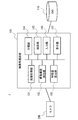
- FIG. 1 It is a block diagram which shows the outline of the image processing apparatus which concerns on embodiment. It is a block diagram which shows the structure of the image processing apparatus which concerns on Embodiment 1.
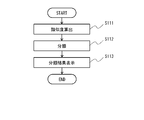
- FIG. It is a flowchart which shows the image processing method which concerns on Embodiment 1. It is a flowchart which shows the classification method which concerns on Embodiment 1. It is a flowchart which shows the search method which concerns on Embodiment 1.
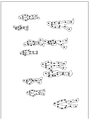
- FIG. It is a figure which shows the detection example of the skeleton structure which concerns on Embodiment 1.
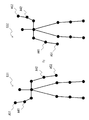
- FIG. 1 It is a figure which shows the detection example of the skeleton structure which concerns on Embodiment 1.
- FIG. It is a figure which shows the detection example of the skeleton structure which concerns on Embodiment 1.
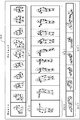
- FIG. It is a figure which shows the display example of the classification result which concerns on Embodiment 1.
- FIG. It is a figure for demonstrating the search method which concerns on Embodiment 1.
- FIG. It is a figure for demonstrating the search method which concerns on Embodiment 1.
- FIG. It is a figure for demonstrating the search method which concerns on Embodiment 1.
- FIG. It is a figure for demonstrating the search method which concerns on Embodiment 1.
- FIG. It is a figure for demonstrating the search method which concerns on Embodiment 1.
- FIG. It is a figure for
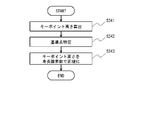
- FIG. It is a block diagram which shows the structure of the image processing apparatus which concerns on Embodiment 2. It is a flowchart which shows the image processing method which concerns on Embodiment 2. It is a flowchart which shows the specific example 1 of the height pixel number calculation method which concerns on Embodiment 2. It is a flowchart which shows the specific example 2 of the height pixel number calculation method which concerns on Embodiment 2. It is a flowchart which shows the specific example 2 of the height pixel number calculation method which concerns on Embodiment 2. It is a flowchart which shows the specific example 2 of the height pixel number calculation method which concerns on Embodiment 2. It is a flowchart which shows the normalization method which concerns on Embodiment 2.
- FIG. 2 It is a figure which shows the 3D human body model which concerns on Embodiment 2. It is a figure for demonstrating the height pixel number calculation method which concerns on Embodiment 2. FIG. It is a figure for demonstrating the height pixel number calculation method which concerns on Embodiment 2. FIG. It is a figure for demonstrating the height pixel number calculation method which concerns on Embodiment 2. FIG. It is a figure for demonstrating the height pixel number calculation method which concerns on Embodiment 2. FIG. It is a figure for demonstrating the normalization method which concerns on Embodiment 2. FIG. It is a figure for demonstrating the normalization method which concerns on Embodiment 2. FIG. It is a figure for demonstrating the normalization method which concerns on Embodiment 2. FIG. It is a figure which shows the hardware configuration example of an image processing apparatus.
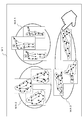
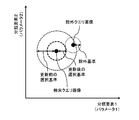
- FIG. 42 It is a figure which shows an example of the functional structure of the search part which concerns on search method 6. It is a figure for demonstrating an example of exclusion criteria and selection criteria. It is a flowchart which shows the 1st example of the process performed by the search part which concerns on search method 6. It is a figure for demonstrating step S310 of FIG. 42. It is a flowchart which shows the modification of FIG. 42. It is a figure for demonstrating the first example of the method of updating a selection criterion. It is a figure for demonstrating the 2nd example of the method of updating a selection criterion.
- Non-Patent Document 1 a skeleton estimation technique such as Non-Patent Document 1 in order to recognize the state of a person desired by a user from an image on demand.
- a related skeleton estimation technique such as OpenPose disclosed in Non-Patent Document 1
- the skeleton of a person is estimated by learning various patterns of correctly answered image data.
- the skeletal structure estimated by a skeletal estimation technique is composed of "key points” which are characteristic points of joints and the like and “bones (bone links)" which indicate links between key points. .. Therefore, in the following embodiments, the skeletal structure will be described using the terms “key point” and “bone”, but unless otherwise specified, the "key point” corresponds to the “joint” of a person and is described as “key point”. "Bone” corresponds to the "bone” of a person.
- FIG. 1 shows an outline of the image processing apparatus 10 according to the embodiment.
- the image processing device 10 includes a skeleton detection unit 11, a feature amount calculation unit 12, and a recognition unit 13.
- the skeleton detection unit 11 detects the two-dimensional skeleton structures of a plurality of people based on the two-dimensional image acquired from a camera or the like.
- the feature amount calculation unit 12 calculates the feature amount of the plurality of two-dimensional skeleton structures detected by the skeleton detection unit 11.
- the recognition unit 13 performs the recognition processing of the states of a plurality of persons based on the similarity of the plurality of feature amounts calculated by the feature amount calculation unit 12.
- the recognition process includes a classification process of a person's state, a search process (selection process), and the like. Therefore, the image processing device 10 also functions as an image selection device.
- the two-dimensional skeleton structure of the person is detected from the two-dimensional image, and the recognition process such as classification and examination of the state of the person is performed based on the feature amount calculated from the two-dimensional skeleton structure. This makes it possible to flexibly recognize the state of a desired person.
- FIG. 2 shows the configuration of the image processing device 100 according to the present embodiment.
- the image processing device 100 constitutes the image processing system 1 together with the camera 200 and the database (DB) 110.
- the image processing system 1 including the image processing device 100 is a system for classifying and searching states such as the posture and behavior of a person based on the skeleton structure of the person estimated from the image.
- the image processing device 100 also functions as an image selection device.
- the camera 200 is an imaging unit such as a surveillance camera that generates a two-dimensional image.
- the camera 200 is installed at a predetermined location and images a person or the like in the imaging region from the installation location.
- the camera 200 is directly connected so that the captured image (video) can be output to the image processing device 100, or is connected via a network or the like.
- the camera 200 may be provided inside the image processing device 100.
- the database 110 is a database that stores information (data), processing results, and the like necessary for processing of the image processing apparatus 100.
- the database 110 includes an image acquired by the image acquisition unit 101, a detection result of the skeletal structure detection unit 102, data for machine learning, a feature amount calculated by the feature amount calculation unit 103, a classification result of the classification unit 104, and a search unit 105. The search results etc. of are memorized.
- the database 110 is directly connected to the image processing device 100 so that data can be input and output as needed, or is connected via a network or the like.
- the database 110 may be provided inside the image processing device 100 as a non-volatile memory such as a flash memory, a hard disk device, or the like.
- the image processing device 100 includes an image acquisition unit 101, a skeleton structure detection unit 102, a feature amount calculation unit 103, a classification unit 104, a search unit 105, an input unit 106, and a display unit 107. ..
- the configuration of each part (block) is an example, and may be composed of other parts as long as the method (operation) described later is possible.
- the image processing device 100 is realized by, for example, a computer device such as a personal computer or a server that executes a program, but it may be realized by one device or by a plurality of devices on a network. good.
- the input unit 106, the display unit 107, and the like may be used as an external device.
- both the classification unit 104 and the search unit 105 may be provided, or only one of them may be provided. Both or one of the classification unit 104 and the search unit 105 is a recognition unit that recognizes the state of a person.
- the image acquisition unit 101 acquires a two-dimensional image including a person captured by the camera 200.
- the image acquisition unit 101 acquires, for example, an image including a person (a video including a plurality of images) captured by the camera 200 during a predetermined monitoring period.
- an image including a person prepared in advance may be acquired from the database 110 or the like.
- the skeleton structure detection unit 102 detects the two-dimensional skeleton structure of a person in the image based on the acquired two-dimensional image.
- the skeleton structure detection unit 102 detects the skeleton structure of all the persons recognized in the acquired image.
- the skeleton structure detection unit 102 detects the skeleton structure of a person based on the characteristics of the recognized person's joints and the like by using the skeleton estimation technique using machine learning.
- the skeleton structure detection unit 102 uses, for example, a skeleton estimation technique such as OpenPose of Non-Patent Document 1.
- the feature amount calculation unit 103 calculates the feature amount of the detected two-dimensional skeleton structure, and stores the calculated feature amount in the database 110 in association with the image to be processed.
- the feature amount of the skeletal structure indicates the characteristics of the skeleton of the person, and is an element for classifying or searching the state of the person based on the skeleton of the person. Usually, this feature quantity includes a plurality of parameters (for example, classification elements described later).
- the feature amount may be the entire feature amount of the skeletal structure, a partial feature amount of the skeletal structure, or a plurality of feature amounts such as each part of the skeletal structure.
- the feature amount may be calculated by any method such as machine learning or normalization, and the minimum value or the maximum value may be obtained as the normalization.
- the feature amount is a feature amount obtained by machine learning the skeletal structure, a size on an image of the skeletal structure from the head to the foot, and the like.
- the size of the skeleton structure is the vertical height and area of the skeleton region including the skeleton structure on the image.
- the vertical direction (height direction or vertical direction) is a vertical direction (Y-axis direction) in the image, for example, a direction perpendicular to the ground (reference plane).
- the left-right direction (horizontal direction) is the left-right direction (X-axis direction) in the image, for example, a direction parallel to the ground.
- a feature amount having robustness for the classification and search processing it is preferable to use a feature amount having robustness for the classification and search processing.
- a robust feature amount may be used for the orientation or body shape of the person. It depends on the orientation and body shape of the person by learning the skeleton of a person who is facing in various directions with the same posture and the skeleton of a person with various body shapes in the same posture, and by extracting the characteristics of the skeleton only in the vertical direction. It is possible to obtain a feature amount that does not.
- the classification unit 104 classifies (clusters) a plurality of skeletal structures stored in the database 110 based on the similarity of the features of the skeletal structures. It can be said that the classification unit 104 classifies the states of a plurality of persons based on the feature amount of the skeletal structure as the process of recognizing the state of the person.
- the degree of similarity is the distance between the features of the skeletal structure.
- the classification unit 104 may be classified according to the similarity of the features of the entire skeleton structure, or may be classified according to the similarity of the features of a part of the skeleton structure, and the first portion of the skeleton structure (for example, It may be classified according to the similarity of the features of the second part (for example, both feet) and the second part (for example, both hands).
- the posture of the person may be classified based on the feature amount of the skeletal structure of the person in each image, or the behavior of the person based on the change in the feature amount of the skeletal structure of the person in a plurality of consecutive images in time series. May be classified.
- the classification unit 104 can classify the state of the person including the posture and behavior of the person based on the feature amount of the skeletal structure. For example, the classification unit 104 targets a plurality of skeletal structures in a plurality of images captured during a predetermined monitoring period. The classification unit 104 obtains the degree of similarity between the features to be classified, and classifies the skeletal structures having a high degree of similarity into the same cluster (group with similar postures). As with the search, the user may be able to specify the classification conditions. The classification unit 104 stores the classification result of the skeletal structure in the database 110 and displays it on the display unit 107.
- the search unit 105 searches for a skeleton structure having a high degree of similarity to the feature amount of the search query (query state) from a plurality of skeleton structures stored in the database 110. It can be said that the search unit 105 searches for the state of a person who corresponds to the search condition (query state) from among the states of a plurality of people based on the feature amount of the skeleton structure as the process of recognizing the state of the person. Similar to classification, similarity is the distance between features of skeletal structure.
- the search unit 105 may search by the similarity of the features of the whole skeleton structure, or may search by the similarity of the features of a part of the skeleton structure, and may search by the similarity of the first part of the skeleton structure (for example,). You may search by the similarity of the features of both hands) and the second part (for example, both feet).
- the posture of the person may be searched based on the feature amount of the skeletal structure of the person in each image, or the behavior of the person based on the change in the feature amount of the skeletal structure of the person in a plurality of consecutive images in time series. You may search for. That is, the search unit 105 can search the state of the person including the posture and behavior of the person based on the feature amount of the skeletal structure.
- the search unit 105 searches for features of a plurality of skeletal structures in a plurality of images captured during a predetermined monitoring period, similarly to the classification target. Further, the skeleton structure (posture) specified by the user from the classification results displayed by the classification unit 104 is used as a search query (search key). Not limited to the classification result, the search query may be selected from a plurality of unclassified skeleton structures, or the user may input the skeleton structure to be the search query.
- the search unit 105 searches for a feature amount having a high degree of similarity to the feature amount of the skeleton structure of the search query from the feature amount of the search target.
- the search unit 105 stores the search result of the feature amount in the database 110 and displays it on the display unit 107.
- the input unit 106 is an input interface for acquiring information input from a user who operates the image processing device 100.
- a user is a watcher who monitors a person in a suspicious state from an image of a surveillance camera.
- the input unit 106 is, for example, a GUI (Graphical User Interface), and information according to a user's operation is input from an input device such as a keyboard, a mouse, or a touch panel.
- the input unit 106 accepts the skeleton structure of a designated person from the skeleton structures (postures) classified by the classification unit 104 as a search query.
- the display unit 107 is a display unit that displays the result of the operation (processing) of the image processing device 100, and is, for example, a display device such as a liquid crystal display or an organic EL (Electro Luminescence) display.
- the display unit 107 displays the classification result of the classification unit 104 and the search result of the search unit 105 on the GUI according to the degree of similarity and the like.
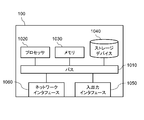
- FIG. 39 is a diagram showing a hardware configuration example of the image processing device 100.
- the image processing device 100 includes a bus 1010, a processor 1020, a memory 1030, a storage device 1040, an input / output interface 1050, and a network interface 1060.
- the bus 1010 is a data transmission path for the processor 1020, the memory 1030, the storage device 1040, the input / output interface 1050, and the network interface 1060 to transmit and receive data to and from each other.
- the method of connecting the processors 1020 and the like to each other is not limited to the bus connection.
- the processor 1020 is a processor realized by a CPU (Central Processing Unit), a GPU (Graphics Processing Unit), or the like.
- the memory 1030 is a main storage device realized by a RAM (Random Access Memory) or the like.
- the storage device 1040 is an auxiliary storage device realized by an HDD (Hard Disk Drive), an SSD (Solid State Drive), a memory card, a ROM (Read Only Memory), or the like.
- the storage device 1040 stores a program module that realizes each function of the image processing device 100 (for example, an image acquisition unit 101, a skeleton structure detection unit 102, a feature amount calculation unit 103, a classification unit 104, a search unit 105, and an input unit 106). doing.
- the processor 1020 reads each of these program modules into the memory 1030 and executes them, each function corresponding to the program module is realized.
- the storage device 1040 may also function as a database 110.
- the input / output interface 1050 is an interface for connecting the image processing device 100 and various input / output devices.
- the image processing device 100 may connect to the database 110 via the input / output interface 1050.
- the network interface 1060 is an interface for connecting the image processing device 100 to the network.
- This network is, for example, LAN (Local Area Network) or WAN (Wide Area Network).
- the method of connecting the network interface 1060 to the network may be a wireless connection or a wired connection.
- the image processing device 100 may communicate with the camera 200 via the network interface 1060.
- the image processing device 100 may connect to the database 110 via the network interface 1060.
- FIG. 3 to 5 show the operation of the image processing device 100 according to the present embodiment.
- FIG. 3 shows the flow from image acquisition to the search process in the image processing apparatus 100
- FIG. 4 shows the flow of the classification process (S104) of FIG. 3
- FIG. 5 shows the search process (S105) of FIG. It shows the flow.
- the image processing device 100 acquires an image from the camera 200 (S101).
- the image acquisition unit 101 acquires an image of a person in order to classify or search from the skeleton structure, and stores the acquired image in the database 110.
- the image acquisition unit 101 acquires, for example, a plurality of images captured during a predetermined monitoring period, and performs subsequent processing on all the persons included in the plurality of images.
- the image processing device 100 detects the skeleton structure of the person based on the acquired image of the person (S102).
- FIG. 6 shows an example of detecting the skeletal structure. As shown in FIG. 6, an image acquired from a surveillance camera or the like includes a plurality of persons, and the skeleton structure is detected for each person included in the image.
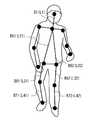
- FIG. 7 shows the skeleton structure of the human body model 300 detected at this time
- FIGS. 8 to 10 show an example of detecting the skeleton structure.
- the skeleton structure detection unit 102 detects the skeleton structure of the human body model (two-dimensional skeleton model) 300 as shown in FIG. 7 from the two-dimensional image by using a skeleton estimation technique such as OpenPose.
- the human body model 300 is a two-dimensional model composed of key points such as joints of a person and bones connecting the key points.
- the skeleton structure detection unit 102 extracts feature points that can be key points from an image, and detects each key point of a person by referring to information obtained by machine learning the key point image.
- the key points of the person are head A1, neck A2, right shoulder A31, left shoulder A32, right elbow A41, left elbow A42, right hand A51, left hand A52, right waist A61, left waist A62, right knee A71.
- Left knee A72, right foot A81, left foot A82 are detected.
- Bone B1 connecting the head A1 and the neck A2 bones B21 and bone B22 connecting the neck A2 and the right shoulder A31 and the left shoulder A32, right shoulder A31 and the left shoulder A32 and the right, respectively.
- Bone B31 and B32 connecting elbow A41 and left elbow A42, right elbow A41 and left elbow A42 and right hand A51 and left hand A52, respectively, connecting bone B41 and bone B42, neck A2 and right waist A61 and left waist A62, respectively.
- B72 is detected.
- the skeleton structure detection unit 102 stores the detected skeleton structure of the person in the database 110.
- FIG. 8 is an example of detecting a person in an upright position.
- an upright person is imaged from the front, and bones B1, bone B51 and bone B52, bones B61 and bone B62, bones B71 and bones B72 viewed from the front are detected without overlapping, and the right foot
- the bones B61 and B71 are slightly bent more than the bones B62 and B72 of the left foot.
- FIG. 9 is an example of detecting a person in a crouching state.
- a crouching person is imaged from the right side, and bones B1, bone B51 and bone B52, bones B61 and bone B62, bones B71 and bones B72 as viewed from the right side are detected, respectively, and bone B61 on the right foot. And the bone B71 and the bone B62 and the bone B72 of the left foot are greatly bent and overlapped.
- FIG. 10 is an example of detecting a person who is sleeping.
- a sleeping person is imaged from diagonally left front, and bone B1, bone B51 and bone B52, bone B61 and bone B62, bone B71 and bone B72 viewed from diagonally left front are detected, respectively, and the right foot. Bone B61 and B71 and bone B62 and bone B72 of the left foot are bent and overlapped.
- the image processing apparatus 100 calculates the detected feature amount of the skeletal structure (S103). For example, when the height or area of the skeleton region is used as the feature amount, the feature amount calculation unit 103 extracts a region including the skeleton structure and obtains the height (number of pixels) or area (pixel area) of the region. The height and area of the skeletal region can be obtained from the coordinates of the end of the extracted skeleton region and the coordinates of the key points at the ends. The feature amount calculation unit 103 stores the obtained feature amount of the skeletal structure in the database 110. The feature amount of this skeletal structure is also used as posture information indicating the posture of a person.
- the skeletal region including all bones is extracted from the skeletal structure of an upright person.
- the upper end of the skeletal region is the key point A1 of the head
- the lower end of the skeletal region is the key point A82 of the left foot
- the left end of the skeletal region is the key point A41 of the right elbow
- the right end of the skeletal region is the key point A52 of the left hand. .. Therefore, the height of the skeleton region is obtained from the difference between the Y coordinates of the key point A1 and the key point A82.
- the width of the skeleton region is obtained from the difference between the X coordinates of the key point A41 and the key point A52, and the area is obtained from the height and width of the skeleton region.
- the skeletal region including all bones is extracted from the skeletal structure of a crouched person.
- the upper end of the skeletal area is the key point A1 of the head
- the lower end of the skeletal area is the key point A81 of the right foot
- the left end of the skeletal area is the key point A61 of the right hip
- the right end of the skeletal area is the key point A51 of the right hand. .. Therefore, the height of the skeleton region is obtained from the difference between the Y coordinates of the key point A1 and the key point A81.
- the width of the skeleton region is obtained from the difference between the X coordinates of the key point A61 and the key point A51, and the area is obtained from the height and width of the skeleton region.
- a skeletal region including all bones is extracted from the skeletal structure of a person who has fallen in the left-right direction of the image.
- the upper end of the skeletal region is the left shoulder key point A32
- the lower end of the skeletal region is the left hand key point A52
- the left end of the skeletal region is the right hand key point A51
- the right end of the skeletal region is the left foot key point A82. Therefore, the height of the skeleton region is obtained from the difference between the Y coordinates of the key point A32 and the key point A52.
- the width of the skeleton region is obtained from the difference between the X coordinates of the key point A51 and the key point A82, and the area is obtained from the height and width of the skeleton region.
- the image processing apparatus 100 performs the classification process (S104).
- the classification unit 104 calculates the similarity of the calculated features of the skeletal structure (S111), and classifies the skeletal structure based on the calculated features (S112). ..
- the classification unit 104 obtains the similarity of the features between all the skeletal structures stored in the database 110 to be classified, and classifies (clusters) the skeletal structures (postures) having the highest similarity into the same cluster. .. Further, the similarity between the classified clusters is obtained and classified, and the classification is repeated until a predetermined number of clusters are obtained.
- FIG. 11 shows an image of the classification result of the feature amount of the skeletal structure.
- FIG. 11 is an image of cluster analysis by a two-dimensional classification element, and the two classification elements are, for example, the height of the skeleton region and the area of the skeleton region.
- the features of the plurality of skeletal structures are classified into three clusters C1 to C3.
- the clusters C1 to C3 correspond to each posture such as a standing posture, a sitting posture, and a sleeping posture, and the skeletal structure (person) is classified for each similar posture.
- various classification methods can be used by classifying based on the feature amount of the skeletal structure of a person.
- the classification method may be set in advance or may be arbitrarily set by the user. Further, the classification may be performed by the same method as the search method described later. That is, it may be classified according to the same classification conditions as the search conditions.
- the classification unit 104 classifies by the following classification method. Any of the classification methods may be used, or an arbitrarily selected classification method may be combined.
- Classification method 1 Classification by multiple layers Classification by skeletal structure of the whole body, classification by skeletal structure of upper body and lower body, classification by skeletal structure of arms and legs, etc. are combined hierarchically. That is, the skeleton structure may be classified based on the features of the first portion and the second portion, and further, the features of the first portion and the second portion may be weighted and classified.
- Classification method 2 Classification by a plurality of images along the time series Classification is performed based on the feature amount of the skeletal structure in a plurality of images continuous in the time series. For example, the features may be stacked in the time series direction and classified based on the cumulative value. Further, the classification may be performed based on the change (change amount) of the feature amount of the skeletal structure in a plurality of consecutive images.
- Classification method 3 Classification ignoring the left and right sides of the skeletal structure Classify the skeletal structures with opposite right and left sides of the person as the same skeletal structure.
- the classification unit 104 displays the classification result of the skeletal structure (S113).
- the classification unit 104 acquires images of necessary skeletal structures and people from the database 110, and displays the skeletal structure and people on the display unit 107 for each posture (cluster) similar as a classification result.
- FIG. 12 shows a display example when the postures are classified into three. For example, as shown in FIG. 12, the posture areas WA1 to WA3 for each posture are displayed in the display window W1, and the skeletal structure and the person (image) of the posture corresponding to each of the posture areas WA1 to WA3 are displayed.
- the posture area WA1 is, for example, a display area for a standing posture, and displays a skeletal structure and a person similar to a standing posture classified into cluster C1.
- the posture area WA2 is, for example, a sitting posture display area, and displays a skeletal structure and a person similar to the sitting posture classified into cluster C2.
- the posture area WA3 is, for example, a display area for a sleeping posture, and displays a skeletal structure and a person similar to the sleeping posture classified into cluster C2.
- the image processing device 100 performs a search process (S105).
- the search unit 105 accepts the input of the search condition (S121) and searches the skeleton structure based on the search condition (S122).
- the search unit 105 receives input of a search query, which is a search condition, from the input unit 106 according to the operation of the user.
- the user specifies (selects) the skeleton structure of the posture to be searched from the posture areas WA1 to WA3 displayed in the display window W1. ..
- the search unit 105 uses the skeleton structure specified by the user as a search query to search for a skeleton structure having a high degree of similarity in the feature amount from all the skeleton structures stored in the database 110 to be searched.
- the search unit 105 calculates the similarity between the feature amount of the skeletal structure of the search query and the feature amount of the skeletal structure to be searched, and extracts the skeletal structure whose calculated similarity is higher than a predetermined threshold value.
- the feature amount of the skeleton structure of the search query the feature amount calculated in advance may be used, or the feature amount obtained at the time of search may be used.
- the search query may be input by moving each part of the skeleton structure according to the operation of the user, or the posture demonstrated by the user in front of the camera may be used as the search query.
- search method can be used by searching based on the feature amount of the skeletal structure of the person.
- the search method may be preset or may be arbitrarily set by the user.
- the search unit 105 searches by the following search method. Either search method may be used, or an arbitrarily selected search method may be combined.
- a plurality of search methods search conditions may be combined and searched by a logical expression (for example, AND (logical product), OR (logical sum), NOT (negative)).
- search condition may be searched as "(posture in which the right hand is raised) AND (posture in which the left foot is raised)".
- (Search method 1) Search by only the feature amount in the height direction By searching using only the feature amount in the height direction of the person, the influence of the lateral change of the person can be suppressed, and the direction of the person and the person can be suppressed. Improves robustness against changes in body shape. For example, as in the skeletal structures 501 to 503 of FIG. 13, even if the orientation and body shape of the person are different, the feature amount in the height direction does not change significantly. Therefore, it can be determined that the skeletal structures 501 to 503 have the same posture at the time of searching (at the time of classification).
- search method 2 When a part of the person's body is hidden in the partial search image, the search is performed using only the information of the recognizable part. For example, as in the skeletal structures 511 and 512 of FIG. 14, even if the key points of the left foot cannot be detected due to the hiding of the left foot, the features of the other key points that have been detected can be used for the search. Therefore, in the skeletal structures 511 and 512, it can be determined that the postures are the same at the time of searching (at the time of classification). That is, it is possible to perform classification and search using the features of some key points instead of all the key points. In the examples of the skeletal structures 521 and 522 in FIG.
- the feature quantities of the key points of the upper body (A1, A2, A31, A32, A41, A42, A51, A52) are used as the search query. Therefore, it can be judged that the posture is the same. Further, the portion (feature point) to be searched may be weighted and searched, or the threshold value for determining the similarity may be changed. When a part of the body is hidden, the hidden part may be ignored and the search may be performed, or the hidden part may be added to the search. By searching including the hidden part, it is possible to search for a posture in which the same part is hidden.
- (Search method 3) Search ignoring the left and right sides of the skeleton structure Search for the skeleton structure with the opposite right and left sides of the person as the same skeleton structure.
- the posture in which the right hand is raised and the posture in which the left hand is raised can be searched (classified) as the same posture.
- the skeletal structure 531 and the skeletal structure 532 have different positions of the right hand key point A51, the right elbow key point A41, the left hand key point A52, and the left elbow key point A42, but other key points. The position of is the same.
- Search method 4 Search by features in the vertical and horizontal directions After searching only with the features in the vertical direction (Y-axis direction) of the person, the obtained results are further added to the horizontal direction (X-axis direction) of the person. Search using the features of.
- Search method 5 Search by a plurality of images along the time series A search is performed based on the feature amount of the skeletal structure in a plurality of images continuous in the time series. For example, features may be stacked in the time series direction and searched based on the cumulative value. Further, the search may be performed based on the change (change amount) of the feature amount of the skeletal structure in a plurality of consecutive images.
- the search unit 105 displays the search result of the skeletal structure (S123).
- the search unit 105 acquires the necessary images of the skeleton structure and the person from the database 110, and displays the skeleton structure and the person obtained as the search result on the display unit 107.
- search results are displayed for each search query.
- FIG. 17 shows a display example when a search is performed using three search queries (postures).
- the skeleton structure and the person of the search queries Q10, Q20, and Q30 specified at the left end are displayed, and each search query is displayed on the right side of the search queries Q10, Q20, and Q30.
- the skeletal structures and people of the search results Q11, Q21, and Q31 are displayed side by side.
- the order in which the search results are displayed side by side from the side of the search query may be the order in which the corresponding skeletal structure is found or the order in which the degree of similarity is high.
- the weighted and calculated similarity may be displayed in order. It may be displayed in the order of similarity calculated from only the part (feature point) selected by the user. Further, the images (frames) before and after the time series may be cut out and displayed for a certain period of time, centering on the image (frame) of the search result.
- the search unit 105 has a plurality of images (hereinafter referred to as target images) selected as search results, and the search unit 105 has a posture that deviates from the user's intention among the plurality of target images.
- target images images
- the search unit 105 has a posture that deviates from the user's intention among the plurality of target images.
- an image of a person is included, an image of a person whose posture deviates from the intention (hereinafter referred to as an excluded image) is excluded from the target image.
- FIG. 40 is a diagram showing an example of the functional configuration of the search unit 105 according to this search method.
- the search unit 105 includes a search information acquisition unit 610, an exclusion information acquisition unit 620, an exclusion score calculation unit 630, and an exclusion image selection unit 640.
- the search information acquisition unit 610 acquires a plurality of information (hereinafter referred to as search posture information) indicating the posture of a person included in the target image, which is information generated for each of the plurality of target images.
- search posture information is, for example, the feature amount of the skeleton structure described above, but may be the skeleton structure itself, for example, the relative position of a plurality of key points.
- the exclusion information acquisition unit 620 acquires information indicating the posture of the person included in the exclusion query image (hereinafter referred to as exclusion posture information).
- the exclusion query image is an image that is a query for images that should be excluded from the search results, and includes at least a person.
- the exclusion score calculation unit 630 calculates the exclusion score for each of the plurality of search posture information.
- the exclusion score indicates the similarity of the search posture information to the exclusion posture information.
- the exclusion image selection unit 640 selects an image to be excluded from the search results, that is, an exclusion image, from a plurality of target images using the exclusion score. A specific example of the method of selecting the excluded image will be described later with reference to other figures.
- the search unit 105 may perform the above-mentioned processing on a plurality of already selected target images, or may perform the above-mentioned processing on a plurality of newly selected target images.
- information for identifying a plurality of target images is stored in, for example, the database 110.
- the search unit 105 acquires, for example, an image to be a search query (hereinafter referred to as a search query image), and selects a plurality of target images using a selection score indicating the degree of similarity to the search query image. ..
- the search query image includes a person in a posture that should be included in the target image.
- the exclusion score is, for example, the distance in the space defined by the feature amount (parameter) of the skeletal structure (hereinafter referred to as the feature amount space).
- the exclusion image selection unit 640 selects the target image whose distance from the exclusion query image is within the reference in the feature amount space as the exclusion image.
- the criteria for selecting the excluded image will be described as the exclusion criteria.
- the search information acquisition unit 610 selects an image within the reference distance from the search query image in the feature amount space as the target image.
- the image to be searched here is stored in, for example, the database 110.
- the criteria for selecting the target image will be described as the selection criteria.
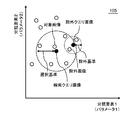
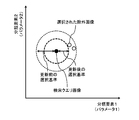
- FIG. 41 is a diagram for explaining an example of exclusion criteria and selection criteria.
- the exclusion score and the selection score are defined using the same features. Therefore, these two scores are shown in the same feature space.
- the search information acquisition unit 610 targets an image whose distance from the search query image is within the selection criterion (in the example shown in this figure, an image located in a circle whose radius is the selection criterion centered on the search query image). Select as an image.
- the exclusion image selection unit 640 is located in a circle whose radius is the exclusion criterion centered on the exclusion query image in the target image whose distance from the exclusion query image is within the exclusion criterion (in the example shown in this figure). Image to be excluded) is selected as an exclusion image. In the example shown in this figure, the exclusion query image is selected from the target images.
- the exclusion image selection unit 640 sets the exclusion criteria according to the input from the user. However, the exclusion image selection unit 640 may set the exclusion criteria using the selection criteria. As an example, if the exclusion score and the selection score are defined using the same feature space, the exclusion criteria are defined as values less than the selection criteria. In this case, the exclusion criteria are defined by the function, for example, with the selection criteria as variables.
- the exclusion criterion may be a value obtained by multiplying the selection criterion by a constant less than 1, or a value obtained by subtracting a predetermined constant from the selection criterion.
- FIG. 42 is a flowchart showing a first example of processing performed by the search unit 105 according to this search method.
- the search information acquisition unit 610 of the search unit 105 acquires the search query image (step S300).
- the search information acquisition unit 610 acquires an image specified by the user as a search query image.
- the user may select a search query image from the images stored in the database 110, or may have the search unit 105 acquire the search query image from an external device or storage medium.
- the search information acquisition unit 610 selects an image similar to the search query image from the images stored in the database 110 as the target image. At this time, the search information acquisition unit 610 determines whether or not the image is similar to the search query image using the selection criteria described above (step S302). In this process, the search unit 105 may perform a process of selecting a target image after clustering by the classification unit 104, or may perform a process of selecting a target image without clustering. good. Usually, a plurality of target images are selected in this process.
- the search information acquisition unit 610 causes the display unit 107 to display a plurality of selected target images (step S304).
- the user of the image processing apparatus 100 can confirm whether or not the selection result of the target image is the desired result, for example, whether or not the target image includes an image having an undesired posture. can.
- the user of the image processing device 100 inputs an exclusion query image via, for example, the input unit 106.
- the user of the image processing apparatus 100 selects at least one (or a plurality) images to be excluded query images from the target images displayed on the display unit 107 (step S306).
- the exclusion information acquisition unit 620 recognizes this image as an exclusion query image, and selects an image similar to the exclusion query image from the plurality of target images as the exclusion image (step S308).
- the exclusion information acquisition unit 620 acquires the feature amount of the skeletal structure of the person included in the exclusion query image.
- the exclusion information acquisition unit 620 reads the feature amount of the skeleton structure associated with the exclusion query image from the database 110.
- the skeleton structure detection unit 102 and the feature amount calculation unit 103 process the exclusion query image to calculate the feature amount of the skeleton structure. Then, the exclusion information acquisition unit 620 acquires the feature amount of this skeletal structure.
- the exclusion score calculation unit 630 calculates the distance from the exclusion query image in the feature amount space for each target image. Then, the exclusion image selection unit 640 selects the target image whose distance is within the exclusion criterion as the exclusion image.
- the exclusion image selection unit 640 causes the display unit 107 to display information for recognizing the selected exclusion image to the user (step S310).
- the search information acquisition unit 610 displays a plurality of target images on the display unit 107.
- the exclusion image selection unit 640 superimposes a specific mark (for example, a frame line) on the image selected as the exclusion image among the target images on the display unit 107. In this way, the exclusion image selection unit 640 causes the display unit 107 to display the plurality of target images in a state in which the exclusion image can be specified.
- the exclusion image selection unit 640 removes the exclusion image from the target image when a predetermined input is made.
- the user inputs to the input unit 106 to select an image to be excluded from the target image from the excluded images.
- the user selects an image to be really excluded from the excluded images displayed on the display unit 107, and inputs information for identifying the image to the input unit 106 (step S312).
- the exclusion image selection unit 640 excludes the exclusion image selected in step S312 from the target image (step S314).
- the exclusion image selection unit 640 may exclude all of the plurality of exclusion images selected in step S308 from the target image when a predetermined input is received from the user. For example, when a plurality of excluded images are surrounded by one frame in step S310, a predetermined input performed by the user is a process of selecting this frame and a process of selecting a button for deleting the excluded image. Both.
- the exclusion image selection unit 640 stores the information for identifying the remaining target images in the database 110 (step S316).
- the exclusion image selection unit 640 may store the remaining target image itself, or may associate the image already stored in the database 110 with a flag indicating that the image has been selected as the target image. good.
- the exclusion image selection unit 640 may store the remaining target images in the database 110 in association with the search query image.
- FIG. 44 is a flowchart showing a modified example of FIG. 42.
- the search information acquisition unit 610 stores the search query image in the database 110 so that the user can use it again.
- the search information acquisition unit 610 stores the selection criteria to be used together with the search query image in the database 110 in association with the search query image.
- the search information acquisition unit 610 updates the selection criteria using the input from the user regarding the selection of the excluded image.
- step S300 to step S316 are the same as those in FIG. 42.
- the search information acquisition unit 610 updates the selection criteria according to, for example, one of the following two examples (step S318).
- step S312 the user selects an image to be really excluded from the excluded images displayed on the display unit 107, and inputs information for identifying the image to the input unit 106. ..
- the exclusion image selection unit 640 excludes the exclusion image selected in step S312 from the target image in step S314.
- the search information acquisition unit 610 updates the selection criteria using the exclusion image selected in step S312. Specifically, as shown in FIG. 45, the search information acquisition unit 610 updates the distance in the feature amount space as the selection criterion so that the excluded image selected in step S312 deviates from the target image.
- the exclusion criteria are set according to the user's input. Then, the user causes the exclusion score calculation unit 630 and the exclusion image selection unit 640 to repeatedly perform the processes shown in steps S308 and S310 while changing the exclusion criteria. This adjusts the exclusion criteria to the optimum value. Then, the search information acquisition unit 610 updates the selection criteria using the exclusion criteria. Specifically, as shown in FIG. 46, the search information acquisition unit 610 sets the distance in the feature amount space as the selection criterion to "distance from the search query image to the exclusion query image"-"feature as the exclusion criterion". Update to "Distance in quantity space".
- the search information acquisition unit 610 stores the updated selection criteria and selection query images in the database 110 in association with each other. After that, when the search information acquisition unit 610 searches for an image using the selection query image stored in the database 110 according to the user input, the selection criterion associated with the selection query image is read from the database 110 and used. .. Therefore, when the target image is selected by reusing the selection query image, the accuracy of the selection result is high.
- the present embodiment it is possible to detect the skeletal structure of a person from a two-dimensional image and perform classification and search based on the feature amount of the detected skeletal structure. As a result, it is possible to classify by similar postures having a high degree of similarity, and it is possible to search for similar postures having a high degree of similarity with the search query (search key).
- search key By classifying and displaying similar postures from the image, the posture of the person in the image can be grasped without the user specifying the posture or the like. Since the user can specify the posture of the search query from the classification results, the desired posture can be searched even if the user does not know the posture to be searched in detail in advance. For example, since it is possible to perform classification and search on the condition of the whole or part of the skeleton structure of a person, flexible classification and search is possible.
- the search unit 105 excludes an image similar to the exclusion query image from the target image selected by the search query image. Therefore, the search accuracy by the search unit 105 is high. It is less likely that the target image searched by the search unit 105 includes an image of a person in a posture not intended by the user.
- FIG. 18 shows the configuration of the image processing device 100 according to the present embodiment.
- the image processing device 100 further includes a height calculation unit 108 in addition to the configuration of the first embodiment.
- the feature amount calculation unit 103 and the height calculation unit 108 may be combined into one processing unit.
- the height calculation unit (height estimation unit) 108 calculates the height of the person in the two-dimensional image when standing upright (referred to as the number of height pixels) based on the two-dimensional skeleton structure detected by the skeleton structure detection unit 102 (referred to as the number of height pixels). presume. It can be said that the number of height pixels is the height of a person in a two-dimensional image (the length of the whole body of the person in the two-dimensional image space). The height calculation unit 108 obtains the number of height pixels (number of pixels) from the length (length in the two-dimensional image space) of each bone of the detected skeleton structure.
- specific examples 1 to 3 are used as a method for determining the number of height pixels.
- any of the methods of Specific Examples 1 to 3 may be used, or a plurality of arbitrarily selected methods may be used in combination.
- the number of height pixels is obtained by summing the lengths of the bones from the head to the foot among the bones of the skeleton structure. If the skeleton structure detection unit 102 (skeleton estimation technique) does not output the crown and feet, it can be corrected by multiplying by a constant if necessary.
- the number of height pixels is calculated using a human body model showing the relationship between the length of each bone and the length of the whole body (height in the two-dimensional image space).
- the number of height pixels is calculated by fitting (fitting) the three-dimensional human body model to the two-dimensional skeleton structure.
- the feature amount calculation unit 103 of the present embodiment is a normalization unit that normalizes the skeletal structure (skeleton information) of a person based on the calculated number of height pixels of the person.
- the feature amount calculation unit 103 stores the feature amount (normalized value) of the normalized skeleton structure in the database 110.
- the feature amount calculation unit 103 normalizes the height of each key point (feature point) included in the skeleton structure on the image by the number of height pixels.
- the height direction is the vertical direction (Y-axis direction) in the two-dimensional coordinate (XY coordinate) space of the image. In this case, the height of the key point can be obtained from the value (number of pixels) of the Y coordinate of the key point.
- the height direction may be the direction of the vertical axis perpendicular to the ground (reference plane) in the three-dimensional coordinate space in the real world, and the direction of the vertical projection axis (vertical projection direction) projected onto the two-dimensional coordinate space.
- the height of the key point is a value (number of pixels) along the vertical projection axis obtained by projecting the axis perpendicular to the ground in the real world onto the two-dimensional coordinate space based on the camera parameters. ) Can be obtained.
- the camera parameters are image imaging parameters, and for example, the camera parameters are the posture, position, imaging angle, focal length, and the like of the camera 200.
- the camera 200 can take an image of an object whose length and position are known in advance, and obtain camera parameters from the image. Distortion occurs at both ends of the captured image, and the vertical direction of the real world may not match the vertical direction of the image. On the other hand, by using the parameters of the camera that took the image, it is possible to know how much the vertical direction in the real world is tilted in the image. Therefore, by normalizing the value of the key point along the vertical projection axis projected in the image based on the camera parameters by height, it is possible to feature the key point in consideration of the deviation between the real world and the image. can.
- the left-right direction is the left-right direction (X-axis direction) in the two-dimensional coordinate (XY coordinates) space of the image, or the direction parallel to the ground in the three-dimensional coordinate space in the real world. Is the direction projected onto the two-dimensional coordinate space.
- FIG. 19 to 23 show the operation of the image processing device 100 according to the present embodiment.
- FIG. 19 shows a flow from image acquisition to search processing in the image processing device 100
- FIGS. 20 to 22 show the flow of specific examples 1 to 3 of the height pixel number calculation process (S201) of FIG. 23 shows the flow of the normalization process (S202) of FIG.
- the height pixel number calculation process (S201) and the normalization process (S202) are performed as the feature amount calculation process (S103) in the first embodiment. Others are the same as those in the first embodiment.
- the image processing device 100 performs a height pixel number calculation process based on the detected skeleton structure (S201) following the image acquisition (S101) and the skeleton structure detection (S102).
- the height of the skeleton structure of the person standing upright in the image is the height pixel number (h)
- the height of each key point of the skeleton structure in the state of the person in the image is the key point. Let it be the height (yi).
- specific examples 1 to 3 of the height pixel number calculation process will be described.
- Specific Example 1 the number of height pixels is obtained using the length of the bone from the head to the foot.
- the height calculation unit 108 acquires the length of each bone (S211) and sums the acquired lengths of each bone (S212).
- the height calculation unit 108 acquires the length of bones on the two-dimensional image of the foot from the head of the person, and obtains the number of height pixels. That is, from the image in which the skeletal structure is detected, among the bones of FIG. 24, bone B1 (length L1), bone B51 (length L21), bone B61 (length L31) and bone B71 (length L41), or , Bone B1 (length L1), bone B52 (length L22), bone B62 (length L32), and bone B72 (length L42) are acquired. The length of each bone can be obtained from the coordinates of each key point in the two-dimensional image.
- the longer value is taken as the number of height pixels. That is, each bone has the longest length in the image when it is imaged from the front, and it is displayed short when it is tilted in the depth direction with respect to the camera. Therefore, it is more likely that the longer bone is imaged from the front, which is considered to be closer to the true value. Therefore, it is preferable to select the longer value.
- bone B1, bone B51 and bone B52, bone B61 and bone B62, bone B71 and bone B72 are detected without overlapping.
- the total of these bones, L1 + L21 + L31 + L41, and L1 + L22 + L32 + L42, is obtained, and for example, the value obtained by multiplying L1 + L22 + L32 + L42 on the left foot side where the detected bone length is long by a correction constant is taken as the height pixel number.
- bone B1, bone B51 and bone B52, bone B61 and bone B62, bone B71 and bone B72 are detected, respectively, and the right foot bone B61 and bone B71 and the left foot bone B62 and bone B72 overlap. ..
- the total of these bones, L1 + L21 + L31 + L41 and L1 + L22 + L32 + L42, is obtained, and for example, the value obtained by multiplying L1 + L21 + L31 + L41 on the right foot side where the detected bone length is long by a correction constant is taken as the height pixel number.
- bone B1, bone B51 and bone B52, bone B61 and bone B62, bone B71 and bone B72 are detected, respectively, and the right foot bone B61 and bone B71 and the left foot bone B62 and bone B72 overlap. ..
- the total of these bones, L1 + L21 + L31 + L41, and L1 + L22 + L32 + L42, is obtained, and for example, the value obtained by multiplying L1 + L22 + L32 + L42 on the left foot side where the detected bone length is long by a correction constant is taken as the height pixel number.
- the height can be calculated by summing the lengths of the bones from the head to the feet, so the number of height pixels can be calculated by a simple method.
- the number of height pixels can be accurately calculated even when the entire person is not always shown in the image, such as when crouching down. Can be estimated.
- Specific Example 2 the number of height pixels is obtained using a two-dimensional skeleton model showing the relationship between the length of the bone included in the two-dimensional skeleton structure and the length of the whole body of the person in the two-dimensional image space.
- FIG. 28 is a human body model (two-dimensional skeleton model) 301 showing the relationship between the length of each bone in the two-dimensional image space and the length of the whole body in the two-dimensional image space used in the second embodiment.
- the relationship between the length of each bone of an average person and the length of the whole body is associated with each bone of the human body model 301.
- the length of the head bone B1 is the length of the whole body x 0.2 (20%)
- the length of the bone B41 of the right hand is the length of the whole body x 0.15 (15%)
- the length of the right foot is the length of the whole body ⁇ 0.25 (25%).
- the average whole body length can be obtained from the length of each bone.
- a human body model may be prepared for each attribute of the person such as age, gender, and nationality. As a result, the length (height) of the whole body can be appropriately obtained according to the attributes of the person.
- the height calculation unit 108 acquires the length of each bone (S221).
- the height calculation unit 108 acquires the lengths (lengths in the two-dimensional image space) of all the bones in the detected skeletal structure.
- FIG. 29 is an example in which a person in a crouched state is imaged from diagonally right behind and the skeletal structure is detected. In this example, since the face and left side of the person are not shown, the bones of the head and the bones of the left arm and the left hand cannot be detected. Therefore, the lengths of the detected bones B21, B22, B31, B41, B51, B52, B61, B62, B71, and B72 are acquired.
- the height calculation unit 108 calculates the number of height pixels from the length of each bone based on the human body model (S222).
- the height calculation unit 108 refers to the human body model 301 showing the relationship between each bone and the length of the whole body as shown in FIG. 28, and obtains the number of height pixels from the length of each bone.
- the number of height pixels based on the bone B41 is obtained by the length of the bone B41 / 0.15.
- the length of the bone B71 of the right foot is the length of the whole body ⁇ 0.25
- the number of height pixels based on the bone B71 is obtained from the length of the bone B71 / 0.25.
- the human body model referred to at this time is, for example, a human body model of an average person, but a human body model may be selected according to the attributes of the person such as age, gender, and nationality. For example, when a person's face is shown in the captured image, the attribute of the person is identified based on the face, and the human body model corresponding to the identified attribute is referred to. It is possible to recognize a person's attributes from the facial features of the image by referring to the information obtained by machine learning the face for each attribute. Further, when the attribute of the person cannot be identified from the image, the human body model of the average person may be used.
- the number of height pixels calculated from the length of the bone may be corrected by the camera parameter. For example, when the camera is taken at a high position and looking down at a person, the horizontal length of the shoulder-width bones, etc. is not affected by the depression angle of the camera in the two-dimensional skeletal structure, but the vertical length of the neck-waist bones, etc. The length decreases as the depression angle of the camera increases. Then, the number of height pixels calculated from the horizontal length of the shoulder-width bones and the like tends to be larger than the actual number.
- the camera parameters it is possible to know the angle at which the person is looking down at the camera, and the information on the depression angle can be used to correct the two-dimensional skeleton structure as if it was taken from the front. As a result, the number of height pixels can be calculated more accurately.
- the height calculation unit 108 calculates the optimum value of the number of height pixels as shown in FIG. 21 (S223).
- the height calculation unit 108 calculates the optimum value of the number of height pixels from the number of height pixels obtained for each bone. For example, as shown in FIG. 30, a histogram of the number of height pixels obtained for each bone is generated, and a large number of height pixels is selected from the histogram. That is, the number of height pixels longer than the others is selected from the plurality of height pixels obtained based on the plurality of bones. For example, the top 30% is set as a valid value, and in FIG. 30, the number of height pixels by bones B71, B61, and B51 is selected.
- the average number of selected height pixels may be obtained as the optimum value, or the largest number of height pixels may be used as the optimum value. Since the height is calculated from the length of the bone in the two-dimensional image, the length of the bone is imaged from the front when the bone is not formed from the front, that is, when the bone is tilted in the depth direction when viewed from the camera. It will be shorter than the case. Then, a value having a large number of height pixels is more likely to be imaged from the front than a value having a small number of height pixels, and is a more plausible value. Therefore, a larger value is set as the optimum value.
- the number of height pixels is calculated based on the detected bones of the skeleton structure using a human body model showing the relationship between the bones in the two-dimensional image space and the length of the whole body, so that all the skeletons from the head to the feet are obtained. Even if is not obtained, the number of height pixels can be obtained from some bones. In particular, the number of height pixels can be estimated accurately by adopting a larger value among the values obtained from a plurality of bones.
- Specific Example 3 the two-dimensional skeletal structure is fitted to the three-dimensional human body model (three-dimensional skeletal model), and the skeletal vector of the whole body is obtained using the number of height pixels of the fitted three-dimensional human body model.
- the height calculation unit 108 first calculates the camera parameters based on the image captured by the camera 200 (S231).
- the height calculation unit 108 extracts an object whose length is known in advance from a plurality of images captured by the camera 200, and obtains a camera parameter from the size (number of pixels) of the extracted object.
- the camera parameters may be obtained in advance, and the obtained camera parameters may be acquired as needed.
- the height calculation unit 108 adjusts the arrangement and height of the three-dimensional human body model (S232).
- the height calculation unit 108 prepares a three-dimensional human body model for calculating the number of height pixels for the detected two-dimensional skeleton structure, and arranges the detected two-dimensional skeleton structure in the same two-dimensional image based on the camera parameters.
- the "relative positional relationship between the camera and the person in the real world" is specified from the camera parameters and the two-dimensional skeleton structure. For example, assuming that the position of the camera is the coordinates (0, 0, 0), the coordinates (x, y, z) of the position where the person is standing (or sitting) are specified. Then, by assuming an image when the three-dimensional human body model is placed at the same position (x, y, z) as the specified person and captured, the two-dimensional skeleton structure and the three-dimensional human body model are superimposed.
- FIG. 31 is an example in which a crouching person is imaged diagonally from the front left and the two-dimensional skeleton structure 401 is detected.
- the two-dimensional skeleton structure 401 has two-dimensional coordinate information. It is preferable that all bones are detected, but some bones may not be detected.
- a three-dimensional human body model 402 as shown in FIG. 32 is prepared.
- the three-dimensional human body model (three-dimensional skeleton model) 402 is a model of a skeleton having three-dimensional coordinate information and having the same shape as the two-dimensional skeleton structure 401.
- the prepared three-dimensional human body model 402 is arranged and superimposed on the detected two-dimensional skeleton structure 401.
- the height of the three-dimensional human body model 402 is adjusted so as to match the two-dimensional skeleton structure 401.
- the three-dimensional human body model 402 prepared at this time may be a model in a state close to the posture of the two-dimensional skeleton structure 401 as shown in FIG. 33, or may be a model in an upright state.
- a three-dimensional human body model 402 of the estimated posture may be generated by using a technique of estimating the posture of the three-dimensional space from the two-dimensional image using machine learning. By learning the information of the joints in the two-dimensional image and the joints in the three-dimensional space, the three-dimensional posture can be estimated from the two-dimensional image.
- the height calculation unit 108 fits the three-dimensional human body model into the two-dimensional skeletal structure as shown in FIG. 22 (S233). As shown in FIG. 34, the height calculation unit 108 superimposes the three-dimensional human body model 402 on the two-dimensional skeletal structure 401 so that the three-dimensional human body model 402 and the two-dimensional skeletal structure 401 have the same posture.
- the dimensional human body model 402 is transformed. That is, the height, body orientation, and joint angle of the three-dimensional human body model 402 are adjusted and optimized so that there is no difference from the two-dimensional skeletal structure 401.
- the joints of the three-dimensional human body model 402 are rotated within the movable range of the person, the entire three-dimensional human body model 402 is rotated, and the overall size is adjusted.
- the fitting of the three-dimensional human body model and the two-dimensional skeleton structure is performed in the two-dimensional space (two-dimensional coordinates). That is, a three-dimensional human body model is mapped in a two-dimensional space, and the three-dimensional human body model is transformed into a two-dimensional skeleton structure in consideration of how the deformed three-dimensional human body model changes in the two-dimensional space (image). Optimize.
- the height calculation unit 108 calculates the number of height pixels of the fitted three-dimensional human body model as shown in FIG. 22 (S234). As shown in FIG. 35, the height calculation unit 108 obtains the number of height pixels of the three-dimensional human body model 402 in that state when the difference between the three-dimensional human body model 402 and the two-dimensional skeleton structure 401 disappears and the postures match. With the optimized 3D human body model 402 upright, the length of the whole body in the 2D space is obtained based on the camera parameters. For example, the number of height pixels is calculated from the length (number of pixels) of the bones from the head to the foot when the three-dimensional human body model 402 is upright. Similar to Specific Example 1, the lengths of the bones from the head to the foot of the three-dimensional human body model 402 may be totaled.
- the image processing device 100 performs a normalization process (S202) following the height pixel number calculation process.
- the feature amount calculation unit 103 calculates the key point height (S241).
- the feature amount calculation unit 103 calculates the key point height (number of pixels) of all the key points included in the detected skeleton structure.
- the key point height is the length (number of pixels) in the height direction from the lowest end of the skeletal structure (for example, the key point of any foot) to the key point.
- the height of the key point is obtained from the Y coordinate of the key point in the image.
- the key point height may be obtained from the length in the direction along the vertical projection axis based on the camera parameters.
- the height (yi) of the key point A2 of the neck is a value obtained by subtracting the Y coordinate of the key point A81 of the right foot or the key point A82 of the left foot from the Y coordinate of the key point A2.
- the reference point is a reference point for expressing the relative height of the key point.
- the reference point may be preset or may be selectable by the user.
- the reference point is preferably at the center of the skeletal structure or higher than the center (upper in the vertical direction of the image), and for example, the coordinates of the key point of the neck are used as the reference point.
- the coordinates of the head and other key points, not limited to the neck, may be used as the reference point.
- any coordinate for example, the center coordinate of the skeleton structure may be used as a reference point.
- the feature amount calculation unit 103 normalizes the key point height (yi) by the number of height pixels (S243).
- the feature amount calculation unit 103 normalizes each key point by using the key point height, the reference point, and the number of height pixels of each key point. Specifically, the feature amount calculation unit 103 normalizes the relative height of the key point with respect to the reference point by the number of height pixels.
- the feature amount (normalized value) is obtained by using the following equation (1) with the Y coordinate of the reference point (key point of the neck) as (yc).
- (yi) and (yc) are converted into values in the direction along the vertical projection axis.
- the coordinates (x0, y0), (x1, y1), ... (X17, y17) of the 18 points of each key point are set as follows using the above equation (1). It is converted into an 18-dimensional feature amount as in.
- FIG. 36 shows an example of the feature amount of each key point obtained by the feature amount calculation unit 103.
- the feature amount of the key point A2 is 0.0
- the feature amount of the key point A31 on the right shoulder and the key point A32 on the left shoulder at the same height as the neck are also. It is 0.0.
- the feature amount of the key point A1 of the head higher than the neck is -0.2.
- the feature amount of the right hand key point A51 and the left hand key point A52 lower than the neck is 0.4, and the feature amount of the right foot key point A81 and the left foot key point A82 is 0.9.
- the feature amount of the left hand key point A52 is ⁇ 0.4.
- the feature amount (normalized value) of the present embodiment shows the feature of the skeleton structure (key point) in the height direction (Y direction), and affects the change of the skeleton structure in the lateral direction (X direction). Do not receive.
- the skeleton structure of the person is detected from the two-dimensional image, and the number of height pixels (height when standing upright on the two-dimensional image space) obtained from the detected skeleton structure is used. Normalize each key point of the skeletal structure. By using this normalized feature amount, it is possible to improve the robustness when classification, search, etc. are performed. That is, since the feature amount of the present embodiment is not affected by the lateral change of the person as described above, it is highly robust to the change of the direction of the person and the body shape of the person.
- the present embodiment since it can be realized by detecting the skeleton structure of the person using a skeleton estimation technique such as OpenPose, it is not necessary to prepare learning data for learning the posture of the person.
- a skeleton estimation technique such as OpenPose
- by normalizing the key points of the skeletal structure it is possible to obtain clear and easy-to-understand features, so unlike a black box type algorithm such as machine learning, the user is highly convinced of the processing result.
- Search information acquisition means for acquiring a plurality of search posture information indicating the posture of a person included in the target image, which is information generated for each of a plurality of target images.
- Exclusion query that is a query for images that should be excluded from the search results
- Exclusion information acquisition means that acquires exclusion posture information that indicates the posture of the person included in the image, and
- an exclusion score calculation means for calculating an exclusion score indicating the degree of similarity to the exclusion posture information
- An exclusion image selection means for selecting an exclusion image, which is an image to be excluded from the search results, from the plurality of target images using the exclusion score.
- An image selection device comprising. 2.
- the search information acquisition means acquires a search query image including a person in a posture to be included in the target image, and selects the plurality of target images using a selection score indicating the degree of similarity to the search query image.
- the exclusion score and the selection score are defined by the same parameters.
- the exclusion image selection means is an image selection device that sets exclusion criteria for selecting the exclusion image using the selection criteria for selecting the plurality of target images. 4.
- the exclusion image selection means selects the target image whose distance in the space consisting of the parameters satisfies the exclusion criterion as the exclusion image.
- the search information acquisition means selects an image whose distance in the space consisting of the parameters satisfies the selection criterion as the target image.
- the exclusion image selection means acquires at least one selection input of the exclusion image, and excludes the exclusion image selected by the selection input from the plurality of target images.
- the search information acquisition means is The selection criteria for selecting the plurality of target images using the search query image is updated using the excluded images selected by the selection input.
- An image selection device that stores the search query image and the updated selection criterion in a storage means in association with each other. 6.
- the exclusion score is indicated by at least one parameter.
- the exclusion image selection means is an image selection device that sets exclusion criteria for selecting the exclusion image according to input from the user. 7. In the image selection device according to 6 above, The exclusion score and the selection score are defined by the same parameters.
- the exclusion image selection means sets exclusion criteria for selecting the exclusion image using the selection criteria for selecting the plurality of target images, and sets the exclusion criteria.
- the search information acquisition means is The selection criteria are updated with the exclusion criteria.
- An image selection device that stores the search query image and the updated selection criterion in a storage means in association with each other. 8. In the image selection device according to any one of 1 to 7 above.
- the exclusion image selection means causes the display means to display the plurality of target images in a state in which the exclusion image can be identified. Further, an image selection device including an exclusion means for excluding the excluded image from the plurality of target images when a predetermined input is received.
- the excluded image selection means After displaying the plurality of target images, at least one selection input of the excluded images is acquired, and the selection input is obtained. An image selection device that excludes the excluded image selected by the selection input from the plurality of target images. 10.
- the exclusion image selection means selects a plurality of the exclusion images, and the exclusion image selection means selects a plurality of the exclusion images.
- the exclusion image selection means is an image selection device that excludes the plurality of exclusion images from the plurality of target images when a predetermined input is received.
- the computer Search information acquisition processing that acquires a plurality of search posture information indicating the posture of a person included in the target image, which is posture information generated for each of a plurality of target images.
- Exclusion query that is a query for images that should be excluded from the search results
- Exclusion information acquisition processing that acquires exclusion posture information that indicates the posture of the person included in the image, and For each of the plurality of search posture information, an exclusion score calculation process for calculating an exclusion score indicating the degree of similarity to the exclusion posture information, and
- An exclusion image selection process for selecting an exclusion image, which is an image to be excluded from the search results, from the plurality of target images using the exclusion score.
- the computer acquires a search query image including a person in a posture to be included in the target image, and uses a selection score indicating the degree of similarity to the search query image to the plurality of targets.
- Image selection method to select an image. 13
- the exclusion score and the selection score are defined by the same parameters.
- the computer selects the target image whose distance in the space consisting of the parameters satisfies the exclusion criterion as the exclusion image.
- the computer selects an image whose distance in the space consisting of the parameters satisfies the selection criterion as the target image.
- the computer acquires at least one selection input of the exclusion image, excludes the exclusion image selected by the selection input from the plurality of target images, and then excludes the exclusion image.
- the computer The selection criteria for selecting the plurality of target images using the search query image is updated using the excluded images selected by the selection input.
- An image selection method in which the search query image and the updated selection criterion are linked to each other and stored in a storage means. 16.
- the exclusion score is indicated by at least one parameter.
- An image selection method in which, in the exclusion image selection process, the computer sets an exclusion criterion for selecting the exclusion image according to an input from a user. 17.
- the exclusion score and the selection score are defined by the same parameters.
- the computer sets exclusion criteria for selecting the exclusion image using the selection criteria for selecting the plurality of target images.
- the computer The selection criteria are updated with the exclusion criteria.
- the computer causes the display means to display the plurality of target images in a state in which the exclusion image can be identified. Further, the image selection method 19.
- the computer performs an exclusion process of excluding the excluded image from the plurality of target images when a predetermined input is received.
- the image selection method described in 18 above In the exclusion image selection process, the computer After displaying the plurality of target images, at least one selection input of the excluded images is acquired, and the selection input is obtained.
- An image selection method for excluding the excluded image selected by the selection input from the plurality of target images 20.
- the computer selects a plurality of the exclusion images.
- the computer is an image selection method for excluding the plurality of excluded images from the plurality of target images when a predetermined input is received. 21.
- a search information acquisition function that acquires a plurality of search posture information indicating the posture of a person included in the target image, which is posture information generated for each of a plurality of target images.
- Exclusion query that is a query for images that should be excluded from the search results
- Exclusion information acquisition function that acquires exclusion posture information that indicates the posture of the person included in the image, and For each of the plurality of search posture information, an exclusion score calculation function for calculating an exclusion score indicating the degree of similarity to the exclusion posture information, and an exclusion score calculation function.
- An exclusion image selection function that selects an exclusion image, which is an image to be excluded from the search results, from the plurality of target images using the exclusion score. Program to have. 22.
- the search information acquisition function acquires a search query image including a person in a posture to be included in the target image, and selects the plurality of target images using a selection score indicating the degree of similarity to the search query image.
- program. 23 In the program described in 22 above, The exclusion score and the selection score are defined by the same parameters.
- the exclusion image selection function is a program that sets exclusion criteria for selecting the exclusion image using the selection criteria for selecting the plurality of target images. 24. In the program described in 23 above, The exclusion image selection function selects the target image whose distance in the space consisting of the parameters satisfies the exclusion criterion as the exclusion image.
- the search information acquisition function selects an image whose distance in the space consisting of the parameters satisfies the selection criterion as the target image.
- the exclusion image selection function acquires at least one selection input of the exclusion image, excludes the exclusion image selected by the selection input from the plurality of target images, and excludes the exclusion image.
- the search information acquisition function is The selection criteria for selecting the plurality of target images using the search query image is updated using the excluded images selected by the selection input.
- the exclusion score is indicated by at least one parameter.
- the exclusion image selection function is a program that sets exclusion criteria for selecting the exclusion image according to input from the user. 27. In the program described in 26 above, The exclusion score and the selection score are defined by the same parameters.
- the exclusion image selection function sets exclusion criteria for selecting the exclusion image using the selection criteria for selecting the plurality of target images, and sets the exclusion criteria.
- the search information acquisition function is The selection criteria are updated with the exclusion criteria.
- the exclusion image selection function causes the display means to display the plurality of target images in a state in which the exclusion image can be specified. Further, a program that gives the computer an exclusion function of excluding the exclusion image from the plurality of target images when a predetermined input is received.
- the excluded image selection function is After displaying the plurality of target images, at least one selection input of the excluded images is acquired, and the selection input is obtained. A program that excludes the excluded image selected by the selection input from the plurality of target images. 30.
- the exclusion image selection function selects a plurality of the exclusion images and
- the exclusion image selection function is a program that excludes the plurality of exclusion images from the plurality of target images when a predetermined input is received.
- Image processing system 10 Image processing device (image selection device) 11 Skeleton detection unit 12 Feature calculation unit 13 Recognition unit 100 Image processing device (image selection device) 101 Image acquisition unit 102 Skeletal structure detection unit 103 Feature amount calculation unit 104 Classification unit 105 Search unit 106 Input unit 107 Display unit 108 Height calculation unit 110 Database 200 Camera 300, 301 Human body model 401 Two-dimensional skeletal structure 402 Three-dimensional human body model 610 Search information acquisition unit 620 Exclusion information acquisition unit 630 Exclusion score calculation unit 640 Exclusion image selection unit
Landscapes
- Engineering & Computer Science (AREA)
- Theoretical Computer Science (AREA)
- Physics & Mathematics (AREA)
- General Physics & Mathematics (AREA)
- Library & Information Science (AREA)
- Databases & Information Systems (AREA)
- Computer Vision & Pattern Recognition (AREA)
- Data Mining & Analysis (AREA)
- General Engineering & Computer Science (AREA)
- Multimedia (AREA)
- Health & Medical Sciences (AREA)
- Artificial Intelligence (AREA)
- Computing Systems (AREA)
- Evolutionary Computation (AREA)
- General Health & Medical Sciences (AREA)
- Medical Informatics (AREA)
- Software Systems (AREA)
- Human Computer Interaction (AREA)
- Mathematical Physics (AREA)
- Image Analysis (AREA)
Priority Applications (3)
| Application Number | Priority Date | Filing Date | Title |
|---|---|---|---|
| PCT/JP2020/018692 WO2021224994A1 (ja) | 2020-05-08 | 2020-05-08 | 画像選択装置、画像選択方法、及びプログラム |
| JP2022519885A JP7435754B2 (ja) | 2020-05-08 | 2020-05-08 | 画像選択装置、画像選択方法、及びプログラム |
| US17/921,415 US12579674B2 (en) | 2020-05-08 | 2020-05-08 | Image selection apparatus, image selection method, and non-transitory computer-readable medium |
Applications Claiming Priority (1)
| Application Number | Priority Date | Filing Date | Title |
|---|---|---|---|
| PCT/JP2020/018692 WO2021224994A1 (ja) | 2020-05-08 | 2020-05-08 | 画像選択装置、画像選択方法、及びプログラム |
Publications (1)
| Publication Number | Publication Date |
|---|---|
| WO2021224994A1 true WO2021224994A1 (ja) | 2021-11-11 |
Family
ID=78468052
Family Applications (1)
| Application Number | Title | Priority Date | Filing Date |
|---|---|---|---|
| PCT/JP2020/018692 Ceased WO2021224994A1 (ja) | 2020-05-08 | 2020-05-08 | 画像選択装置、画像選択方法、及びプログラム |
Country Status (3)
| Country | Link |
|---|---|
| US (1) | US12579674B2 (https=) |
| JP (1) | JP7435754B2 (https=) |
| WO (1) | WO2021224994A1 (https=) |
Cited By (2)
| Publication number | Priority date | Publication date | Assignee | Title |
|---|---|---|---|---|
| JP2023074369A (ja) * | 2021-11-17 | 2023-05-29 | キヤノン株式会社 | 画像処理装置、撮像装置、制御方法及びプログラム |
| JP2023176244A (ja) * | 2022-05-31 | 2023-12-13 | 日本電気株式会社 | 画像処理システム、装置、処理方法、およびプログラム |
Citations (4)
| Publication number | Priority date | Publication date | Assignee | Title |
|---|---|---|---|---|
| JP2002007469A (ja) * | 2000-06-23 | 2002-01-11 | Yamaha Motor Co Ltd | 検索方法、検索装置及び画像検索装置 |
| JP2005141584A (ja) * | 2003-11-07 | 2005-06-02 | Omron Corp | 画像削除装置,及び画像圧縮装置 |
| JP2014522035A (ja) * | 2011-07-27 | 2014-08-28 | サムスン エレクトロニクス カンパニー リミテッド | オブジェクト姿勢検索装置及び方法 |
| JP2016071428A (ja) * | 2014-09-26 | 2016-05-09 | エヌ・ティ・ティ・コムウェア株式会社 | 情報処理方法、情報処理装置、及びプログラム |
Family Cites Families (8)
| Publication number | Priority date | Publication date | Assignee | Title |
|---|---|---|---|---|
| JP4764652B2 (ja) | 2005-03-18 | 2011-09-07 | 株式会社リコー | 画像情報更新システム、画像処理装置、画像更新装置、画像情報更新方法、画像情報更新プログラム、及び該プログラムが記録された記録媒体 |
| JP5358083B2 (ja) * | 2007-11-01 | 2013-12-04 | 株式会社日立製作所 | 人物画像検索装置及び画像検索装置 |
| US8180788B2 (en) * | 2008-06-05 | 2012-05-15 | Enpulz, L.L.C. | Image search engine employing image correlation |
| CN102110122B (zh) * | 2009-12-24 | 2013-04-03 | 阿里巴巴集团控股有限公司 | 一种建立样本图片索引表和图片过滤、搜索方法及装置 |
| JP2018180894A (ja) | 2017-04-12 | 2018-11-15 | キヤノン株式会社 | 情報処理装置、情報処理方法及びプログラム |
| JP6831769B2 (ja) * | 2017-11-13 | 2021-02-17 | 株式会社日立製作所 | 画像検索装置、画像検索方法、及び、それに用いる設定画面 |
| WO2020255227A1 (ja) * | 2019-06-17 | 2020-12-24 | 日本電信電話株式会社 | 学習装置、検索装置、学習方法、検索方法、学習プログラム、及び検索プログラム |
| CN110785753B (zh) * | 2019-09-27 | 2024-06-11 | 京东方科技集团股份有限公司 | 用于搜索图像的方法、装置及存储介质 |
-
2020
- 2020-05-08 US US17/921,415 patent/US12579674B2/en active Active
- 2020-05-08 JP JP2022519885A patent/JP7435754B2/ja active Active
- 2020-05-08 WO PCT/JP2020/018692 patent/WO2021224994A1/ja not_active Ceased
Patent Citations (4)
| Publication number | Priority date | Publication date | Assignee | Title |
|---|---|---|---|---|
| JP2002007469A (ja) * | 2000-06-23 | 2002-01-11 | Yamaha Motor Co Ltd | 検索方法、検索装置及び画像検索装置 |
| JP2005141584A (ja) * | 2003-11-07 | 2005-06-02 | Omron Corp | 画像削除装置,及び画像圧縮装置 |
| JP2014522035A (ja) * | 2011-07-27 | 2014-08-28 | サムスン エレクトロニクス カンパニー リミテッド | オブジェクト姿勢検索装置及び方法 |
| JP2016071428A (ja) * | 2014-09-26 | 2016-05-09 | エヌ・ティ・ティ・コムウェア株式会社 | 情報処理方法、情報処理装置、及びプログラム |
Cited By (4)
| Publication number | Priority date | Publication date | Assignee | Title |
|---|---|---|---|---|
| JP2023074369A (ja) * | 2021-11-17 | 2023-05-29 | キヤノン株式会社 | 画像処理装置、撮像装置、制御方法及びプログラム |
| JP7766474B2 (ja) | 2021-11-17 | 2025-11-10 | キヤノン株式会社 | 画像処理装置、撮像装置、制御方法及びプログラム |
| JP2023176244A (ja) * | 2022-05-31 | 2023-12-13 | 日本電気株式会社 | 画像処理システム、装置、処理方法、およびプログラム |
| JP7845054B2 (ja) | 2022-05-31 | 2026-04-14 | 日本電気株式会社 | 画像処理システム、装置、処理方法、およびプログラム |
Also Published As
| Publication number | Publication date |
|---|---|
| US20230206482A1 (en) | 2023-06-29 |
| JPWO2021224994A1 (https=) | 2021-11-11 |
| US12579674B2 (en) | 2026-03-17 |
| JP7435754B2 (ja) | 2024-02-21 |
Similar Documents
| Publication | Publication Date | Title |
|---|---|---|
| JP7556556B2 (ja) | 画像処理装置、画像処理方法及び画像処理プログラム | |
| JP7409499B2 (ja) | 画像処理装置、画像処理方法、及びプログラム | |
| JP7396364B2 (ja) | 画像処理装置、画像処理方法及び画像処理プログラム | |
| JP7775918B2 (ja) | 情報処理装置、情報処理方法、およびプログラム | |
| JP7416252B2 (ja) | 画像処理装置、画像処理方法、及びプログラム | |
| JP7435754B2 (ja) | 画像選択装置、画像選択方法、及びプログラム | |
| JP7708182B2 (ja) | 画像処理装置、画像処理方法、およびプログラム | |
| JP7658380B2 (ja) | 画像選択装置、画像選択方法、及びプログラム | |
| JP7435781B2 (ja) | 画像選択装置、画像選択方法、及びプログラム | |
| JP7491380B2 (ja) | 画像選択装置、画像選択方法、及びプログラム | |
| JP7364077B2 (ja) | 画像処理装置、画像処理方法、及びプログラム | |
| JP7485040B2 (ja) | 画像処理装置、画像処理方法、及びプログラム | |
| JP7375921B2 (ja) | 画像分類装置、画像分類方法、およびプログラム | |
| JP7589744B2 (ja) | 画像選択装置、画像選択方法、及びプログラム | |
| JP7632608B2 (ja) | 画像処理装置、画像処理方法、およびプログラム | |
| JP7501621B2 (ja) | 画像選択装置、画像選択方法、およびプログラム | |
| JP7302741B2 (ja) | 画像選択装置、画像選択方法、およびプログラム | |
| JP7468642B2 (ja) | 画像処理装置、画像処理方法、及びプログラム |
Legal Events
| Date | Code | Title | Description |
|---|---|---|---|
| 121 | Ep: the epo has been informed by wipo that ep was designated in this application |
Ref document number: 20934418 Country of ref document: EP Kind code of ref document: A1 |
|
| ENP | Entry into the national phase |
Ref document number: 2022519885 Country of ref document: JP Kind code of ref document: A |
|
| NENP | Non-entry into the national phase |
Ref country code: DE |
|
| 122 | Ep: pct application non-entry in european phase |
Ref document number: 20934418 Country of ref document: EP Kind code of ref document: A1 |
|
| WWG | Wipo information: grant in national office |
Ref document number: 17921415 Country of ref document: US |