WO2021220714A1 - 精算決済装置および精算決済システム - Google Patents
精算決済装置および精算決済システム Download PDFInfo
- Publication number
- WO2021220714A1 WO2021220714A1 PCT/JP2021/014190 JP2021014190W WO2021220714A1 WO 2021220714 A1 WO2021220714 A1 WO 2021220714A1 JP 2021014190 W JP2021014190 W JP 2021014190W WO 2021220714 A1 WO2021220714 A1 WO 2021220714A1
- Authority
- WO
- WIPO (PCT)
- Prior art keywords
- settlement
- product
- user
- age
- face
- Prior art date
- Legal status (The legal status is an assumption and is not a legal conclusion. Google has not performed a legal analysis and makes no representation as to the accuracy of the status listed.)
- Ceased
Links
Images




Classifications
-
- G—PHYSICS
- G06—COMPUTING OR CALCULATING; COUNTING
- G06Q—INFORMATION AND COMMUNICATION TECHNOLOGY [ICT] SPECIALLY ADAPTED FOR ADMINISTRATIVE, COMMERCIAL, FINANCIAL, MANAGERIAL OR SUPERVISORY PURPOSES; SYSTEMS OR METHODS SPECIALLY ADAPTED FOR ADMINISTRATIVE, COMMERCIAL, FINANCIAL, MANAGERIAL OR SUPERVISORY PURPOSES, NOT OTHERWISE PROVIDED FOR
- G06Q20/00—Payment architectures, schemes or protocols
- G06Q20/38—Payment protocols; Details thereof
- G06Q20/40—Authorisation, e.g. identification of payer or payee, verification of customer or shop credentials; Review and approval of payers, e.g. check credit lines or negative lists
- G06Q20/401—Transaction verification
- G06Q20/4014—Identity check for transactions
- G06Q20/40145—Biometric identity checks
-
- G—PHYSICS
- G06—COMPUTING OR CALCULATING; COUNTING
- G06Q—INFORMATION AND COMMUNICATION TECHNOLOGY [ICT] SPECIALLY ADAPTED FOR ADMINISTRATIVE, COMMERCIAL, FINANCIAL, MANAGERIAL OR SUPERVISORY PURPOSES; SYSTEMS OR METHODS SPECIALLY ADAPTED FOR ADMINISTRATIVE, COMMERCIAL, FINANCIAL, MANAGERIAL OR SUPERVISORY PURPOSES, NOT OTHERWISE PROVIDED FOR
- G06Q20/00—Payment architectures, schemes or protocols
- G06Q20/08—Payment architectures
- G06Q20/18—Payment architectures involving self-service terminals [SST], vending machines, kiosks or multimedia terminals
-
- G—PHYSICS
- G06—COMPUTING OR CALCULATING; COUNTING
- G06Q—INFORMATION AND COMMUNICATION TECHNOLOGY [ICT] SPECIALLY ADAPTED FOR ADMINISTRATIVE, COMMERCIAL, FINANCIAL, MANAGERIAL OR SUPERVISORY PURPOSES; SYSTEMS OR METHODS SPECIALLY ADAPTED FOR ADMINISTRATIVE, COMMERCIAL, FINANCIAL, MANAGERIAL OR SUPERVISORY PURPOSES, NOT OTHERWISE PROVIDED FOR
- G06Q20/00—Payment architectures, schemes or protocols
- G06Q20/08—Payment architectures
- G06Q20/20—Point-of-sale [POS] network systems
- G06Q20/206—Point-of-sale [POS] network systems comprising security or operator identification provisions, e.g. password entry
-
- G—PHYSICS
- G06—COMPUTING OR CALCULATING; COUNTING
- G06Q—INFORMATION AND COMMUNICATION TECHNOLOGY [ICT] SPECIALLY ADAPTED FOR ADMINISTRATIVE, COMMERCIAL, FINANCIAL, MANAGERIAL OR SUPERVISORY PURPOSES; SYSTEMS OR METHODS SPECIALLY ADAPTED FOR ADMINISTRATIVE, COMMERCIAL, FINANCIAL, MANAGERIAL OR SUPERVISORY PURPOSES, NOT OTHERWISE PROVIDED FOR
- G06Q20/00—Payment architectures, schemes or protocols
- G06Q20/08—Payment architectures
- G06Q20/20—Point-of-sale [POS] network systems
- G06Q20/208—Input by product or record sensing, e.g. weighing or scanner processing
-
- G—PHYSICS
- G06—COMPUTING OR CALCULATING; COUNTING
- G06Q—INFORMATION AND COMMUNICATION TECHNOLOGY [ICT] SPECIALLY ADAPTED FOR ADMINISTRATIVE, COMMERCIAL, FINANCIAL, MANAGERIAL OR SUPERVISORY PURPOSES; SYSTEMS OR METHODS SPECIALLY ADAPTED FOR ADMINISTRATIVE, COMMERCIAL, FINANCIAL, MANAGERIAL OR SUPERVISORY PURPOSES, NOT OTHERWISE PROVIDED FOR
- G06Q20/00—Payment architectures, schemes or protocols
- G06Q20/30—Payment architectures, schemes or protocols characterised by the use of specific devices or networks
- G06Q20/34—Payment architectures, schemes or protocols characterised by the use of specific devices or networks using cards, e.g. integrated circuit [IC] cards or magnetic cards
-
- G—PHYSICS
- G06—COMPUTING OR CALCULATING; COUNTING
- G06Q—INFORMATION AND COMMUNICATION TECHNOLOGY [ICT] SPECIALLY ADAPTED FOR ADMINISTRATIVE, COMMERCIAL, FINANCIAL, MANAGERIAL OR SUPERVISORY PURPOSES; SYSTEMS OR METHODS SPECIALLY ADAPTED FOR ADMINISTRATIVE, COMMERCIAL, FINANCIAL, MANAGERIAL OR SUPERVISORY PURPOSES, NOT OTHERWISE PROVIDED FOR
- G06Q20/00—Payment architectures, schemes or protocols
- G06Q20/38—Payment protocols; Details thereof
- G06Q20/40—Authorisation, e.g. identification of payer or payee, verification of customer or shop credentials; Review and approval of payers, e.g. check credit lines or negative lists
- G06Q20/401—Transaction verification
- G06Q20/4014—Identity check for transactions
-
- G—PHYSICS
- G06—COMPUTING OR CALCULATING; COUNTING
- G06Q—INFORMATION AND COMMUNICATION TECHNOLOGY [ICT] SPECIALLY ADAPTED FOR ADMINISTRATIVE, COMMERCIAL, FINANCIAL, MANAGERIAL OR SUPERVISORY PURPOSES; SYSTEMS OR METHODS SPECIALLY ADAPTED FOR ADMINISTRATIVE, COMMERCIAL, FINANCIAL, MANAGERIAL OR SUPERVISORY PURPOSES, NOT OTHERWISE PROVIDED FOR
- G06Q20/00—Payment architectures, schemes or protocols
- G06Q20/38—Payment protocols; Details thereof
- G06Q20/40—Authorisation, e.g. identification of payer or payee, verification of customer or shop credentials; Review and approval of payers, e.g. check credit lines or negative lists
- G06Q20/407—Cancellation of a transaction
-
- G—PHYSICS
- G06—COMPUTING OR CALCULATING; COUNTING
- G06Q—INFORMATION AND COMMUNICATION TECHNOLOGY [ICT] SPECIALLY ADAPTED FOR ADMINISTRATIVE, COMMERCIAL, FINANCIAL, MANAGERIAL OR SUPERVISORY PURPOSES; SYSTEMS OR METHODS SPECIALLY ADAPTED FOR ADMINISTRATIVE, COMMERCIAL, FINANCIAL, MANAGERIAL OR SUPERVISORY PURPOSES, NOT OTHERWISE PROVIDED FOR
- G06Q30/00—Commerce
- G06Q30/06—Buying, selling or leasing transactions
-
- G—PHYSICS
- G06—COMPUTING OR CALCULATING; COUNTING
- G06V—IMAGE OR VIDEO RECOGNITION OR UNDERSTANDING
- G06V20/00—Scenes; Scene-specific elements
- G06V20/50—Context or environment of the image
- G06V20/52—Surveillance or monitoring of activities, e.g. for recognising suspicious objects
-
- G—PHYSICS
- G06—COMPUTING OR CALCULATING; COUNTING
- G06V—IMAGE OR VIDEO RECOGNITION OR UNDERSTANDING
- G06V20/00—Scenes; Scene-specific elements
- G06V20/60—Type of objects
- G06V20/64—Three-dimensional objects
-
- G—PHYSICS
- G06—COMPUTING OR CALCULATING; COUNTING
- G06V—IMAGE OR VIDEO RECOGNITION OR UNDERSTANDING
- G06V40/00—Recognition of biometric, human-related or animal-related patterns in image or video data
- G06V40/10—Human or animal bodies, e.g. vehicle occupants or pedestrians; Body parts, e.g. hands
- G06V40/16—Human faces, e.g. facial parts, sketches or expressions
- G06V40/172—Classification, e.g. identification
-
- G—PHYSICS
- G06—COMPUTING OR CALCULATING; COUNTING
- G06V—IMAGE OR VIDEO RECOGNITION OR UNDERSTANDING
- G06V40/00—Recognition of biometric, human-related or animal-related patterns in image or video data
- G06V40/10—Human or animal bodies, e.g. vehicle occupants or pedestrians; Body parts, e.g. hands
- G06V40/16—Human faces, e.g. facial parts, sketches or expressions
- G06V40/178—Human faces, e.g. facial parts, sketches or expressions estimating age from face image; using age information for improving recognition
-
- G—PHYSICS
- G06—COMPUTING OR CALCULATING; COUNTING
- G06V—IMAGE OR VIDEO RECOGNITION OR UNDERSTANDING
- G06V40/00—Recognition of biometric, human-related or animal-related patterns in image or video data
- G06V40/70—Multimodal biometrics, e.g. combining information from different biometric modalities
-
- G—PHYSICS
- G07—CHECKING-DEVICES
- G07F—COIN-FREED OR LIKE APPARATUS
- G07F9/00—Details other than those peculiar to special kinds or types of apparatus
- G07F9/02—Devices for alarm or indication, e.g. when empty; Advertising arrangements in coin-freed apparatus
- G07F9/026—Devices for alarm or indication, e.g. when empty; Advertising arrangements in coin-freed apparatus for alarm, monitoring and auditing in vending machines or means for indication, e.g. when empty
-
- G—PHYSICS
- G07—CHECKING-DEVICES
- G07G—REGISTERING THE RECEIPT OF CASH, VALUABLES, OR TOKENS
- G07G1/00—Cash registers
- G07G1/0036—Checkout procedures
-
- G—PHYSICS
- G07—CHECKING-DEVICES
- G07G—REGISTERING THE RECEIPT OF CASH, VALUABLES, OR TOKENS
- G07G1/00—Cash registers
- G07G1/01—Details for indicating
-
- G—PHYSICS
- G07—CHECKING-DEVICES
- G07G—REGISTERING THE RECEIPT OF CASH, VALUABLES, OR TOKENS
- G07G3/00—Alarm indicators, e.g. bells
-
- G—PHYSICS
- G07—CHECKING-DEVICES
- G07G—REGISTERING THE RECEIPT OF CASH, VALUABLES, OR TOKENS
- G07G3/00—Alarm indicators, e.g. bells
- G07G3/006—False operation
Definitions
- This disclosure relates to a settlement settlement device and a settlement settlement system that recognize a product selected by a user from the sales floor and settle and settle the price.
- the present disclosure provides a settlement settlement device and a settlement settlement system that can reliably perform age confirmation to determine whether or not to sell age-restricted products to users so that age-restricted products can be sold even in unmanned stores.
- the main purpose is to do.
- the settlement settlement device of the present disclosure is a settlement settlement device that recognizes a product selected by the user from the sales floor and performs settlement and settlement of the price, and is a first camera that photographs the product purchased by the user. Based on the second camera that captures the user's face and the product image acquired by the first camera, the product that the user purchases is recognized, payment and settlement processing are performed, and payment is made.
- a control unit that performs processing related to face recognition based on the face image acquired by the second camera, and the product recognition result, settlement result, and the product recognition result acquired by this control unit.
- the control unit includes a display unit that displays a face recognition result, and when the recognized product includes an age-restricted product, when the user is identified by the face recognition, the user's age. Based on the information, the process related to age verification for determining whether or not the user is an age-restricted person is configured.
- the settlement settlement system of the present disclosure is a settlement settlement system having the settlement settlement device, and has a server device connected to the settlement settlement device via a network, and the settlement settlement device is the face authentication.
- the face image is transmitted to the server device
- the server device executes face authentication processing based on the face image received from the settlement settlement device
- the face authentication result is sent to the settlement settlement device. It is configured to be transmitted.
- age confirmation (age verification) that determines whether or not an age-restricted product can be sold to a user depending on whether or not the user is subject to age-restriction is a person identification by face authentication. It is done according to the age information of the registrant. As a result, age confirmation can be reliably performed so that age-restricted products can be sold even in unmanned stores.
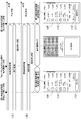
- Explanatory drawing showing fixed waiting time and hibernation state in settlement table 1
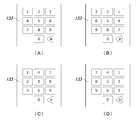
- Explanatory drawing which shows an example of the change state of the key layout pattern of the numeric keypad 133 displayed on the touch panel display 45 of the settlement table 1.
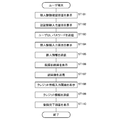
- Flow chart showing the operation procedure of the user terminal 11 at the time of user registration
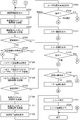
- Flow chart showing the operation procedure of the checkout table 1
- Flow chart showing the operation procedure of the checkout table 1
- the first invention made to solve the above-mentioned problems is a settlement settlement device that recognizes a product selected by a user from a sales floor and setstles and setstles the price of the product, and obtains a product purchased by the user. Based on the first camera to shoot, the second camera to shoot the user's face, and the product image acquired by the first camera, the product to be purchased by the user is recognized and settled and settled. In order to identify the user who is the payment target, the control unit that performs the processing related to face authentication based on the face image acquired by the second camera, and the control unit acquired by this control unit.
- the control unit includes a display unit that displays a product recognition result, a settlement result, and a face authentication result, and the control unit identifies a user by the face authentication when the recognized product includes an age-restricted product. And, based on the age information of the user, the process related to age verification for determining whether or not the user is an age-restricted person is configured.
- age confirmation (age verification) that determines whether or not an age-restricted product can be sold to a user depending on whether or not the user is subject to age-restriction is a person identification by face recognition and a registrant. It is done according to the age information of. As a result, age confirmation can be reliably performed so that age-restricted products can be sold even in unmanned stores.
- the age verification can be performed by the settlement settlement device, it may be performed by the server device.
- the settlement settlement device instructs the server device to perform age matching as a process related to age matching, and acquires the age matching result from the server device.
- control unit makes a payment when the recognized product includes an age-restricted product and the user specified by the face recognition is an age-restricted person. No configuration.
- control unit is configured to display on the display unit that the sale of the age-restricted product is prohibited when the payment is not made due to the age limit.
- the fourth invention has a configuration in which the control unit displays an operation unit for instructing re-execution of processing related to product recognition, settlement and settlement on the display unit when payment is not performed due to an age limit. do.
- the user can redo the process excluding the age-restricted products.
- the fifth invention is a settlement settlement system having a settlement settlement device according to the first invention, which has a server device connected to the settlement settlement device via a network, and the settlement settlement device is a settlement settlement device.
- the face image is transmitted to the server device
- the server device executes the face authentication process based on the face image received from the settlement settlement device, and the face authentication result is settled. It is configured to be sent to the payment device.
- the first invention it is possible to reliably confirm the age to determine whether or not to sell the age-restricted product to the user so that the age-restricted product can be sold even in the unmanned store.
- FIG. 1 is an overall configuration diagram of the settlement payment system according to the present embodiment.
- the settlement settlement system enables settlement and settlement (accounting) of products purchased by customers at small stores (stores) installed in facilities such as office buildings and stations without the intervention of a clerk. It is the one that was made.
- this settlement settlement system may target an unmanned store in which a clerk does not reside, but may reduce the burden on the clerk in a manned store.
- This settlement settlement system includes a settlement table 1 (payment settlement device) installed in a store, a user terminal 11, a settlement server 12, a user management server 13, a product learning server 14, and a face authentication server 15 (server device). ), A DB server 16, and an analysis server 17.
- a settlement table 1 (payment settlement device) installed in a store
- a user terminal 11 a settlement server 12, a user management server 13, a product learning server 14, and a face authentication server 15 (server device).
- server device server device
- a DB server 16 an analysis server 17.
- the user terminal 11, the payment server 12, the user management server 13, the product learning server 14, the face authentication server 15, the DB server 16, and the analysis server 17 and the checkout table 1 provided in the store are networks such as the Internet and LAN. They are connected to each other via.
- the user management server 13, the product learning server 14, the face recognition server 15, the DB server 16, and the analysis server 17 may be installed in the store, for example, in the backyard attached to the sales floor. May be installed in a remote location, for example, at the headquarters of the store operator.
- the settlement table 1 recognizes the product selected by the user from the sales floor of the store, and setstles and setstles (pays) the price.
- the product is identified by object recognition from the photographed image of the product (product recognition processing), and the total payment price is calculated from the price (unit price) and quantity of each product (settlement processing).
- the face authentication server 15 is requested to perform face authentication processing (processing related to face authentication), and when the face authentication is successful, the payment server 12 is requested to perform payment processing. (Processing related to payment).
- the user terminal 11 performs operations related to user registration (registration of member information and face image) necessary for the user to use this system, and also manages purchase history (receipt information), such as a smartphone or a smartphone. It consists of a tablet terminal, etc., and the application for the user is installed.
- the payment server 12 is operated by a payment service provider (credit company, etc.).
- the payment server 12 executes a payment process related to the price of the product purchased by the user in response to the payment request from the payment table 1.
- the payment server 12 may be operated by a payment agency service provider (payment agency server).
- the user management server 13 functions as a login server that manages user logins, and executes password authentication. Further, the user management server 13 functions as a payment interface server that relays between the payment table 1 and the payment server 12.
- the product learning server 14 builds a product recognition engine mounted on the checkout table 1 by machine learning such as deep learning.
- machine learning is performed by using the product image acquired by photographing the product to be registered in advance as input information and the product identification information (product name, etc.) for each product as output information.
- a database for recognition is built.
- the face authentication server 15 includes a face management server 25 and a face verification server 26.
- the face management server 25 accumulates and manages information such as the registered user's name and face information (face ID, face image).
- the face matching server 26 executes face recognition in response to a face recognition request from the checkout table 1.
- face recognition the face image of the target person is acquired from the checkout table 1, the face feature amount of the target person is generated from the face image, and the face feature amount of the target person and the registration stored in the own device are registered.
- Face matching is performed by comparing with the facial feature amount of a person (registered user) to determine whether or not the target person is a registrant (1 to N authentication).
- the store entrant list managed by the user management server 13 may be acquired, narrowed down to the store entrants, and then face authentication may be performed.
- the DB server 16 accumulates and manages various types of information. Specifically, as user management information, information such as a payment ID, face ID, user ID, password, and office code for each user is registered in the database. In addition, as product master information, information such as product identification information (product name, product code, etc.) is registered in the database. Information on age-restricted products is also registered in the database that manages this product. Further, as purchase log information, information such as a user ID for each user, a name of a purchased product, and an amount of money is registered in the database.
- the analysis server 17 performs various analysis processes based on the information stored in the DB server 16. Specifically, analysis processing is performed according to the purchase and non-purchase of products for each user who visits the store. For example, the ratio of purchasers to non-purchasers is totaled based on a predetermined standard (day of the week, time zone, etc.).
- a small store where the user can freely take out the product from the display shelf and purchase it in a state where there is no partition around it or the user can freely enter and exit.
- a gate or checker face recognition machine
- the store entry checker performs a process related to face authentication for permitting the user to enter the store, and controls the opening and closing of the store entrance gate according to the face authentication result.
- the store exit checker performs a process related to face authentication for confirming the user's exit, and controls the opening and closing of the store exit gate according to the face authentication result.
- a register in which the user performs the same operation related to user registration as the user terminal 11 may be installed in the store.
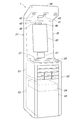
- FIG. 2 is an overall perspective view of the checkout table 1.
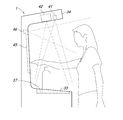
- FIG. 3 is a side view of a main part of the checkout table 1.
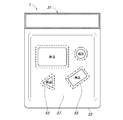
- FIG. 4 is a plan view of the top plate portion 33 of the checkout table 1 as viewed from above.
- the main body 31 of the checkout table 1 includes a box-shaped portion 32, a top plate portion 33, an upper wall portion 34, and a rear wall portion 35.
- the top plate portion 33 is provided on the upper side of the box-shaped portion 32.
- the rear wall portion 35 is provided so as to project upward from the rear side of the box-shaped portion 32.
- the upper wall portion 34 is provided in a state of protruding forward from the upper end of the rear wall portion 35 in an eaves shape.
- the top plate portion 33 is provided with a mounting portion 37 on which products purchased by the user (products selected at the sales floor) are placed.
- the user simply places the products side by side on the mounting unit 37, and the placed products are identified by the object recognition, and the payment is made by calculating the price to be paid from the unit price of the products.
- the mounting portion 37 is recessed in a dish shape, so that the user can easily grasp the range in which the product is placed.
- a camera 41 (first camera) for shooting products is provided on the upper wall portion 34.
- the camera 41 for photographing the product photographs the product placed on the mounting portion 37 of the top plate portion 33.
- a plurality of cameras 41 for shooting products may be provided.
- one camera 41 captures the product placed on the mounting portion 37 from directly above, and the captured image is used for detecting the position of the product placed on the mounting portion 37. It is good to do it.
- another camera 41 captures the product placed on the mounting portion 37 from diagonally above, and the captured image is used for recognizing the product (product name) placed on the mounting portion 37. It is good to set it to.
- a projector 42 is provided on the upper wall portion 34.
- the projector 42 performs projection mapping on the mounting portion 37 on which the product is placed, and projects a predetermined image onto the mounting portion 37 from directly above.
- a frame image 55 surrounding the product placed on the mounting portion 37 is projected.
- the frame image 55 is projected so as to surround the product for which product recognition has been successful.
- a light 43 is provided on the upper wall portion 34.
- the light 43 illuminates the product placed on the mounting portion 37. As a result, the recognition accuracy of the product recognition process can be improved.
- a touch panel display 45 (display unit) is provided on the rear wall portion 35.
- the product recognition result that is, the product placed on the mounting unit 37 is displayed on the touch panel display 45, and if there is no error in the product recognition result, the user can perform operations related to face authentication and password authentication. can. In addition, when there is an error in the product recognition result, the user can perform an operation to correct the product with the error.
- a camera 46 (second camera) for face recognition is provided on the rear wall portion 35. Since the face recognition camera 46 is arranged near the touch panel display 45 and is arranged so as to face the user standing in front of the checkout table 1, the face of the user who visually observes the touch panel display 45. Can be taken from the front. The face image acquired by the face recognition camera 46 is used for face recognition for payment.
- a speaker 47 is provided on the rear wall portion 35.
- the speaker 47 outputs voice corresponding to the user. For example, a guide voice for guiding the operation procedure is output from the speaker 47.
- a microphone 48 is provided on the rear wall portion 35.
- the microphone 48 collects the voice spoken by the user. For example, the user can operate the operation unit by speaking the characters of the operation unit (button, etc.) displayed on the screen of the touch panel display 45.
- the box-shaped portion 32 is provided with a first storage portion 51 (shelf portion) whose front side is open and a second storage portion 52 whose front side is closed by a door 53.
- the first storage unit 51 stores the accessories of the product. This accessory is provided to the user free of charge and can be taken home by the user. Specifically, they are shopping bags and cutlery (spoon, fork, etc.).
- the second storage unit 52 stores a controller 54 (PC) that controls a camera 41 for product photography, a touch panel display 45, a camera 46 for face recognition, and the like.
- PC controller 54
- the product mounted on the mounting portion 37 is photographed from above by the product photographing camera 41 installed on the upper wall portion 34 so as to face the mounting portion 37. NS.
- the user's hand enters the shooting area of the camera 41 for product shooting.
- a product recognition process for recognizing the product placed on the mounting unit 37 is performed based on the captured image of the camera 41 for shooting the product. Therefore, when the user operates the touch panel display 45, erroneous recognition or omission of recognition of the product placed on the mounting unit 37 occurs.
- the recognition result of the product recognition process is displayed on the touch panel display 45.
- the product recognition process is performed periodically, and the screen of the touch panel display 45 is updated so that the product recognition result is reflected in real time. Therefore, when the user operates the touch panel display 45, the product recognition result displayed on the touch panel display 45 changes unnaturally, giving the user a sense of discomfort. In particular, if the product recognition result changes during the operation of instructing the settlement (accounting), there is a problem that the settlement is performed with the wrong product recognition result.
- the present embodiment it is possible to prevent the screen of the touch panel display 45 from changing unnaturally and giving a sense of discomfort to the user, and further, it is possible to prevent payment and settlement from being performed with an erroneous product recognition result. It has a configuration that can be used.
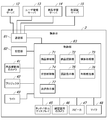
- FIG. 5 is a block diagram showing a schematic configuration of the checkout table 1.
- the checkout table 1 includes a camera 41 for product photography, a projector 42, a light 43, a touch panel display 45, a camera 46 for face recognition, a speaker 47, a microphone 48 (see FIGS. 2 and 3), and a communication unit 61. , A storage unit 62, and a control unit 63.
- the communication unit 61, the storage unit 62, and the control unit 63 constitute a controller 54 (see FIG. 2).
- the communication unit 61 communicates with the payment server 12, the user management server 13, the product learning server 14, and the face recognition server 15 via the network.
- the storage unit 62 stores a program executed by the processor constituting the control unit 63.
- the storage unit 62 stores the product master information. Specifically, product identification information (product name, product code, etc.) and information used for product recognition processing, that is, product identification information for each product (product name, etc.), information used for settlement processing, etc. That is, information on the amount of money (unit price) for each product, information on age-restricted products, and the like are stored.
- the control unit 63 includes a product detection unit 71, a product recognition unit 72, a settlement processing unit 73, a state control unit 74, an authentication instruction unit 75, an age verification unit 76, and a settlement instruction unit 77. There is.
- the control unit 63 is composed of a processor, and each unit of the control unit 63 is realized by executing the program stored in the storage unit 62 by the processor.
- the product detection unit 71 detects that the product has been placed on the mounting unit 37 based on the captured image of the camera 41 for photographing the product that captures the mounting unit 37. Further, when the product is placed on the mounting unit 37, the product detection unit 71 detects the position of the product based on the image taken by the camera 41 for shooting the product.
- the product recognition unit 72 recognizes the product placed on the mounting unit 37 based on the captured image of the camera 41 for product photography.
- product identification information (product name, etc.) is acquired from a product image cut out from a captured image of a camera 41 for product photographing by using an object recognition engine constructed by machine learning such as deep learning. ..
- the settlement processing unit 73 setstles the price of the product placed in the placement unit 37 based on the product recognition result by the product recognition unit 72. That is, the amount (unit price) of each product placed on the mounting unit 37 is acquired, the amount of each product is totaled, and the total price is calculated (aggregation processing).
- the state control unit 74 sets a predetermined confirmation waiting time (for example, several seconds) and continues the product recognition process and the settlement process. .. At that time, it is possible to control so that the product recognition result and the settlement result are not reflected in the screen display process in real time.
- a predetermined confirmation waiting time for example, several seconds
- the state control unit 74 controls to transition to the hibernation state when a predetermined waiting time elapses. In this hibernation state, control is performed to temporarily stop the product recognition process and the settlement process. Here, after continuing the product recognition process and the settlement process, control may be performed so that the product recognition result and the settlement result are not reflected in the settlement.
- the authentication instruction unit 75 instructs the face authentication server 15 to execute face authentication and also instructs the user management server 13 to execute password authentication in order to identify the user to be settled. ..
- two-factor authentication of face authentication and password authentication is adopted, and payment is permitted when both face authentication and password authentication are successful.
- face recognition a face image is cut out from the captured image of the face recognition camera 46, and the face image is transmitted to the face recognition server 15.
- password authentication the user ID and password entered by the user are transmitted to the user management server 13.
- the age verification unit 76 acquires the age information (date of birth or current age) of the user identified by face authentication from the user management server 13, and is identified by face authentication based on the age information. It is determined whether or not the user is subject to age restrictions, that is, whether or not the user has reached the age of majority (minimum age) (age confirmation). This age verification process is performed when the product recognized by the product recognition unit 72 includes an age-restricted product such as alcoholic beverages.
- the settlement instruction unit 77 instructs the settlement server 12 to execute the settlement process related to the price calculated by the settlement process for the user (payment target person) specified by the face authentication.
- control unit 63 of the checkout table 1 controls the projector 42 based on the position information of the product acquired by the product detection unit 71, and mounts the frame image 55 (see FIG. 4) on the mounting unit 37. The process of projecting onto the image (projection mapping) is performed.
- control unit 63 performs voice recognition for the user's uttered voice picked up by the microphone 48. As a result, the user can operate the screen by voice input.
- control unit 63 controls the amount of light of the light 43 that illuminates the mounting unit 37.
- the brightness of the mounted product changes according to the sunshine conditions and the like. Therefore, the brightness of the mounting unit 37 is detected based on the captured image of the camera 41 for product photography, the output of the illuminance sensor (not shown), and the light amount of the light 43 is controlled based on the detection result. NS.
- the settlement table 1 performs the product recognition process, but this product recognition process may be performed by an external server.
- the settlement table 1 acquires the age information of the user specified by face authentication from the user management server 13, and performs age verification based on the age information. However, this age. The verification may be performed on the face recognition server 15. In this case, the settlement table 1 adds an age verification instruction to the face authentication request and sends it to the face recognition server 15, and the face recognition server 15 sends a face recognition response including the age verification result to the settlement table 1. do it.
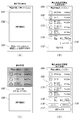
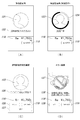
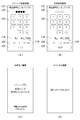
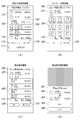
- FIG. 7 FIG. 8, FIG. 9, FIG. 10, and FIG. 11 are explanatory views showing a screen displayed on the touch panel display 45 of the checkout table 1.
- the settlement guidance screen shown in FIG. 6 (A) is displayed on the touch panel display 45 of the settlement table 1.
- a guidance message 101 urging the user to place the product on the placement unit 37 of the payment table 1 and a guidance image 102 (illustration, etc.) explaining the procedure for placing the product are displayed. ..
- the payment table 1 performs the product recognition and payment processing, and transitions to the purchase product confirmation screen (see FIG. 6B) in the unconfirmed state. do.
- a guidance message 103 regarding screen operation (voice input) by utterance is displayed.
- the user can operate the operation unit by speaking the characters of the operation unit (button, etc.) displayed on the screen of the touch panel display 45.
- a guidance message 104 prompting the user to confirm the product is displayed.
- the recognition result list display unit 105 is provided on the purchased product confirmation screen in the unconfirmed state.
- a product box 115 product display unit in which the name of the product and the amount of money are described is displayed.
- the product box 115 relates to a product placed on the mounting unit 37 by the user, particularly a product recognized by product recognition, and a plurality of product boxes 115 are displayed side by side.
- the settlement result display unit 116 is provided on the purchased product confirmation screen in the unconfirmed state.
- the settlement result display unit 116 displays the settlement result, that is, the total number of products and the total amount of goods placed on the placement unit 37.
- the purchase product confirmation screen in the unconfirmed state is provided with a "confirm” button 117 and a “stop accounting” button 119.
- the screen transitions to the guidance screen (see FIG. 6C).
- the "confirm” button 117 is displayed in blue in the initial state and turns gray after the operation.
- the button 119 of "Stop accounting” is operated, the screen transitions to the cancel screen (see FIG. 8D). Also, when the product is removed from the mounting unit 37, the screen transitions to the cancel screen.
- a guidance message 101 urging the user to take his / her hand off the touch panel display 45 due to scanning
- a guidance image 102 (illustration) showing a state in which the hand is released from the touch panel display 45. Etc.) and is displayed.
- a guide voice prompting the user to take his / her hand off the touch panel display 45 is output from the speaker 47.
- the "accounting" button 117 operation unit instructing the execution of payment-related processing
- the "rescan” is displayed on the confirmed purchased product confirmation screen (payment instruction reception screen) shown in FIG. 6 (D).
- a button 118 is provided. Others are the same as the purchased product confirmation screen (see FIG. 6B) in the unconfirmed state.
- the rescan process that is, the product recognition process and the settlement process are executed again, and the purchased product confirmation screen in the unconfirmed state (see FIG. 6B) is displayed.
- the user operates the "rescan” button 118. Just do it.
- the “confirm” button 112 on the purchase product confirmation screen see FIG. 6B
- the products placed on the mounting unit 37 are replaced (added or excluded).
- the user operates the "rescan" button 118. Just do it. If the error is not improved in the product recognition result, guidance information prompting the change of the product placement may be displayed.
- the user when the user wants to modify (delete or change) the product displayed on the recognition result list display unit 105, the user operates the product box 115 related to the erroneous product. do. As a result, the process transitions to the correction content selection screen (see FIG. 10A).
- the photographed image 121 of the user and the guidance message 122 prompting the adjustment of the position of the face when the user's face is not within the predetermined shooting range are displayed. ..
- the user adjusts the position of his / her face while looking at his / her photographed image 121 displayed on the screen, and when the face can be photographed appropriately, the user transmits the face image to the face authentication server 15.
- Face recognition is started. At this time, the screen transitions to the face recognition screen (see FIG. 7B) during face recognition.
- the face image 123 extracted from the photographed image of the user and the preloader 124 that visualizes the progress of face recognition are displayed.
- the screen transitions to the face authentication result confirmation screen (see FIG. 7 (C)).
- face recognition fails, the face image is reacquired and face recognition is repeated a predetermined number of times. If face recognition fails a predetermined number of times in a row, face recognition is stopped and payment is made only by password authentication. The mode shifts to the user ID selection screen (see FIG. 9A).
- a user's face image 123 and a guidance message 126 inquiring whether the user's name is correct are displayed. Further, on this face recognition result confirmation screen, a "Yes” button 127 and a “No” button 128 are provided. Here, when the "No" button 128 is operated, the screen transitions to the user ID selection screen (see FIG. 9A).
- the screen transitions to the password authentication screen (see FIG. 8 (A)). do.
- the age verification process for the user specified by face recognition is performed.
- the screen transitions to the password authentication screen (see FIG. 8A).
- the screen transitions to an error screen (see FIG. 7 (D)).
- the error screen shown in FIG. 7 (D) there is an image 137 showing that the user is an age-restricted person, that is, the user cannot sell age-restricted products such as alcoholic beverages and cigarettes because he / she has not reached the age of majority.
- Guidance message 138 is displayed.
- the error screen is provided with a "back" button 129. When the "back" button 129 is operated, the screen returns to the purchased product confirmation screen (see FIG. 6B) in the unconfirmed state. As a result, the user can redo the process excluding the age-restricted product.
- the settlement result display unit 116 and the "stop accounting" button 119 displayed on the screens shown in FIGS. 7 (A), (B), (C), and (D) are the purchased product confirmation screens in the confirmed state. It is the same as FIG. 6 (D)).
- a guidance message 131 prompting the input of the password as a password, an image 132 showing the input status of the password, and a numeric keypad 133 are provided.
- the password authentication is executed, and when the password authentication is successful, the screen transitions to the payment confirmation screen (see FIG. 8B).
- the password authentication fails, the screen transitions to the password authentication screen (see FIG. 9C) in the re-entry state.
- this password authentication screen is provided with a "pay” button 135 and a “back” button 129.
- the "Back” button 129 is operated, the state returns to the state in which the password has not been entered.
- the "pay” button 135 is grayed out and inoperable.
- the settlement result display unit 116 and the "stop accounting" button 119 displayed on the screens shown in FIGS. 8A and 8B are the purchase product confirmation screen in the confirmed state (see FIG. 6D). The same is true.
- the user ID selection screen shown in FIG. 9A is provided with a guidance message 141 prompting the user to select his / her own user ID, and a user ID button 142.
- a plurality of user ID buttons 142 are displayed side by side for each user ID candidate.
- the user ID selection screen is provided with a "no candidate" button 143.
- the screen transitions to the password authentication screen (see FIG. 8A).
- the "No candidate" button 143 is operated, the screen transitions to the payment impossible error screen (see FIG. 9B).
- the user ID candidates are displayed and the user is allowed to select the user ID, but the keyboard may be displayed and the user may input his / her own user ID.
- the button 142 for each user ID candidate is displayed, and this user ID candidate is a person with a high face matching score acquired by the face authentication process on the face authentication server 15.
- this user ID candidate is a person with a high face matching score acquired by the face authentication process on the face authentication server 15.
- the face recognition server 15 if there is no person whose face matching score is equal to or higher than a predetermined threshold value, it is determined that the face matching has failed. At this time, the face matching score is lower than the threshold value.
- a predetermined number of persons are extracted as candidates from the one with the highest face matching score.
- a guidance message 145 indicating that the password is invalid is displayed. Others are the same as the password authentication screen (see FIG. 8A).
- the user re-enters the password, and when the password authentication is successful, the screen transitions to the payment confirmation screen (see FIG. 8B).
- the screen transitions to the password invalid error screen (see FIG. 9D).
- the settlement result display unit 116 and the "stop accounting" button 119 displayed on the screens shown in FIGS. 9A and 9C are the purchase product confirmation screen in the confirmed state (see FIG. 6D). The same is true.
- the product boxes 115 are displayed side by side on the recognition result list display unit 105 in the same manner as the purchased product confirmation screen in the confirmed state (see FIG. 6D).
- the product box 115 selected by the user on the confirmed purchased product confirmation screen is changed to the product box 152.
- it is the same as the purchased product confirmation screen in the confirmed state (see FIG. 6 (D)).
- This product box 152 is provided with a "delete” button 153 and a “change” button 154.
- the screen transitions to the deletion confirmation screen (see FIG. 11B).
- the "change” button 154 is operated, the screen transitions to the category selection screen (see FIG. 10B).
- a guidance message 156 prompting the selection of a product (category), a change source product display unit 157 that displays information (name and amount) of the change source product, and each category Button 158 is provided. Further, on this category selection screen, a "back" button 129 is provided.
- the category button 158 is operated, the screen transitions to the change destination product selection screen (see FIG. 10C). Further, when the "Back" button 129 is operated, the screen returns to the previous screen, that is, the correction content selection screen (see FIG. 10A).
- the product selection screen shown in FIG. 10 (C) is provided with a button 160 for each product included in the category selected on the category selection screen (see FIG. 10 (B)).
- the button 160 of the product is operated, the screen transitions to the product change confirmation screen (see FIG. 10 (D)).
- the guidance message 156, the change source product display unit 157, and the "back" button 129 are the same as the category selection screen (see FIG. 10B).
- a guidance message 161 to the effect that the product is changed On the product change confirmation screen shown in FIG. 10 (D), a guidance message 161 to the effect that the product is changed, a product display unit before change 162 that displays information (name and amount) of the product before the change, and a product display unit 162 after the change.
- a modified product display unit 163 for displaying product information (name and amount) is provided.
- the change confirmation screen is provided with a "yes” button 165 and a "no” button 166.
- the screen transitions to the correction content confirmation screen (see FIG. 11A).
- the "No” button 166 When the "No” button 166 is operated, the screen returns to the product selection screen (see FIG. 10C).
- the correction content confirmation screen shown in FIG. 11 (A) is substantially the same as the purchased product confirmation screen in the confirmed state (see FIG. 6 (D)), but in particular, here, the product box 115 related to the changed product is the first (most). It is displayed in the upper part) and is highlighted in a color different from that of the other product boxes 115.
- the deletion confirmation screen shown in FIG. 11B is provided with a guidance message 171 indicating that the product is to be deleted, and a deleted product display unit 172 that displays information (name and amount) of the product to be deleted. There is. Further, the change confirmation screen is provided with a "yes” button 173 and a “no” button 174. Here, when the "Yes” button 173 is operated, the screen transitions to the correction content confirmation screen (see FIG. 11C). When the "No” button 174 is operated, the screen returns to the correction content selection screen (see FIG. 10A).
- the product box 152 of the recognition result list display unit 105 is displayed in a state in which the deletion operation is reflected. Specifically, the product box 115 for which the deletion operation has been performed is displayed in gray out. Further, the correction content confirmation screen shown in FIG. 11D may be displayed. On this modification content confirmation screen, a "return” button is provided in the product box 115. When the user operates the "return” button, the screen returns to the correction content selection screen (see FIG. 10A).
- the settlement result display unit 116 and the "stop accounting" button 119 displayed on the screens shown in FIGS. 11 (A), (B), (C), and (D) are the purchased product confirmation screens in the confirmed state. It is the same as FIG. 6 (D)).
- FIG. 12 is an explanatory diagram showing a fixed waiting time and a hibernation state in the checkout table 1.
- the user Since the product recognition process is always performed regularly until the user performs the operation of confirming the product recognition result, the user replaces (adds or excludes) the products placed in the mounting unit 37. To do so, specifically, the misplaced product can be placed in the mounting unit 37 later, or the product for which the purchase has been canceled can be taken out from the mounting unit 37, and when the user replaces the product, the product is replaced.
- the product recognition result displayed on the touch panel display 45 changes.
- the confirmation waiting time is a predetermined time (for example, several seconds) after the operation of confirming the product recognition result is performed.
- This fixed waiting time is the return time until the product recognition process returns to normal.
- the user releases the touch panel display 45 from the shooting area of the camera 41 for shooting the product. It corresponds to the time (operation time) required to run out of hands.
- the product recognition process returns to normal immediately, which gives the user a sense of discomfort. It can be suppressed.
- the product recognition result and the settlement result are reflected on the purchased product confirmation screen (see FIG. 6 (D)) in the confirmed state.
- the product recognition result and the settlement result displayed on the screen are definite information, and thereafter, the product is in a dormant state.
- control is performed to stop the product recognition process and the settlement process.
- the control to stop the product recognition process and the settlement process may not be performed, and the control may be performed so that the product recognition result is not reflected in the settlement process and the screen display process in real time.
- the operation of instructing settlement (accounting), specifically, "accounting" Operate button 117.
- the product displayed on the screen is controlled because the product recognition process and the settlement process are stopped in the hibernation state, or the product recognition result is not reflected in the settlement process and the screen display process in real time. It is possible to avoid changes in the recognition result and the settlement result, and the settlement and settlement are performed with the wrong product recognition result.
- the product recognition process is always performed regularly. For this reason, the user replaces (adds or excludes) the products placed in the mounting unit 37, that is, the products that have been left behind are placed in the mounting unit 37 later, or the products for which the purchase is canceled are placed.
- the display of the recognition result list display unit 105 is updated according to the replacement status of the product.
- the user may want to replace (add or exclude) the product placed in the mounting unit 37.
- the product recognition process can be redone.
- the confirmation waiting time may be set at the timing of transitioning to the purchase product confirmation screen (see FIG. 6B) in the unconfirmed state.
- the user browses the purchased product confirmation screen in the unconfirmed state, the user operates the "confirm" button 112, and further releases the touch panel display 45. This corresponds to the time (operation time) required for the user to get rid of the user's hand from the shooting area of the camera 41 for shooting the product.
- FIG. 13 is an explanatory diagram showing an example of a change status of the key layout pattern of the numeric keypad 133.
- the user inputs the password (password) using the numeric keypad 133 on the password authentication screen (see FIG. 8A).
- the touch panel display 45 is arranged in front of the checkout table 1, another person behind the user can visually check the movement of the user's finger, and the password may be stolen.
- the key layout pattern of the numeric keypad 133 on the password authentication screen that is, "1" to "9".
- the arrangement pattern of the numeric keypad is changed.
- four types of keyboard layout patterns are randomly selected each time the user changes.
- the password authentication screen in the re-entered state (See), but in the password authentication screen in this re-entry state, the key arrangement pattern is changed from the first password authentication screen (see FIG. 8A).
- the 3 ⁇ 3 arrangement rule of the number keys is changed, but in addition to this, for example, the arrangement of the number keys is changed at random. You may. Also, the overall layout of the numeric keypad 133 may be changed.
- FIG. 14 is a flow chart showing an operation procedure of the user terminal 11 at the time of user registration.
- the personal information confirmation screen is first displayed (ST101).
- a consent form regarding the handling of personal information is displayed.
- the authentication information input screen is displayed (ST102).
- the user ID and password are transmitted to the user management server 13 (ST103).
- the user management server 13 performs a process of registering the user ID and password acquired from the user terminal 11. Further, the user management server 13 transmits the face image acquired from the user terminal 11 to the face authentication server 15, and the face authentication server 15 performs a process of registering the face image.
- the credit information input screen is displayed (ST108).
- the credit information is transmitted to the payment server 12 (ST109).
- the payment server 12 performs a process of registering credit information acquired from the user terminal 11.
- the registration completion screen is displayed (ST110).
- 15 and 16 are flow charts showing an operation procedure of the checkout table 1.
- the checkout table 1 When the checkout table 1 first detects that an object has been placed on the mounting unit 37 based on the captured image of the camera 41 for product photography (Yes in ST201), the object placed on the mounting unit 37 The position is detected (ST202). Next, it is identified which product the object placed on the mounting portion 37 is (ST203). Next, the price of the product placed on the mounting unit 37 is settled (ST204). Next, a purchase product confirmation screen (see FIG. 6B) in an unconfirmed state is displayed (ST205).
- the purchased product confirmation screen (payment instruction screen) in the confirmed state (see FIG. 6 (D)) is displayed (ST208).
- the user operates the operation of instructing payment, specifically, the button 117 of "accounting" ("payment” in ST209), the process proceeds to face authentication and face authentication.
- Display the screen (see FIG. 7A) (ST221).
- it is determined whether or not the purchased product includes an age-restricted product and if the purchased product includes an age-restricted product, a process of turning on the age-restricted flag is performed.
- the face recognition screen (see FIG. 7 (A)) is displayed (ST221)
- the face image is extracted from the image taken by the camera 46 for face recognition, and a face recognition request including the face image is requested. It is transmitted to the face recognition server 15 (ST222).
- the face recognition server 15 performs face recognition based on the face image acquired from the checkout table 1 in response to the face recognition request, and transmits the face recognition response including the authentication result to the checkout table 1.
- the face recognition response is received from the face recognition server 15 (ST223), and if the authentication result included in the face recognition response is successful (Yes in ST224), then the age limit is applied to the purchased product.
- the age of the user identified by face recognition is verified, and whether or not the user is subject to age restrictions, that is, whether or not the user has reached the age of majority (minimum age). Is determined (ST225).
- the purchased product includes the age-restricted product based on the age-restricted product flag.
- the age information date of birth or current age
- the process proceeds to password authentication, and the password authentication screen (FIG. 8 (A)). ) Is displayed (ST226).
- the password authentication request is sent to the user management server 13 (ST227).
- the user management server 13 performs face authentication based on the face image acquired from the settlement table 1 in response to the password authentication request, and transmits the face authentication response including the authentication result to the settlement table 1.
- the payment request is sent to the user management server. It is transmitted to the payment server 12 via 13 (ST230).
- the payment server 12 executes the payment process and transmits the payment response to the payment table 1 via the user management server 13.
- the payment completion screen (see FIG. 8C) is displayed (ST232).
- the receipt issuance process is performed (ST233), and the receipt information is transmitted to the user terminal 11 via the user management server 13 (ST234).
- the user terminal 11 receives the receipt information, it stores it in the storage unit 62 of its own device.
- the user ID selection screen (see FIG. 9A) is displayed (ST235).
- the password authentication result is unsuccessful (No in ST229), then it is determined whether or not the password authentication has failed a predetermined number of times in a row (ST240).
- the process proceeds to the password authentication again, and the password authentication screen in the re-entered state (see FIG. 9C) is displayed (see FIG. 9C).
- the password authentication fails a predetermined number of times in a row (Yes in ST240)
- an error screen is displayed (ST241).
- the settlement settlement device and the settlement settlement system according to the present disclosure have the effect of being able to reliably perform age confirmation to determine whether or not to sell age-restricted products to users so that age-restricted products can be sold even at unmanned stores. It is useful as a settlement settlement device and a settlement settlement system that recognizes a product selected by a user from a sales floor and performs settlement and settlement of the price.
Landscapes
- Engineering & Computer Science (AREA)
- Business, Economics & Management (AREA)
- General Physics & Mathematics (AREA)
- Physics & Mathematics (AREA)
- Accounting & Taxation (AREA)
- Theoretical Computer Science (AREA)
- Finance (AREA)
- Strategic Management (AREA)
- General Business, Economics & Management (AREA)
- Multimedia (AREA)
- Computer Security & Cryptography (AREA)
- Human Computer Interaction (AREA)
- Health & Medical Sciences (AREA)
- General Health & Medical Sciences (AREA)
- Oral & Maxillofacial Surgery (AREA)
- Economics (AREA)
- Development Economics (AREA)
- Marketing (AREA)
- Microelectronics & Electronic Packaging (AREA)
- Computer Networks & Wireless Communication (AREA)
- Cash Registers Or Receiving Machines (AREA)
- Financial Or Insurance-Related Operations Such As Payment And Settlement (AREA)
- Management, Administration, Business Operations System, And Electronic Commerce (AREA)
Priority Applications (2)
| Application Number | Priority Date | Filing Date | Title |
|---|---|---|---|
| CN202180031618.2A CN115516533A (zh) | 2020-04-28 | 2021-04-01 | 结账支付装置和结账支付系统 |
| US17/921,776 US20230169508A1 (en) | 2020-04-28 | 2021-04-01 | Checkout-payment device and checkout-payment system |
Applications Claiming Priority (2)
| Application Number | Priority Date | Filing Date | Title |
|---|---|---|---|
| JP2020079427A JP7526924B2 (ja) | 2020-04-28 | 2020-04-28 | 精算決済装置および精算決済システム |
| JP2020-079427 | 2020-04-28 |
Publications (1)
| Publication Number | Publication Date |
|---|---|
| WO2021220714A1 true WO2021220714A1 (ja) | 2021-11-04 |
Family
ID=78280159
Family Applications (1)
| Application Number | Title | Priority Date | Filing Date |
|---|---|---|---|
| PCT/JP2021/014190 Ceased WO2021220714A1 (ja) | 2020-04-28 | 2021-04-01 | 精算決済装置および精算決済システム |
Country Status (4)
| Country | Link |
|---|---|
| US (1) | US20230169508A1 (enExample) |
| JP (1) | JP7526924B2 (enExample) |
| CN (1) | CN115516533A (enExample) |
| WO (1) | WO2021220714A1 (enExample) |
Cited By (6)
| Publication number | Priority date | Publication date | Assignee | Title |
|---|---|---|---|---|
| WO2023167256A1 (ja) * | 2022-03-01 | 2023-09-07 | 京セラ株式会社 | 情報処理装置及び情報処理方法 |
| JPWO2024057430A1 (enExample) * | 2022-09-14 | 2024-03-21 | ||
| EP4432195A1 (en) * | 2023-03-16 | 2024-09-18 | Glory Ltd. | Commodity sales system and commodity sales method |
| EP4432196A1 (en) * | 2023-03-16 | 2024-09-18 | Glory Ltd. | Commodity sales system and commodity sales method |
| US12118554B2 (en) | 2022-02-28 | 2024-10-15 | The Toronto-Dominion Bank | Restricted item eligibility control at ambient commerce premises |
| US12450582B2 (en) | 2022-02-28 | 2025-10-21 | The Toronto-Dominion Bank | Enabling feature based on a sensed condition at ambient commerce premises |
Families Citing this family (4)
| Publication number | Priority date | Publication date | Assignee | Title |
|---|---|---|---|---|
| US20240013574A1 (en) * | 2018-06-28 | 2024-01-11 | Yoti Holding Limited | Age verification |
| JP7531175B2 (ja) * | 2020-04-28 | 2024-08-09 | パナソニックIpマネジメント株式会社 | 精算決済装置および精算決済システム |
| US11989763B1 (en) * | 2021-12-09 | 2024-05-21 | Inmar Clearing, Inc. | Self-checkout verification system and related methods |
| JP7550368B2 (ja) * | 2022-10-03 | 2024-09-13 | パナソニックIpマネジメント株式会社 | 認証決済システム、認証決済端末、および認証決済方法 |
Citations (4)
| Publication number | Priority date | Publication date | Assignee | Title |
|---|---|---|---|---|
| JP2011070293A (ja) * | 2009-09-24 | 2011-04-07 | Toshiba Tec Corp | 商品販売データ処理装置及びその制御プログラム |
| JP2015099441A (ja) * | 2013-11-18 | 2015-05-28 | 株式会社イシダ | 会員管理システム |
| JP2019168762A (ja) * | 2018-03-22 | 2019-10-03 | 日本電気株式会社 | 精算システム、精算方法及びプログラム |
| JP2020060889A (ja) * | 2018-10-09 | 2020-04-16 | 東芝テック株式会社 | 無人店舗システムおよびサーバ |
Family Cites Families (12)
| Publication number | Priority date | Publication date | Assignee | Title |
|---|---|---|---|---|
| US20030018897A1 (en) * | 2001-07-20 | 2003-01-23 | Psc Scanning, Inc. | Video identification verification system and method for a self-checkout system |
| US20110320037A1 (en) * | 2010-06-25 | 2011-12-29 | Jose Frugone | Biometric payment and identification system and method |
| JP2014032538A (ja) * | 2012-08-03 | 2014-02-20 | Toshiba Tec Corp | 商品販売データ処理装置 |
| US9665896B2 (en) * | 2015-03-10 | 2017-05-30 | Wal-Mart Stores, Inc. | System and method for age verification over mobile app for purchasing age-restricted items |
| US20170372553A1 (en) * | 2016-06-24 | 2017-12-28 | Brett Gray | Single Cigarrette Vending Machine |
| CN111771198A (zh) * | 2017-12-21 | 2020-10-13 | 尤尔实验室有限公司 | 蒸发器控制 |
| JP6884719B2 (ja) * | 2018-02-23 | 2021-06-09 | ソフトバンク株式会社 | 情報処理装置、情報処理装置の制御方法、及び情報処理装置の制御プログラム |
| US11989762B2 (en) * | 2018-05-10 | 2024-05-21 | Civic Technologies, Inc. | Eligibility for access to restricted goods and services using zero-knowledge proofs |
| GB201810639D0 (en) * | 2018-06-28 | 2018-08-15 | Yoti Holding Ltd | Age verification |
| US11481751B1 (en) * | 2018-08-28 | 2022-10-25 | Focal Systems, Inc. | Automatic deep learning computer vision based retail store checkout system |
| US11410496B2 (en) * | 2018-09-21 | 2022-08-09 | Scientific Games, Llc | System and method for collecting and using filtered facial biometric data |
| US10726246B1 (en) * | 2019-06-24 | 2020-07-28 | Accenture Global Solutions Limited | Automated vending machine with customer and identification authentication |
-
2020
- 2020-04-28 JP JP2020079427A patent/JP7526924B2/ja active Active
-
2021
- 2021-04-01 CN CN202180031618.2A patent/CN115516533A/zh active Pending
- 2021-04-01 WO PCT/JP2021/014190 patent/WO2021220714A1/ja not_active Ceased
- 2021-04-01 US US17/921,776 patent/US20230169508A1/en not_active Abandoned
Patent Citations (4)
| Publication number | Priority date | Publication date | Assignee | Title |
|---|---|---|---|---|
| JP2011070293A (ja) * | 2009-09-24 | 2011-04-07 | Toshiba Tec Corp | 商品販売データ処理装置及びその制御プログラム |
| JP2015099441A (ja) * | 2013-11-18 | 2015-05-28 | 株式会社イシダ | 会員管理システム |
| JP2019168762A (ja) * | 2018-03-22 | 2019-10-03 | 日本電気株式会社 | 精算システム、精算方法及びプログラム |
| JP2020060889A (ja) * | 2018-10-09 | 2020-04-16 | 東芝テック株式会社 | 無人店舗システムおよびサーバ |
Cited By (7)
| Publication number | Priority date | Publication date | Assignee | Title |
|---|---|---|---|---|
| US12118554B2 (en) | 2022-02-28 | 2024-10-15 | The Toronto-Dominion Bank | Restricted item eligibility control at ambient commerce premises |
| US12450582B2 (en) | 2022-02-28 | 2025-10-21 | The Toronto-Dominion Bank | Enabling feature based on a sensed condition at ambient commerce premises |
| WO2023167256A1 (ja) * | 2022-03-01 | 2023-09-07 | 京セラ株式会社 | 情報処理装置及び情報処理方法 |
| JPWO2024057430A1 (enExample) * | 2022-09-14 | 2024-03-21 | ||
| WO2024057430A1 (ja) * | 2022-09-14 | 2024-03-21 | 日本電気株式会社 | 決済端末、システム及び方法、並びに、コンピュータ可読媒体 |
| EP4432195A1 (en) * | 2023-03-16 | 2024-09-18 | Glory Ltd. | Commodity sales system and commodity sales method |
| EP4432196A1 (en) * | 2023-03-16 | 2024-09-18 | Glory Ltd. | Commodity sales system and commodity sales method |
Also Published As
| Publication number | Publication date |
|---|---|
| US20230169508A1 (en) | 2023-06-01 |
| CN115516533A (zh) | 2022-12-23 |
| JP2021174381A (ja) | 2021-11-01 |
| JP7526924B2 (ja) | 2024-08-02 |
Similar Documents
| Publication | Publication Date | Title |
|---|---|---|
| WO2021220714A1 (ja) | 精算決済装置および精算決済システム | |
| WO2021220713A1 (ja) | 精算決済装置および精算決済システム | |
| US20220198412A1 (en) | Billing and payment device and unattended store system | |
| US20220215396A1 (en) | Unattended shop system and unattended shop management method | |
| US20220044221A1 (en) | Clearing and settlement device, and unmanned store system | |
| KR20210129924A (ko) | 상품 제공용 스마트 픽업 박스 | |
| US20210182842A1 (en) | Information processing device and control program for information processing device | |
| JP2020123225A (ja) | 情報管理装置、情報管理方法及びプログラム | |
| WO2020203379A1 (ja) | 精算決済装置および無人店舗システム | |
| JP7689332B2 (ja) | 精算決済装置、精算決済システムおよび精算決済方法 | |
| JP6614291B1 (ja) | 施設利用管理システム、施設利用管理方法、及びプログラム | |
| JP2016045909A (ja) | 情報処理装置、担当者決定方法、及びプログラム | |
| JP2020181497A (ja) | 入場管理システム及び入場管理方法 | |
| US20240152590A1 (en) | Server device, authentication terminal, system, control method of server device, and storage medium | |
| JP2009278480A (ja) | 集合住宅用インターホンシステム | |
| JP2025042716A (ja) | 年齢確認システム | |
| JP2024016677A (ja) | 情報処理端末及び情報処理プログラム | |
| JP2025082149A (ja) | モバイル決済システム、モバイル端末及びそのプログラム | |
| JP2023177975A (ja) | 情報端末及びそのプログラム | |
| JP2023037714A (ja) | 情報処理装置、情報処理装置の制御方法、プログラム | |
| JP2022054282A (ja) | 管理システム、管理装置およびプログラム | |
| HK40010298A (en) | Data object information processing method, apparatus and system | |
| JP2020008991A (ja) | 送金管理システムおよび送金管理方法 |
Legal Events
| Date | Code | Title | Description |
|---|---|---|---|
| 121 | Ep: the epo has been informed by wipo that ep was designated in this application |
Ref document number: 21796890 Country of ref document: EP Kind code of ref document: A1 |
|
| NENP | Non-entry into the national phase |
Ref country code: DE |
|
| 122 | Ep: pct application non-entry in european phase |
Ref document number: 21796890 Country of ref document: EP Kind code of ref document: A1 |