WO2021044950A1 - 表示装置及び画像形成装置 - Google Patents
表示装置及び画像形成装置 Download PDFInfo
- Publication number
- WO2021044950A1 WO2021044950A1 PCT/JP2020/032506 JP2020032506W WO2021044950A1 WO 2021044950 A1 WO2021044950 A1 WO 2021044950A1 JP 2020032506 W JP2020032506 W JP 2020032506W WO 2021044950 A1 WO2021044950 A1 WO 2021044950A1
- Authority
- WO
- WIPO (PCT)
- Prior art keywords
- icon
- button
- screen
- unit
- display unit
- Prior art date
- Legal status (The legal status is an assumption and is not a legal conclusion. Google has not performed a legal analysis and makes no representation as to the accuracy of the status listed.)
- Ceased
Links
Images




Classifications
-
- G—PHYSICS
- G06—COMPUTING OR CALCULATING; COUNTING
- G06F—ELECTRIC DIGITAL DATA PROCESSING
- G06F1/00—Details not covered by groups G06F3/00 - G06F13/00 and G06F21/00
- G06F1/16—Constructional details or arrangements
- G06F1/1613—Constructional details or arrangements for portable computers
- G06F1/1615—Constructional details or arrangements for portable computers with several enclosures having relative motions, each enclosure supporting at least one I/O or computing function
- G06F1/1616—Constructional details or arrangements for portable computers with several enclosures having relative motions, each enclosure supporting at least one I/O or computing function with folding flat displays, e.g. laptop computers or notebooks having a clamshell configuration, with body parts pivoting to an open position around an axis parallel to the plane they define in closed position
-
- G—PHYSICS
- G06—COMPUTING OR CALCULATING; COUNTING
- G06F—ELECTRIC DIGITAL DATA PROCESSING
- G06F1/00—Details not covered by groups G06F3/00 - G06F13/00 and G06F21/00
- G06F1/16—Constructional details or arrangements
- G06F1/1613—Constructional details or arrangements for portable computers
- G06F1/1633—Constructional details or arrangements of portable computers not specific to the type of enclosures covered by groups G06F1/1615 - G06F1/1626
- G06F1/1637—Details related to the display arrangement, including those related to the mounting of the display in the housing
- G06F1/1643—Details related to the display arrangement, including those related to the mounting of the display in the housing the display being associated to a digitizer, e.g. laptops that can be used as penpads
-
- G—PHYSICS
- G06—COMPUTING OR CALCULATING; COUNTING
- G06F—ELECTRIC DIGITAL DATA PROCESSING
- G06F1/00—Details not covered by groups G06F3/00 - G06F13/00 and G06F21/00
- G06F1/16—Constructional details or arrangements
- G06F1/1613—Constructional details or arrangements for portable computers
- G06F1/1633—Constructional details or arrangements of portable computers not specific to the type of enclosures covered by groups G06F1/1615 - G06F1/1626
- G06F1/1637—Details related to the display arrangement, including those related to the mounting of the display in the housing
- G06F1/1652—Details related to the display arrangement, including those related to the mounting of the display in the housing the display being flexible, e.g. mimicking a sheet of paper, or rollable
-
- G—PHYSICS
- G06—COMPUTING OR CALCULATING; COUNTING
- G06F—ELECTRIC DIGITAL DATA PROCESSING
- G06F1/00—Details not covered by groups G06F3/00 - G06F13/00 and G06F21/00
- G06F1/16—Constructional details or arrangements
- G06F1/1613—Constructional details or arrangements for portable computers
- G06F1/1633—Constructional details or arrangements of portable computers not specific to the type of enclosures covered by groups G06F1/1615 - G06F1/1626
- G06F1/1675—Miscellaneous details related to the relative movement between the different enclosures or enclosure parts
- G06F1/1677—Miscellaneous details related to the relative movement between the different enclosures or enclosure parts for detecting open or closed state or particular intermediate positions assumed by movable parts of the enclosure, e.g. detection of display lid position with respect to main body in a laptop, detection of opening of the cover of battery compartment
-
- G—PHYSICS
- G06—COMPUTING OR CALCULATING; COUNTING
- G06F—ELECTRIC DIGITAL DATA PROCESSING
- G06F3/00—Input arrangements for transferring data to be processed into a form capable of being handled by the computer; Output arrangements for transferring data from processing unit to output unit, e.g. interface arrangements
- G06F3/01—Input arrangements or combined input and output arrangements for interaction between user and computer
- G06F3/03—Arrangements for converting the position or the displacement of a member into a coded form
- G06F3/041—Digitisers, e.g. for touch screens or touch pads, characterised by the transducing means
- G06F3/0412—Digitisers structurally integrated in a display
-
- G—PHYSICS
- G06—COMPUTING OR CALCULATING; COUNTING
- G06F—ELECTRIC DIGITAL DATA PROCESSING
- G06F3/00—Input arrangements for transferring data to be processed into a form capable of being handled by the computer; Output arrangements for transferring data from processing unit to output unit, e.g. interface arrangements
- G06F3/01—Input arrangements or combined input and output arrangements for interaction between user and computer
- G06F3/048—Interaction techniques based on graphical user interfaces [GUI]
- G06F3/0481—Interaction techniques based on graphical user interfaces [GUI] based on specific properties of the displayed interaction object or a metaphor-based environment, e.g. interaction with desktop elements like windows or icons, or assisted by a cursor's changing behaviour or appearance
- G06F3/04817—Interaction techniques based on graphical user interfaces [GUI] based on specific properties of the displayed interaction object or a metaphor-based environment, e.g. interaction with desktop elements like windows or icons, or assisted by a cursor's changing behaviour or appearance using icons
-
- G—PHYSICS
- G06—COMPUTING OR CALCULATING; COUNTING
- G06F—ELECTRIC DIGITAL DATA PROCESSING
- G06F3/00—Input arrangements for transferring data to be processed into a form capable of being handled by the computer; Output arrangements for transferring data from processing unit to output unit, e.g. interface arrangements
- G06F3/01—Input arrangements or combined input and output arrangements for interaction between user and computer
- G06F3/048—Interaction techniques based on graphical user interfaces [GUI]
- G06F3/0487—Interaction techniques based on graphical user interfaces [GUI] using specific features provided by the input device, e.g. functions controlled by the rotation of a mouse with dual sensing arrangements, or of the nature of the input device, e.g. tap gestures based on pressure sensed by a digitiser
- G06F3/0488—Interaction techniques based on graphical user interfaces [GUI] using specific features provided by the input device, e.g. functions controlled by the rotation of a mouse with dual sensing arrangements, or of the nature of the input device, e.g. tap gestures based on pressure sensed by a digitiser using a touch-screen or digitiser, e.g. input of commands through traced gestures
-
- G—PHYSICS
- G06—COMPUTING OR CALCULATING; COUNTING
- G06F—ELECTRIC DIGITAL DATA PROCESSING
- G06F3/00—Input arrangements for transferring data to be processed into a form capable of being handled by the computer; Output arrangements for transferring data from processing unit to output unit, e.g. interface arrangements
- G06F3/01—Input arrangements or combined input and output arrangements for interaction between user and computer
- G06F3/048—Interaction techniques based on graphical user interfaces [GUI]
- G06F3/0487—Interaction techniques based on graphical user interfaces [GUI] using specific features provided by the input device, e.g. functions controlled by the rotation of a mouse with dual sensing arrangements, or of the nature of the input device, e.g. tap gestures based on pressure sensed by a digitiser
- G06F3/0488—Interaction techniques based on graphical user interfaces [GUI] using specific features provided by the input device, e.g. functions controlled by the rotation of a mouse with dual sensing arrangements, or of the nature of the input device, e.g. tap gestures based on pressure sensed by a digitiser using a touch-screen or digitiser, e.g. input of commands through traced gestures
- G06F3/04883—Interaction techniques based on graphical user interfaces [GUI] using specific features provided by the input device, e.g. functions controlled by the rotation of a mouse with dual sensing arrangements, or of the nature of the input device, e.g. tap gestures based on pressure sensed by a digitiser using a touch-screen or digitiser, e.g. input of commands through traced gestures for inputting data by handwriting, e.g. gesture or text
-
- G—PHYSICS
- G06—COMPUTING OR CALCULATING; COUNTING
- G06F—ELECTRIC DIGITAL DATA PROCESSING
- G06F3/00—Input arrangements for transferring data to be processed into a form capable of being handled by the computer; Output arrangements for transferring data from processing unit to output unit, e.g. interface arrangements
- G06F3/14—Digital output to display device ; Cooperation and interconnection of the display device with other functional units
- G06F3/1423—Digital output to display device ; Cooperation and interconnection of the display device with other functional units controlling a plurality of local displays, e.g. CRT and flat panel display
- G06F3/1446—Digital output to display device ; Cooperation and interconnection of the display device with other functional units controlling a plurality of local displays, e.g. CRT and flat panel display display composed of modules, e.g. video walls
-
- G—PHYSICS
- G06—COMPUTING OR CALCULATING; COUNTING
- G06F—ELECTRIC DIGITAL DATA PROCESSING
- G06F2203/00—Indexing scheme relating to G06F3/00 - G06F3/048
- G06F2203/041—Indexing scheme relating to G06F3/041 - G06F3/045
- G06F2203/04102—Flexible digitiser, i.e. constructional details for allowing the whole digitising part of a device to be flexed or rolled like a sheet of paper
-
- G—PHYSICS
- G06—COMPUTING OR CALCULATING; COUNTING
- G06F—ELECTRIC DIGITAL DATA PROCESSING
- G06F2203/00—Indexing scheme relating to G06F3/00 - G06F3/048
- G06F2203/048—Indexing scheme relating to G06F3/048
- G06F2203/04808—Several contacts: gestures triggering a specific function, e.g. scrolling, zooming, right-click, when the user establishes several contacts with the surface simultaneously; e.g. using several fingers or a combination of fingers and pen
-
- G—PHYSICS
- G09—EDUCATION; CRYPTOGRAPHY; DISPLAY; ADVERTISING; SEALS
- G09G—ARRANGEMENTS OR CIRCUITS FOR CONTROL OF INDICATING DEVICES USING STATIC MEANS TO PRESENT VARIABLE INFORMATION
- G09G2340/00—Aspects of display data processing
- G09G2340/04—Changes in size, position or resolution of an image
-
- G—PHYSICS
- G09—EDUCATION; CRYPTOGRAPHY; DISPLAY; ADVERTISING; SEALS
- G09G—ARRANGEMENTS OR CIRCUITS FOR CONTROL OF INDICATING DEVICES USING STATIC MEANS TO PRESENT VARIABLE INFORMATION
- G09G3/00—Control arrangements or circuits, of interest only in connection with visual indicators other than cathode-ray tubes
- G09G3/03—Control arrangements or circuits, of interest only in connection with visual indicators other than cathode-ray tubes specially adapted for displays having non-planar surfaces, e.g. curved displays
- G09G3/035—Control arrangements or circuits, of interest only in connection with visual indicators other than cathode-ray tubes specially adapted for displays having non-planar surfaces, e.g. curved displays for flexible display surfaces
Definitions
- the display device includes a display unit and a touch panel provided on the screen of the display unit, and when an icon or button displayed on the screen of the display unit is instructed by a touch operation, the touch-operated position is changed. It is detected by the touch panel, and the designated icon or button is determined based on the position of this touch operation. Further, in recent years, both the display unit and the touch panel have flexibility, and there is a display device itself that can be folded.
- the user in the folded state, the user sees the area of one half of the screen of the display unit, and in the open state, the user sees the entire screen of the display unit. Become. Therefore, when the display device is folded, the icon or button is arranged and displayed only in the area of one half of the screen of the display unit, and when the display device is opened, the icon is displayed on the entire screen of the display unit. Alternatively, a button is provided to be rearranged and displayed.
- the area is wider than before. Since the icon or button is displayed, it is desired that the user can easily recognize the icon or button while displaying the icon or button in the wide area.
- the icon or button displayed only in one half area of the screen of the display unit is set to a display state suitable for a wide area of the entire screen of the display unit, and the user can easily recognize the icon or button. can do.
- the image forming apparatus 30 of the present embodiment includes an image reading unit 31, an image forming unit 32, an operation unit 35, a short-range communication unit 33, a storage unit 38, and a control unit 39. These components are capable of transmitting and receiving data or signals to and from each other via a bus.
- the image forming unit 32 is a photoconductor drum, a charging device that uniformly charges the surface of the photoconductor drum, an exposure device that exposes the surface of the photoconductor drum to form an electrostatic latent image on the surface of the photoconductor drum, and a photoconductor. It is equipped with a developing device that develops an electrostatic latent image on the surface of the drum into a toner image, a transfer device that transfers the toner image (image) on the surface of the photoconductor drum to a recording paper, and the like, and records the image indicated by the image data. Form to.
- the short-range communication unit 33 is a communication device that performs data communication with the display device 10 by short-range communication based on Bluetooth (registered trademark) and low energy (Bluetooth Low Energy (BLE), Bluetooth (registered trademark)). ..
- the storage unit 38 is a large-capacity storage device such as an SSD (Solid State Drive) or an HDD (Hard Disk Drive), and stores various application programs and various data.
- SSD Solid State Drive
- HDD Hard Disk Drive
- the control unit 41 displays the image of the document by the image reading unit 31.
- the image is read and printed on the recording paper by the image forming unit 32.
- the touch panel 12 is a known flexible touch panel that can be bent, and is foldable.
- the touch panel 12 is arranged on the screen of the display unit 11, detects the contact (touch) of the user's fingertip or the like with the touch panel 12 together with the contact position, and gives an instruction associated with the contact position on the screen of the display unit 11. Accept input.
- the touch panel 12 serves as an operation unit in which an instruction from the user is input by operating the screen of the display unit 11.
- the short-range communication unit 13 is a communication device that performs data communication with the image forming device 30 by short-range communication based on Bluetooth low energy.
- the control unit 19 is connected to a display unit 11, a touch panel 12, a short-range communication unit 13, a network communication unit 15, an open / close detection unit 16, a storage unit 18, and the like.
- the control unit 21 controls the operation of these components and transmits / receives signals or data to / from each component.
- the control unit 21 detects the touch panel 12. The position of the double tap operation is determined based on the output, the icon displayed at this position is determined, and the process associated with the determined icon in advance is executed.
- the display device 10 performs data communication with the image forming device 30 through the short-range communication unit 13.
- the control unit 21 reads an application of a graphical user interface (GUI) for remotely controlling the image forming apparatus 30 from the storage unit 18 and executes the application, displays this GUI on the screen of the display unit 11, and displays the GUI on the screen of the display unit 11 to display the touch panel. Through 12, the touch operation for the GUI is detected. Then, the control unit 21 determines the instruction to the image forming apparatus 30 input from the user based on this touch operation, and transmits the determined instruction to the image forming apparatus 30 through the short-range communication unit 13.
- GUI graphical user interface
- the short-range communication unit 33 receives the instruction, and the control unit 41 controls the image forming apparatus 30 in response to the instruction.
- a print instruction is transmitted from the display device 10 to the image forming apparatus 30 together with the image, and in the image forming apparatus 30, the image forming unit 32 records the image on the recording paper under the control of the control unit 41. Will be done.
- the display device 10 selectively folds the display unit 11 and the touch panel 12 in half as the thin housing 14A opens and closes. Then, the display unit 11 and the touch panel 12 are opened to form one planar state.
- the control unit 21 compares the opening / closing angle ⁇ of each thin housing 14A detected by the opening / closing detection unit 16 with the angle threshold D that is preset and stored, and the opening / closing angle ⁇ is less than the angle threshold D.
- the display unit 11 and the touch panel 12 are folded in half (determining that the opening / closing body 14 is in the closed state), and each icon is divided by the folded part of the screen of the display unit 11. Place it in half the area and display it.
- each icon IC is displayed in one half area R1 divided by the folded portion M of the screen of the display unit 11, and the icon is not displayed in the other half area R2.
- the user performs a touch operation such as a double tap operation on an arbitrary icon IC in this area R1 while looking at one half of the area R1.
- control unit 21 determines that the display unit 11 and the touch panel 12 are opened in a plane when the opening / closing angle ⁇ is equal to or greater than the angle threshold value D (determining that the opening / closing body 14 is in the open state).
- the icon is arranged and displayed on the entire screen of the display unit 11 (the entire screen of the one planar display unit 11 formed in the above-mentioned flat state), and the shape of the icon is folded. Increase the length in the direction orthogonal to the part (horizontal direction), or increase the size of the icon. For example, as shown in FIG.
- the control unit 21 makes a single touch through the touch panel 12.
- S107 “Yes”
- S108 the double tap operation is determined
- S109 the screen of the display unit 11 on which the double tap operation is performed is displayed.
- S110 the process associated with the determined icon in advance is executed (S110). After this, the process returns to S101.
- Such S106 to S110 are repeated as long as the display unit 11 and the touch panel 12 are maintained in a folded state (S101 "folded in half") and a double tap operation is determined (S108 "double”). ..
- control unit 21 continues the process of determining whether or not the display unit 11 and the touch panel 12 are opened in a plane based on the opening / closing angle ⁇ of each thin housing 14A detected by the opening / closing detection unit 16 ( S112), waits for the display unit 11 and the touch panel 12 to be opened in a plane.
- control unit 21 invalidates the single tap operation unless the display unit 11 and the touch panel 12 are opened in a plane (S112 “No”) by the time when a certain time elapses from the start time of the standby in S112. The process returns to S101.
- the control unit 21 continues the process of determining the presence or absence of the double tap operation based on the detection output of the touch panel 12, and waits for the double tap operation (S103). Then, when a certain time elapses from the start time of waiting for the double tap operation (S103 “none”) without the control unit 21 determining the presence or absence of the double tap operation, the process returns to S101. Further, the user performs a double tap operation on an arbitrary icon on the screen of the display unit 11 before a certain time elapses from the start time of the standby in S103, and the control unit 21 performs the double tap operation through the touch panel 12. (S103 “Yes”), the control unit 21 determines the icon on the screen of the display unit 11 on which the double tap operation has been performed (S104), and is associated with the determined icon in advance. The process is executed (S105), and then the process returns to S101.
- the control unit 21 determines that the display unit 11 and the touch panel 12 are folded in half (S101 “folded in half”), and other than the above-mentioned subordinates. Is hidden from the screen of the display unit 11, half the area divided by the folded part of the screen of the display unit 11 is set as the icon display area, and the icon is arranged and displayed in the half area. (S106).
- the control unit 21 determines that the display unit 11 and the touch panel 12 are opened in a plane (“None”).
- S101 "Plane"
- the entire screen of the display unit 11 is set as the icon display area, the shape of the icon is lengthened in the horizontal direction or the size of the icon is increased, and the icon is arranged and displayed on the entire screen ( S102).
- the control unit 21 is detected by the open / close detection unit 16 from the closed state (folded in half) to the open state (one flat state).
- the icon operated on the screen of the display unit 11 is determined through the touch panel 12, and other icons lower than the operated icon are displayed in the empty space on the screen of the display unit 11.
- the information stored in advance in relation to the operated icon is displayed in the open state. It may be displayed in the empty space on the screen of 11.
- control unit 21 sets the target to be displayed on the display unit 11 as an icon, but instead of the icon or together with the icon, the button is set as the display target and the icon is set as the display target.
- the display control described above may be performed in the same manner as in the case of the above.
- the icon is displayed on the screen of the display unit 11 in the display device 10, but the GUI for performing the remote control of the image forming device 30 as described above is displayed on the screen of the display unit 11.
- the control unit 21 determines the instruction to the image forming apparatus 30 input from the user based on the touch operation on the GUI, and transmits the determined instruction to the image forming apparatus 30 through the short-range communication unit 13. ..
- the short-range communication unit 33 receives the instruction, and the control unit 41 controls the image forming apparatus 30 in response to the instruction. In this case as well, as in the case of the process described with reference to FIG.
Landscapes
- Engineering & Computer Science (AREA)
- Theoretical Computer Science (AREA)
- General Engineering & Computer Science (AREA)
- Physics & Mathematics (AREA)
- Computer Hardware Design (AREA)
- Human Computer Interaction (AREA)
- General Physics & Mathematics (AREA)
- Mathematical Physics (AREA)
- Multimedia (AREA)
- Devices For Indicating Variable Information By Combining Individual Elements (AREA)
- User Interface Of Digital Computer (AREA)
- Controls And Circuits For Display Device (AREA)
Abstract
表示装置(10)において、制御部(21)は、開閉検出部(16)により該表示装置(10)が折り畳まれた閉状態が検出されているときに、少なくとも1つのアイコン又はボタンを表示部(11)の画面に表示させ、開閉検出部(16)により該表示装置(10)が平面上に開かれた開状態が検出されると、表示部(11)の画面上でアイコン又はボタンの形状又はサイズを変更させる。
Description
本発明は、表示部及びタッチパネルを有する折り畳み可能な表示装置及びそれを備える画像形成装置に関し、特に、表示装置の開閉に応じた表示制御の技術に関する。
表示装置では、表示部と、この表示部の画面に設けられたタッチパネルとを備え、表示部の画面に表示されているアイコン又はボタンがタッチ操作で指示されると、このタッチ操作された位置がタッチパネルで検出され、このタッチ操作の位置に基づきその指示されたアイコン又はボタンが判定される。また、近年、表示部及びタッチパネルが共に可撓性を有し、表示装置そのものを折り畳み可能にしたものがある。
特許文献1に記載の情報処理装置では、第1筐体及び第2筐体を備え、第1筐体と第2筐体とを連結するヒンジ(連結部)によって折り畳み可能とし、第1筐体と第2筐体との成す角度が非表示角度範囲内である場合に、第1筐体と第2筐体のいずれか一方を選択し、この選択した筐体の表示部により表示を行わせている。
ここで、上記表示装置では、折り畳まれた状態では、ユーザーが表示部の画面の片側半分の領域を見て、また表示装置が開かれた状態では、ユーザーが表示部の画面全体を見ることとなる。このため、表示装置が折り畳まれているときには、表示部の画面の片側半分の領域にのみアイコン又はボタンを配置して表示させ、また表示装置が開かれたときに、表示部の画面全体にアイコン又はボタンを再配置して表示させるものが提供されている。
しかしながら、表示部の画面の片側半分の領域にのみ配置するためのレイアウトで表示されていたアイコン又はボタンを、そのまま表示部の画面全体に配置して表示させる場合は、それまでよりも広い領域にアイコン又はボタンを表示するため、当該広い領域に表示した状態でユーザーがアイコン又はボタンを認識しやすくすることが望まれる。
特許文献1に記載のような第1筐体と第2筐体との成す角度が非表示角度範囲内である場合に、第1筐体と第2筐体のうちの選択した一方の表示部により表示を行わせるだけでは、上記広い領域に表示した状態でユーザーがアイコン又はボタンを認識しやすくする、という課題は実現できない。
本発明は、上記の事情に鑑みなされたものであり、表示部の画面の片側半分の領域にのみ表示されていたアイコン又はボタンを、表示部の画面全体の広い領域に適した表示状態として、ユーザーがアイコン又はボタンを認識しやすくすることを目的とする。
本発明の一局面に係る表示装置は、折り曲げ可能に可撓性を有する表示部と、前記表示部の画面に設けられて折り曲げ可能に可撓性を有するタッチパネルと、前記表示部及び前記タッチパネルを支持し、開閉操作をされることにより前記表示部及び前記タッチパネルと共に開かれるか又は折り畳まれる開閉体と、前記開閉体が開かれた開状態及び前記開閉体が折り畳まれた閉状態を検出する開閉検出部と、前記開閉検出部により閉状態が検出されている状態で、少なくとも1つのアイコン又はボタンを前記表示部の画面に表示させているときに、前記開閉検出部により開状態が検出された場合、前記表示部の画面上で前記アイコン又はボタンの形状又はサイズを変更させる制御部と、を備える画像形成装置。
本発明の一局面に係る画像形成装置は、上記表示装置と、画像を記録紙に形成する画像形成部と、を備える。
本発明によれば、表示部の画面の片側半分の領域にのみ表示されていたアイコン又はボタンを、表示部の画面全体の広い領域に適した表示状態として、ユーザーがアイコン又はボタンを認識しやすくすることができる。
以下、本発明の実施形態について図面を参照して説明する。
図1は、本発明の一実施形態にかかる表示装置及び画像形成装置の内部構成を示すブロック図である。
本実施形態の画像形成装置30は、画像読取部31と、画像形成部32と、操作部35と、近距離通信部33と、記憶部38と、制御ユニット39とを備えている。これらの構成要素は、互いにバスを通じてデータ又は信号の送受信が可能とされている。
画像読取部31は、コンタクトガラスに載置された原稿を光学的に読み取るスキャナーを有し、この原稿の画像を示す画像データを生成する。
画像形成部32は、感光体ドラム、感光体ドラムの表面を均一帯電させる帯電装置、感光体ドラムの表面を露光して、感光体ドラムの表面に静電潜像を形成する露光装置、感光体ドラムの表面の静電潜像をトナー像に現像する現像装置、及び感光体ドラムの表面のトナー像(画像)を記録紙に転写する転写装置等を備え、画像データによって示される画像を記録紙に形成する。
近距離通信部33は、ブルートゥース(登録商標)・ローエネルギー(Bluetooth Low Energy(BLE)、Bluetooth(登録商標))に基づく近距離通信により表示装置10との間でデータ通信を行う通信装置である。
操作部35は、テンキー、決定キー、スタートキーなどの物理キーを備えている。
記憶部38は、SSD(Solid State Drive)、又はHDD(Hard Disk Drive)などの大容量の記憶装置であって、各種のアプリケーションプログラムや種々のデータを記憶している。
制御ユニット39は、プロセッサー、RAM(Random Access Memory)、及びROM(Read Only Memory)などから構成される。プロセッサーは、例えばCPU(Central Processing Unit)、ASIC(Application Specific Integrated Circuit)、又はMPU(Micro Processing Unit)等である。制御ユニット39は、上記のROM又は記憶部38に記憶された制御プログラムが上記のプロセッサーで実行されることにより、制御部41として機能する。
制御部41は、画像形成装置30を統括的に制御する。制御ユニット39は、画像読取部31、画像形成部32、近距離通信部33、操作部35、及び記憶部38などと接続されている。制御部41は、これらの構成要素の動作制御、及び、該各構成要素との間での信号またはデータを送受信する。
制御部41は、画像形成装置30による画像形成に必要な各種の処理などを実行する処理部としての役割を果たす。また、制御部41は、操作部35の物理キーの操作に基づき、ユーザーにより入力された操作指示を受け付ける。更に、制御部41は、近距離通信部33の通信動作を制御する。
このような構成の画像形成装置30において、例えば、ユーザーが、原稿を画像読取部31にセットし、操作部35のスタートキーを操作すると、制御部41は、画像読取部31により原稿の画像を読取らせて、この画像を画像形成部32により記録紙に印刷させる。
一方、表示装置10は、例えばスマートフォンやモバイル機器などであって、表示部11と、タッチパネル12と、近距離通信部13と、ネットワーク通信部(NW通信部)15と、開閉検出部16と、記憶部18と、制御ユニット19とを備えている。これらの構成要素は、互いにバスを通じてデータ又は信号の送受信が可能とされている。
表示部11は、折曲げが可能な可撓性を有する既知の液晶ディスプレイ(LCD:Liquid Crystal Display)や有機EL(OLED:Organic Light-Emitting Diode)ディスプレイなどのディスプレイである。
タッチパネル12は、折曲げが可能な可撓性を有する既知のタッチパネルであって、折り曲げ可能である。タッチパネル12は、表示部11の画面に配置され、該タッチパネル12に対するユーザーの指先などの接触(タッチ)をその接触位置と共に検知し、表示部11の画面における当該接触位置に対応付けられた指示の入力を受け付ける。タッチパネル12は、表示部11の画面に対する操作でユーザーからの指示が入力される操作部としての役割を果たす。
近距離通信部13は、ブルートゥース・ローエネルギーに基づく近距離通信により画像形成装置30との間でデータ通信を行う通信装置である。
ネットワーク通信部(NW通信部)15は、不図示のLANチップなどの通信モジュールを備える通信インターフェイスである。このネットワーク通信部15は、LANやインターネットなどを通じて外部の端末装置などに接続される。
記憶部18は、RAM、ROMなどの記憶装置であり、各種のアプリケーションプログラムや種々の情報等を記憶している。
制御ユニット19は、プロセッサー、RAM、及びROM等から構成される。プロセッサーは、例えばCPU、ASIC、又はMPU等である。制御ユニット19は、上記のROM又は記憶部18に記憶された制御プログラムが上記のプロセッサーで実行されることにより、制御部21として機能する。
制御ユニット19は、表示部11、タッチパネル12、近距離通信部13、ネットワーク通信部15、開閉検出部16、及び記憶部18などと接続されている。制御部21は、これらの構成要素の動作制御や、該各構成要素との間での信号またはデータの送受信を行う。
制御部21は、種々の処理を実行する処理部としての役割を果たす。また、制御部21は、表示部11の表示動作を制御する機能、近距離通信部13及びネットワーク通信部15の通信動作を制御する機能を有する。また、制御部21は、タッチパネル12の検出出力に基づき表示部11の画面に対するタッチ操作を判定すると共に該タッチ操作により指定された表示部11の画面の位置を判定する。
このような構成の表示装置10において、例えばユーザーが表示部11の画面上のアイコンに対してダブルタップ操作(予め定められた第2タップ操作)を行うと、制御部21は、タッチパネル12の検出出力に基づきそのダブルタップ操作の位置を判定し、この位置に表示されているアイコンを判定して、この判定したアイコンに予め対応付けられている処理を実行する。
また、表示装置10は、近距離通信部13を通じて、画像形成装置30との間でデータ通信を行う。例えば、制御部21は、画像形成装置30の遠隔操作を行うためのグラフィカルユーザインターフェース(GUI)のアプリケーションを記憶部18から読み出して実行して、このGUIを表示部11の画面に表示させ、タッチパネル12を通じて、そのGUIに対するタッチ操作を検出する。そして、制御部21は、このタッチ操作に基づきユーザーから入力された、画像形成装置30に対する指示を判定し、近距離通信部13を通じて、当該判定した指示を画像形成装置30に送信する。画像形成装置30では、当該指示を近距離通信部33で受信し、この指示に応じて制御部41が画像形成装置30を制御する。具体例としては、プリントの指示が画像と共に表示装置10から画像形成装置30へと送信され、画像形成装置30では、制御部41の制御の下、画像形成部32により該画像が記録紙に記録される。
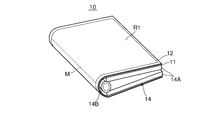
次に、図2A及び図2Bはそれぞれ、表示装置10が2つ折りにされた状態、該表示装置10が平面状に開かれた状態を示す斜視図及び平面図である。表示装置10は、図2Aに示すように、表示部11及びタッチパネル12を支持する開閉体14を備えている。開閉体14は、開閉操作をされることにより、表示部11及びタッチパネル12と共に開かれるか又は折り畳まれる。以下に、開閉体14について詳細に説明する。図2A及び図2Bに示すように開閉自在の開閉体14は、ヒンジ14Bと、ヒンジ14Bを介して連結された2つの薄型筐体14Aとを有する機構である。開閉体14は、各薄型筐体14Aを、ヒンジ14Bを中心にして回動させて開閉させる。各薄型筐体14Aの内部には、近距離通信部13、ネットワーク通信部15、記憶部18、及び制御ユニット19などが内蔵されている。また、各薄型筐体14Aの外壁にはそのほぼ全体に、表示部11及びタッチパネル12が重ねて貼り付けられている。
上記のように表示部11及びタッチパネル12のいずれも可撓性を有するため、各薄型筐体14Aの開閉に伴い、表示装置10は、選択的に、表示部11及びタッチパネル12を2つ折りした状態と、表示部11及びタッチパネル12を開いて1つの平面状を形成する平面状態のいずれかとなる。
図1に示す開閉検出部16は、開閉検出部例えばヒンジ14Bに設けられた回転角度センサーであり、各薄型筐体14Aの開閉角度αを検出して、検出した開閉角度αを制御部21に出力する。
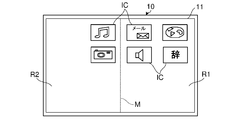
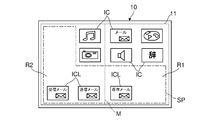
ここで、制御部21は、開閉検出部16により検出された各薄型筐体14Aの開閉角度αを予め設定されて記憶している角度閾値Dと比較し、開閉角度αが角度閾値D未満のときに表示部11及びタッチパネル12が2つ折りにされていると判定して(開閉体14が閉状態にあると判定して)、各アイコンを表示部11の画面の折られた部位で区分される半分の領域に配置して表示させる。例えば、図3Aに示すように表示部11の画面の折られた部位Mで区分される一方の半分の領域R1に各アイコンICが表示され、また他方の半分の領域R2にアイコンが表示されない。この場合、ユーザーは、その一方の半分の領域R1を見ながら、この領域R1の任意のアイコンICに対してダブルタップ操作などのタッチ操作を行うこととなる。
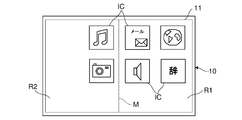
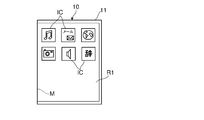
また、制御部21は、開閉角度αが角度閾値D以上のときに表示部11及びタッチパネル12が平面状に開かれていると判定して(開閉体14が開状態にあると判定して)、アイコンを表示部11の画面全体(上記平面状態のときに形成される1つの平面状となった表示部11の画面全体)に配置して表示させて、該アイコンの形状を上記折られた部位と直交する方向(横方向)に長くする、又は、該アイコンのサイズを大きくする。例えば、図3Bに示すように、制御部21は、各アイコンICを表示部11の画面全体に配置して表示させて、該各アイコンICの形状が上記折られた部位Mと直交する方向(横方向)に長くする、又は、図3Cに示すように該各アイコンICのサイズを大きくする。このため、ユーザーが表示部11及びタッチパネル12を平面状に開いたときに、表示部の画面の片側半分の領域にのみ表示されていたアイコンが表示部11の画面全体の広い領域に適した表示状態となるため、ユーザーがアイコンを認識しやすくすることができる。
また、複数のアイコンには、上位のアイコン及び該上位のアイコンに属するより下位のアイコンからなる階層構造の関係が付与され、該各アイコン及び階層構造が記憶部18に予め記憶されている。制御部21は、開閉検出部16により検出された開閉角度αに基づき表示部11及びタッチパネル12が2つ折りにされていると判定しているときに、表示部11の画面の折られた部位で区分される半分の領域に表示されているアイコンがシングルタップ操作(予め定められた第1タップ操作)で指示されると、このシングルタップ操作で指示されたアイコンを判定する。続いて、制御部21は、開閉検出部16により検出された開閉角度αに基づき表示部11及びタッチパネル12が平面状に開かれたと判定したときに、上記のようにアイコンを表示部11の画面全体に配置して表示させて、該アイコンの形状を横方向に長くするか又は該アイコンのサイズを大きくし、更に記憶部18に記憶されている各アイコン及び該各アイコンの階層構造に基づき、上記シングルタップ操作で指示されたアイコンよりも下位の他のアイコンを検索して、この検索した下位の他のアイコンを表示部11の画面における空きスペースに表示させる。
例えば、図4Aに示すように2つ折りにされた表示部11の画面の一方の半分の領域R1に表示されているメールのアイコンICがシングルタップ操作で指示され、続いて図4Bに示すように表示部11及びタッチパネル12が平面状に開かれると、制御部21は、各アイコンICを表示部11の画面全体に配置して表示すると共に、該各アイコンICの形状を横方向に長くし、更に上記指示されたメールのアイコンICよりも下位の他のアイコンICLを、表示部11の画面における空きスペースSPに表示する。
このとき、制御部21は、空きスペースSPが狭くて、下位の他のアイコンICLを表示することができないと判断した場合、表示部11の画面における上位のアイコンICの位置を変更して、空きスペースSPを拡大させてから、下位の他のアイコンICLをその空きスペースSPに表示させる。このため、ユーザーは、その指示されたメールのアイコンICよりも下位の他のアイコンICLを容易に知ることがきる。
次に、上記のような表示部11の画面におけるアイコンの表示制御を、図5に示すフローチャートを参照して説明する。
まず、制御部21は、開閉検出部16により検出された各薄型筐体14Aの開閉角度αを予め設定された角度閾値Dと比較して、表示部11及びタッチパネル12が2つ折りにされているか又は平面状に開かれているかを判定する(S101)。
例えば、ユーザーが表示部11及びタッチパネル12を平面状に開いているとき、制御部21は、開閉検出部16により検出された各薄型筐体14Aの開閉角度αが角度閾値D以上であることから、表示部11及びタッチパネル12が平面状に開かれていると判定して、(S101「平面」)、表示部11の画面全体をアイコン表示領域として設定し、アイコンの形状を横方向に長くするかアイコンのサイズを大きくして、アイコンをその画面全体に配置して表示させる(S102)。
この状態で、制御部21は、タッチパネル12の検出出力に基づきダブルタップ操作の有無を判定しつつ、ダブルタップ操作を待機する(S103)。
例えば、制御部21は、ダブルタップ操作の有を判定することなく、ダブルタップ操作の待機の開始時点より一定時間が経過すると(S103「無」)、S101の処理に戻る。
また、ユーザーが、S103におけるダブルタップ操作の待機の開始時点より一定時間が経過する前に表示部11の画面における任意のアイコンに対してダブルタップ操作を行った場合、制御部21は、タッチパネル12を通じて、そのダブルタップ操作の有を判定し(S103「有」)、このダブルタップ操作が行われた表示部11の画面上のアイコンを判定して(S104)、この判定したアイコンに予め対応付けられている処理を実行し(S105)、S101の処理に戻る。表示部11及びタッチパネル12が平面状に開かれている状態が維持されている限り(S101「平面」)、S102~S105が繰り返される。
一方、ユーザーが表示部11及びタッチパネル12を2つ折りにしているときは、制御部21は、開閉検出部16により検出された各薄型筐体14Aの開閉角度αが角度閾値D未満であることから、表示部11及びタッチパネル12が2つ折りにされていると判定して(S101「2つ折り」)、表示部11の画面の折られた部位で区分される半分の領域をアイコン表示領域として設定し、アイコンをその半分の領域に配置して表示させる(S106)。
この状態で、制御部21は、タッチパネル12の検出出力に基づき該画面の半分の領域に対するシングルタッチ操作又はダブルタップ操作の有無を判定しつつ、いずれかの操作を待機する(S107)。
例えば、制御部21は、該画面の半分の領域に対するシングルタッチ操作又はダブルタップ操作の有を判定することなく、S107における待機の開始時点より一定時間が経過すると(S107「無」)、S101の処理に戻る。
また、ユーザーが、S107における待機の開始時点より一定時間が経過する前に表示部11の画面における任意のアイコンに対してダブルタップ操作を行った場合、制御部21は、タッチパネル12を通じて、シングルタッチ操作又はダブルタップ操作の有を判定し(S107「有」,S108)、ダブルタップ操作であると判定したときは(S108「ダブル」)、このダブルタップ操作が行われた表示部11の画面上のアイコンを判定し(S109)、この判定したアイコンに予め対応付けられている処理を実行する(S110)。この後、処理はS101に戻る。
このようなS106~S110は、表示部11及びタッチパネル12が2つ折りにされた状態が維持されて(S101「2つ折り」)、ダブルタップ操作と判定される限り(S108「ダブル」)、繰り返される。
また、ユーザーが、S107における待機の開始時点より一定時間が経過する前に表示部11の画面における任意のアイコンに対してシングルタップ操作を行った場合、制御部21は、タッチパネル12を通じて、シングルタップ操作であることを判定して(S107「有」,S108「シングル」)、このシングルタップ操作が行われた表示部11の画面上のアイコンを判定し、判定したアイコンを記憶しておく(S111)。続いて、制御部21は、開閉検出部16により検出された各薄型筐体14Aの開閉角度αに基づき、表示部11及びタッチパネル12が平面状に開かれたか否かを判定する処理を続け(S112)、表示部11及びタッチパネル12が平面状に開かれるのを待機する。
例えば、制御部21は、S112における待機の開始時点より一定時間が経過するまでに表示部11及びタッチパネル12が平面状に開かれなければ(S112「No」)、シングルタップ操作を無効にする。処理は、S101に戻る。
また、ユーザーが、S112における待機の開始時点より一定時間が経過する前に、制御部21が、表示部11及びタッチパネル12が平面状に開かれたと判定した場合(S112「Yes」)、制御部21は、記憶部18に記憶されている各アイコン及び該各アイコンの階層構造に基づき、その指示されたアイコンよりも下位の他のアイコンを検索して、この検索により特定した下位の他のアイコンを表示部11の画面における空きスペースに表示させる(S113)。
この状態で、制御部21は、タッチパネル12の検出出力に基づきダブルタップ操作の有無を判定する処理を続け、ダブルタップ操作を待機する(S103)。そして、制御部21が、そのダブルタップ操作の有を判定することなく、ダブルタップ操作の待機の開始時点より一定時間が経過したとき(S103「無」)、処理はS101に戻る。また、ユーザーが、S103における待機の開始時点より一定時間が経過する前に表示部11の画面における任意のアイコンに対してダブルタップ操作を行い、制御部21が、タッチパネル12を通じて、当該ダブルタップ操作の有を判定すると(S103「有」)、制御部21は、このダブルタップ操作が行われた表示部11の画面上のアイコンを判定して(S104)、この判定したアイコンに予め対応付けられている処理を実行する(S105)、この後、処理はS101に戻る。
以降、表示部11及びタッチパネル12が平面状に開かれている状態が維持されている限り(S101「平面」)、下位の他のアイコンが表示部11の画面に表示され続け、S102~S105が繰り返される。
また、ユーザーが表示部11及びタッチパネル12を2つ折りにすると、制御部21は、表示部11及びタッチパネル12が2つ折りにされていると判定して(S101「2つ折り」)、上記下位の他のアイコンを表示部11の画面から非表示として、表示部11の画面の折られた部位で区分される半分の領域をアイコン表示領域として設定し、アイコンをその半分の領域に配置して表示させる(S106)。
更に、ユーザーが表示部11及びタッチパネル12を再度平面状に開くと(S107で「無」)、制御部21は、表示部11及びタッチパネル12が平面状に開かれていると判定して、(S101「平面」)、表示部11の画面全体をアイコン表示領域として設定し、アイコンの形状を横方向に長くするかアイコンのサイズを大きくして、アイコンをその画面全体に配置して表示させる(S102)。
このように本実施形態では、制御部21が、表示部11及びタッチパネル12が平面状に開かれているときに表示部11の画面全体をアイコン表示領域として設定し、アイコンの形状を横方向に長くするかアイコンのサイズを大きくして、アイコンをその画面全体に配置して表示させる。また、制御部21は、表示部11及びタッチパネル12が2つ折りにされているときに表示部11の画面の折られた部位で区分される半分の領域をアイコン表示領域として設定し、アイコンを該アイコンの元の形状及びサイズでその半分の領域に配置して表示させる。そして、制御部21は、更にその半分の領域に表示されているアイコンに対してシングルタップ操作が行われ、続いて表示部11及びタッチパネル12が平面状に開かれると、その指示されたアイコンよりも下位の他のアイコンを検索して、この検索した下位の他のアイコンを表示部11の画面における空きスペースに表示させる。こりにより、使い勝手に優れる表示装置を提供することができる。
なお、上記実施形態では、表示装置10において、制御部21が、開閉検出部16により閉状態(2つ折り状態)から変化して開状態(1つの平面状とされた状態)が検出され、当該閉状態のときにタッチパネル12を通じて表示部11の画面で操作されたアイコンを判定し、当該操作されたアイコンよりも下位の他のアイコンを表示部11の画面における空きスペースに表示させるようにしているが、当該下位の他のアイコンに代えて、当該操作されたアイコンに関連させて予め記憶している情報(例えば、アイコンを編集するための操作方法等)を、開状態となっている表示部11の画面における空きスペースに表示させるようにしてもよい。
また、上記実施形態では、表示装置10において、制御部21が、表示部11に表示させる対象をアイコンとしているが、アイコンに代えて、又はアイコンと共に、ボタンを表示対象とし、アイコンを表示対象とする場合と同様に、上述した表示制御を行ってもよい。
また、上記実施形態では、表示装置10において、アイコンを表示部11の画面に表示させているが、上記のような画像形成装置30の遠隔操作を行うためのGUIを表示部11の画面に表示させてもよい。この場合、制御部21は、このGUIに対するタッチ操作に基づきユーザーから入力された、画像形成装置30に対する指示を判定し、近距離通信部13を通じて、当該判定した指示を画像形成装置30に送信する。画像形成装置30では、当該指示を近距離通信部33で受信し、この指示に応じて制御部41が画像形成装置30を制御する。この場合も、上記図5を用いて説明した処理の場合と同様に、制御部21は、表示部11及びタッチパネル12が平面状に開かれているときに、GUIの操作ボタンの形状を横方向に長くするか操作ボタンのサイズを大きくして、操作ボタンを表示部11の画面全体に配置して表示させ、また表示部11及びタッチパネル12が2つ折りにされているときにGUIの操作ボタンを該操作ボタンの元の形状及びサイズで表示部11の画面の折られた部位で区分される半分の領域に配置して表示させ、更にその半分の領域に表示されている操作ボタンに対してシングルタップ操作が行われ、引き続いて表示部11及びタッチパネル12が平面状に開かれると、その指示された操作ボタンよりも下位の他の操作ボタンを表示部11の画面における空きスペースに表示させる。
また、画像形成装置30は、表示装置10を備える構成としてもよい。また、表示装置10と画像形成装置30とを備える画像形成システムとしてもよい。
尚、図1乃至図5を用いて説明した上記実施形態の構成は、本発明の一例に過ぎず、本発明を当該構成に限定する趣旨ではない。
Claims (9)
- 折り曲げ可能に可撓性を有する表示部と、
前記表示部の画面に設けられて折り曲げ可能に可撓性を有するタッチパネルと、
前記表示部及び前記タッチパネルを支持し、開閉操作をされることにより前記表示部及び前記タッチパネルと共に開かれるか又は折り畳まれる開閉体と、
前記開閉体が開かれた開状態及び前記開閉体が折り畳まれた閉状態を検出する開閉検出部と、
前記開閉検出部により閉状態が検出されている状態で、少なくとも1つのアイコン又はボタンを前記表示部の画面に表示させているときに、前記開閉検出部により開状態が検出された場合、前記表示部の画面上で前記アイコン又はボタンの形状又はサイズを変更させる制御部と、を備える表示装置。 - 前記制御部は、前記開閉検出部により閉状態が検出されている状態では、前記アイコン又はボタンを閉状態時の前記表示部の画面の折られた部位で区分される半分の領域に配置して表示させ、前記開閉検出部により開状態が検出されたときは、前記閉状態時に前記半分の領域に配置して表示させていた前記アイコン又はボタンを、該アイコン又はボタンの形状を前記折られた部位と直交する方向に長くする、或いは、該アイコン又はボタンのサイズを大きくして、前記表示部の画面全体に配置して表示させる請求項1に記載の表示装置。
- 前記制御部は、前記開閉検出部により閉状態から変化して開状態が検出されたとき、前記閉状態のときに前記タッチパネルを通じて前記表示部の画面で操作されたアイコン又はボタンを判定し、当該操作されたアイコン又はボタンに関連させて予め記憶している情報を、前記開状態の前記表示部の画面における空きスペースに表示させる請求項1に記載の表示装置。
- 前記制御部は、前記情報として、前記操作されたアイコン又はボタンに関連させて予め記憶している他のアイコン又はボタンを、前記開状態の前記表示部の画面における空きスペースに表示させる請求項3に記載の表示装置。
- 前記他のアイコン又はボタンは、予め設定されたアイコン又はボタンの階層構造において、前記操作されたアイコン又はボタンの下位に属するものである請求項4に記載の表示装置。
- 前記制御部は、前記開閉検出部により開状態が検出されると、前記表示部の画面上で前記アイコン又はボタンの形状又はサイズを変更させると共に、該アイコン又はボタンの配置を変更して、前記空きスペースを生成する請求項4に記載の表示装置。
- 前記制御部は、前記開閉検出部により閉状態が検出されて、前記アイコン又はボタンを閉状態時の前記表示部の画面の折られた部位で区分される半分の領域に配置して表示させた開始時点から一定時間が経過する前に、前記閉状態のときに前記タッチパネルを通じて前記表示部の画面で操作されたアイコン又はボタンに対して、予め定められた第1タップ操作があった場合、当該第1タップ操作があったアイコン又はボタンを記憶し、(i)当該一定時間が経過する前に、前記開閉検出部により閉状態から変化して開状態が検出された場合、当該第1タップ操作がされたアイコン又はボタンに関連させて予め記憶している情報を、前記開状態の前記表示部の画面における空きスペースに表示させ、(ii)当該一定時間が経過するまでに、前記開閉検出部により閉状態から変化して開状態が検出されなかった場合、当該第1タップ操作を無効とし、当該第1タップ操作がされたアイコン又はボタンに関連させて予め記憶している情報を表示させない請求項2に記載の表示装置。
- 前記制御部は、前記一定時間が経過する前に、前記閉状態のときに前記タッチパネルを通じて前記表示部の画面で操作されたアイコン又はボタンに対して、前記第1タップ操作とは異なる予め定められた第2タップ操作があった場合、当該第2タップ操作があったアイコン又はボタンに予め対応付けられている処理を実行する請求項7に記載の表示装置。
- 請求項1に記載の表示装置と、
画像を記録紙に形成する画像形成部と、を備える画像形成装置。
Priority Applications (2)
| Application Number | Priority Date | Filing Date | Title |
|---|---|---|---|
| JP2021543731A JP7338689B2 (ja) | 2019-09-04 | 2020-08-28 | 表示装置及び画像形成装置 |
| US17/624,224 US20220350371A1 (en) | 2019-09-04 | 2020-08-28 | Display device and image forming apparatus |
Applications Claiming Priority (2)
| Application Number | Priority Date | Filing Date | Title |
|---|---|---|---|
| JP2019-161549 | 2019-09-04 | ||
| JP2019161549 | 2019-09-04 |
Publications (1)
| Publication Number | Publication Date |
|---|---|
| WO2021044950A1 true WO2021044950A1 (ja) | 2021-03-11 |
Family
ID=74852902
Family Applications (1)
| Application Number | Title | Priority Date | Filing Date |
|---|---|---|---|
| PCT/JP2020/032506 Ceased WO2021044950A1 (ja) | 2019-09-04 | 2020-08-28 | 表示装置及び画像形成装置 |
Country Status (3)
| Country | Link |
|---|---|
| US (1) | US20220350371A1 (ja) |
| JP (1) | JP7338689B2 (ja) |
| WO (1) | WO2021044950A1 (ja) |
Citations (7)
| Publication number | Priority date | Publication date | Assignee | Title |
|---|---|---|---|---|
| JP2014006523A (ja) * | 2012-06-22 | 2014-01-16 | Samsung Display Co Ltd | フレキシブル表示装置 |
| US20140176421A1 (en) * | 2012-12-24 | 2014-06-26 | Industrial Technology Research Institute | Displaying method for flexible display device and flexible display device using the same |
| US20140223343A1 (en) * | 2013-02-05 | 2014-08-07 | Industrial Technology Research Institute | Foldable display, flexible display and icon controlling method |
| JP2015166865A (ja) * | 2014-02-13 | 2015-09-24 | 株式会社半導体エネルギー研究所 | 表示パネルおよび情報処理装置 |
| US20160188162A1 (en) * | 2014-12-29 | 2016-06-30 | Lg Electronics Inc. | Display device and method of controlling therefor |
| JP2017130158A (ja) * | 2016-01-22 | 2017-07-27 | レノボ・シンガポール・プライベート・リミテッド | 情報処理装置、その表示方法、及びコンピュータが実行可能なプログラム |
| JP2018124708A (ja) * | 2017-01-31 | 2018-08-09 | 京セラドキュメントソリューションズ株式会社 | 画像形成システム |
-
2020
- 2020-08-28 WO PCT/JP2020/032506 patent/WO2021044950A1/ja not_active Ceased
- 2020-08-28 JP JP2021543731A patent/JP7338689B2/ja active Active
- 2020-08-28 US US17/624,224 patent/US20220350371A1/en not_active Abandoned
Patent Citations (7)
| Publication number | Priority date | Publication date | Assignee | Title |
|---|---|---|---|---|
| JP2014006523A (ja) * | 2012-06-22 | 2014-01-16 | Samsung Display Co Ltd | フレキシブル表示装置 |
| US20140176421A1 (en) * | 2012-12-24 | 2014-06-26 | Industrial Technology Research Institute | Displaying method for flexible display device and flexible display device using the same |
| US20140223343A1 (en) * | 2013-02-05 | 2014-08-07 | Industrial Technology Research Institute | Foldable display, flexible display and icon controlling method |
| JP2015166865A (ja) * | 2014-02-13 | 2015-09-24 | 株式会社半導体エネルギー研究所 | 表示パネルおよび情報処理装置 |
| US20160188162A1 (en) * | 2014-12-29 | 2016-06-30 | Lg Electronics Inc. | Display device and method of controlling therefor |
| JP2017130158A (ja) * | 2016-01-22 | 2017-07-27 | レノボ・シンガポール・プライベート・リミテッド | 情報処理装置、その表示方法、及びコンピュータが実行可能なプログラム |
| JP2018124708A (ja) * | 2017-01-31 | 2018-08-09 | 京セラドキュメントソリューションズ株式会社 | 画像形成システム |
Non-Patent Citations (1)
| Title |
|---|
| YUKI KAI: "MEDIAS W N-05", WEB. ARCHIVE, 20 February 2013 (2013-02-20), pages 1 - 16, XP055292607, Retrieved from the Internet <URL:http://web.archive.org/web/20130223111308/http://k-tai.impress.co.jp/docs/review/20130220_588422.html?> [retrieved on 20201026] * |
Also Published As
| Publication number | Publication date |
|---|---|
| JPWO2021044950A1 (ja) | 2021-03-11 |
| JP7338689B2 (ja) | 2023-09-05 |
| US20220350371A1 (en) | 2022-11-03 |
Similar Documents
| Publication | Publication Date | Title |
|---|---|---|
| JP7469502B2 (ja) | 表示方法及び電子機器 | |
| EP3223113B1 (en) | Foldable display device | |
| AU2015280834B2 (en) | Foldable electronic apparatus and interfacing method thereof | |
| US11372520B2 (en) | Display input apparatus and image forming apparatus capable of moving plurality of icons from one page to another on display device and displaying moved icons thereon | |
| KR20150060278A (ko) | 다단 절첩형 디스플레이장치 및 그 기능 제어방법 | |
| US20170045996A1 (en) | Mobile terminal and control method therefor | |
| EP3627299A1 (en) | Control circuitry and method | |
| JP5356752B2 (ja) | 端末装置及びプログラム | |
| JP7411795B2 (ja) | アイコン移動方法及び電子機器 | |
| CN107181856A (zh) | 一种应用控制方法及终端 | |
| CN111638822A (zh) | 图标操作方法、装置及电子设备 | |
| JP2011008424A (ja) | 電子機器、動作モード設定方法、およびプログラム | |
| JP2017200119A (ja) | 画像処理装置及び画像処理システム | |
| JP2011227397A (ja) | 表示制御装置及び表示制御方法 | |
| JP2010170394A (ja) | 端末装置、及びプログラム | |
| JP2021148953A (ja) | 情報処理装置及びプログラム | |
| US11449105B2 (en) | Display apparatus that prevents erroneous operation of touch panel when opening and closing openable body provided with display device and the touch panel, and image forming apparatus | |
| JP7338689B2 (ja) | 表示装置及び画像形成装置 | |
| CN101770330A (zh) | 手持式电子装置及其运作方法 | |
| CN110888571B (zh) | 一种文件选中方法及电子设备 | |
| KR101436107B1 (ko) | 컨텐츠 디스플레이용 플렉서블 스크린 및 이를 제어하는 플렉서블 단말기로 형성된 다이어리 형태의 정보제공장치 | |
| JP2021047316A (ja) | 表示装置及び画像形成装置 | |
| JP5987017B2 (ja) | 表示入力装置、および表示入力制御プログラム | |
| JP2015191412A (ja) | 表示入力装置、および表示入力制御プログラム | |
| CN111124203A (zh) | 电子设备的控制方法及电子设备 |
Legal Events
| Date | Code | Title | Description |
|---|---|---|---|
| 121 | Ep: the epo has been informed by wipo that ep was designated in this application |
Ref document number: 20860026 Country of ref document: EP Kind code of ref document: A1 |
|
| ENP | Entry into the national phase |
Ref document number: 2021543731 Country of ref document: JP Kind code of ref document: A |
|
| NENP | Non-entry into the national phase |
Ref country code: DE |
|
| 122 | Ep: pct application non-entry in european phase |
Ref document number: 20860026 Country of ref document: EP Kind code of ref document: A1 |