WO2020166594A1 - 情報処理装置及びプログラム - Google Patents
情報処理装置及びプログラム Download PDFInfo
- Publication number
- WO2020166594A1 WO2020166594A1 PCT/JP2020/005297 JP2020005297W WO2020166594A1 WO 2020166594 A1 WO2020166594 A1 WO 2020166594A1 JP 2020005297 W JP2020005297 W JP 2020005297W WO 2020166594 A1 WO2020166594 A1 WO 2020166594A1
- Authority
- WO
- WIPO (PCT)
- Prior art keywords
- distributor
- content
- viewer
- displayed
- gift
- Prior art date
- Legal status (The legal status is an assumption and is not a legal conclusion. Google has not performed a legal analysis and makes no representation as to the accuracy of the status listed.)
- Ceased
Links
Images













Classifications
-
- G—PHYSICS
- G06—COMPUTING OR CALCULATING; COUNTING
- G06F—ELECTRIC DIGITAL DATA PROCESSING
- G06F13/00—Interconnection of, or transfer of information or other signals between, memories, input/output devices or central processing units
-
- G—PHYSICS
- G06—COMPUTING OR CALCULATING; COUNTING
- G06Q—INFORMATION AND COMMUNICATION TECHNOLOGY [ICT] SPECIALLY ADAPTED FOR ADMINISTRATIVE, COMMERCIAL, FINANCIAL, MANAGERIAL OR SUPERVISORY PURPOSES; SYSTEMS OR METHODS SPECIALLY ADAPTED FOR ADMINISTRATIVE, COMMERCIAL, FINANCIAL, MANAGERIAL OR SUPERVISORY PURPOSES, NOT OTHERWISE PROVIDED FOR
- G06Q50/00—Information and communication technology [ICT] specially adapted for implementation of business processes of specific business sectors, e.g. utilities or tourism
- G06Q50/10—Services
-
- H—ELECTRICITY
- H04—ELECTRIC COMMUNICATION TECHNIQUE
- H04N—PICTORIAL COMMUNICATION, e.g. TELEVISION
- H04N21/00—Selective content distribution, e.g. interactive television or video on demand [VOD]
- H04N21/20—Servers specifically adapted for the distribution of content, e.g. VOD servers; Operations thereof
- H04N21/25—Management operations performed by the server for facilitating the content distribution or administrating data related to end-users or client devices, e.g. end-user or client device authentication, learning user preferences for recommending movies
- H04N21/254—Management at additional data server, e.g. shopping server, rights management server
- H04N21/2543—Billing, e.g. for subscription services
-
- H—ELECTRICITY
- H04—ELECTRIC COMMUNICATION TECHNIQUE
- H04N—PICTORIAL COMMUNICATION, e.g. TELEVISION
- H04N21/00—Selective content distribution, e.g. interactive television or video on demand [VOD]
- H04N21/20—Servers specifically adapted for the distribution of content, e.g. VOD servers; Operations thereof
- H04N21/27—Server based end-user applications
- H04N21/274—Storing end-user multimedia data in response to end-user request, e.g. network recorder
- H04N21/2743—Video hosting of uploaded data from client
Definitions
- the present invention relates to an information processing device and a program.
- the present invention has been made in view of such a situation, and assists in providing a more convenient service to each person who distributes images and the like and who views the distributed images and the like. It aims at providing the technology for doing.
- an information processing device of one embodiment of the present invention is An information processing device for supporting one or more distributors who distribute information including one or more images, and an acquirer who acquires the distributed information, Content management means for managing each of the contents set for each distributor in association with each of the set distributors, Content providing means for providing the acquirer with the content set to a predetermined distributor when a predetermined condition is satisfied, With respect to the content provided by the content providing means, if the predetermined distributor is a gift recipient, and the acquirer makes a gift request to the gift recipient, gift accepting means that accepts it as a gift request, Execution means for executing a predetermined process on the gift recipient based on the content of the gift request; Equipped with.
- a program according to one aspect of the present invention is a program corresponding to the above-described information processing device according to one aspect of the present invention.
- this service it is a figure which shows the outline
- FIG. 4 is a view different from FIGS. 3A and 3B. It is an image figure which shows the outline of the multi-delivery service contained in this service. It is a figure which shows the structure of the information processing system containing the management server which concerns on one Embodiment of the information processing apparatus of this invention.
- FIG. 6 is a block diagram showing an example of a hardware configuration of a management server that constitutes the information processing system of FIG. 5.
- FIG. 7 is a functional block diagram showing a functional configuration for executing a distribution support process, a viewing support process, and a content management process, among the functional configurations of the information processing system including the management server of FIG. 6.
- 8 is an arrow chart showing the flow of processing by the information processing system including the management server having the functional configuration of FIG. 7. It is a figure which shows the specific example of GUI(Graphical User Interface) displayed on a distributor terminal. It is a figure which shows the specific example of GUI(Graphical User Interface) displayed on a distributor terminal. It is a figure different from FIG. 9A. It is a figure which shows the specific example of the distributor list displayed on a viewer terminal. It is a figure which shows the specific example of the distributor list displayed on a viewer terminal.
- FIG. 10A It is a figure which shows the specific example of the popup screen displayed on a viewer terminal. It is a figure which shows the specific example of the popup screen displayed on a viewer terminal. It is a figure different from FIG. 11A. It is a figure which shows the specific example of the screen which shows the detailed information of a distributor displayed on a viewer terminal. It is a figure which shows the specific example of the screen displayed on a viewer terminal, when purchasing a content among content purchasing sites. It is a figure which shows the specific example of the screen displayed on a viewer terminal, when purchasing content and exchanging content among content purchase sites. It is a figure which shows the specific example of the dialog displayed when performing a computer control exchange shown in FIG.
- FIG. 1 is a diagram showing an outline of this service that can be realized by an information processing system including the information processing apparatus of the present invention.
- this service is a service provided by a service provider G who manages the information processing system including the management server 1.
- this service is information including at least one of data of one or more captured images P1 to Pr (r is an integer value of 1 or more) and recorded audio data (hereinafter, “delivery information”).
- delivery information is a service that supports a distributor Y who distributes the distributed information and a viewer A who acquires the distributed distribution information. However, the positions of the distributor Y and the viewer A in this service are not fixed.
- the “image” includes, for example, captured moving images and still images, created animation moving images, and content moving images such as movies.
- the “delivery information” includes, for example, the moving image MP, voice, characters, and the like. Specifically, for example, the information necessary for executing various expressions (for example, animation and information telop at the time of event occurrence) in an event (for example, “present” described later) that occurs during distribution is an example of distribution information. is there.
- Distribution includes real-time distribution of the images P1 to Pr and recording distribution after a predetermined time has elapsed.
- image P when it is not necessary to individually distinguish the images P1 to Pr, they are collectively referred to as "image P".
- FIG. 1 one distributor Y and one viewer A are drawn.
- a distributor terminal 2 used by the distributor Y to use the service and a viewer terminal 3 used by the viewer A to use the service are drawn one by one.
- this is simplified in order to explain the relationship between the distributor Y who is a user of this service and the viewer A. That is, in reality, as users of this service, distributors Y1 to Yn (n is an integer value of 1 or more independent of r) and viewers A1 to Am (m is 1 independent of r and n). The above integer values) and exist.
- distributedor Y when it is not necessary to individually distinguish the distributors Y1 to Yn and the viewers A1 to Am, they are collectively referred to as “distributor Y” and “viewer A”.
- the viewer A who is a user of this service, can support the distributor Y through the present act for the distributor Y.
- the “present” in this service is specifically set by the viewer A to be the distributor Yt (t is an arbitrary value independent of n out of 1 to n) sold by this service. Purchasing the purchased content C and donating the purchased content C to a specific distributor Y. Note that the consideration paid by the viewer A for purchasing the content C includes a predetermined currency (for example, Japanese yen), points available for this service, and the like.
- one or more contents C set for each of the distributors Y1 to Yn are managed in association with information (for example, distributor ID) that uniquely identifies each of the distributors Y1 to Yn. ing.
- the viewer A who uses this service can acquire the content C set to a predetermined distributor Yt among the distributors Y1 to Yn to which one or more contents C are set respectively.
- a method for the viewer A to acquire the content C there are purchase, exchange of the content C with each other, and the like. Note that a specific example of a specific method for the viewer A to acquire the one or more contents C set for the distributor Yt will be described later with reference to FIGS. 13 to 18.
- the viewer A who has acquired the content C set for the distributor Yt can give the acquired content C as a present to the distributor Yt for which the acquired content C is set. That is, a value (hereinafter, referred to as “point”) per piece is associated with the content C in this service.
- the distributor Y can add the points associated with the content C to the accumulated points to which the distributor Y has been donated, by giving the content C set to him/herself. For example, when the points associated with the content C set for the distributor Yt are 10 points, the distributor Yt asks the content C to be donated, and the accumulated cumulative points are 10 points. Will be increased.
- the unit of points given to the distributor Y is called a “star”.
- the viewer A can donate the content C to the distributor Yt by acquiring the content C set for the distributor Yt. Further, when the viewer A desires to donate the content C to the distributor Yt, the desire is accepted as a gift request from the viewer A to the distributor Yt (hereinafter, referred to as a “person to be donated”). Then, the content C is provided to the gift recipient (distributor Yt) based on the content of the gift request. In other words, the points associated with the provided content C are added as cumulative points given to the distributor Yt.
- the points associated with the content C set for the distributor Yt can be used as a reference for the viewer A to evaluate the distributor Yt in this service.
- the value of cumulative points donated by the distributor Y1 is 1000 stars and the value of cumulative points donated by Y2 is 300 stars.
- the distributor Y1 receives more contents C from the viewer A than the distributor Y2, and therefore the viewer A highly evaluates the contents.
- Distributor Y having a particularly large cumulative number of awarded points is, for example, as shown in FIG. 10B, a page of ranking of a dedicated application program (hereinafter, referred to as “dedicated application”) provided by this service. Will be introduced in. When introduced on a ranking page or the like, the number of viewers A can be expected to increase further, so that the number of distributors Y who want to increase the accumulated accumulated points can be expected.
- dedicated application a dedicated application program
- the content C set as the distributor Yt is classified into one or more types according to the amount of consideration that can be provided to each of the viewers A1 to Am and the corresponding points.
- the price per piece and the corresponding points are 100 yen (1 star), 500 yen (5 star), 1000 yen (10 star), 2500. It can be classified into 6 types of yen (25 star), 5000 yen (50 star), or 10,000 yen (100 star). Since the content C in this service is always associated with the distributor Y, it is exactly “content C set for the distributor Yt”, but in this specification, it is simply “content C”. Also called.
- a distributor distributes the distribution environment for each website (hereinafter, referred to as “live distribution site” (of one or more types)) that provides the live distribution service. Since I had to set up and perform distribution for each live distribution site, I often had trouble.
- the same distribution information can be collectively distributed to one or more types of live distribution sites. That is, the distributor Y can distribute the same distribution information to one or more types of live distribution sites at the same time or almost at the same time without the troublesome thought of the conventional art.
- a service in which a distributor can collectively distribute the same distribution information to one or more types of live distribution sites is hereinafter referred to as a multi-distribution service. A specific example of the multi-delivery service will be described later with reference to FIG.
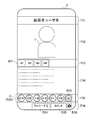
- FIG. 2A is a diagram showing an example of a screen displayed on the distributor terminal 2.
- FIG. 2B is a diagram showing an example of a screen displayed on the viewer terminal 3.
- FIG. 2A shows an example of an operation screen displayed on the distributor terminal 2 when the distributor Y operates the distributor terminal 2 to distribute the distribution information.
- the operation screen displayed on the distributor terminal 2 includes display areas F21 to F25.
- the title of the screen (for example, the title “Live” in the example of FIG. 2A) is displayed.
- the distribution information of the imaged distributor Y is displayed in the display area F22.
- the moving image displayed in the display area F22 of FIG. 2A and the display area F32 of FIG. 2B described later is an example, and is not limited to the case where the distributor Y is displayed.
- a button B21 composed of four types of icons, each of which is displayed as “M1” to “M4”, a button B22 displayed as “front camera”, and a button B23 displayed as “image”. And are displayed.
- the button B21 is a button for showing the distribution state of each of the live distribution sites M1 to M4 and for transitioning the screen to the setting screen.
- four types of icons indicating the distribution states of the live distribution sites M1 to M4 are displayed.
- the specific method for indicating the distribution state of the live distribution sites M1 to M4 is not particularly limited.
- the icons may be color-coded depending on whether the distribution information is being distributed, is in a distributable state, or is in a state in which individual settings required for distribution are not performed.
- the distributor Y distributes each live distribution site such that the live distribution site M1 is "delivering”, the live distribution site M2 is “deliverable”, and the live distribution site M3 is "not set”. Can be easily grasped.
- buttons B21 that links to the setting screens of the live distribution sites M1 to M4.
- a screen (not shown) in which various settings necessary for distributing the distribution information to the live distribution site M4 can be performed is displayed. R.
- the distributor Y can easily perform the setting necessary for distributing the distribution information to the live distribution site M4 in the "unset" state.
- the button B22 is a button B22 for switching the distribution information to be displayed in the display area F22 among a plurality of cameras (not shown) capable of imaging the distributor Y.
- the distribution information displayed in the display area F22 is obtained from the image captured by the camera arranged on the back side of the distributor terminal 2.
- the image is switched to the image captured by the camera arranged on the front side of the distributor terminal 2.
- the button B22 is switched from the display "front camera” to the display "back camera” (not shown).
- the button B23 is a button that is pressed when displaying the image selection screen.
- the “image selection screen” refers to a screen that displays a list of one or more images stored in the distributor terminal 2.
- an image selection screen (not shown) is displayed in the display area F24.
- the distributor Y can distribute the selected image by selecting an arbitrary image from the image selection screen.
- buttons B24 displayed as "distribution thumbnail”, a button B25 displayed as “comment”, and a setting button B26 are displayed.
- the button B24 is a button that is pressed when capturing a thumbnail image of the distribution information to be distributed.
- the image P displayed in the display area F22 at the timing when the button B24 is pressed is saved and displayed in a part of the display area F24.
- the distributor Y performs a predetermined operation for making the determination.
- the icon for selecting the live distribution site for which the thumbnail is used may be displayed in the display area F24 while being registered as a thumbnail for distribution displayed in FIG. 10A described later.
- the specific operation method for determining the thumbnail is not particularly limited.
- the thumbnail may be determined when an operation of pressing (for example, tapping) the image P displayed in a part of the display area F24 is performed. Further, when the image P is not used as a thumbnail, the image P may be canceled by performing a predetermined operation (for example, flick).
- a predetermined operation for example, flick
- the button B25 is a button pressed when inputting a comment to be displayed in the display area F24.
- a dialog for inputting and transmitting a comment (hereinafter, referred to as "comment transmission dialog") is displayed on the distributor terminal 2. Details of the comment transmission dialog will be described later with reference to FIG. 9B.
- the button B26 is a button pressed when various settings (screen size, etc.) of the screen displayed on the distributor terminal 2 are performed.
- FIG. 2B shows an example of an operation screen displayed on the viewer terminal 3 when the viewer A operates the viewer terminal 3 to give the content C set to the distributor Y. There is.
- the operation screen displayed on the viewer terminal 3 includes display areas F31 to F36.
- the user name of the distributor Y who is the target of viewing by the viewer A (that is, displayed on the viewer terminal 3) is displayed.
- the distribution information of any of the live distribution sites M1 to M4 being distributed by the distributor Y is displayed.
- a button B31 composed of four types of icons, which are displayed as "M1" to "M4", is displayed.
- the button B31 is a button for indicating the viewing state of each of the live distribution sites M1 to M4 and selecting the live distribution site M to be viewed.
- four types of icons indicating the viewing states of the live distribution sites M1 to M4 are displayed.
- the specific method for indicating the viewing state of the live distribution sites M1 to M4 is not particularly limited.
- the icons may be color-coded depending on whether the distribution information is being viewed, in a viewable state, or in a state in which distribution by the distributor Y is not performed and the content cannot be viewed.
- the viewer A views the live distribution site M1 as "viewing", the live distribution site M2 as “viewable”, and the live distribution site M3 as "unviewable”, for example. Can be easily grasped.
- these four types of icons constitute a button B31 for switching to distribution information distributed by the live distribution sites M1 to M4.
- the icon (button B31) indicating the live distribution site M4 is pressed, the distribution information distributed by the live distribution site M4 is displayed in the display area F32. Thereby, the viewer A can easily switch and watch the live distribution site M being distributed by the distributor Y.
- a button B32 indicating each of the one or more contents C purchased by the viewer A, and a website where the contents C set by the distributor Y can be purchased (hereinafter referred to as "content purchase site").
- a link button B33 to is displayed.
- the viewer A can give the distributor Y the content C purchased at the content purchase site of one or more distributors Y displayed in the display area F35.
- the six types of contents C are displayed in the display area F35, but the display area F35 can also be scrolled horizontally. Therefore, six or more types of content C can be displayed in the display area F35. Note that FIG.
- FIGS. 13 to 18 shows a specific method for the viewer A to give the presenter the content C purchased on the content purchase site of one or more distributors Y displayed in the display area F35. It will be described later with reference. Further, a specific example of the content purchasing site of the distributor Y displayed on the viewer terminal 3 when the link button B33 is pressed will be described later with reference to FIGS. 13 to 18.
- a button B34 displayed as “follow”, a button B35 displayed as “comment”, and a setting button B36 are displayed.
- the button B34 is a button pressed when the viewer A follows the distributor Y of the distribution information displayed in the display area F32.
- the viewer A can become the “follower” of the distributor Y or cancel it by pressing the button B34.
- the button B35 is a button pressed by the viewer A when posting a comment to the live distribution site M being distributed by the distributor Y.
- the comment transmission dialog is displayed on the viewer terminal 3. Details of the comment transmission dialog will be described later with reference to FIG. 9B.
- the button B36 is a button that is pressed when performing various settings of the screen displayed on the viewer terminal 3.
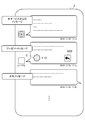
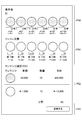
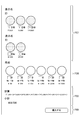
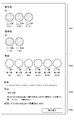
- 3A to 3C are diagrams showing an example of an operation screen displayed on the viewer terminal 3 when the viewer A operates the viewer terminal 3 to give a gift.
- FIG. 3A when the viewer A presents the content C set for the distributor Y to the distributor Y, the content is purchased at the content purchasing site of the distributor Y displayed on the viewer terminal 3.
- a selection screen of the content C (hereinafter referred to as “present selection dialog”) is shown.
- icons indicating each of a plurality of types of contents C with names (for example, XX star) are arranged in a selectable manner.
- FIG. 3B eight kinds of contents C are displayed in the present selection dialog, but the present selection dialog can be scrolled vertically. Therefore, eight or more types of contents C can be displayed in the present selection dialog.
- the viewer A selects and presses any one of the icons indicating the plurality of types of contents C displayed in the present selection dialog. Then, a screen for accepting a specific operation for gifting the selected content C (hereinafter referred to as “present details dialog”) is displayed on the viewer terminal 3.
- FIG. 3B shows a specific example of the present details dialog.
- the present details dialog box for the selected content C, a column for designating the quantity to be given to the distributor Y who has set the content C, and the content C along with the gift of the content C are displayed.
- a field for inputting a message to be sent to the set distributor Y (hereinafter referred to as “present message”) is displayed.
- the example of FIG. 3B shows that there are three contents C to be given to the distributor Y.
- the viewer A presses the button B38 displayed as "Give present”.
- the gift of the content C to the distributor Y and the transmission of the present message are executed. If the viewer A decides to stop or give up the gift after the present details dialog is displayed, he/she can cancel the input by pressing the button B39 displayed as "Cancel". it can.
- FIG. 3C shows a display example of a present message displayed on the distributor terminal 2 and a message (hereinafter referred to as a “thank you message”) from the distributor Y for the present message.
- a thank you message a message from the distributor Y for the present message.
- the present message displays the type and quantity of the content C that has been given, and a button B40 for displaying a comment transmission dialog for inputting a thank-you message.
- the display of the button B40 disappears when the thank-you message is input and transmitted by the distributor Y. That is, the thank-you message is transmitted only once. This makes it possible to prevent forgetting and double-sending the thank-you message.
- the animation or sound effect for the performance is distributed. It may be distributed by being superimposed on the information. This effect may have different effects depending on the type of the gift C or the acquired content C as a present. For example, as the unit price of the content C given as a present is higher, more elaborate animations and sound effects may be distributed. As a result, the viewer A can be expected to actively give or acquire the content C to the distributor Y. Furthermore, for those who use each live distribution site individually (distribution or viewing of distribution information) without using this service, animations and sound effects that are distributed superimposed on the distribution information will be displayed. , It is possible to recognize that it is due to this service. Therefore, the number of users of this service can be increased.
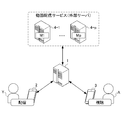
- FIG. 4 is an image diagram showing an outline of the multi-delivery service included in this service.
- the distributor Y collectively distributes the same distribution information to one or more types of live distribution sites, and the viewer A has one or more types of distribution information.
- This is a service that enables the distributor Y to easily select and view an arbitrary site being distributed among the live distribution sites M.
- the external servers 4-1 to 4-for managing each of the live distribution sites M1 to Mp (p is an integer value of 1 or more independent of r, n, and m). Each of p is drawn.
- a distributor Y who distributes the distribution information using the distributor terminal 2 and a viewer A who views the distribution information distributed by the distributor Y using the viewer terminal 3 are drawn.
- the distributor Y sends the same distribution information to the live distribution sites M1 to Mp managed by the external servers 4-1 to 4-p, respectively. It is possible to perform batch distribution, and by controlling the start and end of each live distribution site M, it is possible to control the distribution state of each of the live distribution sites M1 to Mp.
- the viewer A uses the service managed by the management server 1 to distribute the distribution information of the distributor Y distributed to the live distribution sites M1 to Mp among the live distribution sites M1 to Mp. You can select and watch the site.
- the distributor Y can collectively set the setting items common to one or more types of live distribution sites by logging in to the dedicated site provided by this service.
- setting items unique to each live distribution site can be set on a predetermined page in the dedicated site.
- the distributor Y can change the distribution screen by appropriately switching between a plurality of cameras (for example, the front camera and the rear camera) to capture an image.
- the distributor Y can collectively transmit the same comment to one or more types of live distribution sites.
- the viewer A can collectively set the setting items common to one or more types of live distribution sites.
- setting items unique to each live distribution site can be set on a predetermined page in the dedicated site.
- FIG. 5 is a diagram showing a configuration of an information processing system including a management server 1 according to an embodiment of the information processing apparatus of the present invention.
- the information processing system shown in FIG. 5 includes a management server 1, distributor terminals 2-1 to 2-n, viewer terminals 3-1 to 3-m, and external servers 4-1 to 4-p. Is configured.
- the management server 1, the distributor terminals 2-1 to 2-n, the viewer terminals 3-1 to 3-m, and the external servers 4-1 to 4-p are each connected via a predetermined network N such as the Internet. Connected to each other.
- the management server 1 is an information processing device managed by the service provider G. To realize this service, the management server 1 appropriately communicates with the distributor terminals 2-1 to 2-n, the viewer terminals 3-1 to 3-m, and the external servers 4-1 to 4-p. The various processes of are executed.
- the management server 1 acquires the distribution information transmitted from the distributor terminals 2-1 to 2-n. Then, the management server 1 transmits the distribution information to each of the external servers 4-1 to 4-p selected by the distributor Y. As a result, each of the distributors Y1 to Yn can collectively distribute the distribution information to the designated live distribution sites M1 to Mp by operating each of the distributor terminals 2-1 to 2-n. it can.
- the management server 1 acquires the distribution information transmitted from each of the external servers 4-1 to 4-p. Then, the management server 1 transmits the distribution information to each of the viewer terminals 3-1 to 3-m. As a result, each of the viewers A1 to Am can view the distribution information distributed at the specified live distribution sites M1 to Mp by operating each of the viewer terminals 3-1 to 3-m. it can.
- the management server 1 manages one or more contents C set for each of the distributors Y1 to Yn. Specifically, the management server 1 manages the content C in association with information (for example, a distributor ID) that uniquely identifies each of the distributors Y1 to Yn. Accordingly, the viewer A can give the content C to the distributor Y when there is the distributor Y who wants to support. Further, the distributor Y can obtain a profit by being provided with the content C by the viewer A who supports him/herself, and thus can distribute new distribution information by using the profit as a source. .. Further, since the content C set for each of the distributors Y1 to Yn can be distributed in the service, the service provider G is more convenient for the distributor Y and the viewers of the distribution information. It becomes possible to provide high-quality services.
- information for example, a distributor ID
- Each of the distributor terminals 2-1 to 2-n is an information processing device operated by each of the distributors Y1 to Yn.
- Each of the distributor terminals 2-1 to 2-n is composed of a personal computer, a smartphone, a tablet, or the like.
- Each of the distributor terminals 2-1 to 2-n accepts an input operation required for each of the distributors Y1 to Yn to use this service, and transmits information indicating the input content to the management server 1. To do. Further, each of the distributor terminals 2-1 to 2-n displays the distribution information and the like transmitted from the management server 1 under the control of itself or the management server 1.
- a dedicated application for receiving the provision of this service is installed on each of the distributor terminals 2-1 to 2-n.
- distributor Y operates distributor terminal 2 ”, it means that distributor Y activates the dedicated application installed on distributor terminal 2. It means performing various operations.
- Each of the viewer terminals 3-1 to 3-m is an information processing device operated by each of the authenticated persons A1 to Am.
- Each of the viewer terminals 3-1 to 3-m is composed of a personal computer, a smartphone, a tablet, or the like.
- Each of the viewer terminals 3-1 to 3-m accepts an input operation required for each of the viewers A1 to Am to use this service, and transmits information indicating the input content to the management server 1. To do.
- each of the viewer terminals 3-1 to 3-m displays the distribution information or the like transmitted from the management server 1 under the control of itself or the management server 1.
- a dedicated app for receiving the provision of this service is installed on each of the viewer terminals 3-1 to 3-m.
- the expression “viewer A operates the viewer terminal 3 ” it means that the viewer A launches a dedicated application installed in the viewer terminal 3. It means performing various operations.
- Each of the external servers 4-1 to 4-p is an external server managed by each of the site managers R1 to Rp that separately manages each of the live distribution sites M1 to Mp.
- site manager R the site managers R1 to Rp
- the external servers 4-1 to 4-p and the live distribution sites M1 to Mp are collectively referred to as “external These are referred to as “server 4" and "live distribution site M", respectively.
- the service provider G can provide a highly convenient service to each of the distributor Y and the viewer A.
- FIG. 6 is a block diagram showing an example of the hardware configuration of the management server 1 that constitutes the information processing system of FIG.
- the management server 1 includes a CPU (Central Processing Unit) 11, a ROM (Read Only Memory) 12, a RAM (Random Access Memory) 13, a bus 14, an input/output interface 15, an output unit 16, and an input unit 17.
- the storage unit 18, the communication unit 19, and the drive 20 are provided.
- the CPU 11 executes various processes according to the program recorded in the ROM 12 or the program loaded from the storage unit 18 into the RAM 13.
- the RAM 13 also appropriately stores data and the like necessary for the CPU 11 to execute various processes.
- the CPU 11, ROM 12, and RAM 13 are connected to each other via a bus 14.
- An input/output interface 15 is also connected to the bus 14.
- An output unit 16, an input unit 17, a storage unit 18, a communication unit 19, and a drive 20 are connected to the input/output interface 15.
- the output unit 16 includes a display such as a liquid crystal and displays various images.
- the input unit 17 is configured by various hardware buttons and the like, and inputs various information according to an instruction operation by the operator.
- the storage unit 18 is configured by a DRAM (Dynamic Random Access Memory) or the like, and stores various data.
- the communication unit 19 controls communication with other devices (the distributor terminal 2, the viewer terminal 3, the external server 4, etc.) via the network N including the Internet.
- the drive 20 is provided as needed.
- a removable medium 30 including a magnetic disk, an optical disk, a magneto-optical disk, a semiconductor memory, or the like is appropriately mounted on the drive 20.
- the program read from the removable medium 30 by the drive 20 is installed in the storage unit 18 as needed.
- the removable medium 30 can also store various data stored in the storage unit 18 similarly to the storage unit 18.
- the distributor terminal 2 and the viewer terminal 3 in the information processing system of FIG. 5 also have the hardware configuration shown in FIG. However, when the distributor terminal 2 and the viewer terminal 3 are configured by smartphones or tablets, the output unit 16 and the input unit 17 have touch panels.
- the management server 1 can execute various processing such as distribution support processing, viewing support processing, and content management processing.
- the service provider G can provide the above-mentioned service to the distributor Y and the viewer A, respectively.
- Distribution support processing refers to processing for supporting distribution of distribution information by the distributor Y who is a user of this service.
- the “viewing support process” refers to a process of supporting the viewing of the distribution information by the viewer A who is the user of this service.
- the “content management process” is a process of managing one or more contents C set for each of the distributors Y1 to Yn.
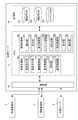
- FIG. 7 is a functional block diagram showing a functional configuration for executing distribution support processing, viewing support processing, and content management processing, out of the functional configuration of the information processing system including the management server 1 of FIG.
- the distribution support unit 101 functions when the execution of the distribution support process is controlled. Further, when the execution of the viewing support process is controlled, the viewing support unit 102 functions. Further, when the execution of the content management process is controlled, the content management unit 103 functions.
- the delivery support unit 101 In the delivery support unit 101, the designation receiving unit 111, the setting receiving unit 112, the imaging control unit 113, the display control unit 114, the receiving unit 115, and the delivery control unit 116 function.
- the designation receiving unit 111 receives one or more live distribution sites M designated as websites used to distribute the distribution information as distribution designated sites. Specifically, for example, when the live distribution sites M1 and M2 are designated as the websites used to distribute the distribution information, the designation receiving unit 111 receives these as the designated delivery sites.
- the setting reception unit 112 receives predetermined setting items common to designated sites. Specifically, for example, the setting reception unit 112 receives predetermined setting items common to the live distribution sites M1 and M2 accepted as the distribution designated site.
- the imaging control unit 113 executes control to image the distribution information at a predetermined timing. Specifically, for example, the image capturing control unit 113 executes control for capturing a thumbnail image of distribution information.
- the display control unit 114 executes control for displaying the comment input to the viewer terminal 3 on the distributor terminal 2. Specifically, for example, the display control unit 114 executes control to display the present message input to the present details dialog on the distributor terminal 2.
- the accepting unit 115 accepts, when the comment of the distributor Y is input, based on the operation of the distributor Y on the distributor terminal 2. Specifically, for example, the reception unit 115 receives a thank-you message when a thank-you message is input in the comment transmission dialog shown in FIG. 9B described later.
- the delivery control unit 116 acquires the delivered delivery information and executes control to deliver the delivery information in real time via the delivery designation site. Specifically, for example, when the designated distribution sites are the live distribution sites M1 and M2, the distribution control unit 116 acquires the distribution information transmitted from the distributor terminal 2. Then, the distribution control unit 116 executes control of distributing the distribution information in real time via the live distribution sites M1 and M2.
- the service provider G can provide the service to the distributor Y, which is highly convenient for the distributor Y.
- the presentation unit 121 presents information indicating the distributors Y1 to Yn to the viewers A1 to Am, respectively. Specifically, for example, the presentation unit 121 views a distributor list including distributor user names of the distributors Y1 to Yn, distribution information being distributed, and the like as information indicating the distributors Y1 to Yn.
- the control for displaying on each of the individual terminals 3-1 to 3-m is executed.
- the accepting unit 122 accepts one or more live distribution sites M designated as websites used for viewing distribution information as viewing designation sites. Specifically, for example, when the live distribution sites M1 and M2 are designated as the websites used to view the distribution information, the reception unit 122 receives these as the designation sites for viewing.
- the reception unit 122 receives the content C. Specifically, for example, when the reception unit 122 specifies the type and quantity of the content C to be gifted by an input operation in the present selection dialog shown in FIG. 3A and the present details dialog shown in FIG. 3B. Accept this.
- the reception unit 122 receives a present message from the viewer A when the present message is input together with the designation of the content C as a gift (present) to the distributor Y. Specifically, for example, the accepting unit 122 accepts a present message when the present message is input by an input operation to the present details dialog shown in FIG. 3B.
- the display control unit 123 executes control to display the comment input to the distributor terminal 2 on the viewer terminal 3. Specifically, for example, the display control unit 123 executes control to display the thank-you message input in the comment transmission dialog shown in FIG. 9A described later on the viewer terminal 3.
- the service provider G can provide the viewer A with a service that is highly convenient for the viewer A.
- Content management process In the content management unit 103, the association unit 131, the provision control unit 132, the reception unit 133, and the execution unit 134 function. Information about the content C that is the target of management by the content management unit 103 is stored in the content DB 183.
- the associating unit 131 manages each of the contents C set for each distributor Y in association with each of the set distributors Y. Specifically, for example, the associating unit 131 associates one or more contents C with a distributor ID that uniquely identifies the distributor Y, and stores the contents C in the distributor DB 181 for management.
- the correspondence unit 131 notifies the viewer A who received the content C.
- the content C is associated and managed.
- the associating unit 131 associates a viewer ID that uniquely identifies the viewer A with one or more contents C, and stores and manages the contents in the viewer DB 182.
- the provision control unit 132 provides the viewer A with the content C set as the predetermined distributor Yt. Specifically, for example, when the provision control unit 132 determines that the condition that the viewer A has purchased the content C set for the distributor Y is satisfied, the provision control unit 132 sets the content C set for the distributor Y as the viewer. The control provided to A is executed.
- the accepting unit 133 accepts the gift as a gift request. .. Specifically, when the reception unit 133 makes a request for the content C purchased by the viewer A to be the gift recipient of the predetermined distributor Yt, the request is accepted as a gift request by the viewer A. ..
- the execution unit 134 executes a predetermined process for the gift recipient based on the content of the gift request. Specifically, when the input operation to the present selection dialog shown in FIG. 3A and the present details dialog shown in FIG. 3B is accepted, the content becomes “the content of the gift wish”. The execution unit 134 executes the provision of the content C to the predetermined distributor Yt, for example, based on the “contents of gift request”.
- the management server 1 having the above functional configuration can execute each processing such as distribution support processing, viewing support processing, and content management processing.
- the service provider G can provide the service to the distributor Y and the viewer A, which is highly convenient for the distributor Y and the viewer A.
- FIG. 8 is an arrow chart showing a flow of processing by the information processing system including the management server 1 having the functional configuration of FIG. 7.
- step S2-1 the distributor terminal 2 logs in to this service.
- the splash animation may be displayed before the login screen is displayed.
- the distributor terminal 2 specifies one or more live distribution sites M as distribution designated sites as websites used for distribution of distribution information.
- step S1-1 the management server 1 accepts the designation of the delivery designation site.
- step S2-3 the distributor terminal 2 transmits the input information to the management server 1 when a predetermined setting item common to one or more distribution designated sites is input. Then, in step S1-2, the management server 1 accepts the information input about the setting items.
- step S2-4 the distributor terminal 2 (or a camera (not shown) connected to the distributor terminal 2) starts capturing a distribution moving image by the distributor Y. Then, in step S1-3, the management server 1 acquires the data of the image captured by the distributor terminal 2 (or a camera (not shown) connected thereto) as distribution information in real time.
- step S1-4 the management server 1 executes control to display the distributor list on the viewer terminal 3. Then, in step S3-1, the viewer terminal 3 displays the distributor list. In step S3-2, the viewer terminal 3 specifies the distributor Y who wants to view the distribution information from the distributors Y listed in the distributor list. Then, in step S1-5, the management server 1 accepts the designation of the distributor Y.
- step S1-6 the management server 1 starts distributing the distribution information of the specified distributor Y. Then, in step S3-3, the viewer terminal 3 starts displaying the delivered distribution information.
- step S3-4 the viewer terminal 3 specifies the type and quantity of the content C to be given to the distributor Y.
- such designation is referred to as “present designation”.
- step S1-7 the management server 1 receives and manages the present designation.
- step S3-5 the viewer terminal 3 sends the present message to the management server 1 when the present message is input together with the designation of the content C to be given to the distributor Y.
- step S1-7 the management server 1 acquires the present message.
- step S1-9 the management server 1 executes control for displaying the comment input to the viewer terminal 3 on the distributor terminal 2.
- step S2-5 the distributor terminal 2 executes control to display the comment (for example, a present message) input to the viewer terminal 3 on the distributor terminal 2.
- step S2-6 the distributor terminal 2 transmits the input comment (for example, a thank-you message) to the management server 1. Then, in step S1-10, the management server 1 acquires the comment transmitted from the distributor terminal 2. In step S1-11, the management server 1 transmits the input comment (for example, a thank-you message) to the viewer terminal 3. Then, in step S3-6, the viewer terminal 3 acquires and displays the transmitted comment.
- the input comment for example, a thank-you message
- GUI Graphic User Interface
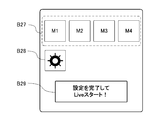
- FIG. 9A shows an example of the initial setting screen displayed on the distributor terminal 2.
- four types of icons indicating the live distribution sites M1 to M4 are arranged in a horizontal row. These four types of icons are displayed as active when the setting of the corresponding live distribution site M is completed, and are displayed as inactive when the setting is not completed. For example, when there is no record of distributing the distribution information even once in the past, all the icons indicating the live distribution site M are inactively displayed, and the button B29 indicating "Complete setting and start Live! Is also displayed as inactive. On the other hand, when there is a past record of distribution information, past settings are reflected. In this case, the live distribution site M that has been set is actively displayed, and the button B29 that displays "Complete setting and start Live!” is also actively displayed.
- Each of the four types of icons indicating each of the live distribution sites M1 to M4 functions as a button B27 for displaying a setting screen for each live distribution site M. Therefore, for example, when the icon indicating the live distribution site M1 whose settings have not been completed is pressed, a screen (not shown) for setting the live distribution site M1 is displayed.
- the button B28 is a button for displaying a screen (not shown) for performing initial settings common to the live distribution sites M1 to M4. Since the initial settings common to the live distribution sites M1 to M4 can be performed, the distributor Y can enjoy the merit of not having to bother with repeating the same input operation.
- FIG. 9B shows an example of the comment transmission dialog described above.
- the comment transmission dialog illustrated in FIG. 9B includes a button B41 including four types of icons indicating each of the live distribution sites M1 to M4, a button B42, and a button B43.
- the button B41 is color-coded so that the states of the live distribution sites M1 to M4 can be grasped at a glance.
- each of the icons in the following states (1) to (3) can be color-coded. That is, (1) an icon indicating a state where the distribution information has already been distributed and is designated as a comment transmission destination, and (2) a distribution information distribution destination that has already been designated as a comment transmission destination.
- the button B42 is a button for displaying a list of fixed phrases (not shown).
- the button B43 is a field for inputting a comment and a button pressed when transmitting the input comment.
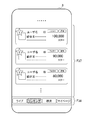
- 10A and 10B are diagrams showing specific examples of the distributor list displayed on the viewer terminal 3.
- FIG. 10A shows a specific example of a distributor list that lists distributors Y who are distributing distribution information in real time.
- the distributor list displayed on the viewer terminal 3 includes display areas F37 and F38.
- the distributor user name of each of the distributors Y1 to Yn, the distribution information being distributed, and the like are displayed.
- an icon indicating a distributor Y, a distributor user name, a distributor ID, an introduction sentence of the distributor Y, and an icon indicating a live distribution site targeted for distribution are displayed.
- the distributor Y displayed at the top is distributing the distribution information to the live distribution sites M1 to M4, and the distributor Y displayed at the second position from the top is the live distribution sites M1 and M4. It is possible to grasp at a glance that the distribution information is distributed to.
- the icon indicating the distributor Y displayed in the distributor list the distribution image distributed by the distributor can be displayed. Note that other characteristics of the distributor list that lists distributors Y who are distributing the distribution information in real time are as shown in FIG. 10A.
- buttons for selecting the contents to be displayed in the display area F37 are displayed.
- a list of distributors who are distributing the distribution information in real time is displayed in the display area F37.
- one or more distributors Y who are the targets of gifts by many viewers A are displayed in the display area F37.
- FIG. 10A shows an example of a distributor list displayed in the display area F37 when the button displayed as "live” in the display area F38 is pressed.
- FIG. 10B which will be described later, shows an example of the distributor list displayed in the display area F37 when the button labeled "Ranking" in the display area F38 is pressed.
- FIG. 10B shows a specific example of the distributor list in which the one or more distributors Y who are the gifts of many viewers A are displayed in the ranking.
- the accumulation of gifts (presents) of the content C set for each distributor Y in this service is shown in units of “star”.
- the content C presented by the viewer A to the distributor Y displayed at the top is "100,000 stars”
- the distributor Y displayed second from the top is the viewer A.
- the content C donated (present) is “90,000 stars”. With this, it is possible to grasp at a glance information about the distributor Y to whom many contents C have been gifted by the viewer A.
- the distribution image that has been distributed is displayed if the distributor is distributing, and if the distributor is not distributing, the distribution image shown in FIG.
- the distributor Y user information pop-up screen shown in FIG. 11B can be displayed. Note that other characteristics of the distributor list in which the distributor Y is displayed in a ranking are as shown in FIG. 10B.
- the distributor Y can be searched by keyword. Further, when the button labeled “My Page” is pressed, various setting screens for the viewer A are displayed.
- 11A and 11B are diagrams showing specific examples of the pop-up screen displayed on the viewer terminal 3.
- FIG. 11A shows an example of a pop-up screen displayed on viewer terminal 3 when viewer A is not logged in and one distributor Y is selected from the distributor list of FIG. There is.
- the button B45 displayed as is displayed.
- the button B44 is pressed, the distribution information of the distributor Y displayed on the pop-up screen is displayed on the viewer terminal 3.
- the button B45 is pressed, the viewer A can log in to the service, and thus the content C can be presented to the distributor Y.
- FIG. 11B shows an example of a pop-up screen displayed on the viewer terminal 3 when a login operation is performed on the pop-up screen of FIG. 11A or when the user information pop-up screen is displayed after login.
- the icon indicating the distributor Y, the distributor user name, the distributor ID, the introduction text of the distributor Y, and the content C that the viewer A has purchased from the distributor Y are displayed.
- the icon is displayed.
- a link button B52 to the content purchasing site are displayed.
- the present selection dialog is displayed.
- the viewer A can present the content C to the distributor Y.
- the button B50 When the button B50 is pressed, the distribution information of the distributor Y displayed on the pop-up screen is displayed on the viewer terminal 3. Further, when the button B51 is pressed, the viewer A can become the "follower" of the distributor Y or can cancel it. When the button B52 is pressed, the content purchase site is displayed on the viewer terminal 3. Accordingly, the viewer A can easily purchase the content C set by the distributor Y.
- FIG. 12 is a diagram showing a specific example of a screen showing detailed information of the distributor Y displayed on the viewer terminal 3.
- the viewer A who uses this service can browse the detailed information of the distributor Y.
- the detailed information of the distributor Y can be displayed on the viewer terminal 3 based on a predetermined operation.
- the detailed information of the distributor Y includes display areas F39 to F42 as shown in FIG.
- the button B46 When “follow” is displayed, the viewer A can be a “follower” of the distributor Y.
- “notification” and “non-notification” are switched.
- “Notification” When “Notification” is displayed, various notifications are made by the distributor Y, such as the distributor Y starting distribution.
- a login screen is displayed if not logged in, and a present selection dialog is displayed if logged in. As a result, the logged-in viewer A can present the content C to the distributor Y.
- a history of present messages from one or more viewers A to the distributor Y is displayed as a support message.
- the history of the donated content C can be displayed in this history.
- the posting history by the distributor Y to each company's SNS and free space are displayed.
- the viewer A can confirm what kind of post is being made in each company SNS used by the distributor Y by browsing the content displayed in the display area F41. As a result, the viewer A can understand the “becoming a person” of the distributor Y.
- a button displayed as “SNS1”, a button displayed as “SNS2”, a button displayed as “SNS3”, a link button to the content purchasing site, and "OneHeart” are displayed.
- the buttons that have been displayed are displayed.
- Each of the button displayed as “SNS1”, the button displayed as “SNS2”, and the button displayed as “SNS3” corresponds to the distributor Y of each company SNS (SNS1 to SNS3) used by the distributor Y. It is a button for displaying information about the profile. By pressing this button and viewing the information about the profile of the distributor Y, the viewer A can more specifically understand the “become a person” of the distributor Y.
- the button displayed as "OneHeart” is pressed, the distribution information being distributed is displayed.
- FIG. 13 to 19 are diagrams showing specific examples of content purchase sites.
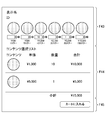
- FIG. 13 shows a specific example of a screen (hereinafter referred to as “content purchase page”) displayed on the viewer terminal 3 when the content C set by the distributor Y is purchased from the content purchase sites. It is shown. As shown in FIG. 13, the content purchase page includes display areas F43 to F45.
- the input fields for designating the distributor user name of the target distributor Y, the distributor ID, and the type and quantity of the content C purchased by the viewer A are displayed.
- the display area F44 shows subtotals of the unit price, the quantity, and the amount of money for the content C designated in the display area F43.
- the example of FIG. 13 shows a case where the content C (10 stars) with a unit price of 1000 yen is 10 and the content C (50 stars) with a unit price of 5000 yen is 1 and the content C of 15000 yen in total is purchased. ..
- a button displayed as "Add to cart" is displayed. When this button is pressed, the payment process is executed.
- FIG. 14 shows a screen displayed on the viewer terminal 3 when the content C of the content purchase site is purchased and the content C of the same amount is exchanged (hereinafter referred to as “concon exchange”).
- Concon exchange a specific example of "content purchase/exchange page" is shown.
- Concon exchange is one of the methods that the viewer A can use to acquire the content C set by a predetermined distributor Y.
- the viewer A can exchange the gifted content C and the content C of the same amount set by the distributor Y, which the viewer A wants to newly acquire. For example, if the viewer A has been given the content C of 100 stars by the viewer A2, the viewer A should exchange the content C with the content C of the same amount (100 stars) set for the distributor Y. Then, the content C of 100 stars set for the distributor Y can be newly acquired.
- the viewer A who has acquired the content C set for the distributor Y1 gifts the content C to the distributor Y1.
- the distributor Y1 can acquire points associated with the gifted content C.
- the distributor Y1 who received the content C from the viewer A presents the acquired content C (that is, the content C set to the distributor Y1) and the content C to be newly acquired (that is, the content C set to the distributor Y2). Exchanged content C).
- the content purchase/exchange page is composed of display areas F46 to F49.
- the display area F46 In the display area F46, input boxes for designating the distributor user name of the target distributor Y, the distributor ID, and the type and quantity of the content C purchased by the viewer A are displayed.
- the display area F47 the contents of the content C given by the viewer A from any one of the viewers A2 to Am, which may be the target of the contest replacement, and the input field for designating the target of the exchange are displayed. There is.
- the display area F48 the unit price, quantity, and subtotal of the amount of money for the content C specified in the display areas F46 and F47 are shown.
- a button displayed as "Add to cart” is displayed.
- the payment process is executed.
- an animation or a sound effect for presentation may be distributed when the control exchange or the settlement process is performed or when the settlement process is completed. This effect may have different effects depending on the payment amount. As a result, it can be expected that the viewer A will actively give a gift to the distributor Y.
- FIG. 15 shows a specific example of the dialog (hereinafter, referred to as “concon dialog”) displayed when performing the computer control exchange shown in FIG.
- Concon dialog the simulation result of the Concon exchange, the message "Do you want to exchange the Concon?", the button with "Cancel”, and the button with "Replace” are displayed. And are displayed.
- the content C presented by the viewer A as an exchange target (content C before the concon exchange) and the content C (concon exchange before the concon exchange) to be newly acquired by the viewer A are displayed.
- the content of the later content C) is displayed.
- the viewer A confirms the simulation result of the contest control exchange, presses the button displayed as "exchange” when the contest control exchange is actually performed, and "cancels" when the contest control exchange is not performed. Press the button displayed as. In this way, since the simulation result of the contest control exchange is displayed in the contest control dialogue, the viewer A can easily determine whether or not the control contest exchange is performed.
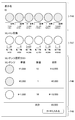
- FIG. 16 shows a specific example of a screen (hereinafter, referred to as “concon exchange page”) displayed when only the concon exchange is performed.
- the control page exchange is composed of display areas F50 to F53.
- the display area F50 there are input fields for designating the distributor user name of the target distributor Y, the distributor ID, and the type and quantity of the content C that the viewer A desires to acquire by concon exchange. It is displayed.
- the display area F51 the contents of the content C that the viewer A1 has given from any of the viewers A2 to Am, which may be the target of the contest replacement, and the input field for designating the target of the exchange are displayed.
- the display area F52 the unit price, quantity, and subtotal of the amount of money for the content C designated in the display areas F50 and F51 are shown. In the example of FIG.
- the content C (10 stars) with a unit price of 1000 yen (total 10000 yen) and the content of the unit price of 1000 yen held by the viewer A as the target of the concon exchange are the acquisition hopes for the concon exchange.
- a case is shown in which C is exchanged for 10 pieces (total of 10,000 yen).
- the subtotal of the deduction is 0 yen (equivalent exchange).
- the viewer A can target the content C to which the viewer A has been gifted, for the contest exchange.
- the viewer A can efficiently acquire the content C set by the desired distributor Y.
- a button displayed as "exchange" is displayed. When this button is pressed, the control exchange is executed.
- FIG. 17 shows a specific example of the confirmation screen (hereinafter referred to as “cart page”) displayed when the payment process for purchasing the content C is performed on the content purchase site.
- the cart page includes display areas F57 to F60.
- a distributor user name of one or more target distributors Y, a distributor ID, and input fields for the type and quantity of the content C purchased by the viewer A are displayed.
- the respective distributor user names of the two target distributors Y, the distributor ID, and the input fields for the type and quantity of the content C purchased by the viewer A for the gift are displayed. It is displayed.
- input fields for the type and quantity of the content C that the viewer A sells at the same time as the purchase are displayed.
- the unit price rate for sale is managed by this service and can be changed on a management screen (not shown).
- the display area F59 shows the calculation result of the unit price, quantity, and subtotal of the amount of money for the content C designated in the display areas F57 and F58.
- a case is shown in which the subtotal of the deduction is 39,500 yen as the calculation result.
- a button displayed as "Purchase" is displayed. When this button is pressed, the payment process is executed.
- the amount of the subtotal displayed in the display area F59 is 39,500 yen, but when the subtotal becomes negative, it is sold and the screen of FIG. 18 is displayed.
- FIG. 18 shows an example of a screen displayed when selling the content C.
- a distributor user name of one or more target distributors Y, a distributor ID, and input fields for the type and quantity of the content C purchased by the viewer A are displayed.
- the respective distributor user names of the two target distributors Y, the distributor IDs, and the type and quantity of the content C purchased by the viewer A are displayed.
- input fields for the type and quantity of the content C sold by the viewer A are displayed.
- the type of the content C to be sold by the viewer A and the input field of the quantity are displayed.
- the calculation results (sales 22700 yen, income and expenditure 19700 yen) of the unit price, quantity, and subtotal of the amount of money for the content C designated in the display areas F61 and F58 are shown.
- a button displayed as "transaction completed” is displayed. When this button is pressed, the sale procedure is completed.
- the service can be used in the distributor terminal 2 and the viewer terminal 3 by activating the dedicated application installed in the distributor terminal 2 and the viewer terminal 3.
- the service may be used by accessing a predetermined website and performing a predetermined login operation without installing the dedicated application.
- the content purchase sites shown in FIGS. 9 to 18 are merely examples, and other configurations may be adopted.
- the content C is configured to be preset for each distributor Y, but the subject who sets the content C to the distributor Y is not particularly limited. Therefore, for example, the content C may be automatically set by this service, or the distributor Y may set the content C by itself. Thereby, for example, only the content C with a unit price of 10,000 yen or only the content C with a unit price of 500 yen or more can be set. Since the distributor Y can set the content C by himself/herself, it is possible to realize the gift giving according to the values and individuality of the distributor Y.
- the system configuration shown in FIG. 5 and the hardware configuration of the management server 1 shown in FIG. 6 are merely examples for achieving the object of the present invention, and are not particularly limited.
- the management server 1 shown in FIG. 5 can be divided into a main server 1a, a video server 1b, and a comment server 1c, as shown in FIG.
- the video server 1b and the comment server 1c can be configured to manage the exchange with the external servers 4-1 to 4-p.
- the functional block diagram shown in FIG. 7 is merely an example and is not particularly limited. That is, it is sufficient if the information processing system has a function capable of executing the above-described series of processing as a whole, and what kind of functional block is used to realize this function is not particularly limited to the example of FIG. 7. ..
- the location of the functional block is not limited to that shown in FIG. 7, and may be arbitrary. Further, one functional block may be configured by hardware alone, software alone, or a combination thereof.
- a program forming the software is installed in a computer or the like from a network or a recording medium.
- the computer may be a computer embedded in dedicated hardware. Further, the computer may be a computer capable of executing various functions by installing various programs, for example, a general-purpose smartphone or a personal computer other than a server.
- the recording medium containing such a program is not only constituted by a removable medium which is distributed separately from the apparatus main body in order to provide the program to each user, but is also installed in the apparatus main body in advance to each user. It is composed of a recording medium provided.
- the steps of writing the program recorded on the recording medium are not limited to the processing performed in time series according to the order, but may be performed in parallel or individually even if the processing is not necessarily performed in time series. It also includes the processing to be performed.
- system refers to an entire device including a plurality of devices and a plurality of means.
- the information processing apparatus to which the present invention is applied may have various configurations as long as it has the following configuration. That is, the information processing apparatus to which the present invention is applied (for example, the management server 1 in FIG. 1) is One or more distributors (for example, distributor Y in FIG. 1) who distribute information (for example, distribution information) including one or more images (for example, images P1 to Pr in FIG. 1), and acquisition to acquire the distributed information.
- An information processing apparatus for supporting a person for example, the viewer A in FIG. 1)
- Content management means for example, the associating unit 131 in FIG. 7) that manages each content (for example, the content C) set for each distributor in association with each of the set distributors
- Content providing means for example, the providing control unit 132 in FIG.
- a gift acceptance means eg, a gift accepting means
- Execution means for example, the execution unit 134 in FIG. 7 that executes a predetermined process for the gift recipient based on the content of the gift request; Equipped with.
- the contents can be classified into one or more types depending on the amount of consideration that can be provided to the acquirer.
- the content can be set by each of the distributors associated with it.
- the content can be distributed by selling or selling or exchanging content with each other.
Landscapes
- Engineering & Computer Science (AREA)
- Business, Economics & Management (AREA)
- Theoretical Computer Science (AREA)
- General Physics & Mathematics (AREA)
- Signal Processing (AREA)
- Tourism & Hospitality (AREA)
- Multimedia (AREA)
- Physics & Mathematics (AREA)
- Strategic Management (AREA)
- Human Resources & Organizations (AREA)
- Marketing (AREA)
- Primary Health Care (AREA)
- General Health & Medical Sciences (AREA)
- Economics (AREA)
- General Business, Economics & Management (AREA)
- Health & Medical Sciences (AREA)
- Databases & Information Systems (AREA)
- General Engineering & Computer Science (AREA)
- Information Transfer Between Computers (AREA)
- Two-Way Televisions, Distribution Of Moving Picture Or The Like (AREA)
- Management, Administration, Business Operations System, And Electronic Commerce (AREA)
Applications Claiming Priority (2)
| Application Number | Priority Date | Filing Date | Title |
|---|---|---|---|
| JP2019-025987 | 2019-02-15 | ||
| JP2019025987A JP6809719B2 (ja) | 2019-02-15 | 2019-02-15 | 情報処理装置及びプログラム |
Publications (1)
| Publication Number | Publication Date |
|---|---|
| WO2020166594A1 true WO2020166594A1 (ja) | 2020-08-20 |
Family
ID=72045518
Family Applications (1)
| Application Number | Title | Priority Date | Filing Date |
|---|---|---|---|
| PCT/JP2020/005297 Ceased WO2020166594A1 (ja) | 2019-02-15 | 2020-02-12 | 情報処理装置及びプログラム |
Country Status (2)
| Country | Link |
|---|---|
| JP (1) | JP6809719B2 (https=) |
| WO (1) | WO2020166594A1 (https=) |
Families Citing this family (1)
| Publication number | Priority date | Publication date | Assignee | Title |
|---|---|---|---|---|
| JP7464869B2 (ja) * | 2022-08-03 | 2024-04-10 | 株式会社Mixi | 情報処理装置、情報処理方法、プログラム及び情報処理システム |
Citations (4)
| Publication number | Priority date | Publication date | Assignee | Title |
|---|---|---|---|---|
| JPH0130059B2 (https=) * | 1985-09-17 | 1989-06-15 | Toyo Seisakusho Kk | |
| JP2016024682A (ja) * | 2014-07-22 | 2016-02-08 | トモヤ 高柳 | コンテンツ配信システム |
| WO2018142494A1 (ja) * | 2017-01-31 | 2018-08-09 | 株式会社 ニコン | 表示制御システム、及び、表示制御方法 |
| JP2018182546A (ja) * | 2017-04-13 | 2018-11-15 | 株式会社abasaku | 情報端末装置、配信管理装置、システム、プログラムおよび記録媒体 |
Family Cites Families (1)
| Publication number | Priority date | Publication date | Assignee | Title |
|---|---|---|---|---|
| JP6430059B1 (ja) * | 2018-07-26 | 2018-11-28 | 株式会社ドワンゴ | サーバおよびプログラム |
-
2019
- 2019-02-15 JP JP2019025987A patent/JP6809719B2/ja not_active Expired - Fee Related
-
2020
- 2020-02-12 WO PCT/JP2020/005297 patent/WO2020166594A1/ja not_active Ceased
Patent Citations (4)
| Publication number | Priority date | Publication date | Assignee | Title |
|---|---|---|---|---|
| JPH0130059B2 (https=) * | 1985-09-17 | 1989-06-15 | Toyo Seisakusho Kk | |
| JP2016024682A (ja) * | 2014-07-22 | 2016-02-08 | トモヤ 高柳 | コンテンツ配信システム |
| WO2018142494A1 (ja) * | 2017-01-31 | 2018-08-09 | 株式会社 ニコン | 表示制御システム、及び、表示制御方法 |
| JP2018182546A (ja) * | 2017-04-13 | 2018-11-15 | 株式会社abasaku | 情報端末装置、配信管理装置、システム、プログラムおよび記録媒体 |
Also Published As
| Publication number | Publication date |
|---|---|
| JP6809719B2 (ja) | 2021-01-06 |
| JP2020135238A (ja) | 2020-08-31 |
Similar Documents
| Publication | Publication Date | Title |
|---|---|---|
| JP2021051763A (ja) | 情報処理装置及びプログラム | |
| JP6261787B2 (ja) | 商品の販売を支援するためのシステム、方法、及びプログラム | |
| JP6220917B2 (ja) | リアルタイムの動画を配信するシステム、方法、及びプログラム | |
| US11227328B2 (en) | Interactive method and device for e-commerce application program | |
| CN116325763A (zh) | 交互式视频叠加 | |
| US8924261B2 (en) | Method for performing interactive online shopping | |
| US20180211342A1 (en) | Control of content distribution | |
| JP6342562B2 (ja) | リアルタイムの動画を配信するシステム、方法、及びプログラム | |
| KR20140123934A (ko) | 공공 방송 상에 나타난 상품들과 서비스들의 즉시 구매 | |
| CN102165446A (zh) | 用于在一个或多个实体零售店中至少展示可视内容的系统和方法 | |
| US10853869B2 (en) | Electronic wish list system | |
| WO2016158075A1 (ja) | リアルタイムの動画を配信するシステム、方法、及びプログラム | |
| JP6941549B2 (ja) | 商品の販売を支援するためのシステム、方法、及びプログラム | |
| JP2014532242A (ja) | オンラインで入手可能なビデオ・ステッカー・アルバム及び該アルバムを作動可能にするために開発されたシステム | |
| JP6809719B2 (ja) | 情報処理装置及びプログラム | |
| JP2021056953A (ja) | 情報処理装置、システム及びプログラム | |
| US20250342519A1 (en) | Ecommerce messaging systems and methods for implementing in-app stores and order workflows | |
| CN112749319A (zh) | 提供商品对象信息的方法、装置及电子设备 | |
| JP7036978B2 (ja) | 動画配信サーバ、動画配信方法及び動画配信プログラム | |
| TW201918961A (zh) | 業務對象處理、頁面提供方法及裝置 | |
| CN104573826A (zh) | 在线即时影音观看预约系统 | |
| GB2584804A (en) | System for management of electronic transactions | |
| WO2016192068A1 (zh) | 一种智能电视购物方法、装置及设备 | |
| TWI920824B (zh) | 處理會員資格解除請求之方法、電子裝置及記錄媒體 | |
| TWI863412B (zh) | 處理會員資格解除請求之方法、電子裝置及記錄媒體 |
Legal Events
| Date | Code | Title | Description |
|---|---|---|---|
| 121 | Ep: the epo has been informed by wipo that ep was designated in this application |
Ref document number: 20755680 Country of ref document: EP Kind code of ref document: A1 |
|
| NENP | Non-entry into the national phase |
Ref country code: DE |
|
| 122 | Ep: pct application non-entry in european phase |
Ref document number: 20755680 Country of ref document: EP Kind code of ref document: A1 |