WO2020166281A1 - 表示装置、及び表示制御プログラム - Google Patents
表示装置、及び表示制御プログラム Download PDFInfo
- Publication number
- WO2020166281A1 WO2020166281A1 PCT/JP2020/001820 JP2020001820W WO2020166281A1 WO 2020166281 A1 WO2020166281 A1 WO 2020166281A1 JP 2020001820 W JP2020001820 W JP 2020001820W WO 2020166281 A1 WO2020166281 A1 WO 2020166281A1
- Authority
- WO
- WIPO (PCT)
- Prior art keywords
- input
- unit
- screen
- display
- software keyboard
- Prior art date
- Legal status (The legal status is an assumption and is not a legal conclusion. Google has not performed a legal analysis and makes no representation as to the accuracy of the status listed.)
- Ceased
Links
Images






Classifications
-
- G—PHYSICS
- G06—COMPUTING OR CALCULATING; COUNTING
- G06F—ELECTRIC DIGITAL DATA PROCESSING
- G06F3/00—Input arrangements for transferring data to be processed into a form capable of being handled by the computer; Output arrangements for transferring data from processing unit to output unit, e.g. interface arrangements
- G06F3/01—Input arrangements or combined input and output arrangements for interaction between user and computer
- G06F3/02—Input arrangements using manually operated switches, e.g. using keyboards or dials
- G06F3/023—Arrangements for converting discrete items of information into a coded form, e.g. arrangements for interpreting keyboard generated codes as alphanumeric codes, operand codes or instruction codes
-
- G—PHYSICS
- G06—COMPUTING OR CALCULATING; COUNTING
- G06F—ELECTRIC DIGITAL DATA PROCESSING
- G06F3/00—Input arrangements for transferring data to be processed into a form capable of being handled by the computer; Output arrangements for transferring data from processing unit to output unit, e.g. interface arrangements
- G06F3/01—Input arrangements or combined input and output arrangements for interaction between user and computer
- G06F3/02—Input arrangements using manually operated switches, e.g. using keyboards or dials
- G06F3/023—Arrangements for converting discrete items of information into a coded form, e.g. arrangements for interpreting keyboard generated codes as alphanumeric codes, operand codes or instruction codes
- G06F3/0233—Character input methods
-
- G—PHYSICS
- G06—COMPUTING OR CALCULATING; COUNTING
- G06F—ELECTRIC DIGITAL DATA PROCESSING
- G06F3/00—Input arrangements for transferring data to be processed into a form capable of being handled by the computer; Output arrangements for transferring data from processing unit to output unit, e.g. interface arrangements
- G06F3/01—Input arrangements or combined input and output arrangements for interaction between user and computer
- G06F3/048—Interaction techniques based on graphical user interfaces [GUI]
- G06F3/0487—Interaction techniques based on graphical user interfaces [GUI] using specific features provided by the input device, e.g. functions controlled by the rotation of a mouse with dual sensing arrangements, or of the nature of the input device, e.g. tap gestures based on pressure sensed by a digitiser
- G06F3/0488—Interaction techniques based on graphical user interfaces [GUI] using specific features provided by the input device, e.g. functions controlled by the rotation of a mouse with dual sensing arrangements, or of the nature of the input device, e.g. tap gestures based on pressure sensed by a digitiser using a touch-screen or digitiser, e.g. input of commands through traced gestures
- G06F3/04886—Interaction techniques based on graphical user interfaces [GUI] using specific features provided by the input device, e.g. functions controlled by the rotation of a mouse with dual sensing arrangements, or of the nature of the input device, e.g. tap gestures based on pressure sensed by a digitiser using a touch-screen or digitiser, e.g. input of commands through traced gestures by partitioning the display area of the touch-screen or the surface of the digitising tablet into independently controllable areas, e.g. virtual keyboards or menus
-
- G—PHYSICS
- G06—COMPUTING OR CALCULATING; COUNTING
- G06F—ELECTRIC DIGITAL DATA PROCESSING
- G06F3/00—Input arrangements for transferring data to be processed into a form capable of being handled by the computer; Output arrangements for transferring data from processing unit to output unit, e.g. interface arrangements
- G06F3/01—Input arrangements or combined input and output arrangements for interaction between user and computer
- G06F3/048—Interaction techniques based on graphical user interfaces [GUI]
- G06F3/0487—Interaction techniques based on graphical user interfaces [GUI] using specific features provided by the input device, e.g. functions controlled by the rotation of a mouse with dual sensing arrangements, or of the nature of the input device, e.g. tap gestures based on pressure sensed by a digitiser
- G06F3/0489—Interaction techniques based on graphical user interfaces [GUI] using specific features provided by the input device, e.g. functions controlled by the rotation of a mouse with dual sensing arrangements, or of the nature of the input device, e.g. tap gestures based on pressure sensed by a digitiser using dedicated keyboard keys or combinations thereof
- G06F3/04895—Guidance during keyboard input operation, e.g. prompting
-
- G—PHYSICS
- G06—COMPUTING OR CALCULATING; COUNTING
- G06F—ELECTRIC DIGITAL DATA PROCESSING
- G06F40/00—Handling natural language data
- G06F40/10—Text processing
- G06F40/166—Editing, e.g. inserting or deleting
- G06F40/174—Form filling; Merging
Definitions
- the present invention relates to a display device and a display control program, and particularly to a technique for displaying a software keyboard on a screen of a display unit.
- the software keyboard is displayed on the screen of the display unit, and the touch operation on the key of the software keyboard is detected by the touch panel provided on the screen of the display unit, and the touch operation is performed. Enter the character, symbol, or code associated with the key.
- the display or non-display of the software keyboard can be switched depending on, for example, whether or not the input field on the screen of the display unit is in focus.
- the display/non-display of the software keyboard is switched depending on whether or not the input field on the screen of the display unit is in focus. Therefore, the display/non-display is frequently repeated.
- Patent Document 1 only the display of the software keyboard is limited when the hardware keyboard is connected, and the display or non-display of the software keyboard is improved during the use of the software keyboard to improve the convenience of the user. It is not an accurate switch to make it happen.
- the present invention has been made in view of the above circumstances, and an object of the present invention is to display a software keyboard and hide the software keyboard at an appropriate timing to improve user convenience.
- a display device includes a display unit, a control unit that displays an input field and a software keyboard on a screen of the display unit, and a character that is a character, a symbol, or a code by a user operating the software keyboard.
- An input unit that receives an input to the input field of a column, and a determination unit that determines whether the character string input to the input field by the input unit satisfies a preset condition,
- the control unit hides the software keyboard from the screen of the display unit when the determination unit determines that the condition is satisfied.
- the display control program for displaying an input field and a software keyboard on the screen of the display unit, and a character string consisting of characters, symbols, or codes by the user operating the software keyboard.
- An input unit that receives an input to the input field, and a computer functions as a determination unit that determines whether or not the character string input to the input field by the input unit satisfies a preset condition, Further, the control unit causes the computer to function so as to hide the software keyboard from the screen of the display unit when the determination unit determines that the condition is satisfied.
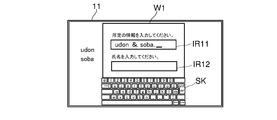
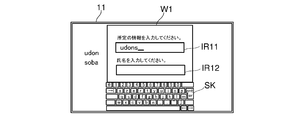
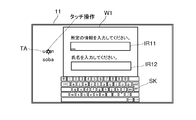
- FIG. 1 is a plan view showing an appearance of a mobile terminal device to which a display device according to an embodiment of the present invention is applied. It is a block diagram which shows the internal structure of the portable terminal device of this embodiment. It is a flowchart which shows the process for displaying and non-displaying a software keyboard. It is a figure which shows the window containing the two input fields displayed on the screen of a display part. It is a figure which shows the state where the blank of the input field in the screen of a display part was touch-operated. It is a figure which shows the state which additionally displayed the software keyboard on the screen of a display part. It is a figure which shows an example of the conditions with which the character string of the input field displayed on the screen of a display part is satisfy
- FIG. 8B is a diagram showing a state where the character string touch-operated in FIG. 8A is displayed in the input field.
- FIG. 1 is a plan view showing an appearance of a mobile terminal device to which a display device according to an embodiment of the present invention is applied.
- FIG. 2 is a block diagram showing an internal configuration of the mobile terminal device of the present embodiment.
- the mobile terminal device 10 of the present embodiment is, for example, a smartphone or a mobile device, and includes a display unit 11, a touch panel 12, a physical key 13, a network communication unit (NW communication unit) 15, a storage unit 18, And a control unit 19. These components can transmit and receive data or signals to each other through a bus.
- NW communication unit network communication unit
- the display unit 11 is a display device such as a liquid crystal display (LCD: Liquid Crystal Display) or an organic EL (OLED: Organic Light-Emitting Diode). For example, a plurality of icons are displayed on the screen of the display unit 11.
- LCD Liquid Crystal Display
- OLED Organic Light-Emitting Diode
- the touch panel 12 is a so-called resistance film type or capacitance type touch panel.
- the touch panel 12 is arranged on the screen of the display unit 11, detects a touch (touch) of the user's finger or the like on the touch panel 12 together with the contact position, and inputs a user instruction to the screen of the display unit 11. Therefore, the touch panel 12 serves as an operation unit for inputting a user operation on the screen of the display unit 11.
- the touch panel 12 is an example of the input unit in the claims.
- the mobile terminal device 10 includes a physical key 13 as an operation unit for inputting a user operation, in addition to the touch panel 12 described above.
- the network communication unit 15 is a communication interface including a communication module such as a LAN chip (not shown).
- the network communication unit 15 is connected to a terminal device such as an external server via a LAN or the Internet.
- the storage unit 18 is a storage device such as a RAM (Random Access Memory) and an HDD (Hard Disk Drive), and stores various application programs and various information.
- RAM Random Access Memory
- HDD Hard Disk Drive
- the control unit 19 includes a processor, a RAM (Random Access Memory), a ROM (Read Only Memory), and the like.
- the processor is, for example, a CPU (Central Processing Unit), an ASIC (Application Specific Integrated Circuit), an MPU (Micro Processing Unit), or the like.
- the control unit 19 functions as the control unit 21 and the determination unit 22 when the control program stored in the ROM or the storage unit 18 is executed by the processor.
- the control unit 19 is connected to the display unit 11, the touch panel 12, the physical keys 13, the network communication unit 15, the storage unit 18, and the like.
- the control unit 21 controls the operation of these components and transmits/receives signals or data to/from each of the components.
- control unit 21 plays a role as a processing unit that executes various processes.
- the control unit 21 also has a function of controlling the display operation of the display unit 11 and the communication operation of the network communication unit 15.
- the determination unit 22 determines whether or not the character string that the control unit 21 has input to the input field displayed on the display unit 11 by the touch panel 12 or the like satisfies a preset condition.
- the control unit 21 displays an input field on the screen of the display unit 11, if the user touches a blank of the input field, the control unit 21 Through the touch panel 12, a touch operation on the blank of the input field is detected, and the software keyboard is displayed on the screen of the display unit 11 in response to the detection.
- the control unit 21 detects the touch operation on the key through the touch panel 12, When the touch panel 12 receives an input of a character, symbol, or code corresponding to the key, the received character, symbol, or code is displayed in the input field.
- the control unit 21 detects a touch operation on the key through the touch panel 12, and a character, symbol, or code corresponding to the key is sequentially input to the touch panel 12. Each time it is received, the sequentially accepted character, symbol, or code is displayed in the input field. At this time, the determination unit 22 determines whether or not the character string made up of characters, symbols, or codes displayed in the input field satisfies a preset condition. When the determination unit 22 determines that the condition is satisfied, the control unit 21 hides the software keyboard from the screen of the display unit 11.
- the above conditions include (1) a predetermined character indicating the end of the address information that is included in the address information on the Internet from the last to the first to plural characters, symbols, or codes of the character string in the input field. , Symbol, or code such as “.com”, “.co.jp”, and the like, (2) the last code of the character string in the input field is the text “.”, “.” And (3) the number of characters, symbols, or codes in the character string in the input field has reached a preset specified number N.
- the specified number N is a value that limits the number of characters, symbols, or codes indicating the user identification information ID or password, for example.
- the above conditions are stored in advance in the storage unit 18 by being set in the storage unit 18 by the control unit 21, for example.
- control unit 21 causes the software keyboard to be erased (hidden) when the input to all the input fields is completed.
- control unit 21 displays a window W1 including two input fields IR11 and IR12 as shown in FIG. 4A on the screen of the display unit 11 (S101).
- the input fields IR11 and IR12 in the window W1 shown in FIG. 4A are for inputting information and name, respectively.
- the control unit 21 displays the character string TA in the area outside the window W1.
- the control unit 21 waits for a touch operation on the screen of the display unit 11 by the user.
- the control unit 21 detects a touch operation on the screen of the display unit 11 through the touch panel 12, the touch operation is performed on the blank of either of the input columns IR11 and IR12 based on the position of the touch operation. It is determined whether or not it is a thing (S102).
- the control unit 21 causes the touch panel 12 to A touch operation on a blank of the input field IR11 is detected (S102 “Yes”), the input field IR11 is focused, and the cursor C is displayed in the input field IR11 as shown in the example of FIG. 4C ( S103), the image data of the software keyboard is read from the storage unit 18, and the software keyboard SK is displayed on the screen of the display unit 11 (S104).
- control unit 21 moves the window W1 to a position where the empty space (area where the window W1 is not displayed) on the screen of the display unit 11 is enlarged and displays it, and displays the software keyboard SK in this empty space. You may let me.
- the control unit 21 waits for a touch operation on the screen of the display unit 11 by the user, and when the touch operation on the screen of the display unit 11 is detected through the touch panel 12, Based on the position of the touch operation, (i) the key of the software keyboard SK, (ii) the character string displayed in each input field IR11 or IR12, (iii) each input field on the screen of the display unit 11 A character string displayed in an area different from IR11 and IR12, (iv) a non-character display area in which characters, symbols, or symbols other than the input fields IR11 and IR12 on the screen of the display unit 11 are not displayed ( It is determined which of i) to (iv) has been performed (S105).
- the control unit 21 detects the touch operation on the key through the touch panel 12 (S105 “key”), and the character, symbol, or the like associated with the key, Alternatively, the code is input and displayed at the position of the cursor C in the input field IR11 focused in S103 (S106). Then, the determination unit 22 determines whether or not the character string made up of characters, symbols, or codes in the input field IR11 satisfies the preset condition (S107).
- the control unit 21 determines that the input of the character string in the input field IR11 is completed (S108). ..
- the first to plural characters, symbols, or codes from the end of the character string in the input field IR11 are included in the address information on the Internet and indicate the end of the address information, for example, ". If the determination unit 22 determines that the above condition that "com”, “.co.jp", etc. match, is satisfied (S107 "Yes"), the control unit 21 ends the input of the character string to the input field IR11. It is determined that it has been done (S108).
- the control unit 21 determines that the input of the character string to the input field IR11 is completed (S108).
- the control unit 21 determines that the input of the character string to the input field IR11 is completed (S108).
- the character string input to the input field IR11 is a password or identification information ID
- the control unit 21 determines that the number of characters, symbols, or codes indicating the password or identification information ID matches the specified number N, and Alternatively, it may be determined that the input of the character string is completed when the password or the identification information ID can be authenticated.
- the explanation display "Please enter the specified information.” displayed at the upper part of the margin of the input field IR11 shown in FIG. 5C is "Please enter the password” or "Identification information ID”. Please input.”, the control unit 21 may grasp in advance that the password or the identification information ID is input to the input field IR11.
- the control unit 21 detects the touch operation on the non-character display area through the touch panel 12 (S105 “non-character display area”), and at this point, the character string is input to the input field IR11. It is determined that the process is completed (S108).
- a touch operation on a non-character display area in which the input fields IR11 and IR12 on the screen of the display unit 11 are not displayed and no character, symbol, or code is displayed is detected. Then, (S105 “non-character display area”), the control unit 21 determines that the input of the character string to the input field IR11 is completed even if the character string in the input field IR11 does not satisfy the above condition (S108). ..
- the control unit 21 moves the touched position of the character string through the touch panel 12. It is detected (S105 "character string”), and the cursor C is moved to the detected position in the input field IR11 and displayed (S109).
- the control unit 21 determines that position in the input field IR11 as shown in FIG. 7B.
- the cursor C is moved to the detected position P1 and displayed (S109). After that, the process returns to S105.
- the user touch-operates a character string displayed in a region different from the input fields IR11 and IR12 on the screen of the display unit 11, and performs the touch operation.
- the control unit 21 detects a touch operation on the character string for a predetermined time or longer through the touch panel 12 (S105 “copy”), the control unit 21 sets the touch operation position to the position where the touch operation is performed.
- the displayed character string is stored (S110).
- the control unit 21 detects the touched position in the input field IR11 through the touch panel 12 (S111), and at the detected position in the input field IR11 in S110.
- the stored character string is displayed (S112).
- the control unit 21 stores the character string (S110), and when the touched position in the input field IR11 is detected (S111), the character is stored in the detected position in the input field IR11 as shown in FIG. 8B.
- the row TA is displayed (S112).
- the process returns to S105.
- the control unit 21 inputs the character, symbol, or code associated with the key into the input field IR11. It is displayed in addition to the character string TA in (S106), and it is determined whether the character string in the input field IR11 satisfies the above condition (S107). Then, if the control unit 21 determines that the above condition is not satisfied (S107 “No”), the control unit 21 returns to the process of S105 again, and if it determines that the condition is satisfied (S107 “Yes”), the character string for the input field IR11 is returned. A series of processing such as ending the input of (S108) is repeated.
- control unit 21 determines whether or not there is another input field in which the character string is not yet input (S113).
- control unit 21 determines that there is an input field in which the character string is not yet input (S113 “Yes”), the control unit 21 focuses on this input field, and the input field (shown in FIG. 8B).
- the cursor C is displayed in the input field IR12) (S114), and the software keyboard SK is kept displayed.
- the process returns to S105, and the processes of S105 to S113 are repeated with respect to the input of the character string in the input field in which the character string has not yet been input.
- the control unit 21 acquires the respective character strings input to the input fields IR11 and IR12 at the timing when the software keyboard SK is not displayed, and acquires the acquired character strings of the input fields IR11 and IR12. The process shifts to a predetermined process performed by using.
- the software keyboard when the user performs a touch operation on the blank of the input field displayed on the screen of the display unit 11 (the area in the input field where characters are not displayed), the software keyboard is displayed. Is displayed on the screen. Then, when the character string in the input field satisfies the preset condition, the software keyboard is hidden from the screen of the display unit 11 and erased. When a plurality of input fields are displayed on the screen of the display unit 11, the software keyboard is continuously displayed until the input to all the input fields is completed. As a result, the software keyboard is accurately displayed or hidden at the timing when the convenience for the user is improved, so that the usability of the software keyboard is improved.
- the mobile terminal device 10 is described as an example, but the display device of the present invention may be an electronic device of another type.
- the display method described in the above embodiment can be provided as a display control program stored in the ROM or the storage unit 18 described above.
- This display control program is recorded in a computer-readable non-transitory recording medium such as a hard disk, a CD-ROM, a DVD-ROM, or a semiconductor memory.
- a computer-readable non-transitory recording medium recording the display control program is an embodiment of the present invention.
Landscapes
- Engineering & Computer Science (AREA)
- Theoretical Computer Science (AREA)
- General Engineering & Computer Science (AREA)
- Physics & Mathematics (AREA)
- General Physics & Mathematics (AREA)
- Human Computer Interaction (AREA)
- Computational Linguistics (AREA)
- General Health & Medical Sciences (AREA)
- Health & Medical Sciences (AREA)
- Audiology, Speech & Language Pathology (AREA)
- Artificial Intelligence (AREA)
- User Interface Of Digital Computer (AREA)
- Input From Keyboards Or The Like (AREA)
Abstract
携帯端末装置(10)は、表示部(11)と、入力欄及びソフトウェアキーボードを表示部(11)の画面に表示させる制御部(21)と、ユーザーによるソフトウェアキーボードに対する操作により文字、記号、又は符号からなる文字列の入力欄への入力を受け付けるタッチパネル(12)と、タッチパネル(12)により入力欄への入力が受け付けられた文字列が予め設定された条件を満たすか否かを判定する判定部(22)とを備え、制御部21は、判定部(22)が上記条件を満たすと判定したときに、ソフトウェアキーボードを表示部(11)の画面から非表示にする。
Description
本発明は、表示装置及び表示制御プログラムに関し、特に、ソフトウェアキーボードを表示部の画面に表示させるための技術に関する。
表示装置では、ハードウェアのキーボードの代わりに、ソフトウェアキーボードを表示部の画面に表示させ、ソフトウェアキーボードのキーに対するタッチ操作を、表示部の画面に設けられたタッチパネルで検出して、タッチ操作されたキーに対応付けられている文字、記号、又は符号を入力する。ソフトウェアキーボードの表示、非表示は、例えば表示部の画面における入力欄にフォーカスが合っているか否かに応じて切り替えられる。
また、特許文献1に記載の画像処理装置では、上記のようなソフトウェアキーボードの表示、非表示が繰り返されると煩雑なので、ソフトウェアキーボードの表示を制限すべき特定状態である場合には、その表示、非表示を制限している。例えば、ハードウェアのキーボードが接続されているときには、ソフトウェアキーボードの表示を制限している。
ここで、上記のようにソフトウェアキーボードの表示、非表示を、表示部の画面における入力欄にフォーカスが合っているか否かに応じて切り替えていたのでは、その表示、非表示が頻繁に繰り返されることがある。また、特許文献1では、ハードウェアのキーボードが接続されているときにソフトウェアキーボードの表示を制限しているだけであり、ソフトウェアキーボードの使用中に、その表示又は非表示をユーザーの利便性を向上させるために適確に切り替えるものではない。
本発明は、上記の事情に鑑みなされたものであり、ソフトウェアキーボードを表示し、このソフトウェアキーボードをユーザーの利便性を向上させる適確なタイミングで非表示にすることを目的とする。
本発明の一局面にかかる表示装置は、表示部と、入力欄及びソフトウェアキーボードを前記表示部の画面に表示させる制御部と、ユーザーによる前記ソフトウェアキーボードに対する操作により文字、記号、又は符号からなる文字列の前記入力欄への入力を受け付ける入力部と、前記入力部により前記入力欄への入力が受け付けられた文字列が予め設定された条件を満たすか否かを判定する判定部とを備え、前記制御部は、前記判定部が前記条件を満たすと判定したときに、前記ソフトウェアキーボードを前記表示部の画面から非表示にするものである。
また、本発明の一局面にかかる表示制御プログラムは、入力欄及びソフトウェアキーボードを表示部の画面に表示させる制御部と、ユーザーによる前記ソフトウェアキーボードに対する操作により文字、記号、又は符号からなる文字列の前記入力欄への入力を受け付ける入力部と、前記入力部により前記入力欄への入力が受け付けられた文字列が予め設定された条件を満たすか否かを判定する判定部としてコンピューターを機能させ、更に、前記制御部が、前記判定部が前記条件を満たすと判定したときに、前記ソフトウェアキーボードを前記表示部の画面から非表示にするように、前記コンピューターを機能させるものである。
本発明によれば、ソフトウェアキーボードを表示し、このソフトウェアキーボードをユーザーの利便性を向上させる適確なタイミングで非表示にすることができる。
以下、本発明の一実施形態について図面を参照して説明する。図1は、本発明の一実施形態にかかる表示装置を適用した携帯端末装置の外観を示す平面図である。また、図2は、本実施形態の携帯端末装置の内部構成を示すブロック図である。
本実施形態の携帯端末装置10は、例えばスマートフォンやモバイル機器などであって、表示部11と、タッチパネル12と、物理キー13と、ネットワーク通信部(NW通信部)15と、記憶部18と、制御ユニット19とを備えている。これらの構成要素は、互いにバスを通じてデータ又は信号の送受信が可能とされている。
表示部11は、液晶ディスプレイ(LCD:Liquid Crystal Display)や有機EL(OLED:Organic Light-Emitting Diode)などの表示装置である。例えば、表示部11の画面には、複数のアイコンが表示される。
タッチパネル12は、所謂抵抗膜方式や静電容量方式等のタッチパネルである。タッチパネル12は、表示部11の画面に配置され、該タッチパネル12に対するユーザーの指などの接触(タッチ)をその接触位置と共に検知し、表示部11の画面に対するユーザーの指示を入力する。従って、タッチパネル12は、表示部11の画面に対するユーザー操作が入力される操作部としての役割を果たす。また、タッチパネル12は特許請求の範囲における入力部の一例である。
また、携帯端末装置10は、ユーザー操作が入力される操作部として、上記のタッチパネル12に加えて物理キー13を備えている。
ネットワーク通信部15は、不図示のLANチップなどの通信モジュールを備える通信インターフェイスである。このネットワーク通信部15は、LANやインターネットなどを通じて外部のサーバーなどの端末装置に接続される。
記憶部18は、RAM(Random Access Memory)、HDD(Hard Disk Drive)などの記憶装置であり、各種のアプリケーションプログラムや種々の情報等を記憶している。
制御ユニット19は、プロセッサー、RAM(Random Access Memory)、及びROM(Read Only Memory)等から構成される。プロセッサーは、例えばCPU(Central Processing Unit)、ASIC(Application Specific Integrated Circuit)、又はMPU(Micro Processing Unit)等である。制御ユニット19は、上記のROM又は記憶部18に記憶された制御プログラムが上記のプロセッサーで実行されることにより、制御部21及び判定部22として機能する。
制御ユニット19は、表示部11、タッチパネル12、物理キー13、ネットワーク通信部15、及び記憶部18などと接続されている。制御部21は、これらの構成要素の動作制御や、該各構成要素との間での信号またはデータの送受信を行う。
また、制御部21は、種々の処理を実行する処理部としての役割を果たす。また、制御部21は、表示部11の表示動作及びネットワーク通信部15の通信動作を制御する機能を有する。
判定部22は、制御部21が表示部11に表示させている入力欄への入力がタッチパネル12等により受け付けられた文字列が、予め設定された条件を満たすか否かを判定する。
このような構成の携帯端末装置10において、制御部21が表示部11の画面に入力欄を表示させているときに、ユーザーがその入力欄の空白に対してタッチ操作すると、制御部21は、タッチパネル12を通じて、その入力欄の空白に対するタッチ操作を検出し、この検出に応じてソフトウェアキーボードを表示部11の画面に表示させる。
また、表示部11の画面にソフトキーボードが表示されている状態で、ユーザーがソフトウェアキーボードのキーに対してタッチ操作すると、制御部21は、タッチパネル12を通じて、そのキーに対するタッチ操作を検出し、該キーに対応する文字、記号、又は符号の入力がタッチパネル12に受け付けられると、当該受け付けられた文字、記号、又は符号を入力欄に表示させる。
そして、ソフトウェアキーボードのキーがタッチ操作される度に、制御部21は、タッチパネル12を通じて、そのキーに対するタッチ操作を検出し、該キーに対応する文字、記号、又は符号の入力がタッチパネル12に順次受け付けられる度に、当該順次受け付けられる文字、記号、又は符号をそれぞれ入力欄に表示させる。このとき、判定部22は、該入力欄に表示させている文字、記号、又は符号からなる文字列が予め設定された条件を満たすか否かを判定する。制御部21は、判定部22が条件を満たすと判定したときに、ソフトウェアキーボードを表示部11の画面から非表示にする。
上記条件としては、(1)入力欄における文字列の最後尾から1乃至複数番目までの文字、記号、又は符号がインターネット上のアドレス情報に含まれてアドレス情報の末尾を示す予め定められた文字、記号、又は符号である例えば「.com」、「.co.jp」などに一致するという条件、(2)入力欄における文字列の最後尾の符号がテキストの句点「。」、「.」であるという条件、及び(3)入力欄における文字列の文字、記号、又は符号の数が、予め設定された規定数Nに達したという条件、である。この規定数Nは、例えばユーザーの識別情報IDやパスワードを示す文字、記号、又は符号の数を制限する値である。なお、上記の各条件は、例えば、制御部21が記憶部18に設定することにより、記憶部18に予め記憶されている。
また、制御部21は、表示部11の画面に複数の入力欄を表示させている場合、全ての入力欄に対する入力が終了したときに、ソフトウェアキーボードを消去させる(非表示とする)。
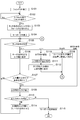
次に、そのようなソフトウェアキーボードを表示及び消去するための処理を、図3に示すフローチャートなどを参照して説明する。
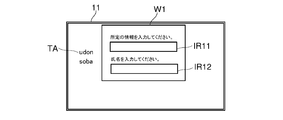
まず、制御部21が、例えば図4Aに示すような2つの入力欄IR11、IR12を含むウィンドウW1を表示部11の画面に表示させているものとする(S101)。この図4Aに示すウィンドウW1における各入力欄IR11、IR12は、情報及び氏名をそれぞれ入力するためのものである。また、ウィンドウW1から外れる領域には、制御部21が文字列TAを表示させている。
このようにウィンドウW1を表示部11の画面に表示させている状態で、制御部21は、ユーザーによる表示部11の画面に対するタッチ操作を待機する。制御部21は、タッチパネル12を通じて、表示部11の画面に対するタッチ操作を検出すると、このタッチ操作の位置に基づき、このタッチ操作が各入力欄IR11、IR12のいずれかの空白に対して行われたものであるか否かを判定する(S102)。
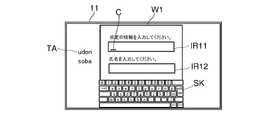
例えば、図4Bに示すようにユーザーが入力欄IR11の空白(文字を表示させていない領域が当該「空白」である)に対してタッチ操作したものとすると、制御部21は、タッチパネル12を通じて、入力欄IR11の空白に対するタッチ操作を検出し(S102「Yes」)、この入力欄IR11に対してフォーカスを合わせて、図4Cに例を示すように、該入力欄IR11にカーソルCを表示させ(S103)、ソフトウェアキーボードの画像データを記憶部18から読み出して、ソフトウェアキーボードSKを表示部11の画面に表示させる(S104)。このとき、制御部21は、ウィンドウW1を、表示部11の画面における空きスペース(ウィンドウW1を表示していない領域)を拡大させる位置に移動して表示させ、この空きスペースにソフトウェアキーボードSKを表示させてもよい。
このようにソフトウェアキーボードSKを表示させている状態で、制御部21は、ユーザーによる表示部11の画面に対するタッチ操作を待機し、タッチパネル12を通じて、表示部11の画面に対するタッチ操作を検出すると、このタッチ操作の位置に基づき、(i)このタッチ操作がソフトウェアキーボードSKのキー、(ii)各入力欄IR11又はIR12内に表示されている文字列、(iii)表示部11の画面における各入力欄IR11及びIR12とは異なる領域に表示されている文字列、(iv)表示部11の画面における各入力欄IR11及びIR12を除く文字、記号、又は符号が表示されていない非文字表示領域、という(i)~(iv)のうちのいずれに対して行われたかを判定する(S105)。
例えば、ユーザーがソフトウェアキーボードSKのキーにタッチ操作すると、制御部21は、タッチパネル12を通じて、そのキーに対するタッチ操作を検出し(S105「キー」)、該キーに対応付けられている文字、記号、又は符号を、S103でフォーカスが合わせられた入力欄IR11のカーソルCの位置に入力して表示させる(S106)。そして、判定部22は、その入力欄IR11における文字、記号、又は符号からなる文字列が予め設定された上記条件を満たすか否かを判定する(S107)。
判定部22が、入力欄IR11における文字列が上記条件を満たさないと判定すると(S107「No」)、処理はS105に戻る。
一方、判定部22が、入力欄IR11における文字列が上記条件を満たすと判定すると(S107「Yes」)、制御部21は、入力欄IR11に対する文字列の入力が終了したと判断する(S108)。
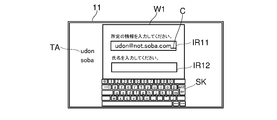
例えば、図5Aに示すように入力欄IR11における文字列の最後尾から1乃至複数番目までの文字、記号、又は符号が、インターネット上のアドレス情報に含まれてアドレス情報の末尾を示す例えば「.com」、「.co.jp」などに一致するという上記条件が満たされたと判定部22により判定されると(S107「Yes」)、制御部21は、入力欄IR11に対する文字列の入力が終了したと判断する(S108)。
あるいは、図5Bに示すように入力欄IR11における文字列の最後尾の符号がテキストの句点「。」、「.」であるという上記条件が満たされたと判定部22により判定されると(S107「Yes」)、制御部21は、入力欄IR11に対する文字列の入力が終了したと判断する(S108)。
また、図5Cに示すように入力欄IR11における文字列の文字、記号、又は符号の数が予め設定された規定数N(例えばN=5)に達したという上記条件が満たされたと判定部22により判定されると(S107「Yes」)、制御部21は、入力欄IR11に対する文字列の入力が終了したと判断する(S108)。なお、入力欄IR11に入力される文字列がパスワードや識別情報IDである場合、制御部21は、パスワードや識別情報IDを示す文字、記号、又は符号の数が規定数Nに一致し、かつ、パスワードや識別情報IDを認証することができたときに文字列の入力が終了したと判断するようにしてもよい。例えば、図5Cに示す入力欄IR11の欄外上部箇所に表示されている「所定の情報を入力してください。」との説明表示が、「パスワードを入力してください。」又は「識別情報IDを入力してください。」である場合、制御部21は、入力欄IR11にパスワード又は識別情報IDが入力されることを事前に把握してもよい。
また、ソフトウェアキーボードSKが表示されている状態で、ユーザーが、表示部11の画面における各入力欄IR11及びIR12が表示されていない領域であって、文字、記号、又は符号が表示されていない非文字表示領域にタッチ操作すると、制御部21は、タッチパネル12を通じて、その非文字表示領域に対するタッチ操作を検出し(S105「非文字表示領域」)、この時点で入力欄IR11に対する文字列の入力が終了したと判断する(S108)。
例えば、図6に示すように表示部11の画面における各入力欄IR11及びIR12が表示されていない領域であって、文字、記号、又は符号が表示されていない非文字表示領域に対するタッチ操作が検出されると(S105「非文字表示領域」)、制御部21は、入力欄IR11における文字列が上記条件を満たさなくても、入力欄IR11に対する文字列の入力が終了したと判断する(S108)。
そして、ソフトウェアキーボードSKが表示されている状態で、ユーザーが入力欄IR11内に表示されている文字列にタッチ操作すると、制御部21は、タッチパネル12を通じて、その文字列のタッチ操作された位置を検出し(S105「文字列」)、入力欄IR11におけるその検出された位置にカーソルCを移動させて表示させる(S109)。
例えば、図7Aに示すように入力欄IR11における文字列に対するタッチ操作の位置P1が検出されると(S105「文字列」)、図7Bに示すように、制御部21は、入力欄IR11におけるその検出された位置P1にカーソルCを移動させて表示させる(S109)。この後、処理はS105に戻る。
またS105において、ソフトウェアキーボードSKが表示されている状態で、ユーザーが、表示部11の画面における各入力欄IR11、IR12とは異なる領域に表示されている文字列にタッチ操作して、このタッチ操作を一定時間以上継続させ、制御部21が、タッチパネル12を通じて、その文字列に対する一定時間以上のタッチ操作を検出した場合は(S105「コピー」)、制御部21は、当該タッチ操作された位置に表示されている文字列を記憶する(S110)。続いて、ユーザーが入力欄IR11にタッチ操作すると、制御部21は、タッチパネル12を通じて、入力欄IR11におけるタッチ操作された位置を検出し(S111)、入力欄IR11におけるその検出された位置にS110で記憶した文字列を表示させる(S112)。
例えば、図8Aに示すように、表示部11の画面における各入力欄IR11及びIR12とは異なる領域の文字列TAに対する一定時間以上のタッチ操作が検出されると(S105「コピー」)、制御部21は当該文字列を記憶し(S110)、続いて入力欄IR11におけるタッチ操作された位置が検出されたときに(S111)、図8Bに示すように入力欄IR11におけるその検出された位置に文字列TAを表示させる(S112)。
この後、S105の処理に戻る。例えば、タッチパネル12を通じて、例えばソフトウェアキーボードSKのキーに対するタッチ操作が検出されると(S105「キー」)、制御部21は、該キーに対応付けられている文字、記号、又は符号を入力欄IR11における文字列TAに追加して表示させ(S106)、入力欄IR11における文字列が上記条件を満たすか否かを判定する(S107)。そして、制御部21は、上記条件を満たさないと判定すると(S107「No」)、S105の処理に再び戻り、また上記条件を満たすと判定すると(S107「Yes」)、入力欄IR11に対する文字列の入力を終了させる(S108)、といった一連の処理を繰り返す。
そして、制御部21は、入力欄IR11に対する文字列の入力が終了したと判断した後に(S108)、未だに文字列が入力されていない他の入力欄があるか否かを判定する(S113)。
ここで、制御部21は、未だに文字列が入力されていない入力欄が有ると判定した場合(S113「有」)、この入力欄に対してフォーカスを合わせて、該入力欄(図8Bに示す例では入力欄IR12)にカーソルCを表示させ(S114)、ソフトウェアキーボードSKの表示を継続させたままとする。処理はS105に戻り、未だに文字列が入力されていない入力欄に対する文字列の入力について、S105~S113の処理が繰り返される。
そして、表示されている全ての入力欄に対するそれぞれの文字列の入力が終了し、制御部21が、未だに文字列が入力されていない入力欄が無いと判定するに至ったとき(S113「無」)、制御部21は、ソフトウェアキーボードSKを表示部11の画面から非表示として消去する(S115)。この後、処理は終了する。
制御部21は、このようにソフトウェアキーボードSKを非表示としたタイミングで、各入力欄IR11、IR12に入力されているそれぞれの文字列を取得し、当該取得した各入力欄IR11、IR12の文字列を用いて行う予め定められた処理に移行する。
このように本実施形態では、ユーザーが表示部11の画面に表示されている入力欄の空白(入力欄内において文字が表示されていない領域)に対してタッチ操作すると、ソフトウェアキーボードが表示部11の画面に表示される。そして、入力欄における文字列が予め設定された上記条件を満たした場合に、ソフトウェアキーボードが表示部11の画面から非表示とされて消去される。また、表示部11の画面に複数の入力欄が表示されている場合は、全ての入力欄に対する入力が終了するまでは、ソフトウェアキーボードの表示が継続される。これにより、ユーザーの利便性が向上するタイミングで、ソフトウェアキーボードが的確に表示又は非表示とされるため、ソフトウェアキーボードの使い勝手が向上する。
また、上記実施形態では、携帯端末装置10を例に挙げて説明しているが、本発明の表示装置を、他の種類の電子機器としてもよい。
また、上記実施形態で説明した表示方法は、上記のROM又は記憶部18に記憶された表示制御プログラムとして提供することができる。この表示制御プログラムは、コンピューターにより読み取り可能な非一時的な記録媒体、例えば、ハードディスク、CD-ROM、DVD-ROM、半導体メモリーなどに記録される。この場合、当該表示制御プログラムを記録したコンピューターにより読み取り可能な非一時的な記録媒体が、本発明の一実施形態となる。
また、図1乃至図8Bを用いて説明した上記実施形態の構成及び処理は、本発明の一例に過ぎず、本発明を当該構成及び処理に限定する趣旨ではない。
Claims (10)
- 表示部と、
入力欄及びソフトウェアキーボードを前記表示部の画面に表示させる制御部と、
ユーザーによる前記ソフトウェアキーボードに対する操作により文字、記号、又は符号からなる文字列の前記入力欄への入力を受け付ける入力部と、
前記入力部により前記入力欄への入力が受け付けられた文字列が予め設定された条件を満たすか否かを判定する判定部とを備え、
前記制御部は、前記判定部が前記条件を満たすと判定したときに、前記ソフトウェアキーボードを前記表示部の画面から非表示にする表示装置。 - 前記制御部は、前記入力部により前記入力欄への入力が受け付けられた文字列の最後尾から1乃至複数番目までの文字、記号、又は符号が、インターネット上のアドレス情報に含まれてアドレス情報の末尾を示す予め定められた文字、記号、又は符号に一致することを前記条件として設定し、前記判定部が該条件を満たすと判定したときに前記ソフトウェアキーボードを前記表示部の画面から非表示にする請求項1に記載の表示装置。
- 前記制御部は、前記入力部により前記入力欄への入力が受け付けられた文字列の最後尾の符号が句点であることを前記条件として設定し、前記判定部が該条件を満たすと判定したときに前記ソフトウェアキーボードを前記表示部の画面から非表示にする請求項1に記載の表示装置。
- 前記制御部は、前記入力部により前記入力欄への入力が受け付けられた文字列の文字、記号、又は符号の数が予め設定された規定数に達したことを前記条件として設定し、前記判定部が該条件を満たすと判定したときに前記ソフトウェアキーボードを前記表示部の画面から非表示にする請求項1に記載の表示装置。
- 前記入力部として、前記表示部の画面に重ねられたタッチパネルを備え、
前記制御部は、前記タッチパネルを通じて、前記表示部の画面上の前記入力欄の空白に対するタッチ操作を検出すると、前記ソフトウェアキーボードを前記表示部の画面に表示させ、前記タッチパネルを通じて、前記表示部の画面における前記入力欄が表示されていない領域であって、文字、記号、又は符号が表示されていない非文字表示領域に対するタッチ操作を検出すると、前記ソフトウェアキーボードを前記表示部の画面から非表示にする請求項1に記載の表示装置。 - 前記制御部は、複数の入力欄及びソフトウェアキーボードを前記表示部の画面に表示させている場合は、前記入力部により前記各入力欄の全てに対する入力の受付が終了するまで前記ソフトウェアキーボードの表示を継続させる請求項5に記載の表示装置。
- 前記制御部は、前記タッチパネルを通じて、前記表示部の画面上の前記入力欄に表示させている文字列に対するタッチ操作を検出すると、前記文字列における当該タッチ操作がされた位置にカーソルを移動させて表示させ、前記タッチパネルを通じて、ユーザーによる前記ソフトウェアキーボードの操作を検出すると、当該ソフトウェアキーボードの操作に応じた文字、記号、又は符号を前記カーソルの位置に入力して表示させる請求項5に記載の表示装置。
- 前記制御部は、前記タッチパネルを通じて、前記表示部の画面における前記入力欄とは異なる領域の文字列に対するタッチ操作を検出すると、前記文字列をコピーし、引き続いて前記タッチパネルを通じて、前記入力欄に対するタッチ操作を検出すると、前記コピーした文字列を該入力欄に貼り付ける請求項5に記載の表示装置。
- 前記制御部は、前記入力部により前記入力欄への入力が受け付けられたパスワード又は識別情報の文字列の文字、記号、又は符号の数が予め設定された規定数に一致し、かつ、前記パスワード又は前記識別情報の認証がされたことを前記条件として設定し、前記判定部が該条件を満たすと判定したときに前記ソフトウェアキーボードを前記表示部の画面から非表示にする請求項1に記載の表示装置。
- 入力欄及びソフトウェアキーボードを表示部の画面に表示させる制御部と、
ユーザーによる前記ソフトウェアキーボードに対する操作により文字、記号、又は符号からなる文字列の前記入力欄への入力を受け付ける入力部と、
前記入力部により前記入力欄への入力が受け付けられた文字列が予め設定された条件を満たすか否かを判定する判定部としてコンピューターを機能させ、
更に、前記制御部が、前記判定部が前記条件を満たすと判定したときに、前記ソフトウェアキーボードを前記表示部の画面から非表示にするように、前記コンピューターを機能させる表示制御プログラム。
Priority Applications (2)
| Application Number | Priority Date | Filing Date | Title |
|---|---|---|---|
| JP2020572137A JP7173175B2 (ja) | 2019-02-13 | 2020-01-21 | 表示装置、及び表示制御プログラム |
| US17/429,797 US20220129084A1 (en) | 2019-02-13 | 2021-01-21 | Display device and display control program |
Applications Claiming Priority (2)
| Application Number | Priority Date | Filing Date | Title |
|---|---|---|---|
| JP2019-023901 | 2019-02-13 | ||
| JP2019023901 | 2019-02-13 |
Publications (1)
| Publication Number | Publication Date |
|---|---|
| WO2020166281A1 true WO2020166281A1 (ja) | 2020-08-20 |
Family
ID=72044483
Family Applications (1)
| Application Number | Title | Priority Date | Filing Date |
|---|---|---|---|
| PCT/JP2020/001820 Ceased WO2020166281A1 (ja) | 2019-02-13 | 2020-01-21 | 表示装置、及び表示制御プログラム |
Country Status (3)
| Country | Link |
|---|---|
| US (1) | US20220129084A1 (ja) |
| JP (1) | JP7173175B2 (ja) |
| WO (1) | WO2020166281A1 (ja) |
Families Citing this family (1)
| Publication number | Priority date | Publication date | Assignee | Title |
|---|---|---|---|---|
| JP2024077076A (ja) * | 2022-11-28 | 2024-06-07 | キヤノン株式会社 | 画像処理装置、画像処理装置の制御方法、及びプログラム |
Citations (2)
| Publication number | Priority date | Publication date | Assignee | Title |
|---|---|---|---|---|
| JP2011237983A (ja) * | 2010-05-10 | 2011-11-24 | Canon Inc | 情報処理装置、情報処理装置の制御方法、及びプログラム |
| WO2018146777A1 (ja) * | 2017-02-09 | 2018-08-16 | マクセル株式会社 | 携帯情報端末及びその制御方法 |
Family Cites Families (3)
| Publication number | Priority date | Publication date | Assignee | Title |
|---|---|---|---|---|
| JP5634135B2 (ja) * | 2010-06-03 | 2014-12-03 | 株式会社Pfu | 画像読取装置、画像処理方法、および、プログラム |
| KR20140043984A (ko) | 2012-10-04 | 2014-04-14 | 삼성전자주식회사 | 전자 장치의 화면 잠금 해제 방법 및 장치 |
| KR102214437B1 (ko) * | 2014-01-10 | 2021-02-10 | 삼성전자주식회사 | 컴퓨팅 디바이스에서 컨텐츠 복사 실행 방법, 컨텐츠 붙여넣기 실행 방법 및 컴퓨팅 디바이스 |
-
2020
- 2020-01-21 WO PCT/JP2020/001820 patent/WO2020166281A1/ja not_active Ceased
- 2020-01-21 JP JP2020572137A patent/JP7173175B2/ja active Active
-
2021
- 2021-01-21 US US17/429,797 patent/US20220129084A1/en not_active Abandoned
Patent Citations (2)
| Publication number | Priority date | Publication date | Assignee | Title |
|---|---|---|---|---|
| JP2011237983A (ja) * | 2010-05-10 | 2011-11-24 | Canon Inc | 情報処理装置、情報処理装置の制御方法、及びプログラム |
| WO2018146777A1 (ja) * | 2017-02-09 | 2018-08-16 | マクセル株式会社 | 携帯情報端末及びその制御方法 |
Also Published As
| Publication number | Publication date |
|---|---|
| JPWO2020166281A1 (ja) | 2021-12-02 |
| US20220129084A1 (en) | 2022-04-28 |
| JP7173175B2 (ja) | 2022-11-16 |
Similar Documents
| Publication | Publication Date | Title |
|---|---|---|
| US9477653B2 (en) | Character entry for an electronic device using a position sensing keyboard | |
| US8599139B2 (en) | Electronic device system utilizing a character input method | |
| US20040130575A1 (en) | Method of displaying a software keyboard | |
| US20100171700A1 (en) | Method and apparatus for text entry | |
| US8887084B2 (en) | Letter input method | |
| US11360664B2 (en) | Display device capable of displaying software keyboard without overlap with plural fields and non-transitory computer-readable recording medium with display control program stored thereon | |
| KR20070080879A (ko) | 터치스크린을 구비한 문서 표시장치의 문서 교정 방법 및그 장치 | |
| JP2015158900A (ja) | 情報処理装置、情報処理方法および情報処理プログラム | |
| US20130009880A1 (en) | Apparatus and method for inputting character on touch screen | |
| JP5963291B2 (ja) | タッチセンシティブ・スクリーンからシンボルを入力する方法および装置 | |
| JP5102894B1 (ja) | 文字入力装置及び携帯端末装置 | |
| CN104898969B (zh) | 字符输入装置以及信息处理装置 | |
| JP7173175B2 (ja) | 表示装置、及び表示制御プログラム | |
| US10303346B2 (en) | Information processing apparatus, non-transitory computer readable storage medium, and information display method | |
| JP6458750B2 (ja) | 表示操作装置およびプログラム | |
| JP2014195202A (ja) | シンボル入力装置及びプログラム | |
| CN102467338A (zh) | 电子装置及其软件键盘的按键显示方法 | |
| JPH0594253A (ja) | 画面タツチ型キー入力装置 | |
| WO2017159607A1 (ja) | 入力支援装置、スマートフォンおよび入力支援方法 | |
| JP5849487B2 (ja) | 表示制御装置及びプログラム | |
| JP5212919B2 (ja) | 情報処理装置 | |
| JP5965212B2 (ja) | 携帯情報装置、文字入力方法、文字入力プログラム、および、プログラム記録媒体 | |
| KR101141728B1 (ko) | 소형전자장치에서의 문자 입력 장치 및 방법 | |
| JP2014165884A (ja) | 文字入力装置、文字入力方法、制御プログラム、および記録媒体 | |
| JP2014143557A (ja) | 文字入力装置 |
Legal Events
| Date | Code | Title | Description |
|---|---|---|---|
| 121 | Ep: the epo has been informed by wipo that ep was designated in this application |
Ref document number: 20755026 Country of ref document: EP Kind code of ref document: A1 |
|
| ENP | Entry into the national phase |
Ref document number: 2020572137 Country of ref document: JP Kind code of ref document: A |
|
| NENP | Non-entry into the national phase |
Ref country code: DE |
|
| 122 | Ep: pct application non-entry in european phase |
Ref document number: 20755026 Country of ref document: EP Kind code of ref document: A1 |