WO2019139120A1 - 取引管理システム及び取引管理方法 - Google Patents
取引管理システム及び取引管理方法 Download PDFInfo
- Publication number
- WO2019139120A1 WO2019139120A1 PCT/JP2019/000686 JP2019000686W WO2019139120A1 WO 2019139120 A1 WO2019139120 A1 WO 2019139120A1 JP 2019000686 W JP2019000686 W JP 2019000686W WO 2019139120 A1 WO2019139120 A1 WO 2019139120A1
- Authority
- WO
- WIPO (PCT)
- Prior art keywords
- transaction
- coupon
- store
- money
- displayed
- Prior art date
- Legal status (The legal status is an assumption and is not a legal conclusion. Google has not performed a legal analysis and makes no representation as to the accuracy of the status listed.)
- Ceased
Links
Images







Classifications
-
- G—PHYSICS
- G06—COMPUTING OR CALCULATING; COUNTING
- G06Q—INFORMATION AND COMMUNICATION TECHNOLOGY [ICT] SPECIALLY ADAPTED FOR ADMINISTRATIVE, COMMERCIAL, FINANCIAL, MANAGERIAL OR SUPERVISORY PURPOSES; SYSTEMS OR METHODS SPECIALLY ADAPTED FOR ADMINISTRATIVE, COMMERCIAL, FINANCIAL, MANAGERIAL OR SUPERVISORY PURPOSES, NOT OTHERWISE PROVIDED FOR
- G06Q30/00—Commerce
- G06Q30/02—Marketing; Price estimation or determination; Fundraising
- G06Q30/0207—Discounts or incentives, e.g. coupons or rebates
- G06Q30/0208—Trade or exchange of goods or services in exchange for incentives or rewards
-
- G—PHYSICS
- G06—COMPUTING OR CALCULATING; COUNTING
- G06Q—INFORMATION AND COMMUNICATION TECHNOLOGY [ICT] SPECIALLY ADAPTED FOR ADMINISTRATIVE, COMMERCIAL, FINANCIAL, MANAGERIAL OR SUPERVISORY PURPOSES; SYSTEMS OR METHODS SPECIALLY ADAPTED FOR ADMINISTRATIVE, COMMERCIAL, FINANCIAL, MANAGERIAL OR SUPERVISORY PURPOSES, NOT OTHERWISE PROVIDED FOR
- G06Q20/00—Payment architectures, schemes or protocols
- G06Q20/38—Payment protocols; Details thereof
- G06Q20/40—Authorisation, e.g. identification of payer or payee, verification of customer or shop credentials; Review and approval of payers, e.g. check credit lines or negative lists
- G06Q20/401—Transaction verification
- G06Q20/4015—Transaction verification using location information
- G06Q20/40155—Transaction verification using location information for triggering transactions
-
- G—PHYSICS
- G06—COMPUTING OR CALCULATING; COUNTING
- G06Q—INFORMATION AND COMMUNICATION TECHNOLOGY [ICT] SPECIALLY ADAPTED FOR ADMINISTRATIVE, COMMERCIAL, FINANCIAL, MANAGERIAL OR SUPERVISORY PURPOSES; SYSTEMS OR METHODS SPECIALLY ADAPTED FOR ADMINISTRATIVE, COMMERCIAL, FINANCIAL, MANAGERIAL OR SUPERVISORY PURPOSES, NOT OTHERWISE PROVIDED FOR
- G06Q10/00—Administration; Management
- G06Q10/02—Reservations, e.g. for tickets, services or events
-
- G—PHYSICS
- G06—COMPUTING OR CALCULATING; COUNTING
- G06Q—INFORMATION AND COMMUNICATION TECHNOLOGY [ICT] SPECIALLY ADAPTED FOR ADMINISTRATIVE, COMMERCIAL, FINANCIAL, MANAGERIAL OR SUPERVISORY PURPOSES; SYSTEMS OR METHODS SPECIALLY ADAPTED FOR ADMINISTRATIVE, COMMERCIAL, FINANCIAL, MANAGERIAL OR SUPERVISORY PURPOSES, NOT OTHERWISE PROVIDED FOR
- G06Q20/00—Payment architectures, schemes or protocols
- G06Q20/30—Payment architectures, schemes or protocols characterised by the use of specific devices or networks
- G06Q20/32—Payment architectures, schemes or protocols characterised by the use of specific devices or networks using wireless devices
- G06Q20/322—Aspects of commerce using mobile devices [M-devices]
- G06Q20/3223—Realising banking transactions through M-devices
-
- G—PHYSICS
- G06—COMPUTING OR CALCULATING; COUNTING
- G06Q—INFORMATION AND COMMUNICATION TECHNOLOGY [ICT] SPECIALLY ADAPTED FOR ADMINISTRATIVE, COMMERCIAL, FINANCIAL, MANAGERIAL OR SUPERVISORY PURPOSES; SYSTEMS OR METHODS SPECIALLY ADAPTED FOR ADMINISTRATIVE, COMMERCIAL, FINANCIAL, MANAGERIAL OR SUPERVISORY PURPOSES, NOT OTHERWISE PROVIDED FOR
- G06Q20/00—Payment architectures, schemes or protocols
- G06Q20/30—Payment architectures, schemes or protocols characterised by the use of specific devices or networks
- G06Q20/32—Payment architectures, schemes or protocols characterised by the use of specific devices or networks using wireless devices
- G06Q20/325—Payment architectures, schemes or protocols characterised by the use of specific devices or networks using wireless devices using wireless networks
- G06Q20/3255—Payment architectures, schemes or protocols characterised by the use of specific devices or networks using wireless devices using wireless networks using mobile network messaging services for payment, e.g. SMS
-
- G—PHYSICS
- G06—COMPUTING OR CALCULATING; COUNTING
- G06Q—INFORMATION AND COMMUNICATION TECHNOLOGY [ICT] SPECIALLY ADAPTED FOR ADMINISTRATIVE, COMMERCIAL, FINANCIAL, MANAGERIAL OR SUPERVISORY PURPOSES; SYSTEMS OR METHODS SPECIALLY ADAPTED FOR ADMINISTRATIVE, COMMERCIAL, FINANCIAL, MANAGERIAL OR SUPERVISORY PURPOSES, NOT OTHERWISE PROVIDED FOR
- G06Q20/00—Payment architectures, schemes or protocols
- G06Q20/38—Payment protocols; Details thereof
- G06Q20/387—Payment using discounts or coupons
-
- G—PHYSICS
- G06—COMPUTING OR CALCULATING; COUNTING
- G06Q—INFORMATION AND COMMUNICATION TECHNOLOGY [ICT] SPECIALLY ADAPTED FOR ADMINISTRATIVE, COMMERCIAL, FINANCIAL, MANAGERIAL OR SUPERVISORY PURPOSES; SYSTEMS OR METHODS SPECIALLY ADAPTED FOR ADMINISTRATIVE, COMMERCIAL, FINANCIAL, MANAGERIAL OR SUPERVISORY PURPOSES, NOT OTHERWISE PROVIDED FOR
- G06Q20/00—Payment architectures, schemes or protocols
- G06Q20/38—Payment protocols; Details thereof
- G06Q20/40—Authorisation, e.g. identification of payer or payee, verification of customer or shop credentials; Review and approval of payers, e.g. check credit lines or negative lists
- G06Q20/407—Cancellation of a transaction
-
- G—PHYSICS
- G06—COMPUTING OR CALCULATING; COUNTING
- G06Q—INFORMATION AND COMMUNICATION TECHNOLOGY [ICT] SPECIALLY ADAPTED FOR ADMINISTRATIVE, COMMERCIAL, FINANCIAL, MANAGERIAL OR SUPERVISORY PURPOSES; SYSTEMS OR METHODS SPECIALLY ADAPTED FOR ADMINISTRATIVE, COMMERCIAL, FINANCIAL, MANAGERIAL OR SUPERVISORY PURPOSES, NOT OTHERWISE PROVIDED FOR
- G06Q30/00—Commerce
- G06Q30/02—Marketing; Price estimation or determination; Fundraising
- G06Q30/0207—Discounts or incentives, e.g. coupons or rebates
- G06Q30/0235—Discounts or incentives, e.g. coupons or rebates constrained by time limit or expiration date
-
- G—PHYSICS
- G06—COMPUTING OR CALCULATING; COUNTING
- G06Q—INFORMATION AND COMMUNICATION TECHNOLOGY [ICT] SPECIALLY ADAPTED FOR ADMINISTRATIVE, COMMERCIAL, FINANCIAL, MANAGERIAL OR SUPERVISORY PURPOSES; SYSTEMS OR METHODS SPECIALLY ADAPTED FOR ADMINISTRATIVE, COMMERCIAL, FINANCIAL, MANAGERIAL OR SUPERVISORY PURPOSES, NOT OTHERWISE PROVIDED FOR
- G06Q30/00—Commerce
- G06Q30/02—Marketing; Price estimation or determination; Fundraising
- G06Q30/0207—Discounts or incentives, e.g. coupons or rebates
- G06Q30/0237—Discounts or incentives, e.g. coupons or rebates at kiosk
-
- G—PHYSICS
- G06—COMPUTING OR CALCULATING; COUNTING
- G06Q—INFORMATION AND COMMUNICATION TECHNOLOGY [ICT] SPECIALLY ADAPTED FOR ADMINISTRATIVE, COMMERCIAL, FINANCIAL, MANAGERIAL OR SUPERVISORY PURPOSES; SYSTEMS OR METHODS SPECIALLY ADAPTED FOR ADMINISTRATIVE, COMMERCIAL, FINANCIAL, MANAGERIAL OR SUPERVISORY PURPOSES, NOT OTHERWISE PROVIDED FOR
- G06Q30/00—Commerce
- G06Q30/02—Marketing; Price estimation or determination; Fundraising
- G06Q30/0207—Discounts or incentives, e.g. coupons or rebates
- G06Q30/0238—Discounts or incentives, e.g. coupons or rebates at point-of-sale [POS]
-
- G—PHYSICS
- G06—COMPUTING OR CALCULATING; COUNTING
- G06Q—INFORMATION AND COMMUNICATION TECHNOLOGY [ICT] SPECIALLY ADAPTED FOR ADMINISTRATIVE, COMMERCIAL, FINANCIAL, MANAGERIAL OR SUPERVISORY PURPOSES; SYSTEMS OR METHODS SPECIALLY ADAPTED FOR ADMINISTRATIVE, COMMERCIAL, FINANCIAL, MANAGERIAL OR SUPERVISORY PURPOSES, NOT OTHERWISE PROVIDED FOR
- G06Q40/00—Finance; Insurance; Tax strategies; Processing of corporate or income taxes
- G06Q40/02—Banking, e.g. interest calculation or account maintenance
-
- G—PHYSICS
- G07—CHECKING-DEVICES
- G07F—COIN-FREED OR LIKE APPARATUS
- G07F19/00—Complete banking systems; Coded card-freed arrangements adapted for dispensing or receiving monies or the like and posting such transactions to existing accounts, e.g. automatic teller machines
- G07F19/20—Automatic teller machines [ATMs]
- G07F19/202—Depositing operations within ATMs
-
- G—PHYSICS
- G07—CHECKING-DEVICES
- G07G—REGISTERING THE RECEIPT OF CASH, VALUABLES, OR TOKENS
- G07G1/00—Cash registers
- G07G1/12—Cash registers electronically operated
Definitions
- the present invention relates to a transaction management system and a transaction management method for managing a transaction related to money shortage at a store.
- Patent Document 1 discloses a system for monitoring the excess and deficiency of money in the money handling apparatus. In this system, when money is insufficient, a notification may be sent to a mobile phone owned by the user of the money handling apparatus to prompt execution of payment.
- An object of the present invention is to provide a transaction management system and a transaction management method for managing transactions to eliminate money shortages.
- a transaction management system is a transaction management system for making a reservation of a transaction using a portable terminal, wherein the portable terminal communicates with another device via a network to deposit money Or a communication unit for receiving from the network a message including a request for a transaction including currency exchange and a benefit associated with the transaction and given the condition of the transaction, a display unit for displaying the message, and the display And an operation unit for performing reservation input for reserving the transaction of the message displayed on the unit, and the portable terminal transmits information on the reservation input to the network using the communication unit.
- the communication unit receives, from the network, the transaction identification information set in the reserved transaction as a result of the reservation input. And the display unit displays the transaction identification information.
- the communication unit is a benefit set to the benefit provided on the condition of the establishment of the transaction.
- the identification information is received, and the display unit displays the benefit identification information.
- the transaction management system further includes a second code generation unit for converting the benefit identification information into a second encoded optical code.
- the display unit displays the second optical code.
- the message includes designation of the denomination and number of money required for the transaction.
- the transaction management system is the transaction management system according to the sixth aspect, wherein an operation of selecting the condition of the money denomination and the number of money is performed by the operation unit, The privilege which the kind and number of sheets satisfy
- the message includes a time limit in which a reservation of the transaction can be received.
- the message includes information for giving notice of arrival of the deadline notified at a predetermined timing before the deadline.
- a time limit in which the benefit can be used is provided.
- the benefit is a benefit to be used in a specific store
- the communication unit is Are received from the network, and the category to which each company is classified is classified and selected into the selected category when an operation to select the category is performed in the operation unit. Is displayed on the display unit, and when an operation to select a company is performed on the operation unit, a store belonging to the selected company is displayed on the display unit, and an operation to select a store on the operation unit Is displayed, the coupon of the selected store is displayed on the display unit.
- the benefit is a benefit to be used in a specific store
- the communication unit is a plurality
- the location of the store is displayed on the display unit on the map when the privilege of the different store and the location information indicating the location of each store are received from the network and the operation unit displays the map.
- the privilege of the selected store is displayed on the display unit.
- the display unit Among the plurality of stores on the map, only the positions of the stores that satisfy the selected denomination and number of money of the transaction are displayed on the map.
- the deposit processing of money is received, the money is identified and counted, and the information of the deposited money is The money processing device to be transmitted to the device, and the message is transmitted to the portable terminal via the network, and the reservation input of the transaction is accepted and managed from the portable terminal, and the money processing device transmits A management server which receives information and transmits information on the benefit to the portable terminal via the network when it is determined that a reserved transaction has been established by the deposit process performed by the money handling apparatus And further comprising
- a transaction management system is the settlement apparatus according to the fourteenth aspect, connected to the management server via the network, for settling a fee at the time of transaction using the benefit.
- the portable terminal acquires, from the management server, benefit identification information provided to the benefit for managing each benefit, and the settlement apparatus acquires the benefit identification information from the portable terminal.
- information on the benefit is acquired from the management server based on the benefit identification information, and the benefit is reflected on the charge to execute settlement.
- a transaction management method is a transaction management method performed by a transaction management system including a portable terminal, wherein the communication unit of the portable terminal communicates with another device via a network.
- the communication unit of the portable terminal communicates with another device via a network.
- the display unit of the portable terminal receives from the network a message including a request for a transaction including deposit or exchange of money and a benefit associated with the transaction and provided on the condition of the establishment of the transaction, the display unit of the portable terminal The process of displaying a message, The process of performing reservation input which reserves the said transaction of the said message displayed on the said display part by operating the operation part of the said portable terminal,
- the said communication part is the information regarding the said reservation input Sending to the network.
- the present invention it is possible to provide the customer with an incentive to execute a transaction for depositing money in the money handling apparatus of the store.
- the denomination, the number, and the like of money for which the customer is requested to deposit or exchange are set as the transaction content, and when the transaction is established, a privilege can be given to the customer.
- FIG. 1 is a schematic view showing an outline of a system configuration of a transaction management system according to an embodiment of the present invention.
- FIG. 2 is a flow chart showing the flow of processing executed by the transaction management system shown in FIG.
- FIG. 3 is a block diagram schematically showing the configuration of each device constituting the transaction management system shown in FIG.
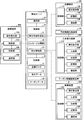
- FIG. 4 is a diagram showing an example of store data managed by the storage unit of the management server shown in FIG.
- FIG. 5 is a diagram showing an example of transaction data managed by the storage unit of the management server shown in FIG.
- FIG. 6 is a diagram showing an example of coupon data managed by the storage unit of the management server shown in FIG.
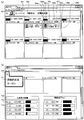
- FIG. 7 is a view showing an example of a screen displayed on the shop terminal when checking the money stock in the shop.
- FIG. 1 is a schematic view showing an outline of a system configuration of a transaction management system according to an embodiment of the present invention.
- FIG. 2 is a flow chart showing the flow of processing executed by the transaction management system shown in
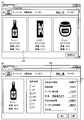
- FIG. 8 is a view showing an example of a screen displayed on the shop terminal at the time of coupon creation.
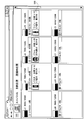
- FIG. 9 is a view showing an example of a screen of the shop terminal on which a list of coupons for which a reservation is being accepted is being displayed.
- FIG. 10 is a view showing an example of a present amount confirmation screen after the coupon is added.
- FIG. 11 is a diagram illustrating an example of an initial screen displayed when browsing of a coupon is started on the mobile terminal.
- FIG. 12 is a diagram showing an example of a screen displayed on the portable terminal when the store specification search is selected.
- FIG. 13 is a view showing an example of a map screen for confirming the position of a store.
- FIG. 14 is a diagram showing an example of a screen displayed on the portable terminal after the reservation is established.
- FIG. 15 is a view showing an example of a screen displayed on the portable terminal when the coin specification search is selected.
- FIG. 16 is a diagram showing an example of a screen displayed on the portable terminal when the position specification search is selected.
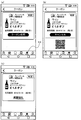
- FIG. 17 is a diagram showing an example of a screen displayed on the portable terminal after coupon reservation.
- FIG. 18 is a diagram showing an example of a screen displayed on the portable terminal after obtaining a coupon.
- the transaction content is created by designating the denomination, number, etc. of money required by the store, and the customer who has executed the money processing satisfying the transaction content and the transaction content
- the benefits to be granted can be made public on the Internet.
- reservation of a transaction can be received and managed, and a privilege can be given to a customer who has executed money processing satisfying the content of the transaction.
- the transaction content it is possible to specify the content of deposit processing and exchange processing required of the customer.
- the benefit may be, for example, a coupon that can be used for redemption or discount of a product, a product and / or service provided free of charge, a cash voucher and / or cash, or a point that can be exchanged for these. It only needs to be profitable.
- a coupon will be described as an example of a benefit.
- the deposit process in the present embodiment is a process for identifying, counting, and storing the money received from the customer in the money handling apparatus that can be used by the person in charge of the store to take out and use the money stored inside the apparatus.
- the money exchange process is a process in which the money handling apparatus receives and executes the deposit process and pays out the amount of deposited money with money of a denomination different from the deposited money. Further, the money referred to in the present embodiment includes at least one of a coin and a bill.
- FIG. 1 is a schematic view showing an outline of a system configuration of a transaction management system 1 according to the present embodiment.
- the transaction management system 1 includes a management server 10, a shop terminal 100, a deposit acceptance device 200, a settlement device 300, and a portable terminal 400.
- the management server 10 is communicably connected to each of the shop terminal 100, the deposit acceptance device 200, the settlement device 300, and the portable terminal 400 via the Internet 2.
- the management server 10 and the shop terminal 100 are computers.
- the deposit acceptance apparatus 200 is a money handling apparatus that accepts money deposit processing, identifies and counts deposited money, and stores the deposited money in the apparatus.
- a reservation information reading device which reads an optical code obtained by encoding information such as a one-dimensional code (bar code) and a two-dimensional code (QR code (registered trademark)) into the deposit acceptance device 200 and decodes the information from the optical code. 270 are connected.
- the settlement apparatus 300 is a change money processing of receiving money received from a customer who pays for the transaction of goods and / or services performed in the store 3, and an amount obtained by subtracting charges for goods and / or services from the money amount received.
- the mobile terminal 400 is a mobile communication terminal such as a mobile phone or a tablet terminal that can be connected to the Internet 2.
- the store terminal 100, the deposit acceptance device 200, and the settlement device 300 are installed in the store 3.
- the installation place of the management server 10 and the use place of the portable terminal 400 are not particularly limited as long as they can be connected to the Internet 2.
- one store 3 is shown in FIG. 1, a plurality of stores such as stores of different companies, different stores of the same company, etc. use the transaction management system 1.
- each of a large number of customers operates the mobile terminal 400 to use the transaction management system 1.
- FIG. 2 is a flowchart showing a flow of processing executed by the transaction management system 1.
- the processing performed by the transaction management system 1 includes creation and disclosure of transaction content (steps S1 to S4), acceptance of a reservation for the disclosed transaction (S11 to S14), and a reserved transaction (S21 to S27) and four steps of acceptance of use of the coupon issued to the customer as a benefit of transaction execution (S31 to S37).
- the processing performed by the transaction management system 1 involves reservation of the disclosed coupon (S11 to S14), acquisition of the reserved coupon (S21 to S27), and use of the acquired coupon (S31 to S37) Includes three stages.
- the process related to the transaction content set by the person in charge of the store 3 corresponds to the process for the customer to acquire a coupon.
- the disclosure of the transaction content created at the store 3 is the disclosure of the coupon reserved by the customer and the coupon issuance condition.
- the reservation of the coupon performed by the customer is the reservation of the transaction to be executed at the store 3.
- the money processing performed by the customer at the store 3 to obtain the reserved coupon is the execution of the transaction.
- Payment acceptance device 200, settlement device 300, etc., the denomination and the amount (number) of money stored in the money processing device installed in store 3 are the amount of money of money in store 3 at store terminal 100. It can be confirmed.
- the person in charge of managing the money in the store 3 hereinafter referred to as "sales clerk" operates the store terminal 100 to confirm the amount of money in the store 3 (step S1).
- sales clerk operates the store terminal 100 to confirm the amount of money in the store 3 (step S1).
- the clerk prepares the contents of the transaction to request payment to the deposit acceptance device 200 in the store 3 (step S2).
- the clerk is required to deposit money in one transaction, the denomination and number of money, the number of transactions, the deadline for accepting a reservation for a transaction, the deadline for issuing a coupon on condition of completion of a reserved transaction, the contents of benefits provided as a coupon, coupon
- the transaction content will be created by specifying the expiration date and the like.
- the various deadlines may be periods.
- the customer executes a transaction and acquires a coupon as the benefit
- the customer can receive discount and discount on the product price and the service charge at the store 3 in accordance with the benefit contents of the coupon. Since the process of purchasing a product at the store 3 and the process of receiving a service at the store 3 are the same, the purchase of a product will be described below as an example.
- the management server 10 manages the transaction content created by the store clerk (step S3).
- the management server 10 publishes the content of the transaction on the Internet (step S4). That is, the management server 10 manages the coupon of the store 3 and makes it public on the Internet 2.
- the management server 10 will publish a plurality of coupons created at one or more stores using the transaction management system 1.
- the customer operates the portable terminal 400 to confirm the content disclosed on the Internet 2 by the management server 10 (step S11).
- the customer selects a coupon in consideration of the distance to the store 3 which executes the transaction, the benefit contents by the coupon, and the like.
- the customer selects a coupon in consideration of the denomination and number of money possessed by the customer, the denomination and number of money required to be deposited to acquire a coupon, and the like.
- the customer operates the portable terminal 400 to reserve the selected coupon (step S12). This coupon reservation corresponds to a transaction reservation.
- the management server 10 manages information on coupons reserved by customers, that is, information on transactions booked (step S13).
- the customer who has reserved the coupon acquires the QR code obtained by encoding the information specifying the reserved coupon from the management server 10 to the portable terminal 400 (step S14).
- a code creation unit operating in the terminal is realized.
- the code generation unit encodes the information acquired from the management server 10 into a QR code, and displays the encoded QR code on the screen of the portable terminal 400.
- the QR code it is possible to specify transaction details managed by the management server 10, such as money denominations required to acquire a reserved coupon, payment details such as the number of money, and the like.
- the customer visits the store 3 and executes payment processing within the time limit set for the reserved coupon (reserved transaction). Specifically, the customer displays the QR code of the reserved coupon acquired from the management server 10 on the screen of the portable terminal 400 (step S21). Then, the customer causes the reservation information reader 270 connected to the deposit acceptance device 200 to read the QR code on the screen (step S22), and deposits money into the deposit acceptor 200.
- the deposit acceptance device 200 identifies and counts the money deposited by the customer (step S23).
- the deposit acceptance device 200 dispenses the deposit amount deposited by the customer with money of a denomination different from deposit money, or issues a cash voucher of the deposit amount available at the store 3 and completes the deposit process. (Step S24).
- the store 3 can be set to be fixed to either one of the exchange payment for dispensing money of a denomination different from the deposit money and the issue of the cash voucher, or the customer can select It can also be set.
- Payment acceptance device 200 transmits, to management server 10, information acquired by reading a QR code from portable terminal 400 and payment information including the denomination and the number of money deposited by the customer.
- Management server 10 specifies a reserved coupon reserved by the customer based on the information of the QR code. Then, the management server 10 confirms that the denomination and the number of money deposited in the deposit acceptance device 200 satisfy the deposit content set as the issuance condition of the reserved coupon (step S25). The management server 10 determines whether or not the payment contents are satisfied, in other words, whether or not a reserved transaction has been established.
- the deposit acceptance device 200 notifies the management server 10 of this when the deposit process is completed after the exchange payment or the cash voucher is issued.
- the management server 10 issues the coupon reserved by the customer and can be used in the store 3 State. Specifically, the state of the coupon is updated from the reserved state to the issued state (step S26).
- the customer who has acquired the coupon acquires the QR code in which the information specifying the issued coupon is encoded by the portable terminal 400 (step S27). Specifically, for example, when the portable terminal 400 executes a dedicated application, a code creation unit operating in the terminal is realized. Then, the code generation unit encodes the information acquired from the management server 10 into a QR code and displays the QR code on the screen of the portable terminal 400. If the reserved transaction is not conducted within the setting time limit, the reservation becomes invalid.
- the customer uses the acquired issued coupon at the time of a transaction for purchasing a product at the store 3. Specifically, the customer displays the QR code of the issued coupon acquired from the management server 10 on the screen of the portable terminal 400 (step S31). Then, the customer causes the coupon information reading device 370 to read the QR code on the screen (step S32), and deposits money in the settlement device 300 in order to pay the commodity price.
- the settlement apparatus 300 transmits the information acquired by reading the QR code from the portable terminal 400 to the management server 10.
- the management server 10 confirms the content of the issued coupon acquired by the customer based on the information of the QR code (step S33).
- the settlement apparatus 300 acquires product price information (step S34). For example, the settlement apparatus 300 acquires product price information from a cash register that calculates the total price of the product price purchased by the customer. Further, the settlement apparatus 300 identifies and counts the money deposited by the customer in order to pay the product price (step S35).
- the settlement apparatus 300 acquires, from the management server 10, the benefit contents of the issued coupon used by the customer.
- the settlement apparatus 300 executes the settlement process after reflecting the discount and discount due to the issued coupon on the product price (step S36). For example, when an issued coupon is used, a discount is applied to the item price when the item specified by the coupon is purchased. If the total amount of money deposited by the customer as a commodity price exceeds the commodity price after discounting, the settlement apparatus 300 executes a withdrawal process of returning the difference as a change amount to the customer to complete the settlement process. In addition, the expiration date is set to use of the issued coupon. After this time, the coupon becomes invalid and you can not receive the coupon benefits.
- the settlement apparatus 300 When the settlement process is completed, the settlement apparatus 300 notifies the management server 10 of this.
- the management server 10 that has received the notification puts the issued coupon used by the customer in a non-reusable state. Specifically, the state of the coupon is updated from the issued state to the used state (step S37).
- the QR code exchanged in the process of steps S13 to S25 is transaction identification information for identifying a reserved transaction, and is also coupon identification information for identifying a reserved coupon.
- the QR code is used to specify the conditions for closing the reserved transaction, that is, the payment details set as the conditions for issuing the reserved coupon.
- the QR code exchanged in the steps S26 to S33 is privilege identification information for identifying the benefit content of the coupon issued as a benefit to the customer after the transaction is concluded, and is also coupon identification information for identifying the issued coupon. is there.
- This QR code is used to specify the content of the benefit given at the time of closing the transaction, that is, the content of the benefit obtained by the issued coupon.
- the clerk can create the transaction content by designating the denomination and number of money to be deposited to the deposit acceptance device 200 of the store 3, the coupon to be issued to the customer as a benefit, etc. it can.
- the clerk can specify the number of customers who want to make a transaction, that is, the number of coupons to be issued.
- the deposit acceptance device 200 of the store 3 can receive deposit of money of the denomination and the number necessary for the store 3.
- the clerk can set a time limit for the time for accepting the reservation of the transaction and the time for which the transaction can be executed after the transaction reservation. That is, it is possible to set a time limit between the time for accepting the coupon reservation and the time for which the deposit process can be performed after the coupon reservation.
- the store clerk can take measures such as creating new transaction content. That is, it is possible to take measures such as issuing a new coupon according to the reservation status of the coupon and the execution status of the deposit process.
- the customer can select a coupon from among the plurality of coupons published on the Internet 2 and make a reservation. That is, the transaction content created by the store 3 can be confirmed, and desired transaction content can be selected and reserved.
- a coupon can be selected from a plurality of coupons of the same store, or a coupon can be selected from a plurality of coupons of different stores.
- the customer can select the coupon in accordance with the type and number of money possessed by the customer, the benefit contents by the coupon, and the like.
- the customer can select a store that can be visited to perform the deposit process from among a plurality of stores that publish coupons.
- FIG. 3 is a block diagram showing an outline of the configuration of each device constituting the transaction management system 1.
- the broken lines in FIG. 3 indicate transmission and reception of data performed between devices using the Internet 2.
- FIG. 3 mainly shows the configuration necessary for explaining the transaction management.
- the store terminal 100 is a computer including a control unit 110, an operation display unit 120, a storage unit 130, and a communication unit 140.
- the operation display unit 120 functions as an operation unit for inputting various information, and also functions as a display unit for outputting and displaying various information on the screen.
- a touch panel liquid crystal display device is used as the operation display unit 120.
- the store clerk of the store 3 can operate the operation display unit 120 of the store terminal 100 to input information related to settings, instructions, etc. while confirming various information displayed on the screen.
- the storage unit 130 is a non-volatile storage device such as a hard disk or a semiconductor memory, and is used to store data necessary to realize the functions and operations of the shop terminal 100.
- the communication unit 140 has a function of communicating with an external device wirelessly or by wire, and transmits / receives data to / from the external device via the Internet 2.
- the control unit 110 uses the storage unit 130 based on the operation content performed by the operation display unit 120, the communication content performed with the management server 10, and the like, and the function of the shop terminal 100 described in the present embodiment Implement the operation.
- the portable terminal 400 is a portable communication terminal including a control unit 410, an operation display unit 420, a storage unit 430, and a communication unit 440.
- a mobile phone, a tablet terminal or the like is used as the mobile terminal 400.
- the operation display unit 420 is, for example, a touch panel liquid crystal display device, and functions as an operation unit for inputting various information, and also functions as a display unit for outputting and displaying various information on the screen.
- the customer can operate the operation display unit 420 of the portable terminal 400 to input information related to reservation, acquisition, use, etc. of the coupon while confirming various information displayed on the screen.
- the storage unit 430 is a non-volatile storage device such as a semiconductor memory, and is used to store data necessary to realize the functions and operations of the portable terminal 400.
- the communication unit 440 has a function of wirelessly communicating with an external device, and transmits and receives data to and from the external device via the Internet 2.
- the control unit 410 uses the storage unit 430 based on the operation content performed by the operation display unit 420, the communication content performed with the management server 10, and the like, and the function of the portable terminal 400 described in the present embodiment Implement the operation.
- the portable terminal 400 has a function of recognizing a current position using a GPS (Global Positioning System).
- the portable terminal 400 can display a map on the screen of the operation display unit 420, and can indicate the current location on the map.
- the portable terminal 400 has a function of searching for a route from the current location to the store 3 and calculating the distance to the store 3 and the time required for movement to the store 3.
- the portable terminal 400 has a function of acquiring identification information for identifying each transaction content and identification information for identifying each coupon, encoding the information into a QR code, and displaying the QR code on a screen.
- the deposit acceptance device 200 is a money handling device including a control unit 210, an operation display unit 220, a deposit unit 230, a dispensing unit 240, a storage unit 250, and a communication unit 260.
- the deposit acceptance device 200 accepts and executes deposit processing for acquiring a reserved coupon reserved by a customer, that is, a transaction reserved by the customer.
- the deposit acceptance device 200 has a function of executing a withdrawal process (exchange process) in which the amount of money deposited by the customer is dispensed with money of another denomination.
- the deposit acceptance device 200 also has a function of issuing a voucher that issues the amount of money deposited by the customer with a voucher usable at the store 3.
- the operation display unit 220 is, for example, a touch panel liquid crystal display device, and functions as an operation unit for inputting various information, and also functions as a display unit for outputting and displaying various information on the screen.
- the customer can operate the operation display unit 220 to start a transaction relating to the reserved coupon reserved from the portable terminal 400.
- the storage unit 250 is a non-volatile storage device such as a semiconductor memory, and is used to store data necessary to realize the function and operation of the deposit acceptance device 200.
- the communication unit 260 has a function of communicating with an external device wirelessly or by wire, and transmits / receives data to / from the external device via the Internet 2.
- Control unit 210 functions of deposit acceptance device 200 described in the present embodiment using storage unit 250 based on the operation content performed by operation display unit 220 and the communication content performed between management server 10 and the like. And realize the operation.
- a reservation information reading device 270 is connected to the deposit acceptance device 200.
- the reservation information reader 270 comprises, for example, a camera or a scanner for optically reading information.
- Payment acceptance device 200 reads the QR code of the reserved coupon displayed on operation display unit 420 of portable terminal 400 using reservation information reader 270.
- the deposit acceptance device 200 transmits the information acquired by reading the QR code to the management server 10.
- the deposit unit 230 takes in the money received from the customer into the deposit port into the device, performs identification and counting in the identification / counting unit, and executes the deposit process to be stored by denomination in a plurality of storage units provided in the device. Information indicating the denomination and the number of money deposited by the customer is transmitted to the management server 10.
- the cash voucher By storing the cash voucher in the storage unit of the deposit acceptance device 200, it is possible to combine the cash voucher and discharge it to the outlet port for the total amount of money deposited by the customer.
- the clerk can set which one of money and cash vouchers to be discharged, to be fixed to either one.
- the settlement apparatus 300 is a money handling apparatus including a control unit 310, an operation display unit 320, a depositing unit 330, a dispensing unit 340, a storage unit 350, and a communication unit 360.
- the settlement apparatus 300 executes settlement processing for receiving a product price from a customer at the time of a transaction in which the customer purchases a product at the store 3. At the time of settlement, the customer can use the acquired coupon to purchase a product at a discounted or discounted price.
- the operation display unit 320 is, for example, a touch panel liquid crystal display device, and functions as an operation unit for inputting various information, and also functions as a display unit for outputting and displaying various information on the screen.
- the storage unit 350 is a non-volatile storage device such as a semiconductor memory, and is used to store data necessary to realize the function and operation of the settlement apparatus 300.
- the communication unit 360 has a function of communicating with an external device wirelessly or by wire, and transmits / receives data to / from the external device via the Internet 2.
- Control unit 310 is based on the operation content performed by operation display unit 320, the communication content performed between management server 10, and the like, while using storage unit 350, the functions of settlement apparatus 300 described in the present embodiment, and Implement the operation.
- the coupon information reader 370 is connected to the settlement apparatus 300.
- the coupon information reader 370 is, for example, a camera or a scanner that optically reads information.
- the settlement apparatus 300 can read the QR code of the issued coupon displayed on the operation display unit 420 of the portable terminal 400 using the coupon information reading device 370.
- the settlement apparatus 300 transmits the information acquired by reading the QR code to the management server 10, and receives the information of the issued coupon from the management server 10.
- the settlement apparatus 300 specifies a product to which the coupon is applied based on the received information, applies a discount to the price of the product, and executes the settlement process.
- the deposit unit 330 takes in the money received from the customer into the deposit port into the device, performs identification and counting in the identification / counting unit, and executes the deposit process to be stored by denomination in a plurality of storage units provided in the device.
- the settlement apparatus 300 acquires price information of a product purchased by the customer.
- the settlement apparatus 300 is connected to a cash register such as a POS register (not shown).
- the settlement apparatus 300 acquires the price information of the product calculated by the cash register.
- the settlement apparatus 300 applies discount or discount by coupon to the acquired product price to calculate a product price for which the customer is requested to pay.
- the settlement apparatus 300 calculates the amount of change money based on the total amount of money deposited by the customer to the depositing unit 330 and the commodity price after application of the coupon.
- the dispensing unit 340 executes dispensing processing of change money as needed. Specifically, when the total amount of money deposited by the customer to the depositing unit 330 exceeds the commodity price, the dispensing unit 340 sets this difference as the change amount. Then, the money type and the number of money corresponding to the change amount are determined, and the money of the determined money type is paid out from among the money stored in advance in the plurality of storage sections, and the determined number of money is delivered to the dispensing opening. Discharge and return to the customer as change money.
- the settlement apparatus 300 When the transaction using the coupon is completed, the settlement apparatus 300 notifies the management server 10 of this.
- the management server 10 that has received the notification will update the status of the coupon from issued to used.
- the management server 10 is a computer including a control unit 20, a storage unit 30, and a communication unit 40.
- the communication unit 40 has a function of communicating with an external device wirelessly or by wire, and transmits / receives data to / from the external device via the Internet 2.
- the processing relating to the creation and reservation of transaction contents by the transaction management system 1 and the issue and use of coupons, etc. is realized as a cloud service using the Internet 2.
- the management server 10 functions as a cloud server that provides this cloud service. For example, the shop terminal 100 and the portable terminal 400 connect to the management server 10 using a browser, and use the cloud service provided by the management server 10.
- the storage unit 30 is a non-volatile storage device such as a semiconductor memory, and is used to store data necessary to realize the function and operation of the management server 10.
- store data 31 is data including information on each store, information on coupons issued by each store in the past, and the like.
- the transaction data 32 is information on a transaction published on the Internet 2 and accepting a reservation, and includes information related to a coupon.
- the coupon data 33 is information on a reserved coupon reserved by the customer. Details of each data and usage will be described later.
- the control unit 20 describes the management server 10 described in the present embodiment while using the storage unit 30 based on the communication content and the like performed between the shop terminal 100, the payment acceptance device 200, the settlement device 300, and the portable terminal 400.
- the control unit 20 includes a transaction content creation unit 21, a message disclosure unit 22 and a transaction management unit 23.
- the transaction content creation unit 21 receives the operation performed by the store clerk at the store terminal 100 by the store clerk at the store terminal 100, and carries out transaction content including a transaction for depositing money and contents of a coupon issued as a benefit on condition of establishment of the transaction. Create The transaction content creation unit 21 registers the created transaction content in the transaction data 32 of the storage unit 30. When creating a coupon, information on a product that has been issued a coupon in the past and stored in the store data 31 can be displayed on the operation display unit 120 of the store terminal 100 and used. Details of this will be described later.
- the message publishing unit 22 publishes the information of the transaction content registered in the transaction data 32 of the storage unit 30 on the Internet 2 as a message to the customer. Specifically, the message publishing unit 22 creates and publishes a message including the contents of a transaction including a deposit process or a currency exchange process, the contents of a coupon to be awarded as a benefit on the condition of the establishment of the transaction, and the like.
- the customer can search for a coupon specifying a store, search for a coupon based on the denomination and number of money possessed, search for a coupon based on the current position, and the like.
- the message disclosing unit 22 displaying necessary information on the screen of the portable terminal 400 according to the contents of the operation performed by the operation display unit 420 of the portable terminal 400, but the details will be described. I will mention later.
- the message disclosing unit 22 associates the information specifying the reserved coupon, the information related to the portable terminal 400 that has reserved the coupon, etc., and registers it in the coupon data 33 of the storage unit 30. Do.
- the transaction management unit 23 manages reserved transactions registered in the coupon data 33 of the storage unit 30, that is, reserved coupons.
- the transaction management unit 23 updates information on reserved transactions (reserved coupons) according to the processing status. For example, when the customer executes a reserved transaction in the deposit acceptance device 200 of the store 3 to acquire the reserved coupon, the transaction management unit 23 sets the deposited money as the issuance condition of the reserved coupon. When the transaction content is satisfied, a reserved coupon is issued. That is, the transaction management unit 23 functions as a determination unit that determines whether or not the transaction is concluded, and issues a coupon set as a benefit on the condition that the transaction is established. Specifically, the transaction management unit 23 updates the status of the reserved coupon from the reserved status to the issued status. This enables the customer to use the acquired coupon at the store 3. Also, when the customer uses the issued coupon at the store 3, the transaction management unit 23 updates the status of the issued coupon from the issued state to the used state.
- the transaction management unit 23 manages the reservation expiration date of the reserved transaction (reserved coupon) and the expiration date of the issued coupon, and notifies the portable terminal 400 of the expiration date at a predetermined timing before the expiration date.
- the notification is performed at a predetermined timing set in advance, such as one hour before the deadline, thirty minutes before the deadline.
- the currency to be managed by the transaction management system 1 is not particularly limited, but in the following description, the sterling pound sterling (the British pound sterling) is taken as an example.
- FIG. 4 is a view showing an example of store data 31 managed by the storage unit 30 of the management server 10.
- the store data 31 includes items of category, company, store and product.
- the item of category is information that classifies the company to which the store belongs, such as a supermarket, a coffee shop, a drug store, and the like.
- the category item includes an ID (identification information) for identifying each category and a category name.
- the item of the company is information indicating the company that provides the product or the like at the store.
- the item of company includes an ID (identification information) for identifying each company, a name of the company, a logo of the company, and the like. Images of logotypes, images of symbol marks, images of logo marks, and the like are registered as corporate logos.
- the item of the store is information indicating a store where each company provides a product or the like.
- the item of the store includes an ID (identification information) for identifying each store, a name of the store, location information of the store, and the like.
- Position information is information including latitude and longitude.
- FIG. 5 is a view showing an example of the transaction data 32 managed by the storage unit 30 of the management server 10. As shown in FIG.
- the transaction data 32 includes items such as transaction ID, status, company ID, store ID, payment details, product ID, benefit, number of coupons, reservation acceptance deadline, reservation acceptance termination date, reservation expiration deadline, coupon usage expiration date, etc. .
- the item of transaction ID is identification information for managing the transaction content created at each store.
- the item of status is information indicating the status of the transaction.
- the item of the status is "under acceptance” as shown in FIG. 5 while accepting a transaction reservation, and "after acceptance” after all coupons are reserved or after the coupon acceptance deadline has passed.
- the items of company ID and store ID correspond to the items of company ID and store ID in the store data 31 shown in FIG. By referring to the store data 31 based on the company ID and the store ID registered in the transaction data 32, it is possible to specify the company and the store that created the coupon registered in the transaction data 32.
- the item of the payment content shown in FIG. 5 is information indicating the content of the payment process required at the store as a coupon issue condition.
- the items of payment contents include items of currency, denomination and number.
- the deposit content of the transaction ID "0001" shown in FIG. 5 requires that 50 pieces of 2 pence coins (p2) of sterling pound (UK- £) in the UK are required to be deposited in order to obtain this coupon. It shows. If the deposit process satisfying the deposit content is executed, a transaction is established, and a coupon is given to the customer as a benefit.
- the item of the item ID shown in FIG. 5 corresponds to the item of the item ID of the shop data 31 shown in FIG.
- the store data 31 based on the product ID registered in the transaction data 32, it is possible to specify the target product of the coupon registered in the transaction data 32.
- the item of the privilege shown in FIG. 5 is information indicating the content of the privilege to be issued as a coupon, such as a discount or a discount applied to the target product.
- the item of the number of coupons is information indicating the total number and the remaining number of coupons that receive a reservation. That is, it indicates the total number and the remaining number of transactions that receive a reservation. For example, "3/15" in the coupon number item of the transaction ID "0002" shown in FIG. 5 has a total of 15 coupons for accepting reservations, of which 12 are already reserved and the remaining 3 are It shows that it is.
- the item of the reservation acceptance deadline shown in FIG. 5 is information indicating the deadline for accepting the reservation of this transaction after the transaction content created at the store is registered in the transaction data 32 as shown in FIG.
- the item of reservation acceptance end date and time is information indicating the date and time of ending the reservation acceptance of the transaction.
- the item of the reservation expiration date is information indicating the expiration date when this transaction can be executed after the reservation of the transaction is established.
- the reservation acceptance deadline is a deadline for accepting a coupon reservation
- the reservation acceptance end date and time is a date and time to end the reservation acceptance of a coupon
- the reservation expiration date is a deadline for accepting a deposit process for acquiring the reserved coupon.
- the item of coupon expiration date is information indicating the expiration date for which the coupon can be used after the deposit process is executed to make a transaction and the reserved coupon is acquired.
- the transaction content of the transaction ID "0001" shown in FIG. 5 is, as shown in FIG. 5, the line of acceptance of reservation until 17:44 on January 14, 2018, five hours after being registered in the transaction data 32. You can not make a reservation after this date and time.
- this transaction is reserved, payment processing can be performed within one hour after the reservation is completed, and if the transaction is completed, a reserved coupon can be acquired.
- the time limit of one hour has passed, it is not possible to acquire a reserved coupon even if the deposit process is performed. If a coupon can be acquired by closing a reserved transaction, the coupon can be used for two hours after the coupon is issued, but after this, the coupon becomes invalid and can not be used.
- the management server 10 notifies the portable terminal 400 of the expiration date at a predetermined timing before the preset reservation expiration date, based on the reservation expiration date and the current date and time. Similarly, the management server 10 notifies the portable terminal 400 of the expiration date at a predetermined timing before the coupon expiration date set in advance, based on the coupon expiration date and the current date and time.
- the notification is performed, for example, by displaying a message including the content of the notification on the operation display unit 420 of the portable terminal 400 and by emitting a notification sound. Further, for example, in the case where the portable terminal 400 has a light emitting unit such as an LED, it is possible to perform notification by lighting or blinking of the light emitting unit.
- the coupon number item in the transaction data 32 shown in FIG. 5 is updated, and the number of coupons is reduced by one. Then, the information of the reserved transaction, that is, the information of the coupon is registered in the coupon data 33 of the storage unit 30.
- FIG. 6 is a view showing an example of coupon data 33 managed by the storage unit 30 of the management server 10.
- the transaction data 32 is data for managing transactions for issuing a plurality of coupons
- the coupon data 33 is data for managing each reserved coupon.
- the coupon data 33 includes items such as coupon ID, status, reservation terminal ID, coupon reservation date, reservation expiration date, coupon issue date, coupon usage date, coupon usage date and the like.
- the coupon ID is identification information for managing each reserved coupon.
- the coupon ID is generated by combining the transaction ID managed by the transaction data 32 of FIG. 5 and the number indicating the reserved order. Specifically, for example, among the 10 coupons for which a reservation is received by the transaction ID “0003”, the coupon ID of the coupon reserved first is “0003-1”, and the coupon ID of the coupon reserved next is “10”. [0003-2].
- coupon ID it is possible to identify and manage each of a plurality of coupons reserved for the same transaction.
- the transaction data 32 shown in FIG. 5 can be referred to based on the transaction ID included in the coupon ID, and transaction contents such as payment details set for the coupon, goods, and benefit contents by the coupon can be specified.
- the item of the condition shown in FIG. 6 is information indicating the condition of each coupon.
- a transaction that is, a coupon is reserved and registered in the coupon data 33, as shown in FIG. 6, the item of the status is "reserved”.
- the status items are "reserved” to "issued” Updated to
- the status item is updated from “issued” to "used”.
- the status item is updated from “reserved” to “reserved invalid”.
- the status item is updated from “issued” to "invalid”.
- the reservation terminal ID shown in FIG. 6 is identification information for identifying the portable terminal 400 for which the customer has made a reservation for a coupon.
- identification information for identifying the portable terminal 400 for which the customer has made a reservation for a coupon.
- IMEI International Mobile Equipment Identity
- each portable terminal 400 can be identified based on reservation terminal ID, and a coupon can be managed now.
- the item of the coupon reservation date and time shown in FIG. 6 is information indicating the date and time when the coupon is reserved.
- the item of reservation expiration date is information indicating the expiration date for which a reserved coupon can be acquired by date and time. That is, the coupon reservation date is the date when the transaction is reserved, and the item of the reservation expiration date is information indicating the available deadline of the reserved transaction by the date.
- the item of coupon issue date and time is information indicating the date and time when the customer executes the deposit process, the transaction is established, and the coupon is issued.
- the item of coupon expiration date is information indicating the expiration date of the issued coupon by date and time.
- the coupon use date is information indicating the date when the customer used the coupon.
- the coupon of the coupon ID “0003-1” shown in FIG. 6 is a coupon reserved on January 14, 2018, 13: 34, as described in the item of coupon reservation date and time.
- the reservation expiration date is set to one hour after the reservation. Therefore, the reservation expiration date of the coupon of the coupon ID “0003-1” shown in FIG. 6 is 14:34 on January 14, 2018, one hour after the coupon reservation date and time.
- the coupon of coupon ID "0003-1” is issued at 13:50 on January 14, 2018, as described in the item of coupon issue date and time. This indicates that the deposit process set for this coupon is appropriately executed prior to the reservation expiration date, and the reserved transaction is concluded and the coupon is issued.
- the expiration date of the coupon is set one week after the issuance, as shown in the transaction data 32 shown in FIG. Therefore, the coupon expiration date of the coupon of the coupon ID “0003-1” shown in FIG. 6 is January 21, 2018, one week after the coupon issue date and time. In addition, the coupon of coupon ID “0003-1” is used at 14:31 on January 14, 2018, as described in the item of coupon use date and time. This indicates that the coupon was properly used before the coupon expiration date.
- FIGS. 7 to 10 show examples of screens displayed on the operation display unit 120 while the store clerk of the store 3 operates the store terminal 100 to create the transaction content.
- 11 to 16 are screens displayed on the operation display unit 420 until the customer operates the portable terminal 400 to browse the transaction content disclosed on the Internet 2, selects a coupon, and makes a reservation. An example is shown.
- FIGS. 17 and 18 show examples of screens displayed on the operation display unit 420 of the portable terminal 400 after the customer has booked a coupon.
- the processing relating to the transaction corresponds to the processing relating to the coupon.
- the reservation or establishment of the transaction corresponds to the reservation or issuance of the coupon, hereinafter, the processing mainly relating to the coupon will be described. .
- FIG. 7 is a view showing an example of a screen displayed on the shop terminal 100 when checking the money stock in the shop 3.
- FIG. 7B shows the screen when the screen shown in FIG. 7A is scrolled.
- the screen shown in FIG. 7 is displayed by performing a predetermined operation on the operation display unit 120 of the store terminal 100. Ru.
- the logo image 500 of a company registered in the store data 31, the company name 501, and the store name 502 are displayed at the top of the screen displaying the money stock in the store 3.
- Ru. Information on a plurality of coin denominations is displayed on the screen.
- the screen shown in FIG. 7 shows 1 penny coin (p1), 2 pence coin (p2), 5 pence coin (p5), 10 pence coin (p10), 20 pence coin (p20), 50 pence used in the United Kingdom Information on eight types of coin denominations, coin (p50), one pound coin (£ 1) and two pound coin (£ 2) is displayed.
- the number of coins 505 a which is the sum of the denomination 503 and the upper limit number of money that can be stored in each money handling device of the store 3 and the number of money currently stored in each money handling device of the store 3
- the number of coins 505 b obtained by totaling
- the total number of 5-pence coins that can be stored in each money handling device in the store 3 such as the deposit acceptance device 200, the settlement device 300, etc.
- the number of coin pieces 505 b of 5-pence coins indicates that the number of 5-pence coins currently stored in each money handling device in the store 3 is 7,200.
- the information of each denomination includes figures 504 (504a to 504c) indicating the ratio between the number of coins 505a indicating the upper limit and the number of coins 505b currently in the store 3.
- the number of coins 505a indicating the upper limit is displayed by the rectangular frame 504a, and within this frame, the number of coins 505b in the store 3 is displayed by the filled rectangular area 504b.
- the ratio of the area of the rectangular frame 504a to the area of the rectangular area 504b represents the ratio of the number of coins 505a to the number of coins 505b.
- the height of the rectangular area 504b in the frame decreases.
- the height of the rectangular area 504b increases.
- the 5-pence coins are stored up to the upper limit number in all the money handling devices, the entire rectangular frame 504a is filled.
- the information of each denomination includes the number of requests 507.
- the number of requests 507 is the total number of coins making coupons at the store 3 and asking the customer to deposit money.
- coupon information 508 indicating coupons for which a reservation has been received is displayed.
- the coupon information 508 displayed in the frame 506 corresponds to the information registered in the transaction data 32 shown in FIG.
- the screen shown in FIG. 7A is displayed.
- the store A in the supermarket A shown in the store data 31 of FIG. 4 is receiving the reservation of the transaction for depositing 20 pieces of 5-pence coins
- the customer is shown to issue coupons one by one at a discount of 50% on the item price of the item ID "003" of the store.
- the coupon information 508 of the 5-pence coin shown in FIG. 7 indicates the information of the transaction ID “0002”. From the display of “20 sheets ⁇ 15” on the screen shown in FIG.
- the store clerk can confirm that reservations are being received for 15 coupons that require payment of 20 5-pence coins.
- the number of requests 507 on the screen it is possible to confirm that a total of 300 pieces of 5-pence coins in the store 3 are increased when all coupons currently reserved for reservation are reserved and payment processing is executed.
- the coupon information 508 of each coupon is displayed in a list in a frame 506. Further, in the request number 507, a total number obtained by totaling the number of coins scheduled to be deposited in each coupon is displayed.
- the figure 504 indicating the number of coins
- information of the number of requests 507 that is, the number of coins scheduled to be deposited is also displayed.
- a rectangular area 504c corresponding to the number of requests 507 is displayed on the rectangular area 504b indicating the number of coins 505b in the store 3 Ru.
- the rectangular area 504 b and the rectangular area 504 c are displayed in a distinguishable manner by changing the color or the pattern.
- the amount information of each money handling apparatus installed in the store 3 can be confirmed.
- the amount-of-money information of each money handling apparatus includes identification information 512 such as a name for identifying each apparatus, a serial number, and an identification number. Further, it includes money information 513 including the denomination of money stored in the apparatus, the maximum number of storable pieces, and the number of coins currently stored. Furthermore, a graphic 514 indicating the ratio between the upper limit number and the current number of coins is included. Similarly to FIG. 504, FIG. 514 also displays the upper limit number in a rectangular frame, and in this frame, the current number of coins is displayed in a filled rectangular area.
- the clerk can confirm the denomination of money stored in each money handling device in the store 3, the upper limit number of storable money, and the number of money currently stored from the screen shown in FIG. 7 (b). it can. Although only the denomination of coins is shown in FIG. 7 (b), the bills stored in the storage unit of the money handling apparatus, such as 5 pound bills, 10 pound bills, 20 pound bills, 50 pound bills, etc. Information can also be confirmed. Further, when the cash voucher is stored in the storage unit of the deposit acceptance device 200, it is possible to confirm the face value and the number of the cash vouchers stored in each storage unit.
- a menu 511 appears.
- the clerk selects the "coupon" of the menu 511 after confirming the money stock in the store 3, the information of the coupon in the reservation acceptance, the kind and the number of money to be deposited by this coupon, etc. Start creating a coupon.
- FIG. 8 is a diagram showing an example of a screen displayed on the shop terminal 100 at the time of coupon creation.
- the product information 520 of the products for which the coupons have been created in the past in the store 3 is displayed in a list.
- the product information 520 includes information such as an image of a product, a name, a date when a coupon was created by adding a product in the past, a selling price of the product, and a cost.
- the item information 520 corresponds to the information registered in the store data 31 shown in FIG. Specifically, the information registered in the item of the item of the store data 31 is displayed as a list as shown in FIG.
- an input screen of coupon information is displayed. For example, when wine is selected on the screen shown in FIG. 8A, an input screen shown in FIG. 8B is displayed.
- the image of the product selected on the screen shown in FIG. 8 (a), the selling price and the cost are displayed on the input screen.
- the coin denomination is displayed in a list.
- a check box is arranged corresponding to each coin denomination, and an operation to check the check box can be performed to select a coin denomination for which the customer is requested to make a deposit.
- an input frame 530 for inputting transaction information is displayed. Items that require input are displayed in a list in the input frame 530, and when the triangle list button 531 provided in the underlined portion of each item is pressed, options that can be input in this item are displayed as a list. . Select the contents of the coupon from the listed options. By performing this operation in order for each item, it is possible to easily input transaction information.
- the transaction content set on the screen is registered in the transaction data 32 of the management server 10. For example, when only two transaction IDs “0001” and “0002” are registered in the transaction data 32, if the release button is pressed with the setting contents shown in FIG. 8B, as shown in FIG. Data of transaction ID "0003" is registered.
- the return button at the lower left of the screen shown in FIG. 8B is pressed, the screen can return to the screen shown in FIG. 8A.
- FIG. 9 is a diagram showing an example of a screen of the shop terminal 100 displaying a list of coupons for which a reservation has been received. Coupon information 540 of each coupon is displayed on the screen.
- the coupon information 540 corresponds to the transaction data 32 shown in FIG. That is, based on the information registered in the transaction data 32, the coupons for which the reservation has been received are displayed in a list. At the bottom of the box, the number of reserved coupons is displayed as the "number of reservations".
- the delete button 541 is displayed. After creating a coupon and publishing it on the Internet 2, if there is no customer who has booked this coupon, the delete button 541 can be pressed to delete the coupon. If there is only one customer who has booked a coupon, the delete button 541 is not displayed and the coupon can not be deleted.
- FIG. 10 is a view showing an example of a present amount confirmation screen after the coupon is added. If a coupon is newly created and released as shown in FIG. 8B from the state shown in FIG. 7, the updated information to which the new coupon information 550 is added as shown in FIG. Is displayed.
- the management server 10 publishes the coupons thus created at the store 3 and registered in the transaction data 32 on the Internet 2.
- the customer uses the portable terminal 400 to select a coupon from among the plurality of coupons published by the management server 10.
- FIG. 11 is a view showing a screen example of an initial screen displayed when browsing of a coupon is started on the portable terminal 400.
- an advertisement is displayed at the top of the initial screen.
- three menus of a store specification search 561, a coin specification search 562, and a position specification search 563 are displayed.
- the store specification search 561 on which "Find a store" is displayed on the initial screen is selected.
- an icon 570 displayed at the upper left of the screen as shown in FIG. 12A is a button for returning to the screen immediately before.
- operations described as “selecting”, “pressing” or the like on a menu or icon on the screen of the portable terminal 400 correspond to an operation of tapping the touch panel operation display unit 420.
- FIG. 12 is a diagram showing an example of a screen displayed on the portable terminal 400 when the store specification search 561 is selected.
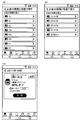
- the categories are listed as shown in FIG. 12 (a).
- the categories listed at this time correspond to the items of the category of the store data 31 shown in FIG.
- FIG. 12B When the customer selects a category on the screen shown in FIG. 12A, as shown in FIG. 12B, companies belonging to the selected category are displayed in a list.
- the companies listed at this time correspond to the items of the companies in the store data 31 shown in FIG.
- the companies classified into the supermarket in the item of the category of the store data 31 are displayed in a list.
- the information of each company displayed in a list includes the logo image of the company and the name of the company.
- the logo image of the company in the information of each store displayed in a list, the logo image of the company, the name of the store, and the requirement when moving from the current location where the customer operates the portable terminal 400 to each store Includes time and
- the required time includes the time for traveling on foot, the time for traveling by car, and the time for traveling by public transportation such as a railway. These required times are calculated by performing a route search based on the current location recognized by the mobile terminal 400 using GPS and the position information of each store included in the store data 31.
- coupon that can be reserved at this store are listed.
- the coupons displayed in a list at this time correspond to coupons registered in the transaction data 32 shown in FIG.
- coupons that can be reserved are displayed in a list at "B Station Front” of "Super A” as shown in FIG. 12 (d) .
- the information of the coupon displayed in a list includes the image and the name of the target product of the coupon, and the benefit contents such as discount or discount applied to the target product.
- the wine coupon shown in FIG. 12 (d) corresponds to the transaction ID “0003” shown in FIG.
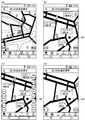
- FIG. 13 is a view showing an example of a map screen for confirming the position of a store.
- a map button is pressed on the screen shown in FIG. 12 (c) showing a list of supermarkets A's stores, a map showing a plurality of supermarkets A listed in a list with a pin icon as shown in FIG. 13 (a) Is displayed.
- a map button is pressed on the screen shown in FIG. 12 (d) showing a list of coupons for B store in the supermarket A, a map showing this store with a pin icon is displayed as shown in FIG. 13 (b) .
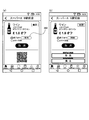
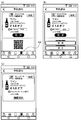
- FIG. 14 is a diagram showing an example of a screen displayed on the portable terminal 400 after the reservation is established.
- the screen shown in FIG. 14 (a) is displayed.
- This screen displays the information of the reserved coupon. Specifically, the image and the name of the target product of the reserved coupon, and the benefit contents such as discount or discount applied to the target product are displayed.
- the QR code is information for identifying a reserved coupon displayed on the screen, and includes the coupon ID of the coupon data 33 shown in FIG.
- the coupon of transaction ID "0003" shown in FIG. 5 is set to “one hour” as the reservation expiration date after acceptance of the reservation.
- the remaining time 580 is displayed as "one hour” immediately after the reservation is established, as shown in FIG. 14 (a).
- the remaining time 580 corresponds to the remaining time until the reservation expiration date of the coupon data 33 shown in FIG.
- the customer can also cancel this reservation after booking the coupon.
- the cancel button is pressed on the screen shown in FIG. 14 (a), as shown in FIG. 14 (b), the cancel button and the return button are displayed on the QR code at the bottom of the screen. You can cancel the cancellation of your reservation by pressing the back button. By pressing the cancel button, it is possible to cancel the reservation of the coupon.
- the customer cancels the reservation the data of the corresponding coupon is deleted from the coupon data 33 shown in FIG.
- FIG. 15 is a view showing an example of a screen displayed on the portable terminal 400 when the coin designation search 562 is selected.
- the denominations of coins are displayed in a list.
- a screen for selecting the number of coins is displayed as shown in FIG. 15 (b).
- the number of coins is set by giving a range to the number, such as 10 to 19 and 20 to 29.
- the payment details set as the coupon issuance condition is the coin denomination selected by the customer.
- coupons that match the number of coins are displayed in a list. Specifically, among the coupons registered in the transaction data 32 shown in FIG. 5 and having the status “under acceptance”, the coupon whose payment content satisfies the coin denomination and number of coins selected by the customer is A list is displayed.
- FIG. 15C shows the case where there is one coupon satisfying the condition selected by the customer, but when there are a plurality of coupons satisfying the condition, the plurality of coupons are displayed in a list. .
- the QR of the reserved coupon is displayed on the screen of the mobile terminal 400 of the customer as described with reference to FIG. A screen containing the code is displayed.
- FIG. 16 is a view showing an example of a screen displayed on the portable terminal 400 when the position specification search 563 is selected.
- a map centered on the current position is displayed on the screen of the portable terminal 400 as shown in FIG.
- a store accepting a coupon reservation is displayed as a pin icon.
- the customer can change the scale of the map on the screen by performing pinch in and pinch out operations on the screen. For example, if a pinch out operation is performed on the screen shown in FIG. 16A, it is possible to enlarge the map as shown in FIG. 16B and narrow the area to be displayed on the screen.
- shop information such as the company name of each shop indicated by the pin icon indicating the current position of the customer, ie, the icon 590 indicating the current position of the portable terminal 400, the position of each shop, and the shop name Is displayed.
- the map display is performed based on the function of the portable terminal 400 that recognizes the current position of the own terminal using the GPS, and the position information of each store registered in the store data 31 shown in FIG. 4.
- a number icon for selecting the number of coins is displayed at the lower left of the map screen, and a type icon for selecting a coin denomination is displayed at the lower right. Ru.
- FIG. 16C when the number icon is pressed, the option for the number of coins is displayed, and when the type icon is pressed, the option for coin denominations is displayed.
- the number of coins is selected, among the plurality of stores displayed on the map, only the pin icon and the store information of the store accepting the reservation of the coupon are displayed with the payment contents matching the number of coins selected by the customer. Information on other stores disappears from the screen.
- the number icon is operated to select the number of coins of 30 to 39
- the type icon is operated to select a 20-pense coin.
- FIG. 16D it is possible to narrow down to only the information of the store that has received the reservation of the coupon on the condition of deposit of 20p coins and 30 to 39 sheets.
- the customer selects the supermarket A or Z town store on the screen shown in FIG. 16 (d), as shown in FIG. 15 (c), this matches the coin number and coin denomination conditions selected by the customer.
- the coupon of the store is displayed. At this time, when there are a plurality of coupons satisfying the conditions, the plurality of coupons are displayed in a list.
- the coupon of the reserved coupon is displayed on the screen of the mobile terminal 400 of the customer as described with reference to FIG. A screen containing the QR code is displayed.
- FIG. 17 is a diagram showing an example of a screen displayed on the portable terminal 400 after coupon reservation.
- FIG. 17A when the icon 600 is pressed, a screen of a reserved coupon reserved by the customer is displayed.
- the QR code is information for identifying a reserved coupon displayed on the screen, and includes the coupon ID of the coupon data 33 shown in FIG.
- the information on the screen shown in FIG. 17 (a) corresponds to the coupon data 33 shown in FIG.
- the management server 10 makes a reservation with this portable terminal 400 from among the data registered in the coupon data 33 shown in FIG. Search and display data of reserved coupons. This search is performed based on IMEI of the portable terminal 400.
- the data of the coupon shown in FIG. 17A corresponds to the coupon of the coupon ID “0003-3” shown in FIG.
- a coupon is reserved and the reservation expiration date is passed without canceling the reservation, it expires and the reserved coupon becomes invalid.
- the item of the status of the coupon data 33 shown in FIG. 6 is updated from "reserved" to "reserved invalid".
- a screen indicating expiration is displayed as shown in FIG.
- the name of the company that created the coupon, the logo image of the company, and the store name, the image and the name of the target product for the coupon that has been reserved, and the discount or discount that should have been applied to the target product. Etc. are displayed.
- the date and time indicating the reservation expiration date, the denomination and number of coins set as the coupon issuance condition, and information indicating expiration are displayed.
- FIG. 18 is a view showing an example of a screen displayed on the portable terminal 400 after obtaining a coupon.
- FIG. 18A when the icon 610 is pressed, a screen of issued coupons acquired by the customer is displayed. On the screen, the name of the company that created the coupon, the logo image of the company, and the store name, the image and the name of the target product of the acquired coupon, and the benefit contents such as discount and discount applied to the target product, The date and time indicating the expiration date of the coupon and the coupon use button are displayed.
- the information on the screen shown in FIG. 18A corresponds to the coupon data 33 shown in FIG.
- the management server 10 acquires the data registered in the coupon data 33 shown in FIG.
- the data of the issued coupon is retrieved and displayed on the screen. This search is performed based on IMEI of the portable terminal 400.
- the expired coupon invalidates the issued coupon.
- the status item shown in FIG. 6 is updated from "issued" to "invalid".
- a screen indicating expiration is displayed. On the screen, the name of the company that created the coupon, the logo image of the company, and the name of the store, and the image and the name of the target product of the acquired coupon are displayed.
- benefit contents such as discount and discount that should have been applied to the target product, a date and time indicating a coupon expiration date, and information indicating an expiration date are displayed.
- the QR code of the issued coupon displayed on the screen of the portable terminal 400 is displayed on the settlement apparatus 300. It is read by the coupon information reader 370 connected. As a result, the customer can purchase a product by receiving benefits such as coupon discount and discount.
- the status of the coupon data 33 shown in FIG. 6 is updated from “issued” to “used”. This prevents the coupon from being used repeatedly.
- an example using the Internet 2 is shown, but an example of the network is not limited to this.
- a private network such as a local network environment of a large commercial facility
- each process such as creation, reservation, issuance, and use of coupon is performed as described above be able to.
- the IMEI of the portable terminal 400 is used to distinguish each portable terminal 400, that is, each customer.
- the method of distinguishing each customer is not limited to this.
- a login ID and a password may be assigned to each customer, and login authentication may be performed when accepting an operation related to a coupon from the portable terminal 400 to distinguish each customer.
- an example is shown in which one deposit acceptance device 200 and one settlement device 300 are installed in the store 3 shown in FIG. 1, but the number of deposit acceptance devices 200 and the settlement device 300 is limited thereto. It is not a thing.
- a plurality of deposit acceptance devices 200 having the reservation information reader 270 may be installed in one store.
- a plurality of settlement devices 300 having coupon information reader 370 may be installed in one store.
- the example which installed the payment acceptance apparatus 200 and the settlement apparatus 300 in the shop was shown, the aspect which installs the payment acceptance apparatus 200 and the settlement apparatus 300 out of a shop may be sufficient.
- the apparatuses may be installed outside the stores. Even in such a case, each process described above can be realized.
- an example of using the QR code to exchange identification information such as a reserved coupon or an issued coupon is shown, but the method of exchanging information is not limited to this.
- another optical code such as a barcode may be used.
- the portable terminal 400 acquires identification information, executes a dedicated application, and is not limited to a mode of generating an optical code obtained by encoding this, and the management server 10 codes identification information May be generated to generate an optical code, which may be transmitted to the portable terminal 400.
- the aspect which utilizes the identification information which combined the character, the symbol, etc. as information which identifies each coupon may be sufficient.
- Each function realized by each device of the management server 10, the shop terminal 100, the deposit acceptance device 200, the settlement device 300, and the portable terminal 400 described in the present embodiment is a device that realizes each function if these can be realized.
- the aspect is not limited to the device described in the present embodiment, and may be an aspect realized by another device.
- management of data relating to the coupon may be performed inside the portable terminal 400 from when the coupon is reserved by the portable terminal 400 until it is used.
- the determination result is managed by the shop terminal 100
- the settlement apparatus 300 in the store 3 performs settlement
- the reservation completed by the customer's portable terminal 400 is managed between the shop terminal 100 and the settlement apparatus 300 It is possible to confirm that the coupon has been issued and the benefit contents of this coupon. Then, it is possible to execute the settlement process by acquiring information on the benefit contents of the issued coupon from the portable terminal 400.
- the apparatus determines whether the deposit process performed by the deposit acceptance apparatus 200 to obtain a coupon satisfies the issue conditions of the reserved coupon, but the deposit acceptance apparatus 200 It may be a mode that performs payment processing without using it.
- the clerk of the store 3 may identify and count the money brought by the customer to make a determination.
- each process described above can be realized.
- the deposit acceptance device 200 When issuing a coupon after confirming that the deposit process satisfies the issue conditions of the coupon, the deposit acceptance device 200 is provided with a coupon issue unit consisting of a printer, and the coupon issue unit provides paper for the coupon for the deposit amount. May be printed and issued. Similarly, even when the management server 10 issues a reserved coupon, the coupon issuing unit may issue a coupon printed on paper.
- the transaction content creation unit 21 may use the day of the week, the date, the time, the time zone, the information such as the weather acquired using the Internet 2
- the aspect of automatically changing the benefit contents designated by the store clerk may be adopted.
- the clerk specifies the benefit as the discount rate of 10% of the product
- the discount rate is automatically changed to 12% in the morning
- the operation of the transaction content creation unit 21 can be set to automatically change to 9%. For example, if the weather is fine, the discount rate specified by the clerk remains unchanged, and if the weather is rainy, the transaction content creation unit 21 sets the operation of the transaction content creation unit 21 to automatically change the discount rate. be able to.
- the transaction management system 1 it is possible to set and publish a transaction to which a benefit such as a coupon is given, and to provide the customer with an incentive to execute the payment process at the store 3.
- a benefit such as a coupon
- the number of coupons can be set an upper limit so that money can be received only for the amount required by the store 3.
- the transaction management system and the transaction management method according to the present invention are useful for managing transactions performed for the purpose of eliminating money shortage in the money handling apparatus.
- Transaction Management System 2 Internet (Network) 3 store 10 management server 20, 110, 210, 310, 410 control unit 21 transaction content creation unit 22 message disclosure unit 23 transaction management unit 30, 130, 250, 350, 430 storage unit 40, 140, 260, 360, 440 communication Unit 100 Store terminal 120, 220, 320, 420 Operation display unit 200 Deposit acceptance device 230, 330 Deposit unit 240, 340 Payment unit 270 Reservation information reader 300 Settlement device 370 Coupon information reader 400 Mobile terminal
Landscapes
- Business, Economics & Management (AREA)
- Engineering & Computer Science (AREA)
- Accounting & Taxation (AREA)
- Finance (AREA)
- Strategic Management (AREA)
- Physics & Mathematics (AREA)
- General Physics & Mathematics (AREA)
- Theoretical Computer Science (AREA)
- General Business, Economics & Management (AREA)
- Development Economics (AREA)
- Economics (AREA)
- Marketing (AREA)
- Entrepreneurship & Innovation (AREA)
- Game Theory and Decision Science (AREA)
- Computer Security & Cryptography (AREA)
- Tourism & Hospitality (AREA)
- Computer Networks & Wireless Communication (AREA)
- Technology Law (AREA)
- Human Resources & Organizations (AREA)
- Operations Research (AREA)
- Quality & Reliability (AREA)
- Cash Registers Or Receiving Machines (AREA)
- Management, Administration, Business Operations System, And Electronic Commerce (AREA)
- Financial Or Insurance-Related Operations Such As Payment And Settlement (AREA)
Priority Applications (2)
| Application Number | Priority Date | Filing Date | Title |
|---|---|---|---|
| US16/961,261 US20210065199A1 (en) | 2018-01-12 | 2019-01-11 | Transaction management system and transaction management method |
| EP19738183.3A EP3723024A4 (en) | 2018-01-12 | 2019-01-11 | TRANSACTION MANAGEMENT SYSTEM AND TRANSACTION MANAGEMENT PROCEDURES |
Applications Claiming Priority (2)
| Application Number | Priority Date | Filing Date | Title |
|---|---|---|---|
| JP2018-003444 | 2018-01-12 | ||
| JP2018003444A JP7018769B2 (ja) | 2018-01-12 | 2018-01-12 | 取引管理システム及び取引管理方法 |
Publications (1)
| Publication Number | Publication Date |
|---|---|
| WO2019139120A1 true WO2019139120A1 (ja) | 2019-07-18 |
Family
ID=67219563
Family Applications (1)
| Application Number | Title | Priority Date | Filing Date |
|---|---|---|---|
| PCT/JP2019/000686 Ceased WO2019139120A1 (ja) | 2018-01-12 | 2019-01-11 | 取引管理システム及び取引管理方法 |
Country Status (4)
| Country | Link |
|---|---|
| US (1) | US20210065199A1 (https=) |
| EP (1) | EP3723024A4 (https=) |
| JP (1) | JP7018769B2 (https=) |
| WO (1) | WO2019139120A1 (https=) |
Families Citing this family (3)
| Publication number | Priority date | Publication date | Assignee | Title |
|---|---|---|---|---|
| JP7486801B2 (ja) * | 2020-07-31 | 2024-05-20 | 株式会社寺岡精工 | 商品販売データ処理システム及び商品販売データ処理方法 |
| JP2022067222A (ja) * | 2020-10-20 | 2022-05-06 | 株式会社Tosei | コインランドリーシステム |
| JP7621175B2 (ja) * | 2021-05-10 | 2025-01-24 | 日立チャネルソリューションズ株式会社 | タッチレス取引方法、タッチレス取引システム、取引管理装置および自動取引装置 |
Citations (6)
| Publication number | Priority date | Publication date | Assignee | Title |
|---|---|---|---|---|
| JPS5640735B2 (https=) | 1973-02-22 | 1981-09-22 | ||
| JP2005025662A (ja) * | 2003-07-02 | 2005-01-27 | Kokusai Kogyo Co Ltd | クーポン発行方法及びシステム |
| JP2012137982A (ja) * | 2010-12-27 | 2012-07-19 | Oki Electric Ind Co Ltd | 複数の携帯通信端末および現金取引装置と通信可能に接続された現金管理サーバ |
| WO2016098219A1 (ja) * | 2014-12-18 | 2016-06-23 | 株式会社日立製作所 | Atm現金装填管理システムおよびatm現金装填管理方法 |
| JP2017102551A (ja) * | 2015-11-30 | 2017-06-08 | 株式会社三井住友銀行 | Atm予約システムおよび方法 |
| WO2017122388A1 (ja) * | 2016-01-12 | 2017-07-20 | 株式会社トラストネットワークス | 情報処理装置、情報処理方法、および、現金自動預け払い機、ならびにプログラム |
Family Cites Families (3)
| Publication number | Priority date | Publication date | Assignee | Title |
|---|---|---|---|---|
| US20030233276A1 (en) * | 2002-06-18 | 2003-12-18 | Mark Pearlman | System and method of using portable electronic devices for electronic coupon and voucher redemption |
| US20080262928A1 (en) * | 2007-04-18 | 2008-10-23 | Oliver Michaelis | Method and apparatus for distribution and personalization of e-coupons |
| US20170148002A1 (en) * | 2015-11-20 | 2017-05-25 | Outerwall Inc. | Kiosk-based systems and methods for selling consumer products and/or services |
-
2018
- 2018-01-12 JP JP2018003444A patent/JP7018769B2/ja active Active
-
2019
- 2019-01-11 EP EP19738183.3A patent/EP3723024A4/en not_active Withdrawn
- 2019-01-11 US US16/961,261 patent/US20210065199A1/en not_active Abandoned
- 2019-01-11 WO PCT/JP2019/000686 patent/WO2019139120A1/ja not_active Ceased
Patent Citations (6)
| Publication number | Priority date | Publication date | Assignee | Title |
|---|---|---|---|---|
| JPS5640735B2 (https=) | 1973-02-22 | 1981-09-22 | ||
| JP2005025662A (ja) * | 2003-07-02 | 2005-01-27 | Kokusai Kogyo Co Ltd | クーポン発行方法及びシステム |
| JP2012137982A (ja) * | 2010-12-27 | 2012-07-19 | Oki Electric Ind Co Ltd | 複数の携帯通信端末および現金取引装置と通信可能に接続された現金管理サーバ |
| WO2016098219A1 (ja) * | 2014-12-18 | 2016-06-23 | 株式会社日立製作所 | Atm現金装填管理システムおよびatm現金装填管理方法 |
| JP2017102551A (ja) * | 2015-11-30 | 2017-06-08 | 株式会社三井住友銀行 | Atm予約システムおよび方法 |
| WO2017122388A1 (ja) * | 2016-01-12 | 2017-07-20 | 株式会社トラストネットワークス | 情報処理装置、情報処理方法、および、現金自動預け払い機、ならびにプログラム |
Also Published As
| Publication number | Publication date |
|---|---|
| EP3723024A4 (en) | 2021-09-08 |
| JP7018769B2 (ja) | 2022-02-14 |
| US20210065199A1 (en) | 2021-03-04 |
| JP2019125016A (ja) | 2019-07-25 |
| EP3723024A1 (en) | 2020-10-14 |
Similar Documents
| Publication | Publication Date | Title |
|---|---|---|
| US20080033595A1 (en) | Method of outputting offers at a vending machine field | |
| WO2019139127A1 (ja) | 取引管理システム及び取引管理方法 | |
| JP2020095514A (ja) | 情報表示装置 | |
| WO2019139120A1 (ja) | 取引管理システム及び取引管理方法 | |
| WO2019139124A1 (ja) | 取引管理システム及び取引管理方法 | |
| KR102122794B1 (ko) | 배달 주문 처리 방법 및 그를 수행하기 위한 결제 단말 장치 | |
| WO2021079768A1 (ja) | サーバ装置、購入管理方法、情報処理システム、情報処理方法、及び、記録媒体 | |
| JP7731834B2 (ja) | 店舗システム、情報処理装置及びその制御プログラム | |
| JP2024121312A (ja) | 管理装置、管理方法、およびプログラム | |
| KR101845193B1 (ko) | 결제 시스템 및 결제 방법 | |
| JP2025092704A (ja) | 購入管理システム、サーバ装置、購入管理方法、携帯端末、及び、プログラム | |
| JP2020060997A (ja) | 商品販売データ処理システム及びプログラム | |
| JP7621018B2 (ja) | 商品販売データ処理システム及び商品販売データ処理方法 | |
| JP7849279B2 (ja) | 情報処理装置およびプログラム | |
| JP6602330B2 (ja) | 燃料販売方法、該販売方法を実行する端末およびプログラム | |
| JP2024083019A (ja) | 会計装置、およびプログラム | |
| WO2021200081A1 (ja) | チャージ装置及びチャージ方法 | |
| JP7548971B2 (ja) | 情報処理方法 | |
| JP7630539B2 (ja) | 情報処理装置、情報処理システム、及び料金支払プログラム | |
| KR102351952B1 (ko) | 모바일 식권 주문 시스템, 서버 및 방법 | |
| KR101015046B1 (ko) | 자동화기기 또는 밴 단말기를 이용한 전자 가치권 판매 시스템 및 그 방법 | |
| KR100409234B1 (ko) | 이동 통신 단말기를 이용한 물품 구입대금 결제 방법 및시스템 | |
| JP2024128783A (ja) | 精算システム及び精算方法 | |
| JP2023159528A (ja) | 会計装置およびプログラム | |
| JP2024025033A (ja) | 商品データ処理装置およびプログラム |
Legal Events
| Date | Code | Title | Description |
|---|---|---|---|
| 121 | Ep: the epo has been informed by wipo that ep was designated in this application |
Ref document number: 19738183 Country of ref document: EP Kind code of ref document: A1 |
|
| NENP | Non-entry into the national phase |
Ref country code: DE |
|
| ENP | Entry into the national phase |
Ref document number: 2019738183 Country of ref document: EP Effective date: 20200708 |
|
| WWW | Wipo information: withdrawn in national office |
Ref document number: 2019738183 Country of ref document: EP |