WO2018020608A1 - 在庫管理システム、在庫管理方法、および在庫管理プログラム - Google Patents
在庫管理システム、在庫管理方法、および在庫管理プログラム Download PDFInfo
- Publication number
- WO2018020608A1 WO2018020608A1 PCT/JP2016/072022 JP2016072022W WO2018020608A1 WO 2018020608 A1 WO2018020608 A1 WO 2018020608A1 JP 2016072022 W JP2016072022 W JP 2016072022W WO 2018020608 A1 WO2018020608 A1 WO 2018020608A1
- Authority
- WO
- WIPO (PCT)
- Prior art keywords
- product
- stock
- inventory
- information
- inventory management
- Prior art date
- Legal status (The legal status is an assumption and is not a legal conclusion. Google has not performed a legal analysis and makes no representation as to the accuracy of the status listed.)
- Ceased
Links
Images





Classifications
-
- G—PHYSICS
- G06—COMPUTING OR CALCULATING; COUNTING
- G06Q—INFORMATION AND COMMUNICATION TECHNOLOGY [ICT] SPECIALLY ADAPTED FOR ADMINISTRATIVE, COMMERCIAL, FINANCIAL, MANAGERIAL OR SUPERVISORY PURPOSES; SYSTEMS OR METHODS SPECIALLY ADAPTED FOR ADMINISTRATIVE, COMMERCIAL, FINANCIAL, MANAGERIAL OR SUPERVISORY PURPOSES, NOT OTHERWISE PROVIDED FOR
- G06Q10/00—Administration; Management
- G06Q10/08—Logistics, e.g. warehousing, loading or distribution; Inventory or stock management
Definitions
- the present invention relates to an inventory management system for managing product inventory by analyzing a captured image captured by a camera, and detecting the presence / absence of the inventory of the product and displaying in detail the information of the non-stocked product.
- the present invention relates to a management method and an inventory management program.
- Patent Document 1 proposes a system that performs processing for indexing a product and overlaying a message indicating that inventory is being confirmed at the position of an image on a display shelf where a product-free marker is detected.
- Patent Document 1 since the system of Patent Document 1 only displays a message indicating that the inventory is being confirmed, a message indicating that the inventory is available, or a message indicating that the inventory is not available, It is not sufficient to display detailed information on the product in question and to manage the inventory appropriately.
- An object of the present invention is to provide an inventory management system, an inventory management method, and an inventory management program.
- the present invention provides the following solutions.
- the invention according to the first feature is an inventory management system that manages an inventory of products by analyzing a captured image captured by a camera, Product position storage means for storing which product is placed at which position; Captured image acquisition means for acquiring a captured image captured by the camera; Image analysis means for image analysis of the acquired captured image; Stock detection means for comparing the result of the image analysis with the product position storage means to detect whether the product is in stock; Stock-free product information display means for displaying information on stock-free products detected as out-of-stock by the stock detection means; An inventory management system is provided.
- the product position storage means that stores which product is located at which position A captured image acquisition unit that acquires a captured image captured by the camera, an image analysis unit that analyzes the acquired captured image, and collates the result of the image analysis with the product position storage unit.
- Inventory detecting means for detecting whether or not the product is in stock
- inventory non-commodity information display means for displaying information on a non-stock product detected as being out of stock by the inventory detecting means.
- the invention according to the first feature is a category of the inventory management system, but the inventory management method and the inventory management program have the same operations and effects.
- the invention according to the second feature is an inventory management system which is the invention according to the first feature,
- the inventory management system is characterized in that the information on the non-stock product is image data of the non-stock product.
- the information on the non-stock product is image data of the non-stock product.
- the invention according to the third feature is an inventory management system which is the invention according to the first feature or the second feature,
- the inventory management system is characterized in that the information on the non-stock product is purchaser information on the non-stock product.
- the information on the non-stock product is purchaser information on the non-stock product.
- the invention according to the fourth feature is an inventory management system according to any one of the first feature to the third feature,
- the inventory management system is characterized in that the information on the non-stock product is information on a person who moved the non-stock product.
- the information on the non-stock product includes information on a person who has moved the non-stock product. Information.
- An invention according to a fifth feature is an inventory management system according to any one of the first feature to the fourth feature, Provided is a stock management system comprising history display means for displaying a history of the product that was previously in the position of the non-stock product.
- the history of the product that was previously in the position is stored for the non-stock product.
- History display means for displaying is provided.
- the invention according to a sixth feature is an inventory management system which is the invention according to the first feature, Inventory-in-goods selection means for selecting in-stock products detected as in-stock by the inventory detection means; Stock in-stock information display means for displaying information on the selected in-stock goods; An inventory management system is provided.
- the in-stock product selection means for selecting the in-stock product detected by the stock detection means as being in stock
- Stocked product information display means for displaying information on the selected stocked product
- An invention according to a seventh feature is an inventory management system according to any one of the first feature to the sixth feature, There is provided an inventory management system comprising inventory transition status display means for displaying the presence / absence of inventory of the product detected by the inventory detection means as a status of inventory transition in a predetermined period.
- the presence / absence of the stock of the product detected by the stock detection means is determined in advance.
- Inventory change status display means for displaying the status of inventory change during the period is provided.
- the invention according to an eighth feature is an inventory management method for managing the inventory of products by performing image analysis on a captured image captured by a camera, Memorizing which product is placed at which position; Obtaining a captured image captured by the camera; Analyzing the acquired captured image; and Collating the image-analyzed result with the product position storage means to detect whether the product is in stock; Displaying information on non-stock products detected as out of stock by the stock detection means; An inventory management method is provided.
- the invention according to the ninth feature is an inventory management system for managing the inventory of products by analyzing the captured image captured by the camera, A step of memorizing which product is placed at which position; Obtaining a captured image captured by the camera; Image analysis of the acquired captured image; Collating the image-analyzed result with the product position storage means, and detecting whether the product is in stock; Displaying information on an out-of-stock item detected as out-of-stock by the inventory detecting means; An inventory management program for executing
- an inventory management system that manages the inventory of products by analyzing the captured image captured by the camera
- the inventory management system that detects the presence or absence of the inventory of the product and displays in detail the information on the product not in stock
- An inventory management method, and an inventory management program can be provided.
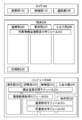
- FIG. 1 is a schematic diagram of a preferred embodiment of the present invention.
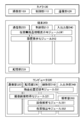
- FIG. 2 is a diagram illustrating the functional blocks of the camera 100, the terminal 200, and the computer 300, and the relationship between the functions.
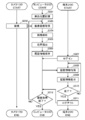
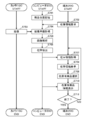
- FIG. 3 is a flowchart of inventory information display processing of the camera 100, the terminal 200, and the computer 300.
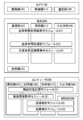
- FIG. 4 is a diagram illustrating a functional block of the camera 100, the terminal 200, and the computer 300 and a relationship between the functions when the history display function is provided.
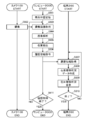
- FIG. 5 is a flowchart of history display processing of the camera 100, the terminal 200, and the computer 300.
- FIG. 6 is a diagram illustrating the functional blocks of the camera 100, the terminal 200, and the computer 300 and the relationship between the functions when the stocked product information display function is provided.
- FIG. 1 is a schematic diagram of a preferred embodiment of the present invention.
- FIG. 2 is a diagram illustrating the functional blocks of the camera 100, the terminal 200, and the computer 300, and the relationship between the functions.
- FIG. 7 is a flowchart of the stock-in-goods information display process of the camera 100, the terminal 200, and the computer 300.
- FIG. 8 is a diagram illustrating the relationship between the functional blocks of the camera 100, the terminal 200, and the computer 300 and the functions when the inventory transition status display function is provided.
- FIG. 9 is a flowchart of inventory transition status display processing of the camera 100, the terminal 200, and the computer 300.
- FIG. 10 is a diagram illustrating an example of storing the product position in the inventory management system.
- FIG. 11 is a diagram illustrating an example of a stock-free product information display.
- FIG. 12 is a diagram illustrating another example of displaying the non-stock product information.
- FIG. 13 is a diagram illustrating an example of a history display of non-stock items.
- FIG. 14 is a diagram illustrating an example of the in-stock product selection and the in-stock product information display.
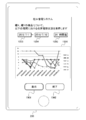
- FIG. 15 is a diagram illustrating an example of a stock transition status display.
- FIG. 1 is a schematic diagram of a preferred embodiment of the present invention. The outline of the present invention will be described with reference to FIG.
- the inventory management system includes a camera 100, a terminal 200, and a computer 300.
- the number of cameras 100 and terminals 200 is not limited to one and may be plural.
- each process described below may be realized by any one or a combination of the camera 100, the terminal 200, and the computer 300.
- the camera 100 includes a control unit 110, a communication unit 120, and an imaging unit 160.
- the terminal 200 includes a control unit 210, a communication unit 220, a storage unit 230, and an input / output unit 240.
- the control unit 210 implements the inventory-free product information display module 241 in cooperation with the communication unit 220 and the input / output unit 240.
- the computer 300 includes a control unit 310, a communication unit 320, a storage unit 330, an input / output unit 340, and an analysis unit 350.
- the control unit 310 implements the product position storage module 331 in cooperation with the communication unit 320, the storage unit 330, and the input / output unit 340. Further, the control unit 310 realizes the captured image acquisition module 321 in cooperation with the communication unit 320 and the storage unit 330. In addition, the control unit 310 implements an image analysis module 351 and an inventory detection module 352 in cooperation with the storage unit 330 and the analysis unit 350.
- the communication network 400 may be a public communication network such as the Internet or a dedicated communication network.
- the camera 100 is an imaging device such as a network camera capable of data communication with the computer 300.
- the camera 100 is provided in a product storage facility such as a warehouse and captures a place such as a shelf for storing products and a person who moves the product as captured images such as moving images and still images.
- a product storage facility such as a warehouse and captures a place such as a shelf for storing products and a person who moves the product as captured images such as moving images and still images.
- an image obtained by imaging is a precise image having an amount of information necessary for image analysis by the computer 300, and the number of pixels and image quality can be designated.
- the terminal 200 is a terminal device possessed by the user that can perform data communication with the computer 300.
- the terminal 200 is, for example, a mobile phone, a portable information terminal, a tablet terminal, a personal computer, an electronic product such as a netbook terminal, a slate terminal, an electronic book terminal, a portable music player, a smart glass, a head mounted display, or the like. Wearable terminals and other items.
- the smartphone illustrated as the terminal 200 is just one example.
- the computer 300 is a computer capable of data communication with the camera 100 and the terminal 200.
- the computer 300 receives the product position input from the administrator and stores the product position (step S01).
- the administrator may input the product position using the input / output unit 340 of the computer 300, or may input the product position input using the input / output unit 240 of the terminal 200 via the communication unit 220.
- the data may be transmitted to the computer 300.
- the computer 300 stores the product position acquired from the input / output unit 340 or the communication unit 320 in the storage unit 330.
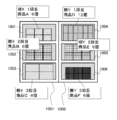
- FIG. 10 is a diagram illustrating an example of storing the product position in the inventory management system.
- the shelf 1007 on the left side is the shelf X
- the upper stage 1001 is the first stage
- the middle stage 1002 is the second stage
- the lower stage 1003 is the third stage to be a product place.
- the shelf 1008 on the right side is the shelf Y
- the upper stage 1004 is the first stage
- the middle stage 1005 is the second stage
- the lower stage 1006 is the third stage.
- the product A is on the first level of the shelf X
- the product B is on the second level of the shelf X
- the product C is on the third level of the shelf X
- the shelf The product type corresponding to the product position is stored in the first stage of Y, the product D, the product E in the second stage of the shelf Y, the product F in the third stage of the shelf Y, and the like.
- the number of products that can be placed at the maximum or the number at the time of storing the product position may be registered.
- the camera 100 captures a captured image (step S02).
- the camera 100 captures a place such as a shelf for storing inventory and a person who moves a product as a captured image such as a moving image or a still image. It is desirable to also store the date and time at the time of imaging.
- the computer 300 acquires captured image data, which is captured image data captured by the camera 100 (step S03). Specifically, the computer 300 requests the camera 100 to transmit captured image data, and receives the captured image data transmitted from the camera 100. At this time, the date and time at the time of imaging is also acquired together with the captured image data.
- the computer 300 analyzes the acquired captured image data (step S04).
- the image analysis here is an analysis of the position and number of each product.
- it may be analyzed who has moved which product.
- the computer 300 compares the image analysis result with the stored product position and detects whether or not each product is in stock (step S05).
- the computer 300 detects the number of stocks for each product. It is assumed that the administrator or the user can set the number of stocks to be judged as out of stock. For example, it may be determined that there is no stock when one product is exhausted, it may be determined that the product is out of stock only when all the products are exhausted, and there is no stock when there are remaining items. The number of items to be determined may be settable.
- the terminal 200 receives the inventory information and displays the received information about the non-stocked product (step S06). Specifically, the terminal 200 makes a transmission request for inventory information to the computer 300, receives the inventory information transmitted from the computer 300, and displays the inventory-free product information. If there are a plurality of unstocked products, the unstocked product information may be displayed for each product.
- the non-stock information may be image data of the product, information of a purchaser who purchased the product, information of a person who moved the product, and the like.
- the purchase date and the date of purchase may be added to the purchaser information and the information of the moved person. It is assumed that the inventory information received by the terminal 200 from the computer 300 includes the above-described information on non-stock items.
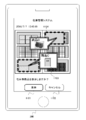
- FIG. 11 is a diagram showing an example of the stock-free product information display. It is an example of a screen in the case of displaying an unstocked product on the input / output unit 240 of the terminal 200.
- a display button 1101 By selecting a display button 1101 on this screen, a product C that is not in stock is displayed by a balloon 1103, and a product D that is also not in stock is displayed by a balloon 1104.
- the image data of the corresponding product that the product C is A4 paper, and similarly, the product D is a substrate.
- the cancel button 1102 is selected, the non-stock product display is not performed, the non-stock product display screen is terminated, and the screen is changed to another screen of the stock management system.
- the display button 1101 and the cancel button 1102 on this screen are merely examples, and the non-stock product information may be displayed by selecting the position of the non-stock product on the screen.
- the balloons 1103 and 1104, which are display methods for non-stock items, are merely examples for displaying information, and other display methods may be used.
- the inventory management system for managing the inventory of products by analyzing the captured image captured by the camera, the presence / absence of the inventory of the products is detected, and the information on the non-stock products is detailed. It is possible to provide an inventory management system, an inventory management method, and an inventory management program to be displayed.
- FIG. 2 is a diagram illustrating the functional blocks of the camera 100, the terminal 200, and the computer 300, and the relationship between the functions. It is assumed that the camera 100, the terminal 200, and the computer 300 can perform data communication via the communication network 400.
- the camera 100 includes a control unit 110, a communication unit 120, and an imaging unit 160.
- the terminal 200 includes a control unit 210, a communication unit 220, a storage unit 230, and an input / output unit 240.
- the control unit 210 implements the inventory-free product information display module 241 in cooperation with the communication unit 220 and the input / output unit 240.
- the computer 300 includes a control unit 310, a communication unit 320, a storage unit 330, an input / output unit 340, and an analysis unit 350.
- the control unit 310 implements the product position storage module 331 in cooperation with the communication unit 320, the storage unit 330, and the input / output unit 340. Further, the control unit 310 realizes the captured image acquisition module 321 in cooperation with the communication unit 320 and the storage unit 330. In addition, the control unit 310 implements an image analysis module 351 and an inventory detection module 352 in cooperation with the storage unit 330 and the analysis unit 350.
- the communication network 400 may be a public communication network such as the Internet or a dedicated communication network.
- the camera 100 is an imaging device such as a network camera capable of data communication with the computer 300.
- the camera 100 is provided in a product storage facility such as a warehouse and captures a place such as a shelf for storing products and a person who moves the product as captured images such as moving images and still images.
- a product storage facility such as a warehouse and captures a place such as a shelf for storing products and a person who moves the product as captured images such as moving images and still images.
- an image obtained by imaging is a precise image having an amount of information necessary for image analysis by the computer 300, and the number of pixels and image quality can be designated.
- the control unit 110 includes a CPU (Central Processing Unit), a RAM (Random Access Memory), a ROM (Read Only Memory), and the like.
- the imaging unit 160 executes imaging and transmits imaging data via the communication unit 120. To control.
- a device for enabling communication with other devices for example, a WiFi (Wireless Fidelity) compatible device compliant with IEEE 802.11 or an IMT-2000 standard such as a third generation or fourth generation mobile communication system. Compliant wireless device etc. It may be a wired LAN connection.
- WiFi Wireless Fidelity
- the imaging unit 160 includes a lens, an imaging device, various buttons, an imaging device such as a flash, and the like.
- the terminal 200 is a terminal device possessed by the user that can perform data communication with the computer 300.
- the terminal 200 is, for example, a mobile phone, a portable information terminal, a tablet terminal, a personal computer, an electronic product such as a netbook terminal, a slate terminal, an electronic book terminal, a portable music player, a smart glass, a head mounted display, or the like. Wearable terminals and other items.
- the smartphone illustrated as the terminal 200 is just one example.
- the terminal 200 includes a CPU, RAM, ROM and the like as the control unit 210.
- the control unit 210 implements the inventory-free product information display module 241 in cooperation with the communication unit 220 and the input / output unit 240.
- a device for enabling communication with other devices as the communication unit 220 for example, a WiFi compatible device compliant with IEEE802.11 or a wireless device compliant with the IMT-2000 standard such as a third generation or fourth generation mobile communication system Etc. It may be a wired LAN connection.
- the storage unit 230 includes a data storage unit such as a hard disk or a semiconductor memory, and stores data necessary for displaying the acquired product information.
- the input / output unit 240 has functions necessary for using the inventory management system.
- a liquid crystal display that realizes a touch panel function, a keyboard, a mouse, a pen tablet, a hardware button on the apparatus, a microphone for performing voice recognition, and the like can be provided.
- forms such as a liquid crystal display, a PC display, a projection on a projector, and an audio output can be considered.
- the function of the present invention is not particularly limited by the input / output method.
- the computer 300 may be a general computer having the functions described below.
- the computer 300 includes a CPU, RAM, ROM, and the like as the control unit 310.
- the control unit 310 implements the product position storage module 331 in cooperation with the communication unit 320, the storage unit 330, and the input / output unit 340. Further, the control unit 310 realizes the captured image acquisition module 321 in cooperation with the communication unit 320 and the storage unit 330. In addition, the control unit 310 implements an image analysis module 351 and an inventory detection module 352 in cooperation with the storage unit 330 and the analysis unit 350.
- a device for enabling communication with other devices for example, a WiFi compatible device compliant with IEEE 802.11 or a wireless device compliant with the IMT-2000 standard such as a third generation or fourth generation mobile communication system Etc. It may be a wired LAN connection.
- the storage unit 330 includes a data storage unit using a hard disk or a semiconductor memory.
- the storage unit 330 holds data such as the product position, the acquired captured image, the image analysis result, and the inventory detection result.
- the input / output unit 340 has functions necessary for input / output.
- a liquid crystal display that realizes a touch panel function, a keyboard, a mouse, a pen tablet, a hardware button on the apparatus, a microphone for performing voice recognition, and the like can be provided.
- forms such as a liquid crystal display, a PC display, a projection on a projector, and an audio output can be considered.
- the function of the present invention is not particularly limited by the input / output method.
- the analysis unit 350 includes an analysis device that performs image analysis of the acquired captured image.
- the analysis device here does not necessarily need to be a device, and may be application software for image analysis.
- FIG. 3 is a flowchart of inventory information display processing of the camera 100, the terminal 200, and the computer 300. The processing executed by the modules of each device described above will be described together with this processing. It is assumed that the camera 100, the terminal 200, and the computer 300 can communicate via the communication network 400.
- the communication network 400 may be a public communication network such as the Internet or a dedicated communication network.
- the product position storage module 331 of the computer 300 receives the product position input from the administrator and stores the product position (step S301).
- the administrator may input the product position using the input / output unit 340 of the computer 300, or may input the product position input using the input / output unit 240 of the terminal 200 via the communication unit 220.
- the data may be transmitted to the computer 300.
- the computer 300 stores the product position acquired from the input / output unit 340 or the communication unit 320 in the storage unit 330.
- FIG. 10 is a diagram illustrating an example of storing the product position in the inventory management system.
- the shelf 1007 on the left side is the shelf X
- the upper stage 1001 is the first stage
- the middle stage 1002 is the second stage
- the lower stage 1003 is the third stage to be a product place.
- the shelf 1008 on the right side is the shelf Y
- the upper stage 1004 is the first stage
- the middle stage 1005 is the second stage
- the lower stage 1006 is the third stage.
- the product A is on the first level of the shelf X
- the product B is on the second level of the shelf X
- the product C is on the third level of the shelf X
- the shelf The product type corresponding to the product position is stored in the first stage of Y, the product D, the product E in the second stage of the shelf Y, the product F in the third stage of the shelf Y, and the like.
- the number of products that can be placed at the maximum or the number at the time of storing the product position may be registered.
- the terminal 200 transmits user information necessary for login to the computer 300 via the communication unit 220, and logs in to the inventory management system (step S302).
- the user information here includes account information such as a name, nickname, and user ID, and authentication information such as a password, passphrase, IC card, smart card, fingerprint, iris, and the like.
- account information such as a name, nickname, and user ID
- authentication information such as a password, passphrase, IC card, smart card, fingerprint, iris, and the like.
- the flowchart is described assuming that login has succeeded. However, if login fails, retry may be performed, and if it fails more than a certain number of times, the account is locked. Then, the login process may be terminated.
- the unstocked product information display module 241 of the terminal 200 transmits a request for inventory information to the computer 300 (step S303).
- the captured image acquisition module 321 of the computer 300 transmits a transmission request for captured image data to the camera 100, and the camera 100 performs imaging in response to the request (step S304).
- the camera 100 captures a place such as a shelf for storing inventory and a person who moves a product as a captured image such as a moving image or a still image. It is desirable to also store the date and time at the time of imaging.
- the captured image acquisition module 321 acquires captured image data that is captured image data captured by the camera 100 (step S305). Specifically, the captured image acquisition module 321 receives captured image data transmitted from the camera 100. At this time, the date and time at the time of imaging is also acquired together with the captured image data.
- the image analysis module 351 of the computer 300 performs image analysis on the captured image data (step S306).
- the image analysis here is an analysis of the position and number of each product. In addition, when there is a person who has moved each product, it may be analyzed who has moved which product.
- the inventory detection module 352 of the computer 300 compares the product analysis result with the stored product position and detects whether each product is in stock (step S307).
- the stock detection module 352 detects how much stock is available for each product. In addition, it is detected whether there is no stock for each product. It is assumed that the administrator or the user can set the number of stocks to be judged as out of stock. For example, it may be determined that there is no stock when one product is exhausted, it may be determined that the product is out of stock only when all the products are exhausted, and there is no stock when there are remaining items. The number of items to be determined may be settable. If the condition of no stock is not met, it may be determined that there is stock.
- the unstocked product information display module 241 of the terminal 200 acquires inventory information from the computer 300 (step S308).
- the stock information includes which product is placed at which position stored as the product position, the number of stocks of each product, and the judgment result of the presence or absence of stock.
- captured image data acquired for displaying product information and the result of image analysis may be included.
- the inventory-free product information display module 241 displays the inventory information on the input / output unit 240 based on the acquired inventory information (step S309). Here, only product information that is out of stock may be displayed. In addition, if there are a plurality of unstocked products, unstocked product information may be displayed for each product.
- the non-stock information may be image data of the product, information of a purchaser who purchased the product, information of a person who moved the product, and the like.
- the purchase date and the date of purchase may be added to the purchaser information and the information of the moved person.
- the non-stock information may be acquired together with the stock information in step S308. If the information is insufficient, the necessary information is newly obtained from the computer 300. May be obtained.
- FIG. 11 is a diagram showing an example of the stock-free product information display. It is an example of a screen in the case of displaying non-stock items on the input / output unit 240 of the terminal 200.
- a display button 1101 By selecting a display button 1101 on this screen, a product C that is not in stock is displayed by a balloon 1103, and a product D that is also not in stock is displayed by a balloon 1104.
- the image data of the corresponding product that the product C is A4 paper, and similarly, the product D is a substrate.
- the cancel button 1102 is selected, the non-stock product display is not performed, the non-stock product display screen is terminated, and the screen is changed to another screen of the stock management system.
- the display button 1101 and the cancel button 1102 on this screen are merely examples, and the non-stock product information may be displayed by selecting the position of the non-stock product on the screen.
- the balloons 1103 and 1104, which are display methods for non-stock items, are merely examples for displaying information, and other display methods may be used.
- FIG. 12 is a diagram showing another example of the stock-free product information display. It is an example of a screen in the case of displaying an unstocked product on the input / output unit 240 of the terminal 200. By selecting an information display button 1201 on this screen, information on the product C is displayed as the non-stock product information by a balloon 1203. As the non-stock product information of the product C, image data, a purchaser, and a mover are displayed. Along with these data, the product name and the remaining number of inventory may be displayed. The purchaser data may include the purchaser's name, the number of purchases, the purchase date and time, the shipping status of the product, and the like.
- the data of the mover who moved the product may include the name of the mover, the number of moved items, the date and time of movement, and the like.
- the cancel button 1202 is selected, the non-stock product display is not performed, the non-stock product information display screen is terminated, and the screen is changed to another screen of the stock management system.
- the information display button 1201 and the cancel button 1202 on this screen are merely examples, and the stock-free product information may be displayed by selecting the position of the stock-free product on the screen.
- the balloon 1203 that is a display method of non-stock items is merely an example for displaying information, and other display methods may be used.
- the terminal 200 confirms whether or not to display the non-stock product information display (step S310). The user may be allowed to select whether to end. If not finished, the process returns to step S303 to continue the process. If finished, the process proceeds to step S311.
- the terminal 200 transmits a logout request to the computer 300 and logs out from the inventory management system (step S311).
- the inventory management system for managing the inventory of products by analyzing the captured image captured by the camera, the presence / absence of the inventory of the products is detected, and the information on the non-stock products is detailed. It is possible to provide an inventory management system, an inventory management method, and an inventory management program to be displayed.
- FIG. 4 is a diagram illustrating a functional block of the camera 100, the terminal 200, and the computer 300 and a relationship between the functions when the history display function is provided.
- the control unit 210 of the terminal 200 implements the history display module 242 in cooperation with the communication unit 220 and the input / output unit 240.
- FIG. 5 is a flowchart of history display processing of the camera 100, the terminal 200, and the computer 300. The processing executed by the modules of each device described above will be described together with this processing. It is assumed that the camera 100, the terminal 200, and the computer 300 can communicate via the communication network 400.
- the communication network 400 may be a public communication network such as the Internet or a dedicated communication network.
- the product position storage module 331 of the computer 300 receives the product position input from the administrator and stores the product position (step S501).
- the administrator may input the product position using the input / output unit 340 of the computer 300, or may input the product position input using the input / output unit 240 of the terminal 200 via the communication unit 220.
- the data may be transmitted to the computer 300.
- the computer 300 stores the product position acquired from the input / output unit 340 or the communication unit 320 in the storage unit 330.
- the storage of the merchandise position is a process of registering which merchandise is placed at which position in the inventory management system, as described above with reference to FIG.
- the captured image acquisition module 321 of the computer 300 transmits a transmission request for captured image data to the camera 100, and the camera 100 receives the request to perform imaging (step S502).
- the camera 100 captures a place such as a shelf for storing inventory and a person who moves a product as a captured image such as a moving image or a still image. It is desirable to also store the date and time at the time of imaging.
- imaging is started after storing the product position regardless of the login status of the terminal 200 and the inventory information request.
- the captured image acquisition module 321 acquires captured image data that is captured image data captured by the camera 100 (step S503). Specifically, the captured image acquisition module 321 receives captured image data transmitted from the camera 100. At this time, the date and time at the time of imaging is also acquired together with the captured image data.
- the image analysis module 351 of the computer 300 performs image analysis on the captured image data (step S504).
- the image analysis here is an analysis of the position and number of each product. In addition, when there is a person who has moved each product, it may be analyzed who has moved which product.
- the inventory detection module 352 of the computer 300 collates with the product position storing the result of the image analysis, and detects whether each product is in stock (step S505).
- the stock detection module 352 detects how much stock is available for each product. In addition, it is detected whether there is no stock for each product. It is assumed that the administrator or the user can set the number of stocks to be judged as out of stock. For example, it may be determined that there is no stock when one product is exhausted, it may be determined that the product is out of stock only when all the products are exhausted, and there is no stock when there are remaining items. The number of items to be determined may be settable. If the condition of no stock is not met, it may be determined that there is stock.
- the inventory detection module 352 stores history information based on the inventory detection result (step S506).
- the history information is a change in the number of stocks of each product during the stock detection time.
- data of a purchaser who purchased the corresponding product and data of a person who moved the corresponding product may be included.
- the purchaser data may include the name of the purchaser, the number of purchases, the purchase date and time, the shipping status of the product, and the like.
- the data of the mover who moved the product may include the name of the mover, the number of moved items, the date and time of movement, and the like.
- the terminal 200 transmits user information necessary for logging in to the computer 300 via the communication unit 220 and logs in to the inventory management system (step S507).
- the user information here includes account information such as a name, nickname, and user ID, and authentication information such as a password, passphrase, IC card, smart card, fingerprint, iris, and the like.
- account information such as a name, nickname, and user ID
- authentication information such as a password, passphrase, IC card, smart card, fingerprint, iris, and the like.
- the flowchart is described assuming that login has succeeded. However, if login fails, retry may be performed, and if it fails more than a certain number of times, the account is locked. Then, the login process may be terminated.
- the history display module 242 of the terminal 200 acquires history information from the computer 300 (step S508).
- the history information here is as described above. Furthermore, captured image data acquired for displaying history information and the result of image analysis may be included. Further, the image data of the corresponding product may be acquired together.
- the history display module 242 displays the history information on the input / output unit 240 based on the acquired history information (step S509). Here, you may display only the history information of goods without stock. Further, if there are a plurality of unstocked products, history information may be displayed for each product.
- FIG. 13 is a diagram showing an example of a history display of non-stock items. It is an example of a screen in the case of displaying a history of non-stock items on the input / output unit 240 of the terminal 200. By selecting the display button 1301 on this screen, the history information of the product D is displayed as a history of non-stock products by a balloon 1303. As the history information of the item D, the date and time when the number of items in stock has changed, the number of items changed, the reason for the change, the purchaser, and the mover are displayed. Along with these data, the image data of the product D, the product name, and the remaining number of inventory may be displayed.
- the purchaser data may include the purchaser's name, the number of purchases, the purchase date and time, the shipping status of the product, and the like. Further, the data of the mover who moved the product may include the name of the mover, the number of moved items, the date and time of movement, and the like.
- the cancel button 1302 is selected, the history display screen is terminated without displaying the history, and the screen shifts to another screen of the inventory management system.
- the display button 1301 and the cancel button 1302 on this screen are merely examples, and history information may be displayed by selecting the position of an unstocked product on the screen.
- a balloon 1303 that is a history display method is merely an example for displaying information, and other display methods may be used.
- the terminal 200 confirms whether or not to end the non-stock product information display (step S510). The user may be allowed to select whether to end. If not, the process returns to step S508 to continue the process. If finished, the process proceeds to step S511.
- the terminal 200 transmits a logout request to the computer 300 and logs out from the inventory management system (step S511).
- the computer 300 confirms whether to end the creation of history information after the history information is saved, regardless of the login / logout status of the terminal 200 (step S512). Whether to end the creation of history information may be set in advance by providing a timer, or may be input by the administrator at the end. If not, the process returns to step S503 to continue the history information creation process. If finished, the history information creation process is terminated. When the processing is continued, the weight may be set so that the imaging interval is equal to or longer than a certain period.
- the present invention in the inventory management system that manages the inventory of products by analyzing the captured image captured by the camera, the presence or absence of the inventory of the products is detected and the history of the products is displayed in detail. It becomes possible to provide an inventory management system, an inventory management method, and an inventory management program.
- FIG. 6 is a diagram illustrating the functional blocks of the camera 100, the terminal 200, and the computer 300 and the relationship between the functions when the stocked product information display function is provided.
- the control unit 210 of the terminal 200 implements an in-stock product selection module 243 and an in-stock product information display module 244 in cooperation with the communication unit 220 and the input / output unit 240.
- FIG. 7 is a flowchart of the stock-in-goods information display process of the camera 100, the terminal 200, and the computer 300.
- the processing executed by the modules of each device described above will be described together with this processing. It is assumed that the camera 100, the terminal 200, and the computer 300 can communicate via the communication network 400.
- the communication network 400 may be a public communication network such as the Internet or a dedicated communication network.
- the login process and logout process of the terminal 200 are omitted. For the login process and the logout process, the same method as in FIG. 3 described above may be used.
- the product position storage module 331 of the computer 300 receives the product position input from the administrator and stores the product position (step S701).
- the administrator may input the product position using the input / output unit 340 of the computer 300, or may input the product position input using the input / output unit 240 of the terminal 200 via the communication unit 220.
- the data may be transmitted to the computer 300.
- the computer 300 stores the product position acquired from the input / output unit 340 or the communication unit 320 in the storage unit 330.
- the storage of the merchandise position is a process of registering which merchandise is placed at which position in the inventory management system, as described above with reference to FIG.
- the in-stock product information display module 244 of the terminal 200 transmits a request for inventory information to the computer 300 (step S702).
- the captured image acquisition module 321 of the computer 300 transmits a transmission request for captured image data to the camera 100, and the camera 100 performs imaging in response to the transmission request (step S703).
- the camera 100 captures a place such as a shelf for storing inventory and a person who moves a product as a captured image such as a moving image or a still image. It is desirable to also store the date and time at the time of imaging.
- the captured image acquisition module 321 acquires captured image data that is captured image data captured by the camera 100 (step S704). Specifically, the captured image acquisition module 321 receives captured image data transmitted from the camera 100. At this time, the date and time at the time of imaging is also acquired together with the captured image data.
- the image analysis module 351 of the computer 300 performs image analysis on the captured image data (step S705).
- the image analysis here is an analysis of the position and number of each product. In addition, when there is a person who has moved each product, it may be analyzed who has moved which product.
- the stock detection module 352 of the computer 300 compares the product analysis result with the stored product location and detects whether each product is in stock (step S706).
- the stock detection module 352 detects how much stock is available for each product. In addition, it is detected whether there is no stock for each product. It is assumed that the administrator or the user can set the number of stocks to be judged as out of stock. For example, it may be determined that there is no stock when one product is exhausted, it may be determined that the product is out of stock only when all the products are exhausted, and there is no stock when there are remaining items. The number of items to be determined may be settable. If the condition of no stock is not met, it may be determined that there is stock.
- the in-stock product information display module 244 of the terminal 200 acquires inventory information from the computer 300 (step S707).
- the stock information includes which product is placed at which position stored as the product position, the number of stocks of each product, and the judgment result of the presence or absence of stock.
- captured image data acquired for displaying product information and the result of image analysis may be included.
- the stock presence product information display module 244 displays the stock information on the input / output unit 240 based on the acquired stock information (step S708).
- the in-stock product selection module 243 causes the user to select an in-stock product for which information is to be displayed based on the stock information displayed on the input / output unit 240 (step S709).
- the in-stock product information display module 244 displays information on the selected in-stock product on the input / output unit 240 (step S710).
- the information on the in-stock product includes any of image data, product name, price, number of stocks, and registration date of the corresponding product.
- it may be obtained together with the stock information in step S707, or when the information is insufficient, the necessary information is obtained from the computer 300 again. Also good.
- FIG. 14 is a diagram showing an example of selection of in-stock products and display of in-stock product information. It is an example of a screen when the in-stock product is selected by the input / output unit 240 of the terminal 200 and the in-stock product information is displayed. By selecting a product on the image on this screen, information on the product A is displayed as stocked product information by a balloon 1403. The product name, the image data, the price, the remaining number of inventory, and the registration date are displayed as the product information in stock of the product A.
- a function for selecting a place where information is to be displayed may be provided. When a place is selected by the option 1404 using radio buttons and the switching button 1401 is selected, the display of the selected place may be switched.
- the end button 1402 When the end button 1402 is selected, the information on the in-stock product is not displayed, and the screen is changed to another screen of the inventory management system.
- the switch button 1401 and the end button 1402 on this screen are an example of a method for switching a place to be displayed, and a switching function may be provided on another screen.
- a balloon 1403 that is a display method of in-stock products is merely an example for displaying information, and other display methods may be used.
- the terminal 200 confirms whether or not to end the display of in-stock product information (step S711). The user may be allowed to select whether to end. If not, the process returns to step S707 to continue the process, and if finished, the in-stock product information display process is terminated.
- the present invention in the inventory management system for managing the inventory of products by analyzing the captured image captured by the camera, the presence / absence of the inventory of the products is detected to detect not only the information on the products not in stock.
- FIG. 8 is a diagram illustrating the relationship between the functional blocks of the camera 100, the terminal 200, and the computer 300 and the functions when the inventory transition status display function is provided.
- the control unit 210 of the terminal 200 implements an inventory transition status display module 245 in cooperation with the communication unit 220 and the input / output unit 240.
- FIG. 9 is a flowchart of inventory transition status display processing of the camera 100, the terminal 200, and the computer 300.
- the processing executed by the modules of each device described above will be described together with this processing. It is assumed that the camera 100, the terminal 200, and the computer 300 can communicate via the communication network 400.
- the communication network 400 may be a public communication network such as the Internet or a dedicated communication network.
- the login process and logout process of the terminal 200 are omitted. For the login process and the logout process, the same method as in FIG. 5 described above may be used.
- the product position storage module 331 of the computer 300 receives the product position input from the administrator and stores the product position (step S901).
- the administrator may input the product position using the input / output unit 340 of the computer 300, or may input the product position input using the input / output unit 240 of the terminal 200 via the communication unit 220.
- the data may be transmitted to the computer 300.
- the computer 300 stores the product position acquired from the input / output unit 340 or the communication unit 320 in the storage unit 330.
- the storage of the merchandise position is a process of registering which merchandise is placed at which position in the inventory management system, as described above with reference to FIG.
- the captured image acquisition module 321 of the computer 300 transmits a transmission request for captured image data to the camera 100, and the camera 100 performs imaging in response to the transmission request (step S902).
- the camera 100 captures a place such as a shelf for storing inventory and a person who moves a product as a captured image such as a moving image or a still image. It is desirable to also store the date and time at the time of imaging.
- imaging is started after storing the product position regardless of the login status of the terminal 200 and the history information request.
- the captured image acquisition module 321 acquires captured image data that is captured image data captured by the camera 100 (step S903). Specifically, the captured image acquisition module 321 receives captured image data transmitted from the camera 100. At this time, the date and time at the time of imaging is also acquired together with the captured image data.
- the image analysis module 351 of the computer 300 performs image analysis on the captured image data (step S904).
- the image analysis here is an analysis of the position and number of each product. In addition, when there is a person who has moved each product, it may be analyzed who has moved which product.
- the inventory detection module 352 of the computer 300 collates with the product position storing the result of the image analysis, and detects whether or not each product is in stock (step S905).
- the stock detection module 352 detects how much stock is available for each product. In addition, it is detected whether there is no stock for each product. It is assumed that the administrator or the user can set the number of stocks to be judged as out of stock. For example, it may be determined that there is no stock when one product is exhausted, it may be determined that the product is out of stock only when all the products are exhausted, and there is no stock when there are remaining items. The number of items to be determined may be settable. If the condition of no stock is not met, it may be determined that there is stock.
- the inventory detection module 352 stores history information based on the inventory detection result (step S906).
- the history information is a change in the number of stocks of each product during the stock detection time. This history information is used to create the inventory transition status.
- data of a purchaser who purchased the corresponding product and data of a person who moved the corresponding product may be included.
- the purchaser data may include the name of the purchaser, the number of purchases, the purchase date and time, the shipping status of the product, and the like.
- the data of the mover who moved the product may include the name of the mover, the number of moved items, the date and time of movement, and the like.
- the inventory transition status display module 245 of the terminal 200 acquires history information from the computer 300 (step S907).
- the history information here is as described above. Further, captured image data acquired from the camera 100 and the result of image analysis may be included. Further, the image data of the corresponding product may be acquired together.
- the inventory transition status display module 245 creates inventory transition status data based on the acquired history information (step S908). Specifically, it is the extraction of data on the change in the number of stocks during a certain period designated by the user. If necessary, the user can specify how often data is extracted, such as every other day or every three hours.
- the inventory transition status display module 245 displays the inventory transition information on the input / output unit 240 based on the created inventory transition status data (step S909).
- FIG. 15 is a diagram showing an example of inventory transition status display. It is an example of a screen when displaying an inventory transition status on the input / output unit 240 of the terminal 200. On this screen, the start date of a certain period is designated by a combo box 1503, the end date of the certain period is designated by a combo box 1504, and the interval at which data is extracted is designated by a combo box 1505. After the designation, by selecting a display button 1501, a graph 1506 showing the inventory transition status from the designated period July 1, 2016 to July 10, 2016 every 24 hours is displayed. In the graph 1506, the vertical axis represents the number of stocks and the horizontal axis represents the date and time.
- the inventory transition status is displayed as a line graph, but may be displayed as another graph or table.
- the end button 1502 When the end button 1502 is selected, the inventory transition status display screen is terminated and the screen transits to another screen of the inventory management system.
- the display button 1501 and end button 1502 on this screen are merely examples, and other methods may be employed.
- the terminal 200 confirms whether or not to end the inventory transition status display (step S910).
- the user may be allowed to select whether to end. If not finished, the process returns to step S907 to continue the process, and if finished, the inventory transition status display process is finished.
- the computer 300 confirms whether or not the creation of the history information is to be terminated after the history information is stored, regardless of the status of login or logout of the terminal 200 (step S911). Whether to end the creation of history information may be set in advance by providing a timer, or may be input by the administrator at the end. If not, the process returns to step S903 to continue the history information creation process. If finished, the history information creation process is terminated. When the processing is continued, the weight may be set so that the imaging interval is equal to or longer than a certain period.
- the inventory management system that manages the inventory of products by analyzing the captured image captured by the camera, the inventory flow status of each product is displayed by displaying the inventory transition status of the product. Therefore, it is possible to provide an inventory management system, an inventory management method, and an inventory management program that can be easily grasped.
- the means and functions described above are realized by a computer (including a CPU, an information processing apparatus, and various terminals) reading and executing a predetermined program.
- the program is provided in a form recorded on a computer-readable recording medium such as a flexible disk, CD (CD-ROM, etc.), DVD (DVD-ROM, DVD-RAM, etc.), compact memory, and the like.
- the computer reads the program from the recording medium, transfers it to the internal storage device or the external storage device, stores it, and executes it.
- the program may be recorded in advance in a storage device (recording medium) such as a magnetic disk, an optical disk, or a magneto-optical disk, and provided from the storage device to a computer via a communication line.
Landscapes
- Business, Economics & Management (AREA)
- Engineering & Computer Science (AREA)
- Economics (AREA)
- Marketing (AREA)
- Entrepreneurship & Innovation (AREA)
- Human Resources & Organizations (AREA)
- Development Economics (AREA)
- Operations Research (AREA)
- Quality & Reliability (AREA)
- Strategic Management (AREA)
- Tourism & Hospitality (AREA)
- Physics & Mathematics (AREA)
- General Business, Economics & Management (AREA)
- General Physics & Mathematics (AREA)
- Theoretical Computer Science (AREA)
Abstract
【課題】 カメラで撮像した撮像画像を画像解析して商品の在庫を管理する在庫管理システムにおいて、商品の在庫の有無を検出して在庫無商品の情報を詳細に表示する。 【解決手段】 カメラ100で撮像した撮像画像を画像解析して商品の在庫を管理する在庫管理システムにおいて、コンピュータ300に、どの位置にどの商品が置かれているかを記憶する商品位置記憶モジュール331と、撮像画像を取得する撮像画像取得モジュール321と、撮像画像を画像解析する画像解析モジュール351と、商品の在庫の有無を検出する在庫検出モジュール352を備え、端末200に在庫の有無に応じた商品情報を表示する。
Description
本発明は、カメラで撮像した撮像画像を画像解析して商品の在庫を管理する在庫管理システムにおいて、商品の在庫の有無を検出して在庫無商品の情報を詳細に表示する在庫管理システム、在庫管理方法、および在庫管理プログラムに関する。
陳列棚に商品が無くなったときの該当商品の在庫状況などをお客に通知できるようにするために、陳列棚に設けられた商品無マーカを検知したときに、その商品無マーカに関連付けられた該当商品を割り出し、商品無マーカが検知された陳列棚の画像の位置に在庫確認中である旨のメッセージを重ねる処理を行うシステムが提案されている(特許文献1)。
しかしながら、特許文献1のシステムは、陳列棚に陳列された商品がすべて取り除かれたときに商品無マーカが出現するよう、あらかじめ陳列棚に商品無マーカを設ける必要があり、そのための手間がかかる。また、商品がすべて取り除かれた場合にのみメッセージが表示されるため、商品の数の変化まで検出することはできない。
さらに、特許文献1のシステムは、在庫確認中である旨のメッセージ、在庫が有る旨のメッセージまたは在庫が無い旨のメッセージをお客に対して表示するのみであるため、商品の出荷や在庫推移状況等の当該商品の詳細な情報表示を行い、在庫の適切な管理を行うためには不十分である。
本発明では、これらの課題に鑑み、カメラで撮像した撮像画像を画像解析して商品の在庫を管理する在庫管理システムにおいて、商品の在庫の有無を検出して在庫無商品の情報を詳細に表示する在庫管理システム、在庫管理方法、および在庫管理プログラムを提供することを目的とする。
本発明では、以下のような解決手段を提供する。
第1の特徴に係る発明は、カメラで撮像した撮像画像を画像解析して商品の在庫を管理する在庫管理システムであって、
どの位置にどの商品が置かれているかを記憶する商品位置記憶手段と、
前記カメラで撮像された撮像画像を取得する撮像画像取得手段と、
前記取得された撮像画像を画像解析する画像解析手段と、
前記画像解析された結果を前記商品位置記憶手段と照合して、前記商品の在庫の有無を検出する在庫検出手段と、
前記在庫検出手段で在庫無と検出された在庫無商品の情報を表示する在庫無商品情報表示手段と、
を備えることを特徴とする在庫管理システムを提供する。
どの位置にどの商品が置かれているかを記憶する商品位置記憶手段と、
前記カメラで撮像された撮像画像を取得する撮像画像取得手段と、
前記取得された撮像画像を画像解析する画像解析手段と、
前記画像解析された結果を前記商品位置記憶手段と照合して、前記商品の在庫の有無を検出する在庫検出手段と、
前記在庫検出手段で在庫無と検出された在庫無商品の情報を表示する在庫無商品情報表示手段と、
を備えることを特徴とする在庫管理システムを提供する。
第1の特徴に係る発明によれば、カメラで撮像した撮像画像を画像解析して商品の在庫を管理する在庫管理システムにおいて、どの位置にどの商品が置かれているかを記憶する商品位置記憶手段と、前記カメラで撮像された撮像画像を取得する撮像画像取得手段と、前記取得された撮像画像を画像解析する画像解析手段と、前記画像解析された結果を前記商品位置記憶手段と照合して、前記商品の在庫の有無を検出する在庫検出手段と、前記在庫検出手段で在庫無と検出された在庫無商品の情報を表示する在庫無商品情報表示手段と、を備える。
第1の特徴に係る発明は、在庫管理システムのカテゴリであるが、在庫管理方法、および在庫管理プログラムであっても同様の作用、効果を奏する。
第2の特徴に係る発明は、第1の特徴に係る発明である在庫管理システムであって、
前記在庫無商品の情報が、当該在庫無商品の画像データであることを特徴とする在庫管理システムを提供する。
前記在庫無商品の情報が、当該在庫無商品の画像データであることを特徴とする在庫管理システムを提供する。
第2の特徴に係る発明によれば、第1の特徴に係る発明である在庫管理システムにおいて、前記在庫無商品の情報は、当該在庫無商品の画像データである。
第3の特徴に係る発明は、第1の特徴または第2の特徴に係る発明である在庫管理システムであって、
前記在庫無商品の情報が、当該在庫無商品の購入者情報であることを特徴とする在庫管理システムを提供する。
前記在庫無商品の情報が、当該在庫無商品の購入者情報であることを特徴とする在庫管理システムを提供する。
第3の特徴に係る発明によれば、第1の特徴または第2の特徴に係る発明である在庫管理システムにおいて、前記在庫無商品の情報は、当該在庫無商品の購入者情報である。
第4の特徴に係る発明は、第1の特徴から第3の特徴のいずれかに係る発明である在庫管理システムであって、
前記在庫無商品の情報が、当該在庫無商品を移動した人の情報であることを特徴とする在庫管理システムを提供する。
前記在庫無商品の情報が、当該在庫無商品を移動した人の情報であることを特徴とする在庫管理システムを提供する。
第4の特徴に係る発明によれば、第1の特徴から第3の特徴のいずれかに係る発明である在庫管理システムにおいて、前記在庫無商品の情報は、当該在庫無商品を移動した人の情報である。
第5の特徴に係る発明は、第1の特徴から第4の特徴のいずれかに係る発明である在庫管理システムであって、
前記在庫無商品について、以前その位置にあった当該商品の履歴を表示する履歴表示手段を備えることを特徴とする在庫管理システムを提供する。
前記在庫無商品について、以前その位置にあった当該商品の履歴を表示する履歴表示手段を備えることを特徴とする在庫管理システムを提供する。
第5の特徴に係る発明によれば、第1の特徴から第4の特徴のいずれかに係る発明である在庫管理システムにおいて、前記在庫無商品について、以前その位置にあった当該商品の履歴を表示する履歴表示手段を備える。
第6の特徴に係る発明は、第1の特徴に係る発明である在庫管理システムであって、
前記在庫検出手段で在庫有と検出された在庫有商品を選択する在庫有商品選択手段と、
前記選択された在庫有商品の情報を表示する在庫有商品情報表示手段と、
を備えることを特徴とする在庫管理システムを提供する。
前記在庫検出手段で在庫有と検出された在庫有商品を選択する在庫有商品選択手段と、
前記選択された在庫有商品の情報を表示する在庫有商品情報表示手段と、
を備えることを特徴とする在庫管理システムを提供する。
第6の特徴に係る発明によれば、第1の特徴に係る発明である在庫管理システムにおいて、前記在庫検出手段で在庫有と検出された在庫有商品を選択する在庫有商品選択手段と、前記選択された在庫有商品の情報を表示する在庫有商品情報表示手段と、を備える。
第7の特徴に係る発明は、第1の特徴から第6の特徴のいずれかに係る発明である在庫管理システムであって、
前記在庫検出手段で検出された当該商品の在庫の有無を、所定期間における在庫の推移状況として表示する在庫推移状況表示手段を備えることを特徴とする在庫管理システムを提供する。
前記在庫検出手段で検出された当該商品の在庫の有無を、所定期間における在庫の推移状況として表示する在庫推移状況表示手段を備えることを特徴とする在庫管理システムを提供する。
第7の特徴に係る発明によれば、第1の特徴から第6の特徴のいずれかに係る発明である在庫管理システムにおいて、前記在庫検出手段で検出された当該商品の在庫の有無を、所定期間における在庫の推移状況として表示する在庫推移状況表示手段を備える。
第8の特徴に係る発明は、カメラで撮像した撮像画像を画像解析して商品の在庫を管理する在庫管理方法であって、
どの位置にどの商品が置かれているかを記憶するステップと、
前記カメラで撮像された撮像画像を取得するステップと、
前記取得された撮像画像を画像解析するステップと、
前記画像解析された結果を前記商品位置記憶手段と照合して、前記商品の在庫の有無を検出するステップと、
前記在庫検出手段で在庫無と検出された在庫無商品の情報を表示するステップと、
を備えることを特徴とする在庫管理方法を提供する。
どの位置にどの商品が置かれているかを記憶するステップと、
前記カメラで撮像された撮像画像を取得するステップと、
前記取得された撮像画像を画像解析するステップと、
前記画像解析された結果を前記商品位置記憶手段と照合して、前記商品の在庫の有無を検出するステップと、
前記在庫検出手段で在庫無と検出された在庫無商品の情報を表示するステップと、
を備えることを特徴とする在庫管理方法を提供する。
第9の特徴に係る発明は、カメラで撮像した撮像画像を画像解析して商品の在庫を管理する在庫管理システムに、
どの位置にどの商品が置かれているかを記憶するステップ、
前記カメラで撮像された撮像画像を取得するステップ、
前記取得された撮像画像を画像解析するステップ、
前記画像解析された結果を前記商品位置記憶手段と照合して、前記商品の在庫の有無を検出するステップ、
前記在庫検出手段で在庫無と検出された在庫無商品の情報を表示するステップ、
を実行させるための在庫管理プログラムを提供する。
どの位置にどの商品が置かれているかを記憶するステップ、
前記カメラで撮像された撮像画像を取得するステップ、
前記取得された撮像画像を画像解析するステップ、
前記画像解析された結果を前記商品位置記憶手段と照合して、前記商品の在庫の有無を検出するステップ、
前記在庫検出手段で在庫無と検出された在庫無商品の情報を表示するステップ、
を実行させるための在庫管理プログラムを提供する。
本発明によれば、カメラで撮像した撮像画像を画像解析して商品の在庫を管理する在庫管理システムにおいて、商品の在庫の有無を検出して在庫無商品の情報を詳細に表示する在庫管理システム、在庫管理方法、および在庫管理プログラムを提供することが可能となる。
以下、本発明を実施するための最良の形態について図を参照しながら説明する。なお、これはあくまでも一例であって、本発明の技術的範囲はこれに限られるものではない。
[在庫管理システムの概要]
図1は、本発明の好適な実施形態の概要図である。この図1に基づいて、本発明の概要を説明する。
図1は、本発明の好適な実施形態の概要図である。この図1に基づいて、本発明の概要を説明する。
在庫管理システムは、カメラ100、端末200、コンピュータ300から構成される。カメラ100、端末200の数は、1つに限らず複数であってもよい。また、後述する各処理は、カメラ100、端末200、コンピュータ300のいずれか又は複数の組み合わせにより実現されてもよい。
カメラ100、端末200、コンピュータ300は、通信網400を介してデータ通信可能であるものとする。カメラ100は、図2に示すように、制御部110、通信部120、撮像部160、から構成される。端末200は、図2に示すように、制御部210、通信部220、記憶部230、入出力部240、から構成される。制御部210は通信部220、入出力部240と協働して在庫無商品情報表示モジュール241を実現する。コンピュータ300は、同じく図2に示すように、制御部310、通信部320、記憶部330、入出力部340、解析部350、から構成される。制御部310は通信部320、記憶部330、入出力部340と協働して商品位置記憶モジュール331を実現する。また、制御部310は通信部320、記憶部330と協働して撮像画像取得モジュール321を実現する。また、制御部310は記憶部330、解析部350と協働して画像解析モジュール351、在庫検出モジュール352を実現する。通信網400は、インターネット等の公衆通信網でも専用通信網でも良い。
カメラ100は、コンピュータ300とデータ通信可能な、ネットワークカメラ等の撮像装置である。カメラ100は、倉庫等の商品保管施設に設けられ、商品を保管する棚等の場所及び商品を移動させる人物等を動画や静止画等の撮像画像として撮像する。また、撮像して得られる画像は、コンピュータ300での画像解析に必要なだけの情報量を持った精密な画像であるものとし、画素数や画質を指定可能であるものとする。
端末200は、コンピュータ300とデータ通信可能な、ユーザが所持する端末装置である。端末200は、例えば、携帯電話、携帯情報端末、タブレット端末、パーソナルコンピュータに加え、ネットブック端末、スレート端末、電子書籍端末、携帯型音楽プレーヤ等の電化製品や、スマートグラス、ヘッドマウントディスプレイ等のウェアラブル端末や、その他の物品である。端末200として図示しているスマートフォンはその一例にすぎない。
コンピュータ300は、カメラ100、端末200とデータ通信可能な計算機である。
図1の在庫管理システムにおいて、はじめに、コンピュータ300は、管理者からの商品位置入力を受け付けて商品位置の記憶を行う(ステップS01)。この時、管理者はコンピュータ300の入出力部340を利用して商品位置の入力を行ってもよいし、端末200の入出力部240を利用して入力した商品位置を、通信部220を介してコンピュータ300にデータ送信してもよい。コンピュータ300は、入出力部340または通信部320から取得した商品位置を記憶部330へと記憶する。
ここで、商品位置の記憶とは、どの位置にどの商品が置かれているかを在庫管理システムに登録する処理である。図10は、在庫管理システムに商品位置を記憶させる場合の一例を示す図である。左側の棚1007を棚Xとして、上段1001を1段目、中段1002を2段目、下段1003を3段目として商品置き場とする。また、右側の棚1008を棚Yとして、上段1004を1段目、中段1005を2段目、下段1006を3段目として商品置き場とする。これら、1001~1006の6か所が商品置き場である場合、棚Xの1段目には商品A、棚Xの2段目には商品B、棚Xの3段目には商品C、棚Yの1段目には商品D、棚Yの2段目には商品E、棚Yの3段目には商品F、と商品位置に対応する商品の種類を記憶させる。商品位置の記憶を行う際に、あわせて各商品を最大で置くことのできる個数、または、商品位置記憶時の個数を登録してもよい。
次に、カメラ100は、撮像画像を撮像する(ステップS02)。カメラ100は、在庫を保管する棚等の場所及び商品を移動させる人物等を動画や静止画等の撮像画像として撮像する。撮像時の日時も、あわせて記憶することが望ましい。
コンピュータ300は、カメラ100が撮像した撮像画像のデータである撮像画像データを取得する(ステップS03)。具体的には、コンピュータ300は、カメラ100に対して撮像画像データの送信要求を行い、カメラ100から送信された撮像画像データを受信する。この時、撮像画像データとあわせて撮像時の日時も取得する。
コンピュータ300は、取得した撮像画像データを画像解析する(ステップS04)。ここでの画像解析とは、各商品の位置や数等の解析である。また、あわせて、各商品を移動させた人物がいる場合には、どの商品を誰が移動させたのかを解析してもよい。
コンピュータ300は、画像解析の結果を記憶した商品位置と照合して、各商品の在庫の有無を検出する(ステップS05)。ここでコンピュータ300は、商品毎に、在庫がいくつであるかを検出する。在庫がいくつの場合に在庫無と判断するかは、管理者またはユーザが設定できるものとする。たとえば、1つでも商品が無くなった場合に在庫無と判断してもよいし、商品がすべてなくなった場合にのみ在庫無と判断してもよいし、残りがあと何個になったら在庫無と判断するかの個数を設定可能としてもよい。
最後に、端末200は、在庫情報を受信して、受信した在庫無商品の情報を表示する(ステップS06)。具体的には、端末200がコンピュータ300に対して、在庫情報の送信要求を行い、コンピュータ300から送信された在庫情報を受信して、在庫無商品情報を表示する。もしも、在庫無商品が複数あった場合には、商品それぞれに対して、在庫無商品情報を表示してよい。
ここで、在庫無商品の情報とは、該当の商品の画像データ、該当の商品を購入した購入者の情報、該当の商品を移動した人の情報、等が例として考えられる。また、購入者の情報や移動した人の情報には、あわせて購入や移動を行った日時を付加してもよい。端末200がコンピュータ300から受信する在庫情報には、前述の在庫無商品の情報を含むものとする。
図11は、在庫無商品情報表示の一例を示す図である。端末200の入出力部240に、在庫無商品を表示する場合の画面例である。この画面で、表示ボタン1101を選択することにより、吹き出し1103により在庫のない商品Cを表示し、吹き出し1104により、同じく在庫のない商品Dを表示する。ここで、商品CはA4用紙であることが、該当商品の画像データから分かり、同じく、商品Dは基板であることが分かる。キャンセルボタン1102を選択すると、在庫無商品の表示を行わず、在庫無商品表示画面を終了し、在庫管理システムの他の画面へと遷移する。この画面での表示ボタン1101とキャンセルボタン1102はあくまで一例であり、画面上の在庫無商品の位置を選択することで、在庫無商品情報を表示させてもよい。また、在庫無商品の表示方法である吹き出し1103、吹き出し1104もあくまで情報表示のための一例であり、他の表示方法を使用してもよいものとする。
以上のように、本発明によれば、カメラで撮像した撮像画像を画像解析して商品の在庫を管理する在庫管理システムにおいて、商品の在庫の有無を検出して在庫無商品の情報を詳細に表示する在庫管理システム、在庫管理方法、および在庫管理プログラムを提供することが可能になる。
[各機能の説明]
図2は、カメラ100と端末200とコンピュータ300の機能ブロックと各機能の関係を示す図である。カメラ100、端末200、コンピュータ300は、通信網400を介してデータ通信可能であるものとする。カメラ100は、制御部110、通信部120、撮像部160、から構成される。端末200は、制御部210、通信部220、記憶部230、入出力部240、から構成される。制御部210は通信部220、入出力部240と協働して在庫無商品情報表示モジュール241を実現する。コンピュータ300は、制御部310、通信部320、記憶部330、入出力部340、解析部350、から構成される。制御部310は通信部320、記憶部330、入出力部340と協働して商品位置記憶モジュール331を実現する。また、制御部310は通信部320、記憶部330と協働して撮像画像取得モジュール321を実現する。また、制御部310は記憶部330、解析部350と協働して画像解析モジュール351、在庫検出モジュール352を実現する。通信網400は、インターネット等の公衆通信網でも専用通信網でも良い。
図2は、カメラ100と端末200とコンピュータ300の機能ブロックと各機能の関係を示す図である。カメラ100、端末200、コンピュータ300は、通信網400を介してデータ通信可能であるものとする。カメラ100は、制御部110、通信部120、撮像部160、から構成される。端末200は、制御部210、通信部220、記憶部230、入出力部240、から構成される。制御部210は通信部220、入出力部240と協働して在庫無商品情報表示モジュール241を実現する。コンピュータ300は、制御部310、通信部320、記憶部330、入出力部340、解析部350、から構成される。制御部310は通信部320、記憶部330、入出力部340と協働して商品位置記憶モジュール331を実現する。また、制御部310は通信部320、記憶部330と協働して撮像画像取得モジュール321を実現する。また、制御部310は記憶部330、解析部350と協働して画像解析モジュール351、在庫検出モジュール352を実現する。通信網400は、インターネット等の公衆通信網でも専用通信網でも良い。
カメラ100は、コンピュータ300とデータ通信可能な、ネットワークカメラ等の撮像装置である。カメラ100は、倉庫等の商品保管施設に設けられ、商品を保管する棚等の場所及び商品を移動させる人物等を動画や静止画等の撮像画像として撮像する。また、撮像して得られる画像は、コンピュータ300での画像解析に必要なだけの情報量を持った精密な画像であるものとし、画素数や画質を指定可能であるものとする。
制御部110として、CPU(Central Processing Unit)、RAM(Random Access Memory)、ROM(Read Only Memory)等を備え、撮像部160での撮像の実行や、通信部120を介しての撮像データの送信を制御する。
通信部120として、他の機器と通信可能にするためのデバイス、例えば、IEEE802.11に準拠したWiFi(Wireless Fidelity)対応デバイス又は第3世代、第4世代移動通信システム等のIMT-2000規格に準拠した無線デバイス等を備える。有線によるLAN接続であってもよい。
撮像部160として、レンズ、撮像素子、各種ボタン、フラッシュ等の撮像デバイス等を備える。
端末200は、コンピュータ300とデータ通信可能な、ユーザが所持する端末装置である。端末200は、例えば、携帯電話、携帯情報端末、タブレット端末、パーソナルコンピュータに加え、ネットブック端末、スレート端末、電子書籍端末、携帯型音楽プレーヤ等の電化製品や、スマートグラス、ヘッドマウントディスプレイ等のウェアラブル端末や、その他の物品である。端末200として図示しているスマートフォンはその一例にすぎない。
端末200は、制御部210として、CPU、RAM、ROM等を備える。制御部210は通信部220、入出力部240と協働して在庫無商品情報表示モジュール241を実現する。
通信部220として、他の機器と通信可能にするためのデバイス、例えば、IEEE802.11に準拠したWiFi対応デバイス又は第3世代、第4世代移動通信システム等のIMT-2000規格に準拠した無線デバイス等を備える。有線によるLAN接続であってもよい。
また、記憶部230として、ハードディスクや半導体メモリによる、データのストレージ部を備え、取得した商品情報を表示するために必要なデータ等を記憶する。
入出力部240は、在庫管理システムを利用するために必要な機能を備えるものとする。入力を実現するための例として、タッチパネル機能を実現する液晶ディスプレイ、キーボード、マウス、ペンタブレット、装置上のハードウェアボタン、音声認識を行うためのマイク等を備えることが可能である。また、出力を実現するための例として、液晶ディスプレイ、PCのディスプレイ、プロジェクターへの投影等の表示と音声出力等の形態が考えられる。入出力方法により、本発明は特に機能を限定されるものではない。
コンピュータ300は、後述の機能を備える、一般的な計算機であってよい。
コンピュータ300は、制御部310として、CPU、RAM、ROM等を備える。制御部310は通信部320、記憶部330、入出力部340と協働して商品位置記憶モジュール331を実現する。また、制御部310は通信部320、記憶部330と協働して撮像画像取得モジュール321を実現する。また、制御部310は記憶部330、解析部350と協働して画像解析モジュール351、在庫検出モジュール352を実現する。
通信部320として、他の機器と通信可能にするためのデバイス、例えば、IEEE802.11に準拠したWiFi対応デバイス又は第3世代、第4世代移動通信システム等のIMT-2000規格に準拠した無線デバイス等を備える。有線によるLAN接続であってもよい。
記憶部330として、ハードディスクや半導体メモリによる、データのストレージ部を備える。記憶部330には、商品位置、取得した撮像画像、画像解析結果、在庫検出結果等のデータを保持するものとする。
入出力部340として、入出力を行うために必要な機能を備えるものとする。入力を実現するための例として、タッチパネル機能を実現する液晶ディスプレイ、キーボード、マウス、ペンタブレット、装置上のハードウェアボタン、音声認識を行うためのマイク等を備えることが可能である。また、出力を実現するための例として、液晶ディスプレイ、PCのディスプレイ、プロジェクターへの投影等の表示と音声出力等の形態が考えられる。入出力方法により、本発明は特に機能を限定されるものではない。
解析部350として、取得した撮像画像の画像解析を実行する解析デバイス等を備える。ここでの解析デバイスとは、必ずしも機器である必要はなく、画像解析用のアプリケーションソフトウエア等であってもよいものとする。
[在庫情報表示処理]
図3は、カメラ100と端末200とコンピュータ300の在庫情報表示処理のフローチャート図である。上述した各装置のモジュールが実行する処理について、本処理に併せて説明する。カメラ100と端末200とコンピュータ300は、通信網400を介して通信可能であるものとする。通信網400は、インターネット等の公衆通信網でも専用通信網でも良い。
図3は、カメラ100と端末200とコンピュータ300の在庫情報表示処理のフローチャート図である。上述した各装置のモジュールが実行する処理について、本処理に併せて説明する。カメラ100と端末200とコンピュータ300は、通信網400を介して通信可能であるものとする。通信網400は、インターネット等の公衆通信網でも専用通信網でも良い。
はじめに、コンピュータ300の商品位置記憶モジュール331は、管理者からの商品位置入力を受け付けて商品位置の記憶を行う(ステップS301)。この時、管理者はコンピュータ300の入出力部340を利用して商品位置の入力を行ってもよいし、端末200の入出力部240を利用して入力した商品位置を、通信部220を介してコンピュータ300にデータ送信してもよい。コンピュータ300は、入出力部340または通信部320から取得した商品位置を記憶部330へと記憶する。
ここで、商品位置の記憶とは、どの位置にどの商品が置かれているかを在庫管理システムに登録する処理である。図10は、在庫管理システムに商品位置を記憶させる場合の一例を示す図である。左側の棚1007を棚Xとして、上段1001を1段目、中段1002を2段目、下段1003を3段目として商品置き場とする。また、右側の棚1008を棚Yとして、上段1004を1段目、中段1005を2段目、下段1006を3段目として商品置き場とする。これら、1001~1006の6か所が商品置き場である場合、棚Xの1段目には商品A、棚Xの2段目には商品B、棚Xの3段目には商品C、棚Yの1段目には商品D、棚Yの2段目には商品E、棚Yの3段目には商品F、と商品位置に対応する商品の種類を記憶させる。商品位置の記憶を行う際に、あわせて各商品を最大で置くことのできる個数、または、商品位置記憶時の個数を登録してもよい。
次に、端末200は、ログインするために必要なユーザ情報を、通信部220を介してコンピュータ300に送信し、在庫管理システムにログインする(ステップS302)。ここでのユーザ情報とは、名前やニックネームやユーザID等のアカウント情報と、パスワードやパスフレーズ、ICカードやスマートカード、指紋や虹彩、等の認証情報からなるものとする。ここでは、簡略化のためにログインが成功したものとしてフローチャートを記載しているが、ログインが失敗した場合には、リトライを行わせてもよいし、一定回数以上失敗した場合にはアカウントをロックしてログイン処理を終了してもよい。
端末200の在庫無商品情報表示モジュール241は、在庫情報の要求をコンピュータ300に送信する(ステップS303)。
コンピュータ300の撮像画像取得モジュール321は、撮像画像データの送信要求をカメラ100へ送信し、それを受けてカメラ100は撮像を行う(ステップS304)。カメラ100は、在庫を保管する棚等の場所及び商品を移動させる人物等を動画や静止画等の撮像画像として撮像する。撮像時の日時も、あわせて記憶することが望ましい。
撮像画像取得モジュール321は、カメラ100が撮像した撮像画像のデータである撮像画像データを取得する(ステップS305)。具体的には、撮像画像取得モジュール321は、カメラ100から送信された撮像画像データを受信する。この時、撮像画像データとあわせて撮像時の日時も取得する。
コンピュータ300の画像解析モジュール351は、撮像画像データを画像解析する(ステップS306)。ここでの画像解析とは、各商品の位置や数等の解析である。また、あわせて、各商品を移動させた人物がいる場合には、どの商品を誰が移動させたのかを解析してもよい。
商品の画像認識や人物の画像認識を行うための画像解析方法として、機械学習やディープラーニング(深層学習)を利用することが望ましく、どの方法を利用するか管理者による選択を可能としてもよい。ただし、画像解析方法に関しては、本特許を限定するものではなく、既存の技術を利用可能であるものとする。
次に、コンピュータ300の在庫検出モジュール352は、画像解析の結果を記憶している商品位置と照合して、各商品の在庫の有無を検出する(ステップS307)。ここで、在庫検出モジュール352は、商品毎に在庫がいくつであるかを検出する。また、商品毎に在庫が無か有かを検出する。在庫がいくつの場合に在庫無と判断するかは、管理者またはユーザが設定できるものとする。たとえば、1つでも商品が無くなった場合に在庫無と判断してもよいし、商品がすべてなくなった場合にのみ在庫無と判断してもよいし、残りがあと何個になったら在庫無と判断するかの個数を設定可能としてもよい。在庫無の条件に当てはまらない場合には、在庫有と判断してよいものとする。
端末200の在庫無商品情報表示モジュール241は、在庫情報をコンピュータ300から取得する(ステップS308)。ここでの在庫情報とは、商品位置として記憶したどの位置にどの商品が置かれているか、各商品の在庫の数および在庫の有無の判断結果、を含むものとする。さらに、商品情報表示のために取得した撮像画像データと画像解析の結果を含めてもよい。
在庫無商品情報表示モジュール241は、取得した在庫情報を基に、入出力部240に在庫情報を表示する(ステップS309)。ここでは、在庫無の商品情報のみを表示してもよい。また、もしも、在庫無商品が複数あった場合には、商品それぞれに対して、在庫無商品情報を表示してよい。
ここで、在庫無商品の情報とは、該当の商品の画像データ、該当の商品を購入した購入者の情報、該当の商品を移動した人の情報、等が例として考えられる。また、購入者の情報や移動した人の情報には、あわせて購入や移動を行った日時を付加してもよい。これらの在庫無商品情報を表示する場合には、ステップS308で在庫情報とあわせて、在庫無商品情報を取得してもよいし、情報が不足している場合に、改めてコンピュータ300から必要な情報を取得してもよい。
図11は、在庫無商品情報表示の一例を示す図である。端末200の入出力部240に、在庫無商品を表示する場合の画面例である。この画面で、表示ボタン1101を選択することにより、吹き出し1103により在庫のない商品Cを表示し、吹き出し1104により、同じく在庫のない商品Dを表示する。ここで、商品CはA4用紙であることが、該当商品の画像データから分かり、同じく、商品Dは基板であることが分かる。キャンセルボタン1102を選択すると、在庫無商品の表示を行わず、在庫無商品表示画面を終了し、在庫管理システムの他の画面へと遷移する。この画面での表示ボタン1101とキャンセルボタン1102はあくまで一例であり、画面上の在庫無商品の位置を選択することで、在庫無商品情報を表示させてもよい。また、在庫無商品の表示方法である吹き出し1103、吹き出し1104もあくまで情報表示のための一例であり、他の表示方法を使用してもよいものとする。
図12は、在庫無商品情報表示の別の一例を示す図である。端末200の入出力部240に、在庫無商品を表示する場合の画面例である。この画面で、情報表示ボタン1201を選択することにより、吹き出し1203により在庫無商品情報として、商品Cの情報を表示する。商品Cの在庫無商品情報として、画像データ、購入者、移動者を表示している。これらのデータと併せて、商品名称、在庫の残数を表示してもよい。また、購入者のデータとしては、購入者の名前、購入数、購入日時、商品の発送状況、等を含めてもよい。また、商品を移動させた移動者のデータとしては、移動者の名前、移動した個数、移動日時、等を含めてもよい。キャンセルボタン1202を選択すると、在庫無商品の表示を行わず、在庫無商品情報表示画面を終了し、在庫管理システムの他の画面へと遷移する。この画面での情報表示ボタン1201とキャンセルボタン1202はあくまで一例であり、画面上の在庫無商品の位置を選択することで、在庫無商品情報を表示させてもよい。また、在庫無商品の表示方法である吹き出し1203もあくまで情報表示のための一例であり、他の表示方法を使用してもよいものとする。
端末200は、在庫無商品情報表示を終了するかどうか確認する(ステップS310)。終了するかどうかを、ユーザに選択させてもよい。終了しない場合には、ステップS303に戻って処理を継続し、終了する場合には、ステップS311に進む。
最後に、端末200は、ログアウト要求をコンピュータ300に送信し、在庫管理システムからログアウトする(ステップS311)。
以上のように、本発明によれば、カメラで撮像した撮像画像を画像解析して商品の在庫を管理する在庫管理システムにおいて、商品の在庫の有無を検出して在庫無商品の情報を詳細に表示する在庫管理システム、在庫管理方法、および在庫管理プログラムを提供することが可能になる。
[履歴表示機能]
図4は、履歴表示機能を備える場合のカメラ100と端末200とコンピュータ300の機能ブロックと各機能の関係を示す図である。図2の構成に加えて、端末200の制御部210は通信部220、入出力部240と協働して履歴表示モジュール242を実現する。
図4は、履歴表示機能を備える場合のカメラ100と端末200とコンピュータ300の機能ブロックと各機能の関係を示す図である。図2の構成に加えて、端末200の制御部210は通信部220、入出力部240と協働して履歴表示モジュール242を実現する。
図5は、カメラ100と端末200とコンピュータ300の履歴表示処理のフローチャート図である。上述した各装置のモジュールが実行する処理について、本処理に併せて説明する。カメラ100と端末200とコンピュータ300は、通信網400を介して通信可能であるものとする。通信網400は、インターネット等の公衆通信網でも専用通信網でも良い。
はじめに、コンピュータ300の商品位置記憶モジュール331は、管理者からの商品位置入力を受け付けて商品位置の記憶を行う(ステップS501)。この時、管理者はコンピュータ300の入出力部340を利用して商品位置の入力を行ってもよいし、端末200の入出力部240を利用して入力した商品位置を、通信部220を介してコンピュータ300にデータ送信してもよい。コンピュータ300は、入出力部340または通信部320から取得した商品位置を記憶部330へと記憶する。
ここで、商品位置の記憶とは、どの位置にどの商品が置かれているかを在庫管理システムに登録する処理であり、図10の説明として前述した通りである。
次に、コンピュータ300の撮像画像取得モジュール321は、撮像画像データの送信要求をカメラ100へ送信し、それを受けてカメラ100は撮像を行う(ステップS502)。カメラ100は、在庫を保管する棚等の場所及び商品を移動させる人物等を動画や静止画等の撮像画像として撮像する。撮像時の日時も、あわせて記憶することが望ましい。ここでは、履歴情報を作成するために、端末200のログイン状況や在庫情報要求に関わらず、商品位置の記憶後に撮像を開始するものとする。
撮像画像取得モジュール321は、カメラ100が撮像した撮像画像のデータである撮像画像データを取得する(ステップS503)。具体的には、撮像画像取得モジュール321は、カメラ100から送信された撮像画像データを受信する。この時、撮像画像データとあわせて撮像時の日時も取得する。
コンピュータ300の画像解析モジュール351は、撮像画像データを画像解析する(ステップS504)。ここでの画像解析とは、各商品の位置や数等の解析である。また、あわせて、各商品を移動させた人物がいる場合には、どの商品を誰が移動させたのかを解析してもよい。
商品の画像認識や人物の画像認識を行うための画像解析方法として、機械学習やディープラーニング(深層学習)を利用することが望ましく、どの方法を利用するか管理者による選択を可能としてもよい。ただし、画像解析方法に関しては、本特許を限定するものではなく、既存の技術を利用可能であるものとする。
次に、コンピュータ300の在庫検出モジュール352は、画像解析の結果を記憶している商品位置と照合して、各商品の在庫の有無を検出する(ステップS505)。ここで、在庫検出モジュール352は、商品毎に在庫がいくつであるかを検出する。また、商品毎に在庫が無か有かを検出する。在庫がいくつの場合に在庫無と判断するかは、管理者またはユーザが設定できるものとする。たとえば、1つでも商品が無くなった場合に在庫無と判断してもよいし、商品がすべてなくなった場合にのみ在庫無と判断してもよいし、残りがあと何個になったら在庫無と判断するかの個数を設定可能としてもよい。在庫無の条件に当てはまらない場合には、在庫有と判断してよいものとする。
在庫検出モジュール352は、在庫検出結果を基に、履歴情報を保存する(ステップS506)。ここで、履歴情報とは、在庫検出時間における各商品の在庫の数の変化である。さらに、該当の商品を購入した購入者のデータ、該当の商品を移動した人のデータを含めてもよい。購入者のデータとしては、購入者の名前、購入数、購入日時、商品の発送状況、等を含めてもよい。また、商品を移動させた移動者のデータとしては、移動者の名前、移動した個数、移動日時、等を含めてもよい。
端末200は、ログインするために必要なユーザ情報を、通信部220を介してコンピュータ300に送信し、在庫管理システムにログインする(ステップS507)。ここでのユーザ情報とは、名前やニックネームやユーザID等のアカウント情報と、パスワードやパスフレーズ、ICカードやスマートカード、指紋や虹彩、等の認証情報からなるものとする。ここでは、簡略化のためにログインが成功したものとしてフローチャートを記載しているが、ログインが失敗した場合には、リトライを行わせてもよいし、一定回数以上失敗した場合にはアカウントをロックしてログイン処理を終了してもよい。
端末200の履歴表示モジュール242は、履歴情報をコンピュータ300から取得する(ステップS508)。ここでの履歴情報とは前述した通りである。さらに、履歴情報表示のために取得した撮像画像データと画像解析の結果を含めてもよい。また、該当の商品の画像データをあわせて取得してもよい。
履歴表示モジュール242は、取得した履歴情報を基に、入出力部240に履歴情報を表示する(ステップS509)。ここでは、在庫無の商品の履歴情報のみを表示してもよい。また、もしも、在庫無商品が複数あった場合には、商品それぞれに対して、履歴情報を表示してよい。
図13は、在庫無商品の履歴表示の一例を示す図である。端末200の入出力部240に、在庫無商品の履歴を表示する場合の画面例である。この画面で、表示ボタン1301を選択することにより、吹き出し1303により在庫無商品の履歴として、商品Dの履歴情報を表示する。商品Dの履歴情報として、商品の在庫の数が変化した日時、変化した個数、変化した理由、購入者、移動者を表示している。これらのデータと併せて、商品Dの画像データ、商品名称、在庫の残数を表示してもよい。また、購入者のデータとしては、購入者の名前、購入数、購入日時、商品の発送状況、等を含めてもよい。また、商品を移動させた移動者のデータとしては、移動者の名前、移動した個数、移動日時、等を含めてもよい。キャンセルボタン1302を選択すると、履歴の表示を行わず、履歴表示画面を終了し、在庫管理システムの他の画面へと遷移する。この画面での表示ボタン1301とキャンセルボタン1302はあくまで一例であり、画面上の在庫無商品の位置を選択することで、履歴情報を表示させてもよい。また、履歴の表示方法である吹き出し1303もあくまで情報表示のための一例であり、他の表示方法を使用してもよいものとする。
端末200は、在庫無商品情報表示を終了するかどうか確認する(ステップS510)。終了するかどうかを、ユーザに選択させてもよい。終了しない場合には、ステップS508に戻って処理を継続し、終了する場合には、ステップS511に進む。
終了する場合、端末200は、ログアウト要求をコンピュータ300に送信し、在庫管理システムからログアウトする(ステップS511)。
コンピュータ300は、端末200のログイン、ログアウトの状況に関わりなく、履歴情報の保存後に、履歴情報の作成を終了するかどうかの確認を行う(ステップS512)。履歴情報の作成を終了するかどうかは、タイマーを設けてあらかじめ設定しておいてもよいし、管理者に終了時に入力させてもよい。終了しない場合には、ステップS503に戻って履歴情報の作成処理を継続し、終了する場合には履歴情報の作成処理を終了する。処理を継続する場合には、撮像の間隔が一定期間以上になるように、ウエイトを設定してもよい。
以上のように、本発明によれば、カメラで撮像した撮像画像を画像解析して商品の在庫を管理する在庫管理システムにおいて、商品の在庫の有無を検出して商品の履歴を詳細に表示する在庫管理システム、在庫管理方法、および在庫管理プログラムを提供することが可能になる。
[在庫有商品情報表示機能]
図6は、在庫有商品情報表示機能を備える場合のカメラ100と端末200とコンピュータ300の機能ブロックと各機能の関係を示す図である。図2の構成に加えて、端末200の制御部210は通信部220、入出力部240と協働して在庫有商品選択モジュール243と在庫有商品情報表示モジュール244を実現する。
図6は、在庫有商品情報表示機能を備える場合のカメラ100と端末200とコンピュータ300の機能ブロックと各機能の関係を示す図である。図2の構成に加えて、端末200の制御部210は通信部220、入出力部240と協働して在庫有商品選択モジュール243と在庫有商品情報表示モジュール244を実現する。
図7は、カメラ100と端末200とコンピュータ300の在庫有商品情報表示処理のフローチャート図である。上述した各装置のモジュールが実行する処理について、本処理に併せて説明する。カメラ100と端末200とコンピュータ300は、通信網400を介して通信可能であるものとする。通信網400は、インターネット等の公衆通信網でも専用通信網でも良い。ここでは、フローチャートの簡略化のため、端末200のログイン処理とログアウト処理を省略して記載する。ログイン処理とログアウト処理については、前述の図3と同様の方法を用いてよいものとする。
はじめに、コンピュータ300の商品位置記憶モジュール331は、管理者からの商品位置入力を受け付けて商品位置の記憶を行う(ステップS701)。この時、管理者はコンピュータ300の入出力部340を利用して商品位置の入力を行ってもよいし、端末200の入出力部240を利用して入力した商品位置を、通信部220を介してコンピュータ300にデータ送信してもよい。コンピュータ300は、入出力部340または通信部320から取得した商品位置を記憶部330へと記憶する。
ここで、商品位置の記憶とは、どの位置にどの商品が置かれているかを在庫管理システムに登録する処理であり、図10の説明として前述した通りである。
次に、端末200の在庫有商品情報表示モジュール244は、在庫情報の要求をコンピュータ300に送信する(ステップS702)。
コンピュータ300の撮像画像取得モジュール321は、撮像画像データの送信要求をカメラ100へ送信し、それを受けてカメラ100は撮像を行う(ステップS703)。カメラ100は、在庫を保管する棚等の場所及び商品を移動させる人物等を動画や静止画等の撮像画像として撮像する。撮像時の日時も、あわせて記憶することが望ましい。
撮像画像取得モジュール321は、カメラ100が撮像した撮像画像のデータである撮像画像データを取得する(ステップS704)。具体的には、撮像画像取得モジュール321は、カメラ100から送信された撮像画像データを受信する。この時、撮像画像データとあわせて撮像時の日時も取得する。
コンピュータ300の画像解析モジュール351は、撮像画像データを画像解析する(ステップS705)。ここでの画像解析とは、各商品の位置や数等の解析である。また、あわせて、各商品を移動させた人物がいる場合には、どの商品を誰が移動させたのかを解析してもよい。
商品の画像認識や人物の画像認識を行うための画像解析方法として、機械学習やディープラーニング(深層学習)を利用することが望ましく、どの方法を利用するか管理者による選択を可能としてもよい。ただし、画像解析方法に関しては、本特許を限定するものではなく、既存の技術を利用可能であるものとする。
次に、コンピュータ300の在庫検出モジュール352は、画像解析の結果を記憶している商品位置と照合して、各商品の在庫の有無を検出する(ステップS706)。ここで、在庫検出モジュール352は、商品毎に在庫がいくつであるかを検出する。また、商品毎に在庫が無か有かを検出する。在庫がいくつの場合に在庫無と判断するかは、管理者またはユーザが設定できるものとする。たとえば、1つでも商品が無くなった場合に在庫無と判断してもよいし、商品がすべてなくなった場合にのみ在庫無と判断してもよいし、残りがあと何個になったら在庫無と判断するかの個数を設定可能としてもよい。在庫無の条件に当てはまらない場合には、在庫有と判断してよいものとする。
端末200の在庫有商品情報表示モジュール244は、在庫情報をコンピュータ300から取得する(ステップS707)。ここでの在庫情報とは、商品位置として記憶したどの位置にどの商品が置かれているか、各商品の在庫の数および在庫の有無の判断結果、を含むものとする。さらに、商品情報表示のために取得した撮像画像データと画像解析の結果を含めてもよい。
在庫有商品情報表示モジュール244は、取得した在庫情報を基に、入出力部240に在庫情報を表示する(ステップS708)。
次に、在庫有商品選択モジュール243は、入出力部240に表示した在庫情報を基に、ユーザに情報を表示したい在庫有商品を選択させる(ステップS709)。
在庫有商品情報表示モジュール244は、選択された在庫有商品の情報を入出力部240に表示する(ステップS710)。在庫有商品の情報とは、該当の商品の画像データ、商品名、価格、在庫数、登録日のいずれかを含むものとする。また、これらの在庫有商品情報を表示する場合には、ステップS707で在庫情報とあわせて取得してもよいし、情報が不足している場合に、改めてコンピュータ300から必要な情報を取得してもよい。
図14は、在庫有商品選択と在庫有商品情報表示の一例を示す図である。端末200の入出力部240で、在庫有商品を選択させ、在庫有商品情報を表示する場合の画面例である。この画面で、画像上の商品を選択することにより、吹き出し1403により在庫有商品情報として、商品Aの情報を表示する。商品Aの在庫有商品情報として、商品名称、画像データ、価格、在庫の残数、登録日を表示している。また、あわせて情報を表示したい場所を選択させる機能を設けてもよい。ラジオボタンによる選択肢1404で場所を選択して、切替ボタン1401を選択すると、選択した場所の表示に切り替えを行ってもよい。終了ボタン1402を選択すると、在庫有商品の情報表示を行わず、在庫管理システムの他の画面へと遷移する。この画面での切替ボタン1401と終了ボタン1402は表示したい場所を切り替えるための方法の一例であり、他の画面に切り替え機能を設けてもよい。また、在庫有商品の表示方法である吹き出し1403もあくまで情報表示のための一例であり、他の表示方法を使用してもよいものとする。
端末200は、在庫有商品情報表示を終了するかどうか確認する(ステップS711)。終了するかどうかを、ユーザに選択させてもよい。終了しない場合には、ステップS707に戻って処理を継続し、終了する場合には在庫有商品情報表示処理を終了する。
本フローチャートでは、ステップS702、ステップS707、ステップS708の処理を、在庫有商品情報表示モジュール244が行う場合について記載したが、これらの処理を在庫無商品情報表示モジュール241が代わりに行ってもよい。
以上のように、本発明によれば、カメラで撮像した撮像画像を画像解析して商品の在庫を管理する在庫管理システムにおいて、商品の在庫の有無を検出して在庫無商品の情報だけでなく、在庫有商品の情報も詳細に表示する在庫管理システム、在庫管理方法、および在庫管理プログラムを提供することが可能になる。
[在庫推移状況表示機能]
図8は、在庫推移状況表示機能を備える場合のカメラ100と端末200とコンピュータ300の機能ブロックと各機能の関係を示す図である。図2の構成に加えて、端末200の制御部210は通信部220、入出力部240と協働して在庫推移状況表示モジュール245を実現する。
図8は、在庫推移状況表示機能を備える場合のカメラ100と端末200とコンピュータ300の機能ブロックと各機能の関係を示す図である。図2の構成に加えて、端末200の制御部210は通信部220、入出力部240と協働して在庫推移状況表示モジュール245を実現する。
図9は、カメラ100と端末200とコンピュータ300の在庫推移状況表示処理のフローチャート図である。上述した各装置のモジュールが実行する処理について、本処理に併せて説明する。カメラ100と端末200とコンピュータ300は、通信網400を介して通信可能であるものとする。通信網400は、インターネット等の公衆通信網でも専用通信網でも良い。ここでは、フローチャートの簡略化のため、端末200のログイン処理とログアウト処理を省略して記載する。ログイン処理とログアウト処理については、前述の図5と同様の方法を用いてよいものとする。
はじめに、コンピュータ300の商品位置記憶モジュール331は、管理者からの商品位置入力を受け付けて商品位置の記憶を行う(ステップS901)。この時、管理者はコンピュータ300の入出力部340を利用して商品位置の入力を行ってもよいし、端末200の入出力部240を利用して入力した商品位置を、通信部220を介してコンピュータ300にデータ送信してもよい。コンピュータ300は、入出力部340または通信部320から取得した商品位置を記憶部330へと記憶する。
ここで、商品位置の記憶とは、どの位置にどの商品が置かれているかを在庫管理システムに登録する処理であり、図10の説明として前述した通りである。
次に、コンピュータ300の撮像画像取得モジュール321は、撮像画像データの送信要求をカメラ100へ送信し、それを受けてカメラ100は撮像を行う(ステップS902)。カメラ100は、在庫を保管する棚等の場所及び商品を移動させる人物等を動画や静止画等の撮像画像として撮像する。撮像時の日時も、あわせて記憶することが望ましい。ここでは、在庫推移状況を作成するために、端末200のログイン状況や履歴情報要求に関わらず、商品位置の記憶後に撮像を開始するものとする。
撮像画像取得モジュール321は、カメラ100が撮像した撮像画像のデータである撮像画像データを取得する(ステップS903)。具体的には、撮像画像取得モジュール321は、カメラ100から送信された撮像画像データを受信する。この時、撮像画像データとあわせて撮像時の日時も取得する。
コンピュータ300の画像解析モジュール351は、撮像画像データを画像解析する(ステップS904)。ここでの画像解析とは、各商品の位置や数等の解析である。また、あわせて、各商品を移動させた人物がいる場合には、どの商品を誰が移動させたのかを解析してもよい。
商品の画像認識や人物の画像認識を行うための画像解析方法として、機械学習やディープラーニング(深層学習)を利用することが望ましく、どの方法を利用するか管理者による選択を可能としてもよい。ただし、画像解析方法に関しては、本特許を限定するものではなく、既存の技術を利用可能であるものとする。
次に、コンピュータ300の在庫検出モジュール352は、画像解析の結果を記憶している商品位置と照合して、各商品の在庫の有無を検出する(ステップS905)。ここで、在庫検出モジュール352は、商品毎に在庫がいくつであるかを検出する。また、商品毎に在庫が無か有かを検出する。在庫がいくつの場合に在庫無と判断するかは、管理者またはユーザが設定できるものとする。たとえば、1つでも商品が無くなった場合に在庫無と判断してもよいし、商品がすべてなくなった場合にのみ在庫無と判断してもよいし、残りがあと何個になったら在庫無と判断するかの個数を設定可能としてもよい。在庫無の条件に当てはまらない場合には、在庫有と判断してよいものとする。
在庫検出モジュール352は、在庫検出結果を基に、履歴情報を保存する(ステップS906)。ここで、履歴情報とは、在庫検出時間における各商品の在庫の数の変化である。在庫推移状況を作成するために、この履歴情報を利用する。さらに、該当の商品を購入した購入者のデータ、該当の商品を移動した人のデータを含めてもよい。購入者のデータとしては、購入者の名前、購入数、購入日時、商品の発送状況、等を含めてもよい。また、商品を移動させた移動者のデータとしては、移動者の名前、移動した個数、移動日時、等を含めてもよい。
端末200の在庫推移状況表示モジュール245は、履歴情報をコンピュータ300から取得する(ステップS907)。ここでの履歴情報とは前述した通りである。さらに、カメラ100から取得した撮像画像データと画像解析の結果を含めてもよい。また、該当の商品の画像データをあわせて取得してもよい。
在庫推移状況表示モジュール245は、取得した履歴情報を基に、在庫推移状況のデータを作成する(ステップS908)。具体的には、ユーザが指定したある一定の期間における、在庫数の推移のデータの抽出である。必要に応じて、一日おきや3時間おき等、どのくらいの間隔でデータを抽出するかもあわせてユーザに指定させる。
在庫推移状況表示モジュール245は、作成した在庫推移状況データをもとに、入出力部240に在庫推移情報を表示する(ステップS909)。
図15は、在庫推移状況表示の一例を示す図である。端末200の入出力部240に、在庫推移状況を表示する場合の画面例である。この画面で、一定期間の開始日をコンボボックス1503で、一定期間の終了日をコンボボックス1504で指定し、また、どのくらいの間隔でデータを抽出するかをコンボボックス1505で指定する。指定後、表示ボタン1501を選択することにより、指定期間2016年7月1日から2016年7月10日までの在庫推移状況を24時間毎に表したグラフ1506を表示する。グラフ1506では、縦軸として在庫の個数を、横軸として日時を表している。ここでは、折れ線グラフとして在庫推移状況を表示したが、他のグラフや表で表示してもよい。また、各商品の画像データや名称をあわせて表示してもよい。終了ボタン1502を選択すると、在庫推移状況表示画面を終了し、在庫管理システムの他の画面へと遷移する。この画面での表示ボタン1501と終了ボタン1502はあくまで一例であり、他の方法を採用してもよい。また、一定期間の指定や間隔の指定についても、必ずしもコンボボックスを用いる必要はなく、システムに応じた入力方法を採用してよいものとする。
端末200は、在庫推移状況表示を終了するかどうか確認する(ステップS910)。終了するかどうかを、ユーザに選択させてもよい。終了しない場合には、ステップS907に戻って処理を継続し、終了する場合には在庫推移状況表示処理を終了する。
コンピュータ300は、端末200のログイン、ログアウト等の状況に関わりなく、履歴情報の保存後に、履歴情報の作成を終了するかどうかの確認を行う(ステップS911)。履歴情報の作成を終了するかどうかは、タイマーを設けてあらかじめ設定しておいてもよいし、管理者に終了時に入力させてもよい。終了しない場合には、ステップS903に戻って履歴情報の作成処理を継続し、終了する場合には履歴情報の作成処理を終了する。処理を継続する場合には、撮像の間隔が一定期間以上になるように、ウエイトを設定してもよい。
以上のように、本発明によれば、カメラで撮像した撮像画像を画像解析して商品の在庫を管理する在庫管理システムにおいて、商品の在庫推移状況を表示することで、各商品の在庫の流れを容易に把握することが可能な、在庫管理システム、在庫管理方法、および在庫管理プログラムを提供することが可能になる。
上述した手段、機能は、コンピュータ(CPU、情報処理装置、各種端末を含む)が、所定のプログラムを読み込んで、実行することによって実現される。プログラムは、例えば、フレキシブルディスク、CD(CD-ROMなど)、DVD(DVD-ROM、DVD-RAMなど)、コンパクトメモリ等のコンピュータ読取可能な記録媒体に記録された形態で提供される。この場合、コンピュータはその記録媒体からプログラムを読み取って内部記憶装置又は外部記憶装置に転送し記憶して実行する。また、そのプログラムを、例えば、磁気ディスク、光ディスク、光磁気ディスク等の記憶装置(記録媒体)に予め記録しておき、その記憶装置から通信回線を介してコンピュータに提供するようにしてもよい。
以上、本発明の実施形態について説明したが、本発明は上述したこれらの実施形態に限るものではない。また、本発明の実施形態に記載された効果は、本発明から生じる最も好適な効果を列挙したに過ぎず、本発明による効果は、本発明の実施形態に記載されたものに限定されるものではない。
100 カメラ、200 端末、300 コンピュータ、400 通信網
Claims (9)
- カメラで撮像した撮像画像を画像解析して商品の在庫を管理する在庫管理システムであって、
どの位置にどの商品が置かれているかを記憶する商品位置記憶手段と、
前記カメラで撮像された撮像画像を取得する撮像画像取得手段と、
前記取得された撮像画像を画像解析する画像解析手段と、
前記画像解析された結果を前記商品位置記憶手段と照合して、前記商品の在庫の有無を検出する在庫検出手段と、
前記在庫検出手段で在庫無と検出された在庫無商品の情報を表示する在庫無商品情報表示手段と、
を備えることを特徴とする在庫管理システム。 - 前記在庫無商品の情報が、当該在庫無商品の画像データであることを特徴とする請求項1に記載の在庫管理システム。
- 前記在庫無商品の情報が、当該在庫無商品の購入者情報であることを特徴とする請求項1または請求項2に記載の在庫管理システム。
- 前記在庫無商品の情報が、当該在庫無商品を移動した人の情報であることを特徴とする請求項1から請求項3のいずれか一項に記載の在庫管理システム。
- 前記在庫無商品について、以前その位置にあった当該商品の履歴を表示する履歴表示手段
を備えることを特徴とする請求項1から請求項4のいずれか一項に記載の在庫管理システム。 - 前記在庫検出手段で在庫有と検出された在庫有商品を選択する在庫有商品選択手段と、
前記選択された在庫有商品の情報を表示する在庫有商品情報表示手段と、
を備えることを特徴とする請求項1に記載の在庫管理システム。 - 前記在庫検出手段で検出された当該商品の在庫の有無を、所定期間における在庫の推移状況として表示する在庫推移状況表示手段
を備えることを特徴とする請求項1から請求項6のいずれか一項に記載の在庫管理システム。 - カメラで撮像した撮像画像を画像解析して商品の在庫を管理する在庫管理方法であって、
どの位置にどの商品が置かれているかを記憶するステップと、
前記カメラで撮像された撮像画像を取得するステップと、
前記取得された撮像画像を画像解析するステップと、
前記画像解析された結果を前記商品位置記憶手段と照合して、前記商品の在庫の有無を検出するステップと、
前記在庫検出手段で在庫無と検出された在庫無商品の情報を表示するステップと、
を備えることを特徴とする在庫管理方法。 - カメラで撮像した撮像画像を画像解析して商品の在庫を管理する在庫管理システムに、
どの位置にどの商品が置かれているかを記憶するステップ、
前記カメラで撮像された撮像画像を取得するステップ、
前記取得された撮像画像を画像解析するステップ、
前記画像解析された結果を前記商品位置記憶手段と照合して、前記商品の在庫の有無を検出するステップ、
前記在庫検出手段で在庫無と検出された在庫無商品の情報を表示するステップ、
を実行させるための在庫管理プログラム。
Priority Applications (1)
| Application Number | Priority Date | Filing Date | Title |
|---|---|---|---|
| PCT/JP2016/072022 WO2018020608A1 (ja) | 2016-07-27 | 2016-07-27 | 在庫管理システム、在庫管理方法、および在庫管理プログラム |
Applications Claiming Priority (1)
| Application Number | Priority Date | Filing Date | Title |
|---|---|---|---|
| PCT/JP2016/072022 WO2018020608A1 (ja) | 2016-07-27 | 2016-07-27 | 在庫管理システム、在庫管理方法、および在庫管理プログラム |
Publications (1)
| Publication Number | Publication Date |
|---|---|
| WO2018020608A1 true WO2018020608A1 (ja) | 2018-02-01 |
Family
ID=61015761
Family Applications (1)
| Application Number | Title | Priority Date | Filing Date |
|---|---|---|---|
| PCT/JP2016/072022 Ceased WO2018020608A1 (ja) | 2016-07-27 | 2016-07-27 | 在庫管理システム、在庫管理方法、および在庫管理プログラム |
Country Status (1)
| Country | Link |
|---|---|
| WO (1) | WO2018020608A1 (ja) |
Cited By (4)
| Publication number | Priority date | Publication date | Assignee | Title |
|---|---|---|---|---|
| JP2021033935A (ja) * | 2019-08-29 | 2021-03-01 | パナソニックIpマネジメント株式会社 | 業務支援システム、業務支援装置、業務支援方法、及び、コンピュータプログラム |
| CN112529921A (zh) * | 2019-09-24 | 2021-03-19 | 上海壹品仓软件科技有限公司 | 一种线上线下多渠道商品库存共享系统和方法 |
| CN113076786A (zh) * | 2020-01-06 | 2021-07-06 | 韩瑞霞 | 基于内容检测的无线通信系统 |
| IT202000029354A1 (it) * | 2020-12-01 | 2022-06-01 | Sentric S R L | Metodo di mappatura di prodotti |
Citations (5)
| Publication number | Priority date | Publication date | Assignee | Title |
|---|---|---|---|---|
| JPH10194411A (ja) * | 1997-01-08 | 1998-07-28 | Toshiba Corp | 商品在庫管理装置 |
| JP2001243353A (ja) * | 2000-02-29 | 2001-09-07 | Orix Corp | 通信回線によるパソコンのレンタルシステム |
| JP3428297B2 (ja) * | 1996-07-08 | 2003-07-22 | 株式会社日立製作所 | オンラインショッピングシステム |
| JP2005034358A (ja) * | 2003-07-14 | 2005-02-10 | Nec Corp | 商品陳列棚システムおよび欠品商品情報表示プログラム |
| JP2012174154A (ja) * | 2011-02-24 | 2012-09-10 | Fujitsu Frontech Ltd | 在庫状況管理方法および在庫状況管理装置 |
-
2016
- 2016-07-27 WO PCT/JP2016/072022 patent/WO2018020608A1/ja not_active Ceased
Patent Citations (5)
| Publication number | Priority date | Publication date | Assignee | Title |
|---|---|---|---|---|
| JP3428297B2 (ja) * | 1996-07-08 | 2003-07-22 | 株式会社日立製作所 | オンラインショッピングシステム |
| JPH10194411A (ja) * | 1997-01-08 | 1998-07-28 | Toshiba Corp | 商品在庫管理装置 |
| JP2001243353A (ja) * | 2000-02-29 | 2001-09-07 | Orix Corp | 通信回線によるパソコンのレンタルシステム |
| JP2005034358A (ja) * | 2003-07-14 | 2005-02-10 | Nec Corp | 商品陳列棚システムおよび欠品商品情報表示プログラム |
| JP2012174154A (ja) * | 2011-02-24 | 2012-09-10 | Fujitsu Frontech Ltd | 在庫状況管理方法および在庫状況管理装置 |
Cited By (6)
| Publication number | Priority date | Publication date | Assignee | Title |
|---|---|---|---|---|
| JP2021033935A (ja) * | 2019-08-29 | 2021-03-01 | パナソニックIpマネジメント株式会社 | 業務支援システム、業務支援装置、業務支援方法、及び、コンピュータプログラム |
| WO2021039126A1 (ja) * | 2019-08-29 | 2021-03-04 | パナソニックIpマネジメント株式会社 | 業務支援システム、業務支援装置、業務支援方法、及び、コンピュータプログラム |
| CN112529921A (zh) * | 2019-09-24 | 2021-03-19 | 上海壹品仓软件科技有限公司 | 一种线上线下多渠道商品库存共享系统和方法 |
| CN113076786A (zh) * | 2020-01-06 | 2021-07-06 | 韩瑞霞 | 基于内容检测的无线通信系统 |
| IT202000029354A1 (it) * | 2020-12-01 | 2022-06-01 | Sentric S R L | Metodo di mappatura di prodotti |
| WO2022118092A1 (en) * | 2020-12-01 | 2022-06-09 | Sentric S.R.L. | Method for product mapping |
Similar Documents
| Publication | Publication Date | Title |
|---|---|---|
| US9779444B2 (en) | Recommendations utilizing visual image analysis | |
| KR102319621B1 (ko) | 장소 기반 정보 처리 방법 및 장치 | |
| JP6718964B2 (ja) | 医療機器情報提供システム、医療機器情報提供方法及びプログラム | |
| JP6223735B2 (ja) | 捜索制御装置、捜索制御方法、及びプログラム | |
| JP6185216B1 (ja) | 情報提供システム、情報提供装置、情報提供方法、及びプログラム | |
| JP2018128955A (ja) | スクリーンショット画像解析装置、スクリーンショット画像解析方法、およびプログラム | |
| CN102262768A (zh) | 信息处理系统及信息处理方法 | |
| CN110809777A (zh) | 信息处理装置、信息处理方法和记录介质 | |
| JP6924662B2 (ja) | 情報処理装置 | |
| JP6207638B2 (ja) | カタログに登録されたスマートデバイスの動作を制御する方法 | |
| WO2018020608A1 (ja) | 在庫管理システム、在庫管理方法、および在庫管理プログラム | |
| JP5851560B2 (ja) | 情報処理システム | |
| JPWO2018092226A1 (ja) | コンピュータシステム、api提供方法及びプログラム | |
| US12393798B2 (en) | AI-enhanced home storage system | |
| CN107708080A (zh) | 数据处理方法和电子设备 | |
| KR101784287B1 (ko) | 통합 영상 검색 시스템 및 그 서비스 방법 | |
| JP2018120645A (ja) | 販売支援装置、販売システム、販売支援方法、及び、プログラム | |
| US10101885B1 (en) | Interact with TV using phone camera and touch | |
| US20250225738A1 (en) | Ai-enhanced home storage system | |
| CN102592633B (zh) | 话音邮件系统 | |
| US20250225684A1 (en) | Ai-enhanced home storage system | |
| JP2021108221A (ja) | 優待情報提供装置、優待情報提供方法、及びプログラム | |
| JP2013186484A (ja) | コーディネート支援装置、コーディネート支援プログラムおよびコーディネート支援システム | |
| JP6711216B2 (ja) | 物品探索プログラム、物品探索方法、及び情報処理装置 | |
| JP2021131770A (ja) | 表示制御装置、表示制御システムおよび表示制御方法 |
Legal Events
| Date | Code | Title | Description |
|---|---|---|---|
| 121 | Ep: the epo has been informed by wipo that ep was designated in this application |
Ref document number: 16910511 Country of ref document: EP Kind code of ref document: A1 |
|
| NENP | Non-entry into the national phase |
Ref country code: DE |
|
| 32PN | Ep: public notification in the ep bulletin as address of the adressee cannot be established |
Free format text: NOTING OF LOSS OF RIGHTS PURSUANT TO RULE 112(1) EPC (EPO FORM 1205A DATED 06.05.2019) |
|
| NENP | Non-entry into the national phase |
Ref country code: JP |
|
| 122 | Ep: pct application non-entry in european phase |
Ref document number: 16910511 Country of ref document: EP Kind code of ref document: A1 |