WO2016170713A1 - 画像処理装置 - Google Patents
画像処理装置 Download PDFInfo
- Publication number
- WO2016170713A1 WO2016170713A1 PCT/JP2015/086560 JP2015086560W WO2016170713A1 WO 2016170713 A1 WO2016170713 A1 WO 2016170713A1 JP 2015086560 W JP2015086560 W JP 2015086560W WO 2016170713 A1 WO2016170713 A1 WO 2016170713A1
- Authority
- WO
- WIPO (PCT)
- Prior art keywords
- command
- display
- display frame
- displayed
- processing unit
- Prior art date
- Legal status (The legal status is an assumption and is not a legal conclusion. Google has not performed a legal analysis and makes no representation as to the accuracy of the status listed.)
- Ceased
Links
Images



Classifications
-
- H—ELECTRICITY
- H04—ELECTRIC COMMUNICATION TECHNIQUE
- H04N—PICTORIAL COMMUNICATION, e.g. TELEVISION
- H04N1/00—Scanning, transmission or reproduction of documents or the like, e.g. facsimile transmission; Details thereof
- H04N1/0035—User-machine interface; Control console
- H04N1/00405—Output means
- H04N1/00408—Display of information to the user, e.g. menus
- H04N1/00413—Display of information to the user, e.g. menus using menus, i.e. presenting the user with a plurality of selectable options
- H04N1/00416—Multi-level menus
- H04N1/00435—Multi-level menus arranged in a predetermined sequence, e.g. using next and previous buttons
-
- G—PHYSICS
- G06—COMPUTING OR CALCULATING; COUNTING
- G06F—ELECTRIC DIGITAL DATA PROCESSING
- G06F3/00—Input arrangements for transferring data to be processed into a form capable of being handled by the computer; Output arrangements for transferring data from processing unit to output unit, e.g. interface arrangements
- G06F3/01—Input arrangements or combined input and output arrangements for interaction between user and computer
- G06F3/048—Interaction techniques based on graphical user interfaces [GUI]
- G06F3/0481—Interaction techniques based on graphical user interfaces [GUI] based on specific properties of the displayed interaction object or a metaphor-based environment, e.g. interaction with desktop elements like windows or icons, or assisted by a cursor's changing behaviour or appearance
- G06F3/0482—Interaction with lists of selectable items, e.g. menus
-
- G—PHYSICS
- G06—COMPUTING OR CALCULATING; COUNTING
- G06F—ELECTRIC DIGITAL DATA PROCESSING
- G06F3/00—Input arrangements for transferring data to be processed into a form capable of being handled by the computer; Output arrangements for transferring data from processing unit to output unit, e.g. interface arrangements
- G06F3/01—Input arrangements or combined input and output arrangements for interaction between user and computer
- G06F3/048—Interaction techniques based on graphical user interfaces [GUI]
- G06F3/0484—Interaction techniques based on graphical user interfaces [GUI] for the control of specific functions or operations, e.g. selecting or manipulating an object, an image or a displayed text element, setting a parameter value or selecting a range
- G06F3/04847—Interaction techniques to control parameter settings, e.g. interaction with sliders or dials
-
- G—PHYSICS
- G06—COMPUTING OR CALCULATING; COUNTING
- G06F—ELECTRIC DIGITAL DATA PROCESSING
- G06F3/00—Input arrangements for transferring data to be processed into a form capable of being handled by the computer; Output arrangements for transferring data from processing unit to output unit, e.g. interface arrangements
- G06F3/01—Input arrangements or combined input and output arrangements for interaction between user and computer
- G06F3/048—Interaction techniques based on graphical user interfaces [GUI]
- G06F3/0487—Interaction techniques based on graphical user interfaces [GUI] using specific features provided by the input device, e.g. functions controlled by the rotation of a mouse with dual sensing arrangements, or of the nature of the input device, e.g. tap gestures based on pressure sensed by a digitiser
- G06F3/0488—Interaction techniques based on graphical user interfaces [GUI] using specific features provided by the input device, e.g. functions controlled by the rotation of a mouse with dual sensing arrangements, or of the nature of the input device, e.g. tap gestures based on pressure sensed by a digitiser using a touch-screen or digitiser, e.g. input of commands through traced gestures
-
- H—ELECTRICITY
- H04—ELECTRIC COMMUNICATION TECHNIQUE
- H04N—PICTORIAL COMMUNICATION, e.g. TELEVISION
- H04N1/00—Scanning, transmission or reproduction of documents or the like, e.g. facsimile transmission; Details thereof
- H04N1/0035—User-machine interface; Control console
- H04N1/00352—Input means
- H04N1/00395—Arrangements for reducing operator input
-
- H—ELECTRICITY
- H04—ELECTRIC COMMUNICATION TECHNIQUE
- H04N—PICTORIAL COMMUNICATION, e.g. TELEVISION
- H04N1/00—Scanning, transmission or reproduction of documents or the like, e.g. facsimile transmission; Details thereof
- H04N1/0035—User-machine interface; Control console
- H04N1/00405—Output means
- H04N1/00408—Display of information to the user, e.g. menus
- H04N1/00413—Display of information to the user, e.g. menus using menus, i.e. presenting the user with a plurality of selectable options
- H04N1/00416—Multi-level menus
- H04N1/00419—Arrangements for navigating between pages or parts of the menu
- H04N1/00421—Arrangements for navigating between pages or parts of the menu using drop-down menus
-
- H—ELECTRICITY
- H04—ELECTRIC COMMUNICATION TECHNIQUE
- H04N—PICTORIAL COMMUNICATION, e.g. TELEVISION
- H04N1/00—Scanning, transmission or reproduction of documents or the like, e.g. facsimile transmission; Details thereof
- H04N1/0035—User-machine interface; Control console
- H04N1/00405—Output means
- H04N1/00474—Output means outputting a plurality of functional options, e.g. scan, copy or print
-
- H—ELECTRICITY
- H04—ELECTRIC COMMUNICATION TECHNIQUE
- H04N—PICTORIAL COMMUNICATION, e.g. TELEVISION
- H04N2201/00—Indexing scheme relating to scanning, transmission or reproduction of documents or the like, and to details thereof
- H04N2201/0077—Types of the still picture apparatus
- H04N2201/0094—Multifunctional device, i.e. a device capable of all of reading, reproducing, copying, facsimile transception, file transception
Definitions
- the present invention relates to an image processing apparatus such as an image forming apparatus or an image reading apparatus capable of displaying function information.
- An image processing apparatus such as a printer that performs image processing based on image data has a plurality of functions related to image processing. Examples of the plurality of functions include a copy function, a data transmission function, and a facsimile function.
- the image processing apparatus is provided with a display panel. On the display panel, a setting screen for inputting setting of each function and executing each function is displayed. The user operates a function key corresponding to each function to individually display a setting screen for each function on the display panel, and inputs various setting instructions and execution instructions from the displayed setting screen.
- the present invention has been made in view of the above circumstances, and an object of the present invention is to perform image processing capable of easily retrieving function information related to a function of an image processing apparatus and executing a function corresponding to the function information. To provide an apparatus.
- An image processing apparatus includes a display panel, a storage medium, a first display processing unit, a second display processing unit, and a function execution processing unit.
- the storage medium stores a plurality of hierarchical function information.
- the first display processing unit displays in a first display frame assigned to the display panel so that an upper command corresponding to a plurality of function information belonging to an upper layer can be selected.
- the second display processing unit is included in a lower hierarchy belonging to the upper command in the second display frame assigned to the display panel when any one of the upper commands is selected in the first display frame.
- a lower command corresponding to a plurality of function information is displayed so that it can be selected.
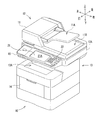
- FIG. 1 is a perspective view showing an image processing apparatus according to an embodiment of the present invention.
- FIG. 2 is a block diagram showing the configuration of the image processing apparatus according to the embodiment of the present invention.
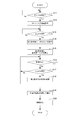
- FIG. 3 is a flowchart showing a procedure of command execution processing executed by the image processing apparatus according to the embodiment of the present invention.
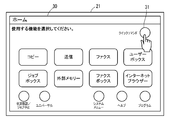
- FIG. 4A is a screen diagram illustrating an example of an initial screen displayed on the display panel.
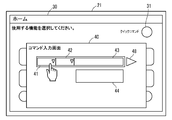
- FIG. 4B is a screen diagram illustrating an example of a command input screen displayed on the display panel.
- FIG. 5A is a screen diagram illustrating an example of a command input screen displayed on the display panel.
- FIG. 5B is a screen diagram illustrating an example of a command input screen displayed on the display panel.
- FIG. 6A is a screen diagram illustrating a display example of commands displayed on the command input screen.
- FIG. 6B is a screen diagram illustrating a display example of commands displayed on the command input screen.
- FIG. 7 is a screen diagram illustrating another example of the command input screen displayed on the display panel.
- FIG. 1 is a schematic cross-sectional view showing the configuration of the image processing apparatus 10.
- FIG. 2 is a block diagram illustrating a configuration of the image processing apparatus 10.
- the image processing apparatus 10 includes a copy function for printing an image read from a document, a scan function for reading and storing image data of a document, a data transmission function for transmitting read image data, and an image based on externally input image data.
- a multifunction device having a plurality of main functions such as a print function for forming image data and a facsimile function for facsimile transmission of image data.
- the present invention can be applied to image processing apparatuses such as a scanner apparatus (image reading apparatus), a printer apparatus (image forming apparatus), a facsimile apparatus, and a copier (image forming apparatus).
- the image processing apparatus 10 includes an ADF (automatic document feeder) 11, an image reading unit 12, an image forming unit 13, a paper feeding unit 14, a control unit 15, an operation display.
- Unit 16 and storage unit 17 (an example of the storage medium of the present invention).
- the ADF 11 includes a document setting unit 11A, a plurality of conveyance rollers, a document pressing unit, and a paper discharge unit 11B, and conveys a document read by the image reading unit 12.
- the image reading unit 12 includes a document table 12A, a light source, a plurality of mirrors, an optical lens, and a CCD, and can read image data from the document.
- the image reading unit 12 can also store the read image data in an external memory such as a USB memory or an SD card connected to the operation display unit 16.
- an external memory such as a USB memory or an SD card connected to the operation display unit 16.
- the image forming unit 13 performs a process of forming an image by electrophotography based on the image data read by the image reading unit 12 or image data input from an external information processing apparatus.
- the image forming unit 13 includes a photosensitive drum, a charging device, an optical scanning device, a developing device, a transfer roller, a cleaning device, a fixing roller, a pressure roller, and a paper discharge unit 13A.
- an image is formed on the sheet supplied from the paper feeding unit 14, and the sheet after the image formation is discharged to the paper discharge unit 13A.
- the image forming unit 13 forms a monochrome image or a color image on the printing paper based on image data or document data directly read from an external memory such as a USB memory or an SD card connected to the operation display unit 16. It is also possible to perform so-called direct printing. When a copy start instruction is input from the operation display unit 16, the image forming operation is performed after the image data of the document is read.
- An operation display unit 16 is provided on the front side of the image reading unit 12.
- the operation display unit 16 includes a display panel 21 and an operation unit 22.
- the display panel 21 is provided on the upper surface of the operation display unit 16, and the display surface 21A is arranged so that the user can visually recognize it from the outside.
- the display panel 21 displays information about printing such as a plurality of key images such as input, setting, and instruction, a preview image of image data and document data to be printed, a printing state, and a message indicating print settings on a liquid crystal display. .
- an initial screen 30 shown in FIG. 4A and a command input screen 40 (an example of a selection screen of the present invention) described later shown in FIG. 4B are displayed on the display surface 21A of the display panel 21.
- the display panel 21 is a touch panel that can detect an input by an external contact, and accepts an input to a displayed key image or the like when a user touches and touches a display surface 21A of the display panel 21. Is possible.
- the operation unit 22 is provided with input keys such as numeric keys for inputting numbers from 0 to 9, a start button for starting a printing operation or software, and a stop button for stopping the printing operation. Yes.
- the storage unit 17 is a non-volatile storage device.
- the storage unit 17 is a storage device such as a flash memory, an SSD (solid state drive), or an HDD (hard disk drive).
- the storage unit 17 stores a plurality of pieces of function information belonging to the main functions (such as a copy function, a scan function, a data transmission function, a print function, and a facsimile function) provided in the image processing apparatus 10.
- the plurality of pieces of function information are used for command execution processing described later.
- the plurality of pieces of function information indicate upper items such as a number of setting items and execution items belonging to each of the main functions, and lower items belonging to the respective upper items.
- Specific examples of the upper items are setting items for performing copy settings, scan settings, data transmission settings, print settings, facsimile settings, and the like.
- Another example of the upper item is an execution item for executing, for example, erasure of image data or batch erasure of each setting item.
- an acquisition item for acquiring IP information registered in the image processing apparatus 10, firmware version information of the image processing apparatus 10, a serial number of the image processing apparatus 10, and the like is another example of the upper item. .
- the lower items are detailed setting items belonging to the copy setting item, for example, setting items such as setting of the number of copies, setting of printing paper, setting of color / monochrome, setting of printing resolution, and the like.
- Other examples of the following items include detailed items belonging to scan setting items (color / monochrome setting, reading resolution setting, etc.), and detailed setting items belonging to data transmission setting items (destination setting, transmission speed setting). , Communication settings, etc.), detailed setting items belonging to print setting items (number of print settings, print paper settings, color / monochrome settings, print resolution settings, etc.), detailed setting items belonging to facsimile setting items (recipients) Setting items such as setting and transmission speed).
- a plurality of function information corresponding to each of these setting items is stored in a hierarchy in the storage unit 17. Specifically, function information corresponding to the upper item is grouped and stored as an upper layer, and function information corresponding to the lower item is grouped in association with the upper item as a lower layer. Is remembered.
- the storage unit 17 stores a GUI file for executing display processing of the command input screen 40 (see FIG. 4B), the frequency of use of commands selected in the past on the command input screen 40, and the like.
- the command is an instruction command for specifying each item (setting item, execution item, acquisition item, etc.) corresponding to the plurality of pieces of function information.
- a plurality of commands are assigned corresponding to the plurality of function information described above. For example, the command “@Set” is assigned to the setting item. A command “@Action” is assigned to the execution item. A command “@Get” is assigned to the acquisition item.
- a command (@Set, @Action, @Get, etc.) corresponding to the function information belonging to the upper layer (the above-mentioned upper item) is referred to as an upper command
- the function information belonging to the lower layer is referred to as a lower command.
- the lower commands include commands “IP”, “Ray”, “Emulation”, “PaperSize”, “DocSize”, “Resolution” and the like belonging to the command “@Set”.
- the command “IP” is an instruction command for specifying detailed setting items for setting an IP address in the image processing apparatus 10.
- the command “Tray” is an instruction command for specifying a detailed setting item for setting a tray in which a sheet used for printing is stored.
- the command “Emulation” is an instruction command for specifying a detailed setting item for setting an operation mode (such as a draft printing mode) used during printing or setting an operation mode (such as an energy saving mode) in the image processing apparatus 10. It is.
- the command “PaperSize” is an instruction command for specifying detailed setting items for setting the paper size used at the time of copying or printing.
- the command “DocSize” is an instruction command for specifying detailed setting items for setting the size of a document used at the time of scanning.
- the command “Resolution” is an instruction command for specifying a detailed setting item for setting a resolution applied at the time of copying, printing, or scanning.
- the upper command and the lower command are not limited to those described above. Commands corresponding to other function information (upper item and lower item) may be assigned. The assignment relationship between the command and each function information is stored in the storage unit 17 in advance.
- the control unit 15 includes control devices such as a CPU, a ROM, and a RAM (not shown).
- the CPU is a processor that executes various arithmetic processes.
- the ROM is a non-volatile storage device in which information such as a control program for causing the CPU to execute various processes is stored in advance.
- the RAM is a volatile storage device used as a temporary storage memory (working area) for various processes executed by the CPU.
- the control unit 15 is connected to the ADF 11, the image reading unit 12, the image forming unit 13, the operation display unit 16, the storage unit 17, and the like.
- control unit 15 various control programs stored in advance in the ROM are executed by the CPU. As a result, the image processing apparatus 10 is comprehensively controlled by the control unit 15.
- the control unit 15 searches for specific function information common to each command based on a plurality of commands input from a command input screen 40 described later by executing a command execution process described later, and the function. Perform specific functions corresponding to information.
- the control unit 15 may be configured by an electronic circuit such as an integrated circuit (ASIC).
- ASIC integrated circuit
- a control unit provided in the operation display unit 16 may be used separately from the main control unit that controls the image processing apparatus 10 in an integrated manner.
- the control unit 15 operates as a first display processing unit 51, a second display processing unit 52, a third display processing unit 53, and a function execution processing unit 54 by executing the control program by the CPU. .
- the third display processing unit 53 performs processing for displaying the command input screen 40 including the first display frame 41 and the second display frame 42 when the shortcut key 31 displayed on the initial screen 30 is touched by the user. Do.
- the initial screen 30 is a screen displayed on the display panel 21 immediately after the image processing apparatus 10 is activated or immediately after the user logs into the image processing apparatus 10, for example.
- FIG. 4A is a diagram illustrating an example of the initial screen 30.
- a plurality of icon images indicating the above-described main functions provided in the image processing apparatus 10 are arranged.
- a menu screen showing setting items and execution items of main functions corresponding to each icon image is displayed on the display panel 21 by the control unit 15.
- icon images corresponding to system menus and the like are also arranged on the initial screen 30.
- a menu screen showing functions (for example, system setting items) corresponding to the icon images. Is displayed on the display panel 21.
- a shortcut key 31 for command input is arranged at a position where the user can perform a touch operation.
- one shortcut key 31 is included in the initial screen 30 in addition to the icon images of the main functions.
- the third display processing unit 53 activates the GUI file in the storage unit 17 and displays the command input screen 40 shown in FIG. 4B on the display panel 21.
- a hard key having the same function as the shortcut key 31 may be provided in the operation unit 22.
- the command input screen 40 has a first display frame 41 in which the upper command is displayed and a second display frame 42 in which the lower command is displayed.
- the second display frame 42 is disposed adjacent to the first display frame 41.
- the first display frame 41 is arranged on the left side of the command input screen 40 so that the selection order can be seen at a glance, and the second display frame 42 is arranged so as to be continuous on the right side thereof. Yes.
- the first display frame 41 may be disposed on the upper side
- the second display frame 42 may be disposed on the lower side
- the display frames 41 and 42 may be disposed side by side in the vertical direction.
- the first display frame 41 and the second display frame 42 are assigned to the display surface 21 ⁇ / b> B of the display panel 21.
- the first display frame 41 is a display frame in which the upper command is displayed by a first display processing unit 51 described later, and the lower display command is displayed in the second display frame 42 by a second display processing unit 52 described later. Display frame.
- a third display frame 43 is arranged on the right side of the second display frame 42.
- the third display frame 43 functions as a display frame for displaying a selectable command when there is a lower command of the lower command selected in the second display frame 42.
- the third display frame 43 is used as an input field for the predetermined setting contents. Function.
- the first display processing unit 51 displays the plurality of upper commands corresponding to the plurality of function information (upper items) belonging to the upper layer in the first display frame 41 of the command input screen 40 so as to be selectable.
- a display method that can be selected for example, a method of displaying a plurality of upper commands in a column by a pull-down method is applicable.
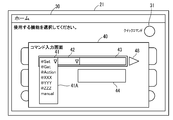
- FIG. 4B when the first display frame 41 is touched by a user operation, the first display processing unit 51 displays a list of a plurality of the upper commands by a pull-down menu 41A as shown in FIG. 5A. To do.
- upper commands are displayed in the order of command “@Set”, command “@Get”, command “@Action”,.
- FIG. 5B shows an example in which the command “@Set” is touched and displayed on the first display frame 41.
- the first display processing unit 51 displays the command “manual” on the pull-down menu 41A of the first display frame 41 together with the upper command.
- This command “manual” is used by the user to manually input a command.
- the control unit 15 changes the first display frame 41 to the third display frame 43 of the command input screen 40 to the manual input frame 45 (see FIG. 7).
- a command can be input to the manual input frame 45 via an input key (not shown) provided on the operation unit 22.
- the second display processing unit 52 displays the lower command belonging to the selected upper command in the second display frame 42 so that it can be selected.
- the lower commands displayed in the second display frame 42 belong to the upper command selected in the first display frame 41, and more specifically, a plurality of lower commands belonging to the upper item (function information) corresponding to the upper command. It is a command corresponding to a subordinate item.
- a selectable display method as in the display method of the first display frame 41, a method of displaying a plurality of lower commands in a column by a pull-down method is applicable. As shown in FIG.
- the second display processing unit 52 displays a list of a plurality of the upper commands by a pull-down menu 42A as shown in FIG. 5B.
- the command “IP”, the command “Tray”, the command “Emulation”, the command “PaperSize”, the command “DocSize”, and the command “Resolution” are displayed in the pull-down menu 42A as the lower commands of the command “@Set”.
- Lower order commands are displayed in the order of “More”.
- the touched lower command is selected and displayed on the second display frame 42 (see FIG. 6A).
- FIG. 6A shows an example in which the command “IP” is touch-operated and displayed in the second display frame 42.
- the display content of the pull-down menu 42A is updated to display another lower command.
- the second display processing unit 52 arranges the lower commands in the order according to the selection frequency of the lower command corresponding to the upper command. Displayed in the second display frame 42. Specifically, every time the lower command is selected in the second display frame 42, the control unit 15 measures the selection frequency for the lower command and stores it in the storage unit 17. When the second display frame 42 is touched by the user, the selection frequency in the storage unit 17 is read out, the lower commands are rearranged according to the selection frequency, and the pull-down list displayed in the rearranged state is displayed. The menu 42A is displayed. In the example of FIG. 5B, a command list rearranged according to the selection frequency is displayed.
- the lower command having the highest selection frequency may be displayed in the second display frame 42.
- the lower command “IP” having the highest selection frequency among the plurality of lower commands displayed in the pull-down menu 42 A is displayed in the second display frame 42. It may be displayed.
- the function execution processing unit 54 displays the first display frame 41 and the second display.
- a function corresponding to specific function information common to each command selected in each frame 42 is executed.
- the command input screen 40 is provided with an execution key 48 that is touch-operated when a function is executed.
- the storage unit 17 is searched to select specific function information common to the first display frame 41 and the second display frame 42.
- the function corresponding to the selected specific function information is executed. For example, as illustrated in FIG.
- steps S11, S12,... represent processing procedure (step) numbers.
- This function execution process is executed when the initial screen 30 is displayed on the display panel 21 after a user login to the image processing apparatus 10.
- control unit 15 detects the user's information based on the registered user's personal information stored in the storage unit 17. Determine whether login is possible. And control part 15 will display initial screen 30 (refer to Drawing 4A) on display panel 21, if a user's login is permitted.
- step S11 it is determined whether or not there is a command input request on the initial screen 30. Specifically, it is determined whether or not the shortcut key 31 is touched on the initial screen 30.
- the control unit 15 detects a voltage signal generated by the touch operation, and determines that the shortcut key 31 is touched, that is, there is a command input request.
- step S11 When it is determined in step S11 that a command input request has been input, the control unit 15 displays a command input screen 40 (see FIG. 4B) on the display panel 21.
- the control unit 15 determines whether or not the upper command is selected from the pull-down menu 41A of the first display frame 41 by the touch operation by the user.
- the control unit 15 displays the upper command on the first display frame 41 (see FIG. 5B). ).
- the control unit 15 refers to the selection frequency stored in the storage unit 17 and causes the second display frame 42 to display the lower order command having the highest selection frequency.
- the selection frequency used at this time is preferably the selection frequency of the lower-order command selected by the logged-in user in the past.
- step S16 the control unit 15 determines whether or not an execution instruction has been input.
- the control unit 15 determines that the execution instruction has been input when the execution key 48 of the command input screen 40 is touched by the user. If the execution instruction is not input, the process proceeds to step S17.
- step 17 the control unit 15 determines whether or not a lower command is selected from one of the pull-down menus 42A of the second display frame 42 by a touch operation by the user.
- step S18 the control unit 15 changes the display content of the second display frame 42 to the selected lower command. Update.
- step S16 the process proceeds to step S19.
- step S19 the upper command is selected in the first display frame 41, and the lower command is selected in the second display frame 42. Then, each selected in the first display frame 41 and the second display frame 42 is selected. Specific function information common to commands is searched in the storage unit 17. Thereafter, the control unit 15 executes a function selected by the search and corresponding to the function information (S20). For example, as shown in FIG.
- the image processing apparatus 10 simply by selecting a command in the first display frame 41 and the second display frame 42, a command desired by the user is set and the execution key 48 is touched.
- the function corresponding to the command can be executed. Therefore, the user can set a desired function from a number of detailed functions provided in each main function without opening a setting screen provided for each main function such as a copy function and a data transmission function.
- the function can be executed.
- the selection frequency is referred to and the lower command is automatically displayed in the second display frame 42
- the control unit 15 does not use the selection frequency
- the selected lower command may be displayed on the second display frame 42 when the second display frame 42 is selected.
- the example in which the high-frequency lower command is automatically displayed only on the second display frame 42 using the selection frequency has been described.
- the upper command displayed on the first display frame 41 is described.
- a high-frequency upper command may be automatically displayed using the selection frequency.
- the control unit 15 causes the first display frame 41 to display a higher order desired by the user when a touch operation on the shortcut key 31 and a selection operation on the first display frame 41 are performed twice.
- the command is displayed. For example, when the shortcut key 31 is touched a predetermined number of times on the initial screen 30, the command input screen 40 is displayed and the upper command corresponding to the number of touches is displayed for the first time. You may make it display on the frame 41.
- the control unit 15 refers to the correspondence table of the number of touches or the touch time and the upper command stored in the storage unit 17 in advance, and displays the corresponding upper command on the first display frame 41.
Landscapes
- Engineering & Computer Science (AREA)
- Human Computer Interaction (AREA)
- General Engineering & Computer Science (AREA)
- Theoretical Computer Science (AREA)
- Multimedia (AREA)
- Signal Processing (AREA)
- Physics & Mathematics (AREA)
- General Physics & Mathematics (AREA)
- Facsimiles In General (AREA)
- User Interface Of Digital Computer (AREA)
- Accessory Devices And Overall Control Thereof (AREA)
Abstract
Description
まず、図1及び図2を参照しつつ、本発明の実施形態に係る画像処理装置10の概略構成について説明する。ここで、図1は画像処理装置10の構成を示す断面模式図である。図2は、画像処理装置10の構成を示すブロック図である。
Claims (5)
- 表示パネルと、
階層化された複数の機能情報が記憶された記憶媒体と、
上位階層に属する複数の機能情報に対応する上位コマンドを選択可能なように前記表示パネルに割り当てられた第1表示枠に表示する第1表示処理部と、
前記第1表示枠においていずれか一つの前記上位コマンドが選択された場合に、前記表示パネルに割り当てられた第2表示枠に、当該上位コマンドに属する下位階層に含まれる複数の機能情報に対応する下位コマンドを選択可能なように表示する第2表示処理部と、
前記第1表示枠及び前記第2表示枠で前記上位コマンド及び前記下位コマンドが選択されると、前記第1表示枠及び前記第2表示枠で選択された各コマンドに共通する特定の機能情報に対応する機能を実行する機能実行処理部と、を備える画像処理装置。 - 前記第2表示処理部は、前記第1表示枠において前記上位コマンドが選択された場合に、当該上位コマンドに対応する前記下位コマンドの選択頻度に応じた順に前記下位コマンドを並べて前記第2表示枠に表示する請求項1に記載の画像処理装置。
- 前記第2表示処理部は、前記第1表示枠において前記上位コマンドが選択された場合に、前記選択頻度の最も高い前記下位コマンドを前記第2表示枠に表示する請求項2に記載の画像処理装置。
- 前記第1表示処理部及び前記第2表示処理部は、プルダウン方式により列状にコマンドを表示する請求項1に記載の画像処理装置。
- 前記表示パネルに表示されたショートカットキーが選択された場合に、前記第1表示枠及び前記第2表示枠を含む選択画面を表示する第3表示処理部を更に備える請求項1に記載の画像処理装置。
Priority Applications (4)
| Application Number | Priority Date | Filing Date | Title |
|---|---|---|---|
| US15/566,651 US10326896B2 (en) | 2015-04-20 | 2015-12-28 | Image processing apparatus |
| JP2017513951A JP6424955B2 (ja) | 2015-04-20 | 2015-12-28 | 画像処理装置 |
| CN201580073347.1A CN107209629B (zh) | 2015-04-20 | 2015-12-28 | 图像处理装置 |
| PH12017501337A PH12017501337A1 (en) | 2015-04-20 | 2017-07-24 | Image processing device |
Applications Claiming Priority (2)
| Application Number | Priority Date | Filing Date | Title |
|---|---|---|---|
| JP2015-085597 | 2015-04-20 | ||
| JP2015085597 | 2015-04-20 |
Publications (1)
| Publication Number | Publication Date |
|---|---|
| WO2016170713A1 true WO2016170713A1 (ja) | 2016-10-27 |
Family
ID=57143803
Family Applications (1)
| Application Number | Title | Priority Date | Filing Date |
|---|---|---|---|
| PCT/JP2015/086560 Ceased WO2016170713A1 (ja) | 2015-04-20 | 2015-12-28 | 画像処理装置 |
Country Status (5)
| Country | Link |
|---|---|
| US (1) | US10326896B2 (ja) |
| JP (1) | JP6424955B2 (ja) |
| CN (1) | CN107209629B (ja) |
| PH (1) | PH12017501337A1 (ja) |
| WO (1) | WO2016170713A1 (ja) |
Cited By (1)
| Publication number | Priority date | Publication date | Assignee | Title |
|---|---|---|---|---|
| WO2024096011A1 (ja) * | 2022-11-04 | 2024-05-10 | 株式会社ジェイテクトエレクトロニクス | シーケンスプログラムの編集プログラム |
Citations (3)
| Publication number | Priority date | Publication date | Assignee | Title |
|---|---|---|---|---|
| JP2002033937A (ja) * | 2000-07-18 | 2002-01-31 | Canon Inc | テレビ制御装置、制御装置、テレビ制御方法及び記録媒体 |
| JP2010233166A (ja) * | 2009-03-30 | 2010-10-14 | Oki Data Corp | 画像作成装置、画像形成装置及び画像処理装置 |
| JP2011223051A (ja) * | 2010-04-02 | 2011-11-04 | Kyocera Mita Corp | 画像形成装置 |
Family Cites Families (7)
| Publication number | Priority date | Publication date | Assignee | Title |
|---|---|---|---|---|
| US20060059425A1 (en) * | 2004-09-14 | 2006-03-16 | Anspach Mark S | Method and apparatus for enabling a user to select hierarchically arranged data in a graphical user interface |
| JP4743132B2 (ja) | 2007-02-15 | 2011-08-10 | ティアック株式会社 | 複数のファンクションキーを有する電子機器 |
| US8064702B2 (en) * | 2007-12-21 | 2011-11-22 | Microsoft Corporation | Handwriting templates |
| JP2012083465A (ja) * | 2010-10-08 | 2012-04-26 | Canon Inc | 画像形成装置、トナー量算出方法及びプログラム |
| US8825734B2 (en) * | 2011-01-27 | 2014-09-02 | Egain Corporation | Personal web display and interaction experience system |
| CN102880624A (zh) * | 2011-07-16 | 2013-01-16 | 张文广 | 网站导航工具系统 |
| KR101888457B1 (ko) * | 2011-11-16 | 2018-08-16 | 삼성전자주식회사 | 복수 개의 어플리케이션을 실행하는 터치스크린을 가지는 장치 및 그 제어 방법 |
-
2015
- 2015-12-28 US US15/566,651 patent/US10326896B2/en active Active
- 2015-12-28 JP JP2017513951A patent/JP6424955B2/ja not_active Expired - Fee Related
- 2015-12-28 CN CN201580073347.1A patent/CN107209629B/zh not_active Expired - Fee Related
- 2015-12-28 WO PCT/JP2015/086560 patent/WO2016170713A1/ja not_active Ceased
-
2017
- 2017-07-24 PH PH12017501337A patent/PH12017501337A1/en unknown
Patent Citations (3)
| Publication number | Priority date | Publication date | Assignee | Title |
|---|---|---|---|---|
| JP2002033937A (ja) * | 2000-07-18 | 2002-01-31 | Canon Inc | テレビ制御装置、制御装置、テレビ制御方法及び記録媒体 |
| JP2010233166A (ja) * | 2009-03-30 | 2010-10-14 | Oki Data Corp | 画像作成装置、画像形成装置及び画像処理装置 |
| JP2011223051A (ja) * | 2010-04-02 | 2011-11-04 | Kyocera Mita Corp | 画像形成装置 |
Cited By (1)
| Publication number | Priority date | Publication date | Assignee | Title |
|---|---|---|---|---|
| WO2024096011A1 (ja) * | 2022-11-04 | 2024-05-10 | 株式会社ジェイテクトエレクトロニクス | シーケンスプログラムの編集プログラム |
Also Published As
| Publication number | Publication date |
|---|---|
| JPWO2016170713A1 (ja) | 2017-11-30 |
| US10326896B2 (en) | 2019-06-18 |
| US20180091665A1 (en) | 2018-03-29 |
| JP6424955B2 (ja) | 2018-11-21 |
| CN107209629B (zh) | 2020-06-30 |
| PH12017501337A1 (en) | 2017-12-18 |
| CN107209629A (zh) | 2017-09-26 |
Similar Documents
| Publication | Publication Date | Title |
|---|---|---|
| KR101445919B1 (ko) | 조작 장치, 조작 장치를 구비하는 화상 형성 장치 | |
| US9516182B2 (en) | Image forming apparatus that enhances operability on screen displayed as split screens | |
| JP5650070B2 (ja) | 操作装置及び操作方法 | |
| US9749488B2 (en) | Image reading apparatus that reads by intended read size and image processing apparatus | |
| JP5911458B2 (ja) | 情報処理装置、ジョブ設定方法 | |
| JP2015050612A (ja) | 情報処理装置、ジョブ設定方法 | |
| US20210132885A1 (en) | Display control device and image forming apparatus | |
| JP6801431B2 (ja) | 電子機器設定装置およびプログラム | |
| JP6424955B2 (ja) | 画像処理装置 | |
| JP5663536B2 (ja) | データ送信装置およびそれを備えた画像形成装置 | |
| JP7169847B2 (ja) | 画像形成装置 | |
| JP2014090361A (ja) | 操作装置、画像形成装置、操作方法 | |
| JP2019009689A (ja) | 画像形成装置 | |
| JP5542755B2 (ja) | 操作装置及び操作方法 | |
| US20220014638A1 (en) | Electronic apparatus and image forming apparatus | |
| JP5738745B2 (ja) | 操作装置及び操作方法 | |
| JP2010034963A (ja) | 操作装置及び画像形成装置 | |
| JP2020021360A (ja) | 画像形成装置 | |
| JP5656953B2 (ja) | 表示入力装置および画像形成装置 | |
| US20210218863A1 (en) | Transmitting apparatus and image forming apparatus | |
| CN107018255B (zh) | 图像形成装置 | |
| JP2016172432A (ja) | 画像処理装置および画像処理システム | |
| WO2016185800A1 (ja) | 表示装置及び画像形成装置 | |
| JP2019089303A (ja) | 画像形成装置 | |
| WO2023182232A1 (ja) | 画像処理装置及びジョブ管理プログラム |
Legal Events
| Date | Code | Title | Description |
|---|---|---|---|
| 121 | Ep: the epo has been informed by wipo that ep was designated in this application |
Ref document number: 15889952 Country of ref document: EP Kind code of ref document: A1 |
|
| ENP | Entry into the national phase |
Ref document number: 2017513951 Country of ref document: JP Kind code of ref document: A |
|
| WWE | Wipo information: entry into national phase |
Ref document number: 12017501337 Country of ref document: PH |
|
| WWE | Wipo information: entry into national phase |
Ref document number: 15566651 Country of ref document: US |
|
| NENP | Non-entry into the national phase |
Ref country code: DE |
|
| 122 | Ep: pct application non-entry in european phase |
Ref document number: 15889952 Country of ref document: EP Kind code of ref document: A1 |