WO2014196261A1 - 電子機器及びプログラム - Google Patents
電子機器及びプログラム Download PDFInfo
- Publication number
- WO2014196261A1 WO2014196261A1 PCT/JP2014/060099 JP2014060099W WO2014196261A1 WO 2014196261 A1 WO2014196261 A1 WO 2014196261A1 JP 2014060099 W JP2014060099 W JP 2014060099W WO 2014196261 A1 WO2014196261 A1 WO 2014196261A1
- Authority
- WO
- WIPO (PCT)
- Prior art keywords
- electronic device
- user
- control unit
- information
- unit
- Prior art date
- Legal status (The legal status is an assumption and is not a legal conclusion. Google has not performed a legal analysis and makes no representation as to the accuracy of the status listed.)
- Ceased
Links
Images







Classifications
-
- G—PHYSICS
- G06—COMPUTING OR CALCULATING; COUNTING
- G06Q—INFORMATION AND COMMUNICATION TECHNOLOGY [ICT] SPECIALLY ADAPTED FOR ADMINISTRATIVE, COMMERCIAL, FINANCIAL, MANAGERIAL OR SUPERVISORY PURPOSES; SYSTEMS OR METHODS SPECIALLY ADAPTED FOR ADMINISTRATIVE, COMMERCIAL, FINANCIAL, MANAGERIAL OR SUPERVISORY PURPOSES, NOT OTHERWISE PROVIDED FOR
- G06Q30/00—Commerce
- G06Q30/02—Marketing; Price estimation or determination; Fundraising
Definitions
- the present invention relates to an electronic device and a program.
- Patent Literature 1 proposes a sales promotion system that acquires information about a product obtained by a shopper using human body communication and uses it for sales management and sales promotion.
- the present invention has been made in view of the above problems, and an object thereof is to provide an electronic device and a program that can provide useful information.
- the electronic device includes a first acquisition unit that acquires information related to the operation of the first electronic device by the user in response to the user holding the first electronic device, and the identification of the first electronic device And a determination unit that determines whether or not the above operation has been performed.
- the electronic device may include a control unit that causes the external display device to display the operation based on the operation of the first electronic device by the user. Furthermore, the said control part is good also as making the said external display apparatus perform the display regarding the said operation according to the said user.
- An electronic device includes a first acquisition unit that acquires information related to a user's operation of the first electronic device and information related to an operation of the second electronic device, and purchase of the first and second electronic devices by the user. And a second acquisition unit that acquires at least one of non-purchasing information, a comparison unit that compares the information acquired by the first acquisition unit and the information acquired by the second acquisition unit.
- the electronic device may include a control unit that causes the external display device to perform display based on the information acquired by the first acquisition unit.
- the first acquisition unit acquires information related to a first operation of the first electronic device and a second operation of the second electronic device corresponding to the first operation. Also good.
- the first acquisition unit may acquire a time until the user turns on the first electronic device.
- the electronic device according to the present invention provides a first instruction unit that instructs the first electronic device to notify the operation related to the predetermined setting when a predetermined time has elapsed since the user started the operation related to the predetermined setting. May be provided.
- the electronic device of the present invention may further include a second instruction unit that instructs the first electronic device to notify the user of the operation of the first electronic device.
- the electronic device of this invention WHEREIN:
- the said 1st acquisition part may acquire the information regarding operation of the said 1st electronic device of the said user on a different date.
- the electronic device of the present invention may include a notification unit that notifies the user about the operation of the electronic device.
- the first acquisition unit may acquire information related to the user operation on different dates.
- the first acquisition unit may acquire the order of operations by the user.
- the first acquisition unit may acquire an operation time by the user.
- the first acquisition unit may acquire a time from when the user starts an operation related to a predetermined setting until the setting is completed.
- the electronic apparatus of the present invention may include a third acquisition unit that acquires information about the user.
- the third acquisition unit may acquire at least one of the gender, age, and purchase history of the user.
- the electronic device of the present invention may include a fourth acquisition unit that acquires at least one of the user's voice and image while the user holds the first electronic device.
- a program according to the present invention includes a first acquisition step of acquiring information related to an operation of the first electronic device by the user in response to the user holding the first electronic device in the computer, and the first electronic device. And a determination step for determining whether or not a specific operation has been performed.
- a program according to the present invention includes a first acquisition step of acquiring information relating to a user's operation of a first electronic device and information relating to an operation of a second electronic device to a computer, and the first and second electronic devices of the user.
- a second acquisition step for acquiring at least one of purchase information and non-purchase information, and a comparison step for comparing the information acquired in the first acquisition step with the information acquired in the second acquisition step It is a program to let you.
- the electronic device and program of the present invention have the effect of providing useful information.
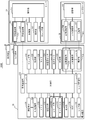
- FIG. 1 is a diagram illustrating a configuration of an electronic device system according to the first embodiment.
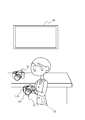
- FIG. 2 is a diagram illustrating a situation where the electronic device system according to the first embodiment is used.
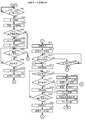
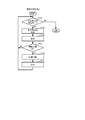
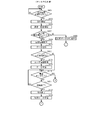
- FIG. 3 is a flowchart illustrating an example of trial data storage processing executed by the electronic device according to the first embodiment.
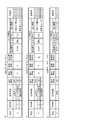
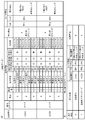
- FIGS. 4A to 4D are diagrams for explaining the processing of FIG. 3, and are examples of a trial data table.
- FIGS. 5A to 5C are diagrams for explaining the processing of FIG. 3, and are examples of a trial data table.
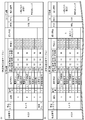
- 6A and 6B are diagrams illustrating an example of a purchase information analysis table stored in the server.
- FIG. 7 is a flowchart illustrating an example of the purchase reason analysis process executed by the server.
- FIG. 8A and 8B are diagrams for explaining the processing of FIG.
- FIG. 9 is a flowchart illustrating an example of sales analysis processing executed by the server.
- FIG. 10A to FIG. 10C are diagrams for explaining the processing of FIG.
- FIG. 11A and FIG. 11B are diagrams showing examples of analysis results.
- FIG. 12A and FIG. 12B are diagrams illustrating a situation in which an electronic device system according to a modification is used.
- FIG. 13 is a diagram illustrating a configuration of an electronic device system according to the second embodiment.
- FIG. 14 is a flowchart (part 1) illustrating an example of processing executed by the electronic device according to the second embodiment.
- FIG. 15 is a flowchart (part 2) illustrating an example of processing executed by the electronic apparatus according to the second embodiment.
- FIGS. 14 and 15 are diagrams for explaining the processing of FIGS. 14 and 15 and are examples of an explanation data table.
- FIG. 17 is a diagram illustrating an example of the explanation data table.
- FIG. 18A to FIG. 18C are diagrams showing an example of the clerk evaluation table.
- FIG. 1 is a block diagram showing the configuration of an electronic device system 500A according to the first embodiment.
- FIG. 2 shows a situation where the electronic device system 500A is used.
- the electronic device system 500 ⁇ / b> A includes an electronic device 10, a server 20, a user card 30, a display device 40, and a cash register terminal 50.
- the electronic device 10 is an exhibit such as a camera, a portable device, or a personal computer displayed in a store or the like, and is a camera in this embodiment.
- the electronic device 10 may be any type of a single-lens reflex camera, a mirrorless camera, and a compact camera.
- the electronic device 10 is a single-lens reflex camera.
- the electronic device 10 has some functions customized as described later in order to obtain an operation history of the user in the store.
- the electronic device 10 includes a lens unit 102, a lens driving unit 104, an image sensor 105, an A / D (Analog / Digital) conversion unit 106, an ASIC (ApplicationASpecific Integrated Circuit) 108, a display unit 110, An operation unit 111, a storage medium 116, a memory 118, a notification unit 120, a biological sensor 122, an acceleration sensor 124, a microphone 126, an imaging unit 128, a calendar unit 130, a communication unit 132, a wireless communication unit 136, and a control unit 138 are provided.
- a lens unit 102 includes a lens unit 102, a lens driving unit 104, an image sensor 105, an A / D (Analog / Digital) conversion unit 106, an ASIC (ApplicationASpecific Integrated Circuit) 108, a display unit 110, An operation unit 111, a storage medium 116, a memory 118, a notification unit 120, a biological sensor 122, an acceleration
- the lens unit 102 includes a plurality of lens groups including a zoom lens and a focusing lens, and forms a subject image on the imaging surface of the image sensor 105.
- the lens driving unit 104 includes, for example, a motor and an actuator, and drives the lens unit 102 for zooming and focusing. Note that the position of the zoom lens and the position of the focus lens are detected by an encoder (not shown).
- the imaging element 105 includes a CMOS (Complementary Metal Oxide Semiconductor) image sensor or the like in which light receiving elements are two-dimensionally arranged on the imaging surface, and generates an analog image signal.
- CMOS Complementary Metal Oxide Semiconductor
- the A / D conversion unit 106 converts the analog image signal generated by the image sensor 105 into a digital image signal and outputs the digital image signal to the control unit 138.
- the ASIC 108 performs various types of image processing (color interpolation processing, gradation conversion processing, contour enhancement processing, white balance adjustment processing, image compression processing, image expansion processing, etc.) on the digital image signal input from the control unit 138. It is a circuit to perform.
- the image data processed by the ASIC 108 (for example, thumbnail display data or main image data having a higher resolution than the thumbnail display data) is displayed on the display unit 110 or stored under the instruction of the control unit 138. Stored in the medium 116.
- the display unit 110 is, for example, an LCD (Liquid Crystal Display) and is provided on the back side of the electronic device 10, and displays various setting information for the electronic device 10, operation menus and icons for operating the electronic device 10, and the like. indicate.
- the display unit 110 displays a live view image (through image) based on the output of the ASIC 108, and a still image and a moving image recorded in the storage medium 116 described later.
- the operation unit 111 includes, for example, a touch panel 112 and a release SW 114.
- the operation unit 111 receives an operation on the electronic device 10 from a user who tries the electronic device 10 in a store.
- the touch panel 112 is provided on the display unit 110 or incorporated in the display unit 110, detects a user's touch operation on the surface of the display unit 110, and accepts various information inputs. That is, the user can operate the electronic device 10 by performing an operation of touching an operation menu or an icon displayed on the display unit 110.
- the touch panel 112 may be used instead of a release SW 114 described later.
- a subject image is formed on the imaging surface of the imaging element 105 via the lens unit 102 in accordance with an operation on the through image displayed on the display unit 110.
- the release SW 114 is a switch operated (pressed) by the user when instructing to capture a still image, for example.
- the storage medium 116 is, for example, an SD card, and stores still image data and moving image data.
- the storage medium 116 is detachable from the electronic device 10 (a card throttle (not shown)).
- the memory 118 is a non-volatile semiconductor memory (for example, flash memory), a program for controlling the electronic device 10 executed by the control unit 138, various parameters, and a trial data table (FIG. 4A) described later. Reference) is stored.
- non-volatile semiconductor memory for example, flash memory
- a program for controlling the electronic device 10 executed by the control unit 138 various parameters, and a trial data table (FIG. 4A) described later. Reference) is stored.
- the notification unit 120 includes a vibrator that vibrates a predetermined part of the electronic device 10, a light emitting element that illuminates the operation member, and the like.
- the notification unit 120 performs notification regarding the operation of the electronic device 10 under the instruction of the control unit 138.
- the notification unit 120 may be operated in such a way that the user who uses the electronic device 10 does not know the operation method by vibrating the part where the operation member to be operated exists or in the vicinity thereof, or shining the operation member. Guidance on the operation of a user who is lost.
- the biosensor 122 is provided, for example, at a position outside the housing of the electronic device 10 and in contact with the user.
- the biosensor 122 detects a user's contact, pulse, sweat, and the like, and outputs the detection result to the control unit 138.
- the acceleration sensor 124 is provided inside the electronic device 10, detects the acceleration of the electronic device 10, and outputs the detection result to the control unit 138.
- a piezoelectric element, a strain gauge, or the like can be used for the acceleration sensor 124.
- As the number of axes of the acceleration sensor 124 any one of 1 to 3 axes may be selected as appropriate, and the number can be arbitrarily set. In the present embodiment, it is assumed that power is supplied to the biometric sensor 122 and the acceleration sensor 124 regardless of whether a power switch (not shown) is turned on or off in order to obtain a user's operation history. In this case, power may be supplied to the living body sensor 122 and the acceleration sensor 124 only during the business hours of the store.
- the microphone 126 is provided, for example, on the upper surface side of the electronic device 10 and collects the sound of the subject and the photographer.
- the microphone 126 is used to acquire sound (for example, “heavy”, “slow”, “difficult”, etc.) uttered while the user tried the electronic device 10. You may make it customize and provide in the back side of the electronic device 10.
- FIG. In the present embodiment, the microphone 126 is customized to collect sound under the instruction of the control unit 138 when the biological sensor 122 or the acceleration sensor 124 detects that the user holds the electronic device 10. Has been.
- a voice recognition unit for recognizing the voice uttered by the user may be provided in the electronic device 10 (for example, if the electronic device 10 is a smart phone or the like, it may be built in), and the server 20 described later Voice data may be transmitted and the server 20 may recognize the voice.
- the imaging unit 128 is provided on the back surface of the electronic device 10 on which the display unit 110 and the touch panel 112 are arranged, and takes an image of a user who is using the electronic device 10 under the instruction of the control unit 138. Customized for. Note that the imaging unit 128 may be omitted.
- the calendar unit 130 acquires time information such as year, month, date, and time and outputs the time information to the control unit 138.
- the calendar unit 130 has a timekeeping function.
- the communication unit 132 communicates with other devices and uses, for example, proximity communication such as Bluetooth (registered trademark), RFID (Radio Frequency Identification), TransferJet (registered trademark), or human body communication via a human body. be able to.
- the communication unit 132 includes an electrode unit 133 that is provided outside the casing of the electronic device 10 and contacts the user, and a human body communication unit 134 that performs human body communication using the electrode unit 133.
- the human body communication unit 134 communicates with a human body communication unit 303 of the user card 30 described later, and receives user information stored in the storage unit 305 of the user card 30.
- Human body communication includes a current system in which a weak current is passed through the human body and the current is modulated to transmit information, and an electric field system in which information is transmitted by modulating an electric field induced on the surface of the human body. .
- a current system in which a weak current is passed through the human body and the current is modulated to transmit information
- an electric field system in which information is transmitted by modulating an electric field induced on the surface of the human body.
- the wireless communication unit 136 performs wireless communication with other devices.
- the wireless communication unit 136 performs wireless communication with the server 20 described later, and transmits and receives data.
- the control unit 138 includes a CPU (Central Processing Unit) and the like, and controls the entire electronic device 10.
- the control unit 138 is activated in response to the electronic sensor 10 being picked up by the user by the biological sensor 122 or the acceleration sensor 124, and enters a state of a power switch (not shown). It is customized to supply power to necessary parts (for example, the microphone 126, the imaging unit 128, the communication unit 132, the wireless communication unit 136, etc.).
- the control unit 138 does not drive and control the image sensor 105, the motor (not illustrated) of the lens driving unit 104, the display unit 110, and the like until a power switch (not illustrated) is turned on. Note that, similarly to the biosensor 122 and the acceleration sensor 124, power may be supplied to the control unit 138 regardless of the state of a power switch (not shown).
- the server 20 is provided in a store of a home appliance mass retailer, and includes a communication unit 201, a storage unit 205, a display unit 207, a calendar unit 208, and a control unit 211 as illustrated in FIG. .
- the communication unit 201 communicates with other devices, and includes a wireless communication unit 203 that performs wireless communication and a wired communication unit 202 that performs wired communication.
- the wireless communication unit 203 performs wireless communication with the electronic device 10 and receives information on the trial data table stored in the memory 118 of the electronic device 10 from the electronic device 10.
- the wired communication unit 202 communicates with the display device 40 and transmits data and video to be displayed on the display device 40 to the display device 40.
- the wired communication unit 202 performs wired communication with the cash register terminal 50 and receives user information, product information purchased by the user, and the like from the cash register terminal 50.
- the storage unit 205 is, for example, a nonvolatile semiconductor memory such as a flash memory, a hard disk drive, or the like.
- the storage unit 205 stores a program for controlling the server 20 executed by the control unit 211, various parameters for controlling the server 20, and the like. Furthermore, the storage unit 205 stores information received from the electronic device 10 or the cash register terminal 50 in a purchase information analysis table (see FIG. 6A or the like) described later, or results of analysis processing executed by the control unit 211 ( For details).
- the display unit 207 displays various information stored in the storage unit 205, the result of analysis processing by the control unit 211, and the like under the control of the control unit 211.
- the calendar unit 208 acquires time information such as year, month, day, and time, and outputs the time information to the control unit 211.
- the calendar unit 208 has a time measuring function.
- the control unit 211 has a CPU and controls the entire server 20. Details of processing executed by the control unit 211 will be described later.
- the user card 30 is, for example, a card (point card or the like) issued to a user in a store or the like, and includes a storage unit 305 and a communication unit 301.
- the storage unit 305 is, for example, a non-volatile semiconductor memory, and stores user information.
- the storage unit 305 stores, for example, the user's membership number, name, address, age, sex, and product purchase history as user information.
- the storage unit 305 may store, for example, a user membership number as user information.
- detailed information such as name, address, age, gender, and product purchase history may be managed in association with a member number in a server (not shown) that manages user information.
- the communication unit 301 communicates with other devices. For example, proximity communication such as Bluetooth (registered trademark), RFID, TransferJet (registered trademark), or human body communication via a human body can be used.
- the communication unit 301 includes an electrode unit 302 that is a part of the user card 30 and that is in contact with the user, and a human body communication unit 303 that performs human body communication using the electrode unit 302. Prepare.
- the human body communication unit 303 communicates with the human body communication unit 134 of the electronic device 10 and is stored in the storage unit 305 when the user contacts the electronic device 10 while carrying the user card 30. The transmitted user information is transmitted to the electronic device 10.
- the user card 30 when the user holds the user card 30 directly (that is, when the electrode unit 302 and the user's body are in direct contact), the user card 30 is put in a pocket of clothes or the like. Even when the electrode unit 302 is not in direct contact with the user's body, human body communication is possible.
- the electronic device 10 accumulates and transmits information (trial data) related to operations performed by the user from the start of trial use of the electronic device 10 to the end thereof.
- information related to operations performed by the user from the start of trial use of the electronic device 10 to the end thereof.
- FIG. 3 is a flowchart illustrating an example of trial data storage processing executed by the control unit 138 of the electronic device 10.
- step S301 the control unit 138 of the electronic device 10 stands by until the user picks up the electronic device 10.
- the control unit 138 may determine whether or not the user has picked up the electronic device 10 based on the output of the acceleration sensor 124, or whether or not the user has touched the electronic device 10 with the biological sensor 122. It is possible to detect whether or not and make the determination based on the detection result. Then, when determining that the user has taken the electronic device 10, the control unit 138 proceeds to step S303.
- step S303 the control unit 138 starts measuring time by the calendar unit 130. This step is for measuring the time from when the user holds the electronic device 10 to when the electronic device 10 is turned on.
- step S ⁇ b> 304 the control unit 138 starts sound collection by the microphone 126 and imaging by the imaging unit 128 in order to acquire a voice or facial expression image of the user who is using the electronic device 10 as a trial. This is because the user may evaluate the hold feeling, weight, and design even when the electronic device 10 is powered off.
- the electronic apparatus 10 is a single-lens reflex camera as in the present embodiment, manual zoom operation and manual focus operation are possible, and the trial and evaluation of the lens unit 102 can be performed.
- the control unit 138 can detect that a manual zoom operation or a manual focus operation has been performed from the output of an encoder (not shown), the presence / absence of each operation and the operation time are stored in the trial data table.
- control unit 138 can recognize which portion of the lens unit 102 is being evaluated by causing the calendar unit 130 to measure the operation time at the wide end and the operation time at the tele end. Further, the sound collected during the trial of the lens unit 102 may be stored in the trial data table in association with the position of the zoom lens and the position of the focus lens.
- control unit 138 determines whether or not human body communication with user card 30 is established.
- the control unit 138 proceeds to step S308.
- the determination in step S305 is affirmed, and the process proceeds to step S306.
- step S306 the control unit 138 acquires user information stored in the storage unit 305 of the user card 30 via the human body communication unit 134. Then, in step S307, the control unit 138 registers the user information item in the trial data table (see FIG. 4A), and proceeds to step S308.
- the control unit 138 acquires a member number, sex, age, and purchase history as user information.
- the timing which performs step S305, S306 can be changed suitably, for example, may be performed after step S301.
- step S308 the control unit 138 determines whether the power source of the electronic device 10 is turned on. When judgment here is denied, it transfers to step S309.
- step S309 the control unit 138 determines whether or not the user has finished trial of the electronic device 10. For example, when it can be determined that the user does not hold the electronic device 10 based on the output of the acceleration sensor 124 or the biological sensor 122, the control unit 138 determines that the user has finished trial of the electronic device 10. When determination here is denied, the control part 138 returns to step S308. Then, when the electronic device 10 is powered on, the determination in step S308 is affirmed, and the process proceeds to step S313.
- the control unit 138 ends the time measurement by the calendar unit 130, and in the subsequent step S315, a trial data table that stores information (trial data) related to an operation while the user is using the electronic device 10 as a trial. Register the data.
- the control unit 138 stores the product name (or model name) used by the user in the product item of the trial data table (in FIG. 4B, “ A ”),“ 1 ”is stored in the operation order item indicating the order of operations performed by the user,“ power on ”is stored in the operation content item, and time measurement is started in step S303 in the operation time item.
- the time for example, 30 seconds
- the date obtained from the calendar unit 130
- step S317 the control unit 138 determines whether an operation has been received from the user. When judgment here is denied, it transfers to step S329.
- step S329 the control unit 138 determines whether or not the user has finished the trial use of the electronic device 10, similarly to step S309. When judgment here is denied, it returns to step S317. Then, when an operation is received from the user, the determination in step S317 is affirmed, and the process proceeds to step S319.
- step S319 the control unit 138 starts measuring time by the calendar unit 130.
- This step is a process for measuring the user operation time.
- step S321 the control unit 138 determines whether or not the trial use of the electronic device 10 has been completed in the same manner as in step S309. When judgment here is denied, it transfers to step S322.
- the control unit 138 determines whether notification regarding the operation is necessary. Specifically, the control unit 138 determines that the setting does not end even after a predetermined time has elapsed since the user started an operation related to a predetermined setting (for example, ISO setting, shutter speed setting, exposure setting, etc.). Then, it is determined that notification regarding the operation is necessary. Alternatively, the control unit 138 estimates the user's feelings (“irritated” or the like) based on the output data of the biosensor 122, and whether or not notification regarding the operation is necessary based on the estimation result. May be judged.
- a predetermined setting for example, ISO setting, shutter speed setting, exposure setting, etc.
- control unit 138 may determine that notification regarding the operation is necessary when the sound collected by the microphone 126 includes predetermined sound (such as “I don't know” or “Difficult”). If the control part 138 judges that the alerting
- the control unit 138 executes a notification process. Specifically, the notification unit 120 causes the operation member to be operated by the user to shine or vibrates a part where the operation member exists. Alternatively, the control unit 138 instructs the server 20 to display an image related to the operation currently being performed by the user on the display device 40 via the wireless communication unit 136. At this time, the control unit 138 estimates the user attributes (for example, amateur, high amateur, etc.) from the purchase history of the user information, and changes the video displayed on the display device 40 based on the estimation. The video displayed on the display device 40 may be changed based on gender and age.
- the user attributes for example, amateur, high amateur, etc.
- step S322 determines in step S322 that notification regarding the operation is not necessary, the process proceeds to step S324 without performing the process of step S323.
- step S324 the control unit 138 determines whether another operation is accepted. If the determination is negative, the process returns to step S321. If the determination is positive, the process proceeds to step S325.
- the control unit 138 ends the time measurement by the calendar unit 130, and registers trial data of the electronic device 10 in the subsequent step S327. For example, as shown in FIG. 4C, the control unit 138 stores “2” in the operation order item and “release SW operation” in the operation content item in the trial data table. In the item, the time (for example, 3 minutes) from the start of the time measurement in step S319 to the end of the time measurement in step S325 is stored, and the date when the trial data is registered is stored in the registration date item. Note that if the user performs other operations such as an AF operation and a zoom operation while the user is performing the release SW operation, the control unit 138 also displays the operation contents and the respective operation times together with the trial data. Store in a table.
- step S327 After the process of step S327 is completed, the control unit 138 returns to step S319 and starts measuring the operation time of the operation received in step S324.
- control unit 138 registers, in the trial data table, information (trial data) related to operations performed by the user on the electronic device 10 until the user ends the trial of the electronic device 10. Then, when the user finishes the trial use of the electronic device 10, the determination in step S321 is affirmed, and the process proceeds to step S331.
- the control unit 138 ends the time measurement by the calendar unit 130, and registers trial data of the electronic device 10 in the subsequent step S332.
- the trial data table “3” is stored in the operation order item, “function A operation” is stored in the operation content item, and step time is set in the operation time item.
- the time (for example, 5 minutes) from the start of time measurement in S319 to the end of time measurement in step S331 is stored, and the date when the trial data is registered is stored in the item of registration date.
- step S333 the control unit 138 ends the sound collection by the microphone 126 and the user's image pickup by the imaging unit 128.
- step S334 the acoustic data collected by the microphone 126 is set as the audio information item of the trial data table. Registration is performed, and imaging data of the imaging unit 128 is registered in the item of video information (see FIG. 5A).
- step S341 the control unit 138 executes a specific operation determination process. Specifically, the control unit 138 determines whether or not the user has performed a specific operation during the trial use of the electronic device 10.
- This step is a process for providing information regarding whether or not a new function added to the electronic device 10 or a function that is the main feature of the electronic device 10 has been operated.
- an operation related to the function A is designated in advance as the specific operation.
- the control unit 138 determines whether the operation of the function A is stored in the operation content item in the trial data table. For example, in the trial data table of FIG.
- control unit 138 determines that the specific operation has been performed, and “exists” in the item of presence / absence of the specific operation. Is stored (see FIG. 5B). Note that the control unit 138 may omit the process of step S341 and execute the process of the next step S343. In this case, the control unit 211 of the server 20 may execute a specific operation determination process.
- step S341 the control unit 138 proceeds to step S343, transmits the information of the trial data table stored in the memory 118 to the server 20 by the wireless communication unit 136, and ends the entire process of FIG.
- the timing at which the control unit 138 transmits the information of the trial data table to the server 20 may be while the user is operating the electronic device 10.
- the human body communication unit is placed on the floor of the store.
- a proximity communication unit may be provided to obtain information related to the user's trial, and information related to the user's trial may be transmitted to the server 20 via the floor portion in almost real time.
- the control unit 211 of the server 20 may perform the determination in step S322 and instruct the electronic device 10 to notify when the notification regarding the operation is necessary.
- step S310 when the electronic device 10 is not turned on (step S308 / NO) and the user ends the trial use of the electronic device 10 (step S309 / YES), the control unit 138 proceeds to step S310. For example, when the user lifts the electronic device 10 to confirm the weight or ease of holding the electronic device 10 and ends the trial without performing any operation on the electronic device 10, the process proceeds to step S310.
- step S310 the control unit 138 ends the time measurement by the calendar unit 130, and registers trial data in step S311.
- “1” is stored in the operation order item of the trial data table
- “possession” is stored in the operation content item
- step S303 is stored in the operation time item.
- the time (for example, 1 minute) from the start of time measurement to the end of time measurement in step S310 is stored, and the date when trial data is registered is stored in the item of registration date.
- step S311 the processing from step S333 described above is executed, and all the processing in FIG.
- the control unit 138 stores the trial of the lens unit 102 in the trial data table.
- step S308 / YES the user ends the trial of the electronic device 10 without accepting any operation from the user (step S317 / NO) (step S329 / YES).
- the control unit 138 executes the processing from step S333 described above, and ends all the processing in FIG.
- the server 20 that has received the information of the trial data table from each electronic device 10 groups the trial data based on the user membership number and the product category of the electronic device 10 that the user tried, and FIG. As shown in the purchase information analysis table.
- the user uses which product in each product category (camera and music player in the example of FIG. 6A), and what operation is performed in which order while the product is being used.
- Information such as whether or not a function has been performed and whether or not a function newly added to the product or a function as a main feature has been operated is registered for each day (different date) on which the user tried.
- the server 20 receives the user's membership number and information on the purchased product from the cash register terminal 50, and the user purchases the item of the purchased product as shown in FIG. 6B. Stores the purchased product and its purchase date. Thereby, in the purchase information analysis table, the product tried by the user is associated with the actually purchased product.
- the server 20 executes a purchase reason analysis process for analyzing the reason why the user purchased the electronic device 10 and a sales analysis process as the analysis processes.
- FIG. 7 is a flowchart illustrating an example of the purchase reason analysis process executed by the control unit 211 of the server 20.
- the control unit 211 performs the process of FIG. 7 periodically (for example, once a day).
- this processing may be executed, or data may be extracted as appropriate to provide information to each manufacturer.
- step S201 the control unit 211 of the server 20 first extracts data in which a value is input in the item of purchased product from the purchase information analysis table.
- control unit 211 selects one piece of data from the extracted data, and proceeds to step S207.
- the control unit 211 selects the user data of the member number A7890 from the extracted data shown in FIG.
- the control unit 211 may execute the flowchart of FIG. 7 for each user category. Examples of the user category include gender, age, and model (introductory machine, intermediate machine, and luxury machine).
- the control unit 211 analyzes the reason why the user purchased the product and registers it in the purchase reason analysis table (FIG. 8B). Specifically, the control unit 211 analyzes where the user feels attractive about the purchased product based on the operation content and operation time for each product tried by the user, the number of trials, and the like.
- the control unit 211 estimates that the user has purchased the product A because he / she is attracted by the ease of setting the product A. Then, the control unit 211 stores the purchased product name (“A”) in the item of the purchased product as in the data in the first row of the analysis data table shown in FIG. Stores “setting operation” and registers user information. Further, the control unit 211 registers the product (“B”) that has been compared with the purchased product (“A”) in the item of comparison product.
- setting operation for example, ISO setting
- Shutter speed setting for example, Shutter speed setting, white balance setting, image editing setting
- the user with the member number A1234 repeats the power on / off operation for the product A and the product B.
- the controller 211 estimates that the product B has been purchased because it is attractive to the speed until activation.
- the control unit 211 may obtain specifications regarding the activation times of the products A and B and store the activation times in the purchase reason analysis table. Note that the number of times the user has tried the product before purchase may be registered in the purchase reason analysis table.
- the control unit 211 may estimate that the user has decided to purchase the product before visiting the store. Further, the control unit 211 may estimate the purchase reason from the acoustic data registered in the trial data. For example, when a user who has possessed the product A and has not performed an operation purchases the product A, if the sound data includes voices such as “light” and “small”, the control unit In 211, the weight (lightness) and size of the product A are estimated as the reason for purchase. Also in this case, the control unit 211 may store the specifications of the purchased product and the weight and size of other products in the purchase reason analysis table. In addition, even if the user repeatedly performs various operations, since the function or operation of interest is often reconfirmed at the end, the control unit 211 purchases the last operation performed by the user. May be stored in the purchase reason analysis table.
- step S209 the control unit 211 determines whether or not all the extracted data has been analyzed. If the determination is negative, the process returns to step S203. If the determination is positive, the process proceeds to step S211.
- the control unit 211 counts the analysis data registered in the purchase reason analysis table (FIG. 8B), and outputs the count result in step S213. For example, the control unit 211 aggregates the purchase reasons for each product and user attribute, ranks the purchase reasons, and displays them on the display unit 207 or prints them from a printer (not shown).
- “setting operation” is the decisive factor in purchasing product A for men
- “weight (lightness)” is the decisive factor in purchasing product A for women.
- the person in charge (marketer or product development person) can grasp the tendency of becoming, and can be used for marketing and future product development.
- control unit 211 allows the user to actually purchase for each product that the user did not purchase, that is, for each product stored in the item of comparison product in the purchase reason analysis table of FIG.
- the collected products (purchased products) and the reasons for purchase are aggregated, ranked, and output.
- a user who has not purchased the product A can grasp the tendency that the product actually purchased most is the product B and the top reason for the purchase is “setting operation”.
- improvement of the setting operation is considered in the future product development of the manufacturer.
- control unit 211 may aggregate, rank, and output comparison products for each purchased product.
- the store clerk can grasp the tendency that the user who purchases the product A performs a comparison with the product B, and the product B is displayed next to the product A in the store. It can be reflected in the product layout.
- control unit 211 ends all the processing in FIG.
- FIG. 9 is a flowchart illustrating an example of sales analysis processing executed by the control unit 211 of the server 20.
- the process of FIG. 9 may be executed periodically (for example, daily, weekly, monthly, etc.) or may be executed upon request.
- step S101 the control unit 211 determines whether there is a product whose sales volume has not reached the target (unachieved) from the purchase information analysis table or the inventory management table (not shown). To do. In the present embodiment, the control unit 211 determines that products whose sales number is smaller than the predetermined number or products whose inventory number is larger than the predetermined number are unsold products. If there is no product for which the number of units sold has not been reached, the control unit 211 ends this flowchart.
- control unit 211 confirms the specification of the unachieved product, the number of units sold, the comparison product, and the like from the purchase information analysis table and the inventory management table (not shown).
- step S105 the control unit 211 displays the confirmation result in step S103 on the display unit 207.
- FIG. 10A shows an example of data displayed on the display unit 207 in step S105. The sales number, the number of operators, the average operation time, and the inventory of the product A extracted as a product that has not been sold. The number and comparison products are displayed. As is clear from FIG. 10A, since the number of operators is 100 with respect to 100 persons, it can be seen that 20% of the people who tried the product A have purchased the product A. In addition, it can be seen that the number of specific operating persons who have operated the new function of the product A is 35 with respect to 100 operating persons.
- the control unit 211 may transmit data to be displayed on the display unit 207 to the personal computer or mobile terminal of the store manager using the wireless communication unit 203.
- step S107 the control unit 211 inquires of the person in charge confirming the data in FIG. 10A whether information collection of the comparison product B is necessary. Then, the control unit 211 proceeds to step S109 if information collection is necessary, and returns to step S101 if information collection is not necessary.
- step S109 the description is continued assuming that the process proceeds to step S109. Note that step S107 may be omitted, and the process may automatically proceed to step S109.
- step S109 the control unit 211 acquires information such as the specification of the comparison product B, the number of units sold, and the number of trial users from a purchase information analysis table and an inventory management table (not shown).
- the comparison product may be a plurality of products.
- step S111 the control unit 211 displays the information collected in step S109 on the display unit 207.
- 10B and 10C show an example of data displayed on the display unit 207 in step S111.
- the control unit 211 displays the trial number, average operation time, number of purchases for the trial number, and the number of stocks of the products A and B on the display unit 207.
- 50 out of 100 trial users of product A 50%) try product B, and 50 out of 150 trial users of product B (33%). Is trying product A.
- half of the 20 purchasers of product A 50%) try only product A
- 40 out of 70 purchasers of product B (57%) are product B.
- 10 people 25%) have purchased the product A and 40 people (75%) have purchased the product B among 40 people who tried both products A and B. From this, it can be seen that product A is defeated by product B.
- control unit 211 also displays data related to specifications as shown in FIG. FIG. 10C shows an operation history related to the new function of the product A and an operation history of the function of the product B corresponding to the new function.
- FIG. 10C shows an operation history related to the new function of the product A and an operation history of the function of the product B corresponding to the new function.
- 15 out of 20 purchasers of product A (75%) are performing a specific operation of product A
- 50 out of 70 purchasers of product B (71 %)
- Performs a specific operation of the product B and indicates that the specific operation leads to purchase.
- 10 out of 15 people who performed the specific operation of the product A (67%) perform the specific operation of the product B
- 20 out of the 50 people who performed the specific operation of the product B (40%) Specific operations.
- 10 (A) and 10 (C) it can be seen that the small number of trials of a specific function of product A is related to the small number of products A sold.
- the analysis described above may be analyzed by the control unit 211 by installing an analysis program in the storage unit 205, or by a user who confirms the display on the display unit 207.
- step S111 After displaying the product A in step S111, the control unit 211 returns to step S101 and repeats this flowchart until the display regarding the product that has not been achieved is completed. Thereby, the store manager or the control unit 211 can take measures such as instructing the salesperson to appeal the specific function of the product A or displaying a video introducing the specific function of the product A on the display device 40. I understand that
- the control unit 211 may add up the average operation time of a specific operation for each user attribute, for example, as shown in FIG. As shown in FIG. 11B, the control unit 211 may total trials (operation times) of equivalent functions of other products for each user attribute.
- the control unit 211 estimates the user attributes (beginner, intermediate, advanced) from the purchase history of the user's products. For example, the control unit 211 estimates that a user who has only purchased a compact camera or a user who has purchased an introductory device is a beginner with respect to a single-lens reflex camera. In addition, for example, the control unit 211 estimates that a user who has purchased a higher model among single-lens reflex cameras or who has purchased a specific accessory or interchangeable lens is an advanced user.
- the manufacturer's marketer or product developer can, for example, use the function A that is a new function or a feature function as the target user group. It is possible to determine whether or not it is being used by the user or whether or not the user can be appealed well. For example, when the function B of the product B corresponding to the new function A is being tried, but the new function A is not tried, it can be determined that the new function A is not sufficiently appealing to the user. .
- the server 20 performs an analysis process using the purchase information analysis table and tabulates the results of the analysis process.
- the data itself may be aggregated.
- the server 20 aggregates the operations performed by the user for each product, ranks the functions that are frequently operated by the user, and ranks the person in charge of the manufacturer (for example, a developer, a marketer, an advertisement) It may be provided to a person in charge). Thereby, the person in charge can know what functions and operations the user confirms or what functions are regarded as important when purchasing the electronic device 10.
- the server 20 may total the ratio of specific operations performed for each product and user attribute, and provide the total to the person in charge. Thereby, for example, a woman can grasp a tendency of the product A not to operate the function A.
- the function is not an important function for the user or is not appealing well to the user. It can be used for future product development and advertising strategies.
- the server 20 may aggregate other products compared with the product for each product, rank the other products, and provide the products to the staff of a consumer electronics retailer.
- salesclerks such as consumer electronics mass retailers
- the layout of the product display can be changed so that the products can be easily compared with each other.
- a person in charge of inventory management at a home appliance mass retailer can use the information for inventory management, such as having a large inventory of products that are often compared.
- the electronic device 10 is held by the user using the operation unit 111 that receives an operation from the user, and at least one of the biosensor 122 and the acceleration sensor 124. And a control unit 138 that determines whether or not a specific operation has been performed in the operation unit 111 according to the detection result. What kind of operation the user who used the device 10 has performed on the electronic device 10 and whether or not a specific operation has been performed, such as operation of a new function or a main function, is useful. Information (see FIG. 5A) can be provided. In addition, since the information is accumulated (purchasing information analysis table: see FIG. 6A) and the accumulated information is totaled, the trend at the time of trial use or purchase of the electronic device 10 can be grasped. Development staff and marketing staff can use it for future product development, marketing, and advertising strategies.
- the electronic device 10 includes the notification unit 120 that performs notification regarding the operation related to the predetermined setting when a predetermined time has elapsed since the user started the operation regarding the predetermined setting. It is possible to guide the user's operation whose operation method is unknown. In this case, the electronic device 10 may measure the time from when the notification is made until the user finishes the operation related to the predetermined setting, and register it as trial data. This makes it possible to confirm the effectiveness of the notification. In addition, the information can be used to determine the ease of operation.
- the electronic device 10 includes the notification unit 120 that notifies the user of operations on the electronic device 10 (for example, an operation for viewing a captured image). User operations that do not know how can be guided. In this case as well, the time from when the notification is made until the user finishes the operation may be timed and registered as trial data. This makes it possible to confirm the effectiveness of the notification. In addition, the information can be used to determine the ease of operation.
- control unit 138 acquires the order of operations by the user. For example, information such as the order in which the user confirms the operations and what number of specific operations are being tried. Can be provided. As a result, the manufacturer's product development staff and marketing staff can guess the functions and the like that are important when the user purchases the product.
- control unit 138 acquires the operation time by the user, and thus the operation time can be used for estimation of the purchase reason for the electronic device 10.
- the operation time can be used to determine the ease of operation.
- control unit 138 acquires a time from when the user starts an operation related to a predetermined setting until the setting is completed, and therefore the control unit 138 relates to the setting based on the time. It can be determined whether the operation is easy.
- the control unit 138 of the electronic device 10 obtains user information via the human body communication unit 134, and thus provides information on the relationship between the operation performed by the user and the user attribute. It becomes possible to do. Specifically, it is possible to provide information related to operations that are often performed by advanced users (operations and functions that are important) and operations that are often performed by beginners. In addition, user information can be acquired without forcing the user to perform a special operation.
- the control unit 138 of the electronic device 10 transmits trial data to the server 20 together with the date when the user tried the electronic device 10, and the control unit 211 of the server 20 transmits the trial data. Since information is registered in the purchase information analysis table for each trial date of the electronic device 10 (see, for example, FIG. 6A), information such as the time (number of days) required before the user decides to purchase the electronic device 10 and the number of trials Can be provided.
- the server 20 obtains information related to the user's operations on the plurality of electronic devices 10 from the electronic device 10 via the wireless communication unit 203, and whether or not the user has purchased the electronic device 10.
- Information is acquired from the cashier terminal 50, and the control unit 211 that compares the information regarding the operation of the plurality of electronic devices 10 with the information regarding whether or not the electronic devices 10 have been purchased is provided.
- Providing useful information purchase information analysis table: see FIG. 6 (B)
- purchase information analysis table see FIG. 6 (B)
- the person in charge of the manufacturer for example, a development person, a marketer, a person in charge of promotion, etc.
- the Purchasing Information Analysis Table can be used for product development strategies such as what functions and operations to focus on in the future, and for advertising strategies such as whether or not to create advertisements that appeal to differences from other companies. Information can be useful.
- product development strategies such as what functions and operations to focus on in the future
- advertising strategies such as whether or not to create advertisements that appeal to differences from other companies. Information can be useful.
- a newly added function or a main function is not operated by any user, it is considered that the function is not an important function for the user or is not appealing well to the user. Therefore, it can be used for future product development and advertising strategies.
- salesclerks such as home appliance mass retailers that sell products can know which products the user compares well, so the layout of the product display can be easily arranged so that the user can easily compare the products. Can be changed.
- the person in charge of the manufacturer compares the introductory machine of the company's product with the intermediate model, and what functions and operations are available when the intermediate model is purchased. For this reason, it is possible to know whether the user has purchased a middle-class model, and the information can be used for product development, such as whether or not to add functions to the introductory machine, improvement of functions and operations, and the like.
- the user compares the company's product with the other company's product and purchases the other company's product, it can know which function or operation the user has purchased the other company's product, Guidance on what areas to focus on in future research and development can be obtained.
- control unit 211 of the server 20 relates to information related to an operation corresponding to the plurality of electronic devices 10 (for example, operation A of the product A and operation of the product B corresponding to the operation A).
- Information (see FIG. 10C), information indicating whether or not the corresponding operation is performed in each electronic device 10 (for example, information regarding whether or not the operation is compared) is provided. can do.
- the control unit 138 of the electronic device 10 transmits the trial data to the server 20 every time the user finishes the trial of the electronic device 10, but the present invention is not limited to this. Absent.
- the electronic device 10 may periodically transmit the trial data stored in the memory 118 to the server 20, for example, once a day or once a week.
- the manufacturer may periodically collect trial data stored in the memory 118. In this case, the manufacturer cannot obtain trial data of other company's products, but can obtain data such as the rate at which new functions or specific functions of their products are operated, the order of operations, and the time it takes. .
- the control unit 138 when the user does not carry the user card 30, the control unit 138 does not update the user information in the trial data table.
- a well-known image analysis technique is used.
- the gender and age of the user may be estimated from the image captured by the image capturing unit 128 and registered as user information.
- the server 20 may notify the store clerk of the number of trials of the user's electronic device 10 to a store clerk using a not-illustrated notification device (display device, speaker, or the like). Thereby, when the user visits the store many times to try the electronic device 10, the store clerk (customer) talks to the user to encourage the purchase of the user's electronic device 10. Can do.
- a not-illustrated notification device display device, speaker, or the like
- the server 20 analyzes the reason for purchase.
- an OLAP Online Analytical Processing
- the tabulation items may be changed as appropriate to suit the purpose of use, and necessary information may be acquired to analyze the user's reason for purchase.
- the communication unit 132 is provided in the electronic device 10, but this may be omitted and the proximity communication unit 209 (see FIG. 12) may be provided on the server side.
- the user card 30 has a proximity communication unit instead of the electrode unit 302 and the human body communication unit 303.
- the near field communication unit 209 performs near field communication such as Bluetooth (registered trademark), RFID, TransferJet (registered trademark) with other devices.
- the proximity communication unit 209 is provided for each electronic device 10 on a stand on which the electronic device 10 is displayed, and the electronic device 10 is used as a trial as shown in FIG.
- the user standing in front of the exhibition place of the electronic device 10 performs the proximity communication with the proximity communication unit of the user card 30 carried by the user, and acquires the user information stored in the storage unit 305 of the user card 30. May be.
- the electronic device 10 accumulates information (trial data) related to operations performed by the user from the start of trial use of the electronic device 10 to the end thereof.
- the electronic device 10 in addition to the trial data, accumulates information (explanation data) related to operations performed while the store clerk is explaining the product to the customer (user).
- FIG. 13 is a block diagram showing the configuration of an electronic device system 500B according to the second embodiment.
- the electronic device system 500 ⁇ / b> B includes an electronic device 10, a server 20, a user card 30, a display device 40, and a cash register terminal 50.
- the electronic apparatus 10 uses the proximity communication unit 135 for the communication unit 132 as described in the first embodiment.
- the proximity communication unit 135 communicates with the user card 30 and receives information stored in the storage unit 305 of the user card 30 from the user card 30.
- the memory 118 of the electronic device 10 stores an explanation data table (details) that stores information (description data) related to operations performed by the store clerk explaining the product to the user. (See FIG. 16A and the like). Since other configurations are the same as or equivalent to those of the electronic apparatus 10 according to the first embodiment, detailed description thereof is omitted.
- the communication unit 301 uses the proximity communication unit 304 as described in the first embodiment.
- the proximity communication unit 304 communicates with the electronic device 10 and transmits information stored in the storage unit 305 to the electronic device 10.
- User information is stored in the storage unit 305 of the user card 30 carried by the user as in the first embodiment.
- store information is stored in the storage unit 305 of the user card 30 carried by the store clerk.
- the storage unit 305 stores a number for uniquely identifying a clerk (hereinafter referred to as a clerk ID) as clerk information.
- storage part 305 may memorize
- step S401 the control unit 138 of the electronic device 10 stands by until the electronic device 10 is held.
- the control unit 138 can determine whether or not the electronic device 10 is held based on the output of the acceleration sensor 124 or the output of the biological sensor 122.
- control unit 138 executes the processing of step S403 and step S405, similarly to step S303 and step S304 of FIG.
- step S407 the control unit 138 determines whether or not the person holding the electronic device 10 is a store clerk. For example, when the human body communication with the user card 30 carried by the store clerk is established, the control unit 138 determines that the person holding the electronic device 10 is the store clerk. Whether or not the holder of the user card 30 is a store clerk can be determined from information stored in the storage unit 305. When judgment here is affirmed, it transfers to step S409.
- step S409 the control unit 138 acquires the clerk information stored in the storage unit 305 of the user card 30 via the human body communication unit 134.
- step S411 the control unit 138 updates the clerk information item in the explanation data table (see FIG. 16A), and proceeds to step S413.
- the control unit 138 acquires the clerk ID and the years of service as the clerk information.
- the timing which performs step S407, S409 can be changed suitably, for example, may be performed after step S401.
- step S413 the control unit 138 determines whether or not the proximity communication with the user card 30 carried by the user who receives the explanation from the store clerk is established.
- the control unit 138 proceeds to step S419.
- the determination in step S413 is affirmed, and the process proceeds to step S415.
- step S415 the control unit 138 acquires the user information stored in the storage unit 305 of the user card 30 via the proximity communication unit 135.
- the control unit 138 acquires a membership number as user information.
- the processes in steps S413 and S415 are processes for specifying a user who is receiving an explanation of the electronic device 10 from a store clerk.
- step S417 the control unit 138 registers the user information item in the explanation data table (see FIG. 16B), and proceeds to step S419.
- step S419 the control unit 138 determines whether or not the power source of the electronic device 10 is turned on. When judgment here is denied, it transfers to step S421.
- the control unit 138 determines whether or not the clerk has finished the explanation of the electronic device 10. For example, the control unit 138 determines that the clerk has finished the explanation of the electronic device 10 when it can be determined that the clerk does not have the electronic device 10 based on the output of the acceleration sensor 124 or the biosensor 122. The control unit 138 may determine that the clerk has finished the explanation when the human body communication with the user card 30 carried by the clerk is interrupted. When determination here is denied, the control part 138 returns to step S419. Then, when the electronic device 10 is powered on, the determination in step S419 is affirmed, and the process proceeds to step S427 in FIG.
- step S427 the control part 138 will complete
- the control unit 138 stores the product name (or model name) explained by the store clerk in the product item of the explanation data table (in FIG. 16C, “ A ”),“ 1 ”is stored in the operation order item indicating the order of operations performed by the store clerk,“ power on ”is stored in the operation content item, and the operation time item is counted in step S403 of FIG. 15 (for example, 30 seconds) from the start to the end of the time measurement in step S427 in FIG. 15 is stored, and the date (obtained from the calendar unit 130) of the description data is stored in the item of registration date. .
- control unit 138 determines whether or not an operation has been received from a store clerk. When judgment here is denied, it transfers to step S432.
- step S432 the control unit 138 determines whether or not the store clerk has finished the explanation of the electronic device 10 as in step S421 of FIG. When judgment here is denied, it returns to step S431. Then, when the operation is accepted from the store clerk, the determination in step S431 is affirmed, and the control unit 138 proceeds to step S433.
- step S433 the control unit 138 starts counting time by the calendar unit 130.
- This step is a process for measuring the operation time of the store clerk.
- step S435 the control unit 138 determines whether or not the store clerk has finished the explanation of the electronic device 10 in the same manner as in step S421 in FIG. When judgment here is denied, it transfers to step S441.
- step S441 the control unit 138 determines whether another operation is accepted. If the determination is negative, the process returns to step S435. If the determination is positive, the process proceeds to step S443.
- the control unit 138 ends the time measurement by the calendar unit 130, and registers the explanation data of the electronic device 10 in the subsequent step S445. For example, as shown in FIG. 16D, the control unit 138 stores “2” in the operation order item, stores “release SW operation” in the operation content item, and sets the operation time. In the item, the time (for example, 3 minutes) from the start of the time measurement in step S433 to the end of the time measurement in step S443 is stored, and the date when the explanation data is registered is stored in the registration date item. Note that if the store clerk is performing another operation such as an AF operation or a zoom operation while the store clerk is performing the release SW operation, the control unit 138 also describes the operation contents and the respective operation times. Store in a table.
- step S445 After the process of step S445 is completed, the control unit 138 returns to step S433 and starts measuring the operation time of the operation received in step S441.
- control unit 138 registers, in the explanation data table, information (description data) related to operations performed by the clerk on the electronic device 10 until the clerk finishes explaining the electronic device 10. Then, when the store clerk finishes explaining the electronic device 10, the determination in step S435 is affirmed, and the process proceeds to step S447.
- control unit 138 ends the time measurement by the calendar unit 130, and registers the explanation data of the electronic device 10 in the subsequent step S449.
- step S451 the control unit 138 ends the sound collection by the microphone 126 and the image of the store clerk by the imaging unit 128.
- step S453 the acoustic data collected by the microphone 126 is added to the audio information item of the explanation data table.
- the image data of the image capturing unit 128 is registered in the item of video information.
- control unit 138 executes the process of step S455 similarly to step S341 of FIG.
- step S455 the control unit 138 proceeds to step S457, transmits the information of the explanation data table stored in the memory 118 to the server 20 by the wireless communication unit 136, and performs all the processes of FIG. 14 and FIG. finish.
- the timing at which the control unit 138 transmits the information in the explanation data table to the server 20 may be while the store clerk is operating the electronic device 10.
- the human body communication unit is placed on the floor of the store.
- a proximity communication unit may be provided to obtain information on the clerk's explanation, and the information on the clerk's explanation may be transmitted to the server 20 via the floor part in almost real time.
- step S421 when the sales clerk ends the explanation of the electronic device 10 (step S421 / YES in FIG. 14) while the power source of the electronic device 10 is not turned on (step S419 / NO in FIG. 14), the control unit 138 proceeds to step S423. Transition. For example, when the store clerk lifts the electronic device 10 for comparison with another product and completes the explanation without operating the electronic device 10, the process proceeds to step S423.
- step S423 the control unit 138 ends the time measurement by the calendar unit 130, and registers the explanation data in step S425.
- “1” is stored in the operation order item of the explanation data table
- “possession” is stored in the operation content item
- the time is measured in step S403 in the operation time item.
- the time for example, 1 minute
- the process from step S451 of FIG. 15 mentioned above is performed, and all the processes of FIG. 14 and FIG. 15 are complete
- step S419 / YES in FIG. 14 the store clerk ends the explanation of the electronic device 10 without receiving an operation from the user (step S431 / NO in FIG. 15). Also in (step S432 / YES in FIG. 15), the control unit 138 executes the processing from step S451 described above, and ends all the processing in FIG. 14 and FIG.
- step S407 the control unit 138 proceeds to step S500 and uses the trial described in the first embodiment.
- Execute data accumulation processing Specifically, the control unit 138 executes the processing from step S305 to step S343 in FIG.
- explanation data is accumulated in the electronic device 10 in addition to the trial data.
- the server 20 that has received the information of the explanation data table from each electronic device 10 groups the explanation data based on the clerk ID, and creates a clerk evaluation table as shown in FIG.
- the product that the store clerk explained to the user, what operation was performed in what order while the product was being explained, and the newly added functions and features Information such as whether or not the function has been explained is registered for each day (different date) when the clerk explained.
- the server 20 receives the user's membership number and information on the purchased product from the cash register terminal 50, and updates the item of the purchase result in the clerk evaluation table.
- the clerk evaluation table shown in FIG. 18A the user with the membership number A1234 purchases the product A on May 20, 2013.
- FIG. 18B “purchase” is registered in the item of the purchase result of the store clerk SS001 who explained the product A to the user of the member number A1234 on May 20, 2013. .
- “not purchased” is registered in the item of purchase result as shown in FIG. 18C. To do. Thereby, in the clerk evaluation table, it is possible to confirm information on whether or not the product explained to the user by the clerk is actually purchased.
- a store manager for example, a store manager
- a countermeasure such as causing a store clerk with a high purchase rate to give instructions to a store clerk with a low purchase rate.
- the reason why the purchase rate is low by extracting operations (explanation) that are always performed by a clerk with a high purchase rate from the clerk evaluation table and confirming whether or not the clerk with a low purchase rate is performing the operation. Can also be estimated.
- the control unit 138 of the electronic device 10 relates to the operation of the electronic device 10 of the salesclerk in response to the salesclerk holding the electronic device 10.
- the control unit 138 of the electronic device 10 relates to the operation of the electronic device 10 of the salesclerk in response to the salesclerk holding the electronic device 10.
- control unit 138 acquires information on the store clerk, and thus can provide information on the relationship between the operation (description) performed by the store clerk and the attribute of the store clerk. . Specifically, it is possible to provide information related to operations that are often performed by store clerk with a long service period (operations / functions to be emphasized) and operations that are often performed by a store clerk with a short service period. In addition, the clerk information can be acquired without forcing the clerk to perform a special operation.
- the electronic device 10 acquires the clerk's voice and the microphone 126 that acquires the clerk's voice while the clerk holds the electronic device 10 for explanation. Since the imaging unit 128 is provided, it is possible to provide useful information such as voice strength (emphasized points) and facial expressions while the clerk is explaining.
- the control unit 211 of the server 20 acquires information related to the operation of the electronic clerk's electronic device 10 from the electronic device 10 via the wireless communication unit 203, and whether the electronic device 10 has been purchased.
- Information that is, whether or not the electronic device 10 received from the store clerk has been purchased is acquired from the cash register terminal 50, and the information is stored in the storage unit 205 in association with each other. It is possible to provide useful information such as whether or not the customer has been purchased (store clerk evaluation table: see FIG. 18A).
- purchase rate the percentage of purchase of the product by the user
- a store manager (for example, a store manager) can take a countermeasure such as causing a store clerk with a high purchase rate to give instructions to a store clerk with a low purchase rate. Further, the reason why the purchase rate is low can be estimated by comparing the operation performed by the store clerk with a high purchase rate with the operation performed by the store clerk with a low purchase rate.
- the clerk may explain the user while trying the electronic device 10.
- the clerk who provided the clerk information item in the trial data table shown in FIG. 4A or the like and the purchase information analysis table shown in FIG. The information may be registered.
- the electronic device 10 may acquire information on the store clerk who explained to the user through proximity communication with the user card 30 carried by the store clerk.
- the imaging unit 128 may capture an image of a user who is receiving explanation from a store clerk. Thereby, it is possible to provide information such as how the user responded to the explanation of the store clerk (interested, not interested, etc.).
- the above processing functions can be realized by a computer.
- a program describing the processing contents of the functions that the processing device (CPU) should have is provided.
- the program describing the processing contents can be recorded on a computer-readable recording medium (except for a carrier wave).
- the program When the program is distributed, for example, it is sold in the form of a portable recording medium such as a DVD (Digital Versatile Disc) or CD-ROM (Compact Disc Read Only Memory) on which the program is recorded. It is also possible to store the program in a storage device of a server computer and transfer the program from the server computer to another computer via a network.
- a portable recording medium such as a DVD (Digital Versatile Disc) or CD-ROM (Compact Disc Read Only Memory) on which the program is recorded. It is also possible to store the program in a storage device of a server computer and transfer the program from the server computer to another computer via a network.
- the computer that executes the program stores, for example, the program recorded on the portable recording medium or the program transferred from the server computer in its own storage device. Then, the computer reads the program from its own storage device and executes processing according to the program. The computer can also read the program directly from the portable recording medium and execute processing according to the program. Further, each time the program is transferred from the server computer, the computer can sequentially execute processing according to the received program.
Landscapes
- Business, Economics & Management (AREA)
- Strategic Management (AREA)
- Engineering & Computer Science (AREA)
- Accounting & Taxation (AREA)
- Development Economics (AREA)
- Finance (AREA)
- Economics (AREA)
- Game Theory and Decision Science (AREA)
- Entrepreneurship & Innovation (AREA)
- Marketing (AREA)
- Physics & Mathematics (AREA)
- General Business, Economics & Management (AREA)
- General Physics & Mathematics (AREA)
- Theoretical Computer Science (AREA)
- Management, Administration, Business Operations System, And Electronic Commerce (AREA)
- User Interface Of Digital Computer (AREA)
Abstract
ユーザが第1電子機器(10)を手にしたことに応じて、前記ユーザの前記第1電子機器の操作に関する情報を取得する第1取得部(138,211)と、前記第1電子機器の特定の操作が行われたか否かを判定する判定部(138、211)と、を備えた、有用な情報を提供できる電子機器を提供する。
Description
本発明は、電子機器及びプログラムに関する。
従来から、商品の販売管理及び販売促進に関する様々な方法が提案されている。例えば、特許文献1には、買物客が手に取った商品の情報を人体通信を用いて取得し、販売管理及び販売促進に活用する販売促進システムが提案されている。
しかしながら、特許文献1に記載の販売促進システムは、必要な情報が十分に取得できているとはいえなかった。
そこで、本発明は上記の課題に鑑みてなされたものであり、有用な情報を提供できる電子機器及びプログラムを提供することを目的とする。
本発明の電子機器は、ユーザが第1電子機器を手にしたことに応じて、前記ユーザの前記第1電子機器の操作に関する情報を取得する第1取得部と、前記第1電子機器の特定の操作が行われたか否かを判定する判定部と、を備える。
この場合において、電子機器は、前記ユーザの前記第1電子機器の操作に基づいて、外部表示装置に前記操作に関する表示を行わせる制御部を備えていてもよい。さらに、前記制御部は、前記ユーザに応じて前記外部表示装置に前記操作に関する表示を行わせることとしてもよい。
本発明の電子機器は、ユーザの第1電子機器の操作に関する情報と、第2電子機器の操作に関する情報とを取得する第1取得部と、前記ユーザの前記第1、第2電子機器の購買と不購買との少なくとも一方の情報を取得する第2取得部と、前記第1取得部が取得した情報と、前記第2取得部が取得した情報とを比較する比較部と、を備える。
この場合において、電子機器は、前記第1取得部が取得した情報に基づいて、外部表示装置に表示を行わせる制御部を備えていてもよい。また、本発明の電子機器において、前記第1取得部は、前記第1電子機器の第1操作と、前記第1操作に対応する前記第2電子機器の第2操作とに関する情報を取得してもよい。
また、本発明の電子機器において、前記第1取得部は、前記ユーザが前記第1電子機器の電源を入れるまでの時間を取得してもよい。また、本発明の電子機器は、前記ユーザが所定の設定に関する操作を開始してから所定時間経過したときに、前記所定の設定に関する操作に関する報知を前記第1電子機器に指示する第1指示部を備えていてもよい。また、本発明の電子機器は、前記ユーザに対する前記第1電子機器の操作に関する報知を前記第1電子機器に指示する第2指示部を備えていてもよい。また、本発明の電子機器において、前記第1取得部は、前記ユーザの前記第1電子機器の操作に関する情報を異なる日付で取得してもよい。
また、本発明の電子機器は、前記ユーザに対して前記電子機器の操作に関する報知を行う報知部を備えていてもよい。また、前記第1取得部は、前記ユーザの操作に関する情報を異なる日付で取得してもよい。また、前記第1取得部は、前記ユーザによる操作の順番を取得してもよい。また、前記第1取得部は、前記ユーザによる操作時間を取得してもよい。また、前記第1取得部は、前記ユーザが所定の設定に関する操作を開始してから、当該設定を完了するまでの時間を取得してもよい。
また、本発明の電子機器は、前記ユーザに関する情報を取得する第3取得部を備えていてもよい。この場合において、前記第3取得部は、前記ユーザの性別、年代、及び購入履歴の少なくとも1つを取得することとしてもよい。
また、本発明の電子機器は、前記ユーザが前記第1電子機器を保持している間に、前記ユーザの音声及び画像の少なくとも一方を取得する第4取得部を備えていてもよい。
本発明のプログラムは、コンピュータに、ユーザが第1電子機器を手にしたことに応じて、前記ユーザの前記第1電子機器の操作に関する情報を取得する第1取得ステップと、前記第1電子機器の特定の操作が行われたか否かを判定する判定ステップと、を実行させるプログラムである。
本発明のプログラムは、コンピュータに、ユーザの第1電子機器の操作に関する情報と、第2電子機器の操作に関する情報とを取得する第1取得ステップと、前記ユーザの前記第1、第2電子機器の購買と不購買との少なくとも一方の情報を取得する第2取得ステップと、前記第1取得ステップで取得した情報と、前記第2取得ステップで取得した情報とを比較する比較ステップと、を実行させるプログラムである。
本発明の電子機器及びプログラムは、有用な情報を提供できるという効果を奏する。
《第1の実施形態》
以下、本発明の第1の実施形態について、図1~図11(B)に基づいて、詳細に説明する。図1には、第1の実施形態に係る電子機器システム500Aの構成がブロック図にて示されている。また、図2には、電子機器システム500Aが利用されている状況が示されている。電子機器システム500Aは、図1に示すように、電子機器10と、サーバ20と、ユーザカード30と、表示装置40と、レジ端末50と、を備える。
以下、本発明の第1の実施形態について、図1~図11(B)に基づいて、詳細に説明する。図1には、第1の実施形態に係る電子機器システム500Aの構成がブロック図にて示されている。また、図2には、電子機器システム500Aが利用されている状況が示されている。電子機器システム500Aは、図1に示すように、電子機器10と、サーバ20と、ユーザカード30と、表示装置40と、レジ端末50と、を備える。
(電子機器10)
電子機器10は、図2に示すように、店舗等において展示されるカメラ、携帯機器、パソコンなどの展示品であり、本実施形態では、カメラであるものとする。なお、電子機器10は、一眼レフカメラ、ミラーレスカメラ、コンパクトカメラのいずれのタイプであってもよいが、本実施形態では、一眼レフカメラであるものとする。なお、本実施形態において、電子機器10は、ユーザの店舗での操作履歴を入手するために、後述するように一部の機能がカスタマイズされている。
電子機器10は、図2に示すように、店舗等において展示されるカメラ、携帯機器、パソコンなどの展示品であり、本実施形態では、カメラであるものとする。なお、電子機器10は、一眼レフカメラ、ミラーレスカメラ、コンパクトカメラのいずれのタイプであってもよいが、本実施形態では、一眼レフカメラであるものとする。なお、本実施形態において、電子機器10は、ユーザの店舗での操作履歴を入手するために、後述するように一部の機能がカスタマイズされている。
電子機器10は、図1に示すように、レンズ部102、レンズ駆動部104、撮像素子105、A/D(Analog/Digital)変換部106、ASIC(Application Specific Integrated Circuit)108、表示部110、操作部111、記憶媒体116、メモリ118、報知部120、生体センサ122、加速度センサ124、マイク126、撮像部128、カレンダ部130、通信ユニット132、無線通信部136、及び制御部138を有する。
レンズ部102は、ズームレンズやフォーカシングレンズを含む複数のレンズ群で構成され、被写体像を撮像素子105の撮像面に結像させる。
レンズ駆動部104は、例えばモータやアクチュエータなどを備え、ズームやフォーカシングを行うためにレンズ部102を駆動する。なお、ズームレンズの位置や、フォーカスレンズの位置は、不図示のエンコーダにより検出されている。
撮像素子105は、受光素子が撮像面に二次元配列されたCMOS(Complementary Metal Oxide Semiconductor)イメージセンサ等を備え、アナログ画像信号を生成する。
A/D変換部106は、撮像素子105が生成したアナログ画像信号をデジタル画像信号に変換し、制御部138へ出力する。
ASIC108は、制御部138から入力されたデジタル画像信号に対して、各種の画像処理(色補間処理、階調変換処理、輪郭強調処理、ホワイトバランス調整処理、画像圧縮処理、画像伸張処理など)を行う回路である。ASIC108によって処理された画像データ(例えば、サムネイル表示用データや、このサムネイル表示用データよりも解像度の高い本画像データなど)は、制御部138の指示の下、表示部110に表示されたり、記憶媒体116に記憶される。
表示部110は、例えば、LCD(Liquid Crystal Display)であり、電子機器10の背面側に設けられ、電子機器10に対する各種の設定情報や、電子機器10を操作するための操作メニュー、アイコンなどを表示する。また、表示部110は、ASIC108の出力に基づくライブビュー画像(スルー画像)や、後述する記憶媒体116に記録されている静止画像や動画像を表示する。
操作部111は、例えば、タッチパネル112とレリーズSW114とを含む。本実施形態において、操作部111は、店舗で電子機器10を試用するユーザから電子機器10に対する操作を受け付ける。
タッチパネル112は、表示部110上に設けられ、又は表示部110内に組み込まれ、表示部110の表面に対するユーザの接触操作を検出し、種々の情報入力を受け付ける。すなわち、ユーザは、表示部110に表示された操作メニューやアイコンに触れる動作を行うことで、電子機器10を操作することができる。なお、タッチパネル112を後述するレリーズSW114の代わりに用いてもよい。この場合、例えば、表示部110に表示されたスルー画像への操作に応じて、被写体像がレンズ部102を介して撮像素子105の撮像面に結像される。
レリーズSW114は、例えば、静止画像の撮像を指示する場合にユーザによって操作される(押される)スイッチである。
記憶媒体116は、例えば、SDカードであり、静止画のデータや動画のデータを記憶する。なお、記憶媒体116は、電子機器10(不図示のカードスロットル)から着脱可能である。
メモリ118は、不揮発性の半導体メモリ(例えば、フラッシュメモリ)であり、制御部138によって実行される電子機器10を制御するためのプログラムや各種パラメータおよび後述する試用データテーブル(図4(A)等参照)が記憶されている。
報知部120は、電子機器10の所定の部位を振動させる振動子や、操作部材を光らせる発光素子等を含む。報知部120は、制御部138の指示の下、電子機器10の操作に関する報知を行う。例えば、報知部120は、電子機器10を使用しているユーザが操作すべき操作部材が存在する部位又はその近傍を振動させたり、当該操作部材を光らせたりして、操作方法がわからなかったり操作に迷っているユーザの操作を誘導する。
生体センサ122は、例えば、電子機器10の筐体の外側であって、ユーザと接触する位置に設けられる。生体センサ122は、ユーザの接触や脈拍及び汗等を検知し、検知結果を制御部138に出力する。
加速度センサ124は、電子機器10の内部に設けられ、電子機器10の加速度を検出し、検出結果を制御部138に出力する。加速度センサ124には、圧電素子や歪ゲージなどを用いることができる。加速度センサ124の軸数としては1~3軸のいずれかを適宜選択すればよく、その数も任意に設定することができる。なお、本実施形態においては、ユーザの操作履歴を入手するために、生体センサ122、加速度センサ124には不図示の電源スイッチのオン・オフに関わらず電源が供給されているものとする。この場合、店舗の営業時間中だけ生体センサ122及び加速度センサ124に電源を供給するようにしてもよい。
マイク126は、例えば、電子機器10の上面側に設けられ、被写体や撮影者の音声を収集するものである。本実施形態においては、マイク126は、ユーザが電子機器10を試用している間に発した音声(例えば、「重い」、「遅い」、「難しい」等)を取得するために使われるため、電子機器10の背面側にカスタマイズして設けるようにしてもよい。また、本実施形態において、マイク126は、生体センサ122や加速度センサ124により、ユーザが電子機器10を保持したことが検出されると、制御部138の指示の下、集音を行うようにカスタマイズされている。なお、ユーザの発した音声を認識する音声認識部を電子機器10に設けてもよく(例えば、電子機器10がスマートホン等であれば、内蔵されている場合がある)、後述のサーバ20に音声データを送信して、サーバ20により音声認識するようにしてもよい。
撮像部128は、例えば、電子機器10において、表示部110やタッチパネル112が配置されている背面に設けられ、制御部138の指示の下、電子機器10を試用しているユーザの様子を撮影するためにカスタマイズされたものである。なお、この撮像部128を省略するようにしてもよい。
カレンダ部130は、年、月、日、時刻といった時間情報を取得して、制御部138に対して出力する。また、カレンダ部130は、計時機能を備える。
通信ユニット132は、他の機器と通信を行うものであり、例えばBluetooth(登録商標)、RFID(Radio Frequency Identification)、TransferJet(登録商標)などの近接通信や、人体を介した人体通信などを用いることができる。本実施形態において、通信ユニット132は、電子機器10の筐体の外側に設けられユーザと接触する電極部133と、電極部133を用いて人体通信を行う人体通信部134と、を備える。本実施形態では、人体通信部134は、後述するユーザカード30の人体通信部303と通信し、ユーザカード30の記憶部305に記憶されたユーザ情報を受信する。なお、人体通信には、人体に微弱な電流を流して、その電流を変調して情報を伝達する電流方式や、人体の表面に誘起する電界を変調して情報を伝達する電界方式などがある。本実施形態では、電流方式及び電界方式のいずれのタイプを用いることも可能である。
無線通信部136は、他の機器と無線通信を行うものであって、本実施形態では、後述するサーバ20との間で無線通信を行い、データの送受信を行う。
制御部138は、CPU(Central Processing Unit)等を備え、電子機器10全体を制御する。本実施形態において、制御部138は、前述したように生体センサ122や加速度センサ124により電子機器10がユーザに手に取られたことに応じて、起動するとともに、不図示の電源スイッチの状態によらずに必要な部分(例えばマイク126、撮像部128、通信ユニット132、無線通信部136など)に電源を供給するようにカスタマイズされている。また、制御部138は、不図示の電源スイッチがオンされるまでは、撮像素子105、レンズ駆動部104の不図示のモータ、表示部110などは駆動制御しない。なお、生体センサ122や加速度センサ124と同様に、不図示の電源スイッチの状態によらずに制御部138にも電源を供給するようにしてもよい。
(サーバ20)
サーバ20は、本実施形態においては、家電量販店の店舗に設けられており、図1に示すように、通信部201、記憶部205、表示部207、カレンダ部208、および制御部211を備える。
サーバ20は、本実施形態においては、家電量販店の店舗に設けられており、図1に示すように、通信部201、記憶部205、表示部207、カレンダ部208、および制御部211を備える。
通信部201は、他の機器と通信を行うものであり、無線通信を行う無線通信部203と、有線通信を行う有線通信部202と、を備える。本実施形態では、無線通信部203は、電子機器10との間で無線通信を行い、電子機器10のメモリ118に記憶された試用データテーブルの情報を電子機器10から受信する。また、有線通信部202は、表示装置40との間で通信を行い、表示装置40に表示させるデータや映像を表示装置40に送信する。また、有線通信部202は、レジ端末50との間で有線通信を行い、ユーザ情報およびユーザが購入した商品の情報等をレジ端末50から受信する。
記憶部205は、例えば、フラッシュメモリ等の不揮発性の半導体メモリや、ハードディスクドライブ等である。記憶部205は、制御部211によって実行されるサーバ20を制御するためのプログラム、および、サーバ20を制御するための各種パラメータ等を記憶する。さらに、記憶部205は、電子機器10やレジ端末50から受信した情報を後述する購買情報分析テーブル(図6(A)等参照)に記憶したり、制御部211が実行する分析処理の結果(詳細は後述する)を記憶したりする。
表示部207は、制御部211の制御の下、記憶部205に記憶されている各種情報や、制御部211による分析処理の結果等を表示する。
カレンダ部208は、年、月、日、時刻といった時間情報を取得して、制御部211に対して出力する。また、カレンダ部208は、計時機能を備える。
制御部211は、CPUを有し、サーバ20全体を制御する。制御部211が実行する処理の詳細については後述する。
(ユーザカード30)
ユーザカード30は、例えば、店舗等においてユーザに対し発行されるカード(ポイントカード等)であり、記憶部305と、通信ユニット301と、を備える。
ユーザカード30は、例えば、店舗等においてユーザに対し発行されるカード(ポイントカード等)であり、記憶部305と、通信ユニット301と、を備える。
記憶部305は、例えば、不揮発性の半導体メモリであり、ユーザ情報を記憶する。記憶部305は、例えば、ユーザの会員番号、氏名、住所、年齢、性別、および商品購入履歴をユーザ情報として記憶する。なお、記憶部305は、例えば、ユーザの会員番号をユーザ情報として記憶してもよい。この場合、氏名、住所、年齢、性別、および商品購入履歴等の詳細情報は、ユーザ情報を管理するサーバ(不図示)において会員番号と紐付けて管理すればよい。
通信ユニット301は、他の機器と通信を行うものであり、例えばBluetooth(登録商標)、RFID、TransferJet(登録商標)などの近接通信や、人体を介した人体通信などを用いることができる。本実施形態において、通信ユニット301は、ユーザカード30の一部であってユーザと接触する部分に設けられた電極部302と、電極部302を用いて人体通信を行う人体通信部303と、を備える。本実施形態では、人体通信部303は、ユーザがユーザカード30を携帯している状態で電子機器10と接触した場合に、電子機器10の人体通信部134と通信し、記憶部305に記憶されたユーザ情報を電子機器10に送信する。なお、ユーザがユーザカード30を直接保持している場合(すなわち、電極部302とユーザの身体とが直接接触している場合)はもちろん、ユーザカード30が衣服のポケット等に入れられている場合(すなわち、電極部302とユーザの身体とが直接接触していない場合)でも、人体通信は可能である。
本実施形態では、ユーザが電子機器10の試用を開始してから終了するまでに行った操作に関する情報(試用データ)を、電子機器10が蓄積し、サーバ20に送信する。以下、電子機器10が実行する、ユーザによる電子機器10の操作に関する情報を取得する処理(試用データ蓄積処理)の詳細について説明する。
(試用データ蓄積処理)
図3は、電子機器10の制御部138が実行する試用データ蓄積処理の一例を示すフローチャートである。
図3は、電子機器10の制御部138が実行する試用データ蓄積処理の一例を示すフローチャートである。
図3の処理では、ステップS301において、電子機器10の制御部138は、ユーザが電子機器10を手に取るまで待機している。ここで、制御部138は、加速度センサ124の出力に基づいて、ユーザが電子機器10を手に取ったか否かを判断してもよいし、生体センサ122によってユーザが電子機器10に接触したか否かを検出し、当該検出結果に基づいて当該判断を行ってもよい。そして、ユーザが電子機器10を取ったと判断すると、制御部138は、ステップS303に移行する。
ステップS303に移行すると、制御部138は、カレンダ部130による計時を開始する。本ステップは、ユーザが電子機器10を手にしてから、電子機器10の電源をオンするまでの時間を計測するためのものである。
続くステップS304において、制御部138は、電子機器10を試用中のユーザの音声や表情の画像を取得するために、マイク126による集音と、撮像部128による撮像を開始する。これは、ユーザが電子機器10の電源オフの状態であっても、ホールド感や、重さ、デザインを評価する可能性があるからである。また、本実施形態のように電子機器10が一眼レフカメラの場合には、マニュアルズーム操作や、マニュアルフォーカス操作が可能であり、レンズ部102の試用や評価を行うことができるからである。また、制御部138は、不図示のエンコーダの出力からマニュアルズーム操作がされたことや、マニュアルフォーカス操作がされたことを検出できるので、それぞれの操作の有無および操作時間を試用データテーブルに記憶するようにしてもよい。この場合、制御部138は、ワイド端での操作時間やテレ端での操作時間をカレンダ部130に計時させることにより、レンズ部102のどの部分を評価しているかを認識することができる。また、レンズ部102の試用中に集音した音声と、ズームレンズの位置やフォーカスレンズの位置を対応付けて試用データテーブルに記憶するようにしてもよい。
続くステップS305において、制御部138は、ユーザカード30との人体通信が成立しているか否かを判断する。ここで、ユーザがユーザカード30を携帯していない場合には、ユーザカード30との人体通信が成立しないため、制御部138はステップS308に移行する。一方、ユーザがユーザカード30を携帯している場合には、ユーザカード30との人体通信が成立するため、ステップS305の判断が肯定され、ステップS306に移行する。
ステップS306に移行すると、制御部138は、ユーザカード30の記憶部305に記憶されているユーザ情報を人体通信部134を介して取得する。そして、制御部138は、続くステップS307において、試用データテーブルのユーザ情報の項目を登録し(図4(A)参照)、ステップS308に移行する。なお、本実施形態では、制御部138は、ユーザ情報として、会員番号、性別、年代、及び購入履歴を取得するものとする。なお、ステップS305,S306を実行するタイミングは適宜変更することができ、例えば、ステップS301の後に行うようにしてもよい。
ステップS308に移行すると、制御部138は、電子機器10の電源がオンされたか否かを判断する。ここでの判断が否定された場合には、ステップS309に移行する。
ステップS309に移行すると、制御部138は、ユーザが電子機器10の試用を終了したか否かを判断する。制御部138は、例えば、加速度センサ124や生体センサ122の出力に基づいて、ユーザが電子機器10を手にしていないと判断できる場合に、ユーザが電子機器10の試用を終了したと判断する。ここでの判断が否定された場合は、制御部138は、ステップS308に戻る。そして、電子機器10の電源がオンされた段階で、ステップS308の判断が肯定され、ステップS313に移行する。
ステップS313に移行すると、制御部138は、カレンダ部130による計時を終了し、続くステップS315において、ユーザが電子機器10を試用している間の操作に関する情報(試用データ)を記憶する試用データテーブルに、データを登録する。例えば、制御部138は、図4(B)に示すように、試用データテーブルの、製品の項目に、ユーザが試用した製品名(又は機種名)を格納し(図4(B)では、“A”)、ユーザが実行した操作の順番を表す操作順の項目に“1”を格納し、操作内容の項目に“電源オン”を格納し、操作時間の項目にステップS303で計時を開始してからステップS313で計時を終了するまでの時間(例えば、30秒)を格納し、登録日の項目に、試用データを登録した日付(カレンダ部130より取得)を格納する。
続く、ステップS317において、制御部138は、ユーザから操作を受け付けたか否かを判断する。ここでの判断が否定された場合、ステップS329に移行する。
ステップS329に移行すると、制御部138は、ステップS309と同様に、ユーザが電子機器10の試用を終了したか否かを判断する。ここでの判断が否定された場合、ステップS317に戻る。そして、ユーザから操作を受け付けた段階で、ステップS317の判断が肯定され、ステップS319に移行する。
ステップS319に移行すると、制御部138は、カレンダ部130による計時を開始する。本ステップは、ユーザの操作時間を計測するための処理である。
続くステップS321において、制御部138は、ステップS309と同様に電子機器10の試用が終了したか否かを判断する。ここでの判断が否定された場合、ステップS322に移行する。
ステップS322に移行すると、制御部138は、操作に関する報知が必要か否かを判断する。具体的には、制御部138は、ユーザが所定の設定(例えば、ISO設定、シャッタースピード設定、露出設定等)に関する操作を開始してから、所定時間が経過しても設定が終わらない場合に、当該操作に関する報知が必要であると判断する。あるいは、制御部138は、生体センサ122の出力データに基づいて、ユーザの心情(“イライラしている”等)を推定し、当該推定結果に基づいて、操作に関する報知が必要であるか否かを判断してもよい。また、制御部138は、マイク126が集音した音声に所定の音声(“わからない”や“むずかしい”等)が含まれる場合に、操作に関する報知が必要であると判断してもよい。制御部138は、操作に関する報知が必要であると判断すると、ステップS323に移行する。
ステップS323に移行すると、制御部138は、報知処理を実行する。具体的には、報知部120により、ユーザが操作すべき操作部材を光らせたり、操作部材が存在する部位を振動させたりする。あるいは、制御部138は、無線通信部136を介して、サーバ20に、ユーザが現在行っている操作に関する映像を表示装置40に表示するように指示する。なお、このとき、制御部138は、ユーザ情報の購入履歴からユーザの属性(例えば、アマチュア、ハイアマチュア等)を推定し、当該推定に基づいて、表示装置40に表示する映像を変更してもよいし、性別や年代に基づいて表示装置40に表示する映像を変更してもよい。
一方、制御部138は、ステップS322において、操作に関する報知が必要ないと判断した場合には、ステップS323の処理を行わずに、ステップS324に移行する。
ステップS324に移行すると、制御部138は、別の操作を受け付けたか否かを判断する。ここでの判断が否定された場合には、ステップS321に戻るが、肯定された場合には、ステップS325に移行する。
ステップS325に移行すると、制御部138は、カレンダ部130による計時を終了し、続くステップS327において、電子機器10の試用データを登録する。例えば、制御部138は、図4(C)に示すように、試用データテーブルにおいて、操作順の項目に“2”を格納し、操作内容の項目に“レリーズSW操作”を格納し、操作時間の項目にステップS319で計時を開始してからステップS325で計時を終了するまでの時間(例えば、3分)を格納し、登録日の項目に試用データを登録した日付を格納する。なお、制御部138は、ユーザがレリーズSW操作をしている間に、AF操作やズーム操作などの他の操作をしているのであれば、併せてその操作内容およびそれぞれの操作時間を試用データテーブルに格納する。
ステップS327の処理の終了後、制御部138は、ステップS319に戻り、ステップS324で受け付けた操作の操作時間の計時を開始する。
以後、制御部138は、ユーザが電子機器10の試用を終了するまで、ユーザが電子機器10に対して行った操作に関する情報(試用データ)を試用データテーブルに登録する。そして、ユーザが電子機器10の試用を終了した段階でステップS321の判断が肯定され、ステップS331に移行する。
ステップS331に移行すると、制御部138は、カレンダ部130による計時を終了し、続くステップS332において、電子機器10の試用データを登録する。例えば、図4(D)に示すように、試用データテーブルにおいて、操作順の項目に“3”を格納し、操作内容の項目に“機能A操作”を格納し、操作時間の項目に、ステップS319で計時を開始してからステップS331で計時を終了するまでの時間(例えば、5分)を格納し、登録日の項目に試用データを登録した日付を格納する。
続くステップS333において、制御部138は、マイク126による集音、および撮像部128によるユーザの撮像を終了し、ステップS334において、マイク126で集音した音響データを試用データテーブルの音声情報の項目に登録し、撮像部128の撮像データを映像情報の項目に登録する(図5(A)参照)。
続くステップS341において、制御部138は、特定操作判定処理を実行する。具体的には、制御部138は、ユーザが電子機器10の試用中に特定の操作を行ったか否かを判断する。本ステップは、電子機器10に追加された新機能や、電子機器10が目玉としている機能が操作されたか否かに関する情報を提供するための処理である。本実施形態では、当該特定の操作として、機能Aに関する操作が予め指定されているものとする。この場合、制御部138は、例えば、試用データテーブルにおいて、操作内容の項目に機能Aの操作が格納されているか否かを判断する。例えば、図5(A)の試用データテーブルでは、3番目に機能Aの操作がなされているため、制御部138は、特定の操作が行われたと判断し、特定操作有無の項目に“有”を格納する(図5(B)参照)。なお、制御部138は、ステップS341の処理を省略して、次のステップS343の処理を実行してもよい。この場合、サーバ20の制御部211が、特定操作判定処理を実行すればよい。
ステップS341の処理を終了すると、制御部138は、ステップS343に移行し、メモリ118に記憶した試用データテーブルの情報を無線通信部136によりサーバ20に送信し、図3の全処理を終了する。なお、制御部138が試用データテーブルの情報をサーバ20に送信するタイミングは、ユーザが電子機器10を操作している間であってもよく、この場合、例えば、店舗の床部に人体通信部や近接通信部を設けて、ユーザの試用に関する情報を入手し、この床部を経由してサーバ20にほぼリアルタイムでユーザの試用に関する情報を送信するようにしてもよい。この場合、サーバ20の制御部211がステップS322の判断を行い、操作に関する報知が必要な場合には、電子機器10に報知を指示するようにしてもよい。
ところで、電子機器10の電源がオンされないまま(ステップS308/NO)、ユーザが電子機器10の試用を終了した場合(ステップS309/YES)、制御部138は、ステップS310に移行する。例えば、ユーザが電子機器10の重さや持ちやすさ等を確認するために電子機器10を持ち上げ、電子機器10に対する操作を行わずに試用を終了した場合には、ステップS310へ移行する。
ステップS310に移行すると、制御部138は、カレンダ部130による計時を終了し、ステップS311において、試用データの登録を行う。この場合、図5(C)に示すように、例えば、試用データテーブルの操作順の項目に“1”を格納し、操作内容の項目に“所持”を格納し、操作時間の項目にステップS303で計時を開始してからステップS310で計時を終了するまでの時間(例えば、1分)を格納し、登録日の項目に試用データを登録した日付を格納する。ステップS311の処理後は、上述したステップS333からの処理を実行し、図3の全処理を終了する。なお、前述したようにレンズ部102の試用があれば、制御部138は、レンズ部102の試用を試用データテーブルに格納する。
また、電子機器10の電源がオンされた後(ステップS308/YES)、ユーザから操作を受け付けないまま(ステップS317/NO)、ユーザが電子機器10の試用を終了した場合(ステップS329/YES)にも、制御部138は、上述したステップS333からの処理を実行し、図3の全処理を終了する。
一方、各電子機器10から試用データテーブルの情報を受信したサーバ20は、ユーザの会員番号とユーザが試用した電子機器10の製品カテゴリとに基づいて、試用データをグループ化し、図6(A)に示すように購買情報分析テーブルに登録する。これにより、ユーザが各製品カテゴリ(図6(A)の例では、カメラと音楽プレーヤ)において、どの製品を試用し、当該製品を試用している間にどのような操作をどのような順番で行ったのか、また、製品に新しく追加された機能や目玉としている機能が操作されたのか否か等の情報が、ユーザが試用を行った日別(異なる日付)に登録される。
また、サーバ20は、ユーザが商品を購入した場合、レジ端末50からユーザの会員番号および購入した商品の情報を受信し、図6(B)に示すように、購入商品の項目にユーザが購入した商品とその購入日とを格納する。これにより、購買情報分析テーブルにおいて、ユーザが試用した製品と、実際に購入した製品とが関連付けられる。
次に、サーバ20が実行する、購買情報分析テーブル(図6(B)参照)を用いた分析処理について説明する。本実施形態では、サーバ20は、分析処理として、ユーザが電子機器10を購入した理由を分析する購入理由分析処理と、販売分析処理とを実行する。
(購入理由分析処理)
まず、購入理由分析処理について説明する。図7は、サーバ20の制御部211が実行する購入理由分析処理の一例を示すフローチャートである。本第1の実施形態では、制御部211は、定期的(例えば、1日1回)に図7の処理を実行するものとする。なお、本実施形態においては、家電量販店の店舗に設けられたサーバ20が本処理を実行するものとするが、各店舗のサーバ20からのデータを統括管理するサーバを設け、当該統括管理サーバが本処理を実行したり、適宜テータを抽出して各メーカーに情報を提供するようにしてもよい。
まず、購入理由分析処理について説明する。図7は、サーバ20の制御部211が実行する購入理由分析処理の一例を示すフローチャートである。本第1の実施形態では、制御部211は、定期的(例えば、1日1回)に図7の処理を実行するものとする。なお、本実施形態においては、家電量販店の店舗に設けられたサーバ20が本処理を実行するものとするが、各店舗のサーバ20からのデータを統括管理するサーバを設け、当該統括管理サーバが本処理を実行したり、適宜テータを抽出して各メーカーに情報を提供するようにしてもよい。
図7の処理では、サーバ20の制御部211は、まず、ステップS201において、購買情報分析テーブルから、購入商品の項目に値が入力されているデータを抽出する。
続くステップS203では、制御部211は、抽出したデータの中からデータを1つ選択し、ステップS207に移行する。例えば、制御部211は、図8(A)に示す抽出データの中から、会員番号A7890のユーザのデータを選択する。なお、制御部211は、ユーザカテゴリ毎に図7のフローチャートを実行してもよい。ユーザカテゴリとしては、性別、年代、機種(入門機、中級機、高級機)が一例として挙げられる。
ステップS207に移行すると、制御部211は、ユーザが商品を購入した理由を分析し、購入理由分析テーブル(図8(B))に登録する。具体的には、制御部211は、ユーザが試用した製品毎の操作内容および操作時間や、試用回数等に基づき、ユーザが、購入商品のどこに魅力を感じて購入に至ったのかを分析する。
より具体的には、例えば、図8(A)において、会員番号A7890のユーザは、製品Aを複数回試用しており、さらに、製品A及び製品Bのいずれにおいても、設定操作(例えばISO設定、シャッタースピード設定、ホワイトバランス設定、画像編集設定)を実行している。この場合、制御部211は、ユーザが製品Aの設定操作のしやすさに魅力を感じて、製品Aの購入に至ったのだと推定する。そして、制御部211は、図8(B)に示す分析データテーブルの1行目のデータのように、購入商品の項目に、購入された商品名(“A”)を格納し、購入理由に“設定操作”を格納し、ユーザ情報を登録する。また、制御部211は、購入商品(“A”)と比較検討された商品(“B”)を比較商品の項目に登録する。
また、例えば、図8(A)において、会員番号A1234のユーザは、製品Aと製品Bとにおいて、電源のオン/オフ操作を繰り返している。この場合、ユーザが、電源をオンしてから電子機器10が撮像できるようになるまでの時間(起動までのスピード)を確認していると考えられる。したがって、制御部211は、起動までのスピードに魅力を感じて、製品Bの購入に至ったのだと推定する。この場合、制御部211は、製品A、製品Bの起動時間に関するスペックを入手してその起動時間を購買理由分析テーブルに格納するようにしてもよい。なお、購入に至るまでにユーザが製品を試用した回数を購入理由分析テーブルに登録してもよい。
なお、制御部211は、ユーザが商品を手にした後すぐに購入した場合には、来店前に当該商品を購入すると決めていたと推定してもよい。また、制御部211は、試用データに登録された音響データから購入理由を推定してもよい。例えば、製品Aを所持しただけで操作を行わなかったユーザが、当該製品Aを購入した場合に、音響データに“軽い”,“小さい”等の音声が含まれている場合には、制御部211は、製品Aの重量(軽さ)や大きさが購入理由であると推定する。この場合も、制御部211は、購入製品と他の製品の重量や大きさのスペックを購入理由分析テーブルに格納してもよい。また、ユーザが様々な操作を繰り返し行っていたとしても、気になっている機能や操作については最後にもう一度確認する場合が多いため、制御部211は、最後にユーザが行った操作を購入理由として購入理由分析テーブルに格納してもよい。
続くステップS209において、制御部211は、抽出した全てのデータを分析したか否かを判断する。ここでの判断が否定された場合には、ステップS203に戻るが、肯定された場合には、ステップS211に移行する。
ステップS211に移行すると、制御部211は、購入理由分析テーブル(図8(B))に登録された分析データを集計し、ステップS213において集計結果を出力する。例えば、制御部211は、製品及びユーザの属性毎の購入理由を集計し、購入理由をランク付けして、表示部207に表示したり、不図示のプリンタから印刷する。これにより、例えば、製品Aを購入したユーザのうち、男性は“設定操作”が製品Aの購入の決め手となっているが、女性は、“重量(軽さ)”が製品Aの購入の決め手となっている等の傾向を担当者(マーケティング担当者や製品開発担当者)は把握することができ、マーケティングや今後の製品開発等に役立てることができる。
また、例えば、制御部211は、ユーザが購入しなかった製品毎、すなわち、図8(B)の購入理由分析テーブルにおいて、比較商品の項目に格納されている製品毎に、ユーザが実際に購入した製品(購入商品)とその購入理由とを集計し、ランク付けして、出力する。これにより、例えば、製品Aを購入しなかったユーザが、実際に最も購入している製品が製品Bであり、その購入理由のトップが“設定操作”である等の傾向を把握することができ、このようなデータがサーバ20からメーカーに送付された場合には、メーカーの今後の製品開発において、設定操作の改善が検討される。
また、例えば、制御部211は、購入商品毎に比較商品を集計し、ランク付けして出力してもよい。これにより、例えば、製品Aを購入するユーザは、製品Bとの比較をよく行っている等の傾向を店舗の店員は把握することができ、店舗において製品Aの隣に製品Bを展示するなど商品レイアウトに反映させることができる。
ステップS213の処理後は、制御部211は、図7の全処理を終了する。
次に、サーバ20が実行する販売分析処理について説明する。なお、説明を簡単にするために、製品を購入したユーザは1つの製品を購入したものとして説明を続ける。
(販売分析処理)
図9は、サーバ20の制御部211が実行する販売分析処理の一例を示すフローチャートである。図9の処理は、例えば、定期的に(例えば、日次、週次、月など)実行してもよいし、要求に応じて実行してもよい。
図9は、サーバ20の制御部211が実行する販売分析処理の一例を示すフローチャートである。図9の処理は、例えば、定期的に(例えば、日次、週次、月など)実行してもよいし、要求に応じて実行してもよい。
図9の処理では、まず、ステップS101において、制御部211は、購買情報分析テーブルや不図示の在庫管理テーブルから、販売台数が目標に達していない(未達成)製品があるか否かを判定する。制御部211は、本実施形態においては、販売台数が予め定めた台数より少ない製品や、在庫台数が予め定めた台数よりも多い製品を販売未達製品と判定する。制御部211は、販売台数未達成の製品がなければ本フローチャートを終了し、販売台数未達成の製品があればステップS103に移行する。
ステップS103に移行すると、制御部211は、購買情報分析テーブルや不図示の在庫管理テーブルから未達成製品の仕様、販売台数、比較製品などの確認を行う。
続くステップS105において、制御部211は、ステップS103の確認結果を表示部207に表示する。図10(A)は、ステップS105にて表示部207に表示されるデータの一例を示しており、販売台数未達成製品として抽出された製品Aの、販売台数、操作人数、平均操作時間、在庫台数、比較製品が表示されている。図10(A)から明らかなように、操作人数が100人に対して販売台数が20台であるので、製品Aを試用した人の20%が製品Aを購入していることがわかる。また、操作人数の100人に対して製品Aの新機能を操作した特定操作人数が35人であることがわかる。なお、制御部211は、表示部207に表示するデータを無線通信部203を用いて店舗責任者のパソコンや携帯端末などに送信するようにしてもよい。
続くステップS107において、制御部211は、比較製品Bの情報収集が必要か否かを図10(A)のデータを確認している担当者に問い合わせる。そして、制御部211は、情報収集が必要であればステップS109に進み、情報収集が必要でなければステップS101へ戻る。ここでは、ステップS109に進むものとして説明を続ける。なお、ステップS107を省略して、自動的にステップS109に進むようにしてもよい。
ステップS109において、制御部211は、比較製品Bの仕様、販売台数、試用人数などの情報を購買情報分析テーブルや不図示の在庫管理テーブルから取得する。なお、比較製品は複数の製品であってもよい。
続くステップS111において、制御部211は、ステップS109で収集した情報を表示部207に表示する。図10(B)及び図10(C)は、ステップS111にて表示部207に表示されるデータの一例を示している。
図10(B)に示すように、制御部211は、製品A,Bの試用人数、平均操作時間、試用人数に対する購入人数、在庫台数を表示部207に表示する。図10(B)から明らかなように、製品Aの試用者100人のうち50人(50%)が製品Bを試用しており、製品Bの試用者150人のうち50人(33%)が製品Aを試用している。同様に、製品Aの購入者20人のうちの半数(50%)が製品Aだけを試用しているのに対して、製品Bの購入者70人のうち40人(57%)が製品Bだけを試用している。また、製品A,Bとも試用した40人のうち10人(25%)が製品Aを購入し、30人(75%)が製品Bを購入していることがわかる。このことから、製品Aが製品Bに負けていることがわかる。
また、制御部211は、図10(C)に示すような、仕様に関するデータの表示も行う。図10(C)は、製品Aの新機能に関する操作履歴と、この新機能に相当する製品Bの機能の操作履歴とを示している。図10(C)から明らかなように、製品Aの購入者20人のうち15人(75%)が製品Aの特定操作をしており、製品Bの購入者70人のうち50人(71%)が製品Bの特定操作をしており、特定操作を行うと購入に結びつくことを示している。また、製品Aの特定操作をした15人のうち10人(67%)が製品Bの特定操作をしており、製品Bの特定操作をした50人のうち20人(40%)が製品Aの特定操作をしている。図10(A)及び図10(C)から、製品Aの特定機能の試用の少なさが製品Aの販売台数の少なさに関連していることがわかる。
なお、上述の分析は、記憶部205に分析プログラムをインストールして制御部211が分析してもよく、表示部207の表示を確認しているユーザが分析してもよい。
制御部211は、ステップS111で製品Aの表示を行った後、ステップS101へ戻り、台数未達成の製品に関する表示を終了するまで本フローチャートを繰り返す。これにより、店舗責任者または制御部211は、販売員に製品Aの特定機能をアピールするように指示したり、表示装置40に製品Aの特定機能を紹介する映像を表示するような対策をとればよいことがわかる。
なお、上述の販売分析処理において、制御部211は、例えば、図11(A)に示すように、ユーザの属性毎に、特定の操作の平均操作時間を集計してもよく、また、例えば、図11(B)に示すように制御部211は、ユーザの属性毎に、他製品の同等機能の試用(操作時間)を集計してもよい。なお、本実施形態では、制御部211は、ユーザの属性(初心者、中級者、上級者)を、ユーザの商品の購入履歴から推定する。例えば、制御部211は、コンパクトカメラしか購入したことがないユーザや入門機を購入しているユーザは、一眼レフカメラについては初心者であると推定する。また、例えば、制御部211は、一眼レフカメラの中でも上位機種を購入していたり、特定のアクセサリや交換レンズを購入しているユーザについては、上級者であると推定する。
このような分析結果やデータをサーバ20からメーカー側のサーバに送信すれば、メーカーのマーケティング担当者や製品開発担当者は、例えば、新機能あるいは目玉機能である機能Aが、ターゲットとしたユーザ層に試用されているか否か、あるいは、ユーザに上手にアピールできているか否か等を判断することができる。例えば、新機能Aに対応する製品Bの機能Bが試用されているにも関わらず、新機能Aは試用されていない場合には、新機能Aをユーザに十分にアピールできていないと判断できる。
なお、上述の購入理由分析処理および販売分析処理では、サーバ20が、購買情報分析テーブルを用いた分析処理を行い、当該分析処理の結果を集計していたが、サーバ20は、購買情報分析テーブルのデータそのものを集計してもよい。例えば、サーバ20は、製品毎に、ユーザが行った操作を集計し、ユーザが操作することが多かった機能をランク付けして、メーカの担当者(例えば、開発担当者、マーケティング担当者、宣伝担当者等)に提供してもよい。これにより、担当者は、電子機器10の購入に際して、ユーザが、どのような機能や操作を確認するのか、あるいは、どのような機能が重要視されているのかについて知ることができる。
また、サーバ20は、製品及びユーザ属性毎に、特定の操作が行われている割合を集計し、担当者に提供してもよい。これにより、例えば、女性は、製品Aにおいて、機能Aの操作を行わないなどの傾向を把握することができる。また、新たに追加された機能や目玉としている機能が、どのユーザ層にも全く操作されていない場合には、当該機能がユーザにとって重要な機能ではない、あるいは、ユーザに上手くアピールされていないと考えられるため、今後の製品開発や広告戦略等に役立てることができる。
また、サーバ20は、製品毎に、当該製品と比較されている他製品を集計し、当該他製品をランク付けして、家電量販店のスタッフ等に提供してもよい。これにより、例えば、製品Aは、製品Bと最もよく比較され、次いで製品Dとよく比較され、次いで製品Eと比較されているという傾向が把握できるため、家電量販店等の店員は、ユーザが商品同士を比較しやすいように商品陳列のレイアウトを変更することができる。また、家電量販店の在庫管理担当者は、比較されることが多い製品の在庫を多く持つようにする等、在庫管理等に当該情報を活用することができる。
以上詳細に説明したように、本第1の実施形態によれば、電子機器10は、ユーザから操作を受け付ける操作部111と、生体センサ122および加速度センサ124の少なくとも1つを用いてユーザによる保持を検知し、当該検知結果に応じて、ユーザの操作部111の操作に関する情報を取得し、操作部111において特定の操作が行われたか否かを判定する制御部138と、を備えるため、電子機器10を試用したユーザが電子機器10に対してどのような操作を行ったのか、また、例えば、新機能や目玉とする機能の操作等、特定の操作が行われたのか否かといった有用な情報(図5(A)参照)を提供することができる。また、当該情報を蓄積し(購買情報分析テーブル:図6(A)参照)、蓄積された情報を集計することによって、電子機器10の試用や購入時の傾向を把握することができるため、製品の開発担当者やマーケティング担当者は、今後の製品開発やマーケティング、あるいは、宣伝戦略等に活用することができる。
また、本第1の実施形態において、電子機器10は、ユーザが所定の設定に関する操作を開始してから所定時間経過したときに、当該所定の設定に関する操作に関する報知を行う報知部120を備えるので、操作方法がわからないユーザの操作を導くことができる。なお、この場合において、電子機器10は、当該報知を行ってから、ユーザが所定の設定に関する操作を終了するまでの時間を計時し、試用データとして登録してもよい。これにより、当該報知の有効性について確認することが可能となる。また、当該情報を操作の容易性の判断に用いることもできる。
また、本第1の実施形態において、電子機器10は、ユーザに対して電子機器10の操作(例えば、撮影した画像を閲覧するための操作等)に関する報知を行う報知部120を備えるので、操作方法がわからないユーザの操作を導くことができる。この場合にも、当該報知を行ってから、ユーザが操作を終了するまでの時間を計時し、試用データとして登録してもよい。これにより、当該報知の有効性について確認することが可能となる。また、当該情報を操作の容易性の判断に用いることもできる。
また、本第1の実施形態において、制御部138は、ユーザによる操作の順番を取得するので、例えば、ユーザが操作を確認する順番や、特定の操作が何番目に試されているのかといった情報を提供することができる。これにより、メーカーの製品開発担当者やマーケティング担当者は、ユーザが商品を購入する際に重視する機能等を推測することが可能となる。
また、本第1の実施形態において、制御部138は、ユーザによる操作時間を取得するので、当該操作時間を、電子機器10の購入理由の推定に用いることができる。また、当該操作時間を操作の容易性の判断に用いることもできる。
また、本第1の実施形態において、制御部138は、ユーザが所定の設定に関する操作を開始してから、当該設定を完了するまでの時間を取得するので、当該時間に基づいて、当該設定に関する操作が容易か否かを判断することができる。
また、本第1の実施形態において、電子機器10の制御部138は、人体通信部134を介して、ユーザ情報を取得するため、ユーザが行った操作とユーザの属性との関係に関する情報を提供することが可能となる。具体的には、上級者が行うことが多い操作(重視する操作・機能)や、初心者が行うことが多い操作に関する情報を提供することができる。また、ユーザに特別な操作を強いることなく、ユーザ情報を取得することができる。
また、本第1の実施形態において、電子機器10の制御部138は、ユーザが電子機器10を試用した日付と共に試用データをサーバ20に送信し、サーバ20の制御部211は、当該試用データを電子機器10の試用日毎に購買情報分析テーブルに登録するので(例えば、図6(A)等参照)、ユーザが電子機器10の購入を決断するまでに要する時間(日数)や試用回数等の情報を提供することができる。
また、本第1の実施形態において、サーバ20は、ユーザの複数の電子機器10に対する操作に関する情報を無線通信部203を介して電子機器10から取得し、ユーザが電子機器10を購入したか否かの情報をレジ端末50から取得し、複数の電子機器10の操作に関する情報と、電子機器10を購入したか否かの情報とを比較する制御部211を備えるので、ユーザが購入に至るまでにどのような製品を試用し、各製品でどのような操作を行い、また、結局、どの製品を購入したのかといった有用な情報(購買情報分析テーブル:図6(B)参照)を提供することができる。また、ユーザが複数の電子機器10の中から1つの電子機器10の購入に至った理由等を分析し、分析結果(購入理由分析テーブル:図8(B)参照)を提供することができる。
また、購買情報分析テーブルのデータを集計することによって、メーカーの担当者(例えば、開発担当者、マーケティング担当者、宣伝担当者等)は、電子機器10の購入に際して、ユーザが、どのような機能や操作を確認するのか、あるいは、重要視するのかについて知ることができる。また、自社の製品同士の比較(入門機と中位機種)が行われているか否か、比較時にどのような機能や操作がユーザによって確認されているのか(試されているのか)を知ることができる。また、自社製品とどの他社製品とが比較されているのか、比較時にどのような機能や操作が確認されているのか(試されているのか)を知ることができる。これにより、今後、どのような機能や操作の開発に力を入れるかといった製品開発戦略や、他社との違いを訴求する広告の作成を行うか否かといった広告戦略等に、購買情報分析テーブルの情報を役立てることが可能となる。また、新たに追加された機能や目玉としている機能が、どのユーザにも全く操作されていない場合には、当該機能がユーザにとって重要な機能ではない、あるいは、ユーザに上手くアピールされていないと考えられるため、今後の製品開発や広告戦略等に役立てることができる。また、例えば、商品を販売している家電量販店等の店員は、ユーザがどの商品同士をよく比較するのかについて知ることができるため、ユーザが商品同士を比較しやすいように商品陳列のレイアウトを変更することができる。また、各国、各地域で購買情報分析テーブルに試用情報やユーザ情報を蓄積することにより、国毎、あるいは、地域毎に、製品の購入時に重視される機能や、購入される製品の傾向を把握することが可能となるため、製品のローカライズ時や、新製品の開発時に地域にマッチした仕様を設計することが可能となる。
また、購入理由分析テーブルのデータを集計することによって、メーカの担当者は、ユーザが自社製品の入門機と中位機種を比較し、中位機種を購入していた場合に、どの機能や操作が理由でユーザが中位機種を購入したのかを知ることができ、入門機への機能追加の要否、機能・操作の改善等、当該情報を製品開発に役立てることができる。また、ユーザが自社製品と他社製品とを比較し他社製品を購入していた場合に、どの機能や操作が理由でユーザが他社製品を購入したのかを知ることができ、自社製品の改善や、今後の研究開発においてどのような分野に力を入れるべきか等の指針を得ることができる。
また、本第1の実施形態において、サーバ20の制御部211は、複数の電子機器10において対応する操作に関する情報(例えば、製品Aの操作Aと、操作Aに対応する製品Bにおける操作とに関する情報)を取得するので(図10(C)参照)、各電子機器10において対応する操作が行われているか否かの情報(例えば、操作の比較が行われているか否かに関する情報)を提供することができる。
なお、上記第1の実施形態では、ユーザが電子機器10の試用を終了するたびに、電子機器10の制御部138は、試用データをサーバ20へ送信していたが、これに限られるものではない。電子機器10は、例えば、1日1回、あるいは、1週間に1回等、メモリ118に蓄積した試用データを定期的にサーバ20に送信してもよい。または、メーカー側が定期的にメモリ118に蓄積された試用データを回収するようにしてもよい。この場合、メーカー側は他社製品の試用データを入手することはできないが、自社製品の新機能や特定機能が操作されている割合や操作の順番やそれにかかる時間などのデータを入手することができる。
なお、上記第1の実施形態では、ユーザがユーザカード30を携帯していない場合には、制御部138は、試用データテーブルのユーザ情報を更新しないものとしたが、例えば、周知の画像解析技術を用いて、撮像部128が撮像した画像からユーザの性別および年代等を推定し、ユーザ情報として登録してもよい。
また、上記第1の実施形態において、サーバ20は、不図示の報知装置(表示装置やスピーカ等)により、店員に、ユーザの電子機器10の試用回数を報知してもよい。これにより、電子機器10を試用するためにユーザが何回も店舗に足を運んでいる場合には、店員(接客係)がユーザに話しかけることにより、ユーザの電子機器10の購入を後押しすることができる。
なお、上記第1の実施形態においては、サーバ20が購入理由を分析していたが、購買情報分析テーブルや購入理由分析テーブルに対しOLAP(Online Analytical Processing)キューブを構築し、担当者が自分の使用目的に合うよう集計項目を適宜変更して必要な情報を獲得し、ユーザの購入理由を分析してもよい。
《変形例》
上記第1の実施形態では、電子機器10に通信ユニット132を設けていたが、これを省略してサーバ側に近接通信部209(図12参照)を設けるようにしてもよい。なお、この場合、ユーザカード30は、電極部302及び人体通信部303の代わりに、近接通信部を有するものとする。
上記第1の実施形態では、電子機器10に通信ユニット132を設けていたが、これを省略してサーバ側に近接通信部209(図12参照)を設けるようにしてもよい。なお、この場合、ユーザカード30は、電極部302及び人体通信部303の代わりに、近接通信部を有するものとする。
近接通信部209は、例えばBluetooth(登録商標)、RFID、TransferJet(登録商標)などの近接通信を他の機器と行う。近接通信部209は、図12(A)に示すように、電子機器10を展示する台に、電子機器10ごとに設けられ、図12(B)に示すように、電子機器10を試用するために電子機器10の展示場所の前に立ったユーザが携帯しているユーザカード30の近接通信部と近接通信を行い、ユーザカード30の記憶部305に記憶されているユーザ情報を取得するようにしてもよい。
《第2の実施形態》
次に、第2の実施形態について、図13~図18(C)を参照して、詳細に説明する。上述した第1の実施形態では、電子機器10は、ユーザが電子機器10の試用を開始してから終了するまでに行った操作に関する情報(試用データ)を蓄積していた。第2の実施形態では、電子機器10は、試用データに加えて、店員が顧客(ユーザ)に対して製品の説明を行っている間に行った操作に関する情報(説明データ)を蓄積する。
次に、第2の実施形態について、図13~図18(C)を参照して、詳細に説明する。上述した第1の実施形態では、電子機器10は、ユーザが電子機器10の試用を開始してから終了するまでに行った操作に関する情報(試用データ)を蓄積していた。第2の実施形態では、電子機器10は、試用データに加えて、店員が顧客(ユーザ)に対して製品の説明を行っている間に行った操作に関する情報(説明データ)を蓄積する。
図13には、第2の実施形態に係る電子機器システム500Bの構成がブロック図にて示されている。図13に示すように、電子機器システム500Bは、電子機器10と、サーバ20と、ユーザカード30と、表示装置40と、レジ端末50と、を備える。
(電子機器10)
第2の実施形態に係る電子機器10は、第1の実施形態にも記載されているように通信ユニット132に近接通信部135を利用している。近接通信部135は、ユーザカード30と通信し、ユーザカード30の記憶部305に記憶されている情報をユーザカード30から受信する。なお、本第2の実施形態において、電子機器10のメモリ118は、店員がユーザに対して製品の説明を行っている間に行った操作に関する情報(説明データ)を蓄積する説明データテーブル(詳細は後述する。図16(A)等参照)を記憶する。その他の構成は、第1の実施形態に係る電子機器10と同一又は同等であるため、詳細な説明を省略する。
第2の実施形態に係る電子機器10は、第1の実施形態にも記載されているように通信ユニット132に近接通信部135を利用している。近接通信部135は、ユーザカード30と通信し、ユーザカード30の記憶部305に記憶されている情報をユーザカード30から受信する。なお、本第2の実施形態において、電子機器10のメモリ118は、店員がユーザに対して製品の説明を行っている間に行った操作に関する情報(説明データ)を蓄積する説明データテーブル(詳細は後述する。図16(A)等参照)を記憶する。その他の構成は、第1の実施形態に係る電子機器10と同一又は同等であるため、詳細な説明を省略する。
(サーバ20)
第2の実施形態に係るサーバ20の構成は、第1の実施形態に係るサーバ20と同一又は同等であるため、詳細な説明を省略する。
第2の実施形態に係るサーバ20の構成は、第1の実施形態に係るサーバ20と同一又は同等であるため、詳細な説明を省略する。
(ユーザカード30)
第2の実施形態においては、ユーザだけでなく、店舗の店員もユーザカード30を携帯する。店員が携帯するユーザカード30は、例えば、社員証である。
第2の実施形態においては、ユーザだけでなく、店舗の店員もユーザカード30を携帯する。店員が携帯するユーザカード30は、例えば、社員証である。
第2の実施形態に係るユーザカード30は、第1の実施形態にも記載されているように通信ユニット301が、近接通信部304を利用している。近接通信部304は、電子機器10と通信し、記憶部305に記憶されている情報を電子機器10に送信する。
ユーザが携帯するユーザカード30の記憶部305には、第1の実施形態と同様にユーザ情報が記憶されている。一方、店員が携帯するユーザカード30の記憶部305には、店員情報が記憶されている。記憶部305は、例えば、店員を一意に識別するための番号(以後、店員IDと記載する)を店員情報として記憶する。なお、記憶部305は、店員の氏名、年齢、及び勤続年数を店員情報として記憶してもよい。また、店員の氏名、年齢、及び勤続年数については、店員情報を管理するサーバにおいて、店員IDと紐付けて管理してもよい。
(データ蓄積処理)
次に、第2の実施形態に係る電子機器10が実行するデータ蓄積処理について説明する。図14及び図15は、電子機器10の制御部138が実行するデータ蓄積処理の一例を示すフローチャートである。
次に、第2の実施形態に係る電子機器10が実行するデータ蓄積処理について説明する。図14及び図15は、電子機器10の制御部138が実行するデータ蓄積処理の一例を示すフローチャートである。
図14の処理では、ステップS401において、電子機器10の制御部138は、電子機器10が保持されるまで待機している。ここで、制御部138は、加速度センサ124の出力や生体センサ122の出力に基づいて、電子機器10が保持されたか否かを判断することができる。
電子機器10が保持されると、制御部138は、図3のステップS303及びステップS304と同様に、ステップS403及びステップS405の処理を実行する。
続くステップS407において、制御部138は、電子機器10を保持した人物が店員か否かを判断する。例えば、制御部138は、店員が携帯するユーザカード30との人体通信が成立した場合に、電子機器10を保持した人物が店員であると判断する。ユーザカード30の保持者が店員であるか否かは、記憶部305に記憶されている情報から判断できる。ここでの判断が肯定された場合、ステップS409に移行する。
ステップS409に移行すると、制御部138は、ユーザカード30の記憶部305に記憶されている店員情報を人体通信部134を介して取得する。そして、制御部138は、続くステップS411において、説明データテーブルの店員情報の項目を更新し(図16(A)参照)、ステップS413に移行する。なお、本実施形態では、制御部138は、店員情報として、店員ID及び勤続年数を取得するものとする。なお、ステップS407,S409を実行するタイミングは適宜変更することができ、例えば、ステップS401の後に行うようにしてもよい。
続くステップS413において、制御部138は、店員から説明を受けるユーザが携帯するユーザカード30との近接通信が成立しているか否かを判断する。ここで、ユーザがユーザカード30を携帯していない場合には、ユーザカード30との近接通信が成立しないため、制御部138はステップS419に移行する。一方、ユーザがユーザカード30を携帯している場合には、ユーザカード30との近接通信が成立するため、ステップS413の判断が肯定され、ステップS415に移行する。
ステップS415に移行すると、制御部138は、ユーザカード30の記憶部305に記憶されているユーザ情報を近接通信部135を介して取得する。なお、本実施形態では、制御部138は、ユーザ情報として、会員番号を取得するものとする。ステップS413及びステップS415の処理は、店員から電子機器10の説明を受けているユーザを特定するための処理である。
続くステップS417において、制御部138は、説明データテーブルのユーザ情報の項目を登録し(図16(B)参照)、ステップS419に移行する。
ステップS419に移行すると、制御部138は、電子機器10の電源がオンされたか否かを判断する。ここでの判断が否定された場合には、ステップS421に移行する。
ステップS421に移行すると、制御部138は、店員が電子機器10の説明を終了したか否かを判断する。制御部138は、例えば、加速度センサ124や生体センサ122の出力に基づいて、店員が電子機器10を手にしていないと判断できる場合に、店員が電子機器10の説明を終了したと判断する。また、制御部138は、店員が携帯するユーザカード30との人体通信が途切れた場合に、店員が説明を終了したと判断してもよい。ここでの判断が否定された場合は、制御部138は、ステップS419に戻る。そして、電子機器10の電源がオンされた段階で、ステップS419の判断が肯定され、図15のステップS427に移行する。
ステップS427に移行すると、制御部138は、カレンダ部130による計時を終了し、続くステップS429において、店員が電子機器10を説明している間の操作に関する情報(説明データ)を記憶する説明データテーブルに、データを登録する。例えば、制御部138は、図16(C)に示すように、説明データテーブルの、製品の項目に、店員が説明した製品名(又は機種名)を格納し(図16(C)では、“A”)、店員が実行した操作の順番を表す操作順の項目に“1”を格納し、操作内容の項目に“電源オン”を格納し、操作時間の項目に図14のステップS403で計時を開始してから図15のステップS427で計時を終了するまでの時間(例えば、30秒)を格納し、登録日の項目に、説明データを登録した日付(カレンダ部130より取得)を格納する。
続くステップS431において、制御部138は、店員から操作を受け付けたか否かを判断する。ここでの判断が否定された場合、ステップS432に移行する。
ステップS432に移行すると、制御部138は、図14のステップS421と同様に、店員が電子機器10の説明を終了したか否かを判断する。ここでの判断が否定された場合、ステップS431に戻る。そして、店員から操作を受け付けた段階で、ステップS431の判断が肯定され、制御部138は、ステップS433に移行する。
ステップS433に移行すると、制御部138は、カレンダ部130による計時を開始する。本ステップは、店員の操作時間を計測するための処理である。
続くステップS435において、制御部138は、図14のステップS421と同様に、店員が電子機器10の説明を終了したか否かを判断する。ここでの判断が否定された場合、ステップS441に移行する。
ステップS441に移行すると、制御部138は、別の操作を受け付けたか否かを判断する。ここでの判断が否定された場合には、ステップS435に戻るが、肯定された場合には、ステップS443に移行する。
ステップS443に移行すると、制御部138は、カレンダ部130による計時を終了し、続くステップS445において、電子機器10の説明データを登録する。例えば、制御部138は、図16(D)に示すように、説明データテーブルにおいて、操作順の項目に“2”を格納し、操作内容の項目に“レリーズSW操作”を格納し、操作時間の項目にステップS433で計時を開始してからステップS443で計時を終了するまでの時間(例えば、3分)を格納し、登録日の項目に説明データを登録した日付を格納する。なお、制御部138は、店員がレリーズSW操作をしている間に、AF操作やズーム操作などの他の操作をしているのであれば、併せてその操作内容およびそれぞれの操作時間を説明データテーブルに格納する。
ステップS445の処理の終了後、制御部138は、ステップS433に戻り、ステップS441で受け付けた操作の操作時間の計時を開始する。
以後、制御部138は、店員が電子機器10の説明を終了するまで、店員が電子機器10に対して行った操作に関する情報(説明データ)を説明データテーブルに登録する。そして、店員が電子機器10の説明を終了した段階でステップS435の判断が肯定され、ステップS447に移行する。
ステップS447に移行すると、制御部138は、カレンダ部130による計時を終了し、続くステップS449において、電子機器10の説明データを登録する。
続くステップS451において、制御部138は、マイク126による集音、および撮像部128による店員の撮像を終了し、ステップS453において、マイク126で集音した音響データを説明データテーブルの音声情報の項目に登録し、撮像部128の撮像データを映像情報の項目に登録する。
続いて、制御部138は、図3のステップS341と同様に、ステップS455の処理を実行する。
ステップS455の処理を終了すると、制御部138は、ステップS457に移行し、メモリ118に記憶した説明データテーブルの情報を無線通信部136によりサーバ20に送信し、図14及び図15の全処理を終了する。なお、制御部138が説明データテーブルの情報をサーバ20に送信するタイミングは、店員が電子機器10を操作している間であってもよく、この場合、例えば、店舗の床部に人体通信部や近接通信部を設けて、店員の説明に関する情報を入手し、この床部を経由してサーバ20にほぼリアルタイムで店員の説明に関する情報を送信するようにしてもよい。
ところで、電子機器10の電源がオンされないまま(図14のステップS419/NO)、店員が電子機器10の説明を終了した場合(図14のステップS421/YES)、制御部138は、ステップS423に移行する。例えば、店員が、他の製品との比較のために、電子機器10を持ち上げ、電子機器10に対する操作を行わずに説明を終了した場合には、ステップS423へ移行する。
ステップS423に移行すると、制御部138は、カレンダ部130による計時を終了し、ステップS425において、説明データの登録を行う。この場合、図17に示すように、例えば、説明データテーブルの操作順の項目に“1”を格納し、操作内容の項目に“所持”を格納し、操作時間の項目にステップS403で計時を開始してからステップS425で計時を終了するまでの時間(例えば、1分)を格納し、登録日の項目に説明データを登録した日付を格納する。ステップS425の処理後は、上述した図15のステップS451からの処理を実行し、図14及び図15の全処理を終了する。
また、電子機器10の電源がオンされた後(図14のステップS419/YES)、ユーザから操作を受け付けないまま(図15のステップS431/NO)、店員が電子機器10の説明を終了した場合(図15のステップS432/YES)にも、制御部138は、上述したステップS451からの処理を実行し、図14及び図15の全処理を終了する。
ところで、ステップS407において、電子機器10を保持した人物が店員ではなかった場合、すなわち、ユーザであった場合には、制御部138は、ステップS500に移行し、第1の実施形態で説明した試用データ蓄積処理を実行する。具体的には、制御部138は、図3のステップS305~ステップS343の処理を実行する。
以上の処理によって、試用データに加えて、説明データが電子機器10に蓄積される。
一方、各電子機器10から説明データテーブルの情報を受信したサーバ20は、店員IDに基づいて、説明データをグループ化し、図18(A)に示すように店員評価テーブルを作成する。これにより、店員がユーザに対し説明を行った製品、当該製品を説明している間にどのような操作をどのような順番で行ったのか、また、製品に新しく追加された機能や目玉としている機能が説明されたのか否か等の情報が、店員が説明を行った日別(異なる日付)に登録される。これにより、例えば、各店員が、製品に新しく追加された機能や目玉としている機能をユーザに対し説明しているか否かを確認することができる。
また、サーバ20は、ユーザが商品を購入した場合、レジ端末50からユーザの会員番号および購入した商品の情報を受信し、店員評価テーブルの購入結果の項目を更新する。例えば、図18(A)に示す店員評価テーブルが登録されている場合に、会員番号A1234のユーザが、2013年5月20日に製品Aを購入したとする。この場合、図18(B)に示すように、2013年5月20日に、会員番号A1234のユーザに対して製品Aを説明した店員SS001の購入結果の項目に、「購入」が登録される。なお、店員が説明を行った日に、ユーザが製品を購入しなかった場合には、購入結果の項目には、図18(C)に示すように、「不購入」が登録されるものとする。これにより、店員評価テーブルにおいて、店員がユーザに対して説明した製品が、実際に購入されたか否かの情報を確認することができる。
また、店員評価テーブルにおいて、例えば、店員毎に、当該店員が製品を説明した場合にユーザが製品を購入する割合(購入率)を算出することで、店員同士で購入率を比較することが可能となる。これにより、店舗責任者(例えば、店長)は、購入率が高い店員に、購入率が低い店員の指導を行わせるなどの対応をとることができる。また、店員評価テーブルから、購入率が高い店員が必ず行っている操作(説明)を抽出し、当該操作を購入率が低い店員が行っているか否かを確認することで、購入率が低い理由を推定することも可能となる。例えば、購入率が低い店員が、購入率が高い店員が必ず行っている操作(説明)を行っていない場合には、当該操作(説明)を行っていないために、購入率が低いと推定できる。一方、購入率が低い店員も、購入率が高い店員が必ず行っている操作(説明)を行っている場合には、店員がユーザに対して電子機器10の操作や機能をアピールできていない等、店員の説明に問題があるため購入率が低いと推定できる。
また、店員評価テーブルに記録されている音声情報や映像情報に基づいて、購入率の高い店員が各製品においてどのような点を強調しているかを分析し、他の店員に当該情報を提供することによって、他の店員が製品を説明した場合の購入率の向上につなげることができる。なお、店員評価テーブルに記録されている音声情報や映像情報そのものを、他の店員が確認できるようにしてもよい。
以上、詳細に説明したように、本第2の実施形態によれば、電子機器10の制御部138は、店員が電子機器10を手にしたことに応じて、店員の電子機器10の操作に関する情報を取得し、電子機器10において特定の操作が行われたか否かを判定するため、店員が、電子機器10のどのような操作について説明を行ったのか、また、例えば、新機能や目玉とする機能の操作等、特定の操作についての説明を行ったか否かといった有用な情報(図16(A)参照)を提供することができる。また、当該情報を蓄積し(店員評価テーブル:図18(A)参照)、蓄積された情報を集計することによって、店員が電子機器10について説明を行うときの傾向を把握することができるため、店舗責任者は当該情報を社員の指導や教育等に活用することができる。
また、本第2の実施形態によれば、制御部138は、店員に関する情報を取得するので、店員が行った操作(説明)と店員の属性との関係に関する情報を提供することが可能となる。具体的には、勤続年数が長い店員が行うことが多い操作(重視する操作・機能)や、勤続年数が短い店員が行うことが多い操作に関する情報を提供することができる。また、店員に特別な操作を強いることなく、店員情報を取得することができる。
また、本第2の実施形態によれば、電子機器10は、店員が電子機器10を保持して説明を行っている間に、店員の音声を取得するマイク126と、店員の画像を取得する撮像部128を備えるので、店員が説明を行っている間の声の強弱(強調している点)や、表情といった有用な情報を提供することができる。
また、本第2の実施形態において、サーバ20の制御部211は、店員の電子機器10の操作に関する情報を電子機器10から無線通信部203を介して取得し、当該電子機器10が購入されたか否か、すなわち、店員から説明を受けた電子機器10が購入されたか否かの情報をレジ端末50から取得し、両情報を関連付けて記憶部205に記憶するので、ユーザが説明を受けた製品を購入したのか否かといった有用な情報(店員評価テーブル:図18(A)参照)を提供することができる。また、店員毎に、当該店員が製品を説明した場合にユーザが製品を購入する割合(購入率)を算出することで、店員同士で購入率を比較することが可能となる。これにより、店舗責任者(例えば、店長)は、購入率が高い店員に、購入率が低い店員の指導を行わせるなどの対応をとることができる。また、購入率が高い店員が行う操作と、購入率が低い店員が行う操作とを比較することで、購入率が低い理由を推定することも可能となる。
なお、上記第2の実施形態において、ユーザが電子機器10を試用しつつ、店員が説明を行う場合もある。この場合、例えば、図4(A)等に示した試用データテーブルや、図6(A)等に示した購買情報分析テーブルに、店員情報の項目を設け、ユーザに対して説明を行った店員の情報を登録するようにしてもよい。この場合、電子機器10は、店員が携帯するユーザカード30との近接通信により、ユーザに対して説明を行った店員の情報を取得すればよい。
また、上記第2の実施形態において、撮像部128は、店員から説明を受けているユーザの画像を撮像してもよい。これにより、店員の説明に対してユーザがどのような反応を示したか(興味を持った、興味を示さなかった等)といった情報を提供することができる。
なお、上記の処理機能は、コンピュータによって実現することができる。その場合、処理装置(CPU)が有すべき機能の処理内容を記述したプログラムが提供される。そのプログラムをコンピュータで実行することにより、上記処理機能がコンピュータ上で実現される。処理内容を記述したプログラムは、コンピュータで読み取り可能な記録媒体(ただし、搬送波は除く)に記録しておくことができる。
プログラムを流通させる場合には、例えば、そのプログラムが記録されたDVD(Digital Versatile Disc)、CD-ROM(Compact Disc Read Only Memory)などの可搬型記録媒体の形態で販売される。また、プログラムをサーバコンピュータの記憶装置に格納しておき、ネットワークを介して、サーバコンピュータから他のコンピュータにそのプログラムを転送することもできる。
プログラムを実行するコンピュータは、例えば、可搬型記録媒体に記録されたプログラムもしくはサーバコンピュータから転送されたプログラムを、自己の記憶装置に格納する。そして、コンピュータは、自己の記憶装置からプログラムを読み取り、プログラムに従った処理を実行する。なお、コンピュータは、可搬型記録媒体から直接プログラムを読み取り、そのプログラムに従った処理を実行することもできる。また、コンピュータは、サーバコンピュータからプログラムが転送されるごとに、逐次、受け取ったプログラムに従った処理を実行することもできる。
上述した実施形態は本発明の好適な実施の例である。但し、これに限定されるものではなく、本発明の要旨を逸脱しない範囲内において種々変形実施可能である。
Claims (20)
- ユーザが第1電子機器を手にしたことに応じて、前記ユーザの前記第1電子機器の操作に関する情報を取得する第1取得部と、
前記第1電子機器の特定の操作が行われたか否かを判定する判定部と、
を備える電子機器。 - 前記ユーザの前記第1電子機器の操作に基づいて、外部表示装置に前記操作に関する表示を行わせる制御部を備える請求項1記載の電子機器。
- 前記制御部は、前記ユーザに応じて前記外部表示装置に前記操作に関する表示を行わせる請求項2記載の電子機器。
- ユーザの第1電子機器の操作に関する情報と、第2電子機器の操作に関する情報とを取得する第1取得部と、
前記ユーザの前記第1、第2電子機器の購買と不購買との少なくとも一方の情報を取得する第2取得部と、
前記第1取得部が取得した情報と、前記第2取得部が取得した情報とを比較する比較部と、
を備える電子機器。 - 前記第1取得部が取得した情報に基づいて、外部表示装置に表示を行わせる制御部を備える請求項4記載の電子機器。
- 前記第1取得部は、前記第1電子機器の第1操作と、前記第1操作に対応する前記第2電子機器の第2操作とに関する情報を取得する請求項4または5記載の電子機器。
- 前記第1取得部は、前記ユーザが前記第1電子機器の電源を入れるまでの時間を取得する請求項1から6のいずれか1項記載の電子機器。
- 前記ユーザが所定の設定に関する操作を開始してから所定時間経過したときに、前記所定の設定に関する操作に関する報知を前記第1電子機器に指示する第1指示部を備える請求項1から7のいずれか1項記載の電子機器。
- 前記ユーザに対する前記第1電子機器の操作に関する報知を前記第1電子機器に指示する第2指示部を備える請求項1から8のいずれか1項記載の電子機器。
- 前記第1取得部は、前記ユーザの前記第1電子機器の操作に関する情報を異なる日付で取得する請求項1から9のいずれか1項記載の電子機器。
- 前記ユーザに対して前記電子機器の操作に関する報知を行う報知部を備える請求項1から10のいずれか1項記載の電子機器。
- 前記第1取得部は、前記ユーザの操作に関する情報を異なる日付で取得する請求項1から11のいずれか1項記載の電子機器。
- 前記第1取得部は、前記ユーザによる操作の順番を取得する請求項1から12のいずれか1項記載の電子機器。
- 前記第1取得部は、前記ユーザによる操作時間を取得する請求項1から13のいずれか1項記載の電子機器。
- 前記第1取得部は、前記ユーザが所定の設定に関する操作を開始してから、当該設定を完了するまでの時間を取得する請求項1から14のいずれか1項記載の電子機器。
- 前記ユーザに関する情報を取得する第3取得部を備える請求項1から15のいずれか1項記載の電子機器。
- 前記第3取得部は、前記ユーザの性別、年代、及び購入履歴の少なくとも1つを取得する請求項16記載の電子機器。
- 前記ユーザが前記第1電子機器を保持している間に、音声及び画像の少なくとも一方を取得する第4取得部を備える請求項1から17のいずれか1項記載の電子機器。
- コンピュータに、
ユーザが第1電子機器を手にしたことに応じて、前記ユーザの前記第1電子機器の操作に関する情報を取得する第1取得ステップと、
前記第1電子機器の特定の操作が行われたか否かを判定する判定ステップと、
を実行させるプログラム。 - コンピュータに、
ユーザの第1電子機器の操作に関する情報と、第2電子機器の操作に関する情報とを取得する第1取得ステップと、
前記ユーザの前記第1、第2電子機器の購買と不購買との少なくとも一方の情報を取得する第2取得ステップと、
前記第1取得ステップで取得した情報と、前記第2取得ステップで取得した情報とを比較する比較ステップと、
を実行させるプログラム。
Priority Applications (1)
| Application Number | Priority Date | Filing Date | Title |
|---|---|---|---|
| JP2015521330A JPWO2014196261A1 (ja) | 2013-06-05 | 2014-04-07 | 電子機器及びプログラム |
Applications Claiming Priority (2)
| Application Number | Priority Date | Filing Date | Title |
|---|---|---|---|
| JP2013-119278 | 2013-06-05 | ||
| JP2013119278 | 2013-06-05 |
Publications (1)
| Publication Number | Publication Date |
|---|---|
| WO2014196261A1 true WO2014196261A1 (ja) | 2014-12-11 |
Family
ID=52007915
Family Applications (1)
| Application Number | Title | Priority Date | Filing Date |
|---|---|---|---|
| PCT/JP2014/060099 Ceased WO2014196261A1 (ja) | 2013-06-05 | 2014-04-07 | 電子機器及びプログラム |
Country Status (2)
| Country | Link |
|---|---|
| JP (1) | JPWO2014196261A1 (ja) |
| WO (1) | WO2014196261A1 (ja) |
Cited By (3)
| Publication number | Priority date | Publication date | Assignee | Title |
|---|---|---|---|---|
| JP2015118312A (ja) * | 2013-12-19 | 2015-06-25 | カシオ計算機株式会社 | コンテンツ出力システム、コンテンツ出力装置、コンテンツ出力方法及びプログラム |
| JP2018106468A (ja) * | 2016-12-27 | 2018-07-05 | キヤノンマーケティングジャパン株式会社 | データ管理システム、情報処理装置、データ管理方法、及びプログラム |
| JP2021168073A (ja) * | 2020-04-13 | 2021-10-21 | 大日本印刷株式会社 | 行動管理装置、行動管理プログラム、行動管理システム及び行動分析装置 |
Citations (3)
| Publication number | Priority date | Publication date | Assignee | Title |
|---|---|---|---|---|
| JP2006148705A (ja) * | 2004-11-22 | 2006-06-08 | Fuji Photo Film Co Ltd | カメラ及びその制御方法 |
| JP2008042868A (ja) * | 2006-07-14 | 2008-02-21 | Sharp Corp | 映像表示装置 |
| JP2011002896A (ja) * | 2009-06-16 | 2011-01-06 | Fujitsu Ltd | 追跡システムおよび追跡方法 |
-
2014
- 2014-04-07 JP JP2015521330A patent/JPWO2014196261A1/ja active Pending
- 2014-04-07 WO PCT/JP2014/060099 patent/WO2014196261A1/ja not_active Ceased
Patent Citations (3)
| Publication number | Priority date | Publication date | Assignee | Title |
|---|---|---|---|---|
| JP2006148705A (ja) * | 2004-11-22 | 2006-06-08 | Fuji Photo Film Co Ltd | カメラ及びその制御方法 |
| JP2008042868A (ja) * | 2006-07-14 | 2008-02-21 | Sharp Corp | 映像表示装置 |
| JP2011002896A (ja) * | 2009-06-16 | 2011-01-06 | Fujitsu Ltd | 追跡システムおよび追跡方法 |
Cited By (4)
| Publication number | Priority date | Publication date | Assignee | Title |
|---|---|---|---|---|
| JP2015118312A (ja) * | 2013-12-19 | 2015-06-25 | カシオ計算機株式会社 | コンテンツ出力システム、コンテンツ出力装置、コンテンツ出力方法及びプログラム |
| JP2018106468A (ja) * | 2016-12-27 | 2018-07-05 | キヤノンマーケティングジャパン株式会社 | データ管理システム、情報処理装置、データ管理方法、及びプログラム |
| JP2021168073A (ja) * | 2020-04-13 | 2021-10-21 | 大日本印刷株式会社 | 行動管理装置、行動管理プログラム、行動管理システム及び行動分析装置 |
| JP7501065B2 (ja) | 2020-04-13 | 2024-06-18 | 大日本印刷株式会社 | 行動管理装置、行動管理プログラム、行動管理システム及び行動分析装置 |
Also Published As
| Publication number | Publication date |
|---|---|
| JPWO2014196261A1 (ja) | 2017-02-23 |
Similar Documents
| Publication | Publication Date | Title |
|---|---|---|
| JP6827743B2 (ja) | 顧客管理システム、顧客管理装置及び接客プログラム | |
| CN104871197A (zh) | 用于辅助定位和选择存储位置中的期望物品的系统和方法 | |
| JP6440483B2 (ja) | 通信システム、サーバ装置、ロボット、情報処理方法、およびプログラム | |
| JP2016126654A (ja) | 優待情報提供装置、優待情報提供システムおよびプログラム | |
| KR20200079721A (ko) | 스마트 의류 관리 시스템 및 그 방법 | |
| JP4742083B2 (ja) | 情報端末及びコンピュータプログラム | |
| JP2022036257A (ja) | 顧客管理システム、顧客管理装置及び接客プログラム | |
| TW201928816A (zh) | 資料對象資訊處理方法、裝置及系統 | |
| KR20150132135A (ko) | 청력 테스트 제공 시스템 및 청력 테스트 제공 방법 | |
| EP3174003A1 (en) | Bill processing method and apparatus, terminal device, computer program and recording medium | |
| JPWO2014196261A1 (ja) | 電子機器及びプログラム | |
| JP2015069404A (ja) | 調査システム、調査方法、サーバ、ユーザ端末、プログラム、記録媒体 | |
| JP2015052879A (ja) | 情報処理装置及びプログラム | |
| JP2019075083A (ja) | 情報収集システム | |
| JP2026049038A (ja) | 情報処理システム、情報処理システムの制御方法、電子機器、プログラム | |
| JP7689614B2 (ja) | プログラム、方法、情報処理装置、システム | |
| JP2021168073A (ja) | 行動管理装置、行動管理プログラム、行動管理システム及び行動分析装置 | |
| JP2015111358A (ja) | 電子機器 | |
| JP2018005515A (ja) | プログラム、情報処理装置、電子機器、及び情報処理システム | |
| JP6472546B2 (ja) | 情報提示システム | |
| US12307455B2 (en) | Evaluation system, evaluation method, program, server device, and terminal device | |
| JP2020086808A (ja) | 情報処理装置、広告出力方法、及びプログラム | |
| KR101366619B1 (ko) | 광고 기능 및 임프레션 리포팅 기능을 구비한 페이저 시스템 및 그 제어 방법 | |
| WO2022259450A1 (ja) | 情報処理装置、情報処理システム、情報処理方法及び非一時的なコンピュータ可読媒体 | |
| WO2017168487A1 (ja) | 接客評価支援システムおよび接客評価支援方法 |
Legal Events
| Date | Code | Title | Description |
|---|---|---|---|
| 121 | Ep: the epo has been informed by wipo that ep was designated in this application |
Ref document number: 14808129 Country of ref document: EP Kind code of ref document: A1 |
|
| ENP | Entry into the national phase |
Ref document number: 2015521330 Country of ref document: JP Kind code of ref document: A |
|
| NENP | Non-entry into the national phase |
Ref country code: DE |
|
| 122 | Ep: pct application non-entry in european phase |
Ref document number: 14808129 Country of ref document: EP Kind code of ref document: A1 |