WO2014148183A1 - 情報処理装置、制御方法、および制御プログラム - Google Patents
情報処理装置、制御方法、および制御プログラム Download PDFInfo
- Publication number
- WO2014148183A1 WO2014148183A1 PCT/JP2014/053935 JP2014053935W WO2014148183A1 WO 2014148183 A1 WO2014148183 A1 WO 2014148183A1 JP 2014053935 W JP2014053935 W JP 2014053935W WO 2014148183 A1 WO2014148183 A1 WO 2014148183A1
- Authority
- WO
- WIPO (PCT)
- Prior art keywords
- display
- software keyboard
- switching
- keyboard
- state
- Prior art date
- Legal status (The legal status is an assumption and is not a legal conclusion. Google has not performed a legal analysis and makes no representation as to the accuracy of the status listed.)
- Ceased
Links
Images


Classifications
-
- G—PHYSICS
- G06—COMPUTING OR CALCULATING; COUNTING
- G06F—ELECTRIC DIGITAL DATA PROCESSING
- G06F3/00—Input arrangements for transferring data to be processed into a form capable of being handled by the computer; Output arrangements for transferring data from processing unit to output unit, e.g. interface arrangements
- G06F3/01—Input arrangements or combined input and output arrangements for interaction between user and computer
- G06F3/048—Interaction techniques based on graphical user interfaces [GUI]
- G06F3/0487—Interaction techniques based on graphical user interfaces [GUI] using specific features provided by the input device, e.g. functions controlled by the rotation of a mouse with dual sensing arrangements, or of the nature of the input device, e.g. tap gestures based on pressure sensed by a digitiser
- G06F3/0488—Interaction techniques based on graphical user interfaces [GUI] using specific features provided by the input device, e.g. functions controlled by the rotation of a mouse with dual sensing arrangements, or of the nature of the input device, e.g. tap gestures based on pressure sensed by a digitiser using a touch-screen or digitiser, e.g. input of commands through traced gestures
- G06F3/04886—Interaction techniques based on graphical user interfaces [GUI] using specific features provided by the input device, e.g. functions controlled by the rotation of a mouse with dual sensing arrangements, or of the nature of the input device, e.g. tap gestures based on pressure sensed by a digitiser using a touch-screen or digitiser, e.g. input of commands through traced gestures by partitioning the display area of the touch-screen or the surface of the digitising tablet into independently controllable areas, e.g. virtual keyboards or menus
-
- G—PHYSICS
- G06—COMPUTING OR CALCULATING; COUNTING
- G06F—ELECTRIC DIGITAL DATA PROCESSING
- G06F2203/00—Indexing scheme relating to G06F3/00 - G06F3/048
- G06F2203/048—Indexing scheme relating to G06F3/048
- G06F2203/04803—Split screen, i.e. subdividing the display area or the window area into separate subareas
Definitions
- the present invention relates to an information processing apparatus or the like that receives a character input by displaying a software keyboard on a display unit.
- Patent Documents 1 to 5 When inputting characters using an electronic device such as a mobile phone, the characters are input using the keyboard or keypad of the electronic device (Patent Documents 1 to 5). Recently, the types of characters that can be input are increasing, and it is possible to input characters of a plurality of character types such as kana, alphabetic characters, pictograms, numbers, and symbols. When inputting a character of a specific character type among a plurality of character types, a method of inputting a character of the specific character type by switching to an input mode corresponding to the specific character type is generally used.
- Patent Document 1 discloses a mobile phone that displays a list screen in which a list of characters of a specific type is sorted and displayed in tabs assigned to each specific type on a part of the character input screen. Yes.
- the mobile phone disclosed in Patent Literature 1 when an input for selecting a specific tab from the list screen displayed on the character input screen is received from the user, the tab corresponding to the input is selected from the list screen.
- a list screen of specific types of characters corresponding to the selected tab is displayed in the character input screen.
- a keypad corresponding to the character type (kana, English, pictograph, number, symbol, etc.) to be input is called to input characters. Therefore, when creating a sentence in which characters of various character types are mixed, it is necessary to call a keypad corresponding to each character type. For example, in the mobile phone disclosed in Patent Document 1, it is necessary to select a tab corresponding to the type of character to be input and display a character list screen on the character input screen.
- an object of the present invention is software capable of quickly inputting characters of a plurality of groups, and preventing input errors while ensuring the size of the character input area.
- An object is to provide an information processing apparatus or the like that displays a keyboard.
- An information processing apparatus is an information processing apparatus capable of inputting characters by an input operation with an operation article on a software keyboard displayed on a display unit, and includes a plurality of characters that can be input using a software keyboard.
- the display area of the software keyboard is divided into a plurality of sections, and the character keys of the software keyboard are displayed differently for each of the groups to which the characters indicated by the character keys belong.
- Software keyboard display control means, and designated position specifying means for specifying a position in the display area of the software keyboard specified by the operation article, the size of the section and the size of the character key in the section Is larger after switching than before switching the software keyboard display.
- the software keyboard display control means specifies the specified position.
- the target section which is a section including the position specified by the means is in the small display state
- the target section is switched to the large display state without changing the size of the display area of the software keyboard, and other than the target section. It is characterized by switching the section to the small display state.
- the target section that is a section including the specified position (specific position) is displayed in the large display state, and the sections other than the section are displayed in the small display state. It is possible to facilitate the input of characters belonging to the group corresponding to, and to prevent an input error. In addition, if characters that are likely to be continuously input are assigned to the same group, even if characters are continuously input, it is possible to facilitate character input. Moreover, since the characters of a plurality of groups are displayed at the same time, there is an effect that the input can be facilitated even if the characters are in different groups. Furthermore, since the display area of the software keyboard itself does not change, the area other than the software keyboard, for example, the character input area is not narrowed, and it is possible to prevent the display of the text being input from being hindered.
- FIG. 1 It is a block diagram which shows the principal part structure of the portable terminal which concerns on one Embodiment of this invention.
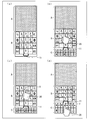
- (A)-(d) in the figure is a figure which shows the example of a screen display in the portable terminal which concerns on one Embodiment of this invention. It is a figure which shows the flow of the display process of the keypad in the portable terminal which concerns on one Embodiment of this invention.
- the information processing apparatus can be applied to a mobile terminal such as a smartphone, a tablet personal computer, a portable information terminal (PDA: Personal Data Assistant), and an electronic book terminal.
- a mobile terminal such as a smartphone, a tablet personal computer, a portable information terminal (PDA: Personal Data Assistant), and an electronic book terminal.
- PDA Personal Data Assistant
- an electronic book terminal a case where the information processing apparatus according to the present embodiment is applied to a mobile terminal will be described as an example.
- members having the same function and action are denoted by the same reference numerals and description thereof is omitted.
- FIG. 1 is a block diagram showing a main configuration of the mobile terminal 1. As illustrated in FIG. 1, the mobile terminal 1 includes a control unit 10, a touch panel 15, and a storage unit 12.
- a software keyboard is displayed on the touch panel 15, and various operations such as character input via the software keyboard are performed by a user's touch operation.
- a software keyboard displayed on the touch panel 15 displays a keyboard image simulating a keyboard on the display unit 22 and detects contact with an operation article (such as a user's finger or pen) on the displayed keyboard image.
- an operation article such as a user's finger or pen
- characters displayed on the keyboard are divided into a plurality of groups, and the display area of the keyboard is divided corresponding to the groups. That is, in the portable terminal 1, the display area of the keyboard is divided into a plurality of sections, and the character keys of the keyboard are displayed with different sections for each group to which the characters indicated by the character keys belong.
- the state after the switching is set to the large display state, while before switching.
- the mobile terminal 1 uses the software keyboard when the target section that is a section including the position specified by the operation article is in the small display state. Without changing the size of the display area, the target section is switched to the large display state, and the sections other than the target section are switched to the small display state.
- the mobile terminal 1 displays a large display area of the group to which the character indicated by the character key designated by the user belongs (large display state), and displays a small display area of other groups (small display state).
- large display state a large display area of the group to which the character indicated by the character key designated by the user belongs
- small display state a small display area of other groups
- the portable terminal 1 includes the control unit 10, the touch panel 15, and the storage unit 12.
- the touch panel 15 includes a contact detection unit 21 and a display unit 22.
- the contact detection unit 21 is installed on the display screen of the display unit 22 or is formed integrally with the display screen.
- the contact detection unit 21 determines whether an operation object indicating a position on the display screen, such as a user's finger or pen, has touched or approached the display screen, and a position that has touched or approached (hereinafter referred to as “contact position” for convenience).
- the operation on the portable terminal 1 is received.
- the contact detection unit 21 transmits detection information, which is information on a position where contact or approach is detected, to the control unit 10.
- the display unit 22 displays an image on the display screen based on the display information received from the control unit 10.
- the display unit 22 includes a display element such as an LCD (Liquid Crystal Display) or an EL (Electroluminescence) display, and a driver circuit that drives the display element based on received image data.
- a display element such as an LCD (Liquid Crystal Display) or an EL (Electroluminescence) display
- a driver circuit that drives the display element based on received image data.
- the control unit 10 comprehensively controls various components in the mobile terminal 1 and includes a processor such as a CPU (Central Processing Unit).
- the storage unit 12 stores various data and programs, and includes storage elements such as a RAM (Random Access Memory), a ROM (Read Only Memory), and a flash memory.
- the control unit 10 includes a display processing unit 31 and a keyboard display control unit (software keyboard display control unit) 32.
- the keyboard display control unit 32 includes a contact position determination unit (designated position specifying unit) 33, a state.
- a determination unit 34 and a large display processing unit 35 are included.
- the display processing unit 31 displays the keyboard on the display unit 22 based on the keyboard display information acquired from the keyboard display control unit 32.
- the keyboard is divided into two sections, a kana character area where character keys such as kana characters are displayed and a pictographic area where character keys (extended pad) such as pictograms are displayed. Yes.
- the keyboard display control unit 32 controls the display of the keyboard displayed on the display unit 22.
- the keyboard display is expanded display with kana characters and pictograms displayed.
- the keyboard display area is not changed from the expanded display, and the kana character area is enlarged and the size of the keypad included in the kana character area is increased.
- Kana character area large display Kana character area is large display state
- the pictogram area is enlarged and the size of the keypad included in the pictogram area is increased
- There is a large display (the pictogram area is in a large display state).
- the keyboard display control part 32 switches the display of the keyboard displayed on the display part 22 based on the position which the contact detection part 21 detected, and as mentioned above, the contact position determination part 33 and the state determination part 34 And a large display processing unit 35.
- the contact position determination unit 33 determines whether the position on the touch panel 15 detected by the contact detection unit 21 is a kana character region or a pictographic region, and notifies the large display processing unit 35 of the determination result.
- the state determination unit 34 notifies the large display processing unit 35 of the current keyboard display state.
- the large display processing unit 35 Based on the position notified from the contact position determination unit 33 and the current keyboard display state notified from the state determination unit 34, the large display processing unit 35 sets the keyboard display to a kana character area large display, Alternatively, it is determined whether to display the pictogram area, and the determined content is notified to the display processing unit 31.
- the keyboard may be divided into a plurality of sections from a state in which only the kana character is included, that is, a state in which the keyboard display area is not divided into a plurality of sections. For example, when the user performs an operation to expand the keyboard display while displaying a keyboard that contains only Kana characters, the keyboard display area is divided into two sections, and the Kana character area And a pictogram area may be displayed.
- a button bar (11: FIG. 2) is displayed on the screen and is slid on the screen.
- a finger or the like is moved along the side surface while the contact is in contact.
- the character string to be input can be changed. Character input can be facilitated even when the groups of characters included are different.
- FIG. 2 is a diagram showing an example of screen transition in the mobile terminal 1, in which (a) in the figure is an example of a screen display in a state where the display area of the keyboard is not divided into a plurality of sections, and (b) in FIG. It is an example of the screen display at the time of extended display, (c) is an example of the screen display at the time of Kana character area large display, (d) is an example of the screen display at the time of large picture character area display.
- FIG. 3 is a flowchart showing the flow of the keyboard display process.
- a keyboard with only kana characters is displayed on the display unit 22 (FIG. 3A).
- the area A in FIG. 3A is a character input area in which input characters are displayed, and the area B is a kana character area in which kana character keys are displayed.
- the keyboard display control unit 32 changes the keyboard display to the expanded display (S1, FIG. 3B).
- An area C in FIG. 3B is an area (pictogram area) where the extension pad is displayed, and the area B and the area C are combined to form a keyboard display area.
- the contact position determination unit 33 determines whether the detected position (detection position) is within the keyboard area (YES in S2) or not. Determination (S3, designated position specifying step). If the contact position is a kana character area (YES in S3), the large display processing unit 35 determines whether or not the current keyboard display is a kana character area large display (S4). (YES in S4), the process proceeds directly to the touch process (S8).
- the large display processing unit 35 sets the keyboard display to the kana character area large display (S5, software keyboard display control step). Then, the process proceeds to touch processing (S8).
- the contact position determination unit 33 determines whether the contact position is kana. If it is determined that the area is a character area and the kana character area is not in the large display state, the large display processing unit 35 sets the keyboard display to the kana character area large display. As a result, the display area of the keyboard remains in the expanded display, and the kana character area is enlarged and the size of the keypad included in the kana character area is increased (FIG. 3C, kana character area large display). .
- the large display processing unit 35 determines whether or not the current keyboard display is a large pictogram area display (S6). In the case of a large display (YES in S6), the process directly proceeds to the touch process (S8).
- the large display processing unit 35 sets the keyboard display to the pictogram area large display (S7, software keyboard display control step). Then, the process proceeds to touch processing (S8).
- the contact position determination unit 33 determines that the contact position is a pictographic area. If the pictogram area is not in the large display state, the large display processing unit 35 sets the keyboard display to the pictogram area large display. As a result, the display area of the keyboard remains expanded, and the pictogram area is enlarged and the size of the keypad included in the pictogram area is increased (FIG. 3D).
- switching between the character area large display and the pictogram area large display in the keyboard display may be performed over a predetermined time (for example, 3 seconds) so as not to disturb the user's operation.
- the keyboard display may be returned to the expanded display.
- the time when the character input is completed may be, for example, a time when a predetermined time has elapsed since the user last touched or approached the keyboard, or contact with other operation keys (menu key, various function keys, etc.). Or it may be the time when there was an approach.
- the character input area when the character input area is increased in order to secure the size of the area (character input area) where the input characters are displayed, the area (keyboard display area) where the software keyboard is displayed becomes smaller. There is a risk of making an input error.
- the keyboard display area is enlarged, the character input area is narrowed, and it becomes difficult to see the text being input.
- the aspect ratio of the display screen is 16: 9, but in the portable terminal 1 according to the present embodiment, the aspect ratio of the display unit 22 is 21: 9.
- the display screen is longer than the conventional configuration, and the keyboard display area can be secured while securing the character input area.
- the aspect ratio of the display unit 22 is not limited to 21: 9, and any aspect ratio that can provide a vertically long display screen may be used.
- characters displayed on the keyboard may be divided into three groups (for example, kana characters, numbers, pictograms), or may be divided into four or more groups.
- the display area of the keyboard is divided vertically (that is, divided so that a plurality of sections are arranged in the vertical direction of the screen), but this is not necessarily limited thereto.
- the display area of the keyboard may be divided into left and right (that is, divided so that a plurality of sections are arranged in the horizontal direction of the screen).
- the configuration in which the touch panel 15 has a vertically long display screen is shown, but the present invention is not necessarily limited thereto.
- the keyboard display process described above may be executed on a horizontally long display screen.
- Each unit included in the portable terminal 1 may be realized by a logic circuit (hardware) formed in an integrated circuit (IC chip) or the like, or realized by software using a CPU (Central Processing Unit). Also good.
- the mobile terminal 1 includes a CPU that executes instructions of a control program, which is software that implements each function, and a ROM (Read Only Memory) in which the control program and various data are recorded so as to be readable by a computer (or CPU). ) Or a storage device (these are referred to as “recording media”), a RAM (Random Access Memory) that expands the control program, and the like.
- the computer reads the control program from the recording medium and executes it, thereby achieving the object of the present invention.
- a tangible medium which is not temporary for example, a tape, a disk, a card, a semiconductor memory, a programmable logic circuit, etc. can be used.
- the control program may be supplied to the computer via an arbitrary transmission medium (such as a communication network or a broadcast wave) that can transmit the program.
- the present invention can also be realized in the form of a data signal embedded in a carrier wave, in which the above control program is embodied by electronic transmission.
- An information processing apparatus is an information processing apparatus capable of inputting characters by an input operation with an operation article (finger 20) on a software keyboard displayed on a display unit, Characters that can be input by the software keyboard are divided into a plurality of groups, the display area of the software keyboard is divided into a plurality of sections, and the character keys of the software keyboard are assigned to the groups to which the characters indicated by the character keys belong.
- Software keyboard display control means keyboard display control section 32 for displaying the sections differently, and designated position specifying means (contact position determination) for specifying the position in the display area of the software keyboard specified by the operation article Part 33), and the size of the section and the size of the character keys in the section
- position specifying means contact position determination
- the state after the switching is set to the large display state.
- the state after the switching is set to the small display state.
- the software keyboard display control means When the target section that is a section including the position specified by the designated position specifying means is in a small display state, the software keyboard display control means does not change the size of the display area of the software keyboard, The target section is switched to the large display state, and sections other than the target section are switched to the small display state.
- control method of the information processing apparatus allows characters to be input by an input operation with an operation article on the software keyboard displayed on the display unit, and can be input using the software keyboard.
- a software keyboard display control step for displaying the character keys of the software keyboard in different groups for each of the groups to which the characters indicated by the character keys belong.
- the state after switching is set to the large display state, while when after switching is smaller than before switching, when the state after switching is set to the small display state,
- the software keyboard display control step when the target section that is a section including the position specified in the specified position specifying step is in a small display state, the size of the display area of the software keyboard is not changed, and the target section is changed. It is characterized by switching to the large display state and switching the sections other than the target section to the small display state.
- a software keyboard displays an image simulating a keyboard on the display unit.
- the displayed keyboard image is touched or approached, the corresponding part of the actual keyboard is pressed in response to the touched or approached position. The same processing as in the case of the case is performed.
- the target section that is a section including the specified position (specific position) is displayed in the large display state and the sections other than the section are displayed in the small display state, the group corresponding to the target section is displayed. It is possible to easily input characters to which the user belongs and to prevent input mistakes. In addition, if characters that are highly likely to be continuously input are assigned to the same group, it is possible to facilitate character input even when characters are continuously input. Moreover, since the characters of a plurality of groups are displayed at the same time, it is possible to easily input even if the characters are in different groups. Furthermore, since the display area of the software keyboard itself does not change, it is possible to prevent the area other than the software keyboard, for example, the character input area from being narrowed and hindering the display of the text being input.
- Kana characters and pictograms are in separate groups, Kana characters can be input continuously, Kana characters can be input continuously, Kana characters and pictograms can be mixed and input This makes it easy to input characters and reduce mistakes.
- the designated position specifying unit is designated in the display area of the software keyboard when the distance between the operation article and the display unit is a predetermined value or less.
- the position is specified, and the software keyboard display control means is When the specified position specifying means specifies the position specified on the display unit, the display of the software keyboard may be switched.
- the software keyboard display control unit performs a predetermined time or more from the start to the end of the switching of the software keyboard display so as not to hinder the user operation during the switching transition. It may be performed over time.
- the information processing apparatus may be realized by a computer.
- the information processing apparatus is realized by the computer by causing the computer to operate as each unit included in the information processing apparatus.
- An information processing apparatus program and a computer-readable recording medium on which the program is recorded also fall within the scope of the present invention.
- the information processing apparatus can be suitably applied to a mobile terminal such as a smartphone, a tablet personal computer, a portable information terminal (PDA: Personal Data Assistant), and an electronic book terminal.
- a mobile terminal such as a smartphone, a tablet personal computer, a portable information terminal (PDA: Personal Data Assistant), and an electronic book terminal.
- PDA Personal Data Assistant
Landscapes
- Engineering & Computer Science (AREA)
- General Engineering & Computer Science (AREA)
- Theoretical Computer Science (AREA)
- Human Computer Interaction (AREA)
- Physics & Mathematics (AREA)
- General Physics & Mathematics (AREA)
- User Interface Of Digital Computer (AREA)
- Input From Keyboards Or The Like (AREA)
- Position Input By Displaying (AREA)
Abstract
キーボード表示制御部(32)は、接触位置判定部(33)が特定した位置を含む区画である対象区画が小表示状態の場合、ソフトウェアキーボードの表示領域の大きさは変更せずに、対象区画を大表示状態に切り替えると共に、対象区画以外の区画を小表示状態に切り替える。
Description
本発明は、表示部にソフトウェアキーボードを表示させて文字入力を受け付ける情報処理装置等に関する。
一般的に、携帯電話機等の電子装置にて文字を入力する際には、電子装置のキーボードあるいはキーパッドを用いて文字を入力している(特許文献1~5)。最近では、入力可能な文字種が増えており、かな、英字、絵文字、数字、および記号等の複数の文字種の文字が入力できるようになっている。複数ある文字種のうち、特定の文字種の文字を入力する場合には、特定の文字種に応じた入力モードに切り替えることにより、該特定の文字種の文字入力を行う方法が一般的に用いられている。
例えば特許文献1には、特定の種類の文字の一覧を、特定の種類ごとに割当てられたタブに分別して示した一覧画面を文字入力画面のうちの一部に表示する携帯電話機が開示されている。特許文献1に開示されている携帯電話機では、文字入力画面に表示された一覧画面の中から特定のタブを選択する入力を利用者から受付けた場合、入力に応じたタブを一覧画面から選択して、選択したタブに対応する特定の種類の文字の一覧画面を文字入力画面の中に表示している。
従来のフルタッチキーのスマートフォンでは、入力したい文字種(かな、英字、絵文字、数字、および記号等)に応じたキーパッドを呼び出して、文字を入力する。そのため、様々な文字種の文字を混合した文章を作成する場合、わざわざ各文字種に応じたキーパッドを呼び出す必要があった。例えば、特許文献1に開示されている携帯電話機では、入力したい種類の文字に応じたタブを選択して、文字の一覧画面を文字入力画面に表示する必要がある。
また、入力された文字が表示される領域(文字入力領域)の大きさを確保するために文字入力領域を大きくすると、キーパッドが表示される領域(キーパッド領域)が小さくなり、入力ミスを起こしてしまう課題もあった。
そこで、本発明は上記の課題に鑑みてなされたものであり、その目的は、複数のグループの文字を素早く入力可能であり、文字入力領域の大きさを確保しつつ、入力ミスを防止するソフトウェアキーボードを表示する情報処理装置等を提供することにある。
本発明の一態様に係る情報処理装置は、表示部に表示したソフトウェアキーボードに対しての操作物による入力操作により文字入力が可能な情報処理装置であって、ソフトウェアキーボードにより入力可能な文字が複数のグループに分けられており、上記ソフトウェアキーボードの表示領域を複数の区画に分けると共に、該ソフトウェアキーボードの文字キーを、該文字キーが示す文字が属する上記グループごとに上記区画を異ならせて表示させるソフトウェアキーボード表示制御手段と、上記操作物が指定する、上記ソフトウェアキーボードの表示領域内の位置を特定する指定位置特定手段と、を備え、上記区画の大きさおよび該区画内の文字キーの大きさが、ソフトウェアキーボードの表示の切り替え前より切り替え後の方が大きい場合、該切り替え後の状態を大表示状態とし、一方、切り替え前より切り替え後の方が小さい場合、該切り替え後の状態を小表示状態とするとき、上記ソフトウェアキーボード表示制御手段は、上記指定位置特定手段が特定した位置を含む区画である対象区画が小表示状態の場合、上記ソフトウェアキーボードの表示領域の大きさは変更せずに、上記対象区画を大表示状態に切り替えると共に、上記対象区画以外の区画を小表示状態に切り替えることを特徴としている。
本発明の一態様に係る情報処理装置では、特定された位置(特定位置)を含む区画である対象区画が大表示状態で、該区画以外の区画が小表示状態で表示されるので、対象区画に対応するグループに属する文字の入力を容易にすることができると共に、入力ミスを防止することができるという効果を奏する。また、連続で入力する可能性が高い文字が同じグループに割り当てられていれば、連続で文字を入力する場合でも、文字入力を容易にすることができるという効果を奏する。また、複数のグループの文字が同時に表示されているので、グループが異なる文字であっても入力を容易にすることができるという効果を奏する。さらに、ソフトウェアキーボードそのものの表示領域は変わらないため、ソフトウェアキーボード以外の領域、例えば文字入力領域が狭くならず、入力中の文章の表示の阻害してしまうということを防止できるという効果を奏する。
本実施形態に係る情報処理装置は、スマートフォン、タブレット型パーソナルコンピュータ、携帯型情報端末(PDA:Personal Data Assistant)、および電子書籍端末等の携帯端末に適用することができる。以下では、本実施形態に係る情報処理装置を携帯端末に適用した場合を例に挙げて説明する。なお、以下の説明においては、同一の機能および作用を示す部材については、同一の符号を付し、説明を省略する。
〔第1の実施形態〕
(携帯端末1の構成)
本実施の形態に係る携帯端末(情報処理装置)1の構成について、図1を参照して説明する。図1は、携帯端末1の要部構成を示すブロック図である。図1に示すように、携帯端末1は、制御部10、タッチパネル15、および記憶部12を含む構成である。
(携帯端末1の構成)
本実施の形態に係る携帯端末(情報処理装置)1の構成について、図1を参照して説明する。図1は、携帯端末1の要部構成を示すブロック図である。図1に示すように、携帯端末1は、制御部10、タッチパネル15、および記憶部12を含む構成である。
携帯端末1では、ソフトウェアキーボードをタッチパネル15に表示して、ユーザによるタッチ操作によって該ソフトウェアキーボードを介した文字入力等の各種操作が行われる。タッチパネル15に表示されるソフトウェアキーボートとは、キーボードを模したキーボード画像を表示部22に表示し、表示したキーボード画像への操作物(ユーザの指やペン等)による接触または接近を検知すると、接触または接近のあった位置に対応する、実際のキーボードの該当するキーが押下された場合と同様の処理を行うものである。
携帯端末1では、キーボード(ソフトウェアキーボード)に表示される文字は複数のグループに分けられると共に、キーボードの表示領域が、グループに対応して分割されている。すなわち、携帯端末1では、キーボードの表示領域を複数の区画に分けると共に、該キーボードの文字キーを、該文字キーが示す文字が属するグループごとに区画を異ならせて表示する。
そして、上記区画の大きさおよび該区画内の文字キーの大きさが、ソフトウェアキーボードの表示の切り替え前より切り替え後の方が大きい場合、該切り替え後の状態を大表示状態とし、一方、切り替え前より切り替え後の方が小さい場合、該切り替え後の状態を小表示状態とするとき、携帯端末1は、操作物によって特定された位置を含む区画である対象区画が小表示状態の場合、ソフトウェアキーボードの表示領域の大きさは変更せずに、上記対象区画を大表示状態に切り替えると共に、上記対象区画以外の区画を小表示状態に切り替える。
したがって、携帯端末1では、ユーザが指定した文字キーが示す文字が属するグループの表示領域を大きく表示し(大表示状態)、他のグループの表示領域を小さく表示する(小表示状態)。以下では、携帯端末1によるキーボードの表示処理を説明する前に携帯端末1の各種ブロックについて説明する。
上述したように、携帯端末1は、制御部10、タッチパネル15、および記憶部12を含む構成である。
タッチパネル15は、接触検知部21および表示部22を含む。接触検知部21は、表示部22の表示画面上に設置されているか、または該表示画面と一体となって形成されている。接触検知部21は、利用者の指、ペン等、表示画面上の位置を指し示す操作物が表示画面に接触または接近したか、および接触または接近した位置(以下、便宜的に「接触位置」とも呼ぶ)を検知することにより、携帯端末1に対する操作を受け付けるものである。接触検知部21は、接触または接近を検知した位置の情報である検知情報を制御部10に送信する。
表示部22は、制御部10から受信した表示情報に基づいて、表示画面に画像を表示するものである。表示部22は、LCD(Liquid Crystal Display)、EL(Electroluminescence)ディスプレイ等の表示素子と、受信した画像データに基づいて表示素子を駆動するドライバ回路とを備えた構成である。
制御部10は、携帯端末1内の各種構成を統括的に制御するものであり、CPU(Central Processing Unit)等のプロセッサを含む。記憶部12は、各種データおよびプログラムを記憶するものであり、RAM(Random Access Memory)、ROM(Read Only Memory)、フラッシュメモリ等の記憶素子を含む。
次に、制御部10の詳細について説明する。制御部10には、表示処理部31と、キーボード表示制御部(ソフトウェアキーボード表示制御手段)32とが含まれ、キーボード表示制御部32には、接触位置判定部(指定位置特定手段)33、状態判定部34、および大表示処理部35が含まれている。
表示処理部31は、キーボード表示制御部32から取得したキーボード表示情報に基づいて表示部22にキーボードを表示させるものである。本実施の形態では、キーボードが、かな文字等の文字キーが表示されているかな文字領域と、絵文字等の文字キー(拡張パッド)が表示されている絵文字領域との2つの区画に分けられている。
キーボード表示制御部32は、表示部22に表示するキーボードの表示を制御するものである。キーボードの表示は、かな文字および絵文字が表示されている拡張表示、キーボードの表示領域を拡張表示から変更せずに、かな文字領域を大きくすると共に、かな文字領域に含まれるキーパッドのサイズを大きくしたかな文字領域大表示(かな文字領域が大表示状態)、キーボードの表示領域を拡張表示から変更せずに、絵文字領域を大きくすると共に、絵文字領域に含まれるキーパッドのサイズを大きくした絵文字領域大表示(絵文字領域が大表示状態)がある。
そして、キーボード表示制御部32は、接触検知部21が検知した位置に基づいて表示部22に表示するキーボードの表示を切り替えるものであり、上述したように、接触位置判定部33、状態判定部34、および大表示処理部35を含む。
接触位置判定部33は、接触検知部21が検知したタッチパネル15に対する位置が、かな文字領域および絵文字領域のいずれの位置かを判定し、判定した結果を大表示処理部35に通知する。
状態判定部34は、現在のキーボードの表示状態を大表示処理部35に通知する。
大表示処理部35は、接触位置判定部33から通知された位置、および状態判定部34から通知された現在のキーボードの表示状態に基づいて、キーボードの表示をかな文字領域大表示とするか、または絵文字領域大表示とするかを決定し、決定した内容を表示処理部31に通知する。
なお、キーボードにかな文字のみが含まれている状態、すなわちキーボードの表示領域が複数の区画に分割されていない状態から、複数の区画に分割するようにしてもよい。例えば、かな文字のみが含まれているキーボードを表示している状態で、キーボードの表示を拡張表示にする操作をユーザが行うことにより、キーボードの表示領域を2つの区画に分割し、かな文字領域と絵文字領域とを表示する構成であってもよい。
キーボードの表示を拡張表示にする操作としては、例えば、ボタンバー(11:図2)を画面上に表示し、画面上でスライドさせる、携帯端末1の側面にタッチセンサを設け、タッチセンサに指等を接触させたまま、指等を側面に沿って移動させる等が挙げられる。
キーボードの表示をキーボードにかな文字のみが含まれている状態、すなわちキーボードの表示領域が複数の区画に分割されていない状態から、複数の区画に分割するようにすることにより、入力したい文字列に含まれる文字のグループが異なる場合でも、文字入力を容易にすることができる。
(キーボードの表示処理)
携帯端末1におけるキーボードの表示の切り替え処理について、図2、3を参照して説明する。図2は、携帯端末1における画面遷移例を示す図であり、図中の(a)はキーボードの表示領域が複数の区画に分割されていない状態の画面表示の一例であり、(b)は拡張表示時の画面表示の一例であり、(c)はかな文字領域大表示時の画面表示の一例であり、(d)は絵文字領域大表示時の画面表示の一例である。図3は、キーボード表示処理の流れを示すフローチャートである。
携帯端末1におけるキーボードの表示の切り替え処理について、図2、3を参照して説明する。図2は、携帯端末1における画面遷移例を示す図であり、図中の(a)はキーボードの表示領域が複数の区画に分割されていない状態の画面表示の一例であり、(b)は拡張表示時の画面表示の一例であり、(c)はかな文字領域大表示時の画面表示の一例であり、(d)は絵文字領域大表示時の画面表示の一例である。図3は、キーボード表示処理の流れを示すフローチャートである。
まず、表示部22に、かな文字のみのキーボードを表示する(図3(a))。図3(a)の領域Aが、入力された文字が表示される文字入力領域であり、領域Bが、かな文字の字キーが表示されるかな文字領域である。この状態でキーボードの表示を拡張表示にする操作を受け付けると、キーボード表示制御部32は、キーボードの表示を拡張表示にする(S1、図3(b))。図3(b)の領域Cが、拡張パッドが表示される領域(絵文字領域)であり、領域Bおよび領域Cを合わせてキーボード表示領域となる。
ここで、接触検知部21がタッチパネル15に対する接触または接近を検知すると、接触位置判定部33は、検知した位置(検知位置)がキーボート領域内で(S2でYES)、かな文字領域か否かを判定する(S3、指定位置特定ステップ)。接触位置がかな文字領域であれば(S3でYES)、大表示処理部35は、現在のキーボードの表示がかな文字領域大表示か否かを判定し(S4)、かな文字領域大表示の場合は(S4でYES)、そのままタッチ処理に進む(S8)。
一方、現在のキーボードの表示がかな文字領域大表示でなければ(S4でNO)、大表示処理部35は、キーボードの表示をかな文字領域大表示とする(S5、ソフトウェアキーボード表示制御ステップ)。そして、タッチ処理に進む(S8)。
例えば、図3(b)に示すように、拡張表示の状態でユーザの指(操作物)20が文字キー「か」に接触または接近した場合、接触位置判定部33は、接触位置は、かな文字領域であると判定し、大表示処理部35は、かな文字領域が大表示状態になければ、キーボードの表示をかな文字領域大表示とする。これにより、キーボードの表示領域は拡張表示のまま、かな文字領域を大きくすると共に、かな文字領域に含まれるキーパッドのサイズを大きくした状態(図3(c)、かな文字領域大表示)になる。
また、ステップS3で、接触位置がかな文字領域ではない場合(S3でNO)、大表示処理部35は、現在のキーボードの表示が絵文字領域大表示か否かを判定し(S6)、絵文字領域大表示の場合は(S6でYES)、そのままタッチ処理に進む(S8)。
一方、現在のキーボードの表示が絵文字領域大表示でなければ(S6でNO)、大表示処理部35は、キーボードの表示を絵文字領域大表示とする(S7、ソフトウェアキーボード表示制御ステップ)。そして、タッチ処理に進む(S8)。
例えば、図3(b)に示すような拡張表示において、ユーザの指20が文字キー「雷の絵文字」に接触または接近した場合、接触位置判定部33は、接触位置が絵文字領域であると判定し、大表示処理部35は、絵文字領域大表示状態でなければ、キーボードの表示を絵文字領域大表示とする。これにより、キーボードの表示領域は拡張表示のまま、絵文字領域を大きくすると共に、絵文字領域に含まれるキーパッドのサイズを大きくした状態(図3(d))になる。
その後、タッチ処理が終了すると(S9でYES)、キーボード表示処理が終了する。
なお、キーボードの表示における文字領域大表示と絵文字領域大表示との切り替えは、ユーザの操作を阻害しないように、所定の時間(例えば3秒)をかけて行ってもよい。
また、キーボードの表示をかな文字領域大表示あるいは絵文字領域大表示にした後、大表示となっている文字領域に含まれる文字の入力が終了した時点で、キーボードの表示を拡張表示に戻してもよい。文字の入力が終了した時点は、例えばユーザが最後にキーボードに接触または接近したときから所定の時間が経過した時点としてもよいし、あるいは他の操作キー(メニューキー、各種機能キー等)に対する接触または接近があった時点であってもよい。
〔第2の実施形態〕
本発明の第2の実施形態に係る携帯端末1の構成について説明する。
本発明の第2の実施形態に係る携帯端末1の構成について説明する。
上述したように、入力された文字が表示される領域(文字入力領域)の大きさを確保するために文字入力領域を大きくすると、ソフトウェアキーボードが表示される領域(キーボード表示領域)が小さくなり、入力ミスを起こしてしまう虞がある。一方で、キーボード表示領域を大きくすると、文字入力領域が狭くなり、入力中の文章が見づらくなってしまう。
そこで、従来の携帯電話機等の携帯端末では、表示画面のアスペクト比が16:9であるところ、本実施形態に係る携帯端末1では、表示部22のアスペクト比を21:9としている。これにより、表示画面が、従来の構成よりも縦長となり、文字入力領域を確保しつつ、キーボード表示領域を確保することができる。なお、表示部22のアスペクト比は21:9に限られるものではなく、縦長の表示画面を提供できるものであればよい。
〔変形例〕
なお、上述した実施形態では、文字を2つのグループに分ける例を挙げたが、必ずしもこれに限定されるわけではない。例えば、キーボードに表示される文字を3つのグループ(例えば、かな文字、数字、絵文字)に分けてもよいし、4つ以上のグループに分けてもよい。
なお、上述した実施形態では、文字を2つのグループに分ける例を挙げたが、必ずしもこれに限定されるわけではない。例えば、キーボードに表示される文字を3つのグループ(例えば、かな文字、数字、絵文字)に分けてもよいし、4つ以上のグループに分けてもよい。
また、上述した実施形態では、キーボードの表示領域を上下に分割(すなわち、複数の区画が画面上下方向に並ぶように分割)しているが、必ずしもこれに限定されるわけではない。例えば、キーボードの表示領域を左右に分割(すなわち、複数の区画が画面左右方向に並ぶように分割)してもよい。
ここで、上述した実施形態では、タッチパネル15が縦長の表示画面を有している構成を示したが、必ずしもこれに限定されるわけではない。例えば、横長の表示画面で上述したキーボードの表示処理を実行してもよい。
〔第3の実施形態〕
携帯端末1に含まれている各部は、集積回路(ICチップ)等に形成された論理回路(ハードウェア)によって実現してもよいし、CPU(Central Processing Unit)を用いてソフトウェアによって実現してもよい。後者の場合、携帯端末1は、各機能を実現するソフトウェアである制御プログラムの命令を実行するCPU、上記制御プログラムおよび各種データがコンピュータ(またはCPU)で読み取り可能に記録されたROM(Read Only Memory)または記憶装置(これらを「記録媒体」と称する)、上記制御プログラムを展開するRAM(Random Access Memory)などを備えている。そして、コンピュータ(またはCPU)が上記制御プログラムを上記記録媒体から読み取って実行することにより、本発明の目的が達成される。上記の記録媒体としては、「一時的でない有形の媒体」、例えば、テープ、ディスク、カード、半導体メモリ、およびプログラマブルな論理回路等を用いることができる。また、上記の制御プログラムは、該プログラムを伝送可能な任意の伝送媒体(通信ネットワークや放送波等)を介して上記のコンピュータに供給されてもよい。なお、本発明は、上記の制御プログラムが電子的な伝送によって具現化された、搬送波に埋め込まれたデータ信号の形態でも実現され得る。
携帯端末1に含まれている各部は、集積回路(ICチップ)等に形成された論理回路(ハードウェア)によって実現してもよいし、CPU(Central Processing Unit)を用いてソフトウェアによって実現してもよい。後者の場合、携帯端末1は、各機能を実現するソフトウェアである制御プログラムの命令を実行するCPU、上記制御プログラムおよび各種データがコンピュータ(またはCPU)で読み取り可能に記録されたROM(Read Only Memory)または記憶装置(これらを「記録媒体」と称する)、上記制御プログラムを展開するRAM(Random Access Memory)などを備えている。そして、コンピュータ(またはCPU)が上記制御プログラムを上記記録媒体から読み取って実行することにより、本発明の目的が達成される。上記の記録媒体としては、「一時的でない有形の媒体」、例えば、テープ、ディスク、カード、半導体メモリ、およびプログラマブルな論理回路等を用いることができる。また、上記の制御プログラムは、該プログラムを伝送可能な任意の伝送媒体(通信ネットワークや放送波等)を介して上記のコンピュータに供給されてもよい。なお、本発明は、上記の制御プログラムが電子的な伝送によって具現化された、搬送波に埋め込まれたデータ信号の形態でも実現され得る。
〔まとめ〕
本発明の態様1に係る情報処理装置(携帯端末1)は、表示部に表示したソフトウェアキーボードに対しての操作物(指20)による入力操作により文字入力が可能な情報処理装置であって、ソフトウェアキーボードにより入力可能な文字が複数のグループに分けら
れており、上記ソフトウェアキーボードの表示領域を複数の区画に分けると共に、該ソフトウェアキーボードの文字キーを、該文字キーが示す文字が属する上記グループごとに上記区画を異ならせて表示させるソフトウェアキーボード表示制御手段(キーボード表示制御部32)と、上記操作物が指定する、上記ソフトウェアキーボードの表示領域内の位置を特定する指定位置特定手段(接触位置判定部33)と、を備え、上記区画の大きさおよび該区画内の文字キーの大きさが、ソフトウェアキーボードの表示の切り替え前より切り替え後の方が大きい場合、該切り替え後の状態を大表示状態とし、一方、切り替え前より切り替え後の方が小さい場合、該切り替え後の状態を小表示状態とするとき、上記ソフトウェアキーボード表示制御手段は、上記指定位置特定手段が特定した位置を含む区画である対象区画が小表示状態の場合、上記ソフトウェアキーボードの表示領域の大きさは変更せずに、上記対象区画を大表示状態に切り替えると共に、上記対象区画以外の区画を小表示状態に切り替えることを特徴としている。
本発明の態様1に係る情報処理装置(携帯端末1)は、表示部に表示したソフトウェアキーボードに対しての操作物(指20)による入力操作により文字入力が可能な情報処理装置であって、ソフトウェアキーボードにより入力可能な文字が複数のグループに分けら
れており、上記ソフトウェアキーボードの表示領域を複数の区画に分けると共に、該ソフトウェアキーボードの文字キーを、該文字キーが示す文字が属する上記グループごとに上記区画を異ならせて表示させるソフトウェアキーボード表示制御手段(キーボード表示制御部32)と、上記操作物が指定する、上記ソフトウェアキーボードの表示領域内の位置を特定する指定位置特定手段(接触位置判定部33)と、を備え、上記区画の大きさおよび該区画内の文字キーの大きさが、ソフトウェアキーボードの表示の切り替え前より切り替え後の方が大きい場合、該切り替え後の状態を大表示状態とし、一方、切り替え前より切り替え後の方が小さい場合、該切り替え後の状態を小表示状態とするとき、上記ソフトウェアキーボード表示制御手段は、上記指定位置特定手段が特定した位置を含む区画である対象区画が小表示状態の場合、上記ソフトウェアキーボードの表示領域の大きさは変更せずに、上記対象区画を大表示状態に切り替えると共に、上記対象区画以外の区画を小表示状態に切り替えることを特徴としている。
また、本発明の態様1に係る情報処理装置の制御方法は、表示部に表示したソフトウェアキーボードに対しての操作物による入力操作により文字入力が可能であり、かつ、ソフトウェアキーボードにより入力可能な文字が複数のグループに分けられている情報処理装置の制御方法であって、上記操作物が指定する、上記ソフトウェアキーボードの表示領域内の位置を特定する指定位置特定ステップと、上記ソフトウェアキーボードの表示領域を複数の区画に分けると共に、該ソフトウェアキーボードの文字キーを、該文字キーが示す文字が属する上記グループごとに上記区画を異ならせて表示させるソフトウェアキーボード表示制御ステップと、を含み、上記区画の大きさおよび該区画内の文字キーの大きさが、ソフトウェアキーボードの表示の切り替え前より切り替え後の方が大きい場合、該切り替え後の状態を大表示状態とし、一方、切り替え前より切り替え後の方が小さい場合、該切り替え後の状態を小表示状態とするとき、上記ソフトウェアキーボード表示制御ステップでは、上記指定位置特定ステップで特定した位置を含む区画である対象区画が小表示状態の場合、上記ソフトウェアキーボードの表示領域の大きさは変更せずに、上記対象区画を大表示状態に切り替えると共に、上記対象区画以外の区画を小表示状態に切り替えることを特徴としている。
ソフトウェアキーボートとは、キーボードを模した画像を表示部に表示し、表示されたキーボード画像に接触または接近すると、接触または接近のあった位置に対応して、実際のキーボードの該当する部分が押下された場合と同様の処理を行うものである。
上記の構成によれば、特定された位置(特定位置)を含む区画である対象区画が大表示状態で、該区画以外の区画が小表示状態で表示されるので、対象区画に対応するグループに属する文字の入力を容易にすることができると共に、入力ミスを防止することができる。また、連続で入力する可能性が高い文字が同じグループに割り当てられていれば、連続で文字を入力する場合でも、文字入力を容易にすることができる。また、複数のグループの文字が同時に表示されているので、グループが異なる文字であっても入力を容易にすることができる。さらに、ソフトウェアキーボードそのものの表示領域は変わらないため、ソフトウェアキーボード以外の領域、例えば文字入力領域が狭くならず、入力中の文章の表示の阻害してしまうということを防止できる。
例えば、かな文字と絵文字とをそれぞれ別のグループとすれば、かな文字を連続して入力する場合、絵文字を連続して入力する場合、かな文字と絵文字とを混ぜて入力する場合の何れにおいても、文字入力を容易にすると共にミスを少なくすることができる。
本発明の態様2に係る情報処理装置では、上記指定位置特定手段は、上記操作物と上記表示部との距離が所定値以下となったときに、上記ソフトウェアキーボードの表示領域内に指定された位置を特定するものであり、上記ソフトウェアキーボード表示制御手段は、
上記指定位置特定手段が上記表示部において指定された位置を特定したとき、上記ソフトウェアキーボードの表示を切り替えるものであってもよい。
上記指定位置特定手段が上記表示部において指定された位置を特定したとき、上記ソフトウェアキーボードの表示を切り替えるものであってもよい。
上記の構成によれば、操作物と表示部との距離が所定値以下となったとき、いわゆるホバー状態となったときに、表示部における位置が特定され、ソフトウェアキーボードの表示が切り替えられる。
これにより、操作物と表示部とが接触する前に、ソフトウェアキーボードの表示を切り替えることが可能となり、操作物と表示部との接触を検出してソフトウェアキーボードの表示を切り替える場合と比較して、早めに、ユーザに対し、切り替え後のソフトウェアキーボードを提示することができる。
本発明の態様3に係る情報処理装置では、上記ソフトウェアキーボード表示制御手段は、上記ソフトウェアキーボードの表示の切り替えの開始から終了までを、切り替えの遷移中にユーザの操作を阻害しないように所定時間以上かけて行うものであってもよい。
上記の構成によれば、ソフトウェアキーボードの表示の切り替えを、所定時間かけて行うので、急激に表示切り替えることにより、ユーザの操作を誤らせたり、ユーザに対し戸惑いを与えたりするということを防止することができる。
本発明の各態様に係る情報処理装置は、コンピュータによって実現してもよく、この場合には、コンピュータを上記情報処理装置が備える各手段として動作させることにより上記情報処理装置をコンピュータにて実現させる情報処理装置のプログラム、およびそれを記録したコンピュータ読み取り可能な記録媒体も、本発明の範疇に入る。
本発明は上述した各実施形態に限定されるものではなく、請求項に示した範囲で種々の変更が可能であり、異なる実施形態にそれぞれ開示された技術的手段を適宜組み合わせて得られる実施形態についても本発明の技術的範囲に含まれる。さらに、各実施形態にそれぞれ開示された技術的手段を組み合わせることにより、新しい技術的特徴を形成することができる。
本発明に係る情報処理装置は、スマートフォン、タブレット型パーソナルコンピュータ、携帯型情報端末(PDA:Personal Data Assistant)、および電子書籍端末等の携帯端末に好適に適用することができる。
1 携帯端末(情報処理装置)
10 制御部
12 記憶部
15 タッチパネル
20 指(操作物)
32 キーボード表示制御部(ソフトウェアキーボード表示制御手段)
33 接触位置判定部(指定位置特定手段)
34 状態判定部
35 大表示処理部
10 制御部
12 記憶部
15 タッチパネル
20 指(操作物)
32 キーボード表示制御部(ソフトウェアキーボード表示制御手段)
33 接触位置判定部(指定位置特定手段)
34 状態判定部
35 大表示処理部
Claims (5)
- 表示部に表示したソフトウェアキーボードに対しての操作物による入力操作により文字入力が可能な情報処理装置であって、
ソフトウェアキーボードにより入力可能な文字が複数のグループに分けられており、
上記ソフトウェアキーボードの表示領域を複数の区画に分けると共に、該ソフトウェアキーボードの文字キーを、該文字キーが示す文字が属する上記グループごとに上記区画を異ならせて表示させるソフトウェアキーボード表示制御手段と、
上記操作物が指定する、上記ソフトウェアキーボードの表示領域内の位置を特定する指定位置特定手段と、を備え、
上記区画の大きさおよび該区画内の文字キーの大きさが、ソフトウェアキーボードの表示の切り替え前より切り替え後の方が大きい場合、該切り替え後の状態を大表示状態とし、一方、切り替え前より切り替え後の方が小さい場合、該切り替え後の状態を小表示状態とするとき、
上記ソフトウェアキーボード表示制御手段は、上記指定位置特定手段が特定した位置を含む区画である対象区画が小表示状態の場合、上記ソフトウェアキーボードの表示領域の大きさは変更せずに、上記対象区画を大表示状態に切り替えると共に、上記対象区画以外の区画を小表示状態に切り替えることを特徴とする情報処理装置。 - 上記指定位置特定手段は、上記操作物と上記表示部との距離が所定値以下となったときに、上記ソフトウェアキーボードの表示領域内に指定された位置を特定するものであり、
上記ソフトウェアキーボード表示制御手段は、上記指定位置特定手段が上記表示部において指定された位置を特定したとき、上記ソフトウェアキーボードの表示を切り替えることを特徴とする請求項1に記載の情報処理装置。 - 上記ソフトウェアキーボード表示制御手段は、上記ソフトウェアキーボードの表示の切り替えの開始から終了までを、切り替えの遷移中にユーザの操作を阻害しないように所定時間以上かけて行うことを特徴とする請求項1または2に記載の情報処理装置。
- 表示部に表示したソフトウェアキーボードに対しての操作物による入力操作により文字入力が可能であり、かつ、ソフトウェアキーボードにより入力可能な文字が複数のグループに分けられている情報処理装置の制御方法であって、
上記操作物が指定する、上記ソフトウェアキーボードの表示領域内の位置を特定する指定位置特定ステップと、
上記ソフトウェアキーボードの表示領域を複数の区画に分けると共に、該ソフトウェアキーボードの文字キーを、該文字キーが示す文字が属する上記グループごとに上記区画を異ならせて表示させるソフトウェアキーボード表示制御ステップと、を含み、
上記区画の大きさおよび該区画内の文字キーの大きさが、ソフトウェアキーボードの表示の切り替え前より切り替え後の方が大きい場合、該切り替え後の状態を大表示状態とし、一方、切り替え前より切り替え後の方が小さい場合、該切り替え後の状態を小表示状態とするとき、
上記ソフトウェアキーボード表示制御ステップでは、上記指定位置特定ステップで特定した位置を含む区画である対象区画が小表示状態の場合、上記ソフトウェアキーボードの表示領域の大きさは変更せずに、上記対象区画を大表示状態に切り替えると共に、上記対象区画以外の区画を小表示状態に切り替えることを特徴とする情報処理装置の制御方法。 - 請求項1~3のいずれか1項に記載の情報処理装置としてコンピュータを機能させるための制御プログラムであって、コンピュータを上記各手段として機能させるための制御プログラム。
Applications Claiming Priority (2)
| Application Number | Priority Date | Filing Date | Title |
|---|---|---|---|
| JP2013055513A JP5984721B2 (ja) | 2013-03-18 | 2013-03-18 | 情報処理装置、制御方法、および制御プログラム |
| JP2013-055513 | 2013-03-18 |
Publications (1)
| Publication Number | Publication Date |
|---|---|
| WO2014148183A1 true WO2014148183A1 (ja) | 2014-09-25 |
Family
ID=51579876
Family Applications (1)
| Application Number | Title | Priority Date | Filing Date |
|---|---|---|---|
| PCT/JP2014/053935 Ceased WO2014148183A1 (ja) | 2013-03-18 | 2014-02-19 | 情報処理装置、制御方法、および制御プログラム |
Country Status (2)
| Country | Link |
|---|---|
| JP (1) | JP5984721B2 (ja) |
| WO (1) | WO2014148183A1 (ja) |
Families Citing this family (1)
| Publication number | Priority date | Publication date | Assignee | Title |
|---|---|---|---|---|
| JP6525820B2 (ja) * | 2015-08-28 | 2019-06-05 | キヤノン株式会社 | 電子機器およびその制御方法、撮像装置 |
Citations (3)
| Publication number | Priority date | Publication date | Assignee | Title |
|---|---|---|---|---|
| JPH10191273A (ja) * | 1996-12-25 | 1998-07-21 | Hitachi Ltd | 映像・データ表示方法及び装置 |
| JP3133517U (ja) * | 2006-05-18 | 2007-07-12 | 柯亞瑟 | キーボード構造 |
| JP2009116583A (ja) * | 2007-11-06 | 2009-05-28 | Ricoh Co Ltd | 入力制御装置および入力制御方法 |
-
2013
- 2013-03-18 JP JP2013055513A patent/JP5984721B2/ja not_active Expired - Fee Related
-
2014
- 2014-02-19 WO PCT/JP2014/053935 patent/WO2014148183A1/ja not_active Ceased
Patent Citations (3)
| Publication number | Priority date | Publication date | Assignee | Title |
|---|---|---|---|---|
| JPH10191273A (ja) * | 1996-12-25 | 1998-07-21 | Hitachi Ltd | 映像・データ表示方法及び装置 |
| JP3133517U (ja) * | 2006-05-18 | 2007-07-12 | 柯亞瑟 | キーボード構造 |
| JP2009116583A (ja) * | 2007-11-06 | 2009-05-28 | Ricoh Co Ltd | 入力制御装置および入力制御方法 |
Also Published As
| Publication number | Publication date |
|---|---|
| JP5984721B2 (ja) | 2016-09-06 |
| JP2014182496A (ja) | 2014-09-29 |
Similar Documents
| Publication | Publication Date | Title |
|---|---|---|
| KR102107491B1 (ko) | 리스트 스크롤 바 제어 방법 및 모바일 장치 | |
| US9013422B2 (en) | Device, method, and storage medium storing program | |
| US20100207870A1 (en) | Device and method for inputting special symbol in apparatus having touch screen | |
| CN103309596B (zh) | 一种输入法键盘的调整方法及其移动终端 | |
| KR20090024343A (ko) | 휴대 단말기 및 그의 터치 키패드 표시 방법 | |
| JP2015510211A (ja) | タッチスクリーンホバリング入力処理 | |
| KR102126831B1 (ko) | 처음입력문자에 기반한 한자 입력 장치 및 그 제어 방법 | |
| JP2014164718A (ja) | 情報端末 | |
| KR20170132776A (ko) | 텍스트 선택 제어들에 대한 개선 | |
| US20140331160A1 (en) | Apparatus and method for generating message in portable terminal | |
| EP2908234A1 (en) | User interface device, user interface method and program | |
| JP5455343B2 (ja) | 入力装置 | |
| KR101261227B1 (ko) | 가상 키보드 입력 장치 및 그의 데이터 입력 방법 | |
| US8949731B1 (en) | Input from a soft keyboard on a touchscreen display | |
| JP5984721B2 (ja) | 情報処理装置、制御方法、および制御プログラム | |
| JP2014195202A (ja) | シンボル入力装置及びプログラム | |
| JP5906344B1 (ja) | 情報処理装置、情報表示プログラムおよび情報表示方法 | |
| JP2014238704A (ja) | 入力装置、入力方法およびプログラム | |
| JP2015002520A (ja) | 文字入力装置 | |
| JP7517965B2 (ja) | 電子機器、制御プログラム、および電子機器の制御方法 | |
| KR101237127B1 (ko) | 슬라이딩을 이용한 터치스크린용 키패드 커서 이동방법 | |
| JP2006005773A (ja) | 文字入力装置、及び文字入力方法 | |
| JP6273506B2 (ja) | 情報処理装置、情報処理方法、及びプログラム | |
| KR101653102B1 (ko) | 단순화된 쿼티 소프트웨어 키패드를 이용한 한글/영어/숫자/기호 문자 입력 방법 | |
| JP5926429B1 (ja) | 端末装置、端末制御方法および端末制御プログラム |
Legal Events
| Date | Code | Title | Description |
|---|---|---|---|
| 121 | Ep: the epo has been informed by wipo that ep was designated in this application |
Ref document number: 14767309 Country of ref document: EP Kind code of ref document: A1 |
|
| NENP | Non-entry into the national phase |
Ref country code: DE |
|
| 122 | Ep: pct application non-entry in european phase |
Ref document number: 14767309 Country of ref document: EP Kind code of ref document: A1 |