WO2013125331A1 - 通信端末装置、制御方法、プログラム、及び、記録媒体 - Google Patents
通信端末装置、制御方法、プログラム、及び、記録媒体 Download PDFInfo
- Publication number
- WO2013125331A1 WO2013125331A1 PCT/JP2013/052398 JP2013052398W WO2013125331A1 WO 2013125331 A1 WO2013125331 A1 WO 2013125331A1 JP 2013052398 W JP2013052398 W JP 2013052398W WO 2013125331 A1 WO2013125331 A1 WO 2013125331A1
- Authority
- WO
- WIPO (PCT)
- Prior art keywords
- call destination
- identification information
- communication terminal
- destination identification
- terminal device
- Prior art date
- Legal status (The legal status is an assumption and is not a legal conclusion. Google has not performed a legal analysis and makes no representation as to the accuracy of the status listed.)
- Ceased
Links
Images



Classifications
-
- G—PHYSICS
- G06—COMPUTING OR CALCULATING; COUNTING
- G06F—ELECTRIC DIGITAL DATA PROCESSING
- G06F3/00—Input arrangements for transferring data to be processed into a form capable of being handled by the computer; Output arrangements for transferring data from processing unit to output unit, e.g. interface arrangements
- G06F3/01—Input arrangements or combined input and output arrangements for interaction between user and computer
- G06F3/02—Input arrangements using manually operated switches, e.g. using keyboards or dials
- G06F3/023—Arrangements for converting discrete items of information into a coded form, e.g. arrangements for interpreting keyboard generated codes as alphanumeric codes, operand codes or instruction codes
- G06F3/0233—Character input methods
-
- G—PHYSICS
- G06—COMPUTING OR CALCULATING; COUNTING
- G06F—ELECTRIC DIGITAL DATA PROCESSING
- G06F3/00—Input arrangements for transferring data to be processed into a form capable of being handled by the computer; Output arrangements for transferring data from processing unit to output unit, e.g. interface arrangements
- G06F3/01—Input arrangements or combined input and output arrangements for interaction between user and computer
- G06F3/02—Input arrangements using manually operated switches, e.g. using keyboards or dials
- G06F3/023—Arrangements for converting discrete items of information into a coded form, e.g. arrangements for interpreting keyboard generated codes as alphanumeric codes, operand codes or instruction codes
- G06F3/0238—Programmable keyboards
-
- G—PHYSICS
- G06—COMPUTING OR CALCULATING; COUNTING
- G06F—ELECTRIC DIGITAL DATA PROCESSING
- G06F3/00—Input arrangements for transferring data to be processed into a form capable of being handled by the computer; Output arrangements for transferring data from processing unit to output unit, e.g. interface arrangements
- G06F3/01—Input arrangements or combined input and output arrangements for interaction between user and computer
- G06F3/03—Arrangements for converting the position or the displacement of a member into a coded form
- G06F3/041—Digitisers, e.g. for touch screens or touch pads, characterised by the transducing means
- G06F3/0412—Digitisers structurally integrated in a display
-
- G—PHYSICS
- G06—COMPUTING OR CALCULATING; COUNTING
- G06F—ELECTRIC DIGITAL DATA PROCESSING
- G06F3/00—Input arrangements for transferring data to be processed into a form capable of being handled by the computer; Output arrangements for transferring data from processing unit to output unit, e.g. interface arrangements
- G06F3/01—Input arrangements or combined input and output arrangements for interaction between user and computer
- G06F3/048—Interaction techniques based on graphical user interfaces [GUI]
- G06F3/0487—Interaction techniques based on graphical user interfaces [GUI] using specific features provided by the input device, e.g. functions controlled by the rotation of a mouse with dual sensing arrangements, or of the nature of the input device, e.g. tap gestures based on pressure sensed by a digitiser
- G06F3/0488—Interaction techniques based on graphical user interfaces [GUI] using specific features provided by the input device, e.g. functions controlled by the rotation of a mouse with dual sensing arrangements, or of the nature of the input device, e.g. tap gestures based on pressure sensed by a digitiser using a touch-screen or digitiser, e.g. input of commands through traced gestures
- G06F3/04883—Interaction techniques based on graphical user interfaces [GUI] using specific features provided by the input device, e.g. functions controlled by the rotation of a mouse with dual sensing arrangements, or of the nature of the input device, e.g. tap gestures based on pressure sensed by a digitiser using a touch-screen or digitiser, e.g. input of commands through traced gestures for inputting data by handwriting, e.g. gesture or text
-
- G—PHYSICS
- G06—COMPUTING OR CALCULATING; COUNTING
- G06F—ELECTRIC DIGITAL DATA PROCESSING
- G06F3/00—Input arrangements for transferring data to be processed into a form capable of being handled by the computer; Output arrangements for transferring data from processing unit to output unit, e.g. interface arrangements
- G06F3/01—Input arrangements or combined input and output arrangements for interaction between user and computer
- G06F3/048—Interaction techniques based on graphical user interfaces [GUI]
- G06F3/0487—Interaction techniques based on graphical user interfaces [GUI] using specific features provided by the input device, e.g. functions controlled by the rotation of a mouse with dual sensing arrangements, or of the nature of the input device, e.g. tap gestures based on pressure sensed by a digitiser
- G06F3/0488—Interaction techniques based on graphical user interfaces [GUI] using specific features provided by the input device, e.g. functions controlled by the rotation of a mouse with dual sensing arrangements, or of the nature of the input device, e.g. tap gestures based on pressure sensed by a digitiser using a touch-screen or digitiser, e.g. input of commands through traced gestures
- G06F3/04886—Interaction techniques based on graphical user interfaces [GUI] using specific features provided by the input device, e.g. functions controlled by the rotation of a mouse with dual sensing arrangements, or of the nature of the input device, e.g. tap gestures based on pressure sensed by a digitiser using a touch-screen or digitiser, e.g. input of commands through traced gestures by partitioning the display area of the touch-screen or the surface of the digitising tablet into independently controllable areas, e.g. virtual keyboards or menus
-
- H—ELECTRICITY
- H04—ELECTRIC COMMUNICATION TECHNIQUE
- H04M—TELEPHONIC COMMUNICATION
- H04M1/00—Substation equipment, e.g. for use by subscribers
- H04M1/56—Arrangements for indicating or recording the called number at the calling subscriber's set
-
- H—ELECTRICITY
- H04—ELECTRIC COMMUNICATION TECHNIQUE
- H04M—TELEPHONIC COMMUNICATION
- H04M1/00—Substation equipment, e.g. for use by subscribers
- H04M1/72—Mobile telephones; Cordless telephones, i.e. devices for establishing wireless links to base stations without route selection
- H04M1/724—User interfaces specially adapted for cordless or mobile telephones
- H04M1/72469—User interfaces specially adapted for cordless or mobile telephones for operating the device by selecting functions from two or more displayed items, e.g. menus or icons
-
- G—PHYSICS
- G06—COMPUTING OR CALCULATING; COUNTING
- G06F—ELECTRIC DIGITAL DATA PROCESSING
- G06F2203/00—Indexing scheme relating to G06F3/00 - G06F3/048
- G06F2203/048—Indexing scheme relating to G06F3/048
- G06F2203/04808—Several contacts: gestures triggering a specific function, e.g. scrolling, zooming, right-click, when the user establishes several contacts with the surface simultaneously; e.g. using several fingers or a combination of fingers and pen
-
- H—ELECTRICITY
- H04—ELECTRIC COMMUNICATION TECHNIQUE
- H04M—TELEPHONIC COMMUNICATION
- H04M1/00—Substation equipment, e.g. for use by subscribers
- H04M1/26—Devices for calling a subscriber
- H04M1/27—Devices whereby a plurality of signals may be stored simultaneously
- H04M1/274—Devices whereby a plurality of signals may be stored simultaneously with provision for storing more than one subscriber number at a time, e.g. using toothed disc
- H04M1/2745—Devices whereby a plurality of signals may be stored simultaneously with provision for storing more than one subscriber number at a time, e.g. using toothed disc using static electronic memories, e.g. chips
- H04M1/27467—Methods of retrieving data
- H04M1/27475—Methods of retrieving data using interactive graphical means or pictorial representations
-
- H—ELECTRICITY
- H04—ELECTRIC COMMUNICATION TECHNIQUE
- H04M—TELEPHONIC COMMUNICATION
- H04M2250/00—Details of telephonic subscriber devices
- H04M2250/22—Details of telephonic subscriber devices including a touch pad, a touch sensor or a touch detector
Definitions
- the present invention relates to a communication terminal device provided with a touch panel and a control method thereof.
- the present invention also relates to a program for operating a computer as such a communication terminal device, and a recording medium on which such a program is recorded.
- a communication terminal device such as a push-phone type landline phone, a facsimile, and a mobile phone equipped with a numeric keypad has a so-called phone book function that allows a telephone number to be registered in association with a person name in the communication terminal device. It is common to do. Also, as the number of registered phone numbers increases, the number of operation steps required to select the person you want to call increases when making a call. In many cases, such a function is further provided.
- a method of realizing a function that allows a user to make a call quickly for example, a method of calling a telephone number (calling destination) registered in advance by long pressing a specific key (method 1) can be mentioned.
- a method (method 2) of making a call to a call destination by inputting a one-digit or two-digit number associated with a telephone number in advance can be cited.
- a so-called speed dial or speed dial a so-called speed dial or speed dial.
- a communication terminal device that does not include a numeric keypad includes a touch panel that displays an operation screen that can be operated by direct touch.
- kana characters are associated with each key of a software keyboard displayed on the touch panel as disclosed in Patent Document 1, and the touch panel is touched with, for example, a pen.
- a kana character input method for selecting a kana character in advance associated with the moving direction of the pen by performing a so-called flick input that moves the pen in any direction of up / down / left / right while touching the touch panel are often installed, and are being established as a general character input method in communication terminal devices.
- a call can be made to the call destination on the operation screen with one touch. It is also possible to provide a method (method 3) in which a callable shortcut is placed and a call is made to the callee by selecting the shortcut.
- Patent Document 2 as a function for making a call quickly, a call is made using a method (method 4) for calling a phone number corresponding to a gesture input by drawing a stroke on a tablet (method 4).
- method 4 A telephone that performs (call processing) is disclosed.
- Japanese Patent Publication Japanese Patent Publication “Japanese Laid-Open Patent Publication No. 2000-112636 (published on April 21, 2000)” Japanese Patent Publication “Japanese Patent Laid-Open No. 2006-093901 (published on April 6, 2006)”
- the above-described method 1 has a problem that the number of telephone numbers that can be registered in advance in association with a specific key to be pressed is limited to the number of keys provided in the communication terminal device. .
- Method 2 has the problem that although it is possible to register a telephone number as a speed dial for one or two digits, it is difficult to remember all the telephone numbers associated with the two digits. . In addition, it is easy to remember the associated numbers, and there is a problem that the number of telephone numbers that can be registered in association with one-digit numbers 0 to 9 that can be called by the simplest operation is limited to ten.
- the function 3 has a problem that the number of shortcuts that can be displayed on the operation screen is limited depending on the size of the operation screen (touch panel size) provided in the communication terminal device.
- the present invention has been made in view of the above problems, and an object of the present invention is to make it possible to quickly set a call destination by a simple operation and to increase the number of desired call destinations by the simple operation. It is to provide a communication terminal device that can be selected from the call destinations.
- a communication terminal device includes a display panel that displays a plurality of keys, a touch panel that is provided over the display panel and detects a touch operation by a user, When a touch operation on any of the plurality of keys is detected by the touch panel, among the plurality of call destination identification information associated with each of the plurality of keys, the key on which the touch operation is performed Control means for displaying the plurality of associated call destination identification information on the display panel, wherein the control means has selected one of the plurality of call destination identification information by the touch panel. If detected, the telephone number specified by the selected call destination identification information is set as the call destination.
- a communication terminal device control method is provided with a display panel that displays a plurality of keys and a display panel that overlaps the display panel, and detects a touch operation by a user.
- a communication terminal device comprising: a touch panel, wherein when a touch operation on any of the plurality of keys is detected by the touch panel, the plurality of keys associated with each of the plurality of keys are detected.
- a setting step of setting a telephone number specified by the selected call destination identification information as a call destination when it is detected that any one has been selected. Are, it is characterized in that.
- a program for causing a computer to operate as a communication terminal device according to an aspect of the present invention the program causing the computer to function as each unit of the communication terminal device, and a program of these programs
- a computer-readable recording medium on which at least one of them is recorded is also included in the scope of the present invention.
- the communication terminal device can quickly set a call destination by a simple operation, and selects a desired call destination from a larger number of call destinations using the simple operation described above. be able to.
- the figure which shows an example of the display screen of a display panel when callee specific information cannot be displayed on the edge side of a display panel.
- it is a screen transition figure which shows an example of the transition of the display screen of a display panel in the case of canceling selection operation of callee specific information.
- the communication terminal device which concerns on the modification in one Embodiment of this invention WHEREIN: The display screen of the display panel when the calling party name linked
- the communication terminal device which concerns on the other modification in one Embodiment of this invention WHEREIN: The display screen of the display panel when the calling party name linked
- a communication terminal device concerning other modifications in one embodiment of the present invention an example of a display screen of a display panel when a calling party name associated with a numeric button touched by a user is displayed is shown. Yes.
- FIG. 1 is a block diagram illustrating a configuration of a communication terminal device 1 according to the present embodiment.
- the communication terminal device 1 includes a display panel 10, a touch panel 11, a control unit (control means) 12, a storage unit 13, an operation unit 14, a communication unit 15, and a voice input / output unit 16. Yes.
- the display panel 10 displays a user interface that accepts user input operations.
- the user interface include, but are not limited to, a user interface (numerical key) that is an operation screen for accepting an input operation for a user to input a number as shown in FIG. Details of FIG. 2 will be described later.
- the touch panel 11 is provided so as to overlap the display panel 10, and detects, for example, a user's touch operation on the display panel 10 by detecting a change in capacitance. Specifically, the touch panel 11 indicates which region on the display panel 10 the user is touching with a finger, a touch pen, or the like (that is, a position on the touch panel 11). Detect by detecting.
- the touch panel 11 is not limited to the capacitance type, and may use another method as long as it detects a user's touch operation on the display panel 10.
- the control unit 12 includes a CPU (central processing unit), and displays a user interface on the display panel 10 by executing a program stored in the storage unit 13. Further, the control unit 12 controls each unit of the communication terminal device 1 in accordance with a user input operation on the user interface displayed on the display panel 10.
- control unit 12 comprehensively controls operations related to a call in the communication terminal device 1.
- the storage unit 13 stores fixed data such as a program executed by the control unit 12, a readable and non-writable memory (ROM), data that the control unit 12 refers to for calculation, and a control unit 12 includes a readable and writable memory (RAM) in which variable data such as data generated by calculation is stored.
- ROM readable and non-writable memory
- RAM readable and writable memory
- the RAM provided in the storage unit 13, there is a so-called telephone book in which a telephone number and a name (calling party name) of a person who owns the communication terminal device 1 that is a call destination specified by the telephone number are associated. Stored.
- the operation unit 14 is a unit that receives various user operations (user instructions), and includes, for example, operation buttons. Examples of the operation unit 14 include a power button for switching on / off the power of the communication terminal device 1.
- the communication unit 15 When the communication unit 15 receives a call instruction for calling the communication terminal device specified by the telephone number from the control unit 12, the communication unit 15 calls (transmits) the call destination according to the call instruction. A state where a voice call can be made with the previous communication terminal device is made possible.
- the voice input / output unit 16 includes a voice input unit (for example, a microphone) that inputs voice during a voice call and a voice output unit (for example, a speaker) that outputs voice.
- a voice input unit for example, a microphone
- a voice output unit for example, a speaker
- FIG. 2 is a diagram illustrating an example of a user interface displayed on the display panel 10 according to the present embodiment.
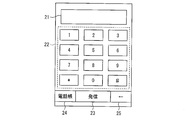
- the numeric keypad user interface displayed on the display panel 10 includes a numeric keypad 22 that accepts numeric input, a call button 23 that accepts an instruction to call an entered digit (telephone number), and a telephone directory.
- Phone book button 24 that accepts an instruction to display
- left arrow button 25 (“ ⁇ ” in FIG. 1) that accepts an instruction to delete the entered number one character at a time from the position where a cursor (not shown) is displayed It is included.
- the numeric keypad user interface includes a number display area 21 for displaying numbers received by touching the numeric keypad 22 via the touch panel 11 on the display panel 10.
- the numeric keypad 22 includes numeric buttons “0” to “9” and symbol buttons “*” and “#”.
- the communication terminal device 1 accepts an input of a telephone number of a call destination by accepting an input operation of a user who touches each numeric button of the numeric keypad 22 displayed on the display panel 10. In addition, the communication terminal device 1 displays the input telephone number in the number display area 21.
- the communication terminal device 1 executes a call to the input telephone number.
- the communication terminal device 1 displays the phone book stored in the storage unit 13 instead of the numeric keypad user interface.
- each of the numeric buttons “0” to “9” and the symbol buttons “*” and “#” included in the numeric keypad 22 has a plurality of telephone numbers of a plurality of call destinations to be called by a simple operation.
- the data associated with the calling party name in advance may be stored in, for example, the RAM included in the storage unit 13.
- Information for specifying a call destination such as a telephone number of a call destination or a call partner name, may be referred to as call destination specifying information.
- the call destination identification information is not limited to the telephone number of the call destination and the name of the call partner, but may be a relationship, address, photo, etc. as long as it is information for specifying the call destination. Good.
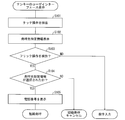
- FIG. 3 is a flowchart showing a flow of the short call processing in the communication terminal device 1 according to the present embodiment.
- FIG. 4 is a screen transition diagram showing an example of display screen transition of the display panel 10 in the short call processing of the communication terminal device 1 according to the present embodiment.
- FIG. 4A shows a display screen at the moment when the user touches the touch panel 11, and
- FIG. 4B shows a case where call destination identification information associated with the number of the numeric button touched by the user is displayed.
- a display screen is shown, and (c) shows a display screen when the user selects an arbitrary telephone number from the displayed telephone numbers.
- 4D shows a display screen when the telephone number selected by the user is displayed in the number display area 21, and
- FIG. 4E shows a display when calling the telephone number selected by the user. The screen is shown.
- the touch panel 11 detects a user's touch operation in a state in which a numeric keypad user interface is displayed (step S101).
- a user's touch operation is performed by the user's finger
- the user's touch operation may be performed using a touch pen or the like.
- the control unit 12 displays the call destination identification information associated with the touched numeric button so as to be superimposed on the user interface of the numeric keypad (step S102). For example, when the numeric button “5” is touched by a touch operation, the display screen of the display panel 10 is displayed from the display screen on which the user interface is displayed as shown in FIG. A transition is made to a display screen in which the call destination identification information is displayed superimposed on the user interface.
- FIG. 4B four call destination identification information associated with the numeric button “5” are respectively displayed on the upper, lower, left, and right sides of the numeric button “5”.
- the destination specific information is displayed so as to overlap each of the numeric buttons “2”, “4”, “6”, and “8”.
- control unit 12 detects a so-called flick operation on the touch panel 11 that the user moves to the call destination identification information displayed around the touched numeric keypad without releasing the touched finger from the touch panel 11. It is determined whether an operation to release the touched finger without performing a flick operation is detected (step S103).
- control unit 12 determines whether or not the call destination identification information displayed around the numeric keypad is selected as a result of the flick operation. Determination is made (step S104).
- the control unit 12 displays the telephone number included in the selected call destination identification information in the number display area 21 (step S105). ). For example, as shown in FIG. 4C, when the call destination identification information displayed so as to overlap the numeric button “4” is selected by the flick operation, the display screen of the display panel 10 is (d ), The telephone number included in the selected call destination identification information is displayed in the number display area 21 as the call destination telephone number.
- the control unit 12 When receiving a call instruction from the user in a state where the telephone number included in the selected call destination identification information is displayed in the number display area 21, the control unit 12 calls the displayed telephone number. . At this time, the display screen of the display panel 10 is changed to a call screen as shown in FIG.
- the control unit 12 is touched as an input of a phone number. It is only necessary to accept input of numbers on the number buttons. For example, when the user simply inputs the number “5” as one of the telephone numbers, the user touches the number button “5” of the numeric keypad 22 with, for example, a finger and lifts the finger without performing a flick operation. That's fine.
- control unit 12 determines that the call destination identification information selection operation has been canceled, and shortened call processing And the display of the call destination identification information is stopped.
- the communication terminal device 1 displays a plurality of call destination identification information associated with an arbitrary numeric button by touching the arbitrary numeric button of the numeric keypad 22.
- the communication terminal device 1 according to the present embodiment can associate a plurality of call destination identification information with each of the numeric buttons of the numeric keypad 22, more telephones can be obtained using the simple operation described above.
- the call destination can be selected from the number.
- the user selects a desired call destination from a plurality of call destination identification information associated with the arbitrary numeric button displayed by touching the arbitrary numeric button of the numeric keypad 22.
- a desired call destination can be quickly called.
- the user can quickly reach the desired call destination by simply sliding the finger from the touched key position to the desired call destination identification information. You can make a call.
- any call destination identification information is associated with any key. You don't have to remember if you are.
- the user can perform an operation related to making a call with only a simple operation to the call destination and an operation related to simple numeric input for inputting a telephone number on the same screen. it can.
- FIG. 5 is a screen transition diagram illustrating an example of the transition of the display screen of the display panel 10 when the selection operation of the call destination identification information is canceled.
- A) of FIG. 5 shows the display screen before being canceled when canceling the selection operation of the call destination identification information
- (b) shows the display screen after being canceled.
- the call destination identification information is displayed by touching the numeric button “5” of the numeric keypad 22, there is no desired call destination identification information (the desired call destination identification information is not displayed on the numeric button “5”). (Not associated).
- the user wants to select a call destination from the call destination identification information associated with the numeric button “4” of the numeric keypad 22, the user accidentally touches the numeric button “5” of the numeric keypad 22. There is.
- the four call destination identifications associated with the numeric button “5” are specified. Information is displayed so as to be superimposed on the user interface of the numeric keypad.
- the user can easily make a call. It is possible to cancel the selection operation of the pre-specified information.
- the case where the call destination identification information is displayed immediately when the user's touch operation is performed while the user interface of the numeric keypad is displayed has been described as an example.
- the present invention is not limited to this.
- a configuration may be adopted in which call destination identification information is displayed after a certain period of time has elapsed after a user's touch operation.
- the telephone number of the selected call destination is displayed in the number display area 21, and a call is made after receiving a call instruction from the user.
- the present invention is not limited to this.
- a configuration may be adopted in which after a call destination is selected, a call is made immediately to the telephone number of the selected call destination.
- the display screen displayed on the display panel 10 directly transitions from the state shown in (c) of FIG. 4 to the state shown in (d).
- each is displayed on a diagonal line centered on the selected number button (that is, each call destination identification information overlaps each of the number buttons “1”, “3”, “7”, “9”). May be.
- each of the numeric buttons of the numeric keypad 22 is associated with six call destination identification information, and when the numeric button is touched, only the calling party name in the call destination identification information is displayed.
- FIG. 7 shows a display screen when the calling party name included in the call destination identification information associated with the number of the number button touched by the user is displayed in the communication terminal device 1 according to the present modification. Yes.
- the numeric keypad “5” of the numeric keypad 22 is touched while the user interface of the numeric keypad for inputting a telephone number is displayed on the display panel 10, FIG. As shown, only the calling party name among the six callee identification information associated with the numeric button “5” is displayed around the numeric button “5” in a superimposed manner on the numeric keypad user interface. Is done.
- the calling party name included in each of the six callee identification information associated with the numeric button “5” is a vertex that forms a hexagon with the numeric button “5” as the center. It is displayed at the position.
- the display position of the calling party name is not limited to this. For example, there are three display positions on the left and right sides (number button “4” side and “6” side in FIG. 7) across the number button “5”. You may employ
- only the calling party name in the call destination identification information is displayed, but the present invention is not limited to this.
- only the telephone number may be displayed as the call destination identification information, or both the telephone number and the call partner name (that is, the call destination identification information) may be displayed.
- the calling party name included in each of the eight call destination identification information associated with the numeric button “5” includes the vertices constituting a square centered on the numeric button “5”, and Displayed at the side position.
- the display position of the calling party name is not limited to this. For example, there are four display positions on the left and right sides (number buttons “4” and “6” in FIG. 8) across the number button “5”. You may employ
- only the calling party name in the call destination identification information is displayed, but the present invention is not limited to this.
- only the telephone number may be displayed as the call destination identification information, or both the telephone number and the call partner name (that is, the call destination identification information) may be displayed.
- ⁇ Modification 3> In the present embodiment, a case has been described in which the call destination identification information associated with the number of the touched numeric button is displayed around the numeric button of the numeric keypad 22 touched by the user.
- the present invention is not limited to this.
- the call destination identification information associated with the number of the number button touched by the user may be displayed so as to draw an arc.
- FIG. 9 shows a display when the calling party name included in the call destination identification information associated with the number on the number button touched by the user is displayed in the communication terminal device 1 according to the third modification of the present embodiment. An example of a panel display screen is shown.
- the communication terminal device 1 when the numeric button “5” of the numeric keypad 22 is touched, as shown in FIG. 9, the five call destination identification information associated with the numeric button “5” are displayed. Only the calling party name is displayed superimposed on the user interface of the numeric keypad so as to draw an arc.
- the case where only the calling party name of the issue destination identification information is displayed has been described as an example.
- the present invention is not limited to this, for example, only the telephone number. May be displayed, or other call destination identification information may be displayed.
- the display position of the call destination identification information in the communication terminal device 1 according to the present invention is not limited to the periphery of the numeric buttons, for example, one vertical line, one horizontal line, a part of the button periphery, or a random number. You may employ
- the control unit 12 may be realized in hardware by a logic circuit formed on an integrated circuit (IC chip), or may be realized in software using a CPU (Central Processing Unit).
- IC chip integrated circuit
- CPU Central Processing Unit
- the control unit 12 includes a CPU that executes instructions of a program that realizes each function, a ROM (Read Memory) that stores the program, a RAM (Random Access Memory) that expands the program, the program, and various types
- a storage device such as a memory for storing data is provided.
- An object of the present invention is to provide a recording medium in which a program code (execution format program, intermediate code program, source program) of a control program of the control unit 12 which is software that realizes the above-described functions is recorded so as to be readable by a computer. This can also be achieved by supplying the control unit 12 and reading and executing the program code recorded on the recording medium by the computer (or CPU or MPU).
- Examples of the recording medium include a magnetic disk such as a hard disk, a CD-ROM / CD-R / CD-RW / MO / DVD-ROM / DVD-R / DVD-RW / Blu-ray disk (BD) -ROM / Disks including optical disks such as BD-R / BD-RE, cards such as IC cards (including memory cards) / optical cards, semiconductor memories such as mask ROM / EPROM / EEPROM (registered trademark) / flash memory, etc. Can be used.
- a magnetic disk such as a hard disk
- optical disks such as BD-R / BD-RE
- cards such as IC cards (including memory cards) / optical cards
- semiconductor memories such as mask ROM / EPROM / EEPROM (register
- the program code may be supplied to the control unit 12 via a communication network.
- the communication network is not particularly limited as long as it can transmit the program code.
- the Internet, LAN, CATV communication network, telephone line network, mobile communication network, etc. can be used.
- the transmission medium constituting this communication network is not limited to a specific configuration or type.
- a cable using a metal cable such as a telephone line, a LAN cable, a cable TV line, or an optical fiber such as FTTH, or a radio wave using a mobile phone line, a radio wave such as WLAN, or an infrared ray such as IrDA or a remote control. Is available.
- a communication terminal device includes a display panel that displays a plurality of keys, a touch panel that is provided over the display panel and detects a touch operation by a user, When a touch operation on any of the plurality of keys is detected by the touch panel, among the plurality of call destination identification information associated with each of the plurality of keys, the key on which the touch operation is performed Control means for displaying the plurality of associated call destination identification information on the display panel, wherein the control means has selected one of the plurality of call destination identification information by the touch panel. If detected, a telephone number specified by the selected call destination identification information is set as the call destination.
- the communication terminal device displays the plurality of call destination identification information associated with the key on which the touch operation has been performed, and the call origination selected from the plurality of call destination identification information.
- the telephone number specified by the call destination specifying information is set as the call destination.
- the user selects a desired call destination from a plurality of call destination identification information associated with the arbitrary key displayed by touching any key of the plurality of keys. With a simple operation, the telephone number of the callee can be set quickly.
- the user since the user associates a plurality of call destination identification information with each of the plurality of keys, the user selects a desired call destination from a larger number of call destinations using the above-described simple operation. be able to.
- control unit makes a call to a telephone number set as a call destination.
- the user can quickly call a telephone number set as a call destination by a simple operation.
- the control means displays the telephone number set as the call destination on the display panel as the call destination telephone number, and also issues a call instruction from the user. Based on this, it is preferable to place a call to the callee telephone number.
- the user can check the set telephone number and quickly call the call destination. Can be called.
- the selection of the call destination identification information is performed by a flick operation from a key touched in the touch operation.
- the control unit determines that the call destination identification information is selected. .
- the user when the user performs the touch operation with, for example, the user's finger, the user can quickly make the desired call by simply sliding the finger from the touched key position to the desired call destination identification information. You can make a call first.
- control unit may be configured such that, after any of the plurality of keys is touched in the touch operation, the plurality of call destinations on the display panel is performed by the flick operation.
- the touch panel detects that an area other than the area where the specific information is displayed is selected, it is preferable to stop displaying the plurality of call destination specific information.
- the control unit stops displaying the plurality of call destination identification information when none of the plurality of call destination identification information is selected by the flick operation.
- the plurality of keys are numeric keys including a plurality of numeric buttons and symbol buttons.
- the communication terminal device can associate the plurality of call destination identification information with each of the plurality of numeric buttons and symbol buttons constituting the numeric keypad.
- the numeric keypad is composed of a total of 12 buttons including 10 numeric buttons from 0 to 9 and two symbol buttons “#” and “*”.
- the user can select desired call destination specifying information from the plurality of call destination specifying information only by the simple operation described above, the user can select any call destination specifying information for any key. Even if the memory regarding whether or not is associated is ambiguous, a desired call destination can be selected without feeling inconvenience.
- the desired call destination identification information is selected from the plurality of call destination identification information displayed by touching the key. Can be selected after viewing.
- the touch panel when the touch panel detects that the control unit has not been touched without performing the flick operation after the touch operation, Stop displaying the call destination identification information and accept the number corresponding to the key touched by the touch operation as the number input to specify the call destination by directly entering the number Is preferred.
- the control means touches the touch panel by the touch operation, for example, when a user's finger or the like leaves the touch panel without performing the flick operation, the plurality of call destinations Stop displaying specific information. Further, the control means accepts a number corresponding to the number button touched by the touch operation as a number input to input a telephone number for specifying the call destination.
- the user can perform an operation related to a call by only a simple operation to the call destination and an operation of simply inputting a number on the same screen.
- a communication terminal device control method is provided with a display panel that displays a plurality of keys and a display panel that overlaps the display panel, and detects a touch operation by a user.
- a communication terminal device comprising: a touch panel, wherein when a touch operation on any of the plurality of keys is detected by the touch panel, the plurality of keys associated with each of the plurality of keys are detected.
- a setting step of setting a telephone number specified by the selected call destination identification information as a call destination when it is detected that any one has been selected. Are, it is characterized in that.
- the communication terminal device displays the plurality of call destination identification information associated with the key on which the touch operation is performed in the display step, and the plurality of call destinations in the setting step.
- the telephone number specified by the call destination identification information selected from the destination identification information is set as the call destination.
- the user selects a desired call destination from a plurality of call destination identification information associated with the arbitrary key displayed by touching any key of the plurality of keys. With a simple operation, the telephone number of the callee can be set quickly.
- the user since the user associates a plurality of call destination identification information with each of the plurality of keys, the user selects a desired call destination from a larger number of call destinations using the above-described simple operation. be able to.
- a program for causing a computer to operate as a communication terminal device according to an aspect of the present invention the program causing the computer to function as each unit of the communication terminal device, and a program of these programs
- a computer-readable recording medium on which at least one of them is recorded is also included in the scope of the present invention.
- a combination of a configuration described in a certain claim and a configuration described in another claim is limited to a combination of the configuration described in the claim cited in the claim.
- combinations with configurations described in the claims not cited in the focused claims are possible.
- the present invention can be suitably used for a communication terminal device having a telephone function and a touch panel, such as a smartphone, a mobile phone, a fixed phone, a tablet PC, and a facsimile.
- a communication terminal device having a telephone function and a touch panel such as a smartphone, a mobile phone, a fixed phone, a tablet PC, and a facsimile.
Landscapes
- Engineering & Computer Science (AREA)
- General Engineering & Computer Science (AREA)
- Theoretical Computer Science (AREA)
- Human Computer Interaction (AREA)
- Physics & Mathematics (AREA)
- General Physics & Mathematics (AREA)
- Signal Processing (AREA)
- Computer Networks & Wireless Communication (AREA)
- Telephone Function (AREA)
Abstract
本発明に係る通信端末装置(1)は、テンキー(22)の何れかのキーへのタッチ操作が検出された場合に、テンキー(22)の各々に関連付けられた複数の発呼先特定情報のうち、当該タッチ操作が行われたキーに関連づけられた複数の発呼先特定情報を表示し、複数の発呼先特定情報の何れかが選択されたことが検出されると、当該選択された発呼先特定情報により特定される電話番号を発呼先に設定する制御部(12)を備えている。
Description
本発明は、タッチパネルを備える通信端末装置、及びその制御方法に関するものである。また、そのような通信端末装置としてコンピュータを動作させるためのプログラム、及び、そのようなプログラムが記録された記録媒体に関するものである。
従来、プッシュホン式の固定電話、ファクシミリー、及び、テンキーを搭載した携帯電話などの通信端末装置においては、当該通信端末装置に電話番号を人物名と関連付けて登録可能な、いわゆる電話帳機能を有していることが一般的である。また、電話番号の登録件数が増えるにつれ、電話をかける際に、電話をかけたい相手を選択するまでの操作手順が増えてしまうため、特定の相手へ少ない手順で少ない手順で迅速に電話がかけられるような機能をさらに有していることが多い。
迅速に電話がかけられるような機能を実現する方法として、例えば、特定のキーを長押しすることによって予め登録された電話番号(発呼先)に発呼する方法(方法1)が挙げられる。また、予め電話番号と関連づけられた一桁又は二桁の数字を入力することによって発呼先に発呼する方法(方法2)を挙げることもできる。このように、少ない手順で迅速に電話がかけられるような機能を実現する方法は、いわゆる短縮ダイヤル、又は、スピードダイヤルなどと呼称されている。
また、近年、数字及び文字入力のためのテンキーが搭載されていないスマートフォンなどに代表される通信端末装置が普及してきている。このように、テンキーを搭載しない通信端末装置は、直接触れることで操作可能な操作画面を表示するタッチパネルを備えている。
このような通信端末装置においては、例えば、特許文献1に開示されているような、タッチパネルに表示されたソフトウェアキーボードの各キーに5個のかな文字を対応させ、タッチパネルに例えばペンで触れることでキーを選択した後に、タッチパネルに触れたまま上下左右の何れかの方向にペンを移動させる、いわゆるフリック入力を行うことによって、予めペンの移動方向に関連づけられたかな文字を選択するかな文字入力方法が搭載されていることが多く、通信端末装置における一般的な文字入力方法として定着しつつある。
このように操作画面に触れることで操作可能なタッチパネルを備える通信端末装置では、上述した迅速に電話がかけられるような機能を実現する方法として、例えば、操作画面上に発呼先へワンタッチで発呼できるショートカットを配置しておき、当該ショートカットを選択することで発呼先に発呼する方法(方法3)を備えることも可能である。
また、特許文献2には、迅速に電話がかけられるような機能として、タブレットにストロークを描くことによって入力されるジェスチャに対応する電話番号へ発呼する方法(方法4)を用いて発呼(発信処理)を行う電話機が開示されている。
しかし、上述の方法1には、長押しされる特定のキーに予め関連付けて登録可能な電話番号の数が、当該通信端末装置に設けられているキーの数に限られてしまうという問題がある。
方法2には、一桁又は二桁の数字に短縮ダイヤルとして電話番号を登録することができるものの、2桁の数字に関連づけられた電話番号を全て覚えておくことは困難であるという問題がある。また、関連づけた番号を覚えておき易く、最も単純な操作で発呼可能な一桁の数字0~9に関連づけて登録できる電話番号は、10個に限られてしまうという問題もある。
機能3には、通信端末装置に設けられる操作画面の大きさ(タッチパネルの大きさ)によって、操作画面に表示可能なショートカットの数が限られてしまうという問題がある。
さらに、機能4には、理論上ほぼ無限の軌跡のパターンが存在することになるが、軌跡のパターンが増えるほど当該軌跡のパターンに何れの電話番号が関連づけられているかを覚えておくことが困難になり、また、軌跡のパターンが複雑になるほど当該軌跡のパターンそのものを覚えておくことが困難になるという問題がある。また、軌跡のパターンが複雑になるほど当該軌跡のパターンを描くための動作も煩雑なものとなってしまう。
本発明は、上記の問題点に鑑みてなされたものであり、その目的は、単純な操作で迅速に発呼先を設定可能にすると共に、所望の発呼先を当該単純な操作でより多くの発呼先から選択可能な通信端末装置を提供することにある。
本発明の一態様に係る通信端末装置は、上記の課題を解決するために、複数のキーを表示する表示パネルと、上記表示パネルに重ねて設けられ、ユーザによるタッチ操作を検出するタッチパネルと、上記タッチパネルによって上記複数のキーの何れかへのタッチ操作が検出された場合に、上記複数のキーの各々に関連付けられた複数の発呼先特定情報のうち、当該タッチ操作が行われたキーに関連づけられた上記複数の発呼先特定情報を上記表示パネルに表示する制御手段と、を備え、上記制御手段は、上記タッチパネルによって上記複数の発呼先特定情報の何れかが選択されたことが検出された場合、当該選択された発呼先特定情報により特定される電話番号を発呼先に設定する、ことを特徴としている。
本発明の一態様に係る通信端末装置の制御方法は、上記の課題を解決するために、複数のキーを表示する表示パネルと、当該表示パネルに重ねて設けられ、ユーザによるタッチ操作を検出するタッチパネルと、を備えた通信端末装置の制御方法であって、上記タッチパネルによって上記複数のキーの何れかへのタッチ操作が検出された場合に、上記複数のキーの各々に関連付けられた複数の発呼先特定情報のうち、当該タッチ操作が行われたキーに関連づけられた上記複数の発呼先特定情報を上記表示パネルに表示する表示ステップと、上記タッチパネルによって上記複数の発呼先特定情報の何れかが選択されたことが検出された場合、当該選択された発呼先特定情報により特定される電話番号を発呼先に設定する設定ステップと、を含んでいる、ことを特徴としている。
また、コンピュータを本発明の一態様に係る通信端末装置として動作させるためのプログラムであって、上記コンピュータを上記通信端末装置の各手段として機能させることを特徴とするプログラム、及び、これらのプログラムのうち少なくとも何れかを記録したコンピュータ読み取り可能な記録媒体も本発明の範疇に含まれる。
したがって、上記通信端末装置は、単純な操作で、迅速に発呼先を設定することができると共に、上述の単純な操作を用いて、より多くの発呼先から所望の発呼先を選択することができる。
<実施形態1>
本発明に係る通信端末装置の一実施形態について、図1から図6を参照して説明する。但し、この実施形態に記載されている構成は、特に特定的な記載がない限り、この発明の範囲をそれのみに限定する趣旨ではなく、単なる説明例に過ぎない。
本発明に係る通信端末装置の一実施形態について、図1から図6を参照して説明する。但し、この実施形態に記載されている構成は、特に特定的な記載がない限り、この発明の範囲をそれのみに限定する趣旨ではなく、単なる説明例に過ぎない。
〔通信端末装置の構成〕
本実施形態に係る通信端末装置について、図1を参照して説明する。図1は、本実施形態に係る通信端末装置1の構成を示すブロック図である。
本実施形態に係る通信端末装置について、図1を参照して説明する。図1は、本実施形態に係る通信端末装置1の構成を示すブロック図である。
図1に示すように、通信端末装置1は、表示パネル10、タッチパネル11、制御部(制御手段)12、記憶部13、操作部14、通信部15、及び、音声入出力部16を備えている。
(表示パネル)
表示パネル10は、ユーザの入力操作を受け付けるユーザインターフェースを表示する。当該ユーザインターフェースとしては、例えば、図2に示すような、ユーザが数字を入力する入力操作を受け付けるための操作画面であるユーザインターフェース(テンキー)が挙げられるが、これに限定されるものではない。なお、図2の詳細については後述する。
表示パネル10は、ユーザの入力操作を受け付けるユーザインターフェースを表示する。当該ユーザインターフェースとしては、例えば、図2に示すような、ユーザが数字を入力する入力操作を受け付けるための操作画面であるユーザインターフェース(テンキー)が挙げられるが、これに限定されるものではない。なお、図2の詳細については後述する。
(タッチパネル)
タッチパネル11は、表示パネル10に重ねて設けられ、例えば、静電容量の変化を検出することにより、ユーザの表示パネル10へのタッチ操作を検出する。具体的には、タッチパネル11は、ユーザが指及びタッチペンなどで表示パネル10上の何れの領域(すなわち、タッチパネル11上の位置)にタッチしているかを、当該タッチパネル11上の静電容量の変化を検知することによって検出する。
タッチパネル11は、表示パネル10に重ねて設けられ、例えば、静電容量の変化を検出することにより、ユーザの表示パネル10へのタッチ操作を検出する。具体的には、タッチパネル11は、ユーザが指及びタッチペンなどで表示パネル10上の何れの領域(すなわち、タッチパネル11上の位置)にタッチしているかを、当該タッチパネル11上の静電容量の変化を検知することによって検出する。
なお、タッチパネル11は静電容量式に限られるものではなく、ユーザの表示パネル10へのタッチ操作を検出するものであれば、他の方式を用いたものであってもよい。
(制御部)
制御部12は、CPU(central processing unit)を含んで構成され、記憶部13に格納されたプログラムを実行することで、表示パネル10にユーザインターフェースを表示させる。また、制御部12は、表示パネル10に表示されたユーザインターフェースに対するユーザの入力操作に従って、通信端末装置1の各部を制御する。
制御部12は、CPU(central processing unit)を含んで構成され、記憶部13に格納されたプログラムを実行することで、表示パネル10にユーザインターフェースを表示させる。また、制御部12は、表示パネル10に表示されたユーザインターフェースに対するユーザの入力操作に従って、通信端末装置1の各部を制御する。
さらに、制御部12は、通信端末装置1における通話に関する動作を統括的に制御する。
(記憶部)
記憶部13は、制御部12によって実行されるプログラムなどの固定データが格納される、読み出し可能かつ書き込み不能なメモリ(ROM)、及び、制御部12が演算のために参照するデータや、制御部12が演算によって生成したデータなどの可変データが格納される、読み出し可能かつ書き込み可能なメモリ(RAM)を備えている。
記憶部13は、制御部12によって実行されるプログラムなどの固定データが格納される、読み出し可能かつ書き込み不能なメモリ(ROM)、及び、制御部12が演算のために参照するデータや、制御部12が演算によって生成したデータなどの可変データが格納される、読み出し可能かつ書き込み可能なメモリ(RAM)を備えている。
記憶部13の備えるRAMには、電話番号と、当該電話番号によって特定される発呼先の通信端末装置1を所有する人の名前(発呼相手名)とが関連付けられた、いわゆる電話帳が格納されている。
(操作部)
操作部14は、ユーザの様々な操作(ユーザ指示)を受け付ける手段であり、例えば、操作ボタンなどによって構成される。操作部14としては、例えば、通信端末装置1の電源のオン・オフを切り替える電源ボタンなどを挙げることができる。
操作部14は、ユーザの様々な操作(ユーザ指示)を受け付ける手段であり、例えば、操作ボタンなどによって構成される。操作部14としては、例えば、通信端末装置1の電源のオン・オフを切り替える電源ボタンなどを挙げることができる。
なお、本実施形態では、表示パネル10にユーザインターフェースとして表示されるテンキー(複数のキー)などが、操作部14として備えられていない場合を例に挙げて説明するが、もちろん、テンキーなどを操作部14として備える構成としてもよい。
(通信部)
通信部15は、制御部12から、電話番号により特定される通信端末装置に対して発呼する発呼指示を受けると、当該発呼指示に従って発呼先に発呼(発信)し、発呼先の通信端末装置との間で音声通話が可能な状態にする。
通信部15は、制御部12から、電話番号により特定される通信端末装置に対して発呼する発呼指示を受けると、当該発呼指示に従って発呼先に発呼(発信)し、発呼先の通信端末装置との間で音声通話が可能な状態にする。
(音声入出力部)
音声入出力部16は、音声通話時に音声を入力する音声入力部(例えば、マイクなど)と、音声を出力する音声出力部(例えば、スピーカなど)とを含んで構成されている。
音声入出力部16は、音声通話時に音声を入力する音声入力部(例えば、マイクなど)と、音声を出力する音声出力部(例えば、スピーカなど)とを含んで構成されている。
〔ユーザインターフェース〕
次に、本実施形態において、表示パネル10に表示される、ユーザが発呼先の電話番号を入力する入力操作を受け付けるためのテンキーのユーザインターフェースについて、図2を参照して説明する。図2は、本実施形態に係る表示パネル10に表示されるユーザインターフェースの一例を示す図である。
次に、本実施形態において、表示パネル10に表示される、ユーザが発呼先の電話番号を入力する入力操作を受け付けるためのテンキーのユーザインターフェースについて、図2を参照して説明する。図2は、本実施形態に係る表示パネル10に表示されるユーザインターフェースの一例を示す図である。
表示パネル10に表示されるテンキーのユーザインターフェースには、図2に示すように、数字の入力を受け付けるテンキー22、入力された数字(電話番号)に発呼する指示を受け付ける発信ボタン23、電話帳を表示する指示を受け付ける電話帳ボタン24、及び、入力された数字をカーソル(不図示)が表示されている位置から1文字ずつ削除する指示を受け付ける左矢印ボタン25(図1における「←」)が含まれている。また。テンキーのユーザインターフェースには、図2に示すように、テンキー22をタッチパネル11を介してタッチすることによって受け付けられた数字を表示パネル10に表示するための番号表示領域21が含まれている。なお、テンキー22には、数字ボタン「0」~「9」、記号ボタン「*」及び「#」が含まれている。
通信端末装置1は、表示パネル10に表示されているテンキー22の各数字ボタンをタッチするユーザの入力操作を受け付けることによって、発呼先の電話番号の入力を受け付ける。また、通信端末装置1は、入力された電話番号を、番号表示領域21に表示する。
さらに、通信端末装置1は、発信ボタン23をタッチするユーザの入力操作(発呼指示)を受け付けると、入力された電話番号への発呼を実行する。
また、通信端末装置1は、電話帳ボタン24をタッチするユーザの入力操作(電話帳表示指示)を受け付けると、テンキーのユーザインターフェースに替えて、記憶部13に格納されている電話帳を表示する。
〔短縮発呼処理〕
次に、本実施形態に係る通信端末装置1における、短縮ダイヤルを用いて発呼する場合の処理について、図3から図6を参照して説明する。
次に、本実施形態に係る通信端末装置1における、短縮ダイヤルを用いて発呼する場合の処理について、図3から図6を参照して説明する。
なお、本実施形態では、テンキー22に含まれる数字ボタン「0」~「9」、記号ボタン「*」及び「#」の各々に、簡単な操作で発呼したい複数の発呼先の電話番号及び発呼相手名が予め関連付けられたデータが、例えば記憶部13の備えるRAMに格納されていればよい。なお、発呼先の電話番号や発呼相手名などのように発呼先を特定するための情報を、発呼先特定情報と呼ぶこともある。発呼先特定情報は、発呼先の電話番号及や発呼相手名に限られるものではなく、発呼先を特定するための情報であれば、続柄、住所、顔写真などであってもよい。
図3は、本実施形態に係る通信端末装置1における短縮発呼処理の流れを示すフローチャートである。
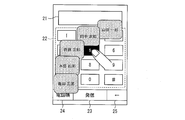
また、図4は、本実施形態に係る通信端末装置1の短縮発呼処理における表示パネル10の、表示画面の遷移の一例を示す画面遷移図である。図4の(a)は、ユーザがタッチパネル11にタッチした瞬間の表示画面を示し、(b)は、ユーザがタッチした数字ボタンの数字に関連付けられた発呼先特定情報が表示された際の表示画面を示し、(c)は、ユーザが表示された電話番号から任意の電話番号を選択した際の表示画面を示している。また、図4の(d)は、ユーザが選択した電話番号が番号表示領域21に表示された際の表示画面を示し、(e)は、ユーザが選択した電話番号へ発呼する際の表示画面を示している。
図3に示すように、タッチパネル11は、テンキーのユーザインターフェースが表示されている状態で、ユーザのタッチ操作を検出する(ステップS101)。なお、本実施形態では、このユーザのタッチ操作がユーザの指によって行われる場合を例に挙げて説明するが、タッチペンなどで行われてもよい。
制御部12は、タッチパネル11によってタッチ操作が検出されると、タッチされた数字ボタンに関連付けられている発呼先特定情報がテンキーのユーザインターフェースに重畳するように表示される(ステップS102)。例えば、タッチ操作によって数字ボタン「5」がタッチされた場合、表示パネル10の表示画面は、図4の(a)に示す、ユーザインターフェースが表示された表示画面から、(b)に示す、発呼先特定情報がユーザインターフェースに重畳されて表示された表示画面に遷移する。
なお、本実施形態では、図4の(b)に示すように、数字ボタン「5」に関連づけられている4つの発呼先特定情報が数字ボタン「5」の上下左右にそれぞれ(各発呼先特定情報が数字ボタン「2」、「4」、「6」、「8」の各々に重なるように)表示される。
次に、制御部12は、タッチパネル11において、ユーザが、タッチした指をタッチパネル11から離すことなく、タッチしたテンキーの周囲に表示されている発呼先特定情報まで動かす、いわゆるフリック操作が検出されるか、フリック操作を行わずにタッチした指をそのまま離す操作が検出されるかを判定する(ステップS103)。
制御部12は、タッチパネル11によってフリック操作が検出されると(ステップS103においてYES)、フリック操作が行われた結果、テンキーの周囲に表示されている発呼先特定情報が選択されたか否かを判定する(ステップS104)。
制御部12は、フリック操作によって発呼先特定情報が選択されたと判定した場合(ステップS104)、選択された発呼先特定情報に含まれる電話番号を、番号表示領域21に表示する(ステップS105)。例えば、図4の(c)に示すように、フリック操作によって、数字ボタン「4」に重なるように表示された発呼先特定情報が選択された場合、表示パネル10の表示画面は、(d)に示すように、選択された発呼先特定情報に含まれる電話番号が発呼先電話番号として番号表示領域21に表示される。
制御部12は、選択された発呼先特定情報に含まれる電話番号が番号表示領域21に表示された状態で、ユーザからの発呼指示を受け付けると、表示されている電話番号に発呼する。このとき、表示パネル10の表示画面は、図4の(e)に示すように、発呼画面に遷移する。
また、制御部12は、タッチパネル11によってフリック操作が検出されない場合(ステップS103においてNO)、すなわち、タッチした指をそのまま離す操作が検出された場合には、電話番号の数字の入力として、タッチされた数字ボタンの数字の入力を受け付ければよい。例えば、ユーザは、電話番号の入力の一つとして単に数字の「5」を入力する場合には、テンキー22の数字ボタン「5」を例えば指でタッチし、フリック操作を行なうことなく指を離せばよい。
また、制御部12は、フリック操作は行われたものの、発呼先特定情報が選択されない場合(ステップS104においてNO)、発呼先特定情報の選択操作がキャンセルされたと判定し、短縮発呼処理をキャンセルすると共に、発呼先特定情報の表示を停止する。
上述のように、本実施形態に係る通信端末装置1は、テンキー22のうちの任意の数字ボタンをタッチすることによって当該任意の数字ボタンに関連付けられた複数の発呼先特定情報を表示した後、フリック操作によって発呼先を選択するという、単純な操作での迅速な発呼を可能にしている。さらに、本実施形態に係る通信端末装置1は、テンキー22の数字ボタンの各々に複数の発呼先特定情報を関連付けておくことができるため、上述の単純な操作を用いて、より多くの電話番号から発呼先を選択可能にしている。
これによって、ユーザは、テンキー22のうちの任意の数字ボタンをタッチすることによって表示された、当該任意の数字ボタンに関連付けられた複数の発呼先特定情報から所望の発呼先を選択するという、単純な操作で、迅速に所望の発呼先に発呼することができる。また、ユーザは、タッチ操作を例えばユーザの指で行った場合、タッチしたキーの位置から所望の発呼先特定情報まで指をスライドさせるという単純な操作のみで、迅速に所望の発呼先に発呼することができる。
また、本実施形態においては、テンキー22が、0~9までの10個の数字ボタンと、「♯」及び「*」の2つの記号ボタンとを含む合計12個のボタンで構成されており、これら12個のボタンの各々に4つの発呼先特定情報が関連付けられているため、ユーザは、合計48(12×4=48)の発呼先特定情報を上述の単純な操作のみで選択することができる。
さらに、ユーザは、上述の単純な操作のみで複数の発呼先特定情報から所望の発呼先特定情報を選択することができるため、何れのキーに何れの発呼先特定情報が関連付けられているのかを覚えておく必要もない。
また、ユーザは、上述の構成によって、発呼先への単純な操作のみでの発呼に関する操作と、電話番号を入力するために行う単なる数字の入力に関する操作とを、同じ画面で行うことができる。
(発呼先特定情報の選択操作のキャンセル)
ここで、発呼先特定情報の選択操作のキャンセル方法について、図5を参照して具体的に説明する。図5は、発呼先特定情報の選択操作をキャンセルする場合における、表示パネル10の表示画面の遷移の一例を示す画面遷移図である。図5の(a)は、発呼先特定情報の選択操作をキャンセルする場合における、キャンセルされる前の表示画面を示し、(b)は、キャンセルされた後の表示画面を示している。
ここで、発呼先特定情報の選択操作のキャンセル方法について、図5を参照して具体的に説明する。図5は、発呼先特定情報の選択操作をキャンセルする場合における、表示パネル10の表示画面の遷移の一例を示す画面遷移図である。図5の(a)は、発呼先特定情報の選択操作をキャンセルする場合における、キャンセルされる前の表示画面を示し、(b)は、キャンセルされた後の表示画面を示している。
例えば、テンキー22の数字ボタン「5」をタッチして発呼先特定情報を表示させた場合に、所望の発呼先特定情報がない(数字ボタン「5」に所望の発呼先特定情報が関連付けられていない)ような場合がある。また、テンキー22の数字ボタン「4」に関連付けられている発呼先特定情報から発呼先を選択したいにも拘らず、間違えてテンキー22の数字ボタン「5」をタッチしてしまうような場合がある。
このように、テンキーのユーザインターフェースが表示されている状態で、ユーザが誤ってテンキー22のうちの数字ボタン「5」をタッチすると、数字ボタン「5」に関連付けられている4つの発呼先特定情報がテンキーのユーザインターフェースに重畳するように表示される。
この状態で、発呼先特定情報の選択操作をキャンセルする場合には、図5の(a)に示すように、発呼先特定情報が表示されていない領域までフリック操作を行なった後、すなわち、発呼先特定情報が表示されている領域以外の領域を選択した後、タッチパネル11から指を離せばよい。このようなユーザのフリック操作が行われた場合、発呼先特定情報の選択操作はキャンセルされ、表示パネル10に表示される表示画面は、図5の(a)に示される画面から(b)に示される画面に遷移することになる。
これによって、ユーザは、タッチした数字ボタンに所望の発呼先特定情報が関連付けられていないことが分かった(つまり、所望の発呼先特定情報が表示されなかった)場合に、簡単に発呼先特定情報の選択操作をキャンセルすることができる。
なお、本実施形態では、テンキーのユーザインターフェースが表示されている状態で、ユーザのタッチ操作が行なわれた際に、即座に発呼先特定情報を表示する場合を例に挙げて説明したが、本発明はこれに限定されるものではない。例えば、ユーザのタッチ操作が行われた後、一定期間経過後に発呼先特定情報を表示する構成を採用してもよい。
また、本実施形態では、発呼先が選択された後、選択された発呼先の電話番号を番号表示領域21に表示し、ユーザからの発呼指示を受け付けた後に発呼する構成を例に挙げて説明したが、本発明はこれに限定されるものではない。例えば、発呼先が選択された後、即座に選択された発呼先の電話番号に発呼する構成を採用してもよい。この場合には、表示パネル10に表示される表示画面は、図4の(c)に示す状態から、(d)に示す状態に直接遷移することになる。
なお、本実施形態では、選択された数字ボタンに関連付けられている4つの発呼先特定情報が、選択された数字ボタンの上下左右にそれぞれ表示される場合を例に挙げて説明したが、本発明はこれに限定されるものではない。例えば、選択された数字ボタンを中心とした対角線上にそれぞれ(つまり、各発呼先特定情報が数字ボタン「1」、「3」、「7」、「9」の各々に重なるように)表示されてもよい。
また、テンキー22の数字ボタン「4」のように、表示パネル10の端に沿って表示されるテンキーに関連付けられた発呼先特定情報を表示させる場合、図6に示すように、表示パネル10の端側(図6において、数字ボタン「6」と反対側)に発呼先特定情報を表示することができない。この場合には、表示が可能な領域(図6において、数字ボタン「6」側)にのみ発呼先特定情報を表示すればよい。
<変形例1>
実施形態1では、テンキー22の数字ボタンの各々に、4つの発呼先特定情報が関連付けられている場合を例に挙げて説明したが、本発明はこれに限定されるものではない。本変形例では、テンキー22の数字ボタンの各々に6つの発呼先特定情報が関連付けられており、かつ、数字ボタンがタッチされた場合に発呼先特定情報のうちの発呼相手名のみを表示する場合を、図7を参照して説明する。図7は、本変形例に係る通信端末装置1において、ユーザがタッチした数字ボタンの数字に関連付けられた発呼先特定情報に含まれる発呼相手名が表示された際の表示画面を示している。
実施形態1では、テンキー22の数字ボタンの各々に、4つの発呼先特定情報が関連付けられている場合を例に挙げて説明したが、本発明はこれに限定されるものではない。本変形例では、テンキー22の数字ボタンの各々に6つの発呼先特定情報が関連付けられており、かつ、数字ボタンがタッチされた場合に発呼先特定情報のうちの発呼相手名のみを表示する場合を、図7を参照して説明する。図7は、本変形例に係る通信端末装置1において、ユーザがタッチした数字ボタンの数字に関連付けられた発呼先特定情報に含まれる発呼相手名が表示された際の表示画面を示している。
本変形例に係る通信端末装置1において、電話番号を入力するためのテンキーのユーザインターフェースが表示パネル10に表示されている状態で、テンキー22の数字ボタン「5」がタッチされると、図7に示すように、数字ボタン「5」に関連付けられている6つの発呼先特定情報のうちの発呼相手名のみが、数字ボタン「5」の周囲に、テンキーのユーザインターフェースに重畳して表示される。
数字ボタン「5」に関連付けられた6つの発呼先特定情報の各々に含まれる発呼相手名は、図7に示すように、数字ボタン「5」を中心とした六角形を構成する各頂点の位置に表示される。もちろん、発呼相手名の表示位置はこれに限定されるものではなく、例えば、数字ボタン「5」を挟んで左右(図7において、数字ボタン「4」側及び「6」側)に3つずつ発呼相手名が表示される構成を採用してもよい。
また、本変形例では、図7に示すように、発呼先特定情報のうちの発呼相手名のみが表示されているが、本発明はこれに限定されるものではない。例えば、発呼先特定情報として電話番号のみが表示されてもよいし、電話番号及び発呼相手名の双方(つまり、発呼先特定情報)が表示されてもよい。
上述の構成によれば、本変形例に係る通信端末装置1は、テンキー22が、0~9までの10個の数字ボタンと、「♯」及び「*」の2つの記号ボタンとを含む合計12個のボタンで構成されており、これら12個のボタンの各々に6つの発呼先特定情報が関連付けられているため、ユーザは、合計72(12×6=72)の発呼先特定情報を上述の単純な操作のみで選択することができる。
<変形例2>
実施形態1では、テンキー22の数字ボタンの各々に、4つの発呼先特定情報が関連付けられている場合を例に挙げて説明したが、本発明はこれに限定されるものではない。本変形例では、テンキー22の数字ボタンの各々に8つの発呼先特定情報が関連付けられており、かつ、数字ボタンがタッチされた場合に発呼先特定情報のうちの発呼相手名のみを表示する場合を、図8を参照して説明する。図8は、本変形例に係る通信端末装置1において、ユーザがタッチした数字ボタンの数字に関連付けられた発呼先特定情報に含まれる発呼相手名が表示された際の表示画面を示している。
実施形態1では、テンキー22の数字ボタンの各々に、4つの発呼先特定情報が関連付けられている場合を例に挙げて説明したが、本発明はこれに限定されるものではない。本変形例では、テンキー22の数字ボタンの各々に8つの発呼先特定情報が関連付けられており、かつ、数字ボタンがタッチされた場合に発呼先特定情報のうちの発呼相手名のみを表示する場合を、図8を参照して説明する。図8は、本変形例に係る通信端末装置1において、ユーザがタッチした数字ボタンの数字に関連付けられた発呼先特定情報に含まれる発呼相手名が表示された際の表示画面を示している。
本変形例に係る通信端末装置1において、電話番号を入力するためのテンキーのユーザインターフェースが表示パネル10に表示されている状態で、テンキー22の数字ボタン「5」がタッチされると、図8に示すように、数字ボタン「5」に関連付けられている8つの発呼先特定情報のうちの発呼相手名のみが、数字ボタン「5」の周囲に、テンキーのユーザインターフェースに重畳して表示される。
数字ボタン「5」に関連付けられた8つの発呼先特定情報の各々に含まれる発呼相手名は、図8に示すように、数字ボタン「5」を中心とした四角形を構成する各頂点及び辺の位置に表示される。もちろん、発呼相手名の表示位置はこれに限定されるものではなく、例えば、数字ボタン「5」を挟んで左右(図8において、数字ボタン「4」側及び「6」側)に4つずつ発呼相手名が表示される構成を採用してもよい。
また、本変形例では、図8に示すように、発呼先特定情報のうちの発呼相手名のみが表示されているが、本発明はこれに限定されるものではない。例えば、発呼先特定情報として電話番号のみが表示されてもよいし、電話番号及び発呼相手名の双方(つまり、発呼先特定情報)が表示されてもよい。
上述の構成によれば、本変形例に係る通信端末装置1は、テンキー22が、0~9までの10個の数字ボタンと、「♯」及び「*」の2つの記号ボタンとを含む合計12個のボタンで構成されており、これら12個のボタンの各々に8つの発呼先特定情報が関連付けられているため、ユーザは、合計96(12×8=96)の発呼先特定情報を上述の単純な操作のみで選択することができる。
<変形例3>
本実施形態では、ユーザによってタッチされたテンキー22の数字ボタンの周囲に、当該タッチされた数字ボタンの数字に関連付けられた発呼先特定情報が表示される場合を例に挙げて説明したが、本発明はこれに限定されるものではない。
本実施形態では、ユーザによってタッチされたテンキー22の数字ボタンの周囲に、当該タッチされた数字ボタンの数字に関連付けられた発呼先特定情報が表示される場合を例に挙げて説明したが、本発明はこれに限定されるものではない。
例えば、図9に示しように、ユーザによってタッチされた数字ボタンの数字に関連付けられた発呼先特定情報が、円弧を描くように表示されてもよい。図9は、本実施形態の変形例3に係る通信端末装置1において、ユーザがタッチした数字ボタンの数字に関連付けられた発呼先特定情報に含まれる発呼相手名が表示された際の表示パネルの表示画面の一例を示している。
本変形例に係る通信端末装置1において、テンキー22の数字ボタン「5」がタッチされると、図9に示すように、数字ボタン「5」に関連付けられている5つの発呼先特定情報のうちの発呼相手名のみが、円弧を描くようにテンキーのユーザインターフェースに重畳して表示される。なお、本変形例では、発行先特定情報のうちの発呼相手名のみが表示される場合を例に挙げて説明したが、本発明はこれに限定されるものではなく、例えば、電話番号のみが表示されてもよいし、その他の発呼先特定情報が表示されてもよい。
このように、本発明に係る通信端末装置1における発呼先特定情報の表示位置は、数字ボタンの周囲に限定されず、例えば、縦一列、横一列、ボタンの周辺の一部、又は、ランダムに表示される構成を採用してもよい。
〔プログラム、記録媒体〕
制御部12は、集積回路(ICチップ)上に形成された論理回路によってハードウェア的に実現してもよいし、CPU(Central Processing Unit)を用いてソフトウェア的に実現してもよい。
制御部12は、集積回路(ICチップ)上に形成された論理回路によってハードウェア的に実現してもよいし、CPU(Central Processing Unit)を用いてソフトウェア的に実現してもよい。
後者の場合、制御部12は、各機能を実現するプログラムの命令を実行するCPU、上記プログラムを格納したROM(Read Only Memory)、上記プログラムを展開するRAM(Random Access Memory)、上記プログラムおよび各種データを格納するメモリ等の記憶装置(記録媒体)などを備えている。そして、本発明の目的は、上述した機能を実現するソフトウェアである制御部12の制御プログラムのプログラムコード(実行形式プログラム、中間コードプログラム、ソースプログラム)をコンピュータで読み取り可能に記録した記録媒体を、制御部12に供給し、そのコンピュータ(またはCPUやMPU)が記録媒体に記録されているプログラムコードを読み出し実行することによっても、達成可能である。
上記記録媒体としては、例えば、ハードディスク等の磁気ディスクやCD-ROM/CD-R/CD-RW/MO/DVD-ROM/DVD-R/DVD-RW/Blu-rayディスク(BD)-ROM/BD-R/BD-RE等の光ディスクを含むディスク類、ICカード(メモリカードを含む)/光カード等のカード類、マスクROM/EPROM/EEPROM(登録商標)/フラッシュメモリ等の半導体メモリ類などを用いることができる。
また、上記プログラムコードは、通信ネットワークを介して制御部12に供給してもよい。この通信ネットワークは、プログラムコードを伝送可能であればよく、特に限定されない。例えば、インターネット、LAN、CATV通信網、電話回線網、移動体通信網等が利用可能である。また、この通信ネットワークを構成する伝送媒体も、特定の構成または種類のものに限定されない。例えば、電話線、LANケーブル、ケーブルTV回線等のメタルケーブルや、FTTH等の光ファイバを利用した有線でも、携帯電話回線、WLAN等の電波、IrDAやリモコンのような赤外線などを利用した無線でも利用可能である。
〔まとめ〕
本発明の一態様に係る通信端末装置は、上記の課題を解決するために、複数のキーを表示する表示パネルと、上記表示パネルに重ねて設けられ、ユーザによるタッチ操作を検出するタッチパネルと、上記タッチパネルによって上記複数のキーの何れかへのタッチ操作が検出された場合に、上記複数のキーの各々に関連付けられた複数の発呼先特定情報のうち、当該タッチ操作が行われたキーに関連づけられた上記複数の発呼先特定情報を上記表示パネルに表示する制御手段と、を備え、上記制御手段は、上記タッチパネルによって上記複数の発呼先特定情報の何れかが選択されたことが検出された場合、当該選択された発呼先特定情報により特定される電話番号を発呼先に設定する、ことを特徴としている。
本発明の一態様に係る通信端末装置は、上記の課題を解決するために、複数のキーを表示する表示パネルと、上記表示パネルに重ねて設けられ、ユーザによるタッチ操作を検出するタッチパネルと、上記タッチパネルによって上記複数のキーの何れかへのタッチ操作が検出された場合に、上記複数のキーの各々に関連付けられた複数の発呼先特定情報のうち、当該タッチ操作が行われたキーに関連づけられた上記複数の発呼先特定情報を上記表示パネルに表示する制御手段と、を備え、上記制御手段は、上記タッチパネルによって上記複数の発呼先特定情報の何れかが選択されたことが検出された場合、当該選択された発呼先特定情報により特定される電話番号を発呼先に設定する、ことを特徴としている。
上記の構成によれば、上記通信端末装置は、タッチ操作が行われた上記キーに関連付けられた上記複数の発呼先特定情報を表示し、当該複数の発呼先特定情報から選択された発呼先特定情報により特定される電話番号を発呼先に設定する。これによって、ユーザは、上記複数のキーのうちの任意のキーをタッチすることによって表示された当該任意のキーに関連付けられた複数の発呼先特定情報から所望の発呼先を選択するという、単純な操作で、迅速に発呼先の電話番号を設定することができる。
また、ユーザは、上記複数のキーの各々に複数の発呼先特定情報を関連付けられているため、上述の単純な操作を用いて、より多くの発呼先から所望の発呼先を選択することができる。
また、本発明の一態様に係る通信端末装置において、上記制御手段は、発呼先に設定した電話番号に発呼する、ことが好ましい。
上記の構成によれば、ユーザは、単純な操作によって発呼先に設定した電話番号に、迅速に発呼することができる。
また、本発明の一態様に係る通信端末装置において、上記制御手段は、発呼先に設定した電話番号を、発呼先電話番号として上記表示パネルに表示すると共に、ユーザからの発呼指示に基づいて、当該発呼先電話番号に発呼する、ことが好ましい。
上記の構成によれば、単純な操作によって発呼先に設定した電話番号を上記表示パネルに表示することで、ユーザは、設定された電話番号を確認することができると共に、迅速に発呼先に発呼することができる。
また、本発明の一態様に係る通信端末装置において、上記発呼先特定情報の選択は、上記タッチ操作においてタッチされたキーからのフリック操作によるものである、ことが好ましい。
上記の構成によれば、上記制御手段は、上記タッチ操作においてタッチされたキーからのフリック操作によって上記発呼先特定情報が選択された場合に、当該発呼先特定情報が選択されたと判定する。
これによって、ユーザは、上記タッチ操作を例えばユーザの指で行った場合、タッチしたキーの位置から所望の発呼先特定情報まで指をスライドさせるという単純な操作のみで、迅速に所望の発呼先に発呼することができる。
また、本発明の一態様に係る通信端末装置において、上記制御手段は、上記タッチ操作において上記複数のキーの何れかがタッチされた後、上記フリック操作によって上記表示パネルにおける上記複数の発呼先特定情報が表示されている領域以外の領域が選択されたことが上記タッチパネルによって検出された場合、上記複数の発呼先特定情報の表示を停止する、ことが好ましい。
上記の構成によれば、上記制御手段は、上記フリック操作によって上記複数の発呼先特定情報の何れもが選択されなかった場合に、上記複数の発呼先特定情報の表示を停止する。これによって、ユーザは、タッチした上記キーに所望の発呼先特定情報が関連付けられていないことが分かった(所望の発呼先特定情報が表示されなかった)場合に、簡単に発呼先特定情報の選択操作をキャンセルすることができる。
また、本発明の一態様に係る通信端末装置において、上記複数のキーは、複数の数字ボタン及び記号ボタンを含むテンキーである、ことが好ましい。
上記の構成によれば、上記通信端末装置は、上記テンキーを構成する上記複数の数字ボタン及び記号ボタンの各々に対して、上記複数の発呼先特定情報を関連付けておくことができる。これによって、例えば、上記テンキーが0~9までの10個の数字ボタンと「♯」及び「*」の2つの記号ボタンとを含んだ合計12個のボタンで構成されており、これら12個のボタンの各々に対して4つの発呼先特定情報が関連付けられている場合、ユーザは、合計48(12×4=48)の発呼先特定情報を上述の単純な操作のみで選択することができる。
さらに、ユーザは、上述の単純な操作のみで上記複数の発呼先特定情報から所望の発呼先特定情報を選択することができるため、ユーザは、何れのキーに何れの発呼先特定情報が関連付けられているかに関する記憶が曖昧な場合であっても、不便さを感じずに所望の発呼先を選択することができる。また、ユーザは、所望の発呼先特定情報が関連付けられているキーをタッチした後は、キーをタッチすることによって表示される複数の発呼先特定情報の中から所望の発呼先特定情報を視認した上で選択することができる。
また、本発明の一態様に係る通信端末装置において、上記制御手段は、上記タッチ操作後に上記フリック操作が行われることなくタッチされない状態になったことが上記タッチパネルによって検出された場合、上記複数の発呼先特定情報の表示を停止すると共に、上記タッチ操作によってタッチされたキーに対応する数字を、直接数字を入力することによって上記発呼先を特定するために入力された数字として受け付ける、ことが好ましい。
上記の構成によれば、上記制御手段は、上記タッチ操作によって上記タッチパネルにタッチした、例えばユーザの指などが、上記フリック操作を行うことなく上記タッチパネルから離れた場合に、上記複数の発呼先特定情報の表示を停止する。さらに、上記制御手段は、上記タッチ操作によってタッチされた数字ボタンに対応する数字を、上記発呼先を特定する電話番号を入力するために入力される数字として受け付ける。
これによって、ユーザは、発呼先への単純な操作のみでの発呼に関する操作と、単に数字を入力する操作とを、同じ画面で行うことができる。
本発明の一態様に係る通信端末装置の制御方法は、上記の課題を解決するために、複数のキーを表示する表示パネルと、当該表示パネルに重ねて設けられ、ユーザによるタッチ操作を検出するタッチパネルと、を備えた通信端末装置の制御方法であって、上記タッチパネルによって上記複数のキーの何れかへのタッチ操作が検出された場合に、上記複数のキーの各々に関連付けられた複数の発呼先特定情報のうち、当該タッチ操作が行われたキーに関連づけられた上記複数の発呼先特定情報を上記表示パネルに表示する表示ステップと、上記タッチパネルによって上記複数の発呼先特定情報の何れかが選択されたことが検出された場合、当該選択された発呼先特定情報により特定される電話番号を発呼先に設定する設定ステップと、を含んでいる、ことを特徴としている。
上記の構成によれば、上記通信端末装置は、表示ステップにおいて、タッチ操作が行われた上記キーに関連付けられた上記複数の発呼先特定情報を表示し、設定ステップにおいて、当該複数の発呼先特定情報から選択された発呼先特定情報により特定される電話番号を発呼先に設定する。これによって、ユーザは、上記複数のキーのうちの任意のキーをタッチすることによって表示された当該任意のキーに関連付けられた複数の発呼先特定情報から所望の発呼先を選択するという、単純な操作で、迅速に発呼先の電話番号を設定することができる。
また、ユーザは、上記複数のキーの各々に複数の発呼先特定情報を関連付けられているため、上述の単純な操作を用いて、より多くの発呼先から所望の発呼先を選択することができる。
また、コンピュータを本発明の一態様に係る通信端末装置として動作させるためのプログラムであって、上記コンピュータを上記通信端末装置の各手段として機能させることを特徴とするプログラム、及び、これらのプログラムのうち少なくとも何れかを記録したコンピュータ読み取り可能な記録媒体も本発明の範疇に含まれる。
なお、ある着目した請求項に記載された構成と、その他の請求項に記載された構成との組み合わせが、その着目した請求項で引用された請求項に記載された構成との組み合わせのみに限られることはなく、本発明の目的を達成できる限り、その着目した請求項で引用されていない請求項に記載された構成との組み合わせが可能である。
本発明は上述した実施形態および変形例に限定されるものではなく、請求項に示した範囲で種々の変更が可能であり、上記実施形態にそれぞれ開示された技術的手段を適宜組み合わせて得られる他の実施形態についても本発明の技術的範囲に含まれる。
本発明は、スマートフォン、携帯電話、固定電話、タブレット型PC、及び、ファクシミリーなど、電話機能及びタッチパネルを備えた通信端末装置に好適に利用することができる。
1 通信端末装置
10 表示パネル
11 タッチパネル
12 制御部(制御手段)
13 記憶部
14 操作部
15 通信部
16 音声入出力部
21 番号表示領域
22 テンキー(複数のキー)
23 発信ボタン
24 電話帳ボタン
25 左矢印ボタン
10 表示パネル
11 タッチパネル
12 制御部(制御手段)
13 記憶部
14 操作部
15 通信部
16 音声入出力部
21 番号表示領域
22 テンキー(複数のキー)
23 発信ボタン
24 電話帳ボタン
25 左矢印ボタン
Claims (10)
- 複数のキーを表示する表示パネルと、
上記表示パネルに重ねて設けられ、ユーザによるタッチ操作を検出するタッチパネルと、
上記タッチパネルによって上記複数のキーの何れかへのタッチ操作が検出された場合に、上記複数のキーの各々に関連付けられた複数の発呼先特定情報のうち、当該タッチ操作が行われたキーに関連づけられた上記複数の発呼先特定情報を上記表示パネルに表示する制御手段と、を備え、
上記制御手段は、上記タッチパネルによって上記複数の発呼先特定情報の何れかが選択されたことが検出された場合、当該選択された発呼先特定情報により特定される電話番号を発呼先に設定する、
ことを特徴とする通信端末装置。 - 上記制御手段は、発呼先に設定した電話番号に発呼する、
ことを特徴とする請求項1に記載の通信端末装置。 - 上記制御手段は、発呼先に設定した電話番号を、発呼先電話番号として上記表示パネルに表示すると共に、ユーザからの発呼指示に基づいて、当該発呼先電話番号に発呼する、ことを特徴とする請求項1に記載の通信端末装置。
- 上記発呼先特定情報の選択は、上記タッチ操作においてタッチされたキーからのフリック操作によるものである、
ことを特徴とする請求項1から3の何れか1項に記載の通信端末装置。 - 上記制御手段は、上記タッチ操作において上記複数のキーの何れかがタッチされた後、上記フリック操作によって上記表示パネルにおける上記複数の発呼先特定情報が表示されている領域以外の領域が選択されたことが上記タッチパネルによって検出された場合、上記複数の発呼先特定情報の表示を停止する、
ことを特徴とする請求項4に記載の通信端末装置。 - 上記複数のキーは、複数の数字ボタン及び記号ボタンを含むテンキーである、
ことを特徴とする請求項4又は5に記載の通信端末装置。 - 上記制御手段は、上記タッチ操作後に上記フリック操作が行われることなくタッチされない状態になったことが上記タッチパネルによって検出された場合、上記複数の発呼先特定情報の表示を停止すると共に、上記タッチ操作によってタッチされたキーに対応する数字を、直接入力された数字として受け付ける、
ことを特徴とする請求項6に記載の通信端末装置。 - 複数のキーを表示する表示パネルと、当該表示パネルに重ねて設けられ、ユーザによるタッチ操作を検出するタッチパネルと、を備えた通信端末装置の制御方法であって、
上記タッチパネルによって上記複数のキーの何れかへのタッチ操作が検出された場合に、上記複数のキーの各々に関連付けられた複数の発呼先特定情報のうち、当該タッチ操作が行われたキーに関連づけられた上記複数の発呼先特定情報を上記表示パネルに表示する表示ステップと、
上記タッチパネルによって上記複数の発呼先特定情報の何れかが選択されたことが検出された場合、当該選択された発呼先特定情報により特定される電話番号を発呼先に設定する設定ステップと、を含んでいる、
ことを特徴とする制御方法。 - コンピュータを請求項1から7の何れか1項に記載の通信端末装置として動作させるためのプログラムであって、上記コンピュータを上記通信端末装置の各手段として機能させるプログラム。
- 請求項9に記載のプログラムを記録したコンピュータ読み取り可能な記録媒体。
Priority Applications (2)
| Application Number | Priority Date | Filing Date | Title |
|---|---|---|---|
| US14/352,006 US9237223B2 (en) | 2012-02-23 | 2013-02-01 | Communication terminal, control method, and recording medium |
| IN2804CHN2014 IN2014CN02804A (ja) | 2012-02-23 | 2014-04-11 |
Applications Claiming Priority (2)
| Application Number | Priority Date | Filing Date | Title |
|---|---|---|---|
| JP2012037781A JP5876747B2 (ja) | 2012-02-23 | 2012-02-23 | 通信端末装置、制御方法、プログラム、及び、記録媒体 |
| JP2012-037781 | 2012-02-23 |
Publications (1)
| Publication Number | Publication Date |
|---|---|
| WO2013125331A1 true WO2013125331A1 (ja) | 2013-08-29 |
Family
ID=49005520
Family Applications (1)
| Application Number | Title | Priority Date | Filing Date |
|---|---|---|---|
| PCT/JP2013/052398 Ceased WO2013125331A1 (ja) | 2012-02-23 | 2013-02-01 | 通信端末装置、制御方法、プログラム、及び、記録媒体 |
Country Status (4)
| Country | Link |
|---|---|
| US (1) | US9237223B2 (ja) |
| JP (1) | JP5876747B2 (ja) |
| IN (1) | IN2014CN02804A (ja) |
| WO (1) | WO2013125331A1 (ja) |
Cited By (1)
| Publication number | Priority date | Publication date | Assignee | Title |
|---|---|---|---|---|
| CN109981919A (zh) * | 2014-09-24 | 2019-07-05 | 富士施乐株式会社 | 通信装置和方法 |
Families Citing this family (6)
| Publication number | Priority date | Publication date | Assignee | Title |
|---|---|---|---|---|
| JP6062351B2 (ja) * | 2013-11-28 | 2017-01-18 | 京セラ株式会社 | 電子機器 |
| US20150319612A1 (en) * | 2014-05-01 | 2015-11-05 | Global Tel*Link Corp. | System and Method for Authenticating Called Parties of Individuals Within a Controlled Environment |
| US10536567B2 (en) * | 2015-12-31 | 2020-01-14 | Shenzhen Royole Technologies Co., Ltd. | Terminal device and electronic device |
| JP6969287B2 (ja) * | 2017-10-30 | 2021-11-24 | 沖電気工業株式会社 | 通信システム |
| CN108093137B (zh) * | 2017-12-20 | 2021-06-04 | 维沃移动通信有限公司 | 一种拨号方法及移动终端 |
| US11263482B2 (en) * | 2019-08-09 | 2022-03-01 | Florida Power & Light Company | AI image recognition training tool sets |
Citations (4)
| Publication number | Priority date | Publication date | Assignee | Title |
|---|---|---|---|---|
| JP2005072921A (ja) * | 2003-08-25 | 2005-03-17 | Murata Mach Ltd | 通信端末装置 |
| JP2008283518A (ja) * | 2007-05-11 | 2008-11-20 | Ricoh Co Ltd | 通信装置およびその制御方法 |
| JP2010183172A (ja) * | 2009-02-03 | 2010-08-19 | Nec Access Technica Ltd | ワンタッチインデックス表示装置、方法、及びプログラム |
| JP2011114515A (ja) * | 2009-11-26 | 2011-06-09 | Softbank Mobile Corp | 携帯端末装置及び携帯端末装置における電話帳データ検索方法 |
Family Cites Families (6)
| Publication number | Priority date | Publication date | Assignee | Title |
|---|---|---|---|---|
| JP2000112636A (ja) | 1998-10-07 | 2000-04-21 | Kanazawa Engineering Systems:Kk | かな文字入力装置 |
| JP2006093901A (ja) | 2004-09-21 | 2006-04-06 | Saxa Inc | ジェスチャ操作可能な電話機 |
| US8150017B2 (en) * | 2008-07-11 | 2012-04-03 | Verizon Patent And Licensing Inc. | Phone dialer with advanced search feature and associated method of searching a directory |
| US8406816B2 (en) * | 2009-02-03 | 2013-03-26 | Research In Motion Limited | Method and apparatus for implementing a virtual rotary dial pad on a portable electronic device |
| US9736286B2 (en) * | 2009-12-22 | 2017-08-15 | Here Global B.V. | Method and apparatus for quick selection from ordered list |
| US8811579B2 (en) * | 2011-12-27 | 2014-08-19 | Motorola Mobility Llc | Location aware speed dial on a communication device |
-
2012
- 2012-02-23 JP JP2012037781A patent/JP5876747B2/ja not_active Expired - Fee Related
-
2013
- 2013-02-01 WO PCT/JP2013/052398 patent/WO2013125331A1/ja not_active Ceased
- 2013-02-01 US US14/352,006 patent/US9237223B2/en not_active Expired - Fee Related
-
2014
- 2014-04-11 IN IN2804CHN2014 patent/IN2014CN02804A/en unknown
Patent Citations (4)
| Publication number | Priority date | Publication date | Assignee | Title |
|---|---|---|---|---|
| JP2005072921A (ja) * | 2003-08-25 | 2005-03-17 | Murata Mach Ltd | 通信端末装置 |
| JP2008283518A (ja) * | 2007-05-11 | 2008-11-20 | Ricoh Co Ltd | 通信装置およびその制御方法 |
| JP2010183172A (ja) * | 2009-02-03 | 2010-08-19 | Nec Access Technica Ltd | ワンタッチインデックス表示装置、方法、及びプログラム |
| JP2011114515A (ja) * | 2009-11-26 | 2011-06-09 | Softbank Mobile Corp | 携帯端末装置及び携帯端末装置における電話帳データ検索方法 |
Cited By (1)
| Publication number | Priority date | Publication date | Assignee | Title |
|---|---|---|---|---|
| CN109981919A (zh) * | 2014-09-24 | 2019-07-05 | 富士施乐株式会社 | 通信装置和方法 |
Also Published As
| Publication number | Publication date |
|---|---|
| JP2013175825A (ja) | 2013-09-05 |
| JP5876747B2 (ja) | 2016-03-02 |
| US20150215446A1 (en) | 2015-07-30 |
| US9237223B2 (en) | 2016-01-12 |
| IN2014CN02804A (ja) | 2015-07-03 |
Similar Documents
| Publication | Publication Date | Title |
|---|---|---|
| JP5876747B2 (ja) | 通信端末装置、制御方法、プログラム、及び、記録媒体 | |
| KR102293482B1 (ko) | 전자 장치 및 전자 장치에서의 사용자 인터페이스 방법과 전자 장치의 커버 | |
| KR101376894B1 (ko) | 이동통신단말기의 다이얼링 방법 및 터치스크린을 구비한이동통신단말기 | |
| JP6088356B2 (ja) | 携帯端末、表示制御プログラムおよび表示制御方法 | |
| JP5858896B2 (ja) | 電子機器、制御方法及び制御プログラム | |
| JP5851326B2 (ja) | 装置、方法、及びプログラム | |
| JP2013093698A (ja) | 携帯端末、ロック制御プログラムおよびロック制御方法 | |
| JPWO2012132767A1 (ja) | 携帯端末 | |
| WO2010089918A1 (ja) | 電子機器及び電子機器のプログラム | |
| JP5730658B2 (ja) | 携帯端末、ロック解除プログラムおよびロック解除方法 | |
| JP6088358B2 (ja) | 装置、制御方法、及びプログラム | |
| KR20150031172A (ko) | 디스플레이 장치의 기능 수행 방법 및 디스플레이 장치 | |
| US20140062932A1 (en) | Input device | |
| JP2015069487A (ja) | 電子機器、方法、及びプログラム | |
| JP2008059227A (ja) | タッチ画面キーパッドを用いた文字等の入力方法および装置 | |
| JP2009187089A (ja) | 携帯端末装置、携帯端末装置におけるメニュー表示方法および携帯端末装置におけるメニュー表示プログラム | |
| JP6393303B2 (ja) | 装置、制御方法、及びプログラム | |
| JP5864390B2 (ja) | 通信装置、通信方法、及び通信プログラム | |
| JP4946987B2 (ja) | キー入力装置、情報処理装置、キー入力方法及びプログラム | |
| JP2006005773A (ja) | 文字入力装置、及び文字入力方法 | |
| JP2018005421A (ja) | 電子機器、制御方法、及びプログラム | |
| JP2017195633A (ja) | スマートフォン、制御方法、及びプログラム | |
| JP6434339B2 (ja) | 電子機器、制御方法、及び制御プログラム | |
| JP2020035484A (ja) | 電子機器、文字入力制御方法、及び文字入力プログラム | |
| JP2010170584A (ja) | 入力端末 |
Legal Events
| Date | Code | Title | Description |
|---|---|---|---|
| 121 | Ep: the epo has been informed by wipo that ep was designated in this application |
Ref document number: 13751295 Country of ref document: EP Kind code of ref document: A1 |
|
| WWE | Wipo information: entry into national phase |
Ref document number: 14352006 Country of ref document: US |
|
| NENP | Non-entry into the national phase |
Ref country code: DE |
|
| 122 | Ep: pct application non-entry in european phase |
Ref document number: 13751295 Country of ref document: EP Kind code of ref document: A1 |