WO2013084768A1 - 表示装置、情報端末装置、表示方法、プログラム、および記録媒体 - Google Patents
表示装置、情報端末装置、表示方法、プログラム、および記録媒体 Download PDFInfo
- Publication number
- WO2013084768A1 WO2013084768A1 PCT/JP2012/080742 JP2012080742W WO2013084768A1 WO 2013084768 A1 WO2013084768 A1 WO 2013084768A1 JP 2012080742 W JP2012080742 W JP 2012080742W WO 2013084768 A1 WO2013084768 A1 WO 2013084768A1
- Authority
- WO
- WIPO (PCT)
- Prior art keywords
- display
- displayed
- message
- terminal device
- information terminal
- Prior art date
- Legal status (The legal status is an assumption and is not a legal conclusion. Google has not performed a legal analysis and makes no representation as to the accuracy of the status listed.)
- Ceased
Links
Images


Classifications
-
- G—PHYSICS
- G06—COMPUTING OR CALCULATING; COUNTING
- G06F—ELECTRIC DIGITAL DATA PROCESSING
- G06F3/00—Input arrangements for transferring data to be processed into a form capable of being handled by the computer; Output arrangements for transferring data from processing unit to output unit, e.g. interface arrangements
- G06F3/01—Input arrangements or combined input and output arrangements for interaction between user and computer
- G06F3/048—Interaction techniques based on graphical user interfaces [GUI]
- G06F3/0484—Interaction techniques based on graphical user interfaces [GUI] for the control of specific functions or operations, e.g. selecting or manipulating an object, an image or a displayed text element, setting a parameter value or selecting a range
- G06F3/04842—Selection of displayed objects or displayed text elements
-
- G—PHYSICS
- G06—COMPUTING OR CALCULATING; COUNTING
- G06F—ELECTRIC DIGITAL DATA PROCESSING
- G06F3/00—Input arrangements for transferring data to be processed into a form capable of being handled by the computer; Output arrangements for transferring data from processing unit to output unit, e.g. interface arrangements
- G06F3/01—Input arrangements or combined input and output arrangements for interaction between user and computer
- G06F3/017—Gesture based interaction, e.g. based on a set of recognized hand gestures
-
- G—PHYSICS
- G06—COMPUTING OR CALCULATING; COUNTING
- G06F—ELECTRIC DIGITAL DATA PROCESSING
- G06F3/00—Input arrangements for transferring data to be processed into a form capable of being handled by the computer; Output arrangements for transferring data from processing unit to output unit, e.g. interface arrangements
- G06F3/01—Input arrangements or combined input and output arrangements for interaction between user and computer
- G06F3/048—Interaction techniques based on graphical user interfaces [GUI]
- G06F3/0484—Interaction techniques based on graphical user interfaces [GUI] for the control of specific functions or operations, e.g. selecting or manipulating an object, an image or a displayed text element, setting a parameter value or selecting a range
- G06F3/0485—Scrolling or panning
-
- G—PHYSICS
- G06—COMPUTING OR CALCULATING; COUNTING
- G06Q—INFORMATION AND COMMUNICATION TECHNOLOGY [ICT] SPECIALLY ADAPTED FOR ADMINISTRATIVE, COMMERCIAL, FINANCIAL, MANAGERIAL OR SUPERVISORY PURPOSES; SYSTEMS OR METHODS SPECIALLY ADAPTED FOR ADMINISTRATIVE, COMMERCIAL, FINANCIAL, MANAGERIAL OR SUPERVISORY PURPOSES, NOT OTHERWISE PROVIDED FOR
- G06Q10/00—Administration; Management
- G06Q10/40—Business processes related to social networking or social networking services
-
- H—ELECTRICITY
- H04—ELECTRIC COMMUNICATION TECHNIQUE
- H04L—TRANSMISSION OF DIGITAL INFORMATION, e.g. TELEGRAPHIC COMMUNICATION
- H04L51/00—User-to-user messaging in packet-switching networks, transmitted according to store-and-forward or real-time protocols, e.g. e-mail
- H04L51/04—Real-time or near real-time messaging, e.g. instant messaging [IM]
-
- H—ELECTRICITY
- H04—ELECTRIC COMMUNICATION TECHNIQUE
- H04L—TRANSMISSION OF DIGITAL INFORMATION, e.g. TELEGRAPHIC COMMUNICATION
- H04L51/00—User-to-user messaging in packet-switching networks, transmitted according to store-and-forward or real-time protocols, e.g. e-mail
- H04L51/52—User-to-user messaging in packet-switching networks, transmitted according to store-and-forward or real-time protocols, e.g. e-mail for supporting social networking services
Definitions
- the present invention relates to a display device and an information terminal device capable of displaying a posted message on a message posting site on a display screen.
- the present invention also relates to a display method, a program, and a recording medium used for such a display device and an information terminal device.
- SNS Social Network Service
- message posting sites which are communication services between network users, are used by many users.
- each user posts a message from a terminal device at an arbitrary timing, and in each terminal device, messages posted from each user (hereinafter referred to as “posted messages”) are successively displayed in real time. It will be displayed.
- This act of posting a message to a message posting site is also referred to as “tweeting”.
- Switchter registered trademark
- Switchter can be classified as a so-called “short text posting site” because the number of characters in a posted message is limited to a relatively short number of characters.
- each posted message posted on the message posting site is associated with the posting date and time.
- the time series is composed of a plurality of messages posted on the message posting site.
- a plurality of posted messages included in this time series are displayed side by side in the vertical direction of the display screen in the order of posting (such a time series). Is called “Timeline” in the above “Twitter”).
- the time series is updated, and this update is immediately reflected (that is, displayed in real time) in the terminal device.
- a display screen displaying a time series of posted messages is displayed.
- a flick operation in the vertical direction a plurality of posted messages constituting the time series can be scrolled in the vertical direction of the display screen and sequentially displayed.
- a specific account (one user account, a plurality of user accounts, or a group account including a plurality of user accounts, etc., hereinafter, these are collectively referred to as “specific accounts”) is designated. By doing so, it is possible to display a time series including only the posted messages of the specific account. In the above “Twitter”, it is possible to display the time series of each of a plurality of specific accounts by designating a plurality of specific accounts.
- the above “Twitter” cannot display multiple time series simultaneously. Therefore, when the user wants to browse a plurality of time series, by displaying a time series list and selecting an arbitrary time series from the list, by performing a switching operation that is relatively troublesome, It is necessary to switch the time series displayed on the display screen.
- the present invention has been made in view of the above problems, and an object thereof is to provide a display device capable of browsing a plurality of time series of posted messages on a message posting site by a simple and reliable operation. There is.
- a display device capable of displaying a posted message of a message posting site on a display screen, and includes a plurality of display areas for each time series of the posted message, Displaying the display screen side by side in the first direction and displaying the posted message in a corresponding time series for each of the plurality of display areas, and any one of the plurality of display areas
- Display changing means for sequentially changing the posted messages displayed in the one display area when a movement operation in a second direction different from the first direction is performed on the one display area; It is characterized by providing.
- the display device According to the display device, the display device, the information terminal device, the display method, the program, and the recording medium according to the present invention, it is possible to browse a plurality of time series of posted messages on the message posting site with a simple and reliable operation.
- Display device can be provided.
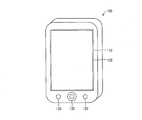
- FIG. 1 is a diagram illustrating an appearance of an information terminal device 100 according to the embodiment.
- the information terminal device 100 shown in FIG. 1 is a portable and portable information terminal device that can use various services and various applications. Specifically, the information terminal device 100 is relatively small and incorporates a battery such as a lithium ion secondary battery. For this reason, the information terminal device 100 is easy to carry and can be used outside the home by battery driving without being supplied with external power (AC power).
- AC power external power
- the information terminal device 100 includes a display 110 that displays various types of information.
- the information terminal device 100 includes a touch panel 120 and operation buttons 130 for various operations.
- the touch panel 120 is provided so as to overlap the surface of the display 110.
- the information terminal device 100 substantially matches the display position on the display 110 of a certain display target with the operation position on the touch panel 120 for the display target, and makes an intuitive operation (selection operation, movement operation, etc.) on the display target. ) Can be performed by the user.
- Possible operations using the touch panel 120 include so-called flick operations.
- This flick operation is an operation of sliding the contact position in an arbitrary direction while keeping the fingertip in contact with the touch panel 120.
- the information terminal device 100 can scroll the display position of the display target or switch the display contents according to the contact position, the moving direction, the moving speed, and the like. It has become.
- the information terminal device 100 further includes a wireless communication module 140 (see FIG. 2). Thereby, the information terminal device 100 can access the Internet and use various services on the Internet.
- Various applications are installed in the information terminal device 100.
- an application for browsing an electronic book is installed in the information terminal device 100.
- the information terminal device 100 can display the book data on the display 110 and allow the user to browse the book data.
- the user can perform various operations such as turning pages using the touch panel 120 or the operation buttons 130.
- the information terminal device 100 is installed with an application for purchasing an electronic book from an electronic book site on the Internet. Thus, the user can purchase desired book data from the electronic book site and download the purchased book data using the information terminal device 100.
- the information terminal device 100 is installed with an application for using a message posting site on the Internet. Thereby, the user can post a message to the message posting site or browse the posted message posted on the message posting site by using the information terminal device 100.
- the method of using the electronic book or the message posting site by the information terminal device 100 is not limited to the above-described dedicated application.
- a specific WEB site on the Internet is accessed and displayed on the WEB browser. It is also possible to use an electronic book or a message posting site from the WEB page.
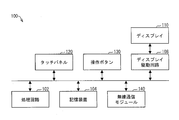
- FIG. 2 is a block diagram illustrating a configuration of the information terminal device 100 according to the embodiment.
- the information terminal device 100 includes a processing circuit 102, a storage device 104, a touch panel 120, operation buttons 130, a display driving circuit 108, a display 110, and a wireless communication module 140.
- the storage device 104 stores an OS (Operating System) program, various application programs, various control programs, various data, and the like.
- OS Operating System
- the storage device 104 stores an application program for browsing an electronic book, an application program for purchasing an electronic book, an application program for using a message posting site, and the like.
- the storage device 104 stores book data purchased from an electronic book site.
- the storage device 104 is not limited to a built-in information terminal device 100 such as an HDD (Hard disk drive) or an SSD (Solid State Drive), but includes a removable device such as a memory card.
- a built-in information terminal device 100 such as an HDD (Hard disk drive) or an SSD (Solid State Drive)
- a removable device such as a memory card.
- the processing circuit 102 includes a processor such as a CPU and a memory such as a ROM (Read Only Memory) and a RAM (Random Access Memory), and the processor executes a program stored in the memory and the storage device 104. By doing so, various applications are executed and each part of the information terminal device 100 is controlled.
- a processor such as a CPU and a memory such as a ROM (Read Only Memory) and a RAM (Random Access Memory
- the touch panel 120 and the operation buttons 130 are so-called input devices for the user to perform various operations on the information terminal device 100.
- the touch panel 120 is provided so as to overlap the surface of the display panel included in the display 110.
- the operation button 130 is provided on the surface of the main body of the information terminal device 100.
- a key, a mouse, or the like may be employed as the input device.
- the display driving circuit 108 drives the display 110 according to the video signal supplied from the processing circuit 102.
- the display 110 displays an image corresponding to the execution result of the program executed by the processing circuit 102.
- the display 110 functions as a display unit that displays book data, a posted message, and the like.
- the information terminal device 100 of this embodiment employs a liquid crystal display as the display 110, an organic EL display or the like may be employed in addition to this.
- the wireless communication module 140 controls wireless access to a communication network such as a LAN or the Internet.
- a communication network such as a LAN or the Internet.
- the information terminal device 100 can perform data communication with a server on the Internet or another terminal device by connecting to the Internet by wireless communication. At that time, access to the Internet is controlled by the wireless communication module 140.
- the display function means a display function related to display of a posted message acquired from a message posting site.
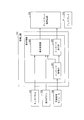
- FIG. 3 is a block diagram illustrating a configuration of a display control function included in the information terminal device 100 according to the embodiment.
- the processing circuit 102 of the information terminal device 100 includes a message acquisition unit 302, a message display unit 304, and a display change unit 308 as display functions related to the display of posted messages.
- the message acquisition unit 302 acquires a posted message from the posting site on the Internet (specifically, a server device for the posting site) via the wireless communication module 140.
- the message acquisition unit 302 can acquire a time series of posted messages (hereinafter simply referred to as “time series”) including only posted messages of a specific account from the message posting site.
- time series a time series of posted messages
- the message acquisition unit 302 can acquire the time series of each of a plurality of specific accounts from the message posting site.
- the message acquisition unit 302 acquires the time series of the corresponding specific accounts from each of the plurality of posting sites.
- the user can arbitrarily set a specific account from the information terminal device 100.
- the user can set an account of another user, a company, a group, or a service obtained through various Internet sites such as a posting site as a specific account.
- the message acquisition unit 302 can acquire a time series of the other users, companies, organizations, or services, and as a result, the user can be interested in other users, companies, organizations, or services. It is possible to easily browse information generated from the above in real time.
- the specific account may be automatically set from an application used by the information terminal device 100.
- the information terminal device 100 can acquire an account of each of the plurality of services by using an information providing site that distributes information on the plurality of services.
- the message acquisition unit 302 can acquire the time series of each of the plurality of services, and as a result, the user can easily view information generated from each of the plurality of services in real time. Can do.
- the message display unit 304 displays the posted message acquired by the posted message acquisition unit 302 on the display 110.
- the display of the posted message may be realized by a dedicated application installed in the information terminal device 100, or may be realized by a WEB page displayed by a WEB browser.
- the display method of the posted message by the message display unit 304 is as follows.
- the message display unit 304 simultaneously displays the time series of each of a plurality of specific accounts on the display screen of the display 110. Specifically, on the display screen of the display 110, a plurality of display areas for each time series (that is, one account and one display area) are displayed side by side in the vertical direction. For example, when three time series are acquired by the message acquisition unit 302, three display areas are displayed side by side in the vertical direction.
- the message display unit 304 displays the corresponding time-series posted messages one by one in each of the plurality of display areas.
- the latest posted messages are displayed one by one, but this is not restrictive.
- each post message of a plurality of time series is simultaneously displayed on the display screen of the display 110 one by one.
- the information terminal device 100 since the information terminal device 100 according to the present embodiment simultaneously displays the time series of each of the plurality of accounts and displays the latest posting message of each, the user can update the latest information of each of the plurality of accounts. Information can be easily browsed.
- the message display unit 304 displays a part of the display area on the display screen.
- each display area is fixed, but the message display unit 304 depends on the information amount of the posted message displayed in the display area (specifically, the display area required for the display).
- the size of each display area can also be changed.
- the message display unit 304 can change the vertical size of each display area while fixing the horizontal size of each display area.
- the message display unit 304 may display a part of the posted message in the display area, or reduce the posted message and display it in the display area. Good.
- posted messages may contain data other than text data such as image data and audio data.
- the message display unit 304 can also display data (or a link thereof) other than text data in the display area.
- Display change part When a posting message is displayed on the display screen and a certain operation is performed with the touch panel 120 or the operation button 130, the display change unit 308 changes the display content on the display screen according to the operation content.
- the display content changing method by the display changing unit 308 includes the following (1) to (4).
- the posted message displayed in the display area is changed to another posted message that has a newer posting date than the currently displayed posted message.
- the display area is in the vertical direction.
- the display areas displayed on the display screen are sequentially changed by scrolling the display positions of the plurality of display areas in the vertical direction.
- the part of the display area is scrolled upward so that the empty space generated below the display screen is displayed more than the part of the display area. Display other display areas in later order.
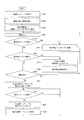
- FIG. 4 is a flowchart illustrating a procedure of display processing by the information terminal device 100 according to the embodiment.
- the message acquisition unit 302 acquires each posted message of a plurality of time series from the message posting site (step 402).
- the message display unit 304 displays a plurality of display areas arranged in time series in the vertical direction on the display screen of the display 110 (step 404).
- the message display unit 304 displays the corresponding time-series posted messages one by one in each of the plurality of display areas (step 406).
- step S410 when a horizontal flick operation is performed on an arbitrary one of the plurality of display areas displayed on the display screen (step S410: Yes), the display change unit 308 displays the one display area. The post message displayed in the display area is changed to another post message (step S412). Thereafter, the information terminal device 100 returns the process to step S408.
- step S414 When a flick operation in the vertical direction is performed on a plurality of display areas displayed on the display screen (step S414: Yes), the display change unit 308 scrolls each display area in the vertical direction (step S414). S416), another display area is displayed on the display screen (step S418). Thereafter, the information terminal device 100 returns the process to step S408.
- the display change unit 308 displays the one display area.
- a plurality of corresponding time-series posted messages are arranged in the vertical direction in the order of posting and displayed on the display screen (step S422).
- step S424 Yes
- the display change unit 308 scrolls each posted message in the vertical direction.
- Step S426 another posted message is displayed on the display screen (Step S428).
- the information terminal device 100 returns the process to step S424.
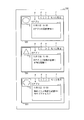
- FIG. 5 is a diagram illustrating a specific example of display processing by the information terminal device 100 according to the embodiment, and is a diagram illustrating a display example of a plurality of display areas by the message display unit 304.
- a display area 502 a display area 504, and a display area 506 are displayed side by side in the vertical direction on the display screen of the display 110.
- the display area 502 is for displaying the time series of the account assigned to the application “A application”.
- the display area 504 is for displaying a time series of accounts assigned to the application “B application”.
- the display area 506 is for displaying a time series of accounts assigned to the application “C application”.
- FIG. 5 and subsequent figures an example is shown in which the title of the corresponding application is displayed for each display area.
- what information is displayed as long as it is information related to a specific account of a specific message posting service. Also good.
- a message posting service name, an account name, a service name using this account, a company name using this account, and the like may be displayed.
- each display area the title of the corresponding application (a is given in the figure) and the profile image (b is given in the figure), and the latest post message (c in the figure) in the time series of the corresponding account Is given). Further, in each display area, a “ ⁇ ” button (given d in the figure), a “>” button (given e in the figure), and a “More” button (given f in the figure) are displayed. .
- the display screen is displayed when a certain information distribution service is used, and each account is acquired in a lump from the service provider when using the information distribution service. It is.
- the information distribution service may be realized by a dedicated application installed in the information terminal device 100, or may be realized by a WEB page displayed by a WEB browser.
- each display area is made equal, but the size of each display area may be different.
- the size of each display area (particularly the size in the vertical direction) may be automatically adjusted according to the amount of information of a posted message displayed in the display area.
- each display area may be adjusted so that all information included in the posted message is displayed. Further, the size of each display area may be limited so as not to exceed a predetermined threshold.
- each display area may be changeable by a user operation. For example, at first, by partially reducing the size of the display area, a part of information (for example, 10 lines) of the posted message is displayed, and the user performs an enlargement operation on the display area. All information of the posted message may be displayed by enlarging the size of the display area.
- the information terminal apparatus 100 may reflect this time-series update immediately, without reflecting it immediately, when a predetermined update condition (for example, when a predetermined update button is pressed, as shown in FIG. 5 again).
- a predetermined update condition for example, when a predetermined update button is pressed, as shown in FIG. 5 again.
- FIG. 7 is a diagram showing a specific example of display processing by the information terminal device 100 according to the embodiment, and is a diagram showing an example of changing the display content of the display screen by the display changing unit 308.
- the information terminal device 100 when the information terminal device 100 according to the present embodiment performs a flick operation in the horizontal direction with respect to an arbitrary one of the plurality of display areas displayed on the display screen, Change the posted message to be displayed in one display area to another posted message.
- the information terminal device 100 displays the display area 504.
- the posted message displayed at 504 is changed to another posted message that has a newer posting date than the currently displayed posted message.
- the new other posted message is displayed in the display area 504, but the display areas 502 and 506 are both in the state before the flick operation is performed, There is no change in the posted message.
- the posted message is switched by scrolling the entire display area in the horizontal direction by a horizontal flick operation on the display area.
- the content of the posted message may be simply switched by a horizontal flick operation.
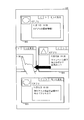
- FIG. 8 is a diagram illustrating a specific example of display processing by the information terminal device 100 according to the embodiment, and is a diagram illustrating an example of a flick operation in the vertical direction.
- FIG. 9 is a diagram showing a specific example of display processing by the information terminal device 100 according to the embodiment, and is a diagram showing an example of changing the display content of the display screen by the display changing unit 308.
- the information terminal device 100 when the flick operation in the vertical direction is performed on the plurality of display areas displayed on the display screen, the information terminal device 100 according to the present embodiment scrolls each display area in the vertical direction, Other display areas are displayed on the display screen.
- the information terminal device 100 moves the display areas 502, 504, and 506 upward. Scroll to.
- the display area 508 is scrolled in from the lower part of the display screen instead.
- the display screen is in a state where display areas 504, 506, and 508 are displayed as shown in FIG.
- FIG. 10 is a diagram illustrating a specific example of display processing by the information terminal device 100 according to the embodiment, and is a diagram illustrating an example of changing the display content of the display screen by the display change unit 308.
- the information terminal device 100 displays the display area when a predetermined selection operation is performed on any one of the plurality of display areas displayed on the display screen.
- a plurality of post messages corresponding to one time series are arranged in the vertical direction in the posting order and displayed on the display screen.
- an operation for selecting the “view more” button displayed in each display area is set as the predetermined selection operation.
- the information terminal device 100 when a plurality of post messages in one time series are displayed on the display screen, when a flick operation in the vertical direction is performed on the display screen, The posted messages displayed on the display screen are sequentially changed by scrolling the posted messages in the vertical direction.
- the information terminal device 100 displays one item corresponding to the display area 504 as illustrated in FIG. 10.
- a plurality of post messages in time series that is, a time series including only the post message of the application “B application” are arranged in the order of posting in the vertical direction and displayed on the display screen.
- the information terminal device 100 scrolls the plurality of posted messages of the application “B application” upward, whereby the display 120 The new posted messages of the application “B application” are sequentially displayed on the display screen.
- the information terminal device 100 scrolls a plurality of posted messages of the application “B application” downward, thereby displaying the display.
- the old post messages of the application “B application” are sequentially displayed on the display screen 120.
- the user can browse a plurality of time series simultaneously by the plurality of display areas displayed on the display screen.
- the user can sequentially browse the plurality of time series by a simple and reliable operation such as a flick operation in the vertical direction on the display screen. it can.
- the flick operation for sequentially browsing posted messages of a specific account and the flick operation for sequentially browsing multiple time series have different operation directions, so the user can perform these operations intuitively and reliably. Can be executed.
- the direction in which a plurality of time series are displayed side by side is the vertical direction
- the direction of the display switching operation of the posted message for the arbitrary time series is the horizontal direction
- the first direction and the second direction are different from each other (a preferable example is that the first direction and the second direction are orthogonal to each other.
- the display direction and the operation direction including the first direction and the second direction may be different from those in the embodiment.
- each display direction and each operation direction set to “vertical direction” are changed to “horizontal direction”, and in the embodiment, each display direction and each operation direction set to “horizontal direction” are set to “vertical direction”. It is also possible to change to and implement.
- a plurality of time series are displayed side by side in the horizontal direction of the display screen.
- switching the display of the posted message for an arbitrary time series it is realized by a flick operation in the vertical direction with respect to the display area.
- switching the display area displayed on the display screen is realized by a flick operation in the horizontal direction with respect to the display screen.
- Each function of the information terminal device 100 described in the embodiment may be realized by hardware by a logic circuit formed on an integrated circuit (IC chip), or by software using a CPU (Central Processing Unit). It may be realized.
- IC chip integrated circuit
- CPU Central Processing Unit
- the information terminal device 100 includes various storage devices (such as a CPU that executes instructions of a program that realizes each function, a ROM that stores the program, a RAM that expands the program, a memory that stores the program and various data) Recording medium).
- various storage devices such as a CPU that executes instructions of a program that realizes each function, a ROM that stores the program, a RAM that expands the program, a memory that stores the program and various data
- Each function of the information terminal device 100 can be realized by the CPU reading the programs stored in the various storage devices and executing the programs.
- Examples of the recording medium include tapes such as magnetic tape and cassette tape, disks including magnetic disks such as floppy (registered trademark) disks / hard disks, and optical disks such as CD-ROM / MO / MD / DVD / CD-R.
- IC cards including memory cards) / optical cards, semiconductor memories such as mask ROM / EPROM / EEPROM (registered trademark) / flash ROM, PLD (Programmable logic device) and FPGA (Field Programmable Gate Logic circuits such as (Array) can be used.
- the program may be supplied to the information terminal device 100 via a communication network.
- the communication network only needs to be able to transmit at least the program to the information terminal apparatus 100, and any type of communication network may be used.
- the communication network the Internet, intranet, extranet, LAN, ISDN, VAN, CATV communication network, virtual private network (Virtual Private Network), telephone line network, mobile communication network, satellite communication network, etc. can be used. is there.
- Any type of transmission medium for supplying the program to the information terminal device 100 may be used.
- a wired medium such as IEEE 1394, USB, power line carrier, cable TV line, telephone line, ADSL (Asymmetric Digital Subscriber Line) line may be used as the transmission medium.
- infrared rays such as IrDA and remote control, Bluetooth (registered trademark), IEEE80211 wireless, HDR (High Data Rate), NFC (Near Field Communication), DLNA, mobile phone network, satellite line, terrestrial digital network You may use the thing by radio
- the present invention can be applied to any device as long as it can display at least a posted message from a message posting site.
- the present invention can be applied to a mobile phone, a smartphone, a PDA, a personal computer, a car navigation device, a television receiver, and the like.
- the flick operation in the horizontal direction and the flick operation in the vertical direction are used as an example of the movement operation in the horizontal direction and the movement operation in the vertical direction.
- the same operation as when these flick operations are performed may be performed.
- an up / down operation for example, an up / down movement operation using a mouse, a control wheel, a trackball, or the like, a press of an up / down button (including hardware buttons and software buttons), etc.
- an up / down operation was performed.
- it may be configured to operate in the same manner as when a vertical flick operation is performed.
- an operation in the horizontal direction after selecting an arbitrary display area for example, a horizontal movement operation with a mouse, a control wheel, a trackball, etc., a horizontal button (including hardware buttons and software buttons) ) Is performed, the display area may be operated in the same manner as when a horizontal flick operation is performed.
- the posted message display unit and the display switching unit in the display area are set to be one, but may be two or more.
- the display device is a display device capable of displaying a posted message of a message posting site on a display screen, and a plurality of displays of the posted message for each time series.
- Message display means (message display unit 304) for displaying areas in a first direction of the display screen and displaying the corresponding time-series posted messages for each of the plurality of display areas; Posting to be displayed in one display area when a movement operation in a second direction that is different from the first direction is performed on any one of the plurality of display areas It is characterized by comprising display changing means (display changing unit 308) for sequentially changing messages.
- the user can view a plurality of time series on the same display screen.
- a display area is provided for each time series, it is possible to clearly recognize that the time series are distinguished, and when the user sequentially browses the posted messages of a specific account, This can be realized without moving the line of sight from the display area.
- the sequential viewing of posted messages of a specific account is realized by a simple and reliable operation of moving the display area in the second direction.
- the second direction for example, the horizontal direction
- the first direction for example, the vertical direction
- the movement operation in the second direction with respect to the display area does not affect the other display areas. Any posted message can be displayed and compared.
- the message display unit displays the post message corresponding to each of the plurality of display areas one by one
- the display change unit includes the display change unit of the plurality of display areas.
- the size of each display area can be minimized, and more display areas can be displayed on the display screen. it can.
- the message may be switched by an erroneous movement operation in the first direction (for example, a movement operation in the first direction). Although it is not possible to do so, it will trigger a movement operation in the first direction with the intention of switching messages, etc., but this display device displays posted messages one by one in one display area. Such an erroneous movement operation in the first direction is not induced.
- the display changing unit may be configured to perform the plurality of display areas when a movement operation in the first direction with respect to the display screen is performed while the plurality of display areas are displayed on the display screen. It is preferable that the display area displayed on the display screen is sequentially changed by moving the display position of the display area in the first direction.
- the operation for sequentially browsing posted messages of a specific account and the operation for sequentially browsing a plurality of time series are different in operation direction, so that the user can intuitively and reliably perform these operations. Can be performed.
- the user performs an operation in the second direction for each display area, and performs an operation in the first direction in a state where an arbitrary posted message is displayed in each display area. It is also possible to easily compare arbitrary post messages in the time series.
- the display change unit when a predetermined selection operation is performed on an arbitrary one of the plurality of display areas, the display change unit includes a plurality of time series corresponding to the display area.
- the posted messages are preferably displayed side by side in the first direction of the display screen.
- the user can not only browse a plurality of time series at the same time, but also can easily browse more information of an arbitrary time series by performing the predetermined selection operation. .
- the display change unit is configured to perform a movement operation in the first direction with respect to the display screen when the plurality of post messages of the one time series are displayed on the display screen. In this case, it is preferable to sequentially change the posted messages displayed on the display screen by moving the display positions of the plurality of posted messages in the first direction.
- the direction in which the plurality of posted messages are arranged, the direction in which the plurality of posted messages move, and the direction of the moving operation for this movement are the same direction.
- a plurality of posted messages can be easily viewed by a proper and reliable operation.
- the information terminal device includes the display device.
- an information terminal device having the same effect as the display device can be provided.
- the display method according to the present embodiment is a display method for displaying a posted message of a message posting site on a display screen, wherein a plurality of display areas for each time series of the posted message are displayed on the first display screen. Displayed side by side in the direction, for each of the plurality of display areas, a message display step of displaying the corresponding time-series posted message, and for any one display area of the plurality of display areas, A display change step of sequentially changing posted messages displayed in the one display area when a movement operation in a second direction different from the first direction is performed. To do.
- this display method it is possible to provide a display device that exhibits the same effect as the display device by causing the display device to execute the display method.
- the program according to the present embodiment is a program for causing a computer to function as the display device, and causes the computer to function as each unit included in the display device.
- the recording medium according to the present embodiment is a computer-readable recording medium in which the program is recorded.
- the present invention can be applied to various display devices capable of displaying a posted message on a message posting site, such as an information terminal device, a mobile phone, a smartphone, a PDA, and a personal computer.
- Information terminal device (display device) 102 processing circuit 104 storage device 108 display drive circuit 110 display 120 touch panel 130 operation button 140 wireless communication module 302 message acquisition unit 304 message display unit (message display means) 308 Display change unit (display change means)
Landscapes
- Engineering & Computer Science (AREA)
- Theoretical Computer Science (AREA)
- General Engineering & Computer Science (AREA)
- Physics & Mathematics (AREA)
- General Physics & Mathematics (AREA)
- Business, Economics & Management (AREA)
- Human Computer Interaction (AREA)
- Marketing (AREA)
- Strategic Management (AREA)
- Tourism & Hospitality (AREA)
- Quality & Reliability (AREA)
- General Business, Economics & Management (AREA)
- Operations Research (AREA)
- Human Resources & Organizations (AREA)
- Entrepreneurship & Innovation (AREA)
- Economics (AREA)
- Computer Networks & Wireless Communication (AREA)
- Signal Processing (AREA)
- User Interface Of Digital Computer (AREA)
- Information Transfer Between Computers (AREA)
Abstract
情報端末装置(100)は、時系列毎の複数の表示領域を、表示画面の縦方向に並べて表示するとともに、当該複数の表示領域の各々に対し、対応する時系列の前記投稿メッセージを表示するメッセージ表示部(304)と、複数の表示領域のうちの、任意の一の表示領域に対する横方向への移動操作が行われた場合、当該一の表示領域に表示する投稿メッセージを、順次変更する表示変更部(308)とを備える。
Description
本発明は、メッセージ投稿サイトの投稿メッセージを表示画面に表示可能な表示装置および情報端末装置に関する。また、本発明は、このような表示装置および情報端末装置に用いられる表示方法、プログラム、および記録媒体に関する。
近年、SNS(Social Network Service)の利用が急速に高まってきており、中でも、ネットワークのユーザ同士のコミュニケーションサービスである、いわゆるメッセージ投稿サイトが多くのユーザに利用されている。
メッセージ投稿サイトとは、各ユーザが任意のタイミングで端末装置からメッセージを投稿し、各端末装置においては、各ユーザから投稿されたメッセージ(以下、「投稿メッセージ」と示す。)が次々とリアルタイムに表示されていくというものである。このようにメッセージ投稿サイトに対してメッセージを投稿する行為は、「つぶやき」とも称されている。
特に最近では、個人のみならず、企業や団体等もアカウントを取得し、情報発信ツールとしてメッセージ投稿サイトを利用するようになってきている。このようなメッセージ投稿サイトの代表的なものとしては、「Twitter」(登録商標)が挙げられる(下記非特許文献1参照)。特に、上記「Twitter」は、投稿メッセージの文字数が比較的短い文字数に制限されていることから、いわゆる「短文投稿サイト」に分類することができる。
一般的に、メッセージ投稿サイトに投稿されている各投稿メッセージには、その投稿日時が対応付けられている。これにより、メッセージ投稿サイトに投稿されている複数のメッセージによって、その時系列が構成されている。そして、この時系列を投稿サイトから取得した端末装置においては、この時系列に含まれている複数の投稿メッセージが、その投稿順に、表示画面の縦方向に並べて表示される(このような時系列を、上記「Twitter」では、「タイムライン」と呼んでいる)。そして、新たな投稿メッセージがメッセージ投稿サイトに投稿される毎に、上記時系列は更新され、この更新が端末装置においても即時に反映(すなわち、リアルタイム表示)されることとなる。
このとき、全ての投稿メッセージを表示画面に収めることができない場合は、一部の投稿メッセージ(例えば、最新のものから順にいくつかの投稿メッセージ)が表示されることとなるが、端末装置のユーザは、この時系列を縦方向にスクロールさせることにより、残りの投稿メッセージを順次表示画面に表示させて閲覧することができるようになっている。
特に、最近では、電子書籍端末やスマートフォン等、タッチパネルを備えた情報端末装置が普及してきており、このような情報端末装置によれば、投稿メッセージの時系列が表示されている表示画面に対して、縦方向へのフリック操作を行うことにより、その時系列を構成している複数の投稿メッセージを、表示画面の縦方向にスクロールさせて、順次表示することができるようになっている。
ここで、上記「Twitter」では、特定のアカウント(1つのユーザアカウント、複数のユーザアカウント、または複数のユーザアカウントを含むグループアカウント等。以下、これらをまとめて「特定アカウント」と示す。)を指定することにより、その特定アカウントの投稿メッセージのみを含む時系列を、表示することが可能となっている。また、上記「Twitter」では、特定アカウントを複数指定することにより、複数の特定アカウントの各々の時系列を表示することが可能となっている。
但し、上記「Twitter」では、複数の時系列を同時に表示することはできない。したがって、ユーザは、複数の時系列を閲覧したい場合は、時系列のリストを表示させて、そのリストの中から任意の時系列を選択する等、比較的手間がかかる切り替え操作を行うことにより、表示画面に表示する時系列を切り替える必要がある。
ここで、従来、複数のコンテンツを表示画面に並べて表示し、全てのコンテンツが表示画面に収まりきらない場合であっても、表示画面をスクロールさせることにより、全てのコンテンツを閲覧可能とする技術が利用されている(例えば、上記特許文献1参照)。
しかしながら、この技術では、スクロール操作が必要なコンテンツ(例えば、投稿メッセージの時系列)が、複数のコンテンツ内に含まれている場合は、コンテンツのスクロールの操作と、表示画面のスクロール操作とを、それぞれ区別して行う必要が生じる。このため、各スクロール操作が複雑なものとなってしまう。そして、各スクロール操作を適切に行わないと、ユーザが意図しない操作が行われてしまうこととなる。例えば、コンテンツのスクロールの操作を行ったつもりが、表示画面のスクロール操作が行われてしまう場合があり、その反対の場合もある。
本発明は、上記の問題に鑑みてなされたものであり、その目的は、簡単かつ確実な操作により、メッセージ投稿サイトの投稿メッセージの複数の時系列を閲覧することが可能な表示装置を提供することにある。
上記した課題を解決するため、本発明に係る表示装置は、メッセージ投稿サイトの投稿メッセージを表示画面に表示可能な表示装置であって、前記投稿メッセージの時系列毎の複数の表示領域を、前記表示画面の第1の方向に並べて表示するとともに、当該複数の表示領域の各々に対し、対応する時系列の前記投稿メッセージを表示するメッセージ表示手段と、前記複数の表示領域のうちの、任意の一の表示領域に対する、前記第1の方向とは異なる方向である第2の方向への移動操作が行われた場合、当該一の表示領域に表示する投稿メッセージを、順次変更する表示変更手段とを備えることを特徴とする。
本発明に係る表示装置、表示装置、情報端末装置、表示方法、プログラム、および記録媒体によれば、簡単かつ確実な操作により、メッセージ投稿サイトの投稿メッセージの複数の時系列を閲覧することが可能な表示装置を提供することができる。
以下、本発明の実施形態について、図面を用いて説明する。
〔実施形態〕
(情報端末装置100の概要)
まず、本発明に係る実施形態について説明する。はじめに、図1を参照して、実施形態に係る情報端末装置100の概要について説明する。図1は、実施形態に係る情報端末装置100の外観を示す図である。
(情報端末装置100の概要)
まず、本発明に係る実施形態について説明する。はじめに、図1を参照して、実施形態に係る情報端末装置100の概要について説明する。図1は、実施形態に係る情報端末装置100の外観を示す図である。
図1に示す情報端末装置100は、各種サービスや各種アプリケーションを利用することが可能な、携帯性および可搬性を有する情報端末装置である。具体的には、情報端末装置100は、比較的小型であり、かつリチウムイオン二次電池等のバッテリーを内蔵している。このため、情報端末装置100は、持ち運びが容易なうえに、外部電源(AC電源)の供給を受けなくとも、バッテリー駆動により、外出先等での使用が可能となっている。
情報端末装置100は、各種情報を表示するディスプレイ110を備えている。また、情報端末装置100は、各種操作のためのタッチパネル120および操作ボタン130を備えている。タッチパネル120は、ディスプレイ110の表面上に重ねて設けられている。
これにより、情報端末装置100は、ある表示対象のディスプレイ110における表示位置と、その表示対象に対するタッチパネル120における操作位置とを概ね一致させ、その表示対象に対する直感的な操作(選択操作や移動操作等)をユーザに行わせることが可能となっている。
タッチパネル120による可能な操作には、いわゆるフリック操作が含まれている。このフリック操作とは、指先をタッチパネル120に接触させたまま、その接触位置を任意の方向にスライド移動させる操作のことである。情報端末装置100は、フリック操作が行われた場合、その接触位置や、その移動方向、その移動速度等に応じて、表示対象の表示位置をスクロールさせたり、表示内容を切り替えたりすることが可能となっている。
情報端末装置100は、無線通信モジュール140(図2参照)をさらに備えている。これにより、情報端末装置100は、インターネットにアクセスして、インターネット上の各種サービスを利用することが可能となっている。
情報端末装置100には、各種アプリケーションがインストールされている。例えば、情報端末装置100には、電子書籍を閲覧するためのアプリケーションがインストールされている。これにより、情報端末装置100は、書籍データをディスプレイ110に表示して、この書籍データをユーザに閲覧させることができる。ユーザは、書籍データを閲覧する際、タッチパネル120または操作ボタン130により、ページめくり等の各種操作を行うことができる。
また、情報端末装置100には、インターネット上の電子書籍サイトから電子書籍を購入するためのアプリケーションがインストールされている。これにより、ユーザは、この情報端末装置100によって、電子書籍サイトから所望の書籍データを購入し、購入した書籍データをダウンロードすることが可能となっている。
また、情報端末装置100には、インターネット上のメッセージ投稿サイトを利用するためのアプリケーションがインストールされている。これにより、ユーザは、この情報端末装置100によって、メッセージ投稿サイトに対してメッセージを投稿したり、メッセージ投稿サイトに投稿された投稿メッセージを閲覧したりすることができる。
なお、情報端末装置100によって電子書籍やメッセージ投稿サイトを利用する方法としては、上記した専用のアプリケーションによるものに限らず、例えば、インターネット上の特定のWEBサイトにアクセスし、これによってWEBブラウザで表示されるWEBページから電子書籍やメッセージ投稿サイトを利用することも可能である。
(情報端末装置100の構成)
次に、図2を参照して、実施形態に係る情報端末装置100の構成について説明する。図2は、実施形態に係る情報端末装置100の構成を示すブロック図である。
次に、図2を参照して、実施形態に係る情報端末装置100の構成について説明する。図2は、実施形態に係る情報端末装置100の構成を示すブロック図である。
図2に示すように、情報端末装置100は、処理回路102、記憶装置104、タッチパネル120、操作ボタン130、ディスプレイ駆動回路108、ディスプレイ110、および無線通信モジュール140を備えている。
(記憶装置104)
記憶装置104は、OS(Operating System)プログラムや、各種アプリケーションプログラム、各種制御プログラム、各種データ等を記憶する。例えば、記憶装置104には、電子書籍を閲覧するためのアプリケーションプログラム、電子書籍を購入するためのアプリケーションプログラム、メッセージ投稿サイトを利用するためのアプリケーションプログラム等が記憶されている。また、記憶装置104には、電子書籍サイトから購入した書籍データ等が記憶されている。
記憶装置104は、OS(Operating System)プログラムや、各種アプリケーションプログラム、各種制御プログラム、各種データ等を記憶する。例えば、記憶装置104には、電子書籍を閲覧するためのアプリケーションプログラム、電子書籍を購入するためのアプリケーションプログラム、メッセージ投稿サイトを利用するためのアプリケーションプログラム等が記憶されている。また、記憶装置104には、電子書籍サイトから購入した書籍データ等が記憶されている。
ここでいう記憶装置104には、HDD(Hard disk drive)、SSD(Solid State Drive)等、情報端末装置100に内蔵されているものに限らず、メモリカード等の着脱可能なものを含む。
(処理回路102)
処理回路102は、CPU等のプロセッサや、ROM(Read Only Memory)、RAM(Random Access Memory)等のメモリを備えて構成されており、メモリおよび記憶装置104に記憶されているプログラムをプロセッサが実行することにより、各種アプリケーションを実行したり、情報端末装置100の各部を制御したりする。
処理回路102は、CPU等のプロセッサや、ROM(Read Only Memory)、RAM(Random Access Memory)等のメモリを備えて構成されており、メモリおよび記憶装置104に記憶されているプログラムをプロセッサが実行することにより、各種アプリケーションを実行したり、情報端末装置100の各部を制御したりする。
(タッチパネル120および操作ボタン130)
タッチパネル120および操作ボタン130は、ユーザが、情報端末装置100に対する各種操作を行うための、いわゆる入力デバイスである。タッチパネル120は、ディスプレイ110が備える表示パネルの表面上に重ねて設けられている。操作ボタン130は、情報端末装置100の本体の表面に設けられている。入力デバイスとしては、これらの他にも、キー、マウス等が採用され得る。
タッチパネル120および操作ボタン130は、ユーザが、情報端末装置100に対する各種操作を行うための、いわゆる入力デバイスである。タッチパネル120は、ディスプレイ110が備える表示パネルの表面上に重ねて設けられている。操作ボタン130は、情報端末装置100の本体の表面に設けられている。入力デバイスとしては、これらの他にも、キー、マウス等が採用され得る。
(ディスプレイ駆動回路108およびディスプレイ110)
ディスプレイ駆動回路108は、処理回路102から供給された映像信号に応じてディスプレイ110を駆動する。ディスプレイ110は、処理回路102によって実行されたプログラムの実行結果に応じた映像を表示する。これにより、ディスプレイ110は、書籍データや投稿メッセージ等を表示する表示手段として機能する。本実施形態の情報端末装置100は、ディスプレイ110として、液晶ディスプレイを採用しているが、これ以外にも、有機ELディスプレイ等が採用され得る。
ディスプレイ駆動回路108は、処理回路102から供給された映像信号に応じてディスプレイ110を駆動する。ディスプレイ110は、処理回路102によって実行されたプログラムの実行結果に応じた映像を表示する。これにより、ディスプレイ110は、書籍データや投稿メッセージ等を表示する表示手段として機能する。本実施形態の情報端末装置100は、ディスプレイ110として、液晶ディスプレイを採用しているが、これ以外にも、有機ELディスプレイ等が採用され得る。
(無線通信モジュール140)
無線通信モジュール140は、LANやインターネット等の通信ネットワークへの無線アクセスを制御する。例えば、情報端末装置100は、無線通信によってインターネットに接続することにより、インターネット上のサーバや他の端末装置とのデータ通信を行うことができる。その際、インターネットへのアクセスは、無線通信モジュール140によって制御されることとなる。
無線通信モジュール140は、LANやインターネット等の通信ネットワークへの無線アクセスを制御する。例えば、情報端末装置100は、無線通信によってインターネットに接続することにより、インターネット上のサーバや他の端末装置とのデータ通信を行うことができる。その際、インターネットへのアクセスは、無線通信モジュール140によって制御されることとなる。
(表示機能)
以下、本実施形態の情報端末装置100が備える表示機能について具体的に説明する。ここでいう表示機能とは、メッセージ投稿サイトから取得した投稿メッセージの表示に関する表示機能を意味する。
以下、本実施形態の情報端末装置100が備える表示機能について具体的に説明する。ここでいう表示機能とは、メッセージ投稿サイトから取得した投稿メッセージの表示に関する表示機能を意味する。
まず、図3を参照して、情報端末装置100が備える表示機能の構成について説明する。図3は、実施形態に係る情報端末装置100が備える表示制御機能の構成を示すブロック図である。
図3に示すように、情報端末装置100の処理回路102は、投稿メッセージの表示に関する表示機能として、メッセージ取得部302、メッセージ表示部304、および表示変更部308を有している。
(メッセージ取得部)
メッセージ取得部302は、インターネット上の投稿サイト(具体的には、投稿サイト用のサーバ装置)から、無線通信モジュール140を介して、投稿メッセージを取得する。
メッセージ取得部302は、インターネット上の投稿サイト(具体的には、投稿サイト用のサーバ装置)から、無線通信モジュール140を介して、投稿メッセージを取得する。
メッセージ取得部302は、特定アカウントの投稿メッセージのみを含む、投稿メッセージの時系列(以下、単に「時系列」と示す)を、メッセージ投稿サイトから取得することができる。
また、メッセージ取得部302は、複数の特定アカウントの各々の時系列を、メッセージ投稿サイトから取得することができる。
この場合、複数の特定アカウントが、複数の投稿サイトに亘るものであれば、メッセージ取得部302は、複数の投稿サイトの各々から、対応する特定アカウントの時系列を取得する。
ユーザは、特定アカウントを、情報端末装置100から任意に設定することができる。例えば、ユーザは、投稿サイト等の各種インターネットサイトを通じて知り得た、他のユーザ、企業、団体、またはサービス等のアカウントを、特定アカウントとして設定することができる。これにより、メッセージ取得部302は、上記他のユーザ、企業、団体、またはサービス等の時系列を取得することができ、この結果、ユーザは、興味のある他のユーザ、企業、団体、またはサービス等から発せられた情報を、リアルタイムかつ容易に閲覧することができる。
また、特定アカウントは、情報端末装置100が利用するアプリケーションから自動的に設定される場合もある。例えば、情報端末装置100は、複数のサービスに関する情報を配信する情報提供サイト等を利用することにより、上記複数のサービスの各々のアカウントを取得することができる。これにより、メッセージ取得部302は、上記複数のサービスの各々の時系列を取得することができ、この結果、ユーザは、上記複数のサービスの各々から発せられた情報をリアルタイムかつ容易に閲覧することができる。
(メッセージ表示部)
メッセージ表示部304は、投稿メッセージ取得部302によって取得された投稿メッセージをディスプレイ110に表示する。投稿メッセージの表示は、情報端末装置100にインストールされている専用のアプリケーションによって実現されてもよく、WEBブラウザで表示されるWEBページによって実現されてもよい。メッセージ表示部304による投稿メッセージの表示方法は、以下のとおりである。
メッセージ表示部304は、投稿メッセージ取得部302によって取得された投稿メッセージをディスプレイ110に表示する。投稿メッセージの表示は、情報端末装置100にインストールされている専用のアプリケーションによって実現されてもよく、WEBブラウザで表示されるWEBページによって実現されてもよい。メッセージ表示部304による投稿メッセージの表示方法は、以下のとおりである。
メッセージ表示部304は、ディスプレイ110の表示画面に対し、複数の特定アカウントの各々の時系列を同時に表示する。具体的には、ディスプレイ110の表示画面に対して、時系列毎の(すなわち、1アカウント1表示領域とする)複数の表示領域を縦方向に並べて表示する。例えば、メッセージ取得部302によって3つの時系列が取得された場合は、3つの表示領域を縦方向に並べて表示するといった具合である。
そして、メッセージ表示部304は、複数の表示領域の各々に対し、対応する時系列の投稿メッセージを1件ずつ表示する。デフォルトでは最新の投稿メッセージを1件ずつ表示することとするが、これに限らない。これにより、ディスプレイ110の表示画面には、複数の時系列の各々の投稿メッセージが、1件ずつ同時に表示されることとなる。
このように、本実施形態の情報端末装置100は、複数のアカウントの各々の時系列を同時に表示し、かつ各々の最新の投稿メッセージを表示するため、ユーザは、複数のアカウントの各々の最新の情報を容易に閲覧することが可能となる。
ここで、表示対象とされた全ての表示領域が表示画面に収まらない場合、メッセージ表示部304は、一部の表示領域を表示画面に表示する。
基本的に、各表示領域のサイズは、固定であるが、メッセージ表示部304は、その表示領域内に表示される投稿メッセージの情報量(具体的にはその表示に要する表示面積)に応じて、各表示領域のサイズを変更することもできる。例えば、メッセージ表示部304は、各表示領域の横方向のサイズを固定したまま、各表示領域の縦方向のサイズを変更することもできる。
各表示領域のサイズを固定とした場合、メッセージ表示部304は、投稿メッセージの一部をその表示領域内に表示してもよく、投稿メッセージを縮小して、その表示領域内に表示してもよい。
なお、投稿メッセージには、画像データや音声データ等のテキストデータ以外のデータが含まれている場合がある。メッセージ表示部304は、テキストデータ以外のデータ(または、そのリンク)を表示領域内に表示することもできる。
(表示変更部)
表示変更部308は、表示画面に投稿メッセージが表示されている場合において、タッチパネル120または操作ボタン130による何らかの操作が行われた場合、その操作内容に応じて、表示画面の表示内容を変更する。表示変更部308による上記表示内容の変更方法には、以下(1)~(4)を含んでいる。
表示変更部308は、表示画面に投稿メッセージが表示されている場合において、タッチパネル120または操作ボタン130による何らかの操作が行われた場合、その操作内容に応じて、表示画面の表示内容を変更する。表示変更部308による上記表示内容の変更方法には、以下(1)~(4)を含んでいる。
(1)複数の表示領域が表示画面に表示されているときに、当該複数の表示領域のうちの、任意の一の表示領域に対する横方向へのフリック操作が行われた場合、他の表示領域の表示内容を変更することなく、当該一の表示領域に表示する投稿メッセージを、その投稿順に基づいて、順次変更する。
例えば、一の表示領域に対する左方向へのフリック操作が行われた場合、当該表示領域に表示する投稿メッセージを、現在表示されている投稿メッセージよりも、投稿日時が新しい他の投稿メッセージに変更する。
反対に、一の表示領域に対する右方向へのフリック操作が行われた場合、当該表示領域に表示する投稿メッセージを、現在表示されている投稿メッセージよりも、投稿日時が古い他の投稿メッセージに変更する。
(2)複数の表示領域のうちの一部の表示領域が表示画面に表示されているとき(すなわち、全ての表示領域を表示画面に表示しきれなかった場合)に、表示画面に対する縦方向へのフリック操作が行われた場合、複数の表示領域の表示位置を縦方向にスクロールすることにより、表示画面に表示する表示領域を順次変更する。
例えば、上方向へのフリック操作が行われた場合、上記一部の表示領域を上方向にスクロールさせ、これにより、表示画面の下方に生じた空きスペースに、上記一部の表示領域よりも表示順序が後の、他の表示領域を表示する。
反対に、下方向へのフリック操作が行われた場合、上記一部の表示領域を下方向にスクロールさせ、これにより、表示画面の上方に生じた空きスペースに、上記一部の表示領域よりも表示順序が前の、他の表示領域を表示する。
(3)複数の表示領域が表示画面に表示されているときに、当該複数の表示領域のうちの、任意の一の表示領域に対する所定の選択操作が行われた場合、当該一の表示領域に対応する一の時系列の複数の投稿メッセージを、その投稿順に縦方向に並べて表示画面に表示する。
(4)上記(3)により、一の時系列の複数の投稿メッセージのうちの一部の投稿メッセージが表示画面に表示されているとき(すなわち、全ての投稿メッセージを表示画面に表示しきれなかった場合)に、表示画面に対する縦方向へのフリック操作が行われた場合、複数の投稿メッセージの表示位置を縦方向にスクロールすることにより、表示画面に表示する投稿メッセージを順次変更する。
例えば、上方向へのフリック操作が行われた場合、上記一部の投稿メッセージを上方向にスクロールさせ、これにより、表示画面の下方に生じた空きスペースに、上記一部の投稿メッセージよりも投稿順序が後の、他の投稿メッセージを表示する。
反対に、下方向へのフリック操作が行われた場合、上記一部の投稿メッセージを下方向にスクロールさせ、これにより、表示画面の上方に生じた空きスペースに、上記一部の投稿メッセージよりも投稿順序が前の、他の投稿メッセージを表示する。
(表示処理の手順)
次に、図4を参照して、実施形態に係る情報端末装置100による表示処理の手順について説明する。図4は、実施形態に係る情報端末装置100による表示処理の手順を示すフローチャートである。
次に、図4を参照して、実施形態に係る情報端末装置100による表示処理の手順について説明する。図4は、実施形態に係る情報端末装置100による表示処理の手順を示すフローチャートである。
(メッセージ表示)
まず、メッセージ取得部302が、複数の時系列の各々の投稿メッセージを、メッセージ投稿サイトから取得する(ステップ402)。
まず、メッセージ取得部302が、複数の時系列の各々の投稿メッセージを、メッセージ投稿サイトから取得する(ステップ402)。
次に、メッセージ表示部304が、ディスプレイ110の表示画面に対して、時系列毎の複数の表示領域を縦方向に並べて表示する(ステップ404)。
そして、メッセージ表示部304が、複数の表示領域の各々に対し、対応する時系列の投稿メッセージを1件ずつ表示する(ステップ406)。
(メッセージ表示変更)
その後、タッチパネル120または操作ボタン130による何らかの操作が行われると(ステップS408)、表示変更部308は、その操作内容に応じて、表示画面の表示内容を変更する(ステップS410~ステップS420)。
その後、タッチパネル120または操作ボタン130による何らかの操作が行われると(ステップS408)、表示変更部308は、その操作内容に応じて、表示画面の表示内容を変更する(ステップS410~ステップS420)。
例えば、表示画面に表示されている複数の表示領域のうちの、任意の一の表示領域に対する横方向へのフリック操作が行われた場合(ステップS410:Yes)、表示変更部308は、当該一の表示領域に表示する投稿メッセージを、他の投稿メッセージに変更する(ステップS412)。その後、情報端末装置100は、処理をステップS408へ戻す。
また、表示画面に表示されている複数の表示領域に対する縦方向へのフリック操作が行われた場合(ステップS414:Yes)、表示変更部308は、各表示領域を縦方向にスクロールさせるとともに(ステップS416)、他の表示領域を表示画面に表示する(ステップS418)。その後、情報端末装置100は、処理をステップS408へ戻す。
また、表示画面に表示されている複数の表示領域のうちの、任意の一の表示領域に対する所定の選択操作が行われた場合(ステップS420)、表示変更部308は、当該一の表示領域に対応する時系列の複数の投稿メッセージを、その投稿順に縦方向に並べて表示画面に表示する(ステップS422)。
その後、さらに、表示画面に表示されている複数の投稿メッセージに対する縦方向へのフリック操作が行われた場合(ステップS424:Yes)、表示変更部308は、各投稿メッセージを縦方向にスクロールさせるとともに(ステップS426)、他の投稿メッセージを表示画面に表示する(ステップS428)。その後、情報端末装置100は、処理をステップS424へ戻す。
(表示処理の具体例)
次に、図5~図10を参照して、情報端末装置100による表示処理の具体例について説明する。
次に、図5~図10を参照して、情報端末装置100による表示処理の具体例について説明する。
(初期表示)
図5は、実施形態に係る情報端末装置100による表示処理の具体例を示す図であって、メッセージ表示部304による複数の表示領域の表示例を示す図である。
図5は、実施形態に係る情報端末装置100による表示処理の具体例を示す図であって、メッセージ表示部304による複数の表示領域の表示例を示す図である。
図5に示す例では、ディスプレイ110の表示画面には、表示領域502、表示領域504、および表示領域506が、縦方向に並べて表示されている。
表示領域502は、アプリケーション「Aアプリ」に割り当てられたアカウントの時系列を表示するためのものである。表示領域504は、アプリケーション「Bアプリ」に割り当てられたアカウントの時系列を表示するためのものである。表示領域506は、アプリケーション「Cアプリ」に割り当てられたアカウントの時系列を表示するためのものである。
図5以降では、各表示領域に対して、対応するアプリケーションのタイトルを表示する例を示しているが、特定のメッセージ投稿サービスの特定のアカウントに関する情報であれば、どのような情報を表示してもよい。例えば、アプリケーションのタイトルに代えてまたは加えて、メッセージの投稿サービスの名称、アカウントの名称、このアカウントを使用するサービス名、このアカウントを使用する会社名等を表示してもよい。
各表示領域には、対応するアプリケーションのタイトル(図中aを付与)およびプロフィール画像(図中bを付与)と、対応するアカウントの時系列のうちの最新の1件の投稿メッセージ(図中cを付与)とが表示されている。さらに、各表示領域には、「<」ボタン(図中dを付与)、「>」ボタン(図中eを付与)、および「もっと見る」ボタン(図中fを付与)が表示されている。
例えば、上記表示画面は、ある情報配信サービスを利用したときに、表示されるものであり、上記各アカウントは、この情報配信サービスの利用時に、このサービスの提供元から一括して取得されるものである。
ここでいう情報配信サービスは、情報端末装置100にインストールされている専用のアプリケーションによって実現されるものであってもよく、WEBブラウザで表示されるWEBページによって実現されるものであってもよい。
図5では、各表示領域のサイズを等しくしているが、各表示領域のサイズが異なっていてもよい。例えば、各表示領域のサイズ(特に、縦方向のサイズ)は、その表示領域に表示される投稿メッセージの情報量に応じて、自動的に調整されるものであってもよい。
この場合、各表示領域のサイズは、投稿メッセージに含まれる全ての情報が表示されるように調整されてもよい。また、各表示領域のサイズは、予め定められた閾値を超えないように制限されてもよい。
また、各表示領域のサイズは、ユーザ操作によって変更可能であってもよい。例えば、当初は、表示領域のサイズを比較的小さくすることにより、投稿メッセージの一部の情報(例えば、10行分)を表示しておき、ユーザがその表示領域に対する拡大操作を行った場合、その表示領域のサイズを拡大することにより、投稿メッセージの全ての情報を表示してもよい。
なお、このように複数の時系列が表示されているときに、少なくとも一つの時系列に対して新たなメッセージが投稿され、その時系列が更新される場合がある。情報端末装置100は、この時系列の更新を、直ちに反映してもよく、直ちに反映せずに、所定の更新条件(例えば、所定の更新ボタンが押下されたとき、改めて図5に示すような表示を行ったとき、図10に示すような表示を行ったとき、等)を満たしたときに、反映するようにしてもよい。
(横方向へのフリック操作時)
図6および図11は、実施形態に係る情報端末装置100による表示処理の具体例を示す図であって、横方向へのフリック操作の一例を示す図である。図7は、実施形態に係る情報端末装置100による表示処理の具体例を示す図であって、表示変更部308による表示画面の表示内容の変更例を示す図である。
図6および図11は、実施形態に係る情報端末装置100による表示処理の具体例を示す図であって、横方向へのフリック操作の一例を示す図である。図7は、実施形態に係る情報端末装置100による表示処理の具体例を示す図であって、表示変更部308による表示画面の表示内容の変更例を示す図である。
既に説明したとおり、本実施形態の情報端末装置100は、表示画面に表示されている複数の表示領域のうちの、任意の一の表示領域に対する横方向へのフリック操作が行われた場合、当該一の表示領域に表示する投稿メッセージを、他の投稿メッセージに変更する。
例えば、図6に示すように、図5に示した表示領域502,504,506のうちの、表示領域504に対する左方向へのフリック操作が行われた場合、情報端末装置100は、当該表示領域504に表示する投稿メッセージを、現在表示されている投稿メッセージよりも、投稿日時が新しい他の投稿メッセージに変更する。
これにより、図7に示すように、表示領域504には、上記新しい他の投稿メッセージが表示されるが、表示領域502,506は、いずれも上記フリック操作を行う前のままの状態であり、表示されている投稿メッセージに変更はない。
なお、図6に示す例では、表示領域に対する横フリック操作により、その表示領域全体が横方向にスクロールすることにより、投稿メッセージが切り替わる例を示しているが、例えば、図11に示すように、横フリック操作により、単に投稿メッセージの内容が切り替わるだけであってもよい。
(縦方向へのフリック操作時)
図8は、実施形態に係る情報端末装置100による表示処理の具体例を示す図であって、縦方向へのフリック操作の一例を示す図である。図9は、実施形態に係る情報端末装置100による表示処理の具体例を示す図であって、表示変更部308による表示画面の表示内容の変更例を示す図である。
図8は、実施形態に係る情報端末装置100による表示処理の具体例を示す図であって、縦方向へのフリック操作の一例を示す図である。図9は、実施形態に係る情報端末装置100による表示処理の具体例を示す図であって、表示変更部308による表示画面の表示内容の変更例を示す図である。
既に説明したとおり、本実施形態の情報端末装置100は、表示画面に表示されている複数の表示領域に対する縦方向へのフリック操作が行われた場合、各表示領域を縦方向にスクロールさせるとともに、他の表示領域を表示画面に表示する。
例えば、図8に示すように、図7に示した表示領域502,504,506に対する上方向へのフリック操作が行われた場合、情報端末装置100は、表示領域502,504,506を上方向にスクロールさせる。これにより、図8に示すように、表示領域502が表示画面の上方からスクロールアウトされると、代わりに、表示領域508が表示画面の下方からスクロールインされる。これにより、表示画面は、図9に示すように、表示領域504,506,508が表示された状態となる。
(所定の選択操作時)
図10は、実施形態に係る情報端末装置100による表示処理の具体例を示す図であって、表示変更部308による表示画面の表示内容の変更例を示す図である。
図10は、実施形態に係る情報端末装置100による表示処理の具体例を示す図であって、表示変更部308による表示画面の表示内容の変更例を示す図である。
既に説明したとおり、本実施形態の情報端末装置100は、表示画面に表示されている複数の表示領域のうちの、任意の一の表示領域に対する所定の選択操作が行われた場合、当該表示領域に対応する一の時系列の複数の投稿メッセージを、その投稿順に縦方向に並べて表示画面に表示する。本実施形態では、各表示領域に表示されている「もっと見る」ボタンを選択する操作が、上記所定の選択操作として設定されている。
さらに、本実施形態の情報端末装置100は、一の時系列の複数の投稿メッセージが表示画面に表示されているときに、当該表示画面に対する縦方向へのフリック操作が行われた場合、当該複数の投稿メッセージを縦方向へスクロールさせることにより、当該表示画面に表示する投稿メッセージを順次変更する。
例えば、図9に示した表示領域504に対して、「もっと見る」ボタンを選択する操作が行われた場合、情報端末装置100は、図10に示すように、当該表示領域504に対応する一の時系列(すなわち、アプリケーション「Bアプリ」の投稿メッセージのみを含む時系列)の複数の投稿メッセージを、その投稿順に縦方向に並べて表示画面に表示する。
さらに、ディスプレイ120の表示画面に対して、上方向へのフリック操作が行われた場合、情報端末装置100は、アプリケーション「Bアプリ」の複数の投稿メッセージを上方向へスクロールさせることにより、ディスプレイ120の表示画面に対して、アプリケーション「Bアプリ」の新しい投稿メッセージを順次表示する。
反対に、ディスプレイ120の表示画面に対して、下方向へのフリック操作が行われた場合、情報端末装置100は、アプリケーション「Bアプリ」の複数の投稿メッセージを下方向へスクロールさせることにより、ディスプレイ120の表示画面に対して、アプリケーション「Bアプリ」の古い投稿メッセージを順次表示する。
このように、本実施形態の情報端末装置100によれば、ユーザは、表示画面に表示された複数の表示領域によって、複数の時系列を同時に閲覧することができる。
特に、ユーザは、任意の特定アカウントの投稿メッセージを順次閲覧したい場合には、その表示領域から視線を移動させることなく、その表示領域に対する横方向へのフリック操作という簡単かつ確実な操作を行うだけで、これを実現することができる。
また、複数の時系列の全てが表示画面に収まりきらない場合であっても、ユーザは、表示画面に対する縦方向へのフリック操作という簡単かつ確実な操作により複数の時系列を順次閲覧することができる。
特に、特定アカウントの投稿メッセージを順次閲覧するためのフリック操作と、複数の時系列を順次閲覧するためのフリック操作とは、互いに操作方向が異なるため、ユーザは、直感的かつ確実にこれらの操作を実行することができる。
また、ユーザは、特定の時系列の複数のメッセージを同時に閲覧したい場合には、その時系列の表示領域に対する所定の選択操作(「もっと見る」ボタンを選択する操作)を行うだけで、これを実現することができる。
(変形例)
実施形態では、複数の時系列を並べて表示する方向(第1の方向)を縦方向とし、任意の時系列に対する投稿メッセージの表示切替操作の方向(第2の方向)を横方向とした。
実施形態では、複数の時系列を並べて表示する方向(第1の方向)を縦方向とし、任意の時系列に対する投稿メッセージの表示切替操作の方向(第2の方向)を横方向とした。
本発明は、少なくとも、上記第1の方向と上記第2の方向とが互いに異なる方向であればよく(好適な例は、上記第1の方向と上記第2の方向とが互いに直交することである)、上記第1の方向および上記第2の方向を含む各表示方向や各操作方向を、実施形態と異ならせて実施することも可能である。
例えば、実施形態において、「縦方向」とした各表示方向および各操作方向を「横方向」に変更し、実施形態において、「横方向」とした各表示方向および各操作方向を「縦方向」に変更して、実施することも可能である。
この場合、例えば、複数の時系列は、表示画面の横方向に並べて表示される。また、任意の時系列に対して投稿メッセージの表示を切り替える場合は、その表示領域に対する縦方向へのフリック操作により実現される。また、表示画面に表示される表示領域を切り替える場合は、表示画面に対する横方向へのフリック操作により実現される。
(プログラム、記憶媒体)
実施形態で説明した情報端末装置100の各機能は、集積回路(ICチップ)上に形成された論理回路によってハードウェア的に実現してもよいし、CPU(Central Processing Unit)を用いてソフトウェア的に実現してもよい。
実施形態で説明した情報端末装置100の各機能は、集積回路(ICチップ)上に形成された論理回路によってハードウェア的に実現してもよいし、CPU(Central Processing Unit)を用いてソフトウェア的に実現してもよい。
例えば、情報端末装置100は、各機能を実現するプログラムの命令を実行するCPU、上記プログラムを格納したROM、上記プログラムを展開するRAM、上記プログラム及び各種データを格納するメモリ等の各種記憶装置(記録媒体)を備えている。そして、上記CPUが、上記各種記憶装置に格納されているプログラムを読み出し、このプログラムを実行することによって、情報端末装置100の各機能を実現することができる。
上記記録媒体としては、例えば、磁気テープやカセットテープ等のテープ類、フロッピー(登録商標)ディスク/ハードディスク等の磁気ディスクやCD-ROM/MO/MD/DVD/CD-R等の光ディスクを含むディスク類、ICカード(メモリカードを含む)/光カード等のカード類、マスクROM/EPROM/EEPROM(登録商標)/フラッシュROM等の半導体メモリ類、あるいはPLD(Programmable logic device)やFPGA(Field Programmable Gate Array)等の論理回路類等を用いることができる。
なお、上記プログラムは、通信ネットワークを介して情報端末装置100に供給されてもよい。この通信ネットワークは、少なくとも上記プログラムを情報端末装置100に伝送可能であればよく、その種類はどのようなものであっても良い。例えば、通信ネットワークとしては、インターネット、イントラネット、エキストラネット、LAN、ISDN、VAN、CATV通信網、仮想専用網(Virtual Private Network)、電話回線網、移動体通信網、衛星通信網等が利用可能である。
また、上記プログラムを情報端末装置100に供給するための伝送媒体としても、どのような種類のものを利用しても良い。例えば、伝送媒体として、IEEE1394、USB、電力線搬送、ケーブルTV回線、電話線、ADSL(Asymmetric Digital Subscriber Line)回線等の有線によるものを利用しても良い。また、伝送媒体として、IrDAやリモコンのような赤外線、Bluetooth(登録商標)、IEEE80211無線、HDR(High Data Rate)、NFC(Near Field Communication)、DLNA、携帯電話網、衛星回線、地上波デジタル網等の無線によるものを利用しても良い。
(補足事項)
本発明は上述した各実施形態に限定されるものではなく、請求項に示した範囲で種々の変更が可能であり、また、異なる実施形態にそれぞれ開示された技術的手段を適宜組み合わせて得られる実施形態についても本発明の技術的範囲に含まれる。
本発明は上述した各実施形態に限定されるものではなく、請求項に示した範囲で種々の変更が可能であり、また、異なる実施形態にそれぞれ開示された技術的手段を適宜組み合わせて得られる実施形態についても本発明の技術的範囲に含まれる。
(本発明の適用対象)
実施形態では、本発明を情報端末装置に適用した例を説明した。本発明は、少なくともメッセージ投稿サイトの投稿メッセージを表示することができるものであれば、どのような装置にも適用することができる。例えば、携帯電話機、スマートフォン、PDA、パーソナルコンピュータ、カーナビゲーション装置、テレビジョン受像機等にも、本発明を適用することができる。
実施形態では、本発明を情報端末装置に適用した例を説明した。本発明は、少なくともメッセージ投稿サイトの投稿メッセージを表示することができるものであれば、どのような装置にも適用することができる。例えば、携帯電話機、スマートフォン、PDA、パーソナルコンピュータ、カーナビゲーション装置、テレビジョン受像機等にも、本発明を適用することができる。
(フリック操作について)
実施形態において、横方向への移動操作および縦方向への移動操作の一例として、横方向へのフリック操作および縦方向へのフリック操作を用いたが、情報端末装置100は、これらフリック操作の代わりに、これらフリック操作と同等の操作(ボタン操作等)が行われた場合にも、これらフリック操作が行われたときと同様に動作するように構成してもよい。
実施形態において、横方向への移動操作および縦方向への移動操作の一例として、横方向へのフリック操作および縦方向へのフリック操作を用いたが、情報端末装置100は、これらフリック操作の代わりに、これらフリック操作と同等の操作(ボタン操作等)が行われた場合にも、これらフリック操作が行われたときと同様に動作するように構成してもよい。
例えば、上下方向への操作(例えば、マウス、コントロールホイール、またはトラックボール等による上下方向の移動操作、上下ボタン(ハードウェア的なボタンおよびソフトウェア的なボタンを含む)の押下等)が行われた場合、縦方向へのフリック操作が行われたときと同様に動作するように構成してもよい。
また、任意の表示領域を選択した後の左右方向への操作(例えば、マウス、コントロールホイール、またはトラックボール等による左右方向の移動操作、左右ボタン(ハードウェア的なボタンおよびソフトウェア的なボタンを含む)の押下等)が行われた場合、その表示領域に対する横方向へのフリック操作が行われたときと同様に動作するように構成してもよい。
(投稿メッセージの表示単位について)
実施形態では、表示領域内における投稿メッセージの表示単位およびその表示の切り替え単位を1件毎としたが、2件以上毎であってもよい。
実施形態では、表示領域内における投稿メッセージの表示単位およびその表示の切り替え単位を1件毎としたが、2件以上毎であってもよい。
〔まとめ〕
以上のように、本実施形態に係る表示装置(情報端末装置100)は、メッセージ投稿サイトの投稿メッセージを表示画面に表示可能な表示装置であって、前記投稿メッセージの時系列毎の複数の表示領域を、前記表示画面の第1の方向に並べて表示するとともに、当該複数の表示領域の各々に対し、対応する時系列の前記投稿メッセージを表示するメッセージ表示手段(メッセージ表示部304)と、前記複数の表示領域のうちの、任意の一の表示領域に対する、前記第1の方向とは異なる方向である第2の方向への移動操作が行われた場合、当該一の表示領域に表示する投稿メッセージを、順次変更する表示変更手段(表示変更部308)とを備えることを特徴とする。
以上のように、本実施形態に係る表示装置(情報端末装置100)は、メッセージ投稿サイトの投稿メッセージを表示画面に表示可能な表示装置であって、前記投稿メッセージの時系列毎の複数の表示領域を、前記表示画面の第1の方向に並べて表示するとともに、当該複数の表示領域の各々に対し、対応する時系列の前記投稿メッセージを表示するメッセージ表示手段(メッセージ表示部304)と、前記複数の表示領域のうちの、任意の一の表示領域に対する、前記第1の方向とは異なる方向である第2の方向への移動操作が行われた場合、当該一の表示領域に表示する投稿メッセージを、順次変更する表示変更手段(表示変更部308)とを備えることを特徴とする。
本表示装置によれば、ユーザは、複数の時系列を、同一の表示画面上で閲覧することができる。特に、時系列毎に表示領域が設けられているので、時系列が区別されていることを明確に認識することが可能となっており、ユーザは、特定アカウントの投稿メッセージを順次閲覧する際には、その表示領域から視線を移動させることなく、これを実現することができる。
また、本表示装置によれば、特定アカウントの投稿メッセージの順次閲覧は、その表示領域に対する第2の方向への移動操作という簡単かつ確実な操作により実現される。特に、当該移動操作は、その方向である第2の方向(例えば、横方向)が、複数の表示領域が並んでいる方向である第1の方向(例えば、縦方向)と異なるうえ、他の表示領域の表示内容に影響を及ぼさないので、直感的なものであるにも関わらず、より確実である。
また、本表示装置によれば、表示領域に対する第2の方向への移動操作は、他の表示領域に影響を及ぼさないから、ある表示領域の投稿メッセージを表示させたまま、他の表示領域に任意の投稿メッセージを表示させ、両者を比較することもできる。
上記表示装置において、前記メッセージ表示手段は、前記複数の表示領域の各々に対し、対応する時系列の前記投稿メッセージを1件ずつ表示し、前記表示変更手段は、前記複数の表示領域のうちの、任意の一の表示領域に対する前記第2の方向への移動操作が行われた場合、当該一の表示領域に表示する投稿メッセージを、1件ずつ順次変更することが好ましい。
この構成によれば、各表示領域には、1件ずつ投稿メッセージが表示されるので、各表示領域のサイズを最小限とすることができ、より多くの表示領域を表示画面に表示することができる。特に、複数のメッセージが第1の方向に並べて一の表示領域内に表示されていると、誤った第1の方向の移動操作(例えば、第1の方向への移動操作ではメッセージを切り替えることができないのに、メッセージを切り替えるつもりで第1の方向の移動操作を行ってしまう等)を誘発してしまうが、本表示装置では、一の表示領域内に1件ずつ投稿メッセージが表示されるので、このような誤った第1の方向の移動操作を誘発することもない。
上記表示装置において、前記表示変更手段は、前記複数の表示領域が前記表示画面に表示されているときに、前記表示画面に対する前記第1の方向への移動操作が行われた場合、当該複数の表示領域の表示位置を前記第1の方向へ移動させることにより、前記表示画面に表示する表示領域を順次変更することが好ましい。
この構成によれば、特定アカウントの投稿メッセージを順次閲覧するための操作と、複数の時系列を順次閲覧するための操作とが、互いに操作方向が異なるため、ユーザは、直感的かつ確実にこれらの操作を実行することができる。
特に、上記第1の方向の操作が、各表示領域の表示内容に影響を及ぼすことがないので、各表示領域に表示されている投稿メッセージを固定させたまま、複数の時系列を順次閲覧することができる。
また、ユーザは、各表示領域に対する上記第2の方向への操作を行い、各表示領域に対して任意の投稿メッセージを表示させた状態で、上記第1の方向の操作を行うことにより、複数の時系列の任意の投稿メッセージ同士を容易に比較することもできる。
上記表示装置において、前記表示変更手段は、前記複数の表示領域のうちの、任意の一の表示領域に対する所定の選択操作が行われた場合、当該表示領域に対応する一の時系列の複数の投稿メッセージを、前記表示画面の前記第1の方向に並べて表示することが好ましい。
この構成によれば、ユーザは、複数の時系列を同時に閲覧することができるだけでなく、上記所定の選択操作を行うことにより、任意の時系列のより多くの情報を容易に閲覧することができる。
上記表示装置において、前記表示変更手段は、前記一の時系列の複数の投稿メッセージが前記表示画面に表示されているときに、前記表示画面に対する前記第1の方向への移動操作が行われた場合、当該複数の投稿メッセージの表示位置を前記第1の方向へ移動させることにより、前記表示画面に表示する投稿メッセージを順次変更することが好ましい。
この構成によれば、複数の投稿メッセージが並べられている方向と、その複数の投稿メッセージが移動する方向と、この移動のための移動操作の方向とが同方向であるため、ユーザは、直感的かつ確実な操作により、容易に、複数の投稿メッセージを閲覧することができる。
また、本実施形態に係る情報端末装置は、上記表示装置を備えたことを特徴とする。
本情報端末装置によれば、上記表示装置と同様の効果を奏する情報端末装置を提供することができる。
また、本実施形態に係る表示方法は、メッセージ投稿サイトの投稿メッセージを表示画面に表示する表示方法であって、前記投稿メッセージの時系列毎の複数の表示領域を、前記表示画面の第1の方向に並べて表示するとともに、当該複数の表示領域の各々に対し、対応する時系列の前記投稿メッセージを表示するメッセージ表示工程と、前記複数の表示領域のうちの、任意の一の表示領域に対する、前記第1の方向とは異なる方向である第2の方向への移動操作が行われた場合、当該一の表示領域に表示する投稿メッセージを、順次変更する表示変更工程とを含むことを特徴とする。
本表示方法によれば、当該表示方法を表示装置に実行させることにより、上記表示装置と同様の効果を奏する表示装置を提供することができる。
また、本実施形態に係るプログラムは、コンピュータを上記表示装置として機能させるためのプログラムであって、上記コンピュータを上記表示装置が備える上記各手段として機能させる。
本プログラムによれば、当該プログラムをコンピュータに実行させることにより、上記表示装置と同様の効果を奏するコンピュータを提供することができる。
また、本実施形態に係る記録媒体は、上記プログラムを記録しているコンピュータ読み取り可能な記録媒体である。
本記録媒体によれば、上記表示装置と同様の効果を奏することができる上記プログラムを当該記録媒体によりコンピュータに提供することができる。
本発明は、情報端末装置、携帯電話機、スマートフォン、PDA、パーソナルコンピュータ等、メッセージ投稿サイトの投稿メッセージを表示することが可能な各種表示装置に適用することができる。
100 情報端末装置(表示装置)
102 処理回路
104 記憶装置
108 ディスプレイ駆動回路
110 ディスプレイ
120 タッチパネル
130 操作ボタン
140 無線通信モジュール
302 メッセージ取得部
304 メッセージ表示部(メッセージ表示手段)
308 表示変更部(表示変更手段)
102 処理回路
104 記憶装置
108 ディスプレイ駆動回路
110 ディスプレイ
120 タッチパネル
130 操作ボタン
140 無線通信モジュール
302 メッセージ取得部
304 メッセージ表示部(メッセージ表示手段)
308 表示変更部(表示変更手段)
Claims (9)
- メッセージ投稿サイトの投稿メッセージを表示画面に表示可能な表示装置であって、
前記投稿メッセージの時系列毎の複数の表示領域を、前記表示画面の第1の方向に並べて表示するとともに、当該複数の表示領域の各々に対し、対応する時系列の前記投稿メッセージを表示するメッセージ表示手段と、
前記複数の表示領域のうちの、任意の一の表示領域に対する、前記第1の方向とは異なる方向である第2の方向への移動操作が行われた場合、当該一の表示領域に表示する投稿メッセージを、順次変更する表示変更手段と
を備えることを特徴とする表示装置。 - 前記メッセージ表示手段は、
前記複数の表示領域の各々に対し、対応する時系列の前記投稿メッセージを1件ずつ表示し、
前記表示変更手段は、
前記複数の表示領域のうちの、任意の一の表示領域に対する前記第2の方向への移動操作が行われた場合、当該一の表示領域に表示する投稿メッセージを、1件ずつ順次変更する
ことを特徴とする請求項1に記載の表示装置。 - 前記表示変更手段は、
前記複数の表示領域が前記表示画面に表示されているときに、前記表示画面に対する前記第1の方向への移動操作が行われた場合、当該複数の表示領域の表示位置を前記第1の方向へ移動させることにより、前記表示画面に表示する表示領域を順次変更する
ことを特徴とする請求項1または2に記載の表示装置。 - 前記表示変更手段は、
前記複数の表示領域のうちの、任意の一の表示領域に対する所定の選択操作が行われた場合、当該表示領域に対応する一の時系列の複数の投稿メッセージを、前記表示画面の前記第1の方向に並べて表示する
ことを特徴とする請求項1から3のいずれか一項に記載の表示装置。 - 前記表示変更手段は、
前記一の時系列の複数の投稿メッセージが前記表示画面に表示されているときに、前記表示画面に対する前記第1の方向への移動操作が行われた場合、当該複数の投稿メッセージの表示位置を前記第1の方向へ移動させることにより、前記表示画面に表示する投稿メッセージを順次変更する
ことを特徴とする請求項4に記載の表示装置。 - 請求項1から5のいずれか一項に記載の表示装置を備えたことを特徴とする情報端末装置。
- メッセージ投稿サイトの投稿メッセージを表示画面に表示する表示方法であって、
前記投稿メッセージの時系列毎の複数の表示領域を、前記表示画面の第1の方向に並べて表示するとともに、当該複数の表示領域の各々に対し、対応する時系列の前記投稿メッセージを表示するメッセージ表示工程と、
前記複数の表示領域のうちの、任意の一の表示領域に対する、前記第1の方向とは異なる方向である第2の方向への移動操作が行われた場合、当該一の表示領域に表示する投稿メッセージを、順次変更する表示変更工程と
を含むことを特徴とする表示方法。 - コンピュータを請求項1から5のいずれか一項に記載の表示装置として機能させるためのプログラムであって、前記コンピュータを前記表示装置が備える前記各手段として機能させるプログラム。
- 請求項8に記載のプログラムを記録しているコンピュータ読み取り可能な記録媒体。
Priority Applications (2)
| Application Number | Priority Date | Filing Date | Title |
|---|---|---|---|
| CN201280059853.1A CN103959225A (zh) | 2011-12-08 | 2012-11-28 | 显示装置、信息终端装置、显示方法、程序以及记录介质 |
| US14/363,134 US20140344714A1 (en) | 2011-12-08 | 2012-11-28 | Display device, information terminal device, display method, and recording medium |
Applications Claiming Priority (2)
| Application Number | Priority Date | Filing Date | Title |
|---|---|---|---|
| JP2011269392A JP5907713B2 (ja) | 2011-12-08 | 2011-12-08 | 表示装置、情報端末装置、表示方法、プログラム、および記録媒体 |
| JP2011-269392 | 2011-12-08 |
Publications (1)
| Publication Number | Publication Date |
|---|---|
| WO2013084768A1 true WO2013084768A1 (ja) | 2013-06-13 |
Family
ID=48574138
Family Applications (1)
| Application Number | Title | Priority Date | Filing Date |
|---|---|---|---|
| PCT/JP2012/080742 Ceased WO2013084768A1 (ja) | 2011-12-08 | 2012-11-28 | 表示装置、情報端末装置、表示方法、プログラム、および記録媒体 |
Country Status (4)
| Country | Link |
|---|---|
| US (1) | US20140344714A1 (ja) |
| JP (1) | JP5907713B2 (ja) |
| CN (1) | CN103959225A (ja) |
| WO (1) | WO2013084768A1 (ja) |
Cited By (1)
| Publication number | Priority date | Publication date | Assignee | Title |
|---|---|---|---|---|
| CN107924605A (zh) * | 2015-08-10 | 2018-04-17 | 柯尼卡美能达株式会社 | 被监视者监视系统的显示装置以及显示方法及被监视者监视系统 |
Families Citing this family (7)
| Publication number | Priority date | Publication date | Assignee | Title |
|---|---|---|---|---|
| JP6031635B2 (ja) * | 2013-06-09 | 2016-11-24 | アップル インコーポレイテッド | ユーザインタフェースオブジェクトを移動させるための機器、方法、及びグラフィカルユーザインタフェース |
| JP6212304B2 (ja) * | 2013-07-02 | 2017-10-11 | 株式会社ミクシィ | 情報処理装置並びにその制御方法及び制御プログラム |
| CN105320431A (zh) * | 2015-05-13 | 2016-02-10 | 陈文康 | 智能终端应用程序快速搜索方法及系统 |
| JP2017033280A (ja) * | 2015-07-31 | 2017-02-09 | ベストスキップ株式会社 | プログラム、情報処理方法 |
| JP6524874B2 (ja) * | 2015-09-25 | 2019-06-05 | 富士ゼロックス株式会社 | 情報処理装置及び情報処理プログラム |
| JP6776578B2 (ja) * | 2016-03-29 | 2020-10-28 | セイコーエプソン株式会社 | 入力装置、入力方法、コンピュータープログラム |
| US10585894B2 (en) * | 2016-11-30 | 2020-03-10 | Facebook, Inc. | Systems and methods for preloading content |
Citations (3)
| Publication number | Priority date | Publication date | Assignee | Title |
|---|---|---|---|---|
| WO2008093630A1 (ja) * | 2007-01-29 | 2008-08-07 | Access Co., Ltd. | 動画生成方法、動画生成プログラム、および動画生成装置 |
| JP2010146465A (ja) * | 2008-12-22 | 2010-07-01 | Sharp Corp | メッセージ表示端末、メッセージ管理サーバ、メッセージ表示システム、メッセージ表示方法、およびメッセージ表示プログラム |
| JP2011215862A (ja) * | 2010-03-31 | 2011-10-27 | Yahoo Japan Corp | 情報表示端末、システム、方法及びプログラム |
Family Cites Families (9)
| Publication number | Priority date | Publication date | Assignee | Title |
|---|---|---|---|---|
| JP2000105772A (ja) * | 1998-07-28 | 2000-04-11 | Sharp Corp | 情報管理装置 |
| JP2002351789A (ja) * | 2001-03-21 | 2002-12-06 | Sharp Corp | 電子メール送受信システム及び電子メール送受信プログラム |
| US8564543B2 (en) * | 2006-09-11 | 2013-10-22 | Apple Inc. | Media player with imaged based browsing |
| US8667418B2 (en) * | 2007-06-08 | 2014-03-04 | Apple Inc. | Object stack |
| US9176747B2 (en) * | 2009-02-17 | 2015-11-03 | Sandisk Il Ltd. | User-application interface |
| KR101646922B1 (ko) * | 2009-05-19 | 2016-08-23 | 삼성전자 주식회사 | 휴대 단말기의 통신 관련 기능 운용 방법 및 이를 지원하는 휴대 단말기 |
| US20110296351A1 (en) * | 2010-05-26 | 2011-12-01 | T-Mobile Usa, Inc. | User Interface with Z-axis Interaction and Multiple Stacks |
| JP5678576B2 (ja) * | 2010-10-27 | 2015-03-04 | ソニー株式会社 | 情報処理装置、情報処理方法、プログラム、および監視システム |
| US9052806B2 (en) * | 2010-12-20 | 2015-06-09 | Facebook, Inc. | User interface for presenting media items of social networking service in media reel |
-
2011
- 2011-12-08 JP JP2011269392A patent/JP5907713B2/ja not_active Expired - Fee Related
-
2012
- 2012-11-28 CN CN201280059853.1A patent/CN103959225A/zh active Pending
- 2012-11-28 US US14/363,134 patent/US20140344714A1/en not_active Abandoned
- 2012-11-28 WO PCT/JP2012/080742 patent/WO2013084768A1/ja not_active Ceased
Patent Citations (3)
| Publication number | Priority date | Publication date | Assignee | Title |
|---|---|---|---|---|
| WO2008093630A1 (ja) * | 2007-01-29 | 2008-08-07 | Access Co., Ltd. | 動画生成方法、動画生成プログラム、および動画生成装置 |
| JP2010146465A (ja) * | 2008-12-22 | 2010-07-01 | Sharp Corp | メッセージ表示端末、メッセージ管理サーバ、メッセージ表示システム、メッセージ表示方法、およびメッセージ表示プログラム |
| JP2011215862A (ja) * | 2010-03-31 | 2011-10-27 | Yahoo Japan Corp | 情報表示端末、システム、方法及びプログラム |
Cited By (1)
| Publication number | Priority date | Publication date | Assignee | Title |
|---|---|---|---|---|
| CN107924605A (zh) * | 2015-08-10 | 2018-04-17 | 柯尼卡美能达株式会社 | 被监视者监视系统的显示装置以及显示方法及被监视者监视系统 |
Also Published As
| Publication number | Publication date |
|---|---|
| JP5907713B2 (ja) | 2016-04-26 |
| US20140344714A1 (en) | 2014-11-20 |
| CN103959225A (zh) | 2014-07-30 |
| JP2013120569A (ja) | 2013-06-17 |
Similar Documents
| Publication | Publication Date | Title |
|---|---|---|
| US12299273B2 (en) | User interfaces for viewing and accessing content on an electronic device | |
| JP5907713B2 (ja) | 表示装置、情報端末装置、表示方法、プログラム、および記録媒体 | |
| US10831362B2 (en) | Mobile terminal and object change support method for the same | |
| US9479568B2 (en) | Application switcher | |
| CN103543915B (zh) | 一种移动终端及其分屏的方法 | |
| US20140068500A1 (en) | System and method for navigation of a multimedia container | |
| US9652120B2 (en) | Electronic device and method for controlling a screen | |
| CN104471603A (zh) | 使用移动终端来提供购物信息的方法以及使用移动终端来提供购物信息的用户接口 | |
| EP2600231A1 (en) | Electronic device, display method of displayed objects, and searching method | |
| CN102640101A (zh) | 用于提供用户接口的方法及装置 | |
| CN102693114A (zh) | 信息处理装置、方法、程序以及系统 | |
| WO2018112928A1 (zh) | 一种信息展示方法、装置及终端设备 | |
| JP2016035776A (ja) | 情報表示装置、情報表示方法および情報表示プログラム | |
| WO2018112924A1 (zh) | 一种信息展示方法、装置及终端设备 | |
| JP5840722B2 (ja) | 情報表示装置、情報表示方法および情報表示プログラム | |
| US20240231852A9 (en) | Window display method, apparatus, terminal and storage medium | |
| US9465515B2 (en) | Graphical user interface for mobile presentation application | |
| JP2017129999A (ja) | 情報表示プログラム、情報表示装置、情報表示方法および配信装置 | |
| JP6538291B1 (ja) | 表示プログラム、情報処理装置及び表示方法 | |
| JP2026009176A (ja) | 情報処理システム、情報プログラムの処理方法、プログラムおよび情報処理装置 | |
| JP2014056518A (ja) | 表示制御装置、表示制御方法、プログラム、および記録媒体 |
Legal Events
| Date | Code | Title | Description |
|---|---|---|---|
| 121 | Ep: the epo has been informed by wipo that ep was designated in this application |
Ref document number: 12855720 Country of ref document: EP Kind code of ref document: A1 |
|
| WWE | Wipo information: entry into national phase |
Ref document number: 14363134 Country of ref document: US |
|
| NENP | Non-entry into the national phase |
Ref country code: DE |
|
| 122 | Ep: pct application non-entry in european phase |
Ref document number: 12855720 Country of ref document: EP Kind code of ref document: A1 |