WO2013014754A1 - 画像表示装置、画像表示方法および画像表示プログラム - Google Patents
画像表示装置、画像表示方法および画像表示プログラム Download PDFInfo
- Publication number
- WO2013014754A1 WO2013014754A1 PCT/JP2011/066991 JP2011066991W WO2013014754A1 WO 2013014754 A1 WO2013014754 A1 WO 2013014754A1 JP 2011066991 W JP2011066991 W JP 2011066991W WO 2013014754 A1 WO2013014754 A1 WO 2013014754A1
- Authority
- WO
- WIPO (PCT)
- Prior art keywords
- image
- display
- person
- viewer
- video
- Prior art date
- Legal status (The legal status is an assumption and is not a legal conclusion. Google has not performed a legal analysis and makes no representation as to the accuracy of the status listed.)
- Ceased
Links
Images












Classifications
-
- H—ELECTRICITY
- H04—ELECTRIC COMMUNICATION TECHNIQUE
- H04N—PICTORIAL COMMUNICATION, e.g. TELEVISION
- H04N1/00—Scanning, transmission or reproduction of documents or the like, e.g. facsimile transmission; Details thereof
- H04N1/00127—Connection or combination of a still picture apparatus with another apparatus, e.g. for storage, processing or transmission of still picture signals or of information associated with a still picture
- H04N1/00347—Connection or combination of a still picture apparatus with another apparatus, e.g. for storage, processing or transmission of still picture signals or of information associated with a still picture with another still picture apparatus, e.g. hybrid still picture apparatus
-
- H—ELECTRICITY
- H04—ELECTRIC COMMUNICATION TECHNIQUE
- H04N—PICTORIAL COMMUNICATION, e.g. TELEVISION
- H04N1/00—Scanning, transmission or reproduction of documents or the like, e.g. facsimile transmission; Details thereof
- H04N1/44—Secrecy systems
- H04N1/4406—Restricting access, e.g. according to user identity
- H04N1/442—Restricting access, e.g. according to user identity using a biometric data reading device
-
- H—ELECTRICITY
- H04—ELECTRIC COMMUNICATION TECHNIQUE
- H04N—PICTORIAL COMMUNICATION, e.g. TELEVISION
- H04N1/00—Scanning, transmission or reproduction of documents or the like, e.g. facsimile transmission; Details thereof
- H04N1/44—Secrecy systems
- H04N1/4406—Restricting access, e.g. according to user identity
- H04N1/4426—Restricting access, e.g. according to user identity involving separate means, e.g. a server, a magnetic card
-
- H—ELECTRICITY
- H04—ELECTRIC COMMUNICATION TECHNIQUE
- H04N—PICTORIAL COMMUNICATION, e.g. TELEVISION
- H04N1/00—Scanning, transmission or reproduction of documents or the like, e.g. facsimile transmission; Details thereof
- H04N1/44—Secrecy systems
- H04N1/4406—Restricting access, e.g. according to user identity
- H04N1/444—Restricting access, e.g. according to user identity to a particular document or image or part thereof
-
- H—ELECTRICITY
- H04—ELECTRIC COMMUNICATION TECHNIQUE
- H04N—PICTORIAL COMMUNICATION, e.g. TELEVISION
- H04N7/00—Television systems
- H04N7/14—Systems for two-way working
- H04N7/141—Systems for two-way working between two video terminals, e.g. videophone
- H04N7/147—Communication arrangements, e.g. identifying the communication as a video-communication, intermediate storage of the signals
-
- H—ELECTRICITY
- H04—ELECTRIC COMMUNICATION TECHNIQUE
- H04N—PICTORIAL COMMUNICATION, e.g. TELEVISION
- H04N2101/00—Still video cameras
-
- H—ELECTRICITY
- H04—ELECTRIC COMMUNICATION TECHNIQUE
- H04N—PICTORIAL COMMUNICATION, e.g. TELEVISION
- H04N2201/00—Indexing scheme relating to scanning, transmission or reproduction of documents or the like, and to details thereof
- H04N2201/0077—Types of the still picture apparatus
- H04N2201/0084—Digital still camera
-
- H—ELECTRICITY
- H04—ELECTRIC COMMUNICATION TECHNIQUE
- H04N—PICTORIAL COMMUNICATION, e.g. TELEVISION
- H04N2201/00—Indexing scheme relating to scanning, transmission or reproduction of documents or the like, and to details thereof
- H04N2201/0077—Types of the still picture apparatus
- H04N2201/0089—Image display device
Definitions
- the present embodiment relates to an image display device, an image display method, and an image display program.
- members constituting a certain group it may be found that specific members are obviously out of order. For example, members belonging to a specific group, such as employee trips and university seminar trips, may go on a trip together, and a viewing party may be held with some members who participated in the trip at a later date. At this time, if a member who participates in the viewing party and another member who participates in the trip but does not participate in the viewing party are dissatisfied, a photograph of the dissatisfied member during viewing at the viewing party When a video is played, some members may be upset.
- the present invention has been made in view of such a problem, and an object of the present invention is to control the reproduction of photographs and videos that are undesirable for a person who is viewing an image at the time of viewing the image.
- the present apparatus includes a display unit for displaying a display image including a subject to a viewer, a viewer detection unit for identifying the viewer, Based on the relationship between the subject and the specified viewer, an excluded person determination unit that determines whether or not a person that should not be displayed is included in the display image, and is displayed in the display image
- a display control unit that controls display of the display image on the display unit so that the viewer should not be shown the person that should not be displayed when a person that should not be displayed is included
- An image display device is provided.
- the method includes a step of identifying the viewer, a subject in the display image, and a person that should not be displayed in the display image based on the relationship between the identified viewer. And if the display image includes a person that should not be displayed, the display unit may be configured to prevent the viewer from seeing the person that should not be displayed. And a step of controlling display of a display image.
- An image display method is provided.
- the computer should not display a person in the display image based on the relationship between the subject in the display image and the specified viewer. And when the person who should not be displayed is included in the display image, the display unit is arranged so that the person who should not be displayed is not shown to the viewer. And a step of controlling the display of the display image on the display.
- the display image when a display image including a subject is displayed to a viewer, if the display image includes a person that should not be displayed, the display image may be excluded from being displayed. it can.
- FIG. 1 is a schematic diagram illustrating an overall configuration of an image reproduction system as an example of an embodiment.
- 1 is a schematic diagram illustrating a hardware configuration of an image reproduction system as an example of an embodiment.
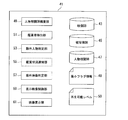
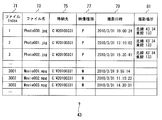
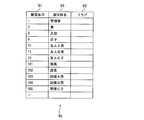
- 1 is a functional block diagram of an image reproduction device as an example of an embodiment. It is a figure which shows the example of the video database in an example of embodiment. It is a figure which shows the example of the to-be-photographed object database in an example of embodiment. It is a figure which shows the example of the person correlation database in an example of embodiment.
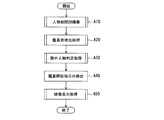
- It is a flowchart which shows the process of the image reproduction part as an example of embodiment.
- It is a flowchart which shows the process of the person correlation database construction part as an example of embodiment.
- FIG. 1 is a schematic diagram illustrating an overall configuration of an image reproduction system 1 as an example of an embodiment.
- the image reproduction system 1 includes a personal computer (PC) 3, a camera (imaging device) 5, and a display device (display unit) 7.
- the camera 5 is mounted on the display device 7, and the PC 3 and the camera 5 are connected by, for example, a USB (Universal Serial Bus) cable 9 or a wireless network, and the PC 3 and the display device 7 are connected.
- a USB Universal Serial Bus
- HDMI high-definition multimedia interface
- the PC 3 is a computer such as a notebook computer or a desktop computer, for example.
- the camera 5 is, for example, a camera that can shoot video, and is, for example, a Web camera, a digital camera, a digital video camera, or the like.
- video includes not only still images such as photographs but also moving images such as movies. Examples of the video format include MGEG, JPEG, MP4, and AVI.
- the camera 5 captures the video of the viewer 2 and transmits the captured video to the PC 3 via the USB cable 9.
- the camera 5 is shown mounted on the display device 7, but the camera 5 may be installed anywhere as long as it can capture the video of the viewer 2. Further, although the external camera 5 is used in FIG. 1, the camera 5 may be built in the PC 3 or the display device 7.
- the display device 7 is a display device capable of displaying various information, and functions as a video display unit 61 (described later) that displays an image reproduced by the image reproduction system 1. Specifically, an image is output from the PC 3 via the HDMI cable 11 to the display device 7, and the display device 7 displays the video.
- the display device 7 is, for example, a digital liquid crystal TV, a digital plasma display TV having an HDMI terminal, or a display or projector without a tuner.
- FIG. 2 is a schematic diagram illustrating a hardware configuration of the image reproduction system 1 as an example of the embodiment.
- the image reproduction system 1 has the PC 3 as described above.
- the PC 3 includes a CPU (Central Processing Unit) 19, a random access memory (RAM) 21, a hard disk drive (HDD) 23, a graphic interface 25, an input interface 27, an optical drive device 19, and a communication interface 31.
- CPU Central Processing Unit
- RAM random access memory
- HDD hard disk drive
- the display device 7 is connected to the graphic interface 25 of the PC 3 via an HDMI cable or the like, and the keyboard 13, the mouse 15 and the camera 5 are connected to the input interface 27 via a cable via USB or the like. Are connected to each other.
- the CPU 19 performs various arithmetic processes by executing programs stored in the RAM 21 and the HDD 23, and performs various controls in the PC 3.
- the RAM 21 is a storage area for temporarily storing programs and data used by the CPU 3.
- the RAM 21 stores minimum flag information 48 and a reproducible level 50 described later.
- the HDD 23 is a storage device that stores and stores various programs and data.
- the HDD 23 stores video data such as photographs and moving images reproduced by the image reproduction system 1. These video data are captured by the user and stored in the HDD 23 for playback by the image playback system 1.
- the HDD 23 stores a video database (DB) 43, a subject database 45, and a person correlation database 47, which will be described later, and functions as the video database 43, the subject database 45, and the person correlation database 47.
- DB video database
- the HDD 23 stores only one HDD 23, the PC 3 may be provided with a plurality of HDDs 23. Further, it may be provided outside the PC 3 by USB or LAN.
- the keyboard 13 and the mouse 15 are input devices for the user of the image reproduction system 1 to perform various inputs and selection operations.
- the graphic interface 25 is an interface for outputting graphics to the outside, and is, for example, an HDMI interface.
- the input interface 27 is an interface for inputting data from a peripheral device external to the PC 3, and is, for example, a USB interface or a wireless or infrared interface.
- the optical drive device 29 is a CD (CD-ROM, CD-R, CD-RW, etc.), DVD (DVD-ROM, DVD-RAM, DVD-R, DVD + R, DVD-RW, DVD + RW, etc.), Blu Ray, etc.
- This is a drive device for reading and writing from the optical disc 17.
- the communication interface 31 is a communication interface that connects the PC 3 to a network 33 such as the Internet by wire or wireless.
- the communication interface 31 is, for example, a wired or wireless local area network (LAN) card, a wired or wireless wide area network (WAN) card, or the like.
- the CPU 19 executes an image reproduction program (image display program) 120 that is stored in the HDD 23 or the optical disc 17 or downloaded from a server (not shown) via the network 33, whereby an image reproduction unit 41, which will be described later, Functions as the correlation database construction unit 49, the viewer detection unit 51, the excluded person determination unit 53, the viewing status notification unit 55, the excluded video determination unit 57, and the display video control unit 59 are realized.
- image reproduction program image display program
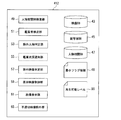
- FIG. 3 is a functional block diagram of an image reproduction device (image display device) 41 as an example of the embodiment.
- the image playback device 41 in this embodiment includes a video database 43, a subject database 45, a person correlation database 47, a person correlation database construction unit 49, a viewer detection unit 51, an excluded person determination unit 53, an appreciation status notification unit 55, an excluded video. It has a determination unit (excluded image determination unit) 57, a display video control unit (display control unit) 59, and a video display unit (display unit) 61.
- the video database 43 is a database that stores information relating to captured video (photos, videos, etc.), and is stored in, for example, the HDD 23 of the PC 3 shown in FIG. FIG. 4 shows an example of the video database 43.
- the video database 43 includes fields of a file index 71, a file name 73, a storage location 75, a video type 77, a shooting date / time 79, and a shooting location 81.
- the file Index 71 stores an index for uniquely specifying a video file.
- the file name 73 stores the file name of the video file stored in the PC 3.
- the storage location 75 stores the storage location (folder) of the video file in the PC 3.
- the video type 77 stores a flag indicating the video type. For example, a flag “P” is stored for a photo file, and a flag “M” is stored for a video file.
- the shooting date and time 79 stores the shooting date and time of the video. Normally, when a photograph is taken with a digital camera, the photographing date and time is recorded in the Exif information of the photograph file. In the case of a video, the shooting date and time can be specified by referring to the time stamp of the file.
- the shooting location 81 stores the location where the video was shot. For example, the shooting location 81 stores the latitude and longitude of the shooting location. Some digital cameras and video cameras can receive GPS information at the time of shooting, and can add shooting location information to the photograph or video after shooting. There is also software that can add shooting location information to a photo without location information by specifying the location on a map.
- the shooting location 81 stores shooting location information added automatically or manually by such means.
- the video database 43 is automatically created by video management software that automatically extracts videos stored in the HDD 23 of the PC 3, for example.
- the subject database 45 is a database that stores subjects recognized by using face recognition technology for videos registered in the video database 43, and records who is shown in which video.
- the subject database 45 is stored, for example, in the HDD 23 of the PC 3 shown in FIG.
- the face recognition technology for example, a technology implemented in photo management software can be used.
- General photo management software that employs face recognition technology can execute face recognition processing on a photo to be managed.
- there are a user who explicitly instructs the start of face recognition by a button operation and a face management process that automatically starts in the background.
- the faces recognized by the face recognition technology are grouped together with the faces that are judged to be the same, and the recognition result is displayed.
- the face recognition technique has problems such as misrecognition that determines a person other than a person as a human, or a recognition rate is low, so that even if the person is the same person, the person is determined as a different person. For this reason, after the recognition process by software, the user generally edits the recognition result manually.
- the photo management software when the face recognition result is edited by the user, the profile of the person such as name and relationship can be described for each person.
- the photo management software records and manages this profile information and recognized face data (which face in which photo has what size and what size of the face is captured) in a database format.
- the subject database 45 is constructed using, for example, such a database.
- FIG. 5 shows an example of the subject database 45.
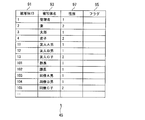
- the subject database 45 has fields of subject ID 91, subject name 93 and flag 95.
- the subject ID 91 stores a unique ID for uniquely identifying the subject.
- the subject name 93 stores a character string describing the subject so that the user can understand it.
- As the subject name for example, the name of the subject can be recorded.
- the flag 95 is an area for storing temporary information for use during viewing. In this embodiment, it is used to mark whether or not a person should be excluded when viewing a video later. In this example, as shown in FIG. 5, it is assumed that the following person is registered in the subject database 45, and the following human relationship exists between these persons.
- ID 1 Administrator An administrator of the image reproduction system 1.
- ID 2 Wife The administrator's wife.
- ID 3 Taro The son of the administrator.
- ID 4 Hanako's daughter.
- ID 11 Friend A Male A high school friend of the manager. My wife is acquainted, but I am not acquainted with children.
- ID 12 Friend B Male Administrator's college friend. I am not acquainted with my wife and children.
- ID 13 Friend C Child Administrator's college friend. I've been with a manager before, and my wife knows that too.
- ID 101 General Manager General manager of the company where the manager works. I am acquainted with my wife and children. It seems to be a scary presence for Hanako, and she always starts to cry when she sees the director's face.
- ID 102 Manager The manager of the company where the manager works. I know my wife but not my children.
- ID 103 Colleague A Male A colleague of the company where the manager works. There is no direct contact with wife and children. On the other hand, the manager is showing off pictures of his wife and children at the office, so colleague A remembers the faces of his wife and children. I had been with my colleague C Child before, but I just broke up.
- ID 104 Colleague B Male A colleague of the company where the manager works. I am acquainted with my wife. I visited the manager and responded when my wife visited the company. The response at that time was disturbing to his wife, who said, “I do not like insects”.
- ID 105 Colleague C child A colleague of the company where the manager works. I am not acquainted with my wife and children. He just broke up with his colleague A, and the manager had consulted at that time.
- the person correlation database 47 is a database that stores values obtained by quantifying the human relationship between persons, and is stored in the HDD 23 of the PC 3 shown in FIG. 2, for example.
- FIG. 6 shows an example of the person correlation database 47.
- the person correlation database 47 has a data structure of cells (cells) arranged in an array in order to show the mutual relationship between persons. Each cell of the array data indicates a value representing an emotion held by a person described in each row with respect to a person in a column intersecting that row.
- the column of “1 manager” at the top of the person correlation database 47 indicates a value (emotion value) that represents the emotion that the manager has for other people.
- a person may unilaterally know a specific person or hate unilaterally, so the feelings they hold about the other person are the same. Not exclusively.
- Mr. A and Mr. B the feeling that Mr. A holds for Mr. B (A ⁇ B) and Mr. B holds for Mr. A.
- the size of emotion (B ⁇ A) is recorded separately. That is, the magnitude and direction of the feelings of good or bad between the two persons are recorded.
- the emotion value is set by the user according to the following rules 1) to 4).
- Rule 1 Preferred emotions are represented by positive values, and unfavorable emotions are represented by negative values.
- Rule 2 The absolute value of the emotion value is 1 or less. That is, the maximum preferable emotion value is 1, and the maximum unfavorable emotion value is “ ⁇ 1”.
- Rule 3 A value “0” is set when there is no mutual relationship between persons. Also, the value “0” is set for a stranger. For example, when the subject database 45 is automatically created by face recognition technology, a stranger such as a person who accidentally passes may be registered in the subject database 45, but the person is an unrelated person. is there. Therefore, a value “0” is set for the person who appears accidentally so as not to affect the reproduction of the video.
- Rule 4 A cell where the same person intersects is invalid, but a value “0” is set for convenience.
- FIG. 6 is an example of the person correlation database 47 related to the person registered in the subject database 45 of FIG.
- each cell of the person correlation database 47 is represented as (2, 1) for convenience.
- (2,1) represents the cell in the second row and the first column.
- the cells (1, 1), (2, 2),. Is set.
- the value “1” is set in the relationship cell with these persons.
- colleague A man shows pictures of his wife and children at the company and knows his wife and children, so (103,2), (103,3), (103, The value “1” is set in the cell 4). Further, since the colleague A man is acquainted with the manager, section manager, and colleague of the company, the value “1” is set in the relationship cell with these persons. However, since the colleague A man has just parted from the colleague C child and the pain of broken heart remains, the value “ ⁇ 1” is set in the cells of (103, 105) and (105, 103), respectively. ing.
- the value “1” is set in the cell of (104, 2). However, since the colleague B man is not a favorite person for his wife, the value “ ⁇ 0.3” is set in the cell of (2,104). If a value less than 1 is specified in a cell of the person correlation database 47, the image reproduction system 1 interprets that the target person is “no problem even if displayed during viewing” depending on the situation. From the viewpoint of his wife, the degree of “no problem” for colleague B is interpreted as “0.3”.
- the administrator adds “ ⁇ ” to the cell (2,104) when generating the person correlation database 47 by the person correlation database construction unit 49 described later. Set a large negative value such as “0.5” or “ ⁇ 1”.
- the person correlation database 47 is constructed by a person correlation database construction unit 49 described later.
- the person correlation database construction unit 49 performs a person correlation database construction process, which will be described later, and accepts the input of the administrator (user) for the person registered in the subject database 45 and constructs the person correlation database 47. Note that when performing face recognition for constructing the subject database 45, a new person is recognized by face recognition, so that the administrator registers profile information of the person. At that time, the administrator can input the favorable situation of the human relationship between the newly recognized person and another person whose profile information has already been registered.
- the viewer detection unit 51 detects and identifies viewers participating in the viewing party. For example, the viewer may be identified by performing face recognition on the video imaged by the camera 5, or the viewer may be identified by an e-mail participating in the viewing party.
- the excluded person determination unit 53 compares the person detected by the viewer detection unit 51 with the person correlation database 47 and acquires a person to be excluded and its exclusion level.
- the acquired level information is recorded in the subject database 45 as a temporary flag.
- the viewing status notification unit 55 notifies the image playback system 1 of the viewing status.
- the viewing status notification unit 55 may simply instruct image reproduction.
- the appreciation status notification unit 55 can be omitted, and is therefore indicated by a broken line in FIG.
- the excluded video determination unit 57 determines the video to be actually excluded according to the flag information of the subject database 45 recorded by the excluded person determination unit 53 and the situation notified from the viewing status notification unit 55 (if present). judge.
- the display video control unit 59 controls the video to be displayed based on the result determined by the excluded video determination unit 57 when displaying the video from the video database 43. Specifically, output of video to the video display unit 61 is controlled.
- the display video control unit 59 displays (reproduces) a plurality of videos as a slide show.
- the display video control unit 59 selects a set of specific videos in the video database as display targets at a predetermined time interval and starts display (playback). To do.
- the display video control unit 59 proceeds to the next video without displaying the video.
- the video that is not determined to be excluded is sent to the video display unit 61 by the display video control unit 59.
- the video display unit 61 is a part that displays the video controlled by the display video control unit 59 so that the viewer can appreciate it, and is, for example, a TV monitor or a display. As described above, as the video display unit 61, a liquid crystal display (LCD), a CRT, a plasma display, a projector, or the like can be used. Next, processing of the image reproduction device 41 as an example of the embodiment will be described.
- LCD liquid crystal display
- CTR CRT
- plasma display a projector
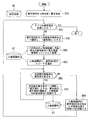
- FIG. 7 is a flowchart showing image reproduction processing by the image reproduction device 41.
- the person correlation database construction unit 49 of the image reproduction device 41 executes a person correlation database construction process (step A10).
- the viewer detection unit 51 of the image playback device 41 executes viewer detection processing (step A20).
- the excluded person determination unit 53 of the image reproduction device 41 executes an excluded person determination process (step A30). Subsequently, the image reproduction device 41 detects an instruction to start viewing (step A40). Whether or not an appreciation instruction has been started is determined by whether or not a playback button such as a remote control has been pressed.
- the video display unit 61 of the image playback device 41 executes video display processing (step A50), and when the viewing party ends, the image playback processing ends.
- step A50 video display processing
- FIG. 7 each process of FIG. 7 is demonstrated.
- the person correlation database construction process by the person correlation database construction part 49 of the image reproduction apparatus 41 shown in step A10 of FIG. 7 will be described.
- the person correlation database construction unit 49 acquires a list of subjects from the subject database 45 (step B10). Next, the person correlation database construction unit 49 selects one subject from the subject list and sets it as “subject A” (step B30). The person correlation database construction unit 49 obtains the subjects registered at this time from the person correlation database 47 and creates a registered subject list (step B40).
- the person correlation database construction unit 49 adds a record of the subject A to the person correlation database 47.
- the subject ID of the subject A acquired from the subject database 45 is recorded in the subject ID field 91 (step B50).
- the person correlation database construction unit 49 determines whether there is an unprocessed subject in the registered subject list (step B60).
- the person correlation database construction unit 49 selects one unprocessed subject and sets it as “Subject B”.
- the input of the relationship between the subject A and the subject B is received from the user. At that time, the relationship between the subject A and the subject B and the relationship between the subject B and the subject A are input separately.
- the person correlation database construction unit 49 converts the inputted relationship into a numerical value according to the rules 1 to 3 described above, and records this value in the corresponding cell of the person correlation database 47 (step B70). When the recording is finished, the process returns to Step B60.
- step B60 If there is no unprocessed subject in step B60 (see the NO route in step B60), the person correlation database construction unit 49 follows the rule 4 described above and the cell indicating the relationship between the subject A and the subject A in the person correlation database 47. “0” is recorded in (Step B80), and the process returns to Step B20. In step B20, it is determined whether or not the above processing has been completed for all the subjects acquired from the subject database 45.
- step B20 When all the subjects have been processed (see YES route in step B20), the process ends. If all the subjects have not been processed (see NO route in step B20), the person correlation database construction unit 49 selects one unprocessed subject from the subject list and repeats the above processing.
- the person correlation database construction process if the number of subjects registered in the person correlation database 47 increases, the manual work by the user in steps B60 to B70 increases. In this case, it is possible to change the unprocessed subject selection logic in step B70 so that the user can input the group member to which the subject A belongs first.
- the member of the group to which the subject A belongs is input first by the user, and the human relationship with a person unrelated to the subject A is input later.
- the person correlation database construction unit 49 displays an option “do not input the human relationship after this” on the screen.
- the person correlation database construction unit 49 sets all users to “processed” and proceeds to step B80. In this case, the value “0” is recorded in accordance with the above rule 3 for the human relationship for which the user did not explicitly input the human relationship.
- the viewer detection unit 51 specifies the total number of viewers in order to create a viewer list (step C10).
- the number of viewers may be detected by capturing a viewer's image with the camera 5 installed in the room where the viewing party is held, and the viewer detection unit 51 may perform face recognition technology on this image.
- the viewer detection unit 51 may specify the number of viewers from an email indicating participation in the viewing party.
- the number of viewers participating in the viewing party can be specified by any known method.
- the viewer detection unit 51 registers the viewer in the viewer list.
- the viewer detection unit 51 identifies who is the viewer for the first identified viewer and adds it to the viewer list (step C30).
- the viewer detection unit 51 can specify who the viewer is by using face recognition technology.
- the viewer detection unit 51 identifies the viewer by analyzing the sender of the participation expression mail and the content of the mail text. can do.
- the viewer detection unit 51 may use any known method for specifying the viewer.
- the viewer detection unit 51 returns to step C20 and determines whether or not all viewers have been processed (step C20). If all viewers have been processed (see YES route in step C20), the process ends. If there is a viewer that has not yet been processed (see the NO route in Step C20), the process moves to the next viewer, performs Step C30, and repeats the above steps.
- the viewer detection unit 51 identifies who the viewers are about all viewers and writes them in the viewer list.
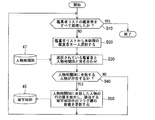
- the excluded person determination process by the excluded person determination unit 53 of the image reproduction device 41 shown in Step A30 of FIG. 7 will be described with reference to FIG.
- the excluded person determination unit 53 selects one viewer from the viewer list created by the viewer detection unit 51 (step D20).
- the excluded person determination unit 53 matches the viewer selected in step D20 with the person correlation database 47 (step D30). The excluded person determination unit 53 determines whether or not the viewer selected in step D20 is registered in the person correlation database 47 (step D40). If the viewer selected in step D20 is not registered (see NO route in step D40), the excluded person determination unit 53 returns to step D10.
- the excluded person determination unit 53 displays the subject in the flag field 95 in the corresponding row of the subject database 45 at the viewing party. A numerical value indicating whether or not it is acceptable is set (step D50).
- the excluded person determination unit 53 sets the value of the flag field 95 of the subject database 45 as follows, for example.
- the flag field 95 of the subject database 45 is finally set to the following value, for example. Person who has nothing to do with the viewer ⁇ 0 Person who has no problem in displaying for all viewers ⁇ Positive value Person who has no problem in displaying for some viewer ⁇ Negative degree and the most disturbing audience
- the excluded person determination unit 53 returns to step D10, and determines whether or not the excluded person determination unit 53 has processed all the viewers in the viewer list (step D10). If all viewers have been processed (see YES route in step D10), the process ends. When there is a viewer that has not yet been processed (see NO route in step D10), the excluded person determination unit 53 selects one unprocessed viewer from the viewer list (step D20), and performs the above processing. repeat.
- the excluded person determination unit 53 sets a value indicating whether or not the subject may be displayed at the viewing party in the flag field 95 in the subject database 45.
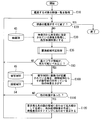
- the display video control unit 59 obtains a video list to be viewed (step E10).
- This video list is a list of videos to be watched. For example, if the administrator stores and manages a video taken at a wedding in a folder called “wedding”, the display video control unit 59 selects the directory of the folder to view the video to be viewed. Get a list.
- the display video control unit 59 acquires the first video in the playback order of the video list to be viewed from the video database 43, and sets this video as a playback candidate video (step E30).
- the display video control unit 59 selects one of the reproduction candidate videos acquired in step E30 from the subjects shown in the video (step E40).
- the display video control unit 59 searches the subject database 45 for the subject selected in step E40, and acquires flag information of the subject (step E50).
- the display video control unit 59 determines whether or not the above processing has been completed for all subjects in the reproduction candidate video acquired in step E30 (step E60). When there is an unprocessed subject (see NO route in step E60), the display video control unit 59 returns to step E40, selects another subject, and repeats the process in step E50.
- the display image control unit 59 acquires the minimum flag information 48 of all the subjects (step E70).
- the display video control unit 59 sets the flag information value of the record in the minimum flag information 48. To do.
- the display video control unit 59 sets the minimum value of the plurality of flag information to the minimum flag. Recorded as information 48.
- the display video control unit 59 sets the minimum flag information 48 to “0”.
- the display video control unit 59 compares the minimum flag information 48 obtained in step E70 with the reproducible level 50 (step E80).
- the reproducible level 50 is a threshold value used for determining whether to display a video. If the video minimum flag information 48 is at or above the reproducible level 50, it is determined that the video is reproducible.
- This reproducible level 50 is set in advance by the image reproduction system 1, but can be freely changed by the administrator of the image reproduction system 1 using a graphical user interface (GUI). For example, in this example, it is assumed that the manager takes care not to feel uncomfortable for everyone who participates in the viewing party. In this case, the administrator sets the reproducible level 50 to “0”. As a result, an image with a negative minimum flag information 48 is not displayed.
- GUI graphical user interface
- the administrator may determine that some participants in the viewing party cannot help feeling a little uncomfortable. In that case, the administrator sets the reproducible level 50 to “ ⁇ 0.5” or the like.
- the manager's wife 2 participates in the viewing party in the example of human relations described above.
- the display video control unit 59 When the minimum flag information 48 is smaller than the reproducible level 50 (minimum flag information ⁇ reproducible level) (see NO route in step E80), the display video control unit 59 returns to step E20. When the minimum flag information 48 is at or above the reproducible level 50 (minimum flag information ⁇ reproducible level) (see YES route at step E80), the display video control unit 59 acquires it at step E30 according to the display timing. The reproduced candidate video is displayed on the image display unit 61 (step E90).
- the display video control unit 59 returns to step E20 and determines whether or not all the videos to be viewed have been reproduced. When all the videos to be watched have been reproduced (see YES route in step E20), the process is terminated. If there is a video to be watched that has not yet been played back (see NO route in step E20), the display video control unit 59 searches the video database 43 for the next video according to the playback order of the video list to be watched. And the above processing is repeated using this video as a playback candidate video.
- the display video control unit 59 excludes image videos whose minimum flag information 48 is smaller than the reproducible level 50.
- the video is not displayed.
- only videos whose minimum flag information 48 is at or above the reproducible level 50 are displayed to the viewer.
- the image reproduction system 1 of the first embodiment the viewer's face is recognized, the human relationship between the viewer and the person shown in the video is examined, and the video that the viewer does not feel uncomfortable is played back. However, it is possible to prevent the reproduction of images that may be uncomfortable for the viewer.
- control is performed so as not to display an image in which a specific person is shown in an appreciation party.
- the participant may feel uncomfortable if no video showing a specific person is displayed at the viewing party.
- it may be necessary to reproduce a video showing a specific member in some cases.
- it since how much the viewer feels uncomfortable depends on the situation of the viewer and the atmosphere of the viewing party, it may be better to be able to determine during the viewing whether or not a particular video should be excluded.
- FIG. 12 is a functional block diagram of an image playback device (image display device) 410 according to the second embodiment.
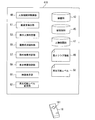
- the image reproduction system (not shown) of the second embodiment includes a remote control device 18 (FIG. 12) for dynamically changing the reproducible level 50 during viewing, in addition to the PC 3, the camera 5, and the display device 7. .
- the image reproduction device 410 of the second embodiment includes a reproducible level changing unit 62 in addition to the functional units of the image reproduction device 41 of the first embodiment shown in FIG.
- the remote control device 18 includes, for example, a direction instruction button 181 for increasing / decreasing the value of the reproducible level 50 during the video reproduction process shown in FIG.
- a direction instruction button 181 for increasing / decreasing the value of the reproducible level 50 during the video reproduction process shown in FIG.
- the reproducible level changing unit 62 increases the value of the reproducible level 50 according to the button operation of the remote control device 18.
- the reproducible level changing unit 62 decreases the value of the reproducible level 50 according to the button operation of the remote control device 18.
- the administrator presses the up arrow button of the remote control device 18 to set the playable level 50 to “ Raise to 0 ”. Since the value of the minimum flag information 48 of the colleague B man (ID 104) is “ ⁇ 0.3”, the image of the colleague B man is no longer displayed. According to the second embodiment, the advantages of the first embodiment can be obtained, and the threshold value for whether or not to display the video can be set dynamically. Can be changed.
- control is performed so as not to display an image in which a specific person is captured at an appreciation party.
- a part of participants who have participated in the viewing party late are not recognized by the viewer detection unit 51.
- an image showing a person who is not preferred by a late participant is displayed, and the participant may be offended. Therefore, in the third embodiment, in addition to the functions of the first embodiment, there is a function of dynamically adding viewers during the viewing party when there is a person who has participated late during the viewing party.
- FIG. 13 is a functional block diagram of an image playback device (image display device) 411 according to the third embodiment.
- the image reproduction device 411 according to the third embodiment includes an additional person determination unit 63 in addition to the functional units of the image reproduction device 41 according to the first embodiment illustrated in FIG. 3.
- the additional person determination unit 63 constantly monitors the viewers during the viewing party, and dynamically adds viewers when detecting that the number of participants has increased.
- FIG. 14 is a flowchart showing the processing of the additional person determination unit 63 in the third embodiment.
- the additional person determination unit 63 monitors the video of the camera 5. When the additional person determination unit 63 detects that the number of viewers is increasing, this additional viewer is matched with the person correlation database 47 (step F10). The additional person determination unit 63 determines whether or not an additional viewer is registered in the person correlation database 47 (step F20).
- the additional person determination unit 63 determines whether an additional viewer is registered in the person correlation database 47 (see NO route in Step F20). Since it is a new viewer and there is no corresponding record in the person correlation database 47, the additional person determination unit 63 The process ends. In this case, the video is not excluded based on the new viewer.
- the additional person determination unit 63 extracts the value of the record of the additional viewer in the person correlation database 47, and the subject The value of the flag field 95 of the database 45 is updated according to the update rule of the previous step D50 (step F30). Then, the process ends.
- the process of FIG. 14 is repeated for all the persons who are late.
- the advantages of the first embodiment can be obtained, and the flag field 95 of the additional viewer in the subject database 45 can be stored during the image reproduction process.
- the value is dynamically changed, and an image reproduction process is performed by the display video control unit 59 of the image reproduction apparatus 411. As a result, even for a viewer who participated late, it is possible to determine whether or not to exclude the video and control the video not to be reproduced.
- a partner such as a lover or a couple may appreciate a video together.
- a partner plays a picture that shows a friendship with another sex, such as a previous lover, a colleague or a subordinate, while the video is being viewed, there is a risk that the relationship between the partners will be broken.
- the video in which the colleague C child that the wife does not know is not excluded.
- FIG. 15 is a functional block diagram of an image playback device (image display device) 412 according to the fourth embodiment.
- the subject database 45 has a gender field 97 that represents the gender of the subject.
- a value “1” is set when the subject is a male
- a value “2” is set when the subject is a female.
- the image reproduction device 412 of the fourth embodiment includes an inappropriate video exclusion unit (exclusion unit) in addition to the functional units of the image reproduction device 41 of the first embodiment shown in FIG. ) 65.
- This inappropriate video exclusion unit 65 plays back video (hereinafter referred to as “inappropriate video”) in which only one person who is in a partner relationship with another sex other than the partner appears alone during video playback. Eliminate not to.
- inappropriate video video in which only one person who is in a partner relationship with another sex other than the partner appears alone during video playback. Eliminate not to.
- the overall system configuration of the fourth embodiment is the same as that of the first embodiment shown in FIGS. Further, since other functions of the fourth embodiment are the same as those of the first embodiment shown in FIGS. 4 and 6 to 10, their illustration and description are omitted.
- the display video control unit 59 acquires a video list to be viewed as in the first embodiment (step E10).
- the display video control unit 59 acquires the first video in the playback order of the video list to be viewed from the video database 43, and sets this video as a playback candidate video (step E30).
- the display video control unit 59 selects one of the reproduction candidate videos acquired in step E30 from the subjects shown in the video (step E40).
- the display video control unit 59 searches the subject database 45 for the subject selected in step E40, and acquires flag information of the subject (step E50).
- the display video control unit 59 determines whether or not the above processing has been completed for all subjects in the reproduction candidate video acquired in step E30 (step E60).
- step E60 When there is an unprocessed subject (see NO route in step E60), the display video control unit 59 returns to step E40, selects another subject, and repeats the process in step E50.
- step E60 When all the subjects are processed (see YES route in step E60), the display video control unit 59 acquires the minimum flag information 48 of all the subjects (step E70).
- the display video control unit 59 sets the flag information value of the record in the minimum flag information 48. To do.
- the display video control unit 59 sets the minimum value of the plurality of flag information to the minimum flag. Recorded as information 48. When the record does not exist, the display video control unit 59 sets the minimum flag information 48 to “0”.
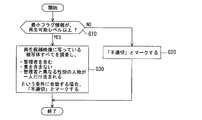
- step E75 the display video control unit 59 determines whether or not the reproduction candidate video acquired in step E30 is marked as “inappropriate video” by inappropriate video processing described later (step E85).
- the display video control unit 59 When the reproduction candidate image is marked as “inappropriate video”, the display video control unit 59 returns to Step E20. If the playback candidate image is not marked as “inappropriate video”, the display video control unit 59 causes the image display unit 61 to display the playback candidate video acquired in step E30 in synchronization with the display timing (step S30). E90).
- the display video control unit 59 returns to step E20 and determines whether or not all the videos to be viewed have been reproduced. When all the videos to be watched have been reproduced (see YES route in step E20), the process is terminated. If there is a video to be watched that has not yet been played back (see NO route in step E20), the display video control unit 59 searches the video database 43 for the next video according to the playback order of the video list to be watched. And the above processing is repeated using this video as a playback candidate video.
- FIG. 18 is a flowchart showing inappropriate video exclusion processing by the inappropriate video exclusion unit 65 shown in step E75 of FIG.
- the inappropriate video exclusion unit 65 determines whether or not the minimum flag information 48 of the playback candidate video acquired in step E70 of FIG. 17 is larger than the playback possible level 50 (step G10).
- the inappropriate video exclusion unit 65 marks the reproduction candidate video as “inappropriate video” (step G20), the process is terminated. If the minimum flag information 48 of the reproduction candidate video is at or above the reproducible level 50 (see YES route in Step G10), the inappropriate video exclusion unit 65 records all the records in the reproduction candidate video in the subject database 45. Extract from If all of the following conditions (a) to (c) are met, the playback candidate video is marked as “inappropriate video”, and the process ends (step G30). (A) Includes an administrator (b) Does not include a partner (c) Only one person of different gender from the administrator is included Note that the inappropriate video exclusion unit 65 may not meet any of the above conditions. The process ends.
- the inappropriate video exclusion unit 65 can determine from the gender field 97 of the subject database 45 whether the person shown in the photograph has a gender different from that of the administrator. In addition, whether or not it is a partner is set in advance by setting a partner relationship by setting a value exceeding 2 in absolute value, such as the value “2”, in the corresponding cells of both partners in the person correlation database 47. Can be determined.
- the advantages of the first embodiment can be obtained, and when viewing a video with a partner, the other person and the other sex can be seen alone. It can be controlled not to display the video. For example, in the above example, only two photos of an administrator and a colleague C child are excluded. For example, only two photos of an administrator and a colleague D beauty can be excluded in the same way, and the eyes of the wife Touching can be prevented.
- FIG. 19 is a functional block diagram of an image playback device (image display device) 413 according to a modification of the fourth embodiment. As shown in FIG. 19, the modified example of the fourth embodiment has an inappropriate image threshold value 52 in addition to the functional units of the image reproduction device 413 of the fourth embodiment.
- the inappropriate image threshold value 52 is a threshold value used when the reproduction candidate video is marked as “inappropriate video” by the inappropriate video exclusion unit 65 of the image playback device 412 of the fourth embodiment.
- the overall system configuration of the modified example of the fourth embodiment is the same as that of the above-described fourth embodiment, and thus illustration and description thereof are omitted. Moreover, since the other functions of the modified example of the fourth embodiment are the same as those of the fourth embodiment, illustration and description thereof are omitted.
- FIG. 20 is a flowchart illustrating inappropriate video exclusion processing by the inappropriate video exclusion unit 65 in a modification of the fourth embodiment.
- the inappropriate video exclusion unit 65 determines whether or not the minimum flag information 48 of the reproduction candidate video acquired by the display video control unit 59 is higher than the reproducible level 50 (step H10).
- the inappropriate video exclusion unit 65 marks the reproduction candidate video as “inappropriate video” (Step S10). H20), the process is terminated.
- the minimum flag information 48 of the reproduction candidate video is at or above the reproducible level 50 (see YES route in Step H10), the inappropriate video exclusion unit 65 acquires the value of the inappropriate image threshold 52 (Step H30).
- the inappropriate image threshold value 52 is set in advance by the administrator or the image reproduction system 1 and is stored in the RAM 21 or the HDD 23 of the PC 3.
- the inappropriate video exclusion unit 65 extracts records of all the subjects in the playback candidate video from the subject database 45. If all of the following conditions (a), (b), and (d) are met, the reproduction candidate video is marked as “inappropriate video”, and the process ends (step H40). (A) including an administrator (b) not including a partner (d) including one or more persons of different gender from the administrator including an unsuitable image threshold 52 or less. If even one of the conditions is not met, the process is terminated.
- step H30 (d) the person who has the same sex as the manager is only the manager, and all subjects other than the manager are not the same as the manager. Is included so that the video is not reproduced.
- a picture of a joint party in which a manager participates in secret to his wife can be cited. In this case, even if there are multiple men, the manager wants to exclude the photo because he does not want his wife to know that he has participated in the joint party.
- the inappropriate video exclusion unit 65 can determine from the gender field 97 of the subject database 45 whether the person shown in the photograph has a gender different from that of the administrator. In addition, whether or not it is a partner is set in advance by setting a partner relationship by setting a value exceeding 2 in absolute value, such as the value “2”, in the corresponding cells of both partners in the person correlation database 47. Can be determined.
- the advantages of the above-described fourth embodiment can be obtained. It is possible to control so that a plurality of images are not displayed. In this way, it is possible to determine a video that breaks the partner relationship and control the video not to be reproduced.
- the value of the inappropriate image threshold 52 is set to “2”, it is determined to be inappropriate when there are one or two persons with different genders, so the situation of the example given in the above fourth embodiment Then, it is possible to prevent the wife's eyes from touching the photos of the manager, co-worker C-child, and co-worker D.
- FIG. 21 is a functional block diagram of an image playback device (image display device) 414 according to the fifth embodiment.
- the image reproduction device 414 of the fifth embodiment includes a face area database 54 and a replacement candidate determination unit 63 in addition to the functional units of the image reproduction device 41 of the first embodiment shown in FIG. Have
- FIG. 22 is a diagram showing a face region in the present embodiment
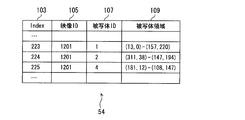
- FIG. 23 is a diagram showing an example of a face region database 54 corresponding to FIG.
- the areas 112, 114, and 116 of each subject's face are shown by broken lines.
- the face area database 54 has fields of Index 103, video ID 105, subject ID 107, and subject area 109.
- the Index 103 stores a unique ID for uniquely specifying data.
- the video ID 105 stores Index information indicating the video managed in the video database 43.
- the subject ID 107 stores ID information indicating the subject managed in the subject database 45.
- the subject area 109 stores an area in the video where the face of the subject is shown. As the coordinates of the face area, for example, information on the area determined during the face recognition process is registered. In the case of the example of FIG. 22, the face area is represented in the form of “(upper left coordinates) ⁇ (lower right coordinates)”.
- the area may be represented by any other expression as long as the area can be specified in the video.
- the face area may be represented by the expression “(upper left coordinates) ⁇ vertical size ⁇ horizontal size”.
- the subject database 45 has a replacement ID field 99 indicating which person is replaced when replacement with another person becomes necessary.
- the replacement ID field 99 stores the subject ID of a person who is replaced with a person who is determined not to be suitable for display.
- the display video control unit 59 acquires a video list to be viewed as in the first embodiment (step E10).
- the display video control unit 59 acquires the first video in the playback order of the video list to be viewed from the video database 43, and sets this video as a playback candidate video (step E30).
- the replacement candidate determination processing unit 67 executes replacement candidate determination processing described later to determine the minimum flag information 48 (step E35).
- the display video control unit 59 compares the minimum flag information 48 determined in step E35 with the reproducible level 50 (step E80). If the minimum flag information 48 is smaller than the reproducible level 50 (minimum flag information ⁇ reproducible level) (see NO route in step E80), the display video control unit 59 returns to step E20.
- the display video control unit 59 Searches the face area database 54 for other images in which the person with the subject ID is shown (step E100). The display video control unit 59 determines the presence or absence of another video in which the person with the subject ID is shown in the face area database 54 (step E110).
- step E110 If there is no other video in which the person with the subject ID is present (see the NO route in step E110), the display video control unit 59 returns to step E20. Since there is no video of the person to be replaced, the video set as the playback candidate video in step E30 is not displayed. If there is another video in which the person with the subject ID is present (see YES route in step E110), the display video control unit 59 enlarges the face video found in step E80 in accordance with the face area to be replaced. Reduce the size and synthesize it with the original video to create a playback candidate video. Then, the display video control unit 59 displays the reproduction candidate video on the image display unit 61 in accordance with the display timing (step E120).
- the display video control unit 59 returns to step E20 and determines whether or not all the videos to be viewed have been reproduced. When all the videos to be watched have been reproduced (see YES route in step E20), the process is terminated. If there is a video to be watched that has not yet been played back (see NO route in step E20), the display video control unit 59 searches the video database 43 for the next video according to the playback order of the video list to be watched. And the above processing is repeated using this video as a playback candidate video.
- FIG. 26 is a flowchart showing the processing of the replacement candidate determination unit 67 in step E35 of FIG.
- the replacement candidate determination unit 67 initializes the minimum flag information 48 by setting a value “0” (step I10).
- the replacement candidate determination unit 67 checks whether or not the subject shown in the reproduction candidate video acquired by the display video control unit 59 is registered in the subject database 45, and if it is registered, registers it in the subject list (step I20). .
- the replacement candidate determination unit 67 searches the subject database 45 for a subject not included in the reproduction candidate video. Then, all subjects whose flag information is at or above the reproducible level 50 are registered in the replacement candidate list (step I30). The replacement candidate determination unit 67 selects one unprocessed subject from the subject list, compares the flag information of the subject with the minimum flag information 48, and records the smaller one as the minimum flag information 48 (step I50). .
- the replacement candidate determination unit 67 determines whether or not the minimum flag information 48 is higher than the reproducible level 50 for the subject selected in step I50 (step I60). If the minimum flag information 48 is at or above the reproducible level 50 (see YES route at step I60), the replacement candidate determination unit 67 returns to step I40. When the minimum flag information 48 is smaller than the reproducible level 50 (see NO route in step I60), the replacement candidate determination unit 67 determines whether or not there is an unprocessed candidate in the replacement candidate list (step I70). ).
- step I80 the replacement candidate determination unit 67 selects an unprocessed replacement candidate from the replacement candidate list. Then, the subject ID of the selected replacement candidate is written in the subject replacement ID field 99 of the subject database 45 currently being processed. Next, the replacement candidate determination unit 67 writes the flag information of the selected replacement candidate in the minimum flag information 48, and returns to Step I40.
- the replacement candidate determination unit 67 displays “none” in the replacement ID field 99 of the subject currently being processed in the subject database 45. And writing (step I90), the process is terminated.
- the replacement candidate determination unit 67 determines whether or not the above processing has been completed for all the subjects in the subject list (step I40).
- the processing is terminated. If there is a subject in the subject list that has not been subjected to the above processing (see NO route in step I40), the replacement candidate determining unit 67 selects one unprocessed subject from the subject list and repeats the above processing.
- the image reproduction system of the fifth embodiment in addition to the advantages of the first embodiment, when there is an image showing an unfavorable person, the person is changed to another person. Can be displayed. For this reason, even if a specific person is reflected in a video taken at a special scenery, a tourist attraction, an event, or the like at the viewing party, the video can be displayed and the viewing party can be more enjoyed.
- a video in which an undesirable person is shown is synthesized with a video in which the person is replaced with another person, and the video is displayed.
- the video is controlled not to be reproduced.
- a video in which an undesirable person is replaced with a background is synthesized and displayed.
- the overall system configuration of the modified example of the fifth embodiment is the same as that of the fifth embodiment described above, and therefore illustration and description thereof are omitted. Moreover, since the other functions of the modified example of the fifth embodiment are the same as those of the fifth embodiment, illustration and description thereof are omitted. However, in this modified example, instead of searching for another subject as a replacement candidate in step E100 of FIG. 25 and synthesizing the video in step E120, the process of step E100 is not performed, and the unsuitable person is detected as the background video in step E120. Replace with.
- the advantages of the fifth embodiment can be obtained, and images taken at special viewing scenes, tourist attractions, events, etc. can be obtained at the viewing party. Replace undesired people in the background with background images. For this reason, basically all the images can be displayed at the viewing party, and the viewing party can be further enjoyed.
- the CPU 19 of the PC 3 executes the image reproduction program, whereby the image reproduction devices 41, 410, 411, 412, 413, 414, the person correlation database construction unit 49, viewer detection unit 51, excluded person determination unit 53, viewing status notification unit 55, excluded video determination unit 57, display video control unit 59, reproducible level change unit 62, additional person determination unit 63, inappropriate video exclusion unit 65 and a replacement candidate determination unit 67.
- the video database 43, the subject database 45, the person correlation database 47, and the face area database 54 are stored in the HDD 23 of the HDD 29 of the PC 3, and the minimum flag 48, the reproducible level 50, and the inappropriate image threshold 52 are stored in the RAM 21 of the PC 3.
- the display device 7 or the like functions as the video display unit 61.
- a program (image reproduction program) for realizing the functions as the display video control unit 59, the reproducible level changing unit 62, the additional person determining unit 63, the inappropriate video excluding unit 65, and the replacement candidate determining unit 67 is, for example, flexible.
- Disc, CD CD (CD-ROM, CD-R, CD-RW, etc.), DVD (DVD-ROM, DVD-RAM, DVD-R, DVD + R, DVD-RW, DVD + RW, etc.), magnetic disc, optical disc, magneto-optical disc Etc., and is provided in a form recorded in a computer-readable recording medium.
- the computer reads the program from the recording medium, transfers it to the internal storage device or the external storage device, and uses it.
- the program may be recorded in a storage device (recording medium) such as a magnetic disk, an optical disk, or a magneto-optical disk, and provided from the storage device to the computer via a communication path.
- the program stored in the HDD 23) is executed by the microprocessor of the computer (CPU 19 of the PC 3 in this embodiment). At this time, the computer may read and execute the program recorded on the recording medium.
- the computer is a concept including hardware and an operating system, and means hardware that operates under the control of the operating system.
- the hardware when an operating system is unnecessary and hardware is operated by an application program alone, the hardware itself corresponds to a computer.
- the hardware includes at least a microprocessor such as a CPU and means for reading a computer program recorded on a recording medium.
- the PC 3 has a function as a computer. is there. (H) Others Regardless of the embodiment described above and its modifications, various modifications can be made without departing from the spirit of the present embodiment.
- the person recorded in the subject database 45 is registered in the person correlation database 47, but the person not registered in the subject database 45 is registered as a person. It may be registered in the correlation database 47.
- a person who is not registered in the subject database 45 in the person correlation database 47 a captured video is not registered in the video database 43, but a related person can be considered at the time of viewing.
- first to fifth embodiments and the modifications thereof have been described by taking still images as examples, moving images may be handled in the same manner.
- the above process may be executed for each frame of the moving image to control the reproduction of the frame of the moving image that may be uncomfortable for the viewer, or the reproduction of the moving image itself may be controlled.
- There may be a person who is recorded in the subject database 45 but is not registered in the person correlation database 47.
- the value “0” is set in such a person cell in the person correlation database 47, but it is not necessary to register such a person in the person correlation database 47.
- the video data is stored in the HDD 23 of the PC 3, but the video data may be stored in a storage device outside the PC 3.
- the video data may be stored in the storage device of the display device 7 or may be stored in the optical disc 17.
- the video data may be stored in a USB memory or a memory card (not shown) connected to the PC 3 via a USB interface or another interface.
- a field for storing an ID for uniquely identifying the external storage device is added to the video database 43.
- whether or not to display a person shown in the video is controlled, but for example, it is possible to control whether or not to display a person other than a human such as an animal. For example, if there are viewers who dislike reptiles and insects, a system that excludes images that show reptiles and insects from being played back, or replaces reptiles and insects in the images with background images or other images. Conceivable.
- any 2 to 4 of the second to fifth embodiments may be combined, or all may be combined.
- Image Playback System 3 PC (Information Processing Device) 5 Camera (imaging device) 7 Display device (display unit) 41, 410, 411, 412, 413, 414 Image reproduction device (image display device) 43 Video database 45 Subject database 47 Person correlation database (database) 48 Minimum flag information 49 Person correlation database construction unit 50 Reproducible level (threshold) 51 Appreciator Detection Unit 53 Excluded Person Determination Unit 55 Appreciation Status Notification Unit 57 Excluded Video Determination Unit (Excluded Image Determination Unit) 59 Display Video Control Unit (Display Control Unit) 61 Video display section (display section) 63 Additional person determination part 65 Inappropriate video exclusion part (exclusion part) 67 Replacement candidate determination processing unit (replacement determination unit)
Landscapes
- Engineering & Computer Science (AREA)
- Multimedia (AREA)
- Signal Processing (AREA)
- Two-Way Televisions, Distribution Of Moving Picture Or The Like (AREA)
Abstract
画像表示装置(41)は、被写体を含む表示用画像を鑑賞者に表示するための表示部(7)と、鑑賞者を特定するための鑑賞者検出部(51)と、前記表示用画像中の前記被写体と前記特定された鑑賞者との関係に基づいて、前記表示用画像中に表示すべきではない人物が含まれるかどうかを判定する除外人物判定部(53)と、前記表示用画像中に表示すべきではない人物が含まれる場合には、前記表示すべきではない人物を前記鑑賞者に見せないように、前記表示部(7)への前記表示用画像の表示を制御する表示制御部(59)と、を有する。
Description
本実施形態は、画像表示装置、画像表示方法および画像表示プログラムに関する。
家庭へのデジタルカメラや携帯電話、ビデオカメラの普及が進むのに伴い、撮影された写真やビデオなどの映像を、複数の人間が鑑賞する機会が増えている。
一般に、ある集団を構成するメンバの間で、特定のメンバ同士が明らかに不仲だとわかることがある。
例えば、社員旅行や大学のゼミでの旅行など、特定の集団に属するメンバが一緒に旅行に行き、後日、旅行に参加した一部メンバで鑑賞会を行なうことがある。このとき、鑑賞会に参加しているメンバと、旅行には参加したが鑑賞会には参加していない別のメンバとが不仲な場合、鑑賞会での鑑賞中に、その不仲なメンバの写真やビデオが再生されると、一部メンバの機嫌が悪くなる可能性がある。
例えば、社員旅行や大学のゼミでの旅行など、特定の集団に属するメンバが一緒に旅行に行き、後日、旅行に参加した一部メンバで鑑賞会を行なうことがある。このとき、鑑賞会に参加しているメンバと、旅行には参加したが鑑賞会には参加していない別のメンバとが不仲な場合、鑑賞会での鑑賞中に、その不仲なメンバの写真やビデオが再生されると、一部メンバの機嫌が悪くなる可能性がある。
そのため、鑑賞会の開催者は、鑑賞会に先立って、特定のメンバが写っている写真を一切表示しないように事前に準備する必要がある。しかし、この種事前の作業は、一般に非常に気を使う。除外すべき写真を選択する際に、漏れなどがないように気を使う必要があり、大変な心労を伴う。
本発明は、このような課題に鑑み創案されたもので、映像を鑑賞している人にとって好ましくない写真やビデオの再生を、映像の鑑賞時に制御することを目的とする。
本発明は、このような課題に鑑み創案されたもので、映像を鑑賞している人にとって好ましくない写真やビデオの再生を、映像の鑑賞時に制御することを目的とする。
上記の目的を達成するために、本装置は、被写体を含む表示用画像を鑑賞者に表示するための表示部と、鑑賞者を特定するための鑑賞者検出部と、前記表示用画像中の前記被写体と前記特定された鑑賞者との関係に基づいて、前記表示用画像中に表示すべきではない人物が含まれるかどうかを判定する除外人物判定部と、前記表示用画像中に表示すべきではない人物が含まれる場合には、前記表示すべきではない人物を前記鑑賞者に見せないように、前記表示部への前記表示用画像の表示を制御する表示制御部と、を有することを特徴とする画像表示装置を提供する。
また、本方法は、鑑賞者を特定するステップと、表示用画像中の被写体と、前記特定された鑑賞者との関係に基づいて、前記表示用画像中に表示すべきではない人物が含まれるかどうかを判定するステップと、前記表示用画像中に表示すべきではない人物が含まれる場合には、前記表示すべきではない人物を前記鑑賞者に見せないように、前記表示部への前記表示用画像の表示を制御するステップと、を有することを特徴とする画像表示方法を提供する。
さらに、本プログラムは、コンピュータによって実行されると、該コンピュータに、表示用画像中の被写体と、前記特定された鑑賞者との関係に基づいて、前記表示用画像中に表示すべきではない人物が含まれるかどうかを判定するステップと、前記表示用画像中に表示すべきではない人物が含まれる場合には、前記表示すべきではない人物を前記鑑賞者に見せないように、前記表示部への前記表示用画像の表示を制御するステップと、を実行させることを特徴とする画像表示プログラムを提供する。
開示の技術によれば、被写体を含む表示用画像を鑑賞者に表示する際に、表示用画像中に表示すべきではない人物が含まれる場合に、当該画像を表示しないように除外することができる。
(A)第一実施形態
以下、図面を参照して実施の形態を説明する。
図1は、実施形態の一例としての画像再生システム1の全体構成を示す模式図である。
図1に示すように、画像再生システム1は、パーソナルコンピュータ(PC;コンピュータ)3、カメラ(撮像装置)5、および表示装置(表示部)7を有する。本例においては、カメラ5が表示装置7に搭載されており、PC3とカメラ5とが、例えばUSB(Universal Serial Bus)ケーブル9や、無線ネットワークで接続されており、PC3と表示装置7とが、例えばHDMI(High-Definition Multimedia Interface)ケーブル11で接続されている。
以下、図面を参照して実施の形態を説明する。
図1は、実施形態の一例としての画像再生システム1の全体構成を示す模式図である。
図1に示すように、画像再生システム1は、パーソナルコンピュータ(PC;コンピュータ)3、カメラ(撮像装置)5、および表示装置(表示部)7を有する。本例においては、カメラ5が表示装置7に搭載されており、PC3とカメラ5とが、例えばUSB(Universal Serial Bus)ケーブル9や、無線ネットワークで接続されており、PC3と表示装置7とが、例えばHDMI(High-Definition Multimedia Interface)ケーブル11で接続されている。
PC3は、例えば、ノートブックコンピュータやデスクトップコンピュータなどのコンピュータである。
カメラ5は、例えば、映像を撮影可能なカメラであり、例えば、Webカメラやデジタルカメラやデジタルビデオカメラなどである。なお、ここで「映像」とは、写真などの静止画のほか、ムービーなどの動画も含むものとする。映像のフォーマットとしては、MGEG、JPEG、MP4、AVIなどが挙げられる。カメラ5は、鑑賞者2の映像を撮影して、撮影した映像を、USBケーブル9経由でPC3に送信する。
カメラ5は、例えば、映像を撮影可能なカメラであり、例えば、Webカメラやデジタルカメラやデジタルビデオカメラなどである。なお、ここで「映像」とは、写真などの静止画のほか、ムービーなどの動画も含むものとする。映像のフォーマットとしては、MGEG、JPEG、MP4、AVIなどが挙げられる。カメラ5は、鑑賞者2の映像を撮影して、撮影した映像を、USBケーブル9経由でPC3に送信する。
図1ではカメラ5が、表示装置7の上に搭載されて図示されているが、カメラ5は鑑賞者2の映像を撮影できれば、どこに設置してもよい。また、図1では外付けのカメラ5を使用しているが、カメラ5が、PC3または表示装置7に内蔵されていてもよい。
表示装置7は、種々の情報を表示可能な表示装置であり、本画像再生システム1によって再生される画像を表示する映像表示部61(後述)として機能する。具体的には、表示装置7には、PC3からHDMIケーブル11経由で画像が出力され、表示装置7はその映像を表示する。表示装置7は、例えばHDMI端子を備えたデジタル液晶TV、デジタルプラズマディスプレイTVか、またはチューナーのないディスプレイやプロジェクタなどである。
表示装置7は、種々の情報を表示可能な表示装置であり、本画像再生システム1によって再生される画像を表示する映像表示部61(後述)として機能する。具体的には、表示装置7には、PC3からHDMIケーブル11経由で画像が出力され、表示装置7はその映像を表示する。表示装置7は、例えばHDMI端子を備えたデジタル液晶TV、デジタルプラズマディスプレイTVか、またはチューナーのないディスプレイやプロジェクタなどである。
図2は、実施形態の一例としての画像再生システム1のハードウェア構成を示す模式図である。
画像再生システム1は、前述のようにPC3を有する。
PC3は、CPU(Central Processing Unit)19、ランダムアクセスメモリ(RAM)21、ハードディスクドライブ(HDD)23、グラフィックインターフェース25、入力インターフェース27、光学ドライブ装置19、および通信インターフェース31を備える。
画像再生システム1は、前述のようにPC3を有する。
PC3は、CPU(Central Processing Unit)19、ランダムアクセスメモリ(RAM)21、ハードディスクドライブ(HDD)23、グラフィックインターフェース25、入力インターフェース27、光学ドライブ装置19、および通信インターフェース31を備える。
また、図2に示すように、PC3のグラフィックインターフェース25には、HDMIケーブル等を介して表示装置7が、入力インターフェース27には、USB経由ケーブル等を介して、キーボード13、マウス15およびカメラ5がそれぞれ接続されている。
CPU19は、RAM21やHDD23に格納されたプログラムを実行することにより種々の演算処理を行なうものであり、PC3における種々の制御を行なう。
CPU19は、RAM21やHDD23に格納されたプログラムを実行することにより種々の演算処理を行なうものであり、PC3における種々の制御を行なう。
RAM21は、CPU3によって用いられるプログラムやデータを一時的に格納する記憶領域である。例えば、RAM21には、後述する最小フラグ情報48や再生可能レベル50が記憶される。
HDD23は、種々のプログラムやデータを格納し保存する記憶装置である。例えば、HDD23は、本画像再生システム1によって再生される写真や動画などの映像データを記憶している。これらの映像データは、ユーザによって撮影され、本画像再生システム1によって再生するためにHDD23に記憶される。
HDD23は、種々のプログラムやデータを格納し保存する記憶装置である。例えば、HDD23は、本画像再生システム1によって再生される写真や動画などの映像データを記憶している。これらの映像データは、ユーザによって撮影され、本画像再生システム1によって再生するためにHDD23に記憶される。
また、HDD23は、後述する映像データベース(DB)43、被写体データベース45および人物相関データベース47を格納し、これら映像データベース43、被写体データベース45および人物相関データベース47として機能する。
なお、図2にはHDD23が1台しか図示されていないが、PC3に複数のHDD23が備えられてもよい。また、USBやLANなどでPC3の外部に備えてもよい。
なお、図2にはHDD23が1台しか図示されていないが、PC3に複数のHDD23が備えられてもよい。また、USBやLANなどでPC3の外部に備えてもよい。
キーボード13およびマウス15は、本画像再生システム1のユーザが種々の入力や選択操作を行なうための入力装置である。
グラフィックインターフェース25は、グラフィックを外部に出力するためのインターフェースであり、例えば、HDMIインターフェースなどである。
入力インターフェース27は、PC3の外部の周辺機器からデータを入力するためのインターフェースであり、例えば、USBインターフェース、または無線や赤外線インターフェースなどである。
グラフィックインターフェース25は、グラフィックを外部に出力するためのインターフェースであり、例えば、HDMIインターフェースなどである。
入力インターフェース27は、PC3の外部の周辺機器からデータを入力するためのインターフェースであり、例えば、USBインターフェース、または無線や赤外線インターフェースなどである。
光学ドライブ装置29は、CD(CD-ROM,CD-R,CD-RW等),DVD(DVD-ROM,DVD-RAM,DVD-R,DVD+R,DVD-RW,DVD+RW等)、Blu Rayなどの光ディスク17の読み書きを行なうドライブ装置である。
通信インターフェース31は、PC3を、インターネットなどのネットワーク33に、有線または無線で接続する通信インターフェースである。通信インターフェース31は、例えば、有線または無線のローカルエリアネットワーク(LAN)カード、有線または無線のワイドエリアネットワーク(WAN)カードなどである。
通信インターフェース31は、PC3を、インターネットなどのネットワーク33に、有線または無線で接続する通信インターフェースである。通信インターフェース31は、例えば、有線または無線のローカルエリアネットワーク(LAN)カード、有線または無線のワイドエリアネットワーク(WAN)カードなどである。
CPU19は、HDD23や光ディスク17に記憶されているか、あるいはネットワーク33経由でサーバ(不図示)からダウンロードされる画像再生プログラム(画像表示プログラム)120を実行することにより、後述する画像再生部41、人物相関データベース構築部49、鑑賞者検出部51、除外人物判定部53、鑑賞状況通知部55、除外映像判定部57、および表示映像制御部59としての機能を実現する。
図3は、実施形態の一例としての画像再生装置(画像表示装置)41の機能ブロック図である。
本実施形態における画像再生装置41は、映像データベース43、被写体データベース45、人物相関データベース47、人物相関データベース構築部49、鑑賞者検出部51、除外人物判定部53、鑑賞状況通知部55、除外映像判定部(除外画像判定部)57、表示映像制御部(表示制御部)59、および映像表示部(表示部)61を有する。
本実施形態における画像再生装置41は、映像データベース43、被写体データベース45、人物相関データベース47、人物相関データベース構築部49、鑑賞者検出部51、除外人物判定部53、鑑賞状況通知部55、除外映像判定部(除外画像判定部)57、表示映像制御部(表示制御部)59、および映像表示部(表示部)61を有する。
映像データベース43は、撮影された映像(写真、ビデオ等)に関する情報を記憶するデータベースであり、例えば図2に示したPC3のHDD23に格納される。
図4は映像データベース43の例を示す。
図4に示す例においては、映像データベース43は、ファイルIndex71、ファイル名73、格納先75、映像種別77、撮影日時79、および撮影場所81の各フィールドを有する。
図4は映像データベース43の例を示す。
図4に示す例においては、映像データベース43は、ファイルIndex71、ファイル名73、格納先75、映像種別77、撮影日時79、および撮影場所81の各フィールドを有する。
ファイルIndex71は、映像のファイルを一意に特定するためのインデックスを記憶する。
ファイル名73は、PC3に格納されている映像ファイルのファイル名を記憶する。
格納先75は、PC3における映像ファイルの格納場所(フォルダ)を記憶する。
映像種別77は、映像の種類を示すフラグを記憶する。例えば、写真ファイルに対しては「P」、ビデオファイルに対しては「M」のフラグが記憶される。
ファイル名73は、PC3に格納されている映像ファイルのファイル名を記憶する。
格納先75は、PC3における映像ファイルの格納場所(フォルダ)を記憶する。
映像種別77は、映像の種類を示すフラグを記憶する。例えば、写真ファイルに対しては「P」、ビデオファイルに対しては「M」のフラグが記憶される。
撮影日時79は、映像の撮影日時を記憶する。通常、デジタルカメラで写真を撮影すると、写真ファイルのExif情報に撮影日時が記録される。ビデオの場合、ファイルのタイムスタンプを参照することで撮影日時を特定可能である。
撮影場所81は、映像を撮影した場所を記憶する。例えば、撮影場所81には、撮影場所の緯度と経度を記憶する。一部のデジタルカメラやビデオカメラでは、撮影時にGPSの情報を受信し、撮影後の写真やビデオに撮影場所の情報を付加することができる。また、場所情報のない写真に対し、地図上で場所を指示することで撮影場所の情報を付加することのできるソフトウェアも存在する。撮影場所81は、このような手段により、自動的または手動で付加された撮影場所情報を記憶する。
撮影場所81は、映像を撮影した場所を記憶する。例えば、撮影場所81には、撮影場所の緯度と経度を記憶する。一部のデジタルカメラやビデオカメラでは、撮影時にGPSの情報を受信し、撮影後の写真やビデオに撮影場所の情報を付加することができる。また、場所情報のない写真に対し、地図上で場所を指示することで撮影場所の情報を付加することのできるソフトウェアも存在する。撮影場所81は、このような手段により、自動的または手動で付加された撮影場所情報を記憶する。
この映像データベース43は、例えば、PC3のHDD23等に格納されている映像を自動的に抽出する映像管理ソフトウェアによって自動的に作成される。
被写体データベース45は、映像データベース43に登録されている映像に対して顔認識技術を利用して認識した被写体を格納するデータベースであり、誰がどの映像に写っているのかを記録する。被写体データベース45は、例えば図2に示したPC3のHDD23に記憶される。
被写体データベース45は、映像データベース43に登録されている映像に対して顔認識技術を利用して認識した被写体を格納するデータベースであり、誰がどの映像に写っているのかを記録する。被写体データベース45は、例えば図2に示したPC3のHDD23に記憶される。
顔認識技術は、例えば、写真管理ソフトウェアに実装されている技術を利用することができる。顔認識技術を採用している一般的な写真管理ソフトウェアは、管理する写真に対して顔認識処理を実行することができる。写真管理ソフトウェアによっては、ユーザがボタン操作により顔認識の開始を明示的に指示するものや、自動的にバックグラウンドで顔認識処理が開始されるものがある。
通常、顔認識技術によって認識された顔は、同一と判定される程度に似た顔がグループ化されて認識結果が表示される。ただし、顔認識技術は、人間以外のものを人間と判定する誤認識があったり、認識率が低く、同一人物であっても別の人物と判定するなどの問題がある。このため、ソフトウェアによる認識処理のあと、ユーザが手動で認識結果を編集することが一般に行なわれる。
一般的な写真管理ソフトウェアでは、ユーザによる顔認識結果の編集時に、各人物に対して、名前や続柄など、当該人物のプロフィールを記載することができる。写真管理ソフトウェアは、このプロフィール情報と、認識された顔のデータ(どの写真のどの位置に、どのようなサイズの顔が写っているか)をデータベース形式で記録して、管理する。被写体データベース45は、例えば、このようなデータベースを利用して構築される。
図5は、被写体データベース45の例を示す。
被写体データベース45は、被写体ID91、被写体名93およびフラグ95の各フィールドを有する。
被写体ID91は、被写体を一意に特定するための固有のIDを記憶する。
被写体名93は、被写体について、ユーザが理解できるように記述する文字列を記憶する。被写体名としては、例えば、被写体の氏名などを記録することができる。本例においては、本画像再生システム1の管理者(ユーザ)を、被写体IDがID=1、被写体名「管理者」として、先頭の行に記憶している。
被写体データベース45は、被写体ID91、被写体名93およびフラグ95の各フィールドを有する。
被写体ID91は、被写体を一意に特定するための固有のIDを記憶する。
被写体名93は、被写体について、ユーザが理解できるように記述する文字列を記憶する。被写体名としては、例えば、被写体の氏名などを記録することができる。本例においては、本画像再生システム1の管理者(ユーザ)を、被写体IDがID=1、被写体名「管理者」として、先頭の行に記憶している。
フラグ95は、鑑賞時に使用するための一時的な情報を記憶するための領域である。本実施形態では、後に映像を鑑賞する際に除外すべき人物かどうかをマークするために使用される。
本例においては、図5に示すように、被写体データベース45には、以下の人物が登録されており、これらの人物の間に、以下のような人間関係が存在するとする。
本例においては、図5に示すように、被写体データベース45には、以下の人物が登録されており、これらの人物の間に、以下のような人間関係が存在するとする。
ID=1 管理者 本画像再生システム1の管理者。
ID=2 妻 管理者の妻。
ID=3 太郎 管理者の息子。
ID=4 花子 管理者の娘。
ID=11 友人A男 管理者の高校時代の友人。妻とも面識があるが子供たちとの面識はない。
ID=12 友人B男 管理者の大学時代の友人。妻や子供たちとは面識がない。
ID=13 友人C子 管理者の大学時代の友人。以前管理者とつきあっていたことがあり、妻もそのことを薄々知ってはいる。
ID=101 部長 管理者の勤める会社の部長。妻や子供たちとは面識がある。花子にとっては怖い存在のようで、部長の顔を見るといつも泣きだしてしまう。
ID=102 課長 管理者の勤める会社の課長。妻とは面識があるが、子供たちとの面識はない。
ID=103 同僚A男 管理者の勤める会社の同僚。妻や子供たちとの直接の面識はない。一方、管理者は会社で妻や子供たちの写真を見せびらかしているため、同僚A男は妻や子供たちの顔を覚えている。同僚C子とは以前つきあっていたが、別れたばかりである。
ID=104 同僚B男 管理者の勤める会社の同僚。妻とは面識がある。管理者を訪ねて会社に妻が訪れたときに応対した。そのときの対応が妻の気に障り、妻は「虫が好かない」と言っている。
ID=105 同僚C子 管理者の勤める会社の同僚。妻や子供たちとは面識がない。同僚A男と別れたばかりであり、その際に管理者は相談を受けたことがある。
ID=2 妻 管理者の妻。
ID=3 太郎 管理者の息子。
ID=4 花子 管理者の娘。
ID=11 友人A男 管理者の高校時代の友人。妻とも面識があるが子供たちとの面識はない。
ID=12 友人B男 管理者の大学時代の友人。妻や子供たちとは面識がない。
ID=13 友人C子 管理者の大学時代の友人。以前管理者とつきあっていたことがあり、妻もそのことを薄々知ってはいる。
ID=101 部長 管理者の勤める会社の部長。妻や子供たちとは面識がある。花子にとっては怖い存在のようで、部長の顔を見るといつも泣きだしてしまう。
ID=102 課長 管理者の勤める会社の課長。妻とは面識があるが、子供たちとの面識はない。
ID=103 同僚A男 管理者の勤める会社の同僚。妻や子供たちとの直接の面識はない。一方、管理者は会社で妻や子供たちの写真を見せびらかしているため、同僚A男は妻や子供たちの顔を覚えている。同僚C子とは以前つきあっていたが、別れたばかりである。
ID=104 同僚B男 管理者の勤める会社の同僚。妻とは面識がある。管理者を訪ねて会社に妻が訪れたときに応対した。そのときの対応が妻の気に障り、妻は「虫が好かない」と言っている。
ID=105 同僚C子 管理者の勤める会社の同僚。妻や子供たちとは面識がない。同僚A男と別れたばかりであり、その際に管理者は相談を受けたことがある。
人物相関データベース47は、人物間の人間関係を数値化した値を格納するデータベースであり、例えば図2に示したPC3のHDD23に記憶される。
図6は、人物相関データベース47の例を示す。
この例においては、人物相関データベース47は、人物の相互関係を示すために、配列状に並べられた升目(セル)のデータ構造を有する。この配列データの各セルは、各行に記述されている人物が、その行に交わる列の人物に対して抱いている感情を表わす値を示す。
図6は、人物相関データベース47の例を示す。
この例においては、人物相関データベース47は、人物の相互関係を示すために、配列状に並べられた升目(セル)のデータ構造を有する。この配列データの各セルは、各行に記述されている人物が、その行に交わる列の人物に対して抱いている感情を表わす値を示す。
例えば、人物相関データベース47の先頭の「1 管理者」の列は、管理者が、他の人物に対して抱いている感情を表わす値(感情値)を示す。
なお、人間関係においては、ある人が、一方的に特定の人物を知っていたり、一方的に嫌ったりすることもありうるため、相手に対して抱いている感情が相互に同じであるとは限らない。このため、人物相関データベース47には、例えば、2人の人物、AさんとBさんについて、AさんがBさんに抱いている感情(A→B)と、BさんがAさんに抱いている感情(B→A)の好悪の大きさが別個に記録される。つまり、2人の人物間の好悪の感情の大きさとその向きとが記録される。
なお、人間関係においては、ある人が、一方的に特定の人物を知っていたり、一方的に嫌ったりすることもありうるため、相手に対して抱いている感情が相互に同じであるとは限らない。このため、人物相関データベース47には、例えば、2人の人物、AさんとBさんについて、AさんがBさんに抱いている感情(A→B)と、BさんがAさんに抱いている感情(B→A)の好悪の大きさが別個に記録される。つまり、2人の人物間の好悪の感情の大きさとその向きとが記録される。
感情値は、以下のルール1)~4)に従ってユーザによって設定される。
1)ルール1:好ましい感情は正の値、好ましくない感情は負の値で表わす。
2)ルール2:感情値の絶対値は1以下である。すなわち、好ましい感情値の最大値は1、好ましくない感情値の最大値は「-1」である。
3)ルール3:人物間に相互に関係がない場合に値「0」を設定する。また、見ず知らずの相手にも値「0」を設定する。
例えば、顔認識技術によって被写体データベース45を自動的に作成する場合には、偶然通りかかった人など、見ず知らずの人が被写体データベース45に登録されることがあるが、その人物は全く関係のない人物である。そこで、偶然写った人が映像の再生に影響を与えないように、その人に値「0」を設定する。
4)ルール4:同じ人物が交わるセルは無効であるが、便宜的に値「0」を設定する。
1)ルール1:好ましい感情は正の値、好ましくない感情は負の値で表わす。
2)ルール2:感情値の絶対値は1以下である。すなわち、好ましい感情値の最大値は1、好ましくない感情値の最大値は「-1」である。
3)ルール3:人物間に相互に関係がない場合に値「0」を設定する。また、見ず知らずの相手にも値「0」を設定する。
例えば、顔認識技術によって被写体データベース45を自動的に作成する場合には、偶然通りかかった人など、見ず知らずの人が被写体データベース45に登録されることがあるが、その人物は全く関係のない人物である。そこで、偶然写った人が映像の再生に影響を与えないように、その人に値「0」を設定する。
4)ルール4:同じ人物が交わるセルは無効であるが、便宜的に値「0」を設定する。
図6の例は、図5の被写体データベース45に登録されている人物に関する人物相関データベース47の例である。
以下の説明においては、人物相関データベース47の各セルを、便宜的に(2,1)のように表わすこととする。(2,1)は、2行1列目のセルを表わす。
上記ルール4に従い、図6の網掛けで示されるように、同じ人物が交わるセル(1,1)、(2,2)、・・・、(105,105)にはすべて値「0」が設定される。
以下の説明においては、人物相関データベース47の各セルを、便宜的に(2,1)のように表わすこととする。(2,1)は、2行1列目のセルを表わす。
上記ルール4に従い、図6の網掛けで示されるように、同じ人物が交わるセル(1,1)、(2,2)、・・・、(105,105)にはすべて値「0」が設定される。
また、上記ルール3に従い、図6の網かけで示されるように、接点のない人物同士のセルにも値「0」が設定される。
ID=11の友人A男は、妻と面識があるため、セル(2,11)、(11,2)にそれぞれ「1」が設定されている。
ID=12の友人B男は、管理者との接点しかない。このため、セル(12,1)には値「1」が設定されているが、それ以外の全セルに値「0」が設定されている。
ID=11の友人A男は、妻と面識があるため、セル(2,11)、(11,2)にそれぞれ「1」が設定されている。
ID=12の友人B男は、管理者との接点しかない。このため、セル(12,1)には値「1」が設定されているが、それ以外の全セルに値「0」が設定されている。
ID=13の友人C子は、管理者の昔の恋人であり、妻にとって避けるべき人物である。そのため、セル(2,13)に値「-1」が設定されている。逆に、友人C子は妻を知らないため、セル(13,2)に値「0」が設定されている。
ID=101の部長は管理者の家族と面識がある。また、会社の部長として、部下である課長や同僚達との面識があるため、これらの人物との関係セルに値「1」が設定されている。一方、管理者の娘である花子にとっては避けるべき人物であるため、セル(4,101)に値「-1」が設定されている。
ID=101の部長は管理者の家族と面識がある。また、会社の部長として、部下である課長や同僚達との面識があるため、これらの人物との関係セルに値「1」が設定されている。一方、管理者の娘である花子にとっては避けるべき人物であるため、セル(4,101)に値「-1」が設定されている。
ID=102の課長は、妻と面識があり、会社の部長や同僚達とも面識があるため、これらの人物との関係セルに値「1」が設定されている。
ID=103の同僚A男は、妻や子供が知らない人物であるため、上記ルール1に従い、(2,103)、(3,103)、(4,103)のセルに値「0」が設定されている。一方、同僚A男は、会社で、管理者から妻や子供たちの写真を見せらており、妻や子供たちを知っているため、(103,2)、(103,3)、(103,4)のセルには値「1」が設定されている。さらに、同僚A男は、会社の部長、課長、同僚は面識があるため、これらの人物との関係セルに値「1」が設定されている。しかし、同僚A男は、同僚C子と別れたばかりであり、お互いに失恋の痛みが残っているため、(103,105)、(105,103)のセルにそれぞれ値「-1」が設定されている。
ID=103の同僚A男は、妻や子供が知らない人物であるため、上記ルール1に従い、(2,103)、(3,103)、(4,103)のセルに値「0」が設定されている。一方、同僚A男は、会社で、管理者から妻や子供たちの写真を見せらており、妻や子供たちを知っているため、(103,2)、(103,3)、(103,4)のセルには値「1」が設定されている。さらに、同僚A男は、会社の部長、課長、同僚は面識があるため、これらの人物との関係セルに値「1」が設定されている。しかし、同僚A男は、同僚C子と別れたばかりであり、お互いに失恋の痛みが残っているため、(103,105)、(105,103)のセルにそれぞれ値「-1」が設定されている。
ID=104の同僚B男は、妻との面識があるため、(104,2)のセルに値「1」が設定されている。しかし、妻にとって同僚B男はあまり好かない人物であるため、(2,104)のセルに値「-0.3」が設定されている。
なお、人物相関データベース47のセルに絶対値が1未満の値を指定すると、状況によっては、画像再生システム1によって、対象の人物が「鑑賞時に表示されても問題ない」と解釈される。妻から見て、同僚B男が「問題ない」度合いが「0.3」であると解釈される。
なお、人物相関データベース47のセルに絶対値が1未満の値を指定すると、状況によっては、画像再生システム1によって、対象の人物が「鑑賞時に表示されても問題ない」と解釈される。妻から見て、同僚B男が「問題ない」度合いが「0.3」であると解釈される。
妻の機嫌がいい場合には、同僚B男が写っている映像が再生されても問題ないが、妻の機嫌が非常に悪かったり、妻の体調が優れない場合には、同僚B男の再生は避けるべきである。そこで、妻の機嫌が非常に悪かったり、妻の体調が優れない場合は、後述する人物相関データベース構築部49による人物相関データベース47の生成時に、管理者が(2,104)のセルに「-0.5」や「-1」などの大きな負の値を設定する。
ID=105の同僚C子は、部長、課長、同僚達としか接点がなく、これらの人物との関係セルに値「1」が設定される。ただし、同僚C子は、同僚A男と最近別れたことから、同僚A男との関係セルは、先に述べたように値「-1」が設定される。
人物相関データベース47は、後述する人物相関データベース構築部49によって構築される。
人物相関データベース47は、後述する人物相関データベース構築部49によって構築される。
人物相関データベース構築部49は、後述する人物相関データベース構築処理を行ない、被写体データベース45に登録されている人物について、管理者(ユーザ)の入力を受け付けて人物相関データベース47を構築する。
なお、被写体データベース45を構築するための顔認識の実行時に、顔認識によって新たに人物が認識されるために、その人物のプロフィール情報を管理者が登録する。その際、新たに認識された人物と、既にプロフィール情報が登録されている他の人物との人間関係の好悪状況を、管理者が入力できるようにする。
なお、被写体データベース45を構築するための顔認識の実行時に、顔認識によって新たに人物が認識されるために、その人物のプロフィール情報を管理者が登録する。その際、新たに認識された人物と、既にプロフィール情報が登録されている他の人物との人間関係の好悪状況を、管理者が入力できるようにする。
なお、人間関係の好悪状況は、相互に同じとは限らないため、好悪の向きも同時に記録する。現実には、面識の無い人物に対しては好悪の感情を持たないため、各人物が所属する組織(会社、サークル、学校など)に属する人物との人間関係の好悪状況が入力できるようになっていればよい。
鑑賞者検出部51は、鑑賞会に参加している鑑賞者を検出し特定する。これは、例えばカメラ5によって撮影される映像に対して顔認識を行なって鑑賞者を特定しても、あるいは鑑賞会への参加メールで鑑賞者を特定してもよい。
鑑賞者検出部51は、鑑賞会に参加している鑑賞者を検出し特定する。これは、例えばカメラ5によって撮影される映像に対して顔認識を行なって鑑賞者を特定しても、あるいは鑑賞会への参加メールで鑑賞者を特定してもよい。
除外人物判定部53は、鑑賞者検出部51で検出された人物と人物相関データベース47とを照らし合わせ、除外すべき人物とその除外レベルを取得する。取得したレベル情報を、被写体データベース45に一時的なフラグとして記録しておく。
鑑賞状況通知部55は、鑑賞時の状況を画像再生システム1に通知する。簡単な構成においては、鑑賞状況通知部55は、単に画像再生を指示するだけでもよい。あるいは、鑑賞状況通知部55が、鑑賞中の鑑賞者の状況に応じた指示を除外映像判定部57に与えることで、除外すべき人物を鑑賞中に動的に変更することも可能である。なお、本実施形態においては、鑑賞状況通知部55は省略可能であり、このため、図3において破線で図示されている。
鑑賞状況通知部55は、鑑賞時の状況を画像再生システム1に通知する。簡単な構成においては、鑑賞状況通知部55は、単に画像再生を指示するだけでもよい。あるいは、鑑賞状況通知部55が、鑑賞中の鑑賞者の状況に応じた指示を除外映像判定部57に与えることで、除外すべき人物を鑑賞中に動的に変更することも可能である。なお、本実施形態においては、鑑賞状況通知部55は省略可能であり、このため、図3において破線で図示されている。
除外映像判定部57は、除外人物判定部53で記録された被写体データベース45のフラグ情報と、鑑賞状況通知部55(存在する場合)から通知された状況に応じて、実際に除外すべき映像を判定する。
表示映像制御部59は、映像データベース43から映像を表示する際に、除外映像判定部57で判定された結果をもとに、表示する映像を制御する。具体的には、映像表示部61への映像の出力を制御する。
表示映像制御部59は、映像データベース43から映像を表示する際に、除外映像判定部57で判定された結果をもとに、表示する映像を制御する。具体的には、映像表示部61への映像の出力を制御する。
表示映像制御部59は、例えば、複数の映像をスライドショーとして表示(再生)する。この場合、再生開始の指示をユーザから受け付けると、表示映像制御部59は、あらかじめ決められた時間間隔で、映像データベース中の特定の映像の集合を表示対象として選択し、表示(再生)を開始する。
これから表示しようとしている映像について、除外映像判定部57によって除外すべきと判断された場合に、表示映像制御部59は、その映像を表示せずに次の映像に進む。除外すべきと判断されない映像は、表示映像制御部59は、映像表示部61に送る。
これから表示しようとしている映像について、除外映像判定部57によって除外すべきと判断された場合に、表示映像制御部59は、その映像を表示せずに次の映像に進む。除外すべきと判断されない映像は、表示映像制御部59は、映像表示部61に送る。
映像表示部61は、表示映像制御部59によって制御された映像を、鑑賞者が鑑賞できるように表示する部分であり、例えば、TVモニタやディスプレイなどである。前述のように、映像表示部61としては、液晶ディスプレイ(LCD)やCRT、プラズマディスプレイ、あるいはプロジェクタなどを使用することができる。
次に、実施形態の一例としての画像再生装置41の処理を説明する。
次に、実施形態の一例としての画像再生装置41の処理を説明する。
図7は、画像再生装置41による画像再生処理を示すフローチャートである。
まず鑑賞会に先立って、画像再生装置41の人物相関データベース構築部49が、人物相関データベース構築処理を実行する(ステップA10)。
鑑賞会に参加する鑑賞者が揃うと、画像再生装置41の鑑賞者検出部51が、鑑賞者検出処理を実行する(ステップA20)。
まず鑑賞会に先立って、画像再生装置41の人物相関データベース構築部49が、人物相関データベース構築処理を実行する(ステップA10)。
鑑賞会に参加する鑑賞者が揃うと、画像再生装置41の鑑賞者検出部51が、鑑賞者検出処理を実行する(ステップA20)。
次に、画像再生装置41の除外人物判定部53が、除外人物判定処理を実行する(ステップA30)。
続いて、画像再生装置41は、鑑賞開始の指示を検出する(ステップA40)。鑑賞の指示開始があったかどうかは、リモコンなどの再生ボタンが押されたかどうかにより判定する。
続いて、画像再生装置41は、鑑賞開始の指示を検出する(ステップA40)。鑑賞の指示開始があったかどうかは、リモコンなどの再生ボタンが押されたかどうかにより判定する。
鑑賞の開始が指示されると、画像再生装置41の映像表示部61が、映像表示処理を実行し(ステップA50)、鑑賞会が終了すると画像再生処理を終了する。
以下、図7の各処理について説明する。
まず、図8を参照して、図7のステップA10に示した、画像再生装置41の人物相関データベース構築部49による人物相関データベース構築処理について説明する。
以下、図7の各処理について説明する。
まず、図8を参照して、図7のステップA10に示した、画像再生装置41の人物相関データベース構築部49による人物相関データベース構築処理について説明する。
人物相関データベース構築部49は、被写体データベース45から被写体のリストを取得する(ステップB10)。
次に、人物相関データベース構築部49は、被写体リストから被写体を一人選択し、「被写体A」とする(ステップB30)。
人物相関データベース構築部49は、人物相関データベース47から、この時点で登録されている被写体を取得して、登録済み被写体リストを作成する(ステップB40)。
次に、人物相関データベース構築部49は、被写体リストから被写体を一人選択し、「被写体A」とする(ステップB30)。
人物相関データベース構築部49は、人物相関データベース47から、この時点で登録されている被写体を取得して、登録済み被写体リストを作成する(ステップB40)。
次に、人物相関データベース構築部49は、人物相関データベース47に、被写体Aのレコードを追加する。追加の際、被写体IDフィールド91には、被写体データベース45から取得した被写体Aの被写体IDを記録する(ステップB50)。
次に、人物相関データベース構築部49は、登録済み被写体リスト内に、未処理の被写体があるかどうかを判定する(ステップB60)。
次に、人物相関データベース構築部49は、登録済み被写体リスト内に、未処理の被写体があるかどうかを判定する(ステップB60)。
未処理の被写体が存在する場合(ステップB60のYESルート参照)、人物相関データベース構築部49は、未処理の被写体を一人選択し、「被写体B」とする。ユーザから被写体Aと被写体Bの関係の入力を受け付ける。その際、被写体Aから被写体Bの関係と、被写体Bから被写体Aの関係と、それぞれ別個に入力させる。人物相関データベース構築部49は、入力された関係を、前述のルール1~3に従って数値に変換し、人物相関データベース47の対応するセルにこの値を記録する(ステップB70)。記録を終えたら、ステップB60に戻る。
ステップB60において未処理の被写体がない場合(ステップB60のNOルート参照)、人物相関データベース構築部49は、前述のルール4に従って、人物相関データベース47の、被写体Aの自分自身との関係を表すセルに「0」を記録し(ステップB80)、ステップB20に戻る。そして、ステップB20において、被写体データベース45から取得したすべての被写体について、上記の処理を終了したかどうかを判定する。
すべての被写体を処理した場合(ステップB20のYESルート参照)、処理を終了する。
すべての被写体を処理していない場合(ステップB20のNOルート参照)、人物相関データベース構築部49は、被写体リストから未処理の被写体を一人選択して、上記の処理を繰り返す。
すべての被写体を処理していない場合(ステップB20のNOルート参照)、人物相関データベース構築部49は、被写体リストから未処理の被写体を一人選択して、上記の処理を繰り返す。
なお、上記人物相関データベース構築処理において、人物相関データベース47に登録されている被写体の人数が増えると、ステップB60~B70でのユーザによる手作業が増えてしまう。この場合、ユーザが、被写体Aが所属する集団のメンバを先に入力できるように、ステップB70における未処理の被写体選択ロジックを変更することも可能である。被写体Aが所属する集団のメンバをユーザに先に入力させ、被写体Aにとって関係のない人物との人間関係の入力を後に行なわれせる。そして、ステップB70においてユーザから入力を受け付ける際に、人物相関データベース構築部49は、「これ以降は人間関係の入力をしない」という選択肢を画面に表示する。上記選択肢が選択された場合、ステップB60に戻った時点で、人物相関データベース構築部49は、すべてのユーザを「処理済み」に設定して、ステップB80に進む。この場合、ユーザが明示的に人間関係を入力しなかった人間関係に対して、上記のルール3に従って値「0」が記録される。
次に、図9を参照して、図7のステップA20に示した、画像再生装置41の鑑賞者検出部51による鑑賞者検出処理について説明する。
まず、鑑賞者検出部51は、鑑賞者リストを作成するために、全鑑賞者数を特定する(ステップC10)。鑑賞者数の検出は、鑑賞会を行なう部屋に設置したカメラ5で鑑賞者の映像を撮像し、鑑賞者検出部51が、この映像に対して顔認識技術を行なってもよい。あるいは、鑑賞者検出部51が、鑑賞会への参加表明メールから、鑑賞者数を特定してもよい。鑑賞会に参加している鑑賞者数の特定は、公知のどのような方法を用いても行なうことができる。
まず、鑑賞者検出部51は、鑑賞者リストを作成するために、全鑑賞者数を特定する(ステップC10)。鑑賞者数の検出は、鑑賞会を行なう部屋に設置したカメラ5で鑑賞者の映像を撮像し、鑑賞者検出部51が、この映像に対して顔認識技術を行なってもよい。あるいは、鑑賞者検出部51が、鑑賞会への参加表明メールから、鑑賞者数を特定してもよい。鑑賞会に参加している鑑賞者数の特定は、公知のどのような方法を用いても行なうことができる。
次に、鑑賞者検出部51は、鑑賞者リストに鑑賞者を登録する。まず、鑑賞者検出部51は、最初に特定した鑑賞者について、鑑賞者が誰であるのかを特定し、鑑賞者リストに追加する(ステップC30)。カメラ5の映像から鑑賞者を認識する場合は、鑑賞者検出部51は、顔認識技術を使って鑑賞者が誰であるのかを特定することができる。鑑賞会への参加表明メールから鑑賞者を認識する場合は、鑑賞者検出部51は、参加表明メールの発信元や、メール本文の内容を解析することで、鑑賞者が誰であるのかを特定することができる。鑑賞者検出部51は、鑑賞者を特定するために公知のどのような方法を用いてもよい。
鑑賞者検出部51は、ステップC20に戻り、すべての鑑賞者を処理したかどうかを判定する(ステップC20)。
すべての鑑賞者を処理した場合(ステップC20のYESルート参照)、処理を終了する。
まだ処理していない鑑賞者が存在する場合(ステップC20のNOルート参照)、次の鑑賞者に移り、ステップC30の処理を行ない、上記のステップを繰り返す。
すべての鑑賞者を処理した場合(ステップC20のYESルート参照)、処理を終了する。
まだ処理していない鑑賞者が存在する場合(ステップC20のNOルート参照)、次の鑑賞者に移り、ステップC30の処理を行ない、上記のステップを繰り返す。
この処理を終了すると、鑑賞者検出部51は、すべての鑑賞者について、誰であるのかを特定しており、鑑賞者リストに記載する。
次に、図10を参照して、図7のステップA30に示した、画像再生装置41の除外人物判定部53による除外人物判定処理について説明する。
除外人物判定部53は、鑑賞者検出部51によって作成された鑑賞者リストから、鑑賞者を一人選択する(ステップD20)。
次に、図10を参照して、図7のステップA30に示した、画像再生装置41の除外人物判定部53による除外人物判定処理について説明する。
除外人物判定部53は、鑑賞者検出部51によって作成された鑑賞者リストから、鑑賞者を一人選択する(ステップD20)。
除外人物判定部53は、ステップD20で選択した鑑賞者について、人物相関データベース47と突き合わせる(ステップD30)。
除外人物判定部53は、人物相関データベース47に、ステップD20で選択した鑑賞者が登録されているかどうかを判定する(ステップD40)。
ステップD20で選択した鑑賞者が登録されていない場合(ステップD40のNOルート参照)、除外人物判定部53は、ステップD10に戻る。
除外人物判定部53は、人物相関データベース47に、ステップD20で選択した鑑賞者が登録されているかどうかを判定する(ステップD40)。
ステップD20で選択した鑑賞者が登録されていない場合(ステップD40のNOルート参照)、除外人物判定部53は、ステップD10に戻る。
ステップD20で選択した鑑賞者が登録されている場合(ステップD40のYESルート参照)、除外人物判定部53は、被写体データベース45の該当する行のフラグフィールド95に、その被写体を鑑賞会で表示してもよいかどうかを表す数値をセットする(ステップD50)。
除外人物判定部53は、被写体データベース45のフラグフィールド95の値を、例えば、以下のように設定する。
除外人物判定部53は、被写体データベース45のフラグフィールド95の値を、例えば、以下のように設定する。
(1)フラグフィールド95に何も記載されていない場合(一人目の場合)
人物相関データベース47の値をそのまま記載する。
(2)フラグフィールド95に値が記載されている場合(二人目以降の場合)
(a)フラグフィールド95の値が「0」の場合
人物相関データベース47の値を上書きする
(b)フラグフィールド95の値が正の値の場合
人物相関データベース47の値が正の場合、絶対値が大きい方をフラグフィールド95にセットする
人物相関データベース47の値が0の場合、何もしない
人物相関データベース47の値が負の値の場合、人物相関データベース47の値をフラグフィールド95に上書きする
(c)フラグフィールド95の値が負の値の場合
人物相関データベース47の値が正の場合、何もしない
人物相関データベース47の値が0の場合、何もしない
人物相関データベース47の値が負の場合、絶対値が大きい方をフラグフィールド95にセットする
人物相関データベース47の値をそのまま記載する。
(2)フラグフィールド95に値が記載されている場合(二人目以降の場合)
(a)フラグフィールド95の値が「0」の場合
人物相関データベース47の値を上書きする
(b)フラグフィールド95の値が正の値の場合
人物相関データベース47の値が正の場合、絶対値が大きい方をフラグフィールド95にセットする
人物相関データベース47の値が0の場合、何もしない
人物相関データベース47の値が負の値の場合、人物相関データベース47の値をフラグフィールド95に上書きする
(c)フラグフィールド95の値が負の値の場合
人物相関データベース47の値が正の場合、何もしない
人物相関データベース47の値が0の場合、何もしない
人物相関データベース47の値が負の場合、絶対値が大きい方をフラグフィールド95にセットする
上記のルールに従ってフラグフィールド95に値を設定することにより、被写体データベース45のフラグフィールド95は、例えば、最終的に以下のような値に設定される。
鑑賞者にとって全く関連がない人物 →値0
鑑賞者すべてにとって表示に差し支えのない人物 →正の値
鑑賞者の誰かにとって表示に差し支えのある人物
→負の値であり、かつ鑑賞者の中で一番差し支えのある人の度合い
鑑賞者にとって全く関連がない人物 →値0
鑑賞者すべてにとって表示に差し支えのない人物 →正の値
鑑賞者の誰かにとって表示に差し支えのある人物
→負の値であり、かつ鑑賞者の中で一番差し支えのある人の度合い
除外人物判定部53は、ステップD10に戻り、除外人物判定部53が、鑑賞者リスト中のすべての鑑賞者を処理したかどうかを判定する(ステップD10)。
すべての鑑賞者を処理した場合(ステップD10のYESルート参照)、処理を終了する。
まだ処理していない鑑賞者が存在する場合(ステップD10のNOルート参照)、除外人物判定部53は、鑑賞者リストから未処理の鑑賞者を一人選択して(ステップD20)、上記の処理を繰り返す。
すべての鑑賞者を処理した場合(ステップD10のYESルート参照)、処理を終了する。
まだ処理していない鑑賞者が存在する場合(ステップD10のNOルート参照)、除外人物判定部53は、鑑賞者リストから未処理の鑑賞者を一人選択して(ステップD20)、上記の処理を繰り返す。
この処理を終了すると、除外人物判定部53により、被写体データベース45内のフラグフィールド95には、その被写体を鑑賞会で表示してもよいかどうかを表す値が設定される。
次に、図11を参照して、図7のステップA50に示した、画像再生装置41の表示映像制御部59による画像再生処理について説明する。
次に、図11を参照して、図7のステップA50に示した、画像再生装置41の表示映像制御部59による画像再生処理について説明する。
まず、表示映像制御部59は、鑑賞対象の映像リストを取得する(ステップE10)。この映像リストとは、鑑賞しようとしている対象の映像の一覧である。例えば、管理者が、結婚式で撮影した映像を「結婚式」というフォルダに格納して管理している場合は、表示映像制御部59は、そのフォルダのディレクトリを選択して、鑑賞対象の映像リストを取得する。
表示映像制御部59は、映像データベース43から、鑑賞対象の映像リストの再生順序の先頭の映像を取得し、この映像を再生候補映像とする(ステップE30)。
表示映像制御部59は、ステップE30で取得した再生候補映像について、その映像に写っている被写体から一人を選択する(ステップE40)。
表示映像制御部59は、ステップE40で選択した被写体を、被写体データベース45から検索し、その被写体のフラグ情報を取得する(ステップE50)。
表示映像制御部59は、ステップE30で取得した再生候補映像について、その映像に写っている被写体から一人を選択する(ステップE40)。
表示映像制御部59は、ステップE40で選択した被写体を、被写体データベース45から検索し、その被写体のフラグ情報を取得する(ステップE50)。
表示映像制御部59は、ステップE30で取得した再生候補映像に写っているすべての被写体について、上記の処理を終了したかを判定する(ステップE60)。
未処理の被写体が存在する場合(ステップE60のNOルート参照)、表示映像制御部59は、ステップE40に戻って別の被写体を選択し、ステップE50の処理を繰り返す。
未処理の被写体が存在する場合(ステップE60のNOルート参照)、表示映像制御部59は、ステップE40に戻って別の被写体を選択し、ステップE50の処理を繰り返す。
すべての被写体を処理している場合(ステップE60のYESルート参照)、表示映像制御部59は、全被写体の最小のフラグ情報48を取得する(ステップE70)。被写体データベース45でヒットしたレコードが1件の場合(つまり、再生候補映像に写っている被写体が一人の場合)、表示映像制御部59は、そのレコードのフラグ情報の値を最小フラグ情報48に設定する。被写体データベース45で複数のレコードがヒットした場合(つまり、再生候補映像に写っている被写体が複数存在する場合)には、表示映像制御部59は、複数のフラグ情報のうちの最小値を最小フラグ情報48として記録する。レコードが存在しない場合、表示映像制御部59は、最小フラグ情報48を「0」に設定する。
次に、表示映像制御部59は、ステップE70で求めた最小フラグ情報48と、再生可能レベル50とを比較する(ステップE80)。
再生可能レベル50は、映像を表示すべきかどうかの判定に使用される閾値である。映像の最小フラグ情報48が、再生可能レベル50以上である場合には、その映像が再生可能であると判定される。
再生可能レベル50は、映像を表示すべきかどうかの判定に使用される閾値である。映像の最小フラグ情報48が、再生可能レベル50以上である場合には、その映像が再生可能であると判定される。
この再生可能レベル50は、画像再生システム1によって事前に設定されるが、画像再生システム1の管理者が、グラフィカルユーザインターフェース(GUI)を使用して自由に変更することができる。
例えば、本例においては、管理者は、鑑賞会に参加する誰もが一切不快に感じないように配慮するとする。この場合、管理者は、再生可能レベル50を「0」に設定する。これにより、最小フラグ情報48がマイナスの映像は表示されなくなる。
例えば、本例においては、管理者は、鑑賞会に参加する誰もが一切不快に感じないように配慮するとする。この場合、管理者は、再生可能レベル50を「0」に設定する。これにより、最小フラグ情報48がマイナスの映像は表示されなくなる。
しかし、鑑賞会に参加する誰もが一切不快に感じないように配慮すると、表示される映像が極端に少なくなり、鑑賞会がつまらなくなることもある。そこで、鑑賞者の性格や鑑賞会の趣旨によっては、鑑賞会の一部の参加者が少々不快に感じるのは仕方がないと管理者が判断する場合もある。その場合、管理者は、再生可能レベル50を「-0.5」等に設定する。
例えば、前述の人間関係の例において、管理者の妻(ID=2)が鑑賞会に参加するとする。管理者によって、妻は身内であるため、管理者が、妻の感情よりも参加者の感情を優先させる。妻は、夫の会社を訪れた際の同僚B男(ID=104)の対応を不快に感じたため、同僚B男の最小フラグ情報48に「-0.3」が設定されている。しかし、最小フラグ情報48の「-0.3」が、再生可能レベル50の「-0.5」よりも大きいため、映像の被写体に同僚B男が含まれていても、その映像は表示可能として判定される。
最小フラグ情報48が、再生可能レベル50よりも小さい(最小フラグ情報<再生可能レベル)場合(ステップE80のNOルート参照)、表示映像制御部59は、ステップE20に戻る。
最小フラグ情報48が、再生可能レベル50以上(最小フラグ情報≧再生可能レベル)である場合(ステップE80のYESルート参照)、表示映像制御部59は、表示のタイミングに合わせて、ステップE30で取得した再生候補映像を、画像表示部61に表示させる(ステップE90)。
最小フラグ情報48が、再生可能レベル50以上(最小フラグ情報≧再生可能レベル)である場合(ステップE80のYESルート参照)、表示映像制御部59は、表示のタイミングに合わせて、ステップE30で取得した再生候補映像を、画像表示部61に表示させる(ステップE90)。
表示映像制御部59は、ステップE20に戻り、鑑賞対象のすべての映像を再生し終えたかどうかを判定する。
鑑賞対象のすべての映像を再生し終えた場合(ステップE20のYESルート参照)、処理を終了する。
鑑賞対象の映像のうち、まだ再生していないものが存在する場合(ステップE20のNOルート参照)、表示映像制御部59は、映像データベース43から、鑑賞対象の映像リストの再生順序に従って次の映像を取得し、この映像を再生候補映像として、上記の処理を繰り返す。
鑑賞対象のすべての映像を再生し終えた場合(ステップE20のYESルート参照)、処理を終了する。
鑑賞対象の映像のうち、まだ再生していないものが存在する場合(ステップE20のNOルート参照)、表示映像制御部59は、映像データベース43から、鑑賞対象の映像リストの再生順序に従って次の映像を取得し、この映像を再生候補映像として、上記の処理を繰り返す。
上記処理では、ステップE60において、最小フラグ情報48と、再生可能レベル50とを比較することにより、表示映像制御部59は、最小フラグ情報48が再生可能レベル50よりも小さい画像映像は、除外すべき映像として表示しない。このため、最小フラグ情報48が再生可能レベル50以上の映像のみが鑑賞者に表示される。
第1実施形態の画像再生システム1によれば、鑑賞者の顔を認識し、鑑賞者と、映像に写っている人物との人間関係を調べて、鑑賞者が不快感を感じない映像は再生するが、鑑賞者が不快に感じる可能性のある映像を、再生しないようにすることができる。
第1実施形態の画像再生システム1によれば、鑑賞者の顔を認識し、鑑賞者と、映像に写っている人物との人間関係を調べて、鑑賞者が不快感を感じない映像は再生するが、鑑賞者が不快に感じる可能性のある映像を、再生しないようにすることができる。
(B)第2実施形態
上記の第1実施形態では、鑑賞会で特定の人物が写っている映像を表示させないように制御する。
しかし、鑑賞会の趣旨にもよるが、鑑賞会で特定の人物が写っている映像を一切表示させないと、参加者が違和感を感じることもある。違和感をなくすには、場合によっては、特定のメンバが写っている映像も再生する必要がある。しかし、鑑賞者が、どの程度不快に感じるかは、鑑賞者の状況や鑑賞会の雰囲気に依存するため、特定の映像を除外すべきかどうかを鑑賞中に決定できた方がよいこともある。
上記の第1実施形態では、鑑賞会で特定の人物が写っている映像を表示させないように制御する。
しかし、鑑賞会の趣旨にもよるが、鑑賞会で特定の人物が写っている映像を一切表示させないと、参加者が違和感を感じることもある。違和感をなくすには、場合によっては、特定のメンバが写っている映像も再生する必要がある。しかし、鑑賞者が、どの程度不快に感じるかは、鑑賞者の状況や鑑賞会の雰囲気に依存するため、特定の映像を除外すべきかどうかを鑑賞中に決定できた方がよいこともある。
そこで、第2実施形態の画像再生システム(不図示)では、映像を表示すべきかどうかの閾値である再生可能レベル50を、鑑賞会中に参加者の状況をみて動的に変更することができる。
図12は、第2実施形態の画像再生装置(画像表示装置)410の機能ブロック図である。
図12は、第2実施形態の画像再生装置(画像表示装置)410の機能ブロック図である。
第2実施形態の画像再生システム(不図示)は、PC3、カメラ5、表示装置7に加えて、鑑賞中に再生可能レベル50を動的に変更するためのリモコン装置18(図12)を備える。
さらに、第2実施形態の画像再生装置410は、図3に示した第1実施形態の画像再生装置41の各機能部に加えて、再生可能レベル変更部62を有する。
さらに、第2実施形態の画像再生装置410は、図3に示した第1実施形態の画像再生装置41の各機能部に加えて、再生可能レベル変更部62を有する。
なお、第2実施形態の全体的なシステム構成は、図1,2に示した第1実施形態のものと同じであるため、その図示および説明を省略する。また、第3実施形態の他の機能は図4~11に示した第1実施形態のものと同じであるため、その図示および説明を省略する。
リモコン装置18は、例えば、図11に示した映像の再生処理中に、再生可能レベル50の値を増減するための方向指示ボタン181を有する。例えば、ユーザがリモコン装置18の上矢印ボタンを押下すると、再生可能レベル変更部62は、リモコン装置18のボタン操作に応じて、再生可能レベル50の値を上げる。逆に、ユーザが下矢印ボタンを押下すると、再生可能レベル変更部62は、リモコン装置18のボタン操作に応じて、再生可能レベル50の値を下げる。
リモコン装置18は、例えば、図11に示した映像の再生処理中に、再生可能レベル50の値を増減するための方向指示ボタン181を有する。例えば、ユーザがリモコン装置18の上矢印ボタンを押下すると、再生可能レベル変更部62は、リモコン装置18のボタン操作に応じて、再生可能レベル50の値を上げる。逆に、ユーザが下矢印ボタンを押下すると、再生可能レベル変更部62は、リモコン装置18のボタン操作に応じて、再生可能レベル50の値を下げる。
再生可能レベル変更部62によって再生可能レベル50の値が変更されると、表示映像制御部59は、図11のステップE80において、ステップE70で求めた最小フラグ情報48を、変更後の再生可能レベル50と比較して、再生候補映像の表示可否を判断する。
例えば、鑑賞の開始時に再生可能レベル50が「-0.5」に設定されていて、管理者の妻(ID=2)が鑑賞会に参加しているとする。この場合、第1実施形態において説明したように、同僚B男の映像が表示される。
例えば、鑑賞の開始時に再生可能レベル50が「-0.5」に設定されていて、管理者の妻(ID=2)が鑑賞会に参加しているとする。この場合、第1実施形態において説明したように、同僚B男の映像が表示される。
鑑賞を進めていくにつれて、妻が同僚B男の映像を見たくなさそうなそぶりを見せると、管理者が、例えば、リモコン装置18の上矢印ボタンを押下して、再生可能レベル50を「0」に引き上げる。同僚B男(ID=104)の最小フラグ情報48の値が「-0.3」であるため、以降は、同僚B男の映像は表示されなくなる。
第2実施形態によれば、上記の第1実施形態の利点が得られるほか、映像を表示すべきかどうかの閾値を動的に設定できるため、鑑賞者の反応等によって、除外する映像を動的に変更することができる。
第2実施形態によれば、上記の第1実施形態の利点が得られるほか、映像を表示すべきかどうかの閾値を動的に設定できるため、鑑賞者の反応等によって、除外する映像を動的に変更することができる。
(C)第3実施形態
上記の第1実施形態では、鑑賞会で特定の人物が写っている映像を表示させないように制御する。
しかし、一部の参加者が鑑賞会に遅れて参加してきた、その参加者は、鑑賞者検出部51によって認識されていない。このため、遅れた参加者が好ましく思っていない人物が写っている映像が表示され、その参加者が気分を害するおそれがある。
そこで第3実施形態では、第1実施形態の各機能に加え、鑑賞会中に遅れて参加してきた人がいる場合などに、鑑賞会中に鑑賞者を動的に追加する機能を備える。
上記の第1実施形態では、鑑賞会で特定の人物が写っている映像を表示させないように制御する。
しかし、一部の参加者が鑑賞会に遅れて参加してきた、その参加者は、鑑賞者検出部51によって認識されていない。このため、遅れた参加者が好ましく思っていない人物が写っている映像が表示され、その参加者が気分を害するおそれがある。
そこで第3実施形態では、第1実施形態の各機能に加え、鑑賞会中に遅れて参加してきた人がいる場合などに、鑑賞会中に鑑賞者を動的に追加する機能を備える。
図13は、第3実施形態の画像再生装置(画像表示装置)411の機能ブロック図である。
図13に示すように、第3実施形態の画像再生装置411は、図3に示した第1実施形態の画像再生装置41の各機能部に加えて、追加人物判定部63を有する。
この追加人物判定部63は、鑑賞会中に鑑賞者を常にモニタしており、参加者が増えたことを検出すると、鑑賞者を動的に追加する。
図13に示すように、第3実施形態の画像再生装置411は、図3に示した第1実施形態の画像再生装置41の各機能部に加えて、追加人物判定部63を有する。
この追加人物判定部63は、鑑賞会中に鑑賞者を常にモニタしており、参加者が増えたことを検出すると、鑑賞者を動的に追加する。
なお、第3実施形態の全体的なシステム構成は、図1,2に示した第1実施形態のものと同じであるため、その図示および説明を省略する。また、第3実施形態の他の機能は図4~11に示した第1実施形態のものと同じであるため、その図示および説明を省略する。
図14は、第3実施形態における追加人物判定部63の処理を示すフローチャートである。
図14は、第3実施形態における追加人物判定部63の処理を示すフローチャートである。
画像再生処理の実行中に、追加人物判定部63は、カメラ5の映像をモニタしている。追加人物判定部63が、鑑賞者が増えていることを検出すると、この追加の鑑賞者を、人物相関データベース47と突き合わせる(ステップF10)。
追加人物判定部63は、人物相関データベース47に、追加の鑑賞者が登録されているかどうかを判定する(ステップF20)。
追加人物判定部63は、人物相関データベース47に、追加の鑑賞者が登録されているかどうかを判定する(ステップF20)。
人物相関データベース47に、追加の鑑賞者が登録されていない場合(ステップF20のNOルート参照)、新しい鑑賞者であり、人物相関データベース47に該当するレコードがないため、追加人物判定部63は、処理を終了する。この場合には、この新たな鑑賞者に基づいて、映像の除外が行なわれない。
人物相関データベース47に、追加の鑑賞者が登録されている場合(ステップF20のYESルート参照)、追加人物判定部63は、人物相関データベース47の追加の鑑賞者のレコードの値を抽出し、被写体データベース45のフラグフィールド95の値を先のステップD50の更新ルールに従って更新する(ステップF30)。そして、処理を終了する。
人物相関データベース47に、追加の鑑賞者が登録されている場合(ステップF20のYESルート参照)、追加人物判定部63は、人物相関データベース47の追加の鑑賞者のレコードの値を抽出し、被写体データベース45のフラグフィールド95の値を先のステップD50の更新ルールに従って更新する(ステップF30)。そして、処理を終了する。
なお、同時に複数の人物が遅れて鑑賞会に加わった場合は、遅れてきたすべての人物について、図14の処理を繰り返す。
このように、第3実施形態の画像再生システムによれば、上記の第1実施形態の利点が得られるほか、画像再生処理の実行中に、被写体データベース45の追加の鑑賞者のフラグフィールド95の値が動的に変更されて、画像再生装置411の表示映像制御部59により画像再生処理が行なわれる。これにより、遅れて参加した鑑賞者に関しても、映像の除外が判定されて、ふさわしくない映像を再生させないように制御できる。
このように、第3実施形態の画像再生システムによれば、上記の第1実施形態の利点が得られるほか、画像再生処理の実行中に、被写体データベース45の追加の鑑賞者のフラグフィールド95の値が動的に変更されて、画像再生装置411の表示映像制御部59により画像再生処理が行なわれる。これにより、遅れて参加した鑑賞者に関しても、映像の除外が判定されて、ふさわしくない映像を再生させないように制御できる。
(D)第4実施形態
恋人同士や夫婦などのパートナーが一緒に映像を鑑賞する場合がある。
しかし、映像の鑑賞中に、パートナーが、以前の恋人や、異性の同僚や部下など、別の異性と仲良く写っている写真が再生されてしまうと、パートナーの関係に亀裂が生じるおそれがある。
例えば、管理者の妻(ID=2)が知らない人物(例えば同僚C子)と管理者とが2人だけで意味ありげに写っている写真に対し、妻は不快に感じるであろう。しかし、先の第1~3実施形態の画像再生装置では、妻が知らない同僚C子が写っている映像は除外されない。
恋人同士や夫婦などのパートナーが一緒に映像を鑑賞する場合がある。
しかし、映像の鑑賞中に、パートナーが、以前の恋人や、異性の同僚や部下など、別の異性と仲良く写っている写真が再生されてしまうと、パートナーの関係に亀裂が生じるおそれがある。
例えば、管理者の妻(ID=2)が知らない人物(例えば同僚C子)と管理者とが2人だけで意味ありげに写っている写真に対し、妻は不快に感じるであろう。しかし、先の第1~3実施形態の画像再生装置では、妻が知らない同僚C子が写っている映像は除外されない。
実際、同僚C子が同僚A男と別れ話でもめている時期に、管理者は同僚C子から相談を受けていた。同僚C子が同僚A男と別れた後に、相談に乗ってもらったお礼として管理者が同僚C子から食事に誘われたことがある。同僚C子と、同僚C子と仲のよいD美と、管理者との3人の食事会であったため、管理者は、妻に何も言わずに食事会に参加した。しかし、管理者は、その席でC子との2人きりの写真をD美に撮られ、その写真を自分のPCに保存していた。管理者は、妻と一緒に写真を鑑賞し始めてはじめて、その写真を妻が見たら問題になる可能性があると思い至った。
そこで、第4実施形態では、配偶者や恋人などのパートナーと映像を鑑賞する場合に、パートナー関係にある一方が、パートナー以外の他の異性と2人きりで写っている映像を表示させないように制御する。例えば、本実施形態は、上記の状況で、管理者が同僚C子と2人で写っている写真を除外することができる。
図15は、第4実施形態の画像再生装置(画像表示装置)412の機能ブロック図である。
図15は、第4実施形態の画像再生装置(画像表示装置)412の機能ブロック図である。
本実施形態においては、図16に示すように、被写体データベース45に、被写体の性別を表す性別フィールド97を有する。
例えば、性別フィールド97には、被写体が男性である場合は値「1」が、女性である場合には値「2」が設定される。
また、図15に示すように、第4実施形態の画像再生装置412は、図3に示した第1実施形態の画像再生装置41の各機能部に加えて、不適切映像除外部(除外部)65を有する。
例えば、性別フィールド97には、被写体が男性である場合は値「1」が、女性である場合には値「2」が設定される。
また、図15に示すように、第4実施形態の画像再生装置412は、図3に示した第1実施形態の画像再生装置41の各機能部に加えて、不適切映像除外部(除外部)65を有する。
この不適切映像除外部65は、映像の再生中に、パートナー関係にある一方が、パートナー以外の他の異性と2人きりで写っている映像(以下「不適切な映像」と呼ぶ)を再生しないように排除する。
なお、第4実施形態の全体的なシステム構成は、図1,2に示した第1実施形態のものと同じであるため、その図示および説明を省略する。また、第4実施形態の他の機能は図4,6~10に示した第1実施形態のものと同じであるため、その図示および説明を省略する。
なお、第4実施形態の全体的なシステム構成は、図1,2に示した第1実施形態のものと同じであるため、その図示および説明を省略する。また、第4実施形態の他の機能は図4,6~10に示した第1実施形態のものと同じであるため、その図示および説明を省略する。
図17を参照して、第4実施形態の画像再生装置412の表示映像制御部59による画像再生処理について説明する。
まず、表示映像制御部59は、第1実施形態と同様に鑑賞対象の映像リストを取得する(ステップE10)。
表示映像制御部59は、映像データベース43から、鑑賞対象の映像リストの再生順序の先頭の映像を取得し、この映像を再生候補映像とする(ステップE30)。
まず、表示映像制御部59は、第1実施形態と同様に鑑賞対象の映像リストを取得する(ステップE10)。
表示映像制御部59は、映像データベース43から、鑑賞対象の映像リストの再生順序の先頭の映像を取得し、この映像を再生候補映像とする(ステップE30)。
表示映像制御部59は、ステップE30で取得した再生候補映像について、その映像に写っている被写体から一人を選択する(ステップE40)。
表示映像制御部59は、ステップE40で選択した被写体を、被写体データベース45から検索し、その被写体のフラグ情報を取得する(ステップE50)。
表示映像制御部59は、ステップE30で取得した再生候補映像に写っているすべての被写体について、上記の処理を終了したかを判定する(ステップE60)。
表示映像制御部59は、ステップE40で選択した被写体を、被写体データベース45から検索し、その被写体のフラグ情報を取得する(ステップE50)。
表示映像制御部59は、ステップE30で取得した再生候補映像に写っているすべての被写体について、上記の処理を終了したかを判定する(ステップE60)。
未処理の被写体が存在する場合(ステップE60のNOルート参照)、表示映像制御部59は、ステップE40に戻って別の被写体を選択し、ステップE50の処理を繰り返す。
すべての被写体を処理している場合(ステップE60のYESルート参照)、表示映像制御部59は、全被写体の最小のフラグ情報48を取得する(ステップE70)。被写体データベース45でヒットしたレコードが1件の場合(つまり、再生候補映像に写っている被写体が一人の場合)、表示映像制御部59は、そのレコードのフラグ情報の値を最小フラグ情報48に設定する。被写体データベース45で複数のレコードがヒットした場合(つまり、再生候補映像に写っている被写体が複数存在する場合)には、表示映像制御部59は、複数のフラグ情報のうちの最小値を最小フラグ情報48として記録する。レコードが存在しない場合、表示映像制御部59は、最小フラグ情報48を「0」に設定する。
すべての被写体を処理している場合(ステップE60のYESルート参照)、表示映像制御部59は、全被写体の最小のフラグ情報48を取得する(ステップE70)。被写体データベース45でヒットしたレコードが1件の場合(つまり、再生候補映像に写っている被写体が一人の場合)、表示映像制御部59は、そのレコードのフラグ情報の値を最小フラグ情報48に設定する。被写体データベース45で複数のレコードがヒットした場合(つまり、再生候補映像に写っている被写体が複数存在する場合)には、表示映像制御部59は、複数のフラグ情報のうちの最小値を最小フラグ情報48として記録する。レコードが存在しない場合、表示映像制御部59は、最小フラグ情報48を「0」に設定する。
次に、不適切映像除外部65が、後述する不適切映像処理を実行する(ステップE75)。
次に、表示映像制御部59は、ステップE30で取得した再生候補映像が、後述する不適切映像処理により、「不適切な映像」としてマークされているかどうかを判定する(ステップE85)。
次に、表示映像制御部59は、ステップE30で取得した再生候補映像が、後述する不適切映像処理により、「不適切な映像」としてマークされているかどうかを判定する(ステップE85)。
再生候補画像が「不適切な映像」としてマークされている場合、表示映像制御部59は、ステップE20に戻る。
再生候補画像が「不適切な映像」としてマークされていない場合、表示映像制御部59は、表示のタイミングに合わせて、ステップE30で取得した再生候補映像を、画像表示部61に表示させる(ステップE90)。
再生候補画像が「不適切な映像」としてマークされていない場合、表示映像制御部59は、表示のタイミングに合わせて、ステップE30で取得した再生候補映像を、画像表示部61に表示させる(ステップE90)。
表示映像制御部59は、ステップE20に戻り、鑑賞対象のすべての映像を再生し終えたかどうかを判定する。
鑑賞対象のすべての映像を再生し終えた場合(ステップE20のYESルート参照)、処理を終了する。
鑑賞対象の映像のうち、まだ再生していないものが存在する場合(ステップE20のNOルート参照)、表示映像制御部59は、映像データベース43から、鑑賞対象の映像リストの再生順序に従って次の映像を取得し、この映像を再生候補映像として、上記の処理を繰り返す。
鑑賞対象のすべての映像を再生し終えた場合(ステップE20のYESルート参照)、処理を終了する。
鑑賞対象の映像のうち、まだ再生していないものが存在する場合(ステップE20のNOルート参照)、表示映像制御部59は、映像データベース43から、鑑賞対象の映像リストの再生順序に従って次の映像を取得し、この映像を再生候補映像として、上記の処理を繰り返す。
図18は、図17のステップE75に示した不適切映像除外部65による不適切映像除外処理を示すフローチャートである。
まず、不適切映像除外部65は、図17のステップE70で取得した再生候補映像の最小フラグ情報48が、再生可能レベル50よりも大きいかどうかを判定する(ステップG10)。
まず、不適切映像除外部65は、図17のステップE70で取得した再生候補映像の最小フラグ情報48が、再生可能レベル50よりも大きいかどうかを判定する(ステップG10)。
再生候補映像の最小フラグ情報48が、再生可能レベル50よりも小さい場合(ステップG10のNOルート参照)、不適切映像除外部65は、再生候補映像を「不適切な映像」とマークし(ステップG20)、処理を終了する。
再生候補映像の最小フラグ情報48が、再生可能レベル50以上である場合(ステップG10のYESルート参照)、不適切映像除外部65は、再生候補映像に写っている被写体すべてのレコードを被写体データベース45から抽出する。そして、以下の条件(ア)~(ウ)のすべてに合致する場合、その再生候補映像を「不適切な映像」とマークし、処理を終了する(ステップG30)。
(ア)管理者を含む
(イ)パートナーを含まない
(ウ)管理者と異なる性別の人物が一人だけ含まれる
なお、不適切映像除外部65は、上記の条件に1つでも該当しない場合も処理を終了する。
再生候補映像の最小フラグ情報48が、再生可能レベル50以上である場合(ステップG10のYESルート参照)、不適切映像除外部65は、再生候補映像に写っている被写体すべてのレコードを被写体データベース45から抽出する。そして、以下の条件(ア)~(ウ)のすべてに合致する場合、その再生候補映像を「不適切な映像」とマークし、処理を終了する(ステップG30)。
(ア)管理者を含む
(イ)パートナーを含まない
(ウ)管理者と異なる性別の人物が一人だけ含まれる
なお、不適切映像除外部65は、上記の条件に1つでも該当しない場合も処理を終了する。
なお、不適切映像除外部65は、ステップG20において、写真に写っている人物が、管理者と異なる性別であるかどうかを、先の被写体データベース45の性別フィールド97から判定することができる。
また、パートナーであるかどうかは、予め、人物相関データベース47のパートナーの双方の該当するセルに、値「2」など、絶対値が1を超える値を設定することで、パートナー関係を設定することで判定することができる。
また、パートナーであるかどうかは、予め、人物相関データベース47のパートナーの双方の該当するセルに、値「2」など、絶対値が1を超える値を設定することで、パートナー関係を設定することで判定することができる。
このように、第4実施形態の画像再生システムによれば、上記の第1実施形態の利点が得られるほか、パートナーと映像を鑑賞する場合に、相手と他の異性が2人きりで写っている映像を表示させないように制御することができる。
例えば、上記の例においては、管理者と同僚C子の2人きりの写真が除外されるほか、例えば管理者と同僚D美との2人きりの写真も、同様に除外でき、妻の目に触れるのを防ぐことができる。
例えば、上記の例においては、管理者と同僚C子の2人きりの写真が除外されるほか、例えば管理者と同僚D美との2人きりの写真も、同様に除外でき、妻の目に触れるのを防ぐことができる。
(E)第4実施形態の変形例
上記第4実施形態の画像再生システムでは、パートナーと映像を鑑賞する場合に、相手と異性が写っている映像を表示させないように制御することができる。しかし、第4実施形態では、パートナーと異性の2人きりの写真は排除できるが、パートナーと複数の異性とが写った写真は排除できない。例えば、管理者の妻が、管理者と同僚C子と同僚D美の3人が写った写真を見て不快に感じることも考えられる。
上記第4実施形態の画像再生システムでは、パートナーと映像を鑑賞する場合に、相手と異性が写っている映像を表示させないように制御することができる。しかし、第4実施形態では、パートナーと異性の2人きりの写真は排除できるが、パートナーと複数の異性とが写った写真は排除できない。例えば、管理者の妻が、管理者と同僚C子と同僚D美の3人が写った写真を見て不快に感じることも考えられる。
そこで、第4実施形態の変形例では、パートナー関係の一方と複数の異性とが写っている映像も再生しないように排除する。
図19は、第4実施形態の変形例の画像再生装置(画像表示装置)413の機能ブロック図である。
第4実施形態の変形例は、図19に示すように、第4実施形態の画像再生装置413の各機能部に加えて、不適切画像閾値52を有する。
図19は、第4実施形態の変形例の画像再生装置(画像表示装置)413の機能ブロック図である。
第4実施形態の変形例は、図19に示すように、第4実施形態の画像再生装置413の各機能部に加えて、不適切画像閾値52を有する。
この不適切画像閾値52は、第4実施形態の画像再生装置412の不適切映像除外部65により、再生候補映像を「不適切な映像」としてマークする際に使用される閾値である。
なお、第4実施形態の変形例の全体的なシステム構成は、前述の第4実施形態のものと同じであるため、その図示および説明を省略する。また、第4実施形態の変形例の他の機能も第4実施形態のものと同じであるため、その図示および説明を省略する。
なお、第4実施形態の変形例の全体的なシステム構成は、前述の第4実施形態のものと同じであるため、その図示および説明を省略する。また、第4実施形態の変形例の他の機能も第4実施形態のものと同じであるため、その図示および説明を省略する。
図20は、第4実施形態の変形例における不適切映像除外部65による不適切映像除外処理を示すフローチャートである。
まず、不適切映像除外部65は、表示映像制御部59によって取得した再生候補映像の最小フラグ情報48が、再生可能レベル50よりも大きいかどうかを判定する(ステップH10)。
まず、不適切映像除外部65は、表示映像制御部59によって取得した再生候補映像の最小フラグ情報48が、再生可能レベル50よりも大きいかどうかを判定する(ステップH10)。
再生候補映像の最小フラグ情報48が、再生可能レベル50よりも小さい場合(ステップH10のNOルート参照)、不適切映像除外部65は、再生候補映像を「不適切な映像」とマークし(ステップH20)、処理を終了する。
再生候補映像の最小フラグ情報48が、再生可能レベル50以上である場合(ステップH10のYESルート参照)、不適切映像除外部65は、不適切画像閾値52の値を取得する(ステップH30)。不適切画像閾値52は、管理者や画像再生システム1によって予め設定されており、PC3のRAM21やHDD23に記憶されている。
再生候補映像の最小フラグ情報48が、再生可能レベル50以上である場合(ステップH10のYESルート参照)、不適切映像除外部65は、不適切画像閾値52の値を取得する(ステップH30)。不適切画像閾値52は、管理者や画像再生システム1によって予め設定されており、PC3のRAM21やHDD23に記憶されている。
不適切映像除外部65は、再生候補映像に写っている被写体すべてのレコードを被写体データベース45から抽出する。そして、以下の条件(ア),(イ),(エ)すべてに合致する場合、その再生候補映像を「不適切な映像」とマークして、処理を終了する(ステップH40)。
(ア)管理者を含む
(イ)パートナーを含まない
(エ)管理者と異なる性別の人物が1人以上不適切画像閾値52以下の人数含まれる
なお、不適切映像除外部65は、上記の条件に1つでも該当しない場合も処理を終了する。
(ア)管理者を含む
(イ)パートナーを含まない
(エ)管理者と異なる性別の人物が1人以上不適切画像閾値52以下の人数含まれる
なお、不適切映像除外部65は、上記の条件に1つでも該当しない場合も処理を終了する。
なお、ステップH30の(エ)の条件により、管理者と同性の人物が管理者のみであり、管理者以外の被写体はすべて管理者とは異性である場合だけではなく、管理者と同性の人物が含まれる場合にも、映像が再生されないように除外される。
このような映像の例としては、例えば、管理人が妻に内緒で参加した合コンの写真が挙げられる。この場合、たとえ男性が複数が写っていたとしても、管理人は、合コンに参加したことを妻に知られたくないため、写真を除外して欲しいと考える。
このような映像の例としては、例えば、管理人が妻に内緒で参加した合コンの写真が挙げられる。この場合、たとえ男性が複数が写っていたとしても、管理人は、合コンに参加したことを妻に知られたくないため、写真を除外して欲しいと考える。
なお、不適切映像除外部65は、ステップG20において、写真に写っている人物が、管理者と異なる性別であるかどうかを、先の被写体データベース45の性別フィールド97から判定することができる。
また、パートナーであるかどうかは、予め、人物相関データベース47のパートナーの双方の該当するセルに、値「2」など、絶対値が1を超える値を設定することで、パートナー関係を設定することで判定することができる。
また、パートナーであるかどうかは、予め、人物相関データベース47のパートナーの双方の該当するセルに、値「2」など、絶対値が1を超える値を設定することで、パートナー関係を設定することで判定することができる。
このように、第4実施形態の変形例の画像再生システムによれば、上記の第4実施形態の利点が得られるほか、パートナーと映像を鑑賞する場合に、パートナー関係の一方と他の異性が複数写っている映像も表示させないように制御することができる。このようにして、パートナー関係を壊すような映像を判定し、再生しないように制御することができる。
例えば、不適切画像閾値52の値を「2」に設定すると、異なる性別の人物が1人または2人の場合に不適切と判断されるため、上記の第4実施形態で挙げた例の状況では、管理者と同僚C子と同僚D美の3人が写った写真も、妻の目に触れるのを防ぐことができる。
(F)第5実施形態
上記の第1~4実施形態においては、好ましくない人物が写っている映像を除外する。しかし、社員旅行で訪れた景色や観光名所、結婚式やパーティなどのイベントなどで撮影した映像を鑑賞する際に、ふさわしくない人物が写っている映像をすべて除外してしまうと、鑑賞会の参加者の楽しみが減る場合も考えられる。
そこで、第5実施形態では、第1実施形態のように、好ましくない人物が写っている映像を、再生しないように除外するのではなく、その映像中の問題の人物を、別の人物に変更して映像を表示する。本実施形態は、特別な景色や観光名所、イベントなどで撮影した映像を鑑賞する場合などに、特定の人物が写っているためにその映像が表示されなくなることを防ぐ。
上記の第1~4実施形態においては、好ましくない人物が写っている映像を除外する。しかし、社員旅行で訪れた景色や観光名所、結婚式やパーティなどのイベントなどで撮影した映像を鑑賞する際に、ふさわしくない人物が写っている映像をすべて除外してしまうと、鑑賞会の参加者の楽しみが減る場合も考えられる。
そこで、第5実施形態では、第1実施形態のように、好ましくない人物が写っている映像を、再生しないように除外するのではなく、その映像中の問題の人物を、別の人物に変更して映像を表示する。本実施形態は、特別な景色や観光名所、イベントなどで撮影した映像を鑑賞する場合などに、特定の人物が写っているためにその映像が表示されなくなることを防ぐ。
図21は、第5実施形態の画像再生装置(画像表示装置)414の機能ブロック図である。
第5実施形態の画像再生装置414は、図21に示すように、図3に示した第1実施形態の画像再生装置41の各機能部に加えて、顔領域データベース54および置換候補判定部63を有する。
第5実施形態の画像再生装置414は、図21に示すように、図3に示した第1実施形態の画像再生装置41の各機能部に加えて、顔領域データベース54および置換候補判定部63を有する。
なお、第5実施形態の全体的なシステム構成は、図1,2に示した第1実施形態のものと同じであるため、その図示および説明を省略する。また、第3実施形態の他の機能は図4,6~10に示した第1実施形態のものと同じであるため、その図示および説明を省略する。
図22は、本実施形態における顔の領域を示す図であり、図23は、図22に対応する顔領域データベース54の例を示す図である。
図22は、本実施形態における顔の領域を示す図であり、図23は、図22に対応する顔領域データベース54の例を示す図である。
図22の写真(映像ID=1201)を例として、顔領域データベース54を説明する。
図22に示した映像ID=1201の写真は、被写体として管理者(被写体ID=1)111、妻(被写体ID=2)113、花子(被写体ID=4)116の3人が写っている。各被写体の顔の領域112,114,116が、それぞれ破線の枠で図示されている。
図22に示した映像ID=1201の写真は、被写体として管理者(被写体ID=1)111、妻(被写体ID=2)113、花子(被写体ID=4)116の3人が写っている。各被写体の顔の領域112,114,116が、それぞれ破線の枠で図示されている。
この写真に対応する顔領域データベース54の例を、図23に示す。
この例においては、顔領域データベース54は、Index103、映像ID105、被写体ID107および被写体領域109の各フィールドを有する。
Index103は、データを一意に特定するための固有のIDを記憶する。
映像ID105は、映像データベース43に管理されている映像を指すIndex情報を記憶する。
この例においては、顔領域データベース54は、Index103、映像ID105、被写体ID107および被写体領域109の各フィールドを有する。
Index103は、データを一意に特定するための固有のIDを記憶する。
映像ID105は、映像データベース43に管理されている映像を指すIndex情報を記憶する。
被写体ID107は、被写体データベース45に管理されている被写体を指すID情報を記憶する。
被写体領域109は、映像中の、被写体の顔が写っている領域を記憶する。顔の領域の座標は、例えば、顔認識処理時に判定された領域の情報が登録される。
図22の例の場合、顔の領域を「(左上の座標)-(右下の座標)」という形式で表している。
被写体領域109は、映像中の、被写体の顔が写っている領域を記憶する。顔の領域の座標は、例えば、顔認識処理時に判定された領域の情報が登録される。
図22の例の場合、顔の領域を「(左上の座標)-(右下の座標)」という形式で表している。
領域は、映像内でその領域を特定できれば、他のどのような表現で表わしてもよい。例えば、「(左上の座標)-縦サイズ×横サイズ」という表現で顔の領域を表わしてもよい。
映像ID=1201の写真の対応する顔領域データベース54のレコードは、Index223、224、225の3つのレコードである。Index223は、映像ID=1201の写真の中に、被写体ID=1の被写体の顔が、(13,0)-(157,220)の領域にあるということを示す。同様に、Index224は、映像ID=1201の写真の中に、被写体ID=2の被写体の顔が、(311,38)-(147,194)の領域にあるということを示す。Index225は、映像ID=1201の写真の中に、被写体ID=4の被写体の顔が、(181,12)-(108,147)の領域にあるということを示す。
映像ID=1201の写真の対応する顔領域データベース54のレコードは、Index223、224、225の3つのレコードである。Index223は、映像ID=1201の写真の中に、被写体ID=1の被写体の顔が、(13,0)-(157,220)の領域にあるということを示す。同様に、Index224は、映像ID=1201の写真の中に、被写体ID=2の被写体の顔が、(311,38)-(147,194)の領域にあるということを示す。Index225は、映像ID=1201の写真の中に、被写体ID=4の被写体の顔が、(181,12)-(108,147)の領域にあるということを示す。
また、本実施形態においては、図24に示すように、被写体データベース45に、別の人物への置換が必要になった場合に、どの人物と置き換えるかを示す置換IDフィールド99を有する。この置換IDフィールド99には、表示にふさわしくないと判断された人物に置き換える人物の被写体IDが記憶される。
図25を参照して、第5実施形態の画像再生装置414の表示映像制御部59による画像再生処理について説明する。
図25を参照して、第5実施形態の画像再生装置414の表示映像制御部59による画像再生処理について説明する。
まず、表示映像制御部59は、第1実施形態と同様に鑑賞対象の映像リストを取得する(ステップE10)。
表示映像制御部59は、映像データベース43から、鑑賞対象の映像リストの再生順序の先頭の映像を取得し、この映像を再生候補映像とする(ステップE30)。
次に、置換候補判定処理部67が、後述する置換候補判定処理を実行して最小フラグ情報48を決定する(ステップE35)。
表示映像制御部59は、映像データベース43から、鑑賞対象の映像リストの再生順序の先頭の映像を取得し、この映像を再生候補映像とする(ステップE30)。
次に、置換候補判定処理部67が、後述する置換候補判定処理を実行して最小フラグ情報48を決定する(ステップE35)。
次に、表示映像制御部59は、ステップE35において決定された最小フラグ情報48と、再生可能レベル50とを比較する(ステップE80)。
最小フラグ情報48が、再生可能レベル50よりも小さい(最小フラグ情報<再生可能レベル)場合(ステップE80のNOルート参照)場合、表示映像制御部59は、ステップE20に戻る。
最小フラグ情報48が、再生可能レベル50よりも小さい(最小フラグ情報<再生可能レベル)場合(ステップE80のNOルート参照)場合、表示映像制御部59は、ステップE20に戻る。
最小フラグ情報48が、再生可能レベル50以上(最小フラグ情報≧再生可能レベル)である場合(ステップE80のYESルート参照)、被写体データベース45に置換ID99が記載されていれば、表示映像制御部59は、顔領域データベース54から、その被写体IDの人物が写っている他の映像を探す(ステップE100)。
表示映像制御部59は、顔領域データベース54において、当該被写体IDの人物が写っている別の映像の有無を判定する(ステップE110)。
表示映像制御部59は、顔領域データベース54において、当該被写体IDの人物が写っている別の映像の有無を判定する(ステップE110)。
当該被写体IDの人物が写っている別の映像が存在しない場合(ステップE110のNOルート参照)、表示映像制御部59は、ステップE20に戻る。置き換える人物の映像が存在しないため、ステップE30において再生候補映像とされた映像が表示されない。
当該被写体IDの人物が写っている別の映像が存在する場合(ステップE110のYESルート参照)、表示映像制御部59は、ステップE80で見つけた顔映像を、置き換えたい顔の領域に合わせて拡大縮小し、元の映像に合成して、再生候補映像を作成する。そして、表示映像制御部59は、表示のタイミングに合わせてこの再生候補映像を、画像表示部61に表示させる(ステップE120)。
当該被写体IDの人物が写っている別の映像が存在する場合(ステップE110のYESルート参照)、表示映像制御部59は、ステップE80で見つけた顔映像を、置き換えたい顔の領域に合わせて拡大縮小し、元の映像に合成して、再生候補映像を作成する。そして、表示映像制御部59は、表示のタイミングに合わせてこの再生候補映像を、画像表示部61に表示させる(ステップE120)。
表示映像制御部59は、ステップE20に戻り、鑑賞対象のすべての映像を再生し終えたかどうかを判定する。
鑑賞対象のすべての映像を再生し終えた場合(ステップE20のYESルート参照)、処理を終了する。
鑑賞対象の映像のうち、まだ再生していないものが存在する場合(ステップE20のNOルート参照)、表示映像制御部59は、映像データベース43から、鑑賞対象の映像リストの再生順序に従って次の映像を取得し、この映像を再生候補映像として、上記の処理を繰り返す。
鑑賞対象のすべての映像を再生し終えた場合(ステップE20のYESルート参照)、処理を終了する。
鑑賞対象の映像のうち、まだ再生していないものが存在する場合(ステップE20のNOルート参照)、表示映像制御部59は、映像データベース43から、鑑賞対象の映像リストの再生順序に従って次の映像を取得し、この映像を再生候補映像として、上記の処理を繰り返す。
図26は、図25のステップE35における置換候補判定部67の処理を示すフローチャートである。
置換候補判定部67は最小フラグ情報48を、値「0」を設定することで初期化する(ステップI10)。
置換候補判定部67は、表示映像制御部59によって取得した再生候補映像に写っている被写体が被写体データベース45に登録されているかどうかを調べ、登録されていれば被写体リストに登録する(ステップI20)。
置換候補判定部67は最小フラグ情報48を、値「0」を設定することで初期化する(ステップI10)。
置換候補判定部67は、表示映像制御部59によって取得した再生候補映像に写っている被写体が被写体データベース45に登録されているかどうかを調べ、登録されていれば被写体リストに登録する(ステップI20)。
被写体リストに被写体が登録されている場合、置換候補判定部67は、再生候補映像に写っていない被写体を被写体データベース45で検索する。そして、フラグ情報が再生可能レベル50以上のすべての被写体を、置換候補者リストに登録する(ステップI30)。
置換候補判定部67は、被写体リストから未処理の被写体を一人選択し、その被写体のフラグ情報と最小フラグ情報48とを比較し、いずれか小さい方を最小フラグ情報48として記録する(ステップI50)。
置換候補判定部67は、被写体リストから未処理の被写体を一人選択し、その被写体のフラグ情報と最小フラグ情報48とを比較し、いずれか小さい方を最小フラグ情報48として記録する(ステップI50)。
次に置換候補判定部67は、ステップI50で選択した被写体について、最小フラグ情報48が再生可能レベル50よりも大きいかどうかを判定する(ステップI60)。
最小フラグ情報48が再生可能レベル50以上の場合(ステップI60のYESルート参照)、置換候補判定部67はステップI40に戻る。
最小フラグ情報48が再生可能レベル50よりも小さい場合(ステップI60のNOルート参照)、置換候補判定部67は、置換候補者リストに未処理の候補者が存在するかどうかを判定する(ステップI70)。
最小フラグ情報48が再生可能レベル50以上の場合(ステップI60のYESルート参照)、置換候補判定部67はステップI40に戻る。
最小フラグ情報48が再生可能レベル50よりも小さい場合(ステップI60のNOルート参照)、置換候補判定部67は、置換候補者リストに未処理の候補者が存在するかどうかを判定する(ステップI70)。
置換候補者リストに未処理の候補者が存在する場合(ステップI70のYESルート参照)、ステップI80において、置換候補判定部67は、置換候補者リストから未処理の置換候補者を選ぶ。そして、選択した置換候補者の被写体IDを、被写体データベース45の現在処理している被写体の置換IDフィールド99に書き込む。次に、置換候補判定部67は、選択した置換候補者のフラグ情報を最小フラグ情報48に書き込み、ステップI40に戻る。
置換候補者リストに未処理の候補者が存在しない場合(ステップI70のNOルート参照)、置換候補判定部67は、被写体データベース45中の現在処理している被写体の置換IDフィールド99に「なし」と書き込み(ステップI90)、処理を終了する。
ステップI40において、置換候補判定部67は、被写体リストのすべての被写体に対して上記の処理を終了したかどうかを判定する(ステップI40)。
ステップI40において、置換候補判定部67は、被写体リストのすべての被写体に対して上記の処理を終了したかどうかを判定する(ステップI40)。
被写体リストのすべての被写体に対して上記の処理を終了した場合(ステップI40のYESルート参照)、処理を終了する。
被写体リストに上記の処理が終了していない被写体が存在する場合(ステップI40のNOルート参照)、置換候補判定部67は、被写体リストから未処理の被写体を一人選択し、上記の処理を繰り返す。
被写体リストに上記の処理が終了していない被写体が存在する場合(ステップI40のNOルート参照)、置換候補判定部67は、被写体リストから未処理の被写体を一人選択し、上記の処理を繰り返す。
なお、上記の置換候補判定処理において、置換可能な別の人物を検索しても、置換できないと判断される場合もありうる。その場合、置換候補判定処理のステップI90において被写体データベース45中の置換IDフィールド99に「なし」が書き込まれ、かつ最小フラグ情報48が、再生可能レベル50よりも小さい値に設定されて処理を終了する。このため、図25のステップE80での画像表示部61による判定により、当該映像が表示されないように制御される。
このように、第5実施形態の画像再生システムによれば、上記の第1実施形態の利点が得られるほか、好ましくない人物が写った映像があった場合、その人物を別の人物に変更して表示することが可能となる。このため、鑑賞会で、特別な景色や観光名所、イベントなどで撮影した映像に特定の人物が写っていても、その映像を表示させることができ、鑑賞会をより楽しむことができる。
(G)第5実施形態の変形例
上記の第5実施形態においては、好ましくない人物が写っている映像において、その人物を別の人物に置き換えた映像を合成して、その映像を表示する。
しかし、第5実施形態においては、置換候補が設定されていなかった場合、その映像が再生されないように制御されてしまう。特別な景色や観光名所、イベントなどで撮影した映像を鑑賞する場合などに、特定の人物が写っているためにその映像が表示されなくなると、鑑賞会の参加者の楽しみが減ってしまう。
そこで、第5実施形態の変形例では、好ましくない人物を背景に置き換えた映像を合成して表示する。
上記の第5実施形態においては、好ましくない人物が写っている映像において、その人物を別の人物に置き換えた映像を合成して、その映像を表示する。
しかし、第5実施形態においては、置換候補が設定されていなかった場合、その映像が再生されないように制御されてしまう。特別な景色や観光名所、イベントなどで撮影した映像を鑑賞する場合などに、特定の人物が写っているためにその映像が表示されなくなると、鑑賞会の参加者の楽しみが減ってしまう。
そこで、第5実施形態の変形例では、好ましくない人物を背景に置き換えた映像を合成して表示する。
なお、第5実施形態の変形例の全体的なシステム構成は、前述の第5実施形態のものと同じであるため、その図示および説明を省略する。また、第5実施形態の変形例の他の機能も第5実施形態のものと同じであるため、その図示および説明を省略する。
ただし、本変形例では、図25のステップE100において置換候補として他の被写体を探し、ステップE120において映像を合成する代わりに、ステップE100の処理を行なわず、ステップE120で、ふさわしくない人物を背景映像で置き換える。
ただし、本変形例では、図25のステップE100において置換候補として他の被写体を探し、ステップE120において映像を合成する代わりに、ステップE100の処理を行なわず、ステップE120で、ふさわしくない人物を背景映像で置き換える。
なお、ふさわしくない人物を背景映像に置き換える場合は、処理中の映像の背景映像から一部を切り取り、切り取った部分をふさわしくない人物の表示領域に嵌め込んで、映像を合成すればよい。また、置き換えるのにふさわしいような背景映像を処理中の映像から切り取れない場合は、他の映像の背景映像から切り取って合成することもできる。
このように、第5実施形態の変形例の画像再生システムによれば、上記の第5実施形態の利点が得られるほか、鑑賞会で、特別な景色や観光名所、イベントなどで撮影した映像に写っている好ましくない人物を背景映像に置き換える。このため、基本的にはすべての映像を鑑賞会で表示させることができ、鑑賞会をさらに楽しむことができる。
このように、第5実施形態の変形例の画像再生システムによれば、上記の第5実施形態の利点が得られるほか、鑑賞会で、特別な景色や観光名所、イベントなどで撮影した映像に写っている好ましくない人物を背景映像に置き換える。このため、基本的にはすべての映像を鑑賞会で表示させることができ、鑑賞会をさらに楽しむことができる。
上記の第1~第5実施形態およびその変形例においては、PC3のCPU19が、画像再生プログラムを実行することにより、画像再生装置41,410,411,412,413,414、人物相関データベース構築部49、鑑賞者検出部51、除外人物判定部53、鑑賞状況通知部55、除外映像判定部57、表示映像制御部59、再生可能レベル変更部62、追加人物判定部63、不適切映像除外部65、および置換候補判定部67として機能するようになっている。
また、映像データベース43、被写体データベース45、人物相関データベース47、顔領域データベース54はPC3のHDD29のHDD23に格納され、最小フラグ48、再生可能レベル50、不適切画像閾値52は、PC3のRAM21などに記憶される。
また、表示装置7等が映像表示部61として機能する。
なお、これらの画像再生装置41,410,411,412,413,414、人物相関データベース構築部49、鑑賞者検出部51、除外人物判定部53、鑑賞状況通知部55、除外映像判定部57、表示映像制御部59、再生可能レベル変更部62、追加人物判定部63、不適切映像除外部65、および置換候補判定部67としての機能を実現するためのプログラム(画像再生プログラム)は、例えばフレキシブルディスク,CD(CD-ROM,CD-R,CD-RW等),DVD(DVD-ROM,DVD-RAM,DVD-R,DVD+R,DVD-RW,DVD+RW等),磁気ディスク,光ディスク,光磁気ディスク等の、コンピュータ読取可能な記録媒体に記録された形態で提供される。そして、コンピュータはその記録媒体からプログラムを読み取って内部記憶装置または外部記憶装置に転送し格納して用いる。又、そのプログラムを、例えば磁気ディスク,光ディスク,光磁気ディスク等の記憶装置(記録媒体)に記録しておき、その記憶装置から通信経路を介してコンピュータに提供するようにしてもよい。
また、表示装置7等が映像表示部61として機能する。
なお、これらの画像再生装置41,410,411,412,413,414、人物相関データベース構築部49、鑑賞者検出部51、除外人物判定部53、鑑賞状況通知部55、除外映像判定部57、表示映像制御部59、再生可能レベル変更部62、追加人物判定部63、不適切映像除外部65、および置換候補判定部67としての機能を実現するためのプログラム(画像再生プログラム)は、例えばフレキシブルディスク,CD(CD-ROM,CD-R,CD-RW等),DVD(DVD-ROM,DVD-RAM,DVD-R,DVD+R,DVD-RW,DVD+RW等),磁気ディスク,光ディスク,光磁気ディスク等の、コンピュータ読取可能な記録媒体に記録された形態で提供される。そして、コンピュータはその記録媒体からプログラムを読み取って内部記憶装置または外部記憶装置に転送し格納して用いる。又、そのプログラムを、例えば磁気ディスク,光ディスク,光磁気ディスク等の記憶装置(記録媒体)に記録しておき、その記憶装置から通信経路を介してコンピュータに提供するようにしてもよい。
画像再生装置41,410,411,412,413,414、人物相関データベース構築部49、鑑賞者検出部51、除外人物判定部53、鑑賞状況通知部55、除外映像判定部57、表示映像制御部59、再生可能レベル変更部62、追加人物判定部63、不適切映像除外部65、および置換候補判定部67としての機能を実現する際には、内部記憶装置(本実施形態ではPC3のRAM19やHDD23)に格納されたプログラムがコンピュータのマイクロプロセッサ(本実施形態ではPC3のCPU19)によって実行される。このとき、記録媒体に記録されたプログラムをコンピュータが読み取って実行するようにしてもよい。
なお、本実施形態において、コンピュータとは、ハードウェアとオペレーティングシステムとを含む概念であり、オペレーティングシステムの制御の下で動作するハードウェアを意味している。又、オペレーティングシステムが不要でアプリケーションプログラム単独でハードウェアを動作させる場合には、そのハードウェア自体がコンピュータに相当する。ハードウェアは、少なくとも、CPU等のマイクロプロセッサと、記録媒体に記録されたコンピュータプログラムを読み取るための手段とをそなえており、本実施形態においては、PC3がコンピュータとしての機能を有しているのである。
(H)その他
なお、上述した実施形態およびその変形例に関わらず、本実施形態の趣旨を逸脱しない範囲で種々変形して実施することができる。
(H)その他
なお、上述した実施形態およびその変形例に関わらず、本実施形態の趣旨を逸脱しない範囲で種々変形して実施することができる。
例えば、上記の第1~5実施形態およびその変形例においては、人物相関データベース47に、被写体データベース45に記録されている人物を登録しているが、被写体データベース45に登録されていない人物を人物相関データベース47に登録してもよい。被写体データベース45に登録されていない人物を人物相関データベース47に登録することにより、写っている映像が映像データベース43に登録されていないが、関わりのある人物を、鑑賞時に考慮することができる。
また、上記の第1~5実施形態およびその変形例を、静止画を例に挙げて説明したが、動画も同様に扱ってもよい。その際には、動画の各フレームに上記の処理を実行して、鑑賞者が不快に感じる可能性のある動画のフレームの再生を制御しても、動画自体の再生を制御してもよい。
また、被写体データベース45に記録されているが、人物相関データベース47に登録されていない人物が存在してもよい。このような例としては、例えば町中での撮影などで偶然見ず知らずの人が写真に写っていた場合などがある。上記の実施形態においては、人物相関データベース47のこのような人物のセルに値「0」を設定していたが、人物相関データベース47にそのような偶然写った人物を登録しなくてもよい。
また、被写体データベース45に記録されているが、人物相関データベース47に登録されていない人物が存在してもよい。このような例としては、例えば町中での撮影などで偶然見ず知らずの人が写真に写っていた場合などがある。上記の実施形態においては、人物相関データベース47のこのような人物のセルに値「0」を設定していたが、人物相関データベース47にそのような偶然写った人物を登録しなくてもよい。
また、上記の第5実施形態およびその変形例においては、映像に異性が一人以上写っている場合に、その映像を除外したが、このような実施形態では、結婚式で写した親戚一同の写真も除外されてしまう。そこで、第5実施形態およびその変形例を、同性が一人でも写っていれば除外しないように変更することもできる。
また、上記第1~5実施形態およびその変形例においては、映像データがPC3のHDD23に記憶されていると説明したが、映像データがPC3の外部の記憶装置に記憶されていてもよい。例えば、映像データが、表示装置7の記憶装置に格納されていても、光ディスク17に記憶されていてもよい。あるいは、映像データが、USBインターフェースや他のインターフェース経由でPC3に接続されるUSBメモリやメモリカード(不図示)に格納されていてもよい。
また、上記第1~5実施形態およびその変形例においては、映像データがPC3のHDD23に記憶されていると説明したが、映像データがPC3の外部の記憶装置に記憶されていてもよい。例えば、映像データが、表示装置7の記憶装置に格納されていても、光ディスク17に記憶されていてもよい。あるいは、映像データが、USBインターフェースや他のインターフェース経由でPC3に接続されるUSBメモリやメモリカード(不図示)に格納されていてもよい。
映像データが、PCの外部に記憶されている場合には、映像データベース43に、外部記憶装置を一意に特定するためのIDを記憶するフィールドが追加される。
また、上記第1~5実施形態およびその変形例においては、映像に映っている人物の表示の可否を制御したが、例えば、動物など人間以外の表示の可否を制御してもよい。
例えば、は虫類や昆虫が嫌いな鑑賞者がいる場合に、は虫類や昆虫が写っている映像が再生されないように除外したり、映像中のは虫類や昆虫を、背景画像や他の画像に置き換えるシステムが考えられる。
また、上記第1~5実施形態およびその変形例においては、映像に映っている人物の表示の可否を制御したが、例えば、動物など人間以外の表示の可否を制御してもよい。
例えば、は虫類や昆虫が嫌いな鑑賞者がいる場合に、は虫類や昆虫が写っている映像が再生されないように除外したり、映像中のは虫類や昆虫を、背景画像や他の画像に置き換えるシステムが考えられる。
また、上記の第2~5実施形態およびその変形例は、任意に組み合わせることができる。例えば、第2~5実施形態のうちの任意の2~4を組み合わせてもよいし、全てを組み合わせてもよい。
1 画像再生システム
3 PC(情報処理装置)
5 カメラ(撮像装置)
7 表示装置(表示部)
41,410,411,412,413,414 画像再生装置(画像表示装置)
43 映像データベース
45 被写体データベース
47 人物相関データベース(データベース)
48 最小フラグ情報
49 人物相関データベース構築部
50 再生可能レベル(閾値)
51 鑑賞者検出部
53 除外人物判定部
55 鑑賞状況通知部
57 除外映像判定部(除外画像判定部)
59 表示映像制御部(表示制御部)
61 映像表示部(表示部)
63 追加人物判定部
65 不適切映像除外部(除外部)
67 置換候補判定処理部(置換判定部)
3 PC(情報処理装置)
5 カメラ(撮像装置)
7 表示装置(表示部)
41,410,411,412,413,414 画像再生装置(画像表示装置)
43 映像データベース
45 被写体データベース
47 人物相関データベース(データベース)
48 最小フラグ情報
49 人物相関データベース構築部
50 再生可能レベル(閾値)
51 鑑賞者検出部
53 除外人物判定部
55 鑑賞状況通知部
57 除外映像判定部(除外画像判定部)
59 表示映像制御部(表示制御部)
61 映像表示部(表示部)
63 追加人物判定部
65 不適切映像除外部(除外部)
67 置換候補判定処理部(置換判定部)
Claims (20)
- 被写体を含む表示用画像を鑑賞者に表示するための表示部と、
鑑賞者を特定するための鑑賞者検出部と、
前記表示用画像中の前記被写体と前記特定された鑑賞者との関係に基づいて、前記表示用画像中に表示すべきではない人物が含まれるかどうかを判定する除外人物判定部と、
前記表示用画像中に表示すべきではない人物が含まれる場合には、前記表示すべきではない人物を前記鑑賞者に見せないように、前記表示部への前記表示用画像の表示を制御する表示制御部と、
を有することを特徴とする画像表示装置。 - 前記鑑賞者検出部は、前記鑑賞者の画像を撮像装置によって撮像し、前記画像に対して顔認識を実行することによって前記鑑賞者を特定することを特徴とする請求項1に記載の画像表示装置。
- 前記表示用画像中の表示中に前記鑑賞者の状況を逐次通知する鑑賞状況通知部をさらに有し、
前記表示制御部は、鑑賞状況通知部から通知される前記鑑賞者の前記状況に応じて、表示すべきではない人物の写った画像の表示の可否を判断することを特徴とする請求項1または2に記載の画像表示装置。 - 前記除外人物判定部は、前記被写体と前記鑑賞者との関係を表す人物相関情報を含むデータベースに基づいて前記判定を行ない、前記人物相関情報が向きを有することを特徴とする請求項1~3のいずれか一項に記載の画像表示装置。
- 前記被写体と前記鑑賞者との関係を表す情報が、好ましいまたは好ましくない度合いを示す数値で表され、
前記除外人物判定部は、前記数値と閾値との比較に基づいて前記被写体が前記表示すべきではない人物がどうかを判定することを特徴とする請求項1~4のいずれか一項に記載の画像表示装置。 - 前記閾値が動的に変更され、前記表示用画像の表示を動的に制御することを特徴とする請求項5に記載の画像表示装置。
- 撮像装置によって撮影された鑑賞者の第2の画像から、新たな鑑賞者を特定するための追加人物判定部をさらに有し、
前記表示制御部は、前記新たな鑑賞者を含む前記鑑賞者に前記表示すべきではない人物を見せないように、前記表示部への前記表示用画像の表示を制御することを特徴とする請求項1~6のいずれか1項に記載の画像表示装置。 - 前記被写体の性別に関する情報に基づいて、前記画像中で前記被写体が特定のパートナー以外の異性と写っている場合に、当該画像を表示させない除外部をさらに有することを特徴とする請求項1~7のいずれか1項に記載の画像表示装置。
- 前記除外部は、前記特定のパートナー以外の異性の数が所定の値以下である場合に、当該画像を表示させないことを特徴とする請求項8に記載の画像表示装置。
- 前記画像中の前記表示すべきではない人物の顔を、部分画像に置換するかどうかを判定する置換判定部をさらに有し、
前記表示制御部は、前記置換判定部によって前記部分画像に置換すべきと判定された場合に、前記画像中の前記表示すべきではない人物の顔を、前記部分画像に置換することを特徴とする請求項1~9のいずれか1項に記載の画像表示装置。 - 前記部分画像は別の人物の顔であることを特徴とする請求項10に記載の画像表示装置。
- 前記部分画像は前記画像の背景であることを特徴とする請求項10に記載の画像表示装置。
- 鑑賞者を特定するステップと、
表示用画像中の被写体と、前記特定された鑑賞者との関係に基づいて、前記表示用画像中に表示すべきではない人物が含まれるかどうかを判定するステップと、
前記表示用画像中に表示すべきではない人物が含まれる場合には、前記表示すべきではない人物を前記鑑賞者に見せないように、前記表示部への前記表示用画像の表示を制御するステップと、
を有することを特徴とする画像表示方法。 - 前記鑑賞者の画像を撮像装置によって撮像するステップをさらに有し、
鑑賞者を特定するステップにおいて、前記画像に対して顔認識を実行することによって前記鑑賞者を特定することを特徴とする請求項13に記載の画像表示方法。 - 前記表示用画像中の表示中に前記鑑賞者の状況を逐次通知するステップをさらに有し、
前記表示用画像の表示を制御するステップにおいて、前記鑑賞者の前記状況に応じて、表示すべきではない人物の写った画像の表示の可否を判断することを特徴とする請求項13または14に記載の画像表示方法。 - 前記被写体と前記鑑賞者との関係を表す情報が、好ましいまたは好ましくない度合いを示す数値で表され、
前記表示用画像中に表示すべきではない人物が含まれるかどうかを判定するステップにおいて、前記数値と閾値との比較に基づいて前記被写体が前記表示すべきではない人物がどうかを判定することを特徴とする請求項13~15のいずれか1項に記載の画像表示方法。 - コンピュータによって実行されると、該コンピュータに、
表示用画像中の被写体と、前記特定された鑑賞者との関係に基づいて、前記表示用画像中に表示すべきではない人物が含まれるかどうかを判定するステップと、
前記表示用画像中に表示すべきではない人物が含まれる場合には、前記表示すべきではない人物を前記鑑賞者に見せないように、前記表示部への前記表示用画像の表示を制御するステップと、
を実行させることを特徴とする画像表示プログラム。 - 前記コンピュータによって実行されると、該コンピュータに、前記鑑賞者の画像を撮像装置によって撮像するステップをさらに実行させ、
鑑賞者を特定するステップにおいて、前記画像に対して顔認識を実行することによって前記鑑賞者を特定することを特徴とする請求項17に記載の画像表示プログラム。 - 前記コンピュータによって実行されると、該コンピュータに、前記表示用画像中の表示中に前記鑑賞者の状況を逐次通知するステップをさらに実行させ、
前記表示用画像の表示を制御するステップにおいて、前記鑑賞者の前記状況に応じて、表示すべきではない人物の写った画像の表示の可否を判断することを特徴とする請求項17または18に記載の画像表示プログラム。 - 前記被写体と前記鑑賞者との関係を表す情報が、好ましいまたは好ましくない度合いを示す数値で表され、
前記表示用画像中に表示すべきではない人物が含まれるかどうかを判定するステップにおいて、前記数値と閾値との比較に基づいて前記被写体が前記表示すべきではない人物がどうかを判定することを特徴とする請求項17~19のいずれか1項に記載の画像表示プログラム。
Priority Applications (1)
| Application Number | Priority Date | Filing Date | Title |
|---|---|---|---|
| PCT/JP2011/066991 WO2013014754A1 (ja) | 2011-07-26 | 2011-07-26 | 画像表示装置、画像表示方法および画像表示プログラム |
Applications Claiming Priority (1)
| Application Number | Priority Date | Filing Date | Title |
|---|---|---|---|
| PCT/JP2011/066991 WO2013014754A1 (ja) | 2011-07-26 | 2011-07-26 | 画像表示装置、画像表示方法および画像表示プログラム |
Publications (1)
| Publication Number | Publication Date |
|---|---|
| WO2013014754A1 true WO2013014754A1 (ja) | 2013-01-31 |
Family
ID=47600644
Family Applications (1)
| Application Number | Title | Priority Date | Filing Date |
|---|---|---|---|
| PCT/JP2011/066991 Ceased WO2013014754A1 (ja) | 2011-07-26 | 2011-07-26 | 画像表示装置、画像表示方法および画像表示プログラム |
Country Status (1)
| Country | Link |
|---|---|
| WO (1) | WO2013014754A1 (ja) |
Cited By (1)
| Publication number | Priority date | Publication date | Assignee | Title |
|---|---|---|---|---|
| JP2014192851A (ja) * | 2013-03-28 | 2014-10-06 | Fujitsu Ltd | 画像表示装置、画像表示方法及び画像表示プログラム |
Citations (4)
| Publication number | Priority date | Publication date | Assignee | Title |
|---|---|---|---|---|
| JP2000322358A (ja) * | 1999-05-11 | 2000-11-24 | Fujitsu Ltd | データ表示装置及び情報表示のためのプログラムを記録した記録媒体 |
| JP2009080668A (ja) * | 2007-09-26 | 2009-04-16 | Sky Kk | 覗き見防止システム及び覗き見防止プログラム |
| JP2009288507A (ja) * | 2008-05-29 | 2009-12-10 | Casio Hitachi Mobile Communications Co Ltd | 画像表示装置及びプログラム |
| JP2010272077A (ja) * | 2009-05-25 | 2010-12-02 | Toshiba Corp | 情報再生方法及び情報再生装置 |
-
2011
- 2011-07-26 WO PCT/JP2011/066991 patent/WO2013014754A1/ja not_active Ceased
Patent Citations (4)
| Publication number | Priority date | Publication date | Assignee | Title |
|---|---|---|---|---|
| JP2000322358A (ja) * | 1999-05-11 | 2000-11-24 | Fujitsu Ltd | データ表示装置及び情報表示のためのプログラムを記録した記録媒体 |
| JP2009080668A (ja) * | 2007-09-26 | 2009-04-16 | Sky Kk | 覗き見防止システム及び覗き見防止プログラム |
| JP2009288507A (ja) * | 2008-05-29 | 2009-12-10 | Casio Hitachi Mobile Communications Co Ltd | 画像表示装置及びプログラム |
| JP2010272077A (ja) * | 2009-05-25 | 2010-12-02 | Toshiba Corp | 情報再生方法及び情報再生装置 |
Cited By (1)
| Publication number | Priority date | Publication date | Assignee | Title |
|---|---|---|---|---|
| JP2014192851A (ja) * | 2013-03-28 | 2014-10-06 | Fujitsu Ltd | 画像表示装置、画像表示方法及び画像表示プログラム |
Similar Documents
| Publication | Publication Date | Title |
|---|---|---|
| US11936720B2 (en) | Sharing digital media assets for presentation within an online social network | |
| TWI515032B (zh) | 用於協同娛樂平臺之系統、方法、查看裝置以及機器可讀取媒體 | |
| CN103842936B (zh) | 将多个实况视频剪辑和静态照片记录、编辑和合并为成品组合作品 | |
| Dinhopl et al. | Conceptualizing tourist videography | |
| JP5870742B2 (ja) | 情報処理装置、システムおよび情報処理方法 | |
| JP2012004739A (ja) | 情報処理装置、情報処理方法、及びプログラム | |
| WO2010143388A1 (ja) | コンテンツ再生装置、コンテンツ再生方法、プログラム、及び集積回路 | |
| CN103258557B (zh) | 显示控制装置及显示控制方法 | |
| JP2017538320A (ja) | 複数視点のコンテンツ取込みおよび合成 | |
| JP2013541888A (ja) | テレビディスプレイのリモート制御 | |
| JP2026001089A (ja) | 再生情報生成装置 | |
| CN111368274B (zh) | 基于视频的社交互动系统 | |
| JP2013171599A (ja) | 表示制御装置および表示制御方法 | |
| JP6043753B2 (ja) | コンテンツ再生システム、サーバ、携帯端末、コンテンツ再生方法、プログラムおよび記録媒体 | |
| WO2015134919A2 (en) | Method and apparatus for storing and sharing information and multimedia content over the internet including utilizing a photo to gain access to a website, domain or other information over the internet and utilizing a geo-placement system to tag time, date and location of a photo | |
| US20230260549A1 (en) | Information processing apparatus, information processing method, and program | |
| WO2015195390A1 (en) | Multiple viewpoints of an event generated from mobile devices | |
| WO2013014754A1 (ja) | 画像表示装置、画像表示方法および画像表示プログラム | |
| JP5060636B1 (ja) | 電子機器、画像処理方法及びプログラム | |
| JPWO2013014754A1 (ja) | 画像表示装置および画像表示方法 | |
| JP6123418B2 (ja) | 画像表示装置、画像表示方法及び画像表示プログラム | |
| JP2008310697A (ja) | コンテンツ処理システム、コンテンツ管理装置、コンテンツ処理装置、これらにおける処理方法およびプログラム | |
| JP5550688B2 (ja) | 電子機器、コンテンツ送信方法及びプログラム | |
| Hancock et al. | Using video technology | |
| JP2020077922A (ja) | 画像編集装置、画像編集方法、及びプログラム |
Legal Events
| Date | Code | Title | Description |
|---|---|---|---|
| 121 | Ep: the epo has been informed by wipo that ep was designated in this application |
Ref document number: 11869936 Country of ref document: EP Kind code of ref document: A1 |
|
| ENP | Entry into the national phase |
Ref document number: 2013525493 Country of ref document: JP Kind code of ref document: A |
|
| NENP | Non-entry into the national phase |
Ref country code: DE |
|
| 122 | Ep: pct application non-entry in european phase |
Ref document number: 11869936 Country of ref document: EP Kind code of ref document: A1 |