WO2012176384A1 - 表示プログラムおよび表示装置 - Google Patents
表示プログラムおよび表示装置 Download PDFInfo
- Publication number
- WO2012176384A1 WO2012176384A1 PCT/JP2012/003635 JP2012003635W WO2012176384A1 WO 2012176384 A1 WO2012176384 A1 WO 2012176384A1 JP 2012003635 W JP2012003635 W JP 2012003635W WO 2012176384 A1 WO2012176384 A1 WO 2012176384A1
- Authority
- WO
- WIPO (PCT)
- Prior art keywords
- target image
- display
- image
- user interface
- display program
- Prior art date
- Legal status (The legal status is an assumption and is not a legal conclusion. Google has not performed a legal analysis and makes no representation as to the accuracy of the status listed.)
- Ceased
Links
Images






Classifications
-
- G—PHYSICS
- G06—COMPUTING OR CALCULATING; COUNTING
- G06F—ELECTRIC DIGITAL DATA PROCESSING
- G06F3/00—Input arrangements for transferring data to be processed into a form capable of being handled by the computer; Output arrangements for transferring data from processing unit to output unit, e.g. interface arrangements
- G06F3/01—Input arrangements or combined input and output arrangements for interaction between user and computer
- G06F3/048—Interaction techniques based on graphical user interfaces [GUI]
- G06F3/0484—Interaction techniques based on graphical user interfaces [GUI] for the control of specific functions or operations, e.g. selecting or manipulating an object, an image or a displayed text element, setting a parameter value or selecting a range
- G06F3/04845—Interaction techniques based on graphical user interfaces [GUI] for the control of specific functions or operations, e.g. selecting or manipulating an object, an image or a displayed text element, setting a parameter value or selecting a range for image manipulation, e.g. dragging, rotation, expansion or change of colour
-
- G—PHYSICS
- G06—COMPUTING OR CALCULATING; COUNTING
- G06F—ELECTRIC DIGITAL DATA PROCESSING
- G06F3/00—Input arrangements for transferring data to be processed into a form capable of being handled by the computer; Output arrangements for transferring data from processing unit to output unit, e.g. interface arrangements
- G06F3/01—Input arrangements or combined input and output arrangements for interaction between user and computer
- G06F3/048—Interaction techniques based on graphical user interfaces [GUI]
- G06F3/0481—Interaction techniques based on graphical user interfaces [GUI] based on specific properties of the displayed interaction object or a metaphor-based environment, e.g. interaction with desktop elements like windows or icons, or assisted by a cursor's changing behaviour or appearance
- G06F3/0482—Interaction with lists of selectable items, e.g. menus
-
- H—ELECTRICITY
- H04—ELECTRIC COMMUNICATION TECHNIQUE
- H04N—PICTORIAL COMMUNICATION, e.g. TELEVISION
- H04N1/00—Scanning, transmission or reproduction of documents or the like, e.g. facsimile transmission; Details thereof
- H04N1/0035—User-machine interface; Control console
- H04N1/00405—Output means
- H04N1/00408—Display of information to the user, e.g. menus
- H04N1/0044—Display of information to the user, e.g. menus for image preview or review, e.g. to help the user position a sheet
- H04N1/00442—Simultaneous viewing of a plurality of images, e.g. using a mosaic display arrangement of thumbnails
- H04N1/00445—Simultaneous viewing of a plurality of images, e.g. using a mosaic display arrangement of thumbnails arranged in a one dimensional array
- H04N1/0045—Simultaneous viewing of a plurality of images, e.g. using a mosaic display arrangement of thumbnails arranged in a one dimensional array vertically
-
- H—ELECTRICITY
- H04—ELECTRIC COMMUNICATION TECHNIQUE
- H04N—PICTORIAL COMMUNICATION, e.g. TELEVISION
- H04N1/00—Scanning, transmission or reproduction of documents or the like, e.g. facsimile transmission; Details thereof
- H04N1/0035—User-machine interface; Control console
- H04N1/00405—Output means
- H04N1/00408—Display of information to the user, e.g. menus
- H04N1/0044—Display of information to the user, e.g. menus for image preview or review, e.g. to help the user position a sheet
- H04N1/00442—Simultaneous viewing of a plurality of images, e.g. using a mosaic display arrangement of thumbnails
- H04N1/00453—Simultaneous viewing of a plurality of images, e.g. using a mosaic display arrangement of thumbnails arranged in a two dimensional array
-
- H—ELECTRICITY
- H04—ELECTRIC COMMUNICATION TECHNIQUE
- H04N—PICTORIAL COMMUNICATION, e.g. TELEVISION
- H04N1/00—Scanning, transmission or reproduction of documents or the like, e.g. facsimile transmission; Details thereof
- H04N1/0035—User-machine interface; Control console
- H04N1/00405—Output means
- H04N1/00474—Output means outputting a plurality of functional options, e.g. scan, copy or print
-
- H—ELECTRICITY
- H04—ELECTRIC COMMUNICATION TECHNIQUE
- H04N—PICTORIAL COMMUNICATION, e.g. TELEVISION
- H04N2101/00—Still video cameras
Definitions
- the present invention relates to a display program and a display device.
- An object of the present invention is to provide a user interface that is easy for the user to understand when displaying an image.
- the display program is a display program for causing a computer to execute display control on a display device, and the display device reads the target image to be displayed and the display device based on the target image. Determining a content of a user interface for receiving various settings for the target image to be displayed, and displaying the user interface on the display device based on the determination content in the determining step. It is characterized by
- the content of the user interface may be determined based on a factor including at least one of attribute information of the target image and a shooting condition when the target image is shot.
- the image processing method further includes an analysis step of performing image analysis on the target image, and in the determination step, attribute information of the target image, a photographing condition when the target image is photographed, and a result of the image analysis.
- the content of the user interface may be determined based on a factor including one.
- At least the result of the image analysis may be included as the factor.
- the content of the user interface for receiving various settings related to editing of the target image may be determined.
- the attribute information may include at least one of a data format of the target image and a data size of the target image.
- the shooting conditions include the type of shooting mode set at the time of shooting of the target image, the exposure condition at the time of shooting of the target image, the presence or absence of flashing light at the time of shooting of the target image, and At least one of position information at the time of shooting and information on an external device connected to the imaging device at the time of shooting of the target image may be included.
- analysis of distribution regarding brightness of the target image, face detection for detecting a face area included in the target image, dust detection for the target image, red-eye detection for the target image, At least one of blur detection on the target image, blur detection on the target image, detection of tilt information on the target image, and scene analysis on a subject included in the target image is performed, and the result of the image analysis is Distribution information on the brightness, result of the face detection, result of the dust detection, result of the red eye detection, result of the blur detection, result of the blur detection, the inclination information, the scene It may include at least one of the analysis result.
- the content of the user interface when the content of the user interface is determined based on a plurality of the factors, the content of the user interface may be determined after appropriately weighting the plurality of factors.
- the user may determine the content of the user interface capable of visually recognizing the items suitable for the various settings.
- At least one of the type of the item related to the various settings, the display order of the item, the arrangement of the item, and the display form of the item is determined as the content of the user interface It is good.
- the items are appropriately weighted, and according to the weighting, types of items related to the various settings, display order of the items, arrangement of the items, and display form of the items At least one may be determined.
- the content of the user interface may be determined based on the content of the various settings performed previously.
- the display device includes a display unit for displaying an image, a reading unit for reading out a target image to be displayed on the display unit, and the target image to be displayed on the display unit based on the target image. And a display control unit that displays the user interface on the display unit based on the determination made by the determination unit.
- Block diagram showing a configuration example of a display device in the first embodiment Flow chart showing an operation example of the display device in the first embodiment A diagram showing a display example of the monitor 16 in the first embodiment Another diagram showing a display example of the monitor 16 in the first embodiment A diagram showing an example of a user interface in the first embodiment Another figure showing an example of the user interface in the first embodiment Another figure showing an example of the user interface in the first embodiment Another figure showing an example of the user interface in the first embodiment Another figure showing an example of the user interface in the first embodiment Another figure showing an example of the user interface in the first embodiment Another figure showing an example of the user interface in the first embodiment
- FIG. 1 is a block diagram showing a configuration example of a display device in the first embodiment.
- the display device of the first embodiment is configured of a computer in which a display program for displaying and editing an image (target image) of a processing target captured by an imaging device is installed.
- the computer 11 illustrated in FIG. 1 includes a data reading unit 12, a storage device 13, a CPU 14, a memory 15, an input / output I / F 16, and a bus 17.
- the data reading unit 12, the storage device 13, the CPU 14, the memory 15, and the input / output I / F 16 are mutually connected via a bus 17.
- an input device 18 a keyboard, a pointing device or the like
- a monitor 19 are connected to the computer 11 via an input / output I / F 16.
- the input / output I / F 16 receives various inputs from the input device 18 and outputs display data to the monitor 19.
- the data reading unit 12 is used when reading the data of the above target image and the above display program from the outside.
- the data reading unit 12 communicates with an external device according to a known communication standard and a reading device (optical disk, magnetic disk, reading device of magneto-optical disk, etc.) for acquiring data from a removable storage medium. It consists of communication devices (USB interface, LAN module, wireless LAN module etc.) to be performed.
- the storage device 13 is configured of, for example, a storage medium such as a hard disk or a nonvolatile semiconductor memory.
- the storage device 13 stores a display program and various data required to execute the program.
- the storage device 13 can also store data of the target image read from the data reading unit 12.
- the CPU 14 is a processor that controls each part of the computer 11 in an integrated manner.
- the CPU 14 functions as the image analysis unit 23, the UI determination unit 24, and the image processing unit 25 by executing the image processing program described above (the image analysis unit 23, the UI determination unit 24, and the image processing unit 25). Each operation of will be described later).
- the memory 15 temporarily stores various calculation results in the image processing program.
- the memory 15 is configured of, for example, a volatile SDRAM or the like.
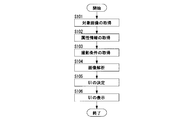
- Each process shown in FIG. 2 is executed when a target image to be edited or displayed is selected by a user operation via the input device 18 while an image is displayed on the monitor 19.
- the case of selecting a target image to be edited will be described as an example.
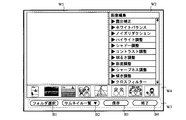
- FIG. 3 and 4 are display examples of an image.
- FIG. 3 shows an example of thumbnail list display
- FIG. 4 shows an example of viewer display.
- thumbnail images of a plurality of images are displayed in the first window W1
- a menu of items related to image editing is displayed in the second window W2
- various items are displayed in the third window W3.
- the button is displayed.
- the user operates the various buttons of the window W3 to display a plurality of thumbnail images in the window W1, and any of the plurality of thumbnail images displayed in the window W1 through the input device 18 Select as the target image.
- the first window W1 is a window for enlarging and displaying the selected target image, and a menu of items related to image editing is displayed in the second window W2, and a third window is displayed.
- Various buttons are displayed on W3 and thumbnail images of a plurality of images are displayed on the fourth window W4.
- the user operates the various buttons of the window W3 to display a plurality of thumbnail images in the window W4, and one of the plurality of thumbnail images displayed in the window W4 is input through the input device 18. Select as the target image. Then, the selected target image is enlarged and displayed in the window W1.
- the display examples of FIG. 3 and FIG. 4 are display examples when the target image is selected, and at this point in time each item of the menu displayed in the window W2 is closed, that is, in a state where its details are not displayed There is an open state (described later). Further, in the display examples of FIG. 3 and FIG. 4, the menu items displayed in the window W 2 include exposure correction, white balance, noise reduction, highlight adjustment, shadow adjustment, contrast adjustment, brightness adjustment, readjustment, and sharpness. The items of adjustment, inclination adjustment, and cross filter are illustrated.
- the respective buttons of folder selection button B1, thumbnail list display / viewer display switching button B2, save button B3 and end button B4 are displayed as respective buttons displayed in window W3.
- the folder selection button B1 is a button for selecting a folder to be displayed from a plurality of folders
- the thumbnail list display / viewer display switching button B2 is shown in the thumbnail list display shown in FIG. 3 and in FIG.
- the save button B3 is a button for saving editing content
- the end button B4 is a button for terminating the respective displays shown in FIG. 3 and FIG. 4. is there.
- each window is not limited to these examples.
- the menu displayed in the window W2 is also an example, and the present invention is not limited to these examples.
- each button displayed in the window W3 is also an example, and the present invention is not limited to these examples.
- the size, the arrangement, and the like of a plurality of thumbnail images displayed in the window W1 and the window W4 are not limited to this example.
- Step S101 The CPU 14 acquires data of the target image designated by the user from the storage device 13 via the data reading unit 12. When the data of the target image is recorded outside the computer 11, the CPU 14 acquires the data of the target image specified by the user from the outside of the computer 11 via the input / output I / F 16. .
- the CPU 14 acquires attribute information from the target image acquired in step S.
- the attribute information is information related to the attribute of the target image itself included in incidental information such as normal EXIF information, such as the data format (RAW, JPEG, etc.) of the target image, and the data size of the target image.
- Step S103 From the target image acquired in step S, the CPU 14 acquires imaging conditions when the target image is imaged.
- the shooting conditions include the type of shooting mode (portrait mode, landscape mode, etc.) set when shooting the target image, exposure conditions (shutter speed, aperture, sensitivity, etc.) when shooting the target image, and shooting of the target image.
- the presence or absence of flash light position information (GPS information) at the time of shooting of a target image, and information on an external device (external flash device, communication device, etc.) connected to an imaging device at the time of shooting of a target image.
- the imaging conditions may be included in incidental information such as EXIF information, or may be recorded as data different from data of the target image.
- Step S104 The CPU 14 causes the image analysis unit 23 to perform image analysis on the target image acquired in step S.
- the image analysis performed by the image analysis unit 23 includes the following. Analysis of distribution related to brightness of target image Face detection detecting face area included in target image Dust detection related to target image Red-eye detection related to target image Detection of blur related to target image Detection of blur in target image Target image
- the detection of inclination information related to the scene, and the scene analysis related to the subject included in the target image Note that these image analyzes are an example, and the image analysis unit 23 may perform image analysis other than the above. Further, the target of the image analysis does not necessarily have to be the target image acquired in step S101.
- image analysis may be performed using a reduced image (thumbnail image, quick view image, etc.) recorded together with the target image, or image analysis using an image obtained by subjecting the target image to predetermined thinning processing or resizing processing.
- the image analysis by the image analysis unit 23 may be performed before the target image is acquired in step S101. That is, the process may be performed in advance when the target image is captured, when the target image is recorded, or when the processing of the image analysis unit 23 is not performed after the target image is recorded.
- the attribute information is acquired in step S102, the imaging condition is acquired in step S103, and the image analysis is performed in step S104.
- the CPU 14 may be selected by the CPU 14 or may be selected based on a user operation via the input device 18 which process is to be performed.
- Step S105 The CPU 14 causes the UI determination unit 24 to determine a user interface to be displayed on the monitor 19.
- the UI determination unit 24 determines the content of the user interface displayed on the monitor 19 according to the attribute information acquired in step S102, the photographing condition acquired in step S103, and the result of the image analysis performed in step S104.
- This user interface is a user interface suitable for editing an image selected as a target image by the user.
- the contents of the user interface include the type of the item, the display order of the items, the arrangement of the items, the display form of the items (display size, display color, etc.) and the like.
- FIG. 5 shows an example of a user interface determined when the data format of the target image is the RAW format in the attribute information acquired in step S102.
- the data format of the target image is the RAW format in the attribute information acquired in step S102.
- frame F1 indicating the image selected as the target image is displayed, and the image selected as the target image is enlarged in window W1. It is displayed.
- the UI determination unit 24 selects a user interface in which details of these items can be set.
- FIG. 5 is a display example of the selected user interface.
- the slide bar D1 capable of setting the degree of exposure correction is displayed, and the slide bar D2 capable of setting details of white balance is displayed. That is, the items “exposure compensation” and “white balance” in the menu displayed in the window W2 are in the open state.
- FIG. 6 is an analysis of the distribution regarding brightness in the image analysis of step S104, and as a result of analysis, it is determined when the target image is an image with many white spots and a large difference between the white level and the black level.
- An example of the user interface is shown.
- the frame F2 indicating the image selected as the target image is displayed, and the image selected as the target image is enlarged in the window W1. It is displayed.
- FIG. 6 is a display example of the selected user interface.
- the slide bar D3 capable of setting the degree of highlight adjustment is displayed, and the slide bar D4 capable of setting the degree of contrast adjustment is displayed. That is, in the menu displayed on the window W2, the items of “highlight adjustment” and “contrast adjustment” are in the open state.
- the distribution of brightness is analyzed, and as a result of analysis, an example in which the target image is an image with many overexposures has been described. In this case, it is preferable to select a user interface in which details of the item of “shadow adjustment” can be set instead of “highlight adjustment”.
- FIG. 7 shows an example of a user interface determined when face detection is performed to detect a face area included in a target image in the image analysis of step S104 and the target image is an image including a person as a result of analysis. .
- the window W2 is shown for the sake of simplicity.
- FIG. 7 is a display example of the selected user interface.
- a slide bar D5 capable of setting the degree of saturation adjustment is displayed. That is, in the menu displayed on the window W2, the item of "saturation adjustment” is in the open state.
- the UI determination unit 24 selects “person” in advance as shown in FIG. 7. Put in a state.
- Step S102> Data format of target image (RAW, JPEG etc.)
- RAW format a user interface capable of setting details of items suitable for the image before compression is selected from the menu displayed in the window W2.
- the data format of the target image is a format such as JPEG format
- a user interface capable of setting details of items suitable for the image after compression is selected from the menu displayed in the window W2.
- Data Size of Target Image If the data size of the target image is relatively large, a user interface is selected in which details of items with light processing load can be set from the menu displayed in the window W2. On the other hand, when the data size of the target image is relatively small, a user interface which can also set details of items with heavy processing load in the menu displayed in the window W2 is selected.
- the same selection as in the case where the data format of the target image described above is the RAW format is performed, and when the data size of the target image is relatively small, the above-described The same selection as in the case where the data format of the target image is a format such as JPEG may be performed.
- -Type of shooting mode set at the time of shooting the target image For example, when the above-mentioned shooting mode is a night scene mode, items such as "Noise reduction" and "Cross filter” in the menu displayed in the window W2 Select the user interface for which details can be set.
- the above-mentioned shooting mode is a shooting mode related to person shooting such as portrait mode, the same selection as that described with reference to FIG. 7 is performed. For other shooting modes (scenery mode, sport mode, etc.), it is sufficient to select a user interface in which details of items suitable for the assumed main subject can be set.
- Step S104 Analysis of distribution related to brightness of target image Based on the result of analysis of distribution related to brightness, the same selection as in the case described with reference to FIG. 5 is performed.
- -Face detection for detecting a face area included in the target image As a result of face detection, if the target image is an image containing a person, the same selection as in the case described with reference to FIG. 7 is performed. .
- -A s a result of performing blur detection and blur detection on the target image as a result of blur detection and blur detection, if it is determined that blur or blur exists in the target image, items such as "sharpness" in the menu displayed in the window W2 Select the user interface for which details can be set. Alternatively, select a user interface that can set details (automatic correction, inquiries to users requiring / not requiring correction, etc.) regarding “shake correction” and “blur correction” (not shown in the menu displayed in window W 2 ).
- tilt adjustment automatic correction, tilt, etc.
- the UI determination unit 24 may determine the content of the user interface based on the content of the image editing performed previously.
- the CPU 14 records the contents as a history every time the image is edited according to the target image. Then, the UI determination unit 24 determines whether or not there is a history of image editing for the item when selecting a user interface whose detail can be set in the item displayed in the window W2. If the history exists, the content of the user interface is determined based on the history.
- FIG. 8 shows a display example of the user interface determined when the image editing history exists for the item when selecting the user interface whose detail can be set. In FIG. 8, only the window W2 is shown for simplicity.
- the slide bar D6 capable of setting the degree of contrast adjustment is displayed, and the slide bar D7 capable of setting the selection of “person / landscape” and the degree thereof is displayed with respect to saturation adjustment. Be done.
- the UI determination unit 24 determines the content of the user interface based on the image editing history in D6 and D7. In FIG. 8, in D6, the degree in the previous image editing is shown regarding contrast adjustment. Further, in D7, “scenery” is selected among the “person / landscape” selection items, and the degree is also the degree in the previous image editing. In the example of FIG. 8, the user interface may be determined so as to display only the items for which various settings have been made at the time of image editing last time.
- FIG. 9 shows a display example of the user interface when changing the display form of the item. In FIG. 9, only the window W2 is shown for simplicity.
- FIG. 9 shows an example in the case where display with the display size changed is performed as a display form of each item of the user interface shown in FIG.
- image editing is performed well, and the items “noise reduction” and “highlight adjustment” which are effective items are displayed larger at D 8 than the other items.
- FIG. 9 shows an example of changing the display size, if items suitable for various settings can be visually recognized, the display color, font, frame thickness, etc. may be changed without changing the display size. It may be changed, and in addition to the change of the display size, the display color, the font, the thickness of the frame, etc. may be changed.
- the UI determination unit 24 determines the content of the user interface after appropriately weighting a plurality of factors. By weighting, a plurality of factors can be prioritized to determine the user interface.
- the weighting in this case may be predetermined, may be determined by the UI determination unit 24 each time, or may be determined by the user.
- the content of the user interface may be determined based on the logical sum (OR) of a plurality of factors, or the content of the user interface may be determined based on the logical product (AND).
- the content of the user interface may be determined based on only some of the plurality of factors. Which factor the content of the user interface is to be determined may be determined according to the above-described weighting or priority, may be determined by the UI determination unit 24 each time, or is determined by the user. Also good.
- the settings for “each item related to image editing” described in FIG. 3 may overlap or conflict due to a plurality of factors. It is possible to become Therefore, the user may weight the "each item related to image editing".
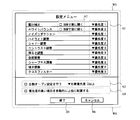
- FIG. 10 shows an example of a setting screen when performing the setting described above based on a user operation.
- items related to image editing are listed and displayed in the upper first window W5, and items related to setting of weighting are displayed in the second window W6.
- the user performs pull-down operation on the area A1 for each item of the window W5, and sets priorities (for example, priorities 1 to 3). This priority can be set for each item displayed in the window W5. Further, among the items displayed in the window W5, “exposure correction” and “white balance” in the region A2 and in the attribute information acquired in step S102, when the data format of the target image is the RAW format Has a check box for making it possible to set the details of the item (open the menu). By checking the check box in the area A2, the user can set to always open the menu of the item when the data format of the target image is the RAW format.
- the auto-open setting is a setting that enables setting of details of any item among the items displayed in the window W5 automatically (opens the menu) according to a predetermined condition.
- the automatic open setting is performed when the check box shown in the area A3 is checked and the target priority is set by the pull-down operation in the area A3. For each item displayed in the window W5, the predetermined condition to be automatically opened will be shown below.
- the data format of the target image is the RAW format based on the attribute information acquired in step S102.
- the value of the exposure correction value is large (for example, when the EV value is ⁇ 1.0 or less, or +1.0 or more) based on the shooting conditions and the like acquired in step S103.
- the level distribution in the target image is biased to the low level side or the high level side based on the result of the image analysis (for example, histogram analysis etc.) performed in step S104.
- White Balance When it is known that the data format of the target image is the RAW format based on the attribute information acquired in step S102.
- step S104 In the case where it is found that a large bias is seen in the values of the R value, the G value, and the B value in the target image based on the result of the image analysis (for example, histogram analysis etc.) performed in step S104. In the case where it is known that the “night scene mode” is set as the shooting mode based on the shooting conditions and the like acquired in step S103.
- the shutter speed is low, based on the shooting conditions and the like acquired in step S103.
- the sensitivity for example, ISO sensitivity
- the sensitivity is set to high sensitivity based on the shooting conditions and the like acquired in step S103.
- Contrast Adjustment When it is found that the difference between the white level and the black level is very small or the above-mentioned difference is very large based on the result of the image analysis (for example, histogram analysis etc.) performed in step S104.
- Brightness Adjustment Based on the result of the image analysis performed in step S104, it is found that the lightness value calculated from the target image is very small or very large. Saturation Adjustment Case where a person is recognized by face detection based on the result of the image analysis performed in step S104.
- step S104 When it is found that the value of the saturation calculated from the target image is very small or very large based on the result of the image analysis performed in step S104. Sharpness Adjustment When it is known that the shutter speed is low based on the shooting conditions and the like acquired in step S103.
- the determination may be made using only a specific condition (a part of the conditions), or the determination may be made using all the conditions.
- the set object priority is compared with the priority described in the area A1 of the window W5 described above, and based on the comparison result, whether the menu of the item is opened or not Make a decision on For example, when the target priority is set to "priority 2 or higher" by the pull-down operation in the area A3, the menu of the item having the priority 3 described in the area A1 of the window W5 described above is opened. It will not be.
- an end button B5 and a cancel button B6 are displayed in the setting menu.
- the various setting contents described above are stored and the setting screen is closed.
- the cancel button B6 the above-described various setting contents are discarded and the setting screen is closed.
- the user can easily know the content of the previous image editing. Therefore, it is possible to provide a highly convenient user interface even when performing fine adjustment or readjustment.
- Step S106 The CPU 14 displays the user interface corresponding to the target image acquired in step S101 on the monitor 19 based on the user interface determined in step S105.
- the CPU 14 can dynamically change the user interface displayed on the monitor 19 in accordance with the target image.
- the processing by the CPU 14 after dynamically changing the user interface is the same as that in the known art. That is, the CPU 14 controls the image processing unit 25 based on an editing instruction issued by a user operation via the input device 18, and performs image processing on data of the target image acquired in step S101.
- the CPU 14 stores data of the target image reflecting the editing result in the storage device 13.
- the end button B4 displayed in the window W3 is selected, the CPU 14 ends editing of the image.
- the content of the user interface for receiving various settings for the target image to be displayed on the display device is determined based on the target image to be displayed, and based on the determined content. Display the user interface on the display device.
- the configuration of the first embodiment it is possible to provide a user interface that is easy for the user to understand when using images.
- the user interface including items frequently performed and items having effects according to the target image can be provided. Therefore, even for users with little knowledge or experience, it is possible to realize a user interface that is easy to understand and use.
- FIG. 11 is a block diagram showing a configuration example of the electronic camera in the second embodiment.
- the electronic camera 31 includes an imaging optical system 32, an imaging element 33, a CPU 34, a ROM 35, a main memory 36, a recording I / F 37, an operation unit 38 for receiving user operations, and a monitor (not shown).
- the display unit 39 is provided.
- the imaging device 33, the ROM 35, the main memory 36, the recording I / F 37, the operation unit 38 and the display unit 39 are connected to the CPU 34 respectively.
- the imaging element 33 is an imaging device that captures an image of a subject formed by the imaging optical system 32 and generates an image signal of the captured image.
- the image signal output from the image sensor 33 is input to the CPU 34 via an A / D conversion circuit (not shown).
- the CPU 34 is a processor that centrally controls the operation of the electronic camera 31.
- the CPU 34 functions as the display device (the CPU 14, the image analysis unit 23, the UI determination unit 24, and the image processing unit 25) of the first embodiment described above by executing a program.
- the ROM 35 stores a program to be executed by the CPU 34. Further, the main memory 36 temporarily stores image data in the pre-process and post-process of image processing.
- the recording I / F 37 has a connector for connecting the non-volatile storage medium 40. Then, the recording I / F 37 executes writing / reading of data to the storage medium 40 connected to the connector.
- the above storage medium 40 is configured of a hard disk, a memory card incorporating a semiconductor memory, or the like. In FIG. 11, a memory card is illustrated as an example of the storage medium 40.
- the display unit 39 displays the image data acquired from the CPU 34, and performs the display described in step S106 of the first embodiment.
- the CPU 34 executes the flow chart shown in FIG. 2 of the first embodiment.
- the same processing as step S101 to step S106 is performed.
- the CPU 34 may set an image generated by the imaging device 33 as a target image, or may set an image recorded in the main memory 36, the storage medium 40 or the like as a target image.
- the electronic camera 31 of the second embodiment can obtain substantially the same effect as that of the above embodiment.
- the UI determination unit 24 When a plurality of images are selected as the target image, in step S105, the UI determination unit 24 appropriately weights each factor of the plurality of target images, or prioritizes the plurality of factors. Later you decide the content of the user interface.
- the weighting and priority in this case may be predetermined as in the case described in step S105, may be predetermined by the UI determination unit 24, or may be predetermined by the user. It may be.
- the content of the user interface may be determined based on the logical sum (OR) of a plurality of factors, or the content of the user interface may be determined based on the logical product (AND) .
- the UI determination unit 24 determines, as the content of the user interface, at least one of the types of items related to various settings, the display order of the items, the arrangement of the items, and the display form of the items. For example, the UI determination unit 24 may select a user interface including only items for which details can be set, and may select a user interface not including items for which the details can not be set. In addition, the UI determination unit 24 appropriately changes the display order of the items described in the window W2 of FIG. 3 and determines the user interface so as to perform better and display higher-effective items. good.
- each item described in the window W2 of FIG. 3 is divided into a plurality of sheets, and an item which is performed well and which is highly effective is arranged on the sheet on the upper surface and not performed much. And, items with less effect may be arranged on the lower sheet.
- the CPU 14 and the UI determination unit 24 may have a so-called learning function. Then, the determination of the user interface by the UI determination unit 24 may be performed based on the frequency and experience regarding the setting of various items.
- the present invention is not limited to this example.
- the present invention can be similarly applied to the case where an image to be displayed is selected as a target image.
- FIG. 12 shows a display example when an image to be displayed is selected as the target image.
- the first window W1 is a window for enlarging and displaying the selected target image, and a menu of items related to the display of the image is displayed in the second window W2, and a third window W3 is displayed.
- the various buttons are displayed, and thumbnail images of a plurality of images are displayed in the fourth window W4.
- the user operates the various buttons of the window W3 to display a plurality of thumbnail images in the window W4, and one of the plurality of thumbnail images displayed in the window W4 is input through the input device 18. Select as the target image. Then, the selected target image is enlarged and displayed in the window W1.
- the CPU 14 acquires attribute information in step S102, acquires imaging conditions in step S103, performs image analysis in step S104, and in step S105, Make decisions on the user interface by selecting well-performed and effective items based on each factor.
- the display device of the present invention is not limited to the examples of the display device, the computer, and the electronic camera of the above embodiment.
- the display device of the present invention may be an electronic device (for example, a photo viewer, a digital photo frame, a printing device for photographs, etc.) having a digital image reproduction display function and a retouch function.
- the imaging device of the present invention may be implemented as a camera module of a mobile phone terminal.
Landscapes
- Engineering & Computer Science (AREA)
- Human Computer Interaction (AREA)
- General Engineering & Computer Science (AREA)
- Theoretical Computer Science (AREA)
- Multimedia (AREA)
- Signal Processing (AREA)
- Physics & Mathematics (AREA)
- General Physics & Mathematics (AREA)
- Studio Devices (AREA)
- User Interface Of Digital Computer (AREA)
- Processing Or Creating Images (AREA)
- Image Processing (AREA)
Abstract
Description
図1は、第1実施形態での表示装置の構成例を示すブロック図である。第1実施形態の表示装置は、撮像装置により撮像された処理対象の画像(対象画像)を表示、編集する表示プログラムがインストールされたコンピュータで構成される。
CPU14は、データ読込部12を介して、ユーザーにより指定された対象画像のデータを、記憶装置13から取得する。なお、対象画像のデータがコンピュータ11の外部に記録されている場合には、CPU14は、入出力I/F16を介して、ユーザーにより指定された対象画像のデータを、コンピュータ11の外部から取得する。
CPU14は、ステップSで取得した対象画像から属性情報を取得する。属性情報とは、対象画像のデータ形式(RAW、JPEGなど)や、対象画像のデータサイズなど、通常EXIF情報などの付帯情報に含まれる対象画像自体の属性にかかわる情報である。
CPU14は、ステップSで取得した対象画像から、対象画像が撮影された際の撮影条件を取得する。撮影条件とは、対象画像の撮影時に設定された撮影モード(ポートレートモード、風景モードなど)の種類、対象画像の撮影時の露出条件(シャッタスピード、絞り、感度など)、対象画像の撮影時の閃光発光の有無、対象画像の撮影時の位置情報(GPS情報)、対象画像の撮影時に撮像装置に接続された外部機器(外付けの閃光装置、通信装置など)に関する情報などを含む。この撮影条件は、EXIF情報などの付帯情報に含まれても良いし、対象画像のデータとは別のデータとして記録されたものであっても良い。
CPU14は、画像解析部23により、ステップSで取得した対象画像に対する画像解析を行う。
・対象画像の明るさに関する分布の解析
・対象画像に含まれる顔領域を検出する顔検出
・対象画像に関するゴミ検出
・対象画像に関する赤目検出
・対象画像に関するブレ検出
・対象画像におけるボケ検出
・対象画像に関する傾き情報の検出
・対象画像に含まれる被写体に関するシーン解析
なお、これらの画像解析は、一例であり、画像解析部23は、上述した以外の画像解析を行っても良い。また、画像解析の対象は、必ずしもステップS101で取得した対象画像そのものである必要はない。例えば、対象画像とともに記録された縮小画像(サムネイル画像やクイックビュー画像など)を用いて画像解析を行っても良いし、対象画像に所定の間引き処理やリサイズ処理を施した画像を用いて画像解析を行っても良い。
CPU14は、UI決定部24により、モニタ19に表示するユーザーインターフェースを決定する。
・対象画像のデータ形式(RAW、JPEGなど)
対象画像のデータ形式がRAW形式である場合には、ウィンドウW2に表示されるメニューのうち、圧縮前の画像に適した項目の詳細が設定可能なユーザーインターフェースを選択する。一方、対象画像のデータ形式がJPEG形式などの形式である場合には、ウィンドウW2に表示されるメニューのうち、圧縮後の画像に適した項目の詳細が設定可能なユーザーインターフェースを選択する。
・対象画像のデータサイズ
対象画像のデータサイズが比較的大きい場合には、ウィンドウW2に表示されるメニューのうち、処理における負荷の軽い項目の詳細が設定可能なユーザーインターフェースを選択する。一方、対象画像のデータサイズが比較的小さい場合には、ウィンドウW2に表示されるメニューのうち、処理における負荷の重い項目の詳細も設定可能なユーザーインターフェースを選択する。
・対象画像の撮影時に設定された撮影モードの種類
例えば、上述の撮影モードが夜景モードである場合には、ウィンドウW2に表示されるメニューのうち、「ノイズリダクション」や「クロスフィルター」など項目の詳細が設定可能なユーザーインターフェースを選択する。また、上述の撮影モードがポートレートモードなど人物撮影に関する撮影モードである場合には、図7を参照して説明した場合と同様の選択を行う。その他の撮影モード(風景モード、スポーツモードなど)についても、想定される主要被写体において好適な項目の詳細が設定可能なユーザーインターフェースを選択すれば良い。
・対象画像の撮影時の露出条件
露出条件に基づいて、対象画像にブレやボケが発生する可能性が高いと判断できる場合には、ウィンドウW2に表示されるメニューのうち、「コントラスト調整」や「シャープネス調整」など項目の詳細が設定可能なユーザーインターフェースを選択する。
・対象画像の撮影時の閃光発光の有無
撮影時に閃光発光が行われた場合には、ウィンドウW2に表示されるメニューのうち、「ホワイトバランス」など項目の詳細が設定可能なユーザーインターフェースを選択する。
・対象画像の撮影時の位置情報(GPS情報)
撮影時のGPS情報が存在する場合には、位置情報や地図情報の表示の詳細が設定可能なユーザーインターフェースを選択する(ウィンドウW2に表示されるメニューには不図示)。
・対象画像の撮影時に撮像装置に接続された外部機器
対象画像の撮影時に撮像装置に接続された外部機器に関する情報が存在する場合には、ウィンドウW2に表示されるメニューのうち、外部機器の種類や動作状態などに応じて、好適な項目の詳細が設定可能なユーザーインターフェースを選択する。
・対象画像の明るさに関する分布の解析
明るさに関する分布の解析を行った結果に基づいて、図5を参照して説明した場合と同様の選択を行う。
・対象画像に含まれる顔領域を検出する顔検出
顔検出を行った結果、対象画像が、人物が含まれる画像である場合には、図7を参照して説明した場合と同様の選択を行う。
・対象画像に関するゴミ検出
ゴミ検出を行った結果、対象画像にゴミの影響があると判断した場合には、「ゴミの除去」に関する詳細(自動除去、ゴミ除去の要/不要のユーザーに対する問い合わせなど)が設定可能なユーザーインターフェースを選択する(ウィンドウW2に表示されるメニューには不図示)。
・対象画像に関する赤目検出
赤目検出を行った結果、対象画像に赤目状態の部分があると判断した場合には、「赤目補正」に関する詳細(自動補正、赤目の補正の要/不要のユーザーに対する問い合わせなど)が設定可能なユーザーインターフェースを選択する(ウィンドウW2に表示されるメニューには不図示)。
・対象画像に関するブレ検出、ボケ検出
ブレ検出やボケ検出を行った結果、対象画像にブレやボケが存在すると判断した場合には、ウィンドウW2に表示されるメニューのうち、「シャープネス」など項目の詳細が設定可能なユーザーインターフェースを選択する。または、「ブレ補正」や「ボケ補正」に関する詳細(自動補正、各補正の要/不要のユーザーに対する問い合わせなど)が設定可能なユーザーインターフェースを選択する(ウィンドウW2に表示されるメニューには不図示)。
・対象画像に関する傾き情報の検出
傾き情報の検出を行った結果、対象画像が傾いている場合には、ウィンドウW2に表示されるメニューのうち、「傾き調整」など項目の詳細(自動補正、傾き調整の要/不要のユーザーに対する問い合わせなど)が設定可能なユーザーインターフェースを選択する。
・対象画像に含まれる被写体に関するシーン解析
シーン解析を行った結果に基づいて、対象画像に含まれる主要被写体を想定し、上述したそれぞれの項目の中から、想定した主要被写体に好適な項目の詳細が設定可能なユーザーインターフェースを選択すれば良い。
・露出補正・・・「対象画像の画像全体が明るすぎたり暗すぎたりした場合に有効です。」
・ホワイトバランス・・・「対象画像の画像全体の色バランスが偏っているときに有効です。」
・ノイズリダクション・・・「対象画像が暗い場所での撮影画像である場合に有効です。」
・ハイライト調整・・・「対象画像に白とびが多い場合に有効です。」
・シャドー調整・・・「対象画像に黒つぶれが多い場合に有効です。」
・コントラスト調整・・・「対象画像のコントラストが適切でない場合に有効です。」
・明るさ調整・・・「対象画像の画像全体が明るすぎたり暗すぎたりした場合に有効です。」
・彩度調整・・・「対象画像に鮮やかさがない場合や、対象画像の色が飽和している場合に有効です。」
・シャープネス調整・・・「対象画像の被写体がぼやけている場合に有効です。」
・傾き調整・・・「対象画像が傾いている場合に有効です。」
・クロスフィルター・・・「対象画像が点光源を含む夜景画像である場合に有効です。」
また、上述したように、図10の例では、下部の第2のウィンドウW6に、重み付けの設定に関する項目が表示される。具体的には、領域A3には自動オープン設定(詳細は後述する)に関する項目が表示され、領域A4には項目の配置に関する項目が表示される。また、ユーザー操作に基づく設定を行って設定メニューを閉じるための終了ボタンB5および設定をキャンセルするためのキャンセルボタンB6が表示される。
・露出補正
・ステップS102で取得した属性情報に基づいて、対象画像のデータ形式がRAW形式であるとわかる場合。
・ホワイトバランス
・ステップS102で取得した属性情報に基づいて、対象画像のデータ形式がRAW形式であるとわかる場合。
・ノイズリダクション
・ステップS103で取得した撮影条件等に基づいて、撮影モードとして「夜景モード」が設定されているとわかる場合。
・ハイライト調整
・ステップS104で行った画像解析(例えば、ヒストグラム解析など)の結果に基づいて、レベルの高い値が多く分布しているとわかる場合。
・シャドー調整
・ステップS104で行った画像解析(例えば、ヒストグラム解析など)の結果に基づいて、レベルの低い値が多く分布しているとわかる場合。
・コントラスト調整
・ステップS104で行った画像解析(例えば、ヒストグラム解析など)の結果に基づいて、白レベルと黒レベルとの差が非常に小さい、または、前述した差が非常に大きいとわかる場合。
・明るさ調整
・ステップS104で行った画像解析の結果に基づいて、対象画像から算出される明度の値が非常に小さい、または、非常に大きいとわかる場合。
・彩度調整
・ステップS104で行った画像解析の結果に基づいて、顔検出により人物が認識された場合。
・シャープネス調整
・ステップS103で取得した撮影条件等に基づいて、シャッタスピードが低速であるとわかる場合。
・傾き調整
・ステップS104で行った画像解析の結果に基づいて、傾き情報の検出により対象画像に傾きが検出された場合。
・クロスフィルター
・ステップS103で取得した撮影条件等に基づいて、撮影モードとして「夜景モード」が設定されているとわかる場合。
CPU14は、ステップS105で決定したユーザーインターフェースに基づいて、ステップS101で取得した対象画像に応じたユーザーインターフェースをモニタ19に表示する。
図11は、第2実施形態での電子カメラの構成例を示すブロック図である。電子カメラ31は、撮像光学系32と、撮像素子33と、CPU34と、ROM35と、メインメモリ36と、記録I/F37と、ユーザーの操作を受け付ける操作部38と、不図示のモニタを備えた表示部39を有している。ここで、撮像素子33、ROM35、メインメモリ36、記録I/F37、操作部38および表示部39は、それぞれCPU34に接続されている。
(1)上記の各実施形態では、対象画像として1枚の画像が選択される前提で説明を行ったが、対象画像として複数枚の画像が選択される場合にも本発明を同様に適用することができる。複数枚の画像を対象画像として選択する際には、図3で説明したサムネイル一覧表示が便利である。
Claims (14)
- 表示装置への表示制御をコンピュータで実行するための表示プログラムであって、
表示の対象となる対象画像を読み出す読み出しステップと、
前記対象画像に基づいて、前記表示装置に表示する前記対象画像に対する各種設定を受け付けるためのユーザーインターフェースの内容を決定する決定ステップと、
前記決定ステップにおける決定内容に基づいて、前記表示装置に前記ユーザーインターフェースを表示する表示ステップと
を有することを特徴とする表示プログラム。 - 請求項1に記載の表示プログラムにおいて、
前記決定ステップでは、前記対象画像の属性情報と、前記対象画像を撮影した際の撮影条件との少なくとも一方を含むファクターに基づいて、前記ユーザーインターフェースの内容を決定する
ことを特徴とする表示プログラム。 - 請求項1に記載の表示プログラムにおいて、
前記対象画像に関する画像解析を行う解析ステップをさらに有し、
前記決定ステップでは、前記対象画像の属性情報と、前記対象画像を撮影した際の撮影条件と、前記画像解析の結果との少なくとも1つを含むファクターに基づいて、前記ユーザーインターフェースの内容を決定する
ことを特徴とする表示プログラム。 - 請求項3に記載の表示プログラムにおいて、
前記決定ステップでは、前記ファクターとして、少なくとも前記画像解析の結果を含む
ことを特徴とする表示プログラム。 - 請求項1から請求項4のいずれか1項に記載の表示プログラムにおいて、
前記決定ステップでは、前記対象画像に対する編集にかかわる各種設定を受け付けるための前記ユーザーインターフェースの内容を決定する
ことを特徴とする表示プログラム。 - 請求項2から請求項4の何れか1項に記載の表示プログラムにおいて、
前記属性情報は、前記対象画像のデータ形式と、前記対象画像のデータサイズとの少なくとも一方を含む
ことを特徴とする表示プログラム。 - 請求項2から請求項4の何れか1項に記載の表示プログラムにおいて、
前記撮影条件は、前記対象画像の撮影時に設定された撮影モードの種類と、前記対象画像の撮影時の露出条件と、前記対象画像の撮影時の閃光発光の有無と、前記対象画像の撮影時の位置情報と、前記対象画像の撮影時に撮像装置に接続された外部機器に関する情報との少なくとも一つを含む
ことを特徴とする表示プログラム。 - 請求項3または請求項4に記載の表示プログラムにおいて、
前記解析ステップでは、前記対象画像の明るさに関する分布の解析と、前記対象画像に含まれる顔領域を検出する顔検出と、前記対象画像に関するゴミ検出と、前記対象画像に関する赤目検出と、前記対象画像に関するブレ検出と、前記対象画像におけるボケ検出と、前記対象画像に関する傾き情報の検出と、前記対象画像に含まれる被写体に関するシーン解析の少なくとも1つを行い、
前記画像解析の結果は、前記明るさに関する分布情報と、前記顔検出の結果と、前記ゴミ検出の結果と、前記赤目検出の結果と、前記ブレ検出の結果と、前記ボケ検出の結果と、前記傾き情報と、前記シーン解析の結果との少なくとも一つを含む
ことを特徴とする表示プログラム。 - 請求項2から請求項4の何れか1項に記載の表示プログラムにおいて、
前記決定ステップでは、複数の前記ファクターに基づいて前記ユーザーインターフェースの内容を決定する場合に、前記複数のファクターに適宜重み付けを行った後に、前記ユーザーインターフェースの内容を決定する
ことを特徴とする表示プログラム。 - 請求項2から請求項4の何れか1項に記載の表示プログラムにおいて、
前記決定ステップでは、前記ユーザーインターフェースの内容として、ユーザーが、前記各種設定に好適な項目を視認可能なユーザーインターフェースの内容を決定する
ことを特徴とする表示プログラム。 - 請求項10に記載の表示プログラムにおいて、
前記決定ステップでは、前記ユーザーインターフェースの内容として、前記各種設定にかかわる項目の種類と、前記項目の表示順と、前記項目の配置と、前記項目の表示形態との少なくとも1つを決定する
ことを特徴とする表示プログラム。 - 請求項10または請求項11に記載の表示プログラムにおいて、
前記決定ステップでは、前記項目に適宜重み付けを行い、重み付けに応じて、前記各種設定にかかわる項目の種類と、前記項目の表示順と、前記項目の配置と、前記項目の表示形態との少なくとも1つを決定する
ことを特徴とする表示プログラム。 - 請求項2から請求項4の何れか1項に記載の表示プログラムにおいて、
前記決定ステップでは、以前に行われた前記各種設定の内容に基づいて、前記ユーザーインターフェースの内容を決定する
ことを特徴とする表示プログラム。 - 画像を表示する表示部と、
前記表示部への表示の対象となる対象画像を読み出す読み出し部と、
前記対象画像に基づいて、前記表示部に表示する前記対象画像に対する各種設定を受け付けるためのユーザーインターフェースの内容を決定する決定部と、
前記決定部による決定内容に基づいて、前記表示部に前記ユーザーインターフェースを表示する表示制御部と
を備えることを特徴とする表示装置。
Priority Applications (2)
| Application Number | Priority Date | Filing Date | Title |
|---|---|---|---|
| US14/122,584 US20140115536A1 (en) | 2011-06-21 | 2012-06-01 | Display program and display device |
| CN2012800148794A CN103460173A (zh) | 2011-06-21 | 2012-06-01 | 显示程序及显示装置 |
Applications Claiming Priority (2)
| Application Number | Priority Date | Filing Date | Title |
|---|---|---|---|
| JP2011-137486 | 2011-06-21 | ||
| JP2011137486 | 2011-06-21 |
Publications (1)
| Publication Number | Publication Date |
|---|---|
| WO2012176384A1 true WO2012176384A1 (ja) | 2012-12-27 |
Family
ID=47422248
Family Applications (1)
| Application Number | Title | Priority Date | Filing Date |
|---|---|---|---|
| PCT/JP2012/003635 Ceased WO2012176384A1 (ja) | 2011-06-21 | 2012-06-01 | 表示プログラムおよび表示装置 |
Country Status (4)
| Country | Link |
|---|---|
| US (1) | US20140115536A1 (ja) |
| JP (1) | JPWO2012176384A1 (ja) |
| CN (1) | CN103460173A (ja) |
| WO (1) | WO2012176384A1 (ja) |
Cited By (5)
| Publication number | Priority date | Publication date | Assignee | Title |
|---|---|---|---|---|
| JP2015032105A (ja) * | 2013-08-01 | 2015-02-16 | オリンパスイメージング株式会社 | 操作装置及びその制御方法 |
| US9843727B2 (en) | 2013-05-28 | 2017-12-12 | Olympus Corporation | Image capturing apparatus and image capturing method |
| JP2020035294A (ja) * | 2018-08-31 | 2020-03-05 | キヤノン株式会社 | 画像処理装置、画像処理方法及びプログラム |
| JP2020170407A (ja) * | 2019-04-04 | 2020-10-15 | キヤノン株式会社 | 画像処理装置およびその制御方法およびプログラム |
| WO2025239156A1 (ja) * | 2024-05-16 | 2025-11-20 | ソニーグループ株式会社 | 情報処理装置、情報処理方法、プログラム |
Families Citing this family (14)
| Publication number | Priority date | Publication date | Assignee | Title |
|---|---|---|---|---|
| USD745540S1 (en) * | 2012-01-06 | 2015-12-15 | Samsung Electronics Co., Ltd. | Display screen with graphical user interface |
| USD735736S1 (en) * | 2012-01-06 | 2015-08-04 | Samsung Electronics Co., Ltd. | Display screen or portion thereof with graphical user interface |
| USD755222S1 (en) * | 2012-08-20 | 2016-05-03 | Yokogawa Electric Corporation | Display screen with graphical user interface |
| USD740299S1 (en) * | 2012-10-17 | 2015-10-06 | Aol Inc. | Display screen portion with graphical user interface |
| US20140115495A1 (en) * | 2012-10-18 | 2014-04-24 | Aol Inc. | Systems and methods for processing and organizing electronic content |
| CA153992S (en) * | 2013-05-21 | 2014-07-21 | Microsoft Corp | Display screen |
| USD776689S1 (en) * | 2014-06-20 | 2017-01-17 | Google Inc. | Display screen with graphical user interface |
| JP6448334B2 (ja) * | 2014-12-02 | 2019-01-09 | キヤノン株式会社 | 表示制御装置及び表示制御装置の制御方法 |
| US10003814B2 (en) * | 2015-05-06 | 2018-06-19 | Mediatek Inc. | Image processor, display image processing method and associated electronic device |
| USD779544S1 (en) | 2015-05-27 | 2017-02-21 | Gamblit Gaming, Llc | Display screen with graphical user interface |
| US9779519B2 (en) * | 2015-07-31 | 2017-10-03 | Facebook, Inc. | Systems and methods for color-based dynamic modification of shadows and highlights within media content |
| EP3144793A1 (en) * | 2015-09-16 | 2017-03-22 | Thomson Licensing | Method and apparatus for an image editor |
| USD805549S1 (en) * | 2017-01-06 | 2017-12-19 | Sorenson Ip Holdings, Llc | Display screen or a portion thereof with animated graphical user interface |
| CN111857512A (zh) * | 2020-07-17 | 2020-10-30 | 维沃移动通信有限公司 | 图像编辑方法、装置和电子设备 |
Citations (1)
| Publication number | Priority date | Publication date | Assignee | Title |
|---|---|---|---|---|
| JP2010061499A (ja) * | 2008-09-05 | 2010-03-18 | Nec Saitama Ltd | コンテンツデータの処理方法、プログラム及び携帯情報処理装置 |
Family Cites Families (13)
| Publication number | Priority date | Publication date | Assignee | Title |
|---|---|---|---|---|
| JP2004343662A (ja) * | 2003-05-19 | 2004-12-02 | Sony Corp | 撮像装置 |
| JP4440120B2 (ja) * | 2004-02-06 | 2010-03-24 | キヤノン株式会社 | 画像処理装置及びその制御方法、並びにコンピュータプログラム及びコンピュータ可読記憶媒体 |
| JP4469249B2 (ja) * | 2004-10-01 | 2010-05-26 | 株式会社東芝 | 画像処理装置 |
| US7522175B2 (en) * | 2004-11-23 | 2009-04-21 | General Electric Company | Workflow engine based dynamic modification of image processing and presentation in PACS |
| US7570829B2 (en) * | 2005-02-17 | 2009-08-04 | Eastman Kodak Company | Selection of alternative image processing operations to maintain high image quality |
| JP2006260532A (ja) * | 2005-03-15 | 2006-09-28 | Toshiba Corp | 画像処理装置及び画像処理方法 |
| KR100640808B1 (ko) * | 2005-08-12 | 2006-11-02 | 엘지전자 주식회사 | 촬상 이미지의 듀얼 디스플레이 기능을 갖는 이동통신단말기 및 그 방법 |
| JP2007166456A (ja) * | 2005-12-16 | 2007-06-28 | Fuji Xerox Co Ltd | 画像調整装置、画像調整方法及びプログラム |
| JP5453717B2 (ja) * | 2008-01-10 | 2014-03-26 | 株式会社ニコン | 情報表示装置 |
| US8259208B2 (en) * | 2008-04-15 | 2012-09-04 | Sony Corporation | Method and apparatus for performing touch-based adjustments within imaging devices |
| US20140250059A1 (en) * | 2008-05-30 | 2014-09-04 | Anant Gilra | Method and Apparatus for Performing Bi-State Editing |
| US9355469B2 (en) * | 2009-01-09 | 2016-05-31 | Adobe Systems Incorporated | Mode-based graphical editing |
| US8867829B2 (en) * | 2011-05-26 | 2014-10-21 | Xerox Corporation | Method and apparatus for editing color characteristics of electronic image |
-
2012
- 2012-06-01 JP JP2013521420A patent/JPWO2012176384A1/ja active Pending
- 2012-06-01 US US14/122,584 patent/US20140115536A1/en not_active Abandoned
- 2012-06-01 WO PCT/JP2012/003635 patent/WO2012176384A1/ja not_active Ceased
- 2012-06-01 CN CN2012800148794A patent/CN103460173A/zh active Pending
Patent Citations (1)
| Publication number | Priority date | Publication date | Assignee | Title |
|---|---|---|---|---|
| JP2010061499A (ja) * | 2008-09-05 | 2010-03-18 | Nec Saitama Ltd | コンテンツデータの処理方法、プログラム及び携帯情報処理装置 |
Cited By (7)
| Publication number | Priority date | Publication date | Assignee | Title |
|---|---|---|---|---|
| US9843727B2 (en) | 2013-05-28 | 2017-12-12 | Olympus Corporation | Image capturing apparatus and image capturing method |
| JP2015032105A (ja) * | 2013-08-01 | 2015-02-16 | オリンパスイメージング株式会社 | 操作装置及びその制御方法 |
| JP2020035294A (ja) * | 2018-08-31 | 2020-03-05 | キヤノン株式会社 | 画像処理装置、画像処理方法及びプログラム |
| JP7229703B2 (ja) | 2018-08-31 | 2023-02-28 | キヤノン株式会社 | 画像処理装置、画像処理方法及びプログラム |
| JP2020170407A (ja) * | 2019-04-04 | 2020-10-15 | キヤノン株式会社 | 画像処理装置およびその制御方法およびプログラム |
| JP7330734B2 (ja) | 2019-04-04 | 2023-08-22 | キヤノン株式会社 | 画像処理装置およびその制御方法およびプログラム |
| WO2025239156A1 (ja) * | 2024-05-16 | 2025-11-20 | ソニーグループ株式会社 | 情報処理装置、情報処理方法、プログラム |
Also Published As
| Publication number | Publication date |
|---|---|
| CN103460173A (zh) | 2013-12-18 |
| JPWO2012176384A1 (ja) | 2015-02-23 |
| US20140115536A1 (en) | 2014-04-24 |
Similar Documents
| Publication | Publication Date | Title |
|---|---|---|
| JPWO2012176384A1 (ja) | 表示プログラムおよび表示装置 | |
| JP5475021B2 (ja) | 画像内のぼやけ検出に対する対応 | |
| JP5261724B2 (ja) | 階層的クラスタリングによる代表画像選定 | |
| JP2010079446A (ja) | 電子機器、ぼけ画像選別方法及びプログラム | |
| JP5288961B2 (ja) | 画像処理装置および画像処理方法 | |
| KR20110034961A (ko) | 장면 모드 표시에 따른 영상 처리 장치 및 방법 | |
| US8754952B2 (en) | Digital camera | |
| JP2013065005A (ja) | 合焦評価装置、撮像装置およびプログラム | |
| US20060182430A1 (en) | Camera exposure program coupled to image stabilization capability | |
| CN101996389A (zh) | 图像处理装置、成像装置、以及图像处理方法 | |
| JP2013054430A (ja) | 画像評価装置、撮像装置およびプログラム | |
| US8203772B2 (en) | Image output method, apparatus, and program using one or more attention levels | |
| JP4287392B2 (ja) | プリント推奨画像選択装置、方法およびプログラム | |
| JP5381498B2 (ja) | 画像処理装置、画像処理プログラムおよび画像処理方法 | |
| US20060082672A1 (en) | Filtering digital images | |
| JP2007184888A (ja) | 撮像装置、画像処理装置、画像処理方法、及び画像処理プログラム | |
| KR20070114625A (ko) | 고급 인쇄를 위한 디지털이미지의 분류 방법 | |
| JP2006172097A (ja) | プリント推奨画像自動選択装置、方法並びにプログラム | |
| JP5434057B2 (ja) | 画像表示装置、および画像表示プログラム | |
| JP4665731B2 (ja) | カメラ、および画像管理プログラム | |
| JP2007228221A (ja) | 撮像装置、画像処理装置、画像処理方法、及び画像処理プログラム | |
| US9742955B2 (en) | Image processing apparatus, image processing method, and storage medium | |
| JP2007243542A (ja) | 撮像装置、画像処理装置、画像処理方法、及び画像処理プログラム | |
| JP5229413B2 (ja) | 撮像装置、プログラムおよび表示制御装置 | |
| JP2009077237A (ja) | 画像表示装置および画像表示プログラム |
Legal Events
| Date | Code | Title | Description |
|---|---|---|---|
| 121 | Ep: the epo has been informed by wipo that ep was designated in this application |
Ref document number: 12802398 Country of ref document: EP Kind code of ref document: A1 |
|
| ENP | Entry into the national phase |
Ref document number: 2013521420 Country of ref document: JP Kind code of ref document: A |
|
| WWE | Wipo information: entry into national phase |
Ref document number: 14122584 Country of ref document: US |
|
| NENP | Non-entry into the national phase |
Ref country code: DE |
|
| 122 | Ep: pct application non-entry in european phase |
Ref document number: 12802398 Country of ref document: EP Kind code of ref document: A1 |