WO2012169240A1 - ゲーム装置、ゲーム装置の制御方法、情報記録媒体、ならびに、プログラム - Google Patents
ゲーム装置、ゲーム装置の制御方法、情報記録媒体、ならびに、プログラム Download PDFInfo
- Publication number
- WO2012169240A1 WO2012169240A1 PCT/JP2012/055080 JP2012055080W WO2012169240A1 WO 2012169240 A1 WO2012169240 A1 WO 2012169240A1 JP 2012055080 W JP2012055080 W JP 2012055080W WO 2012169240 A1 WO2012169240 A1 WO 2012169240A1
- Authority
- WO
- WIPO (PCT)
- Prior art keywords
- display
- touch
- item image
- touch panel
- touch operation
- Prior art date
- Legal status (The legal status is an assumption and is not a legal conclusion. Google has not performed a legal analysis and makes no representation as to the accuracy of the status listed.)
- Ceased
Links
Images







Classifications
-
- G—PHYSICS
- G06—COMPUTING OR CALCULATING; COUNTING
- G06F—ELECTRIC DIGITAL DATA PROCESSING
- G06F3/00—Input arrangements for transferring data to be processed into a form capable of being handled by the computer; Output arrangements for transferring data from processing unit to output unit, e.g. interface arrangements
- G06F3/01—Input arrangements or combined input and output arrangements for interaction between user and computer
- G06F3/048—Interaction techniques based on graphical user interfaces [GUI]
- G06F3/0487—Interaction techniques based on graphical user interfaces [GUI] using specific features provided by the input device, e.g. functions controlled by the rotation of a mouse with dual sensing arrangements, or of the nature of the input device, e.g. tap gestures based on pressure sensed by a digitiser
- G06F3/0488—Interaction techniques based on graphical user interfaces [GUI] using specific features provided by the input device, e.g. functions controlled by the rotation of a mouse with dual sensing arrangements, or of the nature of the input device, e.g. tap gestures based on pressure sensed by a digitiser using a touch-screen or digitiser, e.g. input of commands through traced gestures
-
- A—HUMAN NECESSITIES
- A63—SPORTS; GAMES; AMUSEMENTS
- A63F—CARD, BOARD, OR ROULETTE GAMES; INDOOR GAMES USING SMALL MOVING PLAYING BODIES; VIDEO GAMES; GAMES NOT OTHERWISE PROVIDED FOR
- A63F13/00—Video games, i.e. games using an electronically generated display having two or more dimensions
- A63F13/50—Controlling the output signals based on the game progress
- A63F13/53—Controlling the output signals based on the game progress involving additional visual information provided to the game scene, e.g. by overlay to simulate a head-up display [HUD] or displaying a laser sight in a shooting game
-
- A—HUMAN NECESSITIES
- A63—SPORTS; GAMES; AMUSEMENTS
- A63F—CARD, BOARD, OR ROULETTE GAMES; INDOOR GAMES USING SMALL MOVING PLAYING BODIES; VIDEO GAMES; GAMES NOT OTHERWISE PROVIDED FOR
- A63F13/00—Video games, i.e. games using an electronically generated display having two or more dimensions
- A63F13/20—Input arrangements for video game devices
- A63F13/21—Input arrangements for video game devices characterised by their sensors, purposes or types
- A63F13/214—Input arrangements for video game devices characterised by their sensors, purposes or types for locating contacts on a surface, e.g. floor mats or touch pads
- A63F13/2145—Input arrangements for video game devices characterised by their sensors, purposes or types for locating contacts on a surface, e.g. floor mats or touch pads the surface being also a display device, e.g. touch screens
-
- A—HUMAN NECESSITIES
- A63—SPORTS; GAMES; AMUSEMENTS
- A63F—CARD, BOARD, OR ROULETTE GAMES; INDOOR GAMES USING SMALL MOVING PLAYING BODIES; VIDEO GAMES; GAMES NOT OTHERWISE PROVIDED FOR
- A63F13/00—Video games, i.e. games using an electronically generated display having two or more dimensions
- A63F13/40—Processing input control signals of video game devices, e.g. signals generated by the player or derived from the environment
- A63F13/42—Processing input control signals of video game devices, e.g. signals generated by the player or derived from the environment by mapping the input signals into game commands, e.g. mapping the displacement of a stylus on a touch screen to the steering angle of a virtual vehicle
-
- A—HUMAN NECESSITIES
- A63—SPORTS; GAMES; AMUSEMENTS
- A63F—CARD, BOARD, OR ROULETTE GAMES; INDOOR GAMES USING SMALL MOVING PLAYING BODIES; VIDEO GAMES; GAMES NOT OTHERWISE PROVIDED FOR
- A63F13/00—Video games, i.e. games using an electronically generated display having two or more dimensions
- A63F13/50—Controlling the output signals based on the game progress
- A63F13/53—Controlling the output signals based on the game progress involving additional visual information provided to the game scene, e.g. by overlay to simulate a head-up display [HUD] or displaying a laser sight in a shooting game
- A63F13/537—Controlling the output signals based on the game progress involving additional visual information provided to the game scene, e.g. by overlay to simulate a head-up display [HUD] or displaying a laser sight in a shooting game using indicators, e.g. showing the condition of a game character on screen
- A63F13/5372—Controlling the output signals based on the game progress involving additional visual information provided to the game scene, e.g. by overlay to simulate a head-up display [HUD] or displaying a laser sight in a shooting game using indicators, e.g. showing the condition of a game character on screen for tagging characters, objects or locations in the game scene, e.g. displaying a circle under the character controlled by the player
-
- A—HUMAN NECESSITIES
- A63—SPORTS; GAMES; AMUSEMENTS
- A63F—CARD, BOARD, OR ROULETTE GAMES; INDOOR GAMES USING SMALL MOVING PLAYING BODIES; VIDEO GAMES; GAMES NOT OTHERWISE PROVIDED FOR
- A63F13/00—Video games, i.e. games using an electronically generated display having two or more dimensions
- A63F13/60—Generating or modifying game content before or while executing the game program, e.g. authoring tools specially adapted for game development or game-integrated level editor
- A63F13/69—Generating or modifying game content before or while executing the game program, e.g. authoring tools specially adapted for game development or game-integrated level editor by enabling or updating specific game elements, e.g. unlocking hidden features, items, levels or versions
-
- A—HUMAN NECESSITIES
- A63—SPORTS; GAMES; AMUSEMENTS
- A63F—CARD, BOARD, OR ROULETTE GAMES; INDOOR GAMES USING SMALL MOVING PLAYING BODIES; VIDEO GAMES; GAMES NOT OTHERWISE PROVIDED FOR
- A63F2300/00—Features of games using an electronically generated display having two or more dimensions, e.g. on a television screen, showing representations related to the game
- A63F2300/10—Features of games using an electronically generated display having two or more dimensions, e.g. on a television screen, showing representations related to the game characterized by input arrangements for converting player-generated signals into game device control signals
- A63F2300/1068—Features of games using an electronically generated display having two or more dimensions, e.g. on a television screen, showing representations related to the game characterized by input arrangements for converting player-generated signals into game device control signals being specially adapted to detect the point of contact of the player on a surface, e.g. floor mat, touch pad
-
- A—HUMAN NECESSITIES
- A63—SPORTS; GAMES; AMUSEMENTS
- A63F—CARD, BOARD, OR ROULETTE GAMES; INDOOR GAMES USING SMALL MOVING PLAYING BODIES; VIDEO GAMES; GAMES NOT OTHERWISE PROVIDED FOR
- A63F2300/00—Features of games using an electronically generated display having two or more dimensions, e.g. on a television screen, showing representations related to the game
- A63F2300/10—Features of games using an electronically generated display having two or more dimensions, e.g. on a television screen, showing representations related to the game characterized by input arrangements for converting player-generated signals into game device control signals
- A63F2300/1068—Features of games using an electronically generated display having two or more dimensions, e.g. on a television screen, showing representations related to the game characterized by input arrangements for converting player-generated signals into game device control signals being specially adapted to detect the point of contact of the player on a surface, e.g. floor mat, touch pad
- A63F2300/1075—Features of games using an electronically generated display having two or more dimensions, e.g. on a television screen, showing representations related to the game characterized by input arrangements for converting player-generated signals into game device control signals being specially adapted to detect the point of contact of the player on a surface, e.g. floor mat, touch pad using a touch screen
-
- A—HUMAN NECESSITIES
- A63—SPORTS; GAMES; AMUSEMENTS
- A63F—CARD, BOARD, OR ROULETTE GAMES; INDOOR GAMES USING SMALL MOVING PLAYING BODIES; VIDEO GAMES; GAMES NOT OTHERWISE PROVIDED FOR
- A63F2300/00—Features of games using an electronically generated display having two or more dimensions, e.g. on a television screen, showing representations related to the game
- A63F2300/60—Methods for processing data by generating or executing the game program
- A63F2300/6045—Methods for processing data by generating or executing the game program for mapping control signals received from the input arrangement into game commands
-
- A—HUMAN NECESSITIES
- A63—SPORTS; GAMES; AMUSEMENTS
- A63F—CARD, BOARD, OR ROULETTE GAMES; INDOOR GAMES USING SMALL MOVING PLAYING BODIES; VIDEO GAMES; GAMES NOT OTHERWISE PROVIDED FOR
- A63F2300/00—Features of games using an electronically generated display having two or more dimensions, e.g. on a television screen, showing representations related to the game
- A63F2300/60—Methods for processing data by generating or executing the game program
- A63F2300/66—Methods for processing data by generating or executing the game program for rendering three dimensional images
- A63F2300/6653—Methods for processing data by generating or executing the game program for rendering three dimensional images for altering the visibility of an object, e.g. preventing the occlusion of an object, partially hiding an object
Definitions
- the present invention relates to a game device, a game device control method, and an information recording medium that allow the player to easily grasp the touch position even when the player is difficult to directly recognize the touch position when using the touch panel. As well as programs.
- a so-called touch panel in which a panel having a touch sensor is superimposed on the surface of a display is widely used.
- the player (user) can input a desired instruction by touching the touch panel while watching the video displayed on the display.
- touch panels are arranged on both the front surface and the back surface of a display.
- An apparatus is disclosed in which a position is designated by simultaneous contact between the front surface and the back surface, and then a finger on the front surface is released and image processing such as enlargement / reduction is performed with the finger on the back surface.
- the player cannot directly recognize the touch panel on the back side, and it is difficult to grasp the touch position. Then, it may be difficult for the player to specify the position as he / she wants using the touch panel on the back side.
- the present invention solves such problems, and a game device that allows a player to easily grasp the touch position even when it is difficult for the player to visually recognize the touch position directly when using the touch panel. It is an object to provide a game device control method, an information recording medium, and a program.
- a game device includes a display, a first touch panel disposed on the surface of the display, a second touch panel disposed on the back of the display, a detection unit, a display unit, and an execution unit.
- the detection unit associates the presence / absence of a touch operation on the first touch panel and the first touch position in the display associated with the position of the touch operation with the presence / absence of the touch operation on the second touch panel and the position of the touch operation.
- the display unit displays, on the display, an item image in which processing to be executed when selected is selected, a touch operation on the second touch panel is detected, and a position in the display corresponding to the second touch position is displayed.
- the execution unit detects the touch operation on the first touch panel and the touch operation on the second touch panel, and the item image displayed at the position in the display corresponding to the first touch position is highlighted. If it is, it is determined that the highlighted item image has been selected, and a process associated with the highlighted item image is executed in advance.
- the game device of the present invention has a display on which a game image is displayed, and a first touch panel is disposed on the display surface of the display, and a second touch panel is disposed on the back of the display.
- the player can input an instruction to the game device by a touch operation on the first touch panel and a touch operation on the second touch panel.
- the game image includes one or more item images that are associated with the processing contents in advance, and the player can input an instruction to the game device by selecting the item image. .
- the item image is generally called a “button”.
- the position in the first touch panel is associated with the position in the display.
- the position in the second touch panel is associated with the position in the display.
- the item image When the item image is displayed at a position in the display corresponding to the second touch position, the item image is displayed with emphasis, and the first touch position is displayed with the item image displayed with emphasis. If the item image is in the region in the first touch panel corresponding to the region, the item image is selected, and the process associated with the item image is executed by the game device.
- the player can easily grasp the touch position, which is difficult to see directly when looking at the display because it is arranged on the back of the display, by changing the display mode of the item image. Furthermore, the player can input a command associated with the item image by touching the item image by a touch operation on the second touch panel and further touching the item image by a touch operation on the first touch panel. According to the present invention, when the player uses the touch panel, the player can easily grasp the touch position even when it is difficult to visually recognize the touch position. Further, even in a situation where it is difficult to visually recognize the touch position, a desired instruction can be easily input by a touch operation.
- the display unit displays the entire or part of the item image in an enlarged manner.
- the item image may be highlighted.
- the display unit displays the brightness, saturation, hue of all or part of the item image.
- the item image may be highlighted by changing and displaying at least one of them.
- a game device includes a display, a first touch panel disposed on the surface of the display, a second touch panel disposed on the back surface of the display, a detection unit, a display unit, and an execution unit.
- the detection unit associates the presence / absence of a touch operation on the first touch panel and the first touch position in the display associated with the position of the touch operation with the presence / absence of the touch operation on the second touch panel and the position of the touch operation.
- the display unit displays an item image associated with a process to be executed in advance when selected on the display. When a touch operation on the second touch panel is detected, the display unit displays the item image in the display corresponding to the second touch position.
- the execution unit detects the touch operation on the first touch panel and the touch operation on the second touch panel, and the item image displayed at the position in the display corresponding to the first touch position is highlighted. If it is, it is determined that the highlighted item image has been selected, and a process associated with the highlighted item image is executed in advance.
- the display mode of the item image changes based on the position where the touch operation is detected. That is, the item image closest to the position in the display corresponding to the second touch position is displayed with a higher emphasis than other images unlike the normal mode. Therefore, the player can easily grasp the touch position that may be difficult to see directly when viewing the display because of the change in the display mode of the item image. Furthermore, the player can input a command associated with the item image by touching the item image by a touch operation on the second touch panel and further touching the item image by a touch operation on the first touch panel. According to the present invention, when the player uses the touch panel, the player can easily grasp the touch position even when it is difficult to visually recognize the touch position. Further, even in a situation where it is difficult to visually recognize the touch position, a desired instruction can be easily input by a touch operation.
- the display unit deforms the item image by deforming the item image closest to the position in the display corresponding to the second touch position based on the second touch position. It may be highlighted.
- a control method includes a display, a first touch panel disposed on the surface of the display, a second touch panel disposed on the back surface of the display, a detection unit, a display unit, and an execution unit.
- a control method executed in a game device having a detection step, a display step, and an execution step.
- the detection unit detects whether or not the first touch panel is touched, the first touch position in the display associated with the touch operation position, whether or not the second touch panel is touched, and the touch operation.
- the second touch position in the display associated with the position is detected.
- the display unit displays an item image in which processing to be executed when selected is associated in advance, a touch operation on the second touch panel is detected, and a display corresponding to the second touch position is displayed.
- the item image is highlighted.
- the execution step a touch operation on the first touch panel and a touch operation on the second touch panel are detected, and the item image displayed at the position in the display corresponding to the first touch position is highlighted. If it is, the execution unit determines that the highlighted item image has been selected, and executes a process associated with the highlighted item image in advance.
- the player can easily grasp the touch position even when it is difficult to visually recognize the touch position directly when using the touch panel.
- the player can easily input a desired instruction by a touch operation.
- a computer-readable information recording medium detects a computer having a display, a first touch panel disposed on the surface of the display, and a second touch panel disposed on the back of the display.
- a program that functions as a display unit, a display unit, and an execution unit is stored.
- the detection unit associates the presence / absence of a touch operation on the first touch panel and the first touch position in the display associated with the position of the touch operation with the presence / absence of the touch operation on the second touch panel and the position of the touch operation.
- a second touch position in the display to be detected.
- the display unit displays, on the display, an item image in which processing to be executed when selected is selected, a touch operation on the second touch panel is detected, and a position in the display corresponding to the second touch position is displayed.
- the item image is highlighted.
- the execution unit detects the touch operation on the first touch panel and the touch operation on the second touch panel, and the item image displayed at the position in the display corresponding to the first touch position is highlighted. If it is, it is determined that the highlighted item image has been selected, and a process associated with the highlighted item image is executed in advance.
- the computer can function as a game device that operates as described above.
- a program executes a computer having a display, a first touch panel disposed on the surface of the display, and a second touch panel disposed on the back of the display, with the detection unit and the display unit. Function as a part.
- the detection unit associates the presence / absence of a touch operation on the first touch panel and the first touch position in the display associated with the position of the touch operation with the presence / absence of the touch operation on the second touch panel and the position of the touch operation.
- the display unit displays, on the display, an item image in which processing to be executed when selected is selected, a touch operation on the second touch panel is detected, and a position in the display corresponding to the second touch position is displayed.
- the execution unit detects the touch operation on the first touch panel and the touch operation on the second touch panel, and the item image displayed at the position in the display corresponding to the first touch position is highlighted. If it is, it is determined that the highlighted item image has been selected, and a process associated with the highlighted item image is executed in advance.
- the program of the present invention can be recorded on a computer-readable information storage medium such as a compact disk, flexible disk, hard disk, magneto-optical disk, digital video disk, magnetic tape, and semiconductor memory.
- a computer-readable information storage medium such as a compact disk, flexible disk, hard disk, magneto-optical disk, digital video disk, magnetic tape, and semiconductor memory.
- the above program can be distributed and sold via a computer communication network independently of the computer on which the program is executed.
- the information storage medium can be distributed and sold independently from the computer.
- Embodiment 2 it is a figure which shows the functional structure of a game device. It is a flowchart for demonstrating a game process. It is a figure which shows the display area of an item image, the area
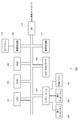
- FIG. 1 is a schematic diagram illustrating a hardware configuration of a typical information processing apparatus 100 that performs the functions of the game apparatus according to the present embodiment by executing a program.
- the information processing apparatus 100 includes a CPU (Central Processing Unit) 101, a ROM 102, a RAM (Random Access Memory) 103, an interface 104, a first touch panel 105, a second touch panel 106, an external memory 107, a DVD-ROM (Digital Versatile Disc Disc ROM). ) Drive 108, image processing unit 109, display 110, audio processing unit 111, and NIC (Network Interface Card) 112.
- the CPU 101 controls the overall operation of the information processing apparatus 100 and is connected to each component to exchange control signals and data.
- the CPU 101 uses arithmetic operations such as addition / subtraction / division / division, logical sum, logical product using ALU (Arithmetic Logic Unit) (not shown) for a storage area called a register (not shown) that can be accessed at high speed.
- Logic operations such as logical negation, bit operations such as bit sum, bit product, bit inversion, bit shift, and bit rotation can be performed.
- the CPU 101 itself is configured so that saturation operations such as addition / subtraction / multiplication / division for multimedia processing, vector functions such as trigonometric functions, etc. can be performed at a high speed, or a coprocessor is implemented. There is.
- the ROM 102 records an IPL (Initial Program Loader) that is executed immediately after the power is turned on, and when this is executed, the program recorded on the DVD-ROM is read into the RAM 103 and the execution by the CPU 101 is started.
- the ROM 102 stores an operating system program and various data necessary for operation control of the entire information processing apparatus 100.
- the RAM 103 is for temporarily storing data and programs, and holds programs and data read from the DVD-ROM and other data necessary for game progress and chat communication. Further, the CPU 101 provides a variable area in the RAM 103 and performs an operation by directly operating the ALU on the value stored in the variable, or temporarily stores the value stored in the RAM 103 in a register. Or perform other processing such as writing the calculation result back to memory.
- the two touch panels (the first touch panel 105 and the second touch panel 106) connected via the interface 104 receive an operation input performed when the player plays the game. Details of each of the first touch panel 105 and the second touch panel 106 will be described later.
- the information processing apparatus 100 may include an input device called a “controller” including buttons and the like as an input device that receives input from the player. .
- the external memory 107 detachably connected via the interface 104 stores data indicating game play status, past results, etc., data indicating game progress, and chat communication logs (records) in the case of a network match. ) Is stored in a rewritable manner. The player can record these data in the external memory 107 as appropriate by inputting an instruction via the first touch panel 105 or the second touch panel 106.
- the DVD-ROM mounted on the DVD-ROM drive 108 stores a program for playing a game and image data and audio data associated with the game. Under the control of the CPU 101, the DVD-ROM drive 108 performs a reading process on the DVD-ROM mounted on the DVD-ROM drive 108 to read out necessary programs and data. The read program and data are temporarily stored in the RAM 103 or the like.
- the image processing unit 109 processes the data read from the DVD-ROM by an image arithmetic processor (not shown) included in the CPU 101 or the image processing unit 109, and then processes the processed data on a frame memory ( (Not shown).
- the image information recorded in the frame memory is converted into a video signal at a predetermined synchronization timing and output to the display 110 connected to the image processing unit 109. Thereby, various image displays are possible.
- the image calculation processor can execute a two-dimensional image overlay calculation, a transparency calculation such as ⁇ blending, and various saturation calculations at high speed.
- the polygon information arranged in the three-dimensional space and added with various texture information is rendered by the Z buffer method, and a predetermined viewpoint position is used. It is also possible to execute a calculation at high speed to obtain a rendering image in which a polygon arranged in the virtual space is viewed in the direction of a predetermined line of sight.
- the CPU 101 and the image arithmetic processor cooperate to draw a character string as a two-dimensional image in the frame memory or draw it on the surface of each polygon according to the font information that defines the character shape. Is possible.
- the audio processing unit 111 converts audio data read from the DVD-ROM into an analog audio signal and outputs it from a speaker connected thereto. Further, under the control of the CPU 101, sound effects and music data to be generated during the progress of the game are generated, and the corresponding sound is output from the speaker.
- the audio processing unit 111 converts the MIDI data into PCM data with reference to the sound source data included in the audio data. If the compressed audio data is in ADPCM format or Ogg Vorbis format, it is expanded and converted to PCM data.
- the PCM data can be output by performing D / A (Digital / Analog) conversion at a timing corresponding to the sampling frequency and outputting it to a speaker.
- a microphone can be connected to the information processing apparatus 100.
- the analog signal from the microphone is subjected to A / D (Analog / Digital) conversion at an appropriate sampling frequency so that the audio processing unit 111 can perform processing such as mixing as a PCM format digital signal.
- a / D Analog / Digital
- the NIC 112 connects the information processing apparatus 100 to a computer communication network (not shown) such as the Internet.
- a computer communication network such as the Internet.
- the NIC 112 is configured in accordance with a 10BASE-T / 100BASE-T standard used when configuring a LAN (Local Area Network).
- the NIC 112 is connected to the Internet using an analog modem, ISDN (Integrated Services Digital Network) modem, ADSL (Asymmetric Digital Subscriber Line) modem, or cable television line for connecting to the Internet using a telephone line. Or a cable modem.
- the information processing apparatus 100 uses a large-capacity external storage device such as a hard disk to perform the same function as the ROM 102, the RAM 103, the external memory 107, the DVD-ROM mounted on the DVD-ROM drive 108, and the like. You may comprise.
- a large-capacity external storage device such as a hard disk to perform the same function as the ROM 102, the RAM 103, the external memory 107, the DVD-ROM mounted on the DVD-ROM drive 108, and the like. You may comprise.
- the information processing apparatus 100 described above corresponds to a so-called “consumer video game apparatus”, but the present invention can be realized as long as it performs image processing that displays a virtual space. Therefore, the present invention can be realized on various computers such as a mobile phone, a portable game device, a general business computer, and a personal computer.
- FIG. 2 is a diagram illustrating a functional configuration of the game apparatus 200.
- the game device 200 includes a detection unit 201 and a display unit 202 in addition to the first touch panel 105, the second touch panel 106, and the display 110 described above.
- the detection unit 201 detects the presence or absence of a touch operation on the first touch panel 105 by the player and a position in the display 110 (hereinafter referred to as “first touch position”) associated with the position where the touch operation is performed. To do.
- the detection unit 201 includes the presence or absence of a touch operation on the second touch panel 106 by the player, the position in the display 110 associated with the position where the touch operation is performed (hereinafter referred to as “second touch position”), Is detected.
- the first touch position and the second touch position, which are detection results, are represented by coordinate values using a predefined coordinate system and are stored in the RAM 103.
- the CPU 101 repeatedly detects the presence / absence of a touch operation on the first touch panel 105 and the presence / absence of a touch operation on the second touch panel 106 at regular timings, and detects and updates the first touch position and the second touch position as needed. To do.
- the CPU 101, the RAM 103, the first touch panel 105, and the second touch panel 106 cooperate to function as the detection unit 201.
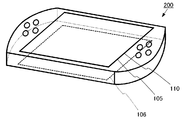
- FIG. 3 shows an arrangement example of the first touch panel 105, the second touch panel 106, and the display 110.
- the first touch panel 105 is arranged so as to overlap with the surface of the display 110 included in the game apparatus 200.
- the second touch panel 106 is disposed on the back surface of the first touch panel 105.
- the player can input a desired instruction by touching the surface of the first touch panel 105 and / or the surface of the second touch panel 106 with a fingertip.
- the player touches the first touch panel 105 with the thumb while touching both ends of the game apparatus 200 with a hand, and touches the second touch panel 106 with the middle finger.
- An operation in which the player gives an instruction by touching the surface of the first touch panel 105 or the surface of the second touch panel 106 is referred to as a “touch operation”.
- the display unit 202 displays an image of a game that progresses in response to a touch operation on the first touch panel 105 and a touch operation on the second touch panel 106 on the display 110. Further, the display unit 202 displays, on the display 110, an item image in which processing to be executed by the game apparatus 200 is associated in advance when selected. There are typically a plurality of item images, but there may be only one item image. Furthermore, when a touch operation on the second touch panel 106 is detected and an item image is displayed at a position in the display 110 corresponding to the detected second touch position, the display unit 202 displays the item image as another The image is displayed in a relatively emphasized manner compared to the image of.
- the CPU 101, the first touch panel 105, the second touch panel 106, the image processing unit 109, and the display 110 work together to function as the display unit 202.
- the item image is an image representing a so-called “button” for receiving an instruction input from the player.
- the player touches the part of the first touch panel 105 (or the second touch panel 106) corresponding to the area where the item image is displayed in the display area of the display 110, or “presses a button” or Expressed as “select a button”.
- an item image corresponding to “Yes” and an item image corresponding to “No” are displayed on the display 110 on a screen where the player selects “Yes” or “No”.
- a scenario corresponding to “Yes” is selected, and when an item image corresponding to “No” is selected, a scenario corresponding to “No” is selected. .
- the game then proceeds according to the selected scenario.
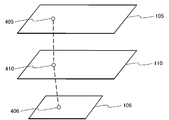
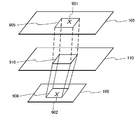
- FIG. 4 schematically shows the correspondence between the points on the first touch panel 105 and the points on the display 110 and the correspondence between the points on the second touch panel 106 and the points on the display 110.
- One point 405 on the first touch panel 105 is associated with one point 410 on the display 110.
- one point 406 on the second touch panel 106 is associated with one point 410 on the display 110.
- the size and shape of the first touch panel 105 may be different from the size and shape of the display 110. Further, the size and shape of the second touch panel 106 may be different from the size and shape of the display 110.
- the CPU 101 may enlarge and display the entire item image.
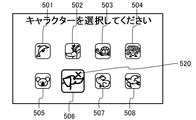
- any item image is displayed at a point 520 in the display 110 corresponding to the second touch position. If it is not included, the CPU 101 does not highlight any of the item images 501 to 508.
- FIG. 5B when any item image (item image 506 in the figure) is included in the point 520 in the display 110 corresponding to the second touch position, the CPU 101 The item image (the item image 506 in the figure) is enlarged and displayed to be highlighted. Therefore, the player can clearly grasp the touched location of the second touch panel 106 that is not directly visible from the front because it is arranged on the back of the display 110, by changing the size of the item image. .
- the CPU 101 When there is an item image at a position in the display 110 corresponding to the second touch position, the CPU 101 does not display the entire item image in an enlarged manner, but displays the item image in a partially enlarged manner. May be. That is, as shown in FIG. 5C, if any item image (item image 507 in this figure) is included in the point 520 in the display 110 corresponding to the second touch position, the CPU 101 is like As if looking through a magnifying glass, among the item images (the item image 507 in this figure), the item image in the region 530 within a predetermined radius centered on the point 520 may be displayed in an enlarged manner. Although the circular outline of the region 530 is displayed in this figure, this outline may not be displayed.
- the region 530 does not have to be circular, and may be any ellipse or rectangle. Further, the CPU 101 may enlarge and display the area 530 within a predetermined radius centered on the point 520 so that the distortion becomes larger as it approaches the peripheral edge of the area 530, as in the case of an image using a fisheye lens. The player can know approximately where the second touch position is based on the size and shape of the item image.
- the CPU 101 may highlight all or part of the item image by changing the brightness, saturation, and hue of the item image. For example, when there is no item image at a position in the display 110 corresponding to the second touch position as shown in FIG. 5A, the CPU 101 displays the entire game screen in monochrome. On the other hand, when there is an item image at a position in the display 110 corresponding to the second touch position as shown in FIGS. 5B and 5C, the CPU 101 may display all or part of the item image in color. In this way, the player can know the approximate position of the second touch position from the difference in brightness, saturation, and hue of the item image.
- the CPU 101 may highlight the item image by changing the design, color tone, etc. of the item image. For example, the CPU 101 sets the first display form to “planar design display form” and the second display form to “display form with embossing effect added”. Then, when there is no item image at a position in the display 110 corresponding to the second touch position, the CPU 101 displays the item image in the first display form, and the CPU 101 displays the display image 110 corresponding to the second touch position. When there is an item image at a position in the item image, the item image is displayed in the second display form. In this way, the player can know the approximate location of the second touch position due to the difference in the display form of the item images.
- the first touch position is used for touching an item image (button) or inputting a command
- the second touch position is used for switching the display form of the item image.
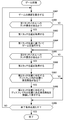
- the CPU 101 displays a game screen on the display 110 (step S601).
- the game screen only needs to include at least one item image, and the number of item images, the size of the item image, the shape of the item image, the layout of the game screen, the game content, and the like are arbitrary.
- the CPU 101 determines whether or not there is a touch operation on the first touch panel 105 by the player (step S602).
- step S602 When it is determined that there is no touch operation on the first touch panel 105 (step S602; NO), the CPU 101 proceeds to the process of step S604. On the other hand, when it is determined that there is a touch operation on the first touch panel 105 (step S ⁇ b> 602; YES), the CPU 101 acquires the first touch position (step S ⁇ b> 603) and stores it in the RAM 103.
- the CPU 101 proceeds with the game based on the first touch position acquired in step S603 (step S604).
- the CPU 101 determines whether or not there is a touch operation on the second touch panel 106 by the player (step S605).
- step S605 If it is determined that there is no touch operation on the second touch panel 106 (step S605; NO), the CPU 101 proceeds to the process of step S609. On the other hand, when it is determined that there is a touch operation on the second touch panel 106 (step S605; YES), the CPU 101 acquires the second touch position (step S606) and stores it in the RAM 103.
- the CPU 101 determines whether there is an item image at a position in the display 110 corresponding to the second touch position acquired in step S606 (step S607).
- step S607 If it is determined that there is no item image at the position in the display 110 corresponding to the second touch position (step S607; NO), the CPU 101 proceeds to the process of step S609. On the other hand, when it is determined that there is an item image at a position in the display 110 corresponding to the second touch position (step S607; YES), the CPU 101 has an item image at a position in the display 110 corresponding to the second touch position. Are displayed in a relatively emphasized manner compared to other images (step S608). There are various variations in the emphasis method as described above, but any method may be adopted.
- the CPU 101 determines whether or not the end condition is satisfied (step S609).
- the end condition is, for example, “an instruction input to end the game has been accepted”.
- step S609 If it is determined that the termination condition is not satisfied (step S609; NO), the CPU 101 repeats the processing of steps S602 to S609.
- step S609 if it is determined that the end condition is satisfied (step S609; YES), the CPU 101 ends the game process.
- buttons can be easily seen, the buttons can be easily pressed, and the game can be easily played.
- the surface of the display device is hidden by a finger, an item image is hidden, or the entire game screen is grasped. It may be difficult. Or, in general, when reading long sentences, it is a human practice to follow a character string while tracing with a finger, but in that case, the part you are paying attention to becomes easy to understand, The surroundings may be hidden by fingers and disappear.
- the first touch panel 105 is used for command input or the like, and the second touch panel 106 is used to indicate the part that the user is currently paying attention to. As a result, the player can easily grasp the entire game screen, and the touch position can be easily grasped even in a situation where the touch position cannot be directly visually recognized.
- the above-described item image is associated in advance with a process to be executed by the game device 200 when selected, and the player selects a desired item image while playing the game.
- the user can input a desired selection instruction and proceed with the game.
- FIG. 7 is a diagram showing a configuration of the game apparatus 200 of the present embodiment.
- the game device 200 further includes an execution unit 701.
- the execution unit 701 displays the item image.
- the game progress process previously associated with the item image is executed.
- the CPU 101 functions as the execution unit 701.
- each of the item images 501 to 508 is previously associated with a character (dolphin, deer, turtle, hedgehog, koala, dog, rabbit, gull). It has been.
- the CPU 101 sets the character associated with the selected item image as a character (player character) that is a target to which the player gives an instruction, and proceeds with the game.
- information indicating processing executed when selected in association with the item image is stored in advance.
- the content of the process associated with the item image is not limited to the selection of the player character, and is not limited by the present invention.
- FIG. 8 is a flowchart for explaining the game processing in the present embodiment.
- the CPU 101 displays a game screen on the display 110 (step S801).
- the game screen includes at least one item image, and the item image is associated in advance with a process to be executed by the CPU 101 when selected.
- the CPU 101 determines whether or not there is a touch operation on the second touch panel 106 by the player (step S802).
- step S802 When it is determined that there is no touch operation on the second touch panel 106 (step S802; NO), the CPU 101 returns to the display of the game screen in step S801. On the other hand, when it is determined that there is a touch operation on the second touch panel 106 (step S802; YES), the CPU 101 acquires the second touch position (step S803).
- the point 410 in the display 110 is associated with the point 406 indicated by the second touch position. Therefore, if the second touch position is determined, the coordinates of the position of the point 410 in the display 110 corresponding to the second touch position are uniquely determined.
- the CPU 101 determines whether there is an item image at a position in the display 110 corresponding to the acquired second touch position (step S804).
- step S804 When it is determined that there is no item image at the position in the display 110 corresponding to the second touch position (step S804; NO), the CPU 101 returns to the display of the game screen in step S801. On the other hand, when it is determined that there is an item image at a position in the display 110 corresponding to the second touch position (step S804; YES), the CPU 101 is an item at a position in the display 110 corresponding to the second touch position. The image is emphasized and displayed so as to be relatively conspicuous as compared with other images (step S805).
- the CPU 101 determines whether any of the item images 501 to 508 is displayed at the position of the point 520 in the display 110 corresponding to the second touch position. To do. When any of the item images 501 to 508 is displayed at the position of the point 520, the CPU 101 relatively enlarges the entire item image displayed at the position of the point 520 as shown in FIG. 5B. Or a part of the item image displayed at the position of the point 520 is enlarged and displayed as shown in FIG. 5C.
- the CPU 101 determines whether or not there is a touch operation on an area in the first touch panel 105 corresponding to the highlighted item image display area (step S806).
- the point 410 in the display 110 is associated with the point 405 indicated by the first touch position. Therefore, if the coordinates of the position of the point 410 in the display 110 are determined, the position of the first touch panel 105 corresponding to the point 410 is uniquely determined.
- step S806 When it is determined that there is no touch operation to the area in the first touch panel 105 corresponding to the position of the highlighted item image (step S806; NO), the CPU 101 displays the game screen in step S801. Return. On the other hand, when it is determined that there is a touch operation on the area in the first touch panel 105 corresponding to the position of the item image displayed with emphasis (step S806; YES), the CPU 101 displays the item displayed with emphasis. A process associated with the image in advance is executed (step S807).
- the player When the player wants the game apparatus 200 to execute a process associated with a certain item image, the player touches and highlights a portion corresponding to the item image in the second touch panel 106. In the first touch panel 105, a portion corresponding to the highlighted item image may be touched. Accordingly, the player can easily select a desired item image by two-step operation, and can prevent an item image selection error (button press error).
- the item image when highlighting by enlarging and displaying all or part of an item image, if the item image is at a position in the display 110 corresponding to the second touch position, the item image is displayed in a large size. The Therefore, since the display area of the item image is widened, the player can easily grasp the second touch position that is difficult to view directly, and can easily touch the area where the item image is displayed.
- the present invention is not limited to the above-described embodiment, and various modifications and applications are possible. Moreover, it is also possible to freely combine the constituent elements of the above-described embodiments.
- all or part of the item image is highlighted, but not only all or part of the item image but also the peripheral part of the item image may be highlighted.
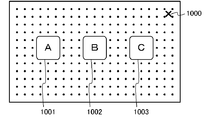
- the game screen shown in FIG. 10A includes three item images 1001, 1002, and 1003, and each item image is associated with processing executed by the game device 200 when selected. Yes.
- the CPU 101 displays the item images 1001, 1002, and 1003 in a normal manner. .
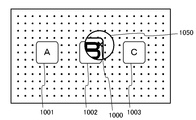
- one of the item images 1001, 1002, and 1003 (the item image 1002 in this case) is displayed at a position 1000 in the display 110 corresponding to the second touch position.
- the CPU 101 enlarges and displays the item image displayed in the position 1000 (the item image 1002 in this figure).
- the CPU 101 sets an emphasis area 1050 in a circle with a predetermined radius centered on the position 1000 in the display 110 corresponding to the second touch position, and enlarges a part of the item image 1002 in the emphasis area 1050.
- the CPU 101 may keep the normal mode for the background image. As a result, the CPU 101 can clearly make the player know where the second touch position is without significantly changing the configuration of the entire game screen.
- the CPU 101 may also highlight the background image by displaying the background image in a mode different from the normal mode. That is, as shown in FIG. 10C, one of the item images 1001, 1002, and 1003 (the item image 1002 in this case) is displayed at the position 1000 in the display 110 corresponding to the second touch position.
- the CPU 101 enlarges and displays the item image displayed in the position 1000 (the item image 1002 in the case of this figure) and displays the position 1000 in the display 110 corresponding to the second touch position.
- a background image included in the emphasis region 1050 in a circle having a predetermined radius at the center is enlarged and displayed. As a result, the area around the second touch position is displayed as if it were magnified with a magnifying glass, so that the player can more clearly understand where the second touch position is.
- the CPU 101 highlights the item image when the touch operation on the second touch panel 106 is detected and the item image is displayed at a position in the display 110 corresponding to the second touch position.
- the item image closest to the second touch position may be highlighted.
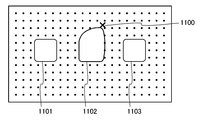
- FIGS. 11A and 11B show a configuration example of a game screen including item images 1101, 1102, and 1103.
- the CPU 101 calculates each distance from the position 1100 in the display corresponding to the second touch position to the item images 1101, 1102, and 1103, and determines the item image closest to the position 1100.
- the item image closest to the position 1100 is the item image 1102.
- the CPU 101 deforms the item image 1102 so that the item image closest to the position 1100 is pulled in the direction of the position 1100.
- the CPU 101 may make the area occupied by the item image after deformation the same as the area occupied by the item image before deformation, as shown in FIG. 11A.
- the CPU 101 may make the area occupied by the item image after deformation larger than the area occupied by the item image before deformation.
- the CPU 101 may make the area occupied by the item image after deformation larger than the area occupied by the item image before deformation.
- the CPU 101 determines that the position in the display corresponding to the first touch position is within the display area of the item image 1102 highlighted by deformation, the item image 1102 is selected by the player. Determination is performed, and processing associated with the item image 1102 in advance is executed.
- the size and shape of the first touch panel 105 and the second touch panel 106 are arbitrary.
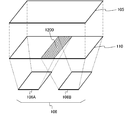
- the second touch panel 106 arranged on the opposite side of the display surface of the display 110 may be separated into two.
- the entire game device 200 has a size and shape that can be easily held by hand as shown in FIG. 3, the game device 200 can be easily supported by separating the second touch panel 106 for left hand and right hand, In addition, it is easy to perform a touch operation.
- an overlapping area 1200 may be provided at a position in the display 110 corresponding to one separated second touch panel 106A and a position in the display 110 corresponding to the other separated second touch panel 106B. .
- a program for operating a computer as all or part of the above-described game apparatus 200 is stored and distributed in a computer-readable recording medium such as a memory card, CD-ROM, DVD, MO (Magneto Optical disk), This may be installed in another computer and operated as the above-described means, or the above-described steps may be executed.
- a computer-readable recording medium such as a memory card, CD-ROM, DVD, MO (Magneto Optical disk).
- the program may be stored in a disk device or the like of a server device on the Internet, and may be downloaded onto a computer by being superimposed on a carrier wave, for example.
- the game apparatus and the game apparatus can easily grasp the touch position.
- a control method, an information recording medium, and a program can be provided.
- Information processing apparatus 101 CPU 102 ROM 103 RAM 104 Interface 105 First touch panel 106 Second touch panel 107 External memory 108 DVD-ROM drive 109 Image processing unit 110 Display 111 Audio processing unit 112 NIC 200 game device 201 detection unit 202 display unit 501 to 508 item image 520 point 701 corresponding to the second touch position execution unit 901 first touch position 902 second touch position 905 in the first touch panel corresponding to the display area of the item image Area 906 Area 910 in the second touch panel corresponding to the display area of the item image Display area 1000 of the item image Positions 1001, 1002, and 1003 in the display corresponding to the second touch position Item image 1050 Emphasis area 1100 In the second touch position Corresponding position in display 1101, 1102, 1103 Item image
Landscapes
- Engineering & Computer Science (AREA)
- Multimedia (AREA)
- Human Computer Interaction (AREA)
- Physics & Mathematics (AREA)
- Optics & Photonics (AREA)
- General Engineering & Computer Science (AREA)
- Theoretical Computer Science (AREA)
- General Physics & Mathematics (AREA)
- User Interface Of Digital Computer (AREA)
Abstract
ゲーム装置(200)において、第1タッチパネル(105)はディスプレイ(110)の表面に配置され、第2タッチパネル(106)はディスプレイ(110)の背面に配置される。検出部(201)は、第1タッチパネル(105)への第1タッチ操作と第1タッチ位置、及び、第2タッチパネル(106)への第2タッチ操作の有無と第2タッチ位置を検出する。表示部(202)は、項目画像をディスプレイ(110)に表示する。また、表示部(202)は、第2タッチ操作が検出され、第2タッチ位置に項目画像が表示されている場合、項目画像を強調表示する。第1タッチ操作と第2タッチ操作が検出され、第1タッチ位置に表示されている項目画像がその強調表示されている項目画像である場合、その項目画像が選択され、その項目画像に予め対応付けられた処理が実行される。
Description
本発明は、タッチパネルを使用するときに、プレイヤーがタッチ位置を直接視認しづらい状況であっても、プレイヤーがタッチ位置を容易に把握することができるゲーム装置、ゲーム装置の制御方法、情報記録媒体、ならびに、プログラムに関する。
ディスプレイの表面にタッチセンサーを有するパネルが重畳された、いわゆるタッチパネルが広く用いられている。プレイヤー(ユーザー)は、ディスプレイに表示された映像を見ながらタッチパネルをタッチして、所望の指示を入力できる。
タッチパネルを用いた入力インターフェースでは、タッチパネルに指でタッチすると、指の近くにある画像の閲覧が妨げられることがあるが、例えば特許文献1には、ディスプレイの表面と裏面の両方にタッチパネルが配置されており、表面と裏面の同時接触により位置を指定した後、表面の指を離し、裏面の指で拡大縮小等の画像処理を行わせる装置が開示されている。
しかしながら、プレイヤーは、裏面のタッチパネルを直接視認することができず、タッチ位置を把握することが困難であった。そして、プレイヤーは、裏面のタッチパネルを用いて自分の思うように位置を指定することが難しいことがあった。
本発明はこのような課題を解決するものであり、タッチパネルを使用するときに、プレイヤーがタッチ位置を直接視認しづらい状況であっても、プレイヤーがタッチ位置を容易に把握することができるゲーム装置、ゲーム装置の制御方法、情報記録媒体、ならびに、プログラムを提供することを目的とする。
以上の目的を達成するため、本発明の原理にしたがって、下記の発明を開示する。
本発明の第1の観点に係るゲーム装置は、ディスプレイと、ディスプレイの表面に配置される第1タッチパネルと、ディスプレイの背面に配置される第2タッチパネルと、検出部と、表示部と、実行部とを備える。
検出部は、第1タッチパネルへのタッチ操作の有無ならびに当該タッチ操作の位置に対応付けられるディスプレイ内の第1タッチ位置と、第2タッチパネルへのタッチ操作の有無ならびに当該タッチ操作の位置に対応付けられるディスプレイ内の第2タッチ位置と、を検出する。
表示部は、選択された場合に実行すべき処理が予め対応付けられた項目画像をディスプレイに表示し、第2タッチパネルへのタッチ操作が検出され、第2タッチ位置に対応するディスプレイ内の位置に項目画像が表示されている場合、項目画像を強調表示する。
実行部は、第1タッチパネルへのタッチ操作と第2タッチパネルへのタッチ操作が検出され、第1タッチ位置に対応するディスプレイ内の位置に表示されている項目画像がその強調表示されている項目画像である場合、強調表示されている項目画像が選択されたものと判別し、強調表示されている項目画像に予め対応付けられた処理を実行する。
検出部は、第1タッチパネルへのタッチ操作の有無ならびに当該タッチ操作の位置に対応付けられるディスプレイ内の第1タッチ位置と、第2タッチパネルへのタッチ操作の有無ならびに当該タッチ操作の位置に対応付けられるディスプレイ内の第2タッチ位置と、を検出する。
表示部は、選択された場合に実行すべき処理が予め対応付けられた項目画像をディスプレイに表示し、第2タッチパネルへのタッチ操作が検出され、第2タッチ位置に対応するディスプレイ内の位置に項目画像が表示されている場合、項目画像を強調表示する。
実行部は、第1タッチパネルへのタッチ操作と第2タッチパネルへのタッチ操作が検出され、第1タッチ位置に対応するディスプレイ内の位置に表示されている項目画像がその強調表示されている項目画像である場合、強調表示されている項目画像が選択されたものと判別し、強調表示されている項目画像に予め対応付けられた処理を実行する。
本発明のゲーム装置には、ゲームの画像が表示されるディスプレイがあり、ディスプレイの表示面上に重畳して第1タッチパネルが配置され、ディスプレイの背面に第2タッチパネルが配置されている。プレイヤーは、第1タッチパネルへのタッチ操作と第2タッチパネルへのタッチ操作により、ゲーム装置へ指示を入力することができる。また、ゲームの画像には、予め処理内容が対応付けられている1つ以上の項目画像が含まれており、プレイヤーは、項目画像を選択することにより、ゲーム装置へ指示を入力することもできる。項目画像は、一般には“ボタン”とも呼ばれる。
第1タッチパネル内の位置は、ディスプレイ内の位置と対応付けられている。同様に、第2タッチパネル内の位置は、ディスプレイ内の位置と対応付けられている。ディスプレイの背面に配置された第2タッチパネルへのタッチ操作が検出されると、タッチ操作が検出された位置(第2タッチ位置)に対応するディスプレイ内の位置に、項目画像が表示されているか否かによって、項目画像の表示態様が変化する。すなわち、第2タッチ位置に対応するディスプレイ内の位置に項目画像が表示されていない場合、項目画像は通常の態様で表示される。一方、第2タッチ位置に対応するディスプレイ内の位置に項目画像が表示されている場合、項目画像は、通常の態様とは異なり、他の画像より相対的に強調して表示される。そして、第2タッチ位置に対応するディスプレイ内の位置に項目画像が表示されている場合、項目画像は強調して表示され、さらに、第1タッチ位置が、強調して表示された項目画像の表示領域に対応する第1タッチパネル内の領域にある場合、その項目画像が選択され、その項目画像に対応付けられている処理がゲーム装置により実行される。
したがって、プレイヤーは、ディスプレイの背面に配置されているためディスプレイを見ているときには直視することが難しいことがあるタッチ位置を、項目画像の表示態様の変化により、容易に把握することができる。更に、プレイヤーは、第2タッチパネルへのタッチ操作により項目画像をタッチし、且つ、第1タッチパネルへのタッチ操作により項目画像を更にタッチすれば、項目画像に対応付けられているコマンドを入力できる。本発明によれば、プレイヤーは、タッチパネルを使用するときに、タッチ位置を直接視認しづらい状況であっても、プレイヤーがタッチ位置を容易に把握できる。また、タッチ位置を直接視認しづらい状況であっても、タッチ操作により所望の指示入力を簡単に行えるようになる。
表示部は、第2タッチパネルへのタッチ操作が検出され、第2タッチ位置に対応するディスプレイ内の位置に項目画像が表示されている場合、項目画像の全部又は一部を拡大して表示することにより、項目画像を強調表示してもよい。
つまり、第2タッチ位置に対応するディスプレイ内の位置に項目画像が表示されている場合、項目画像の全部又は一部は、大きく表示される。したがって、プレイヤーは、直接視認しづらいタッチパネルへのタッチ位置を、項目画像の大きさの変化により、容易に把握できる。
表示部は、第2タッチパネルへのタッチ操作が検出され、第2タッチ位置に対応するディスプレイ内の位置に項目画像が表示されている場合、項目画像の全部又は一部の明度、彩度、色相のうち少なくともいずれか1つを変化させて表示することにより、項目画像を強調表示してもよい。
つまり、第2タッチ位置に対応するディスプレイ内の位置に項目画像が表示されている場合、項目画像の全部又は一部は、色が変化して表示される。したがって、プレイヤーは、直接視認しづらいタッチパネルへのタッチ位置を、項目画像の色の変化により、容易に把握できる。
本発明のその他の観点に係るゲーム装置は、ディスプレイと、ディスプレイの表面に配置される第1タッチパネルと、ディスプレイの背面に配置される第2タッチパネルと、検出部と、表示部と、実行部とを備える。
検出部は、第1タッチパネルへのタッチ操作の有無ならびに当該タッチ操作の位置に対応付けられるディスプレイ内の第1タッチ位置と、第2タッチパネルへのタッチ操作の有無ならびに当該タッチ操作の位置に対応付けられるディスプレイ内の第2タッチ位置と、を検出する。
表示部は、選択された場合に実行すべき処理が予め対応付けられた項目画像をディスプレイに表示し、第2タッチパネルへのタッチ操作が検出された場合、第2タッチ位置に対応するディスプレイ内の位置に最も近い項目画像を強調表示する。
実行部は、第1タッチパネルへのタッチ操作と第2タッチパネルへのタッチ操作が検出され、第1タッチ位置に対応するディスプレイ内の位置に表示されている項目画像がその強調表示されている項目画像である場合、強調表示されている項目画像が選択されたものと判別し、強調表示されている項目画像に予め対応付けられた処理を実行する。
検出部は、第1タッチパネルへのタッチ操作の有無ならびに当該タッチ操作の位置に対応付けられるディスプレイ内の第1タッチ位置と、第2タッチパネルへのタッチ操作の有無ならびに当該タッチ操作の位置に対応付けられるディスプレイ内の第2タッチ位置と、を検出する。
表示部は、選択された場合に実行すべき処理が予め対応付けられた項目画像をディスプレイに表示し、第2タッチパネルへのタッチ操作が検出された場合、第2タッチ位置に対応するディスプレイ内の位置に最も近い項目画像を強調表示する。
実行部は、第1タッチパネルへのタッチ操作と第2タッチパネルへのタッチ操作が検出され、第1タッチ位置に対応するディスプレイ内の位置に表示されている項目画像がその強調表示されている項目画像である場合、強調表示されている項目画像が選択されたものと判別し、強調表示されている項目画像に予め対応付けられた処理を実行する。
ディスプレイの背面に配置された第2タッチパネルへのタッチ操作が検出されると、タッチ操作が検出された位置に基づいて、項目画像の表示態様が変化する。すなわち、第2タッチ位置に対応するディスプレイ内の位置に最も近い項目画像が、通常の態様とは異なり他の画像よりも相対的に強調して表示される。したがって、プレイヤーは、ディスプレイの背面に配置されているためディスプレイを見ているときには直視することが難しいことがあるタッチ位置を、項目画像の表示態様の変化により、容易に把握することができる。更に、プレイヤーは、第2タッチパネルへのタッチ操作により項目画像をタッチし、且つ、第1タッチパネルへのタッチ操作により項目画像を更にタッチすれば、項目画像に対応付けられているコマンドを入力できる。本発明によれば、プレイヤーは、タッチパネルを使用するときに、タッチ位置を直接視認しづらい状況であっても、プレイヤーがタッチ位置を容易に把握できる。また、タッチ位置を直接視認しづらい状況であっても、タッチ操作により所望の指示入力を簡単に行えるようになる。
表示部は、第2タッチパネルへのタッチ操作が検出された場合、第2タッチ位置に基づいて、第2タッチ位置に対応するディスプレイ内の位置に最も近い項目画像を変形させることにより、項目画像を強調表示してもよい。
つまり、プレイヤーが第2タッチパネルをタッチすると、タッチ位置に最も近い項目画像の全部又は一部が強調して表示される。したがって、プレイヤーは、直接視認しづらいタッチパネルへのタッチ位置を、項目画像の形の変化により、容易に把握できる。
本発明のその他の観点に係る制御方法は、ディスプレイと、ディスプレイの表面に配置される第1タッチパネルと、ディスプレイの背面に配置される第2タッチパネルと、検出部と、表示部と、実行部とを有するゲーム装置において実行される制御方法であって、検出ステップと表示ステップと実行ステップとを備える。
検出ステップでは、検出部が、第1タッチパネルへのタッチ操作の有無ならびに当該タッチ操作の位置に対応付けられるディスプレイ内の第1タッチ位置と、第2タッチパネルへのタッチ操作の有無ならびに当該タッチ操作の位置に対応付けられるディスプレイ内の第2タッチ位置と、を検出する。
表示ステップでは、表示部が、選択された場合に実行すべき処理が予め対応付けられた項目画像をディスプレイに表示し、第2タッチパネルへのタッチ操作が検出され、第2タッチ位置に対応するディスプレイ内の位置に項目画像が表示されている場合、項目画像を強調表示する。
実行ステップでは、第1タッチパネルへのタッチ操作と第2タッチパネルへのタッチ操作が検出され、第1タッチ位置に対応するディスプレイ内の位置に表示されている項目画像がその強調表示されている項目画像である場合、実行部が、強調表示されている項目画像が選択されたものと判別し、強調表示されている項目画像に予め対応付けられた処理を実行する。
検出ステップでは、検出部が、第1タッチパネルへのタッチ操作の有無ならびに当該タッチ操作の位置に対応付けられるディスプレイ内の第1タッチ位置と、第2タッチパネルへのタッチ操作の有無ならびに当該タッチ操作の位置に対応付けられるディスプレイ内の第2タッチ位置と、を検出する。
表示ステップでは、表示部が、選択された場合に実行すべき処理が予め対応付けられた項目画像をディスプレイに表示し、第2タッチパネルへのタッチ操作が検出され、第2タッチ位置に対応するディスプレイ内の位置に項目画像が表示されている場合、項目画像を強調表示する。
実行ステップでは、第1タッチパネルへのタッチ操作と第2タッチパネルへのタッチ操作が検出され、第1タッチ位置に対応するディスプレイ内の位置に表示されている項目画像がその強調表示されている項目画像である場合、実行部が、強調表示されている項目画像が選択されたものと判別し、強調表示されている項目画像に予め対応付けられた処理を実行する。
本発明によれば、プレイヤーは、タッチパネルを使用するときに、タッチ位置を直接視認しづらい状況であっても、プレイヤーがタッチ位置を容易に把握できる。また、プレイヤーは、タッチ操作により所望の指示入力を簡単に行えるようになる。
本発明のその他の観点に係るコンピュータ読み取り可能な情報記録媒体は、ディスプレイと、ディスプレイの表面に配置される第1タッチパネルと、ディスプレイの背面に配置される第2タッチパネルと、を有するコンピュータを、検出部と表示部と実行部として機能させるプログラムを記憶する。
検出部は、第1タッチパネルへのタッチ操作の有無ならびに当該タッチ操作の位置に対応付けられるディスプレイ内の第1タッチ位置と、第2タッチパネルへのタッチ操作の有無ならびに当該タッチ操作の位置に対応付けられるディスプレイ内の第2タッチ位置と、を検出する。
表示部は、選択された場合に実行すべき処理が予め対応付けられた項目画像をディスプレイに表示し、第2タッチパネルへのタッチ操作が検出され、第2タッチ位置に対応するディスプレイ内の位置に項目画像が表示されている場合、項目画像を強調表示する。
実行部は、第1タッチパネルへのタッチ操作と第2タッチパネルへのタッチ操作が検出され、第1タッチ位置に対応するディスプレイ内の位置に表示されている項目画像がその強調表示されている項目画像である場合、強調表示されている項目画像が選択されたものと判別し、強調表示されている項目画像に予め対応付けられた処理を実行する。
検出部は、第1タッチパネルへのタッチ操作の有無ならびに当該タッチ操作の位置に対応付けられるディスプレイ内の第1タッチ位置と、第2タッチパネルへのタッチ操作の有無ならびに当該タッチ操作の位置に対応付けられるディスプレイ内の第2タッチ位置と、を検出する。
表示部は、選択された場合に実行すべき処理が予め対応付けられた項目画像をディスプレイに表示し、第2タッチパネルへのタッチ操作が検出され、第2タッチ位置に対応するディスプレイ内の位置に項目画像が表示されている場合、項目画像を強調表示する。
実行部は、第1タッチパネルへのタッチ操作と第2タッチパネルへのタッチ操作が検出され、第1タッチ位置に対応するディスプレイ内の位置に表示されている項目画像がその強調表示されている項目画像である場合、強調表示されている項目画像が選択されたものと判別し、強調表示されている項目画像に予め対応付けられた処理を実行する。
本発明によれば、コンピュータを上述のように動作するゲーム装置として機能させることができる。
本発明のその他の観点に係るプログラムは、ディスプレイと、ディスプレイの表面に配置される第1タッチパネルと、ディスプレイの背面に配置される第2タッチパネルと、を有するコンピュータを、検出部と表示部と実行部として機能させる。
検出部は、第1タッチパネルへのタッチ操作の有無ならびに当該タッチ操作の位置に対応付けられるディスプレイ内の第1タッチ位置と、第2タッチパネルへのタッチ操作の有無ならびに当該タッチ操作の位置に対応付けられるディスプレイ内の第2タッチ位置と、を検出する。
表示部は、選択された場合に実行すべき処理が予め対応付けられた項目画像をディスプレイに表示し、第2タッチパネルへのタッチ操作が検出され、第2タッチ位置に対応するディスプレイ内の位置に項目画像が表示されている場合、項目画像を強調表示する。
実行部は、第1タッチパネルへのタッチ操作と第2タッチパネルへのタッチ操作が検出され、第1タッチ位置に対応するディスプレイ内の位置に表示されている項目画像がその強調表示されている項目画像である場合、強調表示されている項目画像が選択されたものと判別し、強調表示されている項目画像に予め対応付けられた処理を実行する。
検出部は、第1タッチパネルへのタッチ操作の有無ならびに当該タッチ操作の位置に対応付けられるディスプレイ内の第1タッチ位置と、第2タッチパネルへのタッチ操作の有無ならびに当該タッチ操作の位置に対応付けられるディスプレイ内の第2タッチ位置と、を検出する。
表示部は、選択された場合に実行すべき処理が予め対応付けられた項目画像をディスプレイに表示し、第2タッチパネルへのタッチ操作が検出され、第2タッチ位置に対応するディスプレイ内の位置に項目画像が表示されている場合、項目画像を強調表示する。
実行部は、第1タッチパネルへのタッチ操作と第2タッチパネルへのタッチ操作が検出され、第1タッチ位置に対応するディスプレイ内の位置に表示されている項目画像がその強調表示されている項目画像である場合、強調表示されている項目画像が選択されたものと判別し、強調表示されている項目画像に予め対応付けられた処理を実行する。
本発明によれば、コンピュータを上述のように動作するゲーム装置として機能させることができる。
また、本発明のプログラムは、コンパクトディスク、フレキシブルディスク、ハードディスク、光磁気ディスク、ディジタルビデオディスク、磁気テープ、半導体メモリ等のコンピュータ読取可能な情報記憶媒体に記録することができる。
上記プログラムは、プログラムが実行されるコンピュータとは独立して、コンピュータ通信網を介して配布・販売することができる。また、上記情報記憶媒体は、コンピュータとは独立して配布・販売することができる。
また、本発明のプログラムは、コンパクトディスク、フレキシブルディスク、ハードディスク、光磁気ディスク、ディジタルビデオディスク、磁気テープ、半導体メモリ等のコンピュータ読取可能な情報記憶媒体に記録することができる。
上記プログラムは、プログラムが実行されるコンピュータとは独立して、コンピュータ通信網を介して配布・販売することができる。また、上記情報記憶媒体は、コンピュータとは独立して配布・販売することができる。
本発明によれば、タッチパネルを使用するときに、プレイヤーがタッチ位置を直接視認しづらい状況であっても、プレイヤーがタッチ位置を容易に把握することができるゲーム装置、ゲーム装置の制御方法、情報記録媒体、ならびに、プログラムを提供することができる。
(実施形態1)
図1は、プログラムを実行することにより、本実施形態に係るゲーム装置の機能を果たす典型的な情報処理装置100のハードウェア構成を示す模式図である。
図1は、プログラムを実行することにより、本実施形態に係るゲーム装置の機能を果たす典型的な情報処理装置100のハードウェア構成を示す模式図である。
情報処理装置100は、CPU(Central Processing Unit)101、ROM 102、RAM(Random Access Memory)103、インターフェース104、第1タッチパネル105、第2タッチパネル106、外部メモリー107、DVD-ROM(Digital Versatile Disc ROM)ドライブ108、画像処理部109、ディスプレイ110、音声処理部111、NIC(Network Interface Card)112、を備える。
ゲーム用のプログラムおよびデータを記憶したDVD-ROMをDVD-ROMドライブ108に装着して、情報処理装置100の電源を投入することにより、当該プログラムが実行され、本実施形態に係るゲーム装置が実現される。
CPU 101は、情報処理装置100全体の動作を制御し、各構成要素と接続され制御信号やデータをやりとりする。また、CPU 101は、レジスター(図示せず)という高速アクセスが可能な記憶域に対してALU(Arithmetic Logic Unit)(図示せず)を用いて加減乗除等の算術演算や、論理和、論理積、論理否定等の論理演算、ビット和、ビット積、ビット反転、ビットシフト、ビット回転等のビット演算などを行うことができる。さらに、マルチメディア処理対応のための加減乗除等の飽和演算や、三角関数等、ベクトル演算などを高速に行えるように、CPU 101自身が構成されているものや、コプロセッサーを備えて実現するものがある。
ROM 102には、電源投入直後に実行されるIPL(Initial Program Loader)が記録され、これが実行されることにより、DVD-ROMに記録されたプログラムをRAM 103に読み出してCPU 101による実行が開始される。また、ROM 102には、情報処理装置100全体の動作制御に必要なオペレーティングシステムのプログラムや各種のデータが記録される。
RAM 103は、データやプログラムを一時的に記憶するためのもので、DVD-ROMから読み出したプログラムやデータ、その他ゲームの進行やチャット通信に必要なデータが保持される。また、CPU 101は、RAM 103に変数領域を設け、当該変数に格納された値に対して直接ALUを作用させて演算を行ったり、RAM 103に格納された値を一旦レジスターに格納して演算を行ったりして、演算結果をメモリーに書き戻す、などの処理を行う。
インターフェース104を介して接続された2つのタッチパネル(第1タッチパネル105と第2タッチパネル106)は、プレイヤーがゲームをプレイする際に行う操作入力を受け付ける。第1タッチパネル105と第2タッチパネル106のそれぞれの詳細については後述する。なお、情報処理装置100は、プレイヤーからの入力を受け付ける入力装置として、第1タッチパネル105と第2タッチパネル106のほかに、ボタン等を備えたいわゆる“コントローラー”と呼ばれる入力装置を備えていてもよい。
インターフェース104を介して着脱自在に接続された外部メモリー107には、ゲーム等のプレイ状況や過去の成績等を示すデータ、ゲームの進行状態を示すデータ、ネットワーク対戦の場合のチャット通信のログ(記録)のデータなどが書き換え可能に記憶される。プレイヤーは、第1タッチパネル105や第2タッチパネル106を介して指示入力を行うことにより、これらのデータを適宜外部メモリー107に記録することができる。
DVD-ROMドライブ108に装着されるDVD-ROMには、ゲームを行うためのプログラムとゲームに付随する画像データや音声データなどが記録される。CPU 101の制御によって、DVD-ROMドライブ108は、これに装着されたDVD-ROMに対する読み出し処理を行って、必要なプログラムやデータを読み出す。読み出されたプログラムやデータはRAM 103等に一時的に記憶される。
画像処理部109は、DVD-ROMから読み出されたデータをCPU 101や画像処理部109が備える画像演算プロセッサー(図示せず)によって加工処理した後、これを画像処理部109が備えるフレームメモリー(図示せず)に記録する。フレームメモリーに記録された画像情報は、所定の同期タイミングでビデオ信号に変換され画像処理部109に接続されるディスプレイ110へ出力される。これにより、各種の画像表示が可能となる。
画像演算プロセッサーは、2次元の画像の重ね合わせ演算やαブレンディング等の透過演算、各種の飽和演算を高速に実行できる。
また、仮想空間が3次元にて構成される場合には、当該3次元空間内に配置され、各種のテクスチャー情報が付加されたポリゴン情報を、Zバッファー法によりレンダリングして、所定の視点位置から仮想空間に配置されたポリゴンを所定の視線の方向へ見たレンダリング画像を得る演算の高速実行も可能である。
さらに、CPU 101と画像演算プロセッサーが協調動作することにより、文字の形状を定義するフォント情報にしたがって、文字列を2次元画像としてフレームメモリーへ描画したり、各ポリゴン表面へ描画したりすることが可能である。
音声処理部111は、DVD-ROMから読み出した音声データをアナログ音声信号に変換し、これに接続されたスピーカーから出力させる。また、CPU 101の制御の下、ゲームの進行の中で発生させるべき効果音や楽曲データを生成し、これに対応した音声をスピーカーから出力させる。
音声処理部111では、DVD-ROMに記録された音声データがMIDIデータである場合には、これが有する音源データを参照して、MIDIデータをPCMデータに変換する。また、ADPCM形式やOgg Vorbis形式等の圧縮済音声データである場合には、これを展開してPCMデータに変換する。PCMデータは、そのサンプリング周波数に応じたタイミングでD/A(Digital/Analog)変換を行って、スピーカーに出力することにより、音声出力が可能となる。
さらに、情報処理装置100にはマイクを接続することができる。この場合、マイクからのアナログ信号に対しては、適当なサンプリング周波数でA/D(Analog/Digital)変換を行い、PCM形式のディジタル信号として、音声処理部111でのミキシング等の処理ができるようにする。
NIC 112は、情報処理装置100をインターネット等のコンピューター通信網(図示せず)に接続する。例えば、NIC 112は、LAN(Local Area Network)を構成する際に用いられる10BASE-T/100BASE-T規格にしたがう仕様で構成される。あるいは、NIC 112は、電話回線を用いてインターネットに接続するためのアナログモデム、ISDN(Integrated Services Digital Network)モデム、ADSL(Asymmetric Digital Subscriber Line)モデム、ケーブルテレビジョン回線を用いてインターネットに接続するためのケーブルモデムなどから構成されてもよい。
このほか、情報処理装置100は、ハードディスク等の大容量外部記憶装置を用いて、ROM 102、RAM 103、外部メモリー107、DVD-ROMドライブ108に装着されるDVD-ROM等と同じ機能を果たすように構成してもよい。
以上で説明した情報処理装置100は、いわゆる「コンシューマー向けテレビゲーム装置」に相当するものであるが、仮想空間を表示するような画像処理を行うものであれば本発明を実現することができる。したがって、携帯電話機、携帯ゲーム機器、一般的なビジネス用コンピューターやパーソナルコンピューターなど、種々の計算機上で本発明を実現することが可能である。
次に、本実施形態のゲーム装置200の機能的な構成について説明する。図2は、ゲーム装置200の機能的な構成を示す図である。ゲーム装置200は、上述の第1タッチパネル105と第2タッチパネル106とディスプレイ110のほかに、検出部201と表示部202を備える。
検出部201は、プレイヤーによる第1タッチパネル105へのタッチ操作の有無と、そのタッチ操作がなされた位置に対応付けられるディスプレイ110内の位置(以下「第1タッチ位置」という。)と、を検出する。また、検出部201は、プレイヤーによる第2タッチパネル106へのタッチ操作の有無と、そのタッチ操作がなされた位置に対応付けられるディスプレイ110内の位置(以下「第2タッチ位置」という。)と、を検出する。検出結果である第1タッチ位置と第2タッチ位置は、予め定義された座標系を用いた座標値によって表され、RAM 103に記憶される。CPU 101は、第1タッチパネル105へのタッチ操作の有無と第2タッチパネル106へのタッチ操作の有無を定期的なタイミングで繰り返し検知し、第1タッチ位置と第2タッチ位置を随時検出し、更新する。CPU 101とRAM 103と第1タッチパネル105と第2タッチパネル106が協働して、検出部201として機能する。
図3に、第1タッチパネル105と第2タッチパネル106とディスプレイ110の配置例を示す。第1タッチパネル105は、ゲーム装置200が備えるディスプレイ110の表面に重畳して配置される。第2タッチパネル106は、第1タッチパネル105の背面に配置される。プレイヤーは、第1タッチパネル105の表面及び/又は第2タッチパネル106の表面を指先で触って、所望の指示を入力することができる。例えば、プレイヤーは、ゲーム装置200の両端を手で押さえつつ、ゲーム装置200を親指で第1タッチパネル105にタッチし、中指で第2タッチパネル106をタッチする。プレイヤーは、2本の指でつまむようにして第1タッチパネル105と第2タッチパネル106に触る。プレイヤーが第1タッチパネル105の表面もしくは第2タッチパネル106の表面を触って指示を与える操作を「タッチ操作」という。
表示部202は、第1タッチパネル105へのタッチ操作と第2タッチパネル106へのタッチ操作に応じて進行するゲームの画像をディスプレイ110に表示する。また、表示部202は、選択された場合にゲーム装置200が実行すべき処理が予め対応付けられた項目画像をディスプレイ110に表示する。項目画像は、典型的には複数であるが、1つだけでもよい。更に、表示部202は、第2タッチパネル106へのタッチ操作が検出され、検出された第2タッチ位置に対応するディスプレイ110内の位置に項目画像が表示されている場合、その項目画像を、他の画像と比べて相対的に強調して表示する。CPU 101と第1タッチパネル105と第2タッチパネル106と画像処理部109とディスプレイ110が協働して、表示部202として機能する。
項目画像とは、プレイヤーから指示入力を受け付けるための、いわゆる「ボタン」を表す画像である。以下の説明において、ディスプレイ110の表示領域のうち項目画像が表示されている領域に対応する第1タッチパネル105(又は第2タッチパネル106)の部分をプレイヤーがタッチすることを、「ボタンを押す」あるいは「ボタンを選択する」と表現する。
例えばノベルゲームにおいて、プレイヤーが「はい」と「いいえ」の二者択一を行う画面には、「はい」に対応する項目画像と、「いいえ」に対応する項目画像とがディスプレイ110に表示される。「はい」に対応する項目画像が選択されると、「はい」に対応するシナリオが選択され、「いいえ」に対応する項目画像が選択されると、「いいえ」に対応するシナリオが選択される。そして、ゲームは、選択されたシナリオに従って進行する。
図4に、第1タッチパネル105上の点とディスプレイ110上の点との対応関係、及び、第2タッチパネル106上の点とディスプレイ110上の点との対応関係を模式的に示す。第1タッチパネル105上の1つの点405は、ディスプレイ110上の1つの点410と対応付けられる。また、第2タッチパネル106上の1つの点406は、ディスプレイ110上の1つの点410と対応付けられる。プレイヤーがディスプレイ110上の点410を指定するためには、第1タッチパネル105上の点405を指定するやり方と、第2タッチパネル106上の点406を指定するやり方とがあるわけである。
なお、第1タッチパネル105の大きさと形状は、ディスプレイ110の大きさと形状と異なっていてもよい。また、第2タッチパネル106の大きさと形状は、ディスプレイ110の大きさと形状と異なっていてもよい。
第2タッチパネル106へのタッチ操作により選択された項目画像を強調して表示する手法には、様々なバリエーションがある。CPU 101は、第2タッチ位置に対応するディスプレイ110内の位置に項目画像がある場合、その項目画像の全体を拡大して表示してもよい。
すなわち、例えば図5Aに示すような各キャラクターに対応付けられる項目画像501~508が表示されているキャラクター選択画面において、第2タッチ位置に対応するディスプレイ110内の点520に、いずれの項目画像も含まれていない場合、CPU 101は、項目画像501~508をいずれも強調表示しない。一方、図5Bに示すように、第2タッチ位置に対応するディスプレイ110内の点520に、いずれかの項目画像(本図中では項目画像506)が含まれている場合、CPU 101は、その項目画像(本図中では項目画像506)を拡大して表示することにより、強調表示する。したがって、プレイヤーは、ディスプレイ110の背面に配置されているために正面からは直接視認できない第2タッチパネル106のタッチしている場所を、項目画像の大きさの変化により、はっきりと把握することができる。
CPU 101は、第2タッチ位置に対応するディスプレイ110内の位置に項目画像がある場合、その項目画像の全体を拡大して表示するのではなく、その項目画像を部分的に拡大して表示してもよい。すなわち、図5Cに示すように、第2タッチ位置に対応するディスプレイ110内の点520に、いずれかの項目画像(本図中では項目画像507)が含まれている場合、CPU 101は、まるで虫めがねで覗くかのように、その項目画像(本図中では項目画像507)のうち、点520を中心とする所定半径以内の領域530にある項目画像を、拡大して表示してもよい。本図には、領域530の円形の輪郭が表示されているが、この輪郭は表示されなくてもよい。
領域530は円形でなくてもよく、任意の楕円形や矩形などでもよい。また、CPU 101は、魚眼レンズによる映像のように、領域530の周縁部に近づくほど歪みが大きくなるように、点520を中心とする所定半径以内の領域530を拡大して表示してもよい。プレイヤーは、項目画像の大きさや形状の違いにより、第2タッチ位置がおおよそどの辺りかを知ることができる。
CPU 101は、項目画像の明度・彩度・色相を変化させることにより、項目画像の全部又は一部を強調表示してもよい。例えば、CPU 101は、図5Aに示すように第2タッチ位置に対応するディスプレイ110内の位置に項目画像がない場合、ゲームの画面全体をモノクロで表示する。一方、図5B,図5Cに示すように第2タッチ位置に対応するディスプレイ110内の位置に項目画像がある場合、CPU 101は、項目画像の全部又は一部をカラーで表示してもよい。このようにすれば、プレイヤーは、項目画像の明度・彩度・色相の違いにより、第2タッチ位置がおおよそどの辺りかを知ることができる。
あるいは、CPU 101は、項目画像のデザイン、色調等を変化させることにより、項目画像を強調表示してもよい。例えば、CPU 101は、第1の表示形態を「平面的なデザインの表示形態」に、第2の表示形態を「エンボス加工のエフェクトを付加した表示形態」とする。そして、CPU 101は、第2タッチ位置に対応するディスプレイ110内の位置に項目画像がない場合、項目画像を第1の表示形態で表示し、CPU 101は、第2タッチ位置に対応するディスプレイ110内の位置に項目画像がある場合、項目画像を第2の表示形態で表示する。このようにすれば、プレイヤーは、項目画像の表示形態の違いにより、第2タッチ位置がおおよそどの辺りかを知ることができる。
次に、本実施形態のゲーム装置200が行うゲーム処理について、図6のフローチャートを用いて説明する。本実施形態では、第1タッチ位置は、項目画像(ボタン)のタッチあるいはコマンドの入力のために用いられ、第2タッチ位置は、項目画像の表示形態の切り替えのために用いられる。
まず、CPU 101は、ディスプレイ110にゲームの画面を表示する(ステップS601)。このゲームの画面には、少なくとも1つの項目画像が含まれればよく、項目画像の数、項目画像の大きさ、項目画像の形状、ゲームの画面のレイアウト、ゲーム内容等は任意である。
CPU 101は、プレイヤーによる第1タッチパネル105へのタッチ操作があるか否かを判別する(ステップS602)。
第1タッチパネル105へのタッチ操作が無いと判別した場合(ステップS602;NO)、CPU 101は、ステップS604の処理に進む。一方、第1タッチパネル105へのタッチ操作があると判別した場合(ステップS602;YES)、CPU 101は、第1タッチ位置を取得し(ステップS603)、RAM 103に記憶する。
CPU 101は、ステップS603で取得した第1タッチ位置に基づいて、ゲームを進行する(ステップS604)。
同様に、CPU 101は、プレイヤーによる第2タッチパネル106へのタッチ操作があるか否かを判別する(ステップS605)。
第2タッチパネル106へのタッチ操作が無いと判別した場合(ステップS605;NO)、CPU 101は、ステップS609の処理に進む。一方、第2タッチパネル106へのタッチ操作があると判別した場合(ステップS605;YES)、CPU 101は、第2タッチ位置を取得し(ステップS606)、RAM 103に記憶する。
CPU 101は、ステップS606で取得した第2タッチ位置に対応するディスプレイ110内の位置に、項目画像があるか否かを判別する(ステップS607)。
第2タッチ位置に対応するディスプレイ110内の位置に項目画像が無いと判別した場合(ステップS607;NO)、CPU 101は、ステップS609の処理に進む。一方、第2タッチ位置に対応するディスプレイ110内の位置に項目画像があると判別した場合(ステップS607;YES)、CPU 101は、第2タッチ位置に対応するディスプレイ110内の位置にある項目画像を、他の画像と比べて相対的に強調して表示する(ステップS608)。強調の仕方には、上述したように様々なバリエーションがあるが、いずれの手法を採用してもよい。
CPU 101は、終了条件を満たすか否かを判別する(ステップS609)。終了条件は、例えば、「ゲームを終了する旨の指示入力を受け付けたこと」である。
終了条件を満たさないと判別した場合(ステップS609;NO)、CPU 101は、ステップS602~S609の処理を繰り返す。
例えば、第1シナリオ、第2シナリオの順にゲームが進行する場合において、第1シナリオの終了条件を満たし、第1シナリオのゲーム画面から第2シナリオのゲーム画面に遷移するとCPU 101が判別すると、第1シナリオのゲーム画面においてステップS601~S608の処理を行った後、第2シナリオのゲーム画面においてステップS601~S608の処理を行う。
一方、終了条件を満たすと判別した場合(ステップS609;YES)、CPU 101は、ゲーム処理を終了する。
例えば、ゲームの画面が複雑であったりディスプレイ110が小さかったりする場合には、どこにどのようなボタンがあるのかが把握しづらいことや、あるいは、プレイヤーが所望のボタンを押しづらいことがある。しかし、本実施形態のように、プレイヤーが2つのタッチパネルを使い分け、第1タッチ位置に基づいてゲームが進行し、第2タッチ位置に対応するディスプレイ110内の位置にあるボタンが強調して表示されるように構成することにより、ボタンが見えやすくなり、ボタンが押しやすくなり、ゲームがプレイしやすくなる。
また、一般に、プレイヤーが表示装置に重畳されたタッチパネルへのタッチ操作によって指示を与える入力インターフェースでは、指で表示装置の表面が隠れてしまい、項目画像が隠れてしまったりゲーム画面の全体を把握しづらかったりすることがある。あるいは、一般に、長い文章を読む場面などでは、人間の習慣として、指でなぞりながら文字列を追っていくことがあるが、その際には、自分が注目している部分は分かりやすくなるものの、その周囲は指で隠れて見えなくなってしまうことがある。しかし、本実施形態のように、コマンド入力等のためには第1タッチパネル105を用い、自分が今注目している部分を指すためには第2タッチパネル106を用いる、といったように使い分けるようにすることによって、プレイヤーがゲーム画面全体を把握しやすくなり、また、タッチ位置を直接視認できない状況であっても、タッチ位置を容易に把握できるようになる。
さらには、第2タッチパネル106のようにディスプレイ110の表示面の反対側に配置されているタッチパネルを使用するとき、プレイヤーにとってタッチ位置を直接視認しづらい状況にあることがある。しかし、本実施形態によれば、プレイヤーは、プレイヤーがタッチ位置を容易に把握することができるようになる。
(実施形態2)
次に、本発明のその他の実施形態について説明する。本実施形態では、上述の項目画像には、選択された場合にゲーム装置200が実行すべき処理が予め対応付けられており、プレイヤーは、ゲームのプレイ中に所望の項目画像を選択することにより、所望の選択指示を入力し、ゲームを進行させることができるようになっている。
次に、本発明のその他の実施形態について説明する。本実施形態では、上述の項目画像には、選択された場合にゲーム装置200が実行すべき処理が予め対応付けられており、プレイヤーは、ゲームのプレイ中に所望の項目画像を選択することにより、所望の選択指示を入力し、ゲームを進行させることができるようになっている。
図7は、本実施形態のゲーム装置200の構成を示す図である。ゲーム装置200は、実行部701を更に備える。
実行部701は、第1タッチパネル105へのタッチ操作と第2タッチパネル106へのタッチ操作が検出され、且つ、第1タッチ位置ならびに第2タッチ位置に項目画像が表示されている場合、その項目画像が選択されたものとして、その項目画像に予め対応付けられたゲーム進行処理を実行する。CPU 101が、実行部701として機能する。
例えば、図5A,図5B,図5Cに示すようなキャラクター選択画面において、項目画像501~508にはそれぞれ、キャラクター(イルカ、シカ、カメ、ハリネズミ、コアラ、イヌ、ウサギ、カモメ)が予め対応付けられている。項目画像がプレイヤーによって選択されると、CPU 101は、選択された項目画像に対応付けられているキャラクターを、プレイヤーが指示を与える対象となるキャラクター(プレイヤーキャラクター)に設定し、ゲームを進行する。
DVD-ROMもしくは外部メモリー107には、項目画像と対応付けて、選択された場合に実行される処理を示す情報が、予め記憶される。
項目画像に対応付けられる処理の内容は、プレイヤーキャラクターの選択だけに限られず、本発明によって限定されない。
図8は、本実施形態におけるゲーム処理を説明するためのフローチャートである。
まず、CPU 101は、ディスプレイ110にゲームの画面を表示する(ステップS801)。このゲームの画面には、少なくとも1つの項目画像が含まれており、項目画像には、選択された場合にCPU 101が実行すべき処理が予め対応付けられている。
CPU 101は、プレイヤーによる第2タッチパネル106へのタッチ操作があるか否かを判別する(ステップS802)。
第2タッチパネル106へのタッチ操作が無いと判別した場合(ステップS802;NO)、CPU 101は、ステップS801のゲームの画面の表示に戻る。一方、第2タッチパネル106へのタッチ操作があると判別した場合(ステップS802;YES)、CPU 101は、第2タッチ位置を取得する(ステップS803)。
ここで、図4で説明したように、第2タッチ位置が示す点406には、ディスプレイ110内の点410が対応付けられている。従って、第2タッチ位置が決まれば、その第2タッチ位置に対応するディスプレイ110内の点410の位置の座標が一意に決まる。
CPU 101は、取得された第2タッチ位置に対応するディスプレイ110内の位置に項目画像があるか否かを判別する(ステップS804)。
第2タッチ位置に対応するディスプレイ110内の位置に項目画像が無いと判別された場合(ステップS804;NO)、CPU 101は、ステップS801のゲームの画面の表示に戻る。一方、第2タッチ位置に対応するディスプレイ110内の位置に項目画像があると判別された場合(ステップS804;YES)、CPU 101は、第2タッチ位置に対応するディスプレイ110内の位置にある項目画像を、他の画像と比べて相対的に目立つように強調して表示する(ステップS805)。
例えば図5Aに示すようなキャラクター選択画面において、CPU 101は、第2タッチ位置に対応するディスプレイ110内の点520の位置に、項目画像501~508のいずれかが表示されているか否かを判別する。そして、点520の位置に項目画像501~508のいずれかが表示されている場合、CPU 101は、図5Bに示すように点520の位置に表示されている項目画像の全体を相対的に大きく表示したり、図5Cに示すように点520の位置に表示されている項目画像の一部を拡大して表示したりする。
さらに、CPU 101は、強調して表示された項目画像の表示領域に対応する第1タッチパネル105内の領域へのタッチ操作はあるか否かを判別する(ステップS806)。
ここで、図4で説明したように、第1タッチ位置が示す点405には、ディスプレイ110内の点410が対応付けられている。従って、ディスプレイ110内の点410の位置の座標が決まれば、その点410に対応する第1タッチパネル105の位置が一意に決まる。
強調して表示された項目画像の位置に対応する第1タッチパネル105内の領域へのタッチ操作が無いと判別した場合(ステップS806;NO)、CPU 101は、ステップS801のゲームの画面の表示に戻る。一方、強調して表示された項目画像の位置に対応する第1タッチパネル105内の領域へのタッチ操作があると判別した場合(ステップS806;YES)、CPU 101は、強調して表示された項目画像に予め対応付けられている処理を実行する(ステップS807)。
なお、強調して表示された項目画像の表示領域に対応する第1タッチパネル105内の領域へのタッチ操作がある状態とは、言い換えれば、図9に示すように、「項目画像の表示領域910に対応する第2タッチパネル106内の領域906に第2タッチ位置902があり、且つ、項目画像の表示領域910に対応する第1タッチパネル105内の領域905に第1タッチ位置901がある」状態である。
例えば、項目画像の全部又は一部の明度・彩度・色相を変化させることにより強調表示する場合においては、第2タッチ位置に対応するディスプレイ110内の位置に項目画像があると、その項目画像の見た目の色が変化する。従って、項目画像の表示態様が変化するので、プレイヤーは、直接視認しづらい第2タッチ位置を容易に把握できる。
また、プレイヤーは、ある項目画像に対応付けられている処理をゲーム装置200に実行させたい場合には、第2タッチパネル106のうち、その項目画像に対応する部分をタッチして強調表示させた後、第1タッチパネル105のうち、強調表示された項目画像に対応する部分をタッチすればよい。従って、プレイヤーは、2段階の操作により、所望の項目画像を選択しやすくなり、項目画像の選択間違い(ボタンの押し間違い)を未然に防ぐことができる。
例えば、項目画像の全部又は一部を拡大して表示することにより強調表示する場合においては、第2タッチ位置に対応するディスプレイ110内の位置に項目画像があると、その項目画像は大きく表示される。従って、項目画像の表示領域が広くなるので、プレイヤーは、直接視認しづらい第2タッチ位置を容易に把握でき、また、項目画像が表示されている領域をタッチしやすくなる。
本発明は、上述した実施形態に限定されず、種々の変形及び応用が可能である。また、上述した実施形態の各構成要素を自由に組み合わせることも可能である。
上記の実施形態では、項目画像の全部又は一部が強調表示されているが、項目画像の全部又は一部だけでなく、項目画像の周辺部分も同じく強調して表示されてもよい。
例えば、図10Aに示すゲーム画面には、3つの項目画像1001,1002,1003が含まれており、それぞれの項目画像には、選択された場合にゲーム装置200が実行する処理が対応付けられている。第2タッチ位置に対応するディスプレイ110内の位置1000に、項目画像1001,1002,1003のいずれもが表示されていない場合、CPU 101は、項目画像1001,1002,1003を通常の態様で表示する。
一方、図10Bに示すように、第2タッチ位置に対応するディスプレイ110内の位置1000に、項目画像1001,1002,1003のうちのいずれか(本図の場合、項目画像1002。)が表示されている場合、CPU 101は、位置1000に表示されている項目画像(本図の場合、項目画像1002。)を拡大して表示する。例えば、CPU 101は、第2タッチ位置に対応するディスプレイ110内の位置1000を中心とした所定半径の円内の強調領域1050を設定し、強調領域1050内に項目画像1002の一部を拡大して表示する。このとき、CPU 101は、背景画像については、通常の態様のままにしてもよい。これにより、CPU 101は、ゲーム画面全体の構成を大きく変えることなく、プレイヤーに第2タッチ位置がどの辺りにあるのかを明瞭に把握させることができる。
ここで、CPU 101は、背景画像についても、通常の態様とは異なる態様で表示することにより、強調表示してもよい。すなわち、図10Cに示すように、第2タッチ位置に対応するディスプレイ110内の位置1000に、項目画像1001,1002,1003のうちのいずれか(本図の場合、項目画像1002。)が表示されている場合、CPU 101は、位置1000に表示されている項目画像(本図の場合、項目画像1002。)を拡大して表示すると共に、第2タッチ位置に対応するディスプレイ110内の位置1000を中心とした所定半径の円内の強調領域1050に含まれる背景画像を拡大して表示する。これにより、まるで虫めがねで拡大したかのように、第2タッチ位置の周辺が大きく表示されるので、プレイヤーは、第2タッチ位置がどの辺りにあるのかを更に明瞭に把握できるようになる。
CPU 101は、上述のように、第2タッチパネル106へのタッチ操作が検出され且つ第2タッチ位置に対応するディスプレイ110内の位置に項目画像が表示されている場合に項目画像を強調表示する代わりに、第2タッチパネル106へのタッチ操作が検出された場合に第2タッチ位置に最も近い項目画像を強調表示してもよい。
図11A,図11Bに、項目画像1101,1102,1103を含むゲーム画面の構成例を示す。CPU 101は、第2タッチ位置に対応するディスプレイ内の位置1100から項目画像1101,1102,1103までの各距離を計算し、位置1100に最も近い項目画像を判別する。図11A,図11Bの例では、位置1100に最も近い項目画像は、項目画像1102である。CPU 101は、位置1100に最も近い項目画像を、位置1100の向きへ引っ張るように、項目画像1102を変形する。
CPU 101は、図11Aに示すように、変形後の項目画像が占める面積を、変形前の項目画像が占める面積と同じにしてもよい。
あるいは、CPU 101は、図11Bに示すように、変形後の項目画像が占める面積を、変形前の項目画像が占める面積よりも大きくしてもよい。第2タッチ位置に近づくように項目画像が伸び、且つ、項目画像の面積が大きくなることにより、プレイヤーは、変形後の項目画像をさらに選択しやすくなる。なお、面積を広げる場合には、変形前の項目画像が占める領域は、変形後の項目画像が占める領域の中にすべて含まれることが望ましい。
そして、CPU 101は、変形することにより強調表示された項目画像1102の表示領域内に、第1タッチ位置に対応するディスプレイ内の位置があると判別した場合、項目画像1102がプレイヤーによって選択されたと判別し、項目画像1102に予め対応付けられた処理を実行する。
第1タッチパネル105と第2タッチパネル106の大きさや形状は任意である。例えば図12に示すように、ディスプレイ110の表示面の反対側に配置される第2タッチパネル106は、2つに分離されていてもよい。プレイヤーは、2つに分離された第2タッチパネル106A,106Bのうち、左手で一方をタッチし、右手で他方をタッチする。ゲーム装置200全体が、図3に示すように簡単に手で持てるサイズ及び形状である場合には、第2タッチパネル106を左手用と右手用に分離することにより、ゲーム装置200を支えやすくなり、且つ、タッチ操作がやりやすくなる。
また、分離された一方の第2タッチパネル106Aに対応するディスプレイ110内の位置と、分離された他方の第2タッチパネル106Bに対応するディスプレイ110内の位置とに、重複するエリア1200を設けてもよい。
上記のゲーム装置200の全部又は一部としてコンピュータを動作させるためのプログラムを、メモリカード、CD-ROM、DVD、MO(Magneto Optical disk)などのコンピュータ読み取り可能な記録媒体に格納して配布し、これを別のコンピュータにインストールし、上述の手段として動作させ、あるいは、上述の工程を実行させてもよい。
さらに、インターネット上のサーバ装置が有するディスク装置等にプログラムを格納しておき、例えば、搬送波に重畳させて、コンピュータにダウンロード等するものとしてもよい。
なお、本願については、日本国特許願 特願2011-128740号を基礎とする優先権を主張し、当該基礎出願の内容をすべて本願にとりこむものとする。
以上説明したように、本発明によれば、タッチパネルを使用するときに、プレイヤーがタッチ位置を直接視認しづらい状況であっても、タッチ位置を容易に把握することができるゲーム装置、ゲーム装置の制御方法、情報記録媒体、ならびに、プログラムを提供することができる。
100 情報処理装置
101 CPU
102 ROM
103 RAM
104 インターフェース
105 第1タッチパネル
106 第2タッチパネル
107 外部メモリー
108 DVD-ROMドライブ
109 画像処理部
110 ディスプレイ
111 音声処理部
112 NIC
200 ゲーム装置
201 検出部
202 表示部
501~508 項目画像
520 第2タッチ位置に対応する点
701 実行部
901 第1タッチ位置
902 第2タッチ位置
905 項目画像の表示領域に対応する第1タッチパネル内の領域
906 項目画像の表示領域に対応する第2タッチパネル内の領域
910 項目画像の表示領域
1000 第2タッチ位置に対応するディスプレイ内の位置
1001,1002,1003 項目画像
1050 強調領域
1100 第2タッチ位置に対応するディスプレイ内の位置
1101,1102,1103 項目画像
101 CPU
102 ROM
103 RAM
104 インターフェース
105 第1タッチパネル
106 第2タッチパネル
107 外部メモリー
108 DVD-ROMドライブ
109 画像処理部
110 ディスプレイ
111 音声処理部
112 NIC
200 ゲーム装置
201 検出部
202 表示部
501~508 項目画像
520 第2タッチ位置に対応する点
701 実行部
901 第1タッチ位置
902 第2タッチ位置
905 項目画像の表示領域に対応する第1タッチパネル内の領域
906 項目画像の表示領域に対応する第2タッチパネル内の領域
910 項目画像の表示領域
1000 第2タッチ位置に対応するディスプレイ内の位置
1001,1002,1003 項目画像
1050 強調領域
1100 第2タッチ位置に対応するディスプレイ内の位置
1101,1102,1103 項目画像
Claims (8)
- ディスプレイ(110)と、
前記ディスプレイ(110)の表面に配置される第1タッチパネル(105)と、
前記ディスプレイ(110)の背面に配置される第2タッチパネル(106)と、
前記第1タッチパネル(105)へのタッチ操作の有無ならびに当該タッチ操作の位置に対応付けられる前記ディスプレイ(110)内の第1タッチ位置と、前記第2タッチパネル(106)へのタッチ操作の有無ならびに当該タッチ操作の位置に対応付けられる前記ディスプレイ(110)内の第2タッチ位置と、を検出する検出部(201)と、
選択された場合に実行すべき処理が予め対応付けられた項目画像を前記ディスプレイ(110)に表示し、前記第2タッチパネル(106)へのタッチ操作が検出され、前記第2タッチ位置に対応する前記ディスプレイ(110)内の位置に前記項目画像が表示されている場合、前記項目画像を強調表示する表示部(202)と、
前記第1タッチパネル(105)へのタッチ操作と前記第2タッチパネル(106)へのタッチ操作が検出され、前記第1タッチ位置に対応する前記ディスプレイ(110)内の位置に表示されている項目画像が前記強調表示されている項目画像である場合、前記強調表示されている項目画像が選択されたものと判別し、前記強調表示されている項目画像に予め対応付けられた処理を実行する実行部(701)と、
を備えることを特徴とするゲーム装置(200)。 - 請求項1に記載のゲーム装置(200)であって、
前記表示部(202)は、前記第2タッチパネル(106)へのタッチ操作が検出され、前記第2タッチ位置に対応する前記ディスプレイ(110)内の位置に前記項目画像が表示されている場合、前記項目画像の全部又は一部を拡大して表示することにより、前記項目画像を強調表示する、
ことを特徴とするゲーム装置(200)。 - 請求項1に記載のゲーム装置(200)であって、
前記表示部(202)は、前記第2タッチパネル(106)へのタッチ操作が検出され、前記第2タッチ位置に対応する前記ディスプレイ(110)内の位置に前記項目画像が表示されている場合、前記項目画像の全部又は一部の明度、彩度、色相のうち少なくともいずれか1つを変化させて表示することにより、前記項目画像を強調表示する、
ことを特徴とするゲーム装置(200)。 - ディスプレイ(110)と、
前記ディスプレイの表面に配置される第1タッチパネル(105)と、
前記ディスプレイの背面に配置される第2タッチパネル(106)と、
前記第1タッチパネル(105)へのタッチ操作の有無ならびに当該タッチ操作の位置に対応付けられる前記ディスプレイ(110)内の第1タッチ位置と、前記第2タッチパネル(106)へのタッチ操作の有無ならびに当該タッチ操作の位置に対応付けられる前記ディスプレイ(110)内の第2タッチ位置と、を検出する検出部(201)と、
選択された場合に実行すべき処理が予め対応付けられた項目画像を前記ディスプレイ(110)に表示し、前記第2タッチパネル(106)へのタッチ操作が検出された場合、前記第2タッチ位置に対応する前記ディスプレイ(110)内の位置に最も近い項目画像を強調表示する表示部と、
前記第1タッチパネル(105)へのタッチ操作と前記第2タッチパネル(106)へのタッチ操作が検出され、前記第1タッチ位置に対応する前記ディスプレイ(110)内の位置に表示されている項目画像が前記強調表示されている項目画像である場合、前記強調表示されている項目画像が選択されたものと判別し、前記強調表示されている項目画像に予め対応付けられた処理を実行する実行部(701)と、
を備えることを特徴とするゲーム装置(200)。 - 請求項4に記載のゲーム装置(200)であって、
前記表示部(202)は、前記第2タッチパネル(106)へのタッチ操作が検出された場合、前記第2タッチ位置に基づいて、前記第2タッチ位置に対応する前記ディスプレイ(110)内の位置に最も近い項目画像を変形させることにより、前記項目画像を強調表示する、
ことを特徴とするゲーム装置(200)。 - ディスプレイ(110)と、前記ディスプレイ(110)の表面に配置される第1タッチパネル(105)と、前記ディスプレイ(110)の背面に配置される第2タッチパネル(106)とを有するゲーム装置(200)において実行される制御方法であって、
前記第1タッチパネル(105)へのタッチ操作の有無ならびに当該タッチ操作の位置に対応付けられる前記ディスプレイ(110)内の第1タッチ位置と、前記第2タッチパネル(106)へのタッチ操作の有無ならびに当該タッチ操作の位置に対応付けられる前記ディスプレイ(110)内の第2タッチ位置と、を検出する検出ステップと、
選択された場合に実行すべき処理が予め対応付けられた項目画像を前記ディスプレイ(110)に表示し、前記第2タッチパネル(106)へのタッチ操作が検出され、前記第2タッチ位置に対応する前記ディスプレイ(110)内の位置に前記項目画像が表示されている場合、前記項目画像を強調表示する表示ステップと、
前記第1タッチパネル(105)へのタッチ操作と前記第2タッチパネル(106)へのタッチ操作が検出され、前記第1タッチ位置に対応する前記ディスプレイ(110)内の位置に表示されている項目画像が前記強調表示されている項目画像である場合、前記強調表示されている項目画像が選択されたものと判別し、前記強調表示されている項目画像に予め対応付けられた処理を実行する実行ステップと、
を備えることを特徴とするゲーム装置(200)の制御方法。 - ディスプレイ(110)と、前記ディスプレイ(110)の表面に配置される第1タッチパネル(105)と、前記ディスプレイ(110)の背面に配置される第2タッチパネル(106)と、を有するコンピュータを、
前記第1タッチパネル(105)へのタッチ操作の有無ならびに当該タッチ操作の位置に対応付けられる前記ディスプレイ(110)内の第1タッチ位置と、前記第2タッチパネル(106)へのタッチ操作の有無ならびに当該タッチ操作の位置に対応付けられる前記ディスプレイ(110)内の第2タッチ位置と、を検出する検出部(201)、
選択された場合に実行すべき処理が予め対応付けられた項目画像を前記ディスプレイ(110)に表示し、前記第2タッチパネル(106)へのタッチ操作が検出され、前記第2タッチ位置に対応する前記ディスプレイ(110)内の位置に前記項目画像が表示されている場合、前記項目画像を強調表示する表示部(202)、
前記第1タッチパネル(105)へのタッチ操作と前記第2タッチパネル(106)へのタッチ操作が検出され、前記第1タッチ位置に対応する前記ディスプレイ(110)内の位置に表示されている項目画像が前記強調表示されている項目画像である場合、前記強調表示されている項目画像が選択されたものと判別し、前記強調表示されている項目画像に予め対応付けられた処理を実行する実行部(701)、
として機能させるプログラムを記憶するコンピュータ読み取り可能な情報記録媒体。 - ディスプレイ(110)と、前記ディスプレイ(110)の表面に配置される第1タッチパネル(105)と、前記ディスプレイ(110)の背面に配置される第2タッチパネル(106)と、を有するコンピュータを、
前記第1タッチパネル(105)へのタッチ操作の有無ならびに当該タッチ操作の位置に対応付けられる前記ディスプレイ(110)内の第1タッチ位置と、前記第2タッチパネル(106)へのタッチ操作の有無ならびに当該タッチ操作の位置に対応付けられる前記ディスプレイ(110)内の第2タッチ位置と、を検出する検出部(201)、
選択された場合に実行すべき処理が予め対応付けられた項目画像を前記ディスプレイ(110)に表示し、前記第2タッチパネル(106)へのタッチ操作が検出され、前記第2タッチ位置に対応する前記ディスプレイ(110)内の位置に前記項目画像が表示されている場合、前記項目画像を強調表示する表示部(202)、
前記第1タッチパネル(105)へのタッチ操作と前記第2タッチパネル(106)へのタッチ操作が検出され、前記第1タッチ位置に対応する前記ディスプレイ(110)内の位置に表示されている項目画像が前記強調表示されている項目画像である場合、前記強調表示されている項目画像が選択されたものと判別し、前記強調表示されている項目画像に予め対応付けられた処理を実行する実行部(701)、
として機能させることを特徴とするプログラム。
Applications Claiming Priority (2)
| Application Number | Priority Date | Filing Date | Title |
|---|---|---|---|
| JP2011128740A JP5155427B2 (ja) | 2011-06-08 | 2011-06-08 | ゲーム装置、ゲーム装置の制御方法、ならびに、プログラム |
| JP2011-128740 | 2011-06-08 |
Publications (1)
| Publication Number | Publication Date |
|---|---|
| WO2012169240A1 true WO2012169240A1 (ja) | 2012-12-13 |
Family
ID=47295814
Family Applications (1)
| Application Number | Title | Priority Date | Filing Date |
|---|---|---|---|
| PCT/JP2012/055080 Ceased WO2012169240A1 (ja) | 2011-06-08 | 2012-02-29 | ゲーム装置、ゲーム装置の制御方法、情報記録媒体、ならびに、プログラム |
Country Status (2)
| Country | Link |
|---|---|
| JP (1) | JP5155427B2 (ja) |
| WO (1) | WO2012169240A1 (ja) |
Families Citing this family (1)
| Publication number | Priority date | Publication date | Assignee | Title |
|---|---|---|---|---|
| JP6271858B2 (ja) * | 2012-07-04 | 2018-01-31 | キヤノン株式会社 | 表示装置及びその制御方法 |
Citations (4)
| Publication number | Priority date | Publication date | Assignee | Title |
|---|---|---|---|---|
| JP2003330611A (ja) * | 2002-05-16 | 2003-11-21 | Sony Corp | 入力方法及び入力装置 |
| JP2006216087A (ja) * | 2006-05-24 | 2006-08-17 | Sosuke Kawashima | 情報表示入力装置 |
| JP2006236143A (ja) * | 2005-02-25 | 2006-09-07 | Sony Ericsson Mobilecommunications Japan Inc | 入力処理プログラム、携帯端末装置、及び入力処理方法 |
| JP2011036425A (ja) * | 2009-08-11 | 2011-02-24 | Sony Computer Entertainment Inc | ゲーム装置、ゲーム制御プログラム、及びゲーム制御方法 |
-
2011
- 2011-06-08 JP JP2011128740A patent/JP5155427B2/ja active Active
-
2012
- 2012-02-29 WO PCT/JP2012/055080 patent/WO2012169240A1/ja not_active Ceased
Patent Citations (4)
| Publication number | Priority date | Publication date | Assignee | Title |
|---|---|---|---|---|
| JP2003330611A (ja) * | 2002-05-16 | 2003-11-21 | Sony Corp | 入力方法及び入力装置 |
| JP2006236143A (ja) * | 2005-02-25 | 2006-09-07 | Sony Ericsson Mobilecommunications Japan Inc | 入力処理プログラム、携帯端末装置、及び入力処理方法 |
| JP2006216087A (ja) * | 2006-05-24 | 2006-08-17 | Sosuke Kawashima | 情報表示入力装置 |
| JP2011036425A (ja) * | 2009-08-11 | 2011-02-24 | Sony Computer Entertainment Inc | ゲーム装置、ゲーム制御プログラム、及びゲーム制御方法 |
Also Published As
| Publication number | Publication date |
|---|---|
| JP2012254178A (ja) | 2012-12-27 |
| JP5155427B2 (ja) | 2013-03-06 |
Similar Documents
| Publication | Publication Date | Title |
|---|---|---|
| JP5462828B2 (ja) | 選択装置、選択方法、ならびに、プログラム | |
| JP5430962B2 (ja) | 決定装置、決定方法、ならびに、プログラム | |
| EP2154651A1 (en) | Character display, character displaying method, information recording medium, and program | |
| US20100085355A1 (en) | Image Generating Apparatus, Image Processing Method, Information Recording Medium, and Program | |
| JP4376292B2 (ja) | 指示内容決定装置、指示内容決定方法、ならびに、プログラム | |
| JP5637668B2 (ja) | 情報処理装置、情報処理プログラム、及び情報処理方法 | |
| CN101317151B (zh) | 对象选择装置和对象选择方法 | |
| JP5406818B2 (ja) | ゲーム装置、ゲーム装置の制御方法、ならびに、プログラム | |
| JP5351674B2 (ja) | ゲーム装置、ゲーム制御方法、ならびに、プログラム | |
| JP5177410B2 (ja) | ゲーム装置、ゲーム制御方法、及び、プログラム | |
| WO2024077498A1 (zh) | 一种播放界面的显示方法、装置、设备及可读存储介质 | |
| JP5155427B2 (ja) | ゲーム装置、ゲーム装置の制御方法、ならびに、プログラム | |
| JP5209654B2 (ja) | 表示装置、表示方法、ならびに、プログラム | |
| JP4637199B2 (ja) | 画像処理装置、画像処理方法、ならびに、プログラム | |
| JP2011086188A (ja) | 立体画像生成装置、立体画像生成方法、ならびに、プログラム | |
| JP5559855B2 (ja) | ゲーム装置、ゲーム装置の制御方法、ならびに、プログラム | |
| JP2013065328A (ja) | 選択装置、選択方法、ならびに、プログラム | |
| CN114723871B (zh) | 图片数据处理方法、装置、电子设备和存储介质 | |
| JP5133380B2 (ja) | ゲーム装置、ゲーム装置の制御方法、ならびに、プログラム | |
| JP5143805B2 (ja) | 画像処理装置、処理方法、ならびに、プログラム | |
| JP5138669B2 (ja) | 選択装置、選択方法、ならびに、プログラム | |
| WO2012165430A1 (ja) | 選択装置、選択方法、非一時的な記録媒体、ならびに、プログラム | |
| WO2011018944A1 (ja) | 画像処理装置、画像処理方法、情報記憶媒体、ならびに、プログラム | |
| WO2010092900A1 (ja) | ゲーム装置、ゲーム装置の制御方法、情報記憶媒体、ならびに、プログラム | |
| JP2013050843A (ja) | 選択装置、選択方法、ならびに、プログラム |
Legal Events
| Date | Code | Title | Description |
|---|---|---|---|
| 121 | Ep: the epo has been informed by wipo that ep was designated in this application |
Ref document number: 12797415 Country of ref document: EP Kind code of ref document: A1 |
|
| NENP | Non-entry into the national phase |
Ref country code: DE |
|
| 122 | Ep: pct application non-entry in european phase |
Ref document number: 12797415 Country of ref document: EP Kind code of ref document: A1 |