WO2012120958A1 - 投影装置 - Google Patents
投影装置 Download PDFInfo
- Publication number
- WO2012120958A1 WO2012120958A1 PCT/JP2012/052993 JP2012052993W WO2012120958A1 WO 2012120958 A1 WO2012120958 A1 WO 2012120958A1 JP 2012052993 W JP2012052993 W JP 2012052993W WO 2012120958 A1 WO2012120958 A1 WO 2012120958A1
- Authority
- WO
- WIPO (PCT)
- Prior art keywords
- image
- gesture
- unit
- projection
- subject
- Prior art date
- Legal status (The legal status is an assumption and is not a legal conclusion. Google has not performed a legal analysis and makes no representation as to the accuracy of the status listed.)
- Ceased
Links
Images





Classifications
-
- G—PHYSICS
- G06—COMPUTING OR CALCULATING; COUNTING
- G06F—ELECTRIC DIGITAL DATA PROCESSING
- G06F3/00—Input arrangements for transferring data to be processed into a form capable of being handled by the computer; Output arrangements for transferring data from processing unit to output unit, e.g. interface arrangements
- G06F3/01—Input arrangements or combined input and output arrangements for interaction between user and computer
- G06F3/02—Input arrangements using manually operated switches, e.g. using keyboards or dials
- G06F3/023—Arrangements for converting discrete items of information into a coded form, e.g. arrangements for interpreting keyboard generated codes as alphanumeric codes, operand codes or instruction codes
-
- H—ELECTRICITY
- H04—ELECTRIC COMMUNICATION TECHNIQUE
- H04N—PICTORIAL COMMUNICATION, e.g. TELEVISION
- H04N9/00—Details of colour television systems
- H04N9/12—Picture reproducers
- H04N9/31—Projection devices for colour picture display, e.g. using electronic spatial light modulators [ESLM]
- H04N9/3179—Video signal processing therefor
- H04N9/3185—Geometric adjustment, e.g. keystone or convergence
-
- G—PHYSICS
- G03—PHOTOGRAPHY; CINEMATOGRAPHY; ANALOGOUS TECHNIQUES USING WAVES OTHER THAN OPTICAL WAVES; ELECTROGRAPHY; HOLOGRAPHY
- G03B—APPARATUS OR ARRANGEMENTS FOR TAKING PHOTOGRAPHS OR FOR PROJECTING OR VIEWING THEM; APPARATUS OR ARRANGEMENTS EMPLOYING ANALOGOUS TECHNIQUES USING WAVES OTHER THAN OPTICAL WAVES; ACCESSORIES THEREFOR
- G03B17/00—Details of cameras or camera bodies; Accessories therefor
- G03B17/48—Details of cameras or camera bodies; Accessories therefor adapted for combination with other photographic or optical apparatus
- G03B17/54—Details of cameras or camera bodies; Accessories therefor adapted for combination with other photographic or optical apparatus with projector
-
- G—PHYSICS
- G06—COMPUTING OR CALCULATING; COUNTING
- G06F—ELECTRIC DIGITAL DATA PROCESSING
- G06F3/00—Input arrangements for transferring data to be processed into a form capable of being handled by the computer; Output arrangements for transferring data from processing unit to output unit, e.g. interface arrangements
- G06F3/002—Specific input/output arrangements not covered by G06F3/01 - G06F3/16
- G06F3/005—Input arrangements through a video camera
-
- G—PHYSICS
- G06—COMPUTING OR CALCULATING; COUNTING
- G06F—ELECTRIC DIGITAL DATA PROCESSING
- G06F3/00—Input arrangements for transferring data to be processed into a form capable of being handled by the computer; Output arrangements for transferring data from processing unit to output unit, e.g. interface arrangements
- G06F3/01—Input arrangements or combined input and output arrangements for interaction between user and computer
- G06F3/017—Gesture based interaction, e.g. based on a set of recognized hand gestures
-
- G—PHYSICS
- G06—COMPUTING OR CALCULATING; COUNTING
- G06F—ELECTRIC DIGITAL DATA PROCESSING
- G06F3/00—Input arrangements for transferring data to be processed into a form capable of being handled by the computer; Output arrangements for transferring data from processing unit to output unit, e.g. interface arrangements
- G06F3/01—Input arrangements or combined input and output arrangements for interaction between user and computer
- G06F3/048—Interaction techniques based on graphical user interfaces [GUI]
- G06F3/0481—Interaction techniques based on graphical user interfaces [GUI] based on specific properties of the displayed interaction object or a metaphor-based environment, e.g. interaction with desktop elements like windows or icons, or assisted by a cursor's changing behaviour or appearance
- G06F3/0482—Interaction with lists of selectable items, e.g. menus
-
- G—PHYSICS
- G06—COMPUTING OR CALCULATING; COUNTING
- G06V—IMAGE OR VIDEO RECOGNITION OR UNDERSTANDING
- G06V40/00—Recognition of biometric, human-related or animal-related patterns in image or video data
- G06V40/20—Movements or behaviour, e.g. gesture recognition
- G06V40/28—Recognition of hand or arm movements, e.g. recognition of deaf sign language
-
- H—ELECTRICITY
- H04—ELECTRIC COMMUNICATION TECHNIQUE
- H04N—PICTORIAL COMMUNICATION, e.g. TELEVISION
- H04N9/00—Details of colour television systems
- H04N9/12—Picture reproducers
- H04N9/31—Projection devices for colour picture display, e.g. using electronic spatial light modulators [ESLM]
- H04N9/3102—Projection devices for colour picture display, e.g. using electronic spatial light modulators [ESLM] using two-dimensional electronic spatial light modulators
-
- G—PHYSICS
- G09—EDUCATION; CRYPTOGRAPHY; DISPLAY; ADVERTISING; SEALS
- G09G—ARRANGEMENTS OR CIRCUITS FOR CONTROL OF INDICATING DEVICES USING STATIC MEANS TO PRESENT VARIABLE INFORMATION
- G09G2340/00—Aspects of display data processing
- G09G2340/04—Changes in size, position or resolution of an image
- G09G2340/0464—Positioning
- G09G2340/0471—Vertical positioning
-
- G—PHYSICS
- G09—EDUCATION; CRYPTOGRAPHY; DISPLAY; ADVERTISING; SEALS
- G09G—ARRANGEMENTS OR CIRCUITS FOR CONTROL OF INDICATING DEVICES USING STATIC MEANS TO PRESENT VARIABLE INFORMATION
- G09G2354/00—Aspects of interface with display user
-
- G—PHYSICS
- G09—EDUCATION; CRYPTOGRAPHY; DISPLAY; ADVERTISING; SEALS
- G09G—ARRANGEMENTS OR CIRCUITS FOR CONTROL OF INDICATING DEVICES USING STATIC MEANS TO PRESENT VARIABLE INFORMATION
- G09G3/00—Control arrangements or circuits, of interest only in connection with visual indicators other than cathode-ray tubes
- G09G3/001—Control arrangements or circuits, of interest only in connection with visual indicators other than cathode-ray tubes using specific devices not provided for in groups G09G3/02 - G09G3/36, e.g. using an intermediate record carrier such as a film slide; Projection systems; Display of non-alphanumerical information, solely or in combination with alphanumerical information, e.g. digital display on projected diapositive as background
Definitions
- the present invention relates to a projection apparatus.
- Patent Document 1 a keyboard is projected onto a desk or wall by a projector, a finger that operates the keyboard is analyzed by analyzing an image captured by a video camera, and a device is operated using the calculation result It has been proposed (for example, Patent Document 1).
- the conventional apparatus has a fixed position at which an image such as a keyboard is projected, and is not necessarily a user-friendly apparatus.
- the present invention has been made in view of the above problems, and an object thereof is to provide a projection device that is easy to use for a user.
- the projection device of the present invention includes an input unit that inputs an image of a subject imaged by an imaging unit, and a projection unit that projects a first image according to the position of the subject imaged by the imaging unit. ing.
- a detection unit that detects information about the height of the subject from the image of the subject taken by the imaging unit can be provided.
- the said detection part is good also as detecting the height which the said subject's hand reaches.
- the projection device of the present invention can include a storage unit that stores information on the height of the subject.
- the projection unit can project the first image according to information on the height of the subject.
- the projection unit may project the first image according to information regarding a horizontal direction of the position of the subject.
- the projection unit may project the first image according to a position of the subject's hand.
- the first image may include a recognition unit that recognizes that a part of the subject's body is located, and the projection unit is at least partially different from the first image.
- the recognition unit recognizes that a part of the body of the subject is located on the first image
- the projection unit receives at least one of the second images. The part can be changed.
- a part of the body is a hand
- the projection unit projects at least one of the first image and the second image projected by the projection unit according to the shape of the hand recognized by the recognition unit. It is good also as changing the operation amount regarding one.
- the projection device of the present invention receives an input unit that inputs an image of a subject imaged by the imaging unit, and a first gesture made by the subject according to the position of the subject imaged by the imaging unit.
- a receiving unit that does not accept a second gesture different from the first gesture.
- the image processing apparatus includes a projecting unit that projects an image, and the accepting unit accepts the first gesture when the target person is located at a central part of the projected image, and the second gesture It is good also as not accepting.
- the image processing apparatus includes a projection unit that projects an image, and the reception unit receives the first gesture and the second gesture when the target person is located at an end of the projected image. Also good.
- the projection apparatus of the present invention can include a registration unit that can register the first gesture.
- a recognition unit for recognizing the target person is provided, the first gesture registered in the registration unit is registered in association with the target person, and the reception unit is responsive to a recognition result of the recognition unit. Then, the first gesture performed by the subject can be accepted, and a second gesture different from the first gesture can not be accepted.
- the reception unit may set a time for receiving the first gesture.
- the reception unit may end the reception of the first gesture when detecting a third gesture different from the first gesture after receiving the first gesture. .
- the projection apparatus of this invention when the projection apparatus of this invention is provided with the projection part which projects an image, the said projection part changes at least one part of the said projected image according to the 1st gesture which the said reception part received. It is good as well.
- the projection device of the present invention may further include a projection unit that projects an image onto a screen, and the reception unit may receive the second gesture according to a distance between the subject and the screen.
- the projection device of the present invention includes: an input unit that inputs an image of a subject imaged by an imaging unit; a projection unit that projects a first image and a second image; and an image of the subject imaged by the imaging unit.
- a receiving unit that distinguishes and accepts the gesture of the subject in front of the first image and the gesture of the subject in front of the second image, and the projection unit receives the gesture of the receiving unit According to the result, the first image or the second image is projected.
- the reception unit receives the first gesture of the subject in front of the first image and a second gesture different from the first gesture, and the subject in front of the second image. While the first gesture is accepted, the second gesture may not be accepted.
- a projection device includes a projection unit that projects a first image having a plurality of selection areas and a second image that is different from the first image, and an input unit that inputs an image of a subject captured by the imaging unit. And accepting the gesture of the target person in front of the selection area of the first image from the image of the target person captured by the imaging unit, and the target person in front of the area corresponding to the selection area of the second image An accepting unit that accepts the gesture, and the projecting unit projects the first image or the second image according to the accepting result of the accepting unit.
- the reception unit receives the first gesture of the subject and the second gesture different from the first gesture in front of the selection area of the first image, and the second image While accepting the first gesture of the subject in front of the area corresponding to the selected area, the second gesture may not be accepted.
- a user-friendly projection device can be provided.
- FIG. 9A is a diagram illustrating a gesture region provided on the screen in the second embodiment
- FIG. 9B is a diagram illustrating an association between an image sensor and a gesture region. It is a figure which shows the modification of 2nd Embodiment. It is a figure which shows the modification of 1st, 2nd embodiment.
- FIG. 1 is a diagram showing an outline of the projection system 100
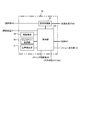
- FIG. 2 is a block diagram showing a configuration of the projection system 100.
- the projection system 100 is a system that controls an image projected on a screen based on a gesture of a person who makes a presentation (presenter).
- the projection system 100 includes a personal computer 12 (hereinafter referred to as a personal computer), an imaging device 32, a screen 16, and the projection device 10.
- the personal computer 12 includes a CPU (Central Processing Unit) 60, a display unit 62 having a liquid crystal display (LCD), a presentation material projected on the display unit 62 and the projection device 10, and the like.
- a nonvolatile memory 64 that stores data and a communication unit 66 that communicates with the projection apparatus 10 are included. Note that either a wireless communication or a wired communication may be adopted as a communication method of the communication unit 66. Note that various information processing apparatuses may be used instead of the personal computer 12.
- the imaging device 32 includes a photographing lens, a rectangular imaging device such as a CCD (Charge-Coupled Device) image sensor or a CMOS (Complimentary Metal-Oxide Semiconductor) image sensor, and a control circuit for controlling the imaging device. .
- the imaging device 32 is built in the projection device 10, and the non-volatile memory 40 described later stores the positional relationship between the imaging device 32 and the projection unit 50 described later as a device constant.
- the photographing lens a wide-angle lens is used so that the imaging device 32 can capture a wider range than the projection area projected by the projection device 10. Further, the photographing lens has a focus lens, and the position of the focus lens can be adjusted according to the focus detection result of the focus detection device.
- the imaging device 32 has a communication function for communicating with the projection device 10, and transmits image data captured using the communication function to the projection device 10.
- the imaging device 32 is built in the projection device 10.
- the present invention is not limited to this, and the imaging device 32 may be arranged near the personal computer 12. Further, the imaging device 32 may be connected to the personal computer 12. In this case, the captured image data may be transmitted to the personal computer 12 using the communication function of the imaging device 32, and the image data may be transmitted from the personal computer 12 to the projection device 10. Further, the imaging device 32 may be arranged in the vicinity of the projection device 10 independently of the projection device 10. In this case, when the imaging device 32 captures an area wider than the projection area of the projection device 10 or captures two marks 28 described later, the projection system 100 causes the projection device 10 and the imaging device to capture images. 32 can be recognized.
- the wide-angle lens is used to image a range wider than the projection area projected by the projection apparatus 10, but the present invention is not limited to this.
- a range wider than the projection area may be captured by using a plurality of imaging devices 32.
- the screen 16 is a white (or almost white) rectangular curtain provided on a wall or the like.
- a presentation material image (main image) 18 is projected onto the screen 16 by the projection device 10 and a menu image 20 used when the presenter makes a gesture to manipulate the material image. Is done.
- rectangular marks 28 are provided at the upper right corner and the lower left corner of the screen 16. This mark 28 is a mark for the imaging device 32 to visually recognize the size of the screen 16.
- the mark 28 is assumed to be a square having a side of 2 cm, for example.
- the distance between the imaging device 32 and the screen 16 can be detected from the pixel output of the imaging device. Even when the imaging device 32 is independent of the projection device 10, the distance between the screen 16 and the projection device 10 is detected when the imaging device 32 and the projection device 10 are arranged at the same distance from the screen 16. can do.
- the distance projected between the imaging device 32 and the screen 16 may be detected by imaging the mark projected by the projection device 10. Further, when the imaging device 32 and the projection device 10 are arranged at the same distance from the screen 16, the distance between the screen 16 and the projection device 10 is detected by imaging the mark projected by the projection device 10. May be. In this case, a table indicating how the mark size changes according to the distance between the screen 16 and the projection apparatus 10 may be stored in the nonvolatile memory 40 (described later).
- the distance between the screen 16 and the imaging device 32 or the projection device 10 is detected based on the size of the mark 28 . Based on this, the distance between the screen 16 and the imaging device 32 or the projection device 10 may be detected. Further, the installation posture (angle) of the imaging device 32 or the projection device 10 with respect to the screen 16 may be detected based on the difference in size and shape of the images obtained by capturing the two marks 28.
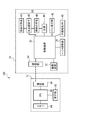
- the projection device 10 includes a control device 30, a projection unit 50, a menu display unit 42, a pointer projection unit 38, a nonvolatile memory 40, and a communication unit 54.
- the communication unit 54 receives image data such as presentation materials from the communication unit 66 of the personal computer 12.
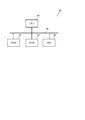
- FIG. 3 shows a hardware configuration of the control device 30.
- the control device 30 includes a CPU 90, a ROM 92, a RAM 94, a storage unit (here, HDD (Hard Disk Drive)) 96, and the like, and each component of the control device 30 is connected to a bus 98. ing.
- the function of each unit in FIG. 4 is realized by the CPU 90 executing a program stored in the ROM 92 or the HDD 96. That is, in the control device 30, the functions of the control unit 150, the image processing unit 52, the face recognition unit 34, the gesture recognition unit 36, and the position detection unit 37 shown in FIG.
- the control unit 150 the image processing unit 52, the face recognition unit 34, the gesture recognition unit 36, and the position detection unit 37 shown in FIG.
- the control unit 150 comprehensively controls each function realized in the control device 30 and each unit connected to the control device 30.
- the image processing unit 52 processes image data such as presentation materials and image data captured by the imaging device 32. Specifically, the image processing unit 52 processes the image size and contrast of the image data, and outputs the image data to the light modulation element 48 of the projection unit 50.
- the face recognition unit 34 acquires an image captured by the imaging device 32 from the control unit 150, and detects the presenter's face from the image. Further, the face recognition unit 34 recognizes (identifies) the presenter by comparing (for example, pattern matching) the face detected from the image and the face data stored in the nonvolatile memory 40.
- the gesture recognition unit 36 recognizes the presenter's gesture in cooperation with the imaging device 32.
- the gesture recognition unit 36 recognizes that the presenter's hand is in front of the gesture recognition menu image 20 by color recognition (skin color recognition or the like) in the image captured by the imaging device 32. And recognize the gesture.
- the position detection unit 37 detects the position of the presenter from the image captured by the imaging device 32 by, for example, associating the projection region projected by the projection unit 50 with the region captured by the imaging device of the imaging device 32.
- the projection unit 50 includes a light source 44, an illumination optical system 46, a light modulation element 48, and a projection optical system 49.
- the light source 44 is, for example, a lamp that emits light.
- the illumination optical system 46 illuminates the light modulation element 48 with the light beam emitted from the light source 44.
- the light modulation element 48 is, for example, a liquid crystal panel, and generates an image to be projected on the screen 16 (an image based on image data input from the image processing unit 52).
- the projection optical system 49 projects the light beam from the light modulation element 48 toward the screen 16.
- the projection optical system 49 includes a zoom lens that adjusts the size of an image to be projected and a focus lens that adjusts the focus position.
- the menu display unit 42 displays the gesture recognition menu image 20 according to the position of the presenter detected by the position detection unit 37 based on the image captured by the imaging device 32 under the instruction of the control unit 150 (see FIG. 1). Is displayed on the screen 16.
- the specific configuration of the menu display unit 42 can be substantially the same as that of the projection unit 50. That is, in the first embodiment, the projection apparatus 10 includes two projection units (a projection unit 50 that projects a main image and a menu display unit 42 that projects a gesture menu). The positional relationship of the units is also stored in the nonvolatile memory 40 as device constants.
- the menu image 20 displayed by the menu display unit 42 includes, for example, areas such as enlargement, reduction, pointer emission, page feed, page return, and end (hereinafter referred to as a selection area) as shown in FIG. Shall.
- a selection area for example, when the presenter detects that the presenter places his hand in front of the page turning selection area based on the image picked up by the imaging device 32, the presenter performs a gesture for turning the page. Recognize. Further, in the gesture recognition unit 36, if the presenter's hand existing in front of the page feed selection area indicates three fingers, the presenter recognizes that the presenter is performing a gesture for page feed for three pages.
- the menu display unit 42 adjusts the position (height position, left and right position, etc.) for displaying the menu image 20 according to the height and position of the presenter under the instruction of the control unit 150 and projects it on the screen 16. It shall be.
- the pointer projection unit 38 is a pointer (for example, a laser pointer) on the screen 16 according to the position of the presenter's hand (finger) recognized by the gesture recognition unit 36 from the image captured by the imaging device 32 under the instruction of the control unit 150. Project.
- the presenter puts his hand in front of the pointer emission selection area of the menu image 20 for a predetermined time, and then draws a line on the screen 16 with his finger.
- the pointer projection unit 38 projects (irradiates) the pointer to the portion where the gesture is performed under the instruction of the control unit 150.
- the nonvolatile memory 40 includes a flash memory and the like, and stores data (face image data) used in the control of the control unit 150, image data captured by the imaging device 32, and the like.
- the nonvolatile memory 40 also stores data related to gestures. Specifically, the non-volatile memory 40 stores data relating to right and left hand images and image data representing numbers (1, 2, 3,...) Using a finger.
- the nonvolatile memory 40 may store information on the height of the presenter and the reach (height) of the presenter in association with (attached to) the face data of the presenter.
- the control unit 150 selects the menu based on the information and the recognition result of the face recognition unit 34.
- the height position at which the image 20 is displayed can be determined.
- a plurality of menu images are stored in advance in the nonvolatile memory 40 or the HDD 96 of the control device 30, and the control unit 150 uses different menu images for each presenter according to the recognition result of the face recognition unit 34. Also good. In this case, a presenter may be associated with the menu image in advance.
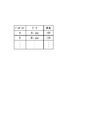
- the non-volatile memory 40 stores a database as shown in FIG. 5 (a database in which presenters, face data, and heights are associated).
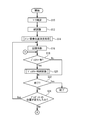
- FIG. 6 is a flowchart showing processing by the control unit 150 when the presenter makes a presentation using the projection system 100.
- the personal computer 12, the projection device 10, the imaging device 32, and the screen 16 are installed as shown in FIG. 1 and each device is activated.
- step S ⁇ b> 10 the control unit 150 confirms the positions of the two marks 28 imaged by the imaging device 32.
- the control unit 150 obtains the positional relationship and distance between the imaging device 32 and the screen 16 and the positional relationship and distance between the projection device 10 and the screen 16 from information on the pixels of the imaging device that captured the two marks 28.
- step S12 the control unit 150 instructs the face recognition unit 34 to recognize the presenter's face from the image captured by the imaging device 32.
- the face recognition unit 34 compares the face existing in the image with the face data (see FIG. 5) stored in the nonvolatile memory 40 to identify the presenter. If the face recognition unit 34 cannot recognize the presenter's face, that is, if the face in the image does not match the face data stored in the nonvolatile memory 40, the presenter is not registered. Identified as a person.
- step S10 and step S12 the same image captured by the imaging device 32 may be used, or different images may be used. Further, the execution order of step S10 and step S12 may be switched.
- step S14 the control unit 150 and the like execute processing for determining the position of the menu image 20. Specifically, processing according to the flowchart of FIG. 7 is executed.
- the control unit 150 determines the height of the menu image 20 in step S35.
- the control unit 150 compares the pixel position where the face (near the top of the head) is imaged with the height stored in the database of FIG. A position can be associated. Even if the height information is not stored in the database, or even if the presenter is an unregistered person, the reach of the hand is approximately 35 to 55 cm from the top of the head. Based on the above, the height position at which the menu image 20 is displayed can be determined.
- the necessary height information does not have to be absolute height information, but may be relative height information between the projection apparatus 10 and the presenter.
- step S35 the control unit 150 projects the coordinates (the coordinates (x, y) in the plane of the screen 16) on which the menu image 20 is projected from the pixels of the image sensor that captured the mark 28, and the image sensor. Assume that association with x and y pixels is performed. Accordingly, the gesture recognition unit 36 can recognize in front of which selection area of the menu image 20 the presenter is performing the gesture based on which pixel of the imaging element the presenter's hand is imaged. Become.
- step S36 the control unit 150 confirms the left and right positions of the presenter viewed from the projection apparatus 10 side.
- the control unit 150 checks whether the presenter is present on the left or right of the screen 16 based on the presenter position detection result by the position detection unit 37.
- step S ⁇ b> 16 of FIG. 6 the control unit 150 controls the image processing unit 52 and the light source 44 to display the main image 18 generated from the image data transmitted from the personal computer 12 on the screen 16 via the projection unit 50. Project to.
- the control unit 150 controls the menu display unit 42 to project the menu image 20 on the screen 16.
- the menu display unit 42 projects the menu image 20 at a position closer to the presenter among the height position determined in step S14 and the left and right positions of the screen 16.
- the control unit 150 adjusts the projection magnification and focus position of the projection optical system 49 and the projection magnification and focus position of the projection optical system included in the menu display unit 42 according to the distance information acquired in step S10. May be.
- step S18 the control unit 150 determines whether or not there has been a gesture motion based on the imaging of the imaging device 32. Specifically, as shown in FIG. 1, the control unit 150, when the presenter's hand is present for a predetermined time (for example, 1 to 3 seconds) before the menu image 20 projected on the screen 16. , Judge that there was a gesture movement. In this way, by detecting the position of the presenter's hand and determining the gesture action, for example, when the presenter's body is positioned in front of the menu image 20, the control unit 50 determines that the presenter's action is the gesture action. Therefore, it is possible to improve the accuracy of gesture recognition.
- a predetermined time for example, 1 to 3 seconds
- the control unit 150 may employ an algorithm that preferentially searches for the right hand of the presenter to determine the presence or absence of a gesture. If the determination in step S18 is affirmed, the process proceeds to step S20. If the determination in step S18 is negative, the process proceeds to step S22.
- step S20 the control unit 150 executes a control process for the main image 18 according to the presenter's gesture recognized by the gesture recognition unit 36. Specifically, the control unit 150 executes processing according to the flowchart of FIG.
- step S50 the control unit 150 confirms the position of the presenter's hand based on the recognition result of the gesture recognition unit 36.
- step S54 the control unit 150 determines whether or not the hand position is in front of a specific selection area.
- the specific selection area means a selection area where a special gesture corresponding to the number of fingers is possible.
- the selection area “enlarge” or “reduction” is a specific selection area because the presenter can specify the magnification by the number of fingers.
- the presenter can specify the page feed number and the page return number with the number of fingers, and is therefore a specific selection area.
- step S54 determines whether the selection areas “pointer light emission” and “end” are not specific selection areas because no special instructions can be given by the number of fingers. If the determination in step S54 is affirmative, the process proceeds to step S56. If the determination is negative, the process proceeds to step S62.
- the control unit 150 performs processing according to the selection area in which the presenter's hand is located. Do. For example, when the selection area where the presenter's hand is located is “pointer emission”, the control unit 150 projects the pointer on the screen 16 via the pointer projection unit 38 as described above. For example, when the selection area where the presenter's hand is located is “end”, the control unit 150 projects the main image 18 and the menu image 20 onto the screen 16 via the image processing unit 52. Exit.
- the gesture recognizing unit 36 recognizes the gesture performed by the presenter under the instruction of the control unit 150. Specifically, the gesture recognition unit 36 recognizes the shape of the hand (such as the number of fingers). In this case, the gesture recognizing unit 36 obtains the presenter's actual hand shape and a template of a hand shape (a hand shape such as one finger, two fingers%) Stored in advance in the nonvolatile memory 40. The presenter's gesture is recognized through comparison (pattern matching, etc.).
- step S58 the control unit 150 determines whether or not the presenter's gesture recognized in step S56 is a specific gesture.
- the specific gesture is a hand shape such as two fingers, three fingers, four fingers, and five fingers. If the determination in step S58 is negative, the process proceeds to step S62, and the control unit 150 performs a process (a process that does not consider the shape of the hand) according to the selected area where the presenter's hand is located. That is, for example, if the selection area where the presenter's hand is located is “page feed”, the control unit 150 sends an instruction to page feed by one page to the PC 12 via the communication units 54 and 66. The CPU 60 is notified. The CPU 60 of the personal computer 12 transmits the image data of the page according to the instruction from the control unit 150 to the image processing unit 52 via the communication units 66 and 54.
- step S60 the control unit 150 performs processing according to a specific gesture and a selected area. Specifically, for example, if the selected area where the presenter's hand is located is “page feed” and the shape of the hand is three fingers, the control unit 150 issues an instruction to page feed by three pages. The notification is sent to the CPU 60 of the personal computer 12 via the communication units 54 and 66. The CPU 60 of the personal computer 12 transmits the image data of the page according to the instruction from the projection device 10 to the image processing unit 52 via the communication units 66 and 54.
- step S22 the control unit 150 determines whether the presentation is finished. Note that the control unit 150 recognizes a gesture before the selection area “end” of the menu image 20 described above, recognizes that the power of the personal computer 12 is turned off, or presents by the imaging device 32. Can be determined that the presentation has ended. When the determination in step S22 is affirmed, the control unit 150 ends all the processes in FIG. In this case, the control unit 150 notifies the CPU 60 of the personal computer 12 through the communication units 54 and 66 that the presentation has ended.
- step S22 determines whether or not the position of the presenter has changed.
- the position of the presenter means a left-right position with respect to the screen 16.
- the control part 150 performs the process after step S18. That is, if the presenter's hand is present in front of the menu screen 20 even after the control by the gesture in the previous step S20, the control by the gesture is continued.
- step S20 After passing through step S20, it transfers to step S18 again, and when the judgment of the said step S18 is denied, ie, after controlling the main image 18 with a gesture, the hand of the presenter was lost from before the menu image 20. In this case, the control of the main image 18 by the gesture is finished.
- the control unit 150 sets the interval at which step S18 is performed to a predetermined time (for example, 0.5 seconds to 1 second), and sets the interval after one gesture operation is completed until the next gesture operation is recognized. You may make it provide.
- step S24 If the determination in step S24 is affirmative, the process returns to step S16.
- step S ⁇ b> 16 the control unit 150 changes the projection position (display position) of the menu image 20 via the menu display unit 42 according to the position of the presenter. After that, the control unit 150 executes the processing after step S18 in the same manner as described above.
- the menu image 20 is projected according to the position of the presenter, and when the presenter gestures in front of the menu image 20, the gesture In response to this, the operation (change of display) of the main image 18 is performed.
- the control unit 150 of the projection device 10 receives the presenter image captured by the imaging device 32, and changes the menu according to the position of the presenter in the image. Since the menu image 20 is projected onto the screen 16 via the display unit 42, the menu image 20 can be projected at a position where the presenter is easy to use (easy to gesture). Thereby, a user-friendly projection device can be realized.
- control unit 150 detects information about the height of the presenter (such as the height of the presenter) from the presenter image, and thus projects the menu image 20 at a height position that is easy for the presenter to use. Can do.
- control unit 150 can easily detect (acquire) information related to the height of the presenter by registering the height of the presenter in association with the face data of the presenter in the database.
- control unit 150 detects the height that the presenter can reach (the position at a predetermined height from the top of the head), and thus the menu image 20 is projected within the reach of the presenter's hand. Can be used, and is easy to use.
- the image pickup device since information (height and the like) related to the height of the presenter is stored in the nonvolatile memory 40, the image pickup device can be obtained by comparing the height and the pixel of the image pickup device of the image pickup device 32. It is possible to associate the pixels of the 32 imaging elements with the positions in the height direction. As a result, the projection position of the menu image 20 can be easily determined.
- control unit 150 projects the menu image 20 on the screen 16 via the menu display unit 42 according to the left and right positions of the presenter with respect to the screen 16, so that the presenter is in front of the menu image 20. Makes it easier to make gestures.
- the control unit 150 transmits at least a part of the main image 18 via the projection unit 50. Therefore, the presenter can operate the main image 18 only by placing the hand in front of the menu image 20.
- control unit 150 changes the operation amount of the main image 18 projected by the projection device 10 according to the shape of the presenter's hand recognized by the gesture recognition unit 36. This can be done simply by changing the shape of the hand and the page feed amount.
- a margin for projecting the menu image 20 is provided in advance on the left side of the main image 18 of the screen 16 in FIG. 1 (the side where the presenter does not exist in FIG. 1). May be. In this way, when the position of the menu image 20 is changed (when Step S16 is performed for the second and subsequent times), the position of the main image 18 does not need to be changed (shifted left and right, etc.).
- the present invention is not limited to this. That is, once the menu image 20 is projected, the projection position may be fixed. However, when the projection position of the menu image 20 is fixed, it may be difficult to perform an operation by a gesture if the presenter changes the position.
- An embodiment considering this point is a second embodiment described below.
- Second Embodiment is described based on Fig.9 (a) and FIG.9 (b).
- the apparatus configuration and the like are the same as or equivalent to those of the first embodiment described above. Therefore, these descriptions are omitted.
- the range in which the presenter can perform the gesture is limited to the area before the selection area of the menu image 20, but in the second embodiment, the range in which the gesture can be performed is the first embodiment. More spread out.
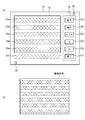
- FIG. 9A in a state where the main image 18 and the menu image 20 are displayed on the screen 16, the horizontal areas having the same height as the selection areas 22a to 22f included in the menu image 20 are displayed. Regions extending in the direction (regions indicated by double hatching in FIG. 9A) are set as regions where gestures can be newly performed (gesture regions 23a to 23f). A gap (buffer portion) is provided between each of the gesture regions 23a to 23f.
- the gesture area 23 a is also an area that can be “enlarged” corresponding to the selection area 22 a being an area that can be “enlarged”.
- the gesture area 23b is also an area that can be “reduced”.
- the gesture area 23c is an area where “pointer light emission”
- the gesture area 23d is an “page forward” operation
- the gesture area 23e is an “page return” operation
- the gesture area 23f is an area where an “end” operation is possible. .
- gesture areas 23a to 23f are projected with, for example, a translucent line through which a presenter can be seen so as to be sandwiched in the height direction of the two marks 28. In this case, only the line indicating the boundary of the gesture area may be projected as a semi-transparent line.
- the control unit 150 confirms the two marks 28 in step S10 of FIG. 6, the gesture regions 23a to 23f are used as the imaging region of the imaging device of the imaging device 32 as shown in FIG. 9B. It shall be associated. However, when the gesture regions 23a to 23f are actually projected on the screen 16, the presenter's height information (height, etc.) obtained in step S12 is considered.
- the gesture areas 23a to 23f are pointed with the index finger, and when the attention portion of the main image 18 is indicated, the five fingers (the entire hand) are used. Decide to point.
- image data of a hand as a single finger is registered in the nonvolatile memory 40 in association with the operation content (gesture operation).
- the gesture recognition unit 36 can determine that the presenter is located in the vicinity of the menu image 20 (the end of the screen) from the detection result of the position detection unit 37 under the instruction of the control unit 150, Similar to the first embodiment, a gesture in front of the menu image 20 (the selection areas 22a to 22f) is recognized. That is, when the presenter is located in the vicinity of the menu image 20, the gesture recognition unit 36 recognizes the presenter as a gesture regardless of whether the presenter's hand is one finger or five fingers.
- the gesture recognition unit 36 performs control. Under the instruction of the unit 150, a gesture is recognized by comparing (pattern matching) the image of the hand with the registered image data (one-finger image data). That is, when the presenter points the gesture regions 23a to 23f with five fingers (when the presenter does not match the image data registered in the nonvolatile memory 40), the gesture recognizing unit 36 does not recognize the gesture as the presenter.
- Is pointed to gesture area 23a to 23f with one finger matches image data registered in nonvolatile memory 40
- the presenter is at a position away from the menu image 20, it is possible to differentiate between the gesture and the pointing operation of the target portion.
- a two-finger, three-finger, and four-finger image can be registered in the nonvolatile memory 40 in association with the operation amount.
- the control unit 150 can enlarge the main image 18 at a magnification of 3 times.
- the gesture regions 23 a to 23 f are displayed.
- the presenter can easily perform a gesture operation regardless of the standing position. This eliminates the need for the presenter to return to the position of the menu image 20 and perform a gesture, so the usability of the presenter can be improved.
- the control unit 150 is registered in the nonvolatile memory 40 when it can be determined that the presenter is away from the menu image based on the image captured by the imaging device 32. If a gesture (pointing with one finger) is accepted (used for control), a gesture not registered in the nonvolatile memory 40 (a gesture pointed by five fingers) is accepted. Gestures are not accepted (not used for control). Thus, even if the gesture areas 23a to 23f are set on the main image 18, the control unit 150 performs the gesture in the case where the presenter simply points to the target portion of the main image 18 and in front of the gesture areas 23a to 23f. It can be distinguished from the case of going. Thereby, the user's gesture can be appropriately reflected in the operation of the main image 18. Therefore, usability of the presenter can be improved.
- hand image data such as one finger
- operation content gesture action
- hand image data may be registered in the nonvolatile memory 40 for each presenter.
- usability of each presenter can be improved.
- hand image data may be registered in association with a face image in the database of FIG.
- the present invention is not limited to this, and the gesture areas 23a to 23f may not be displayed (projected) on the screen 16. .
- the presenter may infer the gesture area from the position of the selection area of the menu image 20.
- the menu image 20 is arranged at the left and right ends of the screen 16 .
- the present invention is not limited to this.
- the menu image 20 may be provided near the lower end of the screen 16.
- the coordinates of the pixels of the image sensor and the in-plane coordinates (x, y coordinates) of the screen 16 can be associated from the position of the mark 28 confirmed in step S10 (FIG. 6).
- the present invention is not limited to this, and as shown in FIG. It is good also as projecting so that it may overlap with a part of image 18.
- FIG. for example, when the gesture recognizing unit 36 recognizes that the presenter put his hand in front of the main image 18 and performed a specific gesture, the control unit 150 performs the presenter's hand via the menu display unit 42.
- the menu image 70 may be displayed in the vicinity. As a result, the menu image 70 can be displayed (projected) at a position where the presenter's hand can reach, so the usability of the presenter is improved.
- the setting of the menu image 70 may be performed from the personal computer 12 or may be performed through communication between the personal computer 12 and the projection device 10. Specifically, the menu image 20 that can be handled from the projection apparatus 10 may be transmitted to the personal computer 12 and the personal computer 12 may select the menu image.
- the control unit 150 when the gesture recognizing unit 36 recognizes that the presenter indicates the “pointer light emission” selection area with the index finger, the control unit 150 performs the pointer light emission gesture operation. Then, it may be determined that the laser pointer is continuously irradiated from the pointer projection unit 38 to the position indicated by the presenter's hand. In this case, a well-known technique can be used as a method for detecting the locus of the hand.
- the period during which the gesture recognizing unit 36 validates the gesture operation can be set in terms of time (for example, 5 to 15 seconds).
- time for example, 5 to 15 seconds.
- the presenter can appropriately display the laser pointer by making a gesture before “pointer emission” and moving the finger within the effective period. Can do.
- the time may be set as a uniform predetermined time (for example, about 10 seconds). For example, when registering a presenter in the nonvolatile memory 40, for each presenter It is good also as setting time.
- control unit 150 performs a pointer operation when the gesture recognizing unit 36 recognizes that the presenter has performed a gesture indicating the end of the gesture operation (finger moving operation) (for example, an operation of pointing the palm toward the imaging device 32).
- the pointer light emission by the projection unit 38 may be terminated. In this way, the presenter can display as many laser pointers as necessary.
- a touch panel function is added to the screen 16 so that the presenter selects the “pointer emission” area and then irradiates the laser pointer using the touch panel function (for example, touching the screen 16).
- the laser pointer may be irradiated by continuous operation of the touch panel, or the start point and the end point may be designated by the touch panel and the laser pointer may be irradiated from the pointer projection unit 38.
- a touch panel may be provided on the screen 16 to discriminate between the gesture action and the attention action according to the distance between the screen 16 and the presenter.
- a resistive film method As the touch panel, a resistive film method, a surface acoustic wave method, an infrared method, an electromagnetic induction method, and a capacitance method can be appropriately selected.
- the personal computer 12 and the projection apparatus 10 can communicate with each other, and the material data is sent from the personal computer 12 to the projection apparatus 10.
- the present invention is not limited to this.
- a digital camera may be employed. In this case, an image captured by the digital camera can be displayed on the screen 16. Since the digital camera has an imaging function and a face recognition function, these functions replace the imaging device 32 in FIG. 2 and the face recognition unit 34 in FIG. 4 to replace the imaging device 32 in FIG.
- the fourth face recognition unit 34 may be omitted.
- the presenter operates the main image 18 by performing a gesture in front of the menu image 20.
- the presenter is not limited thereto, and the menu is displayed by a gesture in front of the menu image 20.
- the image 20 itself may be operated.
- the operation of the menu image 20 includes operations such as enlarging, reducing, moving, and closing the menu image 20.
- the rectangular mark 28 is provided on the lower left and upper right of the screen 16, but the present invention is not limited to this.
- Various positions and numbers of the marks 28 can be selected, and various shapes such as a circle and a rhombus can be adopted as the shape of the marks 28.
- the projection unit 50 may project both the main image 18 and the menu image 20 on the screen 16.
- the CPU 60 of the personal computer 12 combines the main image and the menu image and transmits them to the image processing unit 52 via the communication units 66 and 54.
- the presenter position (height position, left and right position) is transmitted from the projection apparatus 10 side to the CPU 60 of the personal computer 12, and the CPU 60 adjusts the position of the menu image in accordance with the presenter position. You can do it.
- projection device 10 projection unit 50
- the arrangement position thereof can be set as appropriate.
- the projection device 10 projection unit 50
- the projection device 10 may be installed on a ceiling or a wall and projected from above the screen 16.
- projection by a plurality of projection apparatuses 10 projection units 50 may be performed.
- each of the above embodiments is an example.
- the configuration of FIG. 2 and the functional block diagram of FIG. 4 are examples, and various changes can be made.
- the face recognition unit 34, the gesture recognition unit 36, the position detection unit 37, and the image processing unit 52 have been described as being a partial function of the control device 30. It may be realized by hardware. In this case, each unit is realized by a separate CPU or the like.
Landscapes
- Engineering & Computer Science (AREA)
- Theoretical Computer Science (AREA)
- General Engineering & Computer Science (AREA)
- Physics & Mathematics (AREA)
- General Physics & Mathematics (AREA)
- Human Computer Interaction (AREA)
- Multimedia (AREA)
- Signal Processing (AREA)
- Geometry (AREA)
- Health & Medical Sciences (AREA)
- Computer Vision & Pattern Recognition (AREA)
- General Health & Medical Sciences (AREA)
- Psychiatry (AREA)
- Social Psychology (AREA)
- User Interface Of Digital Computer (AREA)
- Projection Apparatus (AREA)
Abstract
撮像部が撮像した対象者の画像を入力する入力部と、前記撮像部が撮像した前記対象者の位置に応じて、第1画像を投影する投影部と、を備える、ユーザにとって、使い勝手のよい投影装置を提供する。
Description
本発明は、投影装置に関する。
従来より、プロジェクターにより机や壁にキーボードを投影し、そのキーボードを操作する指をビデオカメラにより撮像した画像を解析して演算を行ったり、当該演算結果を用いて機器を操作したりすることが提案されている(例えば、特許文献1)。
しかしながら、従来の装置は、例えばキーボードなどの画像が投影される位置が固定されていて、ユーザにとっては必ずしも使い勝手のよい装置とはなっていなかった。
本発明は上記の課題に鑑みてなされたものであり、ユーザにとって使い勝手のよい投影装置を提供することを目的とする。
本発明の投影装置は、撮像部が撮像した対象者の画像を入力する入力部と、前記撮像部が撮像した前記対象者の位置に応じて、第1画像を投影する投影部と、を備えている。
この場合において、前記撮像部が撮像した前記対象者の画像から前記対象者の高さに関する情報を検出する検出部を備えることができる。この場合、前記検出部は、前記対象者の手の届く高さを検出することとしてもよい。
また、本発明の投影装置では、前記対象者の高さに関する情報を記憶する記憶部を備えることができる。また、前記投影部は、前記対象者の高さに関する情報に応じて、前記第1画像を投影することができる。
また、本発明の投影装置では、前記投影部は、前記対象者の位置の左右方向に関する情報に応じて、前記第1画像を投影することとしてもよい。また、前記投影部は、前記対象者の手の位置に応じて、前記第1画像を投影することとしてもよい。
また、本発明の投影装置では、前記第1画像に前記対象者の体の一部が位置することを認識する認識部を備え、前記投影部は、少なくとも一部が前記第1画像とは異なる位置に第2画像を投影可能であり、前記認識部が前記第1画像に前記対象者の体の一部が位置することを認識した場合に、前記投影部は、前記第2画像の少なくとも一部を変更することとすることができる。
この場合において、前記体の一部は手であり、前記投影部は、前記認識部が認識した手の形に応じて、前記投影部が投影する前記第1画像および前記第2画像の少なくとも1つに関する操作量を変更することとしてもよい。
本発明の投影装置は、撮像部が撮像した対象者の画像を入力する入力部と、前記撮像部が撮像した前記対象者の位置に応じて、前記対象者が行った第1のジェスチャーを受け付け、前記第1のジェスチャーとは異なる第2のジェスチャーを受け付けない受付部と、を備えている。
この場合において、画像を投影する投影部を備え、前記受付部は、投影された前記画像の中央部に前記対象者が位置する場合には、前記第1のジェスチャーを受け付け、前記第2のジェスチャーを受け付けないこととしてもよい。また、画像を投影する投影部を備え、前記受付部は、投影された前記画像の端部に前記対象者が位置する場合には、前記第1のジェスチャー及び前記第2のジェスチャーを受け付けることとしてもよい。
本発明の投影装置では、前記第1のジェスチャーを登録可能な登録部を備えることができる。この場合、前記対象者を認識する認識部を備え、前記登録部に登録される前記第1のジェスチャーは前記対象者と関連つけて登録され、前記受付部は、前記認識部の認識結果に応じて、前記対象者が行った前記第1のジェスチャーを受け付け、前記第1のジェスチャーとは異なる第2のジェスチャーを受け付けないこととすることができる。
本発明の投影装置では、前記受付部は、前記第1のジェスチャーを受け付ける時間を設定することとしてもよい。また、前記受付部は、前記第1のジェスチャーを受け付けた後に、前記第1のジェスチャーとは異なる第3のジェスチャーを検出したときに、前記第1のジェスチャーの受け付けを終了とすることとしてもよい。
また、本発明の投影装置が、画像を投影する投影部を備える場合、前記投影部は、前記受付部が受け付けた第1のジェスチャーに応じて、前記投影された画像の少なくとも一部を変更することとしてもよい。また、本発明の投影装置は、画像をスクリーンに投影する投影部を備え、前記受付部は、前記対象者と前記スクリーンとの距離に応じて、前記第2ジェスチャーを受け付けることとしてもよい。
本発明の投影装置は、撮像部が撮像した対象者の画像を入力する入力部と、第1画像及び第2画像を投影する投影部と、前記撮像部が撮像した対象者の画像から、前記第1画像の前における前記対象者のジェスチャーと、前記第2画像の前における前記対象者のジェスチャーと、を区別して受け付ける受付部と、を備えており、前記投影部は、前記受付部の受け付け結果に応じて、前記第1画像又は第2画像を投影するようになっている。
この場合において、前記受付部は、前記第1画像の前における前記対象者の第1のジェスチャー及び当該第1のジェスチャーとは異なる第2のジェスチャーを受け付け、前記第2画像の前における前記対象者の第1のジェスチャーを受け付ける一方、前記第2のジェスチャーを受け付けない、こととしてもよい。
本発明の投影装置は、複数の選択領域を有する第1画像と、第1画像とは異なる第2画像と、を投影する投影部と、撮像部が撮像した対象者の画像を入力する入力部と、前記撮像部が撮像した対象者の画像から、前記第1画像の前記選択領域の前における対象者のジェスチャーを受け付けるとともに、前記第2画像の前記選択領域に対応する領域の前における対象者のジェスチャーを受け付ける受付部と、を備えており、前記投影部は、前記受付部の受け付け結果に応じて、前記第1画像又は第2画像を投影するようになっている。
この場合において、前記受付部は、前記第1画像の前記選択領域の前における前記対象者の第1のジェスチャー及び当該第1のジェスチャーとは異なる第2のジェスチャーを受け付け、前記第2画像の前記選択領域に対応する領域の前における前記対象者の第1のジェスチャーを受け付ける一方、前記第2のジェスチャーを受け付けない、こととしてもよい。
本発明によれば、ユーザにとって、使い勝手のよい投影装置を提供することができる。
《第1の実施形態》
以下、第1の実施形態について、図1~図8に基づいて、詳細に説明する。図1は投影システム100の概要を示す図であり、図2は、投影システム100の構成を示すブロック図である。
以下、第1の実施形態について、図1~図8に基づいて、詳細に説明する。図1は投影システム100の概要を示す図であり、図2は、投影システム100の構成を示すブロック図である。
本第1の実施形態の投影システム100は、プレゼンテーションを行う人(プレゼンター)のジェスチャーに基づいて、スクリーンに投影される画像の制御を行うシステムである。投影システム100は、図1に示すように、パーソナルコンピュータ12(以下、パソコンと呼ぶ)と、撮像装置32と、スクリーン16と、投影装置10と、を備える。
パソコン12は、図2に示すように、CPU(Central Processing Unit)60と、液晶ディスプレイ(LCD:Liquid Crystal Display)を有する表示部62と、表示部62や投影装置10に投影するプレゼン資料などのデータを記憶している不揮発性のメモリ64と、投影装置10と通信を行う通信部66と、を有する。なお、通信部66の通信方式としては無線通信及び有線通信のいずれを採用してもよい。なお、パソコン12に代えて、種々の情報処理装置を用いることとしてもよい。
撮像装置32は、撮影レンズや、CCD(Charge Coupled Device)イメージセンサやCMOS(Complimentary Metal Oxide Semiconductor)イメージセンサなどの矩形状の撮像素子、及びこの撮像素子を制御する制御回路などを有している。撮像装置32は、投影装置10に内蔵されており、後述の不揮発性メモリ40には、撮像装置32と後述する投影部50との位置関係が装置定数として記憶されている。
撮影レンズとしては、撮像装置32が、投影装置10の投影する投影領域よりも広い範囲を撮像できるように広角レンズが用いられている。また、撮影レンズは、フォーカスレンズを有しており、焦点検出装置の焦点検出結果に応じてフォーカスレンズの位置が調節可能となっている。撮像装置32は、投影装置10との間で通信を行うための通信機能を有しており、当該通信機能を用いて撮像した画像データを投影装置10に送信する。
なお、図1では、撮像装置32を投影装置10に内蔵しているが、これに限らず、パソコン12の近傍に配置してもよい。また、撮像装置32をパソコン12に接続するようにしてもよい。この場合、撮像装置32の通信機能を用いて、撮像した画像データをパソコン12に送信し、パソコン12から投影装置10に対して画像データを送信するようにすればよい。また、撮像装置32を、投影装置10から独立させて、投影装置10の近傍に配置してもよい。この場合は、撮像装置32が投影装置10の投影領域よりも広い範囲を撮像したり、もしくは、後述の2つのマーク28を撮像したりすることにより、投影システム100は、投影装置10と撮像装置32との位置関係を認識することができる。
なお、本第1の実施形態では、広角レンズを用いて投影装置10の投影する投影領域よりも広い範囲を撮像するようにしたが、これに限られるものではない。例えば、撮像装置32を複数用いることで、投影領域よりも広い範囲を撮像するようにしてもよい。
スクリーン16は、壁等に設けられる白色の(又はほぼ白色の)矩形状の幕である。スクリーン16には、図1に示すように、投影装置10によりプレゼンテーションの資料画像(メイン画像)18が投影されるとともに、プレゼンターがジェスチャーをして資料画像を操作する際に用いるメニュー画像20が投影される。スクリーン16の右上隅と左下隅には、矩形状のマーク28が設けられているものとする。このマーク28は、撮像装置32がスクリーン16の大きさを視認するためのマークである。マーク28は、例えば、一辺が2cmの正方形であるものとする。撮像装置32では、撮像装置32が有する撮像レンズの焦点距離と、撮像素子のサイズが既知であるので、撮像素子の画素出力により、撮像装置32とスクリーン16との距離を検出することができる。なお、撮像装置32を投影装置10から独立させた場合でも、撮像装置32と投影装置10とをスクリーン16から同距離の位置に配置する場合には、スクリーン16と投影装置10との距離を検出することができる。
なお、スクリーン16にマーク28を設ける代わりに、投影装置10により投影したマークを撮像して撮像装置32とスクリーン16との距離を検出するようにしてもよい。また、撮像装置32と投影装置10とをスクリーン16から同距離の位置に配置する場合には、投影装置10により投影したマークを撮像してスクリーン16と投影装置10との距離を検出するようにしてもよい。この場合、スクリーン16と投影装置10との距離に応じてマークの大きさがどのように変化するかを示すテーブルを不揮発性メモリ40(後述)に記憶しておいてもよい。
なお、上記においては、マーク28の大きさに基づいて、スクリーン16と撮像装置32又は投影装置10との距離を検出する場合について説明したが、これに限らず、2つのマーク28間の距離に基づいて、スクリーン16と撮像装置32又は投影装置10との距離を検出することとしてもよい。また、2つのマーク28を撮像した画像の大きさや形状の違いに基づいて、スクリーン16に対する撮像装置32又は投影装置10の設置姿勢(角度)を検出するようにしてもよい。
投影装置10は、図2に示すように、制御装置30と、投影部50と、メニュー表示部42と、ポインタ投影部38と、不揮発性メモリ40と、通信部54と、を有する。通信部54は、パソコン12の通信部66からプレゼンテーションの資料などの画像データを受信する。
制御装置30は、投影装置10全体を統括的に制御する。図3には、制御装置30のハードウェア構成が示されている。図3に示すように、制御装置30は、CPU90、ROM92、RAM94、記憶部(ここではHDD(Hard Disk Drive))96等を備えており、制御装置30の構成各部は、バス98に接続されている。制御装置30では、ROM92あるいはHDD96に格納されているプログラムをCPU90が実行することにより、図4の各部の機能が実現される。すなわち、制御装置30では、CPU90がプログラムを実行することにより、図4に示す、制御部150、画像処理部52、顔認識部34、ジェスチャー認識部36、位置検出部37としての機能が実現される。
制御部150は、制御装置30において実現される各機能、及び制御装置30に接続される各部を統括的に制御する。
画像処理部52は、プレゼンテーションの資料などの画像データや撮像装置32で撮像された画像データを処理する。具体的には、画像処理部52は、画像データの画像サイズやコントラストを処理し、当該画像データを投影部50の光変調素子48に出力する。
顔認識部34は、撮像装置32が撮像した画像を制御部150から取得して、当該画像からプレゼンターの顔を検出する。また、顔認識部34は、画像から検出した顔と、不揮発性メモリ40に記憶されている顔データとを比較(例えばパターンマッチング)して、プレゼンターを認識(特定)する。
ジェスチャー認識部36は、撮像装置32と協働して、プレゼンターのジェスチャーを認識するものである。本第1の実施形態においては、ジェスチャー認識部36は、ジェスチャー認識用のメニュー画像20の前にプレゼンターの手があることを撮像装置32が撮像した画像中の色認識(肌色認識等)により認識して、ジェスチャーを認識する。
位置検出部37は、例えば、投影部50が投影する投影領域と撮像装置32の撮像素子が撮像する領域とを対応付けることにより、撮像装置32が撮像した画像から、プレゼンターの位置を検出する。
図2に戻り、投影部50は、光源44と、照明光学系46と、光変調素子48と、投射光学系49と、を有する。光源44は、例えば光を出射するランプである。照明光学系46は、光源44から出射された光束を光変調素子48に照明する。光変調素子48は、例えば液晶パネルであり、スクリーン16上に投影する画像(画像処理部52から入力された画像データに基づく画像)を生成する。投射光学系49は、光変調素子48からの光束をスクリ-ン16に向けて投射する。なお、投射光学系49は、投影する像の大きさを調整するズームレンズと、フォーカス位置を調整するフォーカスレンズとを有する。
メニュー表示部42は、制御部150の指示の下、撮像装置32が撮像した画像に基づいて位置検出部37が検出したプレゼンターの位置に応じて、ジェスチャー認識用のメニュー画像20(図1参照)をスクリーン16上に表示する。メニュー表示部42の具体的構成は、投影部50とほぼ同様の構成とすることができる。すなわち、本第1の実施形態においては、投影装置10は2つの投影部(メイン画像を投影する投影部50と、ジェスチャーメニューを投影するメニュー表示部42)を有することになり、この2つの投影部の位置関係も装置定数として不揮発性メモリ40に記憶されている。
メニュー表示部42が表示するメニュー画像20には、例えば、図1に示すように、拡大、縮小、ポインタ発光、ページ送り、ページ戻し、終了などの領域(以下、選択領域と呼ぶ)が含まれるものとする。ジェスチャー認識部36では、例えば、撮像装置32が撮像した画像に基づいて、プレゼンターがページ送りの選択領域の前に手を置いたことを検出したときには、プレゼンターがページ送りを行うジェスチャーを行っていると認識する。また、ジェスチャー認識部36では、ページ送りの選択領域の前に存在するプレゼンターの手が3本指を示していれば、プレゼンターは3ページ分のページ送りを行うジェスチャーを行っていると認識する。なお、メニュー表示部42は、制御部150の指示の下、プレゼンターの身長や位置に応じて、メニュー画像20を表示する位置(高さ位置、左右位置など)を調整してスクリーン16上に投影するものとする。
ポインタ投影部38は、制御部150の指示の下、撮像装置32が撮像した画像からジェスチャー認識部36が認識したプレゼンターの手(指)の位置に応じて、スクリーン16にポインタ(例えばレーザポインタ)を投影する。本第1の実施形態においては、図1に示すようにプレゼンターがメニュー画像20のポインタ発光の選択領域の前に手を所定時間置いた後に、指でスクリーン16上に線を引くジェスチャーや、領域を示すジェスチャー(楕円を描くジェスチャー)を行った場合に、ポインタ投影部38は、制御部150の指示の下、ジェスチャーを行った部分にポインタを投影(照射)する。
不揮発性メモリ40は、フラッシュメモリ等を含み、制御部150の制御において用いるデータ(顔の画像データ)や、撮像装置32で撮像された画像のデータなどを記憶する。また不揮発性メモリ40には、ジェスチャーに関するデータも記憶する。具体的には、不揮発性メモリ40は、右手や左手の画像に関するデータや、指を用いた数字(1、2、3…)を表す画像のデータを記憶している。なお、不揮発性メモリ40には、プレゼンターの顔のデータと関連付けて(紐付けて)、そのプレゼンターの身長や、手が届く範囲(高さ)の情報を格納してもよい。このように、不揮発性メモリ40にプレゼンターの身長や、手が届く範囲(高さ)の情報を格納する場合、制御部150は、当該情報と、顔認識部34の認識結果と基づいて、メニュー画像20を表示する高さ位置を決定することができる。また、不揮発性メモリ40又は制御装置30のHDD96内にメニュー画像を予め複数格納しておき、制御部150は、顔認識部34の認識結果に応じて、プレゼンターごとにメニュー画像を使い分けるようにしてもよい。この場合、メニュー画像に対してプレゼンターを予め対応付けておいてもよい。
次に、第1の実施形態の投影システム100の動作について、図5~図8に基づいて説明する。なお、本実施形態では、不揮発性メモリ40には、図5のようなデータベース(プレゼンターと、顔データと、身長とが関連付けられたデータベース)が格納されているものとする。
図6は、プレゼンターが投影システム100を用いたプレゼンテーションを行う際の、制御部150による処理を示すフローチャートである。この処理が開始される前提として、パソコン12、投影装置10、撮像装置32、及びスクリーン16が図1のように設置され、各装置が起動された状態にあるものとする。
図6の処理では、まず、ステップS10において、制御部150が、撮像装置32が撮像した2つのマーク28の位置を確認する。制御部150は、2つのマーク28を撮像した撮像素子の画素の情報から、撮像装置32とスクリーン16との位置関係及び距離、並びに、投影装置10とスクリーン16との位置関係及び距離を求める。
次いで、ステップS12では、制御部150が、顔認識部34に対して、撮像装置32が撮像した画像からプレゼンターの顔を認識するよう、指示を出す。この場合、顔認識部34は、画像中に存在する顔と、不揮発性メモリ40に記憶されている顔のデータ(図5参照)とを比較(パターンマッチング等)して、プレゼンターを特定する。なお、顔認識部34が、プレゼンターの顔を認識できなかった場合、すなわち、画像中の顔が、不揮発性メモリ40に記憶されている顔データと合致しなかった場合には、プレゼンターを未登録の人物として特定する。
なお、ステップS10とステップS12では、撮像装置32により撮像された同一の画像を用いてもよいし、異なる画像を用いてもよい。また、ステップS10とステップS12の実行順を入れ替えてもよい。
次いで、ステップS14では、制御部150等が、メニュー画像20の位置を決定する処理を実行する。具体的には、図7のフローチャートに沿った処理が実行される。
図7の処理では、制御部150が、ステップS35において、メニュー画像20の高さを決定する。通常、プレゼンテーションの冒頭ではプレゼンターは立っている場合が多い。このため、制御部150は、顔(頭頂部近傍)を撮像した画素位置と、図5のデータベースに格納されている身長とを比較することにより撮像装置32の撮像素子の画素と高さ方向の位置とを関連付けることができる。なお、身長の情報がデータベースに格納されていない場合、又はプレゼンターが未登録の人物である場合でも、手の届く範囲は、おおよそ頭頂部から35~55cm程度であるので、制御部150は、これに基づいて、メニュー画像20を表示する高さ位置を決定することができる。なお、ここで必要な高さ情報は、絶対的な高さ情報である必要はなく、投影装置10とプレゼンターとの相対的な高さ情報であってもよい。
なお、制御部150は、本ステップS35において、マーク28を撮像した撮像素子の画素から、メニュー画像20が投影される座標(スクリーン16の平面内の座標(x,y))と、撮像素子のx,y画素との対応付けを行うこととする。これにより、ジェスチャー認識部36は、プレゼンターの手が撮像素子のどの画素に撮像されたかに基づいて、プレゼンターがメニュー画像20のどの選択領域の前でジェスチャーを行っているかを認識することができることになる。
次いで、ステップS36では、制御部150は、投影装置10側から見たプレゼンターの左右位置を確認する。この場合、制御部150は、位置検出部37によるプレゼンターの位置検出結果に基づいて、プレゼンターがスクリーン16の左右どちらに存在しているのかを確認する。以上のようにして、図5の処理が終了すると、図6のステップS16に移行する。
図6のステップS16では、制御部150が、画像処理部52及び光源44を制御して、パソコン12から送信される画像データから生成されるメイン画像18を、投影部50を介してスクリーン16上に投影する。また、制御部150は、メニュー表示部42を制御して、メニュー画像20をスクリーン16上に投影する。この場合、メニュー表示部42は、メニュー画像20を、ステップS14において決定された高さ位置、及びスクリーン16の左右位置のうちプレゼンターに近いほうの位置に投影する。なお、制御部150は、ステップS10で取得した距離情報に応じて、投射光学系49の投影倍率やフォーカス位置、及びメニュー表示部42が有する投射光学系の投影倍率やフォーカス位置を調整するようにしてもよい。
次いで、ステップS18では、制御部150は、撮像装置32の撮像に基づいてジェスチャー動作があったか否かを判断する。具体的には、制御部150は、図1に示すように、スクリーン16に投影されているメニュー画像20の前に、プレゼンターの手が所定時間(例えば1~3秒)存在していた場合に、ジェスチャー動作があったと判断する。このように、プレゼンターの手の位置を検出してジェスチャー動作の判断をすることにより、例えばプレゼンターの体がメニュー画像20の前に位置する場合に、制御部50はこのプレゼンターの動作がジェスチャー動作ではないと判断でき、ジェスチャー認識の精度を向上することができる。なお、投影装置10側から見てプレゼンターがスクリーン16の左側にいる場合には、左手によりメニュー画像20に対するジェスチャー動作を行う可能性があり(右手による操作では自分の体で右手が遮られる可能性があり)、投影装置10側から見てプレゼンターがスクリーン16の右側にいる場合には、右手によりメニュー画像20に対するジェスチャー動作を行う可能性がある(左手による操作では自分の体で左手が遮られる可能性がある)。このため、制御部150は、プレゼンターがスクリーン16の右側にいる場合には、プレゼンターの右手を優先的に探すようなアルゴリズムを採用してジェスチャーの有無を判断するようにしてもよい。ステップS18の判断が肯定されるとステップS20に移行するが、ステップS18の判断が否定されると、ステップS22に移行する。
ステップS18の判断が肯定され、ステップS20に移行した場合、制御部150は、ジェスチャー認識部36で認識されたプレゼンターのジェスチャーに応じたメイン画像18の制御処理を実行する。具体的には、制御部150は、図8のフローチャートに沿った処理を実行する。
図8の処理では、まず、ステップS50において、制御部150が、ジェスチャー認識部36の認識結果に基づいて、プレゼンターの手の位置を確認する。次いで、ステップS54では、制御部150が、手の位置が特定の選択領域の前にあるか否かを判断する。なお、特定の選択領域とは、指の本数に応じた特別なジェスチャーが可能な選択領域を意味する。例えば、選択領域“拡大”や“縮小”では、プレゼンターが指の本数で倍率を指示することができるため、特定の選択領域であるものとする。また、例えば、選択領域“ページ送り”や“ページ戻し”では、プレゼンターが指の本数でページの送り数及び戻し数を指示することができるため、特定の選択領域であるものとする。これに対し、選択領域“ポインタ発光”や“終了”は指の本数では特別な指示を行えないので、特定の選択領域ではないものとする。ステップS54における判断が肯定された場合には、ステップS56に移行するが、否定された場合には、ステップS62に移行する。
プレゼンターの手が特定の選択領域の前に無く、ステップS56の判断が否定され、ステップS62に移行した場合には、制御部150は、プレゼンターの手が位置している選択領域に応じた処理を行う。例えば、プレゼンターの手が位置している選択領域が“ポインタ発光”である場合には、制御部150は、ポインタ投影部38を介して、前述したようにしてポインタをスクリーン16上に投影する。また、例えば、プレゼンターの手が位置している選択領域が“終了”である場合には、制御部150は、画像処理部52を介してスクリーン16上へのメイン画像18及びメニュー画像20の投影を終了する。
一方、ステップS54の判断が肯定されて、ステップS56に移行すると、ジェスチャー認識部36は、制御部150の指示の下、プレゼンターが行っているジェスチャーを認識する。具体的には、ジェスチャー認識部36は、手の形(指の本数など)を認識する。この場合、ジェスチャー認識部36は、プレゼンターの実際の手の形と、予め不揮発性メモリ40に記憶されている手の形(1本指、2本指…などの手の形)のテンプレートとを比較(パターンマッチング等)することで、プレゼンターのジェスチャーを認識する。
次いで、ステップS58では、制御部150は、ステップS56で認識したプレゼンターのジェスチャーが、特定のジェスチャーか否かを判断する。ここでは、例えば、特定のジェスチャーが、2本指、3本指、4本指、5本指などの手の形であるものとする。ステップS58の判断が否定された場合には、ステップS62に移行し、制御部150は、プレゼンターの手が位置している選択領域に応じた処理(手の形を考慮しない処理)を行う。すなわち、例えば、プレゼンターの手が位置している選択領域が“ページ送り”であれば、制御部150は、1ページだけページ送りを行う指示を、通信部54、66を介して、パソコン12のCPU60に対して通知する。パソコン12のCPU60は、制御部150の指示に応じたページの画像データを、通信部66、54を介して画像処理部52に対して送信する。
一方、ステップS58の判断が肯定された場合には、ステップS60に移行する。ステップS60では、制御部150が、特定のジェスチャー及び選択領域に応じた処理を行う。具体的には、例えば、プレゼンターの手が位置している選択領域が“ページ送り”であり、手の形が3本指であれば、制御部150は、3ページだけページ送りを行う指示を、通信部54、66を介して、パソコン12のCPU60に対して通知する。パソコン12のCPU60は、投影装置10の指示に応じたページの画像データを、通信部66、54を介して画像処理部52に対して送信する。
以上のようにして、図8の処理が終了すると、図6のステップS22に移行する。ステップS22では、制御部150は、プレゼンテーションが終了か否かを判断する。なお、制御部150は、前述したメニュー画像20の選択領域“終了”の前でのジェスチャーを認識した場合や、パソコン12の電源がOFFにされたことを認識した場合、あるいは撮像装置32によりプレゼンターを所定時間撮像できない場合に、プレゼンテーションが終了したと判断することができる。ステップS22の判断が肯定された場合には、制御部150は、図6の全処理を終了する。この場合、制御部150は、プレゼンテーションが終了したことを、通信部54、66を介して、パソコン12のCPU60に対して通知する。
一方、ステップS22の判断が否定された場合には、ステップS24に移行し、制御部150は、プレゼンターの位置が変化したか否かを判断する。なお、プレゼンターの位置とは、スクリーン16を基準とした左右位置を意味する。ここでの判断が否定された場合には、ステップS18に移行する。そして、制御部150は、ステップS18以降の処理を実行する。すなわち、前回のステップS20においてジェスチャーによる制御を行った後もメニュー画面20の前にプレゼンターの手がある場合は、ジェスチャーによる制御を引続き行うことになる。なお、ステップS20を経た後に再度ステップS18に移行し、当該ステップS18の判断が否定された場合、すなわち、ジェスチャーによるメイン画像18の制御を行った後にメニュー画像20の前からプレゼンターの手がなくなった場合は、ジェスチャーによるメイン画像18の制御が終了となる。なお、制御部150は、ステップS18が行われる間隔を所定時間(例えば0.5秒から1秒)として、1つのジェスチャー操作が終わった後、次のジェスチャー操作を認識するまでの間にインターバルを設けるようにしてもよい。
なお、ステップS24の判断が肯定された場合には、ステップS16に戻る。ステップS16では、制御部150は、プレゼンターの位置に応じて、メニュー表示部42を介してメニュー画像20の投影位置(表示位置)を変更する。その後は、制御部150は、ステップS18以降の処理を前述したのと同様に実行する。
以上のような図6~図8のフローチャートに沿った処理が行われることで、プレゼンターの位置に応じてメニュー画像20が投影され、また、プレゼンターがメニュー画像20の前でジェスチャーしたときには、当該ジェスチャーに応じてメイン画像18の操作(表示の変更)がなされるようになっている。
以上、詳細に説明したように、本第1の実施形態によると、投影装置10の制御部150は、撮像装置32が撮像したプレゼンターの画像を受け付け、当該画像におけるプレゼンターの位置に応じて、メニュー表示部42を介して、メニュー画像20をスクリーン16に投影するので、プレゼンターが使用しやすい(ジェスチャーしやすい)位置にメニュー画像20を投影することができる。これにより、ユーザにとって、使い勝手のよい投影装置を実現することができる。
また、本実施形態によると、制御部150は、プレゼンターの画像からプレゼンターの高さに関する情報(プレゼンターの身長など)を検出するので、プレゼンターの使用しやすい高さ位置にメニュー画像20を投影することができる。この場合、制御部150は、データベースに、プレゼンターの顔データに関連付けてプレゼンターの身長等を登録しておくことで、プレゼンターの高さに関する情報を簡易に検出(取得)することが可能である。
また、本実施形態によると、制御部150は、プレゼンターの手の届く高さ(頭頂部から所定高さの位置)を検出することとしているので、プレゼンターの手が届く範囲にメニュー画像20を投影することができ、使い勝手がよくなる。
また、本実施形態によると、不揮発性メモリ40に、プレゼンターの高さに関する情報(身長など)を記憶しているので、身長と撮像装置32の撮像素子の画素とを比較することで、撮像装置32の撮像素子の画素と高さ方向の位置とを関連付けることができる。これにより、メニュー画像20の投影位置を簡易に決定することが可能となる。
また、本実施形態によると、制御部150は、プレゼンターのスクリーン16に対する左右位置に応じて、メニュー表示部42を介してメニュー画像20をスクリーン16に投影するので、プレゼンターはメニュー画像20の前でのジェスチャーをしやすくなる。
また、本実施形態によると、ジエスチャー認識部36が、メニュー画像20にプレゼンターの手が位置することを認識した場合に、制御部150は、投影部50を介して、メイン画像18の少なくとも一部を変更するので、プレゼンターは、手をメニュー画像20の前に位置させるだけで、メイン画像18の操作を行うことができる。
また、本実施形態によると、制御部150は、ジエスチャー認識部36が認識したプレゼンターの手の形に応じて、投影装置10が投影するメイン画像18の操作量を変更するので、例えば拡大、縮小の倍率や、ページ送りの送り量などを手の形を変更するのみで、簡易に行うことができる。
なお、上記第1の実施形態では、例えば図1のスクリーン16のメイン画像18の左側(図1においてプレゼンターが存在していない側)に、メニュー画像20を投影するための余白を予め設けておいてもよい。このようにすることで、メニュー画像20の位置を変更する際に(ステップS16が2回目以降行われる際に)、メイン画像18の位置を変更(左右方向にずらすなど)しなくてもよくなる。
なお、上記第1の実施形態では、プレゼンターがスクリーン16の左右で位置を変えるたびに、メニュー画像20の投影位置が変更される場合について説明したが、これに限られるものではない。すなわち、一度メニュー画像20が投影された後は、その投影位置を固定することとしてもよい。ただし、メニュー画像20の投影位置を固定した場合、プレゼンターが位置を変更すると、ジェスチャーによる操作を行いにくくなるおそれがある。この点を考慮した実施形態が、以下に説明する、第2の実施形態である。
《第2の実施形態》
次に、第2の実施形態について、図9(a)、図9(b)に基づいて説明する。本第2の実施形態は、装置構成等は、上述した第1の実施形態と同一又は同等である。したがって、これらの説明については省略するものとする。
次に、第2の実施形態について、図9(a)、図9(b)に基づいて説明する。本第2の実施形態は、装置構成等は、上述した第1の実施形態と同一又は同等である。したがって、これらの説明については省略するものとする。
前述した第1の実施形態では、プレゼンターがジェスチャーを行える範囲が、メニュー画像20の選択領域の前に限られていたが、本第2の実施形態では、ジェスチャーを行える範囲を第1の実施形態よりも広げている。
具体的には、図9(a)に示すように、スクリーン16上にメイン画像18とメニュー画像20が表示された状態で、メニュー画像20に含まれる選択領域22a~22fと同一高さの横方向に延びる領域(図9(a)においてダブルハッチングにて示す領域)を新たにジェスチャーを行える領域(ジェスチャー領域23a~23f)として設定する。なお、ジェスチャー領域23a~23fそれぞれの間には、隙間(緩衝部分)を設けている。
すなわち、図9(a)では、選択領域22aが“拡大”操作可能な領域であるのに対応して、ジェスチャー領域23aも“拡大”操作が可能な領域とする。また、選択領域22bが“縮小”操作可能な領域であるのに対応して、ジェスチャー領域23bも“縮小”操作が可能な領域とする。同様に、ジェスチャー領域23cが、“ポインタ発光”、ジェスチャー領域23dが、“ページ送り”操作、ジェスチャー領域23eが、“ページ戻し”操作、ジェスチャー領域23fが、“終了”操作が可能な領域とする。
これらジェスチャー領域23a~23fは、2つのマーク28の高さ方向に挟まれるように、例えばプレゼンターが見える半透明の線で投影されるものとする。この場合、ジェスチャー領域の境界を示す線のみを半透明の線で投影することとしてもよい。なお、制御部150は、図6のステップS10にて2つのマーク28を確認する際に、図9(b)に示すように、ジェスチャー領域23a~23fを撮像装置32の撮像素子の撮像領域と対応付けるものとする。ただし、実際に、スクリーン16上にジェスチャー領域23a~23fを投影する場合には、ステップS12で得られるプレゼンターの高さ情報(身長など)を考慮する。
このように、ジェスチャー領域を設けた場合、プレゼンターがジェスチャー動作を行っているのか、単にスクリーン16上の注目部分を指さしているのかを識別する必要がある。
そこで、本第2の実施形態では、一例として、ジェスチャー動作の場合は、人差し指でジェスチャー領域23a~23fを指さすようにし、メイン画像18の注目部分を示すときは5本の指(手全体)で指し示すように決めておく。一方、投影装置10では、不揮発性メモリ40に、1本指としている手の画像データを、操作内容(ジェスチャー動作)と関連付けて登録しておく。そして、ジェスチャー認識部36は、制御部150の指示の下、位置検出部37の検出結果からプレゼンターがメニュー画像20の近傍(スクリーンの端部)に位置していると判断できる場合には、上記第1の実施形態と同様にして、メニュー画像20(選択領域22a~22f)の前でのジェスチャーを認識する。すなわち、プレゼンターがメニュー画像20の近傍に位置している場合には、ジェスチャー認識部36は、プレゼンターの手が1本指でも5本指でもジェスチャーと認識する。
一方、位置検出部37の検出結果からプレゼンターがメニュー画像20から離れた位置(スクリーン中央などメニュー画像20から離れた位置)に位置していると判断できる場合には、ジェスチャー認識部36は、制御部150の指示の下、手の画像と登録されている画像データ(1本指の画像データ)とを比較(パターンマッチング)することで、ジェスチャーを認識する。すなわち、ジェスチャー認識部36は、プレゼンターが5本指でジェスチャー領域23a~23fを指さしたとき(不揮発性メモリ40に登録されている画像データと一致しないとき)には、ジェスチャーと認識せず、プレゼンターが1本指でジェスチャー領域23a~23fを指し示したとき(不揮発性メモリ40に登録されている画像データと一致する)には、ジェスチャーと認識する。これにより、プレゼンターがメニュー画像20から離れた位置にいる場合に、ジェスチャーと注目部分の指差し動作とを差別化することが可能となる。なお、不揮発性メモリ40には、1本指の画像以外に、例えば2本指、3本指、4本指の画像を操作量と関連付けて登録しておくこともできる。これにより、例えばプレゼンターが3本指でジェスチャー領域23aを指し示したときには、制御部150は、倍率3倍でメイン画像18を拡大するようにすることができる。
以上、説明したように、本第2の実施形態によると、制御部150がメニュー画像20の投影位置を一度固定した後は、移動しないような制御を行うこととしても、ジェスチャー領域23a~23fを設けることで、プレゼンターは立ち位置にかかわらず簡易にジェスチャー操作を行うことができる。これにより、プレゼンターは、メニュー画像20の位置まで戻ってジェスチャーを行う必要が無くなるため、プレゼンターの使い勝手を向上することができる。
また、本第2の実施形態によると、撮像装置32が撮像した画像に基づいて、プレゼンターがメニュー画像から離れた位置にいると判断できる場合に、制御部150は、不揮発性メモリ40に登録されているジェスチャー(1本指で指さすジェスチャー)を行っていればそのジェスチャーを受け付け(制御に用い)、不揮発性メモリ40に登録されていないジェスチャー(5本指で指し示すジェスチャー)を行っていればそのジェスチャーを受け付けない(制御に用いない)こととしている。これにより、メイン画像18上にジェスチャー領域23a~23fを設定しても、制御部150は、プレゼンターが単にメイン画像18の注目部分を指し示している場合と、ジェスチャー領域23a~23fの前でジェスチャーを行っている場合とを区別することができる。これにより、ユーザのジェスチャーをメイン画像18の操作に適切に反映させることができる。したがって、プレゼンターの使い勝手を向上することができる。
なお、上記第2の実施形態では、不揮発性メモリ40に、手の画像データ(1本指など)を、操作内容(ジェスチャー動作)と関連付けて登録しておく場合、すなわち、プレゼンターが誰であっても、予め定められた共通のジェスチャーを行う必要がある場合について説明したが、これに限られるものではない。すなわち、プレゼンターごとに、手の画像データを不揮発性メモリ40に登録するようにしてもよい。これにより、各プレゼンターの使い勝手を向上することができる。なお、不揮発性メモリ40への登録の際には、例えば、図5のデータベースにおいて、手の画像データを顔画像と関連付けて登録することとしてもよい。
なお、上記実施形態では、ジェスチャー領域23a~23fを半透明の線で投影する場合について説明したが、これに限らず、ジェスチャー領域23a~23fはスクリーン16上に表示(投影)しなくてもよい。この場合、プレゼンターは、メニュー画像20の選択領域の位置からジェスチャー領域を類推するようにすればよい。
なお、上記第2の実施形態では、メニュー画像20を、スクリーン16の左右方向端部に配置する場合について説明したが、これに限られるものではない。例えば、図10に示すように、メニュー画像20をスクリーン16の下端部近傍に設けることとしてもよい。この場合でもステップS10(図6)で確認したマーク28の位置から撮像素子の画素の座標と、スクリーン16の平面内座標(x、y座標)とを対応付けすることができる。
なお、上記第1、第2の実施形態では、メニュー画像20をメイン画像18とは異なる位置に投影する場合について説明したが、これに限らず、図11に示すように、メニュー画像20をメイン画像18の一部に重畳するように投影することとしてもよい。この場合、例えば、プレゼンターがメイン画像18の前に手を出し、特定のジェスチャーを行ったと、ジェスチャー認識部36が認識したときに、制御部150が、メニュー表示部42を介してプレゼンターの手の近傍にメニュー画像70を表示するようにしてもよい。これにより、プレゼンターの手が届く位置にメニュー画像70を表示(投影)することができるので、プレゼンターの使い勝手が良好となる。また、メニュー画像70の設定は、パソコン12から行ってもよく、また、パソコン12と投影装置10との通信により行ってもよい。具体的には、投影装置10から対応可能なメニュー画像20をパソコン12に送信し、パソコン12にてメニュー画像を選択するようにしてもよい。
なお、上記第1、第2の実施形態において、ジェスチャー認識部36がプレゼンターが人差し指で“ポインタ発光”の選択領域を示したことを認識した場合には、制御部150は、ポインタ発光のジェスチャー動作が行われたと判定して、その後にプレゼンターの手が示した位置に、ポインタ投影部38からレーザポインタを照射し続けるようにしてもよい。この場合、手の軌跡を検出する方法としては、周知技術を用いることができる。
ジェスチャー認識部36がジェスチャー動作(指の移動動作)を有効とする期間(ポインタ発光を終了するまでの期間)は、時間(例えば5~15秒)で設定することができる。このようにジェスチャー動作を有効とする期間を設定することで、プレゼンターは、“ポインタ発光”の前でジェスチャーをし、かつ有効期間内に指を移動させるのみで、レーザポインタを適切に表示することができる。ジェスチャー動作を有効とする期間を時間で設定する場合、当該時間を一律所定時間(例えば10秒程度)と設定してもよいが、例えば、不揮発性メモリ40にプレゼンターを登録する際にプレゼンターごとに時間を設定することとしてもよい。なお、制御部150は、プレゼンターがジェスチャー動作(指の移動動作)の終了を示すジェスチャー(例えば、掌を撮像装置32に向ける動作)を行ったことをジェスチャー認識部36が認識した場合に、ポインタ投影部38によるポインタ発光を終了することとしてもよい。このようにすることで、プレゼンターは、必要なだけレーザポインタを表示することができる。
これに代えて、スクリーン16にタッチパネル機能を付加して、プレゼンターが“ポインタ発光”の領域を選択した後に、タッチパネル機能を用いて(例えば、スクリーン16を触って)レーザポインタを照射するようにしてもよい。この場合、タッチパネルの連続的な操作によりレーザポインタを照射してもよく、始点と終点をタッチパネルにより指定してポインタ投影部38からレーザポインタを照射するようにしてもよい。スクリーン16にタッチパネルを設けることにより、第2の実施形態のようにジェスチャー動作を行って、かつタッチパネルを機能させた場合は注目動作(例えば、スクリーン16に接触する)とし、ジェスチャー動作を行って、かつタッチパネルを機能させないようにスクリーン16から所定量離れた場合(例えば、スクリーン16に接触しない)にはジェスチャー動作と判別してもよく、この逆でもよい。このように、タッチパネルをスクリーン16に設けて、スクリーン16とプレゼンターとの距離に応じてジェスチャー動作と、注目動作とを判別するようにしてもよい。
なお、タッチパネルとしては、抵抗膜方式、表面弾性波方式、赤外線方式、電磁誘導方式、静電容量方式を適宜選択することができる。
なお、上記各実施形態では、パソコン12と投影装置10とを通信可能にし、パソコン12から投影装置10に対して資料データを送付する場合について説明したが、これに限らず、パソコン12に代えて、デジタルカメラを採用してもよい。この場合、スクリーン16上にデジタルカメラで撮像された画像を表示することができる。なお、デジタルカメラは、撮像機能と顔認識機能とを有しているので、これらの機能で図2の撮像装置32や図4の顔認識部34を代替し、図2の撮像装置32や図4の顔認識部34を省略してもよい。
なお、上記各実施形態では、プレゼンターは、メニュー画像20の前でジェスチャーを行うことにより、メイン画像18の操作を行うこととしたが、これに限らず、メニュー画像20の前でのジェスチャーによりメニュー画像20自体を操作することとしてもよい。メニュー画像20の操作には、メニュー画像20の拡大、縮小、移動、閉じる、などの操作が含まれる。
なお、上記各実施形態では、スクリーン16の左下及び右上に矩形状のマーク28を設けることとしたが、これに限られるものではない。マーク28の位置や個数は種々選択可能であり、また、マーク28の形状も円形、ひし形など種々の形状を採用することができる。
なお、上記各実施形態では、メニュー表示部42が、投影部50とは別に設けられる場合について説明したが、これに限られるものではない。例えば、投影部50がメイン画像18とメニュー画像20の両方をスクリーン16上に投影することとしてもよい。この場合、パソコン12のCPU60がメイン画像とメニュー画像を合成して、通信部66,54を介して画像処理部52に送信するようにする。なお、この場合には、プレゼンターの位置(高さ位置、左右位置)を投影装置10側からパソコン12のCPU60に送信し、CPU60では、プレゼンターの位置に応じて、メニュー画像の位置を調整するようにすればよい。
なお、投影装置10(投影部50)は、どのようなタイプを用いてもよく、その配置位置を適宜設定することができる。例えば、投影装置10(投影部50)を天井や壁などに設置してスクリーン16の上方から投影するようにしてもよい。また、スクリーン16が大きい場合には、複数の投影装置10(投影部50)による投影を行ってもよい。
なお、上記各実施形態の構成は、一例である。例えば、図2の構成や図4の機能ブロック図は一例であり、種々変更が可能である。例えば、図4では、顔認識部34、ジェスチャー認識部36、位置検出部37、画像処理部52が、制御装置30の一部機能であるとして説明したが、これに限らず、これらの機能が、ハードウェアにより実現されてもよい。この場合、各部は別々のCPU等により実現されることになる。
以上、本発明の実施例について詳述したが、本発明はかかる特定の実施例に限定されるものではなく、請求の範囲に記載された本発明の要旨の範囲内において、種々の変形・変更が可能である。
Claims (22)
- 撮像部が撮像した対象者の画像を入力する入力部と、
前記撮像部が撮像した前記対象者の位置に応じて、第1画像を投影する投影部と、を備えることを特徴とする投影装置。 - 前記撮像部が撮像した前記対象者の画像から前記対象者の高さに関する情報を検出する検出部を備えることを特徴とする請求項1記載の投影装置。
- 前記検出部は、前記対象者の手の届く高さを検出することを特徴とする請求項2記載の投影装置。
- 前記対象者の高さに関する情報を記憶する記憶部を備えることを特徴とする請求項1から3のいずれか一項に記載の投影装置。
- 前記投影部は、前記対象者の高さに関する情報に応じて、前記第1画像を投影することを特徴とする請求項1から4のいずれか一項に記載の投影装置。
- 前記投影部は、前記対象者の位置の左右方向に関する情報に応じて、前記第1画像を投影することを特徴とする請求項1から5のいずれか一項に記載の投影装置。
- 前記投影部は、前記対象者の手の位置に応じて、前記第1画像を投影することを特徴とする請求項1から6のいずれか一項に記載の投影装置。
- 前記第1画像に前記対象者の体の一部が位置することを認識する認識部を備え、
前記投影部は、少なくとも一部が前記第1画像とは異なる位置に第2画像を投影可能であり、
前記認識部が前記第1画像に前記対象者の体の一部が位置することを認識した場合に、前記投影部は、前記第2画像の少なくとも一部を変更することを特徴とする請求項1から7のいずれか一項に記載の投影装置。 - 前記体の一部は手であり、
前記投影部は、前記認識部が認識した手の形に応じて、前記投影部が投影する前記第1画像および前記第2画像の少なくとも1つに関する操作量を変更することを特徴とする請求項8記載の投影装置。 - 撮像部が撮像した対象者の画像を入力する入力部と、
前記撮像部が撮像した前記対象者の位置に応じて、前記対象者が行った第1のジェスチャーを受け付け、前記第1のジェスチャーとは異なる第2のジェスチャーを受け付けない受付部と、を備えることを特徴とする投影装置。 - 画像を投影する投影部を備え、
前記受付部は、投影された前記画像の中央部に前記対象者が位置する場合には、前記第1のジェスチャーを受け付け、前記第2のジェスチャーを受け付けないことを特徴とする請求項10記載の投影装置。 - 画像を投影する投影部を備え、
前記受付部は、投影された前記画像の端部に前記対象者が位置する場合には、前記第1のジェスチャー及び前記第2のジェスチャーを受け付けることを特徴とする請求項10記載の投影装置。 - 前記第1のジェスチャーを登録可能な登録部を備えることを特徴とする請求項10から12のいずれか一項に記載の投影装置。
- 前記対象者を認識する認識部を備え、
前記登録部に登録される前記第1のジェスチャーは前記対象者と関連つけて登録され、
前記受付部は、前記認識部の認識結果に応じて、前記対象者が行った前記第1のジェスチャーを受け付け、前記第1のジェスチャーとは異なる第2のジェスチャーを受け付けないことを特徴とする請求項13記載の投影装置。 - 前記受付部は、前記第1のジェスチャーを受け付ける時間を設定することを特徴とする請求項10から14のいずれか一項に記載の投影装置。
- 前記受付部は、前記第1のジェスチャーを受け付けた後に、前記第1のジェスチャーとは異なる第3のジェスチャーを検出したときに、前記第1のジェスチャーの受け付けを終了とすることを特徴とする請求項10から15のいずれか一項に記載の投影装置。
- 前記投影部は、前記受付部が受け付けた第1のジェスチャーに応じて、前記投影された画像の少なくとも一部を変更することを特徴とする請求項11または12に記載の投影装置。
- 画像をスクリーンに投影する投影部を備え、
前記受付部は、前記対象者と前記スクリーンとの距離に応じて、前記第2ジェスチャーを受け付けることを特徴とする請求項10記載の投影装置。 - 撮像部が撮像した対象者の画像を入力する入力部と、
第1画像及び第2画像を投影する投影部と、
前記撮像部が撮像した対象者の画像から、前記第1画像の前における前記対象者のジェスチャーと、前記第2画像の前における前記対象者のジェスチャーと、を区別して受け付ける受付部と、を備え、
前記投影部は、前記受付部の受け付け結果に応じて、前記第1画像又は第2画像を投影することを特徴とする投影装置。 - 前記受付部は、前記第1画像の前における前記対象者の第1のジェスチャー及び当該第1のジェスチャーとは異なる第2のジェスチャーを受け付け、前記第2画像の前における前記対象者の第1のジェスチャーを受け付ける一方、前記第2のジェスチャーを受け付けない、ことを特徴とする請求項19に記載の投影装置。
- 複数の選択領域を有する第1画像と、第1画像とは異なる第2画像と、を投影する投影部と、
撮像部が撮像した対象者の画像を入力する入力部と、
前記撮像部が撮像した対象者の画像から、前記第1画像の前記選択領域の前における対象者のジェスチャーを受け付けるとともに、前記第2画像の前記選択領域に対応する領域の前における対象者のジェスチャーを受け付ける受付部と、を備え、
前記投影部は、前記受付部の受け付け結果に応じて、前記第1画像又は第2画像を投影することを特徴とする投影装置。 - 前記受付部は、前記第1画像の前記選択領域の前における前記対象者の第1のジェスチャー及び当該第1のジェスチャーとは異なる第2のジェスチャーを受け付け、前記第2画像の前記選択領域に対応する領域の前における前記対象者の第1のジェスチャーを受け付ける一方、前記第2のジェスチャーを受け付けない、ことを特徴とする請求項21に記載の投影装置。
Priority Applications (2)
| Application Number | Priority Date | Filing Date | Title |
|---|---|---|---|
| CN2012800116327A CN103430092A (zh) | 2011-03-04 | 2012-02-09 | 投影装置 |
| US13/984,141 US20140218300A1 (en) | 2011-03-04 | 2012-02-09 | Projection device |
Applications Claiming Priority (4)
| Application Number | Priority Date | Filing Date | Title |
|---|---|---|---|
| JP2011-047747 | 2011-03-04 | ||
| JP2011047746A JP2012185630A (ja) | 2011-03-04 | 2011-03-04 | 投影装置 |
| JP2011-047746 | 2011-03-04 | ||
| JP2011047747A JP5817149B2 (ja) | 2011-03-04 | 2011-03-04 | 投影装置 |
Publications (1)
| Publication Number | Publication Date |
|---|---|
| WO2012120958A1 true WO2012120958A1 (ja) | 2012-09-13 |
Family
ID=46797928
Family Applications (1)
| Application Number | Title | Priority Date | Filing Date |
|---|---|---|---|
| PCT/JP2012/052993 Ceased WO2012120958A1 (ja) | 2011-03-04 | 2012-02-09 | 投影装置 |
Country Status (3)
| Country | Link |
|---|---|
| US (1) | US20140218300A1 (ja) |
| CN (1) | CN103430092A (ja) |
| WO (1) | WO2012120958A1 (ja) |
Cited By (4)
| Publication number | Priority date | Publication date | Assignee | Title |
|---|---|---|---|---|
| CN104660946A (zh) * | 2013-11-20 | 2015-05-27 | 精工爱普生株式会社 | 投影机及其控制方法 |
| WO2015075767A1 (ja) * | 2013-11-19 | 2015-05-28 | 日立マクセル株式会社 | 投射型映像表示装置 |
| JP2015524110A (ja) * | 2012-06-01 | 2015-08-20 | マイクロソフト コーポレーション | コンテキスト・ユーザー・インターフェース |
| US9841847B2 (en) | 2014-12-25 | 2017-12-12 | Panasonic Intellectual Property Management Co., Ltd. | Projection device and projection method, for projecting a first image based on a position of a moving object and a second image without depending on the position |
Families Citing this family (20)
| Publication number | Priority date | Publication date | Assignee | Title |
|---|---|---|---|---|
| US9122378B2 (en) | 2012-05-07 | 2015-09-01 | Seiko Epson Corporation | Image projector device |
| US9904414B2 (en) | 2012-12-10 | 2018-02-27 | Seiko Epson Corporation | Display device, and method of controlling display device |
| CN103970260B (zh) * | 2013-01-31 | 2017-06-06 | 华为技术有限公司 | 一种非接触式手势控制方法及电子终端设备 |
| WO2015092905A1 (ja) * | 2013-12-19 | 2015-06-25 | 日立マクセル株式会社 | 投写型映像表示装置及び投写型映像表示方法 |
| KR20150084524A (ko) * | 2014-01-14 | 2015-07-22 | 삼성전자주식회사 | 디스플레이 장치 및 이의 제어 방법 |
| CN104013000A (zh) * | 2014-05-10 | 2014-09-03 | 安徽林苑农副食品有限公司 | 一种肉丝春卷及其制备方法 |
| WO2015198578A1 (ja) * | 2014-06-25 | 2015-12-30 | パナソニックIpマネジメント株式会社 | 投影システム |
| KR102380693B1 (ko) | 2014-07-29 | 2022-03-31 | 소니그룹주식회사 | 투사형 표시 장치 |
| KR102271184B1 (ko) * | 2014-08-28 | 2021-07-01 | 엘지전자 주식회사 | 영상 투사 장치 및 그의 동작 방법 |
| JP6280005B2 (ja) | 2014-08-28 | 2018-02-14 | 株式会社東芝 | 情報処理装置、画像投影装置および情報処理方法 |
| JP6372266B2 (ja) * | 2014-09-09 | 2018-08-15 | ソニー株式会社 | 投射型表示装置および機能制御方法 |
| TW201627822A (zh) * | 2015-01-26 | 2016-08-01 | 國立清華大學 | 具有無線控制器的投影裝置與其投影方法 |
| JP2016173452A (ja) | 2015-03-17 | 2016-09-29 | セイコーエプソン株式会社 | プロジェクターおよび表示制御方法 |
| CN104881181B (zh) * | 2015-05-27 | 2019-07-26 | 联想(北京)有限公司 | 显示方法及电子设备 |
| US10877559B2 (en) * | 2016-03-29 | 2020-12-29 | Intel Corporation | System to provide tactile feedback during non-contact interaction |
| CN111832595B (zh) * | 2019-04-23 | 2022-05-06 | 北京新唐思创教育科技有限公司 | 教师风格的确定方法及计算机存储介质 |
| WO2022107537A1 (ja) | 2020-11-18 | 2022-05-27 | 富士フイルム株式会社 | 制御装置、制御方法、制御プログラム、及び投影システム |
| CN113936505A (zh) * | 2021-10-20 | 2022-01-14 | 深圳市鼎检生物技术有限公司 | 360度视频教育系统 |
| CN114615481B (zh) * | 2022-05-10 | 2022-07-26 | 唱画科技(南京)有限公司 | 一种基于人体特征参数的互动区域自动调节方法及设备 |
| JP2024152410A (ja) * | 2023-04-14 | 2024-10-25 | 富士フイルムビジネスイノベーション株式会社 | 情報処理システム及び情報処理プログラム |
Citations (3)
| Publication number | Priority date | Publication date | Assignee | Title |
|---|---|---|---|---|
| JP2007323660A (ja) * | 2007-06-25 | 2007-12-13 | Sony Corp | 描画装置、及び描画方法 |
| JP2009230440A (ja) * | 2008-03-21 | 2009-10-08 | Fuji Xerox Co Ltd | 描画装置及びプログラム |
| JP2010157047A (ja) * | 2008-12-26 | 2010-07-15 | Brother Ind Ltd | 入力装置 |
Family Cites Families (3)
| Publication number | Priority date | Publication date | Assignee | Title |
|---|---|---|---|---|
| EP2597868B1 (en) * | 2007-09-24 | 2017-09-13 | Qualcomm Incorporated | Enhanced interface for voice and video communications |
| US9772689B2 (en) * | 2008-03-04 | 2017-09-26 | Qualcomm Incorporated | Enhanced gesture-based image manipulation |
| US20110234481A1 (en) * | 2010-03-26 | 2011-09-29 | Sagi Katz | Enhancing presentations using depth sensing cameras |
-
2012
- 2012-02-09 WO PCT/JP2012/052993 patent/WO2012120958A1/ja not_active Ceased
- 2012-02-09 US US13/984,141 patent/US20140218300A1/en not_active Abandoned
- 2012-02-09 CN CN2012800116327A patent/CN103430092A/zh active Pending
Patent Citations (3)
| Publication number | Priority date | Publication date | Assignee | Title |
|---|---|---|---|---|
| JP2007323660A (ja) * | 2007-06-25 | 2007-12-13 | Sony Corp | 描画装置、及び描画方法 |
| JP2009230440A (ja) * | 2008-03-21 | 2009-10-08 | Fuji Xerox Co Ltd | 描画装置及びプログラム |
| JP2010157047A (ja) * | 2008-12-26 | 2010-07-15 | Brother Ind Ltd | 入力装置 |
Cited By (10)
| Publication number | Priority date | Publication date | Assignee | Title |
|---|---|---|---|---|
| JP2015524110A (ja) * | 2012-06-01 | 2015-08-20 | マイクロソフト コーポレーション | コンテキスト・ユーザー・インターフェース |
| US10248301B2 (en) | 2012-06-01 | 2019-04-02 | Microsoft Technology Licensing, Llc | Contextual user interface |
| US10963147B2 (en) | 2012-06-01 | 2021-03-30 | Microsoft Technology Licensing, Llc | Media-aware interface |
| WO2015075767A1 (ja) * | 2013-11-19 | 2015-05-28 | 日立マクセル株式会社 | 投射型映像表示装置 |
| JP5973087B2 (ja) * | 2013-11-19 | 2016-08-23 | 日立マクセル株式会社 | 投射型映像表示装置 |
| US9927923B2 (en) | 2013-11-19 | 2018-03-27 | Hitachi Maxell, Ltd. | Projection-type video display device |
| US10191594B2 (en) | 2013-11-19 | 2019-01-29 | Maxell, Ltd. | Projection-type video display device |
| CN104660946A (zh) * | 2013-11-20 | 2015-05-27 | 精工爱普生株式会社 | 投影机及其控制方法 |
| CN104660946B (zh) * | 2013-11-20 | 2019-06-21 | 精工爱普生株式会社 | 投影机及其控制方法 |
| US9841847B2 (en) | 2014-12-25 | 2017-12-12 | Panasonic Intellectual Property Management Co., Ltd. | Projection device and projection method, for projecting a first image based on a position of a moving object and a second image without depending on the position |
Also Published As
| Publication number | Publication date |
|---|---|
| CN103430092A (zh) | 2013-12-04 |
| US20140218300A1 (en) | 2014-08-07 |
Similar Documents
| Publication | Publication Date | Title |
|---|---|---|
| US20140218300A1 (en) | Projection device | |
| JP5817149B2 (ja) | 投影装置 | |
| JP2012185630A (ja) | 投影装置 | |
| JP6791994B2 (ja) | 表示装置 | |
| US11190678B2 (en) | Information processing apparatus, information processing method, and program | |
| US9933850B2 (en) | Information processing apparatus and program | |
| CN107003716B (zh) | 投射型影像显示装置以及影像显示方法 | |
| JP5197777B2 (ja) | インターフェイス装置、方法、およびプログラム | |
| CN102541365B (zh) | 产生多点触碰指令的系统与方法 | |
| CN102033702A (zh) | 影像显示装置及其显示控制方法 | |
| US9417733B2 (en) | Touch method and touch system | |
| WO2016021022A1 (ja) | 投写型映像表示装置及びその制御方法 | |
| WO2015075767A1 (ja) | 投射型映像表示装置 | |
| JP2021015637A (ja) | 表示装置 | |
| US20110193969A1 (en) | Object-detecting system and method by use of non-coincident fields of light | |
| JP6245938B2 (ja) | 情報処理装置とその制御方法、コンピュータプログラム、記憶媒体 | |
| JPWO2018150569A1 (ja) | ジェスチャー認識装置、ジェスチャー認識方法、ジェスチャー認識装置を備えたプロジェクタおよび映像信号供給装置 | |
| CN110162257A (zh) | 多触点触控方法、装置、设备及计算机可读存储介质 | |
| JP5558899B2 (ja) | 情報処理装置、その処理方法及びプログラム | |
| TWI479363B (zh) | 具有指向功能的可攜式電腦及指向系統 | |
| US12315103B2 (en) | Display method for and display apparatus | |
| TWI630507B (zh) | 目光偵測、辨識與控制方法 | |
| JP6801329B2 (ja) | 画像形成装置、情報処理装置及び情報処理システム | |
| TWI444875B (zh) | 多點觸碰輸入裝置及其使用單點觸控感應板與影像感測器之資料融合之介面方法 | |
| JP2013134549A (ja) | データ入力装置およびデータ入力方法 |
Legal Events
| Date | Code | Title | Description |
|---|---|---|---|
| 121 | Ep: the epo has been informed by wipo that ep was designated in this application |
Ref document number: 12754384 Country of ref document: EP Kind code of ref document: A1 |
|
| NENP | Non-entry into the national phase |
Ref country code: DE |
|
| WWE | Wipo information: entry into national phase |
Ref document number: 13984141 Country of ref document: US |
|
| 122 | Ep: pct application non-entry in european phase |
Ref document number: 12754384 Country of ref document: EP Kind code of ref document: A1 |