WO2009093597A1 - 映像再生装置、映像再生システム、コンテンツサーバ、字幕表示方法および字幕表示プログラム - Google Patents
映像再生装置、映像再生システム、コンテンツサーバ、字幕表示方法および字幕表示プログラム Download PDFInfo
- Publication number
- WO2009093597A1 WO2009093597A1 PCT/JP2009/050840 JP2009050840W WO2009093597A1 WO 2009093597 A1 WO2009093597 A1 WO 2009093597A1 JP 2009050840 W JP2009050840 W JP 2009050840W WO 2009093597 A1 WO2009093597 A1 WO 2009093597A1
- Authority
- WO
- WIPO (PCT)
- Prior art keywords
- subtitle
- information
- video
- caption
- video signal
- Prior art date
- Legal status (The legal status is an assumption and is not a legal conclusion. Google has not performed a legal analysis and makes no representation as to the accuracy of the status listed.)
- Ceased
Links
Images



Classifications
-
- H—ELECTRICITY
- H04—ELECTRIC COMMUNICATION TECHNIQUE
- H04N—PICTORIAL COMMUNICATION, e.g. TELEVISION
- H04N7/00—Television systems
- H04N7/16—Analogue secrecy systems; Analogue subscription systems
- H04N7/173—Analogue secrecy systems; Analogue subscription systems with two-way working, e.g. subscriber sending a programme selection signal
- H04N7/17309—Transmission or handling of upstream communications
- H04N7/17318—Direct or substantially direct transmission and handling of requests
-
- H—ELECTRICITY
- H04—ELECTRIC COMMUNICATION TECHNIQUE
- H04N—PICTORIAL COMMUNICATION, e.g. TELEVISION
- H04N21/00—Selective content distribution, e.g. interactive television or video on demand [VOD]
- H04N21/40—Client devices specifically adapted for the reception of or interaction with content, e.g. set-top-box [STB]; Operations thereof
- H04N21/43—Processing of content or additional data, e.g. demultiplexing additional data from a digital video stream; Elementary client operations, e.g. monitoring of home network or synchronising decoder's clock; Client middleware
- H04N21/4302—Content synchronisation processes, e.g. decoder synchronisation
- H04N21/4307—Synchronising the rendering of multiple content streams or additional data on devices, e.g. synchronisation of audio on a mobile phone with the video output on the TV screen
- H04N21/43074—Synchronising the rendering of multiple content streams or additional data on devices, e.g. synchronisation of audio on a mobile phone with the video output on the TV screen of additional data with content streams on the same device, e.g. of EPG data or interactive icon with a TV programme
-
- H—ELECTRICITY
- H04—ELECTRIC COMMUNICATION TECHNIQUE
- H04N—PICTORIAL COMMUNICATION, e.g. TELEVISION
- H04N21/00—Selective content distribution, e.g. interactive television or video on demand [VOD]
- H04N21/40—Client devices specifically adapted for the reception of or interaction with content, e.g. set-top-box [STB]; Operations thereof
- H04N21/41—Structure of client; Structure of client peripherals
- H04N21/4104—Peripherals receiving signals from specially adapted client devices
- H04N21/4122—Peripherals receiving signals from specially adapted client devices additional display device, e.g. video projector
-
- H—ELECTRICITY
- H04—ELECTRIC COMMUNICATION TECHNIQUE
- H04N—PICTORIAL COMMUNICATION, e.g. TELEVISION
- H04N21/00—Selective content distribution, e.g. interactive television or video on demand [VOD]
- H04N21/40—Client devices specifically adapted for the reception of or interaction with content, e.g. set-top-box [STB]; Operations thereof
- H04N21/47—End-user applications
- H04N21/472—End-user interface for requesting content, additional data or services; End-user interface for interacting with content, e.g. for content reservation or setting reminders, for requesting event notification, for manipulating displayed content
- H04N21/47202—End-user interface for requesting content, additional data or services; End-user interface for interacting with content, e.g. for content reservation or setting reminders, for requesting event notification, for manipulating displayed content for requesting content on demand, e.g. video on demand
-
- H—ELECTRICITY
- H04—ELECTRIC COMMUNICATION TECHNIQUE
- H04N—PICTORIAL COMMUNICATION, e.g. TELEVISION
- H04N21/00—Selective content distribution, e.g. interactive television or video on demand [VOD]
- H04N21/40—Client devices specifically adapted for the reception of or interaction with content, e.g. set-top-box [STB]; Operations thereof
- H04N21/47—End-user applications
- H04N21/488—Data services, e.g. news ticker
-
- H—ELECTRICITY
- H04—ELECTRIC COMMUNICATION TECHNIQUE
- H04N—PICTORIAL COMMUNICATION, e.g. TELEVISION
- H04N21/00—Selective content distribution, e.g. interactive television or video on demand [VOD]
- H04N21/40—Client devices specifically adapted for the reception of or interaction with content, e.g. set-top-box [STB]; Operations thereof
- H04N21/47—End-user applications
- H04N21/488—Data services, e.g. news ticker
- H04N21/4884—Data services, e.g. news ticker for displaying subtitles
-
- H—ELECTRICITY
- H04—ELECTRIC COMMUNICATION TECHNIQUE
- H04N—PICTORIAL COMMUNICATION, e.g. TELEVISION
- H04N5/00—Details of television systems
- H04N5/44—Receiver circuitry for the reception of television signals according to analogue transmission standards
-
- H—ELECTRICITY
- H04—ELECTRIC COMMUNICATION TECHNIQUE
- H04N—PICTORIAL COMMUNICATION, e.g. TELEVISION
- H04N7/00—Television systems
- H04N7/16—Analogue secrecy systems; Analogue subscription systems
- H04N7/173—Analogue secrecy systems; Analogue subscription systems with two-way working, e.g. subscriber sending a programme selection signal
- H04N7/17309—Transmission or handling of upstream communications
- H04N7/17336—Handling of requests in head-ends
Definitions
- the present invention relates to a video playback device, a video playback system, a content server, a caption display method, and a caption display program, and more particularly to a video playback device, a video playback system, a content server, a caption display method, and a caption display program having a function of displaying captions in a moving image. It relates to a caption display program.
- subtitle information that represents audio in characters.
- the subtitle information includes characters to be reproduced and information indicating where to display characters from where in the reproduced moving image so that the characters can be reproduced in synchronization with the reproduced moving image.
- the caption information is displayed without being synchronized with the moving image. For example, when the user cannot read all of the subtitles.
- a stream having multiplexed time information stored in a storage device is separated while retaining the time information. If the separated information is subtitle information, the subtitle and its time information are separated. If the information stored in the caption list holding memory and the separated information is video information, the time information is combined with the caption history of the time information corresponding to the video information and output. If the separated information is audio information, Based on the time information, output at the same timing as the video corresponding to the audio information, and select a specific subtitle in the subtitle history. Based on the time information corresponding to the subtitle stored in the subtitle list holding memory Describes a caption display device for controlling the stream output.
- the conventional subtitle display device has a problem that the past subtitles are displayed together with the current subtitles separately from the video display area, so that the video display area becomes narrow and the video is difficult to see. .
- the present invention has been made to solve the above-described problems, and one of the objects of the present invention is to display a subtitle character string at a timing different from that of the video while continuing to play the video. Is to provide an image reproducing apparatus.
- Another object of the present invention is to provide a video playback system capable of displaying a subtitle character string at a timing different from that of the video while continuing to play back the video.
- Still another object of the present invention is to provide a content server capable of facilitating subtitle display control on the video playback device side.
- Still another object of the present invention is to provide a subtitle display method capable of displaying a subtitle character string at a timing different from that of the video while continuing to reproduce the video.
- Still another object of the present invention is to provide a subtitle display program capable of displaying a subtitle character string at a timing different from that of the video while continuing to play back the video.
- a video reproduction apparatus includes a data acquisition unit that acquires a video signal and caption information synchronized with the video signal, a video reproduction unit that reproduces the video signal, Subtitle information storing means for storing subtitle information, operation accepting means for accepting an operation by a user, and first display means for displaying a character string included in the subtitle information at a timing determined by the timing information included in the subtitle information.
- a second display unit that displays a character string included in the subtitle information at a timing different from a timing determined by the timing information included in the subtitle information in response to a predetermined operation being received by the operation receiving unit.
- the video signal and the caption information synchronized with the video signal are acquired, the character string included in the caption information is displayed at a timing determined by the timing information included in the caption information, and a predetermined operation is accepted. Accordingly, the character string included in the caption information is displayed at a timing different from the timing determined by the timing information included in the caption information. For this reason, if a user performs a predetermined operation, a character string displayed in the past or a character string scheduled to be displayed in the future can be displayed on the displayed video. As a result, it is possible to provide a video playback apparatus capable of displaying a subtitle character string at a timing different from that of the video while continuing to play back the video.
- the second display means stops the display and causes the first display means to display when a predetermined time elapses without receiving the next predetermined operation after the predetermined operation is received.
- a character string of subtitle information synchronized with the reproduced video is displayed. For this reason, the display of the subtitle character string can be easily returned to the display synchronized with the video.
- video signal storage means for storing the acquired video signal is further provided, the video playback means plays back the video signal stored in the video signal storage means, and the second display means is stored in the caption information storage means. Displayed subtitle information.
- the character string included in the stored subtitle information is displayed, so that it is scheduled to be displayed in the future for the played video.
- a character string included in subtitle information can be displayed.
- the second display unit includes the current subtitle information stored in the subtitle information storage unit in chronological order.
- a character string included in past caption information is displayed from the caption information including the displayed character string.
- the second display means displays the character string included in the past caption information as many times as the number of times the past skip operation is accepted among the caption information stored in the chronological order in the caption information storage means.
- the second display means includes the subtitle information stored in the time series in the subtitle information storage means when a future skip operation instructing display of a character string to be displayed in the future is accepted by the operation accepting means.
- a character string included in the future caption information is displayed from the caption information including the currently displayed character string.
- the second display unit is configured to receive a predetermined operation last received among the plurality of predetermined operations and a predetermined operation received a predetermined number from the last.
- a plurality of character strings respectively included in the plurality of subtitle information corresponding to each operation are displayed.
- the second display means prohibits display by the first display means.
- a video playback system is a playback system including a content server and a video playback device, wherein the content server stores video video in association with the video signal, video storage means for storing the video signal.
- Subtitle information storage means for storing subtitle information synchronized with a signal, video transmission means for transmitting a video signal stored in response to an external request, and subtitle information transmission means for transmitting subtitle information stored in response to an external request
- a video signal acquisition means for acquiring a video signal from the content server, a video playback means for reproducing the acquired video signal, and subtitle information corresponding to the acquired video signal
- Subtitle information acquisition means for acquiring the obtained subtitle information, and subtitle information storage means for storing the acquired subtitle information;
- Means a first display means for displaying a character string included in the subtitle information at a timing determined by the timing information included in the subtitle information, and in response to a predetermined operation being received by the operation receiving means.
- Second display means for displaying the included character string at a timing different from the timing determined by the timing information
- each of the content server and the video playback device includes a communication unit that communicates via a network.
- the content server includes a data acquisition means for acquiring a video signal and caption information synchronized with the video signal, a video storage means for storing the video signal, and the acquired caption information.
- Subtitle information storage means for storing in association with the video signal to which it synchronizes, video transmission means for transmitting a video signal stored by an external request, and subtitle information for transmitting subtitle information stored by an external request Transmitting means.
- a content server capable of facilitating caption display control on the video playback device side can be provided.
- a video reproduction device includes a video signal acquisition unit that acquires a video signal, a video reproduction unit that reproduces the acquired video signal, and subtitle information that is synchronized with the acquired video signal.
- Subtitle information acquisition means for acquiring the subtitle information
- subtitle information storage means for storing the acquired subtitle information
- operation accepting means for accepting an operation by the user, character information included in the subtitle information, and timing information included in the subtitle information A timing that is different from the timing determined by the timing information included in the subtitle information in response to the first display means displaying at a timing determined by And second display means for displaying.
- a video playback device capable of displaying a subtitle character string at a timing different from that of the video while continuing to play back the video.
- a subtitle display method includes at least a video signal and subtitle information synchronized with the video signal, a step of reproducing the video signal, a step of storing subtitle information, and a user.
- Subtitle information in accordance with a step of accepting an operation according to the method, a step of displaying a character string included in the subtitle information at a timing determined by the timing information included in the subtitle information, and when a predetermined operation is accepted by the operation accepting unit. Displaying the character string included in the subtitle information at a timing different from the timing determined by the timing information included in the subtitle information.
- a subtitle display method capable of displaying a subtitle character string at a timing different from that of the video while continuing to play back the video.
- a subtitle display program acquires a video signal and subtitle information synchronized with the video signal, a step of reproducing the video signal, a step of storing subtitle information, and a user
- the subtitle information is included in the subtitle information in accordance with the step of receiving the subtitle information, the step of displaying the subtitle information at a timing determined by the timing information included in the subtitle information, and the operation accepting means accepting the predetermined operation.
- causing the computer to execute a step of displaying a character string to be displayed at a timing different from the timing determined by the timing information included in the caption information.
- a subtitle display program capable of displaying a subtitle character string at a timing different from that of the video while continuing to play back the video.
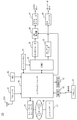
- FIG. 1 is a diagram showing an overall configuration of a video reproduction apparatus according to one embodiment of the present invention.
- a video playback apparatus 100 includes a system controller 10 that controls the entire video playback apparatus 100, a television (TV) tuner 21 that is connected to the system controller 10, and a hard disk drive (HDD) 25.
- a network controller 15, an operation unit 12, a status display unit 13, a buffer memory 27, a separation unit (DEMUX) 31, a video decoder 35, an audio decoder 37, an OSD generation unit 39, a video encoder 41, and a D / A converter 43.
- TV television
- HDD hard disk drive
- the system controller 10 controls the TV tuner 21 when the video playback device 100 functions as a television device, and receives data output from the TV tuner 21.
- the video playback device 100 functions as an HDD recorder
- the data stored in the HDD 25 is read and the data is input.
- the video reproduction apparatus 100 functions as a network player, data received by the network controller 15 from the content server 17 is input.
- the TV tuner 21 is connected to the antenna 21A, and receives a digital audio broadcast signal received by the antenna 21A.
- the broadcast signal is a high frequency digital modulation signal.
- the tuner 21 extracts a signal having a specific frequency from the high-frequency digital modulation signal input from the antenna 21A. Further, the tuner 21 includes a deinterleave circuit and an error correction circuit, demodulates the extracted high frequency digital modulation signal of a specific frequency, and outputs the demodulated transport stream (TS) to the system controller 10.
- the network controller 15 is a communication interface for connecting the video playback device 100 to the network 16.
- the network controller 15 is connected to the network 16, and the system controller 10 can communicate with the content server 17 connected to the network.
- the content server 17 is a DMS (Digital Media Server) that publishes and distributes content.
- the video playback device 100 is a DMP (Digital Media Player) that communicates with the DMS.
- the content server 17 provides a service called CDS (Contents Delivery Service) that distributes a list describing content.
- CDS Contents Delivery Service
- containers and items are configured in a hierarchical structure, and items can have a plurality of resources.
- Video data is data that has been compression-encoded in accordance with the MPEG (Moving Picture Experts Group) standard.
- the content server 17 transmits the stored video data and subtitle data separately in response to a request from the video playback device 100. Therefore, the content server 17 transmits video data in response to a request from the video playback device 100, and transmits caption data in response to a request from the video playback device 100.
- the network controller 15 outputs the received video data to the system controller 10 when receiving the video data from the content server 17, and outputs the received video data to the system controller 10 when receiving the caption data.
- the video playback device 100 can operate in either a playback mode for playing back video data or a recording mode for recording video data.
- the system controller 10 stores the video data in the buffer memory 27.
- the system controller 10 stores the video data in the HDD 25.
- the system controller 10 stores the subtitle data input from the DEMUX 31 in the HDD 25 in association with the video data.
- the DEMUX 31 separates the video data stored in the buffer memory 27 into video data, audio data, and caption data, outputs the video data to the video decoder 32, outputs the audio data to the audio decoder 36, and displays captions. Data is output to the system controller 10.
- the audio decoder 36 decodes the input audio data and outputs the decoded digital audio data to the D / A converter 43.
- the D / A converter 43 converts digital audio data into analog audio data and outputs it.
- the video decoder 35 decodes the input video data by the MPEG method, and outputs the video data (moving image) obtained by the decoding to the OSD generation unit 39.
- the system controller 10 stores the caption data input from the DEMUX 31 in the HDD 25 or the buffer memory 27 and includes the caption character string included in the caption data in the caption data.
- the data is output to the OSD generation unit 39 according to the display time information.
- the display time information includes a caption start time for starting display.
- the system controller 10 acquires the relative time of the video data that it decodes from the video decoder 35, and outputs the caption character string to the OSD generation unit 39 when the relative time becomes the caption start time.
- the relative time acquired from the video decoder 35 is an MPEG PTS (Presentation Time Stamp).
- the system controller 10 stops outputting the subtitle character string to the OSD generation unit 39 according to the display time information included in the subtitle data, and displays the subtitle character string according to the skip instruction.
- the data is output to the OSD generation unit 39.
- the subtitle data specified by the skip instruction is read from the HDD 25, and the subtitle character string of the read subtitle data is output to the OSD generation unit 39.
- the skip instruction includes a past skip instruction for designating subtitle data including a past subtitle start time from subtitle data including a subtitle character string output to the OSD generation unit 39 when the skip instruction is input, and a future subtitle start time.
- the HDD 25 stores video data to be played back and corresponding subtitle data in association with each other. Therefore, when the system controller 10 outputs the subtitle character string to the OSD generation unit 39 according to the display time information included in the subtitle data based on the time acquired from the video decoder 35, the system controller 10 issues a future skip instruction. Can be read from the HDD 25, the subtitle data including the future display time information can be read out, and the subtitle character string included in the subtitle data can be output to the OSD generation unit 39.
- the system controller 10 When the video playback device 100 functions as a network player, the system controller 10 GETs video data and caption data to be played back using HTTP (HyperText Transfer Protocol), and the acquired caption data is stored in the HDD 25. Alternatively, the video data is output to the DEMUX 31 while being stored in the buffer memory 27. Therefore, as in the case where the video playback device 100 functions as an HDD recorder, the system controller 10 decodes the video data acquired from the content server 17 by the video decoder 35 and based on the time acquired from the video decoder 35.
- HTTP HyperText Transfer Protocol
- a subtitle including future display time information from the HDD 25 or the buffer memory 27 Data can be read and the subtitle character string included in the data can be output to the OSD generation unit 39.
- the video playback device 100 functions as a television device that displays video in real time
- the subtitle data corresponding to the video data to be played back is not stored in the HDD 25.
- the system controller 10 cannot acquire subtitle data including display time information in the future from the relative time acquired from the video decoder 35.
- the system controller 10 displays a subtitle character string according to the display time information when a predetermined time has elapsed without the next skip instruction being input. Specifically, the subtitle character string included in the subtitle data specified by the skip instruction is stopped from being output to the OSD generation unit 39, and the subtitle character string included in the subtitle data input from the DEMUX 31 is included in the subtitle data. Is output to the OSD generation unit 39 in accordance with the displayed display time information.
- the OSD generation unit 39 generates an image in which the subtitle character string input from the system controller 10 is superimposed on the video data image input from the video decoder 35, and outputs the generated image to the video encoder 41.
- the video encoder 41 converts an input image into, for example, an NTSC standard analog NTSC signal and outputs it.
- the operation unit 12 includes a plurality of button switches provided on the front surface of the video reproduction device 100.
- the operation unit 12 accepts an input of an instruction from a user who operates the video playback device 100.
- the plurality of button switches include a button switch that accepts an input of a past skip instruction and a button switch that accepts an input of a future skip instruction.
- the operation unit 12 can wirelessly communicate with a remote controller (remote controller) 14 using infrared rays.
- the remote controller 14 has a plurality of button switches for inputting instructions similar to those on the operation unit 12. Therefore, the user can input an instruction similar to that input to the operation unit 12 using the remote controller 14.
- the state display unit 13 is a fluorescent display tube, and displays the operation state of the video reproduction device 100, the user's instruction input to the operation unit 12, and the like.
- a liquid crystal display device an organic EL (Electro Luminescence) display, an LED (Light Emitting Diode) panel, or the like may be used instead of or together with the fluorescent display tube.
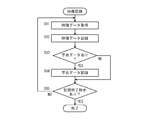
- FIG. 2 is a flowchart showing an example of the flow of video recording processing.
- the video recording process is a process executed by the system controller 10 when the system controller 10 executes a video recording program.
- the system controller 10 acquires video data (step S01).
- the video playback device 100 acquires video data from the TV tuner 21.
- step S02 the acquired video data is recorded in the HDD 25. Then, it is determined whether or not the video data includes caption data (step S03). If the video data includes subtitle data, the process proceeds to step S04. If not, step S04 is skipped and the process proceeds to step S05.
- step S04 the caption data is stored in the HDD 25 in association with the video data stored in the HDD 25 in step S02. Then, it is determined whether or not there is a recording end instruction (step S05). If there is a recording end instruction, the process ends. If not, the process returns to step S01.
- video data is acquired and stored in the HDD 25, and caption data included in the video data is stored in the HDD 25 in association with the video data.
- caption data is read out in synchronization with video data and audio data included in video data.
- video data and audio data included in video data stored in the HDD 25 are respectively decoded.
- subtitle data can be read out. For this reason, subtitle data can be read without synchronizing with playback of moving images and audio.
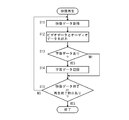
- FIG. 3 is a flowchart showing an example of the flow of video playback processing.
- the video playback process is a process executed by the system controller 10 when the system controller 10 executes a video playback program.
- the system controller 10 acquires video data (step S11).
- the video playback device 100 functions as a television device, the video data is acquired from the TV tuner 21.
- the video playback device 100 functions as an HDD recorder, the video data is acquired from the HDD 25.
- Video data received from the content server 17 is acquired.
- the network controller 15 acquires subtitle data received from the content server 17 and stores it in the HDD 25 or the buffer memory 27.
- video data and audio data included in the acquired video data are output to the video decoder 35 and the audio decoder 37, respectively.
- the video data is stored in the buffer memory 27, and the DEMUX 31 is made to read the video data stored in the buffer memory 27.
- the DEMUX 31 separates the video data into video data, audio data, and subtitle data if the video data includes subtitle data, the video data to the video decoder 35, the audio data to the audio decoder, and the subtitle data to the system. Output to the controller 10.
- step S13 it is determined whether the video data includes caption data. Specifically, it is determined whether or not caption data is input from the DEMUX 31. If subtitle data has been input, the process proceeds to step S14; otherwise, step S14 is skipped and the process proceeds to step S15.
- step S14 the caption data is stored in the HDD 25 or the buffer memory 27.
- the caption data is already stored in the HDD 25, and when the video playback device 100 functions as a network player, the caption data is already stored in the HDD 25 or the buffer memory 27. In this case, it is not necessary to store subtitle data.
- step S15 it is determined whether or not the video data has ended or whether or not there is a playback end instruction. If the video data has ended or if there is a playback end instruction, the process ends. If not, the process returns to step S11.
- video data is acquired, and video data and audio data are output to the video decoder 35 and the audio decoder 37, respectively, so that moving images and audio are played back.
- subtitle data is stored in the HDD 25 or the buffer memory 27 along with playback of moving images and audio.
- the caption data is synchronized with the moving image
- the caption data synchronized with the moving image and the sound reproduced in the past can be read from the HDD 25 or the buffer memory 27.
- caption data is acquired along with the acquisition of the video data, and the caption data is stored in the HDD 25 or the buffer memory 27. For this reason, it is possible to read past caption data or future caption data from the HDD 25 or the buffer memory 27.
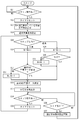
- FIG. 4 is a flowchart showing an example of the flow of skip processing.
- the skip process is a process executed by the system controller 10 when the system controller 10 executes a caption display program.
- the caption display program is a part of the video playback program.
- the caption display process is executed when an interrupt occurs when the system controller 10 is executing a video reproduction program.
- system controller 10 determines whether or not a skip instruction has been accepted (step S21).
- the skip instruction is accepted.
- the process waits until a skip instruction is accepted (NO in step S21). If a skip instruction is accepted, the process proceeds to step S22 (YES in step S21). That is, when the system controller 10 receives a skip instruction during the video reproduction process shown in FIG. 2, the system controller 10 executes the processes after step S22. Note that when the system controller 10 receives a skip instruction, the system controller 10 continuously outputs video data and audio data. For this reason, the reproduction of the moving image and the sound is continuously performed.
- step S22 the timer is reset to “0”.
- the timer measures the time from when the skip instruction is received until the next skip instruction is received.
- the variable N is set to the number of the currently displayed subtitle character string (step S23).
- numbers are assigned in order from 1 to the set of the caption start time and the caption character string of the caption data.
- N a number for specifying a set including a caption character string to be displayed is set.
- next step S24 normal caption display is prohibited. Specifically, the display of the subtitle character string included in the subtitle data is prohibited according to the display time information included in the subtitle data. Accordingly, even when subtitle display is normally prohibited, even when the time of the video data to be decoded is obtained from the video decoder 35 and the subtitle data whose time is the subtitle start time is input from the DEMUX 31. The subtitle character string included in the input subtitle data is not output to the OSD generation unit 39.
- step S25 the process branches depending on the skip direction of the skip instruction received in step S21. If a future skip instruction is accepted, the process proceeds to step S26, and if a past skip instruction is accepted, the process proceeds to step S29. In step S26, the variable N is updated to a value obtained by adding “1”, and the process proceeds to step S27.
- step S27 it is determined whether or not the caption data with the number N is stored in the HDD 25 or the buffer memory 27. If subtitle data with number N is stored, the process proceeds to step S32. If not, the process proceeds to step S28.
- step S ⁇ b> 32 subtitle data including a future subtitle start time is required to be stored in the HDD 25 or the buffer memory 27 than when the future skip instruction is accepted.
- the video playback device 100 functions as an HDD player, subtitle data is stored in the HDD 25 or the buffer memory 27, but since there is no future subtitle than the last subtitle, there is one future subtitle in step S27. It is necessary to confirm whether to do.
- step S27 the variable N is updated to a value obtained by subtracting “1”, and the process proceeds to step S32. This is because there is no subtitle data to be displayed, and thus the display of the currently displayed subtitle character string is maintained.
- step S29 the variable N is updated to a value obtained by subtracting “1”, and the process proceeds to step S30.
- step S30 it is determined whether or not the variable N is a positive value. If variable N is a positive value, there is a subtitle character string stored in the past, so the process proceeds to step S32. Otherwise, the process proceeds to step S31.
- step S31 the variable N is updated to a value obtained by adding “1”, and the process proceeds to step S32. This is because there is no subtitle data to be displayed, and thus the display of the currently displayed subtitle character string is maintained.
- step S32 the caption data with the number N is read from the HDD 25 or the buffer memory 27, and the process proceeds to step S33.
- step S33 the subtitle character string included in the subtitle data with the number N read from the HDD 25 in step S32 is output to the OSD generation unit 39, and a moving image is generated by synthesizing the subtitle character string.
- step S34 it is determined whether or not a skip instruction has been accepted. If a skip instruction is accepted, the process proceeds to step S35; otherwise, the process proceeds to step S36.
- step S01 it is determined whether or not a skip instruction is accepted when normal subtitle display is not prohibited.
- step S34 whether or not a skip instruction is accepted when normal subtitle display is prohibited. The difference is in judging whether or not.
- step S35 the timer is reset to “0”, and the process returns to step S25.
- step S36 it is reset in step S22, and it is determined whether or not the timer value of the timer measuring the elapsed time is equal to or greater than a predetermined threshold value T. If the timer value is equal to or greater than threshold value T, the process proceeds to step S37; otherwise, the process returns to step S34. In step S37, the prohibition of normal subtitle display is canceled, and the process returns to step S21.
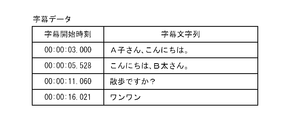
- FIG. 5 is a diagram showing an example of caption data.
- the caption data includes a caption start time and a caption character string.
- the relative time is a time determined by an elapsed time from an arbitrary time at a certain position of the content.
- the description will be made assuming that the beginning of the content is time “0” and the time is determined by the elapsed time from that time.
- the caption start time may be absolute time instead of relative time.
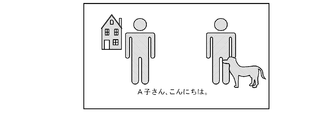
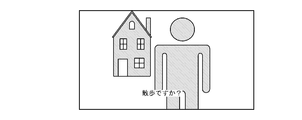
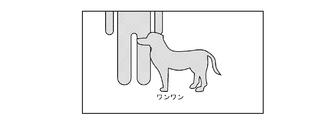
- FIGS. 6A to 6D are diagrams showing an example of a moving image in which a caption character string is synthesized.
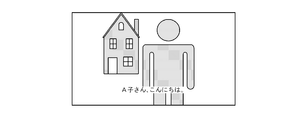
- Figure 6A shows one of the first scene of the moving image, "A child's Hello.” Caption character string as synthesized image.
- FIG. 6B from the first scene shows a second scene of the future, "Hello, B thick-san.”, Which is the subtitle character strings and synthesized image of.
- FIG. 6C shows a third scene in the future from the second scene, and is an image synthesized with a subtitle character string “Is it a walk?”.
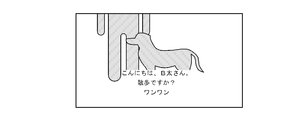
- FIG. 6D shows a fourth scene in the future from the third scene, and is an image synthesized with the subtitle character string “One One”.
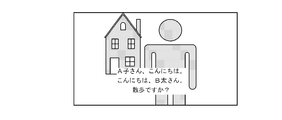
- the image shown in FIG. 7A is output. If the subtitle data including the subtitle character string “Walking?” Displayed at that time is the Nth, subtitle data before and after the subtitle data is determined based on the subtitle data. At the time of accepting the past skip instruction (N-1) th "Hello, B bold san.” Included in the subtitle data is subtitle character string is combined with the image of the third scene is output.
- the video reproduction apparatus 100 acquires video data including video data, audio data, and caption data synchronized therewith from the TV tuner 21, HDD 25, or network controller 15, and converts it into caption data.
- the subtitle character string included is displayed when the relative time is the subtitle start time included in the subtitle data, and when a past skip instruction or future skip instruction is accepted, the subtitle character string included in the subtitle data is included in the subtitle data. It is displayed at a different timing from the caption start time. For this reason, if a user inputs a past skip instruction or a future skip instruction, a subtitle character string displayed in the past or a subtitle character string scheduled to be displayed in the future can be displayed on the displayed moving image. .
- subtitle data synchronized with a moving image to be reproduced is displayed.
- the subtitle character string is displayed. For this reason, it is possible to easily return the display of the subtitle character string to the display synchronized with the moving image.
- the video playback device 100 When the video playback device 100 functions as a television device, the caption data included in the video data acquired from the TV tuner 21 is stored in the HDD 25 or the buffer memory 27 in association with the video data. Therefore, the received video data is reproduced and the character string included in the subtitle data stored in the HDD 25 or the buffer memory 27 is displayed, so that the subtitles displayed in the past with respect to the reproduced video are displayed.
- the subtitle character string included in the data can be displayed.
- the network controller 15 receives video data from the content server 17 and also receives subtitle data associated with the video data from the content server 17. It is stored in the HDD 25 or the buffer memory 27. For this reason, the received video data is reproduced and the subtitle character string included in the subtitle data stored in the HDD 25 or the buffer memory 27 is displayed, so that the video being reproduced has been displayed in the past. A character string included in subtitle data or a subtitle character string included in subtitle data scheduled to be displayed in the future can be displayed.
- the video playback device 100 functions as an HDD player
- the stored video data is played back and the subtitle character string included in the subtitle data stored in the HDD 25 is displayed.
- a character string included in subtitle data displayed in the past or a subtitle character string included in subtitle data scheduled to be displayed in the future can be displayed.
- the subtitle characters included in the past subtitle data from the subtitle character string currently displayed among the subtitle data including the subtitle character strings stored in chronological order in the HDD 25 or the buffer memory 27 are displayed. Since the columns are displayed, it is possible to display subtitle character strings that have been displayed in the past.
- the video playback apparatus 100 has been described.
- the content server 17 extracts the caption data from the video data by executing the video recording process shown in FIG. In association with the video data, it is stored in the HDD provided in the content server 17.
- the content server 17 transmits video data stored in the HDD when the video playback device 100 that functions as a network player is requested to transmit video data, and the video playback device 100 requests transmission of caption data. Then, the caption data stored in the HDD is transmitted.
- the subtitles displayed so far disappear and only the target subtitle after skipping is displayed on the screen, but the subtitle display area is increased. A plurality of subtitles may be displayed.
- FIG. 8A, FIG. 8B, and FIG. 9 are other diagrams showing an example of a moving image in which a caption character string is synthesized.
- the image shown in FIG. 8A is output.
- the subtitle data including the subtitle character string “Is it a walk?” Displayed when outputting the image of the third scene shown in FIG. 6C is the Nth subtitle data, the subtitle data before and after this subtitle data is used as a reference. Is determined.
- FIG. 8B When the user inputs a past skip instruction to the operation unit 12, an image shown in FIG. 8B is output. A new subtitle display area is provided at the top of the character string while retaining the subtitle character string that has been displayed up to the point in time when the past skip instruction is received, and “A-2” included in the (N-2) th subtitle data child's, Hello. subtitles string "is combined with the image of the third scene, is output.
- the character string of the (N ⁇ 1) th subtitle data is displayed in the bottom area, and (N ⁇ 2)
- the character string of the subtitle data is displayed in the center area, and the character string of the (N-3) th subtitle data that is the target subtitle data after skipping is displayed in the top area.
- step S24 and step S37 are unnecessary in the processing procedure of FIG.
- the timer value may be used as a threshold value for automatically erasing the caption display after skipping, and if not automatically erasing, the processing of steps S22, S35, and S36 is also unnecessary.
- the image shown in FIG. 9 is output. Thereafter, the subtitle of the playback scene is displayed in the bottom area, the previous subtitle is displayed in the center area, and the previous subtitle is displayed in the top area.
- video playback device 100 acquires from the TV tuner 21.
- the caption data synchronized with the video data may be received from the content server 17.
- the invention can be understood as a caption display method for executing the processes of FIGS. 2 to 4 and a caption display program for causing a computer to execute the caption display method.
Landscapes
- Engineering & Computer Science (AREA)
- Multimedia (AREA)
- Signal Processing (AREA)
- Databases & Information Systems (AREA)
- Human Computer Interaction (AREA)
- Television Signal Processing For Recording (AREA)
- Two-Way Televisions, Distribution Of Moving Picture Or The Like (AREA)
- Signal Processing For Digital Recording And Reproducing (AREA)
- Indexing, Searching, Synchronizing, And The Amount Of Synchronization Travel Of Record Carriers (AREA)
Abstract
【課題】 字幕の文字列を映像とは異なるタイミングで表示させること。
【解決手段】 映像再生装置は、ビデオデータ、オーディオデータおよびそれらに同期する字幕データを含む映像データを取得するデータ取得手段と、ビデオデータおよびオーディオデータを再生する映像再生手段と、字幕データを記憶するHDDと、ユーザによる操作を受け付ける操作部と、字幕データに含まれる字幕文字列を、該字幕データに含まれる表示時刻情報で定まるタイミングで表示する第1表示手段と、操作部によりスキップ指示が受け付けられることに応じて(S21でYES)、第1表示手段による通常字幕表示を禁止し(S24)、字幕データに含まれる字幕文字列を該字幕データに含まれる表示時刻情報で定まるタイミングとは異なるタイミングで表示する第2表示手段(S33)と、を備える。
Description
この発明は、映像再生装置、映像再生システム、コンテンツサーバ、字幕表示方法および字幕表示プログラムに関し、特に動画に字幕を表示する機能を備えた映像再生装置、映像再生システム、コンテンツサーバ、字幕表示方法および字幕表示プログラムに関する。
近年、テレビジョン放送における映画などのコンテンツ、DVD(Digital Versatile Disc)またはHD DVD(High Difinition DVD)規格でディスクに記録されたコンテンツは、音声を文字で表した字幕情報が付与される場合がある。字幕情報は、再生される動画に同期して文字を再生することができるように、再生される文字と、再生される動画のどこからどこまで文字を表示するかを示す情報とを含む。しかしながら、字幕情報が動画に同期することなく表示されることが望まれる場合がある。例えば、ユーザが字幕のすべてを読むことができなかった場合などである。
特開2003-18491号公報には、記憶装置に記憶された多重化された時間情報を有するストリームを時間情報を保持したまま分離し、分離した情報が字幕情報ならば、字幕とその時間情報を字幕リスト保持用メモリに保持し、分離した情報が映像情報ならば、時間情報を基にその映像情報に対応する時間情報の字幕履歴と合成して出力し、分離した情報が音声情報ならば、時間情報を基にその音声情報に対応した映像と同じタイミングで出力を行い、字幕履歴の特定の字幕を選択すると、字幕リスト保持用メモリに記憶されているその字幕に対応した時間情報を基に、上記ストリーム出力を制御する字幕表示装置が記載されている。
しかしながら、従来の字幕表示装置は、現在の字幕とともに過去の字幕が、映像が表示される領域とは別に表示されるため、映像を表示する領域が狭くなり、映像を見づらくなるといった問題があった。
特開2003-18491号公報
この発明は上述した問題点を解決するためになされたもので、この発明の目的の一つは、映像の再生を継続しつつ、字幕の文字列を映像とは異なるタイミングで表示させることが可能な映像再生装置を提供することである。
この発明の他の目的は、映像の再生を継続しつつ、字幕の文字列を映像とは異なるタイミングで表示させることが可能な映像再生システムを提供することである。
この発明のさらに他の目的は、映像再生装置側における字幕表示制御を容易化することが可能なコンテンツサーバを提供することである。
この発明のさらに他の目的は、映像の再生を継続しつつ、字幕の文字列を映像とは異なるタイミングで表示させることが可能な字幕表示方法を提供することである。
この発明のさらに他の目的は、映像の再生を継続しつつ、字幕の文字列を映像とは異なるタイミングで表示させることが可能な字幕表示プログラムを提供することである。
上述した目的を達成するためにこの発明のある局面によれば、映像再生装置は、映像信号および該映像信号に同期する字幕情報を取得するデータ取得手段と、映像信号を再生する映像再生手段と、字幕情報を記憶する字幕情報記憶手段と、ユーザによる操作を受け付ける操作受付手段と、字幕情報に含まれる文字列を、該字幕情報に含まれるタイミング情報で定まるタイミングで表示する第1表示手段と、操作受付手段により所定の操作が受け付けられることに応じて、字幕情報に含まれる文字列を該字幕情報に含まれるタイミング情報で定まるタイミングとは異なるタイミングで表示する第2表示手段と、を備える。
この局面に従えば、映像信号および該映像信号に同期する字幕情報が取得され、字幕情報に含まれる文字列が、該字幕情報に含まれるタイミング情報で定まるタイミングで表示され、所定の操作が受け付けられることに応じて、字幕情報に含まれる文字列が該字幕情報に含まれるタイミング情報で定まるタイミングとは異なるタイミングで表示される。このため、ユーザが所定の操作をすれば、表示される映像に対して過去に表示された文字列または未来に表示される予定の文字列を表示させることができる。その結果、映像の再生を継続しつつ、字幕の文字列を映像とは異なるタイミングで表示させることが可能な映像再生装置を提供することができる。
好ましくは、第2表示手段は、所定の操作が受け付けられてから次の所定の操作が受け付けられることなく所定の時間経過すると、表示を中止し、第1表示手段に表示させる。
この局面に従えば、所定の操作が受け付けられてから次の操作が受け付けられることなく所定の時間経過すると、再生される映像に同期する字幕情報の文字列が表示される。このため、字幕の文字列の表示を映像に同期した表示に容易に戻すことができる。
好ましくは、取得された映像信号を記憶する映像信号記憶手段をさらに備え、映像再生手段は、映像信号記憶手段に記憶された映像信号を再生し、第2表示手段は、字幕情報記憶手段に記憶された字幕情報を表示する。
この局面に従えば、記憶された映像信号を再生しているときに、記憶された字幕情報に含まれる文字列が表示されるので、再生されている映像に対して未来に表示される予定の字幕情報に含まれる文字列を表示することができる。
好ましくは、第2表示手段は、操作受付手段により過去に表示された文字列の表示を指示する過去スキップ操作が受け付けられた場合、字幕情報記憶手段に時系列順に記憶される字幕情報のうち現在表示している文字列を含む字幕情報より過去の字幕情報に含まれる文字列を表示する。
好ましくは、第2表示手段は、字幕情報記憶手段に時系列順に記憶された字幕情報のうち過去スキップ操作を受け付ける回数だけ過去の字幕情報に含まれる文字列を表示する。
好ましくは、第2表示手段は、操作受付手段により未来に表示する予定の文字列の表示を指示する未来スキップ操作が受け付けられた場合、字幕情報記憶手段に時系列順に記憶された字幕情報のうち現在表示している文字列を含む字幕情報より1つ未来の字幕情報に含まれる文字列を表示する。
好ましくは、前記第2表示手段は、前記所定の操作が複数受け付けられる場合、前記複数の所定の操作のうち最後に受け付けられた所定の操作、および該最後から所定数前に受け付けられた所定の操作それぞれに対応する複数の前記字幕情報にそれぞれ含まれる複数の文字列を表示する。
好ましくは、前記第2表示手段は、前記第1表示手段による表示を禁止する。
この発明の他の局面によれば、映像再生システムは、コンテンツサーバと映像再生装置とを含む再生システムであって、コンテンツサーバは、映像信号を記憶する映像記憶手段と、映像信号に関連付けて映像信号に同期する字幕情報を記憶する字幕情報記憶手段と、外部からの要求により記憶された映像信号を送信する映像送信手段と、外部からの要求により記憶された字幕情報を送信する字幕情報送信手段と、を備え、映像再生装置は、コンテンツサーバから映像信号を取得する映像信号取得手段と、取得された映像信号を再生する映像再生手段と、取得される映像信号に対応する字幕情報をコンテンツサーバから取得する字幕情報取得手段と、取得された字幕情報を記憶する字幕情報記憶手段と、ユーザによる操作を受け付ける操作受付手段と、字幕情報に含まれる文字列を、該字幕情報に含まれるタイミング情報で定まるタイミングで表示する第1表示手段と、操作受付手段により所定の操作が受け付けられることに応じて、字幕情報に含まれる文字列を該字幕情報に含まれるタイミング情報で定まるタイミングとは異なるタイミングで表示する第2表示手段と、を備える。
この局面に従えば、映像の再生を継続しつつ、字幕の文字列を映像とは異なるタイミングで表示させることが可能な映像再生システムを提供することができる。
好ましくは、コンテンツサーバと映像再生装置それぞれは、ネットワークを介して通信する通信手段を備える。
この発明のさらに他の局面によれば、コンテンツサーバは、映像信号および該映像信号に同期する字幕情報を取得するデータ取得手段と、映像信号を記憶する映像記憶手段と、取得された字幕情報をそれが同期する映像信号に関連付けて記憶する字幕情報記憶手段と、外部からの要求により記憶された映像信号を送信する映像送信手段と、外部からの要求により記憶された字幕情報を送信する字幕情報送信手段と、を備える。
この局面に従えば、映像信号と、この映像信号に対応する字幕信号を別々に送信するので映像再生装置側における字幕表示制御を容易化することが可能なコンテンツサーバを提供することができる。
この発明のさらに他の局面に従えば、映像再生装置は、映像信号を取得する映像信号取得手段と、取得された映像信号を再生する映像再生手段と、取得される映像信号に同期する字幕情報を取得する字幕情報取得手段と、取得された字幕情報を記憶する字幕情報記憶手段と、ユーザによる操作を受け付ける操作受付手段と、字幕情報に含まれる文字列を、該字幕情報に含まれるタイミング情報で定まるタイミングで表示する第1表示手段と、操作受付手段により所定の操作が受け付けられることに応じて、字幕情報に含まれる文字列を該字幕情報に含まれるタイミング情報で定まるタイミングとは異なるタイミングで表示する第2表示手段と、を備える。
この局面に従えば、映像の再生を継続しつつ、字幕の文字列を映像とは異なるタイミングで表示させることが可能な映像再生装置を提供することができる。
この発明の他の局面によれば、字幕表示方法は、少なくとも映像信号および該映像信号に同期する字幕情報を取得するステップと、映像信号を再生するステップと、字幕情報を記憶するステップと、ユーザによる操作を受け付けるステップと、字幕情報に含まれる文字列を、該字幕情報に含まれるタイミング情報で定まるタイミングで表示するステップと、操作受付手段により所定の操作が受け付けられることに応じて、字幕情報に含まれる文字列を該字幕情報に含まれるタイミング情報で定まるタイミングとは異なるタイミングで表示するステップと、を含む。
この局面に従えば、映像の再生を継続しつつ、字幕の文字列を映像とは異なるタイミングで表示させることが可能な字幕表示方法を提供することができる。
この発明のさらに他の局面に従えば、字幕表示プログラムは、映像信号および該映像信号に同期する字幕情報を取得するステップと、映像信号を再生するステップと、字幕情報を記憶するステップと、ユーザによる操作を受け付けるステップと、字幕情報を、該字幕情報に含まれるタイミング情報で定まるタイミングで字幕情報を表示するステップと、操作受付手段により所定の操作が受け付けられることに応じて、字幕情報に含まれる文字列を該字幕情報に含まれるタイミング情報で定まるタイミングとは異なるタイミングで表示するステップと、をコンピュータに実行させる。
この局面に従えば、映像の再生を継続しつつ、字幕の文字列を映像とは異なるタイミングで表示させることが可能な字幕表示プログラムを提供することができる。
10 システムコントローラ、12 操作部、13 状態表示部、14 リモコン、15 ネットワークコントローラ、16 ネットワーク、17 コンピュータ、21 TVチューナ、25 HDD、27 バッファメモリ、31 DEMUX、35 ビデオデコーダ、37 オーディオデコーダ、39 OSD生成部、41 ビデオエンコーダ、43 D/Aコンバータ、100 映像再生装置。
以下、図面を参照しつつ、本発明の実施の形態について説明する。以下の説明では、同一の部品には同一の符号を付してある。それらの名称および機能も同じである。したがってそれらについての詳細な説明は繰返さない。
図1は、本発明の実施の形態の1つにおける映像再生装置の全体構成を示す図である。図1を参照して、映像再生装置100は、映像再生装置100の全体を制御するシステムコントローラ10と、それぞれがシステムコントローラ10に接続されたテレビジョン(TV)チューナ21、ハードディスクドライブ(HDD)25、ネットワークコントローラ15、操作部12、状態表示部13、バッファメモリ27、分離部(DEMUX)31、ビデオデコーダ35、オーディオデコーダ37、OSD生成部39、ビデオエンコーダ41およびD/Aコンバータ43を含む。
システムコントローラ10は、映像再生装置100がテレビジョン装置として機能する場合はTVチューナ21を制御し、TVチューナ21が出力するデータが入力される。また、映像再生装置100が、HDDレコーダとして機能する場合はHDD25に記憶されたデータを読出し、そのデータが入力される。さらに、映像再生装置100がネットワークプレーヤとして機能する場合、ネットワークコントローラ15がコンテンツサーバ17から受信するデータが入力される。
TVチューナ21は、アンテナ21Aに接続されており、アンテナ21Aにより受信されたデジタル音声の放送信号が入力される。放送信号は、高周波デジタル変調信号である。チューナ21は、アンテナ21Aから入力される高周波デジタル変調信号から特定の周波数の信号を取り出す。また、チューナ21は、逆インターリーブ回路、誤り訂正回路を備えており、取り出した特定の周波数の高周波デジタル変調信号を復調し、復調したトランスポートストリーム(TS)をシステムコントローラ10に出力する。
ネットワークコントローラ15は、映像再生装置100をネットワーク16に接続するための通信用のインターフェースである。ここでは、ネットワークコントローラ15は、ネットワーク16に接続されており、システムコントローラ10は、そのネットワークに接続されたコンテンツサーバ17と通信可能となっている。
コンテンツサーバ17は、コンテンツを公開および配信するDMS(Digital Media Server)である。映像再生装置100は、ネットワークプレーヤとして機能する場合、DMSと通信するDMP(Digital Media Player)である。コンテンツサーバ17は、コンテンツを記述したリストを配信するCDS(Contents Deliverry Serveice)と呼ばれるサービスを提供する。CDSにおいては、コンテナとアイテムが階層構造で構成され、アイテムは複数のリソースを有することができる。ここでは、コンテンツサーバ17が、同一アイテム上に映像データとその映像データに対応する字幕データとのリソースを有する場合を例に説明する。映像データは、MPEG(Moving Picture Experts Group)規格で圧縮符号化されたデータである。コンテンツサーバ17は、映像再生装置100からの要求により、蓄積した映像データと字幕データとを別々に送信する。このため、コンテンツサーバ17は、映像再生装置100からの要求により映像データを送信し、映像再生装置100からの要求により字幕データを送信する。ネットワークコントローラ15は、コンテンツサーバ17から映像データを受信すると、受信した映像データをシステムコントローラ10に出力し、字幕データを受信すると受信した映像データをシステムコントローラ10に出力する。
映像再生装置100は、映像データを再生する再生モードと、映像データを記録する録画モードとのいずれかで動作することが可能である。映像再生装置100が再生モードで動作するとき、システムコントローラ10は、映像データをバッファメモリ27に記憶する。一方、映像再生装置100が録画モードで動作するとき、システムコントローラ10は、映像データをHDD25に記憶する。さらに、録画モードの場合、システムコントローラ10は、DEMUX31から入力される字幕データを、映像データと関連付けてHDD25に記憶する。
DEMUX31は、バッファメモリ27に記憶された映像データを、ビデオデータと、オーディオデータと、字幕データとに分離し、ビデオデータをビデオデコーダ32に出力し、オーディオデータをオーディオデコーダ36に出力し、字幕データをシステムコントローラ10に出力する。
オーディオデコーダ36は、入力されるオーディオデータをデコードして、デコードしたデジタルのオーディオデータをD/Aコンバータ43に出力する。D/Aコンバータ43は、デジタルのオーディオデータをアナログの音声データに変換し、出力する。
ビデオデコーダ35は、入力されるビデオデータをMPEG方式で復号し、復号して得られるビデオデータ(動画像)をOSD生成部39に出力する。
システムコントローラ10は、映像再生装置100が再生モードで動作するとき、DEMUX31から入力される字幕データをHDD25またはバッファメモリ27に記憶するとともに、字幕データに含まれる字幕文字列を、字幕データに含まれる表示時刻情報に従ってOSD生成部39に出力する。表示時刻情報は、表示を開始する字幕開始時刻を含む。具体的には、システムコントローラ10は、ビデオデコーダ35からそれが復号するビデオデータの相対時刻を取得し、その相対時刻が字幕開始時刻になると、字幕文字列をOSD生成部39に出力する。ビデオデコーダ35から取得される相対時刻は、MPEGのPTS(Presentation Time Stamp)である。
さらにシステムコントローラ10は、操作部12からスキップ指示が入力されると、字幕データに含まれる表示時刻情報に従って字幕文字列をOSD生成部39に出力するのを中止し、スキップ指示に従って字幕文字列をOSD生成部39に出力する。具体的には、スキップ指示で特定される字幕データをHDD25から読出し、読み出した字幕データの字幕文字列をOSD生成部39に出力する。スキップ指示は、それが入力された時にOSD生成部39に出力している字幕文字列を含む字幕データより過去の字幕開始時刻を含む字幕データを指定する過去スキップ指示と、未来の字幕開始時刻を含む字幕データを指定する未来スキップ指示と、を含む。
映像再生装置100が、HDDレコーダとして機能する場合、HDD25には、再生の対象となる映像データとそれに対応する字幕データとが関連付けて記憶されている。このため、システムコントローラ10は、ビデオデコーダ35から取得した時刻に基づいて字幕データに含まれる表示時刻情報に従って字幕文字列をOSD生成部39に出力しているときに、未来スキップ指示を操作部12から受け付ける場合、HDD25から未来の表示時刻情報を含む字幕データを読み出し、それに含まれる字幕文字列をOSD生成部39に出力することができる。
また、映像再生装置100が、ネットワークプレーヤとして機能する場合、システムコントローラ10は、HTTP(HyperText Transfer Protocol)を用いて再生の対象となる映像データと字幕データとをGETし、取得した字幕データをHDD25またはバッファメモリ27に記憶するとともに、映像データをDEMUX31に出力する。このため、映像再生装置100がHDDレコーダとして機能する場合と同様に、システムコントローラ10は、コンテンツサーバ17から取得された映像データがビデオデコーダ35によりデコードされ、ビデオデコーダ35から取得した時刻に基づいて字幕データに含まれる表示時刻情報に従って字幕文字列をOSD生成部39に出力しているときに、未来スキップ指示を操作部12から受け付ける場合、HDD25またはバッファメモリ27から未来の表示時刻情報を含む字幕データを読み出し、それに含まれる字幕文字列をOSD生成部39に出力することができる。
一方、リアルタイムに映像を表示するテレビジョン装置として映像再生装置100が機能する場合は、HDD25に再生の対象となる映像データに対応する字幕データが記憶されていない。このため、システムコントローラ10は、ビデオデコーダ35から取得した相対時刻より未来の表示時刻情報を含む字幕データを取得することができない。
また、システムコントローラ10は、操作部12からスキップ指示が入力された後、次のスキップ指示が入力されることなく所定時間経過すると、表示時刻情報に従って字幕文字列を表示する。具体的には、スキップ指示で特定される字幕データに含まれる字幕文字列をOSD生成部39に出力するのを中止し、DEMUX31から入力される字幕データに含まれる字幕文字列を字幕データに含まれる表示時刻情報に従ってOSD生成部39に出力する。
OSD生成部39は、ビデオデコーダ35から入力されるビデオデータの画像に、システムコントローラ10から入力される字幕文字列を、重畳した画像を生成し、生成した画像をビデオエンコーダ41に出力する。ビデオエンコーダ41は、入力される画像を、例えば、NTSC規格のアナログのNTSC信号に変換し、出力する。
操作部12は、映像再生装置100の前面に備えられた複数のボタンスイッチを有する。操作部12では、映像再生装置100を操作するユーザの指示の入力が受付けられる。複数のボタンスイッチは、過去スキップ指示の入力を受け付けるボタンスイッチと、未来スキップ指示の入力を受け付けるボタンスイッチとを含む。また、操作部12は、リモートコントローラ(リモコン)14と赤外線による無線通信が可能となっている。リモコン14は、操作部12と同様の指示を入力するための複数のボタンスイッチを有する。このため、ユーザは、操作部12に入力するのと同様の指示を、リモコン14を用いて入力することができる。
状態表示部13は、蛍光表示管であり、映像再生装置100の動作状態の表示、操作部12に入力されたユーザの指示の表示等を行う。なお、蛍光表示管に代えて、または、それとともに液晶表示装置、有機EL(Electro Luminescence)ディスプレイまたはLED(Light Emitting Diode)パネル等を用いてもよい。
図2は、映像記録処理の流れの一例を示すフローチャートである。映像記録処理は、システムコントローラ10が映像記録プログラムを実行することにより、システムコントローラ10により実行される処理である。図2を参照して、システムコントローラ10は、映像データを取得する(ステップS01)。映像再生装置100はTVチューナ21から映像データを取得する。
次のステップS02においては、取得された映像データをHDD25に記録する。そして、映像データが字幕データを含むか否かを判断する(ステップS03)。映像データが字幕データを含む場合、処理をステップS04に進めるが、そうでなければステップS04をスキップして処理をステップS05に進める。
ステップS04においては、字幕データを、ステップS02においてHDD25に記憶された映像データと関連付けてHDD25に記憶する。そして、記録終了指示があるか否かを判断する(ステップS05)。記録終了指示があるならば処理を終了し、そうでなければ処理をステップS01に戻す。
映像記録処理においては、映像データが取得され、HDD25に記憶されるとともに、映像データに含まれる字幕データがHDD25に映像データと関連付けて記憶される。字幕データは通常、映像データに含まれるビデオデータおよびオーディオデータと同期して読み出されるが、後述する映像再生処理において、HDD25に記憶された映像データに含まれるビデオデータおよびオーディオデータをそれぞれデコードして動画像と音声とが再生されるのとは別に、字幕データを読み出すことができる。このため、動画像と音声との再生と同期することなく、字幕データを読み出すことができる。
図3は、映像再生処理の流れの一例を示すフローチャートである。映像再生処理は、システムコントローラ10が映像再生プログラムを実行することにより、システムコントローラ10により実行される処理である。図3を参照して、システムコントローラ10は、映像データを取得する(ステップS11)。映像再生装置100が、テレビジョン装置として機能する場合はTVチューナ21から映像データを取得し、HDDレコーダとして機能する場合はHDD25から映像データを取得し、ネットワークプレーヤとして機能する場合はネットワークコントローラ15がコンテンツサーバ17から受信する映像データを取得する。なお、映像再生装置100がネットワークプレーヤとして機能する場合、ネットワークコントローラ15がコンテンツサーバ17から受信する字幕データを取得し、HDD25またはバッファメモリ27に記憶する。
次のステップS12においては、取得された映像データに含まれるビデオデータとオーディオデータとをそれぞれビデオデコーダ35およびオーディオデコーダ37に出力する。具体的には、映像データをバッファメモリ27に記憶し、DEMUX31にバッファメモリ27に記憶された映像データを読み出させる。DEMUX31は、映像データをビデオデータと、オーディオデータと、映像データが字幕データを含む場合には字幕データとに分離し、ビデオデータをビデオデコーダ35に、オーディオデータをオーディオデコーダに、字幕データをシステムコントローラ10に出力する。
ステップS13においては、映像データが字幕データを含むか否かを判断する。具体的には、DEMUX31から字幕データが入力されたか否かを判断する。字幕データが入力されたならば処理をステップS14に進め、そうでなければステップS14をスキップして処理をステップS15に進める。
ステップS14においては、字幕データを、HDD25またはバッファメモリ27に記憶する。なお、映像再生装置100が、HDDレコーダとして機能する場合、字幕データが既にHDD25に記憶されており、ネットワークプレーヤとして機能する場合、字幕データが既にHDD25またはバッファメモリ27に記憶されているので、これらの場合には字幕データを記憶する必要はない。
そして、映像データが終了したか否か、または再生終了指示があるか否かを判断する(ステップS15)。映像データが終了した、または再生終了指示があるならば処理を終了し、そうでなければ処理をステップS11に戻す。
映像再生処理においては、映像データが取得され、ビデオデータとオーディオデータとをビデオデコーダ35およびオーディオデコーダ37にそれぞれ出力することにより、動画像と音声とが再生される。また、映像再生装置100がテレビジョン装置として機能する場合、動画像と音声との再生とともに、字幕データがHDD25またはバッファメモリ27に記憶される。字幕データは動画像と同期するが、過去に再生された動画像と音声とに同期する字幕データをHDD25またはバッファメモリ27から読み出すことが可能になる。また、映像再生装置100がネットワークプレーヤとして機能する場合、映像データの取得とともに、字幕データが取得され、字幕データがHDD25またはバッファメモリ27に記憶される。このため、HDD25またはバッファメモリ27から過去の字幕データまたは未来の字幕データを読み出すことが可能になる。
図4は、スキップ処理の流れの一例を示すフローチャートである。スキップ処理は、システムコントローラ10が字幕表示プログラムを実行することにより、システムコントローラ10により実行される処理である。字幕表示プログラムは、映像再生プログラムの一部である。字幕表示処理は、システムコントローラ10が映像再生プログラムを実行しているときに、割り込みが発生することにより実行される。
図4を参照して、システムコントローラ10は、スキップ指示を受け付けたか否かを判断する(ステップS21)。ユーザが、操作部12が備える過去スキップ指示の入力を受け付けるボタンスイッチと、未来スキップ指示の入力を受け付けるボタンスイッチとのいずれかを押下すると、スキップ指示を受け付ける。スキップ指示を受け付けるまで待機状態となり(ステップS21でNO)、スキップ指示を受け付けたならば処理をステップS22に進める(ステップS21でYES)。すなわち、システムコントローラ10は、図2に示した映像再生処理を実行中に、スキップ指示を受け付けると、ステップS22以降の処理を実行する。なお、システムコントローラ10は、スキップ指示を受け付けた場合、ビデオデータとオーディオデータの出力を継続して行う。このため、動画像と音声との再生が継続して行われる。
ステップS22においては、タイマを「0」にリセットする。タイマは、スキップ指示を受け付けてから次のスキップ指示を受け付けるまでの時間を計時する。そして、変数Nを現在表示している字幕文字列の番号に設定する(ステップS23)。ここでは、字幕データの字幕開始時刻と字幕文字列との組にそれぞれ1から順番に番号が付されているとする。変数Nは、表示する対象となる字幕文字列を含む組を特定するための番号が設定される。
次のステップS24においては、通常字幕表示を禁止する。具体的には、字幕データに含まれる表示時刻情報に従って字幕データに含まれる字幕文字列を表示するのを禁止する。したがって、通常字幕表示が禁止されている状態では、ビデオデコーダ35からそれが復号するビデオデータの時刻を取得し、その時刻が字幕開始時刻になる字幕データをDEMUX31から入力された場合であっても、その入力された字幕データに含まれる字幕文字列をOSD生成部39に出力しない。
ステップS25においては、ステップS21において受け付けられたスキップ指示のスキップ方向により処理を分岐させる。未来スキップ指示が受け付けられたならば処理をステップS26に進め、過去スキップ指示が受け付けられたならば処理をステップS29に進める。ステップS26においては、変数Nを「1」加算した値に更新し、処理をステップS27に進める。
ステップS27においては、番号Nが付された字幕データがHDD25またはバッファメモリ27に記憶されているか否かを判断する。番号Nが付された字幕データが記憶されていれば処理をステップS32に進めるが、そうでなければ処理をステップS28に進める。処理がステップS32に進む場合、未来スキップ指示が受け付けられた時よりも未来の字幕開始時刻を含む字幕データがHDD25またはバッファメモリ27に記憶されている必要がある。映像再生装置100がHDDプレーヤとして機能する場合は、HDD25またはバッファメモリ27に字幕データが記憶されているが、最後の字幕よりも未来の字幕は存在しないのでステップS27において1つ未来の字幕が存在するか確認する必要がある。また、テレビジョン装置として機能する場合は、字幕スキップ処理中もテレビジョン放送の字幕がHDD25またはバッファメモリ27に記憶されていくので、字幕スキップ処理開始時よりも未来の字幕が存在する。そのため、ステップS27において1つ未来の字幕が存在するか確認する必要がある。ステップS27において1つ未来の字幕が存在しなければ処理をステップS28に進めることになる。ステップS28においては、変数Nを「1」減算した値に更新し、処理をステップS32に進める。表示する字幕データが存在しないため、現在表示されている字幕文字列の表示を維持するためである。
一方、ステップS29においては、変数Nを「1」減算した値に更新し、処理をステップS30に進める。ステップS30においては、変数Nが正の値か否かを判断する。変数Nが正の値ならば過去に記憶された字幕文字列が存在するので、処理をステップS32に進め、そうでなければ処理をステップS31に進める。ステップS31においては、変数Nを「1」加算した値に更新し、処理をステップS32に進める。表示する字幕データが存在しないため、現在表示されている字幕文字列の表示を維持するためである。
ステップS32においては、番号Nが付された字幕データをHDD25またはバッファメモリ27から読出し、処理をステップS33に進める。
ステップS33においては、ステップS32においてHDD25から読み出された番号Nが付された字幕データに含まれる字幕文字列を、OSD生成部39に出力し、字幕文字列を合成した動画像を生成させる。
次のステップS34においては、ステップS01と同様に、スキップ指示を受け付けたか否かを判断する。スキップ指示を受け付けたならば処理をステップS35に進め、そうでなければ処理をステップS36に進める。ステップS01では、通常字幕表示が禁止されていないときにスキップ指示が受け付けられたか否かを判断するのに対し、ステップS34においては、通常字幕表示が禁止されているときにスキップ指示が受け付けられたか否かを判断する点が異なる。ステップS35においては、タイマを「0」にリセットし、処理をステップS25に戻す。
ステップS36においては、ステップS22においてリセットされ、経過時間を計時しているタイマのタイマ値が予め定められたしきい値T以上となったか否かを判断する。タイマ値がしきい値T以上ならば処理をステップS37に進め、そうでなければ処理をステップS34に戻す。ステップS37においては、通常字幕表示の禁止を解除し、処理をステップS21に戻す。
スキップ指示が受け付けられると、通常字幕表示が禁止されるが、通常字幕表示が禁止されてからしきい値Tの時間が経過する前に次のスキップ指示が受け付けられると、タイマがリセットされるので、通常字幕表示の禁止が継続される。逆に、通常字幕表示が禁止されてからしきい値Tの時間が経過する前に次のスキップ指示が受け付けられなければ、通常字幕表示の禁止が解除される。このため、ユーザは、スキップ指示を操作部12に入力してから字幕文字列の表示を動画像の再生に同期させるためには、しきい値Tが経過するまで次のスキップ指示を入力しなければよい。したがって、字幕文字列の表示を動画像の再生に同期させる通常字幕表示に容易に戻すことができる。
図5は、字幕データの一例を示す図である。字幕データは、字幕開始時刻と、字幕文字列とを含む。ここでは、字幕開始時刻を相対時刻とする例を説明する。相対時刻は、コンテンツのある位置の任意の時刻を基準とし、それからの経過時間で定まる時刻である。ここでは、コンテンツの先頭を時刻「0」とし、それからの経過時間で定まる時刻として説明する。なお、字幕開始時刻を相対時刻とするのではなく、絶対時刻とするようにしてもよい。
図5に示した字幕データに従って字幕文字列を表示する場合、相対時刻が「00:00:03.000」になると、字幕文字列「A子さん、こんにちは。」が動画像と合成され、次に相対時刻が「00:00:05.528」になると、それまで動画像に合成されていた字幕文字列「A子さん、こんにちは」に代えて、字幕文字列「こんにちは、B太さん。」が動画像と合成され、次に相対時刻が「00:00:11.060」になると、それまで動画像に合成されていた字幕文字列「こんにちは、B太さん。」に代えて、字幕文字列「散歩ですか?」が動画像と合成され、さらに相対時刻が「00:00:16.021」になると、それまで動画像に合成されていた字幕文字列「散歩ですか?」に代えて、字幕文字列「ワンワン」が動画像と合成される。
図6A~図6Dは、字幕文字列が合成された動画像の一例を示す図である。図6Aは、動画像の1つの第1シーンを示し、「A子さん、こんにちは。」の字幕文字列と合成された画像である。図6Bは、第1シーンより未来の第2シーンを示し、「こんにちは、B太さん。」の字幕文字列と合成された画像である。図6Cは、第2シーンより未来の第3シーンを示し、「散歩ですか?」の字幕文字列と合成された画像である。図6Dは、第3シーンより未来の第4シーンを示し、「ワンワン」の字幕文字列と合成された画像である。
図6Cに示す第3シーンの画像を出力しているときに、ユーザが過去スキップ指示を操作部12に入力すると、図7Aに示す画像が出力される。その時表示されている字幕文字列「散歩ですか?」を含む字幕データがN番目とすれば、この字幕データを基準に前後の字幕データが定められる。過去スキップ指示を受け付けた時点で(N-1)番目の字幕データに含まれる「こんにちは、B太さん。」の字幕文字列が第3シーンの画像に合成され、出力される。
さらに、ユーザが過去スキップ指示を操作部12に入力すると、図7Bに示す画像が出力される。過去スキップ指示を受け付けた時点で(N-2)番目の字幕データに含まれる「A子さん、こんにちは。」の字幕文字列が第3シーンの画像に合成され、出力される。
以上説明したように本実施の形態における映像再生装置100は、ビデオデータ、オーディオデータおよびそれらに同期する字幕データを含む映像データを、TVチューナ21、HDD25またはネットワークコントローラ15から取得し、字幕データに含まれる字幕文字列を、相対時刻が該字幕データに含まれる字幕開始時刻になると表示し、過去スキップ指示または未来スキップ指示が受け付けられると、字幕データに含まれる字幕文字列を該字幕データに含まれる字幕開始時刻とは異なるタイミングで表示する。このため、ユーザが過去スキップ指示または未来スキップ指示を入力すれば、表示される動画像に対して過去に表示された字幕文字列または未来に表示される予定の字幕文字列を表示させることができる。
また、ユーザが過去スキップ指示または未来スキップ指示を入力してから次に過去スキップ指示または未来スキップ指示が入力されることなく所定の時間Tが経過すると、再生される動画像に同期する字幕データの字幕文字列が表示される。このため、字幕文字列の表示を動画像に同期した表示に容易に戻すことができる。
また、映像再生装置100が、テレビジョン装置として機能する場合はTVチューナ21から取得された映像データに含まれる字幕データが映像データと関連付けられてHDD25またはバッファメモリ27に記憶される。このため、受信された映像データが再生されるとともに、HDD25またはバッファメモリ27に記憶された字幕データに含まれる文字列が表示されるので、再生されている映像に対して過去に表示された字幕データに含まれる字幕文字列を表示することができる。
また、映像再生装置100がネットワークプレーヤとして機能する場合はネットワークコントローラ15がコンテンツサーバ17から映像データを受信するとともに、コンテンツサーバ17から映像データと関連する字幕データを受信し、受信された字幕データがHDD25またはバッファメモリ27に記憶される。このため、受信された映像データが再生されるとともに、HDD25またはバッファメモリ27に記憶された字幕データに含まれる字幕文字列が表示されるので、再生されている映像に対して過去に表示された字幕データに含まれる文字列または未来に表示される予定の字幕データに含まれる字幕文字列を表示することができる。
さらに、映像再生装置100がHDDプレーヤとして機能する場合は、記憶された映像データが再生されるとともに、HDD25に記憶された字幕データに含まれる字幕文字列が表示されるので、再生されている映像に対して過去に表示された字幕データに含まれる文字列または未来に表示される予定の字幕データに含まれる字幕文字列を表示することができる。
また、過去スキップ指示が受け付けられた場合、HDD25またはバッファメモリ27に時系列順に記憶された字幕文字列を含む字幕データのうち現在表示している字幕文字列より過去の字幕データに含まれる字幕文字列を表示するので、過去に表示された字幕文字列を表示することができる。
また、未来スキップ指示が受け付けられた場合、HDD25またはバッファメモリ27に時系列順に記憶された字幕文字列を含む字幕データのうち現在表示している文字列を含む字幕データより1つ未来の字幕データに含まれる字幕文字列を表示するので、未来に表示される予定の字幕文字列を表示することができる。
なお、上述した実施の形態においては、映像再生装置100について説明したが、コンテンツサーバ17は、図2に示した映像記録処理を実行することにより、映像データから字幕データを抽出し、字幕データを映像データと関連付けて、コンテンツサーバ17が備えるHDDに記憶する。そして、コンテンツサーバ17は、ネットワークプレーヤとして機能する映像再生装置100から映像データの送信が要求されると、HDDに記憶された映像データを送信し、映像再生装置100から字幕データの送信が要求されると、HDDに記憶された字幕データを送信する。
また、上述の実施の形態においては、スキップ指示が受け付けられると、それまでに表示していた字幕は消え、画面上にはスキップ後の対象字幕のみが表示されるが、字幕の表示領域を増やし、複数個の字幕を表示できるようにしても良い。
また、上述の実施の形態においては、スキップ指示が受け付けられると、それまでに表示していた字幕は消え、画面上にはスキップ後の対象字幕のみが表示されるが、字幕の表示領域を増やし、複数個の字幕を表示できるようにしても良い。
図8A、図8Bおよび図9は、字幕文字列が合成された動画像の一例を示す別の図である。例えば、図6Cに示す第3シーンの画像を出力しているときに、ユーザが過去スキップ指示を操作部12に入力すると、図8Aに示す画像が出力される。図6Cに示す第3シーンの画像を出力しているときに表示されている字幕文字列「散歩ですか?」を含む字幕データがN番目とすれば、この字幕データを基準に前後の字幕データが定められる。過去スキップ指示を受け付けた時点でN番目の字幕データに含まれる字幕文字列を残したまま、その文字列の上部に新たな字幕表示領域を設け、(N-1)番目の字幕データに含まれる「こんにちは、B太さん。」の字幕文字列が第3シーンの画像に合成され、出力される。
さらに、ユーザが過去スキップ指示を操作部12に入力すると、図8Bに示す画像が出力される。過去スキップ指示を受け付けた時点でそれまで表示していた字幕文字列を残したまま、その文字列の上部に新たな字幕表示領域を設け、(N-2)番目の字幕データに含まれる「A子さん、こんにちは。」の字幕文字列が第3シーンの画像に合成され、出力される。
例えば字幕表示領域の数を3つまでと制限した場合、さらに過去スキップ指示を受け付けた時点で、(N-1)番目の字幕データの文字列を一番下の領域に表示し、(N-2)番目の字幕データの文字列を中央の領域に表示し、スキップ後の対象字幕データである(N-3)番目の字幕データの文字列を一番上の領域に表示する。
また、上述の実施の形態ではスキップ指示が受け付けられると、通常字幕表示が禁止されるが、通常字幕表示を継続するようにしても良い。この場合、図4の処理手順のうちステップS24およびステップS37は不要となる。また、スキップ後の字幕表示を自動的に消去するためのしきい値としてタイマの値を用いてもよく、自動的に消去しない場合はステップS22、S35、S36の処理も不要となる。
通常字幕表示を禁止しない場合、図8Aの状態から図6Dのシーンまで再生が進んだ場合、図9に示す画像が出力される。その後は、一番下の領域に再生シーンの字幕が表示され、中央の領域に一つ前の字幕、一番上の領域に二つ前の字幕が表示される。
なお、本実施の形態においては、映像再生装置100がネットワークプレーヤとして機能する場合、コンテンツサーバ17から映像データと字幕データとを受信する例を説明したが、映像再生装置100がTVチューナ21から取得される映像データを再生しているときに、その映像データに同期する字幕データをコンテンツサーバ17から受信するようにしてもよい。
また、図2~図4の処理を実行するための字幕表示方法、および字幕表示方法をコンピュータに実行させるための字幕表示プログラムとして発明を捉えることができるのは言うまでもない。
今回開示された実施の形態はすべての点で例示であって制限的なものではないと考えられるべきである。本発明の範囲は上記した説明ではなくて特許請求の範囲によって示され、特許請求の範囲と均等の意味および範囲内でのすべての変更が含まれることが意図される。
Claims (14)
- 映像信号および該映像信号に同期する字幕情報を取得するデータ取得手段と、
前記映像信号を再生する映像再生手段と、
前記字幕情報を記憶する字幕情報記憶手段と、
ユーザによる操作を受け付ける操作受付手段と、
前記字幕情報に含まれる文字列を、該字幕情報に含まれるタイミング情報で定まるタイミングで表示する第1表示手段と、
前記操作受付手段により所定の操作が受け付けられることに応じて、前記字幕情報に含まれる文字列を該字幕情報に含まれるタイミング情報で定まるタイミングとは異なるタイミングで表示する第2表示手段と、を備えた映像再生装置。 - 前記第2表示手段は、前記所定の操作が受け付けられてから次の前記所定の操作が受け付けられることなく所定の時間経過すると、表示を中止し、前記第1表示手段に表示させる、請求項1に記載の映像再生装置。
- 前記取得された映像信号を記憶する映像信号記憶手段をさらに備え、
前記映像再生手段は、前記映像信号記憶手段に記憶された映像信号を再生し、
前記第2表示手段は、前記字幕情報記憶手段に記憶された字幕情報に含まれる文字列を表示する、請求項1に記載の映像再生装置。 - 前記第2表示手段は、前記操作受付手段により過去に表示された文字列の表示を指示する過去スキップ操作が受け付けられた場合、前記字幕情報記憶手段に時系列順に記憶される字幕情報のうち現在表示している文字列を含む字幕情報より過去の字幕情報に含まれる文字列を表示する、請求項1のいずれかに記載の映像再生装置。
- 前記第2表示手段は、前記字幕情報記憶手段に時系列順に記憶された字幕情報のうち前記過去スキップ操作を受け付ける回数だけ過去の前記字幕情報に含まれる文字列を表示する、請求項4に記載の映像再生装置。
- 前記第2表示手段は、前記操作受付手段により未来に表示する予定の文字列の表示を指示する未来スキップ操作が受け付けられた場合、前記字幕情報記憶手段に時系列順に記憶された字幕情報のうち現在表示している文字列を含む字幕情報より1つ未来の字幕情報に含まれる文字列を表示する、請求項7に記載の映像再生装置。
- 前記第2表示手段は、前記所定の操作が複数受け付けられる場合、前記複数の所定の操作のうち最後に受け付けられた所定の操作、および該最後から所定数前に受け付けられた所定の操作それぞれに対応する複数の前記字幕情報にそれぞれ含まれる複数の文字列を表示する、請求項1に記載の映像再生装置。
- 前記第2表示手段は、前記第1表示手段による表示を禁止する、請求項1に記載の映像再生装置。
- コンテンツサーバと映像再生装置とを含む映像再生システムであって、
前記コンテンツサーバは、前記映像信号を記憶する映像記憶手段と、
前記映像信号に関連付けて前記映像信号に同期する字幕情報を記憶する字幕情報記憶手段と、
外部からの要求により前記前記記憶された映像信号を送信する映像送信手段と、
外部からの要求により前記記憶された字幕情報を送信する字幕情報送信手段と、を備え、
前記映像再生装置は、
前記コンテンツサーバから映像信号を取得する映像信号取得手段と、
前記取得された映像信号を再生する映像再生手段と、
前記取得される映像信号に対応する前記字幕情報を前記コンテンツサーバから取得する字幕情報取得手段と、
前記取得された字幕情報を記憶する字幕情報記憶手段と、
ユーザによる操作を受け付ける操作受付手段と、
前記字幕情報に含まれる文字列を、該字幕情報に含まれるタイミング情報で定まるタイミングで表示する第1表示手段と、
前記操作受付手段により所定の操作が受け付けられることに応じて、前記字幕情報に含まれる文字列を該字幕情報に含まれるタイミング情報で定まるタイミングとは異なるタイミングで表示する第2表示手段と、を備えた映像再生システム。 - 前記コンテンツサーバと前記映像再生装置それぞれは、ネットワークを介して通信する通信手段を備える、請求項9に記載の映像再生システム。
- 映像信号および該映像信号に同期する字幕情報を取得するデータ取得手段と、
前記映像信号を記憶する映像記憶手段と、
前記取得された字幕情報をそれが同期する映像信号に関連付けて記憶する字幕情報記憶手段と、
外部からの要求により前記記憶された映像信号を送信する映像送信手段と、
外部からの要求により前記記憶された字幕情報を送信する字幕情報送信手段と、を備えたコンテンツサーバ。 - 映像信号を取得する映像信号取得手段と、
前記取得された映像信号を再生する映像再生手段と、
前記取得される映像信号に同期する字幕情報を取得する字幕情報取得手段と、
前記取得された字幕情報を記憶する字幕情報記憶手段と、
ユーザによる操作を受け付ける操作受付手段と、
前記字幕情報に含まれる文字列を、該字幕情報に含まれるタイミング情報で定まるタイミングで表示する第1表示手段と、
前記操作受付手段により所定の操作が受け付けられることに応じて、前記字幕情報に含まれる文字列を該字幕情報に含まれるタイミング情報で定まるタイミングとは異なるタイミングで表示する第2表示手段と、を備えた映像再生装置。 - 少なくとも映像信号および該映像信号に同期する字幕情報を取得するステップと、
前記映像信号を再生するステップと、
前記字幕情報を記憶するステップと、
ユーザによる操作を受け付けるステップと、
前記字幕情報に含まれる文字列を、該字幕情報に含まれるタイミング情報で定まるタイミングで表示するステップと、
前記操作受付手段により所定の操作が受け付けられることに応じて、前記字幕情報に含まれる文字列を該字幕情報に含まれるタイミング情報で定まるタイミングとは異なるタイミングで表示するステップと、を含む字幕表示方法。 - 映像信号および該映像信号に同期する字幕情報を取得するステップと、
前記映像信号を再生するステップと、
前記字幕情報を記憶するステップと、
ユーザによる操作を受け付けるステップと、
前記字幕情報を、該字幕情報に含まれるタイミング情報で定まるタイミングで前記字幕情報を表示するステップと、
前記操作受付手段により所定の操作が受け付けられることに応じて、前記字幕情報に含まれる文字列を該字幕情報に含まれるタイミング情報で定まるタイミングとは異なるタイミングで表示するステップと、をコンピュータに実行させる字幕表示プログラムを記憶したコンピュータ読取可能な記録媒体。
Applications Claiming Priority (2)
| Application Number | Priority Date | Filing Date | Title |
|---|---|---|---|
| JP2008013402A JP2009177448A (ja) | 2008-01-24 | 2008-01-24 | 映像再生装置、映像再生システム、コンテンツサーバ、字幕表示方法および字幕表示プログラム |
| JP2008-013402 | 2008-01-24 |
Publications (1)
| Publication Number | Publication Date |
|---|---|
| WO2009093597A1 true WO2009093597A1 (ja) | 2009-07-30 |
Family
ID=40901105
Family Applications (1)
| Application Number | Title | Priority Date | Filing Date |
|---|---|---|---|
| PCT/JP2009/050840 Ceased WO2009093597A1 (ja) | 2008-01-24 | 2009-01-21 | 映像再生装置、映像再生システム、コンテンツサーバ、字幕表示方法および字幕表示プログラム |
Country Status (2)
| Country | Link |
|---|---|
| JP (1) | JP2009177448A (ja) |
| WO (1) | WO2009093597A1 (ja) |
Families Citing this family (1)
| Publication number | Priority date | Publication date | Assignee | Title |
|---|---|---|---|---|
| WO2015034236A1 (en) * | 2013-09-03 | 2015-03-12 | Lg Electronics Inc. | Apparatus for transmitting broadcast signals, apparatus for receiving broadcast signals, method for transmitting broadcast signals and method for receiving broadcast signals |
Citations (5)
| Publication number | Priority date | Publication date | Assignee | Title |
|---|---|---|---|---|
| JPH11168702A (ja) * | 1997-12-02 | 1999-06-22 | Toshiba Corp | 複数映像の表示位置制御能付き映像信号処理装置 |
| JP2004172864A (ja) * | 2002-11-19 | 2004-06-17 | Sanyo Electric Co Ltd | 字幕表示制御装置 |
| JP2005057638A (ja) * | 2003-08-07 | 2005-03-03 | Matsushita Electric Ind Co Ltd | デジタル放送装置およびデジタル放送対応受信端末装置 |
| JP2007019996A (ja) * | 2005-07-08 | 2007-01-25 | Sony Corp | 放送受信装置 |
| JP2007325282A (ja) * | 2007-06-15 | 2007-12-13 | Nec Corp | コンテンツ配信システム、コンテンツ配信システムの配信サーバ及び表示端末、コンテンツ配信プログラム |
-
2008
- 2008-01-24 JP JP2008013402A patent/JP2009177448A/ja active Pending
-
2009
- 2009-01-21 WO PCT/JP2009/050840 patent/WO2009093597A1/ja not_active Ceased
Patent Citations (5)
| Publication number | Priority date | Publication date | Assignee | Title |
|---|---|---|---|---|
| JPH11168702A (ja) * | 1997-12-02 | 1999-06-22 | Toshiba Corp | 複数映像の表示位置制御能付き映像信号処理装置 |
| JP2004172864A (ja) * | 2002-11-19 | 2004-06-17 | Sanyo Electric Co Ltd | 字幕表示制御装置 |
| JP2005057638A (ja) * | 2003-08-07 | 2005-03-03 | Matsushita Electric Ind Co Ltd | デジタル放送装置およびデジタル放送対応受信端末装置 |
| JP2007019996A (ja) * | 2005-07-08 | 2007-01-25 | Sony Corp | 放送受信装置 |
| JP2007325282A (ja) * | 2007-06-15 | 2007-12-13 | Nec Corp | コンテンツ配信システム、コンテンツ配信システムの配信サーバ及び表示端末、コンテンツ配信プログラム |
Also Published As
| Publication number | Publication date |
|---|---|
| JP2009177448A (ja) | 2009-08-06 |
Similar Documents
| Publication | Publication Date | Title |
|---|---|---|
| KR100564452B1 (ko) | 영상 녹화 및 재생 장치 및 방법 | |
| US20090249208A1 (en) | Method and device for reproducing images | |
| JP4799068B2 (ja) | テレビ受信装置及びその表示制御方法 | |
| JP2004080476A (ja) | ディジタル映像再生装置 | |
| US7266288B2 (en) | Video/audio playback apparatus and video/audio playback method | |
| JP2006025422A (ja) | オーディオビデオデータストリームの字幕を通じてナビゲートするための方法および装置 | |
| JP6301616B2 (ja) | 電子機器、電子機器の制御方法、及びシーン制御プログラム | |
| JP2008270872A (ja) | 放送受信装置 | |
| JP6440350B2 (ja) | 電子機器、電子機機器の制御方法、及び情報記憶媒体 | |
| US20130133002A1 (en) | Method for performing intelligent recommendation/selection of multichannel broadcasting programs, and associated apparatus | |
| JP6733006B2 (ja) | 電子機器および映像再生方法 | |
| JP5238863B2 (ja) | 映像処理装置、テレビジョン表示装置、及び映像処理方法 | |
| JP2009177448A (ja) | 映像再生装置、映像再生システム、コンテンツサーバ、字幕表示方法および字幕表示プログラム | |
| JP6614976B2 (ja) | 電子機器および映像再生方法 | |
| JP2008278237A (ja) | 映像再生装置、映像再生方法および映像再生プログラム | |
| JP4103146B2 (ja) | デジタル放送受信装置 | |
| JP4686628B2 (ja) | 電子機器及び番組表表示方法 | |
| JP6903724B2 (ja) | 電子機器および電子機器の制御プログラム | |
| KR101418120B1 (ko) | 선호 녹화 목록을 제공하는 영상표시기기 및 선호 녹화목록제공 방법 | |
| WO2015033448A1 (ja) | 電子機器、電子機器の制御方法、及び制御プログラム | |
| JP2010251963A (ja) | 録画機器 | |
| KR100782196B1 (ko) | 타임 시프트 기능을 가지는 영상표시기기 및 그 제어방법 | |
| KR20080037474A (ko) | 양방향 디지털 방송 신호의 저장방법, 재생방법, 그 장치 및 기록매체 | |
| JP2015070579A (ja) | 記録再生装置及び記録再生方法 | |
| JP2012105218A (ja) | 記録再生装置及び記録再生方法 |
Legal Events
| Date | Code | Title | Description |
|---|---|---|---|
| 121 | Ep: the epo has been informed by wipo that ep was designated in this application |
Ref document number: 09704895 Country of ref document: EP Kind code of ref document: A1 |
|
| NENP | Non-entry into the national phase |
Ref country code: DE |
|
| 122 | Ep: pct application non-entry in european phase |
Ref document number: 09704895 Country of ref document: EP Kind code of ref document: A1 |