US7936474B2 - Data transmission system and apparatus for copying or backup - Google Patents
Data transmission system and apparatus for copying or backup Download PDFInfo
- Publication number
- US7936474B2 US7936474B2 US11/722,570 US72257006A US7936474B2 US 7936474 B2 US7936474 B2 US 7936474B2 US 72257006 A US72257006 A US 72257006A US 7936474 B2 US7936474 B2 US 7936474B2
- Authority
- US
- United States
- Prior art keywords
- unit
- dubbing
- image sensing
- sensing device
- data
- Prior art date
- Legal status (The legal status is an assumption and is not a legal conclusion. Google has not performed a legal analysis and makes no representation as to the accuracy of the status listed.)
- Expired - Fee Related, expires
Links
Images


Classifications
-
- G—PHYSICS
- G11—INFORMATION STORAGE
- G11B—INFORMATION STORAGE BASED ON RELATIVE MOVEMENT BETWEEN RECORD CARRIER AND TRANSDUCER
- G11B27/00—Editing; Indexing; Addressing; Timing or synchronising; Monitoring; Measuring tape travel
- G11B27/10—Indexing; Addressing; Timing or synchronising; Measuring tape travel
-
- G—PHYSICS
- G11—INFORMATION STORAGE
- G11B—INFORMATION STORAGE BASED ON RELATIVE MOVEMENT BETWEEN RECORD CARRIER AND TRANSDUCER
- G11B27/00—Editing; Indexing; Addressing; Timing or synchronising; Monitoring; Measuring tape travel
- G11B27/10—Indexing; Addressing; Timing or synchronising; Measuring tape travel
- G11B27/34—Indicating arrangements
-
- H—ELECTRICITY
- H04—ELECTRIC COMMUNICATION TECHNIQUE
- H04N—PICTORIAL COMMUNICATION, e.g. TELEVISION
- H04N1/00—Scanning, transmission or reproduction of documents or the like, e.g. facsimile transmission; Details thereof
- H04N1/00127—Connection or combination of a still picture apparatus with another apparatus, e.g. for storage, processing or transmission of still picture signals or of information associated with a still picture
- H04N1/00204—Connection or combination of a still picture apparatus with another apparatus, e.g. for storage, processing or transmission of still picture signals or of information associated with a still picture with a digital computer or a digital computer system, e.g. an internet server
-
- H—ELECTRICITY
- H04—ELECTRIC COMMUNICATION TECHNIQUE
- H04N—PICTORIAL COMMUNICATION, e.g. TELEVISION
- H04N21/00—Selective content distribution, e.g. interactive television or video on demand [VOD]
- H04N21/40—Client devices specifically adapted for the reception of or interaction with content, e.g. set-top-box [STB]; Operations thereof
- H04N21/41—Structure of client; Structure of client peripherals
- H04N21/4104—Peripherals receiving signals from specially adapted client devices
- H04N21/4113—PC
-
- H—ELECTRICITY
- H04—ELECTRIC COMMUNICATION TECHNIQUE
- H04N—PICTORIAL COMMUNICATION, e.g. TELEVISION
- H04N21/00—Selective content distribution, e.g. interactive television or video on demand [VOD]
- H04N21/40—Client devices specifically adapted for the reception of or interaction with content, e.g. set-top-box [STB]; Operations thereof
- H04N21/41—Structure of client; Structure of client peripherals
- H04N21/414—Specialised client platforms, e.g. receiver in car or embedded in a mobile appliance
- H04N21/4147—PVR [Personal Video Recorder]
-
- H—ELECTRICITY
- H04—ELECTRIC COMMUNICATION TECHNIQUE
- H04N—PICTORIAL COMMUNICATION, e.g. TELEVISION
- H04N21/00—Selective content distribution, e.g. interactive television or video on demand [VOD]
- H04N21/40—Client devices specifically adapted for the reception of or interaction with content, e.g. set-top-box [STB]; Operations thereof
- H04N21/41—Structure of client; Structure of client peripherals
- H04N21/422—Input-only peripherals, i.e. input devices connected to specially adapted client devices, e.g. global positioning system [GPS]
- H04N21/4223—Cameras
-
- H—ELECTRICITY
- H04—ELECTRIC COMMUNICATION TECHNIQUE
- H04N—PICTORIAL COMMUNICATION, e.g. TELEVISION
- H04N21/00—Selective content distribution, e.g. interactive television or video on demand [VOD]
- H04N21/40—Client devices specifically adapted for the reception of or interaction with content, e.g. set-top-box [STB]; Operations thereof
- H04N21/41—Structure of client; Structure of client peripherals
- H04N21/426—Internal components of the client ; Characteristics thereof
- H04N21/42646—Internal components of the client ; Characteristics thereof for reading from or writing on a non-volatile solid state storage medium, e.g. DVD, CD-ROM
-
- H—ELECTRICITY
- H04—ELECTRIC COMMUNICATION TECHNIQUE
- H04N—PICTORIAL COMMUNICATION, e.g. TELEVISION
- H04N21/00—Selective content distribution, e.g. interactive television or video on demand [VOD]
- H04N21/40—Client devices specifically adapted for the reception of or interaction with content, e.g. set-top-box [STB]; Operations thereof
- H04N21/43—Processing of content or additional data, e.g. demultiplexing additional data from a digital video stream; Elementary client operations, e.g. monitoring of home network or synchronising decoder's clock; Client middleware
- H04N21/436—Interfacing a local distribution network, e.g. communicating with another STB or one or more peripheral devices inside the home
- H04N21/4363—Adapting the video stream to a specific local network, e.g. a Bluetooth® network
- H04N21/43632—Adapting the video stream to a specific local network, e.g. a Bluetooth® network involving a wired protocol, e.g. IEEE 1394
-
- H—ELECTRICITY
- H04—ELECTRIC COMMUNICATION TECHNIQUE
- H04N—PICTORIAL COMMUNICATION, e.g. TELEVISION
- H04N21/00—Selective content distribution, e.g. interactive television or video on demand [VOD]
- H04N21/40—Client devices specifically adapted for the reception of or interaction with content, e.g. set-top-box [STB]; Operations thereof
- H04N21/43—Processing of content or additional data, e.g. demultiplexing additional data from a digital video stream; Elementary client operations, e.g. monitoring of home network or synchronising decoder's clock; Client middleware
- H04N21/442—Monitoring of processes or resources, e.g. detecting the failure of a recording device, monitoring the downstream bandwidth, the number of times a movie has been viewed, the storage space available from the internal hard disk
- H04N21/44231—Monitoring of peripheral device or external card, e.g. to detect processing problems in a handheld device or the failure of an external recording device
-
- H—ELECTRICITY
- H04—ELECTRIC COMMUNICATION TECHNIQUE
- H04N—PICTORIAL COMMUNICATION, e.g. TELEVISION
- H04N21/00—Selective content distribution, e.g. interactive television or video on demand [VOD]
- H04N21/40—Client devices specifically adapted for the reception of or interaction with content, e.g. set-top-box [STB]; Operations thereof
- H04N21/45—Management operations performed by the client for facilitating the reception of or the interaction with the content or administrating data related to the end-user or to the client device itself, e.g. learning user preferences for recommending movies, resolving scheduling conflicts
- H04N21/462—Content or additional data management e.g. creating a master electronic programme guide from data received from the Internet and a Head-end or controlling the complexity of a video stream by scaling the resolution or bit-rate based on the client capabilities
- H04N21/4627—Rights management associated to the content
-
- H—ELECTRICITY
- H04—ELECTRIC COMMUNICATION TECHNIQUE
- H04N—PICTORIAL COMMUNICATION, e.g. TELEVISION
- H04N23/00—Cameras or camera modules comprising electronic image sensors; Control thereof
- H04N23/60—Control of cameras or camera modules
- H04N23/66—Remote control of cameras or camera parts, e.g. by remote control devices
-
- H—ELECTRICITY
- H04—ELECTRIC COMMUNICATION TECHNIQUE
- H04N—PICTORIAL COMMUNICATION, e.g. TELEVISION
- H04N5/00—Details of television systems
- H04N5/76—Television signal recording
- H04N5/765—Interface circuits between an apparatus for recording and another apparatus
-
- H—ELECTRICITY
- H04—ELECTRIC COMMUNICATION TECHNIQUE
- H04N—PICTORIAL COMMUNICATION, e.g. TELEVISION
- H04N5/00—Details of television systems
- H04N5/76—Television signal recording
- H04N5/765—Interface circuits between an apparatus for recording and another apparatus
- H04N5/77—Interface circuits between an apparatus for recording and another apparatus between a recording apparatus and a television camera
- H04N5/772—Interface circuits between an apparatus for recording and another apparatus between a recording apparatus and a television camera the recording apparatus and the television camera being placed in the same enclosure
-
- H—ELECTRICITY
- H04—ELECTRIC COMMUNICATION TECHNIQUE
- H04N—PICTORIAL COMMUNICATION, e.g. TELEVISION
- H04N2101/00—Still video cameras
-
- H—ELECTRICITY
- H04—ELECTRIC COMMUNICATION TECHNIQUE
- H04N—PICTORIAL COMMUNICATION, e.g. TELEVISION
- H04N2201/00—Indexing scheme relating to scanning, transmission or reproduction of documents or the like, and to details thereof
- H04N2201/0008—Connection or combination of a still picture apparatus with another apparatus
- H04N2201/0013—Arrangements for the control of the connected apparatus by the still picture apparatus
-
- H—ELECTRICITY
- H04—ELECTRIC COMMUNICATION TECHNIQUE
- H04N—PICTORIAL COMMUNICATION, e.g. TELEVISION
- H04N2201/00—Indexing scheme relating to scanning, transmission or reproduction of documents or the like, and to details thereof
- H04N2201/0008—Connection or combination of a still picture apparatus with another apparatus
- H04N2201/0015—Control of image communication with the connected apparatus, e.g. signalling capability
-
- H—ELECTRICITY
- H04—ELECTRIC COMMUNICATION TECHNIQUE
- H04N—PICTORIAL COMMUNICATION, e.g. TELEVISION
- H04N2201/00—Indexing scheme relating to scanning, transmission or reproduction of documents or the like, and to details thereof
- H04N2201/0008—Connection or combination of a still picture apparatus with another apparatus
- H04N2201/0034—Details of the connection, e.g. connector, interface
- H04N2201/0048—Type of connection
- H04N2201/0049—By wire, cable or the like
Definitions
- the present invention relates to a copying or backup technique for data files stored/held in an image sensing apparatus such as a digital video camera.
- image data recorded on an image sensing apparatus such as a digital camera or digital video camera are moved and saved in a large-capacity recording device (hard disk or the like) in a personal computer (to be referred to as a PC hereinafter) or saved in a random access medium like an optical disk such as a writable DVD or CD.
- a large-capacity recording device hard disk or the like
- a personal computer to be referred to as a PC hereinafter
- a random access medium like an optical disk such as a writable DVD or CD.
- the user inserts a recording medium of the digital camera or digital video camera, e.g., a medium such as a compact flash memory, SD card, memory stick, or DVD, into the memory adapter of a PC, and transfers/records data onto a large-capacity recording device on the PC side.
- a recording medium of the digital camera or digital video camera e.g., a medium such as a compact flash memory, SD card, memory stick, or DVD
- the PC is connected to the digital camera or digital video camera through a digital interface, e.g., a high-speed serial interface such as a USB or IEEE1394 interface, and data on the recording medium is read out on the PC side and transferred/recorded onto the large-capacity recording device.
- the user must designate and operate the transfer of data from the recording medium as a source to the large-capacity recording device by using an application on the PC.
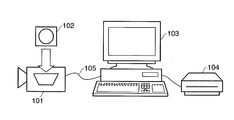
- FIG. 1 shows a state wherein a digital video camera 101 which uses a random access medium 102 , e.g., a DVD media, as a recording medium is connected to a PC 103 , to which a large-capacity, recording device 104 is connected, through a USB interface cable (obviously, both having USB interfaces).
- a digital video camera 101 which uses a random access medium 102 , e.g., a DVD media, as a recording medium is connected to a PC 103 , to which a large-capacity, recording device 104 is connected, through a USB interface cable (obviously, both having USB interfaces).
- a USB interface cable previously, both having USB interfaces
- the PC 103 operates as a USB host, and the digital video camera 101 operates as a USB device (slave).
- the USB host is to acquire data from the USB device through the USB interface, communication is generally performed in accordance with standards like “Universal Serial Bus Still Image Capture Device Definition Revision 1.0 Jul. 11, 2000 (to be referred to as PTP hereinafter) or “Universal Serial Bus Mass Storage Class Bulk-Only Transport Revision 1.0 Sep. 31, 1999 (to be referred to as Mass Storage hereinafter).
- the PC 103 Upon detecting the connection of the digital video camera 101 through a USB interface cable 105 , the PC 103 acquires descriptor information from the digital video camera 101 , and discriminates device information and a communication method, thereby recognizing that the digital video camera 101 is a mass storage class device. Thereafter, data are acquired in accordance with Mass Storage. In this case, the user can execute subsequent operation by operating an application on the PC 103 .
- FIG. 2 shows an example of the above application.
- This application is designed to read out data from an external device and record/save the data in an arbitrary recording medium.
- the user needs to activate a data save application 201 upon connecting the digital video camera 101 to the PC 103 .
- a list of video data recorded on a recording medium of the digital video camera 101 is displayed in a display area 203 , and a title bar ( 202 ) indicates that these data are located in the recording medium of the digital video camera drive.
- a title bar 204 indicates a recording device as a recording destination. In this state, the recording destination is a large-capacity recording device 104 .
- a copy button 206 on the application When the user clicks a copy button 206 on the application, desired data in the recording medium of the digital video camera is copied to a designated folder in the large-capacity recording device 104 . After the completion of the operation, the copied result is displayed in a display area 205 .
- An actual application generally has specifications that allow the user to display video data as a recording source in thumbnail form or select data to be recorded, and also allow the user to select another recording device, e.g., an optical disk recording device such as a CD-RW or DVD-RW in place of the large-capacity recording device 104 .
- the PC 103 as a USB mass storage host transmits Command Block Wrapper (CBW) to the digital video camera 101 as a mass storage device.
- CBW Command Block Wrapper
- CSW Command Status Wrapper
- This Command Block is discriminated in accordance with the access interface of the device-side recording medium, such as:
- Command Block is generated in accordance with an ATAPI (above-described “Multi-Media Command Set 2 (MMC02)” to be uniformly referred to as ATAPI hereinafter) command set (subclass 0x02).
- the PC 103 uses Command Block (READ( 10 )) for readout operation shown in FIG. 3 to read out data from the digital video camera 101 , and reads out all data from the recording medium 102 of the digital video camera 101 .
- READ( 10 ) Read Only Memory
- FIG. 3 for the detailed specifications of the READ( 10 ) command in FIG. 3 . A detailed description of this command will be omitted.
- the user need not be aware of these communication schemes, and can record/save data by operating an application 210 .
- the digital video camera 101 After all video data or still image data obtained by photography are transferred/saved onto another large-capacity recording medium, the data recorded on the recording medium 102 of the digital video camera 101 are erased to prepare for new photographing operation.
- data recorded on the recording medium 102 is to be transferred to another large-capacity recording medium, it is preferable to have as simple operability as possible and reliability that allows the user to visually recognize normal completion of transferring/recording/saving operation.
- the present invention has been made in consideration of such problems, and has as its object to provide a technique of allowing data files which an image sensing apparatus has to be copied or backed up onto a writable storage medium set in an information processing apparatus such as a PC by only connecting the image sensing apparatus to the information processing apparatus and inputting a predetermined instruction on the image sensing apparatus side.
- an information processing apparatus of the present invention has the following arrangement.
- an information processing apparatus which includes communication means for communicating with an image sensing apparatus, acquires a data file stored/held in the image sensing apparatus, and writes the data file in a predetermined writable storage medium, characterized by comprising:
- copying initialization means for transmitting a status command indicating that copying can be performed to the image sensing apparatus when a communicable state with the image sensing apparatus is established through the communication means and the writable storage medium is set;
- copying intermediate processing means for transmitting a progress of copying as a status command every time a response command is received from the image sensing apparatus after the status command is transmitted by the copying initialization means
- the copying intermediate processing means comprising
- copying means for, when the response command includes information indicating that a predetermined copy button which the image sensing means includes is pressed, regarding the image sensing apparatus as a mass storage device, reading out all data files in the mass storage device, and starting write of the data files in the writable storage medium,
- FIG. 1 is a view showing a state wherein a digital camera or a digital video camera is connected to a PC;
- FIG. 2 is a view showing an example of a copy application executed on the PC
- FIG. 3 is a view showing the data structure of an ATAPI READ( 10 ) command
- FIG. 4 is a block diagram showing the arrangement of the main part of a digital video camera in this embodiment
- FIG. 5 is a view showing a state wherein a digital video camera is connected to a PC in this embodiment
- FIG. 6 is a block diagram showing the arrangement of the PC in this embodiment.
- FIG. 7 is a view showing the data structure of a command to be transferred from the PC to the digital video camera in this embodiment
- FIG. 8 is a flowchart showing command transmission processing in the PC in this embodiment.
- FIG. 9 is a view showing the types of commands to be transmitted from the PC to the digital camera in this embodiment.
- FIG. 10 is a flowchart showing a processing sequence in the digital video camera in this embodiment.
- FIG. 11 is a view showing the data structure of response data generated on the digital video camera side in this embodiment.
- FIG. 12 is a view showing the types of response data to be transmitted from the digital video camera to the PC in this embodiment
- FIG. 13 is a flowchart showing response data reception processing in the PC in this embodiment.
- FIG. 14 is a flowchart showing copying processing in the PC in this embodiment.
- FIG. 15 is a flowchart showing the processing sequence of a program resident in the memory of the PC in this embodiment.
- FIG. 16 is a view showing the principle of communication between software modules A and B executed in the PC in this embodiment.
- FIG. 17 is a flowchart showing a processing sequence to be performed when a button of the digital video camera is pressed in this embodiment.
- FIG. 5 shows an example of the arrangement of a data transmission system according to the present invention.
- a digital video camera 501 records data obtained by photography on an optical disk 502 such as a DVD-RAM (8 cm) as a recording medium.
- a PC 504 has a recording/playing back drive 505 for recording on a large-capacity optical disk 506 such as a large-capacity DVD-RAM (5 inch) as a recording medium.
- Connecting a USB cable 503 to the USB interfaces which the digital video camera 501 and the PC 504 respectively have makes it possible to realize data transmission.
- Mass Storage is used as a USB transmission protocol.
- it is an object to transfer and copy data recorded on the optical disk 502 onto the large-capacity optical disk 506 .
- FIG. 4 is a block diagram of the main part of an arrangement associated with the transfer of sensed data (image files) stored in the optical disk 502 in the digital video camera 501 according to this embodiment to the PC 504 .
- this camera as a digital video camera, includes an image sensing arrangement and arrangements associated with AE control, AF control, and encoding, but an illustration thereof is omitted in FIG. 4 .
- Each arrangement in FIG. 4 and its function will be described below.
- a main control unit 401 is connected to each constituent element through a bus 400 , and issues control instructions to each constituent element by software operating on the main control unit 401 .
- a communication control unit 402 Upon being connected to an external device, i.e., the PC 504 in FIG. 5 , through a USB device connector 410 and the USB cable 503 , a communication control unit 402 performs communication control in accordance with the Mass Storage standards described above.
- An input operation control unit 404 discriminates key information when the user performs input operation using input keys 413 of the digital video camera 501 , and notifies software operating on the main control unit 401 .
- One of the input keys 413 is a button 420 in which an LED which can be turned on is embedded.
- the button 420 is used to issue an instruction to start copying operation when the digital video camera 501 is connected to the PC 504 through a USB cable and to inform the user of a communication state by driving/controlling LED lighting.
- a display control unit 406 generates a video to be displayed on a display control unit 412 of the digital video camera 501 and controls its display.
- a recording/playing back control unit 405 records and plays back data obtained by photography on or from the optical disk 502 , and controls the transfer of the readout data to an internal memory 403 .
- the readout data is transmitted to the outside through the communication control unit 402 or transferred to the display unit through the display control unit 412 .
- FIG. 6 is a block diagram of the main part of the arrangement of the PC 504 .
- the PC 504 includes a main control unit (comprising a CPU) 601 which controls the overall apparatus, an input operation control unit 604 which performs input operation from an input device 613 comprising a keyboard and a pointing device such as a mouse, a communication control unit 602 which has a USB host connector 610 , an internal memory 603 into which an OS and various kinds of applications are loaded and which is used as a buffer area for writing in the optical disk 506 , and a display control unit 606 which outputs video signals to a display unit 612 comprising a CRT, a liquid crystal display, or the like, and renders data in an internal video memory in accordance with a request from the main control unit 601 .
- the PC 504 also includes a hard disk drive (HDD) 615 in which an OS and an application program for executing main processing in this embodiment are stored.
- HDD hard disk drive
- the application program stored in the HDD 615 in this embodiment is roughly comprised of three modules A to C as follows.
- the respective programs have the following functions:
- the above three modules serve to automatically write (copy) all the data files (sensed image files) stored in the optical disk 502 of the digital video camera 501 to the optical disk 506 by being triggered by the operation of connecting the digital video camera 501 to the PC 504 through a USB cable and the insertion of the writable optical disk 506 in the recording/playing back drive 505 .
- the internal memory 603 is to be used by various kinds of application programs used by the user (e.g., a document editing program, mail program, and WWW browser program) other than the application program in this embodiment.
- application programs used by the user e.g., a document editing program, mail program, and WWW browser program
- the amount of memory consumed by the application in this embodiment is preferably small with respect to the internal memory 603 .
- only the module C for determining whether to activate the application is stored as a resident program in the internal memory 603 instead of the entire application program.
- the USB interface is an interface designed as a hot plug and play interface.
- the digital video camera 501 is connected to the USB host connector 610 through the USB cable 503 , this interface establishes mass storage communication. This communication establishment sequence has already been described above.
- the OS recognizes the connected device and acquires its device name.
- the module C in this embodiment monitors the occurrence of an event that the device is connected to the USB host connector 610 , and is executed when a USB device is connected. Processing in each of the modules A to C will be described below.
- FIG. 15 is a flowchart showing a processing sequence by the module C in this embodiment. As described above, this processing is executed when some device is connected to the USB host connector 610 .
- step S 1801 it is determined whether the connected USB device is the known digital video camera 501 . If NO in step S 1801 , this processing is terminated. If it is determined that the digital video camera 501 is connected, the flow advances to step S 1802 to determine whether the recording/playing back drive 505 is connected. In step S 1803 , it is determined whether the writable optical disk 506 is set.
- step S 1804 If it is determined that the recording/playing back drive 505 is connected and the optical disk 506 is set, the flow advances to step S 1804 to transmit the command “READY( 0 )” (to be described later) through the USB host connector 610 to notify the digital video camera 501 that the PC 504 is ready for copying operation.
- step S 1805 the program module A is activated (read operation is executed from the HDD 615 to the internal memory 603 ).
- step S 1802 If NO is determined in either step S 1802 or step S 1803 , this processing is terminated.
- the above description has exemplified the case wherein a USB device is connected to the USB host connector 610 . If, however, the recording/playing back drive 505 is permanently connected to the PC 504 (the recording/playing back drive 505 is incorporated), the execution of the above processing may be started by being triggered when the optical disk 506 is set or when the optical disk 506 is set and the USB device is connected to the PC 504 .
- the module A is executed when the digital video camera 501 and the PC 504 are connected to each other, and the writable optical disk 506 is set in the recording/playing back drive 505 .
- the digital video camera 501 has already transmitted the command “READY ( 0 )”.
- the program module A is activated, the module is resident in the internal memory 603 during copying operation. This module is also executed when response data is received from the digital video camera 501 .
- a command transmitted to the digital video camera 501 in the processing by the module A has a data structure like that shown in FIG. 7 .
- This command comprises 12-byte data conforming to the arrangement of an ATAPI command block.
- a field 701 at the 0th byte of a data offset indicates the control information of this command block.
- a function is designated by 0xFF (0x indicates hexadecimal notation) indicating a command unique to the vendor.
- a field 702 is configured to designate Logical Unit Number in the upper three bits in accordance with the ATAPI standards. This field designates 0 in this embodiment.
- a field 703 is configured to designate the detailed function of this command, and designates 0x01 in this embodiment.
- a field 704 is the most important field in this embodiment. In the embodiment, this field indicates the status information of the PC 504 .
- One of the values shown in FIG. 9 is set in this field. The respective values have the following meanings:
- step S 1301 a transmission time at which a command is transmitted next is set in accordance with the value of the field ( 1102 ) of the received response data.
- command transmission processing FIG. 8 forming the module A is executed upon waiting for the time.
- a status is acquired in step S 801 , and the acquired status is transmitted as a command with the data structure shown in FIG. 7 to the digital video camera 501 in step S 802 .
- corresponding response data is returned from the digital video camera 501 , and hence this processing is executed every time such response data is received.
- step S 1301 when the processing in step S 1301 is performed, i.e., an activation timing is set for command transmission, the flow advances to step S 1302 to check a field of the response data (a field 1105 in FIG. 11 to be described later). If “READY ( 0 )” is set, it is determined that the digital video camera 501 is ready for the transmission of sensed image data, and the flow shifts to step S 1303 .
- step S 1303 a field of the response data (a field 1104 in FIG. 11 to be described later) is checked to determine whether “1” is set. Although not described in detail, “1” is set in this field when the button for issuing an instruction to start copying in the digital video camera 501 is pressed. If “1” is set in the field 1104 , the flow advances to step S 1304 to activate the module B for reading out data recorded on the optical disk 502 of the digital video camera 501 and writing (copying) the data in the optical disk 506 (load the module from the HDD 615 into the internal memory 603 and execute it), thus terminating the processing.
- step S 1304 to activate the module B for reading out data recorded on the optical disk 502 of the digital video camera 501 and writing (copying) the data in the optical disk 506 (load the module from the HDD 615 into the internal memory 603 and execute it), thus terminating the processing.
- step S 1302 If it is determined in step S 1302 that a status other than “READY ( 0 )” is set in the field 1105 of the response data, the flow advances to step S 1305 to determine whether the module B is activated. If the module B is activated, the corresponding status is notified to the module B in step S 106 . This processing is then terminated.
- the OS operating on the PC 504 is a multi-task OS, and the modules A and B operate as different tasks.
- step S 1401 a data acquisition command is transmitted to the digital video camera 501 .
- the data acquisition command is configured as READ ( 10 ) command in FIG. 3 in accordance with the ATAPI standards, and is transmitted by a mass storage communication scheme.
- step S 1402 the PC 504 receives a response from the digital video camera 501 through the communication control unit 602 .
- step S 1403 it is determined whether the received data is an error. If the data is an error, the flow shifts to step S 1409 to display an error message on the display unit 612 . The processing is then terminated. If the data is not an error, the flow shifts to step S 1404 .
- step S 1404 the data is received, and an instruction to write the received data is given to the recording/playing back drive 505 to write the data in the optical disk 506 .
- step S 1405 If it is determined in step S 1405 that a write error has occurred, the flow shifts to step S 1409 to display an error message on the display unit 612 . The processing is then terminated. If no error has occurred, the flow shifts to step S 1406 .
- step S 1406 it is determined whether the input device 613 has received an instruction to cancel write operation from the user. If this instruction is received, the flow shifts to step S 1409 to display an error message on the display unit 612 . The processing is then terminated. Note that copying processing in this embodiment is apparently executed as background processing in the PC 504 . However, when the module B is activated, the corresponding icon is displayed on a task bar which the OS has. When this icon is designated, a menu is displayed to allow the user to issue an instruction to cancel copying operation in the menu.
- step S 1406 If it is determined in step S 1406 that no cancel instruction is issued, the flow shifts to step S 1407 to check, through the communication control unit 602 , whether the digital video camera 501 is USB-connected to the PC 504 . If it is detected that they are not connected, the flow shifts to step S 1409 to display an error message on the display unit 612 . The processing is then terminated. If they are connected, the flow shifts to step S 1408 .
- step S 1408 it is checked whether a stop request is received from the software module A. If a stop request is received, the flow shifts to step S 1409 to display an error message on the display unit 612 . The processing is then terminated.
- notification from the software module A to the software module B is performed with a state flag ensured on the internal memory 603 .
- the values which the state flag in this case can take conform to those in FIG. 12 and that when “LOW BATTERY” ( 3 ), “MODE CHANGE” ( 4 ), “NO DISC” ( 5 ), or “NO READABLE DISC” ( 6 ) is set, a cancellation request is issued. If not cancellation request is issued, the flow shifts to step S 1410 .
- step S 1410 it is determined whether all the data recorded on the optical disk 502 of the digital video camera 501 have been read out. In this determination, since a recording capacity can be discriminated in mass storage communication, the corresponding information is used. If not all the data have been acquired, the flow shifts to step S 1401 to continue the processing.
- step S 1410 If it is determined in step S 1410 that all the data have been acquired, the flow advances to step S 1411 to terminate not only the module B but also the module A (notify the OS of the termination of the modules A and B and release these programs from the internal memory 603 ).
- the software module B notifies the module A of information in accordance with a state during the execution of the flow in FIG. 14 . Notification from the software module B to the software module A is performed with the state flags arranged on the internal memory 603 in the same manner as described above. The values which this flag can take conform to the values in FIG. 9 . During copying operation as well, therefore, the processing shown in FIG. 8 is executed.
- FIG. 16 shows a state wherein the software module A and the software module B communicate with each other through the state flags arranged on the internal memory 603 .
- Notification from a software module A 1601 to a software module B 1602 is performed through a state flag 1604 ensured in the internal memory 603 . Notification from the software module B 1602 to the software module A 1601 is performed through a state flag 1603 .
- the timing at which notification is performed from the software module B to the software module A is set as follows according to the flowchart of FIG. 14 :
- Step S 1401 “Transfer” ( 1 ) is notified.
- Step S 1409 When the flow has shifted from step S 1403 or S 1405 , “ERROR” ( 5 ) is notified, and when the flow has shifted from step S 1406 , “STOP” ( 4 ) is notified.
- a status is acquired from the state flag 1603 and transmitted to the digital video camera 501 .
- the camera makes a transition to a mass storage class device, like a digital video camera equipped with a general USB interface.
- the application program in this embodiment which operates on the PC reads all files from the device and writes them in the optical disk 506 by using a mass storage class protocol.
- the flowchart shown in FIG. 10 is for the processing in which the main control unit 401 responds to notification from the communication control unit 402 while the digital video camera 501 is connected to the PC 504 through the USB cable 503 and communication is established.
- step S 1001 the main control unit 401 determines whether a command is received from the PC 504 through the communication control unit 402 or whether the USB cable is disconnected (for example, the USB cable has come off the connector). If it is determined that the USB cable is disconnected, the flow advances to step S 1003 to turn off the LED of the button 420 .
- the main control unit 401 discriminates the command. If it is determined that this command is the command in FIG. 7 , the flow shifts to step S 1002 . If another command is discriminated, processing corresponding to the command is executed. In this embodiment, a description of command processing other than that described above will be omitted for the sake of simplicity.
- step S 1002 If it is determined in step S 1002 that the value of the Status field 704 of the command in FIG. 7 is READY ( 0 ) indicating that the PC 504 is ready for recording the received data, the flow advances to step S 1004 . Otherwise, the flow advances to step S 1005 .
- step S 1004 whether the optical disk 502 is set in the recording/playing back control unit 405 . If the optical disk 502 is set in the recording/playing back control unit 405 , it is determined whether video data obtained by photography is recorded on the optical disk 502 . In this case, it is also determined whether the power supply of the digital video camera 501 is in a proper state and a proper mode is set.
- the transfer band of a USB interface corresponds to 480 Mbps, which is very high.
- the optical disk 502 is rotated at a speed higher than that in general photographing operation to read out data, which are in turn transferred to the PC 504 . If, therefore, the photography mode is set, no data can be copied to the PC 504 .
- the above proper mode is a mode in which no access is made to the optical disk 502 .
- step S 1006 Assume that it is determined that the recorded optical disk 502 is inserted in the recording/playing back control unit 405 , a low-voltage (low-battery) state is not set, and the set mode is proper. In this case, the flow advances to step S 1006 to turn on the LED of the button 420 so as to notify the operator that copying operation can be started.
- step S 1009 response data corresponding to the command ( FIG. 7 ) from the PC 504 is generated.
- the response data generated in this step has the 8-byte format shown in FIG. 11 .
- a first 2-byte field 1101 is used to store a response data length, in which a length of eight bytes is set in this embodiment.
- a field 1102 is used by the PC 504 to designate the time to the transmission of the next command per 100 ms. That is, if, for example, the value of the field 1102 is 1, the PC 504 sends the next command after the lapse of 100 ms.
- a field 1103 is used to set the same value as that set in the field 703 of the command in FIG. 7 .
- 0x01 is designated.
- DT in a field 1104 is a flag indicating whether the user has pressed the copy button 420 has been pressed in the digital video camera 501 . If the button 420 is pressed, 1 is set in this field. Although the pressing of the button 420 is detected in the flow shown in FIG. 17 , a description thereof will be made later.
- the field 1105 indicates the status of the digital video camera 501 and takes one of the values shown in FIG. 12 .
- the respective values have the following meanings:
- step S 1005 If it is determined in step S 1005 that “TRANSFER” ( 1 ) is not set in the Status field 704 of the received command, the flow advances to step S 1007 .
- step S 1007 the LED of the button 420 is turned off.
- the response data generated above is transmitted to the PC 504 through the communication control unit 402 in step S 1012 .
- the response data is held in the internal memory 403 until the data is transmitted next. That is, the response data is generated by updating the previous response data.
- This processing is executed asynchronously with the processing in FIG. 10 .
- This processing is performed by software executed by the main control unit 401 , but may be implemented by a hardware interrupt if a response is to be transmitted to the user at high speed.
- step S 1701 it is determined in step S 1701 whether the pressed button is the copy button 420 . If NO in step S 1701 , this processing is terminated. If the copy button 420 is pressed, the flow advances to step S 1702 to check the status of the latest response data held in the internal memory 403 so as to determine whether “TRANSFER” is set. If “TRANSFER” is set, it indicates that image data has already been transferred. Therefore, this processing is terminated.
- step S 1703 determines whether the status of the response data is the “READY” state. If the “READY” state is determined, since it indicates that the digital video camera 501 , the PC 504 , and copying conditions are in proper states, and a copying instruction from the user is waited, the flow advances to step S 1704 to set “1” in the DT of the field 1104 of the response data in the internal memory 403 .
- the acquisition of an image data file in the digital video camera 501 from the PC 504 is performed by using the digital video camera in this embodiment as a mass storage as described above, and hence is performed in another task.
- mass storage class transmission when viewed from the PC 504 , data is read out from the digital video camera 501 as an external storage device. Since this device is equivalent to a USB-connected external storage device, a description thereof will be omitted.
- controlling the lighting of the LED of the copy button 420 in the digital video camera 501 in accordance with a status from the PC 504 makes it possible to allow the digital video camera 501 to behave as if to autonomously transfer image files to the PC 504 and notify it of the state during the transfer while the digital video camera 501 serves as a mass storage of the PC.
- the optical disk 502 may be initialized. This initialization is preferably performed on the PC 504 side. That is, the digital video camera 501 is recognized as a mass storage class device by the PC 504 , and hence can be handled as a general flexible disk. It therefore suffices to only execute a program for causing the PC 504 to initialize the storage medium of the digital video camera 501 . This makes it possible to reduce the required memory which stores firmware on the digital video camera 501 side.
- the embodiment has exemplified the case wherein the digital video camera 501 and the PC 504 are connected to each other through a USB interface. If, however, the digital video camera 501 is recognized as a mass storage class device and files can be read by using a mass storage device protocol, the embodiment may be applied to a case wherein the camera and the PC can be connected to each other through an IEEE 1394 interface or a network interface.
- the copy button 420 incorporates the LED.
- the LED and the button need not be integrated. Note, however, that they are preferably integrated in the above manner to inform the user of a specific button which the user should press when the camera is ready for copying operation.
- the present invention obviously incorporates the application program itself.
- the application program in the PC 504 in this embodiment is bundled in a CDROM or the like attached to the digital video camera 501 .
- the application program in the above embodiment can be executed. Obviously, such a computer-readable storage medium is incorporated in the present invention.
Landscapes
- Engineering & Computer Science (AREA)
- Multimedia (AREA)
- Signal Processing (AREA)
- Databases & Information Systems (AREA)
- Computer Networks & Wireless Communication (AREA)
- Computer Security & Cryptography (AREA)
- Automation & Control Theory (AREA)
- Computing Systems (AREA)
- General Engineering & Computer Science (AREA)
- Television Signal Processing For Recording (AREA)
- Signal Processing For Digital Recording And Reproducing (AREA)
- Studio Devices (AREA)
Applications Claiming Priority (3)
| Application Number | Priority Date | Filing Date | Title |
|---|---|---|---|
| JP2005046225A JP4429187B2 (ja) | 2005-02-22 | 2005-02-22 | 情報処理装置及び撮像装置、並びにシステム |
| JP2005-046225 | 2005-02-22 | ||
| JP2006003815 | 2006-02-22 |
Publications (2)
| Publication Number | Publication Date |
|---|---|
| US20100141982A1 US20100141982A1 (en) | 2010-06-10 |
| US7936474B2 true US7936474B2 (en) | 2011-05-03 |
Family
ID=36499671
Family Applications (1)
| Application Number | Title | Priority Date | Filing Date |
|---|---|---|---|
| US11/722,570 Expired - Fee Related US7936474B2 (en) | 2005-02-22 | 2006-02-22 | Data transmission system and apparatus for copying or backup |
Country Status (3)
| Country | Link |
|---|---|
| US (1) | US7936474B2 (enExample) |
| JP (1) | JP4429187B2 (enExample) |
| WO (1) | WO2006090885A1 (enExample) |
Cited By (3)
| Publication number | Priority date | Publication date | Assignee | Title |
|---|---|---|---|---|
| US20090021760A1 (en) * | 2007-07-20 | 2009-01-22 | Brother Kogyo Kabushiki Kaisha | Image scanning apparatus |
| US20100274931A1 (en) * | 2009-04-28 | 2010-10-28 | Samsung Electronics Co., Ltd. | Communication method to transfer user operation information and electronic device using the same |
| US20140068130A1 (en) * | 2012-08-29 | 2014-03-06 | Fujitsu Limited | Information processing apparatus and controlling method |
Families Citing this family (3)
| Publication number | Priority date | Publication date | Assignee | Title |
|---|---|---|---|---|
| US20080114990A1 (en) * | 2006-11-10 | 2008-05-15 | Fuji Xerox Co., Ltd. | Usable and secure portable storage |
| WO2009052860A1 (en) * | 2007-10-24 | 2009-04-30 | Soft-R Research Llc | Method and system for storing multimedia files |
| JP2011217189A (ja) * | 2010-03-31 | 2011-10-27 | Toshiba Corp | コンテンツ送信装置及びコンテンツ受信装置 |
Citations (10)
| Publication number | Priority date | Publication date | Assignee | Title |
|---|---|---|---|---|
| JPH09230495A (ja) | 1996-02-21 | 1997-09-05 | Chinon Ind Inc | デジタルカメラ、外部記憶装置およびこれらのシステム |
| DE19811990A1 (de) | 1998-03-19 | 1999-09-30 | Olympus Optical Europ | Vorrichtung zur Datenübertragung von einem Aufnahmegerät |
| JP2001238156A (ja) | 2000-02-21 | 2001-08-31 | Seiko Epson Corp | 画像印刷システムおよびそれに用いられるデジタルカメラ |
| US20020158970A1 (en) | 2001-04-27 | 2002-10-31 | Kindaichi Takeshi | Electronic pickup camera and control method of electronic pickup camera |
| JP2004056396A (ja) | 2002-07-18 | 2004-02-19 | Canon Inc | 動画蓄積方法および動画蓄積装置 |
| US20040070681A1 (en) | 2002-10-15 | 2004-04-15 | Battles Amy E | Digital Docking System User Interface Method and Apparatus |
| US20040189809A1 (en) * | 2003-03-27 | 2004-09-30 | Choi Juang-Hwan | Digital imaging apparatus and method for selecting data transfer mode of the same |
| US20060242340A1 (en) | 2003-12-15 | 2006-10-26 | Canon Kabushiki Kaisha | Image sensing device |
| US20070097223A1 (en) | 2005-10-25 | 2007-05-03 | Canon Kabushiki Kaisha | Parameter configuration apparatus and method |
| US7315689B2 (en) | 2001-01-15 | 2008-01-01 | Canon Kabushiki Kaisha | Recording system |
-
2005
- 2005-02-22 JP JP2005046225A patent/JP4429187B2/ja not_active Expired - Fee Related
-
2006
- 2006-02-22 WO PCT/JP2006/303815 patent/WO2006090885A1/en not_active Ceased
- 2006-02-22 US US11/722,570 patent/US7936474B2/en not_active Expired - Fee Related
Patent Citations (12)
| Publication number | Priority date | Publication date | Assignee | Title |
|---|---|---|---|---|
| JPH09230495A (ja) | 1996-02-21 | 1997-09-05 | Chinon Ind Inc | デジタルカメラ、外部記憶装置およびこれらのシステム |
| US6429896B1 (en) * | 1996-02-21 | 2002-08-06 | Chinon Kabushiki Kaisha | Digital camera and external device for image storage and camera control |
| DE19811990A1 (de) | 1998-03-19 | 1999-09-30 | Olympus Optical Europ | Vorrichtung zur Datenübertragung von einem Aufnahmegerät |
| JP2001238156A (ja) | 2000-02-21 | 2001-08-31 | Seiko Epson Corp | 画像印刷システムおよびそれに用いられるデジタルカメラ |
| US7315689B2 (en) | 2001-01-15 | 2008-01-01 | Canon Kabushiki Kaisha | Recording system |
| US20020158970A1 (en) | 2001-04-27 | 2002-10-31 | Kindaichi Takeshi | Electronic pickup camera and control method of electronic pickup camera |
| JP2004056396A (ja) | 2002-07-18 | 2004-02-19 | Canon Inc | 動画蓄積方法および動画蓄積装置 |
| US20040070681A1 (en) | 2002-10-15 | 2004-04-15 | Battles Amy E | Digital Docking System User Interface Method and Apparatus |
| US7113218B2 (en) | 2002-10-15 | 2006-09-26 | Hewlett-Packard Development Company, L.P. | Digital docking system user interface method and apparatus |
| US20040189809A1 (en) * | 2003-03-27 | 2004-09-30 | Choi Juang-Hwan | Digital imaging apparatus and method for selecting data transfer mode of the same |
| US20060242340A1 (en) | 2003-12-15 | 2006-10-26 | Canon Kabushiki Kaisha | Image sensing device |
| US20070097223A1 (en) | 2005-10-25 | 2007-05-03 | Canon Kabushiki Kaisha | Parameter configuration apparatus and method |
Non-Patent Citations (3)
| Title |
|---|
| Jul. 10, 2006 Written Opinion and International Search Report in International Application No. PCT/JP2006/303815. |
| May 3, 2007 International Preliminary Report on Patentability in International Application No. PCT/JP2006/303815. |
| Sep. 11, 2009 Japanese Official Action in Japanese Patent Appln. No. 2005-046225. |
Cited By (5)
| Publication number | Priority date | Publication date | Assignee | Title |
|---|---|---|---|---|
| US20090021760A1 (en) * | 2007-07-20 | 2009-01-22 | Brother Kogyo Kabushiki Kaisha | Image scanning apparatus |
| US20100274931A1 (en) * | 2009-04-28 | 2010-10-28 | Samsung Electronics Co., Ltd. | Communication method to transfer user operation information and electronic device using the same |
| US8443111B2 (en) * | 2009-04-28 | 2013-05-14 | Samsung Electronics Co., Ltd. | Communication method to transfer user operation information between electronic device and host device and electronic device using the same |
| US20130227072A1 (en) * | 2009-04-28 | 2013-08-29 | Samsung Electronics Co., Ltd. | Communication method to transfer user operation information and electronic device using the same |
| US20140068130A1 (en) * | 2012-08-29 | 2014-03-06 | Fujitsu Limited | Information processing apparatus and controlling method |
Also Published As
| Publication number | Publication date |
|---|---|
| US20100141982A1 (en) | 2010-06-10 |
| JP4429187B2 (ja) | 2010-03-10 |
| WO2006090885A1 (en) | 2006-08-31 |
| JP2006237747A (ja) | 2006-09-07 |
Similar Documents
| Publication | Publication Date | Title |
|---|---|---|
| US7983522B2 (en) | Enhanced digital data collector for removable memory modules | |
| US7068386B2 (en) | Image processing system, image data processing method, and storage medium | |
| US8046517B2 (en) | Data processing method and device for inputting data to pieces of digital equipment | |
| CA2345177C (en) | Enhanced digital data collector | |
| US20010002846A1 (en) | Electronic device for managing removable storage medium, method and storage medium therefor | |
| CN100412836C (zh) | 利用外部装置通过通用串行总线控制主机的方法及其系统 | |
| WO2005001701A1 (ja) | スレイブ装置、通信設定方法 | |
| JPH1153485A (ja) | コンピュータシステム、記憶装置、変換システム、及び記録媒体 | |
| US7797398B2 (en) | Communication system, and peripheral device having trigger generating device and computer program product that monitors whether a trigger has been generated | |
| WO2005086002A1 (fr) | Procede s'appliquant a un dispositif de traitement de donnees echangeant des donnees avec un ordinateur | |
| CN102067097A (zh) | Usb装置以及用于识别usb装置的usb模式的方法 | |
| US7102671B1 (en) | Enhanced compact flash memory card | |
| JP2001067156A (ja) | コンピュータ周辺機器及びその制御方法、撮像装置並びに記憶媒体 | |
| US20100141982A1 (en) | Data transmission system and apparatus for copying or backup | |
| JP2010511923A (ja) | メモリカードを回復するためのメモリカード読取装置 | |
| JP2004171536A (ja) | Usbストレージデバイス及びプログラム | |
| US20050108291A1 (en) | Transmission origin device, transmission destination device, information transmission system, and method for recognizing system in information transmission system | |
| JP3914949B2 (ja) | Usbストレージデバイス、その制御装置及びその制御装置に実行させるためのプログラム | |
| JP2008141725A (ja) | 撮影装置及びその撮影装置に用いるファイル管理方法 | |
| US20060280488A1 (en) | Reproduction apparatus | |
| US20130227072A1 (en) | Communication method to transfer user operation information and electronic device using the same | |
| JP2006295482A (ja) | 撮像装置及び情報処理装置 | |
| US20050086402A1 (en) | [portable micro-control device and controller] | |
| CN100520756C (zh) | 管理存储卡插入或拔出读卡器的方法和所述方法中使用的设备 | |
| JP2005309511A (ja) | 情報処理装置、ステータス取得方法、及びプログラム |
Legal Events
| Date | Code | Title | Description |
|---|---|---|---|
| AS | Assignment |
Owner name: CANON KABUSHIKI KAISHA,JAPAN Free format text: ASSIGNMENT OF ASSIGNORS INTEREST;ASSIGNOR:ONO, TACHIO;REEL/FRAME:019500/0891 Effective date: 20070615 Owner name: CANON KABUSHIKI KAISHA, JAPAN Free format text: ASSIGNMENT OF ASSIGNORS INTEREST;ASSIGNOR:ONO, TACHIO;REEL/FRAME:019500/0891 Effective date: 20070615 |
|
| STCF | Information on status: patent grant |
Free format text: PATENTED CASE |
|
| FPAY | Fee payment |
Year of fee payment: 4 |
|
| FEPP | Fee payment procedure |
Free format text: MAINTENANCE FEE REMINDER MAILED (ORIGINAL EVENT CODE: REM.); ENTITY STATUS OF PATENT OWNER: LARGE ENTITY |
|
| LAPS | Lapse for failure to pay maintenance fees |
Free format text: PATENT EXPIRED FOR FAILURE TO PAY MAINTENANCE FEES (ORIGINAL EVENT CODE: EXP.); ENTITY STATUS OF PATENT OWNER: LARGE ENTITY |
|
| STCH | Information on status: patent discontinuation |
Free format text: PATENT EXPIRED DUE TO NONPAYMENT OF MAINTENANCE FEES UNDER 37 CFR 1.362 |
|
| FP | Lapsed due to failure to pay maintenance fee |
Effective date: 20190503 |