EP4579413A1 - Anwendungssymbolverwaltungsverfahren und elektronische vorrichtung - Google Patents
Anwendungssymbolverwaltungsverfahren und elektronische vorrichtung Download PDFInfo
- Publication number
- EP4579413A1 EP4579413A1 EP23870306.0A EP23870306A EP4579413A1 EP 4579413 A1 EP4579413 A1 EP 4579413A1 EP 23870306 A EP23870306 A EP 23870306A EP 4579413 A1 EP4579413 A1 EP 4579413A1
- Authority
- EP
- European Patent Office
- Prior art keywords
- interface
- application icon
- application
- icon
- display
- Prior art date
- Legal status (The legal status is an assumption and is not a legal conclusion. Google has not performed a legal analysis and makes no representation as to the accuracy of the status listed.)
- Pending
Links
Images






Classifications
-
- G—PHYSICS
- G06—COMPUTING OR CALCULATING; COUNTING
- G06F—ELECTRIC DIGITAL DATA PROCESSING
- G06F3/00—Input arrangements for transferring data to be processed into a form capable of being handled by the computer; Output arrangements for transferring data from processing unit to output unit, e.g. interface arrangements
- G06F3/01—Input arrangements or combined input and output arrangements for interaction between user and computer
- G06F3/048—Interaction techniques based on graphical user interfaces [GUI]
- G06F3/0481—Interaction techniques based on graphical user interfaces [GUI] based on specific properties of the displayed interaction object or a metaphor-based environment, e.g. interaction with desktop elements like windows or icons, or assisted by a cursor's changing behaviour or appearance
- G06F3/04817—Interaction techniques based on graphical user interfaces [GUI] based on specific properties of the displayed interaction object or a metaphor-based environment, e.g. interaction with desktop elements like windows or icons, or assisted by a cursor's changing behaviour or appearance using icons
-
- G—PHYSICS
- G04—HOROLOGY
- G04G—ELECTRONIC TIME-PIECES
- G04G21/00—Input or output devices integrated in time-pieces
- G04G21/08—Touch switches specially adapted for time-pieces
-
- G—PHYSICS
- G04—HOROLOGY
- G04G—ELECTRONIC TIME-PIECES
- G04G9/00—Visual time or date indication means
- G04G9/0064—Visual time or date indication means in which functions not related to time can be displayed
- G04G9/007—Visual time or date indication means in which functions not related to time can be displayed combined with a calculator or computing means
-
- G—PHYSICS
- G06—COMPUTING OR CALCULATING; COUNTING
- G06F—ELECTRIC DIGITAL DATA PROCESSING
- G06F1/00—Details not covered by groups G06F3/00 - G06F13/00 and G06F21/00
- G06F1/16—Constructional details or arrangements
- G06F1/1613—Constructional details or arrangements for portable computers
- G06F1/163—Wearable computers, e.g. on a belt
-
- G—PHYSICS
- G06—COMPUTING OR CALCULATING; COUNTING
- G06F—ELECTRIC DIGITAL DATA PROCESSING
- G06F3/00—Input arrangements for transferring data to be processed into a form capable of being handled by the computer; Output arrangements for transferring data from processing unit to output unit, e.g. interface arrangements
- G06F3/01—Input arrangements or combined input and output arrangements for interaction between user and computer
- G06F3/048—Interaction techniques based on graphical user interfaces [GUI]
- G06F3/0481—Interaction techniques based on graphical user interfaces [GUI] based on specific properties of the displayed interaction object or a metaphor-based environment, e.g. interaction with desktop elements like windows or icons, or assisted by a cursor's changing behaviour or appearance
-
- G—PHYSICS
- G06—COMPUTING OR CALCULATING; COUNTING
- G06F—ELECTRIC DIGITAL DATA PROCESSING
- G06F3/00—Input arrangements for transferring data to be processed into a form capable of being handled by the computer; Output arrangements for transferring data from processing unit to output unit, e.g. interface arrangements
- G06F3/01—Input arrangements or combined input and output arrangements for interaction between user and computer
- G06F3/048—Interaction techniques based on graphical user interfaces [GUI]
- G06F3/0481—Interaction techniques based on graphical user interfaces [GUI] based on specific properties of the displayed interaction object or a metaphor-based environment, e.g. interaction with desktop elements like windows or icons, or assisted by a cursor's changing behaviour or appearance
- G06F3/0482—Interaction with lists of selectable items, e.g. menus
-
- G—PHYSICS
- G06—COMPUTING OR CALCULATING; COUNTING
- G06F—ELECTRIC DIGITAL DATA PROCESSING
- G06F3/00—Input arrangements for transferring data to be processed into a form capable of being handled by the computer; Output arrangements for transferring data from processing unit to output unit, e.g. interface arrangements
- G06F3/01—Input arrangements or combined input and output arrangements for interaction between user and computer
- G06F3/048—Interaction techniques based on graphical user interfaces [GUI]
- G06F3/0484—Interaction techniques based on graphical user interfaces [GUI] for the control of specific functions or operations, e.g. selecting or manipulating an object, an image or a displayed text element, setting a parameter value or selecting a range
- G06F3/04845—Interaction techniques based on graphical user interfaces [GUI] for the control of specific functions or operations, e.g. selecting or manipulating an object, an image or a displayed text element, setting a parameter value or selecting a range for image manipulation, e.g. dragging, rotation, expansion or change of colour
-
- G—PHYSICS
- G06—COMPUTING OR CALCULATING; COUNTING
- G06F—ELECTRIC DIGITAL DATA PROCESSING
- G06F3/00—Input arrangements for transferring data to be processed into a form capable of being handled by the computer; Output arrangements for transferring data from processing unit to output unit, e.g. interface arrangements
- G06F3/01—Input arrangements or combined input and output arrangements for interaction between user and computer
- G06F3/048—Interaction techniques based on graphical user interfaces [GUI]
- G06F3/0484—Interaction techniques based on graphical user interfaces [GUI] for the control of specific functions or operations, e.g. selecting or manipulating an object, an image or a displayed text element, setting a parameter value or selecting a range
- G06F3/0485—Scrolling or panning
-
- G—PHYSICS
- G06—COMPUTING OR CALCULATING; COUNTING
- G06F—ELECTRIC DIGITAL DATA PROCESSING
- G06F3/00—Input arrangements for transferring data to be processed into a form capable of being handled by the computer; Output arrangements for transferring data from processing unit to output unit, e.g. interface arrangements
- G06F3/01—Input arrangements or combined input and output arrangements for interaction between user and computer
- G06F3/048—Interaction techniques based on graphical user interfaces [GUI]
- G06F3/0487—Interaction techniques based on graphical user interfaces [GUI] using specific features provided by the input device, e.g. functions controlled by the rotation of a mouse with dual sensing arrangements, or of the nature of the input device, e.g. tap gestures based on pressure sensed by a digitiser
- G06F3/0488—Interaction techniques based on graphical user interfaces [GUI] using specific features provided by the input device, e.g. functions controlled by the rotation of a mouse with dual sensing arrangements, or of the nature of the input device, e.g. tap gestures based on pressure sensed by a digitiser using a touch-screen or digitiser, e.g. input of commands through traced gestures
-
- G—PHYSICS
- G06—COMPUTING OR CALCULATING; COUNTING
- G06F—ELECTRIC DIGITAL DATA PROCESSING
- G06F3/00—Input arrangements for transferring data to be processed into a form capable of being handled by the computer; Output arrangements for transferring data from processing unit to output unit, e.g. interface arrangements
- G06F3/01—Input arrangements or combined input and output arrangements for interaction between user and computer
- G06F3/048—Interaction techniques based on graphical user interfaces [GUI]
- G06F3/0487—Interaction techniques based on graphical user interfaces [GUI] using specific features provided by the input device, e.g. functions controlled by the rotation of a mouse with dual sensing arrangements, or of the nature of the input device, e.g. tap gestures based on pressure sensed by a digitiser
- G06F3/0488—Interaction techniques based on graphical user interfaces [GUI] using specific features provided by the input device, e.g. functions controlled by the rotation of a mouse with dual sensing arrangements, or of the nature of the input device, e.g. tap gestures based on pressure sensed by a digitiser using a touch-screen or digitiser, e.g. input of commands through traced gestures
- G06F3/04883—Interaction techniques based on graphical user interfaces [GUI] using specific features provided by the input device, e.g. functions controlled by the rotation of a mouse with dual sensing arrangements, or of the nature of the input device, e.g. tap gestures based on pressure sensed by a digitiser using a touch-screen or digitiser, e.g. input of commands through traced gestures for inputting data by handwriting, e.g. gesture or text
Definitions
- a display parameter of at least one application icon is adjusted if it is detected that the first application icon overlaps with the second application icon and the moving speed of the first application icon is lower than the preset moving speed threshold, so that the display parameter of the at least one application icon is better than the display parameter of the another application icon on the second interface, where the at least one application icon includes the second application icon.
- the display parameter includes a display size and/or display brightness.
- another application icon management method is provided, applied to an electronic device with a display.
- the electronic device has N application icons, N is an integer greater than or equal to 2, and the method includes:
- the electronic device in this embodiment of this application is a smartwatch. After a user performs the first operation on the first application icon, a touchscreen of the smartwatch may enter the fourth interface from the first interface.
- the fourth interface includes the second control.
- the sixth interface including the first application icon and the at least one target application icon is displayed. In this way, the user can gather associated application icons, which is more convenient for the user to use.
- the method before the displaying a sixth interface on the display when detecting an operation for the second control on the fourth interface, the method includes: displaying a fifth interface on the display, where at least one application icon in the N application icons is displayed on the fifth interface; detecting a selection operation that is input on the fifth interface for the at least one target application icon in the N application icons; and displaying the sixth interface in response to the selection operation.
- the method before the displaying the sixth interface, further includes: associating the at least one target application icon with the first application icon after detecting the selection operation for the at least one target application icon; and displaying the fourth interface, where the displaying the sixth interface correspondingly includes: displaying the sixth interface when detecting the operation for the second control on the fourth interface.
- the at least one target application icon on the sixth interface is distributed around the first application icon by using the first application icon as a center.
- an electronic device including a processor.
- the processor is coupled to a memory, and the processor is configured to execute a computer program or instructions stored in the memory, so that the electronic device implements the application icon management method.
- An electronic device includes a processor.
- the processor is coupled to a memory, and the processor is configured to execute a computer program or instructions stored in the memory, so that the electronic device implements the method for determining a head posture.
- a computer-readable storage medium stores a computer program.
- the computer program runs on an electronic device, the electronic device is enabled to perform the application icon management method.
- first and second are used in embodiments of this application to distinguish between same items or similar items that provide basically same functions or purposes.
- a first application icon and a second application icon are merely used to distinguish between different application icons, and a sequence of the first application icon and the second application icon is not limited.
- a person skilled in the art may understand that the terms such as “first” and “second” do not limit a quantity or an execution sequence, and the terms such as “first” and “second” do not indicate a definite difference.
- At least one means one or more, and "a plurality of" means two or more.
- the term “and/or” describes an association relationship between associated objects, and represents that three relationships may exist.
- a and/or B may represent the following cases: Only A exists, both A and B exist, and only B exists, where A and B may be singular or plural.
- the character “/” generally indicates an “or” relationship between the associated objects.
- At least one of the following items (pieces) or a similar expression thereof indicates any combination of these items, including any combination of singular items (pieces) or plural items (pieces).
- At least one item (piece) of a, b, or c may indicate: a, b, c, a and b, a and c, b and c, or a, b, and c, where a, b, and c may be singular or plural.
- Embodiments of this application provide an application icon management method, an apparatus, and an electronic device.
- the application icon management method may be applied to an electronic device with a display, such as a smartwatch, a smart band, a mobile phone, a smart household, a vehicle-mounted device, or an augmented reality (augmented reality, AR)/virtual reality (virtual reality, VR) device.
- the electronic device has a plurality of apps.
- a name and a type of the electronic device are not limited in embodiments of this application.
- Neither a shape of the display nor a shape of an interface displayed on the display is limited in embodiments of this application.
- the display and the interface displayed on the display each may be circular or rectangular.
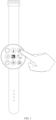
- an example in which the electronic device is a smartwatch is used. As shown in FIG. 1 , a touchscreen of the smartwatch is circular.
- the application may include a social application (for example, WeChat, QQ, or Facebook), an image management application (for example, an album), a map application (for example, Baidu Map or Google Map), a browser application, a music application (for example, QQ Music or NetEase Cloud Music), and the like.
- a social application for example, WeChat, QQ, or Facebook
- an image management application for example, an album
- a map application for example, Baidu Map or Google Map
- a browser application for example, a music application (for example, QQ Music or NetEase Cloud Music), and the like.
- a home screen of the electronic device may also be referred to as a desktop or a home screen.
- the home screen may include one or more sub-screens (sub-screens), and the one or more sub-screens may be configured to display a control (control element).
- the user may perform an operation of sliding left or right, to display different sub-screens through switching.
- the control is a graphical user interface (graphical user interface, GUI) element, and is a software component, which is included in an application and controls all data processed by the application and interaction operations related to the data.
- the user may interact with the control through direct manipulation (direct manipulation), to read or edit related information of the application.
- control may include visual interface elements such as an icon (for example, an icon of an application in the electronic device or a folder icon), a button, a menu, a tab, a text box, a dialog box, a status bar, a navigation bar, and a widget.
- icon for example, an icon of an application in the electronic device or a folder icon
- button for example, a button, a menu, a tab, a text box, a dialog box, a status bar, a navigation bar, and a widget.
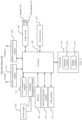
- an electronic device 200 is an electronic device on which a plurality of applications are installed is used.
- the electronic device 200 may include components such as a touchscreen 201, a processor 202, a memory 203, a power supply 204, a wireless communication module 205, a mobile communication module 206, a gravity sensor 207, an audio circuit 208, a speaker 209, a microphone 210, a power management module 211, and a charging management module 212. These components may be connected through a bus, or may be directly connected to each other.
- the electronic device 200 may further include a proximity detection module 213.
- the proximity detection module 213 is a "Hall device-magnet" device pair, a proximity sensor, or an NFC tag.
- FIG. 2 does not constitute a limitation on the electronic device 200, and the electronic device 200 may include more components than those shown in the figure, or combine some components, or have a different component arrangement.
- the proximity detection module 213 is configured to: when the electronic device 200 approaches a peripheral device, trigger both the electronic device 200 and the peripheral device to automatically enter a state in which a connection can be established by using a wireless communication protocol.
- the touchscreen 201 may include a detection module 2011 and a display module 2012.
- the detection module 2011 may detect a touch operation performed by the user on the touchscreen 201, and may transfer, to the processor 202, a parameter generated by the touchscreen 201 after the touch operation is performed on the touchscreen 201 (for example, if the touchscreen 201 is implemented by using the capacitive type, the detection module 2011 may transfer a change parameter of the touchscreen 201 to the processor 202, where the change parameter is a magnitude, a shape, a quantity, and distribution of a capacitor whose capacitance value changes), so that the processor 202 performs corresponding processing based on the touch operation.
- the display module 2012 may display information entered by the user, information provided by the electronic device 200 for the user, various menus of the electronic device 200, and the like.
- the processor 202 is a control center of the electronic device 200, is connected to all parts of the entire electronic device 200 by using various interfaces and lines, and performs various functions of the electronic device 200 and data processing by running or executing a software program and/or a module stored in the memory 203 and invoking data stored in the memory 203, to perform overall monitoring on the electronic device 200.
- the processor 202 may include one or more processing units, and an application processor and a modem processor may be integrated into the processor 202.
- the application processor mainly processes an operating system, a user interface, an application, and the like.
- the modem processor mainly processes wireless communication. It may be understood that the modem processor may not be integrated into the processor 202.
- the memory 203 may be configured to store data, a software program, and a module; and may be a volatile memory (Volatile Memory) such as a random access memory (Random Access Memory, RAM), may be a non-volatile memory (Non-Volatile Memory) such as a read-only memory (Read-Only Memory, ROM), a flash memory (Flash Memory), a hard disk drive (Hard Disk Drive, HDD), or a solid-state drive (Solid-State Drive, SSD), or may be a combination of the foregoing types of memories.
- the memory 203 may store program code.
- the program code may be executed by the processor 202 to perform the icon management method according to embodiments of this application.
- the charging management module 212 is configured to receive a charging input from a charger.
- the charger may be a wireless charger or a wired charger.
- the charging management module 212 may receive a charging input of a wired charger through the USB interface 215.
- the charging management module 212 may receive a wireless charging input through a wireless charging coil of the electronic device 200.
- the charging management module 212 may further supply power to the electronic device 200 by using the power management module 211.
- the wireless communication module 205 receives an electromagnetic wave through the antenna 2, performs frequency modulation and filtering processing on an electromagnetic wave signal, and sends a processed signal to the processor 202.
- the wireless communication module 205 may further receive a to-be-sent signal from the processor 202, perform frequency modulation and amplification on the signal, and convert the signal into an electromagnetic wave for radiation through the antenna 2.
- a source electronic device and a target electronic device may establish a communication connection by using respective wireless communication module 205.
- the notification manager enables an application to display notification information in a status bar, and may be configured to convey a notification message.
- the notification manager may automatically disappear after a short pause without requiring a user interaction.
- the notification manager is configured to notify download completion, give a message notification, and the like.
- the notification manager may alternatively be a notification that appears in a top status bar of the system in a form of a graph or a scroll bar text, for example, a notification of an application that is run on a background, or may be a notification that appears on the screen in a form of a dialog window.
- text information is displayed in the status bar, an alert tone is made, the electronic device vibrates, or an indicator blinks.
- the kernel library includes two parts: a performance function that needs to be called in Java language and a kernel library of Android.
- the application layer and the application framework layer run on the virtual machine.
- the virtual machine executes Java files of the application layer and the application framework layer as binary files.
- the virtual machine is configured to implement functions such as object lifecycle management, stack management, thread management, security and exception management, and garbage collection.
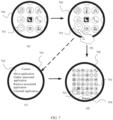
- a display size of the app icon 701 on the global interface is scaled down by 0.8 times compared with a display size of the app icon 701 on the interface 700 shown in (a) in FIG. 7 , and display sizes of the remaining icons are scaled down to 0.5 times original display sizes.
- a scale-down ratio may be adjusted based on a size of a display interface of an actual device and a quantity of applications installed on the device, or the scale-down ratio may be set by the user by triggering the smart device. This is not limited herein.
- the operating system of the smartwatch determines that the first operation is a touch and hold operation, and instructs the display of the smartwatch to display the global interface, to display app icons of 36 applications according to the second icon arrangement rule of 6 (rows) ⁇ 6 (columns). As shown in (d) in FIG. 7 , that is, all the app icons on the smartwatch are displayed on the global interface.
- the smartwatch may generate, in the smartwatch, the global interface including all the app icons, and then display the global interface through the display.
- the smartwatch may update the icon arrangement rule of the first interface from the first icon arrangement rule to the second icon arrangement rule, so that an updated first interface is considered as the global interface.
- there are 6 ⁇ 6 icons on the global interface there are 6 ⁇ 6 icons on the global interface, and another icon is displayed on another global interface. If the target position is not on a current global interface, the app icon 701 may be dragged to an edge of the display for page turning. A quantity of icons displayed on the global interface may be adjusted based on an actual device, and is not limited herein.
- Step 605 The smartwatch receives a second operation that is input by the user on the global interface for the first application icon, and in response to the second operation, controls the first application icon to move on the global interface.
- the second operation is an operation that is triggered by the user and that is of moving the first application icon, which is detected by the smartwatch.
- the second operation may be a moving operation.
- the first operation and the second operation may be consecutive operations.
- the first operation is triggered until the global interface is displayed, during which a finger of the user does not leave the display or remains within a preset distance from the display, so that the smartwatch perceives the first operation performed on the first application icon, and then the user triggers the second operation.
- the first operation and the second operation may be discontinuous operations.
- a finger of the user leaves the display or a range between the finger and the display is greater than a preset distance, and then the smartwatch displays the global interface.
- the user triggers the second operation for the first application icon again.
- the global interface may further include a return control 704, as shown in (d) in FIG. 7 .
- the smartwatch may display the first interface or the home screen. This is not limited in this embodiment of this application.
- the smartwatch enters the global interface after the user triggers the first application icon.
- the user finds that the triggered first application icon is not an expected application icon of the user, and the user needs to select another application icon to move, the user triggers the smartwatch to return to the first interface from the global interface, reselects the to-be-moved application icon, and then triggers a touch and hold operation for the reselected to-be-moved application icon.
- the smartwatch uses the another app icon as the first app icon and performs step 604 and step 605. For example, at first, the smartwatch detects that an app icon selected by the user is the app icon 701, and triggers the smartwatch to enter the interface 706 shown in (d) in FIG. 7 . However, in the interface 706, the user cancels an operation performed on the app icon 701, and performs the first operation on the app icon 703. Then, the user performs the second operation on the app icon 703. In this case, the smartwatch may determine that the user needs to exchange the app icon 703 and another icon.
- the display of the smartwatch after receiving the second operation, sends the second operation to the processor of the smartwatch.
- the processor converts the second operation into an identifiable instruction, and sends the identifiable instruction to the operating system of the smartwatch.
- the operating system determines that the second operation of the user is a moving operation, and instructs the display apparatus (the display) of the smartwatch to perform display corresponding to the instruction, that is, display a moving picture of the first application icon on the global interface.
- Step 606 The smartwatch exchanges positions of the first application icon and a second application icon when an overlapping area between the first application icon and the second application icon that is displayed on the global interface is greater than or equal to a preset area threshold and a moving speed of the first application icon is lower than a preset moving speed threshold, where a display parameter of the second application icon is better than a display parameter of an application icon other than the first application icon.
- the smartwatch determines the moving speed of the first application icon.
- the moving speed of the first application icon may be understood as a moving speed of a touch point between the user and the display of the smartwatch, for example, a touch point between a finger of the user and the display.
- the moving speed is lower than or equal to the preset moving speed threshold, no more than P icons (including the second application icon) that are currently closest to a center of the first application icon are scaled up for display.
- P is 4 or 6.
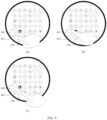
- the smartwatch when the smartwatch detects the second operation for an app icon 801, and detects that a moving speed of the app icon 801 is lower than or equal to the preset moving speed threshold, as shown in (a) in FIG. 8 , the smartwatch scales up app icons that are closest to a center of the app icon 801 for display, that is, an app icon 802 and an app icon 803.
- the preset moving speed threshold is 50 pixels/second.
- the moving distance of the first application icon is greater than or equal to 1/20 of a pixel value of a screen diameter, and the moving speed is lower than or equal to the preset moving speed threshold (50 pixels/second)
- a plurality of app icons closest to the first application icon that are around the first application icon are scaled up for display, to facilitate exchanging of positions of app icons.
- the moving distance may be adjusted based on an actual device (for example, a size of a display of a smartwatch). This is not limited herein.
- positions of the first application icon (an app icon 901) and the second application icon (an app icon 902) are shown in (a) in FIG. 9 .
- the positions of the app icon 901 and the app icon 902 are exchanged when the smartwatch detects that the app icon 901 and the app icon 902 overlap, an overlapping area exceeds 80% of an area of the app icon 902, and a moving speed of the app icon 901 is lower than the preset moving speed threshold, as shown in (b) in FIG. 9 .
- the smartwatch detects the first operation for the app icon 901, and enters the global interface.
- the smartwatch considers, by default, positions of two app icons around the app icon 901, that is, positions of the app icon 902 and an app icon 903, as possible target positions. Therefore, as shown in (a) in FIG. 9 , the app icon 902 and the app icon 903 are scaled up for display, so that the app icon 901 exchanges positions with the app icon 902 or the app icon 903. After the positions of the app icon 901 and the app icon 902 are exchanged, the app icon 903 is still one of the target positions. Therefore, the app icon 903 is still highlighted, so that the user can exchange positions again.
- the third operation is an operation that is triggered by the user and that enables the smartwatch to perform interface switching.
- an icon that the first application icon passes by remains unchanged and is not processed. If a moving distance is less than 1/20 of a pixel value of a screen diameter, and the moving speed is higher than 50 pixels/second, the processor does not process another icon.
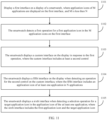
- FIG. 11 is a schematic flowchart of another application icon management method according to an embodiment of this application.
- the method is performed by a smartwatch.
- the smartwatch includes a display, and N applications are installed.
- the method includes the following steps.
- Step 1101 Display a first interface on the display of the smartwatch.
- Application icons of M applications are displayed on the first interface, and M is less than N.
- Step 1102 The smartwatch detects a first operation for a first application icon in the M application icons on the first interface.
- Step 1103 The smartwatch displays a custom interface on the display in response to the first operation.
- the custom interface includes at least a second control.
- step 1101 to step 1103 refer to the descriptions of step 601 to step 603 shown in FIG. 6 . Details are not described herein.
- Step 1104 The smartwatch displays a fifth interface on the display when detecting an operation for the second control on the custom interface, as shown in (c) in FIG. 12A, where the fifth interface includes an application icon of at least one application in the N applications.
- the second control may be a "Gather associated application" control 1202 shown in FIG. 12A or FIG. 12B.
- a user may trigger the smartwatch to perform switching, so that an application icon displayed on the fifth interface changes.
- an application icon displayed on the fifth interface changes.
- FIG. 12A or FIG. 12B an example in which a distribution rule of app icons displayed on the fifth interface is z (rows) ⁇ 1 column is used.
- the user may perform an upward or downward sliding operation on the fifth interface to change the app icons displayed on the fifth interface.
- the distribution rule of the app icons displayed on the fifth interface of the smartwatch may alternatively be a plurality of rows and a plurality of columns. In this case, each app may correspond to one selection control.
- Step 1105 The smartwatch displays a sixth interface when detecting a selection operation for a target application icon in the application icon of the at least one application.
- the sixth interface includes the first application icon and the target application icon.
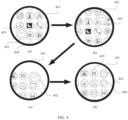
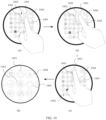
- the smartwatch displays an interface 1200 (corresponding to the custom interface) shown in (b) in FIG. 12Awhen detecting a touch and hold operation performed by the user on an app icon 1201 on an interface shown in (a) in FIG. 12A.
- the "Gather associated application” control 1202 is displayed on the interface 1200.
- the smartwatch may determine that the user expects to gather and associate an app icon corresponding to the app icon 1201. Therefore, in response to the operation, the display of the smartwatch displays the fifth interface shown in (c) in FIG. 12A.
- the application icons on the fifth interface are displayed in a form of z rows ⁇ 1 column, each application icon may be displayed on the fifth interface in a scrolling manner, and each app icon corresponds to one "Selection" control 1203.
- the smartwatch determines an association relationship between another app icon and the app icon 1201. If an app icon displayed on the fifth interface is associated with the app icon 1201, a "Selection" control 1203 corresponding to the app icon is in the selected state. If an app icon displayed on the fifth interface is not associated with the app icon 1201, a "Selection" control 1203 corresponding to the app icon is in an unselected state.
- the application icons on the fifth interface are displayed in the form of z rows ⁇ 1 column, only some application icons can be displayed on the fifth interface at a time. Therefore, the user may trigger the smartwatch to perform interface switching to display another application icon. On the fifth interface, the user may trigger the smartwatch to perform page switching, to select at least one target application icon (for example, an app icon 1205, an app icon 1207, an app icon 1208, or an app icon 1206) associated with the app icon 1201.
- the fifth interface includes an "OK" control 1204. As shown in (c) in FIG.
- the smartwatch after the smartwatch detects an operation for "Selection” controls corresponding to one or more target applications on the fifth interface, the smartwatch detects an operation for the "OK” control 1204, and in response to the operation, the smartwatch displays the custom interface shown in (b) inFIG. 12A.
- the smartwatch may display the interface 1200 shown in (b) in FIG. 12A.
- the smartwatch On the interface shown in (b) in FIG. 12A if the smartwatch detects an operation for the control 1202 again, the smartwatch displays the sixth interface shown in (d) in FIG. 12A.
- the sixth interface displays the app icon 1201, the app icon 1205, the app icon 1206, the app icon 1207, and the app icon 1208. It may be understood that, in addition to the at least one app icon associated with the app icon 1201, the sixth interface may further display an app icon that is not associated with the app icon 1201.
- FIG. 12B a difference between FIG. 12B and FIG. 12Alies in that: after the user triggers the smartwatch to display the interface shown in (c) in FIG. 12B, if the smartwatch detects the operation performed by the user on the "OK" control 1204 displayed on the fifth interface, the smartwatch displays the sixth interface shown in (d) in FIG. 12B. That is, in interfaces shown in FIG. 12B, the smartwatch does not need to perform a process of returning from the interface shown in (c) in FIG. 12B to the interface shown in (b) in FIG. 12B.
- the smartwatch detects an operation for the "No” control 1303, and in response to the operation, continues to display the fifth interface shown in (c) in FIG. 12A.
- the prompt information 1301 may be displayed on the interface of the smartwatch in a form of a pop-up window or a card.
- the smartwatch may establish an association relationship between the first application icon and the target application icon based on the selection operation that is detected by the smartwatch for the target application icon in the application icon of the at least one application.
- the smartwatch uses an example in which the fifth interface includes the "OK" control 1204.
- the smartwatch enters the custom interface shown in (b) in FIG. 12A or the interface shown in FIG. 13 after preset duration (for example, 2 seconds).
- the smartwatch detects the operation for the "Gather associated application” control 1202, and displays the sixth interface, for example, the interface shown in (d) in FIG. 12A or (d) in FIG. 12B.
- the associated applications start with a 5 th icon and are arranged in a clockwise order of 5, 6, 7, and 8 at a second layer around the first application icon.
- positions of an icon 1406, an icon 1407, an icon 1408, and an icon 1409 are positions at which icons of the associated applications are arranged.
- An association between the app icon 1602 and the app icon 1601 is removed by triggering the "Selection" control 1604 that is in the selected state.
- a plurality of associated app icons may be put into a same folder.
- the smartwatch may remove the plurality of associated app icons from the folder.
Landscapes
- Engineering & Computer Science (AREA)
- Theoretical Computer Science (AREA)
- General Engineering & Computer Science (AREA)
- Physics & Mathematics (AREA)
- General Physics & Mathematics (AREA)
- Human Computer Interaction (AREA)
- Computer Hardware Design (AREA)
- Mathematical Physics (AREA)
- User Interface Of Digital Computer (AREA)
Applications Claiming Priority (2)
| Application Number | Priority Date | Filing Date | Title |
|---|---|---|---|
| CN202211215491.2A CN117850634A (zh) | 2022-09-30 | 2022-09-30 | 应用图标的管理方法以及电子设备 |
| PCT/CN2023/118277 WO2024067068A1 (zh) | 2022-09-30 | 2023-09-12 | 应用图标的管理方法以及电子设备 |
Publications (2)
| Publication Number | Publication Date |
|---|---|
| EP4579413A1 true EP4579413A1 (de) | 2025-07-02 |
| EP4579413A4 EP4579413A4 (de) | 2025-12-24 |
Family
ID=90476044
Family Applications (1)
| Application Number | Title | Priority Date | Filing Date |
|---|---|---|---|
| EP23870306.0A Pending EP4579413A4 (de) | 2022-09-30 | 2023-09-12 | Anwendungssymbolverwaltungsverfahren und elektronische vorrichtung |
Country Status (4)
| Country | Link |
|---|---|
| US (1) | US20250224851A1 (de) |
| EP (1) | EP4579413A4 (de) |
| CN (1) | CN117850634A (de) |
| WO (1) | WO2024067068A1 (de) |
Families Citing this family (1)
| Publication number | Priority date | Publication date | Assignee | Title |
|---|---|---|---|---|
| CN111831182B (zh) * | 2020-07-09 | 2022-02-08 | 维沃移动通信有限公司 | 应用图标控制方法、装置及电子设备 |
Family Cites Families (9)
| Publication number | Priority date | Publication date | Assignee | Title |
|---|---|---|---|---|
| CN101957718A (zh) * | 2010-06-22 | 2011-01-26 | 宇龙计算机通信科技(深圳)有限公司 | 一种图标移动方法、装置及数字终端 |
| CN202110523U (zh) * | 2011-06-14 | 2012-01-11 | 上海博泰悦臻电子设备制造有限公司 | 终端设备及其图标位置互换装置 |
| CN102866831A (zh) * | 2012-08-30 | 2013-01-09 | 广东欧珀移动通信有限公司 | 一种桌面图标的调整方法、装置和移动终端 |
| CN103092469A (zh) * | 2013-01-30 | 2013-05-08 | 东莞宇龙通信科技有限公司 | 终端和图标移动方法 |
| CN104238877B (zh) * | 2014-09-04 | 2018-03-13 | 华为技术有限公司 | 控制图标的方法和终端 |
| CN108052366B (zh) * | 2017-12-27 | 2021-11-02 | 努比亚技术有限公司 | 应用图标显示方法、终端及存储介质 |
| CN111459349B (zh) * | 2020-03-27 | 2021-07-13 | 维沃移动通信有限公司 | 应用推荐方法及电子设备 |
| CN114756150B (zh) * | 2020-12-25 | 2023-12-22 | 荣耀终端有限公司 | 应用图标的管理方法、终端设备及存储介质 |
| CN113126838A (zh) * | 2021-03-15 | 2021-07-16 | 维沃移动通信有限公司 | 应用图标整理方法、装置和电子设备 |
-
2022
- 2022-09-30 CN CN202211215491.2A patent/CN117850634A/zh active Pending
-
2023
- 2023-09-12 EP EP23870306.0A patent/EP4579413A4/de active Pending
- 2023-09-12 WO PCT/CN2023/118277 patent/WO2024067068A1/zh not_active Ceased
-
2025
- 2025-03-29 US US19/094,899 patent/US20250224851A1/en active Pending
Also Published As
| Publication number | Publication date |
|---|---|
| EP4579413A4 (de) | 2025-12-24 |
| US20250224851A1 (en) | 2025-07-10 |
| CN117850634A (zh) | 2024-04-09 |
| WO2024067068A1 (zh) | 2024-04-04 |
Similar Documents
| Publication | Publication Date | Title |
|---|---|---|
| KR102945172B1 (ko) | 스크린 콘텐츠 캡처 관리 | |
| CN111149086B (zh) | 编辑主屏幕的方法、图形用户界面及电子设备 | |
| US11054988B2 (en) | Graphical user interface display method and electronic device | |
| US9753607B2 (en) | Electronic device, control method, and control program | |
| US10013098B2 (en) | Operating method of portable terminal based on touch and movement inputs and portable terminal supporting the same | |
| CN114741011B (zh) | 一种终端显示的方法及电子设备 | |
| KR102485448B1 (ko) | 제스처 입력을 처리하기 위한 전자 장치 및 방법 | |
| CN110168487B (zh) | 一种触摸控制方法及装置 | |
| KR102307215B1 (ko) | 데이터 처리 방법 및 전자 디바이스 | |
| US10146401B2 (en) | Electronic device, control method, and control program | |
| CN113961115B (zh) | 对象编辑方法、电子设备、介质以及程序产品 | |
| EP4404038B1 (de) | Schnittstellenanzeigeverfahren und -vorrichtung | |
| US20240427486A1 (en) | Icon moving method, related graphical interface, and electronic device | |
| US12537895B2 (en) | Information display method and electronic device | |
| KR20170084586A (ko) | 전자 장치의 플렉서블 디스플레이 및 그의 운용 방법 | |
| CN111225108A (zh) | 一种通信终端及负屏界面的卡片显示方法 | |
| CN111124206B (zh) | 位置调整方法及电子设备 | |
| KR20180010029A (ko) | 전자 장치의 동작 방법 및 장치 | |
| KR20180028855A (ko) | 전자 장치 및 전자 장치의 제어 방법 | |
| EP2613248A2 (de) | Elektronische Vorrichtung und Steuerungsverfahren dafür | |
| KR20170086798A (ko) | 사용자 인터페이스를 표시하는 방법 및 이를 지원하는 전자 장치 | |
| CN110221762A (zh) | 一种展示桌面小工具的方法及电子设备 | |
| US20250224851A1 (en) | Application icon management method and electronic device | |
| CN114675762A (zh) | 一种终端设备、功能搜索方法和存储介质 | |
| JP7842249B2 (ja) | インターフェース表示方法及び装置 |
Legal Events
| Date | Code | Title | Description |
|---|---|---|---|
| STAA | Information on the status of an ep patent application or granted ep patent |
Free format text: STATUS: THE INTERNATIONAL PUBLICATION HAS BEEN MADE |
|
| PUAI | Public reference made under article 153(3) epc to a published international application that has entered the european phase |
Free format text: ORIGINAL CODE: 0009012 |
|
| STAA | Information on the status of an ep patent application or granted ep patent |
Free format text: STATUS: REQUEST FOR EXAMINATION WAS MADE |
|
| 17P | Request for examination filed |
Effective date: 20250328 |
|
| AK | Designated contracting states |
Kind code of ref document: A1 Designated state(s): AL AT BE BG CH CY CZ DE DK EE ES FI FR GB GR HR HU IE IS IT LI LT LU LV MC ME MK MT NL NO PL PT RO RS SE SI SK SM TR |
|
| A4 | Supplementary search report drawn up and despatched |
Effective date: 20251121 |
|
| RIC1 | Information provided on ipc code assigned before grant |
Ipc: G06F 3/04817 20220101AFI20251117BHEP Ipc: G06F 1/16 20060101ALI20251117BHEP Ipc: G06F 3/0482 20130101ALI20251117BHEP Ipc: G06F 3/0485 20220101ALI20251117BHEP Ipc: G06F 3/04883 20220101ALI20251117BHEP |
|
| DAV | Request for validation of the european patent (deleted) | ||
| DAX | Request for extension of the european patent (deleted) |