EP4465620A1 - Verfahren zur anzeige der position mit anwendungsmerkmalen, elektronische vorrichtung und lesbares speichermedium - Google Patents
Verfahren zur anzeige der position mit anwendungsmerkmalen, elektronische vorrichtung und lesbares speichermedium Download PDFInfo
- Publication number
- EP4465620A1 EP4465620A1 EP23864114.6A EP23864114A EP4465620A1 EP 4465620 A1 EP4465620 A1 EP 4465620A1 EP 23864114 A EP23864114 A EP 23864114A EP 4465620 A1 EP4465620 A1 EP 4465620A1
- Authority
- EP
- European Patent Office
- Prior art keywords
- card
- size
- icons
- electronic device
- recommendation
- Prior art date
- Legal status (The legal status is an assumption and is not a legal conclusion. Google has not performed a legal analysis and makes no representation as to the accuracy of the status listed.)
- Pending
Links
Images

















Classifications
-
- H—ELECTRICITY
- H04—ELECTRIC COMMUNICATION TECHNIQUE
- H04M—TELEPHONIC COMMUNICATION
- H04M1/00—Substation equipment, e.g. for use by subscribers
- H04M1/72—Mobile telephones; Cordless telephones, i.e. devices for establishing wireless links to base stations without route selection
- H04M1/724—User interfaces specially adapted for cordless or mobile telephones
- H04M1/72403—User interfaces specially adapted for cordless or mobile telephones with means for local support of applications that increase the functionality
-
- G—PHYSICS
- G06—COMPUTING OR CALCULATING; COUNTING
- G06F—ELECTRIC DIGITAL DATA PROCESSING
- G06F3/00—Input arrangements for transferring data to be processed into a form capable of being handled by the computer; Output arrangements for transferring data from processing unit to output unit, e.g. interface arrangements
- G06F3/01—Input arrangements or combined input and output arrangements for interaction between user and computer
- G06F3/048—Interaction techniques based on graphical user interfaces [GUI]
- G06F3/0484—Interaction techniques based on graphical user interfaces [GUI] for the control of specific functions or operations, e.g. selecting or manipulating an object, an image or a displayed text element, setting a parameter value or selecting a range
- G06F3/04847—Interaction techniques to control parameter settings, e.g. interaction with sliders or dials
-
- G—PHYSICS
- G06—COMPUTING OR CALCULATING; COUNTING
- G06F—ELECTRIC DIGITAL DATA PROCESSING
- G06F3/00—Input arrangements for transferring data to be processed into a form capable of being handled by the computer; Output arrangements for transferring data from processing unit to output unit, e.g. interface arrangements
- G06F3/01—Input arrangements or combined input and output arrangements for interaction between user and computer
- G06F3/048—Interaction techniques based on graphical user interfaces [GUI]
- G06F3/0481—Interaction techniques based on graphical user interfaces [GUI] based on specific properties of the displayed interaction object or a metaphor-based environment, e.g. interaction with desktop elements like windows or icons, or assisted by a cursor's changing behaviour or appearance
-
- G—PHYSICS
- G06—COMPUTING OR CALCULATING; COUNTING
- G06F—ELECTRIC DIGITAL DATA PROCESSING
- G06F3/00—Input arrangements for transferring data to be processed into a form capable of being handled by the computer; Output arrangements for transferring data from processing unit to output unit, e.g. interface arrangements
- G06F3/01—Input arrangements or combined input and output arrangements for interaction between user and computer
- G06F3/048—Interaction techniques based on graphical user interfaces [GUI]
- G06F3/0481—Interaction techniques based on graphical user interfaces [GUI] based on specific properties of the displayed interaction object or a metaphor-based environment, e.g. interaction with desktop elements like windows or icons, or assisted by a cursor's changing behaviour or appearance
- G06F3/04817—Interaction techniques based on graphical user interfaces [GUI] based on specific properties of the displayed interaction object or a metaphor-based environment, e.g. interaction with desktop elements like windows or icons, or assisted by a cursor's changing behaviour or appearance using icons
-
- G—PHYSICS
- G06—COMPUTING OR CALCULATING; COUNTING
- G06F—ELECTRIC DIGITAL DATA PROCESSING
- G06F3/00—Input arrangements for transferring data to be processed into a form capable of being handled by the computer; Output arrangements for transferring data from processing unit to output unit, e.g. interface arrangements
- G06F3/01—Input arrangements or combined input and output arrangements for interaction between user and computer
- G06F3/048—Interaction techniques based on graphical user interfaces [GUI]
- G06F3/0481—Interaction techniques based on graphical user interfaces [GUI] based on specific properties of the displayed interaction object or a metaphor-based environment, e.g. interaction with desktop elements like windows or icons, or assisted by a cursor's changing behaviour or appearance
- G06F3/0482—Interaction with lists of selectable items, e.g. menus
-
- G—PHYSICS
- G06—COMPUTING OR CALCULATING; COUNTING
- G06F—ELECTRIC DIGITAL DATA PROCESSING
- G06F3/00—Input arrangements for transferring data to be processed into a form capable of being handled by the computer; Output arrangements for transferring data from processing unit to output unit, e.g. interface arrangements
- G06F3/01—Input arrangements or combined input and output arrangements for interaction between user and computer
- G06F3/048—Interaction techniques based on graphical user interfaces [GUI]
- G06F3/0481—Interaction techniques based on graphical user interfaces [GUI] based on specific properties of the displayed interaction object or a metaphor-based environment, e.g. interaction with desktop elements like windows or icons, or assisted by a cursor's changing behaviour or appearance
- G06F3/0483—Interaction with page-structured environments, e.g. book metaphor
-
- G—PHYSICS
- G06—COMPUTING OR CALCULATING; COUNTING
- G06F—ELECTRIC DIGITAL DATA PROCESSING
- G06F3/00—Input arrangements for transferring data to be processed into a form capable of being handled by the computer; Output arrangements for transferring data from processing unit to output unit, e.g. interface arrangements
- G06F3/01—Input arrangements or combined input and output arrangements for interaction between user and computer
- G06F3/048—Interaction techniques based on graphical user interfaces [GUI]
- G06F3/0487—Interaction techniques based on graphical user interfaces [GUI] using specific features provided by the input device, e.g. functions controlled by the rotation of a mouse with dual sensing arrangements, or of the nature of the input device, e.g. tap gestures based on pressure sensed by a digitiser
- G06F3/0488—Interaction techniques based on graphical user interfaces [GUI] using specific features provided by the input device, e.g. functions controlled by the rotation of a mouse with dual sensing arrangements, or of the nature of the input device, e.g. tap gestures based on pressure sensed by a digitiser using a touch-screen or digitiser, e.g. input of commands through traced gestures
-
- G—PHYSICS
- G06—COMPUTING OR CALCULATING; COUNTING
- G06F—ELECTRIC DIGITAL DATA PROCESSING
- G06F3/00—Input arrangements for transferring data to be processed into a form capable of being handled by the computer; Output arrangements for transferring data from processing unit to output unit, e.g. interface arrangements
- G06F3/01—Input arrangements or combined input and output arrangements for interaction between user and computer
- G06F3/048—Interaction techniques based on graphical user interfaces [GUI]
- G06F3/0487—Interaction techniques based on graphical user interfaces [GUI] using specific features provided by the input device, e.g. functions controlled by the rotation of a mouse with dual sensing arrangements, or of the nature of the input device, e.g. tap gestures based on pressure sensed by a digitiser
- G06F3/0488—Interaction techniques based on graphical user interfaces [GUI] using specific features provided by the input device, e.g. functions controlled by the rotation of a mouse with dual sensing arrangements, or of the nature of the input device, e.g. tap gestures based on pressure sensed by a digitiser using a touch-screen or digitiser, e.g. input of commands through traced gestures
- G06F3/04883—Interaction techniques based on graphical user interfaces [GUI] using specific features provided by the input device, e.g. functions controlled by the rotation of a mouse with dual sensing arrangements, or of the nature of the input device, e.g. tap gestures based on pressure sensed by a digitiser using a touch-screen or digitiser, e.g. input of commands through traced gestures for inputting data by handwriting, e.g. gesture or text
-
- G—PHYSICS
- G06—COMPUTING OR CALCULATING; COUNTING
- G06F—ELECTRIC DIGITAL DATA PROCESSING
- G06F3/00—Input arrangements for transferring data to be processed into a form capable of being handled by the computer; Output arrangements for transferring data from processing unit to output unit, e.g. interface arrangements
- G06F3/01—Input arrangements or combined input and output arrangements for interaction between user and computer
- G06F3/048—Interaction techniques based on graphical user interfaces [GUI]
- G06F3/0487—Interaction techniques based on graphical user interfaces [GUI] using specific features provided by the input device, e.g. functions controlled by the rotation of a mouse with dual sensing arrangements, or of the nature of the input device, e.g. tap gestures based on pressure sensed by a digitiser
- G06F3/0488—Interaction techniques based on graphical user interfaces [GUI] using specific features provided by the input device, e.g. functions controlled by the rotation of a mouse with dual sensing arrangements, or of the nature of the input device, e.g. tap gestures based on pressure sensed by a digitiser using a touch-screen or digitiser, e.g. input of commands through traced gestures
- G06F3/04886—Interaction techniques based on graphical user interfaces [GUI] using specific features provided by the input device, e.g. functions controlled by the rotation of a mouse with dual sensing arrangements, or of the nature of the input device, e.g. tap gestures based on pressure sensed by a digitiser using a touch-screen or digitiser, e.g. input of commands through traced gestures by partitioning the display area of the touch-screen or the surface of the digitising tablet into independently controllable areas, e.g. virtual keyboards or menus
-
- G—PHYSICS
- G06—COMPUTING OR CALCULATING; COUNTING
- G06F—ELECTRIC DIGITAL DATA PROCESSING
- G06F9/00—Arrangements for program control, e.g. control units
- G06F9/06—Arrangements for program control, e.g. control units using stored programs, i.e. using an internal store of processing equipment to receive or retain programs
- G06F9/44—Arrangements for executing specific programs
- G06F9/451—Execution arrangements for user interfaces
Definitions
- This application relates to the field of electronic technologies, and in particular, to an application recommendation slot displaying method, an electronic device, and a readable storage medium.
- suggestion card data such as time and location is analyzed, to provide, based on a use habit of the user, a suggestion on an app to use to the user.
- recommended content may include an installed application of the user and a service card.
- the present invention provides an application recommendation slot displaying method, an electronic device, and a readable storage medium.
- this method more recommendation slots can be quickly provided to a user in a case in which a home screen layout of the user is not disrupted. This increases a probability that content in app recommendation slots meets a user requirement, so that user experience is improved.
- the present invention provides an application recommendation slot displaying method.
- the method may be applied to an electronic device, and the method includes:
- the electronic device hides the preview recommendation slots and restores the first quantity of original recommendation slots when a cancellation operation for the first operation is received.
- the user browses the preview recommendation slots quickly and conveniently, and when the user does not need the preview recommendation slots, an original state of the home screen is restored quickly. An expectation of the user for the preview recommendation slots is met, and the original state of the home screen is maintained.
- a third operation on the first card of the second size is received, and the electronic device restores the first card of the second size to the first card of the first size and restores the first quantity of original recommendation slots on the first card; or no operation of the user is received within a first time period after the electronic device enlarges the first card from the first size to the second size, and the electronic device automatically restores the first card of the second size to the first card of the first size and restores the first quantity of original recommendation slots on the first card.
- a state of an original home screen may be quickly restored when the user does not use the preview recommendation slots.
- the second operation is a continuation of the first operation.
- the operation is smoother.
- the first operation is an operation of touching an initial interface in the first card, sliding a first distance, and maintaining contact with the screen, where the first distance is less than a preset distance.
- the first operation may be touching, with a finger, an area in which the first card is located and sliding the first distance. This operation is more consistent with an operation habit of the user, so that the user operates conveniently.
- the cancellation operation for the first operation is an operation of stopping touching the screen. This is consistent with the operation habit of the user and can restore the original state of the home screen without a special operation.
- the second operation is an operation of continuing to slide from the first distance to a second distance, and the second distance is greater than or equal to the preset distance. The operation manner is simple and convenient, and is associated with the first operation, so that completing a set of operations is smooth and comfortable.
- the electronic device arranges and displays the second quantity of preview recommendation slots based on the sliding direction, a size of the first card, and a layout of the preset position. In the displaying manner, an effect that the preview recommendation slots are pulled out by the user is shown, and an operation is easier and more convenient.
- a displaying form of the preview recommendation slots in the first card of the first size includes: displaying in tiled grids or displaying in stacks.
- the first card of the second size covers a home screen background of the screen, and a position of content in an original home screen background is unchanged.
- the first card of the second size is inserted into a home screen background interface of the screen, and a part of content of the original home screen is extruded from an interface of the screen.
- the first card of the second size is displayed on the screen in full screen.
- the electronic device sets a size of the preview recommendation slot according to a first preset rule, and performs displaying in the first card of the second size according to a second preset rule.
- the first preset rule includes: setting a size of a preview recommendation slot based on a type of an application displayed in the preview recommendation slot. In this way, some special applications may better display content conveniently, for example, display a plurality of pieces of information in Trending News.
- arranging is performed based on use frequencies of corresponding applications displayed in preview recommendation slots, where a preview recommendation slot of a larger size corresponds to an application with a higher use frequency.
- a probability that an application the user wants to use is displayed can be effectively increased, so that user experience is improved.
- the second preset rule includes: arranging the preview recommendation slots on the screen from top to bottom according to a descending order of use frequencies of corresponding applications in the preview recommendation slots. This arranging manner is consistent with a habit of the user of viewing interface content from top to bottom, so that the user quickly and conveniently finds an application the user wants to use.
- the preview recommendation slots are arranged on the screen from top to bottom according to a descending order of size.
- the enlarging, by the electronic device, the first card from a first size to a second size when a second operation that is associated with the first operation and that is performed on the first card is received includes:
- this application further provides an electronic device.
- the electronic device includes: a memory, configured to store instructions executed by one or more processors of the device, and a processor, configured to execute the instructions, to enable the electronic device to perform any one of the methods in the technical solutions of the first aspect.
- this application further provides a computer-readable storage medium.
- the computer-readable storage medium stores a computer program. When the computer program is run by a processor, the processor is enabled to perform any one of the methods in the technical solutions of the first aspect.
- this application further provides a computer program product that includes instructions.
- a processor is enabled to perform any one of the methods in the technical solutions of the first aspect.
- this application provides an application recommendation slot displaying method.
- an electronic device and a user interact with each other, so that more recommendation slots are browsed quickly and a temporary suggestion card of a large size is provided to the user in a case in which a home screen layout of the user is not disrupted. This increases a probability that content in app recommendation slots meets a user requirement, so that user experience is improved.
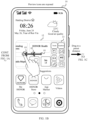
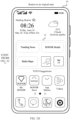
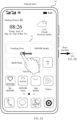
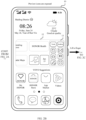
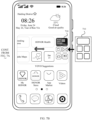
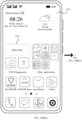
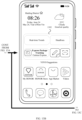
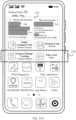
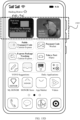
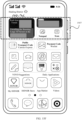
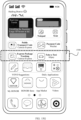
- FIG. 1A to FIG. 1D are schematic diagrams of an interface in which a user interacts with an electronic device according to an embodiment of this application.
- a mobile phone 10 is used as an instance of the electronic device for description.
- a card 12 (a first card) is displayed on a home screen 11 in the mobile phone 10 and the card 12 may be a card corresponding to a system suggestion, for example, a YOYO Suggestions card.
- the card 12 is configured to display icons of recommended applications or recommended service cards, for example, five (a first quantity) original recommendation slots shown in FIG. 1A , and each original recommendation slot correspondingly displays a piece of information associated with an application app.
- the information associated with an application app may be an application app icon or corresponding content.
- the information associated with an application app may alternatively be a service card, for example, a payment service card.
- an original recommendation slot is a recommendation slot that is displayed in a card when an interface is in an initial state (a state of the original recommendation slots displayed in the interface before an operation is performed).
- the recommendation slot in this application may also be understood as a recommendation card (the recommendation card is a card of a small size located on a home screen), and a size of the recommendation card is associated with a size of recommended content displayed in the recommendation card (or content displayed in the recommendation slot).
- a size of a recommendation slot may be understood as a size corresponding to displayed content, and the size of the recommendation slot varies with the size of the displayed content.
- a size of a recommendation slot may also be directly understood as a size of a card corresponding to displayed content. As shown in FIG. 1A , the user presses an initial interface of the card 12 and slides a finger from a position 01 to a position 02 (a first operation).
- FIG. 1B For an interface obtained after the mobile phone 10 responds to the pressing and sliding operation, refer to FIG. 1B .
- a part of content in the original interface of the card 12 is hidden, and formerly hidden preview recommendation slots 13 are displayed.
- the preview recommendation slots 13 are newly added recommendation slots relative to the original recommendation slots.
- the preview recommendation slots 13 are eight (a second quantity) newly added recommendation slots in a vacant position reserved after the original recommendation slots are moved.
- the user may learn about hidden recommended content by using the preview recommendation slots 13 to have a specific expectation for the hidden recommended content. No extra setting of the electronic device by the user is required, so that the method is easy and convenient to use.
- the foregoing pressing may be making contact with a screen or touching a screen with a finger of the user.
- the user may continue to slide the finger, so that the preview recommendation slots enter a transitory extended state.
- the user may continue to slide the finger from the position 02 to a position 03 (a second operation) based on sliding in FIG. 1A .
- a sliding distance of the finger reaches a preset distance, for example, 2 cm
- a distance from the position 01 to the position 03 is 2 cm.
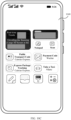
- the mobile phone 10 receives a sliding operation of the finger from the position 01 to the position 03, and enlarges the card 12 from a first size to a second size. As shown in FIG.
- FIG. 1C seven (a third quantity) preview recommendation slots and information that is located in the preview recommendation slots and that is associated with applications, for example, content information of Real-time Trends and service identifiers such as Public Transport Code, Express Package Tracking, Notepad, and Scan, are displayed in a card 14 of the second size.
- the user may tap the service identifiers to open service (function) interfaces of corresponding software. In the interaction process, an operation is easy and convenient, and a user requirement for more preview recommendation slots can be met.
- the third quantity may be greater than or equal to the second quantity. In this way, after a second quantity of recommendation slots the user sees in a quick previewing phase are enlarged for display, the user can still see all recommended content in quick previewing, which is consistent with an expectation of the user.
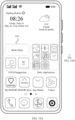
- the user may tap the card of the second size or a blank area of the screen. As shown in FIG. 1C , the user taps the blank area of the screen (a third operation) or performs no operation within a preset duration, for example, 3 seconds, an interface of the original home screen shown in FIG. 1D is restored.
- a requirement of the user for more preview recommendation slots can be met, and an original state of the home screen can be restored quickly, to prevent a prolonged change of a status of the home screen from affecting user experience.
- the user when the user does not want to open applications in preview recommendation slots after learning about the preview recommendation slots shown in FIG. 1B , the user may cancel displaying of the preview recommendation slots.
- FIG. 2A to FIG. 2C are schematic diagrams of an interface in which a user interacts with an electronic device according to another embodiment of this application.
- FIG. 1A to FIG. 1D are schematic diagrams of an interface in which a user interacts with an electronic device according to another embodiment of this application.
- FIG. 1A to FIG. 1D are schematic diagrams of an interface in which a user interacts with an electronic device according to another embodiment of this application.
- FIG. 1A to FIG. 1D As shown in FIG. 2A , when the user presses the card 12 and slides a specific distance (the first operation), the preview recommendation slots 12 shown in FIG. 2B are obtained. This process corresponds to an operation in FIG. 1A . When the user does not want to open content in the recommendation slots, the user may release the finger (a cancellation operation).
- FIG. 1C the original interface in the card 12 is restored to an original position, and the preview recommendation slots 13 are hidden again. The entire operation is convenient. The user can preview more recommendation slots and an overall layout of the home screen is not
- the size of the card is in a ratio of 2 cm ⁇ 4 cm (2 ⁇ 4 for short in the following) is used for description.
- the size of the card may alternatively be a size such as 2 ⁇ 2, 1 ⁇ 2, or 1 ⁇ 1.
- the size of the card is not limited in this application.
- the hidden preview recommendation slots or preview recommendation slots of an enlarged size may alternatively be invoked in manners such as double tapping or multiple tapping, long pressing, short pressing, and knocking with a finger joint.
- a specific operation is not limited in this application.
- the electronic device may further be a product that has a display interface, for example, a tablet computer, an electronic reader, a remote control, a personal computer (personal computer, PC), a notebook computer, a personal digital assistant (personal digital assistant, PDA), an in-vehicle device, a web television, a wearable device, or a television, and an intelligent display wearable product, for example, a smart watch and a smart band.
- a display interface for example, a tablet computer, an electronic reader, a remote control, a personal computer (personal computer, PC), a notebook computer, a personal digital assistant (personal digital assistant, PDA), an in-vehicle device, a web television, a wearable device, or a television, and an intelligent display wearable product, for example, a smart watch and a smart band.
- the following describes an application recommendation slot displaying method in an embodiment of this application with reference to a specific structure of the electronic device.
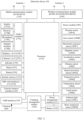
- FIG. 3 is a schematic diagram of a structure of an electronic device 100.
- the electronic device 100 may include a processor 110, an external memory interface 120, an internal memory 121, a universal serial bus (universal serial bus, USB) interface 130, a charging management module 140, a power management module 141, a battery 142, an antenna 1, an antenna 2, a mobile communication module 150, a wireless communication module 160, and an audio module 170, a speaker 170A, a receiver 170B, a microphone 170C, a headset interface 170D, a sensor module 180, a button 190, a motor 191, an indicator 192, a camera 193, a display 194, a subscriber identity module (subscriber identification module, SIM) card interface 195, and the like.
- SIM subscriber identity module
- the sensor module 180 may include a pressure sensor 180A, a gyroscope sensor 180B, a barometric pressure sensor 180C, a magnetic sensor 180D, an acceleration sensor 180E, a distance sensor 180F, an optical proximity sensor 180G, a fingerprint sensor 180H, a temperature sensor 180J, a touch sensor 180K, an ambient light sensor 180L, a bone conduction sensor 180M, and the like.
- the electronic device 100 may include more or fewer components than those shown in the figure, or some components may be combined, or some components may be split, or different component arrangements may be used.
- the components in the portrait may be implemented by hardware, software, or a combination of software and hardware.
- the processor 110 may include one or more processing units.
- the processor 110 may include an application processor (Application processor, APP), a modem processor, a graphics processing unit (Graphics Processing Unit, GPU), an image signal processor (Image Signal Processor, ISP), a controller, a video codec, a digital signal processor (Digital Signal Processor, DSP), a baseband processor, and/or a neural-network processing unit (Neural-network Processing Unit, NPU).
- Application processor Application processor
- APP Application processor
- modem processor a graphics processing unit
- ISP image signal processor
- controller a video codec
- DSP Digital Signal Processor
- NPU neural-network Processing Unit
- Different processing units may be separate devices, or may be integrated into one or more processors.
- the processor 110 may generate an operation control signal based on instruction operation code and a timing signal, to complete control of instruction fetching and instruction executing.
- a memory may be further disposed in the processor 110, which is configured to store instructions and data.
- the memory in the processor 110 is a cache memory.
- the memory may store instructions or data recently used or cyclically used by the processor 110. If the processor 110 needs to use the instructions or the data again, the processor 110 may directly invoke the instructions or the data from the memory. This avoids repeated access, and reduces a waiting time of the processor 110, thereby improving system efficiency.
- a card is displayed on the display 194 (a screen) of the electronic device, the card is used to display a first quantity of original recommendation slots of applications, and each original recommendation slot correspondingly displays one piece of information associated with the application, for example, an application icon.
- the processor 110 When the processor 110 receives a first operation on the card, for example, sliding in the card.
- the processor 110 displays hidden preview recommendation slots in a corresponding position of the card, so that a requirement of a user for more recommendation slots is improved.
- the processor 110 hides the preview recommendation slots and restores a first quantity of original recommendation slots.
- the processor 110 when receiving a second operation on the card, the processor 110 enlarges the card from a first size to a second size, and displays, on a card of the second size, a second quantity of preview recommendation slots and information that is located in the preview recommendation slots and that is associated with the applications.
- the processor 110 when receiving a third operation, restores the card of the second size to the card of the first size and restores the first quantity of original recommendation slots in a first card. In this way, when the user does not need more preview recommendation slots, a state of an original home screen may be restored, so that the requirement of the user for more recommendation slots is met, a home screen layout is not affected, and user experience is improved.
- an interface connection relationship between the modules illustrated in this embodiment of the present invention is merely an example for description, and does not constitute a limitation on a structure of the electronic device 100.
- the electronic device 100 may alternatively use an interface connection manner different from that in the foregoing embodiment, or use a combination of a plurality of interface connection manners.
- the electronic device 100 implements a display function by using the GPU, the display 194, the application processor, and the like.
- the GPU is a microprocessor for image processing and is connected to the display 194 and the application processor.
- the GPU is configured to perform mathematical and geometric calculations and graphics rendering.
- the processor 110 may include one or more GPUs, and the GPU executes program instructions to generate or change display information.
- the display 194 is configured to display an image, a video, and the like.
- the display 194 includes a display panel.
- the display panel may be a liquid crystal display (liquid crystal display, LCD), an organic light-emitting diode (organic light-emitting diode, OLED), an active-matrix organic light emitting diode (active-matrix organic light emitting diode, AMOLED), a flexible light-emitting diode (flexible light-emitting diode, FLED), a Miniled, a MicroLed, a Micro-oLed, a quantum dot light emitting diode (quantum dot light emitting diodes, QLED), or the like.
- the electronic device 100 may include 1 or N displays 194, where N is a positive integer greater than 1.
- the display 194 displays the hidden preview recommendation slots based on a control instruction of the processor 110, and enlarges the card of the first size to the card of the second size.
- the internal memory 121 may be configured to store computer-executable program code, and the executable program code includes instructions.
- the internal memory 121 may include a program storage area and a data storage area.
- the program storage area may store an operating system, an application required by at least one function (such as a sound play function and an image play function), and the like.
- the data storage area may store data (such as audio data and an address book) and the like that are created during use of the electronic device 100.
- the internal memory 121 may include a high-speed random access memory, or may include a nonvolatile memory, for example, at least one magnetic disk storage device, a flash memory, or a universal flash storage (universal flash storage, UFS).
- the processor 110 runs the instructions stored in the internal memory 121, and/or the instructions stored in the memory disposed in the processor, to execute applications required by various functions of the electronic device 100 and data processing.
- the internal memory 121 may store instructions for an application recommendation slot displaying method.
- the processor 110 runs the instructions for an application recommendation slot displaying method, to enable the display 194 of the electronic device 100 to display more recommendation slots or restore an original state of the home screen when the display 194 receives a sliding operation of the user on the card.
- the pressure sensor 180A is configured to sense a pressure signal, and can convert the pressure signal into an electrical signal.
- the pressure sensor 180A may be arranged in the display 194.
- There are many types of pressure sensors 180A for example, a resistive pressure sensor, an inductive pressure sensor, and a capacitive pressure sensor.
- the capacitive pressure sensor may include at least two parallel plates made of conductive materials. When a force is applied to the pressure sensor 180A, the capacitance between electrodes changes.
- the electronic device 100 determines a pressure intensity based on a capacitance change. When a touching operation is performed on the display 194, the electronic device 100 detects an intensity of the touching operation by using the pressure sensor 180A.
- the electronic device 100 may further calculate a touch position based on a detection signal of the pressure sensor 180A.
- touching operations performed at a same touch position but having different touching operation intensities may correspond to different operation instructions. For example, when a touching operation with a touching operation intensity less than a first pressure threshold is performed on a Messages application icon, an instruction for viewing an SMS message is executed. When a touching operation with a touching operation intensity greater than or equal to the first pressure threshold is performed on the Messages application icon, an instruction for creating a new SMS message is performed.
- the pressure sensor 180A when the user presses the card on the display 194 and slides, the pressure sensor 180A is configured to sense a pressure signal of the user for the card, and can convert the pressure signal into an electrical signal. Therefore, the processor 110 may implement, based on an operation of the user on the card, displaying the preview recommendation slots in the card on the display 194 or enlarging and displaying the preview recommendation slots on the home screen interface in a floating or superposed manner. When the user cancels a previewing operation on the recommendation slots, a state of an original home screen interface is restored.
- the touch sensor 180K is also referred to as a "touch device". The touch sensor 180K may be disposed on the display 194.
- the touch sensor 180K and the display 194 form a touchscreen, which is also referred to as a "touchscreen".
- the touch sensor 180K is configured to detect a touching operation performed on or near the display.
- the touch sensor may transfer a detected touching operation to the application processor to determine a type of the touch event.
- a visual output related to the touching operation may be provided on the display 194.
- the touch sensor 180K may alternatively be disposed on a surface of the electronic device 100 at a position different from that of the display 194.
- the processor 110 when the user touches any position of the card on the display 194 and performs an operation such as up-sliding, down-sliding, or tapping, the processor 110 receives a specific operation of the user on the card on the display 194 and, in response to the operation, controls the display 194 to provide visual output related to the touching operation.
- a software system of the electronic device 100 may use a layered architecture, an event-driven architecture, a microkernel architecture, a microservices architecture, or a cloud architecture.
- an Android system of a layered architecture is used as an example for describing a software structure of the electronic device 100.
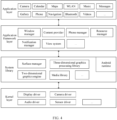
- FIG. 4 is a block diagram of a software structure of an electronic device according to an embodiment of the present invention.
- a layered architecture divides software into several layers, with each layer having a clear role and responsibilities. Layers communicate with each other through a software interface.
- an Android system is divided into four layers: an application layer, an application framework layer, an Android runtime (Android runtime) and system library, and a kernel layer from top to bottom.
- the application layer may include a series of application packages.
- the application packages may include applications such as Camera, Gallery, Calendar, Phone, Map, Navigation, WLAN, Bluetooth, Music, Videos, and Messages.
- the application framework layer provides an application programming interface (Application programming interface, API) and a programming framework to an application at the application layer.
- API Application programming interface
- the application framework layer includes some predefined functions.
- the application framework layer may include a window manager, a content provider, a view system, a phone manager, a resource manager, a notification manager, and the like.
- the window manager is configured to manage a window program.
- the window manager may obtain a size of a display, determine whether there is a status bar, perform screen locking, take a screenshot, and the like.
- the content provider is configured to store and obtain data, and enable the data to be accessed by an application.
- the data may include a video, an image, audio, calls that are made and received, a browsing history and a bookmark, a phone book, and the like.
- the view system includes visual controls such as a control for displaying a text and a control for displaying a picture.
- the view system may be configured to construct an application program.
- a display interface may include one or more views.
- a display interface including a short message service message notification icon may include a view for displaying text and a view for displaying a picture.
- the view system may include a card control, and may be configured to recommend an icon of an application or a service card.
- the view system may further control a size of a card, a size of an icon displayed in the card, and the like.
- the notification manager enables an application to display notification information on a status bar.
- the notification information may be a message used to indicate a notification type, and may automatically disappear after a short stay without interacting with a user.
- the notification manager is configured to notify download completion, provide a message notification, and the like.
- the notification manager may alternatively be a notification that appears in a top status bar of the system in a form of a graph or a scroll bar text, for example, a notification of an application running on the background, or may be a notification that appears on a screen in a form of a dialog window. For example, text information is prompted in the status bar, an alert sound is played, the electronic device vibrates, or the indicator light blinks.
- Application recommendation slot displaying method provided in an embodiment of this application by using a mobile phone as an example.
- a plurality of applications are installed in the mobile phone.
- Application recommendation slot displaying method provided in an embodiment of this application may be applied to an electronic device that has a hardware structure shown in FIG. 3 and a software structure shown in FIG. 4 , or to an electronic device that has a similar hardware structure and software structure that include more or fewer components than those shown in the figure, or some combined components, or some split components, or different component arrangements.
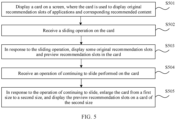
- FIG. 5 is a flowchart of an application recommendation slot displaying method according to an embodiment of this application. As shown in FIG. 5 , the method is performed by a mobile phone, and the method includes S501 to S505.
- S501 Display a card on a screen, where the card is used to display original recommendation slots of applications and corresponding recommended content.
- the card is an area that is displayed on a home screen and that is configured to recommend an application or a service to a user.
- a card 12 is shown in FIG. 1A .
- Five (a first quantity) original recommendation slots are displayed on the card 12, and each recommendation slot corresponds to an application, such as Trending News, HONOR Health, or Baidu Maps.
- the user may tap an application or service in the card to directly open a corresponding application or service.
- S502 Receive a sliding operation (a first operation) on the card.
- the sliding operation may be a sliding operation of a single finger, or may be a sliding operation of a plurality of fingers.
- a sliding direction of the finger may be up-sliding, down-sliding, left-sliding, or right-sliding.
- a sliding direction is not limited in this application.
- the sliding operation is the first operation.
- the first operation may alternatively be operations such as tapping, dragging, long pressing, short pressing, and knocking by a joint on the card.
- the sliding in this application may alternatively be understood as touching a display and sliding a distance, that is, gentle sliding and gentle swiping.
- An application icon or a service card is displayed in each preview recommendation slot.
- content corresponding to the original recommendation slots in the card moves with the sliding operation, so that a part of content that is moved outside the card is hidden, and the other part is retained for display in the card.
- the preview recommendation slots 13 are displayed in the card.
- Eight (a second quantity) preview recommendation slots are respectively corresponding to eight applications, for example, Trends, Headline, and Express Package Tracking.
- a part of the original recommendation slots and displayed content, such as information including "Trending News", “Baidu Maps", “HONOR Health” and “Calendar” are hidden, and the other part is still displayed in the card.
- a hidden part of the card is associated with a sliding distance of the user.
- a display position of the preview recommendation slots is in the card, and does not affect a home screen layout.
- the hidden recommended content can be learned about in a case in which the home screen layout of the user is not interrupted. This helps the user decide whether to perform a further operation.
- the display position and layout of the preview recommendation slots may be set based on a sliding direction of the user and a size of the card.
- FIG. 6 is a schematic diagram in which preview recommendation slots follow a sliding direction for display according to an embodiment of this application.
- preview recommendation slots may enter a card from different directions namely top, bottom, left, and right.
- eight applications corresponding to the preview recommendation slots enter the card from a right side of the card.
- eight applications corresponding to the preview recommendation slots enter the card from a left side of the card.
- hidden preview recommendation slots enter the card from an upper part of the card (an upper part in the figure), and enter the card from a lower part of the card (the lower part in the figure) respectively.
- a sliding direction of the finger is associated with a displaying direction of the hidden preview recommendation slots, which is more consistent with an operation habit of the user, so that user comfort in the operation is improved.
- a length-to-width ratio of the card is not necessarily a 1 ⁇ 1 ratio
- the preview recommendation slots need to be further arranged based on a size of the card.
- preview recommendation slots on a left side and right side are set in two columns, and preview recommendation slots on an upper side and lower side are set in one horizontal row. This arranging manner is more consistent with the size of the card, so that limited space is used efficiently.
- FIG. 7A and FIG. 7B are schematic diagrams of a structure of preview recommendation slots of two sizes according to an embodiment of this application.
- a mobile phone properly adjusts and enlarges a size of the preview recommendation slot 710.
- the size of the preview recommendation slot 710 is 1 ⁇ 2, which is twice as large as the 1 ⁇ 1 ratio shown in FIG. 6 .
- the preview recommendation slots can be enlarged as much as possible in limited space, so that a user observes conveniently.
- a size ratio of the preview recommendation slots may alternatively be 2 ⁇ 1, 2 ⁇ 2, or the like.
- the mobile phone 10 properly organizes a layout based on the recommendation slots of different sizes, maintains the layout compact, and displays recommended content as large as possible in limited space, so that the user observes conveniently.
- the mobile phone may set a recommendation slot 710 corresponding to Real-time Trends to a relatively large size, to help attract user attention, so that the user quickly and conveniently finds content that may be of interest.
- the preview recommendation slots are displayed in a form of grid.
- the preview recommendation slots may alternatively be displayed in a superimposed form.
- the superimposed preview recommendation slots may be of a same size or may be of different sizes.
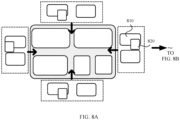
- FIG. 8A and FIG. 8B are schematic diagrams of a superimposed structure of preview recommendation slots of two sizes according to an embodiment of this application.
- FIG. 9 is a schematic diagram of a superimposed structure of preview recommendation slots of three sizes according to an embodiment of this application.
- sizes corresponding to a recommendation slot 810 and a recommendation slot 820 that are of two sizes are 1 ⁇ 2 and 1 ⁇ 1, respectively.
- the recommendation slot 820 is superimposed on the recommendation slot 810. In this manner, space can be saved.
- observing content in each recommendation slot by the user is not affected.
- an icon 811 for Clean Guard is superimposed on a service card for Express Package Tracking. However, this does not affect observing content in a lower layer by the user.
- superimposed recommendation slots may alternatively be of a plurality of sizes.
- a size of a recommendation slot 910 is 1 ⁇ 2
- a size of a recommendation slot 920 is 2 ⁇ 2
- a size of a recommendation slot 930 and a recommendation slot 940 is 1 ⁇ 1.
- Recommendation slots of smaller sizes are superimposed on recommendation slots of larger sizes respectively.
- sizes of recommendation slots corresponding to a part of preferentially recommended content such as 2 ⁇ 2 and 2 ⁇ 4 that are greater than 1 ⁇ 1, may not be reduced, so that a prompt (the recommendation slots corresponding to the part of preferentially recommended content may be preferentially viewed) is provided to the client.
- a prompt the recommendation slots corresponding to the part of preferentially recommended content may be preferentially viewed
- reading is convenient.
- a structure is more compact, and normal viewing of content in the recommendation slots by the user is not affected.
- S504 Receive an operation of continuing to slide (a second operation) on the card.
- sliding from a position 02 to a position 03 is an operation of continuing to slide that is based on the sliding operation in S502.
- the operation of continuing to slide is used as an instance of the second operation for description.
- the operation of continuing to slide may be an operation of continuing to tap, drag, long press, short press, knock with a joint, or the like on the card.
- S505 In response to the operation of continuing to slide, enlarge the card from a first size to a second size, and display the preview recommendation slots on a card of the second size.
- the card of the second size located on the home screen includes the following several display forms shown in FIG. 10A(1) and FIG. 10A(2) to FIG. 10C .
- FIG. 10A(1) and FIG. 10A(2) are schematic diagrams of an interface in which a card of a second size covers a home screen according to an embodiment of this application.
- content such as a "YOYO Suggestions" card and a "Daily Applications” folder is included in an interface 1100.
- an interface 1200 shown in FIG. 10A(2) is obtained.
- a size of a card 1201 changes from a previous small size to a large size.
- That the 4 ⁇ 5 size shown in FIG. 1C is obtained after the 2 ⁇ 4 size shown in FIG. 1B is enlarged may alternatively be referred to.
- An enlarged card covers the home screen, and a position of content on an original home screen is unchanged. A part of the content is covered, for example, content of the original YOYO Suggestions card and the Daily Applications folder are covered.
- sizes of the recommendation slots are also enlarged to sizes of recommendation slots that are normally displayed on the home screen, so that the user can observe the content in the recommendation slots more clearly.
- FIG. 10B(1) and FIG. 10B(2) are schematic diagrams of an interface in which a card of a second size is embedded into a home screen according to an embodiment of this application.
- content such as a "YOYO Suggestions" card, a "Daily Applications” folder, weather, and time, is included in an interface 1010.
- an interface 1030 shown in FIG. 10B(2) is obtained.
- an enlarged card 1031 is displayed in a manner in which the enlarged card 1031 is embedded (extended) into a home screen.
- FIG. 10C is a schematic diagram of an interface in which a preview recommendation slot of a second size covers a home screen in full screen according to an embodiment of this application.
- the interface is an interface 1040 in FIG. 10C that changes from the interface 1010 in FIG. 10A(1) .
- an enlarged card is displayed in full screen, all content on the home screen is covered, and only application information recommended to the user is displayed on the home screen. In this displaying manner, observing is more convenient.
- the user can perform an operation on a card of an enlarged size and preview and perform an operation on more preview recommendation slots conveniently, so that user experience is improved.
- the home screen is restored to an original form, so that the original home screen form of the user is not affected.
- FIG. 11 is a flowchart of a preview recommendation slot displaying method according to an embodiment of this application. As shown in FIG. 11 , the method includes S1101 to S1104. S1101 to S1103 correspond to S501 to S503 in FIG. 5 . For details, refer to description of corresponding steps in FIG. 5 .
- S1101 Display a card on a screen, where the card is used to display original recommendation slots of applications.
- S1104 Receive a cancellation operation for the sliding operation, hide the preview recommendation slots, and restore a first quantity of original recommendation slots.
- a user can quickly browse hidden preview recommendation slots.
- the user may release a finger, and a state of an original home screen is restored.
- the preview recommendation slots 13 are invoked, if the user does not continue to slide the finger but releases the finger or slides in a reverse direction (a cancellation operation), the preview recommendation slots are hidden again, and the original recommendation slots in the card 12 are restored. As shown in FIG. 2C , an interface in the card 12 is restored to an initial interface. In this way, a requirement of the user for viewing the hidden preview recommendation slots can be met in a case in which a home screen form of the user is not interrupted.
- an enlarged card may alternatively be reduced to an original size, the preview recommendation slots are hidden again, and the home screen form is restored. So that the enlarged card does not affect an original home screen form of the user.
- FIG. 1A to FIG. 1D when the user taps a card of a second size or a blank area of the screen, as shown in FIG. 1C , the user taps the blank area of the screen (a third operation), or performs no operation within a preset duration, for example, 3 seconds, a mobile phone recognizes that the user no longer needs a preview of the card and reduces an enlarged card to an original size, and the preview recommendation slots are hidden again and a form of the home screen is restored, an interface of an original home screen as shown in FIG. 1D .
- a requirement of the user for more preview recommendation slots can be met, and an original state of the home screen can be restored quickly, to prevent a prolonged change of a status of the home screen from affecting user experience.
- an application recommendation slot displaying method in embodiments of this application is described by using a process in which the user interacts with the mobile phone.
- the following describes an overall process in which the mobile phone performs the application recommendation slot displaying method with reference to the accompanying drawings.
- FIG. 12 is an overall flowchart in which a mobile phone performs an application recommendation slot displaying method according to an embodiment of this application. As shown in FIG. 12 , a performing process includes S1201 to S 1208.
- S1201 Receive a sliding operation on a card. For example, a finger presses any position in the card and slides. This process corresponds to S501 in FIG. 5 .
- the sliding operation on a card corresponds to the sliding operation shown in FIG. 1A .
- S1202 Determine whether a sliding distance reaches 2 cm (a preset distance).
- the 2 cm is a preset distance.
- the preset distance may alternatively be 1 cm, 3 cm, 4 cm, or the like. This is not limited in this application.
- a mobile phone performs S1203: Display, based on the sliding distance, hidden preview recommendation slots.
- the mobile phone before the finger slides to 2 cm, the mobile phone only needs to perform moving an overall interface on a card of a current size, and fill, by using the hidden preview recommendation slots, a vacancy that appears after the interface is moved, to implement an effect that the preview recommendation slots are pulled out with the finger.
- the mobile phone cyclically determines whether the sliding distance reaches 2 cm.
- the mobile phone performs S1206: Enlarge the card from a first size to a second size, and display the preview recommendation slots.
- This operation process corresponds to an operation process and an interface changing process from FIG. 1B to FIG. 1C .
- S1204 Determine whether a pressing pressure value is O. If the mobile phone determines whether the pressing pressure value is O after S1203 is performed and before 2 cm is reached, it indicates that the user does not want to continue to preview or perform an operation on the preview recommendation slots. In this case, the mobile phone performs S1205: Hide the preview recommendation slots and restore recommendation slots of an original home screen. The process corresponds to an operation interface shown in FIG. 2A to FIG. 2C and the method shown in FIG. 11 .
- the mobile phone After performing S1206, the mobile phone continues to perform S1207: Determine whether an operation is performed within 3 seconds.
- S 1205 is performed.
- the enlarged card is directly reduced to an original size, and the preview recommendation slots are hidden again, so that a state of the home screen is restored.
- This process corresponds to an operation process and an interface changing process from FIG. 1C to FIG. 1D .
- the mobile phone performs S1208. After the mobile phone determines that the operation is an operation of tapping a blank area of the interface, the mobile phone performs S1205. The enlarged card is directly reduced to the original size, and the preview recommendation slots are hidden again, so that a state of the home screen is restored.
- a manner of quickly browsing more hidden recommended content is provided, so that the user has a specific expectation for the hidden recommended content.
- a temporary card of a large size is provided to the user, and more app recommendation slots are provided, so that user experience is improved.
- the first size of the card is in a 2 ⁇ 4 ratio.
- the first size of the card may alternatively be 1 ⁇ 1, 1 ⁇ 2, 2 ⁇ 2, or the like.
- FIG. 13A to FIG. 13C are schematic diagrams of an interface in which a size of a card changes according to an embodiment of this application.
- a size of an original state of a card 1301 is 2 ⁇ 2.
- a size of the card may change from 2 ⁇ 2 to 2 ⁇ 4 shown in FIG. 13B .
- the size of the card may change from 2 ⁇ 2 shown in FIG. 13A to 4 ⁇ 5 shown in FIG. 13C .
- a mobile phone may determine, based on a quantity of preview recommendation slots, a proper size for display, to make proper use of displayed space.
- sliding the card of the size of 2 ⁇ 4 to a preset distance of 2 cm by the user is further received after the size of the card may change from 2 ⁇ 2 to 2 ⁇ 4, to obtain the card of the 4 ⁇ 5 size.
- FIG. 14A and FIG. 14B are schematic diagrams of an interface in which a size of a card changes according to another embodiment of this application.
- FIG. 13A and FIG. 13B After the card 1301 is enlarged from the size of 2 ⁇ 2 of the original state to the size of 2 ⁇ 4, the size (corresponding to a third size) shown in FIG. 13B is obtained.
- the user As shown in FIG. 14A , the user further slides on the card of the 2 ⁇ 4 size to obtain the card of the 4 ⁇ 5 size shown in FIG. 14B .
- a manner in which the card is enlarged for a plurality of times is used, to meet a user requirement for displaying of a larger card.
- FIG. 14A and FIG. 14B may indicate that a first size of the card is 2 ⁇ 4, and the user slides on the card of the 2 ⁇ 4 size to obtain the card of the 4 ⁇ 5 size shown in FIG. 14B .
- a first size of the card is 2 ⁇ 4
- the process refer to an operation process from FIG. 1A to FIG. 1C .
- a size of a preview recommendation slot may be set based on a requirement of displayed content.
- the displayed content may set sizes of content in the preview recommendation slots based on frequencies of using by the user or according to a rule set by an operator and perform arranging. For example, arranging is performed based on use frequencies of corresponding applications displayed in preview recommendation slots, where a preview recommendation slot of a larger size corresponds to an application with a higher use frequency.
- the size of the preview recommendation slot is set based on a type of an application displayed in a preview recommendation slot.
- FIG. 15A to FIG. 15G are schematic diagrams of different arrangements of preview recommendation slots in a card of an enlarged size according to embodiments of this application.
- the preview recommendation slot 1501 may be in a display form of a large 2 ⁇ 4 size, and other recommendation slots may be arranged on the interface from top to bottom according to an order of 1 ⁇ 2 to 1 ⁇ 1.
- Content in a preview recommendation slot of a largest size may be software with a highest probability of being possibly used by the user, where the software is determined based on a highest use frequency or a longest use time of the user, a location of the user and current time information, and the like. Information of corresponding software is displayed in a large size, so that a probability that the user selects preferentially recommended content is increased and user experience is improved.
- both a size of a corresponding preview recommendation slot and content corresponding to the recommendation slot may be different.
- sizes of recommendation slots in a block 1502 change from two recommendation slots of a 1 ⁇ 2 size to four recommendation slots of a 1 ⁇ 1 size.
- a recommendation slot of a 2 ⁇ 2 size may be in a block 1504.
- the two recommendation slots of a 2 ⁇ 2 size in a block 1505 may alternatively be set at the top.
- both the recommendation slot of a 2 ⁇ 2 size and the recommendation slot of a 1 ⁇ 2 size may be set.
- recommendation slots of a plurality of sizes may alternatively be set, for example, one recommendation slot of a 2 ⁇ 2 size and two recommendation slots of a 1 ⁇ 2 size are included in a block 1507.
- a size of the recommendation slot may be adjusted.
- a position for adjustment may be overall adjustment from top to bottom, or may be adjustment of only a part of content.
- FIG. 15G compared with FIG. 15F , the size of the recommendation slot in a corresponding position in block 1508 is adjusted, and other positions may be unchanged.
- a shape of the preview recommendation slots is a square is used for description.
- the preview recommendation slots may alternatively be in a circular shape, an oval shape, or the like.
- a shape of the preview recommendation slots is not limited in this application.
- a most preferentially recommended preview recommendation slot of a largest size may alternatively be set in a middle position, or a left side or a lower part of the card. This is not limited in this application.
- the card may be set in different positions on the screen.
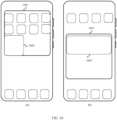
- FIG. 16 is a schematic diagram of a layout of a card on a screen according to an embodiment of this application.
- a card may be set to an upper part of a screen, or may be located in the middle of the screen.
- a mobile phone arranges recommendation slots in the card based on a position of the card on the screen. For example, as shown in (a) in FIG. 16 , the card 1601 is located in an upper part of the screen, and a preview recommendation slot 1602 of a relatively large size (preferentially recommended) is located in a lower part of the card 1601 but in the middle of the screen. In this way, the user observes more conveniently. As shown in (b) in FIG.
- the preferentially recommended preview recommendation slot 1604 may be set in the upper part of the card 1603.
- a position of the card is considered, and the preview recommendation slots are laid out, so that the preferentially recommended preview recommendation slot can occupy a proper position conveniently and the user observes the preferentially recommended preview recommendation slot at first sight conveniently.
- FIG. 17 is a schematic diagram of an interface of a layout of preview recommendation slots according to an embodiment of this application. As shown in FIG. 17 , recommendation slots are set to small sizes, so that more recommendation slots arranged in an array can be accommodated in the card.
- the preview recommendation slot layout may alternatively be set as a schematic diagram of an interface in which pages are turned through sliding shown in FIG. 18 . As shown in FIG. 18 , a user can view more preview recommendation slots in the interface in a manner of turning pages through sliding.
- the electronic apparatus includes:
- the processing module hides the preview recommendation slots and restores a first quantity of original recommendation slots by using the displaying module when the receiving module receives a cancellation operation for the first operation.
- the processing module when the processing module receives a third operation on the card of the second size, the processing module is configured to restore the card of the second size to the card of the first size and restore a first quantity of original recommendation slots on the first card in the display module.
- the second operation that is a continuation of the first operation is associated with the first operation.
- the first operation is an operation of pressing an initial interface in the card, dragging the initial interface to move a first distance, and keeping the pressing operation, where the first distance is less than a preset distance.
- the cancellation operation for the first operation is an operation of stopping pressing the interface in the initial state.
- the second operation is an operation of pressing the initial interface in the card, and dragging the initial interface to move from the first distance to the second distance, where the second distance is greater than or equal to a preset distance.
- the processing module arranges and displays the second quantity of preview recommendation slots based on a dragging direction, a size of the card, and a layout of the preset position by using the displaying module.
- a displaying form of the preview recommendation slots in the card of the first size includes: displaying in tiled grids or displaying in stacks.
- the card of the second size is floating on a home screen background of the screen for display.
- the card of the second size is inserted into a home screen background interface of the screen for display.
- the card of the second size is displayed on the screen in full screen.
- the processing module sets a size of the preview recommendation slot according to a first preset rule, and performs displaying in the card of the second size according to a second preset rule by using the displaying module.
- the first preset rule includes: setting a size of a preview recommendation slot based on a type of an application displayed in the preview recommendation slot.
- arranging is performed based on use frequencies of corresponding applications displayed in preview recommendation slots, where a preview recommendation slot of a larger size corresponds to an application with a higher use frequency.
- the second preset rule includes: arranging the preview recommendation slots on the screen from top to bottom according to descending order of use frequencies of corresponding applications in the preview recommendation slots.
- the preview recommendation slots are arranged on the screen from top to bottom according to a descending order of size.
- the information associated with an application includes an icon corresponding to an application, service information, or an information strip corresponding to an application.
- the electronic device includes:
- This application further provides a computer-readable storage medium.
- the computer-readable storage medium stores a computer program.
- the processor is enabled to perform the methods explained in FIG. 5 to FIG. 18 in the foregoing embodiments.
- This application further provides a computer program product that includes instructions.
- a processor is enabled to perform the methods shown in FIG. 5 to FIG. 18 in the foregoing embodiments.
- FIG. 19 is a block diagram of an SoC (System on Chip, system on chip) 1900 according to an embodiment of this application.
- SoC System on Chip, system on chip
- similar components have a same reference numeral.
- a dashed-line box is an optional feature of a more advanced SoC.
- FIG. 19 is a block diagram of an SoC (System on Chip, system on chip) 1900 according to an embodiment of this application.
- similar components have a same reference numeral.
- a dashed-line box is an optional feature of a more advanced SoC.
- the SoC 1900 includes an interconnection unit 1950, coupled to an application processor 1910; a system proxy unit 1980; a bus controller unit 1990; an integrated memory controller unit 1940; a group of or one or more coprocessors 1920, where the processor may include integrated graphics logic, an image processor, an audio processor, and a video processor; a static random access memory (Static Random Access Memory, SRAM) unit 1930; and a direct memory access (Direct Memory Access, DMA) unit 1960.
- SRAM static random access memory
- DMA direct memory access
- the coprocessor 1920 includes a dedicated processor, such as a network or communication processor, a compression engine, a general-purpose computing on computer graphics processing unit (General Purpose Computing on Graphics Processing Units, GPGPU), a high-throughput many integrated core architecture (Many Integrated Core, MIC) processor, or an embedded processor.
- the static random access memory (SRAM) unit 1930 may include one or more computer-readable media configured to store data and/or instructions.
- the computer-readable storage medium may store instructions, and specifically store temporary and permanent copies of the instructions.
- the instructions may include: When the instructions are executed by at least one unit in the processor, the SoC 1900 is enabled to perform the methods according to the foregoing embodiments. For details, refer to the methods explained in FIG. 5 to FIG. 18 in the foregoing embodiments. Details are not described herein again.
- Embodiments of mechanisms disclosed in this application may be implemented by using hardware, software, firmware, or a combination of these implementation methods.
- Embodiments of this application may be implemented by using a computer program or program code that is executed on a programmable system, and the programmable system includes at least one processor, a storage system (including volatile and non-volatile memories and/or a storage element), at least one input device, and at least one output device.
- the program code may be used for inputting instructions, to perform functions described in this application, and to generate output information.
- the output information may be applied to one or more output devices in a known manner.
- a processing system includes any system that has a processor such as a digital signal processor (Digital Signal Processor, DSP), a micro-controller, an application-specific integrated circuit (Application Specific Integrated Circuit, ASIC), or a microprocessor.
- DSP Digital Signal Processor
- ASIC Application Specific Integrated Circuit
- the program code may be implemented by using a high-level programming language or an object-oriented programming language, to communicate with the processing system.
- the program code may alternatively be implemented in an assembly language or a machine language when needed.
- the mechanisms described in this application are not limited to a scope of any specific programming language.
- the language may be a compilation language or an interpretation language.
- the disclosed embodiments may be implemented by software, hardware, firmware, or any combination thereof.
- the disclosed embodiments may alternatively be implemented as instructions carried by or stored on one or more transitory or non-transitory machine-readable (for example, computer-readable) storage media, and the instructions may be read or executed by one or more processors.
- the instructions may be distributed through a network or other computer-readable media.
- the machine-readable medium may include any mechanism used for storing or transmitting information in a machine (for example, computer) readable form, including but not limited to a floppy disk, an optical disc, an optical disk, a compact disc read-only memory (Compact Disc Read Only Memory, CD-ROMs), a magnetic optical disc, a read-only memory (Read Only Memory, ROM), a random access memory (RAM), an erasable programmable read-only memory (Erasable Programmable Read Only Memory, EPROM), an electrically erasable programmable read-only memory (Electrically Erasable Programmable Read Only Memory, EEPROM), a magnetic card or an optical card, a flash memory, or a tangible machine-readable memory used for transmitting information (such as a carrier, an infrared signal, and a digital signal) by using electricity, light, sound, or propagation signals in other forms over the Internet. Therefore, the machine-readable medium includes any type of a machine-readable medium suitable for storing or transmitting electronic instructions or
- a logical unit/module may be a physical unit/module, or may be a part of a physical unit/module, or may be implemented as a combination of a plurality of physical units/modules. Physical implementations of these logical units/modules are not most important, and only a combination of functions implemented by these logical units/modules is a key to resolving the technical problem proposed in this application.
- a unit/module that is not closely related to resolving the technical issues proposed in this application is not introduced in the foregoing device embodiments of this application. This does not mean that there are no other units/modules in the foregoing device embodiments.
Landscapes
- Engineering & Computer Science (AREA)
- Theoretical Computer Science (AREA)
- General Engineering & Computer Science (AREA)
- Human Computer Interaction (AREA)
- Physics & Mathematics (AREA)
- General Physics & Mathematics (AREA)
- Software Systems (AREA)
- Computer Networks & Wireless Communication (AREA)
- Signal Processing (AREA)
- User Interface Of Digital Computer (AREA)
Applications Claiming Priority (2)
| Application Number | Priority Date | Filing Date | Title |
|---|---|---|---|
| CN202310346729.3A CN116156043B (zh) | 2023-04-03 | 2023-04-03 | 应用程序推荐位的显示方法、电子设备和可读存储介质 |
| PCT/CN2023/114204 WO2024207661A1 (zh) | 2023-04-03 | 2023-08-22 | 应用程序推荐位的显示方法、电子设备和可读存储介质 |
Publications (2)
| Publication Number | Publication Date |
|---|---|
| EP4465620A1 true EP4465620A1 (de) | 2024-11-20 |
| EP4465620A4 EP4465620A4 (de) | 2025-01-15 |
Family
ID=86362000
Family Applications (1)
| Application Number | Title | Priority Date | Filing Date |
|---|---|---|---|
| EP23864114.6A Pending EP4465620A4 (de) | 2023-04-03 | 2023-08-22 | Verfahren zur anzeige der position mit anwendungsmerkmalen, elektronische vorrichtung und lesbares speichermedium |
Country Status (4)
| Country | Link |
|---|---|
| US (1) | US20250238126A1 (de) |
| EP (1) | EP4465620A4 (de) |
| CN (2) | CN116156043B (de) |
| WO (1) | WO2024207661A1 (de) |
Families Citing this family (5)
| Publication number | Priority date | Publication date | Assignee | Title |
|---|---|---|---|---|
| CN116450070A (zh) * | 2022-01-10 | 2023-07-18 | 荣耀终端有限公司 | 电子设备及其信息显示方法、介质 |
| CN116156043B (zh) * | 2023-04-03 | 2023-08-15 | 荣耀终端有限公司 | 应用程序推荐位的显示方法、电子设备和可读存储介质 |
| CN116992152B (zh) * | 2023-08-28 | 2024-07-26 | 荣耀终端有限公司 | 一种应用推荐方法及电子设备 |
| CN119987598A (zh) * | 2023-11-10 | 2025-05-13 | 腾讯科技(深圳)有限公司 | 推荐卡片的展示方法、装置、电子设备、存储介质及产品 |
| CN119420984B (zh) * | 2024-03-25 | 2025-11-28 | 聚好看科技股份有限公司 | 显示设备、服务器及界面显示方法 |
Family Cites Families (15)
| Publication number | Priority date | Publication date | Assignee | Title |
|---|---|---|---|---|
| EP2717121B1 (de) * | 2012-08-31 | 2020-04-15 | Samsung Electronics Co., Ltd | Verfahren und Vorrichtung zur Bereitstellung eines intelligenten Dienstes mittels eingegebenem Zeichen in einer Benutzervorrichtung |
| CN104991914B (zh) * | 2015-06-23 | 2018-04-27 | 腾讯科技(深圳)有限公司 | 一种应用推荐方法及服务器 |
| CN109242252B (zh) * | 2018-08-03 | 2020-09-04 | 张继升 | 一种智能服务平台及方法 |
| CN109388466A (zh) * | 2018-09-30 | 2019-02-26 | 青岛海信电器股份有限公司 | 应用推荐位的显示处理方法、装置及设备 |
| CN110489614A (zh) * | 2019-08-22 | 2019-11-22 | 深圳市元征科技股份有限公司 | 一种app推荐方法、装置及设备 |
| CN116261857B (zh) * | 2020-04-30 | 2024-10-22 | 聚好看科技股份有限公司 | 一种显示设备及应用程序界面显示方法 |
| CN113986070B (zh) * | 2020-07-10 | 2023-01-06 | 荣耀终端有限公司 | 一种应用卡片的快速查看方法及电子设备 |
| CN112148166A (zh) * | 2020-09-28 | 2020-12-29 | 维沃移动通信有限公司 | 桌面组件管理方法及装置 |
| CN115033140B (zh) * | 2021-03-05 | 2024-10-11 | 华为技术有限公司 | 一种卡片组件的显示方法、图形用户界面及相关装置 |
| CN115268731B (zh) * | 2021-04-29 | 2024-08-20 | 华为技术有限公司 | 一种处理服务卡片的方法和电子设备 |
| CN113419808A (zh) * | 2021-07-14 | 2021-09-21 | 武汉天睿世纪数字科技有限公司 | 一种标图方法、装置、显控设备和计算机可读存储介质 |
| CN115729405A (zh) * | 2021-08-30 | 2023-03-03 | 华为技术有限公司 | 一种桌面中停靠栏的显示方法及电子设备 |
| CN113900567B (zh) * | 2021-10-08 | 2023-12-26 | 杭州当贝网络科技有限公司 | 封面交互展示的控制方法、封面交互展示装置及大屏终端 |
| CN117215446B (zh) * | 2021-11-03 | 2024-06-04 | 华为技术有限公司 | 一种显示方法及电子设备 |
| CN116156043B (zh) * | 2023-04-03 | 2023-08-15 | 荣耀终端有限公司 | 应用程序推荐位的显示方法、电子设备和可读存储介质 |
-
2023
- 2023-04-03 CN CN202310346729.3A patent/CN116156043B/zh active Active
- 2023-04-03 CN CN202310996861.9A patent/CN118784763A/zh active Pending
- 2023-08-22 US US18/699,719 patent/US20250238126A1/en active Pending
- 2023-08-22 WO PCT/CN2023/114204 patent/WO2024207661A1/zh not_active Ceased
- 2023-08-22 EP EP23864114.6A patent/EP4465620A4/de active Pending
Also Published As
| Publication number | Publication date |
|---|---|
| CN116156043A (zh) | 2023-05-23 |
| WO2024207661A1 (zh) | 2024-10-10 |
| CN116156043B (zh) | 2023-08-15 |
| CN118784763A (zh) | 2024-10-15 |
| US20250238126A1 (en) | 2025-07-24 |
| EP4465620A4 (de) | 2025-01-15 |
Similar Documents
| Publication | Publication Date | Title |
|---|---|---|
| EP4465620A1 (de) | Verfahren zur anzeige der position mit anwendungsmerkmalen, elektronische vorrichtung und lesbares speichermedium | |
| CN111966251B (zh) | 卡片显示方法、电子设备及计算机可读存储介质 | |
| KR102220085B1 (ko) | 멀티윈도우 운용 방법 및 이를 지원하는 전자 장치 | |
| EP4209877B1 (de) | Fensteranzeigeverfahren und -vorrichtung | |
| EP4310648A1 (de) | Dienstkartenverarbeitungsverfahren und elektronische vorrichtung | |
| CN110442277B (zh) | 显示预览窗口信息的方法及电子设备 | |
| WO2024007703A1 (zh) | 任务显示区的显示方法、窗口的显示方法及电子设备 | |
| CN116088725B (zh) | 界面显示方法和装置 | |
| US20150193129A1 (en) | Method for executing application and electronic apparatus | |
| WO2023226455A1 (zh) | 应用图标的显示方法、电子设备及可读存储介质 | |
| CN110830645A (zh) | 一种操作方法和电子设备 | |
| WO2022247614A1 (zh) | 一种多界面显示的方法和电子设备 | |
| US20250251891A1 (en) | Display method for foldable screen and electronic device | |
| US20160004406A1 (en) | Electronic device and method of displaying a screen in the electronic device | |
| WO2022222752A1 (zh) | 一种显示方法及相关装置 | |
| EP4657224A1 (de) | Anwendungsverwaltungsverfahren und elektronische vorrichtung | |
| WO2024078114A1 (zh) | 窗口显示方法、电子设备及计算机可读存储介质 | |
| US20250156048A1 (en) | Window display method, electronic device, and computer-readable storage medium | |
| KR102619538B1 (ko) | 멀티윈도우 운용 방법 및 이를 지원하는 전자 장치 | |
| EP4359896B1 (de) | Bereitstellung von visueller rückmeldung während berührungsbasierten operationen auf benutzeroberflächenelementen | |
| WO2023231645A1 (zh) | 搜索方法、装置、电子设备和可读存储介质 | |
| WO2024032124A1 (zh) | 卷轴屏开合方法及相关产品 | |
| KR20210022027A (ko) | 멀티윈도우 운용 방법 및 이를 지원하는 전자 장치 | |
| US20260050365A1 (en) | File management method, device, and storage medium | |
| CN119248387B (zh) | 界面显示方法、电子设备和存储介质 |
Legal Events
| Date | Code | Title | Description |
|---|---|---|---|
| STAA | Information on the status of an ep patent application or granted ep patent |
Free format text: STATUS: UNKNOWN |
|
| STAA | Information on the status of an ep patent application or granted ep patent |
Free format text: STATUS: THE INTERNATIONAL PUBLICATION HAS BEEN MADE |
|
| PUAI | Public reference made under article 153(3) epc to a published international application that has entered the european phase |
Free format text: ORIGINAL CODE: 0009012 |
|
| STAA | Information on the status of an ep patent application or granted ep patent |
Free format text: STATUS: REQUEST FOR EXAMINATION WAS MADE |
|
| 17P | Request for examination filed |
Effective date: 20240320 |
|
| AK | Designated contracting states |
Kind code of ref document: A1 Designated state(s): AL AT BE BG CH CY CZ DE DK EE ES FI FR GB GR HR HU IE IS IT LI LT LU LV MC ME MK MT NL NO PL PT RO RS SE SI SK SM TR |
|
| A4 | Supplementary search report drawn up and despatched |
Effective date: 20241212 |
|
| RIC1 | Information provided on ipc code assigned before grant |
Ipc: G06F 3/04886 20220101ALI20241206BHEP Ipc: G06F 3/04883 20220101ALI20241206BHEP Ipc: G06F 3/0488 20220101ALI20241206BHEP Ipc: G06F 3/0483 20130101ALI20241206BHEP Ipc: G06F 3/0482 20130101ALI20241206BHEP Ipc: G06F 3/04817 20220101ALI20241206BHEP Ipc: G06F 9/451 20180101ALI20241206BHEP Ipc: G06F 3/0481 20220101ALI20241206BHEP Ipc: H04M 1/72403 20210101AFI20241206BHEP |
|
| STAA | Information on the status of an ep patent application or granted ep patent |
Free format text: STATUS: EXAMINATION IS IN PROGRESS |
|
| 17Q | First examination report despatched |
Effective date: 20250509 |
|
| GRAP | Despatch of communication of intention to grant a patent |
Free format text: ORIGINAL CODE: EPIDOSNIGR1 |
|
| STAA | Information on the status of an ep patent application or granted ep patent |
Free format text: STATUS: GRANT OF PATENT IS INTENDED |
|
| DAV | Request for validation of the european patent (deleted) | ||
| DAX | Request for extension of the european patent (deleted) | ||
| INTG | Intention to grant announced |
Effective date: 20251203 |
|
| GRAS | Grant fee paid |
Free format text: ORIGINAL CODE: EPIDOSNIGR3 |
|
| GRAA | (expected) grant |
Free format text: ORIGINAL CODE: 0009210 |
|
| STAA | Information on the status of an ep patent application or granted ep patent |
Free format text: STATUS: THE PATENT HAS BEEN GRANTED |