EP4407425A1 - Inhaltseingabeverfahren und -vorrichtung für software für sofortige nachrichtenübermittlung sowie vorrichtung und medium - Google Patents
Inhaltseingabeverfahren und -vorrichtung für software für sofortige nachrichtenübermittlung sowie vorrichtung und medium Download PDFInfo
- Publication number
- EP4407425A1 EP4407425A1 EP22891975.9A EP22891975A EP4407425A1 EP 4407425 A1 EP4407425 A1 EP 4407425A1 EP 22891975 A EP22891975 A EP 22891975A EP 4407425 A1 EP4407425 A1 EP 4407425A1
- Authority
- EP
- European Patent Office
- Prior art keywords
- input
- content
- box
- target
- input box
- Prior art date
- Legal status (The legal status is an assumption and is not a legal conclusion. Google has not performed a legal analysis and makes no representation as to the accuracy of the status listed.)
- Pending
Links
Images




Classifications
-
- G—PHYSICS
- G06—COMPUTING OR CALCULATING; COUNTING
- G06F—ELECTRIC DIGITAL DATA PROCESSING
- G06F3/00—Input arrangements for transferring data to be processed into a form capable of being handled by the computer; Output arrangements for transferring data from processing unit to output unit, e.g. interface arrangements
- G06F3/01—Input arrangements or combined input and output arrangements for interaction between user and computer
- G06F3/048—Interaction techniques based on graphical user interfaces [GUI]
- G06F3/0487—Interaction techniques based on graphical user interfaces [GUI] using specific features provided by the input device, e.g. functions controlled by the rotation of a mouse with dual sensing arrangements, or of the nature of the input device, e.g. tap gestures based on pressure sensed by a digitiser
- G06F3/0488—Interaction techniques based on graphical user interfaces [GUI] using specific features provided by the input device, e.g. functions controlled by the rotation of a mouse with dual sensing arrangements, or of the nature of the input device, e.g. tap gestures based on pressure sensed by a digitiser using a touch-screen or digitiser, e.g. input of commands through traced gestures
-
- G—PHYSICS
- G06—COMPUTING OR CALCULATING; COUNTING
- G06F—ELECTRIC DIGITAL DATA PROCESSING
- G06F3/00—Input arrangements for transferring data to be processed into a form capable of being handled by the computer; Output arrangements for transferring data from processing unit to output unit, e.g. interface arrangements
- G06F3/01—Input arrangements or combined input and output arrangements for interaction between user and computer
- G06F3/048—Interaction techniques based on graphical user interfaces [GUI]
- G06F3/0484—Interaction techniques based on graphical user interfaces [GUI] for the control of specific functions or operations, e.g. selecting or manipulating an object, an image or a displayed text element, setting a parameter value or selecting a range
-
- G—PHYSICS
- G06—COMPUTING OR CALCULATING; COUNTING
- G06F—ELECTRIC DIGITAL DATA PROCESSING
- G06F3/00—Input arrangements for transferring data to be processed into a form capable of being handled by the computer; Output arrangements for transferring data from processing unit to output unit, e.g. interface arrangements
- G06F3/01—Input arrangements or combined input and output arrangements for interaction between user and computer
- G06F3/048—Interaction techniques based on graphical user interfaces [GUI]
- G06F3/0481—Interaction techniques based on graphical user interfaces [GUI] based on specific properties of the displayed interaction object or a metaphor-based environment, e.g. interaction with desktop elements like windows or icons, or assisted by a cursor's changing behaviour or appearance
-
- G—PHYSICS
- G06—COMPUTING OR CALCULATING; COUNTING
- G06F—ELECTRIC DIGITAL DATA PROCESSING
- G06F3/00—Input arrangements for transferring data to be processed into a form capable of being handled by the computer; Output arrangements for transferring data from processing unit to output unit, e.g. interface arrangements
- G06F3/14—Digital output to display device ; Cooperation and interconnection of the display device with other functional units
- G06F3/1407—General aspects irrespective of display type, e.g. determination of decimal point position, display with fixed or driving decimal point, suppression of non-significant zeros
-
- G—PHYSICS
- G06—COMPUTING OR CALCULATING; COUNTING
- G06F—ELECTRIC DIGITAL DATA PROCESSING
- G06F40/00—Handling natural language data
- G06F40/10—Text processing
- G06F40/166—Editing, e.g. inserting or deleting
-
- G—PHYSICS
- G06—COMPUTING OR CALCULATING; COUNTING
- G06F—ELECTRIC DIGITAL DATA PROCESSING
- G06F9/00—Arrangements for program control, e.g. control units
- G06F9/06—Arrangements for program control, e.g. control units using stored programs, i.e. using an internal store of processing equipment to receive or retain programs
- G06F9/44—Arrangements for executing specific programs
- G06F9/451—Execution arrangements for user interfaces
-
- H—ELECTRICITY
- H04—ELECTRIC COMMUNICATION TECHNIQUE
- H04L—TRANSMISSION OF DIGITAL INFORMATION, e.g. TELEGRAPHIC COMMUNICATION
- H04L51/00—User-to-user messaging in packet-switching networks, transmitted according to store-and-forward or real-time protocols, e.g. e-mail
- H04L51/04—Real-time or near real-time messaging, e.g. instant messaging [IM]
Definitions
- This disclosure relates to the field of the Internet technology, in particular to a content input method, apparatus for an instant messaging software, device and medium.
- IM instant messaging
- users can enter content in an input box and then send the input content to a designated recipient after completing the input to complete messaging.
- the present disclosure provides a content input method for an IM software that comprises a first input box and a second input box being of a size different from a size of the first input box, and a switch control for switching between the first and the second input boxes, the content input method comprising:
- the present disclosure provides a content input apparatus for an IM software that comprises a first input box and a second input box being of a size different from a size of the first input box, and a switch control for switching between the first and the second input boxes,
- the present disclosure provides an electronic device, comprising: a processor for executing a computer program stored in memory, wherein the processor, when executing the computer program, implements the content input method provided in the first aspect.
- the present disclosure provides a computer readable storage medium storing thereon a computer program, characterized in that the computer program, when executed by a processor, implements the content input method provided in the first aspect.
- the present disclosure provides a computer program product that, when running on a computer, causes the computer to implement the content input method provided in the first aspect.
- the present disclosure provides a computer program, comprising: instructions that, when executed by a processor, cause the processor to perform the content input method according to any embodiments of the present disclosure.
- a terminal device has a display screen, which can be a touch screen or a non-touch screen.
- a display screen can be a touch screen or a non-touch screen.
- users can interact with the terminal device using gestures, fingers, or touch tools (such as a stylus).
- touch tools such as a stylus
- interaction with the terminal device can be achieved using external devices (such as a mouse or keyboard).
- the input box of IM software may display less content, making it inconvenient for users to edit the input content.
- this disclosure provides a content input method, an apparatus for an IM software, a device and a medium that are capable of facilitating users to edit the input content.
- FIG. 1A is a schematic diagram of an input box provided in some embodiments of the present disclosure
- FIG. 1B is a schematic diagram of another input box provided in some embodiments of the present disclosure.
- a user can select a message recipient in an IM client and establish a session with the recipient.
- an input box is displayed on a session display interface of the IM software, and a user can enter content in the input box of the session interface.
- the user can trigger a message sending operation to send the input content in the input box of the session interface to the recipient, thereby achieving messaging.
- the input box on the session display interface may have a relatively small size to avoid blocking the content of received messages. Therefore, in a case that a user enters a large amount of content, it is not convenient to view and edit the entered content in the input box of the session interface.
- a switch control may be provided in the input box of the session interface. By triggering the switch control, the input box can be switched to a rich text input box.
- the rich text input box is of a relatively large size and are capable of filling the session display interface, as shown in FIG. 1B .
- a switch control is also provided in the rich text input box, which are capable of being triggered to switch back to the input box of the session interface shown in FIG. 1A .
- the input box of the session interface can be switched to a rich text input box, and the rich text input box can also be switched to the input box of the session interface.
- the size of the rich text input box differs from the size of the input box of the session interface. For example, the size of the rich text input box is larger, while the size of the input box of the session interface is smaller, thus allowing to switch between large and small input boxes. In this way, the needs of users are met in different scenarios for input boxes of different sizes.
- the first input box is an input box of a session interface, and the corresponding second input box is a rich text input box; or the first input box is a rich text input box, and the corresponding second input box is an input box of the session interface.
- FIGS. 1 , 4 , 5 , 7 , 9 and 12 of this disclosure are illustrative examples of an input box on an interface only and do not limit the position and proportion of the input box on the interface.
- the IM software comprises a first input box and a second input box having a size different from a size of the first input box.
- a switch control is used to switch between the first input box and the second input box, thereby achieving switching between a large input box and a small input box.
- the target input content is displayed in the first input box; in response to a triggering of the switch control, the first input box is switched to the second input box, and the target input content is displayed in the second input box, to achieve synchronized display of the input content in the large input box and the small input box, so that the input content in the small input box is displayed in the large input box, making it convenient for users to edit the input content.
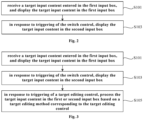
- FIG. 2 is a flowchart of a content input method for an IM software provided in some embodiments of the present disclosure. As shown in FIG. 2 , the content input method comprises:
- S101 receiving a target input content entered in the first input box, and displaying the target input content in the first input box.
- the IM software comprises a first input box and a second input box having a size different from a size of the first input box, and a switch control for switching between the first and second input boxes.
- the first input box is an input box of the session interface shown in FIG. 1A
- the corresponding second input box is a rich text input box shown in FIG. 1B
- the first input box is a rich text input box shown in FIG. 1B
- the corresponding second input box is an input box of the session interface shown in FIG. 1A . If the first input box is an input box of the session interface shown in FIG. 1A , by triggering a switch control in the first input box, the first input box can be switched to the rich text input box, i.e., the second input box shown in FIG. 1B . Thus, a small input box can be switched to a large input box. If the first input box is a rich text input box as shown in FIG.
- the first input box can be switched to the input box, i.e., the second input box of the session interface as shown in FIG. 1A .
- the switch control in the first input box by triggering the switch control in the first input box, the first input box can be switched to the input box, i.e., the second input box of the session interface as shown in FIG. 1A .
- a large input box can be switched to a small input box.
- the first input box is an input box of a session interface, as shown in FIG. 1A .
- a user enters a target input content "I am Chinese” in the first input box "I am Chinese” is displayed in the first input box, as shown in FIG. 1A .
- the first input box is a rich text input box, as shown in FIG. 1B .
- a target input content "I am Chinese” in the first input box "I am Chinese” is displayed in the first input box.
- the first input box is an input box of a session interface as shown in FIG. 1A .
- "I am Chinese” is displayed in the first input box, as shown in FIG. 1A .
- the switch control in the first input box is triggered.
- the first input box is switched to the second input box as shown in FIG. 1B .
- the target input content "I am Chinese” is also displayed in the second input box, so that the target input content in the small input box is synchronously displayed in the large input box.
- the first input box is a rich text input box as shown in FIG. 1B .
- "I am Chinese” is displayed in the first input box, as shown in FIG. 1B .
- the switch control in the first input box is triggered.
- the first input box is switched to the second input box as shown in FIG. 1A .
- the target input content "I am Chinese” is also displayed in the second input box, so that the target input content in the large input box is synchronously displayed in the small input box.
- the IM software comprises a first input box and a second input box having a size different from a size of the first input box.
- a switch control is used to switch between the first input box and the second input box, thereby achieving switching between a large input box and a small input box.
- the target input content is displayed in the first input box; in response to a triggering of the switch control, the first input box is switched to the second input box, and the target input content is displayed in the second input box to achieve synchronized display of the input content in the large and small input boxes, so that the input content in the small input box can be displayed in the large input box, making it convenient for users to edit the input content.
- FIG. 3 is a flowchart of another content input method for an IM software provided in some embodiments of the present disclosure. As shown in FIG. 3 , on the basis of the embodiments shown in FIG. 2 , this content input method further comprises:
- S105 in response to a triggering of a target editing control, processing the target input content in the first or second input box based on a target editing method corresponding to the target editing control.
- the target editing control is one of a bold control, an underline control, a strikethrough control, an italic control, a hyperlink control, an arranged list control, an un-arranged list control or a reference control. Accordingly, the target editing method is to make it bold, to add an underline, to add a strikethrough, to add italics, to add a hyperlink, to list with arrangement, to list without arrangement, and to add a reference.
- the target editing control is a font color control, a font type control, or other editing controls, which is not specifically limited in the embodiments.
- a user selects one of a plurality of content editing controls displayed by the IM client according to actual needs.
- the content editing control selected by the user is the target editing control.
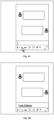
- the underline control is selected and triggered as the target editing control, as shown in FIG. 4A .
- a response is made to the trigger operation. For example, in a case that the target editing control is an underline control, then in response to the underline control being triggered, an underline is added to the target input content in the target input box, such that the target input content is displayed in underlined form, as shown in FIG 4B .
- the target editing method in a case that the target editing control is a bold control, the target editing method is to make the target input content bold. Therefore, the target input content is made bold and displayed in bold style.
- the target editing method in a case that the target editing control is a strikethrough control, the target editing method is to add a strikethrough. Therefore, a strikethrough is added to the target input content to display the target input content with a strikethrough.
- the target editing control is an italic control
- the target editing method is to italicize. Therefore, the target input content is italicized and displayed in italic style.
- the target editing method is to set a link and associate it with the target input content, such that the target input content is displayed in a hyperlink style.
- the target editing method is to arrange the target input content with numbers. Therefore, the target input content is numbered and displayed in an arranged list.
- the target editing method is to arrange the target input content without numbering. Therefore, the target input content is arranged and displayed in an un-arranged list.
- FIG. 4 only provides an explanation of the input box of the session interface as an example.
- the target input content may also be processed in the rich text input box.
- the target input content is all the input content in the first input box.
- the user may trigger the underline control before entering content in the first input box. After triggering the underline control, the user enters content in the first input box as shown in FIG. 4A , and all the input content is displayed in an underlined style, as shown in FIG. 4B . Obviously, all the input content in the first input box is the target input content.
- the target input content is a portion of the input content in the first input box.
- the user enters content in the first input box and triggers the underline control after selecting a portion of the input content, as shown in FIG. 5A .
- the selected input content is displayed in an underlined style, as shown in FIG. 5B .
- a portion of the input content in the first input box is the target input content.
- the target input content in the first or second input box is processed based on a target editing method corresponding to the target editing control, such that the display style of the target input content is changed. Therefore, the target input content is displayed to users in different styles, which improves the diversity of content editing functions to meet the diverse needs of users for content editing functions.
- the second input box may be obtained by changing the size of the first input box.
- the size of the first input box is increased to obtain the second input box.
- the size of the first input box is decreased to obtain the second input box.
- FIG. 6 is a flowchart of still another content input method for an IM software provided in some embodiments of the present disclosure.
- FIG. 6 shows an implementation of triggering display of at least one content editing control before step 105, comprising:
- S104 in response to triggering of a first button displayed in the first or second input box, displaying at least one content editing control.
- the at least one content editing control comprises a target editing control.
- FIG. 7A is a schematic diagram of a display interface of an IM software provided in some embodiments of the present disclosure.
- a first button is displayed in the input box of the session interface.
- a user can trigger the first button by clicking on the first button.
- the first button may be an "Aa" button.
- at least one content editing control is displayed, as shown in FIG. 7B .
- these content editing controls may comprise at least one of a bold control, an underline control, a strikethrough control, an italic control, a hyperlink control, an arranged list control, an un-arranged list control or a reference control, as well as at least one of other content editing controls, such as a font color control, a font type control, etc.
- the embodiments have no specific limitation on the content editing controls.
- a user Based on the at least one content editing control displayed, a user selects and triggers one of these content editing controls based on the user's needs, and the content editing control selected by the user is the target editing control.
- FIG. 7 only provides an explanation of the input box of the session interface as an example.
- the input box may also be a rich text input box.
- At least one content editing control in response to triggering of a first button displayed in the first or second input box, at least one content editing control is displayed.
- the at least one content editing control comprises a target editing control.
- the content editing control can be hidden to keep the display interface of the IM software relatively clean, thereby providing an improved user experience.
- the first button is displayed in the first input box to facilitate the user's operation.
- FIG. 8 is a flowchart of still another content input method for an IM software provided in some embodiments of the present disclosure.
- FIG. 8 shows an implementation of triggering display of at least one content editing control before step 103, comprising: S104': in response to triggering of the target input content displayed in the first or second input box, displaying at least one content editing control.
- the at least one content editing control comprises a target editing control.
- FIG. 9A is a schematic diagram of a further display interface of an IM software provided in some embodiments of the present disclosure.
- the input content to be edited is selected, that is, the target input content is selected.
- a floating toolbar is displayed near the location of the target input content.
- At least one content editing control is displayed in the floating toolbar.
- these content editing controls may comprise at least one of a bold control, an underline control, a strikethrough control, an italic control, a hyperlink control, an arranged list control, an un-arranged list control or a reference control, as well as at least one of other content editing controls, such as a font color control, a font type control, etc.
- a bold control an underline control
- a strikethrough control an italic control
- a hyperlink control an arranged list control
- un-arranged list control or a reference control as well as at least one of other content editing controls, such as a font color control, a font type control, etc.
- the user may select and trigger one of these content editing controls based on the user's needs, and the content editing control selected by the user is the target editing control.
- At least one content editing control in response to a triggering of the target input content displayed in the first or second input box, at least one content editing control is displayed.
- the at least one content editing control comprises a target editing control.
- the content editing control is hidden to keep the display interface relatively clean, thereby providing an improved user experience.
- the display position of the at least one content editing control is corresponding to the position of the target input content.
- the floating toolbar is located adjacent to an area where the target input content is located, making it convenient for the user to trigger the content editing controls.
- the floating toolbar may be located 8pt above the area where the target input content is located.
- the corresponding floating toolbar is located within the display box and adjacent to the edge of the display box, ensuring that all content editing controls can be fully displayed.
- the floating toolbar is located at a position within the display box that is 8pt from the edge of the display box.
- the corresponding floating toolbar may be arranged symmetrically on both sides of the target input content, thereby maintaining the aesthetics of the display interface.
- the display position of the at least one content editing control is corresponding to the position of the target input content, so as to facilitate user operation while maintaining the aesthetics of the display interface and the integrity of the content editing controls.
- FIG. 10 is a flowchart of a further content input method for an IM software provided in some embodiments of the present disclosure.
- FIG. 10 shows an implementation of step S101, comprising: S101': displaying the target input content in the first input box, and saving the target input content in a draft box.
- the user enters the target input content in the first input box. After the target input content is received from the user, the target input content is saved in a draft box and displayed in the first input box.
- step S103 comprises: S103': in response to a triggering of the switch control, obtaining the target input content from the draft box and displaying the target input content in the second input box.
- the first input box and the second input box share the same draft box.
- the second input box obtains the target input content previously saved and displayed in the first input box from the draft box and display the target input content in the second input box.
- the first and second input boxes share a draft box.
- the target input content is displayed in the first input box and saved to the draft box.
- the target input content is obtained from the draft box and displayed in the second input box. There is no data transmission between the first and second input boxes, which can improve the synchronization efficiency of the target input content.
- FIG. 11 is a flowchart of a further content input method for an IM software provided in some embodiments of the present disclosure.
- FIG. 11 shows an implementation of step S103', comprising: S201: in response to a triggering of the switch control, obtaining a first target input content of a first title region and a second target input content of a first text region from the draft box.
- the size of the first input box is larger than the size of the second input box.
- the first input box is a rich text input box as shown in FIG. 1B
- the second input box is an input box of the session interface as shown in FIG. 1A .
- the first input box comprises: a first title region and a first text region.
- the first target input content is displayed in the first title region, and the second target input content is displayed in the first text region.
- the first target input content may not be null.
- the first target input content displayed in the first title region is "China”
- the second target input content displayed in the first text region is "I am Chinese”.
- the first target input content may be null.
- no content is displayed in the first title region, and the second target input content displayed in the first text region is "I am Chinese”.
- the first target input content of the first title region and the second target input content of the first text region are saved in the draft box.
- a switch control in the first input box is triggered by the user, and in response to a triggering of the switch control, the first target input content of the first title region and the second target input content of the first text region are obtained from the draft box.
- step S203 is performed; otherwise, step S204 is performed.
- S203 displaying the second target input content in a text region of the second input box, wherein the second input box only comprises the text region.
- the second target input content saved in the draft box is obtained and displayed in the text region of the second input box.
- the displayed second input box only comprises a text region.
- the title region is omitted for the first target input content, making the displayed second input box more aesthetically pleasing.
- no content is displayed in the first title region, and the second target input content displayed in the first text region is "I am Chinese”.
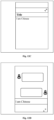
- the switch control there is no need to provide a title region above the text region in the second input box. That is, the text region is arranged at the top, and the second target input content "I am Chinese” is displayed in the text region, as shown in FIG. 12D .
- S204 displaying the first target input content in a second title region of the second input box, and displaying the second target input content in a second text region, wherein the second input box comprises the second title region and the second text region.
- the first target input content and the second target input content saved in the draft box are obtained.
- the first target input content is displayed in the second title region of the second input box, and the second target input content is displayed in the second text region, without affecting the display style of the first target input content and the second target input content.
- the first target input content "China” is displayed in the first title region
- the second target input content "I am Chinese” is displayed in the first text region.
- a second title region and a second text region are displayed on the second input box, wherein the first target input content "China” is displayed in the second title region, and the second target input content "I am Chinese” is displayed in the second text region, as shown in FIG. 12B .
- FIG. 13 is a flowchart of a further content input method for an IM software provided in some embodiments of the present disclosure.
- FIG. 13 shows an implementation of step S103', comprising: S301: in response to the first input box comprising the first title region and the first text region, and in response to the triggering of the switch control, obtaining the first target input content of the first title region and the second target input content of the first text region from the draft box, and displaying the first target input content in the second title region and displaying the second target input content in the second text region of the second input box.
- the size of the first input box is smaller than the size of the second input box.
- the first input box is an input box of the session interface as shown in FIG. 1A
- the second input box is a rich text input box as shown in FIG. 1B .
- the first input box comprises: a first title region and a first text region.
- the first target input content is displayed in the first title region, and the second target input content is displayed in the first text region, as shown in FIG. 12B .
- the first target input content and the second target input content are saved in a draft box.
- the first and second target input contents are obtained from the draft box.
- the first target input content is displayed in the second title region of the second input box, and the second target input content is displayed in the second text region of the second input box.
- a first title region and a first text region are displayed on the first input box, wherein the first target input content "China” is displayed in the first title region, and the second target input content "I am Chinese” is displayed in the first text region, as shown in FIG. 12B .
- a second title region and a second text region are displayed on the second input box, wherein the first target input content "China” is displayed in the second title region and the second target input content "I am Chinese” is displayed in the second text region, as shown in FIG. 12A .
- S301' in response to a triggering of the switch control, and in response to the first input box only comprising a text region, obtaining the target input content of a text region from the draft box, and displaying the target input content in the second text region of the second input box.
- the size of the first input box is smaller than the size of the second input box.
- the first input box is an input box of the session interface as shown in FIG. 1A
- the second input box is a rich text input box as shown in FIG. 1B .
- the first input box only comprises a text region, as shown in FIG. 12D .
- the target input content is displayed in the text region.
- only the target input content is saved in the draft box.
- the target input content is obtained from the draft box, and is displayed in the second text region of the second input box.
- a text region is displayed in the first input box, in which the target input content "I am Chinese” is displayed, as shown in FIG. 12D .
- a second title region and a second text region are displayed in the second input box, wherein the target input content "China” is displayed in the second text region, and no content is displayed in the second title region, as shown in FIG. 12C .
- FIG. 14 is a structure diagram of a content input apparatus for an IM software provided in some embodiments of the present disclosure.
- the content input apparatus for IM software comprises:
- the content input apparatus further comprises: a processing module for processing, in response to triggering of a target editing control, the target input content in the first or second input box based on a target editing method corresponding to the target editing control.
- the apparatus further comprises: a changing module for changing the size of the first input box to obtain the second input box in response to triggering of the switch control.
- the first display module 110 is further used for displaying, in response to triggering of a first button displayed in the first input box, at least one content editing control, wherein the at least one content editing control comprises the target editing control.
- the second display module 120 is further used for displaying, in response to triggering of a first button displayed in the second input box, at least one content editing control, wherein the at least one content editing control comprises the target editing control.
- the first display module 110 is further used for displaying, in response to triggering of the target input content displayed in the first input box, at least one content editing control, wherein the at least one content editing control comprises the target editing control.
- the second display module 120 is further used for displaying, in response to triggering of the target input content displayed in the second input box, at least one content editing control, wherein the at least one content editing control comprises the target editing control.
- the first input box and the second input box share a draft box.
- the first display module 110 is further used for displaying the target input content in the first input box, and saving the target input content in the draft box.
- the second display module 120 is further used for obtaining, in response to triggering of the switch control, the target input content from the draft box and displaying the target input content in the second input box.
- the display position of the at least one content editing control is corresponding to the position of the target input content.
- the size of the first input box is larger than the size of the second input box, wherein the first input box comprises: a first title region and a first text region.
- the second display module 120 is further used for obtaining a first target input content of the first title region and a second target input content of the first text region from the draft box in response to triggering of the switch control; displaying the second target input content in a text region of the second input box, in response to that the first target input content is null, wherein the second input box only comprises the text region; displaying the first target input content in a second title region of the second input box, and displaying the second target input content in a second text region, in response to the first target input content is not null, wherein the second input box comprises the second title region and the second text region.
- the size of the first input box is smaller than the size of the second input box, wherein the first input box comprises: a text region; or the first input box comprises: a first title region and a first text region; the second input box comprises: a second title region and a second text region.
- the second display module 120 is further used for, in response to the first input box comprising the first title region and the first text region, and in response to the triggering of the switch control, obtaining the first target input content of the first title region and the second target input content of the first text region from the draft box, and then displaying the first target input content in the second title region and displaying the second target input content in the second text region of the second input box; in response to the first input box comprising the text region, and in response to the triggering of the switch control, obtaining the target input content of a text region from the draft box, and displaying the target input content in the second text region of the second input box.
- the at least one content editing control comprises at least one of: a bold control, an underline control, a strikethrough control, an italic control, a hyperlink control, an arranged list control, an un-arranged list control and a reference control.
- the apparatus provided in this embodiment can perform the technical solution of any method embodiment described above.
- the implementation principle of the apparatus and the technical effect achieved are similar to those of the method embodiment, which will not be repeated here.
- An embodiment of the present disclosure further provides an electronic device, comprising: a processor for executing a computer program stored in memory, wherein the processor, when executing the computer program, implements the steps of the method embodiment described above.
- An embodiment of the present disclosure further provides a computer-readable storage medium stored thereon a computer program that, when executed by a processor, implements the steps of the above method embodiment.
- An embodiment of the present disclosure further provides a computer program product that, when running on a computer, causes the computer to implement the steps of the above method embodiment of the present disclosure.
- the present disclosure provides a content input method for IM software that comprises a first input box and a second input box having a size different from a size of the first input box, and a switch control for switching between the first and second input boxes, the method comprising:
- the method further comprises: in response to triggering of a target editing control, processing the target input content in the first or second input box based on a target editing method corresponding to the target editing control.
- the method further comprises: changing the size of the first input box to obtain the second input box in response to triggering of the switch control.
- the method further comprises:
- the at least one content editing control comprises the target editing control; or in response to triggering of the target input content displayed in the first or second input box, displaying at least one content editing control, wherein the at least one content editing control comprises the target editing control.
- the first input box and the second input box share a draft box; receiving a target input content entered in the first input box, and displaying the target input content in the first input box comprises:
- the display position of the at least one content editing control is corresponding to the position of the target input content.
- the size of the first input box is larger than the size of the second input box, wherein the first input box comprises: a first title region and a first text region;
- the size of the first input box is smaller than the size of the second input box, wherein the first input box comprises: a text region; or the first input box comprises: a first title region and a first text region; the second input box comprises: a second title region and a second text region; wherein in response to triggering of the switch control, obtaining the target input content from the draft box and displaying the target input content in the second input box comprises:
- the at least one content editing control comprises at least one of: a bold control, an underline control, a strikethrough control, an italic control, a hyperlink control, an arranged list control, an un-arranged list control and a reference control.
- the present disclosure provides a content input apparatus for IM software that comprises a first input box and a second input box having a size different from a size of the first input box, and a switch control for switching between the first and second input boxes, the apparatus comprising:
- the method further comprises: a processing module for processing, in response to triggering of a target editing control, the target input content in the first or second input box based on a target editing method corresponding to the target editing control.
- the apparatus further comprises: a changing module for changing the size of the first input box to obtain the second input box in response to triggering of the switch control.
- the first display module is further used for displaying, in response to triggering of a first button displayed in the first input box, at least one content editing control, wherein the at least one content editing control comprises the target editing control.
- the second display module is further used for displaying, in response to triggering of a first button displayed in the second input box, at least one content editing control, wherein the at least one content editing control comprises the target editing control.
- the first display module is further used for displaying, in response to triggering of the target input content displayed in the first input box, at least one content editing control, wherein the at least one content editing control comprises the target editing control.
- the second display module is further used for displaying, in response to triggering of the target input content displayed in the second input box, at least one content editing control, wherein the at least one content editing control comprises the target editing control.
- the first input box and the second input box share a draft box.
- the first display module is further used for displaying the target input content in the first input box, and saving the target input content in the draft box.
- the second display module is further used for obtaining, in response to triggering of the switch control, the target input content from the draft box and displaying the target input content in the second input box.
- the display position of the at least one content editing control is corresponding to the position of the target input content.
- the size of the first input box is larger than the size of the second input box, wherein the first input box comprises: a first title region and a first text region; the second display module is further used for obtaining a first target input content of the first title region and a second target input content of the first text region from the draft box in response to triggering of the switch control; displaying the second target input content in a text region of the second input box, in response to that the first target input content is null, wherein the second input box only comprises the text region; displaying the first target input content in a second title region of the second input box, and displaying the second target input content in a second text region, in response to the first target input content is not null, wherein the second input box comprises the second title region and the second text region.
- the size of the first input box is smaller than the size of the second input box, wherein the first input box comprises: a text region; or the first input box comprises: a first title region and a first text region; the second input box comprises: a second title region and a second text region.
- the second display module is further used for, in response to the first input box comprising the first title region and the first text region, and in response to the triggering of the switch control, obtaining the first target input content of the first title region and the second target input content of the first text region from the draft box, and then displaying the first target input content in the second title region and displaying the second target input content in the second text region of the second input box; in response to the first input box comprising the text region, and in response to the triggering of the switch control, obtaining the target input content of a text region from the draft box, and displaying the target input content in the second text region of the second input box.
- the at least one content editing control comprises at least one of: a bold control, an underline control, a strikethrough control, an italic control, a hyperlink control, an arranged list control, an un-arranged list control and a reference control.
- the present disclosure provides an electronic device, comprising: a processor for executing a computer program stored in memory, wherein the processor, when executing the computer program, implements the method provided in the first aspect.
- the present disclosure provides a computer readable storage medium storing thereon a computer program, characterized in that the computer program, when executed by a processor, implements the method provided in the first aspect.
- the present disclosure provides a computer program product that, when running on a computer, causes the computer to implement the method provided in the first aspect.
- the present disclosure provides a computer program, comprising: instructions that, when executed by a processor, cause the processor to perform the content input method according to any embodiments of the present disclosure.
Landscapes
- Engineering & Computer Science (AREA)
- Theoretical Computer Science (AREA)
- General Engineering & Computer Science (AREA)
- General Physics & Mathematics (AREA)
- Physics & Mathematics (AREA)
- Human Computer Interaction (AREA)
- Software Systems (AREA)
- Health & Medical Sciences (AREA)
- Artificial Intelligence (AREA)
- Audiology, Speech & Language Pathology (AREA)
- Computational Linguistics (AREA)
- General Health & Medical Sciences (AREA)
- Signal Processing (AREA)
- Computer Networks & Wireless Communication (AREA)
- User Interface Of Digital Computer (AREA)
Applications Claiming Priority (2)
| Application Number | Priority Date | Filing Date | Title |
|---|---|---|---|
| CN202111341329.0A CN114063855A (zh) | 2021-11-12 | 2021-11-12 | 即时通讯软件的内容输入方法、装置、设备和介质 |
| PCT/CN2022/130637 WO2023083181A1 (zh) | 2021-11-12 | 2022-11-08 | 即时通讯软件的内容输入方法、装置、设备和介质 |
Publications (2)
| Publication Number | Publication Date |
|---|---|
| EP4407425A1 true EP4407425A1 (de) | 2024-07-31 |
| EP4407425A4 EP4407425A4 (de) | 2025-01-22 |
Family
ID=80271691
Family Applications (1)
| Application Number | Title | Priority Date | Filing Date |
|---|---|---|---|
| EP22891975.9A Pending EP4407425A4 (de) | 2021-11-12 | 2022-11-08 | Inhaltseingabeverfahren und -vorrichtung für software für sofortige nachrichtenübermittlung sowie vorrichtung und medium |
Country Status (5)
| Country | Link |
|---|---|
| US (1) | US12271579B2 (de) |
| EP (1) | EP4407425A4 (de) |
| JP (1) | JP7732096B2 (de) |
| CN (1) | CN114063855A (de) |
| WO (1) | WO2023083181A1 (de) |
Families Citing this family (1)
| Publication number | Priority date | Publication date | Assignee | Title |
|---|---|---|---|---|
| CN114063855A (zh) * | 2021-11-12 | 2022-02-18 | 北京字跳网络技术有限公司 | 即时通讯软件的内容输入方法、装置、设备和介质 |
Family Cites Families (25)
| Publication number | Priority date | Publication date | Assignee | Title |
|---|---|---|---|---|
| CN1293740C (zh) * | 2000-07-25 | 2007-01-03 | 美国在线服务公司 | 视频消息传送 |
| US20050080866A1 (en) * | 2003-10-14 | 2005-04-14 | Kent Larry G. | Selectively displaying time indications for instant messaging (IM) messages |
| CN102279708A (zh) | 2011-08-15 | 2011-12-14 | 广州市动景计算机科技有限公司 | 一种数据输入处理方法及装置 |
| KR101911251B1 (ko) * | 2012-07-13 | 2018-10-24 | 엘지전자 주식회사 | 휴대 단말기 및 그 제어 방법 |
| CN103049274B (zh) * | 2012-12-31 | 2017-02-22 | 华为终端有限公司 | 任务事件处理方法和装置 |
| CN104142911B (zh) * | 2013-05-08 | 2017-11-03 | 腾讯科技(深圳)有限公司 | 一种文本信息输入方法及装置 |
| KR20150006180A (ko) * | 2013-07-08 | 2015-01-16 | 삼성전자주식회사 | 채팅 창 제어 방법 및 이를 구현하는 전자 장치 |
| CN104346092A (zh) * | 2013-08-01 | 2015-02-11 | 腾讯科技(深圳)有限公司 | 一种在移动终端中呈现剪贴板内容的方法及装置 |
| GB201404617D0 (en) * | 2014-03-14 | 2014-04-30 | Microsoft Corp | Instant messaging |
| CN104765791A (zh) * | 2015-03-24 | 2015-07-08 | 北京搜狗科技发展有限公司 | 一种信息输入方法和装置 |
| CN106156014A (zh) * | 2016-07-29 | 2016-11-23 | 宇龙计算机通信科技(深圳)有限公司 | 一种信息处理方法及装置 |
| CN107765980A (zh) * | 2017-09-29 | 2018-03-06 | 珠海市魅族科技有限公司 | 输入方法及装置、终端设备和计算机可读存储介质 |
| JP7165251B2 (ja) * | 2017-12-14 | 2022-11-02 | Line株式会社 | メッセージングサービス環境におけるコンテンツ共有のためのインタラクション方法およびシステム |
| CN109120866B (zh) * | 2018-09-27 | 2020-04-03 | 腾讯科技(深圳)有限公司 | 动态表情生成方法、装置、计算机可读存储介质和计算机设备 |
| WO2020062014A1 (zh) * | 2018-09-28 | 2020-04-02 | 华为技术有限公司 | 一种向输入框中输入信息的方法及电子设备 |
| CN109299441A (zh) * | 2018-09-29 | 2019-02-01 | 况客科技(北京)有限公司 | 一种文章编辑方法及系统 |
| CN109460180B (zh) * | 2018-11-01 | 2022-05-31 | 联想(北京)有限公司 | 控制方法和电子设备 |
| CN111221661A (zh) * | 2018-11-27 | 2020-06-02 | 奇酷互联网络科技(深圳)有限公司 | 智能编辑的方法、移动终端和计算机可读存储介质 |
| CN110333814A (zh) * | 2019-05-31 | 2019-10-15 | 华为技术有限公司 | 一种分享内容的方法及电子设备 |
| CN112099678B (zh) * | 2019-06-18 | 2024-04-30 | 腾讯科技(深圳)有限公司 | 一种文本处理方法、装置以及计算机可读存储介质 |
| CN110427134B (zh) * | 2019-08-09 | 2021-04-06 | 网易(杭州)网络有限公司 | 即时通讯的数据处理方法、装置、设备及可读存储介质 |
| CN111507073A (zh) * | 2020-04-10 | 2020-08-07 | 甯航 | 一种基于web富文本的论文编辑与智能排版方法及平台 |
| CN113050808B (zh) * | 2021-04-22 | 2023-11-28 | 北京百度网讯科技有限公司 | 在输入框中突出显示目标文本的方法及装置 |
| CN114063855A (zh) * | 2021-11-12 | 2022-02-18 | 北京字跳网络技术有限公司 | 即时通讯软件的内容输入方法、装置、设备和介质 |
| JP7772971B2 (ja) * | 2022-05-24 | 2025-11-18 | 北京字跳▲網▼絡技▲術▼有限公司 | メッセージ処理方法、装置、電子機器及び媒体 |
-
2021
- 2021-11-12 CN CN202111341329.0A patent/CN114063855A/zh active Pending
-
2022
- 2022-11-08 JP JP2024525027A patent/JP7732096B2/ja active Active
- 2022-11-08 WO PCT/CN2022/130637 patent/WO2023083181A1/zh not_active Ceased
- 2022-11-08 EP EP22891975.9A patent/EP4407425A4/de active Pending
-
2024
- 2024-04-30 US US18/650,990 patent/US12271579B2/en active Active
Also Published As
| Publication number | Publication date |
|---|---|
| US12271579B2 (en) | 2025-04-08 |
| JP2024541239A (ja) | 2024-11-08 |
| US20240281122A1 (en) | 2024-08-22 |
| JP7732096B2 (ja) | 2025-09-01 |
| WO2023083181A1 (zh) | 2023-05-19 |
| EP4407425A4 (de) | 2025-01-22 |
| CN114063855A (zh) | 2022-02-18 |
Similar Documents
| Publication | Publication Date | Title |
|---|---|---|
| US20260044476A1 (en) | File sharing method and apparatus, terminal, and storage medium | |
| US20220155922A1 (en) | Side-toolbar-display method, terminal, and storage medium | |
| CN103809896B (zh) | 一种页面切换方法及装置 | |
| US8756534B2 (en) | Methods and graphical user interfaces for editing on a multifunction device with a touch screen display | |
| US9245259B2 (en) | Presenting E-mail on a touch device | |
| US9158409B2 (en) | Object determining method, object display method, object switching method and electronic device | |
| KR20130024220A (ko) | 휴대단말기의 입력 장치 및 방법 | |
| US10228835B2 (en) | Method for displaying information, and terminal equipment | |
| WO2023005920A1 (zh) | 分屏方法、装置及电子设备 | |
| CN105843463B (zh) | 一种通信信息交互方法及装置 | |
| CN104391636A (zh) | 一种截屏方法及装置 | |
| EP2405368A1 (de) | Informationsverarbeitungsvorrichtung, Informationsverarbeitungsverfahren und Programm | |
| CN118113204A (zh) | 长截屏方法、装置、终端及存储介质 | |
| CN106293473A (zh) | 页面显示方法和装置 | |
| WO2022242586A1 (zh) | 应用界面显示方法、装置和电子设备 | |
| US20230359343A1 (en) | Interface processing method and apparatus, electronic device, and computer-readable storage medium | |
| US12271579B2 (en) | Content input method and apparatus for instant messaging software, and device and medium | |
| CN105242924A (zh) | 控制方法及应用所述控制方法的电子设备 | |
| CN112486366A (zh) | 控件显示方法、装置和电子设备 | |
| CN110568990B (zh) | 分屏方法、装置、电子设备及存储介质 | |
| AU2014200272B2 (en) | Method and electronic device for displaying application | |
| US9959010B1 (en) | Method for displaying information, and terminal equipment | |
| CN106843735A (zh) | 一种终端控制方法及移动终端 | |
| EP2992462A1 (de) | Mehrtafel-ansichtsschnittstelle für browserbetrieb einer vorrichtung | |
| CN103383621B (zh) | 视图切换方法及装置 |
Legal Events
| Date | Code | Title | Description |
|---|---|---|---|
| STAA | Information on the status of an ep patent application or granted ep patent |
Free format text: STATUS: THE INTERNATIONAL PUBLICATION HAS BEEN MADE |
|
| PUAI | Public reference made under article 153(3) epc to a published international application that has entered the european phase |
Free format text: ORIGINAL CODE: 0009012 |
|
| STAA | Information on the status of an ep patent application or granted ep patent |
Free format text: STATUS: REQUEST FOR EXAMINATION WAS MADE |
|
| 17P | Request for examination filed |
Effective date: 20240424 |
|
| AK | Designated contracting states |
Kind code of ref document: A1 Designated state(s): AL AT BE BG CH CY CZ DE DK EE ES FI FR GB GR HR HU IE IS IT LI LT LU LV MC ME MK MT NL NO PL PT RO RS SE SI SK SM TR |
|
| A4 | Supplementary search report drawn up and despatched |
Effective date: 20241223 |
|
| RIC1 | Information provided on ipc code assigned before grant |
Ipc: G06F 9/451 20180101ALI20241217BHEP Ipc: H04L 51/04 20220101ALI20241217BHEP Ipc: G06F 3/0488 20220101ALI20241217BHEP Ipc: G06F 3/0484 20220101AFI20241217BHEP |
|
| DAV | Request for validation of the european patent (deleted) | ||
| DAX | Request for extension of the european patent (deleted) | ||
| STAA | Information on the status of an ep patent application or granted ep patent |
Free format text: STATUS: EXAMINATION IS IN PROGRESS |
|
| 17Q | First examination report despatched |
Effective date: 20250916 |
|
| GRAP | Despatch of communication of intention to grant a patent |
Free format text: ORIGINAL CODE: EPIDOSNIGR1 |
|
| STAA | Information on the status of an ep patent application or granted ep patent |
Free format text: STATUS: GRANT OF PATENT IS INTENDED |
|
| INTG | Intention to grant announced |
Effective date: 20260331 |