EP4283605A2 - Proximitätsbewusste inhaltswechselnde benutzerschnittstelle - Google Patents
Proximitätsbewusste inhaltswechselnde benutzerschnittstelle Download PDFInfo
- Publication number
- EP4283605A2 EP4283605A2 EP23195717.6A EP23195717A EP4283605A2 EP 4283605 A2 EP4283605 A2 EP 4283605A2 EP 23195717 A EP23195717 A EP 23195717A EP 4283605 A2 EP4283605 A2 EP 4283605A2
- Authority
- EP
- European Patent Office
- Prior art keywords
- user
- distance
- display
- user interface
- information
- Prior art date
- Legal status (The legal status is an assumption and is not a legal conclusion. Google has not performed a legal analysis and makes no representation as to the accuracy of the status listed.)
- Pending
Links
Images



Classifications
-
- G—PHYSICS
- G06—COMPUTING OR CALCULATING; COUNTING
- G06F—ELECTRIC DIGITAL DATA PROCESSING
- G06F3/00—Input arrangements for transferring data to be processed into a form capable of being handled by the computer; Output arrangements for transferring data from processing unit to output unit, e.g. interface arrangements
- G06F3/01—Input arrangements or combined input and output arrangements for interaction between user and computer
- G06F3/011—Arrangements for interaction with the human body, e.g. for user immersion in virtual reality
- G06F3/012—Head tracking input arrangements
-
- G—PHYSICS
- G09—EDUCATION; CRYPTOGRAPHY; DISPLAY; ADVERTISING; SEALS
- G09G—ARRANGEMENTS OR CIRCUITS FOR CONTROL OF INDICATING DEVICES USING STATIC MEANS TO PRESENT VARIABLE INFORMATION
- G09G5/00—Control arrangements or circuits for visual indicators common to cathode-ray tube indicators and other visual indicators
-
- G—PHYSICS
- G06—COMPUTING OR CALCULATING; COUNTING
- G06V—IMAGE OR VIDEO RECOGNITION OR UNDERSTANDING
- G06V40/00—Recognition of biometric, human-related or animal-related patterns in image or video data
- G06V40/10—Human or animal bodies, e.g. vehicle occupants or pedestrians; Body parts, e.g. hands
- G06V40/16—Human faces, e.g. facial parts, sketches or expressions
- G06V40/161—Detection; Localisation; Normalisation
- G06V40/166—Detection; Localisation; Normalisation using acquisition arrangements
-
- G—PHYSICS
- G09—EDUCATION; CRYPTOGRAPHY; DISPLAY; ADVERTISING; SEALS
- G09G—ARRANGEMENTS OR CIRCUITS FOR CONTROL OF INDICATING DEVICES USING STATIC MEANS TO PRESENT VARIABLE INFORMATION
- G09G5/00—Control arrangements or circuits for visual indicators common to cathode-ray tube indicators and other visual indicators
- G09G5/003—Details of a display terminal, the details relating to the control arrangement of the display terminal and to the interfaces thereto
-
- G—PHYSICS
- G09—EDUCATION; CRYPTOGRAPHY; DISPLAY; ADVERTISING; SEALS
- G09G—ARRANGEMENTS OR CIRCUITS FOR CONTROL OF INDICATING DEVICES USING STATIC MEANS TO PRESENT VARIABLE INFORMATION
- G09G2310/00—Command of the display device
- G09G2310/08—Details of timing specific for flat panels, other than clock recovery
-
- G—PHYSICS
- G09—EDUCATION; CRYPTOGRAPHY; DISPLAY; ADVERTISING; SEALS
- G09G—ARRANGEMENTS OR CIRCUITS FOR CONTROL OF INDICATING DEVICES USING STATIC MEANS TO PRESENT VARIABLE INFORMATION
- G09G2320/00—Control of display operating conditions
- G09G2320/02—Improving the quality of display appearance
- G09G2320/0261—Improving the quality of display appearance in the context of movement of objects on the screen or movement of the observer relative to the screen
-
- G—PHYSICS
- G09—EDUCATION; CRYPTOGRAPHY; DISPLAY; ADVERTISING; SEALS
- G09G—ARRANGEMENTS OR CIRCUITS FOR CONTROL OF INDICATING DEVICES USING STATIC MEANS TO PRESENT VARIABLE INFORMATION
- G09G2330/00—Aspects of power supply; Aspects of display protection and defect management
- G09G2330/02—Details of power systems and of start or stop of display operation
- G09G2330/021—Power management, e.g. power saving
- G09G2330/022—Power management, e.g. power saving in absence of operation, e.g. no data being entered during a predetermined time
-
- G—PHYSICS
- G09—EDUCATION; CRYPTOGRAPHY; DISPLAY; ADVERTISING; SEALS
- G09G—ARRANGEMENTS OR CIRCUITS FOR CONTROL OF INDICATING DEVICES USING STATIC MEANS TO PRESENT VARIABLE INFORMATION
- G09G2340/00—Aspects of display data processing
- G09G2340/04—Changes in size, position or resolution of an image
-
- G—PHYSICS
- G09—EDUCATION; CRYPTOGRAPHY; DISPLAY; ADVERTISING; SEALS
- G09G—ARRANGEMENTS OR CIRCUITS FOR CONTROL OF INDICATING DEVICES USING STATIC MEANS TO PRESENT VARIABLE INFORMATION
- G09G2340/00—Aspects of display data processing
- G09G2340/14—Solving problems related to the presentation of information to be displayed
-
- G—PHYSICS
- G09—EDUCATION; CRYPTOGRAPHY; DISPLAY; ADVERTISING; SEALS
- G09G—ARRANGEMENTS OR CIRCUITS FOR CONTROL OF INDICATING DEVICES USING STATIC MEANS TO PRESENT VARIABLE INFORMATION
- G09G2354/00—Aspects of interface with display user
-
- G—PHYSICS
- G09—EDUCATION; CRYPTOGRAPHY; DISPLAY; ADVERTISING; SEALS
- G09G—ARRANGEMENTS OR CIRCUITS FOR CONTROL OF INDICATING DEVICES USING STATIC MEANS TO PRESENT VARIABLE INFORMATION
- G09G2358/00—Arrangements for display data security
-
- G—PHYSICS
- G09—EDUCATION; CRYPTOGRAPHY; DISPLAY; ADVERTISING; SEALS
- G09G—ARRANGEMENTS OR CIRCUITS FOR CONTROL OF INDICATING DEVICES USING STATIC MEANS TO PRESENT VARIABLE INFORMATION
- G09G2360/00—Aspects of the architecture of display systems
- G09G2360/14—Detecting light within display terminals, e.g. using a single or a plurality of photosensors
- G09G2360/144—Detecting light within display terminals, e.g. using a single or a plurality of photosensors the light being ambient light
-
- G—PHYSICS
- G09—EDUCATION; CRYPTOGRAPHY; DISPLAY; ADVERTISING; SEALS
- G09G—ARRANGEMENTS OR CIRCUITS FOR CONTROL OF INDICATING DEVICES USING STATIC MEANS TO PRESENT VARIABLE INFORMATION
- G09G5/00—Control arrangements or circuits for visual indicators common to cathode-ray tube indicators and other visual indicators
- G09G5/36—Control arrangements or circuits for visual indicators common to cathode-ray tube indicators and other visual indicators characterised by the display of a graphic pattern, e.g. using an all-points-addressable [APA] memory
- G09G5/37—Details of the operation on graphic patterns
- G09G5/373—Details of the operation on graphic patterns for modifying the size of the graphic pattern
Definitions
- User interface design is typically undertaken with the assumption that a user is in close proximity to the equipment on which the user interface is implemented.
- a user interface design for a desktop computer may be based on the assumption that the user will be seated in front of a display that provides output to the user, and also that the user is in close proximity to input devices, such as a keyboard or a mouse.
- the display of a typical user interface has a degree of granularity and detail that presumes the user is in fairly close proximity with the display.
- the presumption that a user is located in proximity with a user interface console is not always valid.
- a user may be tasked with actions that take place at the various instruments or systems.
- the operator/user may seek to refer back to the display of the central console to determine a status of an instrument or system including one at which they are conducting activities.
- a user located at some distance from the central console cannot easily determine details of the display, or status of the instrument or system provided at the central console.
- Devices employed for interfacing with a central console when proximate a display may be different than those required for interfacing at a distance. Display content provided when a user is proximate the central console may not be appropriate when a user is distant from the display.
- a user interface includes a proximity sensor for determining a distance of a user from the user interface.
- the user interface is modified with regard to at least the output or display, in accordance with a distance determined between the user and the user interface.
- the display is changed to show information with lesser granularity and/or detail so as to be easily observed from a distance at which the user is located from the user interface.
- the content and layout of the user interface display can be modified based on the detected distance between the user and the user interface, and can be dynamically modified as the distance changes. For example, the resolution, display information density, font size, icon size, color, image size, and any other display component or attribute can be modified to permit adjustments to distance for viewing by the user.
- a text size may be increased and expanded to cover a greater region of the display as the detected distance between the user and user interface increases.
- a threshold can be set and used to prevent the display of text in favor of other components that may more easily convey information to a user at a distance.
- the available bandwidth for displaying information that can be viewed by a user is inversely proportional to the distance of the user from the user interface. Accordingly, as the user retreats from the user interface, the available viewing bandwidth decreases, and when the user approaches the user interface, the available bandwidth increases.
- display information may be prioritized for viewing at a distance, so that some display items may be removed from the display when they are assigned a lower priority than other, higher priority items that may be continued to be displayed, or may be expanded within the display. As a distance between a user and user interface decreases, lower priority display items may be redisplayed or promoted/expanded within the display, while higher priority display items are reduced in prominence.
- the user interface can also be configured to provide a change in the scope of interaction available to the user as user distance varies. For example, with a range of distances that are relatively close to the user interface, interaction through one or more of an associated keyboard, mouse, and touch screen are enabled. At a further range of distances, interaction is only enabled through an interface such as a microphone and voice command recognition software and/or optical sensors and motion recognition software. Within this second range of distances, user input devices such as the keyboard, mouse and touch screen are disabled. At yet a further range of distances, no user interaction may be implementable. Thus, the scope of interaction changes with user distance.
- context can change between two states as a function of time, which can also be referred to as inactivity. These states are the active display content, on the one hand, and inactive display content, on the other hand.
- the inactive display content may be a blank screen used to minimize damage to the physical display unit.
- the inactive display content may also be a display screen requiring a password or other security credential to return to the active display.
- context can be dependent upon detected user presence or distance/absence.
- the context may be immediately changed, whereby the display is made blank, locked, or changed to display non-sensitive information such as the status of an associated system.
- context is altered based upon perceived user distance rather than time or inactivity.
- a user may be viewing Quality Control (QC) data on the user interface.
- QC Quality Control
- the user interface can be configured to revert to a general system status display or to a blank screen.
- the display can automatically return to the previously viewed QC data. Such may not be the case if a user had been previously viewing sensitive or restricted information, in which case the user interface may not automatically return to the previously viewed information, instead requiring the input or presentation of a given security credential or credentials.
- the ability to modulate the display context can be dependent upon the context itself.
- an image capture device such as a camera or video camcorder is used to detect a distance of a user from the user interface. Images of the user can be captured with the image capture device and analyzed to determine a distance of the user from the image capture device, and thus the user interface.
- Other types of relatively inexpensive sensors can be used, including motion detection sensors typically found in lighting controls and/or surveillance systems.
- an array of sensors can be used, including an array of image capture devices, motion detectors or range detectors. For example, ultrasonic range detectors are available in a variety of sensitivities and price points for various range sensing applications.
- An image capture device can also be used to capture images of a user's face, which images can then be analyzed to determine distance from the image capture device, as well as whether the user is looking at the user interface. Detection of the size of the face in the image may also be used for distance detection. An image capture device can also be used to capture images to detect motion to thereby determine distance from the image capture device.
- the distance of a user from a user interface is detected to permit the user interface to adapt to provide useful information to the user when the user is separated from the user interface by a greater than a predetermined distance, to enable distance-appropriate interaction, and to provide content-sensitive context modulation dependent upon user distance.
- the user interface can be adapted to promote or enlarge certain aspects of the display that may be useful to the user when separated by a relatively significant distance from the user interface, e.g. across a room.
- a sensor is provided to detect the distance of the user from the user interface, and the detected distance is used to determine whether and/or how the user interface should be modified. Modifications to the user interface may be determined according to ranges of distances.
- a first range may extend from zero to one meter from the user interface
- a second range may extend from one meter to five meters, etc.
- the presently disclosed user interface thus need not measure an exact distance to a user but rather may only detect which distance range a user is in and whether a user has crossed a distance range threshold.
- references to detected distance herein can also be interpreted as detected distance range.
- outputs from the user interface may be modified in accordance with the detected distance.
- Components of the display may be enlarged, diminished, highlighted, made more or less prominent, or subject to any other modification that helps to promote easier interaction with the user at the detected distance.
- Other types of outputs can be similarly adapted, such as modifying the volume of an audio output based on the detected distance, providing or discontinuing an audio signal, changing resolution of an image or video display, switching a display on or off or any other kind of output modification available in a typical user interface.
- the user proximity detecting can also be selectively enabled or disabled.
- inputs to the user interface may be selectively enabled depending upon detected user distance. This concept may also be viewed as selectively altering the scope of user interaction with user distance.
- User input devices such as a keyboard, mouse or touch screen display may be enabled when a user is detected proximate to the user interface.
- a microphone and voice command software may be utilized for user interaction when the user is detected at a more distant position.
- the display context of the user interface may also be varied with detected user distance, a capability referred to as context modulation with distance.
- An initial display may be provided as long as a user is detected proximate to the user interface or within a given distance range. When the user is detected beyond or outside of this distance, the user interface is configured to automatically change. This changed display may be to a blank screen, a lock screen requiring a password or other security credential, or some other display screen.
- the user interface may also be configured to return to the initial display when the user is next detected to be proximate to the user interface or within the given distance range.
- the user interface may also be configured to provide a display comprised of non-restricted data or the lock screen upon next detection of the user at close range; in this embodiment, any return to a display comprised of sensitive or restricted information must be user initiated and may require entry or presentation of a security credential or credentials.
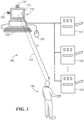
- FIG. 1 an illustration of a computing environment 100 with a number of interconnected devices is illustrated.
- a central console 110 comprising in part a computer controller and associated memory 140 provides a user interface for user 120 to interact with various devices 131-133.
- user 120 is located at a distance D from a display 112 of console 110.
- User 120 has a line of sight view 114 of display 112, and is also within earshot of an audio output (not shown) of console 110.
- user 120 may be tasked with attending to devices 131-133, which may include providing items to any one of devices 131-133, or checking operation or responding to alarms or messages generated by any of devices 131-133.
- user 120 may sometimes be located a distance D from console 110, and may desire to interact with console 110.
- operations that user 120 conducts on devices 131-133 may cause a display change for display 112.
- the display may also be referred to more generically as one type of presentation device.
- user 120 may be attending to device 133, when device 131 annunciates an alarm that demands urgent attention, with the alarm being annunciated on display 112 of console 110. Accordingly, user 120 preferably continues to interact with console 110 even though separated by distance D from console 110.
- Console 110 includes a sensor 116 that can detect distance between user 120 and console 110.
- the sensor may also be referred to as a distance measurement unit. More particularly, sensor 116 can determine a distance from its location to user 120 using any of various detection techniques.
- sensor 116 can be implemented as an image capture device, such as a camera or a video camcorder and can capture an image of user 120. The captured image of user 120 can be compared against a nominal background in the absence of user 120, to obtain a differential image measure that can be used to determine distance to user 120.
- the boundary which can be provided in the shape of a rectangle, may then be used with various thresholds for size to detect distance. For example, as the size of the boundary bordered shape increases, distance D is determined to decrease.
- the various thresholds for the size of the bordered pixel area can be calibrated to indicate specific distances with regard to the detected motion of user 120.
- Floor-mounted sensors may also be employed in further embodiments. For example, sensors that are responsive to changes in weight or load may provide an indication of the presence of an operator in various locations within a workspace. Alternatively, inductive or resistive sensors under a floor surface may also be employed. Perimeter-mounted arrays of optical transmitter-receiver pairs may also be utilized, where interference of light transmission may be used to infer operator position within an area.
- the image capture device may also be used to detect a face in a captured image to contribute to determining distance D.
- the size of a detected face can be determined and used to judge distance D.
- Various thresholds for face size can be used to determine distance, which thresholds can be calibrated for specific distance or specific users 120.
- an output of console 110 can be modified in accordance with a profile established for response to a given distance being detected.
- interaction mechanisms such as a keyboard 126, mouse 122 and touch screen capability integrated into the display 112 may be enabled.
- different interaction mechanisms such as a microphone 124 and voice command software executed by the central console and/or optical sensor(s), such as sensor 116, and motion recognition software executed by the control console are enabled.
- no interaction mechanisms may be enabled.
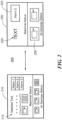
- Display change 200 provides a display 210 for a user detected to be in close proximity with console 110 and display 220 for a user being located distance D from console 110.
- Display 210 provides detailed text and numerous alarms and status indications to provide the close proximity user with a relatively significant amount of information for attending to devices 131-133.
- Display 220 provides enlarged text 222, and singles out a particular alarm 224 for enlargement on display 112, for example.
- display 220 may provide an enlarged view of the status of devices 131-133, which enlarged display 226 may be caused to scroll to periodically display the status of all devices 131-133 if not all can fit within the display area.
- View change 200 can be configured in accordance with the present disclosure so that detailed text 212 is increased in size or prominence, such as by changing a font size or a resolution to arrive at display 220. Also, components of display 210 can be selectively removed so that display 220 provides higher priority items and does not display lower priority items. The priority of various display items can be ranked in accordance with user preferences, which can be configured in a detection/response profile (not shown), accessible by the central console such as within an associated memory, that indicates how view change 200 should be achieved.
- transition display 210 to display 220 and back can be provided including changing colors of items, causing items to repeatedly blink on and off, changing size and/or position of display items and other types of visual modifications that can promote or diminish the viewability or importance of a display item or items.
- one or more sensors capable of detecting the level of ambient light provide input to the console 110.
- the console 110 may adjust the brightness of the image on the display 112, both with a user at the same distance range or as a function of user distance.
- the rate at which the display content is adjusted in accordance with detected user distance is also programmable. It is preferred for the display to not change too rapidly in response to detected distance change. Otherwise, a slight movement of a user could result in frequent changes to the size and content of the display, making it difficult for a user to interpret the display.
- the rate at which the display is modified can be optimized by the user.
- console 110 can provide various presentation devices such as audio outputs that can be modified in accordance with the detected distance. For example, volume can be adjusted to increase with greater distance and decrease with lesser distance. Frequencies for alarms or other audio indications can be modified or turned on or off in dependence on the detected distance. Other devices (not shown) may also be activated or modified with proximity to user 120 such as user interfaces that are in close proximity to devices 131-133. In addition, more generalized annunciators can be used to inform the user 120 of a status of the console 110, such as flashing lights or audio signals that can be observed from anywhere within environment 100. In a further embodiment, the console 110 is provided with one or more sensors for detecting the level of ambient noise, and the console is capable of adjusting the volume of an audio alarm or other indication in response thereto.
- audio outputs such as audio outputs that can be modified in accordance with the detected distance. For example, volume can be adjusted to increase with greater distance and decrease with lesser distance. Frequencies for alarms or other audio indications can be modified or turned on or off
- the displays provided to user 120 at distance D can be customized in accordance with distance, individual user, or any other useful factor that permits user 120 to continue to interact with console 110 at distance D.
- Other responses and/or presentations discussed above can similarly be customized for a user 120 or environment 100.
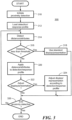
- a flow chart 300 illustrates a process for response to a change in distance between a user and a user interface.
- the process begins with the initiation of proximity detection, as illustrated in a block 310.
- the proximity detection can be turned on or off by the user or the system on which it is employed, and when turned on loads a detection/response profile stored in association with the console, as illustrated in a block 312.
- the detection/response profile can be configured for a particular user, a particular environment, or for use with a particular distance detection device or sensor.
- the profile can also be used to configure how a user interface should respond to various detected distances or ranges of distances between a user and a user interface.
- various display items can be assigned a priority that causes higher priority items to be promoted in a display when the user is at or beyond a specified distance from the display.
- the profile may also specify the different sizes of display items in dependence upon detected distance between the user and the user interface. Any type of configuration for interaction between the user and user interface in relation to detected distance can be implemented in the profile, which is loaded once the proximity detection process is active.
- the proximity detection process becomes active, distance/attributes of a user with respect to a user interface is detected, as illustrated in a block 314.
- the distance/attributes detected can be in accordance with the above described sensing techniques, including face detection and motion detection. For example, the detection of a user's face can be used to determine that the user is looking at the user interface, which determination can be used to modify an output of the user interface.
- a determination of whether the user is located at or proximate the user interface can be made, as illustrated with decision block 316. If the detected distance is less than a specified threshold that indicates that the user is located at the user interface, a standard display presentation can be used for the user interface, as illustrated with the "yes" branch taken from decision block 316 to a block 318. If it is determined that the distance is greater than a threshold value, indicating that the user is not located at or proximate the user interface, further processing can be undertaken, as indicated with the "no" branch from decision block 316.
- the detected distance, distance range, and/or attributes can be applied to the detection/response profile as illustrated in a block 320.
- the distance or attributes applied to the profile produce a presentation response for the detected distance, distance range, and/or attributes in accordance with the profile.
- a determination of whether to adjust the display/presentation is made, as illustrated in a decision block 322.
- the "yes" branch of decision block 322 indicates an adjustment decision being made, whereupon the display/presentation is adjusted in accordance with the detection response profile, as illustrated in block 324. If no adjustment to the display/presentation is needed based on the measured distance, distance range and/or attributes, no adjustment to the display is made, as illustrated with the "no" branch of decision block 322.
- a flow chart 400 illustrates a process for adjusting the scope of interaction enabled at the user interface with detected user distance.
- the process begins with the initiation of proximity detection, as illustrated in block 410.
- the proximity detection can be turned on or off by the user or the system on which it is employed, and when turned on loads a detection/response profile stored in association with the console, as illustrated in a block 412.
- the detection/response profile can be configured for a particular user, a particular environment, or for use with a particular distance detection device or sensor.
- the profile can also be used to configure how a user interface should respond to various detected distances or ranges of distances between a user and a user interface.
- various interaction mechanisms like a keyboard and mouse can be activated when the user is proximate the central console, while some or all of those interaction mechanisms may be of no use when the user is at or beyond a specified distance from the display.
- alternate interaction mechanisms are enabled, such as an optical detector and motion recognition software executed by the console or a microphone and voice recognition software executed by the console are enabled instead.
- Any type of configuration for interaction between the user and user interface in relation to detected distance can be implemented in the profile, which is loaded once the proximity detection process is active.
- the proximity detection process becomes active, distance/attributes of a user with respect to a user interface is detected, as illustrated in a block 414.
- the distance/attributes detected can be in accordance with the above described sensing techniques, including face detection and motion detection.
- a determination of whether the user is located at or proximate the user interface can be made, as illustrated with decision block 416. If the detected distance is less than a specified threshold that indicates that the user is located at or proximate the user interface, user interface mechanisms/devices usable or useful to a user proximate the user interface are enabled, as illustrated with the "yes" branch taken from decision block 416 to block 418. If it is determined that the user distance is greater than a threshold distance value, indicating the user is not located at or proximate the user interface, further processing can be undertaken, as indicated with the "no" branch from decision block 416.
- the detected distance/attributes can be applied to the detection/response profile as illustrated in block 420.
- the distance, distance range, or attributes applied to the profile produce a change in user interface scope for the detected distance, range of distances, or attributes in accordance with the profile.
- a determination of whether to selectively enable/disable user interfaces according to the detection/response profile is made, as illustrated in decision block 422.
- the "yes" branch of decision block 422 indicates a change in which user interfaces are enabled or disabled in accordance with the detection response profile, as illustrated in block 424. If no change in which user interfaces is needed based on the measured distance, distance range, and/or attributes, no change in the user interfaces is made, as illustrated with the "no" branch of decision block 422.
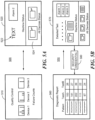
- Display context change 500 provides a display 510 for a user detected to be in close proximity with the console 110, and a different display 520 for a user detected to be at a distance equal to or beyond a predetermined threshold distance.
- Display 510 provides, in this example, quality control data to a user, such as for the purpose of monitoring the historical performance of various devices 131-133. However, as a user moves further away from the user interface, such performance or quality control data may be less useful. Instead, a distant user, detected to be proximate a particular instrument, may be more concerned with the status 522 of that instrument, as well as the status 524 of the adjacent equipment as well.
- the user interface may be configured, according to a pre-programmed response profile, to change or modulate the context of the display.
- the display context change is illustrated as being bidirectional, reflecting the ability for the presently disclosed system and method, in one embodiment, to automatically switch from a first display context, appropriate for when a user is close to the display interface, to a second display context, appropriate for when the user moves away, such as across a room to a particular instrument, then back to the first display context when the user returns to a position close to the user interface.
- a first display context appropriate for when a user is close to the display interface
- a second display context appropriate for when the user moves away, such as across a room to a particular instrument
- the flexibility of the presently disclosed system and method enables a variety of context switching modalities. For example, a first user may wish to have quality control data displayed when he/she is proximate the user interface, then machine status information displayed when proximate the respective device, distant from the user interface, then the quality control data displayed again when he/she returns to the user interface. However, a second user may wish to have quality control data displayed when he/she is proximate the user interface, then machine status information displayed when proximate the respective device, then detailed device status information for all equipment in a laboratory when he/she returns to the user interface, in contrast to redisplay the quality control data as preferred by the first user.
- These examples illustrate the flexibility of the presently disclosed system and method.
- display 520 is recognized to be similar in content to that illustrated in Fig. 2 when a user is detected at a distance.
- the content is independently variable.
- the presently disclosed system and methods could provide for simultaneous alteration in both content and context, or could only adjust content and not context, or vice versa.
- system developers are provided with maximum flexibility in system response to user movement.
- changes in user interface scope, discussed in conjunction with Fig. 4 can be made simultaneously with, or independently of, changes in display content and/or context.
- Fig. 5B an alternative display context modulation technique is illustrated.
- the context change is akin to that illustrated in Fig. 5A : a user is provided with one display context when proximate the user interface and another display context when separated from the user interface by a detected distance.
- Fig. 5B illustrates a possible response when the user has been viewing sensitive or otherwise restricted information 560 at the user interface, such as test results for one or more identifiable patients.
- the display context changes.
- a display 570 of machine status is provided. It is noted that while a detailed display such as shown on the left side of Fig. 2 is reproduced in Fig. 5B , any display not comprising sensitive or otherwise restricted information may be provided as desired by a user or system developer.
- Fig. 5B In order to prevent an unauthorized user from gaining access to the previously displayed sensitive or otherwise restricted data, the embodiment of Fig. 5B requires a user to present one or more security credentials 580 in order to see that data. Once the proper credentials are presented, the initial display may be provided, or some other display may be provided, the choice being according to the needs of the application or desires of the system developer.
- Security credentials and the authorization thereof may be according to any of various techniques, including requiring the entry of a password, biometric analysis, RF resonant card key or key fob, mechanical key, etc., or any combination thereof. Failure to provide the required security credential(s) may cause another non-sensitive or non-restricted display to be provided, no display to be provided, a password-requesting display to be provided, etc.
- a flow chart 600 illustrates a first process for enabling display context modulation in response to detected user distance.
- the process begins with the initiation of proximity detection, as illustrated in block 610.
- the proximity detection can be turned on or off by the user or the system on which it is employed, and when turned on loads a detection/response profile stored in association with the console, as illustrated in a block 612.
- the detection/response profile can be configured for a particular user, a particular environment, or for use with a particular distance detection device or sensor.
- the profile can also be used to configure the display context in response to various detected distances or ranges of distances between a user and a user interface.
- Display context refers to a classification of display content.
- an authorized user may be presented with one or more displays classified as comprising sensitive or otherwise restricted information when that user is detected at close range to a display device associated with a user interface.
- the display context changes to provide non-sensitive or non-restricted display data. Any type of context modulation in relation to detected distance can be implemented in the profile, which is loaded once the proximity detection process is active.
- the proximity detection process becomes active, distance/attributes of a user with respect to a user interface is detected, as illustrated in a block 614.
- the distance/attributes detected can be in accordance with the above described sensing techniques, including face detection and motion detection.
- a determination of whether the user is located at or proximate the user interface can be made, as illustrated with decision block 616. If the detected distance is less than a specified threshold, indicating that the user is located at or proximate the user interface, the set of display contexts available for display to the user includes sensitive or restricted information. As long as the user is authorized to view such information, which may optionally be established through the required provision of one or more security credentials, the requested content is provided on the display, as illustrated with the "yes" branch taken from decision block 616 to block 618. If it is determined that the user distance is greater than a threshold distance value, indicating the user is not located at or proximate the user interface, further processing can be undertaken, as indicated with the "no" branch from decision block 616.
- the detected distance/attributes can be applied to the detection/response profile.
- the detection/response profile requires the display of only "public,” or non-sensitive or non-restricted information, when the user is detected as being remote from the user interface, as illustrated in block 620.
- distance/attributes of a user with respect to a user interface is again detected. If the user is (still) located at a location or within a range of locations greater than a given threshold, no change is made to the display context. In the present example, this means no sensitive or restricted information is displayed, though various other non-secure information can be displayed, as desired by a user and by a system developer.
- the process follows the "no" branch from decision block 626 and returns to block 620.
- the display content or context provided when the user was last proximate the user interface may be again displayed, as shown following the "yes" branch from decision block 626 and in block 628.
- a determination is again made as to whether proximity detection should be terminated, as illustrated in decision block 630. If proximity detection is not commanded to end, the process illustrated in flowchart 600 continues with the detection of distance, distance range, and/or attributes, as illustrated with the "no" branch of decision block 630 leading to block 614. If proximity detection is to be terminated, the process illustrated in flowchart 600 ends as illustrated with the "yes" branch of decision block 630.
- the flow chart 700 of Fig. 7 also reflects an ability to adjust display context with user distance or presence, but also illustrates an ability to prevent unauthorized access to sensitive or otherwise restricted information.
- the illustrated process begins with the initiation of proximity detection, as illustrated in block 710.
- the proximity detection can be turned on or off by the user or the system on which it is employed, and when turned on loads a detection/response profile stored in association with the console, as illustrated in a block 712.
- the detection/response profile can be configured for a particular user, a particular environment, or for use with a particular distance detection device or sensor.
- the profile can also be used to configure the display context in response to various detected distances or ranges of distances between a user and a user interface.
- Display context refers to a classification of display content. For example, an authorized user may be presented with one or more displays classified as comprising sensitive or otherwise restricted information when that user is detected at close range to a display device associated with a user interface. However, when the user is at or beyond a specified distance from the display device, the display context changes to provide non-sensitive or non-restricted display data. Any type of context modulation in relation to detected distance can be implemented in the profile, which is loaded once the proximity detection process is active. However, in the process of Fig. 7 , a user must present security credentials in order to view display context including sensitive or restricted information.
- the proximity detection process becomes active, distance/attributes of a user with respect to a user interface is detected, as illustrated in a block 714.
- the distance/attributes detected can be in accordance with the above described sensing techniques, including face detection and motion detection.
- a determination of whether the user is located at or proximate the user interface is made, as illustrated with decision block 716. If the detected distance is less than a specified threshold, indicating that the user is located at or proximate the user interface, the user is prompted for one or more security credentials, as illustrated by following the "yes" branch from decision block 716 to block 718.
- security credentials can include the provision of a password via keyboard or keypad, biometric analysis, presentation of an RF resonant or mechanical key, etc.
- the user is either provided with a default display or is given the opportunity to request specific content, as shown by following the "yes" path from decision block 720 to block 722. If the credential or credentials are not accepted, the user is again prompted to provide them, as shown by following the "no" branch from decision block 720 back to block 718. This is but one example of a response to failed credential acceptance.
- the display context may revert to public or otherwise non-restricted information, requiring the user to command the user interface to again analyze security credentials, such as by using a mouse or other pointing device to click a "Log-In" icon on a display screen.
- the illustrated embodiment includes a periodic check as to whether proximity detection should be terminated, as illustrated in decision block 724. If proximity detection is to continue, the distance/attributes of a user with respect to the user interface is again detected, as illustrated by following the "no" branch from decision block 724 to block 726. Whether the user is at a distance or range of distances less than a given distance threshold is again tested, as shown in decision block 728. If the user is detected at a distance below this threshold, requested content continues to be displayed, as illustrated by following the "yes" branch from decision block 728 to block 722.
- the display context is restricted to information that is classified as not sensitive or otherwise restricted, as shown by following the "no" branch from decision block 728 to block 730. Whether proximity detection should end is again tested at decision block 732. If so, the process ends, as shown by following the "yes” branch from decision block 732. Otherwise, the process returns to detecting the user distance/attributes, as shown by following the "no" branch from decision block 732 to block 714.
- the display context is restricted to public or otherwise non-secure display information, as shown by following the "no" branch from decision block 716 to block 730.
- a user interface output can be automated based on the sensing of the presence of a generally identified individual, or a particular user.
- the display can be used to attract a user or individual that may be located some distance from the user interface. For example, when the proximity detection does not detect an individual, or detects a significant distance between the individual and the user interface, the user interface can increase the promotion and/or urgency of outputs to call an individual or user into closer proximity with the user interface.
- Some of the changes that can be made to the user interface based on user proximity include activation of the proximity awareness, which can be implemented through user interface input, which may be provided as a monitored software thread to cause an event to be displayed.
- a user can provide gesture-type input to the user interface to provide commands or feedback to the user interface. Such gesture-type input would otherwise be disabled if the user is proximate the user interface as a result of an automatic change in the scope of user interface interaction.
- the user interface can be changed by modifying pixel granularity, resolution, the size or location of items, as well as providing a scrolling action for displaying a number of items that are potentially larger than a viewing space of a display, for example. Accordingly, if the user is at a particular distance from the user interface, the user interface may begin to scroll various items across the screen to permit the user to observe a status of a number of different components at a distance from the user interface.
- Security can also be provided in accordance with the present disclosure by causing a screen to be disabled or locked out if the presence of a user goes undetected for a certain period of time.
- the context of displayed information can also change with user distance or presence, such that information including sensitive information is secured in the absence of a proximate user having appropriate security credentials.
- a user interface output may also be turned off to avoid outputting sensitive material upon the detection of another individual in the environment or in near or far proximity to the user interface.
- target device is a computing device
- the disclosed systems and methods can be generally implemented with target devices, systems or methods that may not always be thought of in terms of computing devices.
- targets that may employ the presently disclosed systems and/or methods include televisions, mobile phones, automotive vehicles, medical instrumentation, as well as typical targets for software updates such as database applications or embedded systems.
- the disclosed systems or methods may be applied with any type of processing system that executes software.
- the present disclosure also relates to a device or an apparatus for performing these operations.
- the apparatus can be specially constructed for the required purpose, or the apparatus can be a general-purpose computer selectively activated or configured by a computer program stored in the computer.
- various general-purpose machines employing one or more processors coupled to one or more computer readable medium, described below, can be used with computer programs written in accordance with the teachings herein, or it may be more convenient to construct a more specialized apparatus to perform the required operations.
- the disclosed system and method can also be embodied as computer readable code on a computer readable medium.
- the computer readable medium is any data storage device that can store data, which can thereafter be read by a computer system. Examples of the computer readable medium include hard drives, read-only memory, random-access memory, CD-ROMs, CD-Rs, CD-RWs, magnetic tapes and other optical and non-optical data storage devices.
- the computer readable medium can also be distributed over a network-coupled computer system so that the computer readable code is stored and executed in a distributed fashion.
Landscapes
- Engineering & Computer Science (AREA)
- Theoretical Computer Science (AREA)
- Physics & Mathematics (AREA)
- General Physics & Mathematics (AREA)
- Computer Hardware Design (AREA)
- General Engineering & Computer Science (AREA)
- Human Computer Interaction (AREA)
- Health & Medical Sciences (AREA)
- General Health & Medical Sciences (AREA)
- Oral & Maxillofacial Surgery (AREA)
- Multimedia (AREA)
- User Interface Of Digital Computer (AREA)
Applications Claiming Priority (3)
| Application Number | Priority Date | Filing Date | Title |
|---|---|---|---|
| US201361901606P | 2013-11-08 | 2013-11-08 | |
| PCT/US2014/062787 WO2015069503A2 (en) | 2013-11-08 | 2014-10-29 | Proximity aware content switching user interface |
| EP14861020.7A EP3066660A4 (de) | 2013-11-08 | 2014-10-29 | Proximitätsbewusste inhaltswechselnde benutzerschnittstelle |
Related Parent Applications (1)
| Application Number | Title | Priority Date | Filing Date |
|---|---|---|---|
| EP14861020.7A Division EP3066660A4 (de) | 2013-11-08 | 2014-10-29 | Proximitätsbewusste inhaltswechselnde benutzerschnittstelle |
Publications (2)
| Publication Number | Publication Date |
|---|---|
| EP4283605A2 true EP4283605A2 (de) | 2023-11-29 |
| EP4283605A3 EP4283605A3 (de) | 2024-01-17 |
Family
ID=53042299
Family Applications (2)
| Application Number | Title | Priority Date | Filing Date |
|---|---|---|---|
| EP14861020.7A Ceased EP3066660A4 (de) | 2013-11-08 | 2014-10-29 | Proximitätsbewusste inhaltswechselnde benutzerschnittstelle |
| EP23195717.6A Pending EP4283605A3 (de) | 2013-11-08 | 2014-10-29 | Proximitätsbewusste inhaltswechselnde benutzerschnittstelle |
Family Applications Before (1)
| Application Number | Title | Priority Date | Filing Date |
|---|---|---|---|
| EP14861020.7A Ceased EP3066660A4 (de) | 2013-11-08 | 2014-10-29 | Proximitätsbewusste inhaltswechselnde benutzerschnittstelle |
Country Status (4)
| Country | Link |
|---|---|
| US (1) | US10019055B2 (de) |
| EP (2) | EP3066660A4 (de) |
| IL (1) | IL244833B (de) |
| WO (1) | WO2015069503A2 (de) |
Families Citing this family (20)
| Publication number | Priority date | Publication date | Assignee | Title |
|---|---|---|---|---|
| US10147441B1 (en) * | 2013-12-19 | 2018-12-04 | Amazon Technologies, Inc. | Voice controlled system |
| KR20160063812A (ko) | 2014-11-27 | 2016-06-07 | 삼성전자주식회사 | 화면 구성 방법, 전자 장치 및 저장 매체 |
| US9909777B2 (en) * | 2015-08-26 | 2018-03-06 | Google Llc | Thermostat with multiple sensing systems including presence detection systems integrated therein |
| CN106528013B (zh) * | 2015-09-11 | 2019-11-22 | 艾默生电气公司 | 在控制器显示器上动态显示信息性内容 |
| JP2017091104A (ja) * | 2015-11-06 | 2017-05-25 | 株式会社InfoDeliver | エラー報知ロボット |
| KR102489752B1 (ko) * | 2016-01-05 | 2023-01-18 | 삼성전자주식회사 | 디스플레이장치 및 그 제어방법 |
| US10237740B2 (en) | 2016-10-27 | 2019-03-19 | International Business Machines Corporation | Smart management of mobile applications based on visual recognition |
| US10403276B2 (en) * | 2017-03-17 | 2019-09-03 | Microsoft Technology Licensing, Llc | Voice enabled features based on proximity |
| WO2019035843A1 (en) * | 2017-08-18 | 2019-02-21 | Hewlett-Packard Development Company, L.P. | MOTION-BASED FEED STATES |
| WO2019195799A1 (en) * | 2018-04-05 | 2019-10-10 | Synaptics Incorporated | Context-aware control for smart devices |
| US12578832B2 (en) * | 2018-07-17 | 2026-03-17 | Comcast Cable Communications, Llc | Distance-based user interfaces |
| US20200133385A1 (en) * | 2018-10-26 | 2020-04-30 | Otis Elevator Company | Priority-based adjustment to display content |
| EP3716280B1 (de) | 2019-03-25 | 2023-12-27 | F. Hoffmann-La Roche AG | Verfahren zum betrieb eines diagnoseinstruments |
| WO2021021074A1 (en) * | 2019-07-26 | 2021-02-04 | Hewlett-Packard Development Company, L.P. | Setting adjustments based on radar |
| US11048532B1 (en) * | 2019-11-27 | 2021-06-29 | Amazon Technologies, Inc. | Device agnostic user interface generation based on device input type |
| US11269453B1 (en) | 2020-08-17 | 2022-03-08 | International Business Machines Corporation | Failed user-interface resolution |
| US11564196B2 (en) | 2020-11-03 | 2023-01-24 | International Business Machines Corporation | Determining peripheral device position relative to a primary display |
| EP4050619A1 (de) | 2021-02-26 | 2022-08-31 | F. Hoffmann-La Roche AG | Fehlerbehebung durch interaktion in der nähe und sprachbefehl |
| JP7745464B2 (ja) * | 2022-01-05 | 2025-09-29 | シャープ株式会社 | ユーザー認証機能付の処理装置およびユーザー認証受付方法 |
| CN116936067A (zh) * | 2023-05-12 | 2023-10-24 | 深圳麦科田生物医疗技术股份有限公司 | 注射泵及注射泵显示屏控制方法 |
Family Cites Families (16)
| Publication number | Priority date | Publication date | Assignee | Title |
|---|---|---|---|---|
| US6002427A (en) * | 1997-09-15 | 1999-12-14 | Kipust; Alan J. | Security system with proximity sensing for an electronic device |
| US6971072B1 (en) | 1999-05-13 | 2005-11-29 | International Business Machines Corporation | Reactive user interface control based on environmental sensing |
| US20030122777A1 (en) | 2001-12-31 | 2003-07-03 | Grover Andrew S. | Method and apparatus for configuring a computer system based on user distance |
| US7203911B2 (en) | 2002-05-13 | 2007-04-10 | Microsoft Corporation | Altering a display on a viewing device based upon a user proximity to the viewing device |
| EP1672460B1 (de) * | 2004-12-15 | 2009-11-25 | STMicroelectronics (Research & Development) Limited | Vorrichtung zur Detektion von Computerbenutzern |
| KR101085142B1 (ko) | 2004-12-24 | 2011-11-21 | 엘지디스플레이 주식회사 | 수평 전계 박막 트랜지스터 기판 및 그 제조 방법 |
| DE102006057097B4 (de) | 2006-12-04 | 2012-10-11 | Siemens Ag | Anzeigevorrichtung zur Darstellung eines Anlagenzustands |
| US8203577B2 (en) | 2007-09-25 | 2012-06-19 | Microsoft Corporation | Proximity based computer display |
| US8209635B2 (en) | 2007-12-20 | 2012-06-26 | Sony Mobile Communications Ab | System and method for dynamically changing a display |
| US10282563B2 (en) * | 2009-02-06 | 2019-05-07 | Tobii Ab | Video-based privacy supporting system |
| JP2011138039A (ja) | 2009-12-28 | 2011-07-14 | Brother Industries Ltd | 表示装置、表示制御方法、および表示制御プログラム |
| US9317713B2 (en) * | 2011-04-19 | 2016-04-19 | Hewlett-Packard Development Company, L.P. | Obstructing user content based on location |
| US20120287163A1 (en) | 2011-05-10 | 2012-11-15 | Apple Inc. | Scaling of Visual Content Based Upon User Proximity |
| US20120327099A1 (en) * | 2011-06-24 | 2012-12-27 | William John Vojak | Dynamically adjusted display attributes based on audience proximity to display device |
| US9066125B2 (en) * | 2012-02-10 | 2015-06-23 | Advanced Biometric Controls, Llc | Secure display |
| US9746901B2 (en) * | 2014-07-31 | 2017-08-29 | Google Technology Holdings LLC | User interface adaptation based on detected user location |
-
2014
- 2014-10-29 US US15/029,764 patent/US10019055B2/en active Active
- 2014-10-29 EP EP14861020.7A patent/EP3066660A4/de not_active Ceased
- 2014-10-29 EP EP23195717.6A patent/EP4283605A3/de active Pending
- 2014-10-29 WO PCT/US2014/062787 patent/WO2015069503A2/en not_active Ceased
-
2016
- 2016-03-30 IL IL24483316A patent/IL244833B/en active IP Right Grant
Also Published As
| Publication number | Publication date |
|---|---|
| IL244833A0 (en) | 2016-05-31 |
| EP4283605A3 (de) | 2024-01-17 |
| US10019055B2 (en) | 2018-07-10 |
| US20160246364A1 (en) | 2016-08-25 |
| IL244833B (en) | 2019-10-31 |
| WO2015069503A3 (en) | 2015-11-12 |
| WO2015069503A2 (en) | 2015-05-14 |
| EP3066660A2 (de) | 2016-09-14 |
| EP3066660A4 (de) | 2016-11-09 |
Similar Documents
| Publication | Publication Date | Title |
|---|---|---|
| US10019055B2 (en) | Proximity aware content switching user interface | |
| US12373023B2 (en) | Apparatus, system and method for dynamic modification of a graphical user interface | |
| US10796543B2 (en) | Display control apparatus, display control method, camera system, control method for camera system, and storage medium | |
| US9442602B2 (en) | Interactive input system and method | |
| US9601085B2 (en) | Device and method for synchronizing display and touch controller with host polling | |
| US9292136B2 (en) | Notification system for providing awareness of an interactive surface | |
| US8938558B2 (en) | Modifying functionality based on distances between devices | |
| CN101464773A (zh) | 随使用者位置而显示程序执行视窗的方法与电脑系统 | |
| US10394316B2 (en) | Multiple display modes on a mobile device | |
| KR20170060353A (ko) | 전자 장치, 거리 측정 센서 및 그 제어 방법 | |
| US20100073306A1 (en) | Dual-view touchscreen display system and method of operation | |
| US20120096350A1 (en) | Electronic device | |
| KR20110066949A (ko) | 듀얼뷰 터치스크린 디스플레이 시스템 및 동작 방법 | |
| US9542565B2 (en) | Display device and method for controlling the same | |
| WO2025059076A1 (en) | User interfaces for tracking and generating alerts on electronic devices | |
| JP2014137813A (ja) | マルチビューディスプレイシステム及びその操作方法 | |
| US20200372165A1 (en) | Information processing method, server, and non-transitory computer-readable recording medium recording information processing program | |
| KR20160011421A (ko) | 디스플레이 디바이스 및 그 제어 방법 | |
| CN109154879A (zh) | 电子设备及其输入处理方法 | |
| CN111264056A (zh) | 用于实验室工作流程的视觉系统 | |
| KR20170141457A (ko) | 터치 처리 방법 및 이를 지원하는 전자 장치 | |
| US20250046230A1 (en) | Method for adjusting brightness of an electronic visual display | |
| US10372202B1 (en) | Positioning a cursor on a display monitor based on a user's eye-gaze position | |
| US20160041751A1 (en) | Method of stacking interfaces and managing responses and electronic device using the same | |
| CN112286391B (zh) | 显示方法及装置 |
Legal Events
| Date | Code | Title | Description |
|---|---|---|---|
| PUAI | Public reference made under article 153(3) epc to a published international application that has entered the european phase |
Free format text: ORIGINAL CODE: 0009012 |
|
| STAA | Information on the status of an ep patent application or granted ep patent |
Free format text: STATUS: THE APPLICATION HAS BEEN PUBLISHED |
|
| AC | Divisional application: reference to earlier application |
Ref document number: 3066660 Country of ref document: EP Kind code of ref document: P |
|
| AK | Designated contracting states |
Kind code of ref document: A2 Designated state(s): AL AT BE BG CH CY CZ DE DK EE ES FI FR GB GR HR HU IE IS IT LI LT LU LV MC MK MT NL NO PL PT RO RS SE SI SK SM TR |
|
| REG | Reference to a national code |
Ref country code: DE Ref legal event code: R079 Free format text: PREVIOUS MAIN CLASS: G09G0005373000 Ipc: G09G0005000000 |
|
| PUAL | Search report despatched |
Free format text: ORIGINAL CODE: 0009013 |
|
| AK | Designated contracting states |
Kind code of ref document: A3 Designated state(s): AL AT BE BG CH CY CZ DE DK EE ES FI FR GB GR HR HU IE IS IT LI LT LU LV MC MK MT NL NO PL PT RO RS SE SI SK SM TR |
|
| RIC1 | Information provided on ipc code assigned before grant |
Ipc: G09G 5/373 20060101ALI20231212BHEP Ipc: G09G 5/00 20060101AFI20231212BHEP |
|
| STAA | Information on the status of an ep patent application or granted ep patent |
Free format text: STATUS: REQUEST FOR EXAMINATION WAS MADE |
|
| 17P | Request for examination filed |
Effective date: 20240715 |
|
| RBV | Designated contracting states (corrected) |
Designated state(s): AL AT BE BG CH CY CZ DE DK EE ES FI FR GB GR HR HU IE IS IT LI LT LU LV MC MK MT NL NO PL PT RO RS SE SI SK SM TR |
|
| STAA | Information on the status of an ep patent application or granted ep patent |
Free format text: STATUS: EXAMINATION IS IN PROGRESS |
|
| 17Q | First examination report despatched |
Effective date: 20260130 |