EP4093008B1 - Informationsverarbeitungsvorrichtung, informationsverarbeitungsverfahren und programm - Google Patents
Informationsverarbeitungsvorrichtung, informationsverarbeitungsverfahren und programm Download PDFInfo
- Publication number
- EP4093008B1 EP4093008B1 EP22173182.1A EP22173182A EP4093008B1 EP 4093008 B1 EP4093008 B1 EP 4093008B1 EP 22173182 A EP22173182 A EP 22173182A EP 4093008 B1 EP4093008 B1 EP 4093008B1
- Authority
- EP
- European Patent Office
- Prior art keywords
- color
- spot
- spot color
- ink
- editing
- Prior art date
- Legal status (The legal status is an assumption and is not a legal conclusion. Google has not performed a legal analysis and makes no representation as to the accuracy of the status listed.)
- Active
Links
Images


Classifications
-
- G—PHYSICS
- G06—COMPUTING OR CALCULATING; COUNTING
- G06F—ELECTRIC DIGITAL DATA PROCESSING
- G06F3/00—Input arrangements for transferring data to be processed into a form capable of being handled by the computer; Output arrangements for transferring data from processing unit to output unit, e.g. interface arrangements
- G06F3/12—Digital output to print unit, e.g. line printer, chain printer
- G06F3/1201—Dedicated interfaces to print systems
- G06F3/1202—Dedicated interfaces to print systems specifically adapted to achieve a particular effect
- G06F3/1203—Improving or facilitating administration, e.g. print management
- G06F3/1208—Improving or facilitating administration, e.g. print management resulting in improved quality of the output result, e.g. print layout, colours, workflows, print preview
-
- H—ELECTRICITY
- H04—ELECTRIC COMMUNICATION TECHNIQUE
- H04N—PICTORIAL COMMUNICATION, e.g. TELEVISION
- H04N1/00—Scanning, transmission or reproduction of documents or the like, e.g. facsimile transmission; Details thereof
- H04N1/46—Colour picture communication systems
- H04N1/56—Processing of colour picture signals
- H04N1/60—Colour correction or control
- H04N1/62—Retouching, i.e. modification of isolated colours only or in isolated picture areas only
- H04N1/622—Retouching, i.e. modification of isolated colours only or in isolated picture areas only with simulation on a subsidiary picture reproducer
-
- G—PHYSICS
- G06—COMPUTING OR CALCULATING; COUNTING
- G06K—GRAPHICAL DATA READING; PRESENTATION OF DATA; RECORD CARRIERS; HANDLING RECORD CARRIERS
- G06K15/00—Arrangements for producing a permanent visual presentation of the output data, e.g. computer output printers
- G06K15/02—Arrangements for producing a permanent visual presentation of the output data, e.g. computer output printers using printers
- G06K15/18—Conditioning data for presenting it to the physical printing elements
- G06K15/1867—Post-processing of the composed and rasterized print image
- G06K15/1872—Image enhancement
- G06K15/1878—Adjusting colours
-
- G—PHYSICS
- G06—COMPUTING OR CALCULATING; COUNTING
- G06F—ELECTRIC DIGITAL DATA PROCESSING
- G06F3/00—Input arrangements for transferring data to be processed into a form capable of being handled by the computer; Output arrangements for transferring data from processing unit to output unit, e.g. interface arrangements
- G06F3/12—Digital output to print unit, e.g. line printer, chain printer
- G06F3/1201—Dedicated interfaces to print systems
- G06F3/1223—Dedicated interfaces to print systems specifically adapted to use a particular technique
- G06F3/1237—Print job management
- G06F3/1253—Configuration of print job parameters, e.g. using UI at the client
-
- G—PHYSICS
- G06—COMPUTING OR CALCULATING; COUNTING
- G06K—GRAPHICAL DATA READING; PRESENTATION OF DATA; RECORD CARRIERS; HANDLING RECORD CARRIERS
- G06K15/00—Arrangements for producing a permanent visual presentation of the output data, e.g. computer output printers
- G06K15/002—Interacting with the operator
-
- G—PHYSICS
- G06—COMPUTING OR CALCULATING; COUNTING
- G06K—GRAPHICAL DATA READING; PRESENTATION OF DATA; RECORD CARRIERS; HANDLING RECORD CARRIERS
- G06K15/00—Arrangements for producing a permanent visual presentation of the output data, e.g. computer output printers
- G06K15/02—Arrangements for producing a permanent visual presentation of the output data, e.g. computer output printers using printers
- G06K15/18—Conditioning data for presenting it to the physical printing elements
- G06K15/1867—Post-processing of the composed and rasterized print image
- G06K15/1882—Post-processing of the composed and rasterized print image involving operator action
- G06K15/1885—Post-processing of the composed and rasterized print image involving operator action for modifying the layout of a document
Definitions
- the present invention relates to an information processing apparatus, an information processing method, and a program for editing an image to be printed using an ink that develops a spot color such as a fluorescent color or a metallic color.
- a spot color RGB value representing the spot color is set within a normal RGB value range.
- Japanese Patent Application Laid-Open No. 2011-244301 discloses a technique for setting such a spot color RGB value.
- Image data output to such a printing apparatus is displayed on a display device and subjected to editing, a printing result check, and so on in advance.
- a normal display device cannot display spot colors
- each spot color object to be printed in a spot color is displayed using a display RGB value for display.
- the image displayed on the display device may give an impression different from the actual printing result to the user.
- an RGB value similar to the color to be printed is set as the display RGB value.
- Document JP 2018 195 251 A discloses an information processing apparatus including an attribute specification part that specifies the attribute of image objects on which an additional object is overlaid.
- a first specification part specifies image objects showing the specified attribute from image objects included in document data.
- a second specification part specifies an image object on which a characteristic object is not laminated, from among the image objects specified by the first specification part.
- a creation part creates an additional object to be overlaid on the image object specified by the second specification part.
- the present invention has been made in view of the above problem and provides a technique capable of preventing generation of an output result that is not intended by a user.
- the present invention in its first aspect provides a program as specified in claims 1 to 10.
- the present invention in its second aspect provides an information processing method as specified in claims 11.
- the present invention in its third aspect provides an information processing apparatus as specified in claims 12.
- the information processing apparatus is connected to a printing apparatus that performs printing on a print medium, and is configured to be capable of executing various types of editing on an image to be printed by the printing apparatus such as changing the position of an object (moving the object), enlarging or reducing an object, and adding or deleting an object.
- the description will be given based on a case where the information processing apparatus is provided as a separate apparatus from the printing apparatus.
- the configuration may be such that a control part or the like in the printing apparatus has the functions of the information processing apparatus to be described below.
- FIG. 1 is a block diagram schematically illustrating the information processing apparatus according to the embodiment.
- An information processing apparatus 10 in Fig. 1 is, for example, a general-purpose personal computer and includes a central processing unit (CPU) 12, a ROM 14, a RAM 16, and an external storage 18.
- the CPU 12 performs control of the entire information processing apparatus 10 such as executing programs and activating hardware.
- the ROM 14 stores fixed data such as control programs to be executed by the CPU 12, data tables, an incorporated operating system (OS), and programs, and so on.
- OS operating system
- each control program stored in the ROM 14 performs software execution control such as scheduling, task switching, and interrupt handling, for example, under the control of the OS stored in the ROM 14.
- the RAM 16 is a static random access memory (SRAM), a dynamic random access memory (DRAM), or the like that needs a backup power supply. Note that the RAM 16 may hold data by using a primary cell for data backup (not illustrated). In this case, the RAM 16 is capable of storing data such as program control variables in a nonvolatile manner. Also, in the RAM 16, a memory area is provided, in which setting information on the information processing apparatus 10, management data on the information processing apparatus 10, and the like are stored. The RAM 16 is also used as a main memory and a work area for the CPU 12.
- the external storage 18 stores various applications, content data to be handled by these applications, and the like.
- the information processing apparatus 10 includes an input interface 20 and is connected to input devices such as a keyboard 22 and a pointing device 24 via this input interface 20. Moreover, the information processing apparatus 10 includes an output interface 26 and is connected to a display device 28 via this output interface 26. The information processing apparatus 10 further includes an input-output interface 30 and is connected to a peripheral apparatus 32, which is a printing apparatus that performs printing based on image data output from the information processing apparatus 10, via this input-output interface 30. Note that the printing apparatus to be connected is configured to be capable of performing printing by using at least a spot color ink (described later) based on the image data output from the information processing apparatus 10. With these components, the user can perform operations such as inputting commands and various pieces of information by using the input devices such as the keyboard 22 and the pointing device 24 while checking contents displayed on the display device 28.
- any of various publicly known display devices such as a light emitting diode (LED) display or a liquid crystal display (LCD), can be used as the display device 28, which is a display region for the information processing apparatus 10.
- the display device 28 On the display device 28, display of various pieces of information, notification of the state of the information processing apparatus 10, and so on are performed.
- the configuration of the display device 28 may be such that it is equipped with a software keyboard provided with various keys such as numeric input keys, mode setting keys, an enter key, a cancellation key, and a power key to receive inputs from the user via the display device 28. Contents to be displayed on the display device 28 are controlled by the CPU 12.
- Fig. 2 is a block diagram of the printing system including the information processing apparatus in Fig. 1 .
- the peripheral apparatus 32 is a printing apparatus capable of performing printing by using spot color inks.
- a spot color ink is an ink that develops a spot color and, for example, an ink that develops a color at the time of printing which cannot be displayed with the SRGB color space. That is, the printing apparatus as the peripheral apparatus 32 is configured to be capable of performing spot color printing which is printing using inks of spot colors other than normal inks.
- Normal ink is an ink for performing printing in a process color and is an ink of a color such as cyan (C), magenta (M), yellow (Y), or black (K), which is a basic process color.
- a process color is a color expressed by one of C, M, Y, and K or a combination of two or more of C, M, Y, and K.
- a fluorescent pink ink and a fluorescent orange ink are used as the spot color inks.
- a spot color is a color different from any of process colors and is a color that cannot be expressed with only one of C, M, Y, and K or a combination of two or more of C, M, Y, and K.
- the number and colors of spot color inks may be any number and colors, and a non-fluorescent color ink(s) may be used.
- a violet ink, a green ink, an orange ink, a gold ink, and/or a silver ink may be used as a spot color ink(s).
- an ink of another metallic color(s) may be used.
- an ink obtained by blending a spot color ink and another ink (e.g., a normal ink) may be used as a spot color ink.
- the information processing apparatus 10 includes an OS 202, an application program (hereinafter referred to as "application") 204, and a printer driver 206 as its pieces of software (programs).
- the application 204 is a piece of software for creating contents to be printed and is, for example, an image editing application for creating poster data.
- the user designates a particular RGB data value(s), i.e., a spot color RGB value(s) being an RGB value(s) associated with a spot color(s), on the application 204.
- the application 204 issues a print instruction to the OS 202.
- the OS 202 then lets its OS printing system (not illustrated) handle the processing for the printing.
- the following description will be given on the assumption that the OS printing system cooperates with the printer driver 206 provided by the printing apparatus' vendor.
- the OS printing system In response to receiving a request to display a print setting screen from the application 204, the OS printing system requests the printer driver 206 to display the print setting screen, and the printer driver 206 in turn displays the print setting screen on a user interface part 208.
- the user can designate the size, type, and the like of paper serving as a print medium and designate spot color printing. In a case of performing spot color printing, the user firstly selects the spot color(s) to be used as a print setting of the printer driver 206.
- the user creates contents and, for the image data on a character or a graphic for which the user wishes to use a spot color ink(s), designates a spot color RGB value(s) corresponding to the above spot color ink(s) to be used.
- the printer driver 206 provides a software development kit (SDK) I/F 212. Using the SDK I/F 212, the application 204 can configure print settings on the application 204 without having the printer driver 206 open the print setting screen. Further, the printer driver 206 is capable of obtaining information on the peripheral apparatus 32 with an information obtaining part 214. The printer driver 206 is capable of displaying settings adjusted to the functionality of the peripheral apparatus 32 with the user interface part 208 and supporting the settings with the SDK I/F 212 based on the information obtained from the peripheral apparatus 32. The printer driver 206 is also capable of displaying a region for receiving an input on whether to set spot color printing, and switches on or off the spot color printing based on an operation on the region.
- SDK software development kit
- the printer driver 206 is capable of displaying, for example, a fluorescent pink spot color printing setting.
- the fluorescent pink spot color printing setting is a region for receiving a selection on whether to enable spot color printing for printing pixels with an RGB value corresponding to fluorescent pink in fluorescent pink (fluorescent pink spot color printing).
- the fluorescent pink spot color printing is not enabled, pixels with the RGB value corresponding to fluorescent pink will be printed in a color that is not fluorescent pink.
- the above region can be seen as a region for receiving a setting on whether to print pixels with a particular RGB value in fluorescent pink or in a color different from fluorescent pink.
- the region can also be seen as, for example, a region for receiving a setting on whether to perform printing by using the spot color ink or to perform printing not by using the spot color ink but by using the normal inks, such as the C, M, Y, and Kinks.
- the peripheral apparatus 32 prints that pixel with the fluorescent pink spot color ink.
- the peripheral apparatus 32 forms an image with the RGB value of that pixel expressed with the inks of the process colors, such as C, M, Y, and K. That is, in the above case, the fluorescent pink spot color ink (color material) is not used.
- the pixel with the RGB value corresponding to fluorescent pink will be printed in the color that is to be printed by using the spot color.
- another spot color printing setting may be displayed similarly to the fluorescent pink spot color printing setting.
- image data and the print settings of the application 204 are passed to a graphic processing part 210 of the printer driver 206 via the OS printing system.
- the graphic processing part 210 converts these pieces of data into a data format which the peripheral apparatus 32 can interpret, and sends them as a print job to the peripheral apparatus 32.
- an ink(s) is(are) ejected from the print head of the peripheral apparatus 32 onto a print medium fed to the peripheral apparatus 32 to thereby form an image thereon.
- a spot color ink is ejected for a pixel(s) for which a spot color RGB value is designated in image data designated to be printed in a spot color.
- the peripheral apparatus 32 is capable of using a spot color ink to perform printing with predetermined six colors each using a spot color in a case where the printer driver 206 sets spot color printing.
- the printer driver 206 sets spot color printing
- a pixel in image data with a spot color RGB value corresponding to the set spot color is printed by using the spot color ink.
- each of the predetermined six colors is allocated a spot color RGB value.
- a pixel with this RGB value will be printed in fluorescent pink, which is one of the spot colors, by using the fluorescent pink ink.
- a pixel with this RGB value is printed in orange, which is one of the spot colors, by using the fluorescent pink, magenta, and yellow inks blended together.
- the configuration is, for example, such that an orange ink can be used as a spot color ink
- the pixel with the above RGB value may be printed in orange by using only the orange ink.
- a pixel with a spot color RGB value corresponding to a spot color be printed by using at least a spot color ink, and it is not essential to perform printing with a spot color ink and a normal ink(s) blended together.
- spot color printing too, only the normal inks are used to print pixels other than those with the spot color RGB values corresponding to the spot colors. Also, spot color printing is executed in a case where the spot color printing is enabled by a user operation. That is, in a case where no spot color printing setting is enabled, pixels with the spot color RGB values corresponding to the spot colors are printed with only the normal inks by referring to their RGB values in the usual manner.
- the peripheral apparatus 32 can perform fluorescent pink spot color printing.
- the printer driver 206 enables the print setting of one spot color and image data to be sent contains a pixel with the spot color RGB value corresponding to the one spot color
- the peripheral apparatus 32 can perform corresponding spot color printing.
- the printer driver 206 enables a spot color printing setting but the image data does not contain any pixel with the spot color RGB value corresponding to the spot color printing
- the spot color printing is impossible.
- an error warning
- the information processing apparatus 10 launches the application 204 to perform an editing process on image data such as adding an object.
- an editing screen for editing image data is displayed on the display device 28, and the editing process starts.
- the application 204 is caused to function by the CPU 12.
- the CPU 12 functions as an editing part capable of editing image data.
- the application 204 is capable of editing an image to be generated by superimposing a plurality of objects.
- the application 204 is also capable of executing an editing process of adding (newly superimposing) or deleting an object and/or changing the color, size, and/or position of an object based on an editing operation received from the user.
- An object is, for example, an image, a figure, or text.
- the application 204 manages, for each object to be edited by the application 204, whether it is a spot color object or a non-spot color object based on information associated with the object.
- a spot color object refers to an object to be printed by using at least a spot color ink.
- a non-spot color object refers to an object to be printed by using only a normal ink(s) and not using any spot color ink.
- the application 204 is capable of editing an object into a non-spot color object or a spot color object based on an editing operation received from the user.
- the application 204 also executes a monitoring process of monitoring whether there is a non-spot color object with an RGB value matching the spot color RGB value of a spot color object to be printed in a spot color. Moreover, a display process of displaying a warning message is performed in parallel with the editing process and the monitoring process. The monitoring process and the display process are executed by the application 204. Note that the image data edited by the editing process is stored in the external storage 18 or the like, and will be output by the CPU 12 as appropriate via the input-output interface 30 to the peripheral apparatus 32 and used by it.
- the editing-target image data may be one created by the information processing apparatus 10 or one input from another apparatus in advance.
- color information RGB value
- each object in the image data is displayed with a color applied to it based on the set color information.
- the display device 28 may be unable to express spot colors.
- a spot color RGB value to be output to the peripheral apparatus 32 and also a display RGB value for display in the editing screen are set. That is, each spot color object has two RGB values--spot color RGB value and display RGB value.
- spot color RGB value and the display RGB value may be the same value, they are different values in some cases. In the case where the spot color RGB value and the display RGB value are different values, there is a possibility that an output result which is not intended by the user will be generated. For this reason, the monitoring process and the display process to be described later are performed.
- a non-spot color object to be printed by using a normal ink(s) is expressed with an RGB value corresponding to its color to be developed at the time of printing whereas a spot color object is displayed with its display RGB value.
- the user checks the image displayed in the editing screen and performs various types of editing on this image.
- the image data to which the contents of the editing have been applied is stored in the external storage 18 and output to the peripheral apparatus 32.
- the setting of the spot color RGB value and the display RGB value in the image data and the various types of editing of the image data will not be set forth in detail in the following description since publicly known techniques can be used.
- Fig. 3 is a flowchart illustrating a specific processing routine in the monitoring process.
- Fig. 4 is a diagram illustrating a display example of a warning dialog box, a frame, and a warning icon.
- Fig. 5 is a flowchart illustrating a specific processing routine in the display process.
- Fig. 6 is a diagram illustrating a display example of a warning message.
- the CPU 12 performs the series of processes illustrated in the flowcharts of Figs. 3 and 5 by loading the application 204 stored in the ROM 14 to the RAM 16 and executing it.
- the functions of some or all of the steps in Figs. 3 and 5 may be implemented with hardware such as an ASIC or an electric circuit.
- the sign "S" in the description of each process means a step in the flowchart.
- the information processing apparatus 10 starts a monitoring process of monitoring whether a non-spot color object with an RGB value matching the spot color RGB value of a spot color object is added and, if so, notifying of a warning dialog box.
- the CPU 12 firstly determines whether any object has been edited in the editing screen based on inputs from the input devices such as the keyboard 22 and the pointing device 24 (S302).
- the object editing includes not only changing the color, size, and/or position of an object already displayed in the editing screen but also adding a new object to the editing screen.
- the CPU 12 determines whether the application 204 has been terminated (S304), and returns to S302 if determining that the application has not been terminated. If determining in S304 that the application 204 has been terminated, the CPU 12 terminates this monitoring process. If, on the other hand, determining in S302 that an object has been edited, the CPU 12 determines whether there is a spot color object in the image (S306).
- the CPU 12 proceeds to S304. If determining in S306 that there is a spot color object in the image, the CPU 12 determines whether there is a non-spot color object with an RGB value matching the spot color RGB value set for the spot color object present in the image (S308). Specifically, in S308, the CPU 12 determines whether the RGB value of a non-spot color object added and the spot color RGB value set for the spot color object present in the image match each other. Note that, in a case where there are a plurality of different spot color objects, the CPU 12 compares the spot color RGB value of each spot color object and the RGB value of the added non-spot color object to determine whether they match each other.
- the CPU 12 determines in S308 that there is no non-spot color object with the RGB value matching the spot color RGB value of the spot color object, i.e., the RGB value of the added non-spot color object does not match the spot color RGB value, the CPU 12 proceeds to S304. If determining in S308 that there is a non-spot color object with the RGB value matching the spot color RGB value of the spot color object, i.e., the RGB value of the added non-spot color object matches the spot color RGB value, the CPU 12 displays a warning dialog box 402 (S310). Here, in the editing screen, the spot color object is displayed with a display RGB value, which is different from its spot color RGB value, as mentioned earlier.
- the user identifies that the non-spot color object displayed with the spot color RGB value is an object with a different RGB value from the spot color object.
- the spot color RGB value is set for the spot color object displayed with its display RGB value.
- the image data to which the editing in the editing screen has been applied is image data to be used in printing and is image data generated by superimposing a plurality of objects in the editing screen.
- the same spot color RGB value is set for the non-spot color object with the RGB value matching the spot color RGB value.
- the peripheral apparatus 32 having received the image data uses a spot color ink to print not only the spot color object originally intended to be printed with the spot color ink but also the non-spot color object with the RGB value matching the spot color RGB value.
- the user cannot realize that the printing result will be as above only from the colors (RGB values) of the objects in the editing screen.
- a printing result as above may differ from the printing result intended by the user.
- the warning dialog box 402 is displayed (see Fig. 4 ) in the case where a non-spot color object with the RGB value matching the spot color RGB value is added as a result of editing.
- the warning dialog box 402 is also displayed in a case where a non-spot color object with the RGB value matching the spot color RGB value is generated as a result of editing involving changing the color of any object.
- the warning dialog box 402 is displayed near the non-spot color object 414.
- the display position of the warning dialog box 402 is not limited to this position, and the warning dialog box 402 may be displayed at any position within the editing screen. Also, the warning dialog box 402 may be displayed in such a fashion (e.g., highlighted or flashed) that the spot color object and non-spot color object of interest are easily recognizable.
- a notification 404 is displayed as a prompt to change the RGB value of the non-spot color object if the user does not wish to print the non-spot color object with the spot color ink, along with a warning sentence indicating that the RGB value of the non-spot color object matches the spot color RGB value.
- an "OK" selection button 406 for completing the notification by the warning dialog box 402 is displayed.
- the CPU 12 subsequently determines whether the RGB value of the non-spot color object matching the spot color RGB value has been changed (S312). If determining in S312 that the RGB value of the non-spot color object has been changed, the CPU 12 deletes the warning dialog box 402 (S314) and proceeds to S304. In S314, the CPU 12 deletes a frame 408 and a warning icon 410 along with the warning dialog box 402. If determining in S312 that the RGB value of the non-spot color object has not been changed, the CPU 12 determines whether the "OK" selection button 406 has been selected (S316).
- the CPU 12 If determining in S316 that the "OK" selection button 406 has not been selected, the CPU 12 returns to S312. If determining in S316 that the "OK" selection button 406 has been selected, the CPU 12 changes the RGB value of the non-spot color object matching the spot color RGB value to the display RGB value of the spot color object for which the spot color RGB value is set (S318). That is, in S318, the CPU 12 changes the RGB value of the non-spot color object matching the spot color RGB value to an RGB value matching the display RGB value of the spot color object for which the spot color RGB value is set. As a result, in the editing screen, the added non-spot color object is displayed in the same color as the spot color object. This is to make it easier for the user to visually recognize the non-spot color obj ect 414, which will be printed in the spot color, after closing the warning dialog box 402.
- the CPU 12 displays the frame 408 around the non-spot color object whose RGB value has been changed to the display RGB value (S320), displays the warning icon 410 on the frame 408 (S322), and then proceeds to S304.
- the frame 408 is a rectangular bold line surrounding the non-spot color object 414.
- the warning icon 410 is located on a corner of the frame 408 and is displayed by using a mark that can call for attention of the user, such as the exclamation mark, for example.
- the shape and display form of the frame 408 are not limited to the above and may be any shape and display form as long as the user can easily visually recognize the frame in the editing screen.
- the position of the warning icon 410 is not limited to the above position, and may be any position on the frame 408 or a position outside the frame 408 as long as it is near the frame 408.
- the information processing apparatus 10 starts a display process of displaying a warning message.
- the CPU 12 firstly determines whether mouseover has been performed on the warning icon 410 (S502).
- the CPU 12 determines whether a mouse pointer is positioned over the warning icon 410 based on the movement of the pointing device 24 and the display on the display device 28.
- the CPU 12 determines whether the application 204 has been terminated (S504). If determining in S504 that the application 204 has not been terminated, the CPU 12 returns to S502. If determining in S504 that the application 204 has been terminated, the CPU 12 terminates this display process.
- the CPU 12 displays a warning message 602 (S506).
- the warning message 602 is a notification indicating that the color set as the spot color (spot color RGB value) has been designated for the non-spot color object (see Fig. 6 ).
- the CPU 12 determines whether the mouseover on the warning icon 410 has been canceled (S508). If determining in S508 that the mouseover on the warning icon 410 has not been canceled, the CPU 12 returns to S508. If determining in S508 that the mouseover on the warning icon 410 has been canceled, the CPU 12 deletes the warning message 602 (S510) and proceeds to S502.
- the CPU 12 functions as a notification part that notifies the user of warnings via the warning dialog box 402 and the warning message 602.
- the information processing apparatus 10 displays the warning dialog box 402 in the case where a spot color object and a non-spot color object with an RGB value matching the spot color RGB value of this spot color object are present together in an image after being edited.
- This warning dialog box 402 gives a notification regarding changing the RGB value of the non-spot color object matching the spot color RGB value along with a warning sentence indicating that the non-spot color object is present.
- the notification regarding the change is a notification as a prompt to change the color, i.e., the RGB value, of the non-spot color object. In this way, the user's intention is properly reflected on the image data after being edited.
- the non-spot color object whose RGB value has been changed to a display RGB value is surrounded by the frame 408, and the warning icon 410 is displayed on the frame 408. Furthermore, performing mouseover on the warning icon 410 notifies of a warning indicating that a color representing spot color printing has been set for the non-spot color object. In this way, the user can more properly recognize the non-spot color object, which may be printed in the spot color at the time of printing, so that the user's intention will be more properly reflected on the printing result.
- the second embodiment differs from the above first embodiment in that a warning dialog box is displayed in a case where a spot color object set at a spot color RGB value matching the RGB value of a non-spot color object present in an image is generated during editing of the image.
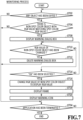
- FIG. 7 is a flowchart illustrating a specific processing routine in the monitoring process executed by the information processing apparatus according to the present embodiment.
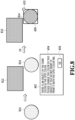
- Fig. 8 is a diagram illustrating a display example of a warning dialog box by the information processing apparatus according to the present embodiment.
- the CPU 12 In response to the start of the monitoring process, the CPU 12 firstly determines whether any object has been edited in the editing screen based on inputs from the input devices such as the keyboard 22 and the pointing device 24 (S702). If determining in S702 that no object has been edited, the CPU 12 determines whether the application 204 has been terminated (S704), and returns to S702 if determining that the application has not been terminated. If determining in S704 that the application 204 has been terminated, the CPU 12 terminates this monitoring process.
- the CPU 12 determines whether there is a non-spot color object with an RGB value matching a spot color RGB value set for a spot color object present in the image (S706). Specifically, in S706, the CPU 12 determines whether there is a non-spot color object with an RGB value matching the spot color RGB value of a spot color object added.
- the CPU 12 determines in S706 that there is no non-spot color object with an RGB value matching a spot color RGB value set for a spot color object added. If determining in S706 that there is a non-spot color object with an RGB value matching a spot color RGB value set for a spot color object added, the CPU 12 displays the warning dialog box 402 (S708). For example, as illustrated in Fig. 8 , in a case where a spot color object 812 has been added to an image and a non-spot color object 814 with an RGB value matching its spot color RGB value is present in the image, the warning dialog box 402 is displayed near the non-spot color object.
- the display position of the warning dialog box 402 may be any position as long as it is within the editing screen. Also, the warning dialog box 402 may be displayed such that the spot color object and non-spot color object of interest are displayed an easily visually recognizable manner by using a publicly known technique.
- the CPU 12 subsequently determines whether the RGB value of the non-spot color object matching the spot color RGB value has been changed (S710). If determining in S710 that the RGB value of the non-spot color object has been changed, the CPU 12 deletes the warning dialog box 402 (S712) and proceeds to S704. In S712, the CPU 12 deletes the frame 408 and the warning icon 410 along with the warning dialog box 402. If determining in S710 that the RGB value of the non-spot color object has not been changed, the CPU 12 determines whether the "OK" selection button 406 has been selected (S714).
- the CPU 12 determines in S714 that the "OK" selection button 406 has not been selected, the CPU 12 returns to S710. If determining in S714 that the "OK" selection button 406 has been selected, the CPU 12 changes the RGB value of the non-spot color object matching the spot color RGB value to the display RGB value of the spot color object for which the spot color RGB value is set (S716). That is, in S716, the CPU 12 changes the RGB value of the non-spot color object matching the spot color RGB value to an RGB value matching the display RGB value of the spot color object for which the spot color RGB value is set. Thereafter, as illustrated in Fig. 8 , the CPU 12 displays the frame 408 around the non-spot color object whose RGB value has been changed to the display RGB value (S718), displays the warning icon 410 on the frame 408 (S720), and then proceeds to S704.
- the information processing apparatus 10 displays the warning dialog box 402 in a similar manner to the above first embodiment also in the case where a spot color object is added to an image containing a non-spot color object with an RGB value matching its spot color RGB value.
- the same advantage as that of the above first embodiment is achieved not only in the case of adding a non-spot color object but also in the case of adding a spot color object.
- the third embodiment differs from the above embodiments in that a change confirmation dialog box is displayed in a case where an image is edited to contain a spot color object and a non-spot color object with an RGB value matching the spot color RGB value of this spot color object.
- a monitoring process executed by the information processing apparatus 10 according to the present embodiment will be described in detail below. Note that details of a display process to be performed in parallel with the monitoring process are the same as those in the above first embodiment, and description thereof will therefore be omitted. Also, the following description will be given by taking as an example a case of adding a non-spot color object with an RGB value matching a spot color RGB value, which corresponds to the above first embodiment. However, the situation where the change confirmation dialog box is displayed is not limited to this case. Specifically, the change confirmation dialog box may be displayed in a case of adding a spot color object for which a spot color RGB value matching the RGB value of a non-spot color object is set, which corresponds to the above second embodiment.
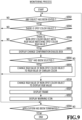
- Fig. 9 is a flowchart illustrating a specific processing routine in the monitoring process executed by the information processing apparatus according to the present embodiment.
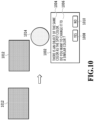
- Fig. 10 is a diagram illustrating a display example of the change confirmation dialog box.
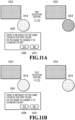
- Fig. 11A is a diagram illustrating how a non-spot color object changes in a case of selecting a "NO" selection button whereas
- Fig. 11B is a diagram illustrating how the non-spot color object changes in a case of selecting a "YES" selection button.
- Fig. 9 for the same processes as those in the monitoring process in Fig. 3 , specific description thereof will be omitted by using the same step numbers as those used in the flowchart of the monitoring process in Fig. 3 .
- the CPU 12 In response to the start of the monitoring process, the CPU 12 firstly determines in S302 whether any object has been edited in the editing screen based on inputs from the input devices such as the keyboard 22 and the pointing device 24. If determining that no object has been edited, the CPU 12 proceeds to S304, in which it determines whether the application 204 has been terminated. If determining in S304 that the application 204 has not been terminated, the CPU 12 returns to S302 and, if determining that the application has been terminated, terminates this monitoring process.
- the CPU 12 proceeds to S306, in which it determines whether there is a spot color object in the image. If determining that there is no spot color object in the image, the CPU 12 proceeds to S304 and, if determining that there is a spot color object in the image, proceeds to S308. In S308, the CPU 12 determines whether there is a non-spot color object with an RGB value matching the spot color RGB value set for the spot color object present in the image. If determining in S308 that there is not any non-spot color object as above, the CPU 12 proceeds to S304. If determining in S308 that there is a non-spot color object as above, the CPU 12 displays a change confirmation dialog box 1002 (S902).
- the change confirmation dialog box 1002 is displayed near the non-spot color object 1014.
- the display position of the change confirmation dialog box 1002 may be any position as long as it is displayed within the editing screen.
- the change confirmation dialog box 1002 may be displayed such that the spot color object and non-spot color object of interest are displayed an easily visually recognizable manner by using a publicly known technique.
- a warning sentence 1004 is displayed which indicates that there is a non-spot color object with an RGB value matching the spot color RGB value of the spot color object present in the image.
- a notification 1006 asking whether to convert the color of the non-spot color object identified in the warning sentence 1004.
- a "YES" selection button 1008 and a "NO” selection button 1010 are displayed as options associated with the notification 1006.
- the notification 1006 asks the user whether to change the color of the non-spot color object to one similar to the RGB value matching the spot color RGB value.
- the CPU 12 determines whether the "YES" selection button 1008 has been selected (S904). If determining in S904 that the "YES" selection button 1008 has not been selected, in other words, the "NO" selection button 1010 has been selected, the CPU 12 changes the RGB value of the non-spot color obj ect to a display RGB value, as illustrated in Fig. 11A (S318). Thereafter, the CPU 12 displays the frame 408 around the non-spot color object whose RGB value has been changed to the display RGB value (S320), displays the warning icon 410 on the frame 408 (S322), and then proceeds to S304.
- the CPU 12 changes the RGB value of the non-spot color object matching the spot color RGB value to an RGB value representing a similar color to it, as illustrated in Fig. 11B (S906), and then proceeds to S304.
- the RGB value representing a similar color is a color with the RGB value in the RGB color space and is the closest to white among the RGB values which are the closest to the spot color RGB value among the RGB values at a color distance of 96 or greater from the spot color RGB value and whose R, G, and B values have equal absolute values of difference.
- the RGB value representing a similar color is not limited to the above RGB value, and may be a predetermined RGB value other than the above similar color, or the configuration may be such that the RGB value can be changed as appropriate.
- the information processing apparatus 10 displays the change confirmation dialog box 1002 in the case where a spot color object and a non-spot color object with an RGB value matching the spot color RGB value of this spot color object are present together.
- This change confirmation dialog box gives a notification regarding changing the RGB value of the non-spot color object matching the spot color RGB value along with a warning sentence indicating that the non-spot color object is present.
- the notification regarding the change is a notification asking whether to change the color, i.e., the RGB value, of the non-spot color object to a similar RGB value.
- the RGB value of the non-spot color object is changed to the RGB value of the similar color.
- the "NO" selection button 1010 which is also an option associated with the notification regarding the change, is selected, the RGB value of the non-spot color object is changed to the display RGB value. If the RGB value of the non-spot color object is changed to the display RGB value, the frame 408 and the warning icon 410 are displayed around the non-spot color object. In this way, the user can not only enjoy the advantage of the above first embodiment but also skip the work of changing the color of the non-spot color object, which improves the workability. Also, by displaying the similar color to the color set by the user, an image reflecting the user's intention is displayed.
- a notification unit(12) which gives a notification regarding a color of at least one of a spot color object(412) or a non-spot color object(414) having color information matching spot-color color information of the spot color object in a case where the spot color object and the non-spot color object are present in a predetermined display region as a result of editing by an editing unit(12).
Landscapes
- Engineering & Computer Science (AREA)
- Theoretical Computer Science (AREA)
- General Engineering & Computer Science (AREA)
- Physics & Mathematics (AREA)
- General Physics & Mathematics (AREA)
- Human Computer Interaction (AREA)
- Quality & Reliability (AREA)
- Multimedia (AREA)
- Signal Processing (AREA)
- Color Image Communication Systems (AREA)
- Editing Of Facsimile Originals (AREA)
Claims (12)
- Programm, um einen Computer zu veranlassen, als eine Informationsverarbeitungsvorrichtung (10) zu fungieren, die eine Bearbeitungseinheit (12) umfasst, die in der Lage ist, ein in einem vorbestimmten Anzeigebereich (28) angezeigtes Objekt zu bearbeiten, und die eine Anzeige in dem vorbestimmten Anzeigebereich (28) auf der Grundlage eines Inhalts der Bearbeitung über die Bearbeitungseinheit (12) ändert, wobeidie Bearbeitungseinheit (12) in der Lage ist,ein Volltonfarbobjekt (412), für das einer Volltonfarbe zugeordnete Volltonfarbinformationen eingestellt sind und das unter Verwendung mindestens einer Volltonfarbtinte gemäß den Volltonfarbinformationen zu drucken ist, zu bearbeiten, undein Nicht-Volltonfarbobjekt (414), das vorbestimmte Farbinformationen aufweist und unter Verwendung einer normalen Tinte, die sich von der Volltonfarbfarbe unterscheidet, gemäß den vorbestimmten Farbinformationen zu drucken ist, wobei die normale Tinte mindestens eine von einer cyanfarbenen Tinte, einer magentafarbenen Tinte, einer gelben Tinte oder einer schwarzen Tinte ist, zu bearbeiten,dadurch gekennzeichnet, dassdie Informationsverarbeitungsvorrichtung (10) weiterhin eine Benachrichtigungseinheit (12) umfasst, die dazu konfiguriert ist, eine Benachrichtigung als eine Aufforderung zum Ändern von Farbinformationen des Nicht-Volltonfarbobjekts (414) mit Farbinformationen, die mit den Volltonfarbinformationen des Volltonfarbobjekts (412) übereinstimmen, auf der Grundlage der Tatsache anzuzeigen, dass das Volltonfarbobjekt (412) und das Nicht-Volltonfarbobjekt (414) in dem vorbestimmten Anzeigebereich (28) als ein Ergebnis der Bearbeitung durch die Bearbeitungseinheit (12) vorhanden sind, wobeidie Benachrichtigung ein Anzeigen einer Schaltfläche zum Abschlie-βen der Benachrichtigung umfasst, unddie Bearbeitungseinheit (12) dazu konfiguriert ist, die Farbinformationen des Nicht-Volltonfarbobjekts (414) zu ändern, um Farbinformationen zum Anzeigen des Volltonfarbobjekts (412) in dem vorbestimmten Anzeigebereich (28) in Reaktion auf das Auswählen der Schaltfläche anzuzeigen.
- Programm gemäß Anspruch 1, wobei die Benachrichtigung mindestens eine einer Benachrichtigung, die angibt, dass das Nicht-Volltonfarbobjekt (414) mit den Farbinformationen, die mit den Volltonfarbinformationen übereinstimmen, vorhanden ist, oder einer Benachrichtigung bezüglich der Änderung der Farbinformationen des Nicht-Volltonfarbobjekts (414) ist.
- Programm gemäß Anspruch 1 oder 2, wobei die Bearbeitungseinheit (12) dazu konfiguriert ist, einen Rahmen um das Nicht-Volltonfarbobjekt (414), dessen Farbinformationen in die Anzeigefarbinformationen geändert wurde, und ein Warnsymbol, das Aufmerksamkeit erfordert, bereitzustellen.
- Programm gemäß Anspruch 3, wobei die Benachrichtigungseinheit dazu konfiguriert ist, eine Nachricht zu melden, die angibt, dass die Volltonfarbinformationen für das Nicht-Volltonfarbobjekt (414) eingestellt worden sind, als Reaktion auf einen Vorgang bezüglich des Warnsymbols.
- Programm gemäß Anspruch 4, wobei der Vorgang bezüglich des Warnsymbols ein Mouseover ist.
- Programm gemäß einem der Ansprüche 1 bis 5, wobei die Informationsverarbeitungsvorrichtung (10) weiterhin eine Ausgabeeinheit umfasst, die dazu konfiguriert ist, Bilddaten, auf die der Inhalt der Bearbeitung angewendet wurde, an eine Druckvorrichtung auszugeben, die in der Lage ist, einen Druck unter Verwendung von zumindest der Volltonfarbe auf der Grundlage der Bilddaten durchzuführen.
- Programm gemäß einem der Ansprüche 1 bis 6, wobei die Bearbeitung durch die Bearbeitungseinheit (12) mindestens eines der folgenden Elemente umfasst: Ändern einer Position eines Objekts, Ändern einer Größe eines Objekts, Hinzufügen eines Objekts, Ändern einer Farbe eines Objekts oder Löschen eines Objekts.
- Programm gemäß einem der Ansprüche 1 bis 7, wobei die Volltonfarbe eine Tinte mit einer Farbe ist, die sich von einer Prozessfarbe unterscheidet.
- Programm gemäß Anspruch 8, wobei die Volltonfarbe eine Tinte enthält, die mindestens eine der folgenden Farben entwickelt: eine fluoreszierende Farbe, eine Goldfarbe oder eine Silberfarbe.
- Programm gemäß einem der Ansprüche 1 bis 9, wobei die Farbinformationen ein RGB-Wert ist.
- Informationsverarbeitungsverfahren für eine Informationsverarbeitungsvorrichtung (10), die in der Lage ist, ein in einem vorbestimmten Anzeigebereich (28) angezeigtes Objekt zu bearbeiten, wobeidie Informationsverarbeitungsvorrichtung (10) dazu in der Lage ist,ein Volltonfarbobjekt (412), für das einer Volltonfarbe zugeordnete Volltonfarbinformationen eingestellt sind und das unter Verwendung mindestens einer Volltonfarbtinte gemäß den Volltonfarbinformationen zu drucken ist, zu bearbeiten, undein Nicht-Volltonfarbobjekt (414), das vorbestimmte Farbinformationen aufweist und unter Verwendung einer normalen Tinte, die sich von der Volltonfarbtinte unterscheidet, gemäß den vorbestimmten Farbinformationen zu drucken ist, wobei die normale Tinte mindestens eine von einer cyanfarbenen Tinte, einer magentafarbenen Tinte, einer gelben Tinte oder einer schwarzen Tinte ist, zu bearbeiten,dadurch gekennzeichnet, dassdas Informationsverarbeitungsverfahren ein Anzeigen einer Benachrichtigung als Aufforderung zum Ändern von Farbinformationen des Nicht-Volltonfarbobjekts (414) mit Farbinformationen, die mit den Volltonfarbfarbinformationen des Volltonfarbobjekts (412) übereinstimmen, auf der Grundlage der Tatsache umfasst, dass das Volltonfarbobjekt (412) und das Nicht-Volltonfarbobjekt (414) in dem vorbestimmten Anzeigebereich (28) als ein Ergebnis der Bearbeitung vorhanden sind,die Benachrichtigung ein Anzeigen einer Schaltfläche zum Abschlie-βen der Benachrichtigung umfasst, unddie Bearbeitung die Farbinformationen des Nicht-Volltonfarbobjekts (414) ändert, um Farbinformationen zum Anzeigen des Volltonfarbobjekts (412) in dem vorbestimmten Anzeigebereich (28) als Reaktion auf ein Auswählen der Schaltfläche anzuzeigen.
- Informationsverarbeitungsvorrichtung (10), die eine Bearbeitungseinheit (12) umfasst, die in der Lage ist, ein in einem vorbestimmten Anzeigebereich (28) angezeigtes Objekt zu bearbeiten, und die eine Anzeige in dem vorbestimmten Anzeigebereich (28) basierend auf einem Inhalt der Bearbeitung durch die Bearbeitungseinheit (12) ändert, wobeidie Bearbeitungseinheit (12) dazu in der Lage ist,ein Volltonfarbobjekt (412), für das einer Volltonfarbe zugeordnete Volltonfarbinformationen eingestellt sind und das unter Verwendung mindestens einer Volltonfarbtinte gemäß den Volltonfarbinformationen zu drucken ist, zu bearbeiten, undein Nicht-Volltonfarbobjekt (414), das vorbestimmte Farbinformationen aufweist und unter Verwendung einer normalen Tinte, die sich von der Volltonfarbtinte unterscheidet, gemäß den vorbestimmten Farbinformationen zu drucken ist, wobei die normale Tinte mindestens eine von einer cyanfarbenen Tinte, einer magentafarbenen Tinte, einer gelben Tinte oder einer schwarzen Tinte ist, zu bearbeiten,dadurch gekennzeichnet, dassdie Informationsverarbeitungsvorrichtung (10) weiterhin eine Benachrichtigungseinheit (12) umfasst, die eine Benachrichtigung als Aufforderung zum Ändern von Farbinformationen des Nicht-Volltonfarbobjekts (414) mit Farbinformationen, die mit den Volltonfarbfarbinformationen des Volltonfarbobjekts (412) übereinstimmen, basierend auf der Tatsache anzeigt, dass das Volltonfarbobjekt (412) und das Nicht-Volltonfarbobjekt (414) in dem vorbestimmten Anzeigebereich (28) als ein Ergebnis der Bearbeitung durch die Bearbeitungseinheit (12) vorhanden sind,die Benachrichtigung ein Anzeigen einer Schaltfläche zum Abschlie-βen der Benachrichtigung umfasst, unddie Bearbeitungseinheit (12) dazu konfiguriert ist, die Farbinformationen des Nicht-Volltonfarbobjekts (414) zu ändern, um Farbinformationen zum Anzeigen des Volltonfarbobjekts (412) in dem vorbestimmten Anzeigebereich (28) in Reaktion auf ein Auswählen der Schaltfläche anzuzeigen.
Applications Claiming Priority (1)
| Application Number | Priority Date | Filing Date | Title |
|---|---|---|---|
| JP2021083082A JP7682693B2 (ja) | 2021-05-17 | 2021-05-17 | 情報処置装置、情報処理方法、およびプログラム |
Publications (2)
| Publication Number | Publication Date |
|---|---|
| EP4093008A1 EP4093008A1 (de) | 2022-11-23 |
| EP4093008B1 true EP4093008B1 (de) | 2024-12-18 |
Family
ID=81941172
Family Applications (1)
| Application Number | Title | Priority Date | Filing Date |
|---|---|---|---|
| EP22173182.1A Active EP4093008B1 (de) | 2021-05-17 | 2022-05-13 | Informationsverarbeitungsvorrichtung, informationsverarbeitungsverfahren und programm |
Country Status (4)
| Country | Link |
|---|---|
| US (1) | US11797807B2 (de) |
| EP (1) | EP4093008B1 (de) |
| JP (1) | JP7682693B2 (de) |
| CN (1) | CN115357200A (de) |
Families Citing this family (1)
| Publication number | Priority date | Publication date | Assignee | Title |
|---|---|---|---|---|
| JP7599981B2 (ja) * | 2021-02-09 | 2024-12-16 | キヤノン株式会社 | 印刷制御装置、印刷制御方法およびプログラム |
Family Cites Families (9)
| Publication number | Priority date | Publication date | Assignee | Title |
|---|---|---|---|---|
| JP2005193648A (ja) * | 2003-12-09 | 2005-07-21 | Canon Inc | 印刷制御装置、印刷制御方法およびコンピュータプログラム |
| JP4412733B2 (ja) * | 2005-08-02 | 2010-02-10 | キヤノン株式会社 | 画像処理装置およびその方法、並びに、コンピュータプログラムおよび記憶媒体 |
| JP4618324B2 (ja) * | 2008-04-28 | 2011-01-26 | 富士ゼロックス株式会社 | 画像処理装置及びプログラム |
| US8049926B2 (en) * | 2008-10-06 | 2011-11-01 | Xerox Corporation | Methods and systems for selecting a color |
| JP2011244301A (ja) | 2010-05-20 | 2011-12-01 | Seiko Epson Corp | 情報表示装置、情報表示方法および情報表示プログラム |
| JP2012218379A (ja) * | 2011-04-13 | 2012-11-12 | Canon Inc | 画像処理装置、方法及びプログラム |
| JP2013050925A (ja) * | 2011-08-31 | 2013-03-14 | Konica Minolta Business Technologies Inc | 印刷処理装置および印刷プログラム |
| JP6787250B2 (ja) * | 2017-05-22 | 2020-11-18 | 株式会社リコー | 情報処理装置、情報処理方法およびプログラム |
| JP6953379B2 (ja) | 2017-11-22 | 2021-10-27 | キヤノン株式会社 | 画像処理装置、画像処理方法、表示装置およびプログラム |
-
2021
- 2021-05-17 JP JP2021083082A patent/JP7682693B2/ja active Active
-
2022
- 2022-05-06 US US17/738,880 patent/US11797807B2/en active Active
- 2022-05-11 CN CN202210510353.0A patent/CN115357200A/zh active Pending
- 2022-05-13 EP EP22173182.1A patent/EP4093008B1/de active Active
Also Published As
| Publication number | Publication date |
|---|---|
| CN115357200A (zh) | 2022-11-18 |
| JP2022176577A (ja) | 2022-11-30 |
| EP4093008A1 (de) | 2022-11-23 |
| US11797807B2 (en) | 2023-10-24 |
| US20220366200A1 (en) | 2022-11-17 |
| JP7682693B2 (ja) | 2025-05-26 |
Similar Documents
| Publication | Publication Date | Title |
|---|---|---|
| EP4040769B1 (de) | Informationsverarbeitungsvorrichtung, steuerungsverfahren und programm | |
| US9338329B2 (en) | Image processing including color conversion for a printed image | |
| US11842110B2 (en) | Control apparatus having spot color printing, controlling method, and storage medium | |
| US11936832B2 (en) | Control method for apparatus, printing apparatus, and storage medium | |
| EP4093008B1 (de) | Informationsverarbeitungsvorrichtung, informationsverarbeitungsverfahren und programm | |
| US20210173595A1 (en) | Control method and storage medium | |
| US20230325211A1 (en) | Image forming apparatus and control method of image forming apparatus | |
| EP4083778B1 (de) | Informationsverarbeitungsvorrichtung, informationsverarbeitungsverfahren und programm | |
| US20250080676A1 (en) | Information processing apparatus, method for controlling the information processing apparatus, and storage medium | |
| US20240282026A1 (en) | Storage medium, information processing apparatus, and control method for controlling the same | |
| JP5101372B2 (ja) | プリントシステム、印刷方法及び印刷データ出力方法 | |
| JP2025116637A (ja) | 画像処理システム及びプログラム | |
| JP5556462B2 (ja) | 文書作成支援装置、文書作成支援方法、プログラムおよび記録媒体 | |
| JP2022108993A (ja) | 情報処理装置及びプログラム | |
| JP2009163594A (ja) | 画像処理装置、画像処理方法及び画像処理プログラム |
Legal Events
| Date | Code | Title | Description |
|---|---|---|---|
| PUAI | Public reference made under article 153(3) epc to a published international application that has entered the european phase |
Free format text: ORIGINAL CODE: 0009012 |
|
| STAA | Information on the status of an ep patent application or granted ep patent |
Free format text: STATUS: THE APPLICATION HAS BEEN PUBLISHED |
|
| AK | Designated contracting states |
Kind code of ref document: A1 Designated state(s): AL AT BE BG CH CY CZ DE DK EE ES FI FR GB GR HR HU IE IS IT LI LT LU LV MC MK MT NL NO PL PT RO RS SE SI SK SM TR |
|
| STAA | Information on the status of an ep patent application or granted ep patent |
Free format text: STATUS: REQUEST FOR EXAMINATION WAS MADE |
|
| 17P | Request for examination filed |
Effective date: 20230523 |
|
| RBV | Designated contracting states (corrected) |
Designated state(s): AL AT BE BG CH CY CZ DE DK EE ES FI FR GB GR HR HU IE IS IT LI LT LU LV MC MK MT NL NO PL PT RO RS SE SI SK SM TR |
|
| GRAP | Despatch of communication of intention to grant a patent |
Free format text: ORIGINAL CODE: EPIDOSNIGR1 |
|
| STAA | Information on the status of an ep patent application or granted ep patent |
Free format text: STATUS: GRANT OF PATENT IS INTENDED |
|
| INTG | Intention to grant announced |
Effective date: 20240223 |
|
| GRAJ | Information related to disapproval of communication of intention to grant by the applicant or resumption of examination proceedings by the epo deleted |
Free format text: ORIGINAL CODE: EPIDOSDIGR1 |
|
| STAA | Information on the status of an ep patent application or granted ep patent |
Free format text: STATUS: REQUEST FOR EXAMINATION WAS MADE |
|
| GRAP | Despatch of communication of intention to grant a patent |
Free format text: ORIGINAL CODE: EPIDOSNIGR1 |
|
| STAA | Information on the status of an ep patent application or granted ep patent |
Free format text: STATUS: GRANT OF PATENT IS INTENDED |
|
| INTC | Intention to grant announced (deleted) | ||
| INTG | Intention to grant announced |
Effective date: 20240716 |
|
| GRAS | Grant fee paid |
Free format text: ORIGINAL CODE: EPIDOSNIGR3 |
|
| GRAA | (expected) grant |
Free format text: ORIGINAL CODE: 0009210 |
|
| STAA | Information on the status of an ep patent application or granted ep patent |
Free format text: STATUS: THE PATENT HAS BEEN GRANTED |
|
| AK | Designated contracting states |
Kind code of ref document: B1 Designated state(s): AL AT BE BG CH CY CZ DE DK EE ES FI FR GB GR HR HU IE IS IT LI LT LU LV MC MK MT NL NO PL PT RO RS SE SI SK SM TR |
|
| REG | Reference to a national code |
Ref country code: CH Ref legal event code: EP |
|
| REG | Reference to a national code |
Ref country code: DE Ref legal event code: R096 Ref document number: 602022008742 Country of ref document: DE |
|
| REG | Reference to a national code |
Ref country code: IE Ref legal event code: FG4D |
|
| REG | Reference to a national code |
Ref country code: LT Ref legal event code: MG9D |
|
| PG25 | Lapsed in a contracting state [announced via postgrant information from national office to epo] |
Ref country code: HR Free format text: LAPSE BECAUSE OF FAILURE TO SUBMIT A TRANSLATION OF THE DESCRIPTION OR TO PAY THE FEE WITHIN THE PRESCRIBED TIME-LIMIT Effective date: 20241218 |
|
| PG25 | Lapsed in a contracting state [announced via postgrant information from national office to epo] |
Ref country code: FI Free format text: LAPSE BECAUSE OF FAILURE TO SUBMIT A TRANSLATION OF THE DESCRIPTION OR TO PAY THE FEE WITHIN THE PRESCRIBED TIME-LIMIT Effective date: 20241218 |
|
| PG25 | Lapsed in a contracting state [announced via postgrant information from national office to epo] |
Ref country code: BG Free format text: LAPSE BECAUSE OF FAILURE TO SUBMIT A TRANSLATION OF THE DESCRIPTION OR TO PAY THE FEE WITHIN THE PRESCRIBED TIME-LIMIT Effective date: 20241218 |
|
| PG25 | Lapsed in a contracting state [announced via postgrant information from national office to epo] |
Ref country code: NO Free format text: LAPSE BECAUSE OF FAILURE TO SUBMIT A TRANSLATION OF THE DESCRIPTION OR TO PAY THE FEE WITHIN THE PRESCRIBED TIME-LIMIT Effective date: 20250318 |
|
| REG | Reference to a national code |
Ref country code: NL Ref legal event code: MP Effective date: 20241218 |
|
| PG25 | Lapsed in a contracting state [announced via postgrant information from national office to epo] |
Ref country code: LV Free format text: LAPSE BECAUSE OF FAILURE TO SUBMIT A TRANSLATION OF THE DESCRIPTION OR TO PAY THE FEE WITHIN THE PRESCRIBED TIME-LIMIT Effective date: 20241218 Ref country code: GR Free format text: LAPSE BECAUSE OF FAILURE TO SUBMIT A TRANSLATION OF THE DESCRIPTION OR TO PAY THE FEE WITHIN THE PRESCRIBED TIME-LIMIT Effective date: 20250319 |
|
| PG25 | Lapsed in a contracting state [announced via postgrant information from national office to epo] |
Ref country code: RS Free format text: LAPSE BECAUSE OF FAILURE TO SUBMIT A TRANSLATION OF THE DESCRIPTION OR TO PAY THE FEE WITHIN THE PRESCRIBED TIME-LIMIT Effective date: 20250318 |
|
| PG25 | Lapsed in a contracting state [announced via postgrant information from national office to epo] |
Ref country code: NL Free format text: LAPSE BECAUSE OF FAILURE TO SUBMIT A TRANSLATION OF THE DESCRIPTION OR TO PAY THE FEE WITHIN THE PRESCRIBED TIME-LIMIT Effective date: 20241218 |
|
| REG | Reference to a national code |
Ref country code: AT Ref legal event code: MK05 Ref document number: 1753199 Country of ref document: AT Kind code of ref document: T Effective date: 20241218 |
|
| PG25 | Lapsed in a contracting state [announced via postgrant information from national office to epo] |
Ref country code: SM Free format text: LAPSE BECAUSE OF FAILURE TO SUBMIT A TRANSLATION OF THE DESCRIPTION OR TO PAY THE FEE WITHIN THE PRESCRIBED TIME-LIMIT Effective date: 20241218 |
|
| PG25 | Lapsed in a contracting state [announced via postgrant information from national office to epo] |
Ref country code: PL Free format text: LAPSE BECAUSE OF FAILURE TO SUBMIT A TRANSLATION OF THE DESCRIPTION OR TO PAY THE FEE WITHIN THE PRESCRIBED TIME-LIMIT Effective date: 20241218 |
|
| PGFP | Annual fee paid to national office [announced via postgrant information from national office to epo] |
Ref country code: DE Payment date: 20250423 Year of fee payment: 4 |
|
| PG25 | Lapsed in a contracting state [announced via postgrant information from national office to epo] |
Ref country code: ES Free format text: LAPSE BECAUSE OF FAILURE TO SUBMIT A TRANSLATION OF THE DESCRIPTION OR TO PAY THE FEE WITHIN THE PRESCRIBED TIME-LIMIT Effective date: 20241218 |
|
| PG25 | Lapsed in a contracting state [announced via postgrant information from national office to epo] |
Ref country code: IS Free format text: LAPSE BECAUSE OF FAILURE TO SUBMIT A TRANSLATION OF THE DESCRIPTION OR TO PAY THE FEE WITHIN THE PRESCRIBED TIME-LIMIT Effective date: 20250418 |
|
| PG25 | Lapsed in a contracting state [announced via postgrant information from national office to epo] |
Ref country code: PT Free format text: LAPSE BECAUSE OF FAILURE TO SUBMIT A TRANSLATION OF THE DESCRIPTION OR TO PAY THE FEE WITHIN THE PRESCRIBED TIME-LIMIT Effective date: 20250421 |
|
| PG25 | Lapsed in a contracting state [announced via postgrant information from national office to epo] |
Ref country code: EE Free format text: LAPSE BECAUSE OF FAILURE TO SUBMIT A TRANSLATION OF THE DESCRIPTION OR TO PAY THE FEE WITHIN THE PRESCRIBED TIME-LIMIT Effective date: 20241218 |
|
| PG25 | Lapsed in a contracting state [announced via postgrant information from national office to epo] |
Ref country code: RO Free format text: LAPSE BECAUSE OF FAILURE TO SUBMIT A TRANSLATION OF THE DESCRIPTION OR TO PAY THE FEE WITHIN THE PRESCRIBED TIME-LIMIT Effective date: 20241218 Ref country code: AT Free format text: LAPSE BECAUSE OF FAILURE TO SUBMIT A TRANSLATION OF THE DESCRIPTION OR TO PAY THE FEE WITHIN THE PRESCRIBED TIME-LIMIT Effective date: 20241218 |
|
| PG25 | Lapsed in a contracting state [announced via postgrant information from national office to epo] |
Ref country code: SK Free format text: LAPSE BECAUSE OF FAILURE TO SUBMIT A TRANSLATION OF THE DESCRIPTION OR TO PAY THE FEE WITHIN THE PRESCRIBED TIME-LIMIT Effective date: 20241218 |
|
| PG25 | Lapsed in a contracting state [announced via postgrant information from national office to epo] |
Ref country code: CZ Free format text: LAPSE BECAUSE OF FAILURE TO SUBMIT A TRANSLATION OF THE DESCRIPTION OR TO PAY THE FEE WITHIN THE PRESCRIBED TIME-LIMIT Effective date: 20241218 |
|
| PG25 | Lapsed in a contracting state [announced via postgrant information from national office to epo] |
Ref country code: IT Free format text: LAPSE BECAUSE OF FAILURE TO SUBMIT A TRANSLATION OF THE DESCRIPTION OR TO PAY THE FEE WITHIN THE PRESCRIBED TIME-LIMIT Effective date: 20241218 |
|
| PG25 | Lapsed in a contracting state [announced via postgrant information from national office to epo] |
Ref country code: SE Free format text: LAPSE BECAUSE OF FAILURE TO SUBMIT A TRANSLATION OF THE DESCRIPTION OR TO PAY THE FEE WITHIN THE PRESCRIBED TIME-LIMIT Effective date: 20241218 |
|
| REG | Reference to a national code |
Ref country code: DE Ref legal event code: R097 Ref document number: 602022008742 Country of ref document: DE |
|
| PG25 | Lapsed in a contracting state [announced via postgrant information from national office to epo] |
Ref country code: DK Free format text: LAPSE BECAUSE OF FAILURE TO SUBMIT A TRANSLATION OF THE DESCRIPTION OR TO PAY THE FEE WITHIN THE PRESCRIBED TIME-LIMIT Effective date: 20241218 |
|
| PLBE | No opposition filed within time limit |
Free format text: ORIGINAL CODE: 0009261 |
|
| STAA | Information on the status of an ep patent application or granted ep patent |
Free format text: STATUS: NO OPPOSITION FILED WITHIN TIME LIMIT |
|
| REG | Reference to a national code |
Ref country code: CH Ref legal event code: L10 Free format text: ST27 STATUS EVENT CODE: U-0-0-L10-L00 (AS PROVIDED BY THE NATIONAL OFFICE) Effective date: 20251029 |
|
| 26N | No opposition filed |
Effective date: 20250919 |
|
| REG | Reference to a national code |
Ref country code: CH Ref legal event code: H13 Free format text: ST27 STATUS EVENT CODE: U-0-0-H10-H13 (AS PROVIDED BY THE NATIONAL OFFICE) Effective date: 20251223 |
|
| PG25 | Lapsed in a contracting state [announced via postgrant information from national office to epo] |
Ref country code: LU Free format text: LAPSE BECAUSE OF NON-PAYMENT OF DUE FEES Effective date: 20250513 |
|
| PG25 | Lapsed in a contracting state [announced via postgrant information from national office to epo] |
Ref country code: CH Free format text: LAPSE BECAUSE OF NON-PAYMENT OF DUE FEES Effective date: 20250531 |
|
| PG25 | Lapsed in a contracting state [announced via postgrant information from national office to epo] |
Ref country code: MC Free format text: LAPSE BECAUSE OF FAILURE TO SUBMIT A TRANSLATION OF THE DESCRIPTION OR TO PAY THE FEE WITHIN THE PRESCRIBED TIME-LIMIT Effective date: 20241218 |