EP3962615B1 - Selecting properties using handheld controllers - Google Patents
Selecting properties using handheld controllers Download PDFInfo
- Publication number
- EP3962615B1 EP3962615B1 EP20818012.5A EP20818012A EP3962615B1 EP 3962615 B1 EP3962615 B1 EP 3962615B1 EP 20818012 A EP20818012 A EP 20818012A EP 3962615 B1 EP3962615 B1 EP 3962615B1
- Authority
- EP
- European Patent Office
- Prior art keywords
- joystick
- property
- user
- range
- center position
- Prior art date
- Legal status (The legal status is an assumption and is not a legal conclusion. Google has not performed a legal analysis and makes no representation as to the accuracy of the status listed.)
- Active
Links
Images




Classifications
-
- A—HUMAN NECESSITIES
- A63—SPORTS; GAMES; AMUSEMENTS
- A63F—CARD, BOARD, OR ROULETTE GAMES; INDOOR GAMES USING SMALL MOVING PLAYING BODIES; VIDEO GAMES; GAMES NOT OTHERWISE PROVIDED FOR
- A63F13/00—Video games, i.e. games using an electronically generated display having two or more dimensions
- A63F13/40—Processing input control signals of video game devices, e.g. signals generated by the player or derived from the environment
-
- A—HUMAN NECESSITIES
- A63—SPORTS; GAMES; AMUSEMENTS
- A63F—CARD, BOARD, OR ROULETTE GAMES; INDOOR GAMES USING SMALL MOVING PLAYING BODIES; VIDEO GAMES; GAMES NOT OTHERWISE PROVIDED FOR
- A63F13/00—Video games, i.e. games using an electronically generated display having two or more dimensions
- A63F13/40—Processing input control signals of video game devices, e.g. signals generated by the player or derived from the environment
- A63F13/42—Processing input control signals of video game devices, e.g. signals generated by the player or derived from the environment by mapping the input signals into game commands, e.g. mapping the displacement of a stylus on a touch screen to the steering angle of a virtual vehicle
-
- A—HUMAN NECESSITIES
- A63—SPORTS; GAMES; AMUSEMENTS
- A63F—CARD, BOARD, OR ROULETTE GAMES; INDOOR GAMES USING SMALL MOVING PLAYING BODIES; VIDEO GAMES; GAMES NOT OTHERWISE PROVIDED FOR
- A63F13/00—Video games, i.e. games using an electronically generated display having two or more dimensions
- A63F13/50—Controlling the output signals based on the game progress
- A63F13/53—Controlling the output signals based on the game progress involving additional visual information provided to the game scene, e.g. by overlay to simulate a head-up display [HUD] or displaying a laser sight in a shooting game
- A63F13/533—Controlling the output signals based on the game progress involving additional visual information provided to the game scene, e.g. by overlay to simulate a head-up display [HUD] or displaying a laser sight in a shooting game for prompting the player, e.g. by displaying a game menu
-
- G—PHYSICS
- G06—COMPUTING OR CALCULATING; COUNTING
- G06F—ELECTRIC DIGITAL DATA PROCESSING
- G06F3/00—Input arrangements for transferring data to be processed into a form capable of being handled by the computer; Output arrangements for transferring data from processing unit to output unit, e.g. interface arrangements
- G06F3/01—Input arrangements or combined input and output arrangements for interaction between user and computer
- G06F3/03—Arrangements for converting the position or the displacement of a member into a coded form
- G06F3/033—Pointing devices displaced or positioned by the user, e.g. mice, trackballs, pens or joysticks; Accessories therefor
- G06F3/0338—Pointing devices displaced or positioned by the user, e.g. mice, trackballs, pens or joysticks; Accessories therefor with detection of limited linear or angular displacement of an operating part of the device from a neutral position, e.g. isotonic or isometric joysticks
-
- G—PHYSICS
- G06—COMPUTING OR CALCULATING; COUNTING
- G06F—ELECTRIC DIGITAL DATA PROCESSING
- G06F3/00—Input arrangements for transferring data to be processed into a form capable of being handled by the computer; Output arrangements for transferring data from processing unit to output unit, e.g. interface arrangements
- G06F3/01—Input arrangements or combined input and output arrangements for interaction between user and computer
- G06F3/03—Arrangements for converting the position or the displacement of a member into a coded form
- G06F3/033—Pointing devices displaced or positioned by the user, e.g. mice, trackballs, pens or joysticks; Accessories therefor
- G06F3/0354—Pointing devices displaced or positioned by the user, e.g. mice, trackballs, pens or joysticks; Accessories therefor with detection of two-dimensional [2D] relative movements between the device, or an operating part thereof, and a plane or surface, e.g. 2D mice, trackballs, pens or pucks
- G06F3/03547—Touch pads, in which fingers can move on a surface
-
- G—PHYSICS
- G06—COMPUTING OR CALCULATING; COUNTING
- G06F—ELECTRIC DIGITAL DATA PROCESSING
- G06F3/00—Input arrangements for transferring data to be processed into a form capable of being handled by the computer; Output arrangements for transferring data from processing unit to output unit, e.g. interface arrangements
- G06F3/01—Input arrangements or combined input and output arrangements for interaction between user and computer
- G06F3/048—Interaction techniques based on graphical user interfaces [GUI]
- G06F3/0481—Interaction techniques based on graphical user interfaces [GUI] based on specific properties of the displayed interaction object or a metaphor-based environment, e.g. interaction with desktop elements like windows or icons, or assisted by a cursor's changing behaviour or appearance
- G06F3/0482—Interaction with lists of selectable items, e.g. menus
-
- G—PHYSICS
- G06—COMPUTING OR CALCULATING; COUNTING
- G06F—ELECTRIC DIGITAL DATA PROCESSING
- G06F3/00—Input arrangements for transferring data to be processed into a form capable of being handled by the computer; Output arrangements for transferring data from processing unit to output unit, e.g. interface arrangements
- G06F3/01—Input arrangements or combined input and output arrangements for interaction between user and computer
- G06F3/048—Interaction techniques based on graphical user interfaces [GUI]
- G06F3/0484—Interaction techniques based on graphical user interfaces [GUI] for the control of specific functions or operations, e.g. selecting or manipulating an object, an image or a displayed text element, setting a parameter value or selecting a range
- G06F3/04845—Interaction techniques based on graphical user interfaces [GUI] for the control of specific functions or operations, e.g. selecting or manipulating an object, an image or a displayed text element, setting a parameter value or selecting a range for image manipulation, e.g. dragging, rotation, expansion or change of colour
-
- G—PHYSICS
- G06—COMPUTING OR CALCULATING; COUNTING
- G06F—ELECTRIC DIGITAL DATA PROCESSING
- G06F3/00—Input arrangements for transferring data to be processed into a form capable of being handled by the computer; Output arrangements for transferring data from processing unit to output unit, e.g. interface arrangements
- G06F3/01—Input arrangements or combined input and output arrangements for interaction between user and computer
- G06F3/048—Interaction techniques based on graphical user interfaces [GUI]
- G06F3/0484—Interaction techniques based on graphical user interfaces [GUI] for the control of specific functions or operations, e.g. selecting or manipulating an object, an image or a displayed text element, setting a parameter value or selecting a range
- G06F3/04847—Interaction techniques to control parameter settings, e.g. interaction with sliders or dials
-
- G—PHYSICS
- G06—COMPUTING OR CALCULATING; COUNTING
- G06F—ELECTRIC DIGITAL DATA PROCESSING
- G06F3/00—Input arrangements for transferring data to be processed into a form capable of being handled by the computer; Output arrangements for transferring data from processing unit to output unit, e.g. interface arrangements
- G06F3/01—Input arrangements or combined input and output arrangements for interaction between user and computer
- G06F3/048—Interaction techniques based on graphical user interfaces [GUI]
- G06F3/0487—Interaction techniques based on graphical user interfaces [GUI] using specific features provided by the input device, e.g. functions controlled by the rotation of a mouse with dual sensing arrangements, or of the nature of the input device, e.g. tap gestures based on pressure sensed by a digitiser
-
- G—PHYSICS
- G06—COMPUTING OR CALCULATING; COUNTING
- G06F—ELECTRIC DIGITAL DATA PROCESSING
- G06F3/00—Input arrangements for transferring data to be processed into a form capable of being handled by the computer; Output arrangements for transferring data from processing unit to output unit, e.g. interface arrangements
- G06F3/01—Input arrangements or combined input and output arrangements for interaction between user and computer
- G06F3/048—Interaction techniques based on graphical user interfaces [GUI]
- G06F3/0487—Interaction techniques based on graphical user interfaces [GUI] using specific features provided by the input device, e.g. functions controlled by the rotation of a mouse with dual sensing arrangements, or of the nature of the input device, e.g. tap gestures based on pressure sensed by a digitiser
- G06F3/0488—Interaction techniques based on graphical user interfaces [GUI] using specific features provided by the input device, e.g. functions controlled by the rotation of a mouse with dual sensing arrangements, or of the nature of the input device, e.g. tap gestures based on pressure sensed by a digitiser using a touch-screen or digitiser, e.g. input of commands through traced gestures
-
- A—HUMAN NECESSITIES
- A63—SPORTS; GAMES; AMUSEMENTS
- A63F—CARD, BOARD, OR ROULETTE GAMES; INDOOR GAMES USING SMALL MOVING PLAYING BODIES; VIDEO GAMES; GAMES NOT OTHERWISE PROVIDED FOR
- A63F2300/00—Features of games using an electronically generated display having two or more dimensions, e.g. on a television screen, showing representations related to the game
- A63F2300/30—Features of games using an electronically generated display having two or more dimensions, e.g. on a television screen, showing representations related to the game characterized by output arrangements for receiving control signals generated by the game device
- A63F2300/308—Details of the user interface
Definitions
- Handheld controllers are used in an array of architectures for providing input, for example, to a remote computing device.
- handheld controllers are utilized in the gaming industry to allow players to interact with a personal computing device executing a gaming application, a game console, a game server, or the like. While current handheld controllers provide a range of functionality, further technical improvements may enhance user experiences that these controllers offer.
- EP 2083350 A2 discloses a method of controlling at least one variable.
- the method includes activating a radial menu in a graphical user interface in response to a menu activation command.
- the radial menu has an origin and at least a first wedge associated with a variable extending from the origin so that the cursor is moveable inside the first wedge to select a current value for the variable based on the angular position of the cursor about the origin.
- the method further includes receiving a movement command via an input device such as a mouse, keyboard, stylus, or pointing device.
- the movement command moves the cursor within the first wedge to change the angular position of the cursor about the origin.
- the current value of the variable is then changed to reflect the changed angular position of the cursor about the origin, and the current value of the variable is displayed.
- US 2016/188133 A1 discloses a method of setting a parameter.
- the method comprises detecting a first user input (via a mouse, stylus, or a user's finger) on a first location on a graphical user interface, displaying on the graphical user interface a pie menu centered on the first location, the pie menu comprising at least one angular sector that is associated with a customizable parameter.
- the method also comprises detecting a second user input on a second location on the graphical user interface in the at least angular sector, the second user input being maintained.
- the method further comprises selecting among a set of values, a value of the customizable parameter by displacing the second user input from the second location to a third location. This displacement from the second location to the third location is substantially perpendicular to a bisection of the at least one angular sector.
- handheld controllers are used in a range of environments and include a range of functionality.
- handheld controllers may be used in to operate video games, to navigate video content, or to interact with any other application.
- a handheld controller may be used to select values of different properties of virtual objects or other types of content represented on a display.
- a handheld controller may be used to select a font of a text presented on a display, line spacing of the text, a color of a virtual object, or the like.
- Described herein are techniques for enabling a user to operate a handheld controller for selecting values for different properties of content presented on a display.
- the techniques may enable a user to operate a color picker to select a hue, saturation, and/or brightness of a virtual object presented on a display.
- the user may operate an input device, such as joystick, trackpad, directional pad, or the like, to select which property the user would like to adjust, as well as to select a value of the desired property.
- an input device of the handheld controller may be operable to provide inputs at different locations on the input device. For instance, a user may operate a joystick to provide an input that begins at a center location and moves towards an outer edge of a range of the joystick.
- a user may operate a trackpad by providing an input (e.g., using a finger, stylus, or the like) that is detectable by a touch sensor to indicate movement of the input across the trackpad.
- different regions of the input devices may be associated with different properties that may be selected and adjusted. For example, envision that a user wishes to operate a color picker, a type of graphical user interface (GUI) tool, to select respective values for three different properties of a color, such as hue, saturation, and lightness/value.
- GUI graphical user interface
- a first region of the joystick or trackpad may be associated with the first property, a second region with the second property, and a third region with the third property.
- a first range of outer positions of the joystick or trackpad may be associated with the first property
- a second range of outer positions may be associated with the second property
- a third range of outer positions may be associated with the third property.
- the user may operate the joystick or trackpad to select one of the three properties to modify and may thereafter select a value of the property using the joystick or trackpad.
- a top arc of the joystick may be associated with a first property, such as hue, such that a user may push the joystick generally upwards to select a hue.
- a color picker illustrated on a display may present an indication that the user has selected to modify a hue of a color, rather than the saturation, lightness, value, or the like.
- the user may move the joystick around the arc, or around an even larger arc, to change the value of the hue.
- the illustrated color picker may indicate that the user may move the joystick generally left or right along the outer range of the joystick to select orange, yellow, green, blue, red, and the like.
- the user may return the joystick from its current position to the center position. For example, the user may simply release the joystick upon selecting the desired hue and the joystick may be biased back to its center position.
- the display may present a virtual object in the selected hue.
- the user may then move the joystick generally down and to the left to activate selection of a second property of the color, such as saturation.
- the color picker presented on the display may be updated to indicate that the user may now select a value of the saturation (or other second property).
- the user may move the joystick around the arc associated with the second property (or a different arc) to select the desired saturation value.
- the user may return the joystick to the center position, upon which the display may be updated to present the virtual object according to the selected saturation. For example, the user may release the joystick, which may be biased back to its center position.
- the user may then move the joystick from the center position to an outer position within the third range of outer positions associated with the third property, such as lightness or "value”.
- the display may be updated to indicate that the user may now select a value of the lightness (or any other third property).
- the users may thereafter move the joystick around the arc associated with lightness (or a different arc) to select the desired lightness value.
- the user may return the joystick to the center position, upon which the display may be updated to present the virtual object according to the selected lightness. For example, the user may release the joystick, which may be biased back to its center position.
- the user may operate a trackpad to select respective values of different properties, such as hue, saturation, and lightness.
- a first range of outer positions of the trackpad may be associated with hue or another first property
- a second range of outer positions of the trackpad may be associated with saturation or another second property
- a third range of outer positions may be associated with lightness or another third property. Therefore, the user may use her finger, a stylus, or another implement to provide an input (e.g., a touch input) from a center location of the trackpad to a first outer position.
- the display may update the presented color picker to indicate that the user may now alter a value of the hue.
- the user may move her finger or the implement along the outer positions (e.g., generally clockwise or counterclockwise) to select the desired hue.
- the user may move her finger or other implement back to the center position or may simply remove the finger or implement from the trackpad.
- the display be updated to illustrate the virtual object being illustrated by the selected hue.
- the user may use her finger, stylus, or other implement to provide an input from the center position to a second outer position of the second range of second outer positions.
- the display may update the presented color picker to indicate that the user may now alter a saturation of the color.
- the user may move her finger or the implement along the outer positions (e.g., generally clockwise or counterclockwise) to select the desired saturation.
- the user may move her finger or other implement back to the center position or may simply remove the finger or implement from the trackpad.
- the display be updated to illustrate the virtual object being illustrated by the selected saturation.
- the user may use her finger, stylus, or other implement to provide an input from the center position to a third outer position of the third range of outer positions.
- the display may update the presented color picker to indicate that the user may now alter a lightness or value of the color.
- the user may move her finger or the implement along the outer positions (e.g., generally clockwise or counterclockwise) to select the desired lightness for example.
- the user may move her finger or other implement back to the center position or may simply remove the finger or implement from the trackpad.
- the display be updated to illustrate the virtual object being illustrated by the selected lightness.
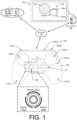
- FIG. 1 illustrates an example architecture in which a user may use a handheld controller 100 to interact with virtual objects presented on a display. While FIG. 1 illustrates one example configuration of a handheld controller 100 that may implement or function with the described techniques, it is to be appreciated that the described techniques apply equally to any other types of handheld controllers having any other type of form factor.
- the respective handheld controller 100, a local system, and/or a remote system may include functionality to alter properties, such as hue, saturation, and lightness, of the virtual objects.
- a joystick or other input device of the handheld controller may be used to interact with a color picker for selecting hue, saturation, lightness, and/or the like for a displayed virtual object.
- the example handheld controller 100 includes a housing 102 having a front surface 104(1) and a top surface 104(2) potentially along with a back surface opposite the front surface 104(1) and a bottom surface opposite the top surface 104(2).
- the front surface 104(1) may include one or more front-surface controls that are, in some instances, controllable by one or more thumbs of a user operating the handheld controller 100. These front-surface controls may include one or more trackpads, trackballs, joysticks, buttons, or the like, as described in more detail below.
- the front surface 104(1) includes a left trackpad 106(1) controllable by a left thumb of a user and a right trackpad 106(2) controllable by a right thumb of the user.
- the example controller 100 includes a joystick 108.
- the controller may further include depressible buttons 112 (e.g., controllable by a right thumb of the user) and additional input devices and controls.
- the handheld controller 100 also includes a left handle 114(1) and a right handle 114(2) by which a user may hold the controller 100 via right and left hands of the user, respectively.
- the top surface 104(2) may include one or more top-surface controls.
- the controller 100 includes a left top-surface control 116(1) and a right top-surface control 116(2).
- the left top-surface control 116(1) may be operable by a left finger (e.g., middle finger or index finger) of the user, while the right top-surface control may be operable by a right finger (e.g., middle finger or index finger) of the user.
- the top-surface controls 116(1) and 116(2) may be referred to as "triggers" or "bumpers" in some instances.
- one or more of the top-surface controls 116(1) and 116(2) may include one or more touch sensors for detecting a presence, location, and/or gesture of one or more fingers of the user on the respective top-surface control.
- FIG. 1 further illustrates that different regions of the joystick 108 may be associated with the selection of different properties, such as hue, saturation, and lightness of a virtual object 120 presented on a display 122.
- FIG. 1 illustrates that the joystick 108 may be associated with a first region 118(1), generally corresponding a top arc of the joystick, a second region 108(2), generally corresponding to a lower-left arc of the joystick 108, and a third region 108(3), generally corresponding to a lower-right arc of the joystick 108.
- each of these regions may be associated with a particular portion of a color pick 124 presented on the display 122.
- the region 118(1) may be associated with a first portion 124(1) of the color picker 124
- the region 118(2) may be associated with a second portion 124(2) of the color picker 124
- the region 118(3) may be associated with a third portion 124(3) of the color picker 124.
- the first portion 124(1) of the color picker 124 may be selectable to modify a value of a hue of the virtual object 120
- the second portion 124(2) of the color picker 124 may be selectable to modify a value of a saturation of the virtual object 120
- the third portion 124(3) of the color picker 124 may be selectable to modify a value of a lightness of the virtual object 120.
- a user of the handheld controller 100 may, for example, move the joystick 108 upwards into an outer position that is within the first region 118(1).
- the color picker 124 may enable selection of a hue of the virtual object.
- the presentation of the color picker 124 may be updated to indicate that the user is now able to select a value of hue.
- the first portion 124(1) may be accentuated (e.g., enlarged, highlighted, etc.) and/or prominence of the remaining two portions 124(2) and 124(3) may be lessened (e.g., removed, shrunk, grayed-out, etc.).
- the user may move the joystick left and right to select a value of the desired hue.
- the virtual object 120 may be updated to present the current hue selection.
- the user may release the joystick, thus causing the joystick to move from its last outer location back to the center position.
- the virtual object 120 may change hue from its previous hue to the selected hue (in instances where the hue does not change until the joystick 108 returns to the center position) or may remain in the selected hue (in instances where the display 122 updates as the user moves within the region 118(1).
- the user of the handheld controller 100 may, for example, move the joystick 108 generally downwards and to the left and into an outer position that is within the second region 118(2).
- the color picker 124 may enable selection of a saturation of the virtual object.
- the presentation of the color picker 124 may be updated to indicate that the user is now able to select a value of saturation.
- the second portion 124(2) may be accentuated (e.g., enlarged, highlighted, etc.) and/or prominence of the remaining two portions 124(1) and 124(3) may be lessened (e.g., removed, shrunk, grayed-out, etc.).
- the user may move the joystick within the outer region 118(2) to select a value of the desired saturation.
- the virtual object 120 may be updated to present the current saturation selection.
- the user may release the joystick, thus causing the joystick to move from its last outer location back to the center position.
- the virtual object 120 may change saturation from its previous saturation to the selected saturation (in instances where the saturation does not change until the joystick 108 returns to the center position) or may remain in the selected saturation (in instances where the display 122 updates as the user moves within the region 118(2).
- the user of the handheld controller 100 may, for example, move the joystick 108 generally downwards and to the right and into an outer position that is within the third region 118(3).
- the color picker 124 may enable selection of a lightness or value of the virtual object.
- the presentation of the color picker 124 may be updated to indicate that the user is now able to select a value of lightness.
- the third portion 124(3) may be accentuated (e.g., enlarged, highlighted, etc.) and/or prominence of the remaining two portions 124(1) and 124(2) may be lessened (e.g., removed, shrunk, grayed-out, etc.).
- the user may move the joystick within the outer region 118(3) to select a value of the desired lightness.
- the virtual object 120 may be updated to present the current lightness selection.
- the user may release the joystick, thus causing the joystick to move from its last outer location back to the center position.
- the virtual object 120 may change lightness from its previous lightness to the selected lightness (in instances where the lightness does not change until the joystick 108 returns to the center position) or may remain in the selected lightness (in instances where the display 122 updates as the user moves within the region 118(1).
- FIG. 1 illustrates an example configuration of using an input device to alter properties of content on a display 122
- the number, orientation and other characteristics of the regions 118(1)-(3) may be the same or different than illustrated.
- the properties are hue, saturation, and lightness are merely illustrative, and other properties may be altered using the described techniques.
- input devices other than the joystick may be used with the described techniques, such as a trackpad 106(1) as illustrated and described below with reference to FIGS. 3A-C .
- FIG. 1 illustrates that the handheld controller 100 may communicate with a local system 126 and/or a remote system 128 over one or more wired and/or wireless networks 110.
- the local and/or remote systems may, in some instances, provide content for presentation on the display, such as the illustrated virtual object 120.
- the functionality for launching the color picker 124 and altering corresponding properties may be performed at the handheld controller 100, the local system 126, the remote system 128, or a combination thereof. That is, one or more of the controller and/or the local or remote systems may perform the operations described below.
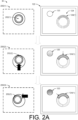
- FIG. 2A illustrates an example flow of operations 200 where a user moves a joystick of a handheld controller from a center position 202(1) to a first defined outer region to enable selection of a first property, such as hue of a virtual object. After the joystick moves to this region, the user may use the joystick to select a hue or other property using a color picker presented on a display.
- a first property such as hue of a virtual object.
- a display 122 may present a virtual object 120 and a color picker 124 to enable a user to modify a color of the object 120.
- the user may issue a request to launch the color picker 124 using the handheld controller or in any other manner.
- the joystick may initially reside in the center position 202(1).
- the user may bias the joystick generally upwards and into an outer position 202(2) that is within a region of outer positions that is associated with altering hue of the virtual object.
- the color picker 124 may indicate that the first portion 124(1) of the color picker 124 for selecting a hue has been activated.
- the hue of the virtual object 120 may be updated to indicate the current hue corresponding to the location of the joystick.
- the user moves the joystick to the left to another outer position 202(3), thus changing the value of the hue.
- the first portion 124(1) of the color picker 124 may be updated to reflect the new selection.
- the hue of the virtual object 120 may be updated to reflect the selected hue.
- the user may release the joystick, thus causing the joystick to bias back to the center position 202(1).
- the first portion 124(1) of the color picker 124 might no longer be activated for selecting a hue of the virtual object 120.
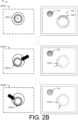
- FIG. 2B continues the flow of operations 200 where the user moves the joystick from the center position 202(1) to a second defined outer region to enable selection of a second property, such as saturation of a virtual object. After the joystick moves to this region, the user may use the joystick to select the saturation or other property using the presented color picker.
- a second property such as saturation of a virtual object.
- the user moves the joystick down and to the right to another outer position 202(5), thus changing the value of the saturation.
- the second portion 124(2) of the color picker 124 may be updated to reflect the new selection.
- the saturation of the virtual object 120 may be updated to reflect the selected saturation.
- the user may release the joystick, thus causing the joystick to bias back to the center position 202(1).
- the second portion 124(2) of the color picker 124 might no longer be activated for selecting a saturation of the virtual object 120.
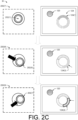
- FIG. 2C continues the flow of operations 200 where the user moves the joystick from the center position to a third defined outer region to enable selection of a third property, such as lightness or "value" of a virtual object.
- a third property such as lightness or "value" of a virtual object.
- the user may use the joystick to select the lightness or other property using the presented color picker.
- the display 122 may present the virtual object 120 according to the hue and saturation selected in FIGS. 2A and 2B , respectively, and may also display the color picker 124.
- the joystick may reside in the center position 202(1).
- the user may bias the joystick generally downwards and right and into an outer position 202(6) that is within a region of outer positions that is associated with altering lightness of the virtual object.
- the color picker 124 may indicate that the third portion 124(3) of the color picker 124 for selecting a lightness has been activated.
- the lightness of the virtual object 120 may be updated to indicate the current lightness corresponding to the location of the joystick.
- the user moves the joystick up and to the right to another outer position 202(7), thus changing the value of the lightness.
- the third portion 124(3) of the color picker 124 may be updated to reflect the new selection.
- the lightness of the virtual object 120 may be updated to reflect the selected lightness.
- the user may release the joystick, thus causing the joystick to bias back to the center position 202(1).
- the third portion 124(3) of the color picker 124 might no longer be activated for selecting a lightness of the virtual object 120.
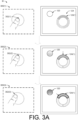
- FIG. 3A illustrates an example flow of operations where the user provides an input to an input device of a handheld controller (in this example, a trackpad) a first defined outer region to enable selection of a first property, such as hue of a virtual object.
- a first property such as hue of a virtual object.
- the user may use trackpad or other input device to select the hue or other property using the presented color picker. It is to be appreciated that while this example describes the input starting at a center position and moving towards the first defined outer region, in some instances the input may simply be received at the first outer region for enabling selection of the first property or may begin at any other portion of the trackpad before moving to the first outer region.
- the display 122 again presents the virtual object 120 and the color picker 124 to enable a user to modify a color of the object 120.
- the user may issue a request to launch the color picker 124 using the handheld controller or in any other manner.
- an implement e.g., a finger, stylus, etc.
- an implement may initially reside in or otherwise correspond to (e.g., hover over) the center position 302(1).
- the user may provide a touch input (e.g., via a finger, stylus, etc.) that is upwards from the center position and into an outer position 302(2) that is within a region of outer positions that is associated with altering hue of the virtual object.
- the color picker 124 may indicate that the first portion 124(1) of the color picker 124 for selecting a hue has been activated.
- the hue of the virtual object 120 may be updated to indicate the current hue corresponding to the current location of the touch input.
- the user provides an input to the left to another outer position 302(3), thus changing the value of the hue.
- the first portion 124(1) of the color picker 124 may be updated to reflect the new selection.
- the hue of the virtual object 120 may be updated to reflect the selected hue.
- the user may provide an input towards the center position 302(1) or may simply remove the touch input (e.g., lift her finger from the trackpad).
- the first portion 124(1) of the color picker 124 might no longer be activated for selecting a hue of the virtual object 120.
- FIG. 3B continues the flow of operations 300 where the user provides an input to the trackpad at a second defined outer region to enable selection of a second property, such as saturation of a virtual object.
- a second property such as saturation of a virtual object.
- the user may use trackpad or other input device to select the saturation or other property using the presented color picker.
- the input may simply be received at the second outer region for enabling selection of the first property or may begin at any other portion of the trackpad before moving to the second outer region.
- the display 122 may present the virtual object 120 according to the hue selected in FIG. 3A and may also display the color picker 124.
- the implement e.g., a finger, stylus, etc.
- the center position 302(1) may be displayed in or otherwise correspond to the center position 302(1).
- the user may provide a touch input generally downwards and left and into an outer position 302(4) that is within a region of outer positions that is associated with altering saturation of the virtual object.
- the color picker 124 may indicate that the second portion 124(2) of the color picker 124 for selecting a saturation has been activated.
- the saturation of the virtual object 120 may be updated to indicate the current saturation corresponding to the current location of the touch input.
- the user provides a touch input down and to the right to another outer position 302(5), thus changing the value of the saturation.
- the second portion 124(2) of the color picker 124 may be updated to reflect the new selection.
- the saturation of the virtual object 120 may be updated to reflect the selected saturation.
- the user may provide a touch input towards the center position 302(1) or may remove the implement from the trackpad.
- the second portion 124(2) of the color picker 124 might no longer be activated for selecting a saturation of the virtual object 120.
- FIG. 3C continues the flow of operations 300 where the user provides an input to the trackpad at a third defined outer region to enable selection of a third property, such as lightness of a virtual object.
- a third property such as lightness of a virtual object.
- the user may use trackpad or other input device to select the lightness or other property using the presented color picker.
- the input may simply be received at the third outer region for enabling selection of the first property or may begin at any other portion of the trackpad before moving to the third outer region.
- the display 122 may present the virtual object 120 according to the hue and saturation selected in FIGS. 3A and 3B , respectively, and may also display the color picker 124.
- the implement may reside in or otherwise correspond to (e.g., hover over) the center position 302(1).
- the user may provide a touch input generally downwards and right and into an outer position 302(6) that is within a region of outer positions that is associated with altering lightness of the virtual object.
- the color picker 124 may indicate that the third portion 124(3) of the color picker 124 for selecting a lightness has been activated.
- the lightness of the virtual object 120 may be updated to indicate the current lightness corresponding to the location of the touch input.
- the user moves the joystick up and to the right to another outer position 302(7), thus changing the value of the lightness.
- the third portion 124(3) of the color picker 124 may be updated to reflect the new selection.
- the lightness of the virtual object 120 may be updated to reflect the selected lightness.
- the user may provide a touch input towards the center position 302(1) or may remove the implement from the trackpad.
- the third portion 124(3) of the color picker 124 might no longer be activated for selecting a lightness of the virtual object 120.
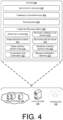
- FIG. 4 illustrates example components of a system 400 for performing the operations described herein. In some instances, these components may reside on the handheld controller, the local system, the remote system, and/or a combination thereof.
- one or more of the described systems may include one or more input/output (I/O) devices 402, such as the controls described above (e.g., joysticks, trackpads, triggers, detachable controls, fixed controls, etc.), and potentially any other type of input or output devices.
- I/O devices 402 may include one or more microphones to receive audio input, such as user voice input.
- additional input devices may be provided in the form of a keyboard, keypad, mouse, touch screen, joystick, control buttons and the like.
- the input device(s) may further include control mechanisms, such as basic volume control button(s) for increasing/decreasing volume, as well as power and reset buttons.
- the output devices may include a display, a light element (e.g., LED), a vibrator to create haptic sensations, a speaker(s) (e.g., headphones), and/or the like.
- a simple light element e.g., LED
- the system 400 may additionally or alternatively comprise any other type of output device.
- the system 400 may include one or more communication interfaces 404 to facilitate a wireless connection to a network and/or to one or more remote systems (e.g., a host computing device executing an application, a game console, etc.).
- the communication interfaces 404 may implement one or more of various wireless technologies, such as Wi-Fi, Bluetooth, radio frequency (RF), and so on.
- the system 400 may further include physical ports to facilitate a wired connection to a network, a connected peripheral device, or a plug-in network device that communicates with other wireless networks.
- the system 400 further includes one or more processors 406 and computer-readable media 408.
- the processors(s) 406 may include a central processing unit (CPU), a graphics processing unit (GPU), both CPU and GPU, a microprocessor, a digital signal processor or other processing units or components known in the art.
- the functionally described herein can be performed, at least in part, by one or more hardware logic components.
- illustrative types of hardware logic components include field-programmable gate arrays (FPGAs), application-specific integrated circuits (ASICs), application-specific standard products (ASSPs), system-on-a-chip systems (SOCs), complex programmable logic devices (CPLDs), etc.
- FPGAs field-programmable gate arrays
- ASICs application-specific integrated circuits
- ASSPs application-specific standard products
- SOCs system-on-a-chip systems
- CPLDs complex programmable logic devices
- each of the processor(s) 406 may possess its own local memory, which also may store program modules, program data, and/or one or more operating systems.
- the computer-readable media 408 may include volatile and nonvolatile memory, removable and non-removable media implemented in any method or technology for storage of information, such as computer-readable instructions, data structures, program modules, or other data.
- memory includes, but is not limited to, RAM, ROM, EEPROM, flash memory or other memory technology, CD-ROM, digital versatile disks (DVD) or other optical storage, magnetic cassettes, magnetic tape, magnetic disk storage or other magnetic storage devices, RAID storage systems, or any other medium which can be used to store the desired information and which can be accessed by a computing device.
- the computer-readable media 408 may be implemented as computer-readable storage media ("CRSM”), which may be any available physical media accessible by the processor(s) 406 to execute instructions stored on the computer-readable media 408.
- CRSM computer-readable storage media
- CRSM may include random access memory (“RAM”) and Flash memory.
- RAM random access memory
- CRSM may include, but is not limited to, read-only memory (“ROM”), electrically erasable programmable read-only memory (“EEPROM”), or any other tangible medium which can be used to store the desired information and which can be accessed by the processor(s) 406.
- ROM read-only memory
- EEPROM electrically erasable programmable read-only memory
- modules such as instruction, datastores, and so forth may be stored within the computer-readable media 408 and configured to execute on the processor(s) 406.
- modules such as instruction, datastores, and so forth may be stored within the computer-readable media 408 and configured to execute on the processor(s) 406.
- a few example functional modules are shown as stored in the computer-readable media 408 and executed on the processor(s) 406, although the same functionality may alternatively be implemented in hardware, firmware, or as a system on a chip (SOC).
- SOC system on a chip
- An operating system module 410 may be configured to manage hardware within and coupled to the system 400 for the benefit of other modules.
- the computer-readable media 408 may store a network-communications module 412 that enables the system 400 to communicate, via the communication interfaces 404, with one or more other devices, such as a personal computing device executing an application (e.g., a game application), a game console, a remote server, or the like.
- the computer-readable media 408 may further include a game-session database 414 to store data associated with a game (or other application) executing on the system 400 or on a computing device to which the system 400 couples.
- the computer-readable media 408 may also include a device-record database 416 that stores data associated with devices to which the system 400 couples, such as the personal computing device, game console, remote server or the like.
- the computer-readable media 408 may further store game-control instructions 418 that configure the system 400 to function as a gaming controller and universal-control instructions 420 that configure the system 400 to function as a controller of other, non-gaming devices (in instances where the system 400 comprises a controller).
- the computer-readable media 408 may store a color-selection component 422 and a region-to-property mapping 424 that may function to enable the property-selection techniques described above.
- the color-selection component 422 may function to launch the color picker 124 described above upon receiving an instruction to do so.
- the color-selection component 422 may receive inputs from a handheld controller to determine which property is to be altered at a given time and the value to which the property is to be altered.
- the color-selection component 422 may access the region-to-property mapping 424 to determine which property is to be modified. In addition, the color-selection component 422 may access the mapping 424 upon receiving inputs to determine the value of the property to be modified.
- the color-selection component 422 and/or the region-to-property mapping may reside on the local system 126 (e.g., a computing device that directly couples to the display 122), the remote system 128 (e.g., server computing devices that couple to the display 122 and/or local system 126 over a network), a handheld controller 100 (e.g., that couples to the local and/or remote systems), and/or a combination thereof.
- the local system 126 e.g., a computing device that directly couples to the display 122
- the remote system 128 e.g., server computing devices that couple to the display 122 and/or local system 126 over a network
- a handheld controller 100 e.g., that couples to the local and/or remote systems
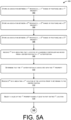
- FIGS. 5A-5C collectively illustrate a flow diagram of an example process 500 for using a joystick on a handheld controller to operate a color picker for modifying presentation of a virtual object on a display.
- the process 500 is described as a collection of blocks in a logical flow graph, which represent a sequence of operations that can be implemented in hardware, software, or a combination thereof.
- the blocks represent computer-executable instructions that, when executed by one or more processors, perform the recited operations.
- computer-executable instructions include routines, programs, objects, components, data structures, and the like that perform particular functions or implement particular abstract data types.
- An operation 502 represents storing an association between a first region (e.g., a first range of outer positions) and a first property for which a value may be selected (e.g., a hue). For example, this operation may represent storing, in the property-to-region mapping 424, an indication of which X-Y positions of the joystick correspond to the first property, such as hue.
- an operation 504 represents storing an association between a second region (e.g., a second range of outer positions) and a second property for which a value may be selected (e.g., a saturation).
- this operation may represent storing, in the property-to-region mapping 424, an indication of which X-Y positions of the joystick correspond to the second property, such as saturation.
- An operation 506 represents storing an association between a third region (e.g., a third range of outer positions) and a third property for which a value may be selected (e.g., a lightness).
- this operation may represent storing, in the property-to-region mapping 424, an indication of which X-Y positions of the joystick correspond to the third property, such as lightness.
- the first outer position may be represented in X-Y coordinates or otherwise.
- An operation 510 represents determining that the first outer position is associated with a first property.
- the color-selection component 424 may compare the X-Y coordinates of the first outer position to the regions referenced in the region-to-property mapping 424 to determine that the first outer position corresponds to the first property.
- An operation 512 represents receiving second data indicating a first location of the joystick prior to returning to the center position, while an operation 514 represents selecting a value of the first property based at least in part on the first location. That is, the color-selection component 422 may receive an indication of a final location of the joystick prior to release of the joystick and return to the center position. The color-selection component 422 may access the mapping 424 and may determine, from the final-location value, the selected value of the first property, such as a value of a hue. It is to be appreciated that the color-selection component 422 may select (e.g., change) values of the property as the joystick is moved, after moving from the outer position and prior to returning to the center position.
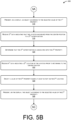
- FIG. 5B continues the illustration of the process 500 and includes, at an operation 516, presenting, on a display, an object according to the selected value of the first property.
- the color-selection component 422 may cause display of an object according to the selected hue.
- the process 500 may present the object having the selected values as the joystick moves around. For example, as the user moves the joystick from a red value to a green value, the process 500 may present the object in an array of different colors corresponding to the current location of the joystick.
- the final-selection value meanwhile, may correspond to the final location of the joystick prior to returning to the center position.
- An operation 518 represents receiving third data indicating that a joystick of a handheld controller has moved from the center position to a second outer position.
- the second outer position may be represented in X-Y coordinates or otherwise.
- An operation 520 represents determining that the second outer position is associated with a second property.
- the color-selection component 424 may compare the X-Y coordinates of the second outer position to the regions referenced in the region-to-property mapping 424 to determine that the second outer position corresponds to the second property.
- An operation 522 represents receiving fourth data indicating a second location of the joystick prior to returning to the center position, while an operation 524 represents selecting a value of the second property based at least in part on the second location. That is, the color-selection component 422 may receive an indication of a final location of the joystick prior to release of the joystick and return to the center position. The color-selection component 422 may access the mapping 424 and may determine, from the final-location value, the selected value of the second property, such as a value of a saturation. It is to be appreciated that the color-selection component 422 may select (e.g., change) values of the property as the joystick is moved, after moving from the outer position and prior to returning to the center position.
- An operation 526 represents presenting, on a display, an object according to the selected value of the second property.
- the color-selection component 422 may cause display of an object according to the selected saturation.
- the process 500 may present the object having the selected values as the joystick moves around. For example, as the user moves the joystick from a first saturation value to a second saturation value, the process 500 may present the object according to an array of different saturation values corresponding to the current location of the joystick.
- the final-selection value meanwhile, may correspond to the final location of the joystick prior to returning to the center position.
- FIG. 5C concludes the illustration of the process 500 and includes, at an operation 528, receiving fifth data indicating that a joystick of a handheld controller has moved from the center position to a third outer position.
- the third outer position may be represented in X-Y coordinates or otherwise.
- An operation 530 represents determining that the third outer position is associated with a third property.
- the color-selection component 424 may compare the X-Y coordinates of the third outer position to the regions referenced in the region-to-property mapping 424 to determine that the third outer position corresponds to the third property.
- An operation 532 represents receiving sixth data indicating a third location of the joystick prior to returning to the center position, while an operation 534 represents selecting a value of the third property based at least in part on the third location. That is, the color-selection component 422 may receive an indication of a final location of the joystick prior to release of the joystick and return to the center position. The color-selection component 422 may access the mapping 424 and may determine, from the final-location value, the selected value of the third property, such as a value of a lightness.
- An operation 536 represents presenting, on a display, an object according to the selected value of the second property. For example, the color-selection component 422 may cause display of an object according to the selected lightness.
- the color-selection component 422 may select (e.g., change) values of the property as the joystick is moved, after moving from the outer position and prior to returning to the center position.
- the process 500 may present the object having the selected values as the joystick moves around. For example, as the user moves the joystick from a first lightness value to a second lightness value, the process 500 may present the object according to an array of different lightness values corresponding to the current location of the joystick.
- the final-selection value may correspond to the final location of the joystick prior to returning to the center position.
- FIG. 6 illustrates a flow diagram of an example process 600 for using an input device on a handheld controller to alter properties of one or more virtual objects presented on a display.
- the input device may comprise a joystick, a trackpad, a rollerball, or any other type of input device.
- An operation 602 represents storing a respective association between each of multiple regions and a respective property. For example, a first region of positions on the input device may be associated with a first property, and so forth.
- An operation 604 represents receiving first data indicating that an input device of a handheld controller has received a first input, such as an input at a first outer position, an input from a center position to the first outer position, and so forth. This input may comprise a touch input on a trackpad, a movement of a joystick, and the like.
- An operation 606 represents determining that the first outer position is associated with a first property
- an operation 608 represents receiving second data indicating that the input device has received a second input, such as an input at a first location, an input from the first location to the center position, and so forth.
- this may comprise a touch input from a first location to the center location, a joystick moving from the first location to the center position, an input on a trackpad at the first location followed by removal of the input device (e.g., finger, stylus, etc.) from the trackpad, and the like.
- An operation 610 represents selecting a value of the first property based at least in part on the first location.
- This value may comprise a color-related value (e.g., hue, brightness, lightness, value, saturation, shading, etc.), a text-related value (e.g., font size, font type, line spacing, etc.), or a value for any other type of property.
- An operation 612 meanwhile, represents updating a display based at least in part on the selected value. For instance, an object may be presented according to the color-related value, text may be presented according to the text-related value, or the like.
- an operation 614 represents determining whether an additional input has been received. If so, the process 600 may loop back to operation 604 and onwards for again updating a value of a property based on received inputs and updating a display based on the updated value of the property.
Landscapes
- Engineering & Computer Science (AREA)
- General Engineering & Computer Science (AREA)
- Theoretical Computer Science (AREA)
- Multimedia (AREA)
- Physics & Mathematics (AREA)
- Human Computer Interaction (AREA)
- General Physics & Mathematics (AREA)
- Optics & Photonics (AREA)
- User Interface Of Digital Computer (AREA)
- Position Input By Displaying (AREA)
Applications Claiming Priority (2)
| Application Number | Priority Date | Filing Date | Title |
|---|---|---|---|
| US16/430,255 US10898801B2 (en) | 2019-06-03 | 2019-06-03 | Selecting properties using handheld controllers |
| PCT/US2020/035845 WO2020247443A1 (en) | 2019-06-03 | 2020-06-03 | Selecting properties using handheld controllers |
Publications (3)
| Publication Number | Publication Date |
|---|---|
| EP3962615A1 EP3962615A1 (en) | 2022-03-09 |
| EP3962615A4 EP3962615A4 (en) | 2023-02-01 |
| EP3962615B1 true EP3962615B1 (en) | 2025-05-07 |
Family
ID=73550545
Family Applications (1)
| Application Number | Title | Priority Date | Filing Date |
|---|---|---|---|
| EP20818012.5A Active EP3962615B1 (en) | 2019-06-03 | 2020-06-03 | Selecting properties using handheld controllers |
Country Status (6)
| Country | Link |
|---|---|
| US (1) | US10898801B2 (cg-RX-API-DMAC7.html) |
| EP (1) | EP3962615B1 (cg-RX-API-DMAC7.html) |
| JP (1) | JP7661244B2 (cg-RX-API-DMAC7.html) |
| KR (1) | KR102850042B1 (cg-RX-API-DMAC7.html) |
| CN (1) | CN113905791A (cg-RX-API-DMAC7.html) |
| WO (1) | WO2020247443A1 (cg-RX-API-DMAC7.html) |
Families Citing this family (11)
| Publication number | Priority date | Publication date | Assignee | Title |
|---|---|---|---|---|
| US10866721B1 (en) * | 2019-09-20 | 2020-12-15 | Valve Corporation | Selecting properties using handheld controllers |
| US11097185B2 (en) | 2019-12-31 | 2021-08-24 | Dell Products L.P. | Detachable information handling system game controller management |
| US11338197B2 (en) | 2019-12-31 | 2022-05-24 | Dell Products L.P. | Information handling system controller distributable hardware and logic management |
| US11013991B1 (en) | 2019-12-31 | 2021-05-25 | Dell Products L.P. | Information handling system controller adaptive haptic feedback |
| US11260291B2 (en) | 2019-12-31 | 2022-03-01 | Dell Products L.P. | Information handling system and detachable game controller |
| US11097184B2 (en) * | 2019-12-31 | 2021-08-24 | Dell Products L.P. | Information handling system controller illumination |
| US11260288B2 (en) | 2019-12-31 | 2022-03-01 | Dell Products L.P. | Disassemblable information handling system game controller |
| US11013987B1 (en) | 2019-12-31 | 2021-05-25 | Dell Products L.P. | Information handling system controller scalable interface |
| US11331567B2 (en) | 2019-12-31 | 2022-05-17 | Dell Products L.P. | Information handling system and game controller trigger |
| EP4102343A1 (en) * | 2021-06-10 | 2022-12-14 | Loupedeck Oy | Pointing device for computing system |
| US12602125B2 (en) * | 2022-12-09 | 2026-04-14 | Dell Products L.P. | Adjustable input modes for a handheld controller |
Family Cites Families (18)
| Publication number | Priority date | Publication date | Assignee | Title |
|---|---|---|---|---|
| US5334992A (en) * | 1987-10-26 | 1994-08-02 | Tektronix, Inc. | Computer display color control and selection system |
| GB2364493B (en) * | 2000-06-30 | 2004-11-10 | Nokia Mobile Phones Ltd | Improved data input |
| US7180524B1 (en) * | 2002-09-30 | 2007-02-20 | Dale Axelrod | Artists' color display system |
| US20040221243A1 (en) * | 2003-04-30 | 2004-11-04 | Twerdahl Timothy D | Radial menu interface for handheld computing device |
| JP3980020B2 (ja) * | 2004-09-17 | 2007-09-19 | 株式会社タイトー | 色によってパラメータを決定できるゲーム装置 |
| US20080217075A1 (en) * | 2007-03-05 | 2008-09-11 | Microsoft Corporation | Dual joystick directional text input |
| JP2009151664A (ja) * | 2007-12-21 | 2009-07-09 | Denso Corp | 遠隔操作装置 |
| JP5231572B2 (ja) | 2008-01-24 | 2013-07-10 | コーニンクレッカ フィリップス エレクトロニクス エヌ ヴィ | 色選択入力デバイス及び方法 |
| JP5219152B2 (ja) * | 2008-04-21 | 2013-06-26 | 株式会社ワコム | 操作入力装置、操作入力装置で使用するラジアルメニュー、ラジアルコントロールメニューを用いて変数の値を設定する方法、及びコンピュータシステム |
| JP5225820B2 (ja) * | 2008-11-25 | 2013-07-03 | アイシン精機株式会社 | 入力装置、車両周辺監視装置、アイコンスイッチ選択方法及びプログラム |
| US9383897B2 (en) * | 2009-01-29 | 2016-07-05 | International Business Machines Corporation | Spiraling radial menus in computer systems |
| US8780134B2 (en) * | 2009-09-30 | 2014-07-15 | Nokia Corporation | Access to control of multiple editing effects |
| US8241126B2 (en) * | 2009-11-04 | 2012-08-14 | Valve Corporation | Video game controller having user swappable control components |
| JP5279766B2 (ja) * | 2010-06-25 | 2013-09-04 | 株式会社コナミデジタルエンタテインメント | 操作受付装置、操作判別方法、および、プログラム |
| GB2522670A (en) * | 2014-01-31 | 2015-08-05 | Sony Corp | Computing device |
| EP3040831A1 (en) * | 2014-12-29 | 2016-07-06 | Dassault Systèmes | Setting a parameter |
| TWI612455B (zh) * | 2017-01-23 | 2018-01-21 | 華碩電腦股份有限公司 | 電子裝置與其參數選定的操作方法 |
| CN108681425A (zh) * | 2018-05-14 | 2018-10-19 | 北京小米移动软件有限公司 | 色温调节方法、装置以及存储介质 |
-
2019
- 2019-06-03 US US16/430,255 patent/US10898801B2/en active Active
-
2020
- 2020-06-03 KR KR1020217042058A patent/KR102850042B1/ko active Active
- 2020-06-03 EP EP20818012.5A patent/EP3962615B1/en active Active
- 2020-06-03 CN CN202080040837.2A patent/CN113905791A/zh active Pending
- 2020-06-03 JP JP2021571605A patent/JP7661244B2/ja active Active
- 2020-06-03 WO PCT/US2020/035845 patent/WO2020247443A1/en not_active Ceased
Also Published As
| Publication number | Publication date |
|---|---|
| US20200376376A1 (en) | 2020-12-03 |
| KR102850042B1 (ko) | 2025-08-26 |
| JP2022535525A (ja) | 2022-08-09 |
| CN113905791A (zh) | 2022-01-07 |
| WO2020247443A1 (en) | 2020-12-10 |
| JP7661244B2 (ja) | 2025-04-14 |
| EP3962615A4 (en) | 2023-02-01 |
| KR20220015422A (ko) | 2022-02-08 |
| US10898801B2 (en) | 2021-01-26 |
| EP3962615A1 (en) | 2022-03-09 |
Similar Documents
| Publication | Publication Date | Title |
|---|---|---|
| US10898801B2 (en) | Selecting properties using handheld controllers | |
| EP4014105B1 (en) | Selecting properties using handheld controllers | |
| US10500483B2 (en) | Information processing method and apparatus, storage medium, and electronic device | |
| KR102965270B1 (ko) | 제어기의 동적으로 활성화 또는 비활성화되는 제어 장치 | |
| KR102863902B1 (ko) | 선택 가능 아이콘을 구비하는 디스플레이를 갖는 제어기 | |
| US20110122080A1 (en) | Electronic device, display control method, and recording medium | |
| JP5994019B2 (ja) | ビデオゲーム処理装置、ビデオゲーム処理方法、及びビデオゲーム処理プログラム | |
| WO2015084684A2 (en) | Bezel gesture techniques | |
| US12208326B2 (en) | Virtual automatic aiming | |
| AU2022234308B2 (en) | Infinite drag and swipe for virtual controller | |
| WO2022267570A1 (zh) | 游戏角色移动状态切换方法、装置、设备及存储介质 | |
| JP2016193216A (ja) | ビデオゲーム処理装置、ビデオゲーム処理方法、及びビデオゲーム処理プログラム | |
| US20140266569A1 (en) | Controlling music variables | |
| US20180210637A1 (en) | Electronic device and operation method of parameter selection thereof | |
| KR102084581B1 (ko) | 프로그램 및 휴대 단말 | |
| KR102516422B1 (ko) | 터치 입력에 의해 제어되는 단말 및 단말 제어 방법 | |
| WO2025254792A1 (en) | Devices and virtual reality interfaces for gaming | |
| US20130063426A1 (en) | Display control device, display control method, and computer program for rendering three-dimensional space by perspective projection | |
| KR20240122190A (ko) | 모바일 게임의 가상 조이스틱에 대한 한 손 조작 방법 및 그에 따른 장치 | |
| JP2021068000A (ja) | 制御装置、プログラム、及びシステム |
Legal Events
| Date | Code | Title | Description |
|---|---|---|---|
| STAA | Information on the status of an ep patent application or granted ep patent |
Free format text: STATUS: THE INTERNATIONAL PUBLICATION HAS BEEN MADE |
|
| PUAI | Public reference made under article 153(3) epc to a published international application that has entered the european phase |
Free format text: ORIGINAL CODE: 0009012 |
|
| STAA | Information on the status of an ep patent application or granted ep patent |
Free format text: STATUS: REQUEST FOR EXAMINATION WAS MADE |
|
| 17P | Request for examination filed |
Effective date: 20211202 |
|
| AK | Designated contracting states |
Kind code of ref document: A1 Designated state(s): AL AT BE BG CH CY CZ DE DK EE ES FI FR GB GR HR HU IE IS IT LI LT LU LV MC MK MT NL NO PL PT RO RS SE SI SK SM TR |
|
| DAV | Request for validation of the european patent (deleted) | ||
| DAX | Request for extension of the european patent (deleted) | ||
| REG | Reference to a national code |
Ref country code: DE Ref legal event code: R079 Free format text: PREVIOUS MAIN CLASS: A63F0013400000 Ipc: G06F0003048470 Ref country code: DE Ref legal event code: R079 Ref document number: 602020050989 Country of ref document: DE Free format text: PREVIOUS MAIN CLASS: A63F0013400000 Ipc: G06F0003048470 |
|
| A4 | Supplementary search report drawn up and despatched |
Effective date: 20230105 |
|
| RIC1 | Information provided on ipc code assigned before grant |
Ipc: A63F 13/533 20140101ALI20221223BHEP Ipc: A63F 13/42 20140101ALI20221223BHEP Ipc: G06F 3/04845 20220101ALI20221223BHEP Ipc: G06F 3/0482 20130101ALI20221223BHEP Ipc: G06F 3/0354 20130101ALI20221223BHEP Ipc: G06F 3/0338 20130101ALI20221223BHEP Ipc: G06F 3/04847 20220101AFI20221223BHEP |
|
| P01 | Opt-out of the competence of the unified patent court (upc) registered |
Effective date: 20230428 |
|
| GRAP | Despatch of communication of intention to grant a patent |
Free format text: ORIGINAL CODE: EPIDOSNIGR1 |
|
| STAA | Information on the status of an ep patent application or granted ep patent |
Free format text: STATUS: GRANT OF PATENT IS INTENDED |
|
| INTG | Intention to grant announced |
Effective date: 20241204 |
|
| GRAS | Grant fee paid |
Free format text: ORIGINAL CODE: EPIDOSNIGR3 |
|
| GRAA | (expected) grant |
Free format text: ORIGINAL CODE: 0009210 |
|
| STAA | Information on the status of an ep patent application or granted ep patent |
Free format text: STATUS: THE PATENT HAS BEEN GRANTED |
|
| AK | Designated contracting states |
Kind code of ref document: B1 Designated state(s): AL AT BE BG CH CY CZ DE DK EE ES FI FR GB GR HR HU IE IS IT LI LT LU LV MC MK MT NL NO PL PT RO RS SE SI SK SM TR |
|
| REG | Reference to a national code |
Ref country code: GB Ref legal event code: FG4D |
|
| REG | Reference to a national code |
Ref country code: CH Ref legal event code: EP |
|
| REG | Reference to a national code |
Ref country code: DE Ref legal event code: R096 Ref document number: 602020050989 Country of ref document: DE |
|
| REG | Reference to a national code |
Ref country code: IE Ref legal event code: FG4D |
|
| REG | Reference to a national code |
Ref country code: NL Ref legal event code: MP Effective date: 20250507 |
|
| PG25 | Lapsed in a contracting state [announced via postgrant information from national office to epo] |
Ref country code: PT Free format text: LAPSE BECAUSE OF FAILURE TO SUBMIT A TRANSLATION OF THE DESCRIPTION OR TO PAY THE FEE WITHIN THE PRESCRIBED TIME-LIMIT Effective date: 20250908 Ref country code: ES Free format text: LAPSE BECAUSE OF FAILURE TO SUBMIT A TRANSLATION OF THE DESCRIPTION OR TO PAY THE FEE WITHIN THE PRESCRIBED TIME-LIMIT Effective date: 20250507 Ref country code: FI Free format text: LAPSE BECAUSE OF FAILURE TO SUBMIT A TRANSLATION OF THE DESCRIPTION OR TO PAY THE FEE WITHIN THE PRESCRIBED TIME-LIMIT Effective date: 20250507 |
|
| REG | Reference to a national code |
Ref country code: LT Ref legal event code: MG9D |
|
| PG25 | Lapsed in a contracting state [announced via postgrant information from national office to epo] |
Ref country code: GR Free format text: LAPSE BECAUSE OF FAILURE TO SUBMIT A TRANSLATION OF THE DESCRIPTION OR TO PAY THE FEE WITHIN THE PRESCRIBED TIME-LIMIT Effective date: 20250808 Ref country code: NO Free format text: LAPSE BECAUSE OF FAILURE TO SUBMIT A TRANSLATION OF THE DESCRIPTION OR TO PAY THE FEE WITHIN THE PRESCRIBED TIME-LIMIT Effective date: 20250807 |
|
| PG25 | Lapsed in a contracting state [announced via postgrant information from national office to epo] |
Ref country code: PL Free format text: LAPSE BECAUSE OF FAILURE TO SUBMIT A TRANSLATION OF THE DESCRIPTION OR TO PAY THE FEE WITHIN THE PRESCRIBED TIME-LIMIT Effective date: 20250507 Ref country code: NL Free format text: LAPSE BECAUSE OF FAILURE TO SUBMIT A TRANSLATION OF THE DESCRIPTION OR TO PAY THE FEE WITHIN THE PRESCRIBED TIME-LIMIT Effective date: 20250507 |
|
| REG | Reference to a national code |
Ref country code: AT Ref legal event code: MK05 Ref document number: 1793207 Country of ref document: AT Kind code of ref document: T Effective date: 20250507 |
|
| PG25 | Lapsed in a contracting state [announced via postgrant information from national office to epo] |
Ref country code: BG Free format text: LAPSE BECAUSE OF FAILURE TO SUBMIT A TRANSLATION OF THE DESCRIPTION OR TO PAY THE FEE WITHIN THE PRESCRIBED TIME-LIMIT Effective date: 20250507 |
|
| PG25 | Lapsed in a contracting state [announced via postgrant information from national office to epo] |
Ref country code: HR Free format text: LAPSE BECAUSE OF FAILURE TO SUBMIT A TRANSLATION OF THE DESCRIPTION OR TO PAY THE FEE WITHIN THE PRESCRIBED TIME-LIMIT Effective date: 20250507 |
|
| PG25 | Lapsed in a contracting state [announced via postgrant information from national office to epo] |
Ref country code: AT Free format text: LAPSE BECAUSE OF FAILURE TO SUBMIT A TRANSLATION OF THE DESCRIPTION OR TO PAY THE FEE WITHIN THE PRESCRIBED TIME-LIMIT Effective date: 20250507 |
|
| PG25 | Lapsed in a contracting state [announced via postgrant information from national office to epo] |
Ref country code: RS Free format text: LAPSE BECAUSE OF FAILURE TO SUBMIT A TRANSLATION OF THE DESCRIPTION OR TO PAY THE FEE WITHIN THE PRESCRIBED TIME-LIMIT Effective date: 20250807 |
|
| PG25 | Lapsed in a contracting state [announced via postgrant information from national office to epo] |
Ref country code: IS Free format text: LAPSE BECAUSE OF FAILURE TO SUBMIT A TRANSLATION OF THE DESCRIPTION OR TO PAY THE FEE WITHIN THE PRESCRIBED TIME-LIMIT Effective date: 20250907 |
|
| PG25 | Lapsed in a contracting state [announced via postgrant information from national office to epo] |
Ref country code: LV Free format text: LAPSE BECAUSE OF FAILURE TO SUBMIT A TRANSLATION OF THE DESCRIPTION OR TO PAY THE FEE WITHIN THE PRESCRIBED TIME-LIMIT Effective date: 20250507 |
|
| PG25 | Lapsed in a contracting state [announced via postgrant information from national office to epo] |
Ref country code: DK Free format text: LAPSE BECAUSE OF FAILURE TO SUBMIT A TRANSLATION OF THE DESCRIPTION OR TO PAY THE FEE WITHIN THE PRESCRIBED TIME-LIMIT Effective date: 20250507 Ref country code: SM Free format text: LAPSE BECAUSE OF FAILURE TO SUBMIT A TRANSLATION OF THE DESCRIPTION OR TO PAY THE FEE WITHIN THE PRESCRIBED TIME-LIMIT Effective date: 20250507 |
|
| PG25 | Lapsed in a contracting state [announced via postgrant information from national office to epo] |
Ref country code: CZ Free format text: LAPSE BECAUSE OF FAILURE TO SUBMIT A TRANSLATION OF THE DESCRIPTION OR TO PAY THE FEE WITHIN THE PRESCRIBED TIME-LIMIT Effective date: 20250507 |
|
| PG25 | Lapsed in a contracting state [announced via postgrant information from national office to epo] |
Ref country code: EE Free format text: LAPSE BECAUSE OF FAILURE TO SUBMIT A TRANSLATION OF THE DESCRIPTION OR TO PAY THE FEE WITHIN THE PRESCRIBED TIME-LIMIT Effective date: 20250507 |
|
| PG25 | Lapsed in a contracting state [announced via postgrant information from national office to epo] |
Ref country code: SK Free format text: LAPSE BECAUSE OF FAILURE TO SUBMIT A TRANSLATION OF THE DESCRIPTION OR TO PAY THE FEE WITHIN THE PRESCRIBED TIME-LIMIT Effective date: 20250507 Ref country code: RO Free format text: LAPSE BECAUSE OF FAILURE TO SUBMIT A TRANSLATION OF THE DESCRIPTION OR TO PAY THE FEE WITHIN THE PRESCRIBED TIME-LIMIT Effective date: 20250507 |
|
| REG | Reference to a national code |
Ref country code: CH Ref legal event code: H13 Free format text: ST27 STATUS EVENT CODE: U-0-0-H10-H13 (AS PROVIDED BY THE NATIONAL OFFICE) Effective date: 20260127 |
|
| PG25 | Lapsed in a contracting state [announced via postgrant information from national office to epo] |
Ref country code: IT Free format text: LAPSE BECAUSE OF FAILURE TO SUBMIT A TRANSLATION OF THE DESCRIPTION OR TO PAY THE FEE WITHIN THE PRESCRIBED TIME-LIMIT Effective date: 20250507 |
|
| REG | Reference to a national code |
Ref country code: DE Ref legal event code: R097 Ref document number: 602020050989 Country of ref document: DE |
|
| PG25 | Lapsed in a contracting state [announced via postgrant information from national office to epo] |
Ref country code: LU Free format text: LAPSE BECAUSE OF NON-PAYMENT OF DUE FEES Effective date: 20250603 |
|
| PG25 | Lapsed in a contracting state [announced via postgrant information from national office to epo] |
Ref country code: MC Free format text: LAPSE BECAUSE OF FAILURE TO SUBMIT A TRANSLATION OF THE DESCRIPTION OR TO PAY THE FEE WITHIN THE PRESCRIBED TIME-LIMIT Effective date: 20250507 |
|
| REG | Reference to a national code |
Ref country code: BE Ref legal event code: MM Effective date: 20250630 |
|
| PLBE | No opposition filed within time limit |
Free format text: ORIGINAL CODE: 0009261 |
|
| STAA | Information on the status of an ep patent application or granted ep patent |
Free format text: STATUS: NO OPPOSITION FILED WITHIN TIME LIMIT |
|
| REG | Reference to a national code |
Ref country code: CH Ref legal event code: L10 Free format text: ST27 STATUS EVENT CODE: U-0-0-L10-L00 (AS PROVIDED BY THE NATIONAL OFFICE) Effective date: 20260318 |
|
| PG25 | Lapsed in a contracting state [announced via postgrant information from national office to epo] |
Ref country code: IE Free format text: LAPSE BECAUSE OF NON-PAYMENT OF DUE FEES Effective date: 20250603 |
|
| 26N | No opposition filed |
Effective date: 20260210 |
|
| PG25 | Lapsed in a contracting state [announced via postgrant information from national office to epo] |
Ref country code: BE Free format text: LAPSE BECAUSE OF NON-PAYMENT OF DUE FEES Effective date: 20250630 |
|
| PG25 | Lapsed in a contracting state [announced via postgrant information from national office to epo] |
Ref country code: CH Free format text: LAPSE BECAUSE OF NON-PAYMENT OF DUE FEES Effective date: 20250630 |
|
| PG25 | Lapsed in a contracting state [announced via postgrant information from national office to epo] |
Ref country code: LT Free format text: LAPSE BECAUSE OF FAILURE TO SUBMIT A TRANSLATION OF THE DESCRIPTION OR TO PAY THE FEE WITHIN THE PRESCRIBED TIME-LIMIT Effective date: 20250507 |
|
| PGFP | Annual fee paid to national office [announced via postgrant information from national office to epo] |
Ref country code: GB Payment date: 20260521 Year of fee payment: 7 |
|
| PGFP | Annual fee paid to national office [announced via postgrant information from national office to epo] |
Ref country code: DE Payment date: 20260615 Year of fee payment: 7 |
|
| PGFP | Annual fee paid to national office [announced via postgrant information from national office to epo] |
Ref country code: FR Payment date: 20260629 Year of fee payment: 7 |
|
| PG25 | Lapsed in a contracting state [announced via postgrant information from national office to epo] |
Ref country code: CY Free format text: LAPSE BECAUSE OF FAILURE TO SUBMIT A TRANSLATION OF THE DESCRIPTION OR TO PAY THE FEE WITHIN THE PRESCRIBED TIME-LIMIT Effective date: 20250507 Ref country code: SE Free format text: LAPSE BECAUSE OF FAILURE TO SUBMIT A TRANSLATION OF THE DESCRIPTION OR TO PAY THE FEE WITHIN THE PRESCRIBED TIME-LIMIT Effective date: 20250507 |