EP3457809B1 - Multifunktionelles mobilgerät mit einem beweglichen bildschirm und entsprechenden funktionen - Google Patents
Multifunktionelles mobilgerät mit einem beweglichen bildschirm und entsprechenden funktionen Download PDFInfo
- Publication number
- EP3457809B1 EP3457809B1 EP18203168.2A EP18203168A EP3457809B1 EP 3457809 B1 EP3457809 B1 EP 3457809B1 EP 18203168 A EP18203168 A EP 18203168A EP 3457809 B1 EP3457809 B1 EP 3457809B1
- Authority
- EP
- European Patent Office
- Prior art keywords
- mode
- mobile device
- user
- display device
- display
- Prior art date
- Legal status (The legal status is an assumption and is not a legal conclusion. Google has not performed a legal analysis and makes no representation as to the accuracy of the status listed.)
- Active
Links
Images


Classifications
-
- H—ELECTRICITY
- H04—ELECTRIC COMMUNICATION TECHNIQUE
- H04W—WIRELESS COMMUNICATION NETWORKS
- H04W52/00—Power management, e.g. Transmission Power Control [TPC] or power classes
- H04W52/02—Power saving arrangements
- H04W52/0209—Power saving arrangements in terminal devices
- H04W52/0261—Power saving arrangements in terminal devices managing power supply demand, e.g. depending on battery level
- H04W52/0267—Power saving arrangements in terminal devices managing power supply demand, e.g. depending on battery level by controlling user interface components
- H04W52/027—Power saving arrangements in terminal devices managing power supply demand, e.g. depending on battery level by controlling user interface components by controlling a display operation or backlight unit
-
- H—ELECTRICITY
- H04—ELECTRIC COMMUNICATION TECHNIQUE
- H04M—TELEPHONIC COMMUNICATION
- H04M1/00—Substation equipment, e.g. for use by subscribers
- H04M1/02—Constructional features of telephone sets
- H04M1/0202—Portable telephone sets, e.g. cordless phones, mobile phones or bar type handsets
- H04M1/0206—Portable telephones comprising a plurality of mechanically joined movable body parts, e.g. hinged housings
- H04M1/0208—Portable telephones comprising a plurality of mechanically joined movable body parts, e.g. hinged housings characterized by the relative motions of the body parts
- H04M1/0235—Slidable or telescopic telephones, i.e. with a relative translation movement of the body parts; Telephones using a combination of translation and other relative motions of the body parts
-
- H—ELECTRICITY
- H04—ELECTRIC COMMUNICATION TECHNIQUE
- H04M—TELEPHONIC COMMUNICATION
- H04M1/00—Substation equipment, e.g. for use by subscribers
- H04M1/72—Mobile telephones; Cordless telephones, i.e. devices for establishing wireless links to base stations without route selection
- H04M1/724—User interfaces specially adapted for cordless or mobile telephones
- H04M1/72403—User interfaces specially adapted for cordless or mobile telephones with means for local support of applications that increase the functionality
- H04M1/7243—User interfaces specially adapted for cordless or mobile telephones with means for local support of applications that increase the functionality with interactive means for internal management of messages
- H04M1/72436—User interfaces specially adapted for cordless or mobile telephones with means for local support of applications that increase the functionality with interactive means for internal management of messages for text messaging, e.g. short messaging services [SMS] or e-mails
-
- H—ELECTRICITY
- H04—ELECTRIC COMMUNICATION TECHNIQUE
- H04M—TELEPHONIC COMMUNICATION
- H04M2250/00—Details of telephonic subscriber devices
- H04M2250/12—Details of telephonic subscriber devices including a sensor for measuring a physical value, e.g. temperature or motion
-
- H—ELECTRICITY
- H04—ELECTRIC COMMUNICATION TECHNIQUE
- H04M—TELEPHONIC COMMUNICATION
- H04M2250/00—Details of telephonic subscriber devices
- H04M2250/16—Details of telephonic subscriber devices including more than one display unit
-
- Y—GENERAL TAGGING OF NEW TECHNOLOGICAL DEVELOPMENTS; GENERAL TAGGING OF CROSS-SECTIONAL TECHNOLOGIES SPANNING OVER SEVERAL SECTIONS OF THE IPC; TECHNICAL SUBJECTS COVERED BY FORMER USPC CROSS-REFERENCE ART COLLECTIONS [XRACs] AND DIGESTS
- Y02—TECHNOLOGIES OR APPLICATIONS FOR MITIGATION OR ADAPTATION AGAINST CLIMATE CHANGE
- Y02D—CLIMATE CHANGE MITIGATION TECHNOLOGIES IN INFORMATION AND COMMUNICATION TECHNOLOGIES [ICT], I.E. INFORMATION AND COMMUNICATION TECHNOLOGIES AIMING AT THE REDUCTION OF THEIR OWN ENERGY USE
- Y02D30/00—Reducing energy consumption in communication networks
- Y02D30/70—Reducing energy consumption in communication networks in wireless communication networks
Definitions
- mobile devices and related accessories facilitate communication in a number of different ways: users can send email messages, make telephone calls, send text and multimedia messages, chat with other users, and so on. That is, mobile devices allow users to not only make voice calls, but also send written messages via email, instant messaging ("IM"), texting via short messaging service (SMS) or multimedia messaging service (MMS), messaging via social networks (often over the internet protocol (IP)), etc. Moreover, mobile devices can play music, games, videos, and so on. As these devices have added features and become more powerful, users have also demanded that the devices become smaller and more portable.
- IM instant messaging
- SMS short messaging service
- MMS multimedia messaging service
- IP internet protocol
- mobile devices can play music, games, videos, and so on. As these devices have added features and become more powerful, users have also demanded that the devices become smaller and more portable.
- Some mobile phones provide a traditional numeric keypad along with a few additional buttons.
- Other mobile devices provide a full alphanumeric keyboard, or a touch screen that depicts the keyboard.
- Many of these devices include a display and a keypad/keyboard that can move relative to each other.
- flip phones have a display that can pivot relative to the keyboard, while many smart phones have a keyboard that can slide relative to the screen.
- the flip phones may include a small secondary display on a top of the phone to display time, signal strength, battery level, and/or a phone number of a calling party.
- buttons e.g. play, stop, reverse and fast forward buttons for the music player.
- additional buttons add to the complexity and cost of the device.
- the device could provide buttons that implement two or more functions, such as a "4" key that also rewinds a music track.
- buttons can become confusing to users.
- US2009/051666A1 discloses a portable terminal comprising a first body having a key pad and a display disposed in one direction for displaying information inputted via the key pad, and a second body, slidably connected to the first body in a direction perpendicular to the one direction and having a touch screen configured to be exposed to the outside when the portable terminal is converted from a closed state into a an open state, wherein the touch screen is activated in the open state to display visual information related to information to be displayed on the display.
- the present invention relates to a method for use with a mobile device and having the features of the claims. Portions of the description relating instead to the structural features of the mobile device or to a tangible computer readable medium do not fall under the scope of the claims and are merely retained as examples useful for understanding the invention.
- a mobile device that has at least three modes or levels of engagement for a user.
- the modes of engagement can be selected based on movement of an element on the mobile device to a first, second or third position.
- the mobile device employs two displays, one of which may be smaller than the other.
- the smaller display may allow the device to operate in a low power mode or Passive Mode, yet continue to provide essential information to the mobile device user, such as message status, e-mail status, voicemail status, etc.
- the device allows the larger display to be moved and thereby cause the mobile device to enter two other modes, a Semiactive Mode to access some applications/communications and an increased user interface set (e.g. to voice calls), and an Active Mode that permits a much broader range of applications and communications and full or greatly expanded user interface set (e.g. emails, IM, chat/text messaging, video playback, capturing digital pictures, etc.).
- the small, secondary display is not visible in the Semiactive Mode (it may be covered by the primary display 108), but provides visual indication to users via function buttons that may be accessed or used during specific applications employed while in either the Semiactive Mode or the Active Mode.
- the device may further maintain state while transitioning between modes, such that if the device is displaying a video or playing back digital audio while in the Active Mode and the larger display is moved to cause the device to enter the Passive Mode, the mobile device may stay in a Active Mode so that the video or audio playback is not disrupted.
- a mobile device having, for example, at least two displays and associated functionality provides users with a rich telecommunications experience.
- the mobile device provides for multitasking and allows users to be constantly connected to others, such as those in their social network. Fewer buttons need to be provided on the mobile device through the use of specific modes; a display screen, in a given mode, provides to the user an interface that intuitively provides or presents those input options the user requires in that mode while omitting other options. For example, for voice communications such as voice calls, a full physical keyboard may not be necessary. The visual complexity is thus reduced.
- the secondary display can be used to display icons or functions associated with function keys, where those keys are programmed to perform different functions based on not only the current state of the mobile device, but also on an application currently active on the device. While hardware buttons are generally described herein, the device may include one or more touch sensitive screens.
- the device provides for escalating user engagement and power management, based upon the physical position of a primary display.
- a first "whisper,” “check” or Passive Mode the device allows users to check status of miscellaneous device functions or applications, such as e-mails received, text messages received, alerts received, voicemails waiting, etc. While in Passive Mode, the device conserves power.
- a second Semiactive Mode the device provides more functionality to the user so that the user can, for instance, initiate or receive voice calls, launch certain device applications, in some embodiments, interact with device applications via touchscreen functionality, while omitting functionality that is not necessary to those applications, such as a physical keyboard.
- the mobile device 100 presents to the user a greater set of user input devices or options and greater set of user output than in the Passive Mode (e.g. more input buttons and a larger display to provide more information to the user).
- the device provides all functionality, including a full keyboard permitting alphanumeric entry via a physical, as opposed to touchscreen, keyboard.
- Active Mode the mobile device 100 presents to the user an even greater set of user input options and user output than in the Semiactive Mode (e.g. all input buttons, both the primary and secondary displays, all with more information and options presented to the user).
- the Active mode provides to the user all or nearly all of the functionality available to the user via the mobile device 100; the Semiactive mode provides to the user a proper subset of the functionality available via the mobile device; and, the Passive Mode provides to the user limited functionality -- a proper subset of the Semiactive mode functionality.
- mobile device 100 that provides two displays and three operating modes is shown.
- the term "mobile device” may encompass any of a myriad of telecommunication devices such as cellular phones, VoIP phones, personal digital assistants, portable computers, mini computers, programmable consumer electronics, media players, gaming devices and so on.
- Such mobile devices may include a central processing unit, memory, input devices (e.g., keypads and input buttons) and output devices (e.g., display devices), as described herein.
- Mobile devices may also include hardware and operating instructions stored in memory for wirelessly transmitting and receiving data according to one or more wireless protocols.
- Such protocols include short range protocols (e.g., Bluetooth, Wi-Fi, Ultra-wideband, and ZigBee) and radio-access network protocols (e.g., GSM (Global System for Mobile Communications), CDMA (Code Division Multiple Access), UMTS (Universal Mobile Telecommunications System), EDGE (Enhanced Data for GSM Evolution), LTE (Long Term Evolution), Wimax (Worldwide Interoperability for Microwave Access), Voice Over Internet Protocol (VoIP), UMA/GAN (Unlicensed Mobile Access/Generic Access Network)).
- GSM Global System for Mobile Communications
- CDMA Code Division Multiple Access
- UMTS Universal Mobile Telecommunications System
- EDGE Enhanced Data for GSM Evolution
- LTE Long Term Evolution
- Wimax Worldwide Interoperability for Microwave Access
- VoIP Voice Over Internet Protocol
- UMA/GAN Unlicensed Mobile Access/Generic Access Network
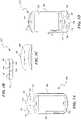
- FIGS 1A, 1D and 1E are top views of the mobile device 100 in first, second, and third operating modes, respectively.
- the mobile device 100 includes a first housing portion or component 102 and a second housing portion or component 104 carried by and movably engaged with the first housing portion 102.
- the first housing portion 102 forms a body of the mobile device and carries a smaller secondary display 106;
- the second housing portion 104 includes a larger display 108 within a movable display housing. Details on mechanisms for moving the first and second portions relative to one another are provided in the assignee's concurrently filed and copending U.S. Patent Application No. 12/409433 entitled, "MOBILE DEVICE HAVING A MOVABLE DISPLAY AND ASSOCIATED SYSTEMS AND METHODS" (attorney docket no. 31419.8099).
- Figure 1A is a top view of the mobile device 100 in the first or Passive Mode.
- the second housing portion 104 and larger display 108 can move relative to the first housing portion 102 into at least three different operating positions and thereby change operating modes of the mobile device 100.
- the second housing portion 104 and larger display 108 are moved by the user between operating modes, although another element or portion of the mobile device could be moved to select modes.
- the mobile device may have a three position hardware switch, or have a cover to protect buttons and/or display elements for the mobile device, either of which can be moved to select a desired operating mode.
- the Passive Mode is a low engagement mode for the mobile device 100 in which the larger display 108 is typically turned off or operates for limited periods of time in order or in a reduced manner to preserve device power, and the mobile device otherwise operates in a low power mode.
- This operating mode is that a user can receive instant or approximately instant notification of, for example, incoming messages (via the secondary display 106 or "status bar") without having to power on the larger display 108. Keeping the larger display 108 off or in a reduced state can significantly reduce the power consumption of the mobile device 100 and, accordingly, extends battery life of the device. Moreover, the user can still receive a stream of information regarding device functionality (e.g., emails, text messages, alerts, voicemails received, etc.) via the secondary display 106 because radio components are still operating, but in a lower power state.
- device functionality e.g., emails, text messages, alerts, voicemails received, etc.
- a top end 105 of the first housing portion 102 includes the secondary display 106 having one or more status indicators or icons 132 configured to provide information about the mobile device 100 (e.g., phone calls, e-mail messages, text messages, voicemail messages, social networking messages, etc.), or other types of information.
- the status indicators 132 can include icons associated with e-mail messages, voicemail messages, text or chat messages and/or social networking messages, each of which may also include a number or counter indicating a total number of new messages received but that have not yet been opened or viewed.
- the status bar 130 can have a different configuration and/or include different features.
- Figure 1C shows an example of a new incoming message, a portion of which is displayed on the secondary display 106.
- a new e-mail message has been received by the mobile device, and the secondary display 106 provides a scrolling display that begins with an e-mail icon, followed by a subject line of the e-mail message, in this case "RE: Meet You At 10:30!. While an e-mail message is shown, information regarding other messages may likewise scroll across the secondary display 106 when they are received, such as the phone number and/or name of a calling party who has left a voicemail, or, for example, the first 30 characters of a social networking message.
- the user can interact with received messages via secondary or functional keys 122, 124, 126 and 128 to provide one or a limited number of user interactions with e-mail messages, voicemail messages, chat messages, and social networking messages, respectively.
- Figure 5 shows function buttons 122-128 more clearly. While shown as hardware buttons, the secondary display 106 may be a touchscreen and the function buttons 122-128 may be areas of the touchscreen associated with icons displayed at those areas.
- Figure 1B shows a bottom edge of the mobile device 100, which has secondary or function buttons 122-128 aligned and associated with one of the icons displayed on the secondary display 106.
- These buttons in Passive Mode, allow the user to interact with received messages. For example, the user can activate the first button 122 associated with e-mail to cause the secondary display 106 to again display the subject line for the most recently received e-mail. Similar functions may apply to the other function buttons. Further details on operation of the secondary screen may be found in assignee's concurrently filed and copending U.S. Patent Applications No. 12/409473 entitled, SECONDARY STATUS DISPLAY FOR MOBILE DEVICE (attorney docket no. 31419.8098).
- the mobile device 100 is in the first or Passive Mode when in the configuration shown in Figure 1A .
- the second housing portion 104 and larger display 108 are slidably moved laterally relative to the first housing portion 102 (as shown by arrow A in Figure 1D ) in a plane parallel to that of the secondary display 106, to position the second component adjacent to a top end 105 of the first housing portion 102 and put the mobile device 100 in the Semiactive Mode.
- FIG. 1D shows the second housing portion 104 and larger display 108 positioned adjacent to a second or top end 105 of the first housing portion 102 to put the mobile device 100 into the Semiactive Mode.
- the Semiactive Mode is primarily or initially a phone mode in which the mobile device 100 is configured for providing a subset of device functionality.
- the mobile device may provide user access only to voice communication functionality (thereby making the Semiactive Mode a voice calling mode) or may provide user access to all user functionality except for the physical keyboard 116.
- the mobile device 100 may be able to at least receive phone calls in one or both of the Passive Mode and the Active Mode
- the Semiactive Mode may be the primary operating mode for making/receiving phone calls.
- the user of mobile device 100 may initially be presented with a home screen user interface associated with voice communications upon switching the mobile device 100 to Semiactive Mode.
- the Semiactive Mode provides to the user only a subset of all applications available via the mobile device 100. (When a user in Semiactive Mode and during a call moves the larger display 108 back into the Passive Mode, the user may thereby hang up or otherwise terminate the call).
- the first housing portion 102 includes or carries a number of input/output components and other electronic and mechanical components for the device 100.
- the mobile device 100 includes a send button 142, an end button 144, a menu button 146, a back button 148, and a trackball or input pad 150.
- the first housing 110 can also include a number of other input components (e.g., a camera, etc.) to accept input from a user, output components (e.g., headphone port, speaker, etc.) to provide feedback to a user, and communication ports (e.g., USB port, etc.) for connecting the mobile device 100 to an external device (e.g., a personal computer).
- input components e.g., a camera, etc.
- output components e.g., headphone port, speaker, etc.
- communication ports e.g., USB port, etc.
- the second housing portion 104 includes a display housing movably engaged with the first housing 110 and the display 108 (e.g., a liquid crystal display (LCD) or organic LCD (OLED), plasma display, electronic ink (elnk)) carried by the display housing.
- the display housing can also include a speaker (not shown) and a variety of other electronic or mechanical components.
- a user interfaces with the mobile device 100 via user input components (e.g., input buttons 112, a keyboard ( Figure 1E ), touchscreen, microphone, voice recognition system, etc.) and/or user output components (e.g., screen 108, speaker, etc.).
- user input components e.g., input buttons 112, a keyboard ( Figure 1E ), touchscreen, microphone, voice recognition system, etc.
- user output components e.g., screen 108, speaker, etc.
- the mobile device 100 can also include various other computing components, such as those generally found in smart phones, cellular phones, handheld e-mail devices, personal digital assistants (PDAs), tablet computers, gaming devices, or other such mobile devices, such as a power subsystem, data storage to store programs and data, and at least one data processor to run an operating system and a variety of different applications.
- the mobile device 100 can also include hardware and operating instructions stored in memory for wirelessly transmitting and receiving data according to one or more wireless protocols, as well as other hardware and/or software components.
- FIG. 1E illustrates the mobile device 100 in a third or Active operating mode.
- the third mode is primarily a data mode where a full, physical on the mobile device 100 allows users to readily create messages or otherwise perform text entry.
- the second housing portion 104 has been pivotably, rotatably or transversely moved (as shown by arrow B in Figure 1D ) relative to the first housing portion 102 until the second housing portion 104 is offset from the first housing portion 102 to expose a keyboard 116 previously underneath the display 108. Further details regarding mechanisms for movement of the second housing portion 104 relative to the first component 102 are provided in the copending application noted above.
- the keyboard 116 is a QWERTY keyboard.
- the keyboard 116 can include other types of keyboards (e.g., Dvorak keyboard, QWERTZ keyboard, AZERTY keyboard, Colemak keyboard, etc.), and/or a touch pad, a handwriting tablet, or other suitable input components.
- the first and/or second housing portions 102 and 104 can also include other mechanical and/or electrical features (e.g., input buttons, displays, etc.) proximate to the keyboard 116.
- the mobile device 100 may contain a portable power subsystem 225 (e.g. battery, solar cell, or power conditioning circuit), data storage or memory 215 to store programs and data, and at least one data processor 220 to run an operating system and applications to implement the processes described herein.
- a user interacts or interfaces with the device via a user input component 205 (e.g., elements noted herein, including keypad, touchscreen, microphone, voice recognition system, an audio input port for use with an external wired/wireless microphone) and/or a user output component 210 (e.g., speaker, primary and secondary display devices, an audio output port for use with an external wired/wireless speaker/earphone).
- a user input component 205 e.g., elements noted herein, including keypad, touchscreen, microphone, voice recognition system, an audio input port for use with an external wired/wireless microphone
- a user output component 210 e.g., speaker, primary and secondary display devices, an audio output port for use with an external wired/wireless speaker/earphone
- the mobile device also includes a communication network interface component 232 (such as a radio and/or wireless interface, an Enternet interface, a universal serial bus (USB) interface, and so on), and may include one or more wireless transceivers or components to establish communication channels with a network and/or other devices.
- the communication component 232 may establish any number of suitable communication channels including Bluetooth, Wi-Fi, Ultra-wideband, ZigBee, GSM, GPRS, EDGE, UMTS, CDMA, and so on.
- the user input components 205 include a position sensor circuit configured to detect movement of the second housing portion 104 and/or larger display 108 and thus determine a desired mode for the mobile device 100.
- the position sensor circuit can generate three different signals for the processor 220 based on the position of the second housing portion 104 and/or larger display 108, and thus the processor can initiate the corresponding mode described herein.
- the mobile device 100 may include messaging components 240 to permit the user to engage in multiple types of asynchronous text-based communication described herein.
- the messaging components 240 can include e-mail clients, social network messaging clients/twittering components, etc.
- the mobile device may include certain applications, such as a video playback component 230 to permit the device to replay downloaded, streamed or locally stored videos.
- the mobile device includes an audio playback component 235 to permit the device to replay digital audio files, such as mp3 files. While playback is described, the audio and video components may include functionality to permit users to create and/or edit video and/or audio files.
- other applications are possible including digital image capture, editing and replay where the mobile device may include a camera (not shown).
- the mobile device 100 may also contain other components and/or applications, such as a mapping component and a location determination component such as a global positioning system (GPS) component.
- GPS global positioning system
- the power component 225 and processor 220 power down the primary display 108 (user output component 210), unless video playback component 230 is active, as explained below. Further, the processor may shut down or put in a standby state messaging components 240 and aspects of the communication components 232, such as powering down a radio (e.g. WiFi radio), or operating transceivers at a lower power state, especially any transmit components. Other power saving features may likewise be employed.
- a radio e.g. WiFi radio
- Other power saving features may likewise be employed.
- the power component 225 and processor 220 power up the communication components 232.
- the power component 225 and processor 220 further engage the messaging components 240 and, based on user input, may enable other components, such as the audio or video playback components 230 and 235.
- various aspects or functionality of the device escalate. For example, the amount of information provided or output to a user escalates from simple icons, message counters, and a temporarily displayed line of text in the Passive Mode to display of full color messages with text and/or images in Active Mode.
- the array of user inputs available to a user similarly escalates from four function buttons 122-128 in the Passive Mode, to the microphone/audio input and buttons associated with making/ending calls, and finally to a full keyboard and other inputs in the Active Mode. All these modes of communication allow the user to stay connected to friends, family, and business associates and any other person or entity to which the user wishes to communicate with, over a variety of communication mediums and networks.
- a block diagram 300 illustrates a suitable system for exchanging various types of messaging between mobile devices, landline phones, computers, etc. Aspects of the system may be stored or distributed on tangible computer-readable media, including magnetically or optically readable computer discs, hard-wired or preprogrammed chips (e.g., EEPROM semiconductor chips), nanotechnology memory, biological memory, or other data storage media.
- tangible computer-readable media including magnetically or optically readable computer discs, hard-wired or preprogrammed chips (e.g., EEPROM semiconductor chips), nanotechnology memory, biological memory, or other data storage media.
- computer implemented instructions, data structures, screen displays, and other data under aspects of the system may be distributed over the Internet or over other networks (including cellular or IP-based telecommunications networks), on a propagated signal on a propagation medium (e.g., an electromagnetic wave(s), a sound wave, etc.) over a period of time, or they may be provided on any analog or digital network (packet switched, circuit switched, or other scheme).
- networks including cellular or IP-based telecommunications networks
- a propagation medium e.g., an electromagnetic wave(s), a sound wave, etc.
- packet switched circuit switched, or other scheme
- the system 300 includes a mobile device 100 at a first location, a PC or laptop computer 316, a landline or fixed-line phone 318, two or more other mobile devices 210, 212, 214 (such as mobile devices from different manufacturers and associated with different wireless service providers/networks), and, in this example, a network 320 that provides communication links between the mobile devices, telephone, and PC, stores information associated with the mobile device PC, and sends and receives information from the mobile device PC.
- a network 320 that provides communication links between the mobile devices, telephone, and PC, stores information associated with the mobile device PC, and sends and receives information from the mobile device PC.
- network 320 may access each other via one or more other telecommunications networks, including, for example, one or more cellular networks, IP-based telecommunications networks, the Internet, peer-to-peer communications, circuit switched networks (e.g., POTS), etc., as discussed herein.
- telecommunications networks including, for example, one or more cellular networks, IP-based telecommunications networks, the Internet, peer-to-peer communications, circuit switched networks (e.g., POTS), etc., as discussed herein.
- a user of the mobile device 100 may receive a voice message, an email message, and a text message from each of the different mobile devices 210, 212, and 214, all of which are temporarily displayed in the secondary display 106 as noted herein.
- the user can make a voice call to the landline phone 318 or to a VoIP phone via PC 316. Further, the user of the mobile device 100 can exchange text-based messages with the mobile devices 210-214, and the PC 316.
- the network 320 includes a data network 350 (e.g., TCP/IP or other protocol), which one or more telecommunications networks 340 may access via a gateway 360.
- the network 320 may include or communicate with one or more servers 352, a network database 354, and so on.
- the servers 352 may assist in exchanging messages among the devices (e.g. devices of Figure 3A ), display and/or present information to users of the mobile devices described herein, such as information stored in the database 254, etc.
- the servers may include components similar to those shown in Figure 2 , including communication components that enable communication of information between the servers 252 and mobile devices, and other components.
- the network 320 may include or be part of any network capable of facilitating communications between devices, and is not limited to those shown in Figure 3B . Examples include the wireless protocols noted above, as well as other protocols including Voice Over Internet Protocol (VoIP), TCP/IP, and other technologies.
- VoIP Voice Over Internet Protocol
- TCP/IP Transmission Control Protocol
- other technologies including Voice Over Internet Protocol (VoIP), TCP/IP, and other technologies.
- the system may include one or more picocells communicatively coupled to a base station in a cellular network.
- a picocell is a wireless access point typically covering a relatively small area, such as within a building (e.g., office, shopping mall, train station, or the like) or within an aircraft, ship, train or other vehicle.
- a picocell may, for example, be analogous to a WiFi access point, except that it typically broadcasts using the licensed spectrum of an associated wireless carrier.
- the picocell serves as an access point for routing communication between device and the network.
- One or more picocells may be coupled to a base station controller (BSC) by way of wired or wireless connections.
- BSC base station controller
- the network includes an IP-based network that includes a VoIP broadcast architecture, UMA or GAN (Generic Access Network) broadcast architecture, or a femtocell broadcast architecture.
- VoIP Voice Over Internet Protocol
- UMA is a telecommunication system for the transmission of voice over the Internet or other packet-switched networks, and can include mobile devices specifically designed for usage under VoIP.
- Unlicensed Mobile Access or UMA is the commercial name of the 3GPP Generic Access Network or GAN standard.
- UMA/GAN is a telecommunication system which extends services, voice, data, and IP Multimedia Subsystem/Session Initiation Protocol (IMS/SIP) applications over IP-based networks.
- IMS/SIP IP Multimedia Subsystem/Session Initiation Protocol
- UMA/GAN enables the convergence of mobile, fixed and Internet telephony, sometimes called Fixed Mobile Convergence.
- Femtocells are much like picocells -- they broadcast within the licensed spectrum of a wireless telecommunications carrier. Femtocells are typically designed for use in residential or small business environments. Femtocells connects to the service provider's network much like UMA/GAN access points, namely over IP-based networks.
- the database 354 can store personalized information for the user of the mobile device 100.
- the function buttons 122-128 and secondary display 106 may be assigned different functions depending upon not only the current state of the mobile device, but also an application currently running on the device.
- the user may adjust the functions and icons associated with the function buttons 122-128 and the secondary display 106, respectively, and store such changes in a user profile stored in the network database 354.
- the application may set as defaults for the function buttons 122, 124, 126, and 128, the following respective functions: shoot, jump, crouch, and reload.
- the user may reconfigure functions associated with the function buttons 122, 124, 126 and 128, to be change weapon, run, turn left, and turn right, respectively. These changes would thus be added to the user's profile stored in the database 354 for that particular game so that the next time the user played that game, those presets for the function buttons would be enabled. This can be particularly helpful with network games where the user is playing a game with other users over the network 320. Many other examples are possible, including those presented below.
- the network database 354 can be a network address book that stores contact information for friends and other contacts for the user. Rather than relying on an address book stored locally in the mobile device 100, the network address book may allow the user to have access to more current information regarding the user's contacts. Thus, phone numbers, email addresses, and other contact information for the user's contacts can be the most accurate and thereby help ensure that she stays connected to her contacts.
- the mobile device 100 may move from increasing engagement modes, such as whisper-phone-text, or check-call-connect.
- FIG 4 a flow diagram illustrating an example of a routine 400 for moving between modes is shown.
- the mobile device 100 is in Passive Mode.
- the device displays on the secondary display 106 a counter of received messages, and a scrolling text message of a subject line or other brief information regarding a newly received message.
- the radio is in a lower power mode to simply ping the network for any newly received messages.
- the device determines whether any new messages are received, and if so temporarily displays a portion of those messages under block 425.
- the mobile device 100 determines whether the primary display screen 108 has been moved laterally. If so, then in block 440 the device enters Semiactive Mode and prepares for and primarily facilitates, for example, voice communications. In Semiactive Mode, the user can also read text or asynchronous communications without responding to those communications. The radio will be fully powered up to facilitate voice communications. Optionally, the mobile device may secondarily facilitate other device functionality, such as text messaging, e-mail, etc.
- the device determines whether the screen is moved transversely under block 450. If so, then in block 460, the device enters Active Mode and prepares for and facilitates all of the communication and application functionality available on or via the device. Following block 450 or 460, the device determines whether the screen has been moved to enter the Passive Mode (block 465). If so, then the routine 400 loops back to block 410; otherwise, the routine moves back to block 450.
- the secondary display 106 may display information for the user in addition to the primary display 108, unlike in phone mode.
- the displayed icons 132 in the secondary display 106 are rotated 90 degrees clockwise, and more importantly, become visual indicators for functions associated with function buttons 122-128.
- the secondary display may be a dashboard for launching applications or functions on the mobile device 100.
- a home screen for the secondary display 106 in Active Mode may provide access to certain user-preferred functions via the function buttons.
- the function button 122 may permit the user to access and obtain a pull-down screen or "window shade” that displays an inbox and/or a really simple syndication (RSS) feed or running list of posts, messages or other information associated with a group of friends, individuals, organizations, sites, etc. previously selected by the user.
- the function button 124 may allow the user to quickly access a menu or user interface to allow her to contact, through any means noted herein, her selected, or "favorite", friends, individuals, organizations, etc.
- the function button 126 may be used to quickly access a user's predefined favorite applications on the mobile device or to access a home page/screen.
- the button 128 may permit the user to access and edit her profile (which may be stored in the network address book).
- the function buttons 122-128 become dedicated to a particular application currently active or running on the device.
- a home or initial page of the primary display 108 in the Active Mode may provide all available applications to the user, but a home display for function buttons 122, 124, 126 and 128 may allow the user to send an e-mail, leave a voice message, send a text/chat message, or send a social networking message, respectively (see icons of Figure 1A ).
- the user To perform other functions, such as take a picture, watch a video, listen to music, view pictures, etc., the user must access the corresponding application from a main menu of applications displayed on the primary display 108.
- the mobile device launches the e-mail client and may display the user's inbox of messages.
- the function buttons 122-128 may then be dedicated to perform functions specific to the active application, such as insert an emoticon, insert a picture, insert specific formatting, and attach a file, all with appropriate icons 132 displayed in the secondary display 106.
- the mobile device 100 in Figure 5 may be executing an instant messaging or chat mode application.
- Function button 122 then may become associated with sending a chat message to an individual, while button 126 would allow the user to send a chat message to a group.
- Button 128 would allow the user to provide a do not disturb state to fellow instant messaging users, while button 124 would allow access to certain chat functions.
- both the larger display 108 and the secondary display 106 display information for the user.
- the operating system running on the mobile device 100 provides appropriate application programming interfaces (APIs) that enable applications running on the mobile device to use not only the larger display 108, but also the secondary display 106.
- APIs application programming interfaces
- the email application or chat application includes specific functionality to specify icons or labels for the function buttons 122-128, depending upon a current mode or status of the application (e.g., preparing a new email message or chat message).
- the secondary display 106 displays supplementary information, users may still receive full information on the primary display device.
- the examples above show how the secondary display provides users with quick access to certain functions also available via the primary display.
- the secondary display may provide other supplementary information to users beyond short cuts to desired applications, or to desired functions within applications.
- the secondary display may be an extension of the primary display so as to display other information.
- Such other or supplementary information can include: a list of tabs (e.g. for tabbed browsing); a list of favorite links; a list of recently opened/edited files; to display changing data, such as a news feed, stock ticker (e.g. when executing a stock viewing application/site), or other RSS/browser accessed information (e.g. social networking feed of recent posts/messages from friends), or display other information.
- Further examples can include displaying an equalizer when the mobile device is executing a digital audio player, or providing a list of friends within a predetermined geographic radius under a location-based service.
- the current operating state or application of the mobile device 100 not only can specify what to display in the secondary display 106, but also provide further features to a user depending upon the current state of the device and/or depending upon transitions between states.
- the mobile device 100 is in Active Mode.
- the instant messaging application is active, and the user is replying to a chat message from an instant messaging contact.
- the mobile device then enters Semiactive Mode.
- the mobile device provides certain shortcuts to the user based on predetermined assumptions. In this example, the mobile device assumes that the user wishes to call the instant messaging contact who was the subject of the most recent chat message.
- the mobile device thus accesses the network address book stored in the network database 354 and obtains the phone number(s) associated with that contact so that those numbers are available and displayed to the user in phone mode.
- the user can thus simply press the Call or Send button 142, rather than having to find the appropriate number.
- the phone number or phone numbers for contact(s) involved in the message while in keyboard mode can be retrieved from memory and made readily available to the user to quickly establish a call.
- Other examples are, of course, possible.
- FIG. 6 an example of a routine 600 is shown for maintaining states or functionality as the mobile device moves between modes.
- the mobile device 100 is in an Active Mode of Figure 5 .
- the user selects to replay a video.
- the device obtains context information, such as determining that a previous chat message was viewed or a video is currently being played back and has not been paused or stopped.
- the mobile device determines that the primary display 108 has moved to a lower engagement mode or lower state position, which moves the device into the passive or phone state. If it has so been moved, then in block 640 the mobile device 100 continues to enable any necessary high power components.
- the processor 220 continues to power up the primary display 108 and output audio via the speaker (user output components 210).
- the mobile device provides messages or appropriate icons for function buttons 122-128 via the secondary display 106.
- the user puts the primary display 108 into the Passive Mode.
- the secondary display 106 displays icons for pause, rewind, fast forward, and stop, associated respectively with function buttons 122 through 128.
- the process 600 determines whether the screen 108 has moved to a higher power state. If not, it loops back to block 640, but if it does move, then the process loops up to block 610.
- the secondary display 106 may show, for example, a scrolling display of song title, artist, etc.
- the primary display 108 can show the field of view for the camera (with camera optics provided on an underside of the mobile device (not shown)), and the function buttons 122-128 can provide functions to take a picture, delete a picture, replay a picture, or enable certain options such as flash, zoom, fast shutter speed, etc.
- the words “comprise,” “comprising,” and the like are to be construed in an inclusive sense, as opposed to an exclusive or exhaustive sense; that is to say, in the sense of "including, but not limited to.”
- the terms “connected,” “coupled,” or any variant thereof means any connection or coupling, either direct or indirect, between two or more elements; the coupling or connection between the elements can be physical, logical, or a combination thereof.
- the words “herein,” “above,” “below,” and words of similar import, when used in this application refer to this application as a whole and not to any particular portions of this application.
Landscapes
- Engineering & Computer Science (AREA)
- Human Computer Interaction (AREA)
- Computer Networks & Wireless Communication (AREA)
- Signal Processing (AREA)
- Telephone Function (AREA)
- Mobile Radio Communication Systems (AREA)
- Control Of Indicators Other Than Cathode Ray Tubes (AREA)
- User Interface Of Digital Computer (AREA)
- Controls And Circuits For Display Device (AREA)
- Power Sources (AREA)
Claims (5)
- Verfahren zur Verwendung in einem Mobilgerät, das dazu ausgebildet ist, einem Benutzer zu gestatten, mit mindestens einem Telekommunikationsnetzwerk in Kommunikation zu treten, wobei das Mobilgerät eine erste Anzeigeeinrichtung in einer ersten Ebene und eine zweite Anzeigeeinrichtung, die kleiner als die erste Anzeigerichtung ist, in einer zweiten Ebene, die parallel zu der ersten Ebene ist, aufweist, wobei das Verfahren umfasst:Bestimmen und Bereitstellen eines benutzergewählten Modus, wobei der benutzergewählte Modus ein erster Modus, ein zweiter Modus oder ein dritter Modus ist;wobei in dem ersten Modus
zumindest einige elektrische Komponenten des Mobilgeräts abgeschaltet sind und visuell wahrnehmbare Information über die zweite Anzeigeeinrichtung ausgegeben wird,wobei in dem zweiten Modus
zumindest die erste Anzeigeeinrichtung des Mobilgeräts eingeschaltet ist und visuell wahrnehmbare Information über die erste Anzeigeeinrichtung ausgegeben wird;wobei in dem dritten Modusvisuell wahrnehmbare Information über die erste Anzeigeeinrichtung und die zweite Anzeigeeinrichtung ausgegeben wird, undfür den Benutzer mehr Anwendungen zur Benutzung bereitgestellt sind als in dem ersten oder dem zweiten Modus;wobei der dritte Modus mehr Benutzereingabeoptionen als der zweite Modus bietet, wobei der zweite Modus mehr Benutzereingabeoptionen als der erste Modus bietet und wobei die Anzahl der Benutzereingabeoptionen in dem ersten Modus größer als eins ist; undwobei, wenn die erste Anzeigeeinrichtung in der ersten Ebene in einer ersten, zweiten und dritten Richtung in eine erste, zweite und dritte Position, die den drei Modi entsprechen, bewegt wird,wobei in der ersten Position die erste Anzeigeeinrichtung benachbart zu einer Unterseite des Mobilgerätegehäuses derart positioniert ist, dass die an einer Oberseite des Mobilgerätegehäuses angeordnete zweite Anzeigeeinrichtung sichtbar ist,in der zweiten Position die erste Anzeigeeinrichtung benachbart zu der Oberseite des Mobilgerätegehäuses derart angeordnet ist, dass die zweite Anzeigeeinrichtung von der ersten Anzeigeeinrichtung abgedeckt ist undin der dritten Position die erste Anzeigeeinrichtung zu dem Mobilgerätegehäuse derart verschoben ist, dass eine Tastatur der Telekommunikationseinrichtung zugänglich ist,der benutzergewählte Modus als der erste, der zweite oder der dritte Modus auf der Grundlage davon bestimmt wird, dass die erste Anzeigenrichtung entsprechend an die erste, die zweite oder die dritte Position bewegt worden ist; undwobei das Verfahren ferner umfasst: Bereitstellen von Information über das Mobilgerät in dem ersten Modus unter Anwendung eines oder mehrerer Statusindikatoren auf der zweiten Anzeigeeinrichtung. - Verfahren nach Anspruch 1, das ferner umfasst
Beibehalten eines Zustands von dem dritten Modus bei Übergang in den ersten Modus, wenn das Mobilgerät aktuell eine ausgewählte Audio-, Video- oder Digitalbildanwendung in dem dritten Modus ausführt, und weiterhin Aktivieren der Anzeige. - Verfahren nach Anspruch 1, das ferner umfasst
Ermitteln eines Kontakts aus einer textgestützten Nachricht in dem dritten Modus; und automatisches Erhalten und Bereitstellen einer Telefonnummer für den Kontakt aus der textgestützten Nachricht, wenn das Mobilgerät in den zweiten Modus übergeht. - Verfahren nach Anspruch 1, wobei der eine oder die mehreren Statusindikatoren ein oder mehrere Symbole umfassen, die Emailnachrichten, Sprachnachrichten, Text- oder Chat-Nachrichten und/oder soziale Netzwerknachrichten zugeordnet sind.
- Verfahren nach Anspruch 1, das ferner umfasst:
Anzeigen einer Anfangsbildschirmbenutzerschnittstelle, die einer Sprachkommunikation zugeordnet ist, beim Übergang in den zweiten Modus.
Applications Claiming Priority (3)
| Application Number | Priority Date | Filing Date | Title |
|---|---|---|---|
| US12/409,469 US8391935B2 (en) | 2009-03-23 | 2009-03-23 | Multifunction mobile device having a movable element, such as a display, and associated functions |
| PCT/US2010/027873 WO2010111123A2 (en) | 2009-03-23 | 2010-03-18 | Multifunction mobile device having a movable element, such as a display, and associated functions |
| EP10756633.3A EP2412203B1 (de) | 2009-03-23 | 2010-03-18 | Multifunktionelles mobilgerät mit einem beweglichen bildschirm und entsprechenden funktionen |
Related Parent Applications (2)
| Application Number | Title | Priority Date | Filing Date |
|---|---|---|---|
| EP10756633.3A Division EP2412203B1 (de) | 2009-03-23 | 2010-03-18 | Multifunktionelles mobilgerät mit einem beweglichen bildschirm und entsprechenden funktionen |
| EP10756633.3A Division-Into EP2412203B1 (de) | 2009-03-23 | 2010-03-18 | Multifunktionelles mobilgerät mit einem beweglichen bildschirm und entsprechenden funktionen |
Publications (3)
| Publication Number | Publication Date |
|---|---|
| EP3457809A2 EP3457809A2 (de) | 2019-03-20 |
| EP3457809A3 EP3457809A3 (de) | 2019-04-24 |
| EP3457809B1 true EP3457809B1 (de) | 2022-06-22 |
Family
ID=42738115
Family Applications (2)
| Application Number | Title | Priority Date | Filing Date |
|---|---|---|---|
| EP18203168.2A Active EP3457809B1 (de) | 2009-03-23 | 2010-03-18 | Multifunktionelles mobilgerät mit einem beweglichen bildschirm und entsprechenden funktionen |
| EP10756633.3A Active EP2412203B1 (de) | 2009-03-23 | 2010-03-18 | Multifunktionelles mobilgerät mit einem beweglichen bildschirm und entsprechenden funktionen |
Family Applications After (1)
| Application Number | Title | Priority Date | Filing Date |
|---|---|---|---|
| EP10756633.3A Active EP2412203B1 (de) | 2009-03-23 | 2010-03-18 | Multifunktionelles mobilgerät mit einem beweglichen bildschirm und entsprechenden funktionen |
Country Status (3)
| Country | Link |
|---|---|
| US (1) | US8391935B2 (de) |
| EP (2) | EP3457809B1 (de) |
| WO (1) | WO2010111123A2 (de) |
Families Citing this family (30)
| Publication number | Priority date | Publication date | Assignee | Title |
|---|---|---|---|---|
| US8421931B2 (en) * | 2006-12-27 | 2013-04-16 | Motorola Mobility Llc | Remote control with user profile capability |
| US8023975B2 (en) * | 2009-03-23 | 2011-09-20 | T-Mobile Usa, Inc. | Secondary status display for mobile device |
| US8224407B2 (en) * | 2009-03-23 | 2012-07-17 | T-Mobile Usa, Inc. | Mobile device having a movable display and associated systems and methods |
| US9479895B2 (en) * | 2009-04-23 | 2016-10-25 | International Business Machines Corporation | Location-oriented services |
| KR101701834B1 (ko) * | 2010-06-22 | 2017-02-02 | 엘지전자 주식회사 | 이동 단말기 및 이것의 통신 데이터 송신 및 통신 리스트 디스플레이 제어 방법 |
| US20120016941A1 (en) * | 2010-07-16 | 2012-01-19 | Research In Motion Limited | Method, system and apparatus for controlling a display |
| US8830970B2 (en) * | 2010-07-30 | 2014-09-09 | At&T Intellectual Property I, L.P. | System-assisted wireless local area network detection |
| CN102375865B (zh) * | 2010-08-24 | 2016-08-03 | 腾讯科技(深圳)有限公司 | 一种消息客户端的消息更新方法及消息客户端 |
| JP2012065109A (ja) * | 2010-09-15 | 2012-03-29 | Nec Corp | 携帯端末、その制御方法及びプログラム |
| US20120207356A1 (en) * | 2011-02-10 | 2012-08-16 | Murphy William A | Targeted content acquisition using image analysis |
| US9588669B2 (en) * | 2011-02-17 | 2017-03-07 | T-Mobile Usa, Inc. | Sticky messages |
| US8644165B2 (en) | 2011-03-31 | 2014-02-04 | Navteq B.V. | Method and apparatus for managing device operational modes based on context information |
| US8745539B2 (en) | 2011-09-29 | 2014-06-03 | Microsoft Corporation | Automatic lifecycle management for pages on a mobile application |
| US9445392B1 (en) * | 2011-10-07 | 2016-09-13 | BlueStack Systems, Inc. | Method of providing non-native notifications and system thereof |
| USD683712S1 (en) * | 2012-01-19 | 2013-06-04 | Sony Mobile Communications Ab | Mobile phone |
| US9247525B2 (en) * | 2012-03-16 | 2016-01-26 | Qualcomm Incorporated | Systems and methods for providing notifications |
| US9878148B2 (en) | 2012-04-17 | 2018-01-30 | Boston Scientific Neuromodulation Corporation | Lead with contact end conductor guide and methods of making and using |
| JP5355751B1 (ja) * | 2012-06-12 | 2013-11-27 | 株式会社東芝 | 電子機器および電子機器の制御方法 |
| USD738844S1 (en) * | 2013-06-27 | 2015-09-15 | Lg Electronics Inc. | Cellular phone |
| JP6189680B2 (ja) * | 2013-08-23 | 2017-08-30 | シャープ株式会社 | インターフェイス装置、インターフェイス方法、インターフェイスプログラム、及び、そのプログラムを記憶したコンピュータ読取可能な記録媒体 |
| US20150062130A1 (en) * | 2013-08-30 | 2015-03-05 | Blackberry Limited | Low power design for autonomous animation |
| CN106463031A (zh) * | 2014-01-27 | 2017-02-22 | 诺泰克安全控制有限责任公司 | 建筑物安全和自动化系统 |
| CN106998098A (zh) * | 2016-01-25 | 2017-08-01 | 华为技术有限公司 | 一种终端设备 |
| US20180239885A1 (en) * | 2017-02-21 | 2018-08-23 | Qualcomm Incorporated | User equipment with smart biometric unlock |
| US11023014B2 (en) | 2018-01-12 | 2021-06-01 | Microsoft Technology Licensing, Llc | Orientation specific control |
| US10834487B1 (en) * | 2018-12-03 | 2020-11-10 | V Charles Douglass Coleman | Wall art music speaker system |
| US11153678B1 (en) * | 2019-01-16 | 2021-10-19 | Amazon Technologies, Inc. | Two-way wireless headphones |
| CN112134974B (zh) * | 2019-06-25 | 2022-02-15 | 北京小米移动软件有限公司 | 电子设备、通信状态的切换方法及装置 |
| KR20220042199A (ko) * | 2019-09-05 | 2022-04-04 | 엘지전자 주식회사 | 이동 단말기, 이동 단말기를 구비한 전자 장치, 그리고 전자 장치의 제어 방법 |
| US12301748B2 (en) * | 2021-02-08 | 2025-05-13 | Samsung Electronics Co., Ltd. | System and method for simultaneous multi-call support capability on compatible audio devices |
Family Cites Families (45)
| Publication number | Priority date | Publication date | Assignee | Title |
|---|---|---|---|---|
| JP2002152346A (ja) * | 2000-11-14 | 2002-05-24 | Sanyo Electric Co Ltd | 折り畳み式携帯通信端末装置 |
| JP3760839B2 (ja) * | 2001-11-09 | 2006-03-29 | 株式会社日立製作所 | 通信端末装置 |
| US20040214610A1 (en) | 2003-04-24 | 2004-10-28 | Tetsuo Tanemura | Communication device having multiple displays |
| US7107018B2 (en) | 2003-09-12 | 2006-09-12 | Motorola, Inc. | Communication device having multiple keypads |
| US20050070348A1 (en) | 2003-09-29 | 2005-03-31 | Inventec Appliances Corp. | Hand-held communication electronic apparatus having two slidable keypads |
| KR100560919B1 (ko) | 2003-10-13 | 2006-03-14 | 주식회사 팬택 | 서브 디스플레이 장치를 적용한 슬라이드형이동통신단말기. |
| US7907121B2 (en) | 2003-11-19 | 2011-03-15 | Qualcomm Incorporated | Portable device with versatile keyboard |
| US20060056141A1 (en) | 2004-09-13 | 2006-03-16 | Nokia Corporation | Portable electronic device |
| US7252511B2 (en) | 2004-09-20 | 2007-08-07 | Qualcomm Incorporated | Devices and methods for controlling relative movement between layers of an electronic device |
| US20060063569A1 (en) | 2004-09-20 | 2006-03-23 | Qualcomm Incorporated | Portable device with versatile user interface |
| KR20060057402A (ko) | 2004-11-23 | 2006-05-26 | 주식회사 팬택 | 보조 디스플레이를 장착한 슬라이드형 이동통신 단말기 |
| DE102004059236A1 (de) | 2004-12-08 | 2006-06-14 | Lumberg Connect Gmbh & Co. Kg | Gerät mit relativ zueinander bewegbaren Geräteteilen wie Mobiltelefon mit einer Unterschale und einer Oberschale |
| KR100721337B1 (ko) | 2004-12-22 | 2007-05-28 | 엘지전자 주식회사 | 사이드 슬라이딩형 전자장치 |
| US20060293093A1 (en) | 2005-06-24 | 2006-12-28 | Sony Ericsson Mobile Communications Ab | Portable device with text-entry keyboard |
| US7512427B2 (en) | 2005-09-02 | 2009-03-31 | Nokia Corporation | Multi-function electronic device with nested sliding panels |
| KR100810263B1 (ko) | 2005-10-11 | 2008-03-07 | 삼성전자주식회사 | 휴대용 단말기의 키패드, 슬라이딩 모듈 및 그의 연성 회로 |
| JP2007179525A (ja) | 2005-11-30 | 2007-07-12 | Casio Comput Co Ltd | 携帯型電子機器 |
| US7809392B2 (en) * | 2005-12-14 | 2010-10-05 | Sony Ericsson Mobile Communications Ab | Text and voice capable mobile communication device |
| TWI279121B (en) | 2005-12-30 | 2007-04-11 | High Tech Comp Corp | Multi-directional sliding module and application thereof |
| US7894859B2 (en) * | 2006-03-13 | 2011-02-22 | Alcatel-Lucent Usa Inc. | Privacy protection in network-based phonebooks |
| US7636591B2 (en) | 2006-04-28 | 2009-12-22 | Sony Ericsson Mobile Communications Ab | Two-way sliding mobile terminal |
| KR101122086B1 (ko) * | 2006-06-07 | 2012-03-15 | 엘지전자 주식회사 | 이동 단말기 |
| US20070287512A1 (en) | 2006-06-09 | 2007-12-13 | Pekka Kilpi | Layered mobile device |
| US20070293286A1 (en) | 2006-06-19 | 2007-12-20 | Samsung Electronics Co., Ltd. | Sliding module for mobile phone |
| US20090042609A1 (en) * | 2006-06-29 | 2009-02-12 | Sony Ericsson Mobile Communications Ab | Selective Rendering of Multimedia Information |
| JP4759466B2 (ja) | 2006-08-01 | 2011-08-31 | 加藤電機株式会社 | 携帯機器のスライド機構及び携帯機器 |
| EP1887761A3 (de) | 2006-08-08 | 2012-12-26 | Samsung Electronics Co., Ltd. | Mobile Kommunikationsvorrichtung mit einem eine Qwerty-Tastatur überdeckenden schieb- und drehbarem Gehäuse |
| USD565532S1 (en) | 2006-08-11 | 2008-04-01 | Kyocera Wireless Corp. | Phone with two-way slide |
| US20080080919A1 (en) | 2006-08-28 | 2008-04-03 | Research In Motion Limited | Three row qwerty keyboard layout for compact landscape portable handheld messaging devices |
| TWI322610B (en) | 2006-09-08 | 2010-03-21 | Htc Corp | Handheld electronic device |
| US7925306B2 (en) * | 2007-01-12 | 2011-04-12 | Research In Motion Limited | System and method for providing a preview of message content on a mobile device |
| US7970444B2 (en) | 2007-02-28 | 2011-06-28 | Sony Ericsson Mobile Communications Ab | Pivoting mobile terminal |
| JP4752797B2 (ja) | 2007-03-22 | 2011-08-17 | パナソニック株式会社 | 開閉装置 |
| US20080242343A1 (en) | 2007-03-26 | 2008-10-02 | Helio, Llc | Modeless electronic systems, methods, and devices |
| US9083815B2 (en) | 2007-05-03 | 2015-07-14 | T-Mobile Usa, Inc. | System and method for account setup for mobile devices, such as an e-mail account setup |
| KR100810363B1 (ko) | 2007-05-17 | 2008-03-04 | 삼성전자주식회사 | 양방향 슬라이드형 이동통신 단말기 및 그의 사용자인터페이스 표시방법 |
| KR100842631B1 (ko) | 2007-06-11 | 2008-06-30 | 삼성전자주식회사 | 락킹 기능을 갖는 휴대용 전자 장치의 슬라이딩 모듈 |
| US20090005135A1 (en) | 2007-06-29 | 2009-01-01 | Nokia Corporation | Electronic device slide mechanism |
| KR101453909B1 (ko) * | 2007-07-30 | 2014-10-21 | 엘지전자 주식회사 | 터치스크린을 이용하는 휴대 단말기 및 그 제어방법 |
| TWI410824B (zh) * | 2007-12-18 | 2013-10-01 | Htc Corp | 具有整合顯示元件與輸入元件之模組的電子裝置 |
| JP2009284018A (ja) * | 2008-05-19 | 2009-12-03 | Fujitsu Ltd | 情報端末 |
| KR101537683B1 (ko) * | 2008-09-02 | 2015-07-20 | 엘지전자 주식회사 | 휴대 단말기 |
| US8451179B2 (en) * | 2008-10-29 | 2013-05-28 | Hewlett-Packard Development Company, L.P. | Sliding antenna apparatus |
| US8224407B2 (en) | 2009-03-23 | 2012-07-17 | T-Mobile Usa, Inc. | Mobile device having a movable display and associated systems and methods |
| US8023975B2 (en) | 2009-03-23 | 2011-09-20 | T-Mobile Usa, Inc. | Secondary status display for mobile device |
-
2009
- 2009-03-23 US US12/409,469 patent/US8391935B2/en active Active
-
2010
- 2010-03-18 EP EP18203168.2A patent/EP3457809B1/de active Active
- 2010-03-18 WO PCT/US2010/027873 patent/WO2010111123A2/en not_active Ceased
- 2010-03-18 EP EP10756633.3A patent/EP2412203B1/de active Active
Also Published As
| Publication number | Publication date |
|---|---|
| EP3457809A3 (de) | 2019-04-24 |
| EP3457809A2 (de) | 2019-03-20 |
| US8391935B2 (en) | 2013-03-05 |
| WO2010111123A3 (en) | 2011-01-13 |
| EP2412203A4 (de) | 2016-06-29 |
| US20100240417A1 (en) | 2010-09-23 |
| EP2412203B1 (de) | 2019-01-16 |
| EP2412203A2 (de) | 2012-02-01 |
| WO2010111123A2 (en) | 2010-09-30 |
Similar Documents
| Publication | Publication Date | Title |
|---|---|---|
| EP2412203B1 (de) | Multifunktionelles mobilgerät mit einem beweglichen bildschirm und entsprechenden funktionen | |
| US8259154B2 (en) | Mobile terminal and method of creating multimedia contents therein | |
| KR101427268B1 (ko) | 이동 단말기 및 그의 전화 연결 방법 | |
| EP2672682B1 (de) | Mobiles Endgerät und Steuerungsverfahren dafür | |
| CA2673587C (en) | Transparent layer application | |
| US8909199B2 (en) | Voicemail systems and methods | |
| US8107979B2 (en) | Mobile terminal for performing instant messaging service | |
| US20120019610A1 (en) | System and method for providing integrated video communication applications on a mobile computing device | |
| US9923845B2 (en) | Terminal and method of having conversation using instant messaging service therein | |
| CN101828381A (zh) | 电子设备中被用作接近检测器的相机 | |
| KR20100131299A (ko) | 싱글 베이스 칩셋을 이용한 듀얼 심 이동 단말기 및 그의 운용방법 | |
| CN101384040B (zh) | 移动终端显示消息的方法及使用该方法的移动终端 | |
| CA2639915C (en) | Terminal and method of controlling the same | |
| KR20100091045A (ko) | 이동 단말기 및 그의 멀티세션 관리방법 | |
| US20090210908A1 (en) | Portable communication device and associated method for sharing esg metadata | |
| KR20110056164A (ko) | 듀얼 sim 이동 단말기 및 그의 운용방법 | |
| AU2007342469A1 (en) | Voicemail systems and methods | |
| US20100197291A1 (en) | Mobile terminal and presence information management method thereof | |
| US20140059151A1 (en) | Method and system for providing contact specific delivery reports | |
| CN108989191A (zh) | 撤回图片文件的方法及其控制方法、装置及移动终端 | |
| US9237227B2 (en) | Communications devices, associated apparatus and methods | |
| KR20100037490A (ko) | 이동 단말기 및 그의 영상공유방법 | |
| KR20100034682A (ko) | 이동 단말기 및 이동 단말기의 제어 방법 | |
| KR100621340B1 (ko) | 작업 상태 저장/재생 기능을 갖는 이동통신 단말기 및작업 상태 저장/재생 방법 | |
| CN118210412A (zh) | 应用程序的控制方法、装置、终端设备及介质 |
Legal Events
| Date | Code | Title | Description |
|---|---|---|---|
| PUAI | Public reference made under article 153(3) epc to a published international application that has entered the european phase |
Free format text: ORIGINAL CODE: 0009012 |
|
| STAA | Information on the status of an ep patent application or granted ep patent |
Free format text: STATUS: REQUEST FOR EXAMINATION WAS MADE |
|
| 17P | Request for examination filed |
Effective date: 20181029 |
|
| AC | Divisional application: reference to earlier application |
Ref document number: 2412203 Country of ref document: EP Kind code of ref document: P |
|
| AK | Designated contracting states |
Kind code of ref document: A2 Designated state(s): AT BE BG CH CY CZ DE DK EE ES FI FR GB GR HR HU IE IS IT LI LT LU LV MC MK MT NL NO PL PT RO SE SI SK SM TR |
|
| PUAL | Search report despatched |
Free format text: ORIGINAL CODE: 0009013 |
|
| AK | Designated contracting states |
Kind code of ref document: A3 Designated state(s): AT BE BG CH CY CZ DE DK EE ES FI FR GB GR HR HU IE IS IT LI LT LU LV MC MK MT NL NO PL PT RO SE SI SK SM TR |
|
| RIC1 | Information provided on ipc code assigned before grant |
Ipc: H04M 1/725 20060101ALN20190315BHEP Ipc: H04W 52/02 20090101ALN20190315BHEP Ipc: H04M 1/02 20060101ALN20190315BHEP Ipc: H04W 88/02 20090101AFI20190315BHEP |
|
| STAA | Information on the status of an ep patent application or granted ep patent |
Free format text: STATUS: EXAMINATION IS IN PROGRESS |
|
| 17Q | First examination report despatched |
Effective date: 20200124 |
|
| RIC1 | Information provided on ipc code assigned before grant |
Ipc: H04M 1/725 20210101ALN20210826BHEP Ipc: H04M 1/02 20060101ALN20210826BHEP Ipc: H04W 52/02 20090101ALN20210826BHEP Ipc: H04W 88/02 20090101AFI20210826BHEP |
|
| GRAP | Despatch of communication of intention to grant a patent |
Free format text: ORIGINAL CODE: EPIDOSNIGR1 |
|
| STAA | Information on the status of an ep patent application or granted ep patent |
Free format text: STATUS: GRANT OF PATENT IS INTENDED |
|
| INTG | Intention to grant announced |
Effective date: 20211001 |
|
| GRAJ | Information related to disapproval of communication of intention to grant by the applicant or resumption of examination proceedings by the epo deleted |
Free format text: ORIGINAL CODE: EPIDOSDIGR1 |
|
| STAA | Information on the status of an ep patent application or granted ep patent |
Free format text: STATUS: EXAMINATION IS IN PROGRESS |
|
| GRAP | Despatch of communication of intention to grant a patent |
Free format text: ORIGINAL CODE: EPIDOSNIGR1 |
|
| STAA | Information on the status of an ep patent application or granted ep patent |
Free format text: STATUS: GRANT OF PATENT IS INTENDED |
|
| INTC | Intention to grant announced (deleted) | ||
| RIC1 | Information provided on ipc code assigned before grant |
Ipc: H04M 1/725 20060101ALN20220218BHEP Ipc: H04M 1/02 20060101ALN20220218BHEP Ipc: H04W 52/02 20090101ALN20220218BHEP Ipc: H04W 88/02 20090101AFI20220218BHEP |
|
| INTG | Intention to grant announced |
Effective date: 20220307 |
|
| GRAS | Grant fee paid |
Free format text: ORIGINAL CODE: EPIDOSNIGR3 |
|
| GRAA | (expected) grant |
Free format text: ORIGINAL CODE: 0009210 |
|
| STAA | Information on the status of an ep patent application or granted ep patent |
Free format text: STATUS: THE PATENT HAS BEEN GRANTED |
|
| AC | Divisional application: reference to earlier application |
Ref document number: 2412203 Country of ref document: EP Kind code of ref document: P |
|
| AK | Designated contracting states |
Kind code of ref document: B1 Designated state(s): AT BE BG CH CY CZ DE DK EE ES FI FR GB GR HR HU IE IS IT LI LT LU LV MC MK MT NL NO PL PT RO SE SI SK SM TR |
|
| REG | Reference to a national code |
Ref country code: GB Ref legal event code: FG4D |
|
| REG | Reference to a national code |
Ref country code: CH Ref legal event code: EP |
|
| REG | Reference to a national code |
Ref country code: DE Ref legal event code: R096 Ref document number: 602010068312 Country of ref document: DE |
|
| REG | Reference to a national code |
Ref country code: AT Ref legal event code: REF Ref document number: 1500644 Country of ref document: AT Kind code of ref document: T Effective date: 20220715 |
|
| REG | Reference to a national code |
Ref country code: IE Ref legal event code: FG4D |
|
| REG | Reference to a national code |
Ref country code: LT Ref legal event code: MG9D |
|
| REG | Reference to a national code |
Ref country code: NL Ref legal event code: MP Effective date: 20220622 |
|
| PG25 | Lapsed in a contracting state [announced via postgrant information from national office to epo] |
Ref country code: SE Free format text: LAPSE BECAUSE OF FAILURE TO SUBMIT A TRANSLATION OF THE DESCRIPTION OR TO PAY THE FEE WITHIN THE PRESCRIBED TIME-LIMIT Effective date: 20220622 Ref country code: NO Free format text: LAPSE BECAUSE OF FAILURE TO SUBMIT A TRANSLATION OF THE DESCRIPTION OR TO PAY THE FEE WITHIN THE PRESCRIBED TIME-LIMIT Effective date: 20220922 Ref country code: LT Free format text: LAPSE BECAUSE OF FAILURE TO SUBMIT A TRANSLATION OF THE DESCRIPTION OR TO PAY THE FEE WITHIN THE PRESCRIBED TIME-LIMIT Effective date: 20220622 Ref country code: HR Free format text: LAPSE BECAUSE OF FAILURE TO SUBMIT A TRANSLATION OF THE DESCRIPTION OR TO PAY THE FEE WITHIN THE PRESCRIBED TIME-LIMIT Effective date: 20220622 Ref country code: GR Free format text: LAPSE BECAUSE OF FAILURE TO SUBMIT A TRANSLATION OF THE DESCRIPTION OR TO PAY THE FEE WITHIN THE PRESCRIBED TIME-LIMIT Effective date: 20220923 Ref country code: FI Free format text: LAPSE BECAUSE OF FAILURE TO SUBMIT A TRANSLATION OF THE DESCRIPTION OR TO PAY THE FEE WITHIN THE PRESCRIBED TIME-LIMIT Effective date: 20220622 Ref country code: BG Free format text: LAPSE BECAUSE OF FAILURE TO SUBMIT A TRANSLATION OF THE DESCRIPTION OR TO PAY THE FEE WITHIN THE PRESCRIBED TIME-LIMIT Effective date: 20220922 |
|
| REG | Reference to a national code |
Ref country code: AT Ref legal event code: MK05 Ref document number: 1500644 Country of ref document: AT Kind code of ref document: T Effective date: 20220622 |
|
| PG25 | Lapsed in a contracting state [announced via postgrant information from national office to epo] |
Ref country code: LV Free format text: LAPSE BECAUSE OF FAILURE TO SUBMIT A TRANSLATION OF THE DESCRIPTION OR TO PAY THE FEE WITHIN THE PRESCRIBED TIME-LIMIT Effective date: 20220622 |
|
| PG25 | Lapsed in a contracting state [announced via postgrant information from national office to epo] |
Ref country code: NL Free format text: LAPSE BECAUSE OF FAILURE TO SUBMIT A TRANSLATION OF THE DESCRIPTION OR TO PAY THE FEE WITHIN THE PRESCRIBED TIME-LIMIT Effective date: 20220622 |
|
| PG25 | Lapsed in a contracting state [announced via postgrant information from national office to epo] |
Ref country code: SM Free format text: LAPSE BECAUSE OF FAILURE TO SUBMIT A TRANSLATION OF THE DESCRIPTION OR TO PAY THE FEE WITHIN THE PRESCRIBED TIME-LIMIT Effective date: 20220622 Ref country code: SK Free format text: LAPSE BECAUSE OF FAILURE TO SUBMIT A TRANSLATION OF THE DESCRIPTION OR TO PAY THE FEE WITHIN THE PRESCRIBED TIME-LIMIT Effective date: 20220622 Ref country code: RO Free format text: LAPSE BECAUSE OF FAILURE TO SUBMIT A TRANSLATION OF THE DESCRIPTION OR TO PAY THE FEE WITHIN THE PRESCRIBED TIME-LIMIT Effective date: 20220622 Ref country code: PT Free format text: LAPSE BECAUSE OF FAILURE TO SUBMIT A TRANSLATION OF THE DESCRIPTION OR TO PAY THE FEE WITHIN THE PRESCRIBED TIME-LIMIT Effective date: 20221024 Ref country code: ES Free format text: LAPSE BECAUSE OF FAILURE TO SUBMIT A TRANSLATION OF THE DESCRIPTION OR TO PAY THE FEE WITHIN THE PRESCRIBED TIME-LIMIT Effective date: 20220622 Ref country code: EE Free format text: LAPSE BECAUSE OF FAILURE TO SUBMIT A TRANSLATION OF THE DESCRIPTION OR TO PAY THE FEE WITHIN THE PRESCRIBED TIME-LIMIT Effective date: 20220622 Ref country code: CZ Free format text: LAPSE BECAUSE OF FAILURE TO SUBMIT A TRANSLATION OF THE DESCRIPTION OR TO PAY THE FEE WITHIN THE PRESCRIBED TIME-LIMIT Effective date: 20220622 Ref country code: AT Free format text: LAPSE BECAUSE OF FAILURE TO SUBMIT A TRANSLATION OF THE DESCRIPTION OR TO PAY THE FEE WITHIN THE PRESCRIBED TIME-LIMIT Effective date: 20220622 |
|
| PG25 | Lapsed in a contracting state [announced via postgrant information from national office to epo] |
Ref country code: PL Free format text: LAPSE BECAUSE OF FAILURE TO SUBMIT A TRANSLATION OF THE DESCRIPTION OR TO PAY THE FEE WITHIN THE PRESCRIBED TIME-LIMIT Effective date: 20220622 Ref country code: IS Free format text: LAPSE BECAUSE OF FAILURE TO SUBMIT A TRANSLATION OF THE DESCRIPTION OR TO PAY THE FEE WITHIN THE PRESCRIBED TIME-LIMIT Effective date: 20221022 |
|
| REG | Reference to a national code |
Ref country code: DE Ref legal event code: R097 Ref document number: 602010068312 Country of ref document: DE |
|
| PG25 | Lapsed in a contracting state [announced via postgrant information from national office to epo] |
Ref country code: DK Free format text: LAPSE BECAUSE OF FAILURE TO SUBMIT A TRANSLATION OF THE DESCRIPTION OR TO PAY THE FEE WITHIN THE PRESCRIBED TIME-LIMIT Effective date: 20220622 |
|
| PLBE | No opposition filed within time limit |
Free format text: ORIGINAL CODE: 0009261 |
|
| STAA | Information on the status of an ep patent application or granted ep patent |
Free format text: STATUS: NO OPPOSITION FILED WITHIN TIME LIMIT |
|
| 26N | No opposition filed |
Effective date: 20230323 |
|
| PG25 | Lapsed in a contracting state [announced via postgrant information from national office to epo] |
Ref country code: SI Free format text: LAPSE BECAUSE OF FAILURE TO SUBMIT A TRANSLATION OF THE DESCRIPTION OR TO PAY THE FEE WITHIN THE PRESCRIBED TIME-LIMIT Effective date: 20220622 |
|
| PG25 | Lapsed in a contracting state [announced via postgrant information from national office to epo] |
Ref country code: MC Free format text: LAPSE BECAUSE OF FAILURE TO SUBMIT A TRANSLATION OF THE DESCRIPTION OR TO PAY THE FEE WITHIN THE PRESCRIBED TIME-LIMIT Effective date: 20220622 |
|
| REG | Reference to a national code |
Ref country code: CH Ref legal event code: PL |
|
| REG | Reference to a national code |
Ref country code: BE Ref legal event code: MM Effective date: 20230331 |
|
| PG25 | Lapsed in a contracting state [announced via postgrant information from national office to epo] |
Ref country code: LU Free format text: LAPSE BECAUSE OF NON-PAYMENT OF DUE FEES Effective date: 20230318 |
|
| REG | Reference to a national code |
Ref country code: IE Ref legal event code: MM4A |
|
| PG25 | Lapsed in a contracting state [announced via postgrant information from national office to epo] |
Ref country code: LI Free format text: LAPSE BECAUSE OF NON-PAYMENT OF DUE FEES Effective date: 20230331 Ref country code: IT Free format text: LAPSE BECAUSE OF FAILURE TO SUBMIT A TRANSLATION OF THE DESCRIPTION OR TO PAY THE FEE WITHIN THE PRESCRIBED TIME-LIMIT Effective date: 20220622 Ref country code: IE Free format text: LAPSE BECAUSE OF NON-PAYMENT OF DUE FEES Effective date: 20230318 Ref country code: CH Free format text: LAPSE BECAUSE OF NON-PAYMENT OF DUE FEES Effective date: 20230331 |
|
| PG25 | Lapsed in a contracting state [announced via postgrant information from national office to epo] |
Ref country code: BE Free format text: LAPSE BECAUSE OF NON-PAYMENT OF DUE FEES Effective date: 20230331 |
|
| PG25 | Lapsed in a contracting state [announced via postgrant information from national office to epo] |
Ref country code: BG Free format text: LAPSE BECAUSE OF FAILURE TO SUBMIT A TRANSLATION OF THE DESCRIPTION OR TO PAY THE FEE WITHIN THE PRESCRIBED TIME-LIMIT Effective date: 20220622 |
|
| PG25 | Lapsed in a contracting state [announced via postgrant information from national office to epo] |
Ref country code: BG Free format text: LAPSE BECAUSE OF FAILURE TO SUBMIT A TRANSLATION OF THE DESCRIPTION OR TO PAY THE FEE WITHIN THE PRESCRIBED TIME-LIMIT Effective date: 20220622 |
|
| PG25 | Lapsed in a contracting state [announced via postgrant information from national office to epo] |
Ref country code: CY Free format text: LAPSE BECAUSE OF FAILURE TO SUBMIT A TRANSLATION OF THE DESCRIPTION OR TO PAY THE FEE WITHIN THE PRESCRIBED TIME-LIMIT; INVALID AB INITIO Effective date: 20100318 |
|
| PG25 | Lapsed in a contracting state [announced via postgrant information from national office to epo] |
Ref country code: HU Free format text: LAPSE BECAUSE OF FAILURE TO SUBMIT A TRANSLATION OF THE DESCRIPTION OR TO PAY THE FEE WITHIN THE PRESCRIBED TIME-LIMIT; INVALID AB INITIO Effective date: 20100318 |
|
| PG25 | Lapsed in a contracting state [announced via postgrant information from national office to epo] |
Ref country code: TR Free format text: LAPSE BECAUSE OF FAILURE TO SUBMIT A TRANSLATION OF THE DESCRIPTION OR TO PAY THE FEE WITHIN THE PRESCRIBED TIME-LIMIT Effective date: 20220622 |
|
| PGFP | Annual fee paid to national office [announced via postgrant information from national office to epo] |
Ref country code: GB Payment date: 20260220 Year of fee payment: 17 |
|
| PGFP | Annual fee paid to national office [announced via postgrant information from national office to epo] |
Ref country code: DE Payment date: 20260219 Year of fee payment: 17 |
|
| PGFP | Annual fee paid to national office [announced via postgrant information from national office to epo] |
Ref country code: FR Payment date: 20260220 Year of fee payment: 17 |