EP3166000B1 - Passworteingabeverfahren und -system - Google Patents
Passworteingabeverfahren und -system Download PDFInfo
- Publication number
- EP3166000B1 EP3166000B1 EP14896483.6A EP14896483A EP3166000B1 EP 3166000 B1 EP3166000 B1 EP 3166000B1 EP 14896483 A EP14896483 A EP 14896483A EP 3166000 B1 EP3166000 B1 EP 3166000B1
- Authority
- EP
- European Patent Office
- Prior art keywords
- soft keyboard
- character
- color
- image data
- display terminal
- Prior art date
- Legal status (The legal status is an assumption and is not a legal conclusion. Google has not performed a legal analysis and makes no representation as to the accuracy of the status listed.)
- Active
Links
Images

Classifications
-
- G—PHYSICS
- G06—COMPUTING OR CALCULATING; COUNTING
- G06F—ELECTRIC DIGITAL DATA PROCESSING
- G06F21/00—Security arrangements for protecting computers, components thereof, programs or data against unauthorised activity
- G06F21/70—Protecting specific internal or peripheral components, in which the protection of a component leads to protection of the entire computer
- G06F21/82—Protecting input, output or interconnection devices
- G06F21/84—Protecting input, output or interconnection devices output devices, e.g. displays or monitors
-
- G—PHYSICS
- G06—COMPUTING OR CALCULATING; COUNTING
- G06F—ELECTRIC DIGITAL DATA PROCESSING
- G06F3/00—Input arrangements for transferring data to be processed into a form capable of being handled by the computer; Output arrangements for transferring data from processing unit to output unit, e.g. interface arrangements
- G06F3/01—Input arrangements or combined input and output arrangements for interaction between user and computer
- G06F3/048—Interaction techniques based on graphical user interfaces [GUI]
- G06F3/0487—Interaction techniques based on graphical user interfaces [GUI] using specific features provided by the input device, e.g. functions controlled by the rotation of a mouse with dual sensing arrangements, or of the nature of the input device, e.g. tap gestures based on pressure sensed by a digitiser
- G06F3/0488—Interaction techniques based on graphical user interfaces [GUI] using specific features provided by the input device, e.g. functions controlled by the rotation of a mouse with dual sensing arrangements, or of the nature of the input device, e.g. tap gestures based on pressure sensed by a digitiser using a touch-screen or digitiser, e.g. input of commands through traced gestures
- G06F3/04886—Interaction techniques based on graphical user interfaces [GUI] using specific features provided by the input device, e.g. functions controlled by the rotation of a mouse with dual sensing arrangements, or of the nature of the input device, e.g. tap gestures based on pressure sensed by a digitiser using a touch-screen or digitiser, e.g. input of commands through traced gestures by partitioning the display area of the touch-screen or the surface of the digitising tablet into independently controllable areas, e.g. virtual keyboards or menus
-
- G—PHYSICS
- G06—COMPUTING OR CALCULATING; COUNTING
- G06F—ELECTRIC DIGITAL DATA PROCESSING
- G06F21/00—Security arrangements for protecting computers, components thereof, programs or data against unauthorised activity
- G06F21/30—Authentication, i.e. establishing the identity or authorisation of security principals
- G06F21/31—User authentication
- G06F21/36—User authentication by graphic or iconic representation
-
- G—PHYSICS
- G06—COMPUTING OR CALCULATING; COUNTING
- G06F—ELECTRIC DIGITAL DATA PROCESSING
- G06F21/00—Security arrangements for protecting computers, components thereof, programs or data against unauthorised activity
- G06F21/60—Protecting data
-
- G—PHYSICS
- G06—COMPUTING OR CALCULATING; COUNTING
- G06F—ELECTRIC DIGITAL DATA PROCESSING
- G06F3/00—Input arrangements for transferring data to be processed into a form capable of being handled by the computer; Output arrangements for transferring data from processing unit to output unit, e.g. interface arrangements
- G06F3/01—Input arrangements or combined input and output arrangements for interaction between user and computer
- G06F3/03—Arrangements for converting the position or the displacement of a member into a coded form
- G06F3/041—Digitisers, e.g. for touch screens or touch pads, characterised by the transducing means
-
- G—PHYSICS
- G06—COMPUTING OR CALCULATING; COUNTING
- G06F—ELECTRIC DIGITAL DATA PROCESSING
- G06F3/00—Input arrangements for transferring data to be processed into a form capable of being handled by the computer; Output arrangements for transferring data from processing unit to output unit, e.g. interface arrangements
- G06F3/01—Input arrangements or combined input and output arrangements for interaction between user and computer
- G06F3/048—Interaction techniques based on graphical user interfaces [GUI]
- G06F3/0481—Interaction techniques based on graphical user interfaces [GUI] based on specific properties of the displayed interaction object or a metaphor-based environment, e.g. interaction with desktop elements like windows or icons, or assisted by a cursor's changing behaviour or appearance
-
- G—PHYSICS
- G06—COMPUTING OR CALCULATING; COUNTING
- G06F—ELECTRIC DIGITAL DATA PROCESSING
- G06F3/00—Input arrangements for transferring data to be processed into a form capable of being handled by the computer; Output arrangements for transferring data from processing unit to output unit, e.g. interface arrangements
- G06F3/01—Input arrangements or combined input and output arrangements for interaction between user and computer
- G06F3/048—Interaction techniques based on graphical user interfaces [GUI]
- G06F3/0484—Interaction techniques based on graphical user interfaces [GUI] for the control of specific functions or operations, e.g. selecting or manipulating an object, an image or a displayed text element, setting a parameter value or selecting a range
-
- G—PHYSICS
- G06—COMPUTING OR CALCULATING; COUNTING
- G06F—ELECTRIC DIGITAL DATA PROCESSING
- G06F3/00—Input arrangements for transferring data to be processed into a form capable of being handled by the computer; Output arrangements for transferring data from processing unit to output unit, e.g. interface arrangements
- G06F3/01—Input arrangements or combined input and output arrangements for interaction between user and computer
- G06F3/048—Interaction techniques based on graphical user interfaces [GUI]
- G06F3/0487—Interaction techniques based on graphical user interfaces [GUI] using specific features provided by the input device, e.g. functions controlled by the rotation of a mouse with dual sensing arrangements, or of the nature of the input device, e.g. tap gestures based on pressure sensed by a digitiser
- G06F3/0489—Interaction techniques based on graphical user interfaces [GUI] using specific features provided by the input device, e.g. functions controlled by the rotation of a mouse with dual sensing arrangements, or of the nature of the input device, e.g. tap gestures based on pressure sensed by a digitiser using dedicated keyboard keys or combinations thereof
-
- G—PHYSICS
- G06—COMPUTING OR CALCULATING; COUNTING
- G06T—IMAGE DATA PROCESSING OR GENERATION, IN GENERAL
- G06T11/00—Two-dimensional [2D] image generation
- G06T11/10—Texturing; Colouring; Generation of textures or colours
-
- G—PHYSICS
- G06—COMPUTING OR CALCULATING; COUNTING
- G06F—ELECTRIC DIGITAL DATA PROCESSING
- G06F2221/00—Indexing scheme relating to security arrangements for protecting computers, components thereof, programs or data against unauthorised activity
- G06F2221/03—Indexing scheme relating to G06F21/50, monitoring users, programs or devices to maintain the integrity of platforms
- G06F2221/031—Protect user input by software means
Definitions
- the present invention relates to the field of communications technologies, and more particularly to a password entry method and system.
- Patent application US2014123274 describes one way of improving password entry security by including the position of the key selected.
- the present invention is mainly directed to a password entry method and system, which can improve password entry security.
- An embodiment of the present invention provides a password entry method, including the following steps:
- the color of the character is one of cyan, magenta, and yellow
- the color of the periphery of the character is one of cyan, magenta, and yellow
- the color of the character in the image data of the soft keyboard is decomposed into two of the three primary colors by using a subtractive color process
- the color of the periphery of the character in the image data of the soft keyboard is decomposed into two of the three primary colors by using a subtractive color process, so that the image data of the soft keyboard is decomposed into the image data of the first soft keyboard and the image data of the second soft keyboard.
- neighboring pixels constituting the periphery of the character and/or neighboring pixels constituting the character are in different colors of three primary colors in the first soft keyboard.
- the color of the character in the image data of the first soft keyboard and the color of the character in the image data of the second soft keyboard are combined by using an additive color process, and the color of the periphery of the character in the image data of the first soft keyboard and the color of the periphery of the character in the image data of the second soft keyboard are combined by using an additive color process, to restore the image of the soft keyboard.
- the color of the character in the image data of the soft keyboard is decomposed into blue and green by using a subtractive color process, and the color of the periphery of the character in the image data of the soft keyboard is decomposed into blue and red by using a subtractive color process, where the neighboring pixels constituting the character are respectively blue and green in the first soft keyboard, and the neighboring pixels constituting the periphery of the character are respectively blue and red in the first soft keyboard;
- the color of the character in the image data of the soft keyboard is decomposed into red and green by using a subtractive color process, and the color of the periphery of the character in the image data of the soft keyboard is decomposed into blue and red by using a subtractive color process, where the neighboring pixels constituting the character are respectively red
- the color of the character is one of cyan, magenta, and yellow
- the color of the periphery of the character is two of cyan, magenta, and yellow.
- an embodiment of the present invention provides a password entry system, including an intelligent display terminal and a portable display terminal, where the intelligent display terminal is configured to receive a password entry instruction of a user, and randomly generate image data of a soft keyboard, where positions of characters in the soft keyboard are randomly arranged, and a color of a character in the soft keyboard is different from a color of a periphery of the character; the intelligent display terminal is further configured to decompose the image data of the soft keyboard into image data of a first soft keyboard and image data of a second soft keyboard by using a subtractive color process, where an image of the soft keyboard can be obtained by adding up an image color of the first soft keyboard and an image color of the second soft keyboard; the intelligent display terminal is further configured to display an image of the first soft keyboard according to the image data of the first soft keyboard, and send the image data of the second soft keyboard to a portable display terminal; and the portable display terminal is configured to acquire the image of the first soft keyboard that is displayed on the intelligent display terminal, process the image of the first soft keyboard to obtain
- the color of the character is one of cyan, magenta, and yellow
- the color of the periphery of the character is one of cyan, magenta, and yellow
- the intelligent display terminal is further configured to decompose the color of the character in the image data of the soft keyboard into two of the three primary colors by using a subtractive color process, and decompose the color of the periphery of the character in the image data of the soft keyboard into two of the three primary colors by using a subtractive color process, so that the image data of the soft keyboard is decomposed into the image data of the first soft keyboard and the image data of the second soft keyboard, where neighboring pixels constituting the periphery of the character and/or neighboring pixels constituting the character are in different colors of three primary colors in the first soft keyboard; the portable display terminal is further configured to combine the color of the character in the image data of the first soft keyboard and the color of the character in the image data of the second soft keyboard by using an additive color process, and combine the color of the periphery of the character in the image data of the first soft keyboard and the color of the periphery of the character in the image data of the second soft keyboard by using an additive color process, to restore the image of
- the password entry method of the present invention improves password entry security.
- the intelligent display terminal may be a television, a computer, a tablet, or any other suitable terminal
- the portable display terminal may be electronic glasses, a mobile phone, a tablet or any other suitable terminal.
- the present invention provides a password entry method.
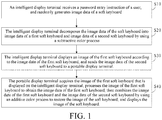
- FIG. 1 is a schematic flowchart of a first embodiment of a password entry method according to the present invention.
- Step S10 An intelligent display terminal receives a password entry instruction of a user, and randomly generates image data of a soft keyboard, where positions of characters in the soft keyboard are randomly arranged, and a color of a character in the soft keyboard is different from a color of a periphery of the character.
- the user may send the password entry instruction to the intelligent display terminal by using a terminal such as a remote control, or may send the password entry instruction to the intelligent display terminal by means of a touch screen, a button, a gesture or the like.
- the intelligent display terminal receives the password entry instruction of the user, and randomly generates image data of a soft keyboard, where positions of characters in the soft keyboard are randomly arranged, and a color of a character in the soft keyboard is different from a color of a periphery of the character, that is, a background color of the character, so as to highlight the character.
- Step S20 The intelligent display terminal decomposes the image data of the soft keyboard into image data of a first soft keyboard and image data of a second soft keyboard by using a subtractive color process, where an image of the soft keyboard can be obtained by adding up an image color of the first soft keyboard and an image color of the second soft keyboard.
- the intelligent display terminal may decompose each of the color of the character and the color of the periphery of the character in the image data of the soft keyboard into two different colors by using a subtractive color process, so that the image data of the soft keyboard is decomposed into the image data of the first soft keyboard and the image data of the second soft keyboard.
- the color of the character is one of cyan, magenta, and yellow
- the color of the periphery of the character is one of cyan, magenta, and yellow
- the color of the character and the color of the periphery of the character may each be decomposed into two of three primary colors, so that the image data of the soft keyboard is decomposed into the image data of the first soft keyboard and the image data of the second soft keyboard.
- neighboring pixels constituting the periphery of the character and/or neighboring pixels constituting the character are in different colors of three primary colors in the first soft keyboard.
- the color of the periphery of the character may also be two of cyan, magenta, and yellow, and the color of the character and the color of the periphery of the character are not limited to the foregoing colors, as long as they can be decomposed into two different colors.
- Step S30 The intelligent display terminal displays an image of the first soft keyboard according to the image data of the first soft keyboard, and sends the image data of the second soft keyboard to a portable display terminal.
- the intelligent display terminal establishes a communications connection with the portable display terminal.
- the intelligent display terminal displays the image of the first soft keyboard according to the image data of the first soft keyboard, and sends the image data of the second soft keyboard to the portable display terminal.
- Step S40 The portable display terminal acquires the image of the first soft keyboard that is displayed on the intelligent display terminal, processes the image of the first soft keyboard to obtain the image data of the first soft keyboard, then combines the image data of the first soft keyboard and the image data of the second soft keyboard by using an additive color process to restore the image of the soft keyboard, and displays the image of the soft keyboard.
- the portable display terminal acquires the image of the first soft keyboard that is displayed on the intelligent display terminal.
- An acquiring method may be as follows: the portable display terminal shoots the image of the first soft keyboard that is displayed on the intelligent display terminal via an image acquisition device (for example, a camera); or the portable display terminal sends an acquisition instruction to the intelligent display terminal, and receives the image of the first soft keyboard that is sent by the intelligent display terminal in response to the acquisition instruction. Alternatively, other suitable methods may also be used. Because the image data of the first soft keyboard is obtained by using a subtractive color process from the image data of the soft keyboard, no character can be observed in the image of the first soft keyboard that is displayed according to the image data of the first soft keyboard.
- the portable display terminal processes the image of the first soft keyboard to obtain the image data of the first soft keyboard. Because the image data of the first soft keyboard and the image data of the second soft keyboard are obtained by using a subtractive color process from the image data of the soft keyboard, the color of the character in the image data of the first soft keyboard and the color of the character in the image data of the second soft keyboard can be combined by using an additive color process, and the color of the periphery of the character in the image data of the first soft keyboard and the color of the periphery of the character in the image data of the second soft keyboard can be combined by using an additive color process, to restore the image of the soft keyboard.
- the portable display terminal displays the restored image of the soft keyboard, for the user to enter a password according to the image of the soft keyboard.
- this embodiment when a user enters a password to the intelligent display terminal, the user can see the image of the soft keyboard on the portable display terminal and accordingly enter the password, while other people can see only the image of the first soft keyboard that is displayed on the intelligent display terminal and cannot see the complete image of the soft keyboard, and therefore cannot learn the content entered by the user.
- characters on the soft keyboard are randomly arranged, other people who can see the image of the first soft keyboard cannot learn the characters entered by the user by memorizing the positions of characters on the keyboard. Therefore, this embodiment improves password entry security.
- the method before the displaying, by the intelligent display terminal, an image of the first soft keyboard according to the image data of the first soft keyboard, and sending the image data of the second soft keyboard to a portable display terminal, the method includes: connecting, by the intelligent display terminal, to the portable display terminal in a paired manner.
- the intelligent display terminal and the portable display terminal perform mutual authentication, and after the authentication succeeds, a communications connection is established between the intelligent display terminal and the portable display terminal.
- An authentication method may be to authenticate keys, device information and the like that are sent by them to each other.
- the communications connection between the intelligent display terminal and the portable display terminal may be implemented in a wired manner, or may be implemented in a wireless manner, for example, implemented by means of Wireless Fidelity (WIFI) or Near Field Communication (NFC).
- WIFI Wireless Fidelity
- NFC Near Field Communication
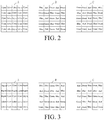
- FIG. 2 illustrates an example of decomposition of the image data of the soft keyboard into the image data of the first soft keyboard and the image data of the second soft keyboard by using a subtractive color process.
- A is a diagram illustrating distribution of pixels that constitute a character E and a periphery of the character E in the image data of the soft keyboard
- B and C are respectively pixel distribution diagrams of the image data of the first soft keyboard and the image data of the second soft keyboard that are obtained by decomposing the image data of the soft keyboard by using a subtractive color process.
- the color of the character in the image data of the soft keyboard which is yellow
- the periphery of the character in the image data of the soft keyboard which is cyan
- the image data of the soft keyboard is decomposed into the image data of the first soft keyboard and the image data of the second soft keyboard
- the neighboring pixels constituting the character and the neighboring pixels constituting the periphery of the character are in different colors of three primary colors in the first soft keyboard. Therefore, the character E cannot be observed in the first soft keyboard.
- the color of the character is cyan and the color of the periphery of the character is magenta in FIG. 2
- the color of the character in the image data of the soft keyboard is decomposed into blue and green by using a subtractive color process
- the color of the periphery of the character in the image data of the soft keyboard is decomposed into blue and red by using a subtractive color process
- the neighboring pixels constituting the character are respectively blue and green in the first soft keyboard
- the neighboring pixels constituting the periphery of the character are respectively blue and red in the first soft keyboard.
- the color of the character in the image data of the soft keyboard is decomposed into red and green by using a subtractive color process, and the color of the periphery of the character in the image data of the soft keyboard is decomposed into blue and red by using a subtractive color process; and the neighboring pixels constituting the character are respectively red and green in the first soft keyboard, and the neighboring pixels constituting the periphery of the character are respectively blue and red in the first soft keyboard.
- the color of the character may be one of cyan, magenta, and yellow, and the color of the periphery of the character may be two of cyan, magenta, and yellow.
- FIG. 3 illustrates another example of decomposition of the image data of the soft keyboard into the image data of the first soft keyboard and the image data of the second soft keyboard by using a subtractive color process.
- A is a diagram illustrating distribution of pixels that constitute a character E and a periphery of the character E in the image data of the soft keyboard
- B and C are respectively pixel distribution diagrams of the image data of the first soft keyboard and the image data of the second soft keyboard that are obtained by decomposing the image data of the soft keyboard by using a subtractive color process.
- cyan pixels constitute the character "E"
- magenta pixels and yellow pixels constitute the periphery of the character "E”.
- a subtractive color process is performed on the cyan pixels, blue pixels and green pixels are obtained correspondingly;
- a subtractive color process is performed on the yellow pixels, green pixels and red pixels are obtained correspondingly;
- a subtractive color process is performed on the magenta pixels, blue pixels and red pixels are obtained correspondingly. Therefore, after a subtractive color process is performed on the pixels that constitute the character and the periphery of the character in the diagram A, the pixels in the diagrams B and C are obtained correspondingly. It can be seen that compared with the pixels in the diagrams B and C in FIG. 2 , the distribution of colors of pixels in the diagrams B and C in FIG. 3 is more complex and more irregular.
- the periphery of the character has two colors; therefore, the distribution of colors of pixels in the image of the first soft keyboard that is obtained through decomposition is more complex, which helps further improve password entry security.
- the present invention further provides a password entry system.
- FIG. 4 is a schematic diagram of functional modules of a first embodiment of a password entry system according to the present invention.
- the system includes an intelligent display terminal 01 and a portable display terminal 02.
- the intelligent display terminal 01 is configured to receive a password entry instruction of a user, and randomly generate image data of a soft keyboard, where positions of characters in the soft keyboard are randomly arranged, and a color of a character in the soft keyboard is different from a color of a periphery of the character.
- the user may send the password entry instruction to the intelligent display terminal 01 by using a terminal such as a remote control, or may send the password entry instruction to the intelligent display terminal 01 by means of a touch screen, a button, a gesture or the like.
- the intelligent display terminal 01 receives the password entry instruction of the user, and randomly generates image data of a soft keyboard, where positions of characters in the soft keyboard are randomly arranged, and a color of a character in the soft keyboard is different from a color of a periphery of the character, that is, a background color of the character, so as to highlight the character.
- the intelligent display terminal 01 is further configured to decompose the image data of the soft keyboard into image data of a first soft keyboard and image data of a second soft keyboard by using a subtractive color process, where an image of the soft keyboard can be obtained by adding up an image color of the first soft keyboard and an image color of the second soft keyboard.
- the intelligent display terminal may decompose each of the color of the character and the color of the periphery of the character in the image data of the soft keyboard into two different colors by using a subtractive color process, so that the image data of the soft keyboard is decomposed into the image data of the first soft keyboard and the image data of the second soft keyboard.
- the color of the character is one of cyan, magenta, and yellow
- the color of the periphery of the character is one of cyan, magenta, and yellow
- the color of the character and the color of the periphery of the character may each be decomposed into two of three primary colors, so that the image data of the soft keyboard is decomposed into the image data of the first soft keyboard and the image data of the second soft keyboard.
- neighboring pixels constituting the periphery of the character and/or neighboring pixels constituting the character are in different colors of three primary colors in the first soft keyboard.
- the color of the periphery of the character may also be two of cyan, magenta, and yellow, and the color of the character and the color of the periphery of the character are not limited to the foregoing colors, as long as they can be decomposed into two different colors.
- the intelligent display terminal 01 is further configured to display an image of the first soft keyboard according to the image data of the first soft keyboard, and send the image data of the second soft keyboard to a portable display terminal 02.
- the intelligent display terminal 01 establishes a communications connection with the portable display terminal 02.
- the intelligent display terminal displays the image of the first soft keyboard according to the image data of the first soft keyboard, and sends the image data of the second soft keyboard to the portable display terminal 02.
- the portable display terminal 02 is configured to acquire the image of the first soft keyboard that is displayed on the intelligent display terminal 01, process the image of the first soft keyboard to obtain the image data of the first soft keyboard, then combine the image data of the first soft keyboard and the image data of the second soft keyboard by using an additive color process to restore the image of the soft keyboard, and display the image of the soft keyboard.
- the portable display terminal 02 acquires the image of the first soft keyboard that is displayed on the intelligent display terminal 01.
- An acquiring method may be as follows: the portable display terminal 02 shoots the image of the first soft keyboard that is displayed on the intelligent display terminal 01 via an image acquisition device (for example, a camera); or the portable display terminal 02 sends an acquisition instruction to the intelligent display terminal 01, and receives the image of the first soft keyboard that is sent by the intelligent display terminal 01 in response to the acquisition instruction.
- image acquisition device for example, a camera
- other suitable methods may also be used. Because the image data of the first soft keyboard is obtained by using a subtractive color process from the image data of the soft keyboard, no character can be observed in the image of the first soft keyboard that is displayed according to the image data of the first soft keyboard.
- the portable display terminal 02 processes the image of the first soft keyboard to obtain the image data of the first soft keyboard. Because the image data of the first soft keyboard and the image data of the second soft keyboard are obtained by using a subtractive color process from the image data of the soft keyboard, the color of the character in the image data of the first soft keyboard and the color of the character in the image data of the second soft keyboard can be combined by using an additive color process, and the color of the periphery of the character in the image data of the first soft keyboard and the color of the periphery of the character in the image data of the second soft keyboard can be combined by using an additive color process, to restore the image of the soft keyboard.
- the portable display terminal 02 displays the restored image of the soft keyboard, for the user to enter a password according to the image of the soft keyboard.
- this embodiment when a user enters a password to the intelligent display terminal 01, the user can see the image of the soft keyboard on the portable display terminal 02 and accordingly enter the password, while other people can see only the image of the first soft keyboard that is displayed on the intelligent display terminal 01 and cannot see the complete image of the soft keyboard, and therefore cannot learn the content entered by the user.
- characters on the soft keyboard are randomly arranged, other people who can see the image of the first soft keyboard cannot learn the characters entered by the user by memorizing the positions of characters on the keyboard. Therefore, this embodiment improves password entry security.
- the intelligent display terminal 01 and the portable display terminal 02 are further configured to connect to each other in a paired manner.
- the intelligent display terminal 01 and the portable display terminal 02 perform mutual authentication, and after the authentication succeeds, a communications connection is established between the intelligent display terminal 01 and the portable display terminal 02.
- An authentication method may be to authenticate keys, device information and the like that are sent by them to each other.
- the communications connection between the intelligent display terminal 01 and the portable display terminal 02 may be implemented in a wired manner, or may be implemented in a wireless manner, for example, implemented by means of Wireless Fidelity (WIFI) or Near Field Communication (NFC).
- WIFI Wireless Fidelity
- NFC Near Field Communication
Landscapes
- Engineering & Computer Science (AREA)
- Theoretical Computer Science (AREA)
- General Engineering & Computer Science (AREA)
- Physics & Mathematics (AREA)
- General Physics & Mathematics (AREA)
- Human Computer Interaction (AREA)
- Computer Security & Cryptography (AREA)
- Computer Hardware Design (AREA)
- Software Systems (AREA)
- Health & Medical Sciences (AREA)
- Bioethics (AREA)
- General Health & Medical Sciences (AREA)
- Input From Keyboards Or The Like (AREA)
- Document Processing Apparatus (AREA)
- User Interface Of Digital Computer (AREA)
Claims (15)
- Passworteingabeverfahren, das folgende Schritte beinhaltet:
Schritt 1: Empfangen, durch ein intelligentes Anzeigeendgerät, einer Passworteingabeanweisung von einem Benutzer, und willkürliches Erzeugen von Bilddaten von einem Soft-Tastatur, wobei Positionen von Schriftzeichen in der Soft-Tastatur willkürlich angeordnet sind, und eine Farbe eines Schriftzeichens in der Soft-Tastatur sich von einer Farbe einer Umgebung des Schriftzeichens unterscheidet; Schritt 2: Zerlegen, durch das intelligente Anzeigeendgerät, der Bilddaten der Soft-Tastatur in Bilddaten von einer ersten Soft-Tastatur und Bilddaten von einer zweiten Soft-Tastatur durch Verwendung eines subtraktiven Farbprozesses, wobei ein Bild der Soft-Tastatur durch Zusammenaddieren einer Bildfarbe der ersten Soft-Tastatur und einer Bildfarbe der zweiten Soft-Tastatur erhalten werden kann; Schritt 3: Verbinden, durch das intelligente Anzeigeendgerät, mit einem tragbaren Anzeigeendgerät in gepaarter Weise, Anzeigen, durch das intelligente Anzeigeendgerät, eines Bildes der ersten Soft-Tastatur entsprechend den Bilddaten der ersten Soft-Tastatur, und Senden der Bilddaten der zweiten Soft-Tastatur an das tragbare Anzeigeendgerät; und Schritt 4: Erfassen, durch das tragbare Anzeigeendgerät, des Bildes der ersten Soft-Tastatur, das auf dem intelligenten Anzeigeendgerät angezeigt wird, Verarbeiten des Bildes der ersten Soft-Tastatur, um die Bilddaten der ersten Soft-Tastatur zu erhalten, dann Kombinieren der Bilddaten der ersten Soft-Tastatur und der Bilddaten der zweiten Soft-Tastatur durch Verwendung eines additiven Farbprozesses zum Wiederherstellen des Bildes der Soft-Tastatur, und Anzeigen des Bildes der Soft-Tastatur. - Passworteingabeverfahren nach Anspruch 1, wobei die Farbe des Schriftzeichens eine von Cyan, Magenta und Gelb ist und die Farbe der Umgebung des Schriftzeichens eine von Cyan, Magenta und Gelb ist.
- Passworteingabeverfahren nach Anspruch 2, wobei in dem Schritt 2 die Farbe des Schriftzeichens in den Bilddaten der Soft-Tastatur zerlegt wird in zwei der drei Primärfarben durch Verwendung eines subtraktiven Farbprozesses, und die Farbe der Umgebung des Schriftzeichens in den Bilddaten der Soft-Tastatur zerlegt wird in zwei der drei Primärfarben durch Verwendung eins subtraktiven Farbprozesses, so dass die Bilddaten der Soft-Tastatur zerlegt werden in die Bilddaten der ersten Soft-Tastatur und in die Bilddaten der zweiten Soft-Tastatur; wobei benachbarte Pixel, die die Umgebung des Schriftzeichens darstellen, und/oder benachbarte Pixel, die das Schriftzeichen darstellen, in unterschiedlichen Farben von den drei Primärfarben in der ersten Soft-Tastatur erscheinen.
- Passworteingabeverfahren nach Anspruch 3, wobei in dem Schritt 4, die Farbe des Schriftzeichens in den Bilddaten der ersten Soft-Tastatur und die Farbe des Schriftzeichens in den Bilddaten der zweiten Soft-Tastatur durch Verwendung eines additiven Farbprozesses kombiniert werden, und die Farbe der Umgebung des Schriftzeichens in den Bilddaten der ersten Soft-Tastatur und die Farbe der Umgebung des Schriftzeichens in den Bilddaten der zweiten Soft-Tastatur durch Verwendung eines additiven Farbprozesses kombiniert werden, um das Bild der Soft-Tastatur wiederherzustellen.
- Passworteingabeverfahren nach Anspruch 3 oder 4, wobei
wenn die Farbe des Schriftzeichens Cyan ist und die Farbe der Umgebung des Schriftzeichens Magenta, wird, in dem Schritt 2, die Farbe des Schriftzeichens in den Bilddaten der Soft-Tastatur durch Verwendung eines subtraktiven Farbprozesses in Blau und Grün zerlegt, und die Farbe der Umgebung des Schriftzeichens in den Bilddaten des Soft-Tastatur wird durch Verwendung eines subtraktiven Farbprozesses in Blau und Rot zerlegt, wobei die benachbarten Pixel, die das Schriftzeichen darstellen, in der ersten Soft-Tastatur jeweils blau und grün sind, und die benachbarten Pixel, die die Umgebung des Schriftzeichens darstellen, in der ersten Soft-Tastatur jeweils blau und rot sind;
wenn die Farbe des Schriftzeichens Gelb ist und die Farbe der Umgebung des Schriftzeichens Magenta, wird, in dem Schritt 2, die Farbe des Schriftzeichens in den Bilddaten der Soft-Tastatur durch Verwendung eines subtraktiven Farbprozesses in Rot und Grün zerlegt, und die Farbe der Umgebung des Schriftzeichens in den Bilddaten der Soft-Tastatur wird durch Verwendung eines subtraktiven Farbprozesses in Blau und Grün zerlegt, wobei die benachbarten Pixel, die das Schriftzeichen darstellen, in der ersten Soft-Tastatur jeweils rot und grün sind, und die benachbarten Pixel, die die Umgebung des Schriftzeichens darstellen, in der ersten Soft-Tastatur jeweils blau und rot sind; und
wenn die Farbe des Schriftzeichens Gelb ist und die Farbe der Umgebung des Schriftzeichens Cyan, wird, in dem Schritt 2, die Farbe des Schriftzeichens in den Bilddaten der Soft-Tastatur durch Verwendung eines subtraktiven Farbprozesses in Rot und Grün zerlegt, und die Farbe der Umgebung des Schriftzeichens in den Bilddaten der Soft-Tastatur wird durch Verwendung eines subtraktiven Farbprozesses in Blau und Grün zerlegt, wobei die benachbarten Pixel, die das Schriftzeichen darstellen, in der ersten Soft-Tastatur jeweils rot und grün sind, und die benachbarten Pixel, die die Umgebung des Schriftzeichens darstellen, in der ersten Soft-Tastatur jeweils blau und grün sind. - Passworteingabeverfahren nach einem der Ansprüche 1 bis 5, wobei die Farbe des Schriftzeichens eine von Cyan, Magenta und Gelb ist und die Farbe der Umgebung des Schriftzeichens zwei von Cyan, Magenta und Gelb ist.
- Passworteingabeverfahren nach einem der Ansprüche 1 bis 6, wobei das Verbinden, durch das intelligente Anzeigeendgerät, mit dem tragbaren Anzeigeendgerät in gepaarter Weise in dem Schritt 3 beinhaltet:
Ausführen, durch das intelligente Anzeigeendgerät und das tragbare Anzeigeendgerät, einer wechselseitigen Authentifizierung durch Verwendung von Tasten und Geräteinformationen, die durch das intelligente Anzeigeendgerät und das tragbare Anzeigeendgerät einander zugesendet werden, und nachdem die Authentifikation gelungen ist, Einrichten einer Datenübertragungsverbindung zwischen dem intelligenten Anzeigeendgerät und dem tragbaren Anzeigeendgerät. - Passworteingabeverfahren nach Anspruch 7, wobei die Datenübertragungsverbindung eine drahtgebundene oder eine drahtlose Verbindung ist.
- Passworteingabesystem, aufweisend ein intelligentes Anzeigeendgerät und ein tragbares Anzeigeendgerät, wobei
das intelligente Anzeigeendgerät so konfiguriert ist, dass es eine Passworteingabeanweisung von einem Benutzer empfängt, und willkürlich Bilddaten von einer Soft-Tastatur erzeugt, wobei Positionen von Schriftzeichen in der Soft-Tastatur willkürlich angeordnet werden, und eine Farbe eines Schriftzeichens in der Soft-Tastatur sich von einer Farbe einer Umgebung des Schriftzeichens unterscheidet;
das intelligente Anzeigeendgerät ferner so konfiguriert ist, dass es die Bilddaten der Soft-Tastatur in Bilddaten von einer ersten Soft-Tastatur und Bilddaten von einer zweiten Soft-Tastatur durch Verwendung eines subtraktiven Farbprozesses zerlegt, wobei ein Bild der Soft-Tastatur durch Aufaddieren einer Bildfarbe der ersten Soft-Tastatur und einer Bildfarbe der zweiten Soft-Tastatur erhalten werden kann;
das intelligente Anzeigeendgerät ferner so konfiguriert ist, dass es ein tragbares Anzeigeendgerät in gepaarter Weise verbindet, ein Bild der ersten Soft-Tastatur gemäß den Bilddaten des ersten Soft-Tastatur anzeigt und die Bilddaten der zweiten Soft-Tastatur an das tragbare Anzeigeendgerät sendet; und
das tragbare Anzeigeendgerät so konfiguriert ist, dass es das Bild der ersten Soft-Tastatur, das auf den intelligenten Anzeigeendgerät angezeigt wird, erfasst, das Bild der ersten Soft-Tastatur verarbeitet, um die Bilddaten der ersten Soft-Tastatur zu erhalten, dann die Bilddaten der ersten Soft-Tastatur und die Bilddaten der zweiten Soft-Tastatur durch Verwendung eines additiven Farbprozesses kombiniert, um das Bild der Soft-Tastatur wiederherzustellen, und das Bild der Soft-Tastatur anzeigt. - Passworteingabesystem nach Anspruch 9, wobei die Farbe des Schriftzeichens eine von Cyan, Magenta und Gelb ist und die Farbe der Umgebung des Schriftzeichens eine oder zwei von Cyan, Magenta und Gelb ist.
- Passworteingabesystem nach Anspruch 10, wobei das intelligente Anzeigeendgerät ferner so konfiguriert ist, dass es die Farbe des Schriftzeichens in den Bilddaten der Soft-Tastatur durch Verwendung eines subtraktiven Farbprozesses in zwei der drei Primärfarben zerlegt, und die Farbe der Umgebung des Schriftzeichens in den Bilddaten der Soft-Tastatur durch Verwendung eines subtraktiven Farbprozesses in zwei der drei Primärfarben zerlegt, so dass die Bilddaten der Soft-Tastatur in die Bilddaten der ersten Soft-Tastatur und die Bilddaten der zweiten Soft-Tastatur zerlegt werden, wobei benachbarte Pixel, die die Umgebung des Schriftzeichens darstellen und/oder benachbarte Pixel, die das Schriftzeichen darstellen, in unterschiedlichen Farben von drei Primärfarben in den der ersten Soft-Tastatur erscheinen.
- Passworteingabesystem nach Anspruch 11, wobei das tragbare Anzeigeendgerät ferner so konfiguriert ist, dass es die Farbe des Schriftzeichens in den Bilddaten der ersten Soft-Tastatur und die Farbe des Schriftzeichens in den Bilddaten der zweiten Soft-Tastatur durch Verwendung eines additiven Farbprozesses kombiniert, und die Farbe der Umgebung des Schriftzeichens in den Bilddaten der ersten Soft-Tastatur und die Farbe der Umgebung des Schriftzeichens in den Bilddaten der zweiten Soft-Tastatur durch Verwendung eines additiven Farbprozesses kombiniert, um das Bild der Soft-Tastatur wiederherzustellen.
- Passworteingabesystem nach Anspruch 12, wobei, wenn die Farbe des Schriftzeichens Cyan ist und die Farbe der Umgebung des Schriftzeichens Magenta, wird die Farbe des Schriftzeichens in den Bilddaten der Soft-Tastatur durch Verwendung eines subtraktiven Farbprozesses in Blau und Grün zerlegt, und die Farbe der Umgebung des Schriftzeichens in den Bilddaten der Soft-Tastatur wird durch Verwendung eines subtraktiven Farbprozesses in Blau und Rot zerlegt, wobei die benachbarten Pixel, die das Schriftzeichen darstellen, in der ersten Soft-Tastatur jeweils blau und grün sind, und die benachbarten Pixel, die die Umgebung des Schriftzeichens darstellen, in der ersten Soft-Tastatur jeweils blau und rot sind;
wenn die Farbe des Schriftzeichens Gelb ist und die Farbe der Umgebung des Schriftzeichens Magenta, wird die Farbe des Schriftzeichens in den Bilddaten der Soft-Tastatur durch Verwendung eines subtraktiven Farbprozesses in Rot und Grün zerlegt, und die Farbe der Umgebung des Schriftzeichens in den Bilddaten der Soft-Tastatur wird durch Verwendung eines subtraktiven Farbprozesses in Blau und Rot zerlegt, wobei die benachbarten Pixel, die das Schriftzeichen darstellen, in der ersten Soft-Tastatur jeweils rot und grün sind, und die benachbarten Pixel, die die Umgebung des Schriftzeichens darstellen, in der ersten Soft-Tastatur jeweils blau und rot sind; und
wenn die Farbe des Schriftzeichens Gelb ist und die Farbe der Umgebung des Schriftzeichens Cyan, wird die Farbe des Schriftzeichens in den Bilddaten der Soft-Tastatur durch Verwendung eines subtraktiven Farbprozesses in Rot und Grün zerlegt, und die Farbe der Umgebung des Schriftzeichens in den Bilddaten der Soft-Tastatur wird durch Verwendung eines subtraktiven Farbprozesses in Blau und Grün zerlegt, wobei die benachbarten Pixel, die das Schriftzeichen darstellen, in der ersten Soft-Tastatur jeweils rot und grün sind, und die benachbarten Pixel, die die Umgebung des Schriftzeichens darstellen, in dem ersten Soft-Tastatur jeweils blau und grün sind. - Passworteingabesystem nach einem der Ansprüche 9 bis 13, wobei das Verbinden, durch das intelligente Anzeigeendgerät, mit dem tragbaren Anzeigeendgerät in gepaarter Weise beinhaltet:
Ausführen, durch das intelligente Anzeigeendgerät und das tragbare Anzeigeendgerät, einer wechselseitigen Authentifizierung durch Verwendung von Tasten und Vorrichtungsinformationen, die durch das intelligente Anzeigeendgerät und das tragbare Anzeigeendgerät einander zugesendet werden, und nach dem die Authentifizierung gelungen ist, Einrichten einer Datenübertragungsverbindung zwischen dem intelligente Anzeigeendgerät und dem tragbaren Anzeigeendgerät. - Passworteingabesystem nach Anspruch 14, wobei die Datenübertragungsverbindung eine drahtgebundene oder drahtlose Verbindung ist.
Applications Claiming Priority (2)
| Application Number | Priority Date | Filing Date | Title |
|---|---|---|---|
| CN201410315922.1A CN105224121B (zh) | 2014-07-03 | 2014-07-03 | 密码输入方法及系统 |
| PCT/CN2014/093588 WO2016000417A1 (zh) | 2014-07-03 | 2014-12-11 | 密码输入方法及系统 |
Publications (3)
| Publication Number | Publication Date |
|---|---|
| EP3166000A1 EP3166000A1 (de) | 2017-05-10 |
| EP3166000A4 EP3166000A4 (de) | 2018-02-21 |
| EP3166000B1 true EP3166000B1 (de) | 2019-03-13 |
Family
ID=54993139
Family Applications (1)
| Application Number | Title | Priority Date | Filing Date |
|---|---|---|---|
| EP14896483.6A Active EP3166000B1 (de) | 2014-07-03 | 2014-12-11 | Passworteingabeverfahren und -system |
Country Status (4)
| Country | Link |
|---|---|
| US (1) | US9940485B2 (de) |
| EP (1) | EP3166000B1 (de) |
| CN (1) | CN105224121B (de) |
| WO (1) | WO2016000417A1 (de) |
Families Citing this family (2)
| Publication number | Priority date | Publication date | Assignee | Title |
|---|---|---|---|---|
| US9690917B2 (en) * | 2014-05-23 | 2017-06-27 | International Business Machines Corporation | Managing compromised passwords |
| CN109002698B (zh) * | 2018-05-31 | 2021-02-12 | 北京奇艺世纪科技有限公司 | 一种用户密码的安全输入方法及装置 |
Family Cites Families (28)
| Publication number | Priority date | Publication date | Assignee | Title |
|---|---|---|---|---|
| JPS58134692A (ja) * | 1982-02-04 | 1983-08-10 | カシオ計算機株式会社 | 音色設定装置 |
| JPH0690494B2 (ja) * | 1985-09-26 | 1994-11-14 | 大日本印刷株式会社 | 無地網用フイルム原版作成装置 |
| US5386496A (en) * | 1991-02-15 | 1995-01-31 | Toyo Ink Mfg. Co., Ltd. | Method and device for nonlinear transformation of colour information by neural network |
| JPH05119754A (ja) * | 1991-10-28 | 1993-05-18 | Sony Corp | デイスプレイシステム |
| US5483235A (en) * | 1994-02-23 | 1996-01-09 | At&T Corp. | Stylus-based keyboard key arrangement |
| US5626429A (en) * | 1995-04-03 | 1997-05-06 | Choate; John I. M. | Keyboard arrangement to maximize one-handed typing speed and training for engineering and architectural computer assisted drawing and design or disabled typists |
| JP4174724B2 (ja) * | 2004-03-24 | 2008-11-05 | 富士フイルム株式会社 | 画像検定装置、画像検定方法及びプログラム |
| JP4175381B2 (ja) * | 2006-05-10 | 2008-11-05 | ソニー株式会社 | 情報処理システムおよび方法、情報処理装置および方法、並びにプログラム |
| JP2008262549A (ja) * | 2007-03-16 | 2008-10-30 | Ricoh Co Ltd | 認証方法及び認証装置 |
| GB2462579A (en) * | 2008-06-10 | 2010-02-17 | Sony Service Ct | Touch screen display including proximity sensor |
| US8750938B2 (en) * | 2008-09-29 | 2014-06-10 | Microsoft Corporation | Glow touch feedback for virtual input devices |
| CN101650636A (zh) * | 2009-09-14 | 2010-02-17 | 深圳华为通信技术有限公司 | 输入字符的方法、装置及系统 |
| US8867780B2 (en) * | 2010-02-25 | 2014-10-21 | Apple Inc. | Obfuscating the display of information and removing the obfuscation using a filter |
| US20120124654A1 (en) * | 2010-11-16 | 2012-05-17 | Evolucard S/A | System and method for a secure user interface |
| JP2012248067A (ja) * | 2011-05-30 | 2012-12-13 | Canon Inc | 情報入力装置、その制御方法、および制御プログラム |
| JP2012256214A (ja) * | 2011-06-09 | 2012-12-27 | Sony Corp | 情報処理装置、情報処理方法、およびプログラム |
| US9767642B2 (en) * | 2011-10-14 | 2017-09-19 | Bally Gaming, Inc. | System and method for cross platform persistent gaming sessions using a mobile device |
| JP6278893B2 (ja) * | 2011-11-24 | 2018-02-14 | マイクロソフト テクノロジー ライセンシング,エルエルシー | 対話型マルチモード画像検索 |
| US9256722B2 (en) * | 2012-07-20 | 2016-02-09 | Google Inc. | Systems and methods of using a temporary private key between two devices |
| JP6041604B2 (ja) * | 2012-09-27 | 2016-12-14 | 京セラ株式会社 | 表示装置、制御システムおよび制御プログラム |
| US20140098141A1 (en) * | 2012-10-10 | 2014-04-10 | At&T Intellectual Property I, L.P. | Method and Apparatus for Securing Input of Information via Software Keyboards |
| CN103793659B (zh) * | 2012-10-31 | 2017-12-22 | 联想企业解决方案(新加坡)有限公司 | 设置密码的方法和系统以及验证密码的方法和系统 |
| CN104021323A (zh) * | 2013-02-28 | 2014-09-03 | 国际商业机器公司 | 用于口令验证的方法和装置 |
| TW201439720A (zh) * | 2013-04-03 | 2014-10-16 | Wintek Corp | 觸控面板 |
| JP5906524B2 (ja) * | 2013-04-24 | 2016-04-20 | 株式会社モルフォ | 画像合成装置、画像合成方法およびプログラム |
| US9507928B2 (en) * | 2013-11-21 | 2016-11-29 | Red Hat, Inc. | Preventing the discovery of access codes |
| US9240982B2 (en) * | 2013-12-27 | 2016-01-19 | Canon Information And Imaging Solutions, Inc. | Method for associating an image-forming device, a mobile device, and a user |
| KR101791603B1 (ko) * | 2015-12-17 | 2017-10-30 | 성균관대학교산학협력단 | 잡음을 이용하여 컬러 객체를 검출하는 방법 및 잡음을 이용하여 발광 장치를 검출하는 시스템 |
-
2014
- 2014-07-03 CN CN201410315922.1A patent/CN105224121B/zh not_active Expired - Fee Related
- 2014-12-11 EP EP14896483.6A patent/EP3166000B1/de active Active
- 2014-12-11 WO PCT/CN2014/093588 patent/WO2016000417A1/zh not_active Ceased
- 2014-12-11 US US15/027,285 patent/US9940485B2/en active Active
Also Published As
| Publication number | Publication date |
|---|---|
| CN105224121A (zh) | 2016-01-06 |
| US20160247000A1 (en) | 2016-08-25 |
| US9940485B2 (en) | 2018-04-10 |
| WO2016000417A1 (zh) | 2016-01-07 |
| EP3166000A4 (de) | 2018-02-21 |
| EP3166000A1 (de) | 2017-05-10 |
| CN105224121B (zh) | 2017-12-12 |
Similar Documents
| Publication | Publication Date | Title |
|---|---|---|
| EP2985975B1 (de) | Verfahren, vorrichtung und system zur zugriffsauthentifizierung und computerprogramm | |
| US9372657B2 (en) | Multi-screen display system, display device, ID setting apparatus, and ID setting method | |
| CN104244455A (zh) | 无线局域网络的接入信息的分享方法和装置 | |
| CN104268451A (zh) | 一种移动终端及其应用的快捷启动方法和装置 | |
| CN107147656B (zh) | 远程控制的建立方法、系统及可读存储介质 | |
| CN108985034B (zh) | 一种解锁方法及终端设备 | |
| CN104091114A (zh) | 移动终端传输认证密码方法、获取认证密码方法 | |
| US9396318B2 (en) | Password authentication apparatus, password authentication method, and non-transitory computer-readable recording medium storing password authentication program | |
| CN105900103B (zh) | 触摸终端机以及触摸终端机的密码生成方法 | |
| EP3166000B1 (de) | Passworteingabeverfahren und -system | |
| US8949934B2 (en) | Communication device, communication method, and program | |
| JP2012181716A (ja) | 色パスワードを用いた認証方法及びシステム | |
| JP2024016164A (ja) | 情報処理方法および情報処理システム | |
| CN108959905A (zh) | 一种登录信息提示方法及终端设备 | |
| CN104915581A (zh) | 一种扩增实境解锁系统与方法 | |
| CN108153809A (zh) | 图片标识方法、识别方法、终端及计算机可读存储介质 | |
| KR101512007B1 (ko) | 싱크 제어 방법 및 이를 수행하는 모바일 싱크 컴퓨팅 장치 | |
| CN113691528B (zh) | 二维码处理方法、装置及电子设备 | |
| CN105786367A (zh) | 一种虚拟桌面的显示方法和终端 | |
| CN105279403B (zh) | 一种基于颜色相加原理的终端远程解锁的方法及装置 | |
| TWI590092B (zh) | Authentication code generation system and method using virtual reality | |
| US10346000B2 (en) | Information processing apparatus and method, information processing system for improved security level in browsing of content | |
| JP6400895B2 (ja) | 表示装置、表示システム、および表示方法 | |
| CN104219393B (zh) | 一种输入密码的方法、装置和移动终端 | |
| US12423464B2 (en) | Systems and methods for encoded clinical data communication |
Legal Events
| Date | Code | Title | Description |
|---|---|---|---|
| PUAI | Public reference made under article 153(3) epc to a published international application that has entered the european phase |
Free format text: ORIGINAL CODE: 0009012 |
|
| STAA | Information on the status of an ep patent application or granted ep patent |
Free format text: STATUS: REQUEST FOR EXAMINATION WAS MADE |
|
| 17P | Request for examination filed |
Effective date: 20160407 |
|
| AK | Designated contracting states |
Kind code of ref document: A1 Designated state(s): AL AT BE BG CH CY CZ DE DK EE ES FI FR GB GR HR HU IE IS IT LI LT LU LV MC MK MT NL NO PL PT RO RS SE SI SK SM TR |
|
| AX | Request for extension of the european patent |
Extension state: BA ME |
|
| DAX | Request for extension of the european patent (deleted) | ||
| REG | Reference to a national code |
Ref country code: DE Ref legal event code: R079 Ref document number: 602014043085 Country of ref document: DE Free format text: PREVIOUS MAIN CLASS: G06F0003041000 Ipc: G06F0021360000 |
|
| A4 | Supplementary search report drawn up and despatched |
Effective date: 20180118 |
|
| RIC1 | Information provided on ipc code assigned before grant |
Ipc: G06F 21/36 20130101AFI20180112BHEP Ipc: G06F 3/041 20060101ALI20180112BHEP |
|
| GRAP | Despatch of communication of intention to grant a patent |
Free format text: ORIGINAL CODE: EPIDOSNIGR1 |
|
| STAA | Information on the status of an ep patent application or granted ep patent |
Free format text: STATUS: GRANT OF PATENT IS INTENDED |
|
| INTG | Intention to grant announced |
Effective date: 20181025 |
|
| GRAS | Grant fee paid |
Free format text: ORIGINAL CODE: EPIDOSNIGR3 |
|
| GRAA | (expected) grant |
Free format text: ORIGINAL CODE: 0009210 |
|
| STAA | Information on the status of an ep patent application or granted ep patent |
Free format text: STATUS: THE PATENT HAS BEEN GRANTED |
|
| AK | Designated contracting states |
Kind code of ref document: B1 Designated state(s): AL AT BE BG CH CY CZ DE DK EE ES FI FR GB GR HR HU IE IS IT LI LT LU LV MC MK MT NL NO PL PT RO RS SE SI SK SM TR |
|
| REG | Reference to a national code |
Ref country code: GB Ref legal event code: FG4D |
|
| RIN1 | Information on inventor provided before grant (corrected) |
Inventor name: JIANG, FENG |
|
| REG | Reference to a national code |
Ref country code: CH Ref legal event code: EP Ref country code: AT Ref legal event code: REF Ref document number: 1108691 Country of ref document: AT Kind code of ref document: T Effective date: 20190315 |
|
| REG | Reference to a national code |
Ref country code: IE Ref legal event code: FG4D |
|
| REG | Reference to a national code |
Ref country code: DE Ref legal event code: R096 Ref document number: 602014043085 Country of ref document: DE |
|
| REG | Reference to a national code |
Ref country code: NL Ref legal event code: MP Effective date: 20190313 |
|
| REG | Reference to a national code |
Ref country code: LT Ref legal event code: MG4D |
|
| PG25 | Lapsed in a contracting state [announced via postgrant information from national office to epo] |
Ref country code: SE Free format text: LAPSE BECAUSE OF FAILURE TO SUBMIT A TRANSLATION OF THE DESCRIPTION OR TO PAY THE FEE WITHIN THE PRESCRIBED TIME-LIMIT Effective date: 20190313 Ref country code: LT Free format text: LAPSE BECAUSE OF FAILURE TO SUBMIT A TRANSLATION OF THE DESCRIPTION OR TO PAY THE FEE WITHIN THE PRESCRIBED TIME-LIMIT Effective date: 20190313 Ref country code: NO Free format text: LAPSE BECAUSE OF FAILURE TO SUBMIT A TRANSLATION OF THE DESCRIPTION OR TO PAY THE FEE WITHIN THE PRESCRIBED TIME-LIMIT Effective date: 20190613 Ref country code: FI Free format text: LAPSE BECAUSE OF FAILURE TO SUBMIT A TRANSLATION OF THE DESCRIPTION OR TO PAY THE FEE WITHIN THE PRESCRIBED TIME-LIMIT Effective date: 20190313 |
|
| PG25 | Lapsed in a contracting state [announced via postgrant information from national office to epo] |
Ref country code: BG Free format text: LAPSE BECAUSE OF FAILURE TO SUBMIT A TRANSLATION OF THE DESCRIPTION OR TO PAY THE FEE WITHIN THE PRESCRIBED TIME-LIMIT Effective date: 20190613 Ref country code: NL Free format text: LAPSE BECAUSE OF FAILURE TO SUBMIT A TRANSLATION OF THE DESCRIPTION OR TO PAY THE FEE WITHIN THE PRESCRIBED TIME-LIMIT Effective date: 20190313 Ref country code: LV Free format text: LAPSE BECAUSE OF FAILURE TO SUBMIT A TRANSLATION OF THE DESCRIPTION OR TO PAY THE FEE WITHIN THE PRESCRIBED TIME-LIMIT Effective date: 20190313 Ref country code: RS Free format text: LAPSE BECAUSE OF FAILURE TO SUBMIT A TRANSLATION OF THE DESCRIPTION OR TO PAY THE FEE WITHIN THE PRESCRIBED TIME-LIMIT Effective date: 20190313 Ref country code: HR Free format text: LAPSE BECAUSE OF FAILURE TO SUBMIT A TRANSLATION OF THE DESCRIPTION OR TO PAY THE FEE WITHIN THE PRESCRIBED TIME-LIMIT Effective date: 20190313 Ref country code: GR Free format text: LAPSE BECAUSE OF FAILURE TO SUBMIT A TRANSLATION OF THE DESCRIPTION OR TO PAY THE FEE WITHIN THE PRESCRIBED TIME-LIMIT Effective date: 20190614 |
|
| REG | Reference to a national code |
Ref country code: AT Ref legal event code: MK05 Ref document number: 1108691 Country of ref document: AT Kind code of ref document: T Effective date: 20190313 |
|
| PG25 | Lapsed in a contracting state [announced via postgrant information from national office to epo] |
Ref country code: IT Free format text: LAPSE BECAUSE OF FAILURE TO SUBMIT A TRANSLATION OF THE DESCRIPTION OR TO PAY THE FEE WITHIN THE PRESCRIBED TIME-LIMIT Effective date: 20190313 Ref country code: PT Free format text: LAPSE BECAUSE OF FAILURE TO SUBMIT A TRANSLATION OF THE DESCRIPTION OR TO PAY THE FEE WITHIN THE PRESCRIBED TIME-LIMIT Effective date: 20190713 Ref country code: AL Free format text: LAPSE BECAUSE OF FAILURE TO SUBMIT A TRANSLATION OF THE DESCRIPTION OR TO PAY THE FEE WITHIN THE PRESCRIBED TIME-LIMIT Effective date: 20190313 Ref country code: SK Free format text: LAPSE BECAUSE OF FAILURE TO SUBMIT A TRANSLATION OF THE DESCRIPTION OR TO PAY THE FEE WITHIN THE PRESCRIBED TIME-LIMIT Effective date: 20190313 Ref country code: EE Free format text: LAPSE BECAUSE OF FAILURE TO SUBMIT A TRANSLATION OF THE DESCRIPTION OR TO PAY THE FEE WITHIN THE PRESCRIBED TIME-LIMIT Effective date: 20190313 Ref country code: ES Free format text: LAPSE BECAUSE OF FAILURE TO SUBMIT A TRANSLATION OF THE DESCRIPTION OR TO PAY THE FEE WITHIN THE PRESCRIBED TIME-LIMIT Effective date: 20190313 Ref country code: RO Free format text: LAPSE BECAUSE OF FAILURE TO SUBMIT A TRANSLATION OF THE DESCRIPTION OR TO PAY THE FEE WITHIN THE PRESCRIBED TIME-LIMIT Effective date: 20190313 Ref country code: CZ Free format text: LAPSE BECAUSE OF FAILURE TO SUBMIT A TRANSLATION OF THE DESCRIPTION OR TO PAY THE FEE WITHIN THE PRESCRIBED TIME-LIMIT Effective date: 20190313 |
|
| PG25 | Lapsed in a contracting state [announced via postgrant information from national office to epo] |
Ref country code: SM Free format text: LAPSE BECAUSE OF FAILURE TO SUBMIT A TRANSLATION OF THE DESCRIPTION OR TO PAY THE FEE WITHIN THE PRESCRIBED TIME-LIMIT Effective date: 20190313 Ref country code: PL Free format text: LAPSE BECAUSE OF FAILURE TO SUBMIT A TRANSLATION OF THE DESCRIPTION OR TO PAY THE FEE WITHIN THE PRESCRIBED TIME-LIMIT Effective date: 20190313 |
|
| REG | Reference to a national code |
Ref country code: DE Ref legal event code: R097 Ref document number: 602014043085 Country of ref document: DE |
|
| PG25 | Lapsed in a contracting state [announced via postgrant information from national office to epo] |
Ref country code: IS Free format text: LAPSE BECAUSE OF FAILURE TO SUBMIT A TRANSLATION OF THE DESCRIPTION OR TO PAY THE FEE WITHIN THE PRESCRIBED TIME-LIMIT Effective date: 20190713 Ref country code: AT Free format text: LAPSE BECAUSE OF FAILURE TO SUBMIT A TRANSLATION OF THE DESCRIPTION OR TO PAY THE FEE WITHIN THE PRESCRIBED TIME-LIMIT Effective date: 20190313 |
|
| PLBE | No opposition filed within time limit |
Free format text: ORIGINAL CODE: 0009261 |
|
| STAA | Information on the status of an ep patent application or granted ep patent |
Free format text: STATUS: NO OPPOSITION FILED WITHIN TIME LIMIT |
|
| PG25 | Lapsed in a contracting state [announced via postgrant information from national office to epo] |
Ref country code: DK Free format text: LAPSE BECAUSE OF FAILURE TO SUBMIT A TRANSLATION OF THE DESCRIPTION OR TO PAY THE FEE WITHIN THE PRESCRIBED TIME-LIMIT Effective date: 20190313 |
|
| 26N | No opposition filed |
Effective date: 20191216 |
|
| PG25 | Lapsed in a contracting state [announced via postgrant information from national office to epo] |
Ref country code: SI Free format text: LAPSE BECAUSE OF FAILURE TO SUBMIT A TRANSLATION OF THE DESCRIPTION OR TO PAY THE FEE WITHIN THE PRESCRIBED TIME-LIMIT Effective date: 20190313 |
|
| PG25 | Lapsed in a contracting state [announced via postgrant information from national office to epo] |
Ref country code: TR Free format text: LAPSE BECAUSE OF FAILURE TO SUBMIT A TRANSLATION OF THE DESCRIPTION OR TO PAY THE FEE WITHIN THE PRESCRIBED TIME-LIMIT Effective date: 20190313 |
|
| REG | Reference to a national code |
Ref country code: CH Ref legal event code: PL |
|
| REG | Reference to a national code |
Ref country code: BE Ref legal event code: MM Effective date: 20191231 |
|
| PG25 | Lapsed in a contracting state [announced via postgrant information from national office to epo] |
Ref country code: MC Free format text: LAPSE BECAUSE OF FAILURE TO SUBMIT A TRANSLATION OF THE DESCRIPTION OR TO PAY THE FEE WITHIN THE PRESCRIBED TIME-LIMIT Effective date: 20190313 |
|
| PG25 | Lapsed in a contracting state [announced via postgrant information from national office to epo] |
Ref country code: IE Free format text: LAPSE BECAUSE OF NON-PAYMENT OF DUE FEES Effective date: 20191211 Ref country code: LU Free format text: LAPSE BECAUSE OF NON-PAYMENT OF DUE FEES Effective date: 20191211 |
|
| PG25 | Lapsed in a contracting state [announced via postgrant information from national office to epo] |
Ref country code: LI Free format text: LAPSE BECAUSE OF NON-PAYMENT OF DUE FEES Effective date: 20191231 Ref country code: CH Free format text: LAPSE BECAUSE OF NON-PAYMENT OF DUE FEES Effective date: 20191231 Ref country code: BE Free format text: LAPSE BECAUSE OF NON-PAYMENT OF DUE FEES Effective date: 20191231 |
|
| PG25 | Lapsed in a contracting state [announced via postgrant information from national office to epo] |
Ref country code: CY Free format text: LAPSE BECAUSE OF FAILURE TO SUBMIT A TRANSLATION OF THE DESCRIPTION OR TO PAY THE FEE WITHIN THE PRESCRIBED TIME-LIMIT Effective date: 20190313 |
|
| PG25 | Lapsed in a contracting state [announced via postgrant information from national office to epo] |
Ref country code: MT Free format text: LAPSE BECAUSE OF FAILURE TO SUBMIT A TRANSLATION OF THE DESCRIPTION OR TO PAY THE FEE WITHIN THE PRESCRIBED TIME-LIMIT Effective date: 20190313 Ref country code: HU Free format text: LAPSE BECAUSE OF FAILURE TO SUBMIT A TRANSLATION OF THE DESCRIPTION OR TO PAY THE FEE WITHIN THE PRESCRIBED TIME-LIMIT; INVALID AB INITIO Effective date: 20141211 |
|
| PG25 | Lapsed in a contracting state [announced via postgrant information from national office to epo] |
Ref country code: MK Free format text: LAPSE BECAUSE OF FAILURE TO SUBMIT A TRANSLATION OF THE DESCRIPTION OR TO PAY THE FEE WITHIN THE PRESCRIBED TIME-LIMIT Effective date: 20190313 |
|
| P01 | Opt-out of the competence of the unified patent court (upc) registered |
Effective date: 20230530 |
|
| PGFP | Annual fee paid to national office [announced via postgrant information from national office to epo] |
Ref country code: DE Payment date: 20251211 Year of fee payment: 12 |
|
| PGFP | Annual fee paid to national office [announced via postgrant information from national office to epo] |
Ref country code: GB Payment date: 20251219 Year of fee payment: 12 |
|
| PGFP | Annual fee paid to national office [announced via postgrant information from national office to epo] |
Ref country code: FR Payment date: 20251223 Year of fee payment: 12 |