EP3141997B1 - Tragbares endgerät und verfahren zur steuerung dafür - Google Patents
Tragbares endgerät und verfahren zur steuerung dafür Download PDFInfo
- Publication number
- EP3141997B1 EP3141997B1 EP16183918.8A EP16183918A EP3141997B1 EP 3141997 B1 EP3141997 B1 EP 3141997B1 EP 16183918 A EP16183918 A EP 16183918A EP 3141997 B1 EP3141997 B1 EP 3141997B1
- Authority
- EP
- European Patent Office
- Prior art keywords
- screen information
- display
- controller
- displayed
- information
- Prior art date
- Legal status (The legal status is an assumption and is not a legal conclusion. Google has not performed a legal analysis and makes no representation as to the accuracy of the status listed.)
- Active
Links
Images












Classifications
-
- H—ELECTRICITY
- H04—ELECTRIC COMMUNICATION TECHNIQUE
- H04M—TELEPHONIC COMMUNICATION
- H04M1/00—Substation equipment, e.g. for use by subscribers
- H04M1/72—Mobile telephones; Cordless telephones, i.e. devices for establishing wireless links to base stations without route selection
- H04M1/724—User interfaces specially adapted for cordless or mobile telephones
-
- G—PHYSICS
- G06—COMPUTING OR CALCULATING; COUNTING
- G06F—ELECTRIC DIGITAL DATA PROCESSING
- G06F3/00—Input arrangements for transferring data to be processed into a form capable of being handled by the computer; Output arrangements for transferring data from processing unit to output unit, e.g. interface arrangements
- G06F3/01—Input arrangements or combined input and output arrangements for interaction between user and computer
- G06F3/048—Interaction techniques based on graphical user interfaces [GUI]
- G06F3/0481—Interaction techniques based on graphical user interfaces [GUI] based on specific properties of the displayed interaction object or a metaphor-based environment, e.g. interaction with desktop elements like windows or icons, or assisted by a cursor's changing behaviour or appearance
- G06F3/0482—Interaction with lists of selectable items, e.g. menus
-
- G—PHYSICS
- G06—COMPUTING OR CALCULATING; COUNTING
- G06F—ELECTRIC DIGITAL DATA PROCESSING
- G06F3/00—Input arrangements for transferring data to be processed into a form capable of being handled by the computer; Output arrangements for transferring data from processing unit to output unit, e.g. interface arrangements
- G06F3/01—Input arrangements or combined input and output arrangements for interaction between user and computer
- G06F3/048—Interaction techniques based on graphical user interfaces [GUI]
- G06F3/0481—Interaction techniques based on graphical user interfaces [GUI] based on specific properties of the displayed interaction object or a metaphor-based environment, e.g. interaction with desktop elements like windows or icons, or assisted by a cursor's changing behaviour or appearance
- G06F3/04817—Interaction techniques based on graphical user interfaces [GUI] based on specific properties of the displayed interaction object or a metaphor-based environment, e.g. interaction with desktop elements like windows or icons, or assisted by a cursor's changing behaviour or appearance using icons
-
- G—PHYSICS
- G06—COMPUTING OR CALCULATING; COUNTING
- G06F—ELECTRIC DIGITAL DATA PROCESSING
- G06F3/00—Input arrangements for transferring data to be processed into a form capable of being handled by the computer; Output arrangements for transferring data from processing unit to output unit, e.g. interface arrangements
- G06F3/01—Input arrangements or combined input and output arrangements for interaction between user and computer
- G06F3/048—Interaction techniques based on graphical user interfaces [GUI]
- G06F3/0484—Interaction techniques based on graphical user interfaces [GUI] for the control of specific functions or operations, e.g. selecting or manipulating an object, an image or a displayed text element, setting a parameter value or selecting a range
- G06F3/04842—Selection of displayed objects or displayed text elements
-
- G—PHYSICS
- G06—COMPUTING OR CALCULATING; COUNTING
- G06F—ELECTRIC DIGITAL DATA PROCESSING
- G06F3/00—Input arrangements for transferring data to be processed into a form capable of being handled by the computer; Output arrangements for transferring data from processing unit to output unit, e.g. interface arrangements
- G06F3/01—Input arrangements or combined input and output arrangements for interaction between user and computer
- G06F3/048—Interaction techniques based on graphical user interfaces [GUI]
- G06F3/0484—Interaction techniques based on graphical user interfaces [GUI] for the control of specific functions or operations, e.g. selecting or manipulating an object, an image or a displayed text element, setting a parameter value or selecting a range
- G06F3/0485—Scrolling or panning
-
- G—PHYSICS
- G06—COMPUTING OR CALCULATING; COUNTING
- G06F—ELECTRIC DIGITAL DATA PROCESSING
- G06F3/00—Input arrangements for transferring data to be processed into a form capable of being handled by the computer; Output arrangements for transferring data from processing unit to output unit, e.g. interface arrangements
- G06F3/01—Input arrangements or combined input and output arrangements for interaction between user and computer
- G06F3/048—Interaction techniques based on graphical user interfaces [GUI]
- G06F3/0487—Interaction techniques based on graphical user interfaces [GUI] using specific features provided by the input device, e.g. functions controlled by the rotation of a mouse with dual sensing arrangements, or of the nature of the input device, e.g. tap gestures based on pressure sensed by a digitiser
- G06F3/0488—Interaction techniques based on graphical user interfaces [GUI] using specific features provided by the input device, e.g. functions controlled by the rotation of a mouse with dual sensing arrangements, or of the nature of the input device, e.g. tap gestures based on pressure sensed by a digitiser using a touch-screen or digitiser, e.g. input of commands through traced gestures
-
- G—PHYSICS
- G06—COMPUTING OR CALCULATING; COUNTING
- G06F—ELECTRIC DIGITAL DATA PROCESSING
- G06F3/00—Input arrangements for transferring data to be processed into a form capable of being handled by the computer; Output arrangements for transferring data from processing unit to output unit, e.g. interface arrangements
- G06F3/01—Input arrangements or combined input and output arrangements for interaction between user and computer
- G06F3/048—Interaction techniques based on graphical user interfaces [GUI]
- G06F3/0487—Interaction techniques based on graphical user interfaces [GUI] using specific features provided by the input device, e.g. functions controlled by the rotation of a mouse with dual sensing arrangements, or of the nature of the input device, e.g. tap gestures based on pressure sensed by a digitiser
- G06F3/0488—Interaction techniques based on graphical user interfaces [GUI] using specific features provided by the input device, e.g. functions controlled by the rotation of a mouse with dual sensing arrangements, or of the nature of the input device, e.g. tap gestures based on pressure sensed by a digitiser using a touch-screen or digitiser, e.g. input of commands through traced gestures
- G06F3/04883—Interaction techniques based on graphical user interfaces [GUI] using specific features provided by the input device, e.g. functions controlled by the rotation of a mouse with dual sensing arrangements, or of the nature of the input device, e.g. tap gestures based on pressure sensed by a digitiser using a touch-screen or digitiser, e.g. input of commands through traced gestures for inputting data by handwriting, e.g. gesture or text
-
- G—PHYSICS
- G06—COMPUTING OR CALCULATING; COUNTING
- G06F—ELECTRIC DIGITAL DATA PROCESSING
- G06F9/00—Arrangements for program control, e.g. control units
- G06F9/06—Arrangements for program control, e.g. control units using stored programs, i.e. using an internal store of processing equipment to receive or retain programs
- G06F9/44—Arrangements for executing specific programs
- G06F9/451—Execution arrangements for user interfaces
- G06F9/453—Help systems
-
- G—PHYSICS
- G06—COMPUTING OR CALCULATING; COUNTING
- G06F—ELECTRIC DIGITAL DATA PROCESSING
- G06F3/00—Input arrangements for transferring data to be processed into a form capable of being handled by the computer; Output arrangements for transferring data from processing unit to output unit, e.g. interface arrangements
- G06F3/01—Input arrangements or combined input and output arrangements for interaction between user and computer
- G06F3/048—Interaction techniques based on graphical user interfaces [GUI]
- G06F3/0484—Interaction techniques based on graphical user interfaces [GUI] for the control of specific functions or operations, e.g. selecting or manipulating an object, an image or a displayed text element, setting a parameter value or selecting a range
- G06F3/04845—Interaction techniques based on graphical user interfaces [GUI] for the control of specific functions or operations, e.g. selecting or manipulating an object, an image or a displayed text element, setting a parameter value or selecting a range for image manipulation, e.g. dragging, rotation, expansion or change of colour
-
- H—ELECTRICITY
- H04—ELECTRIC COMMUNICATION TECHNIQUE
- H04M—TELEPHONIC COMMUNICATION
- H04M1/00—Substation equipment, e.g. for use by subscribers
- H04M1/72—Mobile telephones; Cordless telephones, i.e. devices for establishing wireless links to base stations without route selection
- H04M1/724—User interfaces specially adapted for cordless or mobile telephones
- H04M1/72403—User interfaces specially adapted for cordless or mobile telephones with means for local support of applications that increase the functionality
- H04M1/7243—User interfaces specially adapted for cordless or mobile telephones with means for local support of applications that increase the functionality with interactive means for internal management of messages
- H04M1/72436—User interfaces specially adapted for cordless or mobile telephones with means for local support of applications that increase the functionality with interactive means for internal management of messages for text messaging, e.g. short messaging services [SMS] or e-mails
-
- H—ELECTRICITY
- H04—ELECTRIC COMMUNICATION TECHNIQUE
- H04M—TELEPHONIC COMMUNICATION
- H04M1/00—Substation equipment, e.g. for use by subscribers
- H04M1/72—Mobile telephones; Cordless telephones, i.e. devices for establishing wireless links to base stations without route selection
- H04M1/724—User interfaces specially adapted for cordless or mobile telephones
- H04M1/72469—User interfaces specially adapted for cordless or mobile telephones for operating the device by selecting functions from two or more displayed items, e.g. menus or icons
Definitions
- the present disclosure relates to a mobile terminal for providing a function of conveniently performing multi-tasking and a control method thereof.
- Terminals can be classified into two types, such as a mobile or portable terminal and a stationary terminal based on its mobility. Furthermore, the mobile terminal can be further classified into two types, such as a handheld terminal and a vehicle mount terminal based on whether or not it can be directly carried by a user.
- the functionality of the mobile terminal has been diversified. For example, there are functions of data and voice communication, photo capture and video capture through a camera, voice recording, music file reproduction through a speaker system, and displaying an image or video on the display unit. Some terminals may additionally perform an electronic game play function or perform a multimedia play function. In particular, recent terminals may receive multicast signals for providing video contents such as broadcasts, videos, television programs, or the like.
- such a terminal is allowed to capture still images or moving images, play music or video files, play games, receive broadcast and the like, so as to be implemented as an integrated multimedia player.
- such a mobile terminal may provide a multi-tasking function for executing various functions at the same time.
- the mobile terminal may provide the screen information of various functions at the same time.
- the screen information are provided in various forms.
- various steps should be carried out to perform a conversion between the screen information in various forms.
- US 2013/120447 A1 describes a mobile device for executing multiple applications, in which a touch screen is included, a multi-application panel is displayed in a portion of the touch screen, including a plurality of multi-application sets, each multi-application set having a plurality of applications, and when at least one of the plurality of multi-application sets is touched in the multi-application panel, a controller executes a plurality of applications included in the touched multi-application set and displays the executed applications on the touch screen.
- an aspect of the present disclosure is to provide a method of converting a display format of screen information through a simple manipulation.
- Another aspect of the present disclosure is to effectively provide a method for displaying the hidden part of screen information when part of screen information is hidden.
- the mobile terminal may preferably include a display and a controller configured to cause the display to: display first screen information and second screen information concurrently in a first display format in response to a first type of user input, wherein the second screen information overlaps with at least part of the first screen information in the first display format; and display the first screen information and the second screen information in a second display format in response to a second type of user input, wherein the first screen information and the second screen information do not overlap in the second display format.
- the controller is further configured to cause the display to display a guide image when a first touch is applied to a specific region of the second screen information while the first screen information and the second screen information are displayed in the first display format, the guiding image guiding conversion from the first display format to the second display format.
- the controller is further configured to cause the display to display the first screen information and the second screen information in the second display format in response to a second touch applied to the guide image.
- the controller is further configured to: cause the first screen information or the second screen information to be in an edit mode in response to a user input for switching a display format received while the first screen information and the second screen information are displayed in the second display format; and cause the display to display the first screen information and the second screen information in the first display format in response to a touch applied to a region of the first or second screen information that is in the edit mode.
- the controller is further configured to cause the display to display an indicator linked to the second screen information instead of the second screen information when a size of the second screen information is reduced to a size that is less than a predetermined size in response to a user input received while the first screen information and the second screen information are displayed in the first display format.
- the controller is further configured to cause the display to redisplay the second screen information in a pop-up manner over the first screen information in response to a touch applied to the indicator while the first screen information is displayed.
- the controller is further configured to cause the display to: display updated second screen information associated with an event for a preset period of time when the event occurs with respect to an application associated with the second screen information while the indicator is displayed, the updated second screen information displayed without requiring a user input; and redisplay the indicator instead of the second screen information when the preset period of time elapses while the updated second screen information is displayed.
- the controller is further configured to cause the display to: change a size of the first screen information and a size of the second screen information in response to a touch applied to a boundary region between the first screen information and second screen information that are displayed in the second display format; and display an indicator linked to the first or second screen information of which the size is reduced to a size that is less than a predetermined size such that the reduced sized first or second screen information is replaced by the indicator.
- the controller is further configured to cause the display to: display a notification screen containing notification information for notifying occurrence of an event related to an application associated with the second screen information; and display the first screen information and second screen information in the first display format in response to the first type of user input applied to the notification information.
- the first screen information includes a message communicated with an external terminal in real time; the second screen information is a playback screen of a video contained in a message received from the external terminal; and the controller is further configured to cause the display to continue displaying of the playback screen when a new message is received from the external terminal during playback of the video such that the first screen information including the new message and the second screen information including the playback screen are displayed in the first display format.
- the controller is further configured to cause the display to display screen information for setting a path for downloading the video in response to a drag input applied to the second screen information in a predetermined direction, the drag input received while the playback screen is displayed.
- the controller is further configured to cause the display to display icons corresponding to a plurality of applications in response to a user input for displaying both the first screen information and the second screen information concurrently, the user input received while only the first screen information is displayed.
- the controller is further configured to cause the display to display an execution screen of an application corresponding to a specific icon as the second screen information in response to a touch applied to the specific icon among the icons.
- the first type of user input is a touch that is less than a threshold length and the second type of user input is a touch that is greater than the threshold length.
- the controller is further configured to cause the display to display the first screen information and the second screen information in the second display format in response to a drag applied to the second screen information in a specific direction while the first screen information and the second screen information are displayed in the first display format.
- a control method of a mobile terminal may preferably include displaying first screen information and second screen information concurrently in a first display format in response to a first type of user input, wherein the second screen information overlaps with at least part of the first screen information in the first display format; and displaying the first screen information and the second screen information in a second display format in response to a second type of user input, wherein the first screen information and the second screen information do not overlap in the second display format.
- the method may further include displaying a guide image when a first touch is applied to a specific region of the second screen information while the first screen information and the second screen information are displayed in the first display format, the guiding image guiding conversion from the first display format to the second display format.
- the method may further include causing the first screen information or the second screen information to be in an edit mode in response to a user input for switching a display format received while the first screen information and the second screen information are displayed in the second display format; and displaying the first screen information and the second screen information in the first display format in response to a touch applied to a region of the first or second screen information that is in the edit mode.
- the method may further include displaying an indicator linked to the second screen information instead of the second screen information when a size of the second screen information is reduced to a size that is less than a predetermined size in response to a user input received while the first screen information and the second screen information are displayed in the first display format.
- the method may further include changing a size of the first screen information and a size of the second screen information in response to a touch applied to a boundary region between the first screen information and second screen information that are displayed in the second display format; and displaying an indicator linked to the first or second screen information of which the size is reduced to a size that is less than a predetermined size such that the reduced sized first or second screen information is replaced by the indicator.
- a mobile terminal may include a display; and a controller configured to cause the display to: display first screen information and second screen information concurrently, the first screen information comprising at least a first region and a second region, and the second screen information displayed overlapping the second region such that first partial information of the first screen information is displayed at the first region, and second partial information of the first screen information at the second region is obscured by the second screen information; and display the first partial information and the second partial information together at the first region, continuing the displaying of the second screen information at a region of the display corresponding to the second region, wherein a display format of the first region is changed such that both the first partial information and the second partial information fit in the first region.
- a display format of a region or regions of the first screen information other than the first region is not changed when the display format of the first region is changed.
- the controller is further configured to cause the display to display the second partial information at the region of the display corresponding to the second region when the second screen information is no longer displayed in response to a user input received while the second screen information is displayed at the region of the display corresponding to the second region.
- the controller is further configured to cause the display to: stop the displaying of the second screen information in response to a touch applied to the second screen information that is displayed at the region of the display corresponding to the second region; and display an image at the region of the display corresponding to the second region while the second screen information is not displayed, the image indicating a position where the second screen information was displayed.
- the controller is further configured to: recognize scrolling of the first screen information; and cause the display to display the second screen information on a specific region located in a direction that is opposite to a direction of movement of the first screen information according to the scrolling.
- Mobile terminals presented herein may be implemented using a variety of different types of terminals. Examples of such terminals include cellular phones, smart phones, user equipment, laptop computers, digital broadcast terminals, personal digital assistants (PDAs), portable multimedia players (PMPs), navigators, portable computers (PCs), slate PCs, tablet PCs, ultra books, wearable devices (for example, smart watches, smart glasses, head mounted displays (HMDs)), and the like.
- PDAs personal digital assistants
- PMPs portable multimedia players
- PCs portable computers
- slate PCs slate PCs
- tablet PCs tablet PCs
- ultra books ultra books
- wearable devices for example, smart watches, smart glasses, head mounted displays (HMDs)
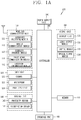
- FIG. 1A is a block diagram of a mobile terminal in accordance with the present disclosure
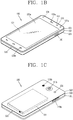
- FIGS. 1B and 1C are conceptual views of one example of the mobile terminal, viewed from different directions.
- the mobile terminal 100 is shown having components such as a wireless communication unit 110, an input unit 120, a sensing unit 140, an output unit 150, an interface unit 160, a memory 170, a controller 180, and a power supply unit 190. It is understood that implementing all of the illustrated components is not a requirement, and that greater or fewer components may alternatively be implemented.
- the mobile terminal 100 is shown having wireless communication unit 110 configured with several commonly implemented components.
- the wireless communication unit 110 typically includes one or more components which permit wireless communication between the mobile terminal 100 and a wireless communication system or network within which the mobile terminal is located.
- the wireless communication unit 110 typically includes one or more modules which permit communications such as wireless communications between the mobile terminal 100 and a wireless communication system, communications between the mobile terminal 100 and another mobile terminal, communications between the mobile terminal 100 and an external server. Further, the wireless communication unit 110 typically includes one or more modules which connect the mobile terminal 100 to one or more networks. To facilitate such communications, the wireless communication unit 110 includes one or more of a broadcast receiving module 111, a mobile communication module 112, a wireless Internet module 113, a short-range communication module 114, and a location information module 115.
- the input unit 120 includes a camera 121 for obtaining images or video, a microphone 122, which is one type of audio input device for inputting an audio signal, and a user input unit 123 (for example, a touch key, a push key, a mechanical key, a soft key, and the like) for allowing a user to input information.
- Data for example, audio, video, image, and the like
- controller 180 may analyze and process data (for example, audio, video, image, and the like) according to device parameters, user commands, and combinations thereof.
- the sensing unit 140 is typically implemented using one or more sensors configured to sense internal information of the mobile terminal, the surrounding environment of the mobile terminal, user information, and the like.
- the sensing unit 140 is shown having a proximity sensor 141 and an illumination sensor 142.
- the sensing unit 140 may alternatively or additionally include other types of sensors or devices, such as a touch sensor, an acceleration sensor, a magnetic sensor, a G-sensor, a gyroscope sensor, a motion sensor, an RGB sensor, an infrared (IR) sensor, a finger scan sensor, a ultrasonic sensor, an optical sensor (for example, camera 121), a microphone 122, a battery gauge, an environment sensor (for example, a barometer, a hygrometer, a thermometer, a radiation detection sensor, a thermal sensor, and a gas sensor, among others), and a chemical sensor (for example, an electronic nose, a health care sensor, a biometric sensor, and the like), to name a few.
- the mobile terminal 100 may be configured to utilize information obtained from sensing unit 140, and in particular, information obtained from one or more sensors of the sensing unit 140, and combinations thereof.
- the output unit 150 is typically configured to output various types of information, such as audio, video, tactile output, and the like.
- the output unit 150 is shown having a display unit 151, an audio output module 152, a haptic module 153, and an optical output module 154.
- the display unit 151 may have an inter-layered structure or an integrated structure with a touch sensor in order to facilitate a touch screen.
- the touch screen may provide an output interface between the mobile terminal 100 and a user, as well as function as the user input unit 123 which provides an input interface between the mobile terminal 100 and the user.
- the interface unit 160 serves as an interface with various types of external devices that can be coupled to the mobile terminal 100.
- the interface unit 160 may include any of wired or wireless ports, external power supply ports, wired or wireless data ports, memory card ports, ports for connecting a device having an identification module, audio input/output (I/O) ports, video I/O ports, earphone ports, and the like.
- the mobile terminal 100 may perform assorted control functions associated with a connected external device, in response to the external device being connected to the interface unit 160.
- the memory 170 is typically implemented to store data to support various functions or features of the mobile terminal 100.
- the memory 170 may be configured to store application programs executed in the mobile terminal 100, data or instructions for operations of the mobile terminal 100, and the like. Some of these application programs may be downloaded from an external server via wireless communication. Other application programs may be installed within the mobile terminal 100 at time of manufacturing or shipping, which is typically the case for basic functions of the mobile terminal 100 (for example, receiving a call, placing a call, receiving a message, sending a message, and the like). It is common for application programs to be stored in the memory 170, installed in the mobile terminal 100, and executed by the controller 180 to perform an operation (or function) for the mobile terminal 100.
- the controller 180 typically functions to control overall operation of the mobile terminal 100, in addition to the operations associated with the application programs.
- the controller 180 may provide or process information or functions appropriate for a user by processing signals, data, information and the like, which are input or output by the various components depicted in Fig. 1A , or activating application programs stored in the memory 170.
- the controller 180 controls some or all of the components illustrated in FIGS. 1A-1C according to the execution of an application program that have been stored in the memory 170.
- the power supply unit 190 can be configured to receive external power or provide internal power in order to supply appropriate power required for operating elements and components included in the mobile terminal 100.
- the power supply unit 190 may include a battery, and the battery may be configured to be embedded in the terminal body, or configured to be detachable from the terminal body.
- a mobile terminal according to the present disclosure as a mobile terminal performing multi-tasking may execute a plurality of functions at the same time. Moreover, a mobile terminal according to the present disclosure may display a plurality of screen information corresponding to a plurality of functions, respectively, at the same time on the touch screen 151.
- FIGS. 2A and 2B are flow charts illustrating a control method for conversion between a plurality of display formats on a mobile terminal according to the present disclosure
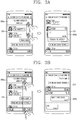
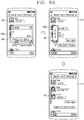
- FIGS. 3A through 5B are conceptual views for explaining the control method of FIGS. 2A and 2B .
- the controller of a mobile terminal may display first screen information of a first application on the display unit (S210).
- the controller 180 of a mobile terminal may execute a first application among a plurality of applications installed on the mobile terminal in response to a user's request.
- the controller 180 may execute a first application in response to a touch applied to a region displayed with an icon linked to the first application.
- an application is an application program for providing functions that are executable on the mobile terminal.
- the application may be pre-installed as factory default on the mobile terminal or downloaded from an external server to be installed by a user's control command.
- the user's request is a control command entered by a user through a user input unit of the mobile terminal.
- the user's request may be generated by a touch input, a gesture input, a button input or the like.
- the term a "user's request” may be replaced with a "control command,” a "user's control command,” a “user input” or the like.
- the controller 180 may cause displaying of the first screen information of the first application on the touch screen 151.
- the first screen information as screen information associated with the execution of the first application may include visual information corresponding to functions provided by the first application.
- the controller 180 may cause displaying of messages transmitted to or received from an external terminal, screen information associated with a message send function or the like as first screen information 310 on the touch screen 151.
- the message application as an application program for providing a function of transmitting and receiving messages to and from at least one external terminal may be also understood as a term of "message application” or “social network service (SNS) application.”
- SMS social network service
- the controller of a mobile terminal may cause displaying of notification information for notifying the occurrence of an event of the second application such that he notification information overlaps with the first screen information (S220).
- the controller 180 may sense an event occurred on a second application among a plurality of applications installed on the mobile terminal.
- the event may be an incident occurring on an application installed on the mobile terminal, for example, a message received, a call signal received, a missed call, an alarm, a schedule notification, an email received, information received through application, or the like.
- the controller 180 may cause displaying of notification information for notifying the occurrence of the event.
- the controller 180 may cause displaying of notification information 300a for notifying the occurrence of an event on a message application that different from the message application in an overlapping manner.
- the notification information may be also output with at least one of a visual, auditory or tactile mode.
- the controller of a mobile terminal may cause displaying of the first screen information of the first application and the second screen information of the second application concurrently on the display unit in response to a predetermined type of touch applied to the notification information for notifying the occurrence of the event (S230).
- the controller 180 may perform multi-tasking for executing a plurality of applications at the same time. Furthermore, when multi-tasking is carried out, the controller 180 may cause displaying of a plurality of screen information corresponding to applications being executed with the multi-tasking at the same time on the display unit 151.
- the plurality of screen information may be screen information that correspond to a corresponding one of a plurality of applications, or screen information that correspond to a corresponding one of a plurality of functions provided by one application.
- first screen information may be screen information including the content of messages transmitted to and received from an external terminal
- the second application may be screen information including call log information.
- the first screen information may be screen information including at least one thumbnail image
- the second screen information may be screen information including the content of messages transmitted to and received from an external terminal.
- the plurality of screen information may be displayed in various display formats on the display unit 151.
- the display format as a visual appearance on which screen information is displayed on the display unit may be a mode of displaying the position, color, size, shape or the like in which screen information is displayed on the display unit.
- the controller 180 may execute a second application in response to a predetermined type of touch applied to a region displayed with notification information for notifying the occurrence of an event that has occurred on the second application.
- the controller 180 may cause displaying of the first screen information of the first application and the second screen information of the second application concurrently on the display unit 151.
- the controller 180 may cause displaying of the first screen information of the first application and the second screen information of the second application in a specific display format.
- the controller 180 may cause displaying of first screen information on the entire region of the display unit 151, and displaying of second screen information in a pop-up window manner such that the second screen information overlaps with the first screen information.
- a display format of displaying at least part of each screen information in an overlapping manner may be referred to as a "slide over format” or "picture in picture (PIP) format.”
- the slide over format is a display format in which second screen information having a predetermined ratio on first screen information is displayed in an overlapping manner with a slide format.
- the PIP mode is a display format in which second screen information is displayed in a pop-up manner on first screen information. When displayed with the PIP mode, the second screen information may move on the first screen information according to a user's control command.
- both the "slide over format" and "PIP format" will be described as the term of a first display format.
- the controller 180 may cause partitioning of the display unit 151 into a plurality of regions, and displaying of a plurality of screen information on the respectively corresponding plurality of regions.
- a format in which a plurality of screen information are displayed not to overlap with each other may be referred to as a "split view" or "multi-window.”
- the split view is a display format in which different screen information are displayed on a plurality of partitioned regions, respectively. Furthermore, when different screen information are displayed with the split view, the controller 180 may exchange data between the different screen information with each other based on a user's control command.
- both the "split view” or “multi-window” will be described as the term of a second display format.
- the specific display format may be preset or set by a user.
- the controller 180 may cause displaying of screen information in the default display format.
- the controller 180 may cause displaying of first screen information and second screen information in a first display format.
- the controller 180 may cause displaying of first screen information and second screen information in a specific display format selected by the user.
- the controller 180 may cause displaying of notification information 300a for notifying the occurrence of an event that has occurred on a specific application while the first screen information 310 is displayed on the display unit 151.
- the controller 180 may determine whether or not to display it with either one of a first display format and a second display format according to the attribute of a predetermined type of touch applied to the notification information 300a for notifying the occurrence of an event that has occurred on the specific application.
- the predetermined type of touch may include a drag, a long touch, a multi-touch, or a double touch.
- the attribute of the touch may include a touch length, a touch duration time, a touch pressure, and a touch area in which the touch is sensed.
- the controller 180 may cause displaying of first screen information 310 and second screen information 300b in a first display format.
- the second screen information 300b may be screen information associated with the event.
- the controller 180 may cause displaying of first screen information 310 and second screen information 300b in a second display format.
- the controller 180 may convert the specific display format to another display format in response to a user's control command applied while first screen information and second screen information are displayed in a specific display format.
- the controller may cause displaying of first screen information and second screen information in a first display format on the display unit (S231).
- the controller 180 may cause displaying of first screen information and second screen information in a first display format in response to a user's request. For example, as illustrated in the first drawing of FIG. 4A , the controller 180 may cause displaying of first screen information 310 and second screen information 300b in a first display format.
- the predetermined type of touch may be a drag touch, a multi-touch, a double touch, a pinch-in touch, a pinch-out touch, a multi-touch-and drag, a long touch, a flicking touch, a bidirectional drag touch, or the like.
- the bidirectional drag touch is a drag touch consecutively moving in a horizontal direction or vertical direction with respect to a specific region.
- the specific region may be a boundary region between the second screen information and first screen information.
- the specific region may be an edge region of the second screen information.
- the controller 180 may sense a drag touch started from an edge region of the second screen information 300b and ended at a lower edge region of the display unit 151 while the first screen information 310 and second screen information 300b are displayed in a first display format.
- the controller 180 may convert the display format of first screen information and second screen information in response to the application of a predetermined type of touch. More specifically, the controller 180 may convert and cause displaying of first screen information and second screen information in a second display format in response to the predetermined type of touch applied while the first screen information and second screen information are displayed in a first display format. On the contrary, the controller 180 may convert and cause displaying of first screen information and second screen information in a first display format in response to the predetermined type of touch applied while the first screen information and second screen information are displayed in a second display format.
- the controller 180 may convert a first display format to a second display format in response to the application of a drag touch started from an edge region of the second screen information 300b and ended at a lower edge region of the display unit 151.
- the controller 180 may cause displaying of the first screen information 310 and second screen information 300b in a second display format.
- the present disclosure may be applicable in a similar manner to a case where a state of being displayed in a second display format is converted to a first display format.
- the controller 180 may sense a predetermined type of touch applied to a specific region of the display unit 151 while the first screen information 310 and second screen information 300b are displayed in a second display format. In this case, the controller 180 may convert and cause displaying of the first screen information and second screen information in a first display format in response to the application of the predetermined type of touch.
- the controller 180 may convert a second display format to a first display format in response to a long touch applied to a region displayed with the second screen information 300b while the first screen information 310 and second screen information 300b are displayed in the second display format.
- the second screen information 300b may be displayed on the display unit 151 in a pop-up manner to overlap with the first screen information 310.
- the controller 180 may convert a second display format to a first display format in response to a bidirectional drag touch horizontally applied to a region displayed with the second screen information 300b while the first screen information 310 and second screen information 300b are displayed in the second display format.
- the second screen information 300b may be displayed on the display unit 151 in a pop-up manner to overlap with the first screen information 310.
- the controller 180 may cause displaying of a guide image for guiding conversion of a display format on the display unit 151 based on a user's request prior to applying a predetermined type of touch to a specific region for the conversion of the display format.
- the guide image may be displayed on a region to which a predetermined type of touch is to be applied to guide the conversion of the display format. Accordingly, the user may know that it is allowed to apply a control command for the conversion of the display format through the guide image, and moreover, apply a predetermined type of touch to the guide image to convert the display format.
- the controller 180 may sense a short touch applied to an edge region of the screen information while the first screen information 310 and second screen information 300b are displayed in a first display format. In this case, the controller 180 may cause displaying of a guide image 320 for guiding the conversion of the display format on an edge region of the second screen information 300b.
- the controller 180 may convert a display format for displaying the first screen information and second screen information from a first display format to a second display format in response to the application of a drag touch started from a region displayed with the guide image 320 and ended at a lower edge region of the display unit 151. For example, as illustrated in the third drawing of FIG. 4A , the controller 180 may cause displaying of the first screen information 310 and the second screen information 300b in a second display format.
- the controller 180 may cause displaying of a guide image in response to a short touch applied to a boundary region between first screen information and second screen information while the first screen information and the second screen information are displayed in a second display format.
- the controller 180 may cause displaying of guide images 330a, 330b, 330c on a boundary region between the first screen information and the second screen information, and edge regions thereof, respectively, in response to a short touch applied to the boundary region between the first screen information and the second screen information.
- the controller 180 may determine screen information to be displayed in a pop-up manner between the first screen information and the second screen information based on a pinch-in touch applied to a region displayed with the guide image.
- the controller 180 may determine the second screen information 300b as screen information to be displayed in a pop-up manner based on a pinch-in touch applied to one region of the second screen information 300b.
- the second screen information 300b may be displayed on the display unit 151 to overlap with the first screen information 310.
- the controller 180 may determine the first screen information 310 as screen information to be displayed in a pop-up manner based on a pinch-in touch applied to one region of the first screen information 310. In this case, as illustrated in the third drawing of FIG. 4C , the controller 180 may cause displaying of the first screen information 310 in a pop-up manner on the second screen information 300b.
- the guide image may disappear from the display unit 151 when a touch to the guide image is not applied within a predetermined period of time while the guide image is displayed thereon.
- the controller 180 may enter an edit mode based on a user's request received while the first screen information 310 and second screen information 300b are displayed in a second display format.
- the edit mode may be in a state capable of changing the display format.
- the controller 180 may provide an animation effect on the first screen information 310 and the second screen information 300b to allow the user to visually recognize that the first screen information 310 and the second screen information 300b are in an editable state.
- the controller 180 may change the display format based on a predetermined type of touch applied to the display unit subsequent to entering the edit mode. For example, the controller 180 may execute an edit mode based on a long touch applied to a region displayed with the second screen information 300b while the first screen information 310 and the second screen information 300b are displayed in a second display format.
- the controller 180 may cause displaying of the second screen information 300b in a pop-up manner to overlap with the first screen information 310 based on a bidirectional drag touch consecutively moving in the left and right direction applied to a region displayed with the second screen information 300b while the edit mode is carried out.
- the user may execute an edit mode with respect to specific screen information to convert the display format.
- a method of converting the display format of a screen has been described. Through this method, the user may conveniently perform the conversion of the display format between screens on a mobile terminal in which multi-tasking is being carried out. Furthermore, a mobile terminal according to the present disclosure may perform the conversion of the display format of a screen through a simple touch manipulation with respect to a region displayed with screen information, thereby providing a method of allowing the user to intuitively controlling the display format of screen information.
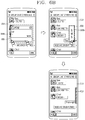
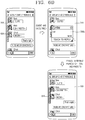
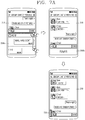
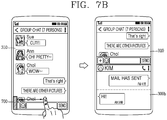
- FIGS. 6A through 7B are conceptual views illustrating a method of allowing any one screen information to disappear or be minimized while first screen information and second screen information are displayed concurrently.
- the controller 180 of a mobile terminal may cause displaying of first screen information and second screen information concurrently on the display unit 151.
- the controller 180 may change the size of a region displayed with at least one of the first screen information and the second screen information in response to a user's control command applied while the first screen information and the second screen information are displayed concurrently on the display unit 151.
- the controller 180 may allow either one screen information of the first screen information and the second screen information to disappear or be minimized from the display unit 151 in response to the user's control command applied while the first screen information and the second screen information are displayed concurrently on the display unit 151.
- the controller 180 may cause displaying of an indicator linked to the either one screen information on the display unit 151.
- An indicator linked to the either one screen information may be a graphic object linked to a function of displaying either one screen information.
- An indicator linked to the either one screen information may be displayed on one region of the display unit 151.
- the one region may be a predetermined region or a region set based on a user's control command.
- the user may recognize existence of either one screen information even after the either one screen information disappears from the display unit 151.
- the controller 180 may change the size of a region 600 displayed with the second screen information 300b based on a drag touch applied to the region 600 displayed with the second screen information 300b while the first screen information 310 and the second screen information 300b are displayed in a first display format.
- the controller 180 may reduce the size of the region 600 displayed with the second screen information 300b in a direction in which the drag touch is applied. For example, when the drag touch is in a direction toward the left side of the display unit, a right portion of the region 600 displayed with the second screen information 300b may be gradually reduced.
- the second screen information 300b may be changed from detailed information to summary information.
- the controller 180 may allow the second screen information 300b to disappear from the display unit 151. In this case, the controller 180 may cause displaying of an indicator 610 linked to the screen information on the display unit 151.
- the controller 180 may cause displaying of the indicator 610 on an edge region of the display unit 151 located in a direction in which the drag touch is applied. For example, as illustrated in the third drawing of FIG. 6A , the indicator 610 may be displayed at a left edge of the display unit 151 when the direction of the drag touch is a direction toward the left side of the display unit 151, the indicator 610 may be displayed at a left edge of the display unit 151.
- the controller 180 may change a region 600 displayed with the second screen information 300b in response to a drag touch applied to the region displayed with the second screen information 300b.
- the indicator 610 may be displayed at a right edge of the display unit 151.
- the controller 180 may cause displaying of the second screen information again on the display unit 151 in response to a predetermined type of touch applied to the indicator.
- the controller 180 may cause displaying of the second screen information 300b again in response to a drag touch applied to the indicator 610 while the indicator 610 is displayed instead of the second screen information 300b.
- the controller 180 may sense that an event has occurred on an application linked to the second screen information while an indicator is displayed instead of the second screen information.
- the event may be an operation of updating new information on an application or an operation of receiving a message or call signal from an external server or external terminal.
- the controller 180 may cause displaying of second screen information including information associated with the event on the display unit 151 to allow the user to recognize the occurrence of the event.
- the controller 180 may sense that a message has been received on a message application linked to the second screen information 300b while the indicator 610 representing the second screen information 300b is displayed.
- the second screen information 300b including the content of the message may be displayed on the display unit 151.
- the controller 180 may provide an animation effect on the indicator instead of the content of the message.
- the controller 180 may cause the size of the indicator to be increased or decreased. Through this, the user may recognize that an event has occurred on an application linked to the second screen information.
- the controller 180 may cause displaying of second screen information including information associated with the event only for a predetermined period of time. In other words, when a predetermined period of time has passed, the controller 180 may allow second screen information including information associated with the event to disappear from the display unit 151. Accordingly, the user may receive first screen information without interfering with the second screen information while at the same time recognizing the occurrence of an event associated with the second screen information.
- first screen information and second screen information are displayed in a first display format.
- first screen information and second screen information are displayed in a second display format.
- the controller 180 may control the size of a region displayed with each screen information based on a user's control command.
- the controller 180 may change the size of a region displayed with the first screen information 310 and a region displayed with the second screen information 300b based on a drag touch applied to a boundary region between the first screen information 310 and the second screen information 300b. More specifically, the region displayed with the first screen information 310 may increase to the extent of a size corresponding to a touch length of the drag touch, and the region displayed with the second screen information 300b may decrease to the extent of a size corresponding to a touch length of the drag touch.
- the controller 180 may change the extent of displaying the first screen information and the second screen information. For example, as illustrated in the first drawing of FIG. 7A , when a region displayed with the first screen information 310 is enlarged, the controller 180 may further cause displaying of information that is not displayed prior to the enlargement of the region or included in the first screen information 310. When a region displayed with the second screen information 300b is reduced, the controller 180 may cause the display unit 151 to not display at least part of information that has been displayed prior to the reduction of the region.
- the controller 180 may cause displaying of information that has been displayed prior to the reduction of the region as summary information.
- the summary information is information in which the information is summarized in brief.
- the controller 180 may allow information displayed on the either one region to disappear from the display unit 151.
- the controller 180 may allow the second screen information 300b to disappear from the display unit 151.
- the controller 180 may cause displaying of an indicator 700 linked to the second screen information 300b.
- the controller 180 may cause displaying of the second screen information 300b again in response to a predetermined type of touch applied to a region displayed with an indicator 700 linked to the second screen information 300b.
- the controller 180 may cause displaying of the second screen information 300b again on the display unit 151.
- the controller 180 may cause displaying of the second screen information 300b again in a display format displayed with the second screen information 300b prior to displaying the indicator 700.
- the controller 180 may cause displaying of the second screen information 300b again in the second display format.
- FIGS. 8A through 8D are conceptual views illustrating a method of selecting second screen information to be displayed along with first screen information.
- the controller 180 of a mobile terminal may cause displaying of first screen information and second screen information concurrently on the display unit 151 based on a user's request or predetermined condition.
- the controller 180 may determine information to be displayed as second screen information based on the user's selection.
- the controller 180 may provide screen information including the icons of at least one application of a plurality of applications installed on the mobile terminal based on a predetermined type of touch applied to a specific region.
- screen information including the icons of at least one application is referred to and described as an app list.
- the predetermined type of touch may be a drag touch moving at a speed that is less than a predetermined speed on a specific region.
- the specific region may be a region displayed with an indicator linked to the foregoing second screen information.
- a mobile terminal may immediately display second screen information in response to a drag touch moving at a speed that is greater than a predetermined speed applied to the indicator, and display an app list in response to a drag touch moving at a speed that is less than a predetermined speed applied to the indicator.
- the controller 180 may cause displaying of an app list 810 based on a drag touch at a speed that is less than a predetermined speed applied to a specific region 800 while the first screen information 310 is displayed.
- the controller 180 may set an execution screen of an application corresponding to a specific icon 820 to second screen information in response to a touch applied to the specific icon 820 among the icons of at least one application included in the app list 810.
- the controller 180 may cause displaying of an execution screen 830 of an application corresponding to the specific icon 820 in a second display format along with the first screen information.
- the controller 180 may determine a display position at which the execution screen of an application corresponding to the specific icon 820 is displayed based on a release point from which a touch to the specific icon is released.
- the controller 180 may cause displaying of the execution screen 830 of an application corresponding to the specific icon 820 on a region displayed with the first screen information 310, and displaying of the first screen information 310 on a region displayed with the app list 810 based on a touch to the specific icon 820 released from one point of the region displayed with the first screen information 310.
- controller 180 may determine the display format of first screen information and second screen information according to the type of a touch applied to the specific icon.
- the controller 180 may set the display format to a first display format based on a bidirectional drag touch horizontally moving with respect to the specific icon 820.
- the controller 180 may cause displaying of the first screen information 310 and the execution screen 830 of an application corresponding to the specific icon 820 in a first display format.
- the controller 180 may determine the display format in a second display format based on a short touch applied to the specific icon 820.
- the controller 180 may determine the display format and display position of screen information at the same time based on a touch to the specific icon.
- the controller 180 may move the specific icon 820 to a region in which the first screen information 310 is displayed based on a drag touch applied to the specific icon 820.
- the controller 180 may cause displaying of the first screen information 310 and the execution screen 830 corresponding to the specific icon 820 in a first display format in response to a bidirectional drag touch consecutive to the drag touch applied to the specific icon 820.
- FIGS. 9A and 9B are conceptual views illustrating a method of changing the display position of first screen information and second screen information when the screen information is displayed in a second display format.
- the controller 180 of a mobile terminal may cause partitioning of the display unit 151 into a plurality of regions to cause displaying of first screen information and second screen information on their respective regions in a second display format.
- the controller 180 may enter a position change mode based on a user's control command for changing a display position while displaying in the second display format.
- the position change mode denotes a state capable of changing a display position between at least two screen information respectively displayed on a corresponding region among a plurality of regions.
- the controller 180 may enter a position change mode based on a touch applied to a boundary region between first screen information and second screen information.
- the controller 180 may cause displaying of guide images 900a, 900b, 900c for guiding a position change on the display unit 151.
- the controller 180 may change the display position of the first screen information and second screen information in response to a drag touch applied to a region displayed with the guide image. For example, as illustrated in the first and second drawings of FIG. 9B , the controller 180 may change the display position of the first screen information 310 and second screen information 300b in response to a drag touch started from a region displayed with the guide image 900c for guiding a position change and ended at a region displayed with the first screen information 310. Through this, the user may conveniently perform a position change between a plurality of regions.
- FIGS. 10A and 10B are conceptual view illustrating a method of performing multi-tasking using a notification screen.
- the controller 180 may cause displaying of notification information for notifying the occurrence of the event on a notification screen.
- the notification screen may be a screen including notification information for notifying the operation information, screen brightness and occurrence of an event on a mobile terminal. Furthermore, the notification screen may include a message line indicating the current operation status of an application program, hotkeys of specific menus, minimized status information of some programs, and the like.
- the notification screen may include WiFi status information, data communication status information, Bluetooth communication status information, GPS status information, screen brightness control, message notification information, mail notification information, weather notification information, application update information, missed call notification information, and the like.
- the notification screen may be displayed on the display unit 151 based on a drag touch applied to a specific region.
- the controller 180 may cause displaying of the notification screen on the display unit 151 based on a drag touch applied to an upper end region of the display unit 151.
- the notification screen may be replaced by the term of a status display screen, a status display region, a task bar, a status line, a dock bar, a dock, a panel, or the like.
- the controller 180 may cause displaying of screen information associated with specific notification information in a first display format based on a predetermined type of touch applied to specific notification information among notification information for notifying the occurrence of a plurality of events.
- the predetermined type of touch may be implemented in various touch modes.
- the predetermined type of touch may be a touch applied to a plurality of touch points at the same time or vertically bidirectionally applied drag touch.
- the screen information associated with the specific notification information may be displayed in a first display format along with screen information that has been displayed prior to displaying of a notification screen.
- the controller 180 may sense a second touch applied to a notification screen in a state that a first touch is applied to notification information 1000a for notifying a missed call among notification information 1000a, 1000b, 1000c, 1000d for notifying the occurrence of a plurality of events.
- the controller 180 may cause displaying of the first screen information 310 and call log information 1010 that have been displayed on the display unit 151 prior to displaying of the notification screen in a first display format.
- the controller 180 may sense a vertically bidirectionally applied drag touch to the notification information 1000a for notifying a missed call among the notification information 1000a, 1000b, 1000c, 1000d for notifying the occurrence of a plurality of events.
- the controller 180 may cause displaying of the first screen information 310 and call log information 1010 that have been displayed on the display unit 151 prior to displaying of the notification screen in a first display format.
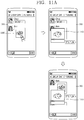
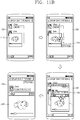
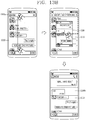
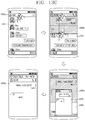
- FIGS. 11A through 13C are conceptual views illustrating a method of performing multi-tasking during the execution of a message application.
- a mobile terminal may display screen information corresponding to two or more functions concurrently on the display unit 151.
- one application may provide two or more functions.
- the message application may provide a function of displaying the content of messages transmitted to and received from an external terminal and a function of playing a video included in a specific message.
- the controller 180 may provide screen information corresponding to two or more functions provided from the one application at the same time on the display unit 151.
- the controller 180 may cause displaying of the first screen information 310 including the content of messages transmitted to and received from an external terminal on the display unit 151.
- the first screen information 310 may include a message 1100 including video data.
- the controller 180 may cause displaying of the playback screen 1110 of a video as second screen information on the first screen information 310 in an overlapping manner in response to a user's request for video playback.
- the controller 180 may cause displaying of the first screen information 310 and the playback screen 1110 of a video in a first display format.
- the controller 180 may cause displaying of the content of the new message on the first screen information 310. For example, as illustrated in the third drawing of FIG. 11A , the controller 180 may cause displaying of the content of a new message. In other words, the controller 180 may perform updating of first screen information regardless of the playback of a video.
- the updating denotes an operation of adding new information to the existing information or changing the existing information to new information.
- the controller 180 may cause displaying of the playback screen 1110 of the video on the display unit 151. In other words, the controller 180 may maintain the playback of the video. Accordingly, the user may receive a latest message and a video at the same time.
- the controller 180 may perform a different function according to a touch mode with respect to the video playback screen 1110.
- the different function as a function associated with a video may include a function of changing the display format of the video playback screen 1110, a function of storing a video in the memory 170, and the like.
- the controller 180 may cause displaying of notification information 1120 for notifying that it can be changed to a second display format based on a drag touch having at least two touch points with respect to the video playback screen 1110 and moving from the bottom to the top.
- the controller 180 may cause displaying of the first screen information 310 and video playback screen 1110 in a second display format based on a multi-touch applied to the notification information 1120.
- the controller 180 may cause displaying of screen information 1130 for determining a position at which a video is to be stored (or downloaded) based on a drag touch having at least two touch points with respect to the video playback screen 1110 and moving from the left to the right.
- the screen information for determining a position at which a video is to be stored (or downloaded) may include screen information such as a preset folder on the memory, create a new folder, and the like.
- the screen information for determining a position (or path) to store (or download) the video may be understood as the screen information of functions referred to as "file manger,” "data manager,” and the like.
- the folder (or directory) may be a specific region of the memory for storing files.
- the user may select a storing location of a video using screen information for determining a location at which the video is to be stored. For example, as illustrated in the third drawing of FIG. 11C , a specific folder 1140 may be selected as a storing location of the video.
- the controller 180 may cause storing of a video at the selected storing location. Furthermore, as illustrated in the fourth drawing of FIG. 11C , when the video is stored, a progress bar 1150 indicating the progress of storing the video may be displayed on the display unit 151.
- the controller 180 may allow the progress bar to disappear from the display unit 151.
- a thumbnail image (or representative image) of the stored video may be displayed on the display unit 151.
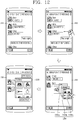
- the controller 180 may cause displaying of an app list in a bookmark shape based on a predetermined type of touch applied to a specific region of the display unit 151 while displaying the execution screen of a specific application.
- the controller 180 may sense a drag touch moving toward the center from a right edge region of the display unit 151 while the execution information 310 of a message application is displayed.
- the controller 180 may cause displaying of an app list 1200 on the execution information 310 of the message application in an overlapping manner.
- the app list may include thumbnail images 1200a, 1200b, 1200c corresponding to currently executed applications.
- the controller 180 may cause displaying of an execution screen 1210 of a gallery application on the execution information 310 of the message application in an overlapping manner based on the selection of the thumbnail image 1200c corresponding to the gallery application on the app list 1200.
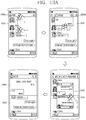
- the message application may include a plurality of dialog boxes.
- a dialog box denotes screen information for displaying the content of a message.
- the plurality of dialog boxes may have different external terminals for transmitting messages.
- a first dialog box is a dialog box for displaying a message transmitted to or received from a first external terminal
- a second dialog box is a dialog box for displaying a message transmitted to or received from a second external terminal.
- the controller 180 may cause displaying of the first dialog box and the second dialog box at the same time.
- the controller 180 may cause displaying of the second dialog box 1300b on the first dialog box 1310 in a pop-up manner.
- the controller 180 may cause displaying of notification information 1320 indicating that the first dialog box 1310 and second dialog box 1300b can be displayed in a second display format on the display unit 151 based on a drag touch applied to two touch points at the same time with respect to the second dialog box 1300b.
- the controller 180 may cause displaying of the first dialog box 1310 and the second dialog box 1300b in a second display format.
- the controller 180 may maintain the first display format of the first dialog box 1310 and the second dialog box 1300b.
- the controller 180 may cause immediate displaying of the notification information 1320 indicating that the first dialog box 1310 and the second dialog box 1300b can be displayed in a second display format.
- the controller 180 may cause displaying of the first dialog box 1310 and the second dialog box 1300b in either the first display format or the second display format based on a touch applied to the notification information 1320 indicating that the first dialog box 1310 and the second dialog box 1300b can be displayed in a second display format.
- the controller 180 may cause displaying of the first dialog box 1310 and the second dialog box 1300b in a second display format.
- the controller 180 may cause displaying of notification information 1330 indicating that only the second dialog box 1300b can be displayed on the display unit 151.
- the controller 180 may cause displaying of only the second dialog box 1300b on the display unit 151.
- the present disclosure may convert and display the display format of a plurality of screen information. Accordingly, the user may receive a suitably converted display format without going through various steps.
- the present disclosure may provide a plurality of screen information at the same time, thereby conveniently performing an interaction between each screen information.
- a mobile terminal when part of screen information among a plurality of screen information is hidden and not seen from other screen information, a mobile terminal according to the present disclosure may provide distorted part of screen information to the user.
- a method of providing part of screen information that is hidden and not seen from other screen information will be described.
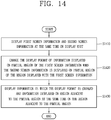
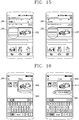
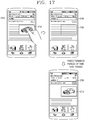
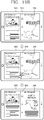
- FIG. 14 is a flow chart illustrating a control method of displaying a plurality of screen information on a mobile terminal according to the present disclosure. Furthermore, FIGS. 15 through 17 are conceptual views illustrating the control method of FIG. 14 .
- the controller 180 of a mobile terminal may cause displaying of first screen information and second screen information concurrently on the display unit (S1410).
- the controller 180 of a mobile terminal may cause displaying of a plurality of screen information concurrently on the display unit 151.
- the controller 180 may cause displaying of first screen information and second screen information concurrently.
- a user may apply a control command for generating first screen information and second screen information at the same time.
- the user may display an app list of currently executed applications based on a touch sensed at four touch points at the same time started from a specific edge region (for example, right edge region) and dragged toward a central region of the display unit 151.
- the controller 180 may cause displaying of the first screen information of a first application and the second screen information of a second application selected by the user from the app list of currently executed applications at the same time.
- the first screen information may be screen information corresponding to a web application
- the second screen information may be screen information corresponding to a gallery application.
- the first screen information is screen information indicating a first dialog box for transmitting and receiving messages to and from a first terminal
- the second screen information is screen information indicating a second dialog box for transmitting and receiving messages to and from a second terminal.
- the controller 180 may cause displaying of second screen information on a partial region of a region displayed with first screen information.
- the controller 180 may cause displaying of the second screen information on the first screen information in an overlapping manner.
- the second screen information may be displayed in a floating manner.
- the floating manner may denote a manner in which screen information is movable within the display region of the display unit 151.
- the controller 180 may cause displaying of second screen information 1510 corresponding to an image on a partial region of a region displayed with first screen information 1500 corresponding to a webpage.
- the second screen information 1510 corresponding to the image may be displayed in a floating manner.
- the second screen information 1510 may move in response to a user's control command.
- the controller 180 of a mobile terminal may change the display format of information displayed on a partial region of the first screen information when the second screen information is displayed on a partial region of a region displayed with the first screen information (S1420).
- the user is unable to view at least part of the first screen information 1500.
- the controller 180 may change the display format of information displayed on a partial region hidden by the second screen information 1510 to display it on another region of the first screen information 1500.
- the controller 180 may detect information in which the second screen information 1510 is displayed on a partial region of a region displayed with the first screen information 1500, and displayed on a partial region hidden by the second screen information 1510 of the first screen information 1500.
- the controller 180 may change the display format of information displayed on the partial region.
- the display format denotes a visual appearance such as a display size, a display position, a display shape, and the like in which the information is displayed.
- the controller 180 may change at least one of a text line spacing, a text size or a text position.
- the term of "changing the display format of information" may have the same meaning as the term of "distorting the display format of information.”
- the controller 180 of a mobile terminal may cause displaying of information displayed on a partial region in which the display format is changed and information displayed on a region adjacent to the partial region at the same time on a region adjacent to the partial region (S1430).
- the controller 180 may change the display format of information displayed on a partial region, and then cause displaying of information displayed on a partial region in which the display format is changed and information displayed on the adjacent region at the same time on a region adjacent to the partial region.
- the adjacent region may be a surrounding region of the region displayed with the second screen information 1510.
- a region 1520 adjacent to a partial region may be a region located at the left side of a region displayed with the second screen information 1510.
- the controller 180 may change the display format of information displayed on the adjacent region to cause displaying of information displayed on a partial region in which the display format is changed and information displayed on the adjacent region at the same time. In other words, the controller 180 may change all display formats of information displayed on a partial region and information displayed on a region adjacent to the partial region.
- the controller 180 may cause displaying of information displayed on a partial region and information displayed on an adjacent region in a changed display format on the adjacent region. For example, as illustrated in the second drawing of FIG. 15 , the controller 180 may change the line spacing and size of texts displayed on a partial region and texts displayed on an adjacent region to display them on a region 1520 adjacent to a partial region. Accordingly, the user may view information hidden by the second screen information 1510 without any additional manipulation to the second screen information.
- the controller 180 may detect a specific message displayed on a region displayed with the second screen information 1610 among the plurality of messages.
- the controller 180 may move and cause displaying of the specific message on a region 1620 adjacent to a region displayed with the second screen information 1610. Accordingly, the user may view the first screen information 1600 and the second screen information 1610 at the same time as well as concurrently receive event information hidden by the second screen information.
- the controller 180 does not change the display format of the remaining information other than information displayed on the partial region of the first screen information. In other words, the controller 180 may maintain the display format of the remaining information other than information displayed on a partial region adjacent to the partial region.
- the second screen information may be moved according to a user's control command.
- the controller 180 may change the display position of the second screen information based on the user's control command.
- the controller 180 may change the display position of the second screen information in response to a drag input applied to the second screen information.
- the controller 180 may redetect information displayed on a region in which the second screen information is moved. Then, the controller 180 may change information displayed on a region in which the second screen information is moved and information displayed on a region adjacent to the region in which the second screen information is moved to display them on a region adjacent to the region in which the second screen information is moved.
- the controller 180 may return the display format of information for which the display format has been changed prior to the movement of the second screen information to a state prior to changing the display format.
- the controller 180 may return the display format of information that is not hidden by the second screen information to a state prior to changing the display format to display them on the display unit 151.
- the controller 180 may move the second screen information based on a predetermined condition.
- the predetermined condition may be a condition for the first screen information to be refreshed or a condition for the first screen information to be scrolled.
- the controller 180 may detect a specific region corresponding to a region displayed with specific information on a region of the display unit 151.
- the specific region may be a region that is the farthest from a region displayed with specific information.
- the controller 180 may move the second screen information to display the second screen information on the specific region.
- the controller 180 may detect a specific region located in a direction opposite to a direction of moving screen information by the scroll.
- the controller 180 may move the second screen information to cause displaying of the second screen information on the specific region.
- the size or shape of the second screen information may be changed based on a predetermined condition.
- the controller 180 may allow the second screen information to temporarily disappear from the display unit 151 in response to a predetermined type of touch applied to the second screen information.
- the predetermined type of touch may include a multi-touch, a long touch, a double touch, a drag touch, and the like.
- the controller 180 may cause displaying of information displayed on a partial region in which the second screen information is displayed on the display unit 151 in a state prior to changing the display format.
- the controller 180 may sense a long touch applied to second screen information 1710 while the second screen information 1710 including an image is displayed on first screen information 1700 containing a webpage.
- the controller 180 may allow the second screen information 1710 to disappear from the display unit 151. Accordingly, the user may view the first screen information 1700 with a non-changed display format without any interference of the second screen information 1710.
- the controller 180 may cause displaying of a guide image 1720 indicating the display position of the second screen information 1710 on a region from which the second screen information 1710 disappears. Accordingly, the user may recognize a state that the second screen information temporarily disappears, and know the existence and content of information hidden by the second screen information.
- the controller 180 may cause displaying of the second screen information 1710 again.
- the controller 180 may provide both the first screen information 1700 and the second screen information 1710.
- a mobile terminal according to the present disclosure may change the display format of at least part of the first screen information to provide it to the user as described above.
- FIGS. 18 through 21 B are conceptual views illustrating a control method according to the display position of a function bar.
- the controller 180 may cause partitioning of the display unit 151 into a plurality of regions. For example, the controller 180 may cause partitioning of the display unit 151 into a first region and a second region.
- controller 180 may cause each the plurality of partitioned regions to display different screen information.
- the controller 180 may individually control information displayed in each partitioned region.
- the controller 180 may cause displaying of first screen information 1800 on a first region, and displaying of second screen information 1810 on a second region.
- the controller 180 may cause displaying of a function execution bar 1820 on one region of the display unit 151.
- the function execution bar 1820 may be a bar type graphic object including a graphic object linked to a function of entering a home screen, a graphic object linked to an execution cancel function, and a graphic object linked to a function of displaying an app list being carried out.
- the function of entering a home screen may be a function of displaying a home screen indicating a standby state on the display unit 151.
- the execution cancel function may be a function of cancelling the execution of a currently executed function, and entering a screen just prior to the execution of the current function, for example, a function of entering a previous webpage.
- the function of displaying an app list being carried out may be a function of displaying an app list including applications being currently carried out on a mobile terminal.
- the controller 180 may change a display region of the function execution bar based on a predetermined type of touch applied to the function execution bar 1820.
- the controller 180 may move the function execution bar 1820 based on two drag inputs applied to the function execution bar 1820 as well as based on a direction in which the two drag inputs are applied.
- the controller 180 may move the function execution bar 1820 to a central region of the display unit 151 based on the application of two drag inputs having the left direction based on a front surface of the display unit 151.
- the controller 180 may cause displaying of the function execution bar 1820 on the left region of the display unit 151 based on two drag inputs having the left direction applied to the function execution bar 1820 displayed on the central region.
- the controller 180 may execute a function of the function execution bar 1820 with respect to screen information displayed on a region which is the most adjacent to a region displayed with the function execution bar 1820. For example, as illustrated in the first drawing of FIG. 18 , when the function execution bar 1820 is displayed on the right region of the display unit 151, the controller 180 may execute a function of the function execution bar to the second screen information 1810. Furthermore, as illustrated in the third drawing of FIG. 18 , when the function execution bar 1820 is displayed on the left region of the display unit 151, the controller 180 may execute a function of the function execution bar to the first screen information 1800.
- the controller 180 may execute a function with respect to either first screen information or second screen information based on an input with respect to the function execution bar.
- controller 180 may execute a function for either first screen information or second screen information based on the direction of a drag input applied to the function execution bar.
- the controller 180 may cause displaying of a function execution bar 1920 on a region between first screen information 1900 and second screen information 1910, namely, on a central region of the display unit 151.
- the controller 180 may convert the function execution bar 1920 from an inactive state to an active state in response to a short touch applied to the function execution bar 1920.
- the activation of the function execution bar 1920 is a state in which functions included in the function execution bar are executable.
- the deactivation of the function execution bar 1920 is a state in which functions included in the function execution bar are restricted.
- the controller 180 may execute an execution cancel function for the first screen information 1900 in response to a drag touch toward the first screen information 1900 applied to a graphic object linked to the execution cancel function included in the function execution bar.
- the controller 180 may cause displaying of screen information 1930 indicating a previous webpage of the first screen information 1900 on a first region .
- the function execution bar 1920 may be in an active state.
- the controller 180 may execute an execution cancel function with respect to the second screen information 1910 in response to a drag touch toward the second screen information 1910 applied to a graphic object linked with an execution cancel function included in the function execution bar 1920.
- the controller 180 may cause displaying of screen information 1940 indicating a previous webpage of the second screen information 1910 on a second region.
- the user may execute a function included in the function execution bar through a drag input toward a region displayed with screen information for executing a function included in the function execution bar with respect to the function execution bar displayed on a central region.
- the user may intuitively set screen information which is a subject of function execution.
- the controller 180 may sense a drag input toward first screen information 2000 applied to a graphic object linked to a function of displaying an app list including currently executed applications.
- the controller 180 may cause displaying of an app list 2030 including currently executed applications 2030a, 2030b, 2030c on a first region.
- the controller 180 may cause displaying of an execution screen of a specific application 2030c on the first region in response to a touch applied to the specific application 2030c on the app list 2030.
- the controller 180 may cause displaying of an execution screen of a specific application according to a drag input applied to the specific application included in the app list.
- the controller 180 may cause displaying of an app list 2030 on a first region in response to a drag input toward the first screen information 2000 applied to a graphic object linked to a function of displaying an app list including currently executed applications.
- the controller 180 may cause displaying of an execution screen of the specific application 2030c on a second region based on a drag input toward the second screen information 2010 applied to the specific application 2030c.
- the function execution bar may be provided in the shape of being connected to specific screen information of the first screen information or second screen information.
- the controller 180 may cause displaying of the function execution bar 2120 in a bookmark shape connected to the first screen information 2100.
- the function execution bar 2120 may be provided in the shape of being connected to currently active screen information between the first screen information 2100 and second screen information 2110.
- the active screen information may be screen information selected by the user.
- the controller 180 may provide the function execution bar in a state that the first screen information is not hidden.
- the controller 180 may execute functions included in the function execution bar with respect to screen information connected to the function execution bar 2120. For example, as illustrated in the second drawing of FIG. 21A , the controller 180 may execute an execution cancel function to the first screen information 2100, and cause displaying of screen information 2130 including a previous webpage of the first screen information 2100 on a first region.
- the controller 180 may cause displaying of screen information 2150 including a previous webpage of the second screen information 2110 on a second region in response to a touch applied to a graphic object linked to an execution cancel function while a function execution bar 2140 in the shape of being connected to the second screen information 2110 is displayed.
- FIGS. 22A through 25 are conceptual views illustrating a method of controlling the display format of specific screen information when a plurality of screen information are displayed at the same time.
- the controller 180 may cause displaying of the second screen information to overlap with the first screen information on the display unit 151.
- the controller 180 may sense the first screen information being scrolled while the second screen information is displayed on the first screen information in an overlapping manner. In this case, the controller 180 may change the display format of the second screen information.
- the controller 180 may sense the first screen information 2200 being scrolled while the second screen information 2210 is displayed on the first screen information 2200 in an overlapping manner.
- the controller 180 may reduce a display size of the second screen information 2210.
- a mobile terminal according to the present disclosure may determine screen information to which the user's manipulation is applied as screen information of interest, and reduce a display size of other information to disallow the screen information of interest to be hidden by the other information. Through this, the user may view a lot of currently interested screen information.
- the controller 180 may cause displaying of the second screen information 2210 in a state prior to changing the display format on the display unit 151.
- the controller 180 may sense the first screen information 2200 being refreshed in a state that the display format of the second screen information 2210 is changed.
- refresh is an operation of receiving new information that is different from previously displayed information through wireless communication and displaying it on the display unit.
- the controller 180 may cause displaying of the second screen information 2210 again.
- the controller 180 may change the display position of the second screen information in a direction corresponding to a direction of scrolling the first screen information. Accordingly, the user may view newly displayed information while scrolling the first screen information without interfering with the second screen information.
- the controller 180 may change the display position of the second screen information based on a touch applied to an edge region of the second screen information. At this time, the controller 180 may determine the display position of the second screen information as a position corresponding to the position of the touch applied region.
- the controller 180 may cause displaying of the second screen information 2310 on a left upper edge region of the display unit 151 in response to a touch applied to a left region of an upper edge region of the second screen information 2310, the second screen information displayed on first screen information 2300.
- the controller 180 may cause displaying of the second screen information 2310 on an upper central region of the display unit 151 in response to a touch applied to a central region of the upper edge region of the second screen information 2310, the second screen information 2310 displayed on first screen information 2300.
- the use may intuitively move the second screen information.
- the controller 180 may cause displaying of first screen information 2400 on a first region, and displaying of third screen information 2420 on second screen information 2410 in an overlapping manner on a second region.
- the display size of the third screen information may be concurrently changed by changing the display size of the second screen information.
- the controller 180 may change the size of the first region and the second region based on a touch applied to a boundary region between the first region and the second region.
- the controller 180 may also change a size of the first screen information 2400 and a size of the second screen information 2410 to correspond to the size of the first region and the second region.
- the controller 180 may also reduce the size of the third screen information 2420 when the size of the second screen information 2410 is reduced.
- the controller 180 may maintain the size of the third screen information 2420 though the size of the first screen information 2400 is enlarged.
- the display position of the third screen information may be changed based on whether or not the first screen information and the second screen information are activated.
- the controller 180 may move and cause displaying of third screen information 2520 onto first screen information 2500 based on a user's touch input. Accordingly, the user may receive an activated screen without interfering with the third screen information 2520.
- a mobile terminal may distort the hidden screen information, thereby effectively providing the hidden information.
- a mobile terminal may move a function bar display region, thereby performing each function included in the function bar with respect to any one screen information of the plurality of screen information. Accordingly, the user may directly select the execution subjects of functions included in the function bar display region.
- the foregoing present invention may be implemented as codes readable by a computer on a medium written by the program.
- the computer-readable media may include all kinds of recording devices in which data readable by a computer system is stored. Examples of the computer-readable media may include hard disk drive (HDD), silicon disk drive (SDD), solid state disk (SSD), ROM, RAM, CD-ROM, magnetic tape, floppy disk, and optical data storage device, and the like, and also include a device implemented in the form of a carrier wave (for example, transmission via the Internet).
- the computer may include the controller 180 of the terminal. Accordingly, the detailed description thereof should not be construed as restrictive in all aspects but considered as illustrative. The scope of the invention should be determined by reasonable interpretation of the appended claims and all changes that come within the equivalent scope of the invention are included in the scope of the invention.
Landscapes
- Engineering & Computer Science (AREA)
- Theoretical Computer Science (AREA)
- General Engineering & Computer Science (AREA)
- Human Computer Interaction (AREA)
- Physics & Mathematics (AREA)
- General Physics & Mathematics (AREA)
- Software Systems (AREA)
- Computer Networks & Wireless Communication (AREA)
- Signal Processing (AREA)
- User Interface Of Digital Computer (AREA)
- Telephone Function (AREA)
- Controls And Circuits For Display Device (AREA)
Claims (14)
- Mobiles Endgerät, das Folgendes umfasst:eine Anzeige (151); undeine Steuereinheit (180), die konfiguriert ist, zu bewirken, dass die Anzeige (151):erste Bildschirminformationen (310) einer ersten Anwendung anzeigt;Benachrichtigungsinformationen (300a) zum Benachrichtigen eines Auftretens eines Ereignisses bezüglich einer zweiten Anwendung anzeigt;einen vorbestimmten Typ einer Berührungseingabe, die auf die Benachrichtigungsinformationen (300a) ausgeübt wird, empfängt;die zweite Anwendung als Reaktion auf den vorbestimmten Typ einer Berührungseingabe ausführt;die ersten Bildschirminformationen (310) und die zweiten Bildschirminformationen (300b) der zweiten Anwendung gleichzeitig in einem ersten Anzeigeformat anzeigt, wenn der vorbestimmte Typ einer Berührungseingabe ein erster Typ einer Berührungseingabe ist, wobei die zweiten Bildschirminformationen (300b) zumindest einen Teil der ersten Bildschirminformationen (310) in dem ersten Anzeigeformat überdecken; unddie ersten Bildschirminformationen (310) und die zweiten Bildschirminformationen (300b) gleichzeitig in einem zweiten Anzeigeformat anzeigt, wenn der vorbestimmte Typ einer Berührungseingabe ein zweiter Typ einer Berührungseingabe ist, wobei sich die ersten Bildschirminformationen (310) und die zweiten Bildschirminformationen (300b) in dem zweiten Anzeigeformat nicht überdecken.
- Mobiles Endgerät nach Anspruch 1, wobei die Steuereinheit (180) ferner konfiguriert ist, zu bewirken, dass die Anzeige (151) ein Führungsbild anzeigt, wenn eine erste Berührung auf einen spezifischen Bereich der zweiten Bildschirminformationen (300b) ausgeübt wird, während die ersten Bildschirminformationen (310) und die zweiten Bildschirminformationen (300b) in dem ersten Anzeigeformat angezeigt werden, wobei das Führungsbild eine Umsetzung von dem ersten Anzeigeformat zu dem zweiten Anzeigeformat lenkt.
- Mobiles Endgerät nach Anspruch 2, wobei die Steuereinheit (180) ferner konfiguriert ist, zu bewirken, dass die Anzeige (151) als Reaktion auf eine zweite Berührung, die auf das Führungsbild ausgeübt wird, die ersten Bildschirminformationen (310) und die zweiten Bildschirminformationen (300b) in dem zweiten Anzeigeformat anzeigt.
- Mobiles Endgerät nach Anspruch 1 oder 2, wobei die Steuereinheit (180) ferner konfiguriert ist zum:Bewirken, dass die ersten Bildschirminformationen (310) oder die zweiten Bildschirminformationen (300b) als Reaktion auf eine Anwendereingabe zum Wechseln eines Anzeigeformats, die empfangen wird, während die ersten Bildschirminformationen (310) und die zweiten Bildschirminformationen (300b) in dem zweiten Anzeigeformat angezeigt werden, in einer Editierbetriebsart sind; undBewirken, dass die Anzeige (151) als Reaktion auf eine Berührungseingabe, die auf einen Bereich der ersten oder der zweiten Bildschirminformationen (310, 300b), die in der Editierbetriebsart sind, ausgeübt wird, die ersten Bildschirminformationen (310) und die zweiten Bildschirminformationen (300b) in dem ersten Anzeigeformat anzeigt.
- Mobiles Endgerät nach Anspruch 1 oder 2, wobei die Steuereinheit (180) ferner konfiguriert ist, als Reaktion auf eine Anwendereingabe, die empfangen wird, während die ersten Bildschirminformationen (310) und die zweiten Bildschirminformationen (300b) in dem ersten Anzeigeformat angezeigt werden, zu bewirken, dass die Anzeige (151) einen Indikator, der mit den zweiten Bildschirminformationen (300b) verbunden ist, anstelle der zweiten Bildschirminformationen (300b) anzeigt, wenn eine Größe der zweiten Bildschirminformationen (300b) auf eine Größe verringert wird, die kleiner als eine vorbestimmte Größe ist.
- Mobiles Endgerät nach Anspruch 5, wobei die Steuereinheit (180) ferner konfiguriert ist, zu bewirken, dass die Anzeige (151) als Reaktion auf eine Berührung, die auf den Indikator ausgeübt wird, während die ersten Bildschirminformationen (310) angezeigt werden, die zweiten Bildschirminformationen (300b) in einer Pop-Up-Weise über den ersten Bildschirminformationen (310) neu anzeigt.
- Mobiles Endgerät nach Anspruch 5, wobei die Steuereinheit (180) ferner konfiguriert ist, zu bewirken, dass die Anzeige (151):aktualisierte zweite Bildschirminformationen, die einem Ereignis zugeordnet sind, für eine voreingestellte Zeitdauer anzeigt, wenn das Ereignis in Bezug auf eine Anwendung, die den zweiten Bildschirminformationen zugeordnet ist, auftritt, während der Indikator angezeigt wird, wobei die aktualisierten zweiten Bildschirminformationen angezeigt werden, ohne dass eine Anwendereingabe benötigt wird; undden Indikator anstelle der zweiten Bildschirminformationen (300b) neu anzeigt, wenn die voreingestellte Zeitdauer abläuft, während die aktualisierten zweiten Bildschirminformationen angezeigt werden.
- Mobiles Endgerät nach Anspruch 1 oder 2, wobei die Steuereinheit (180) ferner konfiguriert ist, zu bewirken, dass die Anzeige (151):eine Größe der ersten Bildschirminformationen (310) und eine Größe der zweiten Bildschirminformationen (300b) als Reaktion auf eine Berührung, die auf einen Grenzbereich zwischen den ersten Bildschirminformationen (310) und den zweiten Bildschirminformationen (300b), die in dem zweiten Anzeigeformat angezeigt werden, ausgeübt wird, ändert; undeinen Indikator anzeigt, der mit den ersten oder den zweiten Bildschirminformationen (310, 300b) verbunden ist, deren Größe auf eine Größe verringert ist, die kleiner als eine vorbestimmte Größe ist, so dass die in der Größe verringerten ersten oder zweiten Bildschirminformationen (310, 300b) durch den Indikator ersetzt werden.
- Mobiles Endgerät nach Anspruch 1 oder 2, wobei:die ersten Bildschirminformationen (310) eine Nachricht enthalten, die mit einem externen Endgerät in Echtzeit kommuniziert wird;die zweiten Bildschirminformationen (300b) ein Wiedergabebildschirm eines Videos sind, das in einer Nachricht enthalten ist, die von dem externen Endgerät empfangen wird; unddie Steuereinheit (180) ferner konfiguriert ist, zu bewirken, dass die Anzeige (151) fortfährt, den Wiedergabebildschirm anzuzeigen, wenn eine neue Nachricht von dem externen Endgerät während der Wiedergabe des Videos empfangen wird, so dass die ersten Bildschirminformationen (310), die die neue Nachricht enthalten, und die zweiten Bildschirminformationen (300b), die den Wiedergabebildschirm enthalten, in dem ersten Anzeigeformat angezeigt werden.
- Mobiles Endgerät nach Anspruch 9, wobei die Steuereinheit (180) ferner konfiguriert ist, zu bewirken, dass die Anzeige (151) Bildschirminformationen zum Einstellen eines Wegs zum Herunterladen des Videos als Reaktion auf eine Zieheingabe, die auf die zweiten Bildschirminformationen (300b) in eine vorbestimmte Richtung ausgeübt wird, anzeigt, wobei die Zieheingabe empfangen wird, während der Wiedergabebildschirm angezeigt wird.
- Mobiles Endgerät nach Anspruch 1 oder 2, wobei die Steuereinheit (180) ferner konfiguriert ist, zu bewirken, dass die Anzeige (151) als Reaktion auf eine Anwendereingabe zum gleichzeitigen Anzeigen sowohl der ersten Bildschirminformationen (310) als auch der zweiten Bildschirminformationen (300b) Miniaturbilder anzeigt, die mehreren Anwendungen entsprechen, wobei die Anwendereingabe empfangen wird, während nur die ersten Bildschirminformationen (310) angezeigt werden.
- Mobiles Endgerät nach Anspruch 11, wobei die Steuereinheit (180) ferner konfiguriert ist, zu bewirken, dass die Anzeige (151) als Reaktion auf eine Berührung, die auf das spezifische Miniaturbild unter den Miniaturbildern ausgeübt wird, einen Ausführungsbildschirm einer Anwendung, die einem spezifischen Miniaturbild entspricht, als die zweiten Bildschirminformationen anzeigt.
- Mobiles Endgerät nach Anspruch 1 oder 2, wobei die Steuereinheit (180) ferner konfiguriert ist, zu bewirken, dass die Anzeige (151) als Reaktion auf ein Ziehen, das auf die zweiten Bildschirminformationen (300b) in eine spezifische Richtung ausgeübt wird, während die ersten Bildschirminformationen (310) und die zweiten Bildschirminformationen (300b) in dem ersten Anzeigeformat angezeigt werden, die ersten Bildschirminformationen (310) und die zweiten Bildschirminformationen (300b) in dem zweiten Anzeigeformat anzeigt.
- Verfahren zum Steuern eines mobilen Endgeräts, wobei das Verfahren Folgendes umfasst:Anzeigen erster Bildschirminformationen (310) einer ersten Anwendung;Anzeigen von Benachrichtigungsinformationen (300a) zum Benachrichtigen eines Auftretens eines Ereignisses bezüglich einer zweiten Anwendung;Empfangen eines vorbestimmten Typs einer Berührungseingabe, die auf die Benachrichtigungsinformationen (300a) ausgeübt wird;Ausführen der zweiten Anwendung als Reaktion auf den vorbestimmten Typ einer Berührungseingabe;Anzeigen der ersten Bildschirminformationen (310) und der zweiten Bildschirminformationen (300b) der zweiten Anwendung gleichzeitig in einem ersten Anzeigeformat, wenn der vorbestimmte Typ einer Berührungseingabe ein erster Typ einer Berührungseingabe ist, wobei die zweiten Bildschirminformationen (300b) zumindest einen Teil der ersten Bildschirminformationen (310) in dem ersten Anzeigeformat überdecken; undAnzeigen der ersten Bildschirminformationen (30) und der zweiten Bildschirminformationen (300b) in einem zweiten Anzeigeformat, wenn der vorbestimmte Typ einer Berührungseingabe ein zweiter Typ einer Berührungseingabe ist, wobei sich die ersten Bildschirminformationen (310) und die zweiten Bildschirminformationen (300b) in dem zweiten Anzeigeformat nicht überdecken.
Applications Claiming Priority (2)
| Application Number | Priority Date | Filing Date | Title |
|---|---|---|---|
| KR1020150129900A KR20170032095A (ko) | 2015-09-14 | 2015-09-14 | 이동단말기 및 그 제어방법 |
| KR1020150138757A KR20170039517A (ko) | 2015-10-01 | 2015-10-01 | 이동단말기 및 그 제어방법 |
Publications (2)
| Publication Number | Publication Date |
|---|---|
| EP3141997A1 EP3141997A1 (de) | 2017-03-15 |
| EP3141997B1 true EP3141997B1 (de) | 2019-03-13 |
Family
ID=56686686
Family Applications (1)
| Application Number | Title | Priority Date | Filing Date |
|---|---|---|---|
| EP16183918.8A Active EP3141997B1 (de) | 2015-09-14 | 2016-08-12 | Tragbares endgerät und verfahren zur steuerung dafür |
Country Status (4)
| Country | Link |
|---|---|
| US (1) | US10303328B2 (de) |
| EP (1) | EP3141997B1 (de) |
| CN (1) | CN107071133B (de) |
| FR (1) | FR3041123B1 (de) |
Families Citing this family (13)
| Publication number | Priority date | Publication date | Assignee | Title |
|---|---|---|---|---|
| JP6988060B2 (ja) * | 2016-05-25 | 2022-01-05 | 株式会社リコー | 画像処理装置、画像処理システム、画像処理方法及びプログラム |
| KR102560598B1 (ko) * | 2016-12-21 | 2023-07-28 | 삼성전자주식회사 | 디스플레이 장치 및 그 제어방법 |
| KR20180095197A (ko) * | 2017-02-17 | 2018-08-27 | 엘지전자 주식회사 | 이동단말기 및 그 제어방법 |
| EP4415339A3 (de) * | 2017-10-09 | 2024-11-20 | Huawei Technologies Co., Ltd. | Benachrichtigungshandhabungsverfahren und elektronische vorrichtung |
| CN108427589B (zh) * | 2018-02-01 | 2023-07-21 | 联想(北京)有限公司 | 一种数据处理方法及电子设备 |
| JP7028698B2 (ja) * | 2018-04-13 | 2022-03-02 | シャープ株式会社 | 電子機器、制御装置、制御方法、および制御プログラム |
| US11678031B2 (en) | 2019-04-19 | 2023-06-13 | Microsoft Technology Licensing, Llc | Authoring comments including typed hyperlinks that reference video content |
| US11785194B2 (en) * | 2019-04-19 | 2023-10-10 | Microsoft Technology Licensing, Llc | Contextually-aware control of a user interface displaying a video and related user text |
| CN110362373A (zh) * | 2019-06-29 | 2019-10-22 | 华为技术有限公司 | 一种控制屏幕小窗口的方法及相关设备 |
| CN112748970B (zh) * | 2019-10-31 | 2023-11-21 | 华为技术有限公司 | 消息的显示方法及终端设备 |
| CN112882777B (zh) * | 2019-11-30 | 2024-10-18 | 华为技术有限公司 | 一种分屏显示方法及电子设备 |
| CN111522497B (zh) * | 2020-04-16 | 2022-09-13 | 深圳市颍创科技有限公司 | Pip模式中触摸控制显示设备子画面大小和位置的方法 |
| JP2021190966A (ja) * | 2020-06-04 | 2021-12-13 | 富士フイルムビジネスイノベーション株式会社 | 情報処理装置及びプログラム |
Family Cites Families (12)
| Publication number | Priority date | Publication date | Assignee | Title |
|---|---|---|---|---|
| US6008809A (en) * | 1997-09-22 | 1999-12-28 | International Business Machines Corporation | Apparatus and method for viewing multiple windows within a dynamic window |
| JP4361945B2 (ja) * | 2007-07-24 | 2009-11-11 | 株式会社エヌ・ティ・ティ・ドコモ | 情報処理装置およびプログラム |
| EP2045700A1 (de) * | 2007-10-04 | 2009-04-08 | LG Electronics Inc. | Menüanzeigeverfahren für ein Mobilkommunikationsendgerät |
| US9189472B2 (en) * | 2009-03-30 | 2015-11-17 | Touchtype Limited | System and method for inputting text into small screen devices |
| JP5604921B2 (ja) * | 2010-03-19 | 2014-10-15 | セイコーエプソン株式会社 | 画像表示システム、画像表示方法、画像表示装置 |
| KR101888457B1 (ko) | 2011-11-16 | 2018-08-16 | 삼성전자주식회사 | 복수 개의 어플리케이션을 실행하는 터치스크린을 가지는 장치 및 그 제어 방법 |
| KR20130054071A (ko) | 2011-11-16 | 2013-05-24 | 삼성전자주식회사 | 다중 어플리케이션을 실행하는 모바일 장치 및 그 방법 |
| KR102029242B1 (ko) | 2013-01-03 | 2019-11-08 | 엘지전자 주식회사 | 이동 단말기 제어방법 |
| EP2767896B1 (de) | 2013-02-14 | 2019-01-16 | LG Electronics Inc. | Mobiles Endgerät und Verfahren zur Steuerung des mobilen Endgerätes |
| US20140298257A1 (en) * | 2013-04-01 | 2014-10-02 | Cosmic Eagle, Llc | User interfaces and associated processes for information resources |
| KR102383103B1 (ko) * | 2014-08-13 | 2022-04-06 | 삼성전자 주식회사 | 전자 장치 및 이의 화면 표시 방법 |
| US20160373388A1 (en) * | 2015-06-19 | 2016-12-22 | Voxer Ip Llc | Messaging application for recording and inserting a video message into a chat |
-
2016
- 2016-04-29 US US15/143,158 patent/US10303328B2/en active Active
- 2016-08-12 EP EP16183918.8A patent/EP3141997B1/de active Active
- 2016-09-02 FR FR1658191A patent/FR3041123B1/fr active Active
- 2016-09-13 CN CN201610821330.6A patent/CN107071133B/zh active Active
Non-Patent Citations (1)
| Title |
|---|
| None * |
Also Published As
| Publication number | Publication date |
|---|---|
| FR3041123A1 (de) | 2017-03-17 |
| US10303328B2 (en) | 2019-05-28 |
| US20170075517A1 (en) | 2017-03-16 |
| CN107071133A (zh) | 2017-08-18 |
| EP3141997A1 (de) | 2017-03-15 |
| CN107071133B (zh) | 2020-03-27 |
| FR3041123B1 (fr) | 2021-02-12 |
Similar Documents
| Publication | Publication Date | Title |
|---|---|---|
| EP3141997B1 (de) | Tragbares endgerät und verfahren zur steuerung dafür | |
| EP3232731B1 (de) | Mobiles endgerät | |
| US10134358B2 (en) | Head mounted display device and method for controlling the same | |
| US10452333B2 (en) | User terminal device providing user interaction and method therefor | |
| EP2725466B1 (de) | Verfahren und Vorrichtung zur Ausführung von Anwendungen auf einer berührungsempfindlichen Anzeige | |
| CN105229590B (zh) | 具有笔的用户终端装置和用户终端装置的控制方法 | |
| EP2690543B1 (de) | Anzeigevorrichtung zur Ausführung mehrerer Anwendungen und Verfahren zu deren Steuerung | |
| CN105683894B (zh) | 显示设备的应用执行方法及其显示设备 | |
| US20140267130A1 (en) | Hover gestures for touch-enabled devices | |
| EP3057312A2 (de) | Bildanzeigevorrichtung und verfahren | |
| KR20140068573A (ko) | 디스플레이 장치 및 그 제어 방법 | |
| CN104205098A (zh) | 使用阵列模式在浏览器中的内容项之间进行导航 | |
| US20140055398A1 (en) | Touch sensitive device and method of touch-based manipulation for contents | |
| KR20140033561A (ko) | 데이터 표시 방법 및 장치 | |
| KR20160128739A (ko) | 디스플레이 장치 및 그의 유저 인터페이스 제공 방법 | |
| EP3151083B1 (de) | Tragbares endgerät | |
| US10338877B2 (en) | Electronic device and communication system having the same | |
| KR102475336B1 (ko) | 사용자 장치, 그의 제어 방법 및 컴퓨터 프로그램이 기록된 기록매체 | |
| KR102064397B1 (ko) | 전자 기기 및 그의 동작 방법 | |
| US20250348193A1 (en) | Devices, Methods, and Graphical User Interfaces for Interacting with Controls | |
| KR20170039517A (ko) | 이동단말기 및 그 제어방법 | |
| KR20170032095A (ko) | 이동단말기 및 그 제어방법 | |
| HK1157454B (en) | Method and related apparatus for managing folders |
Legal Events
| Date | Code | Title | Description |
|---|---|---|---|
| PUAI | Public reference made under article 153(3) epc to a published international application that has entered the european phase |
Free format text: ORIGINAL CODE: 0009012 |
|
| STAA | Information on the status of an ep patent application or granted ep patent |
Free format text: STATUS: THE APPLICATION HAS BEEN PUBLISHED |
|
| STAA | Information on the status of an ep patent application or granted ep patent |
Free format text: STATUS: REQUEST FOR EXAMINATION WAS MADE |
|
| AK | Designated contracting states |
Kind code of ref document: A1 Designated state(s): AL AT BE BG CH CY CZ DE DK EE ES FI FR GB GR HR HU IE IS IT LI LT LU LV MC MK MT NL NO PL PT RO RS SE SI SK SM TR |
|
| AX | Request for extension of the european patent |
Extension state: BA ME |
|
| 17P | Request for examination filed |
Effective date: 20170208 |
|
| RBV | Designated contracting states (corrected) |
Designated state(s): AL AT BE BG CH CY CZ DE DK EE ES FI FR GB GR HR HU IE IS IT LI LT LU LV MC MK MT NL NO PL PT RO RS SE SI SK SM TR |
|
| RIC1 | Information provided on ipc code assigned before grant |
Ipc: G06F 3/0488 20130101AFI20180829BHEP |
|
| GRAP | Despatch of communication of intention to grant a patent |
Free format text: ORIGINAL CODE: EPIDOSNIGR1 |
|
| STAA | Information on the status of an ep patent application or granted ep patent |
Free format text: STATUS: GRANT OF PATENT IS INTENDED |
|
| INTG | Intention to grant announced |
Effective date: 20181009 |
|
| GRAS | Grant fee paid |
Free format text: ORIGINAL CODE: EPIDOSNIGR3 |
|
| GRAA | (expected) grant |
Free format text: ORIGINAL CODE: 0009210 |
|
| STAA | Information on the status of an ep patent application or granted ep patent |
Free format text: STATUS: THE PATENT HAS BEEN GRANTED |
|
| AK | Designated contracting states |
Kind code of ref document: B1 Designated state(s): AL AT BE BG CH CY CZ DE DK EE ES FI FR GB GR HR HU IE IS IT LI LT LU LV MC MK MT NL NO PL PT RO RS SE SI SK SM TR |
|
| REG | Reference to a national code |
Ref country code: GB Ref legal event code: FG4D |
|
| REG | Reference to a national code |
Ref country code: CH Ref legal event code: EP Ref country code: AT Ref legal event code: REF Ref document number: 1108607 Country of ref document: AT Kind code of ref document: T Effective date: 20190315 |
|
| REG | Reference to a national code |
Ref country code: IE Ref legal event code: FG4D |
|
| REG | Reference to a national code |
Ref country code: DE Ref legal event code: R096 Ref document number: 602016010932 Country of ref document: DE |
|
| REG | Reference to a national code |
Ref country code: NL Ref legal event code: MP Effective date: 20190313 |
|
| REG | Reference to a national code |
Ref country code: LT Ref legal event code: MG4D |
|
| PG25 | Lapsed in a contracting state [announced via postgrant information from national office to epo] |
Ref country code: LT Free format text: LAPSE BECAUSE OF FAILURE TO SUBMIT A TRANSLATION OF THE DESCRIPTION OR TO PAY THE FEE WITHIN THE PRESCRIBED TIME-LIMIT Effective date: 20190313 Ref country code: FI Free format text: LAPSE BECAUSE OF FAILURE TO SUBMIT A TRANSLATION OF THE DESCRIPTION OR TO PAY THE FEE WITHIN THE PRESCRIBED TIME-LIMIT Effective date: 20190313 Ref country code: NO Free format text: LAPSE BECAUSE OF FAILURE TO SUBMIT A TRANSLATION OF THE DESCRIPTION OR TO PAY THE FEE WITHIN THE PRESCRIBED TIME-LIMIT Effective date: 20190613 Ref country code: SE Free format text: LAPSE BECAUSE OF FAILURE TO SUBMIT A TRANSLATION OF THE DESCRIPTION OR TO PAY THE FEE WITHIN THE PRESCRIBED TIME-LIMIT Effective date: 20190313 |
|
| PG25 | Lapsed in a contracting state [announced via postgrant information from national office to epo] |
Ref country code: GR Free format text: LAPSE BECAUSE OF FAILURE TO SUBMIT A TRANSLATION OF THE DESCRIPTION OR TO PAY THE FEE WITHIN THE PRESCRIBED TIME-LIMIT Effective date: 20190614 Ref country code: LV Free format text: LAPSE BECAUSE OF FAILURE TO SUBMIT A TRANSLATION OF THE DESCRIPTION OR TO PAY THE FEE WITHIN THE PRESCRIBED TIME-LIMIT Effective date: 20190313 Ref country code: HR Free format text: LAPSE BECAUSE OF FAILURE TO SUBMIT A TRANSLATION OF THE DESCRIPTION OR TO PAY THE FEE WITHIN THE PRESCRIBED TIME-LIMIT Effective date: 20190313 Ref country code: RS Free format text: LAPSE BECAUSE OF FAILURE TO SUBMIT A TRANSLATION OF THE DESCRIPTION OR TO PAY THE FEE WITHIN THE PRESCRIBED TIME-LIMIT Effective date: 20190313 Ref country code: BG Free format text: LAPSE BECAUSE OF FAILURE TO SUBMIT A TRANSLATION OF THE DESCRIPTION OR TO PAY THE FEE WITHIN THE PRESCRIBED TIME-LIMIT Effective date: 20190613 Ref country code: NL Free format text: LAPSE BECAUSE OF FAILURE TO SUBMIT A TRANSLATION OF THE DESCRIPTION OR TO PAY THE FEE WITHIN THE PRESCRIBED TIME-LIMIT Effective date: 20190313 |
|
| REG | Reference to a national code |
Ref country code: AT Ref legal event code: MK05 Ref document number: 1108607 Country of ref document: AT Kind code of ref document: T Effective date: 20190313 |
|
| PG25 | Lapsed in a contracting state [announced via postgrant information from national office to epo] |
Ref country code: PT Free format text: LAPSE BECAUSE OF FAILURE TO SUBMIT A TRANSLATION OF THE DESCRIPTION OR TO PAY THE FEE WITHIN THE PRESCRIBED TIME-LIMIT Effective date: 20190713 Ref country code: AL Free format text: LAPSE BECAUSE OF FAILURE TO SUBMIT A TRANSLATION OF THE DESCRIPTION OR TO PAY THE FEE WITHIN THE PRESCRIBED TIME-LIMIT Effective date: 20190313 Ref country code: CZ Free format text: LAPSE BECAUSE OF FAILURE TO SUBMIT A TRANSLATION OF THE DESCRIPTION OR TO PAY THE FEE WITHIN THE PRESCRIBED TIME-LIMIT Effective date: 20190313 Ref country code: RO Free format text: LAPSE BECAUSE OF FAILURE TO SUBMIT A TRANSLATION OF THE DESCRIPTION OR TO PAY THE FEE WITHIN THE PRESCRIBED TIME-LIMIT Effective date: 20190313 Ref country code: ES Free format text: LAPSE BECAUSE OF FAILURE TO SUBMIT A TRANSLATION OF THE DESCRIPTION OR TO PAY THE FEE WITHIN THE PRESCRIBED TIME-LIMIT Effective date: 20190313 Ref country code: SK Free format text: LAPSE BECAUSE OF FAILURE TO SUBMIT A TRANSLATION OF THE DESCRIPTION OR TO PAY THE FEE WITHIN THE PRESCRIBED TIME-LIMIT Effective date: 20190313 Ref country code: EE Free format text: LAPSE BECAUSE OF FAILURE TO SUBMIT A TRANSLATION OF THE DESCRIPTION OR TO PAY THE FEE WITHIN THE PRESCRIBED TIME-LIMIT Effective date: 20190313 Ref country code: IT Free format text: LAPSE BECAUSE OF FAILURE TO SUBMIT A TRANSLATION OF THE DESCRIPTION OR TO PAY THE FEE WITHIN THE PRESCRIBED TIME-LIMIT Effective date: 20190313 |
|
| PG25 | Lapsed in a contracting state [announced via postgrant information from national office to epo] |
Ref country code: PL Free format text: LAPSE BECAUSE OF FAILURE TO SUBMIT A TRANSLATION OF THE DESCRIPTION OR TO PAY THE FEE WITHIN THE PRESCRIBED TIME-LIMIT Effective date: 20190313 Ref country code: SM Free format text: LAPSE BECAUSE OF FAILURE TO SUBMIT A TRANSLATION OF THE DESCRIPTION OR TO PAY THE FEE WITHIN THE PRESCRIBED TIME-LIMIT Effective date: 20190313 |
|
| REG | Reference to a national code |
Ref country code: DE Ref legal event code: R097 Ref document number: 602016010932 Country of ref document: DE |
|
| PG25 | Lapsed in a contracting state [announced via postgrant information from national office to epo] |
Ref country code: IS Free format text: LAPSE BECAUSE OF FAILURE TO SUBMIT A TRANSLATION OF THE DESCRIPTION OR TO PAY THE FEE WITHIN THE PRESCRIBED TIME-LIMIT Effective date: 20190713 Ref country code: AT Free format text: LAPSE BECAUSE OF FAILURE TO SUBMIT A TRANSLATION OF THE DESCRIPTION OR TO PAY THE FEE WITHIN THE PRESCRIBED TIME-LIMIT Effective date: 20190313 |
|
| PLBE | No opposition filed within time limit |
Free format text: ORIGINAL CODE: 0009261 |
|
| STAA | Information on the status of an ep patent application or granted ep patent |
Free format text: STATUS: NO OPPOSITION FILED WITHIN TIME LIMIT |
|
| PG25 | Lapsed in a contracting state [announced via postgrant information from national office to epo] |
Ref country code: DK Free format text: LAPSE BECAUSE OF FAILURE TO SUBMIT A TRANSLATION OF THE DESCRIPTION OR TO PAY THE FEE WITHIN THE PRESCRIBED TIME-LIMIT Effective date: 20190313 |
|
| 26N | No opposition filed |
Effective date: 20191216 |
|
| PG25 | Lapsed in a contracting state [announced via postgrant information from national office to epo] |
Ref country code: SI Free format text: LAPSE BECAUSE OF FAILURE TO SUBMIT A TRANSLATION OF THE DESCRIPTION OR TO PAY THE FEE WITHIN THE PRESCRIBED TIME-LIMIT Effective date: 20190313 |
|
| PG25 | Lapsed in a contracting state [announced via postgrant information from national office to epo] |
Ref country code: TR Free format text: LAPSE BECAUSE OF FAILURE TO SUBMIT A TRANSLATION OF THE DESCRIPTION OR TO PAY THE FEE WITHIN THE PRESCRIBED TIME-LIMIT Effective date: 20190313 |
|
| PG25 | Lapsed in a contracting state [announced via postgrant information from national office to epo] |
Ref country code: MC Free format text: LAPSE BECAUSE OF FAILURE TO SUBMIT A TRANSLATION OF THE DESCRIPTION OR TO PAY THE FEE WITHIN THE PRESCRIBED TIME-LIMIT Effective date: 20190313 Ref country code: CH Free format text: LAPSE BECAUSE OF NON-PAYMENT OF DUE FEES Effective date: 20190831 Ref country code: LI Free format text: LAPSE BECAUSE OF NON-PAYMENT OF DUE FEES Effective date: 20190831 Ref country code: LU Free format text: LAPSE BECAUSE OF NON-PAYMENT OF DUE FEES Effective date: 20190812 |
|
| REG | Reference to a national code |
Ref country code: BE Ref legal event code: MM Effective date: 20190831 |
|
| PG25 | Lapsed in a contracting state [announced via postgrant information from national office to epo] |
Ref country code: IE Free format text: LAPSE BECAUSE OF NON-PAYMENT OF DUE FEES Effective date: 20190812 |
|
| PG25 | Lapsed in a contracting state [announced via postgrant information from national office to epo] |
Ref country code: BE Free format text: LAPSE BECAUSE OF NON-PAYMENT OF DUE FEES Effective date: 20190831 |
|
| GBPC | Gb: european patent ceased through non-payment of renewal fee |
Effective date: 20200812 |
|
| PG25 | Lapsed in a contracting state [announced via postgrant information from national office to epo] |
Ref country code: CY Free format text: LAPSE BECAUSE OF FAILURE TO SUBMIT A TRANSLATION OF THE DESCRIPTION OR TO PAY THE FEE WITHIN THE PRESCRIBED TIME-LIMIT Effective date: 20190313 |
|
| PG25 | Lapsed in a contracting state [announced via postgrant information from national office to epo] |
Ref country code: HU Free format text: LAPSE BECAUSE OF FAILURE TO SUBMIT A TRANSLATION OF THE DESCRIPTION OR TO PAY THE FEE WITHIN THE PRESCRIBED TIME-LIMIT; INVALID AB INITIO Effective date: 20160812 Ref country code: MT Free format text: LAPSE BECAUSE OF FAILURE TO SUBMIT A TRANSLATION OF THE DESCRIPTION OR TO PAY THE FEE WITHIN THE PRESCRIBED TIME-LIMIT Effective date: 20190313 |
|
| PG25 | Lapsed in a contracting state [announced via postgrant information from national office to epo] |
Ref country code: GB Free format text: LAPSE BECAUSE OF NON-PAYMENT OF DUE FEES Effective date: 20200812 |
|
| PG25 | Lapsed in a contracting state [announced via postgrant information from national office to epo] |
Ref country code: MK Free format text: LAPSE BECAUSE OF FAILURE TO SUBMIT A TRANSLATION OF THE DESCRIPTION OR TO PAY THE FEE WITHIN THE PRESCRIBED TIME-LIMIT Effective date: 20190313 |
|
| REG | Reference to a national code |
Ref country code: DE Ref legal event code: R082 Ref document number: 602016010932 Country of ref document: DE Representative=s name: TER MEER STEINMEISTER & PARTNER PATENTANWAELTE, DE |
|
| PGFP | Annual fee paid to national office [announced via postgrant information from national office to epo] |
Ref country code: DE Payment date: 20250707 Year of fee payment: 10 |
|
| PGFP | Annual fee paid to national office [announced via postgrant information from national office to epo] |
Ref country code: FR Payment date: 20250715 Year of fee payment: 10 |