EP3047644B1 - Verfahren und vorrichtung zur erzeugung einer textfarbe für eine gruppe von bildern - Google Patents
Verfahren und vorrichtung zur erzeugung einer textfarbe für eine gruppe von bildern Download PDFInfo
- Publication number
- EP3047644B1 EP3047644B1 EP14767199.4A EP14767199A EP3047644B1 EP 3047644 B1 EP3047644 B1 EP 3047644B1 EP 14767199 A EP14767199 A EP 14767199A EP 3047644 B1 EP3047644 B1 EP 3047644B1
- Authority
- EP
- European Patent Office
- Prior art keywords
- images
- color
- matched
- text
- video
- Prior art date
- Legal status (The legal status is an assumption and is not a legal conclusion. Google has not performed a legal analysis and makes no representation as to the accuracy of the status listed.)
- Not-in-force
Links
Images





Classifications
-
- G—PHYSICS
- G06—COMPUTING OR CALCULATING; COUNTING
- G06F—ELECTRIC DIGITAL DATA PROCESSING
- G06F3/00—Input arrangements for transferring data to be processed into a form capable of being handled by the computer; Output arrangements for transferring data from processing unit to output unit, e.g. interface arrangements
- G06F3/01—Input arrangements or combined input and output arrangements for interaction between user and computer
- G06F3/048—Interaction techniques based on graphical user interfaces [GUI]
- G06F3/0484—Interaction techniques based on graphical user interfaces [GUI] for the control of specific functions or operations, e.g. selecting or manipulating an object, an image or a displayed text element, setting a parameter value or selecting a range
- G06F3/04847—Interaction techniques to control parameter settings, e.g. interaction with sliders or dials
-
- G—PHYSICS
- G11—INFORMATION STORAGE
- G11B—INFORMATION STORAGE BASED ON RELATIVE MOVEMENT BETWEEN RECORD CARRIER AND TRANSDUCER
- G11B27/00—Editing; Indexing; Addressing; Timing or synchronising; Monitoring; Measuring tape travel
- G11B27/02—Editing, e.g. varying the order of information signals recorded on, or reproduced from, record carriers
- G11B27/031—Electronic editing of digitised analogue information signals, e.g. audio or video signals
-
- G—PHYSICS
- G06—COMPUTING OR CALCULATING; COUNTING
- G06F—ELECTRIC DIGITAL DATA PROCESSING
- G06F3/00—Input arrangements for transferring data to be processed into a form capable of being handled by the computer; Output arrangements for transferring data from processing unit to output unit, e.g. interface arrangements
- G06F3/01—Input arrangements or combined input and output arrangements for interaction between user and computer
- G06F3/048—Interaction techniques based on graphical user interfaces [GUI]
- G06F3/0481—Interaction techniques based on graphical user interfaces [GUI] based on specific properties of the displayed interaction object or a metaphor-based environment, e.g. interaction with desktop elements like windows or icons, or assisted by a cursor's changing behaviour or appearance
- G06F3/0482—Interaction with lists of selectable items, e.g. menus
-
- G—PHYSICS
- G06—COMPUTING OR CALCULATING; COUNTING
- G06F—ELECTRIC DIGITAL DATA PROCESSING
- G06F3/00—Input arrangements for transferring data to be processed into a form capable of being handled by the computer; Output arrangements for transferring data from processing unit to output unit, e.g. interface arrangements
- G06F3/01—Input arrangements or combined input and output arrangements for interaction between user and computer
- G06F3/048—Interaction techniques based on graphical user interfaces [GUI]
- G06F3/0484—Interaction techniques based on graphical user interfaces [GUI] for the control of specific functions or operations, e.g. selecting or manipulating an object, an image or a displayed text element, setting a parameter value or selecting a range
- G06F3/04845—Interaction techniques based on graphical user interfaces [GUI] for the control of specific functions or operations, e.g. selecting or manipulating an object, an image or a displayed text element, setting a parameter value or selecting a range for image manipulation, e.g. dragging, rotation, expansion or change of colour
-
- G—PHYSICS
- G06—COMPUTING OR CALCULATING; COUNTING
- G06F—ELECTRIC DIGITAL DATA PROCESSING
- G06F3/00—Input arrangements for transferring data to be processed into a form capable of being handled by the computer; Output arrangements for transferring data from processing unit to output unit, e.g. interface arrangements
- G06F3/01—Input arrangements or combined input and output arrangements for interaction between user and computer
- G06F3/048—Interaction techniques based on graphical user interfaces [GUI]
- G06F3/0487—Interaction techniques based on graphical user interfaces [GUI] using specific features provided by the input device, e.g. functions controlled by the rotation of a mouse with dual sensing arrangements, or of the nature of the input device, e.g. tap gestures based on pressure sensed by a digitiser
- G06F3/0488—Interaction techniques based on graphical user interfaces [GUI] using specific features provided by the input device, e.g. functions controlled by the rotation of a mouse with dual sensing arrangements, or of the nature of the input device, e.g. tap gestures based on pressure sensed by a digitiser using a touch-screen or digitiser, e.g. input of commands through traced gestures
- G06F3/04883—Interaction techniques based on graphical user interfaces [GUI] using specific features provided by the input device, e.g. functions controlled by the rotation of a mouse with dual sensing arrangements, or of the nature of the input device, e.g. tap gestures based on pressure sensed by a digitiser using a touch-screen or digitiser, e.g. input of commands through traced gestures for inputting data by handwriting, e.g. gesture or text
-
- G—PHYSICS
- G06—COMPUTING OR CALCULATING; COUNTING
- G06F—ELECTRIC DIGITAL DATA PROCESSING
- G06F40/00—Handling natural language data
- G06F40/10—Text processing
- G06F40/166—Editing, e.g. inserting or deleting
- G06F40/169—Annotation, e.g. comment data or footnotes
-
- G—PHYSICS
- G06—COMPUTING OR CALCULATING; COUNTING
- G06T—IMAGE DATA PROCESSING OR GENERATION, IN GENERAL
- G06T11/00—Two-dimensional [2D] image generation
- G06T11/10—Texturing; Colouring; Generation of textures or colours
-
- G—PHYSICS
- G06—COMPUTING OR CALCULATING; COUNTING
- G06T—IMAGE DATA PROCESSING OR GENERATION, IN GENERAL
- G06T11/00—Two-dimensional [2D] image generation
- G06T11/60—Creating or editing images; Combining images with text
-
- G—PHYSICS
- G11—INFORMATION STORAGE
- G11B—INFORMATION STORAGE BASED ON RELATIVE MOVEMENT BETWEEN RECORD CARRIER AND TRANSDUCER
- G11B27/00—Editing; Indexing; Addressing; Timing or synchronising; Monitoring; Measuring tape travel
- G11B27/02—Editing, e.g. varying the order of information signals recorded on, or reproduced from, record carriers
-
- G—PHYSICS
- G11—INFORMATION STORAGE
- G11B—INFORMATION STORAGE BASED ON RELATIVE MOVEMENT BETWEEN RECORD CARRIER AND TRANSDUCER
- G11B27/00—Editing; Indexing; Addressing; Timing or synchronising; Monitoring; Measuring tape travel
- G11B27/02—Editing, e.g. varying the order of information signals recorded on, or reproduced from, record carriers
- G11B27/022—Electronic editing of analogue information signals, e.g. audio or video signals
- G11B27/029—Insert-editing
-
- H—ELECTRICITY
- H04—ELECTRIC COMMUNICATION TECHNIQUE
- H04N—PICTORIAL COMMUNICATION, e.g. TELEVISION
- H04N21/00—Selective content distribution, e.g. interactive television or video on demand [VOD]
- H04N21/20—Servers specifically adapted for the distribution of content, e.g. VOD servers; Operations thereof
- H04N21/23—Processing of content or additional data; Elementary server operations; Server middleware
- H04N21/239—Interfacing the upstream path of the transmission network, e.g. prioritizing client content requests
- H04N21/2393—Interfacing the upstream path of the transmission network, e.g. prioritizing client content requests involving handling client requests
-
- H—ELECTRICITY
- H04—ELECTRIC COMMUNICATION TECHNIQUE
- H04N—PICTORIAL COMMUNICATION, e.g. TELEVISION
- H04N21/00—Selective content distribution, e.g. interactive television or video on demand [VOD]
- H04N21/20—Servers specifically adapted for the distribution of content, e.g. VOD servers; Operations thereof
- H04N21/25—Management operations performed by the server for facilitating the content distribution or administrating data related to end-users or client devices, e.g. end-user or client device authentication, learning user preferences for recommending movies
- H04N21/262—Content or additional data distribution scheduling, e.g. sending additional data at off-peak times, updating software modules, calculating the carousel transmission frequency, delaying a video stream transmission, generating play-lists
-
- H—ELECTRICITY
- H04—ELECTRIC COMMUNICATION TECHNIQUE
- H04N—PICTORIAL COMMUNICATION, e.g. TELEVISION
- H04N21/00—Selective content distribution, e.g. interactive television or video on demand [VOD]
- H04N21/40—Client devices specifically adapted for the reception of or interaction with content, e.g. set-top-box [STB]; Operations thereof
- H04N21/43—Processing of content or additional data, e.g. demultiplexing additional data from a digital video stream; Elementary client operations, e.g. monitoring of home network or synchronising decoder's clock; Client middleware
- H04N21/431—Generation of visual interfaces for content selection or interaction; Content or additional data rendering
- H04N21/4312—Generation of visual interfaces for content selection or interaction; Content or additional data rendering involving specific graphical features, e.g. screen layout, special fonts or colors, blinking icons, highlights or animations
-
- H—ELECTRICITY
- H04—ELECTRIC COMMUNICATION TECHNIQUE
- H04N—PICTORIAL COMMUNICATION, e.g. TELEVISION
- H04N21/00—Selective content distribution, e.g. interactive television or video on demand [VOD]
- H04N21/40—Client devices specifically adapted for the reception of or interaction with content, e.g. set-top-box [STB]; Operations thereof
- H04N21/47—End-user applications
- H04N21/478—Supplemental services, e.g. displaying phone caller identification, shopping application
- H04N21/4788—Supplemental services, e.g. displaying phone caller identification, shopping application communicating with other users, e.g. chatting
-
- H—ELECTRICITY
- H04—ELECTRIC COMMUNICATION TECHNIQUE
- H04N—PICTORIAL COMMUNICATION, e.g. TELEVISION
- H04N21/00—Selective content distribution, e.g. interactive television or video on demand [VOD]
- H04N21/80—Generation or processing of content or additional data by content creator independently of the distribution process; Content per se
- H04N21/83—Generation or processing of protective or descriptive data associated with content; Content structuring
- H04N21/84—Generation or processing of descriptive data, e.g. content descriptors
-
- H—ELECTRICITY
- H04—ELECTRIC COMMUNICATION TECHNIQUE
- H04N—PICTORIAL COMMUNICATION, e.g. TELEVISION
- H04N21/00—Selective content distribution, e.g. interactive television or video on demand [VOD]
- H04N21/80—Generation or processing of content or additional data by content creator independently of the distribution process; Content per se
- H04N21/85—Assembly of content; Generation of multimedia applications
- H04N21/858—Linking data to content, e.g. by linking an URL to a video object, by creating a hotspot
-
- H—ELECTRICITY
- H04—ELECTRIC COMMUNICATION TECHNIQUE
- H04N—PICTORIAL COMMUNICATION, e.g. TELEVISION
- H04N23/00—Cameras or camera modules comprising electronic image sensors; Control thereof
- H04N23/60—Control of cameras or camera modules
- H04N23/63—Control of cameras or camera modules by using electronic viewfinders
- H04N23/631—Graphical user interfaces [GUI] specially adapted for controlling image capture or setting capture parameters
-
- H—ELECTRICITY
- H04—ELECTRIC COMMUNICATION TECHNIQUE
- H04N—PICTORIAL COMMUNICATION, e.g. TELEVISION
- H04N23/00—Cameras or camera modules comprising electronic image sensors; Control thereof
- H04N23/60—Control of cameras or camera modules
- H04N23/63—Control of cameras or camera modules by using electronic viewfinders
- H04N23/633—Control of cameras or camera modules by using electronic viewfinders for displaying additional information relating to control or operation of the camera
- H04N23/635—Region indicators; Field of view indicators
-
- H—ELECTRICITY
- H04—ELECTRIC COMMUNICATION TECHNIQUE
- H04N—PICTORIAL COMMUNICATION, e.g. TELEVISION
- H04N23/00—Cameras or camera modules comprising electronic image sensors; Control thereof
- H04N23/60—Control of cameras or camera modules
- H04N23/667—Camera operation mode switching, e.g. between still and video, sport and normal or high- and low-resolution modes
-
- G—PHYSICS
- G06—COMPUTING OR CALCULATING; COUNTING
- G06T—IMAGE DATA PROCESSING OR GENERATION, IN GENERAL
- G06T2207/00—Indexing scheme for image analysis or image enhancement
- G06T2207/10—Image acquisition modality
- G06T2207/10016—Video; Image sequence
-
- G—PHYSICS
- G06—COMPUTING OR CALCULATING; COUNTING
- G06T—IMAGE DATA PROCESSING OR GENERATION, IN GENERAL
- G06T2207/00—Indexing scheme for image analysis or image enhancement
- G06T2207/10—Image acquisition modality
- G06T2207/10024—Color image
Definitions
- Portable electronic devices are becoming more ubiquitous. These devices, such as mobile phones, music players, cameras, tablets and the like often contain a combination of devices, thus rendering carrying multiple objects redundant.
- current touch screen mobile phones such as the Apple iPhone or Samsung Galaxy android phone contain video and still cameras, global positioning navigation system, internet browser, text and telephone, video and music player, and more.
- These devices are often enabled on multiple networks, such as WiFi, wired, and cellular, such as 3G, to transmit and receive data.
- some of the tasks may be automated by the device. These tasks may be automated according to user preferences, past user actions, or automated by the application.
- EP2076031A1 discloses a method for displaying a menu on an image wherein the color of the menu is different from the color of the image and the color of the menu is changed dynamically.
- US5126832 discloses a method for inserting character in video signals where the characters are in contrast with the color of the images.
- the invention which is set out in the claims, relates to a method and apparatus for automatically grouping a set of images together and selecting a text color for overlay on the set of images for presentation on a media device.
- the system identifies a set of images to be grouped together and identifies the most prominent color in the group of images, finds the closest match to that color in a predetermined number of colors, and then uses the closest match color to color the text that is overlaid on the group of images.
- FIG. 1 a block diagram of an exemplary embodiment of mobile electronic device is shown. While the depicted mobile electronic device is a mobile phone 100, the disclosure may equally be implemented on any number of devices, such as music players, cameras, tablets, global positioning navigation systems, televisions, computer systems, set top boxes, game consoles, and the like.
- a mobile phone typically includes the ability to send and receive phone calls and text messages, interface with the Internet either through the cellular network or a local wireless network, take pictures and videos, play back audio and video content, and run applications such as word processing, programs, or video games.
- Many mobile phones include GPS and also include a touch screen panel as part of the user interface.
- the mobile phone includes a main processor 150 that is coupled to each of the other major components.
- the main processor 150 may be a single processor or may be more than one communicatively coupled processor as known by one skilled in the art.
- the main processor 150 routes the information between the various components, such as the network interfaces 110 and 120, camera 140, touch screen 170, and other input/output I/O interfaces 180.
- the main processor 150 also processes audio and video content for play back either directly on the device or on an external device through the audio/video interface.
- the main processor 150 is operative to control the various sub devices, such as the camera 140, touch screen 170, and the USB interface 130.
- the main processor 150 is further operative to execute subroutines in the mobile phone used to manipulate data similar to a computer.
- the main processor may be used to manipulate image files after a photo has been taken by the camera function 140. These manipulations may include cropping, compression, color and brightness adjustment, insertion of text, coloring of text, and the like.
- the cell network interface 110 is controlled by the main processor 150 and is used to receive and transmit information over a cellular wireless network.
- This information may be encoded in various formats, such as time division multiple access (TDMA), code division multiple access (CDMA) or Orthogonal frequency-division multiplexing (OFDM).
- Information is transmitted and received from the device trough the cell network interface 110.
- the interface may consist of multiple antennas encoders, demodulators and the like used to encode and decode information into the appropriate formats for transmission.
- the cell network interface 110 may be used to facilitate voice or text transmissions, or transmit and receive information from the internet.
- the information may include video, audio, and/or images.
- the wireless network interface 120 is used to transmit and receive information over a wifi network.
- This information can be encoded in various formats according to different wifi standards, such as 802.11 g, 802.11b, 802.11ac and the like.
- the interface may consist of multiple antennas encoders, demodulators and the like used to encode and decode information into the appropriate formats for transmission and decode information for demodulation.
- the wifi network interface 120 may be used to facilitate voice or text transmissions, or transmit and receive information from the internet. This information may include video, audio, and/or images.
- the universal serial bus (USB) interface 130 is used to transmit and receive information over a wired link, typically to a computer or other USB enabled device.
- the USB interface 120 can be used to transmit and receive information, connect to the internet, transmit and receive voice and text calls, etc.. Additionally, the wired link may be used to connect the USB enabled device to another network using the mobile devices cell network interface 110 or the wifi network interface 120.
- the USB interface 130 can be used by the main processor 150 to send and receive configuration information to a computer.
- a memory 160 may be coupled to the main processor 150.
- the memory 160 may be used for storing specific information related to operation of the mobile device and needed by the main processor 150.
- the memory 160 may be used for storing audio, video, photos, or other data stored and retrieved by a user.
- the input output (I/O) interface 180 includes buttons, a speaker/microphone for use with phone calls, audio recording and playback, or voice activation control.
- the mobile device may include a touch screen 170 coupled to the main processor 150 through a touch screen controller.
- the touch screen 170 may be either a single touch or multi touch screen using one or more of a capacitive and resistive touch sensor.
- the smartphone may also include additional user controls such as but not limited to an on/off button, an activation button, volume controls, ringer controls, and a multi-button keypad or keyboard
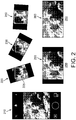
- FIG. 2 an exemplary mobile device display having an active display 200 according to the present disclosure is shown.
- the exemplary mobile device application is operative for allowing a user to record in any framing and freely rotate their device while shooting, visualizing the final output in an overlay on the device's viewfinder during shooting and ultimately correcting for their orientation in the final output.
- the vector of gravity based on the device's sensors is used to register a horizon.
- an optimal target aspect ratio is chosen for each possible orientation, such as portrait 210, where the device's screen and related optical sensor is taller than wide, or landscape 250, where the device's screen and related optical sensor is wider than tall.
- An inset rectangle 225 is inscribed within the overall sensor that is best-fit to the maximum boundaries of the sensor given the desired optimal aspect ratio for the given (current) orientation. The boundaries of the sensor are slightly padded in order to provide 'breathing room' for correction.
- This inset rectangle 225 is transformed to compensate for rotation 220, 230, 240 by essentially rotating in the inverse of the device's own rotation, which is sampled from the device's integrated gyroscope.
- the transformed inner rectangle 225 is inscribed optimally inside the maximum available bounds of the overall sensor minus the padding. Depending on the device's current most orientation, the dimensions of the transformed inner rectangle 225 are adjusted to interpolate between the two optimal aspect ratios, relative to the amount of rotation.
- the inscribed rectangle would interpolate optimally between 1:1 and 16:9 as it is rotated from one orientation to another.
- the inscribed rectangle is sampled and then transformed to fit an optimal output dimension.
- the optimal output dimension is 4:3 and the sampled rectangle is 1:1
- the sampled rectangle would either be aspect filled (fully filling the 1:1 area optically, cropping data as necessary) or aspect fit (fully fitting inside the 1:1 area optically, blacking out any unused area with 'letter boxing' or 'pillar boxing'.
- the result is a fixed aspect asset where the content framing adjusts based on the dynamically provided aspect ratio during correction. So for example a 16:9 video comprised of 1:1 to 16:9 content would oscillate between being optically filled 260 (during 16:9 portions) and fit with pillar boxing 250 (during 1:1 portions).
- the output format will be a landscape aspect ratio (pillar boxing the portrait segments). If a user records a video that is mostly portrait the opposite applies (the video will be portrait and fill the output optically, cropping any landscape content that falls outside the bounds of the output rectangle).
- the system is initialized in response to the capture mode of the camera being initiated.
- the initialization may be initiated according to a hardware or software button, or in response to another control signal generated in response to a user action.
- the mobile device sensor 320 is chosen in response to user selections. User selections may be made through a setting on the touch screen device, through a menu system, or in response to how the button is actuated. For example, a button that is pushed once may select a photo sensor, while a button that is held down continuously may indicate a video sensor. Additionally, holding a button for a predetermined time, such as 3 seconds, may indicate that a video has been selected and video recording on the mobile device will continue until the button is actuated a second time.
- the system requests a measurement from a rotational sensor 320.
- the rotational sensor may be a gyroscope, accelerometer, axis orientation sensor, light sensor or the like, which is used to determine a horizontal and/or vertical indication of the position of the mobile device.
- the measurement sensor may send periodic measurements to the controlling processor thereby continuously indicating the vertical and/or horizontal orientation of the mobile device.
- the controlling processor can continuously update the display and save the video or image in a way which has a continuous consistent horizon.
- the mobile device After the rotational sensor has returned an indication of the vertical and/or horizontal orientation of the mobile device, the mobile device depicts an inset rectangle on the display indicating the captured orientation of the video or image 340.
- the system processor continuously synchronizes inset rectangle with the rotational measurement received from the rotational sensor 350.
- the user may optionally indicate a preferred final video or image ration, such as 1:1, 9:16, 16:9, or any other ratio selected by the user.
- the system may also store user selections for different ratios according to orientation of the mobile device. For example, the user may indicate a 1:1 ratio for video recorded in the vertical orientation, but a 16:9 ratio for video recorded in the horizontal orientation.
- the system may continuously or incrementally rescale video 360 as the mobile device is rotated.
- a video may start out with a 1:1 orientation, but could gradually be rescaled to end in a 16:9 orientation in response to a user rotating from a vertical to horizontal orientation while filming.
- a user may indicate that the beginning or ending orientation determines the final ratio of the video.
- FIG. 4 an exemplary mobile device display having a capture initialization 400 according to the present disclosure is shown.
- An exemplary mobile device is show depicting a touch tone display for capturing images or video.
- the capture mode of the exemplary device may be initiated in response to a number of actions. Any of hardware buttons 410 of the mobile device may be depressed to initiate the capture sequence.
- a software button 420 may be activated through the touch screen to initiate the capture sequence.
- the software button 420 may be overlaid on the image 430 displayed on the touch screen.
- the image 430 acts as a viewfinder indicating the current image being captured by the image sensor.
- An inscribed rectangle 440 as described previously, may also be overlaid on the image to indicate an aspect ratio of the image or video be captured.
- the system waits for an indication to initiate image capture.
- the device begins to save the data sent from the image sensor 520.
- the system initiates a timer.
- the system then continues to capture data from the image sensor as video data.
- the system stops saving data from the image sensor and stops the timer.
- the system compares the timer value to a predetermined time threshold 540.
- the predetermined time threshold may be a default value determined by the software provider, such as 1 second for example, or it may be a configurable setting determined by a user. If the timer value is less than the predetermined threshold 540, the system determines that a still image was desired and saves 560 the first frame of the video capture as a still image in a still image format, such as jpeg or the like. The system may optionally choose another frame as the still image. If the timer value is greater than the predetermined threshold 540, the system determines that a video capture was desired. The system then saves 550 the capture data as a video file in a video file format, such as mpeg or the like.
- the system may then return to the initialization mode, waiting for the capture mode to be initiated again. If the mobile device is equipped with different sensors for still image capture and video capture, the system may optionally save a still image from the still image sensor and start saving capture data from the video image sensor.
- the timer value is compared to the predetermined time threshold, the desired data is saved, while the unwanted data is not saved. For example, if the timer value exceeds the threshold time value, the video data is saved and the image data is discarded.
- FIG. 6 an exemplary embodiment of automatic video segmentation 600 is shown.
- the system is directed towards automatic video segmentation that aims to compute and output video that is sliced into segments that are as close to a predetermined time interval in seconds as possible. Additionally the segments may be longer or shorter dependant in response to attributes of the video being segmented. For example, it is not desirable to bisect content in an awkward way, such as in the middle of a spoken word.
- a timeline 610 is shown, depicting a video segmented into nine segments (1-9). Each of the segments is approximately 8 seconds long. The original video has a length of at least 1 minute and 4 seconds.
- the time interval chosen for each video segment is 8 seconds. This initial time interval may be longer or shorter, or may be optionally configurable by the user.
- An 8 second base timing interval was chosen as it currently represents a manageable data segment having a reasonable data transmission size for downloading over various network types.
- An approximately 8 second clip would have a reasonable average duration to expect an end user to peruse a single clip of video content delivered in an exploratory manner on a mobile platform.
- a clip of approximately 8 seconds may be a perceptually memorable duration of time where an end user can theoretically retain a better visual memory of more of the content it displays.
- 8 seconds is an even phrase length of 8 beats at 120 beats per minute, the most common tempo of modern Western music.
- FIG. 7 a method of segmenting a video 700 in accordance with the present disclosure is shown.
- a number of approaches to analyzing the video content may be applied within the system.
- an initial determination may be made regarding the nature of the video content as to whether it originated from another application or was recorded using the current mobile device 720. If the content originated from another source or application, the video content is analyzed first for obvious edit boundaries using scene break detection 725. Any statistically significant boundaries may be marked, with emphasis on the boundaries on or nearest to the desired 8 second interval 730. If the video content was recorded using the current mobile device, the sensor data may be logged while recording 735.
- This may include the delta of movement of the device on all axes from the device's accelerometer and/or the rotation of the device on all axes based on the device's gyroscope.
- This logged data may be analyzed to find motion onsets, deltas that are statistically significant relative to the mean magnitude over time for any given vector. These deltas are logged with emphasis on the boundaries nearest to the desired 8 second interval 740.
- the video content can be further perceptually analyzed for additional cues that can inform edit selection.
- the device hardware, firmware or OS provides any integrated region of interest (ROI) detection, including face ROI selection, it is utilized to mark any ROIs in the scene 745.
- ROI region of interest
- the onset appearance or disappearance of these ROIs i.e. the moments nearest when they appear in frame and disappear from frame
- Audio-based onset detection upon overall amplitude will look for statistically significant changes (increases or decreases) in amplitude relative to either the zero crossing, a noise floor or a running average power level 750. Statistically significant changes will be logged with emphasis on those nearest to the desired 8 second interval. Audio-based onset detection upon amplitude within spectral band ranges will rely on converting the audio signal using a FFT algorithm into a number of overlapping FFT bins. Once converted, each bin may be discreetly analyzed for statistically significant changes in amplitude relative to its own running average. All bins are in turn averaged together and the most statistically significant results across all bands are logged as onsets, with emphasis on those nearest to the desired 8 second interval. Within this method the audio can be pre-processed with comb filters to selectively emphasize/deemphasize bands, for example, the bands in the range of normal human speech can be emphasized whereas high frequency bands synonymous with noise can be deemphasized.
- Visual analysis of the average motion within content can be determined for a video content to help establish an appropriate segmentation point 755.
- the magnitude of the average motion in-frame can be determined and used to look for statistically significant changes over time, logging results with emphasis on those nearest to the desired 8 second interval.
- the average color and luminance of the content can be determined using a simple, low resolution analysis of the recorded data, logging statistically significant changes with emphasis on those nearest to the desired 8 second interval.
- the final logged output may be analyzed weighting each result into an overall average 760.
- This post-processing pass of the analysis data finds the most viable points in time based on the weighted and averaged outcome of all individual analysis processes.
- the final, strongest average points on or nearest the desired 8 second interval are computed as output that forms the model for fragmentation edit decisions.
- the post processing step 760 may consider any or all of the previously mentioned marked points on the video as indicators of preferred segmentation points.
- the different determination factors can be weighted. Also, determination points that vary too far from the preferred segment length, such as 8 seconds, may be weighted lower than those closest to the preferred segment length.
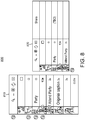
- the light box application is directed towards a method and system for using a list-driven selection process to improve video and media time-based editing.
- the light box application is shown in both the vertical 810 and the horizontal orientation 820.
- the light box application may be initiated after a segmented video has been saved. Alternatively, the light box application may be initiated in response to a user command.
- Each of the segments is initially listed chronologically with a preview generated for each.
- the preview may be a single image taken from the video segment or a portion of the video segment.
- Additional media content or data can be added to the light box application. For example, photos or videos received from other sources may be included in the light box list to permit a user to share or edit the received content or combine these received contents with newly generated content.
- the application permits video and media time-based editing into a simple list driven selection process.
- the light box application may be used as a center point for sharing editorial decisions.
- the light box allows users to quickly and easily view content and decide what to keep, what to discard, and how and when to share with others.
- the light box function may work with the camera, with channel browsing or as a point to import media from other places.
- the light box view may contain a list of recent media or grouped sets of media. Each item, image or video, is displayed as at thumbnail, with a caption, aduration, and a possible group count.
- the caption may be generated automatically or by the user.
- the duration may be simplified, so as to present to the user the weight and pace of the media content.
- the light box title bar may include the category of the light box set with its item count, along with navigation to go back, import an item, or open a menu.
- the light box landscape view 820 offers a different layout, with media items listed on one side and optionally, a method of sharing in some immediately assessable form on the other side. This may include links or previews of facebook, twitter, or other social media applications.
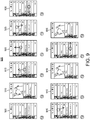
- FIG. 9 various exemplary operations 900 that can performed within the light box application are shown.
- Media that is captured, by an integrated camera feature for example, imported from the device's existing media library, possibly recorded with or created by other applications or downloaded from web based sources, or curated from content published directly within the related application is all collected into the light box in a preview mode 905.
- the light box presents media in a simple vertical list, categorized into groups based on events, such as groupings of time, within which the media was collected. Each item is represented by a list row including a thumbnail or simplified duration for the given piece of media. By tapping on any item the media can be previewed in an expanded panel that displays in direct relation to the item.
- the light box application may optionally have an expanded items view 910, which previews the item.
- the expanded items view 910 exposes options to processing the media item, captioning, and sharing it. Tapping the close button closes the item or tapping another item below it closes the item and opens another.
- Scrolling up or down within the light box application permits the user to navigate the media items 915.
- the header may remain at the top of the list, or it may float atop the content. Scrolling to the end of a list may enable navigation to other, older lists 920.
- the headings of the older lists may be revealed under tension while dragging. Dragging past tension transitions to the older lists. Holding and dragging on an item allows the user to reorder items or combine items by dragging one onto another 925. Swiping an item to the left removes the item from the light box 930. Removing items may or may not remove them from the device, not just the light box application. Dragging and dropping items onto other items may be used to combine the items into a group 935, or combine the dragged item into a group.
- Pinching items together combines all items that were within the pinch rage into a group 940.
- the regular light box items may then be pushed down to permit the expanded items to be displayed as rows.
- Items can be manipulated by dragging on them from within the light box application. Items can be removed from the light box application by dragging left on any item the item for example 930. By dragging right on any item, the item can be promoted to publish immediately 950, which transitions to a screen allowing the user to share the given item's media on one or many sharing locations 955. Tapping a share button when previewing may also enable the sharing of an item. By pressing holding on any item it becomes draggable, at which point the item can be dragged up and down to re-organize its position in the overall list. Time in the list is represented vertically, top-to-bottom. For example, the top most item is first in time were the media to be performed sequentially.
- Any whole group of items can be collectively previewed (played sequentially as a single preview comprised of all items in order of time), can be collectively deleted or published using the same gestures and means of control as a single list item.
- playback can be controlled by dragging left-to-right on the related list item row. The current position in time is marked by a small line that can be dragged to offset time during playback by the user.
- a selection range is defined which can be pinched and dragged in order to trim the original media as the final playback output.
- any additional adjacent frames captured can be selectively 'scrubbed'. For example if during a single photo capture the camera records several frames of output, this gesture can allow the user to cycle through and select the best frame as the final still frame.
- the light box media is built upon a central, ubiquitous storage location on the device so that other applications who incorporate the same light box view all share from the same current pool of media. This makes multi-application collaboration on multimedia asset editing simple and synchronous.
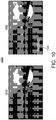
- FIG. 10 an exemplary caption color generation application 1000 according to one aspect of the present disclosure is shown.
- One view shows the original image 1010 on which a user wishes to overlay a caption.
- the caption may be generated through user input, or generated automatically by the application.
- the application may
- FIG. 10 an exemplary caption color generation application 1000 according to one aspect of the present disclosure is shown.
- One view shows the original image 1010 on which a user wishes to overlay a caption.
- the caption may be generated through user input, or generated automatically by the application.
- the application may recognize the content of the image, may search the internet or a database for similar images and examine metadata or captions associated with that similar image to generate the text of the caption.
- the second view shows an altered image 1020 with a caption 1030 overlaid on the image.
- the color of the caption has been chosen to contrast with the image in such a way as to be pleasing to the eye, but still make the caption legible to a viewer.
- the exemplary caption color generation application 1000 uses an algorithm which determines the color most prominent in an image.
- the predominant color is the color most frequently used in an image.
- a dominant color is a color that has more influence in an image and therefore appears to a viewer as the defining color of an image. For example, if an image is mostly black but has a large red shape displayed, a viewer might define the image as mostly red, when in fact the predominant color is black. Thus, the dominant color and the predominant color may not be the same.
- red is the dominant color in the image.
- the system may determine this color prominence in a number of different ways. The system may take an average of the colors in the image and select a caption color in response to this average and select this as the predominant color. The image may look for the most commonly used color and select this as the predominant color. The application may then use the predominant color as the caption color or select one of a discrete number of predetermined colors.
- the system may not want to use black or white, or any pastel colors.
- the system may be operative to match the predominant color with a recessive color.
- a recessive color unlike a dominant color, fades into the background.
- These recessive colors such as lavender, pink or gray, take on the properties of surrounding color. Contrasting recessive colors may be more desirable than dominant colors as they permit the caption to be read, but do not distract from the image or video they are overlaid upon. Once a match is made, the caption or text is overlaid in the matched color.
- the system may then select a location to display the caption.
- the caption may be displayed in a default location, such as the lower left, or the caption may be placed after an analysis of the color locations of the image. In the case of the default location, the system may determine the predominant color proximate to the default location within the image or video. Thus, the caption would still have the desired level of contrast between the image and the caption text. It should be understood that displaying an image and a caption could mean displaying on a display screen or generating a signal suitable for coupling to a display device.
- the system may wish to use the same color of caption for a series or group of images or for a video.
- the system may analyze each image for a predominant color and then take the most common predominant color and use this most common predominant color as the text color for the caption overlaid on all the images.
- the system may determine a location within the series of images which has the smallest color variation over all the frames or a number of frames. This location may be selected as the location to place the caption.
- the predominant color of this location within all the series of images would then be analyzed to select a text color according to previously described method.
- the text color would be used to display the caption in the location on all images or video frames.
- the images 1200 are captured using the camera function 140 of the phone 100.
- a user may wish to create groups of images to be shared, for example, with friends and family.
- the groups of images may be selected by the user or may be automatically created by the processor 150 utilizing information stored in memory 160 and/or information provided by the interfaces 110, 120, 130, GPS functions, clock functions, and the like.
- Some exemplary methods for automatically grouping images may include grouping images based on timestamps or dates stored with the captured images 1200 in memory 160 by processor 150, grouping images based on location information provided by a GPS function and stored with the captured images 1200 in memory 160 by processor 150, grouping the images by visual attributes (e.g., colors, objects, brightness, etc.) of the images as identified by the processor executing image processing techniques on the images 1200 stored in memory 160, grouping the images after the processor 150 compares each image in the collection of images 1200 to databases of images accessed via the interfaces 110, 120, 130.
- visual attributes e.g., colors, objects, brightness, etc.
- the collection of images 1200 are segmented or grouped (either by the user or by an automated process) into three groups of images 1205, 1210, 1215.
- These groups of images 1205, 1210, 1215 may represent a number of activities that the user engaged in over a period of time (e.g., activities the user engaged in over a day, week, month, season, lifetime, etc.).
- the first group of images 1205 may be images captured at an amusement park or multiple amusement parks.
- the second group of images 1210 may be images captured at a beach or multiple beaches.
- the third group of images 1215 may be images captured at a baseball game or multiple baseball games.
- these groups of images 1205, 1210, 1215 could be created by the user by, for example, the user providing instructions to processor 150 via touch screen 170 or be created automatically by the processor 150 based on, for example, at least one of time, date, location, visual attribute data, or image comparison data. It should also be appreciated that each group of images may also be a video or group of videos.
- each group of images 1205, 1210, 1215 is affiliated in some way in addition to the content of the images themselves. This would help to unify each group of images 1205, 1210, 1215 to a viewer, yet distinguish each group of images 1205, 1210, 1215 in the larger collection of images 1200. In other words, it would be helpful to help a viewer understand that the viewer is moving from one set of pictures to another set of pictures when the user shifts her or her viewing between each group of images 1205, 1210, 1215.
- the present disclosure is directed towards providing such a unification of groups of images by providing different colored text for each group of images.
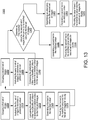
- processor 150 groups a first set of images together (e.g., group of images 1205). As discussed above, this grouping or segmenting could be done manually by the user providing instructions to processor 150 via touch screen 170 or automatically by the processor 150 using time, date, location, visual attribute data, image comparison data, or the like, as known by one skilled in the art.
- processor 150 analyzes the first set of images to determine a predominant color in the first set of images. This analysis is similar to the predominant color analysis previously described and shown in FIG. 10 .
- processor 150 compares the predominant color for the first set of images to a plurality of colors to determine a matched color for the first set of images. This determination of a matched color is similar to the color matching process previously described and shown in FIG. 11 .
- a first text e.g., titles, names, locations, etc.
- Providing for display includes, but is not limited to, displaying on touch screen 170, storing in memory 160, or transmitting (e.g., emailing, posting, etc.) via interfaces 110, 120, 130 or via I/O 180, as known by those skilled in the art.
- processor 150 groups a second set of images together (e.g., group of images 1210). As discussed above, the grouping or segmenting could be done manually by the user providing instructions to processor 150 via touch screen 170 or automatically by the processor 150 using time, date, location, visual attribute data, image comparison data, or the like, as known by one skilled in the art.
- processor 150 analyzes the second set of images to determine a predominant color in the second set of images. This analysis is similar to the predominant color analysis previously described and shown in FIG. 10 . Then, at step 1340, processor 150 compares the predominant color for the second set of images to a plurality of colors to determine a matched color for the second set of images.
- processor 150 determines if the matched color for the second set of images is the same as the matched color for the first set of images. If the matched color for the second set of images is not the same as the matched color for the first set of images, processor 150, at step 1350, generates a second text (e.g., titles, names, locations, etc.) in the matched color and, at step 1355, provides the second text in the matched color with the second set of images for display.
- a second text e.g., titles, names, locations, etc.
- Providing for display includes, but is not limited to, displaying on touch screen 170, storing in memory 160, or transmitting (e.g., emailing, posting, etc.) via interfaces 110, 120, 130 or via I/O 180, as known by those skilled in the art.
- processor 150 determines an alternative color for the second set of images. Determining an alternative color may include, for example, selecting the next closest predominant color in the second set of images, selecting the second closest match amongst the available discrete number of predetermined colors, or some combination of the two selection processes.
- processor 150 at step 1365, generates a second text (e.g., titles, names, locations, etc.) in the alternative color and, at step 1370, provides the second text in the alternative color with the second set of images for display.
- Providing for display includes, but is not limited to, displaying on touch screen 170, storing in memory 160, or transmitting (e.g., emailing, posting, etc.) via interfaces 110, 120, 130 or via I/O 180, as known by those skilled in the art. It should be appreciated that process 1300 can continue if colored text is needed for additional sets of images (e.g., group of images 1215).
Landscapes
- Engineering & Computer Science (AREA)
- Theoretical Computer Science (AREA)
- Multimedia (AREA)
- General Engineering & Computer Science (AREA)
- Signal Processing (AREA)
- Physics & Mathematics (AREA)
- General Physics & Mathematics (AREA)
- Human Computer Interaction (AREA)
- Databases & Information Systems (AREA)
- Computational Linguistics (AREA)
- Audiology, Speech & Language Pathology (AREA)
- General Health & Medical Sciences (AREA)
- Artificial Intelligence (AREA)
- Health & Medical Sciences (AREA)
- User Interface Of Digital Computer (AREA)
- Two-Way Televisions, Distribution Of Moving Picture Or The Like (AREA)
- Processing Or Creating Images (AREA)
- Information Transfer Between Computers (AREA)
- Television Signal Processing For Recording (AREA)
- Image Processing (AREA)
Claims (15)
- Verfahren, das die folgenden Schritte umfasst:Gruppieren (1305) eines ersten Bildsatzes;Analysieren (1310) des ersten Bildsatzes zum Bestimmen einer vorherrschenden Farbe;Vergleichen (1315) der vorherrschenden Farbe mit einer Vielzahl von Farben zum Bestimmen einer abgeglichenen Farbe für den ersten Bildsatz;Erzeugen (1320) eines ersten Texts in der abgeglichenen Farbe;Bereitstellen (1325) des ersten Texts in der abgeglichenen Farbe mit dem ersten Bildsatz zur Anzeige;Gruppieren (1330) eines zweiten Bildsatzes;Analysieren (1335) des zweiten Bildsatzes zum Bestimmen einer vorherrschenden Farbe;Vergleichen (1340) der vorherrschenden Farbe mit einer Vielzahl von Farben zum Bestimmen einer abgeglichenen Farbe für den zweiten Bildsatz;Bestimmen (1345), ob die abgeglichene Farbe für den zweiten Bildsatz dieselbe wie die abgeglichene Farbe für den ersten Bildsatz ist;Erzeugen (1365) eines zweiten Texts in einer alternativen Farbe für den zweiten Bildsatz, wenn bestimmt wird, dass die abgeglichene Farbe für den zweiten Bildsatz dieselbe wie die abgeglichene Farbe für den ersten Bildsatz ist, wobei die alternative Farbe durch Auswählen der zweitnächsten Farbe, die mit der vorherrschenden Farbe in dem zweiten Bildsatz abgeglichen ist, aus der Vielzahl von Farben bestimmt wird; undBereitstellen (1370) des zweiten Texts in der alternativen Farbe mit dem zweiten Bildsatz zur Anzeige.
- Verfahren nach Anspruch 1, das ferner die folgenden Schritte umfasst:Erzeugen (1350) eines zweiten Texts in der abgeglichenen Farbe für den zweiten Bildsatz, wenn bestimmt wird, dass die abgeglichene Farbe für den zweiten Bildsatz anders als die abgeglichene Farbe für den ersten Bildsatz ist; undBereitstellen (1355) des zweiten Texts in der abgeglichenen Farbe mit dem zweiten Bildsatz zur Anzeige.
- Verfahren nach Anspruch 1, wobei der Schritt des Bereitstellens wenigstens eines von Anzeigen, Speichern zur Anzeige und Übertragen zur Anzeige einschließt.
- Verfahren nach Anspruch 1, wobei der Schritt des Gruppierens als Reaktion auf eine Benutzereingabe erfolgt.
- Verfahren nach Anspruch 1, wobei der Schritt des Gruppierens ein Verwenden von wenigstens einem von Zeitdaten, Datendaten, Ortsdaten, visuellen Attributdaten und Bildvergleichsdaten einschließt, um das Gruppieren des ersten Bildsatzes zu unterstützen.
- Verfahren nach Anspruch 1, wobei die abgeglichene Farbe wenigstens eines von der vorherrschenden Farbe oder einer dominanten Farbe ist.
- Verfahren nach Anspruch 1, wobei die abgeglichene Farbe eine rezessive Farbe ist.
- Verfahren nach Anspruch 1, wobei der erste Bildsatz ein Video ist.
- Einrichtung, umfassend:einen Speicher (160), der eine Bildsammlung speichert; undeinen Prozessor (150), der einen ersten Bildsatz aus der gespeicherten Bildsammlung gruppiert, den ersten Bildsatz analysiert, um eine vorherrschende Farbe zu bestimmen, die vorherrschende Farbe mit einer Vielzahl von Farben vergleicht, um eine abgeglichene Farbe für den ersten Bildsatz zu bestimmen, einen ersten Text in der abgeglichenen Farbe erzeugt, den ersten Text in der abgeglichenen Farbe mit dem ersten Bildsatz zur Anzeige bereitstellt, einen zweiten Bildsatz gruppiert, den zweiten Bildsatz analysiert, um eine vorherrschende Farbe zu bestimmen, die vorherrschende Farbe mit einer Vielzahl von Farben vergleicht, um eine abgeglichene Farbe für den zweiten Bildsatz zu bestimmen, bestimmt, ob die abgeglichene Farbe für den zweiten Bildsatz dieselbe wie die abgeglichene Farbe für den ersten Bildsatz ist, einen zweiten Text in einer alternativen Farbe für den zweiten Bildsatz erzeugt, wenn bestimmt wird, dass die abgeglichene Farbe für den zweiten Bildsatz dieselbe wie die abgeglichene Farbe für den ersten Bildsatz ist, wobei die alternative Farbe durch Auswählen der zweitnächsten Farbe, die mit der vorherrschenden Farbe in dem zweiten Bildsatz abgeglichen ist, aus der Vielzahl von Farben bestimmt wird, und den zweiten Text in der alternativen Farbe mit dem zweiten Bildsatz zur Anzeige bereitstellt.
- Einrichtung nach Anspruch 9, wobei der Prozessor (150) einen zweiten Text in der abgeglichenen Farbe für den zweiten Bildsatz erzeugt, wenn bestimmt wird, dass die abgeglichene Farbe für den zweiten Bildsatz anders als die abgeglichene Farbe für den ersten Bildsatz ist, und den zweiten Text in der abgeglichenen Farbe mit dem zweiten Bildsatz zur Anzeige bereitstellt.
- Einrichtung nach Anspruch 9, wobei der Prozessor (150) den ersten Text in der abgeglichenen Farbe mit dem ersten Bildsatz zur Anzeige durch wenigstens eines von Anzeigen, Speichern zur Anzeige und Übertragen zur Anzeige des ersten Texts in der abgeglichenen Farbe mit dem ersten Bildsatz bereitstellt.
- Einrichtung nach Anspruch 9, wobei der Prozessor (150) den ersten Bildsatz als Reaktion auf eine Benutzereingabe gruppiert und die abgeglichene Farbe eine rezessive Farbe ist.
- Einrichtung nach Anspruch 9, wobei der Prozessor (150) den ersten Bildsatz unter Verwendung von wenigstens einem von Zeitdaten, Datendaten, Ortsdaten, visuellen Attributdaten und Bildvergleichsdaten gruppiert.
- Einrichtung nach Anspruch 9, wobei die abgeglichene Farbe wenigstens eine von der vorherrschenden Farbe oder einer dominanten Farbe ist.
- Computerprogrammprodukt, dadurch gekennzeichnet, dass es Anweisungen vom Programmcode zum Ausführen von Schritten des Verfahrens nach einem der Ansprüche 1 bis 8 umfasst, wenn das Programm auf einem Computer ausgeführt wird.
Applications Claiming Priority (3)
| Application Number | Priority Date | Filing Date | Title |
|---|---|---|---|
| US201361878245P | 2013-09-16 | 2013-09-16 | |
| US201462003281P | 2014-05-27 | 2014-05-27 | |
| PCT/US2014/053251 WO2015038351A1 (en) | 2013-09-16 | 2014-08-28 | Method and apparatus for generating a text color for a group of images |
Publications (2)
| Publication Number | Publication Date |
|---|---|
| EP3047644A1 EP3047644A1 (de) | 2016-07-27 |
| EP3047644B1 true EP3047644B1 (de) | 2018-08-08 |
Family
ID=51539355
Family Applications (3)
| Application Number | Title | Priority Date | Filing Date |
|---|---|---|---|
| EP14766055.9A Ceased EP3047396A1 (de) | 2013-09-16 | 2014-08-27 | Videodurchsuche durch suchen von mehreren benutzerkommentaren und deren überlagerung in den inhalt |
| EP14767199.4A Not-in-force EP3047644B1 (de) | 2013-09-16 | 2014-08-28 | Verfahren und vorrichtung zur erzeugung einer textfarbe für eine gruppe von bildern |
| EP14766077.3A Not-in-force EP3047362B8 (de) | 2013-09-16 | 2014-08-29 | Editieren von bilderstil mittels geste auf einem berührungsbildschirm . |
Family Applications Before (1)
| Application Number | Title | Priority Date | Filing Date |
|---|---|---|---|
| EP14766055.9A Ceased EP3047396A1 (de) | 2013-09-16 | 2014-08-27 | Videodurchsuche durch suchen von mehreren benutzerkommentaren und deren überlagerung in den inhalt |
Family Applications After (1)
| Application Number | Title | Priority Date | Filing Date |
|---|---|---|---|
| EP14766077.3A Not-in-force EP3047362B8 (de) | 2013-09-16 | 2014-08-29 | Editieren von bilderstil mittels geste auf einem berührungsbildschirm . |
Country Status (6)
| Country | Link |
|---|---|
| US (3) | US20160227285A1 (de) |
| EP (3) | EP3047396A1 (de) |
| JP (4) | JP2016538657A (de) |
| KR (3) | KR20160056888A (de) |
| CN (3) | CN105580013A (de) |
| WO (4) | WO2015038338A1 (de) |
Families Citing this family (71)
| Publication number | Priority date | Publication date | Assignee | Title |
|---|---|---|---|---|
| US9237386B2 (en) | 2012-08-31 | 2016-01-12 | Google Inc. | Aiding discovery of program content by providing deeplinks into most interesting moments via social media |
| US9401947B1 (en) * | 2013-02-08 | 2016-07-26 | Google Inc. | Methods, systems, and media for presenting comments based on correlation with content |
| JP2016538657A (ja) * | 2013-09-16 | 2016-12-08 | トムソン ライセンシングThomson Licensing | 複数のユーザコメントを検索してコンテンツにオーバーレイすることによるビデオのブラウジング |
| US20150348325A1 (en) * | 2014-05-27 | 2015-12-03 | Thomson Licensing | Method and system for stabilization and reframing |
| US9942464B2 (en) * | 2014-05-27 | 2018-04-10 | Thomson Licensing | Methods and systems for media capture and seamless display of sequential images using a touch sensitive device |
| EP3206408B1 (de) | 2014-10-10 | 2020-12-30 | Sony Corporation | Codierungsvorrichtung und -verfahren, wiedergabevorrichtung und -verfahren und programm |
| JP2018510396A (ja) * | 2014-12-12 | 2018-04-12 | ナグラビジョン エス アー | ユーザインタフェースの色を管理するための方法及びグラフィックプロセッサ |
| US10109092B1 (en) * | 2015-03-24 | 2018-10-23 | Imagical LLC | Automated text layout, color and other stylization on an image or video, and the tracking and application of user color preferences |
| CN104935980B (zh) * | 2015-05-04 | 2019-03-15 | 腾讯科技(北京)有限公司 | 互动信息处理方法、客户端及服务平台 |
| CN104936035B (zh) | 2015-06-19 | 2018-04-17 | 腾讯科技(北京)有限公司 | 一种弹幕处理方法及系统 |
| US10671234B2 (en) | 2015-06-24 | 2020-06-02 | Spotify Ab | Method and an electronic device for performing playback of streamed media including related media content |
| CN104980809B (zh) * | 2015-06-30 | 2019-03-12 | 北京奇艺世纪科技有限公司 | 一种弹幕处理方法和装置 |
| CN105893012A (zh) * | 2015-12-01 | 2016-08-24 | 乐视网信息技术(北京)股份有限公司 | 用于在安卓系统中生成视频截图的方法和装置 |
| CN106940621B (zh) * | 2016-01-05 | 2020-03-03 | 腾讯科技(深圳)有限公司 | 图片处理的方法和装置 |
| CN105635822A (zh) * | 2016-01-07 | 2016-06-01 | 天脉聚源(北京)科技有限公司 | 一种视频弹幕处理方法及装置 |
| US10622021B2 (en) * | 2016-02-19 | 2020-04-14 | Avcr Bilgi Teknolojileri A.S | Method and system for video editing |
| US9940007B2 (en) | 2016-02-24 | 2018-04-10 | International Business Machines Corporation | Shortening multimedia content |
| US9716825B1 (en) | 2016-06-12 | 2017-07-25 | Apple Inc. | User interface for camera effects |
| CN106227737B (zh) * | 2016-07-11 | 2019-12-03 | 北京创意魔方广告有限公司 | 快速生成广告图片平台 |
| KR102630191B1 (ko) * | 2016-08-18 | 2024-01-29 | 삼성전자 주식회사 | 전자 장치 및 전자 장치 제어 방법 |
| EP3482286A1 (de) * | 2016-11-17 | 2019-05-15 | Google LLC | Mediendarstellung mit ausrichtungsmetadaten |
| CN108230077A (zh) * | 2016-12-21 | 2018-06-29 | 北京嘀嘀无限科技发展有限公司 | 移动网络设备的预约车辆显示方法和装置 |
| US10652618B2 (en) * | 2017-02-16 | 2020-05-12 | Facebook, Inc. | Transmitting video clips of viewers' reactions during a broadcast of a live video stream |
| CN106878632B (zh) * | 2017-02-28 | 2020-07-10 | 北京知慧教育科技有限公司 | 一种视频数据的处理方法和装置 |
| CN107172444B (zh) * | 2017-03-30 | 2019-07-09 | 武汉斗鱼网络科技有限公司 | 一种网络直播重连方法及系统 |
| DK180859B1 (en) | 2017-06-04 | 2022-05-23 | Apple Inc | USER INTERFACE CAMERA EFFECTS |
| CN107818785A (zh) * | 2017-09-26 | 2018-03-20 | 平安普惠企业管理有限公司 | 一种从多媒体文件中提取信息的方法及终端设备 |
| US11363352B2 (en) | 2017-09-29 | 2022-06-14 | International Business Machines Corporation | Video content relationship mapping |
| US10587919B2 (en) | 2017-09-29 | 2020-03-10 | International Business Machines Corporation | Cognitive digital video filtering based on user preferences |
| CN108600851B (zh) * | 2018-03-26 | 2019-05-07 | 掌阅科技股份有限公司 | 用于电子书的直播方法、电子设备及计算机存储介质 |
| US10375313B1 (en) | 2018-05-07 | 2019-08-06 | Apple Inc. | Creative camera |
| US11722764B2 (en) | 2018-05-07 | 2023-08-08 | Apple Inc. | Creative camera |
| CN108804184B (zh) * | 2018-05-29 | 2021-10-01 | 维沃移动通信有限公司 | 一种显示控制方法及终端设备 |
| CN108829845A (zh) * | 2018-06-20 | 2018-11-16 | 北京奇艺世纪科技有限公司 | 一种音频文件播放方法、装置及电子设备 |
| US10650861B2 (en) * | 2018-06-22 | 2020-05-12 | Tildawatch, Inc. | Video summarization and collaboration systems and methods |
| WO2020018592A1 (en) * | 2018-07-17 | 2020-01-23 | Methodical Mind, Llc. | Graphical user interface system |
| DK201870623A1 (en) | 2018-09-11 | 2020-04-15 | Apple Inc. | USER INTERFACES FOR SIMULATED DEPTH EFFECTS |
| CN109143628B (zh) * | 2018-09-14 | 2021-09-28 | 武汉帆茂电子科技有限公司 | 一种在液晶模组实时显示Flick,Vcom数值的装置及方法 |
| US11321857B2 (en) | 2018-09-28 | 2022-05-03 | Apple Inc. | Displaying and editing images with depth information |
| US11128792B2 (en) | 2018-09-28 | 2021-09-21 | Apple Inc. | Capturing and displaying images with multiple focal planes |
| CN109344318B (zh) * | 2018-10-15 | 2020-05-15 | 北京字节跳动网络技术有限公司 | 用于处理信息的方法和装置 |
| CN109408748A (zh) * | 2018-10-15 | 2019-03-01 | 北京字节跳动网络技术有限公司 | 用于处理信息的方法和装置 |
| US11678031B2 (en) | 2019-04-19 | 2023-06-13 | Microsoft Technology Licensing, Llc | Authoring comments including typed hyperlinks that reference video content |
| US11785194B2 (en) | 2019-04-19 | 2023-10-10 | Microsoft Technology Licensing, Llc | Contextually-aware control of a user interface displaying a video and related user text |
| US11706521B2 (en) | 2019-05-06 | 2023-07-18 | Apple Inc. | User interfaces for capturing and managing visual media |
| US10645294B1 (en) | 2019-05-06 | 2020-05-05 | Apple Inc. | User interfaces for capturing and managing visual media |
| US11770601B2 (en) | 2019-05-06 | 2023-09-26 | Apple Inc. | User interfaces for capturing and managing visual media |
| CN110366002B (zh) * | 2019-06-14 | 2022-03-11 | 北京字节跳动网络技术有限公司 | 视频文件合成方法、系统、介质和电子设备 |
| US11336832B1 (en) * | 2019-08-30 | 2022-05-17 | Gopro, Inc. | Systems and methods for horizon leveling videos |
| US11054973B1 (en) | 2020-06-01 | 2021-07-06 | Apple Inc. | User interfaces for managing media |
| CN111601150A (zh) * | 2020-06-05 | 2020-08-28 | 百度在线网络技术(北京)有限公司 | 视频的处理方法和装置 |
| CN111752440A (zh) * | 2020-06-29 | 2020-10-09 | 北京字节跳动网络技术有限公司 | 一种多媒体内容展示方法及装置 |
| EP4173257A1 (de) | 2020-06-30 | 2023-05-03 | Snap Inc. | Skelettverfolgung für virtuelle echtzeiteffekte |
| CN111787223B (zh) * | 2020-06-30 | 2021-07-16 | 维沃移动通信有限公司 | 视频拍摄方法、装置和电子设备 |
| CN111857517B (zh) * | 2020-07-28 | 2022-05-17 | 腾讯科技(深圳)有限公司 | 视频的信息处理方法、装置、电子设备及存储介质 |
| US11212449B1 (en) | 2020-09-25 | 2021-12-28 | Apple Inc. | User interfaces for media capture and management |
| CN112328136B (zh) * | 2020-11-27 | 2023-09-19 | 腾讯科技(深圳)有限公司 | 评论信息的显示方法、装置、设备及存储介质 |
| CN114615510B (zh) | 2020-12-08 | 2024-04-02 | 抖音视界有限公司 | 直播界面显示方法及设备 |
| CN113411553B (zh) * | 2021-01-05 | 2025-09-23 | 腾讯科技(深圳)有限公司 | 图像处理方法、装置、电子设备及存储介质 |
| US12254644B2 (en) | 2021-03-31 | 2025-03-18 | Leica Camera Ag | Imaging system and method |
| US11893668B2 (en) | 2021-03-31 | 2024-02-06 | Leica Camera Ag | Imaging system and method for generating a final digital image via applying a profile to image information |
| US11778339B2 (en) | 2021-04-30 | 2023-10-03 | Apple Inc. | User interfaces for altering visual media |
| US11539876B2 (en) | 2021-04-30 | 2022-12-27 | Apple Inc. | User interfaces for altering visual media |
| US12112024B2 (en) | 2021-06-01 | 2024-10-08 | Apple Inc. | User interfaces for managing media styles |
| CN114666648B (zh) * | 2022-03-30 | 2023-04-28 | 阿里巴巴(中国)有限公司 | 视频播放方法及电子设备 |
| CN117119249A (zh) * | 2022-05-17 | 2023-11-24 | 脸萌有限公司 | 特效视频确定方法、装置、电子设备及存储介质 |
| US12167161B1 (en) * | 2022-09-13 | 2024-12-10 | Gopro, Inc. | Systems and methods for horizon leveling videos |
| US12450854B2 (en) | 2022-09-22 | 2025-10-21 | Apple Inc. | User interfaces for capturing media and manipulating virtual objects |
| US12530847B2 (en) * | 2023-01-23 | 2026-01-20 | Snap Inc. | Image generation from text and 3D object |
| US20240373121A1 (en) | 2023-05-05 | 2024-11-07 | Apple Inc. | User interfaces for controlling media capture settings |
| CN119545069B (zh) * | 2025-01-17 | 2025-05-27 | 北京达佳互联信息技术有限公司 | 一种信息显示方法及装置 |
Family Cites Families (58)
| Publication number | Priority date | Publication date | Assignee | Title |
|---|---|---|---|---|
| KR910006465B1 (ko) * | 1988-12-31 | 1991-08-26 | 삼성전자 주식회사 | 영상신호와 보색관계를 가지는 문자를 영상신호에 삽입하는 문자 합성장치 |
| US6711291B1 (en) * | 1999-09-17 | 2004-03-23 | Eastman Kodak Company | Method for automatic text placement in digital images |
| KR20040041082A (ko) * | 2000-07-24 | 2004-05-13 | 비브콤 인코포레이티드 | 멀티미디어 북마크와 비디오의 가상 편집을 위한 시스템및 방법 |
| US20040128317A1 (en) * | 2000-07-24 | 2004-07-01 | Sanghoon Sull | Methods and apparatuses for viewing, browsing, navigating and bookmarking videos and displaying images |
| JP2002049907A (ja) * | 2000-08-03 | 2002-02-15 | Canon Inc | デジタルアルバム作成装置およびデジタルアルバム作成方法 |
| KR20020026111A (ko) * | 2000-09-30 | 2002-04-06 | 구자홍 | 디지털 방송 수신기의 자동 온스크린 디스플레이 색상변경방법 |
| US7774817B2 (en) * | 2001-01-31 | 2010-08-10 | Microsoft Corporation | Meta data enhanced television programming |
| US7050109B2 (en) * | 2001-03-02 | 2006-05-23 | General Instrument Corporation | Methods and apparatus for the provision of user selected advanced close captions |
| KR100828354B1 (ko) * | 2003-08-20 | 2008-05-08 | 삼성전자주식회사 | 자막 위치 제어 장치 및 방법 |
| JP4704224B2 (ja) * | 2005-03-04 | 2011-06-15 | 富士フイルム株式会社 | アルバム作成装置、アルバム作成方法、及びプログラム |
| WO2007105918A1 (en) * | 2006-03-15 | 2007-09-20 | Ktf Technologies, Inc. | Apparatuses for overlaying images, portable devices having the same and methods of overlaying images |
| US7735101B2 (en) * | 2006-03-28 | 2010-06-08 | Cisco Technology, Inc. | System allowing users to embed comments at specific points in time into media presentation |
| US7646392B2 (en) * | 2006-05-03 | 2010-01-12 | Research In Motion Limited | Dynamic theme color palette generation |
| FR2910769B1 (fr) * | 2006-12-21 | 2009-03-06 | Thomson Licensing Sas | Procede de creation d'un resume d'un document audiovisuel comportant un sommaire et des reportages, et recepteur mettant en oeuvre le procede |
| JP4673862B2 (ja) * | 2007-03-02 | 2011-04-20 | 株式会社ドワンゴ | コメント配信システム、コメント配信サーバ、端末装置、コメント配信方法、及びプログラム |
| TR200709081A2 (tr) * | 2007-12-28 | 2009-07-21 | Vestel Elektron�K Sanay� Ve T�Caret A.�. | Görüntü sistemleri için dinamik renkli kullanıcı. |
| JP5151753B2 (ja) * | 2008-07-10 | 2013-02-27 | 株式会社Jvcケンウッド | ファイル検索装置、ファイル検索方法および音楽再生装置ならびにプログラム |
| JP5346941B2 (ja) * | 2008-09-16 | 2013-11-20 | パナソニック株式会社 | データ表示装置、集積回路、データ表示方法、データ表示プログラム及び記録媒体 |
| WO2010095783A1 (ko) * | 2009-02-23 | 2010-08-26 | 한국과학기술원 | 터치 스크린 제어 방법 및 이를 이용하는 터치 스크린 장치 |
| CN102369501A (zh) * | 2009-02-23 | 2012-03-07 | 胜利电子株式会社 | 触摸屏控制方法及触摸屏装置 |
| US8860865B2 (en) * | 2009-03-02 | 2014-10-14 | Burning Moon, Llc | Assisted video creation utilizing a camera |
| WO2010114528A1 (en) * | 2009-03-31 | 2010-10-07 | Hewlett-Packard Development Company, L.P. | Background and foreground color pair |
| US20100306232A1 (en) * | 2009-05-28 | 2010-12-02 | Harris Corporation | Multimedia system providing database of shared text comment data indexed to video source data and related methods |
| US20100303365A1 (en) * | 2009-05-29 | 2010-12-02 | Min Zhang | Methods and apparatus to monitor a multimedia presentation including multiple content windows |
| WO2010141260A1 (en) * | 2009-06-01 | 2010-12-09 | Telcordia Technologies, Inc. | System and method for processing commentary that is related to content |
| KR101944469B1 (ko) * | 2009-07-16 | 2019-01-31 | 블루핀 랩스, 인코포레이티드 | 컴퓨터 실행 방법, 시스템 및 컴퓨터 판독 가능 매체 |
| CN101667188A (zh) * | 2009-07-24 | 2010-03-10 | 刘雪英 | 一种在博客上实现音频视频留言和评论的方法和系统 |
| US8780134B2 (en) * | 2009-09-30 | 2014-07-15 | Nokia Corporation | Access to control of multiple editing effects |
| US20110090155A1 (en) * | 2009-10-15 | 2011-04-21 | Qualcomm Incorporated | Method, system, and computer program product combining gestural input from multiple touch screens into one gestural input |
| US8436821B1 (en) * | 2009-11-20 | 2013-05-07 | Adobe Systems Incorporated | System and method for developing and classifying touch gestures |
| US9628673B2 (en) * | 2010-04-28 | 2017-04-18 | Microsoft Technology Licensing, Llc | Near-lossless video summarization |
| US20110280476A1 (en) * | 2010-05-13 | 2011-11-17 | Kelly Berger | System and method for automatically laying out photos and coloring design elements within a photo story |
| US8811948B2 (en) * | 2010-07-09 | 2014-08-19 | Microsoft Corporation | Above-lock camera access |
| US8588548B2 (en) * | 2010-07-29 | 2013-11-19 | Kodak Alaris Inc. | Method for forming a composite image |
| US20130300761A1 (en) * | 2010-11-12 | 2013-11-14 | Colormodules Inc. | Method and system for color matching and color recommendation |
| US20120127198A1 (en) * | 2010-11-22 | 2012-05-24 | Microsoft Corporation | Selection of foreground characteristics based on background |
| CN102547433A (zh) * | 2010-12-07 | 2012-07-04 | 华录文化产业有限公司 | 一种基于播放时间点的互动评论方法和装置 |
| CN102693242B (zh) * | 2011-03-25 | 2015-05-13 | 开心人网络科技(北京)有限公司 | 一种网络评论信息的共享方法和系统 |
| CN102780921B (zh) * | 2011-05-10 | 2015-04-29 | 华为终端有限公司 | 在观看节目时获取评论信息的方法、系统和装置 |
| US9066145B2 (en) * | 2011-06-30 | 2015-06-23 | Hulu, LLC | Commenting correlated to temporal point of video data |
| JP5156879B1 (ja) * | 2011-08-25 | 2013-03-06 | パナソニック株式会社 | 情報提示制御装置及び情報提示制御方法 |
| US9354763B2 (en) * | 2011-09-26 | 2016-05-31 | The University Of North Carolina At Charlotte | Multi-modal collaborative web-based video annotation system |
| US20130091522A1 (en) * | 2011-10-05 | 2013-04-11 | Sony Corporation, A Japanese Corporation | Method to display additional information on screen |
| JP5845801B2 (ja) * | 2011-10-18 | 2016-01-20 | ソニー株式会社 | 画像処理装置、画像処理方法、及び、プログラム |
| CN102523492B (zh) * | 2011-11-18 | 2015-04-22 | 深圳创维-Rgb电子有限公司 | 一种互动评论系统的评论方法、电视机及移动终端 |
| US20130145248A1 (en) * | 2011-12-05 | 2013-06-06 | Sony Corporation | System and method for presenting comments with media |
| US20130204833A1 (en) * | 2012-02-02 | 2013-08-08 | Bo PANG | Personalized recommendation of user comments |
| JP2015084004A (ja) * | 2012-02-10 | 2015-04-30 | パナソニック株式会社 | 通信装置 |
| US20130239063A1 (en) * | 2012-03-06 | 2013-09-12 | Apple Inc. | Selection of multiple images |
| US9041727B2 (en) * | 2012-03-06 | 2015-05-26 | Apple Inc. | User interface tools for selectively applying effects to image |
| US9131192B2 (en) * | 2012-03-06 | 2015-09-08 | Apple Inc. | Unified slider control for modifying multiple image properties |
| CN102722580A (zh) * | 2012-06-07 | 2012-10-10 | 杭州电子科技大学 | 一种下载视频网站动态生成视频评论的方法 |
| JP5571269B2 (ja) * | 2012-07-20 | 2014-08-13 | パナソニック株式会社 | コメント付き動画像生成装置およびコメント付き動画像生成方法 |
| US9397844B2 (en) * | 2012-09-11 | 2016-07-19 | Apple Inc. | Automated graphical user-interface layout |
| CN102905170B (zh) * | 2012-10-08 | 2015-05-13 | 北京导视互动网络技术有限公司 | 视频的弹幕方法及系统 |
| CN103034722B (zh) * | 2012-12-13 | 2016-03-30 | 合一网络技术(北京)有限公司 | 一种网络视频评论聚合装置及方法 |
| US20140188997A1 (en) * | 2012-12-31 | 2014-07-03 | Henry Will Schneiderman | Creating and Sharing Inline Media Commentary Within a Network |
| JP2016538657A (ja) * | 2013-09-16 | 2016-12-08 | トムソン ライセンシングThomson Licensing | 複数のユーザコメントを検索してコンテンツにオーバーレイすることによるビデオのブラウジング |
-
2014
- 2014-08-27 JP JP2016541997A patent/JP2016538657A/ja active Pending
- 2014-08-27 CN CN201480050989.5A patent/CN105580013A/zh active Pending
- 2014-08-27 WO PCT/US2014/052870 patent/WO2015038338A1/en not_active Ceased
- 2014-08-27 US US15/022,006 patent/US20160227285A1/en not_active Abandoned
- 2014-08-27 KR KR1020167006543A patent/KR20160056888A/ko not_active Withdrawn
- 2014-08-27 EP EP14766055.9A patent/EP3047396A1/de not_active Ceased
- 2014-08-28 US US15/022,240 patent/US20160232696A1/en not_active Abandoned
- 2014-08-28 WO PCT/US2014/053251 patent/WO2015038351A1/en not_active Ceased
- 2014-08-28 JP JP2016542001A patent/JP2016539430A/ja active Pending
- 2014-08-28 CN CN201480058814.9A patent/CN105874780B/zh not_active Expired - Fee Related
- 2014-08-28 EP EP14767199.4A patent/EP3047644B1/de not_active Not-in-force
- 2014-08-28 WO PCT/US2014/053061 patent/WO2015038342A1/en not_active Ceased
- 2014-08-28 KR KR1020167006818A patent/KR20160058103A/ko not_active Withdrawn
- 2014-08-29 US US15/022,333 patent/US20160283097A1/en not_active Abandoned
- 2014-08-29 CN CN201480059283.5A patent/CN105706437A/zh active Pending
- 2014-08-29 EP EP14766077.3A patent/EP3047362B8/de not_active Not-in-force
- 2014-08-29 JP JP2016542004A patent/JP2016537744A/ja active Pending
- 2014-08-29 WO PCT/US2014/053381 patent/WO2015038356A1/en not_active Ceased
- 2014-08-29 KR KR1020167006896A patent/KR20160055813A/ko not_active Withdrawn
-
2019
- 2019-07-03 JP JP2019124769A patent/JP2019194904A/ja not_active Withdrawn
Non-Patent Citations (1)
| Title |
|---|
| None * |
Also Published As
| Publication number | Publication date |
|---|---|
| EP3047396A1 (de) | 2016-07-27 |
| EP3047362B8 (de) | 2019-06-12 |
| WO2015038351A1 (en) | 2015-03-19 |
| JP2016537744A (ja) | 2016-12-01 |
| WO2015038342A1 (en) | 2015-03-19 |
| US20160227285A1 (en) | 2016-08-04 |
| CN105706437A (zh) | 2016-06-22 |
| CN105580013A (zh) | 2016-05-11 |
| JP2019194904A (ja) | 2019-11-07 |
| WO2015038356A1 (en) | 2015-03-19 |
| US20160232696A1 (en) | 2016-08-11 |
| EP3047362B1 (de) | 2019-04-17 |
| WO2015038338A1 (en) | 2015-03-19 |
| WO2015038356A9 (en) | 2015-07-23 |
| JP2016539430A (ja) | 2016-12-15 |
| CN105874780B (zh) | 2019-04-09 |
| KR20160056888A (ko) | 2016-05-20 |
| EP3047644A1 (de) | 2016-07-27 |
| JP2016538657A (ja) | 2016-12-08 |
| KR20160058103A (ko) | 2016-05-24 |
| US20160283097A1 (en) | 2016-09-29 |
| WO2015038351A8 (en) | 2016-07-21 |
| EP3047362A1 (de) | 2016-07-27 |
| CN105874780A (zh) | 2016-08-17 |
| KR20160055813A (ko) | 2016-05-18 |
Similar Documents
| Publication | Publication Date | Title |
|---|---|---|
| EP3047644B1 (de) | Verfahren und vorrichtung zur erzeugung einer textfarbe für eine gruppe von bildern | |
| EP3047642B1 (de) | Farberkennungsverfahren und -vorrichtung zur erzeugung einer textfarbe | |
| AU2013381005B2 (en) | Method and apparatus for using a list driven selection process to improve video and media time based editing | |
| JP6175518B2 (ja) | 自動ビデオセグメント化のための方法および装置 | |
| US20150348588A1 (en) | Method and apparatus for video segment cropping | |
| JP2019220207A (ja) | 撮影効果のためにジェスチャを使用するための方法および装置 |
Legal Events
| Date | Code | Title | Description |
|---|---|---|---|
| PUAI | Public reference made under article 153(3) epc to a published international application that has entered the european phase |
Free format text: ORIGINAL CODE: 0009012 |
|
| 17P | Request for examination filed |
Effective date: 20160329 |
|
| AK | Designated contracting states |
Kind code of ref document: A1 Designated state(s): AL AT BE BG CH CY CZ DE DK EE ES FI FR GB GR HR HU IE IS IT LI LT LU LV MC MK MT NL NO PL PT RO RS SE SI SK SM TR |
|
| AX | Request for extension of the european patent |
Extension state: BA ME |
|
| DAX | Request for extension of the european patent (deleted) | ||
| 17Q | First examination report despatched |
Effective date: 20170519 |
|
| GRAP | Despatch of communication of intention to grant a patent |
Free format text: ORIGINAL CODE: EPIDOSNIGR1 |
|
| INTG | Intention to grant announced |
Effective date: 20180215 |
|
| RAP1 | Party data changed (applicant data changed or rights of an application transferred) |
Owner name: THOMSON LICENSING |
|
| GRAJ | Information related to disapproval of communication of intention to grant by the applicant or resumption of examination proceedings by the epo deleted |
Free format text: ORIGINAL CODE: EPIDOSDIGR1 |
|
| GRAR | Information related to intention to grant a patent recorded |
Free format text: ORIGINAL CODE: EPIDOSNIGR71 |
|
| GRAS | Grant fee paid |
Free format text: ORIGINAL CODE: EPIDOSNIGR3 |
|
| GRAA | (expected) grant |
Free format text: ORIGINAL CODE: 0009210 |
|
| INTC | Intention to grant announced (deleted) | ||
| INTG | Intention to grant announced |
Effective date: 20180627 |
|
| AK | Designated contracting states |
Kind code of ref document: B1 Designated state(s): AL AT BE BG CH CY CZ DE DK EE ES FI FR GB GR HR HU IE IS IT LI LT LU LV MC MK MT NL NO PL PT RO RS SE SI SK SM TR |
|
| REG | Reference to a national code |
Ref country code: GB Ref legal event code: FG4D |
|
| REG | Reference to a national code |
Ref country code: CH Ref legal event code: EP Ref country code: AT Ref legal event code: REF Ref document number: 1028401 Country of ref document: AT Kind code of ref document: T Effective date: 20180815 |
|
| REG | Reference to a national code |
Ref country code: FR Ref legal event code: PLFP Year of fee payment: 5 |
|
| REG | Reference to a national code |
Ref country code: IE Ref legal event code: FG4D |
|
| REG | Reference to a national code |
Ref country code: DE Ref legal event code: R096 Ref document number: 602014030054 Country of ref document: DE |
|
| REG | Reference to a national code |
Ref country code: NL Ref legal event code: MP Effective date: 20180808 |
|
| REG | Reference to a national code |
Ref country code: LT Ref legal event code: MG4D |
|
| REG | Reference to a national code |
Ref country code: AT Ref legal event code: MK05 Ref document number: 1028401 Country of ref document: AT Kind code of ref document: T Effective date: 20180808 |
|
| PG25 | Lapsed in a contracting state [announced via postgrant information from national office to epo] |
Ref country code: AT Free format text: LAPSE BECAUSE OF FAILURE TO SUBMIT A TRANSLATION OF THE DESCRIPTION OR TO PAY THE FEE WITHIN THE PRESCRIBED TIME-LIMIT Effective date: 20180808 Ref country code: RS Free format text: LAPSE BECAUSE OF FAILURE TO SUBMIT A TRANSLATION OF THE DESCRIPTION OR TO PAY THE FEE WITHIN THE PRESCRIBED TIME-LIMIT Effective date: 20180808 Ref country code: LT Free format text: LAPSE BECAUSE OF FAILURE TO SUBMIT A TRANSLATION OF THE DESCRIPTION OR TO PAY THE FEE WITHIN THE PRESCRIBED TIME-LIMIT Effective date: 20180808 Ref country code: SE Free format text: LAPSE BECAUSE OF FAILURE TO SUBMIT A TRANSLATION OF THE DESCRIPTION OR TO PAY THE FEE WITHIN THE PRESCRIBED TIME-LIMIT Effective date: 20180808 Ref country code: BG Free format text: LAPSE BECAUSE OF FAILURE TO SUBMIT A TRANSLATION OF THE DESCRIPTION OR TO PAY THE FEE WITHIN THE PRESCRIBED TIME-LIMIT Effective date: 20181108 Ref country code: NL Free format text: LAPSE BECAUSE OF FAILURE TO SUBMIT A TRANSLATION OF THE DESCRIPTION OR TO PAY THE FEE WITHIN THE PRESCRIBED TIME-LIMIT Effective date: 20180808 Ref country code: PL Free format text: LAPSE BECAUSE OF FAILURE TO SUBMIT A TRANSLATION OF THE DESCRIPTION OR TO PAY THE FEE WITHIN THE PRESCRIBED TIME-LIMIT Effective date: 20180808 Ref country code: FI Free format text: LAPSE BECAUSE OF FAILURE TO SUBMIT A TRANSLATION OF THE DESCRIPTION OR TO PAY THE FEE WITHIN THE PRESCRIBED TIME-LIMIT Effective date: 20180808 Ref country code: GR Free format text: LAPSE BECAUSE OF FAILURE TO SUBMIT A TRANSLATION OF THE DESCRIPTION OR TO PAY THE FEE WITHIN THE PRESCRIBED TIME-LIMIT Effective date: 20181109 Ref country code: IS Free format text: LAPSE BECAUSE OF FAILURE TO SUBMIT A TRANSLATION OF THE DESCRIPTION OR TO PAY THE FEE WITHIN THE PRESCRIBED TIME-LIMIT Effective date: 20181208 Ref country code: NO Free format text: LAPSE BECAUSE OF FAILURE TO SUBMIT A TRANSLATION OF THE DESCRIPTION OR TO PAY THE FEE WITHIN THE PRESCRIBED TIME-LIMIT Effective date: 20181108 |
|
| PG25 | Lapsed in a contracting state [announced via postgrant information from national office to epo] |
Ref country code: LV Free format text: LAPSE BECAUSE OF FAILURE TO SUBMIT A TRANSLATION OF THE DESCRIPTION OR TO PAY THE FEE WITHIN THE PRESCRIBED TIME-LIMIT Effective date: 20180808 Ref country code: HR Free format text: LAPSE BECAUSE OF FAILURE TO SUBMIT A TRANSLATION OF THE DESCRIPTION OR TO PAY THE FEE WITHIN THE PRESCRIBED TIME-LIMIT Effective date: 20180808 Ref country code: AL Free format text: LAPSE BECAUSE OF FAILURE TO SUBMIT A TRANSLATION OF THE DESCRIPTION OR TO PAY THE FEE WITHIN THE PRESCRIBED TIME-LIMIT Effective date: 20180808 |
|
| REG | Reference to a national code |
Ref country code: CH Ref legal event code: PL |
|
| PG25 | Lapsed in a contracting state [announced via postgrant information from national office to epo] |
Ref country code: RO Free format text: LAPSE BECAUSE OF FAILURE TO SUBMIT A TRANSLATION OF THE DESCRIPTION OR TO PAY THE FEE WITHIN THE PRESCRIBED TIME-LIMIT Effective date: 20180808 Ref country code: IT Free format text: LAPSE BECAUSE OF FAILURE TO SUBMIT A TRANSLATION OF THE DESCRIPTION OR TO PAY THE FEE WITHIN THE PRESCRIBED TIME-LIMIT Effective date: 20180808 Ref country code: CH Free format text: LAPSE BECAUSE OF NON-PAYMENT OF DUE FEES Effective date: 20180831 Ref country code: CZ Free format text: LAPSE BECAUSE OF FAILURE TO SUBMIT A TRANSLATION OF THE DESCRIPTION OR TO PAY THE FEE WITHIN THE PRESCRIBED TIME-LIMIT Effective date: 20180808 Ref country code: LI Free format text: LAPSE BECAUSE OF NON-PAYMENT OF DUE FEES Effective date: 20180831 Ref country code: LU Free format text: LAPSE BECAUSE OF NON-PAYMENT OF DUE FEES Effective date: 20180828 Ref country code: EE Free format text: LAPSE BECAUSE OF FAILURE TO SUBMIT A TRANSLATION OF THE DESCRIPTION OR TO PAY THE FEE WITHIN THE PRESCRIBED TIME-LIMIT Effective date: 20180808 Ref country code: ES Free format text: LAPSE BECAUSE OF FAILURE TO SUBMIT A TRANSLATION OF THE DESCRIPTION OR TO PAY THE FEE WITHIN THE PRESCRIBED TIME-LIMIT Effective date: 20180808 |
|
| REG | Reference to a national code |
Ref country code: DE Ref legal event code: R097 Ref document number: 602014030054 Country of ref document: DE |
|
| REG | Reference to a national code |
Ref country code: BE Ref legal event code: MM Effective date: 20180831 |
|
| PG25 | Lapsed in a contracting state [announced via postgrant information from national office to epo] |
Ref country code: SK Free format text: LAPSE BECAUSE OF FAILURE TO SUBMIT A TRANSLATION OF THE DESCRIPTION OR TO PAY THE FEE WITHIN THE PRESCRIBED TIME-LIMIT Effective date: 20180808 Ref country code: DK Free format text: LAPSE BECAUSE OF FAILURE TO SUBMIT A TRANSLATION OF THE DESCRIPTION OR TO PAY THE FEE WITHIN THE PRESCRIBED TIME-LIMIT Effective date: 20180808 Ref country code: SM Free format text: LAPSE BECAUSE OF FAILURE TO SUBMIT A TRANSLATION OF THE DESCRIPTION OR TO PAY THE FEE WITHIN THE PRESCRIBED TIME-LIMIT Effective date: 20180808 |
|
| PLBE | No opposition filed within time limit |
Free format text: ORIGINAL CODE: 0009261 |
|
| STAA | Information on the status of an ep patent application or granted ep patent |
Free format text: STATUS: NO OPPOSITION FILED WITHIN TIME LIMIT |
|
| PG25 | Lapsed in a contracting state [announced via postgrant information from national office to epo] |
Ref country code: MC Free format text: LAPSE BECAUSE OF FAILURE TO SUBMIT A TRANSLATION OF THE DESCRIPTION OR TO PAY THE FEE WITHIN THE PRESCRIBED TIME-LIMIT Effective date: 20180808 |
|
| 26N | No opposition filed |
Effective date: 20190509 |
|
| GBPC | Gb: european patent ceased through non-payment of renewal fee |
Effective date: 20181108 |
|
| PG25 | Lapsed in a contracting state [announced via postgrant information from national office to epo] |
Ref country code: SI Free format text: LAPSE BECAUSE OF FAILURE TO SUBMIT A TRANSLATION OF THE DESCRIPTION OR TO PAY THE FEE WITHIN THE PRESCRIBED TIME-LIMIT Effective date: 20180808 Ref country code: BE Free format text: LAPSE BECAUSE OF NON-PAYMENT OF DUE FEES Effective date: 20180831 |
|
| PGFP | Annual fee paid to national office [announced via postgrant information from national office to epo] |
Ref country code: FR Payment date: 20190827 Year of fee payment: 6 |
|
| PG25 | Lapsed in a contracting state [announced via postgrant information from national office to epo] |
Ref country code: GB Free format text: LAPSE BECAUSE OF NON-PAYMENT OF DUE FEES Effective date: 20181108 |
|
| PG25 | Lapsed in a contracting state [announced via postgrant information from national office to epo] |
Ref country code: MT Free format text: LAPSE BECAUSE OF NON-PAYMENT OF DUE FEES Effective date: 20180828 |
|
| PGFP | Annual fee paid to national office [announced via postgrant information from national office to epo] |
Ref country code: DE Payment date: 20191031 Year of fee payment: 6 |
|
| PG25 | Lapsed in a contracting state [announced via postgrant information from national office to epo] |
Ref country code: TR Free format text: LAPSE BECAUSE OF FAILURE TO SUBMIT A TRANSLATION OF THE DESCRIPTION OR TO PAY THE FEE WITHIN THE PRESCRIBED TIME-LIMIT Effective date: 20180808 |
|
| PG25 | Lapsed in a contracting state [announced via postgrant information from national office to epo] |
Ref country code: PT Free format text: LAPSE BECAUSE OF FAILURE TO SUBMIT A TRANSLATION OF THE DESCRIPTION OR TO PAY THE FEE WITHIN THE PRESCRIBED TIME-LIMIT Effective date: 20180808 |
|
| PG25 | Lapsed in a contracting state [announced via postgrant information from national office to epo] |
Ref country code: MK Free format text: LAPSE BECAUSE OF NON-PAYMENT OF DUE FEES Effective date: 20180808 Ref country code: IE Free format text: LAPSE BECAUSE OF NON-PAYMENT OF DUE FEES Effective date: 20180828 Ref country code: CY Free format text: LAPSE BECAUSE OF FAILURE TO SUBMIT A TRANSLATION OF THE DESCRIPTION OR TO PAY THE FEE WITHIN THE PRESCRIBED TIME-LIMIT Effective date: 20180808 Ref country code: HU Free format text: LAPSE BECAUSE OF FAILURE TO SUBMIT A TRANSLATION OF THE DESCRIPTION OR TO PAY THE FEE WITHIN THE PRESCRIBED TIME-LIMIT; INVALID AB INITIO Effective date: 20140828 |
|
| REG | Reference to a national code |
Ref country code: DE Ref legal event code: R119 Ref document number: 602014030054 Country of ref document: DE |
|
| PG25 | Lapsed in a contracting state [announced via postgrant information from national office to epo] |
Ref country code: FR Free format text: LAPSE BECAUSE OF NON-PAYMENT OF DUE FEES Effective date: 20200831 Ref country code: DE Free format text: LAPSE BECAUSE OF NON-PAYMENT OF DUE FEES Effective date: 20210302 |