EP2856285B1 - Methods, controllers and devices for assembling a word - Google Patents
Methods, controllers and devices for assembling a word Download PDFInfo
- Publication number
- EP2856285B1 EP2856285B1 EP13797730.2A EP13797730A EP2856285B1 EP 2856285 B1 EP2856285 B1 EP 2856285B1 EP 13797730 A EP13797730 A EP 13797730A EP 2856285 B1 EP2856285 B1 EP 2856285B1
- Authority
- EP
- European Patent Office
- Prior art keywords
- letter
- letters
- valid
- word
- display
- Prior art date
- Legal status (The legal status is an assumption and is not a legal conclusion. Google has not performed a legal analysis and makes no representation as to the accuracy of the status listed.)
- Active
Links
Images


















Classifications
-
- G—PHYSICS
- G06—COMPUTING OR CALCULATING; COUNTING
- G06F—ELECTRIC DIGITAL DATA PROCESSING
- G06F16/00—Information retrieval; Database structures therefor; File system structures therefor
- G06F16/30—Information retrieval; Database structures therefor; File system structures therefor of unstructured textual data
- G06F16/33—Querying
- G06F16/3331—Query processing
- G06F16/334—Query execution
- G06F16/3344—Query execution using natural language analysis
-
- G—PHYSICS
- G06—COMPUTING OR CALCULATING; COUNTING
- G06F—ELECTRIC DIGITAL DATA PROCESSING
- G06F40/00—Handling natural language data
- G06F40/20—Natural language analysis
- G06F40/274—Converting codes to words; Guess-ahead of partial word inputs
-
- G—PHYSICS
- G06—COMPUTING OR CALCULATING; COUNTING
- G06F—ELECTRIC DIGITAL DATA PROCESSING
- G06F3/00—Input arrangements for transferring data to be processed into a form capable of being handled by the computer; Output arrangements for transferring data from processing unit to output unit, e.g. interface arrangements
- G06F3/01—Input arrangements or combined input and output arrangements for interaction between user and computer
- G06F3/02—Input arrangements using manually operated switches, e.g. using keyboards or dials
- G06F3/023—Arrangements for converting discrete items of information into a coded form, e.g. arrangements for interpreting keyboard generated codes as alphanumeric codes, operand codes or instruction codes
- G06F3/0233—Character input methods
- G06F3/0235—Character input methods using chord techniques
-
- G—PHYSICS
- G06—COMPUTING OR CALCULATING; COUNTING
- G06F—ELECTRIC DIGITAL DATA PROCESSING
- G06F3/00—Input arrangements for transferring data to be processed into a form capable of being handled by the computer; Output arrangements for transferring data from processing unit to output unit, e.g. interface arrangements
- G06F3/01—Input arrangements or combined input and output arrangements for interaction between user and computer
- G06F3/02—Input arrangements using manually operated switches, e.g. using keyboards or dials
- G06F3/023—Arrangements for converting discrete items of information into a coded form, e.g. arrangements for interpreting keyboard generated codes as alphanumeric codes, operand codes or instruction codes
- G06F3/0233—Character input methods
- G06F3/0237—Character input methods using prediction or retrieval techniques
-
- G—PHYSICS
- G06—COMPUTING OR CALCULATING; COUNTING
- G06F—ELECTRIC DIGITAL DATA PROCESSING
- G06F3/00—Input arrangements for transferring data to be processed into a form capable of being handled by the computer; Output arrangements for transferring data from processing unit to output unit, e.g. interface arrangements
- G06F3/01—Input arrangements or combined input and output arrangements for interaction between user and computer
- G06F3/048—Interaction techniques based on graphical user interfaces [GUI]
- G06F3/0487—Interaction techniques based on graphical user interfaces [GUI] using specific features provided by the input device, e.g. functions controlled by the rotation of a mouse with dual sensing arrangements, or of the nature of the input device, e.g. tap gestures based on pressure sensed by a digitiser
- G06F3/0488—Interaction techniques based on graphical user interfaces [GUI] using specific features provided by the input device, e.g. functions controlled by the rotation of a mouse with dual sensing arrangements, or of the nature of the input device, e.g. tap gestures based on pressure sensed by a digitiser using a touch-screen or digitiser, e.g. input of commands through traced gestures
- G06F3/04886—Interaction techniques based on graphical user interfaces [GUI] using specific features provided by the input device, e.g. functions controlled by the rotation of a mouse with dual sensing arrangements, or of the nature of the input device, e.g. tap gestures based on pressure sensed by a digitiser using a touch-screen or digitiser, e.g. input of commands through traced gestures by partitioning the display area of the touch-screen or the surface of the digitising tablet into independently controllable areas, e.g. virtual keyboards or menus
Definitions
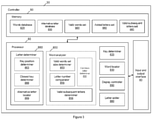
- each valid subsequent letter determined by the valid subsequent letter determiner 858 is the third letter of a ValidWord that validly continues from the second letter of the ValidWord.
- each valid subsequent letter determined by the valid subsequent letter determiner 858 is the fourth letter of a ValidWord that validly continues from the third letter of the ValidWord.
- FIG. 5 is a functional block diagram illustrating the PreKeyCorrection functionality in greater detail.
- the smartphone 10 By locating words based on a subsequence of the added letters stored in the added letters set 960 rather than on all the letters of the added letters set 960, the smartphone 10 allows for the case where one or more of the letters previously added by the user were incorrectly added (for example, in a scenario where the user mistypes a key and adds the letter associated with the mistyped key).
- the additional ValidWords are located by the word locator 830 from the words stored in the word database 920. Any additional ValidWords located by the word locator 830 are stored in the valid words set 990 of the memory 90.
- the display controller 890 is arranged to control the touchscreen 20 to display the additional ValidWords in the ComposingWordArea 210 together with the ValidWords located via the KeyShading functionality. In addition, the display controller 890 is arranged to modify the keys associated with subsequent valid letters that validly continues from the additional ValidWords located by the word locator 830.
- the term AdditionalValidLetterKey refers to a key associated with a subsequent valid letter that validly continues from one of the additional ValidWords located by the word locator 830.
- the display of the AdditionalValidLetterKeys are modified differently to the display of the ValidLetterKeys. Specifically, the display of AdditionalValidLetterKeys are shaded in a darker colour to the shading colour of the display of ValidLetterKeys located via the KeyShading functionality.
- Another one of the functionalities implemented by the smartphone 10 is ComposingMode where the ComposingWord is compared to the PrimaryValidWord.
- the colour of the PrimaryValidWord is modified to indicate that (i) the PrimaryValidWord is the only word in the valid words set 990 (that is, based on the letters added so far, there is only one ValidWord and no AdditionalValidWords, or there is only one AdditionalValidWord and no ValidWords), (ii) the ComposingWord has the same number of letters as the PrimaryValidWord, or (iii) the ComposingWord does not have the same number of letters as the PrimaryValidWord.
- the smartphone 10 is configured to exclude non-letters in its calculation of the number of letters of a word. However, it is envisaged that an alternative embodiment of the smartphone 10 may include non-letters in its calculation of the number of letters of a word.
- Figure 6 is a functional block diagram illustrating the ComposingMode functionality in greater detail. The comparisons between the ComposingWord and the PrimaryValidWord are performed by the word analyzer 850.
- the letter number comparator 853 of the word analyzer 850 is arranged to determine whether or not the ComposingWord has the same number of letters as the PrimaryValidWord. The letter number comparator 853 does this by counting the letters of the ComposingWord and the PrimaryValidWord and determining whether or not the two are the same. If the letter number comparator 853 determines that the ComposingWord has the same number of letters as the PrimaryValidWord, the display controller 890 modifies the colour of the display of the PrimaryValidWord to blue.
- the colour modification is intended to indicate to the user that the ComposingWord substantially corresponds to the PrimaryValidWord, and that the ComposingWord can be automatically corrected (for example, to correct any inconsistencies due to capitalization or alternative letters) to correspond to the PrimaryValidWord. Otherwise, if the letter number comparator 853 determines that the ComposingWord does not have the same number of letters as the PrimaryValidWord, the display controller 890 modifies the colour of the display of the ValidWord in the ValidWordsPanel 830 to green. This indicates the user that the ComposingWord substantially corresponds to a partially assembled PrimaryValidWord.
- the colour modification may be expressed in a different manner.
- the smartphone 10 may be configured to aurally output a particular sound or tone instead of visually modifying the colour of the display of the PrimaryValidWord.
- the valid words set size determiner 853 of the word analyzer 850 is arranged to determine whether or not the set of ValidWords stored in the valid words set 990 consist of only one ValidWord. If the word analyzer 850 determines that the set of ValidWords stored in the valid words set 990 consist of only one ValidWord, the display controller 890 modifies the colour of the display of the ValidWord in the ValidWordsPanel 830 to orange.
- pressing the spacebar or a punctuation key corrects the ComposingWord to the AutoCorrectableWord by correcting any inconsistencies due to capitalization or alternative letters (for example, correcting the capitalization of a letter or letter, and/or making any appropriate substitutions to replace certain letters with alternative letters such as replacing "e" with "é").
- the letter determiner 860 determines that the input letter is a valid further subsequent letter based on comparisons involving all of the ValidWords stored in the valid words set 920. In particular, the letter determiner 860 determines that the input letter is a valid further subsequent letter only if the input letter validly continues from the same punctuation mark when compared to all of the ValidWords stored in the valid words set 920.
- a valid further subsequent letter may be a letter that validly continues from a letter rather than a punctuation mark that in turn continues from the added letter or letters stored in the added letters set 960. It is also envisaged that the valid further subsequent letter may be a letter that validly continues from more than one letter or punctuation mark in another alternative embodiment.
- Another one of the AutomaticSystems functionalities is AutomaticSpacelnsertion.
- the processor 80 determines whether or not the punctuation mark associated with the punctuation key corresponding to the user input corresponds to one of a set of terminating punctuation mark such as a full stop, question mark, an exclamation mark or a comma.
- the processor 80 adds a space character after adding the punctuation mark associated with the punctuation key corresponding to the user input.
- the display controller 890 controls the touchscreen 20 to display a popup display of a character before adding the character is added to the added letters sets 960.
- the popup display may be a letter corresponding ValidLetterKey, a letter corresponding to an InvalidLetterKey, or a punctuation mark corresponding to a punctuation key.
- the display controller 890 displays a popup mini keyboard comprising one or more alternative letters associated with the input letter upon the user holding the key.
- the alternative letters are located from the alternative letter database 930 by the letter determiner 860 via the LetterSubstition functionality.
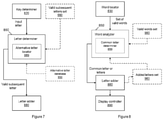
- FIG. 8 is a functional block diagram illustrating the PointofDeviation functionality in greater detail.
- each of the possible words stored in the words database 920 is categorized into one a plurality of word categories such as (verbs, nouns or adjectives) and the word locator 830 is configured to analyze the computational linguistics of the sentence of which the ComposingWord is a part of.
- the word locator 830 locates the set of ValidWords from the possible words stored in the words database 920 based on the word category of a previous word. For instance, when a user types "The cat is", the next word that is going to be typed is most likely going to be a noun and so the word locator 830 can be optimized to locate only ValidWords that are nouns.
- ComputationLinguistics optimizes the smartphone 10 to take in account the part of speech of the next or current word being typed (for example, whether the next or current word is a verb or noun), by reducing the number of words of the word database 920 the word locator 830 have to consider.
- the word locator 830 locates the set of ValidWords using only the WordStem instead of the entire ComposingWord. (That is, the letters in the WordTail are not used to locate ValidWords).
- the other functionalities such as the KeyShading functionality operates at the point of the cursor, and represent the next possible letter for the WordStem (that is, in relation to the cursor position within the ComposingWord).
- the smartphone 10 may not be configured to implement the KeyPreviewPopup functionality.
- the modules of the processor 80 or the components of the memory 90 may not be implemented.
- the memory 90 may not include an alternative letter database 930.
- the modules of the processor 80 may be implemented in a manner that is described above.
- the key determiner 820 may output merely a flag or a command to indicate to the letter determiner 860 or the letter adder 880 that the user input received by the processor 80 corresponds to a key associated with a letter.
- the smartphone 10 may alternatively be configured to assemble words than are not based on Latin alphabetic letters.
- the device may be configured to assemble Chinese characters instead of or in addition to English words.
- the smartphone 10 is configured to assemble words according to the Standard English word entry convention where the letters forming a word are input sequentially from the first letter of the word to the last letter of the word.
- the smartphone 10 may alternatively or additionally be configured to assemble words according to another word entry convention.
- the smartphone may be configured to assemble words according to different character stroke entry conventions where the character stroke of characters are entered in different sequences.
- the keyboard 280 in an alternative embodiment may be a physical keyboard instead of a virtual keyboard implemented by a touchscreen.
- a physical keyboard comprising LEDs arranged to highlight each key of the keyboard may be used to implement the KeyShading functionality and/or a physical keyboard comprising a mini-display arranged to display alternative letters for each key of the keyboard may be used to implement the PopupPreview functionality.
- a user may input a user input via different ways other than directly pressing a key of the keyboard.
- the user input may be input alternatively via multi-touch gestures on a touchscreen, physical gestures (such as tilting a smartphone etc), voice inputs.
- alternative or additional user input devices such as a digitiser pen or stylus, a mouse, and/or a game controller comprising one or more buttons, single or dual directional control pads or thumbsticks
- a digitiser pen or stylus such as a mouse
- a mouse such as a mouse
- a game controller comprising one or more buttons, single or dual directional control pads or thumbsticks
- the above functionalities may be implemented differently in embodiments where there is an additional or alternative user input device.
- the pop up previews may be displayed when the mouse cursor "hovers" above the display of a key of keyboard device.
- a pop up preview may be displayed when a user touches a key of the keyboard without pressing the key.
- the keyboard in an alternative embodiment may be displayed in a different layout to the QWERTY layout.
- the keyboard may be displayed in a "Chord" layout or a "Radial" layout.
- the keyboard layout may be one of the plurality of QWERTY layout variants.
- the keyboard may be in a layout that is designed for a non-English language, and that the keys of the keyboard may not correspond to English alphabet.
- the keys of the keyboard may correspond to a character stroke.
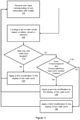
- Figure 9 is a flowchart illustrating the KeyShading functionality for assisting a user to assemble a word.
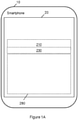
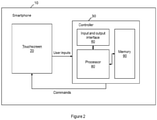
- the display controller 890 implemented by the processor 80 of the controller 30 of the smartphone 10 controls the touchscreen 20 of the smartphone 10 to display the keys of the keyboard 280 to the user of the smartphone 10.
- the processor 80 receives, from the user, a user input to assemble a word, the user input corresponding to a key associated with a letter after the user types the letter using the smartphone 10 by pressing the key.
- the letter adder 880 implemented by the processor 80 adds the associated letter to the added letters set 960 stored in the memory 90 of the controller 30. That is, the associated letter is added to the added letters set 960 if the letter is the first letter of the word to be assembled. Otherwise, if the associated letter is a subsequent letter of the word to be assembled, at step 130, the letter determiner 860 implemented by the processor 80 determines whether the associated letter is a valid subsequent letter that validly continues from the letter or letters stored in the added letters set 960.
- a terminating character for example, a space or a terminating punctuation mark such as a em-dash
- the letter determiner 860 determines that the associated letter is a valid subsequent letter
- the letter added 880 adds the associated letter to the added letters set 960.
- the word locator 830 implemented by the processor 80 locates a set of ValidWords-that is, words that comprises a sequence of letters corresponding to the sequence of letters added to the added letters set 960-from the words of the word database 920 stored in the memory 90, and stores the set of ValidWords in the valid words set 990 of the memory 90.
- the display controller 890 controls the touchscreen 20 to display one or more of the located ValidWords in the ValidWordsPanel 230, and modifies the respective keys associated with valid subsequent letters determined by the valid subsequent letters determiner 858 of the word analyzer 850 implemented by the processor 80.
- the smartphone 10 then awaits the next user input by the user.
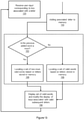
- Figure 11 is an extension of the flowchart of figure 9 , which additionally illustrates the ComposingMode functionality.
- the valid word set size determiner 853 of the word analyzer 850 determines whether or not the set of ValidWords stored in the valid words set 990 consists of only one ValidWord.
- the display controller 890 controls the touchscreen 20 to apply a first modification to the display of the ValidWord.
- the display controller 890 controls the touchscreen 20 to modify the colour of the ValidWord to orange to indicate that the ComposingWord is a AutoCompletableWord.
- the valid word set size determiner 853 determines that the valid words set 990 consists of not only one ValidWord
- the letter number comparator 856 of the word analyzer 850 determines whether or not the ComposingWord (that is, the letters stored in the added letters set 960) has the same number of letters as the PrimaryValidWord.
- the display controller 890 controls the touchscreen 20 to apply a second modification to the display of the ValidWord. Specifically, the display controller 890 controls the touchscreen 20 to modify the colour of the ValidWord to blue to indicate that the ComposingWord is a AutoCorrectableWord.
- the display controller 890 controls the touchscreen 20 to apply a third modification to the display of the ValidWord. Specifically, the display controller 890 controls the touchscreen 20 to modify the colour of the ValidWord to green to indicate that the ComposingWord is a PreValidWord.
- the smartphone 10 then awaits the next user input by the user.
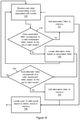
- Figure 12 is an extension of the flowchart of figure 9 , which additionally illustrates the PointofDeviation functionality.
- the common letter determiner 859 of the word analyzer 850 determines whether or not each one of the located ValidWords comprises that (i) are common to all of the located ValidWords and (ii) validly continues from the ComposingWord.
- the common letter determiner 859 determines that each one of the located ValidWords comprises a sequence of letters that (i) are common to all of the located ValidWords and (ii) validly continues from the ComposingWord
- the letter adder 880 adds the sequence of letters to the ComposingWord.
- the smartphone 10 then awaits the next user input by the user.
- Figure 13 is an extension of the flowchart of figure 9 , which additionally illustrates the ComputationLinguistics functionality.
- the word locator 830 determines whether or not the previous word assembled by the user is a noun. The word locator 830 does this by locating the previous assembled from the words stored in the word database 920, and determining whether or not the located word is a noun. The word locator 830 makes the determination by checking the word category or class of the located word. If the word locator 830 determines that the previous word assembled by the user is a noun, the word locator 830 locates only ValidWords that are non-nouns.
- the word locator 830 locates a set of ValidWords that consist of only ValidWords that are non-nouns and that validly continues from the sequence of letters added to the added letters set 960. If the word locator 830 determines that the previous word assembled by the user is not a noun, at step 168, the word locator 830 locates any ValidWords that validly continues from the sequence of letters stored in the added letters set 960.
- the display controller 890 controls the touchscreen 20 to display one or more of the located ValidWords in the ValidWordsPanel 230, and modifies the respective keys associated with valid subsequent letters determined by the valid subsequent letters determiner 858 of the word analyzer 850 implemented by the processor 80.
- the word locator 830 determines only whether or not a previous word is a noun. However, it is envisaged that the word locator 830 may determine whether or not a word or words other the previous word are nouns in an alternative embodiment. Also, it is envisaged that the word locator 830 may locate ValidWords based on a determination other than whether or not a previous word or words is a noun. For example, the word locator 830 may locate only ValidWords that are nouns upon a determination that the previous word is an adjective.
- Figure 14 is an extension of the flowchart of figure 9 , which additionally illustrates the PreKeyCorrection functionality and the PopUpPreview functionality.
- the key position determiner 863 of the letter determiner 860 determines the display position of the key associated with each one of the valid subsequent letters determined by the letter determiner 860, and the closest key determiner 866 of the letter determiner 860 determines one of the keys associated with the valid subsequent letters as a valid subsequent letter key that is displayed closest to the key corresponding to the user input.
- the display controller 890 controls the touchscreen 20 to display a pop up preview of the letter associated with the valid subsequent letter key that is displayed closest to the key corresponding to the user input.
- the letter added 880 adds the previewed letter to the added letters set 960.
- the word locator 160 locates a new set of ValidWords based on the sequence of letters of the added letters set 960 (which now includes the previewed letter).
- Figure 15 is an extension of the flowchart of figure 9 , which additionally illustrates one of the AutomaticSystems functionalities.
- the letter determiner 860 determines, based on the ValidWords located by the word locator 830, whether or not the associated letter is a valid further subsequent letter that continues from one or more intermediate characters (for example, a non-alphabetic character such as a non-terminating punctuation mark) which in turn continues from the sequence of letters of the added letters set 960.
- intermediate characters for example, a non-alphabetic character such as a non-terminating punctuation mark
- the letter determiner 860 determines that the associated letter is a valid further subsequent letter, at step 153, the letter determiner 860 adds the one or more intermediate characters followed by the associated letter to the added letters set 960.
- the word locator 160 locates a new set of ValidWords based on the sequence of letters of the added letters set 960 (which now includes the one or more intermediate characters followed by the associated letter).
- Figure 16 is an extension of the flowchart of figure 9 , which additionally illustrates another one of the AutomaticSystems functionalities.
- the alternative letter locator 869 of the letter determiner 860 locates alternative letter or letters that are associated with the associated letter from the plurality of alternative letters of the alternative letter database 930 stored in the memory 90. If no alternative letter or letters are located by the alternative letter locator 869, the smartphone 10 awaits the next user input by the user.
- Figure 17 is an extension of the flowchart of figure 9 , which additionally illustrates yet another one of the AutomaticSystems functionalities.
- the processor 80 receives, from the user, a user input to assemble text, the user input corresponding to a key associated with a punctuation mark.
- the processor 80 adds the associated punctuation mark to the text to be assembled by the user stored in the memory 90.
- the processor 80 determines whether or not the associated punctuation mark is a terminating punctuating mark. If the processor 80 determines that the associated punctuation mark is a terminating punctuating mark, the processor 178 adds a space character to the text to be assembled by the user stored in the memory 90.
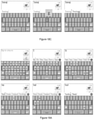
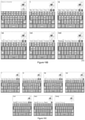
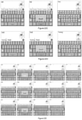
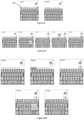
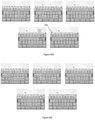
- Figure 18A to 18C comprise a series of screenshots illustrating the KeyShading functionality.
- the screenshots also illustrate some aspects of the KeyPreviewPopup functionality. This series of screen shots illustrates the process of assembling a word using the smartphone 10.
- the shaded keys (that is, the keys that are lightly shaded with a blue background via KeyShading) are valid subsequent letters (that is, keys corresponding to letters which represent the next letter in one or more of the ValidWords). For example, three of the ValidWords are "To", “T-Shirt", “The” and “Too”. After the letter “T” is input by the user, the word “To” and “Too” both share “o” as the next valid letter, hence the letter “o” is shaded.
- the key/letter "h” is valid as it validly continues from “T” in the word "The”. In the example, this process repeats itself for each letter entered, for each distinct word.
- the ValidWord, "T-shirt” represents a deviation of the process, where the hyphen (non-alphabetic) character, is skipped, and the next alphabetic letter, in this example "s", is considered the next valid subsequent letter (for the given word). As indicated in the figure, the letter "s" is displayed as a valid subsequent letter.
- the screenshots of figure 18A also illustrates the KeyPreviewPopup functionality.
- a pop up preview of a letter is displayed on the touchscreen 20 when a user presses the touchscreen 20 at the position of the touchscreen 20 corresponding to the key associated with the letter.
- the key is displayed in white colour to indicate that the key corresponds to a valid subsequent letter.
- the pop up previews of the letters "n” and “g” are in orange colour to indicate that there is only one ValidWord in the valid words set 990 and that the word to be assembled can be automatically completed.
- the figure also shows an "Add” button 241. Pressing this "Add” button adds the ComposingWord "Testi” as a new word to the memory.
- the final three screenshots illustrate that no more valid subsequent letters can be added to the currently composing word.
- the last screenshot illustrates that pressing the "g” key does not result in a key press being registered, and the pop up preview of the "g” key is in red to indicate that the key/letter is invalid.
- "Testingg” is displayed in the ValidWordsPanel 230 to indicate the form of the ComposingWord had the "g" key been registered.
- pressing the spacebar commits the letters assembled (that is, complete the assembly process for the current word), or the user can hold an InvalidLetterKey to add the letter associated with the InvalidLetterKey (which is a letter that is not a valid subsequent letter).
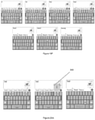
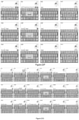
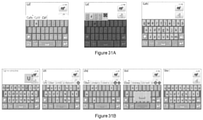
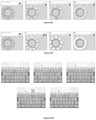
- Figures 19A to 19E comprise series of screenshots illustrating the PostKeyCorrection functionality.
- the screenshots also additionally illustrate aspects of the KeyShading functionality and the ComposingMode functionality.
- the screenshots illustrate ValidWords that are located based on letters corresponding to keys corresponding to user inputs (that is, based on the actual keys pressed by the user), and valid subsequent letters that are determined only from such ValidWords.
- Figure 19B comprises a series of screenshots illustrating the PostKeyCorrection feature where additional ValidWords are located based on a subsequence of the added letters (that is, assuming that the added letters contain mistyped letters) in addition to ValidWords located based on the sequence of the added letters.
- the first two letters of the word currently being composed are used to locate the additional ValidWords based on the proximity of the actual key pressed.
- QuickFix refers to the implementation of PostKeyCorrection where the first two letters of the word currently being composed are used to locate the additional ValidWords based on the proximity of the actual key pressed. Permutations of keys that are identified as invalid are not used to locate ValidWords. These differences can be seen in the different ValidWord expressed in the previous sequence. For example in the last image of the sequence, we see the word "Resting" is displayed as a ValidWord.
- AdditionalValidLetterKeys may be shaded darker (not illustrated), but retain the default functionality of a key corresponding to a valid subsequent letter. Also, the priority of a key may be weighted lower.
- Figure 19D illustrates another example where the user has pressed the lower portion of the key "t” key. Based on the location of the "t” key the user pressed and the proximity of the "t” to the “F” and “G” keys, AdditionalValidWords-such as "Ft” and "Go”-are located.
- the threshold for determining a substitute for a mistype key is derived based on the dimensions of the keyboard, keys of the keyboard, the dimension of a pressing finger, the dimensions of areas separating the keys of the keyboard and the expectation of single dual thumb or all finger usage, accordingly.
- the following factors can additionally or alternatively be taken in account:
- the process of previewing and selecting a valid subsequent letters that is displayed closest to the key corresponding to the input letter can be overridden by holding an InvalidLetterKey.
- the pop up preview of the ClosestValidLetterKey is then replaced with the, now selectable, invalid letter. This allows the user to type words that are not in the dictionary.
- FreeType refers to this mode.
- FreeType mode is indicated by the darkest grey background and the green letter of the keys. FreeType mode allows for any word to be entered (and disables the KeyShading functionality).
- the letters added or assembled so far are displayed in the ValidWordsPanel 230 in black.
- the user may add the word to the word database by pressing the contextual "Add" button (a dialog box will display to the user to select one of the words in the ValidWordsPanel 230 if the user presses the "Add” button) or holding either invalid words displayed on the ValidWordsPanel 230. If a word previously not found in the word database is assembled more than a predefined amount, the word is automatically added to the word database, with preference to an invalid word chosen from the ValidWordsPanel 230.
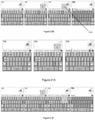
- the screenshots of figure 20A illustrate the process of overriding InvalidLetterKey presses and substituting the ClosestValidLetterKey. Specifically, upon the user pressing the InvalidLetterKey “u”, and the key/letter “i” is determined as the ClosestValidLetterKey and is displayed in the pop up preview instead of key/letter "u”. When the user release the key/letter "u”, the "i" letter is committed.
- Figure 20B comprises a series of screenshots where the user holds the invalid "u” key.
- the pop up preview changes from the ClosestValidLetterKey “i” to the InvalidLetterKey "u” when the user holds the invalid "u” key.
- the "u” letter is committed, and the FreeType mode is triggered.
- the letter displayed in the pop up preview is coloured green to indicate that FreeType mode may be triggered upon the user committing the InvalidLetterKey.
- some of the keys are associated with letters that are accessible via an indicator tab which indicates to the user that a popup-mini-keyboard may be accessed by holding the key.
- double-pressing some keys in quick succession may invoke the display of the letters that are accessible via the indicator tab. For example, with respect to the punctuation key, a single press of the key results in a full-stop, but a double press results in a comer.
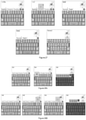
- Figures 21A to 21C comprises a further series of screenshots illustrating the PreKeyCorrection functionality.
- Figure 21A illustrates the case when a user press and release an InvalidLetterKey.
- Figure 21B illustrates the case when a user press and holds an InvalidLetterKey.
- Figure 21C illustrates the case when a user press and holds the InvalidLetterKey displaying the popupKeyboard indicator tab 250 for a longer period of time.
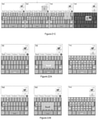
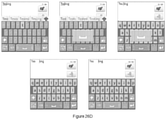
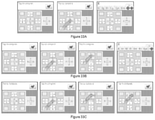
- FIGS 22A to 22I illustrate the ContextualKey functionality by having the user press, hold, or long hold the spacebar. Note that the KeyPreviewPopup functionality is disabled in some of the screen shots.
- Figure 22A illustrates the case when the ComposingWord is a PreValidWord. As illustrated, the PrimaryValidWord is coloured in green, and pressing the spacebar commits the letters of the ComposingWord assembled by the user.
- Figure 22B illustrates the case when the ComposingWord is a AutoCorrectableWord. As illustrated, the PrimaryValidWord is coloured in blue, and pressing the spacebar commits the letters of the ComposingWord assembled by the user.
- Figure 22C also illustrates the case when the ComposingWord is a AutoCorrectableWord. As illustrated, pressing the spacebar corrects the letters of the ComposingWord assembled by the user if there are any capitalization inconsistencies.
- Figure 22D illustrates the case when the ComposingWord is a AutoCompletableWord. As illustrated, the PrimaryValidWord is coloured in orange, and pressing the spacebar automatically completes the ComposingWord to the PrimaryValidWord.
- Figure 22E illustrates the case when the user holds the spacebar.
- the ComposingWord is a PreValidWord
- holding the spacebar rapidly inserts spaces (referred to as the RapidSpace action).
- the RapidSpace action is triggered after the ComposingWord is committed.
- the RapidSpace action is expressed when the current ComposingWord has zero letters, that is, after a word has been committed.
- the ComposingWord is a AutoCorrectableWord but there are no letters to be corrected.
- the third row of screenshots illustrates the case when the ComposingWord is a AutoCorrectableWord (in this instance an automatic Capitalisation from "tim” to "Tim”) and there is a letter correction.
- the spacebar will trigger the RetainUncorrection action, replacing the suggested words in the ValidWordsPanel 230 with the ComposingWord (referred to as a UnCorrected-ComposingWord), rather than the RapidSpace action.
- This alternate action is indicated to the user by displaying "tim” in black in the second last screenshot, and the tab indicator above the PrimaryValidWord ("Tim”) in the ValidWordsPanel 230.
- Figure 22F continues to illustrates the case when the user holds the spacebar.
- the first row of screenshots illustrates the case when the ComposingWord is a AutoCorrectableWord (which is derived from a QuickFix or MashMode permutation) and there are a letter correction or corrections, holding the spacebar will trigger the alternative RetainUncorrection action, replacing the PrimaryValidWord with the letters assembled.
- This alternate action is indicated to the user by displaying "Yest” in black , and the tab indicator above the PrimaryValidWord ("Yest") in the ValidWordsPanel 230.
- the second and third rows of screenshots illustrate the case when the ComposingWord is a AutoCompletableWord.
- the screenshots illustrate an alternative action for the spacebar.
- the ComposingWord is a AutoCompletableWord
- holding the spacebar triggers an action where the letters assembled are committed, overriding the default key press-release action. This allows the user to insert new and unrecognised words, and avoid the ContextualKey functionality to automatically complete the ComposingWord.
- the unknown word of "testi” is committed, where the usual press-release action of the spacebar would insert the whole word "testing”.
- the third row illustrates the same user action in the case when the ComposingWord is both a AutoCompletableWord and a AutoCorrectable word.
- the unknown word of "Yesti” is committed, where the usual press-release action of the spacebar would insert and autocorrect the whole word "testing”.
- the word "Yesti” is displayed in black in the ValidWordsPanel 230.
- Figure 22H comprises further screenshots illustrating the case when the user continues to hold the spacebar (the long hold action) and ComposingWord is a AutoCorrectableWord comprising corrections derived from both PreKeyCorrections and PostKeyCorrection.
- ComposingWord is a AutoCorrectableWord comprising corrections derived from both PreKeyCorrections and PostKeyCorrection.
- “Yesting” and the first tab indicator displayed above the PrimarySugestion 231 indicate to the user the availability of the alternate hold spacebar action illustrated in the previous figures.
- the display of "Yestinf" and the second tab indicator above the PrimaryValidWord are displayed where both actions are available to the user, the alternative action for the spacebar hold is extended to trigger an additional long-hold action where the ComposingWord is committed, overriding the default and hold-key action.
- Figure 22I illustrates a special case of the hold spacebar functionality where the user has typed a word that is valid, but another word with higher priority is displayed as the PrimaryValidWord. As illustrated in the figure, the word “I'II” is the PrimaryValidWord. Holding the spacebar will trigger the action where the assembled letters is the PrimaryValidWord, but the word "ill” is committed when the spacebar is released, where the usual press-release action of the spacebar would insert the whole word "I'II".
- Figures 23A to 23C illustrate the effect of pressing, holding, or double pressing a punctuation mark key. Note that in some of the screen shots, the KeyPreviewPopup functionality is disabled to simplify the diagrams.
- Figure 23A illustrates the case when the ComposingWord is a AutoCompletableWord. As illustrated, the user has the option of pressing spacebar or the punctuation key to automatically complete the ComposingWord to the PrimaryValidWord. Although not illustrated, note that selecting a sentence terminating punctuation mark (such as the full-stop) will indicate a space is required after the full-stop. This action will be triggered when the next key is struck. Also, the figure illustrates that inputting the sentence terminating punctuation mark will trigger the keyboard to display change the keys of the keyboard from being lower-case letter keys to upper-case or capital letter keys. In this respect, it is envisaged that the smartphone 10 can be configured not to change the keys from lower-case to upper-case when the committed valid word contains the full-stop character (for example, with respect to the word "Dr.”).
- Figure 23C illustrates the case when the user double-presses the punctuation key. As illustrated, this triggers the smartphone to substitute the full-stop with a comer.
- Figures 24A and 24B comprise screenshots illustrating that a user can, at any point, select a ValidWord from the ValidWordsPanel 230 to automatically correct the ComposingWord if the ComposingWord is a AutoCorrectableWord, or to complete, or correct and complete the ComposingWord if the ComposingWord is a AutoCompletableWord.
- the action of pressing the word results in the pressed-word being committed as the typed word. That is, the typed letter replaces the word selected, and commits any alterations to the remaining letters.
- a space is inserted after the word.
- the smartphone 10 substitutes the space after "Testing" with a punctuation mark upon receiving a user input corresponding to the punctuation mark.
- Figure 25 illustrates an alternative full-screen mode of the ValidWordsPanel 230.
- This full-screen mode is triggered by the "Up Arrow” button displayed on the right edge of the compact ValidWordsPanel.
- This "Up Arrow” button is displayed when the width of the words contained in the ValidWordsPanel is greater than the width available on screen. Pressing the "Up Arrow” button results in the ValidWordsPanel toggling to full-screen mode, where the ValidWordsPanel expands to the remaining screen area not taken up by the keyboard. This enables the touchscreen 20 to increase the amount of ValidWords that can be displayed. This also provides a greater variety of word with regards to correction tolerance.
- spellchecking can be triggered by pressing the "More Plus” button 243 when in full-screen mode.
- the "More Plus” button 243 is displayed when the users pauses while composing a word. It is envisaged that when part of speech (POS) filtering (that is, the ComputationLinguistics functionality) is in effect, suggested words may be grouped on tabs for each POS (this may include an "all" tab).
- POS part of speech
- Figures 26A to 26C comprises series of screenshots illustrating the EditingWords functionality.
- Figure 26A illustrates the case when the ComposingWord is a PreValidWord. As illustrated, pressing the spacebar inserts a space between the WordStem and the WordTail.
- Figure 26B illustrates the case when the ComposingWord is a AutoCorrectableWord. As illustrated, pressing the spacebar removes the WordTail. Note that this action of removing the WordTail is indicated to the user by underlining the words in the ValidWordsPanel 230 and the grey shading of the WordStem in the ComposingWordArea 210.
- Figure 26C illustrates the case when the ComposingWord is a AutoCompletableWord. As illustrated, pressing the spacebar removes the WordTail and inserts the PrimaryValidWord. In this case, the resulting word is the same.
- Figure 26D illustrate the case when the ComposingWord is a PreValidWord. As illustrated, holding the spacebar rapidly inserts spaces between the WordStem and the WordTail until the user releases the key.
- Figure 26E illustrates when the ComposingWord is a AutoCompletableWord. As illustrated, holding the spacebar inserts a space but, in contrast to figure 26B , does not remove the WordTail.
- Figure 26F illustrates the case when the ComposingWord is a AutoCompletableWord. As illustrated, holding the spacebar commits the letters assembled so far by the user, overriding the ContextualKey functionality to automatically complete the ComposingWord. In addition, it removes the WordTail. This is indicated to the user by replacing the words in the ValidWordsPanel with an underlined black-coloured version of the letters assembled so far, and continuing to shade (in grey) the WordStem portion of the ComposingWord.
- Figure 26G illustrate the case when the ComposingWord is a AutoCompletableWord. As illustrated, long holding the spacebar removes the underline from the words in the ValidWordsPanel 230 and the grey shading of the WordStem portion of the ComposingWord. This result in the same expected action of inserting the letters assembled so far by the user while retaining the WordTail. Note that Figures 26E and 26G both underline the words in the ValidWordsPanel 230 and the grey shading of the WordStem portion of the ComposingWord to indicate the removal, or retention of WordTails.
- Figure 27 comprises a further series of screenshots illustrating the EditingWords functionality. As illustrated, when editing a word with a WordTail, selecting a letter key removes the WordTail, at the point of the cursor, and insert the desired letter.
- Figures 28A and 28B illustrate that holding a valid key with an indicator tab 250 displayed at the top-right edge of the key results in a popup-mini-keyboard being displayed, and holding an InvalidLetterKey with an indicator tab results in overriding the PostKeyCorrection functionality. As illustrated, holding the InvalidLetterKey triggers a popup-mini-keyboard to be displayed.
- FIGS 30A to 30G illustrate the AutomaticSystems functionality.
- Figure 30A illustrates that after the user has entered a punctuation mark that requires a space to precede it, a space is automatically inserted before the next letter.
- Figure 30B illustrates that an automatically inserted space is removed after the user selects a word from the ValidWordsPanel and commits a punctuation mark.
- Figures 30C and 30D illustrate that when a non-letter character is the next character to be typed in one of the ValidWords, the letter after the non-letter character is substituted for its preceding (non-letter) character. This occurs where there are no other ValidWords with the same letter as the substituted character.
- Figure 30D illustrates that a non-letter character can be substituted for the next letter. As illustrated, pressing the "m” key results in the letters ′′′m” being inserted.
- the examples in Figures 30C and 30D differ in that the latter has a valid permutation of the word where adding the punctuation immediately (to the assembled letters) would conflict with another valid permutation of the word (that is, "im” could also be “image” in Figure 30D but the only ValidWord for "xr” in Figure 30C is "x-ray").
- Figures 30F and 30G illustrate that when the user presses the delete key after performing any automatic or word modifying action, any modification to the original word are restored. This action will not be triggered if the user immediately repeats the sequence of actions. For example, with respect to a word "testing" that is assembled after the letters "ing" are automatically added, a first delete action will remove the letters "ing". However, selecting the word again and performing a second delete action will remove only the letter "g".
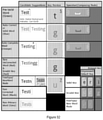
- Figure 32 comprises a table illustrating the different formats used by the smartphone 10 when implementing the various functionalities.
- the table indicates that the smartphone 10 modifies the display of one of the suggested words (for example, the PrimaryValidWord) to change the colour of the word to blue when the ComposingWord is a Auto-correct word (that is, a AutoCorrectableWord).
- the suggested words for example, the PrimaryValidWord
- the ComposingWord is a Auto-correct word (that is, a AutoCorrectableWord).
- Figures 33A to 23I comprise screenshots illustrating an alternative ChordKeys keyboard layout.
- ChordKeys allows a user to enter text using one hand.
- keys are triggered via a sequence of actions. Keys are ordered into sets, with varying levels of accessibility, where the most frequently used characters are at the top level of accessibility.
- Figure 33A comprises a series of screenshots illustrating the selection of one of the Top Level Keys E and T. Specifically, the figure illustrates the selection of the Top Level Key E on the dominant side of the ChordKeys layout. As illustrated, pressing and releasing the Top Level Key E results in the letter E being committed.
- the order of the letters in this presentation is a predetermined average, based on an analysis of letter frequency in the English language.
- the letters can be alternatively arranged to be similar to a QWERTY layout where the Top Level Keys are F and J with letter radiating from the Index Finger Keys, approximating a more familiar layout. Key layout can also be defined by the user.
- Figure 33B comprises a series of screenshots illustrating the selection of one of the Second Level Keys A, I, O, N, S, D, H and R on the dominant side of the ChordKeys layout. As illustrated, such keys are accessible with a single stroke gesture.
- Figure 33C comprises a series of screenshots illustrating the selection of one of the remaining Third Level Keys on the dominant side of the ChordKeys layout. As illustrated, the keys are accessible via an addition secondary level of user action, or additional portion of the tough-input.
- Figure 33D comprises a series of screenshots illustrating an alternative method of selecting one of the Third Level Keys on the dominant side of the ChordKeys layout using two fingers.
- the additional finger triggers the interface to replace the letters in the smaller (non-dominant) panel, on the right, changing the keys to those that are revealed, or uncovered, by the first fingers' gesture.
- Figure 33E comprises a series of screenshots illustrating the selection the Top Level Key T on the non dominant side of the ChordKeys layout.
- Figure 33F comprises a series of screenshots illustrating that holding the Top Level Key T toggles the dominance of the keyboard, making all second and third level keys accessible from the other side of the keyboard.
- Figure 33G comprises a series of screenshots illustrating the selection a Second Level Key on the non dominant side of the ChordKeys layout. As illustrated, holding the non-dominant side of the keyboard toggles the dominant-side of the keyboard. Adding a stroke/gesture leads to second level keys from the non-dominant side of the keyboard. In this instance, the letter S is selected. As with the above example, the user can force the change of dominance (changing between the dominant and non-dominant sides) without waiting for the system to change from the hold action.
- Figure 33H comprises a series of screenshots illustrating the selection a Third Level Key on the non dominant side of the ChordKeys layout. As illustrated, a third level letter is accessed in the same way for each side-of-dominance, with the addition of the non-dominant hold action if triggered, rather than forced.
- Figure 33I comprises a series of screenshots illustrating an alternative method of selecting a Third Level Key on the non dominant side of the ChordKeys layout.
- This two fingered method of accessing a third-level- letter is similar to the non-dominant example, with regards to the rules illustrated throughout these sequences.
- the second-touch-input is use to perform the secondary portion of the two-part-stroke, triggering
- Figure 33J comprises a series of screenshots illustrating the KeyShading functionality implemented on the ChordKeys layout where keys corresponding to valid subsequent letters are coloured differently to keys that do not correspond to valid subsequent letters.
- Figures 34A to 34I comprises screenshots illustrating an alternative RadialKeys keyboard layout.
- the RadialKeys keyboard layout can be used with a device that is not being held in a completely controllable manor, and provides an interface to complement, with regards to the compromised accuracy of user input and complementing methods of user inputs available in devices such as game controllers with directional inputs (such as thumbsticks and D-Pads), gyroscopic sensor and/or force sensors.
- the RadialKeys layout can be arranged to present the user with a variety of methods to select characters where a tradition ergonomic body position for typing is not available, or desired (for example, when the user is sitting on a couch using a small touchscreen device or using a game controller).
- Figure 34A comprises a series of screenshots illustrating the selection of one of the keys of the RadialKeys layout by pointing. Specifically, to select a key, the user moves the interactive-circle-selector to the desired key (a stroke action from the centre of the Radial Keyboard to the desired key). The circle selector expands on touch, indicating the process has been initiated.
- Figure 34B comprises a series of screenshots illustrating an alternative method of selecting one of the keys of the RadialKeys layout by rotation where the user can rotate the Radial Keyboard to the desired key by holding the area indicated and rotate the interface as illustrated.
- Figure 34C comprises a series of screenshots illustrating a variant of the RadialKeys layout where there is a dominant radial selector and a non-dominant radial selector. If the user presses the non-dominant selector, the second radial selector splits the keys into the two radial selectors. The second band is used to continue a refined selection of the desired character, as illustrated.
- Figures 34E and 34F comprises two series of screenshots illustrating how the KeyShading functionality may be implemented on the RadialKeys keyboard layout.
- ValidLetterKeys, AdditionalValidLetterKeys and InvalidKeys may additionally or alternatively be differentiated by size (for example, the size of the key), colour (for example, the colour of the key), and/or font attributes (for example, the size of the letter displayed on the key).
- Figure 35A comprises a series of screenshots illustrating an example where a user presses an AdditionalValidLetterKey ("y") close to a ValidLetterKey ("t"). Specifically, when the user accurately presses the letter "y" key in the fourth screenshot (that is, the first screenshot on the bottom row of screenshots), a KeyPreviewPopup of the AdditionalValidLetterKey ("y") is displayed, the PreKeyCorrection functionality dose not overrides the key press ("y"), the default behaviour.
- Figure 35B comprises a series of screenshots illustrating another example where a user "inaccurately” presses an AdditionalValidLetterKey ("y") at a position of the key that is close to a ValidLetterKey ("t").
- y the key press
- t the KeyPreviewPopup of the ValidLetterKey
- 300 the AdditionalValidLetterKey
- the ValidLetterKey (“t")-the only ValidLetterKey in this instance- is the ValidLetterKey that is spatially closest to the key press ("k"), and the word "test” is included as a ValidWord in the ValidWordsPanel 230 as the PrimaryValidWord.
- Figure 35E comprises a series of screenshots illustrating another example where a user presses an AdditionalValidLetterKey ("a") and there are no neighboring ValidLetterKeys (the only ValidLetterKey in this instance is "t”). Again, the ValidWord "test” corresponding to the ValidLetterKey that is spatially closest to the key press ("k”) is displayed in the ValidWordsPanel and in this instance also as the PrimaryValidWord.
- the smartphone 10 of the above example is configured to modify the display of the keys or words displayed on the touchscreen 20 during operation.
- the tables below tabulate the various modifications applied to the various elements displayed by the touchscreen 20.
- WordTail Override Retains the original WordStem, while retaining the remaining letters of the word (from the point of the cursor).
- a Space character is inserted in-between (as the action has been triggered by the spacebar.
- New Sentence - Auto Capitalise An empty TextField or a terminating punctuation character will automatically trigger the Shift state and display capitalised keys on the keyboard.
- New Sentence - Auto Space Entering a terminating punctuation character will automatically trigger the insertion of a Space character is the user strikes a Letter Key after the Punctuation Key, without entering a space character.
- Punctuation When a word is selected from the ValidWordsPanel, a space is automatically added, this space will be removed when a punctuation character is typed. Retain Caps When the first letter of a Capitalized word is deleted the keyboard is put into Capital Mode. Auto Fill Inserts the common letters where all suggested word share a common group of Next- Letter-Characters.
- the following table lists the action taken by the smartphone 10 in response to user inputs corresponding to system and non-letter keys.
- the following tables list the action taken by the smartphone 10 of the above examples in response to user inputs corresponding to letter and punctuation keys.
- -Trigger Condition FreeType onRelease -Override ClosestValidLetterKey -Display Preview(Green/FreeTy pe preview).
- -Trigger Condition FreeType onRelease Long Hold n/a n/a n/a Table C2: Single Key - Invalid Release, Without WordTail Table C2 PreValidWord AutoCorrectableWord AutoCompletableWord Press -Commit Key(ClosestValidLetter Key) -Dismiss Preview -Commit Key(ClosestValidLette rKey) -Dismiss Preview -Commit Key(ClosestValidLetterK ey) -Dismiss Preview Hold -Set FreeType Mode(Override Key Shading) -Commit Key(Raw/Invalid) -Dismiss Preview -Set FreeType Mode(Override Key Shading) -Commit Key(Raw/Invalid) -Dismiss Preview -Set FreeType Mode
- -Trigger Condition FreeType onRelease -Override ClosestValidLetterKey -Display Preview(Green/FreeTy pe preview).
- -Trigger Condition FreeType onRelease Long Hold n/a n/a n/a Table H2: Single Key - Invalid Release, With WordTail Table H2 PreValidWord AutoCorrectableWord AutoCompletableWord Press -Commit Key(ClosestValid LetterKey) -Dismiss Preview -Commit Key(ClosestValidLetter Key) -Dismiss Preview -Commit Key(ClosestValidLetterKey) -Dismiss Preview Hold Hold -Set FreeType Mode(Override Key Shading) -Commit Key -Dismiss Preview -Set FreeType Mode(Override Key Shading) -Commit Key -Dismiss Preview -Set FreeType Mode(Override Key Shading) -Commit Key -Dismiss Preview
- invalid keys may be added (for example, as UnPreCorrected-ComposingWords).
- any trigger condition or conditions are cleared after each user input.
- an extra long hold key press overrides a long hold key press which in turn overrides a hold key press which in turn overrides a normal key press (that is, non-hold key press).
Landscapes
- Engineering & Computer Science (AREA)
- Theoretical Computer Science (AREA)
- General Engineering & Computer Science (AREA)
- Physics & Mathematics (AREA)
- General Physics & Mathematics (AREA)
- Human Computer Interaction (AREA)
- Artificial Intelligence (AREA)
- Computational Linguistics (AREA)
- Health & Medical Sciences (AREA)
- Audiology, Speech & Language Pathology (AREA)
- General Health & Medical Sciences (AREA)
- Data Mining & Analysis (AREA)
- Databases & Information Systems (AREA)
- Input From Keyboards Or The Like (AREA)
- User Interface Of Digital Computer (AREA)
Applications Claiming Priority (3)
| Application Number | Priority Date | Filing Date | Title |
|---|---|---|---|
| AU2012902255A AU2012902255A0 (en) | 2012-05-30 | Methods, Controllers and Devices for Assembling a Word | |
| AU2013204311A AU2013204311B2 (en) | 2012-05-30 | 2013-04-12 | Methods, Controllers and Devices for Assembling a Word |
| PCT/AU2013/000568 WO2013177624A1 (en) | 2012-05-30 | 2013-05-30 | Methods, controllers and devices for assembling a word |
Publications (3)
| Publication Number | Publication Date |
|---|---|
| EP2856285A1 EP2856285A1 (en) | 2015-04-08 |
| EP2856285A4 EP2856285A4 (en) | 2015-11-25 |
| EP2856285B1 true EP2856285B1 (en) | 2022-03-23 |
Family
ID=49672183
Family Applications (1)
| Application Number | Title | Priority Date | Filing Date |
|---|---|---|---|
| EP13797730.2A Active EP2856285B1 (en) | 2012-05-30 | 2013-05-30 | Methods, controllers and devices for assembling a word |
Country Status (12)
| Country | Link |
|---|---|
| US (1) | US10380153B2 (enExample) |
| EP (1) | EP2856285B1 (enExample) |
| JP (1) | JP6219935B2 (enExample) |
| CN (1) | CN104412204A (enExample) |
| AU (1) | AU2013204311B2 (enExample) |
| CA (1) | CA2874394C (enExample) |
| IL (1) | IL235774B (enExample) |
| IN (1) | IN2014MN02403A (enExample) |
| NZ (1) | NZ701828A (enExample) |
| PH (1) | PH12014502640A1 (enExample) |
| WO (1) | WO2013177624A1 (enExample) |
| ZA (1) | ZA201408753B (enExample) |
Families Citing this family (9)
| Publication number | Priority date | Publication date | Assignee | Title |
|---|---|---|---|---|
| US10684774B2 (en) * | 2014-09-09 | 2020-06-16 | Touchtype Limited | Systems and methods for multiuse of keys for virtual keyboard and generating animation associated with a key |
| CN104571874B (zh) * | 2015-02-13 | 2018-10-30 | 上海触乐信息科技有限公司 | 动态切换键盘背景的方法和装置 |
| US9760560B2 (en) * | 2015-03-19 | 2017-09-12 | Nuance Communications, Inc. | Correction of previous words and other user text input errors |
| KR102481632B1 (ko) * | 2016-04-26 | 2022-12-28 | 삼성전자주식회사 | 전자 장치 및 전자 장치의 디스플레이를 이용한 적응적 터치 입력 방법 |
| WO2020251600A1 (en) * | 2019-06-12 | 2020-12-17 | Google, Llc | Dynamically exposing repetitively used data in a user interface |
| US20200393914A1 (en) | 2019-06-14 | 2020-12-17 | Riley Ford Keen | Fluid Chord/Character Entry |
| US11231789B1 (en) * | 2020-02-14 | 2022-01-25 | Cg Finics Oy | Predictive typing assistance method with predictive spelling behavior |
| US20240078008A1 (en) * | 2022-09-02 | 2024-03-07 | Qualcomm Incorporated | Force-based functionality for a graphical user interface including a keyboard |
| US11726657B1 (en) | 2023-03-01 | 2023-08-15 | Daniel Pohoryles | Keyboard input method, system, and techniques |
Citations (2)
| Publication number | Priority date | Publication date | Assignee | Title |
|---|---|---|---|---|
| EP1975808A1 (en) * | 2007-03-30 | 2008-10-01 | Research In Motion Limited | Spell check function having a character replacement spell check algorithm that applies a preference based upon proximity of the characters replacing one another, and associated handheld electronic device |
| US20120023433A1 (en) * | 2010-07-23 | 2012-01-26 | Samsung Electronics Co., Ltd. | Method and apparatus for inputting character in a portable terminal |
Family Cites Families (20)
| Publication number | Priority date | Publication date | Assignee | Title |
|---|---|---|---|---|
| US5953541A (en) * | 1997-01-24 | 1999-09-14 | Tegic Communications, Inc. | Disambiguating system for disambiguating ambiguous input sequences by displaying objects associated with the generated input sequences in the order of decreasing frequency of use |
| US6377965B1 (en) * | 1997-11-07 | 2002-04-23 | Microsoft Corporation | Automatic word completion system for partially entered data |
| US7030863B2 (en) * | 2000-05-26 | 2006-04-18 | America Online, Incorporated | Virtual keyboard system with automatic correction |
| US20090006543A1 (en) * | 2001-08-20 | 2009-01-01 | Masterobjects | System and method for asynchronous retrieval of information based on incremental user input |
| CN100339809C (zh) * | 2001-09-21 | 2007-09-26 | 联想(新加坡)私人有限公司 | 输入装置、计算机装置、输入对象的识别方法、软件键盘的输入对象识别方法 |
| US7151530B2 (en) * | 2002-08-20 | 2006-12-19 | Canesta, Inc. | System and method for determining an input selected by a user through a virtual interface |
| US7447627B2 (en) * | 2003-10-23 | 2008-11-04 | Microsoft Corporation | Compound word breaker and spell checker |
| US20050192802A1 (en) * | 2004-02-11 | 2005-09-01 | Alex Robinson | Handwriting and voice input with automatic correction |
| US7983896B2 (en) * | 2004-03-05 | 2011-07-19 | SDL Language Technology | In-context exact (ICE) matching |
| DE602005020533D1 (de) * | 2005-02-22 | 2010-05-20 | Research In Motion Ltd | Tragbare elektronische Vorrichtung mit reduzierter Tastatur und Zugang über mehrere Passwörter sowie dazugehörige Verfahren |
| KR100643801B1 (ko) * | 2005-10-26 | 2006-11-10 | 엔에이치엔(주) | 복수의 언어를 연동하는 자동완성 추천어 제공 시스템 및방법 |
| US20070198514A1 (en) * | 2006-02-10 | 2007-08-23 | Schwenke Derek L | Method for presenting result sets for probabilistic queries |
| JP2009301198A (ja) * | 2008-06-11 | 2009-12-24 | Mitsubishi Electric Corp | 入力予測装置 |
| WO2010035574A1 (ja) | 2008-09-29 | 2010-04-01 | シャープ株式会社 | 入力装置、入力方法、プログラム、および記録媒体 |
| US8786551B2 (en) * | 2008-12-11 | 2014-07-22 | Verizon Patent And Licensing Inc. | Predictive keypad/keyboard lighting to guide input |
| JP4886797B2 (ja) * | 2009-01-15 | 2012-02-29 | ヤフー株式会社 | ソフトウェアキーボードの表示方法及び携帯情報端末装置 |
| CN101876878A (zh) | 2009-04-29 | 2010-11-03 | 深圳富泰宏精密工业有限公司 | 单词预测输入系统及方法 |
| US8782556B2 (en) * | 2010-02-12 | 2014-07-15 | Microsoft Corporation | User-centric soft keyboard predictive technologies |
| US8456435B2 (en) | 2010-02-26 | 2013-06-04 | Research In Motion Limited | Electronic device with touch-sensitive display and method of facilitating input at the electronic device |
| KR101520455B1 (ko) * | 2010-11-04 | 2015-05-21 | 뉘앙스 커뮤니케이션즈, 인코포레이티드 | 자동 수정을 갖는 키보드 시스템용 맞춤법 검사 |
-
2013
- 2013-04-12 AU AU2013204311A patent/AU2013204311B2/en active Active
- 2013-05-30 CA CA2874394A patent/CA2874394C/en active Active
- 2013-05-30 WO PCT/AU2013/000568 patent/WO2013177624A1/en not_active Ceased
- 2013-05-30 NZ NZ701828A patent/NZ701828A/en unknown
- 2013-05-30 JP JP2015514290A patent/JP6219935B2/ja active Active
- 2013-05-30 IN IN2403MUN2014 patent/IN2014MN02403A/en unknown
- 2013-05-30 CN CN201380027905.1A patent/CN104412204A/zh active Pending
- 2013-05-30 EP EP13797730.2A patent/EP2856285B1/en active Active
- 2013-05-30 US US14/403,564 patent/US10380153B2/en active Active
-
2014
- 2014-11-18 IL IL235774A patent/IL235774B/en active IP Right Grant
- 2014-11-25 PH PH12014502640A patent/PH12014502640A1/en unknown
- 2014-11-28 ZA ZA2014/08753A patent/ZA201408753B/en unknown
Patent Citations (2)
| Publication number | Priority date | Publication date | Assignee | Title |
|---|---|---|---|---|
| EP1975808A1 (en) * | 2007-03-30 | 2008-10-01 | Research In Motion Limited | Spell check function having a character replacement spell check algorithm that applies a preference based upon proximity of the characters replacing one another, and associated handheld electronic device |
| US20120023433A1 (en) * | 2010-07-23 | 2012-01-26 | Samsung Electronics Co., Ltd. | Method and apparatus for inputting character in a portable terminal |
Non-Patent Citations (1)
| Title |
|---|
| "Intelligent Keyboard Interface ED - Darl Kuhn", IP.COM, IP.COM INC., WEST HENRIETTA, NY, US, 16 February 2009 (2009-02-16), XP013129546, ISSN: 1533-0001 * |
Also Published As
| Publication number | Publication date |
|---|---|
| AU2013204311A1 (en) | 2013-12-19 |
| US20150134642A1 (en) | 2015-05-14 |
| CA2874394C (en) | 2020-12-22 |
| JP2015520458A (ja) | 2015-07-16 |
| ZA201408753B (en) | 2016-08-31 |
| PH12014502640B1 (en) | 2015-01-26 |
| IL235774B (en) | 2018-07-31 |
| CN104412204A (zh) | 2015-03-11 |
| NZ701828A (en) | 2017-05-26 |
| EP2856285A4 (en) | 2015-11-25 |
| US10380153B2 (en) | 2019-08-13 |
| CA2874394A1 (en) | 2013-12-05 |
| AU2013204311B2 (en) | 2016-09-29 |
| EP2856285A1 (en) | 2015-04-08 |
| WO2013177624A1 (en) | 2013-12-05 |
| IN2014MN02403A (enExample) | 2015-08-21 |
| JP6219935B2 (ja) | 2017-10-25 |
| PH12014502640A1 (en) | 2015-01-26 |
| IL235774A0 (en) | 2015-01-29 |
Similar Documents
| Publication | Publication Date | Title |
|---|---|---|
| CA2874394C (en) | Methods, controllers and devices for assembling a word | |
| US10936086B2 (en) | System for inputting information by utilizing extension key and method thereof | |
| US10838513B2 (en) | Responding to selection of a displayed character string | |
| CN104737156B (zh) | 用于文本输入的空格预测 | |
| US10275152B2 (en) | Advanced methods and systems for text input error correction | |
| US8739055B2 (en) | Correction of typographical errors on touch displays | |
| US20240143165A1 (en) | Content control system | |
| US9454516B2 (en) | Method and handheld electronic device employing a touch screen for ambiguous word review or correction | |
| KR100958309B1 (ko) | 문자입력장치 | |
| US20130325438A1 (en) | Touchscreen Keyboard with Corrective Word Prediction | |
| WO2012158257A2 (en) | Typing input systems, methods, and devices | |
| US9606727B2 (en) | Apparatus and method for providing user interface providing keyboard layout | |
| US20120236036A1 (en) | Electronic device, control method of the same, and computer program product of the same | |
| AU2019201023B2 (en) | Methods, Controllers and Devices for Assembling a Word | |
| CN111142683B (zh) | 输入辅助程序、输入辅助方法以及输入辅助装置 | |
| CN103123572A (zh) | 一种输入字符的方法和电子装置 | |
| CN103608751A (zh) | 使用扩展键输入信息的系统和输入信息的方法 | |
| KR20240130673A (ko) | 전자장치에서 문자입력시 직전에 입력된 문자가 무엇인지 알려주기 위한 방법 | |
| CN102467338A (zh) | 电子装置及其软件键盘的按键显示方法 | |
| WO2014144388A1 (en) | Handling inappropriate input method use | |
| CN103164151A (zh) | 适应性地变化虚拟键盘的外观的方法及装置 | |
| KR102260468B1 (ko) | 소프트웨어 키패드를 이용한 한글 모음 입력 방법 | |
| KR20100086448A (ko) | 열두키를 이용한 중국어 병음 입력장치 및 방법 | |
| KR20140109309A (ko) | 전자장치에서 문자입력시 직전에 입력된 문자가 무엇인지 알려주기 위한 방법 | |
| KR20160031699A (ko) | 전자장치에서 문자입력시 직전에 입력된 문자가 무엇인지 알려주기 위한 방법 |
Legal Events
| Date | Code | Title | Description |
|---|---|---|---|
| PUAI | Public reference made under article 153(3) epc to a published international application that has entered the european phase |
Free format text: ORIGINAL CODE: 0009012 |
|
| 17P | Request for examination filed |
Effective date: 20141110 |
|
| AK | Designated contracting states |
Kind code of ref document: A1 Designated state(s): AL AT BE BG CH CY CZ DE DK EE ES FI FR GB GR HR HU IE IS IT LI LT LU LV MC MK MT NL NO PL PT RO RS SE SI SK SM TR |
|
| AX | Request for extension of the european patent |
Extension state: BA ME |
|
| DAX | Request for extension of the european patent (deleted) | ||
| RA4 | Supplementary search report drawn up and despatched (corrected) |
Effective date: 20151027 |
|
| RIC1 | Information provided on ipc code assigned before grant |
Ipc: G06F 3/00 20060101ALI20151020BHEP Ipc: G06F 17/00 20060101ALI20151020BHEP Ipc: G06F 3/023 20060101AFI20151020BHEP |
|
| STAA | Information on the status of an ep patent application or granted ep patent |
Free format text: STATUS: EXAMINATION IS IN PROGRESS |
|
| 17Q | First examination report despatched |
Effective date: 20190405 |
|
| GRAP | Despatch of communication of intention to grant a patent |
Free format text: ORIGINAL CODE: EPIDOSNIGR1 |
|
| STAA | Information on the status of an ep patent application or granted ep patent |
Free format text: STATUS: GRANT OF PATENT IS INTENDED |
|
| RIC1 | Information provided on ipc code assigned before grant |
Ipc: G06F 40/274 20200101ALI20210927BHEP Ipc: G06F 3/0488 20130101ALI20210927BHEP Ipc: G06F 3/023 20060101AFI20210927BHEP |
|
| INTG | Intention to grant announced |
Effective date: 20211018 |
|
| GRAS | Grant fee paid |
Free format text: ORIGINAL CODE: EPIDOSNIGR3 |
|
| GRAA | (expected) grant |
Free format text: ORIGINAL CODE: 0009210 |
|
| STAA | Information on the status of an ep patent application or granted ep patent |
Free format text: STATUS: THE PATENT HAS BEEN GRANTED |
|
| AK | Designated contracting states |
Kind code of ref document: B1 Designated state(s): AL AT BE BG CH CY CZ DE DK EE ES FI FR GB GR HR HU IE IS IT LI LT LU LV MC MK MT NL NO PL PT RO RS SE SI SK SM TR |
|
| REG | Reference to a national code |
Ref country code: GB Ref legal event code: FG4D |
|
| REG | Reference to a national code |
Ref country code: CH Ref legal event code: EP |
|
| REG | Reference to a national code |
Ref country code: IE Ref legal event code: FG4D |
|
| REG | Reference to a national code |
Ref country code: DE Ref legal event code: R096 Ref document number: 602013081195 Country of ref document: DE |
|
| REG | Reference to a national code |
Ref country code: AT Ref legal event code: REF Ref document number: 1477912 Country of ref document: AT Kind code of ref document: T Effective date: 20220415 |
|
| REG | Reference to a national code |
Ref country code: NL Ref legal event code: FP |
|
| REG | Reference to a national code |
Ref country code: LT Ref legal event code: MG9D |
|
| PG25 | Lapsed in a contracting state [announced via postgrant information from national office to epo] |
Ref country code: SE Free format text: LAPSE BECAUSE OF FAILURE TO SUBMIT A TRANSLATION OF THE DESCRIPTION OR TO PAY THE FEE WITHIN THE PRESCRIBED TIME-LIMIT Effective date: 20220323 Ref country code: RS Free format text: LAPSE BECAUSE OF FAILURE TO SUBMIT A TRANSLATION OF THE DESCRIPTION OR TO PAY THE FEE WITHIN THE PRESCRIBED TIME-LIMIT Effective date: 20220323 Ref country code: NO Free format text: LAPSE BECAUSE OF FAILURE TO SUBMIT A TRANSLATION OF THE DESCRIPTION OR TO PAY THE FEE WITHIN THE PRESCRIBED TIME-LIMIT Effective date: 20220623 Ref country code: LT Free format text: LAPSE BECAUSE OF FAILURE TO SUBMIT A TRANSLATION OF THE DESCRIPTION OR TO PAY THE FEE WITHIN THE PRESCRIBED TIME-LIMIT Effective date: 20220323 Ref country code: HR Free format text: LAPSE BECAUSE OF FAILURE TO SUBMIT A TRANSLATION OF THE DESCRIPTION OR TO PAY THE FEE WITHIN THE PRESCRIBED TIME-LIMIT Effective date: 20220323 Ref country code: BG Free format text: LAPSE BECAUSE OF FAILURE TO SUBMIT A TRANSLATION OF THE DESCRIPTION OR TO PAY THE FEE WITHIN THE PRESCRIBED TIME-LIMIT Effective date: 20220623 |
|
| REG | Reference to a national code |
Ref country code: AT Ref legal event code: MK05 Ref document number: 1477912 Country of ref document: AT Kind code of ref document: T Effective date: 20220323 |
|
| PG25 | Lapsed in a contracting state [announced via postgrant information from national office to epo] |
Ref country code: LV Free format text: LAPSE BECAUSE OF FAILURE TO SUBMIT A TRANSLATION OF THE DESCRIPTION OR TO PAY THE FEE WITHIN THE PRESCRIBED TIME-LIMIT Effective date: 20220323 Ref country code: GR Free format text: LAPSE BECAUSE OF FAILURE TO SUBMIT A TRANSLATION OF THE DESCRIPTION OR TO PAY THE FEE WITHIN THE PRESCRIBED TIME-LIMIT Effective date: 20220624 Ref country code: FI Free format text: LAPSE BECAUSE OF FAILURE TO SUBMIT A TRANSLATION OF THE DESCRIPTION OR TO PAY THE FEE WITHIN THE PRESCRIBED TIME-LIMIT Effective date: 20220323 |
|
| PG25 | Lapsed in a contracting state [announced via postgrant information from national office to epo] |
Ref country code: SM Free format text: LAPSE BECAUSE OF FAILURE TO SUBMIT A TRANSLATION OF THE DESCRIPTION OR TO PAY THE FEE WITHIN THE PRESCRIBED TIME-LIMIT Effective date: 20220323 Ref country code: SK Free format text: LAPSE BECAUSE OF FAILURE TO SUBMIT A TRANSLATION OF THE DESCRIPTION OR TO PAY THE FEE WITHIN THE PRESCRIBED TIME-LIMIT Effective date: 20220323 Ref country code: RO Free format text: LAPSE BECAUSE OF FAILURE TO SUBMIT A TRANSLATION OF THE DESCRIPTION OR TO PAY THE FEE WITHIN THE PRESCRIBED TIME-LIMIT Effective date: 20220323 Ref country code: PT Free format text: LAPSE BECAUSE OF FAILURE TO SUBMIT A TRANSLATION OF THE DESCRIPTION OR TO PAY THE FEE WITHIN THE PRESCRIBED TIME-LIMIT Effective date: 20220725 Ref country code: ES Free format text: LAPSE BECAUSE OF FAILURE TO SUBMIT A TRANSLATION OF THE DESCRIPTION OR TO PAY THE FEE WITHIN THE PRESCRIBED TIME-LIMIT Effective date: 20220323 Ref country code: EE Free format text: LAPSE BECAUSE OF FAILURE TO SUBMIT A TRANSLATION OF THE DESCRIPTION OR TO PAY THE FEE WITHIN THE PRESCRIBED TIME-LIMIT Effective date: 20220323 Ref country code: CZ Free format text: LAPSE BECAUSE OF FAILURE TO SUBMIT A TRANSLATION OF THE DESCRIPTION OR TO PAY THE FEE WITHIN THE PRESCRIBED TIME-LIMIT Effective date: 20220323 Ref country code: AT Free format text: LAPSE BECAUSE OF FAILURE TO SUBMIT A TRANSLATION OF THE DESCRIPTION OR TO PAY THE FEE WITHIN THE PRESCRIBED TIME-LIMIT Effective date: 20220323 |
|
| PG25 | Lapsed in a contracting state [announced via postgrant information from national office to epo] |
Ref country code: PL Free format text: LAPSE BECAUSE OF FAILURE TO SUBMIT A TRANSLATION OF THE DESCRIPTION OR TO PAY THE FEE WITHIN THE PRESCRIBED TIME-LIMIT Effective date: 20220323 Ref country code: IS Free format text: LAPSE BECAUSE OF FAILURE TO SUBMIT A TRANSLATION OF THE DESCRIPTION OR TO PAY THE FEE WITHIN THE PRESCRIBED TIME-LIMIT Effective date: 20220723 Ref country code: AL Free format text: LAPSE BECAUSE OF FAILURE TO SUBMIT A TRANSLATION OF THE DESCRIPTION OR TO PAY THE FEE WITHIN THE PRESCRIBED TIME-LIMIT Effective date: 20220323 |
|
| REG | Reference to a national code |
Ref country code: CH Ref legal event code: PL |
|
| REG | Reference to a national code |
Ref country code: DE Ref legal event code: R097 Ref document number: 602013081195 Country of ref document: DE |
|
| REG | Reference to a national code |
Ref country code: BE Ref legal event code: MM Effective date: 20220531 |
|
| PLBE | No opposition filed within time limit |
Free format text: ORIGINAL CODE: 0009261 |
|
| STAA | Information on the status of an ep patent application or granted ep patent |
Free format text: STATUS: NO OPPOSITION FILED WITHIN TIME LIMIT |
|
| PG25 | Lapsed in a contracting state [announced via postgrant information from national office to epo] |
Ref country code: MC Free format text: LAPSE BECAUSE OF FAILURE TO SUBMIT A TRANSLATION OF THE DESCRIPTION OR TO PAY THE FEE WITHIN THE PRESCRIBED TIME-LIMIT Effective date: 20220323 Ref country code: LU Free format text: LAPSE BECAUSE OF NON-PAYMENT OF DUE FEES Effective date: 20220530 Ref country code: LI Free format text: LAPSE BECAUSE OF NON-PAYMENT OF DUE FEES Effective date: 20220531 Ref country code: DK Free format text: LAPSE BECAUSE OF FAILURE TO SUBMIT A TRANSLATION OF THE DESCRIPTION OR TO PAY THE FEE WITHIN THE PRESCRIBED TIME-LIMIT Effective date: 20220323 Ref country code: CH Free format text: LAPSE BECAUSE OF NON-PAYMENT OF DUE FEES Effective date: 20220531 |
|
| 26N | No opposition filed |
Effective date: 20230102 |
|
| PG25 | Lapsed in a contracting state [announced via postgrant information from national office to epo] |
Ref country code: SI Free format text: LAPSE BECAUSE OF FAILURE TO SUBMIT A TRANSLATION OF THE DESCRIPTION OR TO PAY THE FEE WITHIN THE PRESCRIBED TIME-LIMIT Effective date: 20220323 Ref country code: BE Free format text: LAPSE BECAUSE OF NON-PAYMENT OF DUE FEES Effective date: 20220531 |
|
| PG25 | Lapsed in a contracting state [announced via postgrant information from national office to epo] |
Ref country code: IT Free format text: LAPSE BECAUSE OF FAILURE TO SUBMIT A TRANSLATION OF THE DESCRIPTION OR TO PAY THE FEE WITHIN THE PRESCRIBED TIME-LIMIT Effective date: 20220323 |
|
| PG25 | Lapsed in a contracting state [announced via postgrant information from national office to epo] |
Ref country code: HU Free format text: LAPSE BECAUSE OF FAILURE TO SUBMIT A TRANSLATION OF THE DESCRIPTION OR TO PAY THE FEE WITHIN THE PRESCRIBED TIME-LIMIT; INVALID AB INITIO Effective date: 20130530 |
|
| PG25 | Lapsed in a contracting state [announced via postgrant information from national office to epo] |
Ref country code: MK Free format text: LAPSE BECAUSE OF FAILURE TO SUBMIT A TRANSLATION OF THE DESCRIPTION OR TO PAY THE FEE WITHIN THE PRESCRIBED TIME-LIMIT Effective date: 20220323 Ref country code: CY Free format text: LAPSE BECAUSE OF FAILURE TO SUBMIT A TRANSLATION OF THE DESCRIPTION OR TO PAY THE FEE WITHIN THE PRESCRIBED TIME-LIMIT Effective date: 20220323 |
|
| PG25 | Lapsed in a contracting state [announced via postgrant information from national office to epo] |
Ref country code: MT Free format text: LAPSE BECAUSE OF FAILURE TO SUBMIT A TRANSLATION OF THE DESCRIPTION OR TO PAY THE FEE WITHIN THE PRESCRIBED TIME-LIMIT Effective date: 20220323 |
|
| PG25 | Lapsed in a contracting state [announced via postgrant information from national office to epo] |
Ref country code: TR Free format text: LAPSE BECAUSE OF FAILURE TO SUBMIT A TRANSLATION OF THE DESCRIPTION OR TO PAY THE FEE WITHIN THE PRESCRIBED TIME-LIMIT Effective date: 20220323 |
|
| PGFP | Annual fee paid to national office [announced via postgrant information from national office to epo] |
Ref country code: NL Payment date: 20260520 Year of fee payment: 14 |
|
| PGFP | Annual fee paid to national office [announced via postgrant information from national office to epo] |
Ref country code: GB Payment date: 20260522 Year of fee payment: 14 |
|
| PGFP | Annual fee paid to national office [announced via postgrant information from national office to epo] |
Ref country code: DE Payment date: 20260522 Year of fee payment: 14 |
|
| PGFP | Annual fee paid to national office [announced via postgrant information from national office to epo] |
Ref country code: IE Payment date: 20260522 Year of fee payment: 14 |
|
| PGFP | Annual fee paid to national office [announced via postgrant information from national office to epo] |
Ref country code: FR Payment date: 20260526 Year of fee payment: 14 |