EP2828706B1 - Verfahren zur herstellung einer für einen träger personalisierten korrigierenden brillenglaslinse - Google Patents
Verfahren zur herstellung einer für einen träger personalisierten korrigierenden brillenglaslinse Download PDFInfo
- Publication number
- EP2828706B1 EP2828706B1 EP13719900.6A EP13719900A EP2828706B1 EP 2828706 B1 EP2828706 B1 EP 2828706B1 EP 13719900 A EP13719900 A EP 13719900A EP 2828706 B1 EP2828706 B1 EP 2828706B1
- Authority
- EP
- European Patent Office
- Prior art keywords
- lens
- module
- wearer
- manufacturing
- configuration
- Prior art date
- Legal status (The legal status is an assumption and is not a legal conclusion. Google has not performed a legal analysis and makes no representation as to the accuracy of the status listed.)
- Active
Links
Images


Classifications
-
- G—PHYSICS
- G02—OPTICS
- G02C—SPECTACLES; SUNGLASSES OR GOGGLES INSOFAR AS THEY HAVE THE SAME FEATURES AS SPECTACLES; CONTACT LENSES
- G02C7/00—Optical parts
- G02C7/02—Lenses; Lens systems ; Methods of designing lenses
- G02C7/024—Methods of designing ophthalmic lenses
- G02C7/028—Special mathematical design techniques
-
- G—PHYSICS
- G02—OPTICS
- G02C—SPECTACLES; SUNGLASSES OR GOGGLES INSOFAR AS THEY HAVE THE SAME FEATURES AS SPECTACLES; CONTACT LENSES
- G02C7/00—Optical parts
- G02C7/02—Lenses; Lens systems ; Methods of designing lenses
-
- G—PHYSICS
- G02—OPTICS
- G02C—SPECTACLES; SUNGLASSES OR GOGGLES INSOFAR AS THEY HAVE THE SAME FEATURES AS SPECTACLES; CONTACT LENSES
- G02C7/00—Optical parts
- G02C7/02—Lenses; Lens systems ; Methods of designing lenses
- G02C7/024—Methods of designing ophthalmic lenses
- G02C7/027—Methods of designing ophthalmic lenses considering wearer's parameters
-
- G—PHYSICS
- G02—OPTICS
- G02C—SPECTACLES; SUNGLASSES OR GOGGLES INSOFAR AS THEY HAVE THE SAME FEATURES AS SPECTACLES; CONTACT LENSES
- G02C7/00—Optical parts
- G02C7/10—Filters, e.g. for facilitating adaptation of the eyes to the dark; Sunglasses
Definitions
- the present invention generally relates to the field of manufacturing spectacle corrective ophthalmic lenses. More specifically, the invention relates to a method for customizing a corrective lens by selecting a set of configuration parameters such as the material, the optical power function, the color, the surface treatment (s). , the chromaticity, while taking into account in particular the vision behavior of the wearer of glasses, that is to say, the intended use of glasses for driving in the car and / or the office.
- It relates more particularly to a method for graphically displaying a plurality of configuration parameters of an ophthalmic correction lens and gradually selecting the various configuration parameters, taking into account in particular the optical design parameters and the morphological parameters of the wearer, to quickly determine an optimal custom correction lens.
- It relates in particular to a configuration method for the manufacture of correction lenses of uni-, bi- or trifocal type, lenses with variable focal length or progressive lenses.
- the personalization of corrective ophthalmic lenses is based on the selection by the future spectacle wearer of a certain number of options out of a set of configuration parameters proposed for example by an optician-counselor.
- the following patent applications are relevant documents in this technical field: US2010 / 0157242 A1 , WO00 / 16683 A1 , US2010 / 0179799 A1 and WO2007 / 056797 A1 .
- the choice of certain configuration parameters for example the material of the lens combined with the design parameters of the lens, may be incompatible with other parameters such as the selected frame. It is essential to be able to offer a wearer a personalized lens that can be made according to the prescription and all the selected configuration parameters. On the other hand, it is desirable that the selection of all the configuration parameters is performed in the shortest possible time.
- the configuration parameters of the lens include lens manufacturing parameters, including the distribution of the lens function. optical power, lens material, lens color, polarization of the lens, surface treatment (s) including antireflection treatment, impact resistance treatment, anti-scratch treatment , the antistatic treatment, the hydrophobic treatment, the oleophobic treatment, the polarizing treatment, the photochromic property of the lens, and / or the geometric and morphological parameters relating to the wearer and to an eyeglass frame.
- lens manufacturing parameters including the distribution of the lens function. optical power, lens material, lens color, polarization of the lens, surface treatment (s) including antireflection treatment, impact resistance treatment, anti-scratch treatment , the antistatic treatment, the hydrophobic treatment, the oleophobic treatment, the polarizing treatment, the photochromic property of the lens, and / or the geometric and morphological parameters relating to the wearer and to an eyeglass frame.
- the step of selecting at least one image and / or at least one view of the wearer comprises the selection of a sequence of images or an image. in three dimensions.
- the step of simulating a filter comprises the dynamic simulation of a filter by a sequence of images or by a three-dimensional image.
- the method further comprises displaying a textual content according to the selected value of the configuration parameter associated with the module.
- the method of manufacturing a corrective ophthalmic lens further comprises a step of selecting an eyeglass frame.
- the manufacturing method comprises a lens contour selection module as a configuration parameter, this module comprising, in its graphic interface, means for selecting at least one lens contour from among a preselection of lens contours. associated with different spectacle frames, means for graphically simulating a virtual lens having the selected contour and means for validating the selection of a lens contour.
- the method for manufacturing a corrective ophthalmic lens further comprises a step of presenting the values of the various configuration parameters selected and validated after the execution of said at least one ordered sequence.
- the method of manufacturing a lens corrective ophthalmic further comprises a step of verifying the feasibility of a corrective ophthalmic lens in accordance with the values of the various configuration parameters selected and validated after the execution of said at least one ordered sequence.
- the method for manufacturing a corrective ophthalmic lens further comprises a step of constituting at least one preset of values associated with a configuration parameter.
- the figure 1 is a block diagram showing various steps of a method for determining the configuration parameters of a corrective lens or a pair of corrective lenses.
- lens and glass are used interchangeably and should be considered synonymous.
- the configuration parameters are very numerous.
- P1, P2, P3 ... Pi or ... PM denote a particular configuration parameter, such as: the lens material, the design of the optical power function, the color of the lens , an anti-reflective treatment.
- Each of these configuration parameters can take one of a set of predefined values. The values of some of these parameters can be known in advance (the prescription generally defines power correction values in far vision and in near vision) and can be recorded for example computer. A number of other configuration parameter values must be selected by the optician and / or the prospective wearer.
- the optician and / or the prospective carrier have selected a set of lens configuration parameter values and verified that the corresponding lens is feasible, its manufacture can start.
- This manufacture is then performed according to the usual manufacturing steps, known to those skilled in the art.
- the visual correction prescription, the material chosen for the lens, the optical design parameters of the lens and the geometrical parameters of the selected frame are used to calculate refraction surface modeling data.
- the figure 1 represents the general architecture of the software implementing the method of the invention.
- Configuration parameters P1, P2, P3 ... Pi ... PN are recorded by computer.
- Mod1, Mod2, Mod3 ... Modi ... ModN different interactive configuration software modules.
- Each module Modi is generally associated with one of the configuration parameters Pi. Nevertheless, a module Modi can be associated with several configuration parameters Pi.
- the module Mod1 can be associated with several configuration parameters P1, P2, P3.
- modules are integrated into a software application that includes data stored in a database and files, a graphical interface and scripts.
- This application is run on a computer, a touch-sensitive digital tablet, a smartphone, etc.
- the purpose of executing a Modi configuration module is to result in the selection of a value for the configuration parameter Pi associated with this module.
- Running a Modi configuration module includes a graphical presentation of a simulation based on the selected parameter (s).
- a value of the parameter Pi is validated and recorded by computer.
- the different modules can be executed independently of each other (eg Modx module on the Fig. 1 ) or in series (eg Mod1 and Mod2 on the Fig. 1 ).
- a ModN module makes it possible to check the feasibility of the overall configuration of the lens. If the feasibility of the lens is confirmed, we can go to the selling stage of the lens and start manufacturing.
- the software application has means for defining a sequence of execution of the various modules so as to quickly lead to a lens configuration that is both technically feasible and adapted to the needs of the wearer.
- the figure 2 is a view of a graphical interface 200 of a general module for presenting and selecting a set of configuration parameters according to a particular embodiment.
- the graphic interface 200 is displayed for example on a mobile phone touch screen or on a digital tablet.
- a file, represented on the graphical interface by an icon 201, stores the values of the configuration parameters relating to a corrective lens for a wearer.
- the file corresponding to the icon 201 also contains geometric and morphological parameters relating to the wearer and to a spectacle watch.
- Various interactive modules of configuration Mod1, Mod2, Mod3 ... Modj are represented by shortcuts on the graphic interface 200.
- the interface 200 makes it possible to select an ordered sequence of modules by a drag-and-drop action.
- the sequence Seq1 starts with the execution of the module Mod1, then of the module Mod2, of the module Mod3 and ends with the module Mod4.
- the sequence Seq2 begins with the execution of the module Mod4, then the module Mod2 and ends with the module Mod3.
- the Seq3 sequence comprises a single module Modi.
- the Mod1 module may correspond to a configuration module of the optical design, that is to say the distribution of optical power, a lens with progressive focus.
- the Mod2 module can correspond to a configuration module of an anti-reflection treatment.
- the module Mod3 can correspond to a configuration module of a hue and / or the photochromic of the lens.
- the Mod4 module may correspond to a module for configuring the polarization of the lens.
- the Modi module can correspond to a module for configuring the thickness and weight of the lens.
- the choice of the sequence makes it possible to select the parameters that will be configured.
- the choice of a sequence also imposes the order in which the modules will be executed.
- a configuration parameter is determined by the recording of a validated value of the parameter concerned.
- the graphic button 205 makes it possible to start the application, that is to say the execution of a selected sequence.
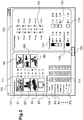
- the figure 3 is a view of another type of graphical interface 100 of an application for presenting and pre-selecting a set of configuration parameters.
- the graphical interface 100 is displayed for example on a computer screen.
- the graphic interface 100 is for example the configuration interface of the optician, this interface 100 is not necessarily presented or accessible to a customer wearing glasses.
- the graphical interface 100 comprises several preselection zones.
- a first pre-selection zone 101 comprises icons B1, B2,... B7 each corresponding to a static ambient image B1,... B6 or dynamic image B7 and means 111 for selecting or deselecting each image.
- the selection means 111 may be in various known forms, for example a drop-down menu or selectable area by pressing the mouse button of the computer.
- the dynamic image B7 may for example correspond to a film or a three-dimensional view.
- Images B1, B2 ... B7 can come from photo or video images or simulation images.
- Each ambient image B1, B2, ... B7 corresponds to a visual environment of use and is intended to simulate the environment of use as is detailed below.
- the optician can thus limit the selection of the ambient images that will be proposed for example to the images B4 and B6 among the predefined ambient images B1, B2, ... B7.
- the optician can define several sequencing sequences Seq1, Seq2, Seq3 of the different modules.
- a pull-down menu 112 makes it possible to select the parameter in the corresponding sequence and to define its execution order number in the sequence. It is thus possible to define different sequences, by selecting for each sequence the parameters that one wishes to configure and the order of execution of the corresponding modules.
- the sequence Seq1 is defined by the column of parameters in the following order of execution: P2, P1, P3, P4, P6, P5, PN.
- Seq2 is defined by the parameter column in the following order of execution: P1, P6, P5, P4.
- the sequence Seq3 is not defined.
- a third pre-selection zone 103 of the graphical interface 100 of the figure 3 has two pre-selection lists presented side by side.
- a supplier of lenses Sup1 and / or Sup2 can be pre-selected. Only the products of the supplier (s) thus preselected will then be proposed and used during the execution of the configuration modules.
- one or more products can be selected from a list of preselected products Prod1, Prod2, Prod3, Prod4 corresponding to the supplier Sup1 and respectively Prod5, Prod6, Prod7, Prod8 corresponding to the supplier Sup2.
- This preselection area makes it possible to select products electronically in one or more supplier catalogs.
- the optician can thus select products that he wishes to sell in priority for a certain period of time.
- a fourth pre-selection zone 104 of the graphical interface 100 of the figure 3 comprises preselection means 114 of one or more colors of the lens.
- Another pre-selection zone 105 of the graphical interface 100 of the figure 3 comprises preselection means 115 of one or more color transitions of the lens.
- a button 108 makes it possible, by a mouse click, to validate the preselections of the different areas of the graphical interface 100.
- the person skilled in the art will readily understand that the graphical interface 100 makes it possible to define a set of parameters referred to as favorites, in particular the definition sequences, which are then used to execute a configuration module execution sequence.
- Other presets corresponding to other parameters and / or other suitable preselection means are of course conceivable.
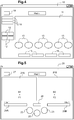
- the figure 4 schematically represents an example of a graphical interface 10 of a Modx configuration module according to a particular embodiment.
- the graphical interface 10 comprises a graphic presentation zone 11, textual content display zones 15, 19 and various selection buttons 12, 13 and 18.
- the display zone 19 allows for example to display the name of the customer.
- Each button 12 corresponds to a different value of a configuration parameter Px associated with the module Modx.
- the parameter Px may correspond to the color of a lens, to be chosen for example from white, black, brown or gray glass.
- the selection of a button 12 makes it possible to select a pre-recorded value which is also the value of the configuration parameter Px.
- the graphic presentation area 11 may for example display in the background an image corresponding to a scene or a scene selected elsewhere.
- the graphic zone 11 makes it possible to display in the foreground a colored filter corresponding to the selected value of the parameter Px superimposed on the ambient image.
- the user can thus view the image of a scene through a lens of such or such color.
- the selection of another button 12 selects another value of the color parameter and causes the display of a corresponding color filter.
- Each button 13 corresponds to a different action.
- the buttons 13 may allow different ambient images to be selected.
- the selection of a button 13 causes the modification of the displayed ambient image.
- a button 13 can also make it possible to execute an action, for example to modify horizontally and / or vertically the direction of gaze in a three-dimensional view.
- buttons 18 are buttons to switch to the graphical interface of a previous module or a next module in the sequence.
- the selection of a button 18 makes it possible to validate the selection of a value of the parameter Px.
- the execution of the subsequent configuration module starts automatically as soon as the parameter Px of the module Modx is validated.
- the figure 5 is a block diagram representing another example of a graphical interface of a configuration module Mod1.
- the graphical interface 20 comprises two graphic presentation areas 21A and 21B, different selection buttons 23, 27, 28 and text content display areas 25A and 25B.
- the two graphical presentation areas 21A and 21B allow a graphical comparison between two different configurations.
- each graphical presentation area 21A, 21B makes it possible to display a graphic assembly comprising a background image and an overlay filter overlay on the background image.
- the area 21A displays a graphic assembly comprising a background image B1 and a cover filter F1
- the area 21B displays another graphic assembly comprising a background image B2 and a cover filter F2.
- the image B1 can correspond to a video recording or a simulation of a three-dimensional scene.
- the F1 filter may represent a graphical simulation of a first optical power parameterization of a progressive lens.
- the B2 image may be a video recording or a simulation of another three-dimensional scene.
- the filter F2 may represent a graphical simulation of a second optical power parameterization of another progressive lens.
- Area 21A graphically presents the view from the point of view of the wearer equipped with a first lens in the environment of the image B1 and the area 21B presents the view from the point of view of the wearer equipped with a second lens in the B2 image environment.
- the interface 20 thus allows to graphically compare different corrective lens configurations.
- buttons 23 allow, inside the Mod1 module, to launch dynamic simulations.
- Each button 23 corresponds to a particular dynamic simulation.
- a button 23 makes it possible to launch a dynamic simulation in the presentation zone 21A by traversing the three-dimensional image B1 so as to simulate a modification of the direction of gaze of the wearer.
- Another button 23 makes it possible to launch another dynamic simulation in the presentation zone 21B by traversing the three-dimensional image B2 so as to simulate a modification of the inclination of the wearer's head.
- a third button 23 makes it possible to simultaneously launch the dynamic look change simulation in the presentation area 21A and the dynamic head tilt simulation in the presentation area 21B.
- the buttons 23 are on / off type by simple click.
- the textual content display area 25A, respectively 25B, displays a short text related to the dynamic simulation represented on the area 21A, respectively 21B.
- the button 28 makes it possible to compare the vision with the same synchronization for the configurations of two different lenses.
- the button 27 makes it possible to return to the main menu or to sequence the execution of the subsequent module.
- the figure 6 illustrates a first example of a graphic interface of a Mod1 configuration module for selecting a type of lens in vision mode, also called "To see" mode.
- the graphical interface 30 comprises two graphic presentation areas 31A and 31B, different selection buttons 32, 33, 37, 38 and text content display areas 35A, 35B and 39 and validation areas 34A, 34B.
- Zone 39 makes it possible, for example, to display the name of the carrier for which it is desired to carry out the configuration.
- the two graphical presentation areas 31A and 31B allow a graphical comparison between two different configurations. As explained in connection with the figure 5 , each graphic presentation area 31A, 31B makes it possible to display a graphic assembly comprising a background image and an overlay filter superimposed on the background image.
- the area 31A displays a graphic assembly comprising a background image B1 and a cover filter F1
- the area 31B displays another graphic assembly comprising a background image B2 and a cover filter F2.
- the image B1, respectively B2 is a static image, dynamic, a video recording or a simulation of a three-dimensional scene.
- the filter F1 represents the graphic simulation of a progressive lens according to a first parameterization of optical power or optical design.
- the filter F2 represents a graphic simulation of another progressive lens according to a second optical power parameterization.
- the selection area 32A makes it possible to select a product Prod1 from a list of different products Prod1, Prod2, Prod3, Prod4.
- Each product corresponds to a progressive lens having a specific optical power setting, which calls an associated F1 filter.
- the zone 21A graphically presents the view from the point of view of the wearer equipped with a first lens in the environment of the image B1 taking into account the selected filter F1, that is to say the Prod1 product selected.
- the area 21B presents the view from the point of view of the wearer equipped with a second lens in the environment of the image B2 taking into account the selected filter F2, that is to say the product Prod3 selected.
- the textual content display area 35A, respectively 35B displays a short text related to the selection of the product shown on the area 31A, respectively 31B.
- the interface 30 thus makes it possible to graphically compare different configurations of progressive lenses.
- the validation zone 34A, respectively 34B makes it possible to select the configuration corresponding to the parameterization represented on the graphical zone 31A, respectively 31B.
- the buttons 33 allow, within the Mod1 module, to launch complementary actions in dynamic connection with the current selection.
- Each button 33 corresponds to a particular action such as: the calculation of the price of the lens, the dynamic display of a simulation of a moving background image, the dynamic display simulating a variation of brightness ...
- the 33 buttons are on / off type by simple click.
- Button 37 returns a previous screen.
- the button 38 makes it possible to pass to a following screen or to sequence the execution of the subsequent module.
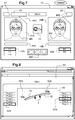
- the figure 7 illustrates an example of a graphic interface of another configuration module for selecting the hue and / or photochromic of a lens.
- the Mod3 configuration module makes it possible to display a representation of the wearer provided with the lenses and / or the frame, also called "To be seen" mode.
- the graphical interface 40 comprises two graphic presentation areas 41A and 41B, different selection buttons 42A, 42B, 42C, 47, 48, text content display areas 45A, 45B and 49 and validation areas 44A, 44B .
- the zone 49 makes it possible, for example, to display the name of the carrier for which the configuration is performed.
- the two graphic presentation areas 41A and 41B allow a visual comparison between two different configurations.
- each graphical presentation area 41A, 41B makes it possible to display a graphic assembly comprising a background image and an overlay filter superimposed on the background image.
- the area 41A displays a graphic assembly comprising a background image M1 and a cover filter 1A while the area 41B displays another graphic assembly comprising a background image M1 and a cover filter 1B.
- the image M1, respectively M2 is a static image, dynamic, a photo or video record of the wearer's face without glass or spectacle frame.
- the images M1 and M2 are identical in order to allow an objective comparison of the color of the glasses on the wearer.
- a picture M1 of the wearer can be recorded by a module separated from the running sequence or by a specific action within a module.
- the filter 1A represents the simulation of a pair of colored glasses.
- the selection zone 42A makes it possible to select, from a list of different proposed glass colors (H1, H2, H3), the color H1 of the pair of colored glasses which corresponds to the filter 1A displayed on the zone 41A.
- the zone 41A graphically presents a front view of the wearer equipped with a first pair of colored glasses in the environment of the image M1 taking into account the selected filter 1A, that is to say the selected color H1.
- the filter 1B represents a graphical simulation of another pair of colored glasses corresponding to the color H4 selected in the selection area 42B from another color list H4 and H5.
- the zone 41B presents a front view of the wearer equipped with a second pair of colored glasses on the image M2 taking into account the selected filter 1B, that is to say the selected color H4.
- the textual content display area 45A, respectively 45B displays a short text related to the selected glass color and represented on the graphical area 41A, respectively 41B.
- the interface 40 thus makes it possible to graphically compare different colors of lenses as they will appear when the lenses are worn by the wearer.
- the validation zone 44A, respectively 44B makes it possible to validate the configuration corresponding to the parameterization represented on the graphical zone 41A, respectively 41B.
- the buttons 42C allow, inside the Mod3 module, to change the shape of the glasses.
- Each button-icon 42C allows by simple click on the corresponding simplified icon to select and apply to the filters 1A and / or 1B a particular shape of glass such as: elliptical, rectangular, rounded ...
- the button 47 allows to return a previous screen.
- the button 48 makes it possible to pass to a following screen or to sequence the execution of the subsequent module.
- no spectacle frame is shown on the graphical areas 41a and 41b.
- the figure 8 illustrates another example of a graphical interface 50 of a Modi configuration module making it possible to graphically display various parameters of the lens (thickness and / or weight) as a function of the type of lens selected.
- the Modi configuration module makes it possible to represent a view, for example of profile, of a simulation of the glasses and the frame.
- the graphical interface 50 includes a graphic presentation area 51, various highlight selection areas 52A, 52B and text content display areas 55A and 55B.
- the graphic presentation area 51 makes it possible to represent a spectacle frame 2, equipped with a lens for the left eye and another lens for the right eye. More specifically, the graphic presentation area 51 makes it possible to display a graphic assembly comprising a background image (neutral background in the illustrated example figure 8 ), a first overlay filter corresponding to the right lens, a second covering filter corresponding to the left lens and preferably a third overlay filter corresponding to a frame. Overlay filters are displayed in overlay on the background image.
- the third overlapping filter may correspond to a graphic representation of a standard mount, to a graphic representation of a preselected mount, or to a photograph of such a mount.
- the selection zone 52A makes it possible to select a particular lens for the left eye from among a first list of different products proposed (Prod1, Prod2, Prod3, Prod4, Prod5).
- the selection area 52B makes it possible to select a particular lens for the right eye from a second list of different products (Prod1, Prod2, Prod3, Prod4, Prod5) which may be identical or different from the first list.
- the products Prod1, Prod2, Prod3, Prod4, Prod5 can correspond to different glasses offered in the catalog of a supplier or to different materials used to make an ophthalmic lens.
- Area 51 presents graphically a profile view of frame 2, a lens for left eye 1A corresponding to product Prod5 selected in selection area 52A highlighted and a lens for right eye 1B corresponding to Prod3 product selected in selection area 52B highlighted.
- the textual content display area 55A, respectively 55B, displays a short text related to the product selected and shown on the lens for the left eye 1A and respectively on the lens for the right eye 1B.
- the graphic presentation zone 51 simultaneously makes it possible to represent the profile of a lens for the left eye 1A which would be manufactured in a first material corresponding to the Prod5 selection and to represent the profile of a lens for the right eye 1B which would be manufactured in a second material corresponding to the Prod3 selection.
- the zone 51 makes it possible to display in 55A beside the glass for the left eye 1A information on the weight of the Prod5 glass selected and in 55B, next to the glass for the left eye 1B, information on the weight Prod3 glass selected.
- the interface 50 thus makes it possible to graphically compare geometric aspects of different glasses as a function of the chosen material.
- the Modi module makes it possible to display other views of the lenses 1A, 1B and / or the frame.
- the simulation of the lens profile 1A and 1B takes into account the parameterization of the optical correction prescription.
- the execution of the Modi module for viewing the profile of spectacle lenses advantageously takes into account the parameters validated during the execution of the previous modules of the same sequence.
- the execution of the chosen sequence of configuration modules makes it possible to forward to the future carrier a personalization path, during which the choices made in each module (that is to say the values of the parameters selected and validated) are recorded in a database or a central file.
- the final results of the sequence are presented in the form of a maximum of three configurations to be chosen.
- the three configurations are presented according to costs and / or technical or aesthetic arguments. This leads to the determination of a lens configuration optimal for the wearer, technically feasible and which takes into account commercial aspects, such as promotions on certain configuration parameters (promotions on colored glasses for example).
- optician can configure different sales paths.
Landscapes
- Physics & Mathematics (AREA)
- Health & Medical Sciences (AREA)
- Ophthalmology & Optometry (AREA)
- General Health & Medical Sciences (AREA)
- General Physics & Mathematics (AREA)
- Optics & Photonics (AREA)
- Mathematical Physics (AREA)
- Eyeglasses (AREA)
Claims (12)
- Verfahren zur Herstellung einer für einen Träger personalisierten korrigierenden Brillenglaslinse, welches folgende Schritte umfasst:- Definieren und computerbasiertes Aufzeichnen der Konfigurationsparameter der Linse, wobei diese Konfigurationsparameter (P1, P2, ..., PN, Sup1, Sup2, Prod1, ..., Prod8) Parameter der optischen Gestaltung der Linse, darunter eine Vorschrift für die Korrektur der Refraktion des Trägers, und ein Modell der optischen Gestaltung umfassen,- Herstellen der Linse gemäß den Konfigurationsparametern,dadurch gekennzeichnet, dass, um die Konfigurationsparameter der Linse zu definieren, das Verfahren die folgenden Schritte umfasst:- Aufzeichnen mehrerer geordneter Folgen (Seql, Seq2, Seq3) der Ausführung verschiedener interaktiver Konfigurations-Softwaremodule (Mod1, Mod2, ..., Modi, ..., ModN), wobei jedes Modul (Modi) einem der Konfigurationsparameter (P1, P2, ..., PN, Sup1, Sup2, Prod1, ..., Prod8) zugeordnet ist und in einer grafischen Oberfläche (10, 20, 30, 40, 50) Mittel zur Auswahl (12, 32A, 32B, 42A, 42B, 52A, 52B) wenigstens eines Wertes des dem Modul zugeordneten Konfigurationsparameters aus einer Vorauswahl von Werten dieses Parameters, Mittel zur grafischen Simulation einer mit dem ausgewählten Wert des Konfigurationsparameters erhaltenen virtuellen Linse und Mittel zur Validierung (34A, 34B, 44A, 44B) der Auswahl eines Wertes des Konfigurationsparameters umfasst,- Ausführen wenigstens einer geordneten Folge (Seql, Seq2, Seq3), die aus den mehreren geordneten Folgen ausgewählt wurde;- nach Abschluss der Ausführung jedes Moduls (Modi) der geordneten Folge, Aufzeichnen des ausgewählten und validierten Wertes des diesem Modul (Modi) zugeordneten Konfigurationsparameters, und wobei:- die geordnete Folge ein Modul (Mod 1) aufweist, das einem Konfigurationsparameter einer Multifokallinse zugeordnet ist, der eine Verteilung der Funktion der optischen Wirkung der Multifokallinse umfasst, und wobei die Ausführung des Moduls (Mod1) die folgenden Schritte umfasst:- Auswahl eines dreidimensionalen Bildes (B1), das für eine visuelle Umgebung repräsentativ ist, und Anzeige dieses dreidimensionalen Bildes (B1) als Hintergrundschicht eines Grafikbereichs (21A) der grafischen Oberfläche (20, 30) des betreffenden Moduls;- Simulation eines Korrekturfilters (F1), das dem ausgewählten Wert der Verteilung der Funktion der optischen Wirkung der Multifokallinse zugeordnet ist;- Anzeige des Korrekturfilters (F1) als durchsichtige Überlagerung auf dem als Hintergrundschicht dargestellten dreidimensionalen Bild (B1),- wobei das Modul (Mod 1) eine Schaltfläche umfasst, die es gestattet, eine dynamische Simulation zu starten, um die Sicht des Trägers durch eine personalisierte virtuelle Linse hindurch zu simulieren, indem das dreidimensionale Bild durchlaufen wird, um so eine Änderung der Neigung des Kopfes des Trägers zu simulieren.
- Verfahren zur Herstellung einer korrigierenden Brillenglaslinse nach Anspruch 1, welches nach Abschluss der Ausführung eines Moduls (Modi) der geordneten Folge (Seql, Seq2, Seq3) einen Schritt der Verwendung des am Ende der Ausführung dieses Moduls ausgewählten und validierten Wertes des Konfigurationsparameters umfasst, um eine Vorauswahl von Werten des Konfigurationsparameters eines nachfolgenden Moduls der Folge zu bestimmen.
- Verfahren zur Herstellung einer korrigierenden Brillenglaslinse nach einem der vorhergehenden Ansprüche, wobei die Konfigurationsparameter der Linse Herstellungsparameter der Linse umfassen, darunter die Verteilung der Funktion der optischen Wirkung, das Material der Linse, die Farbe der Linse, die Polarisierung der Linse, die Oberflächenbehandlung(en), welche die Entspiegelungsbehandlung, die Stoßfestigkeitsbehandlung, die Kratzfestigkeitsbehandlung, die antistatische Behandlung, die hydrophobe Behandlung, die oleophobe Behandlung und die polarisierende Behandlung beinhalten, die selbsttönende Eigenschaft der Linse und/oder geometrische und morphologische Parameter, die sich auf den Träger und auf ein Brillengestell beziehen.
- Verfahren zur Herstellung einer korrigierenden Brillenglaslinse nach einem der Ansprüche 1 bis 3, wobei die Ausführung des Moduls (Mod1) außerdem die folgenden Schritte umfasst:- Auswahl eines zweiten dreidimensionalen Bildes (B2), das für eine visuelle Umgebung repräsentativ ist, und Anzeige dieses zweiten dreidimensionalen Bildes (B2) als Hintergrundschicht eines zweiten Grafikbereichs (21B, 31B) der grafischen Oberfläche (20, 30) des betreffenden Moduls;- Simulation eines zweiten Korrekturfilters (F2), das einem weiteren Wert des Konfigurationsparameters der Linse zugeordnet ist, der einem weiteren Wert der Verteilung der Funktion der optischen Wirkung der Multifokallinse zugeordnet ist;- Anzeige des zweiten Korrekturfilters (F2) als durchsichtige Überlagerung auf dem als Hintergrundschicht des zweiten Grafikbereichs (21B, 31B) dargestellten zweiten dreidimensionalen Bild (B2), wobei das Modul (Mod 1) eine weitere Schaltfläche umfasst, die es gestattet, eine weitere dynamische Simulation zu starten, um die Sicht des Trägers durch eine zweite virtuelle Linse hindurch zu simulieren, die gemäß dem der Verteilung der Funktion der optischen Wirkung zugeordneten weiteren Wert des Konfigurationsparameters personalisiert wurde, indem das zweite dreidimensionale Bild durchlaufen wird, um so eine Änderung der Neigung des Kopfes des Trägers zu simulieren, um so den Vergleich wenigstens zweier personalisierter virtueller Linsen zu ermöglichen.
- Verfahren zur Herstellung einer korrigierenden Brillenglaslinse nach einem der Ansprüche 1 bis 4, wobei die Ausführung wenigstens eines der Module die folgenden Schritte umfasst:- Auswahl wenigstens einer Ansicht des Trägers (M1, M2) und Anzeige der Ansicht des Trägers (M1, M2) als Hintergrundschicht eines Bereichs (41A, 41B) der grafischen Oberfläche des betreffenden Moduls;- Simulation eines Form- und Farbfilters (1A, 1B) der Linse in Abhängigkeit vom ausgewählten Wert des dem Modul zugeordneten Konfigurationsparameters;- Anzeige des Form- und Farbfilters (1A, 1B) der Linse als durchsichtige Überlagerung auf der Hintergrundschicht, um so ein Bild der von dem Träger getragenen und gemäß dem ausgewählten Wert des dem Modul zugeordneten Konfigurationsparameters personalisierten Linse zu simulieren.
- Verfahren zur Herstellung einer korrigierenden Brillenglaslinse nach einem der Ansprüche 3 bis 5, wobei der Schritt der Auswahl wenigstens einer Ansicht des Trägers (M1, M2) die Auswahl einer Folge von Bildern oder eines dreidimensionalen Bildes umfasst.
- Verfahren zur Herstellung einer korrigierenden Brillenglaslinse nach einem der Ansprüche 3 bis 6, wobei der Schritt der Simulation eines Filters (F1, F2, 1A, 1B) die dynamische Simulation eines Filters durch eine Folge von Bildern oder durch ein dreidimensionales Bild umfasst.
- Verfahren zur Herstellung einer korrigierenden Brillenglaslinse nach einem der Ansprüche 1 bis 7, welches außerdem umfasst:- die Anzeige eines Textinhalts (15, 25A, 25B, 35A, 35B, 45A, 45B, 55A, 55B) in Abhängigkeit vom ausgewählten Wert des dem Modul zugeordneten Konfigurationsparameters.
- Verfahren zur Herstellung einer korrigierenden Brillenglaslinse nach einem der Ansprüche 1 bis 8, welches ein Modul (Modi) zur Wahl einer Linsenkontur als Konfigurationsparameter umfasst, wobei dieses Modul in seiner grafischen Oberfläche (50) Mittel zur Auswahl wenigstens einer Linsenkontur aus einer Vorauswahl von verschiedenen Brillengestellen zugeordneten Linsenkonturen, Mittel zur grafischen Simulation einer die ausgewählte Kontur aufweisenden virtuellen Linse und Mittel zur Validierung der Auswahl einer Linsenkontur umfasst.
- Verfahren zur Herstellung einer korrigierenden Brillenglaslinse nach einem der Ansprüche 1 bis 9, welches außerdem einen Schritt der Präsentation der Werte der verschiedenen Konfigurationsparameter, die nach Abschluss der Ausführung der wenigstens einen geordneten Folge ausgewählt und validiert wurden, umfasst.
- Verfahren zur Herstellung einer korrigierenden Brillenglaslinse nach einem der Ansprüche 1 bis 10, welches außerdem einen Schritt der Überprüfung der Realisierbarkeit einer korrigierenden Brillenglaslinse gemäß den Werten der verschiedenen Konfigurationsparameter, die nach Abschluss der Ausführung der wenigstens einen geordneten Folge ausgewählt und validiert wurden, umfasst.
- Verfahren zur Herstellung einer korrigierenden Brillenglaslinse nach einem der Ansprüche 1 bis 11, welches außerdem einen Schritt der Erstellung einer Vorauswahl von Werten, die einem Konfigurationsparameter zugeordnet ist, umfasst.
Applications Claiming Priority (2)
| Application Number | Priority Date | Filing Date | Title |
|---|---|---|---|
| FR1200841A FR2988494B1 (fr) | 2012-03-20 | 2012-03-20 | Methode de fabrication d'une lentille ophtalmique correctrice de lunettes personnalisee pour un porteur |
| PCT/FR2013/050582 WO2013140086A1 (fr) | 2012-03-20 | 2013-03-19 | Methode de fabrication d'une lentille ophtalmique correctrice de lunettes personnalisee pour un porteur |
Publications (2)
| Publication Number | Publication Date |
|---|---|
| EP2828706A1 EP2828706A1 (de) | 2015-01-28 |
| EP2828706B1 true EP2828706B1 (de) | 2019-07-24 |
Family
ID=48237062
Family Applications (1)
| Application Number | Title | Priority Date | Filing Date |
|---|---|---|---|
| EP13719900.6A Active EP2828706B1 (de) | 2012-03-20 | 2013-03-19 | Verfahren zur herstellung einer für einen träger personalisierten korrigierenden brillenglaslinse |
Country Status (7)
| Country | Link |
|---|---|
| US (1) | US9513494B2 (de) |
| EP (1) | EP2828706B1 (de) |
| CN (1) | CN104204909B (de) |
| AU (1) | AU2013237258B2 (de) |
| CA (1) | CA2867886C (de) |
| FR (1) | FR2988494B1 (de) |
| WO (1) | WO2013140086A1 (de) |
Families Citing this family (19)
| Publication number | Priority date | Publication date | Assignee | Title |
|---|---|---|---|---|
| US10749929B2 (en) * | 2012-10-18 | 2020-08-18 | Essilor International | Providing eyewear equipment using a same identifier among designer, manufacturer, and purchaser |
| JP6052296B2 (ja) * | 2012-11-05 | 2016-12-27 | 株式会社ニコン | 眼鏡レンズの設計方法および眼鏡レンズの設計システム |
| JP6063248B2 (ja) * | 2012-12-25 | 2017-01-18 | Hoya株式会社 | レンズ加工システム、発注側端末装置およびレンズ発注方法 |
| JP5976918B2 (ja) * | 2013-02-26 | 2016-08-24 | Hoya株式会社 | 眼鏡レンズの製造システム、製造装置、製造方法、製造情報管理システム、製造情報管理装置、および製造情報管理方法 |
| AU2014308590B2 (en) | 2013-08-22 | 2016-04-28 | Bespoke, Inc. | Method and system to create custom products |
| BR112016011451B1 (pt) * | 2014-01-03 | 2021-01-19 | Essilor International | método implementado por meios de computador para determinar um equipamento óptico compreendendo pelo menos uma lente óptica e uma armação de óculos |
| EP2942658B1 (de) | 2014-05-09 | 2026-04-22 | Crossbows Optical Limited | Progressives optisches linsendesignbestimmungssystem und dazugehörige methode |
| US9581835B2 (en) * | 2014-05-30 | 2017-02-28 | Johnson & Johnson Vision Care, Inc. | Patient interactive fit tool and methodology for contact lens fitting |
| EP3006992B1 (de) | 2014-10-09 | 2021-04-21 | Essilor International | Verfahren zum Bestellen einer optischen Ausrüstung |
| US10330958B2 (en) | 2015-04-10 | 2019-06-25 | Bespoke, Inc. | Systems and methods for creating eyewear with multi-focal lenses |
| EP3304180B1 (de) * | 2015-06-08 | 2025-08-20 | Essilor International | Verfahren zur modifizierung eines nichtdioptrischen parameters eines optischen systems |
| EP3153909A1 (de) * | 2015-10-09 | 2017-04-12 | ESSILOR INTERNATIONAL (Compagnie Générale d'Optique) | Verfahren zur bestimmung eines verwendungsindexwerts für monofokale ophthalmische linse |
| FR3065820B1 (fr) * | 2017-04-28 | 2021-09-17 | Essilor Int | Procede de determination d'un filtre de lumiere applique a un verre de lunettes ; dispositif d'affichage et casque de realite virtuelle associes |
| FR3078248B1 (fr) * | 2018-02-23 | 2020-03-06 | Nathalie Guillemain | Procede de comparaison de verres optiques, module de commande et systeme associes |
| US11600027B2 (en) | 2018-09-26 | 2023-03-07 | Guardian Glass, LLC | Augmented reality system and method for substrates, coated articles, insulating glass units, and/or the like |
| WO2020210567A1 (en) * | 2019-04-10 | 2020-10-15 | Pilestone, Inc. | Methods of selecting lenses for correction of color vision deficiency |
| EP4043946A1 (de) * | 2021-02-12 | 2022-08-17 | Essilor International | Vorrichtung und verfahren zur automatischen beurteilung optischer ausrüstungen |
| US12136178B2 (en) * | 2022-02-09 | 2024-11-05 | Google Llc | Validation of modeling and simulation of virtual try-on of wearable device |
| USD1125208S1 (en) * | 2024-11-15 | 2026-05-05 | DITA, Inc. | Display screen or a portion thereof with a graphical user interface |
Citations (2)
| Publication number | Priority date | Publication date | Assignee | Title |
|---|---|---|---|---|
| WO2001088654A2 (en) * | 2000-05-18 | 2001-11-22 | Visionix Ltd. | Spectacles fitting system and fitting methods |
| US20100179799A1 (en) * | 2009-01-13 | 2010-07-15 | Seiko Epson Corporation | Simulation Device, Simulation Program, and Recording Medium Storing Simulation Program |
Family Cites Families (8)
| Publication number | Priority date | Publication date | Assignee | Title |
|---|---|---|---|---|
| AU753161B2 (en) * | 1997-05-16 | 2002-10-10 | Hoya Corporation | System for making spectacles to order |
| US5984473A (en) * | 1997-07-02 | 1999-11-16 | Rotlex Ltd. | Method and system for adjusting progressive lenses for a patient's spectacles |
| US6095650A (en) * | 1998-09-22 | 2000-08-01 | Virtual Visual Devices, Llc | Interactive eyewear selection system |
| JP4186766B2 (ja) * | 2003-09-12 | 2008-11-26 | セイコーエプソン株式会社 | 眼鏡レンズの製造システム及び眼鏡レンズの製造方法 |
| CN101356469B (zh) * | 2005-11-15 | 2011-03-30 | 卡尔蔡司视觉澳大利亚控股有限公司 | 眼镜片设计和/或配制 |
| JP2008059548A (ja) * | 2006-08-04 | 2008-03-13 | Seiko Epson Corp | レンズ発注システム、レンズ発注方法、レンズ発注プログラム、およびレンズ発注プログラムを記録した記録媒体 |
| CN101118636A (zh) * | 2006-08-04 | 2008-02-06 | 精工爱普生株式会社 | 镜片订购系统、镜片订购方法和镜片订购程序 |
| JP5642390B2 (ja) * | 2007-01-25 | 2014-12-17 | ローデンストック.ゲゼルシャフト.ミット.ベシュレンクテル.ハフツング | 様々な位置の基準点を有する眼鏡レンズの計算方法 |
-
2012
- 2012-03-20 FR FR1200841A patent/FR2988494B1/fr active Active
-
2013
- 2013-03-19 WO PCT/FR2013/050582 patent/WO2013140086A1/fr not_active Ceased
- 2013-03-19 AU AU2013237258A patent/AU2013237258B2/en active Active
- 2013-03-19 US US14/384,225 patent/US9513494B2/en active Active
- 2013-03-19 CA CA2867886A patent/CA2867886C/fr active Active
- 2013-03-19 EP EP13719900.6A patent/EP2828706B1/de active Active
- 2013-03-19 CN CN201380014332.9A patent/CN104204909B/zh active Active
Patent Citations (2)
| Publication number | Priority date | Publication date | Assignee | Title |
|---|---|---|---|---|
| WO2001088654A2 (en) * | 2000-05-18 | 2001-11-22 | Visionix Ltd. | Spectacles fitting system and fitting methods |
| US20100179799A1 (en) * | 2009-01-13 | 2010-07-15 | Seiko Epson Corporation | Simulation Device, Simulation Program, and Recording Medium Storing Simulation Program |
Also Published As
| Publication number | Publication date |
|---|---|
| CA2867886C (fr) | 2022-05-17 |
| FR2988494B1 (fr) | 2015-04-03 |
| WO2013140086A1 (fr) | 2013-09-26 |
| CN104204909B (zh) | 2016-08-03 |
| EP2828706A1 (de) | 2015-01-28 |
| FR2988494A1 (fr) | 2013-09-27 |
| CN104204909A (zh) | 2014-12-10 |
| US9513494B2 (en) | 2016-12-06 |
| AU2013237258B2 (en) | 2016-02-11 |
| AU2013237258A1 (en) | 2014-10-09 |
| CA2867886A1 (fr) | 2013-09-26 |
| US20150049304A1 (en) | 2015-02-19 |
Similar Documents
| Publication | Publication Date | Title |
|---|---|---|
| CA2867886C (fr) | Methode de fabrication d'une lentille ophtalmique correctrice de lunettes personnalisee pour un porteur | |
| US8823742B2 (en) | Method of simulating lens using augmented reality | |
| KR102185638B1 (ko) | 인공지능을 이용한 패션 스타일 종합 코디네이션 제안 시스템 및 그 운용방법 | |
| US20180247356A1 (en) | Computer implemented platform for the creation of a virtual product | |
| FR3065832A1 (fr) | Dispositif d’affichage et casque de realite virtuelle associe | |
| US20180357702A1 (en) | Hybrid virtual and physical jewelry shopping experience | |
| CN117716435A (zh) | 视力测试和处方眼镜的提供 | |
| WO2015052571A1 (en) | System for facilitating selection of color changing eyewear lenses and windows | |
| KR20190045740A (ko) | 스마트 거울을 이용한 안경 피팅 시스템의 운영방법 | |
| EP3186767A1 (de) | Empfehlungssystem, verfahren, computerprogramm und zugehöriges medium | |
| CA2838815C (fr) | Procede de fabrication d'une image iridescente, image obtenue et dispositif la comprenant, programme associe | |
| JP3897058B2 (ja) | 眼鏡の疑似体験装置、眼鏡の疑似体験方法及び記録媒体 | |
| FR2885231A1 (fr) | Procedes et dispositifs permettant de faciliter le choix d'une monture de lunettes | |
| DeLong et al. | Eyewear, fashion, design, and health | |
| KR102462481B1 (ko) | 키오스크를 이용하는 안경착용 시뮬레이션 시스템 | |
| EP3360004B1 (de) | Verfahren zur kontrolle der machbarkeit einer brillenlinsen-paar | |
| EP3755200B1 (de) | Sehtestverfahren sowie zugehöriges steuermodul und system | |
| GB2536565A (en) | Computer implemented platform for the creation of a virtual product | |
| KR20240139028A (ko) | 현명한 안경구매정보시스템 | |
| EP3351007B1 (de) | Verfahren zum anzeigen von daten im zusammenhang mit einem ereignis und zugehöriges system | |
| AYDOĞDU et al. | THE MARKETING ADVENTURE OF SUNGLASSES: TECHNOLOGY AND ITS REFLECTIONS | |
| Jones | One last dance in New York | |
| Barbosa et al. | 3D Vision Accessibility: the Product Development Process | |
| EP4466860A1 (de) | Bildgebungssystem zur anzeige des vorderbildes und des hinterbildes einer person | |
| Chen | An Artifact Removal Algorithm for Near-Eye Microlens Array Displays |
Legal Events
| Date | Code | Title | Description |
|---|---|---|---|
| PUAI | Public reference made under article 153(3) epc to a published international application that has entered the european phase |
Free format text: ORIGINAL CODE: 0009012 |
|
| 17P | Request for examination filed |
Effective date: 20140911 |
|
| AK | Designated contracting states |
Kind code of ref document: A1 Designated state(s): AL AT BE BG CH CY CZ DE DK EE ES FI FR GB GR HR HU IE IS IT LI LT LU LV MC MK MT NL NO PL PT RO RS SE SI SK SM TR |
|
| AX | Request for extension of the european patent |
Extension state: BA ME |
|
| DAX | Request for extension of the european patent (deleted) | ||
| STAA | Information on the status of an ep patent application or granted ep patent |
Free format text: STATUS: EXAMINATION IS IN PROGRESS |
|
| 17Q | First examination report despatched |
Effective date: 20170316 |
|
| RAP1 | Party data changed (applicant data changed or rights of an application transferred) |
Owner name: ESSILOR INTERNATIONAL |
|
| GRAP | Despatch of communication of intention to grant a patent |
Free format text: ORIGINAL CODE: EPIDOSNIGR1 |
|
| STAA | Information on the status of an ep patent application or granted ep patent |
Free format text: STATUS: GRANT OF PATENT IS INTENDED |
|
| INTG | Intention to grant announced |
Effective date: 20190318 |
|
| GRAS | Grant fee paid |
Free format text: ORIGINAL CODE: EPIDOSNIGR3 |
|
| GRAA | (expected) grant |
Free format text: ORIGINAL CODE: 0009210 |
|
| STAA | Information on the status of an ep patent application or granted ep patent |
Free format text: STATUS: THE PATENT HAS BEEN GRANTED |
|
| AK | Designated contracting states |
Kind code of ref document: B1 Designated state(s): AL AT BE BG CH CY CZ DE DK EE ES FI FR GB GR HR HU IE IS IT LI LT LU LV MC MK MT NL NO PL PT RO RS SE SI SK SM TR |
|
| REG | Reference to a national code |
Ref country code: GB Ref legal event code: FG4D Free format text: NOT ENGLISH |
|
| REG | Reference to a national code |
Ref country code: CH Ref legal event code: EP |
|
| REG | Reference to a national code |
Ref country code: DE Ref legal event code: R096 Ref document number: 602013058146 Country of ref document: DE |
|
| REG | Reference to a national code |
Ref country code: AT Ref legal event code: REF Ref document number: 1158882 Country of ref document: AT Kind code of ref document: T Effective date: 20190815 |
|
| REG | Reference to a national code |
Ref country code: IE Ref legal event code: FG4D Free format text: LANGUAGE OF EP DOCUMENT: FRENCH |
|
| REG | Reference to a national code |
Ref country code: NL Ref legal event code: MP Effective date: 20190724 |
|
| REG | Reference to a national code |
Ref country code: LT Ref legal event code: MG4D |
|
| REG | Reference to a national code |
Ref country code: AT Ref legal event code: MK05 Ref document number: 1158882 Country of ref document: AT Kind code of ref document: T Effective date: 20190724 |
|
| PG25 | Lapsed in a contracting state [announced via postgrant information from national office to epo] |
Ref country code: LT Free format text: LAPSE BECAUSE OF FAILURE TO SUBMIT A TRANSLATION OF THE DESCRIPTION OR TO PAY THE FEE WITHIN THE PRESCRIBED TIME-LIMIT Effective date: 20190724 Ref country code: NL Free format text: LAPSE BECAUSE OF FAILURE TO SUBMIT A TRANSLATION OF THE DESCRIPTION OR TO PAY THE FEE WITHIN THE PRESCRIBED TIME-LIMIT Effective date: 20190724 Ref country code: PT Free format text: LAPSE BECAUSE OF FAILURE TO SUBMIT A TRANSLATION OF THE DESCRIPTION OR TO PAY THE FEE WITHIN THE PRESCRIBED TIME-LIMIT Effective date: 20191125 Ref country code: BG Free format text: LAPSE BECAUSE OF FAILURE TO SUBMIT A TRANSLATION OF THE DESCRIPTION OR TO PAY THE FEE WITHIN THE PRESCRIBED TIME-LIMIT Effective date: 20191024 Ref country code: FI Free format text: LAPSE BECAUSE OF FAILURE TO SUBMIT A TRANSLATION OF THE DESCRIPTION OR TO PAY THE FEE WITHIN THE PRESCRIBED TIME-LIMIT Effective date: 20190724 Ref country code: NO Free format text: LAPSE BECAUSE OF FAILURE TO SUBMIT A TRANSLATION OF THE DESCRIPTION OR TO PAY THE FEE WITHIN THE PRESCRIBED TIME-LIMIT Effective date: 20191024 Ref country code: AT Free format text: LAPSE BECAUSE OF FAILURE TO SUBMIT A TRANSLATION OF THE DESCRIPTION OR TO PAY THE FEE WITHIN THE PRESCRIBED TIME-LIMIT Effective date: 20190724 Ref country code: SE Free format text: LAPSE BECAUSE OF FAILURE TO SUBMIT A TRANSLATION OF THE DESCRIPTION OR TO PAY THE FEE WITHIN THE PRESCRIBED TIME-LIMIT Effective date: 20190724 Ref country code: HR Free format text: LAPSE BECAUSE OF FAILURE TO SUBMIT A TRANSLATION OF THE DESCRIPTION OR TO PAY THE FEE WITHIN THE PRESCRIBED TIME-LIMIT Effective date: 20190724 |
|
| PG25 | Lapsed in a contracting state [announced via postgrant information from national office to epo] |
Ref country code: IS Free format text: LAPSE BECAUSE OF FAILURE TO SUBMIT A TRANSLATION OF THE DESCRIPTION OR TO PAY THE FEE WITHIN THE PRESCRIBED TIME-LIMIT Effective date: 20191124 Ref country code: RS Free format text: LAPSE BECAUSE OF FAILURE TO SUBMIT A TRANSLATION OF THE DESCRIPTION OR TO PAY THE FEE WITHIN THE PRESCRIBED TIME-LIMIT Effective date: 20190724 Ref country code: LV Free format text: LAPSE BECAUSE OF FAILURE TO SUBMIT A TRANSLATION OF THE DESCRIPTION OR TO PAY THE FEE WITHIN THE PRESCRIBED TIME-LIMIT Effective date: 20190724 Ref country code: GR Free format text: LAPSE BECAUSE OF FAILURE TO SUBMIT A TRANSLATION OF THE DESCRIPTION OR TO PAY THE FEE WITHIN THE PRESCRIBED TIME-LIMIT Effective date: 20191025 Ref country code: AL Free format text: LAPSE BECAUSE OF FAILURE TO SUBMIT A TRANSLATION OF THE DESCRIPTION OR TO PAY THE FEE WITHIN THE PRESCRIBED TIME-LIMIT Effective date: 20190724 Ref country code: ES Free format text: LAPSE BECAUSE OF FAILURE TO SUBMIT A TRANSLATION OF THE DESCRIPTION OR TO PAY THE FEE WITHIN THE PRESCRIBED TIME-LIMIT Effective date: 20190724 |
|
| PG25 | Lapsed in a contracting state [announced via postgrant information from national office to epo] |
Ref country code: TR Free format text: LAPSE BECAUSE OF FAILURE TO SUBMIT A TRANSLATION OF THE DESCRIPTION OR TO PAY THE FEE WITHIN THE PRESCRIBED TIME-LIMIT Effective date: 20190724 |
|
| PG25 | Lapsed in a contracting state [announced via postgrant information from national office to epo] |
Ref country code: DK Free format text: LAPSE BECAUSE OF FAILURE TO SUBMIT A TRANSLATION OF THE DESCRIPTION OR TO PAY THE FEE WITHIN THE PRESCRIBED TIME-LIMIT Effective date: 20190724 Ref country code: PL Free format text: LAPSE BECAUSE OF FAILURE TO SUBMIT A TRANSLATION OF THE DESCRIPTION OR TO PAY THE FEE WITHIN THE PRESCRIBED TIME-LIMIT Effective date: 20190724 Ref country code: EE Free format text: LAPSE BECAUSE OF FAILURE TO SUBMIT A TRANSLATION OF THE DESCRIPTION OR TO PAY THE FEE WITHIN THE PRESCRIBED TIME-LIMIT Effective date: 20190724 Ref country code: IT Free format text: LAPSE BECAUSE OF FAILURE TO SUBMIT A TRANSLATION OF THE DESCRIPTION OR TO PAY THE FEE WITHIN THE PRESCRIBED TIME-LIMIT Effective date: 20190724 Ref country code: RO Free format text: LAPSE BECAUSE OF FAILURE TO SUBMIT A TRANSLATION OF THE DESCRIPTION OR TO PAY THE FEE WITHIN THE PRESCRIBED TIME-LIMIT Effective date: 20190724 |
|
| PG25 | Lapsed in a contracting state [announced via postgrant information from national office to epo] |
Ref country code: SM Free format text: LAPSE BECAUSE OF FAILURE TO SUBMIT A TRANSLATION OF THE DESCRIPTION OR TO PAY THE FEE WITHIN THE PRESCRIBED TIME-LIMIT Effective date: 20190724 Ref country code: CZ Free format text: LAPSE BECAUSE OF FAILURE TO SUBMIT A TRANSLATION OF THE DESCRIPTION OR TO PAY THE FEE WITHIN THE PRESCRIBED TIME-LIMIT Effective date: 20190724 Ref country code: SK Free format text: LAPSE BECAUSE OF FAILURE TO SUBMIT A TRANSLATION OF THE DESCRIPTION OR TO PAY THE FEE WITHIN THE PRESCRIBED TIME-LIMIT Effective date: 20190724 Ref country code: IS Free format text: LAPSE BECAUSE OF FAILURE TO SUBMIT A TRANSLATION OF THE DESCRIPTION OR TO PAY THE FEE WITHIN THE PRESCRIBED TIME-LIMIT Effective date: 20200224 |
|
| REG | Reference to a national code |
Ref country code: DE Ref legal event code: R097 Ref document number: 602013058146 Country of ref document: DE |
|
| PLBE | No opposition filed within time limit |
Free format text: ORIGINAL CODE: 0009261 |
|
| STAA | Information on the status of an ep patent application or granted ep patent |
Free format text: STATUS: NO OPPOSITION FILED WITHIN TIME LIMIT |
|
| PG2D | Information on lapse in contracting state deleted |
Ref country code: IS |
|
| 26N | No opposition filed |
Effective date: 20200603 |
|
| PG25 | Lapsed in a contracting state [announced via postgrant information from national office to epo] |
Ref country code: SI Free format text: LAPSE BECAUSE OF FAILURE TO SUBMIT A TRANSLATION OF THE DESCRIPTION OR TO PAY THE FEE WITHIN THE PRESCRIBED TIME-LIMIT Effective date: 20190724 |
|
| PG25 | Lapsed in a contracting state [announced via postgrant information from national office to epo] |
Ref country code: MC Free format text: LAPSE BECAUSE OF FAILURE TO SUBMIT A TRANSLATION OF THE DESCRIPTION OR TO PAY THE FEE WITHIN THE PRESCRIBED TIME-LIMIT Effective date: 20190724 |
|
| REG | Reference to a national code |
Ref country code: CH Ref legal event code: PL |
|
| REG | Reference to a national code |
Ref country code: BE Ref legal event code: MM Effective date: 20200331 |
|
| PG25 | Lapsed in a contracting state [announced via postgrant information from national office to epo] |
Ref country code: LU Free format text: LAPSE BECAUSE OF NON-PAYMENT OF DUE FEES Effective date: 20200319 |
|
| PG25 | Lapsed in a contracting state [announced via postgrant information from national office to epo] |
Ref country code: LI Free format text: LAPSE BECAUSE OF NON-PAYMENT OF DUE FEES Effective date: 20200331 Ref country code: CH Free format text: LAPSE BECAUSE OF NON-PAYMENT OF DUE FEES Effective date: 20200331 Ref country code: IE Free format text: LAPSE BECAUSE OF NON-PAYMENT OF DUE FEES Effective date: 20200319 |
|
| PG25 | Lapsed in a contracting state [announced via postgrant information from national office to epo] |
Ref country code: BE Free format text: LAPSE BECAUSE OF NON-PAYMENT OF DUE FEES Effective date: 20200331 |
|
| PG25 | Lapsed in a contracting state [announced via postgrant information from national office to epo] |
Ref country code: MT Free format text: LAPSE BECAUSE OF FAILURE TO SUBMIT A TRANSLATION OF THE DESCRIPTION OR TO PAY THE FEE WITHIN THE PRESCRIBED TIME-LIMIT Effective date: 20190724 Ref country code: CY Free format text: LAPSE BECAUSE OF FAILURE TO SUBMIT A TRANSLATION OF THE DESCRIPTION OR TO PAY THE FEE WITHIN THE PRESCRIBED TIME-LIMIT Effective date: 20190724 |
|
| PG25 | Lapsed in a contracting state [announced via postgrant information from national office to epo] |
Ref country code: MK Free format text: LAPSE BECAUSE OF FAILURE TO SUBMIT A TRANSLATION OF THE DESCRIPTION OR TO PAY THE FEE WITHIN THE PRESCRIBED TIME-LIMIT Effective date: 20190724 |
|
| P01 | Opt-out of the competence of the unified patent court (upc) registered |
Effective date: 20230525 |
|
| PGFP | Annual fee paid to national office [announced via postgrant information from national office to epo] |
Ref country code: GB Payment date: 20260327 Year of fee payment: 14 |
|
| PGFP | Annual fee paid to national office [announced via postgrant information from national office to epo] |
Ref country code: DE Payment date: 20260327 Year of fee payment: 14 |
|
| PGFP | Annual fee paid to national office [announced via postgrant information from national office to epo] |
Ref country code: FR Payment date: 20260325 Year of fee payment: 14 |