EP2769287B1 - Navigating applications using side-mounted touchpad - Google Patents
Navigating applications using side-mounted touchpad Download PDFInfo
- Publication number
- EP2769287B1 EP2769287B1 EP12841962.9A EP12841962A EP2769287B1 EP 2769287 B1 EP2769287 B1 EP 2769287B1 EP 12841962 A EP12841962 A EP 12841962A EP 2769287 B1 EP2769287 B1 EP 2769287B1
- Authority
- EP
- European Patent Office
- Prior art keywords
- touch
- user
- application
- event
- user interface
- Prior art date
- Legal status (The legal status is an assumption and is not a legal conclusion. Google has not performed a legal analysis and makes no representation as to the accuracy of the status listed.)
- Active
Links
Images



Classifications
-
- G—PHYSICS
- G06—COMPUTING OR CALCULATING; COUNTING
- G06F—ELECTRIC DIGITAL DATA PROCESSING
- G06F3/00—Input arrangements for transferring data to be processed into a form capable of being handled by the computer; Output arrangements for transferring data from processing unit to output unit, e.g. interface arrangements
- G06F3/01—Input arrangements or combined input and output arrangements for interaction between user and computer
- G06F3/048—Interaction techniques based on graphical user interfaces [GUI]
- G06F3/0487—Interaction techniques based on graphical user interfaces [GUI] using specific features provided by the input device, e.g. functions controlled by the rotation of a mouse with dual sensing arrangements, or of the nature of the input device, e.g. tap gestures based on pressure sensed by a digitiser
- G06F3/0488—Interaction techniques based on graphical user interfaces [GUI] using specific features provided by the input device, e.g. functions controlled by the rotation of a mouse with dual sensing arrangements, or of the nature of the input device, e.g. tap gestures based on pressure sensed by a digitiser using a touch-screen or digitiser, e.g. input of commands through traced gestures
-
- G—PHYSICS
- G06—COMPUTING OR CALCULATING; COUNTING
- G06F—ELECTRIC DIGITAL DATA PROCESSING
- G06F3/00—Input arrangements for transferring data to be processed into a form capable of being handled by the computer; Output arrangements for transferring data from processing unit to output unit, e.g. interface arrangements
- G06F3/01—Input arrangements or combined input and output arrangements for interaction between user and computer
-
- G—PHYSICS
- G06—COMPUTING OR CALCULATING; COUNTING
- G06F—ELECTRIC DIGITAL DATA PROCESSING
- G06F1/00—Details not covered by groups G06F3/00 - G06F13/00 and G06F21/00
- G06F1/16—Constructional details or arrangements
- G06F1/1613—Constructional details or arrangements for portable computers
- G06F1/1633—Constructional details or arrangements of portable computers not specific to the type of enclosures covered by groups G06F1/1615 - G06F1/1626
- G06F1/1684—Constructional details or arrangements related to integrated I/O peripherals not covered by groups G06F1/1635 - G06F1/1675
- G06F1/169—Constructional details or arrangements related to integrated I/O peripherals not covered by groups G06F1/1635 - G06F1/1675 the I/O peripheral being an integrated pointing device, e.g. trackball in the palm rest area, mini-joystick integrated between keyboard keys, touch pads or touch stripes
-
- G—PHYSICS
- G06—COMPUTING OR CALCULATING; COUNTING
- G06F—ELECTRIC DIGITAL DATA PROCESSING
- G06F3/00—Input arrangements for transferring data to be processed into a form capable of being handled by the computer; Output arrangements for transferring data from processing unit to output unit, e.g. interface arrangements
- G06F3/01—Input arrangements or combined input and output arrangements for interaction between user and computer
- G06F3/03—Arrangements for converting the position or the displacement of a member into a coded form
- G06F3/033—Pointing devices displaced or positioned by the user, e.g. mice, trackballs, pens or joysticks; Accessories therefor
- G06F3/0354—Pointing devices displaced or positioned by the user, e.g. mice, trackballs, pens or joysticks; Accessories therefor with detection of two-dimensional [2D] relative movements between the device, or an operating part thereof, and a plane or surface, e.g. 2D mice, trackballs, pens or pucks
- G06F3/03547—Touch pads, in which fingers can move on a surface
-
- G—PHYSICS
- G06—COMPUTING OR CALCULATING; COUNTING
- G06F—ELECTRIC DIGITAL DATA PROCESSING
- G06F3/00—Input arrangements for transferring data to be processed into a form capable of being handled by the computer; Output arrangements for transferring data from processing unit to output unit, e.g. interface arrangements
- G06F3/01—Input arrangements or combined input and output arrangements for interaction between user and computer
- G06F3/03—Arrangements for converting the position or the displacement of a member into a coded form
- G06F3/041—Digitisers, e.g. for touch screens or touch pads, characterised by the transducing means
-
- G—PHYSICS
- G06—COMPUTING OR CALCULATING; COUNTING
- G06F—ELECTRIC DIGITAL DATA PROCESSING
- G06F3/00—Input arrangements for transferring data to be processed into a form capable of being handled by the computer; Output arrangements for transferring data from processing unit to output unit, e.g. interface arrangements
- G06F3/01—Input arrangements or combined input and output arrangements for interaction between user and computer
- G06F3/048—Interaction techniques based on graphical user interfaces [GUI]
- G06F3/0481—Interaction techniques based on graphical user interfaces [GUI] based on specific properties of the displayed interaction object or a metaphor-based environment, e.g. interaction with desktop elements like windows or icons, or assisted by a cursor's changing behaviour or appearance
- G06F3/0482—Interaction with lists of selectable items, e.g. menus
-
- G—PHYSICS
- G06—COMPUTING OR CALCULATING; COUNTING
- G06F—ELECTRIC DIGITAL DATA PROCESSING
- G06F3/00—Input arrangements for transferring data to be processed into a form capable of being handled by the computer; Output arrangements for transferring data from processing unit to output unit, e.g. interface arrangements
- G06F3/01—Input arrangements or combined input and output arrangements for interaction between user and computer
- G06F3/048—Interaction techniques based on graphical user interfaces [GUI]
- G06F3/0484—Interaction techniques based on graphical user interfaces [GUI] for the control of specific functions or operations, e.g. selecting or manipulating an object, an image or a displayed text element, setting a parameter value or selecting a range
- G06F3/0485—Scrolling or panning
-
- G—PHYSICS
- G06—COMPUTING OR CALCULATING; COUNTING
- G06F—ELECTRIC DIGITAL DATA PROCESSING
- G06F3/00—Input arrangements for transferring data to be processed into a form capable of being handled by the computer; Output arrangements for transferring data from processing unit to output unit, e.g. interface arrangements
- G06F3/01—Input arrangements or combined input and output arrangements for interaction between user and computer
- G06F3/048—Interaction techniques based on graphical user interfaces [GUI]
- G06F3/0487—Interaction techniques based on graphical user interfaces [GUI] using specific features provided by the input device, e.g. functions controlled by the rotation of a mouse with dual sensing arrangements, or of the nature of the input device, e.g. tap gestures based on pressure sensed by a digitiser
- G06F3/0488—Interaction techniques based on graphical user interfaces [GUI] using specific features provided by the input device, e.g. functions controlled by the rotation of a mouse with dual sensing arrangements, or of the nature of the input device, e.g. tap gestures based on pressure sensed by a digitiser using a touch-screen or digitiser, e.g. input of commands through traced gestures
- G06F3/04883—Interaction techniques based on graphical user interfaces [GUI] using specific features provided by the input device, e.g. functions controlled by the rotation of a mouse with dual sensing arrangements, or of the nature of the input device, e.g. tap gestures based on pressure sensed by a digitiser using a touch-screen or digitiser, e.g. input of commands through traced gestures for inputting data by handwriting, e.g. gesture or text
-
- G—PHYSICS
- G06—COMPUTING OR CALCULATING; COUNTING
- G06F—ELECTRIC DIGITAL DATA PROCESSING
- G06F2203/00—Indexing scheme relating to G06F3/00 - G06F3/048
- G06F2203/033—Indexing scheme relating to G06F3/033
- G06F2203/0339—Touch strips, e.g. orthogonal touch strips to control cursor movement or scrolling; single touch strip to adjust parameter or to implement a row of soft keys
-
- G—PHYSICS
- G06—COMPUTING OR CALCULATING; COUNTING
- G06F—ELECTRIC DIGITAL DATA PROCESSING
- G06F2203/00—Indexing scheme relating to G06F3/00 - G06F3/048
- G06F2203/041—Indexing scheme relating to G06F3/041 - G06F3/045
- G06F2203/04104—Multi-touch detection in digitiser, i.e. details about the simultaneous detection of a plurality of touching locations, e.g. multiple fingers or pen and finger
Definitions
- the present disclosure relates generally to touch-based user interfaces, and more particularly to, navigating between user interface layers of an application hosted by a computing device having a side-mounted touchpad.
- a touchpad is an input device including a surface that detects touch-based inputs of users.
- a touch screen is an electronic visual display that detects the presence and location of user touch inputs.
- Mobile devices such as a mobile phone, a tablet computer, and a laptop computer often incorporate a touch screen or a touchpad to facilitate user interactions with application programs running on the mobile device.
- Document US 2011/0179368 A1 describes a method allowing a user to navigate a file structure or data hierarchy using 3D gesture inputs.
- objects can be arranged in a plurality of layers.
- a user input, including a 3D gesture input having a movement in proximity to a display surface can be detected.
- Different layers can be navigated in response to a movement component that is perpendicular to the display surface.
- Document US 2010/0315337 A1 describes a small sensor surface designed to control a smart phone or Mobile Internet Device.
- the sensor surface may be mounted on the side of the proposed device in a position where a user's thumb or finger naturally falls when holding the device in his/her hand.
- the sensor surface is simultaneously convex and concave, providing both visual and physical cues for the use of the sensor surface.
- the sensor may include capacitive sensing, optical sensing and pressure sensing capabilities to interpret thumb gestures into device control.
- Particular embodiments relate to touch-based user interfaces that allow a user of a computing device to navigate between application user interface layers by using touch inputs to a side-mounted touchpad.
- a touchpad is an input device including a surface that detects touch-based inputs of users.
- a touch screen is an electronic visual display that detects the presence and location of user touch inputs.
- So-called dual touch or multi-touch displays or touchpads refer to devices that can identify the presence, location and movement of more than one touch input, such as two or three finger touches.
- a system incorporating one or more touch-based input devices may monitor one or more touch-sensitive surfaces for one or more touch or near touch inputs from a user.
- the system may determine the distinct area(s) of contact and identify the nature of the touch or near touch input(s) via geometric features and geometric arrangements (e.g., location, movement), and determine if they correspond to various touch events (e.g., tap, drag, swipe, pinch). These touch events may then be processed by handler functions that register or subscribe as listeners to such events, as illustrated in Figure 1.
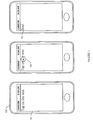
- Figure 1 illustrates an example touch screen of a mobile phone that hosts a browser client displaying a web page.
- touch screen 101 of mobile phone 100 displays an HTML/JavaScript code snippet displaying a text string "Tap on this text", as listed below.
- a touch event listener "onTouchEvent” can trigger an action of changing the text string from “Tap on this text.” to "Boo! (103).
- Recognition of touch events by a system with one or more touch-based input devices--i.e., identifying one or more touch inputs by a user and determining corresponding touch event(s)-- may be implemented by a combination of hardware, software, and/or firmware (or device drivers).
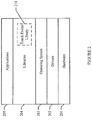
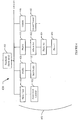
- Figure 2 illustrates an example processing stack of a mobile device (e.g., a smart phone) with touch-based input device(s).
- Hardware layer 201 can include one or more processors and various hardware input/output devices such as camera, communication interface, and touch-based input device (e.g., touch screen, touchpad).
- Drivers layer 202 includes one or more drivers that communicate and control hardware layer 200, for example, a driver receiving and processing touch input signals generated by a touch-screen display.
- Operating system 203 runs computing programs and manages hardware layer 201 via one or more drivers in driver layer 202.
- Libraries 204 include one or more libraries used by one or more application programs in applications 205 (e.g., web browser, address book, etc.).
- touch events library 210 can contain codes that interpret touch inputs to touch events or gestures, and a web browser application program can access touch event library 210 (e.g., via function calls) and process a web page with touch event handlers embedded within the page, as illustrated in Figure 1 and in the HTML/JavaScript code snippet above.
- User interface layers of application programs hosted by a computing device are generally arranged in a hierarchy, such as a hierarchical tree structure.
- a root node of the tree structure may correspond to a home user interface layer or home screen of an application, including icons, buttons, pull-down menus, hypertext links or other controls that allow users to navigate to child user interface layers.
- Child user interface layers may include icons or buttons that allow users to navigate back to parent user interface layers by selecting an icon or button. Many such buttons are displayed on the top of a menu bar, but there are a lot of exceptions.
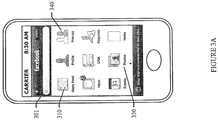
- a user can often navigate between user interface layers of an application hosted on the touch-screen device by touching one or more selectable elements within the application's user graphic interface displayed with the touch-screen, as illustrated in Figures 3A-3C .
- the particular application shown in Figures 3A-3C is a Facebook(r) client hosted by a mobile phone with a touch screen (e.g., an iPhone(r) smartphone offered by Apple, Inc. of Cupertino, California).
- the application shows a home screen 301 ( Figure 3A ), or an interface displaying home user interface layer of the application.
- the home screen 301 may include user interface elements such as icons or buttons for navigating to other layers, for example, News Feed icon 310, Photos icon 330, or Friends icon 340.
- Figure 4 illustrates an example application user interface hierarchy 400 of the application illustrated in Figures 3A-3C .
- the application user interface hierarchy includes home layer 401 and one or more sub-layers 402, such as News Feed 410, Profile 420, Photos 430, Friends 440, and the like.
- Photos layer 430 itself has a sub-layer of Album list 432 which in turn has a sub-layer Photo list 434, and so on. Not all layers have sub-layers, such as News Feed content 412, Self Profile content 422, "Photo 1" 436, which are leaf layers.
- the nodes of the hierarchy represent different user interface layers provided by the application, while the edges between the nodes illustrate a potential navigation flow. Additionally, the application may allow for navigation among the nodes in a way that does not observe a hierarchical model, such as navigating directly between sibling node layers, traversing more than one hop directly between layers, and the like.
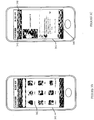
- the user can navigate to Friends layer 440 by touching Friends icon 340 within home screen 301, the current screen will change to a screen 341 for Friends layer 440, as illustrated in Figure 3B .
- the screen 341 for Friends layer 440 comprises a list of friends wherein each friend is represented by a selectable icon (e.g., a profile picture).
- the user can navigate to a particular friend layer "Laura" 442 by touching a corresponding icon (342), the current screen will change to a screen for the particular friend (343), as illustrated in Figure 3C .
- the user can look up additional information (e.g., an email address, a phone number) of the particular friend by touching "info" icon 344, navigate back to Friends layer by touching "Friends” icon 345, or navigating to home layer by touching home icon 346.
- additional information e.g., an email address, a phone number
- a computing device such as a mobile phone, netbook, smartphone, tablet, or other portable device
- a computing device with a touch screen and one or more side-mounted touchpads and methods of allowing users to use the one or more side-mounted touchpads to navigate between application user interface layers.
- Particular embodiments can improve user experience associated with mobile devices as the side-mounted touchpad(s) can offload user interaction to the side-mounted touchpad(s) and yield better usage of the touch screen (e.g., a less congested graphic user interface with less navigation elements or icons).
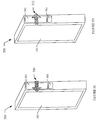
- Figure 5 illustrates a front view and a side view of an example mobile device with a front-mounted touch screen and a side-mounted touchpad.
- mobile device 500 may comprise a housing with multi-touch touch screen 501 disposed on a front face of the housing.
- the mobile device 500 may also include a side-mounted multi-touch touchpad 502 and a side-mounted single-touch touchpad 503, both disposed on a lateral face or edge of the device 500.
- mobile device 500 may include hardware and/or software that supports or implements a variety of functions.
- mobile device 500 may support telephony functions, chat and/or email functions.
- Mobile device 500 may also support network data communications and include a web browser for accessing and displaying web pages.
- Mobile device 500 may also support or incorporate, a Wi-Fi base station functions, a digital media player functions, and/or a gaming device functions.
- the side-mounted touchpad 503 may be replaced by a clickable button or keypad device.
- the side-mounted touchpad 503 may be a multi-touch touchpad.
- the touchpad 402 may be a single- or multi-touch device.
- side-mounted touchpad 502 may comprise a slightly concave multi-touch surface, as illustrated in Figure 5A .
- the touch screen 501 and side-mounted touchpad 503 may be single-touch, dual-touch or multi-touch devices.
- implementations of the invention can operate without a touch screen device, relying instead on a regular display device and a pointer device, such as a trackball or tackpad.
- mobile device 500 may include a back-mount touch surface 505 on a back-side of mobile device 500.
- the back-mounted touch 505 may cover substantially all or a portion of a back side of mobile device 500, as illustrated in Figure 5B .
- the back-mounted touch surface 505 may comprise a multi-touch touchpad or a multi-touch touch screen.
- Mobile device 500 may recognize touch inputs, and determine one or more corresponding touch events or gestures.
- One or more applications hosted on mobile device 500 may be configured to register a handler function that responds to the one or more touch events.
- mobile device 500 may recognize one or more user touch inputs performed on touch screen 501, touchpad 502, touchpad 503, and/or back-mounted touch surface 505, and determine one or more corresponding touch events.
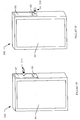
- mobile device 500 may determine a forward lateral flick event associated with touchpad 502, as illustrated in Figure 5C .
- a user touches touchpad 502 in a quick motion in forward lateral direction (indicated by the arrow 510), and a gesture recognition library of mobile device 500 can access data generated by touchpad 502 and determine the touch input corresponding to a forward lateral flick event or gesture associated with touchpad 502.
- mobile device 500 may determine a backward lateral flick event associated with touchpad 502, as illustrated in Figure 5D .
- a user touches touchpad 502 in a quick motion in backward lateral direction (indicated by the arrow 512), and a gesture recognition library of mobile device 500 can access data generated by touchpad 502 and determine the touch input corresponding to a backward lateral flick event or gesture associated with touchpad 502.
- mobile device 500 may identify a tap event.
- mobile device 500 may determine a tap event associated with touchpad 502, as illustrated in Figure 5E .
- a user taps or strikes lightly on touchpad 502 (indicated by the arrow 514), and a gesture recognition library of mobile device 500 can interpret the user's touch input and identify the touch input corresponding to a tap event.
- mobile device 500 may identify a tap event associated with touchpad 503, as illustrated in Figure 5F .
- a user taps or strikes lightly on touchpad 503 (indicated by the arrow 516), and a gesture recognition library of mobile device 500 can interpret the user's touch input and identify the touch input corresponding to a tap event.
- mobile device 500 may identify a tap event associated with touchpad 503 if touchpad 503 is a clickable button and a user clicks on the clickable button.
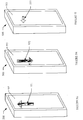
- mobile device 500 may identity touch events associated with back-mounted touch surface 505, as illustrated in Figures 5G-5I .
- a user touches back-mounted touch surface 505 in a quick motion in an upward direction (indicated by the arrow 531).
- a gesture recognition library of mobile device 500 can interpret the user's touch input and identify the touch input corresponding to an upward flick event or gesture associated with back-mounted touch surface 505.
- a user touches back-mounted touch surface 505 in a quick motion in a downward direction (indicated by the arrow 532).
- a gesture recognition library of mobile device 500 can interpret the user's input and identify the touch input corresponding to a downward flick event or gesture associated with back-mounted touch surface 505.
- a user taps or strikes lightly on back-mounted touch surface 505 (as indicated by the arrow 533).
- a gesture recognition library of mobile device 500 can interpret the user's input and identify the touch input corresponding to a tap event associated with back-mounted touch surface 505.
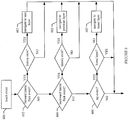
- Figure 6 illustrates an example method of navigating between user interface layers of an application using side-mounted touchpads.
- the example method of Figure 6 may enable a user to navigate between user interface layers by flicking across a side-mounted touchpad, to jump to the application's home screen by tapping or clicking a side-mounted "home button".
- the handler function can, responsive to a touch event, cause an application to navigate to a different user interface layer.
- the handler function may determine a current application layer corresponding to the touch event.
- the application may store a navigation history that tracks the layers to which the user has navigated.
- the handler function may determine if the touch event is a forward lateral flick event (602). In particular embodiments, if the touch event is a forward lateral flick event, and if the forward navigation history identifies a next layer for the current layer, the handler function may cause the application navigate to the next layer (603). In particular embodiments, the handler function may determine if the touch event is a backward lateral flick event (604). In particular embodiments, if the touch event is a backward lateral flick event, and if the backward navigation history identifies a previous layer for the current layer, the handler function may cause the application navigate to the previous layer (605).
- the handler function may determine if the touch event is a tap event in connection with input device 503 (606). In particular embodiments, if the touch event is a tap event, and if the current layer is not a home layer, the handler function may cause the application navigate to the home layer (607).
- particular embodiments may enable navigating between user interface layers of an application using the back-mounted touch surface described earlier.
- the handler function can, responsive to a touch event, cause an application to navigate to a different user interface layer.
- the handler function may determine a current application layer corresponding to the touch event.
- the application may store a navigation history that tracks the layers to which the user has navigated.
- the handler function may determine if the touch event is an upward flick event associated with back-mounted touch surface 505. If the touch event is an upward flick event associated with back-mounted touch surface 505, and if the forward navigation history identifies a next layer for the current layer, the handler function may cause the application to navigate to the next layer.
- the hander function may determine if the touch event is a downward flick event associated with back-mounted touch surface 505. If the touch event is a downward flick event associated with back-mounted touch surface 505, and if the backward navigation history identifies a previous layer for the current layer, the handler function may cause the application navigate to the previous layer. The handler function may determine if the touch event is a tap event associated with back-mounted touch surface 505. If the touch event is a tap event associated with back-mounted touch surface 505, and if the current layer is not a home layer, the handler function may cause the application to navigate to the home layer.
- the forward and back gestures, as well as the home control input, described above can be utilized in connection with a variety of applications and computing devices.
- the forward and back gestures, as well as the home control input may be used in connection with a special-purpose client application in order to facilitate navigation of the various application layers.
- the home input causes navigation back to the home or root layer of the application.
- the forward and back gestures, as well as the home control input may also be used in connection with a browser client to facilitate navigation of a series of web pages provided by one or more domains.
- the home input may cause navigation back to a home page, while the forward and back gestures may implement corresponding forward and backward navigation functions common to browser client applications.
- the forward and back gestures can be used in connection with a graphical user interface shell of an operating system.
- the home input may cause navigation back to the home screen of the operating system, while the forward and back gestures may implement corresponding forward and backward navigation functions across various layers provided by the operating system shell.
- the application and functionality described above can be implemented as a series of instructions stored on a computer-readable storage medium that, when executed, cause a programmable processor to implement the operations described above.
- the mobile device 500 may be implemented in a variety of different hardware and computing systems
- FIGURE 7 shows a schematic representation of the main components of an example computing platform of a client or mobile device, according to various particular embodiments.
- computing platform 702 may comprise controller 704, memory 706, and input output subsystem 710.
- controller 704 which may comprise one or more processors and/or one or more microcontrollers configured to execute instructions and to carry out operations associated with a computing platform.
- controller 704 may be implemented as a single-chip, multiple chips and/or other electrical components including one or more integrated circuits and printed circuit boards.
- Controller 704 may optionally contain a cache memory unit for temporary local storage of instructions, data, or computer addresses.
- controller 704 may control the reception and manipulation of input and output data between components of computing platform 702.
- controller 704 may include one or more processors or one or more controllers dedicated for certain processing tasks of computing platform 702, for example, for 2D/3D graphics processing, image processing, or video processing.
- Controller 704 together with a suitable operating system may operate to execute instructions in the form of computer code and produce and use data.
- the operating system may be Windows-based, Mac-based, or Unix or Linux-based, Symbian-based, or Android-based among other suitable operating systems.
- the operating system, other computer code and/or data may be physically stored within memory 706 that is operatively coupled to controller 704.
- Memory 706 may encompass one or more storage media and generally provide a place to store computer code (e.g., software and/or firmware) and data that are used by computing platform 702.
- memory 706 may include various tangible computer-readable storage media including Read-Only Memory (ROM) and/or Random-Access Memory (RAM).
- ROM Read-Only Memory
- RAM Random-Access Memory
- Memory 706 may also include one or more fixed storage devices in the form of, by way of example, hard disk drives (HDDs), solid-state drives (SSDs), flash-memory cards (e.g., Secured Digital or SD cards, embedded MultiMediaCard or eMMD cards), among other suitable forms of memory coupled bi-directionally to controller 704. Information may also reside on one or more removable storage media loaded into or installed in computing platform 702 when needed. By way of example, any of a number of suitable memory cards (e.g., SD cards) may be loaded into computing platform 702 on a temporary or permanent basis.
- HDDs hard disk drives
- SSDs solid-state drives
- flash-memory cards e.g., Secured Digital or SD cards, embedded MultiMediaCard or eMMD cards
- Information may also reside on one or more removable storage media loaded into or installed in computing platform 702 when needed.
- any of a number of suitable memory cards e.g., SD cards
- Input output subsystem 710 may comprise one or more input and output devices operably connected to controller 704.
- input-output subsystem may include keyboard, mouse, one or more buttons, thumb wheel, and/or display (e.g., liquid crystal display (LCD), light emitting diode (LED), Interferometric modulator display (IMOD), or any other suitable display technology).
- display e.g., liquid crystal display (LCD), light emitting diode (LED), Interferometric modulator display (IMOD), or any other suitable display technology.
- input devices are configured to transfer data, commands and responses from the outside world into computing platform 702.
- the display is generally configured to display a graphical user interface (GUI) that provides an easy to use visual interface between a user of the computing platform 702 and the operating system or application(s) running on the mobile device.
- GUI graphical user interface
- the GUI presents programs, files and operational options with graphical images.
- Input output subsystem 710 may also include touch based devices such as touchpad and touch screen.
- a touchpad is an input device including a surface that detects touch-based inputs of users.
- a touch screen is a display that detects the presence and location of user touch inputs.
- Input output system 710 may also include dual touch or multi-touch displays or touchpads that can identify the presence, location and movement of more than one touch inputs, such as two or three finger touches.
- computing platform 702 may additionally comprise audio subsystem 712, camera subsystem 712, wireless communication subsystem 716, sensor subsystems 718, and/or wired communication subsystem 720, operably connected to controller 704 to facilitate various functions of computing platform 702.
- Audio subsystem 712 including a speaker, a microphone, and a codec module configured to process audio signals, can be utilized to facilitate voice-enabled functions, such as voice recognition, voice replication, digital recording, and telephony functions.
- camera subsystem 712 including an optical sensor (e.g., a charged coupled device (CCD), or a complementary metal-oxide semiconductor (CMOS) image sensor), can be utilized to facilitate camera functions, such as recording photographs and video clips.
- wired communication subsystem 720 can include a Universal Serial Bus (USB) port for file transferring, or a Ethernet port for connection to a local area network (LAN).
- computing platform 702 may be powered by power source 732.
- USB Universal Serial Bus
- Wireless communication subsystem 716 can be designed to operate over one or more wireless networks, for example, a wireless PAN (WPAN) (such as, for example, a BLUETOOTH WPAN, an infrared PAN), a WI-FI network (such as, for example, an 802.11a/b/g/n WI-FI network, an 802.11s mesh network), a WI-MAX network, a cellular telephone network (such as, for example, a Global System for Mobile Communications (GSM) network, an Enhanced Data Rates for GSM Evolution (EDGE) network, a Universal Mobile Telecommunications System (UMTS) network, and/or a Long Term Evolution (LTE) network).
- WPAN wireless PAN
- WI-FI network such as, for example, an 802.11a/b/g/n WI-FI network, an 802.11s mesh network
- WI-MAX such as, for example, a cellular telephone network (such as, for example, a Global System for Mobile Communications (GSM) network,
- Sensor subsystem 718 may include one or more sensor devices to provide additional input and facilitate multiple functionalities of computing platform 702.
- sensor subsystems 718 may include GPS sensor for location positioning, altimeter for altitude positioning, motion sensor for determining orientation of a mobile device, light sensor for photographing function with camera subsystem 714, temperature sensor for measuring ambient temperature, and/or biometric sensor for security application (e.g., fingerprint reader).
- Other input/output devices may include an accelerometer that can be used to detect the orientation of the device.
- various components of computing platform 702 may be operably connected together by one or more buses (including hardware and/or software).
- the one or more buses may include an Accelerated Graphics Port (AGP) or other graphics bus, an Enhanced Industry Standard Architecture (EISA) bus, a front-side bus (FSB), a HYPERTRANSPORT (HT) interconnect, an Industry Standard Architecture (ISA) bus, an INFINIBAND interconnect, a low-pin-count (LPC) bus, a memory bus, a Micro Channel Architecture (MCA) bus, a Peripheral Component Interconnect (PCI) bus, a PCI-Express (PCI-X) bus, a serial advanced technology attachment (SATA) bus, a Video Electronics Standards Association local (VLB) bus, a Universal Asynchronous Receiver/Transmitter (UART) interface, a Inter-Integrated Circuit (I 2 C) bus, a Serial Peripheral Interface (SPI) bus, a Secure Digital (SD)
- AGP Accelerated Graphics Port
- a computer-readable storage medium encompasses one or more non-transitory, tangible computer-readable storage media possessing structure.
- a computer-readable storage medium may include a semiconductor-based or other integrated circuit (IC) (such, as for example, a field-programmable gate array (FPGA) or an application-specific IC (ASIC)), a hard disk, an HDD, a hybrid hard drive (HHD), an optical disc, an optical disc drive (ODD), a magneto-optical disc, a magneto-optical drive, a floppy disk, a floppy disk drive (FDD), magnetic tape, a holographic storage medium, a solid-state drive (SSD), a RAM-drive, a SECURE DIGITAL card, a SECURE DIGITAL drive, a MultiMediaCard (MMC) card, an embedded MMC (eMMC) card, or another suitable computer-readable storage medium or a combination of two or more of these, where appropriate.
- IC semiconductor-based or other integrated circuit
- reference to a computer-readable storage medium excludes any medium that is not eligible for patent protection under 35 U.S.C. ⁇ 101.
- reference to a computer-readable storage medium excludes transitory forms of signal transmission (such as a propagating electrical or electromagnetic signal per se) to the extent that they are not eligible for patent protection under 35 U.S.C. ⁇ 101.
- a computer-readable storage medium implements one or more portions of controller 704 (such as, for example, one or more internal registers or caches), one or more portions of memory 705, or a combination of these, where appropriate.
- a computer-readable storage medium implements RAM or ROM.
- a computer-readable storage medium implements volatile or persistent memory.
- one or more computer-readable storage media embody software.
- reference to software may encompass one or more applications, bytecode, one or more computer programs, one or more executables, one or more instructions, logic, machine code, one or more scripts, or source code, and vice versa, where appropriate.
- software includes one or more application programming interfaces (APIs).
- APIs application programming interfaces
- This disclosure contemplates any suitable software written or otherwise expressed in any suitable programming language or combination of programming languages.
- software is expressed as source code or object code.
- software is expressed in a higher-level programming language, such as, for example, C, Perl, JavaScript, or a suitable extension thereof.
- software is expressed in a lower-level programming language, such as assembly language (or machine code).
- software is expressed in JAVA.
- software is expressed in Hyper Text Markup Language (HTML), Extensible Markup Language (XML), or other suitable markup language
Landscapes
- Engineering & Computer Science (AREA)
- Theoretical Computer Science (AREA)
- General Engineering & Computer Science (AREA)
- Human Computer Interaction (AREA)
- Physics & Mathematics (AREA)
- General Physics & Mathematics (AREA)
- Computer Hardware Design (AREA)
- User Interface Of Digital Computer (AREA)
- Position Input By Displaying (AREA)
- Telephone Function (AREA)
Applications Claiming Priority (2)
| Application Number | Priority Date | Filing Date | Title |
|---|---|---|---|
| US13/275,095 US8711116B2 (en) | 2011-10-17 | 2011-10-17 | Navigating applications using side-mounted touchpad |
| PCT/US2012/054973 WO2013058896A1 (en) | 2011-10-17 | 2012-09-13 | Navigating applications using side-mounted touchpad |
Publications (3)
| Publication Number | Publication Date |
|---|---|
| EP2769287A1 EP2769287A1 (en) | 2014-08-27 |
| EP2769287A4 EP2769287A4 (en) | 2015-04-15 |
| EP2769287B1 true EP2769287B1 (en) | 2017-10-25 |
Family
ID=48085662
Family Applications (1)
| Application Number | Title | Priority Date | Filing Date |
|---|---|---|---|
| EP12841962.9A Active EP2769287B1 (en) | 2011-10-17 | 2012-09-13 | Navigating applications using side-mounted touchpad |
Country Status (12)
| Country | Link |
|---|---|
| US (3) | US8711116B2 (enExample) |
| EP (1) | EP2769287B1 (enExample) |
| JP (3) | JP5806411B2 (enExample) |
| KR (1) | KR101555627B1 (enExample) |
| CN (1) | CN103890697B (enExample) |
| AU (3) | AU2012326592B2 (enExample) |
| BR (1) | BR112014009521A2 (enExample) |
| CA (3) | CA2929619C (enExample) |
| IL (2) | IL232191A (enExample) |
| IN (1) | IN2014CN03013A (enExample) |
| MX (2) | MX353890B (enExample) |
| WO (1) | WO2013058896A1 (enExample) |
Cited By (1)
| Publication number | Priority date | Publication date | Assignee | Title |
|---|---|---|---|---|
| EP3824379A1 (en) * | 2018-07-17 | 2021-05-26 | Methodical Mind, LLC | Graphical user interface system |
Families Citing this family (34)
| Publication number | Priority date | Publication date | Assignee | Title |
|---|---|---|---|---|
| KR102136860B1 (ko) | 2007-09-24 | 2020-07-23 | 애플 인크. | 전자 장치 내의 내장형 인증 시스템들 |
| US9417754B2 (en) | 2011-08-05 | 2016-08-16 | P4tents1, LLC | User interface system, method, and computer program product |
| US8711116B2 (en) * | 2011-10-17 | 2014-04-29 | Facebook, Inc. | Navigating applications using side-mounted touchpad |
| JP2013235344A (ja) * | 2012-05-07 | 2013-11-21 | Sony Computer Entertainment Inc | 入力装置、入力制御方法、及び入力制御プログラム |
| CN111178332A (zh) * | 2012-05-18 | 2020-05-19 | 苹果公司 | 用于操纵用户界面的设备、方法和图形用户界面 |
| US9429997B2 (en) * | 2012-06-12 | 2016-08-30 | Apple Inc. | Electronic device with wrapped display |
| WO2014002615A1 (ja) * | 2012-06-27 | 2014-01-03 | Necカシオモバイルコミュニケーションズ株式会社 | 携帯端末装置、携帯端末装置の操作方法、及び携帯端末装置の操作プログラム |
| US9001035B2 (en) * | 2012-10-19 | 2015-04-07 | Red Bird Rising, Llc | Configured input display for communicating to computational apparatus |
| US10373149B1 (en) | 2012-11-12 | 2019-08-06 | Square, Inc. | Secure data entry using a card reader with minimal display and input capabilities having a display |
| US20140173466A1 (en) * | 2012-12-14 | 2014-06-19 | Microsoft Corporation | Transitions within views of conversation environments |
| TWI474266B (zh) * | 2012-12-20 | 2015-02-21 | Inst Information Industry | 觸控方法及手持裝置 |
| TWI492119B (zh) * | 2013-07-01 | 2015-07-11 | 原相科技股份有限公司 | 手持式電子裝置 |
| US20150058809A1 (en) * | 2013-08-23 | 2015-02-26 | General Electric Company | Multi-touch gesture processing |
| US9613353B1 (en) | 2013-12-26 | 2017-04-04 | Square, Inc. | Passcode entry through motion sensing |
| JP2017107252A (ja) * | 2014-04-14 | 2017-06-15 | シャープ株式会社 | 表示装置及び電子機器 |
| US9927927B2 (en) | 2014-05-05 | 2018-03-27 | Atmel Corporation | Implementing a virtual controller outside an area of a touch sensor |
| JP6092157B2 (ja) * | 2014-06-09 | 2017-03-08 | 富士フイルム株式会社 | 電子機器、電子機器の表示制御方法、及び電子機器の表示制御プログラム |
| US20160070446A1 (en) | 2014-09-04 | 2016-03-10 | Home Box Office, Inc. | Data-driven navigation and navigation routing |
| US9681765B2 (en) * | 2014-09-30 | 2017-06-20 | Pamela Ann Cignarella | Interactive children's table dishes |
| CN105573574A (zh) * | 2014-10-09 | 2016-05-11 | 阿里巴巴集团控股有限公司 | 应用界面的导航方法及装置 |
| DE102014019626A1 (de) * | 2014-12-23 | 2016-06-23 | Aleksej Kadnikov | Handheld-Gerät mit verbesserte Bedienbarkeit Funktions- und Betriebssicherheit |
| CN104811523A (zh) * | 2015-05-13 | 2015-07-29 | 努比亚技术有限公司 | 按键控制方法、移动终端 |
| US9912364B2 (en) | 2015-06-25 | 2018-03-06 | International Business Machines Corporation | Mobile application interaction guide via tactile feedback |
| CN105549868A (zh) * | 2015-07-25 | 2016-05-04 | 宇龙计算机通信科技(深圳)有限公司 | 一种移动终端操作处理方法、装置和移动终端 |
| US9619802B1 (en) * | 2015-12-09 | 2017-04-11 | Square, Inc. | Interception of touch pad events for handling in a secure environment |
| US10209821B2 (en) | 2016-04-05 | 2019-02-19 | Google Llc | Computing devices having swiping interfaces and methods of operating the same |
| WO2018208047A1 (en) | 2017-05-09 | 2018-11-15 | Samsung Electronics Co., Ltd. | Method and system for managing and displaying application |
| KR20190027553A (ko) * | 2017-09-07 | 2019-03-15 | 주식회사 하이딥 | 측면에 터치 압력 감지부를 구비한 휴대용 단말기 |
| US20220179543A1 (en) * | 2019-03-24 | 2022-06-09 | Sandeep Kumar Rayapati | User interface system, method and device |
| CN112035271B (zh) * | 2019-06-04 | 2023-10-10 | 杭州海康威视数字技术股份有限公司 | 用户操作信息的处理方法、装置、电子设备及存储介质 |
| US12086299B1 (en) * | 2020-07-20 | 2024-09-10 | Apple Inc. | Touch input for head-mountable devices |
| US11409410B2 (en) | 2020-09-14 | 2022-08-09 | Apple Inc. | User input interfaces |
| WO2022065767A1 (ko) * | 2020-09-28 | 2022-03-31 | 한영수 | 대화면의 휴대용 단말기를 한손으로도 편하게 사용할 수 있도록, swipe 및 touch, 누르는 압력세기등등의 다양한 제스처를 인식하는 버튼이나 테두리등의 구조물 |
| JP2024179239A (ja) * | 2023-06-14 | 2024-12-26 | 株式会社Pfu | キーボード装置 |
Family Cites Families (26)
| Publication number | Priority date | Publication date | Assignee | Title |
|---|---|---|---|---|
| JPH03202914A (ja) * | 1989-12-29 | 1991-09-04 | Pfu Ltd | 画面移動制御方式 |
| JPH04128787A (ja) * | 1990-09-19 | 1992-04-30 | Hitachi Ltd | 表示画面切換方式 |
| JP4017581B2 (ja) * | 2003-09-30 | 2007-12-05 | 株式会社コナミデジタルエンタテインメント | ウェブページの表示方法 |
| GB2411331A (en) | 2004-02-19 | 2005-08-24 | Trigenix Ltd | Rendering user interface using actor attributes |
| JP2006244380A (ja) * | 2005-03-07 | 2006-09-14 | Konica Minolta Business Technologies Inc | 画面表示装置、画面表示方法、およびコンピュータプログラム |
| CN100592247C (zh) * | 2005-09-21 | 2010-02-24 | 鸿富锦精密工业(深圳)有限公司 | 多层次菜单显示装置及其显示控制方法 |
| JP4946057B2 (ja) * | 2006-01-11 | 2012-06-06 | 株式会社Jvcケンウッド | 電子機器、制御方法、および、プログラム |
| US8269725B2 (en) * | 2006-06-28 | 2012-09-18 | Microsoft Corporation | Input simulation system for touch based devices |
| WO2008103018A1 (en) * | 2007-02-23 | 2008-08-28 | Tp-I Co., Ltd | Virtual keyboard input system using pointing apparatus in digial device |
| JP2008047159A (ja) * | 2007-10-30 | 2008-02-28 | Kyocera Corp | 携帯情報端末装置及びこれに用いられる画面遷移制御方法 |
| US8677285B2 (en) * | 2008-02-01 | 2014-03-18 | Wimm Labs, Inc. | User interface of a small touch sensitive display for an electronic data and communication device |
| KR101470543B1 (ko) * | 2008-02-15 | 2014-12-08 | 엘지전자 주식회사 | 터치스크린을 구비하는 휴대 단말기 및 그 동작 제어방법 |
| CN101615101A (zh) * | 2008-06-25 | 2009-12-30 | 启碁科技股份有限公司 | 用于具有触控屏幕的电子装置的操控方法及其操控界面 |
| US8169414B2 (en) * | 2008-07-12 | 2012-05-01 | Lim Seung E | Control of electronic games via finger angle using a high dimensional touchpad (HDTP) touch user interface |
| US8654085B2 (en) * | 2008-08-20 | 2014-02-18 | Sony Corporation | Multidimensional navigation for touch sensitive display |
| US8332400B2 (en) * | 2008-09-23 | 2012-12-11 | Sage Inventions, Llc | System and method for managing web search information in navigation hierarchy |
| WO2010036050A2 (en) | 2008-09-26 | 2010-04-01 | Lg Electronics Inc. | Mobile terminal and control method thereof |
| JP5265433B2 (ja) * | 2009-03-27 | 2013-08-14 | ソフトバンクモバイル株式会社 | 表示装置、およびプログラム |
| US8907897B2 (en) * | 2009-06-16 | 2014-12-09 | Intel Corporation | Optical capacitive thumb control with pressure sensor |
| US8674951B2 (en) | 2009-06-16 | 2014-03-18 | Intel Corporation | Contoured thumb touch sensor apparatus |
| KR101631912B1 (ko) * | 2009-11-03 | 2016-06-20 | 엘지전자 주식회사 | 이동 단말기 및 그 제어 방법 |
| US8441460B2 (en) * | 2009-11-24 | 2013-05-14 | Mediatek Inc. | Apparatus and method for providing side touch panel as part of man-machine interface (MMI) |
| US10007393B2 (en) | 2010-01-19 | 2018-06-26 | Apple Inc. | 3D view of file structure |
| US8860672B2 (en) * | 2010-05-26 | 2014-10-14 | T-Mobile Usa, Inc. | User interface with z-axis interaction |
| US8712931B1 (en) * | 2011-06-29 | 2014-04-29 | Amazon Technologies, Inc. | Adaptive input interface |
| US8711116B2 (en) * | 2011-10-17 | 2014-04-29 | Facebook, Inc. | Navigating applications using side-mounted touchpad |
-
2011
- 2011-10-17 US US13/275,095 patent/US8711116B2/en active Active
-
2012
- 2012-09-13 CN CN201280051212.1A patent/CN103890697B/zh active Active
- 2012-09-13 CA CA2929619A patent/CA2929619C/en not_active Expired - Fee Related
- 2012-09-13 AU AU2012326592A patent/AU2012326592B2/en not_active Ceased
- 2012-09-13 MX MX2017000197A patent/MX353890B/es unknown
- 2012-09-13 IN IN3013CHN2014 patent/IN2014CN03013A/en unknown
- 2012-09-13 CA CA2852664A patent/CA2852664C/en not_active Expired - Fee Related
- 2012-09-13 WO PCT/US2012/054973 patent/WO2013058896A1/en not_active Ceased
- 2012-09-13 KR KR1020147013156A patent/KR101555627B1/ko active Active
- 2012-09-13 BR BR112014009521A patent/BR112014009521A2/pt not_active IP Right Cessation
- 2012-09-13 JP JP2014537067A patent/JP5806411B2/ja active Active
- 2012-09-13 CA CA2907550A patent/CA2907550C/en not_active Expired - Fee Related
- 2012-09-13 MX MX2014004717A patent/MX344760B/es active IP Right Grant
- 2012-09-13 EP EP12841962.9A patent/EP2769287B1/en active Active
-
2014
- 2014-01-13 US US14/153,910 patent/US8866786B2/en active Active
- 2014-04-22 IL IL232191A patent/IL232191A/en active IP Right Grant
- 2014-07-29 US US14/445,989 patent/US8976142B2/en active Active
-
2015
- 2015-09-03 JP JP2015173781A patent/JP2016027481A/ja active Pending
- 2015-12-31 AU AU2015285964A patent/AU2015285964B2/en not_active Ceased
-
2016
- 2016-08-31 AU AU2016222381A patent/AU2016222381B2/en not_active Ceased
- 2016-11-22 IL IL249114A patent/IL249114B/en not_active IP Right Cessation
-
2018
- 2018-06-06 JP JP2018108529A patent/JP6663453B2/ja not_active Expired - Fee Related
Non-Patent Citations (1)
| Title |
|---|
| None * |
Cited By (1)
| Publication number | Priority date | Publication date | Assignee | Title |
|---|---|---|---|---|
| EP3824379A1 (en) * | 2018-07-17 | 2021-05-26 | Methodical Mind, LLC | Graphical user interface system |
Also Published As
Similar Documents
| Publication | Publication Date | Title |
|---|---|---|
| AU2016222381B2 (en) | Navigating applications using side-mounted touchpad | |
| US9348364B2 (en) | Content scrolling and transitioning using touchpad input | |
| US9092078B2 (en) | Soft control user interface with touchpad input device | |
| US9594405B2 (en) | Composite touch gesture control with touch screen input device and secondary touch input device | |
| US11256396B2 (en) | Pinch gesture to navigate application layers | |
| US20120192065A1 (en) | Device, Method, and Graphical User Interface for Navigating and Annotating an Electronic Document | |
| US20130100035A1 (en) | Graphical User Interface Interaction Using Secondary Touch Input Device | |
| EP2770421A2 (en) | Electronic device having touch-sensitive user interface and related operating method | |
| US20130093688A1 (en) | Virtual Soft Keys in Graphic User Interface with Side Mounted Touchpad Input Device | |
| CN105009038A (zh) | 具有触敏用户界面的电子装置以及相关操作方法 |
Legal Events
| Date | Code | Title | Description |
|---|---|---|---|
| PUAI | Public reference made under article 153(3) epc to a published international application that has entered the european phase |
Free format text: ORIGINAL CODE: 0009012 |
|
| 17P | Request for examination filed |
Effective date: 20140428 |
|
| AK | Designated contracting states |
Kind code of ref document: A1 Designated state(s): AL AT BE BG CH CY CZ DE DK EE ES FI FR GB GR HR HU IE IS IT LI LT LU LV MC MK MT NL NO PL PT RO RS SE SI SK SM TR |
|
| DAX | Request for extension of the european patent (deleted) | ||
| RA4 | Supplementary search report drawn up and despatched (corrected) |
Effective date: 20150317 |
|
| RIC1 | Information provided on ipc code assigned before grant |
Ipc: G06F 3/041 20060101ALI20150311BHEP Ipc: G06F 3/0482 20130101ALI20150311BHEP Ipc: G06F 3/0354 20130101ALI20150311BHEP Ipc: G06F 3/0485 20130101ALI20150311BHEP Ipc: G06F 1/16 20060101ALI20150311BHEP Ipc: G06F 3/0488 20130101ALI20150311BHEP Ipc: G06F 3/14 20060101ALI20150311BHEP Ipc: G06F 9/44 20060101ALI20150311BHEP Ipc: G06F 3/01 20060101AFI20150311BHEP Ipc: G06F 3/048 20130101ALI20150311BHEP |
|
| 17Q | First examination report despatched |
Effective date: 20160204 |
|
| GRAP | Despatch of communication of intention to grant a patent |
Free format text: ORIGINAL CODE: EPIDOSNIGR1 |
|
| INTG | Intention to grant announced |
Effective date: 20170331 |
|
| GRAS | Grant fee paid |
Free format text: ORIGINAL CODE: EPIDOSNIGR3 |
|
| GRAA | (expected) grant |
Free format text: ORIGINAL CODE: 0009210 |
|
| AK | Designated contracting states |
Kind code of ref document: B1 Designated state(s): AL AT BE BG CH CY CZ DE DK EE ES FI FR GB GR HR HU IE IS IT LI LT LU LV MC MK MT NL NO PL PT RO RS SE SI SK SM TR |
|
| REG | Reference to a national code |
Ref country code: GB Ref legal event code: FG4D |
|
| REG | Reference to a national code |
Ref country code: CH Ref legal event code: EP |
|
| REG | Reference to a national code |
Ref country code: AT Ref legal event code: REF Ref document number: 940485 Country of ref document: AT Kind code of ref document: T Effective date: 20171115 |
|
| REG | Reference to a national code |
Ref country code: IE Ref legal event code: FG4D |
|
| REG | Reference to a national code |
Ref country code: DE Ref legal event code: R096 Ref document number: 602012039038 Country of ref document: DE |
|
| REG | Reference to a national code |
Ref country code: NL Ref legal event code: MP Effective date: 20171025 |
|
| REG | Reference to a national code |
Ref country code: LT Ref legal event code: MG4D |
|
| REG | Reference to a national code |
Ref country code: AT Ref legal event code: MK05 Ref document number: 940485 Country of ref document: AT Kind code of ref document: T Effective date: 20171025 |
|
| PG25 | Lapsed in a contracting state [announced via postgrant information from national office to epo] |
Ref country code: NL Free format text: LAPSE BECAUSE OF FAILURE TO SUBMIT A TRANSLATION OF THE DESCRIPTION OR TO PAY THE FEE WITHIN THE PRESCRIBED TIME-LIMIT Effective date: 20171025 |
|
| PG25 | Lapsed in a contracting state [announced via postgrant information from national office to epo] |
Ref country code: SE Free format text: LAPSE BECAUSE OF FAILURE TO SUBMIT A TRANSLATION OF THE DESCRIPTION OR TO PAY THE FEE WITHIN THE PRESCRIBED TIME-LIMIT Effective date: 20171025 Ref country code: ES Free format text: LAPSE BECAUSE OF FAILURE TO SUBMIT A TRANSLATION OF THE DESCRIPTION OR TO PAY THE FEE WITHIN THE PRESCRIBED TIME-LIMIT Effective date: 20171025 Ref country code: NO Free format text: LAPSE BECAUSE OF FAILURE TO SUBMIT A TRANSLATION OF THE DESCRIPTION OR TO PAY THE FEE WITHIN THE PRESCRIBED TIME-LIMIT Effective date: 20180125 Ref country code: LT Free format text: LAPSE BECAUSE OF FAILURE TO SUBMIT A TRANSLATION OF THE DESCRIPTION OR TO PAY THE FEE WITHIN THE PRESCRIBED TIME-LIMIT Effective date: 20171025 Ref country code: FI Free format text: LAPSE BECAUSE OF FAILURE TO SUBMIT A TRANSLATION OF THE DESCRIPTION OR TO PAY THE FEE WITHIN THE PRESCRIBED TIME-LIMIT Effective date: 20171025 |
|
| PG25 | Lapsed in a contracting state [announced via postgrant information from national office to epo] |
Ref country code: HR Free format text: LAPSE BECAUSE OF FAILURE TO SUBMIT A TRANSLATION OF THE DESCRIPTION OR TO PAY THE FEE WITHIN THE PRESCRIBED TIME-LIMIT Effective date: 20171025 Ref country code: AT Free format text: LAPSE BECAUSE OF FAILURE TO SUBMIT A TRANSLATION OF THE DESCRIPTION OR TO PAY THE FEE WITHIN THE PRESCRIBED TIME-LIMIT Effective date: 20171025 Ref country code: RS Free format text: LAPSE BECAUSE OF FAILURE TO SUBMIT A TRANSLATION OF THE DESCRIPTION OR TO PAY THE FEE WITHIN THE PRESCRIBED TIME-LIMIT Effective date: 20171025 Ref country code: LV Free format text: LAPSE BECAUSE OF FAILURE TO SUBMIT A TRANSLATION OF THE DESCRIPTION OR TO PAY THE FEE WITHIN THE PRESCRIBED TIME-LIMIT Effective date: 20171025 Ref country code: BG Free format text: LAPSE BECAUSE OF FAILURE TO SUBMIT A TRANSLATION OF THE DESCRIPTION OR TO PAY THE FEE WITHIN THE PRESCRIBED TIME-LIMIT Effective date: 20180125 Ref country code: GR Free format text: LAPSE BECAUSE OF FAILURE TO SUBMIT A TRANSLATION OF THE DESCRIPTION OR TO PAY THE FEE WITHIN THE PRESCRIBED TIME-LIMIT Effective date: 20180126 Ref country code: IS Free format text: LAPSE BECAUSE OF FAILURE TO SUBMIT A TRANSLATION OF THE DESCRIPTION OR TO PAY THE FEE WITHIN THE PRESCRIBED TIME-LIMIT Effective date: 20180225 |
|
| REG | Reference to a national code |
Ref country code: DE Ref legal event code: R097 Ref document number: 602012039038 Country of ref document: DE |
|
| PG25 | Lapsed in a contracting state [announced via postgrant information from national office to epo] |
Ref country code: CY Free format text: LAPSE BECAUSE OF FAILURE TO SUBMIT A TRANSLATION OF THE DESCRIPTION OR TO PAY THE FEE WITHIN THE PRESCRIBED TIME-LIMIT Effective date: 20171025 Ref country code: EE Free format text: LAPSE BECAUSE OF FAILURE TO SUBMIT A TRANSLATION OF THE DESCRIPTION OR TO PAY THE FEE WITHIN THE PRESCRIBED TIME-LIMIT Effective date: 20171025 Ref country code: CZ Free format text: LAPSE BECAUSE OF FAILURE TO SUBMIT A TRANSLATION OF THE DESCRIPTION OR TO PAY THE FEE WITHIN THE PRESCRIBED TIME-LIMIT Effective date: 20171025 Ref country code: SK Free format text: LAPSE BECAUSE OF FAILURE TO SUBMIT A TRANSLATION OF THE DESCRIPTION OR TO PAY THE FEE WITHIN THE PRESCRIBED TIME-LIMIT Effective date: 20171025 Ref country code: DK Free format text: LAPSE BECAUSE OF FAILURE TO SUBMIT A TRANSLATION OF THE DESCRIPTION OR TO PAY THE FEE WITHIN THE PRESCRIBED TIME-LIMIT Effective date: 20171025 |
|
| REG | Reference to a national code |
Ref country code: FR Ref legal event code: PLFP Year of fee payment: 7 |
|
| PG25 | Lapsed in a contracting state [announced via postgrant information from national office to epo] |
Ref country code: PL Free format text: LAPSE BECAUSE OF FAILURE TO SUBMIT A TRANSLATION OF THE DESCRIPTION OR TO PAY THE FEE WITHIN THE PRESCRIBED TIME-LIMIT Effective date: 20171025 Ref country code: SM Free format text: LAPSE BECAUSE OF FAILURE TO SUBMIT A TRANSLATION OF THE DESCRIPTION OR TO PAY THE FEE WITHIN THE PRESCRIBED TIME-LIMIT Effective date: 20171025 Ref country code: RO Free format text: LAPSE BECAUSE OF FAILURE TO SUBMIT A TRANSLATION OF THE DESCRIPTION OR TO PAY THE FEE WITHIN THE PRESCRIBED TIME-LIMIT Effective date: 20171025 Ref country code: IT Free format text: LAPSE BECAUSE OF FAILURE TO SUBMIT A TRANSLATION OF THE DESCRIPTION OR TO PAY THE FEE WITHIN THE PRESCRIBED TIME-LIMIT Effective date: 20171025 |
|
| PLBE | No opposition filed within time limit |
Free format text: ORIGINAL CODE: 0009261 |
|
| STAA | Information on the status of an ep patent application or granted ep patent |
Free format text: STATUS: NO OPPOSITION FILED WITHIN TIME LIMIT |
|
| 26N | No opposition filed |
Effective date: 20180726 |
|
| PG25 | Lapsed in a contracting state [announced via postgrant information from national office to epo] |
Ref country code: SI Free format text: LAPSE BECAUSE OF FAILURE TO SUBMIT A TRANSLATION OF THE DESCRIPTION OR TO PAY THE FEE WITHIN THE PRESCRIBED TIME-LIMIT Effective date: 20171025 |
|
| PG25 | Lapsed in a contracting state [announced via postgrant information from national office to epo] |
Ref country code: MC Free format text: LAPSE BECAUSE OF FAILURE TO SUBMIT A TRANSLATION OF THE DESCRIPTION OR TO PAY THE FEE WITHIN THE PRESCRIBED TIME-LIMIT Effective date: 20171025 |
|
| REG | Reference to a national code |
Ref country code: CH Ref legal event code: PL |
|
| REG | Reference to a national code |
Ref country code: DE Ref legal event code: R082 Ref document number: 602012039038 Country of ref document: DE Representative=s name: MURGITROYD GERMANY PATENTANWALTSGESELLSCHAFT M, DE Ref country code: DE Ref legal event code: R082 Ref document number: 602012039038 Country of ref document: DE Representative=s name: MURGITROYD & COMPANY, DE |
|
| REG | Reference to a national code |
Ref country code: DE Ref legal event code: R082 Ref document number: 602012039038 Country of ref document: DE Representative=s name: MURGITROYD & COMPANY, DE |
|
| REG | Reference to a national code |
Ref country code: BE Ref legal event code: MM Effective date: 20180930 |
|
| REG | Reference to a national code |
Ref country code: IE Ref legal event code: MM4A |
|
| PG25 | Lapsed in a contracting state [announced via postgrant information from national office to epo] |
Ref country code: LU Free format text: LAPSE BECAUSE OF NON-PAYMENT OF DUE FEES Effective date: 20180913 |
|
| PG25 | Lapsed in a contracting state [announced via postgrant information from national office to epo] |
Ref country code: IE Free format text: LAPSE BECAUSE OF NON-PAYMENT OF DUE FEES Effective date: 20180913 |
|
| PG25 | Lapsed in a contracting state [announced via postgrant information from national office to epo] |
Ref country code: LI Free format text: LAPSE BECAUSE OF NON-PAYMENT OF DUE FEES Effective date: 20180930 Ref country code: CH Free format text: LAPSE BECAUSE OF NON-PAYMENT OF DUE FEES Effective date: 20180930 Ref country code: BE Free format text: LAPSE BECAUSE OF NON-PAYMENT OF DUE FEES Effective date: 20180930 |
|
| PG25 | Lapsed in a contracting state [announced via postgrant information from national office to epo] |
Ref country code: MT Free format text: LAPSE BECAUSE OF NON-PAYMENT OF DUE FEES Effective date: 20180913 |
|
| PG25 | Lapsed in a contracting state [announced via postgrant information from national office to epo] |
Ref country code: TR Free format text: LAPSE BECAUSE OF FAILURE TO SUBMIT A TRANSLATION OF THE DESCRIPTION OR TO PAY THE FEE WITHIN THE PRESCRIBED TIME-LIMIT Effective date: 20171025 |
|
| PG25 | Lapsed in a contracting state [announced via postgrant information from national office to epo] |
Ref country code: HU Free format text: LAPSE BECAUSE OF FAILURE TO SUBMIT A TRANSLATION OF THE DESCRIPTION OR TO PAY THE FEE WITHIN THE PRESCRIBED TIME-LIMIT; INVALID AB INITIO Effective date: 20120913 Ref country code: PT Free format text: LAPSE BECAUSE OF FAILURE TO SUBMIT A TRANSLATION OF THE DESCRIPTION OR TO PAY THE FEE WITHIN THE PRESCRIBED TIME-LIMIT Effective date: 20171025 |
|
| PG25 | Lapsed in a contracting state [announced via postgrant information from national office to epo] |
Ref country code: MK Free format text: LAPSE BECAUSE OF NON-PAYMENT OF DUE FEES Effective date: 20171025 |
|
| PG25 | Lapsed in a contracting state [announced via postgrant information from national office to epo] |
Ref country code: AL Free format text: LAPSE BECAUSE OF FAILURE TO SUBMIT A TRANSLATION OF THE DESCRIPTION OR TO PAY THE FEE WITHIN THE PRESCRIBED TIME-LIMIT Effective date: 20171025 |
|
| REG | Reference to a national code |
Ref country code: DE Ref legal event code: R081 Ref document number: 602012039038 Country of ref document: DE Owner name: META PLATFORMS, INC., MENLO PARK, US Free format text: FORMER OWNER: FACEBOOK, INC., MENLO PARK, CALIF., US Ref country code: DE Ref legal event code: R081 Ref document number: 602012039038 Country of ref document: DE Owner name: META PLATFORMS, INC., US Free format text: FORMER OWNER: FACEBOOK, INC., MENLO PARK, CALIF., US |
|
| P01 | Opt-out of the competence of the unified patent court (upc) registered |
Effective date: 20230524 |
|
| REG | Reference to a national code |
Ref country code: DE Ref legal event code: R081 Ref document number: 602012039038 Country of ref document: DE Owner name: META PLATFORMS, INC., MENLO PARK, US Free format text: FORMER OWNER: META PLATFORMS, INC., WILMINGTON, US |
|
| PGFP | Annual fee paid to national office [announced via postgrant information from national office to epo] |
Ref country code: GB Payment date: 20250929 Year of fee payment: 14 |
|
| PGFP | Annual fee paid to national office [announced via postgrant information from national office to epo] |
Ref country code: FR Payment date: 20250929 Year of fee payment: 14 |
|
| PGFP | Annual fee paid to national office [announced via postgrant information from national office to epo] |
Ref country code: DE Payment date: 20250929 Year of fee payment: 14 |