EP2378749A2 - Vorrichtung zur Elementsteuerung, System zur Elementsteuerung und Verfahren - Google Patents
Vorrichtung zur Elementsteuerung, System zur Elementsteuerung und Verfahren Download PDFInfo
- Publication number
- EP2378749A2 EP2378749A2 EP10188003A EP10188003A EP2378749A2 EP 2378749 A2 EP2378749 A2 EP 2378749A2 EP 10188003 A EP10188003 A EP 10188003A EP 10188003 A EP10188003 A EP 10188003A EP 2378749 A2 EP2378749 A2 EP 2378749A2
- Authority
- EP
- European Patent Office
- Prior art keywords
- item
- class
- classified
- linked
- service
- Prior art date
- Legal status (The legal status is an assumption and is not a legal conclusion. Google has not performed a legal analysis and makes no representation as to the accuracy of the status listed.)
- Withdrawn
Links
Images





Classifications
-
- G—PHYSICS
- G06—COMPUTING OR CALCULATING; COUNTING
- G06F—ELECTRIC DIGITAL DATA PROCESSING
- G06F3/00—Input arrangements for transferring data to be processed into a form capable of being handled by the computer; Output arrangements for transferring data from processing unit to output unit, e.g. interface arrangements
- G06F3/01—Input arrangements or combined input and output arrangements for interaction between user and computer
- G06F3/017—Gesture based interaction, e.g. based on a set of recognized hand gestures
-
- H—ELECTRICITY
- H04—ELECTRIC COMMUNICATION TECHNIQUE
- H04M—TELEPHONIC COMMUNICATION
- H04M1/00—Substation equipment, e.g. for use by subscribers
- H04M1/72—Mobile telephones; Cordless telephones, i.e. devices for establishing wireless links to base stations without route selection
- H04M1/724—User interfaces specially adapted for cordless or mobile telephones
- H04M1/72403—User interfaces specially adapted for cordless or mobile telephones with means for local support of applications that increase the functionality
- H04M1/72409—User interfaces specially adapted for cordless or mobile telephones with means for local support of applications that increase the functionality by interfacing with external accessories
- H04M1/72412—User interfaces specially adapted for cordless or mobile telephones with means for local support of applications that increase the functionality by interfacing with external accessories using two-way short-range wireless interfaces
-
- H—ELECTRICITY
- H04—ELECTRIC COMMUNICATION TECHNIQUE
- H04M—TELEPHONIC COMMUNICATION
- H04M1/00—Substation equipment, e.g. for use by subscribers
- H04M1/72—Mobile telephones; Cordless telephones, i.e. devices for establishing wireless links to base stations without route selection
- H04M1/724—User interfaces specially adapted for cordless or mobile telephones
- H04M1/72469—User interfaces specially adapted for cordless or mobile telephones for operating the device by selecting functions from two or more displayed items, e.g. menus or icons
-
- H—ELECTRICITY
- H04—ELECTRIC COMMUNICATION TECHNIQUE
- H04M—TELEPHONIC COMMUNICATION
- H04M2250/00—Details of telephonic subscriber devices
- H04M2250/12—Details of telephonic subscriber devices including a sensor for measuring a physical value, e.g. temperature or motion
Definitions
- This disclosure relates to a device including a display screen and a control method thereof.
- a technology for identifying a position of a device using an optical sensor or an ultrasonic sensor is being applied to some linked services.
- existing technology adopts a method of sensing motion of a moving object and recognizing the position of the object, such technology is limited to an applicable region.
- a user may be required to connect the device to an apparatus in which the content is registered, search/select his or her desired content through user interfaces, and store them before reproduction, or a user may be required to access a wired/wireless Internet server to download the desired content.
- Exemplary embodiments of the present invention provide devices for item control including a user's interface to utilize a position recognition when controlling items, a system for item control using the same, and a method thereof.
- Exemplary embodiments of the present invention provide devices for item control capable of extending a transmission region to physical data, such as information on a state of a battery, in addition to software data, a system for item control using the same, and a method thereof.
- Exemplary embodiments of the present invention provide devices for item control capable of automatically optimizing whether the items should be provided depending on a result of position recognition, a system for item control using the same, and a method thereof.
- An exemplary embodiment provides a device, including a display to display an item classified into a plurality of areas; and an operation controller to classify the item, to match a class of the classified item with approach information of an outside device, and to execute a service linked to the matched class.
- An exemplary embodiment provides a device, including an interface to select an area of a classified item by an approach motion toward an outside device displaying the classified item, and to receive a class matched to the selected area from the outside device; a linked service controller to provide a linked service using the received class; and a display to display the received class.
- An exemplary embodiment provides an item control system, including a first device to select and receive a class of a classified item by an approach motion; and a second device to classify the item, to display the classified item, and to execute a service linked to a class matched to approach information of the first device as the first device approaches the second device, wherein the class of the classified item corresponds to an area of the classified item as displayed by the second device.
- An exemplary embodiment provides a method for item control, including classifying an item into a plurality of areas; displaying the classified item; determining approach information of an outside device as the outside device approaches; identifying a selected area matched to the approach information of the outside device out of the entire area of the classified item; and executing a service linked to the selected area.
- An exemplary embodiment provides a method for item control, including generating approach information on an outside device by approaching the outside device, the outside device displaying a classified item; receiving a class of a selected area of the classified item matched to the approach information out of the entire area of the classified item from the outside device; and providing a linked service according to the received class.
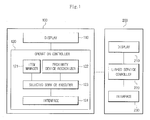
- FIG. 1 is a block diagram showing a system for item control including first and second devices according to an exemplary embodiment.
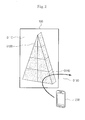
- FIG. 2 is a view illustrating an item control motion of devices according to an exemplary embodiment.
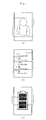
- FIG. 3(a), FIG. 3 (b), FIG. 3 (c) , FIG. 4 (a), FIG. 4 (b), and FIG. 4 (c) are views illustrating kinds of item that can be provided by a first device according to an exemplary embodiment.
- FIG. 5 (a) and FIG. 5 (b) are views illustrating item control motion of devices according to an exemplary embodiment.
- FIG. 6 is a view illustrating item control motion of devices according to an exemplary embodiment.
- FIG. 7 is a view illustrating an item control motion of devices according to an exemplary embodiment.
- FIG. 8 is a view illustrating item control operation of devices according to an exemplary embodiment.
- FIG. 9 is a view illustrating an item control operation of devices according to an exemplary embodiment.
- FIG. 10 is a view illustrating item control operations of device according to an exemplary embodiment.
- FIG. 11 is a view illustrating item control operations of devices according to an exemplary embodiment.
- FIG. 12 is a view illustrating item control operations of devices according to an exemplary embodiment.
- FIG. 13 is a flow chart illustrating a method for item control according to an exemplary embodiment.
- FIG. 14 is a flow chart illustrating a method for item control according to an exemplary embodiment.
- FIG. 1 is a block diagram showing a system for item control including a first device 100 and a second device 200 according to an exemplary embodiment.
- the first device 100 senses an approach of the second device 200 and provides items, such as software data including file data, image data, video data, and audio data; a command object; an application screen component, and the like, or physical data including information on a state of a device.
- the first device 100 may be any kind of device capable of displaying items and transmitting items through communication, including an embedded device of a personal computer, a PDA, a mobile phone, a smart phone, and a hand-held computer.
- the first device 100 may provide various items and functions on a screen of a display 110 through user interfaces of various applications.
- the first device 100 classifies items into classes, stores the classified items, and displays the classified items.
- Each class of a classified item corresponds to an area of the item as the item is displayed.
- the second device 100 executes a service linked to a selected area of the displayed, classified item matched to approach information of the second device 200 out of the entire area of the classified items.
- the first device 100 generally includes the display 110 and an operation controller 120.
- the display 110 includes a screen under the control of the operation controller 120 and displays various items and functions depending on situations. For example, the display 110 displays the items classified into a plurality of areas on the screen.
- the operation controller 120 divides and classifies the items and displays them through the display 110. Further, the operation controller 120 senses or determines whether the second device 200 approaches and determines approach information of the approaching second device 200. Also, the operation controller 120 executes a service linked to an area of the classified item matched to the approach information of the second device 200 out of the entire area of the classified item displayed on the display 110. For example, at least one class of the classified item displayed on the display 110 is matched to the approach information of the second device 200 and transmitted to the second device 200.
- the approach information of the second device 200 is used to select a class corresponding to a specific area out of an entire area of the classified item on the screen of the first device 100.
- the approach information may be position, distance, approach direction, moving path, angle, entering speed, entering area, and the like.
- the second device 200 may move from left to right on the screen of the first device 100 and/or it moves in the reverse direction. In this case, the first device 100 may recognize that a different class is selected for each motion.
- the operation controller 120 includes an item manager 121, a proximity device recognizer 122, a selected service executor 123, and an interface 124.
- the item manager 121 divides various kinds of items into a plurality of classes, stores the items, and displays the classified items on the display 110. Each item may be classified according to a request of an application.
- the proximity device recognizer 122 includes an optical or ultrasonic sensor and determines whether there is an approaching device. If the second device 200 approaches the first device 100, the proximity device recognizer 122 determines the approach information by recognizing position or distance of the second device 200 and/or sensing motion of the second device 200, and provides the selected service executer 123 with the approach information.
- the selected service executer 123 identifies one or more classes positioned on or associated with the selected area matched to the approach information of the second device 200 out of the entire area of the classified item displayed on the display 110, and provides a service linked to the identified class.
- the selected service executer 123 searches for the class corresponding to an area that is matched to a current position of the second device 200 out of the entire area of the classified item displayed on the display 110. Then, the selected service executer 123 provides the second device 200 with the searched class through the interface 124. Otherwise, the selected service executer 120 executes an object command corresponding to the searched class and changes a display state of the display 110.
- the second device 200 approaches the first device 100 to receive a portion of or information of the classified item.
- second device 200 may be a PDA, a mobile phone, or a smart phone.
- the second device 200 selects a class corresponding to an area out of the entire area of the classified item by the approach motion relative to the first device 100 that is displaying the classified item, and receives the class matched to the selected area.
- the second device 200 includes a display 210, a linked service controller 220, and an interface 230.
- the display 210 includes a screen under the control of the linked service controller 220 and, for example, visually displays the class obtained from the first device 100 depending on situations.
- the linked service controller 220 displays the class received through the interface 230 on the display 210 and/or provides a linked service (for example, a magnified display and a partial reproduction of the received selected area) using the relevant class.
- the type of the linked service using the received class may be determined by a property of the relevant class, a current mode of the second device 200, or an application executed on the second device 200. For example, if some portion of an image is received from the first device 100, the linked service controller 220 of the second device 200 may magnify the received image portion. When some portion of video data is received, the linked service controller 220 may reproduce the portion or register the portion in a video album.
- the interface 230 receives the class of the area selected by the approach motion of the second device via communication with the interface 124 in the first device 100, and transfers the received class to the linked service controller 220.
- FIG. 2 is a view illustrating an item control motion of devices according to an exemplary embodiment.
- the class corresponding to an area is selected out of the entire area of the classified item displayed on the first device 100 by matching an area in which the class is displayed in the first device 100 with approach information, such as a position and a distance, of the second device 200.
- a first device 100 classifies and displays an item D 120
- a second device 200 receives a class D 140 from the first device 100 using an approach motion.
- a display area D110 of the first device 100 displays the classified item D 120 divided into areas determined by the first device 100.
- a path or trace D130 through which the second device 200 moves is used to select classes of the classified items D120 of the first device 100, for example, the selected class D 140 is the class selected by the second device 200.
- the first device 100 classifies and displays the items to be displayed as a 2D interface, a 3D interface, a holographic image (for example, contents, such as file data, image data, and video data; command objects, such as menus; and application screen components), or the like. Anything that can be displayed by the first device 100 may be divided and classified into areas, and such information may be stored. Further, the first device 100 recognizes approach information, such as a distance or a position, as the second device 200 approaches the first device 100. The first device 100 transmits one or more classes desired by the user to the second device 200 by matching areas of the classified item to the approach information of the second device 200.
- a holographic image for example, contents, such as file data, image data, and video data; command objects, such as menus; and application screen components
- the first device 100 may identify the class D 140 matched to the relevant moving path D 130 and transmit the class D 140 to the second device 200. Otherwise, the first device 100 may provide services (e.g., object command) matched to the class D 140 that is selected by the approach motion of the second device 200, or change a display state of the first device 100.
- the second device 200 may approach the class D140 of the first device 100 and obtain the relevant class D140 and provide a linked service according to the class D 140.
- FIG. 3 (a), FIG. 3 (b), FIG. 3 (c) , FIG. 4 (a), FIG. 4 (b), and FIG. 4 (c) are views illustrating kinds of items that can be provided by a first device 100 according to an exemplary embodiment.
- a display environment to which the first device 100 can apply the classification may be 2D and 3D interfaces, as shown in FIG. 3 (a) and FIG. 3 (b) , respectively, as well as a holographic image, as shown in FIG. 3 (c) .
- the 2D/3D interface and holographic image may be divided and classified depending on area and distance.
- FIG. 3 (a) shows a state in which an item displayed on a screen is divided and classified into areas using a 2D interface.
- a 3D interface shown in FIG. 3 (b)
- a surface viewed in 3D may be totally classified.
- classification of the relevant items into areas may be performed according to a distance between the displayed item and the second device 200.
- the item to which the classification is applied may be software data, including file data, image data, video data, and audio data; a command object; an application screen component, and the like, or physical data including information on a state of a device.
- the item that is classified by the first device 100 may be any kind of item that can be directly or indirectly displayed through a screen, such as a simple menu, an image, video data, a music playback list, a telephone number list, and a state of a battery.
- FIG. 4 (a) shows a classified image
- FIG. 4 (b) shows a telephone number list classified into areas.
- FIG. 5 (a) and FIG. 5 (b) are views illustrating item control motion of devices according to an exemplary embodiment.
- the first device 100 may detect approach information, such as angle, distance, and position, of the second device 200 approaching the first device 100, and may match one class or several classes of data at a same time.
- FIG. 5 (a) is a view illustrating a second device 200 selecting one class of data along a moving path or trace E110 and the second device 200 selecting two classes of data along a moving path E120 from a telephone number list displayed on the screen of the first device 100 through a 2D interface.
- the user may select one desired telephone number by passing the second device 200 through the selected area on a screen of the first device 100 while the second device 200 is disposed horizontally.
- the user may select two desired telephone numbers by passing the second device 200 through the selected area on the screen of the first device 100 while the second device 200 is disposed vertically.
- FIG. 5 (b) is a view showing the second device 200 selecting one class of data along a moving path E130 and the second device 200 selecting two classes of data along a moving path E140, from a holographic image displayed by the first device 100.
- the first device 100 measures position and distance of the second device 200 and determines a moving path of the second device 200.
- the first device 100 transmits one or more classes associated with the selected area matched to the approach information to the second device 200.
- the first device 100 measures the first approaching distance of the second device 200, and measures a distance to the second device 200 at a time interval (for example, every 0.1 second) several times, and determines the class selected by the user of the second device 200 using a finally or a subsequently measured approaching distance.
- a time interval for example, every 0.1 second
- FIG. 6 is a view illustrating item control motion of devices according to an exemplary embodiment.
- the first device 100 may divide a progress bar into areas on the screen that reproduces content, such as video data or audio data, and suitably matches some of the files according to an approach position of the second device 200 so as to transmit such matched files to the second device 200.
- the second device 200 selects a specific area of the progress bar that is being displayed in the first device 100 by the approach motion as shown in FIG. 6 . By doing so, the second device 200 selects the specific area of the content being reproduced in the first device 100 so as to receive the selected area of the content, or plays the relevant content starting from the selected area. For example, in FIG. 6 , the progress bar on the screen of the first device 100 is divided into areas of class C110, class C120, class C130, and so on. The second device 200 may select some area of the item by the approaching position, receive only a portion corresponding to the class C120 and the class C130 from the video data that is being reproduced, or reproduce the video data starting from the relevant portion.
- FIG. 7 is a view illustrating an item control motion of devices according to an exemplary embodiment.
- a specific portion of the item being displayed in the first device 100 may be magnified and displayed in the second device 200.
- a linked service controller 220 of the second device 200 may magnify some of the image received from a selected area and display the magnified image on a display 210.
- the second device 200 may move along a moving path D210.
- the second device 200 takes and magnifies an image displayed on the screen of the first device 100 along the moving path D210. So that the user takes a desired area out of the image displayed in the first device 100, the user approximately positions the second device 200 in the relevant area. Then, the first device 100 identifies values of the class stored in each area and the position of the second device 200. Then, the first device 100 transmits at least some of image (i.e., the class corresponding to the approach information out of the image) of the position near the second device 200, and the second device 200 receives magnifies, and displays the transmitted portion of the image on the display 210 of the second device 200. The second device 200 may magnify the portion of the transmitted image to fit the display 210 of the second device 200.
- FIG. 8 is a view illustrating item control operation of devices according to an exemplary embodiment.
- a linked service controller 220 of the second device 200 may link the class received from the first device 100 and the key event that is being performed and provide a linked service.
- the user may perform other event operations (e.g., key input) while approaching the item that is divided into different classes, so that the second device 200 may execute transmission or other related operations (e.g., dialing). For example, if a telephone number list is displayed in the first device 100, the user of the second device 200 may dial a telephone number C 120 by selecting the telephone number C 120 by moving the second device along a path E210 as shown in FIG. 8 .
- the telephone number C210 may be a first class of the telephone number list (i.e., item) displayed on the screen of the first device 100.
- the user of may move the second device 200 near the telephone number C210 on the screen of the first device 100.
- the user may receive the telephone number C210 and dial the telephone number C210 by performing an input, for example, by pressing a send key.
- FIG. 9 is a view illustrating an item control operation of devices according to an exemplary embodiment. If the second device 200 approaches the first device 100 during execution of an application, the operation controller 120 of the first device 100 may provide some content corresponding to approach information of the second device 200 out of the content linked to applications that are being executed. If an application is being executed in the first device 100, the linked service controller 220 of the second device 200 receives content corresponding to the selected area out of the content linked to the application that is being executed in the first device 100.
- the first device 100 may identify the coupon that is nearest to the position of the second device 200 and transmit the identified coupon to the second device 200.
- the user may move the position of the second device 200 so as to make the second device 200 approach the first device 100 that is executing a video call application, so that image and audio data that are generated in the first device 100 during the video call may be stored in the second device 200.
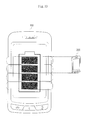
- FIG. 10 is a view illustrating item control operation of devices according to an exemplary embodiment.
- the linked service controller 220 of the second device 200 may receive information on a remaining amount of battery of the first device 100 using an approaching operation. Referring to FIG. 10 , the user may move the second device 200 so that the information on the remaining amount of battery of the first device 100 is transmitted to the second device 200. The second device 200 may receive the information on the remaining amount of the battery of the first device 100 according to a gauge of the first device 100.
- FIG. 11 is a view illustrating item control operations of devices according to an exemplary embodiment.
- the operation controller 120 of the first device 100 may change a display state of the classified items on the display 110 corresponding to the approach information of the second device 200.
- the screen displayed on the first device 100 may be changed depending on how the second device 200 is positioned on the screen displayed in the first device 100 or in an area displayed by the first device 100.
- This method may be applied to a brick piling game or a tennis game, as shown in FIG. 11 (a) and FIG. 11 (b) .
- the screen of the first device 100 displays a brick piling game as shown in FIG. 11 (a)
- the user may control motion of bricks displayed on the first device 100 by changing the position of the second device 200. Further, the user may perform an operation of generating a brick by performing a key press event by pushing a function key in the second device 200.
- the first device 100 recognizes the class corresponding to the position of the second device 200 and generates a brick E310 in the relevant class area, and performs the piling operation of the brick E310.
- the user may control the motion of a tennis ball E320 by changing the position of the second device 200. Further, the user may perform an operation of hitting the tennis ball by performing a key press event by pressing a function key on the second device 200.
- the tennis ball E320 is displayed on the class of the selected area matched to the position of the second device 200.
- the first device 100 senses the position and key event of the second device 200, the first device 100 newly displays the brick E310 or the tennis ball E320 in the class of the area near the position of the second device 200 on the screen of the first device 100, and displays the motion of the relevant object (i.e., brick and tennis ball).
- the first device 100 changes the display state of information displayed on the first device 100 according to the position, distance, and angle with which the second device 200 approaches the first device 100.
- FIG. 12 is a view illustrating item control operations of devices according to an exemplary embodiment.
- the operation controller 120 of the first device 100 may execute the command matched to the class of the selected area corresponding to the approach information of the second device 200.
- the linked service controller 220 of the second device 200 may execute the command matched to the class of the selected area.
- the first device 100 displays a movie list on a screen thereof.
- the user may play a preview image of a movie C320 by moving the second device 200 along a moving path D310 on which a preview button C310 and a portion where the movie C320 whose preview image is desired by the user are located.
- the movie C320 desired by the user and the command menu C310 to control the movie C320 are both selected by the moving the second device 200 along the moving path D310.
- aspects are not limited thereto such that one, two, or more than to items may be selected by moving the second device 200 along a corresponding moving path.
- FIG. 13 is a flow chart illustrating a method for item control according to an exemplary embodiment.
- the first device 100 classifies items to be displayed according to the distance thereof and stores the classified items (S110), and displays the classified items (S120).
- the first device 100 determines whether an approaching device, i.e., the second device 200, enters an area corresponding to or in which the classified items are displayed (S 130).
- the user of the second device 200 moves the second device 100 near a desired class in order to select the class of the relevant item (S130).
- the first device 100 matches approach information corresponding to a distance and a position of the second device 200 that approaches the first device 100 with the classified item (S 140).
- the first device 100 may select a suitable class out of the entire area of the displayed item and transmit the selected class to the second device 200 (S 170).
- the first device 100 measures a first approaching distance of the second device 200, and measures the distance to the second device 200 at a time interval (for example, 0.1 second) several times (S 140).
- a time interval for example, 0.1 second
- the first device 100 may determine the class selected by the user of the second device 200 using the first measured approaching distance and a finally or a subsequently measured approaching distance. That is, after a measurement task for a time has been completed, if the first measured distance is different from the finally or the subsequently measured distance (S 150), the first device 100 determines that the second device 200 has requested multiple data, and then the first device 100 transmits multiple classes of data including a class matched with the finally measured distance and a class matched with the initially measured distance to the second device 200 (S160). If the initially measured distance is identical to the finally or the subsequently measured distance (S 150), the class corresponding to the relevant measurement distance is selected and transmitted to the second device 200 (S 170). After transmitting the item, the second device 200 informs the user that transmission of the item from the first device 100 has been completed.
- FIG. 14 is a flow chart illustrating a method for item control according to an exemplary embodiment.
- the first device 100 divides a specific item into a plurality of classes, classifies and stores the classified item (S210), and the classified item is displayed through the display 110 (S220).
- the first device 100 senses the second device 200 and obtains approach information of the second device 200 (S240). As the second device 200 approaches the first device 100, the approach information is generated in the first device 100.
- the first device 100 identifies the class of the selected area matched to the approach information of the second device 200 out of the entire area of the classified item (S250), and transmits one or more classes to the second device 200 through communication with the second device 200 (S260).
- the second device 200 receives the class of the selected area matched to the approach information out of the entire area of the classified item from the first device 100.
- the second device 200 may periodically generate a receiving response while receiving the class (not shown), or inform the first device 100 of a class reception completion after the completion of class reception (not shown).
- the second device 200 displays the received class on the display 210 (not shown), or provides a linked service using it (S270).
- the first device 100 may identify the class matched to the approach information of the second device 200 and then provide services, such as changing a display state of a screen by applying the identification of the class matched to the approach information of the second device 200 (not shown), or executing an object command linked to the identified class (S280).
- the item may be software data including file data, image data, video data, and audio data; a command object; an application screen component, and the like. Otherwise, physical data on a state of a device, such as a battery, may be employed as an item and classified on the screen of the first device 100.
- the user may perform operations, such as data transmission, copy and magnification, by performing an operation, such as positioning the second device 200 in a specific area of the first device 100 that is displaying the classified item.
- an operation such as positioning the second device 200 in a specific area of the first device 100 that is displaying the classified item.
- linked services such as changing a display state of screen of the first device 100 or executing the object command matched to the relevant class according to the position of the second device 200, and the like, may be provided.
- a first device classifies and displays an item, identifies a suitable class matched to approach information of a second device out of the entire area of the classified item as the second device approaches the first device, and provides the second device with the identified class or executes a service linked to the class.
- the second device approaches a portion where a desired class is displayed by the first device, receives the class from the first device, and provides a linked service using the same.
Landscapes
- Engineering & Computer Science (AREA)
- Human Computer Interaction (AREA)
- Computer Networks & Wireless Communication (AREA)
- General Engineering & Computer Science (AREA)
- Theoretical Computer Science (AREA)
- Signal Processing (AREA)
- Physics & Mathematics (AREA)
- General Physics & Mathematics (AREA)
- User Interface Of Digital Computer (AREA)
Applications Claiming Priority (1)
| Application Number | Priority Date | Filing Date | Title |
|---|---|---|---|
| KR1020100008678A KR101157333B1 (ko) | 2010-01-29 | 2010-01-29 | 아이템을 제어하기 위한 디바이스들, 그를 이용한 아이템 제어 시스템 및 그 방법 |
Publications (2)
| Publication Number | Publication Date |
|---|---|
| EP2378749A2 true EP2378749A2 (de) | 2011-10-19 |
| EP2378749A3 EP2378749A3 (de) | 2011-10-26 |
Family
ID=43920315
Family Applications (1)
| Application Number | Title | Priority Date | Filing Date |
|---|---|---|---|
| EP10188003A Withdrawn EP2378749A3 (de) | 2010-01-29 | 2010-10-19 | Vorrichtung zur Elementsteuerung, System zur Elementsteuerung und Verfahren |
Country Status (4)
| Country | Link |
|---|---|
| US (1) | US8793622B2 (de) |
| EP (1) | EP2378749A3 (de) |
| KR (1) | KR101157333B1 (de) |
| CN (1) | CN102141836A (de) |
Families Citing this family (8)
| Publication number | Priority date | Publication date | Assignee | Title |
|---|---|---|---|---|
| KR101758163B1 (ko) * | 2010-12-31 | 2017-07-14 | 엘지전자 주식회사 | 이동 단말기 및 그의 홀로그램 제어방법 |
| CN103677500B (zh) * | 2012-09-11 | 2017-11-03 | 联想(北京)有限公司 | 一种数据处理方法和电子设备 |
| US10263989B2 (en) | 2013-05-16 | 2019-04-16 | Futureplay Inc. | Method for matching multiple devices, and device and server system for enabling matching |
| KR20170018107A (ko) * | 2013-05-16 | 2017-02-15 | 주식회사 퓨처플레이 | 복수의 디바이스를 매칭시키는 방법, 그리고 상기 매칭이 가능하게끔 하여 주는 디바이스 및 서버 시스템 |
| CN105334947A (zh) * | 2014-06-09 | 2016-02-17 | 联想(北京)有限公司 | 一种信息处理方法及电子设备 |
| WO2016080395A1 (ja) * | 2014-11-21 | 2016-05-26 | シャープ株式会社 | サーバ、アイテム提供システム、表示装置、携帯端末、および制御プログラム |
| CN110728363B (zh) * | 2018-06-29 | 2022-11-18 | 华为技术有限公司 | 任务处理方法和装置 |
| CN119863221A (zh) * | 2025-03-24 | 2025-04-22 | 国网经济技术研究院有限公司 | 电网项目全流程管理的监测方法及系统 |
Family Cites Families (13)
| Publication number | Priority date | Publication date | Assignee | Title |
|---|---|---|---|---|
| JPH07231483A (ja) | 1993-12-22 | 1995-08-29 | Matsushita Electric Ind Co Ltd | 無線データ通信システム |
| US6710754B2 (en) * | 2001-11-29 | 2004-03-23 | Palm, Inc. | Moveable output device |
| KR100620681B1 (ko) * | 2004-10-26 | 2006-09-19 | 주식회사 팬택앤큐리텔 | 이동통신 단말기의 영상 재생 장치 및 방법 |
| KR100695081B1 (ko) | 2005-03-22 | 2007-03-14 | 에스케이 텔레콤주식회사 | 근거리 통신을 이용한 전자기기 분실 방지 방법과 이를위한 이동통신 단말 |
| KR20070029318A (ko) * | 2005-09-09 | 2007-03-14 | 주식회사 팬택 | 두 개의 화면에 하나의 영상을 분할하여 재생하는 영상재생장치 및 방법 |
| US9489109B2 (en) | 2006-03-30 | 2016-11-08 | Sony Ericsson Mobile Communication Ab | Data communication in an electronic device |
| US8736547B2 (en) * | 2006-04-20 | 2014-05-27 | Hewlett-Packard Development Company, L.P. | Method and system for interfacing a digital device with an interactive display surface |
| KR20080029717A (ko) | 2006-09-29 | 2008-04-03 | 한국전자통신연구원 | 위치 기반 그룹핑 서비스를 이용한 포탈 서비스 제공시스템 및 방법 |
| KR101430446B1 (ko) * | 2007-09-04 | 2014-08-14 | 엘지전자 주식회사 | 이동 단말기 및 이동 단말기의 멀티미디어 재생 방법 |
| US8131281B1 (en) * | 2007-09-12 | 2012-03-06 | Oceans' Edge, Inc. | Mobile device monitoring and control system |
| KR20090090086A (ko) | 2008-02-20 | 2009-08-25 | 에스케이텔레시스 주식회사 | 무선 콘텐츠를 제공하는 콘텐츠 제공서버 및 이를 이용한콘텐츠 제공 방법 |
| CN101477753B (zh) * | 2009-01-21 | 2010-08-11 | 中国移动通信集团山西有限公司 | 基于多种控制方式的交互式多媒体演示系统和方法 |
| KR101582686B1 (ko) * | 2009-03-02 | 2016-01-05 | 엘지전자 주식회사 | 아이템 표시 방법 및 이를 적용한 이동 통신 단말기 |
-
2010
- 2010-01-29 KR KR1020100008678A patent/KR101157333B1/ko active Active
- 2010-08-24 US US12/862,344 patent/US8793622B2/en active Active
- 2010-09-03 CN CN2010102752584A patent/CN102141836A/zh active Pending
- 2010-10-19 EP EP10188003A patent/EP2378749A3/de not_active Withdrawn
Non-Patent Citations (1)
| Title |
|---|
| None |
Also Published As
| Publication number | Publication date |
|---|---|
| KR20110088936A (ko) | 2011-08-04 |
| KR101157333B1 (ko) | 2012-06-15 |
| US8793622B2 (en) | 2014-07-29 |
| US20110191724A1 (en) | 2011-08-04 |
| CN102141836A (zh) | 2011-08-03 |
| EP2378749A3 (de) | 2011-10-26 |
Similar Documents
| Publication | Publication Date | Title |
|---|---|---|
| EP2378749A2 (de) | Vorrichtung zur Elementsteuerung, System zur Elementsteuerung und Verfahren | |
| KR101971624B1 (ko) | 이동 단말의 정보 표시 방법, 디스플레이 장치의 정보 제공 방법, 이동 단말의 제어 신호 생성 방법 | |
| US20200034994A1 (en) | Method and apparatus for producing and reproducing augmented reality contents in mobile terminal | |
| CN104685470B (zh) | 用于从模板生成用户界面的设备和方法 | |
| CN103631510B (zh) | 通过识别书写手势控制移动终端功能执行的方法及装置 | |
| US8463777B2 (en) | Contents display device and contents display method | |
| US20130239060A1 (en) | Method and apparatus to provide short-cut icon | |
| US20100083189A1 (en) | Method and apparatus for spatial context based coordination of information among multiple devices | |
| US20150261336A1 (en) | Touch input device and method for portable device | |
| US20180275840A1 (en) | Method for executing program and electronic device thereof | |
| KR20170124954A (ko) | 전자 장치 및 전자 장치의 제어 방법 | |
| US20080235617A1 (en) | System and method for scrolling display screen, mobile terminal including the system, and recording medium storing program for executing the method | |
| CN103299263A (zh) | 显示装置、用户接口方法以及程序 | |
| KR20180016131A (ko) | 이동 단말기 및 그 제어방법 | |
| KR20110016990A (ko) | 모바일 장치용의 애플리케이션 관리를 위한 사용자 인터페이스 | |
| CN103716451A (zh) | 图像显示控制设备、图像显示设备以及图像显示控制方法 | |
| CN110865765A (zh) | 终端及地图控制方法 | |
| CN107589888A (zh) | 信息处理方法和信息处理装置 | |
| KR20130102854A (ko) | 검색 시스템 및 동작 방법 | |
| CN115712340B (zh) | 电子设备及人机交互方法 | |
| KR20090037061A (ko) | 터치기반 휴대용 단말기의 어플리케이션 연동 장치 및 방법 | |
| KR101559623B1 (ko) | 디지털 사이니지 콘텐츠 유형에 따른 모바일 어플리케이션 매칭 방법 및 그 시스템 | |
| CN105205101A (zh) | 网络信息的评价方法、装置及终端 | |
| CN112786022B (zh) | 终端、第一语音服务器、第二语音服务器及语音识别方法 | |
| CN105631303B (zh) | 数据获取、数据提供、实现搜索的方法及其电子终端 |
Legal Events
| Date | Code | Title | Description |
|---|---|---|---|
| PUAL | Search report despatched |
Free format text: ORIGINAL CODE: 0009013 |
|
| AK | Designated contracting states |
Kind code of ref document: A2 Designated state(s): AL AT BE BG CH CY CZ DE DK EE ES FI FR GB GR HR HU IE IS IT LI LT LU LV MC MK MT NL NO PL PT RO RS SE SI SK SM TR |
|
| AX | Request for extension of the european patent |
Extension state: BA ME |
|
| AK | Designated contracting states |
Kind code of ref document: A3 Designated state(s): AL AT BE BG CH CY CZ DE DK EE ES FI FR GB GR HR HU IE IS IT LI LT LU LV MC MK MT NL NO PL PT RO RS SE SI SK SM TR |
|
| AX | Request for extension of the european patent |
Extension state: BA ME |
|
| RIC1 | Information provided on ipc code assigned before grant |
Ipc: G06F 3/01 20060101ALI20110920BHEP Ipc: H04M 1/725 20060101AFI20110920BHEP |
|
| PUAI | Public reference made under article 153(3) epc to a published international application that has entered the european phase |
Free format text: ORIGINAL CODE: 0009012 |
|
| 17P | Request for examination filed |
Effective date: 20120426 |
|
| RIN1 | Information on inventor provided before grant (corrected) |
Inventor name: KIM, HYOUNG JIN C/O PANTECH CO., LTD. |
|
| STAA | Information on the status of an ep patent application or granted ep patent |
Free format text: STATUS: THE APPLICATION IS DEEMED TO BE WITHDRAWN |
|
| 18D | Application deemed to be withdrawn |
Effective date: 20150501 |