EP2128752A1 - Tragbares kommunikationsendgerät, browsingverfahren und browsingprogramm - Google Patents
Tragbares kommunikationsendgerät, browsingverfahren und browsingprogramm Download PDFInfo
- Publication number
- EP2128752A1 EP2128752A1 EP08702932A EP08702932A EP2128752A1 EP 2128752 A1 EP2128752 A1 EP 2128752A1 EP 08702932 A EP08702932 A EP 08702932A EP 08702932 A EP08702932 A EP 08702932A EP 2128752 A1 EP2128752 A1 EP 2128752A1
- Authority
- EP
- European Patent Office
- Prior art keywords
- browsing
- region
- state
- display
- displayed
- Prior art date
- Legal status (The legal status is an assumption and is not a legal conclusion. Google has not performed a legal analysis and makes no representation as to the accuracy of the status listed.)
- Withdrawn
Links
Images


Classifications
-
- G—PHYSICS
- G06—COMPUTING OR CALCULATING; COUNTING
- G06F—ELECTRIC DIGITAL DATA PROCESSING
- G06F3/00—Input arrangements for transferring data to be processed into a form capable of being handled by the computer; Output arrangements for transferring data from processing unit to output unit, e.g. interface arrangements
- G06F3/01—Input arrangements or combined input and output arrangements for interaction between user and computer
- G06F3/048—Interaction techniques based on graphical user interfaces [GUI]
- G06F3/0487—Interaction techniques based on graphical user interfaces [GUI] using specific features provided by the input device, e.g. functions controlled by the rotation of a mouse with dual sensing arrangements, or of the nature of the input device, e.g. tap gestures based on pressure sensed by a digitiser
- G06F3/0489—Interaction techniques based on graphical user interfaces [GUI] using specific features provided by the input device, e.g. functions controlled by the rotation of a mouse with dual sensing arrangements, or of the nature of the input device, e.g. tap gestures based on pressure sensed by a digitiser using dedicated keyboard keys or combinations thereof
- G06F3/04892—Arrangements for controlling cursor position based on codes indicative of cursor displacements from one discrete location to another, e.g. using cursor control keys associated to different directions or using the tab key
-
- G—PHYSICS
- G06—COMPUTING OR CALCULATING; COUNTING
- G06F—ELECTRIC DIGITAL DATA PROCESSING
- G06F16/00—Information retrieval; Database structures therefor; File system structures therefor
- G06F16/90—Details of database functions independent of the retrieved data types
- G06F16/95—Retrieval from the web
- G06F16/957—Browsing optimisation, e.g. caching or content distillation
- G06F16/9577—Optimising the visualization of content, e.g. distillation of HTML documents
-
- G—PHYSICS
- G06—COMPUTING OR CALCULATING; COUNTING
- G06F—ELECTRIC DIGITAL DATA PROCESSING
- G06F3/00—Input arrangements for transferring data to be processed into a form capable of being handled by the computer; Output arrangements for transferring data from processing unit to output unit, e.g. interface arrangements
- G06F3/01—Input arrangements or combined input and output arrangements for interaction between user and computer
- G06F3/048—Interaction techniques based on graphical user interfaces [GUI]
- G06F3/0481—Interaction techniques based on graphical user interfaces [GUI] based on specific properties of the displayed interaction object or a metaphor-based environment, e.g. interaction with desktop elements like windows or icons, or assisted by a cursor's changing behaviour or appearance
- G06F3/0482—Interaction with lists of selectable items, e.g. menus
-
- G—PHYSICS
- G06—COMPUTING OR CALCULATING; COUNTING
- G06F—ELECTRIC DIGITAL DATA PROCESSING
- G06F3/00—Input arrangements for transferring data to be processed into a form capable of being handled by the computer; Output arrangements for transferring data from processing unit to output unit, e.g. interface arrangements
- G06F3/01—Input arrangements or combined input and output arrangements for interaction between user and computer
- G06F3/048—Interaction techniques based on graphical user interfaces [GUI]
- G06F3/0484—Interaction techniques based on graphical user interfaces [GUI] for the control of specific functions or operations, e.g. selecting or manipulating an object, an image or a displayed text element, setting a parameter value or selecting a range
- G06F3/0485—Scrolling or panning
-
- H—ELECTRICITY
- H04—ELECTRIC COMMUNICATION TECHNIQUE
- H04M—TELEPHONIC COMMUNICATION
- H04M1/00—Substation equipment, e.g. for use by subscribers
- H04M1/72—Mobile telephones; Cordless telephones, i.e. devices for establishing wireless links to base stations without route selection
- H04M1/724—User interfaces specially adapted for cordless or mobile telephones
- H04M1/72403—User interfaces specially adapted for cordless or mobile telephones with means for local support of applications that increase the functionality
- H04M1/72445—User interfaces specially adapted for cordless or mobile telephones with means for local support of applications that increase the functionality for supporting Internet browser applications
-
- H—ELECTRICITY
- H04—ELECTRIC COMMUNICATION TECHNIQUE
- H04M—TELEPHONIC COMMUNICATION
- H04M1/00—Substation equipment, e.g. for use by subscribers
- H04M1/02—Constructional features of telephone sets
- H04M1/23—Construction or mounting of dials or of equivalent devices; Means for facilitating the use thereof
- H04M1/233—Construction or mounting of dials or of equivalent devices; Means for facilitating the use thereof including a pointing device, e.g. roller key, track ball, rocker switch or joystick
Definitions
- the present invention relates to a portable communication terminal including display means for displaying an image and a text, a web browsing method, and a web browsing program.
- Patent Documents 1 and 2 describes a cellular phone including a pointing device.
- Patent Documents 1 and 2 The entire disclosure of Patent Documents 1 and 2 described above is incorporated herein by reference thereto.
- An operation of anchoring to a link is readily performed.
- the link is referred to as a scheme that mutually connects web pages, text files, image data, and speech data inside documents.
- An anchor is an element (tag) set for a hyperlink (simply referred to as the link as well) in an HTML (Hyper Text Markup Language).
- the screen can be smoothly moved when the Neropointer (trade mark) is used, for example.
- Neropointer trade mark
- an object of the present invention is to provide a portable communication terminal, a browsing method, and a browsing program capable of mutually performing switching between in-site browsing and in-screen browsing without making a user aware of the switching.
- a portable communication terminal including display means for displaying information targeted for browsing (such as a web page) on a screen thereof.
- the portable communication terminal includes:
- the control means may change the region of the information targeted for browsing to be displayed on the display means when the pointer moves outside the region in the first state.
- the state transition means may cause transition to the second state when the pointer moves outside the region in the first state.
- the state transition means may cause transition to the first state when the operation performed on the instruction means is finished in the second state.
- a browsing method of displaying information targeted for browsing on a screen of display means according to an operation performed on instruction means by a user includes a control step of displaying on the display means a region of the information targeted for browsing corresponding to the operation performed on the instruction means.
- a first state of the control step superimposed display of the information targeted for browsing and a pointer that moves according to the operation performed on the display means is made on the display means, and the region of the information targeted for browsing to be displayed on the display means is changed when the pointer moves outside the region.
- the region of the information to be displayed on the display means is changed, according to the operation performed on the instruction means.
- the method further includes a transition step of changing the region of the information targeted for browsing to be displayed on the display means when the pointer moves outside the region in the first state, thereby causing transition to the second state, and causing transition to the first state when the operation performed on the instruction means is finished in the second state.
- a browsing program installed in a portable communication terminal including display means for displaying information targeted for browsing on a screen thereof.
- the browsing program causes a computer to execute a control process that causes a region of the information targeted for browsing corresponding to an operation performed on instruction means by a user to be displayed on the display means.
- a first state of the control process superimposed display of the information targeted for browsing and a pointer that moves according to the operation performed on the instruction means is made on the display means, and the region of the information targeted for browsing to be displayed on the display means is changed when the pointer moves outside the region.
- the region of the information targeted for browsing to be displayed on the display means is changed according to the operation performed on the instruction means.
- the program may cause the computer to execute the control process so that when the pointer moves outside the region in the first state, the region of the information to be displayed on the display means is changed, thereby causing transition to the second state, and when the operation performed on the instruction means is finished in the second state, transition to the first state is caused.
- a portable terminal capable of performing switching when information targeted for browsing that cannot be held in a display region is displayed. The switching is performed between:
- a browsing program installed in a portable terminal and executed by a computer.
- the browsing program implements a function of performing switching. The switching is performed between:
- the region to be displayed on the display means is changed when the pointer moves outside the region.
- the region to be displayed on the display means is changed according to the operation on the instruction means.
- an operation of readily anchoring to a link can be performed.
- the screen can be smoothly moved.
- the state transition means causes transition to the second state when the pointer moves outside the region in the first state. Further, when the operation performed on the instruction means is finished in the second state, the state transition means causes transition to the first state.
- the in-site browsing and the in-screen browsing can be mutually switched, without making the user aware of the switching.
- FIG. 1 is an explanatory diagram showing an outward appearance of a cellular phone 1 including display means capable of displaying information (such as an image) targeted for browsing by the browsing method according to the present invention.
- a case where a web page is displayed will be used as an example. Accordingly, the browsing method will be referred to as a web browsing method.
- the cellular phone (portable communication terminal) 1 shown in Fig. 1 includes a display (display means) 2, a pointing device 3, a cross key 4, and dial keys 5. Instruction means is implemented by the pointing device 3 and the cross key 4.
- the display 2 is an LCD (Liquid Crystal Display) or the like, for example.
- the display 2 performs superimposed display of information (web page in this exemplary embodiment) and a pointer according to control of control means (not shown) included in the cellular phone 1.
- the display 2 is also referred to as a screen.
- the pointing device 3 is a projecting portion (convex portion) provided at the cellular phone 1.
- the pointing device 3 instructs movement of a region of the web page to be displayed on the screen or instructs movement of a pointer according to an operation of a user.
- the cross key 4 is constituted from buttons provided at the cellular phone 1.
- the cross key 4 instructs movement of the region of the web page to be displayed on the screen or instructs movement of the pointer according to an operation of the user.
- the cross key 4 includes an "up button", a "down button”, a "left button", and a "right button”.
- Control means causes information (web page in this exemplary embodiment) to be displayed on the screen (display 2) according to operations performed on the pointing device 3 and the cross key 4 by the user. Further, the control means changes a position at which the pointer is displayed according to the operations performed on the pointing device 3 and the cross key 4 by the user.
- the pointer is a character (such as a symbol in the form of an arrow) that is moved according to the operations performed on the pointing device 3 and the cross key 4 by the user.
- the pointing device 3 is slid or inclined in each direction of a surface of the cellular phone 1 where the pointing device 3 is provided. Then, the control means changes the position at which the pointer is displayed or changes the region of the web page to be displayed on the screen in the direction where the pointing device 3 is slid or inclined.
- the dial keys 5 are buttons for supplying a telephone number or the like of a transmitting destination into the cellular phone 1.
- the cellular phone 1 includes a web browsing program for causing a computer to executes a control process that displays a region of the web page on the display 2 corresponding to the operations performed on the pointing device 3 and the cross key 4.
- a first state in-screen browsing
- superimposed display of the web page and the pointer that moves according to the operations performed on the pointing device 3 and the cross key 4 is performed on the display 2.
- the pointer moves outside the region
- the region of the web page to be displayed on the display 2 is changed.
- a second state (in-site browsing) of the control process the region of the web page to be displayed on the display 2 is changed according to the operations performed on the pointing device 3 and the cross key 4.
- Figs. 2A to 2D are explanatory diagrams showing a case where a region to be displayed on the screen is changed (moved) by the in-screen browsing.
- the control means causes superimposed display of information within a predetermined range (within a window display frame) of the web page and the pointer on the window.
- a predetermined range within a window display frame
- the window display frame is indicated by oblique lines or the like.
- control means changes the position at which the pointer is displayed to the right, as shown in Fig. 2B .
- control means changes the position at which the pointer is displayed to the right, as shown in Fig. 2C .
- control means moves the region of the web page to be displayed on the screen downwards, as shown in Fig. 2D . That is, the window display frame is moved downward.
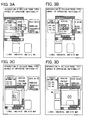
- Figs. 3A to 3D are explanatory diagrams showing a case where the region to be displayed on the screen is changed (moved) by the in-site browsing.
- control means causes the information of the web page in the predetermined range (within the window display frame) to be displayed on the screen, as shown in Fig. 3A .
- control means moves the region of the web page to be displayed on the screen to the right, as shown in Fig. 3B . That is, the window display frame is moved to the right.
- control means moves the region of the web page to be displayed on the screen downward, as shown in Fig. 3C . That is, the window display frame is moved downward.
- control means moves the region of the web page to be displayed on the screen to the right, as shown in Fig. 3D . That is, the window display frame is moved to the right.
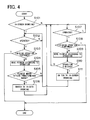
- Fig. 4 is a flowchart explaining an operation of switching a method of changing (moving) a region to be displayed on the screen.
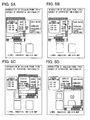
- Figs. 5A to 5D are an explanatory diagrams showing the operation of switching the method of changing (moving) the region to be displayed on the screen from the in-screen browsing to the in-site browsing.
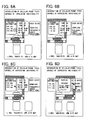
- Figs. 6A to 6D are an explanatory diagrams showing the operation of switching the method of changing (moving) the region to be displayed on the screen from the in-site browsing to the in-screen browsing.
- control means causes superimposed display of the information within the predetermined range (within the window display frame) on the web page and the pointer on the screen, as shown in Fig. 5A .
- the control means moves the position where the pointer is displayed to the right, as shown in Fig. 5B (in step S104).
- the control means finishes display of the web page.
- the control means When the pointer is moved outside the predetermined range (outside the window display frame) by performing the operation that causes the pointing device 3 to slide to the right and depressing the right button included in the cross key 4 by the user (Y in step S105), the control means performs switching from the in-screen browsing to the in-site browsing, as shown in Fig. 5C . Then, the control means moves the region of the web page to be displayed on the screen to the right, and causes superimposed display of an omni-directional pointer on the center of a window (in step S106).
- the omni-directional pointer is a pointer indicating the center of the window.
- control means moves the region of the web page to be displayed on the screen to the lower right, as shown in Fig. 5D (in step S109).
- the control means finishes display of the web page.
- control means When the user further performs the operation on the pointing device 3 and depresses one of the buttons included in the cross key 4 (N in step S110, Y in step S107, or N in step S108), the control means continues the in-site browsing, and moves the region of the web page to be displayed on the screen, as shown in Fig. 6A (in step slog).
- the control means finishes superimposed display of the omni-directional pointer, as shown in Fig. 6B . Then, when the user performs the operation that causes the pointing device 3 to slide downward and depresses the down button included in the cross key 4, the control means performs switching from the in-site browsing to the in-screen browsing, and performs superimposed display of the pointer, as shown in Fig. 6C (in step S111).
- control means changes the position at which the pointer is displayed to the right, as shown in Fig. 6D (in step S104).
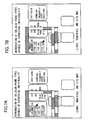
- FIGs. 7A and 7B are explanatory diagrams showing an operation of anchoring to a link in the in-screen browsing.
- the control means causes superimposed display of the information within the predetermined range (within the window display frame) of the web page and the pointer on the screen, thereby changing display of the link in the vicinity of the pointer on the web page.
- "600 type" is displayed in boldface type.
- the control means changes the position at which the pointer is displayed to the right, thereby changing display of the link in the vicinity of the pointer on the web page, as shown in Fig. 7B .
- "900 type" is displayed in boldface type.
- the control means When a selecting operation such as depression of the pointing device 3 is performed by the user with link display changed, the control means performs an operation corresponding to content connected by the link. Specifically, the control means causes displays of another web page on the screen, for example. In this exemplary embodiment, change of link display is referred to as execution of the anchoring operation.
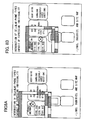
- Figs. 8A and 8B are explanatory diagrams showing an operation of anchoring to the link in the in-site browsing.
- the control means causes superimposed display of information within a predetermined range (within the window display frame) of the web page and the omni-directional pointer on the screen, thereby changing display of the link in the vicinity of the omni-pointer on the web page.
- "600 type” is displayed in bold face type.
- the omni-directional pointer is displayed in the center of the window.
- the control means moves the region of the web page to be displayed on the screen to the lower right, thereby changing display of the link in the vicinity of the omni-directional pointer on the web page, as shown in Fig. 8B .
- "900 type" is displayed in boldface type.
- the control means constantly performs superimposed display of the omni-directional pointer in the center of the window.
- switching between the in-screen browsing and the in-site browsing is performed.
- the operation of anchoring to a link can be readily performed.
- the screen can be smoothly moved.
- transition to the in-site browsing is made. Then, when the operations performed by the user are finished in the in-site browsing, transition to the in-screen browsing is made.
- the in-site browsing and the in-screen browsing can be mutually switched without making the user aware of the switching.
- the web page is used as an example of the information targeted for browsing.
- the present invention may also be applied to a case where information other than the web page is targeted.
- an image obtained by image pickup means a file received through a communication network or received through detachable storage means (such as a PDF format file or a text file), a received mail, a transmitted mail, or the like is displayed on the display 2, for example, the present invention can be applied. Modifications and adjustments of the exemplary embodiment and embodiments are possible within the scope of the overall disclosure (including claims) of the present invention, and based on the basic technical concept of the invention. Various combinations and selections of various disclosed elements are possible within the scope of the claims of the present invention.
- the present invention can be applied to a cellular phone and a PHS (Personal Handy phone System) that display a web page.
- the present invention can also be applied to a portable audio device, a portable game device, an electronic dictionary, a portable TV terminal, and the like that include a function of displaying a web page.
- a common point among these devices is that information to be browsed having a size that cannot be held in a display region is often displayed due to their portability. It goes without saying that the present invention can also be applied to devices other than those described above.
Landscapes
- Engineering & Computer Science (AREA)
- Theoretical Computer Science (AREA)
- General Engineering & Computer Science (AREA)
- Physics & Mathematics (AREA)
- General Physics & Mathematics (AREA)
- Human Computer Interaction (AREA)
- Databases & Information Systems (AREA)
- Data Mining & Analysis (AREA)
- Computer Networks & Wireless Communication (AREA)
- Signal Processing (AREA)
- User Interface Of Digital Computer (AREA)
- Information Transfer Between Computers (AREA)
- Telephone Function (AREA)
- Telephonic Communication Services (AREA)
- Position Input By Displaying (AREA)
Applications Claiming Priority (2)
| Application Number | Priority Date | Filing Date | Title |
|---|---|---|---|
| JP2007005552 | 2007-01-15 | ||
| PCT/JP2008/050051 WO2008087871A1 (ja) | 2007-01-15 | 2008-01-08 | 携帯通信端末、ブラウジング方法、およびブラウジングプログラム |
Publications (2)
| Publication Number | Publication Date |
|---|---|
| EP2128752A1 true EP2128752A1 (de) | 2009-12-02 |
| EP2128752A4 EP2128752A4 (de) | 2010-03-03 |
Family
ID=39635875
Family Applications (1)
| Application Number | Title | Priority Date | Filing Date |
|---|---|---|---|
| EP08702932A Withdrawn EP2128752A4 (de) | 2007-01-15 | 2008-01-08 | Tragbares kommunikationsendgerät, browsingverfahren und browsingprogramm |
Country Status (5)
| Country | Link |
|---|---|
| US (1) | US9015637B2 (de) |
| EP (1) | EP2128752A4 (de) |
| JP (2) | JP5396860B2 (de) |
| CN (1) | CN101617289A (de) |
| WO (1) | WO2008087871A1 (de) |
Families Citing this family (9)
| Publication number | Priority date | Publication date | Assignee | Title |
|---|---|---|---|---|
| CN101594432B (zh) * | 2009-07-02 | 2017-09-26 | 优视科技有限公司 | 一种用于手机导航键的网页浏览方法 |
| CN102141875B (zh) * | 2010-07-15 | 2013-07-10 | 优视科技有限公司 | 一种用于移动通讯设备终端的导航键浏览页面方法及装置 |
| JP5391221B2 (ja) * | 2011-03-24 | 2014-01-15 | 日本電信電話株式会社 | ウェブページ表示制御装置およびその動作方法 |
| CN102520855A (zh) * | 2011-12-03 | 2012-06-27 | 鸿富锦精密工业(深圳)有限公司 | 具有触摸屏的电子设备及其页面跳转方法 |
| JP5632934B2 (ja) * | 2012-03-16 | 2014-11-26 | 株式会社Nttドコモ | 情報処理装置及び操作要素の選択方法 |
| CN103677547B (zh) * | 2012-09-04 | 2018-05-25 | 腾讯科技(深圳)有限公司 | 界面显示方法和装置 |
| JP6131072B2 (ja) * | 2013-03-14 | 2017-05-17 | シャープ株式会社 | 表示制御装置 |
| US9733784B1 (en) * | 2013-09-03 | 2017-08-15 | Amazon Technologies, Inc. | Content preview for electronic devices |
| JP7739733B2 (ja) * | 2021-03-17 | 2025-09-17 | 株式会社リコー | 表示装置、表示方法、プログラム、表示システム |
Family Cites Families (19)
| Publication number | Priority date | Publication date | Assignee | Title |
|---|---|---|---|---|
| US5075673A (en) | 1989-06-16 | 1991-12-24 | International Business Machines Corp. | Variable speed, image pan method and apparatus |
| JPH05134653A (ja) * | 1991-11-11 | 1993-05-28 | Matsushita Electric Ind Co Ltd | ウインドウ画面スクロール装置 |
| US5757381A (en) * | 1996-04-04 | 1998-05-26 | Sofmap Future Design, Inc. | Methods for fast scrolling of images |
| US6211879B1 (en) * | 1999-01-13 | 2001-04-03 | Planetweb, Inc. | System and method for navigating in multiple windows |
| US6031531A (en) * | 1998-04-06 | 2000-02-29 | International Business Machines Corporation | Method and system in a graphical user interface for facilitating cursor object movement for physically challenged computer users |
| US6278443B1 (en) * | 1998-04-30 | 2001-08-21 | International Business Machines Corporation | Touch screen with random finger placement and rolling on screen to control the movement of information on-screen |
| TW494323B (en) * | 2000-08-29 | 2002-07-11 | Ibm | System and method for locating on a physical document items referenced in another physical document |
| US20030074635A1 (en) * | 2001-10-11 | 2003-04-17 | International Business Machines Corporation | Method, apparatus, and program for finding and navigating to items in a set of web pages |
| US6717600B2 (en) * | 2000-12-15 | 2004-04-06 | International Business Machines Corporation | Proximity selection of selectable item in a graphical user interface |
| US20020158908A1 (en) * | 2001-04-30 | 2002-10-31 | Kristian Vaajala | Web browser user interface for low-resolution displays |
| JP4172198B2 (ja) | 2002-04-17 | 2008-10-29 | 日本電気株式会社 | 携帯電話機 |
| JP2004086744A (ja) * | 2002-08-28 | 2004-03-18 | Tomokazu Shioya | 情報処理装置及びプログラム |
| JP2004312476A (ja) | 2003-04-09 | 2004-11-04 | Nec Corp | 折り畳み式携帯情報端末 |
| US7434173B2 (en) * | 2004-08-30 | 2008-10-07 | Microsoft Corporation | Scrolling web pages using direct interaction |
| US9785329B2 (en) * | 2005-05-23 | 2017-10-10 | Nokia Technologies Oy | Pocket computer and associated methods |
| JP4537270B2 (ja) | 2005-06-23 | 2010-09-01 | 株式会社日立製作所 | 超電導磁石用クライオスタット |
| US7900158B2 (en) * | 2005-08-04 | 2011-03-01 | Microsoft Corporation | Virtual magnifying glass with intuitive use enhancements |
| US20070188473A1 (en) * | 2006-02-14 | 2007-08-16 | Picsel Research Limited | System and methods for document navigation |
| US20080034316A1 (en) * | 2006-08-01 | 2008-02-07 | Johan Thoresson | Scalable scrollbar markers |
-
2008
- 2008-01-08 EP EP08702932A patent/EP2128752A4/de not_active Withdrawn
- 2008-01-08 CN CN200880002275A patent/CN101617289A/zh active Pending
- 2008-01-08 US US12/522,821 patent/US9015637B2/en not_active Expired - Fee Related
- 2008-01-08 WO PCT/JP2008/050051 patent/WO2008087871A1/ja not_active Ceased
- 2008-01-08 JP JP2008554007A patent/JP5396860B2/ja not_active Expired - Fee Related
-
2013
- 2013-09-02 JP JP2013181001A patent/JP2014002782A/ja not_active Ceased
Non-Patent Citations (2)
| Title |
|---|
| GRASSEL G ET AL: "The Nokia Open Source Browser" PROCEEDINGS OF THE MOBEA IV - EMPOWERING THE MOBILE WEB, [Online] 23 May 2006 (2006-05-23), XP002561587 Edinburgh, Scotland Retrieved from the Internet: URL:http://www.ra.ethz.ch/CDstore/www2006/public.research.att.com/~rjana/MobEA-IV/PAPERS/MobEA_IV-Paper_3.pdf> [retrieved on 2010-01-21] * |
| See also references of WO2008087871A1 * |
Also Published As
| Publication number | Publication date |
|---|---|
| US9015637B2 (en) | 2015-04-21 |
| US20100146456A1 (en) | 2010-06-10 |
| JP5396860B2 (ja) | 2014-01-22 |
| WO2008087871A1 (ja) | 2008-07-24 |
| JPWO2008087871A1 (ja) | 2010-05-06 |
| JP2014002782A (ja) | 2014-01-09 |
| CN101617289A (zh) | 2009-12-30 |
| EP2128752A4 (de) | 2010-03-03 |
Similar Documents
| Publication | Publication Date | Title |
|---|---|---|
| EP2128752A1 (de) | Tragbares kommunikationsendgerät, browsingverfahren und browsingprogramm | |
| EP2490111B1 (de) | Anzeigevorrichtung und Verfahren und computerlesbares Medium dafür | |
| US8300017B2 (en) | Mobile electronic apparatus with touch input device and display method using the same | |
| EP1980953B1 (de) | Zeicheneingabeeinrichtung | |
| US9891805B2 (en) | Mobile terminal, and user interface control program and method | |
| KR100993304B1 (ko) | 정보표시장치 및 프로그램을 기억한 기억매체 | |
| EP1990711A2 (de) | Registerkartendurchsuche bei einem mobilen Kommunikationsendgerät | |
| US20100115398A1 (en) | Apparatus and method for efficiently displaying web contents | |
| CN101978347A (zh) | 具有系统定义过渡的结构化显示系统 | |
| US20100146412A1 (en) | Communication apparatus and method for visiting and browsing web pages | |
| JP5259050B2 (ja) | 音声合成機能付き文字情報表示装置、およびその音声合成方法、並びに音声合成プログラム | |
| JP2009026155A (ja) | 入力表示装置および移動無線端末装置 | |
| JP4900640B2 (ja) | 携帯端末装置およびその文書表示制御方法 | |
| KR20060004944A (ko) | 하이라이트된 네비게이션과 페이지 변화에 대한 마크를동반하는 스무드 스크롤링 | |
| US20170115861A1 (en) | Terminal apparatus and display control method | |
| EP2843522A1 (de) | Tragbares informationsendgerät | |
| JP5207297B2 (ja) | 表示端末装置及びプログラム | |
| KR100708265B1 (ko) | 정보 장치 원격 조작 시스템 및 정보 장치 | |
| KR100953881B1 (ko) | 텍스트 응답 요소에서의 포커스를 억제하는 다기능 키입력을 갖는 줌 기능 | |
| JP5468923B2 (ja) | 携帯端末装置 | |
| KR101392321B1 (ko) | 네비게이션 기능키를 구비한 이동통신 단말기 및 그제어방법 | |
| JP7264217B2 (ja) | 表示プログラム、及び、表示装置 | |
| KR100695399B1 (ko) | 휴대 단말기에서 키패드를 이용한 마우스 포인터 제어방법 | |
| JP5626424B2 (ja) | 端末装置、表示制御方法、及び表示機能を有するプログラム | |
| JP2008152682A (ja) | 表示制御装置及びその方法並びにそれを用いた携帯端末 |
Legal Events
| Date | Code | Title | Description |
|---|---|---|---|
| PUAI | Public reference made under article 153(3) epc to a published international application that has entered the european phase |
Free format text: ORIGINAL CODE: 0009012 |
|
| 17P | Request for examination filed |
Effective date: 20090812 |
|
| AK | Designated contracting states |
Kind code of ref document: A1 Designated state(s): AT BE BG CH CY CZ DE DK EE ES FI FR GB GR HR HU IE IS IT LI LT LU LV MC MT NL NO PL PT RO SE SI SK TR |
|
| A4 | Supplementary search report drawn up and despatched |
Effective date: 20100201 |
|
| DAX | Request for extension of the european patent (deleted) | ||
| 17Q | First examination report despatched |
Effective date: 20100525 |
|
| RAP1 | Party data changed (applicant data changed or rights of an application transferred) |
Owner name: LENOVO INNOVATIONS LIMITED (HONG KONG) |
|
| STAA | Information on the status of an ep patent application or granted ep patent |
Free format text: STATUS: THE APPLICATION IS DEEMED TO BE WITHDRAWN |
|
| 18D | Application deemed to be withdrawn |
Effective date: 20160802 |