EP1550942A1 - User interface for a device for playback of audio files - Google Patents
User interface for a device for playback of audio files Download PDFInfo
- Publication number
- EP1550942A1 EP1550942A1 EP04290020A EP04290020A EP1550942A1 EP 1550942 A1 EP1550942 A1 EP 1550942A1 EP 04290020 A EP04290020 A EP 04290020A EP 04290020 A EP04290020 A EP 04290020A EP 1550942 A1 EP1550942 A1 EP 1550942A1
- Authority
- EP
- European Patent Office
- Prior art keywords
- audio files
- order
- changing
- playback
- audio
- Prior art date
- Legal status (The legal status is an assumption and is not a legal conclusion. Google has not performed a legal analysis and makes no representation as to the accuracy of the status listed.)
- Withdrawn
Links
Images

Classifications
-
- G—PHYSICS
- G06—COMPUTING OR CALCULATING; COUNTING
- G06F—ELECTRIC DIGITAL DATA PROCESSING
- G06F3/00—Input arrangements for transferring data to be processed into a form capable of being handled by the computer; Output arrangements for transferring data from processing unit to output unit, e.g. interface arrangements
- G06F3/01—Input arrangements or combined input and output arrangements for interaction between user and computer
- G06F3/048—Interaction techniques based on graphical user interfaces [GUI]
-
- G—PHYSICS
- G06—COMPUTING OR CALCULATING; COUNTING
- G06F—ELECTRIC DIGITAL DATA PROCESSING
- G06F3/00—Input arrangements for transferring data to be processed into a form capable of being handled by the computer; Output arrangements for transferring data from processing unit to output unit, e.g. interface arrangements
- G06F3/01—Input arrangements or combined input and output arrangements for interaction between user and computer
- G06F3/048—Interaction techniques based on graphical user interfaces [GUI]
- G06F3/0484—Interaction techniques based on graphical user interfaces [GUI] for the control of specific functions or operations, e.g. selecting or manipulating an object, an image or a displayed text element, setting a parameter value or selecting a range
-
- G—PHYSICS
- G06—COMPUTING OR CALCULATING; COUNTING
- G06F—ELECTRIC DIGITAL DATA PROCESSING
- G06F16/00—Information retrieval; Database structures therefor; File system structures therefor
- G06F16/60—Information retrieval; Database structures therefor; File system structures therefor of audio data
- G06F16/63—Querying
- G06F16/632—Query formulation
- G06F16/634—Query by example, e.g. query by humming
-
- G—PHYSICS
- G06—COMPUTING OR CALCULATING; COUNTING
- G06F—ELECTRIC DIGITAL DATA PROCESSING
- G06F16/00—Information retrieval; Database structures therefor; File system structures therefor
- G06F16/60—Information retrieval; Database structures therefor; File system structures therefor of audio data
- G06F16/64—Browsing; Visualisation therefor
-
- G—PHYSICS
- G06—COMPUTING OR CALCULATING; COUNTING
- G06F—ELECTRIC DIGITAL DATA PROCESSING
- G06F16/00—Information retrieval; Database structures therefor; File system structures therefor
- G06F16/60—Information retrieval; Database structures therefor; File system structures therefor of audio data
- G06F16/68—Retrieval characterised by using metadata, e.g. metadata not derived from the content or metadata generated manually
-
- G—PHYSICS
- G06—COMPUTING OR CALCULATING; COUNTING
- G06F—ELECTRIC DIGITAL DATA PROCESSING
- G06F3/00—Input arrangements for transferring data to be processed into a form capable of being handled by the computer; Output arrangements for transferring data from processing unit to output unit, e.g. interface arrangements
- G06F3/01—Input arrangements or combined input and output arrangements for interaction between user and computer
- G06F3/048—Interaction techniques based on graphical user interfaces [GUI]
- G06F3/0481—Interaction techniques based on graphical user interfaces [GUI] based on specific properties of the displayed interaction object or a metaphor-based environment, e.g. interaction with desktop elements like windows or icons, or assisted by a cursor's changing behaviour or appearance
- G06F3/0482—Interaction with lists of selectable items, e.g. menus
-
- G—PHYSICS
- G11—INFORMATION STORAGE
- G11B—INFORMATION STORAGE BASED ON RELATIVE MOVEMENT BETWEEN RECORD CARRIER AND TRANSDUCER
- G11B27/00—Editing; Indexing; Addressing; Timing or synchronising; Monitoring; Measuring tape travel
- G11B27/02—Editing, e.g. varying the order of information signals recorded on, or reproduced from, record carriers
-
- G—PHYSICS
- G11—INFORMATION STORAGE
- G11B—INFORMATION STORAGE BASED ON RELATIVE MOVEMENT BETWEEN RECORD CARRIER AND TRANSDUCER
- G11B27/00—Editing; Indexing; Addressing; Timing or synchronising; Monitoring; Measuring tape travel
- G11B27/10—Indexing; Addressing; Timing or synchronising; Measuring tape travel
- G11B27/102—Programmed access in sequence to addressed parts of tracks of operating record carriers
-
- G—PHYSICS
- G11—INFORMATION STORAGE
- G11B—INFORMATION STORAGE BASED ON RELATIVE MOVEMENT BETWEEN RECORD CARRIER AND TRANSDUCER
- G11B27/00—Editing; Indexing; Addressing; Timing or synchronising; Monitoring; Measuring tape travel
- G11B27/10—Indexing; Addressing; Timing or synchronising; Measuring tape travel
- G11B27/34—Indicating arrangements
Definitions
- the present invention relates to a user interface for a device for playback of audio files having means for navigating within a plurality of audio files and/or means for changing a playback order, and to a method for navigating within a plurality of audio files and/or for changing a playback order. Furthermore, the invention relates to a device for playback of audio files using such user interface or method.
- Compressed audio files are, for example, files in mp3, mp3Pro or WMA format.
- the files are generally stored on disks such as CD-R or CD-RW, on storage cards (e.g. SD-card, CompactFlash-card, etc), or even on hard disks.
- Some audio devices are connected via a cable or wireless to a personal computer (PC) for accessing audio files stored on the PC.
- PC personal computer
- Other audio devices receive audio files via an external network, e.g. via the internet. Due to the compression these audio devices store or access up to several thousands of audio files. Of course, most audio devices are also capable of playing back uncompressed audio files.
- the navigation within these audio files is quite cumbersome, especially for audio devices having only a limited space available for displaying information to the user. This is, for example, the case for most portable audio devices such as mp3-players, but also for many micro systems or slim-case audio devices.
- Different types of navigation menu modes are known. According to these modes the user navigates within the audio files by track numbers or file names, he arranges the audio files in folders and browses the folders, or he uses advanced navigation modes, which allow to sort the audio files by certain features like genre, album or artist. In the latter navigation menu mode, the user chooses the sorting order in a higher level menu and then enters the file directory. If the user decides to change the sorting order, he has to go back into the high level menu to choose the new sorting order.
- a user interface for a device for playback of audio files including:
- the above object is also achieved by a method for navigating within a plurality of audio files, including the steps of:
- the user interface further includes means for changing the playback order of the plurality of audio files, whereby upon changing the playback order of the audio files the new playback order is determined by at least one property of the currently played back audio file. If during playback the user decides that he wants to hear more audio files having the same property as the current audio file, e.g. the same artist, he simply activates the means for changing the playback order. The playback order is then changed and more audio files having the desired property are played back.
- a user interface for a device for playback of audio files includes:
- a method for determining a playback order of a plurality of audio files includes the steps of:
- the means for changing the sorting order and/or the playback order include a button for changing the order by running through a predefined sequence of properties of the currently selected or played back audio file.
- a button for changing the order by running through a predefined sequence of properties of the currently selected or played back audio file is preferable for a device having only limited space available for the user interface, e.g. a portable device.
- the means for changing the sorting order and/or the playback order include two buttons for changing the order by running in opposite directions through a predefined sequence of properties of the currently selected or played back audio file.
- This has the advantage that by providing only one additional button the ease of operation is further increased.
- sorting is possible according to a large number of properties of the audio files, it is preferable to have the possibility to run through these properties in both directions. For example, if ten properties are available and the user wants to change from property #3 to property #1, it is more convenient to go to #1 via #2 instead of going to #1 via #4 to #10.
- the means for changing the sorting order and/or the playback order include a specific button for each property of the currently selected or played back audio file which is used for determining the order.
- This allows direct access to each sorting order, which is the most convenient solution.
- this solution is not feasible if the available space is too limited, e.g. because of the miniaturization of the device or because too many properties are available for sorting.
- the user interface further includes means for indicating the sorting order and/or the playback order.
- means for indicating the sorting order and/or the playback order In this way the user is at a glance informed about the current sorting order and/or the playback order.
- Each change of the sorting order and/or the playback order is instantly indicated by the specific means, so that the user has a direct feedback to his actions.
- the properties of the audio files used for determining the order are included in the audio files.
- the properties of the audio files used for determining the order are stored in the device for playback of audio files.
- file formats which do not offer any possibility to add specific properties. For example, some formats may not allow to include a user weighting or rating.
- Other properties which may be used for sorting include the ID3-tags known from mp3-files (with artist, album, genre, release year), the creation date, the last access time, the number of accesses, etc.
- a device for playback of audio files includes a user interface according to one or performs a method according to the invention.
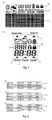
- a display 1a of a device for playback of audio files e.g. a portable mp3-player
- the display 1a includes a three-line text array 2, which is capable of displaying a certain amount of variable text.
- the display 1a has a special array 4 in which the sorting and/or playback order of the audio files is indicated, e.g. according to year, folder, artist, album, genre, or playlist.
- the sorting and/or playback order of the audio files is indicated, e.g. according to year, folder, artist, album, genre, or playlist.
- other properties of the files like the last access time, the number of accesses, the length, the creation date or even a personal weighting by the user etc. can also be used for sorting.
- FIG. 1b A more limited display 1b for a device for playback of audio files is depicted in Fig. 1b. Similar to the display described with reference to Fig. 1a, the display includes a numerical array for indicating the playing time of an audio file and a plurality of symbols. However, instead of the text array a further numerical array 3 is included for indicating the current file number. In addition, specific symbols 5 are provided for indicating the sorting and/or playback order. Due to the limited available space the symbols 5 are arrows pointing at descriptive words outside the display. Of course, with additional space available it is likewise possible to directly display the descriptive words instead of the symbols 5.
- a navigation menu for a display 1a having a text array 2 is depicted in Fig. 2.
- the text array has three lines.
- an audio file is listed by indicating the artist, the title or the track number, the release year and the genre. Other information may also be listed. It is to be noted that the amount of listed information depends on the available space and, possibly, on the user preferences. Generally only some of the above information will be listed.
- the audio files are sorted according to their title.
- One line 6 of the display is highlighted for indicating the currently selected file. By scrolling the list the user selects a specific audio file for playback. Scrolling the list can be performed in various ways, e.g. by changing the highlighted line 6 or by scrolling the text.
- the top line is highlighted.
- the highlighting is first shifted to the mid-line and then to the bottom line.
- the next three audio files are displayed.
- the mid-line or any other fixed line
- the indicated audio files are shifted up or down according to the user request. Both methods allow to scroll to any desired audio file.
- the device for playback of audio files has a special button (not shown) for re-sorting the audio files, a so-called 'arrange key'.
- a so-called 'arrange key' By pressing this button the user changes the sorting order of the audio files.
- Fig. 2b such a re-sorting is shown.
- the button By pressing the button once the sorting order is changed to 'by genre', i.e. the audio files are now listed according to their genre.
- all three audio files indicated in the display belong to the same genre, e.g. Pop.
- the sorting order within the top-level sorting is device dependent. In the example, within the genre the audio files are still sorted according to their title.
- the new sorting is based on the properties of the selected audio file, i.e. the highlighted audio file. As can be seen the highlighted audio file is kept, only the remaining indicated files are changed. Since the highlighted audio file has the genre 'Pop' and the new sorting is according to the genre, the newly indicated audio files also have the genre 'Pop', provided files having this genre are available in the device for playback of audio files. By pressing the sorting button once again, the sorting order is changed from 'by genre' to 'by year'. This is depicted in Fig. 2c). Now all indicated audio files have the same release year. Again, the highlighted audio file is kept, only the other indicated audio files are updated. The sorting order within the release year again is according to the title.
- the re-sorting allows fast access to further audio files having a specific property. If the user has found an audio file by, for example, a specific artist, by simply pressing the sorting button a number of times he can find other audio files by the same artist, other audio files from the same album, or other audio files from the same year. There is no need to go back to the high-level menu to change the sorting order, which would mean that the user had to search for the previously selected audio file again. Navigation is, therefore, more convenient.
- buttons are provided for re-sorting the audio files. Pressing the button changes the sorting order in a predefined sequence, e.g. year ⁇ artist ⁇ album ⁇ genre.
- a predefined sequence e.g. year ⁇ artist ⁇ album ⁇ genre.
- FIG. 3 A similar concept applies to the playback order of the audio files.
- This concept is depicted in Fig. 3 for a display without text array. In this case no advanced navigation is necessary, since the available information cannot be displayed.
- the re-sorting can also be performed during playback.
- the playback order of the audio files is 'by artist', as indicated by the symbol 5, and currently file number '18' is played back. If during playback the user decides that he wants to hear more audio files belonging to the same genre as the current audio file, he presses a specific button (not shown) for re-sorting the playback order, the so-called 'more from-key'.
- the playback order is changed to 'by genre', as indicated by the symbol 5 in Fig. 3b). Therefore, the next audio file, number '9' in the example, belongs to the same genre as the current audio file number '18'.
- the playback order of the audio files is changed in a predefined sequence.
- the concept of changing the playback order at the touch of a button is also suitable for the above display 1a having a text array.
- the 'arrange-key' and the 'more from-key' are advantageously the same buttons, since both features are on the one hand similar, but on the other hand not used at the same time.
- the 'arrange-key' is used for navigation before playback, the 'more from-key' is only used during playback. Again, it is likewise possible to provide a specific button for each playback order, or to provide two buttons for running through the predefined sequence of playback orders in both directions.
Landscapes
- Engineering & Computer Science (AREA)
- Theoretical Computer Science (AREA)
- General Engineering & Computer Science (AREA)
- Physics & Mathematics (AREA)
- General Physics & Mathematics (AREA)
- Multimedia (AREA)
- Human Computer Interaction (AREA)
- Databases & Information Systems (AREA)
- Data Mining & Analysis (AREA)
- Library & Information Science (AREA)
- Mathematical Physics (AREA)
- Information Retrieval, Db Structures And Fs Structures Therefor (AREA)
- Indexing, Searching, Synchronizing, And The Amount Of Synchronization Travel Of Record Carriers (AREA)
- Management Or Editing Of Information On Record Carriers (AREA)
- Signal Processing For Digital Recording And Reproducing (AREA)
Priority Applications (8)
| Application Number | Priority Date | Filing Date | Title |
|---|---|---|---|
| EP04290020A EP1550942A1 (en) | 2004-01-05 | 2004-01-05 | User interface for a device for playback of audio files |
| EP04797692.3A EP1702257B1 (en) | 2004-01-05 | 2004-11-06 | Device for playback of multimedia files |
| CNB2004800398367A CN100374997C (zh) | 2004-01-05 | 2004-11-06 | 用于回放多媒体文件的设备 |
| PCT/EP2004/012595 WO2005069099A2 (en) | 2004-01-05 | 2004-11-06 | User interface for a device for playback of multimedia files |
| JP2006545937A JP2007528572A (ja) | 2004-01-05 | 2004-11-06 | マルチメディアファイル再生機器用ユーザインターフェース |
| US10/584,370 US20070276828A1 (en) | 2004-01-05 | 2004-11-06 | User Interface For A Device For Playback Of Multimedia Files |
| KR1020067013278A KR101148041B1 (ko) | 2004-01-05 | 2004-11-06 | 멀티미디어 파일의 재생용 디바이스 |
| US13/633,683 US20130159854A1 (en) | 2004-01-05 | 2012-10-02 | User Interface For A Device For Playback Of Multimedia Files |
Applications Claiming Priority (1)
| Application Number | Priority Date | Filing Date | Title |
|---|---|---|---|
| EP04290020A EP1550942A1 (en) | 2004-01-05 | 2004-01-05 | User interface for a device for playback of audio files |
Publications (1)
| Publication Number | Publication Date |
|---|---|
| EP1550942A1 true EP1550942A1 (en) | 2005-07-06 |
Family
ID=34560276
Family Applications (2)
| Application Number | Title | Priority Date | Filing Date |
|---|---|---|---|
| EP04290020A Withdrawn EP1550942A1 (en) | 2004-01-05 | 2004-01-05 | User interface for a device for playback of audio files |
| EP04797692.3A Expired - Lifetime EP1702257B1 (en) | 2004-01-05 | 2004-11-06 | Device for playback of multimedia files |
Family Applications After (1)
| Application Number | Title | Priority Date | Filing Date |
|---|---|---|---|
| EP04797692.3A Expired - Lifetime EP1702257B1 (en) | 2004-01-05 | 2004-11-06 | Device for playback of multimedia files |
Country Status (6)
| Country | Link |
|---|---|
| US (2) | US20070276828A1 (https=) |
| EP (2) | EP1550942A1 (https=) |
| JP (1) | JP2007528572A (https=) |
| KR (1) | KR101148041B1 (https=) |
| CN (1) | CN100374997C (https=) |
| WO (1) | WO2005069099A2 (https=) |
Cited By (1)
| Publication number | Priority date | Publication date | Assignee | Title |
|---|---|---|---|---|
| FR2892590A1 (fr) * | 2005-10-24 | 2007-04-27 | Thomson Licensing Sas | Procede de navigation dans une liste d'elements avec emission d'un son, et appareil associe. |
Families Citing this family (12)
| Publication number | Priority date | Publication date | Assignee | Title |
|---|---|---|---|---|
| US7831913B2 (en) * | 2005-07-29 | 2010-11-09 | Microsoft Corporation | Selection-based item tagging |
| AU2005239672B2 (en) * | 2005-11-30 | 2009-06-11 | Canon Kabushiki Kaisha | Sortable collection browser |
| JP5208540B2 (ja) * | 2008-02-27 | 2013-06-12 | 株式会社Pfu | 画像ファイル振分方法、画像ファイル振分装置、および、プログラム |
| KR20100015246A (ko) * | 2008-08-04 | 2010-02-12 | 삼성전자주식회사 | 디스플레이부를 구비한 저장장치 및 정보 디스플레이 방법 |
| FR2942344B1 (fr) * | 2009-02-13 | 2018-06-22 | Movea | Dispositif et procede de controle du defilement d'un fichier de signaux a reproduire |
| WO2010145058A1 (zh) * | 2009-06-19 | 2010-12-23 | 深圳Tcl新技术有限公司 | 一种电视机实现文件浏览的方法 |
| CN102111680A (zh) * | 2009-12-25 | 2011-06-29 | 康佳集团股份有限公司 | 一种机顶盒的歌曲分类管理方法 |
| GB201020138D0 (en) * | 2010-11-29 | 2011-01-12 | Third Sight Ltd | A memory aid device |
| USD758426S1 (en) * | 2013-09-03 | 2016-06-07 | Samsung Electronics Co., Ltd. | Display screen portion with icon |
| USD753669S1 (en) * | 2013-10-10 | 2016-04-12 | Healthmate International, LLC | Display screen with graphical user interface |
| USD755226S1 (en) * | 2014-08-25 | 2016-05-03 | Samsung Electronics Co., Ltd. | Display screen or portion thereof with transitional graphical user interface |
| USD839900S1 (en) * | 2017-11-06 | 2019-02-05 | Shenzhen Valuelink E-Commerce Co., Ltd. | Display screen with graphical user interface |
Citations (2)
| Publication number | Priority date | Publication date | Assignee | Title |
|---|---|---|---|---|
| WO2003023781A1 (en) * | 2001-09-10 | 2003-03-20 | Thomson Licensing S.A. | Extension of m3u file format to support user interface and navigation tasks in a digital audio player |
| WO2003058625A1 (en) * | 2002-01-04 | 2003-07-17 | Thomson Licensing S.A. | Method and apparatus for creating and editing audio playlists in a digital audio player |
Family Cites Families (22)
| Publication number | Priority date | Publication date | Assignee | Title |
|---|---|---|---|---|
| US5857707A (en) * | 1996-05-02 | 1999-01-12 | Devlin; Stephen M. | Jukebox display strip and method of making same |
| JP4120896B2 (ja) * | 1996-11-28 | 2008-07-16 | ソニー株式会社 | ビデオ編集装置及びその方法 |
| JP3293510B2 (ja) * | 1997-02-28 | 2002-06-17 | ヤマハ株式会社 | データ選択装置 |
| US6525715B2 (en) * | 1997-03-24 | 2003-02-25 | Seiko Epson Corporation | Portable information acquisition device |
| US6031797A (en) * | 1998-06-11 | 2000-02-29 | Sony Corporation | Media playback device capable of shuffled playback based on a user's preferences |
| US7346580B2 (en) * | 1998-08-13 | 2008-03-18 | International Business Machines Corporation | Method and system of preventing unauthorized rerecording of multimedia content |
| US6317141B1 (en) * | 1998-12-31 | 2001-11-13 | Flashpoint Technology, Inc. | Method and apparatus for editing heterogeneous media objects in a digital imaging device |
| JP4221803B2 (ja) * | 1999-03-02 | 2009-02-12 | ソニー株式会社 | 記憶再生装置及び記憶再生方法 |
| US20030103079A1 (en) * | 1999-06-14 | 2003-06-05 | Lycos, Inc., A Virginia Corporation | Media resource manager/player |
| US8326584B1 (en) * | 1999-09-14 | 2012-12-04 | Gracenote, Inc. | Music searching methods based on human perception |
| US6526411B1 (en) * | 1999-11-15 | 2003-02-25 | Sean Ward | System and method for creating dynamic playlists |
| US6248946B1 (en) * | 2000-03-01 | 2001-06-19 | Ijockey, Inc. | Multimedia content delivery system and method |
| US20020032019A1 (en) * | 2000-04-24 | 2002-03-14 | Marks Michael B. | Method for assembly of unique playlists |
| US7206775B2 (en) * | 2000-07-06 | 2007-04-17 | Microsoft Corporation | System and methods for the automatic transmission of new, high affinity media |
| US6731312B2 (en) * | 2001-01-08 | 2004-05-04 | Apple Computer, Inc. | Media player interface |
| US7698652B2 (en) * | 2001-02-09 | 2010-04-13 | Koninklijke Philips Electronics N.V. | Rapid retrieval user interface designed around small displays and few buttons for searching long lists |
| EP1423854B1 (en) * | 2001-09-06 | 2011-10-05 | Thomson Licensing | Method and apparatus for elapsed playback timekeeping of variable bit-rate digitally encoded audio data files |
| EP1425746A1 (en) * | 2001-09-10 | 2004-06-09 | Thomson Licensing S.A. | Method and apparatus for creating an indexed playlist in a digital audio data player |
| JP2003173623A (ja) * | 2001-12-05 | 2003-06-20 | Pioneer Electronic Corp | 情報再生装置 |
| US6996390B2 (en) * | 2002-06-26 | 2006-02-07 | Microsoft Corporation | Smart car radio |
| US7043477B2 (en) * | 2002-10-16 | 2006-05-09 | Microsoft Corporation | Navigating media content via groups within a playlist |
| US20040175159A1 (en) * | 2003-01-08 | 2004-09-09 | Oetzel Kenneth G. | Searchable DVD incorporating metadata |
-
2004
- 2004-01-05 EP EP04290020A patent/EP1550942A1/en not_active Withdrawn
- 2004-11-06 KR KR1020067013278A patent/KR101148041B1/ko not_active Expired - Fee Related
- 2004-11-06 WO PCT/EP2004/012595 patent/WO2005069099A2/en not_active Ceased
- 2004-11-06 EP EP04797692.3A patent/EP1702257B1/en not_active Expired - Lifetime
- 2004-11-06 US US10/584,370 patent/US20070276828A1/en not_active Abandoned
- 2004-11-06 JP JP2006545937A patent/JP2007528572A/ja active Pending
- 2004-11-06 CN CNB2004800398367A patent/CN100374997C/zh not_active Expired - Fee Related
-
2012
- 2012-10-02 US US13/633,683 patent/US20130159854A1/en not_active Abandoned
Patent Citations (2)
| Publication number | Priority date | Publication date | Assignee | Title |
|---|---|---|---|---|
| WO2003023781A1 (en) * | 2001-09-10 | 2003-03-20 | Thomson Licensing S.A. | Extension of m3u file format to support user interface and navigation tasks in a digital audio player |
| WO2003058625A1 (en) * | 2002-01-04 | 2003-07-17 | Thomson Licensing S.A. | Method and apparatus for creating and editing audio playlists in a digital audio player |
Non-Patent Citations (3)
| Title |
|---|
| "Discotheque Sound System DJ User's Manual", 2003, XP002311032, Retrieved from the Internet <URL:http://www.myxoft.com/manual.pdf> [retrieved on 20041121] * |
| "LYRA MICRO JUKEBOX USER'S GUIDE RD2760", 2003, INDIANAPOLIS, USA, XP002311033, Retrieved from the Internet <URL:http://web.archive.org/web/20040122063023/www.rca.com/documents/RD2760_Users_Guide_ENGLISH_701990_25.pdf> [retrieved on 20041121] * |
| "XBOX Media Player 2.4", 2002, XP002311034, Retrieved from the Internet <URL:http://mesh.dl.sourceforge.net/sourceforge/xbplayer/xbmp2.4manual.english.pdf> [retrieved on 20041121] * |
Cited By (2)
| Publication number | Priority date | Publication date | Assignee | Title |
|---|---|---|---|---|
| FR2892590A1 (fr) * | 2005-10-24 | 2007-04-27 | Thomson Licensing Sas | Procede de navigation dans une liste d'elements avec emission d'un son, et appareil associe. |
| WO2007048748A1 (fr) * | 2005-10-24 | 2007-05-03 | Thomson Licensing | Procede de navigation dans une liste d'elements avec emission d'un son, et appareil associe. |
Also Published As
| Publication number | Publication date |
|---|---|
| JP2007528572A (ja) | 2007-10-11 |
| KR20060117983A (ko) | 2006-11-17 |
| EP1702257A2 (en) | 2006-09-20 |
| WO2005069099A2 (en) | 2005-07-28 |
| EP1702257B1 (en) | 2017-03-29 |
| KR101148041B1 (ko) | 2012-05-25 |
| CN100374997C (zh) | 2008-03-12 |
| US20070276828A1 (en) | 2007-11-29 |
| US20130159854A1 (en) | 2013-06-20 |
| CN1902574A (zh) | 2007-01-24 |
| WO2005069099A3 (en) | 2006-06-08 |
Similar Documents
| Publication | Publication Date | Title |
|---|---|---|
| US20130159854A1 (en) | User Interface For A Device For Playback Of Multimedia Files | |
| US8806380B2 (en) | Digital device and user interface control method thereof | |
| US7900161B2 (en) | Data display apparatus, data display method, data display program and graphical user interface | |
| US20090119614A1 (en) | Method, Apparatus and Computer Program Product for Heirarchical Navigation with Respect to Content Items of a Media Collection | |
| KR100917086B1 (ko) | 디지털 오디오 데이터 플레이어에서 인덱싱 재생목록을생성하는 방법 및 장치 | |
| US20040155888A1 (en) | Method for displaying the contents of a collection of media objects | |
| US20100011315A1 (en) | Information processing method, display control method, and program | |
| US20130007617A1 (en) | Media Player Navigation | |
| US10642447B2 (en) | Reproduction device and display control method | |
| JP2005502977A (ja) | ディジタル・オーディオ・プレーヤーのユーザ・インタフェース・タスクおよびナビゲーション・タスクをサポートするm3uファイル・フォーマットの拡張 | |
| JP2007528572A5 (https=) | ||
| US20140195522A1 (en) | Information processing device, information processing method, content transfer system and computer program | |
| JP2009181464A (ja) | 情報端末装置、情報端末装置の情報処理方法、および、情報処理プログラム | |
| JP2013200894A (ja) | 情報端末装置、情報端末装置の情報処理方法、および、情報処理プログラム | |
| JP2008071118A (ja) | インタフェース装置、楽曲再生装置、インタフェースプログラム、及びインタフェース方法 | |
| KR20000051236A (ko) | 디지털 오디오 재생 시스템에서의 데이터의 표시 방법 | |
| EP1732079A2 (en) | Display control method, content data reproduction apparatus, and program | |
| JPH11109982A (ja) | カラオケシステム | |
| US20080059907A1 (en) | Saving the contents of the track list as a playlist file | |
| CA2763222A1 (en) | Media player navigation |
Legal Events
| Date | Code | Title | Description |
|---|---|---|---|
| PUAI | Public reference made under article 153(3) epc to a published international application that has entered the european phase |
Free format text: ORIGINAL CODE: 0009012 |
|
| AK | Designated contracting states |
Kind code of ref document: A1 Designated state(s): AT BE BG CH CY CZ DE DK EE ES FI FR GB GR HU IE IT LI LU MC NL PT RO SE SI SK TR |
|
| AX | Request for extension of the european patent |
Extension state: AL LT LV MK |
|
| RAP1 | Party data changed (applicant data changed or rights of an application transferred) |
Owner name: THOMSON LICENSING |
|
| AKX | Designation fees paid | ||
| STAA | Information on the status of an ep patent application or granted ep patent |
Free format text: STATUS: THE APPLICATION IS DEEMED TO BE WITHDRAWN |
|
| 18D | Application deemed to be withdrawn |
Effective date: 20060107 |
|
| REG | Reference to a national code |
Ref country code: DE Ref legal event code: 8566 |