EP1536340A1 - Verfahren zur dateiverwaltung unter verwendung einer netzwerkstruktur, operationsobjektanzeigebegrenzungsprogramm und aufzeichnungsmedium - Google Patents
Verfahren zur dateiverwaltung unter verwendung einer netzwerkstruktur, operationsobjektanzeigebegrenzungsprogramm und aufzeichnungsmedium Download PDFInfo
- Publication number
- EP1536340A1 EP1536340A1 EP03794218A EP03794218A EP1536340A1 EP 1536340 A1 EP1536340 A1 EP 1536340A1 EP 03794218 A EP03794218 A EP 03794218A EP 03794218 A EP03794218 A EP 03794218A EP 1536340 A1 EP1536340 A1 EP 1536340A1
- Authority
- EP
- European Patent Office
- Prior art keywords
- directory
- parent
- directories
- file
- child
- Prior art date
- Legal status (The legal status is an assumption and is not a legal conclusion. Google has not performed a legal analysis and makes no representation as to the accuracy of the status listed.)
- Withdrawn
Links
Images



Classifications
-
- G—PHYSICS
- G06—COMPUTING OR CALCULATING; COUNTING
- G06F—ELECTRIC DIGITAL DATA PROCESSING
- G06F16/00—Information retrieval; Database structures therefor; File system structures therefor
- G06F16/10—File systems; File servers
- G06F16/16—File or folder operations, e.g. details of user interfaces specifically adapted to file systems
Definitions
- the present invention relates to a system or method for managing files using a network structure applicable to operating systems (OSs) and application programs.
- OSs operating systems
- application programs application programs
- a tree-structured file management system is a hierarchical file management system starting from a root directory (the trunk of the tree structure, represented by a backslash character "/") as shown in Figure 9.
- the directories D are indicated by dashed-line boxes and the files F are indicated by solid-line boxes.
- the y-th directories that are located x levels below the root directory are represented in the form of Dxy and files are represented in the form of Fxy.
- the arrows represent parent-child relationships. For example, "X ⁇ Y" represents that X is the parent directory of Y, viewing from Y, or Y is a child directory or child file of X, viewing from X.
- every directory or file has one directory (parent directory) at one level above it in a hierarchy.
- the directory that has no parent directory (namely the top directory) is called the "root directory.”
- Figure 8 (a) shows an example of a simple tree-structured file management system.
- the directories "doc” and “bin” are located at the level immediately below the root directory ("/"), the directories “tennis” and “golf” below the directory "doc”, and the directories “tennis” and “golf” are below the directory "bin.”
- Directories having the same directory names "tennis” and “golf” but different parent directories are treated as different directories.
- every directory or file is expressed by a name beginning with the root directory to uniquely identify it.
- a route (a listing of directories) for specifying a particular directory or file in this way is called a directory path (sometimes simply called a "path").
- a "directory path" can be defined as a listing of the names of the directories that leads from a directory to a file or another directory in a tree structure.
- path for identifying the file "rule" in the tree structure shown in Figure 8(a) is "/doc/tennis/rule.”
- a path can be represented as an absolute path (full path) or a relative path.
- path refers to an absolute path (namely a directory path from the root directory).
- Tree structures are intuitive to understand and allow for systematic classification and organization, therefore are widely used as today's computer file management systems.
- Patent Document 1 describes a non-tree-structured file management system in which one file can belong to more than one directory.
- Patent Document 2 describes a method in which inclusive relations between file groups are registered. Once a file is registered in any of the groups, the inclusive relations between the file groups are referred to and the file is also registered in another related group.
- Patent Document 3 describes a configuration including the steps of providing a virtual management file that associates a virtual directory name with a higher-level virtual directory, a lower-level virtual directory, the path to a directory for storing existing files, and a file name.
- a virtual management file that associates a virtual directory name with a higher-level virtual directory, a lower-level virtual directory, the path to a directory for storing existing files, and a file name.
- Patent Document 4 describes a method in which an "attribute" is assigned to a file and the file is designated by a logical expression of the attribute and another method in which the attribute is treated as a directory to form a tree-structured directory.
- Patent Documents are related technical documents for illustrating the background of the present invention.
- An object of the present invention is to solve these problems with the prior art and provide a novel file management system capable of classifying and organizing files and directories more easily and conveniently than in the conventional system without requiring additional operations.
- a first file management system allows at least one of one file (F1) and/or one directory (D3) to belong to two or more directories (D1, D2), characterized in that a child file or child directory (to be operated) in a working directory specified (defined) by a given directory string belonging to the file management system has as parent directories all the directories included in the directory string constituting the working directory (that is, the object to be operated is defined as such a directory or file).
- a second file management system allows at least one of one file (F1) and/or one directory (D3) to belong to two or more directories (D1, D2) in a computer, characterized in that a file or directory specified by an operator of the computer or a program running on the computer as an object to be operated has all directories on its directory path as parent directories.
- a third file management system allows one file (F1) and/or one directory (D3) to belong to two or more directories (D1, D2) in a computer, and is characterized in that if a file (F1) specified by an operator of the computer or a program running on the computer as an object to be operated is the only file that has at least one of the directories on its directory path as a parent directory, the file (F1) becomes the object to be operated.
- each file or directory can have a parent-child relationship with more than one directory or file.
- a file or directory having as parent directories all directories included in a directory string constituting the working directory as parent directories becomes an object to be operated, or a file or a directory having as parent directories all directories on a directory path becomes an object to be operated, more than one path for specifying a directory or file to be operated can be defined. Consequently, a higher flexibility in path selection can be provided and files and directories can be managed more easily and conveniently than in conventional file management systems.
- the third file management system allows such a relocated file to be found by using a directory path designated by the program as a clue if at least a portion of the directory path remains.
- a new directory (D6) is created in the first file management system according to the present invention, preferably a child directory (D6) having as parent directories all directories included in the directory string (D1: D2: D3) constituting the working directory (for example [/D1/D2/D3]) is created.
- a new directory (D6) is created in the second or third filemanagement systemaccording to the present invention, preferably a child directory (D6) having as parent directories all directories (D1, D2, and D3) on the directory path (for example [/D1/D2/D3]) that specifies the new directory is created.
- the first to third file management systems according to the present invention have a kind of a network structure in which a directory is allowed to have more than one parent directory, a parent-child relationship with only one directory would be insufficient.
- parent-child relationships between the directory (D6) specified by the argument of a command and all directories (D1, D3) included in the directory string (D1: D3) constituting the working directory are eliminated.
- D1: D3 the directory string constituting the working directory
- directories ([/D1/D3/D6]) specified by a directory path (for example [/D1/D3]) and a directory to be removed (for example [D6]) is removed in the second or third file management system according to the present invention
- the parent-child relationship between each of the directories (D1 and D3) on the directory path and the directory (D6) to be deleted is eliminated and then, if the directory (D6) to be removed does not have a parent directory, the directory (D6) to be removed is removed.
- the directory has at least one parent directory (for example D2) after the parent-child relationship is eliminated, the directory (D6) to be removed is preferably not removed.
- the first file management system may be configured as a system in which the working directory is represented as one window in which the icons of a file and directory (folder) selected as obj ects to be operated are displayed in a computer system having a GUI (Graphical User Interface) environment.
- GUI Graphic User Interface
- This configuration can provide the system with a look-and-feel consistent with conventional tree-structured file management system having a GUI environment.
- the second or third file management system may be configured as a system in which a directory path is provided for each window and an icon representing a file and/or directory (folder) having all directories on the directory path as parent directories is displayed in the window on a computer system having a GUI (Graphical User Interface) environment.
- GUI Graphic User Interface
- This configuration can provide the system with a look-and-feel consistent with conventional tree-structured file management system having a GUI environment.
- the number of files and directories to be operated drastically increases as the directory string constituting the working directory becomes shorter or the network structure (parent-child relationships) becomes complicated. Therefore, it is important that, before directories or files to be operated are listed, some listing limitations or filtering is applied to them in order to improve operability.
- a program for limiting the listing of objects to be operated in the working directory is effective for the file management system according to the present invention.
- a first program according to the present invention is preferably an operation object display limiting program performing: a first step of determining whether there is a parent-child relationship between a file and a directory to be operated in a working directory (SA1); and, if it is determined at the first step (SA1) that there is the parent-child relationship, the step of selecting the parent directory as an object to be displayed and excluding the unselected child file from the display (SA2).
- a second program according to the present invention is preferably an operation object display limiting program for performing the steps of: determining whether there is a parent-child relationship between a file having as parent directories all directories on a directory path and a directory having as parent directories all directories on the directory path (SA1); and, if it is determined at the first step (SA1) that there is the parent-child relationship, selecting only the parent directory as an object to be listed and excluding the unselected child file from the display (SA2).
- the first or second program is applied to a list program for listing the names or icons of directories or files selected as the objects to be displayed, the number of files displayed as objects to be operated is reduced. Accordingly, the first or second program can facilitate file operations and provide a listing legible to an operator in a situation where there are a large number of files and directories to be operated.
- a third program according to the present invention is preferably an operation object display limiting program performing the steps of: determining whether there is a parent-child relationship between a file and a directory to be operated in a working directory (SA1); if it is determined that there is the parent-child relationship, selecting only the parent directory as an object to be listed and excluding the unselected child file from the display (SA2) ; determining whether there is a parent-child relationship between child directories that are candidate objects to be operated (SA3); and if it is determined that there is a parent-child relationship, selecting only the parent directory as an object to be listed and excluding the unselected child directories from the display (SA4).
- a fourth program according to the present invention is preferably an operation object display limiting program performing the steps of: determining whether there is a parent-child relationship between a file having as parent directories all directories on a directory path and a directory having as parent directories all directories on the directory path (SA1); and if it is determined at the determination step (SA1) that there is the parent-child relationship, selecting the parent directory as an object to be listed and excluding the unselected child file from objects to be displayed (SA2) ; determining whether there is a parent-child relationship with a directory having as parent directories all directories on the directory path (SA3); and if it is determined at the determination step (SA3) that there is the parent-child relationship, selecting the parent directory as an object to be listed and excluding the child directory from the display (SA4).
- the third or fourth program is applied to a list program including the step of listing the names or icons of directory or file selected as the objects to be listed (SA5), the number of files as well as directories displayed as the objects to be operated is reduced. Accordingly, the program can further facilitate file operations and provide a listing legible to an operator in a situation where there are a large number of files and directories to be operated.
- the third or fourth program is applied to a list program capable of listing selectively the first or second program and the third or fourth program.
- the first to fourth programs according to the program can be applied to various operating systems and application programs.
- a data structure representing a parent-child relationship between one of one file (F1) and one directory (D3) and two or more directories (D1, D2), and being referred to in the first to third file management systems according to the present invention is essential for implementing the first to third network-structured file management systems according to the present invention on an information processing apparatus such as a computer. Accordingly, a computer-readable recording medium on which the data structure is recorded is considerably useful.
- An information processing apparatus is characterized by including: a management information storing section for storing information about parent-child relationships between files and directories, information about parent-child relationships between directories and management information about each directory; a file storing section for storing file content data; an input section for inputting an instruction to operate a file or a directory; and an operating instruction executing section, in response to an operating instruction inputted from the input section, executing the operating instruction while reading and writing information stored in the management information storing section and/or file content data stored in the file storing section according to any one of the first to third file management systems according to the present invention.
- the information processing apparatus can be applied to a computer or a data server, a video server, or a data backup apparatus that stores data as files and classifies and organizes the files.
- the present invention uses different concepts of a working directory and an object (directory or file) to be operated than conventional ones. These concepts will be described first.
- the working directory in a conventional tree-structured file management system is a parent directory of an object (directory or file) to be operated and is the last directory of the directory string that constitutes the working directory. Because the file management system stores the path from the root to the working directory, the directory or file located at the level immediately below the working directory can be operated without using the directory name.
- the working directory in a network-structured file management system is the same as the conventional one in that it means the parent directory of an object (directory or file) to be operated.
- the file management system has a network structure, one file or directory can have more than one parent directory. Therefore, a file or directory to be operated is not limited to the last directory in the directory string constituting the working directory. Instead,alldirectories or files having all the directories in the directory string as their parent directories can be objects to be operated.
- Figure 1 shows an example of a network-structured file management system according to the present invention. Because the root directory is a parent of all files and directories but the root directory, the root directory is omitted from Figure 1.
- the directory at the base of each arrow represents the parent directory of the directory at the head of the arrow.
- the expression X ⁇ Y represents that the parent directory of Y (which may be a file or directory) is X.
- the structure differs from conventional tree structures in that one file and directory can have more than one parent directory.
- directories or files having as their parent directories all the directories included in the directory string of the directory path that constitutes a working directory are objects to be operated. Specific examples of this will be described below.
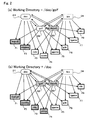
- Figure 2(a) shows a situation in a file management system according to the present invention in which the directory path constituting the working directory is [/doc/golf].
- the directories or files to be operated are those having both of directories D1: "doc” and D2: “golf” enclosed in the dashed-line ovals in Figure 2(a) as their parent directories. That is, files F1: “manual” and F2: “readme” and directory D3: "tennis” indicated by the shaded boxes in this example in Figure 2(a) are the objects to be operated.
- Sample commands are shown below. Since the commands may vary depending on operating systems (OSs), the meanings of the commands are indicated on the right. The present invention is OS-independent, therefore it is only required that the commands have the same meaning as those indicated below and the expressions of the commands make no essential difference.
- OSs operating systems
- % pwd Output the working directory.
- %doc/golf %ls List the objects to be operated in the working directory.
- Figure 2(b) shows a situation in the filemanagement system according to the present invention in which the working directory is [/doc].
- the objects to be operated are directories or files having the directory D1: "doc” enclosed in the dashed-line oval in Figure 2(b) as parent directories. That is, files F1: “manual,” F2: “readme,” F3: “rule,” F4: “score,” D2: “golf,” and D3: “tennis” indicated by the shaded boxes in this example in Figure 2(b) are to be operated.
- - Sample command input % pwd /doc %ls manual readme rule score golf tennis
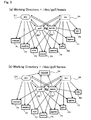
- the objects to be operated are directories or files having all of the directories D1: “doc, " D2: “golf,” and D3: “tennis” as their parent directories. That is, there are no directories or files to be operated. This is shown below: % pwd /doc/golf/tennis % ls "(No directories or files are printed.)"
- the directories or files that have all the directories in a directory string (directories listed to make up the path for displaying the working directory) constituting the working directory as their parent directories become the objects of operation. Accordingly, difference in the order in which the directories are listed in a directory string does not affect the directories of files to be operated.
- the objects to be operated will be the directories or files having as parent directories both of the directories "golf” and "tennis” (i.e. the files D2: "doc” and D3: "bin”).
- a relative path is a path in which a parent directory, viewed from a working directory, is indicated by "..” and the working directory itself is indicated by “.”. For example, if the command “cd .. “ is executed when the working directory is [/golf/tennis], the working directory is changed to [/golf]. If the command "cd .. " is executed when the working directory is [/tennis/golf], the working directory is changed to [/tennis].
- any of [/doc/rule], [/doc/tennis/rule], [/tennis/doc/rule], [/tennis/rule],and [/rule] can be specified to operate the file "rule.”
- any of the following commands can be used: cat/doc/rule (Print “rule.") (Command 1) cat/doc/tennis/ rule (Command 2) cat/tennis/doc/rule (Command 3) cat/tennis/rule (Command 4) cat/rule (Command 5)
- These commands provide the same result because the arguments in effect represent the same files.
- commands 1, 2, and 3 above would present different files because their arguments, namely paths, are different.
- the file management system according to the present invention essentially differs in basic concept from those techniques.
- a directory path may be represented by a logical expression in which directory names and logic symbols connecting them are used, and files or directories whose logical expressions are true may be made the objects of operation.
- first embodiment has been described with respect to a working directory
- absolute paths as described in the variation of the first embodiment or relative paths from a working directory may be used for specifying files or directories.
- the directory path from the root to a file or directory to be operated is eventually used for specifying the file or directory and the file or directory which has all directories present on that directory path as parent directories will be the object to be operated.
- a file (F1) specified by an operator of a computer containing the present system or a program running on the computer is the only file that has at least one of the directories on the directory path as its parent directory, that file (F1) may be made the object of operation.
- the file management system uses file management information (referred to as “file-parent-child relationship information”) which associates a single file A with information about one or more directories to which the file A belongs and directory management information (referred to as “directory-parent-child relationship information”) which associates a single directory X with information about one or more directories to which the directory X belongs.
- File-parent-child relationship information which associates a single file A with information about one or more directories to which the file A belongs
- directory management information referred to as "directory-parent-child relationship information” which associates a single directory X with information about one or more directories to which the directory X belongs.
- Parent-child relationship information for the root directory may be omitted and, if parent-child relationship information for a file or directory is empty, it may be assumed that the root directory is the only parent directory of that file or directory.
- the file-parent-child relationship information and directory-parent-child relationship information are represented by data structures in which the child files or directories of each directory are listed.
- the information may be represented by a data structure in which the parent directories of each file and directory are listed. This also applies to the file-parent-relationship information.
- Data strings for implementing the network-structured file management system according to the present invention illustrated in Figure 1 will be described in comparison with data strings in the conventional tree-structured file management system illustrated in Figure 8(a).
- the left-hand side of each data string represents the parent directory and the right-hand side represents the child directories.
- the file management system has a data structure in which each directory holds the parent-child relationship with another directory.
- Changing the working directory means changing the working directory string.
- the file management system allows an application program to properly run even if the path for the application program is changed because an operator has relocated its file according to the operator's desired classification criteria, provided that the path used by the application program remains.
- the input format of the change directory command is "cd DIRPATH.”
- upper-case characters represent command parameters and an operator inputs appropriate character strings in them.
- [OPTION] specifies an option function. The operator may input a predetermined option character, if necessary.
- the command "cd” changes the working directory to a directory path specified in "DIRPATH.”
- the input format of the print working directory command is "pwd,” which prints the working directory. For example, if the "pwd” command is inputted after the command “cd/doc/golf,” then [/doc/golf] is printed (see Figure 2(a)). If the "pwd” command is inputted after the command "cd ../tennis” is inputted, then [/doc/tennis] is printed.
- the input format of the list command is "ls [OPTION] DIRPATH. " This lists the names of files and directories that have as their parent directories all directories present on a directory path specified in "DIRPATH.” If the working directory is [/doc/golf] and the list command is inputted, then “manual” and “readme” are displayed (see Figure 2(a)). If “ls /” is inputted, the names of all files and directories, except the root directory, are displayed.
- An option function may be used to change the display format of files and directories, if necessary.
- the input format of the make directory command is "mkdir DIRPATH/DIRNAME.” This creates a new directory having as parent directories all directories present on a directory path specified in "DIRPATH” by using the name specified in "DIRNAME.” However, if there already exists a directory with that same name, the new directory is not created. Instead, a parent-child relationship is set between the directory having that same name, which will be the child, and all the directories on the directory path specified in "DIRPATH,” which will be the parents.
- the command mkdir/doc/golf/tennis/record can be used to obtain the same result.
- the input format of the remove directory command is "rmdir DIRPATH/DIRNAME.” This command removes the parent-child relationship between a child directory with the name specified in "DIRNAME" and all the parent directories on the directory path specified in "DIRPATH.” If the root directory is the only parent directory of the directory with the name specified in "DIRNAME" and there are no child files or directories after the removal, the directory with the name specified in "DIRNAME" is removed. Otherwise, it is not removed. If necessary, an option function may be used to remove the directory with the name specified in "DIRNAME” or recursively remove child files or directories even if there are child files or directories.
- the input format of the remove file command is "rm DIRPATH/FILENAME.” This command removes a file with the name specified in "FILENAME” that has all the directories on the directory path specified in "DIRPATH” as parent directories. At the same time, all parent-child relationships with that file are also removed. If necessary, an option function may be specified to remove a directory instead of a file, confirm whether to execute a removal before the removal, or force removal despite a removal inhibit attribute attached.
- the remove file command (rm) may be used in the same way as the remove directory command (rmdir). That is, instead of the directory (D6: record) to be removed, a file (for example F6: "record.txt”) to be removed may be specified in Figure 4.
- a file management system is preferable in which file is removed as a rule even if its parent-child relationship remains, unlike the case of removal of a directory.
- the input format of the copy command is "cp SRCPATH/SRCNAME DSTPATH/DSTNAME. " The command cp copies a file with the name specified in "SRCNAME” that has all directories on a directory path specified in "SRCPATH” as parent directories to a file with the name specified in "DSTNAME” that has all directories on the directory path specified in "DSTPATH” as parent directories. If necessary, an option function may be specified to confirm whether to execute copying before the copy, or pass the attributes of the file to be copied to the destination file. If “/. /" is included in the directory path specified in "DSTPATH,” all parent directories of the file specified in "SRCNAME" are assumed.
- the input format of the move command is "mv SRCPATH/SRCNAME DSTPATH/DSTNAME.” This command moves a file with the name specified in "SRCNAME” that has all directories on the directory path specified in "SRCPATH” as parent directories to a file with the name specified in "DSTNAME” that has all directories on the directory path specified in "DSTPATH” as parent directories.
- the first to fifth(sic) exemplary commands have been described with respect to cases where an operator inputs the file operation commands.
- a program running on a computer with the present file management system operates files.
- the file management system allows an application program to properly run by using a directory path used by the application program if it has remained after the directory path has been changed because an operator relocated its file according to the operator's desired classification criteria.
- Example 3 there is no directory or file to be operated in Example 3 in which the directory path constituting the working directory is [/doc/golf/tennis] (see Figure 3(a)).
- Example 2 in which the directory path constituting the working directory is [/doc] (see Figure 2(b)), there are as many as four files and two directories to be operated ("manual,” “readme,” “rule,” and “score,” and “golf” and "tennis”).
- Example 2 If the same situation of Example 2 (the working directory is [/doc]) is considered in a conventional tree structure as shown in Figure 8(a), only two directories or files, "tennis” and “golf,” are to be operated and the files ("manual,” “readme, “rule,” and “score") below "tennis” and “golf” will not be listed by the ls command.
- the following is the description of a method for placing limits on listing provided by the list command (the command for listing the names of child directories and child files belonging to a working directory) so that, if a conventional tree-structured file management system is replaced with the file management system of the present invention, a look-and-feel consistent with the conventional system is provided and a specified directory or file can be reached quickly through hierarchized directories.
- a program is used for applying the following rules to the conventional ls command.
- rule 1 is applied to list the names of directories and files selected (SA5).
- rule 1 is applied and then rule 2 is applied to list the names of directories and files selected (SA5).
- An implementation in which only rule 2 is applied without applying rule 1 is not practical.
- the parent directories of the child files are listed as representatives of hidden child files in this way, a smaller number of items are listed and differences in look-and-feel from the conventional tree-structured file management system can be reduced. It should be noted that the hidden files are not excluded from objects of operation. In this regard, this system is totally different from conventional tree structures.
- command names may be used or appropriate switches (options) may be added to commands to differentiate between them.
- the command “la” may be defined as a list-all command, which is a command to execute the ls command without application of rules 1 and 2
- the command “ls” may be defined as a command to execute the conventional ls command with rule 1
- the command “ls -min” may be defined as a command to execute the conventional ls command with rules 1 and 2.
- different OSs may use different command names and switches.
- % command argument When % command argument is executed, determination is made as to whether the argument (directory path specified by a command parameter) begins with the character "/.” If so, it is determined that the argument represents a full path. If the first character of the argument is not "/" but "../golf” for example, the working directory (for example [/doc]) combined with the argument (../golf), (/doc/../golf), that is, (/golf), is assumed to be the full path.
- Figure 7 shows an example of an algorithm of the list command ls (List files and directories to be operated.) to which rules 1 and 2 are applied.
- S1 is the step of obtaining a full path from an argument by using a full-path subroutine. The algorithm described with reference to Figure 6 may be used here.
- S2 is the step of selecting all candidate files and directories to be operated. If neither rule 1 nor rule 2 is applied to the list command, the process will end with listing all the files and directories selected.
- S3 is the step of listing files that belong to none of the candidate directories because such files must always be listed.
- S4 is a step for determining whether there are directories that belong to none of the candidate directories. If "YES,” then the process jumps to step 9, where those directories are excluded from the candidate directories.
- step S5 is the step of determining whether or not there are candidate files. If "YES,” then the process jumps to step S7, where any one of the candidate files is selected as the file to be operated. If "NO,” then any one of the candidate directories is selected, then the process jumps to step 9.
- S8 is the step of excluding the directory to be operated from the candidate files and selecting any one of the candidate directories as the parent directory of the directory to be operated. Then, the process proceeds to S9, where the selected directory is listed and excluded from the candidate directories.
- S10 is the step of excluding candidate files and candidate directories that belong to the listed directory and S11 is the step of determining whether there are candidate files. If "YES,” the process jumps to S3. If "NO,” the process proceeds to step S12, where determination is made as to whether there are candidate directories. If there are candidate directories, the process jumps to S4. Otherwise, the process ends.
- command names in the foregoing description may vary depending OSs, these commands are OS-independent because the present invention provides a novel file management system that can be implemented independent of OS, as mentioned earlier.
- the list program with the capability of limiting the listing of objects only limits files and directories to be listed and does not exclude files or directories from the objects to be operated. Therefore, when the list command "ls" is executed and files or directories are not presented on the screen as objects to be operated, the hidden files or directories can be directly operated, provided that they are included in the objects to be operated.
- the embodiments have been described with respect to a command-based environment, they can be used in a GUI (Graphical User Interface) environment as well.
- the working directory may be represented by a window in which the icons of files and directories (folders), which would be listed by the ls command, are displayed.
- filtering rules may be presented in a pop-up menu from which an operator can make a selection.
- filtering rules described with respect to the ls command can be used to display a tree view that gives a sense of compatibility with conventional ones.
- basic commands can be used in a manner similar to conventional file operations. However, it may be difficult to move a directory without regard to parent-child relationship simply by a mouse operation.
- the file management system described above is not limited to implementations in which it is used as a basic file management system of an operating system.
- the file management system can be used for application software that handles a large amount of data. For example, it can be used for programs processing and managing images and music recorded as digital data, Web page creation programs, greeting card creation programs, business card management programs, CAD programs, communication programs, navigation programs, and programs for government information disclosure services.
- the file management system according to the present invention described above can be used for information processing apparatuses such as data servers, video servers, or data backup apparatuses that store data as files and classify and organize the files, as well as a file management system for general computers.
- the file management system allows files to be classified and organized in an easier, more convenient, and natural manner by using operations similar to conventional ones simply with directory and file names without needing additional operations such as defining aliases or symbolic links, creating virtual directories, coloring, annotating, or providing search keywords as in conventional computer file management systems.
- the present system can be used in particular as a file management system for operating systems and various application programs and is useful as a file management system for general computers as well as various other information processing apparatuses.
Landscapes
- Engineering & Computer Science (AREA)
- Theoretical Computer Science (AREA)
- Human Computer Interaction (AREA)
- Data Mining & Analysis (AREA)
- Databases & Information Systems (AREA)
- Physics & Mathematics (AREA)
- General Engineering & Computer Science (AREA)
- General Physics & Mathematics (AREA)
- Information Retrieval, Db Structures And Fs Structures Therefor (AREA)
Applications Claiming Priority (3)
| Application Number | Priority Date | Filing Date | Title |
|---|---|---|---|
| JP2002259635 | 2002-09-05 | ||
| JP2002259635 | 2002-09-05 | ||
| PCT/JP2003/011289 WO2004023310A1 (ja) | 2002-09-05 | 2003-09-03 | ネットワーク構造によるファイル管理方法、操作対象表示制限プログラムおよび記録媒体 |
Publications (1)
| Publication Number | Publication Date |
|---|---|
| EP1536340A1 true EP1536340A1 (de) | 2005-06-01 |
Family
ID=31973079
Family Applications (1)
| Application Number | Title | Priority Date | Filing Date |
|---|---|---|---|
| EP03794218A Withdrawn EP1536340A1 (de) | 2002-09-05 | 2003-09-03 | Verfahren zur dateiverwaltung unter verwendung einer netzwerkstruktur, operationsobjektanzeigebegrenzungsprogramm und aufzeichnungsmedium |
Country Status (6)
| Country | Link |
|---|---|
| US (2) | US7877425B2 (de) |
| EP (1) | EP1536340A1 (de) |
| JP (2) | JP3714479B2 (de) |
| CN (1) | CN1656455A (de) |
| AU (1) | AU2003261924A1 (de) |
| WO (1) | WO2004023310A1 (de) |
Families Citing this family (50)
| Publication number | Priority date | Publication date | Assignee | Title |
|---|---|---|---|---|
| US7685126B2 (en) | 2001-08-03 | 2010-03-23 | Isilon Systems, Inc. | System and methods for providing a distributed file system utilizing metadata to track information about data stored throughout the system |
| US7146524B2 (en) | 2001-08-03 | 2006-12-05 | Isilon Systems, Inc. | Systems and methods for providing a distributed file system incorporating a virtual hot spare |
| US7937421B2 (en) | 2002-11-14 | 2011-05-03 | Emc Corporation | Systems and methods for restriping files in a distributed file system |
| CA2433527A1 (en) * | 2003-06-26 | 2004-12-26 | Ibm Canada Limited - Ibm Canada Limitee | System and method for object-oriented graphically integrated command sh ell |
| US8055711B2 (en) | 2004-10-29 | 2011-11-08 | Emc Corporation | Non-blocking commit protocol systems and methods |
| US8051425B2 (en) | 2004-10-29 | 2011-11-01 | Emc Corporation | Distributed system with asynchronous execution systems and methods |
| US8238350B2 (en) | 2004-10-29 | 2012-08-07 | Emc Corporation | Message batching with checkpoints systems and methods |
| US7730114B2 (en) * | 2004-11-12 | 2010-06-01 | Microsoft Corporation | Computer file system |
| US20060206524A1 (en) * | 2005-03-14 | 2006-09-14 | Microsoft Corporation | Intelligent collection management |
| US7797283B2 (en) | 2005-10-21 | 2010-09-14 | Isilon Systems, Inc. | Systems and methods for maintaining distributed data |
| US7551572B2 (en) | 2005-10-21 | 2009-06-23 | Isilon Systems, Inc. | Systems and methods for providing variable protection |
| US7788303B2 (en) | 2005-10-21 | 2010-08-31 | Isilon Systems, Inc. | Systems and methods for distributed system scanning |
| US7917474B2 (en) | 2005-10-21 | 2011-03-29 | Isilon Systems, Inc. | Systems and methods for accessing and updating distributed data |
| KR100762689B1 (ko) * | 2005-12-08 | 2007-10-01 | 삼성에스디아이 주식회사 | 휴대용 표시장치 |
| US7848261B2 (en) | 2006-02-17 | 2010-12-07 | Isilon Systems, Inc. | Systems and methods for providing a quiescing protocol |
| US7756898B2 (en) | 2006-03-31 | 2010-07-13 | Isilon Systems, Inc. | Systems and methods for notifying listeners of events |
| JP4912026B2 (ja) * | 2006-04-27 | 2012-04-04 | キヤノン株式会社 | 情報処理装置、情報処理方法 |
| US8539056B2 (en) | 2006-08-02 | 2013-09-17 | Emc Corporation | Systems and methods for configuring multiple network interfaces |
| US7676691B2 (en) | 2006-08-18 | 2010-03-09 | Isilon Systems, Inc. | Systems and methods for providing nonlinear journaling |
| US7953704B2 (en) | 2006-08-18 | 2011-05-31 | Emc Corporation | Systems and methods for a snapshot of data |
| US7899800B2 (en) | 2006-08-18 | 2011-03-01 | Isilon Systems, Inc. | Systems and methods for providing nonlinear journaling |
| US7882071B2 (en) | 2006-08-18 | 2011-02-01 | Isilon Systems, Inc. | Systems and methods for a snapshot of data |
| US7680836B2 (en) | 2006-08-18 | 2010-03-16 | Isilon Systems, Inc. | Systems and methods for a snapshot of data |
| US7680842B2 (en) | 2006-08-18 | 2010-03-16 | Isilon Systems, Inc. | Systems and methods for a snapshot of data |
| US7590652B2 (en) | 2006-08-18 | 2009-09-15 | Isilon Systems, Inc. | Systems and methods of reverse lookup |
| US7822932B2 (en) | 2006-08-18 | 2010-10-26 | Isilon Systems, Inc. | Systems and methods for providing nonlinear journaling |
| JP4588006B2 (ja) * | 2006-09-19 | 2010-11-24 | 株式会社リコー | ドキュメント管理サーバ、ドキュメント管理方法、及び、プログラム |
| US8286029B2 (en) | 2006-12-21 | 2012-10-09 | Emc Corporation | Systems and methods for managing unavailable storage devices |
| US7593938B2 (en) | 2006-12-22 | 2009-09-22 | Isilon Systems, Inc. | Systems and methods of directory entry encodings |
| US7509448B2 (en) | 2007-01-05 | 2009-03-24 | Isilon Systems, Inc. | Systems and methods for managing semantic locks |
| US7900015B2 (en) | 2007-04-13 | 2011-03-01 | Isilon Systems, Inc. | Systems and methods of quota accounting |
| US8966080B2 (en) | 2007-04-13 | 2015-02-24 | Emc Corporation | Systems and methods of managing resource utilization on a threaded computer system |
| US7779048B2 (en) | 2007-04-13 | 2010-08-17 | Isilon Systems, Inc. | Systems and methods of providing possible value ranges |
| US7949692B2 (en) * | 2007-08-21 | 2011-05-24 | Emc Corporation | Systems and methods for portals into snapshot data |
| US7966289B2 (en) | 2007-08-21 | 2011-06-21 | Emc Corporation | Systems and methods for reading objects in a file system |
| US7882068B2 (en) | 2007-08-21 | 2011-02-01 | Isilon Systems, Inc. | Systems and methods for adaptive copy on write |
| US8447938B2 (en) * | 2008-01-04 | 2013-05-21 | International Business Machines Corporation | Backing up a deduplicated filesystem to disjoint media |
| US7984324B2 (en) * | 2008-03-27 | 2011-07-19 | Emc Corporation | Systems and methods for managing stalled storage devices |
| US7949636B2 (en) | 2008-03-27 | 2011-05-24 | Emc Corporation | Systems and methods for a read only mode for a portion of a storage system |
| US7953709B2 (en) | 2008-03-27 | 2011-05-31 | Emc Corporation | Systems and methods for a read only mode for a portion of a storage system |
| US7870345B2 (en) | 2008-03-27 | 2011-01-11 | Isilon Systems, Inc. | Systems and methods for managing stalled storage devices |
| US7958094B2 (en) * | 2008-06-25 | 2011-06-07 | International Business Machines Corporation | Management of deletion requests for related documents in a content management system |
| DE102009019562A1 (de) * | 2009-04-30 | 2010-11-04 | Volkswagen Ag | Verfahren zum Steuern der Informationsanzeige auf einer Anzeigefläche |
| CN102142028B (zh) * | 2011-03-18 | 2016-06-15 | 鸿富锦精密工业(深圳)有限公司 | 电子设备及其文件路径显示方法 |
| WO2015000502A1 (en) * | 2013-07-02 | 2015-01-08 | Hitachi Data Systems Engineering UK Limited | Method and apparatus for virtualization of a file system, data storage system for virtualization of a file system, and file server for use in a data storage system |
| CN104750704B (zh) * | 2013-12-26 | 2018-06-26 | 中国移动通信集团河南有限公司 | 一种网页url地址分类识别方法及装置 |
| CN105677871A (zh) * | 2016-01-08 | 2016-06-15 | 珠海格力电器股份有限公司 | 一种音频文件的分类方法、装置和文件管理器 |
| US10983873B1 (en) * | 2017-09-27 | 2021-04-20 | Amazon Technologies, Inc. | Prioritizing electronic backup |
| JP7447495B2 (ja) * | 2020-01-08 | 2024-03-12 | 富士フイルムビジネスイノベーション株式会社 | 情報処理装置及びプログラム |
| US12222919B2 (en) * | 2020-06-18 | 2025-02-11 | Siemens Industry Software Inc. | Method of indexing a hierarchical data structure |
Family Cites Families (23)
| Publication number | Priority date | Publication date | Assignee | Title |
|---|---|---|---|---|
| JPS63124147A (ja) | 1986-11-14 | 1988-05-27 | Nec Corp | フアイルシステムのデイレクトリ管理方式 |
| US5333315A (en) * | 1991-06-27 | 1994-07-26 | Digital Equipment Corporation | System of device independent file directories using a tag between the directories and file descriptors that migrate with the files |
| US6400996B1 (en) * | 1999-02-01 | 2002-06-04 | Steven M. Hoffberg | Adaptive pattern recognition based control system and method |
| US5528735A (en) * | 1993-03-23 | 1996-06-18 | Silicon Graphics Inc. | Method and apparatus for displaying data within a three-dimensional information landscape |
| JPH0778098A (ja) * | 1993-09-08 | 1995-03-20 | Fujitsu Ltd | ファイル管理システム |
| JPH07121417A (ja) | 1993-10-27 | 1995-05-12 | Matsushita Electric Ind Co Ltd | データ管理装置 |
| US5771379A (en) * | 1995-11-01 | 1998-06-23 | International Business Machines Corporation | File system and method for file system object customization which automatically invokes procedures in response to accessing an inode |
| US5706510A (en) * | 1996-03-15 | 1998-01-06 | Hewlett-Packard Company | Zymbolic history management system |
| JPH09265421A (ja) | 1996-03-29 | 1997-10-07 | Hitachi Software Eng Co Ltd | ファイル管理方法 |
| US5987469A (en) * | 1996-05-14 | 1999-11-16 | Micro Logic Corp. | Method and apparatus for graphically representing information stored in electronic media |
| US6094684A (en) * | 1997-04-02 | 2000-07-25 | Alpha Microsystems, Inc. | Method and apparatus for data communication |
| JP2000163306A (ja) | 1998-11-30 | 2000-06-16 | Ntt Data Corp | 情報管理システム、情報管理方法および記録媒体 |
| JP3881837B2 (ja) | 2000-10-27 | 2007-02-14 | シャープ株式会社 | 手書入力装置および方法、ならびに手書入力プログラムが記録されたコンピュータで読取可能な記録媒体 |
| JP2002140220A (ja) | 2000-11-02 | 2002-05-17 | Fujitsu Ltd | ファイル管理方法および記録媒体 |
| US20020057269A1 (en) * | 2000-11-15 | 2002-05-16 | Barber Glenn A. | Method and apparatus for identifying the selection and exclusion of elements of complex sets |
| US6996588B2 (en) * | 2001-01-08 | 2006-02-07 | International Business Machines Corporation | Efficient application deployment on dynamic clusters |
| US7260718B2 (en) * | 2001-04-26 | 2007-08-21 | International Business Machines Corporation | Method for adding external security to file system resources through symbolic link references |
| US20030052927A1 (en) * | 2001-09-20 | 2003-03-20 | International Business Machines Corporation | System and method for indicating a status of multiple features of a data processing system |
| US7275063B2 (en) * | 2002-07-16 | 2007-09-25 | Horn Bruce L | Computer system for automatic organization, indexing and viewing of information from multiple sources |
| US7412042B2 (en) * | 2003-02-14 | 2008-08-12 | Grape Technology Group, Inc. | Technique for providing information assistance including a concierge-type service |
| US7769794B2 (en) * | 2003-03-24 | 2010-08-03 | Microsoft Corporation | User interface for a file system shell |
| US7409644B2 (en) * | 2003-05-16 | 2008-08-05 | Microsoft Corporation | File system shell |
| US7526483B2 (en) * | 2003-03-27 | 2009-04-28 | Microsoft Corporation | System and method for virtual folder sharing including utilization of static and dynamic lists |
-
2003
- 2003-09-03 EP EP03794218A patent/EP1536340A1/de not_active Withdrawn
- 2003-09-03 US US10/513,974 patent/US7877425B2/en not_active Expired - Fee Related
- 2003-09-03 CN CNA038124807A patent/CN1656455A/zh active Pending
- 2003-09-03 JP JP2004534150A patent/JP3714479B2/ja not_active Expired - Fee Related
- 2003-09-03 WO PCT/JP2003/011289 patent/WO2004023310A1/ja not_active Ceased
- 2003-09-03 AU AU2003261924A patent/AU2003261924A1/en not_active Abandoned
-
2004
- 2004-12-22 JP JP2004372122A patent/JP2005141768A/ja active Pending
-
2010
- 2010-10-19 US US12/907,361 patent/US8307018B2/en not_active Expired - Fee Related
Non-Patent Citations (1)
| Title |
|---|
| See references of WO2004023310A1 * |
Also Published As
| Publication number | Publication date |
|---|---|
| US20050187889A1 (en) | 2005-08-25 |
| WO2004023310A1 (ja) | 2004-03-18 |
| US7877425B2 (en) | 2011-01-25 |
| US8307018B2 (en) | 2012-11-06 |
| AU2003261924A1 (en) | 2004-03-29 |
| US20110035422A1 (en) | 2011-02-10 |
| JP3714479B2 (ja) | 2005-11-09 |
| CN1656455A (zh) | 2005-08-17 |
| JP2005141768A (ja) | 2005-06-02 |
| JPWO2004023310A1 (ja) | 2006-01-05 |
Similar Documents
| Publication | Publication Date | Title |
|---|---|---|
| US8307018B2 (en) | Method for managing file using network structure, operation object display limiting program and recording medium | |
| US8688750B2 (en) | Systems, methods, and user interfaces for storing, searching, navigating, and retrieving electronic information | |
| US7162488B2 (en) | Systems, methods, and user interfaces for storing, searching, navigating, and retrieving electronic information | |
| KR100984400B1 (ko) | 공통 요소에 기초하여 아이템들을 필터링하고 편성하기위한 시스템 및 방법 | |
| CA2560215C (en) | Property tree for metadata navigation and assignment | |
| KR101203274B1 (ko) | 파일 시스템 쉘 | |
| JP4861988B2 (ja) | ファイルシステムシェルブラウザを実現するコンピュータ・プログラム | |
| JP5043748B2 (ja) | コンテンツ管理装置、コンテンツ管理装置の制御方法、プログラム及び記録媒体 | |
| US5551028A (en) | Design data management system and associated method | |
| US20060242122A1 (en) | Systems, methods, and user interfaces for storing, searching, navigating, and retrieving electronic information | |
| US20070185876A1 (en) | Data handling system | |
| JPH06176081A (ja) | 階層構造ブラウジング方法およびその装置 | |
| JP5053550B2 (ja) | 文書処理装置及び方法と文書処理システム | |
| CN100593782C (zh) | 数据处理系统 | |
| JP4188567B2 (ja) | 文書管理システム、文書管理方法および記録媒体 | |
| JP2000067066A (ja) | 文書画像管理方法、文書画像検索方法、文書画像管理システムおよび記録媒体 | |
| JPH08137887A (ja) | 情報記憶検索装置 | |
| JPH08106471A (ja) | 情報記憶検索装置 | |
| JP4194305B2 (ja) | ファイル管理方法及び装置及びプログラム | |
| JP2000305948A (ja) | 文書群分類装置および文書群分類方法 | |
| JPH09167087A (ja) | ソフトウェア開発環境管理システム | |
| JPH03201060A (ja) | 文書ファイルシステム |
Legal Events
| Date | Code | Title | Description |
|---|---|---|---|
| PUAI | Public reference made under article 153(3) epc to a published international application that has entered the european phase |
Free format text: ORIGINAL CODE: 0009012 |
|
| 17P | Request for examination filed |
Effective date: 20041215 |
|
| AK | Designated contracting states |
Kind code of ref document: A1 Designated state(s): AT BE BG CH CY CZ DE DK EE ES FI FR GB GR HU IE IT LI LU MC NL PT RO SE SI SK TR |
|
| AX | Request for extension of the european patent |
Extension state: AL LT LV MK |
|
| DAX | Request for extension of the european patent (deleted) | ||
| RBV | Designated contracting states (corrected) |
Designated state(s): DE FR GB |
|
| STAA | Information on the status of an ep patent application or granted ep patent |
Free format text: STATUS: THE APPLICATION IS DEEMED TO BE WITHDRAWN |
|
| 18D | Application deemed to be withdrawn |
Effective date: 20090331 |