EP1324603A1 - Information processing device and method, and information processing program - Google Patents
Information processing device and method, and information processing program Download PDFInfo
- Publication number
- EP1324603A1 EP1324603A1 EP20010974726 EP01974726A EP1324603A1 EP 1324603 A1 EP1324603 A1 EP 1324603A1 EP 20010974726 EP20010974726 EP 20010974726 EP 01974726 A EP01974726 A EP 01974726A EP 1324603 A1 EP1324603 A1 EP 1324603A1
- Authority
- EP
- European Patent Office
- Prior art keywords
- information
- information processing
- external storage
- picture
- display means
- Prior art date
- Legal status (The legal status is an assumption and is not a legal conclusion. Google has not performed a legal analysis and makes no representation as to the accuracy of the status listed.)
- Withdrawn
Links
Images


Classifications
-
- G—PHYSICS
- G06—COMPUTING OR CALCULATING; COUNTING
- G06F—ELECTRIC DIGITAL DATA PROCESSING
- G06F3/00—Input arrangements for transferring data to be processed into a form capable of being handled by the computer; Output arrangements for transferring data from processing unit to output unit, e.g. interface arrangements
-
- G—PHYSICS
- G06—COMPUTING OR CALCULATING; COUNTING
- G06F—ELECTRIC DIGITAL DATA PROCESSING
- G06F16/00—Information retrieval; Database structures therefor; File system structures therefor
- G06F16/10—File systems; File servers
- G06F16/16—File or folder operations, e.g. details of user interfaces specifically adapted to file systems
- G06F16/168—Details of user interfaces specifically adapted to file systems, e.g. browsing and visualisation, 2d or 3d GUIs
-
- G—PHYSICS
- G06—COMPUTING OR CALCULATING; COUNTING
- G06F—ELECTRIC DIGITAL DATA PROCESSING
- G06F16/00—Information retrieval; Database structures therefor; File system structures therefor
- G06F16/50—Information retrieval; Database structures therefor; File system structures therefor of still image data
- G06F16/51—Indexing; Data structures therefor; Storage structures
-
- G—PHYSICS
- G06—COMPUTING OR CALCULATING; COUNTING
- G06F—ELECTRIC DIGITAL DATA PROCESSING
- G06F3/00—Input arrangements for transferring data to be processed into a form capable of being handled by the computer; Output arrangements for transferring data from processing unit to output unit, e.g. interface arrangements
- G06F3/01—Input arrangements or combined input and output arrangements for interaction between user and computer
- G06F3/048—Interaction techniques based on graphical user interfaces [GUI]
- G06F3/0481—Interaction techniques based on graphical user interfaces [GUI] based on specific properties of the displayed interaction object or a metaphor-based environment, e.g. interaction with desktop elements like windows or icons, or assisted by a cursor's changing behaviour or appearance
- G06F3/0482—Interaction with lists of selectable items, e.g. menus
-
- G—PHYSICS
- G06—COMPUTING OR CALCULATING; COUNTING
- G06F—ELECTRIC DIGITAL DATA PROCESSING
- G06F3/00—Input arrangements for transferring data to be processed into a form capable of being handled by the computer; Output arrangements for transferring data from processing unit to output unit, e.g. interface arrangements
- G06F3/01—Input arrangements or combined input and output arrangements for interaction between user and computer
- G06F3/048—Interaction techniques based on graphical user interfaces [GUI]
- G06F3/0484—Interaction techniques based on graphical user interfaces [GUI] for the control of specific functions or operations, e.g. selecting or manipulating an object, an image or a displayed text element, setting a parameter value or selecting a range
- G06F3/04842—Selection of displayed objects or displayed text elements
-
- G—PHYSICS
- G06—COMPUTING OR CALCULATING; COUNTING
- G06F—ELECTRIC DIGITAL DATA PROCESSING
- G06F3/00—Input arrangements for transferring data to be processed into a form capable of being handled by the computer; Output arrangements for transferring data from processing unit to output unit, e.g. interface arrangements
- G06F3/01—Input arrangements or combined input and output arrangements for interaction between user and computer
- G06F3/048—Interaction techniques based on graphical user interfaces [GUI]
- G06F3/0484—Interaction techniques based on graphical user interfaces [GUI] for the control of specific functions or operations, e.g. selecting or manipulating an object, an image or a displayed text element, setting a parameter value or selecting a range
- G06F3/0486—Drag-and-drop
-
- G—PHYSICS
- G06—COMPUTING OR CALCULATING; COUNTING
- G06F—ELECTRIC DIGITAL DATA PROCESSING
- G06F3/00—Input arrangements for transferring data to be processed into a form capable of being handled by the computer; Output arrangements for transferring data from processing unit to output unit, e.g. interface arrangements
- G06F3/14—Digital output to display device ; Cooperation and interconnection of the display device with other functional units
-
- H—ELECTRICITY
- H04—ELECTRIC COMMUNICATION TECHNIQUE
- H04L—TRANSMISSION OF DIGITAL INFORMATION, e.g. TELEGRAPHIC COMMUNICATION
- H04L67/00—Network arrangements or protocols for supporting network services or applications
- H04L67/01—Protocols
- H04L67/10—Protocols in which an application is distributed across nodes in the network
- H04L67/1097—Protocols in which an application is distributed across nodes in the network for distributed storage of data in networks, e.g. transport arrangements for network file system [NFS], storage area networks [SAN] or network attached storage [NAS]
-
- H—ELECTRICITY
- H04—ELECTRIC COMMUNICATION TECHNIQUE
- H04N—PICTORIAL COMMUNICATION, e.g. TELEVISION
- H04N1/00—Scanning, transmission or reproduction of documents or the like, e.g. facsimile transmission; Details thereof
- H04N1/00127—Connection or combination of a still picture apparatus with another apparatus, e.g. for storage, processing or transmission of still picture signals or of information associated with a still picture
- H04N1/00204—Connection or combination of a still picture apparatus with another apparatus, e.g. for storage, processing or transmission of still picture signals or of information associated with a still picture with a digital computer or a digital computer system, e.g. an internet server
-
- H—ELECTRICITY
- H04—ELECTRIC COMMUNICATION TECHNIQUE
- H04N—PICTORIAL COMMUNICATION, e.g. TELEVISION
- H04N1/00—Scanning, transmission or reproduction of documents or the like, e.g. facsimile transmission; Details thereof
- H04N1/00127—Connection or combination of a still picture apparatus with another apparatus, e.g. for storage, processing or transmission of still picture signals or of information associated with a still picture
- H04N1/00204—Connection or combination of a still picture apparatus with another apparatus, e.g. for storage, processing or transmission of still picture signals or of information associated with a still picture with a digital computer or a digital computer system, e.g. an internet server
- H04N1/00244—Connection or combination of a still picture apparatus with another apparatus, e.g. for storage, processing or transmission of still picture signals or of information associated with a still picture with a digital computer or a digital computer system, e.g. an internet server with a server, e.g. an internet server
-
- H—ELECTRICITY
- H04—ELECTRIC COMMUNICATION TECHNIQUE
- H04N—PICTORIAL COMMUNICATION, e.g. TELEVISION
- H04N1/00—Scanning, transmission or reproduction of documents or the like, e.g. facsimile transmission; Details thereof
- H04N1/0035—User-machine interface; Control console
- H04N1/00405—Output means
- H04N1/00408—Display of information to the user, e.g. menus
-
- H—ELECTRICITY
- H04—ELECTRIC COMMUNICATION TECHNIQUE
- H04N—PICTORIAL COMMUNICATION, e.g. TELEVISION
- H04N1/00—Scanning, transmission or reproduction of documents or the like, e.g. facsimile transmission; Details thereof
- H04N1/0035—User-machine interface; Control console
- H04N1/00405—Output means
- H04N1/00408—Display of information to the user, e.g. menus
- H04N1/00413—Display of information to the user, e.g. menus using menus, i.e. presenting the user with a plurality of selectable options
- H04N1/00416—Multi-level menus
-
- H—ELECTRICITY
- H04—ELECTRIC COMMUNICATION TECHNIQUE
- H04N—PICTORIAL COMMUNICATION, e.g. TELEVISION
- H04N1/00—Scanning, transmission or reproduction of documents or the like, e.g. facsimile transmission; Details thereof
- H04N1/0035—User-machine interface; Control console
- H04N1/00405—Output means
- H04N1/00408—Display of information to the user, e.g. menus
- H04N1/00413—Display of information to the user, e.g. menus using menus, i.e. presenting the user with a plurality of selectable options
- H04N1/00416—Multi-level menus
- H04N1/00419—Arrangements for navigating between pages or parts of the menu
- H04N1/00424—Arrangements for navigating between pages or parts of the menu using a list of graphical elements, e.g. icons or icon bar
-
- H—ELECTRICITY
- H04—ELECTRIC COMMUNICATION TECHNIQUE
- H04N—PICTORIAL COMMUNICATION, e.g. TELEVISION
- H04N1/00—Scanning, transmission or reproduction of documents or the like, e.g. facsimile transmission; Details thereof
- H04N1/0035—User-machine interface; Control console
- H04N1/00405—Output means
- H04N1/00408—Display of information to the user, e.g. menus
- H04N1/00413—Display of information to the user, e.g. menus using menus, i.e. presenting the user with a plurality of selectable options
- H04N1/00416—Multi-level menus
- H04N1/00419—Arrangements for navigating between pages or parts of the menu
- H04N1/00427—Arrangements for navigating between pages or parts of the menu using a menu list
-
- H—ELECTRICITY
- H04—ELECTRIC COMMUNICATION TECHNIQUE
- H04N—PICTORIAL COMMUNICATION, e.g. TELEVISION
- H04N1/00—Scanning, transmission or reproduction of documents or the like, e.g. facsimile transmission; Details thereof
- H04N1/0035—User-machine interface; Control console
- H04N1/00405—Output means
- H04N1/00408—Display of information to the user, e.g. menus
- H04N1/00413—Display of information to the user, e.g. menus using menus, i.e. presenting the user with a plurality of selectable options
- H04N1/00416—Multi-level menus
- H04N1/00419—Arrangements for navigating between pages or parts of the menu
- H04N1/00429—Arrangements for navigating between pages or parts of the menu using a navigation tree
-
- H—ELECTRICITY
- H04—ELECTRIC COMMUNICATION TECHNIQUE
- H04N—PICTORIAL COMMUNICATION, e.g. TELEVISION
- H04N1/00—Scanning, transmission or reproduction of documents or the like, e.g. facsimile transmission; Details thereof
- H04N1/0035—User-machine interface; Control console
- H04N1/00405—Output means
- H04N1/00408—Display of information to the user, e.g. menus
- H04N1/00413—Display of information to the user, e.g. menus using menus, i.e. presenting the user with a plurality of selectable options
- H04N1/00416—Multi-level menus
- H04N1/00419—Arrangements for navigating between pages or parts of the menu
- H04N1/00432—Arrangements for navigating between pages or parts of the menu using tabs
-
- H—ELECTRICITY
- H04—ELECTRIC COMMUNICATION TECHNIQUE
- H04N—PICTORIAL COMMUNICATION, e.g. TELEVISION
- H04N1/00—Scanning, transmission or reproduction of documents or the like, e.g. facsimile transmission; Details thereof
- H04N1/0035—User-machine interface; Control console
- H04N1/00405—Output means
- H04N1/00408—Display of information to the user, e.g. menus
- H04N1/0044—Display of information to the user, e.g. menus for image preview or review, e.g. to help the user position a sheet
- H04N1/00442—Simultaneous viewing of a plurality of images, e.g. using a mosaic display arrangement of thumbnails
-
- H—ELECTRICITY
- H04—ELECTRIC COMMUNICATION TECHNIQUE
- H04N—PICTORIAL COMMUNICATION, e.g. TELEVISION
- H04N1/00—Scanning, transmission or reproduction of documents or the like, e.g. facsimile transmission; Details thereof
- H04N1/0035—User-machine interface; Control console
- H04N1/00405—Output means
- H04N1/00408—Display of information to the user, e.g. menus
- H04N1/0044—Display of information to the user, e.g. menus for image preview or review, e.g. to help the user position a sheet
- H04N1/00442—Simultaneous viewing of a plurality of images, e.g. using a mosaic display arrangement of thumbnails
- H04N1/00453—Simultaneous viewing of a plurality of images, e.g. using a mosaic display arrangement of thumbnails arranged in a two dimensional array
-
- H—ELECTRICITY
- H04—ELECTRIC COMMUNICATION TECHNIQUE
- H04N—PICTORIAL COMMUNICATION, e.g. TELEVISION
- H04N1/00—Scanning, transmission or reproduction of documents or the like, e.g. facsimile transmission; Details thereof
- H04N1/0035—User-machine interface; Control console
- H04N1/00405—Output means
- H04N1/00408—Display of information to the user, e.g. menus
- H04N1/0044—Display of information to the user, e.g. menus for image preview or review, e.g. to help the user position a sheet
- H04N1/00461—Display of information to the user, e.g. menus for image preview or review, e.g. to help the user position a sheet marking or otherwise tagging one or more displayed image, e.g. for selective reproduction
-
- H—ELECTRICITY
- H04—ELECTRIC COMMUNICATION TECHNIQUE
- H04N—PICTORIAL COMMUNICATION, e.g. TELEVISION
- H04N1/00—Scanning, transmission or reproduction of documents or the like, e.g. facsimile transmission; Details thereof
- H04N1/0035—User-machine interface; Control console
- H04N1/00405—Output means
- H04N1/00408—Display of information to the user, e.g. menus
- H04N1/00472—Display of information to the user, e.g. menus using a pop-up window
-
- H—ELECTRICITY
- H04—ELECTRIC COMMUNICATION TECHNIQUE
- H04N—PICTORIAL COMMUNICATION, e.g. TELEVISION
- H04N1/00—Scanning, transmission or reproduction of documents or the like, e.g. facsimile transmission; Details thereof
- H04N1/0035—User-machine interface; Control console
- H04N1/00405—Output means
- H04N1/00474—Output means outputting a plurality of functional options, e.g. scan, copy or print
-
- H—ELECTRICITY
- H04—ELECTRIC COMMUNICATION TECHNIQUE
- H04N—PICTORIAL COMMUNICATION, e.g. TELEVISION
- H04N1/00—Scanning, transmission or reproduction of documents or the like, e.g. facsimile transmission; Details thereof
- H04N1/0035—User-machine interface; Control console
- H04N1/00405—Output means
- H04N1/00482—Output means outputting a plurality of job set-up options, e.g. number of copies, paper size or resolution
-
- G—PHYSICS
- G09—EDUCATION; CRYPTOGRAPHY; DISPLAY; ADVERTISING; SEALS
- G09G—ARRANGEMENTS OR CIRCUITS FOR CONTROL OF INDICATING DEVICES USING STATIC MEANS TO PRESENT VARIABLE INFORMATION
- G09G2340/00—Aspects of display data processing
- G09G2340/14—Solving problems related to the presentation of information to be displayed
-
- H—ELECTRICITY
- H04—ELECTRIC COMMUNICATION TECHNIQUE
- H04N—PICTORIAL COMMUNICATION, e.g. TELEVISION
- H04N2201/00—Indexing scheme relating to scanning, transmission or reproduction of documents or the like, and to details thereof
- H04N2201/0008—Connection or combination of a still picture apparatus with another apparatus
- H04N2201/001—Sharing resources, e.g. processing power or memory, with a connected apparatus or enhancing the capability of the still picture apparatus
-
- H—ELECTRICITY
- H04—ELECTRIC COMMUNICATION TECHNIQUE
- H04N—PICTORIAL COMMUNICATION, e.g. TELEVISION
- H04N2201/00—Indexing scheme relating to scanning, transmission or reproduction of documents or the like, and to details thereof
- H04N2201/0077—Types of the still picture apparatus
- H04N2201/0084—Digital still camera
Definitions
- the present invention relates to an information processing apparatus which can have an access to an internal storage provided therein and an external storage connected thereto, an information processing method for displaying information stored in the internal storage and the external storage and processing the information, and an information processing program based on the information processing method.
- the present invention has an object to overcome the above-mentioned drawbacks of the prior art by providing an information processing apparatus and method, and an information processing program, which enable the user to confirm the contents on the internet easily without the need of performing complicated operations.
- the above object can be attained by providing an information processing apparatus which can have an access to an internal storage provided therein and to an external storage connected thereto, including operation means, and display means for displaying information stored in the internal storage and the external storage, wherein operation for the information stored in the respective storages is performed in the same procedure using the operation means with indication on the display means confirmed.
- the above object can be attained by providing an information processing method for displaying information stored in an internal storage provided in an information processing apparatus and in an external storage connected to the apparatus on display means, and processing the information using operation means including connection step of making a communication connection to the external storage, selection step of selecting the information stored in the external storage, whose communication connection with the information processing apparatus is secured by way of the connection step, on displaying the information on the display means and using the operation means, similar to the operation for displaying the information stored in the internal storage, and information acquisition step of acquiring information selected from the external storage in the selection step.
- the above object can be attained by providing an information processing program for displaying information stored in an internal storage provided in an information processing apparatus and in an external storage connected to the apparatus on display means, and processing the information using operation means including connection step of making a communication connection to the external storage, selection step of selecting the information stored in the external storage, whose communication connection with the information processing apparatus is secured by way of the connection step, on displaying the information on the display means and using the operation means, similar to the operation for displaying the information stored in the internal storage, and information acquisition step of acquiring information selected from the external storage in the selection step.
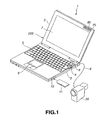
- FIG.1 shows a perspective view of a note-type personal computer 1 employing the present invention, and a digital video camera 35 which is connected to the note-type personal computer 1 via an IEEE 1394 cable 9 conforming to the IEEE 1394 format.
- the note-type personal computer 1 basically includes a main body 2, and a display unit 3 which can be folded to and unfolded from the main body 2.
- the note-type personal computer 1 shown in FIG.1 has the display unit 3 unfolded from the main body 2.
- the main body 2 has a jog dial 4, a keyboard 5 for inputting characters, symbols, numbers, etc., a touch pad 6 used as a pointing device for moving a mouse cursor displayed on a display screen etc., and a power switch 8, which are arranged on the top surface of the main body 2.
- a mouse not shown, is often used as a pointing device, which could be connected to the main body 2.
- the mouse similar to the touch pad 6, is adopted for operating a mouse cursor etc.
- a mouse wheel not shown, is often used as a pointing device, which could be connected to the main body 2.
- the display unit 3 has an LCD (Liquid Crystal Display) 7 for displaying pictures on the front surface thereof. Furthermore, the display unit 3 has a power lamp PL, a battery lamp BL, a message lamp ML if necessary, and other lamps, which are LEDs, on the right upward portion thereof.
- LCD Liquid Crystal Display
- the jog dial 4 is arranged on the right upward portion of the keyboard 5 such that the lateral portion thereof protrudes from the right side of the main body 2.
- the main body 2 is provided with a PC card slot, a memory card slot, etc. on the right side thereof.
- the memory card slot has a semiconductor memory such as a flush memory built therein, and has a memory card such as a memory stick (registered trade mark) which stores still picture data, moving picture data, speech data, text data, programs, etc. installed thereto.
- the note-type personal computer 1 has an IEEE 1394 terminal arranged on the rear side of the main body 2, and the digital video camera 35 is connected to the IEEE 1394 terminal via the IEEE 1394 cable 9.
- the note-type personal computer 1 can take in or receive video data from the digital video camera 35 as moving picture data and still picture data by executing application software for taking in video data of moving picture data and still picture data.
- the note-type personal computer 1 can take in video data which has been already shot, and can also take in that of camera-through directly.
- the note-type personal computer 1 can take in still picture data which is shot by a digital still camera or a digital video camera using a memory stick.
- the note-type personal computer 1 concentratively manages moving picture data and still picture data stored in various removable media or storages such as a hard disc, floppy disk, MO, PC card, and other card-shaped memories by executing application software for picture viewer & picture reformation processing.
- the note-type personal computer 1 concentratively manages moving picture data and still picture data stored in a storage of a picture server etc. which is connected via the network by executing application software for picture viewer & picture reformation processing.
- the note-type personal computer 1 reads out the application software for picture viewer & picture reformation processing from a program storage media such as a CD-ROM, HDD into a RAM, and causes the application software to be executed by a central processing unit (CPU).
- a program storage media such as a CD-ROM, HDD into a RAM
- CPU central processing unit
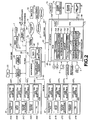
- a CPU 51 such as a Pentium (registered trade mark) processor manufactured by Intel Corporation is connected to a host bus 52.
- a north bridge 53 is connected to the host bus 52, and the north bridge 53 is connected also to a PCI bus 56.
- the north bridge 53 such as a 400BX manufactured by Intel Corporation controls the CPU 51 and the periphery of a main memory 54.
- the north bridge 53 is connected also to the main memory 54 and a cache memory 55.
- the cache memory 55 caches data to be used by the CPU 51.
- the CPU 51 also has a primary cache memory, not shown, built therein.
- the main memory 54 such as a DRAM (Dynamic Read Only Memory) stores programs to be executed by the CPU 51 and data necessary for operating the CPU 51. Specifically, when the initiation (boot up) of the main memory 54 is completed, an HDD 67 transfers an electronic mail program 54A, an auto pilot program 54B, a jog dial state monitoring program 54C, a jog dial driver 54D, an operating program (OS) 54E, other application programs 54F 1 ⁇ 54F n , etc. to the main memory 54, and the main memory 54 receives and stores these programs.
- the application program 54F 1 is the application software for picture viewer & picture reformation processing, hereinafter.
- the electronic mail program 54A is a program for sending and receiving communication messages from a communication line such as a telephone line 76 via a modem 75, to be described later, by means of the internet.
- the electronic mail program 54A has the function of delivered mail acquisition. Under the delivered mail acquisition function, the user inquires of a mail server 78 owned by an internet service provider 77 whether a mail box 79 has received mails directed to the user, and acquires mails in case there are such mails.
- the auto pilot program 54B sequentially initiates preset plural items of precessing (or plural programs) in a preset order, and executes the processing or programs.
- the OS (basic program software) 54E such as Windows 95 and 98 (both registered trade mark) manufactured by Microsoft Corporation, Mac OS (registered trade mark) manufactured by Apple Computer Inc. etc. controls basic operation of a computer.
- the jog dial state monitoring program 54C receives information of jog dial adaptability from the respective applications, and in case the application is jog-dial-adaptable, the jog dial state monitoring program 54C displays what can be performed on operating the jog dial 4. Normally, the jog dial state monitoring program 54C is in the state of waiting for the event of the jog dial 4, and has a list of information to be received from the applications.
- the jog dial driver 54D performs various functions corresponding to the operation of the jog dial 4.
- Picture Gear (registered trade mark) can be exemplified, specifically.
- the Picture Gear is software which can concentratively manages moving picture data and still picture data stored in various removable media such as a hard disc, floppy disk, MO, PC card, and other card-shaped memories. Respective pictures can be displayed in a list by a predetermined operation, which enables the user to visually find out a subject picture.
- picture reformation processing a panoramic picture of 360 degrees and a label having a photo can be formed.
- an HTML album whose pictures can be seen by means of a WWW browser can also be formed. The details will be described later.
- a video controller 57 is connected to the PCI bus 56, and controls the displaying operation of the LCD 7 arranged on the display unit 3 based on data supplied via the PCI bus 56.
- a sound controller 64 is connected to the PCI bus 56, which receives audio signals from a microphone 66 and send audio signals to a speaker 65.
- a modem 75 is also connected to the PCI bus 56. The modem 75 can be connected to a communication network such as the internet 80 and the mail server 78 via the telephone line 76 and internet service provider 77.
- the south bridge 58 is also connected to the PCI bus 56.
- the south bridge 58 such as a PIIX4E manufactured by Intel Corporation controls various I/O (Input/Output). That is, the south bridge 58 is composed of an IDE (Integrated Drive Electronics) controller/configuration register 59, a timer circuit 60, and an IDE interface 61, which controls devices connected to an IDE bus 62, devices connected to an ISA/EIO (Industry Standard Architecture/Extended Input Output) bus 63, and devices connected to an embedded controller 68.
- IDE Integrated Drive Electronics
- ISA/EIO Industry Standard Architecture/Extended Input Output
- the IDE controller/configuration register 59 is composed of two IDE controllers or a primary IDE controller and a secondary IDE controller, a configuration register, etc. not shown.
- the primary IDE controller is connected to a connecter, not shown, via the IDE bus 62, and the HDD 67 is connected to the connecter.
- the secondary IDE controller is connected to bay devices as IDE devices such as a CD-ROM drive, a second HDD, an FDD, not shown, via another IDE bus, etc. When such bay devices are connected to the secondary IDE controller, connecters of the bay devices are electrically connected to the secondary IDE controller.
- the HDD 67 stores an electronic mail program 67A, an auto pilot program 67B, a jog dial state monitoring program 67C, a jog dial driver 67D, an OS (basic program software) 67E, other application programs 67F 1 ⁇ 67F n , etc. in advance.
- the application program 67F 1 is the application software for picture viewer & picture reformation processing such as the Picture Gear.
- the HDD 67 is a specific example of a program storage medium according to the present invention.
- the respective programs 67A, 67B, 67C, 67D, 67E, 67F 1 ⁇ 67F n in the HDD 67 are sequentially transferred to the main memory 54 in the initiation (boot up) processing, and the programs are temporarily stored in the main memory 54 as the electronic mail program 54A, an auto pilot program 54B, a jog dial state monitoring program 54C, a jog dial driver 54D, an operating program (OS) 54E, other application programs 54F 1 ⁇ 54F n , etc.
- OS operating program
- the embedded controller 68 is also connected to the ISA/EIO bus 63.
- the embedded controller 68 is a micro controller, and is used as an I/O controller. That is, an I/O interface 69, a ROM 70, a RAM 71, a CPU 72 are mutually connected to each other to configure the embedded controller 68.
- An LED control program 70A, a touch pad input monitoring program 70B, a key input monitoring program 70C, a wake up program 70D, a jog dial state monitoring program 70E are stored in the ROM 70.
- the LED control program 70A is a program for controlling the lighting of the power lamp PL, battery lamp BL, message lamp ML if necessary, and other lamps, which are LEDs.
- the touch pad input monitoring program 70B is a program for monitoring input operation by the user from the touch pad 6.
- the key input monitoring program 70C is a program for monitoring input operation by the user from the keyboard 5 and other key switches.
- the wake up program 70D is a program for checking the current time data supplied from the timer circuit 60 in the south bridge 58 with the preset time, and managing respective chip power supplies so as to initiate predetermined processing (or programs) when the current time corresponds with the preset time.
- the jog dial state monitoring program 70E is a program for monitoring the state of the jog dial 4, and checks if the jog dial 4 is rotated or pressed.
- the ROM 70 stores a BIOS (Basic Input/Output System) 70F.
- BIOS is a basic input/output system, and is a software program for controlling data receiving/sending (input/output) among the OS, application software, peripheral devices (display, keyboard, HDD, etc.)
- a RAM 71 has registers 71A ⁇ 71F for LED controlling, touch pad input status, key input status, time setting up, jog dial state monitoring, etc.
- an LED controlling register 71A controls the lighting of the message lamp ML, to be described later, for indicating the instant rising state of an electronic mail after the jog dial 4 is pressed.
- a key input status register 71C stores an operation key flag when the jog dial 4 is pressed for one-touch operation, to be described later.
- a time setting up register 71D can set up the time arbitrarily.
- the jog dial 4, touch pad 6, keyboard 5 are connected to the embedded controller 68 via connecters, not shown.
- the embedded controller 68 sends signals corresponding to the respective operations of the jog dial 4, touch pad 6, keyboard 5 to the ISA/EIO bus 63.
- the power lamp PL, battery lamp BL, message lamp ML, and other lamps, which are LEDs, are connected to the embedded controller 68.
- a power supply controlling circuit 73 is connected to the embedded controller 68.
- the power supply controlling circuit 73 is connected to a built-in battery 74 or an AC power supply, which supplies necessary power to respective units, and controls charging of the built-in battery 74 and second batteries of peripheral devices.
- the embedded controller 68 monitors a power switch 8 which is operated when the power is turned on or off.
- an IEEE 1394 port 26 is connected to the embedded controller 68. So, the note-type personal computer 1 can receive video data from the digital video camera 35 via the IEEE 1394 cable 9 which is connected to the IEEE 1394 port 26.
- One example of the picture server 100 is a server for use in Image Station (trade mark) which was established as an image sharing service.
- the Image Station is a new network service using moving pictures and still pictures.
- the user can preserve moving pictures and still pictures in an album by having an access to the site of the Image Station to perform member registration, and uploading the moving picture data and still picture data of the user from his personal computer.
- the user can see thus preserved pictures, and can send the picture data from his personal computer.
- the user can make the album public, and can upload the picture data to an album which is owned jointly by users having the same hobby or taste.
- the network service can be used for communication among such users.
- the user when uploading picture data to the internet, the user is required to have the knowledge of processing concerning the Web site construction and the network construction.
- the Image Station employs the information processing apparatus and method according to the present invention, the user can upload picture data on desktop of his personal computer by relocating the picture into an icon for drag-and-drop in the site of the Image Station. Furthermore, downloading can be performed by simple processing.
- note-type personal computer 1 what is connected to the note-type personal computer 1 is not limited to the picture server 100, and an HDD of large capacity or another storage such as a recording medium can be connected to the note-type personal computer 1.
- the note-type personal computer 1 has the LCD 7 for displaying information stored in an internal storage provided therein, and an external storage or the external picture server 100 connected thereto, via the internet 80. And, operation for the information stored in the respective storages is performed by the user in the same procedure using operation units such as the keyboard 5, touch pad 6, with indication on the LCD 7 confirmed.
- the LCD 7 displays auxiliary information indicative of this notice.
- the LCD 7 displays the auxiliary information using a different folder name, or displays the auxiliary information on the background of a display area of the LCD 7.
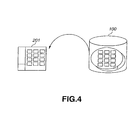
- a Picture Gear window 201 displayed on the LCD 7 of the note-type personal computer 1 displays information concerning the contents stored in the internal storage of the note-type personal computer 1, and other information concerning the contents sent from the picture server 100, as shown in FIG.4.
- the picture viewer & picture reformation processing system can display multimedia contents via the internet such as picture information in a simplified manner without troubling or burdening the user, similar to the operation for displaying picture information stored in the internal storage.
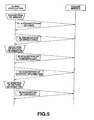
- FIG.5 the application software for picture viewer & picture reformation processing is shown as client application software, while the picture server 100 is shown as server module.
- the client application software includes connection step of making a communication connection to the picture server 100 connected to the note-type personal computer 1 via the internet 80, selection step of selecting picture information stored in the picture server 100, whose communication connection with the note-type personal computer 1 is secured by way of the connection step, by displaying the information on the LCD 7 and using the operation units, similar to the operation for displaying the picture information stored in the internal storage, and information acquisition step of acquiring picture information selected from the picture server 100 in the selection step.
- connection step is authentication processing of the user in step S1, which step is to be described later.
- selection step are processing for enumerating directories in step S2, processing for acquiring contents in step S3, and processing for acquiring minimum information in step S4, which steps are to be described later.
- information acquisition step is processing for acquiring contents in step S5.
- step S1 the note-type personal computer 1 performs authentication processing of the user by executing the client application software.
- the client application software is executed by the note-type personal computer 1.
- the authentication processing of the user is performed when the user sends account, password, etc.
- the server module sends a message that the server module has authenticated the user to the client application software.
- the client application software executed by the note-type personal computer 1 requires the server module to send a directory list, or list of directories, thereto so as to find a place (referred to as directory, hereinafter) where contents peculiar to the user or contents owned jointly by a specific group.
- the server module sends a directory list to the client application software.
- the client application software displays the directory list and enumerates directories to the user, and makes the user select a directory whose contents the user wants to confirm.
- the client application software concurrently displays a directory list concerning the contents stored in the internal storage on a presentation area 202 for presenting directories, to be described later.
- FIG.6 shows a specific example of directories, from which the user selects one directory, and confirms the contents thereof.
- the Picture Gear window 201 is composed of the presentation area 202 for presenting directories, a picture display area 203, and another picture display area 204, in which pictures are displayed with their sizes highly reduced.
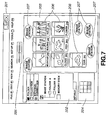
- the picture display area 203 displays many zoomed pictures of arbitrary size in the form of a list (sheet view displaying). When displaying all the pictures, picture display area 204 with high reduction degree can be used. Only one picture selected from the sheet-view-displayed pictures can be displayed on the picture display area 203.
- Sizes of pictures in the picture display area 203 and the picture display area 204 can be expanded/reduced by a slide operation unit 205 with a gage for zoom in/out operation.
- a picture, or pictures which are sheet-view-displayed in the form of a list can be zoomed in/out with high speed in the range, for example, from 12.5 % to 800 %.
- the internal folder is shown simply as “folder”, while the external folder is shown as “external connection”.
- contents in the internal "folder” are displayed on the picture display area 203.
- the user is required to select desired folder (folder A or folder B) from a detailed presentation area 202a for the external folders.
- the client application software When the folder B is selected, the client application software requires the server module to send a contents list, or list of contents, thereto, which exists in the directory of the folder B.
- the server module sends a contents list responding to the request, in step S3, the client application software can acquire the contents list.
- step S4 the client application software requires the server module to send part of all the respective contents acquired in the step S3 thereto so as to acquire minimum information of the contents.
- the server module sends part of the respective contents.
- the minimum information is thumbnails of pictures or one frame of moving pictures.
- FIG.7 shows thumbnail pictures 206 displayed on the picture display area 203 by the client application software.
- the user can grasp the contents before acquiring the contents, which enables the user to obtain the standard for judgement to select necessary data.
- This processing is performed actively by the application software without the user's operation.
- the picture display area 203 displays auxiliary information 207 indicative of the Image Station on the background of the thumbnail pictures 206. This intends to distinguish the displaying manner for pictures of the internal storage from that for pictures of the Image Station, which displaying manners are similar to each other.
- step S5 the application software requests the server module to send contents of the picture data thereto corresponding to the operation of the user. Then, the client application software acquires all the contents in case the contents are sent from the server module.
- This operation is similar to that for acquiring contents stored in the internal storage of the local computer. This operation means copying files, displaying pictures, etc.
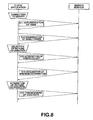
- step S11 there are performed authentication processing of the user in step S11, processing for enumerating directories in step S12, processing for acquiring contents in step S13, and processing for acquiring minimum information in step S14, which processing steps are similar to those of step S1 to step S4 shown in FIG.5.
- step S15 the client application software transfers contents stored in the local computer (note-type personal computer 1) of the user to the server module.
- This operation is similar to that for processing contents stored in the internal storage of the local computer. That is, specifically, pasting files, drag-and-drop operation, etc.
- the user opens local folders stored in the internal storage on the presentation area 202 of a directory in the Picture Gear window 201 shown in FIG.6, and displays contents pictures on the picture display area 203. Then, the user select desired picture from the contents pictures, and performs drag-and-drop operation for the selected picture to relocate the picture into a folder of the Image Station presented on the presentation area 202.
- the note-type personal computer 1 reads out the application software for picture viewer & picture reformation processing shown in FIG.5 and FIG.8 from a program storage media such as an HDD, and causes the application software to be executed by a CPU.
- a picture viewer & picture reformation processing apparatus is configured by using only hardware, the apparatus becomes complicated and enlarged in size. So, the configuration of the hardware of the note-type personal computer 1 can be simplified.
- the picture viewer & picture reformation processing system processes picture information such as moving pictures and still pictures.
- picture information such as moving pictures and still pictures.
- information music information and text information is possible.
- step S4 shown in FIG.5 when processing music information, in step S4 shown in FIG.5, title names and artist names of the music information may be displayed, or intro of a few seconds may be played.
- the information processing apparatus and method, and information processing program according to the present invention enable the user to confirm the contents on the internet easily without the need of performing complicated operations.
Landscapes
- Engineering & Computer Science (AREA)
- Human Computer Interaction (AREA)
- Signal Processing (AREA)
- Multimedia (AREA)
- Theoretical Computer Science (AREA)
- General Engineering & Computer Science (AREA)
- Physics & Mathematics (AREA)
- General Physics & Mathematics (AREA)
- Computing Systems (AREA)
- Data Mining & Analysis (AREA)
- Databases & Information Systems (AREA)
- Software Systems (AREA)
- Computer Networks & Wireless Communication (AREA)
- User Interface Of Digital Computer (AREA)
- Information Retrieval, Db Structures And Fs Structures Therefor (AREA)
- Information Transfer Between Computers (AREA)
Applications Claiming Priority (3)
| Application Number | Priority Date | Filing Date | Title |
|---|---|---|---|
| JP2000308298 | 2000-10-06 | ||
| JP2000308298A JP4902904B2 (ja) | 2000-10-06 | 2000-10-06 | 情報処理方法、並びにプログラムを格納している媒体 |
| PCT/JP2001/008820 WO2002032124A1 (en) | 2000-10-06 | 2001-10-05 | Information processing device and method, and information processing program |
Publications (1)
| Publication Number | Publication Date |
|---|---|
| EP1324603A1 true EP1324603A1 (en) | 2003-07-02 |
Family
ID=18788631
Family Applications (1)
| Application Number | Title | Priority Date | Filing Date |
|---|---|---|---|
| EP20010974726 Withdrawn EP1324603A1 (en) | 2000-10-06 | 2001-10-05 | Information processing device and method, and information processing program |
Country Status (5)
| Country | Link |
|---|---|
| US (3) | US7823084B2 (enExample) |
| EP (1) | EP1324603A1 (enExample) |
| JP (1) | JP4902904B2 (enExample) |
| KR (1) | KR100874569B1 (enExample) |
| WO (1) | WO2002032124A1 (enExample) |
Families Citing this family (11)
| Publication number | Priority date | Publication date | Assignee | Title |
|---|---|---|---|---|
| US7289132B1 (en) * | 2003-12-19 | 2007-10-30 | Apple Inc. | Method and apparatus for image acquisition, organization, manipulation, and publication |
| JP3654287B2 (ja) | 2002-12-26 | 2005-06-02 | 株式会社日立製作所 | 記録再生装置、記録再生方法 |
| JP2005267614A (ja) * | 2004-02-16 | 2005-09-29 | Canon Inc | 情報処理システム、サーバ装置、サーバ装置の制御方法、プログラム、及び記憶媒体 |
| US7689915B2 (en) * | 2004-07-29 | 2010-03-30 | Canon Kabushiki Kaisha | Image processing apparatus and image processing method using image attribute information and thumbnail displays for display control |
| US8024658B1 (en) | 2005-01-09 | 2011-09-20 | Apple Inc. | Application for designing photo albums |
| US7607582B2 (en) * | 2005-04-22 | 2009-10-27 | Microsoft Corporation | Aggregation and synchronization of nearby media |
| JP4495639B2 (ja) * | 2005-05-31 | 2010-07-07 | Hoya株式会社 | 画像記録装置 |
| WO2017069737A1 (en) * | 2015-10-20 | 2017-04-27 | Hewlett-Packard Development Company, L.P. | File system graphical user interface (gui) to install external devices |
| US10453271B2 (en) * | 2016-12-07 | 2019-10-22 | Microsoft Technology Licensing, Llc | Automated thumbnail object generation based on thumbnail anchor points |
| JP6508283B2 (ja) * | 2017-10-11 | 2019-05-08 | 株式会社リコー | システム、方法、機器及びプログラム |
| JP2021144532A (ja) * | 2020-03-12 | 2021-09-24 | 富士フイルムビジネスイノベーション株式会社 | 情報処理装置及びプログラム |
Family Cites Families (76)
| Publication number | Priority date | Publication date | Assignee | Title |
|---|---|---|---|---|
| CA2017969C (en) * | 1989-08-07 | 1999-04-20 | Richard Alan Becker | Dynamic graphics arrangement for displaying spatial-time-series data |
| JP3283049B2 (ja) | 1991-10-18 | 2002-05-20 | 富士写真フイルム株式会社 | 画像データ伝送システム,送信装置および受信装置ならびにそれらの動作方法 |
| JP2948974B2 (ja) | 1992-02-04 | 1999-09-13 | 富士写真フイルム株式会社 | 撮像システム,電子カメラおよび電子カメラを制御するコンピュータ・システム,ならびにそれらの制御方法 |
| US5471619A (en) * | 1992-09-25 | 1995-11-28 | International Business Machines Corporation | Method and system for controlling access to objects in a data processing system |
| US5634128A (en) * | 1993-09-24 | 1997-05-27 | International Business Machines Corporation | Method and system for controlling access to objects in a data processing system |
| JPH0793369A (ja) | 1993-09-24 | 1995-04-07 | Shisutegureitaazu Kk | 画像データの通信システム |
| JP3628729B2 (ja) * | 1993-09-28 | 2005-03-16 | エヌシーアール インターナショナル インコーポレイテッド | コンピュータディスプレー上におけるビデオ像の表示方法及び多重ウィンドウの表示方法 |
| JPH07306933A (ja) | 1994-03-17 | 1995-11-21 | Shisutegureitaazu Kk | 通信機能を持つ画像データのファイリングシステム |
| US5724532A (en) * | 1994-10-27 | 1998-03-03 | Bay Networks, Inc. | Method and apparatus for exchanging information between application programs according to a drag and drop operation |
| US5838319A (en) * | 1994-12-13 | 1998-11-17 | Microsoft Corporation | System provided child window control for displaying items in a hierarchical fashion |
| EP0717346B1 (en) * | 1994-12-16 | 2001-10-24 | Canon Kabushiki Kaisha | Hierarchical data display method and information processing system for realizing it |
| JP3517301B2 (ja) * | 1995-03-28 | 2004-04-12 | 富士通株式会社 | 仮想画面表示処理システム |
| JPH08279982A (ja) * | 1995-04-08 | 1996-10-22 | Sony Corp | 映像情報処理装置 |
| US5929852A (en) * | 1995-05-05 | 1999-07-27 | Apple Computer, Inc. | Encapsulated network entity reference of a network component system |
| US5838317A (en) * | 1995-06-30 | 1998-11-17 | Microsoft Corporation | Method and apparatus for arranging displayed graphical representations on a computer interface |
| US6067086A (en) * | 1995-08-08 | 2000-05-23 | Walsh; Aaron E. | Uniform mnemonic associations of computer resources to graphical images |
| US6246410B1 (en) * | 1996-01-19 | 2001-06-12 | International Business Machines Corp. | Method and system for database access |
| US5864868A (en) * | 1996-02-13 | 1999-01-26 | Contois; David C. | Computer control system and user interface for media playing devices |
| US5838910A (en) * | 1996-03-14 | 1998-11-17 | Domenikos; Steven D. | Systems and methods for executing application programs from a memory device linked to a server at an internet site |
| JPH09312791A (ja) | 1996-05-21 | 1997-12-02 | Hitachi Ltd | 電子カメラおよび電子カメラシステム |
| US6038610A (en) * | 1996-07-17 | 2000-03-14 | Microsoft Corporation | Storage of sitemaps at server sites for holding information regarding content |
| US20030033402A1 (en) * | 1996-07-18 | 2003-02-13 | Reuven Battat | Method and apparatus for intuitively administering networked computer systems |
| US6268851B1 (en) * | 1996-09-30 | 2001-07-31 | Trellix Corporation | Hypermedia authoring and publishing system |
| US6144962A (en) * | 1996-10-15 | 2000-11-07 | Mercury Interactive Corporation | Visualization of web sites and hierarchical data structures |
| US6148377A (en) * | 1996-11-22 | 2000-11-14 | Mangosoft Corporation | Shared memory computer networks |
| US5875446A (en) * | 1997-02-24 | 1999-02-23 | International Business Machines Corporation | System and method for hierarchically grouping and ranking a set of objects in a query context based on one or more relationships |
| JPH10290419A (ja) * | 1997-04-12 | 1998-10-27 | Sony Corp | 編集装置 |
| US6407752B1 (en) * | 1997-04-29 | 2002-06-18 | International Business Machines Corporation | Method and system for a user interface for remote FTP hosts |
| US6226672B1 (en) * | 1997-05-02 | 2001-05-01 | Sony Corporation | Method and system for allowing users to access and/or share media libraries, including multimedia collections of audio and video information via a wide area network |
| US6230185B1 (en) * | 1997-07-15 | 2001-05-08 | Eroom Technology, Inc. | Method and apparatus for facilitating communication between collaborators in a networked environment |
| US6335742B1 (en) * | 1997-07-24 | 2002-01-01 | Ricoh Company, Ltd. | Apparatus for file management and manipulation using graphical displays and textual descriptions |
| US6138150A (en) * | 1997-09-03 | 2000-10-24 | International Business Machines Corporation | Method for remotely controlling computer resources via the internet with a web browser |
| US6526424B2 (en) * | 1997-09-29 | 2003-02-25 | Fujitsu Limited | Browser image display bookmark system |
| US6237010B1 (en) * | 1997-10-06 | 2001-05-22 | Canon Kabushiki Kaisha | Multimedia application using flashpix file format |
| US5898436A (en) * | 1997-12-05 | 1999-04-27 | Hewlett-Packard Company | Graphical user interface for digital image editing |
| JP3173454B2 (ja) | 1998-03-13 | 2001-06-04 | 日本電気株式会社 | デジタルカメラ、デジタルカメラのアプリケーション及びその記録媒体 |
| US6160554A (en) * | 1998-03-19 | 2000-12-12 | Hewlett Packard Company | Computer file content preview window |
| US6784925B1 (en) * | 1998-03-24 | 2004-08-31 | Canon Kabushiki Kaisha | System to manage digital camera images |
| JP3994359B2 (ja) * | 1998-04-05 | 2007-10-17 | ソニー株式会社 | 編集リスト作成装置 |
| US7107516B1 (en) * | 1998-04-13 | 2006-09-12 | Flashpoint Technology, Inc. | Method and system for viewing images from an image capture device on a host computer |
| US6205432B1 (en) * | 1998-06-05 | 2001-03-20 | Creative Internet Concepts, Llc | Background advertising system |
| AU4549099A (en) * | 1998-06-05 | 1999-12-20 | Creative Internet Concepts Llc | System for inserting background advertising into web page presentation or e-mailmessages |
| US6298446B1 (en) * | 1998-06-14 | 2001-10-02 | Alchemedia Ltd. | Method and system for copyright protection of digital images transmitted over networks |
| JP4624504B2 (ja) | 1998-09-04 | 2011-02-02 | オリンパス株式会社 | ディジタル画像編集装置 |
| US6369811B1 (en) * | 1998-09-09 | 2002-04-09 | Ricoh Company Limited | Automatic adaptive document help for paper documents |
| JP2000227832A (ja) | 1998-12-04 | 2000-08-15 | Sony Corp | 情報処理装置及び方法、並びに媒体 |
| US6380957B1 (en) * | 1998-12-15 | 2002-04-30 | International Business Machines Corporation | Method of controlling view of large expansion tree |
| US6381029B1 (en) * | 1998-12-23 | 2002-04-30 | Etrauma, Llc | Systems and methods for remote viewing of patient images |
| US6751604B2 (en) * | 1999-01-06 | 2004-06-15 | Hewlett-Packard Development Company, L.P. | Method of displaying temporal and storage media relationships of file names protected on removable storage media |
| JP3582393B2 (ja) * | 1999-02-09 | 2004-10-27 | セイコーエプソン株式会社 | デバイス制御装置、ユーザインターフェイス表示方法およびユーザインターフェイスを表示させるためのコンピュータプログラムを記録した記録媒体 |
| US7228492B1 (en) * | 1999-07-06 | 2007-06-05 | Ricoh Company, Ltd. | 2D graph displaying document locations of user-specified concept of interest |
| US6448985B1 (en) * | 1999-08-05 | 2002-09-10 | International Business Machines Corporation | Directory tree user interface having scrollable subsections |
| US20020044157A1 (en) * | 1999-10-13 | 2002-04-18 | Wolf Edward O. | Producing icons for accessing image files transferred from a digital camera |
| JP2001188738A (ja) * | 1999-10-21 | 2001-07-10 | Vision Arts Kk | 情報提供システム及び情報提供方法、識別情報付加装置及び識別情報付加プログラムを記録したコンピュータ読み取り可能な記録媒体、情報提供サーバ装置及び情報提供プログラムを記録したコンピュータ読み取り可能な記録媒体、情報利用端末及び情報利用プログラムを記録したコンピュータ読み取り可能な記録媒体、課金装置 |
| US6583799B1 (en) * | 1999-11-24 | 2003-06-24 | Shutterfly, Inc. | Image uploading |
| US7243079B1 (en) * | 1999-11-24 | 2007-07-10 | Shutterfly, Inc. | User interface and methods for online print service |
| US6735623B1 (en) * | 2000-02-09 | 2004-05-11 | Mitch Prust | Method and system for accessing a remote storage area |
| GB2365676B (en) * | 2000-02-18 | 2004-06-23 | Sensei Ltd | Mobile telephone with improved man-machine interface |
| US6883140B1 (en) * | 2000-02-24 | 2005-04-19 | Microsoft Corporation | System and method for editing digitally represented still images |
| US6570593B1 (en) * | 2000-02-24 | 2003-05-27 | International Business Machines Corporation | Management graphical user interface for a network file system |
| US6248946B1 (en) * | 2000-03-01 | 2001-06-19 | Ijockey, Inc. | Multimedia content delivery system and method |
| KR100698106B1 (ko) * | 2000-03-07 | 2007-03-26 | 엘지전자 주식회사 | 엠펙(mpeg)압축 비디오 환경에서 계층적 혼합형장면 변화 검출 방법 |
| JP2001357010A (ja) * | 2000-04-10 | 2001-12-26 | Mitsubishi Corp | インターネット上のWebサーバにおいてファイルを受託管理する方法およびこの方法に用いるファイル受託管理装置 |
| US6636250B1 (en) * | 2000-04-12 | 2003-10-21 | Emc Corp | Methods and apparatus for presenting information to a user of a computer system |
| AU2001263341A1 (en) * | 2000-05-22 | 2001-12-03 | Sap Portals Inc. | Snippet selection |
| US8117281B2 (en) * | 2006-11-02 | 2012-02-14 | Addnclick, Inc. | Using internet content as a means to establish live social networks by linking internet users to each other who are simultaneously engaged in the same and/or similar content |
| US7437363B2 (en) * | 2001-01-25 | 2008-10-14 | International Business Machines Corporation | Use of special directories for encoding semantic information in a file system |
| US6876759B2 (en) * | 2001-02-01 | 2005-04-05 | Fuji Photo Film Co., Ltd. | Image transmitting system, image transmitting method and storage medium |
| US7519910B2 (en) * | 2002-10-10 | 2009-04-14 | International Business Machines Corporation | Method for transferring files from one machine to another using adjacent desktop displays in a virtual network |
| US6732623B1 (en) * | 2002-11-15 | 2004-05-11 | Garman C. Jennings | Safety push tool for table mounted cutting tool having an adjustable heel |
| US7409644B2 (en) * | 2003-05-16 | 2008-08-05 | Microsoft Corporation | File system shell |
| US7499925B2 (en) * | 2003-03-27 | 2009-03-03 | Microsoft Corporation | File system for displaying items of different types and from different physical locations |
| JP4426853B2 (ja) * | 2004-01-19 | 2010-03-03 | オリンパス株式会社 | 情報表示プログラム、情報表示方法、情報表示装置及び記録媒体 |
| US7565623B2 (en) * | 2004-04-30 | 2009-07-21 | Microsoft Corporation | System and method for selecting a view mode and setting |
| US8276098B2 (en) * | 2006-12-22 | 2012-09-25 | Apple Inc. | Interactive image thumbnails |
| US20130097566A1 (en) * | 2011-10-17 | 2013-04-18 | Carl Fredrik Alexander BERGLUND | System and method for displaying items on electronic devices |
-
2000
- 2000-10-06 JP JP2000308298A patent/JP4902904B2/ja not_active Expired - Lifetime
-
2001
- 2001-10-05 EP EP20010974726 patent/EP1324603A1/en not_active Withdrawn
- 2001-10-05 WO PCT/JP2001/008820 patent/WO2002032124A1/ja not_active Ceased
- 2001-10-05 KR KR20027007164A patent/KR100874569B1/ko not_active Expired - Lifetime
- 2001-10-05 US US10/148,827 patent/US7823084B2/en not_active Expired - Fee Related
-
2010
- 2010-08-30 US US12/871,579 patent/US9131088B2/en not_active Expired - Fee Related
-
2015
- 2015-07-24 US US14/808,733 patent/US10817471B2/en not_active Expired - Fee Related
Non-Patent Citations (1)
| Title |
|---|
| See references of WO0232124A1 * |
Also Published As
| Publication number | Publication date |
|---|---|
| US20030078994A1 (en) | 2003-04-24 |
| KR20020059841A (ko) | 2002-07-13 |
| JP2002118806A (ja) | 2002-04-19 |
| US9131088B2 (en) | 2015-09-08 |
| US10817471B2 (en) | 2020-10-27 |
| WO2002032124A1 (en) | 2002-04-18 |
| JP4902904B2 (ja) | 2012-03-21 |
| KR100874569B1 (ko) | 2008-12-16 |
| US20100325585A1 (en) | 2010-12-23 |
| US20150331883A1 (en) | 2015-11-19 |
| US7823084B2 (en) | 2010-10-26 |
Similar Documents
| Publication | Publication Date | Title |
|---|---|---|
| US9131088B2 (en) | Information processing apparatus and method, and information processing program | |
| JP4433236B2 (ja) | 情報処理装置および情報処理方法、並びにプログラム記録媒体 | |
| JP2003123086A (ja) | 情報処理装置及び方法、並びに情報処理プログラム | |
| US8949723B2 (en) | File transfer method, file transfer apparatus, and file transfer program | |
| US7791559B2 (en) | System and method for multiple display support in remote access software | |
| KR101190426B1 (ko) | 동기화 방법 및 시스템 | |
| EP2299349B1 (en) | Data transfer method and system | |
| EP1280049A2 (en) | Printing portable-selected information | |
| JP2002082887A (ja) | メールサーバ、メール処理方法、およびメール処理プログラム格納媒体 | |
| CN106294843A (zh) | 一种文件查看方法、电子设备及文件查看装置 | |
| US20060026351A1 (en) | Apparatus and method for processing information, and program and medium used thereof | |
| US7480722B2 (en) | Information processing apparatus and method, recording medium product, and program | |
| JP2003123087A (ja) | 情報処理装置及び方法、並びに情報処理プログラム | |
| JPH11282694A (ja) | 情報処理装置およびその制御方法 | |
| JP5472262B2 (ja) | 情報処理装置及び情報処理方法 | |
| JP4415471B2 (ja) | 画像情報処理装置及び方法、並びに記録媒体 | |
| US10325571B2 (en) | Data communication method via touch surface | |
| JP2001075704A (ja) | 情報処理装置及び方法、媒体 | |
| EP1635570A2 (en) | Digital media receiver having a reader | |
| KR200255869Y1 (ko) | 전자 액자 | |
| JP2003123084A (ja) | 画像処理装置、画像処理方法及び画像処理プログラム | |
| US9633089B1 (en) | Aggregated search | |
| CN102081616A (zh) | 文件下载方法及应用该方法的电子装置 | |
| JP2002318774A (ja) | 通信端末装置、およびプログラムと媒体 | |
| JP2001076162A (ja) | 情報処理装置及び方法、媒体 |
Legal Events
| Date | Code | Title | Description |
|---|---|---|---|
| PUAI | Public reference made under article 153(3) epc to a published international application that has entered the european phase |
Free format text: ORIGINAL CODE: 0009012 |
|
| 17P | Request for examination filed |
Effective date: 20020603 |
|
| AK | Designated contracting states |
Designated state(s): AT BE CH CY DE DK ES FI FR GB GR IE IT LI LU MC NL PT SE TR |
|
| AX | Request for extension of the european patent |
Extension state: AL LT LV MK RO SI |
|
| STAA | Information on the status of an ep patent application or granted ep patent |
Free format text: STATUS: THE APPLICATION HAS BEEN WITHDRAWN |
|
| 18W | Application withdrawn |
Effective date: 20040126 |
|
| RBV | Designated contracting states (corrected) |
Designated state(s): AT BE CH DE FR GB LI |