EP1107098A1 - Vorrichtung zur Kommunikation mit einem Computer - Google Patents
Vorrichtung zur Kommunikation mit einem Computer Download PDFInfo
- Publication number
- EP1107098A1 EP1107098A1 EP00122946A EP00122946A EP1107098A1 EP 1107098 A1 EP1107098 A1 EP 1107098A1 EP 00122946 A EP00122946 A EP 00122946A EP 00122946 A EP00122946 A EP 00122946A EP 1107098 A1 EP1107098 A1 EP 1107098A1
- Authority
- EP
- European Patent Office
- Prior art keywords
- computer
- keyboard
- screen
- housing
- computer keyboard
- Prior art date
- Legal status (The legal status is an assumption and is not a legal conclusion. Google has not performed a legal analysis and makes no representation as to the accuracy of the status listed.)
- Granted
Links
Images
Classifications
-
- G—PHYSICS
- G06—COMPUTING OR CALCULATING; COUNTING
- G06F—ELECTRIC DIGITAL DATA PROCESSING
- G06F3/00—Input arrangements for transferring data to be processed into a form capable of being handled by the computer; Output arrangements for transferring data from processing unit to output unit, e.g. interface arrangements
- G06F3/01—Input arrangements or combined input and output arrangements for interaction between user and computer
- G06F3/02—Input arrangements using manually operated switches, e.g. using keyboards or dials
- G06F3/0202—Constructional details or processes of manufacture of the input device
- G06F3/021—Arrangements integrating additional peripherals in a keyboard, e.g. card or barcode reader, optical scanner
Definitions
- the invention relates to a device for communication with a computer according to the Preamble of claim 1.
- Known devices of this type are classic computer keyboards, as a rule Alphanumeric keyboards with additional function keys that are connected to a cable Desktop or notebook personal computers can be connected.
- keyboards are simple LCD display devices, for example to display the current clock frequency of the computer or others with have only a few digits of information that can be displayed.
- Computer screens are known, which are usually equipped with cathode ray tubes, Plasma discharge devices or liquid crystal displays work. This too Computer screens can be connected to desktop or notebook computers.
- Screens are also known which are permanently installed in the vehicle, namely especially from navigation applications.
- these fixed installations have the disadvantage high special development costs, since the vehicle types differ greatly differentiate and have a different installation kit available for each installation situation got to.
- the screen is then firmly connected to the vehicle and, For example, when changing vehicles, only with considerable effort from this solvable. It is not possible to simply take it into another vehicle.
- the spatial separation between the screen and control unit (keyboard) the disadvantage that the User has to overcome a large distance between both devices to its Check input on the display. It is therefore impossible to work quickly.
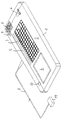
- the device has an essentially cuboid, flat housing 1 of approximately 30 °. 50 cm long and about 10 - 20 cm high and is about 1 - 4 cm thick.
- an alphanumeric computer keyboard 3 of itself known type, preferably a computer keyboard 3 with stroke keys, as of Notebook or desktop computer is known.
- the stroke keys can, for example compared to membrane keyboards, much easier to use and enable more reliable text input than other flat keyboards.
- the housing 1 itself consists of a soft material, for example foam, Rubber, plastic or an integral foam.
- a flat screen 4 is located inside the housing 1 to the left of the computer keyboard 2 arranged that it is visible from the top 2 of the housing 1.
- the flat screen 4 is fully integrated in the housing 1.
- the flat screen 4 is like a conventional computer monitor, designed so that it from the screen driver or the graphics card of a computer can be controlled.
- it has a VGA resolution of 800 x 600 points and is therefore not only capable of texts, but also Display graphics, images and photographs.
- Illumination device 5 for illuminating the computer keyboard 3.
- the Computer keyboard 3 designed to be luminous.
- the housing 1 can contain further elements for communication with the computer, which are preferably on the top 2 of the Housing 1 are arranged.
- one is a trackball trained pointing device 6 provided right below the computer keyboard 3 while a microphone 9 and a loudspeaker 8 are located on the right above the computer keyboard 3.
- An on / off switch 10 for the computer is arranged on the left above the screen 4.
- the device 1 has a connection cable 7, via which it can be connected to a notebook, Laptop or desktop computer is connectable.
- the connecting cable 7 is fixed on the one hand connected to the device 1 and on the other hand has a plug 11 which, for example can be connected to a docking station, which in turn connects to the screen, keyboard, Pointing device and speaker outputs of a computer can be connected.
- a docking station which in turn connects to the screen, keyboard, Pointing device and speaker outputs of a computer can be connected.
- this Docking station or a comparable facility will be the different ones inputs and outputs located on a computer, so that the device 1 only communicates with the computer via a single connecting cable 7.
- the device is particularly preferably used in motor vehicles in which a Personal computer, for example a notebook computer, is built in permanently or releasably.
- the Computers can, for example, in the trunk or on the back seats of a motor vehicle be mounted while the device 1 itself is operated on the lap of the passenger.
- the arrangement would be precise in countries with left-hand traffic vice versa, ie to arrange the screen 4 to the right of the computer keyboard 3.
- the device according to the invention can be used to communicate completely with a computer become, d. H. the computer can be switched on and off via the on / off switch 10, data and texts can be entered via the computer keyboard 3, as well as via the Microphone 9 and the pointing device 6 and data, text, photos, images and Graphics on the screen 4 are displayed as on a screen conventional computer.
- the device Since the device is considerably lighter than a notebook computer, it is more practical to use Operation and can also be passed from the front seat to the rear seat, for example or facing the driver so that he can read the screen 4. Since the Device is also made of a soft material, consist of a Accident significantly lower risk of injury than when working with conventional ones Notebook computers on the lap of the passenger.
- the device Compared to permanently installed screens, the device also has the advantage that Screen 4 and computer keyboard 3 are right next to each other, which is an instant visual control of the inputs and thus enables quick work. Besides, can the device, together with the notebook computer to which it is connected, can be quickly ported to other vehicles.
- communication takes place with the Computer not via the connecting cable 7, but via radio or infrared radiation.
- the device is completely separate from the computer or the vehicle and can be used without Disability by the connecting cable 7 moved and stored.
Landscapes
- Engineering & Computer Science (AREA)
- General Engineering & Computer Science (AREA)
- Theoretical Computer Science (AREA)
- Human Computer Interaction (AREA)
- Physics & Mathematics (AREA)
- General Physics & Mathematics (AREA)
- Fittings On The Vehicle Exterior For Carrying Loads, And Devices For Holding Or Mounting Articles (AREA)
- Eye Examination Apparatus (AREA)
- Debugging And Monitoring (AREA)
- Small-Scale Networks (AREA)
- Input From Keyboards Or The Like (AREA)
Abstract
Description
Claims (17)
- Vorrichtung zur Kommunikation mit einem Computer, mit einem flachen Gehäuse (1), welches an seiner Oberseite (2) eine alphanumerische Computertastatur (3) aufweist, dadurch gekennzeichnet, daß innerhalb des Gehäuses (1) und an dessen Oberseite (2) seitlich der Computertastatur (3) ein Bildschirm (4) angeordnet ist, der von dem Bildschirmtreiber des Computers ansteuerbar ist.
- Vorrichtung nach Anspruch 1, dadurch gekennzeichnet, daß das Gehäuse (1) aus einem weichen, nachgiebigen Material besteht.
- Vorrichtung nach einem der voranstehenden Ansprüche, dadurch gekennzeichnet, daß der Bildschirm (4) ein Flüssigkristall-Flachbildschirm ist.
- Vorrichtung nach einem der voranstehenden Ansprüche, dadurch gekennzeichnet, daß die Computertastatur (3) beleuchtet ist.
- Vorrichtung nach Anspruch 4, dadurch gekennzeichnet, daß die Computertastatur (3) selbstleuchtend ausgebildet ist.
- Vorrichtung nach Anspruch 4, dadurch gekennzeichnet, daß an der Oberseite (2) des Gehäuses (1) eine Beleuchtungsvorrichtung (5) zur Beleuchtung der Computertastatur (3) angeordnet ist.
- Vorrichtung nach einem der voranstehenden Ansprüche, dadurch gekennzeichnet, daß an der Oberseite (2) des Gehäuses (1) zusätzlich eine Zeigevorrichtung (6) angeordnet ist.
- Vorrichtung nach Anspruch 7, dadurch gekennzeichnet, daß die Zeigevorrichtung (6) ein beweglicher Stab und/oder ein Mousepad und/oder ein Trackball ist.
- Vorrichtung nach einem der voranstehenden Ansprüche, dadurch gekennzeichnet, daß sie ein Anschlußkabel (7) zur Verbindung mit dem Computer aufweist.
- Vorrichtung nach Anspruch 9, dadurch gekennzeichnet, daß das Anschlußkabel (7) zu einer Dockingstation führt, welche ihrerseits sowohl mit dem Bildschirmausgang als auch mit dem Tastaturausgang des Computers verbindbar ist.
- Vorrichtung nach einem der Ansprüche 1 bis 8, dadurch gekennzeichnet, daß sie drahtlos, beispielsweise über Funk oder Infrarot mit dem Computer kommuniziert.
- Vorrichtung nach einem der voranstehenden Ansprüche, dadurch gekennzeichnet, daß der Bildschirm (4) von der Seite des Benutzers aus gesehen links neben der Tastatur (3) angeordnet ist.
- Vorrichtung nach einem der Ansprüche 1 bis 11, dadurch gekennzeichnet, daß der Bildschirm (4) von der Seite des Benutzers aus gesehen rechts neben der Tastatur (3) angeordnet ist.
- Vorrichtung nach einem der voranstehenden Ansprüche zur Kommunikation mit einem in einem Kraftfahrzeug eingebauten Notebook-Personalcomputer.
- Vorrichtung nach einem der voranstehenden Ansprüche, dadurch gekennzeichnet, daß sie zusätzlich einen Lautsprecher (8) und/oder ein Mikrofon (9) aufweist.
- Vorrichtung nach einem der voranstehenden Ansprüche, dadurch gekennzeichnet, daß sie zusätzlich einen Ein/Aus-Schalter (10) für den Computer aufweist.
- Vorrichtung nach einem der voranstehenden Ansprüche, dadurch gekennzeichnet, daß die Computertastatur (3) eine Hubtastatur ist.
Applications Claiming Priority (2)
| Application Number | Priority Date | Filing Date | Title |
|---|---|---|---|
| DE29921604U DE29921604U1 (de) | 1999-12-08 | 1999-12-08 | Vorrichtung zur Kommunikation mit einem Computer |
| DE29921604U | 1999-12-08 |
Publications (2)
| Publication Number | Publication Date |
|---|---|
| EP1107098A1 true EP1107098A1 (de) | 2001-06-13 |
| EP1107098B1 EP1107098B1 (de) | 2003-11-26 |
Family
ID=8082692
Family Applications (1)
| Application Number | Title | Priority Date | Filing Date |
|---|---|---|---|
| EP00122946A Expired - Lifetime EP1107098B1 (de) | 1999-12-08 | 2000-10-21 | Vorrichtung zur Kommunikation mit einem Computer |
Country Status (4)
| Country | Link |
|---|---|
| EP (1) | EP1107098B1 (de) |
| AT (1) | ATE255244T1 (de) |
| DE (2) | DE29921604U1 (de) |
| ES (1) | ES2209750T3 (de) |
Families Citing this family (2)
| Publication number | Priority date | Publication date | Assignee | Title |
|---|---|---|---|---|
| GR1003546B (el) * | 2000-06-15 | 2001-03-12 | Χρηστος Μοριδης | Πληκτρολογιο για υπολογιστες |
| GB0027957D0 (en) * | 2000-11-16 | 2001-01-03 | Hudson David | Keyboard display |
Citations (6)
| Publication number | Priority date | Publication date | Assignee | Title |
|---|---|---|---|---|
| EP0387011A2 (de) * | 1989-03-06 | 1990-09-12 | Agilis Corporation | Modularer Rechner und Interface-System |
| DE9417240U1 (de) * | 1994-10-27 | 1995-01-05 | Rauh Herbert | Multimedia Computer Tastatur |
| WO1997004437A1 (en) * | 1995-07-17 | 1997-02-06 | Mark Randall Decker | Electronic luminescence keyboard system for a portable device |
| DE29711813U1 (de) * | 1997-06-17 | 1997-08-28 | Bohse Horst | Beleuchtete Tastatur für einen Computer |
| WO1999021077A1 (en) * | 1997-10-17 | 1999-04-29 | Gateway 2000, Inc. | Modular computer device and computer keyboard for modular device |
| DE19924618A1 (de) * | 1999-05-28 | 2000-11-30 | Volkswagen Ag | Anordnung eines Bildschirmes in einem Fahrzeug |
-
1999
- 1999-12-08 DE DE29921604U patent/DE29921604U1/de not_active Expired - Lifetime
-
2000
- 2000-10-21 ES ES00122946T patent/ES2209750T3/es not_active Expired - Lifetime
- 2000-10-21 DE DE50004556T patent/DE50004556D1/de not_active Expired - Lifetime
- 2000-10-21 EP EP00122946A patent/EP1107098B1/de not_active Expired - Lifetime
- 2000-10-21 AT AT00122946T patent/ATE255244T1/de active
Patent Citations (6)
| Publication number | Priority date | Publication date | Assignee | Title |
|---|---|---|---|---|
| EP0387011A2 (de) * | 1989-03-06 | 1990-09-12 | Agilis Corporation | Modularer Rechner und Interface-System |
| DE9417240U1 (de) * | 1994-10-27 | 1995-01-05 | Rauh Herbert | Multimedia Computer Tastatur |
| WO1997004437A1 (en) * | 1995-07-17 | 1997-02-06 | Mark Randall Decker | Electronic luminescence keyboard system for a portable device |
| DE29711813U1 (de) * | 1997-06-17 | 1997-08-28 | Bohse Horst | Beleuchtete Tastatur für einen Computer |
| WO1999021077A1 (en) * | 1997-10-17 | 1999-04-29 | Gateway 2000, Inc. | Modular computer device and computer keyboard for modular device |
| DE19924618A1 (de) * | 1999-05-28 | 2000-11-30 | Volkswagen Ag | Anordnung eines Bildschirmes in einem Fahrzeug |
Also Published As
| Publication number | Publication date |
|---|---|
| DE29921604U1 (de) | 2000-03-02 |
| ATE255244T1 (de) | 2003-12-15 |
| ES2209750T3 (es) | 2004-07-01 |
| DE50004556D1 (de) | 2004-01-08 |
| EP1107098B1 (de) | 2003-11-26 |
Similar Documents
| Publication | Publication Date | Title |
|---|---|---|
| DE102007029602B4 (de) | Verfahren und Vorrichtung zum Bedienen einer in einem Fahrzeug befindlichen Einheit | |
| EP3113969B1 (de) | Anwenderschnittstelle und verfahren zur signalisierung einer 3d-position eines eingabemittels bei der gestenerfassung | |
| DE102012214017A1 (de) | System zum verhindern des lösens eines blickes zur verwendungwährend des fahrens eines fahrzeugs | |
| DE102013014210A1 (de) | Kraftfahrzeug mit multifunktionalem Anzeigeinstrument | |
| DE102015210130A1 (de) | Fortbewegungsmittel, Anwenderschnittstelle und Verfahren zur Unterstützung eines Anwenders bei Interaktion mit einer Anwenderschnittstelle | |
| DE102017122396A1 (de) | Fahrzeugseitige Betätigungsvorrichtung | |
| DE60106175T2 (de) | Vorrichtung und Verfahren zur Anzeige von Informationen in einem Fahrzeug | |
| DE60219835T2 (de) | Informationsanzeigesystem | |
| DE102016219382A1 (de) | Anzeigevorrichtung | |
| DE10318713A1 (de) | Verfahren und Vorrichtung zur Bedienung von elektronischen Funktionen, insbesondere in einem Lenkrad eines Fahrzeuges | |
| DE102017214737A1 (de) | Anzeigevorrichtung für ein Kraftfahrzeug sowie Verfahren zum Betreiben einer Anzeigevorrichtung in einem Kraftfahrzeug | |
| EP1107098B1 (de) | Vorrichtung zur Kommunikation mit einem Computer | |
| DE102011018802A1 (de) | Flurförderzeug mit Anzeigevorrichtung | |
| DE102022109380B4 (de) | Entfaltbare, aufrollbare Anzeige für ein Fahrzeug | |
| WO2023099077A1 (de) | Fortbewegungsmittel mit einem faltbaren oder rollbaren display | |
| DE102020106832B4 (de) | Anzeigevorrichtung und Kraftfahrzeug mit einer Anzeigevorrichtung | |
| DE102015007247A1 (de) | Kraftfahrzeug mit einer Haltevorrichtung für ein mobiles Endgerät | |
| DE102019208235B4 (de) | Verfahren zur Bedienung einer HMD-Anzeigeeinheit für ein Fahrzeug, HMD-Anzeigeeinheit, Multifunktionslenkrad sowie Fahrzeug zur Verwendung bei dem Verfahren | |
| DE102019215877A1 (de) | Kraftfahrzeug | |
| DE102018218328B3 (de) | Anzeigevorrichtung für ein Kraftfahrzeug sowie Kraftfahrzeug mit einer derartigen Anzeigevorrichtung | |
| DE112012006522T5 (de) | Anzeigevorrichtung | |
| DE102015213592A1 (de) | Führerstand für Fahrzeuge und Armaturenbrett | |
| WO2017055038A1 (de) | Schienenfahrzeug mit einem führerraum und einer anzeigeeinheit | |
| DE102009041306B4 (de) | Verfahren in einem Kraftfahrzeug zum Betreiben einer Anzeigevorrichtung | |
| DE102013224061A1 (de) | Eingabesystem eines berührungsempfindlichen bildschirms mit einem analogen bediengerät |
Legal Events
| Date | Code | Title | Description |
|---|---|---|---|
| PUAI | Public reference made under article 153(3) epc to a published international application that has entered the european phase |
Free format text: ORIGINAL CODE: 0009012 |
|
| AK | Designated contracting states |
Kind code of ref document: A1 Designated state(s): AT BE CH CY DE DK ES FI FR GB GR IE IT LI LU MC NL PT SE |
|
| AX | Request for extension of the european patent |
Free format text: AL;LT;LV;MK;RO;SI |
|
| 17P | Request for examination filed |
Effective date: 20010519 |
|
| AKX | Designation fees paid |
Free format text: AT BE CH CY DE DK ES FI FR GB GR IE IT LI LU MC NL PT SE |
|
| GRAH | Despatch of communication of intention to grant a patent |
Free format text: ORIGINAL CODE: EPIDOS IGRA |
|
| GRAS | Grant fee paid |
Free format text: ORIGINAL CODE: EPIDOSNIGR3 |
|
| GRAA | (expected) grant |
Free format text: ORIGINAL CODE: 0009210 |
|
| AK | Designated contracting states |
Kind code of ref document: B1 Designated state(s): AT BE CH CY DE DK ES FI FR GB GR IE IT LI LU MC NL PT SE |
|
| PG25 | Lapsed in a contracting state [announced via postgrant information from national office to epo] |
Ref country code: CY Free format text: LAPSE BECAUSE OF FAILURE TO SUBMIT A TRANSLATION OF THE DESCRIPTION OR TO PAY THE FEE WITHIN THE PRESCRIBED TIME-LIMIT Effective date: 20031126 Ref country code: IE Free format text: LAPSE BECAUSE OF FAILURE TO SUBMIT A TRANSLATION OF THE DESCRIPTION OR TO PAY THE FEE WITHIN THE PRESCRIBED TIME-LIMIT Effective date: 20031126 Ref country code: FI Free format text: LAPSE BECAUSE OF FAILURE TO SUBMIT A TRANSLATION OF THE DESCRIPTION OR TO PAY THE FEE WITHIN THE PRESCRIBED TIME-LIMIT Effective date: 20031126 Ref country code: NL Free format text: LAPSE BECAUSE OF FAILURE TO SUBMIT A TRANSLATION OF THE DESCRIPTION OR TO PAY THE FEE WITHIN THE PRESCRIBED TIME-LIMIT Effective date: 20031126 |
|
| REG | Reference to a national code |
Ref country code: GB Ref legal event code: FG4D Free format text: NOT ENGLISH |
|
| REG | Reference to a national code |
Ref country code: CH Ref legal event code: EP |
|
| GBT | Gb: translation of ep patent filed (gb section 77(6)(a)/1977) | ||
| REF | Corresponds to: |
Ref document number: 50004556 Country of ref document: DE Date of ref document: 20040108 Kind code of ref document: P |
|
| REG | Reference to a national code |
Ref country code: IE Ref legal event code: FG4D Free format text: GERMAN |
|
| REG | Reference to a national code |
Ref country code: CH Ref legal event code: NV Representative=s name: LUCHS & PARTNER PATENTANWAELTE |
|
| PG25 | Lapsed in a contracting state [announced via postgrant information from national office to epo] |
Ref country code: SE Free format text: LAPSE BECAUSE OF FAILURE TO SUBMIT A TRANSLATION OF THE DESCRIPTION OR TO PAY THE FEE WITHIN THE PRESCRIBED TIME-LIMIT Effective date: 20040226 Ref country code: DK Free format text: LAPSE BECAUSE OF FAILURE TO SUBMIT A TRANSLATION OF THE DESCRIPTION OR TO PAY THE FEE WITHIN THE PRESCRIBED TIME-LIMIT Effective date: 20040226 Ref country code: GR Free format text: LAPSE BECAUSE OF FAILURE TO SUBMIT A TRANSLATION OF THE DESCRIPTION OR TO PAY THE FEE WITHIN THE PRESCRIBED TIME-LIMIT Effective date: 20040226 |
|
| NLV1 | Nl: lapsed or annulled due to failure to fulfill the requirements of art. 29p and 29m of the patents act | ||
| REG | Reference to a national code |
Ref country code: IE Ref legal event code: FD4D |
|
| REG | Reference to a national code |
Ref country code: ES Ref legal event code: FG2A Ref document number: 2209750 Country of ref document: ES Kind code of ref document: T3 |
|
| ET | Fr: translation filed | ||
| PLBE | No opposition filed within time limit |
Free format text: ORIGINAL CODE: 0009261 |
|
| STAA | Information on the status of an ep patent application or granted ep patent |
Free format text: STATUS: NO OPPOSITION FILED WITHIN TIME LIMIT |
|
| PG25 | Lapsed in a contracting state [announced via postgrant information from national office to epo] |
Ref country code: LU Free format text: LAPSE BECAUSE OF NON-PAYMENT OF DUE FEES Effective date: 20041021 |
|
| PG25 | Lapsed in a contracting state [announced via postgrant information from national office to epo] |
Ref country code: MC Free format text: LAPSE BECAUSE OF NON-PAYMENT OF DUE FEES Effective date: 20041031 Ref country code: BE Free format text: LAPSE BECAUSE OF NON-PAYMENT OF DUE FEES Effective date: 20041031 |
|
| 26N | No opposition filed |
Effective date: 20040827 |
|
| BERE | Be: lapsed |
Owner name: *BORMANN EDV + ZUBEHOR G.M.B.H. Effective date: 20041031 |
|
| BERE | Be: lapsed |
Owner name: *BORMANN EDV + ZUBEHOR G.M.B.H. Effective date: 20041031 |
|
| PG25 | Lapsed in a contracting state [announced via postgrant information from national office to epo] |
Ref country code: PT Free format text: LAPSE BECAUSE OF NON-PAYMENT OF DUE FEES Effective date: 20040426 |
|
| PGFP | Annual fee paid to national office [announced via postgrant information from national office to epo] |
Ref country code: IT Payment date: 20101006 Year of fee payment: 11 Ref country code: GB Payment date: 20101007 Year of fee payment: 11 |
|
| PGFP | Annual fee paid to national office [announced via postgrant information from national office to epo] |
Ref country code: ES Payment date: 20101006 Year of fee payment: 11 |
|
| PG25 | Lapsed in a contracting state [announced via postgrant information from national office to epo] |
Ref country code: IT Free format text: LAPSE BECAUSE OF NON-PAYMENT OF DUE FEES Effective date: 20111021 |
|
| REG | Reference to a national code |
Ref country code: ES Ref legal event code: FD2A Effective date: 20130417 |
|
| PG25 | Lapsed in a contracting state [announced via postgrant information from national office to epo] |
Ref country code: ES Free format text: LAPSE BECAUSE OF NON-PAYMENT OF DUE FEES Effective date: 20111022 |
|
| GBPC | Gb: european patent ceased through non-payment of renewal fee |
Effective date: 20121021 |
|
| PG25 | Lapsed in a contracting state [announced via postgrant information from national office to epo] |
Ref country code: GB Free format text: LAPSE BECAUSE OF NON-PAYMENT OF DUE FEES Effective date: 20121021 |
|
| REG | Reference to a national code |
Ref country code: DE Ref legal event code: R082 Ref document number: 50004556 Country of ref document: DE |
|
| PGFP | Annual fee paid to national office [announced via postgrant information from national office to epo] |
Ref country code: AT Payment date: 20131017 Year of fee payment: 14 Ref country code: CH Payment date: 20131011 Year of fee payment: 14 Ref country code: FR Payment date: 20131017 Year of fee payment: 14 |
|
| REG | Reference to a national code |
Ref country code: CH Ref legal event code: PL |
|
| REG | Reference to a national code |
Ref country code: AT Ref legal event code: MM01 Ref document number: 255244 Country of ref document: AT Kind code of ref document: T Effective date: 20141021 |
|
| PG25 | Lapsed in a contracting state [announced via postgrant information from national office to epo] |
Ref country code: CH Free format text: LAPSE BECAUSE OF NON-PAYMENT OF DUE FEES Effective date: 20141031 Ref country code: LI Free format text: LAPSE BECAUSE OF NON-PAYMENT OF DUE FEES Effective date: 20141031 |
|
| REG | Reference to a national code |
Ref country code: FR Ref legal event code: ST Effective date: 20150630 |
|
| PG25 | Lapsed in a contracting state [announced via postgrant information from national office to epo] |
Ref country code: FR Free format text: LAPSE BECAUSE OF NON-PAYMENT OF DUE FEES Effective date: 20141031 Ref country code: AT Free format text: LAPSE BECAUSE OF NON-PAYMENT OF DUE FEES Effective date: 20141021 |
|
| PGFP | Annual fee paid to national office [announced via postgrant information from national office to epo] |
Ref country code: DE Payment date: 20151020 Year of fee payment: 16 |
|
| REG | Reference to a national code |
Ref country code: DE Ref legal event code: R119 Ref document number: 50004556 Country of ref document: DE |
|
| PG25 | Lapsed in a contracting state [announced via postgrant information from national office to epo] |
Ref country code: DE Free format text: LAPSE BECAUSE OF NON-PAYMENT OF DUE FEES Effective date: 20170503 |