EP0942389B1 - Word grouping accuracy value generation - Google Patents
Word grouping accuracy value generation Download PDFInfo
- Publication number
- EP0942389B1 EP0942389B1 EP99301021A EP99301021A EP0942389B1 EP 0942389 B1 EP0942389 B1 EP 0942389B1 EP 99301021 A EP99301021 A EP 99301021A EP 99301021 A EP99301021 A EP 99301021A EP 0942389 B1 EP0942389 B1 EP 0942389B1
- Authority
- EP
- European Patent Office
- Prior art keywords
- word
- accuracy
- character
- words
- value
- Prior art date
- Legal status (The legal status is an assumption and is not a legal conclusion. Google has not performed a legal analysis and makes no representation as to the accuracy of the status listed.)
- Expired - Lifetime
Links
Images




Classifications
-
- G—PHYSICS
- G06—COMPUTING OR CALCULATING; COUNTING
- G06V—IMAGE OR VIDEO RECOGNITION OR UNDERSTANDING
- G06V30/00—Character recognition; Recognising digital ink; Document-oriented image-based pattern recognition
- G06V30/10—Character recognition
- G06V30/12—Detection or correction of errors, e.g. by rescanning the pattern
-
- G—PHYSICS
- G06—COMPUTING OR CALCULATING; COUNTING
- G06V—IMAGE OR VIDEO RECOGNITION OR UNDERSTANDING
- G06V30/00—Character recognition; Recognising digital ink; Document-oriented image-based pattern recognition
- G06V30/10—Character recognition
- G06V30/26—Techniques for post-processing, e.g. correcting the recognition result
- G06V30/262—Techniques for post-processing, e.g. correcting the recognition result using context analysis, e.g. lexical, syntactic or semantic context
- G06V30/274—Syntactic or semantic context, e.g. balancing
-
- G—PHYSICS
- G06—COMPUTING OR CALCULATING; COUNTING
- G06V—IMAGE OR VIDEO RECOGNITION OR UNDERSTANDING
- G06V30/00—Character recognition; Recognising digital ink; Document-oriented image-based pattern recognition
- G06V30/10—Character recognition
Definitions
- This invention pertains to the field of data storage and filing systems, more specifically, to those systems employing optical character recognition.
- the most popular method of digitizing paper documents involves using a system comprising a scanner and a computer.
- the paper documents are fed into a scanner, which creates a bitmap image of the paper document.
- This bitmap image is then stored in the computer.
- the computer can take a variety of forms, including a single personal computer (PC) or a network of computers using a central storage device.
- the bitmapped images must be able to be retrieved after they are stored.
- One system for filing and retrieving documents provides a user interface which allows a user to type in a search term to retrieve documents containing the search term.
- the system allows the user to type in any word that the user remembers is contained within the desired document to retrieve the desired document.
- the document in order to retrieve documents on this basis, the document must be character recognized. That is, the computer must recognize characters within the bitmapped image created by the scanner.
- digitizing documents Another common usage of digitizing documents is to digitize long paper documents in order to allow the document to be text searched by the computer.
- a user types in the key word the user is looking for within the document, and the system must match the search term with words found within the document. For these systems, the document must be character recognized as well.
- OCR optical character recognition
- An optical character recognition technique extracts character information from the bitmapped image.
- OCR 1 may recognize handwriting particularly accurately
- OCR 2 may recognize the Courier font well. If OCR 1 is used to recognize a document in Courier font, it may still recognize the majority of the characters in the document. However, it may recognize many of the characters inaccurately.
- a user may not know of an OCR's strengths and weaknesses.
- a user may not know whether or not the types of documents the user typically generates are of the kind that are accurately recognized by the OCR present on the user's system. Current systems do not inform the user of the quality of the recognition of the OCR technique. The user finds out how accurate the recognition was only by using the document for the purpose for which it was stored into the computer system, at which time it may be too late to correct.
- an inaccurately recognized document can lead to several problems.
- aspects of the invention comprise a method of indicating word accuracy values as set out in claim 1, and apparatus for indicating word accuracy values as set out in claim 16.
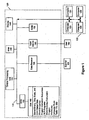
- FIG. 1 illustrates a hardware embodiment of the present invention.
- a data receiver 100 is coupled to the data bus 110 of a computer 120.
- the data receiver 100 preferably receives data from a scanner 104. which can be any conventional scanner, such as Canon DR 3020 or Canon PICS 4400.
- the data receiver can be a network adapter or Internet connection comprising a modem and a phone line which couples the computer 120 to a remote data source from which data is received.
- the computer 120 includes a central processing unit 130, such as an Intel Pentium processor, a display 140, an input device 190, random access memory (RAM) 150, read-only memory (ROM) 155, and a disk 160, all interconnected through bus 110.
- RAM random access memory
- ROM read-only memory
- An input device190 is a mouse, keyboard, or other pointing device that allows a user 180 to interact with the computer 120.
- ROM 155 provides CPU 130 with unvarying functions such as executing programs initialized at the start-up of computer 120.
- RAM 150 provides the CPU 130 with data and instruction sequences that are loaded from disk 160.
- the disk 160 is, for example, 1.6 Gigabyte disk that interfaces to the computer bus through a Small Computer System interface (SCSI) interface 165.
- Disk 160 stores data files such as binary, gray-scale, and color image files, a table 170, text files, and programs including a word accuracy calculation program and one or more OCR programs.
- Disk 160 is a single device or multiple devices.
- the components of computer 120 take conventional form. Computer 120 can stand alone or is a part of a network of computers 125 comprised of individual computers 120 coupled together through Ethernet connections. The present invention can be used in conjunction with any computer operating system, such as Windows 95, Windows NT. or OS/2, resident in memory 155.
- the present invention receives data at step 200.
- data can be received in a multitude of ways, including by a scanner or by a remote connection with another computer. If a scanner 104 is coupled to data receiver 100, then a paper document fed into the scanner 100 is digitized. Digitizing a paper document involves creating a bitmap of the paper document. After a digitized version of the document is created, and OCR is performed at step 204 upon the bitmap.
- a Canon OCR technique specified in U.S. Pat. 5,379,349 , is preferably used as the OCR technique: however, any OCR technique can be used in accordance with the present invention. The OCR technique creates character information from the bitmap. A description of how the character recognition process is accomplished is found in the above-mentioned U. S. Pat. 5,379,349 .
- a document may be a single piece of paper or multiple pieces of paper that are substantively related.
- the character accuracy value 250 is typically created by comparing the recognized character with a stored template of the character. The differences in the two versions of the character are quantized and represented as an accuracy value 250. For example, a recognized "p” and a stored template of a "p” are shown in Figure 2b . This "p” is given a character accuracy value 250 of .95 because of the differences in shape between the recognized "p” and the stored template of the "p.”
- the system next groups recognized character to form word groupings (words), as shown in Figure 3 .
- Word grouping accuracy values 260 are calculated to provide the user 180 with an easily understood measure of the quality of an OCR's recognition. Displaying a string of character accuracy values 250 may not communicate useful information to the average user 180.
- the word "rock” is composed of four characters “r", “o", “c”, and “k.” The "r” is recognized at a .95 accuracy value 250, the "o” is recognized at a .72 accuracy value 250, the “c” is recognized at a .92 character accuracy value 250 and the "k” is recognized at a .82 accuracy value 250
- Displaying individual character accuracy values 250 does not inform the user 180 whether the word "rock” was accurately recognized.
- the user 180 knows that "r” and "c” were accurately recognized, but the user 180 does not know how the poor recognition of the "o” and the "k” affects the recognition of the word as a whole.
- Determining the accuracy of the word, as opposed to individual characters, is critical in systems that allow retrieval of documents by the use of text-searching. In those systems, when the user 180 searches for a document, the user 180 enters a search term composed of words. Thus, it is more important to know whether an entire word is accurately recognized, as opposed to whether individual characters are accurately recognized.
- Figure 4 illustrates the process steps of an embodiment of the current invention calculating word accuracy in a system employing a single OCR.
- the system selects one of the newly created words using a selecting module 400.
- the system then obtains the character accuracy value 250 for one of the characters in the selected word by using an obtaining character accuracy value module.
- character accuracy values 250 are typically available after performing an OCR.
- the system then applies a character accuracy value adjusting module 408 to adjust the character accuracy value 250 based upon known OCR weaknesses. This adjustment is based upon the fact that OCRs typically have unique strengths and weaknesses.
- the system determines whether the character being examined is one of the known characters that is not accurately recognized, or is a font, typeface, or style that is not accurately recognized.
- the system subtracts a constant from the obtained character accuracy value 250.
- the constant is typically .05, but can be set higher or lower, depending upon user preferences.
- the adjusting module 408 adjusts the character accuracy value 250 upwards to reflect characters, fonts, or typefaces that the OCR typically recognizes more accurately than other recognition systems
- An assigning module 412 is then applied to assign a binary representation to the characters in the selected word grouping, discussed in more detail below.
- a preliminary word accuracy value 260 is thereby generated for the selected word.
- a word accuracy adjusting module 416 is applied to the selected word to adjust
- a word accuracy adjusting module 416 is applied to the selected word to adjust the preliminary word accuracy value 260 based upon predefined factors such as stored list comparisons or the application of stored language rules, discussed in more detail below. This process is preferably repeated for each word in the received group of data.
- a world accuracy value 260 is calculated for the last word the system proceeds to display the words and their accuracy values 260 using a display module 216.
- the above-described modules may be implemented as hardware, firmware, or software, in accordance with the present invention.
- Figure 5a illustrates in more detail the assigning binary representation module 412.
- the system selects 300 a character in the selected word. Then, the system determines 504 whether the first character in the word has an accuracy value 250 that exceeds a threshold accuracy level.
- the threshold accuracy level is preferably user defined.
- the user 180 can therefore set the recognition quality of the entire system based upon what threshold the user 180 chooses. For example, if the user 180 desires a system that accepts characters at 90% accuracy, the user 180 can set the threshold at .9. If the user 180 is more tolerant of error, the user 180 can set the threshold lower
- the system compares the accuracy of the selected character to the user-defined threshold to determine what representation to assign the character. If the character accuracy value 250 exceeds the threshold, the character is assigned 508 a "1.” If the character accuracy value 250 does not exceed the threshold, the character is assigned 512 a "0.” The system determines (516) if there are more characters. If there are, a counter is incremented (520), and the process is repeated. If all of the characters have been assigned a representation, the system then adds (524) the number of characters assigned a "one" together to determine the total number of characters assigned a "one". Then the system determines (528) the total number of characters in the word, Finally, the system calculates the preliminary word accuracy for the words by dividing (532) the number of characters assigned a "one" by the total number of characters in the word grouping.
- the system uses the above method of calculating because it normalizes word accuracy values 260. Normalizing provides a better representation of the recognition quality of a word.
- the word “ear” has character accuracy values 250 of .93, .89, and .72 assigned to its characters.
- the threshold is .8. Therefore, the "e” and the “a” are assigned a 1 and the "r” is assigned a 0.
- the word accuracy value 260 for "ear” is therefore .67 (2/3).
- the next word is "earring.”
- the character accuracy values 250 are the same for the first four letters, the "i” is recognized at a .93, the "n” is recognized at a .85, and the "g” is recognized at a .87.
- Simple averaging (adding together individual character accuracy values 250 and dividing by the total number of characters) of the character accuracy values 250 may also be used to calculate word accuracy values 260.
- simple averaging may not provide an accurate representation of the OCR's recognition.
- the word accuracy value 260 of "ear” would be .85, and the value of "earring” would be .84 using simple averaging.
- the user 180 would believe that "ear” was recognized with greater accuracy than "earring.”
- this belief is erroneous. This is explained by observing that an inaccurately recognized character is more detrimental to the word recognition of shorter words than longer words.
- the word may be completely misinterpreted.
- the word may still be recognized correctly based on its surrounding letters, using a fuzzy matching system.
- Figure 5c illustrates a second method of calculating word grouping accuracy values 260.
- a word grouping is selected (540).
- a character accuracy value 250 is obtained 544 for a first character in the selected word grouping.
- the system determines(548) whether the obtained character accuracy value 250 is greater than a threshold accuracy level.
- the threshold is set by the user 180 to define an overall accuracy level for the word accuracy generation system. If the obtained character accuracy value 250 is greater than the threshold, a counter is incremented (552). If the obtained value 250 is less than the threshold, the counter is not incremented. In either case, the system determines (556) whether this was the last character in the word If there are more characters, the system increments 560 a counter and repeats the process for the next character.
- the system determines (564) whether all of the characters in the selected word passed the threshold. If all of the characters did pass the threshold, the system calculates (568) the word accuracy value 260 of the selected word as the average of the character accuracy values 250. If at least one of the characters did not exceed the threshold, the system determines (572) the percentage of characters that did not exceed the threshold, using the formula (P-N)/100 where P is the total number of characters in the word grouping, and N is the number of characters which exceeded the threshold. Then the system calculates the word accuracy value 260 of the selected word grouping by subtracting (576) the result from the threshold accuracy value. This process is repeated for each word.
- This method allows word accuracy values 260 to be searched using any integer
- the values are quantized or digitized.
- the first method is unlikely to retrieve any words as word accuracy values 260 created using its scheme are the result of some fraction such as 3/4, or 6/7.
- the values 260 generated by the second method are calculated as the average of individual character accuracy values 250, which may be any integer over the threshold, or values 260 are calculated as the result of the percentage subtracted from the threshold value, which also generates a broader range of results.
- a user 180 searching for a range of values is more likely to retrieve results in a system using the second method rather than the first method.
- Figure 5d displays a third method of calculating word accuracy values 260.
- a word is selected (580).
- a character is selected (581) from the selected word
- the accuracy value 250 of the selected character is obtained (582).
- the system determines (584) whether the accuracy value 250 of the selected character is greater than a first threshold. If it is, the character is assigned (590) a "*". Any symbol may be assigned to the character. However, as the first threshold is the highest threshold, the symbol should visually represent the fact that the character is in the most accurate category.
- the system repeats (598) for the next character, or if it was the last character, the system repeats (599) for the next word If it was the last character in the last word the system proceeds to the display step 216.
- the system determines (586) whether the characters accuracy value 250 exceeds the second threshold. If it does, then a "+” is assigned (592). Again, any symbol may be used but the symbol should represent to the user 180 that the character is in the second best category. If the character does not pass the second threshold, the system compares (588) the character to a third threshold. If the character exceeds the third threshold, a " ⁇ " is assigned. If the character fails to exceed the third threshold, a "-" is assigned. After all of the characters have been assigned a symbol, the words and their symbols are displayed 216 to the user 180.
- Word accuracy values 260 generated in accordance with this method are advantageous because they visually communicate to the user 180 the quality of the characters in a given word. Thus, if a user 180 sees a word and the symbols "**+*" displayed, the user 180 knows that the word has been recognized accurately. This visual representation may be more effective in communicating accuracy values 260 than numeric displays.
- the thresholds in the above method are preferably set by the user 180 to suit the user's preferences.
- symbols may be assigned to words instead of characters, allowing the user 180 to have a visual representation of word accuracy values 260.
- the word accuracy value 260 of a word may be set equal to the accuracy value 250 of the character in the word which has the lowest accuracy value 250.
- the word accuracy value 260 calculated for a word grouping the value and its associated word are stored in a table 170 located on disk 160.
- the table 170 is used to retrieve the accuracy value 260 for a word when the value 260 needs to be adjusted or displayed.
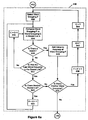
- Figure 6a describes one embodiment of the adjusting word accuracy module 416.
- the word accuracy value 260 of a selected word is adjusted based upon comparisons of the selected word to words on a stored list.
- the stored list is preferably composed of commonly used words such as those found in a dictionary.
- words or acronyms that are commonly used in the types of documents being processed by the system are preferably added to the stored list by the user 180. For example, if a company using the present invention is a software development company, they may create a list including words such as "debug", "beta", and "GUI.”
- the additional or custom words are added to the dictionary word list, or, in a preferred embodiment, the custom words are stored in a separate word list.
- a first word is selected (600).
- the word is compared (604) to a word in the stored list.
- the system determines (608) whether there is a match between the selected word and the word on the stored list. If there is a match, a constant is added (628) to the accuracy value 260 of the selected word grouping.
- the system determines (632) if there is another word to be compared, and if there is, a counter for the selected word is increased (636), the counter for the stored list is set (640) to one, and the counter for the stored list is set (644) to one. If the system determines that there are no more words to be compared, the system moves to the display module 216.
- the system determines (612) if this the last word on the stored list. If there are more words on the stored list, a counter is incremented (616), and the next word on the list is compared with the selected word grouping. If there are no more - words on the stored list, the system determines (620) if there are more stored lists. If there are more stored lists, a counter is incremented (622) and the comparison process is repeated for the new stored list. If there are no more stored lists, no value is added to the selected word , and the system moves on to the next word in process step 632.
- the word accuracy value 260 was 0.71. If the above module 416 were applied, "earring” would be compared to a stored list of words. If a dictionary was one of the stored lists, a match would be found. The adjusting module 416 would increase the value of the word accuracy to .81 because of the match, using a constant of .05. The user 180 would then see the increased confidence factor, and feel more confident that the word was accurately recognized. However, if in the original example, the word was "GUI", and the "I” was misrecognized as a "L”, the word “GUL" would have been created.
- the OCR confidence factor for the "L” may stiff be high, for example, at .75, because the OCR may believe that the "L” was recognized correctly.
- a user 180 who sees "GUL” who is not the author of the document may be unsure whether GUL is a new acronym or a misrecognized word. However, a stored list comparison containing technical words and acronyms would not find a match for "GUL", and therefore, the value would not be adjusted. Since words correctly recognized will have a 5 value added, the value for "GUL" will appear low to the user 180. The user 180 will have less confidence that the word "GUL" is accurately recognized, and may choose to exclude “GUL” from being used to index the document.
- one advantage of this system is that it allows non-experts to perform document entry.
- a constant is subtracted from the word accuracy measure if no match is found.
- the system is optimized if the authors of documents update the word lists frequently with the acronyms and special word uses of the authors.
- language rules are applied to the word to adjust the word accuracy value 260 of the selected word grouping.
- Language rules are rules such as no capital letter in the middle of a word. For example, if an OCR recognizes the word "example” as “examPle", the application of a language rule would catch the mistake and subtract a constant from the word grouping accuracy value 260.
- Other language rules may include "no i before e except after c," the first letter of the first word of a sentence should be capitalized, etc.
- the list of language rules may be edited by the user 180 to create language rules that may be specific to the user's field. For example, if the present invention is used for a foreign language, foreign language rules may be implemented.
- a word is selected 648.
- the system determines (652) if the word: contradicts the first language rule. If it does, a value is subtracted (656) from the accuracy value 260 of the selected word If the word grouping does not contradict the first language rule, the system determines (654) if there are more language rules. If there are, a counter is incremented (668), and the next language rule is applied. If there are no more language rules to be applied or a language rule was applied, the system determines (660) if there are more words. If there are not, the process proceeds to the display module 216.
- the above embodiment may be used alone or in conjunction with the stored list comparisons to provide a more complete word accuracy generation system. Other types of word accuracy checks may be used in accordance with the present invention.
- Display module 216 displays the recognized words and their associated word, accuracy values 260 to the user 180. This gives the user 180 an opportunity to understand how accurately the OCR recognized the document. If the OCR recognized the words poorly, the user 180 may be forced to delete the OCR version, and use the paper document in its paper form. Alternatively, the user 180 may employ another OCR to obtain a better result. If the OCR repeatedly generates inaccurate word groupings, the user 180 may decide to purchase another OCR system.
- an indexing list of the recognized words is used to retrieve documents.
- the words on the list are used as potential search terms for retrieving the document. For example, if the word "rock" was in a word list for Document A, the word "rock” may be entered as a search term to find and retrieve Document A.
- the indexing list is formed from the table 170 of word groupings and their accuracy values 260
- the table 170 is displayed to the user 180.
- the user 180 can then determine whether or not to remove some of the words from the table 170. Words removed from the table 170 will not be on the indexing list. For example, the user 180 may want to prevent any word that does not appear to the user 180 to be an accurately recognized word from the list so it cannot be used to retrieve the document. This ensures that the word list used to index the document is kept free of "pollutants.” which are words that are misrecognized and may introduce error into the file retrieval process. For example, if the word "ear” is on the list for Document A, but the true word was "eat”, entering "ear” as a search term will retrieve Document A erroneously. However, if "ear” is displayed with a low word accuracy value 260. the user 180 may choose to remove that word based upon its accuracy value 260 from the word list for Document A.
- the user 180 simply specifies a level of accuracy value 260 that the user 180 would like to maintain in the user's word lists. For example, the user 180 may specify that all words that are recognized at less than .95 should not be kept.
- its accuracy value 260 is compared to the threshold. If it passes, the word is kept in the indexing list. If it fails, it is not stored in the indexing list. Then, the user 180 does not have to view the results of the word accuracy generation, and does not have to perform any subsequent manual determinations. Again, this introduces an ease of use to the document file indexing system, as a user 180 without expertise may be used as the document imaging/filing clerk.
- Another embodiment of the present invention displays the image of the document to the user 180 using color codes to indicate the accuracy values 260 of the words. For example, one color, such as red, is assigned to words that have accuracy values 260 over a threshold of 0.5, and blue may be assigned to words having an accuracy value 260 of less than 0.5. This allows the user 180 to view the image of the document and visually understand which words are correctly recognized and which are not. The user 180 may set the threshold to whatever level of accuracy the user 180 requires.
- Figure 7a illustrates an embodiment of the present invention wherein multiple optical character recognition techniques are employed.
- the present invention calculates word accuracy values 260 of each word created by each OCR . These word grouping accuracy values 260 can then be used to determine the most accurate version of the word grouping.
- the system begins by receiving (700) data, and creating a bitmapped image of the paper document.
- An OCR program is applied (704) to the bitmapped image to recognize the characters in the image. This is repeated for each OCR present in the system. Thus multiple versions of the original document are created.
- the system then obtains (708) character accuracy values 250 for each character in the first version of the original document.
- words are created(712) from the first version of the document.
- Initial word accuracy values 260 are calculated (716) for each created word.
- the initial word grouping accuracy values 260 are calculated in accordance with the process described above in relation to Figures 5a-d .
- the word groupings and their accuracy values 260 are stored in a table 170.
- the process is repeated (720,722) for each OCR version.
- Each OCR version has its own table 170 composed of word groupings and accuracy values 260
- the system compares the different versions of each word together to create tables 850 of versions of the words ordered by accuracy. After an initial ordering has been created, the accuracy values 260 for each version of the word are adjusted (728) in accordance with predefined accuracy factors. Then, the table 850 is reordered based on the new accuracy values 260.
- composite words are created (732).
- Composite word are created from the most accurate versions of each character in the word.
- each OCR would generate character accuracy values 250 for each of the four characters
- OCR A may generate “h”: .87 “e”: 92 “l”: .95 “p”: .77
- OCR B may generate “h”: 91 “e” : .90 “l”: .90 “p”: .82. Therefore, if OCR A and B were the only OCRs present in the system, a composite word is created using the "h” from OCR B, the “e” from OCR A. the “l” from OCR A. and the "p” from OCR B.
- the most accurate word groupings (736) are displayed or stored into an indexing list. If composite words are used, a word accuracy value 260 is calculated for the composite word and is compared with the other words to determine the most accurate words.
- Figure 8 illustrates ordering the versions of the words in greater detail.
- a word grooping is selected 804 from the table 170 of created by the first OCR.
- the coordinates of the selected word the bitmapped image are determined (808). This process is performed in order to ensure that versions of the same word are compared against each other.
- the version of the word then stored (812) in a first word version table 850.
- a counter is incremented (816), and a next table 170 of words created by a next OCR is selected 820.
- a word grouping is selected (824) that corresponds to the coordinates determined previously.
- the accuracy, value 260 of the selected version is compared (828) to the accuracy value 260 of the version of the word grouping already stored in the word grouping version table 850.
- the system determines (832) whether the selected version has a greater accuracy value 260 than the version in the table 850. If it has, the selected version is stored (844) in the table 850 in a position immediately prior to the first version. If the selected version has a lesser accuracy value 260, the system determines 836 if there are more versions of the word stored in the word grouping version table 850. If there are not, the selected version is stored (848) in a position immediately after the first version. If there are multiple versions of the word grouping already stored in the word grouping version table 850, the selected version is compared against all of the versions in the table 850 until a version is found that has a greater accuracy value 260.
- the version is stored in the table 850 in a position after the version having a greater accuracy value 260.
- the system creates a table 850 of versions of the word “example,” and orders the versions by accuracy.
- the calculted word grouping accuracy values 260 for the versions of example are: OCR A “example”: 91, OCR B “example”: .87. OCR C “example”: .72 and OCR D “example” : .95.
- the table 850 therefore orders the versions beginning with OCR D's "example”, followed by A's, B's, and C's. If a fifth version of "example” is created by a fifth OCR, the fifth version would be compared to the four versions already in the table 850. The accuracy value of the fifth version is compared to the accuracy values of the other four, and is placed into the table accordingly. If the fifth version has an accuracy value 260 of .89, its version is placed in a position under OCR A's version and above OCR D's version.
- the system determines (852) if there are more OCR versions of the selected If there are, a next version of the word is selected, and the process is repeated. If there are no more versions of the word grouping, the system determines if there are more words in the first OCR word table 170. If there are, the next word is selected, and the process is repeated.
- Figure 9 illustrates adjusting accuracy values 260 after the versions of each word have been ordered.
- a factor or constant is added (900) to a version of a word grouping based upon the strengths of the OCR which created the version of the word grouping. For example, if the word "help" has been created by OCR A, and OCR A recognizes Courier font particularly well, the word accuracy value 260 for the version of help created by OCR A is adjusted upwards by a constant. This is repeated for each version of the word in the word table 170. Then the versions of the word grouping on the word grouping table 170 are reordered 904 based upon the changes in accuracy values 260.
- a factor or constant is subtracted (908) from the versions based upon OCR weaknesses, in the manner described above.
- the table 170 is reordered (912) based upon any change in accuracy values 260.
- the word accuracy values 260 are adjusted and reordered based upon stored list comparisons 916 and language rule applications (920), as described in Figures 6a and 6b .
- the adjusting and reordering produces a final ordering of word grouping versions from most accurate to least accurate. At this point, all words having an accuracy value over a threshold may be kept, or only the most accurate word version may be kept.
- Figure 10 illustrates the display word aspect of the present invention. which may be used in the single or multiple OCR embodiments of the present invention. However, it is described here with respect to the multiple OCR embodiment of the present invention.
- a first word version table 850 is selected (1000). The version in the first position in the table 850 is retrieved (1004) as it is the most accurate version based upon the ordering performed earlier.
- the composite version of the word is compared (1004) to the retrieved version to determine which is the most accurate version. This embodiment may be made into an optional step dependent upon the accuracy of the most accurate version of the word grouping. If the most accurate version of the word grouping has an accuracy value 260 greater than a threshold, no composite word is created. This saves on processing time, as composite word grouping creation may be a time-consuming process for low-speed processors.
- the threshold may be specified by the system, or is preferably a user-defined threshold level.
- the most accurate version is used to create a list used for indexing the document, as shown in Figure 11 .
- the system determines (1100) that a version of the word has an accuracy value which exceeds a threshold
- the version is used to update (1104) an indexing list.
- the threshold is a level of accuracy the user 180 desires for the user's system.
- the table 850 contains three versions of the word "ear” which exceed the threshold, and the most accurate version is "eat", and the other two are "ear”, a system which keeps the version with the highest accuracy value will incorrectly keep “eat” as the version of the word. A system which keeps all three will also keep the versions which have the correct representation of the word "ear.” Thus, in those systems, the document is able to be retrieved by using "ear” as a search term. However, by keeping multiple versions, more disk space is used in keeping the longer indexing lists.
- the user 180 is preferably displayed (1108) several options regarding how to proceed. After receiving (1112) am input, the system executes the option selected.
- a first option (1116) is to perform the OCR again, in an attempt to increase the character accuracy values. If multiple OCRs are present in the system, the user 180 may select one of the other OCRs.
- a second option 1120 is to rescan the document. This may provide a cleaner image for the OCR to recognize.
- a third option (1124) is to allow the user 180 to lower the threshold. If the words consistently fail to meet the threshold, the user 180 may have set the threshold too high for the user's system.
Landscapes
- Engineering & Computer Science (AREA)
- Computer Vision & Pattern Recognition (AREA)
- Physics & Mathematics (AREA)
- General Physics & Mathematics (AREA)
- Multimedia (AREA)
- Theoretical Computer Science (AREA)
- Computational Linguistics (AREA)
- Character Discrimination (AREA)
Applications Claiming Priority (2)
| Application Number | Priority Date | Filing Date | Title |
|---|---|---|---|
| US41854 | 1987-04-22 | ||
| US09/041,854 US6269188B1 (en) | 1998-03-12 | 1998-03-12 | Word grouping accuracy value generation |
Publications (3)
| Publication Number | Publication Date |
|---|---|
| EP0942389A2 EP0942389A2 (en) | 1999-09-15 |
| EP0942389A3 EP0942389A3 (en) | 2000-09-20 |
| EP0942389B1 true EP0942389B1 (en) | 2009-01-21 |
Family
ID=21918699
Family Applications (1)
| Application Number | Title | Priority Date | Filing Date |
|---|---|---|---|
| EP99301021A Expired - Lifetime EP0942389B1 (en) | 1998-03-12 | 1999-02-12 | Word grouping accuracy value generation |
Country Status (5)
| Country | Link |
|---|---|
| US (1) | US6269188B1 (https=) |
| EP (1) | EP0942389B1 (https=) |
| JP (1) | JPH11316800A (https=) |
| CA (1) | CA2265060C (https=) |
| DE (1) | DE69940331D1 (https=) |
Cited By (3)
| Publication number | Priority date | Publication date | Assignee | Title |
|---|---|---|---|---|
| US9087235B2 (en) | 2009-12-02 | 2015-07-21 | Google Inc. | Identifying matching canonical documents consistent with visual query structural information |
| US9208177B2 (en) | 2009-08-07 | 2015-12-08 | Google Inc. | Facial recognition with social network aiding |
| US10534808B2 (en) | 2009-08-07 | 2020-01-14 | Google Llc | Architecture for responding to visual query |
Families Citing this family (71)
| Publication number | Priority date | Publication date | Assignee | Title |
|---|---|---|---|---|
| US8352400B2 (en) | 1991-12-23 | 2013-01-08 | Hoffberg Steven M | Adaptive pattern recognition based controller apparatus and method and human-factored interface therefore |
| US7966078B2 (en) | 1999-02-01 | 2011-06-21 | Steven Hoffberg | Network media appliance system and method |
| WO2000062243A1 (en) * | 1999-04-14 | 2000-10-19 | Fujitsu Limited | Character string extracting device and method based on basic component in document image |
| WO2001067378A1 (en) * | 2000-03-06 | 2001-09-13 | Iarchives, Inc. | System and method for creating a searchable word index of a scanned document including multiple interpretations of a word at a given document location |
| US7155061B2 (en) * | 2000-08-22 | 2006-12-26 | Microsoft Corporation | Method and system for searching for words and phrases in active and stored ink word documents |
| JP4136316B2 (ja) * | 2001-01-24 | 2008-08-20 | 富士通株式会社 | 文字列認識装置 |
| US7133829B2 (en) * | 2001-10-31 | 2006-11-07 | Dictaphone Corporation | Dynamic insertion of a speech recognition engine within a distributed speech recognition system |
| US7146321B2 (en) * | 2001-10-31 | 2006-12-05 | Dictaphone Corporation | Distributed speech recognition system |
| US6766294B2 (en) | 2001-11-30 | 2004-07-20 | Dictaphone Corporation | Performance gauge for a distributed speech recognition system |
| US6785654B2 (en) | 2001-11-30 | 2004-08-31 | Dictaphone Corporation | Distributed speech recognition system with speech recognition engines offering multiple functionalities |
| US20030128856A1 (en) * | 2002-01-08 | 2003-07-10 | Boor Steven E. | Digitally programmable gain amplifier |
| US7236931B2 (en) | 2002-05-01 | 2007-06-26 | Usb Ag, Stamford Branch | Systems and methods for automatic acoustic speaker adaptation in computer-assisted transcription systems |
| US7292975B2 (en) * | 2002-05-01 | 2007-11-06 | Nuance Communications, Inc. | Systems and methods for evaluating speaker suitability for automatic speech recognition aided transcription |
| NZ536775A (en) * | 2002-05-20 | 2007-11-30 | Tata Infotech Ltd | Document structure identifier |
| US7171061B2 (en) * | 2002-07-12 | 2007-01-30 | Xerox Corporation | Systems and methods for triage of passages of text output from an OCR system |
| US7045377B2 (en) * | 2003-06-26 | 2006-05-16 | Rj Mears, Llc | Method for making a semiconductor device including a superlattice and adjacent semiconductor layer with doped regions defining a semiconductor junction |
| WO2005009205A2 (en) * | 2003-07-09 | 2005-02-03 | Gensym Corporation | System and method for self management of health using natural language interface |
| US8442331B2 (en) | 2004-02-15 | 2013-05-14 | Google Inc. | Capturing text from rendered documents using supplemental information |
| US7707039B2 (en) * | 2004-02-15 | 2010-04-27 | Exbiblio B.V. | Automatic modification of web pages |
| JP4297798B2 (ja) * | 2004-01-29 | 2009-07-15 | 富士通株式会社 | 移動体情報管理プログラム |
| US20060104515A1 (en) * | 2004-07-19 | 2006-05-18 | King Martin T | Automatic modification of WEB pages |
| US20060136629A1 (en) * | 2004-08-18 | 2006-06-22 | King Martin T | Scanner having connected and unconnected operational behaviors |
| US10635723B2 (en) | 2004-02-15 | 2020-04-28 | Google Llc | Search engines and systems with handheld document data capture devices |
| US7812860B2 (en) | 2004-04-01 | 2010-10-12 | Exbiblio B.V. | Handheld device for capturing text from both a document printed on paper and a document displayed on a dynamic display device |
| US7552630B2 (en) * | 2004-02-27 | 2009-06-30 | Akron Special Machinery, Inc. | Load wheel drive |
| US7990556B2 (en) | 2004-12-03 | 2011-08-02 | Google Inc. | Association of a portable scanner with input/output and storage devices |
| US7894670B2 (en) | 2004-04-01 | 2011-02-22 | Exbiblio B.V. | Triggering actions in response to optically or acoustically capturing keywords from a rendered document |
| US9008447B2 (en) | 2004-04-01 | 2015-04-14 | Google Inc. | Method and system for character recognition |
| US8146156B2 (en) | 2004-04-01 | 2012-03-27 | Google Inc. | Archive of text captures from rendered documents |
| US20060098900A1 (en) | 2004-09-27 | 2006-05-11 | King Martin T | Secure data gathering from rendered documents |
| US20060081714A1 (en) | 2004-08-23 | 2006-04-20 | King Martin T | Portable scanning device |
| US9143638B2 (en) | 2004-04-01 | 2015-09-22 | Google Inc. | Data capture from rendered documents using handheld device |
| US9116890B2 (en) | 2004-04-01 | 2015-08-25 | Google Inc. | Triggering actions in response to optically or acoustically capturing keywords from a rendered document |
| US8081849B2 (en) | 2004-12-03 | 2011-12-20 | Google Inc. | Portable scanning and memory device |
| US8713418B2 (en) | 2004-04-12 | 2014-04-29 | Google Inc. | Adding value to a rendered document |
| US8874504B2 (en) | 2004-12-03 | 2014-10-28 | Google Inc. | Processing techniques for visual capture data from a rendered document |
| US8489624B2 (en) | 2004-05-17 | 2013-07-16 | Google, Inc. | Processing techniques for text capture from a rendered document |
| US8620083B2 (en) | 2004-12-03 | 2013-12-31 | Google Inc. | Method and system for character recognition |
| US8346620B2 (en) | 2004-07-19 | 2013-01-01 | Google Inc. | Automatic modification of web pages |
| US8032372B1 (en) | 2005-09-13 | 2011-10-04 | Escription, Inc. | Dictation selection |
| US7734092B2 (en) * | 2006-03-07 | 2010-06-08 | Ancestry.Com Operations Inc. | Multiple image input for optical character recognition processing systems and methods |
| US7966557B2 (en) | 2006-03-29 | 2011-06-21 | Amazon Technologies, Inc. | Generating image-based reflowable files for rendering on various sized displays |
| EP2067119A2 (en) | 2006-09-08 | 2009-06-10 | Exbiblio B.V. | Optical scanners, such as hand-held optical scanners |
| US7810026B1 (en) * | 2006-09-29 | 2010-10-05 | Amazon Technologies, Inc. | Optimizing typographical content for transmission and display |
| US8595615B2 (en) * | 2007-02-07 | 2013-11-26 | International Business Machines Corporation | System and method for automatic stylesheet inference |
| US8782516B1 (en) | 2007-12-21 | 2014-07-15 | Amazon Technologies, Inc. | Content style detection |
| JP2009193356A (ja) * | 2008-02-14 | 2009-08-27 | Canon Inc | 画像処理装置、画像処理方法、プログラム、及び記憶媒体 |
| US8572480B1 (en) | 2008-05-30 | 2013-10-29 | Amazon Technologies, Inc. | Editing the sequential flow of a page |
| US20090300126A1 (en) * | 2008-05-30 | 2009-12-03 | International Business Machines Corporation | Message Handling |
| US9229911B1 (en) * | 2008-09-30 | 2016-01-05 | Amazon Technologies, Inc. | Detecting continuation of flow of a page |
| WO2010096191A2 (en) | 2009-02-18 | 2010-08-26 | Exbiblio B.V. | Automatically capturing information, such as capturing information using a document-aware device |
| EP2406767A4 (en) | 2009-03-12 | 2016-03-16 | Google Inc | AUTOMATIC CONTENT SUPPLY ASSOCIATED WITH CAPTURED INFORMATION, TYPE INFORMATION CAPTURED IN REAL TIME |
| US8447066B2 (en) | 2009-03-12 | 2013-05-21 | Google Inc. | Performing actions based on capturing information from rendered documents, such as documents under copyright |
| US20100274615A1 (en) * | 2009-04-22 | 2010-10-28 | Eran Belinsky | Extendable Collaborative Correction Framework |
| US9087059B2 (en) | 2009-08-07 | 2015-07-21 | Google Inc. | User interface for presenting search results for multiple regions of a visual query |
| US8600152B2 (en) * | 2009-10-26 | 2013-12-03 | Ancestry.Com Operations Inc. | Devices, systems and methods for transcription suggestions and completions |
| US20110099193A1 (en) * | 2009-10-26 | 2011-04-28 | Ancestry.Com Operations Inc. | Automatic pedigree corrections |
| US8805079B2 (en) | 2009-12-02 | 2014-08-12 | Google Inc. | Identifying matching canonical documents in response to a visual query and in accordance with geographic information |
| US8977639B2 (en) | 2009-12-02 | 2015-03-10 | Google Inc. | Actionable search results for visual queries |
| US9176986B2 (en) | 2009-12-02 | 2015-11-03 | Google Inc. | Generating a combination of a visual query and matching canonical document |
| US9405772B2 (en) | 2009-12-02 | 2016-08-02 | Google Inc. | Actionable search results for street view visual queries |
| US9183224B2 (en) | 2009-12-02 | 2015-11-10 | Google Inc. | Identifying matching canonical documents in response to a visual query |
| US9852156B2 (en) | 2009-12-03 | 2017-12-26 | Google Inc. | Hybrid use of location sensor data and visual query to return local listings for visual query |
| US9081799B2 (en) | 2009-12-04 | 2015-07-14 | Google Inc. | Using gestalt information to identify locations in printed information |
| US9323784B2 (en) | 2009-12-09 | 2016-04-26 | Google Inc. | Image search using text-based elements within the contents of images |
| US8499236B1 (en) | 2010-01-21 | 2013-07-30 | Amazon Technologies, Inc. | Systems and methods for presenting reflowable content on a display |
| CA2819369C (en) * | 2010-12-01 | 2020-02-25 | Google, Inc. | Identifying matching canonical documents in response to a visual query |
| US9383913B2 (en) * | 2012-05-30 | 2016-07-05 | Sap Se | Touch screen device data filtering |
| US8935246B2 (en) | 2012-08-08 | 2015-01-13 | Google Inc. | Identifying textual terms in response to a visual query |
| RU2634194C1 (ru) * | 2016-09-16 | 2017-10-24 | Общество с ограниченной ответственностью "Аби Девелопмент" | Верификация результатов оптического распознавания символов |
| WO2023059865A1 (en) | 2021-10-08 | 2023-04-13 | Ancestry.Com Operations Inc. | Image identification, retrieval, transformation, and arrangement |
Family Cites Families (37)
| Publication number | Priority date | Publication date | Assignee | Title |
|---|---|---|---|---|
| US3969698A (en) * | 1974-10-08 | 1976-07-13 | International Business Machines Corporation | Cluster storage apparatus for post processing error correction of a character recognition machine |
| US4941125A (en) | 1984-08-01 | 1990-07-10 | Smithsonian Institution | Information storage and retrieval system |
| US5265242A (en) | 1985-08-23 | 1993-11-23 | Hiromichi Fujisawa | Document retrieval system for displaying document image data with inputted bibliographic items and character string selected from multiple character candidates |
| JP2695844B2 (ja) | 1988-06-16 | 1998-01-14 | 株式会社東芝 | 文書整形装置 |
| DE68913669T2 (de) * | 1988-11-23 | 1994-07-21 | Digital Equipment Corp | Namenaussprache durch einen Synthetisator. |
| US5303361A (en) | 1989-01-18 | 1994-04-12 | Lotus Development Corporation | Search and retrieval system |
| JP2816241B2 (ja) | 1990-06-20 | 1998-10-27 | 株式会社日立製作所 | 画像情報検索装置 |
| US5757983A (en) | 1990-08-09 | 1998-05-26 | Hitachi, Ltd. | Document retrieval method and system |
| JP3303926B2 (ja) | 1991-09-27 | 2002-07-22 | 富士ゼロックス株式会社 | 構造化文書分類装置及び方法 |
| US5926565A (en) | 1991-10-28 | 1999-07-20 | Froessl; Horst | Computer method for processing records with images and multiple fonts |
| US5875263A (en) | 1991-10-28 | 1999-02-23 | Froessl; Horst | Non-edit multiple image font processing of records |
| US5375235A (en) | 1991-11-05 | 1994-12-20 | Northern Telecom Limited | Method of indexing keywords for searching in a database recorded on an information recording medium |
| JP2579397B2 (ja) | 1991-12-18 | 1997-02-05 | インターナショナル・ビジネス・マシーンズ・コーポレイション | 文書画像のレイアウトモデルを作成する方法及び装置 |
| US5359667A (en) | 1992-08-24 | 1994-10-25 | Unisys Corporation | Method for identifying and tracking document characteristics in a document image processing system |
| US6002798A (en) | 1993-01-19 | 1999-12-14 | Canon Kabushiki Kaisha | Method and apparatus for creating, indexing and viewing abstracted documents |
| US5848184A (en) | 1993-03-15 | 1998-12-08 | Unisys Corporation | Document page analyzer and method |
| JP3302147B2 (ja) | 1993-05-12 | 2002-07-15 | 株式会社リコー | 文書画像処理方法 |
| WO1995015535A1 (en) * | 1993-12-01 | 1995-06-08 | Motorola Inc. | Combined dictionary based and likely character string method of handwriting recognition |
| EP0667594A3 (en) | 1994-02-14 | 1995-08-23 | International Business Machines Corporation | Image quality analysis method and apparatus |
| CA2144793C (en) | 1994-04-07 | 1999-01-12 | Lawrence Patrick O'gorman | Method of thresholding document images |
| JPH087033A (ja) * | 1994-06-16 | 1996-01-12 | Canon Inc | 情報処理方法及び装置 |
| US5802205A (en) | 1994-09-09 | 1998-09-01 | Motorola, Inc. | Method and system for lexical processing |
| US5675665A (en) * | 1994-09-30 | 1997-10-07 | Apple Computer, Inc. | System and method for word recognition using size and placement models |
| JP3669016B2 (ja) | 1994-09-30 | 2005-07-06 | 株式会社日立製作所 | 文書情報分類装置 |
| US5805747A (en) * | 1994-10-04 | 1998-09-08 | Science Applications International Corporation | Apparatus and method for OCR character and confidence determination using multiple OCR devices |
| JP3647518B2 (ja) | 1994-10-06 | 2005-05-11 | ゼロックス コーポレイション | コード化したワードトークンを使用して文書画像をハイライトで強調する装置 |
| US5642288A (en) | 1994-11-10 | 1997-06-24 | Documagix, Incorporated | Intelligent document recognition and handling |
| JP3375766B2 (ja) * | 1994-12-27 | 2003-02-10 | 松下電器産業株式会社 | 文字認識装置 |
| US5617488A (en) * | 1995-02-01 | 1997-04-01 | The Research Foundation Of State University Of New York | Relaxation word recognizer |
| US5764799A (en) * | 1995-06-26 | 1998-06-09 | Research Foundation Of State Of State Of New York | OCR method and apparatus using image equivalents |
| US5781879A (en) * | 1996-01-26 | 1998-07-14 | Qpl Llc | Semantic analysis and modification methodology |
| US5850480A (en) | 1996-05-30 | 1998-12-15 | Scan-Optics, Inc. | OCR error correction methods and apparatus utilizing contextual comparison |
| JP2973944B2 (ja) | 1996-06-26 | 1999-11-08 | 富士ゼロックス株式会社 | 文書処理装置および文書処理方法 |
| US5933531A (en) * | 1996-08-23 | 1999-08-03 | International Business Machines Corporation | Verification and correction method and system for optical character recognition |
| US5878385A (en) | 1996-09-16 | 1999-03-02 | Ergo Linguistic Technologies | Method and apparatus for universal parsing of language |
| US6006226A (en) | 1997-09-24 | 1999-12-21 | Ricoh Company Limited | Method and system for document image feature extraction |
| US5999664A (en) | 1997-11-14 | 1999-12-07 | Xerox Corporation | System for searching a corpus of document images by user specified document layout components |
-
1998
- 1998-03-12 US US09/041,854 patent/US6269188B1/en not_active Expired - Lifetime
-
1999
- 1999-02-12 EP EP99301021A patent/EP0942389B1/en not_active Expired - Lifetime
- 1999-02-12 DE DE69940331T patent/DE69940331D1/de not_active Expired - Fee Related
- 1999-03-08 CA CA002265060A patent/CA2265060C/en not_active Expired - Fee Related
- 1999-03-12 JP JP11067137A patent/JPH11316800A/ja active Pending
Non-Patent Citations (1)
| Title |
|---|
| PATENT ABSTRACTS OF JAPAN * |
Cited By (3)
| Publication number | Priority date | Publication date | Assignee | Title |
|---|---|---|---|---|
| US9208177B2 (en) | 2009-08-07 | 2015-12-08 | Google Inc. | Facial recognition with social network aiding |
| US10534808B2 (en) | 2009-08-07 | 2020-01-14 | Google Llc | Architecture for responding to visual query |
| US9087235B2 (en) | 2009-12-02 | 2015-07-21 | Google Inc. | Identifying matching canonical documents consistent with visual query structural information |
Also Published As
| Publication number | Publication date |
|---|---|
| EP0942389A3 (en) | 2000-09-20 |
| US6269188B1 (en) | 2001-07-31 |
| JPH11316800A (ja) | 1999-11-16 |
| EP0942389A2 (en) | 1999-09-15 |
| CA2265060C (en) | 2007-05-22 |
| DE69940331D1 (de) | 2009-03-12 |
| CA2265060A1 (en) | 1999-09-12 |
Similar Documents
| Publication | Publication Date | Title |
|---|---|---|
| EP0942389B1 (en) | Word grouping accuracy value generation | |
| US5542090A (en) | Text retrieval method and system using signature of nearby words | |
| JP2973944B2 (ja) | 文書処理装置および文書処理方法 | |
| JP3427692B2 (ja) | 文字認識方法および文字認識装置 | |
| US5606690A (en) | Non-literal textual search using fuzzy finite non-deterministic automata | |
| Sibun et al. | Language determination: Natural language processing from scanned document images | |
| US6917709B2 (en) | Automated search on cursive records not having an ASCII index | |
| Kanai et al. | Automated evaluation of OCR zoning | |
| KR19990022352A (ko) | 필기 입력의 문자 인식 방법 및 장치 | |
| US6385339B1 (en) | Collaborative learning system and pattern recognition method | |
| Zramdini et al. | Optical font recognition from projection profiles | |
| US5970171A (en) | Apparatus and method of fusing the outputs of multiple intelligent character recognition (ICR) systems to reduce error rate | |
| JP2003524258A (ja) | 電子ドキュメントを処理する方法および装置 | |
| EP0680005B1 (en) | Speed and recognition enhancement for OCR using normalized height/width position | |
| JP7041963B2 (ja) | 標準項目名設定装置、標準項目名設定方法及び標準項目名設定プログラム | |
| US20110229036A1 (en) | Method and apparatus for text and error profiling of historical documents | |
| JP3333998B2 (ja) | 自動分類付与装置および方法 | |
| WO2000036530A1 (en) | Searching method, searching device, and recorded medium | |
| JP4678712B2 (ja) | 言語識別装置、プログラム及び記録媒体 | |
| JP3159087B2 (ja) | 文書照合装置および方法 | |
| Kanai et al. | A preliminary evaluation of automatic zoning | |
| Sousa et al. | Word indexing of ancient documents using fuzzy classification | |
| JPH096920A (ja) | 手書き文字認識方法及びその装置 | |
| JP3033904B2 (ja) | 文字認識後処理方法 | |
| JP3471381B2 (ja) | 文字列処理方法 |
Legal Events
| Date | Code | Title | Description |
|---|---|---|---|
| PUAI | Public reference made under article 153(3) epc to a published international application that has entered the european phase |
Free format text: ORIGINAL CODE: 0009012 |
|
| AK | Designated contracting states |
Kind code of ref document: A2 Designated state(s): DE FR GB |
|
| AX | Request for extension of the european patent |
Free format text: AL;LT;LV;MK;RO;SI |
|
| PUAL | Search report despatched |
Free format text: ORIGINAL CODE: 0009013 |
|
| AK | Designated contracting states |
Kind code of ref document: A3 Designated state(s): AT BE CH CY DE DK ES FI FR GB GR IE IT LI LU MC NL PT SE |
|
| AX | Request for extension of the european patent |
Free format text: AL;LT;LV;MK;RO;SI |
|
| 17P | Request for examination filed |
Effective date: 20010205 |
|
| AKX | Designation fees paid |
Free format text: DE FR GB |
|
| 17Q | First examination report despatched |
Effective date: 20021204 |
|
| GRAP | Despatch of communication of intention to grant a patent |
Free format text: ORIGINAL CODE: EPIDOSNIGR1 |
|
| RIC1 | Information provided on ipc code assigned before grant |
Ipc: G06K 9/72 20060101ALI20080229BHEP Ipc: G06K 9/03 20060101AFI20080229BHEP |
|
| GRAS | Grant fee paid |
Free format text: ORIGINAL CODE: EPIDOSNIGR3 |
|
| GRAC | Information related to communication of intention to grant a patent modified |
Free format text: ORIGINAL CODE: EPIDOSCIGR1 |
|
| GRAA | (expected) grant |
Free format text: ORIGINAL CODE: 0009210 |
|
| AK | Designated contracting states |
Kind code of ref document: B1 Designated state(s): DE FR GB |
|
| REG | Reference to a national code |
Ref country code: GB Ref legal event code: FG4D |
|
| REF | Corresponds to: |
Ref document number: 69940331 Country of ref document: DE Date of ref document: 20090312 Kind code of ref document: P |
|
| PLBE | No opposition filed within time limit |
Free format text: ORIGINAL CODE: 0009261 |
|
| REG | Reference to a national code |
Ref country code: FR Ref legal event code: ST Effective date: 20091030 |
|
| STAA | Information on the status of an ep patent application or granted ep patent |
Free format text: STATUS: NO OPPOSITION FILED WITHIN TIME LIMIT |
|
| 26N | No opposition filed |
Effective date: 20091022 |
|
| PG25 | Lapsed in a contracting state [announced via postgrant information from national office to epo] |
Ref country code: DE Free format text: LAPSE BECAUSE OF NON-PAYMENT OF DUE FEES Effective date: 20090901 |
|
| PG25 | Lapsed in a contracting state [announced via postgrant information from national office to epo] |
Ref country code: FR Free format text: LAPSE BECAUSE OF NON-PAYMENT OF DUE FEES Effective date: 20090323 |
|
| PGFP | Annual fee paid to national office [announced via postgrant information from national office to epo] |
Ref country code: GB Payment date: 20130220 Year of fee payment: 15 |
|
| GBPC | Gb: european patent ceased through non-payment of renewal fee |
Effective date: 20140212 |
|
| PG25 | Lapsed in a contracting state [announced via postgrant information from national office to epo] |
Ref country code: GB Free format text: LAPSE BECAUSE OF NON-PAYMENT OF DUE FEES Effective date: 20140212 |