EP0715731B1 - Method and system for scrolling through data - Google Patents
Method and system for scrolling through data Download PDFInfo
- Publication number
- EP0715731B1 EP0715731B1 EP95925456A EP95925456A EP0715731B1 EP 0715731 B1 EP0715731 B1 EP 0715731B1 EP 95925456 A EP95925456 A EP 95925456A EP 95925456 A EP95925456 A EP 95925456A EP 0715731 B1 EP0715731 B1 EP 0715731B1
- Authority
- EP
- European Patent Office
- Prior art keywords
- image
- displaying
- images
- display device
- image viewer
- Prior art date
- Legal status (The legal status is an assumption and is not a legal conclusion. Google has not performed a legal analysis and makes no representation as to the accuracy of the status listed.)
- Expired - Lifetime
Links
Images


Classifications
-
- G—PHYSICS
- G11—INFORMATION STORAGE
- G11B—INFORMATION STORAGE BASED ON RELATIVE MOVEMENT BETWEEN RECORD CARRIER AND TRANSDUCER
- G11B27/00—Editing; Indexing; Addressing; Timing or synchronising; Monitoring; Measuring tape travel
- G11B27/10—Indexing; Addressing; Timing or synchronising; Measuring tape travel
- G11B27/34—Indicating arrangements
-
- G—PHYSICS
- G06—COMPUTING OR CALCULATING; COUNTING
- G06F—ELECTRIC DIGITAL DATA PROCESSING
- G06F3/00—Input arrangements for transferring data to be processed into a form capable of being handled by the computer; Output arrangements for transferring data from processing unit to output unit, e.g. interface arrangements
- G06F3/01—Input arrangements or combined input and output arrangements for interaction between user and computer
- G06F3/048—Interaction techniques based on graphical user interfaces [GUI]
- G06F3/0484—Interaction techniques based on graphical user interfaces [GUI] for the control of specific functions or operations, e.g. selecting or manipulating an object, an image or a displayed text element, setting a parameter value or selecting a range
- G06F3/0485—Scrolling or panning
- G06F3/04855—Interaction with scrollbars
-
- G—PHYSICS
- G11—INFORMATION STORAGE
- G11B—INFORMATION STORAGE BASED ON RELATIVE MOVEMENT BETWEEN RECORD CARRIER AND TRANSDUCER
- G11B27/00—Editing; Indexing; Addressing; Timing or synchronising; Monitoring; Measuring tape travel
- G11B27/10—Indexing; Addressing; Timing or synchronising; Measuring tape travel
- G11B27/102—Programmed access in sequence to addressed parts of tracks of operating record carriers
- G11B27/105—Programmed access in sequence to addressed parts of tracks of operating record carriers of operating discs
-
- G—PHYSICS
- G11—INFORMATION STORAGE
- G11B—INFORMATION STORAGE BASED ON RELATIVE MOVEMENT BETWEEN RECORD CARRIER AND TRANSDUCER
- G11B2220/00—Record carriers by type
- G11B2220/20—Disc-shaped record carriers
- G11B2220/21—Disc-shaped record carriers characterised in that the disc is of read-only, rewritable, or recordable type
- G11B2220/213—Read-only discs
-
- G—PHYSICS
- G11—INFORMATION STORAGE
- G11B—INFORMATION STORAGE BASED ON RELATIVE MOVEMENT BETWEEN RECORD CARRIER AND TRANSDUCER
- G11B2220/00—Record carriers by type
- G11B2220/20—Disc-shaped record carriers
- G11B2220/25—Disc-shaped record carriers characterised in that the disc is based on a specific recording technology
- G11B2220/2537—Optical discs
- G11B2220/2545—CDs
Definitions
- the present invention relates generally to a method and system for controlling the display of data on a display device of a computer system, and more particularly, to such a method and system for aiding a user's scrolling through data on such a system.
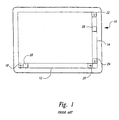
- FIG. 1 is an illustration of a display area 10 in which a conventional horizontal scroll bar 12 and a conventional vertical scroll bar 14 are displayed.
- the horizontal scroll bar 12 includes a left-scroll arrow 18, a right-scroll arrow 20, and a scroll box 28.
- the vertical scroll bar 14 includes an up-scroll arrow 22, a down-scroll arrow 24, and a scroll box 29. Selecting one of the scroll arrows 18, 20, 22, 24 causes the system to move the view of data left, right, up, or down a predefined amount.
- the scroll boxes 28, 29 move within the scroll bars 12, 14, respectively, to represent how far the current view of data is from the top (for vertical scroll bars) or from the left edge (for horizontal scroll bars) of the data.
- the scroll box 29 in the vertical scroll bar 14 of Figure 1 is approximately one quarter of the way down the scroll bar, indicating data being displayed is approximately one quarter of the way down from the beginning of the document or file being displayed.
- the user may also "drag" the scroll boxes 28, 29 within the scroll bars 12, 14, respectively, to cause a different view of the data to be displayed.
- the view is updated continuously as a scroll box is dragged, but if the view cannot be updated continuously with sufficient speed, the view may be updated in a single jump to a new view corresponding to the location of the scroll box at the end of the drag operation.
- the view is updated in a single jump, the user is not given any advanced indication as to what will be the new view. After a user has dragged the scroll box to cause a new view to be displayed in the display area, the user cannot easily return to the previous view.
- the present invention solves the inadequacies of conventional scrolling systems by providing an improved method and system for scrolling through data.
- the present invention is particularly useful for image-based data.
- a display controller such as a scroll bar is used in combination with an image viewer to identify a desired image before the desired image is displayed on a display device.
- the image display controller is manipulated to cause a sequence of images to be displayed in the image viewer. Once the desired image is identified from the sequence of displayed images, the desired image is displayed on the display device.
- the display of the first image is maintained until it is determined that the sequence of displayed images includes the desired image.
- the desired image is displayed on the display device instead of the first image.
- the image viewer displays a preview of an image before the image is displayed on the display screen.
- the computer system includes a display device and a user-controllable pointer positioning device with signal generating means to control the movement of a pointer on the display device.
- the image display controller is displayed on a portion of the display device.
- a user positions the pointer over the image display controller and activates the signal-generating means.
- An image viewer is displayed on the portion of the display device in response to this user input.
- the user moves the pointer while activating the signal-generating means to cause the image display controller to move.
- Each movement of the image display controller corresponds to an image.
- Figure 1 is an illustration of a conventional horizontal and vertical scroll bar displayed in a display area.
- Figure 2 is an illustration of a computer system having a display device in accordance with a preferred embodiment of the present invention.
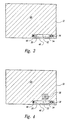
- Figure 3 is an illustration of a first image and an improved scroll bar displayed on the display device of Figure 2 in accordance with a preferred embodiment of the present invention.
- Figure 4 is an illustration of the first image, the improved scroll bar, and an image viewer displayed on the display device of Figure 2 in accordance with a preferred embodiment of the present invention.
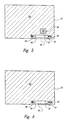
- Figure 5 is an illustration of the first image, the improved scroll bar, and the image viewer of Figure 3, and a second image displayed within the image viewer in accordance with a preferred embodiment of the present invention.
- Figure 6 is an illustration of the second image and the improved scroll bar displayed on the display device of Figure 2 in accordance with a preferred embodiment of the present invention.
- Figure 7 is a flow diagram of a scrolling method used in accordance with a preferred embodiment of the present invention.
- an improved method and system for scrolling through data are provided.
- the present invention may be used with text-based data, the present invention is particularly useful for scrolling through data containing image-based data, including sequential picture stories and animation sequences.
- Multimedia software which may combine video, audio, photographs, text, graphics, animation, and computer programs into one "title” or "show” will especially benefit from the present invention because the present invention improves user interaction with the multimedia software.
- Multimedia software executing on a computer system causes, among other things, a plurality of images to be displayed in sequence on a display device of the computer system.
- the present invention allows a user to quickly locate and select a desired image for display on the display device while maintaining a current display. After the desired image is located and selected, the desired image is displayed on the display device in place of the current display, thereby causing the multimedia software to continue executing from the desired image.
- the present invention provides an improved scroll bar and an image viewer.
- FIG. 2 is an illustration of a computer system 30 in accordance with a preferred embodiment of the present invention.
- the computer system 30 includes a computer 40 having the usual complement of memory and logic circuits, a display device 32, a keyboard 38 or other input device, and a mouse 36 or other pointing device.
- the mouse 36 includes a signal generating means 34 such as a mouse button.
- Data including digital images, is stored in a digital format on a storage device 42 such as a CD ROM drive.
- multimedia software is executing on the computer 40, images are downloaded from the storage device 42 and displayed on the display device 32.
- FIG. 3 is an illustration of a first image 60 and an improved scroll bar 46 displayed on the display device 32 in accordance with a preferred embodiment of the present invention.
- Execution of the multimedia software causes a sequence of images, including the first image 60, to be displayed on the display screen 32.
- the improved scroll bar 46 preferably includes a play button 48, a pause button 50, a scroll box 52, a previous button 54, and a next button 56.
- Activation of the pause button 50 temporarily pauses execution of the multimedia software. While execution of the multimedia software is paused, the image that was displayed when the pause button 50 was activated is displayed until the play button 48 is activated.
- Activation of the play button 48 causes the multimedia software to continue executing on the computer 40.
- Activation of the previous button 54 causes an image preceding the first image 60, if one exists in the sequence of images, to be displayed on the display device 32.
- Activation of the next button 56 causes an image following the first image 60, if one exists, in the sequence of images to be displayed on the display device 32.
- One method of activating a "button" on the improved scroll bar 46 includes using the mouse 36 to position a pointer over the button and then depressing and releasing the mouse button 34. Other methods of activating a button are well known.
- the scroll box 52 slides from one end of the scroll bar to the other end as execution of the multimedia software progresses.
- Each position of the scroll box 52 within the improved scroll bar 46 corresponds to the one of sequence of images being displayed on the display device 32; the current position of the scroll box 52 corresponds to the first image 60.
- Activation of either the previous button 54 or the next button 56 causes the scroll box 52 to move to another position within the scroll bar 46.
- a user may jump to a new location within the multimedia software, thereby causing a new image to be displayed on the display device 32, by dragging the scroll box 52 to a new location within the improved scroll bar 46.
- One method of dragging the scroll box 52 includes using the mouse 36 to position the pointer over the scroll box 52 and depressing the mouse button 34. This is known as selecting the scroll box 52. Movement of the mouse 36 while the scroll box 52 is selected will cause similar movement of the scroll box 52. Other dragging techniques are well known.
- Figure 4 is an illustration of the first image 60, the improved scroll bar 46, and an image viewer 58 displayed on the display device 32 in accordance with a preferred embodiment of the present invention.
- execution of the multimedia software is paused and the image viewer 58 is displayed on the display device. Images are displayed within the image viewer 58.
- the image displayed within the image viewer 58 corresponds to the position of the scroll box 52 within the improved scroll bar 46.
- the image viewer 58 allows the user to peruse the sequence of images without jumping to a new location within the multimedia software. Because the current location of the scroll box 52 within the improved scroll bar 46 corresponds to the first image 60, the first image 60 is displayed within the image viewer 58 when the scroll box 52 is selected.
- FIG. 5 is an illustration of the first image 60, the improved scroll bar 46, and the image viewer 58 displayed on the display device 32; a second image 62 is displayed within the image viewer 58.
- the second image 62 corresponds to the new position of the scroll box 52 within the improved scroll bar 46 while the scroll box 52 is selected.
- the second image 62 will be preferably displayed on the display device 32 in place of the first image 60, the image viewer 58 will disappear, and execution of the multimedia software will continue.
- Figure 6 is an illustration of the second image 62 and the improved scroll bar 46 displayed on the display device 32.
- the image viewer 58 shown in Figures 4 and 5 is no longer displayed on the display device 32. Alternatively, the image viewer 58 may remain displayed on the display device 32 at all times.
- the improved scroll bar 46 and the image viewer 58 provided by the present invention allow a user to quickly search for a desired image without changing the flow of execution of the multimedia software.
- the image viewer 58 preferably displays a reduced size image, just large enough so that the user may quickly view an image.
- the computer 40 will cause a reduced-size image to be displayed on the display device 32 much faster than a full-sized image. For example, a typical computer might take 5 seconds to download a full-sized image from a storage device to a display device. If the multimedia software consists of 100 images, then at least 500 seconds are required to display all 100 images. The same computer might take one half of one second to display a reduced-size image. The present invention therefore allows 100 images to be viewed in approximately 50 seconds instead of 500 seconds.
- FIG 7 is a flow diagram of a scrolling method used in accordance with a preferred embodiment of the present invention. It is assumed that the scrolling method is initiated after the multimedia software has begun executing on the computer 40.
- the scrolling method determines whether the scroll box 52 has been selected. If the scroll box has not been selected, then the scrolling method repeats step 70 until the scroll box is selected.
- the scrolling method causes execution of the multimedia software, causing the current image to remain displayed on the display device.
- the current image is the image which is being displayed when the scroll box is selected.
- the scrolling method causes the image viewer to be displayed on the display screen. Steps 72 and 74 may occur concurrently.
- the scrolling method causes a reduced-size image to be displayed.
- the reduced size image that is displayed within the image viewer corresponds to the position of the scroll box within the scroll bar.
- the scrolling method determines whether the scroll box is still selected. If the scroll box is still selected, then the scrolling method loops back to step 74. When the scroll box is no longer selected, in step 78 the scrolling method causes the image that was displayed within the image viewer to be displayed in full size on the display device. The scrolling method also causes the image viewer to be removed from display on the display device. After step 78, the multimedia software continues executing.
- the improved scroll bar and the image viewer need not appear as illustrated herein and further may be displayed at any location on the display device, and may be any size or shape.
- the image viewer 58 may be displayed on the display device 32 in response to a user activating the previous button 54 or the next button 56. For example, if the previous button 54 or the next button 56 is activated for a predefined amount of time, then the image viewer would be displayed on the display device and a sequence of images would be displayed within the image viewer.
Landscapes
- Engineering & Computer Science (AREA)
- General Engineering & Computer Science (AREA)
- Theoretical Computer Science (AREA)
- Human Computer Interaction (AREA)
- Physics & Mathematics (AREA)
- General Physics & Mathematics (AREA)
- User Interface Of Digital Computer (AREA)
- Digital Computer Display Output (AREA)
- Controls And Circuits For Display Device (AREA)
Applications Claiming Priority (3)
| Application Number | Priority Date | Filing Date | Title |
|---|---|---|---|
| US26538194A | 1994-06-24 | 1994-06-24 | |
| US265381 | 1994-06-24 | ||
| PCT/US1995/008360 WO1996000417A1 (en) | 1994-06-24 | 1995-06-26 | Method and system for scrolling through data |
Publications (2)
| Publication Number | Publication Date |
|---|---|
| EP0715731A1 EP0715731A1 (en) | 1996-06-12 |
| EP0715731B1 true EP0715731B1 (en) | 2000-08-30 |
Family
ID=23010205
Family Applications (1)
| Application Number | Title | Priority Date | Filing Date |
|---|---|---|---|
| EP95925456A Expired - Lifetime EP0715731B1 (en) | 1994-06-24 | 1995-06-26 | Method and system for scrolling through data |
Country Status (5)
| Country | Link |
|---|---|
| US (1) | US5838320A (enExample) |
| EP (1) | EP0715731B1 (enExample) |
| JP (1) | JP3723211B2 (enExample) |
| DE (1) | DE69518610T2 (enExample) |
| WO (1) | WO1996000417A1 (enExample) |
Families Citing this family (63)
| Publication number | Priority date | Publication date | Assignee | Title |
|---|---|---|---|---|
| US5999176A (en) * | 1997-04-04 | 1999-12-07 | International Business Machines Corporation | Method to provide a single scrolling control for a multi-window interface |
| US6348936B1 (en) * | 1998-05-28 | 2002-02-19 | Sun Microsystems, Inc. | Method and apparatus for graphical selection of data |
| AU5996299A (en) * | 1998-09-29 | 2000-04-17 | Maximal Innovative Intelligence Ltd. | A method for rendering a visual overview of hidden data |
| US6204846B1 (en) * | 1999-02-16 | 2001-03-20 | International Business Machines Corporation | Data set user interface control for use in accessing information in a computer |
| US6147683A (en) * | 1999-02-26 | 2000-11-14 | International Business Machines Corporation | Graphical selection marker and method for lists that are larger than a display window |
| US6310633B1 (en) * | 1999-03-23 | 2001-10-30 | Ricoh Company Limited | Method and system for organizing document information |
| US6339438B1 (en) | 1999-07-27 | 2002-01-15 | International Business Machines Corporation | Scroll bar with integrated advertisement |
| US6833825B1 (en) * | 2000-03-10 | 2004-12-21 | Apple Computer, Inc. | Apparatus for remotely controlling a digital processing system |
| US10860290B2 (en) | 2000-11-01 | 2020-12-08 | Flexiworld Technologies, Inc. | Mobile information apparatuses that include a digital camera, a touch sensitive screen interface, support for voice activated commands, and a wireless communication chip or chipset supporting IEEE 802.11 |
| US10915296B2 (en) | 2000-11-01 | 2021-02-09 | Flexiworld Technologies, Inc. | Information apparatus that includes a touch sensitive screen interface for managing or replying to e-mails |
| CN100334577C (zh) | 2000-11-01 | 2007-08-29 | 福来西奥德技术公司 | 用于设备到设备的普适数字输出的控制器及管理器 |
| US11204729B2 (en) | 2000-11-01 | 2021-12-21 | Flexiworld Technologies, Inc. | Internet based digital content services for pervasively providing protected digital content to smart devices based on having subscribed to the digital content service |
| AU2002226948A1 (en) * | 2000-11-20 | 2002-06-03 | Flexiworld Technologies, Inc. | Tobile and pervasive output components |
| US20020097417A1 (en) | 2001-01-19 | 2002-07-25 | Chang William Ho | System for universal data output |
| EP1251515A1 (en) * | 2001-04-19 | 2002-10-23 | Koninklijke Philips Electronics N.V. | Method and system for selecting a position in an image sequence |
| EP1405166A2 (en) * | 2001-06-29 | 2004-04-07 | Koninklijke Philips Electronics N.V. | Pictorial timeline |
| US20030001866A1 (en) * | 2001-06-29 | 2003-01-02 | International Business Machines Corporation | Method and computer program product for using a scrolling computer mouse to select pages of a set of linked web pages |
| US20030197738A1 (en) * | 2002-04-18 | 2003-10-23 | Eli Beit-Zuri | Navigational, scalable, scrolling ribbon |
| JP3738843B2 (ja) * | 2002-06-11 | 2006-01-25 | ソニー株式会社 | 画像検出装置、画像検出方法および画像検出プログラム |
| US8370744B2 (en) * | 2002-06-19 | 2013-02-05 | Microsoft Corporation | User interface for operating a computer from a distance |
| US7574669B1 (en) | 2002-10-08 | 2009-08-11 | Microsoft Corporation | User interface control for navigating, selecting, and organizing document pages |
| US7487460B2 (en) * | 2003-03-21 | 2009-02-03 | Microsoft Corporation | Interface for presenting data representations in a screen-area inset |
| US7159188B2 (en) * | 2003-10-23 | 2007-01-02 | Microsoft Corporation | System and method for navigating content in an item |
| US20050134566A1 (en) * | 2003-12-23 | 2005-06-23 | Kye Systems Corp. | Computer input device for scrolling windows applications |
| US20050223340A1 (en) * | 2004-03-30 | 2005-10-06 | Mikko Repka | Method of navigating in application views, electronic device, graphical user interface and computer program product |
| US7243298B2 (en) | 2004-09-30 | 2007-07-10 | Microsoft Corporation | Method and computer-readable medium for previewing and performing actions on attachments to electronic mail messages |
| US8032482B2 (en) | 2004-09-30 | 2011-10-04 | Microsoft Corporation | Method, system, and apparatus for providing a document preview |
| US7647559B2 (en) * | 2004-09-30 | 2010-01-12 | Microsoft Corporation | Method and computer-readable medium for navigating between attachments to electronic mail messages |
| US9071870B2 (en) * | 2004-12-08 | 2015-06-30 | Nokia Technologies Oy | System and method for viewing digital visual content on a device |
| CN100399252C (zh) * | 2005-09-23 | 2008-07-02 | 联想(北京)有限公司 | 一种文件浏览和定位方法及系统 |
| US20070236490A1 (en) * | 2005-11-25 | 2007-10-11 | Agfa-Gevaert | Medical image display and review system |
| US8607147B2 (en) * | 2005-12-09 | 2013-12-10 | International Business Machines Corporation | System and methods for previewing alternative compositions and arrangements when composing a strictly-structured flow diagram |
| US20070171226A1 (en) * | 2006-01-26 | 2007-07-26 | Gralley Jean M | Electronic presentation system |
| US8001487B2 (en) | 2006-04-12 | 2011-08-16 | Laas & Sonder Pty Ltd | Method and system for organizing and displaying data |
| US8132106B2 (en) * | 2006-06-23 | 2012-03-06 | Microsoft Corporation | Providing a document preview |
| US7712052B2 (en) * | 2006-07-31 | 2010-05-04 | Microsoft Corporation | Applications of three-dimensional environments constructed from images |
| US8564544B2 (en) | 2006-09-06 | 2013-10-22 | Apple Inc. | Touch screen device, method, and graphical user interface for customizing display of content category icons |
| CA2601154C (en) | 2007-07-07 | 2016-09-13 | Mathieu Audet | Method and system for distinguising elements of information along a plurality of axes on a basis of a commonality |
| USD579022S1 (en) * | 2007-07-24 | 2008-10-21 | Samsung Electronics Co., Ltd. | Image display for a mobile phone |
| US8601392B2 (en) | 2007-08-22 | 2013-12-03 | 9224-5489 Quebec Inc. | Timeline for presenting information |
| JP4959498B2 (ja) * | 2007-09-27 | 2012-06-20 | 富士フイルム株式会社 | 画像表示装置、画像表示方法、プログラム及び撮影装置 |
| US8352877B2 (en) * | 2008-03-06 | 2013-01-08 | Microsoft Corporation | Adjustment of range of content displayed on graphical user interface |
| US8311188B2 (en) * | 2008-04-08 | 2012-11-13 | Cisco Technology, Inc. | User interface with voice message summary |
| US8489992B2 (en) * | 2008-04-08 | 2013-07-16 | Cisco Technology, Inc. | User interface with visual progression |
| US8566741B2 (en) * | 2008-08-29 | 2013-10-22 | Microsoft Corporation | Internal scroll activation and cursor adornment |
| US9395884B2 (en) * | 2008-09-24 | 2016-07-19 | Sap Se | Method and system for navigating between pages |
| US8572575B2 (en) * | 2009-09-14 | 2013-10-29 | Myspace Llc | Debugging a map reduce application on a cluster |
| US8477188B2 (en) * | 2009-10-14 | 2013-07-02 | Harris Corporation | Surveillance system for transcoding surveillance image files while retaining geospatial metadata and associated methods |
| US8587651B2 (en) * | 2009-10-14 | 2013-11-19 | Harris Corporation | Surveillance system for transcoding surveillance image files while retaining image acquisition time metadata and associated methods |
| US8659662B2 (en) * | 2009-10-14 | 2014-02-25 | Harris Corporation | Surveillance system with target based scrolling and related methods |
| US20110258577A1 (en) * | 2010-04-20 | 2011-10-20 | Ryan Steelberg | High Volume Scrollbar and Method for Using Same |
| US10289657B2 (en) * | 2011-09-25 | 2019-05-14 | 9224-5489 Quebec Inc. | Method of retrieving information elements on an undisplayed portion of an axis of information elements |
| TW201319917A (zh) * | 2011-11-11 | 2013-05-16 | Hon Hai Prec Ind Co Ltd | 音頻播放裝置及控制音頻播放裝置操作的方法 |
| US9519693B2 (en) | 2012-06-11 | 2016-12-13 | 9224-5489 Quebec Inc. | Method and apparatus for displaying data element axes |
| US9646080B2 (en) | 2012-06-12 | 2017-05-09 | 9224-5489 Quebec Inc. | Multi-functions axis-based interface |
| US11086489B2 (en) | 2012-09-18 | 2021-08-10 | Sony Interactive Entertainment Inc. | Information processing device and information processing method for moving or advancing a display region |
| US9229912B2 (en) | 2012-12-20 | 2016-01-05 | International Business Machines Corporation | Previewing prominent features of remote documents |
| JP6659942B2 (ja) * | 2015-09-11 | 2020-03-04 | フリュー株式会社 | 写真シール作成装置および表示方法 |
| JP6110523B2 (ja) * | 2016-01-14 | 2017-04-05 | 株式会社ソニー・インタラクティブエンタテインメント | 情報処理装置および情報処理方法 |
| KR20180017746A (ko) * | 2016-08-10 | 2018-02-21 | 엘지전자 주식회사 | 이동 단말기 및 그 제어방법 |
| JP6808550B2 (ja) * | 2017-03-17 | 2021-01-06 | キヤノン株式会社 | 情報処理装置、情報処理方法およびプログラム |
| US10671266B2 (en) | 2017-06-05 | 2020-06-02 | 9224-5489 Quebec Inc. | Method and apparatus of aligning information element axes |
| CN112466440B (zh) * | 2020-12-08 | 2023-07-21 | 深圳平安智慧医健科技有限公司 | 医学影像的加载方法、装置、电子设备及存储介质 |
Family Cites Families (10)
| Publication number | Priority date | Publication date | Assignee | Title |
|---|---|---|---|---|
| US5333247A (en) * | 1988-06-10 | 1994-07-26 | International Business Machines Corporation | Scrolling tool for text and graphics in a display system |
| JP3058333B2 (ja) * | 1989-07-25 | 2000-07-04 | ソニー株式会社 | 画像検索装置及び方法 |
| US5202961A (en) * | 1990-06-08 | 1993-04-13 | Apple Computer, Inc. | Sequential information controller |
| US5196838A (en) * | 1990-12-28 | 1993-03-23 | Apple Computer, Inc. | Intelligent scrolling |
| JPH0827700B2 (ja) * | 1990-12-31 | 1996-03-21 | インターナショナル・ビジネス・マシーンズ・コーポレイション | コンピュータ表示制御システム |
| US5353391A (en) * | 1991-05-06 | 1994-10-04 | Apple Computer, Inc. | Method apparatus for transitioning between sequences of images |
| US5375199A (en) * | 1991-06-04 | 1994-12-20 | Digital Equipment Corporation | System monitoring method and device including a graphical user interface to view and manipulate system information |
| US5581275A (en) * | 1992-02-28 | 1996-12-03 | Hewlett-Packard Company | Method and apparatus for locating a predetermined position in a computer file |
| US5528259A (en) * | 1992-10-29 | 1996-06-18 | International Business Machines Corporation | Method and system for multi-dimensional scrolling of displayed data collections in a data processing system |
| US5506951A (en) * | 1994-03-01 | 1996-04-09 | Ishikawa; Hiroshi | Scroll bar with jump tags |
-
1995
- 1995-06-26 DE DE69518610T patent/DE69518610T2/de not_active Expired - Lifetime
- 1995-06-26 WO PCT/US1995/008360 patent/WO1996000417A1/en not_active Ceased
- 1995-06-26 JP JP50348096A patent/JP3723211B2/ja not_active Expired - Fee Related
- 1995-06-26 EP EP95925456A patent/EP0715731B1/en not_active Expired - Lifetime
-
1997
- 1997-05-02 US US08/848,856 patent/US5838320A/en not_active Expired - Lifetime
Also Published As
| Publication number | Publication date |
|---|---|
| DE69518610D1 (de) | 2000-10-05 |
| DE69518610T2 (de) | 2001-01-11 |
| WO1996000417A1 (en) | 1996-01-04 |
| JP3723211B2 (ja) | 2005-12-07 |
| JPH09505174A (ja) | 1997-05-20 |
| EP0715731A1 (en) | 1996-06-12 |
| US5838320A (en) | 1998-11-17 |
Similar Documents
| Publication | Publication Date | Title |
|---|---|---|
| US5838320A (en) | Method and system for scrolling through data | |
| US8069421B2 (en) | Methods and apparatus for graphical object implementation | |
| US7681141B2 (en) | Fast scrolling in a graphical user interface | |
| EP3557394B1 (en) | Method for providing graphical user interface (gui), and multimedia apparatus applying the same | |
| US5237648A (en) | Apparatus and method for editing a video recording by selecting and displaying video clips | |
| US8656312B2 (en) | Content display apparatus and display method thereof | |
| US6396500B1 (en) | Method and system for generating and displaying a slide show with animations and transitions in a browser | |
| US5592602A (en) | User interface and method for controlling and displaying multimedia motion, visual, and sound effects of an object on a display | |
| EP1148412B1 (en) | Managing Data Objects | |
| US7890867B1 (en) | Video editing functions displayed on or near video sequences | |
| US5666552A (en) | Method and apparatus for the manipulation of text on a computer display screen | |
| KR101661772B1 (ko) | 소스 객체로부터 적어도 하나의 타겟 객체로의 애니메이션 효과들의 복사 | |
| US5777612A (en) | Multimedia dynamic synchronization system | |
| EP0625783A2 (en) | Graphical user interface for displaying available source material for editing | |
| JP2008157974A (ja) | 表示制御装置及び表示制御装置の制御方法 | |
| WO2008002999A2 (en) | Digital content playback | |
| JPS6342305B2 (enExample) | ||
| JP2003536125A (ja) | 一元管理及びアクセス提供用ユーザインタフェース | |
| KR20110103954A (ko) | 애니메이션 액션들 및 미디어 객체 액션들의 트리거링 | |
| KR20110123244A (ko) | 단순하거나 복잡한 애니메이션의 정의 | |
| EP0883130A2 (en) | Voice data processing control device and recording medium recording a control program for controlling voice data processing | |
| JP2010113420A (ja) | 情報処理装置、情報処理方法及びプログラム | |
| JP2002175143A (ja) | 画像表示装置、プログラムおよび記録媒体 | |
| JP4741808B2 (ja) | 情報処理装置、プログラム | |
| US20060290666A1 (en) | Method and device for assisting searching for an item in a list by accelerated scrolling on a display device |
Legal Events
| Date | Code | Title | Description |
|---|---|---|---|
| PUAI | Public reference made under article 153(3) epc to a published international application that has entered the european phase |
Free format text: ORIGINAL CODE: 0009012 |
|
| 17P | Request for examination filed |
Effective date: 19960221 |
|
| AK | Designated contracting states |
Kind code of ref document: A1 Designated state(s): DE FR GB |
|
| RTI1 | Title (correction) |
Free format text: METHOD AND SYSTEM FOR SCROLLING THROUGH DATA |
|
| GRAG | Despatch of communication of intention to grant |
Free format text: ORIGINAL CODE: EPIDOS AGRA |
|
| GRAG | Despatch of communication of intention to grant |
Free format text: ORIGINAL CODE: EPIDOS AGRA |
|
| GRAH | Despatch of communication of intention to grant a patent |
Free format text: ORIGINAL CODE: EPIDOS IGRA |
|
| 17Q | First examination report despatched |
Effective date: 19991108 |
|
| GRAH | Despatch of communication of intention to grant a patent |
Free format text: ORIGINAL CODE: EPIDOS IGRA |
|
| GRAA | (expected) grant |
Free format text: ORIGINAL CODE: 0009210 |
|
| AK | Designated contracting states |
Kind code of ref document: B1 Designated state(s): DE FR GB |
|
| REF | Corresponds to: |
Ref document number: 69518610 Country of ref document: DE Date of ref document: 20001005 |
|
| ET | Fr: translation filed | ||
| PLBE | No opposition filed within time limit |
Free format text: ORIGINAL CODE: 0009261 |
|
| STAA | Information on the status of an ep patent application or granted ep patent |
Free format text: STATUS: NO OPPOSITION FILED WITHIN TIME LIMIT |
|
| 26N | No opposition filed | ||
| REG | Reference to a national code |
Ref country code: GB Ref legal event code: IF02 |
|
| PGFP | Annual fee paid to national office [announced via postgrant information from national office to epo] |
Ref country code: DE Payment date: 20120620 Year of fee payment: 18 |
|
| PGFP | Annual fee paid to national office [announced via postgrant information from national office to epo] |
Ref country code: FR Payment date: 20120619 Year of fee payment: 18 Ref country code: GB Payment date: 20120620 Year of fee payment: 18 |
|
| GBPC | Gb: european patent ceased through non-payment of renewal fee |
Effective date: 20130626 |
|
| REG | Reference to a national code |
Ref country code: DE Ref legal event code: R119 Ref document number: 69518610 Country of ref document: DE Effective date: 20140101 |
|
| REG | Reference to a national code |
Ref country code: FR Ref legal event code: ST Effective date: 20140228 |
|
| PG25 | Lapsed in a contracting state [announced via postgrant information from national office to epo] |
Ref country code: DE Free format text: LAPSE BECAUSE OF NON-PAYMENT OF DUE FEES Effective date: 20140101 Ref country code: GB Free format text: LAPSE BECAUSE OF NON-PAYMENT OF DUE FEES Effective date: 20130626 |
|
| PG25 | Lapsed in a contracting state [announced via postgrant information from national office to epo] |
Ref country code: FR Free format text: LAPSE BECAUSE OF NON-PAYMENT OF DUE FEES Effective date: 20130701 |
|
| REG | Reference to a national code |
Ref country code: GB Ref legal event code: 732E Free format text: REGISTERED BETWEEN 20150312 AND 20150318 |