WO2024237280A1 - 情報処理装置、情報処理方法及びプログラム - Google Patents
情報処理装置、情報処理方法及びプログラム Download PDFInfo
- Publication number
- WO2024237280A1 WO2024237280A1 PCT/JP2024/017960 JP2024017960W WO2024237280A1 WO 2024237280 A1 WO2024237280 A1 WO 2024237280A1 JP 2024017960 W JP2024017960 W JP 2024017960W WO 2024237280 A1 WO2024237280 A1 WO 2024237280A1
- Authority
- WO
- WIPO (PCT)
- Prior art keywords
- image
- screen
- control
- cursor
- information processing
- Prior art date
- Legal status (The legal status is an assumption and is not a legal conclusion. Google has not performed a legal analysis and makes no representation as to the accuracy of the status listed.)
- Ceased
Links
Images







Classifications
-
- G—PHYSICS
- G06—COMPUTING OR CALCULATING; COUNTING
- G06F—ELECTRIC DIGITAL DATA PROCESSING
- G06F3/00—Input arrangements for transferring data to be processed into a form capable of being handled by the computer; Output arrangements for transferring data from processing unit to output unit, e.g. interface arrangements
- G06F3/01—Input arrangements or combined input and output arrangements for interaction between user and computer
- G06F3/048—Interaction techniques based on graphical user interfaces [GUI]
- G06F3/0481—Interaction techniques based on graphical user interfaces [GUI] based on specific properties of the displayed interaction object or a metaphor-based environment, e.g. interaction with desktop elements like windows or icons, or assisted by a cursor's changing behaviour or appearance
-
- G—PHYSICS
- G06—COMPUTING OR CALCULATING; COUNTING
- G06F—ELECTRIC DIGITAL DATA PROCESSING
- G06F3/00—Input arrangements for transferring data to be processed into a form capable of being handled by the computer; Output arrangements for transferring data from processing unit to output unit, e.g. interface arrangements
- G06F3/01—Input arrangements or combined input and output arrangements for interaction between user and computer
- G06F3/048—Interaction techniques based on graphical user interfaces [GUI]
- G06F3/0484—Interaction techniques based on graphical user interfaces [GUI] for the control of specific functions or operations, e.g. selecting or manipulating an object, an image or a displayed text element, setting a parameter value or selecting a range
Definitions
- the present invention relates to an information processing device, an information processing method, and a program.
- Patent Document 1 Technology for overlaying a webcam image onto a screen while displaying the subject of an explanation has existed for some time (see, for example, Patent Document 1).
- the image from the webcam was fixedly positioned at the four corners or bottom of the screen, so the presenter had to be positioned away from the subject (e.g., a graph) displayed on the screen, and the presenter's explanation was often not conveyed to the viewer.
- the subject e.g., a graph
- the present invention was made in consideration of these circumstances, and aims to provide a technique that allows a presenter to explain to viewers in an easy-to-understand manner about the subject matter displayed on the screen.
- an information processing device comprises: an object movement control means for executing control to move an object indicating a predetermined position on a screen within the screen in response to a user's operation; an image display control means for controlling the display of an image to be displayed on the screen; an image movement control means for executing a control for arranging the image at a relative position based on the object and moving the image so as to follow the movement of the object as a tracking control; Equipped with.
- the information processing method and program of one aspect of the present invention are information processing methods and programs corresponding to the information processing device of one aspect of the present invention described above.
- the present invention provides a technology that allows a presenter to provide an easy-to-understand explanation to the viewer about the subject displayed on the screen.
- FIG. 1 is a diagram showing an example of a system configuration of an information processing system including a server of an embodiment of an information processing device according to the present invention
- FIG. 2 is a diagram illustrating an example of a hardware configuration of a server in the information processing system of FIG. 1 .
- 3 is a functional block diagram showing an example of a functional configuration of a server having the hardware configuration shown in FIG. 2 .
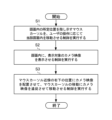
- 4 is a flowchart showing the operation of a server having the hardware configuration of FIG. 2 and the functional configuration of FIG. 3 .
- FIG. 4 is a diagram showing an example of a screen (an example of displaying shortcut icons) of a server having the functional configuration of FIG. 3;
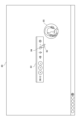
- FIG. 6 is a diagram showing an example of a screen when a controller appears near the mouse cursor immediately after launching the present application from the screen of FIG. 5.
- FIG. 7 is a diagram showing an example of a screen when a camera function is activated using the controller of the screen of FIG. 6 .
- FIG. 8 is a diagram showing an example of a screen when a menu of camera functions is displayed on the controller of the screen of FIG. 7.
- FIG. 9 is a diagram showing an example of a screen when mouse tracking is enabled in the camera function menu of the controller on the screen of FIG. 8.
- FIG. 10 is a diagram showing an example of a screen showing a state in which, when mouse tracking is enabled on the screen of FIG. 9 and the mouse is moved, the camera image moves to track the cursor. 1.
- FIG. 10 is a diagram showing an example of a screen showing a state in which, when mouse tracking is enabled on the screen of FIG. 9 and the mouse is moved, the camera image moves to track the cursor. 1.
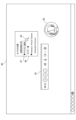
- FIG. 4 is a diagram showing an example of a screen when selecting a shooting area to be recorded on the presenter terminal of FIG.
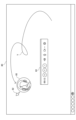
- FIG. 12 is a diagram showing an example of a screen showing a state in which a camera image follows the movement of a cursor while a photographing area is selected on the screen of FIG. 11 and photographed.
- FIG. 13 is a diagram showing an example of a screen showing how facial expressions and emotions are conveyed by the camera image following the movement of the cursor on the screen of FIG. 12 .
- FIG. 14 is a diagram showing an example of a screen displayed when uploading the captured image using the controller on the screen of FIG. 13 after the image capturing is completed.
- FIG. 1 is a diagram showing an example of a system configuration of an information processing system including a server of an embodiment of an information processing device according to the present invention.
- the information processing system of FIG. 1 is configured to include a server 1, a presenter terminal 2, viewer terminals 3-1 to 3-n, and a web camera 4.
- the server 1, presenter terminal 2, and viewer terminals 3-1 through 3-n are connected to each other so as to be able to communicate with each other via a predetermined network NW such as the Internet.
- the type of the network NW is not particularly limited, and may be, for example, Bluetooth (registered trademark), Wi-Fi, a LAN (Local Area Network), the Internet, or the like.
- the presenter terminal 2 is an information processing device, such as a smartphone, a tablet terminal, or a personal computer (PC), that is managed by the presenter and has an app for the presenter provided by the service provider installed therein.
- the presenter terminal 2 is equipped with a web camera 4 on the side of the display screen, and functions as a display device.
- the presenter terminal 2 can be operated by the presenter, for example, to explain the contents of the materials while displaying explanatory materials such as graphs and a camera image of the presenter himself/herself on the screen of the launched application.
- the presenter terminal 2 executes various control processes including processes such as disclosure of contents to each of the viewer terminals 3-1 to 3-n while appropriately communicating with the viewer terminals 3-1 to 3-n.
- the viewer terminals 3-1 to 3-n are terminals that accept operations by viewers, such as doctors, who are member users of the service, and are information processing devices, such as smartphones, tablet terminals, personal computers (PCs), etc. Apps for viewers provided by the service provider are installed on the viewer terminals 3-1 to 3-n.
- the viewer terminals 3-1 to 3-n can display explanatory materials such as graphs provided on the app screen and view an explanation of the graphs while the presenter moves a cursor on the screen by operating the mouse.
- the viewer terminal 3 when there is no need to distinguish between the viewer terminals 3-1 to 3-n, they will be collectively referred to as the "viewer terminal 3."
- the web camera 4 is disposed at a location where the presenter is present, and captures an image of the presenter. Specifically, the web camera 4 captures an image of the face of the presenter providing an explanation facing the display screen of the presenter terminal 2.
- An image of the presenter captured by the web camera 4 (camera image) is distributed from the presenter terminal 2 through the network NW and the server 1 to each of the viewer terminals 3-1 to 3-n.
- the web camera 4 is connected to the presenter terminal 2, but if the camera is network compatible, it may be directly connected to the network NW. Also, if the presenter terminal 2 itself has a built-in camera function, the web camera 4 is not necessary.
- a first method is adopted in which a dedicated app provided by a service provider is installed on the viewer terminal 3 and the presenter terminal 2, and the viewer terminal 3 and the presenter terminal 2 execute the processing of the app.
- a second method may also be adopted in which the viewer terminal 3 and the presenter terminal 2 access a website disclosed by the server 1 and display the website on each terminal.
- the viewer terminal 3 and the presenter terminal 2 communicate with the server 1 as appropriate and have the server 1 execute major processes.
- the method of implementing the present service through cooperation between the server 1, the presenter terminal 2, and the viewer terminal 3 is not limited to the first and second methods.
- a method that appropriately combines the first method and the second method can be adopted as the "collaboration" method.
- the server 1 is the subject of processing, but this is merely an example, and when implemented, the presenter terminal 2, viewer terminal 3, or other information processing device may be the subject of processing as appropriate.
- server 1 executes the main processing, so the following will focus on server 1 in the information processing system in Figure 1 and explain the hardware configuration and functional configuration of server 1.
- FIG. 3 is a block diagram showing a hardware configuration of a server according to an embodiment of the information processing apparatus of the present invention.
- the server 1 includes a CPU (Central Processing Unit) 11, a ROM (Read Only Memory) 12, a RAM (Random Access Memory) 13, a bus 14, an input/output interface 15, an output unit 16, an input unit 17, a memory unit 18, a communication unit 19, and a drive 20.
- a CPU Central Processing Unit
- ROM Read Only Memory
- RAM Random Access Memory
- the CPU 11 executes various processes according to a program recorded in the ROM 12 or a program loaded from the storage unit 18 to the RAM 13 .
- the RAM 13 also stores data and the like necessary for the CPU 11 to execute various processes.
- the CPU 11, ROM 12, and RAM 13 are interconnected via a bus 14.
- An input/output interface 15 is also connected to this bus 14.
- An output unit 16, an input unit 17, a memory unit 18, a communication unit 19, and a drive 20 are connected to the input/output interface 15.
- the output unit 16 is composed of a display such as a liquid crystal display device, a printer, a speaker, etc., and outputs various information.
- the input unit 17 is constituted by input devices such as a keyboard and a mouse, and various information is inputted into the input unit 17 .
- the storage unit 18 is configured with a dynamic random access memory (DRAM) or the like, and stores various data.
- the communication unit 19 communicates with other devices via a network NW including the Internet.
- a program read from the removable media 21 by the drive 20 is installed in the storage unit 18 as necessary. Further, the removable medium 21 can store various data stored in the storage unit 18 in the same manner as the storage unit 18 .
- the hardware configuration of the server 1 has been described above, but the hardware configuration of the presenter terminal 2 and the viewer terminal 3 is also the same, so a description thereof will be omitted.
- FIG. 3 is a functional block diagram showing an example of the functional configuration of a server having the hardware configuration of FIG. 2, a presenter terminal, and a viewer terminal.
- the hardware elements of the server 1 will be marked with k
- the hardware elements of the presenter terminal 2 will be marked with s
- the hardware elements of the viewer terminal 3 will be marked with r.
- a display instruction receiving unit 51 and a display control unit 52 function in the CPU 11s of the presenter terminal 2.
- a presentation application program (hereinafter referred to as an "app") provided by the service provider is installed in the presenter terminal 2, and a shortcut icon for starting the app is arranged in the menu bar of the screen.
- the shortcut icon is clicked, a browser pre-installed on the terminal may be launched, and the URL of a specific page on the server 1 may be entered from the browser to access the server 1 and display the presentation screen.
- the display instruction receiving unit 51 receives operations by the presenter. For example, it receives an instruction to start an app (such as clicking an icon on the menu bar) by operating the mouse, or receives instructions such as the position and size of content (files such as documents, graphs, slides, etc.) or camera images to be opened on the screen, or instructions by selecting the controls of the controller 83 (see FIG. 6) displayed on the screen.
- an instruction to start an app such as clicking an icon on the menu bar
- receives instructions such as the position and size of content (files such as documents, graphs, slides, etc.) or camera images to be opened on the screen, or instructions by selecting the controls of the controller 83 (see FIG. 6) displayed on the screen.
- the display control unit 52 executes control to display the processing result according to the accepted instruction on the screen. For example, when an icon click operation is accepted, an application is started and the result is displayed on the presentation screen of the application. In addition, when the shortcut icon is clicked, a browser pre-installed on the terminal may be launched, and the URL of a specific page on the server 1 may be entered from the browser to access the server 1 and display the presentation screen.
- a display instruction receiving unit 61 and a display control unit 62 function.
- An application provided by the service provider is installed in the viewer terminal 3, and a shortcut icon for launching the application is arranged in the menu bar on the screen.
- the display instruction receiving unit 61 receives operations by the viewer. For example, it receives an instruction to launch an app by operating a mouse (such as clicking an icon on the menu bar).
- the display control unit 62 executes control to display on the screen the results of processing in accordance with the instructions received by the display instruction receiving unit 61. For example, when a click operation on an icon is received, an application is started and the results are displayed on a presentation screen of the application. In addition, when the shortcut icon is clicked, a browser pre-installed on the terminal may be launched, and the URL of a specific page on the server 1 may be entered from the browser to access the server 1 and display the presentation screen.
- the functions that can be operated in the app or the displayed presentation screen vary depending on the user's authority. The viewer's authority is limited to launching the app and viewing the contents of the displayed presentation screen.
- a cursor movement control unit 41 a camera image display control unit 42, an image movement control unit 43, an operation reception unit 44, and a controller display control unit 45 function.
- the cursor movement control unit 41 executes control to move a cursor, which indicates a predetermined position within the screen, within the screen in response to a user's operation. Specifically, the cursor movement control unit 41 executes control to move a cursor using a display (a display device having a camera on the display surface side) of the presenter terminal 2 as a screen.
- the camera image display control unit 42 executes control to display the camera image captured by the web camera 4 on the screens of the presenter terminal 2 and the viewer terminal 3.
- the control of the camera image includes control of the image captured by the camera as well as control of the camera itself (control of the angle of view and control of the orientation), etc.
- the camera image display control unit 42 displays on the screen as an image the facial image (captured image) of the presenter obtained as a result of imaging by the web camera 4.
- the facial image of the presenter follows it, making it possible to provide an explanation including the presenter's facial expression, making the explanation easier to understand.
- the image movement control unit 43 executes tracking control, for example by positioning the camera image at a position near the cursor at the bottom right, and moving the camera image to follow the movement of the cursor. With this, when the camera image is positioned at the bottom right of the cursor and the cursor is moved to the position of the object of explanation, such as a graph, the camera image also moves to follow the movement, allowing the presenter to explain the graph to the viewer in an easy-to-understand manner.
- the operation reception unit 44 receives a mouse operation (predetermined operation) at a predetermined position indicated by the cursor while being tracked by the camera image. This allows the mouse to be operated as usual even if the image from the web camera 4 is tracked to the lower right of the cursor.
- the operation receiving unit 44 allows the execution of tracking control when a user, for example, a presenter, instructs the user to follow, and prohibits the execution of tracking control when a presenter instructs the user to stop following.
- operation reception unit 44 permits the execution of tracking control, and when item 87 is again selected and deactivated, prohibits the execution of tracking control.
- the controller display control unit 45 displays on the screen a controller 83 including one or more operators (six function icons in this example) each of which performs one or more instructions on at least one of the webcam 4 and the image, and accepts an operation performed by the presenter (user) on any of the six function icons arranged in the controller 83.
- one of the six function icons included in the controller 83 is, for example, a camera-related function icon, and when this function icon is clicked, a menu 86 is displayed.
- the menu 86 there are arranged function items such as "Camera position”, “Corner of recording area”, “Follow mouse”, “Camera list”, “Anmaze Virtual Camera”, and "Integrated Camera”.
- FIG. 4 is a flowchart showing the operation of the server having the functional configuration of FIG.
- the presenter and the audience start an application installed on their respective terminals, display a presentation screen (hereinafter referred to as the "screen") on each terminal, and start communication between the terminals via the server 1.
- the presenter displays the content to be explained on the screen of the presenter terminal 2 and operates the mouse to move the cursor (object)
- the cursor movement control unit 41 of the server 1 executes control to move the cursor indicating a predetermined position on the screen within the screen in accordance with the presenter's operation.
- step S2 the camera image display control unit 42 executes control to display the camera image on the screen.
- step S3 the image movement control unit 43 performs tracking control, for example, by positioning the camera image at a position near the cursor (relative positioning based on the cursor) at the bottom right and moving the camera image to follow the movement of the cursor.
- the camera image is positioned in the lower right position near the cursor, and control is executed to move the camera image in accordance with the movement of the cursor, thereby enabling the presenter to provide the viewer with an easy-to-understand explanation of graphs, etc. displayed on the screen.
- the server 1 according to the embodiment can provide the following effects. By having the camera image 85 follow the cursor 82, it becomes very easy for the viewer to understand what part of the screen 80 the presenter is explaining. The element that the presenter wants to explain and his/her own facial expression can be recorded and played back in adjacent positions on the screen 80.
- the viewer watching (viewing) the explanation can check the subject of the explanation and the other person's facial expression at the same time with less eye movement.
- the movement of the camera image 85 can be easily controlled by mouse operation, so the presenter can easily express and convey his/her own feelings to the viewer. For example, by moving the mouse slowly, the camera image 85 also moves slowly, emphasizing and expressing the main points. By moving the mouse in quick and vigorous movements, the camera image 85 also moves in quick and vigorous movements, thereby expressing the presenter's excitement and conveying it to the audience.
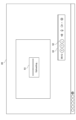
- FIG. 5 is a diagram showing an example of a screen displayed when the presenter terminal of FIG. 1 is started up.
- FIG. 6 is a diagram showing a state in which a cursor and a controller are displayed on the screen of FIG.
- FIG. 7 is a diagram showing a state in which the cursor is moved to the position of the icon of the camera function in the controller in FIG.
- FIG. 8 is a diagram showing an example of a menu that is displayed when the icon in FIG. 7 is clicked.
- FIG. 9 is a diagram showing a state in which the "mouse tracking" function item in the menu of FIG. 8 has been selected with the cursor.
- FIG. 10 is a diagram showing how the camera image follows the cursor when the cursor is moved with the "mouse tracking" function of FIG. 9 enabled.
- a home screen of the operating system is displayed as a screen 80 as shown in FIG.
- a task bar is provided at the bottom of the screen 80.
- Shortcut icons 81 are arranged on the task bar.
- the shortcut icons 81 are icons for starting an application provided by a service provider and installed in the presenter terminal 2.
- a cursor 82 and a controller 83 are displayed on the screen 80, as shown in Figure 6.
- Six function icons are arranged on the controller 83.
- One of the six function icons is, for example, a camera-related function icon 84 shown in Fig. 7, and when the presenter operates the mouse to move the cursor 82 to the position of the function icon 84 and clicks it, an image of the presenter's face captured by the webcam 4 (hereinafter referred to as a "camera image”) is displayed in a circular window.
- the concept of a camera image also includes still images, videos, and the like.
- the presenter moves the cursor 82 to the position of the upward arrow symbol immediately to the right of the function icon 84, as shown in Figure 8, and clicks, causing a menu 86 to pop up.
- the menu 86 there are arranged function items such as "Camera position”, “Corner of recording area”, “Follow mouse”, “Camera list”, “Anmaze Virtual Camera”, and "Integrated Camera”.
- the presenter operates the mouse to move the cursor 82 to the position of the function item "Follow Mouse” 87 in the menu 86 as shown in FIG. 9, and clicks, which activates the mouse-following function of the camera image 85.
- FIG. 11 is a diagram showing an operation for selecting a shooting area to be recorded on the presenter terminal of FIG.
- FIG. 12 is a diagram showing how the camera image follows the cursor when the cursor is pointed at a graph displayed in the shooting area of FIG. 11 while the shooting area is being shot.
- FIG. 13 is a diagram showing how the camera image follows the cursor that is moved within the shooting area in FIG. 11 while the shooting area is being shot.
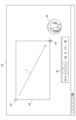
- FIG. 14 is a diagram showing how photography is completed using an icon on the controller and the photographed content is uploaded.
- the server 1 of the embodiment has a function of recording a predetermined area of a screen on which an instructor is giving an explanation.
- the presenter operates the mouse to move the cross cursor 88 to the upper left corner of the desired shooting area and clicks it, then drags in the direction of arrow T to move the cross cursor 88 to the lower right corner of the desired shooting area and clicks it, thereby finalizing the shooting area 89 and starting screen recording of the shooting area 89.
- the pause button on the controller 83 changes to a button indicating that recording is in progress, for example a red "circle" mark 90, allowing the presenter to visually confirm that recording is in progress.
- the presenter when content such as a graph 91 is displayed within a shooting area 89 of a screen 80 and an explanatory video is shot, the presenter operates the mouse to move a cursor 82 to an important point on the graph 91 while giving an explanation, and the camera image 85 following the cursor 82 is also moved close to the important point, so that the facial expression of the presenter shown in the camera image 85 can be simultaneously conveyed to the viewer.
- the camera image 85 moves as indicated by the arrow P, following the cursor 82 that moves within the crosshair cursor 89 to the location that the presenter wants to explain, so the facial expressions and emotions of the presenter in the camera image 85 can be conveyed well to the viewer.
- the presenter uses the mouse to move the cursor 82 to the position of the check mark button 92 on the controller 83 displayed on the screen 80, as shown in Figure 14, and clicks on the check mark button 92, whereupon the recorded (filmed) explanatory video is uploaded to the server 1 and a dialog box 93 indicating that uploading is in progress is displayed.
- the explanatory video uploaded to the server 1 is stored in the memory unit 18 (see Figure 2), so that the recorded explanatory video can be effectively utilized, for example, during a briefing session, by reading out the explanatory video from the memory unit 18 and playing it again to provide an explanation, or by making it available (distributed) to viewers who were unable to attend the briefing at a later date.
- the present invention is not limited to the above-described embodiment, and modifications, improvements, etc. within the scope that can achieve the object of the present invention are included in the present invention.
- the function of the "Follow Mouse" item among the functional items arranged on the controller 83 has been mainly described, however, in addition to this, the following functions are also implemented in the server 1.
- the following functions are provided as setting functions related to the camera image 85. A function that allows the size of the camera image 85 that follows the cursor 82 to be adjusted. A function that allows you to adjust the transparency of the camera image 85 that follows the cursor 82.
- the shooting area is specified as a rectangle (see FIG. 11), but other shapes such as a circle or other shapes may also be used as long as it is a predetermined area.
- the camera image 85 is arranged in the lower right position near the cursor 82, but the relative positional relationship between the cursor 82 and the camera image 85 can be changed by setting conditions.
- the camera video is exemplified as having a circular window shape (see FIG. 7, etc.), but the camera video may have a shape other than this example (for example, a rectangle, an ellipse, or another three-dimensional shape).
- a graph see FIG.
- the system configuration is such that the server 1, the presenter terminal 2, and the viewer terminal 3 are connected via a network NW, but other configurations are also possible.
- some of the components provided in the server 1 may be arranged in the presenter terminal 2 or the viewer terminal 3, and the functions of the present invention may be realized between these two.
- the functional block diagram shown in FIG. 3 is merely an example and is not particularly limited. In other words, it is sufficient that the information processing system in FIG. 4 is provided with a function capable of executing the above-mentioned series of processes as a whole, and the type of functional block used to realize this function is not particularly limited to the example in FIG. 3.
- the locations of the functional blocks are not limited to the example in FIG. 3 and may be arbitrary.
- one functional block may be configured as a single piece of hardware, a single piece of software, or a combination of both.
- the program constituting the software is installed into a computer or the like from a network or a recording medium.
- the computer may be a computer built into dedicated hardware, or may be a computer capable of executing various functions by installing various programs, such as a server, a general-purpose smartphone, or a personal computer.
- Recording media containing such programs are not only configured as removable media that are distributed separately from the device itself in order to provide each user with the program, but also as recording media etc. that are provided to each user in a state where they are already installed in the device itself.
- an information processing device for example, the server 1 in FIG. 3
- an object movement control unit e.g., the cursor movement control unit 41 in FIG. 3
- an object e.g., the cursor 82 in FIG. 10
- An image display control unit e.g., the camera image display control unit 42 in FIG.
- an image movement control means e.g., the image movement control unit 43 in FIG. 3
- a control to move the image e.g., the camera image 85 in FIG. 10
- the object e.g., the cursor 82 in FIG. 10
- a relative position e.g., a position at the lower right near the cursor 82
- an image e.g., camera image 85 in FIG. 10
- an object e.g., cursor 82 in FIG. 10
- the cursor is moved to the position of the subject to be explained (e.g., content such as a graph, slide, document, etc.)
- the image e.g., camera image 85 in FIG. 10
- the presenter also moves in accordance with the movement, allowing the presenter to explain the subject to be explained (e.g., content such as a graph, slide, document, etc.) to the viewer in an easy-to-understand manner, while including the presenter's own facial expressions.
- An information processing device e.g., the server 1 in FIG. 3
- an operation receiving unit e.g., the operation receiving unit 44 in FIG. 3
- receives a predetermined operation on the predetermined position indicated by the object (e.g., the cursor 82 in FIG. 11 ) in a state where the image (e.g., the camera image 85 in FIG. 11 ) is being followed;
- a predetermined operation e.g., the camera image 85 in FIG. 11
- the mouse can be operated in the conventional manner.
- the information processing device e.g., server 1 in FIG. 3
- the operation reception unit e.g., the operation reception unit 44 in FIG. 3 permits execution of the tracking control when a tracking instruction is given by the user's operation, and prohibits execution of the tracking control when a tracking stop instruction is given by the user's operation. This allows you to quickly enable and disable cursor tracking using your controller.
- the information processing device for example, the server 1 in FIG. 3) the object movement control means (e.g., the cursor movement control unit 41 in FIG. 3 ) executes control to move the object (e.g., the cursor) using a display surface of a display device (e.g., the presenter terminal 2) equipped with a camera (e.g., the web camera 4 in FIG. 3 ) on the side of the display surface as the screen;
- the image display control means e.g., the camera image display control unit 42 in FIG. 3) displays a captured image (e.g., a face image of the presenter, etc.) obtained as a result of capturing an image by the camera on the screen as the image.
- the captured image e.g., an image of the presenter's face
- the explanation can be made easier for the viewer to understand by using voice and facial expression.
- the information processing device e.g., server 1 in FIG. 3
- a controller display control means e.g., the controller 83 in FIG. 6
- This makes it possible to smoothly give instructions for the explanation without performing unnecessary operations such as returning to the menu bar during the explanation.
- An information processing method executed by an information processing device includes: An information processing method executed by an information processing device, an object movement control step (e.g., image display step S1 in FIG. 4 ) for executing control to move an object (e.g., cursor 82 in FIG. 10 ) indicating a predetermined position on a screen within the screen in response to a user's operation; an image display control step (e.g., image display control step S2 in FIG. 4) for executing control to display an image to be displayed (e.g., camera image 85 in FIG. 10) on the screen; an image movement control step (e.g., image movement control step S3 in FIG.
- a control for moving the image (e.g., camera image 85 in FIG. 10 ) following the movement of the object (e.g., cursor 82 in FIG. 10 ) by placing the image (e.g., camera image 85 in FIG. 10 ) at a relative position (e.g., a position at the lower right near cursor 82) based on the object (e.g., cursor 82 in FIG. 10 ) as a tracking control; Including, It is possible.
- a program comprises: On the computer, an object movement control step (e.g., image display step S1 in FIG. 4 ) for executing control to move an object (e.g., cursor 82 in FIG. 10 ) indicating a predetermined position on a screen within the screen in response to a user's operation; an image display control step (e.g., image display control step S2 in FIG. 4) for executing control to display an image to be displayed (e.g., camera image 85 in FIG. 10) on the screen; an image movement control step (e.g., image movement control step S3 in FIG. 4 ) of executing a control for moving the image (e.g., camera image 85 in FIG.
- a relative position e.g., a lower right position near cursor 82
- the object e.g., cursor 82 in FIG. 10
- the image e.g., camera image 85 in FIG. 10
- the image being moved in accordance with the movement of the object (e.g., cursor 82 in FIG. 10 ); It is possible.
Landscapes
- Engineering & Computer Science (AREA)
- General Engineering & Computer Science (AREA)
- Theoretical Computer Science (AREA)
- Human Computer Interaction (AREA)
- Physics & Mathematics (AREA)
- General Physics & Mathematics (AREA)
- User Interface Of Digital Computer (AREA)
Priority Applications (2)
| Application Number | Priority Date | Filing Date | Title |
|---|---|---|---|
| JP2024552437A JP7659873B1 (ja) | 2023-05-17 | 2024-05-15 | 情報処理装置、情報処理方法及びプログラム |
| JP2025048684A JP2025085831A (ja) | 2023-05-17 | 2025-03-24 | 情報処理装置、情報処理方法及びプログラム |
Applications Claiming Priority (2)
| Application Number | Priority Date | Filing Date | Title |
|---|---|---|---|
| JP2023081838 | 2023-05-17 | ||
| JP2023-081838 | 2023-05-17 |
Publications (1)
| Publication Number | Publication Date |
|---|---|
| WO2024237280A1 true WO2024237280A1 (ja) | 2024-11-21 |
Family
ID=93519679
Family Applications (1)
| Application Number | Title | Priority Date | Filing Date |
|---|---|---|---|
| PCT/JP2024/017960 Ceased WO2024237280A1 (ja) | 2023-05-17 | 2024-05-15 | 情報処理装置、情報処理方法及びプログラム |
Country Status (2)
| Country | Link |
|---|---|
| JP (2) | JP7659873B1 (https=) |
| WO (1) | WO2024237280A1 (https=) |
Citations (6)
| Publication number | Priority date | Publication date | Assignee | Title |
|---|---|---|---|---|
| JPH04257046A (ja) * | 1991-02-12 | 1992-09-11 | Nippon Telegr & Teleph Corp <Ntt> | カーソル表示方法 |
| JP2000331180A (ja) * | 1999-05-17 | 2000-11-30 | Fuji Photo Film Co Ltd | 画像処理方法 |
| US20040150664A1 (en) * | 2003-02-03 | 2004-08-05 | Microsoft Corporation | System and method for accessing remote screen content |
| JP2013542514A (ja) * | 2010-09-30 | 2013-11-21 | アップル インコーポレイテッド | ユーザインターフェイスにおけるアイテムの管理 |
| WO2016185541A1 (ja) * | 2015-05-18 | 2016-11-24 | 三菱電機株式会社 | 表示制御装置および画像表示装置 |
| JP2022021122A (ja) * | 2020-07-21 | 2022-02-02 | キヤノン株式会社 | Web会議システム、処理方法、およびプログラム |
Family Cites Families (1)
| Publication number | Priority date | Publication date | Assignee | Title |
|---|---|---|---|---|
| JP6782016B2 (ja) * | 2017-08-17 | 2020-11-11 | 有限会社野村環境設計 | 入力支援装置および入力支援プログラム |
-
2024
- 2024-05-15 WO PCT/JP2024/017960 patent/WO2024237280A1/ja not_active Ceased
- 2024-05-15 JP JP2024552437A patent/JP7659873B1/ja active Active
-
2025
- 2025-03-24 JP JP2025048684A patent/JP2025085831A/ja active Pending
Patent Citations (6)
| Publication number | Priority date | Publication date | Assignee | Title |
|---|---|---|---|---|
| JPH04257046A (ja) * | 1991-02-12 | 1992-09-11 | Nippon Telegr & Teleph Corp <Ntt> | カーソル表示方法 |
| JP2000331180A (ja) * | 1999-05-17 | 2000-11-30 | Fuji Photo Film Co Ltd | 画像処理方法 |
| US20040150664A1 (en) * | 2003-02-03 | 2004-08-05 | Microsoft Corporation | System and method for accessing remote screen content |
| JP2013542514A (ja) * | 2010-09-30 | 2013-11-21 | アップル インコーポレイテッド | ユーザインターフェイスにおけるアイテムの管理 |
| WO2016185541A1 (ja) * | 2015-05-18 | 2016-11-24 | 三菱電機株式会社 | 表示制御装置および画像表示装置 |
| JP2022021122A (ja) * | 2020-07-21 | 2022-02-02 | キヤノン株式会社 | Web会議システム、処理方法、およびプログラム |
Also Published As
| Publication number | Publication date |
|---|---|
| JP2025085831A (ja) | 2025-06-05 |
| JP7659873B1 (ja) | 2025-04-10 |
| JPWO2024237280A1 (https=) | 2024-11-21 |
Similar Documents
| Publication | Publication Date | Title |
|---|---|---|
| US12189862B2 (en) | Sub-display designation for remote content source device | |
| US11487423B2 (en) | Sub-display input areas and hidden inputs | |
| US20240053879A1 (en) | Object Drag Method and Device | |
| US11715444B2 (en) | Notification handling in a user interface | |
| US8239783B2 (en) | Integrated viewfinder and digital media | |
| JP2025086073A (ja) | プログラム、情報処理方法 | |
| NO331338B1 (no) | Fremgangsmate og anordning for endring av en videokonferanse-layout | |
| EP4078350B1 (en) | Sub-display designation and sharing | |
| JP7771438B2 (ja) | ページ表示方法、装置、機器、記憶媒体及びプログラム | |
| US20210185520A1 (en) | Sub-display pairing | |
| US10466950B2 (en) | Camera driven work flow synchronisation | |
| JP7659873B1 (ja) | 情報処理装置、情報処理方法及びプログラム | |
| CN115967854A (zh) | 拍照方法、装置及电子设备 | |
| CN115240821A (zh) | 图像显示方法、装置、计算机设备及存储介质 | |
| Chu et al. | Design of a motion-based gestural menu-selection interface for a self-portrait camera | |
| US11523061B2 (en) | Imaging apparatus, image shooting processing method, and storage medium for performing control to display a pattern image corresponding to a guideline | |
| WO2023174009A1 (zh) | 基于虚拟现实的拍摄处理方法、装置及电子设备 | |
| JP2021131519A (ja) | 情報処理方法、撮影装置、および画像管理装置 | |
| KR20250111580A (ko) | 화상 회의 송출 화면 제어 방법 및 장치 | |
| JP5818634B2 (ja) | コンテンツ管理装置、記録装置、操作装置、コンテンツ管理システムおよびそれらの制御方法 | |
| KR20250055273A (ko) | 영상 통화 중 이미지 촬영 방법 및 시스템 | |
| US20210266455A1 (en) | Image capture control system, method and computer program product | |
| KR20230029233A (ko) | 아바타 촬영 모드 전환을 위한 인터페이스 제공 방법, 장치, 및 컴퓨터 프로그램 | |
| CN121742703A (zh) | 图像处理方法及其装置 | |
| CN117909002A (zh) | 用于内容呈现的方法、装置、设备和存储介质 |
Legal Events
| Date | Code | Title | Description |
|---|---|---|---|
| WWE | Wipo information: entry into national phase |
Ref document number: 2024552437 Country of ref document: JP |
|
| 121 | Ep: the epo has been informed by wipo that ep was designated in this application |
Ref document number: 24807231 Country of ref document: EP Kind code of ref document: A1 |
|
| NENP | Non-entry into the national phase |
Ref country code: DE |