WO2024166189A1 - 販売支援システム、販売支援方法及び記録媒体 - Google Patents
販売支援システム、販売支援方法及び記録媒体 Download PDFInfo
- Publication number
- WO2024166189A1 WO2024166189A1 PCT/JP2023/003877 JP2023003877W WO2024166189A1 WO 2024166189 A1 WO2024166189 A1 WO 2024166189A1 JP 2023003877 W JP2023003877 W JP 2023003877W WO 2024166189 A1 WO2024166189 A1 WO 2024166189A1
- Authority
- WO
- WIPO (PCT)
- Prior art keywords
- customer
- product
- shelf
- terminal
- purchasing
- Prior art date
- Legal status (The legal status is an assumption and is not a legal conclusion. Google has not performed a legal analysis and makes no representation as to the accuracy of the status listed.)
- Ceased
Links
Images




Classifications
-
- G—PHYSICS
- G06—COMPUTING OR CALCULATING; COUNTING
- G06Q—INFORMATION AND COMMUNICATION TECHNOLOGY [ICT] SPECIALLY ADAPTED FOR ADMINISTRATIVE, COMMERCIAL, FINANCIAL, MANAGERIAL OR SUPERVISORY PURPOSES; SYSTEMS OR METHODS SPECIALLY ADAPTED FOR ADMINISTRATIVE, COMMERCIAL, FINANCIAL, MANAGERIAL OR SUPERVISORY PURPOSES, NOT OTHERWISE PROVIDED FOR
- G06Q30/00—Commerce
- G06Q30/02—Marketing; Price estimation or determination; Fundraising
- G06Q30/0241—Advertisements
Definitions
- This disclosure relates to sales support systems, etc.
- Patent Document 1 discloses a sales information utilization system that supports product sales by using dynamic information such as information on customers' contact behavior with products and information on their stopping behavior in front of products. When the dynamic information meets predetermined conditions, advertisements are displayed on store displays and customer terminals.
- the customer may find it too much trouble to purchase the product and may not purchase the product at the store where the product was viewed or at an online store related to that store.
- the customer may end up purchasing the product at a store or online commerce site that is not related to the store where the product was viewed.
- the purpose of this disclosure is to provide a sales support system etc. that increases the likelihood that a customer will purchase a product from the store where they saw the product.
- the sales support system includes a customer identification means for identifying a customer based on an image of the customer standing in front of a shelf, a product identification means for identifying a product of interest on a shelf that the customer has noticed based on an image of the customer standing in front of the shelf, a login control means for controlling a terminal installed on the shelf to log in to a purchasing system using the account of the identified customer, and a display control means for displaying a screen for purchasing the product of interest on the logged-in terminal.
- the sales support method disclosed herein identifies a customer based on an image taken of the customer in front of a shelf, identifies a product on the shelf that the customer has noticed based on an image taken of the customer in front of the shelf, controls a terminal installed on the shelf to log in to a purchasing system using the account of the identified customer, and displays a screen on the logged-in terminal for purchasing the product of interest.
- the program disclosed herein causes a computer to execute a process of identifying a customer based on an image taken of the customer in front of a shelf, identifying a product of interest on the shelf that the customer has noticed based on an image taken of the customer in front of the shelf, controlling a terminal installed on the shelf to log in to a purchasing system using the account of the identified customer, and displaying a screen for purchasing the product of interest on the logged-in terminal.
- the program may be stored in a non-transitory computer-readable recording medium.
- This disclosure can increase the likelihood that a customer will purchase a product from the store where they saw the product.
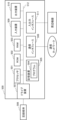
- FIG. 2 is a diagram illustrating an example of a device connected to the sales support system according to the first embodiment.
- FIG. 2 is a diagram showing an example of installation of a camera and a terminal.
- 1 is a block diagram showing an example of the configuration of a sales support system according to a first embodiment
- FIG. 13 is a diagram showing an example of a screen for purchasing a product of interest.
- 4 is a flowchart showing an operation example of the sales support system according to the first embodiment.
- FIG. 11 is a block diagram showing a configuration example of a sales support system according to a second embodiment.
- FIG. 2 is a plan view of the interior of a store showing an example of the installation of cameras and terminals.
- 10 is a flowchart showing an operation example of the sales support system according to the second embodiment.
- FIG. 2 is a block diagram illustrating an example of a hardware configuration of a computer.
- the sales support system 100 supports a customer to purchase a product displayed on the shelf using the terminal.
- a product is purchased at a terminal installed on the shelf, and the purchased product is delivered to the customer.
- the product may be delivered from the store, or may be delivered from a warehouse or the like, similar to a product purchased on an e-commerce site operated by the store.
- the sales support system 100 can also be applied to a case in which a customer takes the purchased product home from the store. Such an example will be described later.
- FIG. 1 is a diagram showing an example of a device communicatively connected to the sales support system 100 according to the first embodiment.
- the sales support system 100 is connected to a camera 10 and a terminal 20.
- the sales support system 100 is further connected to an authentication server 30, a purchasing system 40, a product position DB (database) 51, a biometric information DB 52, and a featured product DB 53.
- the authentication server 30, the purchasing system 40, the product position DB 51, the biometric information DB 52, and the featured product DB 53 may each be provided as necessary.
- at least one of the authentication server 30, the purchasing system 40, the product position DB 51, the biometric information DB 52, and the featured product DB 53 may be realized by a device integrated with the sales support system 100.
- Camera 10 is installed in a store and photographs a customer in front of a shelf. Camera 10 may be installed so that it can photograph the face or iris of a customer in front of the shelf. Camera 10 may also be installed so that it can photograph an image that identifies the customer's line of sight. Camera 10 may also be installed so that it can photograph an item that a customer picks up. Multiple cameras 10 may be installed for one shelf. Camera 10 may be a camera provided in terminal 20 or a surveillance camera.
- the terminal 20 is installed on a shelf and is available to customers standing in front of the shelf.
- the terminal 20 is, for example, a tablet, but is not limited to this.
- the terminal 20 may also be realized by a smartphone or a personal computer.
- FIG. 2 is a diagram showing an example of the installation of the camera 10 and the terminal 20.
- the camera 10 is installed on the ceiling.
- the camera 10 photographs a customer in front of a shelf X.
- a number of products (P1, P2, P3, ...) are displayed on the shelf X.
- the camera 10 photographs the customer picking up a product.
- the terminal 20 is installed on the shelf X alongside the products.
- the installation method of the camera 10 and the terminal 20 is not limited to the example in FIG. 3.
- the camera 10 may be installed on the shelf.
- the product position DB51 stores the product ID of a product in association with its position on the shelf.
- the product ID is a product code that identifies the product.
- Product codes include, for example, the JAN (Japanese Article Number) code, the EAN (European Article Number) code, and the UPC (Universal Product Code).
- the biometric information DB 52 stores a customer ID (identifier) in association with the customer's biometric information.
- Biometric information is information that can be used for biometric authentication, such as facial or iris features.
- the customer ID is an identifier that uniquely identifies a customer.
- the customer ID may be an account ID that specifies an account in the purchasing system 40, or may be an ID separate from the account ID. If the customer ID and the account ID in the purchasing system 40 are separate, the biometric information DB 52 may further store the account ID in association with the customer ID.
- the featured product DB 53 stores featured products that have caught the customer's attention for each customer.
- the featured product DB 53 may store the customer ID and the featured product in association with each other.
- the featured product DB 53 may hold featured products only while the customer is staying at the store. Alternatively, the featured product DB 53 may continue to hold featured products even after the day the customer visits the store.
- the authentication server 30 is a server that authenticates customers.
- the authentication server 30 checks whether the pre-registered biometric information of the customer matches the biometric information acquired from an image taken at the store. For example, the authentication server 30 checks the biometric information by referring to the biometric information DB 52. The authentication server 30 then transmits the customer ID of the customer whose biometric information matches to the sales support system 100.
- the purchasing system 40 manages the purchase of goods by customers. Customers can purchase goods by logging into their own accounts registered in the purchasing system 40 via any terminal. In the first embodiment, the purchasing system 40 may manage the delivery of purchased goods to customers. In this case, the purchasing system 40 may be realized by a system common to the system that realizes the e-commerce site operated by the store. However, examples of the purchasing system 40 are not limited to this. The purchasing system 40 may manage the names, payment methods, and delivery addresses of customers that have been registered in advance.
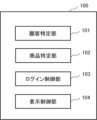
- FIG. 3 is a block diagram showing an example of the configuration of the sales support system 100 according to the first embodiment.
- the sales support system 100 includes a customer identification unit 101, a product identification unit 102, a login control unit 103, and a display control unit 104.
- the customer identification unit 101 identifies the customer in front of the shelf based on an image captured of the customer in front of the shelf. Identifying a customer means identifying which customer the customer is. For example, the customer identification unit 101 identifies a customer by receiving from the authentication server 30 a customer ID associated with biometric information obtained from an image captured of the customer in front of the shelf.
- the customer identification unit 101 acquires a facial image of a customer standing in front of a shelf from the camera 10. The customer identification unit 101 then extracts facial features of the customer from the facial image and transmits the extracted features to the authentication server 30. The authentication server 30 compares the received features with features stored in the biometric information DB 52. The authentication server 30 then transmits the customer ID of a customer whose features match to the customer identification unit 101. Note that the method for identifying a customer is not limited to the above example. The customer identification unit 101 may transmit an image to the authentication server 30. At this time, the authentication server 30 extracts biometric information from the image and uses it for the comparison.
- the product identification unit 102 identifies a product of interest that has been noticed by a customer on a shelf, based on an image taken of the customer in front of the shelf.
- a product of interest is a product in which the customer has an interest and is predicted to have been considered for purchase.
- the product identification unit 102 identifies a product that the customer has picked up or seen as a product of interest.
- the product identification unit 102 may also identify a product that the customer has put back on the shelf as a product of interest.
- the product identification unit 102 identifies the product ID of the product of interest.
- the image used to identify the product of interest and the image used to identify the customer may be the same or different images.
- the product identification unit 102 obtains an image of a customer standing in front of a shelf from the camera 10. The product identification unit 102 then analyzes which position on the shelf the customer is reaching for by recognizing the customer's hands and arms from the image. Alternatively, the product identification unit 102 analyzes which position on the shelf the customer is looking at based on the line of sight. The product identification unit 102 then references the product position DB 51 and identifies the product displayed in the analyzed position as the featured product.
- the product identification unit 102 may identify the product of interest by image recognition of the product. In this case, the product identification unit 102 may refer to the product position DB 51 as necessary.
- the product identification unit 102 associates the identified product ID with the customer ID identified by the customer identification unit 101 and stores them in the featured product DB 53. If there are multiple customers in front of the shelf, the product identification unit 102 identifies the customer who has focused on the product from the image, and stores the customer's featured product in the featured product DB 53.
- the login control unit 103 controls the terminal 20 to log in to the purchasing system 40 with the account of the identified customer.
- the login control unit 103 controls the terminal 20 to log in to the purchasing system 40 with the account of the customer associated with biometric information obtained from an image taken of the customer in front of a shelf.
- the login control unit 103 may acquire the account ID identified by the customer identification unit 101.
- the login control unit 103 may refer to the biometric information DB 52 and acquire the account ID linked to the customer ID identified by the customer identification unit 101.
- the login control unit 103 puts the terminal 20 in a logged-in state to the purchasing system 40 with the account ID acquired in this way.
- the display control unit 104 causes the logged-in terminal 20 to display a screen for purchasing the product of interest identified by the product identification unit 102.
- the display control unit 104 causes the terminal 20 to display a screen for purchasing a product using an account controlled by the login control unit 103 to log in.
- the screen for purchasing the product of interest may be generated by the purchasing system 40.
- the display control unit 104 may cause the terminal 20 to display the screen generated by the purchasing system 40.
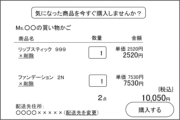
- FIG. 4 is a diagram showing an example of a screen for purchasing a featured product.
- the purchasing system 40 may refer to the featured product DB 53 and register featured products associated with the customer ID in the customer's virtual shopping cart. For example, the purchasing system 40 retrieves from the featured product DB 53 the products that the customer focused on on the day they visited the store.
- the display control unit 104 displays a screen showing the featured products in the shopping cart, as shown in FIG. 4, for example.
- the display control unit 104 displays a screen including buttons for proceeding with the purchase process for the products in the shopping cart, such as a button labeled "Purchase.”
- the name of the customer of the logged-in account, "Ms. XX” is displayed on the screen.
- the lipstick and foundation that the customer focused on that day are registered in the shopping cart.
- the address to which the products will be delivered is displayed on the screen.
- the purchasing system 40 deletes the unnecessary products from the virtual shopping cart in response to the customer's operation.
- the customer operates the terminal 20 to purchase the products.
- the purchasing system 40 processes the payment using a payment method that is pre-linked to the account ID.
- the customer identification unit 101 identifies the customer, the customer in front of the shelf may have been misidentified. Also, the identified customer may have been replaced by another customer. Therefore, before processing the payment, the purchasing system 40 may re-authenticate the customer operating the terminal 20. There are no particular limitations on the authentication method, and biometric authentication and passcode authentication can be used.
- the purchasing system 40 transmits data to a shipping system (not shown) to have the product delivered to a pre-registered address, such as the customer's home.
- the purchasing system 40 may generate a screen for purchasing a featured product by referencing featured products that the customer featured during a previous visit to the store, which are stored in the featured product DB 53.
- the purchasing system 40 may obtain featured products from a specified period in the past and generate the screen.
- the display control unit 104 displays a screen for purchasing featured products that the customer featured during a previous visit to the store.
- FIG. 5 is a flowchart showing an example of the operation of the sales support system 100 according to the first embodiment.
- the sales support system 100 may start the process of FIG. 5 in response to detecting the presence of a person in front of a shelf from an image captured by the camera 10.
- the customer identification unit 101 identifies a customer based on an image taken of the customer in front of a shelf (step S1).
- the product identification unit 102 identifies a product on a shelf that has attracted the customer's attention, based on an image taken of the customer in front of the shelf (step S2).
- the order of steps S1 and S2 is not particularly limited. In other words, the product identification unit 102 may identify a product of interest first, and then the customer identification unit 101 may identify the customer who has attracted attention to the product.
- the login control unit 103 controls the terminal 20 installed on the shelf to log in to the purchasing system 40 using the identified customer's account (step S3).
- the display control unit 104 causes the logged-in terminal 20 to display a screen for purchasing the product of interest (step S4). This causes the sales support system 100 to end the operation shown in FIG. 5.
- the customer identification unit 101 identifies a customer based on an image taken of the customer in front of a shelf.
- the product identification unit 102 identifies a product of interest that the customer has noticed on the shelf.
- the login control unit 103 then controls the terminal 20 installed on the shelf to log in to the purchasing system 40 using the account of the identified customer.
- the display control unit 104 causes the logged-in terminal 20 to display a screen for purchasing the product of interest.
- arrangements for the purchase of an item that a customer has seen in a store can be made while the customer is in the store. This, for example, prevents the customer from purchasing the item at another store. It also prevents the customer from abandoning the purchase because, for example, they find it troublesome to take the item to the cash register or because the cash register is busy. This increases the likelihood that the customer will purchase the item from the store where they saw it.
- scanning the barcodes can be a hassle for customers. It can also be a hassle for customers to search for and purchase products after returning home.
- a screen is displayed for purchasing a product that has been identified as having attracted the customer's attention. This reduces the hassle of purchasing a product compared to when the customer scans a barcode or searches for a product.
- control is performed to log in to an account associated with the customer's biometric information from the terminal 20. Then, when the customer simply stands in front of the terminal 20, a screen for purchasing a product with the customer's account is displayed. This reduces the hassle for the customer compared to when the customer performs operations to log in. This increases the likelihood that the customer will purchase a product from the store where they viewed the product.
- FIG. 6 is a block diagram showing a configuration example of a sales support system 110 according to the second embodiment.
- the sales support system 110 according to the second embodiment differs from the sales support system 100 according to the first embodiment in that the sales support system 110 includes a determination unit 105.
- the description of the configuration of the second embodiment the description of the same configuration as the first embodiment will be omitted.
- a store may have a plurality of shelves X as shown in FIG. 2.
- the camera 10 photographs customers in front of each of the plurality of shelves.
- the camera 10 may be installed on each shelf.
- one camera 10 may be installed to photograph customers in front of multiple shelves.
- the sales support system 110 manages in advance which shelf each shooting area of the camera 10 photographs.
- a terminal 20 is installed on each shelf.
- the sales support system 110 manages in advance the correspondence between the terminal 20 and the shooting area of the camera 10 that photographs in front of the shelf on which the terminal 20 is installed.
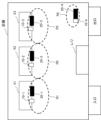
- FIG. 7 is a plan view of the interior of a store showing an example of the installation of cameras 10 and terminals 20.
- Cameras 10-1, 10-2, 10-3 capture images of the shooting areas R1, R2, R3 in front of shelves X1, X2, X3, respectively.
- the range of the area captured by each camera 10 can be set as appropriate.
- Terminals 20-1, 20-2, 20-3 are installed on each shelf X1, X2, X3.
- the sales support system 110 is connected to, for example, the multiple cameras 10-1, 10-2, 10-3 and the multiple terminals 20-1, 20-2, 20-3 so as to be able to communicate with each of them.
- the customer identification unit 101 identifies customers based on images captured of customers in front of each of multiple shelves. For example, the customer identification unit 101 acquires images of customers in front of the shelves from cameras 10-1, 10-2, and 10-3. The customer identification unit 101 then identifies the customers through biometric authentication using biometric information obtained from the images.
- the product identification unit 102 identifies products of interest that have been noticed by customers based on images captured of customers in front of each of a number of shelves. For example, the product identification unit 102 identifies products of interest that have been noticed by customers in each of the image capture areas R1, R2, and R3 based on images captured by cameras 10-1, 10-2, and 10-3. At this time, the product identification unit 102 may identify products of interest by referring to a product position DB 51 that stores the position of products on the shelf for each shelf.
- the camera 10 that captures the image used to identify the customer and the camera 10 that captures the image used to identify the products of interest may be different cameras.
- the determination unit 105 determines whether the customer is in front of the terminal 20.
- the determination unit 105 may also determine which of multiple terminals 20 the customer is in front of. The range of the area in which it is determined that the customer is in front of the terminal 20 can be set as appropriate. The area in which the product that the customer has focused on is identified and the area in which it is determined that the customer is in front of the terminal 20 may be the same or different. For example, in FIG. 7, the determination unit 105 may determine that the customer is in front of the terminal 20-1 while the customer is in the shooting area R1 captured by the camera 10-1. Alternatively, the determination unit 105 may determine that the customer is in front of the terminal 20-1 while the customer is in a predetermined area that is narrower than the shooting area R1.
- the determination unit 105 analyzes the image captured by the camera 10 and tracks the movement line of the customer identified by the customer identification unit 101. When the tracked customer is within a predetermined area in front of a shelf, the determination unit 105 may determine that the customer is in front of the terminal 20 installed on the shelf. When the tracked customer leaves the area, the determination unit 105 may determine that the customer is not in front of the terminal 20.
- the determination unit 105 may combine the detection results of a human presence sensor installed near the terminal 20 to determine whether or not a customer is in front of the terminal 20. After a customer in front of a shelf is identified, when a person is detected by an infrared sensor or a floor pressure sensor, the determination unit 105 determines that the identified customer is in front of the terminal 20.
- the login control unit 103 may control the terminal 20 installed on a shelf to log in to the purchasing system 40 when a customer in front of the shelf is identified. Alternatively, the login control unit 103 may control the terminal 20 to log in to the purchasing system 40 when it is determined that the customer is in front of the terminal 20. Furthermore, the login control unit 103 may control the terminal 20 to log out from the purchasing system 40 when it is determined that the customer is not in front of the terminal 20. The login control unit 103 may control the terminal 20 to log out after a predetermined time has elapsed since it was determined that the customer is not in front of the terminal 20.
- the display control unit 104 When it is determined that a customer is in front of a terminal 20, the display control unit 104 causes the terminal 20 determined to have the customer to display a screen for purchasing the product of interest identified by the product identification unit 102. For example, when it is determined that a customer is in front of terminal 20-1, the display control unit 104 causes terminal 20-1 to display the screen.
- the display control unit 104 may cause the terminal 20 installed on the other shelf to display the products of interest that the customer has noticed in front of the first shelf.
- the display control unit 104 may cause a screen to be displayed on the terminal 20 installed on the other shelf, which allows the customer to purchase all of the products of interest that the customer has noticed on each of multiple shelves at once.
- the screen to be displayed is not limited, and the display control unit 104 may cause the terminal 20 installed on the shelf to display a screen for purchasing only the products of interest that the customer has noticed on that shelf.
- the display control unit 104 stops displaying a screen for purchasing the noted product on the terminal 20.
- the display control unit 104 may also control the terminal 20 so as not to accept operations on the screen for purchasing the noted product.
- the determination unit 105 determines that a customer is in front of a terminal 20, it determines that the customer is not in front of another terminal 20. For example, the determination unit 105 may determine that a customer who was in front of terminal 20-1 is in front of terminal 20-2 before it is determined that the same customer has left terminal 20-1. In this case, the determination unit 105 determines that the customer has left terminal 20-1. This allows the display control unit 104 to prevent the display of a screen for purchasing the product of interest even after the customer has moved on.
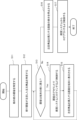
- FIG. 8 is a flowchart showing an example of the operation of the sales support system 110 according to the second embodiment.
- the sales support system 110 may start the process of FIG. 8 in response to detecting the presence of a person in front of a shelf from an image captured by the camera 10.
- the customer identification unit 101 identifies the customer based on an image of the customer in front of the shelf (step S11).
- the product identification unit 102 identifies a product on the shelf that has caught the customer's attention, based on an image of the customer standing in front of the shelf (step S12). For example, the product identification unit 102 identifies the product ID of the product of interest.
- the determination unit 105 determines whether or not the customer is in front of the terminal 20 (step S13).
- step S13 If it is determined that the customer is in front of the terminal 20 (step S13: Yes), the login control unit 103 controls the terminal 20 installed on the shelf to log in to the purchasing system 40 using the customer's account (step S14). Then, the display control unit 104 causes the logged-in terminal 20 to display a screen for purchasing the product of interest (step S15). After that, the process returns to step S13.
- step S13 If it is determined that the customer is not in front of the terminal 20 (step S13: No), the display control unit 104 stops displaying the screen for purchasing the target product on the terminal 20 (step S16). After that, the login control unit 103 controls the terminal 20 to log out from the purchasing system 40 (step S17).
- the customer operates the terminal 20 to purchase the product of interest.
- the customer can purchase the product of interest from a shelf different from the shelf on which the terminal 20 is installed.
- the product purchased by the customer is delivered in the same manner as in the example described in the first embodiment.
- the product identification unit 102 identifies products of interest that have caught the customer's attention on each of the multiple shelves.
- the display control unit 104 then causes the terminal 20 to display a screen for purchasing the products of interest identified by the product identification unit 102. Therefore, if a customer leaves a shelf where products are displayed and then wants to purchase the product, the customer can purchase the product without having to return to the original shelf.
- the customer can be assisted in purchasing products of interest on each of the multiple shelves collectively using a terminal installed on the shelf. This reduces the effort required of the customer and increases the likelihood that the customer will purchase products in the store.
- the determination unit 105 determines whether or not the customer is in front of the terminal 20. If it is determined that the customer is in front of the terminal 20, the display control unit 104 causes a screen for purchasing the attention product identified by the product identification unit 102 to be displayed on the terminal 20 where it has been determined that the customer is present. Then, if it is determined that the customer is not in front of the terminal 20, the display control unit 104 stops displaying the screen for purchasing the attention product on the terminal 20. This makes it possible to prevent the attention product from being displayed to other customers. It also makes it possible to prevent other customers from proceeding with the purchase process using the customer's account.
- the product identification unit 102 may identify products that have attracted the customer's attention, even among products displayed on shelves on which the terminal 20 is not installed, and store the products in the attention product DB 53 in association with the customer ID.
- the product identification unit 102 identifies a product of interest from an image taken of a customer in front of a shelf.
- the product identification unit 102 may identify a product of interest of a customer by combining information from other sensors installed on the shelf in addition to the image taken by the camera 10. Sensors such as sensors that recognize the movement of a hand in and out, sensors that detect the removal of a product, or cameras that photograph the shelf may be installed on the shelf. Based on the sensor information, the product identification unit 102 recognizes that a product in a specified position has been picked up. The product identification unit 102 then refers to the product position DB 51 and identifies the product ID of the product that has been picked up. The product identification unit 102 also associates the product ID with the customer ID of the customer who was in front of the shelf when the product was taken, and stores this in the product of interest DB 53.
- the display control unit 104 causes the terminal 20 to display a screen for purchasing the focused product.
- the display control unit 104 may also cause predicted products that are predicted to be purchased by the customer to be displayed on the purchase screen.
- the sales support systems 100 and 110 may, for example, predict predicted products based on the customer's purchase history. Products that the customer has purchased in the past, or products related to products that the customer has purchased in the past, are predicted to be purchased.
- the display control unit 104 may cause an image to be displayed showing a state in which the focused product and predicted product are placed in a virtual shopping cart.
- the display control unit 104 may display a purchase screen for additional products that the customer has added by operating the terminal 20.
- the purchasing system 40 manages the search and addition of products.
- the customer operates the terminal 20 to search for products using a keyword search.
- the customer selects the searched product as an additional product.
- the display control unit 104 may display a screen showing the state in which the featured product and the additional product have been placed in a virtual shopping cart.
- the purchasing system 40 may display a screen on the terminal of a store clerk instructing the clerk to collect the product for the customer. For example, the store clerk collects a product corresponding to a previously purchased product from within the store and hands it over to the customer. Also, the customer may purchase a product of interest displayed on the terminal 20 and take the product off the shelf home.
- shelves are provided for each brand. Also, there may be an e-commerce site for each brand.
- the sales support systems 100, 110 may be communicatively connected to a plurality of purchasing systems 40 that realize the plurality of e-commerce sites, respectively. Also, the sales support systems 100, 110 may be communicatively connected to terminals 20 installed on shelves for each brand, respectively. Then, the sales support systems 100, 110 support purchases on the e-commerce sites of each brand. When a customer purchases a product using a terminal 20 installed in the store, a reward may be paid from each brand to the store.
- the biometric information DB 52 stores the account ID of each customer of the purchasing system 40 in association with the customer's biometric information.
- the biometric information DB 52 may store multiple account IDs in association with one customer ID.
- the login control unit 103 controls the login of the terminal 20 to the purchasing system 40 of the brand of the shelf on which the terminal 20 is installed.
- the display control unit 104 then causes the logged-in terminal 20 to display a screen for purchasing a product that the customer has noticed on the shelf on which the terminal 20 is installed.
- the terminal 20 is described as being installed on a shelf that displays products.
- a terminal similar to the terminal 20 may be installed anywhere in the store other than on a shelf.
- the terminal 20-4 may be installed near the exit of the store.
- the camera 10-4 captures an image of an image capturing area R4 in front of the terminal.
- the customer identification unit 101 identifies a customer who is in the image capturing area R4.
- the login control unit 103 causes the terminal 20-4 to log in to the customer's account.
- the display control unit 104 causes the terminal 20-4 to display a screen for purchasing a product that the customer has noticed in the store. This allows the sales support system 100, 110 to support the customer in purchasing a product that the customer has noticed in the store before leaving the store.
- biometric authentication of a customer in front of a shelf is performed using an image captured by the camera 10 that captures the customer in front of the shelf.
- the camera 10 may capture images of the entrance and other areas in the store, including the aisles in the store.
- the biometric authentication of the customer may be performed, for example, at the entrance of the store.
- the customer identification unit 101 may identify the customer at the entrance based on biometric information obtained from the image captured at the entrance.
- the customer identification unit 101 analyzes the image captured by the camera 10 and tracks the movement of the customer moving from the entrance to the store.
- the customer identification unit 101 also tracks the customer's arrival in front of the shelf, so that the customer in front of the shelf can be identified by taking over the result of biometric authentication using the image captured at the entrance.
- the customer identification unit 101 may omit identification using biometric authentication of the customer in front of the shelf.
- the login control unit 103 may control the customer to log in to their account from the terminal 20 in the store at the time the customer is identified.
- the login control unit 103 may control the customer to log in to their account after they arrive in front of the shelf or in front of the terminal 20. Then, when the customer is in front of the shelf or in front of the terminal 20, the display control unit 104 displays a screen showing the customer logged in to their account.
- each component of the sales support system 100, 110 is shown as a functional block. A part or all of each component of the sales support system 100, 110 may be realized by any combination of the computer 500 and a program.
- FIG. 9 is a block diagram showing an example of the hardware configuration of a computer 500.
- the computer 500 includes, for example, a processor 501, a ROM (Read Only Memory) 502, a RAM (Random Access Memory) 503, a program 504, a storage device 505, a drive device 507, a communication interface 508, an input device 509, an input/output interface 511, and a bus 512.
- a processor 501 for example, a processor 501, a ROM (Read Only Memory) 502, a RAM (Random Access Memory) 503, a program 504, a storage device 505, a drive device 507, a communication interface 508, an input device 509, an input/output interface 511, and a bus 512.
- ROM Read Only Memory
- RAM Random Access Memory
- the processor 501 controls the entire computer 500.
- An example of the processor 501 is a CPU (Central Processing Unit).
- CPU Central Processing Unit
- the program 504 includes instructions for implementing each function of the sales support systems 100, 110.
- the program 504 is stored in advance in the ROM 502, the RAM 503, or the storage device 505.
- the processor 501 implements each function of the sales support systems 100, 110 by executing the instructions included in the program 504.
- the processor 501 of the sales support systems 100, 110 implements the functions of the sales support systems 100, 110 by executing the instructions included in the program 504.
- the RAM 503 may also store data to be processed in each function of the sales support systems 100, 110.
- the drive device 507 reads and writes data from the recording medium 506.
- the communication interface 508 provides an interface with a communication network.
- the input device 509 is, for example, a mouse or keyboard, and accepts information input from the store manager, etc.
- the output device 510 is, for example, a display, and outputs (displays) information to the manager, etc.
- the input/output interface 511 provides an interface with peripheral devices.
- the bus 512 connects these hardware components.
- the program 504 may be supplied to the processor 501 via a communication network, or may be stored in advance on the recording medium 506 and read out by the drive device 507 and supplied to the processor 501.
- FIG. 9 Note that the hardware configuration shown in FIG. 9 is an example, and other components may be added, or some components may not be included.
- sales support systems 100 and 110 are realized.
- sales support systems 100 and 110 may be realized by any combination of different computers and programs for each component.
- multiple components of sales support systems 100 and 110 may be realized by any combination of a single computer and program.
- At least a portion of the sales support systems 100, 110 may be provided in the form of SaaS (Software as a Service).
- SaaS Software as a Service
- at least a portion of the functions for realizing the sales support systems 100, 110 may be executed by software executed via a network.
Landscapes
- Business, Economics & Management (AREA)
- Engineering & Computer Science (AREA)
- Accounting & Taxation (AREA)
- Development Economics (AREA)
- Strategic Management (AREA)
- Finance (AREA)
- Game Theory and Decision Science (AREA)
- Entrepreneurship & Innovation (AREA)
- Economics (AREA)
- Marketing (AREA)
- Physics & Mathematics (AREA)
- General Business, Economics & Management (AREA)
- General Physics & Mathematics (AREA)
- Theoretical Computer Science (AREA)
- Management, Administration, Business Operations System, And Electronic Commerce (AREA)
Abstract
Description
第1実施形態として、本開示に係る販売支援システムの基本的な構成を説明する。第1実施形態において、販売支援システム100は、店舗の棚に端末が設置される場合に、該端末を用いて顧客が該棚に陳列された商品を購入できるよう支援する。以下の説明では、商品の購入が棚に設置された端末において行われ、購入された商品が顧客に商品が配送される例を想定する。商品は店舗から配送されても、店舗が運営する電子商取引サイトで購入された商品と同様に、倉庫などから配送されてもよい。ただし、販売支援システム100は、顧客が購入した商品を店舗から持ち帰る場合にも適用可能である。このような例については、後述する。
第2実施形態として、本開示に係る販売支援システムの他の構成について説明する。図6は、第2実施形態に係る販売支援システム110の構成例を示すブロック図である。第2実施形態に係る販売支援システム110は、判定部105を備える点で第1実施形態に係る販売支援システム100と相違する。第2実施形態の構成の説明において、第1実施形態と同様の構成については、説明を省略する。
上記各実施形態は、変形して用いられてもよい。以下に変形例を説明する。
商品特定部102は、端末20の設置されない棚に陳列された商品についても、同様に、顧客が注目した商品も特定し、顧客IDと関連付けて注目商品DB53に記憶させてもよい。
上記各実施形態において、表示制御部104が、端末20に注目商品を購入する画面を表示させることを説明した。表示制御部104は、顧客が購入する可能性があると予測される予測商品を購入する画面に表示させてもよい。販売支援システム100、110は、例えば、顧客の購入履歴に基づいて予測商品を予測してもよい。顧客が過去に購入した商品、または過去に購入した商品に関連する商品は、購入する可能性があると予測される。例えば、表示制御部104は、注目商品と予測商品とが仮想的な買い物かごに入れられた状態を示す画像を表示させてもよい。
上記実施形態において、商品が顧客に配送される場合について説明した。ただし、本開示は顧客が購入した商品を店舗から持ち帰る場合にも適用可能である。購買システム40は、配送を管理する代わりに、顧客のために商品を収集するよう指示する画面を、店員の端末に表示してもよい。例えば、店員は、店内から購入済みの商品と対応する商品を収集して顧客へ受け渡す。また、顧客は端末20で表示された注目商品を購入し、棚の商品を持ち帰ってもよい。
ブランドごとに棚が設けられる店舗がある。また、ブランドごとに電子商取引サイトが存在する場合がある。このとき販売支援システム100、110は、複数の電子商取引サイトそれぞれを実現する複数の購買システム40と通信可能に接続されてもよい。また、販売支援システム100、110は、ブランドごとの棚にそれぞれ設置された端末20と通信可能に接続されてもよい。そして、販売支援システム100、110は、それぞれのブランドの電子商取引サイトでの購入を支援する。顧客が店舗に設置された端末20を用いて商品を購入した場合、各ブランドから店舗に報酬が支払われてもよい。
上記実施形態において、端末20が商品を陳列する棚に設置されることを説明した。端末20と同様の端末は、棚以外の店内の任意の場所に設置されてもよい。例えば図7に示すように、端末20-4が、店舗の出口付近に設置されてもよい。カメラ10-4は端末前の撮影領域R4を撮影する。顧客特定部101は、撮影領域R4内に居る顧客を特定する。ログイン制御部103は、端末20-4において、顧客のアカウントにログインさせる。表示制御部104は、店内で顧客が注目した商品を購入する画面を端末20-4に表示させる。これにより販売支援システム100、110は、顧客が退店する前に、店内で注目した商品を購入するよう支援できる。
上記実施形態において、棚の前の顧客を撮影するカメラ10が撮影した画像を用いて、棚の前の顧客の生体認証を行うことを説明した。カメラ10は、入口と店内の通路を含む店内のその他の領域を撮影してもよい。そして、顧客の生体認証は、例えば店舗の入口において行われてもよい。顧客特定部101は、入口において撮影された画像から得られる生体情報に基づいて、入り口の顧客を特定してもよい。そして、顧客特定部101は、カメラ10が撮影した画像を分析して、入口から店内を移動する顧客の動線を追跡する。顧客特定部101は、顧客が棚の前に到達したことも追跡するから、入口で撮影した画像による生体認証の結果を引き継いで、棚の前の顧客を特定できる。入口で特定された顧客の動線が追跡される場合、顧客特定部101は、棚の前の顧客の生体認証を用いた特定を省略してもよい。
上述した各実施形態において、販売支援システム100、110の各構成要素は、機能単位のブロックを示している。販売支援システム100、110の各構成要素の一部又は全部は、コンピュータ500とプログラムとの任意の組み合わせにより実現されてもよい。
101 顧客特定部
102 商品特定部
103 ログイン制御部
104 表示制御部
105 判定部
10(10-1、10-2、10-3、10-4) カメラ
20(20-1、20-2、20-3、20-4) 端末
30 認証サーバ
40 購買システム
51 商品位置DB
52 生体情報DB
53 注目商品DB
P1、P2、P3 商品
X(X1、X2、X3) 棚
R1、R2、R3、R4 撮影領域
Claims (10)
- 棚の前の顧客を撮影した画像に基づいて、前記顧客を特定する顧客特定手段と、
前記棚の前の前記顧客を撮影した画像に基づいて、前記棚で前記顧客が注目した注目商品を特定する商品特定手段と、
前記棚に設置された端末から、特定された前記顧客のアカウントで購買システムにログインするよう制御するログイン制御手段と、
ログインした前記端末に前記注目商品を購入する画面を表示させる表示制御手段と、
を備える販売支援システム。 - 前記顧客特定手段は、前記画像から得られる生体情報に基づいて、前記顧客を特定し、
前記ログイン制御手段は、前記顧客の生体情報に関連付けられた前記アカウントで前記購買システムにログインするよう制御する
請求項1に記載の販売支援システム。 - 前記表示制御手段は、前記顧客が一の棚から別の棚に移動した場合に、当該一の棚の前で前記顧客が注目した前記注目商品を、当該別の棚に設置された前記端末に表示させる
請求項1または2に記載の販売支援システム。 - 前記顧客が前記端末の前に居るか否かを判定する判定手段をさらに備え、
前記表示制御手段は、前記顧客が前記端末の前に居ると判定された場合、前記画面を表示させる
請求項1または2に記載の販売支援システム。 - 前記表示制御手段は、前記顧客が前記端末の前に居ないと判定された場合、前記画面の表示を停止する
請求項4に記載の販売支援システム。 - 前記ログイン制御手段は、前記顧客が前記端末の前に居ると判定された場合、前記端末から前記アカウントで前記購買システムにログインし、前記顧客が前記端末の前に居ないと判定された場合、前記購買システムからログアウトするよう制御する
請求項4に記載の販売支援システム。 - 前記判定手段は、前記顧客が前記端末の前に居ると判定した場合、前記顧客は他の前記端末の前に居ないと判定する
請求項4に記載の販売支援システム。 - 前記表示制御手段は、前記顧客が過去の来店時に注目した前記注目商品を購入する前記画面を表示させる
請求項1または2に記載の販売支援システム。 - 棚の前の顧客を撮影した画像に基づいて、前記顧客を特定し、
前記棚の前の前記顧客を撮影した画像に基づいて、前記棚で前記顧客が注目した注目商品を特定し、
前記棚に設置された端末から、特定された前記顧客のアカウントで購買システムにログインするよう制御し、
ログインした前記端末に前記注目商品を購入する画面を表示させる
販売支援方法。 - 棚の前の顧客を撮影した画像に基づいて、前記顧客を特定し、
前記棚の前の前記顧客を撮影した画像に基づいて、前記棚で前記顧客が注目した注目商品を特定し、
前記棚に設置された端末から、特定された前記顧客のアカウントで購買システムにログインするよう制御し、
ログインした前記端末に前記注目商品を購入する画面を表示させる
処理をコンピュータに実行させるプログラムを非一時的に記録する記録媒体。
Priority Applications (2)
| Application Number | Priority Date | Filing Date | Title |
|---|---|---|---|
| PCT/JP2023/003877 WO2024166189A1 (ja) | 2023-02-06 | 2023-02-06 | 販売支援システム、販売支援方法及び記録媒体 |
| JP2024575896A JPWO2024166189A5 (ja) | 2023-02-06 | 販売支援システム、販売支援方法及びプログラム |
Applications Claiming Priority (1)
| Application Number | Priority Date | Filing Date | Title |
|---|---|---|---|
| PCT/JP2023/003877 WO2024166189A1 (ja) | 2023-02-06 | 2023-02-06 | 販売支援システム、販売支援方法及び記録媒体 |
Publications (1)
| Publication Number | Publication Date |
|---|---|
| WO2024166189A1 true WO2024166189A1 (ja) | 2024-08-15 |
Family
ID=92262131
Family Applications (1)
| Application Number | Title | Priority Date | Filing Date |
|---|---|---|---|
| PCT/JP2023/003877 Ceased WO2024166189A1 (ja) | 2023-02-06 | 2023-02-06 | 販売支援システム、販売支援方法及び記録媒体 |
Country Status (1)
| Country | Link |
|---|---|
| WO (1) | WO2024166189A1 (ja) |
Citations (5)
| Publication number | Priority date | Publication date | Assignee | Title |
|---|---|---|---|---|
| JP2004348618A (ja) * | 2003-05-26 | 2004-12-09 | Nec Soft Ltd | 顧客情報収集管理方法及びそのシステム |
| WO2019093292A1 (ja) * | 2017-11-07 | 2019-05-16 | 日本電気株式会社 | 接客支援装置、接客支援方法、及びコンピュータ読み取り可能な記録媒体 |
| JP2020061044A (ja) * | 2018-10-12 | 2020-04-16 | サインポスト株式会社 | 情報処理システム |
| JP2020067814A (ja) * | 2018-10-24 | 2020-04-30 | 東芝テック株式会社 | 購買支援装置及びプログラム |
| JP2021131786A (ja) * | 2020-02-21 | 2021-09-09 | 株式会社 impactTV | 顧客情報収集端末、顧客情報収集システム及び顧客情報収集方法 |
-
2023
- 2023-02-06 WO PCT/JP2023/003877 patent/WO2024166189A1/ja not_active Ceased
Patent Citations (5)
| Publication number | Priority date | Publication date | Assignee | Title |
|---|---|---|---|---|
| JP2004348618A (ja) * | 2003-05-26 | 2004-12-09 | Nec Soft Ltd | 顧客情報収集管理方法及びそのシステム |
| WO2019093292A1 (ja) * | 2017-11-07 | 2019-05-16 | 日本電気株式会社 | 接客支援装置、接客支援方法、及びコンピュータ読み取り可能な記録媒体 |
| JP2020061044A (ja) * | 2018-10-12 | 2020-04-16 | サインポスト株式会社 | 情報処理システム |
| JP2020067814A (ja) * | 2018-10-24 | 2020-04-30 | 東芝テック株式会社 | 購買支援装置及びプログラム |
| JP2021131786A (ja) * | 2020-02-21 | 2021-09-09 | 株式会社 impactTV | 顧客情報収集端末、顧客情報収集システム及び顧客情報収集方法 |
Also Published As
| Publication number | Publication date |
|---|---|
| JPWO2024166189A1 (ja) | 2024-08-15 |
Similar Documents
| Publication | Publication Date | Title |
|---|---|---|
| CN111553719B (zh) | 信息处理装置及控制方法、可读存储介质、电子设备 | |
| JP4115329B2 (ja) | 顧客管理システム、該システムの機能を実現するプログラム及び記録媒体 | |
| JP7525223B2 (ja) | 情報処理システム、情報処理方法及びプログラム | |
| JP7524388B2 (ja) | 情報処理装置、店舗システム、プログラム | |
| WO2019181364A1 (ja) | 店舗管理装置および店舗管理方法 | |
| CN108197971A (zh) | 信息采集方法、信息处理方法、装置及系统 | |
| US11625703B2 (en) | Commodity registration apparatus and method | |
| JP6323586B1 (ja) | 店舗システム、電子棚札、店舗システムの処理方法及びプログラム | |
| JP2021093649A (ja) | 情報処理装置、情報処理装置の制御方法及びプログラム | |
| JP2021047660A (ja) | 商品情報通知システム、商品情報通知方法、プログラム | |
| JP7679897B2 (ja) | 情報処理装置、情報処理システム、販売促進方法及びプログラム | |
| WO2020179373A1 (ja) | 店舗システム、店舗装置、決済方法、およびプログラム | |
| JP2006221515A (ja) | Posシステム | |
| US20230102033A1 (en) | Payment processing system, payment processing method, and recording medium | |
| JP6977286B2 (ja) | 販売システム、サーバ、販売システムの処理方法、サーバの処理方法及びプログラム | |
| JP7478635B2 (ja) | 商品購入システム、中継サーバ及び登録装置 | |
| JP2006126926A (ja) | 顧客データ作成システム、プログラムおよび方法 | |
| WO2024166189A1 (ja) | 販売支援システム、販売支援方法及び記録媒体 | |
| US11763363B2 (en) | Method, system, and medium for managing suspended customer transactions in a retail environment | |
| JP5919114B2 (ja) | 商品購入支援装置及び仮想試着装置並びに商品購入支援プログラム | |
| JP7401638B2 (ja) | 情報提供装置及びその制御プログラム | |
| US20240185205A1 (en) | Systems, devices, and related methods for upsell options and delivery management for self-checkout systems | |
| JP2022023559A (ja) | 作業管理装置、作業管理方法、およびプログラム | |
| JP6798529B2 (ja) | 情報処理装置、情報処理システム、販売促進方法及びプログラム | |
| JP7338706B2 (ja) | 処理装置、処理方法及びプログラム |
Legal Events
| Date | Code | Title | Description |
|---|---|---|---|
| 121 | Ep: the epo has been informed by wipo that ep was designated in this application |
Ref document number: 23921025 Country of ref document: EP Kind code of ref document: A1 |
|
| ENP | Entry into the national phase |
Ref document number: 2024575896 Country of ref document: JP Kind code of ref document: A |
|
| WWE | Wipo information: entry into national phase |
Ref document number: 2024575896 Country of ref document: JP |
|
| NENP | Non-entry into the national phase |
Ref country code: DE |
|
| 122 | Ep: pct application non-entry in european phase |
Ref document number: 23921025 Country of ref document: EP Kind code of ref document: A1 |