WO2024154658A1 - サポートプログラム - Google Patents
サポートプログラム Download PDFInfo
- Publication number
- WO2024154658A1 WO2024154658A1 PCT/JP2024/000574 JP2024000574W WO2024154658A1 WO 2024154658 A1 WO2024154658 A1 WO 2024154658A1 JP 2024000574 W JP2024000574 W JP 2024000574W WO 2024154658 A1 WO2024154658 A1 WO 2024154658A1
- Authority
- WO
- WIPO (PCT)
- Prior art keywords
- printer
- cut
- image
- setting
- Prior art date
- Legal status (The legal status is an assumption and is not a legal conclusion. Google has not performed a legal analysis and makes no representation as to the accuracy of the status listed.)
- Ceased
Links
Images





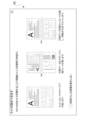
Classifications
-
- G—PHYSICS
- G06—COMPUTING OR CALCULATING; COUNTING
- G06F—ELECTRIC DIGITAL DATA PROCESSING
- G06F3/00—Input arrangements for transferring data to be processed into a form capable of being handled by the computer; Output arrangements for transferring data from processing unit to output unit, e.g. interface arrangements
- G06F3/12—Digital output to print unit, e.g. line printer, chain printer
Definitions
- the technical field disclosed in this specification relates to a support program that supports the control of a printer.
- Patent Document 1 discloses an image forming device with a cutting function that generates image data showing an image in which multiple pages of images are laid out to be printed on a single sheet, prints based on the laid-out image data, and cuts the printed sheets by page.
- the support program which has been made with the aim of solving the above-mentioned problems, is executable by a computer of an information processing device, and is a support program corresponding to a printer connected to the information processing device, the printer having a cutting function for cutting a sheet that is a print medium, the information processing device being equipped with an operating system having a general-purpose printing program, and the computer being provided with a setting screen display process for displaying, on a user interface of the information processing device, a setting screen for accepting cut settings relating to cut printing in which a sheet of a first size is divided into two in a first direction corresponding to the transport direction of the sheet in the printer, the cut settings including a setting as to whether or not to perform the cut printing, and using the user interface via the setting screen displayed in the setting screen display process, and a setting reception process for receiving the cut setting.
- the computer is further configured to, when a print instruction output from an application program incorporated in the information processing device includes a print instruction for causing the general-purpose print program to print an image on the printer, and the cut setting set to perform the cut print is received in the setting reception process, execute a print data transmission process for associating print data based on the print instruction with a cut instruction and transmitting the print data to the printer, and when the printer receives the print data associated with the cut instruction, start conveying a sheet of the first size and execute a process for printing an image based on the print data on the sheet, and a process for cutting the sheet and dividing it in half in the first direction.
- the support program disclosed in this specification is a support program that corresponds to a printer with a cut function.
- the support program displays a setting screen for accepting cut settings, and is capable of accepting cut settings for whether or not to perform cut printing via the setting screen. Then, when a print instruction is output and a cut setting for performing cut printing has been accepted, the support program executes processing for associating the print data with the cut instruction and sending it to the printer. This allows the printer to cut the sheet based on the cut instruction. Therefore, cut printing can be achieved on the printer even from an information processing device on which a printer driver is not installed.
- An information processing device incorporating the above-mentioned support program, a computer-readable storage medium storing the support program, a control method for implementing the functions of the support program, and a printing system including the support program and a printer are also novel and useful.
- the technology disclosed in this specification realizes technology that can support the printer's cutting function in an information processing device that has an OS-standard general-purpose printing program built in.
- FIG. 2 is a block diagram showing an outline of the electrical configuration of a PC.
- FIG. 1 is an explanatory diagram illustrating a schematic configuration of a printer.
- FIG. 11 is a sequence diagram illustrating an example of a print setting procedure.
- FIG. 4 is an explanatory diagram showing an example of a print setting screen.
- FIG. 13 is an explanatory diagram showing an example of a detailed setting screen.
- FIG. 13 is an explanatory diagram showing an example of a paper size selection screen.
- FIG. 11 is a sequence diagram illustrating an example of a printing execution procedure.
- FIG. 11 is an explanatory diagram showing an example of a preview image.
- 13 is a flowchart showing a procedure for a generation process.
- FIG. 13 is an explanatory diagram showing an example of a guide screen.
- PC personal computer
- the PC 1 of this embodiment is equipped with a controller 10 including a CPU 11 and a memory 12.
- the PC 1 is an example of an information processing device.
- the CPU 11 is an example of a computer.
- the PC 1 also has a user interface (hereinafter referred to as "user IF") 13 and a communication interface (hereinafter referred to as "communication IF") 14, which are electrically connected to the controller 10.
- user IF user interface
- communication IF hereinafter referred to as "communication IF”
- the controller 10 in FIG. 1 is a general term for the hardware and software used to control the PC 1, and does not necessarily represent a single piece of hardware that actually exists in the PC 1.
- the CPU 11 of the PC 1 executes various processes according to the programs read from the memory 12 and based on the user's operations. Various programs and data are stored in the memory 12.
- the memory 12 is also used as a working area when various processes are executed.
- the buffer provided in the CPU 11 is also an example of a memory. Note that an example of the memory 12 is not limited to the ROM, RAM, HDD, etc. built into the PC 1, but may also be a storage medium that can be read and written by the CPU 11, such as a recording medium such as a CD-ROM or DVD-ROM.
- User IF 13 includes display 13a, which is hardware that displays a screen to notify the user of information, and hardware that accepts operations by the user.
- User IF 13 may be a combination of display 13a capable of displaying information and a mouse or keyboard or the like that has an input acceptance function, or it may be a touch panel that has the functions of display 13a and an input acceptance function.
- the communication IF 14 includes hardware for communicating with external devices such as the printer 2.
- the communication standards of the communication IF 14 include Ethernet (registered trademark), Wi-Fi (registered trademark), USB, etc.
- the PC 1 may be connectable to the Internet via the communication IF 14.
- the PC 1 may be equipped with multiple communication IFs 14 that support multiple communication standards.
- the memory 12 of the PC 1 stores various programs and data, including an operating system (hereinafter referred to as "OS") 21 including a general-purpose print program 41, an auxiliary program 42, and an editing application 43.
- OS operating system
- the auxiliary program 42 is an example of a support program.
- the editing application 43 is an example of an application program.
- OS21 is a multitasking OS that can process multiple tasks in parallel by managing and switching between multiple tasks.
- Examples of OS21 include Windows (registered trademark), MacOS (registered trademark), Linux (registered trademark), iOS (registered trademark), and Android (registered trademark).
- the generic printing program 41 is a program that has the functionality to cause multiple models of printers provided by multiple vendors to print based on user instructions.
- the generic printing program 41 supports generic functions that allow printing to be performed on many printers. Unlike printer drivers specific to each printer, the generic printing program 41 does not support functions specific to each printer or printer driver, particularly functions that require complex processing.
- the general-purpose printing program 41 is a program that includes a function that receives image data specified as the print target in print instructions output from various applications based on user instructions, and generates intermediate image data based on that image data.
- the intermediate image data is, for example, XPS data.
- the general-purpose printing program 41 further has a function that generates print data in a format that can be used for printing on various printers based on the intermediate image data.
- the print data is, for example, PWGRaster data or PDF data.
- the general-purpose printing program 41 also has a function that transmits the generated print data to the printer specified as the device to execute printing, via the communication function of the OS 21.
- the auxiliary program 42 is a program or group of programs that executes processing based on instructions from the OS 21 in conjunction with the processing of the general-purpose printing program 41, and is a program that supports the control of the target hardware.
- the auxiliary program 42 in this embodiment corresponds to the model of the printer 2 connected to the PC 1, and is provided, for example, by the vendor of the printer 2.
- the general-purpose printing program 41 starts the auxiliary program 42 corresponding to the printer 2 when the printer 2 is selected as the device to execute printing, when an instruction for detailed print settings is received with the printer 2 selected, when an instruction to execute printing on the printer 2 is received, etc.
- the auxiliary program 42 is, for example, called a print support app (abbreviated as PSA) or a hardware support app (abbreviated as HSA).
- auxiliary program 42 may be a combination of multiple programs that each accept execution commands, or it may be a single program that can execute different processes depending on the command.
- the auxiliary program may also be a program prepared by the printer vendor for each type of printer. For example, an auxiliary program for inkjet printers and an auxiliary program for laser printers may be prepared. There may also be auxiliary programs prepared not only for each type of printer, but also for each model of printer or each series of printer models.
- OS21 of PC1 can download an appropriate auxiliary program from a printer vendor's server or the like according to the type and model of the connected printer and install it in PC1.
- OS21 associates the identification information of the installed auxiliary program with the printer information of the newly connected printer and stores it in memory 12.
- the editing application 43 is, for example, a program for creating and editing image data and document data.
- the editing application 43 may be, for example, Microsoft's (registered trademark) Word (registered trademark) or PowerPoint (registered trademark), or may be a program provided by the vendor of the printer 2.
- the editing application 43 is capable of accepting, for example, a print execution instruction to cause the printer 2 to execute printing via the user IF 13.
- the editing application 43 is not limited to a program for creating and editing data, and may also be a program having a function for accepting display instructions and print instructions for various types of information, such as map information and web pages, in response to a user request.
- the PC 1 of this embodiment is connected to the printer 2 as shown in FIG. 1 via the communication IF 14.
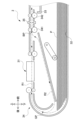
- the printer 2 of this embodiment includes, for example, a print head 31 that forms an image on a sheet, a paper feed tray 32 that stores unprinted sheets, a paper output tray 33 on which printed sheets are placed, a transport mechanism 34 that transports the sheets, and a cutter 35 that cuts the sheets, as shown in FIG. 2.
- the printer 2 is a device that has at least a printing function, a communication function, and a sheet cutting function.
- the printer 2 When the printer 2 receives print data from the PC 1 or the like, for example, it can execute printing based on the received print data.
- the printer 2 uses the transport mechanism 34 to feed one sheet P, which is stored in the paper feed tray 32 and serves as a print medium, from the paper feed tray 32 and transports it along a path R1 shown by a dashed line in FIG. 2 to face the print head 31.
- the print head 31 can execute printing using, for example, an inkjet method, and forms an image on the upper surface of the opposing sheet in FIG. 2 by ejecting ink droplets from the top to the bottom.
- the printer 2 transports the sheet while printing, and discharges the sheet to the discharge tray 33 in a so-called face-up manner, with the printed surface facing upward in the figure.
- the printing method of the print head 31 is not limited to the inkjet method, and may be an electrophotographic method, a thermal transfer method, or the like.
- the printer 2 of this embodiment may also be capable of color printing, or
- the printer 2 of this embodiment includes a cutter 35 arranged between the transport rollers 341 and 342 in the sheet transport direction, as shown in FIG. 2, for example.
- the cutter 35 includes, for example, a pair of upper and lower blades and a carriage for moving the blades.
- the carriage can move both blades in a state where they are close to each other, parallel to the axial direction of the transport roller 342, that is, in a direction perpendicular to the sheet transport direction in the printer 2.
- the transport roller 342 is the transport roller that is arranged in the transport mechanism 34 at the position closest to the discharge tray 33.
- the cutter 35 may be configured to have either the upper or lower blade and a member facing the blade, or may be configured to have a blade extending in the width direction of the sheet and a carriage for moving the blade up and down.
- the printer 2 has a cutter 35, which provides a cutting function that divides a printed sheet before ejection into two parts, front and back, in the sheet transport direction, and can accept a cut command that instructs the printer 2 to execute the cutting function.
- the sheet transport direction in the printer 2 is an example of a first direction.
- the printer 2 can obtain information on the positions of the leading and trailing ends of the sheet being transported based on the detection results of the paper sensor, and based on the obtained information, can stop transport of the sheet when it has been transported to a specified position and drive the cutter 35.
- the printer 2 can transport an A4 size sheet in the lengthwise direction and divide it into two parts, front and back, at the center position in the lengthwise direction, to output two A5 size sheets.
- the cutting position by the cutter 35 of the printer 2 may be misaligned due to misalignment of the sheet transport or misalignment of the blade drive position.
- the cutting error due to this misalignment is predetermined for each model and each individual printer.
- the cutting error is the maximum difference between the actual cutting position and the set position.
- the cutting error of the printer 2 of this embodiment is, for example, 3 mm.
- the actual cutting position by the printer 2 of this embodiment is within a range of ⁇ 3 mm from the set position, which is, for example, the center position in the long side direction of an A4 size sheet. In other words, the output sheet may not be strictly an A5 size sheet.
- the printer 2 of this embodiment is also capable of double-sided printing.
- double-sided printing the printer 2 stops conveying the sheet after printing on one side is completed, before discharging the sheet to the discharge tray 33, pulls it back, and inverts the sheet front to back and front to back, and faces the print head 31 again.
- the printer 2 stops the conveying mechanism 34 once, reverses the conveying direction, and pulls the sheet into the path R2 shown by the two-dot chain line in FIG. 2.
- the path R2 merges with the path R1 at the junction point GP upstream of the print head 31 in the conveying direction.
- the sheet enters the path R1 from the junction point GP and faces the print head 31 again with the unprinted side facing upward in the figure.
- the printer 2 discharges the sheet to the discharge tray 33 with the later printed side facing upward.
- each process in this embodiment basically indicates processing by the CPU 11 according to commands written in a program such as the auxiliary program 42. Processing by the CPU 11 also includes control of hardware using the API of the OS 21. In this specification, the operation of each program will be described without a detailed description of the OS 21. Also, "obtain" is used as a concept that does not necessarily require a request.
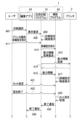
- Editing application 43 accepts creation and editing of text and images based on instructions from the user. Then, when the user wishes to print the text or image being displayed, the user selects print in editing application 43 (A01). The user can select print, for example, from a menu of operation items provided in editing application 43.
- the editing application 43 When the editing application 43 accepts the selection of printing, it requests the general-purpose printing program 41 of the OS 21 to display a screen for accepting print settings related to printing (A02). In response to the request, the general-purpose printing program 41 causes the user IF 13 to display the print setting screen (A03).
- the print setting screen is a screen that accepts user instructions regarding various print settings that can be accepted by the general-purpose printing program 41. Note that the print setting screen may be displayed by the editing application 43.
- the print setting screen D2 in the example of FIG. 4 includes a printer selection field 51, an information display field 52, a basic print setting selection field 53, a detailed settings button 54, and a print button 55.
- the printer selection field 51 is a field that accepts the selection of a device to execute printing.
- the information display field 52 is a field that displays information specified by an auxiliary program corresponding to the device selected in the printer selection field 51.
- the general-purpose print program 41 can start the auxiliary program 42 and display an image prepared by the auxiliary program 42 in the information display field 52.
- the general-purpose print program 41 can handle display data for displaying the print setting screen D2 that accepts print settings related to printing on printer 2.
- the basic print settings selection field 53 is a field that accepts basic settings such as the number of copies to be printed and the document orientation.
- the detailed settings button 54 is a button that accepts an instruction to make detailed settings that are not included in the basic print settings selection field 53.
- the print button 55 is a button that accepts an instruction to execute printing with the selected print settings.
- the general-purpose print program 41 passes an instruction to the auxiliary program 42 corresponding to printer 2 to start accepting the detailed print settings (A12).
- the auxiliary program 42 When the auxiliary program 42 is started in response to the instruction of A12, it acquires the capabilities information of the printer 2. Specifically, the auxiliary program 42 requests the general-purpose printing program 41 to acquire the capabilities information (A13). The general-purpose printing program 41 sends a command requesting the capabilities information to the printer 2 and acquires the capabilities information from the printer 2 (A14). The general-purpose printing program 41 passes the acquired capabilities information to the auxiliary program 42 (A15). This allows the auxiliary program 42 to acquire the capabilities information of the printer 2.
- the general-purpose printing program 41 communicates with the printer 2 via the OS 21 in A14, for example, by communication according to IPP (short for Internet Printing Protocol).
- the auxiliary program 42 may obtain capability information directly from the printer 2, for example, by using MIB (short for Management Information Base), instead of making a request to the general-purpose printing program 41.
- the capability information acquired from the printer 2 includes information on parameters that can be set as print settings.
- the capability information may further include, for example, information on remaining amounts of consumables, information on selectable trays, information such as the paper size of each tray, and information on the format of image data that can be supported.
- the printer 2 may also have a function for performing image processing based on the accepted print job and printing based on the data after image processing, such as a function for performing aggregate printing such as Nin1, composite printing such as watermarks, and economical printing that saves on coloring agents. If the printer 2 has an image processing function that can be executed by the printer 2, the printer 2 may pass capability information including information on that function.
- the printer 2 may also pass capability information including information indicating its own status.
- the capability information acquired from the printer 2 includes information regarding cut commands that can be accepted by the printer 2. Specifically, the capability information includes information indicating whether cut printing can be performed, information indicating compatible cut settings, and information indicating cutting errors. Note that the printer 2 may be able to accept a setting for whether cut printing can be performed, for example, via an operation panel. If a setting for not performing cut printing has been accepted, the printer 2 will not cut the sheet even if it receives a cut command, and therefore includes information indicating that cut printing cannot be performed in the capability information. Details of the cut settings will be described later.
- the auxiliary program 42 Based on the acquired capability information, the auxiliary program 42 causes the user IF 13 to display a detailed settings screen that accepts detailed print settings (A17).
- the detailed settings screen displayed by the auxiliary program 42 includes as options parameters within the range that can be executed by the printer 2.
- the auxiliary program 42 can accept user operations on the displayed detailed settings screen. Since there are many print setting items that can be accepted on the detailed settings screen, the auxiliary program 42 may be able to accept an instruction to switch the items to be selected, for example, by using multiple tabs.
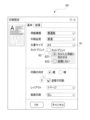
- the auxiliary program 42 in A17, displays a detailed settings screen 60 on the user IF 13 as shown in FIG. 5, for example, and accepts user operations.
- the detailed settings screen 60 is an example of a settings screen that can accept settings related to cut printing.
- A17, which displays the detailed settings screen 60, is an example of a settings screen display process.
- the detailed settings screen 60 shown in FIG. 5 includes a document size selection field 61 and a check box 62 for accepting cut print settings.
- the detailed settings screen 60 in this figure can also accept settings for other items such as paper type, print quality, and print orientation.
- the document size accepted in the selection field 61 is information indicating the size of the image to be printed.
- the auxiliary program 42 obtains image data generated based on the document size as image data for the image to be printed.
- Check box 62 is information indicating whether or not cut print settings are included in the print settings.
- the process of accepting settings related to cut print by operating check box 62 is an example of a setting acceptance process.
- the cut print setting is a print mode setting in which an image is printed on an A4 size sheet and the printed sheet is divided in half at the center of its long side. Note that if the capability information of printer 2 includes information indicating that cut print can be performed, auxiliary program 42 is able to accept the cut print setting by operating check box 62. If the capability information of printer 2 includes information indicating that cut print cannot be performed, auxiliary program 42 displays check box 62 in a manner that does not accept user operation, for example.
- auxiliary program 42 can further accept an alternative selection between the setting "Fit to cut paper" using radio button 621 and the setting "Do not enlarge or reduce” using radio button 622. If "A5" is selected as the document size when the operation to check check box 62 is accepted, or if check box 62 is not checked, radio button 621 and radio button 622 are displayed grayed out and do not accept a selection.
- the auxiliary program 42 can accept one of the following three types of cut settings as settings related to cut and print when the check box 62 is checked.
- ⁇ First setting> is the setting when the document size is "A4" and "Fit to cut paper" is selected by radio button 621.
- the auxiliary program 42 causes the printer 2 to print two pages of an A4-sized image reduced to A5 size side by side on one A4-sized sheet and cut the image.
- ⁇ Second setting> is the setting when the document size is "A4" and "Do not scale” is selected by radio button 622.
- auxiliary program 42 When a print instruction is received with ⁇ Second setting>, the auxiliary program 42 causes the printer 2 to print one page of an A4-sized image on one A4-sized sheet and cut the image.
- ⁇ Third setting> is a setting when "A5" is selected as the document size.
- the auxiliary program 42 causes the printer 2 to print two A5-sized pages of images side by side on one A4-sized sheet and cut them out.
- the auxiliary program 42 executes processing to send to the printer 2 print data corresponding to an A4 size image and a cut command instructing to cut the sheet.
- the printer 2 transports the A4 size sheet with its long side as the transport direction, prints an image based on the print data, and divides the sheet in half at the center of the long side. This results in two A5 size printouts.
- the A4 size is an example of the first size
- the A5 size is an example of the second size.
- the printer 2 resumes transport of the sheet after cutting, ejecting the front part in the transport direction first, and then ejecting the rear part in the transport direction on top of it.
- the cut settings executable by the printer 2 of this embodiment may be limited to the three types of settings mentioned above.
- the auxiliary program 42 may be able to accept a check in the check box 62 if "A4" or "A5" is selected as the document size. In other words, if the document size is neither "A4" nor "A5", the auxiliary program 42 may not accept an operation on the check box 62. Also, if the document size selection field 61 is operated and a size other than "A4" or "A5" is selected while the check box 62 is checked, the auxiliary program 42 may display a warning screen. The auxiliary program 42 may display, as the warning screen, a message indicating that cut printing can only be set when the document size is A4 or A5.
- the user sets various print settings, including cut settings, by operating a screen that accepts print settings, such as the detailed settings screen 60 displayed in A17 (A21).
- A21 causes the auxiliary program 42 to accept the cut settings.
- A21 is an example of a setting acceptance process.
- the auxiliary program 42 accepts an input from the user instructing it to end the settings (A22), it stores the various print settings, including the cut settings, accepted by operation using the user IF 13 (A23).
- the auxiliary program 42 notifies the general-purpose printing program 41 that acceptance of the detailed print settings has been completed (A25). Based on the notification from the auxiliary program 42, the general-purpose printing program 41 notifies the editing application 43 that acceptance of the print settings has been completed (A26). The auxiliary program 42 may also notify the editing application 43 that acceptance of the print settings has been completed.
- the editing application 43 activates the print settings screen displayed in A03 (for example, the print settings screen D2 shown in FIG. 4), and becomes available to accept user instructions such as an instruction to execute printing or an instruction to cancel printing.
- the print setting screen D2 (see FIG. 4) displayed in A03 includes an information display field 52 capable of displaying an image based on information prepared by the auxiliary program 42.
- the general-purpose print program 41 receives a user operation on the information display field 52, it passes information on that operation to the auxiliary program 42.
- the auxiliary program 42 displays, in the information display field 52, an information screen capable of receiving settings related to cut printing, for example, and can receive cut settings in response to a user instruction in the information display field 52.
- the process of displaying the information display field 52 capable of receiving settings related to cut printing is an example of a setting screen display process, and the process of receiving cut settings in the information display field 52 displayed in this case is an example of a setting reception process.
- the auxiliary program 42 also stores the cut setting information when it is received via the information display field 52, similar to A23.
- the print setting screen D2 also includes, as a selection field 53 for basic print settings, a paper size selection field 531 that is an item for accepting settings for the type of paper size.
- a paper size selection field 531 that is an item for accepting settings for the type of paper size.
- the general-purpose print program 41 may also pass information about the operation to the auxiliary program 42.
- the auxiliary program 42 can pass, for example, display data capable of accepting a selection of a paper size including settings related to cut printing to the general-purpose print program 41.
- the auxiliary program 42 passes display data showing a paper size selection screen 70, for example as shown in FIG. 6, to the general-purpose printing program 41 as display data showing the type of paper size.
- the paper size selection screen 70 displays a list of selectable paper size options. Three options 71, 72, and 73 associated with cutting settings have been added to the paper size options selectable on the paper size selection screen 70.
- Option 71 is an option that indicates "Reduce A4 to A5 and cut,” and is a paper size option associated with the cut setting corresponding to the ⁇ First setting> described above.
- Option 72 is an option that indicates "Cut A4 as is,” and is a paper size option associated with the cut setting corresponding to the ⁇ Second setting>.
- Option 73 is an option that indicates "Place two pages of A5 on A4 and cut,” and is a paper size option associated with the cut setting corresponding to the ⁇ Third setting>.
- Choices 71 to 73 are all paper size options associated with cut and print settings, and are options that correspond to different settings.
- the paper sizes indicated by options 71 to 73 are examples of special sizes.
- option 71 is an example of a first special size associated with a first cut setting
- option 72 is an example of a second special size associated with a second cut setting.
- the auxiliary program 42 When a paper size selection is accepted on the currently displayed print setting screen D2, the auxiliary program 42 receives information indicating that option via the general-purpose print program 41 and stores it as a print setting. When one of options 71-73 is selected as the paper size, the auxiliary program 42 stores the cutting setting information, similar to A23, even if the setting on the detailed setting screen 60 (see FIG. 5) is not accepted.
- the process of displaying the paper size selection screen 70 including options 71-73 is an example of a setting screen display process, and the process of accepting the selection of one of options 71-73 on the paper size selection screen 70 is an example of a setting acceptance process.
- the auxiliary program 42 can prepare options 71 to 73 associated with the cut settings as paper size types, and can accept cut setting instructions on the print setting screen D2. This eliminates the need to open the detailed setting screen 60, reducing the user's effort in making cut settings.
- the general-purpose printing program 41 When the general-purpose printing program 41 receives a user operation on the paper size selection field 531 in the print setting screen D2 (see FIG. 4), instead of passing information about that operation to the auxiliary program 42, the general-purpose printing program 41 may request display data indicating the type of paper size when displaying the print setting screen D2. In that case, the auxiliary program 42 may pass information about the type of paper size, including options associated with cut settings, to the general-purpose printing program 41 as information that can be displayed on the print setting screen D2.
- the auxiliary program 42 may obtain the capability information of the printer 2 before passing the information that can be displayed on the print setting screen D2 to the general-purpose printing program 41.
- the auxiliary program 42 may generate display data indicating the type of paper size based on the capability information of the printer 2, and pass the generated display data to the general-purpose printing program 41.
- the printer 2 may respond with information on the paper size associated with the cut print setting as one of the selectable paper size types as capability information.
- the auxiliary program 42 corresponding to the printer 2 with a cut function may be provided with options 71 to 73 in advance as selectable paper size types, and may display the options 71 to 73 as selectable when the capability information of the printer 2 includes information indicating that cut print can be performed.
- the print execution procedure will be described with reference to the sequence diagram in FIG. 7.
- the user inputs an instruction to execute printing in the editing application 43 (B01).
- the editing application 43 receives an operation on the print button 55 on the print settings screen D2 shown in FIG. 4, it determines that it has received an execution instruction to the general-purpose printing program 41 to cause the printer 2 to print the selected image.
- the user's instruction to execute printing may also be input directly to the general-purpose printing program 41.
- the editing application 43 passes the received print instruction information to the general-purpose printing program 41 (B02).
- the general-purpose printing program 41 obtains, as the print instruction information, information indicating the image data of the image to be printed and information indicating the print settings from the editing application 43.
- the general-purpose printing program 41 generates intermediate image data by converting the format of the image data of the image to be printed into the format of intermediate image data based on the information obtained from the editing application 43 (B03).
- the image data contained in the editing application 43 is of various types, and the general-purpose printing program 41 converts the image data to be printed into intermediate image data suitable for generating print data. Note that if the image data to be printed is suitable for generating print data, the generation of the intermediate image data may be omitted and the intermediate image data may be used as is.
- the general-purpose printing program 41 may start an auxiliary program 42 corresponding to the designated device, the printer 2, and notify the printer 2 that the print job processing has started.
- the auxiliary program 42 is started from the general-purpose printing program 41, it can pass information indicating various instructions used when generating the intermediate image data to the general-purpose printing program 41 as necessary.
- the general-purpose printing program 41 After generating the intermediate image data, the general-purpose printing program 41 starts the auxiliary program 42 (B05).
- the auxiliary program 42 can obtain the intermediate image data generated by the general-purpose printing program 41 by making a request to the general-purpose printing program 41.
- the auxiliary program 42 can then edit the intermediate image data and print setting information based on the detailed print settings that have already been accepted.
- the auxiliary program 42 determines whether or not the cut setting information is stored. If it is determined that the cut setting information is stored (alt: [Cut setting present]), the auxiliary program 42 causes the user IF 13 to display a preview image based on the image shown in the intermediate image data generated by the general-purpose printing program 41 (B06). B06 is an example of preview processing.
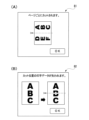
- the auxiliary program 42 displays the images of the first and second pages side by side in landscape orientation, as shown in FIG. 8(A), for example, and displays a preview image 81 with a cut line added to the center of the long side.
- the auxiliary program 42 displays the image of the first page in portrait orientation, as shown in FIG. 8(B), for example, and displays a preview image 82 with a cut line added to the center of the long side.
- the auxiliary program 42 displays a preview image corresponding to the image to be printed on each sheet after cutting.
- the auxiliary program 42 displays a preview image of what the cut print will look like before the print data is sent to the printer 2, so the user can check the contents of the printout that will be output with the cut setting from the preview image.
- the auxiliary program 42 receives an instruction to confirm printing through a user operation (B07). For example, as shown in Figures 8 (A) and (B), the auxiliary program 42 displays an OK button on the preview images 81 and 82 and receives a user operation. Note that the auxiliary program 42 may be able to accept a request to cancel printing after displaying the preview image. When a request to cancel printing is accepted, the auxiliary program 42 passes information indicating the cancellation of printing to the general-purpose printing program 41.
- the auxiliary program 42 executes a generation process (B08).
- the generation process is a process for generating image data to be printed that corresponds to the stored cutting settings based on the intermediate image data generated by the general-purpose printing program 41.
- the procedure of the generation process will be described with reference to the flowchart in FIG. 9. This generation process is executed by the CPU 11 of the PC 1 based on the auxiliary program 42.
- the CPU 11 determines whether the stored cut setting is the first setting, the second setting, or the third setting (C01). If it is determined to be the first setting (C01: first setting), the CPU 11 acquires image data for two pages starting from the page to be output first based on the output priority (C11). As described above, the printer 2 outputs the printout face-up. In this case, the page with the first priority is the last page included in the print job. If the printer outputs face-down, the CPU 11 sets the first page as the page with the first priority.
- the CPU 11 reduces the two pages of A4 size image data acquired in C11 to A5 size, generating two reduced images (C12). Furthermore, the CPU 11 arranges the two reduced images side by side vertically, with the longer side longer than the shorter side (C13). Specifically, the CPU 11 arranges the reduced image of the page to be output first at the leading edge of the A4 size, and the reduced image of the page to be output later at the trailing edge of the A4 size, based on the output priority.
- CPU 11 adjusts the margins between the two reduced images to generate A4 size image data (C14).
- C14 is an example of a first generation process.
- the A4 size image based on the image data generated in C14 is an example of a layout image.
- CPU 11 adjusts the margins so that the area that may come into contact with cutter 35 (see FIG. 2) in printer 2 becomes a gap area where no coloring material is applied. For example, if the margin on the central position side of each page is small, CPU 11 moves the image of each page in a direction away from the central position.
- the gap area provided in C14 is an example of a first gap area.
- the CPU 11 determines the size of the gap area based on the cutting error of the printer 2. For example, if the cutting error of the printer 2 is ⁇ 3 mm, the CPU 11 sets the width of the gap area to a width greater than ⁇ 3 mm from the center position in the longitudinal direction of the sheet. When printing is performed with the inkjet printer 2, the ink on the sheet immediately after printing may not be completely dry. By setting the range of the cutting error as the gap area based on the center position, which is the location to be cut, it is possible to prevent ink from adhering to the cutter 35 during printing, and prevent the sheet from becoming dirty and the cutter 35 from rusting the next time it is cut.
- the CPU 11 acquires one page of image data from the page to be output first based on the output priority (C21). The CPU 11 then determines whether or not there is an image at the center position of the acquired image data (C22). Specifically, the CPU 11 determines whether or not there is drawing data indicating the image to be drawn in the range of the image data that corresponds to the gap area including the center position. The gap area is the range from the center position to the cutting error, similar to the range where the margin is set in C14.
- the CPU 11 After C23, or if it is determined that there is no image in the central position (C22: NO), the CPU 11 overwrites a solid white image in the range corresponding to the gap area including the central position (C24).
- C24 is an example of a second generation process.
- An A4 size image processed to provide a gap area by C24 is an example of a processed image.
- the gap area overwritten with the solid white image in C24 is an example of a second gap area.
- the CPU 11 generates the image overwritten with the solid white image as one sheet of A4 size image data. Note that if it is determined that there is no image in the central position, the CPU 11 may not overwrite with a solid white image.
- a gap area can be easily formed in the image to be printed.
- the gap area is set to be larger than the cutting error of the printer 2, based on the central position, so that adhesion of coloring material to the cutter 35 of the printer 2 is suppressed.
- the CPU 11 notifies the user of the loss of drawing data in C23, so that the user can understand that data in the central area will be lost. The notification may be made only once per print job, or for each page.
- the CPU 11 acquires image data for two pages starting from the page to be output first based on the output priority (C31).
- the CPU 11 arranges the two images horizontally and vertically to generate A4 size image data (C32).
- the CPU 11 adjusts the margins in the same way as in C14 to generate A4 size image data (C33).
- C33 is an example of a first generation process.
- the A4 size image based on the image data generated in C33 is an example of an arranged image.
- the auxiliary program 42 displays a guide (B09).
- B09 is an example of a guide process.
- the auxiliary program 42 uses the user IF 13, the auxiliary program 42 displays a guide screen 90, for example, as shown in FIG. 10, which indicates that an A4 size sheet can be cut and output as two A5 size sheets.
- the auxiliary program 42 passes the intermediate image data generated in the generation process of B08 or the intermediate image data generated by the general-purpose printing program 41 to the general-purpose printing program 41 and requests rasterization (B11).
- the general-purpose printing program 41 rasterizes the intermediate image data based on the request and generates raster data, which is bitmap data (B12).
- the general-purpose printing program 41 passes the generated raster data to the auxiliary program 42 (B13). As a result, the auxiliary program 42 obtains the raster data.
- the auxiliary program 42 adds a command to the raster data (B15). For example, if the auxiliary program 42 has stored cut settings, it adds a cut command.
- the cut command is an example of a cut instruction.
- the cut command may be a command that indicates a cut instruction for all pages of a print job by being added to the beginning of the print job. Alternatively, the cut command may be a cut instruction on a page-by-page basis. In that case, the auxiliary program 42 adds a cut command to the print data for each page for the print job for which the cut settings have been accepted.
- the auxiliary program 42 passes the print data with the command added to the general-purpose print program 41 as the data to be sent to the printer 2, and instructs the general-purpose print program 41 to send the data to the printer 2 (B21).
- B21 is a process for sending the print data to the printer 2, and is an example of a print data sending process.
- the general-purpose print program 41 sends the print data to the printer 2 and instructs the printer to print (B22).
- Printer 2 executes printing based on the received print data (B23).
- printer 2 receives print data with an added cut command, it executes the process of printing an image based on the print data on an A4 size sheet, and the process of cutting the A4 size sheet and dividing it in half in the longitudinal direction, which is the transport direction, to create two A5 size sheets. This creates two A5 size printouts on which the image to be printed is printed.
- the auxiliary program 42 may send a print command instructing the printer to execute printing and the print data to the printer 2. In this case, the auxiliary program 42 may notify the general-purpose print program 41 of the end information after completing the transmission of the print data.
- the auxiliary program 42 may generate a print command that also includes information about that processing and have the printer 2 execute the processing. For example, if the printer 2 has a 2-in-1 printing function, and if the auxiliary program 42 accepts cut settings in the first setting, it may send to the printer 2 print data showing an A4 size image and a print command and cut command instructing 2-in-1 printing. In this case, the auxiliary program 42 does not need to execute the generation process (B08 in FIG. 7). On the other hand, if the generation process is executed by the auxiliary program 42, the printer 2 only needs to print based on the arranged print data, and the load on the printer 2 is reduced.
- cut settings can be accepted not only through operations on the detailed settings screen 60 (see FIG. 5), but also through the information display field 52 or paper size selection field 531 of the print settings screen D2 (see FIG. 4). Even if any of options 71 to 73 is selected in the paper size selection field 531, the auxiliary program 42 generates image data through the generation process shown in FIG. 9, and generates print data with a cut command added.
- the process of generating print data in this case is an example of the third generation process.
- the auxiliary program 42 of this embodiment corresponds to the printer 2 having a cut function, displays the detailed settings screen 60 and the print settings screen D2 for accepting cut settings, and can accept cut settings for whether or not to perform cut printing via these screens. If a cut setting for performing cut printing has been accepted, the auxiliary program 42 executes processing for adding a cut command to the print data and sending it to the printer 2. This causes the printer 2 to cut the sheet based on the cut command. Therefore, cut printing can be achieved on the printer 2 even from a PC 1 on which a printer driver is not installed.
- the auxiliary program 42 of this embodiment receives the first setting as the cutting setting, it reduces the image to be printed that corresponds to A4 size to an image that corresponds to A5 size, and combines two pages to create a layout image that corresponds to A4 size. Therefore, in one printing run, a two-page A5-sized printout is obtained in which the reduced image reduced to A5 size is printed.
- the auxiliary program 42 when the second setting is accepted as the cutting setting, the auxiliary program 42 generates a processed image in which a solid white image is overwritten in a location including the center position of the image to be printed that corresponds to A4 size. Therefore, the printer 2 prints the processed image directly on the sheet, and by cutting the printed sheet, the printer 2 cuts the area where no coloring material is applied, thereby preventing the coloring material from adhering to the cutter 35.
- the auxiliary program 42 when the third setting is accepted as the cutting setting, the auxiliary program 42 generates an arranged image by arranging two pages of an image corresponding to the A5 size on an A4 size sheet. As a result, even if the printer 2 does not accommodate A5 size sheets, two pages of A5 size printouts can be obtained in one printing run.
- the device connected to PC1 is not limited to a single-function printer, but may be any device with a printing function, such as a multifunction device, copier, or fax machine.
- the number of printers connected to PC1 may be two or more.
- the printer may also be one that is not capable of double-sided printing.
- FIG. 2 shows an example of printer 2 with a cutting function that cuts after printing
- the printer connected to PC 1 may also have a cutting function that cuts the sheet first and then prints.
- the printer's cutting error may be, for example, a value that is predetermined for each model, or may be stored in advance in auxiliary program 42.
- each example of an image displayed on user IF 13 is merely an example and is not limited to the example shown in the figure.
- any wording, object shape, background, etc. displayed on each screen shown in the figure may be used.
- FIG. 4 shows print setting screen D2 including one information display field 52, the arrangement, shape, size, number, etc. of information display field 52 are not limited to the example shown in this figure. Furthermore, information display field 52 may not be present.
- the auxiliary program 42 does not have to display a preview (B06 in FIG. 7). Furthermore, the auxiliary program 42 does not have to be able to accept an instruction to confirm printing from the preview image (B07 in FIG. 7). For example, the auxiliary program 42 may proceed to the generation process (B08 in FIG. 7) after displaying a preview for a predetermined period of time, even if an instruction to confirm printing is not accepted.
- the auxiliary program 42 may, for example, display a preview image based on the generated intermediate image data after the generation process (see FIG. 9) is executed.
- the auxiliary program 42 may generate raster data using the general-purpose printing program 41 or the auxiliary program 42, and then display a preview image based on the generated raster data.
- the guide screen 90 (see FIG. 10) is displayed when the document size is A4 size, but the guide screen 90 may be displayed when the cut setting has not been accepted regardless of the document size. In that case, the guide screen may not only guide the first and second settings shown in FIG. 10, but also guide the third setting.
- intermediate image data is used to generate layout images and processed images
- raster data after rasterization may be used to generate layout images and processed images.
- the auxiliary program 42 executes the generation process (see FIG. 9) after receiving the raster data at B13 in FIG. 7.
- the auxiliary program 42 acquires image data in the order of output priority, but it may acquire all image data included in the print job regardless of the order of priority and rearrange the data in the order of output priority after acquisition.
- the auxiliary program 42 may generate print data in the order of the original image data without considering the order of priority. However, by arranging the images in consideration of the order of priority so that the output stack of printed matter is arranged in the order of the original images, it is easier for the user to use the printed matter. Note that when the setting for double-sided printing is accepted, the orientation of the image on the back side is opposite for long-edge binding and short-edge binding. It is preferable that the auxiliary program 42 appropriately rotates the image depending on whether the binding is long-edge or short-edge binding, and generates an image with the orientation of the images on the front and back sides aligned.
- the timing at which the auxiliary program 42 obtains the printer 2 capability information is not limited to the example shown in FIG. 3. For example, it may be obtained again after a print instruction is received. Furthermore, the printer 2 may have a function for cutting sheets of a size other than A4. In that case, it is preferable to transmit information indicating the types of cut settings that can be received together with the capability information.
- the auxiliary program 42 may also be started not only when printing is selected, but also when, for example, printer 2 is selected as the device setting. Even in this case, the auxiliary program 42 may display a setting screen that can accept cutting settings. When cutting settings are accepted as the device setting, the auxiliary program 42 stores the information of the accepted cutting settings as the default print setting.
- general-purpose printing program 41 may also start auxiliary program 42.
- auxiliary program 42 may also display, for example, an information screen capable of accepting cutting settings in information display field 52.
- auxiliary program 42 only the printing operation is described in detail as the operation of the auxiliary program 42, but the auxiliary program 42 may have other roles as well.
- the program that executes the processing of this embodiment is not limited to the auxiliary program 42, but may be any program that receives instructions from the OS 21 or the general-purpose printing program 41 when printing using the general-purpose printing program 41.
- it may be a print workflow application (Print workflow) whose specifications have been published by Microsoft.
- auxiliary program 42 may be executed in response to a direct execution instruction from OS 21, or auxiliary program 42 may be resident. If auxiliary program 42 is resident, it may receive an execution command and perform the above-mentioned operations.
- the processes disclosed in the embodiments may be executed by a single CPU, multiple CPUs, hardware such as an ASIC, or a combination of these.
- the processes disclosed in the embodiments may be realized in various ways, such as a recording medium on which a program for executing the processes is recorded, or a method.
Landscapes
- Engineering & Computer Science (AREA)
- Theoretical Computer Science (AREA)
- Human Computer Interaction (AREA)
- Physics & Mathematics (AREA)
- General Engineering & Computer Science (AREA)
- General Physics & Mathematics (AREA)
- Accessory Devices And Overall Control Thereof (AREA)
Abstract
OS標準の汎用印刷プログラムが組み込まれた情報処理装置において、プリンタのカット機能に対応可能な技術を提供すること。 PC1には、汎用印刷プログラム41を有するOS21が搭載されている。カット機能を有するプリンタ2に対応する補助プログラム42は、A4サイズのシートをプリンタ2での搬送方向に対応する長手方向に二分するカット設定を受け付けるための詳細設定画面60をユーザIF13に表示させ、詳細設定画面60を介してカット設定を受け付け可能である。補助プログラム42は、汎用印刷プログラム41に対して画像の印刷をプリンタ2に行わせる印刷指示が編集アプリ43から出力され、カット設定を受け付けている場合に、印刷データをカットコマンドと関連付けて、プリンタ2に送信させる。プリンタ2は、カットコマンドと関連付けられた印刷データを受信した場合、印刷とカットとを行う。
Description
本明細書に開示される技術分野は、プリンタの制御をサポートするサポートプログラムに関する。
従来、印刷媒体となるシートをカットするカット機能を有するプリンタが知られている。例えば特許文献1には、カット機能を備える画像形成装置であって、複数ページの画像を1枚のシートに印刷するようにレイアウトした画像を示す画像データを生成し、そのレイアウト後の画像データに基づく印刷を行い、印刷後のシートをページ単位でカットする構成が開示されている。
近年、前述したプリンタベンダから提供されるプリンタドライバを利用せず、オペレーティングシステム(OS)の一部を構成するOS標準の汎用印刷プログラムによってプリンタを制御する技術が実用化されている。この技術では、OSがプリンタを検知するとOS標準の汎用印刷プログラムとの関連付けを行い、以後、そのプリンタに対する印刷指示を受け付けた場合に、プリンタベンダから提供されるプリンタドライバを用いずに、OS標準の汎用印刷プログラムが印刷データを生成することで、OS標準の汎用印刷プログラムによる印刷が可能になる。
しかしながら、前記したOS標準の汎用印刷プログラムでは、カット機能に関する設定が用意されていない。そのため、このような印刷環境においてはプリンタの能力を十分に発揮できない。
上述した課題の解決を目的としてなされたサポートプログラムは、情報処理装置のコンピュータによって実行可能であり、前記情報処理装置と接続するプリンタに対応するサポートプログラムであって、前記プリンタは、印刷媒体となるシートをカットするカット機能を有するものであり、前記情報処理装置には、汎用印刷プログラムを有するオペレーティングシステムが搭載されており、前記コンピュータに、第1サイズのシートを前記プリンタでの前記シートの搬送方向に対応する第1方向に二分するカットプリントに関するカット設定であって、前記カットプリントを行うか否かの設定が含まれる前記カット設定を受け付けるための設定画面を、前記情報処理装置のユーザインタフェースに表示させる設定画面表示処理と、前記設定画面表示処理にて表示された前記設定画面を介して、前記ユーザインタフェースを用いて、前記カット設定を受け付ける設定受付処理と、を実行させることが可能であり、さらに前記コンピュータに、前記情報処理装置に組み込まれているアプリケーションプログラムから出力された印刷指示であって、前記汎用印刷プログラムに対して画像の印刷を前記プリンタに行わせる前記印刷指示があり、前記設定受付処理にて前記カットプリントを行うことが設定された前記カット設定が受け付けられている場合に、前記印刷指示に基づく印刷データを、カット指示と関連付けて、前記プリンタに送信するための印刷データ送信処理を実行させ、前記プリンタは、前記カット指示と関連付けられた前記印刷データを受信した場合、前記第1サイズのシートの搬送を開始し、前記印刷データに基づく画像を前記シートに印刷する処理と、前記シートをカットして前記第1方向に二分する処理と、を実行する、ように構成されている。
本明細書に開示されるサポートプログラムは、カット機能を有するプリンタに対応するサポートプログラムである。サポートプログラムは、カット設定を受け付けるための設定画面を表示し、その設定画面を介してカットプリントを行うか否かのカット設定を受け付けることが可能である。そして、印刷指示が出力され、カットプリントを行うカット設定を受け付けていた場合、サポートプログラムは、印刷データをカット指示と関連付けてプリンタに送信するための処理を実行する。これにより、プリンタでは、そのカット指示に基づいてシートをカットすることができる。従って、プリンタドライバがインストールされていない情報処理装置からであっても、プリンタでのカットプリントを実現できる。
上記サポートプログラムが組み込まれた情報処理装置、サポートプログラムを格納するコンピュータにて読取可能な記憶媒体、及びサポートプログラムの機能を実現するための制御方法、サポートプログラムとプリンタとを含む印刷システムも、新規で有用である。
本明細書に開示される技術によれば、OS標準の汎用印刷プログラムが組み込まれた情報処理装置において、プリンタのカット機能に対応可能な技術が実現される。
以下、本形態のサポートプログラムを利用するパーソナルコンピュータ(以下、「PC」とする)について、添付図面を参照しつつ詳細に説明する。本明細書は、PCにて実行されるサポートプログラムを開示する。
本形態のPC1は、図1に示すように、CPU11と、メモリ12と、を含むコントローラ10を備えている。PC1は、情報処理装置の一例である。CPU11は、コンピュータの一例である。また、PC1は、ユーザインタフェース(以下、「ユーザIF」とする)13と、通信インタフェース(以下、「通信IF」とする)14と、を備え、これらがコントローラ10に電気的に接続されている。なお、図1中のコントローラ10は、PC1の制御に利用されるハードウェアやソフトウェアを纏めた総称であって、実際にPC1に存在する単一のハードウェアを表すとは限らない。
PC1のCPU11は、メモリ12から読み出したプログラムに従って、また、ユーザの操作に基づいて、各種の処理を実行する。メモリ12には、各種のプログラムや各種のデータが記憶されている。メモリ12は、各種の処理が実行される際の作業領域としても利用される。CPU11が備えるバッファも、メモリの一例である。なお、メモリ12の一例は、PC1に内蔵されるROM、RAM、HDD等に限らず、CPU11が読み取り可能かつ書き込み可能なストレージ媒体、例えば、CD-ROM、DVD-ROM等の記録媒体であっても良い。
ユーザIF13は、ユーザに情報を報知するための画面を表示するハードウェアであるディスプレイ13aと、ユーザによる操作を受け付けるハードウェアと、を含む。なお、ユーザIF13は、情報を表示可能なディスプレイ13aと、入力受付機能を有するマウスやキーボード等と、の組であっても良いし、ディスプレイ13aの機能と入力受付機能とを備えるタッチパネルであっても良い。
通信IF14は、プリンタ2等の外部装置と通信を行うためのハードウェアを含む。通信IF14の通信規格は、イーサネット(登録商標)、Wi-Fi(登録商標)、USBなどである。PC1は、通信IF14を介して、インターネットに接続可能であっても良い。PC1は、複数の通信規格に対応する複数の通信IF14を備えていてもよい。
PC1のメモリ12には、図1に示すように、汎用印刷プログラム41を含むオペレーティングシステム(以下、「OS」とする)21と、補助プログラム42と、編集アプリ43と、を含む、各種のプログラムや各種のデータが記憶されている。補助プログラム42は、サポートプログラムの一例である。編集アプリ43は、アプリケーションプログラムの一例である。
OS21は複数のタスクを管理して切り換えることにより複数のタスクを並行して処理できるマルチタスクOSである。OS21は、例えば、Windows(登録商標)、macOS(登録商標)、Linux(登録商標)、iOS(登録商標)、Android(登録商標)である。
OS21には、汎用印刷プログラム41が含まれている。すなわち、PC1には、汎用印刷プログラム41を有するOS21が搭載されている。汎用印刷プログラム41は、OS21のベンダによって用意され、OS21の一部として提供されるOS標準のプログラムである。汎用印刷プログラム41は、各プリンタに固有のプリンタドライバを利用するようには構成されていない。
汎用印刷プログラム41は、ユーザの指示に基づいて、複数のベンダによってそれぞれ提供される複数種類のモデルのプリンタに印刷を実行させるための機能を有するプログラムである。汎用印刷プログラム41は、多くのプリンタにて印刷を実行可能な汎用的な機能をサポートしている。汎用印刷プログラム41は、各プリンタに固有のプリンタドライバとは異なり、各プリンタやプリンタドライバが固有に備える機能、特に複雑な処理を要する機能をサポートしていない。
汎用印刷プログラム41は、ユーザの指示に基づいて、各種のアプリから出力された印刷指示にて印刷対象として指定された画像データを受け取り、その画像データに基づく中間画像データを生成する機能を含むプログラムである。中間画像データは、例えば、XPSデータである。汎用印刷プログラム41は、さらに、中間画像データに基づいて、各種のプリンタにて印刷に利用できる形式の印刷データを生成する機能を有している。印刷データは、例えば、PWGRasterデータ、または、PDFデータである。また、汎用印刷プログラム41は、生成した印刷データを、OS21による通信機能を介して、印刷を実行させる装置として指定されたプリンタに送信する機能を有している。
補助プログラム42は、汎用印刷プログラム41の処理に付随してOS21からの指示に基づいて処理を実行するプログラムまたはプログラム群であり、対象のハードウェアの制御をサポートするプログラムである。本形態の補助プログラム42は、PC1に接続されているプリンタ2のモデルに対応するものであり、例えば、プリンタ2のベンダによって提供される。汎用印刷プログラム41は、印刷を実行させる装置としてプリンタ2が選択された場合、プリンタ2が選択されている状態で詳細な印刷設定の指示を受け付けた場合、プリンタ2に印刷を実行させる指示を受け付けた場合、等に、プリンタ2に対応する補助プログラム42を起動する。補助プログラム42は、例えば、印刷サポートアプリ(略称、PSA)、またはハードウェアサポートアプリ(略称、HSA)と呼ばれるものである。
なお、補助プログラム42は、それぞれが実行命令を受け付ける複数のプログラムの組み合わせであっても良いし、1つのプログラムであって命令に応じてそれぞれ異なる処理を実行できるプログラムであっても良い。また、補助プログラムは、プリンタのベンダによってプリンタのタイプごとに用意されるプログラムであっても良い。例えば、インクジェットプリンタ用の補助プログラムやレーザプリンタ用の補助プログラムが、それぞれ用意されても良い。プリンタのタイプごとに限らず、プリンタのモデルごとやプリンタのモデルのシリーズごとに用意される補助プログラムが有っても良い。
PC1のOS21は、例えば、新たなプリンタがPC1に接続された場合、接続されたプリンタのタイプやモデルに応じて、適切な補助プログラムをプリンタのベンダのサーバ等からダウンロードしてPC1に組み込むことができる。OS21は、組み込んだ補助プログラムの識別情報を新たに接続されたプリンタのプリンタ情報に対応付けて、メモリ12に記憶させる。
編集アプリ43は、例えば、画像データや文書データの作成や編集を行うためのプログラムである。編集アプリ43は、例えば、マイクロソフト(登録商標)製のワード(登録商標)やパワーポイント(登録商標)などであっても良いし、プリンタ2のベンダから提供されるプログラムであっても良い。編集アプリ43は、ユーザIF13を介して、例えば、プリンタ2に印刷を実行させる印刷実行指示を受け付け可能である。なお、編集アプリ43は、データの作成や編集を行うためのプログラムに限らず、ユーザの要求に応じて、地図情報やウェブページ等の各種の情報の表示指示や印刷指示を受け付ける機能を有するプログラムであっても良い。
本形態のPC1は、通信IF14を介して、図1に示すように、プリンタ2に接続されている。本形態のプリンタ2は、例えば、図2に示すように、シートに画像を形成する印刷ヘッド31と、印刷前のシートを収容する給紙トレイ32と、印刷済みのシートが載置される排紙トレイ33と、シートを搬送する搬送機構34と、シートを切断するカッタ35と、を備える。プリンタ2は、少なくとも印刷機能と通信機能とシート切断機能とを有する装置である。
プリンタ2は、例えば、PC1等から印刷データを受信した場合、受信した印刷データに基づく印刷を実行可能である。プリンタ2は、印刷実行時には、給紙トレイ32に収容されており印刷媒体となるシートPの1枚を、搬送機構34によって給紙トレイ32から給紙し、図2中に一点鎖線で示す経路R1に沿って搬送して、印刷ヘッド31に対向させる。印刷ヘッド31は、例えば、インクジェット方式での印刷を実行可能なものであり、図2中で上方から下方へ向かってインク滴を吐出することで、対向するシートの図中で上側の面に画像を形成する。プリンタ2は、印刷しつつシートを搬送し、印刷済みの面を図中の上方に向けて、いわゆるフェイスアップで、排紙トレイ33に排紙する。なお、印刷ヘッド31の印刷方式は、インクジェット方式に限らず、電子写真方式、熱転写方式等でも良い。また、本形態のプリンタ2は、カラー印刷が可能であっても良いし、モノクロ印刷のみを行うものでも良い。
さらに、本形態のプリンタ2は、例えば、図2に示すように、シートの搬送方向について搬送ローラ341と搬送ローラ342との間に配置されるカッタ35を備える。カッタ35は、例えば、上下1対のブレードと、ブレードを移動させるキャリッジと、を備えている。キャリッジは、両ブレードを、互いに接近させた状態で、搬送ローラ342の軸方向に平行に、すなわち、プリンタ2におけるシートの搬送方向に直交する方向に移動させることができる。搬送ローラ342は、搬送機構34のうち、排紙トレイ33に最も近い位置に配置される搬送ローラである。なお、カッタ35は、上下のいずれか一方のブレードとブレードに対向する部材とを有する構成でも良いし、シートの幅方向に延びるブレードとブレードを上下に移動させるキャリッジとを有する構成でも良い。
プリンタ2は、カッタ35を有することにより、印刷済みで排紙前のシートをシートの搬送方向について前後に二分する機能であるカット機能を有し、カット機能の実行を指示するカットコマンドを受け付け可能である。プリンタ2におけるシートの搬送方向は、第1方向の一例である。具体的には、プリンタ2は、用紙センサの検出結果等に基づいて搬送中のシートの先端部や後端部の位置の情報を取得し、取得した情報に基づいて、所定の位置まで搬送した状態でシートの搬送を停止してカッタ35を駆動することができる。プリンタ2は、例えば、A4サイズのシートを長手方向に搬送し、長手方向の中央位置で前後に二分することで、A5サイズの2枚のシートとして出力することができる。
プリンタ2のカッタ35による切断位置には、シートの搬送ずれやブレードの駆動位置ずれ等による位置ずれが生じる可能性がある。この位置ずれによるカット誤差は、モデルごとや個別のプリンタごとにあらかじめ決まっている。カット誤差は、実際の切断位置と設定位置との差の最大値である。本形態のプリンタ2のカット誤差は、例えば、3mmである。この場合、本形態のプリンタ2による実際の切断位置は、例えば、A4サイズの長辺方向の中央位置である設定位置に対して、±3mmの範囲内となる。つまり、出力されるシートは、厳密にA5サイズのシートとはならない可能性がある。
また、本形態のプリンタ2は、両面印刷を実行可能である。両面印刷を実行する場合、プリンタ2は、シートの一面への印刷が終了した後、シートを排紙トレイ33に排紙する前に搬送を停止して引き戻し、シートの前後および表裏を反転させて再び、印刷ヘッド31に対向させる。具体的には、プリンタ2は、片面への印刷が完了したシートの搬送方向について後端部が分岐点BPに到達したら、搬送機構34を一旦停止させ、搬送方向を逆転させて、図2中に二点鎖線で示す経路R2にシートを引き込む。経路R2は、印刷ヘッド31より搬送方向について上流側の合流点GPにて経路R1と合流する。シートは、合流点GPから経路R1に入り、未印刷の面を図中上方に向けて、印刷ヘッド31に再び対向する。プリンタ2は、両面への印刷後、後で印刷した面を上方に向けて排紙トレイ33に排紙する。
次に、本形態のPC1における印刷に関する動作の手順について、シーケンス図を参照して説明する。なお、本形態における各処理は、基本的に、補助プログラム42などのプログラムに記述された命令に従ったCPU11の処理を示す。CPU11による処理は、OS21のAPIを用いたハードウェアの制御も含む。本明細書では、OS21の詳細な記載を省略して各プログラムの動作を説明する。また、「取得」は要求を必須とはしない概念で用いる。
印刷に関する手順として、まず、印刷設定手順について、図3のシーケンス図を参照して説明する。編集アプリ43は、ユーザの指示に基づいて、文章や画像の作成や編集を受け付ける。そして、表示中の文章や画像を印刷させたい場合、ユーザは、編集アプリ43にて印刷を選択する(A01)。ユーザは、例えば編集アプリ43に設けられた操作項目のメニューから、印刷を選択できる。
編集アプリ43は、印刷の選択を受け付けると、OS21の汎用印刷プログラム41に印刷に関する印刷設定を受け付ける画面の表示を要求する(A02)。汎用印刷プログラム41は、要求に応じて、印刷設定画面をユーザIF13に表示させる(A03)。印刷設定画面は、汎用印刷プログラム41にて受け付け可能な各種の印刷設定について、ユーザの指示を受け付ける画面である。なお、印刷設定画面の表示は、編集アプリ43が行っても良い。
印刷設定画面の例を図4に示す。図4の例の印刷設定画面D2は、プリンタ選択欄51、情報表示欄52、基本的な印刷設定の選択欄53、詳細設定ボタン54、印刷ボタン55、を含む。プリンタ選択欄51は、印刷を実行させるデバイスの選択を受け付ける欄である。情報表示欄52は、プリンタ選択欄51にて選択されたデバイスに対応する補助プログラムによって指定された情報を表示する欄である。例えば、プリンタ選択欄51にてプリンタ2の選択を受け付けた場合、または、OS21にて通常使用するプリンタとしてプリンタ2が設定されている状態で印刷の指示を受け付けた場合、汎用印刷プログラム41は、補助プログラム42を起動し、補助プログラム42によって用意される画像を情報表示欄52に表示することができる。汎用印刷プログラム41は、プリンタ2が選択されている場合、プリンタ2での印刷に関する印刷設定を受け付ける印刷設定画面D2を表示させるための表示データを取り扱うことが可能である。
基本的な印刷設定の選択欄53は、印刷部数や原稿の向き等の基本的な設定を受け付ける欄である。詳細設定ボタン54は、基本的な印刷設定の選択欄53には含まれない詳細な設定を行う指示を受け付けるボタンである。印刷ボタン55は、選択中の印刷設定での印刷の実行指示を受け付けるボタンである。
例えば、プリンタ選択欄51にて、印刷を実行させるデバイスとしてプリンタ2が選択された状態で、詳細設定ボタン54への操作によって詳細な印刷設定の指示を受け付けた場合(A11)、汎用印刷プログラム41は、プリンタ2に対応する補助プログラム42に、詳細な印刷設定の受け付けを開始する指示を渡す(A12)。
補助プログラム42は、A12の指示に応じて起動されると、プリンタ2の能力情報を取得する。具体的には、補助プログラム42は、能力情報の取得を汎用印刷プログラム41に要求する(A13)。汎用印刷プログラム41は、能力情報を要求するコマンドをプリンタ2に送信し、プリンタ2から能力情報を取得する(A14)。汎用印刷プログラム41は、取得した能力情報を補助プログラム42に渡す(A15)。これにより、補助プログラム42は、プリンタ2の能力情報を取得できる。
なお、汎用印刷プログラム41は、A14において、OS21を介して、例えば、IPP(internet printing protocolの略)に応じた通信によって、プリンタ2との通信を行う。なお、補助プログラム42は、汎用印刷プログラム41に要求する代わりに、例えば、MIB(Management Information Baseの略)を使って、プリンタ2から直接、能力情報を取得しても良い。
プリンタ2から取得される能力情報には、印刷設定として設定可能なパラメータの情報が含まれる。能力情報には、さらに、例えば、消耗品の残量情報、選択可能なトレイの情報、各トレイの用紙サイズ等の情報、対応可能な画像データの形式の情報、が含まれていても良い。また、プリンタ2は、受け付けた印刷ジョブに基づいて画像処理を行って、画像処理後のデータに基づいて印刷する機能、例えば、Nin1等の集約印刷、ウォータマーク等の合成印刷、着色剤を節約する節約印刷、を行う機能を有していても良い。プリンタ2にて実行可能な画像処理の機能を有している場合、プリンタ2は、その機能の情報を含む能力情報を渡しても良い。また、プリンタ2は、自身のステータスを示す情報を含む能力情報を渡しても良い。
本形態のプリンタ2はカット機能を備えることから、プリンタ2から取得される能力情報には、プリンタ2にて受け付け可能なカットコマンドに関する情報が含まれる。具体的には、カットプリントの実行可否を示す情報と、対応可能なカット設定を示す情報と、カット誤差を示す情報と、が能力情報に含まれる。なお、プリンタ2は、例えば、操作パネルを介して、カットプリントの実行可否設定を受け付け可能であっても良い。カットプリントを実行しない設定を受け付けている場合、プリンタ2は、カットコマンドを受信してもシートのカットを行わないことから、カットプリントの実行不可を示す情報を能力情報に含める。カット設定の詳細については、後述する。
補助プログラム42は、取得した能力情報に基づいて、詳細な印刷設定を受け付ける詳細設定画面をユーザIF13に表示させる(A17)。補助プログラム42によって表示される詳細設定画面には、プリンタ2にて実行可能な範囲のパラメータが選択肢として含まれる。補助プログラム42は、表示中の詳細設定画面へのユーザの操作を受け付け可能である。なお、詳細設定画面にて受け付け可能な印刷設定の項目は多いことから、補助プログラム42は、例えば、複数のタブによって、選択対象の項目の切り替え指示を受け付け可能であっても良い。
補助プログラム42は、A17にて、例えば、図5に示すように、詳細設定画面60をユーザIF13に表示させ、ユーザの操作を受け付ける。詳細設定画面60は、カットプリントに関する設定を受け付け可能な設定画面の一例である。詳細設定画面60を表示させるA17は、設定画面表示処理の一例である。
図5に示す詳細設定画面60には、文書サイズの選択欄61と、カットプリントの設定を受け付けるチェックボックス62と、が含まれる。この図の詳細設定画面60では、上記の各項目以外にも、用紙種類、印刷品質、印刷の向きなど、他の項目の設定も受け付け可能である。選択欄61にて受け付ける文書サイズは、印刷対象の画像のサイズを示す情報である。印刷実行の指示を受け付けた場合に、補助プログラム42は、印刷対象の画像の画像データとして、文書サイズに基づいて生成された画像データを取得する。
チェックボックス62は、印刷設定にカットプリントの設定を含めるか否かを示す情報である。チェックボックス62への操作によってカットプリントに関する設定を受け付ける処理は、設定受付処理の一例である。カットプリントの設定は、A4サイズのシートに画像を印刷し、印刷後のシートをその長辺の中央位置で二分する印刷態様の設定である。なお、補助プログラム42は、プリンタ2の能力情報にカットプリントの実行可を示す情報が含まれている場合に、チェックボックス62への操作によるカットプリントの設定を受け付け可能となる。補助プログラム42は、プリンタ2の能力情報にカットプリントの実行不可を示す情報が含まれている場合には、例えば、チェックボックス62を、ユーザの操作を受け付け不能な態様で表示する。
そして、文書サイズに「A4」が選択されている状態で、チェックボックス62にチェックを入れる操作を受け付けた場合、補助プログラム42は、さらに、ラジオボタン621による「カットした用紙に合わせる」設定と、ラジオボタン622による「拡縮しない」設定と、からの択一的な選択を受け付け可能となる。ラジオボタン621およびラジオボタン622は、チェックボックス62にチェックを入れる操作を受け付けた際に文書サイズに「A5」が選択されている場合、または、チェックボックス62へのチェックが入っていない状態では、グレーアウトして表示され、選択を受け付けない。
補助プログラム42は、チェックボックス62にチェックが入れられた場合のカットプリントに関する設定として、以下の3種類のカット設定のうち、いずれか1つを受け付け可能である。
<第1設定>は、文書サイズが「A4」で、ラジオボタン621による「カットした用紙に合わせる」が選択された場合の設定である。<第1設定>での印刷指示を受け付けた場合、補助プログラム42は、プリンタ2に、A4サイズの画像をA5サイズに縮小した2ページ分の画像を、A4サイズのシート1枚に並べて印刷させ、カットさせる。<第2設定>は、文書サイズが「A4」で、ラジオボタン622による「拡縮しない」が選択された場合の設定である。<第2設定>での印刷指示を受け付けた場合、補助プログラム42は、プリンタ2に、A4サイズの1ページ分の画像を、A4サイズのシート1枚に印刷させ、カットさせる。
<第3設定>は、文書サイズとして「A5」が選択された場合の設定である。<第3設定>での印刷指示を受け付けた場合、補助プログラム42は、プリンタ2に、A5サイズの2ページ分の画像を、A4サイズのシート1枚に並べて印刷させ、カットさせる。
<第1設定>は、文書サイズが「A4」で、ラジオボタン621による「カットした用紙に合わせる」が選択された場合の設定である。<第1設定>での印刷指示を受け付けた場合、補助プログラム42は、プリンタ2に、A4サイズの画像をA5サイズに縮小した2ページ分の画像を、A4サイズのシート1枚に並べて印刷させ、カットさせる。<第2設定>は、文書サイズが「A4」で、ラジオボタン622による「拡縮しない」が選択された場合の設定である。<第2設定>での印刷指示を受け付けた場合、補助プログラム42は、プリンタ2に、A4サイズの1ページ分の画像を、A4サイズのシート1枚に印刷させ、カットさせる。
<第3設定>は、文書サイズとして「A5」が選択された場合の設定である。<第3設定>での印刷指示を受け付けた場合、補助プログラム42は、プリンタ2に、A5サイズの2ページ分の画像を、A4サイズのシート1枚に並べて印刷させ、カットさせる。
カットプリントの設定を含む印刷指示を受け付けた場合、補助プログラム42は、A4サイズの画像に対応する印刷データとシートの切断を指示するカットコマンドとをプリンタ2に送信するための処理を実行する。プリンタ2は、印刷データとカットコマンドとを受信した場合、A4サイズのシートをその長辺方向を搬送方向として搬送し、印刷データに基づく画像を印刷して、長辺の中央位置でシートを二分する。これにより、A5サイズの印刷物が2枚得られる。A4サイズは、第1サイズの一例であり、A5サイズは、第2サイズの一例である。プリンタ2は、切断後にシートの搬送を再開することで、搬送方向の前方部分を先に排出し、その上に搬送方向の後方部分を重ねて排出する。
つまり、<第1設定>または<第3設定>での印刷指示を受け付けた場合、元の画像データの1ページ分の画像がそれぞれ1枚に印刷されたA5サイズのシートが作成される。一方、<第2設定>での印刷指示を受け付けた場合、元の画像データの1ページ分の画像の上半分が印刷されたA5サイズのシートと、下半分が印刷されたA5サイズのシートと、が作成される。
なお、本形態のプリンタ2にて実行可能なカット設定は、前述した3種類の設定に限られていても良い。その場合、補助プログラム42は、文書サイズに「A4」または「A5」が選択されている状態であれば、チェックボックス62へのチェックを受け付け可能となるとしても良い。つまり、文書サイズが「A4」でも「A5」でもない場合、補助プログラム42は、チェックボックス62への操作を受け付けないとしても良い。また、チェックボックス62にチェックが入っている状態で、文書サイズの選択欄61が操作され、「A4」でも「A5」でもないサイズが選択された場合、補助プログラム42は、警告画面を表示しても良い。補助プログラム42は、警告画面として、例えば、カットプリントは文書サイズがA4またはA5の場合に限って設定可能であることを示すメッセージを表示しても良い。
図3の手順の説明に戻る。ユーザは、A17にて表示された詳細設定画面60などの印刷設定を受け付ける画面への操作によって、カット設定を含む各種の印刷設定を行う(A21)。A21によって、補助プログラム42は、カット設定を受け付ける。A21は、設定受付処理の一例である。補助プログラム42は、ユーザによる設定終了の指示の入力を受け付けた場合(A22)、ユーザIF13を用いた操作によって受け付けたカット設定を含む各種の印刷設定を記憶する(A23)。
そして、補助プログラム42は、詳細な印刷設定の受け付け終了を汎用印刷プログラム41に通知する(A25)。汎用印刷プログラム41は、補助プログラム42の通知に基づいて、印刷設定の終了を編集アプリ43に通知する(A26)。補助プログラム42は、印刷設定の受け付け終了を編集アプリ43に通知しても良い。編集アプリ43は、A03にて表示させた印刷設定画面(例えば、図4に示した印刷設定画面D2)をアクティブにし、印刷実行の指示や印刷のキャンセルの指示等のユーザの指示を受け付け可能な状態となる。
なお、前述したように、A03にて表示される印刷設定画面D2(図4参照)には、補助プログラム42によって用意される情報に基づく画像を表示可能な情報表示欄52が含まれる。また、汎用印刷プログラム41は、情報表示欄52へのユーザの操作を受け付けた場合、補助プログラム42にその操作の情報を渡す。そこで、補助プログラム42は、情報表示欄52に、例えば、カットプリントに関する設定を受け付け可能な情報画面を表示させ、情報表示欄52へのユーザの指示によって、カット設定を受け付けることができる。カットプリントに関する設定を受け付け可能な情報表示欄52を表示させる処理は、設定画面表示処理の一例であり、この場合に表示された情報表示欄52にてカット設定を受け付ける処理は、設定受付処理の一例である。補助プログラム42は、情報表示欄52を介して受け付けた場合にも、A23と同様に、カット設定の情報を記憶する。
また、印刷設定画面D2(図4参照)には、基本的な印刷設定の選択欄53として、例えば、用紙サイズの種類の設定を受け付ける項目である用紙サイズ選択欄531が含まれる。汎用印刷プログラム41は、用紙サイズ選択欄531へのユーザの操作を受け付けた場合にも、補助プログラム42にその操作の情報を渡しても良い。その場合、補助プログラム42は、例えば、カットプリントに関する設定を含む用紙サイズの選択を受け付け可能な表示データを汎用印刷プログラム41に渡すことができる。
補助プログラム42は、用紙サイズの種類を示す表示データとして、例えば、図6に示すように、用紙サイズ選択画面70を示す表示データを汎用印刷プログラム41に渡す。用紙サイズ選択画面70には、選択可能な用紙サイズの選択肢の一覧が表示される。用紙サイズ選択画面70にて選択可能な用紙サイズの選択肢には、カット設定が関連付けられた3つの選択肢71、72、73が追加されている。
選択肢71は、「A4をA5に縮小してカット」を示す選択肢であり、前述した<第1設定>に対応するカット設定が関連付けられた用紙サイズの選択肢である。選択肢72は、「A4をそのままカット」を示す選択肢であり、<第2設定>に対応するカット設定が関連付けられた用紙サイズの選択肢である。選択肢73は、「A5をA4に2ページ配置しカット」を示す選択肢であり、<第3設定>に対応するカット設定が関連付けられた用紙サイズの選択肢である。
選択肢71~73は、いずれもカットプリントの設定が関連付けられた用紙サイズの選択肢であって、互いに異なる設定に対応する選択肢である。選択肢71~73によって示される用紙サイズは、特別サイズの一例である。例えば、選択肢71が第1のカット設定が関連付けられた第1特別サイズの一例であって、選択肢72が第2のカット設定が関連付けられた第2特別サイズの一例である。互いに異なるカット設定が関連付けられた複数の用紙サイズの選択を受け付けるので、カットプリントの設定の自由度が高い。
表示中の印刷設定画面D2にて用紙サイズの選択を受け付けた場合、補助プログラム42は、その選択肢を示す情報を汎用印刷プログラム41を介して受け取り、印刷設定として記憶する。用紙サイズとして選択肢71~73のいずれかが選択された場合、補助プログラム42は、詳細設定画面60(図5参照)による設定を受け付けていなくても、A23と同様に、カット設定の情報を記憶する。選択肢71~73を含む用紙サイズ選択画面70を表示させる処理は、設定画面表示処理の一例であり、用紙サイズ選択画面70にて選択肢71~73のいずれかの選択を受け付ける処理は、設定受付処理の一例である。
このようにすれば、補助プログラム42は、用紙サイズの種類としてカット設定が関連付けられた選択肢71~73を用意し、印刷設定画面D2にてカット設定の指示を受け付け可能である。従って、詳細設定画面60を開く操作が不要になり、カット設定を行うためのユーザの手間が軽減される。
なお、汎用印刷プログラム41は、印刷設定画面D2(図4参照)中の用紙サイズ選択欄531へのユーザの操作を受け付けた場合に、補助プログラム42にその操作の情報を渡す代わりに、印刷設定画面D2を表示する際に、用紙サイズの種類を示す表示データを要求しても良い。その場合、補助プログラム42は、印刷設定画面D2に表示可能な情報として、カット設定が関連付けられた選択肢を含む用紙サイズの種類の情報を汎用印刷プログラム41に渡すと良い。
補助プログラム42は、印刷設定画面D2に表示可能な情報を汎用印刷プログラム41に渡す前に、プリンタ2の能力情報を取得しても良い。補助プログラム42は、プリンタ2の能力情報に基づいて、用紙サイズの種類を示す表示データを生成し、生成した表示データを汎用印刷プログラム41に渡すとしても良い。プリンタ2は、能力情報として、カットプリントの設定が関連付けられた用紙サイズの情報を、選択可能な用紙サイズの種類の1つとして応答しても良い。あるいは、カット機能を有するプリンタ2に対応する補助プログラム42は、選択可能な用紙サイズの種類として、予め選択肢71~73を備え、プリンタ2の能力情報にカットプリントの実行可を示す情報が含まれている場合に、選択肢71~73を選択可能に表示させるとしても良い。
次に、印刷実行手順について、図7のシーケンス図を参照して説明する。ユーザは、印刷対象の画像とプリンタ2での印刷設定とを決定した後、編集アプリ43にて印刷実行の指示を入力する(B01)。編集アプリ43は、例えば、図4に示した印刷設定画面D2にて印刷ボタン55への操作を受け付けた場合、汎用印刷プログラム41に対して、選択中の画像の印刷をプリンタ2に行わせる実行指示を、受け付けたと判断する。なお、ユーザによる印刷実行の指示は、汎用印刷プログラム41に直接入力されても良い。
編集アプリ43は、受け付けた印刷指示の情報を汎用印刷プログラム41に渡す(B02)。汎用印刷プログラム41は、印刷指示の情報として、印刷対象の画像の画像データを示す情報と印刷設定を示す情報と、を編集アプリ43から取得する。
汎用印刷プログラム41は、編集アプリ43から取得した情報に基づいて、印刷対象の画像の画像データの形式を中間画像データの形式に変換することで、中間画像データを生成する(B03)。編集アプリ43に含まれる画像データは種々のタイプのものであり、汎用印刷プログラム41は、印刷対象の画像データを、印刷データの生成に適した中間画像データに変換する。なお、印刷対象の画像データが印刷データの生成に適したデータであれば、中間画像データの生成を省略し、そのまま中間画像データとしても良い。
なお、汎用印刷プログラム41は、中間画像データの生成前に、指定されたデバイスであるプリンタ2に対応する補助プログラム42を起動して、印刷ジョブの処理を開始したことを通知しても良い。補助プログラム42は、汎用印刷プログラム41から起動された場合、中間画像データを生成する際に利用される各種の指示を示す情報を、必要に応じて、汎用印刷プログラム41に渡すことができる。
汎用印刷プログラム41は、中間画像データを生成した後、補助プログラム42を起動する(B05)。補助プログラム42は、汎用印刷プログラム41に要求することで汎用印刷プログラム41によって生成された中間画像データを取得できる。そして、補助プログラム42は、受け付け済みの詳細な印刷設定等に基づいて、中間画像データや印刷設定の情報を編集することができる。
B05の実行指示を受けて、補助プログラム42は、カット設定の情報を記憶しているか否かを判断する。そして、カット設定の情報を記憶していると判断した場合(alt:[カット設定有])、補助プログラム42は、汎用印刷プログラム41によって生成された中間画像データに示される画像に基づいて、ユーザIF13にプレビュー画像を表示させる(B06)。B06は、プレビュー処理の一例である。
B06にて、補助プログラム42は、記憶しているカット設定が第1設定または第3設定であれば、例えば、図8(A)に示すように、1ページ目の画像と2ページ目の画像とを横長にして上下に並べて表示し、長辺側の中央に切り取り線が付加されたプレビュー画像81を表示させる。また、記憶しているカット設定が第2設定であれば、補助プログラム42は、例えば、図8(B)に示すように、1ページ目の画像を縦長に表示し、長辺側の中央に切り取り線が付加されたプレビュー画像82を表示させる。つまり、いずれの設定であっても、補助プログラム42は、カット後の各シートに印刷される画像に対応するプレビュー画像を表示させる。
なお、後述するように、カット設定が第2設定の場合、画像の中央位置に白ベタ画像が合成される。そのため、画像の中央位置に描画データが有ると、その部分の情報が消失する。補助プログラム42は、印刷データがプリンタ2に送信される前に、カットプリントを行った場合のプレビュー画像を表示させるので、ユーザは、プレビュー画像によって、カット設定にて出力される印刷物の内容を確認できる。
そして、補助プログラム42は、ユーザの操作によって印刷確定の指示を受け付ける(B07)。補助プログラム42は、例えば、図8(A)や(B)に示すように、プレビュー画像81、82にOKボタンを表示させ、ユーザの操作を受け付ける。なお、補助プログラム42は、プレビュー画像を表示させた後に、印刷のキャンセルを受け付け可能であっても良い。印刷のキャンセルを受け付けた場合、補助プログラム42は、印刷のキャンセルを示す情報を汎用印刷プログラム41に渡す。
印刷確定の指示を受け付けた場合、補助プログラム42は、生成処理を実行する(B08)。生成処理は、汎用印刷プログラム41によって生成された中間画像データに基づいて、記憶しているカット設定に対応する印刷対象の画像データを生成する処理である。生成処理の手順について、図9のフローチャートを参照して説明する。この生成処理は、補助プログラム42に基づいて、PC1のCPU11にて実行される。
生成処理では、CPU11は、記憶しているカット設定が、第1設定、第2設定、第3設定のいずれであるかを判断する(C01)。第1設定であると判断した場合(C01:第1設定)、CPU11は、出力の優先順に基づいて、先に出力するページから2ページ分の画像データを取得する(C11)。前述したように、プリンタ2は、印刷物をフェイスアップで出力する。この場合、優先順が1位のページは、印刷ジョブに含まれる最終ページである。フェイスダウンで出力するプリンタであれば、CPU11は、1ページ目を優先順が1位のページとする。
CPU11は、C11にて取得した2ページ分のA4サイズの画像データを、それぞれA5サイズに縮小して、2つの縮小画像を生成する(C12)。さらに、CPU11は、2つの縮小画像を横長にして縦に並べて配置する(C13)。具体的には、CPU11は、出力の優先順に基づいて、先に出力するページの縮小画像をA4サイズの先端側に、後に出力するページの縮小画像をA4サイズの後端側に、並べる。
そして、CPU11は、2つの縮小画像の間の余白の調整を行って、A4サイズの画像データを生成する(C14)。C14は、第1生成処理の一例である。C14にて生成される画像データに基づくA4サイズの画像は、配置画像の一例である。C14では、CPU11は、プリンタ2にてカッタ35(図2参照)が接触する可能性のある範囲が、着色材が付与されない隙間領域となるように、余白を調整する。CPU11は、例えば、各ページの中央位置側の余白が小さい場合、各ページの画像を中央位置から離す方向に移動させる。C14にて設けられる隙間領域は、第1隙間領域の一例である。
CPU11は、プリンタ2のカット誤差に基づいて、隙間領域の大きさを決定する。例えば、プリンタ2のカット誤差が±3mmであれば、CPU11は、隙間領域の幅を、シートの長手方向について中央位置から±3mmより大きい幅とする。インクジェット方式のプリンタ2での印刷を実行した場合、印刷直後のシートのインクは、完全には乾燥していない可能性がある。切断対象の箇所である中央位置を基準として、カット誤差の範囲を隙間領域とすることで、印刷時にカッタ35にインクが付着することを防止でき、次回の切断時のシートの汚れやカッタ35の錆発生が防止される。
一方、記憶しているカット設定が、第2設定であると判断した場合(C01:第2設定)、CPU11は、出力の優先順に基づいて、先に出力するページから1ページ分の画像データを取得する(C21)。そして、CPU11は、取得した画像データの中央位置に画像が有るか否かを判断する(C22)。具体的には、CPU11は、画像データのうち、中央位置を含む隙間領域に対応する範囲に、描画対象の画像を示す描画データが有るか否かを判断する。隙間領域は、C14にて余白を設けた範囲と同様に、中央位置からカット誤差の範囲である。
中央位置に画像が有ると判断した場合(C22:YES)、CPU11は、画像が消失することを報知する(C23)。C23は、報知処理の一例である。CPU11は、例えば、図8(B)に示したプレビュー画像を表示させても良い。
C23の後、または、中央位置に画像が無いと判断した場合(C22:NO)、CPU11は、中央位置を含む隙間領域に対応する範囲に白ベタ画像を上書きする(C24)。C24は、第2生成処理の一例である。C24によって隙間領域を設ける加工が行われたA4サイズの画像は、加工画像の一例である。C24にて白ベタ画像を上書きした隙間領域は、第2隙間領域の一例である。CPU11は、白ベタ画像を上書きした画像を1枚分のA4サイズの画像データとして生成する。なお、中央位置に画像が無いと判断した場合には、CPU11は、白ベタ画像の上書きを行わないとしても良い。
白ベタ画像を上書きすることで、印刷対象の画像に対して隙間領域を簡単に形成できる。中央位置を基準として、プリンタ2のカット誤差よりも大きくなるように隙間領域が設定されるので、プリンタ2のカッタ35への着色材の付着が抑制される。ただし、白ベタ画像が上書きされる領域に描画データがあった場合、白ベタ画像の上書きによってその描画データが失われ、情報が落ちる。CPU11は、C23にて、描画データの消失を報知するので、ユーザは中央箇所のデータが消失することを把握できる。なお、報知は、1つの印刷ジョブで1回のみとしても良いし、ページごとにしても良い。
一方、記憶しているカット設定が、第3設定であると判断した場合(C01:第3設定)、CPU11は、出力の優先順に基づいて、先に出力するページから2ページ分の画像データを取得する(C31)。第3設定の場合、A5サイズの画像データが取得される。CPU11は、2つの画像を横長にして縦に並べて配置し、A4サイズの画像データを生成する(C32)。さらに、CPU11は、C14と同様に、余白の調整を行って、A4サイズの画像データを生成する(C33)。C33は、第1生成処理の一例である。C33にて生成される画像データに基づくA4サイズの画像は、配置画像の一例である。
C14、C24、C33のいずれかの後、CPU11は、生成した画像データを1枚分の画像データとして記憶する(C41)。さらに、CPU11は、印刷ジョブに次のページの画像データが有るか否かを判断する(C42)。有ると判断した場合(C42:YES)、CPU11は、C01に進んで、残りの画像データについても同様の処理を実行する。無いと判断した場合(C42:NO)、CPU11は、生成処理を終了して、図7のシーケンス図の手順に戻る。
図7の手順の説明に戻る。カット設定の情報を記憶しておらず、用紙サイズとしてA4サイズが選択されていると判断した場合(alt:[カット設定無かつA4])、補助プログラム42は、案内表示を行う(B09)。B09は、案内処理の一例である。補助プログラム42は、ユーザIF13を用いて、例えば、図10に示すように、A4サイズのシートをカットしてA5サイズの2枚のシートとして出力できることを案内する案内画面90を表示させる。
文書サイズがA4サイズであればカットプリントが選択できることを案内するので、カットプリントの利用が促進され、カットプリントが認知されて利用される可能性が高まる。その結果、用紙や消耗品の節約が期待できる。なお、補助プログラム42は、案内画面90を表示させた後に、印刷のキャンセルを受け付け可能であっても良い。また、補助プログラム42は、B09にて、案内画面90の表示に代えて、例えば、音声ガイダンスや動画によるガイダンスを行ってもよい。
補助プログラム42は、B08の生成処理にて生成された中間画像データ、または、汎用印刷プログラム41によって生成された中間画像データ、を汎用印刷プログラム41に渡してラスタライズを要求する(B11)。汎用印刷プログラム41は、要求に基づいて中間画像データをラスタライズし、ビットマップデータであるラスタデータを生成する(B12)。汎用印刷プログラム41は、生成したラスタデータを補助プログラム42に渡す(B13)。これにより、補助プログラム42は、ラスタデータを取得する。
なお、汎用印刷プログラム41にラスタライズを行わせる代わりに、補助プログラム42がラスタライズしても良い。ただし、汎用印刷プログラム41によってラスタライズするとすれば、補助プログラム42の処理が少なく、補助プログラム42のプログラムサイズを小さくできる。
補助プログラム42は、ラスタデータにコマンドを付加する(B15)。補助プログラム42は、例えば、カット設定を記憶している場合には、カットコマンドを付加する。カットコマンドは、カット指示の一例である。なお、カットコマンドは、印刷ジョブの先頭部分に付加することで印刷ジョブの全てのページについてのカット指示を示すコマンドであっても良い。あるいは、カットコマンドは、ページ単位のカット指示であっても良い。その場合、補助プログラム42は、カット設定を受け付けた印刷ジョブについて、各ページの印刷データにカットコマンドを付加する。
補助プログラム42は、コマンドを付加した印刷データをプリンタ2への送信対象として汎用印刷プログラム41に渡し、プリンタ2への送信を指示する(B21)。B21は、プリンタ2に印刷データを送信するための処理であり、印刷データ送信処理の一例である。汎用印刷プログラム41は、補助プログラム42の指示に応じて、印刷データをプリンタ2に送信し、印刷を指示する(B22)。
プリンタ2は、受信した印刷データに基づいて、印刷を実行する(B23)。カットコマンドが付加された印刷データを受信した場合、プリンタ2は、A4サイズのシートに印刷データに基づく画像を印刷する処理と、A4サイズのシートをカットして、搬送方向である長手方向に二分し、A5サイズの2枚のシートとする処理と、を実行する。これにより、印刷対象の画像が印刷されたA5サイズの2枚の印刷物が作成される。
なお、印刷データを汎用印刷プログラム41に渡して、汎用印刷プログラム41からプリンタ2に送信させる代わりに、補助プログラム42が、印刷の実行を指示する印刷コマンドと印刷データとをプリンタ2に送信しても良い。この場合、補助プログラム42は、印刷データの送信完了後に、終了の情報を汎用印刷プログラム41に通知すると良い。
また、補助プログラム42は、例えば、プリンタ2にて実行可能な画像処理に関する設定が印刷設定として含まれる場合、その処理の情報も含む印刷コマンドを生成して、プリンタ2に処理を行わせても良い。例えば、プリンタ2が2in1印刷の機能を有している場合、補助プログラム42は、第1設定でのカット設定を受け付けていれば、プリンタ2にA4サイズの画像を示す印刷データと2in1印刷を指示する印刷コマンドとカットコマンドとを送信しても良い。この場合、補助プログラム42は、生成処理(図7のB08)を行わなくて良い。一方、補助プログラム42にて生成処理を実行すれば、プリンタ2は、配置済みの印刷データに基づいて印刷すればよく、プリンタ2の負荷が軽減される。
なお、前述したように、カット設定は、詳細設定画面60(図5参照)への操作のみでなく、印刷設定画面D2(図4参照)の情報表示欄52または用紙サイズ選択欄531でも受け付け可能である。用紙サイズ選択欄531にて、選択肢71~73のいずれかが選択された場合にも、補助プログラム42は、図9に示した生成処理によって画像データを生成し、カットコマンドを付加した印刷データを生成する。この場合に印刷データを生成する処理は、第3生成処理の一例である。
以上、詳細に説明したように、本形態の補助プログラム42は、カット機能を有するプリンタ2に対応し、カット設定を受け付けるための詳細設定画面60や印刷設定画面D2を表示し、その画面を介してカットプリントを行うか否かのカット設定を受け付け可能である。そして、カットプリントを行うカット設定を受け付けていた場合、補助プログラム42は、印刷データにカットコマンドを付加してプリンタ2に送信するための処理を実行する。これにより、プリンタ2は、そのカットコマンドに基づいてシートをカットする。従って、プリンタドライバがインストールされていないPC1からであっても、プリンタ2でのカットプリントを実現できる。
さらに、本形態の補助プログラム42は、カット設定として第1設定を受け付けた場合、A4サイズに対応する印刷対象の画像をA5サイズに対応する画像に縮小して、2ページ分を集約してA4サイズに対応する配置画像とする。従って、1回の印刷でA5サイズ用に縮小した縮小画像を印刷した2ページ分のA5サイズの印刷物が得られる。
また、カット設定として第2設定を受け付けた場合、補助プログラム42は、A4サイズに対応する印刷対象の画像の中央位置を含む箇所に、白ベタ画像を上書きした加工画像を生成する。従って、プリンタ2は、その加工画像をそのままシートに印刷し、印刷後のシートをカットすることで、着色材が付与されない領域をカットすることになり、カッタ35への着色材の付着が抑制される。
また、カット設定として第3設定を受け付けた場合、補助プログラム42は、A5サイズに対応する画像の2ページ分をA4サイズに配置して配置画像を生成する。これにより、A5サイズのシートが収容されていないプリンタ2であっても、1回の印刷で2ページ分のA5サイズの印刷物が得られる。
なお、本明細書に開示される実施の形態は単なる例示にすぎず、本発明を何ら限定するものではない。したがって本明細書に開示される技術は当然に、その要旨を逸脱しない範囲内で種々の改良、変形が可能である。例えば、PC1に接続される装置は、印刷単機能のプリンタに限らず、複合機、複写機、FAX装置、等印刷機能を有する装置であればよい。また、PC1に接続されるプリンタの数は、2台以上でも良い。また、両面印刷不能なプリンタであっても良い。
また、図2では、印刷した後にカットするカット機能を備えるプリンタ2を例示したが、PC1に接続されるプリンタは、先にシートをカットしてから印刷するカット機能を備えていても良い。また、プリンタのカット誤差は、プリンタの能力情報に含まれている代わりに、例えば、モデルごとに予め決められた値であっても良く、補助プログラム42が予め有していても良い。
また、例えば、ユーザIF13に表示させる各画像の例は、いずれも一例であって、図示の例に限らない。また、図示の各画面中に表示される文言やオブジェクトの形状、背景等は、どのようなものでも良い。また、例えば、図4では1つの情報表示欄52を含む印刷設定画面D2を示したが、情報表示欄52の配置や形状、大きさ、個数等は、この図の例に限らない。また、情報表示欄52は、無くても良い。
また、補助プログラム42は、プレビュー表示(図7のB06)を行わなくても良い。また、補助プログラム42は、プレビュー画像にて印刷確定の指示(図7のB07)を受け付け可能でなくても良い。例えば、補助プログラム42は、印刷確定の指示を受け付けていなくても、所定時間のプレビュー表示の後、生成処理(図7のB08)に進むとしても良い。
また、補助プログラム42は、図7のB06にてプレビュー画像を表示させる代わりに、例えば、生成処理(図9参照)の実行後に、生成した中間画像データに基づくプレビュー画像を表示させても良い。あるいは、補助プログラム42は、汎用印刷プログラム41または補助プログラム42によってラスタデータを生成した後、生成されたラスタデータに基づいて、プレビュー画像を表示させても良い。
また、補助プログラム42は、生成処理(図9参照)にて、中央位置に画像が有る場合に画像消失を報知する(C23)としたが、画像が無くても報知しても良い。つまり、生成処理のC22の判断は、無くても良い。また、補助プログラム42は、生成処理の前にプレビュー表示を行った場合には、画像消失の報知を行わないとしても良い。
また、本形態では、選択可能なカットプリントの設定として、3種類の設定の例を示したが、いずれか1種類のみでも良いし2種類でも良い。また、本形態では、文書サイズがA4サイズである場合に、案内画面90(図10参照)を表示させるとしたが、文書サイズに関わらず、カット設定を受け付けていない場合には案内画面90を表示させても良い。その場合の案内画面では、図10に示した第1設定と第2設定のみの案内でなく、第3設定も案内しても良い。
また、例えば、本形態では、中間画像データを用いて配置画像や加工画像を生成するとしたが、ラスタライズ後のラスタデータを用いて配置画像や加工画像を生成しても良い。その場合、補助プログラム42は、図7のB13にてラスタデータを受け取った後に、生成処理(図9参照)を実行する。
また、補助プログラム42は、生成処理(図9参照)では、出力の優先順に画像データを取得するとしたが、優先順に関わらず印刷ジョブに含まれる全ての画像データを取得して、取得後に、出力の優先順に配置しなおしても良い。また、補助プログラム42は、優先順を考慮せずに元の画像データの順の印刷データを生成しても良い。ただし、出力された印刷物の束の並びが元の画像の順となるように、優先順を考慮して画像を配置することで、ユーザは印刷物を利用し易い。なお、両面印刷の設定を受け付けている場合には、長辺綴じと短辺綴じとでは裏面の画像の向きが反対になる。補助プログラム42は、長辺綴じであるか短辺綴じであるかの設定に応じて適切に画像の回転を行い、表裏面の画像の向きを合わせた画像を生成することが好ましい。
また、実施の形態では、補助プログラム42は、第2設定の場合、生成処理(図9参照)のC24にて、中央位置に白ベタ画像を上書きして隙間領域を設けるとしたが、これに限らない。補助プログラム42は、例えば、A4サイズの画像を長手方向の中央で分割し、分割された画像を互いに離間させることで隙間領域を設けても良い。
また、補助プログラム42がプリンタ2の能力情報を取得するタイミングは、図3に示した例に限らない。例えば、印刷の指示を受け付けた後に再度取得しても良い。また、プリンタ2は、A4サイズ以外のシートをカットする機能を有していても良く、その場合は、受け付け可能なカット設定の種類を示す情報を、能力情報に含めて送信すると良い。
また、補助プログラム42は、印刷が選択された場合に限らず、例えば、デバイスの設定としてプリンタ2が選択された場合にも起動されても良い。その場合でも、補助プログラム42は、カット設定を受け付け可能な設定画面を表示しても良い。デバイスの設定としてカット設定を受け付けた場合、補助プログラム42は、受け付けたカット設定の情報を、デフォルトの印刷設定として記憶する。
また、汎用印刷プログラム41によって印刷設定画面D2(図4参照)が表示された後に、ユーザの操作によって、OS21を介して、通常使うプリンタが他のプリンタからプリンタ2に変更された場合にも、汎用印刷プログラム41は、補助プログラム42を起動しても良い。その場合も、補助プログラム42は、例えば、情報表示欄52にカット設定を受け付け可能な情報画面を表示させても良い。
また、実施の形態では、補助プログラム42の動作として、印刷動作のみを詳細に記載しているが、補助プログラム42は、さらに他の役割を有していても良い。また、本形態の処理を実行するプログラムは、補助プログラム42に限らず、汎用印刷プログラム41を用いた印刷を行う際に、OS21または汎用印刷プログラム41から指示を受け付けるプログラムであればよい。例えば、マイクロソフト社が仕様公開した印刷ワークフローアプリ(Print workflow)でも良い。
また、補助プログラム42の実行タイミングは、実施の形態の例に限らない。例えば、OS21から直接実行指示されて実行されても良く、または、常駐される補助プログラム42であっても良い。常駐される場合には、補助プログラム42は、実行命令を受けて前述した動作を行うとすれば良い。
また、実施の形態に開示されている任意のフローチャートにおいて、任意の複数のステップにおける複数の処理は、処理内容に矛盾が生じない範囲で、任意に実行順序を変更できる、または並列に実行できる。
また、実施の形態に開示されている処理は、単一のCPU、複数のCPU、ASICなどのハードウェア、またはそれらの組み合わせで実行されてもよい。また、実施の形態に開示されている処理は、その処理を実行するためのプログラムを記録した記録媒体、または方法等の種々の態様で実現することができる。
1 PC
2 プリンタ
11 CPU
13 ユーザIF
2 プリンタ
11 CPU
13 ユーザIF
Claims (15)
- 情報処理装置のコンピュータによって実行可能であり、前記情報処理装置と接続するプリンタに対応するサポートプログラムであって、前記プリンタは、印刷媒体となるシートをカットするカット機能を有するものであり、前記情報処理装置には、汎用印刷プログラムを有するオペレーティングシステムが搭載されており、
前記コンピュータに、
第1サイズのシートを前記プリンタでの前記シートの搬送方向に対応する第1方向に二分するカットプリントに関するカット設定であって、前記カットプリントを行うか否かの設定が含まれる前記カット設定を受け付けるための設定画面を、前記情報処理装置のユーザインタフェースに表示させる設定画面表示処理と、
前記設定画面表示処理にて表示された前記設定画面を介して、前記ユーザインタフェースを用いて、前記カット設定を受け付ける設定受付処理と、
を実行させることが可能であり、
さらに前記コンピュータに、
前記情報処理装置に組み込まれているアプリケーションプログラムから出力された印刷指示であって、前記汎用印刷プログラムに対して画像の印刷を前記プリンタに行わせる前記印刷指示があり、前記設定受付処理にて前記カットプリントを行うことが設定された前記カット設定が受け付けられている場合に、
前記印刷指示に基づく印刷データを、カット指示と関連付けて、前記プリンタに送信するための印刷データ送信処理を実行させ、前記プリンタは、前記カット指示と関連付けられた前記印刷データを受信した場合、前記第1サイズのシートの搬送を開始し、前記印刷データに基づく画像を前記シートに印刷する処理と、前記シートをカットして前記第1方向に二分する処理と、を実行する、
ように構成されるサポートプログラム。 - 請求項1に記載するサポートプログラムであって、
前記コンピュータに、
前記印刷指示があり、前記設定受付処理にて前記カットプリントを行うことが設定された前記カット設定が受け付けられている場合に、
前記印刷指示による印刷対象の前記画像を示す画像データを取得し、取得された前記画像データに示される前記画像に基づいて、前記カットプリントによるカット後の各シートに印刷されている画像に対応するプレビュー画像を、前記情報処理装置の前記ユーザインタフェースに表示させるプレビュー処理を実行させる、
ように構成されるサポートプログラム。 - 請求項1に記載するサポートプログラムであって、
前記コンピュータに、
前記印刷指示があり、前記設定受付処理にて前記カットプリントを行うことが設定された前記カット設定が受け付けられている場合に、
前記印刷指示による印刷対象の前記画像を示す画像データをページ単位で取得し、取得された前記画像データに示される前記画像に基づいて、前記第1サイズを長辺で二分したサイズである第2サイズに対応する画像を、前記第1方向に2ページ分並べて配置した前記第1サイズに対応する配置画像を生成する第1生成処理を実行させ、
前記印刷データ送信処理では、前記第1生成処理にて生成された前記配置画像に基づく前記印刷データを、前記プリンタへの送信対象とする、
ように構成されるサポートプログラム。 - 請求項3に記載するサポートプログラムであって、
前記第1生成処理では、
取得された前記画像データに示される前記画像が前記第1サイズに対応する画像であった場合に、取得された前記画像データに示される前記画像を前記第2サイズに縮小した縮小画像を、前記第1方向に2ページ分並べて配置した前記第1サイズに対応する前記配置画像を生成する、
ように構成されるサポートプログラム。 - 請求項3に記載するサポートプログラムであって、
前記第1生成処理では、
取得された前記画像データに示される前記画像が前記第2サイズに対応する画像であった場合に、取得された前記画像データに示される前記画像を、前記第1方向に2ページ分並べて配置した前記第1サイズに対応する前記配置画像を生成する、
ように構成されるサポートプログラム。 - 請求項3に記載するサポートプログラムであって、
前記第1生成処理では、
出力の優先順にページ単位で前記画像データを取得し、取得された前記画像データに示される前記画像に基づいて、前記第2サイズに対応する画像を、前記第1方向に、先に取得されたページの画像を前記第1方向の先端側に、後に取得されたページの画像を前記第1方向の後端側に、それぞれ並べて配置した前記第1サイズに対応する前記配置画像を生成する、
ように構成されるサポートプログラム。 - 請求項3に記載するサポートプログラムであって、
前記第1生成処理では、
取得された前記画像データに示される前記画像に基づいて、前記第2サイズに対応する画像を、前記第1方向に2ページ分並べて配置し、さらに前記2ページ分の画像のうち一方のページの画像と他方のページの画像との間に、前記プリンタによって着色材が付与されない第1隙間領域を設けた前記配置画像を生成する、
ように構成されるサポートプログラム。 - 請求項7に記載するサポートプログラムであって、
前記第1生成処理では、
前記第1サイズを長辺で二分する中央位置を基準として、前記プリンタの前記第1方向のカット誤差よりも大きくなるように、前記第1隙間領域の幅を設定する、
ように構成されるサポートプログラム。 - 請求項1に記載するサポートプログラムであって、
前記コンピュータに、
前記印刷指示があり、前記設定受付処理にて前記カットプリントを行うことが設定された前記カット設定が受け付けられている場合に、
前記印刷指示による印刷対象の前記画像であって前記第1サイズに対応する前記画像を示す画像データを取得し、取得された前記画像データに示される前記画像に対して、前記第1サイズを長辺で二分する中央位置を含む箇所に、前記プリンタによって着色材が付与されない第2隙間領域を設ける加工を行った加工画像を生成する第2生成処理を実行させ、
前記印刷データ送信処理では、前記第2生成処理にて生成された前記加工画像に基づく前記印刷データを、前記プリンタへの送信対象とする、
ように構成されるサポートプログラム。 - 請求項9に記載するサポートプログラムであって、
前記第2生成処理では、
取得された前記画像データに示される前記画像に対して、前記中央位置を含む前記箇所を、白ベタ画像によって上書きすることで前記第2隙間領域を設ける、
ように構成されるサポートプログラム。 - 請求項10に記載するサポートプログラムであって、
前記コンピュータに、
前記第2生成処理において取得された前記画像データに示される前記画像の前記中央位置を含む前記箇所に描画データがあった場合に、前記ユーザインタフェースを用いて、描画データの消失を示す報知を行う報知処理を実行させる、
ように構成されるサポートプログラム。 - 請求項9に記載するサポートプログラムであって、
前記第2生成処理では、
前記第1サイズを長辺で二分する前記中央位置を基準として、前記プリンタの前記第1方向のカット誤差よりも大きくなるように、前記第2隙間領域の幅を設定する、
ように構成されるサポートプログラム。 - 請求項1に記載するサポートプログラムであって、
前記汎用印刷プログラムは、前記情報処理装置の前記ユーザインタフェースに前記プリンタでの印刷に関する印刷設定を受け付ける印刷設定画面を表示させるための表示データを取り扱うことが可能であり、前記印刷設定には、用紙サイズの種類を設定するための項目が含まれ、
前記設定画面表示処理では、前記プリンタの能力情報に基づいて前記表示データを生成し、生成された前記表示データを前記汎用印刷プログラムに渡し、前記印刷設定画面を前記設定画面として前記表示データに従って表示させ、前記能力情報に含まれる用紙サイズの種類には、前記カット設定が関連付けられた特別サイズが追加されており、
前記設定受付処理では、前記印刷設定画面にて用紙サイズの種類として前記特別サイズが設定されることで、前記カット設定を受け付ける、
ように構成されるサポートプログラム。 - 請求項13に記載するサポートプログラムであって、
前記設定画面表示処理では、
前記用紙サイズの種類に、前記特別サイズとして、第1のカット設定が関連付けられた第1特別サイズと、前記第1のカット設定とは異なる第2のカット設定が関連付けられた第2特別サイズと、を含む前記能力情報に基づいて前記表示データを生成し、生成された前記表示データに従って表示される前記印刷設定画面では、用紙サイズの種類として前記第1特別サイズを設定することも前記第2特別サイズを設定することも可能であり、
前記コンピュータに、
前記印刷指示があり、前記設定受付処理にて前記カットプリントを行うことが設定された前記カット設定が受け付けられている場合に、
用紙サイズの種類として、前記第1特別サイズが選択された前記印刷指示であった場合、前記第1のカット設定に基づいて前記カットプリント用の印刷データを生成し、前記第2特別サイズが選択された前記印刷指示であった場合、前記第2のカット設定に基づいて前記カットプリント用の印刷データを生成する第3生成処理を実行させ、
前記印刷データ送信処理では、前記第3生成処理にて生成された前記印刷データを、前記プリンタへの送信対象とする、
ように構成されるサポートプログラム。 - 請求項13に記載するサポートプログラムであって、
前記コンピュータに、
用紙サイズの種類に前記第1サイズが選択された前記印刷指示があり、前記カットプリントを行わないことが設定された前記カット設定が受け付けられている場合に、
前記情報処理装置の前記ユーザインタフェースを用いて、前記カットプリントができる用紙サイズの設定があることを示す案内を行う案内処理を実行させる、
ように構成されるサポートプログラム。
Applications Claiming Priority (2)
| Application Number | Priority Date | Filing Date | Title |
|---|---|---|---|
| JP2023-005834 | 2023-01-18 | ||
| JP2023005834A JP2024101734A (ja) | 2023-01-18 | 2023-01-18 | サポートプログラム |
Publications (1)
| Publication Number | Publication Date |
|---|---|
| WO2024154658A1 true WO2024154658A1 (ja) | 2024-07-25 |
Family
ID=91955983
Family Applications (1)
| Application Number | Title | Priority Date | Filing Date |
|---|---|---|---|
| PCT/JP2024/000574 Ceased WO2024154658A1 (ja) | 2023-01-18 | 2024-01-12 | サポートプログラム |
Country Status (2)
| Country | Link |
|---|---|
| JP (1) | JP2024101734A (ja) |
| WO (1) | WO2024154658A1 (ja) |
Citations (4)
| Publication number | Priority date | Publication date | Assignee | Title |
|---|---|---|---|---|
| JPH1063052A (ja) * | 1996-08-20 | 1998-03-06 | Minolta Co Ltd | 画像形成装置 |
| JP2015212051A (ja) * | 2014-05-02 | 2015-11-26 | キヤノン株式会社 | 制御装置及び制御方法 |
| JP2021140219A (ja) * | 2020-03-02 | 2021-09-16 | ブラザー工業株式会社 | プログラム、インストーラ、および情報処理装置 |
| JP2022160765A (ja) * | 2021-04-07 | 2022-10-20 | ブラザー工業株式会社 | プログラム |
-
2023
- 2023-01-18 JP JP2023005834A patent/JP2024101734A/ja active Pending
-
2024
- 2024-01-12 WO PCT/JP2024/000574 patent/WO2024154658A1/ja not_active Ceased
Patent Citations (4)
| Publication number | Priority date | Publication date | Assignee | Title |
|---|---|---|---|---|
| JPH1063052A (ja) * | 1996-08-20 | 1998-03-06 | Minolta Co Ltd | 画像形成装置 |
| JP2015212051A (ja) * | 2014-05-02 | 2015-11-26 | キヤノン株式会社 | 制御装置及び制御方法 |
| JP2021140219A (ja) * | 2020-03-02 | 2021-09-16 | ブラザー工業株式会社 | プログラム、インストーラ、および情報処理装置 |
| JP2022160765A (ja) * | 2021-04-07 | 2022-10-20 | ブラザー工業株式会社 | プログラム |
Also Published As
| Publication number | Publication date |
|---|---|
| JP2024101734A (ja) | 2024-07-30 |
Similar Documents
| Publication | Publication Date | Title |
|---|---|---|
| US7999958B2 (en) | Printing system, job processing method, and storage medium | |
| US8300238B2 (en) | Print control device and method | |
| US12153834B2 (en) | Non-transitory storage medium storing supporting program for printing program of operation system executable by computer of information processing apparatus | |
| JP4513037B2 (ja) | 印刷システム及びプリンタドライバ | |
| JP2012089043A (ja) | 印刷処理装置、印刷処理装置の制御方法、及び、プログラム | |
| JP7739817B2 (ja) | プログラム | |
| JP4072520B2 (ja) | 情報処理装置及びその制御方法、並びにコンピュータプログラム | |
| US20220206727A1 (en) | Non-transitory computer-readable recording medium, and printing system | |
| US20210232350A1 (en) | Support program, information processing device, and printing method | |
| US20260003548A1 (en) | Non-transitory computer-readable storage medium storing supporting program | |
| JP4869379B2 (ja) | 印刷制御プログラム、印刷制御方法及び印刷システム | |
| JP7711599B2 (ja) | サポートプログラム | |
| JP4961460B2 (ja) | 印刷システム | |
| WO2022138317A1 (ja) | サポートプログラム | |
| US20130077109A1 (en) | Printing system, printing system control method, and storage medium | |
| CN120787335A (zh) | 支持程序 | |
| JP7396017B2 (ja) | ドライバプログラムおよび登録プログラム | |
| US11086578B2 (en) | Non-transitory computer-readable recording medium, information processing apparatus and printing method for selective distributed printing by a plurality of printers | |
| US8059289B2 (en) | Printing apparatus, printing system and controlling method of printing apparatus | |
| US20250004672A1 (en) | Non-transitory computer-readable recording medium containing computer-executable instructions which causes information processing device to control printing device connected thereto | |
| JP2024101734A (ja) | サポートプログラム | |
| US11681484B2 (en) | Generating layout image data representing layout image in which two images are arranged adjacent to each other | |
| US8643882B2 (en) | Print preview display of confirmation page with main page based on selected display method | |
| JP5520014B2 (ja) | 印刷制御装置、データ処理方法及びプログラム | |
| US20250306827A1 (en) | Information processing device setting printing order for print data to be transmitted to printer according to support program |
Legal Events
| Date | Code | Title | Description |
|---|---|---|---|
| 121 | Ep: the epo has been informed by wipo that ep was designated in this application |
Ref document number: 24744581 Country of ref document: EP Kind code of ref document: A1 |
|
| NENP | Non-entry into the national phase |
Ref country code: DE |
|
| 122 | Ep: pct application non-entry in european phase |
Ref document number: 24744581 Country of ref document: EP Kind code of ref document: A1 |