WO2024095400A1 - 加工提案表作成装置、及び加工提案表作成プログラム - Google Patents
加工提案表作成装置、及び加工提案表作成プログラム Download PDFInfo
- Publication number
- WO2024095400A1 WO2024095400A1 PCT/JP2022/041010 JP2022041010W WO2024095400A1 WO 2024095400 A1 WO2024095400 A1 WO 2024095400A1 JP 2022041010 W JP2022041010 W JP 2022041010W WO 2024095400 A1 WO2024095400 A1 WO 2024095400A1
- Authority
- WO
- WIPO (PCT)
- Prior art keywords
- processing
- information
- proposal table
- machining
- work
- Prior art date
- Legal status (The legal status is an assumption and is not a legal conclusion. Google has not performed a legal analysis and makes no representation as to the accuracy of the status listed.)
- Ceased
Links
Images






Classifications
-
- B—PERFORMING OPERATIONS; TRANSPORTING
- B23—MACHINE TOOLS; METAL-WORKING NOT OTHERWISE PROVIDED FOR
- B23Q—DETAILS, COMPONENTS, OR ACCESSORIES FOR MACHINE TOOLS, e.g. ARRANGEMENTS FOR COPYING OR CONTROLLING; MACHINE TOOLS IN GENERAL CHARACTERISED BY THE CONSTRUCTION OF PARTICULAR DETAILS OR COMPONENTS; COMBINATIONS OR ASSOCIATIONS OF METAL-WORKING MACHINES, NOT DIRECTED TO A PARTICULAR RESULT
- B23Q15/00—Automatic control or regulation of feed movement, cutting velocity or position of tool or work
-
- G—PHYSICS
- G05—CONTROLLING; REGULATING
- G05B—CONTROL OR REGULATING SYSTEMS IN GENERAL; FUNCTIONAL ELEMENTS OF SUCH SYSTEMS; MONITORING OR TESTING ARRANGEMENTS FOR SUCH SYSTEMS OR ELEMENTS
- G05B19/00—Program-control systems
- G05B19/02—Program-control systems electric
- G05B19/18—Numerical control [NC], i.e. automatically operating machines, in particular machine tools, e.g. in a manufacturing environment, so as to execute positioning, movement or co-ordinated operations by means of program data in numerical form
- G05B19/4093—Numerical control [NC], i.e. automatically operating machines, in particular machine tools, e.g. in a manufacturing environment, so as to execute positioning, movement or co-ordinated operations by means of program data in numerical form characterised by part programming, e.g. entry of geometrical information as taken from a technical drawing, combining this with machining and material information to obtain control information, named part program, for the NC machine
Definitions
- This disclosure relates to a machining proposal table creation device and a machining proposal table creation program that create machining proposal tables used in the field of machine tools.
- Patent Document 1 describes a machining information creation system that supports CAM by creating NC data used to machine workpieces from parts diagram data designed with CAD.
- the machining information creation system in Patent Document 1 inputs parts diagram data and workpiece material diagram data, and uses the input data to divide machining processes, set up setups, set machining areas for each tool used in machining, and determine the machining order and conditions.
- a machining proposal table showing the machining details of the workpiece, known as a Tooling List.
- This machining proposal table lists the order in which the workpiece will be machined, the selection of cutting tools, machining conditions, cycle time, etc.
- machining proposal tables were created one-off for each workpiece, and the time and effort required to create them varied depending on the skill level of each engineer.
- This disclosure has been made in consideration of the above problems, and aims to provide a processing proposal table creation device and a processing proposal table creation program that can reduce the burden of creating a processing proposal table.
- this specification discloses a processing proposal table creation device that creates a new processing proposal table using management data in which multiple processing proposal tables each having work information that identifies a work and processing information related to the processing of the work for each process are stored, the processing device having an input unit and a processing unit that processes information input from the input unit, the processing unit receives information related to a new work to be newly processed via the input unit, acquires from the management data and displays the processing proposal table that is related to the received information about the new work, receives a selection from the displayed processing proposal tables via the input unit, supplements information necessary to create a new processing proposal table for processing the new work based on the selected processing proposal table, and creates the new processing proposal table based on the information input via the input unit.
- contents of this disclosure are not limited to implementation as a processing proposal table creation device, but are also extremely effective when implemented as a processing proposal table creation program for creating a new processing proposal table, a storage medium storing a processing proposal table creation program, etc.
- processing proposal tables related to information on a new work are displayed and selection is accepted. Then, information required to create a new processing proposal table is supplemented based on the selected processing proposal table, and the new processing proposal table is created based on information entered via the input unit. This makes it possible to create a new processing proposal table by reusing a related processing proposal table from among the processing proposal tables already registered in the management data. This reduces the burden of creating a new processing proposal table.
- FIG. 2 is a block diagram of a processing proposal table creating system according to the present embodiment.
- FIG. 13 is a diagram showing a search screen when a search target image is input.
- FIG. 13 is a diagram showing a search result screen of a processing proposal table.
- FIG. 11 is a diagram showing information stored in work name information. A figure showing a search screen when a work name is entered.
- FIG. 13 shows a search result screen when searching for an image with identification number “ID0003”.
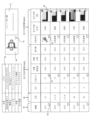
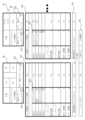
- FIG. 13 is a diagram showing processing information etc. in a processing proposal table.
- FIG. 13 is a diagram showing processing information etc. in a processing proposal table.
- FIG. FIG. FIG. 4 is a diagram showing a loader cycle time display unit.
- FIG. 13 is a search result screen of the processing proposal table, showing the results of a search with recommendation index priority selected;
- FIG. 13 is a diagram showing a loader cycle time display unit according to another embodiment.
- FIG. 2 is a diagram showing the positional relationship and position information of machine tools and peripheral devices arranged along a production line.
- Fig. 1 shows a block diagram of a processing proposal table creation system (hereinafter, referred to as the creation system) 10 of this embodiment.
- the creation system 10 includes a processing proposal table creation device (hereinafter, referred to as the creation device) 11 and a client terminal 13 installed in each production factory 12.
- the creation system 10 is a system that provides a service of creating a processing proposal table from the creation device 11 to the client terminal 13.
- the creation device 11 is, for example, a server device, and includes a CPU 21, a storage device 22, a user IF (abbreviation of interface) 23, and a network IF 24.
- the CPU 21 and the like are connected to each other via a communication bus 25 and are capable of communicating with each other.
- the storage device 22 is, for example, a combination of a RAM, a ROM, a hard disk, and the like.
- the storage device 22 stores an operating system (OS) 26, a processing proposal table creation program (hereinafter referred to as the creation program) 27, and management data 28.
- the OS 26 is, for example, a Windows (registered trademark) Server OS, and controls the creation device 11 in an integrated manner and provides basic services and functions to various application programs.
- the creation program 27 is an application program, and is a program that uses the services and functions of the OS 26 to create the above-mentioned processing proposal table.
- the creation device 11 executes the OS 26 and the creation program 27 on the CPU 21 to transmit and receive data to and from the client terminal 13, create, save, and output the processing proposal table, and other processes.
- the management data 28 stores a plurality of processing proposal tables DT1 and work name information DT2.
- the processing proposal table DT1 and the work name information DT2 will be described in detail later.
- the OS 26 is not limited to a Windows (registered trademark) Server OS, but may be a UNIX (registered trademark) Server OS such as Linux (registered trademark) OS using server software such as Apache (registered trademark).
- the OS 26 is not limited to a Server OS, but may be a Windows (registered trademark) OS, Macintosh (registered trademark) OS, UNIX (registered trademark) OS, or other types of client OS. That is, the terminal on which the creation program 27 is installed is not limited to a server, but may be a client terminal. The client terminal may be used directly by the user, or may be used remotely using a remote desktop function or the like.
- the storage device 22 that stores the creation program 27 is not limited to the configuration described above.
- the storage device 22 may be a flash memory, an SSD, or a portable storage medium such as a USB memory or an external hard disk that is detachably attached to the creation device 11.
- the medium that stores the creation program 27 may be a recording medium such as a CD-ROM or a DVD-ROM.
- the user IF 23 includes, for example, a display device such as an LCD, and an input device such as a keyboard and a mouse.
- the network IF 24 is, for example, a LAN interface, and is connected to the network 15 via a router (not shown) or the like.
- the network 15 is, for example, a WAN such as the Internet.
- the production factory 12 has, for example, a production line with multiple machine tools.
- the client terminal 13 is, for example, a personal computer, and has a CAM (Computer Aided Manufacturing) application program (hereinafter referred to as a CAM program) 17 installed, making it possible to create NC programs.
- a CAM program Computer Aided Manufacturing
- the client terminal 13 is not limited to a personal computer, and may be other information processing devices such as a notebook PC, a tablet terminal, or a smartphone.
- the client terminal 13 is able to access the creation device 11 via the network 15.
- the management data 28 may be stored in a device (such as a database server) provided separately from the creation device 11 (server).
- the creation device 11 may also be installed in the local network of the production factory 12.
- the device that creates the processing proposal table (creation device 11) and the terminal that uses it (client terminal 13) may be the same device.
- both the creation program 27 and the CAM program 17 may be installed in the client terminal 13, and both the creation of the processing proposal table and the creation of the NC program by the CAM program 17 may be executed in the client terminal 13.
- the processing proposal table creation device of the present disclosure may be a server device or a stand-alone device.
- the network IF 24 that accepts instructions from the client terminal 13 is an example of an input unit of the present disclosure
- the CPU 21 is an example of a processing unit.
- the user interface such as the keyboard and mouse provided on the client terminal 13 (personal computer) is an example of an input unit in this disclosure
- the CPU that executes the client terminal 13 and the CAM program 17 on the client terminal 13 is an example of a processing unit.
- the creating device 11 executes the OS 26 on the CPU 21 to start the system, and then executes the creating program 27 on the CPU 21.
- the user operates the client terminal 13 to access the creating device 11.
- the creating device 11 supports the creation of a new processing proposal table DT1 (hereinafter, sometimes referred to as a new processing proposal table) on a Web server by using the services and functions of the OS 26.
- the device that executes the program may be simply described by the program name.
- the creating program 27 accepts information from the client terminal 13 means that the creating device 11 executes the creating program 27 on the CPU 21 and accepts information from the client terminal 13 by the creating program 27.
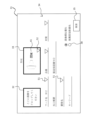
- the creation device 11 is an example of a web page of the creation device 11 accessed by the client terminal 13, and shows a search screen 31 when a search target image 37 is input.
- the creation program 27 displays a search screen 31 for searching the processing proposal table DT1 on the client terminal 13 in response to access from the client terminal 13.
- the search screen 31 is a screen for searching the processing proposal table DT1 that matches the search conditions from among the processing proposal tables DT1 stored in the management data 28. Therefore, the creation device 11 accepts the creation of a new processing proposal table using the processing proposal table DT1 previously registered in the management data 28, and executes the registration and output of the new processing proposal table.
- the creation device 11 manages the processing proposal table DT1 that can be used separately for each customer (user) using the creation system 10.
- the processing proposal table DT1 created by customer A can be reused only by customer A, and is not a search target for customer B.
- the creation device 11 may share the processing proposal tables DT1 of all customers among the customers.
- the creation program 27 displays an image input section 32, an image display section 33, a search condition input section 34, and a search button 35 on the search screen 31.
- the image input section 32 is a section for inputting a search target image 37, which is an image to be searched for.
- the creation program 27 displays the search target image 37 inputted into the image input section 32 on the image display section 33.
- a workpiece image 41 (see FIG. 7) showing the shape of the workpiece after machining is stored in association with the processing proposal table DT1 of the management data 28.
- the creation program 27 is capable of receiving the search target image 37, and searching for and displaying the processing proposal table DT1 in which a workpiece image 41 similar to the received search target image 37 is associated from the management data 28.
- the creation program 27 displays, for example, the text "Drop your image here" in the image input section 32, and when a search target image 37 is input to the image input section 32 by drag and drop, displays the input search target image 37 in the image display section 33.
- a search target image 37 for a differential case is displayed as the search target image 37.
- the creation program 27 also displays two radio buttons 38 (image similarity priority, recommendation index priority) above the search button 35.
- the two radio buttons 38 are buttons for selecting whether to prioritize sorting the images with higher image similarity or those with higher recommendation index when listing the search results of the processing proposal table DT1.
- the creation program 27 has the image similarity priority radio button 38, which prioritizes image similarity, checked as an initial state.
- the recommendation index will be described later (see FIG. 12).
- the creation program 27 searches the processing proposal table DT1 stored in the management data 28 for a processing proposal table DT1 associated with a workpiece image 41 similar to the search target image 37, i.e., the image of the differential case.
- the selection operation here refers to an operation such as clicking on the client terminal 13 or pressing the return key. Note that the method of inputting an image is not limited to the drag-and-drop described above.
- the creation program 27 may display a pop-up screen for selecting the search target image 37, and may receive a designation of the storage destination (file path, etc.) of the search target image 37 on the displayed pop-up screen.
- the creation program 27 includes an AI (artificial intelligence) program that searches for similar images.
- the creation program 27 uses the machine learning function of the AI program to determine a work image 41 that is similar to the search target image 37.
- the method of searching for similar images is not limited to using an AI program.
- the creation program 27 may extract feature points between the search target image 37 and the work image 41 and calculate the similarity of the extracted feature points.
- the search target image 37 and the work image 41 to be searched are not limited to two-dimensional images and may be three-dimensional images.
- the creation program 27 can also search the processing proposal table DT1 based on information input to the search condition input section 34 in FIG. 2.
- the above-mentioned search target image 37 and the information input to the search condition input section 34 are examples of "information relating to a new workpiece to be newly processed" in this disclosure.
- the creation program 27 displays input fields for the workpiece name, product number, material, processing overview, manufacturing instruction number, customer name, and keyword in the search condition input section 34. These workpiece name, product number, material, processing overview, manufacturing instruction number, and customer name are associated with each of the processing proposal table DT1 as described below (see FIG. 3).
- the work name is the name of the work to be manufactured in the processing proposal table DT1, and is the name used as the name of the work, such as the differential case described above.
- the product number is, for example, a number used by the client of the production factory 12 to identify the work, and is a unique number given to each work to be manufactured (processing proposal table DT1).
- the material is the name of the material of the work, such as carbon steel, chrome molybdenum steel, aluminum alloy, ductile cast iron, etc.
- the processing overview is a term or description that shows the overview of the processing of the work to be performed in the processing proposal table, such as sample number and product for what purpose.
- the manufacturing instruction number is, for example, the number of the document that instructs the production factory 12 to manufacture the work (product), and is given for each processing step.
- the processing proposal table DT1 is created based on this manufacturing instruction.
- the customer name is, for example, the name of the customer who requested the manufacturing of the work, and is the delivery destination of the work manufactured in the processing proposal table DT1.
- the keyword is a field for inputting the term to be searched for among the terms included in the processing proposal table DT1.
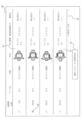
- FIG. 3 shows a search result screen 39 that displays the search results of the processing proposal table DT1.
- FIG. 3 shows the search results when, for example, only the search target image 37 is input and the search button 35 is selected.
- the creation program 27 displays information such as check boxes, image similarity, work name, material, shape, processing overview, manufacturing instruction number, and customer name for multiple processing proposal tables DT1 searched from the management data 28 in one row.
- the creation program 27 vertically arranges the processing proposal tables DT1 in descending order of image similarity as shown in FIG. 3.
- the creation program 27 arranges the processing proposal tables DT1 associated with the work image 41 that is more similar to the search target image 37 so that they are higher in the search results.
- the creation program 27 displays the work image 41 associated with the processing proposal table DT1 in the "shape" column.
- the creation program 27 also displays, as the manufacturing instruction number, for example, a number corresponding to each process included in each processing proposal table DT1.
- the creation program 27 also displays an arrow icon 43 below the search results of the processing proposal table DT1 to display any processing proposal tables DT1 that could not be displayed.
- the example shown in FIG. 3 shows four processing proposal tables DT1 displayed on one screen.
- the creation program 27 displays the processing proposal tables DT1 in the order of 5th to 8th, 9th to 12th, and so on. This allows the user to specify a search target image 37 and check all processing proposal tables DT1 having workpiece images 41 similar to that search target image 37 at once. While checking the displayed information, the user can search for the desired processing proposal table DT1, i.e., a processing proposal table DT1 that matches the new processing proposal table.
- FIG. 3 shows the second processing proposal table DT1 from the top selected.
- the creation program 27 displays a new creation button 47 for creating a new processing proposal table below the search results for the processing proposal table DT1. For example, the creation program 27 displays the words "Create new with selected data" in the new creation button 47.
- the creation program 27 displays a screen that displays the information of the selected processing proposal table DT1 and accepts editing (FIGS. 7 and 8). The creation of a new processing proposal table will be described later.
- the creation program 27 executes a search based on the entered search conditions. For example, when a work name is entered, the creation program 27 searches the management data 28 for a processing proposal table DT1 for the entered work name and displays it on the search result screen 39. In this case, the "image similarity" field does not need to be displayed on the search result screen 39.
- the creation program 27 may also sort the processing proposal tables DT1 of the search results according to a predetermined criterion. As the predetermined criterion here, various criteria can be adopted for sorting the processing proposal tables DT1, such as the highest recommendation index of the processing proposal table DT1 described below, the shortest cycle time, or the most recent creation date and time.
- the creation program 27 searches for and displays a processing proposal table DT1 for the input product number from the management data 28.
- the creation program 27 searches for and displays a processing proposal table DT1 that matches these search conditions.
- the creation program 27 searches for and displays a processing proposal table DT1 that includes the input characters in the processing overview.
- the creation program 27 searches for and displays a processing proposal table DT1 that includes the characters of the input keyword anywhere in the processing proposal table DT1.
- the creation program 27 may display an icon 51 for displaying a drop-down menu in each input field of the search condition input section 34.
- the creation program 27 may, for example, display information registered in the processing proposal table DT1 of the management data 28 in a selectable manner.
- the creation program 27 may display the work name in the data registered in the management data 28 as the processing proposal table DT1 as a drop-down menu. This allows the user to select and search for the desired work name from among registered and used work names.
- the creation program 27 may also perform an AND search or an OR search for the search conditions input to the search condition input section 34. For example, when search conditions are input to each of the multiple input fields of the search condition input section 34, the creation program 27 may display only the processing proposal table DT1 that satisfies all of the input search conditions (AND search). Specifically, when the work name, product number, and material are input and the search button 35 is selected, the creation program 27 may display the processing proposal table DT1 for the input work name, product number, and material. Alternatively, the creation program 27 may display all processing proposal tables DT1 that satisfy the search conditions input to at least one of the multiple input fields of the search condition input section 34 (OR search). Specifically, when the work name, product number, and material are input and the search button 35 is selected, the creation program 27 may display the processing proposal table DT1 that satisfies at least one of the search conditions input to the work name, product number, and material.
- work name information DT2 is stored in management data 28.
- FIG. 4 shows information stored in work name information DT2.
- a work image 41 and the work name of the work indicated by the work image 41 are stored in association with each other.
- the work name is given different names and terms used depending on the manufacturer of the machine tool, the manufacturing company of the work, the delivery destination of the work, etc. For this reason, different work names may be given to the same work. Conversely, the same work name may be given to different workpieces. As a result, there is a risk that a processing proposal table DT1 different from the one being searched for may be listed, or that a search may be missed.
- the work name information DT2 stores a work image 41 of a representative work shape in association with a plurality of work names that may be given to the work image 41.
- Each work shape is assigned an identification number, for example, "ID0001" or "ID0002”.
- one or more work names such as "Work name: W1" or "Work name: W2", are associated with the work image 41.
- FIG. 5 shows the search screen 31 when a work name is input.
- the creation program 27 displays the work names registered in the plurality of processing proposal tables DT1 of the management data 28 in a pull-down menu.
- the creation program 27 displays the work image 41 associated with the selected work name in the work name information DT2 on the image display section 33. If there are multiple associated workpiece images 41, the creation program 27 displays an icon 52 on the image display unit 33, and displays the multiple associated workpiece images 41 in a pull-down menu in response to the selection operation of the icon 52.
- the creation program 27 can therefore accept a work name (for example, "work name: W2") as information relating to a new work, and display multiple work images 41 associated with the accepted work name and work name information DT2.
- the creation program 27 can accept a selection from multiple work images 41, and search for and display the machining proposal table DT1 associated with the selected work image 41 from the management data 28. This makes it possible to list the desired machining proposal table DT1 without omissions from past machining proposal tables DT1, such as when different work names are given to the same work depending on the machine tool manufacturer, work manufacturer, or past person in charge, or when the same work name is given to different work names.
- the creation program 27 searches for work names associated with the selected work image 41 in the work name information DT2.
- work names associated with the selected work image 41 in the work name information DT2.
- work image 41 with "ID0002” there is one work name, "W3”.
- work image 41 with "ID0003” there are three work names, "W1", "W2", and "W3”.
- the creation program 27 searches the management data 28 for a processing proposal table DT1 associated with each of the multiple work names and displays it.
- FIG. 6 shows a search result screen 39 when searching for a workpiece image 41 of "ID0003" as an example.
- the creation program 27 searches the management data 28 for a processing proposal table DT1 in which any one of the workpiece names "W1", “W2", or "W3" registered in "ID0003" in the workpiece name information DT2 is set.
- the creation program 27, for example, arranges the processing proposal tables DT1 found by searching in order of image similarity.
- the processing proposal table DT1 with a high image similarity is the processing proposal table DT1 in which the workpiece image 41 selected by selecting the icon 52 in FIG. 5 is set. This makes it possible to search for all processing proposal tables DT1 in which the workpiece name used in the past as the workpiece name of the workpiece image 41 that is similar to the shape of the new workpiece is set, and to list them in a list.
- the creation program 27 displays a screen for creating a new machining proposal table shown in FIG. 7 to FIG. 11.
- the creation program 27 displays the information in FIG. 7 to FIG. 11 based on the information in the machining proposal table DT1 selected by the checked image 45, for example, and accepts editing of the information displayed on the screens of FIG. 7 to FIG. 11.
- the creation program 27 displays the work information 61, the machining information 63, the basic information setting table 65 (FIG. 9), the cycle time display section 66 (FIG. 10), and the loader cycle time display section 67 (FIG. 11).
- the creation program 27 displays the information in the machining proposal table DT1 selected by the user as the initial value as the information to be displayed in the work information 61, etc., and accepts editing of the displayed information to create a new machining proposal table.
- the types and contents of data shown in FIG. 7 to FIG. 11 are examples, and are changed as appropriate according to the type of work, the configuration of the machine tool, the request of the user, etc.
- the processing proposal table DT1 has information such as product number, manufacturing instruction number, customer name, work name, material, and processing overview as the work information 61.
- the creation program 27 displays the work information 61 together in the upper left of the displayed data.
- the creation program 27 accepts editing of the work information 61 and other information shown in FIG. 7 to FIG. 11. For example, when any item of the work information 61 is selected, the creation program 27 accepts editing of the information of the selected item (product number, manufacturing instruction number, etc.). The user can input the product number, manufacturing instruction number, etc. of the new processing proposal table.
- the creation program 27 also displays a workpiece image 41 and a comment entry field 71 to the right of the workpiece information 61.
- the creation program 27 displays the workpiece image 41 in the processing proposal table DT1 selected in FIG. 3 as an image of the initial state of the workpiece image 41 and accepts changes.
- the creation program 27 displays an icon 73 in the display field for the workpiece image 41, and in response to a selection operation of the icon 73, displays a pull-down menu of all workpiece images 41 contained in the processing proposal table DT1 and workpiece name information DT2 stored in the management data 28 and accepts selection.
- the creation program 27 may accept input of that workpiece image 41 if there is a new workpiece image 41 that the user wants to use, such as an image used as a search target image 37, the creation program 27 may accept input of that workpiece image 41.
- the comment entry field 71 is a field for inputting comments that users wish to add to the new processing proposal table. Users can input and save information that will be useful in the future regarding the new processing proposal table in the comment entry field 71.
- the creation program 27 also searches this comment entry field 71 as a search target for characters entered in the keyword field of the search condition input unit 34 described above. This allows information that users wish to share between each other to be left in the comment entry field 71 and used later.
- the creation program 27 displays processing information 63 (Figs. 7 and 8), a basic information setting table 65 (Fig. 9), a cycle time display section 66 (Fig. 10), and a loader cycle time display section 67 (Fig. 11) below the work information 61 and the work image 41.
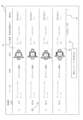
- Fig. 7 shows the left side of the processing information 63
- Fig. 8 shows the right side of the processing information 63.
- the creation program 27 appropriately changes the display of this information in response to the operation input (click operation, scroll operation, numeric input, etc.) of the user operating the client terminal 13.
- the processing information 63 has processing objective information 75, processing content information 76, processing condition information 77, and time information 78.
- the processing information 63 stores the processing objective information 75 and the like in association with each process for processing the workpiece.
- Each row in Figs. 7 and 8 shows one process.
- Each process is associated with model information 79 and process identification information 81.
- the creation program 27 displays, from the left, model information 79, process identification information 81, processing objective information 75, processing content information 76, processing condition information 77, and time information 78.
- the model information 79 is information indicating the model of the machine tool, for example, the model number of the machine tool.
- the model information 79 is not limited to the model number of the machine tool, and may be other information that can identify the machine tool, such as the product name.
- the process for machining the workpiece can be divided by spindle, not by model. In the following explanation, the case where one machine tool has only one spindle and the process is associated with the model is mainly explained, and the explanation of the case where the process is associated with the spindle is omitted as appropriate.
- the process when the process is associated with the spindle, it is possible to deal with this by providing a "spindle” item instead of the "model” item, or by providing an item for selecting the "spindle” equipped in the model in addition to the "model” item.
- the model information 79 of "MT1, MT2, MT3" is displayed.
- the creation program 27 displays the models registered in the management data 28 in a pull-down menu and accepts a change of model.
- the process identification information 81 is information for identifying a process for machining a workpiece using a machine tool of the model indicated by the model information 79.
- the process identification information 81 of "10, 20A, 20B, 30, 40" is displayed.
- the process identification information 81 is assigned a smaller number the earlier the process is executed (the upstream process).
- each data is displayed from top to bottom in the order of the processes.
- the same process is, for example, a process in which the same machining is executed by multiple machine tools of the same or different models, or multiple spindles in one machine tool.
- the process identification information 81 is not limited to information combining numbers and letters, and may be information only of numbers, information only of letters, information using symbols, etc.
- machining proposal table DT1 In conventional machining proposal tables, it was common to create separate tables for processes performed by different machine tools, making it difficult to grasp the configuration of a production line and the cycle time of the production line (hereinafter referred to as line tact) in a single table.
- line tact the cycle time of the production line
- model information 79 and process identification information 81 are added to each process, making it possible to compile information that provides an overview of all processes related to one workpiece in a single machining proposal table DT1.
- the order of machining on the production line, the number of processes, and the line tact of the production line can be easily and reliably grasped.
- the creation program 27 adds and deletes processes (rows) in response to a selection operation on the process icon 85 shown in the upper left of FIG. 8.
- the creation program 27 displays, for example, a plus icon, a minus icon, a copy icon, and a search icon as the process icon 85.
- the creation program 27 selects the plus process icon 85 with any process (row) selected, the creation program 27 adds a new process next to the selected process. For example, the creation program 27 assigns to the added process the next number indicated by the process identification information 81 of the selected process, and moves down the process identification information 81 of the added process and subsequent processes. For example, when the creation program 27 selects the plus process icon 85 with the first process from the top, "10", it adds process "20” below process "10” and sets the subsequent processes to "30A, 30B, 40, 50".
- the creation program 27 deletes the selected process and moves up the process identification information 81 of the deleted process and subsequent processes. Also, when the copy process icon 85 is selected with any process selected, the creation program 27 adds a copy of the selected process below the selected process, and assigns or changes the alphabet to the process identification information 81 of the selected process and the added process. For example, when the copy process icon 85 is selected with process "30", the creation program 27 changes process "30" to "30A”, and adds a copied process of process "30A” as "30B" below "30A”.
- the creation program 27 adds a copied process of process "10A” as “10B” below “10A”, and changes the original process "10B” to "10C”.
- the search icon will be described later.
- the machining objective information 75 includes, for example, information on NO, cutting tool NO, target surface roughness, target tolerance, and roundness.
- the information in the machining objective information 75 is not limited to these information, and other information capable of expressing the purpose of the process, such as fit tolerance and geometric tolerance, can be used.
- the "NO” column is a number for identifying each process, and integers such as "1, 2, 3, " are assigned in the order of the processes.
- the "NO" column is assigned numbers in ascending order even for the same process identification information 81.
- the "cutting tool NO" column is a holder number indicating which of the multiple holders provided on the turret a cutting tool (such as a cutting tool or a rotating tool) is attached to.
- letters such as "T1" are assigned.
- the target surface roughness is the target surface roughness (surface roughness) of the surface to be machined in that process.
- the target tolerance is the general tolerance allowed in the processing of that process. Circularity is the target shape tolerance for the surface being machined, for example, when a curved surface is machined in a process.
- the above-mentioned work information 61 and processing information 63 are generally managed as information separate from the processing content information 76, processing condition information 77, and time information 78 described later, and are managed by recording tolerances, etc., on the work image 41.
- the information on the work and the purpose of processing are separate from the actual processing conditions and cycle time, making it difficult to search and use the information when reusing it later. Therefore, in the processing proposal table DT1 disclosed herein, information indicating the outline of processing, such as the work information 61 and processing information 63, and information indicating specific processing contents, such as the processing content information 76, processing condition information 77, and time information 78, are centrally managed.
- the creation program 27 displays each piece of information for each process and accepts editing based on information input by the user via the client terminal 13. This makes it easier to reuse the registered processing proposal table DT1.
- the creation program 27 displays a pop-up screen of the search screen 87 shown in FIG. 13. As shown in FIG. 13, the creation program 27 displays an input field 88 for inputting each item of the processing objective information 75, and a search button 89 on the search screen 87.
- the creation program 27 may display a pull-down menu in the input field 88 to accept the selection of search conditions, or may directly accept input of numerical values, etc.
- the search button 89 is selected with numerical values, etc. entered in the input field 88, the creation program 27 extracts processes of the processing objective information 75 that match or are close to the search conditions accepted in the input field 88 from the processing proposal table DT1 of the management data 28.
- the creation program 27 displays information for each process (model information 79, process identification information 81, processing information 63) as shown in FIG. 7 and FIG. 8 for the extracted processes.
- the creation program 27 accepts the selection of a process to be added to the new processing proposal table from the displayed process list, adds the selected process next to the process currently selected in the display data of Figures 7 and 8, and moves the process identification information 81 down, etc. This makes it possible to search for a desired process based on the process purpose and easily add it to the new processing proposal table. Note that the creation program 27 does not need to display the copy or search process icon 85, and does not need to execute the above-mentioned copy or search/add by purpose.
- the processing content information 76 includes, for example, information on the cutting tool shape, processing content (characters), and processing content (diagram).
- the cutting tool shape is an image showing the shape of the cutting tool used in the process.
- the creation program 27 manages, for example, the cutting tool NO of the processing objective information 75 and the cutting tool shape of the processing content information 76 in association with each other. When one of the icons 91 displayed in the cutting tool NO and cutting tool shape columns is selected and changed by selecting from a pull-down menu, the creation program 27 also changes the other information according to the change.
- the creation program 27 changes the image of the cutting tool shape from the image of "T1" to the image of "T2".
- the image of the "cutting tool shape” is associated with cutting tool identification information that identifies the cutting tool in the management data 28, for example.
- This cutting tool identification information is a number or the like used to identify multiple types of cutting tools that can be attached to a machine tool.
- the processing content (text) is text information that indicates the processing content of the process, such as the "outer diameter” for processing the outside of the workpiece along the spindle, the “inner diameter” for processing the inside of the workpiece along the spindle, and the “end face” for processing in a direction perpendicular to the spindle.
- the processing content (diagram) is an image that shows the processing content (text) in a diagram. Therefore, like the cutting tool number and cutting tool shape described above, the creation program 27 manages the processing content (text) and processing content (information) in association with each other, and changes them in conjunction with the selection operation on the icon 92, etc.
- the machining condition information 77 has information such as selection, reason, cutting diameter 1, cutting diameter 2, rotation speed, cutting speed, cutting depth, path, cutting length, and feed.
- the "selection” column is a column indicating whether the calculated value or the actual value is selected in the process, and has check boxes for selecting two values.
- the "reason” column is a column for inputting the reason for the selection column.
- the "cutting diameter 1" column is the radial direction (direction perpendicular to the spindle) position at which the processing of the process is started.
- the "rotation speed” column is a column indicating the rotation speed of the work (spindle) in the process.
- the “cutting speed” column is a column indicating, for example, the cutting speed per minute, and is a column indicating the circumferential speed at which the work is cut by the cutting tool in the process.
- the cutting speed can be calculated, for example, by the following formula.
- the "cutting depth” column is, for example, the area where the cutting tool contacts the workpiece, and is a column indicating the depth (length) that the cutting tool cuts into the workpiece in one feed (pass).
- the "pass” column is, for example, a column indicating the number of cuts (number of passes) in a direction parallel to the spindle or in a direction perpendicular to the spindle.
- the "cutting length” column is a column indicating the total length to be cut by cutting.
- the "cutting length” is, for example, a value obtained by multiplying the cutting length per pass by the number of passes.
- the "feed” column is, for example, the distance (feed amount) that the cutting tool advances per rotation of the workpiece in the case of a cutting tool (chip), and indicates the distance that the cutting tool advances per rotation of the rotating tool in the case of a rotating tool such as a drill.
- the machining condition information 77 such as cutting diameter and rotation speed may be set by calculating theoretical calculated values from the conditions of the machining objective information 75 and the machining content information 76, or may be set to actual values based on past machining results. This is because an error occurs with the calculated value depending on the actual rigidity of the machine tool, and so a value obtained by correcting the calculated value according to the machining situation, i.e., an actual value, is used. For this reason, when there is past performance, the user desires to use the actual value. On the other hand, when the machining conditions have been improved, such as when the cutting tool has been improved, there are cases where the user wants to try machining using theoretical calculated values. Therefore, in the machining proposal table DT1 disclosed herein, when the past machining proposal table DT1 is viewed later, it is clear whether the calculated value or the actual value was used, and the reason can also be clearly stated.
- the processing proposal table DT1 has a selection column with check boxes in the processing condition information 77 to indicate whether the calculated value or the actual value has been selected, and a reason column to indicate the reason for the selection. This allows the user, when referring to a past processing proposal table DT1, to confirm whether the value is a calculated value for ideal processing conditions or an actual value based on past processing conditions, and to determine the reason. Furthermore, when creating a new processing proposal table, the user can refer to the reason and select whether to use the calculated value, the actual value, or a value obtained by modifying either of these values. More appropriate processing conditions can be set.
- the time information 78 has information on cutting time, positioning time, and blade indexing time.
- the "Cutting time” column is the total time that the cutting tool is used to machine the workpiece in that process.
- the “Positioning time” column is the time required to determine the position of the cutting tool, and indicates the time that the cutting tool is not in contact with the workpiece, i.e., the time other than the cutting time.
- the "Positioning time” column indicates, for example, the total of three times: the time required to move the cutting tool to the start position of the next pass after one pass is completed multiplied by the number of passes, the time required to move the cutting tool to the indexing position, and the time required to move the cutting tool from the indexing position to the initial position for machining.
- the "Blade indexing time” column indicates the time required to index the cutting tool for that process in a turret-type tool rest.
- the creation program 27 accepts editing of each piece of information shown in FIG. 7 and FIG. 8, as well as the basic information setting table 65 (see FIG. 9), the cycle time display section 66 (FIG. 10), and the loader cycle time display section 67 (FIG. 11), which will be described later.
- the creation program 27 accepts a change to any piece of information, it automatically calculates and changes information related to that piece of information.
- the cutting speed is the relative speed at which the cutting tool and the workpiece come into contact at the cutting diameter.
- the cutting speed is a different speed depending on the cutting diameter. Therefore, the creation program 27 automatically calculates and changes the cutting speed depending on the change in the cutting diameter. Or, for example, the rotation speed and the cutting speed are in a correlated relationship, so when one is changed, the creation program 27 automatically calculates and changes the other.
- the creation program 27 may perform the calculation using the CAM program 17 of the client terminal 13. Specifically, when any one of the information on the processing content, cutting tool number, cutting tool, rotation speed, cutting speed, cutting depth, and feed is changed, the creation program 27 may transmit the information to the CAM program 17 and acquire and update the cutting diameter, path, cutting length, cutting time, and positioning time. Alternatively, when the creation program 27 receives an instruction to save or output the processing proposal table DT1, it may perform the calculation using the CAM program 17 and update the information. Note that the creation program 27 does not have to perform the automatic calculation and update of the related information described above.
- the creation program 27 displays a Save button 93 and a Create button 95 above the time information 78.
- the creation program 27 stores the displayed information (work information 61, processing information 63, basic information setting table 65, cycle time display section 66, loader cycle time display section 67) in the management data 28 as a new processing proposal table DT1 (new processing proposal table).
- the creation program 27 may provide the new processing proposal table with identification information for identifying the processing proposal table DT1 and the creation date and time.
- the Save button 93 is selected (e.g., by clicking) two or more times, the creation program 27 may receive an instruction as to whether to overwrite and save as a new processing proposal table DT1.
- the creation program 27 When the creation button 95 is selected, the creation program 27 outputs the displayed information (such as the work information 61) in a predetermined format.
- the predetermined format here can be any format desired by the user (such as the format of a machining proposal table or a report format).
- a user at a production factory can select information required as a document for explaining the time and cost involved in machining a work to a requester when a new workpiece is requested to be machined.
- a user at a manufacturer that sells machine tools can select information required as a document when proposing a machine tool that matches the workpiece desired by the sales destination.
- the creation program 27 does not need to output all of the displayed information (the work information 61, the machining information 63, the basic information setting table 65, the cycle time display section 66, and the loader cycle time display section 67), and may process and output the information.
- the creation program 27 outputs information, and when it receives an instruction such as printing from the user, ends the creation process of the new machining proposal table.
- the creation program 27 again displays the search result screen 39 for selecting the processing proposal table DT1 shown in FIG. 3.
- the save button 93 is not operated and the create button 95 is operated, the creation program 27 may confirm the saving of a new processing proposal table.
- the processing proposal table DT1 is stored in association with a recommendation degree index.
- the creation program 27 accepts a selection from among the multiple processing proposal tables DT1 on the search result screen 39 shown in FIG. 3, and when the selected processing proposal table DT1 is used to create a new processing proposal table, the creation program 27 increases the recommendation degree index of the processing proposal table DT1 used in the creation. For example, when the selected processing proposal table DT1 is edited and saved as a new processing proposal table by the save button 93, the creation program 27 increases the recommendation degree index of the selected (reused) processing proposal table DT1 by one.
- the creation program 27 also sets the value of "zero" as the initial value of the recommendation degree index for the processing proposal table DT1 saved as a new processing proposal table. In other words, when the creation program 27 sets zero as the recommendation degree index of the newly registered processing proposal table DT1, and then when the registered processing proposal table DT1 is selected and used to create a new processing proposal table, the creation program 27 increases the recommendation degree index of the processing proposal table DT1 from which it was reused by one.
- the creation program 27 displays the processing proposal tables DT1 in order of highest recommendation index when displaying the search results based on the search target image 37 and the search conditions in search condition input section 34.
- FIG. 12 shows a search result screen 39 for processing proposal tables DT1, showing the results of a search performed by selecting radio button 38 for recommendation index priority.
- the creation program 27 displays multiple processing proposal tables DT1 found by search, for example, in descending order of recommendation index. This makes it possible to quickly find and reuse processing proposal tables DT1 that have been used more frequently in the past.
- the creation program 27 may also accept a change in the recommendation index for each processing proposal table DT1 in the management data 28. For example, the creation program 27 displays a screen for editing the recommendation index of each processing proposal table DT1 based on an operational input from the user, and accepts a change in the recommendation index. This makes it possible, for example, to increase the recommendation index of a processing proposal table DT1 that the user wants to actively reuse due to technological improvements.
- a processing proposal table DT1 based on the latest technology can be created, and the recommendation index of that processing proposal table DT1 can be adjusted to list it at the top, allowing the latest technology to be shared with other users.
- the recommendation index of a processing proposal table DT1 in which a technical problem has been discovered can be lowered to make it more difficult to reuse.
- the creation program 27 may also accept editing and deletion of a registered processing proposal table DT1.
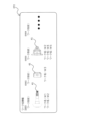
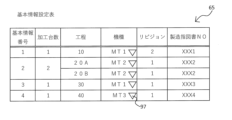
- the creation program 27 displays, for example, information such as the basic information number, number of units processed, process, model, revision, and manufacturing instruction number for each process in the basic information setting table 65.
- the creation program 27 displays the basic information setting table 65 of FIG. 9 below the information shown in FIG. 7 and FIG. 8.
- the information in the basic information setting table 65 is stored in association with the processing proposal table DT1.
- the creation program 27 assigns a number to identify each process as the "basic information number,” but assigns the same number to the same process.
- the processes "20A” and “20B” are the same process.
- the creation program 27 displays the number of the same process in the "number of units processed” column.
- the creation program 27 sets the number of processed units to "2" for processes “20A” and “20B,” and the number of processed units to "1" for the other processes.
- the more the number of processed units the shorter the cycle time for that process. For this reason, the number of processed units is useful information for users who want to understand the takt time, which is the cycle time of a production line.
- the definition of the number of processed units is not limited to the number of the same process as described above.
- the definition of the number of processed units may be limited to processes of the same model and the same content, that is, the same model.
- the creation program 27 also accepts changes to the model of each process in the basic information setting table 65 through a pull-down menu displayed by selecting an icon 97 displayed in the model column.
- the creation program 27 also changes the model information 79 in FIG. 7 and FIG. 8, the information in the cycle time display section 66 described later, and the information in the loader cycle time display section 67 in conjunction with the changes.
- the creation program 27 changes the information in the basic information setting table 65 in conjunction with the changes.
- the "revision" column indicates the version of each model. The revision number is increased when the software or hardware of each model of machine tool is improved. By increasing the revision, the function (operation speed and cycle time) of each machine tool may be improved. For this reason, understanding the revision is useful information for the user who creates the machining proposal table DT1.
- the creation program 27 displays, from top to bottom in the cycle time display section 66, for example, the bottleneck process, process, model, total time, number of machines, cycle time, and each time included in the cycle time (cutting time, idle, etc.) for each process (each row).
- the creation program 27 displays the cycle time display section 66 of FIG. 10 below the basic information setting table 65 shown in FIG. 9.
- the information in the cycle time display section 66 is stored in association with the processing proposal table DT1.
- the "bottleneck process" row indicates the process with the longest cycle time among all the processes.
- the creation program 27 displays the cycle time for each machine tool in each process in the "total time” column.
- the total time is the cycle time of one machine tool.
- the total time is the cycle time of each of the multiple machine tools.
- the total time (55 sec) for processes "20A” and "20B” is the cycle time of each of the two machine tools of the model "MT2".
- the creation program 27 displays the value obtained by dividing the "total time” by the "number of processing units" in the "cycle time” row.
- the creation program 27 obtains the number of processing units, which indicates the number of identical processes (processes that perform the same processing) for the processes selected as processes to be included in the new processing proposal table, divides the cycle time for each machine tool model and process (total time in FIG. 10) by the number of processing units, and displays the result in the cycle time row.
- the same process may be performed by multiple machine tools or spindles depending on the purpose of shortening the processing time per workpiece. When such an identical process is performed by multiple machine tools or spindles, even if the cycle time of the process is long, the actual cycle time is short.
- the creation program 27 displays the total time divided by the number of machining units as the cycle time.
- the creation program 27 marks the process "30" that has the longest time (40 seconds) in the cycle time row in the display of the bottleneck process row with a circle to indicate that it is a bottleneck process. This allows the user to more accurately identify and respond to bottleneck processes.
- the bottleneck process can be executed by multiple machine tools to adjust the cycle time.
- the creation program 27 also displays each time included in the cycle time below the line of the cycle time.
- the total of each time included in this cycle time is the cycle time.
- the cycle time is the total of the cutting time, idle time, spindle chuck time, workpiece attachment/detachment time, door opening/closing time, spindle brake time, ORS time, and cleaning time.
- Idle is the total time of the positioning time and the blade indexing time.
- spindle chuck is the time required for the spindle to chuck (clamp) the workpiece.
- Workpiece attachment/detachment is the time required for the chuck release operation. If the spindle chuck and workpiece attachment/detachment are performed multiple times in one process, the total time is the total time.
- Door opening/closing is the time required to open and close the door of the machine tool when it is opened and closed in response to the start and end of processing.
- spindle brake is the time required to stop the spindle, for example, the time from when the brake is activated to when the spindle stops rotating.
- ORS indicates the orientation, and is the time required to rotate the spindle to a specified rotation position after stopping the spindle. This specified rotation position is the rotation position of the spindle when transferring the workpiece from the spindle to the loader.
- “Cleaning” is the time required to clean the spindle's backing with cutting oil or air after transferring the workpiece from the spindle to the loader.
- the creation program 27 updates the cycle time in the cycle time display unit 66, for example, in response to changes in the time information 78 shown in Figures 7 and 8, i.e., in response to changes in information accompanying the creation of a new processing proposal table. For example, when the cutting time of any process is changed in the time information 78 in Figure 8, the creation program 27 changes the cutting time of the corresponding process in the cycle time display unit 66, and calculates and updates the cycle time. Then, each time the creation program 27 updates the cycle time, it compares the cycle times of each process and marks the process with the longest cycle time, i.e., the bottleneck process, with a circle.
- the management data 28 stores time information 78 relating to the time to perform machining on the workpiece in each process as machining information 63.
- the creation program 27 displays the machine tool model and the cycle time for each process (see FIG. 10).
- the creation program 27 displays the cycle time stored in the selected machining proposal table DT1 in the cycle time display section 66.
- the creation program 27 corrects the machine tool model and the cycle time for each process based on the changed time information 78. This makes it possible to quickly check the cycle time and bottleneck processes while changing the time information 78 such as cutting time and positioning time for each process to be included in the new machining proposal table.
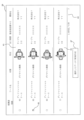
- the loader cycle time display unit 67 is a display unit that displays and changes the cycle time of peripheral devices connected to the machine tool, and the loader that transports the workpiece between the machine tool and the peripheral devices. As shown in FIG. 11, the creation program 27 displays a first display section 99 and a second display section 101 on the loader cycle time display unit 67.
- the creation program 27 displays the processes, the cycle time for each process, and the operation pattern in the first display section 99. Note that in FIG. 11, process "40" is omitted from the illustration to avoid cluttering the drawing.
- the creation program 27 also displays processes (first display section 99) for machine tools of the same model together in one place. In FIG. 11, the cycle times and operation patterns for processes "10" and “30” for a machine tool of model "MT1" are displayed together in one place.
- the creation program 27 then displays the loader cycle time in the second display section 101, but for different types of processes performed by machine tools of the same model, it displays the total loader cycle time for each process.
- the operation pattern indicates the type of loader operation when, for example, an arbitrary machine tool performs one or more arbitrary processes. For example, in the example shown in FIG. 11, when a machine tool of model "MT1" performs processes "10" and "30", there are multiple patterns for operating the loader. Similarly, when a machine tool of model "MT2" performs processes "20A", "20A", i.e., one type of process, there are multiple patterns for operating the loader. Specifically, there are multiple operation patterns according to various loader operations related to the movement of the workpiece, such as the number of processes, the number of spindles, the position of the spindles, the direction in which the loader moves, and whether or not the workpiece is turned over using an inversion device. If the operation pattern is different, the time it takes the loader to transport the workpiece will also be different.
- the management data 28 stores in association with the model information, an operation pattern for operating a loader that transports a workpiece in accordance with the execution of a process on a machine tool of a model indicated by the model information, and the loader cycle time when operated according to the operation pattern (the shortest loader cycle time described below).
- the creation program 27 displays columns for the loader shortest cycle time, periphery "1-4", number of LL chuck operations, number of UL chuck operations, travel (distance), and up and down (distance) on the second display unit 101.
- the "loader shortest cycle time” column corresponds to the operation pattern of the first display unit 99, and is the shortest cycle time of the loader when the loader is operated according to that operation pattern. This "loader shortest cycle time” does not include the travel time to the peripheral device described below or the work time at the peripheral device.
- the loader shortest cycle time is associated with the operation pattern in the management data 28.
- the creation program 27 accepts the selection of the operation pattern corresponding to the machine tool model and process in the new machining proposal table in the loader cycle time display section 67, and displays the loader shortest cycle time of the loader corresponding to the selected operation pattern in addition to the cycle time for each machine tool model and process. For example, in response to the selection operation of the icon 103 displayed in the operation pattern column of the first display section 99, the creation program 27 displays the operation pattern in a pull-down menu according to the process in the first display section 99 and the model that executes the process, that is, the operation pattern associated with the process and model by the management data 28.
- the creation program 27 displays the loader cycle time associated with the operation pattern selected by the icon 103 by the management data 28 in the loader shortest cycle time column of the second display section 101. This allows the user to automatically display the basic loader cycle time excluding peripheral devices, etc., which will be described later, simply by selecting the loader operation pattern.
- the creation program 27 calculates the total work time for items such as the shortest loader cycle time and peripherals "1-4" (described later), and displays the calculated total time in the shortest transport cycle time 102 field below the second display section 101. By checking this shortest transport cycle time 102 field, the user can confirm the total cycle time including the loader and peripheral devices when the process in the first display section 99 is executed on the model of the operation pattern.
- the creation program 27 may also display an explanatory screen for the operation pattern.
- the creation program 27 may display an icon 105 displaying a question mark in the operation pattern column of the first display unit 99, and when the icon 105 is selected, a pop-up screen listing the operation pattern and its explanation may be displayed.
- the creation program 27 also displays a peripheral "1 to 4" column in the second display section 101.
- the peripheral "1 to 4" column is a column for selecting peripheral devices that can be connected to the machine tool.
- Peripheral devices that can be used include, for example, an entrance stocker for carrying in work before machining, an entrance conveyor and an exit conveyor for transporting work between machine tools, an inspection device for inspecting and measuring work, an exit stocker for carrying out work after machining, and a cleaning device for cleaning work.
- four peripheral "1 to 4" columns are provided in FIG. 11, the creation program 27 may also accept the addition or deletion of peripheral columns.
- Management data 28 stores peripheral devices in association with the working time it takes for the peripheral devices to work on one workpiece.
- the working time is the time it takes for the peripheral device to operate the chucking device on one workpiece.
- the working time is the time required for an inspection device to perform an inspection, etc. Therefore, this working time is the cycle time on the peripheral device side, and does not include the chucking and unchucking time of the loader (working time on the loader side) described below.
- the creation program 27 accepts information on the peripheral devices to be used in the new processing proposal table in the peripheral "1-4" column. For example, the creation program 27 displays an icon 107 in the peripheral column, and when the icon 107 is selected, a pull-down menu is displayed of peripheral devices that can be connected to the machine tool in the first display section 99. The creation program 27 displays the peripheral device selected in the pull-down menu of the icon 107 and the operation time associated with the management data 28 to the right of the icon 107. The creation program 27 corrects the shortest transfer cycle time 102, i.e., the loader cycle time, according to the displayed operation time. The creation program 27 adds the total time of the operation times displayed in the peripheral "1-4" column to the shortest transfer cycle time 102. This allows the user to display the operation time (cycle time) of the peripheral device and correct the cycle time related to the loader simply by selecting the peripheral device to be used in the process.
- the creation program 27 displays the number of clamping or unclamping operations of the loader and the operation time corresponding to the number of operations in the "LL chuck operation count” and "UL chuck operation count” columns of the second display unit 101.
- the management data 28 stores, for example, the clamping time (chuck time), which is the operation time required for the loader to clamp the workpiece once, and the unclamping time (unchuck time), which is the operation time required for the loader to unclamp the workpiece once.
- the "LL chuck operation count” column has a column for inputting the number of clamping operations (number of chucking operations) and a column to the right of the column for displaying the operation time corresponding to the number of clamping operations.
- the user inputs the number of clamping operations performed by the loader in the clamping number column of the LL chuck operation count for all peripheral devices selected in the second display unit 101 described above.
- "1 time” is input in the clamping number column for processes "10" and "30".
- the creation program 27 multiplies the input number of clamping times by the clamping time in the management data 28 to calculate the total clamping time, and displays it to the right of the number of clamping times. In the example shown in FIG. 11, "0.7 sec" is displayed.
- the UL chuck operation count field has a field for inputting the release count (the number of unchucking operations) and a field to the right of the field for displaying the operation time according to the release count.
- the user inputs the number of releases that the loader will unchuck in all peripheral devices selected in the second display section 101 in the release count field of the UL chuck operation count.
- "2 times" is input in the clamp count field for processes "10" and "30”.
- the creation program 27 multiplies the input release count by the release time in the management data 28 to calculate the total release time, and displays it to the right of the release count. In the example shown in FIG. 11, "0.5 sec" is displayed.
- the creation program 27 adds the chucking and unchucking operation time to the shortest transfer cycle time 102, as in the case of the above-mentioned peripherals "1 to 4", and corrects the shortest transfer cycle time 102. This allows the user to grasp the clamping time and release time simply by inputting the clamping and release counts, and correct the loader cycle time.
- the creation program 27 also displays the travel distance of the loader in each direction when moving to the peripheral device and the travel time corresponding to the travel distance in the travel (distance) and up/down (distance) columns of the second display unit 101.
- the loader in this embodiment can move, for example, in the left-right direction and the up-down direction when the machine tool is viewed from the front.
- the management data 28 stores the travel speed required for the loader to move a unit distance.
- the management data 28 stores the travel speed in each of the left-right direction and the up-down direction.
- the travel speed value is, for example, the average speed in each direction.
- the creation program 27 accepts input of the total travel distance (such as the round trip distance) of the distance the loader moves in the left-right direction when moving between the machine tool and the peripheral devices in the vicinity "1 to 4".
- the total travel distance such as the round trip distance
- the creation program 27 divides the input horizontal distance by the horizontal movement speed in the management data 28, and displays the calculated movement time on the right side of the input field. In the example shown in FIG. 11, "1.5 sec” is displayed as the movement time.
- the creation program 27 adds the movement time to the shortest transfer cycle time 102, in the same way as the above-mentioned perimeters "1 to 4", the number of LL chuck operations, etc., to correct the shortest transfer cycle time 102.
- the creation program 27 accepts input of the total distance traveled in the up and down direction when the loader moves between the machine tool and the peripheral devices "1 to 4" in the up and down (distance) field.
- “3 m” is input in the up and down (distance) field.
- the creation program 27 divides the input up and down distance by the up and down movement speed in the management data 28, and displays the calculated movement time on the right side of the input field. In the example shown in FIG. 11, "2 sec” is displayed.
- the creation program 27 then corrects the shortest transfer cycle time 102 according to the calculated movement time. This allows the user to grasp the movement time in each direction by simply inputting the movement distance of the loader in each direction, and to correct the cycle time of the loader.
- the loader may be capable of moving in the forward and backward directions in addition to the up and down and left and right directions, or may be configured to move only in one direction. That is, the content of the second display section 101 shown in FIG. 11 is an example, and is changed as appropriate according to the movement direction of the loader.
- the shortest transfer cycle time 102 is appropriately corrected.
- the shortest transfer cycle time 102 displays the total cycle time of the loader when the loader performs work on the machine tool and the peripheral device shown in the second display unit 101 when each machine tool executes one or more processes shown in the first display unit 99.
- the creation program 27 accepts the selection of the operation pattern for the other processes "20A, 20B, 40", the display of the shortest loader cycle time, changes to the cycle times of the peripheral devices, etc., and displays the shortest transfer cycle time 102.
- the loader cycle time display unit 67 displays the cycle time of the machine tool for each process and the cycle time of the loader (shortest transfer cycle time 102).
- the creation program 27 displays the longest time among the cycle times for each machine tool and process, and the loader cycle time as the line tact.
- the creation program 27 provides a column for the line tact 109 at the bottom of the loader cycle time display section 67 and displays the line tact.
- the cycle time (40 sec) of the machine tool in process 30 is displayed as the line tact 109, that is, the cycle time of the bottleneck process.
- the creation program 27 displays, for example, the name of the process that becomes the line tact 109 and information indicating whether it is a machine tool or a loader, to the right of the line tact 109 time.
- the creation program 27 changes the information of the new machining proposal table shown in Figures 7 to 11 in a linked manner. For example, when the cutting time in Figure 8 is changed, the creation program 27 changes the cutting time, cycle time, and total time in the cycle time display section 66 in Figure 10, changes the cycle time (machine tool) in the first display section 99 in Figure 11, compares the changed cycle times, and updates the line tact 109 if necessary. Alternatively, when a new process is added to the new machining proposal table in Figures 7 and 8, the creation program 27 executes the addition of a process to the basic information setting table 65 in Figure 9, the cycle time display section 66 in Figure 10, the loader cycle time display section 67 in Figure 11, and the loader cycle time display section 67 in Figure 11.
- the creation program 27 stores the displayed information (work information 61, cycle time display section 66, etc.) in the management data 28 as a new machining proposal table DT1. Furthermore, when the create button 95 is selected, the creation program 27 outputs the displayed information (such as the workpiece information 61) in a predetermined format. In this way, the creation program 27 can reuse the registered processing proposal table DT1 to reduce the load of creating a new processing proposal table.
- Figure 14 shows a loader cycle time display section 67A in another embodiment.
- the creation program 27 displays the first display section 111, the second display section 113, the third display section 115, the shortest transport cycle time 102, and the line tact 109 as the loader cycle time display section 67A. Note that Figure 14 only illustrates process "10".
- the creation program 27 displays the process and the cycle time of the machine tool in that process on the first display unit 111.
- the creation program 27 also displays information on the operation pattern, special operation, entrance device, machine tool, and exit device on the second display unit 113.
- the creation program 27 also displays information on additional peripheral devices on the third display unit 115.
- the creation program 27 accepts the total travel distance of all peripheral devices in the travel (distance) column and up/down (distance) column as the left/right and up/down travel distance when the loader moves between the machine tool and the peripheral devices. In contrast, as shown in FIG. 14, the creation program 27 accepts changes by displaying the travel distance for each of multiple peripheral devices (entrance device, exit device, additional peripheral device) individually.
- the basic configuration includes an entrance device such as an entrance stocker or entrance conveyor for loading the work, and an exit device such as an exit stocker or exit conveyor for unloading the work.
- the creation program 27 displays information on the entrance device (entrance stocker and entrance conveyor) and exit device (exit stocker and exit conveyor), which are basic configurations, on the second display section 113, and displays other peripheral devices as additional peripheral devices selectable on the third display section 115.
- a cleaning device and an inspection device are displayed as additional peripheral devices.
- the creation program 27 provides a column for travel (distance) and a column for up and down (distance) for the entrance device, the exit device, and the additional peripheral device (hereinafter, sometimes referred to as each peripheral device) to accept the travel distance.
- each peripheral device hereinafter, sometimes referred to as each peripheral device
- the creation program 27 accepts the travel distance in mm for each peripheral device, automatically calculates the time (travel time) divided by the above-mentioned travel speed, and displays it in the column on the right.
- This travel distance is the travel distance traveled by the loader between the machine tool and any of the peripheral devices.
- the same value may be used for the travel speed for dividing the travel distance, or different values may be used for each peripheral device.
- the creation program 27 changes the time of the special operation and the shortest transfer cycle time 102, which will be described later.
- the creation program 27 increases or decreases the time of the special operation and the shortest transfer cycle time 102 according to the increase or decrease in the travel time.
- the creation program 27 receives the travel distance of the loader of each peripheral device, calculates the travel time by dividing the received travel distance by the travel speed in the management data 28, and adds the calculated travel time to the loader cycle time (shortest transfer cycle time 102) for correction. This makes it possible to check the travel time of each peripheral device while also checking the shortest transfer cycle time 102. Note that the creation program 27 may receive a user setting instead of automatically calculating the travel time.
- the creation program 27 also displays position information above the travel distance of each peripheral device and accepts changes to the displayed position information.
- FIG. 15 shows the positional relationship between the machine tools and each peripheral device lined up along the production line, and the position information.
- the entrance device is installed on the upstream side of the machine tool (left side of FIG. 15).
- the cleaning device (additional peripheral device "1"), the inspection device (additional peripheral device "2"), and the exit device are installed, in that order, on the downstream side of the machine tool (right side of FIG. 15).
- the position information is set to values of "-1, -2, -3, ! as the distance from the machine tool increases upstream.
- the position information is set to values of "+1, +2, +3, ! as the distance from the machine tool increases downstream.
- the location information is stored in association with the processing proposal table DT1, and is displayed and edited when a new processing proposal table is created. As shown in Figure 14, by individually displaying and managing the travel distance, travel time, and location information of each peripheral device, the location of each peripheral device in the new processing proposal table can be expressed simply, making it easier for the user to understand. When referring to and reusing a past processing proposal table DT1, there is no need to research the past device locations in separate documents.
- the creation program 27 accepts additional time for each peripheral device in the second display section 113 and the third display section 115.
- the "additional time” column displays the work of each peripheral device (such as the work of the chuck device provided in the peripheral device) and accepts changes.
- the creation program 27 displays (copies) the time accepted in the "additional time” column in seconds (sec) in the column to the right. Therefore, the creation program 27 accepts time other than the movement time generated by the loader in the work of each peripheral device as additional time.
- the creation program 27 also provides a column for the "machine tool” additional time between the entrance device and the exit device of the second display section 113, and accepts the machine tool additional time in seconds.
- the machine tool additional time is, for example, the time for a special operation that occurs for each machining proposal table DT1, such as cleaning the workpiece in the machine tool while the workpiece is chucked by the loader.
- the creation program 27 displays the time accepted in the machine tool additional time column in the column to the right.
- the creation program 27 then calculates the total time of travel and additional time for the entrance device, machine tool, and exit device, and displays it in the special operation column.
- the creation program 27 accepts the position information, travel distance, and additional time for each of the added peripheral devices, calculates the travel time, and calculates the total time (cycle time) to display in the "Added Peripheral Device" column.
- the creation program 27 displays the total time (62.25 sec) of the operation pattern cycle time (25 sec), special operation (9 sec), and added peripheral device (28.25 sec) in the shortest transfer cycle time 102.
- the creation program 27 determines that the cycle time (62.25 sec) of the loader associated with process "10" is the longest, and displays 62.25 seconds as the line tact 109.
- the creation program 27 accepts the selection of a peripheral device with the icon 117 in the peripheral device column of the third display section 115, and displays the cycle time corresponding to the selected peripheral device on the right side.
- This cycle time for each peripheral device is stored, for example, in the management data 28, and is the work time that is always incurred when the peripheral device is used, excluding the loader's running time and special operation time.
- the creation program 27 changes the cycle time on the right side in response to the selection of a peripheral device with the icon 117, and updates the time in the "Additional peripheral device" column and the shortest transport cycle time 102.
- the creation program 27 accepts time other than the movement time incurred by the loader during peripheral device operations as additional time, and corrects the loader cycle time (shortest transfer cycle time 102) based on the accepted additional time.
- This makes it possible to clearly show the breakdown of special times included in the shortest transfer cycle time 102, i.e., the work time incurred by each peripheral device and the work time incurred by the machine tool, which occurs according to the processing content and procedures in the processing proposal table DT1.
- more detailed information can be presented as the loader cycle time.
- changes to the additional time can be accepted, and the shortest transfer cycle time 102 can be automatically calculated and displayed.
- the processing proposal table creation device 11 is an example of a computer of the present disclosure.
- the CPU 21 is an example of a processing unit.
- the network IF 24 is an example of an input unit of the present disclosure.
- the creation program 27 (creation device 11), which is one aspect of this embodiment, accepts information about a new workpiece from the client terminal 13, and acquires and displays a processing proposal table DT1 related to the received information about the new workpiece (search target image 37 and information in the search condition input section 34) from the management data 28 (see FIG. 6).
- the creation program 27 accepts a selection from the displayed processing proposal table DT1 (image 45 in FIG. 6).
- the creation program 27 supplements information necessary to create a new processing proposal table based on the selected processing proposal table DT1, and creates a new processing proposal table based on information input from the client terminal 13 (FIGS. 7 to 11).
- the burden of creating a new processing proposal table can be reduced.
- the present disclosure is not limited to the above-described embodiments, and it goes without saying that various improvements and modifications are possible without departing from the spirit and scope of the present disclosure.
- a machining proposal table DT1 using multiple types of machine tools was described, but the creation program 27 may also create a machining proposal table DT1 using one type of machine tool.
- the information stored in the processing proposal table DT1 in the above embodiment is merely an example, and the item names, number, and types of information to be stored may be changed as appropriate.
- the processing contents of the creation program 27 described above are only an example.
- the creation program 27 may not execute the search for the process using the search screen 87 (processing objective information 75) shown in FIG. 13.
- the creation program 27 may be configured to execute only one of the image similarity priority and recommendation index priority in FIG. 5. Also, for example, the creation program 27 divides the cycle time by the number of processed units for the same process and displays it, but such processing may not be executed. Also, for example, the creation program 27 may not display the cycle time of the peripheral device. Also, for example, the creation program 27 may create only the information in FIG. 7 and FIG. 8. Also, for example, the creation program 27 may not execute the calculation of the movement time. Also, for example, the creation program 27 may not calculate the cycle time related to the loader.
- management data 28 does not have to include information on operation patterns or information on the loader's cycle time for each operation pattern. For example, management data 28 does not have to include the moving speed required for the loader to move a unit distance. For example, management data 28 does not have to include the clamping time or release time.
- Processing proposal table creation device (computer), 21 CPU (processing unit), 24 Network IF (input unit), 27 Processing proposal table creation program, 28 Management data, 37 Search target image, 41 Work image, 61 Work information, 63 Processing information, 75 Processing purpose information, 76 Processing content information, 77 Processing condition information, 78 Time information, DT1 Processing proposal table, DT2 Work name information.
Landscapes
- Engineering & Computer Science (AREA)
- Physics & Mathematics (AREA)
- Mechanical Engineering (AREA)
- Geometry (AREA)
- Human Computer Interaction (AREA)
- Manufacturing & Machinery (AREA)
- General Physics & Mathematics (AREA)
- Automation & Control Theory (AREA)
- Management, Administration, Business Operations System, And Electronic Commerce (AREA)
Priority Applications (2)
| Application Number | Priority Date | Filing Date | Title |
|---|---|---|---|
| JP2024554008A JPWO2024095400A1 (https=) | 2022-11-02 | 2022-11-02 | |
| PCT/JP2022/041010 WO2024095400A1 (ja) | 2022-11-02 | 2022-11-02 | 加工提案表作成装置、及び加工提案表作成プログラム |
Applications Claiming Priority (1)
| Application Number | Priority Date | Filing Date | Title |
|---|---|---|---|
| PCT/JP2022/041010 WO2024095400A1 (ja) | 2022-11-02 | 2022-11-02 | 加工提案表作成装置、及び加工提案表作成プログラム |
Publications (1)
| Publication Number | Publication Date |
|---|---|
| WO2024095400A1 true WO2024095400A1 (ja) | 2024-05-10 |
Family
ID=90929933
Family Applications (1)
| Application Number | Title | Priority Date | Filing Date |
|---|---|---|---|
| PCT/JP2022/041010 Ceased WO2024095400A1 (ja) | 2022-11-02 | 2022-11-02 | 加工提案表作成装置、及び加工提案表作成プログラム |
Country Status (2)
| Country | Link |
|---|---|
| JP (1) | JPWO2024095400A1 (https=) |
| WO (1) | WO2024095400A1 (https=) |
Citations (5)
| Publication number | Priority date | Publication date | Assignee | Title |
|---|---|---|---|---|
| JPS62140738A (ja) * | 1985-12-12 | 1987-06-24 | Hitachi Seiki Co Ltd | 自動加工機における段取り処理装置 |
| JPH08323590A (ja) * | 1995-06-01 | 1996-12-10 | Matsushita Electric Works Ltd | ドリルビットの管理方法 |
| JP2018018338A (ja) * | 2016-07-28 | 2018-02-01 | ファナック株式会社 | Cad/cam−cnc統合システム |
| JP6368690B2 (ja) * | 2015-06-30 | 2018-08-01 | 富士フイルム株式会社 | ワークフロー作成支援装置、システム、方法並びにプログラム |
| JP7154514B1 (ja) * | 2021-08-11 | 2022-10-18 | キタムラ機械株式会社 | マシニングセンタの自動運転システム |
-
2022
- 2022-11-02 JP JP2024554008A patent/JPWO2024095400A1/ja active Pending
- 2022-11-02 WO PCT/JP2022/041010 patent/WO2024095400A1/ja not_active Ceased
Patent Citations (5)
| Publication number | Priority date | Publication date | Assignee | Title |
|---|---|---|---|---|
| JPS62140738A (ja) * | 1985-12-12 | 1987-06-24 | Hitachi Seiki Co Ltd | 自動加工機における段取り処理装置 |
| JPH08323590A (ja) * | 1995-06-01 | 1996-12-10 | Matsushita Electric Works Ltd | ドリルビットの管理方法 |
| JP6368690B2 (ja) * | 2015-06-30 | 2018-08-01 | 富士フイルム株式会社 | ワークフロー作成支援装置、システム、方法並びにプログラム |
| JP2018018338A (ja) * | 2016-07-28 | 2018-02-01 | ファナック株式会社 | Cad/cam−cnc統合システム |
| JP7154514B1 (ja) * | 2021-08-11 | 2022-10-18 | キタムラ機械株式会社 | マシニングセンタの自動運転システム |
Also Published As
| Publication number | Publication date |
|---|---|
| JPWO2024095400A1 (https=) | 2024-05-10 |
Similar Documents
| Publication | Publication Date | Title |
|---|---|---|
| EP3582044B1 (en) | Machining based on strategies selected from a database | |
| US20030036815A1 (en) | Experiment management system, method and medium | |
| US20030114945A1 (en) | Apparatus and method for creating intermediate stage model | |
| CN202780640U (zh) | 机床的工具更换装置 | |
| CN105451934B (zh) | 工具管理系统 | |
| WO2024095402A1 (ja) | 加工提案表作成装置、及び加工提案表作成プログラム | |
| WO2024095400A1 (ja) | 加工提案表作成装置、及び加工提案表作成プログラム | |
| WO2024095401A1 (ja) | 加工提案表作成装置、及び加工提案表作成プログラム | |
| WO2024224551A1 (ja) | 加工提案表作成装置、及び加工提案表作成プログラム | |
| Shakeri | Implementation of an automated operation planning and optimum operation sequencing and tool selection algorithms | |
| WO2025022526A1 (ja) | 加工提案表作成装置、及び加工提案表作成プログラム | |
| JP3753133B2 (ja) | 工作機械のnc加工データ生成方法 | |
| WO2025022527A1 (ja) | 加工提案表作成装置、及び加工提案表作成プログラム | |
| WO2024257275A1 (ja) | 加工提案表作成装置、及び加工提案表作成プログラム | |
| WO2025052676A1 (ja) | 加工提案表作成装置、及び加工提案表作成プログラム | |
| Yakovenko et al. | Parametric optimization of technological layout of modular machine tools | |
| WO2025013291A1 (ja) | 加工提案表作成装置、及び加工提案表作成プログラム | |
| WO2025083850A1 (ja) | 加工提案表作成装置、及び加工提案表作成プログラム | |
| WO2025079201A1 (ja) | 加工提案表作成装置、及び加工提案表作成プログラム | |
| JPH0611456B2 (ja) | 加工経路の算出方法 | |
| WO2025126270A1 (ja) | 加工提案表作成装置、及び加工提案表作成プログラム | |
| WO2025062641A1 (ja) | 加工提案表作成装置、及び加工提案表作成プログラム | |
| JPH11212615A (ja) | 穴加工用ncデータ作成装置 | |
| JPWO2020241597A1 (ja) | 情報処理装置、情報処理方法およびプログラム並びに工作機械 | |
| JP7475177B2 (ja) | 生産機械システム、管理方法及び管理プログラム |
Legal Events
| Date | Code | Title | Description |
|---|---|---|---|
| 121 | Ep: the epo has been informed by wipo that ep was designated in this application |
Ref document number: 22964420 Country of ref document: EP Kind code of ref document: A1 |
|
| WWE | Wipo information: entry into national phase |
Ref document number: 2024554008 Country of ref document: JP |
|
| NENP | Non-entry into the national phase |
Ref country code: DE |
|
| 122 | Ep: pct application non-entry in european phase |
Ref document number: 22964420 Country of ref document: EP Kind code of ref document: A1 |