WO2023281928A1 - 通信装置、制御方法およびプログラム - Google Patents
通信装置、制御方法およびプログラム Download PDFInfo
- Publication number
- WO2023281928A1 WO2023281928A1 PCT/JP2022/021179 JP2022021179W WO2023281928A1 WO 2023281928 A1 WO2023281928 A1 WO 2023281928A1 JP 2022021179 W JP2022021179 W JP 2022021179W WO 2023281928 A1 WO2023281928 A1 WO 2023281928A1
- Authority
- WO
- WIPO (PCT)
- Prior art keywords
- file
- image file
- area
- image
- incidental information
- Prior art date
- Legal status (The legal status is an assumption and is not a legal conclusion. Google has not performed a legal analysis and makes no representation as to the accuracy of the status listed.)
- Ceased
Links
Images







Classifications
-
- G—PHYSICS
- G06—COMPUTING OR CALCULATING; COUNTING
- G06F—ELECTRIC DIGITAL DATA PROCESSING
- G06F16/00—Information retrieval; Database structures therefor; File system structures therefor
- G06F16/10—File systems; File servers
- G06F16/11—File system administration, e.g. details of archiving or snapshots
- G06F16/122—File system administration, e.g. details of archiving or snapshots using management policies
-
- G—PHYSICS
- G06—COMPUTING OR CALCULATING; COUNTING
- G06F—ELECTRIC DIGITAL DATA PROCESSING
- G06F16/00—Information retrieval; Database structures therefor; File system structures therefor
- G06F16/50—Information retrieval; Database structures therefor; File system structures therefor of still image data
- G06F16/58—Retrieval characterised by using metadata, e.g. metadata not derived from the content or metadata generated manually
Definitions
- the present invention relates to a system in which an external device and a communication device are communicably connected.
- Japanese Patent Application Laid-Open No. 2002-200002 discloses a technique of connecting an imaging device such as a digital camera to an external device such as a PC (personal computer) so as to be able to communicate therewith, and transmitting content such as images and sounds stored in the imaging device to the external device. Have been described.
- a mobile device application content such as still images, videos, and audio generated by an imaging device is sent to a mobile device such as a smartphone, and a communication method such as FTP (File Transfer Protocol) is sent from the mobile device via the network.
- FTP File Transfer Protocol
- imaging devices have a function to save both image data and metadata.
- video cameras that store metadata for each image data in a file format different from that of image data.
- the metadata is stored in the imaging device as a metadata file in a data description language format such as XML (eXtensible Markup Language).
- the mobile application in order to make the metadata available on the server, the mobile application must save not only the main data file of the content stored in the imaging device, but also the metadata file, and send it to the server. .
- Some mobile applications have an image management application that saves image files, reads the saved image files, and transfers them to the server.
- the image management application is a dedicated application for collectively viewing and editing image files.
- the image management application may be configured so that only the main data file consisting of image data can be saved as a management target, and other data files such as metadata cannot be saved as a management target. Therefore, when the mobile application saves the main data file in the image management application, reads out the saved main data file, and transfers it to the server, the main data file is transferred to the server, but the metadata file is not transferred to the server. Therefore, the server cannot use the metadata of the image data.
- the present invention has been made in view of the above problems, and enables an image file and an incidental information file acquired from a first external device to be transmitted to a second external device.
- the present invention provides a communication device that communicates with an external device, comprising acquisition means for acquiring an image file and an incidental information file related to the image file from a first external device; in a first area of a storage means; and second management means for saving the incidental information file associated with the image file in a second area different from the first area. , the image file read from the first area of the first management means and the incidental information file associated with the image file read from the second area of the second management means; and a control means for transmitting to two external devices.
- the present invention it becomes possible to transmit the image file and the incidental information file acquired from the first external device to the second external device.
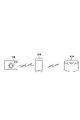
- FIG. 1 is a system configuration diagram of this embodiment.
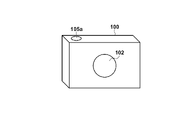
- FIG. 2A is a block diagram showing the configuration of the camera device 100 of this embodiment.
- FIG. 2B is a front view showing the configuration of the camera device 100 of this embodiment.
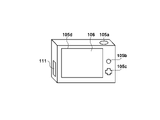
- FIG. 2C is a rear view showing the configuration of the camera device 100 of this embodiment.
- FIG. 3 is an explanatory diagram of directories of files stored in the camera device 100 of the present embodiment.
- FIG. 4 is a block diagram showing the configuration of the mobile device 200 of this embodiment.
- FIG. 5 is a software configuration diagram of the mobile device 200 of this embodiment.
- FIG. 1 is a system configuration diagram of this embodiment.
- FIG. 2A is a block diagram showing the configuration of the camera device 100 of this embodiment.
- FIG. 2B is a front view showing the configuration of the camera device 100 of this embodiment.
- FIG. 2C is a rear view showing the configuration of the camera device 100 of this embodiment.
- FIG. 3 is an explanatory diagram of directories of files stored in the
- FIG. 6A is a diagram exemplifying the UI screen of the file transfer application 301 of the mobile device 200 of this embodiment.
- FIG. 6B is a diagram exemplifying the UI screen of the file transfer application 301 of the mobile device 200 of this embodiment.
- FIG. 6C is a diagram exemplifying the UI screen of the file transfer application 301 of the mobile device 200 of this embodiment.
- FIG. 6D is a diagram exemplifying the UI screen of the file transfer application 301 of the mobile device 200 of this embodiment.
- FIG. 6E is a diagram illustrating the UI screen of the file transfer application 301 of the mobile device 200 of this embodiment.
- FIG. 6F is a diagram illustrating the UI screen of the file transfer application 301 of the mobile device 200 of this embodiment.
- FIG. 6A is a diagram exemplifying the UI screen of the file transfer application 301 of the mobile device 200 of this embodiment.
- FIG. 6B is a diagram exemplifying the
- FIG. 6G is a diagram exemplifying the UI screen of the file transfer application 301 of the mobile device 200 of this embodiment.
- FIG. 7A is a flowchart showing processing for saving a moving image file and a metadata file by the mobile device 200 of this embodiment.
- FIG. 7B is a flowchart showing processing for saving a moving image file and a metadata file by the mobile device 200 of this embodiment.
- FIG. 8A is a flow chart showing processing for reading a moving image file and a metadata file by the mobile device 200 of this embodiment.
- FIG. 8B is a flow chart showing processing for reading a moving image file and a metadata file by the mobile device 200 of this embodiment.
- the imaging apparatus of the present invention is applied to camera equipment such as a digital camera
- the communication apparatus of the present invention is applied to mobile equipment such as smart devices and tablet devices, which are types of mobile phones, and the information of the present invention is described below.
- An embodiment in which the processing device is applied to a server that provides various services to mobile devices serving as clients will be described in detail with reference to the accompanying drawings.
- the system of this embodiment includes a camera device 100, a mobile device 200, and a server 300.
- the camera device 100 and the mobile device 200 are communicably connected via a wireless antenna or a wired cable.
- the camera device 100 can transfer moving image files and audio files generated by the camera device 100 to the mobile device 200 .
- the mobile device 200 and the server 300 are communicably connected by mobile data communication using lines such as 4G/LTE and 5G.
- the mobile device 200 can transfer various types of information stored in the mobile device 200 to the server 300 using a communication method such as FTP (File Transfer Protocol).
- FTP File Transfer Protocol
- system configuration of this embodiment is not limited to the above example. to realize file transfer processing between devices.
- a camera device such as a digital camera will be described, but it is not limited to this, and may be a tablet device with a camera function, an information processing device such as a personal computer, a media player, a surveillance camera, a medical camera, or the like. good too.
- the control unit 101 is an arithmetic processing unit (CPU) that controls the camera device 100 as a whole. Realize Note that instead of the control unit 101 controlling the entire apparatus, a plurality of pieces of hardware may share processing to control the entire apparatus.
- CPU arithmetic processing unit
- the imaging unit 102 includes a lens group including a zoom lens and a focus lens, and a shutter with an aperture function.
- the image capturing unit 102 also includes an image sensor composed of a CCD or CMOS element for converting an object image into an electric signal, and an A/D converter for converting an analog image signal output from the image sensor into a digital signal.
- the imaging unit 102 converts the subject image light formed by the lens included in the imaging unit 102 into an electric signal by the imaging element, performs noise reduction processing, etc., and converts it into a digital signal. Output image data.
- the control unit 101 performs resizing processing such as pixel interpolation and reduction, and color conversion processing on image data captured by the imaging unit 102 .
- the control unit 101 compresses and encodes the image-processed still image data in the JPEG format or the like, or encodes the moving image data in the moving image compression method such as the MP4 format to generate an image file, and records the data in the recording medium 110 . do.
- image data is recorded on the recording medium 110 according to the DCF (Design Rule for Camera File System) standard.
- control unit 101 performs predetermined arithmetic processing using captured image data, and controls the focus lens, aperture, and shutter of the imaging unit 102 based on the obtained calculation result, thereby performing AF ( autofocus) processing and AE (automatic exposure) processing.
- the non-volatile memory 103 is an electrically erasable/recordable memory, such as an EEPROM. Constants for the operation of the control unit 101, programs, and the like are recorded in the nonvolatile memory 103.
- FIG. The program here is a program for executing communication processing and control processing described later in this embodiment.
- the work memory 104 is used as a work area for developing constants and variables for the operation of the control unit 101, programs read from the nonvolatile memory 103, and the like.
- the working memory 104 is used as a buffer memory for temporarily holding image data captured by the imaging unit 102 and as an image display memory for the display unit 106 .
- the operation unit 105 consists of operation members such as various switches, buttons, and a touch panel that receive various operations from the user.
- the operation unit 105 includes a shutter button 105a for taking an image, a playback button 105b for playing back a shot image, and up, down, left, and right buttons for performing various camera settings. 4 direction key 105c etc. are included.
- the operation unit 105 also includes a touch panel 105d integrally formed with the display unit 106, which will be described later.
- the operation unit 105 also includes an operation member such as a dedicated connection button for starting communication with an external device via the communication unit 111, which will be described later.
- the display unit 106 displays a viewfinder image at the time of shooting, displays a shot image, displays characters for interactive operation, and the like.
- the display unit 106 is, for example, a display device such as a liquid crystal display or an organic EL display.
- the display unit 106 may be integrated with the camera device 100 or may be an external device connected to the camera device 100 .
- the camera device 100 may be connected to the display unit 106 and have a function of controlling display on the display unit 106 .
- the audio input unit 107 uses one or more microphones built into the camera device 100 or connected via an audio terminal to collect sounds around the camera device 100 and convert them into electrical signals.
- the audio input unit 107 converts an analog audio signal generated by collecting audio around the camera device 100 into a digital signal and outputs the digital signal to the control unit 101 .
- the control unit 101 performs various audio processing on the digital signal generated by the audio input unit 107 to generate audio data.
- the microphones may be directional or non-directional.
- the control unit 101 compresses and encodes the audio data generated by the audio input unit 107 in the WAV format or the like to generate an audio file, and records it on the recording medium 110 .
- the recording medium 110 records the image data output from the imaging unit 102 and the audio data output from the audio input unit 107 . Also, the control unit 101 reads the image file and the audio file stored in the recording medium 110 in the reproduction mode.
- the recording medium 110 may be a memory card or a hard disk drive attached to the camera device 100 or may be a flash memory or a hard disk drive built into the camera device 100 .
- the camera device 100 should have at least means for accessing the recording medium 110 .
- the communication unit 111 is an interface for connecting with an external device such as the mobile device 200.
- the camera device 100 of this embodiment can exchange data with an external device via the communication unit 111 .
- image data generated by the imaging unit 102 and audio data generated by the audio input unit 107 can be transmitted to an external device via the communication unit 111 .
- the communication unit 111 includes an interface for communicating with an external device via a wireless LAN according to the IEEE802.11 standard.
- the control unit 101 realizes wireless communication with an external device by controlling the communication unit 111 .
- the communication method is not limited to a wireless LAN, and may include, for example, an infrared communication interface, a wireless communication interface such as WirelessUSB, a wired communication interface such as a USB cable, HDMI (registered trademark), and IEEE1394.
- the communication unit 111 of the camera device 100 in this embodiment has an AP mode that operates as an access point in infrastructure mode and a CL mode that operates as a client in infrastructure mode.
- the camera device 100 in this embodiment can operate as a CL device in the infrastructure mode.
- the camera device 100 can participate in a network formed by AP devices by connecting to peripheral AP devices.
- the camera device 100 can operate as a simple AP (hereinafter referred to as a simple AP) with more limited functions, although it is a type of AP. is also possible.
- the camera device 100 When the camera device 100 operates as a simple AP, the camera device 100 itself forms a network. Devices around the camera device 100 can recognize the camera device 100 as an AP device and participate in the network formed by the camera device 100 . It is assumed that the program for operating the camera device 100 as described above is held in the nonvolatile memory 103 .
- the camera device 100 in this embodiment is a kind of AP, it is a simple AP that does not have a gateway function for transferring data received from a CL device to an Internet provider or the like. Therefore, even if data is received from another device participating in the network formed by itself, it cannot be transferred to a network such as the Internet.
- the recording medium 110 is formatted with a file system such as exFAT (Extended File Allocation Table) that can be referenced from the OS (Operating System).
- exFAT Extended File Allocation Table
- the control unit 101 records the moving image data generated by the imaging unit 102 as a moving image file in MP4 format under the "100_0420" (the lower four characters are the current date) directory under the "DCIM" directory. Based on the meta template information read from the non-volatile memory 103, the control unit 101 also generates a metadata file (incidental information file) describing the metadata of the moving image file in XML (eXtensible Markup Language) format. Metadata is incidental information used for data management at the transmission destination of moving image data, and information such as the category, title, and comment of moving image data is entered in related tags of the XML file.
- XML eXtensible Markup Language
- the control unit 101 records the audio data generated by the audio input unit 107 as an audio file in WAV format under the "AUDIO” directory under the "PRIVATE” directory.
- the control unit 101 when moving image data and audio data are generated by the imaging unit 102 and the audio input unit 107, the control unit 101 generates or creates a catalog file for file management under the "GANONMSC" directory under the "DCIM" directory. Update.
- the catalog file records file information that associates the file name of the file stored in the recording medium 110 with the recording date and time.
- the recording medium 110 stores moving image files recorded in MP4 format, metadata files recorded in XML format, audio files recorded in WAV format, and catalog files for managing file information of each file.
- a mobile device such as a smart phone, which is a type of mobile phone, will be described, but the present invention is not limited to this, and includes a digital camera with a communication function, a tablet device, a personal computer, a wristwatch-type smart watch, and a glasses-type smart device.
- a wearable computer such as glasses may be used.
- the mobile device 200 of this embodiment includes a control unit 201, an imaging unit 202, a nonvolatile memory 203, a working memory 204, an operation unit 205, a display unit 206, a recording medium 210, and a communication unit 211.
- the basic functions of these elements are the same as those of the camera device 100, and detailed description thereof will be omitted.
- the non-volatile memory 203 stores an OS (operating system), which is basic software executed by the control unit 201, and applications that cooperate with the OS to realize applied functions.
- the nonvolatile memory 203 also stores an application for communicating with the camera device 100 and the server 300 .
- a file transfer application for communicating with the camera device 100 and the server 300 is also stored in the nonvolatile memory 203 .
- the nonvolatile memory 203 also stores a file management application that saves and manages image files such as still image data and moving image data acquired from the camera device 100, metadata files related to image files, and audio files.
- image files such as still image data and moving image data acquired from the camera device 100, metadata files related to image files, and audio files, particularly image files, are stored and managed. application is stored.
- the processing of the mobile device 200 of this embodiment is realized by reading software provided by the application. It is assumed that the application has software for using the basic functions of the OS installed on the mobile device 200 . Note that the OS of the mobile device 200 may have software for realizing the processing in this embodiment.
- the communication unit 211 includes a wireless communication interface for wirelessly communicating with external devices such as the camera device 100 and the server 300 .
- the control unit 201 realizes wireless communication with an external device by controlling the communication unit 211 .
- the communication unit 211 may be directly connected to the camera device 100 and the server 300, or may be connected via an access point.
- a protocol for communicating data for example, PTP/IP (Picture Transfer Protocol over Internet Protocol) through a wireless LAN can be used.
- communication between the camera device 100 and the server 300 is not limited to this.
- the communication unit 211 can include a wireless communication module such as an infrared communication module, a Bluetooth (registered trademark) communication module, and a WirelessUSB.
- a wired connection interface such as a USB cable, HDMI (registered trademark), or IEEE1394 may be used.
- the public network connection unit 213 is an interface used for wireless communication via a wide area network (WAN) such as 4G/LTE and 5G.
- Mobile device 200 can make a call or perform data communication with another device via public network connection unit 213 .
- the control unit 201 inputs and outputs audio signals via the microphone 214 and the speaker 215 .
- the public network connection unit 213 is not limited to 4G/LTE and 5G, and may use other communication schemes such as local 5G, WiMAX, ADSL, and FTTH.
- the public network connection unit 213 is an antenna, and the control unit 201 can connect to the public network via the antenna.
- the communication unit 211 and the public network connection unit 213 do not necessarily need to be configured by independent hardware, and for example, one antenna can be used for both.
- the mobile device 200 Since the communication speed realized by the communication unit 211 is faster than the communication speed realized by the public network connection unit 213, the mobile device 200 according to the present embodiment can communicate via the public network connection unit 213. Priority is given to communication via the communication unit 211 when no communication is being made with another device.
- fixed data such as parameters and software such as firmware are stored in the nonvolatile memory 203 .
- the recording medium 210 stores an OS 310 that is basic software executed by the control unit 201 and a file management application 306 and an image management application 308 that are application software executed by the control unit 201 . Further, as application software, a file transfer application 301 having a function of connecting to the camera device 100 to acquire and save files and connecting to the server 300 to transfer files is stored.
- the mobile device 200 When the user turns on the power switch included in the operation unit 205 of the mobile device 200, the mobile device 200 is activated, and the control unit 201 reads the OS 310 from the recording medium 210, develops it in the working memory 204, and executes it. Also, each component of the mobile device 200 is controlled according to the OS 310 and applications installed in the OS 310 .
- the OS 310 not only has the function of controlling each component of the mobile device 200, but also provides various services to applications. As a function of this embodiment, the OS 310 has a communication service 311 .
- the communication service 311 controls on/off of communication functions, connection with external devices, and data communication with connected external devices. It also controls the provision of data obtained by the communication function to applications, and the transmission and reception of data to and from external devices in response to requests from applications.
- the file management application 306 has a file management service 307 that manages files stored in the recording medium 210 .
- the file management application 306 also controls reading of managed files from the recording medium 210 and writing of files to the recording medium 210 in response to requests from applications.
- the image management application 308 has an image management service 309 that manages image files such as still images and moving images stored in the recording medium 210 . Unlike the file management application 306, the image management application 308 has functions specialized for managing image files, such as a thumbnail list display function for image files and a frame-by-frame advance function for moving image files. The image management application 308 also controls reading of managed files from the recording medium 210 and writing of files to the recording medium 210 in response to requests from applications.
- the files managed by the file management application 306 and the files managed by the image management application 308 are stored in different areas of the recording medium 210 and cannot be referred to each other.
- the file transfer application 301 generates a UI screen to be displayed on the display unit 206 in the display control 302 .
- the configuration of the UI screen will be described later with reference to FIGS. 6A-6G.
- the file transfer application 301 communicates with the camera device 100 using the communication service 311, and transfers the main data of each file stored in the camera device 100, file list information, and file transfer information. Get file information. Also, using the communication service 311 , the file stored in the recording medium 210 is read and transmitted to the server 300 .
- the file transfer application 301 uses the file management service 307 in the file management service control 304 to write and save the main body data file held in the working memory 204 to the recording medium 210 .
- the file transfer application 301 uses the image management service 309 in the image management service control 305 to write and save the main body data file held in the working memory 204 to the recording medium 210 .
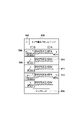
- a UI screen 501 shown in FIG. 6A is a function selection screen that is displayed while being connected to the camera device 100 after the file transfer application 301 is activated.
- the function selection screen 501 has a button 502 for selecting a function for displaying files saved in the camera device 100 and a button 503 for selecting a function for displaying files saved in the recording medium 210 of the mobile device 200 . include.
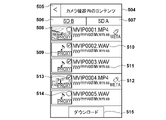
- a UI screen 504 shown in FIG. 6B is a list screen of files saved in the camera device 100 connected to the mobile device 200 .
- a list screen 504 is displayed when the button 502 is tapped on the function selection screen 501 .
- the list screen 504 includes a button 505 for returning to the previous screen, and buttons 506 and 507 for selecting the recording medium 110 to refer to the file when the camera device 100 has a plurality of recording media 110 .
- the list screen 504 in FIG. 6B is in a state where the recording medium 110 of the underlined button 506 is selected, and a list of files saved in the recording medium 110 displayed on the button 506 is displayed. .
- Components 508 to 514 on the list screen 504 in FIG. 6B are generated from the file list information and related information saved in the camera device 100 connected to the mobile device 200. Note that the display contents of the components 508 to 512 will be described below, and a method of acquiring information related to files for displaying the components 508 to 512 will be described later with reference to FIGS. 7A-7B and FIGS. 8A-8B.
- a component 508 is a component for displaying thumbnails of files.
- the thumbnail attached to the moving image file is displayed. display the image shown.
- a part 509 is an icon indicating that the video file and audio file are proxy files.
- a proxy file is a file whose data is reduced by lowering the bit rate and resolution compared to a normal file. It can be determined that there is On the list screen 504 of FIG. 6B, all files are proxy files, so icons 509 are superimposed on all thumbnails.
- the part 510 is a character string indicating the name of the file
- the part 511 is a character string indicating the recording date and time of the file.
- a component 512 is an icon indicating whether or not a metadata file indicating metadata of a moving image file is stored in the same recording medium.
- Parts 513 and 514 are icons that indicate the file selection/non-selection status, and are displayed superimposed on the thumbnail 508 .
- An icon 513 indicates a selected state
- an icon 514 indicates a non-selected state.
- a button 515 is a button to start saving a file from the camera device 100 to the mobile device 200 .
- a file to be saved is a selected file.
- Components 516 to 518 on the list screen 504 in FIG. 6C are buttons for selecting an application to save a file to be captured from the camera device 100 to the mobile device 200 while the camera device 100 is connected to the mobile device 200.
- the button 515 of the list screen 504 of is tapped, the list screen 504 is superimposed and displayed.
- a component 516 is a button for selecting the file management application 306 as the file save destination application.
- the button 516 is tapped, the file saved in the camera device 100 is transferred to the mobile device 200 and saved in the file management application 306.
- the file to be saved by the file management application 306 is the selected file and the metadata file related to the selected file.
- a component 517 is a button for selecting the image management application 308 as the file save destination application.
- the button 517 is tapped, the file saved in the camera device 100 is transferred to the mobile device 200 and saved in the image management application 308.
- the image management application 308 is an application capable of managing image files, files to be saved by the image management application 308 are only selected moving image files.
- a button 518 is a button for canceling the saving of the file. Tapping button 518 returns to list screen 504 in FIG. 6B.
- Components 519 to 521 on the function selection screen 501 in FIG. 6D are buttons for selecting a read source application when reading a file from the recording medium 210.
- Tap button 503 on the function selection screen 501 in FIG. is superimposed on the function selection screen 501 of .
- a component 519 is a button for selecting the file management application 306 as the file read source application. When the button 519 is tapped, the process of reading the file from the file management application 306 is started. A selection screen for files managed by the file management application 306 will be described later with reference to FIG. 6E.
- a component 520 is a button for selecting the image management application 308 as the file read source application. When button 520 is tapped, processing for reading a file from image management application 308 is started. A selection screen for files managed by the image management application 308 will be described later with reference to FIG. 6F.
- a button 521 is a button for canceling file reading, and when the button 521 is tapped, the screen returns to the function selection screen 501 in FIG. 6A.
- a UI screen 522 shown in FIG. 6E is a screen provided by the OS 310 and is a selection screen for selecting a file to be read out of files managed by the file management application 306 .
- the selection screen 522 is displayed superimposed on the function selection screen 501 of FIG. 6A when the button 519 of the function selection screen 501 of FIG. 6D is tapped.
- files that can be selected on the selection screen 522 are only MP4 format moving image files and WAV format audio files.
- the selection screen 522 in FIG. 6E includes parts 523-529.
- a part 523 is a button for returning to the previous screen, and when the return button 523 is tapped, the function selection screen 501 of FIG. 6A is displayed.
- the part 524 is a button for completing file selection, and when the button 524 is tapped, a list screen 535, which will be described later with reference to FIG. 6G, is displayed.
- a component 525 is a component for displaying thumbnails of files.
- the thumbnail attached to the moving image file is displayed. display an image showing
- the part 526 is a character string indicating the name of the file
- the part 527 is a character string indicating the recording date and time of the file.
- Parts 528 and 529 are icons that indicate file selection/non-selection status, and are displayed superimposed on the thumbnail 525 .
- An icon 528 indicates a selected state
- an icon 529 indicates a non-selected state.
- a UI screen 530 shown in FIG. 6F is a screen provided by the OS 310, and is a selection screen for selecting a file to be read out of the files managed by the image management application 308.
- the selection screen 530 is displayed superimposed on the function selection screen 501 of FIG. 6A when the button 520 of the function selection screen 501 of FIG. 6D is tapped.
- files that can be selected on the selection screen 530 are assumed to be only moving image files.
- a button 531 is a button for canceling file selection and returning to the previous screen.
- the return button 531 is tapped, the screen returns to the function selection screen 501 in FIG. 6D.
- the button 532 is a button for completing file selection, and when the button 532 is tapped, a list screen 535, which will be described later with reference to FIG. 6G, is displayed.
- a component 533 is a component for displaying thumbnails of files, and displays thumbnails added to video files.
- the component 534 is an icon that indicates the file selection state, and is displayed superimposed on the thumbnail 533. Icon 534 is displayed only when a file is selected. When the file thumbnail 533 is tapped, the file is switched between selected/non-selected, and the display/non-display of the icon 534 is switched according to the selected/non-selected state of the file.
- a UI screen 535 shown in FIG. 6G is a list screen of files selected on the selection screen 522 of FIG. 6E or the selection screen 530 of FIG. 6F. It is displayed when the button 532 is tapped.
- Components 508 to 512 on the list screen 535 of FIG. 6G are the same as the components 508 to 512 on the list screen 504 of FIG. 6B, and are selected on the selection screen 522 of FIG. Generated from file listing information and related information. A method of acquiring related information of files for displaying the parts 508 to 512 will be described later with reference to FIGS. 10 to 12.
- FIG. 10 A method of acquiring related information of files for displaying the parts 508 to 512 will be described later with reference to FIGS. 10 to 12.
- a button 505 is a button for returning to the previous screen, and when the button 505 is tapped, the screen returns to the function selection screen 501 in FIG. 6A.
- a button 536 is a button for starting the process of transmitting a file from the mobile device 200 to the server 300 .
- Files to be sent are all files displayed on the list screen 535 .
- a function may be provided to collectively transmit the files selected on the list screen 504 of FIG.
- the file transfer application 301 of this embodiment has the following two functions.
- the first function is to communicate with the camera device 100 and store the moving image file, audio file and metadata file acquired from the camera device 100 in the mobile device 200 .
- the second function is to communicate with the server 300 and transmit (upload) the video files, audio files, and metadata files stored in the mobile device 200 to the server 300 .
- the file transfer application 301 can transfer the moving image file, the audio file and the metadata file stored in the camera device 100 to the server 300 via the mobile device 200. can.
- the file transfer application 301 of this embodiment communicates with the camera device 100 and imports the file saved in the camera device 100 into the image management application 308 , the file is read out from the image management application 308 and sent to the server 300 .
- the file transfer application 301 may not be able to implement the first and second functions.
- the mobile device 200 When importing a file stored in the camera device 100 into the image management application 308, the mobile device 200 communicates with the camera device 100 and acquires the video file, audio file, and metadata file stored in the camera device 100. do. Subsequently, in the image management service control 305 of the file transfer application 301 , the mobile device 200 uses the image management service 309 of the image management application 308 to store the file acquired from the camera device 100 in the recording medium 210 .
- the image management service 309 of the image management application 308 has functions specialized for image files such as still images and moving images. Therefore, the file transfer application 301 makes image files to be imported into the image management application 308, but not metadata files. Therefore, in the mobile device 200 , the moving image file acquired from the camera device 100 is saved in the recording medium 210 , but the metadata file is not saved in the recording medium 210 .
- the mobile device 200 communicates with the server 300, reads out a moving image file stored in the recording medium 210, and transmits the moving image file to the server 300, the moving image file is stored in the recording medium 210, but the metadata of the moving image file is stored in the recording medium 210. File not recorded. Therefore, the mobile device 200 can transmit the moving image file to the server 300, but cannot transfer the metadata file. In other words, the metadata file is lost while transferring the moving image file and the metadata file from the camera device 100 to the server 300 via the mobile device 200 .
- the mobile device 200 When importing a moving image file stored in the camera device 100 into the image management application 308 , the mobile device 200 transfers the moving image file (main data file) to the image on the recording medium 210 in the image management service control 305 of the file transfer application 301 .
- the file of the management application 308 is saved in an area for recording (hereinafter referred to as an image management application area). After that, the mobile device 200 saves the metadata file of the moving image file in an area of the recording medium 210 for recording files managed by the file transfer application 301 (hereinafter referred to as a file transfer application area).
- the file transfer application area is different from the image management application area and the area for recording files managed by the file management application 306 (hereinafter referred to as the file management application area).
- the mobile device 200 when reading a moving image file from the image management application 308 and transmitting it to the server 300 , the mobile device 200 reads the moving image file saved in the image management application area through the communication service control 303 of the file transfer application 301 . . Also, the mobile device 200 reads the metadata file of the moving image file from the file transfer application area. The mobile device 200 then transmits the moving image file and the metadata file to the server 300 .
- the mobile device 200 of the present embodiment reads the metadata file corresponding to the moving image file. Therefore, it is necessary to identify the metadata file corresponding to the moving image file from among the files saved in the file transfer application area of the file transfer application 301 .
- the movie file and the metadata file stored in the camera device 100 of this embodiment have the same character string before the extension of the file name. Therefore, the following method is conceivable as a method for the mobile device 200 to identify the metadata file corresponding to the moving image file.
- the mobile device 200 saves the moving image file received from the camera device 100 in the image management application area while keeping the file name of the moving image file saved in the camera device 100 .
- the mobile device 200 stores the metadata file received from the camera device 100 in the file transfer application area with the same file name as the metadata file stored in the camera device 100 .
- the mobile device 200 After reading the moving image file from the image management application area, the mobile device 200 determines whether the character strings before the extension of the file name of the moving image file and each file stored in the file transfer application area are the same. judge. As a result of determination, when the character strings before the extension of the file name are the same, the file is determined to be the metadata file of the moving image file. Thereby, the metadata file corresponding to the moving image file is specified.
- the mobile device 200 may not be able to uniquely identify the metadata file corresponding to the video file only by judging the file name described above.
- the file name is given so that files with the same name do not overlap on the recording medium 110 .
- file names may overlap between different recording media.
- the naming rule of assigning serial numbers to files and managing them if the serial numbers assigned by the camera device 100 are reset, the file name may overlap with a previously recorded moving image file.
- mobile device 200 manages and reads out a plurality of metadata files corresponding to the moving image files.
- the metadata file corresponding to the video file must be uniquely identified.
- a method for the mobile device 200 to newly associate the moving image file saved in the image management application area and the metadata file saved in the file transfer application area will be described below.
- the mobile device 200 of this embodiment determines whether the file name of the stored moving image file and the metadata file are the same. Furthermore, the mobile device 200 determines whether the moving image file and the metadata file are associated by the association method, and identifies the metadata file corresponding to the moving image file.
- files stored in the camera device 100 are recorded with content IDs for identifying each file.
- the mobile device 200 uses the content ID to transmit a file acquisition request when acquiring file information or body data from the camera device 100 .
- File information varies depending on the file type.
- the file information of the moving image file includes the file name and recording information when the moving image was recorded.
- the recording information includes information at the time of shooting, such as recording date and time, recording time, and file size.
- the file information of the metadata file includes the file name.
- the mobile device 200 When a button 502 is tapped on the function selection screen 501 of FIG. 6A, the mobile device 200 requests acquisition of a content ID list in which content IDs of all files stored in the camera device 100 are listed as file list information. , and acquires the content ID list from the camera device 100 . The mobile device 200 then transmits a file information acquisition request for each content ID included in the content ID list, and acquires the file information from the camera device 100 . The mobile device 200 generates the list screen 504 in FIG. 6B using the file information of each file acquired from the camera device 100 and displays it on the display unit 206 .
- the recording date and time of the moving image file acquired from the camera device 100 are overwritten on the creation date and update date and time in the directory entry of the metadata file. An example is explained.
- the mobile device 200 When reading a file, the mobile device 200 acquires the recording date and time from the recording information of the moving image file, and if the recording date and time and the creation date or update date and time of the metadata file are the same, the moving image file and the metadata file are associated. It is determined that Then, the mobile device 200 identifies the metadata file corresponding to the moving image file in combination with determining whether the file names of the moving image file and the metadata file are the same.
- the recording medium 210 of the mobile device 200 is formatted according to a file system such as FAT (File Allocation Table).
- FAT can record metadata about the body data of a file as XML (eXtensible Markup Language) files in directory entries of the file system.
- a directory entry is a directory area in which file names, file attributes (extensions), and the like are recorded.
- the metadata includes, for example, a file name, creator, date and time of creation, date and time of update, storage location, file size, and a pointer indicating the storage location of main data.
- the control unit 201 of the mobile device 200 expands the program of the application (or the function of the application, the OS, the service of the OS, etc.) stored in the nonvolatile memory 203 to the working memory 204. This is achieved by executing 7A and 7B are triggered by tapping the button 517 for setting the image management application 308 as the save destination on the selection screen 504 of FIG. 6C.
- the control unit 201 adds all the content IDs of the moving image files selected on the list screen 504 of FIG. 6B to the requested moving image list.
- the requested video list is a list of content IDs of video files that the camera device 100 is requested to acquire.
- the content ID of the moving image file is information for identifying the moving image file that is included in the content ID list acquired from the camera device 100 described above and that is requested to be acquired from the camera device 100 .
- the content ID of the audio file is not added to the list among the files in the selected state, and only the content ID of the video file is added to the content ID list. Add to list.
- control unit 201 transmits to the camera device 100 via the communication unit 211 a request to acquire the moving image file (main data file) corresponding to the content ID to be processed.
- control unit 201 determines whether or not the communication unit 211 has received the moving image file from the camera device 100 within a predetermined time. If the control unit 201 determines that the moving image file has been received from the camera device 100, the processing proceeds to S705; if it determines that the moving image file has not been received from the camera device 100, the processing returns to S704, and again. Wait for video file reception.
- control unit 201 saves the moving image file received in S704 in the image management application area of the recording medium 210. Also, the control unit 201 creates a directory entry for the saved moving image file, and records the file name of the moving image file as the file name in the directory entry.
- the file name is the file name included in the file information of each file acquired from the camera device 100 described above.
- the control unit 201 determines whether or not the metadata file corresponding to the moving image file saved in S705 is saved in the camera device 100.
- a metadata file whose character string after the ".” (dot) in the file name is "XML" and whose character string before the ".” It is determined that the metadata file corresponds to the video file saved in .
- the file name is the file name included in the file information of each file acquired from the camera device 100 described above.
- the control unit 201 refers to all file information, and advances the processing to S707 if it is determined that there is a metadata file corresponding to the moving image file saved in S705, and proceeds to the processing if it is determined that there is no metadata file. Proceed to S711.
- control unit 201 uses the content ID of the metadata file specified in S706 to transmit a metadata file acquisition request to the camera device 100 via the communication unit 211.
- control unit 201 determines whether or not the communication unit 211 has received the metadata file from the camera device 100 within a predetermined time. If the control unit 201 determines that the metadata file has been received from the camera device 100, it advances the processing to step S709; Wait to receive the metadata file.
- control unit 201 stores the metadata file received in S708 in the file transfer application area of the recording medium 210. Also, the control unit 201 creates a directory entry for the saved metadata file, and records the file name of the saved metadata file as the file name in the directory entry.
- the file name is the file name included in the file information of each file acquired from the camera device 100 described above.
- the control unit 201 creates a new directory in the file system of the file transfer application area of the recording medium 210 . Then, the control unit 201 sets the directory name of the generated directory to a random value that makes the save destination file path different from that of other files already in the file transfer application area. Then, the control unit 201 records the metadata file received in S708 in the newly created directory. This makes it possible to save a plurality of files having the same file name in the file transfer application area of the recording medium 210.
- the control unit 201 overwrites the creation date and time and update date and time in the directory entry of the metadata file created in S709 with the recording date and time.
- the recording date and time is the recording date and time included in the file information acquired from the camera device 100 described above.
- the date and time of creation and the date and time of update in the directory entry of the metadata file become the recording date and time described in the recording information of the moving image file corresponding to the metadata file.
- control unit 201 deletes the current content ID as processed from the requested video list.
- control unit 201 returns the process to S702 in order to process the next content ID in the requested video list, and ends the process when all the content IDs have been processed.
- the determination of whether or not the processing for all content IDs has been completed can be realized by the control unit 201 determining that there are no content IDs remaining in the requested video list (the requested video list is empty).
- the area for recording the recording date and time is not limited to the creation date and time and update date and time in the directory entry of the metadata file. For example, it may be recorded in the file size and other file attribute items in the directory entry.
- the control unit 201 of the mobile device 200 expands the program of the application (or the function of the application, or the OS or the service of the OS) stored in the nonvolatile memory 203 to the working memory 204. This is achieved by executing The processing of FIGS. 8A and 8B is triggered by tapping the file selection completion button 532 on the selection screen 530 of FIG. 6F.
- the control unit 201 adds all management IDs of moving image files selected on the selection screen 530 of FIG. 6F to the read moving image list.
- the read moving image list is a list of management IDs of moving image files to be read from the image management application area of the recording medium 210 .
- a management ID is information for identifying a moving image file stored in the image management application area of the recording medium 210 .
- the control unit 201 generates a management ID corresponding to the moving image file and records it in the recording medium 210 when saving the moving image file. By designating the management ID, the control unit 201 acquires the moving image file corresponding to the management ID in the image management application area and the file name in the directory entry of the moving image file. Instead of the management ID, a file path indicating the storage position of the moving image file in the image management application area may be used.
- control unit 201 uses the management ID of the read movie list to identify the file path of the image management application area, and acquires the movie file (main data file).
- the control unit 201 adds the moving image file read at S803 to the transmission file list.
- the transmission file list is a list of files to be transmitted to the server 300 .
- control unit 201 analyzes the recording information of the moving image file and acquires the recording date and time. Recorded information is recorded information included in the moving image file read in S803.
- the control unit 201 sequentially refers to the directory entries in which the metadata files are recorded in the file transfer application area, thereby obtaining the directory entry information of each metadata file and the pointer indicating the recording destination address of the metadata body. .
- control unit 201 compares the file name in the directory entry of the metadata file with the file name of the moving image file read out by the management ID in S803, and removes characters before ".” (dot) in the file name. Determine if the columns are identical. If the control unit 201 determines that the file names are the same, the process proceeds to S808, and if it determines that the file names are not the same, the process proceeds to S811.
- control unit 201 compares the creation date and time in the directory entry of the metadata file with the recording date and time acquired in S805, and determines whether they are the same. If the control unit 201 determines that the dates and times are the same, the process proceeds to S809, and if it determines that the dates and times are not the same, the process proceeds to S811.
- control unit 201 reads the metadata body in the file transfer application area using the pointer indicating the address of the recording destination of the metadata body in the directory entry of the metadata file.
- the control unit 201 adds the metadata file read at S809 to the transmission file list.
- the transmission file list is the transmission file list used in S804.
- control unit 201 returns the process to S806 in order to process the next metadata file already saved in the file transfer application area. In addition, the control unit 201 advances the process to S812 when the processing of all the metadata files saved in the file transfer application area is completed.
- control unit 201 deletes the current management ID as processed from the read video list.
- control unit 201 returns the process to S802 in order to process the next management ID in the read moving image list, and ends the process when all the management IDs have been processed.
- the determination of whether or not the processing has been completed for all management IDs can be realized by the control unit 201 determining that there are no management IDs left in the read moving image list (the read moving image list is empty).
- the moving image file and the metadata file are associated by rewriting the creation date and update date and time of the directory entry of the metadata file to the recording date and time of the moving image file. Also, in order to identify the metadata file, it is determined whether or not the video file and the metadata file are associated with each other, and whether or not the file names of the video file and the metadata file are the same. there is However, the method of identifying the metadata file is not limited to this.
- association is made by recording the recording date and time of the video file in the directory name of the directory for storing the metadata file, and determination is made as to whether or not the association is established, and the video file and the A method of combining the determination of whether the file names of the metadata files are the same is conceivable.
- FIGS. 7A and 7B show an example in which multiple files with the same file name can be saved by dividing the files into directories whose directory names are random numbers. This association method records the recording date and time of the moving image file instead of the random value. 7A and 7B, mobile device 200 creates a new directory, records the recording date and time in the directory name, and then stores the metadata file in the newly created directory. Save to
- the control unit 201 detects a directory whose directory name is the same as the recording date and time in the file transfer application area in the read processing of FIGS. 8A and 8B. Determine if it exists. Then, when the directory exists, the control unit 201 determines that the file recorded in the directory is the metadata file associated with the moving image file.
- the metadata file corresponding to the video file is identified by determining the metadata file whose file name before the extension is the same as the file name of the video file.
- the metadata management table is a list of information blocks of each metadata file. Each information block is associated with the file path to the recording area of one metadata file stored in the file transfer application area, and the file name and recording date and time of the video file corresponding to the metadata file as one information block. recorded.
- the method of determining that they are associated by this association method is as follows.
- the file name and recording date and time of the read moving image file are stored in the metadata management table. It is determined whether or not the file name recorded in each information block matches the recording date and time. After that, the metadata file is specified and read from the file path described in the information block that matches both.
- the information recorded in each information block of the metadata management table is generated by the image management application 308 when saving the moving image file in S705 of FIG. , management IDs corresponding to moving image files may be recorded. In that case, it is possible to determine that they are associated by comparing the management ID of the read moving image file and the management ID recorded in each information block.
- the metadata file is identified by the file name saved in the camera device 100. No need to save.
- the present invention supplies a program that implements one or more functions of each embodiment to a system or device via a network or a storage medium, and one or more processors of the computer of the system or device reads and executes the program. It can also be realized by processing to The invention can also be implemented by a circuit (eg, an ASIC) that implements one or more functions.
- a circuit eg, an ASIC
- DESCRIPTION OF SYMBOLS 100... Camera apparatus, 101... Control part, 102... Imaging part, 106... Display part, 107... Voice input part, 111... Communication part, 200... Mobile device, 201... Control part, 205... Operation part, 206... Display part , 210... Recording medium, 211... Communication unit, 300... Server
Landscapes
- Engineering & Computer Science (AREA)
- Theoretical Computer Science (AREA)
- Data Mining & Analysis (AREA)
- Databases & Information Systems (AREA)
- Physics & Mathematics (AREA)
- General Engineering & Computer Science (AREA)
- General Physics & Mathematics (AREA)
- Library & Information Science (AREA)
- Information Retrieval, Db Structures And Fs Structures Therefor (AREA)
Priority Applications (1)
| Application Number | Priority Date | Filing Date | Title |
|---|---|---|---|
| US18/389,998 US20240119024A1 (en) | 2021-07-07 | 2023-12-20 | Communication apparatus and control method |
Applications Claiming Priority (2)
| Application Number | Priority Date | Filing Date | Title |
|---|---|---|---|
| JP2021-113139 | 2021-07-07 | ||
| JP2021113139A JP7817796B2 (ja) | 2021-07-07 | 2021-07-07 | 通信装置、制御方法、プログラム |
Related Child Applications (1)
| Application Number | Title | Priority Date | Filing Date |
|---|---|---|---|
| US18/389,998 Continuation US20240119024A1 (en) | 2021-07-07 | 2023-12-20 | Communication apparatus and control method |
Publications (1)
| Publication Number | Publication Date |
|---|---|
| WO2023281928A1 true WO2023281928A1 (ja) | 2023-01-12 |
Family
ID=84800556
Family Applications (1)
| Application Number | Title | Priority Date | Filing Date |
|---|---|---|---|
| PCT/JP2022/021179 Ceased WO2023281928A1 (ja) | 2021-07-07 | 2022-05-24 | 通信装置、制御方法およびプログラム |
Country Status (3)
| Country | Link |
|---|---|
| US (1) | US20240119024A1 (https=) |
| JP (1) | JP7817796B2 (https=) |
| WO (1) | WO2023281928A1 (https=) |
Families Citing this family (1)
| Publication number | Priority date | Publication date | Assignee | Title |
|---|---|---|---|---|
| JP2025126680A (ja) * | 2024-02-19 | 2025-08-29 | キヤノン株式会社 | 通信装置およびその制御方法、プログラム、記憶媒体 |
Citations (4)
| Publication number | Priority date | Publication date | Assignee | Title |
|---|---|---|---|---|
| JP2003234868A (ja) * | 2002-02-07 | 2003-08-22 | Konica Corp | 画像形成システム及びこの画像形成システムに用いる画像形成装置並びにこの画像形成装置を機能させるプログラム |
| JP2009151403A (ja) * | 2007-12-19 | 2009-07-09 | Hitachi Ltd | ストレージノード、クラスタストレージシステム及びその運用方法 |
| JP2012527801A (ja) * | 2009-05-19 | 2012-11-08 | ソニーモバイルコミュニケーションズ, エービー | デジタル画像を撮像する方法及び撮像装置 |
| US20160188647A1 (en) * | 2014-12-31 | 2016-06-30 | Canon Information And Imaging Solutions, Inc. | System and method for processing an electronic image file |
Family Cites Families (3)
| Publication number | Priority date | Publication date | Assignee | Title |
|---|---|---|---|---|
| US6111604A (en) * | 1995-02-21 | 2000-08-29 | Ricoh Company, Ltd. | Digital camera which detects a connection to an external device |
| US8090753B2 (en) * | 1999-05-20 | 2012-01-03 | Canon Kabushiki Kaisha | Image input system including remote image input apparatus having display and external apparatus having storage means, and control method or controlling storage of input image information by remote control of file directory management for storage means |
| JP5733952B2 (ja) * | 2010-11-04 | 2015-06-10 | キヤノン株式会社 | 撮像装置、撮像システム、及び撮像装置の制御方法 |
-
2021
- 2021-07-07 JP JP2021113139A patent/JP7817796B2/ja active Active
-
2022
- 2022-05-24 WO PCT/JP2022/021179 patent/WO2023281928A1/ja not_active Ceased
-
2023
- 2023-12-20 US US18/389,998 patent/US20240119024A1/en active Pending
Patent Citations (4)
| Publication number | Priority date | Publication date | Assignee | Title |
|---|---|---|---|---|
| JP2003234868A (ja) * | 2002-02-07 | 2003-08-22 | Konica Corp | 画像形成システム及びこの画像形成システムに用いる画像形成装置並びにこの画像形成装置を機能させるプログラム |
| JP2009151403A (ja) * | 2007-12-19 | 2009-07-09 | Hitachi Ltd | ストレージノード、クラスタストレージシステム及びその運用方法 |
| JP2012527801A (ja) * | 2009-05-19 | 2012-11-08 | ソニーモバイルコミュニケーションズ, エービー | デジタル画像を撮像する方法及び撮像装置 |
| US20160188647A1 (en) * | 2014-12-31 | 2016-06-30 | Canon Information And Imaging Solutions, Inc. | System and method for processing an electronic image file |
Also Published As
| Publication number | Publication date |
|---|---|
| US20240119024A1 (en) | 2024-04-11 |
| JP2023009680A (ja) | 2023-01-20 |
| JP7817796B2 (ja) | 2026-02-19 |
Similar Documents
| Publication | Publication Date | Title |
|---|---|---|
| JP4451480B2 (ja) | 電子カメラおよび記憶媒体 | |
| JP2012217166A (ja) | 画像送信装置、画像記録装置及び画像記録方法 | |
| JP7792761B2 (ja) | 通信装置およびその制御方法 | |
| US20240119024A1 (en) | Communication apparatus and control method | |
| US12399863B2 (en) | Communication apparatus, image capture apparatus and control method | |
| JP7605113B2 (ja) | 情報処理装置、情報処理方法、プログラム | |
| JP7256671B2 (ja) | 通信装置およびその制御方法ならびにプログラム | |
| JP2024171092A (ja) | 通信装置、通信装置の制御方法、プログラム | |
| JP2021035025A (ja) | 情報処理装置、情報処理方法、プログラム | |
| US20120262585A1 (en) | Recording control device, information device, information recording system and program | |
| JP7552599B2 (ja) | 情報処理装置、情報処理方法、プログラム | |
| US20260050573A1 (en) | Information processing device, information processing method, and non-transitory computer-readable storage medium | |
| JP2006157886A (ja) | 情報処理装置、携帯端末装置、サーバコンピュータ、データ保存方法、及びプログラム | |
| JP7752976B2 (ja) | 記録装置、およびその制御方法、プログラム | |
| US20250265291A1 (en) | Communication apparatus, control method therefor, and storage medium | |
| JP2024171093A (ja) | 通信装置、通信装置の制御方法、プログラム | |
| JP2007208526A (ja) | 画像処理装置及びその制御方法 | |
| JP2024139444A (ja) | 画像処理装置及び方法、プログラム、記憶媒体 | |
| US20220294972A1 (en) | Information processing device, information processing method, and program | |
| WO2024070347A1 (ja) | 記録装置及びその制御方法及びプログラム、並びにシステム | |
| JP2026055576A (ja) | 通信装置、制御方法およびプログラム | |
| WO2024070346A1 (ja) | 撮像装置及びその制御方法及びプログラム、並びに、システム | |
| WO2013129287A1 (ja) | 情報端末装置 | |
| JP2018186368A (ja) | 撮像装置、情報機器、管理機器、情報管理システム、制御方法及びプログラム | |
| JP2019139703A (ja) | 転送装置、転送装置の制御方法、及び、プログラム |
Legal Events
| Date | Code | Title | Description |
|---|---|---|---|
| 121 | Ep: the epo has been informed by wipo that ep was designated in this application |
Ref document number: 22837349 Country of ref document: EP Kind code of ref document: A1 |
|
| NENP | Non-entry into the national phase |
Ref country code: DE |
|
| 122 | Ep: pct application non-entry in european phase |
Ref document number: 22837349 Country of ref document: EP Kind code of ref document: A1 |