WO2023162237A1 - 画像処理装置、制御方法、及び制御プログラム - Google Patents
画像処理装置、制御方法、及び制御プログラム Download PDFInfo
- Publication number
- WO2023162237A1 WO2023162237A1 PCT/JP2022/008328 JP2022008328W WO2023162237A1 WO 2023162237 A1 WO2023162237 A1 WO 2023162237A1 JP 2022008328 W JP2022008328 W JP 2022008328W WO 2023162237 A1 WO2023162237 A1 WO 2023162237A1
- Authority
- WO
- WIPO (PCT)
- Prior art keywords
- display
- image processing
- history
- display area
- image
- Prior art date
- Legal status (The legal status is an assumption and is not a legal conclusion. Google has not performed a legal analysis and makes no representation as to the accuracy of the status listed.)
- Ceased
Links
Images




Classifications
-
- G—PHYSICS
- G06—COMPUTING OR CALCULATING; COUNTING
- G06F—ELECTRIC DIGITAL DATA PROCESSING
- G06F3/00—Input arrangements for transferring data to be processed into a form capable of being handled by the computer; Output arrangements for transferring data from processing unit to output unit, e.g. interface arrangements
- G06F3/01—Input arrangements or combined input and output arrangements for interaction between user and computer
- G06F3/048—Interaction techniques based on graphical user interfaces [GUI]
- G06F3/0487—Interaction techniques based on graphical user interfaces [GUI] using specific features provided by the input device, e.g. functions controlled by the rotation of a mouse with dual sensing arrangements, or of the nature of the input device, e.g. tap gestures based on pressure sensed by a digitiser
- G06F3/0488—Interaction techniques based on graphical user interfaces [GUI] using specific features provided by the input device, e.g. functions controlled by the rotation of a mouse with dual sensing arrangements, or of the nature of the input device, e.g. tap gestures based on pressure sensed by a digitiser using a touch-screen or digitiser, e.g. input of commands through traced gestures
-
- G—PHYSICS
- G06—COMPUTING OR CALCULATING; COUNTING
- G06F—ELECTRIC DIGITAL DATA PROCESSING
- G06F3/00—Input arrangements for transferring data to be processed into a form capable of being handled by the computer; Output arrangements for transferring data from processing unit to output unit, e.g. interface arrangements
- G06F3/01—Input arrangements or combined input and output arrangements for interaction between user and computer
- G06F3/03—Arrangements for converting the position or the displacement of a member into a coded form
- G06F3/041—Digitisers, e.g. for touch screens or touch pads, characterised by the transducing means
-
- G—PHYSICS
- G06—COMPUTING OR CALCULATING; COUNTING
- G06F—ELECTRIC DIGITAL DATA PROCESSING
- G06F3/00—Input arrangements for transferring data to be processed into a form capable of being handled by the computer; Output arrangements for transferring data from processing unit to output unit, e.g. interface arrangements
- G06F3/01—Input arrangements or combined input and output arrangements for interaction between user and computer
- G06F3/048—Interaction techniques based on graphical user interfaces [GUI]
- G06F3/0481—Interaction techniques based on graphical user interfaces [GUI] based on specific properties of the displayed interaction object or a metaphor-based environment, e.g. interaction with desktop elements like windows or icons, or assisted by a cursor's changing behaviour or appearance
- G06F3/0482—Interaction with lists of selectable items, e.g. menus
-
- G—PHYSICS
- G06—COMPUTING OR CALCULATING; COUNTING
- G06F—ELECTRIC DIGITAL DATA PROCESSING
- G06F3/00—Input arrangements for transferring data to be processed into a form capable of being handled by the computer; Output arrangements for transferring data from processing unit to output unit, e.g. interface arrangements
- G06F3/01—Input arrangements or combined input and output arrangements for interaction between user and computer
- G06F3/048—Interaction techniques based on graphical user interfaces [GUI]
- G06F3/0484—Interaction techniques based on graphical user interfaces [GUI] for the control of specific functions or operations, e.g. selecting or manipulating an object, an image or a displayed text element, setting a parameter value or selecting a range
-
- G—PHYSICS
- G06—COMPUTING OR CALCULATING; COUNTING
- G06F—ELECTRIC DIGITAL DATA PROCESSING
- G06F3/00—Input arrangements for transferring data to be processed into a form capable of being handled by the computer; Output arrangements for transferring data from processing unit to output unit, e.g. interface arrangements
- G06F3/01—Input arrangements or combined input and output arrangements for interaction between user and computer
- G06F3/048—Interaction techniques based on graphical user interfaces [GUI]
- G06F3/0487—Interaction techniques based on graphical user interfaces [GUI] using specific features provided by the input device, e.g. functions controlled by the rotation of a mouse with dual sensing arrangements, or of the nature of the input device, e.g. tap gestures based on pressure sensed by a digitiser
- G06F3/0488—Interaction techniques based on graphical user interfaces [GUI] using specific features provided by the input device, e.g. functions controlled by the rotation of a mouse with dual sensing arrangements, or of the nature of the input device, e.g. tap gestures based on pressure sensed by a digitiser using a touch-screen or digitiser, e.g. input of commands through traced gestures
- G06F3/04886—Interaction techniques based on graphical user interfaces [GUI] using specific features provided by the input device, e.g. functions controlled by the rotation of a mouse with dual sensing arrangements, or of the nature of the input device, e.g. tap gestures based on pressure sensed by a digitiser using a touch-screen or digitiser, e.g. input of commands through traced gestures by partitioning the display area of the touch-screen or the surface of the digitising tablet into independently controllable areas, e.g. virtual keyboards or menus
-
- G—PHYSICS
- G06—COMPUTING OR CALCULATING; COUNTING
- G06F—ELECTRIC DIGITAL DATA PROCESSING
- G06F2203/00—Indexing scheme relating to G06F3/00 - G06F3/048
- G06F2203/048—Indexing scheme relating to G06F3/048
- G06F2203/04803—Split screen, i.e. subdividing the display area or the window area into separate subareas
Definitions
- the present disclosure relates to an image processing device, control method, and control program.
- Patent Literature 1 discloses an image processing device that detects a touch position and a touch strength, and varies a function to be executed depending on whether the detected touch strength is greater than a threshold value. Are listed. According to this image processing device, it is possible to execute a plurality of functions with a single button, improving operability.
- An image processing apparatus includes: an image processing unit that performs image processing using at least one of image printing, image scanning, and image data communication; and a second display area, a display unit having a touch panel function, a detection unit capable of detecting the position and pressure level of a touch operation on the display unit, and detecting the pressure level in stages; A single input method in which a single pressure level of the acceptable touch operation is set to the first display area is assigned to the first display area, and a multi-input method in which a plurality of pressure levels of the acceptable touch operation is set is assigned to the first display area. and a control unit that allocates the two display areas.
- a control method is a method of controlling an image processing apparatus that performs image processing using at least one of image printing, image scanning, and image data communication.
- the control method includes a step of allocating a single input method in which a single pressure level of acceptable touch operations is set to the first display area; a step of assigning a method to a second display region; a step of displaying an operation screen including the first display region and the second display region having different display contents related to the image processing by a display unit having a touch panel function; and detecting the position of the touch operation on the display unit and the pressure level by a detection unit capable of detecting a level in stages.
- a control program sets a single pressure level of a touch operation that can be accepted by an image processing device that performs image processing using at least one of image printing, image scanning, and image data communication.
- a step of assigning the single input method to the first display area a step of assigning the multi-input method in which the pressure level of the touch operation that can be accepted is set to a plurality of levels to the second display area, and a display unit having a touch panel function, a step of displaying an operation screen including the first display area and the second display area having different display contents related to the image processing; and detecting position and said pressure level.
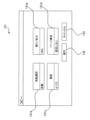
- FIG. 1 is a diagram showing a functional block configuration of an image processing device according to an embodiment
- FIG. 1 is a diagram showing an example of an external configuration of an image processing apparatus according to an embodiment
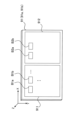
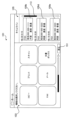
- FIG. It is a figure for demonstrating the touch-panel display which concerns on embodiment.
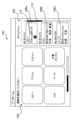
- 4A and 4B are diagrams illustrating an operation example of the image processing apparatus according to the embodiment
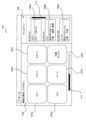
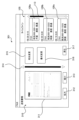
- FIG. 4 is a diagram showing a display example of a home screen in the image processing device according to the embodiment
- FIG. 5 is a diagram showing a display example of a copy screen in the image processing apparatus according to the embodiment
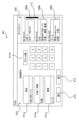
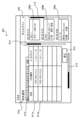
- FIG. 10 is a diagram showing an example of a display operation at the time of a weak touch operation in the history display area according to the embodiment; It is a figure which shows the 1st display operation
- the system in which the pressure levels of acceptable touch operations are set to multiple levels (hereinafter referred to as the "multi-input system") is suitable for users accustomed to the multi-input system and those who are familiar with the operation of the image processing apparatus. For the user, it is possible to improve the operability. However, for users unfamiliar with the multi-input method and users who are not familiar with the operation of the image processing apparatus, adopting the multi-input method may rather impair operability.
- An image processing apparatus includes an image processing unit that performs image processing using at least one of image printing, image scanning, and image data communication;
- a display unit that displays an operation screen including two display areas and has a touch panel function;
- a detection unit that detects the position and pressure level of a touch operation on the display unit;
- a single input method in which a single pressure level of the touch operation is set to the first display area, and a multi-input method in which the pressure level of the acceptable touch operation is set to a plurality of levels is assigned to the second display.
- a control unit for assigning to the area.
- the operation screen includes the first display area to which the single-input method is assigned and the second display area to which the multi-input method is assigned. make it different.
- a user who is unfamiliar with the multi-input method or a user who is not familiar with the operation of the image processing apparatus can smoothly operate the image processing apparatus using the first display area, thereby suppressing deterioration of operability.
- a user accustomed to the multi-input method or a user who is familiar with the operation of the image processing apparatus can use the second display area to perform advanced operations, thereby improving operability.
- by assigning an appropriate input method to each display area it becomes easy to maintain favorable operability even if the operation screen becomes complicated. Therefore, according to the image processing device according to the embodiment, it is possible to further improve user operability.
- FIG. 1 is a diagram showing a functional block configuration of an image processing apparatus 1 according to an embodiment.
- FIG. 2 is a diagram showing an example of the external configuration of the image processing apparatus 1 according to the embodiment.
- the image processing apparatus 1 has a printer 3, a scanner 5, a communication section 7, an operation panel 9, a control section 11, and a storage section 13.
- the printer 3 , scanner 5 and communication section 7 constitute an image processing section 10 .
- the image processing apparatus 1 has an operation panel 9 and has a configuration capable of performing one or more types of image processing.
- the printer 3, the scanner 5, and the communication unit 7 are provided as a configuration for performing image processing. A mode that does not have 7 may be used.
- the image processing unit 10 performs image processing using at least one of image printing, image scanning, and image data communication.
- image processing types include "print”, “copy”, “scan”, and “facsimile (FAX)”.
- “Copy” is a function of printing an image read by the scanner 5 on paper with the printer 3 .
- Print is a function for printing an image based on data received from the outside by the communication unit 7 or an image based on data stored in a recording medium (not shown) connected to the image processing apparatus 1 using the printer 3 .
- Scan is a function of saving an image read by the scanner 5 as data.
- the storage destination is, for example, an auxiliary storage device (non-volatile memory from another point of view) included in the storage unit 13, a storage medium connected to the image processing apparatus 1, or communication between the image processing apparatus 1 and the communication unit 7.
- auxiliary storage device non-volatile memory from another point of view
- the storage destination is, for example, an auxiliary storage device (non-volatile memory from another point of view) included in the storage unit 13, a storage medium connected to the image processing apparatus 1, or communication between the image processing apparatus 1 and the communication unit 7.
- FAX is a function for the printer 3 to print data received from the outside via a telephone line to the communication unit 7, and a function for the communication unit 7 to transmit image data read by the scanner 5 to the outside via the telephone line. It is a function.
- the image processing unit 10 does not necessarily have to support all functions (image processing) of printing, copying, scanning, and facsimile.
- the image processing unit 10 may, for example, support only one or two of printing, copying, scanning, and facsimile.
- the image processing unit 10 may be compatible with functions other than printing, copying, scanning, and facsimile, such as "mail".
- "Mail” is a function for setting and/or executing e-mail. With this function, for example, part or all of the content of an email received by the communication unit 7 may be printed by the printer 3, or the image data read by the scanner 5 may be sent by the communication unit 7 by email. good too.
- image may contain only characters.
- image data may be in various formats, such as a vector format or a raster format. In the description of the embodiments, for the sake of convenience, “image” and “image data” may not be strictly distinguished.
- the “image data” may be appropriately converted in format in the course of image processing. For example, image data may be different when stored in the image processing apparatus 1 and when image processing (for example, printing or FAX) is performed. However, in the description of the embodiment, for the sake of convenience, the description of such format conversion may be omitted, and the image data before and after conversion may be described as being the same. Further, the image data may be changed such that the image quality is changed or a part of the image is cut out when image processing is performed. Even in such a case, the image data before and after the change may not be distinguished in the description of the embodiment for the sake of convenience.
- the printer 3 prints images under the control of the control unit 11 .
- the printer 3 prints on paper arranged in the paper feed tray 31 shown in FIG. 2 and discharges the printed paper to the paper discharge tray 32 .
- the printer 3 may have only one paper feed tray 31 or may have a plurality of paper feed trays 31 .
- a plurality of paper feed trays 31 contributes, for example, to accommodating paper of different sizes. From another point of view, the printer 3 may have the function of selecting the paper size.
- the printer 3 may have a configuration capable of color (and monochrome and grayscale) printing, may have a configuration capable of only grayscale (and monochrome) printing, or may have a configuration capable of only monochrome printing. It may be a possible configuration.
- the scanner 5 scans images under the control of the control unit 11 .
- the scanner 5 captures (scans) an original set on the original platen 33 or ADF (Auto Document Feeder) 34 shown in FIG. 2 by an imaging device that moves along the original glass to generate image data. .
- ADF Auto Document Feeder
- the communication unit 7 performs image data communication under the control of the control unit 11. Specifically, the communication unit 7 implements communication between the image processing apparatus 1 and other devices. Other devices include, for example, personal computers (PCs), mobile terminals (smartphones, etc.), other image processing devices, and servers. Examples of servers include file servers, mail servers, and web servers. Communication may be performed directly with another device, or may be performed indirectly via a network. Networks include, for example, telephone networks, the Internet, private networks, and LANs (Local Area Networks). Also, the communication may be wired communication or wireless communication.
- the image processing apparatus 1 may be configured to be capable of any one or more of the various communications as described above.
- the communication unit 7 includes various components for realizing various communications as described above.
- the communication unit 7 may be regarded as including only hardware configuration (for example, connector, antenna, amplifier, filter, RF (Radio Frequency) circuit), or in addition to the hardware configuration, software It may be taken to include configuration.
- the operation panel 9 constitutes an operation unit that receives user operations (user inputs).
- the operation panel 9 has a touch panel display 91 .
- the touch panel display 91 is an example of a display having a touch panel function. Note that the operation panel 9 may have one or more physical buttons 92 as shown in FIG.
- the touch panel display 91 has a display section 91a that displays an image under the control of the control section 11, and a detection section 91b that detects the position and pressure level of the touch operation on the display section 91a.
- the display unit 91a is configured by a liquid crystal display or an organic EL (Electro Luminescence) display. These displays have a relatively large number of regularly arranged pixels and are capable of displaying an image containing arbitrary shapes based on image data.
- the display unit 91a may be capable of displaying a color image, may be capable of displaying only a grayscale image (and monochrome image), or may be capable of displaying only a monochrome image (binary image).
- the detection unit 91b detects the position and pressure level of the touch operation on the display unit 91a, and outputs the detection result to the control unit 11.
- the detection unit 91b may include a touch panel that overlaps the display unit 91a and an A/D converter that performs analog/digital (A/D) conversion of the output of the touch panel.
- the detection unit 91b is configured to detect the pressure level of the touch operation in stages.
- the detection unit 91b may be of an electrostatic type or of a pressure-sensitive type. Capacitive ones detect changes in capacitance in and/or near the screen that accompany finger or pen contact or proximity. The pressure sensitive ones detect the pressure applied to the screen.
- the detection unit 91b may use surface acoustic waves, infrared light, or electromagnetic induction.
- the control unit 11 includes one or more processors and controls the image processing apparatus 1 as a whole.
- the control unit 11 executes various processes by executing control programs stored in the storage unit 13 .
- the control unit 11 controls operations of the printer 3 , the scanner 5 , the communication unit 7 and the operation panel 9 .
- the control unit 11 executes processing according to the operation content.
- the operation panel 9 displays various operation screens on the touch panel display 91 according to instructions from the control unit 11 .
- the control unit 11 may include a logic circuit or the like that is configured to perform only certain operations.
- the storage unit 13 includes, for example, ROM (Read Only Memory), RAM (Random Access Memory), and various memories such as auxiliary storage devices.
- ROM Read Only Memory
- RAM Random Access Memory
- a combination of the control unit 11 and the storage unit 13 may be regarded as a computer.
- Programs executed by the control unit 11 are stored in, for example, the ROM of the storage unit 13 and/or an auxiliary storage device.
- the printer 3, scanner 5, communication unit 7, operation panel 9, control unit 11, and storage unit 13 are connected by a bus 20, for example.
- a bus 20 for example.
- all components are schematically connected to one bus 20 in FIG. 1, a plurality of buses may exist.
- an address bus, a data bus and a control bus may be provided.
- An interface may be interposed between the bus 20 and each unit (3, 5, 7, 9, etc.).
- Figure 1 is only a schematic diagram.
- the control unit 11 and the storage unit 13 may be provided separately.
- a processor included in each unit (3, 5, 7 and/or 9) (from another point of view, a control unit that controls each unit), and a higher processor (a higher control unit that controls the control unit of each unit) and may be provided.
- the control unit 11 may be regarded as a high-level control unit, or may be regarded as a combination of the control unit of each unit and a high-level control unit.
- the control portion 11 and each portion (3, 5, 7 and/or 9) are not necessarily clearly distinguishable.
- FIG. 2 exemplifies the appearance of a multi-function machine for business use as the appearance of the image processing apparatus 1 .
- the operation method of the image processing apparatus 1 is arbitrary.
- the image processing apparatus 1 may be placed at home for home or personal use, may be placed at a company for use by a specific number of users, or may be placed at a convenience store or the like. It may be placed in a store and used by an unspecified number of users.
- FIG. 3 is a diagram for explaining the touch panel display 91 according to the embodiment.
- the touch panel display 91 includes, for example, the display section 91a (display panel) and the detection section 91b (touch panel) arranged over the upper surface of the display section 91a. The user can visually recognize the display contents of the display unit 91a through the touch panel.
- the detection unit 91b detects an analog voltage value, which is a continuous value corresponding to the pressed position in the X and Y directions and the pressed pressure in the Z direction. generate.
- the pressing pressure represents the degree of pressing on the touch panel display 91 .
- the pressing pressure can be detected using, for example, a resistance value acquired from the touch panel display 91 or a capacitance detection value acquired from the touch panel display 91, depending on the touch panel method.
- Pressure level L is a state in which the pressure level of the touch operation is less than a threshold (predetermined level)
- pressure level H is a state in which the pressure level of the touch operation is equal to or greater than the threshold (predetermined level).
- a touch operation at pressure level L may be referred to as a "weak touch operation”
- a touch operation at pressure level H may be referred to as a "strong touch operation”. Note that it depends on the configuration of the touch panel display 91 whether the values in the X, Y, and Z directions can be read simultaneously or whether one of the values can be read by setting.
- the detection unit 91 b converts the generated analog voltage value into digital data and outputs the digital data to the control unit 11 .
- the control unit 11 receives digital data in the X, Y, and Z directions from the detection unit 91b, and acquires coordinate values in the X, Y, and Z directions.
- the display unit 91a of the touch panel display 91 displays an operation screen including a first display area 911 and a second display area 912 having different display contents regarding image processing.
- FIG. 3 shows an example in which a first display area 911 and a second display area 912 are configured by splitting the operation screen into left and right. and a second display area 912 .
- the operation screen may be divided into three or more divisions.
- the operation screen including the first display area 911 and the second display area 912 may be the home screen.
- the home screen is, for example, a screen displayed when the user starts using the image processing apparatus 1 . From another point of view, the home screen is displayed when the image processing device 1 is powered on, when the image processing device 1 recovers from the sleep mode, and/or when user authentication is successful in the image processing device 1. This is the screen that will be launched.
- the operation screen including the first display area 911 and the second display area 912 may be a screen other than the home screen.
- the first display area 911 displays one or more buttons B1 (B1a, B1b, . . . ) for accepting user operations.
- the second display area 912 displays one or more buttons B2 (B2a, B2b, . . . ) for accepting user operations.
- the button B1 and the information displayed on the button B1 may be text or a symbol image.
- the information is , text and/or symbol images.
- “Text” may refer, for example, to information displayed as a string of characters and/or information displayed based on text data.
- the text may be a character string displayed based on image data, or a symbol or only one character displayed based on text data.
- a “symbol image” may refer to information displayed as, for example, a symbol or graphic, and/or information displayed based on image data. Therefore, for example, the symbol image may be a symbol displayed based on text data, or one or more characters displayed based on image data.
- text and symbol images may be partially overlapping classifications.
- the “button” does not have to imitate the physical button 92 .
- a button may be represented only by text and/or symbolic images and not have a border surrounding the text and/or symbolic images.
- the boundary between the region where the user's operation is detected and the surrounding region may not be represented by a frame line or different colors.
- terms such as “press”, “touch”, and “tap” may be used for "operation” on the operation panel 9 for convenience. However, these terms may be generalized as "predetermined operation”.
- the control unit 11 assigns to the first display area 911 a single input method in which a single pressure level for acceptable touch operations is set. That is, the control unit 11 sets the single input method for the first display area 911 .
- the control unit 11 may control the detection unit 91b to detect two stages of the first display area 911: a non-touch state (not pressed) and a touch state (pressed state). good.
- the control unit 11 receives three-level signals of the non-touch state, the pressure level L, and the pressure level H from the detection unit 91b, and changes the pressure level L and the pressure level H to the touch state. (pressed state) may be collectively interpreted.
- control unit 11 assigns to the second display area 912 a multi-input method in which the pressure levels of acceptable touch operations are set to multiple levels. That is, the control unit 11 sets the multi-input method for the second display area 912 . For example, for the second display area 912, the control unit 11 selects three levels of non-touch state (not pressed), pressure level L (lightly pressed), and pressure level H (strongly pressed).
- the detection unit 91b may be controlled to detect.
- the input method can be made different between the first display area 911 and the second display area 912 for the operation screen including the first display area 911 and the second display area 912 having different display contents related to image processing. Therefore, even a user unfamiliar with the multi-input method or a user unfamiliar with the operation of the image processing apparatus 1 can smoothly operate the image processing apparatus using the first display area 911 without impairing operability. can be suppressed.
- the first display area 911 is preferably an area in which buttons for performing basic operations on the image processing apparatus 1 are arranged.
- a user accustomed to the multi-input method or a user who is familiar with the operation of the image processing apparatus 1 can use the second display area 912 to perform advanced operations and improve operability.
- the second display area 912 is preferably an area in which buttons for performing applied operations on the image processing apparatus 1 are arranged.
- the control unit 11 selects the pressure level of the detected touch operation among the plurality of display operations set for each pressure level.
- the display unit 91a is controlled so as to perform the display operation to be performed.
- the control unit 11 performs different display operations depending on whether the pressure level is the pressure level L or the pressure level H. It controls the display unit 91a.
- a plurality of display operations can be assigned to one button, and operability can be improved.
- FIG. 4 is a diagram showing an operation example of the image processing apparatus 1 according to the embodiment.
- step S1 the detection unit 91b detects a touch operation. Specifically, when the user touches (presses or taps) a button displayed on the display unit 91a, the detection unit 91b detects a touch operation according to a change in the analog voltage value.
- the detection unit 91b detects analog voltage values in each of the X, Y, and Z directions and obtains coordinate values on the display unit 91a from these values. For example, when detecting coordinates in the X, Y, and Z directions using an A/D converter, the detection unit 91b connects to the A/D converter while switching to a detection path corresponding to each detection direction, and detects Detect analog voltage value of direction.
- the Z coordinate has three levels of values: non-touch state (not pressed), pressure level L (lightly pressed), and pressure level H (strongly pressed).
- the detection unit 91 b outputs the X, Y, and Z coordinate values of the touch operation to the control unit 11 .
- step S3 the control unit 11 compares the X and Y coordinate values of the touch operation (that is, the touch position) with the coordinate values indicating the range of the second display area 912, so that the X and Y coordinate values of the touch operation are It is determined whether or not it is within the second display area 912 .
- step S4 the control unit 11 controls the display unit 91a to perform a display operation corresponding to the X and Y coordinate values of the touch operation regardless of the Z coordinate value of the touch operation. For example, when the X and Y coordinate values of the touch operation correspond to the display position of any button B1 in the first display area 911, the control unit 11 performs the display operation assigned to the button B1. Note that if the button B1 is a button that accepts an operation instructing execution of any image processing, the control unit 11 may control the image processing unit 10 to execute the instructed image processing.
- step S5 when it is determined that the X and Y coordinate values of the touch operation are within the second display area 912 (step S3: YES), in step S5, the control unit 11 determines the Z coordinate value of the touch operation (that is, the pressure level ) is at H level.
- step S6 the control unit 11 adjusts the X, Y coordinate values of the touch operation.
- the display unit 91a is controlled to perform a display operation corresponding to (touch position) and pressure level L. For example, when the X and Y coordinate values of the touch operation correspond to the display position of any button B2 in the second display area 912, the control unit 11 selects the pressure display operation among the plurality of display operations assigned to the button B2. A display operation corresponding to level L is performed.
- step S7 the control unit 11 sets the X and Y coordinate values (touch position) and the pressure level of the touch operation.
- the display unit 91a is controlled to perform the display operation corresponding to H. For example, when the X and Y coordinate values of the touch operation correspond to the display position of any button B2 in the second display area 912, the control unit 11 selects the pressure display operation among the plurality of display operations assigned to the button B2. A display operation corresponding to level H is performed.
- FIG. 5 is a diagram showing a display operation example of the image processing apparatus 1 according to the embodiment. An example in which the operation screen displayed by the display unit 91a is the home screen 101 will be described below.
- the home screen 101 includes a menu area 103 in which a plurality of function buttons 107 (107a, 107b, . and a history display area 105 including (109a, 109b, . . . ).
- the menu area 103 may also be referred to as a main display area.
- the history display area 105 may be called a timeline display area.
- the menu area 103 is the first display area 911 . That is, the single input method is assigned to the menu area 103 .
- the menu area 103 is an area in which function buttons 107 for performing basic operations on the image processing apparatus 1 are arranged. Even so, the image processing apparatus can be operated smoothly using the menu area 103 .
- the history display area 105 is the second display area 912 . That is, the history display area 105 is assigned the multi-input method.
- the history display area 105 is an area in which a history button 109 for performing applied operations on the image processing apparatus 1 is arranged. , the history display area 105 can be used to realize advanced operations, and the operability can be improved.
- Menu Area 103 is divided into types of image processing ("copy”, “print”, “scan”, “FAX”, "mail”, and “document box” in the example of FIG. 5). It has a plurality of corresponding function buttons 107 (107a, 107b, . . . ). Menu area 103 may be scrollable by scroll bar 111 . Although an example in which the direction of scrolling is the horizontal direction is shown, the direction of scrolling may be the vertical direction.
- the number of function buttons 107 and the types of functions corresponding to the function buttons 107 may be set as appropriate. Note that the text displayed in the function button 107 may refer to the function button 107 below. The same is true for other buttons.
- the function buttons 107 include a copy button 107a, a print button 107b, a scan button 107c, a FAX button 107d, a mail button 107e, and a document box button 107f.
- the control unit 11 changes the screen displayed on the display unit 91a to perform an operation related to the function corresponding to the function button 107.
- the display unit 91a is controlled to switch to the screen of .
- the control unit 11 controls the display unit 91a to switch from the home screen 101 to the copy screen 121 shown in FIG.
- the copy screen 121 includes a plurality of setting buttons 131 (131a, 131b, . and a cancel button (from another point of view, a return button) 133 for returning to the screen 101 .
- a cancel button from another point of view, a return button 133 for returning to the screen 101 .
- the execution button 132 and/or the cancel button (back button) 133 may not be displayed.
- the number and types of setting buttons 131 are arbitrary.
- the setting buttons 131 include a paper selection button 131a, an enlargement/reduction button 131b, a density button 131c, and a page combination button 131d. Since these are commonly used, descriptions thereof will be omitted.
- the control unit 11 sets copy conditions according to the operation of the setting button 131 . Then, when the execution button 132 is tapped, the control section 11 controls the image processing section 10 to execute copying. When the button for returning to the home screen 101 is tapped, or when a certain period of time elapses, the control unit 11 controls the display unit 91 a to switch from the copy screen 121 to the home screen 101 .
- control unit 11 may control the image processing unit 10 to execute image processing (for example, copying) when the function button 107 is tapped.
- Image processing conditions for example, copy processing conditions
- the history display area 105 is a display area showing the history of image processing executed in the past.
- the position, shape and area of the history display area 105 are arbitrary.
- the history display area 105 is positioned on one side in the horizontal direction (on the right side in the illustrated example) in the rectangular home screen 101 whose longitudinal direction is the horizontal direction. It has a rectangular shape.
- the width of the history display area 105 is less than 1/2 or 1/3 of the width of the home screen 101 .
- most of the home screen 101 excluding the history display area 105 (for example, 80% or more) is the menu area 103 .
- History display area 105 may be scrollable by scroll bar 113 . Although an example in which the direction of scrolling is the vertical direction is shown, the direction of scrolling may be the horizontal direction.
- the maximum number of history buttons 109 that can be displayed by scrolling in the history display area 105 is predetermined. For example, in the history display area 105, it is possible to display history buttons 109 for up to the latest N jobs (N ⁇ 2) among image processing jobs executed in the past.
- a plurality of history buttons 109 (109a, 109b, .
- the direction in which the plurality of history buttons 109 are arranged is arbitrary.
- the plurality of history buttons 109 may be arranged from one side to the other (in the illustrated example, from top to bottom) in order of newest (in the example shown), or in order of oldest.
- the control unit 11 displays the image A new history button 109 related to processing is added. If the image processing that was the basis for adding the history button 109 and the new image processing that was performed via the operation of the history button 109 are the same, even if the history button 109 is newly added. Alternatively, only the execution date and time of the image processing corresponding to the history button 109 that has been operated may be updated (from another point of view, the display position of the history button 109 is changed). The same image processing referred to here may be, for example, the same except for execution date and time. However, there may be differences other than the execution date and time. Note that the history button 109 does not have to be added for image processing executed via an operation on the history button 109, unlike the description of the present embodiment.
- the type of image processing for which the history button 109 is generated is arbitrary. For example, even if the image processing apparatus 1 has the six functions illustrated in the menu area 103, the history buttons 109 need not be generated for all of them.
- the history button 109 may be generated only for image processing in which printing is performed by the image processing apparatus 1, such as "copy” and "print” (and “box” printing).
- the history button 109 may be generated only for image processing such as "copy”, “scan”, “fax”, and "email” in which scanning is performed by the image processing apparatus 1.
- the history button 109 may be generated only for image processing that does not involve communication, such as "copy", "print” and “scan” (and printing in "box”).
- the history button 109 may or may not be added for image processing performed by sending a signal including a print job or the like from another device (eg, a PC) to the communication unit 7 .
- another device eg, a PC
- the history button 109 may or may not be added for image processing performed by sending a signal including a print job or the like from another device (eg, a PC) to the communication unit 7 .
- the number of history buttons 109 provided in the history display area 105 is limited to a predetermined upper limit or less.
- the number of history buttons 109 (including those displayed by scrolling) that can be displayed in history display area 105 is limited to a predetermined upper limit or less. Therefore, for example, as described above, the history buttons 109 are added, and after the number of history buttons 109 reaches the upper limit, if a new history button 109 is added, the oldest history button 109 is deleted. be done. In other words, the oldest history button 109 becomes non-displayable.
- the specific value of the upper limit is arbitrary, and is 5, 10, or 20 as an example.
- the upper limit value may be set by the manufacturer of the image processing apparatus 1 and may be unchangeable by the administrator or user of the image processing apparatus 1, or may be set by the administrator of the image processing apparatus 1. good too. In a mode in which the display mode of the history display area 105 can be changed for each user, the upper limit value may be set by the user.
- the display mode when the number of history buttons 109 does not reach the upper limit is arbitrary. For example, only the number of history buttons 109 less than the upper limit may be displayed, or a dummy history button (for example, a history button that does not display information inside) may be displayed together so that the total number of history buttons 109 equals the upper limit. may be displayed. In the former mode, the length of history display area 105 may or may not change depending on the number of history buttons 109 .
- the image processing apparatus 1 may be capable of performing operations different from those described above regarding addition, deletion, and placement of the history button 109 .
- an operation for example, long-tapping or double-tapping
- deletion of that history button 109 is prohibited.
- the history button 109 may always be arranged above the newest history button 109, or the history button 109 may be deleted.
- the plurality of history buttons 109 may have, for example, the same shape and size (example shown), or may have different shapes and/or sizes. As an example of the latter, there can be cited a mode in which the plurality of history buttons 109 have different shapes and/or sizes depending on the type of image processing (differences in copying, scanning, etc.).
- Each history button 109 contains (shows) information on the corresponding image processing.
- the information includes, for example, the date and time when image processing was performed, the type of image processing, the conditions of image processing, and the name of the user who performed image processing.
- Other examples include communication destinations (destinations and/or reception destinations) in FAX and/or mail functions. That is, each history button 109 displays the type of executed image processing executed in the past, the processing conditions of the executed image processing, the processing date and time of the executed image processing, the execution user name of the executed image processing, and the execution Indicates at least one piece of information among transmission destinations in completed image processing. This makes it easier for the user to identify the corresponding executed image processing based on the information indicated by each history button 109 .
- Information on image processing may include information on image data handled in image processing.
- the image data information includes, for example, the size of the image data, the type of image (document or not) determined by the image processing apparatus 1, and the name given to the image data by the image processing apparatus 1. .
- Each history button 109 may display at least one or more of the various types of information (for example, date and time, type, processing conditions, and user name) regarding the image processing described above.
- the image processing conditions include various specific conditions, as illustrated in the description of FIG. 7 which will be described later. In the aspect in which the image processing conditions are displayed in the history button 109, the specific conditions to be displayed may be appropriately selected.
- the color condition (“color” or “black and white” is exemplified)
- the magnification setting (“100%” is exemplified)
- the paper condition (“A4" or "automatic” is exemplified) is exemplified.
- the types of image processing information included in the history buttons 109 may be the same or different between the history buttons 109.
- the type of information displayed on the history button 109 may differ depending on the type of image processing. More specifically, for example, the history button 109 whose type of image processing is copy does not have an item for displaying the communication destination, while the history button 109 whose type of image processing is FAX or e-mail , may have an item for displaying the contact.
- the control unit 11 controls the pressure level according to the pressure level.
- the display unit 91a is controlled to perform different display operations. An example of display operation in the history display area 105 when a weak touch operation (ie pressure level L) is performed and an example of a display operation when a strong touch operation (ie pressure level H) is performed in the history display area 105 will be described below.
- FIG. 7 is a diagram showing an example of display operation during a weak touch operation in the history display area 105 according to the embodiment.
- the display screen for the weak touch operation is the history use screen 201 .
- a weak touch operation is detected on the history button 109b related to FAX that has been executed in the past.
- the control unit 11 displays the history use screen 201 for using the history information corresponding to the history button 109.
- the display unit 91a is controlled to switch.
- the history use screen 201 is a screen for setting an image processing condition to be applied this time as an initial value of the past image processing condition corresponding to the history button for which the weak touch operation was detected.
- the history use screen 201 allows the user to reuse past image processing conditions and smoothly and quickly set image processing conditions to be applied this time.
- Such a display operation of the history use screen 201 is a general display operation when the history display area 105 is used.
- a weak touch operation is almost synonymous with a tap, and is a general user operation method. Therefore, by displaying the history use screen 201 as the display operation for the weak touch operation, even a user unfamiliar with the multi-input method or a user unfamiliar with the operation of the image processing apparatus 1 can easily access the history display area 105 . can be used smoothly.
- the history use screen 201 uses the first display area 911 as the history use area 210 while maintaining the history display area 105 as the second display area 912 . That is, the history use screen 201 may be obtained by switching only the first display area 911 from the menu area 103 to the history use area 210 in the home screen 101 . This makes it easy to apply the single input method to the history utilization area 210 . In addition, the user can easily scroll the history display area 105 while viewing the history use area 210 to check whether there is another history that is more preferable than the currently selected history.
- the history use area 210 includes, for example, a plurality of setting buttons 211 (211a, 211b, . , and a return button 213 for returning to the home screen 101 .
- the setting button 211 displays information indicating the type of setting item corresponding to itself. Also, the setting button 211 may display information indicating the setting state of the item corresponding to itself. In the illustrated example, the upper portion of the setting button 211 indicates the type of setting item, and the lower portion of the setting button 211 indicates the current setting state of the item.
- the number and types of setting buttons 211 are arbitrary. In the example of FIG. 7, the setting buttons 211 include a destination button 211a, a single-sided/double-sided button 211b, a density button 211c, and a destination designation button group 211d. Since these are commonly used, descriptions thereof will be omitted.
- the destination button 211a, the single-sided/double-sided button 211b, and the density button 211c display the conditions of the previously executed FAX as initial values.
- the user can operate (tap) the execution button 212 to smoothly and promptly perform FAX under the same conditions as those in the previously executed FAX.
- the control section 11 controls the image processing section 10 to execute FAX under the partially changed conditions. Note that when the button for returning to the home screen 101 is tapped or a certain period of time elapses, the control unit 11 controls the display unit 91 a to switch from the copy screen 121 to the home screen 101 . Also, the layout of the various parts described above is arbitrary, and FIG. 7 is only an example.
- the initial settings of various setting items may be made as appropriate.
- the setting when the image processing corresponding to the history button 109 is performed may be the initial setting.
- the initial setting may be the setting when the image processing corresponding to the history button 109 is performed.
- any one of the first display operation to the fifth display operation may be set by default as the display operation at the time of the strong touch operation in the history display area.
- FIG. 8 is a diagram showing the first display operation during a strong touch operation in the history display area 105 according to the embodiment.
- a strong touch operation has been detected on the history button 109b related to FAX executed in the past in the history display area 105 of the home screen 101 of FIG.
- the first display operation is an extraction display operation of arranging and displaying only the history buttons related to the same type of image processing as the history button 109b touched by the user among the plurality of history buttons 109 in the history display area 105 .
- the control unit 11 detects a strong touch operation on the history button 109b related to the past FAX in the history display area 105 of the home screen 101 of FIG.
- the display unit 91a is controlled to display history buttons 109b, 109d, and 109e related to FAX, which is the same type of image processing, side by side.
- the control unit 11 extracts the history button related to FAX from all the history buttons 109, and displays the extracted history buttons in chronological order in the history display area. 105.
- a user who wants the image processing apparatus 1 to perform FAX can obtain a plurality of histories corresponding to a plurality of times of FAX performed in the past by performing a strong touch operation on the history button 109b relating to FAX performed in the past. It can be viewed with the buttons 109b, 109d, and 109e extracted. Therefore, the user can smoothly and easily identify the desired history button.
- the first display operation maintains the menu area 103, which is the first display area 911, and displays the history button 109b related to the same type of image processing as the history button 109b strongly touched by the user.
- 109d and 109e are displayed side by side in the history display area 105 (second display area 912).
- the control unit 11 may control the display unit 91a to display the return button 151 for canceling the first display operation (extraction display operation) and returning to the original display (that is, the home screen 101 in FIG. 5). good.
- the return button 151 is arranged below the menu area 103 and near the history display area 105 .
- the control unit 11 performs the same image processing as that of the history button 109a in response to detection of a strong touch operation on the history button 109a related to copying that has been executed in the past. is extracted, and the display unit 91a is controlled to display the extracted history buttons side by side.
- FIG. 9 is a diagram showing a second display operation during a strong touch operation in the history display area 105 according to the embodiment.
- a strong touch operation is detected on the history button 109b related to FAX executed in the past in the history display area 105 of the home screen 101 of FIG.
- the storage unit 13 stores data of images handled in image processing executed in the past. Specifically, for each history button 109, the storage unit 13 associates and stores information on conditions of image processing and image data handled in the image processing. For example, for the history button 109b related to the FAX executed in the past, the storage unit 13 associates and stores the information of the conditions of the FAX and the data of the image transmitted by the FAX.
- the second display operation displays an image 311 handled by image processing (here, FAX) corresponding to the history button 109b strongly touched by the user among the images stored in the storage unit 13.
- image processing here, FAX
- the control unit 11 acquires data of the image transmitted by the FAX from the storage unit 13, and displays an image based on the acquired data.
- the display unit 91a is controlled to display 311. This allows the user to grasp what kind of image was actually image-processed (here, facsimile transmission) in the past based on the displayed image 311 .
- New image processing (FAX transmission) for the image 311 may be possible.
- the new image processing may be obtained by changing at least a part of image processing conditions (here, FAX conditions).
- the control unit 11 displays an image display screen 301 that displays an image 311 handled by image processing (here, FAX) corresponding to the history button 109b strongly touched by the user in the image display area 310. It controls the display unit 91a.
- the image display area 310 is provided in the first display area 911 . That is, the image display screen 301 may be obtained by switching only the first display area 911 of the home screen 101 from the menu area 103 to the image display area 310 . This makes it easy to apply the single input method to the image display area 310 .
- the user can easily scroll the history display area 105 while viewing the image display area 310 to check whether there is another history that is more preferable than the currently selected history.
- the image display area 310 includes an image 311 handled by image processing corresponding to the history button 109b strongly touched by the user, an enlarge button 312 for enlarging and displaying the image 311, and a zoom button 312 for enlarging and displaying the image 311.
- Image display area 310 may further include an execution button for instructing execution of image processing (fax transmission) on image 311 .
- the control unit 11 detects the strong touch operation on the history button 109a related to the copy executed in the past, and displays the image scanned and printed in the copy. data from the storage unit 13 and controls the display unit 91 a to display an image based on the acquired data in the image display area 310 .
- FIGS. 10A and 10B are diagrams showing a third display operation during a strong touch operation in the history display area 105 according to the embodiment.
- a strong touch operation has been detected on the history button 109b related to FAX executed in the past in the history display area 105 of the home screen 101 of FIG.
- the third display operation is applied this time from among one or a plurality of image processing conditions registered in advance for the same type of image processing (ie, FAX) as the history button 109b strongly touched by the user.
- This is a display operation for displaying a condition selection screen for selecting image processing conditions to be used.
- the type of image processing is FAX
- the image processing condition is destination.
- the control unit 11 displays a destination selection screen 401 for selecting a destination to be applied this time from one or a plurality of destinations registered in advance for FAX, which is the image processing type corresponding to the history button 109b touched by the user.
- the display unit 91a is controlled to display. As a result, the user can select one of the destinations displayed on the destination selection screen 401 and perform FAX transmission to the selected destination.
- the destination selection screen 401 includes a destination selection area 410 provided in the first display area 911 . That is, the destination selection screen 401 may be obtained by switching only the first display area 911 of the home screen 101 from the menu area 103 to the destination selection area 410 . This facilitates applying the single input method to the destination selection area 410 .
- the destination selection area 410 has entries 411a, 411b, ... for each destination, and each entry includes a name, FAX number, and email address. The user can select a destination by tapping one of the entries 411a, 411b, .
- the destination selection area 410 includes a plurality of tabs 412 for switching the destination display using the first letter of the name as an index.
- the destination selection area 410 includes a scroll bar 413 for horizontal scrolling, a scroll bar 414 for vertical scrolling, and a return button 415 for returning to the home screen 101 in FIG.
- the control unit 11 detects one or a plurality of pre-registered
- the display unit 91a is controlled to display a copy condition selection screen for selecting the copy condition to be applied this time from among the copy conditions (for example, paper, magnification, density, and/or page aggregation).
- FIG. 11 is a diagram showing a fourth display operation during a strong touch operation in the history display area 105 according to the embodiment.
- a strong touch operation is detected on the history button 109a related to copying executed in the past in the history display area 105 of the home screen 101 of FIG.
- the fourth display operation includes an operation of fixing the display of the history button 109a strongly touched by the user at a predetermined position (for example, the top position), an operation of releasing the fixation, and an operation of releasing the history button 109a. Contains one of the actions to remove.
- FIG. 11 shows an example in which the control unit 11 detects a strong touch operation on the top “copy” history button 109 a in the history display area 105 and fixes this history button 109 a at the top position in the history display area 105 .
- the user performs a strong touch operation on the history button 109a that is frequently used or desired to be used later.
- the history button 109a is fixed at the leading position, so that the history button 109a can be quickly operated thereafter.
- control unit 11 may control the display unit 91a to display a symbol image 115 indicating that the history button 109a is fixed (locked) on the history button 109a.
- the history button 109a is fixed (locked)
- the history button 109a is deleted. may be maintained without This makes it possible to prevent the user's desired history button 109a from being deleted.
- control unit 11 may release the fixation (lock).
- the control unit 11 may rearrange the unlocked history buttons 109a in the history display area 105 in chronological order.
- control unit 11 may forcibly delete the history button 109 for which the strong touch operation has been detected.
- control unit 11 may delete the history button 109a from the history display area 105 when a strong touch operation is detected on the history button 109a of “copy” in the history display area 105 . This allows the user to delete from the history display area 105 the histories that are unlikely to reuse the image processing conditions later.
- FIG. 12 is a diagram showing a fifth display operation during a strong touch operation in the history display area 105 according to the embodiment.
- a strong touch operation is detected on the history button 109a related to copying executed in the past in the history display area 105 of the home screen 101 of FIG.
- the fifth display operation is a detailed display operation for displaying detailed information 511 indicating past image processing conditions corresponding to the history button 109a strongly touched by the user.
- the control unit 11 in response to detection of a strong touch operation on the first history button 109a of "copy" in the history display area 105, the control unit 11 displays the detailed information 511 of the copy condition corresponding to this history button 109a.
- An example of pop-up display in the first display area 911 (menu area 103) is shown. Thereby, the user can grasp the detailed information of the copy conditions corresponding to the history button 109a. Note that, in the example of FIG.
- the detailed information 511 of the copy conditions includes "black and white/color”, “magnification”, “paper size”, “single-sided/double-sided”, “density”, “document type”, and “number of sheets”. "including. Since these are commonly used, descriptions thereof will be omitted.
- the control unit 11 may end the pop-up display of the detailed information 511 when a predetermined time has elapsed since the detailed information 511 was pop-up displayed. Alternatively, the control unit 11 may terminate the pop-up display of the detailed information 511 in response to the user's operation on a return button (not shown). Alternatively, the control unit 11 may terminate the pop-up display of the detailed information 511 in response to detection of a strong touch operation on the history button 109a again. Alternatively, the control unit 11 maintains the pop-up display of the detailed information 511 while detecting the touch state continuously after the strong touch operation is detected, and displays the pop-up display of the detailed information 511 in response to the detection of the release of the touch state. , the pop-up display of the detailed information 511 may be terminated.
- the single-input method and the multi-input method were fixedly assigned to the first display area 911 and the second display area 912, respectively.
- the setting of the correspondence between the display area and the input method may be changeable based on the user's operation.
- the control unit 11 changes the setting of assigning the multi-input method or the single-input method to at least one of the first display area 911 and the second display area 912 based on the user's operation.
- the display unit 91a displays a system setting screen and buttons for changing the setting of the correspondence between the display area and the input method.
- the control unit 11 changes the setting of the correspondence between the display area and the input method according to the user's operation on the button. As a result, the control unit 11 may change to assign the multi-input method to the first display area 911 . Also, the control unit 11 may be changed to assign the single input method to the second display area 912 .
- the control unit 11 displays the first identification information indicating that the multi-input method is assigned in the display area (for example, the second display area 912) to which the multi-input method is assigned. You may control the part 91a. Thereby, the user can grasp, based on the first identification information, that the multi-input method is assigned to the display area to which the button to be operated belongs.
- the first identification information may be text or a symbol image.
- the control unit 11 controls the display unit 91a to display the second identification information indicating the display operation at the time of the strong touch operation in the display area (for example, the second display area 912) to which the multi-input method is assigned. good too. Thereby, the user can understand what kind of display operation is performed when a strong touch operation is performed on the button to be operated based on the second identification information.
- the second identification information may be text or a symbol image.
- the control unit 11 controls at least one pressure level among multiple levels (pressure level L, pressure level H) and one of the above-described first to fifth display operations based on the user's operation.
- a setting of correspondence with at least one display operation may be changed.
- the display unit 91a displays a system setting screen and buttons for changing the setting of the correspondence between the pressure level and the display operation.
- the control unit 11 changes the setting of the correspondence between the pressure level and the display operation according to the user's operation on the button.
- the control unit 11 may be changed so that the pressure level L is assigned a display operation selected from the first to fifth display operations described above.
- the control unit 11 may be changed so as to assign the above-described second display operation to the pressure level H.
- a program may be provided that causes the image processing apparatus 1 to perform the operations according to the above-described embodiment.
- the program may be recorded on a computer readable medium.
- the computer-readable medium on which the program is recorded may be a non-transitory recording medium.
- the non-transitory recording medium is not particularly limited, but may be, for example, a recording medium such as CD-ROM or DVD-ROM.
- circuits for executing each process performed by the image processing apparatus 1 may be integrated, and at least part of the image processing apparatus 1 may be configured as a semiconductor integrated circuit (chipset, SoC).
- Image processing device 3 Printer 5 : Scanner 7 : Communication unit 9 : Operation panel 10 : Image processing unit 11 : Control unit 13 : Storage unit 20 : Bus 31 : Paper feed tray 32 : Paper discharge tray 33 : Document table 91 : Touch panel display 91a : Display unit 91b : Detection unit 103 : Menu area 105 : History display area 911 : First display area 912 : Second display area
Landscapes
- Engineering & Computer Science (AREA)
- General Engineering & Computer Science (AREA)
- Theoretical Computer Science (AREA)
- Human Computer Interaction (AREA)
- Physics & Mathematics (AREA)
- General Physics & Mathematics (AREA)
- Facsimiles In General (AREA)
- User Interface Of Digital Computer (AREA)
- Accessory Devices And Overall Control Thereof (AREA)
Priority Applications (4)
| Application Number | Priority Date | Filing Date | Title |
|---|---|---|---|
| JP2023563903A JP7473751B2 (ja) | 2022-02-28 | 2022-02-28 | 画像処理装置、制御方法、及び制御プログラム |
| PCT/JP2022/008328 WO2023162237A1 (ja) | 2022-02-28 | 2022-02-28 | 画像処理装置、制御方法、及び制御プログラム |
| JP2024064158A JP2024094357A (ja) | 2022-02-28 | 2024-04-11 | 画像処理装置、制御方法、及び制御プログラム |
| US18/817,150 US20240419323A1 (en) | 2022-02-28 | 2024-08-27 | Image processing apparatus, control method, and control program |
Applications Claiming Priority (1)
| Application Number | Priority Date | Filing Date | Title |
|---|---|---|---|
| PCT/JP2022/008328 WO2023162237A1 (ja) | 2022-02-28 | 2022-02-28 | 画像処理装置、制御方法、及び制御プログラム |
Related Child Applications (1)
| Application Number | Title | Priority Date | Filing Date |
|---|---|---|---|
| US18/817,150 Continuation US20240419323A1 (en) | 2022-02-28 | 2024-08-27 | Image processing apparatus, control method, and control program |
Publications (1)
| Publication Number | Publication Date |
|---|---|
| WO2023162237A1 true WO2023162237A1 (ja) | 2023-08-31 |
Family
ID=87765272
Family Applications (1)
| Application Number | Title | Priority Date | Filing Date |
|---|---|---|---|
| PCT/JP2022/008328 Ceased WO2023162237A1 (ja) | 2022-02-28 | 2022-02-28 | 画像処理装置、制御方法、及び制御プログラム |
Country Status (3)
| Country | Link |
|---|---|
| US (1) | US20240419323A1 (https=) |
| JP (2) | JP7473751B2 (https=) |
| WO (1) | WO2023162237A1 (https=) |
Citations (4)
| Publication number | Priority date | Publication date | Assignee | Title |
|---|---|---|---|---|
| JP2014153773A (ja) * | 2013-02-05 | 2014-08-25 | Konica Minolta Inc | 情報表示装置、画像形成装置、情報表示装置の制御方法、および情報表示装置の制御プログラム |
| JP2015032276A (ja) * | 2013-08-06 | 2015-02-16 | 株式会社アスコ | 指示入力装置、指示入力検出方法、プログラムおよび記録媒体 |
| JP2018125686A (ja) * | 2017-01-31 | 2018-08-09 | キヤノン株式会社 | 画像処理装置、画像処理装置の制御方法、及びプログラム |
| JP2020043495A (ja) * | 2018-09-11 | 2020-03-19 | キヤノン株式会社 | 情報処置装置及びその制御方法、並びにプログラム |
Family Cites Families (4)
| Publication number | Priority date | Publication date | Assignee | Title |
|---|---|---|---|---|
| JP2006092187A (ja) | 2004-09-22 | 2006-04-06 | Hitachi Medical Corp | 携帯情報端末装置 |
| US9041727B2 (en) | 2012-03-06 | 2015-05-26 | Apple Inc. | User interface tools for selectively applying effects to image |
| JP6896416B2 (ja) * | 2016-12-27 | 2021-06-30 | アルパイン株式会社 | 車載システム |
| JP7365429B2 (ja) * | 2019-12-13 | 2023-10-19 | アルプスアルパイン株式会社 | 入力装置 |
-
2022
- 2022-02-28 WO PCT/JP2022/008328 patent/WO2023162237A1/ja not_active Ceased
- 2022-02-28 JP JP2023563903A patent/JP7473751B2/ja active Active
-
2024
- 2024-04-11 JP JP2024064158A patent/JP2024094357A/ja active Pending
- 2024-08-27 US US18/817,150 patent/US20240419323A1/en active Pending
Patent Citations (4)
| Publication number | Priority date | Publication date | Assignee | Title |
|---|---|---|---|---|
| JP2014153773A (ja) * | 2013-02-05 | 2014-08-25 | Konica Minolta Inc | 情報表示装置、画像形成装置、情報表示装置の制御方法、および情報表示装置の制御プログラム |
| JP2015032276A (ja) * | 2013-08-06 | 2015-02-16 | 株式会社アスコ | 指示入力装置、指示入力検出方法、プログラムおよび記録媒体 |
| JP2018125686A (ja) * | 2017-01-31 | 2018-08-09 | キヤノン株式会社 | 画像処理装置、画像処理装置の制御方法、及びプログラム |
| JP2020043495A (ja) * | 2018-09-11 | 2020-03-19 | キヤノン株式会社 | 情報処置装置及びその制御方法、並びにプログラム |
Also Published As
| Publication number | Publication date |
|---|---|
| JPWO2023162237A1 (https=) | 2023-08-31 |
| JP2024094357A (ja) | 2024-07-09 |
| US20240419323A1 (en) | 2024-12-19 |
| JP7473751B2 (ja) | 2024-04-23 |
Similar Documents
| Publication | Publication Date | Title |
|---|---|---|
| CN109254512B (zh) | 处理装置、显示装置和处理方法 | |
| US8115968B2 (en) | Image processing apparatus, computer program product, and preview image displaying method | |
| US8804148B2 (en) | Image forming apparatus and non-transitory computer readable medium storing a program for controlling the same | |
| US9030692B2 (en) | Image processing apparatus | |
| US8516363B2 (en) | Image processing apparatus, computer program product, and preview image displaying method | |
| US11930139B2 (en) | Control device including processor that simultaneously displays a selection list of tasks and slide button, information processing apparatus, and recording medium storing control program for information processing apparatus | |
| US20200285362A1 (en) | Image processing apparatus | |
| CN108513029B (zh) | 图像处理装置和图像处理装置的控制方法 | |
| US20220382421A1 (en) | Control device and non-transitory recording medium | |
| US9058557B2 (en) | Image forming apparatus, setting method, and non-transitory computer-readable recording medium encoded with setting program | |
| JP6173066B2 (ja) | 画像処理装置及び画像処理方法、プログラム | |
| JP2015087901A (ja) | 情報処理装置、画像形成システム、及び情報処理方法 | |
| JP6662457B2 (ja) | 表示入力装置、画像形成装置、表示入力装置の制御方法 | |
| EP3521936A1 (en) | Display input device, image forming apparatus, control method for display input device | |
| JP7473751B2 (ja) | 画像処理装置、制御方法、及び制御プログラム | |
| US11917109B2 (en) | Printing apparatus | |
| US9740971B1 (en) | Non-transitory computer readable medium, information processing device and print control method | |
| US11128769B2 (en) | Image processing apparatus having display device, image display processing method, and non-transitory storage medium storing instructions executable by the image processing apparatus having the same | |
| US20250133170A1 (en) | Image processing apparatus, control method, and control program | |
| JP2017103742A (ja) | 画像処理装置 | |
| US11483449B2 (en) | Computer-readable medium, information processing device, and method for rearranging image data | |
| JP6375543B2 (ja) | 入力/表示装置および画像形成装置 | |
| WO2023074855A1 (ja) | 画像処理装置 | |
| JP6578854B2 (ja) | 画像読取装置及びプログラム | |
| JP2015115701A (ja) | 画像処理装置及び画像処理方法、プログラム |
Legal Events
| Date | Code | Title | Description |
|---|---|---|---|
| 121 | Ep: the epo has been informed by wipo that ep was designated in this application |
Ref document number: 22928761 Country of ref document: EP Kind code of ref document: A1 |
|
| WWE | Wipo information: entry into national phase |
Ref document number: 2023563903 Country of ref document: JP |
|
| NENP | Non-entry into the national phase |
Ref country code: DE |
|
| 122 | Ep: pct application non-entry in european phase |
Ref document number: 22928761 Country of ref document: EP Kind code of ref document: A1 |