WO2023139727A1 - マーケットシステムおよびデータ管理方法 - Google Patents
マーケットシステムおよびデータ管理方法 Download PDFInfo
- Publication number
- WO2023139727A1 WO2023139727A1 PCT/JP2022/002019 JP2022002019W WO2023139727A1 WO 2023139727 A1 WO2023139727 A1 WO 2023139727A1 JP 2022002019 W JP2022002019 W JP 2022002019W WO 2023139727 A1 WO2023139727 A1 WO 2023139727A1
- Authority
- WO
- WIPO (PCT)
- Prior art keywords
- company
- data
- market system
- viewing
- authority
- Prior art date
- Legal status (The legal status is an assumption and is not a legal conclusion. Google has not performed a legal analysis and makes no representation as to the accuracy of the status listed.)
- Ceased
Links
Images


Classifications
-
- G—PHYSICS
- G06—COMPUTING OR CALCULATING; COUNTING
- G06Q—INFORMATION AND COMMUNICATION TECHNOLOGY [ICT] SPECIALLY ADAPTED FOR ADMINISTRATIVE, COMMERCIAL, FINANCIAL, MANAGERIAL OR SUPERVISORY PURPOSES; SYSTEMS OR METHODS SPECIALLY ADAPTED FOR ADMINISTRATIVE, COMMERCIAL, FINANCIAL, MANAGERIAL OR SUPERVISORY PURPOSES, NOT OTHERWISE PROVIDED FOR
- G06Q30/00—Commerce
- G06Q30/02—Marketing; Price estimation or determination; Fundraising
Definitions
- This specification discloses a market system and a data management method.
- Patent Document 1 user authentication and access authority setting are performed using a database containing personal information identifying users and access authority information determined for each user.
- this system authenticates the user based on personal information, determines the level of access authority, and restricts access.
- the main purpose of this disclosure is to manage viewing rights for managed data with simpler processing.
- the market system of the present disclosure provides: A market system in which multiple companies provide products via a communication network, a storage unit that stores product data about the product; A management department that manages data, including setting and changing viewing rights for each product data; with The gist is that the management unit can set, as the browsing authority, a restricted browsing authority that allows the product data to be browsed only in a company space where access is restricted to users within the company that provides the product, and a shared browsing authority that allows the product data to be browsed in a shared space accessible by users of the market system.
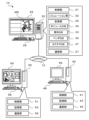
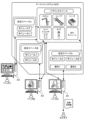
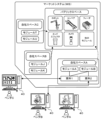
- FIG. 1 is a configuration diagram showing an outline of the configuration of an equipment introduction support system 10; FIG. Explanatory drawing which shows the outline of the function of market system MS.
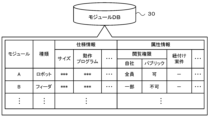
- FIG. 4 is an explanatory diagram showing an example of module data stored in a module DB 30;
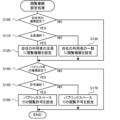
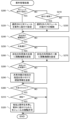
- FIG. 4 is a flowchart showing an example of viewing authority setting processing;
- 6 is a flowchart showing an example of matter management processing;
- FIG. 4 is an explanatory diagram showing an example of an item management screen;
- FIG. 4 is an explanatory diagram showing an example of item data stored in an item DB 33;
- FIG. 4 is an explanatory diagram showing an example of module data associated with an item;
- FIG. 5 is an explanatory diagram showing an example of how a vendor who is permitted to share accesses an item.
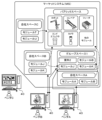
- FIG. 4 is an explanatory diagram showing an example of a matter confirmation screen; Explanatory drawing which shows the outline of the function of market system MS of a modification.
- FIG. 1 is a configuration diagram showing an outline of the configuration of the equipment introduction support system 10
- FIG. 2 is an explanatory diagram showing an outline of the functions of the market system MS.
- the equipment introduction support system 10 includes a management server 20 that manages the entire system so as to support customers when introducing modules (products) such as various work equipment from vendors and equipment systems that combine modules.
- a management server 20 is connected to vendor terminals 40 and customer terminals 50 via a network 12 . Although one vendor terminal 40 and one customer terminal 50 are shown in FIG. 1, a plurality of terminals are actually connected.
- the management server 20 includes a control unit 21, a simulation unit 22, a storage unit 25, and a communication unit 27.
- the control unit 21 has a CPU, ROM, RAM, etc., and controls the entire server, such as management of the market system MS in which a customer selects and purchases various modules online, requests for quotations from customers to vendors, and management of quotation results in response thereto.
- the simulation unit 22 performs a simulation using a model MD (digital twin) such as an equipment system that combines various modules.
- the equipment system can be configured to perform a predetermined work by a robot having a vertically articulated robot arm, for example.
- An example of the predetermined work is picking work such as mechanical parts or electronic parts.
- the facility system includes modules such as an end effector attached to the tip link of the robot arm, lighting such as a camera and ring light for capturing images, a conveyor for transporting trays and substrates on which workpieces are placed, and a feeder for supplying workpieces.
- Various modules that make up the equipment system are provided by one or more vendors.
- a customer can select one or a plurality of modules from the market system MS and make an estimate request or a purchase request.
- the equipment system may include a plurality of modules and may not include a robot.
- the storage unit 25 is composed of an HDD or the like, and stores various application programs, various databases (DB), and the like.
- the storage unit 25 stores a module DB (database) 30 , an item DB 33 , a vendor DB 35 and a customer DB 37 .
- FIG. 3 is an explanatory diagram showing an example of module data stored in the module DB 30.
- the module DB 30 registers (stores) module data including the type of module, specification information, attribute information, etc. for each module.
- the specification information includes the size and operation program of each module, as well as the shape, operation parameters, sequence data, capacity information such as payload, and the like. Note that the specification information may include CAD data indicating the size and shape.
- the attribute information includes module data (product data) viewing authority information, linking information with a project (to be described later), vendor information (vendor ID to be described later) that provides the module, registration date, version information, and the like.
- Each module data in the module DB 30 can be registered from the registration screen of the vendor terminal 40 by the vendor who is the company that provides the module.
- information related to equipment system projects is registered, including information (vendor ID) of the lead vendor, which is the vendor that plays a central role in constructing the equipment system, project information, specification information, and the like.
- the project information includes the management number of the project, the name of the project, the information of the requesting customer (customer ID, which will be described later), and the like.
- the specification information includes information on the size of the equipment system, information on objects handled by the equipment system, an estimated price, videos and images of the equipment system, simulation results, and the like.
- the vendor DB 35 various types of information are registered for each vendor, such as the name of the vendor that has been authenticated and registered, the vendor ID unique to each vendor, the amount of capital, the number of employees, the business field, the type of module provided by the vendor, and the attribute information of the user who is the vendor's employee.
- This information is registered when the vendor is authenticated, and user attribute information can be additionally registered or modified as appropriate.
- the user's attribute information includes his/her name, place of work, and contact information such as telephone number and e-mail address.
- customer information such as the name of a customer who has been authenticated and registered, a customer ID unique to each customer, the customer's purchase history, and attribute information is registered for each customer. These pieces of information are registered when the customer is authenticated, and the purchase history and attribute information can be additionally registered or corrected as appropriate.
- the customer's attribute information includes the customer's name, company name, place of work, contact information such as telephone number and e-mail address, and the like.
- the communication unit 27 is connected to the network 12, etc., and communicates with the vendor terminal 40, the customer terminal 50, and the like.
- Various instructions from the administrator are input to the management server 20 from an input unit 28 such as a keyboard and a mouse.
- the management server 20 displays various information on the display unit 29 such as a display.
- the management server 20 is not limited to having the simulation unit 22 and the storage unit 25 (various DBs), and the simulation unit may be configured as a separate device from the management server 20 .
- a data server that stores various DBs may be configured as a device separate from the management server 20 .
- the vendor terminal 40 includes a control unit 41 having a CPU, ROM, RAM, etc., a storage unit 43 such as an HDD that stores various application programs and various data, and a communication unit 46 that is connected to the network 12 or the like and communicates with the management server 20 or the like.
- the vendor terminal 40 receives various instructions from the vendor through an input unit 48 such as a keyboard and a mouse. Further, the vendor terminal 40 displays a registration screen for registering the module data in the market system MS, a viewing authority setting screen for setting module viewing authority, and the like on the display unit 49 such as a display.
- the customer terminal 50 includes a control unit 51, a storage unit 53, and a communication unit 56, similar to the vendor terminal 40.
- the customer terminal 50 receives various instructions from the customer through an input unit 58 such as a keyboard and a mouse. Also, the customer terminal 50 displays each screen of the market system MS on the display unit 59 such as a display.
- the market system MS of this embodiment is provided with a public space and a plurality of own company spaces.
- the public space is a shared space that can be accessed by each customer in the equipment introduction support system 10, users of each vendor, and the like.
- this public space it is possible to request quotations and purchase requests for various modules, browse module data, and request quotations and purchase requests for facility systems.
- icons indicating the types of modules such as robots and end effectors are displayed.
- the module data of the selected module is displayed on the screen.
- the user can download necessary data among the module data, such as 3D CAD data.
- the user can also download multiple module data and simulate the operation of the facility system.
- the in-house space (in-house space) is provided for each vendor, and is a space where access is limited to employees such as the person in charge of estimation and designers of each vendor, that is, users within the vendor.
- each company space it is possible to browse and edit the module data of the modules provided by the company. For example, in FIG. 2, module data of modules A and B of vendor A can be viewed and edited in company space A for vendor A.
- module data of modules J and K of vendor B can be viewed and edited in company space B for vendor B
- module data of modules T and U of vendor C can be viewed and edited in company space C for vendor C.
- the module data displayed in the company space may contain more detailed information than the module data displayed in the public space.
- FIG. 4 is a flowchart showing an example of viewing authority setting processing. This process is executed by the control unit 21 of the management server 20 and the control unit 41 of the vendor terminal 40 while the module viewing authority setting screen (see FIG. 5) is displayed on the display unit 49 of the vendor terminal 40 .
- the viewing authority setting screen it is possible to individually set the viewing authority for the module data of the selected module.
- FIG. 5 shows how module data viewing authority for module A is set while module A is selected. It should be noted that, while a plurality of modules are selected, the viewing authority for the module data may be collectively set.
- the control unit 21 first determines whether or not the viewing authority setting operation for the company has been performed on the viewing authority setting screen (S100), and if it determines that the setting operation has not been performed, the process proceeds to S140.
- S100 viewing authority setting screen
- the control unit 21 first determines whether or not the viewing authority setting operation for the company has been performed on the viewing authority setting screen (S100), and if it determines that the setting operation has not been performed, the process proceeds to S140.
- the viewing authority setting screen it is possible to set, as module data viewing rights, restricted viewing rights that limit viewing to company space and shared viewing rights that allow viewing in public spaces.
- the restricted browsing authority in the company space it is possible to select whether all users of the company can browse or only a part of the users of the company can browse.
- shared viewing authority in the public space it is possible to select whether viewing in the market system MS is permitted or prohibited.
- the restricted browsing authority is set so that all users of the company can browse, and the shared browsing authority is set so that browsing is prohibited. Moreover, as will be described later, in addition to the restricted browsing authority and the shared browsing authority, it is also possible to set the specified browsing authority.
- control unit 21 determines whether or not all the users of the company have been selected (S110), and if it determines that all the users have been selected, it sets the viewing authority to all the users of the company (S120), and proceeds to S140. On the other hand, when the control unit 21 determines that not all but some of the users of the company have been selected, the control unit 21 sets viewing authority to some of the users selected from the users of the company (S130), and proceeds to S140. In S130, the control unit 21 displays a list of the users of the company together with selectable check boxes, for example, and performs a process of setting viewing authority to the user selected by the operator.
- control unit 21 determines whether or not a viewing authority setting operation in the public space has been performed (S140), and if it determines that a setting operation has not been performed, the viewing authority setting process ends.
- the control unit 21 determines whether or not permission to view in the public space has been selected (S150), and if it determines that permission has been selected, sets permission to view in the public space (S160), and ends the viewing authority setting process.
- the control unit 21 determines in S150 that permission has not been selected, it sets access to the public space prohibited (S170), and terminates the access authority setting process.
- the module data of the selected module (module A in FIG. 5) cannot be viewed in the public space.
- module A is set so that all users of the company are permitted to view it, and that it is permitted to be viewed in a public space. That is, in addition to the limited browsing authority, the shared browsing authority is granted.
- the module B is set so that some of the users of the company are authorized to read it, and that it is not allowed to be read in the public space. In other words, no shared viewing authority is granted.
- FIG. 3 shows that only some of the users of the company are authorized to browse module B, attribute information such as the names of some of the users who are authorized to browse may also be shown.
- FIG. 6 is a flowchart illustrating an example of case management processing. This process is executed by the control unit 21 of the management server 20 and the control unit 41 of the vendor terminal 40 while the item management screen (see FIG. 7) is displayed on the display unit 49 of the vendor terminal 40 .
- the item management screen (see FIG. 7) is displayed on the display unit 49 of the vendor terminal 40 .
- information about the set matter can be set individually. For example, FIG. 7 shows how information about Item 1 is set when Item 1 is selected from Items 1 and 2 with Vendor A as the lead vendor.
- the control unit 21 first determines whether or not a module link setting operation has been performed on the case management screen (S200), and whether or not a link release operation has been performed (S210). As shown in FIG. 7, the project management screen displays a list of Vendor A's modules (modules A and B) that can be associated with Vendor A's projects. When a linking setting button is operated by clicking a necessary module out of the modules displayed in a list, the control part 21 determines that linking setting operation is performed in S200, links the selected module to the item (S220), and proceeds to S240. For example, in the example of FIG. 7, modules A and B are associated with Case 1.
- the control part 21 determines that the linking release operation has been performed in S210, releases the linking of the selected module to the item (S230), and proceeds to S240. If the control unit 21 determines in S200 or S210 that neither operation has been performed, the process proceeds to S240.
- the control unit 21 determines whether or not an operation for setting the viewing authority for the company for the matter has been performed (S240), and if it determines that the setting operation has not been performed, the process proceeds to S280.
- the setting operation of viewing authority for the matter is performed in the same manner as the setting operation of module viewing authority in the company space. That is, when determining in S240 that a setting operation has been performed, the control unit 21 determines whether or not all users of the company have been selected (S250), and when determining that all users have been selected, sets the view authority of the item to all users of the company (S260), and proceeds to S280. On the other hand, when the control unit 21 determines that some users, but not all users, have been selected, it sets view authority for the item to some users selected from among the users of the company (S270), and proceeds to S280.
- the control unit 21 determines whether or not a sharing operation has been performed to share the item with other companies (S280), and if it determines that a sharing operation has not been performed, the process proceeds to S300.
- Item sharing is a process performed to allow other companies to view the company's item, and the item management screen in FIG. 7 enables setting by selecting whether to share or not.
- the control unit 21 determines that the sharing operation has been performed, receives the designation of another company to be shared, transmits the authentication information (S290), and proceeds to S300. For example, in FIG.
- control unit 21 refers to the contact information of the vendor DB 35 and transmits an e-mail containing the authentication information to the user of the vendor selected by the operator.
- control unit 21 determines whether or not it has received a request for sharing the item from another company designated as a sharing destination (S300), and if it determines that it has received it, it determines whether or not authentication based on the authentication information has been successful (S310).
- S300 no sharing request has been received or determines in S310 that authentication cannot be performed
- the control unit 21 determines in S300 that no sharing request has been received or determines in S310 that authentication cannot be performed, it ends the case management process.
- the control unit 21 receives the sharing request and determines that the authentication is successful, it shares the item with the other company that transmitted the sharing request, thereby permitting the other company to browse the module (module data) linked to the item (S320), and terminates the item management process.
- FIG. 8 is an explanatory diagram showing an example of the item data stored in the item DB 33.
- the item data includes item information and specification information registered for each lead vendor.
- the lead vendor is the vendor that plays a central role in constructing the equipment system, and also manages the project in its own space.
- the case information and specification information of cases 1 and 2 in which vendor A is the leading vendor are registered.
- the item information includes the name of the item, the name of the customer who requested the item (customer ID), and the like.
- Modules required for the equipment system of the project are registered in the specification information. For example, modules A and B of Vendor A and modules T and U of Vendor C are registered as necessary modules for case 1 .
- module B of vendor A and modules J and K of vendor B are registered as the modules required for case 2 .
- FIG. 9 is an explanatory diagram showing an example of module data associated with an item. As shown in the figure, as the information on the cases linked to the modules, it is registered that the case 1 is linked to the module A, and that the cases 1 and 2 are linked to the module B.
- FIG. 10 is an explanatory diagram showing an example of how a project is shared with other companies.
- sharing of projects is indicated by solid line arrows, and a case is exemplified in which project 1 is shared with vendor C and project 2 is shared with vendor B, for example.
- Vendor B can access Matter 2 to browse the information of Matter 2, and can browse the module data of Module B linked to Matter 2 as well.
- Vendor C can access Item 1 to view various types of information, and can also view module data of Modules A and B linked to Item 1 .
- FIG. 11 is an explanatory diagram showing an example of the matter confirmation screen.
- FIG. 11 shows an example of a project confirmation screen displayed on the display unit 49 of the vendor terminal 40 when the vendor C confirms the project 1.
- the selected project information and specification information can be displayed.
- the case confirmation screen by clicking and selecting modules A and B linked to case 1, it is possible to display the module data of the selected modules.
- the user of Vendor C can view the module data.
- the module required for the project is linked, and the vendor of the other company specified to be shared with the project can view the module data of the linked module by accessing the project. In this way, it is possible to set the specified viewing authority that allows the user of the other vendor specified as the item sharing destination to view the module data.
- the storage unit 25 of the management server 20 of this embodiment corresponds to the storage unit
- the control unit 21 of the management server 20 and the control unit 41 of the vendor terminal 40 that execute the viewing authority setting process correspond to the management unit.
- an example of a data management method is clarified by explaining the operation of the equipment introduction support system 10. FIG.
- module data necessary for simulating the operation of the facility system. While such module data needs to be viewed by users who perform operation simulations, there are also cases in which it is desirable to make it viewable only within the vendor, so the application of the present disclosure is highly significant.
- FIG. 12 is an explanatory diagram showing the outline of the functions of the market system MS of the modification.
- a group space can be set separately from the company space and the public space.
- a group space 1 is set that is accessible to vendors A and B and inaccessible to other vendors.
- the group space 1 for example, the information of the matter 2 and the module data of the modules B, J, and K regarding the matter 2 can be browsed.
- case 2 is not included in the company space.
- the group space is a space for managing matters and viewing module data related to matters.
- Vendor A who is the lead vendor for Project 2, creates this Group Space 1, sets the Group Space 1 to allow viewing of the data of Project 2 and the module data of Module B, and designates Vendor B as a vendor to belong to Group Space 1.
- the specified vendor B makes a setting to permit browsing of module data of modules J and K in the group space 1 .
- the module data of modules B, J, and K can be viewed by both users of vendors A and B in group space 1 .
- multiple vendors who jointly construct an equipment system (project) can view each other's module data in the group space.
- the group space may be a space for viewing module data without including management of matters.
- the authority to browse module data linked to an item or module data in a group space was exemplified, but it is not limited to this.
- one vendor may designate another vendor, and a user of the designated vendor may be authorized to access the vendor's company space and view module data. That is, any form may be adopted as long as the user of the specified vendor has the authority to access and view the module data.
- the restricted browsing authority it is possible to set the browsing authority with which all users of the company can browse and the browsing authority with which some of the users of the company can browse, but it is not limited to this.
- the restricted browsing authority may be an authority that allows only the users of the company to browse, and it may not be possible to set whether or not it is limited to some of the users.
- the authority to view module data is set, but the present invention is not limited to this, as long as the authority to view data related to products (modules) is set.
- the market system of the present disclosure may be configured as follows.
- the management unit may set, as the browsing authority, a designated browsing authority that allows a user in a specified company to access and browse the product data. In this way, it is possible to appropriately deal with the case where it is desired to allow users in some companies other than the provider company to browse the product data.
- the management unit can be set by receiving designation of a company to belong to a predetermined group from the provider company, and the designated browsing authority may allow users in the company designated to belong to the group to browse the product data of the provider company in the group. By doing so, it is possible to easily set the target of viewing the product data with the designated viewing authority to the target that reflects the intention of the provider company.
- the management unit can set the item data of an equipment system constructed with a plurality of products in association with the product data of the plurality of products, and the designated viewing authority may allow a user within the company specified for the item to view the product data linked to the item through access to the item. By doing so, it is possible to easily manage the target of viewing the product data with the designated viewing authority together with the case of the facility system.
- the product data may be module data necessary for simulating the operation of an equipment system constructed with multiple products. While such module data needs to be viewed by users who perform motion simulations, there are also cases where it is desirable to make it viewable only within a company, so the application of the present disclosure is highly significant.
- the data management method of the present disclosure includes: A data management method in a market system in which a plurality of companies can provide products via a network,
- the gist of the present invention is that, as browsing authority for each product data related to a product, it is possible to set a limited browsing authority that allows the product data to be browsed in a company space where access is restricted to users within the company that provides the product, and a shared browsing authority that allows the product data to be browsed in a shared space accessible by the users of the market system.
- the data management method of the present disclosure can manage viewing authority for managed product data with simpler processing.
- various aspects of the market system may be adopted, and steps may be added to realize each function of the market system.
- the present disclosure can be used in the technical field of the market that provides products via communication networks.
- Equipment introduction support system 10 Equipment introduction support system, 12 network, 20 management server, 21, 41, 51 control unit, 22 simulation unit, 25, 43, 53 storage unit, 27, 46, 56 communication unit, 28, 48, 58 input unit, 29, 49, 59 display unit, 30 module DB, 33 item DB, 35 vendor DB, 37 customer DB, 40 vendor terminal, 50 Customer terminal, MD model, MS market system.
Landscapes
- Business, Economics & Management (AREA)
- Engineering & Computer Science (AREA)
- Accounting & Taxation (AREA)
- Development Economics (AREA)
- Strategic Management (AREA)
- Finance (AREA)
- Game Theory and Decision Science (AREA)
- Entrepreneurship & Innovation (AREA)
- Economics (AREA)
- Marketing (AREA)
- Physics & Mathematics (AREA)
- General Business, Economics & Management (AREA)
- General Physics & Mathematics (AREA)
- Theoretical Computer Science (AREA)
- Storage Device Security (AREA)
Abstract
複数の企業が通信ネットワークを介して製品を提供するマーケットシステムは、製品に関する製品データを記憶する記憶部と、各製品データの閲覧権限の設定および変更を含むデータ管理を行う管理部と、を備える。管理部は、閲覧権限として、製品の提供元企業内の利用者にアクセスが制限された企業内スペースのみで製品データを閲覧可能とする制限閲覧権限と、マーケットシステムの利用者がアクセス可能な共用スペースで製品データを閲覧可能とする共用閲覧権限とを設定可能である。
Description
本明細書は、マーケットシステムおよびデータ管理方法を開示する。
従来、管理しているデータに対して、利用者が適切にアクセスできるように管理するシステムが提案されている。例えば、特許文献1のシステムでは、利用者を特定する個人情報や利用者毎に定められたアクセス権限情報を含むデータベースを用いて、利用者の認証とアクセス権限の設定とを行う。また、このシステムでは、利用者からアクセス要求を受けると、個人情報に基づいて利用者の認証を行った後、アクセス権限のレベル判定をしてアクセス制限を行う。
上述したシステムでは、利用者に対してデータの閲覧権限の設定や変更などを行うものの、管理対象のデータ自体の閲覧権限の管理については考慮されていない。このようなシステムが管理するデータは、その提供元の企業内のみで閲覧させたり、システムの利用者に広く閲覧させたりすることがある。そのため、各利用者の閲覧権限を設定する形態では、管理が煩雑となって適切に行えないおそれがある。
本開示は、管理対象のデータに対する閲覧権限の管理をより簡易な処理で行うことを主目的とする。
本開示は、上述の主目的を達成するために以下の手段を採った。
本開示のマーケットシステムは、
複数の企業が通信ネットワークを介して製品を提供するマーケットシステムであって、
製品に関する製品データを記憶する記憶部と、
各製品データの閲覧権限の設定および変更を含むデータ管理を行う管理部と、
を備え、
前記管理部は、前記閲覧権限として、製品の提供元企業内の利用者にアクセスが制限された企業内スペースのみで前記製品データを閲覧可能とする制限閲覧権限と、前記マーケットシステムの利用者がアクセス可能な共用スペースで前記製品データを閲覧可能とする共用閲覧権限とを設定可能であることを要旨とする。
複数の企業が通信ネットワークを介して製品を提供するマーケットシステムであって、
製品に関する製品データを記憶する記憶部と、
各製品データの閲覧権限の設定および変更を含むデータ管理を行う管理部と、
を備え、
前記管理部は、前記閲覧権限として、製品の提供元企業内の利用者にアクセスが制限された企業内スペースのみで前記製品データを閲覧可能とする制限閲覧権限と、前記マーケットシステムの利用者がアクセス可能な共用スペースで前記製品データを閲覧可能とする共用閲覧権限とを設定可能であることを要旨とする。
本開示のマーケットシステムでは、各製品データの閲覧権限として制限閲覧権限と共用閲覧権限とを設定可能であるから、企業内スペースのみで閲覧可能な状態と、共用スペースで閲覧可能な状態とに容易に切り替えることができる。したがって、管理対象のデータに対する閲覧権限の管理をより簡易な処理で行うことができる。
次に、本開示を実施するための形態を図面を参照しながら説明する。図1は設備導入支援システム10の構成の概略を示す構成図であり、図2はマーケットシステムMSの機能の概略を示す説明図である。設備導入支援システム10は、各種作業機器などのモジュール(製品)を提供するベンダから、モジュールやモジュールを組み合わせた設備システムをカスタマが導入する際の支援を行うようにシステム全体を管理する管理サーバ20を備える。この設備導入支援システム10では、管理サーバ20がネットワーク12を介して、ベンダ端末40やカスタマ端末50に接続されている。なお、図1では、ベンダ端末40やカスタマ端末50をそれぞれ1つずつ示すが、実際には複数接続されている。
管理サーバ20は、制御部21と、シミュレーション部22と、記憶部25と、通信部27とを備える。制御部21は、CPUやROM、RAMなどを有し、オンライン上で各種モジュールをカスタマが選択して購入するマーケットシステムMSの管理や、カスタマからベンダへの見積依頼やそれに対する見積結果の管理などのサーバ全体の制御を行う。
シミュレーション部22は、各種モジュールを組み合わせた設備システムなどのモデルMD(デジタルツイン)を用いたシミュレーションを行う。設備システムは、例えば垂直多関節型のロボットアームを備えるロボットにより所定作業を行うように構成することができる。所定作業の一例としては、例えば機械部品や電子部品などのワークのピッキング作業が挙げられる。設備システムは、ロボット以外に、例えば、ロボットアームの先端リンクに取り付けられるエンドエフェクタ、画像を撮像するカメラやリングライトなどの照明、ワークが配置されるトレイや基板を搬送するコンベア、ワークを供給するフィーダなどのモジュールを備える。設備システムを構成する各種モジュールは、1以上のベンダから提供される。カスタマは、マーケットシステムMSから、1または複数のモジュールを選択して、見積依頼や購入依頼をすることができる。なお、設備システムは、複数のモジュールを備えていればよく、ロボットを備えなくてもよい。
記憶部25は、HDDなどで構成され、各種アプリケーションプログラムや各種データベース(DB)などを記憶する。この記憶部25は、モジュールDB(データベース)30と、案件DB33と、ベンダDB35と、カスタマDB37とを記憶する。
図3は、モジュールDB30に記憶されるモジュールデータの一例を示す説明図である。モジュールDB30には、モジュール毎に、モジュールの種類や仕様情報、属性情報などを含むモジュールデータが登録(記憶)されている。モジュールの種類としては、例えばロボットやエンドエフェクタ、カメラ、照明、コンベア、フィーダなどのいずれであるかが登録される。また、仕様情報には、各モジュールのサイズや動作プログラムの他、形状、動作パラメータ、シーケンスデータ、可搬重量などの能力情報などが含まれる。なお、仕様情報に、サイズや形状を示すCADデータなどが含まれてもよい。属性情報には、モジュールデータ(製品データ)の閲覧権限の情報や後述する案件との紐付け情報の他、モジュールの提供元の企業であるベンダの情報(後述するベンダID)、登録日、バージョン情報などが含まれる。なお、モジュールDB30の各モジュールデータは、モジュールの提供元の企業であるベンダがベンダ端末40の登録画面から登録可能である。
案件DB33には、設備システムの案件に関する情報が登録されており、設備システムの構築の中心となるベンダである幹事ベンダの情報(ベンダID)、案件情報、仕様情報などが登録されている。案件情報には、案件の管理番号や、案件の名称、依頼元のカスタマの情報(後述するカスタマID)などが含まれる。また、仕様情報には、案件の設備システムを構成するモジュールの情報の他、設備システムのサイズや設備システムで取り扱う対象物の情報、見積額、設備システムの動画や画像、シミュレーションの結果などが含まれる。
ベンダDB35は、認証登録がなされたベンダの名称や各ベンダに固有のベンダID、資本金や社員数、事業分野、ベンダが提供するモジュールの種類、ベンダの社員である利用者の属性情報などの各種情報がベンダ毎に登録されている。これらの情報は、ベンダの認証時に登録され、利用者の属性情報などは適宜追加登録や修正が可能である。なお、利用者の属性情報には、氏名や勤務地、電話番号やメールアドレスなどの連絡先などが登録されている。
カスタマDB37は、認証登録がなされたカスタマの名称や各カスタマに固有のカスタマID、カスタマの購入履歴、属性情報などのカスタマ情報がカスタマ毎に登録されている。これらの情報は、カスタマの認証時に登録され、購入履歴や属性情報などは適宜追加登録や修正が可能である。カスタマの属性情報には、カスタマの氏名や企業名、勤務地、電話番号やメールアドレスなどの連絡先などが登録されている。
通信部27は、ネットワーク12などに接続され、ベンダ端末40やカスタマ端末50などと通信を行う。管理サーバ20には、キーボードやマウスなどの入力部28から管理者による各種指示などが入力される。また、管理サーバ20は、ディスプレイなどの表示部29に各種情報を表示する。なお、管理サーバ20がシミュレーション部22や記憶部25(各種DB)を備えるものに限られず、シミュレーション部が管理サーバ20と別の装置として構成されてもよい。また、各種DBを記憶するデータサーバが管理サーバ20と別の装置として構成されてもよい。
ベンダ端末40は、CPUやROM、RAMなどを有する制御部41と、各種アプリケーションプログラムや各種データなどを記憶するHDDなどの記憶部43と、ネットワーク12などに接続され管理サーバ20などと通信を行う通信部46とを備える。ベンダ端末40は、キーボードやマウスなどの入力部48からベンダによる各種指示などが入力される。また、ベンダ端末40は、ディスプレイなどの表示部49に、モジュールデータをマーケットシステムMSに登録するための登録画面、モジュールの閲覧権限を設定するための閲覧権限設定画面などを表示する。
カスタマ端末50は、ベンダ端末40と同様に、制御部51と、記憶部53と、通信部56とを備える。カスタマ端末50は、キーボードやマウスなどの入力部58からカスタマによる各種指示などが入力される。また、カスタマ端末50は、ディスプレイなどの表示部59に、マーケットシステムMSの各画面などを表示する。
ここで、図2に示すように、本実施形態のマーケットシステムMSでは、パブリックスペースと、複数の自社スペースとが設けられている。パブリックスペースは、設備導入支援システム10における各カスタマや各ベンダの利用者などがアクセス可能な共用のスペースである。このパブリックスペースでは、各種モジュールの見積依頼や購入要求、モジュールデータの閲覧、設備システムの見積依頼や購入要求などが可能となっている。また、パブリックスペースのトップ画面では、ロボットやエンドエフェクタなどのモジュールの種類を示すアイコンなどが表示されている。利用者がトップ画面からモジュールのアイコンを選択し、さらに該当する種類の複数のモジュールの中から閲覧を望むモジュールを選択すると、選択されたモジュールのモジュールデータが画面に表示される。また、利用者は、モジュールデータのうち必要なデータ、例えば3DCADデータなどをダウンロードすることができる。利用者は、複数のモジュールデータをダウンロードして、設備システムの動作シミュレーションを行うこともできる。
一方、自社スペース(企業内スペース)は、ベンダ毎にそれぞれ設けられており、各ベンダの見積担当者や設計者などの社員即ちベンダ内の利用者にアクセスが限定されたスペースである。各自社スペースでは、自社が提供するモジュールのモジュールデータの閲覧や編集が可能である。例えば、図2では、ベンダA用の自社スペースAでベンダAのモジュールA,Bのモジュールデータの閲覧や編集が可能である。同様に、ベンダB用の自社スペースBでベンダBのモジュールJ,Kのモジュールデータの閲覧や編集が可能であり、ベンダC用の自社スペースCでベンダCのモジュールT,Uのモジュールデータの閲覧や編集が可能である。なお、自社スペースに表示されるモジュールデータは、パブリックスペースに表示されるモジュールデータよりも詳細な情報が含まれていてもよい。
次に、こうして構成された設備導入支援システム10の動作、特にモジュールの閲覧権限の設定や設備システムの案件の管理について説明する。まず、閲覧権限の設定を説明する。図4は、閲覧権限設定処理の一例を示すフローチャートである。この処理は、ベンダ端末40の表示部49にモジュールの閲覧権限設定画面(図5参照)が表示された状態で、管理サーバ20の制御部21とベンダ端末40の制御部41とにより実行される。閲覧権限設定画面では、選択したモジュールのモジュールデータの閲覧権限を個別に設定可能となっている。例えば、図5では、モジュールAが選択された状態で、モジュールAのモジュールデータの閲覧権限が設定される様子を示す。なお、複数のモジュールが選択された状態で、それらのモジュールデータの閲覧権限を一括して設定されてもよい。
閲覧権限設定処理では、制御部21は、まず、閲覧権限設定画面で自社用の閲覧権限の設定操作がされたか否かを判定し(S100)、設定操作がされていないと判定すると、S140に進む。図5に示すように、閲覧権限設定画面では、モジュールデータの閲覧権限として、自社スペースでの閲覧に制限する制限閲覧権限と、パブリックスペースでの閲覧を可能とする共用閲覧権限とが設定可能である。また、自社スペースでの制限閲覧権限は、自社の利用者の全員に閲覧を可能とするか、自社の利用者の一部に閲覧を可能とするかを選択可能である。また、パブリックスペースでの共用閲覧権限は、マーケットシステムMSでの閲覧を許可するか閲覧を不可とするかを選択可能である。なお、デフォルトでは、制限閲覧権限が自社の利用者の全員に閲覧を可能とし、共用閲覧権限は閲覧不可とする設定となっている。また、後述するように、制限閲覧権限と共用閲覧権限以外に、指定閲覧権限も設定可能となっている。
制御部21は、S100で設定操作がされたと判定すると、自社の利用者の全員が選択されたか否かを判定し(S110)、全員が選択されたと判定すると、自社の利用者の全員に閲覧権限を設定して(S120)、S140に進む。一方、制御部21は、自社の利用者の全員ではなく一部が選択されたと判定すると、自社の利用者の中から選択された一部の利用者に閲覧権限を設定して(S130)、S140に進む。制御部21は、S130では、例えばそれぞれ選択可能なチェックボックスと共に自社の利用者を一覧表示し、操作者により選択された利用者に閲覧権限を設定する処理を行う。
次に、制御部21は、パブリックスペースでの閲覧権限の設定操作がされたか否かを判定し(S140)、設定操作がされていないと判定すると、閲覧権限設定処理を終了する。制御部21は、設定操作がされたと判定すると、パブリックスペースでの閲覧許可が選択されたか否かを判定し(S150)、許可が選択されたと判定すると、パブリックスペースでの閲覧許可を設定して(S160)、閲覧権限設定処理を終了する。
一方、制御部21は、S150で許可が選択されていないと判定すると、パブリックスペースでの閲覧不可を設定して(S170)、閲覧権限設定処理を終了する。これにより、選択中のモジュール(図5ではモジュールA)のモジュールデータは、パブリックスペースで閲覧不可となる。なお、図3に例示したモジュールデータでは、モジュールAが、自社の利用者の全員に閲覧権限が設定されると共に、パブリックスペースでの閲覧許可が設定されている。即ち、制限閲覧権限に加えて共用閲覧権限が付与されている。また、モジュールBが、自社の利用者の一部に閲覧権限が設定されると共に、パブリックスペースでの閲覧不可が設定されている。即ち、共用閲覧権限は付与されていない。なお、図3では、モジュールBの閲覧権限が自社の利用者の一部であることが示されているが、閲覧権限が付与された一部の利用者の氏名などの属性情報が示されてもよい。
次に、案件の管理について説明する。図6は、案件管理処理の一例を示すフローチャートである。この処理は、ベンダ端末40の表示部49に案件管理画面(図7参照)が表示された状態で、管理サーバ20の制御部21とベンダ端末40の制御部41とにより実行される。案件管理画面では、設定した案件に関する情報を個別に設定可能となっている。例えば図7では、ベンダAを幹事ベンダとする案件1,2のうち案件1が選択された状態で、その案件1に関する情報が設定される様子を示す。
案件管理処理では、制御部21は、まず、案件管理画面上でモジュールの紐付け設定操作がされたか否か(S200)、紐付け解除操作がされたか否か(S210)、をそれぞれ判定する。図7に示すように、案件管理画面では、ベンダAの各案件に対して、それぞれ紐付け設定が可能なベンダAのモジュール(モジュールA,B)が一覧表示されている。一覧表示されているモジュールの中から必要なモジュールをクリックすることにより紐付けして設定ボタンが操作されると、制御部21はS200で紐付け設定操作がされたと判定し、選択されたモジュールを案件に紐付け設定して(S220)、S240に進む。例えば、図7の例では、案件1にモジュールA,Bが紐付けられる。一方、既に紐付けられたモジュールをクリックすることにより紐付けを解除して設定ボタンが操作されると、制御部21はS210で紐付け解除操作がされたと判定し、選択されたモジュールの案件に対する紐付けを解除して(S230)、S240に進む。また、制御部21は、S200,S210でいずれの操作もされていないと判定すると、S240に進む。
次に、制御部21は、案件に対する自社用の閲覧権限の設定操作がされたか否かを判定し(S240)、設定操作がされていないと判定すると、S280に進む。案件に対する閲覧権限の設定操作は、自社スペースにおけるモジュールの閲覧権限の設定操作と同様に行われる。即ち、制御部21は、S240で設定操作がされたと判定すると、自社の利用者の全員が選択されたか否かを判定し(S250)、全員が選択されたと判定すると、自社の利用者の全員に案件の閲覧権限を設定して(S260)、S280に進む。一方、制御部21は、利用者の全員ではなく一部が選択されたと判定すると、自社の利用者の中から選択された一部の利用者に案件の閲覧権限を設定して(S270)、S280に進む。
続いて、制御部21は、案件を他社と共有する共有操作がされたか否かを判定し(S280)、共有操作がされていないと判定すると、S300に進む。案件の共有は、自社の案件を他社に閲覧許可するために行う処理であり、図7の案件管理画面では共有の有無を選択して設定可能となっている。制御部21は、案件管理画面で「共有あり」が選択されて設定操作がされると、共有操作がされたと判定し、共有対象である他社の指定を受け付けて認証情報を送信して(S290)、S300に進む。例えば図7では、「共有あり」が選択された状態で設定操作がされると、それぞれ選択可能なチェックボックスと共に各ベンダ(他社)を一覧表示する。制御部21は、操作者により選択されたベンダの利用者に対し、ベンダDB35の連絡先を参照して認証情報を含むメールの送信処理を行う。
そして、制御部21は、共有先として指定された他社から案件の共有リクエストを受信したか否かを判定し(S300)、受信したと判定すると、認証情報に基づく認証ができたか否かを判定する(S310)。制御部21は、S300で共有リクエストを受信していないと判定したり、S310で認証ができないと判定すると、案件管理処理を終了する。一方、制御部21は、共有リクエストを受信し且つ認証ができたと判定すると、共有リクエストを送信した他社と案件を共有することで、案件に紐付けられたモジュール(モジュールデータ)の閲覧をその他社に許可して(S320)、案件管理処理を終了する。
ここで、図8は、案件DB33に記憶される案件データの一例を示す説明図である。図示するように、案件データには、幹事ベンダ毎に、案件情報と仕様情報とが登録されている。幹事ベンダは、上述したように、設備システムの構築の中心となるベンダであり、自社スペースで案件の管理も行う。図8の案件データでは、ベンダAが幹事ベンダである案件1,2の案件情報と仕様情報とが登録されている。案件情報には、案件の名称や依頼元のカスタマの名称(カスタマID)などが登録されている。仕様情報には、案件の設備システムに必要なモジュールなどが登録されている。例えば、案件1に必要なモジュールとして、ベンダAのモジュールA,Bと、ベンダCのモジュールT,Uとが登録されている。また、案件2に必要なモジュールとして、ベンダAのモジュールBと、ベンダBのモジュールJ,Kとが登録されている。また、図9は、案件が紐付けられたモジュールデータの一例を示す説明図である。図示するように、モジュールに紐付けられた案件の情報として、モジュールAに案件1が紐付けられたことが登録され、モジュールBに案件1,2が紐付けられたことが登録されている。
図10は、案件が他社に共有された様子の一例を示す説明図である。図10では、案件の共有を実線矢印で示し、例えば案件1がベンダCに共有され、案件2がベンダBに共有された場合を例示する。この場合、ベンダBは、案件2にアクセスして案件2の情報を閲覧することができ、案件2に紐付けられたモジュールBのモジュールデータも閲覧することができる。また、ベンダCは、案件1にアクセスして各種情報を閲覧することができ、案件1に紐付けられたモジュールA,Bのモジュールデータも閲覧することができる。
図11は、案件確認画面の一例を示す説明図である。図11は、ベンダCが案件1を確認する際に、ベンダ端末40の表示部49に表示される案件確認画面の一例であり、案件1の案件情報や仕様情報をクリックして選択することにより、選択された案件情報や仕様情報を表示させることができる。また、この案件確認画面では、案件1に紐付けられたモジュールA,Bをクリックして選択することにより、選択されたモジュールのモジュールデータを表示させることができる。これにより、ベンダCの利用者はモジュールデータを閲覧可能となる。即ち、案件に必要なモジュールが紐付けられ、案件への共有が指定された他社のベンダは、案件にアクセスすることで、紐付けられたモジュールのモジュールデータの閲覧が可能となる。このように、案件の共有先として指定された他のベンダの利用者に、モジュールデータを閲覧可能とする指定閲覧権限を設定可能となっている。
ここで、本実施形態の構成要素と本開示の構成要素との対応関係を明らかにする。本実施形態の管理サーバ20の記憶部25が記憶部に相当し、閲覧権限設定処理を実行する管理サーバ20の制御部21とベンダ端末40の制御部41とが管理部に相当する。なお、本実施形態では、設備導入支援システム10の動作を説明することにより、データ管理方法の一例も明らかにしている。
以上説明した設備導入支援システム10(マーケットシステムMS)では、モジュールデータの閲覧を自社スペースに制限する制限閲覧権限と、パブリックスペースで可能とする共用閲覧権限とを設定可能である。このため、閲覧権限を設定する簡易な処理で、自社スペースのみでモジュールデータを閲覧可能な状態と、パブリックスペースでモジュールデータを閲覧可能な状態とに容易に切り替えることができる。
また、指定されたベンダの利用者がモジュールデータを閲覧可能とする指定閲覧権限を設定可能であるから、一部のベンダの利用者にモジュールデータを閲覧させたい場合にも、適切に対応することができる。また、指定閲覧権限では、案件の共有先に指定されたベンダの利用者に、案件へのアクセスを介して、案件に紐付けられたモジュールのモジュールデータを閲覧可能とする。このため、モジュールデータを閲覧させる対象を、設備システムの案件と合わせて容易に管理することができる。
また、設備システムの動作シミュレーションを行うために必要なモジュールデータを閲覧可能とする。このようなモジュールデータは、動作シミュレーションを行う利用者に閲覧が必要となる一方で、ベンダ内のみで閲覧可能としておきたい場合もあるから、本開示を適用する意義が高いものとなる。
なお、本開示は上述した実施形態に何ら限定されることはなく、本開示の技術的範囲に属する限り種々の態様で実施し得ることはいうまでもない。
例えば、上述した実施形態では、指定閲覧権限において、案件に紐付けられたモジュールのモジュールデータを他のベンダに閲覧可能としたが、これに限られない。図12は、変形例のマーケットシステムMSの機能の概略を示す説明図である。図示するように、変形例では、自社スペースとパブリックスペースとは別に、グループスペースを設定可能となっている。図12では、ベンダAとベンダBとがアクセス可能で、他のベンダはアクセス不能なグループスペース1が設定されている。グループスペース1では、例えば案件2の情報や、案件2に関するモジュールB,J,Kのモジュールデータが閲覧可能である。なお、変形例では自社スペースに案件2は含まれていない。このように、グループスペースは、案件の管理と、案件に関するモジュールデータの閲覧とを行うスペースである。
案件2の幹事ベンダであるベンダAは、このグループスペース1を作成すると共に、案件2のデータやモジュールBのモジュールデータの閲覧をグループスペース1で許可する設定をし、グループスペース1に所属させるベンダとしてベンダBを指定する。また、指定されたベンダBは、モジュールJ,Kのモジュールデータの閲覧をグループスペース1で許可する設定をする。これらの設定が行われると、グループスペース1で、ベンダA,Bの双方の利用者がモジュールB,J,Kのモジュールデータを閲覧可能となる。このように、共同で設備システム(案件)を構築する複数のベンダが、グループスペースで互いのモジュールデータを閲覧することができる。なお、グループスペースは、案件の管理を含まず、モジュールデータを閲覧するためのスペースとしてもよい。
上述した実施形態や変形例では、指定閲覧権限の一例として、案件に紐付けられたモジュールデータやグループスペース内のモジュールデータを閲覧させる権限を例示したが、これに限られない。例えば、一のベンダが他のベンダを指定し、指定されたベンダの利用者が、一のベンダの自社スペースにアクセスしてモジュールデータを閲覧可能となるような権限としてもよい。即ち、指定されたベンダの利用者がアクセスしてモジュールデータを閲覧可能な権限であれば如何なる態様としてもよい。
また、このような指定閲覧権限の設定が行われず、制限閲覧権限と共用閲覧権限との2種類の閲覧権限を設定可能であればよい。また、制限閲覧権限として、自社の利用者の全員が閲覧可能な閲覧権限と、自社の利用者の一部が閲覧可能な閲覧権限とを設定可能としたが、これに限られない。制限閲覧権限は、自社の利用者のみに閲覧させる権限であればよく、その一部の利用者に限るか否かを設定できなくてもよい。
上述した実施形態では、モジュールデータの閲覧権限を設定したが、これに限られず、製品(モジュール)に関するデータの閲覧権限を設定するものであればよい。
ここで、本開示のマーケットシステムは、以下のように構成してもよい。例えば、本開示のマーケットシステムにおいて、前記管理部は、前記閲覧権限として、指定された企業内の利用者がアクセスして前記製品データを閲覧可能とする指定閲覧権限を設定可能であるものとしてもよい。こうすれば、提供元企業以外の一部の企業内の利用者に製品データを閲覧させたい場合にも、適切に対応することができる。
本開示のマーケットシステムにおいて、前記管理部は、前記提供元企業から所定のグループに所属させる企業の指定を受け付けて設定可能であり、前記指定閲覧権限では、前記グループへの所属が指定された企業内の利用者に該グループ内の前記提供元企業の前記製品データを閲覧可能とするものとしてもよい。こうすれば、指定閲覧権限で製品データを閲覧させる対象を、提供元企業の意向を反映させた対象に容易に設定することができる。
本開示のマーケットシステムにおいて、前記管理部は、複数の製品で構築される設備システムの案件のデータを、該複数の製品の前記製品データに紐付けて設定可能であり、前記指定閲覧権限では、前記案件に対して指定された企業内の利用者に、前記案件へのアクセスを介して、該案件に紐付けられた前記製品データを閲覧可能とするものとしてもよい。こうすれば、指定閲覧権限で製品データを閲覧させる対象を、設備システムの案件と合わせて容易に管理することができる。
本開示のマーケットシステムにおいて、前記製品データは、複数の製品で構築される設備システムの動作シミュレーションを行うために必要なモジュールデータであるものとしてもよい。このようなモジュールデータは、動作シミュレーションを行う利用者に閲覧が必要となる一方で、企業内のみで閲覧可能としておきたい場合もあるから、本開示を適用する意義が高いものとなる。
本開示のデータ管理方法は、
複数の企業がネットワークを介して製品を提供可能なマーケットシステムにおけるデータ管理方法であって、
製品に関する各製品データの閲覧権限として、製品の提供元企業内の利用者にアクセスが制限された企業内スペースで前記製品データを閲覧可能とする制限閲覧権限と、前記マーケットシステムの利用者がアクセス可能な共用スペースで前記製品データを閲覧可能とする共用閲覧権限とを設定可能であることを要旨とする。
複数の企業がネットワークを介して製品を提供可能なマーケットシステムにおけるデータ管理方法であって、
製品に関する各製品データの閲覧権限として、製品の提供元企業内の利用者にアクセスが制限された企業内スペースで前記製品データを閲覧可能とする制限閲覧権限と、前記マーケットシステムの利用者がアクセス可能な共用スペースで前記製品データを閲覧可能とする共用閲覧権限とを設定可能であることを要旨とする。
本開示のデータ管理方法は、上述したマーケットシステムと同様に、管理対象の製品データに対する閲覧権限の管理をより簡易な処理で行うことができる。このデータ管理方法において、マーケットシステムの種々の態様を採用してもよいし、マーケットシステムの各機能を実現するようなステップを追加してもよい。
本開示は、通信ネットワークを介して製品を提供するマーケットの技術分野に利用可能である。
10 設備導入支援システム、12 ネットワーク、20 管理サーバ、21,41,51 制御部、22 シミュレーション部、25,43,53 記憶部、27,46,56 通信部、28,48,58 入力部、29,49,59 表示部、30 モジュールDB、33 案件DB、35 ベンダDB、37 カスタマDB、40 ベンダ端末、50 カスタマ端末、MD モデル、MS マーケットシステム。
Claims (6)
- 複数の企業が通信ネットワークを介して製品を提供するマーケットシステムであって、
製品に関する製品データを記憶する記憶部と、
各製品データの閲覧権限の設定および変更を含むデータ管理を行う管理部と、
を備え、
前記管理部は、前記閲覧権限として、製品の提供元企業内の利用者にアクセスが制限された企業内スペースのみで前記製品データを閲覧可能とする制限閲覧権限と、前記マーケットシステムの利用者がアクセス可能な共用スペースで前記製品データを閲覧可能とする共用閲覧権限とを設定可能である
マーケットシステム。 - 請求項1に記載のマーケットシステムであって、
前記管理部は、前記閲覧権限として、指定された企業内の利用者がアクセスして前記製品データを閲覧可能とする指定閲覧権限を設定可能である
マーケットシステム。 - 請求項2に記載のマーケットシステムであって、
前記管理部は、前記提供元企業から所定のグループに所属させる企業の指定を受け付けて設定可能であり、
前記指定閲覧権限では、前記グループへの所属が指定された企業内の利用者に該グループ内の前記提供元企業の前記製品データを閲覧可能とする
マーケットシステム。 - 請求項2に記載のマーケットシステムであって、
前記管理部は、複数の製品で構築される設備システムの案件のデータを、該複数の製品の前記製品データに紐付けて設定可能であり、
前記指定閲覧権限では、前記案件に対して指定された企業内の利用者に、前記案件へのアクセスを介して、該案件に紐付けられた前記製品データを閲覧可能とする
マーケットシステム。 - 請求項1ないし4のいずれか1項に記載のマーケットシステムであって、
前記製品データは、複数の製品で構築される設備システムの動作シミュレーションを行うために必要なモジュールデータである
マーケットシステム。 - 複数の企業がネットワークを介して製品を提供可能なマーケットシステムにおけるデータ管理方法であって、
製品に関する各製品データの閲覧権限として、製品の提供元企業内の利用者にアクセスが制限された企業内スペースで前記製品データを閲覧可能とする制限閲覧権限と、前記マーケットシステムの利用者がアクセス可能な共用スペースで前記製品データを閲覧可能とする共用閲覧権限とを設定可能である
データ管理方法。
Priority Applications (2)
| Application Number | Priority Date | Filing Date | Title |
|---|---|---|---|
| JP2023574977A JPWO2023139727A1 (ja) | 2022-01-20 | 2022-01-20 | |
| PCT/JP2022/002019 WO2023139727A1 (ja) | 2022-01-20 | 2022-01-20 | マーケットシステムおよびデータ管理方法 |
Applications Claiming Priority (1)
| Application Number | Priority Date | Filing Date | Title |
|---|---|---|---|
| PCT/JP2022/002019 WO2023139727A1 (ja) | 2022-01-20 | 2022-01-20 | マーケットシステムおよびデータ管理方法 |
Publications (1)
| Publication Number | Publication Date |
|---|---|
| WO2023139727A1 true WO2023139727A1 (ja) | 2023-07-27 |
Family
ID=87348351
Family Applications (1)
| Application Number | Title | Priority Date | Filing Date |
|---|---|---|---|
| PCT/JP2022/002019 Ceased WO2023139727A1 (ja) | 2022-01-20 | 2022-01-20 | マーケットシステムおよびデータ管理方法 |
Country Status (2)
| Country | Link |
|---|---|
| JP (1) | JPWO2023139727A1 (ja) |
| WO (1) | WO2023139727A1 (ja) |
Citations (3)
| Publication number | Priority date | Publication date | Assignee | Title |
|---|---|---|---|---|
| JP2001202359A (ja) * | 2000-01-17 | 2001-07-27 | Hitachi Ltd | 情報重要度の切替による文書配布機能システム |
| JP2007102510A (ja) * | 2005-10-05 | 2007-04-19 | Hitachi Ltd | 案件情報管理システム |
| JP2009087242A (ja) * | 2007-10-02 | 2009-04-23 | Tottori Univ | 生産知識検索システム、情報構築装置及び情報公開検索装置並びにプログラム |
-
2022
- 2022-01-20 WO PCT/JP2022/002019 patent/WO2023139727A1/ja not_active Ceased
- 2022-01-20 JP JP2023574977A patent/JPWO2023139727A1/ja active Pending
Patent Citations (3)
| Publication number | Priority date | Publication date | Assignee | Title |
|---|---|---|---|---|
| JP2001202359A (ja) * | 2000-01-17 | 2001-07-27 | Hitachi Ltd | 情報重要度の切替による文書配布機能システム |
| JP2007102510A (ja) * | 2005-10-05 | 2007-04-19 | Hitachi Ltd | 案件情報管理システム |
| JP2009087242A (ja) * | 2007-10-02 | 2009-04-23 | Tottori Univ | 生産知識検索システム、情報構築装置及び情報公開検索装置並びにプログラム |
Also Published As
| Publication number | Publication date |
|---|---|
| JPWO2023139727A1 (ja) | 2023-07-27 |
Similar Documents
| Publication | Publication Date | Title |
|---|---|---|
| US8046379B1 (en) | System and method for access control and for supply chain management via a shared bill of material | |
| TW498253B (en) | Reciprocal, maintenance free community membership data management system | |
| US20100217716A1 (en) | Method and apparatus for restricting access to an electronic product release within an electronic software delivery system | |
| CN109286652B (zh) | 应用销售管理服务器系统以及边缘服务器 | |
| US10909597B2 (en) | Application sales management server system and method | |
| US20160086131A1 (en) | Storage system | |
| US12189687B2 (en) | Method and apparatus for online ordering via a hybrid database implementation for quick data retrieval | |
| US20080313093A1 (en) | Electronic business transaction system | |
| EP1830286B1 (en) | Apparatus for providing an electronic manual | |
| US8271387B2 (en) | Method and apparatus for providing limited access to data objects or files within an electronic software delivery and management system | |
| CN113409021A (zh) | 一种电网数据共享系统 | |
| WO2012029106A1 (ja) | 電子コンテンツ管理サーバ及び電子コンテンツ管理システム | |
| US20060015410A1 (en) | Information registering method, information managing apparatus and advertisement displaying system | |
| JP2020101896A (ja) | 物件管理装置および物件管理方法 | |
| US7756718B2 (en) | System and method for electronic software delivery and management through channel partners | |
| US20190028457A1 (en) | Application sales management server system | |
| JP6001191B2 (ja) | コンテンツ管理システム、コンテンツ管理方法及びコンテンツ管理装置 | |
| JP7238093B2 (ja) | 設備導入支援システム | |
| KR20010076562A (ko) | 인터넷 상의 앨범 관리시스템 및 그 관리방법, 그 이용방법 | |
| JP2006285783A (ja) | 通信制御装置 | |
| US20120041848A1 (en) | Terminal, server, and method for content distribution | |
| JP7072957B1 (ja) | プログラム、情報処理装置、および情報処理方法 | |
| JP7636518B2 (ja) | マッチングシステム | |
| US20250055849A1 (en) | Method and System to Capture and Find Information and Relationships | |
| JP6654599B2 (ja) | 情報管理装置、情報管理方法および情報管理プログラム |
Legal Events
| Date | Code | Title | Description |
|---|---|---|---|
| 121 | Ep: the epo has been informed by wipo that ep was designated in this application |
Ref document number: 22921885 Country of ref document: EP Kind code of ref document: A1 |
|
| ENP | Entry into the national phase |
Ref document number: 2023574977 Country of ref document: JP Kind code of ref document: A |
|
| NENP | Non-entry into the national phase |
Ref country code: DE |
|
| 122 | Ep: pct application non-entry in european phase |
Ref document number: 22921885 Country of ref document: EP Kind code of ref document: A1 |