WO2023100313A1 - 遠隔支援システム - Google Patents
遠隔支援システム Download PDFInfo
- Publication number
- WO2023100313A1 WO2023100313A1 PCT/JP2021/044255 JP2021044255W WO2023100313A1 WO 2023100313 A1 WO2023100313 A1 WO 2023100313A1 JP 2021044255 W JP2021044255 W JP 2021044255W WO 2023100313 A1 WO2023100313 A1 WO 2023100313A1
- Authority
- WO
- WIPO (PCT)
- Prior art keywords
- remote
- control device
- terminal
- information processing
- processing terminal
- Prior art date
- Legal status (The legal status is an assumption and is not a legal conclusion. Google has not performed a legal analysis and makes no representation as to the accuracy of the status listed.)
- Ceased
Links
Images



Classifications
-
- B—PERFORMING OPERATIONS; TRANSPORTING
- B25—HAND TOOLS; PORTABLE POWER-DRIVEN TOOLS; MANIPULATORS
- B25J—MANIPULATORS; CHAMBERS PROVIDED WITH MANIPULATION DEVICES
- B25J9/00—Program-controlled manipulators
- B25J9/16—Program controls
- B25J9/1679—Program controls characterised by the tasks executed
- B25J9/1689—Teleoperation
-
- G—PHYSICS
- G05—CONTROLLING; REGULATING
- G05B—CONTROL OR REGULATING SYSTEMS IN GENERAL; FUNCTIONAL ELEMENTS OF SUCH SYSTEMS; MONITORING OR TESTING ARRANGEMENTS FOR SUCH SYSTEMS OR ELEMENTS
- G05B19/00—Program-control systems
- G05B19/02—Program-control systems electric
- G05B19/418—Total factory control, i.e. centrally controlling a plurality of machines, e.g. direct or distributed numerical control [DNC], flexible manufacturing systems [FMS], integrated manufacturing systems [IMS] or computer integrated manufacturing [CIM]
- G05B19/4185—Total factory control, i.e. centrally controlling a plurality of machines, e.g. direct or distributed numerical control [DNC], flexible manufacturing systems [FMS], integrated manufacturing systems [IMS] or computer integrated manufacturing [CIM] characterised by the network communication
-
- G—PHYSICS
- G05—CONTROLLING; REGULATING
- G05B—CONTROL OR REGULATING SYSTEMS IN GENERAL; FUNCTIONAL ELEMENTS OF SUCH SYSTEMS; MONITORING OR TESTING ARRANGEMENTS FOR SUCH SYSTEMS OR ELEMENTS
- G05B19/00—Program-control systems
- G05B19/02—Program-control systems electric
- G05B19/418—Total factory control, i.e. centrally controlling a plurality of machines, e.g. direct or distributed numerical control [DNC], flexible manufacturing systems [FMS], integrated manufacturing systems [IMS] or computer integrated manufacturing [CIM]
- G05B19/4185—Total factory control, i.e. centrally controlling a plurality of machines, e.g. direct or distributed numerical control [DNC], flexible manufacturing systems [FMS], integrated manufacturing systems [IMS] or computer integrated manufacturing [CIM] characterised by the network communication
- G05B19/41855—Total factory control, i.e. centrally controlling a plurality of machines, e.g. direct or distributed numerical control [DNC], flexible manufacturing systems [FMS], integrated manufacturing systems [IMS] or computer integrated manufacturing [CIM] characterised by the network communication by local area network [LAN], network structure
-
- G—PHYSICS
- G05—CONTROLLING; REGULATING
- G05B—CONTROL OR REGULATING SYSTEMS IN GENERAL; FUNCTIONAL ELEMENTS OF SUCH SYSTEMS; MONITORING OR TESTING ARRANGEMENTS FOR SUCH SYSTEMS OR ELEMENTS
- G05B19/00—Program-control systems
- G05B19/02—Program-control systems electric
- G05B19/18—Numerical control [NC], i.e. automatically operating machines, in particular machine tools, e.g. in a manufacturing environment, so as to execute positioning, movement or co-ordinated operations by means of program data in numerical form
- G05B19/409—Numerical control [NC], i.e. automatically operating machines, in particular machine tools, e.g. in a manufacturing environment, so as to execute positioning, movement or co-ordinated operations by means of program data in numerical form characterised by using manual data input [MDI] or by using control panel, e.g. controlling functions with the panel; characterised by control panel details or by setting parameters
-
- G—PHYSICS
- G05—CONTROLLING; REGULATING
- G05B—CONTROL OR REGULATING SYSTEMS IN GENERAL; FUNCTIONAL ELEMENTS OF SUCH SYSTEMS; MONITORING OR TESTING ARRANGEMENTS FOR SUCH SYSTEMS OR ELEMENTS
- G05B2219/00—Program-control systems
- G05B2219/30—Nc systems
- G05B2219/31—From computer integrated manufacturing till monitoring
- G05B2219/31457—Factory remote control, monitoring through internet
-
- G—PHYSICS
- G05—CONTROLLING; REGULATING
- G05B—CONTROL OR REGULATING SYSTEMS IN GENERAL; FUNCTIONAL ELEMENTS OF SUCH SYSTEMS; MONITORING OR TESTING ARRANGEMENTS FOR SUCH SYSTEMS OR ELEMENTS
- G05B2219/00—Program-control systems
- G05B2219/30—Nc systems
- G05B2219/35—Nc in input of data, input till input file format
- G05B2219/35414—Remote instruction to operate machine tool
-
- G—PHYSICS
- G05—CONTROLLING; REGULATING
- G05B—CONTROL OR REGULATING SYSTEMS IN GENERAL; FUNCTIONAL ELEMENTS OF SUCH SYSTEMS; MONITORING OR TESTING ARRANGEMENTS FOR SUCH SYSTEMS OR ELEMENTS
- G05B2219/00—Program-control systems
- G05B2219/30—Nc systems
- G05B2219/36—Nc in input of data, input key till input tape
- G05B2219/36163—Local as well as remote control panel
Definitions
- the present invention relates to a remote support system.
- Patent Document 1 discloses a remote control system for realizing support by service personnel when trouble occurs in a robot. Such support by remote control is one effective means for preventing delays in the manufacturing schedule.
- a remote support system includes a control device that controls an industrial machine, a first information processing terminal that is connected to the control device directly or via a network line, and the control device or the first information processing terminal. and a second information processing terminal connected directly or via a network line.
- the remote support system is configured such that the first information processing terminal permits/denies acceptance of remote operation of the control device or the first information processing terminal from the second information processing terminal.
- the remote support system it is possible to ensure the safety of the remote operation site and prevent unauthorized data manipulation.
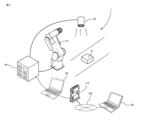
- FIG. 1 is a diagram showing an example of a remote support system according to this embodiment.
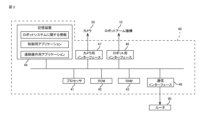
- FIG. 2 is a block configuration diagram of the remote support system of FIG.
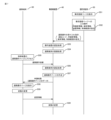
- FIG. 3 is a sequence showing an example of the procedure until the remote terminal in FIG. 1 remotely operates the control device.
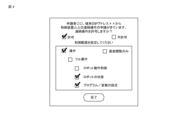
- 4 is a diagram showing an example of a reception page displayed on the operation terminal of FIG. 1.
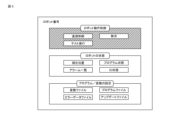
- FIG. 5 is a diagram showing an example of a remote operation page displayed on the remote terminal of FIG. 1.
- FIG. FIG. 6 is a sequence showing another example of the procedure until the remote terminal in FIG. 1 remotely operates the control device.
- FIG. 7 is a sequence showing the procedure of pre-registration processing of a remote terminal with respect to the control device of FIG.
- FIG. 8 is a diagram showing another example of the remote support system according to this embodiment.
- a remote support system 1 includes a robot arm mechanism 10 installed in a factory corresponding to an industrial machine, and a workpiece photographing camera 20 corresponding to a peripheral device of the industrial machine. , a control device 40 for controlling the robot arm mechanism 10 and the camera 20, a first information processing terminal 50 (operation terminal 50) used by the user to operate the control device 40, a maintenance company, a manufacturer engineer, and the like. and a second information processing terminal 60 (remote terminal 60 ) used to remotely operate the control device 40 .
- the operation terminal 50 can be a general-purpose terminal such as a PC or a tablet, a dedicated operation pendant, and a PLC (Programmable Logic Controller) that controls the control device 40 in an integrated manner.
- the remote terminal 60 can be a general-purpose terminal such as a PC, tablet, or the like.
- the robot arm mechanism 10 and the camera 20 are directly connected to the control device 40 by wired cables.
- the control device 40 and the operation terminal 50 are each connected to the router 110 according to the wireless LAN standard.
- the control device 40 and the operation terminal 50 can freely communicate with each other via the router 110 .
- the control device 40 and the operation terminal 50 can be connected to the Internet 100 via a router 110 .
- a remote terminal 60 can be connected to the control device 40 and the operation terminal 50 via the Internet 100 .
- a hub may be connected to the router 110 by a wired cable, and the control device 40 and the operation terminal 50 may be connected to the hub by a wired cable.
- control device 40 is connected to the robot arm mechanism 10, the camera 20 and the router 110 via respective interfaces 46, 47 and 48.
- the control device 40 can be connected to the operation terminal 50 and the Internet via the router 110 .
- the control device 40 has a processor 41 .
- the processor 41 is composed of a CPU (Central Processing Unit), a GPU (Graphics Processing Unit), etc., and comprehensively controls each device and controller connected to the system bus.
- the ROM 42 stores a BIOS (Basic Input Output System) executed by the processor 41, an operating system program (OS), and the like.
- BIOS Basic Input Output System
- the RAM 43 functions as a main memory, work area, etc. of the processor 41 .
- the storage device 44 stores information about the robot system, control applications, remote control applications, and the like.
- the information about the robot system includes a task program for causing the robot system to execute a predetermined task, setting information of the robot arm mechanism 10, setting information of the camera 20, and the like.
- the setting information of the robot arm mechanism 10 includes, for example, parameter information related to the operation of the robot arm mechanism 10, such as operation speed, acceleration, and operation range, function ON/OFF information, and operation of a hand (end effector) equipped on the robot arm mechanism 10. Includes parameter information and function on/off information related to
- the setting information of the camera 20 includes shooting range, shooting speed, and the like.
- the control application is software for controlling the robot arm mechanism 10 and the camera 20.
- the control application is executed by the processor 41, the processing of providing the control page to the operation terminal 50 registered in advance in the control device 40, the operation of the robot arm mechanism 10 and the camera 20 based on the user's operation on the control page.
- a control process is implemented.
- the control here includes direct control of the motors of the joints of the robot arm mechanism 10, correction of the task program, and correction, change, and addition of information relating to the robot system such as change of setting information.
- a remote control application is software that executes processing related to remote control.
- processing for providing an application page to the remote terminal 60 processing for accepting a remote operation application from the remote terminal 60, processing for accepting a remote operation application from the remote terminal 60, and processing for the operation terminal 50 of the user who determines acceptance of remote operation.
- reception page provision processing remote operation application transfer processing
- remote operation page provision processing to the remote terminal 60 for which remote operation is permitted and data change processing based on the operation on the remote operation page are realized. .
- An example of the procedure from when the remote terminal 60 applies for remote operation of the control device 40 to when the remote terminal 60 remotely operates the control device 40 will be described below with reference to FIG. 3 .
- An applicant who applies for remote operation of the control device 40 activates the browser on the remote terminal 60 and inputs the URL of the application page for remote operation of the control device 40 on the browser screen (step S11).
- the browser of the remote terminal 60 identifies the control device 40 by the IP address corresponding to the entered URL, and requests a remote operation application page.
- the control device 40 reads the HTML file data of the remote operation application page requested by the browser of the remote terminal 60, and transmits it to the browser of the remote terminal 60 (step S12).
- the browser of the remote terminal 60 analyzes the HTML file and displays the application page for remote control (step S13).
- the application page includes input items of applicant information for specifying the applicant, such as the applicant's (for example, maintenance worker's) name and affiliation.
- the browser of the remote terminal 60 transmits a remote operation application to the control device 40 (step S14).
- the remote operation application includes terminal information for specifying the remote terminal 60 that is the source of remote operation, device information for specifying the control device 40 that is the destination of remote operation, and applicant information entered on the application page. attached.
- the control device 40 Based on the various information received together with the remote operation application, the control device 40 creates a reception page for accepting the user's decision to accept remote operation as shown in FIG. Then, a request for determination of acceptance of remote operation is transmitted to the operation terminal 50 of the user (administrator) registered in advance in the control device 40 by transmission means such as e-mail or push notification (step S15). A link to a reception page is attached to this judgment request.
- the browser When the link attached to the received judgment request is tapped by the user's operation of the operation terminal 50, the browser is activated and the reception page is displayed by the browser (step S16). Permission or non-permission of the remote operation of the control device 40 by the remote terminal 60 is selected by the user operation on the reception page, and the control range of the control device 40 is input when permitting. Here, as shown in FIG. 4, remote operation of the control device 40 by the remote terminal 60 is permitted, and the control range is set to a predetermined range.
- the browser of the operation terminal 50 transmits an instruction to accept the remote operation to the control device 40 that requested the input (step S17).
- the acceptance instruction includes control range setting information and the like.
- the control device 40 Upon receiving the remote operation acceptance instruction, the control device 40 creates a remote operation page as shown in FIG. (step S18). In this case, the acceptance of remote operation was permitted, so the data of the remote operation page was sent to the remote terminal 60 as the application result. is sent to remote terminal 60 .
- the browser of the remote terminal 60 When the browser of the remote terminal 60 receives the application result, it displays the remote control page (step S19).
- An applicant such as a maintenance company or a manufacturer's engineer can remotely operate the control device 40 via the remote operation page. For example, when the value of a specific variable is changed by an operation on the remote control page (step S20), change information is sent to the control device 40.
- FIG. Controller 40 changes the value of a particular variable based on the change information received from remote terminal 60 (step S21).
- FIG. 4 shows an example of a reception page displayed on the operation terminal 50.
- the reception page includes applicant information for identifying the applicant who applied for remote operation, terminal information for the remote terminal 60 for identifying the remote terminal 60 who applied for remote operation, and remote operation application. It includes device information of the control device 40 for specifying the control device 40, a selection box for selecting permission/non-permission of the application, and a selection box for setting the control range.
- the remote operation of the control device 40 by the remote terminal 60 is permitted, the operation of confirming the state of the robot and the operation of changing the program/variable of the robot are permitted as the control range, and the operation of the robot is directly controlled. indicates that the operation to control is not permitted.
- the completion button is tapped, the input information is transmitted to the control device 40 specified by the device information.
- FIG. 5 shows an example of a remote control page displayed on the remote terminal 60.
- the remote operation page corresponds to the control range set on the acceptance page in FIG.
- buttons corresponding to various items related to the state of the robot are enabled so that they can be selected.
- buttons corresponding to various items related to changing the program/variable of the robot are enabled so that they can be selected.
- buttons corresponding to various items related to robot motion control are disabled so that they cannot be selected.
- the remote operation page is configured so that the remote operator cannot control the control device 40 beyond the control range set by the user.
- the remote support system 1 According to the remote support system 1 according to the present embodiment described above, acceptance of remote operation of the control device 40 by the remote terminal 60 is not determined by the control device 40 which is the remote operation destination (participant), but is controlled by the control device 40.
- An external operation terminal 50 connected to the device 40 can be made to judge.
- the remote terminal 60 requests remote operation to the control device 40
- the remote operation application is transferred to the user's operation terminal 50, so the user can respond immediately even if he or she is not on site. be able to.
- the operation terminal 50 can permit/deny the remote operation, thereby shortening the time from when the remote operation is applied to when it is permitted. For example, the time the robot system is stopped can be shortened.
- the user can arbitrarily set the control range of the control device 40 by the remote terminal 60 via the operation terminal 50 . Since the applicant for remote operation cannot control the control device 40 beyond the control range set by the user, the setting information held in the control device 40 is changed within the range not permitted by the user. Unauthorized operation can be prevented. In addition, in many cases, the operator who operates the remote terminal 60 is not at the site, so the situation at the site cannot be grasped in detail. Therefore, it cannot be completely denied that remote operation of the control device 40 may endanger workers on site. However, by setting the control range so that the items that actually operate the industrial machine and the items that may endanger the workers cannot be controlled, the above situations can be avoided. can be done. As described above, according to the remote support system 1 according to the present embodiment, it is possible to ensure the safety of the remote operation site, and to prevent unauthorized data operations.
- Steps 31 to 34 in FIG. 6 correspond to steps S11 to S14 in FIG. 3, respectively, steps 35 to S36 in FIG. 6 correspond to steps S16 and S17 in FIG. 3, and step S39 in FIG. Steps S42 to S42 correspond to steps S18 to S21 in FIG. 3, respectively, so detailed description of these steps is omitted.
- An application is installed in the operation terminal 50 for accepting applications for remote operation of the control device 40 by the remote terminal 60 .
- the operation terminal 50 accepts a request for remote operation from the remote terminal 60, displays a reception page, and receives various information input by user operations on the reception page. It can be sent to the controller 40 .
- step S34 when the input of the required items on the application page displayed on the remote terminal 60 is completed and the application button is tapped, the browser of the remote terminal 60 displays the application page.
- the operation terminal 50 is specified based on the associated user information, and a remote operation application is transmitted.
- the user information is information for specifying a user who manages the control device 40 to be remotely operated, such as an e-mail address and terminal information of the operation terminal 50 .
- the remote operation application includes terminal information for specifying the remote terminal 60 that is the source of remote operation, device information for specifying the control device 40 that is the destination of remote operation, and applicant information entered on the application page. attached.
- the operation terminal 50 creates and displays a remote operation reception page as shown in FIG. 4 based on the various information received together with the remote operation application (step S35).
- the operation terminal 50 identifies the remote control destination control device 40 based on the device information, and transmits a remote control acceptance instruction (step S36).
- the remote operation acceptance instruction includes an authentication code indicating that the remote terminal 60 is the operation terminal 50 that has the right to permit remote operation of the control device 40, terminal information of the remote terminal 60 that applied for remote operation, Setting information of the control range of the control device 40 is attached.
- the control device 40 Upon receiving the acceptance instruction from the operation terminal 50, the control device 40 authenticates the operation terminal 50 based on the authentication code (step S37), and sets the terminal information and the control range of the remote terminal 60 in the terminal list accepting remote operation. information are associated with each other and registered (step S38). Then, the control device 40 creates a remote operation page as shown in FIG. 5 and transmits it as an application result to the remote terminal 60 specified by the terminal information (step S39). As a result, the remote operation page is displayed on the remote terminal 60 (step S40). For example, when the variable is changed by the maintenance worker's operation on the remote operation page (step S41), the change information is sent to the control device 40. sent to. Upon receiving the change information from the remote terminal 60, the control device 40 changes the variables based on the change information (step S42).
- the registration process of the remote terminal 60 with respect to the control device 40 is executed when the application for remote operation of the control device 40 from the remote terminal 60 is triggered.
- the registration process for remote terminal 60 may have been performed in advance.
- the procedure for pre-registering the remote terminal 60 that accepts the remote operation of the control device 40 will be described below with reference to FIG. Steps 51 to 54 in FIG. 7 correspond to steps S35 to S38 in FIG. 6 respectively, step 55 in FIG. 7 corresponds to step S31 in FIG. 6, and steps S57 to S60 in FIG. 6, the details of these steps are omitted.
- the user receives information necessary for registration in the remote operation acceptance list of the control device 40 from the applicant by means of e-mail (applicant information, terminal information of the remote terminal 60 of the remote operation source, control device 40 of the remote operation destination device information) in advance.
- the pre-registration page is displayed on the operation terminal 50 by the user's operation (step S51).
- the device information of the remote control device 40 and the control range of the control device 40 are input.
- the operation terminal 50 specifies the remote control destination control device 40 from the device information, and transmits a remote control acceptance instruction (step S52).
- the remote operation acceptance instruction is accompanied by an authentication code indicating that the remote terminal 60 is the operation terminal 50 that has the right to permit the remote operation of the control device 40, applicant information, terminal information, and control range setting information. ing.
- the control device 40 When receiving the acceptance instruction from the operation terminal 50, the control device 40 authenticates the operation terminal 50 based on the authentication code (step S53), and sets the applicant information, the terminal information, and the control range in the terminal list accepting remote operation. The information is associated and registered (step S54). By the processing of steps S51 to S54, the pre-registration of the remote terminal 60 permitted to accept the remote operation of the control device 40 is completed.
- the control device 40 authenticates the remote terminal 60 based on the applicant information, the terminal information, etc. (S56). create a remote control page and send it to the remote terminal 60 as the application result (step S57). As a result, the remote operation page is displayed on the remote terminal 60 (step S58). For example, when the variable is changed by the maintenance worker's operation on the remote operation page (step S59), the change information is sent to the control device 40. sent to. Upon receiving the change information from the remote terminal 60, the control device 40 changes the variables based on the change information (step S60).
- the configuration is not limited to this embodiment as long as the remote terminal 60 can control the control device 40 .
- the operation terminal 50 can be connected to the control device 40 via a network line such as a LAN, but may be directly connected to the control device 40 via a wired cable, for example.
- the remote terminal 60 can be connected to the control device 40 via the Internet 100.
- the maintenance contractor since it is assumed that the maintenance contractor may be present at the on-site factory, It may be directly connected to the control device 40 .
- the operation terminal 50 may function as a relay device that relays between the remote terminal 60 and the control device 40 .
- the operation terminal 50 in the remote support system 1, the operation terminal 50 is connected to the control device 40 directly or via a network.
- the remote terminal 60 is connected to the operation terminal 50 directly or via a network.
- the operation terminal 50 permits or disallows the remote operation of the control device 50 by the remote terminal 60 .
- the operation terminal 50 permits or disallows acceptance of remote operation of the operation terminal 50 or the control device 40 from the remote terminal 60 .
- Permission or disapproval of acceptance of remote operation by the remote terminal 60 which is input at the operation terminal 50 , is performed in response to a remote operation application from the remote terminal 60 .
- the operation terminal 50 sets the control range of the control device 40 or the remote operation range of the operation terminal 50 by the remote terminal 60 .
- the remote operator can control the control device 40 within the set control range.
- the remote operator can remotely operate the operation terminal 50 within the set remote operation range. can be limited.
- the operation terminal 50 functions as a relay device that mediates transmission and reception of data between the remote terminal 60 and the control device 40 .
- the remote operator can remotely operate the control device 40 via a remote operation page displayed on the remote terminal 60 .
- the same screen as that displayed on the remote terminal 60 may be displayed on the operation terminal 50 .
- the user can sequentially check the status of the remote operation by the remote operator, so that it is possible to confirm whether or not there is any unauthorized data operation, and to prevent unauthorized operation by the remote operator. .
- the operation terminal 50 may be remotely operated by the remote terminal 60 when the operation terminal 50 functions as a relay device that relays between the remote terminal 60 and the control device 40 .
- a remote operator can substantially operate the control device 40 by remotely operating the operation terminal 50 connected to the control device 40 .
- the operation terminal 50 can determine acceptance of remote operation by the remote terminal 60 and set the control range. can be prevented.
- the operation terminal 50 was installed with a control application, and could be used as a terminal used by the user to operate the control device 40 .
- the operation terminal 50 may be a terminal that allows the user to input permission/non-permission of remote operation to the remote terminal 60, and the control application is not installed, that is, the control device 40 cannot be operated. may be
- the remote support system includes a plurality of industrial machines, a plurality of controllers 40 that respectively control the plurality of industrial machines, and one operation terminal 50 connected to the plurality of controllers 40. be able to. According to the remote support system configured in this way, it is possible for one operation terminal 50 to accept remote operations from the remote terminals 60 for each of the plurality of control devices 40 . As a result, it is not necessary to select whether to accept remote operation in each of the control devices 40, and it is possible to save time and effort on the part of the user involved in remote support.
- the robot arm mechanism 10 and the camera 20 are the objects to be controlled.
- the controlled object can be industrial machines such as machine tools, injection molding machines, and other CNC (Computer Numerical Control) controlled machines.
- machine tools include cutting machines, electric discharge machines, laser machines, ultra-precision machines, and the like.
- CNC-controlled machines include forging machines, conveyors, stockers, cloth cutters, and the like.
- the controlled object may be one of these industrial machines, or may be a system in which two or more are combined.
- the controlled object may include sensors such as a force sensor, an acceleration sensor, and a proximity sensor.
- the application page may include input items for the scope of control desired by the applicant. If the applicant can inform the user of the desired control range, the user may set the control range unnecessarily wide, increasing the risk of unauthorized operation, or setting the control range unnecessarily narrow. , it is possible to avoid a situation in which the setting of the control range is redone. In other words, it is possible to prevent unauthorized operation by a remote operator and to save the user's labor involved in remote operation.
- a control range related to the robot motion and a control range not related to the robot motion are displayed separately.
- a reception page is provided so that the setting of the control range related to the robot motion and the setting of the control range not related to the robot motion can be performed separately.
- the control range may include the following items. ⁇ Addition, deletion, and update of software ⁇ Addition of operating programs ⁇ Troubleshooting ⁇ Regular diagnosis ⁇ Check the settings of peripheral devices (camera, force sensor, etc.), adjust parameters ⁇ Checking and changing the settings of other applications ⁇ Direct operation of peripheral equipment
- the remote operator can access the control software installed in the control device 40 to control the industrial machine on the remote operator side such as the remote terminal 60. can be added or deleted, or the already installed control software can be upgraded to a modified version that adds new functions or fixes defects.
- the added control software includes software for controlling the vision and force sensors newly added to the industrial machine, and software for new functions developed after the industrial machine is installed at the user's production site.
- An operation program an operation program created by offline simulation can be added to the control device 40, or an operation program installed in another industrial machine can be copied and added to another control device 40.
- “Troubleshooting” allows the remote operator to analyze and solve problems.
- "Periodical diagnosis” allows the remote operator to periodically check whether the industrial machines such as the robot arm mechanism 10 and the camera 20 are operating smoothly even if no trouble occurs. .
- the remote operator may be able to check operating parameters and status that are not accessible by the user's authority.
- One of the advantages of the configuration of the present embodiment is that the control device 40 can be directly controlled without going through the operation terminal 50, so that contents that cannot be accessed from the operation terminal 50 can be checked.
- Checking the settings of peripheral devices (cameras, force sensors, etc.) and adjusting parameters” includes checking the settings for controlling peripheral devices such as cameras and force sensors built into industrial machines, and checking the settings for vision detection and force sensors. Adjustment of detailed parameters for control can be made directly from remote terminal 60 . Since users are often unfamiliar with handling peripheral devices, it is possible to provide efficient user support through remote operation. "Confirmation of settings of other applications” allows the remote operator to check the settings of applications used during spot welding, arc welding, laser processing, sealing, and palletizing, turn functions on and off, adjust parameters, etc. It can be carried out. "Direct operation of peripheral equipment” allows the remote operator to operate the robot and cameras installed in the surrounding area to check the status of the site. As a result, the remote operator can freely check the part to be checked, so that user support can be efficiently performed by remote control.
- Items included in the control range by remote operation may include I/O signals for controlling communication between the hands and peripheral devices equipped on the robot arm mechanism 10 and the control device 40 .
- I/O signals for controlling communication between the hands and peripheral devices equipped on the robot arm mechanism 10 and the control device 40 .
- interlocks between the control device 40 and peripheral devices or between peripheral devices may not function as expected due to unexpected events, causing troubles.
- the remote operator can check the details of the I/O signals that control the communication between devices, and correct them as appropriate to quickly troubleshoot.
Landscapes
- Engineering & Computer Science (AREA)
- General Engineering & Computer Science (AREA)
- Manufacturing & Machinery (AREA)
- Quality & Reliability (AREA)
- Physics & Mathematics (AREA)
- General Physics & Mathematics (AREA)
- Automation & Control Theory (AREA)
- Robotics (AREA)
- Mechanical Engineering (AREA)
- Selective Calling Equipment (AREA)
Abstract
Description
ロボットシステムに関する情報は、ロボットシステムに所定のタスクを実行させるためのタスクプログラム、ロボットアーム機構10の設定情報、及びカメラ20の設定情報等を含む。ロボットアーム機構10の設定情報は、例えば、ロボットアーム機構10の動作速度、加速度、動作範囲などの動作に関わるパラメータ情報や機能のオンオフ情報、ロボットアーム機構10が装備するハンド(エンドエフェクタ)の動作に関わるパラメータ情報や機能のオンオフ情報を含む。カメラ20の設定情報は、撮影範囲、撮影速度等を含む。
制御装置40の遠隔操作を申請する申請者による操作により、遠隔端末60でブラウザが起動され、ブラウザ画面上で制御装置40の遠隔操作の申請ページのURLが入力される(工程S11)。遠隔端末60のブラウザは、入力されたURLに対応するIPアドレスにより制御装置40を特定し、遠隔操作の申請ページを要求する。
・ソフトウェアの追加、削除、アップデート
・動作プログラムの追加
・トラブルシューティング
・定期診断
・周辺機器(カメラ、力センサ等)の設定の確認、パラメータの調整
・他のアプリケーションの設定の確認、変更
・周辺機器の直接操作
「ソフトウェアの追加、削除、アップデート」により、遠隔操作者は、遠隔端末60等の遠隔操作者側で、産業機械を制御するために制御装置40にインストールされている制御ソフトウェアを追加、削除したり、既にインストールされている制御ソフトウェアに対して、新たな機能追加や不具合修正が盛り込まれた修正版にアップグレードすることができる。追加する制御ソフトウェアには、産業機械に新たに追加されたビジョンや力センサなどを制御するためのソフトウェアや、産業機械がユーザの生産現場に設置された後に開発された新しい機能のソフトウェアなども含まれる。「動作プログラムの追加」では、オフラインシミュレーションで作成した動作プログラムを制御装置40に追加したり、他の産業機械にインストールされている動作プログラムをコピーして、別の制御装置40に追加することができる。「トラブルシューティング」により、遠隔操作者は、不具合を分析し、解決することができる。「定期診断」により、遠隔操作者は、トラブルが発生していない場合であっても、ロボットアーム機構10やカメラ20などの産業機械が順調に稼働しているかを定期的に確認することができる。「トラブルシューティング」や「定期診断」では、ユーザ側の権限ではアクセスできないような動作パラメータ、ステータスを遠隔操作者が確認できるようにしてもよい。操作端末50を経由せずに、制御装置40を直接的に制御できることで、操作端末50ではアクセスできないような内容を確認できることは、本実施形態の構成の1つの利点である。
Claims (6)
- 産業機械を制御する制御装置と、
前記制御装置に、直接またはネットワーク回線を介して接続される第1情報処理端末と、
前記制御装置または前記第1情報処理端末に、直接または前記ネットワーク回線を介して接続される第2情報処理端末と、
を具備し、
前記第1情報処理端末は、前記第2情報処理端末からの前記制御装置または前記第1情報処理端末に対する遠隔操作を受け入れることを許可する、遠隔支援システム。 - 前記第1情報処理端末は、前記第2情報処理端末が前記制御装置または前記第1情報処理端末に対して遠隔操作する範囲を設定する、請求項1記載の遠隔支援システム。
- 前記第1情報処理端末は、前記第2情報処理端末からの遠隔操作申請に呼応して、前記第2情報処理端末による前記制御装置または前記第1情報処理端末の遠隔操作を許可する、請求項1記載の遠隔支援システム。
- 前記遠隔操作申請は、前記制御装置から前記第1情報処理端末に転送される、請求項3記載の遠隔支援システム。
- 前記第1情報処理端末は、前記制御装置または前記第1情報処理端末に対する遠隔操作を、前記第2情報処理端末を特定して事前に許可する、請求項1記載の遠隔支援システム。
- 前記第1情報処理端末は前記産業機械の専用の教示操作盤である、請求項1記載の遠隔支援システム。
Priority Applications (6)
| Application Number | Priority Date | Filing Date | Title |
|---|---|---|---|
| CN202180103603.2A CN118140184A (zh) | 2021-12-02 | 2021-12-02 | 远程支持系统 |
| PCT/JP2021/044255 WO2023100313A1 (ja) | 2021-12-02 | 2021-12-02 | 遠隔支援システム |
| JP2023564360A JPWO2023100313A1 (ja) | 2021-12-02 | 2021-12-02 | |
| DE112021008241.8T DE112021008241T5 (de) | 2021-12-02 | 2021-12-02 | Fernunterstützungssystem |
| US18/699,007 US20240402686A1 (en) | 2021-12-02 | 2021-12-02 | Remote support system |
| TW111144358A TW202324007A (zh) | 2021-12-02 | 2022-11-21 | 遠距支援系統 |
Applications Claiming Priority (1)
| Application Number | Priority Date | Filing Date | Title |
|---|---|---|---|
| PCT/JP2021/044255 WO2023100313A1 (ja) | 2021-12-02 | 2021-12-02 | 遠隔支援システム |
Publications (1)
| Publication Number | Publication Date |
|---|---|
| WO2023100313A1 true WO2023100313A1 (ja) | 2023-06-08 |
Family
ID=86611669
Family Applications (1)
| Application Number | Title | Priority Date | Filing Date |
|---|---|---|---|
| PCT/JP2021/044255 Ceased WO2023100313A1 (ja) | 2021-12-02 | 2021-12-02 | 遠隔支援システム |
Country Status (6)
| Country | Link |
|---|---|
| US (1) | US20240402686A1 (ja) |
| JP (1) | JPWO2023100313A1 (ja) |
| CN (1) | CN118140184A (ja) |
| DE (1) | DE112021008241T5 (ja) |
| TW (1) | TW202324007A (ja) |
| WO (1) | WO2023100313A1 (ja) |
Cited By (1)
| Publication number | Priority date | Publication date | Assignee | Title |
|---|---|---|---|---|
| CN116827932A (zh) * | 2023-08-30 | 2023-09-29 | 中航金网(北京)电子商务有限公司 | 一种多服务器远程控制方法、装置、电子设备及存储介质 |
Citations (4)
| Publication number | Priority date | Publication date | Assignee | Title |
|---|---|---|---|---|
| JP2000315103A (ja) * | 1999-04-30 | 2000-11-14 | Star Micronics Co Ltd | Nc工作機械の管理システム、管理プログラムおよびnc工作機械 |
| WO2011010396A1 (ja) * | 2009-07-22 | 2011-01-27 | 株式会社牧野フライス製作所 | 工作機械の遠隔操作システム |
| JP2015180996A (ja) * | 2014-03-07 | 2015-10-15 | ブラザー工業株式会社 | 制御装置 |
| WO2017169144A1 (ja) * | 2016-03-31 | 2017-10-05 | ソニー株式会社 | 情報処理装置、情報処理方法、およびプログラム |
Family Cites Families (1)
| Publication number | Priority date | Publication date | Assignee | Title |
|---|---|---|---|---|
| JP2001142512A (ja) | 1999-11-16 | 2001-05-25 | Mitsubishi Electric Corp | ロボットの遠隔操作システム |
-
2021
- 2021-12-02 JP JP2023564360A patent/JPWO2023100313A1/ja active Pending
- 2021-12-02 DE DE112021008241.8T patent/DE112021008241T5/de active Pending
- 2021-12-02 WO PCT/JP2021/044255 patent/WO2023100313A1/ja not_active Ceased
- 2021-12-02 US US18/699,007 patent/US20240402686A1/en active Pending
- 2021-12-02 CN CN202180103603.2A patent/CN118140184A/zh active Pending
-
2022
- 2022-11-21 TW TW111144358A patent/TW202324007A/zh unknown
Patent Citations (4)
| Publication number | Priority date | Publication date | Assignee | Title |
|---|---|---|---|---|
| JP2000315103A (ja) * | 1999-04-30 | 2000-11-14 | Star Micronics Co Ltd | Nc工作機械の管理システム、管理プログラムおよびnc工作機械 |
| WO2011010396A1 (ja) * | 2009-07-22 | 2011-01-27 | 株式会社牧野フライス製作所 | 工作機械の遠隔操作システム |
| JP2015180996A (ja) * | 2014-03-07 | 2015-10-15 | ブラザー工業株式会社 | 制御装置 |
| WO2017169144A1 (ja) * | 2016-03-31 | 2017-10-05 | ソニー株式会社 | 情報処理装置、情報処理方法、およびプログラム |
Cited By (2)
| Publication number | Priority date | Publication date | Assignee | Title |
|---|---|---|---|---|
| CN116827932A (zh) * | 2023-08-30 | 2023-09-29 | 中航金网(北京)电子商务有限公司 | 一种多服务器远程控制方法、装置、电子设备及存储介质 |
| CN116827932B (zh) * | 2023-08-30 | 2023-10-31 | 中航金网(北京)电子商务有限公司 | 一种多服务器远程控制方法、装置、电子设备及存储介质 |
Also Published As
| Publication number | Publication date |
|---|---|
| US20240402686A1 (en) | 2024-12-05 |
| JPWO2023100313A1 (ja) | 2023-06-08 |
| TW202324007A (zh) | 2023-06-16 |
| CN118140184A (zh) | 2024-06-04 |
| DE112021008241T5 (de) | 2024-08-22 |
Similar Documents
| Publication | Publication Date | Title |
|---|---|---|
| US8005572B2 (en) | Flexible connection of teaching devices to programmable controllers | |
| CN103870270B (zh) | 用于生成用于工业自动化装置的操作和观察设备的显示和操作视图的方法和服务器 | |
| JP6816553B2 (ja) | 制御システム | |
| US20180299863A1 (en) | Combined visualization thin client hmi system and method | |
| US20170057083A1 (en) | Robot system for operating robot from plurality of teaching devices | |
| JP7481228B2 (ja) | 制御装置 | |
| WO2009097895A1 (en) | An industrial robot system | |
| WO2023100313A1 (ja) | 遠隔支援システム | |
| JP5474765B2 (ja) | ロボット制御システム | |
| JP4062492B2 (ja) | 安全条件設定支援装置及びプログラム並びに記録媒体 | |
| CN115916489B (zh) | 机器人控制装置 | |
| JP2023173847A (ja) | ロボット制御システム | |
| JP7698044B2 (ja) | 遠隔支援システム | |
| JP4160768B2 (ja) | Nc工作機械の管理方法 | |
| CN112989296A (zh) | 机器人操作终端 | |
| JP7670405B1 (ja) | 産業機械の管理方法 | |
| JP2023173851A (ja) | ロボット制御システム | |
| US20250060868A1 (en) | Verfahren zum Konfigurieren eines SPS-Geräts und ein SPS-Verwaltungssystem zum Ausführen des Verfahrens | |
| WO2026023258A1 (ja) | 設定システムおよび設定中間機器 | |
| WO2025115182A1 (ja) | データ管理装置、データ提供システム、データ管理方法及びプログラム | |
| KR20230036312A (ko) | 원자력 시설의 유지보수 지원 시스템 | |
| JP2004059251A (ja) | エレベータの運転制御方法 | |
| CN117460600A (zh) | 在机器人系统中提供安全 | |
| JP2020022112A (ja) | サポート装置、設定方法、および設定プログラム |
Legal Events
| Date | Code | Title | Description |
|---|---|---|---|
| 121 | Ep: the epo has been informed by wipo that ep was designated in this application |
Ref document number: 21966396 Country of ref document: EP Kind code of ref document: A1 |
|
| ENP | Entry into the national phase |
Ref document number: 2023564360 Country of ref document: JP Kind code of ref document: A |
|
| WWE | Wipo information: entry into national phase |
Ref document number: 202180103603.2 Country of ref document: CN |
|
| WWE | Wipo information: entry into national phase |
Ref document number: 112021008241 Country of ref document: DE |
|
| 122 | Ep: pct application non-entry in european phase |
Ref document number: 21966396 Country of ref document: EP Kind code of ref document: A1 |