WO2022044145A1 - 携帯型コンテンツ視聴装置及びコンテンツ視聴方法 - Google Patents
携帯型コンテンツ視聴装置及びコンテンツ視聴方法 Download PDFInfo
- Publication number
- WO2022044145A1 WO2022044145A1 PCT/JP2020/032108 JP2020032108W WO2022044145A1 WO 2022044145 A1 WO2022044145 A1 WO 2022044145A1 JP 2020032108 W JP2020032108 W JP 2020032108W WO 2022044145 A1 WO2022044145 A1 WO 2022044145A1
- Authority
- WO
- WIPO (PCT)
- Prior art keywords
- external light
- content
- display
- threshold value
- measured value
- Prior art date
- Legal status (The legal status is an assumption and is not a legal conclusion. Google has not performed a legal analysis and makes no representation as to the accuracy of the status listed.)
- Ceased
Links
Images











Classifications
-
- H—ELECTRICITY
- H04—ELECTRIC COMMUNICATION TECHNIQUE
- H04N—PICTORIAL COMMUNICATION, e.g. TELEVISION
- H04N21/00—Selective content distribution, e.g. interactive television or video on demand [VOD]
- H04N21/40—Client devices specifically adapted for the reception of or interaction with content, e.g. set-top-box [STB]; Operations thereof
- H04N21/47—End-user applications
- H04N21/472—End-user interface for requesting content, additional data or services; End-user interface for interacting with content, e.g. for content reservation or setting reminders, for requesting event notification, for manipulating displayed content
- H04N21/47217—End-user interface for requesting content, additional data or services; End-user interface for interacting with content, e.g. for content reservation or setting reminders, for requesting event notification, for manipulating displayed content for controlling playback functions for recorded or on-demand content, e.g. using progress bars, mode or play-point indicators or bookmarks
-
- H—ELECTRICITY
- H04—ELECTRIC COMMUNICATION TECHNIQUE
- H04N—PICTORIAL COMMUNICATION, e.g. TELEVISION
- H04N21/00—Selective content distribution, e.g. interactive television or video on demand [VOD]
- H04N21/40—Client devices specifically adapted for the reception of or interaction with content, e.g. set-top-box [STB]; Operations thereof
- H04N21/41—Structure of client; Structure of client peripherals
- H04N21/4104—Peripherals receiving signals from specially adapted client devices
- H04N21/4126—The peripheral being portable, e.g. PDAs or mobile phones
-
- H—ELECTRICITY
- H04—ELECTRIC COMMUNICATION TECHNIQUE
- H04N—PICTORIAL COMMUNICATION, e.g. TELEVISION
- H04N21/00—Selective content distribution, e.g. interactive television or video on demand [VOD]
- H04N21/40—Client devices specifically adapted for the reception of or interaction with content, e.g. set-top-box [STB]; Operations thereof
- H04N21/41—Structure of client; Structure of client peripherals
- H04N21/422—Input-only peripherals, i.e. input devices connected to specially adapted client devices, e.g. global positioning system [GPS]
- H04N21/42202—Input-only peripherals, i.e. input devices connected to specially adapted client devices, e.g. global positioning system [GPS] environmental sensors, e.g. for detecting temperature, luminosity, pressure, earthquakes
-
- H—ELECTRICITY
- H04—ELECTRIC COMMUNICATION TECHNIQUE
- H04N—PICTORIAL COMMUNICATION, e.g. TELEVISION
- H04N21/00—Selective content distribution, e.g. interactive television or video on demand [VOD]
- H04N21/40—Client devices specifically adapted for the reception of or interaction with content, e.g. set-top-box [STB]; Operations thereof
- H04N21/41—Structure of client; Structure of client peripherals
- H04N21/422—Input-only peripherals, i.e. input devices connected to specially adapted client devices, e.g. global positioning system [GPS]
- H04N21/4223—Cameras
-
- H—ELECTRICITY
- H04—ELECTRIC COMMUNICATION TECHNIQUE
- H04N—PICTORIAL COMMUNICATION, e.g. TELEVISION
- H04N21/00—Selective content distribution, e.g. interactive television or video on demand [VOD]
- H04N21/40—Client devices specifically adapted for the reception of or interaction with content, e.g. set-top-box [STB]; Operations thereof
- H04N21/43—Processing of content or additional data, e.g. demultiplexing additional data from a digital video stream; Elementary client operations, e.g. monitoring of home network or synchronising decoder's clock; Client middleware
- H04N21/431—Generation of visual interfaces for content selection or interaction; Content or additional data rendering
- H04N21/4312—Generation of visual interfaces for content selection or interaction; Content or additional data rendering involving specific graphical features, e.g. screen layout, special fonts or colors, blinking icons, highlights or animations
-
- H—ELECTRICITY
- H04—ELECTRIC COMMUNICATION TECHNIQUE
- H04N—PICTORIAL COMMUNICATION, e.g. TELEVISION
- H04N5/00—Details of television systems
- H04N5/76—Television signal recording
- H04N5/91—Television signal processing therefor
- H04N5/93—Regeneration of the television signal or of selected parts thereof
Definitions
- the present invention relates to a portable content viewing device and a content viewing method.
- Patent Document 1 describes "a video data reproduction unit, a sensor unit including at least one sensor for detecting the occurrence of a viewing inhibition event, and an acquisition unit for acquiring an instruction from a user.
- the video data playback unit While the video data playback unit is playing back the video data, the occurrence of the viewing inhibition event is monitored based on the output of each sensor of the sensor unit, and the position information indicating the playback location of the video data at the time of the occurrence of the viewing inhibition event is stored in the EEPROM.
- the video data reproduction unit is provided with a control unit that reproduces the video data from the location corresponding to the position information (.
- the video playback device is disclosed.
- environmental sound is exemplified as a viewing inhibition event.
- the video reproduction device which is a portable device, an aspect of detecting an earthquake or a telephone reception as a viewing obstruction event is disclosed.
- Patent Document 1 does not consider the occurrence of content viewing obstruction events due to external light encountered in an outdoor environment.
- the present invention has been made in view of the above circumstances, and an object of the present invention is to provide a portable content viewing device and method capable of responding to a content viewing obstruction event due to external light.
- the present invention has the configuration described in the claims.
- the present invention is a portable content viewing device, wherein a light amount sensor, a display, an operation member, and a processor connected to each of the light amount sensor, the display, and the operation member.
- the processor reproduces and displays the content on the display, stores the scene and the time when the content is reproduced and displayed in relation to each other, acquires the measured value of the light amount sensor, and measures the measurement.
- the measured value is displayed on the display at the time when it is determined to be equal to or higher than the external light threshold.
- the measured value is determined to be equal to or higher than the external light threshold. Return to the scene of the content displayed on the display and play it again to display it.
- the present invention is a portable content viewing device, which is a portable content viewing device, and is a light amount sensor, a display, an operation member, a timer, the light amount sensor, the display, the operation member, and the said.
- a processor connected to each of the timers is provided, and the processor reproduces and displays the content on the display, and stores the scene and time when the content is reproduced and displayed in relation to each other, and the light amount sensor.
- the measurement value is obtained, the external light threshold is calculated by adding a predetermined amount of light to the measured value, and it is determined that the time from the present to the external light threshold is shorter than the predetermined fixed time.
- the measured value is obtained. Returns to the scene of the content displayed on the display at the time when it is determined that is equal to or higher than the external light threshold, and is reproduced and displayed again.
- the present invention is a content viewing method executed by a portable content viewing device, in which the content is reproduced and displayed on a display, and the scene and time when the content is reproduced and displayed are stored in association with each other. And, the measured value of the light amount sensor is acquired, the measured value is compared with a predetermined external light threshold, and when it is determined that the measured value is equal to or higher than the external light threshold, the measured value is the external light threshold.
- the step of proposing re-viewing to return to the scene of the content displayed on the display and replaying it again at the time determined to be the above and the input of the re-viewing instruction are received, the measured value is the external light. It includes a step of returning to the scene of the content displayed on the display at the time when it is determined that the value is equal to or higher than the threshold value, and replaying and displaying the scene.
- FIG. 11 is a flowchart showing the flow of the occurrence determination process of the viewing inhibition event shown in FIGS. 11A and 11B.
- FIG. 11 is a flowchart showing the flow of the occurrence determination process of the viewing inhibition event shown in FIGS. 11A and 11B.
- FIG. 12A is a flowchart showing a flow of a modified example of the generation determination process of the viewing inhibition event shown in FIG. 12A.
- the flowchart which shows the flow of the occurrence determination processing of the viewing obstruction event shown in FIG. 11C.
- FIG. 6 is a flowchart showing a flow of a viewing inhibition event occurrence determination process shown in FIG. It is a figure which shows the occurrence determination processing example of the viewing inhibition event shown in FIG.
- the figure which shows the display example of a re-view button The figure which shows the display example of a re-view button.
- It is a figure which shows the measurement example of the peripheral light amount (a) is an example of measuring the peripheral light amount based on the image taken by an in-camera, (b) is an example of measuring by the amount of light incident on an in-camera, (c) is an example. This is an example of measuring the amount of light with an out-camera.
- the portable content viewing device provides an external light threshold value for the amount of external light measured around the screen of the portable content viewing device, and the external light amount changes during content reproduction to obtain an external light threshold value. It is characterized in that if it exceeds the above, it is judged that the viewing is hindered and the re-viewing process is performed.
- an embodiment using the smartphone 100 as an example of the portable content viewing device will be described, but the tablets are also different in size but have the same component configuration, and the present invention can be applied.
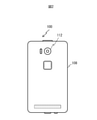
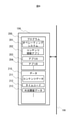
- FIG. 1 is a front view of the smartphone 100 according to the present embodiment, and FIG. 2 is a rear view.
- the smartphone 100 includes a display 102, an in-camera 111, and an illuminance sensor 165 on the front surface of the housing 108. Further, as shown in FIG. 2, the smartphone 100 includes an out-camera 112 on the back surface of the housing 108.
- the illuminance sensor 165 is one of the light amount sensors, and as described later, the in-camera 111 and the out-camera 112 may be used as the light amount sensor.
- FIG. 3 is a hardware configuration diagram of the smartphone 100.
- the smartphone 100 includes a processor 101 composed of a CPU and an MPU, a display 102, a ROM 103, a RAM 104, a storage 105, a touch panel 107 (corresponding to an operating member) laminated on the display 102, an in-camera 111, an out-camera 112, a microphone 121, and a speaker.
- operation button 130 (corresponding to an operation member), wireless LAN communication device 141 (for example, a communication device using Wifi (registered trademark)), proximity wireless communication device 142 (for example, a communication device using Bluetooth (registered trademark)).
- Telephone network communication device 143 for example, communication device using LTE, 4G, 5G
- a vibrator 150 for example, a sensor group 160, and a timer 170, which are connected to each other via a bus 106.
- the sensor group 160 includes a GPS 161, a gyro sensor 162, a geomagnetic sensor 163, an acceleration sensor 164, an illuminance sensor 165, a proximity sensor 166, a distance sensor 167, and a line-of-sight detection sensor 168.
- the operation button 130 is a member for the viewer of the content to perform an input operation, such as a button provided on the side surface or the front surface of the housing 108.
- FIG. 4 shows a program block diagram expanded in the RAM 104.
- the program 200 and the data 210 necessary for executing the program 200 are expanded in the RAM 104.
- the program 200 includes an operating system 201 required to execute the basic operation of the smartphone 100, and a content viewing application 202 as at least one or more application programs executed by the smartphone 100. Further, as an application example different from the content viewing application 202, there may be an application A203 and an application B204.
- the data 210 includes the content data 211 to be reproduced, the time code 212, and the external light threshold data 213 of the external light.
- the content data 211 may be a package (that is, content data including all data from the beginning to the end of the content to be viewed), or in the case of content to be streamed, it is buffer data of streaming data. In the case of streaming distribution, the description will be given below on the premise that the data required for re-viewing (replay) is buffered in the content viewing process described later.
- the processor 101 determines that the content data is to be replayed back to, for example, 10 seconds ago, the content data is replayed from the earliest time point (for example, 8 seconds ago) among the buffered content data that cannot be returned up to 10 seconds ago. To.
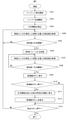
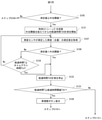
- FIG. 5 is a flowchart showing an outline of the content viewing process executed by the smartphone 100.
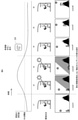
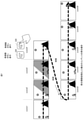
- 6 and 7 are diagrams showing the reproduction order of the contents.
- the processor 101 When the processor 101 starts playing the content (S101), the processor 101 records the content data in the buffer memory (RAM 104) in association with the playing time (S102).
- the processor 101 reads the external light threshold value data 213 from the RAM 104 (S103), acquires the measured value of the illuminance (light amount) measured by the illuminance sensor 165 (S104), and obtains the measured value and the external light threshold value. Is compared with (S105).
- the external light threshold value is a threshold value of the amount of light used for determining the presence or absence of an viewing inhibition event.
- the processor 101 determines that the measured value is less than the external light threshold value (S105: No)
- the processor 101 returns to step S104 and continues playing the content.
- FIGS. 6 and 7 it corresponds to the time t1, and the viewer on the train is watching the scene 1.
- the processor 101 determines that the measured value is equal to or higher than the external light threshold value (S105: Yes)
- the processor 101 records the time at the time of determination (S106). In FIGS. 6 and 7, it corresponds to the time t2.
- the processor 101 can specify the time t2 as information that can specify the time when the measured value becomes equal to or higher than the external light threshold, or the data (sequence number) that can specify the scene 2 of the content displayed at the time t2 instead of the time t2. Etc.) and continue playing the content.
- the processor 101 acquires the measured value of the illuminance from the illuminance sensor 165 again (S107), and compares the measured value with the external light threshold value (S108).
- the processor 101 determines that the measured value remains equal to or higher than the external light threshold value (S108: No)
- the processor 101 continues to acquire the measured value and compare the measured value with the external light threshold value while continuing the reproduction of the content (S107, S108). ).
- the processor 101 determines that the measured value is less than the external light threshold value (S108: Yes)
- the re-viewing button (S108: Yes) for returning the content to be played to a past time point below the external light threshold value, in the above example, to time t2 ( (Replay button) 220 is displayed (S109).
- step S113 the processor 101 continues playing the content and proceeds to step S113. In that case, as shown in FIG. 6, the scene 4 of t4 is reproduced, followed by the scene 5 and the scene 6.
- the processor 101 When the viewer of the content presses the re-viewing button 220 (S110: Yes), the processor 101 returns to the scene 2 at the time t2 when the measured value is determined to be equal to or higher than the external light threshold value, and is replayed from the scene 2 (S111). .. Then, the processor 101 hides the re-viewing button 220 (S112).
- step S13: No If the processor 101 does not detect that the content stop button has been pressed (S13: No), the processor 101 returns to step S104 and continues playing the content.
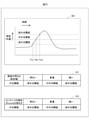
- FIG. 8 is a diagram showing an example of setting an external light threshold value.
- the external light threshold value may be an absolute value or a fixed value, or may be changed by the user as appropriate.
- the processor 101 may determine the external light threshold value by learning from the user's behavior with respect to the past determination result by the processor 101. For example, it is assumed that the processor 101 executes step S103 using the default value of the external light threshold value, and as a result, it is determined that the viewing is hindered at the time T (b). In that case, the processor 101 executed the replay from the time T (b).
- the light amount at the time T (a) is set as a new external light threshold value (after correction). May be good.
- FIG. 9 is a flowchart showing the setting process of the external light threshold value.
- FIG. 10 is a diagram showing an example of an external light threshold value.
- the processor 101 may read the brightness of the screen of the smartphone 100 (brightness setting value of the display 102) (S103-1) and set an external light threshold value according to the brightness of this screen. (S103-2). If the screen brightness is a fixed value, the external light threshold is also fixed.
- the processor 101 changes the brightness of the screen according to the amount of external light
- the processor 101 also changes the external light threshold value according to the brightness of the screen at that time.
- the processor 101 may change the external light threshold value according to the brightness of the current scene of the content being played.
- table data 311 and 312 in which three levels of high external light threshold value, medium external light threshold value, and low external light threshold value are determined according to the brightness of the screen or the brightness of the content are prepared in the storage 105, and the external light threshold value is prepared. It may be loaded as data 213. Since the values increase in the order of low external light threshold value, medium external light threshold value, and high external light threshold value, as shown in Graph 301, the measured values are low external light threshold value, medium external light threshold value, and high external light threshold value in the time zone when the external light is gradually increasing. The time when the threshold value is exceeded is in the order of T (c), T (b), and T (a).
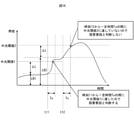
- FIG. 11 is a diagram showing an aspect in which it is determined that the measured value exceeds the external light threshold value.
- the processor 101 measures the elapsed time T from the time when the measured value exceeds the low external light threshold value. If the elapsed time T is less than the predetermined elapsed time threshold value Tth (FIG. 11A), the event in which the measured value this time exceeds the external light threshold value is not determined to be a viewing inhibition event. Then, when the elapsed time T becomes equal to or greater than the elapsed time threshold value Tth, it is determined that the viewing inhibition event has occurred (FIG. 11 (b)).
- FIG. 12A is a flowchart showing the flow of the viewing inhibition event occurrence determination process shown in FIGS. 11 (a) and 11 (b).
- the flowchart of FIG. 12A is shown from step S105 for convenience of explanation because the processes from step S101 to step S105 of FIG. 5 are the same.
- the processor 101 When the measured value becomes equal to or higher than the external light threshold value (S105: Yes), the processor 101 records the time t2 (or information that can identify the scene 2) and starts measuring the elapsed time T after exceeding the external light threshold value. (S121).
- a new measured value is acquired (S107), and if it is equal to or higher than the external light threshold value (S108: No), the process returns to step S107 and the measurement of the elapsed time T that is equal to or higher than the external light threshold value is continued.
- the processor 101 stops the measurement of the elapsed time T (S122), and compares the elapsed time T with the elapsed time threshold Tth (S123).
- the process proceeds to step S113.
- the elapsed time T is equal to or greater than the elapsed time threshold value Tth (S123: Yes)
- the re-viewing button 220 is displayed (S109). Since the following is the same as the process of FIG. 5, the description thereof will be omitted.
- FIG. 12B is a flowchart showing a flow of a modified example of the viewing inhibition event occurrence determination process shown in FIG. 12A.
- step S108 If it is determined in step S108 that the new measured value is less than the external light threshold value (S108: Yes), the measurement of the elapsed time T is stopped (S122). In step S108, if it is determined that the new measured value is equal to or greater than the external light threshold value (S108: No) and the elapsed time T is less than the timeout time Tto (S124: No), the process returns to step S107.
- the elapsed time T is equal to or greater than the timeout Tto (S124: Yes)
- the time-out time Tto> elapsed time threshold value Tth.
- the processor 101 uses a low external light threshold value and a high external light threshold value having a larger value in combination. ..
- the processor 101 may be dazzled by the fact that the amount of light is large when the measured value exceeds the high external light threshold value even if the time when the measured value exceeds the low external light threshold value is less than the elapsed time threshold value Tth. Since there is, it is judged to be an inhibitory factor.
- FIG. 13 is a flowchart showing the flow of the viewing inhibition event occurrence determination process shown in FIG. 11 (c).
- the flowchart of FIG. 13 is the same as that of FIG. 12, and the processes from step S101 to step S105 of FIG. 5 are the same. Therefore, for convenience of explanation, the flowcharts are shown from step S105.
- the processor 101 When the measured value becomes equal to or higher than the low external light threshold value (S105: Yes), the processor 101 records the time t2 (or information that can identify the scene 2) and measures the elapsed time T after exceeding the low external light threshold value. Is started (S121). It was
- the processor 101 stops the measurement of the elapsed time T (S132), and proceeds to the display of the re-viewing button (S109).
- the process returns to step S107 and the measured value and the high external light threshold value are compared (S131).
- the processor 101 stops the measurement of the elapsed time T (S122), and the elapsed time T And the elapsed time threshold Tth (S123). Since the following is the same as the process of FIG. 5, the description thereof will be omitted.
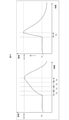
- FIG. 14 is a diagram showing an example of processing for determining the occurrence of a viewing inhibition event using the amount of change in external light.
- FIG. 15 is a flowchart showing the flow of the viewing inhibition event occurrence determination process shown in FIG.
- the Tu for a certain period of time is the same as the sampling interval of the illuminance sensor 165. That is, assuming that the illuminance sensor 165 outputs the sensor once per second, it is assumed that Tu is 1 second for a certain period of time.
- the processor 101 When the processor 101 starts playing the content (S101) and starts the buffer processing (S102), the processor 101 reads the illuminance Lc before Tu for a certain period of time from the current time t1 (S141). Since the fixed time Tu is the same as the sampling interval, the illuminance Lc before the fixed time Tu is the measured value one sampling before the measured value Lc1 at the current time t1, that is, measured in the latest past. The illuminance.
- the processor 101 acquires and records the measured value Lc1 of the illuminance measured by the illuminance sensor 165 and the current time t1 (S142).
- the processor 101 determines that the current illuminance Lc1 is equal to or higher than the external light threshold value Lc (measured value one sampling before t1) + ⁇ L (S143: Yes), the processor 101 proposes a content re-viewing process, so that a re-viewing button is displayed. Is displayed (S109).
- the processor 101 If the current illuminance Lc1 is less than the external light threshold value Lc + ⁇ L (S143: No), the processor 101 returns to step S141. After that, the illuminance before Tu, that is, the external light threshold value based on Lc1 is set from the time t2 (t2 is the time one sampling time of the illuminance sensor 165 ahead of the time t1).
- Tu is the same as the sampling interval for a certain period of time, but this may be different. For example, if Tu is shorter than the sampling interval for a certain period of time, the time when the measured value becomes the external light threshold Lc + ⁇ L or more is used as a reference, and the past sampling points before that are complemented to obtain the illuminance change function. Find the differential coefficient. As a result, this example can be applied even if Tu for a certain period of time is a minute time (a time shorter than the sampling interval).
- this example can be applied by calculating the increase rate of a plurality of sampling points before the time when the external light threshold value Lc + ⁇ L or more is used as a reference.
- FIG. 16 is a diagram showing another example of an example of processing for determining the occurrence of a viewing inhibition event using the amount of change in external light.
- a dynamic external light threshold is used.
- the configuration of the smartphone 100 used in this example is the same from FIGS. 1 to 4.
- the external light threshold is defined by the illuminance (LBx) + constant value ( ⁇ L) from moment to moment, and if the measured value is less than the external light threshold within a predetermined fixed time Tu from the illuminance from moment to moment, the viewing inhibition event occurs. Judge that it has not occurred. This is synonymous with determining whether or not the rate of increase in illuminance is above a certain value. Further, the external light threshold degree of the inhibition judgment may be defined by the average value of the illuminance (low frequency component of the illuminance) + the constant value in the immediately preceding fixed period.
- the processor 101 defines LB1 + ⁇ L, which is obtained by adding a constant value ⁇ L to the measured value LB1 at the time t11 of the illuminance sensor 165, as the external light threshold value 1 in the time from the time t11 to t11 + Tu. Then, if the measured value exceeds LB1 + ⁇ L between the times t11 and t11 + Tu, the processor 101 determines that the viewing inhibition event has occurred.
- the processor 101 defines LB2 + ⁇ L, which is obtained by adding a constant value ⁇ L to the measured value LB2 at time t12 of the illuminance sensor 165, as the external light threshold value 2 at time t12 to t12 + Tu. Then, the processor 101 does not determine that the viewing inhibition event has occurred unless the measured value exceeds LB2 + ⁇ L between the time t12 and t12 + Tu.
- FIG. 17 is a diagram showing an example of display timing of the re-viewing button.
- the re-viewing button 220 is displayed (step S109 in FIG. 5).
- the processor 101 determines that the measured value is equal to or higher than the external light threshold value (S105: Yes)
- the re-viewing button 220 may be displayed immediately (see FIG. 17). In this case, steps S107 and S108 are not executed.
- FIG. 18 and 19 are views showing a display example of the re-viewing button.
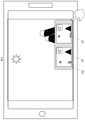
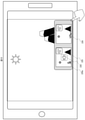
- the re-viewing button 220a displays a plurality of thumbnail moving images 225 and 226 indicating candidates for the replay scene. This allows the viewer to select a replay scene.
- the thumbnail moving image 225 is a thumbnail moving image starting from the scene at the time when the measured value is detected to be equal to or higher than the external light threshold value (hereinafter referred to as “default scene”), that is, the thumbnail moving image starting from the scene recorded in step S106 of FIG. Is.
- the other thumbnail video 226 displayed in plurality is a thumbnail video that starts before or after the default scene.
- Processor 101 plays from each replay start scene in the thumbnail video. While the processor 101 outputs the sound of the content being played on the display 102 from the speaker 122, the processor 101 does not output the sound of the thumbnail moving image and reproduces only the video.
- the processor 101 may display a plurality of thumbnail videos 225 and 226 that start playback from the replay scene when the re-viewing button 220 (see FIG. 6) is pressed.
- the processor 101 may stop the reproduction of the content being reproduced or stop the output of only the audio, and output the audio of the moving image in the thumbnail moving image 225 or the thumbnail moving image 226.
- the processor 101 reproduces the moving images of the plurality of thumbnail moving images 225 and 226, the audio output is basically stopped.
- the processor 101 may output only the audio of the default thumbnail video.
- the sound may be played.
- the audio mark 228 is displayed on the thumbnail moving image 225 in which the audio is being reproduced.
- thumbnail video has progressed from the first selected scene when the selected scene is determined by the operation of the second action, you may return to the selected scene and play it, or the continuous scene where the playback progressed by touching. You may play from.
- the thumbnail video selection operation is performed by capturing the viewer's face with the in-camera 111, detecting the line of sight with the line-of-sight detection sensor 168, and turning the line of sight to the sound of the thumbnail video 225 or thumbnail video 226. May be reproduced by the processor 101.
- FIG. 20 is a diagram showing an example of pressing the re-viewing button 220 twice.
- step S105 When the processor 101 detects that the amount of ambient light (illuminance) exceeds the threshold value by the illuminance sensor 165 or the like in a situation where the amount of external light is increasing (step S105: Yes in FIG. 5), the content at that time is reached.
- the playback position is recorded as the default scene (step S106 in FIG. 5).
- step S109 it is presented to the user that it can be played retroactively (for example, the re-view button 220 is displayed on the screen) (step S109 in FIG. 5), and if there is a user's instruction (for example, the button is pressed for the first time), it goes back to the default scene. Playback is started (step S111 in FIG. 5). Subsequently, if there is a user instruction (for example, pressing a button for the second time) again, the scene is replayed from the default scene, and in FIG. 20, the scene 1 is replayed (step S111 in FIG. 5).
- a user instruction for example, pressing a
- the double-pressed replay start scene is based on the default scene (scene 2), and is a time point with a good break before that, such as the transition of the scene or the head of the dialogue.
- step S110: Yes when the processor 101 detects that the re-viewing button 220 or 200a is pressed down (step S110: Yes), the processor 101 activates the timer 170 and starts measuring the elapsed time after pressing the re-viewing button 220. do. If the re-viewing button is not pressed for the second time before the elapsed time after pressing is set in advance, the re-viewing button 220 is hidden, the timer 170 is stopped, and the display 102 is displayed in full screen. change. Elapsed time after pressing If there is a second re-view button press before the elapsed time after pressing, the thumbnail movie played from the scene before the default scene is displayed. After the second re-viewing button pressing operation, the re-viewing button may be displayed for a certain period of time to accept the pressing operation again, or the re-viewing button may be hidden and immediately displayed in full screen. You may migrate.
- FIG. 21 and 22 are views showing a display example of the re-viewing button 220.
- the processor 101 displays the re-viewing button 220 as an invalid display, for example, grayed out (see FIG. 21A), and when it is determined that a viewing inhibition event has occurred, the processor 101 changes the re-viewing button 220 to the enabled display. (Refer to FIG. 21 (b)), it may be configured so that it can be operated.
- the re-viewing button 220 may be used in combination with the quick rewind button 221 and the back button 222, and may function as the re-viewing button 220 only when the measured value exceeds the external light threshold value.
- the fast-return button 221 is, for example, a button for returning in units of 10 seconds or a button for returning at n times speed.
- the processor 101 always displays the quick rewind button 221 in the screen of the display 102, and when it is determined that the measured value exceeds the external light threshold value, another button having a similar function, for example, early Instead of the return button 221 the re-viewing button 220 may be displayed at the display position of the fast-rewind button 221.
- the viewing inhibition event occurs and a replay is proposed to the viewer, but the viewing inhibition event has occurred and the necessity of the replay operation is indicated.
- You may input and output by voice. Further, the input of the replay operation may be performed by a gesture obtained by analyzing the moving image data captured by the in-camera 111 by the processor 101 or by a voice (utterance) collected by the microphone 121.
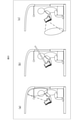
- FIG. 23 is a diagram showing a measurement example of the amount of peripheral light.
- the illuminance sensor 165 was used to measure the peripheral light amount of the smartphone 100, but instead of the illuminance sensor 165, the (average) amount of light in the periphery taken by the in-camera 111 may be measured (FIG. 23 (a)). reference).
- the processor 101 measures the peripheral illumination from the brightness value of the image captured by the in-camera 111.
- the processor 101 compares a value obtained by calculating a statistic (average value, median value, mode value, maximum value, total value) of the brightness value of each pixel constituting the image with a predetermined external light threshold value.
- the processor 101 uses the in-camera 111 to capture the viewer's face, performs face recognition processing and black eye detection processing based on the image, and determines that the image cannot be seen from facial expressions such as squinting, and determines that the peripheral light amount is not visible. May be considered to be greater than or equal to the external light threshold.
- the in-camera 111 captures an image in the direction facing the display surface.
- the amount of light will be detected. Therefore, the light transmitting surface (window glass, etc.) and the opening (open window, etc.) are detected from the captured image of the in-camera 111 by image analysis, and the brightness of the image of that portion is used to detect the user.
- the amount of light (illuminance) of light from the back direction is detected (see FIG. 23 (b)). This makes it possible to measure the light in the same direction as the light that hits the screen of the display 102.
- the processor 101 may determine the amount of light based on the change in the brightness of surrounding objects based on the image captured by the out-camera 112 (see FIG. 23 (c)). Even in the example of measuring the peripheral light amount using the image of the out-camera 112, the light in the same direction as the light hitting the screen of the display 102 can be measured.
- a portable content viewing device for example, a smartphone 100
- the scene returns to or before or after the scene where the external light is hindered. You can watch it.
- the viewing can be performed only by the momentary strong external light. It is not determined to have been inhibited. This makes it possible to propose re-viewing to the viewer only when re-viewing is necessary, even if there is a situation where the outside light becomes stronger momentarily as the vehicle moves, for example, when viewing content while riding in a vehicle. Can be done.
- the external light threshold is changed according to the viewer's preference, past operations, the brightness of the display 102, and the external light, it is possible to judge whether a viewing obstruction event has occurred depending on the viewer and the surrounding situation. You can make a more accurate judgment.
- the layout of the re-view button 220 can be intuitively understood by the viewer from where to replay.
- the re-viewing button 220 does not overwhelm the display area of the content while the screen size of the display 102 is limited, and the viewer is proposed to re-view. can.
- the smartphone 100 has been described as an example of the portable content viewing device, but a transmissive or semi-transmissive head-mounted display affected by external light is used as the portable content viewing device. You may.
- the portable content viewing device may be a rear seat monitor or a front seat monitor of an automobile. Since the rear seat monitor and the front seat monitor are powered by the battery of the automobile and have a margin of electric power, they are also suitable for measuring the peripheral illumination using the in-camera 111 and the out-camera 112.
- the viewing inhibition event is that the peripheral light amount becomes equal to or higher than the external light threshold value. good.
- the processor 101 proposes re-viewing when it is determined whether the peripheral light amount is equal to or higher than the external light threshold value or another viewing inhibition event has occurred.
Landscapes
- Engineering & Computer Science (AREA)
- Multimedia (AREA)
- Signal Processing (AREA)
- Databases & Information Systems (AREA)
- Human Computer Interaction (AREA)
- Business, Economics & Management (AREA)
- Life Sciences & Earth Sciences (AREA)
- Biodiversity & Conservation Biology (AREA)
- Ecology (AREA)
- Emergency Management (AREA)
- Environmental & Geological Engineering (AREA)
- Environmental Sciences (AREA)
- Remote Sensing (AREA)
- Controls And Circuits For Display Device (AREA)
- Television Signal Processing For Recording (AREA)
Abstract
Description
また本発明は、携帯型コンテンツ視聴装置であって、携帯型コンテンツ視聴装置であって、光量センサと、ディスプレイと、操作部材と、タイマーと、前記光量センサ、前記ディスプレイ、前記操作部材、及び前記タイマーのそれぞれに接続されたプロセッサと、を備え、前記プロセッサは、コンテンツを前記ディスプレイに再生して表示すると共に、前記コンテンツを再生して表示したシーン及び時刻を関係づけて記憶し、前記光量センサの測定値を取得し、当該測定値に予め定めた光量を加えた外光閾値を演算し、現在から前記外光閾値に至るまでの時間が予め定めた一定時間より短いと判断すると、前記測定値が外光閾値に達した時刻に前記ディスプレイに表示されていたコンテンツのシーンに戻って再度再生する再視聴の提案を行い、前記操作部材から再視聴の指示の入力を受け付けると、前記測定値が前記外光閾値以上であると判断した時刻に前記ディスプレイに表示されていたコンテンツのシーンに戻って再度再生表示する。
図8は、外光閾値の設定例を示す図である。
図11は、測定値が外光閾値を超えたと判断する態様を示す図である。図11(a)のように、プロセッサ101は、測定値が低外光閾値を超えた時点からの経過時間Tを計測する。そして、その経過時間Tが予め定められた経過時間閾値Tth未満であれば(図11(a))、今回の測定値が外光閾値を超えたイベントは視聴阻害イベントと判断しない。そして、経過時間Tが経過時間閾値Tth以上となると、視聴阻害イベントが発生したと判断する(図11(b))。
現在の外光の光量を基準として、光量が急激に増加した場合(明順応が追い付かない場合)に阻害要因と判断してもよい。図14は、外光の変化量を用いた視聴阻害イベントの発生判断処理例を示す図である。
図17は、再視聴ボタンの表示タイミング例を示す図である。上記の説明では測定値が外光閾値未満になると再視聴ボタン220を表示した(図5のステップS109)。しかし、他例として、プロセッサ101は、測定値が外光閾値以上であると判断(S105:Yes)すると、すぐに再視聴ボタン220を表示してもよい(図17参照)。この場合は、ステップS107、S108は実行されない。
図18、図19は再視聴ボタンの表示例を示す図である。図18に示すように、再視聴ボタン220aは、リプレイシーンの候補を示す複数のサムネール動画225、226を表示する。これにより、視聴者がリプレイシーンを選べる。
図20は、再視聴ボタン220の2回押下例を示す図である。
図21、図22は、再視聴ボタン220の表示例を示す図である。プロセッサ101は、再視聴ボタン220を無効化表示、例えばグレーアウトで表示しておき(図21(a)参照)、視聴阻害イベントが発生したと判断すると、再視聴ボタン220を有効化表示に変更して(図21(b)参照)操作できるように構成してもよい。
図23は、周辺光量の測定例を示す図である。
101 :プロセッサ
102 :ディスプレイ
103 :ROM
104 :RAM
105 :ストレージ
106 :バス
107 :タッチパネル
108 :筐体
111 :インカメラ
112 :アウトカメラ
121 :マイク
122 :スピーカ
130 :操作ボタン
141 :無線LAN通信器
142 :近接無線通信器
143 :電話網通信器
150 :バイブレータ
160 :センサ群
161 :GPS
162 :ジャイロセンサ
163 :地磁気センサ
164 :加速度センサ
165 :照度センサ
166 :近接センサ
167 :距離センサ
168 :視線検出センサ
170 :タイマー
200 :プログラム
201 :オペレーティングシステム
202 :コンテンツ視聴アプリ
203 :アプリA
204 :アプリB
210 :データ
211 :コンテンツデータ
212 :タイムコード
213 :外光閾値データ
220 :再視聴ボタン
220a :再視聴ボタン
221 :早戻しボタン
222 :戻るボタン
225 :サムネール動画
226 :サムネール動画
228 :音声マーク
301 :グラフ
311 :テーブルデータ
312 :テーブルデータ
313 :グラフ
Claims (15)
- 携帯型コンテンツ視聴装置であって、
光量センサと、
ディスプレイと、
操作部材と、
前記光量センサ、前記ディスプレイ、及び前記操作部材のそれぞれに接続されたプロセッサと、を備え、
前記プロセッサは、
コンテンツを前記ディスプレイに再生して表示すると共に、前記コンテンツを再生して表示したシーン及び時刻を関係づけて記憶し、
前記光量センサの測定値を取得し、当該測定値と予め定められた外光閾値とを比較し、
前記測定値が前記外光閾値以上であると判断すると、前記測定値が前記外光閾値以上であると判断した時刻に前記ディスプレイに表示されていたコンテンツのシーンに戻って再度再生する再視聴の提案を行い、
前記操作部材から再視聴の指示の入力を受け付けると、前記測定値が前記外光閾値以上であると判断した時刻に前記ディスプレイに表示されていたコンテンツのシーンに戻って再度再生表示する、
携帯型コンテンツ視聴装置。 - 請求項1に記載の携帯型コンテンツ視聴装置であって、
前記プロセッサは、前記ディスプレイの明るさ設定値に応じて前記外光閾値を設定する、
携帯型コンテンツ視聴装置。 - 請求項1に記載の携帯型コンテンツ視聴装置であって、
前記プロセッサは、前記ディスプレイに表示されたコンテンツのシーンの明るさに応じて前記外光閾値を設定する、
携帯型コンテンツ視聴装置。 - 請求項1に記載の携帯型コンテンツ視聴装置であって、
タイマーを更に備え、
前記プロセッサは、前記タイマーを用いて前記測定値が前記外光閾値以上となってからの経過時間を計測し、
前記経過時間が視聴阻害イベントの発生を判断するために予め定められた経過時間閾値以上となると、前記再視聴の提案を行う、
携帯型コンテンツ視聴装置。 - 請求項4に記載の携帯型コンテンツ視聴装置であって、
前記プロセッサは、前記経過時間が前記経過時間閾値以上であると判断し、かつ新たに取得した測定値が前記外光閾値未満になったと判断すると、前記再視聴の提案を行う、
携帯型コンテンツ視聴装置。 - 請求項4に記載の携帯型コンテンツ視聴装置であって、
前記プロセッサは、前記測定値を相対的に光量が小さい低外光閾値と比較し、前記測定値が前記低外光閾値以上となってからの経過時間を計測中に、新たに取得した測定値が前記低外光閾値よりも光量が大きい高外光閾値以上となると、前記経過時間が前記経過時間閾値に達していなくとも前記再視聴の提案を行う、
携帯型コンテンツ視聴装置。 - 請求項1に記載の携帯型コンテンツ視聴装置であって、
前記光量センサは、前記ディスプレイと同じ面に備えられたインカメラ、前記ディスプレイとは反対側に備えられたアウトカメラ、又は照度センサ、の少なくとも一つである、
携帯型コンテンツ視聴装置。 - 請求項1に記載の携帯型コンテンツ視聴装置であって、
前記プロセッサは、前記ディスプレイに前記再視聴の提案を行うための再視聴ボタンを表示する、
携帯型コンテンツ視聴装置。 - 請求項8に記載の携帯型コンテンツ視聴装置であって、
前記再視聴ボタンは、前記測定値が前記外光閾値以上であると判断した時刻に前記ディスプレイに表示されていたコンテンツのシーンから再生されるサムネール動画を含んで構成される、
携帯型コンテンツ視聴装置。 - 請求項8に記載の携帯型コンテンツ視聴装置であって、
前記プロセッサは、前記再視聴ボタンが無効化された状態で前記ディスプレイに常時表示し、前記再視聴の提案を行うと判断した際に、前記再視聴ボタンを有効化する、
携帯型コンテンツ視聴装置。 - 請求項8に記載の携帯型コンテンツ視聴装置であって、
前記プロセッサは、前記コンテンツのリプレイボタンを前記ディスプレイに常時表示し、前記再視聴の提案を行うと判断した際に、前記リプレイボタンを非表示にし、当該リプレイボタンがあった領域に前記再視聴ボタンを表示する、
携帯型コンテンツ視聴装置。 - 請求項8に記載の携帯型コンテンツ視聴装置であって、
前記プロセッサは、前記再視聴ボタンが押し下げられてから予め定められた猶予時間内に更に少なくとも1回以上押されると、前記測定値が前記外光閾値以上であると判断した時刻に前記ディスプレイに表示されていたコンテンツのシーンを基準としてそれよりも前のシーンに戻って再度再生する、
携帯型コンテンツ視聴装置。 - 請求項1に記載の携帯型コンテンツ視聴装置であって、
前記操作部材は、前記ディスプレイに積層されたタッチパネル、視聴者の発話を集音するマイク、及び前記視聴者のジェスチャーを撮像するカメラ及び当該カメラが撮像した動画データに映り込んだ前記ジェスチャーを解析する前記プロセッサ、の少なくとも一つである、
携帯型コンテンツ視聴装置。 - 携帯型コンテンツ視聴装置であって、
光量センサと、
ディスプレイと、
操作部材と、
タイマーと、
前記光量センサ、前記ディスプレイ、前記操作部材、及び前記タイマーのそれぞれに接続されたプロセッサと、を備え、
前記プロセッサは、
コンテンツを前記ディスプレイに再生して表示すると共に、前記コンテンツを再生して表示したシーン及び時刻を関係づけて記憶し、
前記光量センサの測定値を取得し、当該測定値に予め定めた光量を加えた外光閾値を演算し、
現在から前記外光閾値に至るまでの時間が予め定めた一定時間より短いと判断すると、前記測定値が前記外光閾値に達した時刻に前記ディスプレイに表示されていたコンテンツのシーンに戻って再度再生する再視聴の提案を行い、
前記操作部材から再視聴の指示の入力を受け付けると、前記測定値が前記外光閾値以上であると判断した時刻に前記ディスプレイに表示されていたコンテンツのシーンに戻って再度再生表示する、
携帯型コンテンツ視聴装置。 - 携帯型コンテンツ視聴装置で実行されるコンテンツ視聴方法であって、
コンテンツをディスプレイに再生して表示すると共に、前記コンテンツを再生して表示したシーン及び時刻を関係づけて記憶するステップと、
光量センサの測定値を取得し、当該測定値と予め定められた外光閾値とを比較し、前記測定値が前記外光閾値以上であると判断すると、前記測定値が前記外光閾値以上であると判断した時刻に前記ディスプレイに表示されていたコンテンツのシーンに戻って再度再生する再視聴の提案を行うステップと、
再視聴の指示の入力を受け付けると、前記測定値が前記外光閾値以上であると判断した時刻に前記ディスプレイに表示されていたコンテンツのシーンに戻って再度再生表示するステップと、を含む、
コンテンツ視聴方法。
Priority Applications (5)
| Application Number | Priority Date | Filing Date | Title |
|---|---|---|---|
| CN202080102857.8A CN115769569A (zh) | 2020-08-26 | 2020-08-26 | 便携式内容视听装置和内容视听方法 |
| US18/022,798 US12316917B2 (en) | 2020-08-26 | 2020-08-26 | Mobile content viewing device and content viewing method |
| JP2022544954A JP7560562B2 (ja) | 2020-08-26 | 2020-08-26 | 携帯型コンテンツ視聴装置及びコンテンツ視聴方法 |
| PCT/JP2020/032108 WO2022044145A1 (ja) | 2020-08-26 | 2020-08-26 | 携帯型コンテンツ視聴装置及びコンテンツ視聴方法 |
| US19/190,978 US20250254394A1 (en) | 2020-08-26 | 2025-04-28 | Mobile content viewing device and content viewing method |
Applications Claiming Priority (1)
| Application Number | Priority Date | Filing Date | Title |
|---|---|---|---|
| PCT/JP2020/032108 WO2022044145A1 (ja) | 2020-08-26 | 2020-08-26 | 携帯型コンテンツ視聴装置及びコンテンツ視聴方法 |
Related Child Applications (2)
| Application Number | Title | Priority Date | Filing Date |
|---|---|---|---|
| US18/022,798 A-371-Of-International US12316917B2 (en) | 2020-08-26 | 2020-08-26 | Mobile content viewing device and content viewing method |
| US19/190,978 Continuation US20250254394A1 (en) | 2020-08-26 | 2025-04-28 | Mobile content viewing device and content viewing method |
Publications (1)
| Publication Number | Publication Date |
|---|---|
| WO2022044145A1 true WO2022044145A1 (ja) | 2022-03-03 |
Family
ID=80352860
Family Applications (1)
| Application Number | Title | Priority Date | Filing Date |
|---|---|---|---|
| PCT/JP2020/032108 Ceased WO2022044145A1 (ja) | 2020-08-26 | 2020-08-26 | 携帯型コンテンツ視聴装置及びコンテンツ視聴方法 |
Country Status (4)
| Country | Link |
|---|---|
| US (2) | US12316917B2 (ja) |
| JP (1) | JP7560562B2 (ja) |
| CN (1) | CN115769569A (ja) |
| WO (1) | WO2022044145A1 (ja) |
Citations (5)
| Publication number | Priority date | Publication date | Assignee | Title |
|---|---|---|---|---|
| JP2003333463A (ja) * | 2002-05-17 | 2003-11-21 | Canon Inc | 再生装置、再生システム、再生方法、記憶媒体、及びプログラム |
| JP2007228551A (ja) * | 2006-01-30 | 2007-09-06 | Sharp Corp | 投影機能付携帯通信端末、小型投影装置および投影方法 |
| JP2008085398A (ja) * | 2006-09-25 | 2008-04-10 | Nec Saitama Ltd | 携帯端末装置、該携帯端末装置に用いられる機能制御方法及び機能制御プログラム |
| JP2011017802A (ja) * | 2009-07-08 | 2011-01-27 | J&K Car Electronics Corp | 表示装置、プログラム、及び表示方法 |
| JP2015015593A (ja) * | 2013-07-04 | 2015-01-22 | 富士通株式会社 | 映像再生装置及び映像再生プログラム |
Family Cites Families (1)
| Publication number | Priority date | Publication date | Assignee | Title |
|---|---|---|---|---|
| CN103701984B (zh) * | 2013-12-04 | 2016-01-27 | 乐视网信息技术(北京)股份有限公司 | 一种视频控制方法及手机终端 |
-
2020
- 2020-08-26 CN CN202080102857.8A patent/CN115769569A/zh active Pending
- 2020-08-26 US US18/022,798 patent/US12316917B2/en active Active
- 2020-08-26 JP JP2022544954A patent/JP7560562B2/ja active Active
- 2020-08-26 WO PCT/JP2020/032108 patent/WO2022044145A1/ja not_active Ceased
-
2025
- 2025-04-28 US US19/190,978 patent/US20250254394A1/en active Pending
Patent Citations (5)
| Publication number | Priority date | Publication date | Assignee | Title |
|---|---|---|---|---|
| JP2003333463A (ja) * | 2002-05-17 | 2003-11-21 | Canon Inc | 再生装置、再生システム、再生方法、記憶媒体、及びプログラム |
| JP2007228551A (ja) * | 2006-01-30 | 2007-09-06 | Sharp Corp | 投影機能付携帯通信端末、小型投影装置および投影方法 |
| JP2008085398A (ja) * | 2006-09-25 | 2008-04-10 | Nec Saitama Ltd | 携帯端末装置、該携帯端末装置に用いられる機能制御方法及び機能制御プログラム |
| JP2011017802A (ja) * | 2009-07-08 | 2011-01-27 | J&K Car Electronics Corp | 表示装置、プログラム、及び表示方法 |
| JP2015015593A (ja) * | 2013-07-04 | 2015-01-22 | 富士通株式会社 | 映像再生装置及び映像再生プログラム |
Also Published As
| Publication number | Publication date |
|---|---|
| CN115769569A (zh) | 2023-03-07 |
| US20250254394A1 (en) | 2025-08-07 |
| JP7560562B2 (ja) | 2024-10-02 |
| US20230328328A1 (en) | 2023-10-12 |
| JPWO2022044145A1 (ja) | 2022-03-03 |
| US12316917B2 (en) | 2025-05-27 |
Similar Documents
| Publication | Publication Date | Title |
|---|---|---|
| CN109274823B (zh) | 一种多媒体文件播放控制方法及终端设备 | |
| RU2534073C2 (ru) | Система, способ и аппарат для инструктирования устройству входить в активный режим | |
| US8022982B2 (en) | Camera system and method for operating a camera system | |
| RU2605361C2 (ru) | Способ и устройство воспроизведения мультимедиа | |
| AU2013273781B2 (en) | Method and apparatus for recording video image in a portable terminal having dual camera | |
| US20100302401A1 (en) | Image Audio Processing Apparatus And Image Sensing Apparatus | |
| CN103916711A (zh) | 一种播放视频信号的方法及装置 | |
| US12192427B2 (en) | Image capture device for generating time-lapse videos | |
| CN106766022B (zh) | 传感器控制方法及装置 | |
| CN110602386B (zh) | 一种视频录制方法及电子设备 | |
| CN111010510A (zh) | 一种拍摄控制方法、装置及电子设备 | |
| CN107786827A (zh) | 视频拍摄方法、视频播放方法、装置及移动终端 | |
| US12167152B2 (en) | Generating time-lapse videos with audio | |
| JP2011061631A (ja) | 表示方法及び表示装置 | |
| JP2019521440A (ja) | 装置および関連する方法 | |
| CN109922294B (zh) | 一种视频处理方法及移动终端 | |
| WO2017161774A1 (zh) | 截屏实现方法及装置 | |
| JP2008141484A (ja) | 画像再生システム及び映像信号供給装置 | |
| JP7560562B2 (ja) | 携帯型コンテンツ視聴装置及びコンテンツ視聴方法 | |
| US20210191586A1 (en) | Processing user input received during a display orientation change of a mobile device | |
| US12495202B1 (en) | Deletion of content captured by an image capture device | |
| JP2007004660A (ja) | 機器 | |
| US12105868B2 (en) | Information processing device, information processing method, and program |
Legal Events
| Date | Code | Title | Description |
|---|---|---|---|
| 121 | Ep: the epo has been informed by wipo that ep was designated in this application |
Ref document number: 20951399 Country of ref document: EP Kind code of ref document: A1 |
|
| ENP | Entry into the national phase |
Ref document number: 2022544954 Country of ref document: JP Kind code of ref document: A |
|
| NENP | Non-entry into the national phase |
Ref country code: DE |
|
| 122 | Ep: pct application non-entry in european phase |
Ref document number: 20951399 Country of ref document: EP Kind code of ref document: A1 |
|
| WWG | Wipo information: grant in national office |
Ref document number: 18022798 Country of ref document: US |